
X-TYPE OWNER S HANDBOOK. Publication Part No. JJM
|
|
|
- Phillip Gilbert
- 10 years ago
- Views:
Transcription
1 X-TYPE OWNER S HANDBOOK Publication Part No. JJM

2 This handbook forms part of the Owner literature supplied with your new vehicle. Left-hand drive and right-hand drive conditions may be shown in the graphics and where information is specific to a particular country, it is indicated as such. The Quick start section is designed to rapidly familiarise the driver with the initial set up and also explain some of the unique features. Please take the time to study the operating instructions with your vehicle as soon as you can. Important The information contained in this handbook covers all vehicle derivatives and optional equipment. Some of the options may not be fitted to your vehicle unless they formed part of the original vehicle specification. Therefore some parts of this handbook may not apply to your vehicle. Furthermore,due to printing cycles, it may include descriptions of options before they become generally available. The options, hardware and software in your vehicle are from the available specifications for the market in which the vehicle was intended for sale. If your vehicle is to be used in another geographical area you may have to modify the vehicle specification to suit local conditions. Jaguar Cars Limited is not responsible for the cost of any modifications. The information contained in this publication was correct when it went to print. Vehicle design changes may have been made after this handbook was printed. When this occurs a handbook supplement is added to the literature pack. Subsequent updates can be viewed on the Jaguar Internet site at; In the interest of development, the right is reserved to change specifications, design or equipment at any time without notice and without incurring any obligations. This publication, or part thereof, may not be reproduced nor translated without our approval. Errors and omissions excepted. Jaguar Cars Limited All rights reserved. Published by Jaguar Technical Communications. 2

3 Contents Quick Overview Quick Overview Filling Station Information Owner Information General Information Health and Safety Security and Locks Starter Switch Vehicle Security Door Locks Luggage Compartment Locks Alarm Systems Before Driving Occupant Protection Child Safety Seats Clock Steering Column Door Windows Mirrors Luggage Compartment On the Road Instruments Warning Indicators Audible Warnings Message Centre Trip Computer Cruise (Speed) Control Exterior Lighting Interior Lighting Parking Assist Horn Sunroof Wipers and Washers Parkbrake Interior Features Engine Starting Transmission Braking System Stability Control Driving Information Fuel and Refuelling Climate Control Climate Control Automatic Climate Control Touch-screen Climate Control Roadside Emergency Inertia Switch Emergency Starting Wheel Changing Vehicle Recovery Bulb Renewal Fuses Fire Extinguisher Maintenance General Maintenance Bonnet Release Regular Checks Checking and Top-up Battery Wiper Blades Tyres Vehicle Care Electrical Accessories Specifications Engine Data Weights Load Weights Dimensions Wheels and Tyres Fuel Consumption Touch-screen Touch-screen Touch-screen Display Audio System Audio System Steering Wheel Controls Radio Single CD Player Compact Disc Changer

4 Telephone Telephone Introduction Telephone System Telephone Operation - Standard Telephone Operation - Touch-screen 268 Phone Book Declaration of Conformity Voice Control JaguarVoice A comprehensive index is located at the back of this handbook. Contents 4

5 Quick Overview Quick Overview LOCKING AND UNLOCKING CENTRAL DOOR LOCKING LUGGAGE COMPARTMENT CLOCK AJUSTMENT SEATS WINDOWS/DOOR MIRRORS AUTO-DIMMING REAR VIEW MIRROR DRIVING POSITION MEMORY STEERING COLUMN LOCK ADJUSTMENT SEAT BELTS/CHILD RESTRAINTS.. 13 OVERHEAD CONSOLE CLIMATE CONTROL FACIA AND CONTROLS EXTERIOR LAMPS/TRIP COMPUTER WIPERS AND WASHERS WARNING INDICATORS AUTOMATIC TRANSMISSION CRUISE (SPEED) CONTROL DYNAMIC STABILITY CONTROL (DSC) AUDIO SYSTEM KEY FEATURES RADIO OPERATION CD OPERATION TELEPHONE - BLUETOOTH SYSTEM Filling Station Information FUEL TYPE FUEL FILLING BONNET RELEASE UNDERBONNET TOP-UP TYRE PRESSURES

6 6

7 Quick Overview LOCKING AND UNLOCKING Note: Dependent upon vehicle configuration, the operation of the remote handset may differ from the following. Remote handset Press once to disarm the alarm, unlock the driver s door and unlock the luggage compartment. Press again to unlock remaining doors. Press and hold to open the sunroof and windows (Global opening). Press once to switch the headlamps on for 25 seconds. Press to unlock and open luggage compartment. JAG0667 Press to release door key. Press once to lock the vehicle and arm the alarm. Press twice within three seconds to double-lock the vehicle. Press and hold to close the sunroof and any open windows (Global closing). Unlocking mode alternatives Single stage unlocking will unlock the vehicle with a single press. Two stage unlocking will unlock the driver s door and luggage compartment with a single press and all other doors with a second press. To change between modes, press and hold the lock and unlock buttons on the remote handset simultaneously for four seconds. The direction indicators will flash twice to confirm the change. Unlocking with the door key If the vehicle is unlocked manually via the door lock, the key must be inserted into the starter switch within 15 seconds to prevent the alarm being activated. 7

8 Quick Overview CENTRAL DOOR LOCKING LUGGAGE COMPARTMENT The luggage compartment is electrically locked and unlocked in conjunction with the driver s door. To open the luggage compartment with the vehicle locked, press the luggage compartment button on the remote handset. JAG0668 To lock all the doors, press the lock lever on either of the front doors. To unlock all doors, pull the lock lever on either of the front doors. Drive away door locking The doors and luggage compartment will automatically lock when the vehicle s forward speed exceeds 7 km/h (5 mph). This feature can be disabled by your Jaguar Dealer/Authorised Repairer. 1 JAG0669 To open the luggage compartment with the vehicle unlocked, press the release button 1 on the luggage compartment lid/tailgate. Tailgate glass - Estate To open the tailgate glass, press the release button 2, located on the reverse of the tailgate handle and lift the glass. Care Point The release button on the luggage compartment lid/tailgate is disabled when the vehicle is alarmed. 2 8

9 Quick Overview CLOCK AJUSTMENT Non-touch-screen Touch-screen SET CLOCK Cancel PM PM TP ST JAG /24 Set 1. Press the MENU button on the touch-screen surround to access the MENU screen. 2. Touch System setup to access the System setup screen. 3. Touch the Set clock icon. 4. Adjust the time by touching the hour and minute up or down arrow icons. 5. Touch the 12/24 icon to select between twelve or twenty-four hour display. 6. Touch Set to confirm. JOL Repeatedly press and release the MODE button (on the audio unit) until until ADV MODE N/Y is displayed. 2. Rotate the volume control to select ADV MODE YES and then press MODE. 3. CLOCK SET will be displayed with the 12/24 hours indicator flashing. Rotate the volume control clockwise for 24-hour display; counterclockwise for 12-hour display. 4. Press MODE to select the hour setting. Rotate the volume control clockwise or counterclockwise to adjust the setting. 5. Press MODE to select the minutes setting. Rotate the volume control clockwise or counterclockwise to adjust the setting. 6. To exit press and hold MODE or wait approximately five seconds until the display reverts to audio mode. 9

10 Quick Overview SEATS 4-way electrical seat adjustment 10-way electrical seat adjustment - memory seats 3 1 JAG JAG Seat fore/aft lever. Lift and slide into position. 2. Seat height switch. 3. Seat back angle switch. 6-way electrical seat adjustment Seat position switch. Controls fore/aft position and front and rear cushion height. 2. Seat back angle switch. 3. Lumbar support switch. Passenger seat The 10-way adjustable passenger seat is not fitted with memory buttons. JAG way seat adjustment controls are the same as the 4-way, but the occupant benefits from a further switch (arrowed). To increase lumbar support press the top of the switch, to decrease press the bottom. 10

11 Quick Overview WINDOWS/DOOR MIRRORS Door mirrors JAG0715 Windows The windows can be fully opened or closed with a single operation of the switch. To open the window, fully press the respective switch. Press the switch again to stop the window from fully opening. To close the window, pull the switch fully up. Pull the switch again to stop the window from fully closing. To partially open a window, lightly press the appropriate switch and release when the window reaches the required position. Press button 1 to inhibit the operation of the rear window switches. Global closing If a window has been left open when leaving the vehicle, it can be closed by pressing and holding the lock button on the remote handset (this will also close the sunroof). JAG0716 Select the appropriate mirror using selector switch 2. Use the 4-way switch 1 to adjust the position of the mirror glass. Power fold mirrors The mirrors can be folded towards the door for better clearance/protection. With the starter switch in position I or II, press button 3 to fold the mirrors. A second press returns the mirrors to their normal position. AUTO-DIMMING REAR-VIEW MIRROR With the starter switch on, the rear-view mirror will automatically darken to counteract glare from the headlamps of a following vehicle. This feature is automatically switched off when reverse gear is selected. 11

12 Quick Overview DRIVING POSITION MEMORY STEERING COLUMN LOCK ADJUSTMENT Steering column JAG0806 Once you have adjusted the driver s seat and exterior mirrors for your ideal driving position, the vehicle can memorise these settings for future use. 1. With the starter switch in position I or II press the M button on the driver s seat switch pack. A chime will sound to indicate that the seat is in memory mode. 2. Within five seconds, press button 1, 2 or 3 to memorise the current settings. A double chime will sound to confirm that the settings are memorised. Any existing settings will be overwritten. To recall a memorised driving position press button 1, 2 or 3. This feature will only operate if the automatic transmission is in P (Park) or N (Neutral), or the starter switch is off in vehicles with manual transmission. JAG0712 Push the steering column adjustment lever downwards. Move the steering wheel to the required position then fully raise the lever to lock the steering column in position. 12

13 Quick Overview SEAT BELTS/CHILD RESTRAINTS A warning indicator on the instrument pack will illuminate to alert you that the driver s and/or front passenger s seat belt is unbuckled. Dependent upon specification this may be accompanied by an intermittent chime. Child Seats It is important to remember that your child s weight, rather than age, determines the type of seat that is required. To determine the correct seat for your child, see CHILD AND INFANT SAFETY, page 66. Rear centre seat belt interlock - Estate only The centre rear seat belt is anchored to the back of the seat. If the seat backrest is not correctly latched the seat belt reel will not extend. Automatic Locking Reels Passenger seat belts have ALR fitted for use with child seats. To engage: extend the belt to maximum length to enable the locking mechanism. To disengage: unbuckle the belt and allow it to fully retract. With ALR enabled, as the seat belt retracts it will automatically lock, preventing re-extension. Ensure passengers do not fully extend the restraints and inadvertently engage this feature during normal use. OVERHEAD CONSOLE Sunroof JAG0751 The sunroof is fitted with a facility that allows it to be fully opened or closed with a single operation of the indicated switch. Closing remotely If the sunroof has been left open when leaving the vehicle, it can be closed by pressing and holding the lock button on the remote handset. 13

14 Quick Overview Parking assist CLIMATE CONTROL These are the primary functions of the climate control system. For further information, see Climate Control, page 149. JAG0748 Press the indicated button to turn on and off the front and rear parking sensors. An indicator will illuminate in the switch when the system is turned on. Note: This button is only fitted to vehicles with both front and rear parking assistance. JOL :46 PM C/ F Care points Sensors may activate on detection of water, snow or ice on their surface. This is entirely normal and regular cleaning will aid performance. Parking assist may sound if it detects a signal operating at the same frequency to that of the sensors (e.g. motorcycles, airbrakes). JAG0811 For those vehicles fitted with the touch-screen navigation system, the advanced climate control functions can be accessed by pressing the CLIMATE button. AUTO (automatic) mode Press to select automatic operation of the climate control system. The system will automatically adjust the heat output, blower speed, air intake and airflow distribution to maintain the selected temperature(s) and reduce misting without constant adjustments by the driver or passengers. 14

15 Quick Overview Screen heaters and timed air recirculation may be selected whilst in AUTO mode. Selecting any other function will cancel AUTO operation. Note: Select AUTO as the normal operating mode. This will help prevent window misting. Air conditioning (A/C) Air conditioning is an integral part of the climate control system, providing cooled and dehumidified air for occupant comfort; the dry airflow is also effective in preventing misting of the windows. Press the button to switch the air conditioning system on or off. External water deposits The air conditioning system removes moisture from the air and deposits the excess water beneath the vehicle. Puddles may form, but this is normal and no cause for concern. Air recirculation Air recirculation is used to stop outside odours from entering the vehicle or to improve performance of the air conditioning system in regions of high ambient temperatures. Press the button to switch timed air recirculation system on or off. Temperature selection Press the red buttons to increase temperature and the blue buttons to decrease temperature. To jump quickly from HI or LO to a midrange temperature setting, press and hold the AUTO button for a few seconds. Defrost/demist mode Press the DEF button to remove frost or heavy misting from the windscreen. The rear screen and windscreen heaters will be activated. To de-select defrost mode, press AUTO. The rear screen and windscreen heaters will remain on. Heated screens and door mirrors The front and rear screen heaters can be switched on or off in any mode, even when the climate control system is off, but will only operate when the engine is running. Operating the DEF button will automatically activate the front and rear screen heaters. The door mirror heaters are controlled by the rear screen heater button. 15

16 FACIA AND CONTROLS Quick Overview JAG

17 Quick Overview 1. Exterior lighting switch (see EXTERIOR LIGHTING SWITCH, page 110). 2. Audio switches (see STEERING WHEEL CONTROLS, page 235). 3. Direction indicators/trip computer switch (see DIRECTION INDICATORS, page 113). 4. Instrument pack/warning indicators (see INSTRUMENT PACK, page 94). 5. Cruise control switches (see CRUISE CONTROL SWITCHES, page 108). 6. Wiper/washer switch (see WINDSCREEN WASH/WIPE, page 122). 7. Heating and ventilation system (see Climate Control, page 149). 8. Driver s seat heater switch (see FRONT SEAT HEATERS, page 81). 9. Hazard warning switch (see HAZARD WARNING, page 113). 10. Passenger s seat heater switch (see FRONT SEAT HEATERS, page 81). 11. Passenger airbag deactivation status indicator (see AIRBAGS, page 60). 12. Audio system (see Audio System, page 233). 13. Automatic gear selector lever (see AUTOMATIC TRANSMISSION, page 131). 14. Dynamic Stability Control (DSC) switch (see DYNAMIC STABILITY CONTROL (DSC), page 136). 15. Sport mode switch (see Sport Mode, page 132). 16. Gear selector lever (see Transmission, page 131). 17. Horn (see HORN LOCATION, page 119). 18. Steering column adjustment release lever (see COLUMN RELEASE LEVER, page 84). 19. Trip computer reset switch (see TRIP COMPUTER SWITCHPACK, page 106). 20. Bonnet release lever (see OPENING THE BONNET, page 195). 21. Touch-screen control (see GENERAL INFORMATION, page 227). 17

18 Quick Overview Passenger airbag deactivation indicator The front passenger seat is fitted with an occupancy sensor that determines the state of seat occupancy and sets the airbag status to suit: Seat unoccupied - airbag deactivated and status indicator off. Seat occupied - airbag activated and status indicator off. Seat occupied by a child, child seat or low weight object - airbag deactivated and status indicator on. Passenger too close to airbags - airbag deactivated and status indicator on. For further information refer to OCCUPANT SENSING, page 63. Diesel Particulate Filter (DPF) indicators JAG If the amber warning indicator 2 is illuminated, accompanied by the message DPF FULL SEE HANDBOOK in the message centre 1, regeneration of the DPF is required. If the red warning indicator 3 is illuminated, accompanied by the same warning message, seek qualified assistance as soon as possible. In either case, refer to DIESEL PARTICULATE FILTER, page 146, for more information. 18

19 Quick Overview EXTERIOR LAMPS Lamps master switch Autolamps If Autolamps is selected, a sensor monitors the exterior light levels and will automatically switch the side lamps and dipped headlamps on and off. With Autolamps selected, if the windscreen wipers are operated continuously for more than 20 seconds, then the exterior lamps will be switched on automatically. Fog lamps cannot be activated when Autolamps is selected. A B JOL Off 2. Side lamps 3. Dipped headlamps 4. Autolamps A. Front fog lamps Pull the switch to position A to switch on the front fog lamps. B. Rear fog lamps Pull the switch to position B to switch on the front and rear fog lamps. Note: Fog lamps can only be operated when the master switch is in either position 2 or 3. JOL4741 Direction indicators Move the lever up or down to activate the direction indicators. Headlamp flash Pull the lever to the first position and release to flash the headlamps. Pull the lever to the second position and release to switch on the high beam. To switch off the high beam, again pull the lever to the second position and release. 19

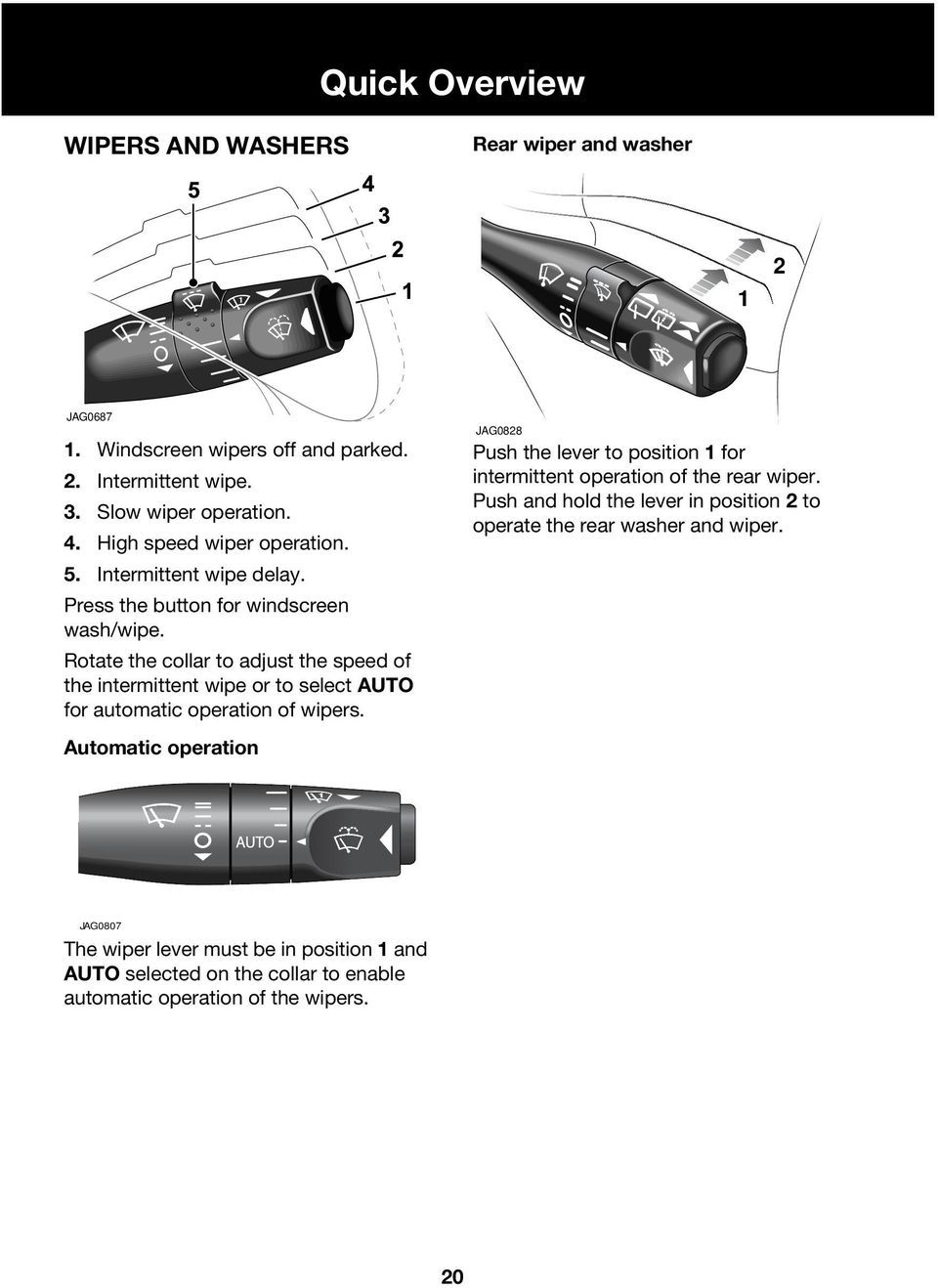
20 Quick Overview WIPERS AND WASHERS Rear wiper and washer 1 2 JAG Windscreen wipers off and parked. 2. Intermittent wipe. 3. Slow wiper operation. 4. High speed wiper operation. 5. Intermittent wipe delay. Press the button for windscreen wash/wipe. Rotate the collar to adjust the speed of the intermittent wipe or to select AUTO for automatic operation of wipers. Automatic operation JAG0828 Push the lever to position 1 for intermittent operation of the rear wiper. Push and hold the lever in position 2 to operate the rear washer and wiper. JAG0807 The wiper lever must be in position 1 and AUTO selected on the collar to enable automatic operation of the wipers. 20
21 Quick Overview WARNING INDICATORS Low oil pressure Battery charge indicator Diesel glow plugs active/malfunction Low washer fluid level Seat belt reminder Side lamps on Park brake on/brake fluid low Headlamp high beam on Transmission malfunction detected Front fog lamps on Anti-lock Braking System Rear fog lamps on Engine malfunction detected Direction indicators Dynamic Stability Control (DSC) off Cruise control active Door/luggage compartment open Low outside temperature Airbag system fault detected 21
22 Quick Overview AUTOMATIC TRANSMISSION Gearshift interlock The starter switch must be in position II and the foot brake applied before the gear selector can be moved from P (Park) to R (Reverse). The lever can be moved into P with the starter switch off. Gear selector The J-gate gear selector lever is designed to accommodate two different driving techniques as follows: Automatic selection: the right-hand side of the selector gate. Manual selection: the left-hand side of the selector gate to individually select 4th, 3rd or 2nd gear. After selecting R (Reverse) or D (Drive) from N (Neutral) or P (Park), wait briefly for the transmission to engage before accelerating. Kickdown mode Kickdown provides maximum engine performance in circumstances where rapid acceleration is required, such as when overtaking. Kickdown is operated when the accelerator pedal is pressed fully down, beyond the normal operating spring pressure. This causes the transmission to change down to the lowest gear possible to achieve maximum acceleration. Kickdown mode is in effect for as long as the pedal is fully depressed. After selecting R (Reverse) or D (Drive) from N (Neutral) or P (Park), wait briefly for the transmission to engage before accelerating. Sport mode JAG0762 Press the switch (arrowed) to select Sport mode. A red indicator in the switch will illuminate to indicate that Sport mode is active. When Sport mode is selected, the gear change points are modified to make full use of the engine s power. Note: With the gear selector in D (Drive) and Sport mode active, the transmission will use 5th gear less at higher cruising speeds. Fuel consumption will be adversely affected. 22
23 Quick Overview CRUISE (SPEED) CONTROL The cruise control system will maintain a set road speed until either cruise control is cancelled or the brake or clutch pedal is used. The system is controlled via switches on the steering wheel: DYNAMIC STABILITY CONTROL (DSC) 1 3 JAG SET/Speed adjustment wheel - to engage cruise control initially. Also use to increase/decrease the set speed. 2. CANCEL - cancels cruise control but retains the set speed in memory. 3. RESUME - to resume a set speed retained in memory. Note: Cruise control will automatically disengage when the vehicle speed falls below 28 km/h (18 mph). 2 JAG0672 DSC uses traction control and the Anti-lock Braking System to maximise the vehicle s handling performance and help prevent wheelspin. DSC is automatically activated when the starter switch is turned to position II, but can be turned off by pressing the button on the centre console. An amber indicator in the instrument pack will permanently illuminate whenever DSC is switched off. In the event of a system fault, the message DSC SYSTEM FAULT will also be displayed in the message centre. 23
24 Quick Overview AUDIO SYSTEM KEY FEATURES Steering wheel controls General operation JAG0818 Press the control knob 1 to switch on/off and rotate to adjust the volume. To adjust the sound settings, press the MODE button 2 repeatedly, until the required setting is displayed. Turn the control knob 1 to adjust the level or rating. After approximately five seconds, the system will return to normal control mode. JAG Press to mute audio unit (non-voice only). 2. Rotate as required to increase or decrease volume. 3. Press and release to cycle through Radio, FM, AM, Cassette, CD, MD and CD multichanger. 4. Rotate and release to cycle through preset radio stations, the next CD/MD track or to use cassette AMS (Automatic Music Search). Rotate and hold for at least two seconds to cycle to the next strongest station, next CD or change cassette side. 24
25 Quick Overview RADIO OPERATION To switch on the radio function, press the AM/FM button. Pressing this button repeatedly scrolls through FM, MW and LW wavebands. To search for a radio station, press the seek arrow buttons. Setting the radio presets Once a radio station has been tuned, press and hold the desired preset button 1 to 9 (or touch a station position on the touch-screen) until a beep is heard. The preset is now stored. A total of nine presets can be stored for each waveband. The radio presets can be automatically set by using the Auto Memory function. Press and hold the A MEM button for two seconds. The radio will be briefly muted while it searches the waveband for the nine strongest stations. CD OPERATION Single CD player If the radio or CD multichanger is being used, pressing the CD button will resume playing any CD installed in the player mechanism. When a CD is loaded into the aperture, it will begin to load and play automatically. Pressing the CD button whilst in CD play mode will pause the current track. A subsequent press of the CD button will resume play mode. Six discs can be loaded into the multichanger unit, and a further single disc in the audio console (when fitted). To skip tracks, continually press the seek arrow buttons to move backwards or forwards accordingly. Pressing and holding these buttons will search through the selected track. When a disc is inserted, the CD icon is displayed. Press the eject button to eject the CD. The display will show DISC EJECT and the CD icon will be turned off. Activating TA (Traffic announcements) To activate this function, press and release the TA button. With TA activated, traffic announcements will interrupt radio, cassette or CD/MD play. To deactivate this feature, press and release the TA button again. Press and hold the TA button for two seconds to display the radio station name instead of the frequency. 25
26 Quick Overview CD Multichanger Note: Remember to close the multichanger door; this will prevent dirt getting into the unit and help reduce skipping. JAG0819 The CD multichanger is located in the luggage compartment. To load a CD into the multichanger: 1. Slide open the multichanger door, press the Eject button and remove the magazine. Close the door. 2. Pull a tray out from the magazine and insert a CD (label side up). Slide the tray into the magazine until a click is heard. 3. Slide open the multichanger door and ensuring correct orientation, replace the magazine. Ensure the magazine clicks firmly into position. CD selection 1. Press the CDC button (CD button on MiniDisc and cassette player systems) to select the CD multichanger mode. 2. Press preset buttons 1to 6 to select the appropriate CD loaded in the multichanger. If a touch-screen is fitted to the vehicle, disc selection can be made by touching the relevant numbered disc icon. 3. When playing a CD, press the CDC button to pause play. Press again to continue play. Playing random tracks To play random tracks from the disc, press and release the MIX button. To cancel, press the MIX button again. To play random tracks from all discs loaded in the multichanger, press the MIX button for two seconds. To cancel, press and hold the MIX button. 26
27 Quick Overview TELEPHONE - BLUETOOTH SYSTEM Mobile phones with Bluetooth capability can communicate with the vehicle s inbuilt telephone system. The following procedure demonstrates how to connect the most popular brands of mobile phone. Pairing a handset to the vehicle 1. Turn the starter switch to position II. 2. Press the telephone button on the audio panel. The touch-screen will display the message No BT phone. On non touch-screen systems the message SIG will be displayed. 3. Either using the on-screen or the audio panel keyboard, press ##3#*#. 4. Touch the on-screen call icon or press the call button on the audio panel. 5. Prepare the handset for pairing to the system. See the telephone manufacturer s instructions for further details, or follow the table below for generic commands. Nokia Motorola Ericsson 1. Select menu Select menu Select menu 2. Select settings Select settings Select connectivity 3. Select Bluetooth OR Select Connection Select Bluetooth Select Connectivity then Bluetooth 4. Select On Select Bluetooth link Select My Devices 5. Select Search for Audio devices Select Hands-free With New Device highlighted, select Add. Press OK to confirm 6. After search select Jaguar Select Look for devices After search select Jaguar 7. Enter pass code Press OK to confirm After search select Jaguar Select Connect 8. No connection? Select Bluetooth (Menu) then Paired devices Jaguar Permission to bond? Select Yes and enter pass code 1313 Enter pass code 1313 after prompt When the handset has been successfully paired to the system, the touch-screen message changes to REGISTERED or PHONE CONNECTED. On systems without a touch-screen the audio system message changes to SIG*. Note: For best results when pairing your handset to the system, ensure the handset is fully charged. 27
28 Quick Overview Mobile phone compatibility There are a number of mobile phones that have been tested to function correctly with the Jaguar system, however not all mobile phones are compatible. For the latest list of compatible phones and software versions, please refer to Alternatively consult your Jaguar Dealer/Authorised Repairer. Downloading phone book entries 1. Turn the starter switch to position II, and ensure the handset is paired to the vehicle s system. 2. Press the telephone button on the audio panel. 3. Either using the on-screen keypad or the audio panel keyboard, press ##2#*#. 4. Touch the on-screen call icon or press the call button on the audio panel. 5. Switch off the starter switch for six minutes to allow the system to complete the download process. Making a call JOL Press and hold the Source switch on the steering wheel control, or press the call button on the audio panel. Phone will be displayed. 2. Key in the phone number required, using the on-screen or audio panel keyboard. 3. Press the call button on the steering wheel control, or on the audio panel. Calling will be displayed. 4. To end the call, press the call button on the steering wheel control, or on the audio panel. Receiving a call To answer or end a call, press the call button on the steering wheel control or on the audio panel. 28
29 Filling Station Information FUEL TYPE FUEL FILLING Petrol models Caution: Jaguar petrol engines are not fitted with equipment necessary for the use of fuels containing more than 10 per cent ethanol. Do not use E85 fuels (85 per cent ethanol content). If E85 fuels are used serious engine and fuel system damage will occur. Use an Unleaded fuel with an octane rating of at least 95 RON. Diesel models Caution: Do not use RME (bio-diesel) except in the case of proprietary diesel fuels which contain a mix of up to 5%. Use Diesel fuel meeting specification EN 590 or equivalent. Note: Fuel consumption will be higher than normal when the engine is new and bedding in. After a period of time, the fuel consumption will gradually improve to expected levels. Incorrect fuelling Caution: If the fuel tank is accidentally filled with the wrong type of fuel, it is essential that the engine is not started and you seek qualified assistance. JAG0766 Pull the fuel filler flap release. This is located on the floor, outboard of the driver s seat. The filler flap is located on the right-hand side of the vehicle. Note: Vehicles with a diesel engine have a yellow filler cap. For quickness and to completely fill the tank, ensure that the fuel nozzle rests on the bottom of the filler neck. After refuelling, refit the filler cap in the filler neck and twist the cap clockwise until it clicks three times. Close the flap, which automatically locks shut. 29
30 Filling Station Information BONNET RELEASE UNDERBONNET TOP-UP Engine oil specification Model Petrol models Diesel models Specification SAE 5W-30 to Jaguar specification WSS M2C913 - A or B. SAE5W-30 to Jaguar specification WSS M2C913 - B ¹ ¹ For top-up purposes only, where oil of specification WSS-M2C-913-B cannot be found, ACEA B1 or ACEA B3 specification oils may be used. JAGUAR RECOMMENDS JAG0704 Pull the release lever located below the facia on the left-hand side of the vehicle, see OPENING THE BONNET, page 195. Windscreen/headlamp washer reservoir. See WINDSCREEN WASHER RESERVOIR, page 202. Cooling system When the engine is cold, top-up the coolant until the level is between the MIN and MAX marks on the side of the header tank. Use only a 50% mix of water and antifreeze. See COOLANT LEVEL, page
31 TYRE PRESSURES Filling Station Information JAG0829 The tyre pressures for all normal operating conditions are shown on a label fixed to the end of the facia on the driver s side of the vehicle. Check pressures when the tyres are cold, see TYRE PRESSURES, page 211. Deflating air from a warm tyre to the recommended pressure will result in under-inflation which may be dangerous. When using tyres other than those recommended by Jaguar, do not exceed the speed capacity recommended by the manufacturer. 31
32 General Information INTRODUCTION Whether you are new to the Jaguar marque or have previously owned Jaguar or Daimler vehicles, we are pleased that you have made Jaguar your choice of vehicle this time. When left-hand or right-hand is used in the text, this refers to the left-hand side or right-hand side of the vehicle, viewed from the rear. For safety and the pleasure you will get from your new vehicle, please take the time to get well acquainted with your vehicle by reading the handbooks. Caution: Cautions are included in this handbook. These indicate either a procedure which must be followed precisely, or information that should be considered with great care in order to avoid the possibility of damage to your vehicle. Note: A note is a procedure which will help avoid difficulties in the operation of the vehicle. Warning symbols on the vehicle This Handbook describes every option and model variant available and therefore some of the items covered may not apply to your particular vehicle. Note: Remember to pass on the vehicle handbooks when reselling the vehicle. Handbooks are integral parts of the vehicle. WARNINGS, CAUTIONS AND NOTES Take particular note of WARNINGS, Cautions and Notes given throughout this handbook. On encountering the warning triangle or open book symbol on the vehicle, it is important that before touching this part of the vehicle or attempting adjustments of any kind you consult the relevant section of this handbook. Caution: Do not remove any warning labels from the underbonnet area or from inside the vehicle. Safety warnings are included in this handbook. These indicate either a procedure which must be followed precisely, or information that should be considered with great care in order to avoid the possibility of personal injury. 32
33 General Information JAGUAR DEALERS/ AUTHORISED REPAIRERS Jaguar Dealers/Authorised Repairers are chosen with care. Each is dedicated to providing a Sales, Service and Spare Parts facility of the highest standard. Jaguar Dealers/Authorised Repairers are provided with full technical support from the factory, with comprehensive training for all their technicians. Dealers workshops operate to a high standard and have all the necessary tools and equipment essential to maintain or repair Jaguar vehicles. Accessories A full range of Jaguar Engineering approved accessories including safety, stowage, touring, leisure and lifestyle products is available from your Jaguar Dealer/Authorised Repairer. Please ask your Jaguar Dealer/Authorised Repairer for an up-to-date brochure so you can select your requirements from the latest range. Genuine Jaguar parts and accessories Your Jaguar Dealer/Authorised Repairer can supply you with genuine replacement parts and accessories which are fully approved to Jaguar s original equipment specification. This will ensure that the safety and performance of your vehicle is maintained for your complete peace of mind. Please note that fitment of non-genuine parts may invalidate the vehicle warranty if a subsequent fault occurs due to fitting sub-standard replacement parts or accessories. Jaguar parts distribution service Jaguar Dealers/Authorised Repairers stock a large number of parts to keep your vehicle maintained and get you back on the road as quickly as possible. Their service is supported by six strategically positioned Jaguar parts distribution centres in the United Kingdom, Germany, Japan, Australia and two in North America, providing next-day delivery to the vast majority of worldwide Dealers. 33
34 General Information FLOOR MAT RETENTION JAG0821 Ensure that the driver s floor mat is correctly positioned and secured under the tongues on the retention posts (1, only one post shown), so that the mat does not interfere with the operation of the accelerator, clutch or brake pedals. In particular, check the position of the mat when refitting after cleaning or servicing. WINDOW TINTING Do not have your vehicle windows tinted with a metal oxide tinting (for maximum heat reduction from sun load) if you have a navigation system fitted to your vehicle. Metal oxide tinting prevents the reception of the Global Positioning Satellite (GPS) system signals by the antenna, causing the navigation system to stop functioning. In addition, metal tinting must never be applied to windows that contain antenna patterns as radio reception will be degraded. A non-metal tinting should be used if you require window tinting and if in doubt, contact your Jaguar Dealer/Authorised Repairer for advice. 1 PROTECT THE ENVIRONMENT We must all play our part in protecting the environment. Correct vehicle usage and disposal of waste cleaning and lubrication materials are significant steps towards this aim. Avoid using high engine speeds. You will then protect your engine, reduce fuel consumption, lower the engine noise level and help towards reducing the environmental burden. Dispose of batteries, tyres, engine, brake and coolant fluids at your local authorised waste disposal facilities. MOBILE/PORTABLE TELEPHONES Check the laws and regulations on the use of cellular telephones in the areas where you drive. Always obey them. Also, give full attention to driving. Use hands-free operation (if fitted) and pull off the road and park before making or answering a call, if driving conditions so require. 34
35 General Information LEATHER CARE GUIDE Leather is a natural product, therefore, it bears natural characteristics, such as grain variations, growth and brush marks. These non-weakening marks show the true nature of the hide and are the hallmarks of a leather product. Leather is an easy to maintain natural product, however, dust and substances can penetrate the pores and crease the leather, causing surface wear and brittleness. To prevent ingrained dirt and staining, inspect the seat upholstery regularly and clean every one to two months as follows: Wipe off fine dust from the seat surfaces at regular intervals using a clean, damp, non-coloured cloth. Change frequently to a clean area of cloth to avoid abrasive action on the leather surface. Avoid over-wetting. If this is not sufficient, use a cloth which has been dampened with warm soapy water and then wrung out. Never allow the leather to be soaked through. Use only mild non-caustic soap. Use Jaguar Leather Cleaner for heavily soiled areas. Dry off and rub with a clean soft cloth, changing surfaces regularly. When staining (e.g., from clothing) or spillage occurs, clean the affected area immediately as described above. It is recommended that Jaguar Leather Cleaner is used several times a year to maintain its appearance and suppleness. The Jaguar Leather Cleaner will nourish and moisturise the leather and help to improve and renew the surface protective film against dust and substances. Do not use solvents such as petrol (gasoline), white spirit or alcohol. Do not use detergents, furniture polish or household cleaners. Such strong treatments may give, initially, an impressive appearance, but their use will lead to rapid damage or deterioration of the natural properties of the leather. Jaguar recommends a basic set of products that have been specially selected for the type of leather in your vehicle. The Manufacturer s Warranty will be invalidated if treatments are used other than those recommended by Jaguar Cars Limited. Dark clothing may stain leather seats just like other upholstery products. Sharp objects such as belts, zip fasteners, rivets, etc. can leave permanent scratches and scratch marks on the leather surface. Unless spillages such as tea, coffee or ink are washed away immediately, permanent staining may have to be accepted. If a valet service is used, ensure that the specialist concerned is aware of these instructions, and follows each instruction precisely. For any further questions please consult your Jaguar Dealer/Authorised Repairer for specialist advice. 35
36 General Information VEHICLE HANDBOOKS Remember to pass on the vehicle handbooks when reselling the vehicle. Handbooks are integral parts of the vehicle. REGULAR SERVICING Maintenance Each vehicle is given a full Pre-Delivery Inspection to ensure that all systems function correctly and that the vehicle meets its specification. Owners are responsible for the regular maintenance and servicing of the vehicle. Jaguar Dealer/Authorised Repairers will be pleased to arrange periodic servicing and can provide you with details of tasks carried out at each service interval. Failure to implement maintenance at the recommended intervals could result in deterioration of vehicle performance and possible infringement of regulations. Regular routine maintenance not only helps to prevent unnecessary breakdowns and inconvenience, but enhances the trade in or resale value of the vehicle. Caution: Severe damage to the electrical system and electronic components can occur if any attempt is made to diagnose faults in the electrical system using conventional diagnostic equipment (for example, the use of test lamps or low impedance voltmeters). The fitting of any electrical accessory should only be entrusted to a Jaguar Dealer/Authorised Repairer. Jaguar diagnostic system Many of the vehicle systems are controlled by complex electronic devices. Specialist equipment is required to trace and rectify faults in the systems and ensure that only faulty components are repaired or renewed. 36
37 General Information DATA RECORDING Service Data Recording Service data recorders in your vehicle are capable of collecting and storing diagnostic information about your vehicle. This potentially includes information about the performance or status of various systems and modules in the vehicle, such as engine, throttle, steering or brake systems. In order to properly diagnose and service your vehicle, Jaguar Cars Limited and service and repair facilities may access vehicle diagnostic information through a direct connection to your vehicle. Event data recording This vehicle is equipped with an Event Data Recorder (EDR). The main purpose of an EDR is to record, in certain crash or near-crash situations, such as an air bag deployment or hitting a road obstacle, data that will assist in understanding how a vehicle's systems performed. The EDR is designed to record data related to vehicle dynamics and safety systems for a short period of time, typically 30 seconds or less. The EDR in this vehicle is designed to record such data as: How various systems in your vehicle were operating; Whether or not the driver and passenger safety belts were buckled/fastened; How far (if at all) the driver was depressing the accelerator and/or brake pedal; and, How fast the vehicle was travelling. Data can help provide a better understanding of the circumstances in which crashes and injuries occur. Note: EDR data are recorded by your vehicle only if a non-trivial crash situation occurs; no data are recorded by the EDR under normal driving conditions and no personal data (e.g., name, gender, age, and crash location) are recorded. However, other parties, such as law enforcement, could combine the EDR data with the type of personally identifying data routinely acquired during a crash investigation. To read data recorded by an EDR, special equipment is required, and access to the vehicle or the EDR is needed. In addition to the vehicle manufacturer, other parties, such as law enforcement, that have the special equipment, can read the information if they have access to the vehicle or the EDR. Jaguar Cars Limited do not access EDR information without obtaining consent, unless pursuant to court order or where required by law enforcement, other government authorities or third parties acting with lawful authority. Other parties may seek to access the information independently of Land Rover. DISABILITY MODIFICATIONS Occupants with disabilities which may require modification of the vehicle must contact a Jaguar Dealer/Authorised Repairer before any modifications are made. 37
38 General Information RUNNING-IN Apart from a few precautionary recommendations, there are no strict running-in procedures for this vehicle. By observing the following advisory notes you will ensure maximum engine, transmission and brake life for your vehicle: Allow the engine to warm up thoroughly before operating at engine speeds over rev/min. Vary the speed frequently. From 940 miles (1 500 kilometres) onwards, gradually increase performance of the vehicle up to the permitted maximum speed. Running-in for automatic transmission To allow the automatic transmission to uniquely adapt to the vehicle, the transmission should be operated in normal mode (i.e. Sport mode switch not illuminated, see page 132) for the first 800 km (500 miles). Running-in for brakes To ensure that the brake pads can bed-in evenly and reach their optimum wear and performance condition, usually within 300 miles (480 kilometres), the following points are recommended. Where possible, avoid heavy braking or rough usage of the brakes as this can result in damage being caused to the brake pads and discs. Avoid prolonged use of the brakes, for example, when descending severe gradients. Frequent light application of the brakes is desirable. This helps to fully bed-in the brake pads before the normal running-in period is completed and the vehicle is operated at high speeds, when maximum brake efficiency will be required. The above equally applies when new discs or pads have been fitted. 38
39 General Information VEHICLE IDENTIFICATION NUMBER (VIN) It is essential that the Vehicle Identification Number (VIN) is quoted in all correspondence and when ordering replacement parts. The number is visible from outside the vehicle, on a plate in the lower left edge of the windscreen. Vehicle build date (Australia only) This is the calendar month and year in which the body and powertrain assemblies were cojoined and the vehicle was driven from the production line. The build date is shown on a plate located inside the spare wheel well, on the left-hand vertical surface. ENGINE NUMBER Petrol engines Stamped on a raised/machined boss above the oil pan seam directly behind the oil filter adapter plate. Diesel engines: Stamped on a raised/machined boss on the left-hand side of the engine bay, directly above the air conditioning pump pulley. TRANSMISSION NUMBER On a metal label or bar code label attached to the transmission casing. CERTIFICATION LABEL Vehicles have the Certification Label adhered to the left-hand rear door hinge post. Vehicle weights, paint code, manufacture date and the VIN are shown on this plate. 39
40 Health and Safety HEALTH AND SAFETY PRECAUTIONS Many liquids and other substances used in vehicles are poisonous and should never be consumed and must be kept away from open wounds. These substances include antifreeze, brake fluid, fuel, windscreen washer additives, lubricants and various adhesives. The presence of any unusual fumes (for example; petrol, diesel or exhaust fumes) in the passenger compartment and/or luggage compartment should be corrected immediately by a Jaguar Dealer/Authorised Repairer. If you must drive under these conditions do so only with all windows fully open. By operating other electronic equipment (for example; a mobile phone without an exterior antenna) electro-magnetic fields can cause malfunctions of the vehicle electronics. Therefore, you should observe the instructions of the equipment manufacturers. Any modifications to the fuel system not specifically designed for this Jaguar are prohibited. Such modifications in some circumstances could result in a fire. All service actions must be entrusted to a Jaguar Dealer/ Authorised Repairer. Alterations to the electrical system, including the fitting of accessories not designed for this Jaguar, will cause damage to the electrical circuits and systems. In some circumstances this could result in a malfunction or fire. All accessory work should be entrusted to a Jaguar Dealer/Authorised Repairer. No attempt should be made to repair a fuse that has blown. Always install a new fuse of the correct amperage. Failure to comply with the above may cause a fire hazard or create serious damage elsewhere in the electrical circuit. Avoid contact with battery acid which is poisonous and corrosive. Acid will cause burns to the skin as well as to the eyes. In the event of skin or eye contamination, wash the affected area with water thoroughly. Seek immediate medical attention when eye contact has occurred. 40
41 Health and Safety Do not disconnect any pipes in the air conditioning refrigeration system. A refrigerant is used which can cause blindness if allowed to contact the eyes. If refrigerant should contact the eyes or skin, wash the eyes or affected area with cold water for several minutes. Do not rub. As soon as possible thereafter, obtain treatment from a doctor or eye specialist. When working within the engine compartment, take care to avoid contact with moving parts and hot components. 41
42 Starter Switch STARTER SWITCH OPERATION The starter switch, on the right-hand side of the steering column, has four key positions: 0 OFF. I Auxiliary. II ON. III Engine start. Position 0: Is the only position in which the key can be inserted and removed. Position I: Allows use of some electrical circuits, for example, radio operation. Position II: All electrical circuits except the starter motor are activated. The key remains in this position when driving. Position III: The starter motor is operated. TO REMOVE THE STARTER KEY Manual transmission vehicles Apply the handbrake and turn the key to position 0. The key can then be removed from the switch. Automatic transmission vehicles Automatic transmission vehicles have a key interlock feature. Apply the handbrake, place the gear selector in P and turn the key to position 0. The automatic transmission gear selector must be placed in Park P before the key can be removed from the starter switch. When the key is removed, the gear selector will be locked in Park. GEARSHIFT INTERLOCK A brake pedal/gearshift interlock system is incorporated in the automatic transmission gear selector mechanism. To move the gear selector from Park: 1. Turn the starter key to position II or start the engine. 2. Press the brake pedal. STEERING COLUMN LOCK When the starter key is removed, the steering column lock is engaged. The lock is disengaged when the key is inserted into the starter switch and turned to position I. In rare circumstances it may be necessary to gently turn the steering wheel from side to side to release the steering column lock. 42
43 Vehicle Security SECURITY OVERVIEW When leaving the vehicle unoccupied, remember the following: Apply the handbrake and with automatic transmission, move the gear selector to Park P. Do not leave children or pets in the vehicle unattended. Do not leave luggage or valuables on view. Always take your valuables with you or lock them in the luggage compartment. Remove the starter key and spare keys, even when the vehicle is in your garage. Close all windows and lock all doors securely. Park the vehicle where it can be seen. At night, park in a well-lit area. When leaving the vehicle unattended, for maximum security ensure that the doors are double-locked. Ensure that all key transmitters are removed from the vehicle before locking the doors, and that all doors, the luggage compartment and the bonnet are closed. It is important to keep your keys in safe places at all times. Leaving them in conspicuous places is an invitation for a thief to steal them and, consequently, your vehicle or belongings. Keep them as secure as you would your wallet or purse, both at home and away. IMMOBILISER SECURITY LAMP This vehicle is equipped with an immobilisation system. An electronic device is fitted in the head of each key which is programmed to the vehicle electronics. When the key is placed in the starter switch the vehicle electronics recognise the correct key and allow engine start. The engine cannot be started with a key not programmed to the vehicle electronic systems. If an starter key is placed in the starter switch and turned to position II and the alarm security lamp on the centre console remains flashing after three seconds, it is possible that the engine will not start. In any event, please contact a Jaguar Dealer/ Authorised Repairer to investigate the cause of the lamp flashing. KEYS This vehicle is supplied with a key integrated with the remote transmitter. This key operates all the locks on your vehicle. Vehicles are supplied with two integrated keys. The key number is recorded on a plastic tag, which is attached to each key. Detach the tag and keep safely, not in the vehicle. 43
44 Vehicle Security KEY TRANSMITTER Never leave the key transmitter in the vehicle if children or animals are also left in the vehicle. The vehicle's systems and remote control functions could be operated, which may result in injury. JAG0667 The security system is controlled remotely by a radio frequency, battery-operated transmitter. The transmitter is activated by pressing one of the operating buttons: Unlocks and disarms the vehicle. Releases luggage compartment lock. Activates the convenience headlamp feature and sounds the panic alarm. Locks, double-locks and arms the vehicle. To free the key, press the release button. When not required press and hold the button and fold the key into the transmitter housing. Note: The key transmitter may not operate correctly in areas which are subject to interference from other radio equipment operating on the same frequency. Interference may emanate from sources such as amateur radio, medical equipment, telecommunications devices and other remote controls or alarms. Where such interference is experienced, operate the key transmitter as close as possible to the vehicle, or use the key in the driver s door lock. All buttons on the key transmitter will not operate if a key is in the starter switch, however, if the doors, bonnet or luggage compartment are open, only the lock button will not operate. Additional key transmitters can be obtained from your Jaguar Dealer/ Authorised Repairer and can be used provided a Dealer programmes them all to the vehicle. Caution: Should a key transmitter be lost, a new one can be obtained and programmed to the vehicle by a Jaguar Dealer/Authorised Repairer, who will ask for proof of vehicle ownership. It is advisable to notify a Dealer as soon as a key transmitter is lost or stolen and have the remaining key transmitter(s) reprogrammed. This will then prevent the lost or stolen key transmitter from being used to disarm and unlock the vehicle. 44
45 Note: Dealers keep a log of all enquiries for replacement keys and notify Jaguar Cars Limited of any such requests. European and United Kingdom countries only The alarm system will not be fully armed unless the vehicle is double-locked. See Double-locking on page 50. Care of key transmitters The key transmitters must be treated with care. Do not expose to extremes of heat, dust, humidity or fluids. Do not leave the transmitter exposed to direct sunlight. The battery is the only serviceable part. RADIO FREQUENCY APPROVAL If the type approval of your key transmitter requires inspection, refer to the table below: Type Exam. Certificate Number: CERT Vehicle Security Country All EU and EFTA countries Approval No. Caution: The key transmitter may suffer interference from other legal users of this radio frequency band, such as radio amateurs, medical equipment, remote controls or alarm systems. To lock or unlock the vehicle, either use a key or operate the transmitter as close to the security antenna on the rear screen as possible. 45
46 Vehicle Security TRANSMITTER BATTERY RENEWAL 3 JAG When the battery needs renewal there will be a significant decrease in the effective range of the key transmitter. To renew the battery, follow the procedure below: Insert a small, flat-blade, screwdriver at an angle of about 45 degrees, into the slot on the back of the key transmitter as shown (1). Apply light pressure to the screwdriver and lever the screwdriver forward to separate the two halves of the key transmitter. Pull the transmitter from the key body. Insert the screwdriver into the slot between the transmitter covers adjacent to the key stowage area as shown (2). Apply light pressure to the screwdriver and lever the screwdriver downward to separate the covers. Unscrew and remove the small screw (3) and remove the printed circuit board, taking care not to touch the battery terminals. Remove the battery and dispose of it safely. Fit a new battery cell, type CR2032 (available from your Jaguar Dealer/ Authorised Repairer), with the side marked with the positive symbol (+) downwards in the battery receptacle. Avoid touching the new battery as moisture/oil from the fingers can reduce the life of the battery and corrode the contacts. Replace the printed circuit board making sure to engage the board under the securing tabs (4), and secure with the screw. Refit the cover and click into place with thumb pressure. Slide the transmitter back onto the key body until it clicks into place. 46
47 Door Locks OPERATION All doors can be locked and unlocked either remotely using the key transmitter buttons, or by using the integrated key. SMART LOCKING This feature helps prevent locking the key in the vehicle. If one of the front doors is open and an attempt is made to lock the doors using a door interior locking lever, all doors will become unlocked. If the bonnet, luggage compartment or a door is open, the vehicle can only be locked from the outside by using a key in the driver s door lock. It will not be possible to lock the vehicle with a key transmitter if the luggage compartment, bonnet or a door is open. LOCKING AND UNLOCKING To lock the vehicle and set the alarm Press the lock button on the key transmitter, or; Put the key into the driver s door lock, turn the key towards the rear of the vehicle and release. The direction indicators will flash once, the security lamp on the centre console will start flashing and, after 20 seconds, the alarm will be set. Note: This will not arm the alarm system s intrusion sensors (where fitted). The intrusion sensors are only armed if the vehicle is double-locked. See Double-locking on page 50. Do not double-lock the vehicle If people or pets are to be left inside: their movement will trigger the alarm. If the vehicle is single-locked, the main alarm features will still function, but the intrusion sensors will be disarmed. Do not leave people or pets in the vehicle on warm, sunny days: the interior temperature can rise rapidly to dangerous levels. If a door, the bonnet or the luggage compartment lid are open and an attempt is made to lock the vehicle, the direction indicators will flash five times and the horn will chirp twice as a warning that the vehicle is not secure. Note: Ensure that the manually operated rear windows are fully closed by hand (if fitted). 47
48 Door Locks To unlock the vehicle and disarm the alarm system using a key: Put the key in the driver s door lock, turn the key towards the front of the vehicle and release. Single-stage unlocking - This unlocks all doors and the luggage compartment and turns on the interior lamps. Two-stage unlocking - This only unlocks the driver s door (and the Saloon luggage compartment) and turns on the interior lamps. A second turn of the key is required to unlock all doors (and the Estate tailgate). European and United Kingdom countries only: If the vehicle is unlocked with a key, a chime will sound when the driver s door is opened. This is a warning to indicate that the vehicle alarm will activate after 15 seconds unless the security system is disarmed by either pressing the unlock button on the key transmitter or by placing the key into the starter switch and turning the key to position I. Note: If a passenger door is opened during this period, before the vehicle is disarmed, the alarm will sound. The security system is not disarmed when unlocking with the key as additional protection against vehicle theft. For all other countries: Unlocking the vehicle disarms the alarm system. To unlock the vehicle and disarm the alarm system using a key transmitter: Press the unlock button on the key transmitter. Single-stage unlocking - This unlocks all doors and the luggage compartment and turns on the interior lamps. Two-stage unlocking - This only unlocks the driver s door (and the Saloon luggage compartment) and turns on the interior lamps. A second press of the button is required to unlock all doors (and the Estate tailgate). Direction indicator unlock alerts The exterior direction indicators give two flashes as unlocking takes place. Note: The exterior direction indicators will flash five times if a fault exists with the intrusion sensing or inclination sensing systems. Selecting single-stage or two-stage unlocking The procedure for changing from single-stage to two-stage unlocking, or vice versa, is as follows: Press and hold the lock and unlock buttons on the key transmitter simultaneously for four seconds. Note: The direction indicators will flash twice to confirm the procedure was successful. To revert to the previous condition, repeat the procedure described above. 48
49 Door Locks Global closing Internal door locking and unlocking Ensure that no children, pets, or obstructions are in any open aperture before operating global closing. Safety mechanisms are in place to prevent serious injury, however, injuries can still occur. Key in the driver s door: Turn and hold in the lock position to close all the electrically operated windows (and sunroof, if fitted). Key transmitter: Press and hold the lock button for longer than 1½ seconds to close all the electrically operated windows (and sunroof, if fitted). Pressing the button again while global closing is taking place will stop all movement. Note: Ensure that manually operated rear windows are fully closed by hand (if fitted). JAG0823 To lock all doors centrally, press the lock lever on either the driver s or the front passenger s door. To lock a rear door, press the lock lever. To unlock a door, pull the lock lever. To open a locked door, pull the release handle. The driver s or front passenger s door lock lever will unlock all doors. When an interior door release lever is pulled, the door will unlatch. 49
50 Door Locks Double-locking Never double-lock the vehicle with people, children, or pets inside. In the event of an emergency they would be unable to escape, and the emergency services would be unable to release them quickly. Note: It will not be possible to double-lock the vehicle if any door is open, a key is in the starter switch or the inertia switch has been tripped. With all doors, luggage compartment, and bonnet closed, and no key in the starter switch, press the lock button on the key transmitter twice within three seconds to double-lock the vehicle and set the alarm. Alternatively, place the key in the driver s door lock, turn the key towards the front of the vehicle and then towards the rear within three seconds to set the alarm. The exterior direction indicators will flash once as locking takes place and a longer, second flash as double-locking takes place. An audible tone will be produced to confirm that the vehicle has been double-locked. Auto-relocking Note: This feature is normally disabled. A Jaguar Dealer/Authorised Repairer can enable this feature, if required. This feature automatically centrally locks and arms the vehicle if the vehicle has been unlocked with the key transmitter: and no door has been opened for 45 seconds or, if the starter remains off for 45 seconds. Drive-away door locking With the starter key at position II and all doors closed, all doors will lock when the vehicle is moving above 5mph (8 km/h). If the vehicle is stopped and a door is opened, provided the engine remains running, the car will relock when the door is closed and the vehicle is moving. If the car is unlocked this feature will only lock the doors again if the starter swtich is turned off and then back on. All vehicles have the drive-away door locking feature installed during manufacture. This feature can be disabled, or reinstated, by a Jaguar Dealer/Authorised Repairer if required. 50
51 Door Locks CHILD SAFETY LOCKS Child safety locks are fitted to the rear doors. Open a rear door, insert the starter key into the lock and turn the key towards the outside of the vehicle. This immobilises that door interior handle. Repeat this for the opposite rear door. After setting the child lock the door(s) can only be opened using the exterior door handle. To remove the child lock feature, open the door and using a key, move the control to its original unlock position. 51
52 Luggage Compartment Locks LUGGAGE COMPARTMENT 1 Estate Open the tailgate by pressing the release button 2 under the tailgate trim. The tailgate can also be opened by pressing the luggage compartment button 1 on the key transmitter. The luggage compartment will be illuminated when the tailgate is opened. Note: If required, the key transmitter can be reprogrammed so that button 1 will open the Estate tailgate glass, instead of the tailgate. Contact your Jaguar Dealer/Authorised Repairer to have this feature enabled. JAG If the vehicle alarm system is armed and the luggage compartment is opened using the key transmitter the alarm will not sound. The system will be rearmed when the lid is closed, provided the vehicle has not been disarmed. Saloon To open the luggage compartment: Press the luggage compartment button 1 on the key transmitter or, With the vehicle unlocked, press the release button 2 on the luggage compartment lid. The luggage compartment will be illuminated when the lid is opened. 52
53 Opening the tailgate glass Luggage Compartment Locks 3 JAG0677 Do not drive with the tailgate glass open as exhaust fumes can be drawn into the passenger compartment. The tailgate glass can be opened separately from the complete tailgate. Press the release button 3, located on the reverse of the tailgate glass handle, and lift the tailgate glass. 53
54 Alarm Systems AUDIBLE SIGNALS Note: In certain countries, legislation prohibits the use of audible confirmation signals. In such cases, the sound source has been removed from the system. Two horn chirps will sound if an attempt is made to lock the vehicle with the key transmitter if a door, the bonnet or the luggage compartment is not fully closed. European/United Kingdom countries only If the vehicle is unlocked with a key when it is armed, a chime will sound when the driver s door is opened. This is a warning to indicate that the vehicle alarm will activate after 15 seconds unless the security system is disarmed with either the key transmitter or by turning the starter key to position I. If the vehicle is unlocked with a key when it is armed and any door other than the driver s door is opened, the alarm will sound immediately. ERROR SIGNAL The direction indicators will flash five times whenever one of the following conditions is present: Any door is open when an attempt is made to lock the vehicle. The luggage compartment or the bonnet is not properly closed when an attempt is made to lock the vehicle. If there is an electrical failure within the intrusion sensing or inclination sensing systems and an attempt to disarm the security system is made. FULL ALARM Once armed, any of the following circumstances will create a full alarm state, sound the horns and flash the direction indicators: Opening a door, luggage compartment lid or tailgate (except with transmitter) or bonnet. Movement in the passenger area (if intrusion sensors are fitted). Using a key in the starter switch which is not programmed to the vehicle. If, after 15 seconds from opening the driver s door with a key (European countries and United Kingdom only), the key is not inserted into the starter switch. If the inclination sensor (if fitted) is activated. Any attempt is made to remove the radio. SECURITY FEATURES The security system has been designed for: Prevention of theft of the vehicle. Prevention of theft of items from the vehicle. Personal security. The security system is integrated with the vehicle electronics and engine management systems making it far more difficult for a thief to penetrate and steal the vehicle. 54
55 Alarm Systems Intrusion sensing (Where fitted) A further enhancement to the security system is the addition of intrusion sensing. When the vehicle is armed and double-locked, movement within the vehicle interior will activate the alarm. The luggage compartment can be unlocked, using the key transmitter button, without sounding the alarm. When the security system is disarmed the intrusion sensors are also disarmed. Note: Ensure that manually operated rear windows are closed before double-locking the vehicle. This will prevent intrusion sensing falsely sounding the alarm. Inclination (tilt) sensing protection (Where fitted) This feature protects against unauthorised towing away or jacking up. When the vehicle is double-locked and armed, any tilting of the vehicle, such as jacking or lifting, will activate the alarm. Note: If the vehicle is being transported by road, rail or sea, the vehicle should not be double-locked. This prevents the inclination system from being armed and sounding the alarm as the vehicle pitches and rolls. When the security system is disarmed the inclination sensor is also disarmed. Battery reconnection If the battery has been disconnected and is subsequently reconnected, the alarm system will resume the same state as before the battery was disconnected. If the alarm was sounding when the battery was disconnected it will sound again when the battery is reconnected and will need: The transmitter unlock button to be pressed or, Key placed into the starter switch and turned to position I to disarm it. Panic alarm When in or near the vehicle, the alarm can be set off to deter a possible offender. For this feature to operate, the key must not be in the starter switch. Pressing the headlamp convenience/panic button on the key transmitter three times within three seconds will activate the Panic Alarm. The alarm is stopped by: Putting the key into the starter switch and turning to position II or, Pressing either the transmitter panic button three times or one press of the unlock button. Battery backed sounder In certain countries a separate, self-contained, battery backed sounder is fitted. This device will sound the full alarm if the vehicle alarm is activated or if the vehicle battery or the sounder is disconnected when the security system is armed. 55
56 Occupant Protection SEAT BELTS Seat belts are designed to bear upon the bony structure of the body, and should be worn low across the front of the pelvis or the pelvis, chest and shoulders, as applicable; wearing the lap section of the belt across the abdominal area must be avoided. Seat belts should be adjusted as firmly as possible, consistent with comfort, to provide the protection for which they have been designed. A slack belt will greatly reduce the protection afforded to the wearer. Belts should not be worn with the straps twisted. Do not carry hard, fragile, or sharp items between your person and the seat belt. In an impact the pressure from the seat belt on such items can cause them to break, which in turn may cause death or serious injuries. Each belt assembly must only be used by one occupant; it is dangerous to put a belt around a child being carried on the occupant's lap. Care should be taken to avoid contamination of the webbing with polishes, oils and chemicals, and particularly battery acid. Cleaning may safely be carried out using mild soap and water. The belt should be replaced if webbing becomes frayed, contaminated or damaged. It is essential to replace the entire assembly after it has been worn in a severe impact even if damage to the assembly is not obvious. The occupants of the front seats should not travel with the seat back at more than 30 degrees from upright. Doing so will reduce the protection afforded by the seat belt. Seat belts should be worn at all times, by the driver and passengers in all seating positions. The airbag SRS cannot provide protection in some types of impact. Under these circumstances the only protection will be provided by a correctly worn seat belt. 56
57 Occupant Protection Seat belts should be worn by all vehicle occupants, for every journey no matter how short. Failure to do so will greatly increase the risk of death or serious injury in the event of an accident. No modifications or additions should be made by the user which will either prevent the seat belt adjusting devices from operating to remove slack, or prevent the seat belt assembly from being adjusted to remove slack. A slack seat belt offers a greatly reduced level of occupant protection in an impact. If any damage, wear, cuts, defects, or impaired operation are noted with the seat belts, the vehicle should be taken to a Jaguar Dealer/Authorised Repairer for immediate attention. Do not use the vehicle if the seat belts cannot be operated correctly. When using seat belts to restrain items other than occupants, take care to ensure that the belts are not damaged, or exposed to sharp edges. Caring for seat belts Note: If the vehicle is parked on an incline, the seat belt mechanism may lock. This is not a fault, and the belt should be gently eased out from the upper anchorage. The seat belts should be inspected regularly to check for fraying, cuts, or wear to the webbing, and the condition and security of the mechanism, buckles, adjusters, and mounting points. Testing inertia reel belts With the seat belt fastened, give the webbing near the buckle a quick upward pull. The buckle must remain securely locked. With the seat belt unfastened, unreel the seat belt to the limit of its travel. Check that it unreels smoothly with no snatches or snags. Allow the belt to fully retract, again checking for smooth operation. Partially unreel the seat belt, then hold the tongue plate and give a quick forward pull. The mechanism must lock and prevent any further unreeling. If any of the seat belts fail to meet those criteria, immediately contact your Jaguar Dealer/Authorised Repairer. 57
58 Occupant Protection SEAT BELT FITTING Do not adjust the seat belt whilst driving. 1 2 A warning indicator on the instrument panel comes on when the driver s seat belt is not fastened. Note: In some countries a warning signal may also sound for six seconds. Belt buckle release To release the belt buckle, press the release button 2 in the buckle unit and allow the seat belt to fully retract. Note: When releasing the seat belt it is advisable to hold the belt before pressing the release button. This will prevent the belt from retracting too quickly. JAG0678 Draw the tongue of the seat belt over the shoulder, across the chest and push it into the buckle unit slot 1. A positive click indicates that it is safely locked. Always ensure that the webbing is midway between the neck and the edge of the shoulder. Correct tension is controlled by automatic retraction of the reel. 58
59 Occupant Protection Front belt height adjustment Correct seat belt adjustment is essential for safety and comfort. Ensure that the height is correctly adjusted and the mechanism is locked in place before driving the vehicle. Do not attempt to adjust the seat belt height once the vehicle is in motion. Doing so may cause you to lose control of the vehicle, or incorrectly adjust the seat belt. USING SEAT BELTS DURING PREGNANCY Position the seat belt correctly for the safety of the mother and unborn child. Never wear just the lap strap, and never sit on the lap strap whilst using just the shoulder strap. Both of these actions are extremely dangerous, and may increase your risk of serious injury in the event of an accident or during emergency braking. Never place anything between you and the seat belt in an attempt to cushion the impact in the event of an accident. It can be dangerous, and will reduce the effectiveness of the seat belt in preventing injury. JAG0679 Press the locking button and slide the anchorage point to the required position. Release the button and check that the anchorage point is locked. Always check the anchorage point after the seat has been adjusted to ensure that the belt is correctly positioned. Position the lap strap comfortably across the hips beneath the abdomen. Place the diagonal part of the seat belt between the breasts and to the side of the abdomen. Ensure that the seat belt is not slack or twisted. 59
60 Occupant Protection AIRBAGS JAG Driver s knee airbag (where fitted). 2. Driver s airbag. 3. Curtain airbag (left-hand side and right-hand side). 4. Seat mounted side airbag (left-hand and right-hand front seats). 5. Front passenger airbag. 60
61 Occupant Protection No objects whatsoever should be attached to the centre cover of the steering wheel, the passenger facia panel, the sides of the front seats or the interior trim immediately above the door openings. Do not put anything on or over the airbag inflation area. Placing objects on or over the airbag inflation area may cause those objects to be propelled by the airbag into your face and torso causing serious injury. Several airbag system components get hot after inflation. Do not touch them after they have deployed. Airbags inflate at high speeds, and can cause injuries. To minimise the risk of injury, ensure that all vehicle occupants wear correctly positioned seat belts, sit correctly in the seats, and position the seats as far back as practical. Driver and front seat passenger should always move their seats as far rearwards as is practical. Front airbags With a front impact of sufficient force, the restraints system will trigger the front airbag(s) and seat belt pretensioners. Both front airbags use dual inflation technology which means that if activated, the bag(s) will deploy at either a normal or reduced level of inflation, depending on crash severity. The lower level is also selected if the driver is close to the steering wheel. In certain conditions, e.g. where no passenger is present, the appropriate airbags will be deactivated: in a collision these airbags would not be deployed. Note: Front airbags are designed to inflate in frontal and near-frontal collisions, not low speed impacts, roll-over, side-impact or rear-impact. Airbag inflation takes place instantaneously, and cannot protect against the effects of secondary impacts. Under these circumstances the only protection will be provided by a correctly worn seat belt. 61
62 Occupant Protection Side protection The side protection system utilizes four airbags: one mounted in each of the front seats, and two curtain airbags located in the upper environment just above the door opening. When the seat mounted side airbag inflates upon a vehicle side impact, it breaks through the seat bolster stitching, protecting the side of the rib cage of the driver or front seat passenger. When the curtain airbag inflates upon a vehicle side impact, it breaks through the headlining and deploys downwards, giving head protection to front and rear seat occupants. The airbags, in combination with the seat belts, can help reduce the risk of severe injuries in the event of a significant side impact collision. For the airbags to operate correctly the roof lining and door post trims must be in good condition, correctly fitted, and free from obstruction. Any damage, wear, or incorrect fitment should be referred to your Jaguar Dealer/Authorised Repairer as soon as possible for examination and repair. Driver s knee airbag The driver s knee airbag provides an additional method of restraining the driver in the event of a frontal or near-frontal collision. The driver s knee airbag is fitted to all four-wheel drive models. It is located in the panel below the steering column and will normally deploy at the same time as the driver s airbag. The driver s knee airbag will not deploy if the driver s seat is near to its full forward position. Do not sit too close to the steering wheel. Do not attach any objects whatsoever to the driver s knee airbag panel; it could cause injury in the event of a collision. Consult your Jaguar Dealer/Authorised Repairer before installing any accessories in the driver s facia area (e.g. hands-free telephone kits). Do not allow passengers to obstruct the operation of the airbags by placing any part of their person, or any objects, in contact with, or close to, an airbag module. Airbags deploy at very high speeds, and can cause serious injury or death if objects or occupants are within the area of deployment. 62
63 Occupant Protection Airbag deployment effects When an airbag inflates a fine powder is released. This is normal and not an indication of a malfunction. However, the powder may cause irritation to the skin, and should be throughly flushed from eyes, and any cuts or abrasions. In order to react with sufficient speed, airbags are deployed by an explosive charge. Consequently airbag deployment is accompanied by a very loud noise which may cause discomfort and temporary loss of hearing. OCCUPANT SENSING JAG0809 The airbag status indicator (occupant sensing) is located on the passenger facia. The sensor measures the weight on the cushion and changes the passenger airbag deployment status. The occupant sensor operates as follows: Seat occupancy status Completely empty Low weight occupant/ object Heavy occupant/ object Child restraint fitted Passenger airbag status Deactivated Deactivated Activated Deactivated Status indicator on No* Yes No Yes** *It is possible that the airbag status indicator will illuminate intermittently when the seat is empty. This is part of the system s adaptive behaviour, and does not affect the status of the passenger airbag. However, if the status indicator is permanently illuminated when the seat is definitely empty, then contact your nearest Jaguar Dealer/Authorised Repairer immediately. **In some cases a small child placed in a child seat will not illuminate the status indicator. If this occurs, the passenger airbag status will be as described for an empty seat, i.e. passenger seat airbag deactivated but the status indicator will not illuminate. 63
64 Occupant Protection AIRBAG WARNING LAMP The airbag warning indicator in the driver s instrument pack will be lit for approximately six seconds when the starter switch is turned on. If the indicator remains illuminated or flashes, it indicates a fault within the airbag electrical circuits. Report the fault to a Jaguar Dealer immediately. It is safe to drive the vehicle; however, in an accident the airbags may not operate. It is safe to drive the vehicle, however, in an accident the airbags may not operate. The following components are monitored by the airbag system. Driver s dual-stage airbag (steering wheel) Driver s side thorax airbag Driver s pretensioner Driver s side crash sensor - 2 off Passenger s dual-stage airbag Passenger s side thorax airbag Passenger s pretensioner Passenger s side crash sensor - 2 off Passenger s seat occupant sensor Restraint control module. AIRBAG LABELS JAG0680 Airbag warning information is printed on the driver s and passenger s sun visor. See AIRBAG WARNING LAMP, page 64. If the warning indicator signals that a fault is present in the system, do not use a child restraint on the front passenger seat. Doing so will increase the risk of death or serious injury to the child. 64
65 Occupant Protection AIRBAG SERVICE INFORMATION For your safety a Jaguar Dealer/Authorised Repairer must carry out any of the following tasks. Removal, replacement, repair, or modification, of any wiring or component in the vicinity of the SRS components, including the steering wheel, steering column, door trim, roof lining, instrument pack and instrument panel. Installation of electronic equipment such as a mobile phone, two-way radio or in-car entertainment system. Modification to the front or side of the vehicle, including the bumper and chassis. Attachment of accessories to the front or side of the vehicle. In addition, always contact your Jaguar Dealer/Authorised Repairer if: An airbag inflates. A seat belt pre-tensioner activates. The front or side of the vehicle is damaged, even if the airbag has not inflated. Any part of the airbag module cover shows signs of cracking or damage. Any trim containing an airbag - front seat back, headlining or pillar trims - becomes damaged. Airbag disposal Do not attempt to service, repair or modify the airbag system or its electrical fuses. All work on the airbag system, including renewal after deployment must be carried out by an authorised Jaguar Dealer/Authorised Repairer. In the event of the vehicle being dismantled, airbag module removal and disposal must be made by a qualified person. Instructions can be obtained from a Jaguar Dealer/Authorised Repairer. 65
66 Child Safety CHILD AND INFANT SAFETY It is very important for all infants and children under 12 years of age to be restrained in a suitable child safety seat appropriate to their age and size. Note: It is important to read and understand all the information contained in this handbook relating to child safety before carrying a child in your vehicle. If you are unsure about any aspect of this information, contact your Jaguar Dealer/Authorised Repairer. Infant Safety Babies and small children who cannot sit up by themselves should be carried in an approved baby seat. Children must be restrained by a child safety restraint that is suitable for their weight and size. We recommend that a Jaguar approved restraint is used. Do not allow a baby or infant to be held or carried on the lap. The force of a crash can increase effective body weight by as much as thirty times, making it impossible to hold onto the child. Children typically require the use of a booster seat appropriate to their age and size, thereby enabling the seat belts to be properly fitted, reducing the risk of injury in a crash. Children could be endangered in a crash if their child restraints are not properly secured in the vehicle. Crash statistics show that children are safest when properly restrained on the rear seat. Do not use a child seat that hooks over the seat back. This type of seat cannot be satisfactorily secured and is unlikely to be safe for your child. Do not use a forward facing child seat until the child using it is above the minimum weight of 9 kg (20 lb.) and able to sit up unaided. Up to the age of two, a child's spine and neck are not sufficiently developed to avoid injury in a frontal impact. Choose a child seat that sits securely on the seat cushion and against the seat back. Always use the top tether to secure a forward facing child seat, where possible. 66
67 Child Safety Original text according to ECE R Extreme hazard! Do not use a rearward facing child restraint on a seat protected by an airbag in front of it! Make sure you read the information in this section which contains: General advice about the use of child restraints. Specific information about installing a non-isofix child restraint. Specific information about fitting the ISOFIX child restraint system. JAG0810 This symbol affixed to the end of the passenger side of the facia, warns against the use of a rear-facing child seat when the front seat passenger airbag is operational. Do not use a child restraint on a seat with an operational airbag in front of it. There is a risk of death or serious injury when the airbag deploys. Jaguar Cars Limited strongly recommends that at all times children should be carried in the rear seats. If, however, you have no alternative but to place a child in the front passenger seat, use only a forward-facing child seat with the passenger seat set fully rearward and in its lowest position. 67
68 Child Safety Child seat positioning Suitability of each passenger seat position for the carriage of children up to 12 years of age, or 1.5 m (5 feet) tall, and the installation of child restraint systems: Note: The information contained in the following table may not be applicable to all countries. If you are in any doubt regarding the type and fitment of child seats seek advice from your Jaguar Dealer/Authorised Repairer. Mass Group (with approximate age) as indicated on child restraint Vehicle Seating Position Front Rear Passenger* Outboard Rear Centre 0 = Up to 10 kg (22 lb) X U U (birth to 10 months) 0+ = Up to 13 kg (28 lb) X U U (birth to 18 months) I = 9 to 18 kg (20-40 lb) UF U & L U (9 months to 5 years) II = 15 to 25 kg (33-55 lb) (4 to 7 years) U U U III = 22 to 36 kg (48-80 lb) (6 to 12 years) U U U Key: U: Suitable for Universal category restraints approved for use in this mass group. UF: Suitable for forward facing Universal category restraints approved for use in this mass group. L: Suitable for particular vehicle specific child restraint given below. These restraints may be of the specific-vehicle, restricted or semi-universal categories. X: Seat position not suitable for child restraint in this mass group. The safest place to transport children is the rear seat. * Jaguar recommend that the front passenger seat be positioned fully rearward with the cushion adjusted to its highest position when installing child restraints. Type L Child Restraint = Jaguar branded Romer Duo ISOFIX Group 1 restraint - see Jaguar Dealer/Authorised Repairer. Caution: Information given within the table is correct at the time of going to press. However, availability of child restraints may change. Please consult your Jaguar Dealer/Authorised Repairer for the latest recommendation. Note: The legislation which governs how and where children should be carried when travelling in a vehicle, is subject to change. It is the responsibility of the driver to comply with all regulations in force. 68
69 Child Safety SECURING CHILD RESTRAINTS Some countries have passenger seat belts (not the driver s) with an automatic locking device for use with child seats, your Jaguar Dealer/Authorised Repairer can give you details. If engaged, this device allows the belt to be retracted (tightened) but not pulled out. When used to secure a child seat, therefore, the belt will automatically lock at any point to which it has retracted. Always ensure that child restraint assemblies are fitted in strict accordance with the child restraint manufacturer s instructions. Keep the fitting instructions for future reference. The following checks should always be carried out: Fit the child seat in the correct position and secure with the seat belt in accordance with the manufacturer s instructions. If necessary, remove the head restraint to accommodate a larger child seat. Make sure the child seat is fitted firmly to the car seat. There should not be excessive forward or sideways movement. Pull the seat belt all the way out to engage the locking device. To fix the seat firmly, retract the belt back onto the reel; a ratchet operation may be felt as the belt retracts. Continue to pay the belt back onto the reel until it fits snugly around the child seat. Regularly check and refit the child seat to ensure there is no slack in the installation. The seat belt must not be twisted and the buckle must not rest on the child seat frame, as it may snap open in an accident. Never modify the seat, or install it differently to the instructions. The above is a guide only. Depending on the features of a particular child seat, e.g. forward or rearward facing, engage the locking device before or after attaching the belt, as convenient. Unbuckling the belt and releasing the child seat will allow the belt to resume its normal operation. Always secure an unoccupied child seat safely. In an accident an unsecured child seat may pose a risk to the vehicle occupants. If a booster seat is used, position the lap section of the adult seat belt over the child s pelvis. The diagonal seat belt should rest on the child s shoulder, not the neck. 69
70 Child Safety SAFE USE OF CHILD RESTRAINTS The top tether anchor point must always be used to secure forward-facing child seats. See Tether strap anchorages (Australia only) on page 73. Ensure that there is no slack in the webbing and that the restraints fit the child snugly across the rib cage and hips. These are the parts of the body most able to take the force of an impact. Ensure the path and position of an integral harness across the shoulders is appropriate for your child s development consult the manufacturer s instructions. The lap strap should pass across the top of the child s thighs, bearing on the pelvis, not the abdominal area. Adjust the harness every time, so that one or two fingers only can be inserted between the child and harness. Different clothing on a child can make a difference to the correct fitting of the harness. Make sure the harness webbing is not twisted. Never modify the seat harness or buckles, as this may affect the quick release mechanism. Always secure your child correctly, even for the shortest journey. Follow the seat manufacturer s instructions for harness adjustments. Check List - Non-ISOFIX Child Restraints Follow the check list each time your child travels in the vehicle: Carefully follow the instructions provided by the manufacturer of the restraint system. Always use the appropriate child restraints and adjust harnesses for every child, every trip. Avoid dressing your child in bulky clothing and do not place any objects between the child and the restraint system. Regularly check the fit of your child seat and replace seats or harnesses that show signs of wear. Ensure that you have removed all slack from the adult seat belt. No child seat is completely child-proof. Encourage your child not to play with the buckle or harness. Never leave a child unsupervised in the vehicle. Activate the rear door child safety locks. Ensure your child does not exit the vehicle from the side where there is traffic. Set your child a good example always wear your seat belt. 70
71 Child Safety ISOFIX CHILD RESTRAINTS To ensure the Jaguar ISOFIX child seat is installed safely, read all the information provided. (Saloon models only) Only the Britax Roemer Duo Plus ISOFIX restraint is approved by Jaguar for use with this system. An ISOFIX anchorage kit must be fitted to your vehicle before the ISOFIX seat can be installed. These brackets must be supplied and fitted by your Jaguar Dealer/Authorised Repairer. The ISOFIX anchorage kit and the ISOFIX seat cannot be installed in Estate models. The ISOFIX system allows an ISOFIX child seat to be secured directly and easily to the vehicle body without the use of adult seat belts. Many injuries to children in accidents are caused by the incorrect fitting and tensioning of the adult seat belts, which are normally used to secure child seats. The ISOFIX system reduces the likelihood of incorrect fitting and is also quicker and simpler to use. The ISOFIX system uses two anchorage loops and a top tether bracket fixed to the vehicle body. The ISOFIX child seat has two retractable lower catches that lock onto the anchorage loops and a strap that clips onto the top tether bracket. The child seat has a quick release mechanism to allow it to be removed easily. This symbol on the seats indicates the location of the ISOFIX lower anchorages. The anchorage loops are accessible through the gap between the rear seat back and cushion, located approximately 60 mm )(2.5 inches) below each label for both outer seat positions. Removable plastic guides are supplied with the ISOFIX seat to allow the seat to be fitted easily. Estate models only ISOFIX seat fixings are NOT provided on Estate models. 71
72 CHILD SEAT ANCHOR POINTS Isofix anchor points Child Safety Do not attempt to fit an ISOFIX child seat to the centre seating position - the anchor bars are not designed to hold an ISOFIX child seat in this position. If the child seat is not correctly anchored, there is a significant risk of injury to the child in the event of a collision or emergency braking. If provided, the top tether must always be used to secure forward-facing child seats. If removing a head restraint in order to fit a child restraint, always secure the head restraint when storing it. If left loose in the vehicle it may cause death or serious injury during sudden braking or an impact. Always follow the child seat or restraint system manufacturer's instructions when fitting tether straps. Both rear outer seating positions, are equipped to accept ISOFIX restraints. JAG0681 Plastic guides are supplied to make it easier to fit the child seat and avoid damage to the vehicle s seat covers. If correctly fitted, the guides will normally remain in place when the child seat is removed. 72
73 Child Safety Open up the gap between the seat cushion and seat back to expose an anchorage loop. Locate the cut-outs at the rear of the guide onto the anchorage loop and push the guide fully in until it clips in place on the anchorage loop. Fit the second guide. Note: The plastic guides must be removed before folding down the seat backs. Pull out the guides to remove. Pass the top tether strap under the vehicle rear head restraint to connect to the top tether bracket on the parcel shelf. Adjust the length of the top tether strap to hold the top of the child seat against the vehicle seat back. Fit the child seat and follow the ISOFIX check list. Tether strap anchorages (Australia only) Child restraint anchorages are designed to withstand ony those load imposed by correctly fitting child restraints. Under no circumstances are they to be used for adult seat belts, harnesses or for attaching other items or equipment to the vehicle. When fitting a child seat or restraint system, always pass the tether strap over the top of the seat back and beneath the underside of the head restraint. JAG0683 Upper tether anchorages are provided at each seating position equipped to accept ISOFIX child restraints (shown in the illustrations). The brackets are positioned on the rear parcel shelf, under access covers, at the centre-line of the outboard rear seating positions. There are three tether strap upper anchorage points positioned on the rear parcel shelf, under access covers. These should be used to attach tether straps from child seats or restraint systems. 73
74 Child Safety FITTING THE ISOFIX SEAT Always follow the manufacturer s instructions supplied with the ISOFIX child seat. The following is to be considered only as a guide. Always ensure the child seat attachment legs and the vehicle anchorage loops are kept clean and free of dirt. JAG ISOFIX seats can only be installed in the rear outboard seating positions. 2. Make sure the adult seat belts and buckles do not become trapped behind the child seat. 3. Make sure there is nothing obstructing the seat mounting mechanism at the anchorage points. 4. Release the green lever on the rear of the seat and fully extend the two attachment legs on the child seat. Ensure the hook at the end of each leg is open. 5. Position the attachment legs just in front of the plastic guides (see illustration on this page). Press in the green locking button (1) on one of the anchorage legs and push the anchorage leg through the plastic guide to engage with the vehicle s anchorage loop. There should be an audible click. 6. Repeat Step 5 for the seat s second anchorage leg. 7. Using firm and even pressure on both sides, push the child seat rearwards until it is secured firmly against the vehicle seat back. Make sure you do NOT trap the top tether strap behind the child seat. 8. Attach the top tether. See on page As a final check, firmly pull both sides of the seat to confirm that it is correctly locked in position. Seat with tether straps - Clip the flexible lower straps to the two anchorage points. Adjust the length of each strap until the seat is held firmly against the vehicle seat back. Do not install a child seat with flexible lower attachments in the vehicle centre seat position. The anchorage loops are only provided to install a compatible child seat in the vehicle outboard seat positions. The top tether must always be used to secure the ISOFIX child seat. 74
75 Child Safety ISOFIX CHECK LIST JAG0711 Follow the check list each time your child travels in the vehicle: Always attach the top tether when installing the ISOFIX seat. Carefully follow the instructions supplied with the child seat. Always give the ISOFIX seat a final pull to ensure the lower anchors are secure, even if the green buttons indicate that the seat connectors are latched. Always use the appropriate child restraints and adjust harnesses for every child, every trip. Make sure your child falls into the correct weight range for the seat (9-18 kg [20-40 lb]). Avoid dressing your child in bulky clothing and do not place any objects between the child and the restraint system. Regularly check the fit of your child seat and replace seats or harnesses that show signs of wear. No child seat is completely child-proof. Encourage your child not to play with the buckle or harness. Never leave a child unsupervised in the vehicle. Activate the rear door child safety locks. See CHILD SAFETY LOCKS on page 50. Ensure your child does not exit the vehicle from the side where there is traffic. Set your child a good example - always wear your seat belt. REMOVING ISOFIX SEATS Removing an ISOFIX seat To remove the ISOFIX child seat, undo the top tether strap. Press the green locking button on each side of the seat to release the anchorage legs and lift the child seat from the vehicle. 75
76 Seats SITTING IN THE CORRECT POSITION E Do not adjust the seat while the vehicle is moving. Doing so could cause loss of vehicle control and personal injury. The seat, head restraint, seat belt and airbags, all contribute to the protection of the user. Correct use of these components will give you greater protection, therefore you should observe the following points: 1 1. Sit in an upright position with the base of your spine as far back as possible and the seatback reclined no more than 30 degrees. 2. Do not move the driver's seat too close to the steering wheel. Ideally, a minimum distance of 254 mm (10 inches) is recommended between the breastbone and the steering wheel airbag cover. Hold the steering wheel in the correct position with your arms slightly bent. Adjust the head restraint so that it's highest point is level with the top of your head. Position the seatbelt so that it is mid-way between your neck and your shoulder. Fit the strap tightly across your hips, not across your stomach. Ensure that your driving position is comfortable, and enables you to maintain full control of the vehicle. 76
77 Seats HEAD RESTRAINTS For optimum protection, the driver and passenger should sit in the centre of the seat with the head as close as possible to the head restraint. Adjust the head restraint so that it is just behind your head and never behind your neck. JAG0784 Each front head restraint can be adjusted to give the correct height for the seat occupant. They may also be manually tilted. To lower: Press the lever in the escutcheon and push the head restraint into the seat back to the required height. To raise: Pull the head restraint upwards. Rear centre head restraint The rear centre head restraint has two positions only. It can be stowed within the seat back when not in use and should be extended when an occupant is in the centre seat. Head restraints are designed to support the head, not the back of the neck. The restraint must be positioned correctly to restrain rearward movement of the head in a collision. An incorrectly adjusted head restraint increases the risk of death or serious injury in the event of a collision. Do not make adjustments when the vehicle is moving. Doing so could cause loss of vehicle control and personal injury. Adjust the head restraint so that the top of the head restraint is above the centre line of the head. An incorrectly adjusted head restraint increases the risk of death or serious injury in the event of a collision. Do not drive, or carry passengers with the head restraints removed from occupied seats. The absence of a correctly adjusted head restraint increases the risk of death or serious injury in the event of a collision. 77
78 Seats FRONT SEAT CONTROLS 4-way electrical seat adjustment Do not adjust the seat while the vehicle is moving. Doing so could cause the loss of vehicle control and personal injury. A key does not have to be in the starter switch for seat adjustment. There are three different methods of controlling the seat adjustment. 4-way adjustment allows the occupant to adjust the seat height and the angle of the seat back electrically. 6-way adjustment gives the same functions and adds electrical adjustment of the lumbar support. To adjust the position of the seat forwards and backwards, lift the lever under the front of the seat. 10-way adjustment is only available with driver memory seats, and adds electrical adjustment of the seat base angle as well as forward and backward movement. Note: All control switches are located on the side of the seat valance. Driver and front passenger seats have the same controls, except with 10-way adjustment seats, where only the driver s seat is fitted with a memory function. JAG Controls the seat position. To move the seat forward or rearward - lift the lever and slide the seat. Release the lever and ensure the seat is locked in position before driving. 2. Controls the seat height. Pull the switch up or down to raise or lower the seat. 3. Controls the seat back angle. Move the switch rearwards to recline or forwards to raise the seat back angle. 3 78
79 Seats 6-way electrical seat adjustment 10-way electrical seat adjustment - memory seats 3 JAG way seat adjustment controls are the same as the 4-way, but the occupant benefits from a further, lumbar support switch (arrowed). To increase lumbar support press the top of the switch, to decrease press the bottom. JAG Controls the seat position. To move the seat forward or rearward - move the switch forwards or rearwards. Front/rear of cushion raise/lower - move the front or rear of the switch up or down. If both front and rear are raised or lowered together, the whole seat cushion will raise or lower. 2. Seat back angle switch. 3. Lumbar support switch. Passenger seat The 10-way adjustable passenger seat is not fitted with memory buttons. 79
80 Seats DRIVER S SEAT ADJUSTMENT (WITH MEMORY) This facility allows the positions of the driver s seat and door rear-view mirrors to be memorised and recalled for different occupants. Up to three settings can be stored. The switch pack is located towards the front of the driver s seat base, next to the driver s door (as shown in the illustration on the previous page). JAG Setting a memorised position 1. Controls the seat position. To move the seat forward or rearward - move the switch forwards or rearwards. Front/rear of cushion raise/lower - move the front or rear of the switch up or down. If both front and rear are raised or lowered together, the whole seat cushion will rise or fall. 2. Controls the seat back angle. Tilt the top of the switch rearwards or forwards to recline or raise the seat back angle. 3. Controls the lumbar support (where fitted). Push the bottom of the switch rearwards or forwards to increase or decrease lumbar support. To store a driving position in the memory: 1. Adjust the seat and door mirrors to the desired positions. 2. Push the memory button M (see previous illustration). A chime will sound. 3. Within five seconds of pushing the M button, push button 1, 2 or 3 to memorise the configuration. A double chime will sound, and, if the starter switch is ON, a message will be displayed in the message centre to indicate that the procedure was successful. By repeating these three steps and pressing the unused buttons, two more driving positions can be stored in the memory. To set a new driving position, adjust the driver s seat and door mirrors and perform steps 2 and 3. The previous memory will be erased and the new position will be stored. Note: Button M is concave, and there is a raised point on button 2. This allows the buttons to be identified by touch. 80
81 Seats Recalling a memorised position Ensure the gear selector lever is in position P and the handbrake is on. Press and release the appropriate memory button (1, 2 or 3). The seat and door mirrors will move automatically to the memorised position. If the door mirror or seat position switches are operated whilst the seat and door mirrors are repositioning, the process will be cancelled. Press the memory button again to resume. Note: The memory function will only operate if: The handbrake is on (manual transmission only). Automatic transmission is set to P. FRONT SEAT HEATERS (Where fitted) JAG0714 Each front seat back and cushion has a heater controlled by a switch on the centre console. With the starter switch in position II, press the switch to turn the heaters on. The first press will heat the seat to a high temperature setting, a second press will heat the seat to a lower setting. A third press will turn the seat heater off. The switch illuminates when the heater is on, red for the high heat setting and yellow for the lower setting. The heater will automatically switch off: After it has been on for 10 minutes. If the starter switch is turned off. If a fault is detected. The heater will maintain a preset temperature while it is switched on. Storage of the vehicle in a heated garage, body heat or warm ambient temperatures may prevent operation of the seat heater. 81
82 Clock CLOCK ADJUSTMENT The position of the digital clock depends on the equipment fitted to the vehicle. If a touch-screen is fitted to the vehicle, the clock will be incorporated in the touch-screen display. If the vehicle is not equipped with a touch-screen, the clock is included in the audio display. Note: For more information concerning the operation of the audio system controls, refer to the audio systems handbook. For more information concerning the operation of the touch-screen, refer to the Jaguar Touch-screen Handbook. Non-touch-screen JOL Repeatedly press and release the MODE button (on the audio unit) until until ADV MODE N/Y is displayed. 2. Rotate the volume control to select ADV MODE YES and then press MODE. 3. CLOCK SET will be displayed with the 12/24 hours indicator flashing. Rotate the volume control clockwise for 24-hour display; counterclockwise for 12-hour display. 4. Press MODE to select the hour setting. Rotate the volume control clockwise or counterclockwise to adjust the setting. 5. Press MODE to select the minutes setting. Rotate the volume control clockwise or counterclockwise to adjust the setting. 6. To exit press and hold MODE or wait approximately five seconds until the display reverts to audio mode. PM TP ST 82
83 Clock Vehicles with touch-screen SET CLOCK Cancel PM 12/24 Set JAG0804 If the vehicle is fitted with a touch-screen, the clock is adjusted as follows: 1. Press the MENU button on the touch-screen control panel. The system menu screen will be displayed. 2. Touch the System Setup button on the MENU screen. 3. Touch the Set Clock button on the SYSTEM SETUP screen. 4. Clock adjustment is made by touching the hour or minute, up or down arrow buttons. 5. Touch the 12/24 button to select twelve or twenty-four hour display. 6. Confirm your setting by touching Set. 83
84 Steering Column COLUMN RELEASE LEVER Never adjust the steering wheel position whilst the vehicle is in motion. Doing so will reduce control of the vehicle, and may cause unpredictable steering movements. The steering column can be adjusted for reach and height. Holding the steering wheel, push the release lever fully downwards. Move the steering wheel up or down and in or out as required, for a comfortable, safe driving position. After adjustment, fully raise the lever to lock the steering wheel in position. JAG
85 Door Windows WINDOW SWITCHES 1 If children are carried in the rear seats, the isolator switch should be used to prevent operation of the windows. If the windows are operated by young children there is a risk of serious injury or death. JAG0715 Front windows on all models are electrically operated. Depending on the model, rear windows can be either manually or electrically operated. ELECTRIC WINDOW OPERATION Switches on the driver s door switch pack control the driver and passenger door windows. The passengers are provided with a switch to control their door window only. These switches will only operate the window when the starter switch is in position II. If rear electrically operated windows are fitted, button (1) immobilises the rear window switches preventing passengers from operating their windows. The button illuminates red when the rear windows cannot be operated by the rear seat passengers. Note: If a resonance (booming sound) occurs with the rear windows open, lower the front windows about 0.5 inches (15 mm). This will eliminate the noise, by altering the frequency of the air moving in and out of the vehicle. All of the windows have an anti-trap protection system. However, before closing a window care must be taken to ensure that none of the occupants have any part of their body in a position where it could be trapped. Even with an anti-trap system serious injury or death can occur. Ensure that you remove the keys when leaving occupants in the vehicle. This will prevent unsupervised operation of the windows, which may result in injury. Operation To lower a window, press down the switch to its first position and hold until the desired position is reached, then release. To close a window, pull the switch upwards to its first position and hold until the desired position is reached, then release. 85
86 If the switches are held for longer than six seconds, for example, when attempting to overcome frozen or jammed windows, the window drive will be switched off for a few seconds to protect the window drive motors. One-touch operation Each window has a one-touch facility enabling the occupant to fully open or close the window in one quick movement. Pulling, or pressing, the switch to its second position and quickly releasing will close or open the window in one movement. Window travel can be stopped at any time by pressing the switch again. Wind resonance with lowered windows Due to the sleek exterior of the vehicle, it is possible for a resonance, booming sound, to occur when one or both rear windows are open; this is eliminated by slightly opening an adjacent front window. Door Windows 86
87 Door Windows WINDOW ANTI-TRAP FEATURE Window anti-trap protection Each electrically operated window has an anti-trap protection feature. If the upward movement of the window detects an obstacle, the anti-trap system will immediately stop the window closing, then move it downwards for a short distance. Note: If the battery is disconnected or discharged, the window anti-trap feature is lost. When the battery is reconnected or recharged the window anti-trap system must be reset. Resetting the electrically operated windows anti-trap feature Fully close the window, hold the switch in the close position for two seconds and then release the switch. Wait for two seconds, do not open the window. Again, select the same window to close, holding the switch for a further two seconds. Check to confirm the operation by opening the window and then use one-touch operation to close the window. Repeat for the remaining electrically operated windows. Overriding the anti-trap protection The anti-trap system will also stop the window closing if a blockage or resistance occurs e.g. in the window guide channels. Typically this might be due to icing in winter but could also be caused by damage or misalignment of the guide channels or seals. To override the anti-trap action: After the initial attempt to close the window, operate the close switch a second time. When the window has reversed from the blockage, operate the switch (within 10 seconds) until the window stops again (it will not reverse on the third attempt). Immediately operate the close switch again. The window will now move up a short distance with increased force to override the blockage. Repeat the override action until the window has closed. Each time the window stops, the switch must be operated immediately to initiate further override action. If this procedure fails to move the blockage, the anti-trap feature will be lost and must be reset (see first column) after the blockage has been cleared. Thermal overload If the windows are repeatedly opened and closed (e.g. by a child), a protection system will deactivate window operation for a short period to avoid overheating of the window motors. 87
88 Mirrors DOOR REAR-VIEW MIRRORS JAG Both door mirrors are adjusted from the driver s door switchpack. The four-way adjustment button (1) moves the mirrors to the required position. The selector switch (2) selects the mirror to be moved, left for the left-hand side mirror and right for the right-hand side mirror. When the selector switch is in the centre position, adjustment to either mirror is inhibited. Each mirror housing, except the power fold back door mirror, is designed to pivot against the vehicle upon impact. To return the mirror to its normal position, reposition the housing until it locks into place. Mirror heating The door mirrors have heating elements which work when the rear screen heater is switched on. The mirror heater will clear all ice from the mirror surface. Caution: Do not use a scraper to remove ice from the mirrors as this will damage the surface. Power fold back (Where fitted) To assist parking by reducing the overall vehicle width, the door mirrors can be folded inwards. 3 The button (3) is located in the driver s door window switchpack and will operate the mirrors when the starter switch is in any position except off. To fold the mirrors inwards press the button. A second press of the button returns the mirrors to their normal driving position. Note: If the button is pressed repeatedly, a thermal cut-out will prevent damage to the vehicle s electronics. If this occurs, wait for five minutes for the cut-out to reset, before operating the button. If the thermal cut-out operates and leaves the mirrors in the folded position, the mirrors can be folded outwards manually. If the door mirrors are repositioned manually (or are knocked out of position), the mirror head will be loose. To re-engage the mechanism, power the mirror to the foldback position, then outwards to the drive position. Do not drive the vehicle with the door mirrors in the folded position, except when parking. 88
89 INTERIOR REAR-VIEW MIRROR Auto-dimming mirror Mirrors JAG0718 The auto-dimming rear-view mirror darkens automatically to prevent glare from a following vehicle s headlamps. The mirror clears when light levels return to normal. The mirror also clears when reverse gear is selected. Note: Should a mirror assembly become detached from the windscreen, it must be refitted by a Jaguar Dealer/Authorised Repairer. Ensure that the windscreen in front of the mirror is kept clean. The moisture sensor for wiper operation is located on the front of the mirror casing, so any dirt may affect the operation of this sensor. The automatic darkening of the mirror will not operate properly if the light that would otherwise strike the mirror is obstructed. 89
90 Luggage Compartment LOADING THE VEHICLE Locate heavy loads in the luggage compartment towards the front of the vehicle and secure them to stop them sliding. Loose items can be a hazard. LUGGAGE TIE-DOWN LOOPS - ESTATE Do not drive with the luggage compartment lid open as exhaust fumes can be drawn into the passenger compartment. Four metal loops are positioned in the luggage compartment for attaching straps to secure loads and prevent them from sliding over the luggage floor. These loops are not to be used for securing passengers or animals nor as anchorages for child restraints. LUGGAGE TIE-DOWN LOOPS - SALOON JAG0720 A range of Jaguar storage accessories, including a luggage retaining net, is available from your Dealer. It is advisable to distribute luggage weight evenly over the entire luggage floor area, particularly to prevent permanent damage to the seat trim when a seat has been folded down. JAG
91 REAR SEAT BACK FOLD DOWN To provide a longer luggage compartment area, the backs of the rear seat can be folded down in two parts to give a 70/30 width split. Luggage Compartment JAG0721 Saloon: Release handles for each seat back are in the luggage compartment under the parcel shelf. Pull the handle to release the seat back. JAG0724 Estate: Release catches are located on the top of each seat back. Press the catch to release the seat back. Once the seat back is released, fold it onto the seat cushion. When folding the seat back, ensure that the armrest is stowed and that there is sufficient clearance between the seat back (including the head restraint) and the back of the front seat. When returning the seat back to the upright position, ensure that the seat belts are routed correctly and are not trapped by the seat back. Press the seat back firmly and check that it is locked securely into place. Note: There is a red indicator to the rear of each release catch, which is only visible when the seat is unlatched. When returning the seat back to the upright position, ensure the catches lock correctly: when locked, the red indicator on each catch is obscured. Caution: There is an interlock between the centre seat belt and the seat latch: if the catches are not locked correctly, the centre seat belt will not operate. 91
92 Luggage Compartment ESTATE LUGGAGE COVER Removing the luggage cover JAG0726 The luggage cover can be extended to hide the contents of the luggage compartment. The cover retracts into the housing when not required. To extend the luggage cover, pull the handle towards you. There is a lug on either side of the luggage cover: slide the lugs into the catches on either side of the rear of the luggage compartment. To retract the luggage cover, grab the handle and lift the lugs out of the catches. Gently allow the cover to retract into the housing. JAG0728 Caution: Care should be taken to avoid damaging the interior trim when removing the luggage cover. Retract the luggage cover (and luggage load net, where fitted) into the housing. Release the two catches on either end of the luggage cover housing (see above). Lift the housing slightly, until it is clear of the trim on either side of the luggage compartment. Rotate one end of the luggage cover towards you, and carefully guide the cover out of the car. Keep an eye on both ends of the cover and avoid contact between the luggage cover and the luggage compartment trim. Alternatively, the luggage cover can also be removed through the rear passenger doors: Retract the luggage cover (and luggage load net, where fitted) into the housing. Fold down both sections of the rear seat (refer to the previous page). Release the two catches on either end of the luggage cover housing. 92
93 Luggage Compartment Lift the housing slightly, until it is clear of the trim on either side of the luggage compartment. Luggage load net Rotate one end of the luggage cover towards you, and carefully guide the cover out through the rear passenger door. Refitting the luggage cover To refit the luggage cover, manoeuvre it into place without resting it on the side trim of the luggage compartment. Make sure the luggage cover is locked securely in place, with both of the catches properly engaged. Note: There is a green indicator on each of the luggage cover catches, which indicate that the catches are securely locked. Ensure the indicator on each catch is visible once the luggage cover has been refitted. JAG0727 A luggage load net is fitted to some luggage cover housings. This can reduce the risk of luggage being thrown forward in the event of an accident, or under heavy braking. The load net can be retracted into the housing when not required. When raising the net, it is easiest to reach it from the rear seat. Lift the net, and hook the catches on either end into the fittings in the roof. To retract the net, unhook the catches and lower the net into the housing. A luggage net is not designed to restrain objects in the event of a collision. 93
94 Instruments INSTRUMENT PACK JAG0729 None of the instruments will show correct indications until the starter switch is on (position II). 1. Temperature guage. 2. Tachometer. 3. Speedometer. 4. Fuel gauge. 5. Odometer. SPEEDOMETER Speed indication is in either: miles per hour, the outer figures, and kilometres per hour or; kilometres per hour, the outer figures, and miles per hour or; kilometres per hour only. 5 TACHOMETER The tachometer indicates engine speed in revolutions per minute and is calibrated in increments of 250. For petrol models, the scale extends to 8000 rev/min. For diesel models, the scale extends to 5000 rev/min. Do not allow the needle to enter the red sector. FUEL LEVEL GAUGE Indicates the amount of fuel in the tank. An amber warning indicator in the gauge face, illuminates as a low fuel reminder. The small arrow, shown beside the fuel pump symbol, identifies on which side of the vehicle the filler cap is located. 94
95 Instruments ODOMETER The odometer records the total distance covered by the vehicle. It is displayed in the message centre, below the speedometer, unless a message has priority or a trip computer function has been selected. ENGINE TEMPERATURE Drive at moderate road and engine speeds until normal operating temperature is reached. This is indicated when the pointer is between the blue (cold) segment and the red (hot) segment. The engine operating temperature will vary with changes in weather and engine load. The engine temperature may rise in some circumstances, such as: Idling for long periods in slow moving traffic. Driving up a long hill in hot weather. Driving slowly or stopping after driving at high speed. Towing a trailer or caravan. Should the pointer move into the red segment (H) or the red indicator illuminate, stop the vehicle as soon as it is safely possible, turn off the engine and open the bonnet to allow the engine to cool. Caution: Serious engine damage can occur if the vehicle is driven whilst the engine is overheating. Do not remove the coolant reservoir filler cap while the engine is hot. If it is essential, then protect your hands against escaping steam. SLOWLY turn the cap counterclockwise to allow the steam pressure to escape completely before removing the cap. The radiator cooling fans may continue to run after the starter switch has been turned to the off position, but will automatically switch off when the engine has cooled sufficiently. 95
96 Warning Indicators GENERAL DESCRIPTION Warning indicators are arranged within the instrument pack. When a message centre is fitted there are two warning indicators, one red, the other amber, located above the message centre for primary and secondary status of the warnings displayed by the message centre. Red warning indicators are for primary warnings. A primary warning must be investigated immediately by the driver or a Jaguar Dealer/Authorised Repairer. Amber warning indicators are for secondary warnings when the driver must take action and then report the fault to a Jaguar Dealer/Authorised Repairer at the earliest opportunity. Other indicators show the system status, such as blue for high beam and green for direction indicators, when in operation. An indicator lamp check is initiated when the starter switch is turned on, which lasts for three seconds (except the airbag warning indicator, which will remain on for six seconds). If any warning indicator remains on after this period, investigate the cause before driving. When activated, some warning indicators have associated messages displayed on the message centre. Note: Not all indicators are included in the lamp check, for example high beam headlamps or direction indicators. High engine temperature (red) JAG0730 It is unsafe to run the engine in an overheated condition. The first indication of high engine temperature will be the needle entering the red zone of the coolant gauge and the illumination of the engine high temperature warning indicator. If driving, pull to the side of the road and stop the engine when it is safe to do so. Allow the engine to cool. To assist cooling, high engine temperature automatically turns off the air conditioning. To maintain some cooling it is advisable to switch the air distribution to recirculation. If a message centre is fitted the indicator will illuminate and a message will be displayed. 96
97 Warning Indicators Low oil pressure (red) This illuminates when the starter switch is turned on and should be extinguished when the engine is running. If the warning indicator stays on when the engine is running, loss of oil pressure is indicated. Stop the engine immediately and investigate the cause. Caution: Do not restart the engine until the cause of loss of oil pressure has been identified and rectified. First check the engine oil level, see ENGINE OIL LEVEL, page 198. Seat belt (red) Illuminates when the starter switch is turned on and the driver s seat belt is not fastened. If the warning indicator stays on with the seat belt fastened, report the fault to a Jaguar Dealer/Authorised Repairer. It is safe to drive the vehicle with the indicator illuminated, provided that the seat belt is properly fastened. Ensure that all occupants seat belts are fastened before driving. Door ajar warning (red) Illuminates if one or more doors or the luggage compartment lid are open. If a message centre is fitted the indicator will not illuminate but instead a message will be displayed. Charge indicator (red) Illuminates when the is starter switch is turned on and should be extinguished when the engine is running. If the indicator remains illuminated when the engine is running it indicates that there is an alternator fault. Turn off all electrical accessories, radio, climate control, rear screen heater etc. Try to use the minimum electrical load possible and avoid using power windows, electric sunroof etc. Report the fault to a Jaguar Dealer/Authorised Repairer. Powertrain malfunction (red) (Petrol only) Illuminates when there is an engine malfunction or transmission system malfunction. If a message centre is fitted the indicator will not illuminate but instead a message will be displayed. Cruise (speed) control activated (green) Illuminates when cruise control, is engaged. If a message centre is fitted the indicator will not illuminate but instead a message will be displayed. Side (parking) lamps (green) Illuminates when the side (parking) lamps are switched on. 97
98 Warning Indicators Brake (red) This indicator illuminates when: The starter switch is on and the parkbrake is on. The brake fluid is low. There is a fault with the electronic brake system (with the ABS indicator illuminated). If the indicator is illuminated with the parkbrake NOT applied, low brake fluid or a fault with the electronic brake system is indicated. In this case, there may be a loss of braking assistance in one, or both, brake circuits. If the indicator is illuminated and the ABS indicator is also illuminated then the electronic brake system may not function correctly, which can impair stability when the brakes are applied. If the message LOW BRAKE FLUID is displayed, DO NOT drive the vehicle until the fault is rectified. Consult a Jaguar Dealer/Authorised Repairer immediately. Anti-lock Braking System (ABS) (amber) If a fault has been detected in the (ABS) this indicator will illuminate. The brake system will continue to function normally, but without ABS braking. Should the indicator illuminate briefly or permanently after the bulb check cycle, stop the vehicle at the first opportunity, turn the engine off and then restart. If the ABS indicator illuminates again, the vehicle should be driven to a Jaguar Dealer/Authorised Repairer at the earliest opportunity. If the ABS and brake warning indicators are on at the same time, DO NOT drive the vehicle until the fault is rectified. Consult a Jaguar Dealer/Authorised Repairer immediately. Dynamic Stability Control (DSC) (amber) The indicator will flash at the rate of twice persecond when DSC is operating. The indicator stays on when a fault is detected in the system or the system is turned off. If a message centre is fitted the indicator will not illuminate but instead a message will be displayed. Engine malfunction (amber) This indicator illuminates when there is an engine malfunction. Specialised diagnostic equipment is required to repair such faults. Report the fault to a Jaguar Dealer/Authorised Repairer. The vehicle may go to limp home mode, with the possibility of reduced engine performance. Drive the vehicle with caution. 98
99 Warning Indicators Airbag (amber) If the airbag system develops a fault, the warning indicator will flash and then come on and remain on until the fault has been diagnosed and cleared. Report the fault to a Jaguar Dealer/Authorised Repairer immediately. It is safe to drive the vehicle; however, in an accident the airbags may not operate. High beam (blue) Illuminates when the high beam headlamps are switched or flashed on. Front fog lamps (green) Illuminates when the front fog lamps are switched on. Rear fog lamps (amber) Illuminates when the rear fog lamps are switched on. Direction indicators (green) The appropriate indicator will flash when the column switch is moved up or down to signal a right or left-hand turn. If a direction indicator fails, the indicator will flash at twice the normal rate when that indicator is selected. Fit a new bulb immediately. Note: If a bulb has failed, the audible ticking will sound at twice the normal rate. Hazard warning lamps When the hazard warning is selected, both direction indicators flash simultaneously. Low washer fluid level (amber) Illuminates when the washer fluid level is low. If a message centre is fitted, the indicator will not illuminate but instead a message will be displayed. Low fuel reminder (amber) JAG0731 An amber indicator on the fuel gauge (arrowed) illuminates when the remaining fuel has fallen to approximately 8 litres (1.75 gallons) including the reserve. Note: Vehicles with diesel engines are equipped with a system to prevent the fuel tank from emptying completely. Refer to RUNNING OUT OF FUEL, page 147. Overspeed warning (red) (Middle East countries only) Illuminates if the vehicle speed exceeds 120 km/h (75 mph). 99
100 Glow plugs (amber) (Diesel only) Illuminates when the starter switch is turned on and switches off as soon as the glow plugs reach their operating temperature, indicating that the engine may be started. Also acts as an engine malfunction warning lamp - it flashes in some error circumstances. For more information on starting a diesel engine, refer to STARTING A DIESEL ENGINE, page 130. Low outside temperature (amber) (Where fitted). Illuminates when frost or ice is likely to form on road surfaces. The indicator will continue to be illuminated until the outside temperature rises to a safer level. Warning Indicators Even if the indicator is not illuminated, there is no guarantee that at low temperatures the road is free from ice. If required, the low outside temperature warning indicator can be disabled by a Jaguar Dealer/Authorised Repairer. 100
101 Audible Warnings WARNING SOUNDS Various sounds are produced for warning and notification purposes as follows: Hazard or Condition External lamps remain on when the driver s door is opened. Hazard warning indicators on. Left or right direction indicators on. Entry delay warning. Airbag system failure. Seat belt reminder (Middle East countries and Japan only). Automatic gear selector lever not in Park (P). Key in starter switch warning. Remedy/chime or tone A chime will sound until the lamps are switched OFF or driver s door is closed. Note: The chime will not sound if the switch is in the Auto position. A ticking will sound until the hazard indicators are switched off. If the switch has not turned itself off, switch the turn indicator off when the manoeuvre is completed. A ticking will sound until the indicators are switched off. A ticking warning will sound. Disarm the alarm system within 15 seconds by placing a key in the starter switch and turning to position I or press the key transmitter unlock button. A tone sequence is repeated five times. Report the fault to a Jaguar Dealer/Authorised Repairer as soon as possible. A chime will sound until the driver s seat belt is fastened or the starter switch turned to 0. When the starter key is turned from position II to position I a chime will sound for 10 seconds or until the lever is moved to Park. A ticking will sound until either the key is removed, the driver s door is closed or the starter switched on. 101
102 Message Centre MESSAGE CENTRE LOCATION MESSAGES JAG0732 Driver information, messages and data are displayed on the message centre display panel situated within the instrument pack. For the message centre to operate the starter switch must be turned on (position II). The message centre displays: The total distance covered by the vehicle. Trip computer information. Warning messages if system faults are detected. Status messages to indicate changes in state of certain vehicle functions. If a red warning indicator is illuminated, stop the vehicle as soon as possible but only when it is safe to do so. The primary function of the message centre is to inform the driver of the following: Warning messages. Temporary alert messages. Information messages. Most messages, when displayed, have an associated warning indicator, red or amber, above the display which will come on to indicate the message priority. Note: Messages take priority over the odometer reading or trip computer data and, if active, will be displayed when the starter switch is on. If more than one message is active, each is displayed in turn for two seconds in order of priority. Note: If warning messages are hidden, the warning or fault still exists and requires investigation. Message centre illumination The message centre is lit at all times when the starter switch is on. All information displayed will be brightly lit if the exterior lamps switch is off. If the exterior lamps switch is on the display brightness can be varied using the dimmer switch. Note: Warning indicators and warning messages are always brightly lit and are not affected by the dimmer switch. 102
103 Message descriptions The following tables list all messages and warning indicators and explain their meaning. Message Centre Message LOW BRAKE FLUID LEVEL HIGH ENGINE TEMPERATURE RESTRICTED PERFORMANCE ENGINE SYSTEM FAULT Warning Indicator Priority Indicator Meaning Brake Red Displayed when the brake fluid level is low. Complete loss of braking may occur. Engine Red Displayed when engine Overtemp temperature becomes excessive. Pull off the road when safe to do so and allow the engine to cool. None Red This will be displayed when the vehicle has possible loss of power or driveability. Report the fault to a Jaguar Dealer/Authorised Repairer. Malfunction Indicator Amber or Red Displayed when the engine has defaulted to limp-home mode. Report the fault to a Jaguar Dealer/Authorised Repairer at the earliest opportunity. GEARBOX FAULT None Amber It is likely that the driver will experience a degradation of gearbox operation. DPF FULL SEE HANDBOOK (Diesel models only) DSC SYSTEM FAULT None Stability Control Red or Amber Amber Amber displayed when the Diesel Particulate Filter (DPF) requires to be regenerated, carry out DPF regeneration, see DIESEL PARTICULATE FILTER, page 146. If red priority is indicated contact a Jaguar Dealer/Authorised Repairer as soon as possible. Displayed when a fault occurs in the stability control system. 103
104 Message DCS on or DSC off DRIVER S or PASSENGER S FRONT OR REAR DOOR OPEN BOOT OPEN LOW WASHER FLUID LEVEL CRUISE NOT AVAILABLE CRUISE ENGAGED or CRUISE CANCELLED Message Centre Warning Indicator Stability Control Door Ajar Warning Door Ajar Warning Priority Indicator Amber Red Red Meaning Displayed when the stability control system is switched on or off. The warning indicator will flash when the stability control system is switched on and operating. When the system is switched off, the warning indicator in the instrument pack will be illuminated until the system is switched back on. Check that all doors are closed before driving. Check that the luggage compartment lid (or Estate tailgate and tailgate glass) is closed before driving. Replenish the washer fluid at the earliest opportunity. Low washer Amber fluid level None Amber Displayed when a fault has occurred in the cruise control system. None None Displayed when cruise control is engaged or cancelled. SECURITY FAILED None Red Displayed when a fault is detected in the security immobiliser system. The alarm security indicator in the centre console will flash. It is possible that the engine will not start. Report the fault to the nearest Jaguar Dealer/Authorised Repairer. 104
105 Trip Computer TRIP COMPUTER FUNCTIONS The computer memory stores data for a journey or series of journeys until it is reset to zero. The displayed information is for guidance only, as it can be affected by traffic, road and weather conditions. Two independent memories are available (A and B) to allow two separate journeys to be recorded concurrently, for example, work usage and evening/weekend usage. Trip distance, average fuel economy and average speed will be prefixed A or B depending on the current memory selected. Press the TRIP button on the end of the left column lever switch repeatedly to display the data in the following order: Odometer. Trip distance. Distance to empty. Average fuel economy. Average speed. Messages. Trip distance (A/B) Distance travelled since the last memory reset. The maximum trip reading is miles ( kilometres). The computer will automatically reset to zero if this distance is exceeded. Distance to empty Predicted distance, miles or kilometres, that the vehicle should travel on the remaining fuel, assuming average fuel economy and fuel consumption stay constant. Average fuel economy (A/B) The average fuel consumption, litres per 100 kilometres or miles per gallon, based on the accumulated distance travelled and the accumulated fuel used. Average speed (A/B) The average speed since the last press of the reset button. Odometer The odometer shows the total vehicle distance travelled since the vehicle was new. When the starter switch is turned on (position II) the display shows the odometer and trip distance readings. The odometer reading is displayed in either miles or kilometres, depending on the units selected with the trip computer. 105
106 Trip Computer TRIP COMPUTER SWITCHPACK JAG0734 ML/km Pressing the ML/km switch alternately displays data in metric or imperial units. A/B Selects either A or B trip memory. Select the required data using the column lever TRIP button and then pressing A/B will show the A or B information for that data. RESET RESET resets the selected trip to zero. Warning and Information messages have priority over trip data and, if active, will be displayed when the starter switch is at position II. Note: If warning messages are hidden, the warning/fault still exists and requires investigation. Display language To change the display language, switch the starter switch on while pressing the ML/km switch. The trip computer will display the current language. Press the ML/km switch repeatedly to cycle through the available languages. Once the correct language is selected, press the A/B switch. The new language will be selected after a delay of three seconds. Note: If you wish to exit the language selection function without changing the display language, you can either press the RESET switch, wait for ten seconds orturn the starter switch off. Resetting the trip computer At the start of the journey (or series of journeys) to be recorded, reset the computer memory to zero as follows: 1. Press the TRIP button on the end of the left column lever switch to select a trip function. The computer will display either TRIP A: or TRIP B: data. 2. Press the A/B switch to select the trip (A or B) to be reset. 3. Press the RESET switch and hold for three seconds. The display will read: RESETTING TRIP A (or B). Then it will reset and display: A: 0 (or B: 0) or the new value. Note: All trip functions, for A or B depending on which was selected, will be reset. Note: The trip distance will automatically roll-over at miles (16090 kilometres). 106
107 Trip Computer Trip JAG0735 Press the TRIP button to cycle through: TRIP - ODOMETER - MESSAGES - CLOCK (where available). Clock If your vehicle is fitted with the Jaguar navigation system, the clock can be displayed in the message centre. Press the TRIP button on the end of the left column lever switch to cycle through the trip functions and display the clock. Note: The time is adjusted via the touch-screen, refer to CLOCK ADJUSTMENT, page 82. CLEARING MESSAGES Messages can be hidden by pressing RESET on the trip computer switchpack. One press will hide one message. Once all messages have been hidden, the display will show trip data, a further press will display the odometer reading. If RESET is pressed again, all active messages will be re-displayed. Repeatedly pressing the RESET button will cycle through the trip, odometer and message modes. If a fault occurs when in trip computer or odometer mode, the relevant message will be displayed immediately. If a trip computer function is selected by pressing the TRIP button while messages are displayed, the trip data will be displayed for 10 seconds, then the message will reappear. Hidden messages will reappear after turning the starter switch off and then back on, if the fault remains. 107
108 Cruise (Speed) Control CRUISE CONTROL SWITCHES Setting vehicle speed 3 JAG0736 The cruise (speed) control system is used to maintain a selected vehicle speed above 18 mph (28 km/h) for 2.5- and 3.0-litre vehicles, and 40 km/h (25 mph) for 2.0-litre petrol and diesel vehicles, without the driver having to use the accelerator. Controls on the steering wheel allow the driver manual control of the system. Brake and clutch operations also influence the cruise control system. 1. SET/Speed adjustment wheel is used to engage cruise control initially. It is also used to increase/decrease the set speed. 2. CANCEL cancels cruise control but retains the set speed in memory. 3. RESUME engages cruise control after it has been cancelled. 1 2 Only use cruise control when conditions are favourable, for example, straight, dry, open roads with light traffic. When you are travelling at the speed you require, which must be above 18 mph (28 km/h) for 2.5- and 3.0-litre vehicles, and 40 km/h (25 mph) for 2.0-litre petrol and diesel vehicles, rotate the speed adjustment wheel towards + and then release it. Cruise control will engage and maintain the set speed and you can remove your foot from the accelerator pedal. The status indicator illuminates to show that the system is on. Vehicles with a message centre will show the message CRUISE ENGAGED. Note: Cruise control will automatically disengage when the brake pedal is pressed or when the vehicle speed falls below 18 mph (28 km/h) for 2.5- and 3.0-litre vehicles, and 40 km/h (25 mph) for 2.0-litre petrol and diesel vehicles. If the vehicle has a manual gearbox, pressing the clutch pedal will also disengage the cruise control. The message centre will show the message CRUISE CANCELLED. 108
109 Cruise (Speed) Control Changing the set speed To increase or decrease the set speed, rotate the speed adjustment wheel until the desired speed is obtained. The speed adjustment wheel can be used in two ways: If the wheel is repeatedly rotated and released (i.e. flicked towards + or -), the set speed will increase/ decrease in increments of 1 mph or 2 km/h. If the wheel is rotated towards + or - and held in position, the set speed will continuously increase/decrease. Resuming the set speed If the vehicle is accelerated above the set speed, then the set speed will be resumed when the accelerator pedal is released. If CANCEL is pressed, or the brake or clutch pedal is pressed, the cruise control will disengage but the set speed memory will be retained. Press RESUME and the vehicle will return to the set speed. Note: Cruise control will not resume at speeds below 18 mph (28 km/h) 28 km/h (18 mph) for 2.5- and 3.0-litre vehicles, and 40 km/h (25 mph) for 2.0-litre petrol and diesel vehicles. RESUME will not operate if the starter switch has been turned off. Caution: RESUME should only be used if the driver is aware of the set speed and intends to return to it. It is not recommended to resume set speed when a low gear is selected as excessive engine speeds will occur. Cruise control will switch off and clear the memory when: The starter switch is turned off, i.e. is switched to position 0. A fault occurs. The cruise control system will switch off and cannot be used until the fault is cleared. Cruise control automatic switch off Cruise control will switch off but the set speed will remain in the memory when: The CANCEL button is pressed. The brake pedal is pressed. The parkbrake is applied. Speed falls below 18 mph (28 km/h) for 2.5 and 3.0-litre vehicles, and 25 mph (40 km/h) for 2.0-litre petrol and diesel vehicles. Neutral, Park or Reverse gear positions are selected. DSC is operating. The difference between the actual and set speed is too great. When the vehicle reaches a maximum speed of: Manual: 125 mph (200km/h) Auto: 120 mph (192 km/h). The accelerator pedal is used to accelerate beyond the set speed for too long a period. If the vehicle has a manual gearbox, pressing the clutch pedal will also disengage the cruise control. 109
110 Exterior Lighting It is an offence in certain countries to obscure front and rear lamps, direction indicators and reflectors. EXTERIOR LIGHTING SWITCH JAG OFF. 2. Side (parking) lamps. 3. Headlamps. 4. Auto lamps. 5. Front fog lamps. 6. Rear fog lamps. The exterior lamps are controlled by a rotary switch mounted on the facia and by the left-hand column switch. The rotary switch has six positions. These are: OFF (1) - All exterior lamps off (except vehicles provided with daylight running lamps) Sidelamps (2) - Switches on the front sidelamps, tail, number plate and any other marker lamps required by local legislation. When the external lamps are ON the instruments will also be lit. Headlamps (3) - With the starter switch turned to position II, this position switches on dipped headlamps in addition to the lamps switched on in position (2). The left-hand column lever switch has two pull positions. Pulling and releasing the switch to the first position causes the high beam to flash. The high beam can be flashed with the starter switch in position II and will remain ON for as long as the switch is held. The second position is to switch high beam headlamps on. With the starter switch in position II, first select dipped beam lamps (3), and then pull the column switch, past the first position, fully towards the steering wheel. The blue warning indicator on the instrument pack and high beam headlamps will come on. To turn high beam off, pull the column switch again to the high beam position. Note: If dipped beam is switched off, with high beam still activated both dipped and high beam will be extinguished. Both dipped and high beam will illuminate if dipped is turned on again. The starter switch must be in position II for the flash to operate. Headlamp convenience The high beam lamps are turned on for 30 seconds when the headlamp convenience button on the key transmitter is pressed. 110
111 Exterior Lighting Note: The key must not be in the starter switch for this feature to operate. The high beam lamps can be turned off before the 30 second delay by pressing the headlamp convenience button on the key transmitter or by turning the starter switch to position II. Auto lamps (4) - A light sensor control, mounted on the front of the interior mirror fixing cover, monitors exterior light levels and automatically switches the sidelamps and dipped headlamps on or off. The starter switch must be in position II for automatic lamp operation. When light fades to the non-adjustable, preset level, the sidelamps and headlamps will switch on automatically. As light increases to the preset level, the sidelamps and headlamps switch off automatically. Do not cover the sensor and keep the windscreen clean. Obstructing the light in this area may lead to unwanted operation of the sidelamps and headlamps. Front fog lamps (5) With the switch in sidelamp or dip position, pull the switch to its first position to turn on the front fog lamps. Pushing the switch in or turning it to off will turn off the front fog lamps. Note: The front fog lamps should only be used when visibility is severely restricted by fog. Front fog lamps cannot be used with high beam headlamps. If high beam headlamps are switched on when the front fog lamps are on, the front fog lamps will be switched off. The front fog lamps will not turn on if they are selected when high beam headlamps are on. Rear fog lamps (6) With the switch in any position except off, pull the switch to its second position to turn on the rear fog lamps. This will also turn on the front fog lamps unless high beam is selected. Pushing the switch in or turning it to off will turn off the rear fog lamps. Daylight running lamps In certain countries it is a legal requirement for the lamps to be on during the hours of daylight. With the rotary switch in the off position (1), dipped headlamps, sidelamps, tail, number plate lamps and, where fitted, side marker lamps will switch on automatically with the following conditions: The starter switch is turned to position II. The vehicle gear selector out of park (automatic transmission only). The parkbrake not applied (released). 111
112 Exterior Lighting HEADLAMP LEVELLING TOURING HEADLAMP ADJUSTMENT 1 JAG0738 The headlamp levelling switch operates when the headlamps are switched on. Push and release the knob to extend it for ease of operation. Push the knob again to place it in the stowed position. Turn the knob to the setting appropriate for the vehicle load, for example: 0 Normal setting - driver only. 1 Driver and one front passenger. 2 All seats occupied and maximum luggage. 3 Fully loaded vehicle and towing a caravan or trailer. Auto headlamp levelling Automatic levelling of the High Intensity Discharge (HID) headlamps is a feature which avoids dazzling oncoming drivers. A control unit adjusts the height of the lamps during acceleration, deceleration and terrain variation. JAG0739 When touring in countries where you must drive on the opposite side of the road to your country, your vehicle dipped beam lamps may dazzle oncoming drivers. A lever, within the high beam headlamp, is used for dipped beam adjustment for touring. This lever flattens the dipped beam to avoid dazzling oncoming drivers. Open the bonnet and remove the round cover (1) from a high beam headlamp. Move the lever in the left-hand headlamp down and move the lever in the right-hand headlamp up, to flatten the beams for driving on the right side of the road. Remember to place the levers back in their original positions when you return to your country of origin. 112
113 Exterior Lighting HAZARD WARNING DIRECTION INDICATORS JAG0740 The switch is in the centre console and operates with the starter switch on or off. Use only in an emergency to warn traffic of a vehicle breakdown or approaching danger. To operate: Press the switch; the direction indicators, the instrument pack green indicators and an audible warning will operate in unison. To cancel: Press the switch again. JAG0741 The direction indicators operate when the starter switch is in position II. To indicate for a right-hand or left-hand turn, move the column left lever switch up or down respectively. The switch will cancel when the turn is completed. An audible ticking and a flashing green arrow on the instrument pack indicates that the selected direction indicator is on. Should a direction indicator bulb fail, the corresponding side green warning indicator will flash at twice the normal rate. The audible ticking will sound at twice the normal rate. 113
114 Interior Lighting READING/MAP LIGHTING REAR ROOF LIGHTING JAG0743 Interior lighting comprises, front and rear overhead courtesy lamps, two front reading/map lamps and a rear roof lamp. Vanity mirrors, glove compartment, footwell and luggage compartment lamps are provided. Press the centre switch (2) in the front roof console to turn the courtesy lamp on. A second press turns the lamp off. The reading/map lamps are turned on and off by individual switches (1 or 3). ILLUMINATED ENTRY/EXIT The courtesy lamps will gradually illuminate and remain on for 25 seconds if: The vehicle is unlocked. The starter switch is turned off (from position II to 0 or I). If the courtesy lamps are on they will fade off 25 seconds after the last door is closed, or when the vehicle is locked. JAG0744 The rear roof lamp switch has three positions: In the left position the lamp will be switched on. In the centre position the lamp will come on when a door is opened. In the right position the lamp will be switched off. BATTERY SAVER If the interior lamps are switched on using the centre switch in the overhead console and the starter switch is turned to positions 0 or I, the lamps will automatically turn off after 30 minutes. If the interior lamps are switched on by opening a door and the starter switch is in positions 0 or I, the lamps will automatically turn off after 10 minutes. If the glove compartment or vanity lamps are switched on and the starter switch is turned to positions 0 or I or the key is removed, the lamps will automatically turn off after 30 minutes. 114
115 Interior Lighting DIMMER SWITCH JAG0745 The instruments, door switch packs, in-car entertainment panel and the climate control panel will be lit when the starter switch is in position II. Push and release the knob to extend it for ease of operation. Rotate the knob to adjust the illumination to the required level. Push the knob again to place it in the stowed position. 115
116 Parking Assist PARKING ASSIST SYSTEM (Where fitted) Parking aids may not detect moving objects such as children and animals until they are dangerously close. Always use extreme caution when manoeuvring. Parking assist is always automatically switched on when the starter switch is turned on. Caution: Parking aids are for guidance only, and are not intended to replace the driver's visual checks for obstructions when manoeuvring. Caution: Parking Distance Control (PDC) sensors may not detect some obstructions. Obstructions such as narrow posts, small objects close to the ground, and some objects with dark non-reflective surfaces, for example. Caution: Systems which use the same frequency band as the front PDC sensors may cause irregular tones to be emitted. Caution: When washing the vehicle do not aim high pressure water jets directly at the sensors. Do not use abrasive materials or hard/sharp objects to clean the sensors. Only use approved vehicle shampoo. JAG0746 Note: For reliable operation, the sensors in the front (if fitted) and rear bumpers should be kept free from frost, ice and grime. When using a high pressure spray the sensors should only be sprayed briefly and at least 200 mm (8 inches) distance from the sensors. Front parking assist may sound spurious tones if it detects a frequency tone using the same band as the sensors, for example, a motor cycle exhaust. Towing When an approved Jaguar tow-bar electrical system is fitted, the rear parking assist is automatically turned off if a trailer is attached to the vehicle. Rear fitted accessories Particular care must be taken with rear fitted accessories, for example, a tow-bar or a bicycle carrier, as the rear park assist will only indicate the distance from the bumper to the obstacle. 116
117 Parking Assist Rear parking assist Front and rear parking assist 1 2 JAG0747 When reverse gear is selected and the starter switch is on, rear parking assist provides an audible warning when reversing the vehicle if obstacles are detected within range of the rear of the vehicle, as shown in the illustration above. (1) is approximately 300 mm (12 inches). (2) is approximately mm (59 inches). JAG0748 When both front and rear parking assist are fitted, a switch is located in the overhead console. Pressing the switch turns front and rear parking assist on or off together. The switch will illuminate when the system is switched on. The switch will flash if a fault is detected in the system. A switch is not provided where only rear parking assist is fitted. Note: Front parking assist is always inactive when the starter switch is turned on. It is switched on when reverse gear is selected, or if the overhead console switch is pressed at speeds below 15 km/h (9 mph). 117
118 Parking Assist Operation of front parking assist JAG0749 The front parking assist provides an audible warning when driving forwards if objects are detected within range of the front of the vehicle, as shown in the illustration above. (1) is approximately 300 mm (12 inches). (2) is approximately mm (59 inches). (3) is approximately 800 mm (31 inches). The front sensors switch off when moving forwards above 15 km/h (9 mph). The system can be switched back on at speeds below 15 km/h (9 mph) by pressing the overhead console switch If an obstacle is detected at the front or rear of the vehicle, a series of beeps will be heard from the front or rear speaker respectively, which increases in rate as the vehicle nears the obstacle. The beep becomes a continuous tone when an obstacle is detected at or within approximately 300 mm (12 inches) from the rear or 250 mm (10 inches) from the front of the vehicle. Note: If the system has a fault when engaging reverse gear or turning on the starter switch, then a single three second tone will be heard (only once per starter switch cycle) and, if fitted, the switch flashes. The system is automatically disabled when a fault is detected. Front parking assist may sound spurious tones if it detects an ultrasonic frequency using the same band as the sensors. Do not overload the vehicle. If the vehicle is overloaded, rear parking assist may sound spurious tones if it detects the road surface. 118
119 Horn HORN LOCATION JAG0750 The dual-tone horn is operated by pressing the centre pad on the steering wheel. The horn also operates as a warning horn if the vehicle alarm system is activated. 119
120 Sunroof SUNROOF OPERATION JAG0751 Extreme care must be taken to ensure that none of the occupants have any part of their body in a position where it could be trapped by the panoramic sunroof when closing. Although an anti-trap mechanism is fitted, serious injuries can occur. The sunroof switch is located in the overhead console. The starter switch must be in position II for the sunroof to operate. To open the sunroof Push the rear of the switch gently upwards to the first position and hold until the sunroof is fully open. The sunroof can be stopped at any open position by releasing the switch. To fully open the sunroof with one-touch operation, briefly push the rear of the switch fully upwards to the second position and then release. To stop the sunroof opening, briefly press the switch upwards, forwards or rearwards. To close the sunroof Push the front of the switch upwards to the first position and hold until the sunroof is closed. It can be stopped at any position by releasing the switch. To close the sunroof with one-touch operation, briefly push the front of the switch upwards to the second position and then release. To stop the sunroof closing, press the switch upwards, forwards or rearwards. To tilt the sunroof To tilt the sunroof open, push the front of the switch upwards and hold until the required position is reached, or until the tilt is fully open, and then release the switch. To tilt open with one-touch operation, briefly push the switch upwards to the second position. To close the tilted sunroof, push and hold the rear of the switch until the sunroof is closed. Briefly push the rear of the switch upwards to the second position to tilt closed with one-touch operation. SUNSHADE OPERATION The sunshade can be manually opened and closed. When the sunroof is fully open the sunshade is also fully open. It cannot be manually closed from this position. Note: When the sunroof is fully open the sunshade is also fully open and, because the recessed handle is hidden, it cannot be manually closed from this position. The sunroof will need to be fully closed to gain access to the recessed handle. 120
121 Wipers and Washers WINDSCREEN WIPERS Caution: Do not operate the windscreen wipers on a dry screen. The drag on the wiper mechanism may cause damage. Caution: In freezing, or very hot conditions ensure that the wipers have not stuck to the windscreen before operating. The drag on the wiper mechanism may cause damage. Caution: Remove any snow, ice, or frost from the windscreen, around the wiper arms and blades and the screen scuttle before operating the wipers. Snow and ice can cause damage to the wiper mechanism if left uncleared. The windscreen wipers and screen wash functions are controlled by the right-hand column lever switch and only operate with the starter switch in position II. Intermittent wipe When intermittent wipe is selected the delay between wipes can be varied. Turn the collar (5) to vary the delay from one second to 22 seconds. Single wipe Saloon: Pull the column switch towards the steering column for a single wipe. Holding the column switch in this position will operate the wiper continuously at slow speed until released. Estate: Push the column switch downwards from the off position (1). Holding the column switch in this position will operate the wiper continuously at slow speed until released. Rain sensitive wiper control JAG0687 The lever functions are as follows: 1. Windscreen wipers off and parked. 2. Intermittent wipe. 3. Slow wiper operation. 4. High speed wiper operation. 5. Intermittent wipe delay. JAG0807 With the starter switch in position II, select AUTO (turn the rotary collar (5) to AUTO) and intermittent wipe (2) to operate the wipers automatically when rain falls on to the windscreen or when moisture is present. Caution: Ensure that AUTO is not selected in a car wash or damage to the wiper blades/arms can occur. Note: When starting a journey with a wet windscreen, the rain sensing wipers will not operate immediately the starter switch is turned on. Therefore, a flick wipe should be used to clear the windscreen of any moisture. 121
122 Wipers and Washers WINDSCREEN WASH/WIPE Some screenwash products are flammable, do not allow screenwash to come into contact with sources of ignition. JAG0688 Push the button on the end of the switch to obtain the wash/wipe programme. If the wipers are set to off or intermittent, the washers will operate at slow speed during the washing action when the button is pressed. When the button is released, the wipers will complete three further wipes. After the wash cycle has been completed the wipers will pause and then complete a drip wipe to clean any remaining drips of moisture from the screen. If rain sensitive wipers are fitted and selected then the wipers will operate until no moisture is detected. Drip wipe can be turned on or off by a Jaguar Dealer/Authorised Repairer, if required. HEADLAMP POWERWASH Note: The headlamp powerwash units are mounted between the front headlamps. The headlamp powerwash feature will operate if the starter switch is in position II and the sidelamps are switched on. It will not operate if the washer fluid level is low. When the windscreen wash/wipe button is pressed, the headlamp powerwash directs a short burst at the headlamps. If the wash/wipe button is held, the screen wash cycle will continue for up to 20 seconds. The headlamp powerwash will operate the first time the wash/wipe button is pressed and thereafter every sixth succeeding wash/wipe operation. If the headlamps or starter switch are turned off or on again, the headlamp powerwash will operate on the next press of the wash/wipe button. Note: If the washer fluid level is low in the reservoir the windscreen wipers will not operate when windscreen wash is selected even though there may be washer fluid remaining in the reservoir and sprayed onto the screen. This is to prevent damage to the blades, scratching of the glass, or smearing dirt across the screen. Single wipe can be selected to clear the sprayed fluid from the screen. 122
123 ESTATE REAR WASH/WIPE Wipers and Washers JAG0689 Estate models are fitted with a rear screen wash/wipe. This is operated by the right-hand column lever and only operates with the starter switch in position II. The lever functions are as follows: 1. Rear wiper off and parked. 2. Intermittent wipe. 3. Continuous wash and wipe. Push the lever forward and hold it in position to select position (3). Release the lever, and it will return to position (2). If the windscreen wipers are switched on and reverse gear is selected, the rear wiper will wipe intermittently. If the rear wiper is set to intermittent when reverse gear is selected, the rear wiper will wipe continuously. Caution: In cold conditions, when frost may be present on the rear screen, it is advisable to switch off the windscreen wipers before selecting reverse gear. The automatic operation of the rear wiper may cause damage to the blade if the screen is heavily frosted. 123
124 Parkbrake TO APPLY THE PARKBRAKE TO RELEASE THE PARKBRAKE To release the parkbrake, press the brake pedal firmly, pull the lever up slightly, depress the release button and push the lever down. JAG0752 Always apply the parkbrake fully before leaving the vehicle. Press the footbrake pedal firmly. Whilst pressing the brake pedal, pull the parkbrake lever up smartly to its fullest extent. Do not press the release button while pulling the lever up. If your vehicle is parked on a hill and facing uphill, select first gear and turn the steering wheel away from the kerb. If your vehicle is parked on a hill and facing downhill, select reverse gear and turn the steering wheel towards the kerb. Note: Vehicles with automatic transmission should always be left with the selector lever in position P. 124
125 Interior Features SLIDING ARMREST 1 The sliding armrest is hinged at the rear and has two release buttons located on the front of the armrest. Press the right-hand button (1) and lift the top of the armrest to gain access to the top storage compartment. Press the left-hand button (2) and lift the complete armrest to gain access to the centre console cubby box compartment. Where fitted, the cubby box contains a storage rack for audio CDs or cassettes. Pull the top of the armrest forwards or push rearwards to slide the armrest to a comfortable position JAG
126 Interior Features CUPHOLDERS JAG0753 The centre console and rear centre armrest each contain two cupholders. The cup and bottle holders should only be used for soft containers. Containers which are hard (cans, metal, ceramic, hard plastic etc.) can cause serious injury if the vehicle is involved in an accident, sudden manoeuvre or braking. Do not carry open drinks containers. Hot liquids can cause serious injury when spilled and may damage the vehicle. Do not drink, or use the drinks holders when driving. Doing so would break concentration, which may result in loss of control. GLOVE COMPARTMENT A glove compartment is located below the passenger s airbag. To open the glove compartment, lift the handle and allow the lid to drop down. The compartment will be illuminated when open, provided the sidelamps are switched on. If the compartment is left open the lamp will extinguish approximately 30 minutes after the starter switch has been set to position 0. The glove compartment can be locked using a starter key. Light-weight luggage hook JAG A hook for holding light-weight items such as a handbag, purse or small shopping bag is fitted beside the glove compartment lid release catch. Press the lower part of the hook (1) to lower the hook. Fold the hook back into the lid after use. 126
127 Interior Features CIGAR LIGHTER AND ASHTRAY (Where fitted) JAG0757 Do not use the ashtrays for disposing of waste paper, or other combustible items. The resulting fire may cause death or serious injury. To gain access to the cigar lighter and ashtray, press the lid (1) at the bottom edge, close to the chrome indicator. To operate the cigar lighter (2) the starter switch must be on, press the lighter down and wait until the element has heated, it will then pop up. Note: Never hold the lighter knob down. Do not attempt to remove particles from the heating element as it is self-cleaning. To empty the ashtray, lift it out vertically and remove. After emptying, push the ashtray into the opening until it snaps back into place. 1 2 The cigar lighter is replaced by a 12 volt accessory socket on certain models. The accessory socket can be used to power 12 volt appliances having a maximum current rating of 10 amperes. However, if the engine is not running, this will accelerate battery discharging. Note: When connecting appliances to the accessory socket, use only connectors suitable for use with SAE standard sockets. Caution: Only Jaguar approved accessories should be plugged into the accessory sockets. Using any other equipment may damage the vehicle's electrical system. If you are in any doubt contact a Jaguar Dealer/Authorised Repairer. Caution: The engine should be running when using accessories for long periods. Failure to do so can discharge the battery. 127
128 Interior Features SUN VISORS AND VANITY MIRRORS REAR CENTRE ARMREST JAG0756 Adjustable sun visors can be swung downwards or unclipped and swung sideways to reduce sun glare. The sun visors are fitted with illuminated vanity mirrors, behind a hinged flap. The lamp comes on when the flap is lifted. JAG0758 Pull the loop on the rear centre armrest to lower. If not required, raise the armrest to its upright position and push firmly into place. Ensure that the armrest is raised when lowering the seat back to increase the luggage compartment area, see CUPHOLDERS, page 126 for further information related to this feature. 128
129 Engine Starting AUTOMATIC TRANSMISSION When the vehicle is stationary the automatic gear selector may be left in D, 2, 3 or 4, unless the vehicle is to be parked. When stopping for traffic lights, junctions, etc., either select P or apply the parkbrake and select N. MANUAL TRANSMISSION When the vehicle is stationary it is advisable to apply the parkbrake and to move the gear selector to the Neutral position. BEFORE STARTING Before attempting to start the engine, check the parkbrake is on and the gear selector lever (automatic transmission) is in position P or N or (manual transmission) in Neutral. Never start the engine, or leave it running, when the vehicle is in an enclosed space. Exhaust gases are poisonous and can cause death if inhaled. Before starting the engine, new owners/drivers must familiarise themselves with the layout and operation of the controls and instruments. STARTING A PETROL ENGINE Vehicles with with automatic transmissions cannot be started until the gear selector is in N or P. Insert the key into the starter switch and turn clockwise to position I to switch on. When the key is turned to position III the starter motor will turn the engine until: The key is released and automatically returns to position II. The starter switch is turned to 0 or I. The gear selector is moved out of P or N (automatic transmission vehicles). The engine starts. Do not use the starter motor continuously for longer than six seconds. Continued use of the starter will discharge the battery and may damage the starter motor mechanism. When the engine starts, release the key. Wait until the engine stops turning before re-using the starter motor. The red charge warning indicator in the instrument pack should extinguish when the engine is running. If the engine fails to start If a key is placed in the starter switch and turned to position II and the alarm security lamp is flashing, it is possible that the engine will not start. In any event, please contact a Jaguar Dealer/Authorised Repairer to investigate the cause of the lamp flashing. It is possible that the fuel system inertia switch may have tripped, see RESETTING THE INERTIA SWITCH, page 165 for the resetting procedure. If the engine persistently fails to start and flooding is suspected, depress the accelerator pedal fully, hold it in this position and turn the key to position III for six seconds. Release the key, remove your foot from the accelerator pedal and then attempt to restart the engine. 129
130 Engine Starting Note: The engine cannot start whilst the pedal is fully depressed, it must be released to enable the engine to start. If the engine still fails to start, turn the starter switch off and contact a Jaguar Dealer/Authorised Repairer. Stopping a petrol engine and locking the steering Turn the key from position II to the lock position 0. This stops the engine. The steering will be locked when the key is removed from the switch. Leaving the key in position I or II will discharge the battery. STARTING A DIESEL ENGINE Insert the key into the starter switch and turn clockwise to position II. Ensure the glow plug indicator illuminates. Once the indicator has extinguished, depress the clutch and do not touch the accelerator pedal. Turn the key to position III to turn the starter motor. Continue to operate the starter motor without pausing, until the engine starts. Once the engine has started, release the key, which will return to position II. If the engine stalls or fails to start, the key must be turned to position I before attempting to restart. At extremely low temperatures it may be necessary to crank the engine for up to 30 seconds. If these weather conditions persist, an engine block heater is recommended. Caution: Do not let the engine run under full load immediately after starting. Give the lubricating oil time to reach the oiling points to prevent damage to the engine. Stopping a diesel engine and locking the steering Release the accelerator pedal. Wait until the engine has reached idle speed, then turn the key from position II to the lock position 0. This will turn off the engine. The steering will be locked when the key is removed from the switch. Caution: Do not depress the accelerator pedal. If the engine is switched off at high speed, the turbocharger will continue running after the engine oil pressure has dropped to zero. This will cause premature wear of the turbocharger bearings. Leaving the key in position I or II will discharge the battery. Caution: Especially after driving at high engine speeds for any length of time, it is important to let the engine run for a time (one minute) while stationary before switching it off. This allows the turbocharger turbine blades to cool off, while lubrication is still being fed to the turbocharger bearings. 130
131 Transmission AUTOMATIC TRANSMISSION J-Gate The J-gate gear selector lever is designed to accommodate two different driving techniques as follows: Automatic selection - the right-hand side of the selector gate. Manual selection - the left-hand side of the selector gate to individually select 4th, 3rd, or 2nd gear. Gearshift Interlock (automatic transmission only) A brake pedal/gearshift interlock system is incorporated into the automatic gear selector mechanism. To move the gear selector from Park: 1. Turn the starter switch to position II or start the engine. 2. Press the brake pedal. Gear Selector Positions JAG0759 The parkbrake or brake pedal must be applied before selecting forward or reverse drive from a stationary position. P = Park - Use when parking. In this position the transmission is locked. Do not select if the vehicle is moving. N = Neutral - Disconnects the driveline from the engine. Use the parkbrake when stopping temporarily. R = Reverse - Do not select if the vehicle is moving forward. The reversing lamps come on automatically when reverse gear is selected and the starter switch is in position II. D = Drive - All five gears are changed automatically as required by the throttle position and road speed. 2, 3, 4 = Second, third, fourth - If selected, the transmission operates automatically but will not engage gears higher than the one selected. 131
132 Transmission Note: After selecting forward or reverse drive ranges from Neutral or Park, wait briefly for the transmission to engage before accelerating. Drive to fourth When driving in gear position D with fifth gear engaged, the gear selector can be shifted sideways across the gate to 4. Provided that the vehicle s speed is not too great, the transmission will shift down to fourth. Fifth will be inhibited until the gear selector is moved back to D. Hill climbing and engine braking When driving on roads with long downhill gradients, selecting 3 or 2 (depending on road/traffic conditions) will give engine braking. When the gear selector is moved from D, 4 or 3 down to 2, downshift to second gear will only take place at road speeds below 40 mph (64 km/h). Kickdown causes the transmission to change down to the lowest gear possible to achieve maximum acceleration. The gear engaged depends on the road speed at the time of kickdown. As well as shifting down, the gearshift points are extended to give greater performance. This mode is in effect for as long as the pedal is fully pressed down. Limp-home mode In the unlikely event of an electrical or mechanical failure, transmission operation will be impaired. The vehicle gear selector ranges P, R, N, D can still be used to enable the vehicle to be driven to a safe area. The driver should be aware that the vehicle s performance will be reduced and must take this into account when driving. In this event consult a Jaguar Dealer/Authorised Repairer immediately. Sport Mode Shift inhibit Reverse is inhibited when the vehicle is moving forward at speeds above 5 mph (8 km/h). Note: Reverse inhibit will not function in limp-home mode. Kickdown Kickdown is operated when the accelerator pedal is pressed fully down, beyond the normal operating spring pressure, to provide maximum engine performance. Kickdown is used in circumstances where rapid acceleration is required, such as when overtaking. JAG0762 The switch marked S on the J-gate surround enables the driver to select either Normal N or Sport S modes. When Sport mode is selected the automatic transmission will operate normally, but the gearshift points are extended to make full use of the engine s power reserves. 132
133 Transmission To select Sport, press the switch. The switch illuminates red to indicate that Sport mode has been selected. To cancel Sport, press the switch again. Note: Both sides of the J-gate can be used irrespective of the transmission mode, e.g. with S selected the transmission can be operated in full automatic or by manual selection. In addition to the switched transmission modes (N and S) the transmission control module will select shift patterns to suit specific conditions. Cruise Control - When cruise control is operating at a set speed the transmission selects a shift pattern to suit cruise control operation. Dynamic Stability Control - When DSC is switched on and the system is activated, the transmission selects a shift pattern to suit conditions. Gradients - When the vehicle is being driven on roads with uphill gradients, the transmission adapts the shift pattern to make better use of engine power and aid engine cooling. Note: Under the conditions described above, the relevant transmission mode will override the N or S modes selected by the driver. When such conditions no longer exist, e.g. cruise control switched off, the transmission will revert to the shift pattern previously selected by the driver, i.e. N or S. MANUAL TRANSMISSION JAG A diagram of the gearshift pattern, either six speed (1) or five speed (2) is set in the top of the lever knob. Depress the clutch pedal completely when changing gear. To avoid excessive clutch wear do not drive with your foot resting on the clutch pedal. To select reverse gear, pull up the ring (3) below the gear knob, then move the lever to the reverse position. Caution: Do not select reverse gear while the vehicle is moving forwards. 133
134 Braking System ANTI-LOCK BRAKING SYSTEM (ABS) This system helps to prevent the road wheels from locking and skidding during emergency braking, assisting the driver to maintain full steering and directional stability. The factor controlling ultimate stopping distance and cornering ability is tyre/road adhesion. It remains the driver s responsibility to drive safely according to prevailing conditions. The fact that a vehicle is fitted with ABS must never allow the driver to be tempted into taking risks which could affect his/her safety or that of other road users. The addition of ABS cannot overcome the consequences of trying to stop in too short a distance or cornering at too high a speed, or the risk of aquaplaning. The driver should always take road conditions into account. A slippery road surface always requires more braking distance for a given speed, even with ABS. A possible increase in stopping distance compared to locked wheels may occur during ABS operation on slushy snow, gravel, sand, or some heavily corrugated or ridged warning sections of road surfaces. ABS optimises tyre/road adhesion under maximum braking conditions though it cannot provide increased cornering ability. There is no need for special braking techniques, such as pumping the brakes, to achieve optimum braking distances and control on poor or slippery road surfaces. Tyres must be in good condition to achieve maximum adhesion. During normal braking the ABS will not be activated. However, if the braking force applied begins to exceed tyre/road adhesion the ABS will automatically activate, preventing the road wheels from locking. In these circumstances a pulsating effect will be felt from the brake pedal indicating that the system is functioning. The pulsating effect is due to small fluctuations in pressure supplied to the brakes by the system to maintain full tyre/ road adhesion. Under severe braking, on some road surfaces, tyre noise may be apparent even though the wheels will at no time become locked. ABS monitoring The ABS control module monitors the ABS electrical system from starter switch on to starter switch off. Any malfunction will be indicated by the anti-lock warning indicator illuminating. 134
135 Braking System Should a fault develop in the ABS system, the brake system will still operate conventionally and with the same standard of performance as vehicles not equipped with ABS. Anti-lock Brake System (ABS) warning indicator If the ABS warning indicator illuminates whilst driving, avoid heavy braking. Seek qualified assistance as soon as possible. Failure to follow this instruction may lead to personal injury or loss of vehicle control. Hints on driving with ABS The Anti-lock Brake System (ABS) helps the driver to maintain full steering and directional stability during emergency braking by preventing the road wheels from locking and skidding. ABS constantly monitors the speed of each road wheel and varies brake pressure to each, according to the available grip. ABS optimises the tyre-to-road adhesion under maximum braking. When ABS is activated, you will feel a pulsating effect on the brake pedal. This is normal and you must maintain maximum pressure on the brake pedal for ABS to be effective. ABS will enable you to steer around obstacles during emergency braking. ABS will not eliminate the dangers inherent when: driving too close to the vehicle in front of you aquaplaning cornering with excessive speed poor road surfaces. EMERGENCY BRAKE ASSIST The Emergency Brake Assist (EBA) system works in conjunction with the Dynamic Stability Control (DSC) system. EBA measures the rate at which the brake pressure increases. If the system detects an emergency braking situation, EBA automatically initiates the full braking effect. This can reduce stopping distances in critical situations, which can help an inexperienced driver to stop in the same distance as an experienced driver. The EBA system is an additional safety system: it is not intended to relieve the driver of his, or her, responsibility for exercising due care and attention when driving. 135
136 Stability Control DYNAMIC STABILITY CONTROL (DSC) The fact that the vehicle is fitted with Dynamic Stability Control must never allow the driver to be tempted into taking risks which could affect his/her safety or that of other road users. In all cases it remains the driver s responsibility to drive safely according to the prevailing conditions. It is recommended that when using snow chains, DSC should be switched OFF. Dynamic stability control is operational whenever the engine is running, unless it has been switched off. If the system is operating, the warning indicator in the instrument pack will flash. The DSC system controls the anti-lock braking system (ABS), traction control and yaw control of the vehicle. Yaw control determines the vehicle s direction relative to the driver s inputs (sideslip and under/oversteer). It applies braking pressure to individual wheels if excessive variation is detected. This ensures that the vehicle follows the driver s intended direction of travel. The system will intervene to prevent wheel spin, by automatically reducing the power output from the engine and applying braking to individual wheels. This improves acceleration, particularly on surfaces with uneven friction, for example, one wheel on ice the other on tarmac. Note: If cruise control is engaged it will automatically disengage if stability control activates. The dynamic stability control system can be toggled OFF/ON by pressing the switch on the centre console. When OFF the warning indicator in the instrument pack will illuminate and a message will be shown to indicate that the system has been switched OFF. The message centre will indicate any system malfunctions by the message: DSC SYSTEM FAULT and the warning indicator will show Amber It is safe to drive the vehicle but the system may not activate under wheel spin or slide conditions. Report the fault to a Jaguar Dealer/Authorised Repairer as soon as possible. When DSC is switched ON and the system is activated, automatic transmissions will select a shift pattern to suit traction control conditions. 136
137 Driving Information BEFORE DEPARTING Ensure the parkbrake is on and the gear selector is in position P or N before attempting to start the engine. Before driving off, check the gauges and warning lamps and messages. Take special note of any warning indicator that is on. Seat belts are provided for your safety and it is unwise, and in certain countries illegal, to commence any journey, however short, without wearing them. WARMING UP Do not operate the engine at high speed when first started, but allow time for the engine to warm up and the oil to circulate. ENGINE BRAKING When driving on mountain roads with long downhill gradients it is advisable to select a low gear. HEADLAMPS IN DAYLIGHT When visibility is poor the headlamps with dipped beam setting should be switched on so that the vehicle may be seen more easily by other road users. The instrument illumination dimmer control adjusts the brightness of the panel lighting. PARKING THE VEHICLE When leaving the vehicle, remember the following: Whenever the vehicle is being parked apply the parkbrake. If your vehicle is fitted with automatic transmission, move the gear selector to Park P. Do not leave children or pets in the vehicle unattended. Do not leave luggage or valuables on view. Always take your valuables with you or lock them in the luggage compartment. Remove the starter key and spare keys, even when the vehicle is in your garage. When the vehicle is unoccupied, close all windows and lock all doors securely. Park the vehicle where it can be seen. At night, park in a well-lit area. When leaving the vehicle unattended, for maximum security ensure that the doors are double-locked. Ensure that the keys are removed from the vehicle before locking the doors, and that all doors, the luggage compartment and the bonnet are closed. 137
138 Driving Information ENGINE OIL CONSUMPTION A certain amount of oil consumption is normal. The rate of consumption will depend on the following: The quality and viscosity of the oil. The amount of oxidation and dilution of the oil. Climatic conditions. The speed at which the engine is being operated. Road conditions. Drivers should expect above normal consumption when the engine is new, and after running-in if high speeds are sustained. WINTER DRIVING Freeing a frozen door lock Caution: Do not apply a proprietary lock de-icer through the keyhole. Should the lock become frozen, warm the end of the key before use. Windscreen wiper blades Before driving away, clear any ice from the windscreen and check that the wiper blades are free. Switching on the heated screen will accelerate this process. Frost precautions The correct concentration of coolant must be maintained at all times when replenishing or refilling the cooling system. TOURING Foreign travel Before planning foreign travel, check with a motoring organisation to ensure that your vehicle will comply with legal requirements of the countries you intend to visit. It is advisable to carry vital spare parts to ensure serviceability in a remote area. International motoring organisations are helpful for all aspects of long distance touring advice. In some countries it is a legal requirement to carry spare vehicle bulbs. First aid kit A first aid kit is compulsory equipment in certain countries. Your Jaguar Dealer/ Authorised Repairer can supply a first aid kit. Fire extinguishers Many countries make it compulsory to carry a fire extinguisher. Your Jaguar Dealer/Authorised Repairer can supply and fit one (see page DEALER FITTED FIRE EXTINGUISHER, page 193). Fuel in containers Some countries forbid the carrying of fuel in containers, as do most ferry and hovercraft operators. Cellular radio telephones Ask your motoring organisation about the use of cellular radio telephones before travelling abroad, as some countries exercise controls on the importation and use of such equipment. 138
139 Driving Information Roof-rack For Saloon models, only the Jaguar approved roof rack should be used. For Estate models, an approved load carrier must be attached to the roof rails, before attempting to carry items on the roof. Do not attempt to attach loads directly to the roof rails. The maximum load, including the weight of the roof rack or load carrier, must not exceed the load rating indicated on the roof rack bars and must be deducted from the vehicle maximum luggage load. Do not exceed the roof load capacity (refer to page ALL VEHICLES, page 223). When carrying items on the roof, make sure the load is distributed evenly. It is advisable to place heavier items as low in the vehicle as possible. Make sure items placed on the roof do not obstruct the sunroof or prevent the Estate tailgate from opening. Always ensure that items are securely fastened to the roof rack or load carrier, to avoid the load from shifting. Loads on the roof rack may affect vehicle handling, especially in crosswinds or when cornering. Where possible, avoid heavy braking and sudden acceleration. Jaguar warning triangle A warning triangle to give traffic advanced notice of a disabled vehicle is compulsory in many countries. A triangle, designed to international standards, is standard equipment in certain countries. Hazard warning lamps must be used with the warning triangle. The warning triangle with its stand legs folded flat, is mounted on the inside of the luggage compartment lid (Saloon) or under the luggage compartment floor (Estate). In an emergency, remove the triangle and unfold its stand legs. Place the triangle in the road in accordance with local traffic regulations to give oncoming traffic warning of an immobilised vehicle. TOWING A CARAVAN OR TRAILER Your Jaguar Dealer/Authorised Repairer, and the main motoring and caravanning organisations can advise you on towing, towing weight capacities and about regulations that apply in other countries. The following are important points of safety, stability and comfort upon which further advice should be sought: Maximum braked towing weight is permissible, provided long periods of uphill driving on gradients over 8% are not undertaken. In high altitude mountainous regions, the thinner atmosphere can reduce engine performance. Above metres (3 280 feet) the stipulated maximum permitted gross train weight must be reduced by 10% for every metres (3 280 feet) in altitude. 139
140 Driving Information The kerbside weight of the vehicle can be found from page Weights, page 220. When towing, the nose weight of the caravan or trailer and the towbar assembly must be deducted from the permissible maximum load (see page Load Weights, page 223). When towing at the maximum permissible rear axle load, do not exceed 100 km/h (62 mph). Increase tyre pressures to 2.5 bar (39 lbf/in 2 ). The recommended maximum towball nose weight is shown on page Load Weights, page 223. Having a lower nose weight or exceeding the maximum nose weight limit may impair the vehicle s handling. It is essential that only a Jaguar towbar and Jaguar electrical towbar kit are supplied and fitted by a Jaguar Dealer/Authorised Repairer. Caution: Using electrical kits not specifically designed for this Jaguar will damage the electrical system of the vehicle. Caution: When not in use, it is recommended that the removable towball is either securely stowed in the luggage compartment or, preferably, not in the vehicle. Do not leave it loose in the vehicle. Caution: Avoid heavy braking. As the overrun brake on the caravan or trailer is not connected to the ABS, heavy caravan or trailer braking could critically affect the stability of the outfit as a whole. Caution: Adjust the headlamp level to avoid dazzling other road users. Caution: Ensure that the towing vehicle s engine, transmission, suspension, brakes and tyres are fully efficient and regularly serviced. Similarly check the wheels, tyres, brakes and wheel bearings of the caravan or trailer. 2.0 litre petrol and diesel models After towing a caravan or trailer in a 1st or 2nd gear hill climb for extended periods, in ambient temperatures above 25 C (77 F), allow the car to idle for five minutes before switching the engine off. This will aid engine cooling. 140
141 Driving Information TOWBAR FIXING POINTS - SALOON TOWBAR FIXING POINTS - ESTATE JAG0764 The rear longitudinal members are factory pre-marked (1) for drilling for towbar mountings. There are three mounting points on each side. There is a depression in the lower back panel which marks the point at which a hole is to be drilled for the wiring harness. Towball centre height from the ground at Gross Vehicle Weight (GVW): (2) = 385 mm (15.2 inches). Towball centre distance from bumper cover: (3) = 76 mm (3 inches). JAG0765 The rear longitudinal members are factory pre-marked (1) for drilling the towbar mountings. There are three mounting points on each side. There is a depression in the lower back panel which marks the point at which a hole is to be drilled for the wiring harness. Towball centre height from the ground at Gross Vehicle Weight (GVW): (2) = 350 mm (13.75 inches). Towball centre distance from bumper cover: (3) = 95 mm (3.75 inches). 141
142 Fuel and Refuelling SAFETY PRECAUTIONS FUEL TANK FILLING Fuel vapour is highly flammable and in confined spaces is explosive and toxic. In the event of inadvertent spillage, and before refuelling, always switch off the engine. Do not use exposed flame or light. Do not smoke. Do not inhale fumes. Do not fill the tank so that fuel is visible in the fuel filler intake tube. This could cause spillage and danger from exposed fuel. Before refuelling, switch off the starter switch and remove the key. Caution: Do not put additives of any kind (fuel or oil) in the fuel tank. Additives could reduce engine life or affect exhaust emissions. Note: Do not leave the starter key in the vehicle; vehicles have been stolen from garage service/filling stations whilst the driver is absent from the vehicle. It is recommended that the vehicle is locked, if left unattended. JAG0766 JAG0767 The fuel filler flap release is located on the floor, outboard of the driver s seat. The filler flap is on the right-hand side of the vehicle. Pull the lever to release the flap. Note: Vehicles with a diesel engine have a yellow filler cap. 142
143 Fuel and Refuelling To remove the filler cap, turn it counterclockwise approximately ½ a turn, until a slight resistance is met. Continue to turn the cap a further ¼ turn and remove it from the filler neck. If the vehicle is fitted with a diesel engine, a label on the inside of the fuel filler flap serves as a reminder to fill the tank with the correct fuel. The cap, which is held by a retaining strap, can be stowed over the hook on the flap to allow easy access to fill the tank. When filling, the dispenser nozzle must be inserted into the filler neck sufficiently to open the trap door for fuel to flow into the fuel tank. For quickness and to completely fill the tank, ensure that the fuel nozzle rests on the bottom of the filler neck as shown. Fill the tank until the filler nozzle automatically shuts off. Filling beyond this point could result in fuel spillage. After refuelling, refit the filler cap in the filler neck and twist the cap clockwise until it clicks three times. Close the flap, which automatically locks shut. The continuous use of high quality fuel makes the need for additional additives unnecessary. This will help to protect the engine components against corrosion, carbon deposit formation and prevent the fuel injection system from clogging. If in doubt your local Jaguar Dealer/Authorised Repairer will advise on which fuel must be used in your vehicle. Emission control components Owing to the legislative requirements, or options, a Jaguar Dealer/Authorised Repairer should be consulted where any doubt exists as to the precise emission control system specification of this vehicle. FUEL CAPACITY Avoid the risk of running out of fuel and never intentionally drive the car when the fuel gauge indicates that the tank is empty. When refuelling your vehicle after the fuel gauge reads empty, you may not be able to add the fuel quantity shown below as there will be a small reserve remaining in the tank. Total tank capacity Indicated refill capacity - E to F on fuel gauge Unindicated (reserve) capacity 61.5 litres (13.5 Imp. Gallons) 56.5 litres (12.4 Imp. Gallons) 5.0 litres (1.1 Imp. Gallons) 143
144 Fuel and Refuelling FUEL REQUIREMENTS - PETROL ENGINES Caution: Vehicles with petrol engines must only be filled with unleaded fuel. Leaded fuel will damage the catalytic converters. Unleaded fuel All vehicles are fitted with a catalytic system and can only use unleaded fuel. Unleaded fuel must be used for the emission control system to operate properly. Its use will also reduce spark plug fouling, exhaust system corrosion and engine oil deterioration. The preferred fuel should have an octane rating of at least 95 RON (Research Octane Number). Super Green Plus 98 RON unleaded fuel (where available) may be used as an alternative to the standard 95 RON unleaded fuel. Some countries have only 91 RON fuel available. The vehicles in these countries are specially calibrated to use this fuel. Using unleaded fuel with an octane rating lower than recommended can cause persistent, heavy spark knock (a metallic rapping noise). If severe, this can lead to engine damage. If a heavy spark knock is detected even when using fuel of the recommended octane rating, or if you hear steady spark knock while holding a steady speed on level roads consult a Jaguar Dealer/Authorised Repairer to have the problem corrected. Failure to do so is misuse of the vehicle, for which Jaguar Cars Limited is not responsible. However, occasional light spark knock for a short time while accelerating or driving up hill, may occur. Fuels containing alcohol Caution: Take care not to spill fuel during refuelling. Fuel containing alcohol can cause paint damage, which may not be covered under the warranty. Some fuel suppliers sell fuel containing alcohol without advertising its presence. Where uncertainty exists check with the service station operator. Note: Some difficulty in starting may be encountered when using alcohol blended fuel. Ethanol Caution: This vehicle is not suitable for use with fuels containing more than 10% ethanol. Do not use E85 fuels (85% ethanol content). Equipment necessary for the use of fuels containing more than 10% ethanol is not fitted to this vehicle. If E85 fuels are used, serious engine and fuel system damage will occur. Fuels containing up to 10% ethanol (grain alcohol) may be used. Ensure the fuel has octane ratings no lower than those recommended for unleaded fuel. Most drivers will not notice any operating difference with fuel containing ethanol. If a difference is detected, the use of conventional unleaded fuel should be resumed. 144
145 Fuel and Refuelling Methanol Some fuels contain methanol (methyl or wood alcohol). If you use fuels containing methanol the fuels must also contain co-solvents and corrosion inhibitors for methanol. Also, do not use fuels that contain more than three per cent methanol even if they contain co-solvents and corrosion inhibitors. Fuel system damage or vehicle performance problems resulting from the use of such fuels is not the responsibility of Jaguar Cars Limited, and may not be covered under the warranty. Methyl Tertiary Butyl Ether (MTBE) Unleaded fuel containing an oxygenate known as MTBE can be used provided the ratio of MTBE to conventional fuel does not exceed 15 per cent. MTBE is an ether based compound, derived from petroleum, which has been specified by several refiners as the substance to enhance the octane rating of fuel. Reformulated gasoline Several petroleum companies have announced the availability of reformulated fuels. These fuels are specially designed to further reduce vehicle emissions. Jaguar fully supports all efforts to protect and maintain ambient air quality and encourages the use of reformulated gasoline where available. FUEL REQUIREMENTS - DIESEL ENGINES Use only high quality diesel fuel according to specification EN 590 or equivalent. Caution: If you inadvertently fill your vehicle with petrol instead of diesel, do not attempt to start the engine. Contact your Jaguar Dealer/Authorised Repairer immediately. Attempting to start the engine with petrol in the fuel tank will cause extensive damage to the engine and fuel system, which will not be covered by your Jaguar warranty. Jaguar can accept no responsibility for any damage caused by running your vehicle with petrol in the fuel tank. Prolonged use of additives is not recommended. Do not add kerosene/ paraffin or petrol to diesel fuels. Caution: Do not use RME (bio diesel) except in the case of those proprietary diesel fuels which contain a mix of up to 5%. Jaguar can accept no responsibility for damage caused by using RME in concentrations greater than 5%. Do not use vegetable oil instead of diesel. Jaguar can accept no responsibility for damage caused by using vegetable oil at any concentration. 145
146 Fuel and Refuelling DIESEL PARTICULATE FILTER Diesel vehicles are fitted with a Diesel Particulate Filter (DPF) which results in additional effective exhaust emission purification. When the engine is at its normal operating temperature and the vehicle is driven at moderate speeds, 48 km/h (30 mph), or more, a regeneration of the DPF takes place automatically. This means that the exhaust particulates collected in the filter are burned away and the filter is emptied. Message centre warnings When DPF regeneration has not been possible due to a long period of unfavourable driving conditions, a warning message DPF FULL SEE HANDBOOK plus either a red or amber priority warning indicator is displayed on the message centre, see page MESSAGES, page 102. Caution: If the message with the red priority warning indicator is displayed, seek qualified assistance as soon as possible before damage to the DPF occurs. If the message with the amber priority warning indicator is displayed, regeneration of the DPF is required. Note: Once triggered, the warning indicator and message will remain on until regeneration has occurred, or the starter switch is turned off. If regeneration of the DPF is still required when the starter switch is turned back on, the warning indicator and message will only reappear after approximately four minutes of driving. To carry out DPF regeneration To start regeneration of the DPF, drive the vehicle until the engine reaches its normal operating temperature. The vehicle must then be driven for a least 20 minutes at a speed of 48 km/h (30 mph) or more, even if the amber warning indicator extinguishes after a short time of driving. Successful regeneration of the DPF is indicated by the warning message and amber priority warning indicator being extinguished from the message centre. Caution: If the vehicle is frequently driven for short distances or at speeds below 48 km/h (30 mph) for long periods, especially in cold weather conditions, the engine and exhaust system does not reach normal operating temperatures. This means that the regeneration of the DPF may be required to be carried out occasionally in order to avoid impaired function of the filter. Note: If the vehicle is exited shortly after regeneration has taken place, heat from the DPF may be felt from underneath the vehicle, especially in cold weather conditions. This is normal. Because of the high temperature which can occur in the DPF, it is advisable not to park the vehicle where the DPF can come into contact with flammable materials under the vehicle, see page CATALYTIC CONVERTERS AND DIESEL PARTICULATE FILTERS, page
147 Fuel and Refuelling RUNNING OUT OF FUEL (Diesel models only) Vehicles with diesel engines are equipped with a system to prevent the fuel tank from emptying completely. When the fuel reaches a minimum level, the system will activate and simulate a misfire (i.e. the engine will not run properly). Proceed to the next filling station and refuel with at least 4 litres of fuel. If the symptoms are ignored, the engine will eventually stop, with approximately 4 litres of fuel remaining in the tank (this prevents the fuel system from running dry, which could cause damage to the vehicle). If the gauge indicates low fuel or the warning indicator illuminates, the fuel tank should be refilled as soon as possible. CATALYTIC CONVERTERS AND DIESEL PARTICULATE FILTERS A few precautions on the use of vehicles fitted with catalytic converters and Diesel Particulate Filters (DPF) are necessary. These are: In order to maintain the efficiency of the emission control system it is essential that the correct fuel is used. If the vehicle is fitted with a petrol engine, never refuel with leaded fuel: this will seriously damage the catalytic converters. If the vehicle is fitted with a diesel engine, use only high quality diesel fuel to specification EN 590 or equivalent. Heavy impact on the converter and DPF casings must be avoided. A correctly tuned engine optimises exhaust emissions, performance and fuel economy. It is recommended that the vehicle is regularly maintained. The use of catalytic converters and DPF increases exhaust system temperatures, therefore, do not operate or park the vehicle in areas where combustible materials such as dry grass or leaves may come into contact with the exhaust system. The engine settings must not be altered; they have been established to ensure that the vehicle will comply with stringent exhaust emission regulations. Incorrect engine settings could cause unusually high catalytic converter and DPF temperatures and thus result in damage to the converter, DPF and vehicle. If adjustment to the settings is considered necessary, this should be performed by a Jaguar Dealer/Authorised Repairer. Do not continue to operate the vehicle if any engine malfunction is evident; malfunctions should be rectified immediately. For instance, misfire, loss of engine performance, excessive oil consumption or engine run-on may lead to unusually high catalytic converter temperatures and may result in damage to the converters and vehicle. 147
148 Do not run a petrol engine with either a spark plug lead disconnected or a spark plug removed. Do not use any device that requires an insert into a spark plug hole in order to generate air pressure e.g. tyre pump, paint spray attachment etc., as this could also result in catalytic converter damage. The vehicle is designed for normal road use. Below are examples of abuse which could damage the catalytic converters and vehicle: - Competition or off-road use. - Excessive engine speed. - Overloading the vehicle. - Switching off engine whilst in gear. These may lead to a dangerous condition due to excessively high catalytic converter temperatures. Fuel and Refuelling 148
149 Climate Control INTRODUCTION This vehicle is fitted with one of the following climate control systems: Automatic climate control system with an LCD (Liquid Crystal Display) screen. See Automatic Climate Control, page 152. Automatic climate control system with touch-screen (shared with the navigation and audio systems). See Touch-screen Climate Control, page 156. General information applicable to both systems is given below. RECOMMENDED OPERATION Use of air conditioning The climate control system is fitted with air conditioning to provide cooling and dehumidified air. The dry airflow is also effective in preventing misting of the windows. It is recommended that air conditioning is used in all climatic conditions throughout the year, even when warm airflow is required. Close all windows and the sunroof when the air conditioning is on to ensure satisfactory operation. Note: Selecting air recirculation will improve the performance of the air conditioning in very hot conditions. Use of air recirculation The air conditioner/heater system is supplied with fresh air via an intake flap. The flap may be closed to allow the air inside the vehicle to be recirculated. This helps to prevent unpleasant odours from being drawn into the vehicle. Air recirculation may be manually selected either for an automatically timed period or to remain on continuously (latched recirculation). When latched recirculation is selected, the air conditioning will switch on automatically to reduce condensation. Note: When air recirculation is selected, the sound of the airflow will change. This is normal. The air conditioning, recirculation and other functions are fully controlled in AUTO mode to provide optimum comfort under most driving conditions. It is recommended that AUTO is selected as the normal operating mode. To prevent humidity build up inside the vehicle and possible screen misting, avoid driving with the air conditioning system off or in manual air recirculation for prolonged periods. GENERAL POINTS To ensure the satisfactory operation of the climate control system, note the following points: Ensure that the external grille at the base of the windscreen, which provides fresh air for the climate control system, is kept clear of leaves, snow or obstructions. Air ducts under the front seats supply the rear passenger footwells (refer to illustration in AIR DISTRIBUTION, page 151). Objects or material placed under the seats may block or obstruct the open ducts. 149
150 Climate Control The external air intake to the air conditioner/heater system is fitted with a filter. Ensure that the filter is changed at the specified service intervals to maintain efficient operation. If the air conditioning system is not used frequently, it should be run briefly at least once each week, with a cold setting, to prevent the seals from drying out with subsequent refrigerant leaks. Moisture removed from the air by the air conditioning unit is discharged onto the road underneath the vehicle. After stopping, puddles of water may form underneath the vehicle: this is normal. AUXILIARY HEATER (DIESEL ONLY) The auxiliary heater aids in warming the engine and interior compartment. It is integrated into the cooling system and is automatically switched on or off depending on the coolant temperature and outside air temperature, while the engine is running. There are two types of auxiliary heater, either fuel-fired or electric. Vehicles are only fitted with fuel fired heaters in certain cold climate countries. It is possible that when the fuel-fired heater is activated, exhaust gas may appear from under the side of the vehicle for a short time. This is normal. PANEL ILLUMINATION With the exterior lighting switched on, the graphics on the panel controls are illuminated by low level backlighting. The illumination level is adjusted by the common instrument pack dimmer control. 150
151 Climate Control AIR DISTRIBUTION JAG0785 The illustration shows the location of the air vents within the vehicle. The appropriate air distribution is selected automatically when operating in AUTO mode. On both climate control systems, the distribution of air between the screen, facia and floor level can be manually selected using the panel controls. The airflow from the facia face level vents is regulated using thumbwheel controls and adjustable direction vanes. 151
152 Automatic Climate Control AUTOMATIC CONTROL PANEL JAG Blower speed and system on/off. 2. Recirculation/fresh air. 3. Display panel with typical symbols. 4. Celsius/Fahrenheit selector. 5. Automatic operation. 6. Air conditioner on/off. 7. Air distribution. 8. Increase temperature. 9. Decrease temperature. 10. Heated rear screen/door mirrors. 11. Heated front screen (where fitted). 12. Defrost The automatic climate control system maintains the interior of the vehicle at the temperature selected by the occupant. The heat input, air conditioning, blower speed, air intake and distribution are adjusted automatically to maintain the desired temperature Note: It is advisable to allow the system to stabilise before making large changes to the temperature setting, particularly at the start of a journey (see TEMPERATURE SELECTION, page 153). Automatic control (AUTO) may be overridden at any time. Defrost/demist operation is available and also manual selection of blower speed, air distribution, recirculation, air conditioning and windscreen heating. The climate control functions are selected by push buttons and a rotary control. When a button is pressed, selection is confirmed by a beep and illumination of the button LED. Most functions also have associated graphic symbols displayed on the LCD (Liquid Crystal Display) screen. 152
153 Automatic Climate Control TO SWITCH THE SYSTEM ON The climate control system operates in position II (run) of the starter switch. With the starter key turned to the run position, the system will switch on in the operating mode last set. For normal usage select AUTO mode. AUTO MODE Automatic operation provides a controlled environment over a temperature range of 17 C (61 F) to 31 C (89 F) and should be regarded as the normal operating mode. To select automatic climate control press the AUTO button; the word AUTO appears on the LCD screen to confirm selection. Select the required temperature. Front and rear screen heating and timed air recirculation may be selected in AUTO mode. Selecting any other control will cancel AUTO operation. Automatic operation cannot be deselected using the AUTO button. To exit AUTO mode, select another mode or press the blower control knob to switch the system off. TEMPERATURE SELECTION Set the required interior temperature with the red and blue arrowed buttons. Press the red button to increase temperature and the blue button to decrease temperature. The selected temperature will appear on the lower part of the LCD screen. Pressing the buttons to select the maximum or minimum temperature settings causes the display to change to HI or LO respectively and cancel AUTO mode. To quickly jump from HI or LO to a convenient midrange temperature of 23 C (73 F), press and hold AUTO for a few seconds. When AUTO is selected, the system constantly monitors the conditions inside and outside the vehicle. For your maximum comfort, it is advisable to allow the system to stabilise before making large changes to the temperature setting, particularly at the start of a journey. EXTERNAL TEMPERATURE The external (EXT) temperature is displayed at the top of the screen. CELSIUS/FAHRENHEIT SELECTION Press the button to change the scale between degrees Celsius ( C) and degrees Fahrenheit ( F) for the displayed internal and external (EXT) temperatures. AIR RECIRCULATION Timed air recirculation Press the button briefly to select timed air recirculation. The fresh air intake is opened and the button LED extinguished at the end of the time-out period. 153
154 Automatic Climate Control Latched air recirculation Press and hold the button for a few seconds to select latched air recirculation. Selection is indicated by the screen symbol and two beeps. Selecting latched air recirculation cancels AUTO operation. To deselect latched air recirculation, press the recirculation button again, or select AUTO. Prolonged operation with recirculation selected in cold, damp conditions could result in screen misting. WINDSCREEN DEFROST/DEMIST Frost and heavy misting To remove frost or heavy misting from the windscreen, press the DEF button. The blower switches on automatically at 70% of maximum speed, but the speed can be increased or reduced manually if required. Air conditioning switches on automatically (to dehumidify the air) and cannot be deselected. Recirculation is cancelled and cannot be selected. The front screen heater and the rear screen heater/door mirror heaters switch on automatically, provided the engine is running. To deselect defrost mode, press AUTO (recommended operating mode, to maintain a mist-free screen). Light misting To prevent or remove light windscreen misting, select manual air distribution to windscreen and feet. See MANUAL AIR DISTRIBUTION, page 155. Note: Air conditioning will reduce misting, even when warm airflow is selected: the system will still dehumidify the air. HEATED SCREENS AND DOOR MIRRORS The front (F) and rear (R) screen heaters may be switched on and off in any mode, including system off, but will only operate when the engine is running. The door mirror heaters are also controlled by the rear screen heater button. The front screen heater switches off automatically after three minutes. The rear screen and door mirror heaters switch off automatically after six minutes. The windscreen heaters may be manually deselected during the time-out period using the push buttons. In cold ambient conditions, at the start of a journey, the front and rear screen heaters will switch on automatically for the time-out period. 154
155 Automatic Climate Control AIR CONDITIONING Press to switch the air conditioning on or off. The air conditioning system is controlled automatically in AUTO mode to maintain the desired temperature and humidity (even if higher temperature settings are selected). Deselecting A/C cancels AUTO mode. The air conditioning system is also switched on automatically in defrost mode (DEF) in order to dehumidify the air: it cannot be deselected in this mode. BLOWER SPEED Set the blower speed as required with the rotary control knob. Blower speed is shown as a series of bars on the LCD screen. When operating in AUTO mode, blower speed is controlled automatically (but not displayed) and any adjustment of the knob will cancel AUTO mode. Note: In AUTO mode, the blower only operates at low speed, if heating is required, until the engine is warm. MANUAL AIR DISTRIBUTION Air distribution is automatically controlled in AUTO and defrost modes. Press one of the four air distribution buttons to cancel the current mode and select manual operation. The symbol for the selected air distribution will appear on the LCD screen. The air distribution options are: Airflow directed at face level only; optimum position for cooling interior (if cool airflow selected). Airflow distributed to the face and feet. Airflow directed to foot level; optimum position for heating interior (if warm airflow selected). Airflow distributed to the windscreen and feet; select to prevent or remove light misting and when heating the interior. TO SWITCH THE SYSTEM OFF Press in the blower rotary control knob to switch the climate control system off. If the blower control knob is pressed again, the system will switch on in the previous mode set. RAM AIR With the climate control system switched off, air recirculation is automatically selected (intake flap closed). To select fresh air with the system off, press one of the air distribution buttons. With the blower switched off, the fresh airflow results from the forward motion of the vehicle (ram air effect). Selecting ram air (or switching the system off when the windows are closed) may increase the possibility of screen misting due to reduced airflow. 155
156 Touch-screen Climate Control INFORMATION A general introduction to the touch-screen is given in TOUCH-SCREEN DISPLAY, page 229. The operating information given here refers to touch-screen climate control only. The vehicle has both driver and passenger (dual zone) red and blue temperature control arrow buttons. Panel illumination With the exterior lighting switched on, the graphics on the panel controls are illuminated by low level backlighting. The illumination level is adjusted by the common instrument pack dimmer control. Controls and displays The climate control system has its own menu on the touch-screen. A number of other buttons are also used for climate control and are located around the perimeter of the touch-screen. When a perimeter button is pressed, selection of the function is confirmed by a beep and, on most buttons, illumination of a Light Emitting Diode (LED). An LCD screen below the touch-screen shows the interior temperatures set by the driver and passenger and the external (EXT) ambient temperature. Note: Using other systems and touch-screen displays, such as audio or navigation, does not affect the climate control settings. 156
157 CONTROLS Touch-screen Climate Control JAG Select climate control touch-screen. 2. Adjust blower speed. 3. Select automatic operation. 4. Decrease left-hand zone temperature. 5. Increase left-hand zone temperature. 6. LCD screen: interior and exterior temperatures. 7. Decrease right-hand zone temperature. 8. Increase right-hand zone temperature. 9. Heated rear screen/door mirrors. 10. Heated front screen. 11. Defrost operation. 12. Select air recirculation. 13. Touch-screen. 157
158 Touch-screen Climate Control Starter Switch ON The climate control system operates in position II of the starter switch. When the starter switch is turned to position II or the engine is started, the Jaguar logo will be displayed briefly followed by the last touch-screen selected (e.g. radio). The climate control system will be set to the climate operating mode selected previously. CLIMATE CONTROLS DISPLAY There are two climate control touch-screen displays, one for the system ON state and the other for system OFF /ram air mode. Smaller pop-up displays appear briefly when selecting air recirculation or adjusting the blower speed. Most climate functions can be selected using the perimeter buttons without displaying the climate touch-screen buttons. To select the touch-screen display, press the CLIMATE button. To exit the climate control screen, select another system function, e.g. AUDIO. AUTO MODE Automatic operation provides a controlled environment over a temperature range of 17 C (61 F) to 31 C (89 F) and should be regarded as the normal operating mode. To select automatic climate control press the AUTO button and select the required temperature. The AUTO mode touch-screen is shown above. If the touch-screen is not displayed, press the CLIMATE button. Front and rear screen heating and timed air recirculation may be selected while remaining in AUTO mode. Selecting any other climate control perimeter button or touch-screen button will cancel AUTO operation. Automatic operation cannot be deselected using the AUTO button. To exit AUTO mode, select another climate mode or touch the system ON/OFF button to switch the system off. 158
159 Touch-screen Climate Control TEMPERATURE SELECTION Set the required interior temperature with the red or blue arrowed buttons. Press the red buttons to increase temperature and the blue buttons to decrease temperature. The selected temperatures will appear on the LCD screen below the touch-screen. Pressing the driver s buttons to select the maximum or minimum temperature settings causes the LCD screen to change to HI or LO respectively and cancels AUTO mode. To quickly jump from HI or LO to a convenient mid-range temperature of 23 C (73 F), press and hold AUTO for a few seconds. DUAL TEMPERATURE ZONES With the Dual button illuminated, the system provides separate temperature control of the driver and passenger zones. Touch Dual to deselect dual temperature control; the passenger temperature will change to that of the driver s side. Using the driver s side temperature control buttons will now change both zone temperatures together. To select dual temperature control, either touch Dual or press one of the passenger s side temperature control buttons. EXTERNAL TEMPERATURE The external (EXT) temperature is displayed on the LCD screen. CELSIUS/FAHRENHEIT SELECTION Touch the button to change the scale between degrees Celsius ( C) and degrees Fahrenheit ( F) for the displayed interior and external temperatures. 159
160 Touch-screen Climate Control TIMED AIR RECIRCULATION LATCHED AIR RECIRCULATION Press the button briefly to select air recirculation for a timed period only; the pop-up shown above will appear for a few seconds on top of the currently selected touch-screen. The fresh air intake is opened and the button LED extinguished at the end of the timed period. Latched fresh air Pressing the air recirculation button when the button LED is illuminated will cancel recirculation and allow fresh air into the vehicle. Deselecting air recirculation cancels AUTO mode. To latch air recirculation (so that it remains selected), press and hold the air recirculation button until the pop-up changes from the timed to the latched recirculation symbol. Selection is also indicated by two beeps and the button LED flashing four times then remaining illuminated. Selecting latched recirculation cancels AUTO mode. Caution: Prolonged operation with recirculation selected in cold, damp conditions could result in interior condensation. 160
161 Touch-screen Climate Control WINDSCREEN DEFROST/DEMIST Frost and heavy misting To remove frost or heavy misting from the windscreen, press the DEF button. The blower switches on automatically at a high speed but the speed can be increased or decreased manually if required. Air conditioning switches on automatically and cannot be deselected. Recirculation is cancelled and cannot be selected. The front screen heater and the rear screen heater/door mirror heaters switch on automatically, provided the engine is running. To deselect defrost mode, press DEF again, or press AUTO (recommended operating mode). Light misting To prevent or remove light windscreen misting, select manual air distribution to windscreen and feet (see MANUAL AIR DISTRIBUTION, page 162). HEATED SCREENS AND DOOR MIRRORS The front screen heater (F) and the rear screen heater (R) may be switched on and off in any mode, including system off, but only operate when the engine is running. The door mirror heaters are also controlled by the rear screen heater button. The front screen heater (where fitted) switches off automatically after four minutes. The rear screen and door mirror heaters switch off automatically after ten minutes. The windscreen heaters may be manually deselected during the time-out period using the buttons. In cold ambient conditions, at the start of a journey, the front and rear screen heaters will switch on automatically for the timed period. Where a front screen heater is not fitted, the windscreen has a wiper park zone heater which operates automatically with no manual control. Note: The top three lines of the rear screen pattern are a concealed antenna and do not defrost the rear screen. 161
162 Touch-screen Climate Control AIR CONDITIONING Touch the A/C button to switch the air conditioning on or off. The air conditioning system is controlled automatically in AUTO mode. Deselecting A/C cancels AUTO mode. The air conditioning system is also switched on automatically in defrost mode (DEF) but cannot be deselected. BLOWER SPEED Set the blower speed as required using the rocker button. Blower speed is shown as a series of bars on the touch-screen. If the blower speed is changed while a non-climate control touch-screen is displayed, a pop-up display showing the blower speed bars will appear for a short period. When operating in AUTO mode, blower speed is controlled automatically (but not displayed) and any adjustment of the button will cancel AUTO mode. Note: In AUTO mode, the blower will only operate at low speed until the engine is warm, if heating is required in the vehicle. BLOWER MUTE To reduce the interior noise level, the blower speed may be quickly reduced to a preset level by touching the Mute button. Selecting Mute will cancel AUTO mode, but touching the Mute button again will return operation to the previous state. When JaguarVoice is fitted, the climate control system will automatically prevent any increase in blower speed while speech commands are given. Note: The Mute function should only be used for short periods, as it reduces the efficiency of the climate control system. MANUAL AIR DISTRIBUTION Air distribution is automatically controlled in AUTO and defrost modes. Touch one of the four air distribution buttons on the screen to cancel the current mode and select manual operation. The air distribution options are: Airflow directed at face level only; select to cool the interior. Airflow distributed to the face and feet. Airflow directed to feet level; select to heat the interior. Airflow distributed to the windscreen and feet; select to prevent or remove light misting and when heating the interior. 162
163 Touch-screen Climate Control SWITCHING CLIMATE CONTROL OFF RAM AIR To switch the system off, touch the system on/off button on the climate control screen. The touch-screen will change to the system off/ram air climate control screen above. Pressing the system on/off button again will return the system to the previous state. It is recommended that AUTO is selected to switch the system on again. With the climate control system switched off, air recirculation is automatically selected (intake flap closed). To select fresh air with the system off, touch the ram air button (bottom left on illustration). The intake flap will open with air distribution to face level automatically selected. Any of the other air distribution modes may be selected manually using the touch-screen. With the blower switched off, the fresh airflow results from the forward motion of the vehicle (ram air mode). 163
164 Touch-screen Climate Control CLIMATE OPTIONS To adjust smog sensitivity: Touch the + button to increase sensitivity to low smog levels. Touch the button to decrease sensitivity. Caution: Don t set the smog sensor to a needlessly high level in cold and damp conditions: this could result in interior condensation. The Options button is displayed in place of the C/ F button if the optional smog sensor and/or rear climate control panel (4-zone system) are fitted. Touching Options displays the Celsius ( C) and Fahrenheit ( F) selection buttons. The display also shows either the rear control panel buttons or the smog sensor setting or both. SMOG SENSING Where fitted, the smog sensor detects road traffic pollutants and automatically selects air recirculation when the level of pollution outside the vehicle reaches a certain level. The level of pollution at which the smog sensor will respond can be adjusted on the Options screen. Once the level of pollutants decreases, air recirculation will switch off (subject to the normal operation of the automatic climate control system). 164
165 Inertia Switch RESETTING THE INERTIA SWITCH JAG0789 In the event of an accident, an inertia switch will trip, isolating the fuel supply. Once the switch has tripped it must be reset before attempting to restart the engine. The inertia switch is located in the footwell behind the trim on the right-hand side of the vehicle, forward of the front door post, below the facia. A finger access hole allows the driver to reset the switch. To avoid the possibility of fire or personal injury, do not reset the inertia switch if you see or smell fuel. If no fuel leak is apparent, reset the inertia switch as follows: 1. Turn the starter switch to position Press down the flexible cover on the top of the inertia switch. 3. Turn the starter switch to position II, pause for a few seconds, then return the key to position Make a further check for fuel leaks. 165
166 Emergency Starting ROLLING START (Manual transmission only) It will not be possible to push or tow start a vehicle with automatic transmission. Only jump lead starting or the fitting of a fully charged battery is recommended. Because of the dangers to other road users, extreme caution must be exercised when attempting a rolling start. A rolling start is pushing or towing the vehicle at low speed, in gear (preferably 2nd) with the clutch pedal depressed and the starter switch in position II. When sufficient forward speed is obtained, the clutch pedal is gently released and the traction force from the wheels starts the engine. It may be difficult to start a cold diesel engine by pushing or towing the vehicle, as the cold starting system cannot be activated if the battery is flat. JUMP LEADS Both the booster and discharged battery should be treated with great care when using jump leads. Always use high quality leads capable of carrying the starter current of the vehicle to be started. To avoid serious injury use extreme caution when removing the jump leads as the engine will be running on the previously disabled vehicle. This means that you will be working close to components which are moving at high speed, carry high voltage, or may be hot. Before commencing, the following precautions must be taken: When the battery of another vehicle is being used, ensure that the vehicles do not touch. Alternatively, remove the charged battery and place near to, not on, the vehicle with the discharged battery. Ensure that both vehicles have all electrical services off, the handbrake is on and, with automatic transmission, P-park is selected. Where the jump leads are of a different colour, e.g. red and black, use red for positive (+). This aids identification and helps to avoid crossing positive (+) to negative (-). Take extra care to avoid crossing the polarity when using cables of the same colour. 166
167 Caution: If using a jump-start vehicle, under no circumstances should the vehicles come into contact with each other. This could establish an earth connection, which may cause sparks and damage. Do not run the jump-start vehicle s engine when jump starting a Jaguar vehicle. If the jump-start vehicle s engine is running and the jump leads are disconnected, damage to the Jaguar vehicle s electrical system will result. The booster battery voltage must not exceed 12 Volts. Emergency Starting 167
168 EMERGENCY START PROCEDURE A Emergency Starting B JAG0790 Caution: Do not connect the negative jump lead directly to the negative (-) terminal of the discharged vehicle. The following procedure must be followed exactly, being careful not to cause sparks: 1. Apply the parkbrake, select P (automatic transmission vehicles only), and turn off all the vehicle s electrical services. 2. Open the bonnet to gain access to the battery. 3. Unclip the battery cover. 4. Attach one end of the red jump lead to the positive (+) terminal of the booster battery and the other end to the positive (+) terminal of the discharged battery. Make sure that a good connection is made. 5. Attach one end of the black jump lead to the negative (-) terminal of the booster battery. 6. For petrol models, attach the other end of the black jump lead to the right-hand engine mount (A). For diesel models, attach the jump lead to the left-hand engine mount (B). For all models, make sure a good connection is made. 7. When started, allow the engine to idle for five minutes before disconnecting the cables. 8. Disconnect the black jump lead from the engine mount point and the booster battery negative (-) terminal. 9. Disconnect the red jump lead from the positive (+) terminals of both batteries. 10. Refit the battery box cover. After starting the engine it may be necessary to reset some functions, such as the window anti-trap mechanism. See BATTERY CHARGING, page
169 Wheel Changing SPARE WHEEL LOCATION 1 Always secure the spare wheel, or the removed wheel, in the correct position using the retaining bolt. Failure to do so may cause the spare wheel to move in the event of a sudden manouevre or accident, leading to death or serious injury. Ensure that the floor panel is placed where it cannot fall and cause injury when it is removed from the vehicle. JAG0791 Be prepared for a flat tyre. Know where equipment is stowed and read the wheel changing and jacking instructions carefully. Pull off the road completely, clear of all traffic and park on as level, solid ground as possible. Switch on hazard warning lamps and, where legally required, display the warning triangle. The spare wheel is heavy and if handled incorrectly may cause injury. Use extreme caution when lifting or manoeuvring the wheels. When removing or replacing the floor panel ensure that fingers and hands are kept clear. Failure to do so may result in injuries. The spare wheel and jacking equipment are stored under the luggage compartment floor panel. To remove the spare wheel, lift the luggage compartment floor panel. If a temporary-use spare wheel is stowed then the tray will need to be removed to gain access to the wheel. Unscrew the retaining nut (1) and remove the spare wheel. Remove the jack and wheel nut wrench (and locking wheel nut kit). 169
170 Wheel Changing Estate: The floor panel of Estate models is fitted with a retaining strap (2), which can be hooked over the top lip of the luggage compartment opening. This holds the floor panel out of the way, to make access to the spare wheel easier. Remove the stowage tray (3) to access the spare wheel. JAG TEMPORARY-USE SPARE WHEEL Observe the following warnings before using the wheel. Please note temporary-use spare wheel warning label. Adhere to instructions on the label. Failure to comply can be dangerous. When a temporary-use spare wheel is fitted, drive with caution and replace with the specified wheel and tyre as soon as possible. Do not fit more than one temporary-use spare wheel and tyre assembly at one time. The temporary-use spare wheel must be inflated to the correct pressure. Refer to the tyre recommendation label on the end of the dashboard on the driver s side of the vehicle. The maximum speed for the temporary-use spare wheel is 80kmh (50mph). DSC must be on when the temporary-use spare wheel is in use. Note: Maintenance information for the temporary-use spare wheel is the same as given for normal tyres. 170
171 Wheel Changing LOCKING WHEEL NUTS If this has happened, rotate the front part with the key socket until the grooves are re-aligned and then push the socket fully over the nut. Should a new key socket be required, contact your Jaguar Dealer/Authorised Repairer. Proof of vehicle ownership will be required. CHANGING A WHEEL Before raising the vehicle, or changing a wheel, ensure that you read and comply with the following warnings. Always find a safe place to stop, off of the highway and away from traffic. Ensure that the vehicle is on firm level ground. Where Jaguar locking wheel nuts are fitted (one on each wheel), they can only be removed using the correct key socket. The locking wheel nut comprises two grooved parts, front and rear, which must be turned together to allow the nut to be fitted or removed. To remove the nut, the front and rear grooves must be aligned. Locate the key socket in the grooves and push it fully over both parts of the nut. Fit the wheel nut wrench over the key socket and loosen the locking wheel nut. Attempting to remove the nut without the correct key socket (such as attempted theft) or with the socket not located over the rear part of the nut, will cause the front part only (1) to turn. Disconnect trailer/caravan from the vehicle. Switch on the hazard warning lamps. Ensure that all passengers and animals are out of the vehicle, and in a safe place away from the highway. Place a warning triangle at a suitable distance behind the vehicle, facing towards oncoming traffic. 171
172 Wheel Changing Ensure that the front wheels are in the straight ahead position, and engage the steering lock. Ensure that the jack is on firm, level ground. Never place anything between the jack and the ground, or the jack and the vehicle. Always chock the wheels using suitable wheel chocks. Place the chocks on both sides of the wheel, diagonally opposite the wheel to be changed. If jacking the vehicle on a slight slope is unavoidable, place the chocks on the downhill side of the two opposite wheels. Remove the spare wheel prior to jacking the vehicle to avoid destabilising the vehicle when raised. Take care when loosening the wheel nuts. The wheel brace may slip off if not properly attached, and the wheel nuts may give way suddenly. Either unexpected movement may cause an injury. Never work under the vehicle using only the jack as a support, always use axle stands or suitable supports under the jacking points. Do not attempt to lift the vehicle unless the jack head is fully engaged in the jacking point. Ensure that the parkbrake is fully applied. For automatic vehicles, select gear position P-park. For vehicles with manual transmission, select a low gear. Before raising the vehicle, extend the telescopic wheel nut wrench and slacken, but do not remove the wheel nuts. Observe the instructions printed on the jack. Use the jack only for lifting the vehicle during wheel changing, and only use the jack which is stored in the vehicle. Do not start or run the engine while the vehicle is only supported by a jack. 172
173 Wheel Changing Note: When one rear wheel is lifted off the ground the selection of a low gear on manual vehicles or automatic transmission P (Park) position will not prevent the vehicle from moving and possibly slipping off the jack. Caution: Ensure that when anyone requires to raise the vehicle that the jack is correctly positioned to avoid any damage to the vehicle sills or sill panels. Use only the correct jacking points; never use suspension components, bumpers or any other part of the body to lift the vehicle. The simplest way to correctly locate the jacking point is to feel along the sill panel to the triangular indentation and then fit the jack head to the body flange as shown in the illustration above. Place the jack squarely beneath the appropriate jacking point. Ensure that the jack head is fully engaged. Carefully raise the vehicle by turning the handle. Stop jacking the vehicle when the tyre just clears the ground. Minimum tyre lift gives maximum vehicle stability. Remove the wheel nuts and the wheel. When changing the alloy road wheels, transfer the centre badge to the replacement wheel (when a full size spare wheel is used). Using the rounded end of the wheel nut wrench handle from the inside of the wheel, push the centre badge from its housing. Push the centre badge into the replacement wheel. If the temporary-use spare wheel is to be fitted, keep the centre badge safely and fit it to the repaired full size wheel when it has been refitted. There are four jacking points, two each side of the vehicle on the underside of the floor. These provide positive location for the jack. Two indented, triangular jack location points are provided on each sill cover. 173
174 Wheel Changing Fitting the spare wheel When the temporary-use spare wheel has been fitted, drive with caution and replace with the specified wheel and tyre as soon as possible. Fit the spare wheel and loosely secure with the wheel nuts. Stowing the equipment Stow the jack and wrench. Stow the replaced road wheel in the luggage compartment, position the wheel and secure with the retaining nut. Reposition the luggage compartment floor panel. Note: Examine the jack occasionally and clean and grease the threads to ensure it is always ready for an emergency JAG0794 Using the wheel nut wrench, lightly tighten the wheel nuts alternately using the sequence shown in the illustration. Lower the jack and tighten the wheel nuts alternately, DO NOT OVERTIGHTEN. At the earliest opportunity have the wheel nuts tightened with a torque wrench to: Alloy wheels: 103 Nm ± 15.5 (75.95 lbf.ft. ± 11.4). Steel wheels: 80 Nm ± 12.0 (59.0 lbf.ft. ± 8.5). These torque figures must not be exceeded. 174
175 Vehicle Recovery VEHICLE FAILURE For towing and recovery purposes, note that the model range includes both Front Wheel Drive (FWD) and all-wheel drive (AWD) vehicles. Always obey towing regulations. In certain countries the registration number of the towing vehicle and an ON TOW sign or warning triangle must be displayed in a prominent position at the rear of the vehicle being towed. When being towed, the vehicle s gear selector lever must be in neutral (position N) with the starter key turned to position II to release the steering lock and render the indicators, horn and brake lamps operational. All-wheel drive vehicles Caution: Do not tow an All-Wheel Drive (AWD) vehicle with the front wheels lifted unless the propshaft to the rear wheels is disconnected at the final drive flange. If the propshaft is not disconnected, the rotating rear wheels will force the front wheels to rotate, even with the gear selector in neutral. The vehicle can be towed with all four wheels on the ground, provided there is no damage to the transmission, for a maximum distance of 50 km (30 miles) with the speed not exceeding 50 km/h (30mph). To prevent damage whilst an AWD vehicle is being towed with the rear wheels on the ground, towing distance must be restricted to 0.8 km (0.5 miles). Towing speed must not exceed 50 km/h (30 mph). RECOMMENDED RECOVERY METHODS Caution: The preferred and recommended vehicle recovery method is by using a flatbed transporter. Ensure that the recovery team do not tow with sling-type equipment since damage to the bodywork may result. If the vehicle has defective transmission, to prevent further damage, it must be towed with the rear wheels clear of the ground. Do not tow the vehicle by suspending the front end. The removable towing eye is primarily for emergency use when towing for short distances, e.g. removing the vehicle if it is causing an obstruction or for winching the vehicle onto a recovery transporter. When the engine is not running the steering and brakes will no longer be power assisted. Therefore, be prepared for relatively heavy steering and the need for greatly increased brake pedal pressure. 175
176 Vehicle Recovery TRANSPORTING When the vehicle is being transported on a trailer or vehicle flatbed transporter, the parkbrake must be applied, the wheels chocked and: The automatic gear selector lever moved to position N or D but NEVER to P. The manual gear selector lever moved to the neutral position. The vehicle must be securely tied down to the transporter or trailer. There are four transporter tie-down brackets on the vehicle underbody. Do not attach tie-down hooks to the towing eye. Suspended towing Ensure that the recovery team do not tow with sling-type equipment since damage to the bodywork may result. Caution: Do not tow an All-Wheel Drive (AWD) vehicle with the front wheels lifted unless the propshaft to the rear wheels is disconnected at the final drive flange. If the propshaft is not disconnected, the rotating rear wheels will force the front wheels to rotate, even with the gear selector in neutral. 176
177 Vehicle Recovery TOWING EYES Front tow point The towing eyes at the front and rear of the vehicle are designed for on-road recovery only. If they are used for any other purpose it may result in vehicle damage and serious injury. Never use the towing eyes to tow a trailer, caravan etc. Doing so may result in vehicle damage and serious injury. A screw-in towing eye is provided in the luggage compartment with the jack and can be fitted to the front or rear of the vehicle. Note: The towing eye has a left-hand thread and must be turned in a counterclockwise direction when fitting. Caution: The towing eye is not suitable for solid bar towing. Care must be taken to avoid damaging the bumpers. JAG0684 The front towing point is located behind a square cover on the face of the bumper on the left-hand side of the vehicle. To access the towing point, push the top of the tow point cover inwards and upwards, which will cause the cover to pop out of place. Lift the cover from the access hole. The tow point cover is attached to the vehicle by a retaining strap. Screw the towing eye into the vehicle, right up to the shoulder. After removal of the towing eye, insert the top edge of the tow point cover into the access hole, and press the bottom edge of the cover into place. 177
178 Vehicle Recovery Rear tow point Estate vehicles with Sports body kit Estate vehicles that are fitted with the optional Sports Collection body kit, need the extension bar (provided with the kit) to be fitted, to avoid any contact with the new rear valance. JAG0685 Avoid body contact with a hot exhaust pipe when fitting the eye to the rear towing point. The rear towing point is alongside the left-hand exhaust pipe. Remove the small cover from the bumper. Remove the bung and screw the towing eye into the vehicle, right up to the shoulder. 178
179 Bulb Renewal OVERVIEW Replacement or maintenance of Xenon lamps should only be carried out by suitably qualified personnel. HIGH BEAM (INNER) HEADLAMP Open the bonnet. Remove the battery to access the left-hand side bulb. High voltage is required to ignite the gas and metal vapour which are used to power Xenon lamps. Contact with this voltage can cause serious injuries. Bi-Xenon lamp units operate at a very high temperature. Ensure that the lamp units have cooled before attempting to touch them. Xenon lamp units contain Mercury which is highly toxic, and can be extremely harmful. It is important that only Jaguar bulbs of the type specified are used when renewing bulbs. Before renewing bulbs, switch off the starter and lamp switches. Caution: Halogen type bulbs will be damaged if touched by hand or contaminated with oil or grease. It is important to use clean gloves or cloth when handling a bulb which is to be used again. A contaminated bulb may be cleaned with methylated spirit before refitting. JAG0690 Turn the circular cover (1) counterclockwise and remove. Press the spring clip (2) towards the bulb and downwards to release the bulb. Remove the bulb/connector (3) from the headlamp assembly. Pull the connector from the bulb. Attach the connector to the new bulb, type H1 Super for high beam, and fit to the headlamp. The bulb will only correctly fit in one position. Engage the spring clips to retain the bulb and then fit the circular cover. Refit the top cover and close the bonnet. 179
180 Bulb Renewal Note: The headlamp aim should now be checked by a Jaguar Dealer/Authorised Repairer DIP BEAM (OUTER) HEADLAMP Open the bonnet. For access to the left-hand side bulb, remove the battery and battery box. Note: High Intensity Discharge (HID) Xenon lamp units, type D2S 35W, are not renewable, contact your Jaguar Dealer/Authorised Repairer if the headlamp fails to operate. SIDE REPEATER INDICATOR JAG0691 Slide open the two spring clips (1) and remove the cover (2). Press the spring clip (3) inwards and push towards the bulb (4) to release the bulb and then remove the bulb from the lamp unit. Pull the connector (5) from the bulb. Fit a new bulb to the connector, type H1 for dipped beam. Fit the bulb to the lamp unit, the bulb will only correctly fit in one position. Engage the spring clips to retain the bulb and then fit the cover and retain using the two spring clips. Close the bonnet. JAG0692 Remove the lamp unit by pushing the lens towards the front of the vehicle to compress the spring clip and then pull the rear outwards to remove the complete unit. Twist the bulb holder counterclockwise and pull it from the lens. Pull the capless bulb from the holder and fit a new one of the correct type, WY5W. Fit the bulb holder to the lens. Place the inner rear of the lens unit into the recess and then push the front of the lens inwards until it clicks into place. 180
181 Bulb Renewal FRONT PARKING (SIDE) LAMP FRONT DIRECTION INDICATOR JAG0693 Open the bonnet. The front parking lamps are contained within the inner headlamp units. For access to the left-hand side bulb, remove the battery and the battery box. Turn the circular cover counterclockwise and remove. Pull the small bulb holder from the headlamp unit. Pull the capless bulb from the holder and fit a new one of the correct type, W5W. Push the bulb holder into the headlamp unit. Fit the circular cover. Close the bonnet. JAG0694 Open the bonnet. The bulb is contained within the outer headlamp. Slide open the two spring clips and remove the cover. Turn the holder a quarter-turn counterclockwise and remove the bulb and holder. Remove the bulb and fit a new one of the correct type, PY21W. Fit the holder to the lamp unit, it will only fit in one position. Fit the cover and retain using the two spring clips. Close the bonnet. 181
182 Bulb Renewal NUMBER PLATE LAMP REAR LAMP ASSEMBLY - SALOON JAG0695 Push the lens clip sideways and remove the lens from the vehicle. Remove the bulb and fit a new one of the correct type, W5W. Refit the lens by pressing it firmly into the recess until it clicks into place. FRONT FOG LAMP It is recommended that the front fog lamp bulb is renewed by a Jaguar Dealer/ Authorised Repairer. JAG0696 The rear lamp assembly has the following bulbs: 1. Reverse lamp, type P21W. 2. Stop/tail lamp, type P21/5W. 3. Fog lamp, type P21W. 4. Tail lamp, type P21/5W. 5. Direction indicator, type PY21W. Ensure that the lamps and starter switch are off before removing any bulbs. Open the luggage compartment, loosen the side carpet and unclip the rear lamp bulb carrier. Remove the faulty bulb and fit a new one of the correct type, as illustrated on the bulb holder. Fitment of the correct type is essential. 182
183 Bulb Renewal Refit the bulb carrier assembly, ensuring that the clips are correctly secured. Refit the carpet. REAR LAMP ASSEMBLY - ESTATE JAG0697 The rear lamp assembly has the following bulbs: 1. Reverse lamp, type P21W. 2. Stop/tail lamp, type P21/5W. 3. Fog lamp, type P21W. 4. Tail lamp, type P21/5W. 5. Direction indicator, type PY21W. Ensure that the lamps and starter switch are off before removing any bulbs. Open the luggage compartment and remove the side compartment cover. Use a screwdriver to undo the fastenings (arrowed above) and remove the side compartment trim. Each bulb is held in place by a separate bulb holder. Identify which bulb to replace, turn the holder a quarter-turn counterclockwise and remove the bulb and holder. Note: If the vehicle is fitted with a subwoofer, remove the trim surrounding the speaker and access the right-hand lamp assembly through the cut-out in the subwoofer housing. To access the left-hand lamp assembly, remove the trim surrounding the CD changer and navigation unit (where fitted) by undoing the trim fastenings with a screwdriver. The rear-view of the right-hand lamp assembly is shown. The left-hand assembly is a mirror image of the right-hand assembly. If the vehicle is fitted with a subwoofer and a CD changer it is recommended that the bulb(s) be changed by your Jaguar Dealer. Remove the faulty bulb and fit a new one of the correct type, as illustrated on the bulb holder. Fitment of the correct type is essential. 183
184 HIGH MOUNTED STOP LAMP The high mounted stop lamp is an LED type. Should one or more LEDs fail then the unit may cease to meet legal requirements and must be renewed immediately by a Jaguar Dealer/ Authorised Repairer. Bulb Renewal 184
185 Fuses FUSE TYPES Fuse failure is identified by an inoperative circuit. Do not fit a new fuse if the wiring is damaged; contact a Jaguar Dealer/ Authorised Repairer. After renewing a fuse have the circuit checked by a Jaguar Dealer/Authorised Repairer. Make sure the new fuse is the correct rating (amperage). Use only the spare fuses supplied. If a spare fuse is used, renew it with a Jaguar approved fuse of the same amperage rating. REPLACING A FUSE Make sure the new fuse is the correct rating (amperage). Fuses are colour coded according to the amperage; the rating is also marked on each fuse. The colour code is as follows: Tan Dark Red Red Light Blue Yellow Clear Light Green 5 amp 7.5 amp 10 amp 15 amp 20 amp 25 amp 30 amp Mini-fuse replacement Push the tool on to the suspect mini-fuse and withdraw it. If the wire in the fuse is broken, the fuse has blown. Fit a new fuse using the tool. JAG0698 Although there are several types of fuse used in the vehicle, only mini-fuses (A) can be changed by the owner. A special tool for removing and replacing mini-fuses is provided in the engine compartment fuse box, together with spare fuses. Do not fit a fuse of a different amperage from that removed. The electrical circuits may become overloaded with the subsequent possibility of a fire. No attempt should be made to repair a fuse that has blown as this may cause a fire hazard or serious damage elsewhere in the electrical circuit. 185
186 Fuses FUSE BOX LOCATIONS There are two fuse boxes fitted to the vehicle, each one containing fuses protecting a different group of circuits. Engine compartment fuse box 1 2 JAG0699 They are located in: 1. The passenger compartment. 2. The engine compartment. Caution: When a fuse box lid is removed, take care to protect the box from moisture, and refit the lid at the earliest opportunity. JAG0700 The fuse box is located in the engine compartment on the left-hand side adjacent to the battery. Remove the fuse box lid by pressing the retaining lug at the front of the lid and lifting the lid clear of the rear hinges. A tool for removing the mini-fuses is located in the fuse box. When refitting, relocate the fuse box lid in the hinges at the rear of the fuse box and press the retaining lug at the front of the lid into place. 186
187 Fuses Passenger compartment fuse box JAG0702 The passenger compartment fuse box is located behind the facia on the left-hand side of the vehicle. A tool for removing the mini-fuses is located in the engine compartment fuse box. Note: A torch or flashlight may be required to properly identify the fuses. On vehicles fitted with with a knee bolster airbag, the fuse box can be accessed from beneath the facia. For those vehicles not fitted with a knee bolster airbag, the fusebox can be accessed as follows. JAG0701 Left-hand drive vehicles, remove the trinket tray. The fuse box is visible through the aperture. 1 JAG0802 Right hand drive vehicles, open the glove compartment and remove the panel
188 Fuses FUSE POSITIONS JAG Engine compartment fuse box. 2. Passenger compartment fuse box. 188
189 Fuses ENGINE COMPARTMENT FUSES (1) Fuse No Rating (amps) Circuit F1 10 Right-hand high beam. F2 15 Front fog lamps, master lamp switch. F3 20 Horns (diesel only). F4 10 Left-hand high beam. F5 10 Air conditioning compressor clutch. F6 7.5 Alternator (petrol only). F7 5 Fuel-fired heater relay coil (diesel only). F8 30 Wiper switch. F9 30 Wiper switch, windscreen washer pump, wiper motor. F10 15 Ignition coils (petrol only). F11 15 Automatic transmission control module. F Supplementary heater relay coil (diesel only). F13 5 Anti-lock Braking System (ABS), Dynamic Stability Control (DSC) system. F14 30 Heated front screen left-hand side. F15 30 Heated front screen right-hand side. F16 5 Radiator fans speed control. F17 10 Fuel injectors (petrol only). Exhaust gas recirculation, variable geometry turbocharger control (diesel only). F18 10 Canister purge valve, airflow meter, inlet manifold tuning valve, canister close valve, vacuum module (petrol only). Cruise control module (2.0L petrol only). Glow plug relay coil (diesel only). F19 10 Engine Control Module (ECM) (petrol only). Throttle motor relay (2.5L and 3.0L). Fuel pump relay (2.0L petrol). F20 30 (petrol) 7.5 (diesel) Oxygen sensor heaters B (petrol only). Inlet manifold valve (diesel only). F21 30 (petrol) Oxygen sensor heaters A (petrol only). 15 (diesel) Airflow meter, Engine Control Module (ECM) (diesel only). F22 60 Glow plugs (diesel only. This fuse should only be replaced by a Jaguar Dealer/Authorised Repairer). F23 Not used. F24 30 Power wash pump. F25 Not used. 189
190 Fuses Fuse No Rating (amps) Circuit F26 Not used. F27 15 Transit relay, vacuum module, battery backed sounder. F28 Not used. F29 See adjacent text Left-hand dip beam, master lamp switch (autolamps), headlamp levelling, instrument pack. Note: This fuse is rated at 20 A for diesel models fitted with HID headlamps, and for all petrol models. For diesel models that are not fitted with HID headlamps, a 10 A fuse is required. F30 See adjacent text Right-hand dipped beam. Note: This fuse is rated at 20 A for diesel models fitted with HID headlamps, and for all petrol models. For diesel models that are not fitted with HID headlamps, a 10 A fuse is required. F31 15 Fuel-fired heater (diesel only). F32 15 Automatic transmission control module. F33 Not used. F34 30 Starter motor solenoid. F35 5 Ignition relay coil. F36 5 (petrol) 7.5 (diesel) Engine control module. Battery sense to alternator (diesel only). F37 Not used. F38 20 (petrol) 30 (diesel) Horns (petrol only). Auxiliary heater (diesel only). 190
191 Fuses PASSENGER COMPARTMENT FUSES (2) Fuse No Rating (amps) Circuit F1 Not used. F2 10 Instrument pack, auto-dimming mirror, reverse lamp switch, reverse lamps. F3 30 Passenger seat adjustment motors. F4 20 Accessory connectors. F5 20 Rear wiper (Estate only). F6 Not used. F7 10 On board diagnostics, heated front seat modules, rain sensing system, JaguarVoice. F8 20 Heated front seat modules. F9 10 Driver s seat memory function. F10 15 Sunroof module, SRX antenna. F11 20 Left-hand (front and rear) electric window motors. F12 10 VICS (Japan), JaguarVoice. F13 Not used. F14 30 Heated rear screen. F15 10 Heated door mirrors. F16 30 Driver s seat adjustment motors. F17 20 Fuel pump driver module and relay. F18 15 Rear accessory socket (Estate only). F19 30 Towbar module. Rear accessory socket (Estate only). F20 30 Premium ICE amplifier unit. F21 20 Right-hand (front and rear) electric window motors. F22 15 Door lock module. F23 20 Not used. Rear screenwash pump (Estate only). F24 20 Screenwash pump. F25 5 On-board diagnostics. F26 10 Manual transmission cruise control clutch switch, rotary switch. F27 5 Touch-screen. F28 15 Front and rear accessory sockets. F Rear fog lamps. F30 5 In-car telephone, PSE. F31 15 Starter switch. F32 5 On-board diagnostics. 191
192 Fuses Fuse No Rating (amps) Circuit F33 5 Park aid. F34 10 Reverse switch. F35 15 Direction power module. F36 20 Throttle motor relay (2.5L and 3.0L). Fuel pump (2.0L petrol only). F37 30 Climate control blower motor. F38 15 Exterior lamp switch. F39 10 HID module, air conditioning ECU, blower motor relay coil. F40 5 Sunroof module, auto-dimming mirror, power window motors and switches. F41 5 Passenger airbag indicator, passenger seat weight sensor. F42 5 Power steering module. F43 10 Instrument pack, telematics display, ICE head unit, antenna module, VICS (Japan), navigation system, park aid, JaguarVoice, In-car telephone, accessory relay coil. F44 15 Navigation system ECU, CD player, ICE head unit. F45 10 Air conditioning ECU. F Power fold back door mirrors. F Left-hand side (parking) lamps. F Right-hand side (parking) lamps. F49 10 Air conditioning ECU, interior courtesy lamps, roof console, in-car sensor. F50 5 Automatic transmission control module. F Manual transmission cruise control clutch switch, brake switch. F52 15 Cigar lighter. F53 10 Airbag module. F54 5 Instrument pack electrical supply. F55 5 Number plate lamps, glove compartment lamp, Instrument pack. F56 Not used. 192
193 Fire Extinguisher DEALER FITTED FIRE EXTINGUISHER Many countries make it compulsory to carry a fire extinguisher. Your Jaguar Dealer/Authorised Repairer can supply and fit one. FACTORY FITTED FIRE EXTINGUISHER (Where fitted) Some countries have a factory fitted fire extinguisher which contains 2.0 kg (4.4 lb) of BC powder pressurised with nitrogen to a working pressure of 180 psi (12 bar) at 20 C (68 F). This extinguisher can be used on liquid fires, electrical equipment fires and, if no explosion risk, petrol fires. Do not test the fire extinguisher prior to use. Partial discharge will render the extinguisher inoperative. Do not use the fire extinguisher closer than 2.4 m (8 feet) to the base of a liquid fire as the force may splatter the burning liquid to the surrounding area. Operating the fire extinguisher JAG0650 Unclip and remove the extinguisher from the bracket. Put your finger through the yellow safety wedge ring (1) and pull hard to break the safety strap (2) and then remove the wedge. The operating lever will be exposed. Hold the extinguisher upright and aim at the base of the fire. Press the lever down firmly and then release the lever to stop the flow of powder. MAINTENANCE Every six months: Remove the extinguisher from its bracket and check that the nozzle is clear. Check that the safety wedge strap (2) is secure. Check the pressure gauge on the base of the extinguisher. If the gauge is in the red area report it to your Jaguar Dealer/Authorised Repairer immediately as the extinguisher may not work in an emergency. 193
194 General Maintenance INTRODUCTION Owners are responsible for ensuring that the vehicle is regularly serviced at the correct distance/time intervals as specified in the Maintenance Schedules. The first part of this chapter deals with regular servicing. The condition of the tyres is of the utmost importance. Advice about tyre wear and correct usage is given in this chapter. If in any doubt about the condition of your tyres, contact a Jaguar Dealer/Authorised Repairer. REGULAR SERVICING Each vehicle is given a full Pre-Delivery Inspection to ensure that all systems function correctly and the vehicle meets its specification. Regular maintenance and servicing is the responsibility of the owner. Failure to implement maintenance at the recommended intervals could result in deterioration of vehicle performance and possible infringement of regulations. Your Jaguar Dealer/Authorised Repairer will be pleased to arrange periodic servicing in accordance with the Service Portfolio book. Battery/starter switch isolators Non-approved battery isolator switches, which disconnect the power supply to all electrical circuits, are not recommended. PROTECT THE ENVIRONMENT Care should be taken at all times to avoid polluting the environment. Used materials, e.g. batteries, tyres, fluids and filters, should be disposed of at suitable disposal facilities in accordance with local legislation. If in doubt, clarification should be sought from your local authority/regulator. Engine and throttle settings Do not attempt to make adjustments to the engine or throttle settings. Many vehicle systems are controlled by complex electronic devices and require specialist knowledge. Such work should be entrusted to a Jaguar Dealer/ Authorised Repairer. Hydraulic fluid The brake hydraulic fluid in the master cylinder and brake operating system uses Shell DOT4 ESL or a low viscosity DOT 4 brake fluid that meets ISO 4925 class 6 requirements. ONLY FLUID OF THIS TYPE AND STANDARD MAY BE USED. Contamination of the brake system fluid by as little as one per cent will cause rapid deterioration of the system seals. Ensure that the brake fluid reservoir cap is securely fitted. 194
195 Bonnet Release OPENING THE BONNET Before closing the bonnet ensure that no one is obstructing the closing area and that hands and clothes are clear. Remove tools, cleaning cloths, etc., from the engine compartment. CLOSING THE BONNET Close the bonnet to within a distance of 250 to 300 mm (10 to 12 inches) of the fully closed position, then let go to allow the bonnet to shut. Check by pulling the bonnet that both the right-hand and left-hand latches are engaged. Do not drive with the bonnet retained by the safety catch alone. JAG0704 Take care to keep away from rotating components if the engine is running when you open the bonnet. Release the bonnet lock by pulling the lever below the facia on the left-hand side of the vehicle. Lift the bonnet slightly and pull up the safety catch under the bonnet, located centrally behind the grille. The gas filled struts will assist raising the bonnet, and retain it in the fully open position. 195
196 Regular Checks CHECK INTERVALS In the interests of safety and reliability, it is advisable to carry out the following checks at the recommended intervals, and always before starting on a long journey. Daily Check that there is sufficient fuel for the journey intended, particularly at night and before entering motorways. Weekly Tyres - Check the tyres, including the spare, for condition and pressure. Lamps - Check that all exterior lamps and direction indicators function correctly and that the lenses are clean. Engine oil - With the vehicle standing on level ground, check the oil level and replenish if necessary with oil of the correct grade. Engine coolant - With the engine cold, check the level of the coolant in the coolant reservoir header tank. Any loss of fluid must be checked by a Jaguar Dealer/ Authorised Repairer. Brake/clutch fluid - Check the level of the fluid in the brake fluid reservoir. Replenish if necessary with new, unused Jaguar approved brake fluid. The reservoir is initially nearly full, but the level will drop as the brake pads wear. If the level appears unusually low, location of the fluid leakage must be checked by a Jaguar Dealer/Authorised Repairer. Power steering fluid - With the engine cold check the level of the fluid in the power steering fluid reservoir. Replenish if necessary with fluid of the correct specification. Any loss of fluid should be checked by a Jaguar Dealer/Authorised Repairer. Monthly Windscreen washer fluid - Replenish with recommended windscreen washer fluid and clean soft water. Check the operation of the washer. Use Jaguar Windscreen Washer Fluid to keep the glass clean and also to prevent the fluid from freezing during cold weather. Wiper blades - Check the quality of the wipe. If smearing or juddering is evident, clean the windscreen and renew the wiper blades. Drivetrain lubricants The rear axle (final drive unit), transfer box and automatic and manual transmission units (gearboxes) will not normally require to be checked or replenished. ENGINE OIL CONSUMPTION A certain amount of oil consumption is normal. The rate of consumption will depend on the following: The quality and viscosity of the oil. The amount of oxidation and dilution of the oil. Climatic conditions. The speed at which the engine is being operated. Road conditions. Drivers should expect above normal consumption when the engine is new, and after running-in if high speeds are sustained. 196
197 DIPSTICK AND RESERVOIR LOCATIONS Regular Checks JAG Power steering reservoir. 2. Brake/clutch reservoir. 3. Coolant reservoir. 4. Engine oil filler. 5. Engine oil dipstick. 6. Windscreen washer reservoir (Blue top). Capacities Litres Imperial Pints Engine oil change including new oil filter Windscreen washer reservoir
198 Checking and Top-up ENGINE OIL LEVEL The oil consumption of your engine is influenced by many factors: new engines reach the normal value only after approximately 3,000 miles (5,000 km). Diesel engines consume slightly more oil than petrol engines. Under high loads your engine will also consume more oil. Check the oil level regularly with the vehicle on flat, level ground. Refer to DIPSTICK AND RESERVOIR LOCATIONS, page 197. It is preferable to check the oil level after the vehicle has been standing, that is, with the engine completely cold. If the engine has been started do not check the oil level until the engine has reached normal operating temperature. Stop the engine and wait for a minimum of five minutes to allow the oil to drain back into the sump. Diesel engine: JAG0661 Petrol engine: JAG0662 Remove the dipstick (1) and wipe clean with a non-fluffy cloth. Replace fully, then withdraw the dipstick. If the oil level is above the minimum mark on the dipstick then no additional oil is required. If the oil level reaches the minimum level, remove the oil filler cap (2) and add oil, to the quantity and specification shown: refer to Recommended Engine Oil. Refit the filler cap and securely tighten it by hand. Caution: Your vehicle warranty may be invalidated if damage is caused by using oil that does not meet the required specification. Failure to use an oil that meets the required specification could cause excessive engine wear, a build up of sludge and deposits, and increase pollution. It could also lead to engine failure. Caution: Overfilling with oil could result in severe engine damage. Oil should be added in small quantities and the level rechecked to ensure that the engine is not overfilled. 198
199 Checking and Top-up RECOMMENDED ENGINE OIL Jaguar recommends When the oil level is at the dipstick lower mark, add 1 litre (1.76 Imp. pints) of oil. Oil specification - petrol engine An oil of 5W-30 viscosity meeting Jaguar specification WSS-M2C A or B is preferred. Where this is not possible, oil meeting API SJ/EC and ACEA A1 98 or A3 98 may be used. SAE viscosity rating - For climates ranging from -30 C (-22 F) to +50 C (+122 F), the following oil viscosities may be used: 0W-30 5W-30 (preferred) 0W-40 5W-40 Note: It is recommended that the oil level is topped up using oil of the same viscosity. If you are unsure which oil viscosity is used in your car, your Jaguar Dealer/Authorised Repairer will be able to advise. If you are operating this vehicle in climates outside the above temperature range, contact your Jaguar Dealer/ Authorised Repairer for advice. Oil specification - diesel engine An oil of 5W-30 viscosity meeting specification WSS-M2C-913-B must be used in all vehicles fitted with a diesel engine. For top-up purposes only, where oil of specification WSS-M2C-913-B cannot be found, ACEA B1 or ACEA B3 specification oils may be used. USED ENGINE OIL Prolonged and repeated contact may cause serious skin disorders, including dermatitis and cancer. Always use a hand cream to protect the skin from oil contamination. Avoid contact with the skin as far as possible and wash thoroughly after any contact. Keep oils out of reach of children. 199
200 Checking and Top-up POWER STEERING FLUID LEVEL Do not allow power steering fluid to make contact with skin or eyes. If this happens, rinse the affected area immediately with plenty of water. JAG0663 Caution: It is imperative that the power steering system does not become contaminated in any way. Always dispense fluid from a fresh sealed container and clean the area around the reservoir neck both before and after replenishment. Never return drained fluid to the system. Refer to DIPSTICK AND RESERVOIR LOCATIONS, page 197 for power steering fluid reservoir location. Check the fluid level when the engine is COLD and the vehicle is on a flat, level surface. Wipe clean and remove the filler cap from the reservoir; take great care to prevent any foreign matter from entering. Check that the fluid level is between the marks on the dipstick. If necessary, replenish with power steering fluid to specification Dexron III, DO NOT OVERFILL. Refit the filler cap. Should the level be very low, report the loss of fluid to the nearest Jaguar Dealer/Authorised Repairer. Power steering fluid is toxic and flammable. Be sure to observe all warnings indicated on the power steering fluid container. Power steering fluid is highly toxic. Keep containers sealed and out of reach of children. If accidental consumption of fluid is suspected, seek medical attention immediately. If the fluid comes into contact with the skin or eyes, rinse immediately with plenty of water. Caution: The engine must not be started if the fluid level has dropped below the MIN mark. Severe damage to the steering pump could result. Caution: Seek qualified assistance immediately if there is a noticeable drop in the fluid level. Severe damage to the steering pump could result. Caution: Power steering fluid will damage painted surfaces. Soak up any spillage with an absorbent cloth immediately and wash the area with a mixture of car shampoo and water. Caution: Do not fill the reservoir above the MAX mark. 200
201 Checking and Top-up BRAKE/CLUTCH FLUID RESERVOIR JAG0664 The manual transmission clutch fluid is shared with the brake fluid in a common reservoir. Brake/clutch fluid is highly toxic - keep containers sealed and out of the reach of children. If accidental consumption of fluid is suspected, seek medical attention immediately. If the fluid comes into contact with the skin or eyes, rinse immediately with plenty of water. Take care not to spill the fluid onto a hot engine - a fire may result. Do not drive the vehicle with the fluid level below the MIN mark. The fluid level will drop as the brake pads wear. If the level is very low report the loss of fluid to the nearest Jaguar Dealer/Authorised Repairer. Do not drive the vehicle until the cause is rectified. Caution: While handling brake/clutch fluid, take extreme care; fluid must not contact the vehicle paintwork. Soak up any spillage with an absorbent cloth immediately and wash the area with a mixture of car shampoo and water. Caution: Always use fresh, clean fluid from a new container. Never introduce used brake fluid into the system. Refer to DIPSTICK AND RESERVOIR LOCATIONS, page 197 for brake/clutch fluid reservoir location. The fluid is visible through the translucent casing of the reservoir and must be maintained at the MAX mark. If necessary, replenish as follows: Before removing the cap, clean the reservoir and cap thoroughly with a non-fluffy cloth to ensure that no foreign matter enters the reservoir. Unscrew the filler cap and top up to the MAX level. Use Shell DOT4 ESL or a low viscosity DOT 4 brake fluid that meets ISO 4925 class 6 requirements. Refit the filler cap securely. To avoid contamination should any brake fluid be spilt, replace the cap on the reservoir before cleaning the spilt fluid from the vehicle. 201
202 Checking and Top-up Caution: Seek qualified assistance immediately if brake pedal travel is unusually long or if there is any significant loss of fluid. Driving under such conditions could result in extended stopping distances or complete brake failure. Caution: Brake/clutch fluid is toxic and flammable. Be sure to observe all warnings indicated on the fluid container. WINDSCREEN WASHER RESERVOIR JAG0665 Some screen washer products are inflammable, particularly if high or undiluted concentrations are exposed to sparking. Do not allow screen washer fluid to come into contact with naked flames or sources of ignition. If the vehicle is operated in temperatures below 4 C (40 F), use a washer fluid with frost protection. In cold weather, failure to use a washer fluid with frost protection, could result in impaired vision and increase the risk of a vehicle crash. Caution: Do not use an antifreeze or vinegar/water solution in the washer reservoir - antifreeze will damage painted surfaces, while vinegar can damage the windscreen washer pump. Caution: Body panels may suffer discolouration as a result of screen washer fluid spillage. Take care to avoid spillage, particularly if an undiluted or high concentration is being used. If spillage occurs, wash the affected area immediately with water. Refer to DIPSTICK AND RESERVOIR LOCATIONS, page 197 for windscreen washer reservoir location. The washer reservoir contains the fluid for the windscreen washers and the headlamp powerwash system. Fill to just below the neck with Jaguar Windscreen Washer Fluid diluted with clean, preferably soft water as specified in the instructions on the bottle. Do not overfill. Note: Using a non-approved fluid may adversely affect the wiper blade rubber, resulting in ineffectual and noisy wiping. 202
203 Checking and Top-up Cold weather precautions To prevent damage to the pump during freezing conditions, use Jaguar Windscreen Washer Fluid at the strength shown on the bottle, for the anticipated ambient temperature. COOLANT LEVEL The coolant level should be between the two marks located on the side of the header tank. If persistent coolant loss is noticed, report this to a Jaguar Dealer/ Authorised Repairer to have the cause investigated at the earliest opportunity. Topping up Never remove the filler cap when the engine is hot - escaping steam or scalding water could cause serious personal injury. JAG0666 Avoid spilling antifreeze onto a hot engine - a fire may result. Do not remove the coolant header tank filler/pressure cap while the engine is hot. If the cap must be removed, protect the hands against escaping steam and slowly turn the cap counterclockwise until the steam pressure starts to escape. Leave the cap in this position until the pressure is released, and then remove the cap completely. Caution: Running the engine without coolant will cause serious engine damage. The coolant level must only be checked when the engine is COLD. Refer to DIPSTICK AND RESERVOIR LOCATIONS, page 197 for coolant header tank location. Unscrew the filler cap slowly, allowing the pressure to escape before removing completely. Do not allow antifreeze to make contact with skin or eyes. If this happens, rinse the affected area immediately with plenty of water. Caution: When travelling in territories where the water supply contains salt, always ensure you carry a supply of fresh (rain or distilled) water. Topping up with salt water will cause serious engine damage. Caution: Antifreeze will damage paintwork. Avoid spillage. 203
204 Checking and Top-up Replenish with the correct strength antifreeze and water (50% mix each, of water and anti-freeze), until the coolant is within the MAX and MIN marks on the header tank. Refit the filler cap and securely tighten it by hand until the ratchet operates. ENGINE ANTIFREEZE Antifreeze is poisonous and can be fatal if swallowed - keep containers sealed and out of the reach of children. If accidental consumption is suspected, seek medical attention immediately. If the fluid comes into contact with the skin or eyes, rinse immediately with plenty of water. Caution: The use of non-approved antifreeze will have an adverse effect on the engine cooling system and therefore engine durability. The cooling system should be filled or replenished with a mixture of 50 per cent water and 50 per cent antifreeze, conforming to specification: WSS M97B44, coloured orange, Extended Life Coolant. This mixture gives frost protection for temperatures down to -40 C (-40 F). Do not mix any other antifreeze with that specified; inferior quality antifreeze may be ineffective in maintaining adequate frost and corrosion protection to the cooling system. The coolant solution may remain in the cooling system for five years or 250,000 km (156,000 miles) after which the system should be drained, flushed and refilled. Engine block heater For further information consult your Jaguar Dealer/Authorised Repairer. Caution: The fitting of an engine block heater does not eliminate the need for antifreeze under freezing conditions. Caution: Antifreeze will damage painted surfaces; soak up any spillage with an absorbent cloth immediately and wash the area with a mixture of car shampoo and water. Antifreeze, when used at the correct concentration, not only protects the engine from frost damage in winter, it also provides all year round protection against internal corrosion. 204
205 Battery BATTERY WARNING SYMBOLS There is a label on the battery depicting a number of warning symbols. The battery warning symbols are as follows: No smoking, no naked flames, no sparks (Red) Keep away from children (Red) Shield eyes (Blue) Battery acid (Yellow) Do not allow the battery electrolyte (fluid) to come into contact with your skin or eyes. It is both corrosive and toxic, and the resulting injuries can be severe. If any electrolyte does come into contact with your skin or eyes, immediately rinse the affected area with clean, cold water. Immediate medical advice will be required. If battery electrolyte comes into contact with your skin and/or clothes you should remove the affected clothing and flush the skin with copious amounts of water. Seek medical assistance immediately. Explosive gas (Yellow) BATTERY CARE A low maintenance battery specifically designed for use with this vehicle is fitted in the engine compartment. In hot climates more frequent checks of the battery electrolyte level are required. If necessary, the battery cells can be topped up with distilled water. If battery electrolyte comes into contact with your eyes, flush with copious amounts of clean cold water. Seek medical assistance immediately, and continue to flush with water. If swallowed, battery electrolyte can be fatal. If electrolyte is swallowed seek medical assistance immediately. Do not connect any 12 Volt equipment directly to the battery terminals. Doing so may cause a spark, which can result in an explosion. 205
206 Battery The cell plugs and vent pipe must be in place at all times when the battery is connected to the vehicle. Ensure that the vent pipe is clear of obstructions and not kinked. Failure to do so may cause a pressure build up in the battery, resulting in an explosion. Do not expose the battery to a naked flame or spark as the battery produces explosive, flammable gas. Never jump-start (boost) or charge, a frozen battery. Doing so can result in an explosion. Remove all metal jewellery before working on, or near, the battery, and never allow metal tools or vehicle components to come into contact with the battery terminals. Metal objects can cause sparks, and/or short circuits, resulting in an explosion. Do not allow the battery posts or terminals to come into contact with your skin. They contain lead, and lead compounds which are toxic. Always wash your hands thoroughly after handling the battery. Caution: Do not allow battery electrolyte to come into contact with fabrics or painted surfaces. If battery electrolyte comes into contact with any surface, the surface should be washed down immediately with copious amounts of clean water. Battery electrolyte is both corrosive and toxic, and can damage a wide range of materials if left. The exterior of the battery should be occasionally wiped clean to remove any dirt or grease. If a new battery is to be fitted, it must be the same type as the original. The use of unapproved batteries is not recommended and could invalidate the vehicle warranty. Note: The service life of the battery is dependent on its condition of charge. It must always be sufficiently charged for the battery to last an optimum length of time. We recommend that the battery charge is checked frequently if the vehicle is used mostly for short distance trips, or if it is not used for long periods of time. ALTERNATOR To prevent damage to the alternator, do not run the engine while the battery or any of the charging circuit cables are disconnected. The alternator has polarity-sensitive components that may be irreparably damaged if subjected to incorrect polarity. Ensure that the battery earth lead is always connected to the battery negative terminal. 206
207 Battery BATTERY CHARGING Ensure that the charger used is of the correct type and rating for the battery. Using an unsuitable charger may damage the battery, and could cause the battery to explode. Batteries produce combustible gas (hydrogen) when being charged. The battery must be removed from the vehicle before charging commences. Never charge or boost a frozen battery. Always charge the battery in a well ventilated area away from any naked flames, sparks or other ignition sources. During charging the battery can produce a highly explosive and flammable gas. Caution: The battery must be disconnected and removed from the vehicle before charging. Failure to do so could result in damage to the vehicle's electrical system. Caution: Always follow the instructions supplied with the battery charger. Failure to do so may result in damage to the battery. To disconnect the battery, refer to Battery Lead Disconnection below. When charging the battery ensure that the charge voltage is the same as the nominal voltage of the battery. Switch off the charger before connecting or disconnecting terminal connections to avoid sparks and short circuits. Ensure that the charger positive (+) lead is connected to the positive (+) terminal of the battery and the negative (-) lead is connected to the negative (-) terminal of the battery. Do not remove or loosen any of the cell plugs when charging the battery. Check, and if necessary replenish, the electrolyte level when the battery is fully charged. Caution: Under no circumstances should a battery be disconnected whilst the starter switch is on, as permanent damage to the instrument pack may occur. Caution: Disconnect the negative lead (earth terminal) first. JAG0705 Open the bonnet and unclip the battery box cover. Remove the positive terminal cover. Slacken the negative lead pinch bolt and disconnect the negative (-) battery lead. Slacken the positive lead pinch bolt and disconnect the positive (+) battery lead. Clean the battery posts and coat the post bases with petroleum jelly. 207
208 Battery Battery lead connection Make sure the battery is replaced in the centre of the battery tray when refitting and that the clamping bar is also placed centrally. Note: Upon battery reconnection the security system will be armed. Opening any protected entry will sound the alarm. Make sure that a key or key transmitter is available. Connect the positive (+) lead, tighten the pinch bolt and clip the positive terminal cover on the battery. Connect the negative (-) lead and tighten the pinch bolt. Caution: Do not overtighten the pinch bolts. After the battery has been reconnected and the starter switch is turned to position II, the message centre display will initially show an erroneous reading i.e This will remain until after the bulb check sequence, when the correct recorded mileage will be displayed. This is a normal function of the instrument pack. Note: When the battery is disconnected and reconnected, some abnormal drive symptoms may occur while the vehicle relearns its adaptive strategy. The vehicle may need to be driven 10 miles (16 kilometres) or more to relearn the strategy. Reset the electrically operated windows anti-trap function; see WINDOW ANTI-TRAP FEATURE, page 87. The trip computer will lose all recorded trip data and all trip functions will be reset to zero. The vehicle total odometer reading is retained. The radio will not operate until the correct security code has been re-entered. Refer to SECURITY CODE NUMBER, page 233. If the battery is disconnected for more than 72 hours the radio preset channels will need to be reset. Reset the clock to the correct time. 208
209 Wiper Blades CLEANING THE WINDSCREEN Use Jaguar Screen Clean Paste to remove contamination from the windscreen to ensure effective wiping or if smearing or juddering becomes evident. A more aggressive cleaning agent may be required to remove stubborn contamination. Contact a Jaguar Dealer/Authorised Repairer for advice. To ensure that the windscreen remains smear-free, the washer system should be operated whenever the wipers are used, even when it is raining. WIPER BLADE CLEANING Lift the wiper blades clear of the windscreen and wipe the blades with a clean, soft cloth moistened with water to which a mild liquid detergent has been added. Inspect the wiper blades, and if there are any signs of wear or damage; renew the blades. Renew the wiper blades before and after each winter, or more often if required. WIPER BLADE RENEWAL JAG0706 Move the wiper arm away from the windscreen, squeeze the retaining clip and withdraw the wiper blade from the arm. After fitting the new blade, check that it is held firmly in position. Reposition the wiper arm and blade onto the screen. Caution: Only fit the correct length and type of wiper blade. Failure to do so may cause damage to the wiper system, it may also affect the operation of the rain sensor. WINDSCREEN WASHERS Two windscreen washer nozzles are mounted on the bonnet. Each nozzle directs two spray patterns to the windscreen. Note: The windscreen wiper jets and headlamp washer jets are not adjustable. 209
210 Tyres TYRE SPECIFICATIONS Tyres of the correct type, manufacturer and dimensions, with correct cold inflation pressures are an integral part of every vehicle s design. Regular maintenance of tyres contributes not only to safety, but to the designed function of the vehicle. Road-holding, steering and braking are especially vulnerable to incorrectly pressurised, badly fitted or worn tyres. Tyres of the correct size and type, but of different make have widely varying characteristics. It is therefore recommended that Jaguar approved tyres are fitted to all wheels. Always ensure that the wheel nuts are fully seated before finally tightening the nuts in alternate sequence. TYRE RENEWAL When renewing tyres, it is preferable to fit a complete vehicle set. If either front or rear tyres only need to be renewed, new tyres must be fitted, as axle sets, to replace worn ones. After new tyres have been fitted the wheels need to be dynamically balanced. The radial ply tyres specified are designed to meet the high-speed performance capability of this vehicle. Do not fit tyres with a different tread pattern, size or speed rating. Caution: Ultra High Performance Tyres. This vehicle is equipped with Ultra High Performance (UHP) tyre and wheel combinations designed to provide maximum dry road performance with consideration for hydroplaning resistance. These low profile high speed rated tyres may be more susceptible to damage from road hazards. UHP tyres have performance enhancing soft rubber tread compounds, which when driven aggressively experience rapid tread wear and shorter life than less performance oriented tyres. These tyres are not recommended for driving on snow or ice, and should be replaced with winter tyres when weather conditions dictate. 210
211 Tyres TYRE PRESSURES Improperly inflated tyres can affect vehicle handling and can fail suddenly, possibly resulting in loss of vehicle control. Ambient temperature pressure compensation If the intended journey will take the vehicle into an area where the ambient local temperature is known to be lower than the journey start point, tyre pressure under-inflation could occur. Never exceed the maximum pressure stated on the sidewall. Over-inflation could cause the tyre to fail suddenly. Note: It is an offence in certain countries to drive a vehicle with tyres that are not inflated in accordance with the vehicle s proper use. A tyre recommendation label is visible at the end of the dashboard on the driver s side, giving information specific to the vehicle s wheel and tyre equipment. The tyre pressures recommended provide optimum ride and handling characteristics for all normal operating conditions. The pressures should be checked and correctly set each week, with the tyres cold. Tyre temperatures and pressures increase when running. Deflating a warm tyre to the recommended pressure will result in under-inflation which may be dangerous. A slight natural pressure loss occurs with time. If this exceeds 14 kpa (2 lbf/in 2, 0.14 bar, 0.14 kg/cm 2 ) per week, the cause should be investigated and rectified. JAG0707 A colder ambient local temperature will reduce pressure within the tyre. An effect is to decrease sidewall height and to increase tyre shoulder wear with the potential for tyre failure. Vehicle dynamics could also be adversely affected. In order to minimise this effect, tyre pressures can be adjusted to compensate before the start of the journey. Alternatively, tyre pressures can be adjusted when the area of lower ambient temperature is reached. In this situation the vehicle must be left in the ambient local temperature for at least one hour before tyre pressure is adjusted. To compensate for colder ambient temperatures, tyre pressures should be increased by 0.14 bar (2lbf/in 2 ) for each 10 C (20 F) decrease. 211
212 Tyres Note: Ensure that correct tyre pressures are maintained when moving to areas of differing ambient temperature. In areas of extended high ambient temperature, vehicle tyres can be affected by a softening of the tyre sidewall. If the vehicle is stationary for long periods, the effect is to slightly deform the tyre at the point where the tyre meets the standing surface. This is known as a flat spot. In order to minimise this effect, tyre pressures can be adjusted to compensate. For each 10 C (20 F) increase in temperature above 20 C (68 F), tyre pressure should be increased by 0.14 bar (2lbf/in 2 ). Tyre pressure compensation chart - high ambient temperatures Tyre Pressure Temperature Compensation Ambient Temperature C ( F) Pressure Compensation bar (lbf/in 2 ) 20 (68) use placard label 30 (86) (2) 40 (104) (4) 50 (122) (6) R performance wheels JAG0708 This is normal tyre behaviour, however, when the vehicle is subsequently driven, vibration may be experienced from the flat spot. The condition will steadily improve with additional mileage. JAG0709 These wheels have a slotted valve cover on the wheel face. A pouch containing a special tool and a valve adaptor, for use with these wheels, is stowed in the glove compartment. 212
213 Tyres To access the valve, unscrew the slotted valve cover using the special tool (1). Screw in the adaptor (2) and hand-tighten. After checking the pressure, remove the adaptor and refit the valve cover. The special tool will grip the valve cover, making it easier to refit. Wear All tyres fitted as original equipment include Tread Wear Indicators (TWI) in their tread pattern. When the tread has worn to a remaining depth of 1.6 mm the indicators appear at the surface as bars which connect the tread pattern across the full width of the tyre. It is illegal, in certain countries, to continue to use tyres after the tread has worn to less than 1.6 mm over three quarters of the width and the entire circumference of the tyre. JAG0393G It should be noted that the properties of many tyres alter progressively with wear. In particular the wet grip and aquaplaning resistance are gradually but substantially reduced. Extra care and speed restriction should therefore be exercised on wet roads as the effective tread depth diminishes. Incorrect wheel alignment will accelerate tyre wear. Fins on the inner or outer edges of the tread pattern are caused by excessive toe-in or toe-out respectively. As fins may also be caused by high cornering speeds or road camber, it is advantageous to have the cause detected by having the wheel alignment checked. Tyre repair It is recommended that damaged tyres are discarded and new tyres fitted. They must not be repaired in view of the high performance capability of the vehicle. Damage Excessive local distortion can cause the casing of a tyre to fracture and may lead to premature failure. Tyres should be examined especially for cracked walls, exposed cords, etc. Flints and other sharp objects must be removed from the tyre tread; if left in they may work through the cover. Clean off any oil or grease contamination by using a suitable cleaner. Caution: Do not use paraffin (kerosene), because this has a detrimental effect on rubber. Tyre use after vehicle storage After a long period of a vehicle standing, tyres may become locally distorted with a flat area. This will cause an uneven ride for a few miles until the tyres have warmed up and the flat rounds off. However, to reduce the effects of flatspots, the tyres of a stored vehicle may be inflated to pressures not exceeding 3.4 bar (50 lbf/in 2 ). 213
214 Tyres Tyre ageing Tyres degrade over time, even when they are not being used. It is recommended that tyres generally be replaced after six years of normal service. Heat caused by hot climates or frequent high loading conditions can accelerate the ageing process. You should replace the spare tyre when you replace the other road tyres due to the ageing of the spare tyre. WINTER (SNOW) TYRES The tyres fitted as original equipment are designed with a rubber compound, tread pattern and width specially suited for high speeds in normal road conditions, but they are less suitable during extremes of low temperatures, snow and ice. The use of winter tyres will considerably improve the vehicle s handling during these conditions. It is recommended that only Jaguar approved winter tyres are used, as follows: Pirelli 205/55R 16 or Continental 205/55R 16 Pirelli 205/50R 17 Pirelli 225/45R 17 Tyre directional indicators must be rotating in a clockwise direction when viewed from the right-hand side of the vehicle, and counterclockwise when viewed from the left-hand side of the vehicle. Do not exceed 130 mph (210 km/h) when using Jaguar approved winter tyres. Winter tyres must be used in vehicle sets, that is, fitted on all four wheels. If non-jaguar approved winter tyres are fitted, the tyre pressure may need to be altered: refer to the tyre pressure information on the label visible on the end of the dashboard on the driver s side of the vehicle. SNOW CHAINS Snow chains, of the recommended type, may only be fitted to 16 inch front wheels. Caution: Snow chains must not be fitted to 17 inch wheels or above. Contact your Jaguar Dealer/Authorised Repairer for details and availability of approved snow chains. The maximum speed when using snow chains is 30 mph (48 km/h). Remove the snow chains immediately the roads are clear of snow. Ensure the fitting instructions supplied with the snow chains are kept in a safe place, for example, with this literature pack. Note: Dynamic Stability Control, must be switched off when using snow chains. 214
215 Vehicle Care INTERIOR CARE Do not use chemical solvents or strong detergents when cleaning the steering wheel or instrument pack to avoid contamination of the airbag system. Do not use chemical solvents or strong detergents when cleaning the seat -mounted side airbags. Such products could contaminate the side airbag system and affect performance of the side airbag in a collision. Dry cleaning fluids may be toxic or flammable. Take adequate precautions when handling these products. Brush and clean the interior regularly. Use a vacuum cleaner where possible to remove all dust from the interior and trim. A valet kit containing a selection of Car Care products is available from the Jaguar accessory range. Carpets Marks or stains can be removed by gentle scrubbing with a weak solution of soap and warm water. For more stubborn stains a commercially available carpet cleaner should be used. See your Jaguar Dealer/Authorised Repairer for advice. Headlining Remove dust in the headlining with a vacuum cleaner. To remove stains, dab gently without pressing, using a fluff-free white cloth, moistened with Jaguar Upholstery Cleaner. Do not use methylated spirit or solvents as this may cause damage or discoloration to the headlining. Leather upholstery For information about the care and maintenance of leather upholstery, refer to LEATHER CARE GUIDE, page 35. Cloth upholstery Weekly light vacuuming can extend the life of the fabric. Using Jaguar Upholstery Cleaner, following the instructions, will preserve and enhance cloth upholstery. Test the upholstery cleaner solution on an unseen part of the seat. Do not over wet. Caution: Never use soap, ammonia, bleach or other cleaners intended for use on hard surfaces. Do not use upholstery cleaner on electrical equipment such as facia switches. Removing stains Most stains on woollen fabric can be removed if treatment is carried out immediately, before the stain has a chance to dry-in. Keep the necessary cleaning materials in a convenient place. Most stains can be treated with one of three cleaning fluids: Jaguar Upholstery Cleaner, dry cleaning fluid or clean water. Mop up excess liquid with absorbent tissue (preferably white) or absorbent cloth; scoop up dry solids. Work inwards from the edge of the stain to prevent spreading. Use small amounts of cleaning liquid, blotting between applications. 215
216 Vehicle Care Work slowly and thoroughly using light pressure. If the stain cannot be removed, contact a reputable dry cleaners. EXTERIOR CARE Note: All the cleaning materials mentioned in this section are available from the Jaguar Accessory Range. Washing For best results, do not wash the vehicle under strong sunlight. Always allow the vehicle to cool down before washing. Do not use a dry cloth to wipe dirty paintwork. Dust and gritty substances are abrasive and will scratch the paintwork. Remove dirt using a cellulose sponge and plenty of warm (never hot) water. Rinse off with clean water and dry using a clean, damp chamois leather. Do not use household soaps or detergents. The use of Jaguar Vehicle Shampoo is recommended. Do not direct hoses at full force around door and luggage compartment seals. Using high pressure water jets on the paintwork is not recommended. Do not allow bird droppings or tree sap to harden. Remove from paintwork immediately with a lukewarm soap and water solution. In winter, when salt is used on the roads, wash the vehicle frequently, and immediately after encountering such conditions. Clean undersides and wheel arches using a high pressure jet. Automatic car wash Caution: Ensure the rain sensitive windscreen wipers are switched off before entering an automatic car wash, to prevent damage to the wiper blades/arms. After leaving the car wash, switch on the windscreen wipers immediately to remove water and prevent a build up of wax. Jaguar Screen Clean Paste can be used to clean any residual wax from the glass. Note: Regular use of automatic car washes tends to dull the lustre of the paintwork. Removing grease or tar Remove grease or tar with Jaguar Tar Remover or methylated spirit (alcohol). White spirit is also effective, but must not be applied to rubber, particularly the windscreen wiper blades. Glass surfaces To avoid scratching glass surfaces, do not clean dirty glass with dry paper or cloth. Use clean, warm water and a chamois leather which is reserved for glass only. The following products will ensure glass surfaces and windscreen wipers are kept in good condition: Jaguar Screen Clean Paste - Apply to the exterior of the windscreen only to ensure effective operation of the windscreen wiper. Jaguar Glass Cleaner - Interior and exterior of all other glass surfaces. Jaguar Screen Wash - Washer reservoir additive. 216
217 Vehicle Care Jaguar Winter Care Kit comprising de-icer, ice scraper, anti-mist wipe cloth and aerial cleaner - for use in adverse weather conditions. Note: Renew the wiper blades when worn to prevent scratching. Clean the rubber wiper blades regularly with a mild detergent solution. It is advisable to clean the windscreen with Jaguar Screen Clean Paste at regular intervals. Cleaning the rear screen To avoid damaging the heating and radio elements when cleaning the inside of the rear screen use only a soft damp cloth or chamois leather. Do not use solvents or sharp objects to clean the glass. Polishing paintwork and brightwork For maximum protection against road dust, salts, industrial fall-out etc., it is recommended that the vehicle is polished regularly using Jaguar Polish and Polishing Cloths. Note: The vehicle s brightwork should be cleaned in the same way as the paintwork: chrome polish and other abrasive cleaners must not be used. Indiscriminate use of cleaning equipment could damage or contaminate the electronic control modules and fuse boxes. CARE OF ALLOY ROAD WHEELS The alloy road wheels are covered with a protective anti-corrosion coating. To prevent corrosion it is essential that this coating is not damaged. When removing or fitting tyres always advise the tyre fitter to treat the alloy wheels with great care and to only use equipment with spigot or stud hole clamping. The equipment must not have any moving parts which contact the wheel, and tyre levers must not be used. Wash the wheels with soap and water at two week intervals to avoid an accumulation of particles which could become embedded in the wheel surface. In salty conditions the wheels should be cleaned weekly. In compliance with German Road Traffic Law the size of the wheel rims is stamped or cast on all wheels. Paint chips Scratches and chips should be touched in before weathering action begins. Inspect the paintwork immediately after the vehicle has been washed. Underbonnet cleaning Underbonnet cleaning using high pressure hoses or steam cleaners should be done by a Jaguar Dealer/Authorised Repairer. 217
218 Electrical Accessories USE OF ACCESSORIES Estate accessory socket Alterations to the electrical system, including the fitting of accessories not designed for this Jaguar, will cause damage to the electrical circuits and systems. In some circumstances this could result in a malfunction or fire. All accessory work should be entrusted to a Jaguar Dealer/Authorised Repairer. The cigar lighter sockets can be used for plug-in accessories which are only temporarily connected to the vehicle (for example, a car vacuum cleaner). Caution: Under no circumstances must the power supply be obtained directly from either battery terminal. The use of non-approved accessories can reduce the battery capacity and charge period to an unacceptable level, therefore, Jaguar cannot accept any liability for the fitment of any such item. JAG0710 A 12-volt accessory socket is provided in the underfloor storage tray. The socket must only be used to power accessories that are temporarily connected to the vehicle. The tray is designed to allow a cable to run from the socket to the tray s main storage area. For example, a laptop computer placed in the tray can be charged whilst hidden from view. Note: The accessory socket is not powered when the starter switch is turned off. Earth points If an accessory needs to be connected to an earth point, consult a Jaguar Dealer/Authorised Repairer. Caution: Under no circumstances must holes be drilled in the bodywork to accept earth terminals. 218
219 Engine Data ENGINE CONFIGURATION Engine Type Petrol 2.0 litre V6, dual overhead camshafts, 24 valves (4 valves per cylinder) Petrol 2.5 litre V6, dual overhead camshafts, 24 valves (4 valves per cylinder) Petrol 3.0 litre V6, dual overhead camshafts, 24 valves (4 valves per cylinder) Diesel 2.0 litre 4 cylinder, dual overhead camshafts, 16 valves (4 valves per cylinder) Diesel 2.2 litre 4 cylinder, dual overhead camshafts, 16 valves (4 valves per cylinder) Capacity 2099 cm 3 (128 inch 3 ) 2495 cm 3 (152 inch 3 ) 2967 cm 3 (181 inch 3 ) 1998 cm 3 (122 inch 3 ) 2198 cm 3 (134 inch 3 ) Bore 81.6 mm (3.212 inch) 81.6 mm (3.212 inch) 89.0 mm (3.504 inch) 86.0 mm (3.386 inch) 86.0 mm (3.386 inch) Stroke 66.8 mm (2.630 inch) 79.5 mm (3.130 inch) 79.5 mm (3.130 inch) 86.0 mm (3.386 inch) 94.6 mm (3.724 inch) Compression ratio 10.75:1 10.5:1 10.5:1 18.2:1 17.5:1 219
220 Weights 2.0 LITRE PETROL SALOON Gross combination weight is the Gross Vehicle Weight (GVW) plus recommended trailer weight. Weights are average/ approximate 2.0 LITRE PETROL ESTATE Vehicles with automatic transmission Vehicles with manual transmission kg lb kg lb Kerb weight, no options fitted Front axle kerb weight Rear axle kerb weight Gross Vehicle Weight (GVW) Gross front axle weight Gross rear axle weight Gross combination weight Weights are average/ approximate Vehicles with automatic transmission Vehicles with manual transmission kg lb kg lb Kerb weight, no options fitted Front axle kerb weight Rear axle kerb weight Gross Vehicle Weight (GVW) Gross front axle weight Gross rear axle weight Gross combination weight
221 Weights 2.0 AND 2.2 LITRE DIESEL SALOON Gross combination weight is the Gross Vehicle Weight (GVW) plus recommended trailer weight. Weights are average/approximate 2.0 AND 2.2 LITRE DIESEL ESTATE 2.0 litre vehicles with manual transmission 2.2 litre vehicles with manual transmission kg lb kg lb Kerb weight, no options fitted Front axle kerb weight Rear axle kerb weight Gross Vehicle Weight (GVW) Gross front axle weight Gross rear axle weight Gross combination weight Weights are average/approximate 2.0 litre vehicles with manual transmission 2.2 litre vehicles with manual transmission kg lb kg lb Kerb weight, no options fitted Front axle kerb weight Rear axle kerb weight Gross Vehicle Weight (GVW) Gross front axle weight Gross rear axle weight Gross combination weight
222 Weights 2.5 AND 3.0 LITRE PETROL SALOON Gross combination weight is the Gross Vehicle Weight (GVW) plus recommended trailer weight. Weights are average/ approximate 2.5 AND 3.0 LITRE PETROL ESTATE Vehicles with automatic transmission Vehicles with manual transmission kg lb kg lb Kerb weight, no options fitted Front axle kerb weight Rear axle kerb weight Gross Vehicle Weight (GVW) Gross front axle weight Gross rear axle weight Gross combination weight Weights are average/ approximate Vehicles with automatic transmission Vehicles with manual transmission kg lb kg lb Kerb weight, no options fitted Front axle kerb weight Rear axle kerb weight Gross Vehicle Weight (GVW) Gross front axle weight Gross rear axle weight Gross combination weight
223 Load Weights ALL VEHICLES Roof rack weight kg lb Roof load capacity including weight of roof-rack and/or load carrier. Note: The roof rack capacity shown above is included in the total vehicle carrying capacity. The maximum permissible axle weights shown on the Vehicle Identification Plate must not be exceeded. In addition, the tyres must be inflated to the normal pressures. Luggage compartment weight kg lb Maximum permitted luggage compartment load with four passengers and driver. Note: Loads greater than 60 kg (132 lb) may be carried in the luggage compartment provided the maximum permissible axle weights shown on the Vehicle Identification Plate are not exceeded and that tyres are inflated to the normal pressures. Trailer weights kg lb Braked Unbraked (maximum recommended, 2.0 litre petrol saloon with manual transmission only) Unbraked (maximum recommended, 2.0 litre petrol saloon with automatic transmission only) Unbraked (maximum recommended, 2.0 litre diesel saloon only) Unbraked (maximum recommended for all other variants) Trailer nose load Australia and New Zealand - Diesel manual transmission only: The maximum trailer weight capacity is 1100kg (2425lb). 223
224 Dimensions ALL VEHICLES mm inch Overall length (Saloon) Overall length (Estate) Overall width including mirrors Overall width without mirrors Overall height at Gross Vehicle Weight (GVW) (Saloon) Overall height at Gross Vehicle Weight (GVW), including roof rails (Estate) Wheelbase Track: Front Rear Adjustments Brake pedal free travel Not adjustable Clutch pedal free travel Not adjustable 224
225 Wheels and Tyres RECOMMENDED TYRE FITTING The following charts detail the tyres recommended for use in the countries listed below: A. Australia, Bahrain, Egypt, Israel, Jordan, Kuwait, Lebanon, Malaysia, Mexico, Morocco, Oman, Qatar, Saudi Arabia, South Africa, Syria, Thailand, United Arab Emirates. B. Argentina, Belarus, Bulgaria, Brazil, Chile, Dominican Republic, Estonia, Guatemala, Indonesia, Kazakhstan, Panama, Philippines, Russia, Sri Lanka, Ukraine, Uzbekistan. 2.0 and 2.2 litre diesel and 2.0 litre petrol Tyre size Pattern A B 205/55 R 16 91V Pirelli P6000 yes no 225/45 R 17 91Y Pirelli P Zero yes no 225/45 R 17 94W Continental Conti Sport Contact yes yes 2.5 litre and 3.0 litre petrol Tyre size Pattern A B 225/45 R 17 91Y Pirelli P Zero yes no 225/45 R 17 94W Continental Conti Sport Contact yes yes For all other countries refer to your Jaguar Dealer/Authorised Repairer for specific tyre fitment. R PERFORMANCE WHEELS The following tyres are approved for use where R performance wheels are fitted. Wheel size Tyre size/manufacturer 7.5 x /40 ZR18 (92) Extra Load Pirelli P Zero Nero 225
226 Fuel Consumption UK MARKET ONLY Saloon models l/100 km Urban Extra-urban Combined mpg l/100 mpg l/100 km km mpg C0 2 g/km Automatic transmission 2.0 litre petrol litre petrol litre petrol Manual transmission 2.0 litre petrol litre petrol litre petrol litre diesel litre diesel Estate models l/100 km Urban Extra-urban Combined mpg l/100 mpg l/100 km km mpg C0 2 g/km Automatic transmission 2.0 litre petrol litre petrol litre petrol Manual transmission 2.0 litre petrol litre petrol litre petrol litre diesel litre diesel
227 Touch-screen GENERAL INFORMATION The touch-screen provides touch-control of vehicle climate, audio, navigation, television and telephone systems, as fitted. A small Liquid Crystal Display (LCD) screen below the touch-screen provides a digital display of the ambient temperature and vehicle cabin set temperature. The touch-screen setup and user menus, clock setting, headlamp setting, door locking mode and power-fold door mirrors information is described within this section. Note: Remember to pass on the vehicle handbooks when reselling the vehicle. Handbooks are integral parts of the vehicle. The buttons surrounding the touch-screen display are referred to as hard buttons and should be pressed not touched. The screen buttons are soft buttons and only require to be touched to function. Throughout this section, the expression Select an item (or similar wording), means Touch the on-screen button adjacent to the item required. SCREEN CLEANING Caution: Care must be taken to avoid spilling or splashing drinks onto the touch-screen. In the event of such an occurrence advise your Jaguar Dealer/ Authorised Repairer. Do not use any abrasive cleaners to clean your touch-screen. For approved screen cleaners, see your Jaguar Dealer/ Authorised Repairer. AUTOMATIC CLIMATE CONTROL The climate control system can be controlled from the touch-screen buttons (accessed via the CLIMATE button to the left of the touch-screen) and is described in Touch-screen Climate Control, page 156. Pop-up messages The operation of certain functions will cause a small message to appear overlaying the touch-screen display. This pop-up is for information only and will disappear automatically after a few seconds. 227
228 Touch-screen AUDIO SYSTEMS The vehicle audio system interacts with the JaguarVoice, Navigation, In-car Telephone and Climate Control systems via data on the multiplex communications vehicle network. The audio system can be controlled from the radio front panel buttons, the touch-screen buttons accessed via the AUDIO button on the left of the touch-screen and from multi-function controls on the left-hand side of the steering wheel, where fitted. These controls are described in STEERING WHEEL CONTROLS, page 235. The sound system antenna is an integral part of the vehicle rear screen and serves both FM and AM radio wavebands. Audio security code number For the United Kingdom and European countries, the audio head unit is protected by an anti-theft security code. If power to the radio drops to 5 volts or less (dead battery), or there is a power interruption/disconnection, the touch-screen display will indicate Enter System PIN. At this point the radio will not operate until the correct security code is re-entered. The four-digit code, which is listed on an audio security card supplied with the vehicle, is entered by pressing the appropriate numeric buttons 0 to 9 displayed on the touch-screen followed by the ENTER button. If the code is entered incorrectly, two further attempts at code entry will be permitted. If, after three successive attempts, the code has not been properly entered, the display will indicate PLEASE WAIT. In this condition the radio will not accept further entries until it has been left on for at least 30 minutes. After 30 minutes the radio will accept three further entries Note: In the event of loss of your radio security card, contact your Jaguar Dealer who, for security reasons, will require proof of vehicle ownership. IN-CAR TELEPHONE The telephone function is described in SYSTEM OVERVIEW, page 257. JAGUARVOICE JaguarVoice provides a safe and convenient way for the driver and/or rear occupants to control the following vehicle systems (where fitted): Sound system (radio, CD player and CD changer as applicable). In-car telephone. Climate control system (front user only unless 4-zone climate control is fitted). Television and Teletext. Display screen (front user only). Navigation (front user only). The system is controlled in the front of the vehicle by the steering wheel voice button. 228
229 Touch-screen Display TOUCH-SCREEN DISPLAY TOUCH-SCREEN USE AND CARE When the starter switch is initially turned to position I or II, the touch-screen will display the Jaguar logo screen followed by activation and display of the mode previously used. Display of buttons for other systems can be obtained by pressing the appropriate perimeter button. Functions of the MENU button are described on the following pages. In the interests of road safety, only operate, adjust or view the system when it is safe to do so. Caution: Care must be taken to avoid spilling or splashing drinks onto the screen. In the event of such an occurrence advise your Jaguar Dealer. Note: When operating touch-screen buttons, always extend the tip of one finger, and withhold the thumb and remaining fingers from the screen. Touching the screen with more than one finger at a time may cause false inputs. The touch-screen and inner bezel must be kept clean to maintain optimum performance. Finger marks and attracted dust should be regularly removed using a soft cloth and a Jaguar approved cleaning agent. 229
230 Touch-screen Display MENU VOLUME PRESET Pressing the MENU perimeter button will display the system menu screen. The screen display can be blanked out by touching the Screen Off button. Touch the screen, or press any of the perimeter buttons, to restore the display. After touching the Volume button, the screen displays the buttons for adjustment of volume associated with the navigation system, JaguarVoice, telephone, Traffic Announcements (TA) and Automatic Volume Control (AVC). Adjustment of AVC varies the rate at which volume is increased or decreased relative to vehicle speed. Touch or hold the + or button to adjust the volume of the selected function. Note: If any of the volume slides are adjusted to the fully position, then the volume is turned fully off. Confirm your selection by touching OK and the system menu screen will once again be displayed. 230
231 Touch-screen Display BRIGHTNESS/CONTRAST SYSTEM SETUP After touching the Brightness/Contrast button, the screen displays the buttons for adjustment of the screen display characteristics. The centre window shows the currently selected navigation view. Touch the + or - button to adjust the selected function. Screen brightness and contrast can also be dimmed for night driving. This is achieved either manually via the Day, Night or Twilight buttons (independent of the exterior lamp master switch position), or automatically via the Auto button (controlled by the exterior lamp master switch position). Touch the Default button to restore the default settings. Confirm your selection by touching OK. After touching the System Setup button, the screen displays the buttons for selecting user settings or vehicle settings. Note: Vehicles which have the JaguarVoice system fitted will have an additional button on the system setup screen for voice training. 231
232 Touch-screen Display User settings Vehicle settings After touching the User Settings button, the screen displays the buttons for the selection of audible feedback, language, and units of measurement. All selects audible feedback on the perimeter buttons and touch-screen buttons. Touch Screen selects audible feedback on the touch-screen buttons only. None selects no audible feedback. To select another language, touch the Change button and, if the language is not shown, scroll the screen as required. To select a language, touch the flag of the country required. Navigation Units provides either imperial or metric units for use with the navigation system. Confirm your selection by touching OK. After touching the Vehicle Settings button, the screen displays the buttons that switch certain functions on or off. Two-stage unlock If this function is switched on, the first press of the key transmitter unlock button will only unlock the driver s door. Press the unlock button a second time to unlock the remaining doors. If the function is switched off, pressing the unlock button once will unlock all of the doors. Power fold door mirrors When this function is switched on, the door mirrors will automatically fold flat when global closing is performed (refer to LOCKING AND UNLOCKING, page 47. Daytime running lamps Where fitted, daytime running lamps will be activated. It is particularly useful when visiting countries where daytime running lamps are compulsory. 232
233 Audio System GENERAL INFORMATION The vehicle audio system interacts with the in-car phone system via data on the multiplex communications vehicle network. The audio system can be controlled from either the radio panel or multi-function controls on the left-hand side of the steering wheel. The sound system antenna is an integral part of the vehicle backlight and serves both FM and AM radio wavebands. Caution: Care must be taken to avoid spilling or splashing drinks onto the audio system head. In the event of such an occurrence advise your Jaguar Dealer/Authorised Repairer. Do not use petrol, solvents or abrasive cleaners on the audio system. Wipe the surface with a lint-free cloth to remove dust. Slightly moisten the cloth with clean water to remove any finger marks from the outside surface. If the unit is to be removed or the battery disconnected, first ensure that the radio code is recorded. The number will be required for re-insertion following radio installation. SECURITY CODE NUMBER For the United Kingdom and European countries, the audio head unit is protected by an anti-theft security code. If power to the radio drops to 5 volts or less (dead battery), or there is a power interruption/disconnection, the radio display will indicate CODE. At this point the radio will not operate until the correct security code is re-entered. The four-digit code which is listed on an audio security card supplied with the vehicle, is entered by pressing preset buttons 1 to 9. A beep indicates that the code has been entered correctly. If the code is entered incorrectly, two further attempts at code entry will be permitted. If, after three successive attempts, the code has not been properly entered, the display will indicate PLEASE WAIT. In this condition the radio will not accept further entries until it has been left on for at least 30 minutes. After 30 minutes the radio will accept three further entries. Note: In the event of loss of your radio security card, contact your Jaguar Dealer/ Authorised Repairer who, for security reasons, will require proof of vehicle ownership. COPYRIGHT LAWS Caution: Copyright laws vary in different countries; please check the laws in your country if you want to record from copyright source material. Caution: Due to technical incompatibility, recordable (CD-R) discs and rewritable (CD-RW) discs may not function correctly. Caution: These CD units will play compact discs that conform to the international Red Book standard audio specification. Copy protected CDs from some manufacturers do not conform to this standard and playback cannot be guaranteed. 233
234 Audio System Caution: Dual format, dual-sided discs (DVD Plus, CD-DVD format), now being adopted by the music industry, are thicker than normal CDs and consequently playback cannot be guaranteed in Jaguar audio units, and jamming could occur. Warranty claims, where this type of disc is found to be inside an audio unit returned for repair, will not be accepted. Caution: Irregular shaped CDs and CDs with a scratch protection film or self-adhesive labels attached should not be used. DUAL AND DVD PLUS DISCS Please be aware that a new generation of DVDs is being adopted by the music industry. They are known as Dual Discs or DVD Plus discs. They have digital music on one side and video content on the other. Current in-car audio systems with a front loading CD player may load and play this type of disc, however, it is possible that the disc will not eject and therefore block up the player. Such damage to a CD player will not be covered under warranty. AUDIO SYSTEM CARE Radio Do not use petrol, solvents or abrasive cleaners on the radio. Wipe the surface of the radio with a lint-free cloth to remove dust. Slightly moisten the cloth with clean water to remove any finger marks from the outside surface of the radio. If the radio is to be removed or the battery disconnected, first ensure that the radio code is recorded. The number will be required for re-insertion following radio installation or battery reconnection. Compact Discs (CDs) When handling CDs, do not touch the playing surface. CDs should be stored in their cases away from direct sunlight, heat and dust. Scratches, fingermarks or dust on the surface of a disc can cause the optical pick-up to skip tracks. If the surface of a CD is dirty, use an appropriate CD cleaner. Do not attempt to play discs that are damaged, warped, cracked or of incorrect size. They can seriously damage the playback mechanism. 234
235 Steering Wheel Controls STEERING WHEEL CONTROLS JAG0673 Four audio system control switches are situated on the left-hand side of the steering wheel. Duplicating the functions of buttons on the audio panel, these provide fingertip control of audio and telephone systems whilst driving. 1. Press to start a voice session, or mute when JaguarVoice is not fitted. Answer phone call when ringing. Send/End when in phone mode. 2. Press as required to increase or decrease volume. 3. Press and release to cycle through Radio FM, AM, CD and CD Changer, or press and hold for at least two seconds to select Phone Ready mode. 4. Press as required and release to cycle through preset radio stations, the next CD track. Press and hold for at least two seconds to cycle to next strong station or next CD. 235
236 Radio GENERAL INFORMATION Reception FM reception offers the advantages of low noise interference, minimal distortion, wide dynamic range, extended frequency response, and is usually broadcast in stereo. FM frequency waves are however relatively short and travel in a straight line and can therefore be impeded by obstructions, which may adversely affect reception in certain parts of the country. This is a condition known as multipath interference. Whilst FM reception generally provides better quality sound, AM reception or Medium Waveband (MW) and Long Waveband (LW) (United Kingdom and Europe) may prove superior in remote areas not covered by the shorter range FM transmitters. When experiencing poor FM reception, background noise can be reduced by pressing the MODE button, selecting TREBLE and reducing the treble setting. Radio Data Systems (RDS) and Traffic Announcements (TA) Jaguar sound systems are equipped with Radio Data System (RDS) which assists in locating and remaining tuned to a selected radio station. When tuned to certain stations on the FM waveband, the radio decodes signals transmitted, to provide the following functions (dependent upon the service available): When RDS is selected the station name is displayed in eight characters. Automatic retuning to follow network stations: RDS provides fully automatic radio tuning for network stations. It tunes to a signal not a frequency. RDS will locate the strongest signal available for a given station. RDS will automatically switch frequencies (AF Switching) as necessary. This function can be toggled off and on by pressing and holding the AM/FM button. RDS station/programme type display and search: RDS displays information on the type of material broadcast by the station or programme that is on e.g. News, Classical, Rock etc. In addition to this function, the radio can search for a selected programme type. 236
237 Radio RDS priority Programme Type (PTY) auto retuning (where broadcast): Similar to Traffic Announcement (TA) this can be selected to interrupt and switch to the selected programme type e.g. News, for its duration. Local radio station traffic information (where broadcast): RDS provides travel information relevant to the vehicle location. On learning of a traffic problem, the authorities inform the nearest local radio station. The traffic announcement (TA) is then broadcast by transmitters in the relevant area. Provided TA has been selected, traffic announcements will interrupt radio or CD play, on all equipment with the RDS feature. If the volume control is set at minimum it will automatically increase to an audible level for the duration of the traffic news flash. When the traffic announcement has been completed, the system reverts to the driver s original listening choice and volume setting. RDS operation To activate RDS, press the TA button and hold for at least two seconds until RDS ON is displayed. To deactivate RDS, press the TA button and hold until RDS OFF is displayed. With the radio tuned to an RDS station and RDS activated, the radio gathers RDS information and displays the service name/data. If the radio is not tuned to an RDS station, it will remain on that station and display the frequency, and RDS will remain on in readiness for a signal. When listening to a national network station, or a station that broadcasts on more than one frequency, the radio will retune to the strongest available signal (AF Switching). This network following will continue throughout the journey. (Unselected presets will also receive new frequency information, if appropriate.) When RDS data is lost and no alternative frequency signal is available, the radio will stay on station, the display shows the frequency only and RDS remains on in readiness for the signal to recover. If the RDS function does not respond correctly, see RDS troubleshooting guide, page
238 Radio TA operation To activate TA, press the TA button briefly (less than two seconds). TA will appear in the display. The radio then checks that the station has RDS TP (Traffic Programme); indicated by TP at the top of the display. If TP is not available on the current station, the display will show TP SEEK while it searches for a station that does have it. If a TA station is not available, a beep is sounded and TA is removed from the display. With TA activated, traffic announcements will interrupt radio or CD play. If set at a minimum, the volume will increase for the announcement, returning to normal setting afterwards. When receiving, the display will show TRAFFIC INFO. To deactivate TA, briefly press TA (less than two seconds). Preset TA volume When the radio is set to minimum volume and a traffic announcement occurs, the volume is raised to a preset level. This level can be adjusted by pressing and holding the MODE button for more than two seconds, then setting the volume level (which is displayed) between 1 (min.) and 6 (max.) by turning the volume control knob. Programme Type (PTY) (Where broadcast) This has two functions: To display the current station programme type and to select a programme type and retune to it. Momentarily press the PTY button to display the current station programme type. Use the tuning buttons to cycle through the available programme types, press the PTY button again to activate a search for the selected programme type. If there is a station with the correct PTY then the radio will retune to it. If not, the radio will indicate NO PTY and return to the current station. Priority Programme Type (PPTY) Functions as an interrupt or as a PTY Following. Press and hold the PTY button to activate the selected priority programme type, PPTY. The radio will now wait for RDS information to indicate that a station has changed its programme type, e.g. to NEWS. The radio will now retune to the new station for the duration that it remains on that programme type. If the current station is already on the selected priority programme type, then when this station is lost, the radio will attempt to find another with the correct programme type. To cancel Priority Programme Type, press and hold the PTY button, the PTY indicator will clear from the display. Note: TA and PPTY interrupt feature is also available in CD and audio modes. 238
239 TA and priority PTY interrupt skip Interruptions for traffic announcements, news or other selected priority programme types, can be skipped by pressing TA during the interrupt. The radio returns to the previously selected audio source. Note: Interrupt skip will not cancel activation of TA or PPTY and it will remain ready for the next interrupt. TA, PTY and PPTY features are reliant upon the broadcast information from radio stations, and may be much better in some areas than others. PTY31-ALARM (where broadcast) When using the radio with RDS selected, a PTY31-ALARM service will operate, to alert on any crises of major national importance. When such a broadcast is made, ALARM will appear in the audio display. Radio 239
240 Radio RDS troubleshooting guide Incorrect response from RDS Radio does not display programme name. Station name is lost and displays frequency only. Upon operating A MEM, NO FM is displayed when most or all of the preset positions are selected. Upon pressing the TA button the radio retunes to another station and displays TP SEEK. Radio sound goes off and the display shows PI SEEK. Radio beeps and the display shows NO TA/TP and turns off TA. Reason and rectification Check that RDS is turned on by pressing and holding the TA button until the display confirms RDS ON. If the radio does not display a programme service name, it is not broadcasting RDS data, or you are in a poor reception area. Try retuning to another station with RDS. Radio has lost reception of the RDS data due to vehicle moving out of transmitter range, loss of signal in a tunnel, under a garage forecourt canopy, or similar screening. If the latter is the case, when the vehicle is clear of the screening, the station name will return after a short delay. The radio cannot locate nine FM, RDS FM or TP stations dependent upon the mode selected. If this occurs, switch off RDS or TA and reselect AMEM. The station selected does not have TP/TA facility, the radio will retune to one that does. The RDS radio station selected is unable to confirm that the frequency tuned to has the correct RDS data Programme Identification (PI). It will then seek for a frequency that has the correct data. The vehicle is in an area where TA broadcasts cannot be received from any FM stations. The radio will automatically de-select the TA feature. 240
241 Radio RADIO - STANDARD AUDIO Audio system display panel Shown in AM/FM mode On/Off and volume control MODE button The MODE button functions at two levels. Mode level 1 is used to adjust sound performance. Mode level 2 can be used to adjust the audio display clock, to adjust Traffic Announcement (TA) and Voice Activation volume and to select Voice Activation Training. Mode level 1 A short press and release of the MODE button will access the mode level 1 menu. Subsequent short presses of the MODE button will scroll through the available modes. When the desired mode is displayed, use the rotary volume control to adjust the setting. Available modes Press the control knob to switch the radio on, press again to switch off. Turn the control knob clockwise to increase or counter clockwise to decrease volume. Any volume setting made whilst in audio, phone, or voice activation mode, will be memorised for that system. Automatic Volume Control (AVC) This maintains radio volume at a level sufficient to overcome road noise as vehicle speed increases or decreases. To activate AVC, press and hold the volume control knob until AVC is displayed. To deactivate AVC, briefly press the volume control knob again. The level of AVC control can be adjusted by turning the volume control knob whilst in AVC ON mode. When AVC is ON, manual adjustment of volume will override the AVC setting. BASS TREBLE BALANCE FADE SUB LEVEL DSP POSITION ADVANCED MODE Increase/decrease Increase/decrease Left to right Front to rear Premium audio only. Increase/decrease subwoofers See Digital signal Processing (DSP) text Allows access to mode level 2. When ADV MODE N/Y is displayed, turn the rotary volume control to select ADV MODE YES. Subsequent short presses of the MODE button will scroll through the mode level 2 menu. 241
242 Radio Digital Signal Processing (DSP) (Premium audio system only) DSP can optimise sound performance for specific seating positions. To adjust the setting: In Mode level 1, scroll to DSP POSITION. Use the rotary volume control to cycle through POS F-LEFT (front left), POS F-RIGHT (front right), POS REAR and POS FRONT until the desired setting is achieved. After approximately five seconds with no further actions or adjustments, the audio system will return to the previous display. Note: To improve the comfort of passengers in the rear of the vehicle, the bass performance of the subwoofer is reduced when DSP mode is set to POS ALL or POS REAR. For optimum bass performance, do not select POSS ALL or POS REAR. Mode level 2 - ADVANCED MODE When ADV MODE YES is selected subsequent short presses of the MODE button will scroll through the available modes. When the desired mode is displayed, use the rotary volume control to adjust the setting. Note: Mode level 2 can also be accessed via a long press of the MODE button. Available modes CLOCK FORMAT SET CLOCK HOUR SET CLOCK MINUTE SET TA VOLUME VOICE VOLUME VOICE A VOICE B Select 12 or 24 HR clock display. Press the MODE button to move to the next clock setting. Adjust then press the MODE button to move to the next clock setting. Adjust then press the MODE button to save the clock settings and move to the next mode. Increase/decrease. Increase/decrease. Press the seek up button to adjust. Press the seek up button to adjust. Press and hold the MODE button to exit. The display will now revert to the screen in use before entering CLOCK SET. 242
243 Radio Change audio system source Presetting memorised radio stations Press the desired audio system source button. Source tone memory Bass and Treble positions are automatically memorised for AM radio, FM radio and CD, allowing individual settings for each mode. Band switch AM/FM Pressing AM/FM repeatedly will cycle the radio through FM, Medium and Long Wavebands (as applicable). Band selection will be shown in the display panel. When a CD is being played, pressing the band switch will select radio operation. In the interests of road safety, do not attempt to preset a station whilst driving. On each waveband, nine stations can be memorised using keypad buttons 1 to 9. After tuning to a station, press and hold the selected button until the unit beeps. A station can be recalled from the preset memory by pressing and immediately releasing the button. Pressing the steering wheel preset selector button will cycle through the preset stations. Seek and manual tuning In AM/FM mode, pressing and releasing the left or right button will activate the radio in seek mode, tuning through the frequency range to the next available station. Pressing either button for more than two seconds will enter manual tuning mode. 243
244 Radio Auto Memory (A MEM) The Automatic Memory function programmes the nine strongest stations on a selected waveband to presets 1 to 9. Note: These are additional to the preset stations described earlier. To activate this function, press and hold the AMEM button for at least two seconds. The radio will be briefly muted while it searches the waveband for the nine strongest stations. When programming is complete the radio will default to preset number 1 and audio volume is restored. If stations cannot be located for all preset positions, those that are found will be allocated positions commencing with number 1, leaving the remainder not programmed. The display will show NO FM or NO AM if a selected preset is not programmed. To switch between the A MEM preset stations and your own presets, press and immediately release the AMEM button. A MEM with Radio Data System (RDS) selected If the A MEM function is operated while in RDS mode, the radio will be muted briefly, while a search is made for the nine strongest RDS stations. Radio Set Up This function enables the radio to be set to user operating preferences. By selecting SET UP and using the preset buttons, the owner or Jaguar Dealer/ Authorised Repairer can adjust certain radio functions. When in SET UP, pressing the relevant preset button, as detailed below, will display the facility selected and its state. The state of that facility can be changed by pressing the preset button again. To enter SET UP: Press CD Eject and AM/FM buttons simultaneously. The display will show SET UP. The following preferences can be selected or changed in any order, within a 15 second period. After 15 seconds the display will clear and exit SET UP. Preset 1 Preset 2 Preset 3 Preset 4 Preset 5 Preset 6 Preset 7 Preset 8 Preset 9 Press Preset 1 to enable or disable RDS availability in the user s country. Blank. Blank. Blank. Blank. FM volume high (compensate for poor signal strength). Note: This feature is not available in North America, Australia and Japan. Blank. Blank. Blank. 244
245 Radio Preset 10 During initial factory installation, this is used to set the radio to one of the following regions: Europe, USA, Australia or Japan. Regional settings determine the correct frequency increments required for seeking stations, automatic tuning etc. Note: The regions are preset at the factory. Should you require a regional change, consult your Jaguar Dealer/ Authorised Repairer. 245
246 Radio RADIO WITH TOUCH-SCREEN On/Off control Press the control knob to switch the radio on, press again to switch off. Any volume setting made whilst in Audio, Telephone or Navigation mode or JaguarVoice, will be memorised for that system. Automatic Volume Control Pressing the AUDIO button can also turn on the radio. When using the touch-screen in other operating modes, such as Navigation, Television (where fitted), Climate Control or any of the setup screens, pressing the AUDIO button will revert to the relevant audio screen. Volume control Turn the control knob clockwise to increase or counterclockwise to decrease volume, across a range of settings (0 35) to be displayed during and momentarily after adjustment. When using the rotary control knob to adjust volume the touch-screen will show the above display to assist setting. The pop-up volume control slide will disappear from the display after five seconds or can be removed by touching it. This maintains radio volume at a level sufficient to overcome road noise as vehicle speed increases or decreases. To activate AVC, press the MENU button, followed by the VOLUME PRESET button on the touch-screen. Once in the volume preset screen, AVC level can be adjusted (from OFF to 5) by repeatedly pressing the + or buttons adjacent to the AVC volume indicator. When AVC is ON, manual adjustment of volume will override the AVC setting. Volume preset adjustments Volume for Telephone, JaguarVoice, TA and Navigation can also be adjusted by using the MENU button on the right of the screen and selecting the volume preset button as appropriate. 246
247 Radio Audio setup This function enables the radio to be set to user operating preferences. By selecting SETUP and using the buttons on the touch-screen, the owner or Jaguar Dealer/Authorised Repairer can adjust certain radio functions. When in SETUP, pressing the relevant button will display the facility selected and its state. The state of that facility can be changed by pressing the button again. To enter SETUP: Press Eject and AM/ FM buttons simultaneously. The display will show AUDIO SETUP. The preferences shown on the next page can then be selected or changed in any order. After 15 seconds the display will clear and exit SETUP. Market RDS/RBDS FM Volume During initial factory installation, this is used to set the radio to one of the following regions: Europe, Australia or Japan. Regional settings determine the correct frequency increments required for seeking stations, automatic tuning etc. Note: The regions are preset at the factory. Should you require a regional change, consult your Jaguar Dealer/ Authorised Repairer. Press ON/OFF buttons to enable or disable RDS, depending upon RDS availability in the user s country. FM volume high or low (compensate for poor signal strength). Note: This feature is not available in Australia and Japan. 247
248 Radio Digital Signal Processing (DSP) DSP (premium audio system only) facilitates optimisation of sound for specific seating positions and is accessed via the DSP button shown on the touch-screen (audio screens only). The chosen setting can then be selected by touching the appropriate zone. Options available are: Front left. Front right. Front centre. Rear seats. All seats. Change audio system source Press the desired audio system source button. AM/FM mode In AM/FM mode, touch-screen buttons provide for station selection and retuning. In addition, the upper panel displays waveband, TA and PTY as selected using the buttons on the radio panel. Band switch AM/FM Pressing AM/FM repeatedly will cycle the radio through FM, Medium and Long Wavebands (as applicable). When a CD is being played, pressing the band switch will select radio operation. Presetting memorised radio stations In the interests of road safety, do not attempt to preset a radio station whilst driving. On each waveband, nine stations can be stored in the bank of nine buttons displayed on the touch-screen. To store a radio station as a preset, touch the selected button until a beep sounds to acknowledge the station has been stored. A station can be recalled from the preset memory by momentarily pressing any of the preset buttons. The selected preset is highlighted by a red halo around the appropriate button. Pressing the steering wheel preset selector button will cycle through the preset stations. Seek and manual tuning In AM/FM mode, touch and release to activate the radio in seek mode, tuning through the frequency range to the next available station. Pressing either button for more than two seconds will enter manual tuning mode. 248
249 Auto Memory (A MEM) The Automatic Memory function programmes the nine strongest stations on a selected waveband to presets 1 to 9. Note: These are additional to the preset stations described earlier. To activate this function, press and hold the AMEM button for at least two seconds. The radio will be briefly muted while it searches the waveband for the nine strongest stations. When programming is complete the radio will default to preset number 1 and audio volume is restored. If stations cannot be located for all preset positions, those that are found will be allocated positions commencing with number 1, leaving the remainder not programmed. The display will show NO FM or NO AM as appropriate. To switch between the A MEM preset stations and your own presets, press and immediately release the AMEM button. A MEM with Radio Data System (RDS) selected If the A MEM function is operated while in RDS mode, the radio will be muted briefly, while a search is made for the nine strongest RDS stations. Radio 249
250 Single CD Player SINGLE CD PLAYER - STANDARD AUDIO The audio display will indicate which function has been selected. Messages include; LOADING, EJECTING, MIX TRACKS, REPEAT TRACK, PAUSED and CUE/REVIEW. Inserting a CD into the CD aperture will start immediate play. The display will show LOADING, followed by TR-01 00' 00". The CD symbol will also be displayed until the CD is ejected, regardless of the selected audio source. Eject and CD-in indicator When a CD is inserted, the CD icon is displayed. Press to eject the CD. The display will show DISC EJECT and the CD icon will be turned off. MIX To play random tracks from the disc, press and release the MIX button. MIX will be displayed. To cancel, press the MIX button again. CD button If you are playing the radio or CD changer, pressing the CD button will resume playing any CD installed in the player mechanism. The audio display will show TR-NN MM' SS", where NN is the current track number and MM SS is the track time in minutes and seconds. Pressing the CD button while in CD play mode will pause the current track, the display will show TR-NN PAUSE where NN is the current track number. A subsequent press of the CD button will resume play mode. This function can also be controlled by a switch on the steering wheel. REPEAT Press and release the REPEAT button to repeat the current CD track being played. To cancel, press the REPEAT button again. Seek up and down This control selects seeking of tracks up or down. Momentarily press the right-hand button to skip to the next track. Repeated pressing will select further tracks. The left-hand button returns to the beginning of the current track. Repeated pressing selects previous tracks. Pushing and holding either button selects cue and review of the CD. Note: Sound level is reduced when cueing and reviewing a CD. 250
251 SINGLE CD PLAYER WITH TOUCH-SCREEN Single CD Player JAG AUDIO. Press to turn the audio system ON, or to display relevant audio screen and associated touch-screen buttons. 2. Touch-screen display. 3. MENU. Press to access touch-screen options. 4. MIX. Mix CDs or CD tracks playing order. 5. PTY. Priority Programme Type (where broadcast). 6. TA. Traffic Announcement and Radio Data System (where broadcast). 7. A MEM. Automatically set station presets. 8. CDC. Select CD changer. 9. CD. Select compact disc play when in other audio mode, or CD pause (when a CD is inserted and playing). 10. AM/FM. Radio waveband select. 11. Seek AM/FM station, cue/review CD. 12. MODE. Scroll to select sound settings. 13. ON/OFF and volume control. 14. Eject CD. 251
252 Single CD Player In CD mode, touch-screen buttons (shown above) provide selection of CD tracks. The display will show the CD screen. The CD symbol will be displayed until the CD is ejected, regardless of the selected audio source. Inserting a CD into the aperture will start it playing. Eject Press to eject the CD. Mix Repeat To play random tracks from the disc, press and release the Mix button. MIX will be displayed. To cancel, press the Mix button again. Press and release the Repeat button to repeat the current CD track being played. To cancel, press the Repeat button again. Pause Touch the pause button to pause CD play. Note: Pause button function changes to a play button, a subsequent press will resume CD play. CD button If you are playing the radio or CD changer, pressing CD will play the CD in the player. This function can also be controlled from the appropriate button on the steering wheel see Steering Wheel Controls, page 235. Seek up and down Touch and release to seek tracks up or down. Momentarily press the right-hand button to skip to the next track. Repeated pressing will select further tracks. The left-hand button returns to the beginning of the current track. Repeated pressing selects previous tracks. Pushing and holding either button selects cue and review of the CD. Note: Sound level is reduced when cueing and reviewing a CD. 252
253 Compact Disc Changer COMPACT DISC (CD) CHANGER OPERATION A CD changer (where fitted) is installed in the luggage compartment and will accommodate up to six discs, each mounted in a tray. Caution: The 8 cm diameter discs and associated adaptors available in some countries must not be installed in the CD changer magazine. Any attempt to install these items can result in permanent damage to the CD changer mechanism. CD check sequence When the CD player is switched on, a check is performed on each disc tray in the CD changer magazine. When the six trays have been checked the player returns to the first disc in the magazine. Loading discs and inserting magazine Loading a disc into a magazine tray: Slide the magazine door to the right (1). Press the eject button (2), the magazine will then partly eject from the CD changer. Pull the disc tray from the magazine (3). Ensuring the playing surface is not touched, load a selected disc into the tray with the label facing upwards (4). Push the tray back into the magazine until it clicks. Tray slots are numbered 1 (bottom) to 6 (top). Inserting the magazine: With the arrow mark facing upwards and pointing towards the CD changer, insert the loaded magazine into the CD changer (5) ensuring that it clicks into position. Close the sliding door. Keep the sliding door closed to prevent dust entering the playing mechanism. 253
254 Compact Disc Changer CD CHANGER - STANDARD AUDIO CD changer mode The audio display indicates the CD and track being played, and CD status. Below is an example of the display when playing track 1 from CD 4. This function can also be controlled from the appropriate switch on the steering wheel. CD selection Preset buttons 1 to 6 select the compact discs in those positions in the magazine. If there is no disc in the selected position, NO DISC will be displayed. If there is no magazine in the CD changer, NO MAGAZINE will be displayed. Other messages: CD1 LOADING NO DISC NO MAGAZINE CD1 MIX 10 DMIX MAG EJECT PAUSED CD1 is being loaded. In the selected position. In the CD autochanger. The player is playing CD1 in MIX mode (track 10). All CDs are in MIX mode. Magazine is being ejected. The CD changer is paused and ready to play. CDC button Press CDC to select CD changer mode. MIX To play random tracks from the disc, press and release the MIX button. MIX will be displayed. To cancel, press the MIX button again. To play random tracks from all discs present in the magazine, press the MIX button for two seconds. DISC MIX will be momentarily displayed, followed by DMIX. To cancel, press and hold the MIX button. Seek up and down This control selects seeking of tracks up or down. Momentarily press the right-hand button to skip to the next track. Repeated pressing will select further tracks. The left-hand button returns to the beginning of the current track. Repeated pressing selects previous tracks. Pushing and holding either button selects cue and review of the CD. 254
255 Compact Disc Changer Note: Sound level is reduced when cueing and reviewing a CD. REPEAT Momentarily press the REPEAT button to repeat the current CD track being played, R-ONE will be displayed. To cancel, momentarily press the REPEAT button again. Press and hold the REPEAT button for two seconds to repeat the current CD, R-ALL will be displayed. To cancel, press and hold the REPEAT button again for two seconds. Pause When playing a CD, press the CDC button to pause play. Press again to continue play. CD CHANGER WITH TOUCH- SCREEN CD changer mode In CD changer mode, touch-screen buttons (shown above) provide for track and disc selection. Discs present in the magazine are highlighted in the display. A disc is selected by touching the appropriate disc button which, when playing, has a red active surround. The track and track duration are displayed during play. CDC button Press CDC to select CD changer mode. Note: This function can also be controlled from the appropriate button on the steering wheel (see Steering Wheel Controls, page 235). Mix and CD mix To play random tracks from a selected disc, press and release the Mix button. MIX TRACKS will be displayed. To cancel, touch the Mix button again. To play random tracks from all discs present in the magazine, touch and hold the Mix button for more than two seconds. MIX ALL will be displayed. To cancel, touch and hold the Mix button. Seek up and down Touch and release to seek tracks up or down. Momentarily press the right-hand button to skip to the next track. Repeated pressing will select further tracks. The left-hand button returns to the beginning of the current track. Repeated pressing selects previous tracks. Pushing and holding either button selects cue and review of the CD. Note: Sound level is reduced when cueing and reviewing a CD. 255
256 Compact Disc Changer Repeat Momentarily press the Repeat button to repeat the current CD track being played. REPEAT TRACK will be displayed. To cancel, momentarily press the Repeat button again. Press and hold the Repeat button for two seconds to repeat the current CD. REPEAT DISC will be displayed. To cancel, press and hold the Repeat button again for two seconds. Pause Touch the pause button to pause CD play. Note: Pause button function changes to a play button, a subsequent press will resume CD play. 256
257 Telephone Introduction INTRODUCTION What is Bluetooth? Bluetooth is an international standard that allows electronic components to communicate with each other, using a short-range radio link. Bluetooth eliminates the need for wires or cables: typically, devices can communicate at a range of up to 10 metres (33 feet). The Bluetooth in-car telephone system allows certain mobile phones to be used hands-free in your vehicle: there is no need to connect the mobile phone to a cradle or cable. Bluetooth is a registered trademark of Bluetooth SIG, Inc. SYSTEM OVERVIEW The vehicle s Bluetooth telephone system can be used with an appropriate, Bluetooth-equipped mobile phone. The mobile phone must be paired with the vehicle system before use. See PAIRING YOUR PHONE, page 261 for more information. Once paired, the mobile phone can be operated via the steering wheel switches or the keypad and phone buttons on the audio panel or touch-screen. The mobile phone doesn t need to be physically connected to the vehicle: it can be left in a jacket pocket, for instance. Calls are routed through the vehicle s audio speakers, and a dedicated microphone is fitted to the roof lining, near the driver s head. You can use the system to answer or reject incoming calls, make outgoing calls or alter the call volume. The system does not support SMS text messages. Note: The vehicle starter switch must be set to position I or II in order to use the phone. Call volume The volume of telephone calls can be adjusted for hands-free phone operation. To adjust the volume, operate the audio system s ON/OFF volume control during a phone call. If the audio system is in use when the phone becomes active, the audio system source is suppressed for the duration of the call. The Jaguar telephone system is designed to function with a wide variety of Bluetooth-equipped mobile phones. The audio and echo characteristics vary between models of mobile phones: as a result, it may take a few seconds for the vehicle system to adapt to provide optimal audio performance. In order to achieve the best possible audio performance, it may be necessary to reduce the system volume slightly when using certain mobile phones. Audio panel display Phone related messages are shown on the audio panel display or touch-screen (where fitted) when the phone system is active. 257
258 Telephone Introduction VOICE ACTIVATION The Bluetooth telephone system can be used in conjunction with the Voice Activation system to provide the driver with completely hands-free communication. Voice commands are picked up by the system microphone. For information about using Voice Activation, refer to USING THE SYSTEM, page 277. The Voice Activation system must not be used to call emergency numbers, as voice patterns can change under stress, resulting in commands becoming unrecognisable. SAFETY Read this information before using your in-car telephone system. Driving Check local regulations on the use of telephones in the areas where you drive and always obey them. Observe the following guidelines when using your phone whilst driving: Give full attention to driving - safe driving is your first responsibility. Always use hands-free operation when driving. When receiving a call, if driving conditions demand, pull off the road and park. Electronic devices Most modern electronic equipment is shielded from Radio Frequency (RF) signals. However, certain equipment may not be shielded against RF signals from your telephone. Pacemakers The Health Industry Manufacturers Association recommends that a minimum separation of 15 centimetres (6 inches) is maintained between a wireless phone antenna and a pacemaker to avoid potential interference with the pacemaker. These recommendations are consistent with the independent research by and recommendations of Wireless Technology Research. 258
259 Telephone Introduction Persons with pacemakers should: Preferably use the vehicle hands-free system. ALWAYS keep the phone more than 15 centimetres (6 inches) from the pacemaker when the phone is switched ON. Turn the phone OFF immediately if there is any reason to suspect that interference is taking place. Other medical devices If you use any other personal medical device, consult the manufacturer of your device, or your doctor, to determine that it is adequately shielded from external RF energy. Turn your phone OFF in health care facilities when any regulations posted in such areas instruct you to do so. Hospitals or health care facilities may be using equipment that could be sensitive to external RF energy. Vehicles RF signals may affect non-jaguar or improperly installed equipment. Always consult the manufacturer of any equipment that has been retro-fitted to your vehicle. Posted facilities Turn your phone OFF in any facility where posted notices so require. Blasting areas To avoid interfering with blasting operations, turn your phone OFF when in a blasting area or in areas posted: Turn off two-way radios. Obey all signs and instructions. Potentially explosive atmospheres Areas with a potentially explosive atmosphere are often, but not always, clearly marked. Turn your phone OFF when you are in such an area, as the use of unapproved electrical equipment can cause an explosion or fire resulting in bodily injury or death. Airbags Airbags inflate with great force. Do NOT place objects, including both installed or portable wireless equipment, in the area over an airbag or in the airbag deployment area. If in-vehicle wireless equipment is improperly installed and the airbag inflates, serious injury could result. 259
260 Telephone System STEERING WHEEL CONTROLS Four system control switches are situated on the left-hand side of the steering wheel, duplicating the functions of buttons on the audio panel. These switches provide finger-tip control of Audio, Telephone and Voice Activation systems whilst driving. JAG0655 Switch Function 1 Start voice function, or mute where voice not fitted. Answer phone call when ringing. Send/End when in Phone mode. 2 Increase/decrease volume. 3 Hold for two seconds to select Phone Ready mode. Press and release to cycle through FM, AM, CD and CD Changer. 4 In Phone mode, scroll through stored numbers. In Audio mode, scroll through radio stations or CD tracks. Press and hold to select next strong radio station or next CD. Note: Switches 2 and 4 are rocker switches. 260
261 Telephone System PAIRING YOUR PHONE Before use, your mobile phone must be connected or paired with the vehicle s Bluetooth system. Vehicles with touch-screen Follow these steps to pair your phone with the vehicle: Switch the vehicle s starter switch on (position II). Press the button, to the left of the touch-screen. Ensure that no phone is currently connected to the car. The message Discover Me will be displayed, to confirm that the system is ready to pair with a mobile phone. Switch on your mobile phone s Bluetooth connection, using the phone s menu. (See your phone s manual for more information). Select search for other Bluetooth devices or Audio Accessories from your mobile phone s menu. Select Jaguar in your phone s paired device list, in order to connect to the vehicle s Bluetooth system. Enter the Passkey on your mobile phone (the Passkey is 1313). After a short delay, the messages Registered followed by Phone Connected will confirm that the phone and vehicle are paired. Note: When a mobile phone is paired to the vehicle and the Bluetooth connection is established, at least one bar will be displayed next to the antenna icon (depending on the type of mobile phone used and whether or not it supports the Bluetooth signal strength feature). However, you will need to refer to your mobile phone s display to determine the strength of the network signal. If an incorrect Passkey is entered, your mobile phone should prompt you to enter the correct Passkey. 261
262 Telephone System Vehicles without touch-screen Follow these steps to pair your phone with the vehicle: Switch the vehicle s starter switch on (position II). Press the button on the audio panel. Ensure that no phone is currently connected to the car. SIG**** will be displayed followed by SIG*****. Switch on your mobile phone s Bluetooth connection, using the phone s menu. (Refer to the manual for of your specific phone). Select search for other Bluetooth devices or Audio Accessories from your mobile phone s menu. Select Jaguar in your phone s paired device list, in order to connect to the vehicle s Bluetooth system. Enter the Passkey on your mobile phone (the Passkey is 1313). SIG will be displayed initially. Once the vehicle and phone are paired, SIG * will appear on the audio panel. Note: If your mobile phone supports the signal strength feature, the Bluetooth signal strength (or number of *s) will be displayed. Once a mobile phone is paired with the vehicle, SIG will be displayed initially when the starter switch is on. SIG* will then be displayed, once the phone is detected. If the phone is not detected within two minutes (after switching ON the starter switch), the audio system will exit phone mode and revert to its previous audio mode. Note: Once a mobile phone is paired with the vehicle, SIG* (or if the mobile phone supports the signal strength feature, the signal strength according to the phone) will be displayed initially when the starter switch is on. If no phone is detected, the message SIG**** or ***** will confirm that no phone is connected. If an incorrect Passkey is entered, your mobile phone should prompt you to enter the correct Passkey. Once a mobile phone is paired with the vehicle, the vehicle will look for this specific phone every time the starter switch is on, followed by the previously four paired phones. Pairing other phones Five mobile phones can be paired with the vehicle at a time. Once paired, the vehicle will look for the same phone each time the starter switch is turned on (position II): you do not need manually to pair the phone with the vehicle every time you turn the starter switch on. The Bluetooth function of your mobile phone must be enabled when the starter switch is turned on in order for it to pair with the vehicle automatically. 262
263 Telephone System If a different Bluetooth mobile phone is to be used with the vehicle, it must be paired manually, as described previously. This phone will then become the highest priority phone, which the system will look for each time the starter switch is turned on. Disconnecting (unpair) a phone To disconnect a mobile phone from the system, use the mobile phone s keypad. Refer to your phone s handbook for more details. RECONNECTING A PHONE Once a mobile phone has been paired with the vehicle, Jaguar may be shown in the phone s list of Bluetooth devices (see your mobile phone manual for more information). If you intend to pair your mobile phone to multiple vehicles, it is advised that you change the name of your car from the default (e.g. Jaguar to your registration number). If you manually unpair the phone, it is advisable to delete Jaguar from the list of Bluetooth devices before pairing it with the vehicle again. PAIRING STRATEGY It is possible to pair up to five mobiles with the Jaguar Bluetooth telephone facility. When an attempt is made to add a new mobile phone with five phones already paired, the system will delete the oldest connected mobile phone. All associated phonebook records will also be deleted prior to pairing the new mobile phone. CONNECTION STRATEGY Whilst the vehicle has the capability to pair up to five mobile phones, only one phone can be connected at any one time. Once the starter switch is turned on, the vehicle will attempt to connect to the previously connected phone. If it is not available, it will attempt to connect to the next previously connected phone. The system will continue to search until a paired phone is connected. Note: Searching for connection to the mobile phone will cease once a phone has been detected and connected to the system. If a new phone is paired and connected to the system, this will also cease the search as it will become the most recently connected phone. SILENT MODE Certain mobile phones have a silent mode or profile, which prevents the handset from ringing when a call is received. If the mobile phone is set to silent, it will also prevent the vehicle phone system from ringing. 263
264 Telephone Operation - Standard AUDIO PANEL OVERVIEW CDC 1. ON/OFF switch and volume control. 2. Phone mode button. 3. Clear/correct telephone numbers. 4. Phone memory recall button. 5. Phone send/end calls 6. Display. 7. Phone keypad - buttons 0 to 9 (except where touch-screen is fitted). 8. Scroll memory location. Audio panel control functions The audio panel controls are described below. Volume control During a call, the phone volume can be adjusted using the audio panel volume control or the steering wheel switches. The volume will be memorised for future calls (this will not alter other audio volume settings). Phone mode This button will activate the phone mode, ready to make a call. The display will indicate that phone mode has been selected. This function can also be controlled from the steering wheel: press and hold button 3, see STEERING WHEEL CONTROLS, page
265 Telephone Operation - Standard Keypad Press the digits to enter the required telephone number. Each key press will beep and the digits will be displayed on the audio panel. The keypad can also be used in Memory Recall (MR), to enter a location number, or to scroll up/down the memory locations. Clear Press and release CLEAR to clear the last digit of a telephone number. Press and hold CLEAR to clear all digits entered. Send/end Press this button to dial the entered telephone number. It is also used to end a call that is in progress. Memory Recall Press to access the phone memory location number. Either a memory location number can be entered from the keypad, or memory locations can be scrolled up and down from the keypad scroll keys. This function can also be controlled using steering wheel button 4, see STEERING WHEEL CONTROLS, page 260. Press the upper or lower part of the control to seek up or down through the numbers in the phone memory. Display messages The following messages may be displayed: CALL - There is an incoming call. CALLING - A call is being established. EMPTY - Memory location is empty. LOCATION - Memory location number or prompt for memory location number. NO SERVICE - No cellular or Bluetooth service is available. PHONE - System entering phone mode. Please Wait - phone book information loading - A short delay will be experienced whilst information is transferred from your mobile phone. SIG - System Indicator Gauge: this indicates the current status of the Bluetooth telephone system. If your phone supports the signal strength feature, this information will be displayed. 265
266 Telephone Operation - Standard RECEIVING A CALL An incoming call automatically switches the sound system into the phone mode. The audio panel display will show CALL and the phone will ring through the vehicle s audio system. If automatic answer has been set in your phone, the call will be automatically answered by your mobile telephone. To answer: Press on the steering wheel or; press on the audio panel. To end: Press on the steering wheel or; press on the audio panel. Call line Ident If the caller has the Call Line Ident (CLI) feature, CALL is shown on the audio panel display, followed by the caller s phone number and name (when available). The display may truncate lengthy names. REJECTING A CALL Press CLEAR on the audio panel to reject an incoming call. MAKING A CALL When making a call, there are two methods of dialling: keypad and memory search. Keypad dialling To dial: Press and hold on the steering wheel or; press on the audio panel. PHONE will be displayed. Key in the phone number on the audio panel keypad. The number will be displayed. To connect: Press on the steering wheel or; press on the audio panel. The display will show CALLING. To end: Press on the steering wheel or; press on the audio panel. Speed dialling Note: Speed dialling selects the first nine locations stored in your phone s address book. To dial: Press and hold on the steering wheel or; press on the audio panel. PHONE will be displayed. On the audio panel keypad, press and hold the required speed dialling memory location number 1 to 9, which corresponds with locations 1 to 9 in your mobile phone s address book. After three seconds, CALLING will be displayed. 266
267 Telephone Operation - Standard To end: Press on the steering wheel or; press on the audio panel. Note: Speed dialling can only be used once your mobile phone s address book has been transferred to the vehicle s phone system. For more information, refer to PHONE BOOK TRANSFERS, page 273. MEMORY RECALL DIALLING Using audio panel Press on the audio panel. Phone will be displayed. Press the MR button. LOCATION will be displayed. On the audio panel keypad, press required memory number 1 to 499. Note: The location number of phone book entries stored on your mobile phone may vary from those stored in the vehicle phone book. To connect: Press on the steering wheel or; press on the audio panel. The display will show CALLING. To end: Press on the steering wheel or; press on the audio panel. Using steering wheel controls Press and hold button 3, see STEERING WHEEL CONTROLS, page 235. PHONE will be displayed. On the audio panel keypad, press required memory number 1 to 749. To connect: Press on the steering wheel or; press on the audio panel. The display will show CALLING. To end: Press on the steering wheel or; press on the audio panel. LAST NUMBER REDIAL Note: Last number redial is only supported on systems fitted with a touch-screen. MULTIZONE VOICE To transfer control of the phone from the rear of the vehicle to the front, when not on a call, press once. The display will show Phone In Use. Press a second time and the display will show Phone. The rear system is now out of phone mode and the front occupants have full, hands-free control. To transfer control of the phone during a call, press. 267
268 Telephone Operation - Touch-screen OVERVIEW On vehicles fitted with the Navigation system, the audio panel keyboard is replaced with touch-screen controls. Control of the system via the steering wheel controls is unchanged, as described in the previous section. With the starter switch in position I or II, pressing the button to the left of the screen will display the following screen controls. The message window to the right of the screen will provide information on the telephone system s status. If the phone is connected correctly then the display will show Phone Connected, or if the phone is not connected to the vehicle, Discover Me will be displayed. MAKING A CALL Calls are made by using the digit and touch-controls, or the memory functions described in OTHER FUNCTIONS, page 269. Erroneous digits can be deleted by touching. The number called is displayed at the top of the screen. The screen will display Calling when establishing a call. On connection, Connected is displayed and is illuminated. If the engine is switched off, the call will be maintained and the touch-screen can be manually turned off. Touch to terminate the call. 268
269 Telephone Operation - Touch-screen RECEIVING A CALL OTHER FUNCTIONS Using the menu On receipt of a call, the screen will display Incoming Call regardless of the audio system operating mode. This is accompanied by Accept and Cancel touch-controls, enabling the user to answer the call or cancel it. END CALL FUNCTION A telephone icon is displayed whenever a telephone call is in progress. The icon is displayed during an incoming call and during an outgoing call. The telephone call may be ended by touching the icon. Telephone call is in progress. Call may be ended by touching this icon. Touch Menu to display the above screen. This screen provides access to memory functions and last number redial. When the vehicle is in motion, it will not be possible to use the Name touch-control. Last number redial The Last Number Redial memory function enables the user to quickly recall the previously used number. Use of the List touch-control will display the last ten numbers dialled. Note: Last Number Redial recalls the last ten numbers called from your mobile phone, if your phone supports this feature. With certain mobile phones, the last number redial may work in reverse order. This is the way the phone sends the call stack to the vehicle s system. 269
270 Telephone Operation - Touch-screen Searching by Name It is possible to list names stored in the vehicle phone book, whilst the vehicle is in motion. Jaguar recommends that the driver does not use this feature whilst the vehicle is in motion. Give full attention to driving - safe driving is your first responsibility. Location number Note: The location number of phone book entries stored on your mobile phone may vary from those stored in the vehicle phone book. The Location Number screen enables the user to search the phone memory by location. Upon pressing the location number touch-control, a location number is requested. A list of locations is then displayed as above (dependent upon those stored in the memory). The desired location may then be dialled by touching the location number. When the vehicle is in motion, the scroll touch-controls at the right-hand side of the touch-screen will be inhibited for safety. 270
271 Telephone Operation - Touch-screen Name entry MULTIZONE VOICE To transfer control of the phone from the rear of the vehicle to the front, when not on a call, press once. The display will show Phone In Use. Press a second time and the screen below will be displayed: On the phone menu, select Name. The screen above will be displayed. Touch the required alphabetical group to narrow your search, then scroll through the list. List by name The rear system is now out of phone mode and the front occupants have full hands-free control. To transfer control of the phone during a call, press. With the memory list displayed above, scroll through the list of names using the arrowed buttons. Touch the desired list number to make the call. Use to terminate the call. 271
272 Telephone Operation - Touch-screen ADDITIONAL INFORMATION Continuity of calls Whilst in a call in hands-free mode, the call remains connected if the starter switch is turned off (position 0). When the call ends, another call cannot be made or received through the vehicle system unless the starter switch is turned to position I or II. DTMF tones Whilst in a call you can transmit a DTMF (Dual Tone Multi-Frequency) tone, to remotely control equipment such as an answering machine. Key in the appropriate numbers on the audio panel keypad. The numbers entered will be displayed on the audio panel. Scratch pad During a call, the audio panel keypad may be used to store a number to be dialled once the current call is terminated. The number entered will be displayed on the audio panel: once the current call is terminated, the number can be dialled by pressing on the steering wheel, or on the audio panel. Note: DTMF tones may be heard when entering a number. Changing a phone number When making a call, you can change the phone number shown on the audio display using the CANCEL button (audio panel) or C (touch-screen). A momentary press erases any single digit, a long press erases the complete number. PIN feature The PIN feature is not supported by the Bluetooth telephone system. Therefore, please ensure that your mobile phone is not locked by a PIN whilst it is connected to the Bluetooth telephone system. 272
273 Phone Book PHONE BOOK TRANSFERS Any phone numbers stored in your mobile phone book can be copied to the vehicle s phone system. In most cases, this will happen automatically when you pair the phone with the vehicle. Refer to to check compatibility. However, with some mobile phones, you may need to manually transfer the phone book. Make sure the vehicle starter switch is ON and the vehicle and phone are paired. Press the button on the audio panel or touch-screen surround. Switch OFF the starter switch and wait for your phone to disconnect from the vehicle, to allow the vehicle Bluetooth system to complete the download process. If you wish to pair a new phone with the vehicle and replace the current vehicle phone book, follow the relevant pairing procedure on page PAIRING YOUR PHONE, page 261. Updating the phone book Once the phone book has been copied to the vehicle, it will be updated automatically if your phone supports automatic phone book download. Certain phones allow single or multiple phone book entries to be transferred to the vehicle (refer to the manual of your specific mobile phone for more information). These entries will be added to the end of the vehicle phone book. Note: The location number of phone book entries stored on your mobile phone may change once they are transferred to the vehicle phone book: location numbers are not preserved when phone books are copied via Bluetooth. 273
274 Phone Book Phone book capacity Mobile Phone Configuration Phone supports phone memory and SIM card downloads. Phone only supports phone memory downloads. Phone only supports SIM card downloads. Phone doesn t support phone memory or SIM card downloads. The system can store a maximum of 750 entries, but this figure varies, depending on the type of mobile phone used. Certain mobile phones store the phone book in two different areas: the SIM card and the phone memory. With some mobile phones, it is not possible to transfer addresses stored in one or both of these areas. The table above explains how this affects the number of entries that can be stored in the vehicle phone book. Note: Certain mobile phones do not allow phone book entries stored on the SIM card to be transferred via Bluetooth. However, it may be possible to transfer the SIM phone book to the mobile phone s memory, before copying it to the vehicle phone book. Refer to your mobile phone manual for more information. Phone book suffixes With some mobile phones, it is possible to store phone numbers in different categories: Work/Office Mobile Home. Vehicle Phone Book Capacity 750 (phone memory takes priority over the SIM card). 750 (from phone memory). 750 (from SIM card). 0. If numbers are stored in your mobile phone in these categories, the vehicle phone book will add a suffix to each entry: WK (work/office), MN (mobile) or HM (home). This enables the system to handle contacts who have several different phone numbers. 274
275 Declaration of Conformity EUROPEAN UNION DIRECTIVES CONFORMANCE STATEMENT Hereby, Jaguar Cars Limited declares that this product is in compliance with: The essential requirements and other relevant provisions of Directive 1999/5/EC. The Bluetooth word mark and logos are owned by the Bluetooth SIG, Inc. and any use of such marks by Jaguar Cars Limited is under licence. Other trademarks and trade names are those of their respective owners. EXPORT CONTROLS This product contains commodities, technology or software exported from the United States in accordance with the Export Administration regulations. Diversion contrary to U.S. or Canadian law is prohibited. FCC/INDUSTRY CANADA NOTICE This device complies with Part 15 of the FCC rules. Operation is subject to the following two conditions: (1) this device may not cause harmful interference, and (2) this device must accept any interference received, including interference that may cause undesired operation. FCC ID: LHJ *** IC: 2807E *** Changes or modifications not expressly approved by the party responsible for compliance could void the user's authority to operate the equipment. Note: This equipment has been tested and found to comply with the limits for a Class B digital device, pursuant to part 15 of the FCC Rules. These limits are designed to provide reasonable protection against harmful interference in a residential installation. This equipment generates, uses and can radiate radio frequency energy and, if not installed and used in accordance with the instructions, may cause harmful interference to radio communications. However, there is no guarantee that interference will not occur in a particular installation. If this equipment does cause harmful interference to radio or television reception, which can be determined by turning the equipment off and on, the user is encouraged to try to correct the interference by one or more of the following measures: Re-orient or relocate the receiving antenna. Increase the separation between the equipment and receiver. Connect the equipment into an outlet on a circuit different from that to which the receiver is connected. Consult the dealer or an experienced radio/tv technician for help. 275
276 JaguarVoice INTRODUCTION JaguarVoice provides a safe and convenient way of controlling the following vehicle systems (where fitted): Sound system (radio, single CD player and CD changer as applicable). In-car telephone. Climate control system (front user only unless - zone climate control is fitted). The system is controlled by the Voice button on the left-hand side of the steering wheel. See the illustrations on the following pages. Language and accent Commands are given in English using a natural speaking voice, without pausing between words. Most accents are understood without difficulty, but the system also allows you to train the voice system with your voice if required, see VOICE TRAINING, page 288. Concentrate on the current road conditions and driving the vehicle at all times. If the voice system does prompt you for a response it will repeat that prompt twice giving you up to 15 seconds to respond. If driving conditions mean that you are unable to respond, the voice system will timeout, cancel the task and will not make any changes to the vehicle settings. 276
277 JaguarVoice Steering wheel voice switches 2 1 USING THE SYSTEM Initialisation JaguarVoice is ready to operate ten seconds after the starter switch is turned to position II; the system is enabled. Driver voice controls The voice button is on the left-hand side of the steering wheel, see Steering wheel voice switches, page 277. Some examples of using the system are provided on the following pages for you to try. Note: The system will not operate until the radio security code has been entered. JAG Message centre display. 2. Voice button. 3. Mode button, on radio. 4. Seek/tuning control, on radio (used to commence voice training). 277
278 First try some of these commands: Tuning the radio JaguarVoice Your instructions to the system Press and release the voice button After the beep say Radio tune 98.9 FM System response Beep The system responds with: Radio tune 98.9 FM and tunes the radio to this frequency Now try entering a frequency of your own preference, see HOW TO SAY NUMBERS, page 283. Storing a nametag to this station Your instructions to the system Press and release the voice button After the beep say Radio store name Press and release the voice button After the beep say My favourite station Press and release the voice button After the beep say Yes System response Beep The system responds with: Radio store name, Name Please Beep The system responds with: My favourite station, please say yes or no Beep After a few seconds the system responds with: My favourite station stored Recalling the nametag you have just stored Your instructions to the system Press and release the voice button After the beep say Radio tune my favourite station System response Beep The system responds with: Radio tune my favourite station and tunes the radio to the frequency stored with this name Now try storing a nametag of your choice, and then recalling it. 278
279 JaguarVoice Entering a phone number Your instructions to the system Press and release the voice button After the beep say Phone enter zero one six one four Press and release the voice button After the beep say nine six oh nine nine eight Press and release the voice button After the beep say Dial System response Beep The system responds with: Phone enter oh one six one four, Continue entering digits or say dial, store, correction or cancel Beep The system responds with: nine six oh nine nine eight, Continue entering digits or say dial, store, correction or cancel Beep The system responds with: Enter Dial Now try entering a phone number of your choice and try some of the following commands: 1. DIAL, dials the number entered. 2. STORE, stores a nametag of your choice (as in the above example with Radio store name). 3. CORRECTION, deletes the last string of digits entered, and allows you to re-enter them. 4. CANCEL, cancels the command. Note: When entering a number of your choice, remember numbers can only be given as single digits, but you can enter the digits in as many groups as you like. Also, when the system has read out the numbers you have entered, you do not have to wait for the Continue entering digits prompt. Simply press the voice button and continue with your dialogue. 279
280 JaguarVoice Operating tips After pressing the voice button, wait for the end of the single listening beep before giving the command.* LISTENING will be displayed on the instrument pack. Face forward and speak naturally, as if you were talking to a passenger or on the phone. Note the structure of the commands; remember this rather than trying to remember all the commands. Device Function Setting Radio Tune 97.4 If you forget any of the commands, try saying VOICE HELP. The system will then give you a list of help menus available, from which you can choose the appropriate one for the command you need. The Voice system will repeat the command back to you and display it on the message centre. The command will then be performed. If you hear a double beep when you give a command, press the voice button and try again.* * A single beep denotes when the voice system is listening for a command. A double beep denotes when the system has stopped listening, due to an error or when an incorrect command has been given. Command confirmation After a command has been given, the system will give feedback of what it understood. The verbal feedback can be switched on or off by saying VOICE FEEDBACK ON or VOICE FEEDBACK OFF. Verbal feedback for help commands, directory listings, prompts, error messages and nametags cannot be switched off. For the PHONE DIAL commands, the system will prompt for confirmation before making the call. This confirmation can be switched on or off by saying PHONE CONFIRMATION ON or PHONE CONFIRMATION OFF. For each voice command there is an associated visual confirmation, which is shown on the front instrument pack. Voice system prompts During some commands and for voice training, you will be asked by the system for a reply. In such cases you must press and release the voice button then speak after the beep. The system will remind you twice so don t worry about having to respond to the system immediately. 280
281 JaguarVoice Nametags Nametags are a unique name or phrase of your choice which can be used to recall a radio station or dial a phone number. For radio commands, PHONE DIAL <nametag> is used to select a station that has been previously stored using the RADIO STORE NAME command. For phone commands, RADIO TUNE <nametag> is used to dial a phone number that has been previously stored using the PHONE ENTER or PHONE STORE command. Phone numbers held in the voice system memory are quite separate from numbers held in the phone system memory (To call a number held in the phone memory, use the PHONE DIAL MEMORY <number> command). A spoken list of current nametags can be heard by giving the appropriate directory command. RADIO DIRECTORY PHONE DIRECTORY There are also commands for deleting either individual names in a directory, or a complete directory, see VOICE COMMAND LIST, page 284. Hints on storing nametags You will have greater success of recalling, and remembering, nametags of two, three, or four words in length. Although nametags of one word in length are also acceptable. For best results, store nametags in a quiet environment, i.e. with the windows and sunroof closed, try not to be travelling at speeds above 100 km/h (60 mph), and ask other occupants to be quiet. Try not to store a nametag that sounds similar to a nametag already stored, or to any of the commands recognized by the system. In addition, for phone nametags, do not use numbers, and for radio nametags, try not to use radio frequencies. Volume level adjustment The verbal feedback volume level can be adjusted independently for the JaguarVoice system. To adjust, operate the sound system volume control or the steering wheel volume control whilst the voice system is being used. The speaker volume level can also be adjusted within the volume preset menu of the audio system. 281
282 JaguarVoice Some useful notes: Only one person at a time can use the voice system. Excessive noise, for example while driving with windows open or in demist mode, may cause voice command misrecognition. If it is too noisy to use the phone, it is likely that voice commands will not be recognised. Voice commands cannot be given while a hands-free phone call or radio traffic announcement is in progress. If the voice button is pressed whilst a radio traffic announcement is in progress, the announcement will be cancelled. Press the voice button again to start a voice session. While LISTENING is displayed on the message centre, the command can be cancelled by pressing the same voice button that was used to start the voice session, except when using the PHONE ENTER command. To cancel a PHONE ENTER voice session either say CANCEL when LISTENING is displayed or press the voice button and after the end of the beep say CANCEL. During a store nametag session, if the voice button is pressed and released during LISTENING, the system will cancel after up to two seconds. Voice feedback can be interrupted by pressing the voice button that was used to start the voice session, whilst the feedback is playing. After starting to speak, the command must be completed within ten seconds. During a voice command the audio system and direction indicator ticking will be muted. The voice session will be cancelled if an alternative message requires the display/speaker (e.g. incoming phone call or radio traffic announcement). 282
283 JaguarVoice HOW TO SAY NUMBERS Numbers in voice commands must be given as shown below. Either zero or oh can be used for 0, most users will find that zero gives better results. For information about specific commands, see VOICE COMMAND LIST, page 284. Radio stations Frequencies are said as in the following examples: Tune five thirty one AM, or Tune five thirty one (531). Tune nine hundred (900). Tune fourteen forty (1440). Tune fifteen oh three AM (1503). Tune ten eighty (1080). Tune eighty nine point nine FM or Tune eighty nine point nine (89.9). Tune ninety point zero or Tune ninety (90.0). Tune one hundred point five (100.5) Tune one oh one point one FM (101.1). Tune one oh eight point oh, Tune one oh eight point zero, or Tune one oh eight (108.0). Disc and track numbers For CD commands, say disc and track numbers as in the following examples: Disc one (1). Disc six track ten (6, 10). Track twenty five (25). Track forty seven (47). Phone numbers All phone numbers are said as single digits, as in the following example. Double, Triple and Treble are also acceptable commands if preceding a single digit. Plus (+), Star (*) and Hash (#) are acceptable as the first digit of a number. Dial zero one two zero three four zero two one double four ( ). When using the Phone Enter command, the first entry must be between 2 16 digits, then, 1 16 digits to a maximum of 32 in total. Temperatures In climate control commands, say temperatures as in the following examples: Temperature seventy two (72). Temperature eighty (80). Temperature twenty one point five (21.5). Temperature nineteen point zero, Temperature nineteen point oh or Temperature nineteen (19.0). 283
284 JaguarVoice VOICE COMMAND LIST Certain commands are only available to the driver, these are indicated in the following list. Key ( ) denotes an option, i.e. (ON/OFF) use either ON or OFF with this command. < > indicates where to say a number or stored nametag. [ ] denotes an optional word, e.g. VOICE [PLAY] DIRECTORY can be given as VOICE DIRECTORY, or VOICE PLAY DIRECTORY. (front use only) indicates this command is not available to rear occupants. General commands HELP VOICE HELP Lists all voice command help messages available. VOICE MEMORY HELP (front use only) VOICE FEEDBACK (ON/OFF) PHONE CONFIRMATION (ON/OFF) Switches on or off the system confirmation prompt before making a call when using the PHONE DIAL or PHONE MEMORY DIAL command. VOICE [PLAY] DIRECTORY (front use only) VOICE DELETE MEMORY (A/B) (front use only) VOICE DELETE DIRECTORY (front use only). 284
285 JaguarVoice Radio commands RADIO PLAY or RADIO ON Turns the sound system on. RADIO OFF Turns the sound system off. Use this command to turn off the CD or CD changer. RADIO SEEK [UP] RADIO SEEK DOWN RADIO TUNE <frequency> [MEDIUM WAVE/LONG WAVE/FM] Tunes to the frequency given in the command. See HOW TO SAY NUMBERS, page 283. (The radio will not respond to Long Wave commands in Australia and New Zealand.) RADIO TUNE <nametag> [RADIO] [TUNE] PRESET <preset number> Selects the stored station corresponding to the preset number (1 to 9) given in the command. [RADIO] [TUNE] [BAND] (MEDIUM WAVE/LONG WAVE/FM) RADIO TRAFFIC INFO (ON/OFF) Turns on or off the Traffic Announcement (TA) feature. RADIO STORE NAME Stores the currently selected station, with a nametag of your choice. See Storing a nametag to this station, page 278. A total of 20 nametags can be stored. [RADIO] STORE PRESET <preset number> Stores the currently selected station to the preset given in the command. Note: The sound system must be in radio mode before giving the RADIO STORE NAME or RADIO STORE PRESET command. RADIO AUTOSTORE RADIO DELETE <nametag> RADIO DELETE DIRECTORY Deletes all currently stored radio nametags. RADIO [PLAY] DIRECTORY RADIO HELP RADIO MEMORY HELP Single CD commands (where fitted) CD PLAY or CD ON CD [PLAY] TRACK <track number> See HOW TO SAY NUMBERS, page 283. CD MIX TRACKS This will play the tracks of the current disc in a random order. CD MIX OFF CD HELP CD changer commands (where fitted) CHANGER PLAY or CHANGER ON [CHANGER] [PLAY] DISC <disc number> [CHANGER] [PLAY] TRACK <track number> See HOW TO SAY NUMBERS, page 283. [CHANGER] [PLAY] DISC <disc number> TRACK <track number> 285
286 JaguarVoice CHANGER MIX TRACKS This will play the tracks of the current disc in a random order. CHANGER MIX ALL This will play all the tracks and discs within the CD changer in a random order. CHANGER MIX OFF CHANGER HELP Generic track commands These commands play the current or previous CD, MD or Changer. [PLAY] TRACK <track number> MIX TRACKS MIX OFF Phone commands (where fitted) Note: In noisy conditions, for example, in heavy rain or driving at high speed on a rough road surface, use the PHONE ENTER command, entering the number in several groups for improved recognition. PHONE (ON/OFF) [PHONE] ENTER <2 16 phone digits> See HOW TO SAY NUMBERS, page 283. The system responds to this command by repeating the phone number back to you and then giving you the options below. Remember to press the voice button to continue with one of the options. <more digits> DIAL STORE (give a nametag when prompted as in RADIO STORE NAME, see Storing a nametag to this station, page 278. CORRECTION CANCEL For help, see Entering a phone number, page 279. A total of 40 nametags can be stored. (PHONE DIAL/DIAL) <phone number> See HOW TO SAY NUMBERS, page 283. [PHONE] REDIAL [PHONE] DIAL <nametag> Calls the phone number stored with the nametag given. 286
287 JaguarVoice [PHONE] DIAL MEMORY <memory location number> Calls the phone number stored in the phone memory location given. See HOW TO SAY NUMBERS, page 283. Memory numbers refer to numbers stored in the phone memory and numbers are numbers stored in the SIM card. PHONE STORE <phone number> Allows you to store a nametag to the number given in the command. The system will prompt you with NAME PLEASE, press and release the voice button and give a nametag of your choice, as in the RADIO STORE NAME. See Storing a nametag to this station, page 278. A total of 40 phone nametags can be stored. See HOW TO SAY NUMBERS, page 283. See Nametags, page 281. PHONE [PLAY] DIRECTORY PHONE DELETE <nametag> PHONE DELETE DIRECTORY Deletes all currently stored phone nametags. This does not affect numbers stored in the phone memory. PHONE CONFIRMATION (ON/OFF) PHONE HELP PHONE MEMORY HELP Note: When an outgoing phone call is terminated, the sound system will remain in phone mode. To change to another mode, give the appropriate voice command. The voice system is inactive while a phone call is in progress. Automatic climate control commands CLIMATE CONTROL ON CLIMATE CONTROL OFF [CLIMATE CONTROL] AUTOMATIC [ON] [CLIMATE CONTROL] TEMPERATURE <temperature> [DEGREES] The temperature can be given in Celsius or Fahrenheit, in the range 17 to 31 degrees Celsius (61 to 89 degrees Fahrenheit), in increments of 0.5 degree Celsius (1.0 degree Fahrenheit). See HOW TO SAY NUMBERS, page 283. Note: Do not say the word Celsius or Fahrenheit. [CLIMATE CONTROL] TEMPERATURE (HIGH/LOW) (front use only) [CLIMATE CONTROL] RECIRC [ON] (front use only) Recirculation mode, see AIR RECIRCULATION, page 153. This command will not be executed if the climate control system is in defrost mode. 287
288 JaguarVoice Automatic climate control commands (continued) [CLIMATE CONTROL] BALANCE [ON] When the driver gives this command the temperature of all zones are set to the same as the driver s side temperature. When a rear occupant gives this command the temperature of both rear zones will be set to the same. [CLIMATE CONTROL] DEFROST [ON] (front use only). CLIMATE CONTROL HELP. REAR CLIMATE CONTROL OFF. [CLIMATE CONTROL] RECIRC [ON] Switches the climate control system to recirc mode. This command will be disabled if the climate control system is in defrost mode. VOICE TRAINING The voice system is able to interpret most English speakers without difficulty. If, however, you find that commands are sometimes not being recognised, you can train the voice system to recognise your voice. The voice system can be trained for two people using voice memories A and B. After Voice Training, the system will automatically recognise the users whose voices are held in the voice memory. The system can still be used by other users, with no loss of recognition. Training procedure Training can only be carried out whilst sitting in the driver s seat. Give the command VOICE DIRECTORY, this will list the memories used and tell you if they are stored with a nametag. If no memories are in use, either memory can be used. If both memories are in use and you wish to overwrite one of the memories, select the memory you wish to overwrite. First, select which voice memory to train. Position the vehicle, with the sunroof and windows closed, in a reasonably quiet outdoor location. Sit in the driving seat with the engine running, the handbrake or Electric Parking Brake (EPB) on and the transmission in Park or Neutral. 288
289 Press and release the MODE button on the radio (adjacent to the volume control). Mode level 1 will display. Press the MODE button repeatedly until ADV MODE N/Y is displayed. Turn the volume control to select ADV MODE YES Press the MODE button reteatedly until VOICE A is displayed. To select VOICE B press the MODE button again. With VOICE A or VOICE B displayed on the radio press the seek up control to start Voice Training. Once you have selected which memory to use, the system gives verbal instructions about the training procedure. Follow the instructions given by the system. See TRAINING COMMAND LIST, page 290. To cancel Voice Training at any time press and hold the voice button for five seconds. Note: Some of the phrases which the voice system asks you to repeat during voice training are not valid voice commands, these are used to collect specific phonetic phrases required by the system. If the user does not speak after a phrase prompt, the voice system will provide two reminder prompts then cancel Voice Training. The voice system turns off the phone whilst in training mode, so it will need to be turned on manually after Voice Training has finished. JaguarVoice 289
290 TRAINING COMMAND LIST JaguarVoice The sounds of the following training commands are required for the voice system to learn, although some of the equipment (TV, navigation, telephone etc.) stated in the commands may not be fitted to a particular vehicle. 1. display select twilight colours 2. prefer toll roads 3. radio ten oh eight AM 4. store preset five 5. tune one oh five point two FM 6. telephone enter eight four six three seven 7. select one zero four point nine 8. CD changer play disc one track seventy six 9. climate temperature twenty five point oh degrees 10. radio one oh eight point zero 11. phone enter triple three treble zero 12. map traffic information off 13. voice guidance on 14. dial memory two hundred 15. teletext page eight four seven 16. radio tune thirteen ninety five AM 17. select fifteen eighty four medium wave 18. changer play CD six track sixty nine 19. navigation select zoom level eleven 20. telephone dial memory fifty two 21. climate control balance on 22. avoid major roads 23. map show complete route 24. navigation clear next waypoint 25. radio tune one oh seven point one FM 26. screen select automatic colours 27. repeat last instruction 28. phone enter gate double three one oh 29. TV channel down 30. television seek up 31. radio tune two sixteen long wave 32. select twelve thirty three medium wave 33. voice delete memory A 34. climate control seventeen point zero degrees 35. navigation show current position 36. CD changer play CD two track nineteen 37. map zoom out maximum 290
291 JaguarVoice TROUBLESHOOTING ERROR MESSAGES In addition to the voice command prompts given by the system, the following error messages may be displayed on the instrument pack display. Most of these messages are accompanied by an advisory double beep. Voice Command Message Meaning Group General VOICE NOT READY The voice system is initialising (when the starter switch is first turned on). It takes the voice system approximately ten seconds to initialise. NO SPEECH DETECTED The voice system has not heard any speech. Ensure that the command is given after the end of the beep. Ensure that the command is given within a maximum of five seconds from the end of the beep. Note: Be sure you know what to say before pressing the Voice button. If this error is displayed for all commands given this may indicate a fault with the microphone or microphone wiring, consult your Jaguar Dealer/ Authorised Repairer for assistance. COMMAND CANCELLED Displayed if the user cancels a voice session during the LISTENING period or another system interrupts the voice session (i.e. incoming phone call or radio traffic announcement). 291
292 JaguarVoice Voice Command Group General (continued) Message COMMAND NOT RECOGNISED Meaning The voice system has failed to recognise your command. Ensure that the command format is valid, see VOICE COMMAND LIST, page 284. Ensure that the command is given after the end of the beep. Look forward and speak clearly without pausing between words and at a level appropriate to the ambient noise level; imagine you are making a hands-free phone call. Ensure that the ambient noise level is not excessive, for example, windows open or demist on. Note: If it is too noisy to use the phone, it is likely that voice commands will not be recognised. If optional words of the command have been omitted, then the command should be tried with these in place. If a number of commands have been given in rapid succession resulting in the message COMMAND NOT RECOGNISED to be displayed, then allow the system to recover (approximately one minute) before trying the command again. If the system consistently fails to recognise commands, the voice training procedure should be carried out to improve the recognition response for the speaker. 292
293 JaguarVoice Voice Command Group Phone Voice Training Message CONNECT PHONE TRY AGAIN SET HANDBRAKE TO CONTINUE VOICE TRAINING UNSUCCESSFUL Meaning If the GSM phone is in its cradle but the voice system keeps saying dial not accepted, please connect phone and try again, then the phone handset may not be correctly attached to its storage cradle. Try re-attaching the phone handset. If the problem persists, the phone may be incorrectly reporting its cradle status. Try powering the phone handset off and on to resolve the issue. This text message is displayed with its associated verbal feedback when the EPB is released during voice training. To continue voice training the brake must be re-applied. This text message is displayed with its associated verbal feedback if the voice system could not save the training model recorded. If this problem occurs, please turn the starter switch off, wait five seconds, and turn the starter switch back on. Please check that there is no abnormal/excessive noise entering the vehicle interior and try running the voice training procedure again. If the voice system continues to exhibit this error, consult your Jaguar Dealer for assistance. 293
294 JaguarVoice Voice Command Group Nametags Message RADIO NOT IN TUNER MODE NAMES TOO MUCH ALIKE SPOKE DURING LISTENING TONE DIRECTORY FULL DIRECTORY EMPTY NAMETAG TOO LONG STORE CANCELLED Meaning Displayed when the user tries to store a radio nametag and the radio has not been placed in tuner mode, for example playing a CD. This response will be received when storing a nametag if the nametag being given has already been stored. This can be confirmed by giving the RADIO DIRECTORY or PHONE DIRECTORY command. If this response is received and the nametag has not been used already, then it is too similar to an existing nametag or voice grammar and an alternative should be used. Displayed when user utters a radio or phone nametag while the beep is playing. Please wait for the end of the beep then say the nametag. The user has tried to add a nametag to a directory that is full. The voice system can store up to 40 phone and 20 radio nametags. Displayed when a RADIO DIRECTORY, PHONE DIRECTORY or VOICE DIRECTORY command is given and no nametags have been stored in the associated directory. The nametag given is too short (so as not to mistake the nametag for inadvertent noise). If you experience this error please provide a longer nametag. Displayed and associated verbal response is provided when a nametag storage session is cancelled by the user. 294
295 JaguarVoice Voice Command Group Nametags (continued) Message STORE FAILED Meaning Displayed when the voice system fails to store a nametag. Possible reasons could be that the nametag is too long or there is too much noise. Try the command again. If the error persists, try storing the nametag under quiet conditions such as with the vehicle parked and the windows closed. 295
296 296
297 Index Address book Airbag service information Airbags Alarms and audible signals Alternator Anti-freeze Anti-lock braking system (ABS) Audible warnings Audio system audio setup CD changer CD control change audio source digital signal processing radio data systems (RDS) radio operation single CD player operation steering wheel controls Automatic climate control with LCD screen Automatic transmission gear selector positions gearshift interlock kickdown limp-home mode Auxiliary heater Battery charging lead disconnect/reconnect warnings Bluetooth description Bonnet release Brakes emergency brake assist (EBA) Bulb renewal front direction indicator front fog lamp front parking side lamp headlamp dip beam headlamp main beam high-mounted stop lamp number plate lamp rear lamp - estate rear lamp - saloon side repeater indicator lamp Call volume Catalytic converters Changing a phone number Checking and top-up clutch/brake fluid engine coolant engine oil power steering fluid windscreen washer fluid Child and infant safety Child safety check list - ISOFIX child restraints securing ISOFIX child restraint system ISOFIX restraint system seating positioning top tether anchorage Child safety locks
298 Index Climate control general points recommended operation touch-screen air conditioning AUTO mode blower mute blower speed Celsius/Fahrenheit selection climate options controls displays dual temperature zones external temperature heated screens and mirrors latched air recirculation manual air distribution ram air smog sensing switching off temperature selection timed air recirculation windscreen defrost/demist Clock Clock setting Compact disc changer CD check sequence CD selection CDC button display panel loading discs into the magazine mix operation pause repeat seek up and down Declaration of conformity Diesel auxiliary heater Diesel engines running out of fuel Diesel particulate filter regeneration Door locks and handles smart locking Door window operation DTMF tones Dynamic stability control Electric window operation Electrical accessories Emergency brake assist Emergency starting Engine block heater Engine number Exterior lighting auto headlamp levelling daylight running lamps direction indicators hazard warning headlamp convenience headlamp levelling rear fog lamps Fire extinguisher , 193 First aid kit Floor mat retention Foreign travel Fuel and refuelling Fuel capacity Fuel consumption Fuel requirements diesel engines petrol engines Fuel tank filling Fuses and fuse boxes fuse box locations fuse renewing General driving information engine braking engine oil consumption , 196 parking the vehicle running-in use of headlamps warming up General information Generator
299 Index Handbrake Hazard warning Headlamp adjustment Health and safety Horn Inertia switch Instruments engine temperature fuel level gauge odometer speedometer tachometer Interior features cigar lighter and ashtray cubby box glove compartment rear centre armrest sliding armrest sun visors Interior lighting battery saver dimmer switch entry/exit reading/map lamps rear roof lamp Introduction audio systems automatic climate control in-car telephone JaguarVoice screen cleaning Jacking Jaguar parts and accessories JaguarVoice command confirmation command list how to say numbers introduction language and accent nametags operating tips steering wheel voice switch training training command list training procedure trouble-shooting error messages. 291 useful notes using the system voice system prompts volume level adjustment Key transmitter battery replacement Keys Lighting Exterior Locking wheel nuts Luggage compartment estate luggage cover estate luggage load net tie-down loops, saloon wagon luggage load net Maintenance general precautions protect the environment regular checks regular servicing Manual transmission Message centre messages Mirrors door electrochromic heating interior rear view power fold back
300 Index Mobile/portable telephones Occupancy sensing Occupant restraints Owner general information Pairing Parking assist Phone book Protect the environment Radio auto memory , 249 automatic volume control band switch change audio source digital signal processing display panel mode level ON/OFF and volume presetting memorised stations priority programme type (PPTY) programme type (PTY) RDS operation RDS trouble-shooting guide reception seek and manual tuning source tone memory TA operation Radio frequency approval Radio set up Rain sensitive wiper control Rear seat back fold down Regular checks Regular servicing Reverse aid Roof-rack Roof-rack capacity Running-in Seat adjustment front seats - electrical front seats - electrical with memory 80 head restraints Seat belts Seat heaters Security code number Security features battery reconnection inclination (tilt) sensing intrusion sensing panic alarm Single CD player CD button display panel eject and CD-in indicator mix repeat seek up and down Sitting in the correct position Sport mode Starter switch gearshift interlock steering column lock to remove the key Starting/stopping the vehicle before starting starting a diesel engine starting a petrol engine Steering column adjustment Steering wheel controls Sunroof Telephone PIN Safety Standard Making a call Memory recall dialling Multizone voice Receiving a call Rejecting a call System overview Touch-screen Making a call Multizone voice Receiving a call Temporary spare wheel Touch-screen
301 Index Touch-screen controls Last number redial List by name Location number Name entry Touch-screen display brightness/contrast menu system setup volume preset Touring Touring headlamp adjustment Towbar fixing points Towing a caravan or trailer Towing a trailer Towing eye Trailer weights Tyres damage pressures recommended fitment renewal repair snow chains wear winter (snow) tyres Vehicle recovery transporting Vehicle care alloy road wheels automatic car wash carpets cloth upholstery exterior care glass surfaces interior care leather upholstery paintwork removing grease or tar removing stains underbonnet cleaning washing Vehicle data dimensions engine recommended tyre fitment roof load and trailer weights weights Vehicle identification Vehicle locking and unlocking Vehicle recovery towing eye transporting Vehicle security alarms and audible signals child safety locks door locks and handles key transmitter keys luggage compartment security light Voice activation Volume Warning indicators Warning triangle Warnings, cautions and notes Weights Wheel changing Wheel changing and jacking Wheel/tyre data Wind resonance Window operation anti-trap feature Window tinting Windscreen wipers/washers Winter driving Wiper blades
X-TYPE QUICK START GUIDE
 X-TYPE QUICK START GUIDE VEHICLE ACCESS 0 CLOCK ADJUSTMENT 03 COMFORT AND SAFETY 04 CLIMATE CONTROL 07 FACIA OVERVIEW 08 WIPERS AND WASHERS 09 EXTERIOR LIGHTING 0 DRIVING AUDIO SYSTEM NAVIGATION AND TELEPHONE
QUICK GUIDE WEB EDITION WELCOME TO YOUR NEW VOLVO! VOLVO C30
 VOLVO C30 QUICK GUIDE WEB EDITION WELCOME TO YOUR NEW VOLVO! Getting to know your new car is an exciting experience. Look through this Quick Guide in order to quickly and easily learn some of the most
2009 QUICK REFERENCE GUIDE GET INFORMED. ROLL.
 xb 2009 QUICK REFERENCE GUIDE GET INFORMED. ROLL. 2009 Scion xb This Quick Reference Guide is a summary of basic vehicle operations. It contains brief descriptions of fundamental operations so you can
Table of Contents. Introducing AYGO. Accessing your vehicle 2 3. Lights 9. Wipers 10. Electric windows 4. Gear change 11
 AYGO Brief Guide Table of Contents Accessing your vehicle 2 3 Electric windows 4 Steering wheel (Vehicles with an adjustable type) 4 Seat and seat belt adjustment 5 Instrument Panel overview 6 Instrument
Ell STEERING COLUMN CONTROLS STEERING COLUMN CONTROLS
 STEERING COLUMN CONTROLS Ignition Switch........ 2-1 LightinglTurn Signal Control Lever... 2-5 Windshield Wiper and Washer Lever... 2-6 Rear Window Wiper/Washer Switch (if equipped)... 2-8 Tilt Steering
Multi-information Display (see MID )
 Driving Position Memory (see Seats ) Power Mirrors (see Mirrors ) Indicators/Gauges (see Instrument Panel ) Multi-information Display (see MID ) HomeLink (see HomeLink ) Navigation System (see Navigation
Wipers and washers WINDSCREEN WIPERS. Intermittent variable delay
 Wipers and washers WINDSCREEN WIPERS S Do not operate the wipers on a dry screen. The drag on the wiper mechanism may cause damage. Before operating in freezing or very hot conditions, ensure that the
Introduction... 2. Body Specifications... 3. Technical Data... 4. Body... 5. Interior Rear Seats... 6. Center Arm Rest... 7. Child Seat Restraint...
 Table of Contents Subject Page Introduction.......................................... 2 Body Specifications.................................... 3 Technical Data........................................
XC60. Quick GUIDE Web Edition
 XC60 Quick GUIDE Web Edition WELCOME TO THE GLOBAL FAMILY OF VOLVO OWNERS! This Quick Guide provides a brief overview of the most common features and functions in your Volvo. The Owner s Manual and the
xd 2010 QUICK REFERENCE GUIDE GET INFORMED. ROLL.
 xd 2010 QUICK REFERENCE GUIDE GET INFORMED. ROLL. 2010 Scion xd This Quick Reference Guide is a summary of basic vehicle operations. It contains brief descriptions of fundamental operations so you can
Supplementary restraints system
 Supplementary restraints system PRINCIPLE OF OPERATION High speed impacts may cause serious injury or death irrespective of safety features fitted to the vehicle. Always drive with caution and consideration
2014 SENTRA QUICK REFERENCE GUIDE
 24 SENTRA QUICK REFERENCE GUIDE Behind Steering Wheel 09 05 06 04 Behind Steering Wheel 15 16 07 08 10 17 11 12 13 14 TRIP COMPUTER LOW TIRE PRESSURE WARNING LIGHT HEADLIGHT AND TURN SIGNAL CONTROL 04
Adaptive cruise control (ACC)
 Adaptive cruise control (ACC) PRINCIPLE OF OPERATION The Adaptive Cruise Control (ACC) system is designed to assist the driver in maintaining a gap from the vehicle ahead, or maintaining a set road speed,
Scion xb. Pocket Reference Guide. <http://www.scion.com/>, Contact
 EMAIL US , Contact 2006 CHAT On weekdays you can chat with a Scion Customer Advocate. , Have a Question? or Contact CALL US For the Scion Customer Experience
INSPECTION BEFORE RIDING
 INSPECTION BEFORE RIDING Check the following items before riding. ITEM Engine cum transmission oil Fuel Tyres Battery Speedometer Lighting Steering Throttle Clutch Brakes Wheels WHAT TO CHECK FOR Availability
STEERING COLUMN CONTROLS
 STEERING COLUMN CONTROLS Ignition Switch... 2-1 Lighting/Turn Signal Control Lever... 2-5 Windshield Wiper and Washer Lever... 2-6 Rear Window WiperlWasher Switch (if equipped)... 2-8 Tilt Steering Lock
Quick Guide WELCOME TO YOUR NEW VOLVO! VOLVO XC90 WEB EDITION
 VOLVO XC90 Quick Guide WEB EDITION WELCOME TO YOUR NEW VOLVO! Getting to know your car is an exciting experience. fter looking through this Quick Guide you'll like your new Volvo even more. You can find
Porsche Service. Cayenne (from MY 2008 for the following countries:
 Porsche Service Cayenne (from MY 2008 for the following countries: Abu Dhabi, Bahrain, Dubai, Jordan, Qatar, Kuwait, Lebanon, Oman, Saudi Arabia, Syria) Porsche Cayenne Maintaining driving pleasure No
Audi A3 Audi A3 Sportback Quick reference guide
 Audi A Audi A Sportback Quick reference guide Dear Audi Driver, This quick reference guide gives you a brief introduction to the main features and controls of your vehicle. However, it cannot replace the
4008 FEATURES AND SPECIFICATIONS
 ACTIVE BODYSTYLE 5 door compact SUV SAFETY Driver and front passenger airbags Front side airbags Full length curtain airbags Driver knee airbag ABS with Electronic Brake Force Distribution (EBFD) Emergency
the alarm B If the vehicle is out of range when the button is pressed, the most recently stored status information will be shown.
 REMOTE KEY WITH PCC* personal car communicator Locks the doors and trunk and arms the alarm A. PCC* 1 Green light: vehicle is locked. 2 Yellow light: vehicle is unlocked. 3 Red light: alarm has been triggered.
2015 Scion tc Quick Reference Guide
 2015 Scion tc Quick Reference Guide 2015 Scion tc This Quick Reference Guide is a summary of basic vehicle operations. It contains brief descriptions of fundamental operations so you can locate and use
Quick GUIDE Web Edition
 S60 Quick GUIDE Web Edition WELCOME TO THE GLOBAL FAMILY OF VOLVO OWNERS! Getting to know your new vehicle is an exciting experience. This Quick Guide provides a brief overview of the most common features
Portable Air Conditioner
 Portable Air Conditioner Owner's Manual Model:3 in 1 12,000 Btu/h Series 3 Please read this owner s manual carefully before operation and retain it for future reference. CONTENTS 1. SUMMARY...1 2. PORTABLE
Owner s Manual FULL PREPARATION PACKAGE MOBILE PHONE
 Owner s Manual FULL PREPARATION PACKAGE MOBILE PHONE 2007 Bayerische Motoren Werke Aktiengesellschaft Munich, Germany Reprinting, including excerpts, only with the written consent of BMW AG, Munich.
2015 Scion xb Quick Reference Guide
 2015 Scion xb Quick Reference Guide 2015 Scion xb This Quick Reference Guide is a summary of basic vehicle operations. It contains brief descriptions of fundamental operations so you can locate and use
Porsche Service. Cayenne
 Porsche, Cayenne, PSM, Porsche Centre and the Porsche Crest are all registered trademarks of Dr Ing h.c.f Porsche AG Porsche platz 1 D-70435 Stuttgart All details correct at time of printing. Porsche Cars
Keys... 2-2 Master, submaster and valet key... 2-2 Key number... 2-2. Door locks... 2-3 Power door locking switches... 2-5
 Doors and locks Keys........................................................................... 2-2 Master, submaster and valet key..................................... 2-2 Key number...............................................................
SECTION 2 3 OPERATION OF INSTRUMENTS AND CONTROLS. Lights, Wipers and Defogger
 OPERATION OF INSTRUMENTS AND CONTROLS Lights, Wipers and Defogger SECTION 2 3 Headlights and turn signals................................... 92 Emergency flashers..........................................
OPERATOR'S MANUAL i-shift transmission
 OPERATOR'S MANUAL i-shift transmission R Volvo Trucks. Driving Success. Table of Contents i Foreword... 1 Safety Information... 2 Volvo I-Shift Transmission... 4 General Information... 4 Gear Selector...
INSTRUMENT PANEL. 1995 Volvo 850 DESCRIPTION & OPERATION. 1995-96 ACCESSORIES & EQUIPMENT Volvo Instrument Panels
 INSTRUMENT PANEL 1995 Volvo 850 1995-96 ACCESSORIES & EQUIPMENT Volvo Instrument Panels 850 WARNING: When working around steering column and before performing repairs, disconnect and shield battery ground
Owner s Manual. Operation, Safety and Maintenance TS 1515-A-08 MOVANO. Copyright by Vauxhall Motors Ltd., England.
 Owner s Manual MOVANO Operation, Safety and Maintenance Reproduction or translation, in whole or in par ts, is not permitted without prior written consent from Vauxhall Motors Ltd. All rights as understood
ELECTRICAL WIRING (R.H. DRIVE VEHICLES)
 C-1 ELECTRICAL WIRING (R.H. DRIVE VEHICLES) CONTENTS GENERAL.......................... 3 WIRING HARNESS CONFIGURATION DIAGRAMS......................... 4 ENGINE COMPARTMENT................ 4 DASH PANEL...........................
Transporter Fitting Locations No. 804 / 1
 Page 1 of 10 Transporter Fitting Locations No. 804 / 1 Pin connector assigment of selected connections Overview: 1 - Ignition/starter switch -D- On steering column Connector assigment chapter 2 - Onboard
CR9986 ROBERTS. Dual Alarm CD Clock Radio. Sound for Generations. Please read this manual before use
 ROBERTS Sound for Generations CR9986 Dual Alarm CD Clock Radio Please read this manual before use Contents Contents... Controls... - Switching on and setting the time... 4 Listening to the radio... 5 Compact
Mercedes-Benz Vito. Specifications
 Mercedes-Benz Vito Specifications Mercedes-Benz Technical Data Panel Van Specification Body Style Rated output (kw @ rpm) Max torque (Nm @ rpm) Injection Fuel consumption 1 (litres/100km) Front axle load
How To Use A 2010 Element
 Element 2 0 1 0 Technology Reference Guide Indicators/Info Display/TPMS Instrument Panel Indicators Indicators briefly appear with each engine start. Red and amber indicators are most critical. Blue and
ŠkodaAuto CAR RADIO BEAT SIMPLY CLEVER
 ŠkodaAuto CAR RADIO BEAT SIMPLY CLEVER Contents 1 Contents Radio....................................... Radio - Overview............................. Important information........................ Anti-theft
ALL-NEW MAZDA3 CONNECTIVITY QUICK START GUIDE
 ALL-NEW MAZDA3 CONNECTIVITY QUICK START GUIDE 1 MZD-CONNECT INFOTAINMENT SYSTEM For more information on any of the topics covered in this guide as well as detailed how-to guides for most functions please
288-289 29024V COMPACT ALARM SYSTEMS
 288-289 29024V COMPACT ALARM SYSTEMS The system is manufactured from the highest quality components to ensure a long trouble free operating life. These instructions are intended to familiarise you with
6-years/75,000 miles Comprehensive coverage Subsequent Owner Warranty $100 Deductible
 LINCOLN PREMIER LIMITED WARRANTY 6-years/75,000 miles Comprehensive coverage Subsequent Owner Warranty $100 Deductible Comprehensive Coverage Because Lincoln has always been a brand you can trust and respect,
Automatic air conditioning system
 Automatic air conditioning system Airflow and outlets are automatically adjusted according to the temperature setting. Control panel Windshield defogger Driver s side temperature control dial Air conditioning
Headlight switch. The daytime running. lights) turn on.
 Headlight switch The headlights can be operated manually or automatically. U.S.A. Canada The daytime running lights turn on The side marker, parking (vehicles with halogen headlights), daytime running
2017 Audi Maintenance Schedule - All Models
 2017 Audi Maintenance Schedule - All Models MY 2017 Maintenance Intervals - USA Service Intervals If you are not sure when you should bring your Audi in for service or which services are to be performed
4.3-inch Back-Up Camera
 TM 4.-inch Back-Up Camera Model No.: PKC0BU4 Owner s Manual and Warranty Information Read these instructions completely before using this product. Retain this Owner s Manual for future reference. INTRODUCTION
2. READY TO SET OFF 18-42. 3. EASE OF USE and COMFORT 43-84 1. FAMILIARISATION 4-17 4. SAFETY 85-102. Contents
 WELCOME Please note the following point: the fitting of electrical equipment or accessories which are not recommended by PEUGEOT may result in a failure of your vehicle's electronic system. Please note
USER INSTRUCTIONS FOR GET PORTABLE 12k BTU AIR CONDITIONER MODEL No. GPACU12HR
 USER INSTRUCTIONS FOR GET PORTABLE 12k BTU AIR CONDITIONER MODEL No. GPACU12HR CONTENTS Introduction Safety Notes Identification of parts Installation instructions Operation instructions Maintenance Troubleshooting
Single Day Alarm Clock with. Bluetooth and USB Play-through
 Single Day Alarm Clock with Bluetooth and USB Play-through MODEL : BSC 200 READ THIS INSTRUCTION MANUAL BEFORE OPERATING THE APPLIANCE. SAVE THIS MANUAL FOR FUTURE REFERENCE. TABLE OF CONTENTS IMPORTANT
Operating Instructions Display, graphic. Numeric language
 Operating Instructions Display, graphic Numeric language Contents Numeric language, general... 1 Numeric language, general... 1 Display control stalk... 1 Text strings... 1 Stop message... 2 Change language...
Guide to the... Nissan Leaf. Completely harmless fun with. City Car Club 100% electric
 Guide to the... Nissan Leaf Completely harmless fun with City Car Club 100% electric Contents 1. First arrival at the car 2. Starting the car 3. Basic controls 4. Getting the most from the battery 5. Finished
Vertical Display and Storage B1350-2. SKOPE Gen2: Three Door Chiller
 Vertical Display and Storage User Manual MAN1227 Rev. 3.0 March 2008 edition CONTACT ADDRESSES Designed and Manufactured by New Zealand SKOPE INDUSTRIES LIMITED PO Box 1091, Christchurch New Zealand Freephone:
5 Mechanisms and accessories
 5 Mechanisms and accessories 51A SIDE OPENING ELEMENT MECHANISMS 52A NON-SIDE OPENING ELEMENT MECHANISMS 54A WINDOWS 55A EXTERIOR PROTECTION 56A EXTERIOR EQUIPMENT 57A INTERIOR EQUIPMENT X79 NOVEMBER 2009
SIMPLY CLEVER. ŠKODA Yeti OWNER'S MANUAL
 SIMPLY CLEVER ŠKODA Yeti OWNER'S MANUAL Introduction You have opted for a ŠKODA our sincere thanks for your confidence in us. Your new ŠKODA offers you a vehicle featuring the most modern engineering
2014 Chevrolet Cruze Owner Manual M
 2014 Chevrolet Cruze Owner Manual M In Brief........................ 1-1 Instrument Panel.............. 1-2 Initial Drive Information........ 1-4 Vehicle Features............. 1-15 Performance and Maintenance................
A/C-HEATER SYSTEM - AUTOMATIC
 A/C-HEATER SYSTEM - AUTOMATIC 1995 Volvo 850 1995-96 Auto. A/C-Heater Systems Volvo 850 * PLEASE READ THIS FIRST * WARNING: To avoid injury from accidental air bag deployment, read and carefully follow
VEHICLE THEFT/SECURITY SYSTEMS
 DN VEHICLE THEFT/SECURITY SYSTEMS 8Q - 1 VEHICLE THEFT/SECURITY SYSTEMS TABLE OF CONTENTS page GENERAL INFORMATION INTRODUCTION...1 VEHICLE THEFT SECURITY SYSTEM....1 ENABLING...1 ARMING...1 DISARMING...2
USER S MANUAL HSC-24A
 AIRREX AIR CONDITIONER USER S MANUAL HSC-24A Thank you for purchasing an AIRREX AIR CONDITIONER. BEFORE operation please read this user s manual carefully. Keep this manual readily available. It is ESSENTIAL
MIST DECORATIVE LAMP WITH ESSENTIAL OIL DIFFUSER
 EN MIST DECORATIVE LAMP WITH ESSENTIAL OIL DIFFUSER OPERATING INSTRUCTIONS Read the instructions carefully before operating the appliance or carrying out maintenance operations. Observe all the safety
CARING FOR YOUR BMW. QUICK REFERENCE GUIDE.
 CARING FOR YOUR BMW. QUICK REFERENCE GUIDE. ALWAYS LIKE THE FIRST DAY. Your BMW will always be the benchmark of sheer driving pleasure, even after leaving the showroom. But as high as BMW standards are
Remote Engine Start System User s Information Manual
 Remote Engine Start System User s Information Manual A Few Words About Safety Your safety, and the safety of others, is very important. Operating this Remote Engine Starter System safely is an important
SECTION 1-5 OPERATION OF INSTRUMENTS AND CONTROLS 06.0.711. Lights, Wipers and Defogger
 OPERATION OF INSTRUMENTS AND CONTROLS Lights, Wipers and Defogger SECTION 1-5 Headlights and turn signals................................... 76 Emergency flashers..........................................
CINEMATE 1 SR DIGITAL HOME THEATER SPEAKER SYSTEM. Operating Guide Guía del usuario Guide d utilisation
 CINEMATE 1 SR DIGITAL HOME THEATER SPEAKER SYSTEM Operating Guide Guía del usuario Guide d utilisation Notice This equipment has been tested and found to comply with the limits for a Class B digital device,
Automatic air conditioning system
 Automatic air conditioning system Air outlets and fan speed are automatically adjusted according to the temperature setting. With navigation system Owners of models equipped with a navigation system should
Administered on behalf of your dealer by: Gold Dealer Care Extended Guarantee Effective from 20/05/2015
 Administered on behalf of your dealer by: Gold Dealer Care Extended Guarantee Effective from 20/05/2015 2 Contents Section Page Contents... 2 Welcome... 3 Gold Guarantee... 4 Optional additional items...
To suit Daikin FDY "F" Series and FD "F" Series. (and other models incorporating BRC1B62/52 Remote Controller)
 OPERATION MANUAL Split System Ducted Air Conditioner To suit Daikin FDY "F" Series and FD "F" Series AIR CONDITIONER A hr o C (and other models incorporating BRC1B62/52 Remote Controller) Dear Owner, Thank
MINI SERvice Inclusive, MINI SERvice Inclusive plus, and mini extended warranty.
 MINI SERvice, MINI SERvice plus, and mini extended warranty. CONTENTs. Introduction 01 Condition Based Service (CBS) 02 No-Charge Scheduled Maintenance 03 Flexible Options 04 SERVICE INCLUSIVE COVERAGE
Owner s Guide. ca6554
 PROFESSIONAL SERIES Owner s Guide For Models: ca6554 Deluxe Vehicle Security and Remote Start System with 2 Way Confirming LCD Remote Control IMPORTANT NOTE: The operation of the Security and Convenience
Exterior features. Rear parking sensors. Personalisation kits. puncture repair kit. Guide-me-home lighting
 Exterior features Personalisation kits These self-adhesive decals form part of a range of kits, very different one from another, which allow you to create a unique and attractive exterior for your vehicle.
Use and Care Manual. Model CPA12KH AIR CONDITIONER
 Use and Care Manual Model CPA12KH AIR CONDITIONER Introduction Thank you for choosing this air conditioner to provide you and your family with all of the "Home Comfort" requirements for your home, cottage
THE NEW GENERATION IN TECHNOLOGY. NI-3103A Alarm Clock w/fm Radio ipod & iphone Docking. Operating Instructions
 THE NEW GENERATION IN TECHNOLOGY NI-3103A Alarm Clock w/fm Radio ipod & iphone Docking Operating Instructions Table of Contents Important Safeguards... 3 Parts... 6 Controls... 6 To Set Up... 7 ipod/iphone
INSTRUMENT PANEL. Instrument Cluster Symbols. Lights On Reminder Airbag Readiness Check Engine Antilock Brake System Low Tire Pressure
 Review this Quick Reference Guide for an overview of some important features in your Chevrolet Tahoe or Suburban. More detailed information can be found in your Owner Manual. Some optional equipmentf described
IMPORTANT SAFETY RULES TO FOLLOW
 WARNING FLOOR & CARPET CLEANER Any piece of equipment can be dangerous if not operated properly. YOU are responsible for the safe operation of this equipment. The operator must carefully read and follow
DMSG_0152_0112_V4 Mamas & Papas (Holdings) Ltd. 2012 Dream Swing - 1 -
 DMSG_0152_0112_V4 Mamas & Papas (Holdings) Ltd. 2012 Dream Swing - 1 - DREAM SWING THESE INSTRUCTIONS ARE IMPORTANT. PLEASE READ CAREFULLY AND RETAIN FOR FUTURE REFERENCE. Read the entire instruction before
FMT600BT Transmitter
 Technaxx FMT600BT Transmitter User Manual Transfer of music and calls directly from your Bluetooth device to your car radio This device complies with the requirements of the standards referred to the Directive
2012 Chevrolet Orlando Owner Manual M
 Black plate (1,1) 2012 Chevrolet Orlando Owner Manual M In Brief........................ 1-1 Instrument Panel.............. 1-2 Initial Drive Information........ 1-4 Vehicle Features............. 1-15
2014 Scion xd Quick Reference Guide
 2014 Scion xd Quick Reference Guide 2014 INDEX Scion xd OVERVIEW Engine maintenance 7 This Quick Reference Guide is a summary of basic vehicle operations. It contains brief descriptions of fundamental
Owner's Manual for your BMW Business CD Car Radio. For your listening enjoyment.
 Owner's Manual for your BMW Business CD Car Radio. For your listening enjoyment. 2n This Owner's Manual is intended to familiarize you with the details of your BMW car radio. In addition, we recommend
Important Safeguards
 Table of Contents Important Safeguards...2 Product Layout...3 Preparing for Use...4 Air-conditioning without installation...4 Air-conditioning with installation...5 Control Panel...6 Operating from the
PhoneWatch Smart Security System User Manual - Domonial
 PW0002 10/13 Customer Support: 1850 753 753 PhoneWatch Ltd., Unit 3/4, Sandyford Park, Burton Hall Rd, Sandyford Industrial Estate, Dublin 18. Email: [email protected] PhoneWatch Smart Security System
Car Alarm Series 2 B 2 Buttons
 Car Alarm Series 2 B 2 Buttons G22 SE (External - Shock Sensor) Version 3 Software 67 Plus www.geniuscaralarm.com 21 CAR ALARM GENIUS Series 2B 2 Buttons - G22 Se (External Shock Sensor) Module controlled
ŠkodaOctavia Tour CAR RADIO SYMPHONY SIMPLY CLEVER
 ŠkodaOctavia Tour CAR RADIO SYMPHONY SIMPLY CLEVER Contents 1 Contents Radio....................................... Radio - Overview............................. Important information........................
LAND ROVER MANUAL CONTENTS APPLICATIONS GENERAL OPERATION SPECIAL FUNCTIONS REMOTE CONTROL PROGRAMMING
 LAND ROVER LAND ROVER MANUAL CONTENTS APPLICATIONS GENERAL OPERATION SPECIAL FUNCTIONS REMOTE CONTROL PROGRAMMING APPLICATIONS VEHICLE SYSTEM YEAR CABLE CLASSIC RANGE ROVER 10AS 95 ON ADC110-B DEFENDER
GNOME PELLET E.I. Pellet Heater Owner's Manual Installation and Operating Instructions. Please read this entire manual before installation.
 Pellet Heater Owner's Manual Installation and Operating Instructions Please read this entire manual before installation. Save these instructions. SAFETY NOTICE HEATER MUST BE PROPERLY INSTALLED AND MAINTAINED
HEAT RECOVERY VENTILATORS MODELS 90H-V ECM HRV, 90H-V+, 60H-V+ AND ENERGY RECOVERY VENTILATOR MODEL 90H-V ECM ERV
 USER GUIDE HEAT RECOVERY VENTILATORS MODELS 90H-V ECM HRV, 90H-V+, 60H-V+ AND ENERGY RECOVERY VENTILATOR MODEL 90H-V ECM ERV PLEASE READ AND SAVE THESE INSTRUCTIONS These products earned the ENERGY STAR
Bulb Replacement REPLACING BULBS WARNING
 Bulb Replacement REPLACING BULBS Check the operation of all exterior lamps before you drive the vehicle. Caution: Before attempting to replace a bulb, ensure that both the affected lamp and the vehicle's
ES&S AutoMARK. Pre-Election Day Checklist
 ES&S AutoMARK Pre-Election Day Checklist Rear Access Door Touch Screen Monitor Lid Compact Flash Access Door Lid Latches Key-Operated Mode Switch Keypad Ballot Feed Tray ADA Port Headphone Jacks 1 Checking
The Challenger Version 8 User Guide
 Issue III : October 1997 The Challenger Version 8 User Guide CONTENTS Introduction... 3 Glossary... 4 The Challenger Console.. Liquid Crystal Display... 6 Keypad... 7 Indicator Lights... 8 User Identification...PIN...
using the Remote Touch unit and push knob to select. STEP 5 Select category and push knob to select. Scroll to specific customization setting.
 Lexus Personalized Settings Your vehicle includes a variety of electronic features that can be programmed to your preferences. Programming of these features is performed once at no charge by your Lexus
Driver Information Center Controls (on lever) Exterior Lamps Control
 Review this Quick Reference Guide for an overview of some important features in your Buick Encore. More detailed information can be found in your Owner Manual. Some optional equipment described in this
CR9971 2 Band Auto Set Dual Alarm Clock Radio ROBERTS. Sound for Generations. Please read this manual before use
 ROBERTS Sound for Generations CR9971 2 Band Auto Set Dual Alarm Clock Radio Please read this manual before use Contents Contents... 1 Controls...2-5 Switching on... 6 Setting the time manually... 6 Setting
Operation Manual for Users
 Operation Manual for Users Model No.: FLTAMFMRCD!!!!!!!!!! ATTENTION!!!!!!!!!! THE RESET BUTTON MUST BE PRESSED TO ENSURE PROPER OPERATION. SEE INSTRUCTION MANUAL Table of Contents Table of Contents ---------------------------------------------------------------------------------------------
Programmable Thermostat MODEL 3312026.XXX With Dehumidify 3312024.XXX With Out Dehumidify
 Comfort Control Center 2 Thermostat Operating Instructions Programmable Thermostat MODEL 3312026.XXX With Dehumidify 3312024.XXX With Out Dehumidify TABLE OF CONTENTS About your new thermostat Features...2
Getting to Know Your 2016 Sierra Denali
 Getting to Know Your 2016 Sierra Denali www.gmc.com Review this Quick Reference Guide for an overview of some important features in your GMC Sierra Denali. More detailed information can be found in your
INSTRUCTION MANUAL CIRRO MK 3/TYPE 2 MIST GENERATOR
 INSTRUCTION MANUAL CIRRO MK 3/TYPE 2 MIST GENERATOR INTRODUCTION The Cirro MK 3 is a fully professional mist generator for producing sufficient airborne reflection particles to enable effect lighting to
Vehicle electrics in Polo Model Year 2002
 Service. Self-Study Programme 265 Vehicle electrics in Polo Model Year 2002 265_061 The range of electrical systems in new vehicles is expanding increasingly as a result of the ever more effective safety
Trip Odometer Reset Stem. Hood Release Lever. Cruise Control Set StabiliTrak Active StabiliTrak Off Lamps On Reminder Low Tire Pressure Reduced Engine
 Review this Quick Reference Guide for an overview of some important features in your Chevrolet Trax. More detailed information can be found in your Owner Manual. Some optional equipment described in this