
Driver Information Center Controls (on lever) Exterior Lamps Control
|
|
|
- Bruce Farmer
- 10 years ago
- Views:
Transcription
1 Review this Quick Reference Guide for an overview of some important features in your Buick Encore. More detailed information can be found in your Owner Manual. Some optional equipment described in this guide may not be included in your vehicle. For easy reference, keep this guide with your Owner Manual in your glove box.
2 Instrument Panel Cruise Control/ Forward Collision Alert F Buttons Driver Information Center Controls (on lever) Driver Information Center Audio Steering Wheel Controls Windshield Wipers Lever Power Mirrors Control Exterior Lamps Control Instrument Panel Illumination Control Storage Compartment Tilt/Telescope Steering Wheel Lever 2 Instrument Cluster Symbols Power Steering Traction Control Off Engine Coolant Temperature Brake System Cruise Control Set Low Tire Pressure StabiliTrak Active StabiliTrak Off Security Check Engine Oil Pressure Charging System Safety Belt Reminder Airbag Readiness Antilock Brake System Lane Departure Warning Lights On Forward Collision Alert
3 Infotainment Display StabiliTrak Button Hazard Warning Flashers Button Audio System/ Navigation System F Controls Climate Controls Driver s Heated Seat Button F Accessory Power Outlet/ USB Port/ Auxiliary Input Jack Lane Departure Warning F / Ultrasonic Park Assist F Buttons Rear Doors Safety Lock Button Heated Steering Wheel Button F Passenger s Heated Seat Button F Refer to your Owner Manual to learn about the information being relayed by the lights, gauges and indicators on the instrument cluster. See In Brief in your Owner Manual. 3
4 Remote Keyless Entry Transmitter Unlock Press to unlock the driver s door. Press again to unlock all doors and liftgate. Lock Press to lock all doors and liftgate. Vehicle Locator/ Panic Alarm Press and release to locate your vehicle. The turn signal lamps will flash and the horn will sound. Press and hold to activate the alarm. The turn signal lamps will flash and the horn will sound for 30 seconds, or until the button is pressed again or the ignition is turned on. Remote Vehicle Start F Press and release the Lock button and then press and hold the button until the turn signal lamps flash to start the engine from outside the vehicle. After entering the vehicle, turn the ignition to the On position. During a remote start, the engine will run for 10 minutes. Press and hold the button until the parking lamps turn off to cancel a remote start. Note: To change the remote lock, unlock, and remote start settings, go to Remote Lock, Unlock, Start in the Vehicle Settings menu. See Keys, Doors and Windows in your Owner Manual. Express Power Windows All windows have an express-down feature. Fully press the desired window switch for the window to open completely. The driver s window has an express-up feature. Fully pull the driver s window switch for the window to close completely. See Keys, Doors and Windows in your Owner Manual. Tilt/Telescope Steering Wheel With the vehicle parked, push down the lever on the left side of the steering column to adjust the steering wheel. The steering wheel can then be moved up or down and in or out. Pull up the lever to lock the steering wheel in place. See Instruments and Controls in your Owner Manual. 4
5 Power Driver s Seat D A Memory SeatF A. Lumbar Adjustment Press the small control to adjust the lumbar support. B. 6-way Seat Adjustment Move the large control to move the seat forward or rearward and to tilt, raise or lower the seat. C. Seatback Recline Adjustment Lift the lever to adjust the seatback position. D. Memory Seat Controls Seats Set Memory Positions 1. Adjust the driver s seat and power outside mirrors to the desired positions. 2. Press and hold the Memory button and button 1 (D) on the outboard side of the driver s seat until a beep sounds. 3. Repeat these steps using button 2 for a second driver. Recall Memory Positions Press and hold button 1 or 2 until the stored position is reached. Note: To change the memory recall settings, go to Comfort and Convenience in the Vehicle Settings menu. Folding Front Passenger Seat With the head restraint lowered and the seat moved as far back as possible, pull the recline lever on the outboard side of the front passenger seat to fold the seat flat. Folding Rear Seats A B B A C 1. Unbuckle the safety belts and return them to their normal stowed position. 2. Lower the head restraints. 3. Pull up the tab (A) located at the center front of the seat cushion. 4. Pull up the rear edge of the seat cushion and tilt it forward. 5. Pull the lever (B) on top of the seatback. When the red marking is visible, the seatback is unlatched. 6. Fold down the seatback. 7. When unfolding the seats, make sure the safety belt buckles are accessible above the seat cushions. See Seats and Restraints in your Owner Manual. 5
6 6 Lighting Exterior Lamps Rotate the knob to activate the exterior lamps. Instrument Panel Lighting Dome Lamp The controls are above the rear seat. Windshield Wipers Windshield Wipers and Washer Raise or lower the lever to activate the wipers. Rear Wiper and Washer Press the switch on the end of the lever to operate the rear wiper. Push the lever away from you to spray washer fluid on the rear window. Off/On AUTO Automatic Headlamp System Automatically activates the Daytime Running Lamps (DRLs) or the headlamps and other exterior lamps depending on outside light conditions. Parking Lamps Headlamps Fog Lamps Press to turn the fog lamps on or off. Instrument Brightness Control Rotate and hold the thumbwheel to brighten or dim the instrument panel lighting. Dome Lamp Override/Off Door Open (Lamp On) On See Lighting in your Owner Manual. HI Fast Wipes LO Slow Wipes INT Intermittent or Rainsense F Rotate the band to adjust the delay between wipes or the Rainsense system sensitivity. The wipers activate more often as the band is rotated upward. OFF Mist Washer Fluid Pull the lever toward you to spray washer fluid on the windshield. ON Slow Wipes OFF INT Intermittent Wipes Washer Fluid See Instruments and Controls in your Owner Manual.
7 Cruise Control Setting Cruise Control 1. Press the On/Off button. The Cruise Control symbol will illuminate in white on the instrument cluster. 2. When traveling at the desired speed, rotate the thumbwheel down to the SET position to set the speed. The symbol will illuminate in green on the instrument cluster. Adjusting Cruise Control RES/+ Resume/Accelerate Rotate the thumbwheel up to resume a set speed. When the system is active, rotate the thumbwheel up to increase speed. SET/ Set/Coast When the system is active, rotate the thumbwheel down to decrease speed. Cancel Press to cancel the cruise control but retain the set speed in memory. Pressing the brake pedal also will cancel the cruise control. Turn off cruise control or the vehicle ignition to erase the cruise control set speed. Driver Information Center The Driver Information Center (DIC) on the instrument cluster displays a variety of vehicle system information and warning messages. C B A DIC Controls A. MENU Press to display the Vehicle Information menu (units, tire pressure, remaining oil life) or the Trip/Fuel Information menu (digital speedometer, trip odometers, fuel range, average fuel economy, instantaneous fuel economy, average vehicle speed, timer, OnStar Turn-by-Turn guidance navigationf). B. Rotate the switch to scroll through the items of each menu. C. SET/CLR Press the button on the end of the lever to set a menu item or clear a message. Press and hold the button to reset a menu item. See Instruments and Controls in your Owner Manual. 7
8 Infotainment System Refer to your Owner Manual for important safety information about using the infotainment system while driving. The infotainment system is controlled using the radio buttons and knobs, voice recognition and audio steering wheel controls. SRCE: Select the audio source HOME: Home page 1 6: Favorite preset stations Seek/Previous radio station, track or file VOL Power/ Volume Seek/ Next radio station, track or file FAV: Display pages of favorite radio stations AS: Autostore list of stations with strongest signal Play/ Pause Open the phone menu/ Press and hold to mute the speakers TONE: Open the Tone Settings menu BACK: Move back one level in a menu TUNE/MENU: Turn the knob to highlight menus or tune stations; press the knob to open/select items INFO: Display available information CONFIG: Open the Configuration Settings menu Eject disc Open the Clock menu Standard color radio shown. For navigation system information, refer to the Infotainment System Owner Manual. 8 See Infotainment System in your Owner Manual.
9 Infotainment System Setting the Time 1. Turn on the infotainment system. 2. Press the Clock button. 3. Turn the MENU knob to highlight Set Time; press the knob to select it. 4. Turn the MENU knob to change the value; press the knob to confirm the set value. 5. Press the BACK button to exit the menu. Storing Favorite Stations Radio stations from all bands (AM, FM or XMF) can be stored, in any order, on up to six pages of favorites. 1. Tune in the desired radio station. 2. Press the FAV button to display page where the station is to be stored. 3. Press and hold one of the six numeric pushbuttons until a beep is heard. 4. Repeat the steps for each desired station. Portable Audio Devices A USB port, auxiliary input jack and an accessory power outlet are located in the lower center instrument panel storage area. A 120V power outletf is located on the rear of the center console. An ipod, iphone, MP3 Player, a USB flash drive or a USB mass storage device can be connected to the USB port. Compatible devices connected to the USB port can be controlled by the audio system. Not all devices may be supported. Use the audio controls and audio steering wheel controls to access various functions. Note: Connect an ipod/iphone USB cord after starting the vehicle for optimum performance. See Infotainment System in your Owner Manual. Vehicle Personalization Some vehicle features can be customized using the audio controls and menus. Vehicle Settings menus may include Climate and Air Quality, Comfort and Convenience, Lighting, Power Door Locks, Remote Lock/Unlock/Start, and Return to Factory Settings. Customize Settings 1. Press the CONFIG button. 2. Turn the MENU knob to highlight Vehicle Settings; press the knob to select it. 3. Turn the MENU knob to highlight the desired menus and settings; press the knob to select the highlighted item. 4. Press the BACK button to exit each menu. See Instruments and Controls in your Owner Manual. 9
10 Audio Steering Wheel Controls + Volume Press + or to adjust the volume. SRC Source Press to select an audio source. Next/Previous Rotate the switch up or down to go to the next or previous favorite radio station, track, or file. Push to Talk Press to answer an incoming call or to interact with the audio, OnStar, Bluetooth or navigationf system. End Call/Mute Press to end or reject a call. Press to mute the vehicle speakers. See Instruments and Controls in your Owner Manual. Bluetooth System Before using a Bluetooth-enabled device in the vehicle, it must be paired with the in-vehicle Bluetooth system. The pairing process is disabled when the vehicle is moving. Not all devices will support all functions. For more information, visit Pair a Phone 1. Press the Push to Talk button; after the beep, say Pair. The system will search for your phone. 2. Start the pairing process on the phone. Locate your vehicle name or IntelliLink on the phone. 3. Enter the four-digit code that appears on the infotainment screen into the phone or confirm the six-digit code on the phone. 4. If your phone prompts you to accept the connection or phone book download, select yes and always allow. Streaming Audio With a paired device connected via Bluetooth, select Bluetooth Audio on the home screen to stream audio from the device. Control audio operation using the device controls. See Infotainment System in your Owner Manual. 10
11 Buick IntelliLink IntelliLink uses a Bluetooth or USB connection to link a smartphone, cell phone, USB flash drive or portable audio player/ipod to the infotainment display. It offers a variety of entertainment options, including streaming audio from the Internet through a smartphone, and features enhanced hands-free voice control, music information and the ability to play music files from a USB flash drive. For assistance with Bluetooth pairing, application downloading and installation, mobile device compatibility, and operation of the IntelliLink system, contact Customer Assistance at SUPPORT ( ) or visit Voice Recognition Control the music source and make phone calls hands-free (after pairing your Bluetoothenabled phone) using the enhanced voice recognition system. 1. Press the Push to Talk button on the steering wheel. 2. The radio will say Please say a command, followed by a beep. 3. After the beep, say what you want it to do. Phone (Using your paired phone): Example command: Call Amanda or Dial Media Music Device Search (when connected to USB only): Example command: Play artist [name] or Play song [name] Radio Control: Example command: Tune FM or Tune XM Classic Vinyl PANDORA Internet Radio Listen to personalized radio stations based on favorite artists or genres. Download the Pandora app to your smartphone. Restart the smartphone and sign in to Pandora. Create a station on your phone to listen to a customized song list in the vehicle. Connect your smartphone/device to the system by Bluetooth or, for Apple devices, by a USB cable. Touch the Pandora icon on the touch screen to access Pandora. A slight delay may occur when loading a song or changing a station. Stitcher SmartRadio Stream favorite podcasts, radio shows and news to your vehicle. Download the Stitcher app to your smartphone. Restart the smartphone and sign in to Stitcher. Select a category to listen to. A slight delay may occur when loading a station. Note: Pandora and Stitcher can be played using the Bluetooth connection. However, the Pandora and Stitcher voice commands will be active only when connected to the USB port. See Infotainment System in your Owner Manual. 11
12 Climate Controls Dual Automatic Climate Controls shown Driver s Heated Seat Control F Driver s Temperature Control Floor Mode Vent Mode Defog Mode Passenger s Temperature Control F Passenger s Heated Seat Control F Heated Steering Wheel F Recirculation Mode Air Conditioning Control Fan Speed Control/Off Rear Window/ Outside Mirror Defogger Defrost Mode AUTO F : Automatic Operation Automatic Dual Zone OperationF 1. Press AUTO. 2. Set the temperature for the driver and front passenger. Allow time for the system to automatically reach the desired temperature. If the air delivery mode or fan speed is adjusted manually, automatic operation is canceled. The three air delivery mode buttons can be selected in any combination. To turn off the system, continually press the Fan Speed Control until all lights are off. Recirculation Mode The Recirculation Mode can help to quickly cool the air inside the vehicle or prevent outside odors from entering the vehicle. It is not available while the Defog or Defrost Mode is selected. When the Recirculation Mode is used without air conditioning, the air humidity increases and the windows may fog. 12 See Climate Controls in your Owner Manual.
13 Ultrasonic Parking AssistF Ultrasonic sensors in the front and rear bumpers help you avoid colliding with objects when parking. Detected objects are indicated by audible beeps, which become more frequent as the vehicle gets closer to an object. When the distance is less than 12 in. (30cm), the beeps are continuous. Both front and rear park assist operate when the vehicle is in Reverse. To turn the system Off or On, press the Parking Assist button on the lower center of the instrument panel. Note: The system operates only at speeds less than 5 mph. The system may not be available if dirt, snow or ice builds up on the sensors. Keep the vehicle clean for proper operation. Rear Vision Camera When the vehicle is in Reverse, a view of the area behind the vehicle appears on the infotainment screen. To turn the system Off or On, press the CONFIG button on the infotainment system to open the Configure menu and select Display > Rear Camera Options > Camera. A checkmark indicates the system is On. Rear Cross Traffic AlertF The system warns of approaching traffic by displaying a visual alert on the infotainment screen and sounding three beeps. Lane Departure WarningF When crossing a detected lane marking without using a turn signal, a visual alert is displayed on the instrument panel and audible beeps sound. To turn the system Off or On, press the Lane Departure Warning button on the lower center of the instrument panel. Note: The system operates only at speeds greater than 35 mph. The visual alert and display turn off at speeds below 35 mph. Forward Collision AlertF When the green symbol is displayed on the instrument cluster, the system is tracking the vehicle ahead. When approaching a vehicle directly ahead too quickly, a visual alert is displayed on the Driver Information Center and audible beeps sound. Press the Forward Collision Alert button on the steering wheel to select a follow gap setting of Far, Medium, Near, or Off. 13
14 Automatic Transmission Manual Mode Manual Mode allows the driver to manually select the range of gear positions. This feature can be used to drive the vehicle in a sportier manner or to downshift when driving on a downhill grade to provide engine braking. 1. Move the shift lever to the Manual (M) position. 2. Press the + (plus) or (minus) button on the shift lever to upshift or downshift. The current gear will be displayed on the Driver Information Center. If vehicle speed is too high or too low for the requested gear, the shift will not occur. Traction Control and StabiliTrak Systems The traction control system limits wheelspin and the StabiliTrak stability control system assists with directional control of the vehicle in difficult driving conditions. Both systems turn on automatically every time the vehicle is started. Turning Off Traction Control Traction control should be turned off if the vehicle is stuck and rocking the vehicle is required. Press the StabiliTrak/Traction Control button. The Traction Control Off light will illuminate in the instrument cluster. Press the button again to turn on the system. Side Blind Zone AlertF While driving, the Side Blind Zone Alert system displays a warning symbol on the left or right side mirror when a vehicle is detected in that side blind zone area. If the turn signal is activated when a vehicle has been detected, the warning symbol will flash. To turn the system Off or On, press the CONFIG button to access the Configure menu and select Vehicle > Collision/Detection Systems > Side Blind Zone Alert. Note: The system may not be available in heavy rainstorms or if dirt or snow builds up on the corners of the rear bumper. Keep the vehicle clean for proper operation. 14
15 A B Cargo Shade Storage Features Remove the Shade 1. Unhook the cords (A) from the liftgate. 2. Lift the shade out of the rear hinges (B). 3. Slide the shade along the channels (C) to store it behind the rear seats. Install the Shade 1. Insert the shade into the rear hinges. 2. Hook the cords to the liftgate. See Storage in your Owner Manual. C Tire Pressure Monitor The Low Tire Pressure warning light on the instrument cluster illuminates when one or more of the vehicle s tires is significantly underinflated. Fill the tires to the proper tire pressures. The proper tire pressures for the vehicle are listed on the Tire and Loading Information label located below the driver s door latch. Current tire pressures can be viewed in the Driver Information Center Vehicle Information menu. Tire pressure is affected by cold weather and distance driven. If the low tire pressure warning light illuminates when the vehicle is first started and then turns off as the vehicle is driven, check for the proper tire pressures. Refer to your Owner Manual for information about normal monthly tire maintenance. See Vehicle Care in your Owner Manual. Engine Oil Life System The Oil Life System calculates engine oil life based on vehicle use and displays Change Engine Oil Soon on the Driver Information Center (DIC) when it s necessary to change the engine oil and filter. The system should be reset to 100% only following an oil change. See Vehicle Care in your Owner Manual. Hill Start Assist When stopped on a steep hill, the Hill Start Assist feature prevents the vehicle from rolling before driving off, whether facing uphill or downhill. During the transition between when the driver releases the brake pedal and starts to accelerate, Hill Start Assist holds the brake pressure (for up to two seconds) to ensure the vehicle doesn't roll. 15
16 Roadside Assistance TTY Users: As the owner of a new Buick, you are automatically enrolled in the Buick Roadside Assistance program for 6 years/70,000 miles, whichever occurs first, at no expense to you. This value-added service is intended to provide you with peace of mind as you drive across town or travel the open road. Buick s Roadside Assistance toll-free number is staffed by a team of trained advisors who are available 24 hours a day, 365 days a year, to contact a service provider for light services (fuel delivery, jump-start, flat tire and lock-out) or make arrangements to tow your vehicle to the nearest Buick dealer. Roadside Assistance and OnStar If you require roadside service and have a current OnStar subscription, press the OnStar button and the vehicle will send your current GPS location to an OnStar Advisor who will speak to you, assess your problem, contact Roadside Assistance and relay your exact location so you will get the help you need. mybuick and OnStar Mobile Apps The mybuick and OnStar mobile apps connect owners to a variety of vehicle information and services, such as a searchable Owner Manual, real-time fuel information and Roadside Assistance, as well as enabling users to perform Remote Keyless Entry transmitter commands, including locking and unlocking the doors and starting the vehicle. An active OnStar account is required to use the OnStar mobile app. Download the mobile apps from your iphone or Android device s app store. To learn more about OnStar services, press the OnStar button, refer to your Owner Manual, call or visit OnStar.com. Buick Owner Center The Buick Owner Center, a complimentary service for Buick owners, is a one-stop resource designed to enhance your ownership experience. Exclusive member benefits include online service reminders, vehicle maintenance tips, online owner manual, special privileges and more. Sign up today at my.buick.com. We recommend to always use ACDelco or genuine GM service parts. Certain restrictions, precautions and safety procedures apply to your vehicle. Please read your Owner Manual for complete instructions. All information contained herein is based on the latest information available at the time of printing and is subject to change without notice. Copyright 2013 General Motors. All rights reserved.! ! A 16
Trip Odometer Reset Stem. Hood Release Lever. Cruise Control Set StabiliTrak Active StabiliTrak Off Lamps On Reminder Low Tire Pressure Reduced Engine
 Review this Quick Reference Guide for an overview of some important features in your Chevrolet Trax. More detailed information can be found in your Owner Manual. Some optional equipment described in this
Instrument Panel. Symbols. Turn Signal Lever/Windshield Wipers Lever. Driver Information Center. Cruise Control Buttons
 Review this Quick Reference Guide for an overview of some important features in your Buick Enclave. More detailed information can be found in your Owner Manual. Some optional equipment described in this
INSTRUMENT PANEL. Instrument Cluster Symbols. Lights On Reminder Airbag Readiness Check Engine Antilock Brake System Low Tire Pressure
 Review this Quick Reference Guide for an overview of some important features in your Chevrolet Tahoe or Suburban. More detailed information can be found in your Owner Manual. Some optional equipmentf described
This Important Information To Be REMOVED AND READ BY THE CUSTOMER
 This Important Information To Be REMOVED AND READ BY THE CUSTOMER Instrument Panel...2 Remote Keyless Entry Transmitter...4 Rear Door Safety Locks...4 Tilt/Telescopic Steering Wheel..4 Driver s Seat Adjustments...5
Getting to Know Your 2016 Sierra Denali
 Getting to Know Your 2016 Sierra Denali www.gmc.com Review this Quick Reference Guide for an overview of some important features in your GMC Sierra Denali. More detailed information can be found in your
Getting to Know Your 2016 Yukon/Yukon XL
 Getting to Know Your 2016 Yukon/Yukon XL www.gmc.com Review this Quick Reference Guide for an overview of some important features in your GMC Yukon or Yukon XL. More detailed information can be found in
C USTOMER CONVENIENCE/PERSONALIZATION G UIDE
 C USTOMER CONVENIENCE/PERSONALIZATION G UIDE Review this guide for an overview of some important features in your Cadillac SRX. Some optional equipment (denoted by ) described in this guide may not be
2009 QUICK REFERENCE GUIDE GET INFORMED. ROLL.
 xb 2009 QUICK REFERENCE GUIDE GET INFORMED. ROLL. 2009 Scion xb This Quick Reference Guide is a summary of basic vehicle operations. It contains brief descriptions of fundamental operations so you can
2012 Chevrolet Orlando Owner Manual M
 Black plate (1,1) 2012 Chevrolet Orlando Owner Manual M In Brief........................ 1-1 Instrument Panel.............. 1-2 Initial Drive Information........ 1-4 Vehicle Features............. 1-15
2012 Chevrolet Cruze Owner Manual M
 2012 Chevrolet Cruze Owner Manual M In Brief........................ 1-1 Instrument Panel.............. 1-2 Initial Drive Information........ 1-4 Vehicle Features............. 1-15 Performance and Maintenance................
xd 2010 QUICK REFERENCE GUIDE GET INFORMED. ROLL.
 xd 2010 QUICK REFERENCE GUIDE GET INFORMED. ROLL. 2010 Scion xd This Quick Reference Guide is a summary of basic vehicle operations. It contains brief descriptions of fundamental operations so you can
Table of Contents. Introducing AYGO. Accessing your vehicle 2 3. Lights 9. Wipers 10. Electric windows 4. Gear change 11
 AYGO Brief Guide Table of Contents Accessing your vehicle 2 3 Electric windows 4 Steering wheel (Vehicles with an adjustable type) 4 Seat and seat belt adjustment 5 Instrument Panel overview 6 Instrument
2015 Scion tc Quick Reference Guide
 2015 Scion tc Quick Reference Guide 2015 Scion tc This Quick Reference Guide is a summary of basic vehicle operations. It contains brief descriptions of fundamental operations so you can locate and use
Multi-information Display (see MID )
 Driving Position Memory (see Seats ) Power Mirrors (see Mirrors ) Indicators/Gauges (see Instrument Panel ) Multi-information Display (see MID ) HomeLink (see HomeLink ) Navigation System (see Navigation
2014 SENTRA QUICK REFERENCE GUIDE
 24 SENTRA QUICK REFERENCE GUIDE Behind Steering Wheel 09 05 06 04 Behind Steering Wheel 15 16 07 08 10 17 11 12 13 14 TRIP COMPUTER LOW TIRE PRESSURE WARNING LIGHT HEADLIGHT AND TURN SIGNAL CONTROL 04
2015 Scion xb Quick Reference Guide
 2015 Scion xb Quick Reference Guide 2015 Scion xb This Quick Reference Guide is a summary of basic vehicle operations. It contains brief descriptions of fundamental operations so you can locate and use
2014 Chevrolet Cruze Owner Manual M
 2014 Chevrolet Cruze Owner Manual M In Brief........................ 1-1 Instrument Panel.............. 1-2 Initial Drive Information........ 1-4 Vehicle Features............. 1-15 Performance and Maintenance................
2014 Cadillac ATS Owner Manual M
 2014 Cadillac ATS Owner Manual M In Brief........................ 1-1 Instrument Panel.............. 1-2 Initial Drive Information........ 1-4 Vehicle Features............. 1-15 Performance and Maintenance................
2011 Cadillac CTS/CTS-V Owner Manual M
 2011 Cadillac CTS/CTS-V Owner Manual M In Brief........................ 1-1 Instrument Panel.............. 1-2 Initial Drive Information........ 1-4 Vehicle Features............. 1-16 Performance and Maintenance................
2013 Chevrolet Volt Owner Manual M
 2013 Chevrolet Volt Owner Manual M In Brief........................ 1-1 Instrument Panel.............. 1-2 Initial Drive Information........ 1-4 Vehicle Features............. 1-16 Battery and Efficiency........
2013 Chevrolet Equinox Owner Manual M
 2013 Chevrolet Equinox Owner Manual M In Brief........................ 1-1 Instrument Panel.............. 1-2 Initial Drive Information........ 1-4 Vehicle Features............. 1-15 Performance and Maintenance................
Scion xb. Pocket Reference Guide. <http://www.scion.com/>, Contact
 EMAIL US , Contact 2006 CHAT On weekdays you can chat with a Scion Customer Advocate. , Have a Question? or Contact CALL US For the Scion Customer Experience
XC60. Quick GUIDE Web Edition
 XC60 Quick GUIDE Web Edition WELCOME TO THE GLOBAL FAMILY OF VOLVO OWNERS! This Quick Guide provides a brief overview of the most common features and functions in your Volvo. The Owner s Manual and the
Ell STEERING COLUMN CONTROLS STEERING COLUMN CONTROLS
 STEERING COLUMN CONTROLS Ignition Switch........ 2-1 LightinglTurn Signal Control Lever... 2-5 Windshield Wiper and Washer Lever... 2-6 Rear Window Wiper/Washer Switch (if equipped)... 2-8 Tilt Steering
QUICK GUIDE WEB EDITION WELCOME TO YOUR NEW VOLVO! VOLVO C30
 VOLVO C30 QUICK GUIDE WEB EDITION WELCOME TO YOUR NEW VOLVO! Getting to know your new car is an exciting experience. Look through this Quick Guide in order to quickly and easily learn some of the most
using the Remote Touch unit and push knob to select. STEP 5 Select category and push knob to select. Scroll to specific customization setting.
 Lexus Personalized Settings Your vehicle includes a variety of electronic features that can be programmed to your preferences. Programming of these features is performed once at no charge by your Lexus
2014 Scion xd Quick Reference Guide
 2014 Scion xd Quick Reference Guide 2014 INDEX Scion xd OVERVIEW Engine maintenance 7 This Quick Reference Guide is a summary of basic vehicle operations. It contains brief descriptions of fundamental
the alarm B If the vehicle is out of range when the button is pressed, the most recently stored status information will be shown.
 REMOTE KEY WITH PCC* personal car communicator Locks the doors and trunk and arms the alarm A. PCC* 1 Green light: vehicle is locked. 2 Yellow light: vehicle is unlocked. 3 Red light: alarm has been triggered.
Quick GUIDE Web Edition
 S60 Quick GUIDE Web Edition WELCOME TO THE GLOBAL FAMILY OF VOLVO OWNERS! Getting to know your new vehicle is an exciting experience. This Quick Guide provides a brief overview of the most common features
SMART ENTRY WITH PUSH BUTTON START
 SMART ENTRY WITH PUSH BUTTON START Operate certain functions of your vehicle by simply having the remote transmitter within operating range. Featured on all trims except LX, HF, Natural Gas & Natural Gas
2014 Chevrolet Corvette Owner Manual M
 2014 Chevrolet Corvette Owner Manual M In Brief........................ 1-1 Instrument Panel.............. 1-2 Initial Drive Information........ 1-4 Vehicle Features............. 1-17 Performance and Maintenance................
2013 Chevrolet Malibu Owner Manual M
 2013 Chevrolet Malibu Owner Manual M In Brief........................ 1-1 Instrument Panel.............. 1-2 Initial Drive Information........ 1-4 Vehicle Features............. 1-16 eassist Features.............
2014 Honda Odyssey Touring and Touring Elite 3 1 T K 8 D 3 0 Technology Reference Guide 00X31- TK8- D300 2013 American Honda Motor Co., Inc.
 TECHNOLOGY REFERENCE GUIDE o w n e r s. h o n d a. c o m 2014 Honda Odyssey Touring and Touring Elite 3 1 T K 8 D 3 0 Technology Reference Guide 00X31- TK8- D300 2013 American Honda Motor Co., Inc. All
2015 RAV4 Quick Reference Guide
 2015 RAV4 Quick Reference Guide 2015 RAV4 This Quick Reference Guide is a summary of basic vehicle operations. It contains brief descriptions of fundamental operations so you can locate and use the vehicle
SECTION 2 3 OPERATION OF INSTRUMENTS AND CONTROLS. Lights, Wipers and Defogger
 OPERATION OF INSTRUMENTS AND CONTROLS Lights, Wipers and Defogger SECTION 2 3 Headlights and turn signals................................... 92 Emergency flashers..........................................
2012 Chevrolet Volt Owner Manual M
 2012 Chevrolet Volt Owner Manual M In Brief........................ 1-1 Instrument Panel.............. 1-2 Initial Drive Information........ 1-4 Vehicle Features............. 1-17 Battery and Efficiency........
How To Use A 2010 Element
 Element 2 0 1 0 Technology Reference Guide Indicators/Info Display/TPMS Instrument Panel Indicators Indicators briefly appear with each engine start. Red and amber indicators are most critical. Blue and
SECTION 1-5 OPERATION OF INSTRUMENTS AND CONTROLS 06.0.711. Lights, Wipers and Defogger
 OPERATION OF INSTRUMENTS AND CONTROLS Lights, Wipers and Defogger SECTION 1-5 Headlights and turn signals................................... 76 Emergency flashers..........................................
2011 Chevrolet HHR Owner Manual M
 2011 Chevrolet HHR Owner Manual M In Brief............................................ 1-1 Instrument Panel................................. 1-2 Initial Drive Information........................... 1-3
M{zd{ cx-9 SMART START GUIDE
 M{zd{ cx-9 SMART START GUIDE Key Lock Door Request Switch Advanced Key Unlock Liftgate Panic Alarm Liftgate Request Switch KEYLESS ENTRY SYSTEM ADVANCED KEYLESS ENTRY SYSTEM This system allows you to lock
X-TYPE QUICK START GUIDE
 X-TYPE QUICK START GUIDE VEHICLE ACCESS 0 CLOCK ADJUSTMENT 03 COMFORT AND SAFETY 04 CLIMATE CONTROL 07 FACIA OVERVIEW 08 WIPERS AND WASHERS 09 EXTERIOR LIGHTING 0 DRIVING AUDIO SYSTEM NAVIGATION AND TELEPHONE
MSRP* 2011 Chevrolet Equinox LTZ $35,260
 Jet Black/Brownstone MSRP* 2011 Chevrolet Equinox LTZ $35,260 1SD Package $0 19" Dual Spoke Chrome Clad Colours & Wheels Exterior: Mocha Steel Metallic $0 Interior: Jet Black/Brownstone w/perforated Leather
ALL-NEW MAZDA3 CONNECTIVITY QUICK START GUIDE
 ALL-NEW MAZDA3 CONNECTIVITY QUICK START GUIDE 1 MZD-CONNECT INFOTAINMENT SYSTEM For more information on any of the topics covered in this guide as well as detailed how-to guides for most functions please
Adaptive cruise control (ACC)
 Adaptive cruise control (ACC) PRINCIPLE OF OPERATION The Adaptive Cruise Control (ACC) system is designed to assist the driver in maintaining a gap from the vehicle ahead, or maintaining a set road speed,
2014M{zd{ 6. Smart Start Guide. zoo}-zoo}
 2014M{zd{ 6 Smart Start Guide zoo}-zoo} Key KEYLESS ENTRY SYSTEM This system allows you to lock and unlock the doors by pushing the desired buttons. Lock Unlock Push once to lock all doors. Push twice
STEERING COLUMN CONTROLS
 STEERING COLUMN CONTROLS Ignition Switch... 2-1 Lighting/Turn Signal Control Lever... 2-5 Windshield Wiper and Washer Lever... 2-6 Rear Window WiperlWasher Switch (if equipped)... 2-8 Tilt Steering Lock
Ex-Demonstrator 2016 Mitsubishi Triton MQ GLS Utility Double Cab 4dr Spts Auto 5sp 4x4 2.4DT [MY16]
![Ex-Demonstrator 2016 Mitsubishi Triton MQ GLS Utility Double Cab 4dr Spts Auto 5sp 4x4 2.4DT [MY16]](/thumbs/40/21188139.jpg "Ex-Demonstrator 2016 Mitsubishi Triton MQ GLS Utility Double Cab 4dr Spts Auto 5sp 4x4 2.4DT [MY16]") Contact: Blake Campaniello - E: [email protected] T: 08 8345 7400 F: 08 8445 7112 1032 Port Road, Albert Park, South Australia 5014 61338 Ex-Demonstrator 2016 Mitsubishi Triton MQ
Contact: Blake Campaniello - E: [email protected] T: 08 8345 7400 F: 08 8445 7112 1032 Port Road, Albert Park, South Australia 5014 61338 Ex-Demonstrator 2016 Mitsubishi Triton MQ
SPH-DA120. English. Operation Manual. Smartphone Receiver
 Operation Manual Smartphone Receiver SPH-DA120 Notice to all users: This software requires that the product is properly connected to your vehicle s parking brake and depending on your vehicle, additional
UVO SYSTEM QUICK REFERENCE GUIDE
 UVO SYSTEM QUICK REFERENCE GUIDE Congratulations on the Purchase of your new UVO system! Your new UVO system allows you to enjoy various audio and multimedia features through the main audio system. For
Automatic air conditioning system (with the Lexus Display Audio system)
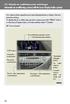 Automatic air conditioning system (with the Lexus Display Audio system) Air outlets and fan speed are automatically adjusted according to the temperature setting. To display the air conditioning operation
Automatic air conditioning system
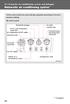 Automatic air conditioning system Airflow and outlets are automatically adjusted according to the temperature setting. Control panel Windshield defogger Driver s side temperature control dial Air conditioning
Automatic air conditioning system
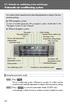 Automatic air conditioning system Air outlets and fan speed are automatically adjusted according to the temperature setting. With navigation system Owners of models equipped with a navigation system should
SUBARU STARLINK YOUR SUBARU CONNECTED Safety & Security OWNER S MANUAL. Love. It s what makes a Subaru, a Subaru. MY16StarlinkS&S_OMportrait.
 SUBARU STARLINK YOUR SUBARU CONNECTED Safety & Security OWNER S MANUAL 2016 Love. It s what makes a Subaru, a Subaru. MY16StarlinkS&S_OMportrait.indd 1 5/11/15 3:31 PM TM Foreword... 2 Welcome to SUBARU
Used 2012 Chevrolet Traverse 2WD LT $13,500
 Reduced! AT Car ID: AT-195BA7A0 Page 1 of 10 Reduced! AT Car ID: AT-195BA7A0 Mileage... 103383 Exterior Color... White Interior Color... Unlisted Body Style... Sport Utility Doors... Four Door Transmission...
Headlight switch. The daytime running. lights) turn on.
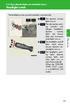 Headlight switch The headlights can be operated manually or automatically. U.S.A. Canada The daytime running lights turn on The side marker, parking (vehicles with halogen headlights), daytime running
Introduction... 2. Body Specifications... 3. Technical Data... 4. Body... 5. Interior Rear Seats... 6. Center Arm Rest... 7. Child Seat Restraint...
 Table of Contents Subject Page Introduction.......................................... 2 Body Specifications.................................... 3 Technical Data........................................
Parrot MKi9000. User guide
 Parrot MKi9000 User guide Contents Contents... 2 Installation... 3 Before you begin... 3 Checking the car configuration... 3 Caution... 3 Removing the car stereo... 3 Installing the kit... 4 Car stereo
CONNECTIVITY QUICK START GUIDE
 CONNECTIVITY QUICK START GUIDE MZD-CONNECT 1 MZD-CONNECT INFOTAINMENT SYSTEM The MZD-Connect system is divided into five sections as displayed on the Home screen. The Home screen can be accessed at any
Guide to the... Nissan Leaf. Completely harmless fun with. City Car Club 100% electric
 Guide to the... Nissan Leaf Completely harmless fun with City Car Club 100% electric Contents 1. First arrival at the car 2. Starting the car 3. Basic controls 4. Getting the most from the battery 5. Finished
RETAINS STEERING WHEEL CONTROLS, SYNC MEDIA PLAYER, SYNC BLUETOOTH AND MORE!
 Owner's Guide Mustang & Kenwood radio RETAINS STEERING WHEEL CONTROLS, SYNC MEDIA PLAYER, SYNC BLUETOOTH AND MORE! PRODUCTS REQUIRED idatalink Maestro RR Radio Replacement Interface MUS1 Dash Kit OPTIONAL
BLUETOOTH. COLOR INFORMATION DISPLAY p.10. HANDSFREELINK p.28. NAVIGATION p.26. ECO ASSIST TM p.13. INSTRUMENT PANEL p.6
 T E C H N O L O G Y R E F E R E N C E G U I D E w w w. m y h o n d a. c a 3 1 T 2 A R 0 0 2013 Honda Accord Sedan Technology Reference Guide 00X31- T2A- R000 2012 Honda Canada Inc. All Rights Reserved
2016 Infiniti Q50 Hybrid. Quick Reference Guide
 06 Infiniti Q50 Hybrid Quick Reference Guide 3 4 6 5 Behind steering wheel 7 6 0 Behind steering wheel 9 8 7 8 7 9 5 0 3 4 3 VEHICLE INFORMATION DISPLAY LOW TIRE PRESSURE WARNING LIGHT 3 HEADLIGHT AND
3-2. Using the air conditioning system and defogger Automatic air conditioning system
 Automatic air conditioning system Airflow and outlets are automatically adjusted according to the temperature setting. Press to display the air conditioning operation screen. Air conditioning operation
2016 Scion im Quick Reference Guide
 2016 Scion im Quick Reference Guide 2016 Scion im This Quick Reference Guide is a summary of basic vehicle operations. It contains brief descriptions of fundamental operations so you can locate and use
Bluetooth Operation. In - Dash Navigation Radio
 Bluetooth Operation In - Dash Navigation Radio Introduction Congratulations on your purchase of the In-Dash Navigation Radio. Please read the instruction manual for this product before using. The documentation
4008 FEATURES AND SPECIFICATIONS
 ACTIVE BODYSTYLE 5 door compact SUV SAFETY Driver and front passenger airbags Front side airbags Full length curtain airbags Driver knee airbag ABS with Electronic Brake Force Distribution (EBFD) Emergency
Used 2015 Chrysler Town & Country Touring $21,785
 NEWLY LISTED AT Car ID: AT-191E68DA Page 1 of 7 AT Car ID: AT-191E68DA Mileage... 37631 Exterior Color... Gray Interior Color... Black Transmission... 6 Speed Shiftable Automatic Fuel Type...Flexible Fuel
>> smart cross connect Users Guide. November 2014.
 >> smart cross connect Users Guide November 2014. >> Table of Contents 1 Overview 1.1 Getting Around 1.2 Pairing your smart with smart cross connect 2 In-Car Mode 2.1 Car Info 2.2 Navigation 2.2.1 Addresses
Getting to know your Q5 SQ5. Quick Questions & Answers
 Getting to know your Q5 SQ5 Quick Questions & Answers The information within this guide must be used in conjunction with the information in the Audi Owner s Manuals. Refer to your vehicle s Owner s Manual
Quick Guide WELCOME TO YOUR NEW VOLVO! VOLVO XC90 WEB EDITION
 VOLVO XC90 Quick Guide WEB EDITION WELCOME TO YOUR NEW VOLVO! Getting to know your car is an exciting experience. fter looking through this Quick Guide you'll like your new Volvo even more. You can find
Registration. Integration of popular mobile apps. (Navigation-equipped models) DR I V ER S
 2016 LEXUS ENFORM QUICK GUIDE 2016 LEXUS ENFORM QUICK GUIDE Lexus Enform, our branded connected services, is designed to provide enhanced peace-of-mind, safety, convenience, and infotainment in one comprehensive
ELECTRICAL WIRING (R.H. DRIVE VEHICLES)
 C-1 ELECTRICAL WIRING (R.H. DRIVE VEHICLES) CONTENTS GENERAL.......................... 3 WIRING HARNESS CONFIGURATION DIAGRAMS......................... 4 ENGINE COMPARTMENT................ 4 DASH PANEL...........................
Automatic air conditioning system
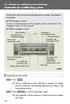 Automatic air conditioning system Airflow and outlets are automatically adjusted according to the temperature setting. With navigation system Owners of models equipped with a navigation system should refer
Infotainment Manual Model Year 2015 Edition: March 2014 KTA-2701/5-VX-en. VAUXHALL Movano
 Infotainment Manual Model Year 2015 Edition: March 2014 KTA-2701/5-VX-en VAUXHALL Movano 0-1 Infotainment Manual Model Year 2015 Edition: March 2014 KTA-2701/5-VX-en Contents Introduction... 2 Radio...
Transporter Fitting Locations No. 804 / 1
 Page 1 of 10 Transporter Fitting Locations No. 804 / 1 Pin connector assigment of selected connections Overview: 1 - Ignition/starter switch -D- On steering column Connector assigment chapter 2 - Onboard
Radio R 4.0 IntelliLink Frequently Asked Questions
 List of content 1. Audio... 1 2. Phone... 2 3. Apple CarPlay... 2 4. Android Auto... 5 5. Gallery... 7 6. Other... 7 1. Audio Q: How can I change between different audio sources (e.g. FM radio and USB