
USER INSTRUCTIONS. Limitorque L Actuator. Installation Operation Maintenance. Experience In Motion FCD LMENIM AQ 06/15
|
|
|
- Gloria Jacobs
- 10 years ago
- Views:
Transcription
1 USER INSTRUCTIONS Limitorque L0-85 Actuator FCD LMENIM0-03-AQ 06/5 Installation Operation Maintenance Experience In Motion

2 Contents Introduction 4. Purpose 4. User Safety 4 Initial Inspection and Storage Instructions 5. Inspection and Recording 5. Short-Term Storage 5.3 Product Identification 6.4 Product Description 7.5 Product Features 7 3 Actuator Weight 8 4 Installation Instructions 9 4. Actuator Mounting Torque Only Applications (Drive ) Torque and Thrust Applications (Drive ) Mounting Bolts 4..4 Stem Cover for Rising Stem Applications 4. Verifying Motor Rotation Direction Initial Electrical Connections Motor rotation (phasing) and OPEN/CLOSE pushbutton operation Three-Phase Motor DC Motor Limit Switch Settings Basic Theory of Operation Adjustment General Setting the OPEN Limit Switch Setting the CLOSE Limit Switch Torque Switch Setting and Wiring Basic Theory of Operation Setting the Torque Switch Balancing the Torque Switch Rewiring the Torque Switch for Non-Standard Drive Sleeve Rotation 4.5 Position Indication 4.5. Local Position Indication 4.5. Remote Position Indication Setting the Potentiometer 4 5 Operation 6 5. Description of Motor Operation 6 5. Description of Manual Operation Electrical Start-up Procedure 7 6 Maintenance 8 6. Lubrication Initial Inspection Frequency Routine Inspection Factory Lubricants Minimum Lubricant Qualities Required 9 7 Disassembly Removal From Valve Open Electrical Compartment and Disconnect Motor Remove Control Wiring Remove Limit and Torque Switch Remove Motor Assembly Remove Handwheel Remove Handwheel Shaft Assembly Remove Declutch Lever Assembly Remove Clutch Assembly Remove Clutch Pinion Assembly 3 7. Remove Worm Shaft Assembly 3 7. Remove and Disassemble Thrust Base Remove Drive Sleeve 33 8 Assembly Handwheel Shaft Assembly and Shimming Verifying Handwheel Operation Thrust Base Assembly and Shimming 38 9 Troubleshooting Typical Wiring Diagram 4 Three-phase with Control Package 37 0 How to Order Parts 4 0. L0-85 Illustrated Parts Breakdown L0-85 Parts List 48 Regulatory Information 50

3 Figures Figure : Limitorque L0-85 Actuator 7 Figure : L0-85 Torque Drive Nut and Retaining Ring Details 0 Figure 3: Thrust Base removal from an L Figure 4: L0-85 Torque Drive Nut orientation (Drive ) Figure 5: L0-85 Thrust Base Assembly orientation (Drive ) Figure 6: Electrical Compartment and Conduit Pipe Plug openings 4 Figure 7: Grounding Lug location 4 Figure 8: Limit Switch Rotor development 5 Figure 9: L0-85 Limit Switch Components 7 Figure 0: Limit Switch OPEN/CLOSED Rotor Cam orientation 8 Figure : Torque Switch Components 0 Figure : Reversing Torque Switch wiring Figure 3: Aligning MDPI Pointer for Fully CLOSED Position Figure 4: Remote Position Indicator Calibration Configuration 4 Figure 5: Potentiometer Calibration configuration 4 Figure 6: Loosening Potentiometer Assembly 5 Figure 7: Removing Clutch Pinion Assembly 3 Figure 8: Key components affected by Handwheel shimming 34 Figure 9: Cut-away view of L0-85 actuator with Clutch Latch positioned on face of Clutch Bearing 35 Figure 0: Gap between Housing face and Handwheel Bushing shown as dimension A 35 Figure : Shimming parts and their order of assembly 37 Figure : Shim location for gap B dimension/ 37 Figure 3 Three-phase with Control Package 4 Figure 4: Electrical Compartment 43 Figure 5: Motor and Motor Drive Components 44 Figure 6: Handwheel Shaft and Associated Components 45 Figure 7: Drive Sleeve Group 46 Figure 8: Thrust Base Group 47 Tables Table : L0-85 Approximate Weight Chart 8 Table : Torque Drive Nut: Maximum Allowable Bore and Key Sizes 0 Table 3: L0-85 Actuator/Mounting Base Tap Size 3 Table 4: Gap A shim thickness selection chart 36 Table 5: Gap B shim thickness selection chart 37 3 flowserve.com
4 Introduction. Purpose This Installation and Maintenance Manual explains how to install and maintain the L0-85 actuator. Information is provided for installation, disassembly, reassembly, lubrication, and parts selection. c WARNING: Read this installation and maintenance manual carefully and completely before storing, installing, operating or troubleshooting your Flowserve Limitorque actuator. Be aware of electrical hazards within the actuator and high-pressure hazards at the attached valve or other device when installing or performing maintenance on your L0-85 actuator.. User Safety Safety notices in this manual detail precautions the user must take to reduce the risk of personal injury and damage to the equipment. The user must read and be familiar with these instructions before attempting installation, operation, or maintenance. Work should be performed by a qualified tradesman who is familiar with the operation and maintenance of electric actuators. Failure to observe these precautions could result in serious bodily injury, damage to the equipment, voiding of the warranty, or operational difficulty. Safety notices are presented in this manual in three forms: c WARNING: Refers to personal safety. Alerts the user to potential danger. Failure to follow warning notices could result in personal injury or death. a CAUTION: Directs the user s attention to general precautions that, if not followed, could result in personal injury and/or equipment damage. 4 NOTE: Highlights information critical to the user s understanding of the actuator s installation and operation.

5 Initial Inspection and Storage Instructions. Inspection and Recording Upon receipt of the actuator, several steps should be initially followed to ensure condition of equipment and to establish proper record keeping.. Carefully remove the actuator from the shipping carton or skid. Thoroughly examine for any physical damage which may have occurred during shipment. If you note any damage, immediately report the damage to the transport company.. A nameplate with important information is attached to each actuator. Record this information for future reference.. Short-Term Storage (less than one year) Actuators are not weatherproof until properly installed on the valve or prepared for storage. Store actuators in a clean, dry, protected warehouse away from excessive vibration and rapid temperature changes. If the actuators must be stored outside, they must be stored off the ground, high enough to prevent them from being immersed in water or buried by snow.. Position the actuator in storage with motor and switch compartment horizontal.. Connect the internal heaters (if supplied) or place desiccant in the switch compartment. 3. Replace all plastic caps or plugs with taped or doped pipe plugs and ensure that all covers are tight. 4. If the actuator is mounted on a valve and the stem protrudes from the actuator, a suitable stem cover must be provided. 5 flowserve.com

6 .3 Product Identification The actuator nameplate is located on the back of the actuator, opposite the limit switch compartment. The nameplate contains the following information: Product name Point of Manufacture Order Number Serial Number Customer Tagging Certification Information The motor nameplate is located on the motor. The nameplate contains the following information: ID Number Run Torque RPM Full Load Amps Insulation Class Horsepower Number of Phases Motor Code Connection Diagram Start Torque Enclosure Type Volts Locked Rotor Amps Duty Rating Service Factor Frequency Ambient Temperature 6

7 Figure : Limitorque L0-85 Actuator Declutch Lever Conduit Openings (plugged; two additional openings are supplied on the bottom of the Electrical Compartment) Housing Motor Position Indication Window Handwheel Electrical Compartment Cover Thrust Base.4 Product Description Your L0-85 actuator controls the opening and closing travel of valves or other actuated devices. OPEN and CLOSED limits of travel are controlled by limit switches, and output torque is controlled by the Torque Switches. As a result, all valves and other actuated devices are protected from potential damage from overload, improper seating and foreign obstructions. Limitorque actuators may be mounted on any appropriately sized valve in almost any position or location. Microprocessor-based controls and monitoring devices are also available for L0 actuators. Contact your local Limitorque distributor or Limitorque sales office for further information..5 Product Features Up to 850 ft-lb/56 Nm torque capacity. Up to 45,000 lb./050 kg thrust capacity. Up to 3.5"/76 mm threaded stem capacity. Up to.75"/70 mm bore capacity. Torque Only (Drive ) or Torque and Thrust (Drive ) actuators, with removable ductile iron thrust base assembly. Cast iron gear housing. All power gearing supported on anti-friction bearings. All gearing is alloy, heat-treated steel or bronze. Speed range of 4-9 RPM (60 Hz), 0-60 RPM (50 Hz). Declutch force independent of load on valve stem. Self-locking gearing available. 7 flowserve.com

8 3 Actuator Weight The following table is an L0-85 representative weight chart. It provides the weight of several components that may be incorporated into a typical package. Use the chart as a guideline to estimate the weight of your particular actuator package. Table : L0-85 Approximate Weight Chart Components lb. kg L0-85 with 40 ft-lb 700 RPM Motor (Torque only) 75 5 With Minimum Integral Control Package and Compartment Thrust Base Assembly (Drive ) 70 3 Add to weights shown above for basic actuator or basic actuator with integral control package. 8

9 4 Installation Instructions c WARNING: Read this Installation and Maintenance Manual carefully and completely before attempting to store, install, operate or troubleshoot your Limitorque valve actuator. Be aware of electrical hazards within the actuator and high pressure hazards of the attached valve or other actuated device when installing or performing maintenance on your L0-85 actuator. NOTE: If your actuator incorporates a rising stem application, it may be shipped with a plastic cap over the Drive Sleeve Housing. If so, in order to store without possible corrosion occurring, install a pipe plug or protective stem cover to protect the Drive Sleeve Housing. NOTE: Failure to comply with recommended storage procedures could cause the warranty to be voided. For long-term storage procedures, consult the Limitorque Customer Service Department. 4. Actuator Mounting Your L0-85 is designed to perform actuation for torque only applications (drive ) or for torque and thrust applications (drive ). If you are using a torque only configuration, before installing on the valve or other actuated device, you will need to verify that the Torque Drive Nut (piece 95) is properly bored and keyed to fit your valve stem. If you are using a torque and thrust configuration, you will need to verify that the Thrust Base Drive Sleeve (piece 0) is properly threaded to fit your threaded valve stem. Use the following procedures to check for proper fit of the Torque Drive Nut or the Thrust Base Drive Sleeve. 9 flowserve.com
10 4.. Torque Only Applications (Drive ) (Refer to Figure 7) Remove the Torque Nut Retaining Ring (piece 98) and Torque Drive Nut (piece 95) from actuator. Figure : L0-85 Torque Drive Nut and Retaining Ring Details #95 Torque Drive Nut #98 Torque Nut Retaining Ring A) If Torque Drive Nut has been bored and keywayed by supplier, verify dimensions of keyway for proper compatibility with the valve stem. B) If Torque Drive Nut has not been bored and keywayed by supplier, it is provided solid (blank) to allow customer to custom bore and key up to the maximum permissible sizes as listed: Table : Torque Drive Nut: Maximum Allowable Bore and Key Sizes Key Type Maximum Bore in. (mm) Maximum Key in. (mm) Rectangle.750 (69.85).65 x.4375 (0 x ) Square.65 (66.67).65 x.65 (0 x 0) 4.. Torque and Thrust Applications (Drive ) (Refer to Figure 8) Remove Socket Head Cap Screw (piece 0) and Lockwasher (piece ) that holds the Thrust Base Housing Assembly to the actuator Housing (piece ). Figure 3: Thrust Base removal from an L0-85 # Housing #00 Thrust Base Housing 0 # Lockwasher #0 Socket Head Cap Screw #0 Thrust Base Drive Sleeve

11 A) If the Thrust Base Drive Sleeve (piece 0) has been threaded by supplier, verify thread compatibility with the threaded Valve Stem by screwing Drive Sleeve onto the valve stem. B) If Thrust Base Drive Sleeve (piece 0) has not been threaded by supplier, it is provided solid (blank) to allow customer to custom thread. Maximum threaded stem diameter is 3.5 (8.5 mm). NOTE: If Thrust Base disassembly is required in order to thread blank Thrust Base Drive Sleeve, remove Quad Rings (piece 07) before removing Thrust Washer (piece 04) and Thrust Bearing (piece 03). This will prevent damaging the Quad Rings (piece 07). For details refer to Section 0., Figure Mounting Bolts Mount the L0-85 actuator on the Actuator Mounting Adapter (Drive ) or on the Thrust Base Assembly (Drive ). High-strength (minimum hex head SAE-Grade 5 or ISO Metric Class socket head cap screws) 8.8 hex head or socket head cap screws with lockwashers are recommended. The quantity and thread size of the actuator mounting taps are as follows: Table 3: L0-85 Actuator/Mounting Base Tap Size Unit Type Quantity Tap Size Drive and English 4 3/4 0 Tap x.0 in. Deep* Metric 4 M0 x.5 mm x 0 mm Deep* *Complies with F6 IOS mounting flange criteria NOTE: Limitorque has supplied four taps for the L0-85 English and metric actuators. All four securing bolts are required to retain torque and/or thrust reaction on these actuators Stem Cover for Rising Stem Applications a CAUTION: Selection and installation of a stem cover which is too short will result in damage to the valve and/or actuator. a CAUTION: Be sure to complete each step of the installation overview before electrically operating your actuator. If your actuator is already mounted to a valve or other actuated device from the manufacturer, verify that the actuator is mounted according to the following overview. Failure to follow the installation procedures could result in personal injury or may allow the actuator to operate improperly and could cause damage to your equipment. a CAUTION: Ensure Retaining Ring (piece 98) is properly engaged in the Drive Sleeve (piece 5) to secure the Torque Drive Nut (piece 95) in place. If the Torque Drive Nut is not properly secured, it may fall from the bottom of the actuator when removed from customer mounting adapters. Before putting your actuator into operational service, check the height of your valve stem at the full OPEN position and mount a suitable stem cover to protect the valve stems and to prevent water entry into the actuator. Installation Overview. Applications A. Torque Only Applications (Drive ) Mount Torque Drive Nut (piece 95) in the actuator with the Torque Drive Nut axially aligned on the Drive Sleeve (piece 5) so that the bottom of the nut is positioned inside the actuator Mounting Base. Secure Torque Drive Nut inside Drive Sleeve (piece 5) with Retaining Ring (piece 98). Refer to Figure 7. flowserve.com

12 B. Torque and Thrust Applications (Drive ) Screw the Thrust Base Assembly onto the Threaded Valve Stem and secure the Thrust Base Assembly to the Actuator Mounting Base using Socket Head Cap Screws (piece 0) and Lockwashers (piece ). Figure 4: L0-85 Torque Drive Nut orientation (Drive ) Drive Actuator Mounting Base Note: Key is shown for reference. It may be in one of several other orientations in reference to the actuator. #95 Torque Drive Nut Valve Stem Key Actuator Mounting Adapter Figure 5: L0-85 Thrust Base Assembly orientation (Drive ) Thrust Base Assembly Threaded Valve Stem Drive Actuator Mounting Base #0 Thrust Base (Drive Sleeve) #0 Socket Head Cap Screws # Lockwashers Actuator Mounting Adapter 4. Verifying Motor Rotation Direction 4.. Initial Electrical Connections c WARNING: Hazardous Voltage. No electrical power should be connected until all wiring and Limit Switch adjustments have been completed. Once power is supplied to actuator, exercise caution if cover is not installed.

13 . Open the Electrical Compartment Cover (piece 00-) and remove the Conduit Pipe Plugs from the opening(s) most conveniently located for your power leads and other cabling. Conduit Pipe Plug Locations Electrical Compartment Conduit Pipe Plug Locations Figure 6: Electrical Compartment and Conduit Pipe Plug openings. Adjust the Limit Switches, MDPI (Mechanical Dial Position Indicator) and Potentiometer following the procedures outlined in Sections 4.5 and Ensure Torque Switch is set properly for your application. In most cases, adjustments are not needed, but if changes are required, see Section 4.6, Torque Switch Settings and Wiring. 4. Connect wiring to Terminal Strips provided on the actuator. Refer to the wiring diagram supplied with your specific actuator. Forktype terminal connections are recommended. 5. Be sure any unused conduit entrances are plugged with metal Conduit Pipe Plugs. Notes: a) Explosion-proof actuators require approved sealing fittings installed in accordance with the National Electric Code. b) Submersible actuators require approved sealing fittings in order to prevent water entering the actuator. 6. Attach grounding wire to Grounding Lug (piece 4). Figure 7: Grounding Lug location Grounding Lug 3 flowserve.com

14 7. Inspect actuator for proper lubrication. Refer to Lubrication Section 6. for lubrication instructions. 8. Verify that Motor rotation is operating in the proper direction; the Motor rotation will have a direct impact on the Limit Switch and Torque Switch functions. Follow the procedure Verifying Motor Rotation Direction in Sections 4.4., and 4.4.4). 9. Close Electrical Compartment Cover (piece 00-). 0. The actuator is now ready for electrical operation. Continue to Electrical Start-up Procedure in Section Motor rotation (phasing) and OPEN/CLOSE Pushbutton Operation It is very important to check for correct motor rotation to ensure that serious damage to your valve or other equipment does not occur. If the actuator motor rotates in the wrong direction, damage could occur by over-torquing equipment into a seated position. Prior to being shipped from the factory, each actuator is inspected to verify proper operation of the Torque and position Limit Switch and to ensure that they function correctly (i.e. closes when the CLOSE pushbutton is depressed, opens with the OPEN pushbutton, etc.). These inspections are made with a properly phased power source connected as described in the actuator manual. a CAUTION: To ensure proper operation and to prevent your actuator or other actuated equipment from damage, verify that your actuator is properly connected to its power source. NOTE: Your application may vary from the following standard wiring configurations for Three-phase, Single-phase and DC motors. Refer to your actuator wiring diagram for user-specific wiring configuration Three-Phase Motor. Using the Handwheel, move the valve to a midtravel position (midtravel position allows electrical operation in the valve safe area and keeps the OPEN and CLOSED Limit Switches from tripping while testing motor direction).. Be prepared to immediately remove power should the actuator run the wrong way. 3. Test motor direction by momentarily pressing the OPEN pushbutton: A) If the actuator moves toward CLOSED, immediately turn all power OFF and reverse the motor leads T and T3. NOTE: Refer to your actuator wiring diagram for user-specific wiring configuration. B) If the actuator moves toward OPEN, the motor is wired properly for the application DC Motor. Using the Handwheel, move the valve to a midtravel position (midtravel position allows electrical operation in the valve safe area and keeps the OPEN and CLOSED limit switches from tripping while testing motor direction).. Test the motor direction by momentarily pressing the OPEN pushbutton: A) If the actuator moves toward CLOSED, immediately turn all power OFF and reverse the motor leads A and A. NOTE: Refer to your actuator wiring diagram for user specific wiring configuration. B) If the actuator moves toward OPEN, the motor is wired properly for the application. 4

15 4.3 Limit Switch Settings The standard L0-85 Limit Switch has 6 contacts. The OPEN/CLOSE Limit Switch (first eight contacts) has two Rotor Sets, one for the OPEN position and one for the CLOSED position. Each Rotor Set has four electrical contacts which can be arranged in any combination of normally OPEN and normally CLOSED. The SPARE Limit Switch (second eight contacts) has two additional Rotor Sets with four contacts each that can be set to operate anywhere between the OPEN and CLOSE positions. These can be used to stop the valve in mid-travel or to interlock with other equipment such as pumps, fans, mixers, etc. Refer to Figure 8. Figure 8: Limit Switch Rotor Development VALVE SHOWN IN FULL OPEN POSITION LIMIT SWITCH CONTACT DEVELOPMENT ROTOR CONTACT FULLY OPEN VALVE POSITION A B FULLY. CLOSED FUNCTION BY-PASS CIR. OPEN CLOSE INT INDICATION IND LIGHT OPEN LIMIT BY-PASS CIR INDICATION IND LIGHT CLOSE LIMIT SPARE SPARE SPARE SPARE 3 SPARE INT. 4 5 SPARE SPARE 6 SPARE NOTES. Contact Open. Contact Closed 3. All limit switch trip points are fully adjustable. NOTE: THE LIMIT SWITCH IS NOT PRESET at the Limitorque factory, and must be set after mounting on the valve or other associated equipment. If your L0-85 actuator has been shipped already installed on your equipment, your actuator should have the Limit Switch set for your application. If your actuator is not already installed on your equipment or needs resetting, use the following instructions to make the appropriate settings. The following instructions for setting the Limit Switches are based on the typical orientation for most actuator applications (CCW to OPEN and CW to CLOSE). Consult the applicable wiring diagram located in the actuator Electrical Compartment for your specific Limit Switch development Basic Theory of Operation c WARNING: Do not manually operate actuator with devices other than installed Handwheel and Declutch Lever. Using additive force devices (cheater bars, wheel wrenches, pipe wrenches or other devices of this nature) on the actuator Handwheel or Declutch Lever may cause serious personal injury and/or damage to the actuator or valve. c WARNING: Hazardous Voltage. Make sure all power is OFF before opening the Electrical Compartment Cover or making the following settings. The Limit Switch (piece 305) is driven directly by the Worm Shaft through the Limit Switch Pinion. Therefore, the Limit Switch is directly connected to the output of the actuator. Once the Limit Switch is properly set, it measures the position of the valve, or other equipment, in the ELECTRIC or MANUAL operating modes. 5 flowserve.com
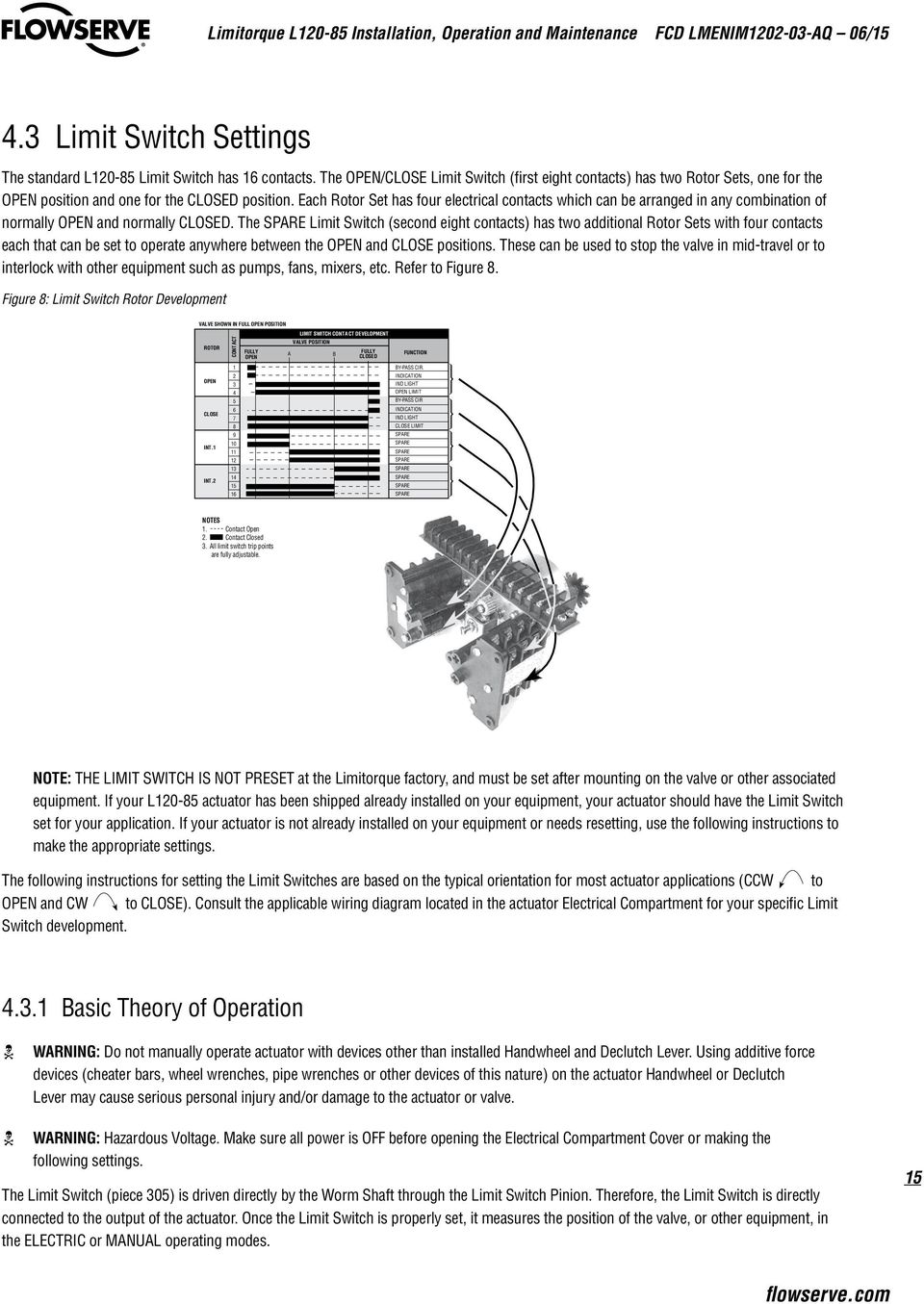
16 The OPEN Rotor consists of contacts through 4. These switches are set to change state at the full OPEN position. The switch functions are as follows: Contact is the CLOSED Torque Switch bypass circuit. It s purpose is to allow the electric actuator to apply its full torque to unseat a backseated valve. When a valve is manually backseated to prevent packing leakage, it may stick momentarily when first operated. To prevent the CLOSE Torque Switch from stopping the actuator during unseating, this momentary bypass is applied. The OPEN Rotor actuates at the full OPEN position causing contact to open as soon as the valve moves in the close direction, thus returning the Torque Switch function to the control circuit. Contact is normally used for a Remote Valve Position Indication Lamp. As shown in Figure 8, the lamp will be turned ON when the valve reaches the full OPEN position. Contact 3 is for the Local Position Indication Lamp; included as part of the actuator assembly when required. This switch turns the green lamp/led OFF in the full OPEN position, leaving the red lamp/led energized and indicating that the valve is OPEN. Contact 4 is the OPEN Limit Switch which opens the control circuit to de-energize the Motor at full OPEN position. The CLOSE Rotor consists of contacts 5 through 8. This Rotor is set to change state at the full CLOSE position. Switch functions are as follows: Contact 5 is the OPEN Torque Switch bypass. After the valve has been tightly closed, it may stick when it is first opened which would cause the Torque Switch Contacts to break. To momentarily overcome this sticking, the OPEN Torque Switch is bypassed. This OPEN Torque Switch bypass is part of the closed valve position rotor so that as soon as the valve moves in the OPEN direction, the bypass contact opens and the OPEN Torque Switch control function is returned. Contact 6 is normally used for a Remote Valve Position Indication Lamp. As shown in Figure 8, the lamp will be turned ON when the valve reaches the full CLOSE position. Contact 7 is for the Local Position Indication Lamp; included as part of the actuator assembly when required. This switch turns the red lamp/led OFF in the full CLOSE position, leaving the green lamp/led energized and indicating the valve is in the full CLOSE position. Contact 8 is the CLOSE Limit Switch that opens the control circuit to de-energize the Motor at full CLOSE position Adjustment General Tools required: The cross-slotted Intermediate Shafts A, B, C and D have been designed for use with a 6 No. Phillips screw driver shank chucked into a variable speed reversible electric drill. (See figure 9 for Limit Switch components). Phillips Head or Flat Head screwdriver. c WARNING: Potential Explosion Hazard. Do not use an electric drill for setting the Limit Switch in an explosive environment. a CAUTION: When setting Limit Switch Rotor Cams using a variable speed reversible electric drill, Do Not run drill at speeds higher than 00 RPM. Operating drill at high speeds can cause damage to gearing within the Limit Switch. 6

17 a CAUTION: The Worm on the Worm Shaft Assembly is available in two different ratios 9: and 38:. To avoid damage to the gearing mechanisms, be sure you change the Limit Switch Drive Pinion gear if the Worm gear ratio is changed. NOTE: The Limit Switch is available with a 4 Gear Set or a 5 Gear Set within the Gear Frame Assembly. The number of Gear Sets built into your specific Limit Switch will determine the number of maximum Drive Sleeve rotations required to go the full range of the Limit Switch. A four Gear Set with 9: and 38: has a maximum rotation of 90.5 Drive Sleeve rotations. A five Gear Set with 9: and 38: has a maximum rotation of 90.5 Drive Sleeve rotations. Figure 9: L0-85 Limit Switch Components Gear Frame Assembly Intermediate Shafts (A, B, C, and D) Drive Pinion Clutch Screw Rotor Cams Setting the OPEN Limit Switch. De-engerize the electrical circuit to the actuator.. Open the Electrical Compartment Cover (piece 00-). 3. Put the actuator into MANUAL operation by moving the Declutch Lever in the direction of the arrow on the lever until the Declutch Lever locks in place. 4. Turn the Handwheel CCW to move the valve to the full OPEN position. While turning the Handwheel, note the direction of the Intermediate Shaft that corresponds to the Open Rotor Group. See figure 9. NOTE: Most applications require turning the Handwheel CW to obtain the full CLOSE position and CCW to obtain full OPEN position. The actuator Drive Sleeve rotates in a CW direction to the CLOSE position and CCW to the OPEN position. The Limit Switch Intermediate Shafts rotate in a CCW direction to the CLOSE position and CW to the OPEN position. If your application is configured differently, keep in mind that the descriptions in this manual will describe rotation directions opposite of your application. 5. Once the valve is fully OPEN, turn the Handwheel back toward CLOSE approximately one full turn. This will allow for coasting during motor operation. a CAUTION: Do not operate the actuator when the Clutch Screw is in a fully depressed position; loss of the contact setting will occur and the Setting Rod will be damaged. 7 flowserve.com

18 a CAUTION: For highly geared actuators, one turn of the handwheel may not be sufficient to allow for coast of moving parts. Refer to valve manufacturer setting requirements in these cases. 6. Push in Clutch Screw and turn CW one quarter turn to latch in a depressed position. 7. Limit Switch Rotor Cams A. If your Limit Switch Rotor Cams did not trip at the full OPEN position point, turn the Intermediate Open Shaft in a CW direction until the Open Limit Rotor Cam rotates 90 to make an OPEN contact (OPEN limit trip point = Rotor Cam in a vertical orientation to make an OPEN contact); see figure 0 for orientation. Once you have reached the full OPEN position point, use the Handwheel to rotate the Intermediate Shaft slowly in the CCW direction until the Rotor just trips again. B. If your Limit Switch Rotor Cams did trip before reaching the full OPEN position point, leave the valve at the full OPEN position point and turn the Intermediate Open Shaft in a CCW direction until the Rotor Cam rotates 90 to make an OPEN contact (OPEN limit trip point = Rotor Cam in a vertical orientation to make an OPEN contact). Once you have reached the full OPEN position point, rotate the Intermediate Shaft slowly in the CW direction until the Rotor just trips again. Figure 0: Limit Switch OPEN/CLOSED Rotor Cam orientation CLOSED Contact Contact Plunger Rotor Cams OPEN Contact 8. Before operating the actuator, depress and turn the Clutch Screw CCW one-quarter turn to the spring release position. Insert a screwdriver into each of the Intermediate Shafts and rock them CW and CCW a few times to ensure all the gearing is seated well Setting the CLOSE Limit Switch. De-engerize the electrical circuit to the actuator.. Open the Electrical Compartment Cover (piece 00-). 3. Put the actuator into MANUAL operation by moving the Declutch Lever in the direction of the arrow on the lever until the Declutch Lever locks in place Turn the Handwheel CW to move the valve to the full CLOSED position. While turning the Handwheel, note the direction of the Intermediate Shaft that corresponds to the Closed Rotor Group.

19 NOTE: Most applications require turning the Handwheel CW to obtain the full CLOSE position and CCW to obtain full OPEN position. The actuator Drive Sleeve rotates in a CW direction to the CLOSE position and CCW to the OPEN position. The Limit Switch Intermediate Shafts rotate in a CCW direction to the CLOSE position and CW to the OPEN position. If your application is configured differently, keep in mind that the descriptions in this manual will describe rotation directions opposite of your application. 5. Once the valve is fully CLOSED, turn the Handwheel back toward OPEN approximately one full turn. This will allow for coasting during motor operation. a CAUTION: Do not operate the actuator when the Clutch Screw is in a fully depressed position; loss of the contact setting will occur and the Setting Rod will be damaged. a CAUTION: For highly geared actuators, one turn of the handwheel may not be sufficient to allow for coast of moving parts. Refer to valve manufacturer setting requirements in these cases. 6. Push in Clutch Screw and turn CW one-quarter turn to latch in a depressed position. See Figure 9 for Limit Switch nomenclature. 7. Limit Switch Rotor Cams A. If your Limit Switch Rotor Cams did not trip at the full CLOSE position point, turn the Intermediate Close Shaft in a CCW direction until the Close Limit Rotor Cam rotates 90 to make an OPEN contact (CLOSE limit trip point = Rotor Cam in a vertical orientation to make an OPEN contact). Once you have reached the full CLOSED position point, rotate the Intermediate Shaft slowly in the CW direction until the Rotor just trips again. B. If your Limit Switch Rotor Cams did trip before reaching the full CLOSE position point, leave the valve at the full CLOSE position point and turn the Intermediate Close Shaft in a CW direction until the Close Limit Rotor Cam rotates 90 to make an OPEN contact (CLOSE limit trip point = Rotor Cam in a vertical orientation to make an OPEN contact). Once you have reached the full CLOSE position point, rotate the Intermediate Shaft slowly in the CCW direction until the Rotor just trips again. 8. Before operating the actuator, depress and turn the Clutch Screw CCW one quarter turn to the spring release position. Insert a screwdriver into the Intermediate Shafts and rock them CW and CCW a few times to ensure all the gearing is seated well. 4.4 Torque Switch Setting and Wiring c WARNING: Hazardous Voltage. Turn the power OFF before opening the Electrical Compartment Cover or making any adjustments to the Torque Switch. NOTE: Removal or modification of the Torque Switch Limiter Plate will void the actuator warranty. Do not exceed the torque setting indicated by the Torque Switch Limiter Plate without contacting the Limitorque Customer Service Department. The L0-85 actuator is equipped with a double-acting Torque Switch that has been factory preset according to the required torque value provided by the valve manufacturer or other associated equipment supplier. Further Torque Switch adjustment should not be required; however, the Torque Switch may be reset from positions through 5 (5 being the highest input torque requirement) by adjusting the Torque Switch Adjustment Screws unless it is limited by the Limiter Plate. See figure for Torque Switch nomenclature. 9 flowserve.com

20 4.4. Basic Theory of Operation As torque is developed by the actuator, the Worm moves axially and causes compression on the Spring Pack Assembly (components of the Worm Shaft Assembly (piece 5)). The Spring Pack Assembly is calibrated so that a given amount of spring compression equates to a given amount of output torque. Axial Worm Shaft Assembly movement causes the Torque Switch Shaft (piece 300-3) to move, therefore engaging the Torque Switch measurement device. Once the Torque Switch is properly set, it measures valve, or other equipment, torque input in the ELECTRIC or MANUAL operating modes Setting the Torque Switch a CAUTION: Installing or adjusting the Torque Switch with the actuator in a loaded condition will result in loss of torque protection. Before adjusting or installing the Torque Switch, place the actuator in MANUAL mode and turn the Handwheel in the direction necessary to release the torque load on the Worm Shaft Assembly. NOTE: If Torque Switch replacement is required, be sure to use an L0-85 Torque Switch rather than replacing with an L0-0 thru 40 Torque Switch. The L0-85 Torque Switch Torque Arm is rotated 0 from the position of the Torque Arm on the L0-0 thru 40 Torque Switch (the red dot on the Torque Switch Shaft indicates an L0-85 Torque Switch). Figure : Torque Switch Components #300-4 Torque Switch Adjustment Screws #300-8 Balancing Screws Mounting Screw Hole Torque Arm ID Limiter Plate (not shown) Red dot indicates L0-85 Torque Switch #300- & Index Arm Typical OPEN contact assembly (8 & 8C) Typical CLOSE contact assembly (7 & 7C). Turn all power to the actuator OFF.. Loosen the Torque Switch Adjustment Screws (piece 300-4) on the OPEN or CLOSED side of the Torque Switch. 3. Move Index Arm (piece 300- or piece 300-3) to desired torque setting. The higher number indicates an increased torque and/or thrust output requirement. 4. Tighten the Torque Switch Adjustment Screws (piece 300-4). 5. Turn power ON and operate the valve electrically to seat the valve or other device and to ensure tight shut-off Balancing the Torque Switch If the Torque Switch has been removed from the actuator or if you are installing a new Torque Switch, it must be rebalanced using the following procedure: 0

21 . Ensure that the actuator is in MANUAL mode and the load is removed from the Worm Shaft Assembly.. Make note of the current OPEN and CLOSED Torque Switch settings before reinstalling the Torque Switch. 3. Loosen Torque Switch Adjustment Screws (piece 300-4) and position both Index Arms (piece 300-) and (piece 300-3) at the setting; tighten the Torque Switch Adjustment Screws. Make sure the Index Marks are aligned. See figure Loosen Balancing Screws (piece 300-8) and install the Torque Switch. When properly installed, the base of the Torque Switch is flush against the Actuator Compartment and the hole for the Mounting Screw is aligned. Install the Mounting Screw. 5. Tighten the Balancing Screws. The Torque Switch is now balanced and ready for Index Arm (piece 300- and piece 300-3) to be returned to their original settings. 6. Follow your wiring diagram to connect Torque Switch wiring Rewiring the Torque Switch for Non-Standard Drive Sleeve Rotation a CAUTION: Double check your wiring diagram to verify that your Torque Switch is wired appropriately for your application. The Torque Switch will not protect your valve from over-torque if you do not apply appropriate wiring for your application. L0-85 actuators are typically supplied with a CCW Drive Sleeve rotation to open a valve. The two Torque Switches are marked OPEN (CCW ) and CLOSE (CW ) based upon CCW Drive Sleeve rotation to open the valve. The MDPI on the L0-85 is typically mounted for the full CCW rotation to indicate the OPEN position (00%). If opposite drive sleeve rotation is required (CCW to CLOSE a valve), the following torque switch modifications are required. c WARNING: Hazardous Voltage. Turn power OFF before opening the Electrical Compartment Cover or making any adjustments to the Torque Switch.. Turn power to the actuator OFF before changing Torque Switch wiring.. Reverse the OPEN and CLOSE Torque Switch labels on the ID Limiter Plate. See figure. 3. Interchange OPEN Torque Switch wires 8 and 8C with CLOSED wires 7 and 7C (refer to your wiring diagram for other Torque Switch wiring configurations). Figure : Reversing Torque Switch Wiring #300-4 Torque Switch Adjustment Screws Typical OPEN contact assembly (8 & 8C) 8 8C Typical CLOSE contact assembly (7 & 7C) 7 7C NOTE: 7C and 8C attach to screws (not shown) on the bottom of the switch. flowserve.com
22 4. Remove the Mechanical Dial Position Indicator Plate and flip over for indication of CCW rotation to the valve s CLOSED position. See figure 3 for MDPI Dial Plate. 5. Reverse the OPEN/CLOSE directional arrow on the Handwheel. 4.5 Position Indication The MDPI is used to indicate the current position of the valve or other actuated devices. Adjustments must be done after mounting the actuator on the application. If your supplier has not set the MDPI or your application has changed and requires resetting, use the following procedure to complete the MDPI settings. c WARNING: Hazardous Voltage. Turn power OFF before opening the Electrical Compartment Cover, calibrating the MDPI or installing the Remote Voltmeter Indicator Local Position Indication. Turn OFF all power to the actuator.. Manually position the valve in the fully CLOSED position. 3. Loosen the Round Head Machine Screw (piece 53) on the MDPI Pointer (piece 5). Figure 3: Aligning MDPI Pointer for Fully CLOSED Position MDPI Dial Plate #53 Round Head Machine Screw #5 MDPI Pointer 4. Move the MDPI Pointer to the (CLOSED) position. NOTE: If your application uses CW CLOSED position on the MDPI Plate. Handwheel rotation to OPEN, flip the MDPI Plate over to properly orient the OPEN and 5. Tighten the Round Head Machine Screw on the MDPI Pointer Remote Position Indication c WARNING: Hazardous Voltage. Use extreme caution if the power is ON and Electrical Compartment Cover is open or removed. NOTE: Typical voltmeter remote indicators furnished by Limitorque are built to accept a maximum of 0 volts. In order to make voltmeter adjustments, you will need a separate voltmeter with a scale suitable for the maximum incoming control voltage.
23 CLOSED 4 Valve Position LIMITORQUE CORPORATION LYNCHBURG V A. 3 4 OPEN Digital Multitester Limitorque L0-85 Installation, Operation and Maintenance FCD LMENIM0-03-AQ 06/5. Mount the Adjustable Resistor as close as possible to the Remote Voltmeter Indicator.. Turn power to the actuator OFF and connect all wiring as shown in Figure 4. For now, connect the wires leading to the Remote Voltmeter Indicator to your test meter so you can conduct voltage readings during the setup. 3. Move the Adjustable Resistor Slider to the extreme opposite end of the Resistor from the Power Connection. 4. Open the Electrical Compartment Cover (piece 00-). Loosen the Hex Head Retaining Nut at the base of the Potentiometer Bracket and dis-engage the Spur Gear from the Potentiometer Drive Gear. This will allow manual rotation of the Potentiometer Assembly. See figure Manually position the valve in the fully CLOSED position. As you are rotating the Handwheel to the CLOSED position, notice the direction the Potentiometer Spur Gear would be turning the Potentiometer Shaft/Wiper Arm inside the Potentiometer. 6. When the valve is CLOSED, turn the Potentiometer Shaft to the end-of-travel position that corresponds to the CLOSED position of the Potentiometer. Carefully reposition the Potentiometer Spur Gear onto the Potentiometer Shaft to re-engage with the gear train. Re-tighten Hex Head Retaining Nut at the base of the Potentiometer Bracket. 7. Turn power to the actuator ON. Your Test Meter should read 0 or almost 0. If not, go back through the above steps 7 to get your Potentiometer calibrated to the proper end-of-travel. 8. Now manually position the valve in the fully OPEN position. 9. Move the Adjustable Resistor Slider toward the Power Connection end until the Test Meter reads 0 volts. 0. Turn actuator power OFF, disconnect the Test Meter and connect the leads to the Remote Voltmeter Indicator.. Turn actuator power ON. Your Remote Voltmeter Indicator should read full OPEN.. Further adjustment may be necessary. If the Remote Voltmeter Indicator reads less than full OPEN, carefully move the Adjustable Resistor Slider ahead being careful not to exceed the full OPEN position on the Remote Voltmeter Indicator. If the Indicator reads more than 0 when the valve is CLOSED, repeat this procedure. 3. When the Indicator properly shows valve position, lock the Adjustable Resistor Slider in place. Figure 4: Remote Position Indicator Calibration Configuration 75 watt, 500 ohm Adjustable Resistor located adjacent to Remote Position Indicator for voltage adjustment Remote Voltmeter Indicator 0.00 Ohmmeter for calibration 5 watt, 50 ohm Potentiometer type Variable Resistor mounted in a Limitorque Actuator Housing Mounting Surface P P P3 Adustable Resistor Slider Control voltage range 0 volts to 480 volts 3 flowserve.com
24 4.5.3 Setting the Potentiometer If your L0-85 actuator includes a Feedback Potentiometer supplied for remote valve position indication, use an ohmmeter to calibrate the position of the Potentiometer. Typically, the Potentiometer Spur Gear is shipped from the factory dis-engaged from the Potentiometer Drive Gear. If your supplier has not re-engaged and calibrated the Potentiometer, use the following procedure to complete the Potentiometer setup. c WARNING: Hazardous Voltage. Turn power OFF before opening the Electrical Compartment Cover or calibrating the Feedback Potentiometer. Use extreme caution if the power is ON and the Electrical Compartment is OPEN.. Turn all power to the actuator OFF.. Using the Handwheel, position the actuator to mid-travel (valve at the 50% position). 3. Disconnect the Potentiometer Wiring Harness from the Interconnect Board or Terminal Strip. 4. Using an ohmmeter, verify that the potentiometer is in mid-travel. The resistance from each End Connection to the Center Connection should be half of the full resistance of the Potentiometer. Example: a 000 ohm potentiometer should read approximately 500 ohms from one of the End Connections to the Center Connection. If the reading is not correct, proceed to step 5. If the reading is correct proceed to step. Figure 5: Potentiometer Calibration configuration Ohmmeter Pot Lead End Connection Pot Lead Center Connection 5. If the Potentiometer Assembly is engaged with the Potentiometer Drive Gear: Loosen the Hex Head Retaining Nut at the base of the Potentiometer Bracket and dis-engage the Spur Gear from the Potentiometer Drive Gear. This will allow manual rotation of the Potentiometer Spur Gear. Continue to step 7. 4
25 Figure 6: Loosening Potentiometer Assembly Hex Head Retaining Nut Pontentiometer Spur Gear Pontentiometer Drive Gear 6. If the Potentiometer Spur Gear is not engaged with the Potentiometer Drive Gear continue to step Rotate the Potentiometer Spur Gear until the correct readings are obtained as described in step Carefully reposition the Potentiometer Spur Gear to re-engage with the gear train. 9. Re-tighten Hex Head Retaining Nut at the base of the Potentiometer Bracket. 0. Recheck ohmmeter reading to assure Potentiometer adjustment was not changed when Potentiometer was tightened to Potentiometer Bracket. If Potentiometer setting is not accurate, repeat steps 5 9. If ohmmeter reading is accurate, proceed to step.. Disconnect the ohmmeter and reconnect the Potentiometer wiring to the Interconnect Board or Terminal Strip. 5 flowserve.com
26 5 Operation L0-85 actuators are always available for motor operation when the motor is energized. Do not force the Declutch Lever into the motor operation position. The Declutch Lever returns to motor operation position automatically when the motor is energized. NOTE: Refer to the Illustrated Parts Breakdown in Section 0. as you step through the Description of Operation and the Assembly/Disassembly procedures. 5. Description of Motor Operation In motor operation, the Motor Cam (piece 38) drives the Clutch Assembly (piece 9-,, and 3) which is splined on the outer diameter and mates with the internal splines of the Clutch Pinion Assembly (piece 8-, and 3). The helical gear teeth on the Clutch Pinion (piece 8-) mate with the Wormshaft Gear (piece 35) teeth. The Clutch Pinion and Wormshaft Gear are always engaged. The Wormshaft Gear is keyed to the Wormshaft (piece 5-) which is keyed to the Worm (piece 5-). Rotation of the Wormshaft/ Worm Assembly turns the Worm Gear (piece ). Lugs on the Worm Gear engage lugs on the outer diameter of the Drive Sleeve (piece 5). Hammerblow or no lost motion is selected by the assembly arrangement of the Worm Gear and Drive Sleeve Lugs. Lugs at the base of the Drive Sleeve can drive either a Torque Drive Nut (similar to L0-0 through 40) or they can drive the lugs of the Thrust Stem Nut contained in the type Drive Thrust Base Assembly. 5. Description of Manual Operation c WARNING: Do not manually operate actuator with devices other than installed Handwheel and Declutch lever. Using additive force devices (cheater bars, wheel wrenches, pipe wrenches or other devices of this nature) on the actuator Handwheel or Declutch Lever may cause serious personal injury and/or damage to the actuator or valve. 6 The L0-85 actuator has a Handwheel (piece 9) for manual operation. The actuator can be manually operated any time the Motor is not energized. To manually operate the L0-85, push the Declutch Lever (piece 9) in the direction of the arrow until it latches in place. Pushing the Declutch Lever rotates
27 the Declutch Shaft which is keyed to the Declutch Link (piece 7-). The Declutch Link engages the Clutch Ball Bearing (piece 9-) which disengages the Clutch from the Motor Cam and engages the Handwheel Lugs (piece 3-). The Clutch Latches (piece 3) hold the Clutch Assembly in MANUAL operation until the Motor is energized. Lobes on the Motor Cam (piece 38) cause the Clutch Latches to release when the Motor is energized. The spring-loaded Clutch (piece 9-) reengages with the lugs on the Motor Cam. The Declutch Lever will automatically disengage when the Motor begins operating. 5.3 Electrical Start-up Procedure. Check that the actuator has been correctly lubricated. This is particularly important if the actuator has been in long-term storage.. Ensure that the Limit Switch and Torque Switch have been properly set. 3. If the valve stem is not visible, remove the Pipe Plug (piece 45) to observe the output direction of the Drive Sleeve (piece 5). 4. Engage MANUAL operation and hand crank actuator well away from the OPEN or CLOSED end-of-travel. 5. Turn power ON and push the OPEN button to electrically operate the actuator. 6. Check output rotation; if Motor rotation (phase) is correct, the valve will begin to open. If the valve begins to close, Stop Immediately. 7. Correct the Motor rotation by following the procedure Verifying Motor Rotation Direction in Section The actuator should operate correctly and will stop at the end of travel by the Torque and Limit Switch functions. 9. Replace Pipe Plug (piece 45). 0. If your actuator configuration has a control package, consult you specific controls package Installation and Maintenance Manual for proper set-up and calibration. 7 flowserve.com
28 6 Maintenance 6. Lubrication 6.. Initial Inspection NOTE: Before operating your actuator, inspect it for proper lubrication, (especially if it has been stored for a long period of time). No seal can remain absolutely tight at all times; therefore, it is not unusual to find a very small amount of weeping around shaft seals especially during long periods of idleness such as storage. Using grease minimizes this condition as much as possible. If you find a small amount of weeping at startup, remove it with a clean rag. Once the equipment is operating, the weeping should stop. 6.. Frequency Base the frequency of lubrication inspections on historical data of your installed equipment. Every actuator application has its own effect on lubricants. Pattern lubricant inspections based on the needs of your facility and its applications. The following schedule of lubrication inspection should be followed until operating experience indicates otherwise. Gear Case: Inspect lubrication every 8 months or 500 cycles whichever occurs first Routine Inspection The three primary considerations in a lubrication inspection are:. Quantity L0-85 operators are built to operate on the immersion principle. The primary concern in the amount of lubricant is whether the worm is totally immersed in grease. 8. Quality If dirt, water or other foreign matter are found during lubrication inspection, the actuators should be flushed with a commercial degreaser/cleaner such as Exxon Varsol 8 which is not corrosive and does not affect seal materials. Repack actuator with fresh lubricant allowing room for grease thermal expansion. 3. Consistency Lubricant should be slightly fluid approximating a standard NLGI-0 grade consistency or less. Thinners such as Amoco WAYTAC 3 oil may be added provided the volume of thinner does not exceed 0% of the total lubricant.
29 6..4 Factory Lubricants Gear Case L0-85 is factory lubricated with an EP-0 lithium base grease, suitable for temperatures from -0 F (-9 C) to + 50 F (+ C). Geared Limit Switch: Exxon Beacon 35 (no substitute) Minimum Lubricant Qualities Required a CAUTION: Do not mix lubricants of a different base chemical. Mixing lubricant bases may cause lubricant properties to be ineffective. The standard lubricants used by Limitorque have been proven extremely reliable over years of service. We do not recommend a particular lubricant substitute for our standard lubricants, but below is a list of minimum lubricant qualities required by Limitorque: Should contain an EP additive. Must be suitable for the temperature range intended. Must be water and heat resistant and non-separating. Must not create more than 8% swell in Buna N or Viton. Must not contain any grit, abrasive or fillers. Must slump prefer NLGI grade. Must not be corrosive to steel gears, ball or roller bearings. Dropping point must be above 36 F for temperature ranges of -0 F (-9 C) to 50 F (66 C). 9 flowserve.com
30 7 Disassembly c WARNING: Hazardous Voltage. Turn power OFF before disassembling your L0-85 actuator. c WARNING: Potential high pressure vessel. Before removing or disassembling your actuator, ensure that the valve or other actuated device is isolated and is not under pressure. NOTE: Minor service may be performed with the actuator mounted on the valve or other actuated devices. Perform more complex service with the actuator removed from the valve or other actuated device. NOTE: Review and familiarize yourself with the illustrated parts breakdown prior to disassembly. NOTE: Drive units (Thrust only) will maintain the thrust of a valve without the actuator mounted on the Thrust Base. Before removing the actuator from the Thrust Base, ensure that all actuated devices are secured to appropriate positions while actuator is removed from the Thrust Base. 7. Removal From Valve. Rotate the Handwheel to the fully CLOSED position.. Drive applications (Refer to illustrated parts breakdown) a. Loosen and remove customer installed Mounting Screws and Lock-washers that are holding the actuator to the Mounting Adapter. b. Remove Pipe Plug (piece 45) from top of actuator Housing (piece ). c. Lift the actuator enough to loosen Key from the Drive Sleeve (piece 5). d. Remove Key from the Valve Stem and the Drive Sleeve (piece 5). 30 e. Lift actuator completely off of the Mounting Adapter or Thrust Base Assembly. 3. Drive applications a. Loosen and remove Socket Head Cap Screws (piece 0) and Lockwashers (piece ) at the Mounting Base of the actuator to remove the actuator from the Thrust Base Assembly.
31 b. Lift actuator completely off of the Mounting Adapter or Thrust Base Assembly. c. Disconnect Motor and remove control wiring (see next two sections). d. Drive Only: Rotate the Thrust Base Assembly off the threaded Valve Stem. 7. Open Electrical Compartment & Disconnect Motor. Turn power to the actuator OFF.. Open or remove the Electrical Compartment Cover (piece 00-) by loosening pieces 00- and Refer to illustrated parts breakdown. 3. Disconnect motor leads from the Terminal Strip (Refer to your wiring diagram to locate motor lead wiring numbers). 7.3 Remove Control Wiring. Slowly remove one of the Pipe Plugs (piece 50-4) to release any air pressure built up within the actuator. Refer to illustrated parts breakdown.. If actuator has an Integral Assembly, remove all Integral Assembly wiring that is connected to the Terminal Strip. 7.4 Remove Limit and Torque Switch. Remove the M6 Hex Head Cap Screws and Lockwashers (piece #s and 48) from the base of the Limit Switch (piece 305).. Remove the M6 Socket Head Cap Screw and Lockwasher (piece #s and ) from the base of the Torque Switch (piece 300). 3. Remove the Limit Switch (piece 305) and Torque Switch (piece 300) from the actuator with associated wiring intact. 7.5 Remove Motor Assembly. Remove the M0 Hex Head Cap Screws and Lockwashers (piece #s 50-3 and 50-4) to remove the Motor (piece 3-).. Slide the Motor (piece 3-) away from the actuator and pull the motor leads through the conduit hole. 7.6 Remove Handwheel Loosen Set Screw (piece 9-A) from the Handwheel Hub Assembly (piece 9-) and remove Handwheel (piece 9-) and Handwheel Hub Assembly then remove Handwheel Shaft Key (piece -) from the Handwheel Shaft (piece ). 7.7 Remove Handwheel Shaft Assembly NOTE: Before disassembling the Handwheel Shaft Assembly, make note of the number of Handwheel Shims (piece #s 6- and 6-) that are used on each side of the Handwheel Bushing (piece 4-). This will allow reassembly of Handwheel Shims without need to re-measure gap between actuator Housing face (piece ) and Bushing (piece 4-) for shimming requirements.. Remove the M0 Hex Head Cap Screws and Lockwashers (piece #s 50-3 and 50-4) to remove the Handwheel End Cap (piece 5).. Remove Handwheel Shaft Assembly comprised of (piece ) Handwheel Shaft, (piece 3-) Handwheel Lug, (piece 3-) Spring, (piece 3-3) Roll Pin, (piece 4-) Handwheel Bushing, (piece 4-) Handwheel Spacer, (piece 4-3) Retaining Ring, (piece 6-) Handwheel Shims, (piece 6-) Handwheel Shims, (piece 43) O-ring and (piece 44) O-ring (not shown). 3 flowserve.com
32 7.8 Remove Declutch Lever Assembly. Before removing the Declutch Lever Assembly (piece 9), loosen Hex Head Screws and Lockwashers (piece #s 50-5 and 50-6) and rotate the Declutch Lever Stop Plate (piece ) in the CW direction to free the Declutch Lever Assembly.. Remove Socket Head Shoulder Screws (piece 50-7) to remove the Clutch Latch Assembly (piece 3) and Latch Spring (piece 33). 7.9 Remove Clutch Assembly Remove Clutch Assembly comprised of (piece 9-) Clutch, (piece 9-) Ball Bearing and (piece 9-3) Retaining Ring. 7.0 Remove Clutch Pinion Assembly. Use a socket wrench extension or another bar device to exert force against the face of the Clutch Pinion Assembly; this will release some of the spring tension compressed behind the Clutch Pinion Assembly by the Declutch Compression Spring (piece 30). With some of the tension released from the Clutch Pinion Assembly, use retaining ring pliers to remove Retaining Ring (piece 4) that holds the Clutch Pinion Assembly in place.. Remove the Clutch Pinion Assembly (piece #s 8-, 8-, 8-3) and the Declutch Compression Spring (piece 30). Figure 7: Removing Clutch Pinion Assembly 7. Remove Worm Shaft Assembly. Remove Flexloc Nut (piece 37) by holding Flange Nut (piece 5-0) (on opposite end of Worm Shaft Assembly) securely with a wrench.. Remove Washer (piece 34) and Worm Shaft Gear (piece 35). 3
33 3. Push the Worm Shaft Assembly through the opposite end of the actuator. The Worm Shaft Assembly is comprised of Worm Shaft (piece 5-), Worm (piece 5-), Ball Bearing (piece 5-3), Ball Bearing (piece 5-4), Disc Spring (piece 5-5-), Spring Pack Shim (piece 5-5-), Disc Spring Spacer (piece 5-6), Disc Spring Mandrel (piece 5-7), Bearing Adapter (piece 5-9), Flange Nut (piece 5-0), Key (piece 5-), Retaining Ring (piece 5-), Washer (piece 34), Worm Shaft Gear (piece 35), Key (piece 36) and Flexloc Nut (piece 37). NOTE: The Spring Pack is factory preloaded and should not be disassembled from the Worm Shaft Assembly; if Spring Pack replacement is necessary, contact your Limitorque authorized dealer or the Limitorque Service Department for a complete Worm Shaft Assembly replacement. 7. Remove & Disassemble Thrust Base (if Your Unit Uses Drive ). Remove Socket Head Cap Screws (piece 0) and Lockwashers (piece ) to remove Thrust Base Assembly from actuator Housing (piece ). NOTE: If reassembly of thrust base will use the same components, note quantity and location of shims.. After removing the Thrust Base Assembly from the actuator Housing and the Mounting Base, remove the Socket Head Cap Screw (piece ) and Lockwasher (piece 3) to remove the Thrust Base Housing (piece 00) from Thrust Base Plate (piece 0). See page Remove the top Quad Ring (piece 07), then remove the Thrust Bearing (piece 03) and Thrust Washers (piece 04). NOTE: Removing the Quad Rings (piece 07) before removing the Thrust Bearing (piece 03) and Thrust Washers (piece 04) will prevent damaging the Quad Rings. 4. Lift the Drive Sleeve (piece 0) out of the Thrust Base Plate (piece 0). 5. Pull the bottom Quad Ring (piece 07) off the Drive Sleeve, then remove the Thrust Bearing (piece 03) and Thrust Washers (piece 04). NOTE: If installing a new Thrust Base or replacing components within the Thrust Base, refer to L0-85 Thrust Base assembly in the Assembly section. 7.3 Remove Drive Sleeve. Remove Socket Head Cap Screws (piece 50-) and Lockwashers (piece 50-) to remove the Actuator Base Plate (piece 7) from the bottom of the actuator.. Remove the Retaining Ring (piece ) and Ball Bearing (piece 6) from the Drive Sleeve (piece 5). 3. Remove the rest of the Drive Sleeve Assembly through the bottom of the actuator. 33 flowserve.com
34 8 Assembly Assembly should be conducted in the reverse order of the disassembly procedures noting the following points: 8. Handwheel Shaft Assembly and Shimming If you have disassembled the Clutch Latch Assembly (pieces 3-, 3- and 33) or have replaced the Handwheel Shaft Assembly, Clutch Pinion Assembly (piece 8), Clutch Assembly (piece 9) or Motor Cam (piece 38) you need to re-shim the Handwheel Assembly using the following procedure:. Remove the Retaining Ring (piece 4-3), Handwheel Spacer (piece 4-), Handwheel Shims (piece #s 6- and 6-), Handwheel Bushing (piece 4-), O-rings (piece #s 43 and 44) and second group of Handwheel Shims (piece #s 6- and 6-) from the Handwheel Shaft Assembly. Refer to the Illustrated Parts Breakdown for additional views. Figure 8: Key components affected by Handwheel shimming (Motor Cam not shown) Clutch Assembly 8-3 Clutch Pinion Handwheel Shaft Assembly Assembly (qty. ) (qty. 5) Position of Latch for shimming Handwheel Shaft
35 . Before shimming the Handwheel Assembly and to assure proper Handwheel Lug (piece 3-) engagement with the Clutch (piece 9-), push the Declutch Lever into the MANUAL mode until Latch 3- is engaged with Clutch Bearing (piece 9-) as shown in figures 8 and 9. Once Clutch is engaged, leave the Declutch Lever in the declutch position during the shimming procedure. #- Clutch Latch Special tool used in place of motor for cut-away view only #9- Clutch Bearing Figure 9: Cut-away view of L0-85 actuator with Clutch Latch positioned on face of Clutch Bearing 3. Now insert the Handwheel Shaft Assembly (piece #s, 3-, 3- and 3-3) (without the parts of the Handwheel Shaft Assembly removed in step ) into the actuator (see figure 8). Assure the Handwheel Lug (piece 3-) is fully seated into the Clutch Assembly (piece 9) by rotating the Handwheel Shaft Assembly until you feel it seat into engagement with the Clutch (piece 9-). 4. After Clutch Latch (piece 3-) is positioned on the Clutch Bearing (piece 9-) as described in step and the Handwheel Shaft Assembly is inserted into the actuator Housing as described in step 3, insert the Handwheel Shaft Washer (piece 5) (see Figure ) into the actuator Housing. 5. Once the Handwheel Shaft is installed and fully seated, use a feeler gauge to measure the gap that is identified as Dimension A in Figure 0. Dimension A must be within the range of.000 to.80 inches (.00 mm to 4.57 mm) prior to shimming. If dimension A is not within the range of.000 to.80 inches (.00 mm to 4.57 mm), the assembly is incorrect and Steps through 5 should be repeated. NOTE: When measuring the gap, verify that Spring (piece 3-) is at the installed height that is determined by the Handwheel Shaft (piece ), Handwheel Lugs (piece 3-) and Roll Pin (piece 3-3). If Spring (piece 3-) is compressed an additional amount due to forcing the Handwheel Shaft into the Housing the gap measurement will be incorrect (see Figure 8). Figure 0: Gap between Housing face and Handwheel Bushing shown as dimension A # Housing face (Handwheel end of actuator) Dimension "A" (Housing face to Bushing) #4- Handwheel Bushing (without O-rings) # Handwheel Shaft Shoulder on Handwheel Shaft that positions shaft when shimmed #5 Handwheel Shaft Washer 35 flowserve.com
36 6. Select a shim thickness to satisfy the following chart (each shim is.030"): Table 4: Gap A shim thickness selection chart Shim Thickness for Gap A Dimension A Nominal shim thickness at gap A Greater than Less than or equal to 0" 0 mm.030" 0.76 mm.03" 0.76 mm.030" 0.76 mm.060".5 mm.06".5 mm.060".5 mm.090".9 mm.09".9 mm.090".9 mm.0" 3.05 mm." 3.05 mm.0" 3.05 mm.50" 3.8 mm.5" 3.8 mm.50" 3.8 mm.80" 4.57 mm.8" 4.57 mm 7. Install O-rings (piece 43 and 44) on Bushing (piece 4-). Install the proper thickness of shims, based on step 6, on the Handwheel Shaft (piece ). The shims must rest on the major shaft diameter and be held in place by installing the Handwheel Bushing (piece 4-) with O-rings (piece 43 and 44). The shims that fill gap A must lie between the Handwheel Bushing (piece 4-) and the Handwheel Shaft Washer (piece 5). Refer to figure 8 for assembly parts drawing. 8. Install Handwheel Spacer (piece 4-) and Retaining Ring (piece 4-3) on the Handwheel Shaft (piece ) and insert Handwheel Shaft Assembly into actuator Housing. 9. Install the remaining shims (that were not used at gap A ) over the Handwheel Spacer (piece 4-) and against Handwheel Bushing (piece 4-). The proper thickness for shims at gap B is determined based on the total shim thickness for gap A and gap B combined being.8 inches (4.57 mm) total. See Figure 0 and Table 4. 36
37 Figure : Shimming parts and their order of assembly #44 O-ring #43 O-ring (not shown) #4- Handwheel Bushing #5 Handwheel Shaft Washer #6- & 6- Shims #4- Handwheel Spacer #6- & 6- Remaining Shims Figure : Shim location for gap B dimension # Housing face (Handwheel end of actuator) Shims for gap "A" #4- Handwheel Bushing #Shims for gap "B" # Handwheel Shaft #4-3 Retaining Ring #4- Handwheel Spacer #5 Handwheel End Cap #43 O-Ring #5 Handwheel Shaft Washer #44 O-Ring #4-4 Gasket Table 5: Gap B shim thickness selection chart Shim Thickness for Gap B Shim Thickness Used at gap A Required for gap B.03" 0.76 mm.5" 3.8 mm.06".5 mm." 3.05 mm.09".9 mm.09".9 mm." 3.05 mm.06".5 mm.5" 3.8 mm.03" 0.76 mm.8" 4.57 mm 0" 0 mm 0. Install Gasket (piece 4-4) and Handwheel End Cap (piece 5). Secure these pieces with four Hex Head Cap Screws (piece 50-3) and Lockwashers (piece 50-4). Handwheel Shaft end play can be examined but is not required. According to dimensional tolerances, the Handwheel end play with proper shimming techniques will be.000 to.034 inches (.00 mm to 0.86 mm).. When reassembling the thrust base, ensure EP-0 lithium base lubricant is replaced. 37 flowserve.com
38 8. Verifying Handwheel Operation After your actuator is completely assembled, test the Handwheel for MANUAL operation. Put the Declutch Lever in MANUAL mode, turn the Handwheel in either direction to ensure MANUAL operation is turning the Drive Sleeve mechanism. If there is resistance to turning the Handwheel, the Declutch Lever Assembly is not properly disengaging the Motor Cam from the Clutch Pinion Assembly. If this occurs, review the Handwheel shimming procedure to ensure Handwheel shimming is accurate. If you determine the shimming procedure was correctly followed, call the Limitorque Service Department for further assistance. 8.3 Thrust Base Assembly and Shimming NOTE: The piece numbers below are referenced on the Thrust Base Group illustrated parts breakdown.. Install one set of Thrust Washers (piece 04) and Thrust Bearing (piece 03) on each end of Stem Nut (piece 0). Ensure that the Thrust Bearing (piece 03) is sandwiched between the two Thrust Washers (piece 04) on either end of the Stem Nut as shown in the drawing.. Install the two Quad Rings (piece 07) in the seal grooves on the Stem Nut and lightly grease the seal and stem nut journal to aid in installation. 3. Place the Stem Nut into the Thrust Base Housing (piece 00) taking care not to damage the Quard Ring. 4. Install O-ring (piece 06) on the Thrust Base Plate (piece 0) and lightly grease the seal and journal to aid in installation. 5. Test fit Thrust Base Plate (piece 0) onto the Stem Nut and Thrust Base Housing taking care not to damage the two seals. Do not install the Shim Set (piece 08) at this time. It may be necessary to install several Cap Screws (piece ) to temporarily secure the assembly. 6. Using a flat feeler guage, measure the gap between the flanges of the Thrust Base Housing and Thrust Base Plate. Then remove the Thrust Base Plate. 7. Fill the bearing cavity with grease and reinstall the Thrust Base Plate using the required quantity and thickness of shims to equal the measured gap value rounded to the nearest.005". (See Note below.) 8. Secure the assembly using the Cap Screws (piece ) and top off the lubricant using the grease fitting. NOTE: Piece 08 is a shim set consisting of two.005" thick shims and two.00" thick shims. This allows a shimming range from zero to.030" in increments of.005". 38
39 9 Troubleshooting c WARNING: Be aware of electrical and high-pressure hazards when troubleshooting or performing maintenance on your L0-85 actuator. Symptom Possible Cause Corrective Action Actuator will not operate electrically. No power to actuator a. Verify electrical supply is phased correctly and present at actuator. Motor runs, but no output from actuator Actuator operation is noisy b. Verify electrical power leads are connected in accordance with the applicable wiring diagram. c. Inspect for tripped circuit breaker, overload, open disconnect switch, or blown fuse.. Loose or incorrect wiring. Check wiring for proper connections in accordance with the applicable wiring diagram. Also check for loose connections. 3. Limit Switches not set or incorrectly set 4. Foreign material on switch contacts preventing good electrical contact. Actuator not coupled properly to output. Torque Drive Nut disengaged from Drive Sleeve 3. Check Limit Switch development for agreement with the applicable wiring diagram. If not set properly, follow instructions for Setting Limit Switches. 4. Check continuity of switches with an ohmmeter.. Inspect Torque Drive Nut and Valve Shaft to verify key is in place and properly staked.. Verify Torque Drive Nut is properly installed in accordance with step of the Installation Overview. 3. Worm gear worn out 3. Remove Worm Shaft Assembly (following Disassembly Instructions). Inspect worm gear for unusual wear. If excessive wear has occurred, replace the Worm Shaft Assembly. 4. Damaged gearing 4. Disassemble actuator following the Disassembly Instructions and inspect gearing for rough or damaged spots. Replace as required. Most frequently, damaged spots are seen in motor gear set.. Inadequate lubrication (poor quality or not enough). nspect quality and quantity of lubrication in accordance with the Lubrication section. Add or replace lubricant as required.. Worn or damaged bearings. Disassemble actuator and replace worn bearings, seals and lubricant. 39 flowserve.com
40 Symptom Possible Cause Corrective Action Fuse blown. Incorrect fuse size. Verify fuses are sized correctly.. Pinched wire. Inspect control compartment to ensure Control Cover is not pinching or making contact with wiring when installed. 3. Power surges 3. Investigate control circuit for surges. Premature Torque Switch trip. Torque Switch setting too low. Increase Torque Switch setting as required up to, but not exceeding, the maximum setting established by the Torque Switch Limiter Plate.. Valve packing too tight. Inspect valve packing for excessive tightness. Repair valve by replacing packing as required. Refer to your valve manufacturer for specific instructions. Torque Switch fails to stop actuator Excessive current draw 3. Actuator is not properly aligned with valve 4. Valve needs lubrication 4. Check valve lubrication.. Output rotation not in agreement with actuator wiring. Low voltage supply to actuator. Check incoming voltage supply.. Valve running loads higher than expected 3. Remove bolts between the actuator and the valve and check for proper actuator alignment.. Consult Limitorque to verify design rotation. If actual rotation is opposite of design rotation, the Torque Switch needs to have contact wiring reversed. See Rewiring the Torque Switch for Non-Standard Drive Sleeve Rotation.. Inspect valve for possible causes of high running load. In particular, check for excessive tightness of valve packing and for proper lubrication of valve. Consult Limitorque for review of application. Motor overload tripping. Excessive current draw. Inspect valve for possible causes of high running load. In particular, check for excessive tightness of valve packing and for proper lubrication of valve. Consult Limitorque for review of application.. Incorrect overloads. Verify proper overloads selected for motor rating. Excessive gear wear. Excessive loads. Verify actual loads are in accordance with both start and run capabilities of your actuator.. Inadequate lubrication. Inspect quality and quantity of lubrication in accordance with the Lubrication section on pages Add or replace lubricant as required. 3. Improper alignment 3. Inspect worn gears for evidence of uneven wear pattern. Excessive torque required to turn Handwheel Oil leaking from actuator 4. Excessive operation (modulating actuators). Valve running loads higher than expected. Actuator is not properly aligned with valve. Infrequent operation of actuator resulting in grease separation. Damaged or worn seals. Replace seals. 4. Review number of starts. Repeated frequent repositioning (oscillation) may indicate an unstable loop system. Review with Limitorque.. Inspect valve for possible causes of high running loads. In particular, check for excessive tightness of valve packing, proper lubrication of valve stem, bent or damaged valve, tight Stem/Torque Drive Nut fit, worn or damaged Stem Nut.. Take bolts off between the actuator and the valve and check for proper actuator alignment.. Institute periodic operation of actuator into a maintenance program to keep grease mixed. If not possible, schedule more frequent lubrication inspections to ensure adequate lubrication of gearbox. 40
41 O C Limitorque L0-85 Installation, Operation and Maintenance FCD LMENIM0-03-AQ 06/5 9. Typical Wiring Diagram Three-phase with Control Package The wiring diagram below is a representation of a typical application and may not be applicable to your specific actuator. Please refer to the wiring diagram supplied with your actuator to confirm the actual equipment supplied. 8V AC POWER OPEN CLOSE COMMON FUSE BLK RED CW SWEEPER CCW (+) INPUT SIGNAL (-) REVERSING STARTER YEL/WHT BLU/WHT TORQUE OPEN SWITCH BLU/RED 8 (8C) (8) BLU/BLK CLOSE YEL/RED 7 (7C) (7) YEL/BLK BLU/BLK 5C C YEL/BLK BLU/RED YEL/RED 6C C RED 7C 3C GRN BLK BLK YEL/RED 8C 4C BLU/RED YEL BLUE GRN RED WHT LIGHTS BRN GRY PNK ORG AUX. TERM. BLK BLU PUR YEL SEL. SW YEL P O L T L T L3 T3 P C L3 T L T L T3 PUR PUR MOTOR GROUND LUG WIRE COLOR LEGEND BLUE : BLU YELLOW : YEL PURPLE : PUR BLACK : BLK ORANGE : ORG BROWN : BRN WHITE : WHT RED : RED GREEN : GRN PINK : PNK GRAY : GRY COLOR/STRIPED YEL BLK BLU BLU BLK LIMIT SWITCHES CLOSE ROTOR OPEN ROTOR FEEDBACK POT R-to-I 000 OHM POT 000 OHM YEL/BLK (-) ma BLU/BLK 8 INPUT SIGNAL GRN/WHT (+) WHT 9 P 0 CHASSIS GROUND L LF L LF FUSES MOTOR T T TH.OL T3 MTR HTR P H H P 7 3 R G O C R G C C C 5 C O O C S LF LF GRN/WHT (NOTE#3) PRIMARY WHT WHT ELEC BLK HTR CPT SECONDARY BLK BLK 8V 0VA 8V 0VA 5V 75VA WHT YEL YEL BLU BLU BLU BLU BLK/WHT RED/WHT GRN ORG BRN BLK COM +V (-)ma (+)ma SIGNAL CONVERTER CCW BLK BRN RED CW LK3 LK DC AC LIMIT SWITCHES 9C 3C 3 3 0C 4C C 5C 5 5 C 6C 6 6 INT. ROTOR INT. ROTOR MOD -0- MODEL II 0 YEL YEL YEL/BLK BLU/BLK BLK BRN RED ORG YEL BLU BLU YEL BRN ORG GRY PNK SELECTOR SWITCH IN REMOTE INDICATION BLK/WHT RED/WHT (-) 4-0 ma OUTPUT SIGNAL (+) GRN/WHT INCOMING POWER GROUND 0 L3 L3 INCOMING POWER L L INCOMING POWER L L INCOMING POWER 3 ELECTRICAL COMPARTMENT MOD-0 MODEL II BLK BRN RED WHT H BLK H BLK CONTROL STATION RED WHT GRN SS# OPEN CLOSE BRN BLU () () YEL (3) (4) SS# OFF STOP STOP LOCAL REMOTE BLK BRN BLK () () BRN (3) (4) BLK (5) (6) (7) (8) ORG (9) (0) () () J J R B G BLACK BROWN RED BLK BRN RED BLK BRN BLK RED BRN RED BLU YEL BRN ORG GREEN/WHITE GREEN/WHITE BLU YEL ORG PUR J J J J Figure 3: Three-phase with Control Package 0 GND 3 O L T O L T MOTOR L3 O T3 POT 000 OHM LF FUSE LF FUSE CCW S SIGNAL CONVERTER (+)ma BLK CPT (SEE NOTE 3) RED/WHT BLK/WHT (+) CW (-)ma BRN (-) 4-0mA OUTPUT SIGNAL 8V 8V 5V BLU BLU YEL YEL RED DC AC 3 LK +V ORG BLUE WHITE BLACK FUSE AC GRN BLUE RED BLACK LK3 DC COM (7) (7C) WHITE GREEN/WHITE BLACK GREEN YELLOW (3) (3C) BLACK WHITE YELLOW ELEC HTR BLACK / H H P P MTR HTR 9/0 TH.OL P (5) (5C) 8 BLU BLU BLU RED (8) (8C) BLK WHT SPRING RETURN TO CENTER SS# BLUE OPEN CLOSE (4) (4C) SS# OFF STOP STOP LOCAL REMOTE BLACK BROWN BLUE () () YELLOW JUMPER SEE NOTE#5 (3) (4) () () BRN PUR (3) (4) P 7 YEL YEL YEL YEL BLK RED BLK WHT (8) (8C) (7) (7C) () (C) BLUE 0 (OPEN) YELLOW (CLOSE) BLUE YELLOW ORANGE (5) (6) ORG ORANGE (COMMON) RED REMOTE 000 BROWN OHM POT BLACK REMOTE (7) (8) (9) (0) PINK () () PINK GRAY GRAY BLUE/BLACK 8 BROWN (+) YELLOW/BLACK 7 4-0mA INPUT SIGNAL (-) NOTES. OPEN CONTACT VALVE SHOWN IN FULL OPEN POSITION. CLOSE CONTACT LIMIT SWITCH CONTACT DEVELOPMENT 3.SEE CERTIFICATION SHEET FOR VOLTAGE SUPPLIED TO TRANSFORMER. VALVE POSITION 4.ROTORS INT. & INT. CAN BE SET AT VALVE ROTOR FULLY A B FULLY FUNCTION POSITION FULL OPEN, FULL CLOSED OR ANY OPEN CLOSED POSITION IN BETWEEN AS INDICATED BY BY-PASS CIR. POINTS A AND B. SPARE 5.ADD JUMPER ON LS#8 BETWEEN TERMINALS (8) OPEN & (8C) FOR TORQUE SEATING VALVES IND LIGHT OPEN LIMIT BY-PASS CIR LEGEND SPARE CLOSE O-OPEN CONTACT IND LIGHT C-CLOSE CONTACT CLOSE LIMIT -OPENING COIL SPARE -CLOSING COIL 0 SPARE CPT-CONTROL POWER TRANSFORMER INT. SPARE +-MECHANICAL INTERLOCK TH.OL-THERMAL OVERLOAD CONTACTS SPARE -RED INDICATING LIGHT 3 SPARE -GREEN INDICATING LIGHT 4 SPARE SS#-SELECTOR SWITCH INT. 5 SPARE (LOCAL-STOP-OFF-STOP-REMOTE) 6 SPARE SS#-SELECTOR SWITCH (OPEN-CLOSE) (SPRING RETURN TO CENTER) 7 CLOSING TORQUE SWITCH INTERRUPTS CONTROL CIRCUIT IF ELEC HTR-COMPARTMENT HEATER MECHANICAL OVERLOAD OCCURS DURING CLOSING CYCLE MTR HTR-MOTOR HEATER POT-POTENTIOMETER J-INTERNAL (IN SELECTOR SWITCH) 8 OPENING TORQUE SWITCH INTERRUPTS CONTROL CIRCUIT IF NOT REMOVABLE MECHANICAL OVERLOAD OCCURS DURING OPENING CYCLE CONTACT 4 flowserve.com
42 0 How to Order Parts To obtain further information or order parts for your Limitorque valve actuator, contact your local Limitorque distributor, sales office or contact: Flowserve Limitorque 54 Woodall Road P.O. Box 38 Lynchburg, Virginia Attn: Service Manager Telephone (434) Fax (434) Before calling with inquiries on existing actuators, be sure to have the following information from your actuator nameplate available: ) Actuator size and type, ) Serial number, 3) Limitorque order number. 4
43 0. L0-85 Illustrated Parts Breakdown Figure 4: Electrical Compartment Grounding Lug Kit Heater Bracket Kit flowserve.com
44 Figure 5: Motor and Motor Drive Components (not shown) 8-8- Clutch Pinion Assembly (8) Motor Leads Clutch Assembly (9) 9-44
45 Figure 6: Handwheel Shaft and Associated Components A 9-B 9-E D 9-D 9-C 9-C 9-B 9-A Handwheel Sha ft A sse mbl y Wo rm Sha ft Ass em bly ( 5 ) 45 flowserve.com
46 Figure 7: Drive Sleeve Group
47 Figure 8: Thrust Base Group flowserve.com
48 0. L0-85 Parts List Piece Description Quantity Unit Housing Handwheel Shaft - Handwheel Shaft Key 3- Handwheel Lugs 3- Handwheel Shaft Spring 3-3 Handwheel Shaft Roll Pin 4- Handwheel Bushing 4- Handwheel Spacer 4-3 Handwheel Spacer Retaining Ring 5 Handwheel End Cap 6- Handwheel Shim 6 7- Declutch Link 7- Declutch Link Key 8 Declutch Return Spring 9 Declutch Lever Assembly 0 Declutch Lever Roll Pin Declutch Lever Stop Plate Declutch Lever Washer 4 Grounding Lug Kit 5- Worm Shaft* 5- Worm* 5-3 Worm Shaft Assy. Ball Bearing* 5-4 Worm Shaft Assy. Ball Bearing* 5-5- Worm Shaft Assy. Disc Spring* 5-5- Worm Shaft Assy. Spring Pack Shim* 5-6 Worm Shaft Assy. Disc Spring Spacer* 5-7 Worm Shaft Assy. Disc Spring Mandrel* 5-9 Worm Shaft Assy. Bearing Adapter* 5-0 Worm Shaft Assy. Flange Nut 5- Worm Shaft Assy. Key 5- Worm Shaft Assy. Retaining Ring 6 Drive Sleeve Ball Bearing 7 Drive Sleeve Top Bearing* 8- Clutch Pinion 8- Clutch Pinion Ball Bearing Piece Description Quantity 8-3 Clutch Pinion Retaining Ring* (not shown) 9- Clutch 9- Clutch Assy. Ball Bearing 9-3 Clutch Assy. Retaining Ring 0 Handwheel Shaft Needle Bearing Worm Gear Retaining Ring 3 Thrust Bearing 4 Thrust Bearing Washer 5 Drive Sleeve 6 Bearing Backup Washer 7 Unit Base Plate 8 Needle Bearing 9- " Square Nut Assembly* 9- Handwheel 30 Declutch Compression Spring* 3- Motor 3- Conduit Nipple 3- Clutch Latch 3- Clutch Latch 33 Latch Spring 34 Washer* 36 Key 37 Flanged Lock Nut 38 Motor Cam 39 Key (Motor) 40 Socket Head Set Screw 4 Retaining Ring 4- Quad Ring 4- O-ring 4-3 Motor Gasket 4-4 Handwheel End Cap Gasket 4-5 Quad Ring 4-6 O-ring 43 O-ring (not shown) 48
49 Piece Description Quantity 44 O-ring 45 Pipe Plug 47 O-ring 48 Retaining Ring 49 Spring Retaining Washer 50- Socket Head Cap Screw Lockwasher Hex Head Cap Screw Lockwasher Hex Head Cap Screw 50-6 Lockwasher 50-7 Socket Head Shoulder Screw 50-6 Pipe Plug Drive Screw Pipe Plug Socket Head Cap Screw 50-6 Lockwasher 5 Bearing Retaining Plate 5 Handwheel Shaft Washer 95 Torque Drive Nut 98 Torque Drive Nut Retaining Ring 00 Thrust Base Housing 0 Thrust Base Drive Sleeve Piece Description Quantity 0 Thrust Base Plate 03 Thrust Bearing 04 Thrust Washer 4 06 O-ring 07 Quad Ring 08 Shim Set 09 Grease Fitting (not shown) 0 Socket Head Cap Screw 4 Lockwasher 4 Socket Head Cap Screw 6 3 Lockwasher 6 8 Spinner Kit, Hardware 00- Electric Compartment Cover 00- Captive Screw Lockwasher Torque Switch Socket Head Cap Screw 300- Lockwasher 305 Geared Limit Switch Hex Head Cap Screw Lockwasher 999 Nameplate (not shown) * Worm Shaft Assembly Component Four used on Motor (3-) Four used on Handwheel End Cap(s) 49 flowserve.com
50 EC Declaration of Conformity 50
51 5 flowserve.com
52 Flowserve Corporation United States Flowserve Limitorque 54 Woodall Road P.O. Box 38 Lynchburg, VA Phone: Fax: England Flowserve Limitorque Euro House Abex Road Newbury Berkshire, RG4 5EY United Kingdom Phone: Fax: Singapore Limitorque Asia, Pte., Ltd., Tuas Avenue 0 Singapore Phone: Fax: FCD LMENIM0-03-AQ Printed in USA. June 05 To find your local Flowserve representative or for more information about Flowserve Corporation, visit Flowserve Corporation has established industry leadership in the design and manufacture of its products. When properly selected, this Flowserve product is designed to perform its intended function safely during its useful life. However, the purchaser or user of Flowserve products should be aware that Flowserve products might be used in numerous applications under a wide variety of industrial service conditions. Although Flowserve can (and often does) provide general guidelines, it cannot provide specific data and warnings for all possible applications. The purchaser/user must therefore assume the ultimate responsibility for the proper sizing and selection, installation, operation, and maintenance of Flowserve products. The purchaser/user should read and understand the Installation Operation Maintenance (IOM) instructions included with the product, and train its employees and contractors in the safe use of Flowserve products in connection with the specific application. While the information and specifications contained in this literature are believed to be accurate, they are supplied for informative purposes only and should not be considered certified or as a guarantee of satisfactory results by reliance thereon. Nothing contained herein is to be construed as a warranty or guarantee, express or implied, regarding any matter with respect to this product. Because Flowserve is continually improving and upgrading its product design, the specifications, dimensions and information contained herein are subject to change without notice. Should any question arise concerning these provisions, the purchaser/user should contact Flowserve Corporation at any one of its worldwide operations or offices. 05 Flowserve Corporation, Irving, Texas, USA. Flowserve is a registered trademark of Flowserve Corporation. China Limitorque Beijing, Pte., Ltd. RM A/A /F, East Area, Hanwei Plaza No. 7 Guanghua Road, Chaoyang District Beijing 00004, Peoples Republic of China Phone: Fax: India Flowserve Limitorque Plot No. #4, A, Road No. 8, EPIP Whitefield, Bangalore Karnataka India Phone: Fax: Italy Flowserve Limitorque Fluid Power Systems Via Rio Vallone Mezzago MB Italy Phone: Fax: flowserve.com
DIAMOND Gear Company, LTD. an ERIKS Company. Installation, Maintenance, & Operation Manual Declutchable Worm Gear
 DIAMOND Gear Company, LTD. an ERIKS Company Installation, Maintenance, & Operation Manual Declutchable Worm Gear 2016 DECLUTCHABLE WORM GEAR INSTRUCTIONS This is an instructional manual which provides
Rebuild Instructions for 70001 and 70010 Transmission
 Rebuild Instructions for 70001 and 70010 Transmission Brinn, Incorporated 1615 Tech Drive Bay City, MI 48706 Telephone 989.686.8920 Fax 989.686.6520 www.brinninc.com Notice Read all instructions before
Fuel Injection Pump, Rotary (005-014)
 Fuel Injection Pump, Rotary View Related Topic Page 1 of 30 Fuel Injection Pump, Rotary (005-014) Table of Contents Summary General Information Preparatory Steps Remove Front Gear Train Rear Gear Train
SEWER CHEWER Wastewater / Sludge Grinder Submersible Gearmotor
 INSTALLATION, OPERATION AND MAINTENANCE MANUAL For SEWER CHEWER Wastewater / Sludge Grinder Submersible Gearmotor Yeomans Chicago Corporation 3905 Enterprise Court P.O. Box 6620 Aurora, IL 60598-0620 Phone:
Char-Lynn Hydraulic Motor. Repair Information. 10 000 Series. October, 1997
 Char-Lynn Hydraulic Motor October, 1997 Repair Information Geroler Motor Two Speed 001 27 Retainer inside bore of valve plate bearingless motors only 4 15 16 3 6 35 Parts Drawing 25 2 2 1 19 17 36 40 47
INSTALLATION AND OPERATING INSTRUCTIONS For Model GL1 Gate Locks
 Securitron Magnalock Corp. www.securitron.com ASSA ABLOY, the global leader Tel 800.624.5625 [email protected] in door opening solutions INSTALLATION AND OPERATING INSTRUCTIONS For Model GL1 Gate
Fisher 1052 Size 20 Diaphragm Rotary Actuator with F and G Mounting Adaptation
 Instruction Manual 1052 Size 20 Actuator (F & G) Fisher 1052 Size 20 Diaphragm Rotary Actuator with F and G Mounting Adaptation Contents Introduction... 1 Scope of manual... 1 Description... 1 Specifications...
2100 AD 015 0009 Mirror Elevator Ball Nut Replacement Procedure
 2100 AD 015 0009 Mirror Elevator Ball Nut Replacement Procedure Derek Guenther 1/28/2015 Rev. Purpose The purpose of this document is to describe the procedure necessary to replace one of the ball nuts
Fleck 4650. Service Manual INSTALLATION AND START-UP PROCEDURE TABLE OF CONTENTS JOB SPECIFICATION SHEET
 Fleck 4650 Service Manual TABLE OF CONTENTS JOB SPECIFICATION SHEET...1 INSTALLATION AND START-UP PROCEDURE...1 CONTROL VALVE DRIVE ASSEMBLY...2 CONTROL DRIVE ASSEMBLY FOR CLOCK...3 BYPASS VALVE ASSEMBLY...4
12-Volt Negative Ground Installation Instructions
 12-Volt Negative Ground Installation Instructions For Part Number: 1141, 1164, 1165, 1181 CAUTION!!! Before installing, please read the following important information... 1. The Ignitor is designed for
INSTALLATION AND MAINTENANCE INSTRUCTIONS FOR THREE PHASE INDUCTION MOTORS
 INSTALLATION AND MAINTENANCE INSTRUCTIONS FOR THREE PHASE INDUCTION MOTORS Frames 143T - 449TZ 5100 North IH 35 Round Rock, Texas 78681 Phone: 800-451-8798 512-255-4141 Fax: 512-244-5512 RECEIVING 1. Check
ATS Overhead Table Shelf System INSTRUCTION MANUAL
 ATS Overhead Table Shelf System INSTRUCTION MANUAL ATS Overhead Table Shelf System Instruction Manual Warranty Newport Corporation warrants this product to be free of defects in material and workmanship
Operating Manual. Los Angeles Abrasion Machine HM-70A & HM-70AF
 Operating Manual Los Angeles Abrasion Machine HM-70A & HM-70AF Rev: 07/19/2012 PHONE: 800-444-1508 P.O. Box 200, Lewis Center, Ohio 43035-0200 FAX: 800-255-5314 740-548-7298 E-mail: [email protected]
HYDRAULIC LIFT TABLE CART 2200-LB.
 HYDRAULIC LIFT TABLE CART 2200-LB. OWNER S MANUAL WARNING: Read carefully and understand all MACHINE ADJUSTMENT AND OPERATION INSTRUCTIONS before operating. Failure to follow the safety rules and other
Oil and Coolant Circulating Heating System. Model - OCSM
 Oil and Coolant Circulating Heating System Model - OCSM Installation & Operation Manual 216280-000 REV 2 Identifying Your System The HOTSTART heating system is designed to heat fluids for use in marine
3. SEISCO PARTS & SERVICE REMOVAL AND REPAIR GUIDE
 4 3. SEISCO PARTS & SERVICE REMOVAL AND REPAIR GUIDE A. Changing the Control Board B. Replacing a Heating Element C. Thermistor Replacement D. High Limit Switch Replacement E. Level Detector Replacement
Owners & Installation Manual for the Sheridan, Mountainair, Pine Valley and Old Forge Ceiling Fan Family
 Owners & Installation Manual for the Sheridan, Mountainair, Pine Valley and Old Forge Ceiling Fan Family Part of the Kiva Lighting Family Custom Lighting and Fans Since 1992 1312 12th St NW Albuquerque,
Arecont Vision H.264 Color or Day/Night SurroundVideo Series Installation Manual
 0 P a g e H.264 Color or Day/Night SurroundVideo Installation Manual Inside the box: A. Arecont Vision SurroundVideo camera B. Mounting template C. RJ45 female to female coupler D. Hex key E. Security
Fisher 1061 Pneumatic Piston Rotary Actuator with Style F & G Mounting Adaptations
 Instruction Manual 1061 F & G Actuator Fisher 1061 Pneumatic Piston Rotary Actuator with Style F & G Mounting Adaptations Contents Introduction... 1 Scope of Manual... 1 Description... 2 Specifications...
STEERING SYSTEM - POWER
 STEERING SYSTEM - POWER 1990 Nissan 240SX 1990 STEERING Nissan - Power Rack & Pinion Axxess, Maxima, Pulsar NX, Sentra, Stanza, 240SX, 300ZX DESCRIPTION The power steering system consists of a rack and
AWWA Butterfly Valve Operation and Maintenance Manual Series 511A & 510A 20 and Smaller
 January 2013 AWWA Butterfly Valve Operation and Maintenance Manual Series 511A & 510A 20 and Smaller Milliken Valve Company 190 Brodhead Avenue, Suite 100 Bethlehem, PA 18017 Phone: (610) 861-8803 Fax:
TS93 EMR T/PT/TDE. Surface applied door closer
 TS EMR T/PT/TDE Surface applied door closer Installation instructions: Pull side track mount door closer with smoke detector (EMR T) Push side track mount door closer with smoke detector (EMR PT) Double
Wiper Motor Marinco 2.5. Installation Instructions
 Wiper Motor Marinco 2.5 Installation Instructions Wiper Motor Marinco-2.5 The Marinco 2.5 Wiper Motor Offers the Following Features: Fully sealed base and housing which allows installation in outdoor wet
Slide the new steering column shaft through the steering column from the driver compartment.
 Slide the new steering column shaft through the steering column from the driver compartment. Push the column shaft through the steering column until the machined end is out past the column lower bushing.
SECTION G2: CABLE PROCESSOR MODULE MAINTENANCE
 SECTION G2: CABLE PROCESSOR MODULE MAINTENANCE Cable Processor Module overview WARNING! When tipping the Cable Processor Module back, (after removing the toggle arm pin), use extreme caution not to drop
STORAGE, INSTALLATION AND MAINTENANCE PROCEDURES
 GATE VALVE O.S. & Y 1.0 Periodic Inspections 1.1 The valve stem packing should be inspected at least monthly. If the stem packing shows signs of leakage, simply tighten the adjusting nuts to compress the
Electric Panel Pump Control System. Operation, Maintenance and Installation Manual
 Manual No. 5EP-OM1-1 Electric Panel Pump Control System Operation, Maintenance and Installation Manual INTRODUCTION... 1 RECEIVING AND STORAGE... 1 DESCRIPTION OF OPERATION... 1 INSTALLATION... 2 SEQUENCE
Parts Replacement Manual For DODGE TORQUE-ARM Speed Reducers Straight Bore & Taper Bushed
 Parts Replacement Manual For TORQUE-ARM Speed Reducers Straight Bore & Taper Bushed TXT815A - TXT825A SIZES: TXT915A - TXT926A TXT1015A - TXT1024A WARNING: Because of the possible danger to person(s) or
POSEIDON 2-29, 2-25 & 2-22 POSEIDON 2-29, 2-25 & 2-22 XT
 POSEION 2-29, 2-25 & 2-22 POSEION 2-29, 2-25 & 2-22 XT Repair Manual Index A. Safety precautions 3 B. Technical data 4 C. Structure 5-6. Service / Repair 7-23 E. Tools 24 F. Function 25-26 G. Electric
Table of Contents. Overview 1. Pump Disassembly 2. Control Disassembly / Reassembly 7. Pump Reassembly 13. Adjustment Procedures DR Control 19
 Table of Contents Overview 1 Pump Disassembly 2 Control Disassembly / Reassembly 7 Pump Reassembly 13 Adjustment Procedures DR Control 19 Adjustment Procedures DRG Control 20 Adjustment Procedures DFR
OEM Manual MODEL 2350 ELECTRONIC DUAL CYLINDER SCALE
 OEM Manual MODEL 2350 ELECTRONIC DUAL CYLINDER SCALE Scaletron Industries, Ltd. Bedminster Industrial Park 53 Apple Tree Lane P.O. Box 365 Plumsteadville, PA 18949 USA Toll Free: 1-800-257-5911 (USA &
300 SERIES 331, 332, 333, 344, 356 AND 367 MODELS
 Section: MOYNO 500 PUMPS Page: 1 of 8 Date: March 1, 1998 SERVICE MANUAL MOYNO 500 PUMPS 300 SERIES 331, 332, 333, 344, 356 AND 367 MODELS Mechanical Seal Models Packing Gland Models MODELS DESIGN FEATURES
Tri-Homo Style Operation and Maintenance Instructions
 Tri-Homo Style Operation and Maintenance Instructions One Research Drive Stratford, CT 06615 (203) 375-0063 www.sonicmixing.com 1 Installation and Start-up Do not perform following adjustments without
! WARNING. Before using product, read and understand instructions.
 McDonnell & Miller Installation & Maintenance Instructions MM-600G) Series FS8-W General Purpose Liquid Flow Switch OPERATION This control is an independently mounted water flow sensing device that makes
Series 30000 Hose Reels
 Operating Instructions and Parts List for Series 30000 Hose Reels - MANUAL DRIVEN - - POWER DRIVEN - SAFETY PRECAUTIONS Personal injury and/or equipment damage may result if proper safety precautions are
Char-Lynn Spool Valve Hydraulic Motors. Repair Information. W Series Geroler Motors
 Char-Lynn Spool Valve Hydraulic Motors Repair Information W Series Geroler Motors with Parking Brake 004 Nut Key Ring, Retaining Bearing Ring, Retaining Ring, Retaining Washer (Thick), Pressure Washer,
HYDRAULIC TABLE CART 500-LB.
 HYDRAULIC TABLE CART 500-LB. OWNER S MANUAL WARNING: Read carefully and understand all MACHINE ADJUSTMENT AND OPERATION INSTRUCTIONS before operating. Failure to follow the safety rules and other basic
DANGER DANGER. General Information. Safety Is Your Responsibility. Ordering Parts. Contact Information
 Safety Safety Is Your Responsibility DANGER To avoid personal injury or death, carefully read and understand all instructions pertaining to the Anthony Liftgates product. Do not attempt to install, operate,
INSTRUCTIONS AND PARTS LIST FOR MODEL 70H & 75H HAND-OPERATED HYDRAULIC PRESS
 INSTRUCTIONS AND PARTS LIST FOR MODEL 70H & 75H HAND-OPERATED HYDRAULIC PRESS SETTING UP THE PRESS FOR OPERATION For shipping convenience, the gauge, pump handle, hoist crank, screw nose and base angles
SERVICE PARTS LIST PAGE 1 OF 6 BASE ASSEMBLY SPECIFY CATALOG NO. AND SERIAL NO. WHEN ORDERING PARTS 12" DUAL BEVEL COMPOUND MITER SAW B27A
 PAGE 1 OF 6 BASE ASSEMBLY 00 0 EXAMPLE: Component Parts (Small #) Are Included When Ordering The Assembly (Large #). SPECIFY CATALOG NO. AND NO. WHEN ORDERING PARTS 1 02-80-0050 Thrust Bearing (1) 2 05-80-0510
ABV20 Air Actuated Boiler Blowdown Valve Installation and Maintenance Instructions
 4057250/8 IM-P405-16 AB Issue 8 ABV20 Air Actuated Boiler Blowdown Valve Installation and Maintenance Instructions 1 General safety information 2 General product information 3 Installation 4 Operation
Drive shaft, servicing
 Volkswagen Passat B6 - Drive shaft, servicing Стр. 1 из 41 40-7 Drive shaft, servicing Drive shafts, overview I - Assembly overview: Drive axle with CV joint VL100 40-7, Drive axle with CV joint VL100,
CHAPTER 65 TAIL ROTOR DRIVE SYSTEM. Section Title Page
 CHAPTER 65 TAIL ROTOR DRIVE SYSTEM Section Title Page 65-00 Description........................................ 65.1 65-10 Tail Rotor Drive Fan Shaft.............................. 65.1 65-20 Tail Rotor
TorqPlus TM Electric Valve Actuators and Controls
 TorqPlus TM Electric Valve Actuators and Controls Torque 150 IN/LB 600 IN/LB The Engineered Solution Bettis TorqPlus quality line of electric actuators are designed for quarter turn applications ball,
OPERATING and MAINTENANCE MANUAL SERIES 2700A CONTROL VALVE CONTENTS. INTRODUCTION...1 Scope...1 Description...1 Valve Identification...
 OPERATING and MAINTENANCE MANUAL SERIES 2700A CONTROL VALVE CONTENTS INTRODUCTION...1 Scope...1 Description...1 Valve Identification...2 1.0 VALVE INSTALLATION...2 2.0 VALVE MAINTENANCE...3 Actuator Disassembly...3
Fire Pump Applications
 Fire Pump Applications Installation & Maintenance Manual Universal Joint Driveshafts www.cumminsfirepower.com Table of Contents Section 1 General 1.1 Introduction 1.2 Safety Precautions 1.3 Warranty Statement
IOM SERIES 820-E/P Electro-Pneumatic Positioner
 FLUID CONTROL DIVISION Parker Hannifin Corporation 95 Edgewood Avenue New Britain, CT 06051 Telephone (860) 827-2300 IOM SERIES 820-E/P Electro-Pneumatic Positioner INSTALLATION, OPERATING & MAINTENANCE
ASSEMBLY DIAGRAM AND ASSEMBLY REFERENCE ULTIMA OLD SCHOOL 2 EVO & TC BELT DRIVE UNITS
 ASSEMBLY DIAGRAM AND ASSEMBLY REFERENCE ULTIMA OLD SCHOOL 2 EVO & TC BELT DRIVE UNITS BELT DRIVE ASSEMBLIES Part# 58-850 2 Old School Belt Drive Assembly - Polished Part# 58-851 2 Old School Belt Drive
jbs nfb INSTALLATION INSTRUCTIONS AND OWNERS MANUAL Mechanical Steering for Inboard, Outboard, and Sterndrive Powered Vessels
 MEMBER INSTALLATION INSTRUCTIONS AND OWNERS MANUAL Part # IS-SH5094, Rev 3, 04/204 www.seastarsolutions.com SH5294 DUAL SH5094 SINGLE jbs nfb Mechanical Steering for Inboard, Outboard, and Sterndrive Powered
Installation and Operation Manual. Shutdown Solenoid for UG Governor. Manual 03013 (Revision T)
 Installation and Operation Manual Shutdown Solenoid for UG Governor Manual 03013 (Revision T) WARNING DANGER OF DEATH OR PERSONAL INJURY WARNING FOLLOW INSTRUCTIONS Read this entire manual and all other
IMPORTANT DOCUMENTATION DO NOT DISCARD!
 PART NO.: 6441-263C SERIES GRT 3 JAW PARALLEL GRIPPERS INFORMATION SHEET IMPORTANT DOCUMENTATION DO NOT DISCARD! Use this information sheet to assist with gripper installation and setup. File with maintenance
I nstallation. M100Q Series Proportional Actuator with R81Q Controller Board for Thermistor Sensor Applications. Tools Needed.
 FANs 268.1, 1628.3 Installation Bulletin M100Q Issue Date 1099 M100Q Series Proportional Actuator with R81Q Controller Board for Thermistor Sensor Applications I nstallation Parts Included M110QGA-1 and
INSTALLATION INSTRUCTIONS. 6108 Air Spring Kit 2011+ Ford F250 Single Wheel 4WD 2011+ Ford F350 Dually 4WD (2011 F350 Single Wheel 4WD use p/n 6113)
 INSTALLATION INSTRUCTIONS 6108 Air Spring Kit 2011+ Ford F250 Single Wheel 4WD 2011+ Ford F350 Dually 4WD (2011 F350 Single Wheel 4WD use p/n 6113) Thank you for purchasing a quality Hellwig Product. PLEASE
ARTICLE BEGINNING APPLICATION IDENTIFICATION DESCRIPTION LUBRICATION & ADJUSTMENT TROUBLE SHOOTING. MANUAL TRANSMISSIONS Saab 5-Speed Transaxle
 Article Text ARTICLE BEGINNING MANUAL TRANSMISSIONS Saab 5-Speed Transaxle APPLICATION TRANSMISSION APPLICATION ÄÄÄÄÄÄÄÄÄÄÄÄÄÄÄÄÄÄÄÄÄÄÄÄÄÄÄÄÄÄÄÄÄÄÄÄÄÄÄÄÄÄÄÄÄÄÄÄÄÄÄÄÄÄÄÄÄÄÄÄ Vehicle Application Transmission
S&G Model 2937 Group 1 Combination Lock
 Installation and Combination Changing Instructions S&G Model 2937 Group 1 Combination Lock NOTE: READ COMPLETE INSTRUCTIONS BEFORE INSTALLATION These instructions should be followed when installing the
Round Housing with Side Ports
 Power Steering Steering Control Unit (SCU) Parts and Repair Information 5 Series Steering Control Units 001 Square Housing with Side Ports Round Housing with Side Ports T E L RP Round Housing with End
! WARNING. McDonnell & Miller Installation & Maintenance Instructions MM-217(I) Series 150S and 157S (Snap Switch, All Models except 157S-RB-P)
 Series 150S and 157S (Snap Switch, All Models except 157S-RB-P) Low Water Cut-Off/Pump Controllers For Steam Boilers and Other Level Control Applications McDonnell & Miller Installation & Maintenance Instructions
SIMRAD SD10 Sailboat Drive
 INSTALLATION MANUAL SIMRAD SD10 Sailboat Drive 20222683/A English Simrad SD10 Sailboat Drive About this document Rev. A First issue 2007 Navico AS. All rights reserved. No part of this work covered by
INSTALLATION INSTRUCTIONS. 6111 Air Spring Kit 2011+ Ford F250/F-350 Single Wheel 2WD 2011+ Ford F350 Dually 2WD IMPORTANT NOTES
 INSTALLATION INSTRUCTIONS 6111 Air Spring Kit 2011+ Ford F250/F-350 Single Wheel 2WD 2011+ Ford F350 Dually 2WD Thank you for purchasing a quality Hellwig Product. PLEASE READ THIS INSTRUCTION SHEET COMPLETELY
Trouble Shooting Tech Tips Operation
 Steering Components TroubleShooting Tech Tips Table of Contents Basic Steering System Operation 2 Sector Shaft Adjustments 4 Drag Link Adjustment 5 Relief Valve/Unloading Valve Adjustment 6 Ross TAS Automatic
SELF-STEERING AXLE TABLE OF CONTENTS
 SELF-STEERING AXLE TABLE OF CONTENTS Section 1 - Introduction Section 2 - Pre-Installation Check List Section 3 - Ride Height Adjustments Section 4 - Suspension Mount Section 5 - Axle Mount Section 6 -
Pallet Jack. OWNER S MANUAL Model MH1230. Important Safety Instructions Assembly Instructions Parts and Hardware Identification
 OWNER S MANUAL Model MH1230 Important Safety Instructions Assembly Instructions Parts and Hardware Identification Pallet Jack CAUTION: Read, understand and follow ALL instructions before using this product
Elo Touch Solutions Wall-mounting Kit for the 5501L IDS Touchmonitors
 Installation Manual Elo Touch Solutions Wall-mounting Kit for the 5501L IDS Touchmonitors SW602206 Rev B Table of Contents Chapter 1: Safety Warning... 3 Chapter 2: Kit Contents... 4 Included in Kit...
DANA 30 MANUAL HUB CONVERSION KIT
 DANA 30 MANUAL HUB CONVERSION KIT 12194 PLEASE READ AND UNDERSTAND ALL INSTRUCTIONS BEFORE YOU BEGIN Your safety and the safety of other motorists is very important. Your Jeep is an off road capable vehicle
MKV Golf GTI Rear Brake Service - Replace Pads and Rotors
 Page 1 Installation Procedures MKV Golf GTI Rear Brake Service - This tutorial is provided as a courtesy by ECS Tuning. Proper service and repair procedures are vital to the safe, reliable operation of
SERIES ASM NEOPRENE/EPMD FLANGED SINGLE SPHERE CONNECTOR CONNECTORS. Pressures to 225 PSIG (15.51 barg) Temperatures to 230ºF (110ºC)
 APPLICATIONS Process Industry Weak Acids Alkalies Compressed Air Pulp & Paper MODELS ASM - Flanged Connection OPTIONS Control Rods Oil & Gas Water & Waste Pump suction & discharge Sea water Chemical lines
MG1532 & MG2032 MIXER-GRINDERS
 MIXER-GRINDER MG1532 & MG2032 MIXER-GRINDERS MODEL MG1532 ML-134099 7.5 HP Grind Motor + 1 HP Mix Motor MG1532 ML-134103 5 HP Grind Motor + 1 HP Mix Motor MG1532 ML-134100 7.5 HP Grind Motor + 1 HP Mix
Volkswagen Jetta, Golf, GTI 1999, 2000 Brake System 46 Brakes - Mechanical Components (Page GR-46)
 46 Brakes - Mechanical Components (Page GR-46) Front brakes Brake pads, removing and installing Brake pads, removing and installing FN 3 brake caliper, servicing FS III brake caliper, servicing Rear wheel
GPD 506/P5 Start-up Procedure and Checklist
 GPD 506/P5 Start-up Procedure and Checklist Preparation for GPD506/P5 Drive Start-Up...2 HVAC Start-Up Procedure for GPD 506/P5 WITH Bypass Option:...4 HVAC Start-Up Procedure for GPD 506/P5 WITHOUT Bypass
SunMaxx Solar Filling Station Operating Instructions
 SunMaxx Solar Filling Operating Instructions Content 1. Declaration of conformity... 2 2. Introduction... 2 3. Transportation and unpacking... 4 4. Mounting and commissioning... 5 5. End of operation...
INSTRUCTION MANUAL (WINDOW WIPER)
 INSTRUCTION MANUAL (WINDOW WIPER) SUBJECT CONTENTS PAGE 1. GENERAL 2 2. CONTRUCTION 2 2-1. STRAIGHT LINE TYPE WINDOW WIPER 2 2-2. CONTROL BOX 2 2-3. SPARE PARTS 2 3. MECHANISM AND OPERATION 2 3-1. STRAIGHT
PowerFlex 700S and 700H Frame 12 DC Bus Connector Kit
 PowerFlex 700S and 700H Frame 12 DC Bus Connector Kit Installation Instructions This document provides instructions for the installation of a DC bus connector kit for PowerFlex 700S and 700H frame 12 drives
JANUS INTERNATIONAL CORPORATION INSTALLATION INSTRUCTIONS Pantheon Mini Operator
 JANUS INTERNATIONAL CORPORATION INSTALLATION INSTRUCTIONS Pantheon Mini Operator The Janus Pantheon mini operator does not typically require the provision of any additional site requirements other than
Volkswagen Jetta, Golf, GTI 1999, 2000 Brake System 47 Brakes - Hydraulic Components (Page GR-47)
 47 Brakes - Hydraulic Components (Page GR-47) FS III front brake calipers, servicing Front brake caliper piston, removing and installing FN 3 front brake calipers, servicing Front caliper piston, removing
PS6500 Storage Arrays Rack Mount Instructions
 PS6500 Storage Arrays Rack Mount Instructions Part Number: R724M Rev. A01 Copyright 2010 Dell, Inc. All rights reserved. Dell is a trademark of Dell, Inc. EqualLogic is a registered trademark. All trademarks
Volkswagen New Beetle 2.0 Liter 4-cyl General, Engine (Engine Code AEG) 17 Engine-Lubrication system (Page GR-17)
 17 Engine-Lubrication system (Page GR-17) Lubrication system components, removing and installing Oil pan, removing and installing Oil pressure and oil pressure switch, checking Dynamic oil pressure warning
Fisher 249 Caged Displacer Sensors
 Instruction Manual 249 Caged Sensors Fisher 249 Caged Displacer Sensors Contents Introduction... 1 Scope of Manual... 1... 2 Type Number... 3 Educational Services... 4 Maintenance... 4 Cleaning the Cage...
Fire Hydrant Troubleshooting
 Fire Hydrant Troubleshooting Pulsation or chatter during opening and flow of water from hydrant. Loose condition in stem at lower valve plate nut. Tighten lower valve plate nut and secure with SS lock
Installation. Smart-UPS VT MGE Galaxy 3500. Maintenance Bypass Panel. 10-40 kva 400 V
 Installation Smart-UPS VT MGE Galaxy 3500 Maintenance Bypass Panel 10-40 kva 400 V Contents Safety.................................................. 1 Save these instructions...................................
Armature Actuated Brakes
 Armature Actuated s P/N 8-078-890-05 effective 05/02/14 Installation and Service Instructions Series AAB Armature Actuated s Sizes 72 through 170 Model Numbers 33[ ]-1, 33[ ]-2, 33[ ]-3, 33[ ]-4, 33[ ]-5
TABLE OF CONTENTS. I. TROUBLESHOOTING... 2 - Section 1.01: Common Problems/Solutions... 2
 BAL Accu-Slide System I. Table of Contents TABLE OF CONTENTS I. TROUBLESHOOTING... 2 - Section 1.01: Common Problems/Solutions... 2 II. GETTING STARTED... 5 - Section 2.01: Tools You Will Need... 5 - Section
Oregon Fuel Injection
 Corporate Office: P.O. Box 21121, VE Pump Removal and Installation Cummins Lock Timed Applications Removal Clean the exterior of the injection pump and mounting surfaces. 1. Disconnect the fuel return
Step 1. Item 6. Item 1
 Voltage Regulators QD3/T350 Motor Replacement Kit Kit Number 57A63675100B Service Information S225-50-35 Contents General..................................... 1 Parts Supplied...............................
Parts#MB003-003 Reverse Gear MAMBA (Monoblock for Cable operated) For 5 speed Trans., '87 to '06 Big Twin models (except '06 Dyna)
 Installation Instructions Reverse Gear MAMBA (Monoblock for Cable operated) Read and become familiar with these installation instructions before start. Two Piece for H-D 5 Speed Trans., Cable operated
PowerFlex 700H and 700S AC Drives Frame 11 Main Fan Capacitor Replacement Kit
 Installation Instructions PowerFlex 700H and 700S AC Drives Frame 11 Main Fan Capacitor Replacement Kit ATTENTION: The sheet metal cover and mounting screws on the ASIC Board located on the power structure
Medium voltage VCP-W MR2 (integral racking)
 Supersedes March 2013 Contents Description Page Notices and warnings...................... 2 Introduction.............................. 3 Breaker pan configurations.................. 3 Inspection/maintenance.....................
IEC Three Phase AC Motors (Aluminum Frame) Installation & Operating Manual
 IEC Three Phase AC Motors (Aluminum Frame) Installation & Operating Manual 7/09 MN301 Table of Contents Section 1 General Information.................................................. 1-1 Overview........................................................
Companion Service Guide
 Companion Service Guide This Service Guide contains: Troubleshooting Replacement Instructions Contact Information Golden Technologies 401 Bridge Street Old Forge, PA 18518 Toll-free: 800-624-6374 Fax:
TRS 090/105 Compressor. Repair Procedures
 TRS 090/105 Compressor Repair Procedures GENERAL FGG All repair and service operations should be performed on a clean bench and with the use of clean tools. Use genuine parts and correct tools for all
SINGLE PHASE MOTORS. INSTALLATION AND MAINTENANCE MANUAL March 21, 2006
 SINGLE PHASE MOTORS INSTALLATION AND MAINTENANCE MANUAL March 21, 2006 Irvine, California (800) 474-0520 Indianapolis, Indiana (800) 866-7973 Hamilton, Ontario (800) 809-0330 e-mail: [email protected]
DeZURIK 3-20" BAW AWWA BUTTERFLY VALVES WITH TRANSFER MOLDED SEAT
 3-20" BAW AWWA BUTTERFLY VALVES WITH TRANSFER MOLDED SEAT Instruction D10386 August 2013 Instructions These instructions provide installation, operation and maintenance information for BAW Butterfly Valves.
Dive Rite 200 & 300 Bar Isolator Manifold Service Manual
 Dive Rite 200 & 300 Bar Isolator Manifold Service Manual Principal Photography and Text by Pete Nawrocky Copyright 2003 Lamartek Inc. D/B/A Dive Rite 0 Warning This manual is only to be used as a guide
HP UPS R1500 Generation 3
 HP UPS R1500 Generation 3 Installation Instructions Part Number 650952-001 NOTE: The rating label on the device provides the class (A or B) of the equipment. Class B devices have a Federal Communications
Trillium 40 Axis Spring Tensioner Wire Replacement Instructions
 Trillium 40 Axis Spring Tensioner Wire Replacement Instructions 1 Overview The objective is to replace the broken axis spring tensioner wire. This requires the following tasks: 1. Remove the seismometer
MODEL 9000. Service Manual. IMPORTANT: Fill in pertinent information on page 2 for future reference.
 MODEL 9000 Service Manual IMPORTANT: Fill in pertinent information on page for future reference. Job Specification Sheet * JOB NO. * MODEL NO. * WATER TEST * CAPACITY PER UNIT MAX. PER REGENERATION * MINERAL
Doc. No. NDP 015M-15 MAINTENANCE MANUAL YAMADA AIR-OPERATED DIAPHRAGM PUMPS. DP-10 series
 Doc. No. NDP 015M-15 MAINTENANCE MANUAL YAMADA AIR-OPERATED DIAPHRAGM PUMPS DP-10 series WARNING For your own safety, be sure to read procedures carefully before performing maintenance on this product.
Overview PARTS LIST. B. Lever mounting base C. Flush handle assembly D. Grey/Blue float stop E. Grey float (Full Flush) F. Flush valve washer
 Overview READ ENTIRE INSTRUCTIONS BEFORE STARTING INSTALLATION PARTS LIST A. Flush valve B. Lever mounting base C. Flush handle assembly D. Grey/Blue float stop E. Grey float (Full Flush) F. Flush valve
TRANS-05, Torque Tube Removal, Rebuilding, and Installation
 TRANS-05, Torque Tube Removal, Rebuilding, and Installation Tools Metric Wrench Set Metric Socket Set Jack Stands (6 minimum) Floor Jack 8mm Cheesehead socket (also referred to as 12 point internal socket