
USER S MANUAL.
|
|
|
- Emily James
- 10 years ago
- Views:
Transcription
1 USER S MANUAL

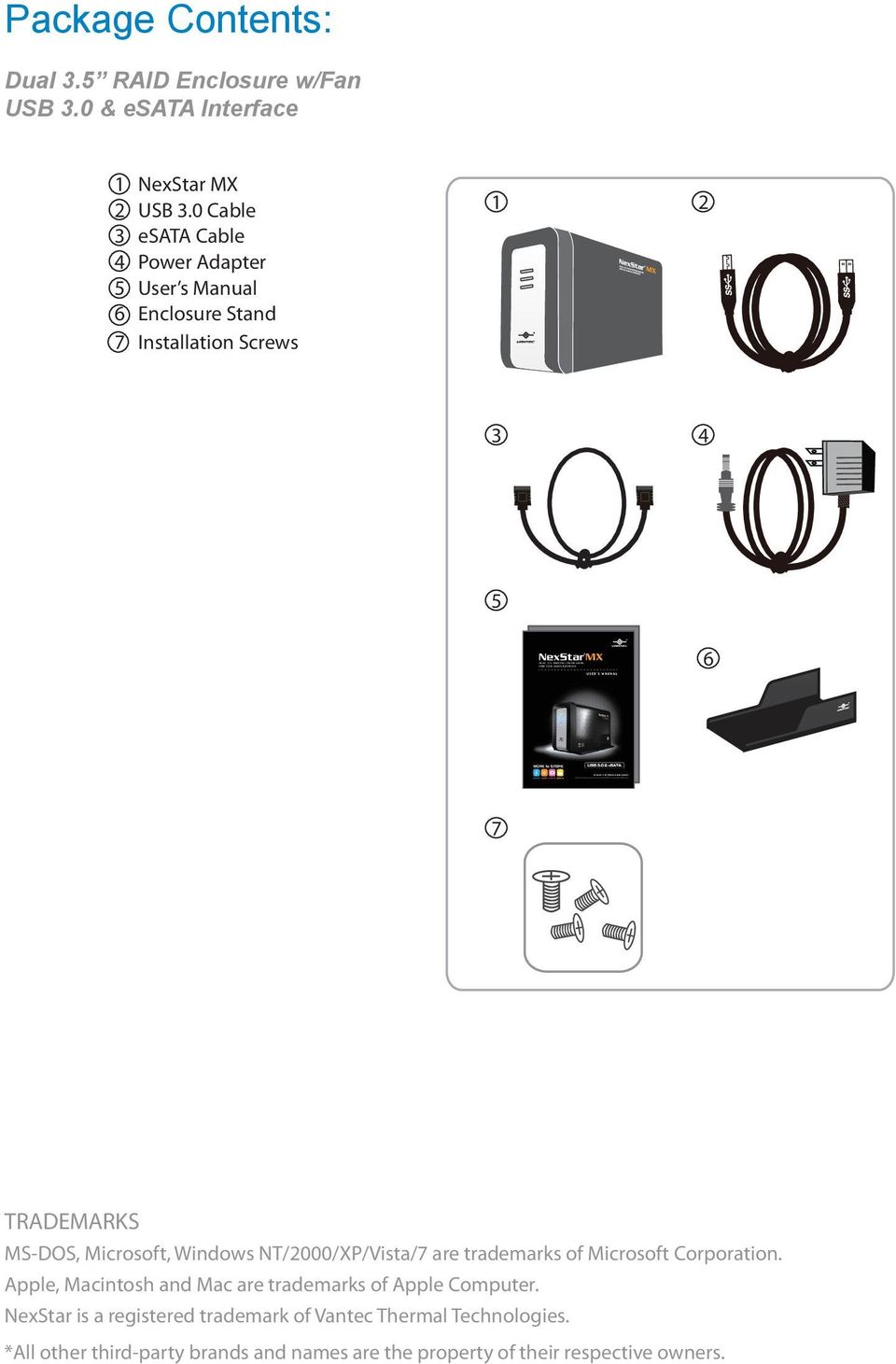
2 Package Contents: Dual 3.5 RAID Enclosure w/fan USB 3.0 & esata Interface 1 NexStar MX 2 USB 3.0 Cable 3 esata Cable 4 Power Adapter 5 User s Manual 6 Enclosure Stand 7 Installation Screws TRADEMARKS MS-DOS, Microsoft, Windows NT/2000/XP/Vista/7 are trademarks of Microsoft Corporation. Apple, Macintosh and Mac are trademarks of Apple Computer. NexStar is a registered trademark of Vantec Thermal Technologies. *All other third-party brands and names are the property of their respective owners.
3 Table of Contents: Introduction Specifications/Features System Requirements Parts Layout Installation LED Indicator Mode Configuration Disconnecting the NexStar MX Hardware Formatting Guide Warranty 11. Contact Table of Contents 1

4 1.Introduction: Vantec NexStar MX Dual Bay External HDD Enclosure now in the USB 3.0 and esata interface is a quick and simple way to expand storage capacity to your computer. It comes without the hassle of diving inside the PC and messing with all those wires, cables and connections. It provides maximum storage with the increased capacity of two spanning hard drives for your precious family photos, music, video, and games. It supports Individual, RAID 0, RAID 1, and JBOD modes for effective storage management. The sturdy drive cage protects your hard drive while the aluminum case effectively draws away the heat; the front vents and the rear fan keep your hard drive(s) cool and improve performance. The Vantec NexStar MX is a high performance, high capacity, and durable portable storage solution and lets you store your personal data in an enclosure with style! Introduction 2

5 2.Specifications/Features: Dual 3.5 RAID Enclosure w/fan USB 3.0 & esata Interface Features: Aluminum Casing Cools Down Your Hard Drive 40mm Rear Heat Exhaust Fan Easily Add Storage to Any System with USB 2.0, 3.0 or esata Hot-Swappable: Plug & Play Without Rebooting Attractive LED Indicates Power & HDD Activity Supports Individual, JBOD, RAID 0, RAID 1 Modes Specifications: Model: NST-400MX-S3R Device Support: SATA I/II/III Hard Drives Device Size: 3.5 Internal Interface: SATA External Interface: USB 3.0 & esata HDD Capacity: Up To 6TB* Power Supply: AC Adapter Fan: 40mm Material: Aluminum & Plastic Dimension: 197 x 123 x 72 mm *Check our website for any updates Power Adapter USB 3.0 Cable esata Cable Specifications/Features 3

6 3.System Requirements: Microsoft Windows XP/Vista/7 1. For USB 2.0 speeds, the system must support USB 2.0 specifications 2. For USB 3.0 speeds, the system must support USB 3.0 specifications 3. For esata Speeds, the System Must Support esata Specifications 4. Port Multiplier Is Required For esata Mac OS 10.4 & greater 1. For USB 2.0 speeds, the system must support USB 2.0 specifications 2. For USB 3.0 speeds, the system must support USB 3.0 specifications 3. For esata Speeds, the System Must Support esata Specifications 4. Port Multiplier Is Required For esata Syetem Requirements 4

7 4.Parts Layout: Power ON/OFF Switch esata Port USB 3.0 Port Power Jack Parts Layout 5

8 5.Installation: Dual 3.5 RAID Enclosure w/fan USB 3.0 & esata Interface 5.1.Hardware Installation: Installing the hard drive: (1) Release the four screws then pull out the rear panel and tray of the NexStar MX. ( figure 5.1-A ) (2) Place the first HDD onto the drive caddy then insert the HDD into the SATA connector. ( figure 5.1-B ) ( figure 5.1-A ) (3) Place the second HDD onto the drive caddy then insert the HDD into the SATA connector. ( figure 5.1-C ) ( figure 5.1-B ) ( figure 5.1-C ) Installation 6

9 (4) Secure the hard drive onto the drive caddy with the provided screws. ( figure 5.1-D ) ( figure 5.1-D) (5) Choose the Mode Configuration for the NexStar MX. Connect the power adapter and power on the unit. Press the reset button and hold for 5-7 seconds. *For Mode Configuration details, see page 9. ( figure 5.1-E ) ON 1 2 ( figure 5.1-E) (6) Insert the drive caddy back into the aluminum housing. Be sure to align and secure with the provided screws. ( figure 5.1-F ) Installation 7 ( figure 5.1-F)

10 Connecting the NexStar to your computer: USB 3.0 NOTE: (1) Connect the type (B) USB connector to the NexStar and the type (A) USB connector to an available USB port on your system. (2) Connect the power cable to the NexStar and plug the cable into an available outlet. (3) Turn on the NexStar via the power switch. (4) Your operating system should detect the NexStar and automatically install the necessary drivers. Once your operating system finishes setting up the NexStar, it will mount your hard drive. On Mac OS systems, the new volume should appear on desktop. On a Windows PC, the new volume will appear under My Computer. (5) Your NexStar External Hard Drive is now ready for use. esata For new hard drives, you will need to initialize and partition your hard drive before it will appear in Windows Explorer or on your Mac desktop. Please refer to your hard drive manufacturer s documentation or read the Creating a New Partition section of this manual. esata Cable or USB3.0 Cable DC 12V POWER ON OFF esata USB 3.0 (1) Connect the esata to the NexStar and to an available esata port on your system. (2) Connect the power cable to the NexStar and plug the cable into an available outlet. (3) Turn on the NexStar via the power switch. (4) Your operating system should detect the NexStar and automatically install the necessary drivers. Once your operating system finishes setting up the NexStar, it will mount your hard drive. On Mac OS systems, the new volume should appear on desktop. On a Windows PC, the new volume will appear under My Computer. (5) Your NexStar External Hard Drive is now ready for use. NOTE: If you can see the USB icon in the system tray, but there is no any disk appear in your computer, please confirm your hard disk is partitioned. Installation 8

11 6.LED Indicator: Dual 3.5 RAID Enclosure w/fan USB 3.0 & esata Interface General Operation: Power LED HDD 1 LED HDD 2 LED Green Blue Blue ON : Power on OFF: Power off ON : HDD inserted Flash Randomly: Accessing (Read/Write/Rebuild) Flash Consistently (3 flashes per second): HDD error OFF: HDD not installed/removed/sleep mode ON : HDD inserted Flash Randomly: Accessing (Read/Write/Rebuild) Flash Consistently (3 flashes per second): HDD error OFF: HDD not installed/removed/sleep mode RAID Rebuild LED Activity Chart: this chart describe LED activity under RAID rebuild process Constant On Blinks Randomly Online: USB (or esata) is connected to PC. Offline: USB (or esata) doesn t connect to PC. Operations HDD1 LED HDD2 LED Power LED FAN Online Offline In progress Complete In progress Complete ON ON ON OFF NOTE: 1. RAID Rebuild Mode: RAID1 2. Rebuild speed around 250GB/HR 3. LED blinking consistently (3 flashes per second) indicates HDD failure LED Indicator 9

12 ON Mode Configuration: Individual Drive Mode: This mode enables each Hard Drive to be seen as separate single drives with separate Hard Drive capacities. ( figure 6-A) ( figure 6-B) Individual Mode ( figure 6-A) Volume A Volume B Volume A Volume B NST-400MX-S3R NST-400MX-S3R Port 0 Port 1 Port 0 Port 1 Drive A Drive B Drive A Drive B Equal hard drives Unequal hard drives ( figure 6-B) Mode Configuration 10

13 JBOD Mode: This mode concatenates a series of physical drives as a single large volume; Hard Drive 1 and 2 are combined into a storage capacity that is equal to the sum of each of the physical hard drives 1 and 2. ON 1 2 Switching to this mode will prompt to initialize and format the hard disks. If you choose to add a second hard disk at a later time, you will need to format the entire array of disks again. ( figure 6-C) ( figure 6-D) JBOD Mode NOTE: All data previously stored on the hard drive will be lost! Please back up all data to a separate storage before continuing. ( figure 6-C) JBOD 500GB JBOD 1000GB NST-400MX-S3R NST-400MX-S3R Port 0 Port 1 Port 0 Port 1 Drive A Drive A Drive A Drive A 250GB 250GB 250GB 750GB Equal hard drives Unequal hard drives ( figure 6-D) Mode Configuration 11

14 RAID 0 Mode (Striped): This mode splits data evenly across the two Hard Drives resulting in capacity that is the sum of 2 times the smaller volume. Data access speed is increased however at the cost of no data redundancy. Two equal hard drives: The capacity is equal to the sum of both hard drives. Switching to this mode will prompt to initialize and format the hard disks. ( figure 6-E) ( figure 6-F) RAID 0 Mode ON 1 2 NOTE: All data previously stored on the hard drive will be lost! Please back up all data to a separate storage before continuing. ( figure 6-E) RAID 0 RAID 0 500GB 500GB NST-400MX-S3R NST-400MX-S3R Port 0 Port 1 Port 0 Port 1 Drive A Drive B Drive A Drive A 250GB 250GB 250GB 750GB Equal hard drives Unequal hard drives Striping across Striping across ( figure 6-F) Mode Configuration 12

15 RAID 1 Mode (Mirror): This mode allows the device automatically to copy data to both hard drives. It stores all data in duplicate on separate drives to protect against data loss due to drive failure. It provides the highest level of data protection for critical data that you cannot afford to lose if a hard drive fails. The capacity is equal to the smaller of the two hard drives. Switching to this mode will prompt to initialize and format the hard disks. This will not work to create a mirror set from existing hard drives. ( figure 6-E) RAID 1 Mode ON 1 2 NOTE: All data previously stored on the hard drive will be lost! Please back up all data to a separate storage before continuing. ( figure 6-E) NOTE: If one drive fails, the SAFE volume is still usable, but it is in a vulnerable state because its mirrored hard drive is inaccessible. When the offline drive comes back online, the appliance begins a rebuild process immediately to restore data redundancy. Although the volume remains available during the rebuild process, the volume is susceptible to data loss through damage to the remaining drive until redundancy is restored at the end of the rebuild and verification process. Host access takes precedence over the rebuild process. If you continue to use the SAFE volume during the rebuild, the rebuild process will take a longer time to complete, and the host data transfer performance will also be affected. Mode Configuration 13

16 8.Disconnecting the NexStar MX: Dual 3.5 RAID Enclosure w/fan USB 3.0 & esata Interface Microsoft Windows XP/Vista/7: Make sure all operations using the hard drive within the NexStar MX has ceased. Close any windows and programs pertaining to the NexStar MX Double click the green Safely Remove Hardware icon in the system tray and select [Safely Remove USB Mass Storage Device]. Select the device you wish to remove and click on [Stop]. The system should prompt, It is now safe to remove the USB device. If not, wait for any programs still using the device to finish and try again. Mac OS: Make sure all operations using the hard drive within the NexStar MX has ceased. Close any windows and programs pertaining to the NexStar MX From the Desktop, drag the NexStar MX hard drive to the trash. You may now safely turn off and disconnect the NexStar MX. You may now safely turn off and disconnect the NexStar MX. WARING: NEVER remove the NexStar MX while the hard drive is in use. Doing so may corrupt the data on the hard drive or damage the hard drive, NexStar MX and the computer. Disconnecting the NexStar MX 14
![Select the device you wish to remove and click on [Stop]. The system should prompt, It is now safe to remove the USB device.](/docs-images/40/2295452/images/page_16.jpg "If not, wait for any programs still using the device to finish and try again. Mac OS: Make sure all operations using the hard drive within the NexStar MX has ceased.")
17 9.Hard Drive Formatting Guide Dual 3.5 RAID Enclosure w/fan USB 3.0 & esata Interface Please make sure your External Enclosure is turned on and connected to the PC before formatting the Hard Drive. In order to use a disk volume larger than 2 TB s, you will need an operating system that supports GUID Partitioning Table. Windows 7, Windows Vista, Windows XP 64bit, Mac 10.4, and Mac 10.5 all have this capability through the GPT. The GUID partitioning scheme has the ability to partition both internal and external drives far beyond 2 TB s in size. For PC Users: STEP1: Right-click My Computer and select Manage. STEP2: Select Disk Management and you will see your Hard Drive shown as Unallocated (Disk number may vary) Hard Drive Formatting Guide 15

18 STEP3: Right-click on the Unallocated box and select New Partition. (Disk number may vary) STEP4: The New Partition Wizard will appear. Please follow the New Partition Wizard step by step instructions to complete the Hard Drive formatting procedure Hard Drive Formatting Guide 16

19 STEP5: Once the Hard Drive formatting procedure is completed, the Hard Drive will be recognized as a New Volume (New Volume drive letter may vary i.e. New Volume (Z:) ) STEP6: Double-click My Computer. You will see New Volume appear on your PC (Drive letter may vary i.e. New Volume (Z:) ) Hard Drive Formatting Guide 17

20 For Mac Users: STEP1: When you connect the NexStar MX Dual to a Mac with a new hard drive, the dialog Disk Insertion will appear. Please select Initialize. (A formatted HDD will not display this dialog) STEP2: Select which HDD you want to erase. Individual Mode : This mode can show each hard disk as individual device. JBOD Mode : JBOD MODE can integrate two different brands of hard drives with different capacity to a larger format hard drive. Hard Drive Formatting Guide 18

21 RAID 0 Mode : Raid 0 Mode can integrate two different brands of hard drives with different capacity to a larger format hard drive. >Two hard drives of the same capacity: the total capacity is the sum of the two hard drives. >Two hard drives of the different capacity: the total capacity is the twice volume of the smaller hard drive. STEP3: Click Erase at the upper right side. Select which kind of format from Volume Format. Please input the name you wish to name your new Volume. Click Erase at lower right side. STEP4: After you hit Enter, the dialog Erase Disk will appear. Please click Erase to begin formatting your hard drive. WARING: All data will be erased after the format Hard Drive Formatting Guide 19
22 Select how you want to use your new Volume or click Cancel if you want to use default settings. This will conclude the Hard Drive Formatting guide. Hard Drive Formatting Guide 20
23 10.Warranty: The NexStar MX comes with a 1 year limited warranty ( 90 day parts ). If your unit should become defective within that time frame, please go to for information on how to receive warranty exchange or repair. Cosmetic defects and missing parts are not covered under this warranty. Please check the contents of the unit to make sure you received all parts. Also, check for any cosmetic flaws. If any parts are missing or if there are cosmetic defects, please contact the retailer from which you purchased the unit immediately and ask for a replacement. 11.Contact: Vantec Thermal Technologies Copyright 2012 Vantec Thermal Technologies. All Right Reserved. All Registered Trademarks Belong To Their Respective Companies. Warranty/Contact 21
Dual/Quad 3.5 SATA to USB 3.0 & esata External Hard Drive RAID/Non-RAID Enclosure w/fan. User s Manual
 Dual/Quad 3.5 SATA to USB 3.0 & esata External Hard Drive RAID/Non-RAID Enclosure w/fan User s Manual Package Contents: NextStar HX4/HX4R NextStar HX2R 1 2 1 2 3 4 3 4 5 6 5 6 7 1 NexStar HX4R/HX4 2 USB
3.5'' SATA to USB 3.0 & esata External Hard Drive Enclosure U SER S MANUA L
 3.5'' SATA to USB 3.0 & esata External Hard Drive Enclosure U SER S MANUA L Package Contents: 3.5'' SATA to USB 3.0 & esata External Hard Drive Enclosure 1 3.5" HDD Enclosure 2 Power Adapter 3 USB 3.0
Owner s Manual. www.vantecusa.com. Model:NST-285U2-BK(Onyx Black) Model:NST-285U2-SL(Metallic Silver)
 Owner s Manual www.vantecusa.com Model:NST-285U2-BK(Onyx Black) Model:NST-285U2-SL(Metallic Silver) All Registered Trademarks Belong To Their Respected Companies. Copyright 2007 Vantec Thermal Technologies.
**Please read this manual carefully before you use the product**
 -1- **Please read this manual carefully before you use the product** Description: The CEB-2355S is a multifunction storage device designed in a special body structure, which can be simply connected to
EXTERNAL 2.5 IDE & SATA HARD DRIVE ENCLOSURE USER MANUAL
 EXTERNAL 2.5 IDE & SATA HARD DRIVE ENCLOSURE USER MANUAL w w w. v a n t e c u s a. c o m Package Contents: NexStar 3 External 2.5 HDD Enclosure: Driver CD User Manual NexStar 3 External 2.5 HDD Enclosure
How To Set Up A Hard Drive With A Harddrive With A 2Gb Hard Drive (I386) And 2Gb Drive (Amd64) On A Hardrive (I219) (Iee) (Amd66) (Ai219
 1 Package Contents Device User manual Power adapter Power cord USB 2.0 Cable FireWire 800 Cable (IEEE1394.B) esata cable 2 Front View of the Device A Drive eject button B LED indicator C Front door panel
NAS HARD DRIVE ENCLOSURE USER MANUAL. S T O R E n S H A R E MUSIC DATA PHOTO MOVIE
 NAS HARD DRIVE ENCLOSURE USER MANUAL S T O R E n S H A R E MUSIC DATA PHOTO MOVIE w w w. v a n t e c u s a. c o m Package Contents: NexStar LX External 3.5 HDD NAS Enclosure: User Manual NexStar LX External
FANTEC MR-35DU3-6G USER MANUAL
 FANTEC MR-35DU3-6G USER MANUAL Menu Menu... 1 1. Product Introduction... 2 2. Operation... 3 2.1 RAID mode setup... 4 2.1.1 JBOD Modus... 5 2.1.2 BIG Modus... 6 2.1.3 RAID0... 7 2.1.4 RAID1... 8 2.1.5
Taurus - RAID. Dual-Bay Storage Enclosure for 3.5 Serial ATA Hard Drives. User Manual
 Dual-Bay Storage Enclosure for 3.5 Serial ATA Hard Drives User Manual v1.0 August 23, 2007 EN Table of Contents CHAPTER 1 - INTRODUCTION 1 CHAPTER 3 - SYSTEM SET UP 9 ICON KEY 1 THE TAURUS RAID 1 AVAILABLE
Manual IB-3620 Series
 IB-RD3620SU3 1 IB-3620U3 CONTENT 1. Introduction... 3 1.1 General Information... 3 2. Hardware IB-3620 Series... 4 2.1 LED Indication / Button Front Panel... 4 2.2 Rear View... 5 3. HDD Installation...
User s Manual. www.vantecusa.com. SATA to esata & USB 2.0
 User s Manual Model:NST-D200SU www.vantecusa.com All Registered Trademarks Belong To Their Respected Companies. SATA to esata & USB 2.0 Copyright 2008 Vantec Thermal Technologies. All Rights Reserved.
is605 Dual-Bay Storage Enclosure for 3.5 Serial ATA Hard Drives FW400 + FW800 + USB2.0 Combo External RAID 0, 1 Subsystem User Manual
 is605 Dual-Bay Storage Enclosure for 3.5 Serial ATA Hard Drives FW400 + FW800 + USB2.0 Combo External RAID 0, 1 Subsystem User Manual (English/Deutsch/ 中 文 ) v1.0 August 23, 2007 Table of Contents CHAPTER
Package Contents: TRADEMARKS
 Package Contents: SATA/IDE-USB adapter: 1. SATA/IDE-USB Adapter 2. Power Adapter with On/Off Switch 3. Power Cable 4. SATA Data Cable 5. SATA Power Supply Cable 6. User Manual (Disc) TRADEMARKS Apple,
User Manual. www.vantecusa.com All Registered Trademarks Belong To Their Respected Companies. SATA to esata / USB2.0 / FIREWIRE.
 User Manual Model:NST-D100UFS www.vantecusa.com All Registered Trademarks Belong To Their Respected Companies. SATA to esata / USB2.0 / FIREWIRE Copyright 2008 Vantec Thermal Technologies. All Rights Reserved.
2 Bay USB 3.0 RAID 3.5in HDD Enclosure
 2 Bay USB 3.0 RAID 3.5in HDD Enclosure SAT3520U3SR *actual product may vary from photos DE: Bedienungsanleitung - de.startech.com FR: Guide de l'utilisateur - fr.startech.com ES: Guía del usuario - es.startech.com
5-BAY RAID STATION. Manual
 5-BAY RAID STATION Manual Content 1. Features 3 1.1 Overview 3 1.2 SATA features 3 1.3 USB features 4 2. Specifications 4 3. System requirements 4 4. The device at a glance 4 4.1 Rear panel 5 4.2 The LED
Taurus Super-S3 LCM. Dual-Bay RAID Storage Enclosure for two 3.5-inch Serial ATA Hard Drives. User Manual March 31, 2014 v1.2 www.akitio.
 Dual-Bay RAID Storage Enclosure for two 3.5-inch Serial ATA Hard Drives User Manual March 31, 2014 v1.2 www.akitio.com EN Table of Contents Table of Contents 1 Introduction... 1 1.1 Technical Specifications...
FANTEC MR-35HDC HARD DISK COPYSTATION
 FANTEC MR-35HDC HARD DISK COPYSTATION POWER Red= Blue=Dup 0 Copy Start 1 Compare Mute BIG Prescan JBOG Erase Reset USER MANUAL MENU MENU... 1 1. Product Introduction... 2 2. Operation in function... 3
3.5in esata USB Dual Removable SATA RAID External Hard Drive Enclosure StarTech ID: S352U2RER
 3.5in esata USB Dual Removable SATA RAID External Hard Drive Enclosure StarTech ID: S352U2RER This esata/usb External Dual SATA Hot-swap Hard Drive Enclosure lets you install two 3.5in SATA (SATA, SATA
GENERAL INFORMATION COPYRIGHT... 3 NOTICES... 3 XD5 PRECAUTIONS... 3 INTRODUCTION... 4 FEATURES... 4 SYSTEM REQUIREMENT... 4
 1 Table of Contents GENERAL INFORMATION COPYRIGHT... 3 NOTICES... 3 XD5 PRECAUTIONS... 3 INTRODUCTION... 4 FEATURES... 4 SYSTEM REQUIREMENT... 4 XD5 FAMILULARIZATION... 5 PACKAGE CONTENTS... 5 HARDWARE
User s Manual. Home CR-H212. 2.5 2-BAY RAID Storage Enclosure
 User s Manual Home CR-H212 2.5 2-BAY RAID Storage Enclosure 1 Introduction 1.1 Features - 2-Bay Bus Powered Portable RAID Enclosure -Works with SATA HDD or SSD -Supports Big (JBOD), RAID0, RAID1, and Normal
USB 2.0 3.5 External Hard Disk Drive
 USB 2.0 3.5 External Hard Disk Drive System Requirements Notebook or Desktop PC with USB2.0 or USB1.1 port. Windows 98SE/Me/2000, or Windows XP (Make sure the device driver for USB Host controller has
Hydra Super-S Combo. 4-Bay RAID Storage Enclosure (3.5 SATA HDD) User Manual July 29, 2009 - v1.3
 4-Bay RAID Storage Enclosure (3.5 SATA HDD) User Manual July 29, 2009 - v1.3 EN Introduction 1 Introduction 1.1 System Requirements 1.1.1 PC Requirements Minimum Intel Pentium III CPU 500MHz, 128MB RAM
FUSION R400 RAID USB 3.0
 FUSION R400 RAID USB 3.0 1U Rackmount 4-Drive Hardware RAID 5 SATA Storage System with USB 3.0 Interface User s Guide For Windows Contents 1 Fusion R400 RAID USB 3.0 Features 1 2 Drive Installation and
Cool USB 2.0/eSATA to SATA Docking Duplicator Quick Installation Guide
 Cool USB 2.0/eSATA to SATA Docking Duplicator Quick Installation Guide Introducing the SATA Docking Duplicator The Cool USB 2.0/eSATA to SATA Docking Duplicator adds extra storage space to your computer
USB 3.0/eSATA Dual 3.5 SATA HDD Enclosure
 USB 3.0/eSATA Dual 3.5 SATA HDD Enclosure S3520BU33ER / S3520WU33ER *actual product may vary from photos DE: Bedienungsanleitung - de.startech.com FR: Guide de l'utilisateur - fr.startech.com ES: Guía
5-Bay Raid Sub-System Smart Removable 3.5" SATA Multiple Bay Data Storage Device User's Manual
 5-Bay Raid Sub-System Smart Removable 3.5" SATA Multiple Bay Data Storage Device User's Manual www.vipower.com Table of Contents 1. How the SteelVine (VPMP-75511R/VPMA-75511R) Operates... 1 1-1 SteelVine
3-Port FireWire 800/400 PCI Host Card
 3-Port FireWire 800/400 PCI Host Card 400 FireWire Low Included FireWire Upgrade to FireWire800! U S E R S M A N U A L Low FireWire 400 Included Package Contents : 1 3-Port FireWire 800/400 PCI Host Card
4 Bay External Hard Drive Array RAID Tower esata USB 3.0 Enclosure. StarTech ID: SAT3540U3ER
 4 Bay External Hard Drive Array RAID Tower esata USB 3.0 Enclosure StarTech ID: SAT3540U3ER The SAT3540U3ER 4-Drive USB 3.0/eSATA to 3.5" SATA RAID Enclosure is a high-performance external RAID storage
User s Manual. Copyright 2010 Vantec Thermal Technologies. All Rights Reserved.
 Copyright 2010 Vantec Thermal Technologies. All Rights Reserved. User s Manual Package Contents: 1 NextStar FX Gigabit NAS Adapter x1 2 AC Adapter x1 3 Installation Guide x1 4 Rubber Feet x4 5 User s CD
4 Bay External Hard Drive Array RAID Tower esata USB 3.0 Enclosure. StarTech ID: SAT3540U3ER
 4 Bay External Hard Drive Array RAID Tower esata USB 3.0 Enclosure StarTech ID: SAT3540U3ER The SAT3540U3ER 4-Drive USB 3.0/eSATA to 3.5" SATA RAID Enclosure is a high-performance external RAID storage
DF-7506 1-to-2 SATA II RAID Box
 DF-7506 1-to-2 SATA II RAID Box Version 1.0 Table of Contents Chapter 1 Product Introduction...3 1.1 Features...3 1.1.1 Shipping Package Content...3 1.2 Front View...4 1.3 Rear View...6 1.4 Disk Drive
Hydra esata. 4-Bay RAID Storage Enclosure. User Manual January 16, 2009 - v1.0
 4-Bay RAID Storage Enclosure User Manual January 16, 2009 - v1.0 EN Table of Contents 1 Introduction... 1 1.1 System Requirements... 1 1.1.1 PC Requirements... 1 1.1.2 Mac Requirements... 1 1.1.3 Supported
Multi-function Front Panel USB2.0/Firewire 400/eSATA
 Multi-function Front Panel USB2.0/Firewire 400/eSATA Model No.: UGT-IH100 Installation Guide v1.01 1 Prescribed Use The UGT-IH100 is designed to be installed into the 3.5 or 5.25 plug-in unit of a computer
NVIDIA RAID Installation Guide
 NVIDIA RAID Installation Guide 1. NVIDIA BIOS RAID Installation Guide.. 2 1.1 Introduction to RAID. 2 1.2 RAID Configurations Precautions.. 3 1.3 Create Disk Array. 4 2. NVIDIA Windows RAID Installation
Access G-RAID mini by its high-speed Interface esata, FireWire 800 (FireWire 400 via included cable) or USB 2.0 ports.
 Table of Contents Introduction Safety Precautions System Requirements What s in the Box G-RAID mini Overview Installing G-RAID mini G-RAID mini Warning LED Operation RAID Levels Explained Configuring G-RAID
2-Disk RAID USB and esata External Hard Drive. User Guide English
 2-Disk RAID USB and esata External Hard Drive User Guide English 1 Contents Introduction 3 Drive Contents: IMPORTANT Notice 3 Nero BACKITUP 2 Software 3 Controls, Connectors and Indicators 4 Front Panel
3.5 Dual Bay USB 3.0 RAID HDD Enclosure
 3.5 Dual Bay USB 3.0 RAID HDD Enclosure User Manual August 11, 2011 v1.1 MFG Part # MT2U3-MP BARCODE Introduction 1 Introduction 1.1 System Requirements 1.1.1 PC Requirements Minimum Intel Pentium III
2 Bay FireWire 800/400/USB RAID Solution RAID 0, RAID 1, & JBOD. User Manual
 2 Bay FireWire 800/400/USB RAID Solution RAID 0, RAID 1, & JBOD User Manual CalDigit, Inc. 1941 Miraloma Ave, Unit B Placentia, CA 92870 USA www.caldigit.com The information of the products in this manual
3.5 USB 3.0 to SATA III HDD Enclosure with UASP Support
 3.5 USB 3.0 to SATA III HDD Enclosure with UASP Support S3510BMU33 S3510SMU33 *actual product may vary from photos DE: Bedienungsanleitung - de.startech.com FR: Guide de l'utilisateur - fr.startech.com
SATA/eSATA II PCI & PCI-E Card & CardBus
 SATA/eSATA II PCI & PCI-E Card & CardBus Package Contents: SATA/eSATA PCI Host Controller (UGT-ST300): Driver CD-ROM User Manual PCI Card SATA/eSATA PCI-Express Host Controller (UGT-ST400): Driver CD-ROM
Digital Photo Bank / Portable HDD Pan Ocean E350 User Manual
 Digital Photo Bank / Portable HDD Pan Ocean E350 User Manual Installing a hard disk 1. Power off the unit. 2. Remove the bottom cover from the unit by removing four screws. 3. Insert the 2.5 HDD to the
USB 3.0 to SATA 3.5" Enclosure Installation Guide
 USB 3.0 to SATA 3.5" Enclosure Installation Guide Introduction The USB 3.0 to SATA 3.5" Enclosure is designed to support USB equipped computers. This enclosure provides large capacity mobile storage using
Guardian MAXimus ASSEMBLY MANUAL & USER GUIDE
 Guardian MAXimus ASSEMBLY MANUAL & USER GUIDE TABLE OF CONTENTS 1. INTRODUCTION...1 1.1 MINIMUM SYSTEM REQUIREMENTS 1.1.1 Apple Mac Requirements 1.1.2 PC Requirements 1.1.3 Supported Drives 1.2 PACKAGE
2-Bay Raid Sub-System Smart Removable 3.5" SATA Multiple Bay Data Storage Device User's Manual
 2-Bay Raid Sub-System Smart Removable 3.5" SATA Multiple Bay Data Storage Device User's Manual www.vipower.com Table of Contents 1. How the SteelVine (VPMP-75211R/VPMA-75211R) Operates... 1 1-1 SteelVine
User Manual. 2 Bay Docking Station
 FANTEC MR-CopyDU3 User Manual 2 Bay Docking Station With One Touch Backup (OTB) and Copy Function Hardware: PC and Notebooks, Macintosh USB 1.1, USB 2.0 or USB 3.0 interface Features: 2,5 or 3,5 SATA I,II,III
User Manual. For more information visit www.caldigit.com
 User Manual For more information visit www.caldigit.com Contents 1. Introduction 03 Package Contents 06 T3 Diagram 07 2. Using the T3 08 Connecting the T3 08 How to create a RAID 09 - Mac OS X 09 - Windows
XL-RAID-SATA2-USB. User Manual. v.1.2 (January, 2010)
 XL-RAID-SATA2-USB User Manual v.1.2 (January, 2010) With regard to this manual Thank you for using the product of Xtendlan Technology Inc. This manual will introduce XTENDLAN XL-RAID-SATA2-USB. Before
How To Use An Esata External Hard Drive Enclosure (I386) With A Usb 2.0 And Usb 2/1.1 Hard Drive (I219) On A 2.5\" Hard Drive On A Mini Hard Drive Or An Ip
 HDD external enclosure for data-storage mobility with USB 2.0 and esata interface USER Manual English AKASA Company notices The information contained in this document is subject to change without notice.
HP MediaSmart Server Software Upgrade from v.2 to v.3
 HP MediaSmart Server Software Upgrade from v.2 to v.3 Table of Contents Table of Contents Upgrade Your Server Software to HP MediaSmart Server v.3 2 Before You Begin 3 What's New 3 Features That Will
USB 3.0 to 3.5 SATA III Upright HDD Enclosure with UASP
 USB 3.0 to 3.5 SATA III Upright HDD Enclosure with UASP S3510BMU33B *actual product may vary from photos DE: Bedienungsanleitung - de.startech.com FR: Guide de l'utilisateur - fr.startech.com ES: Guía
Highly Reliable Systems. FirstRAID DXR TM. Documentation Supplement V1.1. Copyright 2007 by Highly Reliable Systems. All Rights Reserved.
 Highly Reliable Systems FirstRAID DXR TM Documentation Supplement V1.1 Copyright 2007 by Highly Reliable Systems. All Rights Reserved. READ THIS FIRST Important Quick Start Information for your High-Rely
RocketStor SMART RAID
 RocketStor SMART RAID User Guide v1.0 1 Copyright HighPoint Technologies Inc., 1995-2012. All rights reserved. OS X and Macintosh are registered trademarks of Apple Corporation. All other trademarks and
SATA1.5G/ATA133 RAID Controller Card RC215 User Manual
 SATA1.5G/ATA133 RAID Controller Card RC215 Features and Benefits Compliant with Serial ATA 1.0 specification Compliant with PCI Specification, revision 2.2 Provides three independent channels to connect
Verbatim PowerBay 4-Bay RAID Multi-Interface Drive Version 1.00
 Verbatim PowerBay 4-Bay RAID Multi-Interface Drive Version 1.00 User Manual Table of Contents Introduction... 2 Package Contents... 2 Controls, Connectors and Indicators... 2 About the Hard Drive... 4
StudioRAID mini. Production-Quality Portable RAID USB 3.0, FireWire 800, esata host connectivity
 StudioRAID mini Production-Quality Portable RAID USB 3.0, FireWire 800, esata host connectivity Proprietary Notice and Disclaimer Unless noted otherwise, this document and the information herein disclosed
Your Data Security Guardian. SafeTANK GR5630-WSB3+ User Manual. v.1.0 (Oct, 2012) www.raidon.com.tw
 SafeTANK GR5630-WSB3+ User Manual v..0 (Oct, 202) Introduction Thank you for purchasing RAIDON products. This manual will introduce the GR5630-WSB3+. Before using your GR5630-WSB3+, please read this manual
Pleiades USB/LAN. User Manual. & Installation Guide. External Storage Enclosure for 3.5 Hard Drive. v1.1
 Pleiades USB/LAN External Storage Enclosure for 3.5 Hard Drive User Manual & Installation Guide v1.1 Table of Contents CHAPTER 1 - INTRODUCTION - 1 - CHAPTER 4 LAN DISK SETUP - 11 - ICON KEY - 1 - NETWORK
BounceBack Server Solution Reference Guide
 BounceBack Server Solution Reference Guide Contents Introduction... 2 System Requirements... 3 Initial Setup... 4 BounceBack Server Appliance Front View... 5 BounceBack Server Appliance Rear View... 6
High Density RocketRAID 2711 + Rocket EJ220 Device Board Data RAID Installation Guide
 High Density RocketRAID 2711 + Rocket EJ220 Device Board Data RAID Installation Guide Introduction The HighPoint High Density Storage Solutions hammer down high density storage cost over a single mini-
User Guide HD-WLU3R1 DriveStation Duo
 User Guide HD-WLU3R1 DriveStation Duo EN 35011790 ver.01 Front Panel Layout Power LED Power On: blue RAID Maintenance: purple Power Off: off Access LEDs Access: blinking green Failure: red Rebuild: blinking
ST 2350 RES SATA RAID User Manual
 ST 2350 RES SATA RAID User Manual New revolution of 5-bay Raid Enclosure Page 1 Contents 1.Features of product...3 2.DIP Switch and RAID Mode cross reference...5 2.1 RAID 0 for High Performance...5 2.2
ToughTech Duo Users Manual
 ToughTech Duo Users Manual Models Covered: ToughTech Duo-QR ToughTech Duo-3SR RAID, RAID 0 and Single Drive operation modes. Default RAID Mirroring to assure data integrity and protection on the road.
SATA+Ultra ATA RAID CONTROLLER RC212. User Manual
 SATA+Ultra ATA RAID CONTROLLER RC212 Contents Feature and benefits Package contents System requirement Magic Switch introduction and jumper setting Hardware installation Important message for user RAID
OWC Mercury Elite Pro Dual ASSEMBLY MANUAL & USER GUIDE
 OWC Mercury Elite Pro Dual ASSEMBLY MANUAL & USER GUIDE TABLE OF CONTENTS 1. INTRODUCTION...1 1.1 MINIMUM SYSTEM REQUIREMENTS 1.1.1 Apple Mac Requirements 1.1.2 PC Requirements 1.1.3 Supported Drives 1.2
ZOTAC RAIDbox User s Manual
 ZOTAC RAIDbox User s Manual No part of this manual, including the products and software described in it, may be reproduced, transmitted, transcribed, stored in a retrieval system, or translated into any
1. User Safety Instructions
 Please note that this product is an Electromagnetic Compatibility (A-class) device that is meant to benefit a seller or user outside of home-use. It is the sole responsibility of the user to recover any
RAID Manual. Edition. Trademarks V1.0 P/N: 91-187-CK8-A5-0E
 RAID Manual Edition V1.0 P/N: 91-187-CK8-A5-0E Trademarks All brand or product names mentioned are trademarks or registered trademarks of their respective holders. Contents NVIDIA RAID... 1 RAID Arrays...
USB3.0/eSATA/1394b-to-SATA II RAID SUBSYSTEM
 USB3.0/eSATA/1394b-to-SATA II RAID SUBSYSTEM Revision 1.0 Contents Preface... 3 Before You Begin... 4 Chapter 1 Introduction... 6 1.1 Technical Specification... 7 1.2 Identifying Parts of the RAID Subsystem...
SiS964 RAID. User s Manual. Edition. Trademarks V1.0 P/N: 91-187-U49-M2-0E
 SiS964 RAID User s Manual Edition V1.0 P/N: 91-187-U49-M2-0E Trademarks All brand or product names mentioned are trademarks or registered trademarks of their respective holders. CONTENTS Introduction...
PL2775 JBOD / BIG / RAID0 / RAID1 Mode Application
 Application Note PL2775 USB 3.0 to Dual SATA Bridge Controller User Manual (JBOD/BIG/RAID0/RAID1 Mode Features) Introduction The PL2775 is a low-power single-chip SuperSpeed USB 3.0 to Dual SATA II compliant
Imation Clip USB 2.0 Flash Drive. Imation Drive Manager Software. User s Manual
 Imation Clip USB 2.0 Flash Drive Imation Drive Manager Software User s Manual Contents Introduction... 3 Features... 3 System Requirements... 4 Handling and Operating Recommendations... 4 Driver Installation...
VIA / JMicron RAID Installation Guide
 VIA / JMicron RAID Installation Guide 1. Introduction to VIA / JMicron RAID Installation Guide. 3 2. VIA RAID Installation Guide. 3 2.1 VIA BIOS RAID Installation Guide.. 3 2.1.1 Introduction of RAID.
USB 3.0/eSATA Dual 2.5/3.5 SATA HDD Dock with UASP
 USB 3.0/eSATA Dual 2.5/3.5 SATA HDD Dock with UASP SDOCK2U33EB *actual product may vary from photos DE: Bedienungsanleitung - de.startech.com FR: Guide de l'utilisateur - fr.startech.com ES: Guía del usuario
SiI3132 SATARAID5 Quick Installation Guide (Windows version)
 SiI3132 SATARAID5 Quick Installation Guide (Windows version) Document Number: DOC-003132-204 Version 1.0 Copyright 2005, Silicon Image, Inc. All rights reserved. No part of this publication may be reproduced,
2.5/3.5 SATA HDD Docking Station
 SATADOCKU2 SATADOCKU2E SATADOCK22UE 2.5/3.5 SATA HDD Docking Station FCC Compliance Statement This equipment has been tested and found to comply with the limits for a Class B digital device, pursuant to
User Guide. The Leader in Personal Storage
 User Guide The Leader in Personal Storage Copyright Apricorn, Inc. 2006. All rights reserved. Windows and MS-DOS are registered trademarks of Microsoft Corporation. All other trademarks and copyrights
EW7031/EW7032-2,5 SATA/eSATA Hard Disk Enclosure
 2 ENGLISH EW7031/EW7032-2,5 SATA/eSATA Hard Disk Enclosure Warnings and points of attention Opening of the product and/or products can lead to severe injuries! Repairing of the product should be done by
Open Source and License Source Information
 BlackArmor NAS 220 BlackArmor NAS 220 User Guide 2010 Seagate Technology LLC. All rights reserved. Seagate, Seagate Technology, the Wave logo, and FreeAgent are trademarks or registered trademarks of Seagate
Dynamode External USB3.0 Dual RAID Encloure. User Manual. www.dynamode.com
 Dynamode External USB3.0 Dual RAID Encloure User Manual www.dynamode.com 1. Introduction Congratulations on the purchase of your new USB3.0 Dual RAID Encloure This high-performance, extremely flexible
Mini-2Bay RAID Subsystem, (RAID 0,1 selectable) w/ combo 1*USB 2.0 Connector and 1*eSATA (SATAII shielding) Connector User s Manual
 - 0 - Mini-2Bay RAID Subsystem, (RAID 0,1 selectable) w/ combo 1*USB 2.0 Connector and 1*eSATA (SATAII shielding) Connector User s Manual - 1-1. Product Overview Features: * Aluminum housing, anodized
USB to IDE SATA Standalone Hard Drive Duplicator Dock StarTech ID: UNIDUPDOCK
 USB to IDE SATA Standalone Hard Drive Duplicator Dock StarTech ID: UNIDUPDOCK The UNIDUPDOCK Universal SATA/IDE Dual Drive Hard Drive Duplicator functions as both a convenient hard drive copying/imaging
How To Play Your Hard Disk Drive On A Mini Hard Disk (Ios) Or Usb (Miii) With A Hard Disk 2 (I2) Or Ios 2 (Mini Usb) With An External Hard Drive (Mini) Or Mini
 - 0 - Mini-2Bay JBOD / RAID Subsystem, (RAID 0,1 and JBOD selectable) w/ 1*eSATA (SATAII shielding) Connector User s Manual - 1-1. Product Overview Features: * Aluminum housing, anodized surface, benefits
LG External HDD Hard Disk Drive XG1
 LG External HDD Hard Disk Drive XG1 - Thank you for purchasing this product. - This user manual contains instructions on how to use the product properly. - Please read this manual carefully. - Be sure
Mini-EPic System of RAID
 Mini-EPICa USB/IEEE 1394-to-SATA II RAID Subsystem Revision 1.2 Contents Preface... 3 Before You Begin... 4 Chapter 1 Introduction... 6 1.1 Technical Specification... 7 1.2 Identifying Parts of the RAID
SiS 180 S-ATA User s Manual. Quick User s Guide. Version 0.1
 SiS 180 S-ATA User s Manual Quick User s Guide Version 0.1 Edition April 2003 Copyright Trademarks SiS is a registered trademark of Silicon Integrated Systems Corp. All brand or product names mentioned
SiS964/SiS180 SATA w/ RAID User s Manual. Quick User s Guide. Version 0.3
 SiS964/SiS180 SATA w/ RAID User s Manual Quick User s Guide Version 0.3 Edition December 2003 Copyright 2003 Silicon Integrated Systems Corp. Trademarks SiS is a registered trademark of Silicon Integrated
DESKTOP. Internal Drive Installation Guide
 DESKTOP Internal Drive Installation Guide Seagate Desktop Installation Guide 2013 Seagate Technology LLC. All rights reserved. Seagate, Seagate Technology, the Wave logo, and FreeAgent are trademarks or
4 Drive esata USB FireWire External SATA RAID Enclosure
 4 Drive esata USB FireWire External SATA RAID Enclosure S354UFER *actual product may vary from photos DE: Bedienungsanleitung - de.startech.com FR: Guide de l'utilisateur - fr.startech.com ES: Guía del
SiS S-ATA User s Manual. Quick User s Guide. Version 0.1
 SiS S-ATA User s Manual Quick User s Guide Version 0.1 Edition April 2003 Copyright Trademarks SiS is a registered trademark of Silicon Integrated Systems Corp. All brand or product names mentioned are
USB 3.0 to 2.5" SATA HDD/SSD Mini Docking Quick Installation Guide
 Introduction USB 3.0 to 2.5" SATA HDD/SSD Mini Docking Quick Installation Guide The USB 3.0 to 2.5" SATA HDD/SDD Mini Docking quickly adds more storage space to your USB-enabled computer. Key Features
2.5 HDD Enclosure Kit
 2.5 HDD Enclosure Kit User s Manual Introduction... 2 Important Reminders for all Enclosures... 2 Important Reminders for Encrypted HDD Enclosures... 2 Getting Started... 4 Assembling the 2.5 HDD Enclosure
SATA 150 RAID. user. Model 176767 MAN-176767-UM-1007-01
 SATA 150 RAID Controller PCI Card user manual Model 176767 MAN-176767-UM-1007-01 introduction Thank you for purchasing this MANHATTAN SATA 150 RAID Controller PCI Card, Model 176767. The easy-to-follow
RAID User Guide. Edition. Trademarks V1.0 P/N: 91-187C51GME0-00
 RAID User Guide Edition V1.0 P/N: 91-187C51GME0-00 Trademarks All brand or product names mentioned are trademarks or registered trademarks of their respective holders. Contents NVIDIA RAID...1 RAID Arrays...1
Intel Rapid Storage Technology
 Intel Rapid Storage Technology User Guide August 2011 Revision 1.0 1 Document Number: XXXXXX INFORMATION IN THIS DOCUMENT IS PROVIDED IN CONNECTION WITH INTEL PRODUCTS. NO LICENSE, EXPRESS OR IMPLIED,
USB 3.0 DUAL SATA HDD DOCKING STATION
 USB 3.0 DUAL SATA HDD DOCKING STATION User Manual (DA-70547) Introduction DA-70547 is a USB3.0 enabled dual-sata hard drive enclosure. It supports simultaneously use of two 2.5 or 3.5 SATA hard disk for
2big Quadra ENTERPRISE CLASS. Professional 2-Disk RAID DESIGN BY NEIL POULTON. esata 3Gb/s FireWire 800 & 400 USB 2.0
 2big Quadra ENTERPRISE CLASS DESIGN BY NEIL POULTON Professional 2-Disk RAID esata 3Gb/s FireWire 800 & 400 USB 2.0 The Enterprise Class Difference The LaCie 2big Quadra Enterprise Class has been developed
VIA RAID Installation Guide
 VIA RAID Installation Guide 1 VIA BIOS RAID Installation Guide.... 3 1.1 Introduction of RAID... 3 1.2 RAID Configuration Precautions... 3 1.3 BIOS Configuration Utility.. 4 1.3.1 Enter BIOS Configuration
To simplify monitoring of drive activity, the enclosure features six front panel LED indicators that provide constant operation and status updates.
 3.5in Black USB 2.0 to Dual SATA Hard Drive Enclosure with RAID StarTech ID: SAT3520U2R This Dual SATA External RAID Hard Drive Enclosure offers a practical external RAID solution, allowing you to install
Serial ATA Hard Drive Enclosure
 SAT2510U2E SAT2510BU2E Instruction Manual Serial ATA Hard Drive Enclosure 2.5 esata/usb External Hard Drive Enclosure for Serial ATA Hard Drives FCC Compliance Statement This equipment has been tested