
Xantrex XW Hybrid Inverter/Charger
|
|
|
- Shon Day
- 9 years ago
- Views:
Transcription
1 Xantrex XW Hybrid Inverter/Charger Xantrex XW Xantrex XW Xantrex XW Installation Guide

2

3 Xantrex XW Hybrid Inverter/Charger Installation Guide
4 Copyright and Contact Copyright 2012 Schneider Electric. All Rights Reserved. All trademarks are owned by Schneider Electric Industries SAS or its affiliated companies. Exclusion for Documentation UNLESS SPECIFICALLY AGREED TO IN WRITING, SELLER (A) MAKES NO WARRANTY AS TO THE ACCURACY, SUFFICIENCY OR SUITABILITY OF ANY TECHNICAL OR OTHER INFORMATION PROVIDED IN ITS MANUALS OR OTHER DOCUMENTATION; (B) ASSUMES NO RESPONSIBILITY OR LIABILITY FOR LOSSES, DAMAGES, COSTS OR EXPENSES, WHETHER SPECIAL, DIRECT, INDIRECT, CONSEQUENTIAL OR INCIDENTAL, WHICH MIGHT ARISE OUT OF THE USE OF SUCH INFORMATION. THE USE OF ANY SUCH INFORMATION WILL BE ENTIRELY AT THE USER S RISK; AND (C) REMINDS YOU THAT IF THIS MANUAL IS IN ANY LANGUAGE OTHER THAN ENGLISH, ALTHOUGH STEPS HAVE BEEN TAKEN TO MAINTAIN THE ACCURACY OF THE TRANSLATION, THE ACCURACY CANNOT BE GUARANTEED. APPROVED CONTENT IS CONTAINED WITH THE ENGLISH LANGUAGE VERSION WHICH IS POSTED AT Date and Revision August 2012 Revision D Part Number Product Number (Xantrex XW ), (Xantrex XW ), and (Xantrex XW ) Contact Information Please contact your local Schneider Electric Sales Representative or visit our website at: Information About Your System As soon as you open your product, record the following information and be sure to keep your proof of purchase. Serial Number Product Number Purchased From Purchase Date

5 About This Guide Purpose Scope Audience Organization The purpose of this Installation Guide is to provide explanations and procedures for installing the Schneider Electric Xantrex XW Power System. This Guide provides safety guidelines, detailed planning, and procedures for installing the Xantrex XW Inverter/Charger and related system components (the Xantrex XW Power System). It does not provide details about configuration, operation, maintenance, or troubleshooting. See the Operation Guide or Owner s Manual of each device for this information. This Guide also does not provide details about particular brands of batteries. Consult individual battery manufacturers for this information. This Guide is intended for anyone installing the Xantrex XW Power System. Installers must be certified technicians or electricians. This guide is organized into two chapters and one appendix. Chapter 1, Introduction lists and describes the components and basic features of the Xantrex XW Power System. Chapter 2, Inverter/Charger Installation describes how to mount and install the Xantrex XW Inverter/Charger. Appendix A, Specifications provides the electrical and mechanical specifications for the Xantrex XW Power System. Conventions Used The following conventions are used in this guide. WARNING Warnings identify conditions or practices that could result in personal injury or loss of life. CAUTION Cautions identify conditions or practices that could result in damage to the Xantrex XW Power System components or other equipment. iii

6 About This Guide Related Information For additional information about operating the Xantrex XW Inverter/Charger, see the Xantrex XW Inverter/Charger Operation Guide ( ). For more information about related components, refer to: Xantrex XW Power System Installation Overview ( ) Xantrex XW System Control Panel Owner s Guide ( ) Xantrex XW Solar Charge Controller Owner s Guide ( ) Xantrex XW Automatic Generator Start Owner s Guide ( ) These guides are available at Printed copies are included with the components. For more information about Schneider Electric as well as its products and services, visit iv

7 Important Safety Instructions SAVE THESE INSTRUCTIONS WARNING This chapter contains important safety and operating instructions. Read and keep this Installation Guide for future reference. WARNING: Limitations on use The Xantrex XW Power System is not intended for use in connection with life support systems or other medical equipment or devices. 1. Before using the Xantrex XW Series Inverter/Charger, read all instructions and cautionary markings on the Xantrex XW Series Inverter/Charger and the batteries, as well as all appropriate sections of this guide. 2. Make sure that the Xantrex XW Series Inverter/Charger is installed according to the guidelines and procedures in this Installation Guide. 3. Do not expose the Xantrex XW Series Inverter/Charger to rain, snow, or spray. To reduce risk of fire, do not cover or obstruct the ventilation openings. 4. Use only attachments recommended or sold by Schneider Electric. Doing otherwise may result in a risk of fire, electric shock, or injury to persons. 5. To avoid a risk of fire and electric shock, make sure that existing wiring is in good condition and that the wire is not undersized. Do not operate the Xantrex XW Series Inverter/Charger with damaged or substandard wiring. 6. Do not operate the Xantrex XW Series Inverter/Charger if it has received a sharp blow, been dropped, or been otherwise damaged in any way. If the Xantrex XW Series Inverter/Charger is damaged, see your warranty. 7. Do not disassemble the Xantrex XW Series Inverter/Charger. It contains no user-serviceable parts. See the warranty for instructions on obtaining service. Attempting to service the Xantrex XW Series Inverter/Charger yourself may result in a risk of electrical shock or fire and will void your warranty. Internal capacitors remain charged after all power is disconnected. 8. To reduce the risk of electrical shock, authorized service personnel must disconnect both AC and DC power from the Xantrex XW Series Inverter/ Charger before attempting any maintenance or cleaning or working on any circuits connected to the Xantrex XW Series Inverter/Charger. Putting the unit in Standby mode will not reduce this risk. 9. To reduce the chance of short-circuits, authorized service personnel must use insulated tools when installing or working with this equipment. v

8 vi

9 Contents Important Safety Instructions v 1 Introduction System Overview System Diagram System Components and Accessories Xantrex XW Inverter/Charger Xantrex XW Conduit Box Xantrex XW Solar Charge Controller Xantrex XW System Control Panel Xantrex XW Automatic Generator Start Inverter/Charger Installation Pre-Installation Location Knockout Preparation Clearance Requirements Mounting Step 1: Installing the Mounting Plate Step 2: Mounting the Inverter Step 3: Installing Communications Cables Guidelines for Routing the Communications Cables Xantrex Xanbus Network Components Network Layout Connecting Xantrex Xanbus-Enabled Devices Connecting AC Sync Cables Step 4: Wiring the Inverter Batteries Battery Bank Requirements Battery Cable Requirements Torque Values for the Xantrex XW Series Inverter/Charger Inverter Grounding Feed-in Protection Requirements Making DC Connections Grounding the DC System Connecting the Batteries Installing the Battery Temperature Sensor Making AC Connections Accessing the AC Terminal Block and AC Ground Bar AC Equipment Grounding AC Wiring to the Inverter Load Sub-Panel AC System Bonding AC Wiring to the Xantrex XW Inverter/Charger vii

10 Contents A Auxiliary (AUX) Port AUX+12V Voltage Supply AUX-RPO: User Remote Power Off (RPO) User Line Wiring AUX Port Terminal Assignments Basic Functional Test - Single Inverter Confirm All Connections Applying DC Power to the Inverter Enable the Inverter AC Voltage Check Confirming Battery Charger Operation Step 5: Installing Additional Inverters Installation Steps Basic Functional Test Multiple Inverters Specifications Electrical Specifications A 2 Xantrex XW Series Inverter/Charger Overload Capability A 3 Output Power Versus Ambient Temperature A 4 Xantrex XW Series Inverter/Charger Efficiency A 4 Inverting Efficiency (Typical) A 4 Charging Efficiency (Typical) A 5 Charging Efficiency (Power Factor Corrected) A 5 Grid-Tie Sell Mode Efficiency (Typical) A 6 Mechanical Specifications A 7 Accessories A 8 Regulatory Approvals A 8 viii

11 1 Introduction For this Topic Chapter 1, Introduction lists and describes the components and basic features of the Xantrex XW Power System. See... System Overview page 1 2 System Components and Accessories page 1 4

12 Fault/ Warning System Control Panel II System Status Battery 48.2 A V BatLev E--F Load 7262W AC 1 0 W 161V Menu Enter Grid (AC1) Gen (AC2) Fau lt / Wa rnin g Equ ali z e Exit Standby Battery In verting Flas hing = sel Charging Power Generator On Network Fault Automatic Generator Start Introduction System Overview System Diagram The Xantrex XW Power System consists of several devices, components, and optional accessories that, when installed together, create a renewable energy power system that can be customized to suit nearly any application off-grid, grid-tie, or backup. Single-Inverter System (Backup Only) AC Sources (if available) Main Utility Panel Utility Grid Xantrex XW System Control Panel Accessories Xantrex XW Automatic Generator Start AC In AC Generator AC Out Inverter Load Sub-Panel AC Loads Communication Hybrid Inverter /Charger DC Charging and DC Out IMPORTANT: All configurations must comply with local and national electrical code jurisdiction. Consult your local certified installer or local electrical authority to ensure compliance. Figure 1-1 Xantrex XW Power System Installation with Backup Only Example

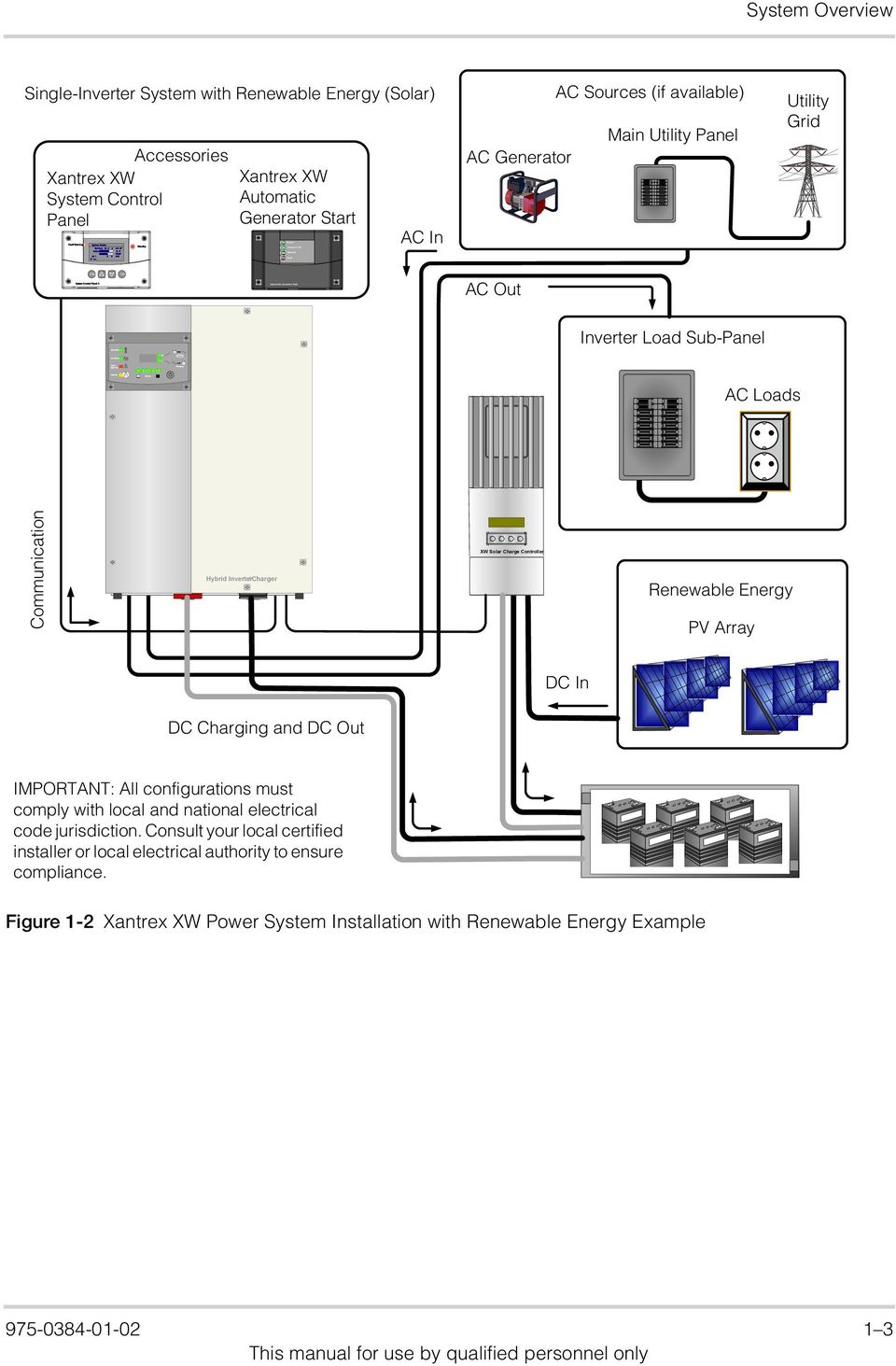
13 Fault/ Warning System Control Panel II System Status Battery 48.2 A V BatLev E--F Load 7262W AC 1 0 W 161V Menu Enter Grid (AC1) Gen (AC2) Fau lt / Wa rnin g Equ ali z e Exit Standby Battery In verting Flas hing = sel Charging Power Generator On Network Fault Automatic Generator Start System Overview Single-Inverter System with Renewable Energy (Solar) Accessories Xantrex XW System Control Panel Xantrex XW Automatic Generator Start AC In AC Generator AC Sources (if available) Main Utility Panel Utility Grid AC Out Inverter Load Sub-Panel AC Loads Communication Hybrid Inverter /Charger BAXW BAT Solar PV PV Charge Controller T + + Renewable Energy PV Array DC In DC Charging and DC Out IMPORTANT: All configurations must comply with local and national electrical code jurisdiction. Consult your local certified installer or local electrical authority to ensure compliance. Figure 1-2 Xantrex XW Power System Installation with Renewable Energy Example
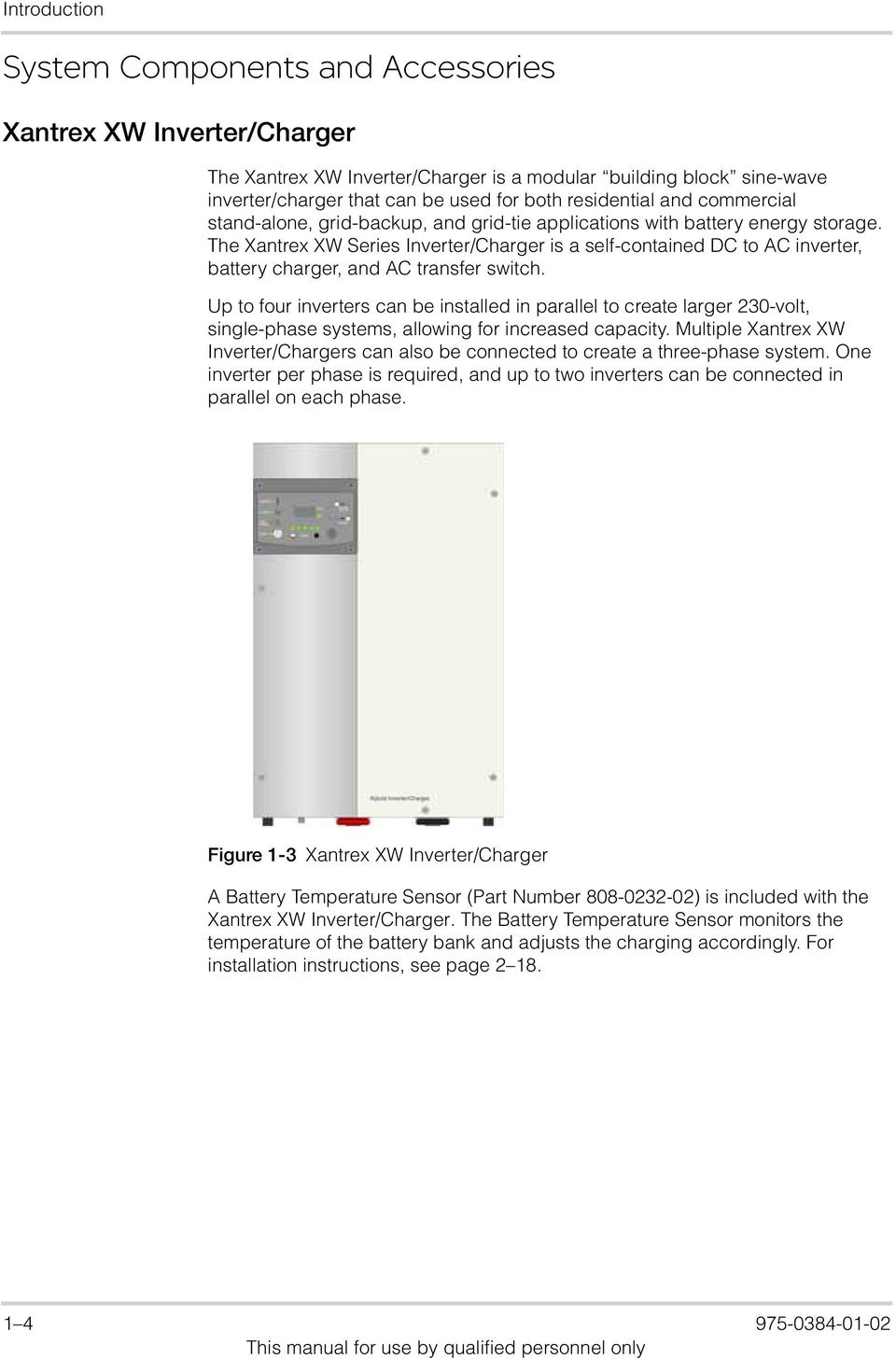
14 Introduction System Components and Accessories Xantrex XW Inverter/Charger The Xantrex XW Inverter/Charger is a modular building block sine-wave inverter/charger that can be used for both residential and commercial stand-alone, grid-backup, and grid-tie applications with battery energy storage. The Xantrex XW Series Inverter/Charger is a self-contained DC to AC inverter, battery charger, and AC transfer switch. Up to four inverters can be installed in parallel to create larger 230-volt, single-phase systems, allowing for increased capacity. Multiple Xantrex XW Inverter/Chargers can also be connected to create a three-phase system. One inverter per phase is required, and up to two inverters can be connected in parallel on each phase. Figure 1-3 Xantrex XW Inverter/Charger A Battery Temperature Sensor (Part Number ) is included with the Xantrex XW Inverter/Charger. The Battery Temperature Sensor monitors the temperature of the battery bank and adjusts the charging accordingly. For installation instructions, see page
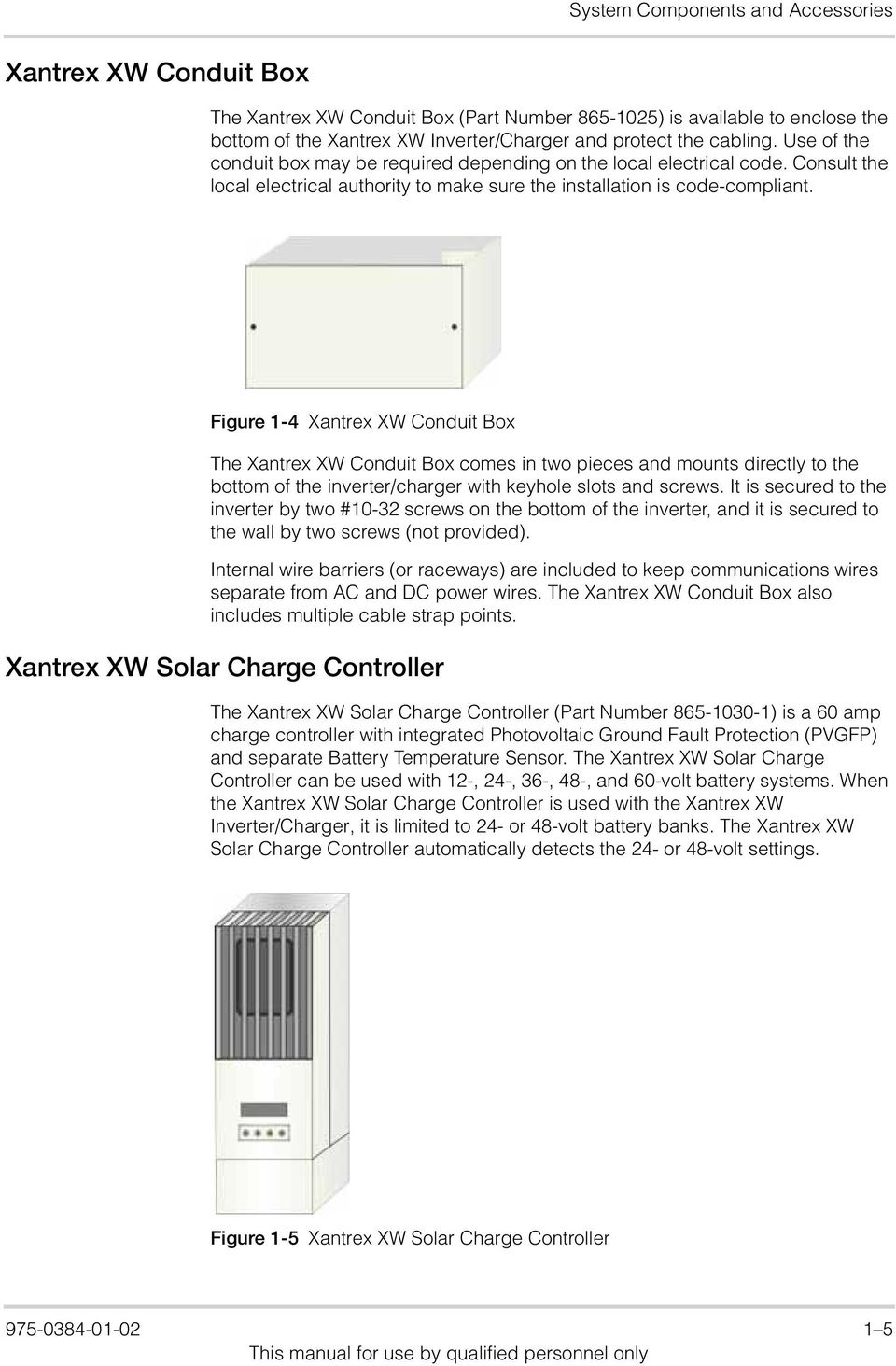
15 System Components and Accessories Xantrex XW Conduit Box The Xantrex XW Conduit Box (Part Number ) is available to enclose the bottom of the Xantrex XW Inverter/Charger and protect the cabling. Use of the conduit box may be required depending on the local electrical code. Consult the local electrical authority to make sure the installation is code-compliant. Figure 1-4 Xantrex XW Conduit Box The Xantrex XW Conduit Box comes in two pieces and mounts directly to the bottom of the inverter/charger with keyhole slots and screws. It is secured to the inverter by two #10-32 screws on the bottom of the inverter, and it is secured to the wall by two screws (not provided). Internal wire barriers (or raceways) are included to keep communications wires separate from AC and DC power wires. The Xantrex XW Conduit Box also includes multiple cable strap points. Xantrex XW Solar Charge Controller The Xantrex XW Solar Charge Controller (Part Number ) is a 60 amp charge controller with integrated Photovoltaic Ground Fault Protection (PVGFP) and separate Battery Temperature Sensor. The Xantrex XW Solar Charge Controller can be used with 12-, 24-, 36-, 48-, and 60-volt battery systems. When the Xantrex XW Solar Charge Controller is used with the Xantrex XW Inverter/Charger, it is limited to 24- or 48-volt battery banks. The Xantrex XW Solar Charge Controller automatically detects the 24- or 48-volt settings. Figure 1-5 Xantrex XW Solar Charge Controller
16 Introduction Xantrex XW System Control Panel The Xantrex XW System Control Panel (Part Number ) features a graphical, backlit liquid crystal display that shows system configuration and diagnostic information for all devices connected to the network. When installed as a Xantrex XW Power System accessory, the Xantrex XW System Control Panel eliminates the need for separate control panels for each device and gives a single point of control to set up and monitor an entire Xantrex XW Power System. Figure 1-6 Xantrex XW System Control Panel Xantrex XW Automatic Generator Start The Xantrex XW Automatic Generator Start (Part Number ) can automatically activate a generator to provide a Xantrex XW Series Inverter/Charger with power to recharge depleted batteries or assist with heavy loads. The Xantrex XW Automatic Generator Start is compatible with popular generators, and it can be configured to start the generator in response to low battery voltage, thermostat operation, or load size on the inverter battery. A quiet time setting prevents the generator from starting at inconvenient times. LEDs display the status of the Xantrex XW Automatic Generator Start, while all settings are programmed through the Xantrex XW System Control Panel. Figure 1-7 Xantrex XW Automatic Generator Start

17 System Components and Accessories Generator Generator Compatibility Xantrex XW System Control Panel The generator should be a 230V, single-phase generator with automatic starting capabilities. The Xantrex XW Automatic Generator Start supports most two- and three-wire generator starters. Some manufacturers include, but are not limited to, Onan (Quiet Diesel, gasoline, and LP), Power Tech, Generac, Northern Lights, Fisher Panda, Westerbeke, Kohler, Honda, and Yamaha. Check with the generator manufacturer to make sure your generator has automatic starting capabilities and is compatible with the Xantrex XW Automatic Generator Start. For more information, see the Xantrex XW Automatic Generator Start Owner s Guide. A Xantrex XW System Control Panel is required to configure the Xantrex XW Automatic Generator Start and monitor generator starting and stopping activity

18 1 8

19 2 Inverter/Charger Installation For this Topic Chapter 2, Inverter/Charger Installation describes how to mount and install the Xantrex XW Inverter/Charger. See... Pre-Installation page 2 2 Step 1: Installing the Mounting Plate page 2 4 Step 2: Mounting the Inverter page 2 7 Step 3: Installing Communications Cables page 2 8 Step 4: Wiring the Inverter page 2 12 Step 5: Installing Additional Inverters page 2 33
20 Inverter/Charger Installation Pre-Installation Location Before installing the Xantrex XW Inverter/Charger, read all instructions and cautionary markings located in this manual. Important: Obtain the appropriate permits, if necessary, prior to starting this installation. Installations must meet all local codes and standards. Installations of this equipment must only be performed by skilled personnel such as qualified electricians and certified renewable energy system installers. WARNING: Personal Injury The Xantrex XW Inverter/Charger weighs approximately 54 kg. To prevent personal injury, always use proper lifting techniques and have someone available to assist with lifting during installation. The Xantrex XW Inverter/Charger is certified for indoor (heated or unheated) installations only. Close to battery bank Locate the inverter as close as possible to the batteries to keep the battery cable length short. The maximum recommended battery cable length is 3 meters. WARNING: Explosion and Corrosion Hazard Do not locate the inverter directly above the batteries or in the same compartment as vented batteries. Locate any electronic equipment susceptible to radio frequency and electromagnetic interference as far away from the inverter as possible. Fire safety Do not locate the inverter near readily flammable materials such as cloth, paper, straw, or plastic sheeting. Flammable materials should be kept a minimum distance of 600 mm from the top surface and 300 mm from either side surface and the front of the Xantrex XW Inverter/Charger. Knockout Preparation Remove your choice of knockouts from the chassis to facilitate conduit installation for wire runs. Make sure no debris from this procedure remains inside the inverter enclosure. Important: Do not drill, cut, or punch holes into the Xantrex XW Inverter/Charger. Use only the knockouts provided for conduit entry

21 Pre-Installation Clearance Requirements Provide a minimum clearance of 150 mm (300 mm is preferred) around the top and 150 mm at the bottom of the inverter for ventilation. The front of the inverter must have at least one meter of clearance. Make sure that the vents are not obstructed with foreign objects and that the minimum clearances are met. 150 mm minimum clearance 150 mm minimum clearance Figure 2-1 Clearance Requirements Mounting The Xantrex XW Power System is designed to be mounted on a vertical surface. The supporting surface must be strong enough to support a minimum of 60 kg for a single inverter/charger. To facilitate installation, a wall mounting plate (Part Number ) is provided for each Xantrex XW Inverter/Charger. The mounting plate and hardware on the Xantrex XW Inverter/Charger are designed to meet standards for structural and seismic stability
22 Inverter/Charger Installation Step 1: Installing the Mounting Plate Each Xantrex XW Inverter/Charger requires a separate mounting plate. This bracket is first attached to the wall, and then the inverter/charger is attached to the wall bracket. The wall bracket is attached to the wall with lag bolts or other fasteners, provided by the installer. A minimum of four 6 mm diameter fasteners are required. The fasteners must be sufficiently strong to support the weight of the inverter/charger. The type of fastener required to secure the mounting plate varies according to the vertical surface and wall structure of the installation location. The wall bracket has mounting holes spaced 400 mm apart and is designed to span two wall studs spaced 400 mm on-center. Additional mounting holes are also provided for flexibility in mounting options. If the wall does not have 400-mm on-center studs, the installer must provide adequate supports for the brackets. For example, a sheet of plywood can be attached to the wall, and the wall brackets can then be attached to plywood. The brackets are designed to interlock (as shown in Figure 2-3), so that additional mounting plates are easily installed without additional measuring or levelling. Table 2-1 Mounting Plate Fastener Recommendations Structure Wood studs at 400 mm (on center - O.C.) Wood studs not at 400 mm O.C. (20 mm minimum plywood panel required) Steel studs at 400 mm O.C. (minimum 18 gauge) Required Fastener 6 mm Ø 89 mm long lag screw 6 mm Ø 25mm long wood screw 6 mm Ø self-drilling screw Number of Screws Per Bracket Four Six Four
23 Step 1: Installing the Mounting Plate All measurements in mm Figure 2-2 Mounting Plate Dimensions
24 Inverter/Charger Installation Wall stud Side View Wall studs 400 mm on center behind wallboard Wallboard Plywood (optional) Mounting plate Multiple mounting plates should fit together as shown. 152 cm from floor puts the inverter information panel at approx. 165 cm high. Add 20 mm plywood if additional support is needed. 1 Locate the wall studs If necessary, enhance the support surface with a 20 mm plywood panel secured to the wall studs. The plywood should span at least three wall studs. Use hardware (not provided) sized to support the weight of the equipment to secure the plywood to the wall. Using a level, secure the first mounting bracket to the wall. Use recommended anchoring hardware to secure the plate (see Table 2-1). Mount the next bracket adjacent to the first one. The brackets are designed to interlock, so additional mounting brackets are easily installed without additional measuring or levelling. Figure 2-3 Mounting the Bracket for the Xantrex XW Inverter/Charger or Distribution Panel
25 Step 2: Mounting the Inverter Step 2: Mounting the Inverter Align the flange on the back of the Xantrex XW Inverter/Charger with the bottom edge of the mounting plate. Lower the flange on the inverter onto the mounting plate. CAUTION: Before releasing the full weight of the inverter, make sure it is seated properly on the mounting plate. Secure the top of inverter with two #10 self-tapping screws (provided). Figure 2-4 Mounting the Xantrex XW Inverter/Charger
26 Inverter/Charger Installation Step 3: Installing Communications Cables Two types of communication cables must be installed, depending on your installation requirements: 1. Xantrex Xanbus network cables to connect the Xantrex XW Inverter/ Charger to other Xantrex Xanbus-enabled devices. Connecting Xantrex XW Inverter/Chargers and other network components with Xantrex Xanbus network cables simplifies and automates configuration, control, and monitoring of the Xantrex XW Power System. 2. AC Sync cables to connect the Xantrex XW Inverter/Charger to other Xantrex XW Inverter/Chargers in multiple-unit installations. The AC Sync cables provide communication and AC control between multiple Xantrex XW Inverter/Chargers. Communications Ports AC sync ports (RJ45) ( 2) Xantrex Xanbus ports (RJ45) ( 2) Bottom View Figure 2-5 Xantrex XW Inverter/Charger Communications Ports Guidelines for Routing the Communications Cables WARNING: Shock hazard : Do not route the Xantrex Xanbus or AC Sync cables in the same conduit or panel as the AC and DC power cabling. For maximum performance of your network, follow these guidelines when routing the communications cables. Route the cables away from sharp edges that might damage the insulation. Avoid sharp bends in the cable no less than a 100 mm radius. Allow for some slack in the cable tension. Keep the alignment of wire pairs inside the sheath as straight as possible. Allow separation between communications and power cables (communications cables should only cross a power cable at right angles). Do not staple the cable with metal cable staples. Use appropriate hardware fasteners to avoid damage to the cable. Support horizontal cables using J hooks or cable trays. The total length of the network, including all connected Xantrex Xanbus-enabled devices and the Xantrex XW Inverter/Charger, cannot exceed 40 m
27 Step 3: Installing Communications Cables Xantrex Xanbus Network Components A Xantrex Xanbus network consists of the following components: Xantrex Xanbus-enabled devices these include the Xantrex XW System Control Panel, the Xantrex XW Inverter/Charger, Xantrex XW Automatic Generator Start, and Xantrex XW Charge Controller. The maximum number of Xantrex Xanbus-enabled devices in a Xantrex XW Power System is eight. Xantrex Xanbus power supply the network must have at least one device with a power supply to run the network. The total network current supplied by all the power-sourcing devices must be greater than or equal to the total current drawn by the power consuming devices. The power supply must be capable of providing 15 VDC/200 ma to each device. The Xantrex XW Inverter/Charger can provide sufficient network power. For example, in a system with an inverter/charger, a Xantrex XW System Control Panel, and a Xantrex XW Automatic Generator Start, the inverter/ charger is a power-sourcing device capable of providing 800 ma at 15 VDC while the two other devices each consume a maximum of 200 ma for a total maximum consumption of 400 ma. In this example, the network is properly configured from a power perspective because the power source is capable of providing more current than is needed: 800 ma 400 ma. Xantrex Xanbus cables each Xantrex Xanbus-enabled device is connected by a Category 5 (CAT 5 or CAT 5e) cable, a standard cable available from Schneider Electric or any computer supply store. The cable consists of eight conductors in four twisted pairs with an RJ45 modular connector wired to the T568A standard. CAUTION: Equipment Damage Do not use crossover cable. Xantrex Xanbus cable Network terminator Figure 2-6 Xantrex Xanbus Cable and Network Terminators Network terminators the Xantrex Xanbus network must be properly terminated at each end to ensure the communication signal quality on the network. If the network is not properly terminated, signal quality is degraded and performance on the network is reduced. Permanent configuration without terminators is not supported by Schneider Electric. The Xantrex XW Series Inverter/Charger and other Xantrex Xanbus-enabled devices ship with one terminator. Depending on your network layout, this terminator may need to be inserted into another device elsewhere in the network
28 Enter Exit Grid (AC1) Gen (AC2) Fault / Warning Equalize Battery Inverting Flashing =sel Chargi ng System Control Panel II Inverter/Charger Installation Network Layout Each device on the network is linked with separate lengths of Xantrex Xanbus cable, as shown in Figure 2-7. CAUTION: Unpredictable device behavior Do not connect one end of the network to the other to make a ring. Two terminators are required to ensure the communication signal quality on the network. The Xantrex Xanbus-enabled devices at each end of the chain must have a terminator inserted into their open network ports. Inverter/Charger Charge Controller Automatic Generator Start System Control Panel Solar Charge Controller Hybrid Inverter/Charger Figure 2-7 Xantrex Xanbus Network Layout Terminate the network at each end
29 Step 3: Installing Communications Cables Connecting Xantrex Xanbus-Enabled Devices Connecting AC Sync Cables Important: Installing and replacing Xantrex Xanbus-enabled devices in an existing system must be performed with the Xantrex XW Power System in Standby mode. For more information about Standby mode, see the Xantrex XW System Control Panel Owner s Guide. CAUTION: Equipment Damage Connect only to other Xantrex Xanbus compatible devices. Although the cabling and connectors used in this network system are the same as Ethernet connectors, this network is not an Ethernet system. Equipment damage may result from attempting to connect Xantrex Xanbus to different systems. To connect the Xantrex Xanbus-enabled devices: 1. Determine and prepare the location for each device. Refer to the installation instructions for each device. 2. Determine and measure the required cable length, taking into consideration the network layout, the routing, and strain relief requirements. Do not exceed the total recommended cable length of 40 m. 3. Mount the devices according to the installation instructions for each device. 4. Use an appropriate length of Xantrex Xanbus cable to connect each device. 5. Insert a terminator into the open network port of the Xantrex Xanbus-enabled device at each end of the network. See Figure 2-7. Connect AC Sync cables in the same daisy-chain layout as Xantrex Xanbus network cables (see Figure 2-7). Network terminators are not required for AC Sync connections. To install the AC Sync cables: 1. Insert the cable into one of the two AC Sync ports in inverter #1. 2. In a two-inverter system, connect the AC Sync cable between inverter #1 and inverter #2. In a three-inverter system, connect an AC Sync cable between inverter #1 and inverter #2, and then connect another AC Sync cable between the second AC Sync port in inverter #2 and an AC Sync port in inverter #
30 Inverter/Charger Installation Step 4: Wiring the Inverter Batteries This section provides procedures for making AC and DC connections between the Xantrex XW Inverter/Charger, the batteries, and the inverter load sub-panel. See the FAQs section of the Schneider Electric Web site for information on determining battery bank requirements. Consider the following recommendations for battery use: Use only deep discharge types for inverter applications. Use the same battery type for all batteries in the bank. Use only batteries from the same lot and date in your battery bank. This information is usually printed on a label located on the battery. Battery Bank Requirements Battery Cable Requirements CAUTION: Damage to Equipment The Xantrex XW Inverter/Charger is intended to operate with batteries as its source of DC power. Do not connect DC power sources, such as PV arrays, wind turbines, or micro-hydro turbines, directly to the Xantrex XW Inverter/Charger without a battery. Connect DC power sources to a charge controller such as the Xantrex XW Solar Charge Controller instead. If DC power sources are connected directly to the inverter, the DC rating of the inverter can be exceeded and the inverter can be damaged. The DC voltage of the inverter must match the nominal voltage of the system and all battery-connected devices. If the inverter is a 24-volt inverter, then the battery bank and all battery-connected devices in the system must be configured for 24 volts. Important: The minimum recommended battery bank is 100 Ah. The inverter is designed to operate with batteries and should not be operated without them. Also, do not allow the battery bank to become completely discharged. If the voltage of the battery bank falls below 10 volts, the Xantrex XW Power System will not operate. WARNING: Fire Hazard Undersized cables can overheat and melt, creating a fire hazard when subjected to heavy (peak) loads. Always use cable of proper size and length, rated for the amperage of the inverter and batteries
31 Step 4: Wiring the Inverter Important: Use only fine-stranded copper cables for battery and inverter DC connections. Do not use coarse-stranded wire. The lack of flexibility could damage battery and inverter terminals. Battery cable length Battery cable lugs Overcurrent protection Terminal covers Runs should be kept as short as practical. Length should not exceed 3 m. For best performance, the positive and negative cables should run alongside each other. Avoid cable loops. Battery cables must have crimped copper compression lugs or crimped and soldered copper compression lugs. Soldered connections alone are not acceptable. Lugs must be rated for use with fine-stranded cable. For safety and compliance with regulations, battery overcurrent protection is required. Fuses and disconnects must be sized to protect the wiring in the system and are required to open before the wire reaches its maximum current carrying capability. Color-coded, snap-on DC terminal covers are provided to prevent accidental contact with the terminals. Terminal covers are required for all installations. It is also recommended that the shank of the ring terminals (cable lugs) be covered with heat shrink or some other form of insulation. Table 2-2 Recommended Battery Cable Size Versus Length Inverter Model Up to 1.5m (90 C wire) Up to 3 m (90 C wire) Xantrex XW mm 2 (#4/0 AWG) 120 mm 2 (#4/0 AWG) Xantrex XW mm 2 (#2/0 AWG) 120 mm 2 (#4/0 AWG) Xantrex XW mm 2 (#4/0 AWG) 120 mm 2 (#4/0 AWG) Important: Your local electrical code may require both overcurrent protection and a disconnect switch for residential and commercial electrical systems. These items are not supplied with the inverter. Table 2-3 Battery Cable (in conduit) to Maximum Breaker/Fuse Size Maximum Breaker/Fuse Cable Size Required Size 70 mm 2 (#2/0 AWG) 175 amps 120 mm 2 (#4/0 AWG) 250 amps Torque Values for the Xantrex XW Series Inverter/Charger Table 2-4 Torque Values for AC Wiring (AC Terminals and Ground Bar) Wire Size Torque Value AWG mm 2 In-lb N-m
32 Inverter/Charger Installation Inverter Grounding Table 2-5 Torque Values for the Chassis Ground Lug Wire Size Torque Value AWG mm 2 In-lb N-m Table 2-6 Torque Values for the Inverter Battery Terminals Torque Value Ft-lbs N-m Important: The grounding requirements vary by country and by application. All installations must comply with national and local codes. Consult local and national codes for specific grounding and bonding requirements for the desired installation. The Xantrex XW Inverter/Charger and Xantrex XW Solar Charge Controller are provided with ground terminals that must be reliably connected to ground (protective earth) by appropriately sized equipment grounding conductors. System grounding for the AC and DC systems must be done according to code. Refer to the grounding information in this manual and all applicable installation codes. Feed-in Protection Requirements Important: Installers must make allowance for the amount of power that can be fed into a distribution panel and the means and location for feed-in, in accordance with local electrical code
33 ON OF F Step 4: Wiring the Inverter Making DC Connections Grounding the DC System This section describes how to make DC connections between the inverter/ charger and the batteries. Battery cables must be provided by the installer (see Table 2-2 on page 2 13). This section also provides procedures for installing the battery temperature sensor. The inverter s chassis ground lug is located along the rear edge of the unit (see Figure 2-8) and is used to connect the chassis of the inverter to the DC grounding system. The terminal accepts wires from #14 AWG to #2 AWG (2.5 mm 2 to 35 mm 2 ). System grounding for the DC system, which typically involves bonding (connecting) the battery negative circuit to ground, is dependent on the system configuration. In some cases, the battery negative will be bonded to ground in another device such as a charge controller. If a grounded DC system is desired or required by code, make sure that the system bonding is done in one location only and that all conductors and connections comply with applicable codes. AC OUT AC IN AC IN L N L N L N DC AC LOAD GRID (AC1) GEN (AC2) Hybrid Inverter/Charger Negative/ Ground Bus Primary System Ground Chassis ground lug Battery Bank Actual grounding requirements may Figure 2-8 DC Grounding Using a DC Disconnect
34 Inverter/Charger Installation Connecting the Batteries WARNING: Shock Hazard Make sure that all AC and DC breakers are switched off before connecting or disconnecting the battery cables, and make sure that all sources of power (both AC and DC) are disconnected from the inverter. Positive (+, red) DC terminal Negative (, black) DC terminal BTS Port Chassis Ground Lug Bottom View Figure 2-9 Xantrex XW Inverter/Charger DC Connections To connect DC cables to the Xantrex XW Inverter/Charger: 1. Route the DC cables from the battery bank to the inverter/charger. 2. Install a DC fuse and disconnect switch or a DC circuit breaker between the inverter/charger and the battery. They must be installed in the positive side of the DC circuit, as close as possible to the battery. See Figure 2-9, Xantrex XW Inverter/Charger DC Connections on page This protects your battery and wiring in case of accidental shorting. Before proceeding, make sure the DC disconnect switch is open or that the DC circuit breaker is turned off. 3. Connect one connector on the POSITIVE (+) cable to the POSITIVE DC terminal on the inverter/charger. Be careful to observe proper polarity. Figure 2-10 shows the proper stacking order of hardware. Use a wrench to tighten the bolt to the required torque. 4. Connect the other connector to the POSITIVE (+) terminal on the fuse or breaker. Observe polarity carefully while completing the installation. Follow the fuseholder or breaker manufacturer s torque recommendation. 5. Connect the NEGATIVE ( ) battery cable to the NEGATIVE ( ) DC terminal on the inverter/charger. Be careful to observe proper polarity. Figure 2-10 shows the proper stacking order of hardware. Use a wrench to tighten the bolt to the required torque. 6. Before proceeding, check that the cable polarity is correct: POSITIVE (+) on the inverter/charger is connected to the POSITIVE (+) on the battery and the NEGATIVE ( ) cable is connected to the NEGATIVE ( ) terminal on the inverter/charger
35 Step 4: Wiring the Inverter Important: The next step is the last cable connection. A spark is normal when this connection is made. 7. Connect the other end of the cable to the NEGATIVE ( ) terminal on the battery. 8. Use a wrench to tighten the bolt to the required torque. 9. Attach the DC terminal covers. Make sure nothing is between the terminal surface and the battery cable lug Battery cable lug Flat washer Split-ring lock washer 3/8-15 x 5/8 bolt (supplied) Terminal surface Shrink-wrap to color-code the cable Copper compression lug Figure 2-10 Battery Cable Connection CAUTION: Damage to Equipment Do not put anything between the battery cable lug and the terminal surface. Overheating of the terminal may occur. Do not apply any type of antioxidant paste until after the battery cable wiring is tightened. The same applies for all DC connections. Do not over-tighten; observe all recommended torque values. CAUTION: Reverse Polarity Damage Before making the final DC connection or closing the DC breaker or disconnect, check cable polarity at both the battery and the inverter/charger. Positive (+) must be connected to positive (+). Negative ( ) must be connected to negative ( ). Reverse polarity damage is not covered by warranty
36 ON OF F FU S E CLASS T 300 AMP Inverter/Charger Installation GRID (AC1) AC OUT AC IN AC IN L N L N L N AC GEN LOAD (AC2) Hybrid Inverter /Charger Battery System Bonding Wire (if required) (+) ( ) BTS Cable See Table 2-6 on page 2 14 for torque values for the inverter battery connections. Actual cable and grounding requirements may vary. Circuit Breaker/DC Disconnect DC Disconnect Fuse Block (optional) (+) ( ) Negative/ Ground Bus Battery ( ) (+) Battery Negative ( Positive (+) Ground Battery _Battery Connections -EU.vsd/SI no BOS/April 10, 2008 Torque connections to the 2007 Xantrex battery Technology terminals Inc. according to the battery manufacturer s recommendations. Figure 2-11 DC Connections to a Single Inverter Installing the Battery Temperature Sensor The Battery Temperature Sensor (BTS) regulates battery charging based on battery temperature. Installing a sensor extends battery life by preventing overcharging in warm temperatures and undercharging in cold temperatures. The BTS is supplied with the Xantrex XW Inverter/Charger. The replacement part number is
37 Step 4: Wiring the Inverter Making AC Connections To install the Battery Temperature Sensor: 1. Insert the Battery Temperature Sensor plug into the BTS port. See Figure 2-9 and Figure Route the cable to the battery enclosure and connect the ring terminal on the BTS directly to a battery terminal (recommended), or use the adhesive backing on the sensor back to attach the sensor to any side of the battery to be monitored. If using the adhesive backing, install the BTS on the side of the battery below the electrolyte level. It is best to place the sensor between batteries and place the batteries in an insulated box to reduce the influence of the ambient temperature outside the battery enclosure. Note: If other Xantrex Xanbus-connected components supply a BTS or are BTS-enabled, it is not necessary to install all of them at once. Only one BTS needs to be installed. However, if multiple battery banks are being used, multiple sensors can be installed. In this case, the system uses the highest temperature from all the input as its operational parameter. This section describes how to make AC connections between the Xantrex XW Inverter/Charger, the main utility panel, and the inverter load sub-panel. All wiring must be provided by the installer. CAUTION: Damage to the Inverter The inverter s AC output must never be wired to the utility or generator output. This will cause severe damage to the inverter which is not covered under the warranty. Do not use an RCD 1 -equipped AC source to power the Xantrex XW Inverter/ Charger grid or generator inputs. The AC input filters on the Xantrex XW Inverter/ Charger may cause nuisance tripping of ground fault-protected outputs. 1.Residual Current Detection
38 Grid (AC1) Gen (AC2) Fault / Warning Equalize Battery Inverting Flashing = sel Chargi ng Inverter/Charger Installation Accessing the AC Terminal Block and AC Ground Bar The AC terminal block includes two terminals each (L and Neutral) for AC Grid input, AC Generator input, and AC Load connections. The neutrals are connected to each other, requiring only one neutral connection when the installation uses a Xantrex XW Power Distribution Panel. Without the Xantrex XW Power Distribution Panel, additional neutral connections may be required at the input sources. The AC terminal block is located on the left side of the inverter beneath the AC access cover. See Figure Recessed edge Remove the two screws on the AC access cover and slide it to the left of the inverter to remove it. When replacing the AC access cover, make sure its recessed edge slips inside the edge of the front panel. Hybrid Inverter /Charger AC OUT AC IN AC IN AC Terminals AC Ground Bar L N L N L N AC LOAD GRID (AC1) GEN (AC2) Figure 2-12 AC Terminal Block and Ground Bar
39 Step 4: Wiring the Inverter AC Equipment Grounding See Table 2-4 on page 2 13 for torque values for the AC terminal and AC Ground bar. Inverter Load Sub-Panel (230 V) LIVE IN N LIVE OUT 230 V AC OUT AC IN AC IN G L N L N L N AC LOAD GRID (AC1) GEN (AC2) Hybrid Inverter /Charger Main Utility Panel (230 V) Primary System Ground Generator Disconnect L G N AC Generator _Grounding.vsd/AC Grounding /April 10, Xantrex Technology Inc. Actual grounding requirements may Figure 2-13 AC Equipment Grounding
40 Inverter/Charger Installation AC Wiring to the Inverter Load Sub-Panel WARNING: Shock Hazard Before making any electrical connections, make sure all AC and DC disconnect devices are in the OPEN (disconnect) position. CAUTION: Damage to the Inverter The inverter s AC output must never be wired to the utility or generator output. This will cause severe damage to the inverter which is not covered under warranty. An inverter load sub-panel (also known as an inverter AC distribution panel) and AC conduit must be installed before AC wiring is connected to the inverter. To install the inverter load sub-panel and conduit: 1. Determine the location for the inverter load sub-panel, and install it according to the manufacturer s directions. 2. Install an AC conduit between the Xantrex XW Inverter/Charger and the inverter load sub-panel. 3. Determine which circuits the inverter will power, and install the appropriate circuit breakers into the inverter panel. 4. For on-grid systems: a) Disconnect all power to the main utility panel. b) Determine which circuits will be supplied by the inverter(s) and remove their wires from the main panel. c) Reroute these wires to the new inverter load sub-panel. 5. Remove unused breakers from utility panel. 6. Install a 60-amp maximum (disconnect) main circuit breaker in the inverter panel. Later, this will be wired to the inverter s output
41 Step 4: Wiring the Inverter AC System Bonding WARNING: Fire and Shock Hazard and Risk of Equipment Damage Verify that only one neutral-to-ground bond exists in the system. Having more than one neutral-to-ground bond in a system violates local electrical codes, may create a shock or fire hazard, and may cause some sensitive equipment to malfunction. System Bonding Refers to connection (bonding) of one of the current-carrying conductors of an electrical system to ground. This creates a grounded conductor" or "neutral" that is at ground potential, but is separate from the equipment ground conductor. System bonding must be done in one place only to avoid ground loops, and it must be done differently in on-grid and off-grid systems. System Bonding for On-grid Systems The Xantrex XW Inverter/Charger does not connect the neutral to ground. The AC input neutral is already bonded to ground by the incoming utility grid system. The installer must not connect the neutral to ground in any additional location. The Xantrex XW Inverter/Charger does not switch or disconnect the AC neutral in any mode of operation, so even in invert (back-up) mode, the inverter load sub-panel neutral is bonded to ground by the utility grid system. It must not be grounded again in the inverter load sub-panel. System Bonding for Off-grid Systems In a system without a generator, or with a generator that does not provide a grounded neutral, the connection from neutral to ground must be made by the installer in the inverter load sub-panel. In a system with a generator that provides a grounded neutral, no additional connection from neutral to ground is needed. The installer must not connect neutral to ground in the inverter load sub-panel. AC Wiring to the Xantrex XW Inverter/Charger WARNING: Shock Hazard Before making any electrical connections, make sure all AC and DC disconnect devices are in the OPEN (disconnect) position. Make sure the AC system, including the Xantrex XW Inverter/Charger and generator, is correctly grounded according to local electrical codes. See AC Equipment Grounding on page To connect the inverter to the inverter load sub-panel: 1. See Figure Connect the neutral wire from the inverter panel neutral bus to the N-LOAD terminal on the inverter. 2. Connect the L (LIVE) wire from the input terminal on the inverter panel to the AC Load (L-LOAD) terminal on the inverter
42 Inverter/Charger Installation To connect the inverter to the main utility panel: 1. See Figure Connect the neutral wire from the main utility panel to the inverter GRID (AC1) neutral terminal. 2. Connect the AC LIVE wire from the main utility panel to the inverter GRID (AC1) L terminal. To connect the inverter to the AC generator: 1. See Figure Connect the neutral wire from the generator breaker or disconnect to the inverter GEN (AC2) neutral terminal. 2. Connect the AC LIVE wire from the generator breaker or disconnect to the inverter GEN (AC2) L terminal. The Neutral-to-Ground bond, which is provided in the utility grid system, may be located upstream. AC OUT AC IN AC IN L N L N L N AC GRID GEN LOAD (AC1) (AC2) Hybrid Inverter /Charger Main Utility Panel Inverter Load Sub-Panel (230 V) N 230 V LIVE N IN LIVE OUT AC OUT AC IN AC IN G AC G L N L N L N AC LOAD GRID (AC1) GEN (AC2) Neutral AC LIVE Groun Primary System Ground Actual wiring and grounding requirements may vary. _AC Wiring (all)-eu.vsd/ac Wiring to SubPanel /April 10, 2008 _AC Wiring-to-subpanel-EU.vsd May 3, Xantrex Technology Inc. Torque all inverter terminal block connections according to Table 2-4 on page Figure 2-14 Wiring the Xantrex XW Inverter/Charger to the Inverter Load Sub-Panel and Utility Grid
43 Step 4: Wiring the Inverter GEN (AC2) AC OUT AC IN AC IN Generator Disconnect L G N L N L N L N AC LOAD GRID (AC1) Hybrid Inverter/Charger AC Generator AC Wiring - Generator.vsd May 3, 2010 Torque all inverter terminal block connections according to Table 2-4 on page Actual wiring and grounding requirements may vary. Figure 2-15 Generator Wiring to the Inverter
44 Inverter/Charger Installation Auxiliary (AUX) Port The auxiliary output is designed to provide the following functions: Auxiliary 12 VDC power supply Remote power off The auxiliary port provides 12 VDC/250 ma output to control a relay, fan, indicator light, or other device. The auxiliary output can be configured (using a Xantrex XW System Control Panel) to trigger in response to: low battery voltage high battery voltage low battery temperature high battery temperature any device fault The auxiliary output can also be triggered manually using the Xantrex XW System Control Panel. The 12 VDC output can trigger a relay to disconnect batteries from the inverter/ charger when battery voltage or temperature are out of the ideal range. AUX Port AUX+12V Voltage Supply Figure 2-16 AUX Port Location DC voltage is available between JU-1 (AUX +12 V) and JU-3 (AUX-COM, signal return). The power available at these terminals is 12 VDC, and maximum current is 250 ma (3 watts). The AUX+12 V and AUX-COM terminals can be used to power a relay (3 watts maximum). Additional fuses are not required, but may be required for some installations. The default status of AUX+12 V is OFF
45 Step 4: Wiring the Inverter AUX-RPO: User Remote Power Off (RPO) User Line Wiring AUX Port Terminal Assignments Connecting JU-2 (AUX-RPO) and JU-3 (AUX-COM) terminals together through an external switch (normal open contact) provides the system shut off function if the switch is closed. The external switch, if pressed, overrides the control provided from the front panel. If the external switch is cleared (not pressed), the system can be enabled back from the front panel. Select an external switch with normal open contact. Consult your system designer or qualified technician for specific installation instructions. Use twisted pairs of #24 AWG to #12 AWG (0.5 mm 2 to 2.5 mm 2 ) for connections. Carefully route the wires away from high power load cables to minimize noise effects on signal integrity. Table 2-7 User Connector Terminals and Functions Pin Reference Name Function JU-1 AUX+12V +12 V User Voltage Supply JU-2 AUX-RPO Remote Power Off JU-3 AUX-COM Common Ground Reference JU-4 JU-5 Not Operational Not Operational Not Operational Not Operational +12 VDC Voltage source: 250 ma maximum Remote Power Off Logic Level: Active Low. Activating this signal shuts down system operation. Return Common Ground Reference for 12V, Remote Power Off signals. Not Operational Not Operational
46 Inverter/Charger Installation Basic Functional Test - Single Inverter Confirm All Connections The following steps perform a basic functional test of the Xantrex XW Inverter/ Charger. If any test fails, refer to the Troubleshooting section in the Xantrex XW Hybrid Inverter/Charger Operation Guide for assistance. Once the AC and DC wiring have been installed and connected, go back over all connections and make sure they are secure and have been installed correctly. Applying DC Power to the Inverter CAUTION: Reverse Polarity Damage Before making the final DC connection or closing the DC breaker or disconnect, check cable polarity at both the battery and the inverter/charger. Positive (+) must be connected to positive (+). Negative ( ) must be connected to negative ( ). Reverse polarity damage is not covered by warranty. To apply DC power to the inverter: 1. Before applying DC power to the inverter, measure the voltage and polarity of the battery cables (measure at the battery side of the disconnect or breaker). Important: Voltage should be between 40 to 64 volts for a 48-volt system, and 20 to 32 volts for a 24-volt system. If the DC voltage is low, the battery bank must be charged externally. Charge the battery bank, and then restart the functional test. If the DC voltage is lower than the Low Battery Cut Out (LBCO) setting (46 volts for a 48-volt system and 23 volts for a 24-volt system) a DC Under Voltage Fault (F48) will be triggered. If the DC voltage is lower than the default LBCO voltage, lower the LBCO setting accordingly to avoid triggering the fault. If the DC voltage is lower than 40 volts for a 48-volt system or 20 volts for a 24-volt system, the battery should be charged externally. 2. Apply battery power to the inverter by closing the battery bank DC disconnect. The inverter will power up and the display will turn on, but the inverter will remain in Standby mode (as shown in Figure 2-17)
47 Basic Functional Test - Single Inverter Note: If the inverter was previously powered up then it will power-up in the last operating state (Operating or Standby) All LEDs temporarily turn on. ON/OFF Button Enable the Inverter Figure 2-17 Power-up Display CAUTION: Equipment Damage Prior to activating the inverter, make sure that all AC loads are disconnected from the output of the inverter. By default, Invert mode is enabled and the unit should start inverting upon transitioning from Standby mode. If Invert mode is disabled, the display will show once out of Standby mode. If the unit powers up in Standby mode, press the ON/OFF button momentarily to change the mode from Standby to Operating. To enable the inverter: Press the inverter s ON/OFF button and the Equalize button at the same time. briefly appears on the inverter information panel to indicate that the inverter is enabled. To disable the inverter: Press the inverter s ON/OFF button and the Equalize button at the same time. briefly appears on the inverter information panel to indicate that the inverter is disabled
48 Inverter/Charger Installation Equalize Button ON/OFF Button This display indicates the inverter is disabled. Briefly press the Equalize button and the ON/OFF button at the same time to enable or disable Invert mode. Figure 2-18 Enable the Inverter AC Voltage Check 3. Monitor the INVERT (Green kw) LED to confirm which mode the inverter is in: LED is off Invert mode is disabled. The inverter/charger is not powering the AC loads. However, if qualified AC is present from the utility or a generator, it is passed through to the loads. on the display The inverter/charger is in the Search mode and is looking for an AC load greater than the Search Watts setting (default = 25 watts). LED is on The inverter/charger is on. The inverter is operating and is able to provide power to the AC loads. This is the default mode on initial power-up once the unit is taken out of Standby mode. If the inverter is not operating or the INVERT LED (kw) does not turn on, check all connections. Check the inverter s DC voltage on the positive (+) and negative ( ) terminals. Check the Fault LED. If the Fault LED is on, check for a fault code on the information panel. Correct the reported fault if possible and clear the fault. If the DC voltage is low, the battery bank needs to be charged externally. Charge the battery bank and restart the functional test. Important: This test requires the use of a voltmeter. To perform an AC voltage check: 1. With the inverter on (INVERT [green, kw] LED is on and steady), verify the AC voltage at the AC Loads block terminal L-Load to N-Load. 2. Verify that neutral is bonded to ground in the system by measuring the live and neutral voltages relative to ground. Neutral-to-ground should equal zero (0) volts. 3. After confirming the correct AC voltage, turn on your AC output breaker and place a load on the inverter (plug in a light or other load to an outlet the inverter is powering). 4. Confirm that the AC load just applied works properly
49 Basic Functional Test - Single Inverter AC OUT AC IN AC IN L N L N L N AC LOAD GRID (AC1) GEN (AC2) Figure 2-19 Checking AC Voltage Confirming Battery Charger Operation To confirm battery charger operation: 1. Apply AC from grid or generator, and then confirm voltage. 2. Check LEDs (AC1 or AC2) on the front panel. One of them must be on for the unit to charge. Check the amp A LED. If the A LED is on, the unit is charging and the battery current is displayed on the information panel. Amp ( A ) LED Figure 2-20 Checking Charging Operation Important: Unless the inverter/charger settings have been changed, the inverter will charge as if it has a large (> 440 Ah) flooded battery bank (factory default setting). Therefore, ALL systems may need to have the battery charging set points configured to avoid damage to the batteries. This completes the functional test. If all tests pass, the inverter is ready for use. If any of the inverter s internal set points need to be adjusted, consult the configuration chapter of the operation guide
50 Inverter/Charger Installation Check and verify all wiring and cable connections Measure DC voltage and confirm the correct polarity of the cable connections Within tolerance? V for a 24 V system V for a 48 V system Polarity correct? No Check battery bank. Recharge with external charger if necessary. Correct polarity. Restart functional test. Yes Power-up Display Apply DC power Check display for startup self-test Standby Display If unit powers up in, enable operating mode Press the ON/OFF button momentarily to enable operating mode Fault Display Enable inverter Check for faults Press the ON/OFF and Equalize buttons simultaneously to enable invert mode. is displayed briefly. Correct fault condition. Restart functional test. Yes Consult Troubleshooting section of Operation Guide. Restart functional test No Faults? No Check AC voltage Within range? AC OUT AC LOAD AC IN GRID (AC1) AC IN L N L N L N GEN (AC2) Yes Close AC load breaker Confirm operation of AC load Open AC load breaker Proceed to Charger Functional Test Figure 2-21 Functional Test for Single Inverter Systems
51 Step 5: Installing Additional Inverters Step 5: Installing Additional Inverters Installation Steps To install multiple inverters: 1. Disconnect all power from the system. 2. Mount additional inverters. See Step 1: Installing the Mounting Plate on page 2 4 and Step 2: Mounting the Inverter on page Install conduit and cable clamps for DC cables, AC wiring, and AC Sync cables in accordance with local electrical codes. 4. Install Xantrex Xanbus and AC Sync cables as required. See Step 3: Installing Communications Cables on page Install a Xantrex XW System Control Panel. When installing more than one inverter at a location, a Xantrex XW System Control Panel is required to give each inverter (and other Xantrex Xanbus-enabled devices) a unique name and to modify the factory-installed default settings to match and support the installation. 6. Install additional breakers and components in the inverter load sub-panel and the main utility panel to accommodate the extra inverters. 7. Connect DC wiring. 8. Connect AC wiring
52 Inverter/Charger Installation Basic Functional Test Multiple Inverters The following steps perform a basic functional test of multiple Xantrex XW Inverter/Chargers. If any test fails, refer to the Troubleshooting section in the Xantrex XW Hybrid Inverter/Charger Operation Guide for assistance. To perform a functional test on multiple inverters: 1. Check/verify all wiring and cable connections. 2. Measure DC voltage at the DC terminals on the inverter and confirm that it is within range and has correct polarity. The default acceptable range is VDC for 24 V systems or VDC for 48 V systems. 3. Connect DC power to the first inverter. 4. Check the inverter s display for startup self-test during which all LEDs will flash momentarily. Once the self-test is complete, the inverter displays. The Fault/Warning LED may flash for a few seconds but eventually will turn off. If the Fault/Warning LED persists, make sure the battery temperature sensor is connected. Also, if the inverter has been pre-configured, it may go straight into normal operating mode. 5. Using the Xantrex XW System Control Panel, set the first (Master) inverter s device number. a) Go to the inverter s Advanced Settings menu by pressing the down arrow, and then Enter from System Status screen. Next, simultaneously press Enter + up arrow + down arrow. b) Select the Multi Unit Config menu. c) Change Dev Number from 00 to 01. The inverter will now appear as XW (or XW or XW ) on the Xantrex XW System Control Panel. d) If performing a test on a three-phase installation, change Invtr Mode to 3Ph L1Master. For more information, see Three Phase Configuration in the Xantrex XW Hybrid Inverter/Charger Operation Guide. e) Press Exit until the Xantrex XW System Control Panel displays the System Status screen again. 6. Connect DC power to the next inverter. 7. Check the inverter display for startup self-test during which all LEDs will flash momentarily. Once the self-test is complete, the inverter displays. (If the inverter has been pre-configured, it may go straight into normal operating mode or display warning.) 8. Using the Xantrex XW System Control Panel, set the second (Slave) inverter s device number and inverter mode. a) Select the new inverter XW (or XW or XW ) from the Select Device menu. You can also press the down arrow from the System Status screen until the home screen for Xantrex XW Inverter/ Charger 00 is displayed, and then press Enter. b) Go to the inverter s Advanced Settings > Multi-Unit Config menu. c) Change Dev Number from 00 to 02 (or the next number that has not been used). The inverter will now appear as XW (or XW or XW ) on the Xantrex XW System Control Panel
53 Basic Functional Test Multiple Inverters d) Change Invtr Mode from 1Ph Master to 1Ph Slave. If performing a test in a three-phase installation, change the Invtr Mode to 3Ph L1Slave, 3Ph L2Slave, or 3Ph L3Slave depending on the line to which the unit is connected. e) Press Exit until the Xantrex XW System Control Panel displays the System Status screen again. 9. Check for faults. If fault conditions exist, correct them and then restart the Functional Test. 10. If a third inverter is installed, repeat steps to configure it as a Slave. 11. Using the Xantrex XW System Control Panel, enable the system. a) Go to the System Settings menu. b) Change System Mode to Operating. c) Press Exit until the Xantrex XW System Control Panel displays the System Status screen again. 12. Confirm that the Master inverter displays 0.00 and the Slaves display on their front panels. 13. Check for faults. If fault conditions exist, correct and then restart the Functional Test. 14. Check voltage at AC LOAD terminals of the Master Inverter. 15. Switch the AC Load breakers on. 16. Confirm operation of connected AC loads. 17. Disconnect AC LOAD breakers. 18. Using the Xantrex XW System Control Panel, reduce the Maximum Charge Rate. a) From the System Status screen, go to the Select Device menu. Select System Settings, and then enable Cascading (if not enabled). With Cascading enabled, a change to a setting in one inverter will automatically apply to other inverters in the system. b) Go to Advanced Settings > Charger Settings in one of the inverters. c) Set Max Chg Rate to 10%. d) Press Exit until the Xantrex XW System Control Panel displays the System Status screen again. 19. Switch AC Input breakers on. Note that all inverters in the system must be connected to the same AC Input source before they will qualify the source. 20. Confirm that inverters start charging. Note that with Max Chg Rate set to 10% the maximum charge rate is limited to 10 A on each inverter. Depending on the battery bank s state of charge, the output from one or more inverters may quickly drop to zero. This is considered normal operation. 21. Check for faults. If fault conditions exist, correct and then restart the Functional Test
54 Inverter/Charger Installation Check all wiring and cable connections Measure DC voltage and confirm correct polarity of DC cables Within tolerance? V for a 24 V system V for a 48 V system Polarity correct? No Check battery bank. Recharge with external charger if necessary. Correct polarity. Restart functional test. Yes Power-up Apply DC power to inverter #1 Check display on Inv #1 for startup self-test Use the Xantrex XW SCP to specify configuration settings 1. Set up Inverter #1 as the Master 2. Give it a unique device number (e.g. 01) Power-up Display Apply DC Power to Inverter #2 Fault Display Check display on Inverter #2 for startup self-test Use the Xantrex XW SCP to specify configuration settings 1. Set up Inverter #2 as the Slave 2. Give it a unique device number (e.g. 02) Check display for faults Correct fault condition. Restart functional test. Yes Faults? No Figure 2-22 Functional Test for Multiple Inverters - Page 1 of
55 Basic Functional Test Multiple Inverters From previous page... Use Xantrex XW SCP to enable system Set System Mode to Operating Use Xantrex XW SCP to enable both inverters Use System Settings to enable invert mode on both inverters Confirm invert mode has been enabled Confirm that Master shows output but Slave is not inverting Master Slave Check display for Faults Correct fault condition. Restart functional test. Yes Faults? Master Slave Check for faults on both information panels and Xantrex XW SCP No Check AC voltage at terminals of Master Close both AC load breakers Confirm operation of AC load Disconnect AC load breakers Proceed to Charger Functional Test Figure 2-23 Functional Test for Multiple Inverters - Page 2 of
56 2 38
57 A Specifications Appendix A, Specifications provides the electrical and mechanical specifications for the Xantrex XW Power System.
58 Specifications Electrical Specifications Table A-1 Xantrex XW Power System Electrical Specifications Xantrex XW Xantrex XW Xantrex XW Continuous Output Power 6,000 W 4,500 W 4,000 W Surge Rating 12,000 W (15 s) 9,000 W (20 s) 8,000 W (20 s) Surge Current 53 A rms (15 s) 40 A rms (20 s) 35 A rms (20 s) Peak Efficiency 95.4% 95.6 % 94.0% Full Load Efficiency 92% 93.0 % 89% Waveform True Sine Wave Idle Consumption invert mode, no load 28 W 26 W 24 W Idle Consumption search mode < 7 W AC Output Voltage 230 Vac ±3% AC Input Voltage Range (Bypass/Charge Mode) Vac AC Input Breaker 60 A AC Input Frequency Range (Bypass/Charge Mode) Hz (default) Hz (allowable) AC Output Continuous Current 26.1 A 19.6 A 17.4 A AC Output Frequency 50.0 ±0.1 Hz Total Harmonic Distortion < 5% at rated power Automatic Transfer Relay 56 A Auxiliary Relay Output 0 12 Vdc, maximum 250 ma DC DC Input Voltage (Nominal) 50.4 Vdc 50.4 Vdc 25.2 Vdc DC Input Voltage Range Vdc Vdc Vdc DC Current at Nominal Power 131 A 96 A 178 A Continuous Charge Rate at Nominal Voltage 100 A 85 A 150 A Power Factor Corrected Charging PF (0.98) A
59 Electrical Specifications Xantrex XW Series Inverter/Charger Overload Capability Loads connected to the inverter are seldom constant, and large loads are often operated for short periods. To accommodate larger loads, the Xantrex XW Inverter/Charger can temporarily exceed its continuous output power rating. The graphs below illustrate approximate operation time versus load. Inverter operation time during overload is limited by both inverter internal temperature protection and by the product of AC output current and elapsed time. Xantrex XW6048 AC Overload Capability Xantrex XW4548 AC Overload Capability Xantrex XW4024 AC Overload Capability Figure A-1 Xantrex XW Series Inverter/Charger AC Overload Capability A 3
60 Specifications Output Power Versus Ambient Temperature When the internal temperature of the Xantrex XW Series Inverter/Charger exceeds a preset limit, it begins to limit output power automatically so that maximum internal temperatures are not exceeded. Xantrex XW Series Power Derating Output Power (Watts) Xantrex XW6048-Pwr_der Xantrex XW4548-Pwr_der Xantrex XW4024-Pwr_der Ambient Temperature ( C) Xantrex XW Series Inverter/Charger Efficiency Inverting Efficiency (Typical) Figure A-2 Output Power Versus Ambient Temperature 100% 95% Efficiency (%) 90% 85% Xantrex XW4548 XW4548 Xantrex XW4024 XW4024 Xantrex XW6048 XW % 75% Output Power (Watts) A
61 Electrical Specifications Charging Efficiency (Typical) 100% 95% Efficiency (%) 90% Xantrex XW4548 XW4548 Xantrex XW % Xantrex XW4024 XW4024 Charging Efficiency (Power Factor Corrected) 80% Charge Current (Amps) 100% Xantrex XW4548 XW4548 Xantrex XW6048 XW6048 Xantrex XW4024 XW % Power Factor (%) 90% 85% 80% 75% Charge Current (Amps) A 5
62 Specifications Grid-Tie Sell Mode Efficiency (Typical) 100% 95% Efficiency (%) 90% 85% Xantrex XW4024 XW4024 Xantrex XW4548 XW4548 Xantrex XW6048 XW % 75% Output Power (Watts) A
63 Mechanical Specifications Mechanical Specifications Table A-2 Xantrex XW Power System Mechanical Specifications Model Supported Battery Types Battery bank size Non Volatile Memory Display Panel Xantrex XW Xantrex XW Xantrex XW Flooded (default), Gel, AGM, Custom Ah Yes Status LEDs indicate AC In status, faults/warnings, equalize mode, and battery level. System Network Enclosure Type Rated Temperature Range (meets all specifications) Operational Temperature Range Three-character display indicates output power or charge current, and fault/warning codes. ON/OFF and equalize button. Xantrex Xanbus (publish-subscribe network, no need for hubs or special cards) IP 20, indoor, unheated 0 40 C C Storage Temperature Range C Inverter Dimensions mm (H W D) Shipping Dimensions (H W D) mm Inverter Weight 57 kg 52 kg 52 kg Shipping Weight 60 kg 55 kg 55 kg A 7
64 Specifications Accessories Accessory Part Number Power Distribution Panel Xantrex XW Conduit Box Inverter #2 Connection Kit Xantrex XW MPPT Solar Charge Controller Xantrex XW System Control Panel Xantrex XW Automatic Generator Start Network cables 3 ft (0.9 m): ft (7.6 m): ft (22.9 m): Network terminators Regulatory Approvals CE marked and complies with the following: Low Voltage Directive 2006/95/EC, per: EN50178 Electronic Equipment for Use in Power Installations. EMC Directive 2004/108/EC, per: EN Emission Standard for Residential, Commercial, and Light-Industrial Environments EN Immunity for Residential, Commercial, and Light-Industrial Environments RCM marked and complies with the following: AS Inverter requirements AS Grid protection requirements AS/NZS 3100 General requirements for electrical equipment A
65 Index A AC Connections 2 19 accessories A 8 Additional Inverters 2 33 Automatic Generator Start 1 6 AUX Port 2 26 AUX Port Terminal Assignments 2 27 AUX+12V Voltage Supply 2 26 AUX-RPO User Remote Power Off 2 27 B battery bank requirements 2 12 battery cable lugs 2 13 Battery Cable Requirements 2 12 Battery Cable Size 2 13 Battery Temperature Sensor 2 18 Breaker/Fuse Size 2 13 C charge controller 1 5 Clearance 2 3 D DC Connections Connecting Batteries 2 16 M mechanical specifications A 7 Mounting 2 3 Mounting Bracket 2 4 Mounting the Inverter 2 7 O overcurrent protection, requirements 2 13 S specifications electrical A 2 mechanical A 7 U User Line Wiring 2 27 W Website Schneider Electric iv Wiring the Inverter 2 12 X XW Inverter/Charger 1 4 XW System Control Panel 1 6 E electrical specifications A 2 F Fire safety 2 2 functional test 2 28, 2 34 G Grounding 2 14, 2 15 Grounding the DC System 2 15 I Inverter Panel Mounting 2 22 K Knockout 2 2 L LED Status Indicators Inverting 2 30 Location 2 2 lugs, battery cable IX 1
66 IX-2
67
68 Schneider Electric For other country details please contact your local Schneider Electric Sales Representative or visit our website at: Printed in China
AC Coupling of Inverters for Grid Tied PV Systems
 AC Coupling of Inverters for Grid Tied PV Systems AC Coupling with Conext s, Xantrex GT Inverters, and Conext TX Inverters Application Note 976-0240-01-01 Rev B DANGER RISK OF FIRE, ELECTRIC SHOCK, EXPLOSION,
LIEBERT VNSA Installation Sheet
 LIEBERT VNSA Installation Sheet Description The Liebert vnsa network switch is designed for connecting multiple Ethernet-ready devices and comes in various models. The unit may have: A Liebert icom display
12 Volt 30 Amp Digital Solar Charge Controller
 12 Volt 30 Amp Digital Solar Charge Controller User s Manual WARNING Read carefully and understand all INSTRUCTIONS before operating. Failure to follow the safety rules and other basic safety precautions
Installation. Smart-UPS VT MGE Galaxy 3500. Maintenance Bypass Panel. 10-40 kva 400 V
 Installation Smart-UPS VT MGE Galaxy 3500 Maintenance Bypass Panel 10-40 kva 400 V Contents Safety.................................................. 1 Save these instructions...................................
Conext Grid Tie Solar Inverter Conext TX 2800 NA Conext TX 3300 NA Conext TX 3800 NA Conext TX 5000 NA
 Conext Grid Tie Solar Inverter Conext TX 2800 NA Conext TX 3300 NA Conext TX 3800 NA Conext TX 5000 NA Owner s Manual www.schneider-electric.com Conext Grid Tie Solar Inverter Owner s Manual www.schneider-electric.com
Battery Power Inverters
 Battery Power Inverters Renogy 500W 1000W 2000W Pure Sine Wave Inverter Manual 2775 E. Philadelphia St., Ontario, CA 91761 1-800-330-8678 1 Version 1.1 Important Safety Instructions Please save these instructions.
RAY-MAX Integrated Solar Power Strip
 RAY-MAX Integrated Solar Power Strip 600008, 600009, 600010, 600208, 600209, 600210 Owner s Manual NEXTRONEX, INC. Revision Date: 10/27/14 Contents 1. Safety Instructions... 3 2. General Equipment Warnings...
Xantrex TM XW Automatic Generator Start
 Xantrex TM XW Automatic Generator Start Owner s Guide Manual Type www.schneider-electric.com Xantrex XW Automatic Generator Start Owner s Guide www.schneider-electric.com Copyright and Contact Copyright
SPR-2800x SPR-3300x SPR-4000x SPR-5000x. Owner s Manual. SunPower Solar Inverter
 SPR-2800x SPR-3300x SPR-4000x SPR-5000x Owner s Manual SunPower Solar Inverter SunPower Solar Inverter Owner s Manual Trademarks SunPower Solar Inverter is a trademark of SunPower Corporation. Other trademarks,
VLT Series 300 Watt True Sine Wave Inverter
 VLT Series 300 Watt True Sine Wave Inverter PURE SINE WAVE INVERTER I ON 0 OFF REMOTE CONTROL AC OUTPUT POWER STATUS Vout Vin Models VLT12-300 VLT24-300 300 Watt VLT Series Inverter - 1 - TABLE OF CONTENTS
Installation. Smart-UPS VT and MGE Galaxy 3500. Maintenance Bypass Panel with Power Distribution (wall-mount) 10-30 kva 208 V
 Installation Smart-UPS VT and MGE Galaxy 3500 Maintenance Bypass Panel with Power Distribution (wall-mount) 10-30 kva 208 V Contents Safety... 1 SAVE THESE INSTRUCTIONS...............................
XW-MPPT60-150. Owner s Manual. XW Solar Charge Controller
 XW-MPPT60-150 Owner s Manual XW Solar Charge Controller XW Solar Charge Controller Owner s Guide About Xantrex Xantrex Technology Inc. is a world-leading supplier of advanced power electronics and controls
12 Volt 30 Amp Digital Solar Charge Controller Installation & Operation Manual
 12 Volt 30 Amp Digital Solar Charge Controller Installation & Operation Manual This 30Amp charge controller is designed to protect your 12Volt Lead-acid or Gel-cell battery from being overcharge by solar
AMFA-27 AMFA-29. Operator s Manual & Installation Instructions. Rev. 2.5
 AMFA-27 AMFA-29 Operator s Manual & Installation Instructions Rev. 2.5 Date: 17 July, 2010 Permanently-connected, utility Interactive, single-phase, inverters Model AMFA-27 WIND TURBINE INVERTER (240 VAC
User Manual. Hybrid 1KW-5KW INVERTER / CHARGER. Version: 1.1
 User Manual Hybrid 1KW-5KW INVERTER / CHARGER Version: 1.1 Table of Contents ABOUT THIS MANUAL... 1 Purpose... 1 Scope... 1 SAFETY INSTRUCTIONS... 1 INTRODUCTION... 2 Product Overview... 3 INSTALLATION...
Application Note: Modbus/RS485 Wiring for Conext Core XC Series Inverters
 Application Note: Modbus/RS485 Wiring for Conext Core XC Series Inverters AP-XC-025 Revision B DANGER RISK OF ELECTRIC SHOCK, EXPLOSION, ARC FLASH, AND FIRE This Application Note is in addition to, and
Contractors Guide Central Inverter System Installation
 Contractors Guide Central Inverter System Installation Step By Step Procedures 2,200 Watt/VA 6 Step Installation 1. Mount Bottom Cabinet 2. Mount Top Cabinet 3. Install Batteries 4. Install Conduit 5.
HMI display Installation Guide
 HMI display Installation Guide Product Description Specifications Important Information o Package Contents o Related Documents o Accessories Cautions and Warnings Mounting and Dimensions o BAC-DIS-ENC
MCR1900 Media Converter 19-Slot Chassis
 MCR1900 Media Converter 19-Slot Chassis Installation Guide Part #5500304-11 Copyright Statement This document must not be reproduced in any way whatsoever, either printed or electronically, without the
XPower Inverter 3000. Installation Guide. This guide for use by qualified installers only.
 TM TM XPower Inverter 3000 Installation Guide About Xantrex Xantrex Technology Inc. (www.xantrex.com), a subsidiary of Schneider Electric, is a world leader in the development, manufacturing and marketing
When any of the following symbols appear, read the associated information carefully. Symbol Meaning Description
 Samba OPLC SM35-J-R20 Installation Guide The Unitronics SM35-J-R20 offers the following onboard I/Os: 12 Digital Inputs, configurable via wiring to include: 1 HSC/Shaft-encoder Input, 2 Analog inputs (only
AUTOMATIC BEST BATTERY SELECTOR INSTALLATION & OPERATION BBS-1600 BBS-1600E
 AUTOMATIC BEST BATTERY SELECTOR INSTALLATION & OPERATION BBS-1600 BBS-1600E SENS part no: 101314 Document revision: F DCN No. 106811 Date 8/3/15 1840 Industrial Circle Longmont, CO 80501 Fax: (303) 678-7504
ST Series POWER SUPPLIES USER INSTRUCTIONS
 Introduction These instructions detail the installation and operation requirements for the ST20 & ST35 power supplies. These have been designed for operation in RV s providing a DC power system, with optional
Installation Guide of Sunrise Solartech PV Modules. Term 2013. Contents. Purpose of this guide. General. Safety precaution for installing a solar
 Installation Guide of Sunrise Solartech PV Modules Term 2013 Contents Purpose of this guide General Safety precaution for installing a solar Photovoltaic system Product Identification Mechanical Installation
UniStream CPU-for-Panel
 UniStream CPU-for-Panel Installation Guide USC-P-B10 Unitronics UniStream platform comprises control devices that provide robust, flexible solutions for industrial automation. This guide provides basic
FW-X240 AUTO TRANSFORMER Installation Manual
 FW-X240 AUTO TRANSFORMER Installation Manual 1 FW-X240 Auto Transformer About OutBack Power Systems OutBack Power Systems is a leader in advanced energy conversion technology. Our products include true
HP UPS R1500 Generation 3
 HP UPS R1500 Generation 3 Installation Instructions Part Number 650952-001 NOTE: The rating label on the device provides the class (A or B) of the equipment. Class B devices have a Federal Communications
Freedom SW Sine Wave Inverter/Chargers
 TM RESET GEN SUPPORT Freedom SW 3K2K InvChg Install Guide.book Page i Wednesday, October 9, 2013 1:32 PM TM Freedom SW 3012 shown. FREEDOM SW 3012 FREEDOM SW 3012 FREEDOM SW 3012 FREEDOM SW 3012 Freedom
User s Manual Before using the inverter, you need to read and save the safety instructions.
 User s Manual Before using the inverter, you need to read and save the safety instructions. STI SERIES (STI200, STI300, STI500, STI700, STI1000) Power Frequency Pure Sine Wave Inverter The information
Owner s Guide SunPower SPRx Solar Monitor Manual Type
 SunPower-Wired-Remote.book Page i Friday, July 7, 2006 5:09 PM Owner s Guide SunPower SPRx Solar Monitor Manual Type SunPower-Wired-Remote.book Page ii Friday, July 7, 2006 5:09 PM SunPower-Wired-Remote.book
Mobile Data Power Model: MDP-25
 Mobile Data Power Model: MDP-25 Topic Section Features... 2 Operational Features Summary... 2 Back-up Battery Power Internal Charger Voltage Spike Protection RF Noise Filtering Warning of Imminent Loss
SOLAR ELECTRIC MODULE ES-124 & ES-62T Owners Manual and Installation Guide
 SOLAR ELECTRIC MODULE ES-124 & ES-62T Owners Manual and Installation Guide circuit. Reverse connection will damage the module and may result in fire. CAUTIONS Solar electric modules produce DC electricity
White Paper SolarEdge Three Phase Inverter System Design and the National Electrical Code. June 2015 Revision 1.5
 White Paper SolarEdge Three Phase Inverter System Design and the National Electrical Code June 2015 Revision 1.5 Shalhevet Bar-Asher; SolarEdge Technologies, Inc. Bill Brooks, PE; Brooks Engineering LLC
Inverter / Charger Installation General Operations and AC and DC Connections
 Inverter / Charger Installation General Operations and AC and DC Connections The Inverter is just one piece. Sometimes, a tendency is to mount the inverter and batteries, and make it work It is better
INSTALLATION INSTRUCTIONS
 LIGHTING CONTROL PANELS 4 AND 8 RELAYS INSTALLATION INSTRUCTIONS INSTALLATION OVERVIEW The installation instructions contained in this document are provided as a guide for proper and reliable installation.
12 SOLAR PHOTOVOLTAIC POWER SUPPLY SYSTEMS by John Ware. PV modules are current-limiting
 12 SOLAR PHOTOVOLTAIC POWER by John Ware IT IS PLANNED for BS 7671:2008 to include a new Section 712 providing additional requirements for safety applicable to solar photovoltaic (pv) power supply systems.
3000W Power Inverter
 3000W Power Inverter OWNER S MANUAL Model number-4573000 TO REDUCE THE RISK OF INJURY, USER MUST READ AND UNDERSTAND THIS INSTRUCTIONAL MANUAL. THIS MANUAL CONTAINS IMPORTANT INFORMATION REGARDING THE
INSTALLATION MANUAL ELECTRIC RANGE. Please read these instructions thoroughly before installing and operating the range.
 ENGLISH ESPAÑOL INSTALLATION MANUAL ELECTRIC RANGE Please read these instructions thoroughly before installing and operating the range. LRE3025ST LRE3085ST LRE3083ST LRE3083SB LRE3083SW LRE3021ST LDE3037ST
HM-W536 Install Guide
 HM-W536 Install Guide 9/13/2013 IMPORTANT SAFETY INSTRUCTIONS Warning - When using electrical devices, basic safety precautions should be followed to reduce the risk of fire, electrical shock or injury.
INSTALLATION GUIDELINES for SOLAR PHOTOVOLTAIC SYSTEMS 1
 City of Cotati Building Division 201 W. Sierra Ave. Cotati, CA 94931 707 665-3637 Fax 792-4604 INSTALLATION GUIDELINES for SOLAR PHOTOVOLTAIC SYSTEMS 1 Any PV system on a new structures should be included
Manual. Solar Fountain Mobile Phone Charger
 EN Manual Solar Fountain Mobile Phone Charger Copyrights 2008 Victron Energy B.V. All Rights Reserved This publication or parts thereof may not be reproduced in any form, by any method, for any purpose.
70-Series CAN Power Management System
 Owner s Manual VANNBus 70Series Power Management System With CAN Capable Smart Monitor TM Table of Contents Introduction. 3 Specifications.. 4 Theory of Operation... 5 Typical Applications...... 8 Installation
BUILT-IN DISHWASHER INSTALLATION INSTRUCTIONS
 BUILT-IN DISHWASHER INSTALLATION INSTRUCTIONS PLEASE READ COMPLETE INSTRUCTIONS BEFORE YOU BEGIN LEAVE INSTALLATION INSTRUCTIONS AND USER'S GUIDE WITH OWNER ALL ELECTRIC WIRING AND PLUMBING MUST BE DONE
Freedom SW 3000 Sine Wave Inverter/Charger
 3033614 UL 458 CSA 107.1-01 Model Number FGA Number TM TM FREEDOM SW 3000 3000W SINEWAVE INVERTER/CHARGER FSW3000 815-3000 Inverter Mode: Nominal DC Operating Voltage: 12 Vdc Nominal AC Output Voltage:
Mercury Helios 2 ASSEMBLY MANUAL & USER GUIDE
 Mercury Helios 2 ASSEMBLY MANUAL & USER GUIDE TABLE OF CONTENTS INTRODUCTION...1 1.1 MINIMUM SYSTEM REQUIREMENTS 1.1.1 Apple Mac Requirements 1.1.2 PC Requirements 1.1.3 Supported PCIe Cards 1.2 PACKAGE
INSTALLATION AND OPERATING INSTRUCTIONS For Model GL1 Gate Locks
 Securitron Magnalock Corp. www.securitron.com ASSA ABLOY, the global leader Tel 800.624.5625 [email protected] in door opening solutions INSTALLATION AND OPERATING INSTRUCTIONS For Model GL1 Gate
Automatic Transfer Switch FT-10 Network Control Communications Module (CCM-T) Kit 541 0811
 Instruction Sheet 1-2003 Automatic Transfer Switch FT-10 Network Control Communications Module (CCM-T) Kit 541 0811 PURPOSE OF KIT A CCM-T is used to monitor and control an automatic transfer switch. The
Applied Electronics. Commercial Dimming System UPDATE NOTICE
 REV. A Applied Electronics Commercial Dimming System UPDATE NOTICE This notice is to inform the end user of an additional feature added to this DP12/2400 dimming unit. This unit has been outfitted with
Installation and Operation Manual. Digital Remote Meter for Monitoring System Performance. Version: RM-1
 REMOTE METER TM Installation and Operation Manual. Digital Remote Meter for Monitoring System Performance. Version: RM-1 1098 Washington Crossing Road Washington Crossing, PA 18977 USA www.morningstarcorp.com
Battery Charger For Nickel Cadmium and Nickel-Metal Hydride Rechargeable Batteries Model PSN Series
 Battery Charger For Nickel Cadmium and Nickel-Metal Hydride Rechargeable Batteries Model PSN Series Operating Instructions WARNING CONCERNING THE REMOVAL OF COVER: CAUTION: TO PREVENT THE RISK OF ELECTRIC
INSTALLATION & SERVICE MANUAL. Display Panel
 INSTALLATION & SERVICE MANUAL Display Panel The PowerLine EMS TM is a specialized power distribution and energy management system intended to be used in recreational vehicles. The Control Module is housed
INSTALLATION GUIDE. Card Reader & Controller with KIM Swipe Reader for Solitaire 850 / 950 / 850L Learnlok PK2930
 INSTALLATION GUIDE Card Reader & Controller with KIM Swipe Reader for Solitaire 850 / 950 / 850L Learnlok PK2930 Card Reader and Controller Model 3.5 with KIM Swipe Reader Table of Contents 1. Features..................................
Andersen Electric Window Opener for Andersen Awning and Roof Windows
 W A Electric Window Opener Electric Window Opener for Awning and Roof Windows Congratulations! You have just purchased one of the many fine products. For ease of installation and continued enjoyment of
Wiser Panel Meter, Model Number WISERCTPM200 Installer s Guide
 Instruction Bulletin EAV85226 08/2014 Wiser Panel Meter, Model Number WISERCTPM200 Installer s Guide Retain for future use. Product Description Kit Contents The Wiser Panel Meter is for use in energy management
12-Volt 10-Amp Regulated Power Supply
 22-506.fm Page 1 Friday, August 6, 1999 12:55 PM Cat. No. 22-506 OWNER S MANUAL Please read before using this equipment. 12-Volt 10-Amp Regulated Power Supply 22-506.fm Page 2 Friday, August 6, 1999 12:55
Charge Regulator SCR 12 Marine
 Charge Regulator SCR 12 Marine Manual Many thanks for purchasing a superwind product. The SCR 12 Marine is a charge regulator of highest quality and will perfectly and reliably charge your batteries for
Model HPX10 Series Automatic Battery Charger User s Manual Rev. 1.0 October 17, 2006
 B R A N D Model HPX10 Series Automatic Battery Charger User s Manual Rev. 1.0 October 17, 2006 For Sales, Support and Service phone: 407-331-4793 fax: 407-331-4708 website: www.xenotronix.com email: [email protected]
INSTALLATION INSTRUCTIONS: Viewline 52 mm
 -5 Safety information The product was developed, manufactured and inspected according to the basic safety requirements of EC Guidelines and state-of-the-art technology. The instrument is designed for use
What are the basic electrical safety issues and remedies in solar photovoltaic installations?
 What are the basic electrical safety issues and remedies in solar photovoltaic installations? Presented by: Behzad Eghtesady City of Los Angeles Department of Building and Safety Topics Covered Photovoltaic
StorTrends 3400 Hardware Guide for Onsite Support
 StorTrends 3400 Hardware Guide for Onsite Support MAN-3400-SS 11/21/2012 Copyright 1985-2012 American Megatrends, Inc. All rights reserved. American Megatrends, Inc. 5555 Oakbrook Parkway, Building 200
Solar Home System. User Manual. AEH-SHS01-10W2L Solar Home System 2 Lamps
 Solar Home System User Manual AEHSHS0110W2L Solar Home System 2 Lamps All rights reserved Specifications subject to change without prior notice 2 Dear Customer, Thank you for purchasing Schneider Electric
IMPORTANT SAFETY INSTRUCTIONS
 IMPORTANT SAFETY INSTRUCTIONS Before you install or use the apparatus, you must read and understand these Important Safety Instructions. At all times when using the apparatus you must follow these Important
Square D Clipsal DIN-Rail Four-Channel Auxiliary Input Unit
 Square D Clipsal DIN-Rail Four-Channel Auxiliary Input Unit SLCLE5504AUX for Use with Wired C-Bus Networks Instruction Bulletin Retain for future use. Square D Clipsal DIN-Rail Four-Channel Auxiliary Input
How To Plan Out An Array Of Solar Panels
 CITY OF DOWNEY COMMUNITY DEVELOPMENT, BUILDING AND SAFETY 11111 Brookshire Avenue Downey, CA 90241 562.904.7142 (www.downeyca.org) B SECTION 01/01/2011 EFFECTIVE DATE PHOTOVOLTAIC 032 FORM NUMBER 2013
REDI-LINE ELECTRIC GENERATORS USER'S GUIDE. Rugged, Reliable, DC to AC Power Conversion
 REDI-LINE ELECTRIC GENERATORS USER'S GUIDE Rugged, Reliable, DC to AC Power Conversion REDI-LINE ELECTRIC GENERATOR MODEL INPUT ACTUAL OUTPUT ACTUAL OUTPUT WATTS SERIAL NO. PACIFIC SCIENTIFIC MOTOR PRODUCTS
TraceTek TTDM Series Leak Detection and Location Modules Replacement Parts Installation Instructions
 TraceTek TTDM Series Leak Detection and Location Modules Replacement Parts Installation Instructions TRACETEK TraceTek TTDM Replacement Parts General Information These instructions detail the steps to
Drayton Digistat +2RF/+3RF
 /+3RF Programmable Room Thermostat Wireless Model: RF700/22090 Model: RF701/22092 Power Supply: Battery - Thermostat Mains - Digistat SCR Invensys Controls Europe Customer Service Tel: 0845 130 5522 Customer
RI-215A Operator s Manual. Part Number: 71-0045RK Revision 0 Released: 10/3/05
 RI-215A Operator s Manual Part Number: 71-0045RK Revision 0 Released: 10/3/05 Warranty RKI Instruments, Inc., warrants gas alarm equipment sold by us to be free from defects in materials and workmanship,
SECTION 26 09 13 - POWER MONITOR FOR ELECTRICAL, STEAM CONDENSATE, AND WATER PART I - GENERAL
 SECTION 26 09 13 - POWER MONITOR FOR ELECTRICAL, STEAM CONDENSATE, AND WATER PART I - GENERAL 1.1 SUMMARY A. This section describes the requirements for the installation of Power Monitors and associated
543-0032-00, 943-0032-00. User s Manual
 543-0032-00, 943-0032-00 User s Manual 1 Comfort Alert Diagnostics Faster Service And Improved Accuracy The Comfort Alert diagnostics module is a breakthrough innovation for troubleshooting heat pump and
MidNite Solar E-Panels Explained
 MidNite Solar E-Panels Explained A MidNite Solar E-panel is an AC/DC Disconnect Box that has the Inverter installed on the door of the E-Panel or above the E-panel. MidNite's E-Panels place the AC and
Digital echo-charge. Owner s Manual. Xantrex Digital echo-charge Battery Charger
 Digital echo-charge Owner s Manual Xantrex Digital echo-charge Battery Charger Thank you for purchasing a Xantrex Digital echo-charge. Xantrex Technology Inc. takes pride in manufacturing quality products
IMPORTANT INSTRUCTIONS & OPERATING MANUAL. Houston 50 Inch Electric Wall Mounted Fireplace Black / White
 IMPORTANT INSTRUCTIONS & OPERATING MANUAL Houston 50 Inch Electric Wall Mounted Fireplace Black / White Model Number:MFE5050BK Model Number:MFE5050WH Read these instructions carefully before attempting
Troubleshooting Guide, Freedom and Fleet Power Inverter/Chargers
 Technical Note Freedom/Fleet Power 512-0084-01-01 Rev 1 Troubleshooting Guide, Freedom and Fleet Power Inverter/Chargers Overview This document is a guide for troubleshooting inverters, battery chargers,
Xantrex PRO Inverter XM 1000 and XM 1800
 by Xantrex PRO Inverter XM 1000 and XM 1800 t 1-800-670-0707 (toll-free in North America) 1-360-925-5097 (direct) f 1-360-925-5143 (direct) e [email protected] www.xantrex.com 975-0263-01-01
Cooktop Low-Profile Ventilation Hoods
 INSTALLATION GUIDE Cooktop Low-Profile Ventilation Hoods Contents Wolf Cooktop Low-Profile Ventilation Hoods........ 3 Cooktop Low-Profile Hood Specifications.......... 4 Cooktop Low-Profile Hood Installation............
StructureScan HD Module. Installation Guide ENGLISH. www.bandg.com www.simrad-yachting.com www.lowrance.com
 StructureScan HD Module Installation Guide ENGLISH www.bandg.com www.simrad-yachting.com www.lowrance.com Disclaimer As Navico is continuously improving this product, we retain the right to make changes
GreenWay Solar LED Path and Trail Lighting System. Installation and Owner s Manual
 GreenWay Solar LED Path and Trail Lighting System Installation and Owner s Manual Important Notes and Warnings This installation and instruction manual provides installation, operation, and maintenance
Solar Inverter Sunny Boy 5000US, 6000US, 7000US
 Solar Inverter Sunny Boy 5000US, 6000US, 7000US Installation Guide SB50US-70US-IUS090523 TBUS-SB50_60_70US Version 2.3 US Copyright 2008 SMA America, Inc. All rights reserved. No part of this document
INSTRUCTION MANUAL PLEASE READ ALL THE INSTRUCTIONS COMPLETELY BEFORE USE AND SAVE THIS MANUAL FOR FUTURE REFERENCE
 INSTRUCTION MANUAL PLEASE READ ALL THE INSTRUCTIONS COMPLETELY BEFORE USE AND SAVE THIS MANUAL FOR FUTURE REFERENCE m Before Use Please read IMPORTANT SAFETY INSTRUCTIONS on page 10 before use. It is important
PT-6000 Power Tower INSTALLATION MANUAL SPECIFICATIONS
 PT-6000 Power Tower INSTALLATION MANUAL 10.5 9.75 12 22.75 10.75 MAXIMUM SOIL HEIGHT: DO NOT ALLOW FILL TO EXCEED THIS LEVEL! 11.5 4 4 13 Optional PT-BASE for new installations or when previous 2000/6000
ATS Overhead Table Shelf System INSTRUCTION MANUAL
 ATS Overhead Table Shelf System INSTRUCTION MANUAL ATS Overhead Table Shelf System Instruction Manual Warranty Newport Corporation warrants this product to be free of defects in material and workmanship
Alarm over IP. IRIS Touch Home Installation Manual. Version 1.0 ENGLISH. Now certified and compliant with EN50131, EN50136 Security Grade 4 ATS6
 Alarm over IP IRIS Touch Home Installation Manual Version 1.0 ENGLISH Now certified and compliant with EN50131, EN50136 Security Grade 4 ATS6 1. Introduction No more bulky batteries, just one sleek unit
INSTALLER S INSTRUCTIONS FOR TRI-METRIC Battery system monitor, Models TM-2030-RV and TM-2030-A. Contents
 INSTALLER S INSTRUCTIONS FOR TRI-METRIC Battery system monitor, Models TM-2030-RV and TM-2030-A revised January26, 2016 IMPORTANT: The wiring installation for this meter, especially the shunt installation
Solar Wind Microhydro Water Pumping Inverters Batteries Professional system design and installation
 Solar Wind Microhydro Water Pumping Inverters Batteries Professional system design and installation BATTERY CHARGING GUIDELINES FOR GLOBAL/DAVIDSON TUBULAR PLATE BATTERIES Introduction Your Global/Davidson
Co-location Interconnect Power Panel (CIPP) Installation Guide
 Co-location Interconnect Power Panel (CIPP) Installation Guide Document INS-97xxxxxxx This guide covers the following part numbers- Trimm 97xxxxxxx Series Table of Contents Section 1 - General Information...
METER REQUIREMENTS GENERAL REQUIREMENTS SECTION D
 12 - ELECTRIC SERVICE HANDBOOK SECTION D METER REQUIREMENTS This chapter gives you information on Central Lincoln s metering requirements. It's divided into three sections: General requirements This section
DTM04 TANK MONITOR DTM08 TANK MONITOR Dtm12 TANK MONITOR. Installation and Operation Manual
 DTM04 TANK MONITOR DTM08 TANK MONITOR Dtm12 TANK MONITOR Installation and Operation Manual 1 ENGLISH Safety Instructions 2 Features 2-3 Specifications 3 Installation 4-5 Wiring Diagrams 6-7 Warranty 8
Advantium 2 Plus Alarm
 ADI 9510-B Advantium 2 Plus Alarm INSTALLATION AND OPERATING INSTRUCTIONS Carefully Read These Instructions Before Operating Carefully Read These Controls Corporation of America 1501 Harpers Road Virginia
Manual. Simrad StructureScan LSS-1 Sonar Module. English
 Manual Simrad StructureScan LSS-1 Sonar Module English www.simrad-yachting.com A brand by Navico - Leader in Marine Electronics Disclaimer As Navico is continuously improving this product, we retain the
Achat 115MA full-range speaker. user manual
 Achat 115MA full-range speaker user manual Musikhaus Thomann Thomann GmbH Hans-Thomann-Straße 1 96138 Burgebrach Germany Telephone: +49 (0) 9546 9223-0 E-mail: [email protected] Internet: www.thomann.de
5800 Temperature Sensor Cable Assembly
 5800 Temperature Sensor Cable Assembly Removal and Replacement Instruction Sheet #60-4702-070 Revision D, January 14, 2013 Overview The 5800 has two refrigeration temperature sensors, one attached to the
www.ringautomotive.co.uk Instructions: Retain these instructions for future reference SmartChargePro35 RSCPR35-12v, 2 / 8 / 16 / 35A
 SmartChargePro7 RSCPR7-12v, 7A SmartChargePro10 RSCPR10-12v, 10A SmartChargePro15 RSCPR15-12v, 15A SmartChargePro25 RSCPR25-12v, 2 / 6 / 12 / 25A SmartChargePro35 RSCPR35-12v, 2 / 8 / 16 / 35A SmartChargePro50
AXIS T81B22 DC 30W Midspan
 INSTALLATION GUIDE AXIS T81B22 DC 30W Midspan ENGLISH About this Document This document includes instructions for installing AXIS T81B22 on your network. Previous experience of networking will be beneficial
MANUAL D250S DUAL. Solar panel + Vehicle ground/solar panel
 MANUAL CONGRATULATIONS on the purchase of your new CTEK professional battery management unit. This unit is part of a range of professional battery chargers from CTEK SWEDEN AB. It represents the latest
Quartzone Infrared Quartz Tube & Metal Sheathed Electric Heaters
 Quartzone Owner s Manual File E97759 COMFORT S for INDOOR* and OUTDOOR** USE *Excluding Residences ** With Quartz Elements and when mounted Underneath an Overhang by means of brackets out of the reach
Ducoterra Radiant Heating Panel Installation Manual
 Ducoterra Radiant Heating Panel Installation Manual 1. Introduction Your new radiant heating panels are designed to heat living and working spaces rapidly and efficiently by radiant heating. Like the sun,
4.3-inch Back-Up Camera
 TM 4.-inch Back-Up Camera Model No.: PKC0BU4 Owner s Manual and Warranty Information Read these instructions completely before using this product. Retain this Owner s Manual for future reference. INTRODUCTION
DC REFRIGERATORS 12/24 VOLTS INSTALLATION AND OWNER S MANUAL
 DC REFRIGERATORS 12/24 VOLTS INSTALLATION AND OWNER S MANUAL Service Information If service or parts are required, contact the nearest Norcold Service Center. To find an authorized Norcold Service Center