
Freedom SW Sine Wave Inverter/Chargers
|
|
|
- Caitlin Daniel
- 9 years ago
- Views:
Transcription
1 TM RESET GEN SUPPORT Freedom SW 3K2K InvChg Install Guide.book Page i Wednesday, October 9, :32 PM TM Freedom SW 3012 shown. FREEDOM SW 3012 FREEDOM SW 3012 FREEDOM SW 3012 FREEDOM SW 3012 Freedom SW Sine Wave Inverter/Chargers CLEAR FAULT INVERTER ENABLE INVERTER ENABLED AC IN FAULT CHARGING WARNING CLEAR FAULT INVERTER RESET ENABLE INVERTER ENABLED AC IN FAULT GEN CHARGING WARNING SUPPORT Installation Guide Model Numbers , , This guide for use by qualified installers only.
2 Freedom SW 3K2K InvChg Install Guide.book Page ii Wednesday, October 9, :32 PM
3 Freedom SW 3K2K InvChg Install Guide.book Page i Wednesday, October 9, :32 PM Copyright 2013 Schneider Electric. All Rights Reserved. All trademarks are owned by Schneider Electric Industries SAS or its affiliated companies. Exclusion for Documentation UNLESS SPECIFICALLY AGREED TO IN WRITING, SELLER (A) MAKES NO WARRANTY AS TO THE ACCURACY, SUFFICIENCY OR SUITABILITY OF ANY TECHNICAL OR OTHER INFORMATION PROVIDED IN ITS MANUALS OR OTHER DOCUMENTATION; (B) ASSUMES NO RESPONSIBILITY OR LIABILITY FOR LOSSES, DAMAGES, COSTS OR EXPENSES, WHETHER SPECIAL, DIRECT, INDIRECT, CONSEQUENTIAL OR INCIDENTAL, WHICH MIGHT ARISE OUT OF THE USE OF SUCH INFORMATION. THE USE OF ANY SUCH INFORMATION WILL BE ENTIRELY AT THE USER S RISK; AND (C) REMINDS YOU THAT IF THIS MANUAL IS IN ANY LANGUAGE OTHER THAN ENGLISH, ALTHOUGH STEPS HAVE BEEN TAKEN TO MAINTAIN THE ACCURACY OF THE TRANSLATION, THE ACCURACY CANNOT BE GUARANTEED. APPROVED CONTENT IS CONTAINED WITH THE ENGLISH LANGUAGE VERSION WHICH IS POSTED AT Document Part Number Date and Revision September 2013 Rev D Product Numbers (Freedom SW 2012), (Freedom SW 2024) (Freedom SW 3012), (Freedom SW 3024) Contact Information Telephone: Web: (toll free North America) (direct) Information About Your System As soon as you open your product, record the following information and be sure to keep your proof of purchase. Serial Number Product Number Purchased From Purchase Date To view, download, or print the latest revision, visit the website shown under Contact Information. This guide for use by qualified installers only i
4 Freedom SW 3K2K InvChg Install Guide.book Page ii Wednesday, October 9, :32 PM About This Guide Purpose The purpose of this Installation Guide is to provide explanations and procedures for installing the Freedom SW Inverter/Charger. Conventions Used The following conventions are used in this guide. Scope The Guide provides safety and installation guidelines as well as information on tools and wiring. It does not provide details about particular brands of batteries. You need to consult individual battery manufacturers for this information. STATEMENT OF HAZARD Contains statements of avoidance or strict compliance. Failure to follow these instructions will result in death or serious injury. Audience The guide is intended for qualified installers and technicians of the Freedom SW Inverter/Charger. STATEMENT OF HAZARD Contains statements of avoidance or strict compliance. Failure to follow these instructions can result in death or serious injury. STATEMENT OF HAZARD Contains statements of avoidance or strict compliance. Failure to follow these instructions can result in minor or moderate injury. ii Freedom SW Installation Guide
5 Freedom SW 3K2K InvChg Install Guide.book Page iii Wednesday, October 9, :32 PM STATEMENT OF HAZARD Contains statements of avoidance or strict compliance. Failure to follow these instructions can damage the unit and/or damage other equipment. IMPORTANT: These notes describe things which are important for you to know, however, they are not as serious as a caution or warning. Related Information You can find more information about Xantrex Technology Inc. as well as its products and services at This guide for use by qualified installers only iii

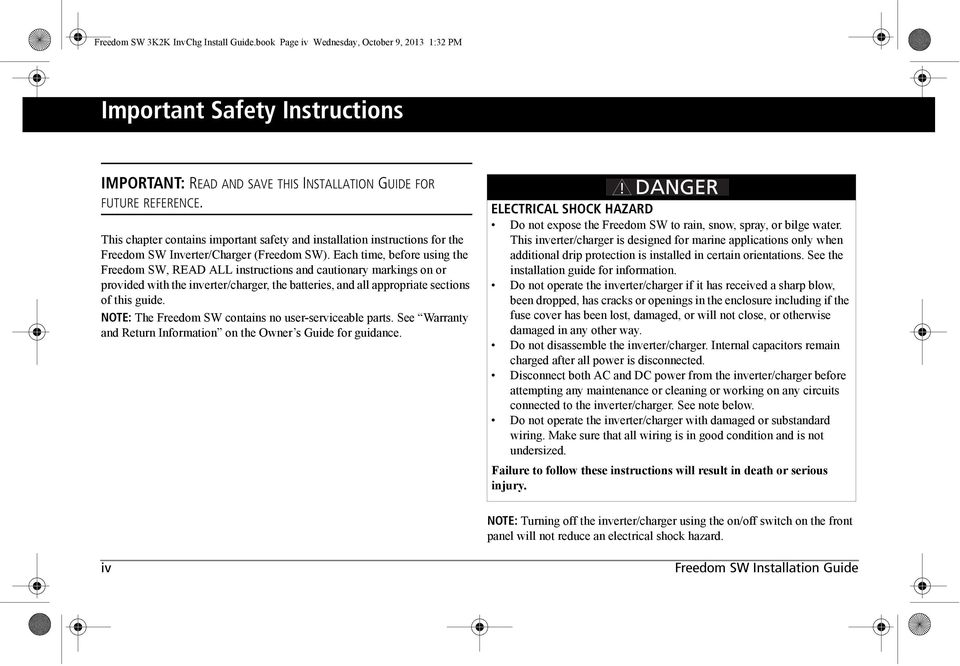
6 Freedom SW 3K2K InvChg Install Guide.book Page iv Wednesday, October 9, :32 PM Important Safety Instructions IMPORTANT: READ AND SAVE THIS INSTALLATION GUIDE FOR FUTURE REFERENCE. This chapter contains important safety and installation instructions for the Freedom SW Inverter/Charger (Freedom SW). Each time, before using the Freedom SW, READ ALL instructions and cautionary markings on or provided with the inverter/charger, the batteries, and all appropriate sections of this guide. NOTE: The Freedom SW contains no user-serviceable parts. See Warranty and Return Information on the Owner s Guide for guidance. ELECTRICAL SHOCK HAZARD Do not expose the Freedom SW to rain, snow, spray, or bilge water. This inverter/charger is designed for marine applications only when additional drip protection is installed in certain orientations. See the installation guide for information. Do not operate the inverter/charger if it has received a sharp blow, been dropped, has cracks or openings in the enclosure including if the fuse cover has been lost, damaged, or will not close, or otherwise damaged in any other way. Do not disassemble the inverter/charger. Internal capacitors remain charged after all power is disconnected. Disconnect both AC and DC power from the inverter/charger before attempting any maintenance or cleaning or working on any circuits connected to the inverter/charger. See note below. Do not operate the inverter/charger with damaged or substandard wiring. Make sure that all wiring is in good condition and is not undersized. Failure to follow these instructions will result in death or serious injury. NOTE: Turning off the inverter/charger using the on/off switch on the front panel will not reduce an electrical shock hazard. iv Freedom SW Installation Guide
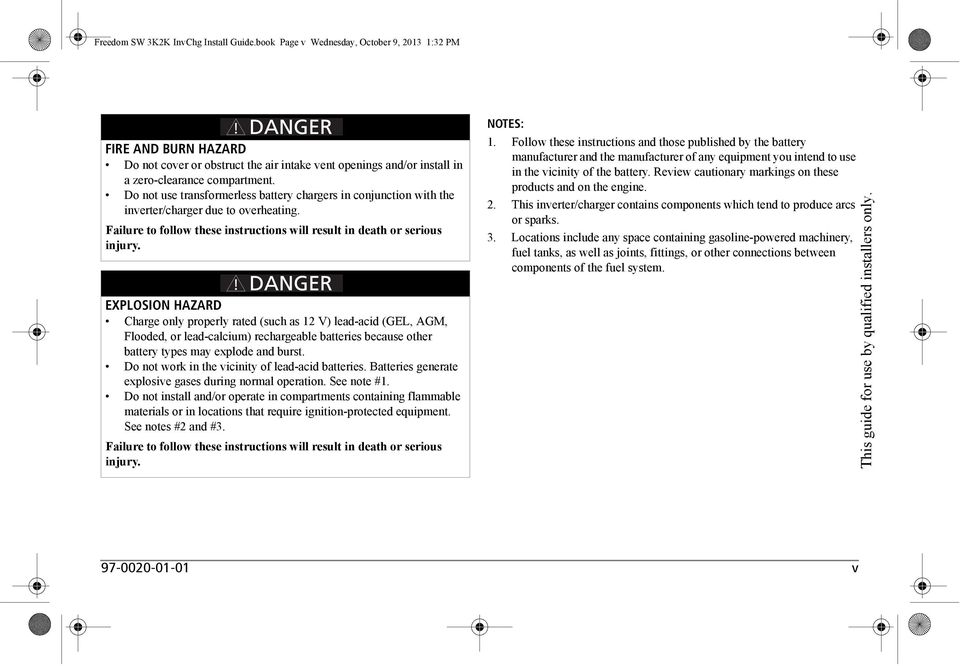
7 Freedom SW 3K2K InvChg Install Guide.book Page v Wednesday, October 9, :32 PM FIRE AND BURN HAZARD Do not cover or obstruct the air intake vent openings and/or install in a zero-clearance compartment. Do not use transformerless battery chargers in conjunction with the inverter/charger due to overheating. Failure to follow these instructions will result in death or serious injury. EXPLOSION HAZARD Charge only properly rated (such as 12 V) lead-acid (GEL, AGM, Flooded, or lead-calcium) rechargeable batteries because other battery types may explode and burst. Do not work in the vicinity of lead-acid batteries. Batteries generate explosive gases during normal operation. See note #1. Do not install and/or operate in compartments containing flammable materials or in locations that require ignition-protected equipment. See notes #2 and #3. Failure to follow these instructions will result in death or serious injury. NOTES: 1. Follow these instructions and those published by the battery manufacturer and the manufacturer of any equipment you intend to use in the vicinity of the battery. Review cautionary markings on these products and on the engine. 2. This inverter/charger contains components which tend to produce arcs or sparks. 3. Locations include any space containing gasoline-powered machinery, fuel tanks, as well as joints, fittings, or other connections between components of the fuel system. This guide for use by qualified installers only v
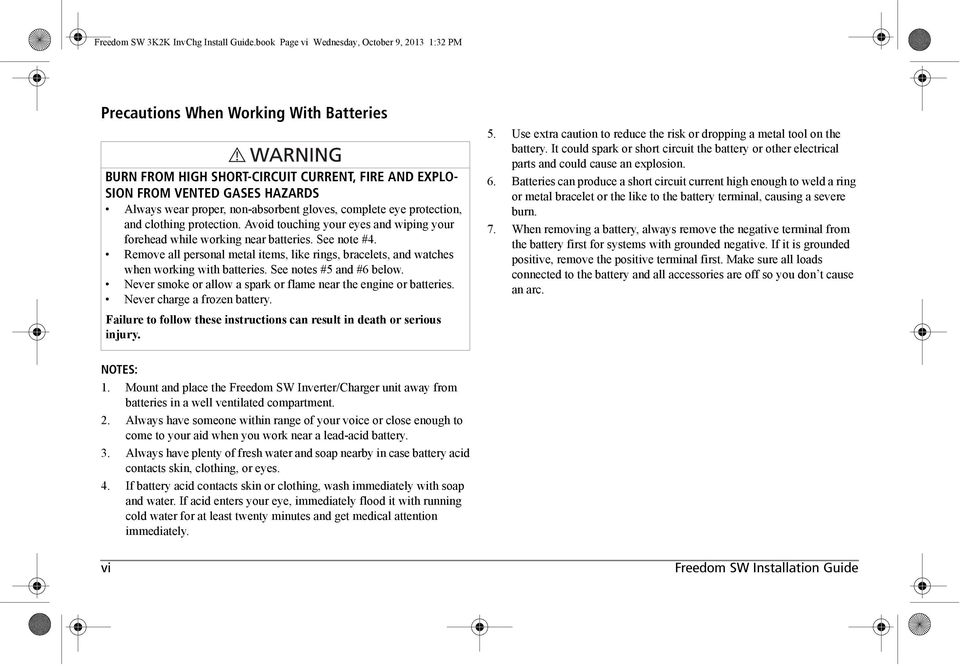
8 Freedom SW 3K2K InvChg Install Guide.book Page vi Wednesday, October 9, :32 PM Precautions When Working With Batteries BURN FROM HIGH SHORT-CIRCUIT CURRENT, FIRE AND EXPLO- SION FROM VENTED GASES HAZARDS Always wear proper, non-absorbent gloves, complete eye protection, and clothing protection. Avoid touching your eyes and wiping your forehead while working near batteries. See note #4. Remove all personal metal items, like rings, bracelets, and watches when working with batteries. See notes #5 and #6 below. Never smoke or allow a spark or flame near the engine or batteries. Never charge a frozen battery. Failure to follow these instructions can result in death or serious injury. 5. Use extra caution to reduce the risk or dropping a metal tool on the battery. It could spark or short circuit the battery or other electrical parts and could cause an explosion. 6. Batteries can produce a short circuit current high enough to weld a ring or metal bracelet or the like to the battery terminal, causing a severe burn. 7. When removing a battery, always remove the negative terminal from the battery first for systems with grounded negative. If it is grounded positive, remove the positive terminal first. Make sure all loads connected to the battery and all accessories are off so you don t cause an arc. NOTES: 1. Mount and place the Freedom SW Inverter/Charger unit away from batteries in a well ventilated compartment. 2. Always have someone within range of your voice or close enough to come to your aid when you work near a lead-acid battery. 3. Always have plenty of fresh water and soap nearby in case battery acid contacts skin, clothing, or eyes. 4. If battery acid contacts skin or clothing, wash immediately with soap and water. If acid enters your eye, immediately flood it with running cold water for at least twenty minutes and get medical attention immediately. vi Freedom SW Installation Guide
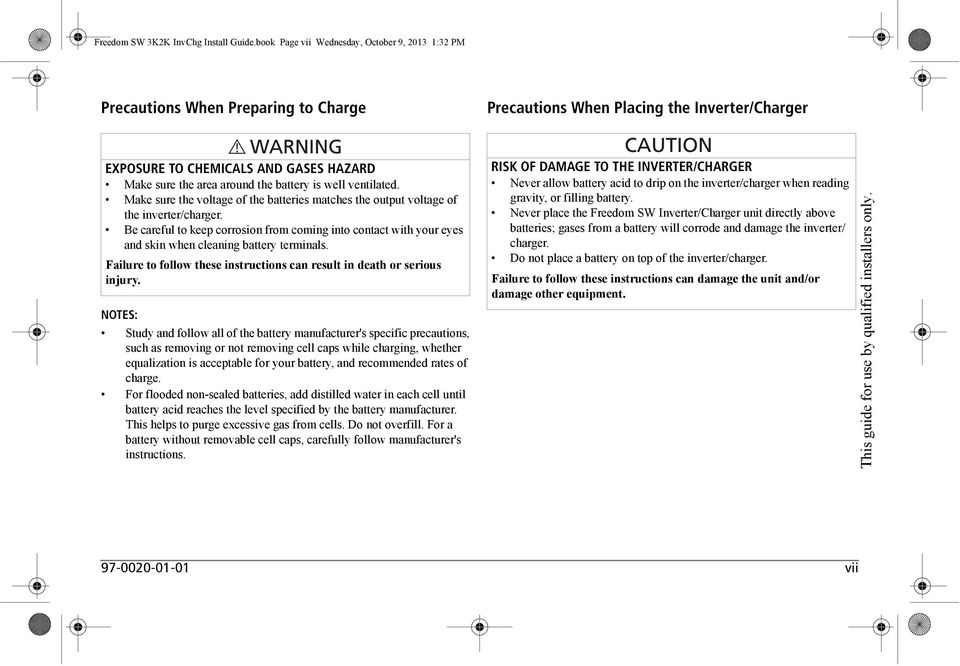
9 Freedom SW 3K2K InvChg Install Guide.book Page vii Wednesday, October 9, :32 PM Precautions When Preparing to Charge Precautions When Placing the Inverter/Charger EXPOSURE TO CHEMICALS AND GASES HAZARD Make sure the area around the battery is well ventilated. Make sure the voltage of the batteries matches the output voltage of the inverter/charger. Be careful to keep corrosion from coming into contact with your eyes and skin when cleaning battery terminals. Failure to follow these instructions can result in death or serious injury. NOTES: Study and follow all of the battery manufacturer's specific precautions, such as removing or not removing cell caps while charging, whether equalization is acceptable for your battery, and recommended rates of charge. For flooded non-sealed batteries, add distilled water in each cell until battery acid reaches the level specified by the battery manufacturer. This helps to purge excessive gas from cells. Do not overfill. For a battery without removable cell caps, carefully follow manufacturer's instructions. RISK OF DAMAGE TO THE INVERTER/CHARGER Never allow battery acid to drip on the inverter/charger when reading gravity, or filling battery. Never place the Freedom SW Inverter/Charger unit directly above batteries; gases from a battery will corrode and damage the inverter/ charger. Do not place a battery on top of the inverter/charger. Failure to follow these instructions can damage the unit and/or damage other equipment. This guide for use by qualified installers only vii
10 Freedom SW 3K2K InvChg Install Guide.book Page viii Wednesday, October 9, :32 PM Regulatory The Freedom SW Inverter/Charger is certified to appropriate US and Canadian standards. For more information see Regulatory Approvals on the Specifications section in the Owner s Guide. The Freedom SW Inverter/Charger is intended to be used for mobile or commercial applications. This inverter/charger is designed for marine applications only when additional drip protection is installed in certain orientations. It is not intended for other applications as it may not comply with the additional safety code requirements needed for those other applications. See Limitations On Use below. LIMITATIONS ON USE Do not use in connection with life support systems or other medical equipment or devices. Do not use in ambulances or other life-saving emergency vehicles. Failure to follow these instructions can result in death or serious injury. FCC Information to the User This equipment has been tested and found to comply with the limits for a Class B digital device, pursuant to part 15 of the FCC Rules. These limits are designed to provide reasonable protection against harmful interference in a residential installation. This equipment generates, uses, and can radiate radio frequency energy and, if not installed and used in accordance with the instructions, may cause harmful interference to radio communications. However, there is no guarantee that interference will not occur in a particular installation. If this equipment does cause harmful interference to radio or television reception, which can be determined by turning the equipment off and on, the user is encouraged to try to correct the interference by one or more of the following measures: Reorient or relocate the receiving antenna. Increase the separation between the equipment and receiver. Connect the equipment into an outlet on a circuit different from that to which the receiver is connected. Consult the dealer or an experienced radio/tv technician for help. Unauthorized changes or modifications to the equipment could void the user s authority to operate the equipment. viii Freedom SW Installation Guide
11 Freedom SW 3K2K InvChg Install Guide.book Page i Wednesday, October 9, :32 PM Contents Important Safety Instructions iv Introduction Materials List Installation Information Before You Begin the Installation Installation Codes About the Xanbus System Xanbus System Xanbus-enabled Products and Accessories Planning the Installation Two Key Performance Factors Size and Length of DC Cables Mounting Location of the Freedom SW Planning Preparations AC, DC, and Network Components AC Components AC Input for Single AC Line Models AC Input for Dual AC Line Models AC Output AC Loads AC Disconnect and Over-Current Protection Device Distribution Panels AC Wiring AC Output Neutral Bonding This guide for use by qualified installers only.
12 Freedom SW 3K2K InvChg Install Guide.book Page ii Wednesday, October 9, :32 PM DC Components Batteries DC Cabling DC Disconnects and Over-Current Devices DC Grounding Unpacking and Inspecting the Freedom SW Inverter/Charger Installation Tools and Materials Tools Materials Installing the Inverter/Charger Overview Step 1: Choosing a Location for the Inverter/Charger Step 2: Mounting the Inverter/Charger Considerations Step 3: Connecting the AC Input and AC Output Wires General AC Wiring Considerations Connecting AC Input Wires Connecting the AC Output Wires Step 4: Connecting the DC Cables DC Connection Precautions Recommended Cable Sizes and Lengths and Fuse Size Preparing the Cables Guidelines for Routing the DC Cables Connecting the DC Cables to the Inverter/Charger DC Grounding

13 Freedom SW 3K2K InvChg Install Guide.book Page iii Wednesday, October 9, :32 PM Step 5: Connecting the Battery Temperature Sensor (BTS) Mounting Options Mounting to the Negative Battery Terminal Mounting to the Side of the Battery Case Step 6: Connecting to the Network Step 7: Performing Checks Prior to Initial Start-Up Step 8: Testing Your Installation Testing in Invert Mode Testing in Charge Mode and AC Bypass Mode Installation Complete Stacking Features Parallel Stacking Series Stacking Stacking Cable Series Stacking Operation DC Connections for Stacked Inverters Neutral Wiring for Stacked Inverters Configuring System for Stacked Operation Search Mode in Series Stacking Search Mode Operation in Parallel Stacking Disabling Search Mode on the Master Unit Setting Search Mode on the Slave Unit Wiring Schematic Charger settings in a Dual Freedom SW configuration Calculations This guide for use by qualified installers only.

14 Freedom SW 3K2K InvChg Install Guide.book Page iv Wednesday, October 9, :32 PM Examples Inverter/Charger Physical Specifications Battery Information Battery Bank Sizing Estimating Battery Requirements Calculating Battery Size Battery Banks Battery Bank Sizing Worksheet Restrictions on Motor Size Battery Cabling and Hook-up Configurations Battery Parallel Connection Battery Series Connection Battery Series-Parallel Connections Specifications Inverter Drip Shield Installation
15 Freedom SW 3K2K InvChg Install Guide.book Page 1 Wednesday, October 9, :32 PM Introduction The Installation Guide provides detailed information for installing the Freedom SW Inverter/Charger and the battery temperature sensor, wiring the inverter/charger to the AC and DC circuits, and connecting the inverter/ charger to the Xanbus system. The Freedom SW is a Xanbus-enabled device that typically powers the Xanbus system. This Installation Guide provides: safety instructions that must be observed during installation. a typical Xanbus system diagram (if applicable). information on additional required AC and DC components. a list of installation tools and materials. detailed procedures for a typical installation. This guide for use by qualified installers only

16 RESET GEN SUPPORT Freedom SW 3K2K InvChg Install Guide.book Page 2 Wednesday, October 9, :32 PM Introduction Materials List The Freedom SW ships with the following items: one Freedom SW unit owner s and installation guides Battery Temperature Sensor (BTS) DC terminal covers (one red, one black) with two sets of screws, two Xanbus network terminators two sets of nuts and washers for the DC terminals CLEAR FAULT FREEDOM SW 3012 INVERTER ENABLE INVERTER ENABLED AC IN FAULT CHARGING WARNING FREEDOM SW 3012 Installation and Owner s Guides NOTE: If any of the items are missing, contact customer service or any authorized Xantrex dealer for replacement. See Contact Information on page i. Freedom SW 3012 shown IMPORTANT: Keep the carton and packing material in case you need to return the Freedom SW for servicing. Xanbus network terminators BTS nuts and washers DC terminal covers with screws Figure 1 Materials List 2 Freedom SW Installation Guide

17 Freedom SW 3K2K InvChg Install Guide.book Page 3 Wednesday, October 9, :32 PM Installation Information Before You Begin the Installation Installation Codes Before beginning your installation: Read the entire Installation Guide so you can plan the installation from beginning to end. Assemble all the tools and materials you require for the installation. Review the Important Safety Instructions on page iv. Be aware of all safety and electrical codes which must be met. ELECTRICAL SHOCK AND FIRE HAZARDS All wiring should be done by qualified personnel to ensure compliance with all applicable installation codes and regulations. Disconnect all AC and DC power sources. Disable and secure all AC and DC disconnect devices and automatic generator starting devices. Failure to follow these instructions will result in death or serious injury. Applicable installation codes vary depending on the specific location and application of the installation. Some examples are: The U.S. National Electrical Code (NEC) The Canadian Electrical Code (CEC) Canadian Standards Association (CSA) and RV Industry Association (RVIA) for installation in RVs ABYC E11 - Alternating Current and Direct Current Electrical Systems on Boats ABYC A31 - Battery Chargers and Inverters This guide for use by qualified installers only
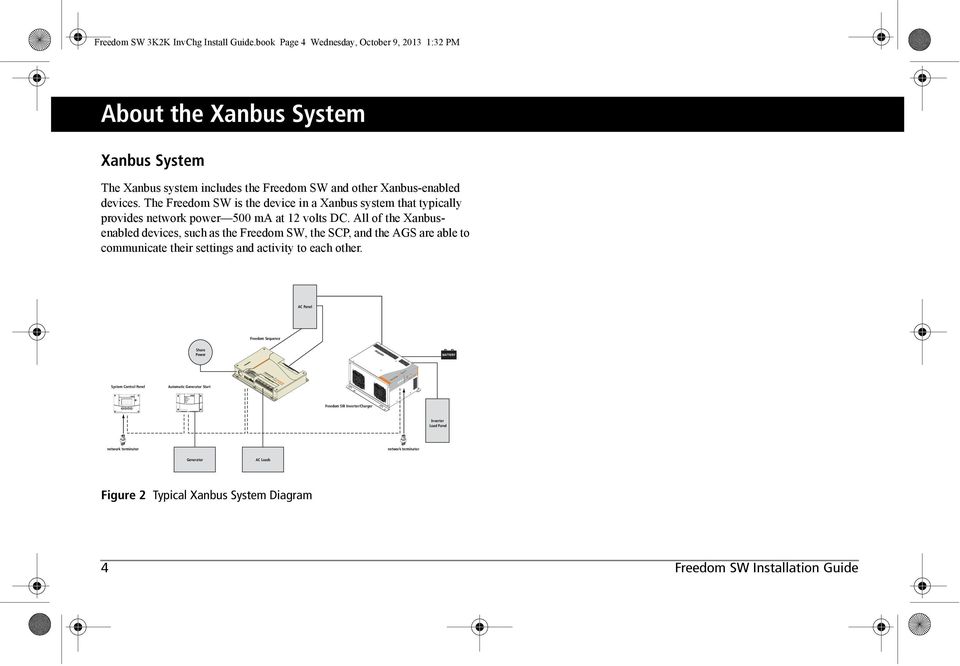
18 Xanbus System Control Panel Xanbus Automatic Generator Start Freedom SW 3K2K InvChg Install Guide.book Page 4 Wednesday, October 9, :32 PM About the Xanbus System Xanbus System The Xanbus system includes the Freedom SW and other Xanbus-enabled devices. The Freedom SW is the device in a Xanbus system that typically provides network power 500 ma at 12 volts DC. All of the Xanbusenabled devices, such as the Freedom SW, the SCP, and the AGS are able to communicate their settings and activity to each other. AC Panel Freedom Sequence Shore Power BATTERY FREEDOM SW 3012 Inverter Reset Enable Inverter AC/ On Charge Fault FREEDOM SW 3012 System Control Panel Automatic Generator Start Freedom SW Inverter/Charger Inverter Load Panel network terminator network terminator Generator AC Loads Figure 2 Typical Xanbus System Diagram 4 Freedom SW Installation Guide
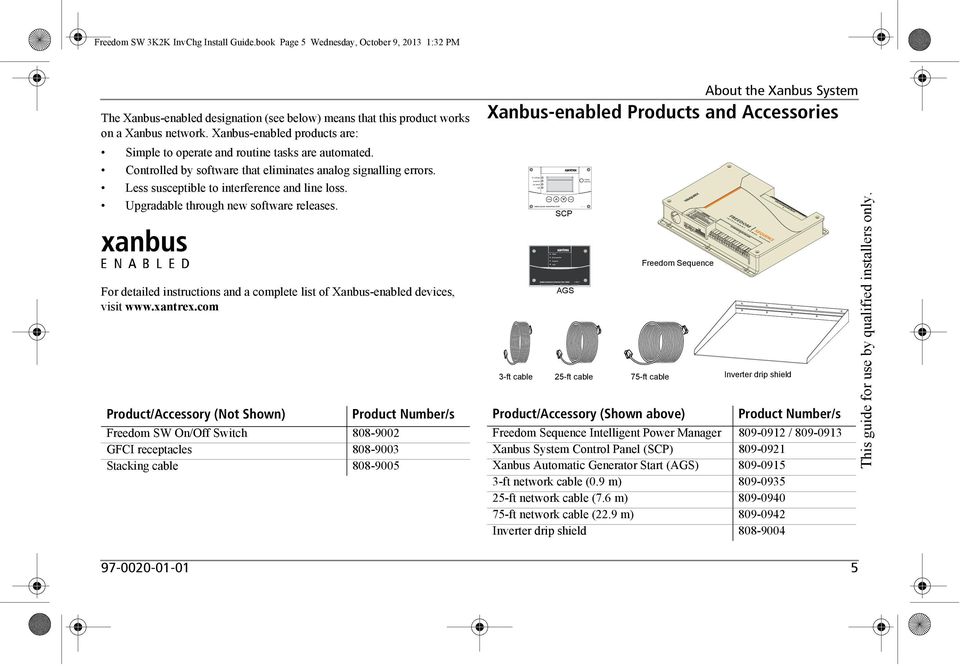
19 AC In/Charge Inverter On Low Battery Fault Enter Func Xanbus System Control Panel (SCP) FGA: TM STBY/ON Fault Clear Freedom SW 3K2K InvChg Install Guide.book Page 5 Wednesday, October 9, :32 PM The Xanbus-enabled designation (see below) means that this product works on a Xanbus network. Xanbus-enabled products are: Simple to operate and routine tasks are automated. Controlled by software that eliminates analog signalling errors. Less susceptible to interference and line loss. Upgradable through new software releases. For detailed instructions and a complete list of Xanbus-enabled devices, visit Product/Accessory (Not Shown) Freedom SW On/Off Switch GFCI receptacles Stacking cable Product Number/s About the Xanbus System Xanbus-enabled Products and Accessories 3-ft cable SCP AGS 25-ft cable Freedom Sequence 75-ft cable Inverter drip shield Product/Accessory (Shown above) Product Number/s Freedom Sequence Intelligent Power Manager / Xanbus System Control Panel (SCP) Xanbus Automatic Generator Start (AGS) ft network cable (0.9 m) ft network cable (7.6 m) ft network cable (22.9 m) Inverter drip shield This guide for use by qualified installers only
20 Freedom SW 3K2K InvChg Install Guide.book Page 6 Wednesday, October 9, :32 PM Planning the Installation This section provides information to help you plan for a basic installation of the Freedom SW. As your system configuration is determined, record the details in Information About Your System in the Freedom SW Sine Wave Inverter/ Charger Owner s Guide. Two Key Performance Factors Two key factors in particular will have a major impact on system performance. Size and Length of DC Cables To select the appropriate size and length of DC cables, see DC Cabling on page 16. The DC cables should be as short as possible and large enough to handle the required current, in accordance with the electrical codes or regulations applicable to your installation. If there are long battery cables which are in excess of 10 feet each and not of sufficient size, the voltage drop across the cables will have a negative impact on overall system performance. Mounting Location of the Freedom SW To choose an appropriate location for mounting the inverter/charger, see Step 1: Choosing a Location for the Inverter/Charger on page Freedom SW Installation Guide

21 Freedom SW 3K2K InvChg Install Guide.book Page 7 Wednesday, October 9, :32 PM Planning Preparations AC, DC, and Network Components For a successful installation, you need to plan for AC, DC, and network components of the power system. The AC and DC components are described in this section and illustrated in Figure 3 on page 8. AC components include: AC Input for Dual AC Line Models, AC Input for Single AC Line Models AC Loads AC Disconnect and Over-Current Protection Device Distribution Panels AC Wiring AC Output Neutral Bonding DC components include: Batteries DC Cabling DC Cabling DC Grounding Network considerations for Freedom SW only include: Cables, connectors, network connectors, and terminators for the SCP and Automatic Generator Start, if installing. Detailed information on planning and installing your network is available in the Xanbus System Installation Guide. Refer to the system guide to determine the type of network layout to install, as well as guidelines for installing the network. This guide is available for download at This guide for use by qualified installers only
22 RESET TEST Freedom SW 3K2K InvChg Install Guide.book Page 8 Wednesday, October 9, :32 PM Planning Preparations System Control Panel (SCP) DC DC + FREEDOM SW 3012 Sine Wave Inverter/Charger Inverter Reset Enable Inverter AC/ On Charge Fault FREEDOM SW 3012 AC Out AC In Automatic Generator Start (AGS) IMPORTANT: Figure 3 does not show all required grounding or overcurrent protection. See the next two pages as well as on page 17 for required DC grounding or overcurrent protection. Always hire a qualified installer or you must be the one to ensure that all electrical safety requirements are met before, during, and after installation. House Battery BTS AC Main Panel Isolator Engine Battery Inverter AC Panel Non-Inverter Loads Legend: Generator Transfer Switch Utility Power Alternator Xanbus Network AC DC Low Voltage DC Figure 3 Typical Recreational Vehicle Electrical System 8 Freedom SW Installation Guide
23 Freedom SW 3K2K InvChg Install Guide.book Page 9 Wednesday, October 9, :32 PM Planning Preparations INVERTER AC SUB PANEL (TYPICAL) HOT BUS 15 A 20 A TO AC APPLIANCE LOADS IMPORTANT: Read Owner s and Installation Guides prior to installation. Always refer to local and national electrical codes for proper wire and breaker sizes prior to installation. 120 V AC OUT 2012 and 2024 Inverter/Charger switch Battery (Bank) 12 or 24 V 120 V AC IN OPTIONAL GFCI duplex receptacle special kit 15 A output limit 2/0 AWG 275 A fuse 4 AWG 8 AWG Chassis GND* 150 A fuse In free air, as per NEC Table for 75 C rated copper conductor. Class T or equivalent Freedom SW 2012 Class T or equivalent Freedom SW 2024 HARDWIRE CONNECTIONS 20 A MAX in inverter 30 A MAX in pass-through 10 AWG 10 AWG HOT = BLACK NEUTRAL = WHITE GND = GREEN/Bare * Recreational Vehicles only. For Marine applications see NOTE below. NOTE: The DC grounding conductor may be one size smaller than the minimum size conductor required for the DC current carrying conductors providing the overcurrent protection device in the DC positive conductor is rated no greater than 135% of the ampacity of the DC grounding conductor and the conductor is no smaller than 16 AWG. Neutral GND MAIN ELECTRICAL PANEL MAIN 30 A HOT BUS Neutral GND FROM SHORE OR GENERATOR POWER This guide for use by qualified installers only. As per ABYC E-11, DC fuses are required 7 inches from the positive terminal of the battery and another from the positive terminal of the charger. A DC Switch is recommended on the battery side as well. Figure 4 Wiring and Breakers Block Diagram for Freedom SW 2012 /
24 Freedom SW 3K2K InvChg Install Guide.book Page 10 Wednesday, October 9, :32 PM Planning Preparations INVERTER AC SUB PANEL (TYPICAL) HOT BUS 30 A TO AC APPLIANCE LOADS IMPORTANT: Read Owner s and Installation Guides prior to installation. Always refer to local and national electrical codes for proper wire and breaker sizes prior to installation. OPTIONAL GFCI duplex receptacle special kit 15 A output limit Neutral 120 V AC OUT 3012 and 3024 Inverter/Charger 120 V AC IN HARDWIRE CONNECTIONS 30 A MAX in inverter 30 A MAX in pass-through 10 AWG GND MAIN ELECTRICAL PANEL MAIN FROM SHORE OR GENERATOR POWER switch 4/0 AWG 350 A fuse 1 AWG 200 A fuse 8 AWG Chassis GND* 6 AWG (Dual Input) / 10 AWG (Split phase) HOT = BLACK NEUTRAL = WHITE GND = GREEN/Bare 30 A 30 A HOT BUS Battery (Bank) 12 or 24 V In free air, as per NEC Table for 75 C rated copper conductor. Class T or equivalent Freedom SW 3012 Class T or equivalent Freedom SW 3024 * Recreational Vehicles only. For Marine applications see NOTE below. NOTE: The DC grounding conductor may be one size smaller than the minimum size conductor required for the DC current carrying conductors providing the overcurrent protection device in the DC positive conductor is rated no greater than 135% of the ampacity of the DC grounding conductor and the conductor is no smaller than 16 AWG. As per ABYC E-11, DC fuses are required 7 inches from the positive terminal of the battery and another from the positive terminal of the charger. A DC Switch is recommended on the battery side as well. Neutral GND Figure 5 Wiring and Breakers Block Diagram for Freedom SW 3012 / Freedom SW Installation Guide
25 Freedom SW 3K2K InvChg Install Guide.book Page 11 Wednesday, October 9, :32 PM AC Components NOTE: Unless otherwise referenced specifically by product name, the components refer to all models of Freedom SW inverter/chargers. AC Input for Single AC Line Models AC input (to a single AC line model such as Freedom SW 2012 inverter/ charger) can be supplied from a single-phase 120-volt 60-Hz AC source such as the utility grid (power company), a generator, or the output of a transfer switch. AC Input for Dual AC Line Models Planning Preparations AC inputs (to a dual AC line model such as Freedom SW 3012 inverter/ charger) can be supplied from a split-phase or dual-input AC source such as the utility grid (power company), a generator, or the output of a transfer switch. The Freedom SW can be operated from the following types of 120 volt 60 Hz AC sources: Split phase: This source type has two lines, one neutral, and one ground. The two 120 volts AC lines are 180 degrees out of phase with each other, so that the two voltages total to 240 volts AC line to line. The voltage between each line and neutral is still 120 volts AC, and the voltage between the neutral and ground is approximately zero. Because the two lines are out of phase, the currents from each line subtract in the neutral, and the neutral current will be approximately zero if the loads are equal. For example, if Line 1 is supplying 20 amps and Line 2 is supplying 15 amps, the current in the neutral will be 5amps. Dual input: This source type has two line inputs, one neutral, and one ground. Unlike the split-phase type, the two lines are in phase (not out of phase), and must come from the same source. The voltage between the two lines is zero. The voltage between each line and the neutral is 120 volts AC, and the voltage between the neutral and ground is approximately zero. Because the two lines are in phase, the currents from each line add together in the neutral. For example, if Line 1 is supplying 20 amps and Line 2 is supplying 15 amps, the current in the neutral will be 35 amps This guide for use by qualified installers only.
26 Freedom SW 3K2K InvChg Install Guide.book Page 12 Wednesday, October 9, :32 PM Planning Preparations AC Output The output voltage on Freedom SW inverter/chargers is 120Vac. The AC output line configuration depends on the model. Single AC Line models have a Single Input and Single Output line (SI-SO) configuration. Dual AC Line models support Dual Input and Dual Output lines (DI-DO) configuration. AC Loads The Freedom SW is intended to power loads consisting of 120 volts AC appliances. In Invert mode, the Freedom SW connects L1 and L2 output lines together to provide 120 volts AC to loads on either line. In AC Bypass mode, the source connected to the AC input is passed through to the load. Because of the way invert mode operates, only 120 volts AC appliances can be connected to the Freedom SW output. AC Disconnect and Over-Current Protection Device To meet CSA, UL, and electrical code requirements, and to protect system wiring, the AC inputs and outputs of the inverter/charger must be provided with overcurrent protection on both the AC input and output. This protection may be a circuit breaker or a fuse with a disconnect device (for simplicity the following refers to breakers). Refer to your applicable installation codes and the following requirements: AC Input Protection The breakers protecting the AC input of the Freedom SW must be approved for use on 120 volts AC branch circuits, and must be located in each Line. The breakers must be rated as shown below: Split-phase input: No more than 30 amps max in each line. Dual input: The neutral current in a dual-input system is the sum of the two line currents, and must be limited to 60 amps maximum to protect the transfer relay in the Freedom SW. Each breaker must not exceed 30 amps, and the total (sum) of the ratings of the two breakers must not exceed 60 amps. AC Output Protection The breaker between the Freedom SW AC output and the AC loads must be rated to protect the AC output wire size used. If the AC output wiring is based on the full 30-amp pass-through rating, then a 30-amp output breaker is acceptable. If the AC output wiring is smaller, then the breaker size will have to be smaller as well, in accordance with applicable electrical installation codes. GFCI Requirements A GFCI (ground fault circuit interrupter) is a device that de energizes a circuit when a current to ground exceeds a specified value that is less than that required to open the circuit breaker. GFCIs are intended to protect people from electric shocks and are usually required in wet or damp locations. Installation in recreational vehicles requires GFCI protection of certain branch circuits. Consult all applicable codes. 12 Freedom SW Installation Guide
27 Freedom SW 3K2K InvChg Install Guide.book Page 13 Wednesday, October 9, :32 PM Tested GFCIs Compliance with UL standards requires that the manufacturer test and recommend specific GFCIs for use on the output of the inverter. Table 1 lists models that have been tested and will function properly when connected to the AC output of the Freedom SW. Table 1 Tested GFCI Models Manufacturer Disconnect Devices Each system requires a method of disconnecting the AC circuits. If the overcurrent protection device is a circuit breaker, it will also serve as the disconnect. If fuses are used, separate AC disconnect switches will be needed between the source and the fuses. Distribution Panels Model Number Hubbell GFR5252WA Leviton 8599-GY Pass & Seymour 1594-W Some systems incorporate distribution panels both ahead of the inverter/ charger (the AC source panel) and between the inverter/charger and the loads (the AC load panel). The AC source panel includes a main circuit breaker, which serves as overcurrent protection for the panel. Additional circuit breakers serve individual circuits, one of which serves the inverter/ charger. AC Wiring Planning Preparations Definition AC wiring includes input wiring (all the wires and connectors between the AC source and the inverter/charger input) and output wiring (all the wires between the inverter/charger and the AC load panels, circuit breakers, and loads). Type The type of wiring required varies according to the electrical codes or regulations applicable to your installation. For RV applications, this may be solid wire in multi-conductor cables, but stranded wire is required if single conductors are used. All wiring must be rated 90 C or higher. Size of AC Input Wiring Wire size must be coordinated with the overcurrent protection provided ahead of the wire involved, in accordance with the electrical codes or regulations applicable to your installation. Therefore, the wiring used between the AC input circuit breaker and the inverter/charger input must be sized to match the input breaker rating. Table 2 AC Wire Size In and Out of the Inverter/Chargers MODELS / / Split phase Dual input Breaker Size 30 amps per line 30 amps per line 30 amps Used Wire Size No. 10 AWG No. 6 AWG No. 10 AWG Color Coding L1: black: N: white L2: red Gnd: green L1: red or black N: white L2: red or black Gnd: green L: red or black N: white G: green For dual input, the wire may be red or black; consult the documentation provided with the AC source (utility or generator). This guide for use by qualified installers only
28 Freedom SW 3K2K InvChg Install Guide.book Page 14 Wednesday, October 9, :32 PM Planning Preparations Size of AC Output Wiring Wire size must be coordinated with the current the wiring will carry. This current may be determined by the 25-amp (Freedom SW 3012) and 20-amp (Freedom SW 2012) maximum inverter current, or by the bypass current, which is determined by the overcurrent protection provided ahead of the Freedom SW. Size of Wiring Downstream of the AC Output Breaker The wiring used between the AC output breaker and your loads must be sized to match the output breaker. Some conditions for Freedom SW: If the input wiring is split-phase, the output wiring must be sized to coordinate with the breakers used on the input. Refer to your applicable installation codes. If the input wiring is dual-input and the output wiring is single-input, the following rules apply: If the input breaker on L1 is greater than 25 amps, the wire size must be coordinated for that amperage. If the input breaker on L1 is less than 25 amps, the wire size must be coordinated for 25 amps. The wire size must not be sized for anything lower than 25 amps. If both the input and the output wiring are dual-input, the output wiring for each line (L1 and L2) must be calculated separately, following these rules: If the input breaker on the specific line is greater than 25 amps, the wire size for that line and its neutral must be coordinated for that amperage. If the input breaker on the specific line is less than 25 amps, the wire size for that line and its neutral must be coordinated for 25 amps. The wire size must not be sized for anything lower than 25 amps. 14 Freedom SW Installation Guide
29 Freedom SW 3K2K InvChg Install Guide.book Page 15 Wednesday, October 9, :32 PM AC Output Neutral Bonding Planning Preparations The AC source must have its neutral conductor bonded to ground. Bonding system The Freedom SW provides a system that automatically connects the neutral conductor of the inverter s AC output circuit to safety ground ( bonding it) while the inverter/charger is inverting, and disconnects it ( unbonding it) when the inverter/charger is connected to external AC power. This system is designed to conform to installation codes that require AC sources such as inverters and generators to have their neutral conductors tied to ground at the source of power in the same way that the neutral conductor from the utility is tied to ground. These same codes specify that the neutral can only be connected to ground in one place at any one time. Suitability This automatic neutral-to-ground bonding system requires AC input sources with bonded neutral. This will be the case in most situations: in a utility feed, at an external AC hook-up, or a generator with a bonded neutral. If not, have an electrician look into bonding the source s neutral to ground. See also AC Input and Output Isolation on page 27. This guide for use by qualified installers only
30 Freedom SW 3K2K InvChg Install Guide.book Page 16 Wednesday, October 9, :32 PM Planning Preparations DC Components Batteries The Freedom SW system requires a 12- or 24-volt (depending on the model), lead-acid deep-cycle battery or group of batteries to provide the DC current that the inverter/charger converts to AC power. The battery may be a flooded, gel, or AGM type. See Battery Information on page 55 for information on: Estimating the battery size that will meet your requirements. Designing battery banks. Restrictions on the size of appliances. For information on cabling and hooking up batteries, see Battery Cabling and Hook-up Configurations on page 59. For detailed information about specific brands of batteries, consult individual battery manufacturers. DC Cabling Definition DC cabling includes all of the cables and connectors between the batteries, the DC disconnect and overcurrent protection device, and the inverter/charger. Type All installations require multi-strand insulated cables. The DC cables must be copper and must be rated 75 C minimum. Size and Length See Table 3 for required DC cable length, cable size and required fuse size for the Freedom SW. Wire size is usually marked on the cables. Table 3 Minimum Recommended Battery Cable Sizes for Copper Conductors Rated 75C 16 Freedom SW Installation Guide Model Typical Amps (A) Conduit Cable Length < 10 ft. Free Air Cable Length < 5 ft. Freedom SW kcmil 2/0 AWG Freedom SW kcmil 4/0 AWG Freedom SW AWG 4 AWG Freedom SW /0 AWG 1 AWG IMPORTANT: Longer cables may cause the inverter to shut down under a heavy load. FIRE HAZARD Undersized cables will overheat. Consult local electrical codes to determine minimum required size. Failure to follow these instructions can result in death or serious injury.
31 Freedom SW 3K2K InvChg Install Guide.book Page 17 Wednesday, October 9, :32 PM DC Disconnects and Over-Current Devices DC Grounding Planning Preparations The DC circuit from the battery to the inverter/charger must be equipped with a disconnect and overcurrent protection device. Refer to your applicable installation code for guidance. Type This device usually consists of a circuit breaker, a fuseddisconnect, or a separate fuse and DC disconnect. Do not confuse AC circuit breakers with DC circuit breakers. They are not interchangeable. Rating The rating of the fuse or breaker must be matched to the size of cables used in accordance with the applicable installation codes. Location The breaker or fuse and disconnect should be located as close as possible to the battery in the positive cable. Applicable codes may limit how far the protection can be from the battery. Table 4 Recommended Fuse Sizes a Model Minimum Fuse Size (A) Freedom SW Freedom SW Freedom SW Freedom SW a. Based on National Electrical Code (NEC) requirements. The NEC requires that the cables be protected by a fuse or breaker rated to match the cables ampacity at 75 C. Marine Applications 1 A charger needs to be equipped with a disconnect and an over-current protection device, usually within seven inches (18 cm) of each battery s positive terminal and another over-current protection device seven inches (18 cm) near the charger s positive terminal. Recreational Vehicles The inverter/charger DC (chassis) ground terminal needs to be connected to the vehicle chassis by a minimum No. 8 AWG copper conductor that is either insulated (green) wire rated 75 C or bare copper. Marine Applications 2 The DC grounding conductor may be one size smaller than the minimum size conductor required for the DC current carrying conductors providing the overcurrent protection device in the DC positive conductor is rated no greater than 135% of the ampacity of the DC grounding conductor and the conductor is no smaller than 16 AWG. This guide for use by qualified installers only. 1.Per ABYC E Per ABYC A
32 Freedom SW 3K2K InvChg Install Guide.book Page 18 Wednesday, October 9, :32 PM Planning Preparations Unpacking and Inspecting the Freedom SW Inverter/Charger To unpack and inspect: HEAVY ITEM The Freedom SW Inverter/Charger is heavy (see Inverter/Charger Physical Specifications on page 54). The unit is too heavy for one person to safely lift and mount. It is recommended that two people lift and mount the unit. Always use proper lifting techniques during installation to prevent personal injury. Failure to follow these instructions can result in minor or moderate injury. IMPORTANT: Keep the carton and packing material in case you need to return the Freedom SW for servicing. 1. Unpack the unit and check the materials list. If anything is missing from the shipping box, contact Customer Service. See Contact Information on page i. 2. Record the serial number of the Freedom SW and other purchase information for any future warranty issues. You will be asked for this product information if you need to call Customer Service. 3. Save your purchase receipt to use as proof-of-purchase. This receipt is required if the inverter/charger should need warranty service. 4. Save the original shipping carton and packing materials. If the inverter/charger needs to be returned for service, it should be shipped in the original carton. Packing the Freedom SW in the original shipping carton is also a good way to protect the inverter/charger if it ever needs to be moved. 18 Freedom SW Installation Guide
33 Freedom SW 3K2K InvChg Install Guide.book Page 19 Wednesday, October 9, :32 PM Installation Tools and Materials Planning Preparations Tools Materials You will need the following tools to install the Freedom SW and the battery temperature sensor. Wire stripper Crimping tools for fastening lugs and terminals on DC cables Phillips screwdriver: #2 Slot screwdriver (¼" wide blade max.) Needle-nose pliers Wrench for DC terminals: 9/16" You will need the following materials to complete your installation: Strain-relief clamp(s) for AC cables (not provided): 3/4" and/or 1" DC battery cables Lugs for DC cables (for 3/8" stud size) Copper wire for DC grounding: No. 8 AWG. See DC Grounding on page 17 Lugs for DC grounding cable (for 1/4" stud size) AC and DC disconnect switches and overcurrent protective devices and connectors as required. See page 16. AC output and input wire. See Figure 3 on page 8. If the AC ground wire is stranded, each ground wire requires a ring terminal Six 1/4" " length steel screws or bolts to mount the unit Inverter drip shield (PN: ) if mounting in UL458-compliant marine installation NOTE: For a list of tools and materials required to install the network, refer to the Xanbus System Installation Guide, which is available for download at This guide for use by qualified installers only
34 Freedom SW 3K2K InvChg Install Guide.book Page 20 Wednesday, October 9, :32 PM Installing the Inverter/Charger Overview This section provides detailed information on installing the Freedom SW. The overall procedure is divided into eight steps: Step 1: Choosing a Location for the Inverter/Charger on page 21, Step 2: Mounting the Inverter/Charger on page 23, Step 3: Connecting the AC Input and AC Output Wires on page 27, Step 4: Connecting the DC Cables on page 31, Step 5: Connecting the Battery Temperature Sensor (BTS) on page 36, Step 6: Connecting to the Network on page 40, Step 7: Performing Checks Prior to Initial Start-Up on page 41, and Step 8: Testing Your Installation on page Freedom SW Installation Guide
35 Freedom SW 3K2K InvChg Install Guide.book Page 21 Wednesday, October 9, :32 PM Step 1: Choosing a Location for the Inverter/Charger Installing the Inverter/Charger The inverter should only be installed in a location that meets the following requirements: FIRE AND EXPLOSION HAZARD This equipment contains components that could produce arcs or sparks. To reduce the risk of fire or explosion, do not install this equipment in compartments containing batteries or flammable materials, or in locations that require ignition-protected equipment. This includes any space containing gasoline-powered machinery, fuel tanks, or joints, fittings, or other connections between components of the fuel system. Failure to follow these instructions will result in death or serious injury. HEAT HAZARD Do not cover or obstruct the ventilation openings. Do not install this equipment in a compartment with limited airflow. Overheating may result. Failure to follow these instructions can result in minor or moderate injury. Ventilated Dry Cool Clearance Do not operate the inverter/charger in a closed-in area or restrict ventilation in any way. The inverter/ charger requires air circulation to maintain optimum operating temperature and provide best performance. If the unit has inadequate ventilation, it may shut down due to overheating. The air vented through the openings should also have a path to circulate away from the inverter/ charger. Do not allow water or other fluids to drip or splash on the inverter/charger. Do not expose to rain, snow or water. Use inverter drip shield (PN: ) for UL458- compliant marine installations. Normal air temperature should be between 32 F and 140 F (0 C and 60 C) the cooler the better within this range. Allow as much space around the inverter/charger as possible. It is recommended that other objects and surfaces be at least 3 inches (76 mm) away from the ventilation openings for best performance. This guide for use by qualified installers only
36 Freedom SW 3K2K InvChg Install Guide.book Page 22 Wednesday, October 9, :32 PM Installing the Inverter/Charger Safe Close to battery compartment Protected from battery acid and gases Orientation Locate the inverter/charger away from battery in a separate well ventilated compartment. Do not install the inverter/charger in any compartment containing flammable gases or liquids like gasoline. The length and size of your DC cables will affect performance. Use the DC cables recommended in Table 3 on page 16. The unit should not be installed in the battery compartment due to the possible presence of explosive hydrogen gas from the batteries. Never place the inverter/charger directly above the batteries gases from battery will corrode and damage the inverter/charger. If the inverter/charger is installed in a compartment above the batteries, make sure there is a solid, gas-impermeable wall dividing the two compartments. Never allow battery acid to drip on the inverter/ charger or its wiring when filling the batteries or reading their specific gravity. To meet regulatory requirements, the Freedom SW must be mounted in one of the approved mounting orientations. See Figure 6 on page Freedom SW Installation Guide
37 Freedom SW 3K2K InvChg Install Guide.book Page 23 Wednesday, October 9, :32 PM Step 2: Mounting the Inverter/Charger Installing the Inverter/Charger Considerations Before mounting the Freedom SW, take the following two factors into account. 1. The weight of the inverter/charger requires two people to install it. 2. Mounting considerations are shown in Figure 6 on page 24. HEAVY ITEM The Freedom SW Inverter/Charger is heavy (see Inverter/Charger Physical Specifications on page 54). The unit is too heavy for one person to install safely. It is recommended that two people lift and mount the unit. Always use proper lifting techniques during installation to prevent personal injury. Failure to follow these instructions can result in minor or moderate injury. The Freedom SW dimensions and location of the mounting holes are provided in Figure 6 on page 24. Mount your inverter/charger before you connect any wires or cables. To mount the inverter/charger: 1. Remove the inverter/charger from its shipping container. 2. Verify that all components are present. 3. Select an appropriate mounting location and orientation. To meet regulatory requirements, the Freedom SW must be mounted in one of the orientations shown in Figure 6 on page Mark the position of the mounting holes. 5. Pilot drill the six mounting holes. 6. Fasten the inverter/charger to the mounting surface with six 1/4" 20 steel screws or bolts This guide for use by qualified installers only.
38 F REEDOM SW 3000 FREEDOM SW 3000 Xanbus Interface Xanbus Interface Xanbus Interface Inverter Reset Enable Inverter AC/ On Charge Fault FREEDOM SW 3000 Inverter Reset Enable Inverter AC/ On Charge Fault FREEDOM SW 3000 F REEDOM SW 3000 Freedom SW 3K2K InvChg Install Guide.book Page 24 Wednesday, October 9, :32 PM Installing the Inverter/Charger Figure 6 Mounting Orientations Orientation Approved Mounting Orientation? Comment Desktop Mount A A - Yes A - Suitable only for non-marine applications with no risk of condensation or dripping water. B B - Yes when used with inverter drip shield (PN: ) for UL458-compliant marine installations. B - The drip shield is installed on top of the inverter with some clearance. See Drip Shield Placement (Desktop Mount) on page 65. Upside-down Mount Yes (for non-marine applications only) Suitable only for non-marine applications with no risk of condensation or dripping water. Inverter Reset Enable Inverter AC/ On Charge Fault Wall Mount DC on Left A - Yes A - On a vertical surface with DC terminals facing left. A B B - Yes when used with inverter drip shield (PN: ) for UL458-compliant marine installations. B - On a vertical surface with DC terminals facing left with the front panel facing up. The drip shield is installed on top of the inverter with some clearance. See Drip Shield Placement (Inverter Front Panel Facing Up) on page Freedom SW Installation Guide
39 Freedom SW 3K2K InvChg Install Guide.book Page 25 Wednesday, October 9, :32 PM Orientation Wall Mount DC on Right Approved Mounting Orientation? A - Yes Comment Installing the Inverter/Charger A - On a vertical surface with DC terminals facing left. F REEDOM SW 3000 A F REEDOM SW 3000 B B - Yes when used with an inverter drip shield (PN: ) for UL458-compliant marine installations. B - On a vertical surface with DC terminals facing right with the front panel facing down. The drip shield is installed directly on top of the inverter. See Drip Shield Placement (Inverter Front Panel Facing Down) on page 66. This guide for use by qualified installers only
40 F REEDOM SW F REEDOM SW Freedom SW 3K2K InvChg Install Guide.book Page 26 Wednesday, October 9, :32 PM Installing the Inverter/Charger Orientation Approved Mounting Orientation? Comment Wall Mount DC Up No Not acceptable. This orientation does not meet regulatory requirements. Wall Mount DC Down No Not acceptable. This orientation does not meet regulatory requirements. 26 Freedom SW Installation Guide
41 Freedom SW 3K2K InvChg Install Guide.book Page 27 Wednesday, October 9, :32 PM Step 3: Connecting the AC Input and AC Output Wires General AC Wiring Considerations Installing the Inverter/Charger FIRE, ELECTRICAL SHOCK, AND ENERGY HAZARDS Make sure wiring being connected to the inverter/charger is de-energized by a breaker or switch upstream. Lockout/Tagout is a recommended practice by many electrical contractors. Always lockout and tag disconnect devices before making connections. All wiring must be done in accordance with local and national electrical wiring codes. Failure to follow these instructions will result in death or serious injury. AC and DC Wiring Separation Do not mix AC and DC wiring in the same conduit or panel. Consult the applicable installation code for details about DC wiring and AC wiring in vicinity to each other. AC Input and Output Isolation The AC input and output circuits of this inverter/charger are isolated from each other when in invert mode to ensure safe operation. This isolation must be maintained in the installation, by being sure not to connect AC input and output wiring to a common point. For example, do not route the AC input and output neutrals to a common neutral bus. It is highly recommended to use a separate inverter load panel to distribute power to inverter loads. All wiring to this panel must be through the inverter/charger and none to the main panel upstream of the inverter/charger. IMPORTANT: wiring the output inverter to back to the main panel could result in ground bonding to occur in multiple locations in contravention of applicable wiring codes and may result in nuisance tripping of Ground fault protection equipment. All wiring must be performed by a qualified electrician. AC Wiring Compartment For your reference, the AC wiring compartment is shown in Figure 7 on page 28. AC Knockouts There are two dual 1.0"/ 3/4" trade-size knockouts on the side panel for AC wiring. Use the same trade size of strain relief as the trade size of the knockout(s) you are using. AC Wiring Terminals The AC wiring terminals accept cables of a specific size. See AC Wiring on page 13 for required sizes. This guide for use by qualified installers only
42 Freedom SW 3K2K InvChg Install Guide.book Page 28 Wednesday, October 9, :32 PM Installing the Inverter/Charger Connecting AC Input Wires Figure 7 shows the wiring compartment, which contains a grounding bus (used to wire the AC input and output ground wires) and a terminal block (used to wire the AC input and AC output connections). RECT BATTERY POLARITY WILL CAUSE DAMAGE TO UNIT. BATTERY POLARITY WILL CAUSE DAMAGE TO UNIT. 30A INVERTER AC OUTPUT WIRING BOX COVER MUST BE IN PLACE DURING OPERATION TO REDUCE RISK OF INJURY TO PERSONS. 20A INVERTER AC OUTPUT WIRING BOX COVER MUST BE IN PLACE DURING OPERATION TO REDUCE RISK OF INJURY TO PERSONS. 30A CHARGER AC INPUT 1 30A PASS THRU AC INPUT 2 AC IN AC OUT AC GROUNDS (BEHIND COVER) 30A CHARGER AC INPUT AC IN AC OUT AC GROUNDS (BEHIND COVER) Freedom SW 3012/3024 To ground bus Freedom SW 2012/2024 To ground bus EQUIPMENT DAMAGE The terminal block is split into INPUT and OUTPUT sections. Damage may occur if the unit is wired incorrectly. Do not remove or loosen factory installed wiring. Failure to follow these instructions can damage the unit and/or damage other equipment. When making the AC input and AC output connections, observe the correct color code for the appropriate AC wire, as described in Table 2 on page 13. To make the AC input connections: 1. Locate the wiring compartment cover panel and remove the four screws. 2. Remove the cover panel from the unit to access the wiring compartment. 3. Remove one of the AC knockouts from the front or side of the unit. Do not leave the knockout inside the wiring compartment. 4. Install a strain-relief clamp in the AC knockout. 5. Run the AC wiring through the strain-relief clamp. 6. Strip approximately 2 inches (50 mm) off the jacket from the AC cable and separate the wires. 7. Using a 1/4" blade slot screwdriver, loosen the terminal screws on the terminals. Do not remove the screws. Figure 7 AC Wiring Compartment 28 Freedom SW Installation Guide
43 Freedom SW 3K2K InvChg Install Guide.book Page 29 Wednesday, October 9, :32 PM 8. Connect the line and neutral wires to the input terminals (labeled AC Input on the terminal block, Figure 7 on page 28). Freedom SW 3012/3024: Connect Line 1 to L1, Neutral to N, Line 2 to L2. Freedom SW 2012/2024: Connect Line to L, Neutral to N, Ground to G. 9. Tighten the terminal screws. Leave some slack wire inside the wiring box. 10. Connect the ground wires to a free position on the ground bus, Figure 7 on page 28. If solid ground wire is being used, the wire can be connected directly under the screw heads. If stranded ground wire is being used, ring terminals must also be used. 11. Secure the strain-relief clamp on the AC input cable jacket. Installing the Inverter/Charger This guide for use by qualified installers only
44 Freedom SW 3K2K InvChg Install Guide.book Page 30 Wednesday, October 9, :32 PM Installing the Inverter/Charger Connecting the AC Output Wires EQUIPMENT DAMAGE Do not connect the output of the inverter to any AC source. Failure to follow these instructions can damage the unit and/or damage other equipment. To make the AC output wiring connections: 1. Remove one of the AC knockouts from the front or side of the unit. Do not leave the knockout inside the wiring compartment. Freedom SW 3012/3024 Terminals Line for Dual Output Lines for Single Output N2 Neutral 2 Unused L2 Line 2 Unused N1 Neutral 1 Neutral L1 Line 1 Line Freedom SW 2012/2024 Terminals N L Lines for Output Neutral Line IMPORTANT: The applicable installation code may not allow you to run the AC input and AC output wiring through the same AC knockout. 2. Install a strain-relief clamp in the AC knockout and run the AC wiring through the strain-relief clamp. 3. Strip approximately 2 inches (50 mm) off the jacket from the AC cable and separate the wires. 4. Using a 1/4" blade slot screwdriver, loosen the terminal screws on the AC output terminals. Do not remove the screws. 5. Connect the line and neutral wires to the output terminals (labeled AC Output on the terminal block, Figure 7 on page 28) as follows: 6. Tighten the terminal screws. Leave some slack wire inside the wiring box. 7. Connect the ground wires to a free position on the ground bus, Figure 7 on page 28. If solid ground wire is being used, the wire can be connected directly under the screw heads. If stranded ground wire is being used, ring terminals must also be used. 8. Secure the strain-relief clamp on the AC output cable jacket. 9. Attach the wiring compartment cover panel and tighten the four screws. 10. Connect the outgoing AC wires to an AC load panel equipped with circuit breakers. 30 Freedom SW Installation Guide
45 Freedom SW 3K2K InvChg Install Guide.book Page 31 Wednesday, October 9, :32 PM Step 4: Connecting the DC Cables Installing the Inverter/Charger DC Connection Precautions ELECTRICAL SHOCK HAZARD Connect and disconnect DC wiring only after opening the disconnect switches or breakers at all AC and DC sources. Failure to follow these instructions will result in death or serious injury. Recommended Cable Sizes and Lengths and Fuse Size For recommended DC cables and fuse sizes, see Table 3 and Table 4 on page 17. Preparing the Cables To prepare the DC cables: 1. Cut the negative and positive cables to the required length. Strip off enough insulation so you can install the terminals you will be using. It is recommended the use of crimp connectors. The connector should be designed for a 3/8" stud size to connect to the Freedom SW. If a crimp connector is used, it should be crimped using the tool indicated by the connector manufacturer. 2. Cut the DC ground cable to the required length. Strip off enough insulation so you can install the terminals you will be using. It is recommended the use of crimp connectors. The connector should be designed for a 1/4" stud size to connect to the Freedom SW. If a crimp connector is used, it should be crimped using the tool indicated by the connector manufacturer. 3. Attach the connectors to the ends of both cables. Make sure no stray wire strands protrude from the connectors. This guide for use by qualified installers only
46 Freedom SW 3K2K InvChg Install Guide.book Page 32 Wednesday, October 9, :32 PM Installing the Inverter/Charger Guidelines for Routing the DC Cables Follow these guidelines to ensure maximum performance. ELECTRICAL SHOCK AND FIRE HAZARD Route the cables away from sharp edges that might damage the insulation. Avoid sharp bends in the cable. Failure to follow these instructions can result in minor or moderate injury. Do not attempt to use the chassis in place of the battery negative connection for grounding. The inverter requires a reliable return path directly to the battery. To reduce the chance of radio frequency interference, keep the positive and negative cables close together ideally, held together by straps, loom, or insulated clamps at regular intervals. To ensure maximum performance from the inverter/charger, do not route your DC cables through a DC distribution panel, battery isolator, or other device that will cause additional voltage drops. The exception is the DC fuse and Disconnect or the DC circuit breaker which is required at the battery to protect the DC wiring. To help avoid damage caused by reverse polarity battery connection, it is a good idea to mark each end of each cable to identify it as a positive (red) or negative (black) cable before routing the wiring. 32 Freedom SW Installation Guide
47 Freedom SW 3K2K InvChg Install Guide.book Page 33 Wednesday, October 9, :32 PM Connecting the DC Cables to the Inverter/Charger Installing the Inverter/Charger FIRE HAZARD Use only appropriately sized copper cable. Loose connections, improper connections, and under-rated cables will overheat. Make sure that the supplied bolts on the inverter/charger are tightened to a torque of ft-lbs ( Nm). Torque all other connections to the manufacturer s specifications. Make sure the DC cable, washers, and bolt are assembled in the order shown in Figure 8. Failure to follow these instructions can result in death or serious injury. EQUIPMENT DAMAGE DUE TO REVERSE POLARITY Before making the final DC connection or closing the DC breaker or disconnect, check cable polarity at both the battery and the inverter/ charger. Positive (+) must be connected to positive (+). Negative ( ) must be connected to negative ( ). Failure to follow these instructions can damage the unit and/or damage other equipment. To connect the DC cables: 1. Route the DC cables from the battery bank to the inverter/charger. Observe the Guidelines for Routing the DC Cables on page Install a DC fuse and disconnect switch or a DC circuit breaker between the inverter/charger and the battery. It must be installed in the positive side of the DC circuit, as close as possible to the battery. This protects your battery and wiring in case of accidental shorting. See Table 4 on page 17 for required fuse or breaker size. 3. Open the DC disconnect switch or turn off the DC circuit breaker. 4. Connect one connector on the POSITIVE (+) cable to the POSITIVE DC terminal on the inverter/charger, as shown in Figure 8. The connector goes on first, then the flat washer (steel), lock washer (steel), and 3/8" bolt (brass). 5. Connect the other connector to the POSITIVE (+) terminal on the fuse or breaker. Observe polarity carefully while completing the installation. Use a wrench to tighten the bolt to a torque of ft-lbs ( Nm) at the inverter/charger end. Observe the fuse holder or breaker manufacturer s recommendation at the other end. 6. Connect one connector on the NEGATIVE ( ) cable to the NEGATIVE ( ) DC terminal on the inverter/charger, as shown in Figure 8. The connector goes on first, then the flat washer (steel), lock washer (steel), and 3/8" bolt (brass). This guide for use by qualified installers only
48 Freedom SW 3K2K InvChg Install Guide.book Page 34 Wednesday, October 9, :32 PM Installing the Inverter/Charger Figure 9 DC Terminal Covers Figure 8 DC Cable Connections 7. Before proceeding, check that the cable polarity is correct: POSITIVE (+) on the inverter/charger is connected to the POSITIVE (+) on the battery, and NEGATIVE ( ) cable is connected to the NEGATIVE ( ) terminal on the inverter/charger. IMPORTANT: The next step is the last cable connection you need to make. A spark is normal when the DC disconnect switch is turned on or the DC circuit breaker is closed so be sure step #3 is done before proceeding. 8. Connect the other end of the cable to the NEGATIVE ( ) terminal on the battery. 9. Use a wrench to tighten the bolt to a torque of ft-lbs ( Nm) at the inverter/charger end. 10. To protect the DC terminals, attach the DC terminal covers (Figure 9) to the inverter/charger, using the screws provided. 34 Freedom SW Installation Guide
49 Freedom SW 3K2K InvChg Install Guide.book Page 35 Wednesday, October 9, :32 PM DC Grounding Installing the Inverter/Charger The Chassis Ground point on the inverter/charger is used to connect the chassis of the inverter/charger to your system s DC grounding point, as required by regulations for some installations. Use copper wire that is either bare or provided with green insulation. The grounding guideline given below assumes you are using the codecompliant DC supply cable and fuse sizes indicated on page 16. If you are using different sizes, refer to the applicable code for DC grounding detail. To connect the chassis ground: 1. Using the appropriate wrench, loosen the bolt on the chassis ground point shown in Figure Connect the grounding cable between the chassis ground point and the DC grounding point for your system. In an RV or vehicle installation, the DC grounding point will usually be the vehicle chassis or a dedicated chassis ground bus. 3. Tighten the screw to a torque of ft-lbs ( Nm). 012 rter AC/ n Charge Fault DOM SW 3012 Chassis ground point This guide for use by qualified installers only. Figure 10 DC Wiring and DC Grounding
50 Freedom SW 3K2K InvChg Install Guide.book Page 36 Wednesday, October 9, :32 PM Installing the Inverter/Charger Step 5: Connecting the Battery Temperature Sensor (BTS) Installing a battery temperature sensor (BTS) extends the life of a battery by preventing overcharging in warm temperatures and undercharging in cold temperatures. With a BTS monitoring the battery temperature, the voltage delivered to the battery is adjusted according to the battery s actual temperature. The BTS has a self-adhesive backing and attaches to the side of the battery. A 25-foot (7.6 m) cable is supplied with the BTS. Mounting Options You can mount the BTS in one of two ways: Mounting the sensor to the negative battery post allows the internal battery temperature to be sensed and provides the most accurate results. Attaching the sensor to the side of the battery using the self-adhesive backing also provides good results in most situations. Connector Sensor cable Sensor Figure 11 BTS with Cable To order a spare BTS, call customer service and order part number Freedom SW Installation Guide
51 Freedom SW 3K2K InvChg Install Guide.book Page 37 Wednesday, October 9, :32 PM Mounting to the Negative Battery Terminal To mount the sensor on the negative battery terminal: Negative ( ) battery terminal Figure 12 BTS Mounted on the Negative Battery Terminal 1. Select the battery to be monitored. The BTS should be connected to the battery bank that is directly connected to the inverter/charger. 2. Switch off all devices operating from the battery, or open the battery switch (if present) to disconnect the battery. Installing the Inverter/Charger 3. Wait 10 minutes for any explosive battery gases to dissipate. 4. Remove the nut that connects existing wiring ring terminals to the battery negative terminal stud. 5. Move or reorient the existing wiring ring terminals on the battery negative terminal stud, so there is a flat surface on which to seat the BTS mounting plate. You may need to bend the ring terminal crimp and/or wires slightly downward to allow the sensor to seat flush to the top surface of the upper ring terminal. 6. Mount the sensor directly on top of the ring terminal, as shown in Figure 12, and firmly tighten the terminal nut. FIRE HAZARD In this procedure, you must install the DC wire on the battery terminal, then install the sensor on top of the DC wire. This sequence is required to provide the best connection to the battery and to ensure correct performance of the sensor. Failure to follow these instructions can result in death or serious injury. 7. Check to ensure that the sensor and all wires are held firmly and cannot be moved. 8. Turn the battery switch on again (if you opened it in Step 2.) This guide for use by qualified installers only.
52 Freedom SW 3K2K InvChg Install Guide.book Page 38 Wednesday, October 9, :32 PM Installing the Inverter/Charger 9. Route the sensor cable to the inverter/charger and plug it into the blue BTS port, as shown in Figure 13. Secure the cable along its length. FREEDOM SW 3012 BTS port Inverter Reset Enable Inverter AC/ Enabled Charge Fault FREEDOM SW 3012 Figure 13 Connecting the BTS Cable to BTS Port 38 Freedom SW Installation Guide
53 Freedom SW 3K2K InvChg Install Guide.book Page 39 Wednesday, October 9, :32 PM Mounting to the Side of the Battery Case Installing the Inverter/Charger To mount the sensor on the battery case: Figure 14 BTS Mounted on the Battery Case 1. Select the battery to be monitored. The BTS should be connected to the battery bank that is directly connected to the inverter/charger. 2. Select a side suitable for attaching the sensor. The surface where the sensor is to be mounted must be flat and free from reinforcing ribs or other raised features. This surface must be in direct internal contact with the battery electrolyte. Do not install the sensor near the top of the battery or on the battery s top surface. 3. Clean the selected area thoroughly to remove any oil or grease that could prevent the sensor from adhering to the battery case. Allow the battery case to dry thoroughly. 4. Peel the protective backing from the self-adhesive strip on the rear of the sensor. 5. Press the sensor firmly against the clean side of the battery to fix it in place, as shown in Figure Route the sensor cable to the inverter/charger and plug it into the Battery Temp. jack, as shown in Figure 13. Secure the cable along its length. This guide for use by qualified installers only
54 Freedom SW 3K2K InvChg Install Guide.book Page 40 Wednesday, October 9, :32 PM Installing the Inverter/Charger Step 6: Connecting to the Network For your reference, Figure 15 shows where the network connections are made on the Freedom SW. To connect the Freedom SW to the Xanbus network: Plug a network cable connected to the Xanbus network into either one of the two Xanbus Interface network ports on the Freedom SW. EQUIPMENT DAMAGE Connect the Freedom SW only to other Xanbus compatible devices. Although the cabling and connectors used in this network system are the same as Ethernet connectors, this network is not an Ethernet system. Equipment damage may result from attempting to connect two different systems. Do not attach the Freedom SW On/Off switch to these ports. Failure to follow these instructions can damage the unit and/or damage other equipment. Detailed information on planning and installing your network is available in the Xanbus System Installation Guide. Refer to the this guide to determine the type of network layout to install, as well as guidelines for installing the network. The Xanbus System Installation Guide is available for download at www. xantrex.com FREEDOM SW 3012 Xanbus Interface Stacking Inverter Reset Enable Inverter AC/ Enabled Charge Fault FREEDOM SW 3012 Connect only Xanbus-enabled devices. Ports are not intended for the On/Off Switch. Figure 15 Connecting to a Xanbus Network Port 40 Freedom SW Installation Guide
55 Freedom SW 3K2K InvChg Install Guide.book Page 41 Wednesday, October 9, :32 PM Step 7: Performing Checks Prior to Initial Start-Up Installing the Inverter/Charger Before testing your installation, ensure these conditions are met: Chassis and AC grounds are properly installed. AC input connections and AC output connections are wired correctly on the terminal block and not reversed. Positive (+) battery cable is connected to the positive (+) battery terminal through the DC fuse and disconnect switch or DC circuit breaker. Negative ( ) battery cable is connected to the negative ( ) battery terminal. Battery voltage is within the proper range for this unit: volts DC for 12-volt models, volts DC for 24-volt models. DC disconnect switch or breaker is turned off. AC input and output breakers are turned off. All connections are tight. This guide for use by qualified installers only
56 Freedom SW 3K2K InvChg Install Guide.book Page 42 Wednesday, October 9, :32 PM Installing the Inverter/Charger Step 8: Testing Your Installation ELECTRICAL SHOCK HAZARD The Inverter Enable button on the Freedom SW and the optional accessories do not disconnect DC or AC input power to the Freedom SW. Failure to follow these instructions can result in death or serious injury. There are several tests to be performed for testing your installation. These tests will verify that: the Freedom SW works in invert mode, the Freedom SW works in charge mode, and the Freedom SW works in AC bypass mode. If the test fails at any point, go to Step 7: Performing Checks Prior to Initial Start-Up on page 41 and go through the checklist again to check the installation. Then perform the test again. If the test fails again, see the troubleshooting section in the Freedom SW Sine Wave Inverter/Charger Owner s Guide. XANBUS INTERFACE STACKING CLEAR FAULT RESET Figure 16 Freedom SW Front Panel Testing in Invert Mode INVERTER ENABLE INVERTER ENABLED AC IN FAULT FREEDOM SW INVERTER/CHARGER To test the Freedom SW in invert mode, using a 100 watt light bulb as the test load: 1. Close the DC disconnect switch or the DC circuit breaker to supply DC power to the Freedom SW. Wait for all the lights on the front panel to flash on and off, indicating that the unit has successfully initialized (10 to 30 seconds). If the light does not come on, make sure the voltage at the DC terminals on the Freedom SW is correct, as described in Step 7: Performing Checks Prior to Initial Start-Up on page 41. GEN SUPPORT CHARGING WARNING 42 Freedom SW Installation Guide
57 Freedom SW 3K2K InvChg Install Guide.book Page 43 Wednesday, October 9, :32 PM 2. After initialization, observe that none of the lights on the front panel should remain illuminated. 3. Press the Inverter Enable button. Verify that: The Inverter Enable button light illuminates, The Invert On light illuminates. 4. Connect the Freedom SW to the test load by closing the AC breaker that controls the circuit that the test load is connected to. If the light bulb illuminates, the Invert mode is working. 5. Press the Inverter Enable button to disable the inverter. The Invert On light and Inverter Enable button light are off. Installing the Inverter/Charger Testing in Charge Mode and AC Bypass Mode 1. Close the AC supply breaker to supply AC power to the unit. To verify that the Freedom SW starts charging: 2. After a few seconds, verify that the AC/Charge light on the front panel is turned on (indicating that the batteries are being charged). To verify that Freedom SW correctly switches to Bypass mode: 3. Disable the AC source and turn off the inverter by pressing the Inverter Enable button. 4. Connect the test load to the AC output connection of the unit. 5. Enable the AC source and the test load should turn on after ten seconds. Installation Complete Your installation is now complete. The inverter/charger is ready for use. The preceding tests use a light test load (a light bulb) as a test case. If you encounter problems when using a load over 1000 watts (for example, a hair dryer or microwave), see the troubleshooting information in the Freedom SW Sine Wave Inverter/Charger Owner s Guide. This guide for use by qualified installers only
58 Freedom SW 3K2K InvChg Install Guide.book Page 44 Wednesday, October 9, :32 PM Stacking Features The Freedom SW inverter/chargers provide supports two stacking configurations. This gives the system engineer and/or installer more options to work with when tailoring a system to meet load demands. Multiple inverter/chargers of different power levels can be installed in a system as stand alone, parallel stacked, or series stacked. In parallel stacking mode, only two Freedom SW inverter/chargers of the same model can be parallel-stacked. For example, two Freedom SW 2012s can be stacked in parallel as both units each have a 12-volt rating and a power rating of up to 2000 watts. For now, a Freedom SW 2012 which is 12-volt rated cannot be parallel-stacked with a Freedom SW 2024 which is 24-volt rated. See parallel stacking section. In series stacking mode, you may stack two different Freedom SW inverter/ chargers of different power ratings but same voltage ratings. For example, a Freedom SW 2012 can be series-stacked with a Freedom SW However, a Freedom SW 2012 which is 12-volt rated cannot be seriesstacked with a Freedom SW 2024 which is 24-volt rated. See series stacking section. DAMAGE TO INVERTER/CHARGER When stacking two Dual Input Line/Dual Output Line (DI-DO) models such as two Freedom SW 3012 units, do not connect any wires to the AC INPUT L2 terminals on both units at all. The same applies to the AC OUTPUT L2 terminals on both units. Any damage sustained by noncompliance may result in non warrantable damage to the inverter/ chargers. The only exception is AC OUTPUT N2. See parallel stacking section. Failure to follow these instructions can damage the unit and/or damage other equipment. 44 Freedom SW Installation Guide
59 REM REM BTS BTS WARNING: INCORRECT BATTERY BATTERY NEGATIVE WARNING: INCORRECT BATTERY BATTERY NEGATIVE DC Ground or Grounding Electrode Terminal. See manual for more information. DC Ground or Grounding Electrode Terminal. See manual for more information. Wiring box cover must be in place during use to reduce risk of injury to persons Wiring box cover must be in place during use to reduce risk of injury to persons AC IN AC OUT AC GROUNDS (BEHIND COVER) AC IN AC IN AC OUT AC GROUNDS (BEHIND COVER) Freedom SW 3K2K InvChg Install Guide.book Page 45 Wednesday, October 9, :32 PM Parallel Stacking Allows the inverter and charger capacity of a system to be doubled. Parallel-stacked inverter/chargers can operate from different battery banks, meaning each unit is connected to its own battery bank. However, it is highly recommended to only use a single battery bank. See DC Connections for Stacked Inverters on page 48. AC INPUT L2 terminals on both units must not be connected at all as they are not monitored lines. IMPORTANT: Freedom SW models with dual AC lines do not monitor voltage and current on AC INPUT L2 and AC OUTPUT L2. If any L2 line is connected, any current flowing in this branch will not be displayed. AC OUTPUT L1 and AC OUTPUT L2 must not be connected together. However, the two output neutrals (AC OUTPUT N1 and AC OUTPUT N2) can be tied together for redundancy. This reduces stress on the neutral path internal to the unit since two circuits will carry the load current. BATTERY POSITIVE BATTERY POSITIVE POLARITY WILL CAUSE DAMAGE TO UNIT. POLARITY WILL CAUSE DAMAGE TO UNIT. Two Freedom SW 3012 units shown. 30A INVERTER AC OUTPUT 30A INVERTER AC OUTPUT Figure 17 Parallel Stacking Using Two Freedom SW 3012s I N P U T O U T P U T I N P U T O U T P U T N L1 L2 N1 L1 L2 N2 N L1 L2 N1 L1 L2 N2 30A AC INPUT LINE 1 30A AC INPUT LINE 2 30A AC INPUT LINE 1 30A AC INPUT LINE 2 Inverter AC Distribution Panel Stacking Features 120 VAC Loads Main Distribution Panel 30A L1 GROUND GROUND 30A NEUTRAL NEUTRAL This guide for use by qualified installers only
60 REM REM BTS BTS WARNING: INCORRECT BATTERY BATTERY NEGATIVE WARNING: INCORRECT BATTERY BATTERY NEGATIVE DC Ground or Grounding Electrode Terminal. See manual for more information. DC Ground or Grounding Electrode Terminal. See manual for more information. Wiring box cover must be in place during use to reduce risk of injury to persons Wiring box cover must be in place during use to reduce risk of injury to persons AC IN AC OUT AC GROUNDS (BEHIND COVER) AC IN AC IN AC OUT AC GROUNDS (BEHIND COVER) NEUTRAL NEUTRAL Freedom SW 3K2K InvChg Install Guide.book Page 46 Wednesday, October 9, :32 PM Stacking Features Series Stacking Allows two inverters to be configured to produce 120 and 240 volts AC, also known as, a single-phase three-wire configuration. Freedom SW models with the same DC voltage rating can also be assembled in a system. For example, a Freedom SW 3012 can be installed on L1 while a Freedom SW 2012 operates on L2. However, it is important to remember that for Freedom SW inverter/chargers that support dual line AC configuration (DI- DO), only AC INPUT L1 terminal should be used and that the AC INPUT L2 terminal must have no connections at all. If L2 is connected to any incoming or outgoing AC line, the inverter/charger may suffer internal damage not covered by warranty. GENERAL PRECAUTIONS Always install stacked inverter/chargers in close proximity to each other. Connect AC neutrals together close to the inverters. Keep input and output neutrals isolated. Connect the inverter s battery negative terminals together according to instructions found in Step 4: Connecting the DC Cables on page 31. Make all AC and DC connections and verify that they are made in accordance with this manual. Make sure that all connections are tight (especially the DC side). Connect the stacker cable to each inverter s stacking port. Each inverter must be enabled and turned on individually before AC power becomes available. Failure to follow these instructions can damage the unit and/or damage other equipment. BATTERY POSITIVE BATTERY POSITIVE POLARITY WILL CAUSE DAMAGE TO UNIT. POLARITY WILL CAUSE DAMAGE TO UNIT. Two Freedom SW 3012 units shown. 30A INVERTER AC OUTPUT 30A INVERTER AC OUTPUT Inverter AC Distribution Panel 120 VAC Loads Figure 18 Series Stacking Using Two Freedom SW 3012s I N P U T O U T P U T I N P U T O U T P U T N L1 L2 N1 L1 L2 N2 N L1 L2 N1 L1 L2 N2 30A AC INPUT LINE 1 30A AC INPUT LINE 2 30A AC INPUT LINE 1 30A AC INPUT LINE 2 Main Distribution Panel L1 30A GROUND GROUND L2 30A 240 Vac Loads 46 Freedom SW Installation Guide
61 XANBUS INTERFACE XANBUS INTERFACE STACKING CLEAR FAULT INVERTER RESET ENABLED STACKING CLEAR FAULT RESET INVERTER ENABLED Inverter AC/ Fault On Charge Inverter AC/ Fault On Charge Freedom SW 3K2K InvChg Install Guide.book Page 47 Wednesday, October 9, :32 PM Stacking Cable Series Stacking Operation Stacking Features For series stacking (120 and 240 volts), connect the Xantrex stacking cable between the two STACKING ports. Two Freedom SW 3012 units shown. FREEDOM SW FREEDOM SW INVERTER/CHARGER INVERTER/CHARGER Figure 19 Stacking Cable for Series Stacking To order the stacking cable, call customer service and order part number The inverter is designed to accept power input from a single-phase, threewire 120/240-volt AC system with 120 volts to each inverter. The input line (INPUT L or L1) terminal of each inverter accepts one leg of 120 volts each and the input neutral (INPUT N) terminals of both inverters are tied together and connected to the power source neutral leg. Any AC loads being powered while AC input is present to the inverters will be in addition to the power being drawn for charging the batteries. Each unit in the stack can provide a full pass-through current of 30 amps for 120-volt systems. When AC input power is lost, both units in the stack switch from charger to inverter mode. Once this switch is made, 120 volts AC is available from each individual inverter or 240 volts AC is available across the output line (OUTPUT L or L1) terminals of the stacked pair. Stacked inverters will typically support about twice the surge power of one standalone unit. For example, a Freedom SW 3012 stacked pair will surge about watts. This guide for use by qualified installers only
62 REM REM BTS BTS WARNING: INCORRECT BATTERY BATTERY NEGATIVE WARNING: INCORRECT BATTERY xantrex xantrex BATTERY NEGATIVE DC Ground or Grounding Electrode Terminal. See manual for more information. DC Ground or Grounding Electrode Terminal. See manual for more information. Wiring box cover must be in place during use to reduce risk of injury to persons Wiring box cover must be in place during use to reduce risk of injury to persons AC IN AC OUT AC GROUNDS (BEHIND COVER) AC IN AC IN AC OUT AC GROUNDS (BEHIND COVER) Freedom SW 3K2K InvChg Install Guide.book Page 48 Wednesday, October 9, :32 PM Stacking Features DC Connections for Stacked Inverters Individual overcurrent devices are to be used between the battery positive and each inverter. Keep cable lengths to the two inverter/chargers the same in order to balance cable losses. If not, the battery cable difference in length between the two inverter/chargers should not exceed 12 inches (30.48 cm). Connect the stacked system as follows: 1. Connect each negative terminal to the battery. 2. Connect a Grounding wire to the common negative. 3. Connect each positive terminal of the inverter to the battery through a DC disconnect in each positive line. Do not tie the positives together between inverters. 4. Connect the Ground bonding wire from each inverter to the same location on the vehicle chassis. Use that same length and gauge wire for both inverter/chargers. 5. Connect the battery temperature sensors (BTS), if needed BATTERY POSITIVE BATTERY POSITIVE POLARITY WILL CAUSE DAMAGE TO UNIT. POLARITY WILL CAUSE DAMAGE TO UNIT. 2 12Vdc or 24Vdc Vented Battery Enclosure 30A INVERTER AC OUTPUT 30A INVERTER AC OUTPUT I N N P L1 U L2 T O N1 U T L1 P L2 U T N2 I N N P L1 U L2 T O N1 U T L1 P L2 U T N2 30A AC INPUT LINE 1 30A AC INPUT LINE 2 30A AC INPUT LINE 1 30A AC INPUT LINE 2 Vehicle Chassis Ground 4 Two Freedom SW 3012 units shown. Figure 20 Connecting Battery Cables and DC Ground Wires 48 Freedom SW Installation Guide
63 REM REM BTS BTS WARNING: INCORRECT BATTERY BATTERY NEGATIVE WARNING: INCORRECT BATTERY BATTERY NEGATIVE DC Ground or Grounding Electrode Terminal. See manual for more information. DC Ground or Grounding Electrode Terminal. See manual for more information. Wiring box cover must be in place during use to reduce risk of injury to persons Wiring box cover must be in place during use to reduce risk of injury to persons AC IN AC OUT AC GROUNDS (BEHIND COVER) AC IN AC IN AC OUT AC GROUNDS (BEHIND COVER) GROUND GROUND NEUTRAL NEUTRAL Freedom SW 3K2K InvChg Install Guide.book Page 49 Wednesday, October 9, :32 PM Neutral Wiring for Stacked Inverters Stacking Features Configuring System for Stacked Operation Due to the neutral ground switching design of the Freedom SW Inverter/ charger, it is mandatory that the AC INPUT and AC OUTPUT Neutrals be isolated from one another. In a stacked pair configuration, connect the two AC input neutrals together at the main distribution panel and the two AC output neutrals at an isolated neutral location in the inverter AC distribution panel. Two Freedom SW 3012 units shown. BATTERY POSITIVE BATTERY POSITIVE Figure 21 Neutral Wiring for Stacking POLARITY WILL CAUSE DAMAGE TO UNIT. POLARITY WILL CAUSE DAMAGE TO UNIT. 30A INVERTER AC OUTPUT 30A INVERTER AC OUTPUT I N N P L1 U L2 T O N1 U T L1 P L2 U T N2 I N N P L1 U L2 T O N1 U T L1 P L2 U T N2 30A AC INPUT LINE 1 30A AC INPUT LINE 2 30A AC INPUT LINE 1 30A AC INPUT LINE 2 Main Distribution Panel Inverter AC Distribution Panel 30A 30A L1 Verify all DC and AC connections. Check Xanbus network connections and ensure that terminators are installed at devices at each end of the network. The simplest system includes a Xanbus SCP, the two Freedom SW inverter/ chargers to be stacked and two Xanbus terminators. For both units to operate in stacked configurations, a Master and Slave have to be assigned. The default out-of-box configuration for all Freedom SW inverter/chargers is Master which causes a conflict the first time the system is powered up. The installer will need to change configuration on one of the inverter/chargers to Slave mode. To configure the system for stacking: 1. Apply DC power to both inverter/chargers. Power up order has no impact. Because there are now two Master units in the system, the SCP will display an F66 fault, a system configuration fault. 2. From the SCP System Status screen, press Enter. The Select Device screen appears. 3. Select the inverter to configure as a Slave unit from the list, then press Enter. 4. Bring up the Advanced Settings screen by pressing Enter, Up, and Down arrow buttons all together. 5. Select Advanced Settings and press Enter. The Advanced Settings screen appears. This guide for use by qualified installers only
64 Freedom SW 3K2K InvChg Install Guide.book Page 50 Wednesday, October 9, :32 PM Stacking Features 6. Scroll down to select Stacking. At this point all devices in the system will be automatically placed in standby mode. All three LEDs on the inverter to be configured will start flashing. Search Mode in Series Stacking When configured for 120/240-volt series stacking, each inverter/charger operates independently in search mode and attempts to detect loads connected to its terminals only. FSW : Stacking Dev Name Dev Number Stack Mode [00] [01] [Master] [*Master] [Slave] [L2Master] Figure 22 Stacking Menu Screen 7. Select Stack Mode and press Enter. 8. For Parallel Stacking: Select Slave and press Enter. For Series Stacking: Select L2Master and press Enter. 9. Press the Func button repeatedly until the System Status screen appears. NOTES: The only situation in which the Slave may shut down the Master inverter is during fault conditions such as high or low battery voltage, overcurrent, or over-temperature conditions. Both inverters will auto reset after a fault condition has been cleared. The exception is that an overcurrent condition will generate a shutdown for both inverters that will require a manual restart of the system. 50 Freedom SW Installation Guide
65 Freedom SW 3K2K InvChg Install Guide.book Page 51 Wednesday, October 9, :32 PM Search Mode Operation in Parallel Stacking When two inverter/chargers are stacked for parallel operation, search mode behavior on the Slave unit is modified and is dependent on how much total load is on the system. Disabling Search Mode on the Master Unit In parallel stacking, search mode on the Master unit will not function properly. When the Master sends out a load search pulse, a small current also flows into the output of the Slave unit since the two outputs are in parallel. This Master unit falsely detects a load causing erratic search mode operation. For this reason, it is highly recommended to disable search mode on the Master unit in a parallel stacking system. Setting Search Mode on the Slave Unit The Slave unit will behave in one of two ways depending on whether its search mode is enabled or disabled. Search mode enabled This is the recommended mode for parallel stacking and it helps minimize battery draw. The Slave unit continuously monitors the output of the Master unit. If the Master unit has more than 60% of the rated load (e.g., 1800 watts on Freedom SW 3012), the Slave unit will assist the Master and the two will share the load equally. Should the load on the Master drop below 20% of rated load (600 watts for Freedom SW 3012), the Slave unit disengages and returns to a waiting state. Stacking Features Search mode disabled The Slave unit operates continuously along with the Master unit and shares the load. Wiring Schematic NOTE: Please refer to the Stacking Configuration sheet that shows the wiring schematic employed between two Freedom SW inverter/chargers that are stacked in parallel and in series. IMPORTANT: Follow the same guidelines in Installing the Inverter/ Charger on page 20 when choosing cables and/or wires for AC and DC connections. FIRE, ELECTRICAL SHOCK, AND ENERGY HAZARDS Make sure all wiring being used to make stacking configurations between inverter/chargers is disconnected (physically or by opening the breaker) from all electrical sources before handling. All wiring must be done in accordance with local and national electrical wiring codes. Failure to follow these instructions will result in death or serious injury. This guide for use by qualified installers only
66 Freedom SW 3K2K InvChg Install Guide.book Page 52 Wednesday, October 9, :32 PM Stacking Features Charger settings in a Dual Freedom SW configuration The Freedom SW2012 includes a 100 A charger. When using two stacked Freedom SW2012 inverter/chargers connected to the same battery bank, a total of 200 A of bulk charging is possible into that single common battery bank. For small battery banks and/or certain battery types this bulk mode current may be too high, therefore Freedom SW models include the Battery Bank Capacity and Max Charge Rate settings. Battery Bank Capacity is the bank s total Amp-hour capacity, this is best determined by a qualified RV electrical technician, while the Max Charge Rate is determined by the battery manufacturer/type of battery model being used, i.e. Flooded, Gel, AGM being the most popular. For Flooded type battery bank, the preferred charger capacity (A)/battery bank capacity (Ah) is usually 10-15%C (C = Battery Bank Amp-hour capacity), however the max charge rate allowable is often accepted as 25% C, while some AGM or Gel battery models are higher (50% C or, in rare cases, up to 100% C). Do not exceed battery manufacturers recommended max charge specifications as resultant battery temperature rise will shorten battery life. Calculations Once installed and configured, each Freedom SW charger calculates its own actual bulk charge current limit as follows: (User selectable Max Charge Rate %) x (User selectable Battery Bank Ah capacity) = Actual maximum charger #1 output Amps in bulk mode (note: Limited to the Charger s maximum capacity) then, (Charger #1 Actual output Amps) + (Charger #2 Actual output Amps) = System Total BULK output Amps (for the stacked pair). This Total bulk output current flows into the battery bank. As this total bulk current is split/distributed within the bank thru each individual parallel and/or series connected battery, the current each battery sees must not exceed each individual battery s max allowed charge current as specified by the battery manufacturer. Since most battery banks are/should be constructed of the same battery type, model and length of interconnecting cables, current sharing is roughly equal through each parallel branch of battery(ies), therefore the above generalizations of Max Charge Rate % can be made for the entire bank. The Freedom SW s Max Charge Rate(%) setting is set to 100% by default, but is adjustable 0-100%, therefore if the charger has max possible 100 A (as in the FSW2012), when set to Max Chg Rate of 100% FSW2012 is capable of delivering its full 100 A into the battery bank. However if this is too high, the installer/operator may reduce this % setting to suit the system battery type and bank requirements/limitations, to avoid overheating the battery bank. The user/installer is responsible for configuring the charger to ensure the battery manufacturer s recommended max charge rate Amps is not exceeded for longest battery life and best performance. Examples Example 1: In a system composed of two stacked FSW2012 s, industry commonly accepted practice suggests a typical Flooded battery bank of capacity (C) 400 Amp-hours should not be charged at a rate in excess of 25% of C. i.e. 25% x 400(Ah) = 100 Amps. Therefore, when configuring the two stacked Freedom SW chargers, each charger must be limited to contributing max 50 A into the common battery bank. This is accomplished 52 Freedom SW Installation Guide
67 Freedom SW 3K2K InvChg Install Guide.book Page 53 Wednesday, October 9, :32 PM by setting each charger s Max Charge Rate % setting to deliver ½ of the desired total battery bank charge rate of 100 A, i.e. In this example, each charger Max Charge Rate should be set to at most 50% therefore 50% x (charger max capacity of 100 A) = 50 Amps actual max output, therefore since we have two chargers 50 A + 50 A = 100 A which is the max bulk current this battery bank can accept. Example 2: The Freedom SW3012 includes a 150 A charger, when using two stacked Freedom SW3012 inverter/chargers connected to the same battery bank, a total of 300 A of bulk charging is possible. In a system composed of two stacked FSW3012 s. Industry commonly accepted practice suggests, a typical Flooded battery bank of capacity (C) 400Amp-hours should not be charged at a rate in excess of 25% of C i.e. 25% x 400(Ah) = 100 Amps. Therefore, when configuring the two stacked Freedom SW chargers, each charger must be limited to contributing max 50 A each into the common battery bank. This is accomplished by setting each charger s Max Charge Rate % setting to deliver ½ of the desired total battery bank charge rate of 100 A. i.e. in this example, each charger Max Charge Rate should be set to 33% x (charger max capacity of 150 A) = 50 A actual max output, therefore 50 A + 50 A = 100 A which is the max bulk current this battery bank can accept. Example 3: The Freedom SW 3012 includes a 150 A charger, when using two stacked Freedom SW3012 inverter/chargers connected to the same battery bank, a total of 300 A of bulk charging is possible. In the above system composed of two stacked FSW3012 s. Industry commonly accepted practice suggests, a typical Flooded battery bank of capacity (C) 1000 Amp-hours should not be charged at a rate in excess of 25% of C i.e. 25% x 1000(Ah) = 250 Amps. Therefore, when configuring Stacking Features the two stacked Freedom SW chargers, each charger must be limited to contributing max 125 A each into the common battery bank. This is accomplished by setting each charger s Max Charge Rate % setting to deliver ½ of the desired total battery bank charge rate of 250 A, i.e. in this example, each charger Max Charge Rate should be set to 83% x (charger max capacity of 150 A) = 125 A actual max output, therefore 125 A A = 250 A which is the max bulk current this battery bank can accept. Example 4: The Freedom SW 3024 includes a 75 A(@24 V) charger, when using two stacked Freedom SW3024 inverter/chargers connected to the same battery bank, a total of 150 A(@24 V) of bulk charging is possible. Industry commonly accepted practice suggests, a typical Flooded battery bank of capacity (C) 600 Amp-hours (@ 24 V) should not be charged at a rate in excess of 25% of C i.e. 25% x600(ah) = 150 Amps (@24 V). Therefore, when configuring the two stacked Freedom SW chargers, each charger must be limited to contributing max 75 A (@24 V) into the common battery bank. This is accomplished by setting each charger s Max Charge Rate % setting to deliver ½ of the desired total battery bank charge rate of 150 A. i.e. in this example, each charger Max Charge Rate should be set to 100% x (75 A charger max capacity) = 75 A actual max output, therefore 75 A + 75 A = 150 A which is the max bulk current this battery bank can accept. This guide for use by qualified installers only
68 Freedom SW 3K2K InvChg Install Guide.book Page 54 Wednesday, October 9, :32 PM Inverter/Charger Physical Specifications For complete inverter/charger specifications, refer to the Freedom SW Sine Wave Inverter/Charger Owner s Guide. The physical specifications of the Freedom SW are described in Table 5 below. Table 5 Freedom SW Physical Specifications Length inches (387 mm) Width 13.5 inches (343 mm) Height 7.75 inches (197 mm) Weight (2kW) 60.5 lb (27.5 kg) Weight (3kW) 69.4 lb (31.5 kg) 54 Freedom SW Installation Guide
69 Freedom SW 3K2K InvChg Install Guide.book Page 55 Wednesday, October 9, :32 PM Battery Information Battery Bank Sizing Estimating Battery Requirements Battery capacity Battery size or capacity is just as important as the battery type selected for use with the Freedom SW. The batteries are the most important part of your system, so It is recommended that you purchase as much battery capacity as possible. A large battery will extend running time and ensure that your inverter/charger delivers full rated surge. It is recommended a minimum battery size of 200 amp-hours (Ah) for moderate loads (<1000W) and greater than 400 Ah for heavy loads. See Estimating Battery Requirements for information on a more detailed calculation. About Amp-hours A number of different standards are used to rate battery energy storage capacity. Automotive and marine starting batteries are normally rated in cranking amps. This is not a relevant rating for continuous loads like an inverter. Deep-cycle batteries use a more suitable rating system such as amp-hours (Ah). Amp-hour capacity is the number of amps a battery can continuously deliver during a specified number of hours. It is represented by the product of the two amps multiplied by hours. A typical marine or RV battery rated for 100 Ah can deliver 5 amps for 20 hours (5 amps 20 hours = 100 Ah). This same battery can deliver a higher or lower current for less or more time, limited approximately by the 100 Ah figure (50 amps for 2 hours or 200 amps for 1/2 hour), but usually the capacity figure given is only accurate for the specified duration (20 hours). Calculating Battery Size Step 1: Compute Amp-hours For each appliance, compute the number of amp-hours that will be used between charging cycles, as follows: 1. Obtain the wattage. If the wattage is marked on the nameplate rating, use that. Otherwise, multiply the marked voltage and amperage: WATTS = VOLTS AMPS. 2. Obtain the Watt-hours by multiplying that amount by the hours the appliance will be used: WATT-HOURS = WATTS HOURS. 3. Obtain the amp-hours that the appliance requires by dividing that amount by 10 (the factor for the Freedom SW, which is a 12-volt system): BATTERY AMP-HOURS USED = AC WATT-HOURS/10 For example, a 100 W light bulb that is used for 4 hours will use 400 watthours (Wh) and the inverter will consume approximately 40 Ah from a 12 volt battery. 4. Enter this information on the blank calculation worksheet (page 58). Step 2: Calculate Battery Size 5. Complete the rest of the worksheet; see Table 6, Battery Sizing Example on page 56 for an example This guide for use by qualified installers only.
70 Freedom SW 3K2K InvChg Install Guide.book Page 56 Wednesday, October 9, :32 PM Battery Information Size the batteries at approximately twice the estimated total amp-hour usage. Doubling the expected amp-hour usage ensures that the batteries will not be overly discharged and extends battery life. Do not skip this doubling step. More capacity is better since you will have more reserve capacity, be better able to handle large loads and surge loads, and your battery won t be discharged as deeply. Battery life is directly dependent on how deeply the battery is discharged. The deeper the discharge, the shorter the battery life. Troubleshooting If you find that the system shuts down when appliances with large motors are started, the problem may be that this motor is too much for the battery. Even though you calculated the amp-hour requirements appropriately, the startup of a large motor makes high demands on the battery. You may find that adding more amp-hours (in the form of extra batteries or replacement with a bigger battery) solves the problem. Table 6 Battery Sizing Example Appliance (A) Power Consumption (Watts) (B) Operating Time per Day (Hours) Daily watt-hours needed for this appliance (= A B) TV & VCR 200 W 2 hours 400 Wh Small microwave oven 800 W 15 min = 1/4 hour 200 Wh 3 lamps, 60 W each 180 W 4 hours 720 Wh Coffee maker 600 W 15 min = 1/4 hour 150 Wh Hair dryer 1500 W 6 min = 1/10 hour 150 Wh Total daily watt-hours of AC load 1620 Wh Number of days between charges 3 = Total watt-hours of AC load between charges 4860 Wh Battery Ah used between charges (divide by 10 for 12 volt system; divide by 20 for 24 volt system) 486 Ah Recommended Battery Bank Size in Ah (multiply by 2) 972 Ah This example illustrates how quickly your battery needs can escalate. To reduce the required battery bank size, you can either conserve energy by eliminating or reducing the use of some loads, or recharge more frequently. 56 Freedom SW Installation Guide
71 Freedom SW 3K2K InvChg Install Guide.book Page 57 Wednesday, October 9, :32 PM Battery Banks As your power requirements increase, you may need to use more than one battery to obtain sufficient capacity. Batteries can be connected in parallel, in series, or in series-parallel to create higher capacity systems. See Battery Cabling and Hook-up Configurations on page 59 for more information about battery inter-connection schemes. Mixing Batteries Batteries connected in parallel should be of the same type and amp-hour rating and from the same manufacturer. It is not recommended to connect batteries of different types, amp-hour ratings or manufacturers. Improper charging and decreased battery life will result. Battery Bank Sizing Worksheet The following worksheet is a guide to help you determine your battery needs. Be generous in estimating the time for which you will run each of the loads to ensure sufficient battery capacity. Restrictions on Motor Size Battery Information An appliance may require three to six times its normal running current in order to start. The Freedom SW can handle surges to 6000 watts for five seconds, which translates to a locked-rotor-amp rating of no more than 50 amps. The locked rotor amp may be specified on the motor nameplate as LRA or LRI. When considering appliances with large motors, follow these guidelines: Make sure that the motor s LRA rating is no more than 50 amps. The Freedom SW may not be able to start a motor with a higher LRA, and the Freedom SW will shut down if the attempt is made. Make sure the battery bank, DC cables and DC fuses are capable of handling up to 600 amps DC for five seconds. A weaker circuit may not be able to provide sufficient power to the Freedom SW to allow the Freedom SW to start up the appliance. Again, if the circuit cannot deliver the required current, the system may shut down or the fuse may open. This guide for use by qualified installers only
72 Freedom SW 3K2K InvChg Install Guide.book Page 58 Wednesday, October 9, :32 PM Battery Information Table 7 Battery Sizing Worksheet Appliance (A) Power Consumption (Watts) (B) Operating Time per Day (Hours) W hours Wh W hours Wh W hours Wh W hours Wh W hours Wh W hours Wh W hours Wh W hours Wh Total daily watt-hours of AC load Wh Number of days between charges = Total watt-hours of AC load between charges Wh Battery Ah used between charges (divide by 10 for 12 volt system; divide by 20 for 24 volt system) Ah Recommended Battery Bank Size in Ah (multiply by 2) Daily watt-hours needed for this appliance (= A B) Ah 58 Freedom SW Installation Guide
73 Freedom SW 3K2K InvChg Install Guide.book Page 59 Wednesday, October 9, :32 PM Battery Cabling and Hook-up Configurations Several smaller batteries can be connected to create a battery bank of substantial size. You can connect batteries in three ways: in parallel, series, or series-parallel. To make a larger battery bank, connect individual batteries with heavy cables. The actual size of the cable depends on whether the batteries are connected in parallel or series. Generally, the cable should not be smaller than the inverter cables if the main cables are 4/0 AWG, the battery interconnects should be 4/0 AWG. The best configuration is to connect the batteries in series and parallel. This requires additional cables, but reduces imbalances in the battery bank and can improve the overall performance. Consult your battery supplier for more information regarding the hook-up configuration required for your system. Battery Parallel Connection Batteries are connected in parallel when all the positive terminals of a group of batteries are connected and then, separately, all the negative terminals are connected. In a parallel configuration, the battery bank has the same voltage as a single battery, but an Ah rating equal to the sum of the individual batteries. See below. This guide for use by qualified installers only. Figure 23 Batteries Connected in Parallel
74 Freedom SW 3K2K InvChg Install Guide.book Page 60 Wednesday, October 9, :32 PM Battery Cabling and Hook-up Configurations Battery Series Connection When batteries are connected with the positive terminal of one battery to the negative terminal of the next battery, they are connected in series. In a series configuration, the battery bank has the same Ah rating of a single battery, but an overall voltage equal to the sum of the individual batteries. See below. Battery Series-Parallel Connections As the name series-parallel implies, both the series and parallel configurations are used in combination. The result is an increase in both the voltage and the capacity of the total battery bank. This is common with all battery-inverter system voltages. The smaller, lower voltage batteries are first connected in series to obtain the necessary voltage, and then these batteries connected in series sets are connected in parallel to increase the battery bank capacity. See below. Figure 24 Batteries Connected in Series Figure 25 Batteries in Series-Parallel Connections 60 Freedom SW Installation Guide
75 Freedom SW 3K2K InvChg Install Guide.book Page 61 Wednesday, October 9, :32 PM Specifications NOTE: Specifications are subject to change without prior notice. Physical Specifications Freedom SW 2012 Freedom SW 2024 Freedom SW 3012 Freedom SW 3024 L W H mm ( in.) Net Weight 27.5 kg (60.5 lbs) 31.5 kg (69.4 lbs) Environmental Specifications Freedom SW 2012 Freedom SW 2024 Freedom SW 3012 Freedom SW 3024 Nominal Ambient temperature 30 C (86 F) 40 C (104 F) Invert mode: Operating range (full power) maximum ambient Charge mode: Operating range (full power) 20 to 30 C ( 4 to 86 F) 60 C 20 to 40 C ( 4 to 104 F) 60 C 4 to 104 F ( 20 to 40 C) F (60 C) maximum ambient 4 to 104 F ( 20 to 40 C) F (60 C) 4 to 104 F ( 20 to 40 C) F (60 C) 4 to 77 F ( 20 to 25 C) F (60 C) Storage temperature range 67 to 167 F ( 55 to 75 C) 40 to 185 F ( 40 to 85 C) Humidity: Operation/Storage 95% RH, non-condensing Altitude: Operating Non-operating Mounting 4,572 m (15,000 feet) 15,240 m (50,000 feet) deck mount, wall mount with fans and DC/AC sides facing sideward This guide for use by qualified installers only
76 Freedom SW 3K2K InvChg Install Guide.book Page 62 Wednesday, October 9, :32 PM Specifications NOTE: All inverter specifications are at nominal conditions: 12 (or 24) volts DC inverting 120 volts AC, unless otherwise specified. Inverter Specifications Freedom SW 2012 Freedom SW 2024 Freedom SW 3012 Freedom SW 3024 Output wave form pure sine wave (true sine wave) Output power 2000 W (continuous at 30 C) 3000 W (continuous at 40 C) Surge rating (5 seconds) 4000 W 6000 W Output current 17 A 24 A Peak output current 55 A 80 A Output frequency 60Hz ± 0.2Hz 60Hz ± 0.2Hz Output voltage 120 VAC 120 VAC AC output connection/s Single Split phase in/dual out, Dual in/dual out Peak efficiency 90% 94% 90% 94% No-load current draw (Inverter On) <3 ADC <1.5 ADC <3 ADC <1.5 ADC Standby current draw (Inverter Off) <0.25 ADC <0.15 ADC <0.25 ADC <0.15 ADC Input DC voltage range VDC VDC VDC VDC Low battery voltage shutdown cut-off 10.5 V (selectable) 21.0 V (selectable) 10.5 V (selectable) 21.0 V (selectable) High battery voltage shutdown cut-off 16.5 V (selectable) 33.0 V (selectable) 16.5 V (selectable) 33.0 V (selectable) 62 Freedom SW Installation Guide
77 Freedom SW 3K2K InvChg Install Guide.book Page 63 Wednesday, October 9, :32 PM Specifications NOTE: All charging specifications are at nominal conditions: ambient temperature of 77 F (25 C), 120 VAC, 60 Hz input, unless otherwise specified. Charger Specifications Freedom SW 2012 Freedom SW 2024 Freedom SW 3012 Freedom SW 3024 Charging method Without a battery temperature sensor With a battery temperature sensor (included) Three-stage charge (Bulk, Absorption, Float) Two-stage charge (Bulk, Absorption) The default charging method is three-stage. Three settings with the following temperature values: Cool 50 F (10 C) Warm 77 F (25 C) Hot 104 F (40 C) The default setting is Warm and it can only be changed by the factory, a dealer, or a service centre. The temperature compensation coefficients on a 12-volt battery are as follows: Flooded: 27 mv (25 C BTS C) Gel: 27 mv (25 C BTS C) AGM: 21 mv (25 C BTS C) The temperature compensation coefficients on a 24-volt battery are as follows: Flooded: 54 mv (25 C BTS C) Gel: 54 mv (25 C BTS C) AGM: 42 mv (25 C BTS C) Output current (maximum) 100 ADC 50 ADC 150 ADC 75 ADC Output voltage 12 VDC 24 VDC 12 VDC 24 VDC Output voltage range VDC VDC VDC VDC Equalization cycle Automatic, Manual by Xanbus SCP Automatic, Manual by Xanbus SCP Optimal charging efficiency > 85% > 85% AC input power factor at full charge rate > 0.98 > 0.95 AC input current 15.8 A (for 100 A charging) 22 A RMS nominal (for 150 A charging) AC input voltage 120 VAC 120 VAC AC input voltage range VAC VAC Dead battery charge voltage > 5.0 VDC > 12.0 VDC > 5.0 VDC > 12.0 VDC Supported AC input types Single input (up to 30 amps) Split phase (up to 30 amps per line) Dual input (up to 30 amps per line) This guide for use by qualified installers only
78 Freedom SW 3K2K InvChg Install Guide.book Page 64 Wednesday, October 9, :32 PM Specifications NOTE: All transfer specifications are at nominal conditions: ambient temperature of 77 F (25 C), 120 VAC, 60 Hz input, unless otherwise specified. Transfer and General Specifications Transfer time utility to invert Minimum AC input voltage for transfer Maximum AC input voltage for transfer Minimum AC input frequency for transfer Maximum AC input frequency for transfer Cooling All Models < 20 ms 85 VAC RMS 135 VAC RMS 45 Hz 70 Hz Fan-cooled, temperature controlled. Regulatory Approvals All Models Safety CSA 107.1, UL 458 with marine supplement, ABYC E11 - Alternating Current and Direct Current Electrical Systems on Boats, and ABYC A31 - Battery Chargers and Inverters. EMC FCC Part 15, Class B Industry Canada ICES-003, Class B 64 Freedom SW Installation Guide
79 Freedom SW 3K2K InvChg Install Guide.book Page 65 Wednesday, October 9, :32 PM Inverter Drip Shield Installation The inverter drip shield helps to protect the unit from dripping or splashing liquids, which will cause a shock hazard. The inverter drip shield is especially useful in marine installations where water from condensation, rain, or sea may come into contact with the Freedom SW. SHOCK HAZARD Do not operate the unit under wet conditions and when the unit is wet. This product is intended only for use in dry areas. Installing the inverter drip shield may not entirely protect you from this hazard. Failure to follow these instructions can result in death or serious injury. You may purchase the inverter drip shield by contacting an authorized dealer. When ordering, mention part number To install the drip shield: 1. Acquire ten #6-3/4 screws needed to fasten the inverter drip shield to the wall. 2. Locate an appropriate setting for the drip shield above the Freedom SW making sure you cover the entire width of the unit. 3. Fasten the screws through the holes in the drip shield into the wall. side view Xanbus Interface Inverter Reset Enable Inverter AC/ On Charge Fault FREEDOM SW inch (10mm) clearance required here. This guide for use by qualified installers only inches (55 mm) Figure 26 Drip Shield Placement (Desktop Mount)
80 Freedom SW 3K2K InvChg Install Guide.book Page 66 Wednesday, October 9, :32 PM Inverter Drip Shield Installation side view side view 3.5 inches (90 mm) 0.78 inches (20 mm) No clearance required here. Figure 27 Drip Shield Placement (Inverter Front Panel Facing Up) Figure 28 Drip Shield Placement (Inverter Front Panel Facing Down) 66 Freedom SW Installation Guide
81 Freedom SW 3K2K InvChg Install Guide.book Page i Wednesday, October 9, :32 PM
82 Freedom SW 3K2K InvChg Install Guide.book Page ii Wednesday, October 9, :32 PM Schneider Electric Solar Inverters USA Inc Tel toll free Tel direct Fax toll free Printed in China.
Freedom SW 3000 Sine Wave Inverter/Charger
 3033614 UL 458 CSA 107.1-01 Model Number FGA Number TM TM FREEDOM SW 3000 3000W SINEWAVE INVERTER/CHARGER FSW3000 815-3000 Inverter Mode: Nominal DC Operating Voltage: 12 Vdc Nominal AC Output Voltage:
VLT Series 300 Watt True Sine Wave Inverter
 VLT Series 300 Watt True Sine Wave Inverter PURE SINE WAVE INVERTER I ON 0 OFF REMOTE CONTROL AC OUTPUT POWER STATUS Vout Vin Models VLT12-300 VLT24-300 300 Watt VLT Series Inverter - 1 - TABLE OF CONTENTS
HI400. Owner s Guide
 HI400 Owner s Guide About Xantrex Xantrex Technology develops, manufactures, and markets advanced power electronic products. The company s products convert raw electrical power from any source into high-quality
CHARGING SYSTEMS INTERNATIONAL
 CHARGING SYSTEMS INTERNATIONAL INSTALLATION AND OPERATING INSTRUCTIONS FOR THE FOLLOWING BATTERY CHARGING SYSTEMS: MODELS MAX AMPS/BANK NO. OF BANKS BATTERY SYSTEM PRO XL 6 1 12 DUAL PRO XL 6 2 12/24 PRO
Installation and Operating Instructions (for chargers shown below)
 Installation and Operating Instructions (for chargers shown below) For additional information please call our Technical Support Group 800.742.2740 PRO CHARGING SYSTEMS, LLC 1551 Heil Quaker Boulevard,
Amps Per Bank. Total Output. Battery System. Model Name. 6 amps 12 amps 10 amps 20 amps 30 amps 40 amps 15 amps 30 amps 45 amps
 Model Name Total Output Amps Per Bank Battery System Pro XL Dual Pro XL Pro SE Dual Pro SE Three Bank Pro SE Four Bank Pro SE Pro Charger Dual Pro Charger Three Bank Pro Charger 6 amps 12 amps 10 amps
OWNER S MANUAL. Model AE150/AE300/AE500 1.5AMP MULTI-USE SMART BATTERY CHARGER READ ENTIRE MANUAL BEFORE USING THIS PRODUCT
 Model AE150/AE300/AE500 MULTI-USE SMART BATTERY CHARGER Certified by Californiia BCS Regulations AE300E AE500E 5AMP MULTI-USE AUTOMOTIVE BATTERY CHARGER 3AMP MULTI-USE SMART BATTERY CHARGER AE500E 5AMP
POWER TO GET THE JOB DONE
 52720 1.5 AMP SLOW 12 VOLT BATTERY CHARGER OWNER S MANUAL KEEPS BATTERIES FULLY CHARGED IN STORAGE Automatic over-charging protection Short circuit protection Reverse hook-up protection Overheat protection
XPower Inverter 3000. Installation Guide. This guide for use by qualified installers only.
 TM TM XPower Inverter 3000 Installation Guide About Xantrex Xantrex Technology Inc. (www.xantrex.com), a subsidiary of Schneider Electric, is a world leader in the development, manufacturing and marketing
BATTERY CHARGER OWNER S MANUAL
 SAVE THESE INSTRUCTIONS This manual contains important safety and operating instructions for the automatic battery charger. Do not expose charger to rain or snow. Do not use and an attachment not recommended
Installation and Operating Instructions (for chargers shown below)
 Installation and Operating Instructions (for chargers shown below) For additional information please call our Technical Support Group 800.742.2740 PRO CHARGING SYSTEMS, LLC 1551 Heil Quaker Boulevard,
XPower 1000 Inverter. Owner s Guide
 TM TM XPower 1000 Inverter Owner s Guide About Xantrex Xantrex Technology Inc. (www.xantrex.com), a subsidiary of Schneider Electric, is a world leader in the development, manufacturing and marketing
12 Volt 30 Amp Digital Solar Charge Controller
 12 Volt 30 Amp Digital Solar Charge Controller User s Manual WARNING Read carefully and understand all INSTRUCTIONS before operating. Failure to follow the safety rules and other basic safety precautions
AUTOMATIC BEST BATTERY SELECTOR INSTALLATION & OPERATION BBS-1600 BBS-1600E
 AUTOMATIC BEST BATTERY SELECTOR INSTALLATION & OPERATION BBS-1600 BBS-1600E SENS part no: 101314 Document revision: F DCN No. 106811 Date 8/3/15 1840 Industrial Circle Longmont, CO 80501 Fax: (303) 678-7504
PN 270-0697-01-01 30 PN 3341. This Inverter/Charger has been factory. programmed to the following settings: Battery Type = LIQUID LEAD ACID
 This Inverter/Charger has been factory PN 3341 PN 270-0697-01-01 30 programmed to the following settings: Search sense = DEFEAT Auto LBCO = ON Bat Capacity = AUTO Battery Type = LIQUID LEAD ACID Charge
Wiser Panel Meter, Model Number WISERCTPM200 Installer s Guide
 Instruction Bulletin EAV85226 08/2014 Wiser Panel Meter, Model Number WISERCTPM200 Installer s Guide Retain for future use. Product Description Kit Contents The Wiser Panel Meter is for use in energy management
XC120 XC180. Owner's Guide Conforms to / Conforme à UL std. 458, Toll Free 1 866 295 6775. www.powerbright.com
 WARNING: This Unit employs Components that tend to produce arcs or sparks To prevent fire or explosion, do not install in compartments containing batteries or flammable materials - SHOCK HAZARD. DO NOT
12V Battery Charger & Engine Starter
 OPERATOR S MANUAL 12V Battery Charger & Engine Starter Model No. 28 71222 Read and follow all Safety Rules and Operating Instructions before Every Use of this Product. SAVE THESE INSTRUCTIONS. Sears Brands
Battery Power Inverters
 Battery Power Inverters Renogy 500W 1000W 2000W Pure Sine Wave Inverter Manual 2775 E. Philadelphia St., Ontario, CA 91761 1-800-330-8678 1 Version 1.1 Important Safety Instructions Please save these instructions.
XPower Inverter 1000. Owner s Guide
 by XPower Inverter 1000 Owner s Guide About Xantrex Xantrex Technology Inc. is a world-leading supplier of advanced power electronics and controls with products from 50 watt mobile units to one MW utility-scale
Troubleshooting Guide, Freedom and Fleet Power Inverter/Chargers
 Technical Note Freedom/Fleet Power 512-0084-01-01 Rev 1 Troubleshooting Guide, Freedom and Fleet Power Inverter/Chargers Overview This document is a guide for troubleshooting inverters, battery chargers,
Installation/Operator Manual For use with WFCO ULTRA III Power Center Model WF-8712P and WF-8725P
 Installation/Operator Manual For use with WFCO ULTRA III Power Center Model WF-8712P and WF-8725P Distributed in the U.S.A. and Canada by CHENG USA, INC. Sales (574) 294-8997 Warranty Service (877) 294-8997
BroadBand PowerShield. User Manual
 BroadBand PowerShield User Manual 990-0375G 12/2006 Chapter 1 General Information The PowerShield provides a power source for broadband telephony and other DC applications. Safety This Safety Guide contains
Installation and Operation Guide for PD4000 Series Power Control Center
 Extended warranties are available for purchase at www.progressivedyn.com Installation and Operation Guide for PD4000 Series Power Control Center Member Thank you for selecting Progressive Dynamics as your
3000W Power Inverter
 3000W Power Inverter OWNER S MANUAL Model number-4573000 TO REDUCE THE RISK OF INJURY, USER MUST READ AND UNDERSTAND THIS INSTRUCTIONAL MANUAL. THIS MANUAL CONTAINS IMPORTANT INFORMATION REGARDING THE
Digital echo-charge. Owner s Manual. Xantrex Digital echo-charge Battery Charger
 Digital echo-charge Owner s Manual Xantrex Digital echo-charge Battery Charger Thank you for purchasing a Xantrex Digital echo-charge. Xantrex Technology Inc. takes pride in manufacturing quality products
Xantrex PRO Inverter XM 1000 and XM 1800
 by Xantrex PRO Inverter XM 1000 and XM 1800 t 1-800-670-0707 (toll-free in North America) 1-360-925-5097 (direct) f 1-360-925-5143 (direct) e [email protected] www.xantrex.com 975-0263-01-01
BATTERY CHARGER OPERATOR'S MANUAL
 ASSOCIATED BATTERY CHARGER OPERATOR'S MANUAL IMPORTANT SAFETY INSTRUCTIONS 1. SAVE THESE INSTRUCTIONS. This manual contains important safety and operating instructions for models 9006, 9010, 9014, 9050,
AC Coupling of Inverters for Grid Tied PV Systems
 AC Coupling of Inverters for Grid Tied PV Systems AC Coupling with Conext s, Xantrex GT Inverters, and Conext TX Inverters Application Note 976-0240-01-01 Rev B DANGER RISK OF FIRE, ELECTRIC SHOCK, EXPLOSION,
This equipment has been tested and found to comply with the limits for a Class B digital device, pursuant to part 15 of the FCC Rules.
 Power Max Level 2 Charging Station en Installation and Operating Instructions This equipment has been tested and found to comply with the limits for a Class B digital device, pursuant to part 15 of the
400 Amp Rechargeable Jump Start System RAC-HP082
 400 Amp Rechargeable Jump Start System RAC-HP082 MAINTENANCE Always inspect the tool before use to ensure the cables are in good condition and the clamps are clean and free from corrosion. Keep clean by
BATTERY CHARGER MULTI US 7000
 US Switch Mode BATTERY CHARGER For lead-acid batteries 14-150 Ah MULTI US 7000 User s Manual and a guide to professional battery charging For Starter/Deep Cycle batteries INTRODUCTION The MULTI US 7000
OWNER S MANUAL FOR MINN KOTA ONBOARD BATTERY CHARGERS Models: MK110D,MK210D, MK220D, MK315D, MK330D
 OWNER S MANUAL FOR MINN KOTA ONBOARD BATTERY CHARGERS Models: MK110D,MK210D, MK220D, MK315D, MK330D Service Information: Please call our service department at 800-227-6433 if you have any problems with
E Manual N Phoenix 12 750 24 750 48 750
 Manual EN Phoenix 12 750 24 750 48 750 Copyrights 2007 Victron Energy B.V. All Rights Reserved This publication or parts thereof may not be reproduced in any form, by any method, for any purpose. For
NFC Communication Tray Model: HHX-IT3-Z
 INSTRUCTION MANUAL NFC Communication Tray Model: HHX-IT3-Z ENGLISH CONTENTS Introduction...3 Important safety information...4 Know your unit...6 Transferring data to the PC...7 Care and maintenance...8
On/Off Relay Switch and 3-Way Switch Kit
 45637/45638 Wireless Lighting Control On/Off Relay Switch and 3-Way Switch Kit marthome Control the On/Off status of permanently installed lighting, fans and more! www.lowes.com/iris 2012 JASCO Made in
User s Manual Before using the inverter, you need to read and save the safety instructions.
 User s Manual Before using the inverter, you need to read and save the safety instructions. STI SERIES (STI200, STI300, STI500, STI700, STI1000) Power Frequency Pure Sine Wave Inverter The information
Mini Power Bank and Charger
 Mini Power Bank and Charger Owner s Manual Please read before using this equipment. Your charger is ETL listed to UL standards and meets all applicable FCC standards. WARNING: To reduce the risk of fire
Installation and Operation Guide for PD4100 Series Power Control Centers
 Installation and Operation Guide for PD4100 Series Power Control Centers Extended warranties are available for purchase at www.progressivedyn.com Member Thank you for selecting Progressive Dynamics as
XPower 1500 Portable Household Power
 by t 1 408-987-6030 f 1 360-925-5143 www.xantrex.com XPower 1500 Portable Household Power 445-0127-01-01 REV. 2 Printed in China Owner's Guide by XPower 1500 Portable Household Power Owner s Guide About
IntelliBrite Controller (For IntelliBrite Pool, Spa and Landscape Lighting Fixtures) Installation and User s Guide
 IntelliBrite Controller (For IntelliBrite Pool, Spa and Landscape Lighting Fixtures) Installation and User s Guide *619751* P/N 619751 - Rev C IMPORTANT SAFETY INSTRUCTIONS READ AND FOLLOW ALL INSTRUCTIONS
Freedom 458 10 15 20 25 30. Owner's Manual. Xantrex Freedom 458 Series Inverter/Charger
 Freedom 458 10 15 20 25 30 Owner's Manual Xantrex Freedom 458 Series Inverter/Charger Thank you for purchasing a Xantrex Freedom 458 Series Inverter/Charger. Xantrex Technology Inc. takes pride in manufacturing
PT-6000 Power Tower INSTALLATION MANUAL SPECIFICATIONS
 PT-6000 Power Tower INSTALLATION MANUAL 10.5 9.75 12 22.75 10.75 MAXIMUM SOIL HEIGHT: DO NOT ALLOW FILL TO EXCEED THIS LEVEL! 11.5 4 4 13 Optional PT-BASE for new installations or when previous 2000/6000
REDI-LINE ELECTRIC GENERATORS USER'S GUIDE. Rugged, Reliable, DC to AC Power Conversion
 REDI-LINE ELECTRIC GENERATORS USER'S GUIDE Rugged, Reliable, DC to AC Power Conversion REDI-LINE ELECTRIC GENERATOR MODEL INPUT ACTUAL OUTPUT ACTUAL OUTPUT WATTS SERIAL NO. PACIFIC SCIENTIFIC MOTOR PRODUCTS
INSTALLATION & SERVICE MANUAL. Display Panel
 INSTALLATION & SERVICE MANUAL Display Panel The PowerLine EMS TM is a specialized power distribution and energy management system intended to be used in recreational vehicles. The Control Module is housed
ProTournament Series. Owner's Manual and Installation Guide. ProMariner. ProMariner. Professional Grade 3 Step Marine Battery Chargers WATERPROOF
 ProMariner ProMariner Visit ProMariner Online at www.pmariner.com, for a Complete Selection of Quality Marine Products... Here are just a few: ProSport Series - Recreational Sport Fishing & Boating Waterproof
Sense Components. Sense monitor. Antenna assembly. External mounting kit Current sensors. Download the Sense app. Go to sense.com/app.
 Sense Components Sense monitor Antenna assembly External mounting kit Current sensors Download the Sense app. Go to sense.com/app Power cable Technical Specifications Sense is a home energy monitoring
TC20+ TC40+ Owner s Guide. Xantrex Truecharge 20+/40+ Amp Multistage Battery Charger
 TC20+ TC40+ Owner s Guide Xantrex Truecharge 20+/40+ Amp Multistage Battery Charger Truecharge 20+/40+ Amp Multistage Battery Charger Owner s Guide About Xantrex Xantrex Technology Inc. is a world-leading
Home Solar Kit 1800. Owner s Manual. Model: HS 1800-60
 Home Solar Kit 1800 Owner s Manual Model: HS 1800-60 1. INTRODUCTION Thank you for purchasing the KISAE Home Solar Kit. With our state of the art, easy to use design, this product will offer you reliable
12 Volt 30 Amp Digital Solar Charge Controller Installation & Operation Manual
 12 Volt 30 Amp Digital Solar Charge Controller Installation & Operation Manual This 30Amp charge controller is designed to protect your 12Volt Lead-acid or Gel-cell battery from being overcharge by solar
Xanbus System Control Panel (SCP)
 TM TM TM Xanbus System Control Panel (SCP) Owner s Guide PN: 809-0921 Trademarks Xantrex, Xanbus, and Smart choice for power are trademarks of Schneider Electric Services International sprl, registered
IQ SERIES. Industrial Quasi Sine Wave AC Power Inverter. Models IQ12-2600 IQ12-3600 IQC12-2600 IQC12-3600 IQC24-3600.
 Owners Manual IQ SERIES Industrial Quasi Sine Wave AC Power Inverter Models IQ12-2600 IQ12-3600 IQC12-2600 IQC12-3600 IQC24-3600 Owners Manual IQ SERIES OWNERS MANUAL - 1 - Typical Static Inverter Installation
2013 VTech Printed in China 91-009656-000 US
 Rechargeable Power Pack User s Manual 2013 VTech Printed in China 91-009656-000 US INTRODUCTION The Rechargeable Power Pack makes it easier than ever to keep the InnoTab 3 or InnoTab 3S charged and ready
OWNER'S MANUAL. Model 20-1050CUL AC Power Inverter/Charger System OM/A96283 REV. A
 OWNER'S MANUAL Model 20-1050CUL AC Power Inverter/Charger System OM/A96283 REV. A Table of Contents Section 1 Introduction... 1 Section 2 Installing the 20-1050CUL... 4 Section 3 Installing the IFM1 Interface
Mercury Helios 2 ASSEMBLY MANUAL & USER GUIDE
 Mercury Helios 2 ASSEMBLY MANUAL & USER GUIDE TABLE OF CONTENTS INTRODUCTION...1 1.1 MINIMUM SYSTEM REQUIREMENTS 1.1.1 Apple Mac Requirements 1.1.2 PC Requirements 1.1.3 Supported PCIe Cards 1.2 PACKAGE
USER GUIDE TURBOCORD TM PORTABLE CHARGER 120V/240V: DUAL VOLTAGE. AeroVironment EV Solutions
 USER GUIDE TURBOCORD TM PORTABLE CHARGER 120V/240V: DUAL VOLTAGE AeroVironment EV Solutions 2013 AeroVironment, Inc. All rights reserved. AeroVironment, EV Solutions, and the AeroVironment logo are trademarks
LED Security Spotlight User Manual
 MOT ION-TR ACKING LED Security Spotlight User Manual www.jascoproducts.com 1-800-654-8483 2 TABLE OF CONTENTS Parts List 3 Questions? Missing Parts? 4 Installation (Wall mount) 6-9 Installation (Eave mount)
SOLAR PV SYSTEM MAINTENANCE GUIDE
 SOLAR PV SYSTEM MAINTENANCE GUIDE GUYANA HINTERLANDS STAND-ALONE SOLAR PV INSTALLATIONS IMPROVING HEALTH FACILITY INFRASTRUCTURE (IHFI) GUYANA CONTRACT NO. EPP-I-00-03-00008-00, TASK ORDER 07 APRIL 2013
OWNER S MANUAL FOR MINN KOTA ONBOARD BATTERY CHARGERS Models: MK230D, MK345D, MK440D, MK460D
 OWNER S MANUAL FOR MINN KOTA ONBOARD BATTERY CHARGERS Models: MK230D, MK345D, MK440D, MK460D Service Information: Please call our service department at 1.800.227.6433 if you have any problems with your
OPERATOR S MANUAL 18 VOLT, 1 HOUR CHARGER
 OPERATOR S MANUAL 18 VOLT, 1 HOUR CHARGER P110 Your battery charger has been engineered and manufactured to Ryobi s high standard for dependability, ease of operation, and operator safety. When properly
TM Advanced Tracking Technologies, Inc. 2003 ATTI All rights reserved
 TM Advanced Tracking Technologies, Inc. 2003 ATTI All rights reserved Copyright 2003, Advanced Tracking Technologies, Inc. All rights reserved. No part of this publication may be reproduced or transmitted
Owner's Manual and Installation Guide
 ON-BOARD MARINE BATTERY CHARGERS ON-BOARD MARINE BATTERY CHARGERS Owner's Manual and Installation Guide IMPORTANT NOTICE Please save and read all safety, operating and installation instructions before
User Guide Nokia Portable Wireless Charging Plate DC-50
 User Guide Nokia Portable Wireless Charging Plate DC-50 Issue 1.1 EN User Guide Nokia Portable Wireless Charging Plate DC-50 Contents For your safety 3 About your accessory 4 Keys and parts 5 Top up your
3 WATT LED SPOTLIGHT Model No. SLM - 3801
 3 WATT LED SPOTLIGHT Model No. SLM - 3801 OWNER'S MANUAL Customer Service Tel: 1-800-268-3319 Superex Canada Ltd, Toronto,M2H 3B8 Made in China Table of Contents A). Important Safety Instructions B). Charging
Dear Neuton Owner, This is a helpful hint to guide you in getting the most out of your NEUTON Battery and Charger.
 Battery-Powered Mower NEUTON 24-Volt Charger Instructions Booklet Dear Neuton Owner, In order for you to get the most out of your Neuton Mower, we recently reviewed and revised our battery-charging instructions.
Installation Instructions
 H5HK Series Installation Instructions 3 Phase Electric Heater Kits 7.5 and 0 TON Package A/C Systems Description Installation of 08/40V and 480V H5HK 3 Phase Heater Kits in 7.5 and 0 TON Packaged Air Conditioners.
BC-5000 OPERATIONS MANUAL BATTERY CAPACITY TESTER COFKO LLC.
 BC-5000 BATTERY CAPACITY TESTER OPERATIONS MANUAL COFKO LLC. COPYRIGHT 2010 1 UNPACKING As you unpack your new BC-5000 battery capacity tester, inspect the tester for signs of shipping damage. If shipping
Model 53603. Owner s Manual. Español - P. 19 Français - P. 39
 Model 53603 Owner s Manual Español - P. 19 Français - P. 39 Table of Contents I. Introduction............................ 1 Sample Watering Plan.......................... 1 II. Installation...........................
12-Volt 10-Amp Regulated Power Supply
 22-506.fm Page 1 Friday, August 6, 1999 12:55 PM Cat. No. 22-506 OWNER S MANUAL Please read before using this equipment. 12-Volt 10-Amp Regulated Power Supply 22-506.fm Page 2 Friday, August 6, 1999 12:55
Battery Management Innovation DIAGNOSTIC CONDUCTANCE CHARGER. For testing and charging 12-volt automotive batteries INSTRUCTION MANUAL
 Battery Management Innovation DIAGNOSTIC CONDUCTANCE CHARGER For testing and charging 12-volt automotive batteries INSTRUCTION MANUAL Contents Safety instructions... 3 Installing the handle... 9 Operation...
Model 70A00-1. GSM Cellular Communications Center
 Home Automation, Inc. Model 70A00-1 GSM Cellular Communications Center Operation Manual Document Number 70I00-1 Rev A August, 2009 Contents Description... 1 Use with security systems...1 Everyday use...2
Wireless Indoor/ Outdoor Thermometer
 Wireless Indoor/ Outdoor Thermometer Owner s Manual Please read before using this equipment. ˆ Contents FCC Information... 3 FCC Declaration of Conformity... 5 Preparation... 5 Installing Batteries...
User Guide for the Wireless Headset (HS-11W) 9235346 Issue 1
 User Guide for the Wireless Headset (HS-11W) 9235346 Issue 1 DECLARATION OF CONFORMITY We, NOKIA CORPORATION declare under our sole responsibility that the product HS-11W is in conformity with the provisions
Solar Wind Microhydro Water Pumping Inverters Batteries Professional system design and installation
 Solar Wind Microhydro Water Pumping Inverters Batteries Professional system design and installation BATTERY CHARGING GUIDELINES FOR GLOBAL/DAVIDSON TUBULAR PLATE BATTERIES Introduction Your Global/Davidson
AM/FM Emergency Weather Radio/Light With Hand Crank Back-Up Power
 VEC173 ONE YEAR LIMITED WARRANTY PROGRAM This limited warranty program is the only one that applies to this product, and it sets forth all the responsibilities of Vector Manufacturing, regarding this product.
LESTRONIC DV AUTOMATIC 12 OR 24 VOLT DUAL OUTPUT DUAL MODE BATTERY CHARGER MODEL 16350 TYPE 12/24EL40-10ET
 LESTRONIC DV AUTOMATIC 12 OR 2 VOLT DUAL OUTPUT DUAL MODE BATTERY CHARGER MODEL 16350 TYPE 12/2EL0-10ET PLEASE SAVE THESE IMPORTANT SAFETY AND OPERATING INSTRUCTIONS For correct operation of the equipment,
PART 8: FIELD WIRING. n WARNING NOTICE. Boiler Manual
 PART 8: FIELD WIRING A. INSTALLATION MUST COMPLY WITH: 1. National Electrical Code and any other national, state, provincial or local codes or regulations. 2. In Canada, CSA C22.1 Canadian Electrical Code
GEN Series. On-Board Battery Chargers. Owner s Manual & User Guide
 On-Board Battery Chargers Owner s Manual & User Guide WARNING Risk of SERIOUS INJURY OR DEATH. ELECTRICAL SHOCK, EXPLOSION, FIRE, AND EYE INJURY HAZARDS. PROTECT YOURSELF AND OTHERS. Before use, READ AND
MCR1900 Media Converter 19-Slot Chassis
 MCR1900 Media Converter 19-Slot Chassis Installation Guide Part #5500304-11 Copyright Statement This document must not be reproduced in any way whatsoever, either printed or electronically, without the
HP UPS R1500 Generation 3
 HP UPS R1500 Generation 3 Installation Instructions Part Number 650952-001 NOTE: The rating label on the device provides the class (A or B) of the equipment. Class B devices have a Federal Communications
SDX Submersible Depth Transmitter User Manual
 SDX Submersible Depth Transmitter User Manual January 2011 USER INFORMATION Stevens makes no warranty as to the information furnished in these instructions and the reader assumes all risk in the use thereof.
SMART AUTOMATIC BATTERY CHARGER OWNER S MANUAL & WARRANTY INFORMATION
 VEC1095APOB US Patent No. 6,822,425 SMART AUTOMATIC BATTERY CHARGER OWNER S MANUAL & WARRANTY INFORMATION 12 VOLT 2/10/25 AMP WITH 75 AMP ENGINE START ALTERNATOR VOLTAGE CHECK AND BATTERY RECONDITION FUNCTIONS
StructureScan HD Module. Installation Guide ENGLISH. www.bandg.com www.simrad-yachting.com www.lowrance.com
 StructureScan HD Module Installation Guide ENGLISH www.bandg.com www.simrad-yachting.com www.lowrance.com Disclaimer As Navico is continuously improving this product, we retain the right to make changes
BATTERY CHARGING GUIDELINES FOR 6-VOLT DEEP CYCLE BATTERIES
 BATTERY CHARGING GUIDELINES FOR 6-VOLT DEEP CYCLE BATTERIES Introduction Your 6-volt deep cycle battery set has been specially formulated for long cycle life and has particular voltage and specific gravity
If you accidentally get battery acid on your skin, flush it with lots of water
 RV Battery Savvy To properly maintain and extend the life of your RV batteries you need to have a basic understanding of what a battery is and how it works. Batteries used in RVs are lead acid batteries.
User Manual. Hybrid 1KW-5KW INVERTER / CHARGER. Version: 1.1
 User Manual Hybrid 1KW-5KW INVERTER / CHARGER Version: 1.1 Table of Contents ABOUT THIS MANUAL... 1 Purpose... 1 Scope... 1 SAFETY INSTRUCTIONS... 1 INTRODUCTION... 2 Product Overview... 3 INSTALLATION...
Wave/PC Interactive System USB Adapter Kit. Installation Guide
 Wave/PC Interactive System USB Adapter Kit Installation Guide Safety Information 1. Read these instructions for all components before using this product. 2. Keep these instructions for future reference.
Battery Charger For Nickel Cadmium and Nickel-Metal Hydride Rechargeable Batteries Model PSN Series
 Battery Charger For Nickel Cadmium and Nickel-Metal Hydride Rechargeable Batteries Model PSN Series Operating Instructions WARNING CONCERNING THE REMOVAL OF COVER: CAUTION: TO PREVENT THE RISK OF ELECTRIC
MANUAL CONGRATULATIONS IMPORTANT SAFETY INSTRUCTIONS
 MANUAL CONGRATULATIONS on the purchase of your new CTEK professional battery management unit. This unit is part of a range of professional battery chargers from CTEK SWEDEN AB. It represents the latest
INSTRUCTION MANUAL PLEASE READ ALL THE INSTRUCTIONS COMPLETELY BEFORE USE AND SAVE THIS MANUAL FOR FUTURE REFERENCE
 INSTRUCTION MANUAL PLEASE READ ALL THE INSTRUCTIONS COMPLETELY BEFORE USE AND SAVE THIS MANUAL FOR FUTURE REFERENCE m Before Use Please read IMPORTANT SAFETY INSTRUCTIONS on page 10 before use. It is important
White Paper SolarEdge Three Phase Inverter System Design and the National Electrical Code. June 2015 Revision 1.5
 White Paper SolarEdge Three Phase Inverter System Design and the National Electrical Code June 2015 Revision 1.5 Shalhevet Bar-Asher; SolarEdge Technologies, Inc. Bill Brooks, PE; Brooks Engineering LLC
Manual. Simrad StructureScan LSS-1 Sonar Module. English
 Manual Simrad StructureScan LSS-1 Sonar Module English www.simrad-yachting.com A brand by Navico - Leader in Marine Electronics Disclaimer As Navico is continuously improving this product, we retain the
Use & Care Manual. Electric Tankless Water Heaters. With Installation Instructions for the Installer AP15447 (10/10)
 Use & Care Manual With Installation Instructions for the Installer Electric Tankless Water Heaters The purpose of this manual is twofold: one, to provide the installer with the basic directions and recommendations
Xantrex TM XW Automatic Generator Start
 Xantrex TM XW Automatic Generator Start Owner s Guide Manual Type www.schneider-electric.com Xantrex XW Automatic Generator Start Owner s Guide www.schneider-electric.com Copyright and Contact Copyright
2/8/12 AMP Smart Charger OWNER S MANUAL
 2/8/12 AMP Smart Charger OWNER S MANUAL Model number-457808 Important For safe and optimum performance, charger must be used properly. Carefully read and follow all instructions and guidelines in this
Installation and Operation Guide PD4600 Series Converter Replacement
 Installation and Operation Guide PD4600 Series Converter Replacement Extended warranties are available for purchase at www.progressivedyn.com Member Thank you for selecting Progressive Dynamics as your
Aura SSD. for the 2013 Apple Mac Pro INSTALLATION GUIDE
 Aura SSD for the 2013 Apple Mac Pro INSTALLATION GUIDE TABLE OF CONTENTS 1. INTRODUCTION...1 1.1 SYSTEM REQUIREMENTS 1.2 PACKAGE CONTENTS 1.3 ABOUT THIS MANUAL 2. INSTALLATION...2 2.1 PREPARING THE MAC
Installation Instructions for Alarm Module Kit A043F059
 Instruction Sheet 07-2013 Installation Instructions for Alarm Module Kit A043F059 1 Introduction The information contained within is based on information available at the time of going to print. In line
BOSE. Link AL8 HOMEWIDE WIRELESS AUDIO LINK
 BOSE Link AL8 HOMEWIDE WIRELESS AUDIO LINK Français English SAFETY INFORMATION Please read this owner s guide Please take the time to follow the instructions in this owner s guide carefully. It will help
Li Battery Pack & Charger Safety & Operating Instructions
 Li Battery Pack & Charger Safety & Operating Instructions NEUTON Power Equipment 75 Meigs Road Vergennes, VT 05491 Toll-Free phone: 1-866-NEUTON1 (638-8661) Fax: 1-802-877-1213 Website: www.neutonpower.com