
Service Manual W455 H, Quick Wash Compass Control
|
|
|
- Tiffany Lane
- 9 years ago
- Views:
Transcription
1 Service Manual W455 H, Quick Wash Compass Control

2

3 Contents Safety regulations... 5 Techical data... 7 Machine presentation... 9 Description... 9 Function... 0 Periodic maintenance... 7 Daily... 7 Every three month... 7 Troubleshooting... 9 General information on troubleshooting... 9 Description of fault and causes Program unit... 4 Description... 4 Menu tree Engaging service mode Service programme Config Aktivate washing programme Unbalance detecting Door and doorlock Door Doorlock Motor Description Troubleshooting Drain valve Description Troubleshooting Drain pump Description Troubleshooting Detergent dispenser Heating... 9 Description... 9 Troubleshooting... 9 Drum Changing lifters Frame Tightening torques The manufacturer reserves the right to make changes to design and material specifications.

4

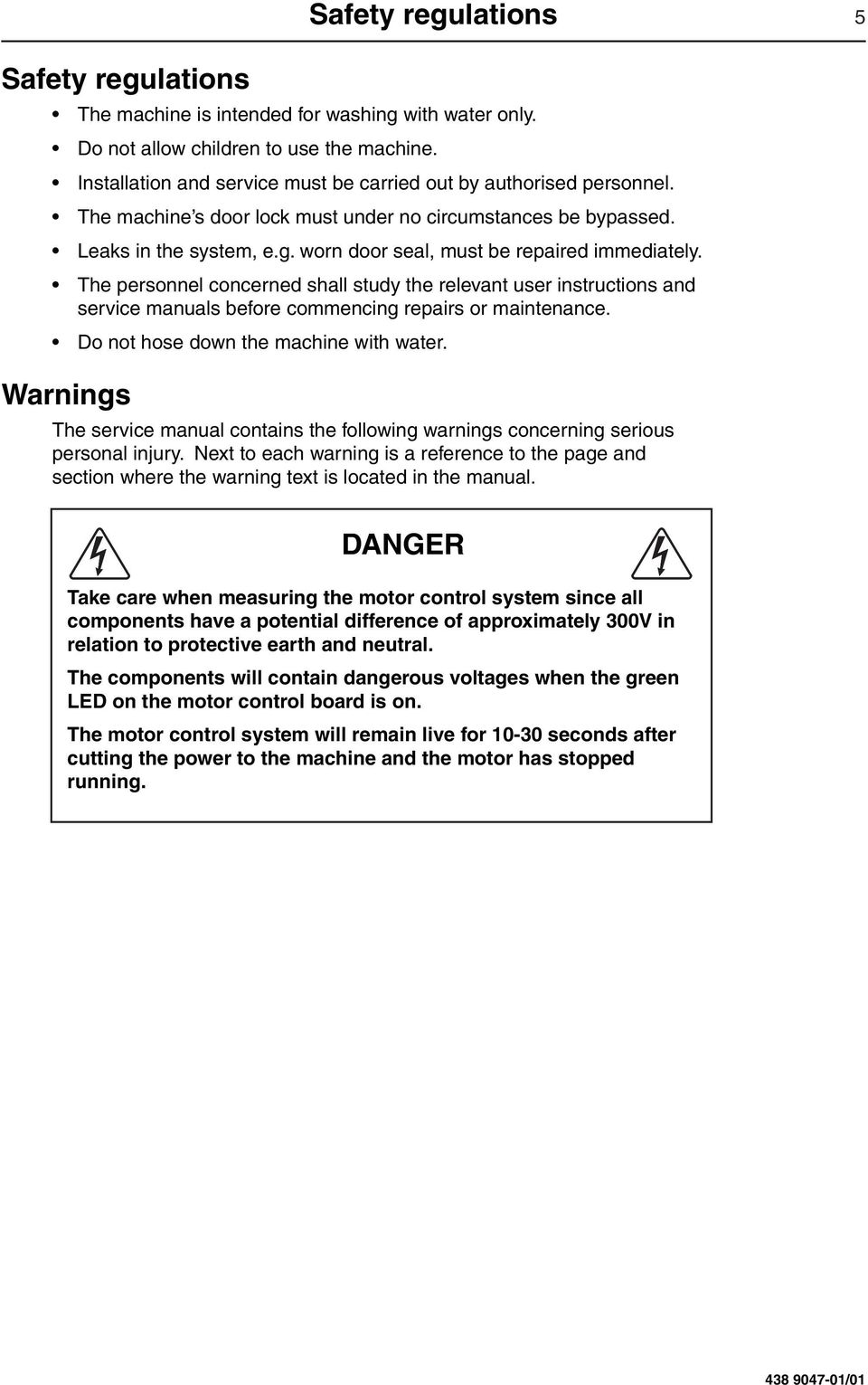
5 Safety regulations 5 Safety regulations The machine is intended for washing with water only. Do not allow children to use the machine. Installation and service must be carried out by authorised personnel. The machine s door lock must under no circumstances be bypassed. Leaks in the system, e.g. worn door seal, must be repaired immediately. The personnel concerned shall study the relevant user instructions and service manuals before commencing repairs or maintenance. Do not hose down the machine with water. Warnings The service manual contains the following warnings concerning serious personal injury. Next to each warning is a reference to the page and section where the warning text is located in the manual. DANGER Take care when measuring the motor control system since all components have a potential difference of approximately 300V in relation to protective earth and neutral. The components will contain dangerous voltages when the green LED on the motor control board is on. The motor control system will remain live for 0-30 seconds after cutting the power to the machine and the motor has stopped running /0
6

7 Technical data 7 Technical data Physical properties Drum volume l 53 diameter mm 520 depth mm 365 Capacity dry weight fill factor :0 kg 5.3 fill factor :3 kg 4.0 Drum rpm washing rpm 54 washing, mild and wool programmes rpm 35 extraction rpm 300 G-factor washing 0.7 extraction 425 Dimensions width mm 595 depth mm 680 height mm 850/875 Free service space, recommended side mm 50 rear mm 500 Weight net kg /0

8 8 Technical data Connections Max floor load when spin drying kn.2±0.3 Frequency (dynamic load) kn.2±0.3 Water valves connection DN20 BSP3/4 rec. water pressure kpa pressure limits kpa Drain valve outer connection diameter mm 50 capacity l/min /0

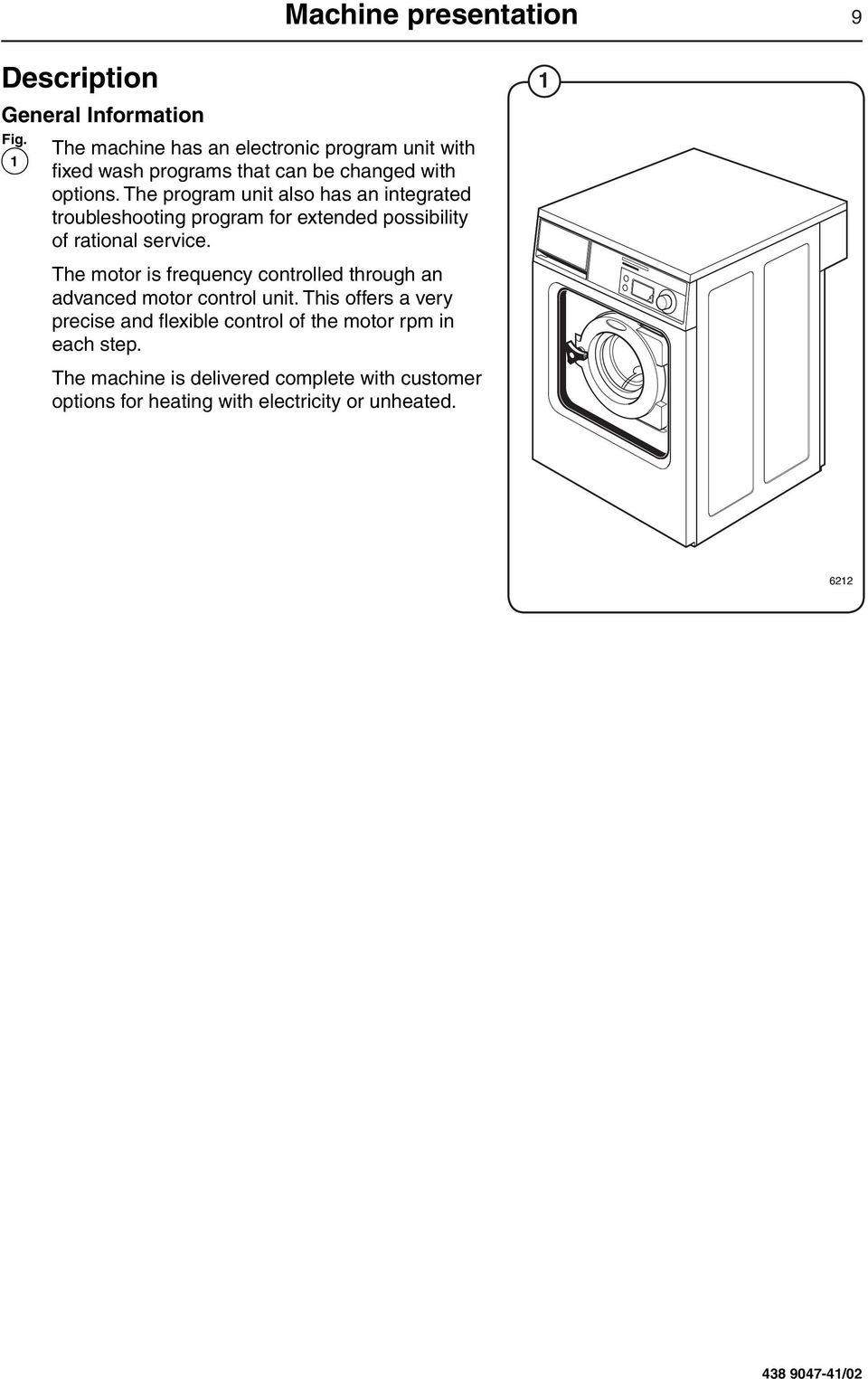
9 Machine presentation 9 Description General Information Fig. The machine has an electronic program unit with fixed wash programs that can be changed with options. The program unit also has an integrated troubleshooting program for extended possibility of rational service. The motor is frequency controlled through an advanced motor control unit. This offers a very precise and flexible control of the motor rpm in each step. The machine is delivered complete with customer options for heating with electricity or unheated /02
10 CON6 0 Machine presentation Function General Information Fig. 2 The machine is freely suspended, which means the outer drum and motor are mounted on a supporting cradle that rests on four shock absorbers for dampening the imbalance in the machine. The washer drum (inner drum) is belt driven by a motor. This motor is located at the bottom of the machine and is mounted on the cradle with a belt tensioner. The inner drum is mounted to the outer drum at the rear plate with two bearings sealed against leakage with sealing rings. The drain valve is a water-controlled diaphragm valve alternatively, an electrical drain valve or drain pump. The door is of sturdy type that is interlocked with a lock module when in operation. The control panel contains a program knob for selecting the fixed wash programs and a display. The program unit is mounted inside the control panel. Contactor, water valves, etc., are located at the back of the machine Detergent drawer Water inlet valves 3. Power supply 4. I/O-board 5. Rear electrical module Motor control 7. Outer drum 3 8. Shock absorber 9. Motor 0. Drain valve 2. Bottom plate 2. Door 3. Door lock 8 4. Program knob 5. Display 6. Control panel Program unit /02

11 CON6 Machine presentation Program unit Fig. 3 Fig. 4 The control panel contains a program knob and a display. The panel can also be equipped with two preset buttons. The control panel and display are used by: the user to select the machine s fixed wash programs, to select up to two options for each wash program and for information on the wash process and any fault indicators. service personnel for navigation and control of the program unit s service program. programming personnel for setting and program adjustment in the program unit s software. If present, the preset buttons are used for direct start of two preset wash programs. Using information on torque values from the motor, the weight of each wash is measured before each wash program in order to adapt the amount of water used for washing. The program unit controls the water valves, drain valve and heating via an I/O board in the rear electrical module. Control signals to external units, such as detergent pumps or external water valves can also be engaged here. 3 4 Program unit K Program unit A 2. I/O-board A, Outputs for water, detergent and drain. 3. Heater element 4 Water valves 5. Drain valve 6. Power supply /02

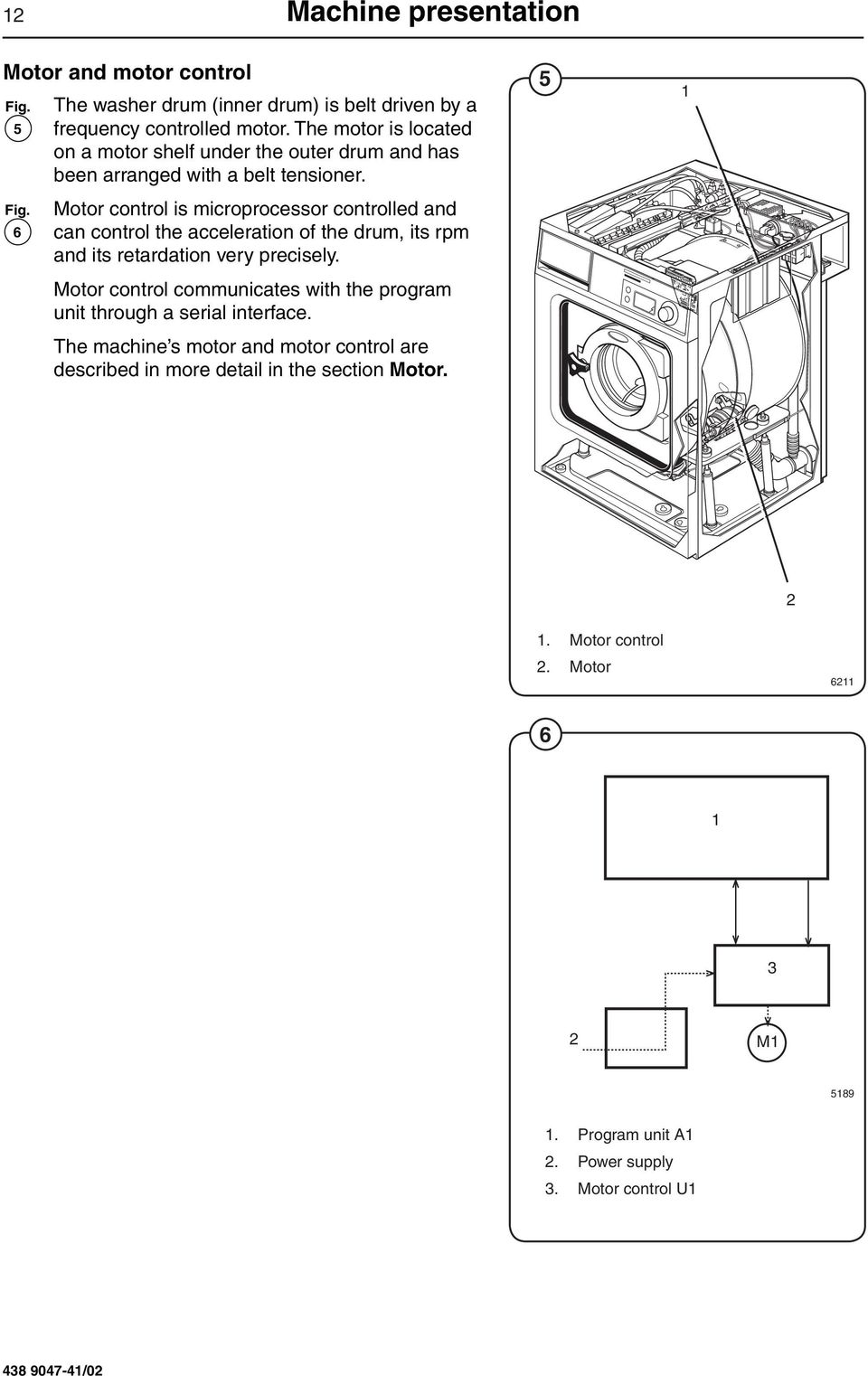
12 CON6 2 Machine presentation Motor and motor control Fig. The washer drum (inner drum) is belt driven by a 5 frequency controlled motor. The motor is located on a motor shelf under the outer drum and has been arranged with a belt tensioner. Fig. 6 Motor control is microprocessor controlled and can control the acceleration of the drum, its rpm and its retardation very precisely. Motor control communicates with the program unit through a serial interface. The machine s motor and motor control are described in more detail in the section Motor Motor control 2. Motor M 589. Program unit A 2. Power supply 3. Motor control U /02
13 CON6 Machine presentation 3 Door lock Fig. 7 Fig. 8 The door lock is electromechanical with twin safety breakers. The lock is bi-stable, i.e. the lock must be given an active signal from the program unit to lock as well as unlock the door. A separate circuit integrated in the program unit checks and controls the locking and unlocking of the door through a lock module. The circuit has separate controls that the drum is empty and that it is stationary. Through sensors in the lock module, the circuit checks the door s closed and locked position. Together with other controls the program unit conducts, this will guarantee the door cannot be opened by mistake. The machine s door and door lock are described in more detail in the section Door and door lock Program unit 2. Lock module M Program unit A 2. Temperature sensor B 3. Level switch B2 4. Level switch B4 5. Motor control U 6. Lock module A 7. Rotation sensor B /02

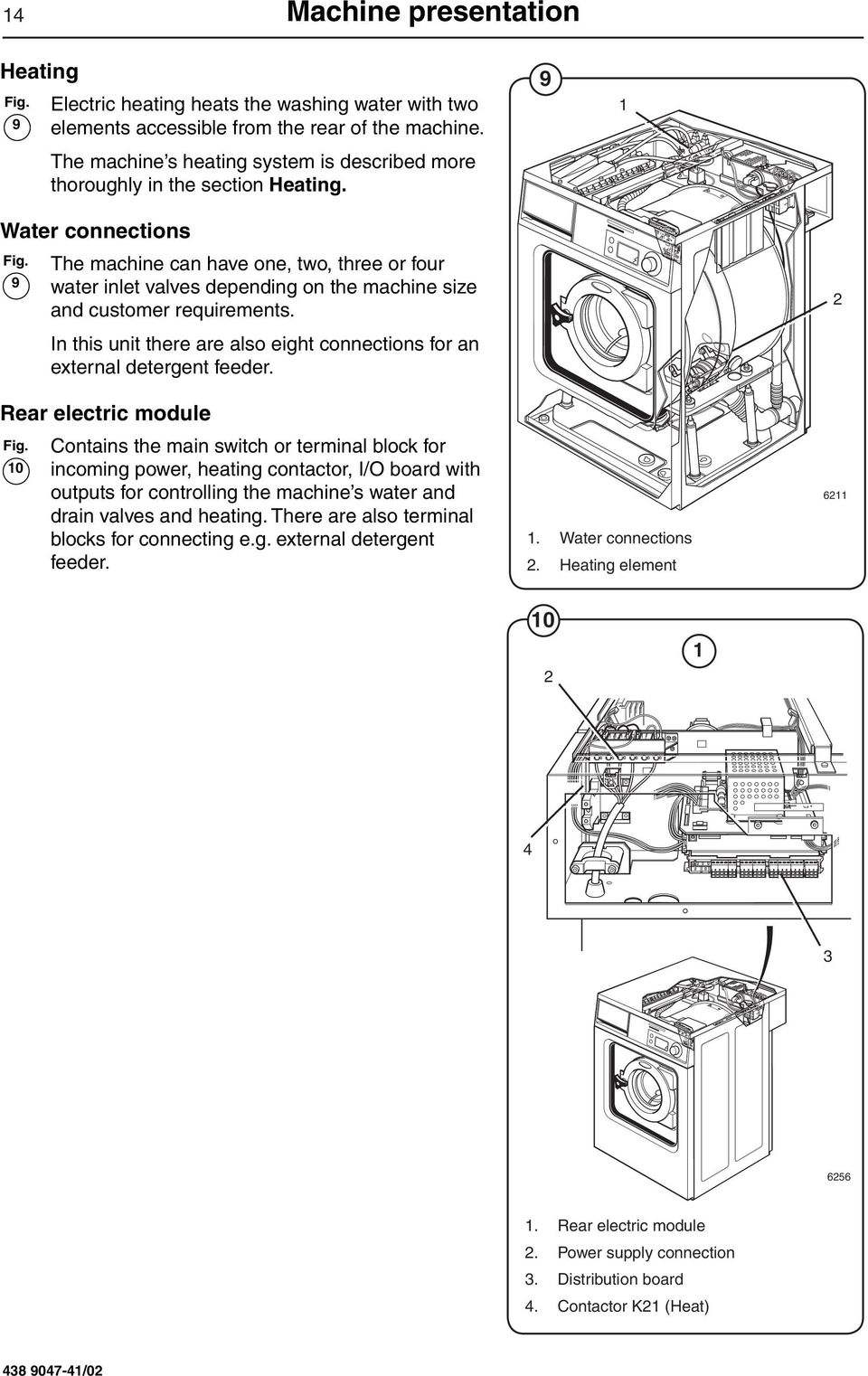
14 CON6 CON6 4 Machine presentation Heating Fig. 9 Electric heating heats the washing water with two elements accessible from the rear of the machine. The machine s heating system is described more thoroughly in the section Heating. 9 Water connections Fig. The machine can have one, two, three or four 9 water inlet valves depending on the machine size and customer requirements. In this unit there are also eight connections for an external detergent feeder. 2 Rear electric module Fig. Contains the main switch or terminal block for 0 incoming power, heating contactor, I/O board with outputs for controlling the machine s water and drain valves and heating. There are also terminal blocks for connecting e.g. external detergent feeder.. Water connections 2. Heating element Rear electric module 2. Power supply connection 3. Distribution board 4. Contactor K2 (Heat) /02
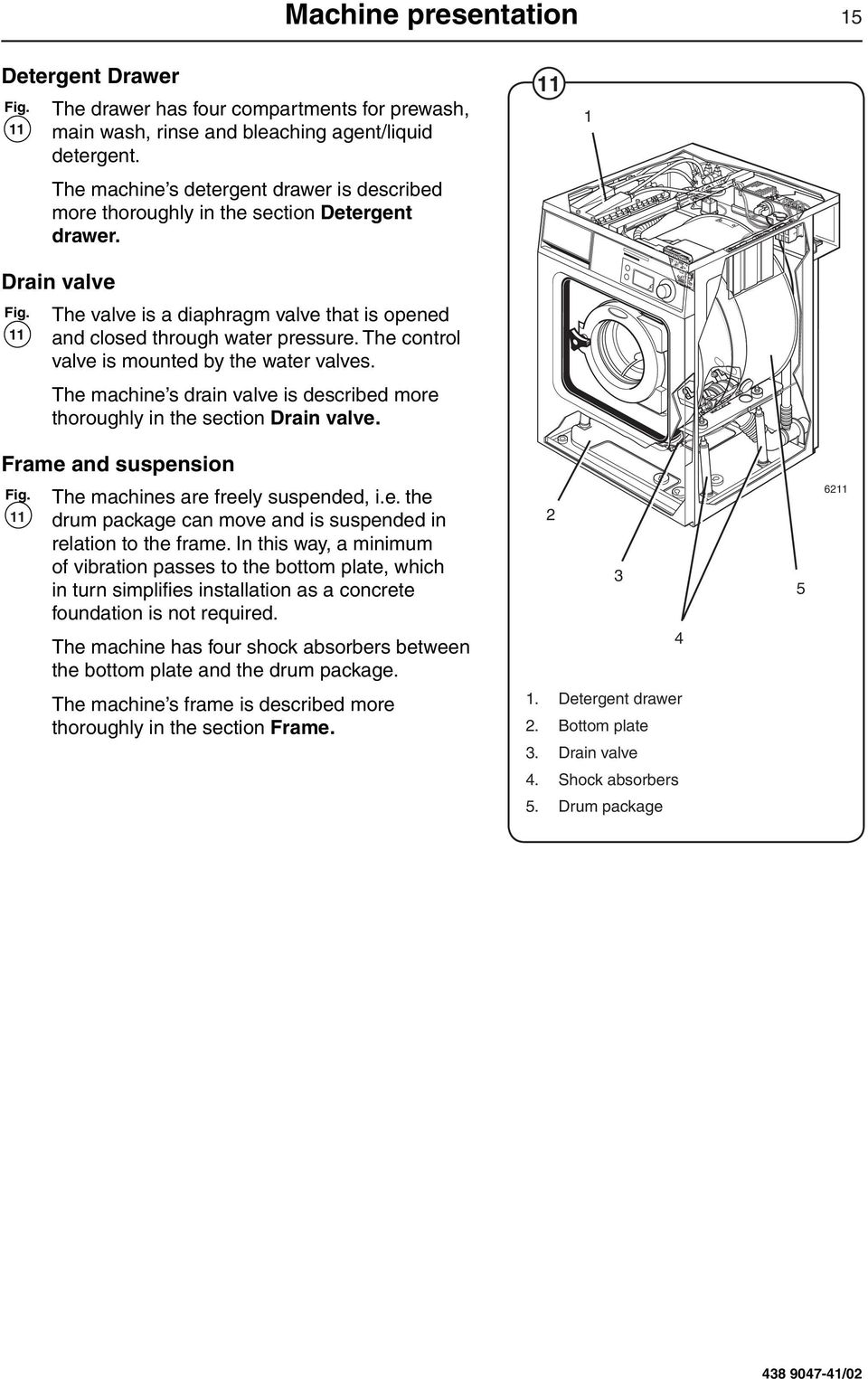
15 CON6 Machine presentation 5 Detergent Drawer Fig. The drawer has four compartments for prewash, main wash, rinse and bleaching agent/liquid detergent. The machine s detergent drawer is described more thoroughly in the section Detergent drawer. Drain valve Fig. The valve is a diaphragm valve that is opened and closed through water pressure. The control valve is mounted by the water valves. The machine s drain valve is described more thoroughly in the section Drain valve. Frame and suspension Fig. The machines are freely suspended, i.e. the drum package can move and is suspended in relation to the frame. In this way, a minimum of vibration passes to the bottom plate, which in turn simplifies installation as a concrete foundation is not required. The machine has four shock absorbers between the bottom plate and the drum package The machine s frame is described more thoroughly in the section Frame.. Detergent drawer 2. Bottom plate 3. Drain valve 4. Shock absorbers 5. Drum package /02
16

17 Periodic maintenance 7 Daily The following maintenance procedures should be followed to ensure good and safe operation and to prevent functional disturbances. The time for maintenance should be adapted to the degree of usage of the machine. Check door and door lock: - Leave the door open and try to start the machine. The machine should not start. - Close the door, start the machine and try to open the door again. It should not be possible to open the door until the drum has come to rest. - Make sure the door is not leaking. - Clean the door seal from detergent residue and lint. Clean the detergent drawer from residue by rapidly advancing through a programme and allowing the water to flush it clean. Every three months Carried out by authorised personnel only! Make sure the drain valve does not leak during the wash. Make sure there have not been any leaks from the door. Inspect the machine s drain and remove any lint. Inspect inside the machine (in direct connection in a way so that any leaks are visible) in the following manner: - Turn off the machine s main switch. - Remove the top cover and the protective plates front and rear /0

18 8 Periodic maintenance - Check that none of the inner hose connections are leaking. - Check the drive belt and tighten or replace as appropriate (see section on Motor). - Make sure water has not leaked onto the floor. - If the warm-up time has been abnormally long, check the heater element (see section of Heating). In very hard water, check that there are no lime deposits on the heater element. If necessary, decalcify the element. Follow the manufacturer s recommendations regarding amount of decalcifying agent to use. - Never turn on the heater element without water in the machine. This will trigger the fusible cut-out. - Check the shock absorbers /0

19 Troubleshooting 9 General information on troubleshooting The troubleshooting section is used to trace faults in the machine to a defective component or unit. There is a memory in the program unit that will save the selected program for approx. 3-5 minutes in the case of power cuts. The machine will restart automatically if the power is turned on again within this time. Safety regulations Troubleshooting may only be carried out by authorised personnel. Observe the safety regulations in chapter before commencing troubleshooting. Take care during all work on the machine while the power is on. DANGER Take care when measuring the motor control system since all components have a potential difference of approximately 300V in relation to protective earth and neutral. The components will contain dangerous voltages when the green LED on the motor control board is on. The motor control system will remain live for seconds after cutting the power to the machine and the motor has stopped running. Measurements For information on measuring points, components and voltages, please refer to the relevant wiring diagram for the machine in question /02
20 20 Troubleshooting Faults with fault code Illustration A fault in the program or in the machine is indicated on the display by an error message comprising an error code and a descriptive text. FAULT 00 NO WATER Fault code 6204 Fault code The following is a brief description of all fault codes. The following pages describe fault codes, possible causes and corrective measures for each code. Fault code Text message 00 No water 002 Door open 003 Door lock fault 004 NTC low temp 005 NTC high temp. 006 Water in drum 007 Drum overflow 008 No heat 009 Klixon 00 Drum not empty 0 Imbal. to prog. start /02

21 Troubleshooting 2 Fault code Text message 02 Program fault 03 No motor comm. 04 Level adjust. 05 Emergency stop 07 Door lock 08 MIS/CMIS approval 09 Master comm. 020 I/O Interlock 02 I/O Communication 022 Oil 023 No I/O address. 024 Checksum from DLCU 027 Level offset 028 CPU/DLCU low level 03 Cool flange high temp 032 Motor too hot 033 No interlock 035 Short in motor 036 Interlock hardware 037 Low DC voltage 038 High DC voltage 043 Imbal. switch RDC/MCU on 044 RPM too high 045 Motor not following 05 Checksum from CPU 052 Arming circuit 053 CPU/DLCU high level 054 Tacho, no should rotate 056 Should rotate lock open 058 Should rotate no tacho 060 Actuator circuit 062 Water, door unlocked /02
22 CON6 CON6 22 Troubleshooting General This programming manual is intended for personnel with the authority to adjust parameters in the machine s existing wash programs, programming slot meters, reading statistics and configuring certain machine interfaces with the user. Programming is achieved using menus in the display while the machine is in service mode. 2 Engaging servicemode Service mode is engaged by using one of the following alternative: Fig. 2 Alt. Service switch on the CPU board under the top cover on the front of the machine Alt. 2 Service switch on the I/O board at the rear of the machine to the right of the electrical connection. Press the service button about 2 sec. Fig. 3 The machine software will now switch to its service mode. The display lists the submenus available in this mode. This programming manual describes the functions and programming instructions for the following submenus: PARAMETER PROGR. STATISTICS ADJUST DISPLAY RESET TO FACTORY QUICK START BUTTONS Service button 6256 For other submenus, please refer to the service manual. 3 Fig. 4 To save changes to the machine s flash memory, they must be confirmed in a menu that is displayed automatically whenever a change has been made and you are exiting the menu. MAIN MENU SERVICE PARAMETER PROG STATISTICS CONFIG CONFIG SAVE TO MEMORY YES /02
23 Troubleshooting 23 Description of fault codes and causes Fault code 0, NO WATER This fault code is generated by the programming CPU card. When filling with water, the level specified by the wash program must be attained within a certain time. This time is normally set to 0 minutes but can vary depending on the type of machine and the software. If the filling time eceeds the maximum allowed filling time, fault code 0 will be displayed. Long filling times can be caused by a blocked filler valve, defective filler valve, a break in the cable between the filler valve control board, defective valve control board, leaking level system, etc. Fault code 02, DOOR OPEN This fault code is generated by the programming CPU card. The fault code can only arise during an on-going wash program. This fault code will be displayed if the input for closed door signals that the door has been opened during an on-going wash program. This can be caused by a bad or defective door lock, loose cable to door lock, problem with door lock edge connection. Fault code 03, DOOR LOCK ERROR This fault code is generated by the programming CPU card. The fault code can arise at program start. If the door lock doesn't lock within a certain time after program start, this fault code will be shown. This fault code will be displayed if the door lock for closed door signals that the door has been unlocked during an on-going wash program. This can be caused by a bad or defective door lock, loose cable to door lock, problem with door lock edge connection /02
24 24 Troubleshooting Fault code 04, NTC LOW TEMP This fault code is generated by the programming CPU card. This fault code is displayed if the temperature around the NTC sensor is below approx. -9 degrees C. A low temperature means the resistance in the sensor is too high, above approx kohm. This can be because the machine has been standing outdoors, an open circuit in the sensor, a break in the cable to the sensor, etc. The resistance should be as shown in the table below: Approximate values of a fault free temperature sensor T ( C) R (ohm) Fault code 05, NTC HIGH TEMP This fault code is generated by the programming CPU card. This fault code is displayed if the temperature around the NTC sensor exceeds +98 degrees C. A high temperature means the resistance in the sensor is too low, lower than approx. 350 ohm. This can be caused by a short circuit in the sensor, break in the cable to the sensor, etc. Fault code 06, WATER IN DRUM This fault code is generated by the programming CPU card. The fault code arises when rapid advancing to program end /02
25 Troubleshooting 25 Action: Check drain for dirt. Blow through the level hose and check that it is not blocked and does not contain any water. Check in the service program that the level control is working correctly. Fault code 07, DRUM OVERFULL This fault code is generated by the programming CPU board. The fault code arises if the drum has been filled with water above a predetermined level during an on-going wash program. It can be caused by a blocked level hose, drops of water in the level tube, defective filler valve, defective filler control, etc. Action: Blow through the level hose and check that it is not blocked and does not contain any water. Check in the service program that the level control is working correctly. Check using the service program that all the water valves are working correctly. Fault code 08, NO HEAT This fault code is generated by the programming CPU board. The fault code means that the temperature is rising too slowly when heating is active. The limit for this fault code is normally set to a water temperature increase of approx. 3 C per 0 minutes but can vary depending on the type of machine and the software. The fault code can be caused by a defective heater element, a break in the power supply to the heater element, defective heater contactor, etc /02
26 26 Troubleshooting Fault code 09, KLIXON This fault code is generated by the programming CPU board. The fault code means that the temperature in the motor has been so high that the klixon breaker in the motor has been triggered. It can be caused by overloading the motor due to an overloaded drum, low rpm for long periods, defective klixon breaker in motor, short in cable between motor and CPU board, etc. Fault code 0, DRUM NOT EMPTY This fault code is generated by the programming CPU card. The fault code arises if the water in the drum is not below a predetermined level when a drain period has been completed in the wash program. It can be caused by a blocked drain, blocked level hose, a water drop in the level hose, defective level control, restricted drain lines to the machine, too many machines emptying simultaneously into drain pipes that are too narrow, etc. Action: First check the drain installation and that the waste water can flow freely out from the machine without any restrictions. Check the drain valve in the machine with regard to dirt. Blow through the level hose and check that it is not blocked and does not contain any water. Check in the service program that the level control is working correctly. Fault code, IMBAL. TO PROG. START This fault code is generated by the programming CPU board. The fault code means that the mechanical imbalance breaker is already active when the wash program starts. It can be caused by a defective imbalance breaker, mechanical problem making the imbalance breaker always active, short in the edge connection or cables, etc /02
27 Troubleshooting 27 Fault code 2, PROGRAMME ERROR This fault code is generated by the programming CPU board. This fault code means that one of the CPU board memories can be defective. Action: Try reloading the software into the machine memory. If this does not help, the CPU board will have to be replaced. Fault code 3, NO MOTOR COMM. This fault code is generated by the programming CPU board. The fault code arises if the CPU board cannot communicate with motor control via the communication cable. Actions: Check that there is power reaching the motor control. Then check that the indicator LED on the motor control is on. The LED can be seen by looking down by the motor control edge connections. Check also that the communication cable between the CPU board and the motor control is intact and not damaged. Measure also with a reference instrument to see whether there is contact between all the leads in the communication cable. Fault code 4, LEVEL ADJUST This fault code is generated by the programming CPU board. The fault code arises if the circuit board s internal level system has not been calibrated by the manufacturer /02
28 28 Troubleshooting Fault code 5, EMERGENCY STOP This fault code is generated by the programming CPU board. The fault code arises if the emergency stop switch has been activated on the machine. The cause can be inadvertent activation of the emergency stop, defective emergency stop switch, incorrect or shorted cable, etc. Fault code 7, DOOR LOCK This fault code is generated by the programming CPU card. The fault code arises if the door lock is locked at the start of the wash program, i.e. that the door is locked although the CPU board has not requested locking. This fault code will be shown if one try to start a program when the DLCU has given a fault code. Fault code 8, MIS/CMIS APPROVAL The machine s program unit has been disabled by a superior monitoring system. Actions Get in touch with the supplier of the monitoring system for possible causes of the monitoring system disabling operation of the wash machine. Fault code 9, MASTER COMM. Communication with superior system has been broken. The cause can be a fault in the network connections, damaged cable, defective monitoring system, etc. Action: Firstly, contact the supplier of the monitoring system for possible causes of the monitoring system not communicating /02
29 Troubleshooting 29 Fault code 20, I/O INTERLOCK This fault code is generated by the programming CPU board. The program controller has read from the motor control or I/O board that the interlock is not active. The reason for interlock failure can be a problem with the hatch lock, damaged motor supply cables or the I/O board with interlock voltage etc. The most probable fault source is the I/O board. Fault code 2, I/O COMMUNICATION This fault code is generated by the programming CPU board. The program unit cannot communicate any longer with one or more I/O boards in the machine that it has communicated with before. The cause can be a problem with the machine s internal communication cables or that one or more I/O boards have lost their address. Action: (Requires password) Check the machine s internal communication cables. Readdress all the I/O boards in the system using the service program if the cables are not at fault. Note. If only one I/O-card in mascine, press the service button about 0 seconds or untill the LED goes out. Now I/O.card will be addressed as No.. Fault code 22, OIL This fault code is generated by the programming CPU board. The fault code indicates low oil level in the oil reservoir for the oil lubrication. It can be caused by a lack of oil, defective sensor, shorted cable, etc. Action: Fill with oil first. If this does not help, check sensor and cables /02
30 30 Troubleshooting Fault code 23, NO I/O ADDRESS. The fault code means that there is no I/O board addressed in the system at all. Action: (Requires password) Readdress the existing I/O board from the service menu. Fault code 24, CHECKSUM FROM DLCU This fault code is generated by the programming CPU board. The program unit has detected a fault in the internal communication on the CPU board. Action: Replace the CPU board. Fault code 27, LEVEL OFFSET This fault code is generated by the programming CPU board. The fault code arises if the level system indicates a level at the start of the wash program (when the drum should be empty) that exceeds what the program unit can compensate for automatically. This can be caused by blocked drain, blocked level hose, a drop of water in the level hose, leaking level system, defective level control, etc. Action: Check drain for dirt. Blow through the level hose and check that it is not blocked and does not contain any water. Check in the service program that the level control is working correctly /02
31 Troubleshooting 3 Fault code 28, CPU/DLCU LOW LEVEL The DLCU contains a mechanical level monitor which ensures that there is no water in the machine when the lock opens. To ensure that the level monitor functions correctly, the mechanical level monitor is compared with a nominal value generated by the CPU, which is compared with the electronic level check. When the water level exceeds the nominal value, a check is made to ensure that the mechanical level monitor is switched on, and if so, a fault code is generated. Reason: The level controller can be damaged: Cross talk in the level controller electrical system. Leakage in the level controller s air hoses. Incorrect nominal value, possibly caused by a fault in the electronic level controller. Action: Check the level controller function. (Switch-on level = 40 mm, switch-off level = 5 mm Wg) Check the cables and their connections. The voltage across the level controller should be 0 V when the water level is < 5 mm Wg and 5 V when water level is > 40 mm Wg. Check that the level hoses are not blocked. Blow clean all the hoses in the level system. Fault code 3, COOL FLANGE HIGH TEMP. This fault code is generated by the motor control. There is a temperature sensor (NTC) mounted on the motor control cooling flange next to the power transistors in the output stage. If the temperature of the cooling flange gets too high (> 90 C) the fault code will be set to protect the transistors /02
32 32 Troubleshooting The cause of high cooling flange temperature can be e.g. a stiff drum in combination with intensive use and high ambient temperature. There may also be a fault in the motor (sticking bearings or short circuit in windings, which impairs the efficiency of the motor). There may also be a fault in the motor control temperature measuring circuits. Actions: Make sure the drum turns easily. Check the value on the fault code counter for fault code 3. Check the last 8 motor control fault codes. Start a 90 C normal program with load on continuous operation and measure the temperature of the motor and motor control. Replace the defective part. Fault code 32, MOTOR TOO HOT This fault code is generated by the motor control. Each time the motor is started from stationary, the motor control will first measure the resistance between two phases in the motor. The motor control processor governs the output transistors so that a determined DC current flows between two phases in the motor winding. The actuation of the transistors is a measure of the voltage applied to the winding and the resistance can be calculated using the current and voltage values. The resistance can then be converted to a temperature since the winding resistance at 20 C and the temperature coefficient are known. If the average value of the four latest temperature readings is higher than the maximum motor temperature (e.g. 30 C), the Motor too hot fault code will be activated. The cause of high motor temperature can be a stiff drum, possibly in combination with intensive use and high ambient temperature. There may also be a fault in the motor (sticking bearings or short circuit in windings, which impairs the efficiency of the motor). There could also be a contact fault in the connectors between the motor control and the motor or a fault in the motor cable. A fault in motor control temperature measurement circuits can also occur /02
33 Troubleshooting 33 Actions: Make sure the drum turns easily. Check the value on the fault code counter for fault code 32. Check the last 8 motor control fault codes. Measure the three phases to the phase resistors on the motor control motor connector (disconnect motor control and take the reading in the cable connector) to make sure they are the same. Start a 90 C normal program with load on continuous operation and measure the temperature of the motor and motor control. Replace the defective part. Fault code 33, NO INTERLOCK This fault code is generated by the motor control. The motor control must be powered with 230V/50 Hz on the interlock input in order to drive the motor. This signal is confirmation that the door is closed and locked. Motor control receives its commands to rotate the drum from the timer via a serial communication link between the motor control and timer. Since the timer also has access to the interlock signal, the timer must never send a run command to the motor control if the interlock signal is missing. If this does happen, the No interlock fault code will be activated. The cause of this fault code being activated can be e.g. a break in the cable leading the interlock signal to the motor control. There may also be a fault in the connector in the door lock, which connects 230V/50Hz to the interlock signal. A fault in the interlock circuits of the motor control can also set this fault code. Actions: Use a measuring instrument to check that the interlock signal comes on X302:-2 when the door lock is activated. Read also bit in the second bye under Motor Status in the service program (the bits are numbered from 0 to 7 where bit 0 is on the far right). If bit in the second byte is then the lock is open, while a 0 indicates that the lock is closed. Replace the defective part when it has been located /02
34 34 Troubleshooting Fault code 35, SHORT CIRCUIT MOTOR This fault code is generated by the motor control. The motor control reads the power consumption of the motor continuously. If the current for some reason gets too high (= exceeds a certain limit), the motor control will cut the current to the motor. After the motor has stopped (= tachometer indicates stationary motor), the motor control will attempt to restart it. If the motor control then detects high motor current again, the Short circuit motor fault code will be activated. If on restarting after a first short circuit, the motor control rotates normally, a fault code will not be activated. This fault code can be activated for a number of reasons: Short circuit in motor Short circuit internally in motor winding (impaired efficiency, higher current consumption) Short circuit in motor cables Short circuit in connectors Drops of water causing short circuits in the motor connector Short circuit in the motor control output transistors Bad contact in tacho signal Bad contact in interlock signal Actions: If the fault is a stable one, it is generally not difficult to locate the defective unit through resistance measurement and testing with the service program. Further information can be obtained by studying the contents of MCU FAULT LOGGER. Study the following: SHORT CIRCUIT 2 (specifies how many times fault code 35 has been active) SHORT CIRCUIT (specifies how many times the current limit has been exceeded. The difference between short circuit and short circuit 2 indicates how many times there has been a short circuit that has not been confirmed when restarting the motor). LAST FAULT CODE N/8 (shows the 8 latest fault codes) TACHO CUT-OUT LOW RPM (can give a clue in case of intermittent faults) TACHO CUT-OUT HIGH RPM (can give a clue in case of intermittent faults) /02
35 Troubleshooting 35 Fault code 36, INTERLOCK HARDWARE This fault code is generated by the motor control. The motor control must be powered with 230V/50 Hz on the interlock input in order to drive the motor. The interlock circuits in the motor control have been split into two channels so that a component fault in motor control cannot give a false confirmation that the door is locked. These two channels are checked against each other. If this check gives an incorrect result, the INTERLOCK HARDWARE fault code will be activated. The reason for this fault code being activated can be attributed to a fault in the interlock circuits in motor control. Action: Replace motor control. Fault code 37, LOW DC VOLTAGE This fault code is generated by the motor control. Motor control reads the voltage across the bulk capacitors (DCBUS voltage) continuously. If the voltage becomes too low (= below a certain limit), the motor control will cut the current to the motor. Once the motor has stopped (= tacho sensor indicates stationary motor), the motor control will check to see whether the low DCBUS voltage remains. If this is the case, the LOW DC VOLTAGE fault code will be activated. The reason for this fault code being activated can be low mains voltage or that the machine s on/off switch has been operated in an unsuitable manner. Further information can be obtained by studying the contents of MCU FAULT LOGGER : UNDERVOLTAGE 2 (specifies how many times fault code 37 has been active) UNDERVOLTAGE (specifies how many times the voltage has dropped below the limit. The difference between undervoltage and undervoltage 2 indicates how many times there has been an undervoltage without it being confirmed when the motor has stopped). LAST FAULT CODE N/8 (shows the 8 latest fault codes) /02
36 36 Troubleshooting Undervoltages can be registered even during normal operation. Consequently, a small number of registrations need not mean that there is a fault in the motor control. Measure: Check that the supply voltage is stable and never drops below nominal voltage - 0%. Check that the fuses and cables are not faulty. Check the supply voltage in the network cabling and at the motor control system in the machine. Fault code 38, HIGH DC VOLTAGE This fault code is generated by the motor control. The motor control reads the voltage across the bulk capacitors (DCBUS voltage) continuously. If the voltage becomes too high (= exceeds a certain limit), the motor control will cut the current to the motor. Once the motor has stopped (= tacho sensor indicates stationary motor), the motor control will check to see whether the high DCBUS voltage remains. If this is the case, the HIGH DC VOLTAGE fault code will be activated. The reason for this fault code being activated can be high mains voltage (e.g. power surge). Further information can be obtained by studying the contents of FC FAULT LOGGER : OVERVOLTAGE 2 (specifies how many times fault code 38 has been active) OVERVOLTAGE (specifies how many times the voltage limit has been exceeded. The difference between overvoltage and overvoltage 2 gives the number of times overvoltage has occurred without it being confirmed when the motor has stopped). LAST FAULT CODE N/8 (shows the 8 latest fault codes) Overvoltage registrations can also occur if there is a bad contact in the tacho signal. Check also the following registers: TACHO CUT-OUT LOW RPM (number of short tacho interruptions during wash rpm) TACHO CUT-OUT HIGH RPM (number of short tacho interruptions during extraction rpm) Action: Check the tacho cables if there are many registrations in the TACHO CUT-OUT registers /02
37 Troubleshooting 37 Fault code 45, MOTOR NOT FOLLOWING This fault code is generated by the motor control. The motor control must always receive information on the rotation of the motor from the tacho sensor in order to rotate. If the tacho sensor is not working, the motor can rotate for max. 0 seconds during the starting process. After this period, the MOTOR NOT FOLLOWING fault code will be activated. Reasons for this code being activated can be: Break in the cables between the tacho sensor and the motor control Break in connectors in tacho cables Break in one of the phases to the motor (cables or connectors). This fault can be suspected if the motor does not rotate for 0 seconds (the motor will not start with only two phases). Fault in tacho generator Fault in tacho circuits in the motor control Further information can be obtained by studying the contents of FC FAULT LOGGER. Study the following: MOTOR NOT FOLLOWING (specifies how many times fault code 45 has occurred) LAST FAULT CODE N/8 (shows the 8 latest fault codes) TACHO CUT-OUT LOW RPM (can give a clue in case of intermittent faults) TACHO CUT-OUT HIGH RPM (can give a clue in case of intermittent faults) Action: Replace the defective part when troubleshooting is complete. Fault code 5, CHECKSUM FROM CPU DLCU has detected a fault in the internal communication between DLCU and CPU. The DLCU processor will reset itself when the fault has disappeared. CPU reads the fault message when the program starts and finishes and generates a fault code, the fault message is ignored between these two occasions /02
38 38 Troubleshooting Reason: Strong interference from surrounding equipment etc. can cause fault codes. Action: Re-set the fault codes. If the fault codes can not be re-generated or if they return, rectify the adjacent equipment that causes the interference. If this does not help, try changing the CPU board, since the interference sensitivity of different CPU boards can vary to some extent. Fault code 52, ARMING CIRCUIT DLCU contains an arming circuit that is charged when the door lock coil is to be activated. For safety reasons, this arming circuit must be discharged when the door lock coil is not to be activated. If the arming circuit for operating the door lock is charged when it is not supposed to be, a fault message will be sent to the CPU processor. If the fault ceases, the message will not be sent to the CPU. CPU reads the fault message when the program starts and finishes and generates a fault code, the fault message is ignored between these two occasions. Cause: The error can have been caused by overloads and/or defective components in the DLCU, or caused by defective components in the CPU. Measure: If the error cannot be corrected, replace the CPU unit. Fault code 53, CPU/DLCU HIGHLEVEL The DLCU contains a mechanical level monitor which ensures that there is no water in the machine when the lock opens. To ensure that the level monitor functions correctly, the mechanical level monitor is compared with a nominal value generated by the CPU, which is compared with the electronic level check. When a program starts or terminates, a check is made to ensure that the mechanical level monitor is switched off, and if this is not the case, a fault code is generated /02
39 Troubleshooting 39 Reason: The level controller can be damaged: Open circuit in the cables for the level controller. Blocked air hoses in the level controller system. Action: Check the level controller function. (Switch-on level = 40 mm, switch-off level = 5 mm Wg) Check the cables and their connections. The voltage across the level controller should be 0 V when the water level is < 5 mm Wg and 5 V when water level is > 40 mm Wg. Check that the level hoses are not blocked. Blow clean all the hoses in the level system. Fault code 54, TACHO, NOT SHOULD ROTATE DLCU counts the tacho pulses from the motor in order to guarantee that the drum is stationary when the door is opened. To ensure that the signal from the tacho generator is working correctly, DLCU compares the tacho signal to a default value from the CPU processor, which is due to the CPU having activated the motor. The tacho signal should always correspond to the default value and if the tacho signal is present without the default value, a fault message will be generated to CPU. The fault message is filtered in such a way that the drum must rotate and stop twice without the should rotate signal being present before a fault message is sent to CPU. The DLCU processor will reset itself when the fault has disappeared. CPU reads the fault message when the program finishes and generates a fault code, the fault message is ignored between these two occasions. Reason: The fault can be caused by cross talk in circuits in the CPU, or caused by damaged components in the CPU. Action: If the fault returns after a reset, change the CPU /02
40 40 Troubleshooting Fault code 56, SHOULD ROTATE LOCK OPEN DLCU counts the tacho pulses from the motor in order to guarantee that the drum is stationary when the door is opened. To ensure that the signal from the tacho generator is working correctly, DLCU compares the tacho signal to a default value from the CPU processor, which is due to the CPU having activated the motor. If the default value is on when the door lock is unlocked, a fault message will be sent to CPU. The DLCU processor will reset itself when the fault has disappeared. CPU reads the fault message when the program finishes and generates a fault code, the fault message is ignored between these two occasions. Reason: The fault can be caused by cross talk in circuits in the CPU, or caused by damaged components in the CPU. Action: If the fault returns after a reset, change the CPU. Fault code 58, SHOULD ROTATE NO TACHO DLCU counts the tacho pulses from the motor in order to guarantee that the drum is stationary when the door is opened. To ensure that the signal from the tacho generator is working correctly, DLCU compares the tacho signal to a default value from the CPU processor, which is due to the CPU having activated the motor. The tacho signal should always correspond to the default value and if the tacho signal is not present when the default value is present, a fault message will be generated to CPU. The fault message is filtered in such a way that the default value should /02
41 Troubleshooting 4 have been on for 2 seconds; if this is the case, a check is made that the pulses from the tacho sensor are present when the default value ceases. The DLCU processor will reset itself when the fault has disappeared. CPU reads the fault message when the program finishes and generates a fault code, the fault message is ignored between these two occasions. Reason: The fault can be caused by breaks in the circuits for the tacho sensor, or caused by a fault in the magnet in the tacho sensor. Collateral damage due to a fault in the motor system. Action: If there is no fault in the tacho sensor or the motor system, and the fault returns after a reset, change the CPU. Fault code 60, ACTUATOR CIRCUIT The DLCU processor controls the door lock actuator coil. The DLCU processor checks continuously that the coil is engaged. DLCU can detect a break in the circuit (>00kohm) (DLCU cannot detect a short in the circuit). If there is a break in the actuator circuit, CPU will be notified; the fault message will disappear if the fault ceases. CPU reads the fault message when the program starts and finishes and generates a fault code, the fault message is ignored between these two occasions. Reason: The fault can be caused by a break in the cables between the hatch lock and the CPU, or caused by a fault in the hatch lock solenoid. Fault or break in the CPU circuits. Action: If the fault returns after a reset, and is not caused by a fault in the hatch lock or the cables for the hatch lock, change the CPU /02
42 42 Troubleshooting /02
43 CON6 Program unit 43 Description General Information Fig. Fig. 2 The program unit is electronic and comprises a circuit board containing microprocessor, program memory, current regulating circuits, temperature and level control, etc. The program unit receives its power from a separate voltage unit. The program unit receives information from the temperature sensor, door lock and level switches. There is also a serial interface to the motor control. The program unit controls the water and drain valves and the heating via the I/O board, door closing/opening via a drum module and the motor via the motor control E, E M 2 3 K2 4. Program unit A 2. Temperature sensor B 3, Level switch B2 4, Level switch B4 5. Display 6. Heater element 7. Motor control U 8. Rotation sensor B3 9. Door lock module 0. Voltage unit A05. I/O board A 2. Watervalves 3. Drain valve 4. Power supply /02
44 44 Program unit Inputs and outputs Fig. The program unit board has the following inputs and outputs: 3 Board connector Function Con Input from temperature sensor Con 2 D-bus Con 3 D-bus Con 4 Tacho Con 5 M-com, Motor control unit Con 6 P-load Con 7 Input, Level switches Con 8 Serial communication, RS 232 Con 9 Input, Emergency stop Con 0 Input, Free wash (key switch) Con Input, Slot meter Con 2 Input, Inp Con 3 Output, Service button in rear electric module Con 4 Control knob, pulses Con 5 Control knob, switch Con 6 Display Con 7 Input, Buzzer Con 8 Counter Con 9 Door, out Con 20 Door, in Con 2 P-bus Con 22 P-bus 3 Con 2 Con 4 Con 6 Con 8 Con 0 Con 2 Con Con 3 Con 5 Con 7 Con 9 Con Con 3 Con 22 Con 2 Con 20 Con CPU reset 2. DLCU reset Con 8 Con 7 Con 6 Con 5 Con /02
45 Program unit 45 Menu tree The machine software is constructed with menus that are structured according to the menu tree below. The menus become available when the machine is in service mode, see under the heading Engaging service mode. MAIN MENU SERVICE PARAMETER PROG. STATISTICS CONFIG CONFIG 2 ADJUST DISPLAY RESET TO FACTORY ACTIVATE WASH PROGR. QUICK START BUTTONS I/O ADDRESS SERVICE ACTIVATE OUTPUTS SHOW INPUTS ARTICLE NUMBER SHOW DLCU COM. RESET DLCU SHOW MCU COM. RESET MCU SHOW SINGLE SHOW COM.PORTS WEIGHT CALIBRATION MEASURE WEIGHT MEASURE UNBALANCE DISPLAY TEST See programming manual See programming manual Not used See programming manual See programming manual ACTIVATE WASH PROGR. G0 NORMAL 40 G0 NORMAL 60 G0 NORMAL 95 G0 SYNTHETIC 40 G0 DELICATE 30 G0 HANDWASH See programming manual I/O ADDRESS I/O BOARD I/O BOARD 2 I/O BOARD 3 I/O BOARD 4 I/O BOARD 5 I/O BOARD 6 I/O BOARD 7 I/O BOARD 8 I/O BOARD 9 I/O BOARD 0 REMOVE I/O BOARD CONFIG PAUSE PERMITTED RAPID ADVANCE NEW PROG. SELECT SHOW TIME SHOW TEMP SHOW IS LEVEL MACHINE HEATED HEATING RELAY ON TEMP CONTROL WATER SHOW C DELAYED START AUTO RESTARTS AUTO START PAID AUTO PROG. PAID SHOW COIN COUNTER SHOW HOUR COUNTER SHOW PROG. COUNTER BUTTON CLICK FLASH LIGHT ON HEAT ERROR ON SHOW MODULE NUMBER AUTO PROG SELECT MEASURE WEIGHT POWER CTRL HEAT POWER CTRL EXTRACT BLOCK START ACTIVE DEFAULT LANGUAGE LANGUAGE TIMEOUT SEC. COIN VALUE COIN VALUE 2 TIMEOUT, DISPLAY, SEC TIMEOUT,END BUZZ. SEC TIMEOUT,PAUS BUZZ. SEC MAX FILL TIME, SEC 6. WATER IN DRUM 7. DRUM OVERFILLED 0. DRUM NOT DRAINED MACHINE ADDRESS PASSWORD SHOW WEIGHT TIME, SEC MAXDIFF.WASH TIME MIN DEFAULT HEAT BACK LIGHT TIME SEC. OFFS.LEVEL READING MM DISPLAY WARNING, SEC COLON WHEN PRICE FLUSH DELAY, LIQ. SEC FLUSH ON, LIQ. SEC FLUSH DELAY, POWD.SEC FLUSH ON, POWD.SEC LEVEL COOL DOWN, SCU COOL STEP TEMP COOL MIDDLE TEMP /02
46 CON6 CON6 46 Program unit Engaging servicemode Fig. 4 Fig. 5 Fig. 6 Service mode is engaged by using one of the following alternative: Alt. Service switch on the CPU board under the top cover on the front of the machine. Alt. 2 Service switch on the I/O board at the rear of the machine to the right of the electrical connection. Press the service switch for about 2 seconds. The machine software will now switch to its service mode. The display lists the submenus available in this mode. This service manual describes the functions and programming instructions for the following submenus: SERVICE CONFIG ACTIVATE WASH PROGR. I/O ADDRESS For other submenus, please refer to the programming manual. To save changes to the machine s flash memory, they must be confirmed in a menu that is displayed automatically whenever a change has been made and you are exiting the menu. 4 Service button MAIN MENU SERVICE PARAMETER PROG STATISTICS CONFIG CONFIG SAVE TO MEMORY YES /02
47 Program unit 47 Service program Fig. 7 Fig. 8 The service program is used to facilitate troubleshooting the machine. Using this program you can: control the machine functions individually check the sensor signals to the CPU check the communication in the machine control system calibrate the weighing function weigh and measure unbalance check the display Engage service mode, mark the SERVICE row in the main menu and press the knob. The display will now show the different submenus in the service program. ACTIVATE OUTPUTS SHOW INPUTS ARTICLE NUMBER SHOW DLCU COM. RESET DLCU SHOW MCU COM. RESET MCU SHOW SINGLE SHOW COM.PORTS WEIGHT CALIBRATION MEASURE WEIGHT MEASURE UNBALANCE DISPLAY TEST MAIN MENU SERVICE PARAMETER PROGR. STATISTICS CONFIG CONFIG 2 ADJUST DISPLAY *SERVICE* ACTIVATE OUTPUTS SHOW INPUTS ARTICLE NUMBER SHOW DLCU COM. RESET DLCU Select the desired menu and press the knob /02
48 48 Program unit ACTIVATE OUTPUTS Fig. 9 Fig. 0 Select the ACTIVATE OUTPUTS row and press the knob. The display now shows the functions (outputs) that can be activated. DOOR NORMAL DRAIN DRAIN A-D COLD WATER HOT WATER HARD WATER TANK -4 WATER HEAT HEAT 2 HEAT 3 POWDER DETERGENT LIQUID DETERGENT INTERLOCK MOTOR PROGRAM RUN MACHINE FREE DRUM CW DRUM CCW DISTRIBUTION LOW EXTRACT MEDIUM EXTRACT HIGH EXTRACT TURBO EXTRACT CLUTCH START CAP. RELAY BUZZER FLASH LIGHT OIL PULSE SLOT BLOCKING LCD BACK LIGHT ON Select the desired function and press the knob. Several outputs can be activated simultaneously. An activated output is indicated by a filled box to the right *SERVICE* ACTIVATE OUTPUTS SHOW INPUTS ARTICLE NUMBER SHOW DLCU COM. RESET DLCU ACTIVATE OUTPUTS DOOR NORMAL DRAIN DRAIN A-D COLD WATER HOT WATER /02
49 Program unit 49 SHOW INPUTS Fig. Fig. 2 Select the SHOW INPUTS row and press the knob. The display now shows the sensor signals (inputs) that can be activated. COUNT DOOR LOCK DOOR CLOSED START BUTTON CPU SERVICE BUTTON PRICE PROGRAMMING PRICE REDUCTION FREE WASH COIN COIN 2 EMERGENCY STOP ALTER. HEAT RELAY START/STOP TEMPORARILY PAUSE BLOCK START BUTTON MOTOR KLIXON PC5 TEMPERATURE PAUSE TANK EMPTY TANK 2 EMPTY TANK 3 EMPTY TANK 4 EMPTY OIL EMPTY TEMPERATURE LEVEL A/D SCU LEVEL SCU LEVEL MM SHOW TEMP DRUM SPEED RPM TACHO SIGNAL LIQUID TANK EMPTY QUICK START QUICK START 2 BUTTON I/O INTERLOCK I/O BUTTON I/O 2 INTERLOCK I/O 2 BUTTON I/O 3 INTERLOCK I/O 3 BUTTON I/O 4 INTERLOCK I/O 4 BUTTON I/O 5 INTERLOCK I/O 5 BUTTON I/O 6 INTERLOCK I/O 6 BUTTON I/O 7 INTERLOCK I/O 7 BUTTON I/O 8 INTERLOCK I/O 8 BUTTON I/O 9 INTERLOCK I/O 9 BUTTON I/O 0 INTERLOCK I/O 0 Several inputs can be activated simultaneously. An activated input is indicated by a filled box to the right *SERVICE* ACTIVATE OUTPUTS SHOW INPUTS ARTICLE NUMBER SHOW DLCU COM. RESET DLCU SHOW INPUTS COUNT DOOR LOCK DOOR CLOSED START BUTTON CPU SERVICE BUTTON /02
50 50 Program unit ARTICLE NUMBER Fig. 3 Fig. 4 Select the ARTICLE NUMBER row and press the knob. You can now choose on the display to show the article numbers for the program units, I/O boards, motor control or DLCU fitted in the machine. Select the unit for which to show the article number. SHOW DLCU COM. Fig. Select the SHOW DLCU COM. row and press the 5 knob. The display shows the status of the Fig. communication to and from the DLCU board. 6 RESET DLCU Fig. Reset DLCU from the fault code by selecting the 7 RESET DLCU row and pressing the knob. The reset will take a few seconds *SERVICE* SHOW INPUTS ARTICLE NUMBER SHOW DLCU COM. RESET DLCU SHOW MCU COM. RESET MCU SHOW PART NUMBER PROGRAM UNIT I/O MCU DOOR CONTROL UNIT EXIT *SERVICE* ARTICLE NUMBER SHOW DLCU COM. RESET DLCU SHOW MCU KOM. RESET MCU SHOW SINGLE DLCU STATUS FROM DLCU FROM DLCU CD TO DLCU TO DLCU BACK=PRESS KNOB *SERVICE* SHOW DLCU COM. RESET DLCU SHOW MCU COM. RESET MCU SHOW SINGLE SHOW COM.PORTS /02
51 Program unit 5 SHOW MCU COM. Fig. 8 Fig. 9 Select the SHOW MCU COM. row and press the knob. The display shows the status of the communication to and from the frequency control. RESET MCU Reset frequency control from the fault code by Fig. selecting the RESET MCU row and pressing the 20 knob. The reset will take a few seconds. SHOW SINGLE Select the SHOW SINGLE row and press the knob. The display shows the status of the communication to and from the slot meter. SHOW COM. PORTS Select the SHOW COM. PORTS row and press the knob. The display shows the status of the communication to and from the communication ports *SERVICE* RESET DLCU SHOW MCU COM. RESET MCU SHOW SINGLE SHOW COM.PORTS CALIBRATION PESAGE MOTOR STATUS FROM MOTOR FROM MOTOR CD ACTUAL SPEED RPM 0 SET SPEED RPM 0 BACK=PRESS KNOB *SERVICE* SHOW MCU COM. RESET MCU SHOW SINGLE SHOW COM.PORTS CALIBRATION PESAGE MEASURE WEIGHT /02
52 52 Program unit WEIGHT CALIBRATION Fig. 2 Fig. 22 Select the WEIGHT CALIBRATION row and press the knob. Operate the machine with an empty drum. After weight calibration, the weight deviation will be shown in a hexadecimal format on the bottom line of the display. The drum will go faster and slower a number of times during weight calibration. This is normal. Weight calibration will take a few minutes. When exiting weight calibration after it is complete, you will have the option of saving the calibration value. The value for 0 calibration is taken on each washing occasion and the weight value is adjusted automatically for any deviations. NB! The drum must be empty during calibration. Confirm that calibration is to be performed with YES or return to the previous menu with NO. MEASURE WEIGHT Fig. Select the MEASURE WEIGHT row and press 23 the knob. Fig. Confirm that measurement is to be performed 24 with YES or return to the previous menu with NO. Put in a known weight. The same weight should be shown on the display. This function is used to check that the machine is weighing correctly *SERVICE* SHOW COM.PORTAR WEIGHT CALIBRATION MEASURE WEIGHT MEASURE UNBALANCE DISPLAY TEST EXIT *WEIGHT CALIBRATION* YES *SERVICE* WEIGHT CALIBRATION MEASURE WEIGHT MEASURE UNBALANCE DISPLAY TEST EXIT *START WEIGHING* YES /02
53 Program unit 53 MEASURE UNBALANCE Fig. 25 Fig. 26 Select the MEASURE UNBALANCE row and press the knob. Confirm that measurement is to be performed with YES or return to the previous menu with NO. Put in a known unbalance weight. The corresponding weight should be shown on the display. This function is used to check that the machine is measuring unbalance correctly *SERVICE* MEASURE WEIGHT MEASURE UNBALANCE DISPLAY TEST EXIT DISPLAY TEST Fig. Select the DISPLAY TEST row and press the 27 knob. Fig. 28 The display shows a grid for checking that all the segments in the display are intact. By turning the control knob, two different grids and a completely black and a completely blank page are shown. Press the knob to return to the previous menu *START UNBALANCE* YES *SERVICE* MEASURE UNBALANCE DISPLAY TEST EXIT /02
54 54 Program unit CONFIG Fig. 29 The configuration menu contains all the functions and parameters that service personnel can change without a password. Engage the machine s service mode. Select the CONFIG row in the main menu and press the knob. All the available parameters will now be displayed. The table below gives the default value on the right. PAUSE PERMITTED YES RAPID ADVANCE YES NEW PROG. SELECT YES SHOW TIME YES SHOW TEMP YES SHOW IS LEVEL NO MACHINE HEATED YES HEATING RELAY ON YES TEMP CONTROL WATER YES SHOW C YES DELAYED START YES AUTO RESTART YES AUTO START PAID NO AUTO PROG. PAID NO SHOW COIN COUNTER NO SHOW HOUR COUNTER NO SHOW PROG. COUNTER NO BUTTON CLICK YES FLASH LIGHT ON NO HEAT ERROR ON YES SHOW MODULE NUMBER NO AUTO PROG SELECT NO COUNT WEIGHT YES POWER CTRL HEAT NO POWER CTRL EXTRACT NO BLOCK START ACTIVE NO DEFAULT LANGUAGE ENGLISH LANGUAGE TIMEOUT SEC. 20 COIN VALUE 0000 COIN VALUE TIMEOUT, DISPLAY, SEC 600 TIMEOUT,END BUZZ. SEC MAIN MENU STATISTICS CONFIG CONFIG 2 ADJUST DISPLAY RESET TO FACTORY ACTIVATE WASH PROGR /02
55 Program unit 55 Fig. 30 Fig. 3 Fig. 32 Fig. 33 TIMEOUT,PAUSE BUZZ. SEC 0 MAX FILL TIME, SEC WATER IN DRUM YES 7. DRUM OVERFILLED YES 0. DRUM NOT DRAINED YES MACHINE ADDRESS 0000 PASSWORD 0000 SHOW WEIGHT TIME, SEC 30 MAXDIFF.WASH TIME MIN 0 DEFAULT HEAT YES BACK LIGHT TIME SEC OFFS.LEVEL READING MM 0000 DISPLAY WARNING, SEC 0000 COLON WHEN PRICE NO FLUSH DELAY, LIQ. SEC 0000 FLUSH ON, LIQ. SEC 0000 FLUSH DELAY, POWD.SEC 0000 FLUSH ON, POWD.SEC 0000 LEVEL COOL DOWN, SCU COOL STEP TEMP COOL MIDDLE TEMP Select the desired function/parameter and press the knob. To engage and disengage functions, select YES or NO and press the knob. To adjust the value, set the value and press the knob. The arrow in each menu shows the column to be adjusted. Turn the knob clockwise to set the desired number between 0 and 9. Turn the knob anticlockwise to move to the next column. Turn the knob clockwise and set the value, etc. Once all the columns have been set, press the knob to confirm and go back to the config menu. When all the relevant values have been adjusted, select EXIT and press the knob. Confirm the changes (write to memory YES/NO) and return to the main menu. Note! All changes will be executed only after exiting the CONFIG menu CONFIG PAUSE PERMITTED RAPID ADVANCE NEW PROG. SELECT SHOW TIME SHOW TEMP CONFIG PAUSE PERMITTED YES CONFIG MAX FILLTIME, SEC 0600 SAVE TO MEMORY YES /02
56 56 Program unit PAUSE PERMITTED Select whether it should be possible to pause during an on-going wash program. Yes = A pause is allowed during a wash program. No = A pause is not allowed during a wash program. RAPID ADVANCE Select whether is should be possible to step rapidly forward or backward through the wash program while it is in progress. Yes = It is allowed to step rapidly through a wash program. No =It is not allowed to step rapidly through a wash program. Rapid advance can be used on all machines during the first five minutes after a program has been started, even if you have answered NO. NEW PROG. SELECT Select whether to allow switching to another wash program while one is in progress without first stepping rapidly through to the end of the current program before switching. Will only work if PAUS is allowed. Yes = Switching to a new wash program is allowed. No = Switching to a new wash program is not allowed. SHOW TIME Select whether the calculated remaining program time is to be shown on the display window while the program is in progress. This will require the program having been used at least once or the row will be blank even if you respond with Yes. The time shown is based on a calculation model using an input value from the previous wash program. Yes = The calculated time remaining of the program is shown on the display window while a wash program is in progress. No =No time is displayed in the display window /02
57 Program unit 57 SHOW TEMP Select whether the current water temperature is to be shown on the display window while a wash program is in progress. This function cannot be shown on the display at the same time as the SHOW IS LEVEL function, only one of the functions can be shown at one time. Yes = The water temperature is shown. No = No temperature is displayed in the display window. SHOW IS LEVEL Select whether the current water level is to be shown on the display window while a wash program is in progress. The level is shown in divisions. This function cannot be shown on the display at the same time as the SHOW TEMP function, only one of the functions can be shown at one time. Yes = The water level is shown. (replaces temperature display in display window) No = No level is displayed in the display window. MACHINE HEATED Select whether the machine is to wait until a programmed temperature has been attained before the wash time starts being counted. Yes = The programmed temperature must be attained No = The washing time is counted down as soon as the washing module has been started. HEATING RELAY ON Select whether the heating contactor should activate or not when the heating starts. Yes = The heating contactor will cut in when the heating starts. This is the normal process for heated machines. Note! The heating contactor will also cut in on machines that are configured as unheated. No = The heating contactor will not cut in. Used on unheated machines that are fitted with heating contactors (machine changed from heated to unheated /02
58 58 Program unit TEMP CONTROL WATER Select whether the machine is to control and adjust the water temperature by opening and closing the main valves for hot and cold water during filling. Yes = Control of main valves during filling. - Alt.: Hot and cold water valves both open. If the set water temperature is exceeded, the hot water valve will be shut automatically. - Alt. 2: Only hot water valve open. If the set water temperature is exceeded, the cold water valve will be opened automatically. No = No temperature control. The hot and cold water valves are both open until the correct level has been attained. SHOW C Select whether all the temperature values are to be displayed in C or F Yes = All temperature values displayed in C. No = All temperature values displayed in F. DELAYED START Select whether there should be the possibility of setting a delay from when the start button is pressed until the machine is to start. Yes = Time for delayed start can be set. The time is set when choosing the wash program. No = The delayed start function is disengaged. AUTO RESTART Select whether there should be the possibility of setting the machine for automatic restart. The number of restarts the machine is to perform is chosen by the user. Yes = Number of automatic restarts can be set. No = The delayed start function is disengaged /02
59 Program unit 59 AUTO START PAID Select whether the machine is to be able to start automatically, when full price has been paid, for the chosen wash program. Yes = Automatic start engaged. Note! If the signal for blocking the start button is engaged, it also applies to the blocking signal for the automatic starting function. No = The automatic start function is disengaged. AUTO PROG. PAID Select whether the machine should automatically select wash program for full payment of this program, unless another wash program has been chosen previously. This function assumes AUTO START PAID is active. Yes = Wash program is chosen automatically. No = Wash program chosen manually. SHOW COIN COUNTER Select whether the contents of the machine s coin counter should be shown in the display window while a wash program is in progress or outside the wash program without going into service mode. The counter is shown on the display after pressing the control knob twice in quick succession. Yes = The contents of the coin counter can be shown. Displayed after pressing the control knob twice in succession when washing or before the wash program starts. No = No display of the contents in the coin counter. SHOW HOUR COUNTER Select whether the contents of the machine s hour counter should be shown in the display window while a wash program is in progress or outside the wash program without going into service mode. The counter is shown on the display after pressing the control knob twice in quick succession. Yes = The contents of the hour counter can be shown. Displayed after pressing the control knob twice in succession when washing or before the wash program starts. No = No display of the contents in the hour counter /02
60 60 Program unit SHOW PROG. COUNTER Select whether the contents of the machine s counter of completed wash programs should be shown in the display window while a wash program is in progress or outside the wash program without going into service mode. The counter is shown on the display after pressing the control knob twice in quick succession. Yes = The contents of the counter can be shown. Displayed after pressing the control knob twice in succession when washing or before the wash program starts. No = No display of the contents in the counter. BUTTON CLICK Select whether the machine should give a sound for each new position when the knob is turned and pressed in. Yes = Sound. No = No sound. FLASH LIGHT ON Select whether the output for the flash light is to be activated while the buzzer is activated during a wash program. The output is on all the time and becomes inactive when the buzzer is turned off. Yes = Flash function on. No = Flash function off. HEAT ERROR ON Select whether the HEAT ON fault code should be displayed when the machine is heating up too slowly. Yes = The fault code is displayed. No = The fault code is not shown. SHOW MODULE NUMBER Select whether the washing module number should be shown while a wash program is being used. The washing module number will always be shown during rapid advance, however. Yes = The module number is displayed. No = The module number is not shown /02
61 Program unit 6 COUNT WEIGHT Select whether the count weight function should be activated. Note that the function cannot be activated for wash programs that are programmed for no weight count. Yes = Count weight activated. No = Count weight not activated. POWER CTRL HEAT Select whether the power priority function (PC5) for heating should be engaged. For connecting and setting PC5, please refer to separate instructions. Yes = Power priority (PC5) engaged. No = Power priority (PC5) not engaged. POWER CTRL EXTRACT Select whether the power priority function (PC5) for extraction should be engaged. For connecting and setting PC5, please refer to separate instructions. Yes = Power priority (PC5) engaged. No = Power priority (PC5) not engaged. BLOCK START ACTIVE Select whether it should be possible to block the start of the wash program with the control knob. Yes = Wash program start can be blocked. No = The wash program start cannot be blocked. DEFAULT LANGUAGE Select the language to be shown when the machine is started. The program unit will return to the language set here if the machine is not used during the period specified in the LANGUAGE TIMEOUT menu /02
62 62 Program unit LANGUAGE TIMEOUT SEC. Specify with the knob the time after which an unused machine should return to the set default language. The time is given in steps of second; seconds. COIN VALUE and 2 Specify with the knob the value (0 999) for the respective coin slot. For example: Coin, = EURO Coin 2, 5 = 5 EURO Coin, 50 = 50 Cent Coin 2, 00 = EURO Setting the price to 300 and selecting COLON WHEN PRICE will display the price as 3:00. TIMEOUT, DISPLAY, SEC Specify with the knob the time after which the machine should reset a program selection that has not started. The time is given in steps of 0 seconds; seconds. TIMEOUT,END BUZZ. SEC Specify with the knob the time during which the buzzer should sound at the end of the program unless the machine is turned off manually. The time is given in seconds; TIMEOUT,PAUS BUZZ. SEC Specify with the knob the time during which the buzzer should sound for a pause unless the pause is interrupted manually. The time is given in seconds; MAX FILL TIME, SEC Specify with the knob the maximum time (in seconds, ) it should take to fill the machine with water to the programmed level. If the water has not reached the correct level within the set time, the NO WATER fault message will appear on the display /02
63 Program unit 63 MACHINE ADDRESS Specify with the knob the machine s address (0-27) that is used when the machine is connected to the CMIS system. PASSWORD Select whether the functions under CONFIG should be password protected or not. The password comprises four numerals. The code 0000 means no password is required for the CONFIG menu. The password code can be changed or removed at any time. SHOW WEIGHT TIME, SEC Used for machines with weight count. MAXDIFF.WASH TIME MIN Specify with the knob the maximum time deviation for the total time of the wash program. If this is exceeded in comparison with the total time when the same wash program was last used, the stored total time shall only be adjusted with the limit time. Note that this applies to both positive and negative time. The time is given in minutes; 0-20 DEFAULT HEAT Select whether the machine should be heated with steam (heating contactors /2) or electricity (heating contactor 3) as the default heating system. Yes = Steam. No = Electricity. BACK LIGHT TIME SEC. Specify how long in seconds that the display lighting should be on without the control knob being activated. The value 0000 means that the lighting is on all the time /02
64 64 Program unit OFFS.LEVEL READING MM Specify how large a deviation in level control from zero is to be allowed before the fault code for empty drum is displayed DISPLAY WARNING, SEC Specify with the knob the number of seconds the warnings are to be displayed. Warnings are e.g. empty tank alarm from detergent that is shown each time a wash program is displayed. The time is given in steps of second in the range seconds. COLON WHEN PRICE On machines with coin counter, the price can be displayed with or without colon (0:00 or 000). Yes = The colon is displayed. No = The colon is not displayed. FLUSH DELAY, LIQ. SEC Delay for rinsing detergent after the drum has been filled with water. The time is given in steps of second in the range seconds. FLUSH ON, LIQ. SEC Rinse times for rinsing detergent after the drum has been filled with water. The time is given in steps of second in the range seconds. FLUSH DELAY, POWD.SEC Delay for rinsing detergent after the drum has been filled with water. The time is given in steps of second in the range seconds /02
65 Program unit 65 FLUSH ON, POWD.SEC Rinse times for rinsing detergent after the drum has been filled with water. The time is given in steps of second in the range seconds. LEVEL COOL DOWN, SCU Select the level to which the machine should be filled with the cold water valve if the wash program includes the rapid cooling function. The level is given in divisions (DIV) in the range COOL STEP TEMP Specify the maximum drop in temperature allowed per minute during cooling. During cooling, the temperature will be monitored so that the average drop in temperature from the starting temperature down to the specified intermediate temperature does not exceed the given value. The temperature is given in steps of one degree in the range 0-00 C. COOL MIDDLE TEMP Specify the temperature at which the cooling function should stop monitoring that the drop in temperature during cooling is not going too fast. The temperature is given in steps of one degree in the range 0-00 C /02
66 66 Program unit ACTIVATE WASH PROGR. Fig. 34 Fig. 35 The ACTIVATE WASH PROGR. menu is used to specify the wash programs in the program library that are to be made available to the user and in which order the wash programs are to be presented in the display. Engage service mode and select the ACTIVATE WASH PROGR. row in the main menu. Press in the knob. All the wash programs contained in the installed program library are now shown. NORMAL SYNTHETIC DELICATE HANDWASH WOOL EXTRACTION The activated wash program is presented in the program selection menu. At the end of each row these wash programs are numbered in the order they are presented in the program selection menu. Add (activate) a wash program Fig. Select the wash program to be activated and 36 press the knob. The selected wash program is assigned the number after the last activated program, i.e. the selected program will be presented last in the program selection menu. Remove (deactivate) a wash program Select the wash program to be removed and Fig. press the knob. The selected wash program is 37 deactivated and renumbering will take place automatically for the remaining programs in the list MAIN MENU RESET TO FACTORY ACTIVATE WASH PROGR. QUICK START BUTTONS I/O ADDRESS GO BACK ACTIVATE WASH.PROG G0 NORMAL 40 0 G0 NORMAL G0 NORMAL G0 SYNTHETIC G0 SYNTHETIC ACTIVATE WASH.PROG G0 SYNTHETIC G0 DELICATE G0 HAND WASH G0 NORMAL 40 G0 NORMAL 60 G0 NORMAL 95 ACTIVATE WASH.PROG G0 NORMAL 40 0 G0 NORMAL G0 NORMAL 95 G0 SYNTHETIC A0 SYNTHETIC /02
67 Door and door lock 67 Door Description Fig The door is mounted on the balance weight attached to the machine outer drum. The door glass is held in the door by the door gasket, which also forms a seal directly against the outer drum when the door is shut. 62 Leaking door seal If the seal shows no signs of scratches or other damage, a loss of elasticity in the seal may be the cause of a leak. Replace the seal. Leaks from the door seal can also be caused by dirt and build-up of lint. Clean the seal. Door lock Description The machine door lock is a safety system which prevents injury because: The machine cannot be started until the door is closed. The door cannot be opened until the wash program is ended and the drum is at a standstill. The lock is built on a lock housing and its electrical components are connected using quick connectors Door gasket 2. Door glass 3. Door 4. Cover plate 5. Lock unit /0
68 68 Door and door lock Function When the door is closed, the lock s safety switch closes, which indicates to the timer that the door is locked and the machine is ready to start. A safety switch sends a go-ahead signal to the motor control. When the start button is activated the machine starts the program selected /0
69 Motor 69 Description General Fig The motor is mounted on a shaft under the outer drum and drives the inner drum by means of a drive belt. To reduce motor noise and vibrations the motor mountings have rubber mountings. Between the motor and the outer drum is a belt tensioner which also has a rubber damper. For its electrical connections the motor has a quick connector. On the motor shaft there is a tachogenerator used for three functions: Act as a rotation guard for checking that the drum is completely at a standstill before the door is opened. Act as a sensor for imbalance detection - checking that the load is properly distributed before extraction. Act as a sensor for weight measurement. The motor is a 3-phase asynchronous motor. The various motor speeds for normal action, distribution speed and extraction are regulated by a microprocessor based motor control. The motor windings are protected against overheating. The PCB is monitoring the temperature in the windings (it is checking the resistance in the windings) /0
70 70 Motor Program start The following conditions must be fulfilled before the motor can start: Motor not overloaded. Door shut. Go-ahead signal from timer. Once the door is closed, a program is selected and the start button is activated, the machine carries out a short extraction which does not form part of the program selected. During this extraction the electronics perform a weight measurement so that the optimum quantity of water can be used for the current wash load. After that the sequences of the program selected start up, the machine starts to fill and the motor to operate. When the door is shut an electrical contact in the relay is closed and sends a signal to the electronics that the door is closed. If for some reason the relay contact does not close within 30 seconds, the motor will stop and error code 03 will appear on the display /0
71 Motor 7 Calculation of weight of wash load Fig 2 At the start of every program, the machine runs a special sequence. Four different torque parameters are calculated during this sequence.. Distribution to distribute the load evenly in the drum. Then deceleration. 2. Constant speed, 900 rpm, the torque parameter is stored. 3. Roll out sequence. Measurement of time parameter. These two parameters are then used to calculate the weight of the wash load so that the water level can be adjusted to the optimum level. 2 rpm 2 3 sec Imbalance check Dry extraction Weight calculation Wash program /0
72 72 Motor Extraction For extraction the motor operates in an extraction pattern which is always the same. The pattern is as follows: A distribution period, with unbalance sensing 20 seconds Extraction at 550 rpm - 30 seconds Extraction at 850 rpm - 30 seconds Extraction at 00 rpm - 30 seconds Extraction at 300 rpm - remaining time out of the program s total extraction time. The different extraction cycles in the different programs are achieved by varying the time that the motor will follow this extraction pattern. During the distribution period the imbalance of the wash load is checked with the aid of a tachogenerator which signals the motor control whether extraction can take place or not. This is repeated a maximum of three times. After the third time the electronics unit decides whether the imbalance is great or small. If the unbalance is great the wash program is ended without extraction. If the unbalance is small, extraction will be performed, but at a reduced speed /0
73 Motor 73 Motor control unit The motor control unit communicates with the program control unit board via a serial (input/output) interface. With the aid of the motor control unit the program control unit can control not only the speed of the motor at any given point, but also the acceleration or deceleration rate at which the motor is to achieve the speed required. The motor control unit constantly feeds information on current status (both normal status and on any abnormalities arising) back to the program control unit board. The motor control unit can also supply data on the different torque and effect of the motor at constant speed when accelerating and decelaration. These data are used both for calculating the weight of the load and for detecting any unbalance. WARNING The voltage on the motor control circuit has a potential difference of approx. 300 V in relation to incoming neutral and earth. Because of this, be careful when measuring. Use unearthed oscilloscopes. If the motor control unit has a green LED, this will remain lit for as long as there are hazardous voltages present in components /0
74 74 Motor Troubleshooting Fig 3 Check the motor windings with an ohmmeter to detect any possible short-circuit or fault. The motor winding shall have the resistance of 2,6 ohm, measured between two phases. Check that the motor shaft can be turned. If it can t, the problem is probably bearing failure. Replace the motor (see under To replace the motor ). If the motor feels abnormally hot (Error code 32E) directly after it has stopped functioning, its thermal protector has probably been activated. Investigate the cause of the overload. Check that the motor and drum can revolve freely. The thermal protector will reset automatically when the motor has cooled. Start the machine again and listen carefully for any abnormal noise. If the thermal protector is triggered repeatedly the cause may be: - short-circuit - bearing failure in drum - bearing failure in motor. If the motor appears to be sound, the site of the fault will probably be the motor control. Replace the circuit board Black Blue Red G M Tacho generator Motor /0
75 Motor 75 Fault/error indication If a fault or error occurs in the motor or motor control unit, the latter will indicate this to the program control unit board. Information on these errors, besides appearing as an error code on the display, is also provided by a yellow LED on the motor control unit board. To understand this additional inform-ation, the pattern of flashes from the LED has to be observed and compared with this chart: LED pattern of flashes Error code Cause sec. 3E Heat sink temperature too high. 2 32E The motor is too hot. 3 33E The motor control gets start signal but lacks lock acknowledgement. 4 No communication between motor control and program control unit E 36E Short-circuit in motor windings, wire harness or internely in motor control. Fault in receiving circuitry for lock acknowledgement signal. 7 37E Too low DC level in the motor control. 8 38E Too high DC level in the motor control. 9 45E Motor not following. F 6444 Motor control unit current-limiting function activated. Does not give an error code /0
76 76 Motor The motor is very noisy or seizing Fig 4 The cause will be bearing failure. Replace the motor (see below under To replace the motor ). To replace the motor. Release the belt tensioner and lift off the drive belt. 2. Undo and remove the holder securing the wiring harness to the motor s quick connector. 3. Disconnect the motor s quick connector. 4. Undo the motor s two remaining mounting points and lift the motor out /0
77 Motor 77 Belt tension Fig 5 The tensioning of the drive belt is preset at the factory. When checking belt tension, or after replacing components which affect belt tension, follow Fig. 5 here. 5 Belt tension is an important aspect of the machine s operation and should always be checked as part of service and maintenance. Max 2 mm Min 0 mm F = 30 N Motor speed for gentle action The motor normally works at 35 rpm during gentle action /0
78
79 Drain valve 79 Description Fig The water pressure in the cold water intake is used for closing the drain valve. There is a hose () connected between the water intake and the control valve (2). When the control valve is activated it opens and lets water into the supply line (3) which is connected to the drain valve. The water presses up a rubber membrane (4) and a plunger (5) with a pressure plate (6) which closes the valve s rubber membrane (7). When the control valve shuts off water pressure to the drain valve the springs (8) pull back the plunger. The return water passes the control valve and runs out into the drain via the return hose (9). Fault location To be carried out by authorised personnel only Drain valve will not close Check that: Control valve (2) is energised. Hoses and control valve are not blocked, by disconnecting the supply line (3) at the drain valve and then activating the control valve. The rubber membrane (4) is intact. The plunger (5) is not binding. Drain valve will not open Check that: The return hose (9) is not blocked. The plunger (5) is not binding /0
80 80 Drain valve To replace entire valve or valve components This work can be carried out more easily if the machine is inclined backwards. Check first which way the individual machine is mounted on/in the floor. 2 Removal Fig 2. Remove the front panel. 2. Remove the door and its hinges. 3. Remove the trim panel (three screws). Fig 3 4. Remove the hose from the valve s nipple for water supply. 5. Undo the nut (leave bolt in place) securing the valve to the right-hand side of the saddle. 6. Undo and remove the bolts securing the valve on the left-hand side of the saddle. Pull the left side of the valve down a little and lift the valve off from the right-hand bolt. Separate the valve from the hose (6a) Remove the valve from the machine. 8. Replace the faulty valve with a new one or replace defective parts. For article numbers, see the spare parts list a 4 6b /0
81 Drain valve 8 Installation. First fit the valve onto the right-hand bolt in the saddle. 2. Fit and then tighten the two bolts on the left-hand side. Tighten the bolt on the right. 3. Connect the hose for water supply. 4. Fit the hose from the drum on the valve. Use the rubber edge on the hose and pull down the hose over the valve cover. Check that the hose edge snaps into place over the lower edge of the cover. 5. Test the machine by running a program and check valve functioning and that the machine is not leaking. 6. Fit the trim panel, door and front panel. Lock the screws for the door and trim panel with locking fluid (Loctite no. 243) /0
82 82 Drain valve To replace a component between the drum and the valve 4 This work can be carried out more easily if the machine is inclined backwards. Check first which way the individual machine is mounted on/in the floor. Removal Fig 4. Remove the front panel. 2. Remove the door and its hinges. 3. Remove the trim panel (three screws). Fig 5 4. Undo the nut (leave bolt in place) securing the valve to the right-hand side of the saddle Undo and remove the bolts securing the valve on the left-hand side of the saddle. Pull the left side of the valve down a little and lift the valve off from the right-hand bolt. Separate the valve from the hose (6a) Disconnect the hose from the drum (6a). 7. Disconnect the hose from the junction (6b). 8. Replace the faulty components. Installation 6 5 Fig 6. Place the hose clip (A) on the hose connector (B) a 4 6b 2. Fit the hose on the sleeve and check that it moves right up onto the groove on the sleeve, and that it is correctly aligned in relation to the junction. 6 A 3. Place the hose clip (A) in position and tighten it. 4. Place the other hose clip on the other hose connector (B). Fit the hose on the junction and tighten the hose clip. Check that the hose is pushed far enough into the junction. B /0
83 Drain valve First fit the valve onto the right-hand bolt in the saddle. 6. Fit and then tighten the two bolts on the left-hand side. Tighten the bolt on the right. 7. Fit the hose from the drum on the valve. Use the rubber edge on the hose and pull down the hose over the valve cover. Check that the hose edge snaps into place over the lower edge of the cover. 8. Test the machine by running a program and check valve functioning and that the machine is not leaking. 9. Fit the trim panel, door and front panel. Lock the screws for the door and trim panel with locking fluid (Loctite no. 243) /0
84 84 Drain valve To clean the hose between drum and junction This work can be carried out more easily if the machine is inclined backwards. Check first which way the individual machine is mounted on/in the floor. 7 Removal Fig 7. Remove the front panel. 2. Remove the door and its hinges. 3. Remove the trim panel (three screws). Fig 8 4. Undo the nut (leave bolt in place) securing the valve to the right-hand side of the saddle. 5. Undo and remove the bolts securing the valve on the left-hand side of the saddle. Pull the left side of the valve down a little and lift the valve off from the right-hand bolt. Separate the valve from the hose (6a). 6. Disconnect the hose from the junction Push the hose s connection to one side. Clean the hose by pressing on the bellows around it and removing any solid matter a 4 6b /0
85 Drain valve 85 Installation. Fit the hose to the junction. 2. First fit the valve onto the right-hand bolt in the saddle. 3. Fit and then tighten the two bolts on the lefthand side. Tighten the bolt on the right. 4. Fit the hose from the drum on the valve. Use the rubber edge on the hose and pull down the hose over the valve cover. Check that the hose edge snaps into place over the lower edge of the cover. 5. Test the machine by running a program and check valve functioning and that the machine is not leaking. 6. Fit the trim panel, door and front panel. Lock the screws for the door and trim panel with locking fluid (Loctite no. 243) /0
86
87 Drain pump 87 Description Fig The pump is located under the drum inside the front of the machine. Access for cleaning foreign matter (out of the discharge water) from the pump is through a cover on the machine front. The motor which drives the pump is activated from the timer. Fault location Machine not emptying Clean any foreign matter out of the pump. Check pump functioning: - Is the motor energised? - Has the impeller come loose from the motor shaft? Machine cannot extract This fault can arise if the drain pump is blocked. Clean any foreign matter out of the pump /0
88
89 Detergent dispenser 89 Detergent dispenser Fig The detergent dispenser is divided into four compartments: One compartment for prewash detergent, powder or liquid detergent Two compartments for main wash detergent, one for powder detergent () and one for liquid detergent (2). One compartment for fabric conditioner. Water connections into the dispenser are fitted with dispersers which mix the detergent thoroughly with water and flush the compartments clean. From the bottom of the dispenser the water is flushed down into the drum /0
90
91 Heating 9 Description Fig Fig 2 The two heating elements are in the lower part of the outer drum, accessible from the machine rear. They are switched by a heating relay (K2), which is controlled by the timer, level control and thermostat. The elements must never be activated without water in the drum. If they are, their fuses will blow. Fault location K2 To be carried out by authorised personnel only. If heating time is abnormally long Check with a multimeter to see if one of the elements is burnt out. For access to the elements, remove the machine rear. Build-up of limescale can reduce the efficiency of the elements. If necessary descale them with a suitable descaling product. Follow the manufacturer s instructions concerning quantity of descaler. To replace an element Switch off the power supply to the machine at the main switch/wall switch and check that the power supply to the machine is off. Note how the elements are connected and then disconnect them. Undo the nut between the element connections and pull the element out. Guide the new element into its element holder in the bottom of the drum. Fit the new element and tighten the nut. Connect the element s electrical connections. Fill the machine and check that there are no leaks from the element. 2 E E 2260 Sensor, thermostat Element /0
92
93 Drum 93 Changing lifters /0
94 94 Drum /
95 Drum /0
96 96 Drum /0
97 Frame 97 Description Fig The frame consists of a saddle with straps which is attached to a base plate by four strut dampers. The drum unit is mounted on the cradle and secured by the strap which is held together at the top of the outer drum. The base plate stands on four adjustable feet on the floor. The motor unit and drain valve are mounted on the underside of the cradle. In machines equipped with a drain pump, this is mounted on the base plate Cradle 2. Drain valve 3. Transformer 4. Drain pump 5. Adjustable foot 6. Shock absorbers 7. Tachometer 8. Motor 9. Strap /0
98
99 Tightening torques 99 Tightening torques for especially important bolted unions Fig The following unions must be tightened to the torques specified here: A. Between bearing strut and outer drum. 38 ±5.7 Nm B. Between pulley and shaft. 38 ±5.7 Nm C. Between shaft strut and inner drum. 24 ±.2 Nm D. For strap between front gable and outer drum. 24 ±.2 Nm E. For strap between cradle and outer drum. 24 ±.2 Nm C E A D B /0
100 Share more of our thinking at
101 about case studies contact Home Laundry Equipment Ozone Laundry Systems Chemicals Services Special Offers Ex Rental Testimonials Contact Us
LG Air Conditioning Multi F(DX) Fault Codes Sheet. Multi Split Units
 Multi Split Units If there is a fault on any LG Multi unit, an Error mark is indicated on the display window of the indoor unit, wired-remote controller, and LED s of outdoor unit control board. A two
Error Codes: 02F. Model: 110.44832 200 (110. = Whirlpool) S/N: CSP 1903874 Type: 199-AKP 705/WT. Sears Kenmore/Whirlpool Front Load Washer
 Sears Kenmore/Whirlpool Front Load Washer Error Codes: 02F dlf Model: 110.44832 200 (110. = Whirlpool) S/N: CSP 1903874 Type: 199-AKP 705/WT SOURCE: www.applicancepartspros.com WHIRLPOOL FAULT CODES Whirlpool
Technical Manual. FAN COIL CONTROLLER COOLING or HEATING ANALOG or PWM Art. 119914 631001A
 COOLING or HEATING ANALOG or PWM Art. 119914 631001A TOTAL AUTOMATION GENERAL TRADING CO. LLC SUITE NO.506, LE SOLARIUM OFFICE TOWER, SILICON OASIS, DUBAI. UAE. Tel. +971 4 392 6860, Fax. +971 4 392 6850
CDS TROUBLESHOOTING SECTION I. VACUUM. 1.0. Weak vacuum at wand. Gauge reads normal (10hg to 14hg)
 CDS TROUBLESHOOTING SECTION I. VACUUM 1.0. Weak vacuum at wand. Gauge reads normal (10hg to 14hg) 1.1. Clogged hoses or wand tube. Disconnect hoses and carefully check for an obstruction. 1.2. Excessive
B/S/H/ Error codes and service programmes PH
 1 ERROR CODES AND APPLIANCE MESSAGES... 3 1.1 Complete overview of all error codes (in order)... 3 Automatic switch-off... 3 Display is dark and any individual LEDs are lit... 3 E 005... 3 E 011... 3 E
Descriptive Technical Documentation. DTD no. 521-7135
 Descriptive Technical Documentation - Model-dependent - DTD no. 521-7135 Model(s): PT 7135 C, PT 7136, PT 5135 C, PT 5136 14.10.2005, DE_en This information should not be duplicated or passed on without
R22. K Control. Indoor Unit. Nomenclature. Compatibility PL H 3 G K H B. Unit style Heat Pump Horse Power
 R22. K Control. Indoor Unit. Nomenclature. PL H 3 G K H B Compatibility Unit style Heat Pump Horse Power Control Boost Heaters R22. K Control. Outdoor Unit. Nomenclature. PU H 3 Y K A Compatibility Outdoor
All About. Servicing. Service Tech Hand Book. 2010 Electrolux Home Products Inc. 10200 David Taylor Drive Charlotte, NC 28262
 All About Servicing Service Tech Hand Book 2010 Electrolux Home Products Inc. 10200 David Taylor Drive Charlotte, NC 28262 Publication #5995588729 February 2011 Section 1 Basic Information Safe Servicing
MP-4000 Alarm List (Software version 2.4.3 or later)
 Service Bulletin SUBJECT: MP4000 Alarm s BULLETIN: C 100 DATE: June 19, 2013 ALARM LIST Where it is possible the alarm number is kept the same as for MP-3000. MP-3000 holds alarm number from 0 to 127.
SERVICE INSTRUCTION R410A. WALL MOUNTEDtype INVERTER SPLIT TYPE ROOM AIR CONDITIONER. Models Indoor unit Outdoor unit
 SERVICE INSTRUCTION SPLIT TYPE ROOM AIR CONDITIONER WALL MOUNTEDtype INVERTER Models Indoor unit Outdoor unit ASYG07LECA ASYG09LECA ASYG12LECA ASYG14LECA AOYG07LEC AOYG09LEC AOYG12LEC AOYG14LEC R410A CONTENTS
Single Channel Loop Detector
 Single Channel Loop Detector Model - LD100 Series The LD100 is a single channel inductive loop detector designed for parking and access control applications. The detector is connected to an inductive loop
How to read this guide
 How to read this guide The following shows the symbols used in this Quick start guide with descriptions and examples. Symbol Description Example P oint Reference Caution [ ] This symbol explains information
LG Air Conditioning - Universal Split Fault Codes Sheet. Universal Split Systems
 Universal Split Systems If there is a fault on any LG Universal unit, a two digit number will appear on the remote controllers led display. If the unit does not have a remote controller the fault will
PRODUCT: WASHER / WASHER-DRYER COMBO MODEL: AW 120 / AW 122 / AW 125 AWD 120 / AWD 121 / AWD 129
 PRODUCT: WASHER / WASHER-DRYER COMBO MODEL: The information included in this Splendide Repair Manual may change without notice. Please see our web site www.splendide.com/service/docs.html for updates,
Maxi Pressurisation Units (Maxi, Maxi Plus & HP)
 Maxi Pressurisation Units (Maxi, Maxi Plus & HP) Installation and Maintenance Instructions Contents 1 Dimensions 3 1.1 Installation 4 1.1 Mains/boosted cold water inlet 4 1.2 Connection to the system 5
Oil and Coolant Circulating Heating System. Model - OCSM
 Oil and Coolant Circulating Heating System Model - OCSM Installation & Operation Manual 216280-000 REV 2 Identifying Your System The HOTSTART heating system is designed to heat fluids for use in marine
Service manual. Website: www.andico.com.au CAUTION - BEFORE SERVICING THE UNIT, READ THE SAFETY - PRECAUTIONS IN THIS MANUAL.
 Website: www.andico.com.au Service manual CAUTION - BEFORE SERVICING THE UNIT, READ THE SAFETY - PRECAUTIONS IN THIS MANUAL. - ONLY FOR AUTHORISED SERVICE PERSONNEL. MODELS: MPK1-09CR-QB8 MPK1-12ER-QB6
Installation and maintenance instructions. Danfoss Vent
 Installation and maintenance instructions Danfoss Vent 1 Unit design... 2 2 Project planning and installation instructions... 3 2.1 Ventilation...3 2.2 Piping installation....3 2.3 Condensation line...4
MODEL T600 40LB CAPACITY COMPUTER CONTROL COIN WASHER
 P/N 8514-097-001B MODEL T600 40LB CAPACITY COMPUTER CONTROL COIN WASHER DEXTER LAUNDRY, INC. OWNER'S BOOKLET INSTALLATION & OPERATION INSTRUCTIONS Please read this information and retain for reference.
PANASONIC TROUBLE SHOOTING GUIDE
 A General Guide To Room Style Products Pipework Pipe sizes and lengths should be as the relevant Technical Guide Both lines should be insulated No line accessories or oil traps should be fitted In cooling
OPL BASIC. Dosing System for Professional Laundry machines. Contents
 OPL BASIC Dosing System for Professional Laundry machines Contents 1 Getting Started. Page 2 2 Installation. Page 4 3 Set Up & Operation. Page 8 4 Maintenance & Accessories. Page 10 5 Troubleshooting Page
NÜVE SANAYİ MALZEMELERİ İMALAT VE TİCARET A.Ş. OT 020 BENCH TOP STEAM STERILIZER USER S MANUAL
 NÜVE SANAYİ MALZEMELERİ İMALAT VE TİCARET A.Ş. OT 020 BENCH TOP STEAM STERILIZER USER S MANUAL NÜVE SANAYİ MALZEMELERİ İMALAT VE TİCARET A.Ş. Esenboğa Yolu 22 km Akyurt - ANKARA / TURKEY Tel : (00 90 312)
Si10-417_C. Pocket Manual. Service Diagnosis SPLIT & MULTI
 Pocket Manual Service Diagnosis SPLIT & MULTI Service Diagnosis SPLIT & MULTI 1. Troubleshooting with LED...5 1.1 Indoor Unit... 5 1.2 Outdoor Unit... 10 2. Troubleshooting by Symptoms...11 2.1 Air conditioner
TMS TANK MANAGEMENT SYSTEM
 TMS TANK MANAGEMENT SYSTEM Page 1 of 9 Operating Instructions GENERAL The Tank Management System is a bespoke design to control, monitor and accommodate efficient storage and dispensing of TMS. FUNCTIONS
14. Troubleshooting Guide
 14. Guide 14.1 Refrigeration Cycle System In order to diagnose malfunctions, ensure the air conditioner is free from electrical problems before inspecting the refrigeration cycle. Such problems include
CW-5000/ 5200,1'8675,$/ &+,//(5 86(5 0$18$/
 CW-5000/ 5200 Contents Cautions ---------------------------------------------------------------- 3 Parts introduction --------------------------------------------------- 4 Installation ------------------------------------------------------------
Operating Manual for the Electronic Built-in Interval Timer. Micro II (Countdown Timer)
 Operating Manual for the Electronic Built-in Interval Timer Micro II (Countdown Timer) Note: This document has been designed for our OEM customers. They can use it as supporting material when creating
HERZ-Thermal Actuators
 HERZ-Thermal Actuators Data Sheet 7708-7990, Issue 1011 Dimensions in mm 1 7710 00 1 7710 01 1 7711 18 1 7710 80 1 7710 81 1 7711 80 1 7711 81 1 7990 00 1 7980 00 1 7708 11 1 7708 10 1 7708 23 1 7709 01
EBDSPIR-PRM, EBDSPIR-PRM-IP
 Product Guide EBDSPIR-PRM, EBDSPIR-PRM-IP Ceiling PIR presence/absence detector Overview The EBDSPIR-PRM PIR (passive infrared) presence detector provides automatic control of lighting loads with optional
Cat Electronic Technician 2015A v1.0 Product Status Report 4/20/2016 2:49 PM
 Page 1 of 19 Cat Electronic Technician 2015A v1.0 Product Status Report 2:49 PM Product Status Report Parameter Value Product ID WRK00337 Equipment ID WRK00337 Comments A01-52 C9 330D (THX37891) Parameter
Heat Pump Water Heater IOM Manual
 Heat Pump Water Heater IOM Manual Installation Operation & Maintenance This manual is intended as an aid to qualified service personnel for proper installation, operation and maintenance of the heat pump
Portable Air Conditioner
 Portable Air Conditioner Owner's Manual Model:3 in 1 12,000 Btu/h Series 3 Please read this owner s manual carefully before operation and retain it for future reference. CONTENTS 1. SUMMARY...1 2. PORTABLE
1 General information
 1 General information 1.1 About this manual This manual describes the installation, function and operation of an integrated solar control system, which is suitable for split pressurized solar heating system.
Operational Overview and Controls Guide. Two or Three Pump IronHeart Lite with Variable Frequency Drives
 DOCUMENT: ECSEQ6-0 EFFECTIVE: 09/23/10 SUPERSEDES: Operational Overview and Controls Guide Two or Three Pump IronHeart Lite with Variable Frequency Drives 6700 Best Friend Road. Norcross, GA 30071. (770)
THERMO KING TRUCK & TRAILER UNIT ALARM CODES THIS DOCUMENT SHOWS ALL CURRENT ALARM CODES FOR THERMO KING TRUCK AND TRAILER UNITS.
 THERMO KING TRUCK & TRAILER UNIT ALARM CODES THIS DOCUMENT SHOWS ALL CURRENT ALARM CODES FOR THERMO KING TRUCK AND TRAILER UNITS. NOT ALL CODES ARE POSSIBLE ON ANY INDIVIDUAL UNIT. IF THE ALARM APPLIES
Heater and Air Conditioner, Blend Air System, Troubleshooting 83.06
 A/C Performance Diagnosis Problem Warm Airflow When the Air Conditioner is On, A/C Not Working, or Poor A/C Performance (dash outlet temperature is too high) Problem Warm Airflow When the Air Conditioner
Max primary circuit temperature 90ºC Max primary circuit temp. 90ºC Max secondary circuit temperature 45ºC Max secondary circuit temp.
 EGLISH 1 Product description exchanger equipped with an electronic control unit and circulation pump for the primary circuit. All Aqua-Mex variants can be ordered with an interior coil of either titanium
Troubleshooting with ABS Service Data Kit
 Troubleshooting with ABS Service Data Kit Information of how pump run data is stored in AquaTronic and can be used in service checks and trouble shooting. AquaTronic communication cable with standard USB
COMPUTHERM Q7 Programmable, digital room thermostat. Operating Instructions
 COMPUTHERM Q7 Programmable, digital room thermostat Operating Instructions GENERAL DESCRIPTION OF THE THERMOSTAT The COMPUTHERM Q7 type switched-mode room thermostat is suitable to regulate the overwhelming
TECHNICAL DATA & SERVICE MANUAL SPLIT SYSTEM AIR CONDITIONER INDOOR UNIT: AW52AL AW64AL AW52AL 387030095 AW64AL 0.8180.463.0 07/05
 TECHNICAL DATA & SERVICE MANUAL INDOOR UNIT: AW52AL AW64AL SPLIT SYSTEM AIR CONDITIONER Model No. Product Code No. AW52AL 387030095 AW64AL 387030096 0.8180.463.0 07/05 IMPORTANT! Please read before installation
Failure code manual. content
 Failure code manual content 一 wall split AC series 2 二 floor standing AC series. 4 三 portable AC series.. 5 四 dehumidifer 6 五 DC inverter single split series...7 六 DC inverter multi-split series 10 1 一
Single-Phase AC Synchronous Generator
 ST Series Single-Phase AC Synchronous Generator Instructions for Operation and Maintenance English to English translation by R.G. Keen, May 2004. ST Series of Single-Phase AC Synchronous Generators Description
SunMaxx Solar Filling Station Operating Instructions
 SunMaxx Solar Filling Operating Instructions Content 1. Declaration of conformity... 2 2. Introduction... 2 3. Transportation and unpacking... 4 4. Mounting and commissioning... 5 5. End of operation...
NX Series Inverters. HVAC Pocket Programming Guide
 NX Series Inverters HVAC Pocket Programming Guide HVAC Pocket Programming Guide HVAC Pocket Programming Guide / Contents This guide provides a single reference document for the user of NXL HVAC (product
Technical Information
 Date of last update: Oct-11 Ref: D7.8.4/1011/E Application Engineering Europe CORESENSE DIAGNOSTICS FOR STREAM REFRIGERATION COMPRESSORS CoreSense Diagnostics for Stream Refrigeration Compressors... 1
Daker DK 1, 2, 3 kva. Manuel d installation Installation manual. Part. LE05334AC-07/13-01 GF
 Daker DK 1, 2, 3 kva Manuel d installation Installation manual Part. LE05334AC-07/13-01 GF Daker DK 1, 2, 3 kva Index 1 Introduction 24 2 Conditions of use 24 3 LCD Panel 25 4 Installation 28 5 UPS communicator
Product Description Primary Resistance Starting Electric Fire Pump Controllers FTA1500
 Product Description Primary Resistance Starting Electric Fire Pump Controllers FTA1500 Description Firetrol FTA1500 Primary Resistance Fire Pump Controllers use resistors in the line to reduce line voltage
Product Description Full Voltage Starting Electric Fire Pump Controllers FTA1000
 Product Description Full Voltage Starting Electric Fire Pump Controllers FTA1000 Description Firetrol FTA1000 Full Voltage Fire Pump Controllers are intended for use with electric motor driven fi re pumps
CoolTop. A unique water cooled air-conditioning unit for server room cooling from the top AC-TOPx-CW-240/60
 CoolTop A unique water cooled air-conditioning unit for server room cooling from the top AC-TOPx-CW-240/60 Application CoolTop is a new, unique air conditioning unit especially designed for datacenters.
*.ppt 11/2/2009 12:48 PM 1
 Digital Compressor Controller *.ppt 11/2/2009 12:48 PM 1 Copeland Scroll Digital Controller Simple Controller That Enables OEM s To Use Digital Scrolls Relieves OEM From Developing Special Controllers
Service Manual Trucks
 Service Manual Trucks Group 36 Vehicle Electronic Control Unit (MID 144), Diagnostic Trouble Code (DTC), Guide From build date 1.2007 PV776-88951780 Foreword The descriptions and service procedures contained
Installation and User Guide
 Installation and User Guide 458-UNI8 8-Channel Universal Dimmer Module Introduction The 458/UNI8 is an 8-channel universal, digital transistor, dimmer module. Each channel s mode can be selected for either
SX460. Generator Automatic Voltage Regulator Operation Manual
 SX460 Generator Automatic Voltage Regulator Operation Manual Self Excited Automatic Voltage Regulator Compatible with Newage SX460* * Use for reference purpose only and not a genuine Newage product. 1.
Panel Mounted Air Conditioners by Dantherm, Inc.
 Panel Mounted Air Conditioners by Dantherm, Inc. CS020020A/B with USACG-6 Control PRODUCT INFORMATION MANUAL AC-2 CS020020 USACG-6 Manual Rev H Page 1 of 17 Dantherm, Inc. 110 Corporate Drive, Suite K
PRODUCTIVITY THROUGH INNOVATION 600 CONTROL DIRECT DRIVE TECHNICAL/OPERATION MANUAL
 Rev. D PRODUCTIVITY THROUGH INNOVATION 600 CONTROL DIRECT DRIVE TECHNICAL/OPERATION MANUAL 10 BORIGHT AVENUE, KENILWORTH NEW JERSEY 07033 TELEPHONE: 800-524-0273 FAX: 908-686-9317 TABLE OF CONTENTS Page
sip Sanyo Modbus Guide Technical Specification Pinouts, Cable Connections & Wiring Issue 2: February 2009 Synapsys Solutions Ltd, all rights reserved
 Sanyo Section : Section : Section : Section : Section : sip Modbus Guide Configuration Modbus Table Technical Specification Pinouts, Cable Connections & Wiring Alarm Fault Codes Issue : February 009 Section
SELECTION, APPLICATION AND MAINTENANCE
 DIESEL PROTECTION SYSTEMS Automatic Diesel Engine Shut Down System for Safe Area Applications SELECTION, APPLICATION AND MAINTENANCE Series 300 Series 310 SYSTEM DESCRIPTION Suitable for attended engine
Permissible ambient temperature Operation Storage, transport
 The Sitras PRO combined DC protective unit and controller is used in the power supply for DC railways in mass transit and main-line systems up 3,000 V DC. It protects DC switch gear and contact line systems
WASHING MACHINE READ THIS MANUAL CAREFULLY TO DIAGNOSE TROUBLE CORRECTLY BEFORE OFFERING SERVICE.
 website : http://www.lgeservice.com e-mail : http://lgeservice.com/techsup.html WASHING MACHINE SERVICE MANUAL CAUTION READ THIS MANUAL CAREFULLY TO DIAGSE TROUBLE CORRECTLY BEFORE OFFERING SERVICE. MODEL
ecomax Instructions for use Wall hung room sealed fan assisted condensing boilers For the user
 For the user Instructions for use ecomax Wall hung room sealed fan assisted condensing boilers ecomax 63/ E ecomax 68/ E ecomax 6/ E ecomax 635 E ecomax 84/ E ecomax 88/ E ecomax 835 E GB Table of contents
ABB i-bus KNX Fan Coil Controller FC/S 1.1
 Product manual ABB i-bus KNX Fan Coil Controller FC/S 1.1 Intelligent Installation Systems Contents Page 1 Introduction... 2 2 Device technology... 3 3 Application and planning 3.1 Heating, ventilation
English. Symbols used to mark instructions...3. Congratulations...5 Getting the best results...5. Warnings...6 Operating Procedure...
 2 Contents Components Attachments Guidance Installation Operation Maintenance Service Technical Troubleshooting Symbols used to mark instructions...3 Included Attachments...4 Congratulations...5 Getting
543-0032-00, 943-0032-00. User s Manual
 543-0032-00, 943-0032-00 User s Manual 1 Comfort Alert Diagnostics Faster Service And Improved Accuracy The Comfort Alert diagnostics module is a breakthrough innovation for troubleshooting heat pump and
Bench Autoclave. Standard Operating Procedure. For Installation, Use and Maintenance
 Bench Autoclave Standard Operating Procedure For Installation, Use and Maintenance 1. Introduction This SOP is intended for use with the following model, in a laboratory context: Type: Nuve Bench Top Steam
technical data air conditioning systems RXS20-25-35E (single phase) FBQ-B8V1-B8V3B Split Heat Pump Condensing Units Split Sky Air
 technical data RXS20-25-35E FBQ-B8V-B8V3B (single phase) Split Heat Pump Condensing Units air conditioning systems Split Sky Air Outdoor Units R-40A RXS-E2VB Split Sky Air Outdoor Units Features O u t
Service Guide 12/27/03 TESTING, SERVICE & REPAIR GUIDE (For SH Space Heating Models & RA Water Heating Models)
 TESTING, SERVICE & REPAIR GUIDE (For SH Space Heating Models & RA Water Heating Models) WARNING - HIGH VOLTAGE AC electrical circuits are connected to this heater. Do not attempt any service work on the
The Charging System. Section 5. Charging System. Charging System. The charging system has two essential functions:
 The Charging System Charging System The charging system has two essential functions: Generate electrical power to run the vehicle s electrical systems Generate current to recharge the vehicle s battery
Hydraulic Troubleshooting PRESENTED BY
 Hydraulic Troubleshooting PRESENTED BY NORMAN KRONOWITZ Introduction Welcome to the CMA/Flodyne/Hydradyne s Hydraulic Troubleshooting presentation. We will introduce many aspects of troubleshooting hydraulic
Meritor WABCO Pneumatic Antilock Braking System (ABS) 42.22
 (ABS) 2.22 Troubleshooting WARNING Before testing a vehicle equipped with Automatic Traction Control (ATC) on a dynamometer, the ATC system must be disabled. See Subject 160 for instructions. Activation
CARING FOR YOUR WATER HEATER
 http://waterheatertimer.org/troubleshoot-rheem-tankless-water-heater.html Water Heater Inspections CARING FOR YOUR WATER HEATER Venting System (Direct Vent Only) The venting system should be inspected
Designed for multi-injector endurance testing, the
 Designed for multi-injector endurance testing, the ETB Test Bench can optionally provide shot-to-shot mass measurement. The injectors are precisely subject to variable controls and hydraulic pressures
Instruction manual for Firstline FCS12000CH
 Instruction manual for Firstline FCS12000CH Contents Introduction... 2 Safety Awareness... 3 Safety Awareness... 4 Name of Parts... 5 Name of Parts... 6 Remote Controller Preparation... 7 Operation of
Electronically Controlled Air Suspension (ECAS) for Trucks
 $2.50 Electronically Controlled Air Suspension (ECAS) for Trucks Maintenance Manual No. 36 Issued 7-99 ECAS System for 6 x 2 and 6 x 4 Vehicles with Rear Air Suspensions Service Notes Service Notes This
Directions for use : Dosing chutes type DSX.
 Pag. 1-10 Directions for use : Dosing chutes type DSX. Introduction The linear vibrations of STILETTO consist of a drive part and a movable part which are connected to leave springs. The purpose of the
Aerona Air Source Heat Pumps
 ADDENDUM to INSTALLATION INSTRUCTIONS for Aerona Air Source Heat Pumps DOC.87-05/05 Rev.04 March 2013 ATTENTION INSTALLERS - UPDATED INFORMATION! Your Grant Aerona Air Source Heat Pump has a number of
INSTRUCTION MANUAL CIRRO MK 3/TYPE 2 MIST GENERATOR
 INSTRUCTION MANUAL CIRRO MK 3/TYPE 2 MIST GENERATOR INTRODUCTION The Cirro MK 3 is a fully professional mist generator for producing sufficient airborne reflection particles to enable effect lighting to
Ground Resistance Clamp On Tester
 USER MANUAL Ground Resistance Clamp On Tester MODEL 382357 Introduction Congratulations on your purchase of Extech s 382357 Ground Resistance Tester. This Clamp on device allows the user to measure ground
AN500T, AN1000, AN1000T, AN1500, AN1500T AN2000, AN2000T
 Product Instruction Manual Accona AN500T, AN1000, AN1000T, AN1500, AN1500T AN2000, AN2000T Panel heater v16.5/5 Version 3.2 Jan 2015 Contents 1. Important safety points 2. Installation 2.1. Wall mounting
LS1024B / LS2024B/ LS3024B. Solar Charge Controller USER MANUAL
 EPSOLAR LS1024B / LS2024B/ LS3024B Solar Charge Controller USER MANUAL Thank you very much for selecting our product! This manual offers important information and suggestions with respect to installation,
SWIMMING POOL HEAT PUMP Owners Manual
 SWIMMING POOL HEAT PUMP Owners Manual This manual refers to the 17.0kw and 21.0kw models only. The heat pump unit is sold with a 1 year warranty. In addition there is a 2 year parts warranty on the compressor
Dyeing Programmer DP - 01
 Dyeing Programmer DP - 01 Display and Controls. 1) Display: 16/2 alphanumeric display 2) Temperature range: 0 to 150 degree. 3) Resolution: 1 degree. 4) Accuracy: +/- 1 degree. 5) Temperature control setting:
SERVICE INSTRUCTION R410A. WALL MOUNTEDtype SPLIT TYPE ROOM AIR CONDITIONER INVERTER. Models Indoor unit Outdoor unit AOU 9RLFW AOU12RLFW AOU15RLS
 SERVICE INSTRUCTION SPLIT TYPE ROOM AIR CONDITIONER WALL MOUNTEDtype INVERTER Models Indoor unit Outdoor unit ASU 9RLF ASURLF ASU5RLS AOU 9RLFW AOURLFW AOU5RLS R40A CONTENTS. DESCRIPTION OF EACH CONTROL
..OR How To Protect your 3-Phase Equipment Investment with 3-Phase Monitors from Time Mark...
 ..OR How To Protect your 3-Phase Equipment Investment with 3-Phase Monitors from Time Mark... TIME MARK CORPORATION 11440 EAST PINE STREET TULSA, OK 74116 USA tel 918 438-1220 fax 918 437-7584 www.time-mark.com
Electro-Pneumatic Bus Door Control Mechanism
 Electro-Pneumatic Bus Door Control Mechanism Application and Feature 1. Pneumatic Door Mechanism actuates the open/close movements of bus door through two double acting cylinders and two linkages with
EVANS ELECTRONIC TEMPERATURE CONTROL TROUBLESHOOTING GUIDE for systems equipped with electric coolant valve and external PC board.
 EVANS ELECTRONIC TEMPERATURE CONTROL TROUBLESHOOTING GUIDE for systems equipped with electric coolant valve and external PC board. This Troubleshooting Guide covers the electric coolant valve and control
SECTION 4 ELECTRIC MOTORS UNIT 17: TYPES OF ELECTRIC MOTORS
 SECTION 4 ELECTRIC MOTORS UNIT 17: TYPES OF ELECTRIC MOTORS UNIT OBJECTIVES After studying this unit, the reader should be able to Describe the different types of open single-phase motors used to drive
ABB i-bus EIB / KNX Analogue Input AE/S 4.2
 Product Manual ABB i-bus EIB / KNX Analogue Input AE/S 4.2 Intelligent Installation Systems This manual describes the functionality of Analogue Input AE/S 4.2. Subject to changes and errors excepted. Exclusion
AIR-CONDITIONER SPLIT TYPE
 FILE NO. A08-016 SERVICE MANUAL AIR-CONDITIONER SPLIT TYPE RAS-M10PKVP-E, RAS-M13PKVP-E, RAS-M16PKVP-E, RAS-M18PKVP-E / RAS-M10PKVP-ND, RAS-M13PKVP-ND, RAS-M16PKVP-ND, RAS-M18PKVP-ND / RAS-3M26GAV-E1,
NewAir AC-10000E, AC-10000H Portable Air Conditioner Owner s Manual PLEASE READ AND SAVE THESE INSTRUCTIONS
 NewAir AC-10000E, AC-10000H Portable Air Conditioner Owner s Manual PLEASE READ AND SAVE THESE INSTRUCTIONS BEFORE USE GENERAL SAFETY INSTRUCTIONS: ALWAYS OPERATE THE UNIT IN AN UPRIGHT POSITION AND PLACE
26 3213.13 Diesel Engine Driven Generators Page 1 of 6
 Last Update: December 8, 2014 A. Description of System Consultant s Handbook Page 1 of 6 1. Provide a diesel engine driven electric generating unit, factory assembled, tested and certified to operate at
CYMAQ Marking System AS200 + DS7050 N-14
 CYMAQ Marking System AS200 + DS7050 N-14 Serial Number: 13716 CYMAQ www.cymaq.com INDEX 1. PRESENTATION AND GENERAL POINTS 1.1. General Points 1.2. Identification plate 2. MACHINE CHARACTERISTICS 2.1.
A/C-HEATER SYSTEM - AUTOMATIC
 A/C-HEATER SYSTEM - AUTOMATIC 1995 Volvo 850 1995-96 Auto. A/C-Heater Systems Volvo 850 * PLEASE READ THIS FIRST * WARNING: To avoid injury from accidental air bag deployment, read and carefully follow
User Manual THR840DUK Digital Thermostat
 User Manual THR840DUK Digital Thermostat 50051982-001 Rev. A WARNING: This product must be correctly installed and configured to work properly (see pages 12-24). If you are not experienced in wiring electrical
Fault codes DM1. Industrial engines DC09, DC13, DC16. Marine engines DI09, DI13, DI16 INSTALLATION MANUAL. 03:10 Issue 5.0 en-gb 1
 Fault codes DM1 Industrial engines DC09, DC13, DC16 Marine engines DI09, DI13, DI16 03:10 Issue 5.0 en-gb 1 DM1...3 Abbreviations...3 Fault type identifier...3...4 03:10 Issue 5.0 en-gb 2 DM1 DM1 Fault
01-3 0000-00 6810-20 AIR CONDITIONING SYSTEM 1. FFH SPECIFICATION AIR CONDITIONING SYSTEM RODIUS 2004.09
 0000-00 01-3 6810-20 1. FFH SPECIFICATION 01-4 0000-00 2. SYSTEM LAYOUT AND COMPONENTS 0000-00 01-5 01-6 0000-00 3. FFH GENERAL INFORMATION The system is to increase the coolant temperature quickly by
PLC Control Unit for a CSM-C Steam Compact Clean Steam Generator
 3.635.5275.251 IM-P486-19 CH Issue 2 PLC Control Unit for a CSM-C Steam Compact Clean Steam Generator Installation, Start-up and Operation Manual 1. Safety information 2. General product information 3.
Inwall Room Temperature Unit
 Inwall Room Temperature Unit TM11B01KNX TM11B11KNX TM11B21KNX Product Handbook Product: Inwall Room Temperature Unit Order Code: TM11B01KNX TM11B11KNX TM11B21KNX Application Program ETS: TM11B_1KNX Inwall
Nexus FS Point of Use Installation Guide
 Nexus FS Point of Use Installation Guide Nexus FS POU Install Guide:12152011:rev-12152011 Technical Specifications Dimensions: Height: 43.5 Width: 11.65 Depth: 15 Weight: 34.39 LBS Electrical Specs: Voltage:
Modular I/O System Analog and Digital Interface Modules
 OPERATING INSTRUCTIONS Modular I/O System Analog and Digital Interface Modules Installation Operation Maintenance Document Information Document ID Title: Operating Instructions Modular I/O System Part
Procurement Specification for a High Security Lift Arm Barrier (HSLAB) EB950 CR Armstrong High Security Lift Arm Barrier
 Procurement Specification for a High Security Lift Arm Barrier (HSLAB) EB950 CR Armstrong High Security Lift Arm Barrier A. Requirement This document is to be used to specify the physical and operational