
Connecting your Victron product to a computer with VE Configure
|
|
|
- Elmer Phillips
- 9 years ago
- Views:
Transcription

1 Connecting your Victron product to a computer with VE Configure VE configure II is a program used to configure settings/options on a Multi or Quattro. It is necessary to know several things before connecting your Victron product to a computer. Phoenix Chargers, Phoenix Multi (including Compact) and larger Phoenix Inverters are all compatible with VE configure. All other models are not. VE Configure 1 works with software 1. 14xx100.HEX up to 14xx118.HEX (Phoenix chargers) 2. All 15xxxxxx.HEX (Phoenix Multis/ Inverters) 3. 17xx100>HEX up to 17xx129.HEX (Phoenix Multis/ Inverters) VE Configure 2 is compatible with newer software versions. You can find the software version number on the on the white sticker on the microprocessor on the controller PCB You can use converter MK1b (or latterly MK2b) to connect the UTP cable (same as the remote control cable) to an available serial COM port on your computer. Although the VE Configure program still supports MK1b converters we recommend using MK2b or higher. Victron Energy will not give support if you encounter communication problems when using an MK1b. If you do not have a free COM port, you can use the USB converter to simulate a COM port. Ask your Victron dealer for a suitable adapter cable for this purpose.

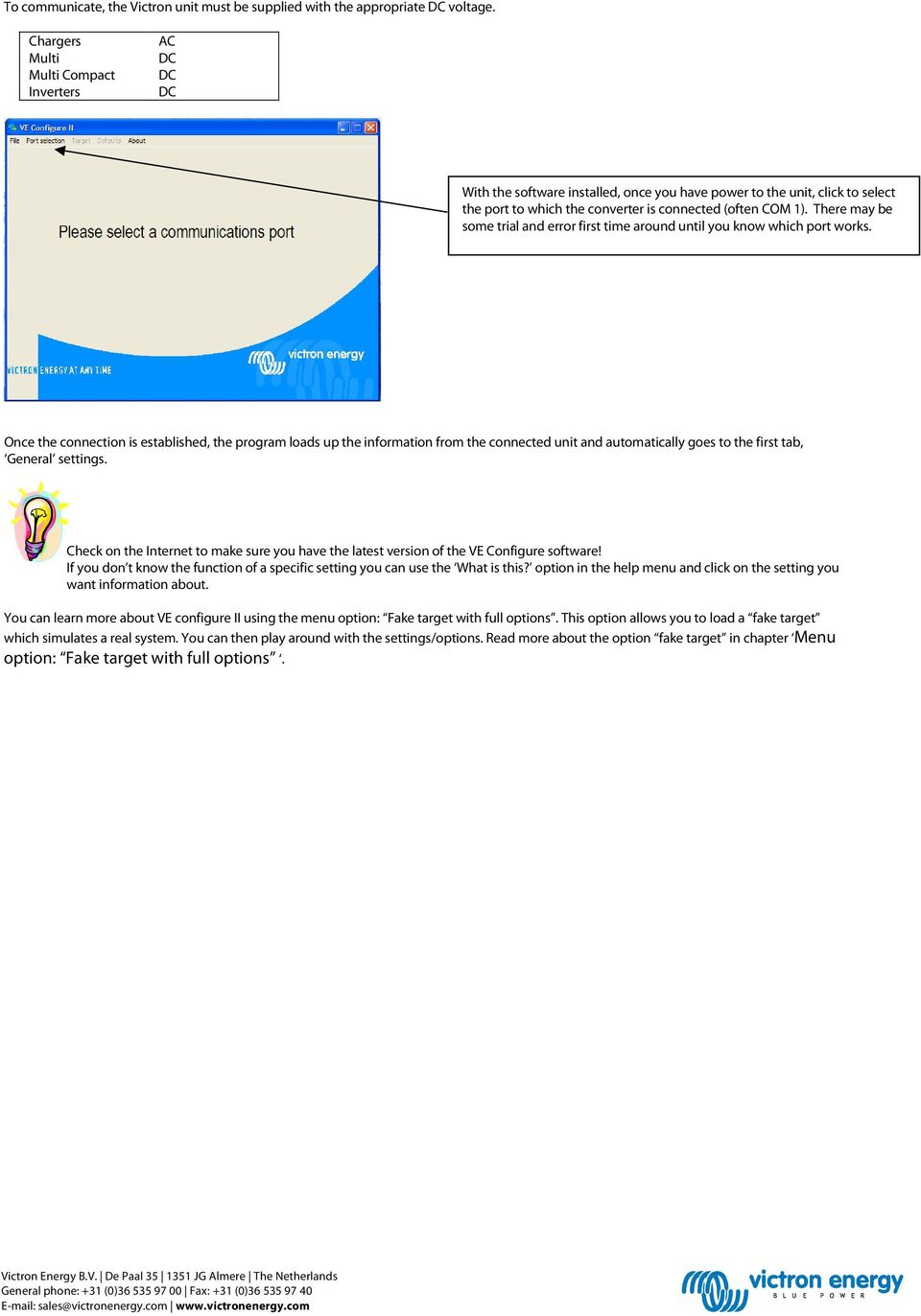
2 To communicate, the Victron unit must be supplied with the appropriate DC voltage. Chargers Multi Multi Compact Inverters AC DC DC DC With the software installed, once you have power to the unit, click to select the port to which the converter is connected (often COM 1). There may be some trial and error first time around until you know which port works. Once the connection is established, the program loads up the information from the connected unit and automatically goes to the first tab, General settings. Check on the Internet to make sure you have the latest version of the VE Configure software! If you don t know the function of a specific setting you can use the What is this? option in the help menu and click on the setting you want information about. You can learn more about VE configure II using the menu option: Fake target with full options. This option allows you to load a fake target which simulates a real system. You can then play around with the settings/options. Read more about the option fake target in chapter Menu option: Fake target with full options.
3 General settings 1. Three-phase setting 2. System frequency setting 3. The scale division for shore current limit on a connected remote panel depends on the number of slaves. 4. Set the sensitivity of frequency measurement. 5. Connection between N and PE during inverter operation 6. Voltage limits at which feedback relay opens/closes. Also, charger stops at lower limit. 7. Determines whether the Multi should be critical of the distortion in the supply waveform. 8. Maximum shore current setting (is overruled by the remote panel if connected) 9. Setting for use with small generator Explanation 1. If multiple devices are connected in parallel, a phase shift can be selected to create 2-, 3- or split-phase configuration. The first unit in a multiple-phase system must be set as the LEADER; the others must be set to the desired phase shift. If multiple units are then also connected in parallel for each phase, no setting should be made on the additional units! 2. Alters the output frequency setting for the inverter. 3. Number of slaves indicates that there are units connected in parallel. To maintain the shore current limit scale on the remote control for the installation as a whole, the setting must be divided between the number of parallel units. If more shore current is available than the scale allows, then an alternative value may be entered. In this case, the scale on the remote is no longer correct and it is possible to draw more current from shore. 4. This setting is used to indicate whether it is necessary for the input frequency to be exactly 50 or 60 Hz. This is a setting that is primarily used in conjunction with generators (speed may not always be stable) to prevent the Multi from rejecting the input supply 5. To permit use of a Residual Current Device (RCD). During operation as and inverter, a connection between PE and N is required. 6. These are the limits at which the unit will accept or reject the supply. If the input voltage drops below the set value of the lower limit, the charger output will be reduced to the minimum to prevent further reduction of the voltage. 7. If waveform detection is deselected, this automatically activates the function preventing the lower voltage limit from being exceeded with heavy start-up loads! (previously labeled Allow inrush current ) 8. This setting is only active if no system panel is installed. Also keep number 3 in mind! 9. If an inverter-generator is used, such as the HONDA EU series, the shore current setting will be dynamically reduced (following a period of low current consumption) to compensate for the engine reaction time when higher loads are activated.

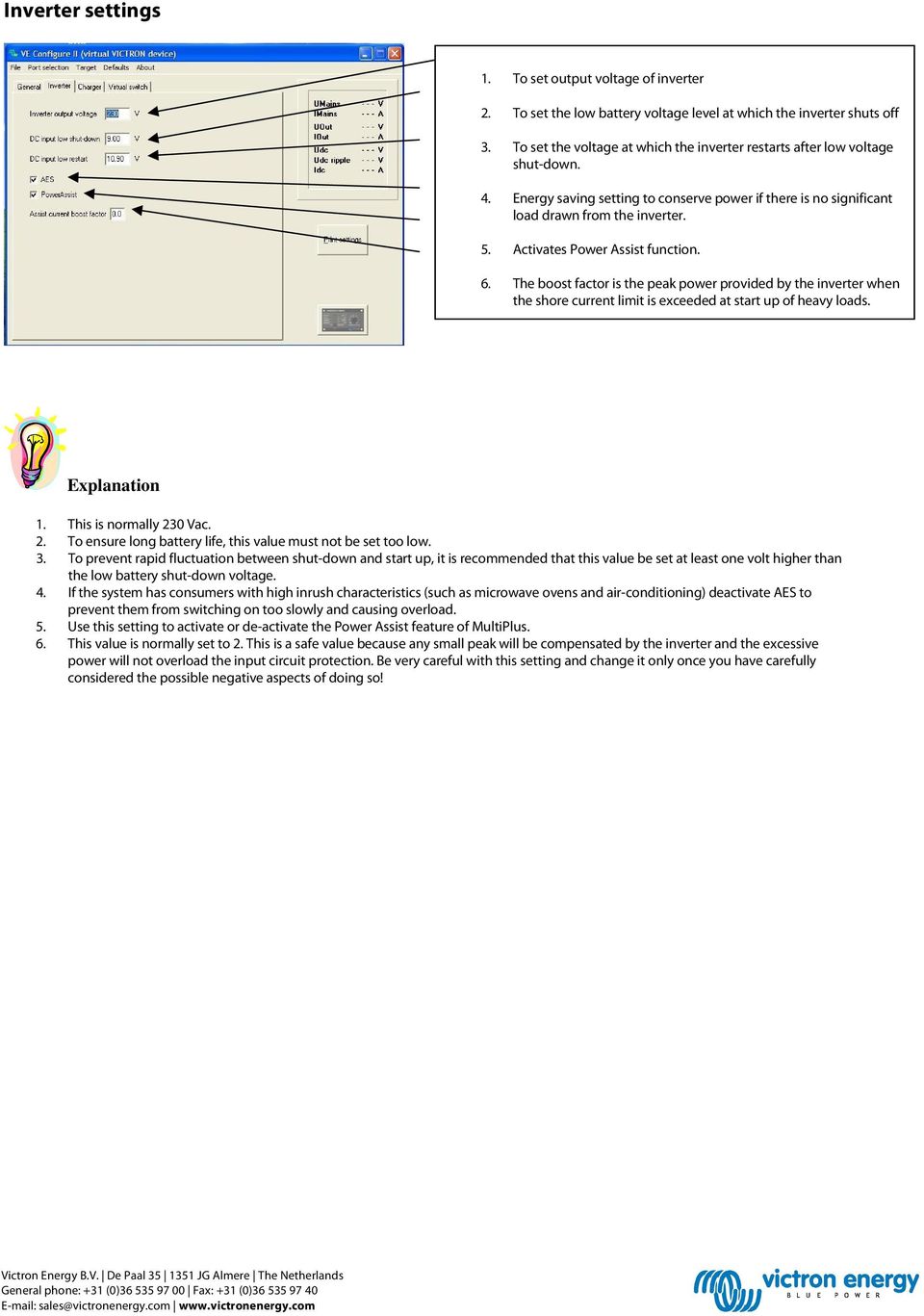
4 Inverter settings 1. To set output voltage of inverter 2. To set the low battery voltage level at which the inverter shuts off 3. To set the voltage at which the inverter restarts after low voltage shut-down. 4. Energy saving setting to conserve power if there is no significant load drawn from the inverter. 5. Activates Power Assist function. 6. The boost factor is the peak power provided by the inverter when the shore current limit is exceeded at start up of heavy loads. Explanation 1. This is normally 230 Vac. 2. To ensure long battery life, this value must not be set too low. 3. To prevent rapid fluctuation between shut-down and start up, it is recommended that this value be set at least one volt higher than the low battery shut-down voltage. 4. If the system has consumers with high inrush characteristics (such as microwave ovens and air-conditioning) deactivate AES to prevent them from switching on too slowly and causing overload. 5. Use this setting to activate or de-activate the Power Assist feature of MultiPlus. 6. This value is normally set to 2. This is a safe value because any small peak will be compensated by the inverter and the excessive power will not overload the input circuit protection. Be very careful with this setting and change it only once you have carefully considered the possible negative aspects of doing so!
5 Charger settings 1. To set the charger function on/off 2. To deactivate power-factor compensation 3. To set storage mode on/off 4. Special charge curve for traction batteries 5. Overcharge protection 6. To set pre-programmed battery type 7. To select prescribed charge curve 8. Manual settings for battery charging 9. Graphic representation of selected charge curve Explanation 1. The inverter and assist functions of the Multi will continue to operate, but it will no longer charge; the charging current is therefore zero! 2. If the quality of the supply waveform is less than the charger expects, it will reduce its output to ensure that the COS phi (difference between current/voltage phases) remains acceptable. This protection can be deactivated for low capacity or poorly regulated power supplies. 3. With this feature active, after 24 hours in float charge, the charging voltage will be reduced below the float voltage to provide optimum protection of the battery against overcharging; charging current will continue to be applied regularly to compensate for self-discharge. This is the rest voltage if the battery is fully charged. 4. For optimum charging, special traction batteries require a fixed charging current phase in addition to a voltage curve. Beware that this often results in a higher charging voltage that can be damaging to regular on-board consumers! 5. If the absorption voltage has not been reached after 10 hours, the battery may be faulty and the charger will switch off for safety reasons. 6. VE Configure is pre-programmed with prescribed charge profiles for different battery types that can be easily selected from the menu. 7. Under normal circumstances always select the adaptive mode. If the balance between the charger and battery is not ideal, it may be better to choose fixed mode otherwise the voltage will rise too quickly or too slowly and the battery may be over or under charged as a result. Tips and tricks The charging current should be approximately 15 to 20% of the battery capacity. Also keep in mind the DC consumption that is expected in the system. For Multi units that are connected in parallel, the current must be set for each Multi! For a desired battery charging current of 75 A supplied by 3 Multi units, for instance, the setting of the Master must be 25 A!

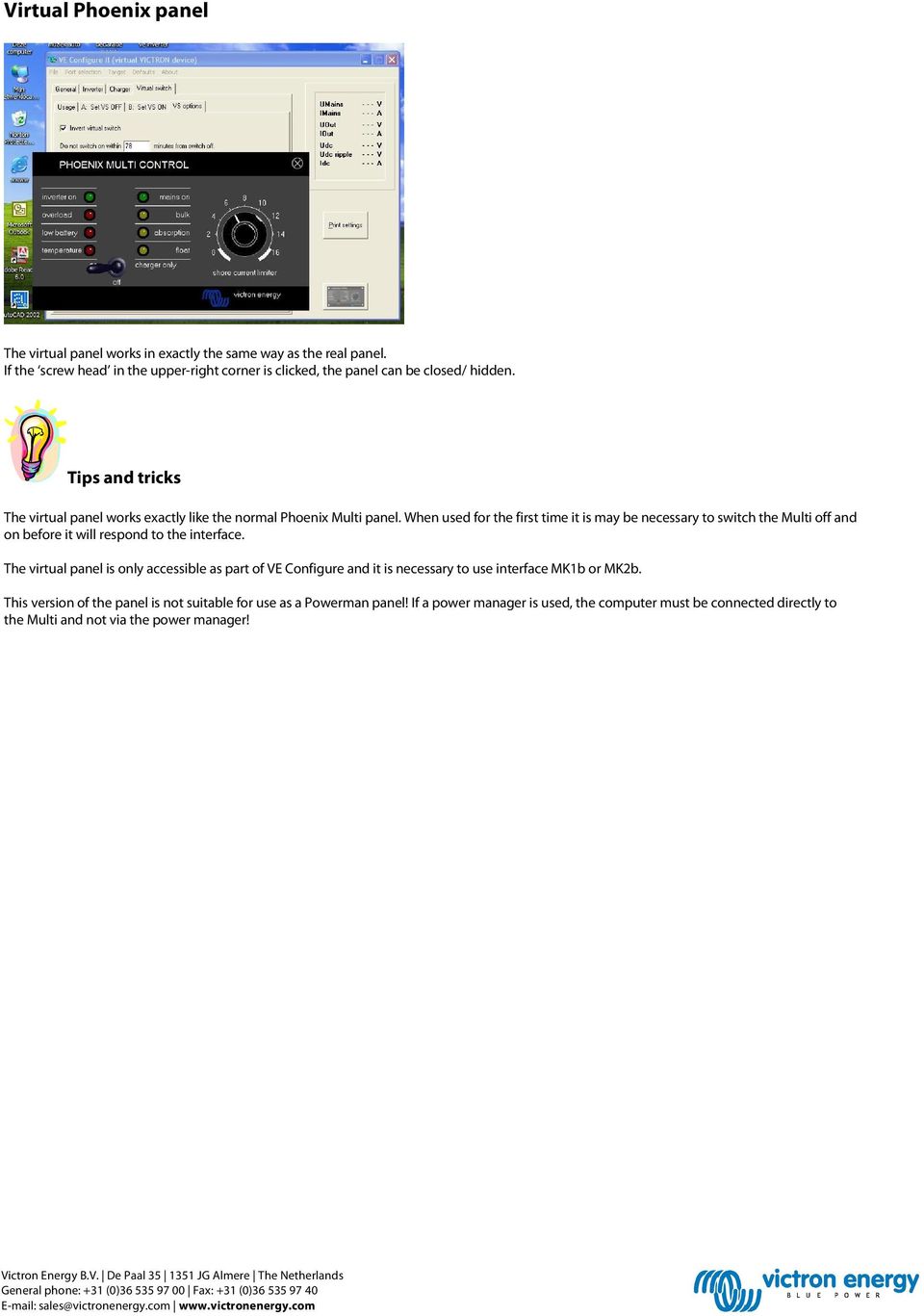
6 Virtual Phoenix panel The virtual panel works in exactly the same way as the real panel. If the screw head in the upper-right corner is clicked, the panel can be closed/ hidden. Tips and tricks The virtual panel works exactly like the normal Phoenix Multi panel. When used for the first time it is may be necessary to switch the Multi off and on before it will respond to the interface. The virtual panel is only accessible as part of VE Configure and it is necessary to use interface MK1b or MK2b. This version of the panel is not suitable for use as a Powerman panel! If a power manager is used, the computer must be connected directly to the Multi and not via the power manager!
7 Virtual switch VS usage options 1. Relay control switched off (tabs are not visible) 2. Setting for programming of the multifunction relay 3. Setting for programming of the feedback relay Tips and tricks It is possible to use VS either to control the multifunction relay (a physical set of changeover contacts) or to control the operation of the feedback relay. The multifunction relay might be used for alarm or control signals where controlling the feedback relay may be desired for power management in alternative energy applications.

8 1. Minimum time that must elapse before relay is switched again 2. Option to invert the conditions for switching on and off 3. Conditions under which the relay must switch on 4. Conditions under which the relay must switch off Explanation 1. If the time setting for a condition is 0 or higher the condition is active; when set to -1 the condition is ignored. 2. A time setting of 0 indicates that there is no time delay before the response. 3. Be aware: activation on conditions have priority over deactivation off conditions. 4. In addition to alarm conditions, it is also possible to set Pre-Alarm conditions. A pre-alarm allows you to respond to excessive power or temperature conditions, for example, before the unit goes into shut-down (as is the case with a normal alarm). Example To configure a Multi to provide an alarm via a voltage-free relay or to start a generator when the battery voltage becomes too low and/or the supplied power is too great, the following settings must be made. Tab [Usage] Tab [ON] Select [Use VS to control multifunctional switch]. Set [When Udc lower than] to 0 and set the desired lower voltage limit. Set [When load higher than] to 0 and set the desired power level. Tab [OFF] Set [When no VS ON condition for] to 0. Choose [send settings] to send the information to the Victron unit. (Note: Instead of setting the time to zero, you can also choose a delay time.)

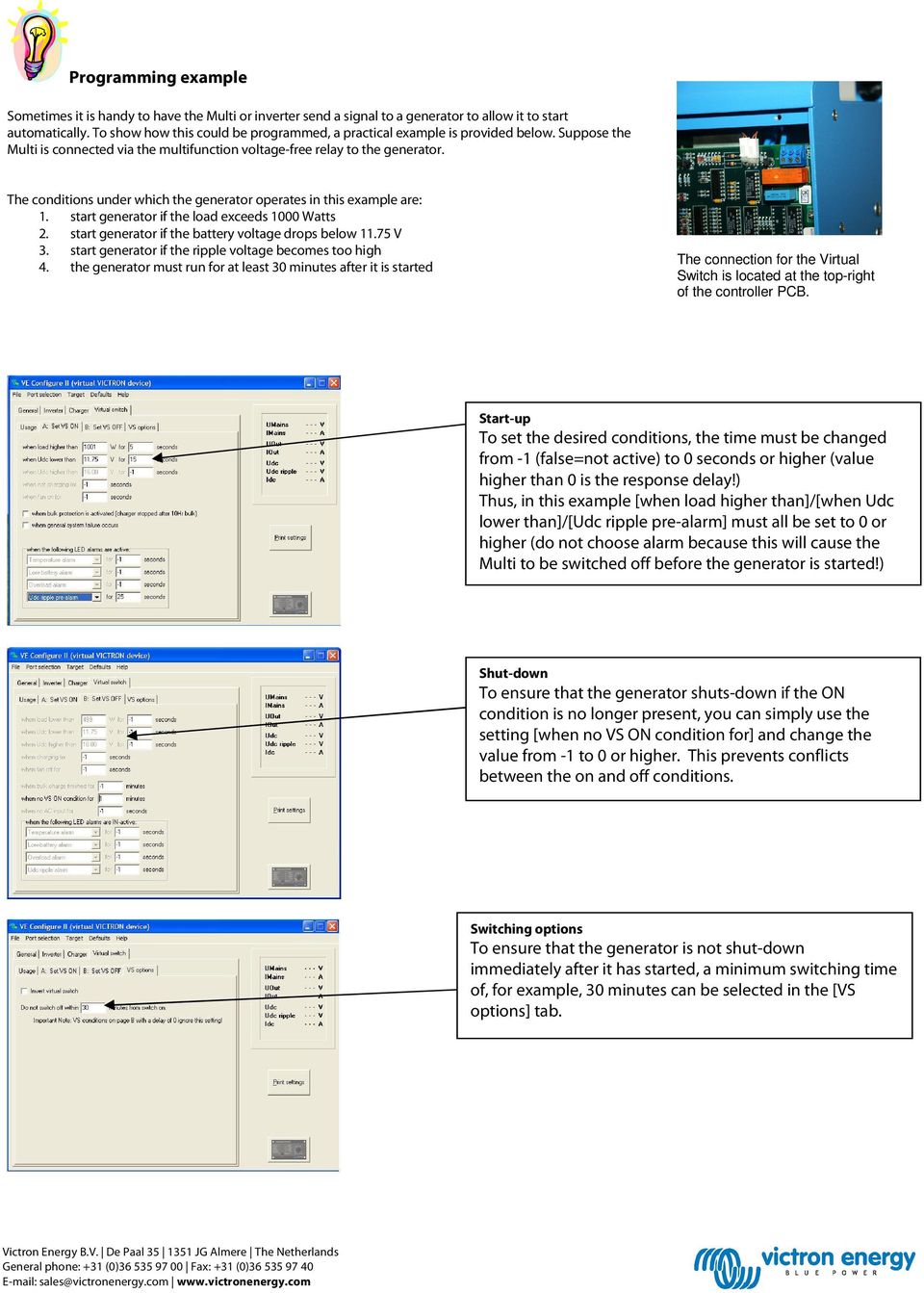
9 Programming example Sometimes it is handy to have the Multi or inverter send a signal to a generator to allow it to start automatically. To show how this could be programmed, a practical example is provided below. Suppose the Multi is connected via the multifunction voltage-free relay to the generator. The conditions under which the generator operates in this example are: 1. start generator if the load exceeds 1000 Watts 2. start generator if the battery voltage drops below V 3. start generator if the ripple voltage becomes too high 4. the generator must run for at least 30 minutes after it is started The connection for the Virtual Switch is located at the top-right of the controller PCB. Start-up To set the desired conditions, the time must be changed from -1 (false=not active) to 0 seconds or higher (value higher than 0 is the response delay!) Thus, in this example [when load higher than]/[when Udc lower than]/[udc ripple pre-alarm] must all be set to 0 or higher (do not choose alarm because this will cause the Multi to be switched off before the generator is started!) Shut-down To ensure that the generator shuts-down if the ON condition is no longer present, you can simply use the setting [when no VS ON condition for] and change the value from -1 to 0 or higher. This prevents conflicts between the on and off conditions. Switching options To ensure that the generator is not shut-down immediately after it has started, a minimum switching time of, for example, 30 minutes can be selected in the [VS options] tab.
10 Notes As far as it is possible, switch off all power while working on the system! Do not touch the exposed internal parts of your Victron unit during operation! Make sure there are no important loads in operation during programming. After changing the settings, check performance with a multimeter. Saving/loading settings It is possible to save the settings on your computer, open the File menu and select [Save settings Ctrl+F5]. Choose a logical name for the settings file, such as the name of the vessel, vehicle or other application. To use the settings saved in the computer, select the option [Load settings] from the same menu. Do not forget to send the settings to the Victron with [send settings].
![Saving/loading settings It is possible to save the settings on your computer, open the File menu and select [Save settings Ctrl+F5].](/docs-images/44/20773012/images/page_10.jpg "Choose a logical name for the settings file, such as the name of the vessel, vehicle or other application.")
11 What to do if... Error message when you attach the communication cable Check whether the unit is suitable for configuration through a computer. (Phoenix Charger / Phoenix Multi (including compact / larger Phoenix Inverter) Check whether the software on the PC is compatible with the internal software of the Victron. (VE Config 1 with DAT file for software version lower than xxxx 130). Check the cabling (the communication cable is a straight-through cable, not a cross-over cable). After making adjustments the Victron unit does not work as it should. In the [Defaults] menu, select [Set all settings to default] to restore the factory settings and try again. If you have additional questions or comments after reading this document, do not hesitate to contact us at [email protected] or contact your local Victron Energy dealer.


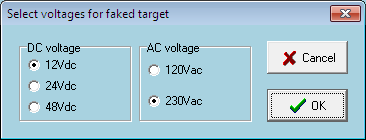
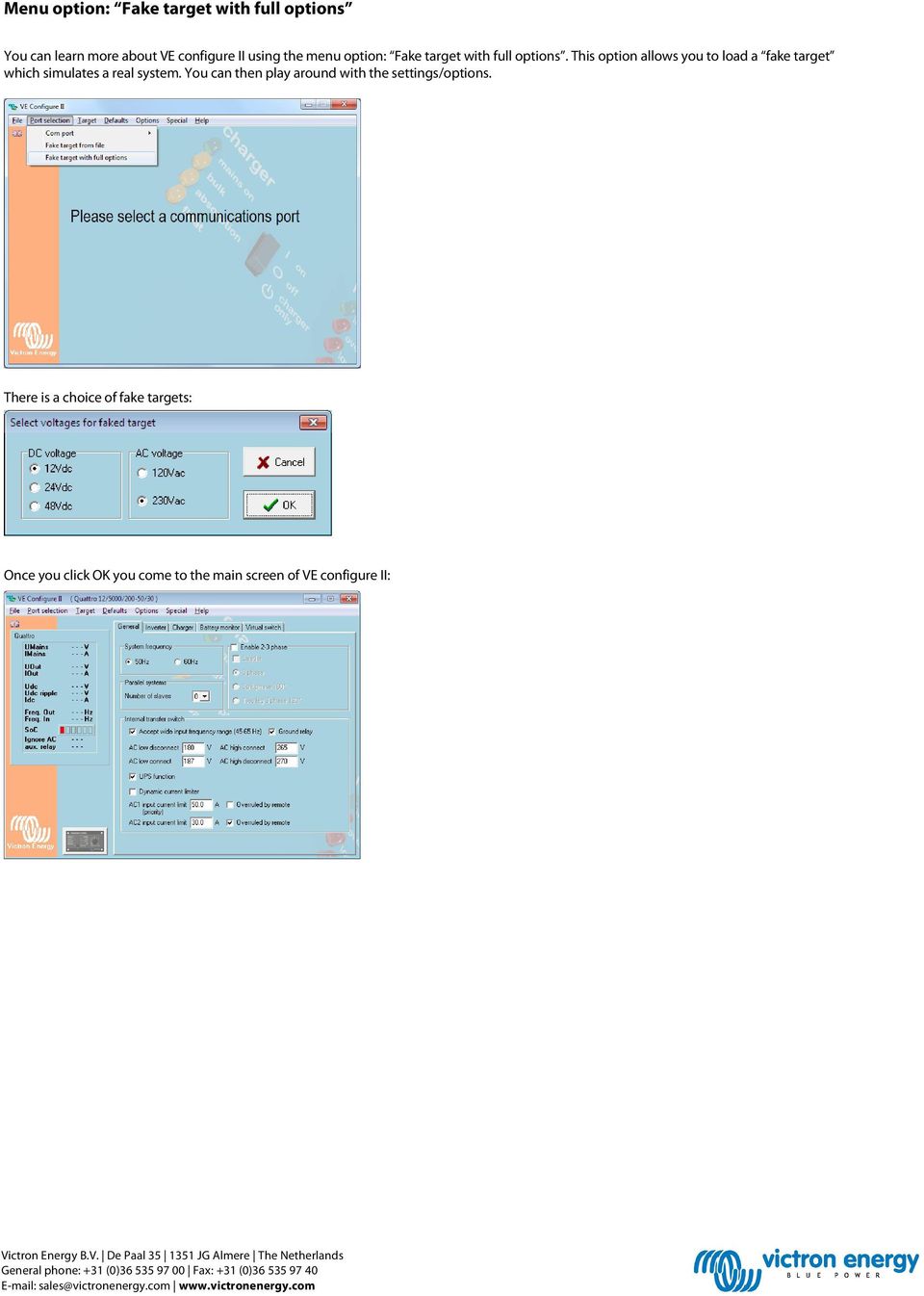
12 Menu option: Fake target with full options You can learn more about VE configure II using the menu option: Fake target with full options. This option allows you to load a fake target which simulates a real system. You can then play around with the settings/options. There is a choice of fake targets: Once you click OK you come to the main screen of VE configure II:
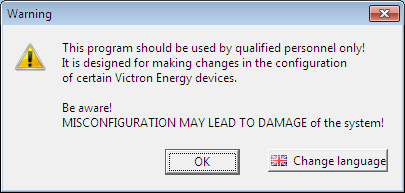
13 As you are using a fake target you can play around with different settings to get to know VE configure II. A handy way to get to know more about each setting is to use the What is this? (Ctrl+H) option in the Help menu. Selecting this creates a? symbol next to the mouse pointer which then can be clicked onto the setting you want to know more about. A clicked? will bring up the help file for that specific setting. How do you get to the VE configure II program? In the software section from our website you can find VE configure. You can download the program VE bus quick configure Setup from the following link: One of the programs in that package is VE Configure II. On starting the VE Configure II program you will receive a warning. As you will be only using a fake target it is okay in this case to click OK.

How to connect your Victron to a computer with VE Bus Quick Configure
 How to connect your Victron to a computer with VE Bus Quick Configure Before connecting your Victron to a computer the following is important: - Only identical models with VE Bus software (see sticker
Stroom voor elke toepassing
 ELECTRICITY: ALWAYS & EVERYWHERE With VICTRON Phoenix MultiPlus and a HONDA Generator An intelligent combination with endless possibilities! Electrical appliances that increase on board comfort, such as
Achieving the impossible
 1 Achieving the impossible Taking control of shore power with the Phoenix Multi/MultiPlus from Victron Energy * Sometimes the features of a new product are so unique that the benefits are difficult to
Manual. VE.Bus to NMEA 2000 interface
 Manual EN VE.Bus to NMEA 2000 interface Copyrights 2010 Victron Energy B.V. All Rights Reserved This publication or parts thereof may not be reproduced in any form, by any method, for any purpose. For
Manual. EN Appendix. Blue Solar PWM Pro setup and monitoring software
 Manual EN Appendix Blue Solar PWM Pro setup and monitoring software EN Appendix Contents 1. Region and language settings 2 2. Download the software 2 3. UnRAR the software 2 4. Install the software 3
Phoenix Multi 120Vac 12/1600/70 12/2500/120 24/1600/40 24/3000/70. Phoenix MultiPlus 120Vac 12/2500/120 24/3000/70
 INSTALLATION MANUAL Phoenix Multi 120Vac 12/1600/70 12/2500/120 24/1600/40 24/3000/70 Phoenix MultiPlus 120Vac 12/2500/120 24/3000/70 Phoenix Inverter 120Vac 12/1600 12/2500 24/1600 24/3000 1 Copyrights
ESP PANELS TM & SYSTEM COMPONENTS. Instruction and connection manual
 ESP PANELS TM & SYSTEM COMPONENTS Instruction and connection manual Panel range System monitoring Panel ESP-SYSTEM AC circuit breaker panel ESP-AC-20A-11 DC circuit breaker panel ESP-DC-20A-11 Blank panel
Using the Phoenix MultiPlus
 Using the Phoenix MultiPlus to reduce operating cost of a generator www.victronenergy.com 1. The traditional AC generator system Per Watt ac-power, an inverter is generally more expensive than a generator.
Updating your computer and Multi to VEConfigure3
 Updating your computer and Multi to VEConfigure3 v9 March 15th 2013 www.victronenergy.com Introduction to VEConfigure3 The difference between VEConfigure3 and VEConfigure2 is the addition of configuration
LTR Series Uninterruptible Power Systems 700 VA - 2.1 KVA. General Specification
 08/17/12 Rev2 LTR Series General Specification 700 VA to 2.1 KVA 1.0 General LTR Series Uninterruptible Power Systems 700 VA - 2.1 KVA General Specification This specification describes the features and
Installation and Operation Back-UPS 1250, 1300, 1500
 Installation and Operation Back-UPS 1250, 1300, 1500 Inventory bu001a Safety and General Information This unit is intended for indoor use only. Do not operate this unit in direct sunlight, in contact with
Select Correct USB Driver
 Select Correct USB Driver Windows often installs updated drivers automatically, and defaults to this latest version. Not all of these drivers are compatible with our software. If you are experiencing communications
Installation and Operation Manual Back-UPS BX800CI-AS/BX1100CI-AS
 + Installation and Operation Manual Back-UPS BX800CI-AS/BX1100CI-AS Inventory Safety and General Information bu001c This unit is intended for indoor use only. Do not operate this unit in direct sunlight,
UPS Monitoring and Management Software
 UPS Monitoring and Management Software LEN.MAN.SOF.141 Rev.1.00/2008 User s Guide: Easy-Mon X 1. Configuration Before Easy-Mon X software can display the electrical data of LEONICS UPS, user has to configure
Phoenix MultiPlus. Multi-functional inverter / battery charger with intelligent shore and generator power management
 Phoenix MultiPlus Multi-functional inverter / battery charger with intelligent shore and generator power management Phoenix MultiPlus Explained Multi function with intelligent shore and generator power
GENERATOR START CONTROL MODULE - MINI (2 Wire to 3 Wire)
 FEATURES & APPLICATIONS Inexpensive 2 wire to 3 wire start controller for electric start high speed gas generators. Optimized for use with Outback Invertors. Supports three types of 3 wire generator control
Daker DK 1, 2, 3 kva. Manuel d installation Installation manual. Part. LE05334AC-07/13-01 GF
 Daker DK 1, 2, 3 kva Manuel d installation Installation manual Part. LE05334AC-07/13-01 GF Daker DK 1, 2, 3 kva Index 1 Introduction 24 2 Conditions of use 24 3 LCD Panel 25 4 Installation 28 5 UPS communicator
victron energie USER MANUAL GEBRUIKSAANWIJZING GEBRAUCHSANWEISUNG Victron Atlas 12/850
 victron energie USER MANUAL GEBRUIKSAANWIJZING GEBRAUCHSANWEISUNG Victron Atlas 12/850 SECTIONS ENGLISH 1 NEDERLANDS 27 DEUTSCH 55 This page intentionally left blank. ENGLISH USER MANUAL Victron Atlas
Transmitter Interface Program
 Transmitter Interface Program Operational Manual Version 3.0.4 1 Overview The transmitter interface software allows you to adjust configuration settings of your Max solid state transmitters. The following
UPS Communicator. UPS Communicator English Manual Release 1.16 1
 UPS Communicator 1 License for use The use of the SOFTWARE manufactured by Legrand (the MANUFACTURER) is free of charge. By proceeding with its installation of his own free will, the USER (an individual
User and installation manual
 User and installation manual aquaero 5 The information contained in this manual is subject to change without prior notice. All rights reserved. Current as of April 2011 ENGLISH: PAGE 1 DEUTSCH: SEITE 13
The Answer to the 14 Most Frequently Asked Modbus Questions
 Modbus Frequently Asked Questions WP-34-REV0-0609-1/7 The Answer to the 14 Most Frequently Asked Modbus Questions Exactly what is Modbus? Modbus is an open serial communications protocol widely used in
Application/Connection Examples
 This Quick Start Guide is designed to familiarize the user with the connection and configuration of the DTS-305 DIN rail mounted single / 3 phase power & energy meter with RS-485 or TCP communications.
Technical Manual. FAN COIL CONTROLLER COOLING or HEATING ANALOG or PWM Art. 119914 631001A
 COOLING or HEATING ANALOG or PWM Art. 119914 631001A TOTAL AUTOMATION GENERAL TRADING CO. LLC SUITE NO.506, LE SOLARIUM OFFICE TOWER, SILICON OASIS, DUBAI. UAE. Tel. +971 4 392 6860, Fax. +971 4 392 6850
PowerPanel Business Edition USER MANUAL
 USER MANUAL Rev. 0.9 2007/10/26 Copyright 2006-2007 Cyber Power Systems, Inc. All rights reserved. PowerPanel Business Edition USER S MANUAL PowerPanel Business Edition provides power management Services.
Lab E1: Introduction to Circuits
 E1.1 Lab E1: Introduction to Circuits The purpose of the this lab is to introduce you to some basic instrumentation used in electrical circuits. You will learn to use a DC power supply, a digital multimeter
DC Electronic Loads 8500 series
 Data Sheet DC Electronic Loads 8500 series 2400W 600 W - 1200 W 300 W Versatile & Economical DC Electronic Loads The 8500 series Programmable DC Electronic Loads can be used for testing and evaluating
User s Manual Before using the inverter, you need to read and save the safety instructions.
 User s Manual Before using the inverter, you need to read and save the safety instructions. STI SERIES (STI200, STI300, STI500, STI700, STI1000) Power Frequency Pure Sine Wave Inverter The information
Back-UPS Pro 1300/1500 Installation and Operation
 Back-UPS Pro 1300/1500 Installation and Operation Inventory Safety Do not install the Back-UPS in direct sunlight, in excessive heat, humidity, or in contact with fluids. Connect the battery bu059a bu058a
User Manual WatchPower
 User Manual WatchPower Management Software for Inverter Table of Contents 1. WatchPower Overview... 1 1.1. Introduction... 1 1.2. Features... 1 2. WatchPower Install and Uninstall... 1 2.1. System Requirement...
USB VoIP Phone Adapter. User s Manual
 USB VoIP Phone Adapter User s Manual FCC Certifications This Equipment has been tested and found to comply with the limits for a Class B digital device, pursuant to part 15 and part 68 of the FCC Rules.
ENERGY. ANYTIME. ANYWHERE. AUTOMOTIVE
 ENERGY. ANYTIME. ANYWHERE. AUTOMOTIVE 2 INDEX Introduction 4 Application examples 5 Motorhomes 6 Ambulances 10 Electric coffee cart 14 Systems 16 Accessories 20 Technical information 22 About Victron Energy
SNMP Web Management. User s Manual For SNMP Web Card/Box
 SNMP Web Management User s Manual For SNMP Web Card/Box Management Software for Off-Grid Inverter Version: 1.2 Table of Contents 1. Overview... 1 1.1 Introduction... 1 1.2 Features... 1 1.3 Overlook...
GETTING TO KNOW YOUR PRE-PAID TELSTRA WI-FI 4G
 GETTING TO KNOW YOUR PRE-PAID TELSTRA WI-FI 4G LET S GET THIS SHOW ON THE ROAD You must be excited about your brand new Pre-Paid Telstra Wi-Fi 4G. This guide will help you get connected as quickly and
EGCP-3 LS 8406-113 Revision L. Explanation of Software Changes Made for the EGCP-3 LS Control. Application Note 51294
 EGCP-3 LS 8406-113 Revision L Explanation of Software Changes Made for the EGCP-3 LS Control Application Note 51294 WARNING DANGER OF DEATH OR PERSONAL INJURY WARNING FOLLOW INSTRUCTIONS Read this entire
DUKANE Intelligent Assembly Solutions
 PC Configuration Requirements: Configuration Requirements for ipc Operation The hardware and operating system of the PC must comply with a list of minimum requirements for proper operation with the ipc
User Manual for CH-PFC76810
 AA Portable Power Corp www.batteryspace.com, Email: [email protected] User Manual for CH-PFC76810 1. Overview The CH-PFC76810 charger is suitable for charging lithium ion battery packs such as those
Troubleshooting and Diagnostics
 Troubleshooting and Diagnostics The troubleshooting and diagnostics guide provides instructions to assist in tracking down the source of many basic controller installation problems. If there is a problem
VIVA 4G LTE Mini Router. Quick Start Guide
 VIVA 4G LTE Mini Router Quick Start Guide Thank you for choosing the VIVA 4G LTE Mini Router (hereinafter referred to as the E57) The supported functions and actual appearance are subject to the product
User Manual. Interface Adapter IA1 / Computer Interface EFOY 600 / EFOY 900 / EFOY 1200 / EFOY 1600
 User Manual Interface Adapter IA1 / Computer Interface EFOY 600 / EFOY 900 / EFOY 1200 / EFOY 1600 2 1. Introduction 1. Introduction 1.1 Introduction Thank you for choosing an EFOY product. Please read
Manual. Solar Fountain Mobile Phone Charger
 EN Manual Solar Fountain Mobile Phone Charger Copyrights 2008 Victron Energy B.V. All Rights Reserved This publication or parts thereof may not be reproduced in any form, by any method, for any purpose.
Weather Direct Displays show Lost Forecast (blank boxes in the picture icons)
 Weather Direct Displays show Lost Forecast (blank boxes in the picture icons) Many routine events can cause a Lost Forecast situation. Examples include: Power outage Change batteries Internet down in your
125 8880 telstra.com/ppmbb visit a telstra store or partner GETTING TO KNOW YOUR
 FOR MORE INFORMATIoN: 125 8880 telstra.com/ppmbb visit a telstra store or partner GETTING TO KNOW YOUR Telstra PRE-paid 4G wi-fi LET S GET THIS SHOW ON THE ROad WHAT S INSIDE Your Telstra Pre-Paid 4G Wi-Fi
APPLICATION NOTE TESTING PV MICRO INVERTERS USING A FOUR QUADRANT CAPABLE PROGRAMMABLE AC POWER SOURCE FOR GRID SIMULATION. Abstract.
 TESTING PV MICRO INVERTERS USING A FOUR QUADRANT CAPABLE PROGRAMMABLE AC POWER SOURCE FOR GRID SIMULATION Abstract This application note describes the four quadrant mode of operation of a linear AC Power
MixMeister EZ Converter Setup & Troubleshooting Contents:
 MixMeister EZ Converter Setup & Troubleshooting Contents: Windows Vista and Windows 7 Setup Instructions... 2 Windows XP Setup Instructions... 4 Macintosh OSX - Setup Instructions... 6 Troubleshooting...
Galleon 6-10K Online UPS. Voltronic Power Technology Corporation
 Galleon 6-10K Online UPS Voltronic Power Technology Corporation Features Galleon online UPS series delivers optimal power quality, provides superior power management, resolves utility power protection
GETTING TO KNOW YOUR TELSTRA PRE-PAID 3G WI-FI
 GETTING TO KNOW YOUR TELSTRA PRE-PAID 3G WI-FI LET S GET THIS SHOW ON THE ROAD You must be excited about your brand new Telstra Pre-Paid 3G Wi-Fi. This guide will help you get connected as quickly and
BlueSolar Pro Remote Panel For BlueSolar PWM-Pro charge controllers 12/24V 5, 10, 20, 30A Article number SCC900300000
 Manual EN BlueSolar Pro Remote Panel For BlueSolar PWM-Pro charge controllers 12/24V 5, 10, 20, 30A Article number SCC900300000 Contents EN 1.Important safety instructions... 2 2. Installation... 2 3.Product
Charger Output AC Ripple Voltage and the affect on VRLA batteries
 TECHNICAL BULLETIN 41-2131 Charger Output AC Ripple Voltage and the affect on VRLA batteries Please Note: The information in this technical bulletin was developed for C&D Dynasty 12 Volt VRLA products.
FAQs. Conserve package. Gateway... 2 Range Extender... 3 Smart Plug... 3 Thermostat... 4 Website... 7 App and Mobile Devices... 7
 FAQs Conserve package Gateway... 2 Range Extender... 3 Smart Plug... 3 Thermostat... 4 Website... 7 App and Mobile Devices... 7 FAQs Gateway Can I have someone install my system for me? If you are concerned
Quick Start Guide RRL Radio Telemetry
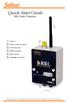 Quick Start Guide RRL Radio Telemetry Antenna External Power Connection LED Activity Light RS232 Connection Serial Number Levelogger Connections RRL Station High Quality Groundwater and Surface Water Monitoring
RIGtalk. Revision 5. Owner s Manual 2012.
 RIGtalk Revision 5 Owner s Manual 2012 www.westmountainradio.com 1020 Spring City Drive Waukesha, WI 53186 262-522-6503 [email protected] 2012 West Mountain Radio, All rights reserved. All trademarks
PRORAE REMOTE HOST CONTROLLER: COMMUNICATION TROUBLESHOOTING GUIDE
 PRORAE REMOTE HOST CONTROLLER: COMMUNICATION TROUBLESHOOTING GUIDE INTRODUCTION This technical note provides simple procedures that can be performed in the field to help identify and correct the cause
Liebert GXT MT+ CX UPS, 1000VA - 3000VA Intelligent, Reliable UPS Protection. AC Power for Business-Critical Continuity
 Liebert GXT MT+ CX UPS, 1000VA - 3000VA Intelligent, Reliable UPS Protection AC Power for Business-Critical Continuity Liebert GXT MT+ CX UPS, 1000VA -3000VA Intelligent, Reliable UPS Protection Liebert
BXR 300C BXR 300R. Owner, s Manual P/N 040294
 THE SOUND THAT CREATES LEGENDS BXR 300C BXR 300R Owner, s Manual P/N 040294 INTRODUCTION The Fender BXR 300 AMPLIFIER is the most recent effort in state of the art bass amplifier technology, and is a member
Getting started with the e.dentifier2
 Getting started with the e.dentifier2 You can use the e.dentifier2 to log onto Access Online with or without the included USB cable. The differences between these methods are explained below. At the end
Using the UPSMON-Plus Monitoring Software
 Using the UPSMON-Plus Monitoring Software With UPSMON-Plus UPS Monitoring software, you can: Monitor battery level, load level, input and output current. Schedule daily, weekly, or monthly battery self
CRE Monitor Instructions Manual
 CRE Monitor Instructions Manual CRE TECHNOLOGY believes that all information provided herein is correct and reliable and reserves the right to update at anytime. CRE TECHNOLOGY does not assume any responsibility
Berkeley Audio Design Alpha USB
 QUICK USER GUIDE v1.2.2 Berkeley Audio Design Alpha USB The Alpha USB is an asynchronous High Speed USB to digital audio interface designed to provide the highest possible audio quality from computer audio
Quick start: Energy Switch EU
 Technical specifications Normal operating voltage Quick start: Energy Switch EU 230Vac/50Hz Recommended max. load 3000W 600W Frequency range Wireless range Energy measurement 868.42 MHz 30~100 meters in
Configure Inverter output for two utility settings, (1)120V/60Hz, (2)220V/50Hz
 HV Solar Inverter System GUI Overview January 2012 TMS320C2000 Systems Applications Collateral The HV Solar Inverter System GUI provides a simple interface to evaluate some of the functionalities of the
FTDI VCP DRIVER (free) (WIN/MAC/LINUX) http://www.ftdichip.com/drivers/vcp.htm
 002 - CONNECTING THE PRINTER Now that you have an idea what 3D printing entails, we can continue and connect the printer to your computer. First make sure you have a computer with a decent amount of RAM
Mini Effect Gizmo. User s Manual. RJM Music Technology, Inc.
 Mini Effect Gizmo User s Manual RJM Music Technology, Inc. Mini Effect Gizmo User s Manual Version 1.3 September 26, 2013 RJM Music Technology, Inc. 2525 Pioneer Ave #1 Vista, CA 92081 E-mail: [email protected]
USB2VGA. Instruction Manual. USB to VGA Adapter. USB 2.0 to VGA External Multi Monitor Video Adapter
 USB to VGA Adapter USB2VGA Instruction Manual USB 2.0 to VGA External Multi Monitor Video Adapter FCC Compliance Statement This equipment has been tested and found to comply with the limits for a Class
Automatic start of a generator
 Automatic start of a generator General description This application note will help you to set your Xtender for an automatic start of a generator as per different parameters such as the output power, the
Transformerless UPS systems and the 9900 By: John Steele, EIT Engineering Manager
 Transformerless UPS systems and the 9900 By: John Steele, EIT Engineering Manager Introduction There is a growing trend in the UPS industry to create a highly efficient, more lightweight and smaller UPS
Back-UPS 650 VA 120 V with AVR (BX650CI-LM)
 Back-UPS 650 VA 120 V with AVR (BX650CI-LM) Overview Do not install the unit in direct sunlight, in areas of excessive heat or humidity, or in contact with fluids ON/OFF button Battery connector Circuit
USER MANUAL GEBRUIKSAANWIJZING GEBRAUCHSANWEISUNG
 USER MANUAL GEBRUIKSAANWIJZING GEBRAUCHSANWEISUNG Victron Atlas 24/2500 SECTIONS English 1 Nederlands 21 Deutsch 45 This page intentionally left blank. Subject to change without notice AT22500E / 151195
Keep it Simple Timing
 Keep it Simple Timing Support... 1 Introduction... 2 Turn On and Go... 3 Start Clock for Orienteering... 3 Pre Start Clock for Orienteering... 3 Real Time / Finish Clock... 3 Timer Clock... 4 Configuring
Operating Instructions
 Operating Instructions Kühn Controls AG, Gräfenhäuser Str. 14, D-75305 Neuenbürg, Germany Tel. +49 (0)7082-94 00 00 www.kuehn-controls.de [email protected] Fax +49 (0)7082-94 00 01 Content 1. SMS
Troubleshooting Guide, Freedom and Fleet Power Inverter/Chargers
 Technical Note Freedom/Fleet Power 512-0084-01-01 Rev 1 Troubleshooting Guide, Freedom and Fleet Power Inverter/Chargers Overview This document is a guide for troubleshooting inverters, battery chargers,
TCP/IP MODULE CA-ETHR-A INSTALLATION MANUAL
 TCP/IP MODULE CA-ETHR-A INSTALLATION MANUAL w w w. c d v g r o u p. c o m CA-ETHR-A: TCP/IP Module Installation Manual Page Table of Contents Introduction...5 Hardware Components... 6 Technical Specifications...
User s Manual. Management Software for Inverter
 WatchPower User s Manual Management Software for Inverter Table of Contents 1. WatchPower Overview... 2 1.1. Introduction... 2 1.2. Features... 2 2. WatchPower Install and Uninstall... 2 2.1. System Requirement...
ENGLISH USER MANUAL. Victron Atlas Combi 12/450. victron energie. user manual 5
 ENGLISH USER MANUAL Victron Atlas Combi 12/450 user manual 5 INTRODUCTION Victron Energie has established an international reputation as a leading designer and manufacturer of power systems. Our R&D department
Match. GE Digital Energy. Uninterruptible Power Supply 500-1500 VA. Technology for the Digital World. Match UPS. GE Digital Energy.
 Match Uninterruptible Power Supply 500-1500 VA Manufactured by: General Electric Company Telephone +41 (0)91 / 850 51 51 CH 6595 Riazzino (Locarno) Fax +41 (0)91 / 850 51 44 Switzerland Website www.gedigitalenergy.com
NC-12 Modbus Application
 NC-12 Modbus Application NC-12 1 Table of Contents 1 Table of Contents... 2 2 Glossary... 3 SCADA...3 3 NC-12 Modbus in general... 3 4 Entire system... 4 4.1 PFC to PC connection alternatives...4 4.1.1
Dash 18X / Dash 18 Data Acquisition Recorder
 75 Dash 18X / Dash 18 Data Acquisition Recorder QUICK START GUIDE Supports Recorder System Software Version 3.1 1. INTRODUCTION 2. GETTING STARTED 3. HARDWARE OVERVIEW 4. MENUS & BUTTONS 5. USING THE DASH
OWNER S MANUAL 2.5/3.0 ACS PANEL (ADVANCED CONTROL SYSTEM) 7725 Lougheed Highway Burnaby, BC V5A 4V8 Canada
 2.5/3.0 ACS PANEL (ADVANCED CONTROL SYSTEM) OWNER S MANUAL 7725 Lougheed Highway Burnaby, BC V5A 4V8 Canada Tel: (604) 420-1585 Fax: (604) 420-1591 http:// www. statpower.com PROsine 2.5/3.0 ACS Panel
Table of Contents MONITORING SOFTWARE USER MANUAL
 Table of Contents MONITORING SOFTWARE USER MANUAL 1.Installations & Settings... 2 1.1. Note... 2 1.2. Installation... 2 1.3. Un-install EnerSolis Monitoring Software from Your Computer 6 2. Function Explanations...
Monitoring Network DMN
 Monitoring Network DMN User Manual Table of contents Table of contents... 2 1. Product features and capabilities... 3 2. System requirements... 5 3. Getting started with the software... 5 3-1 Installation...
EMF16 and Model 201 Graphics Software for Win 98/NT/ME/2K/XP/Vista/Win7/Win8 and Win10
 Lawson Labs, Inc. 3217 Phoenixville Pike Malvern, PA 19355 800-321-5355 or 610 725-8800 FAX 610 725-9344 www.lawsonlabs.com [email protected] EMF16 and Model 201 Graphics Software for Win 98/NT/ME/2K/XP/Vista/Win7/Win8
2.4G Bluetooth Datalink & ipad Ground Station User Guide V1.02
 2.4G Bluetooth Datalink & ipad Ground Station User Guide V1.02 Thank you for purchasing DJI products. Please strictly follow this user guide to mount and connect the 2.4G Bluetooth Datalink, install the
Dash 8Xe / Dash 8X Data Acquisition Recorder
 75 Dash 8Xe / Dash 8X Data Acquisition Recorder QUICK START GUIDE Supports Recorder System Software Version 2.0 1. INTRODUCTION 2. GETTING STARTED 3. HARDWARE OVERVIEW 4. MENUS & BUTTONS 5. USING THE DASH
INSTALLATION & SERVICE MANUAL. Display Panel
 INSTALLATION & SERVICE MANUAL Display Panel The PowerLine EMS TM is a specialized power distribution and energy management system intended to be used in recreational vehicles. The Control Module is housed
Renewable Energy Monitor User Manual And Software Reference Guide. [email protected] (979) 703-1925
 Renewable Energy Monitor User Manual And Software Reference Guide [email protected] (979) 703-1925 1 Introducing the Horizon Renewable Energy Monitor The Renewable Energy Monitor is an educational
LEN s.r.l. Via S. Andrea di Rovereto 33 c.s. 16043 CHIAVARI (GE) Tel. +39 0185 318444 - Fax +39 0185 472835 mailto: [email protected] url: http//www.len.
 MA511 General Index 1 INTRODUCTION... 3 1.1 HARDWARE FEATURES:... 4 2 INTERFACE... 5 2.1 KEYBOARD... 6 2.2 POWER ON... 7 2.3 POWER OFF... 7 2.4 DETECTOR CONNECTION... 7 2.5 DETECTOR SUBSTITUTION...7 3
PG DRIVES TECHNOLOGY R-NET PROGRAMMER R-NET PROGRAMMING SOFTWARE - DEALER ELECTRONIC MANUAL SK78809/2 SK78809/2 1
 R-NET PROGRAMMING SOFTWARE - DEALER ELECTRONIC MANUAL SK78809/2 SK78809/2 1 PG Drives Technology 2009 All rights reserved. This manual is furnished under copyright and may only be used in accordance with
Programming Logic controllers
 Programming Logic controllers Programmable Logic Controller (PLC) is a microprocessor based system that uses programmable memory to store instructions and implement functions such as logic, sequencing,
Plena Voice Alarm System Firmware update
 Plena Voice Alarm System Firmware update 1. Introduction It is advised to update a Bosch Plena Voice Alarm System with the latest released firmware. This Application Note describes how a firmware update
Schneider OS-Loader usage via Ethernet or USB.
 LHC Gas Systems 28 th February, 2007 Schneider OS-Loader usage via Ethernet or USB. Jacques ROCHEZ - IT/CO/FE Abstract This document is a guideline on how to configure correctly a PC for the use of the
Vodafone PC SMS 2010. (Software version 4.7.1) User Manual
 Vodafone PC SMS 2010 (Software version 4.7.1) User Manual July 19, 2010 Table of contents 1. Introduction...4 1.1 System Requirements... 4 1.2 Reply-to-Inbox... 4 1.3 What s new?... 4 2. Installation...6
CurveMaker v2.1 DYNAFS programmable ignition software
 CurveMaker v2.1 DYNAFS programmable ignition software Dynatek 164 S Valencia St. Glendora CA 91741 phone (626)963-1669 fax (626)963-7399 Contents 1) Installation...1 2) Overview...1 3) Programming a Curve...4
EtherNet-RS232/485. London Electronics Limited. Ethernet to RS232 or RS485 data converter. Connection details and general information
 London Electronics Limited Warren Court, Chicksands, Shefford, Bedfordshire SG17 5QB Tel +44(0)1462-850967 Fax +44(0)1462-850968 www.london-electronics.com [email protected] Ethernet to RS232
OUTPUT CABLE CONNECTIONS:
 Tender Plus: Models: 12V1.25A and 6V1.25A The Tender Plus 12 Volt, 1.25 Amp 6 Volt, 1.25 Amp GENERAL DESCRIPTION: The Tender Plus battery charger is a desktop, portable, linear power converter that has
QUICK START GUIDE. SG2 Client - Programming Software SG2 Series Programmable Logic Relay
 QUICK START GUIDE SG2 Client - Programming Software SG2 Series Programmable Logic Relay SG2 Client Programming Software T he SG2 Client software is the program editor for the SG2 Series Programmable Logic
AC Coupling of Inverters for Grid Tied PV Systems
 AC Coupling of Inverters for Grid Tied PV Systems AC Coupling with Conext s, Xantrex GT Inverters, and Conext TX Inverters Application Note 976-0240-01-01 Rev B DANGER RISK OF FIRE, ELECTRIC SHOCK, EXPLOSION,
Thyristor-controlled power supplies and battery chargers
 Thyristor-controlled power supplies and battery chargers Input voltage: 115 / 230 VAC, single phase, 50 / 60 Hz or 208 / 400 / 480 VAC, three phases, 50 / 60 Hz Output voltage: 12 / 24 / 48 / 60 / 72 /
Quick Installation and Setup for WinPower Software
 Quick Installation and Setup for WinPower Software A. On the WinPower Installation menu, simply follow on-screen instructions and key in the software serial number. The installation will be automatically
AMFA-27 AMFA-29. Operator s Manual & Installation Instructions. Rev. 2.5
 AMFA-27 AMFA-29 Operator s Manual & Installation Instructions Rev. 2.5 Date: 17 July, 2010 Permanently-connected, utility Interactive, single-phase, inverters Model AMFA-27 WIND TURBINE INVERTER (240 VAC