
Chapter 7. Comparing Means in SPSS (t-tests) Compare Means analyses. Specifically, we demonstrate procedures for running Dependent-Sample (or
|
|
|
- Gyles Walsh
- 9 years ago
- Views:
Transcription
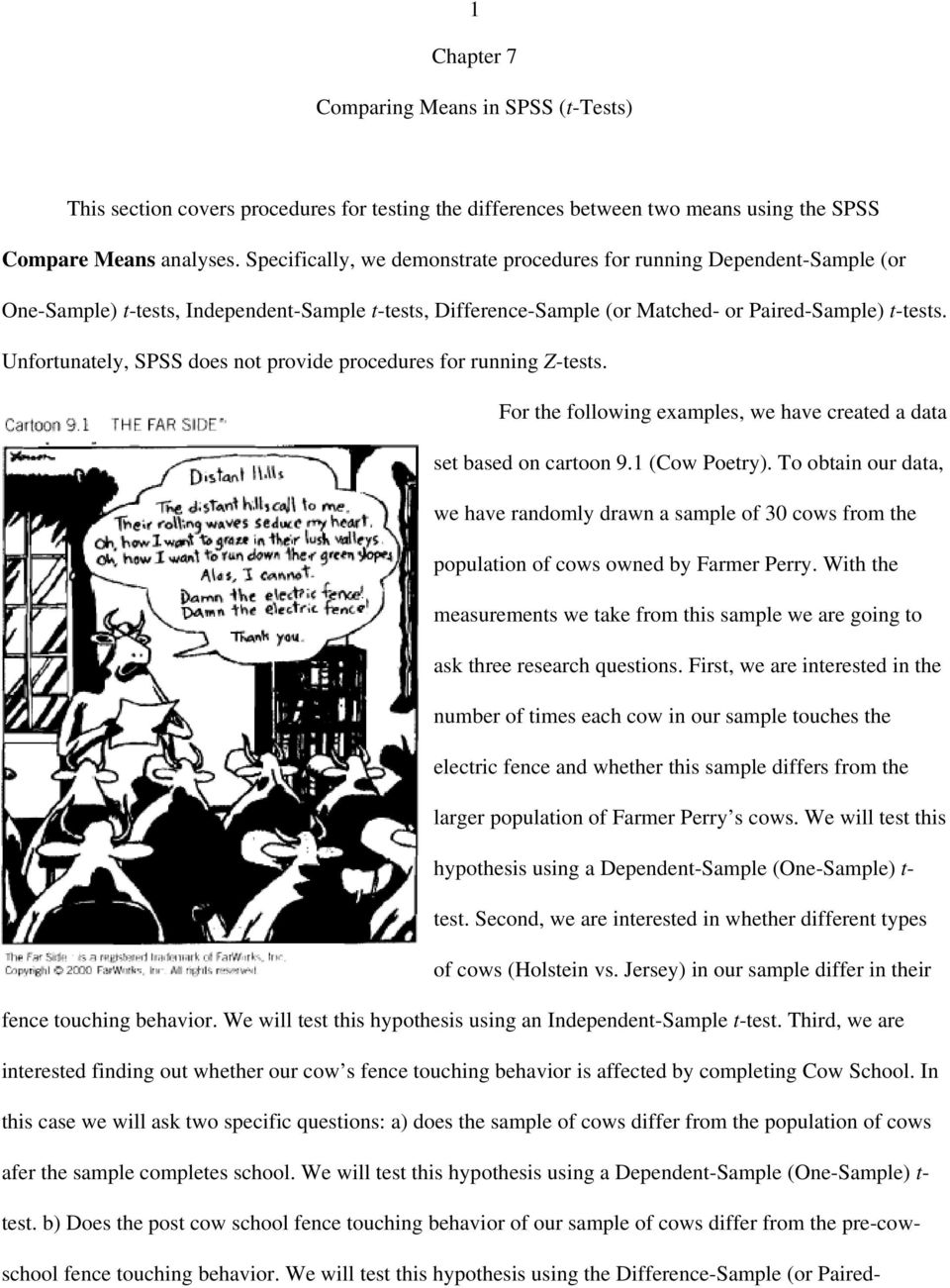
1 1 Chapter 7 Comparing Means in SPSS (t-tests) This section covers procedures for testing the differences between two means using the SPSS Compare Means analyses. Specifically, we demonstrate procedures for running Dependent-Sample (or One-Sample) t-tests, Independent-Sample t-tests, Difference-Sample (or Matched- or Paired-Sample) t-tests. Unfortunately, SPSS does not provide procedures for running Z-tests. For the following examples, we have created a data set based on cartoon 9.1 (Cow Poetry). To obtain our data, we have randomly drawn a sample of 30 cows from the population of cows owned by Farmer Perry. With the measurements we take from this sample we are going to ask three research questions. First, we are interested in the number of times each cow in our sample touches the electric fence and whether this sample differs from the larger population of Farmer Perry s cows. We will test this hypothesis using a Dependent-Sample (One-Sample) t- test. Second, we are interested in whether different types of cows (Holstein vs. Jersey) in our sample differ in their fence touching behavior. We will test this hypothesis using an Independent-Sample t-test. Third, we are interested finding out whether our cow s fence touching behavior is affected by completing Cow School. In this case we will ask two specific questions: a) does the sample of cows differ from the population of cows afer the sample completes school. We will test this hypothesis using a Dependent-Sample (One-Sample) t- test. b) Does the post cow school fence touching behavior of our sample of cows differ from the pre-cowschool fence touching behavior. We will test this hypothesis using the Difference-Sample (or Paired-
2 2 Sample) t-test. Setting Up the Data Figure 9.2 presents the variable view of the SPSS data editor where we have defined three new variables (two continuous and one discrete). The first variable (continuous) represents the frequency with which the cows in our sample touch the electric fence. We have given it the variable name fencetch and given it the variable label Number of Times Cows Touch the Electric Fence. The second variable (discrete) represents the breed of cow for each of our subjects: Holstein vs. Jersey. We have given it the variable name breed and the variable label Cow Breed (Holstein vs. Jersey). Also, we provided value labels for the two breeds. The value of 1 was assigned to the Holstein label, and the value of 2 was assigned to the Jersey label. The third variable (continuous) represents the frequency with which the cows in our sample touch

3 3 the electric fence, which is assessed in the same way fencetch was measured. However, for this variable the measurements were made after the sample had completed 3 weeks of Cow School. We have given it the variable name fenctch2 and the variable label Time 2 Fence Touch: Post Cow School. Figure 9.3 presents the data view of the SPSS data editor. Here, we have entered the 30 cow s data for our three variables. Note that there are two windows presented in the figure. The lefthand window (labeled A) presents the data for the first half of the sample (cows 1 to 15). Window B represents the same SPSS window, where we have scrolled down to show the data for the remaining cows (subjects 16 to 30). Remember that the columns represent each of the different variables and the rows represent each observation, which in this case is each cow. For example, the first cow touched the fence 2 times before attending cow school, is a Holstein, and touched the fence 2 times after attending cow school. Similarly, the 30 th cow touched the fence 25 times before attending cow school, is a Jersey, and touched the fence 21 times after attending cow school. Dependent-Sample (One-Sample) t-test The Dependent-Sample t-test allows us to test whether a sample Mean (0) is significantly different from a population mean (:) when only the sample Standard Deviation (s) is known. In terms of knowing when to use the Dependent t-test, you should consider using this test when you have continuous data collected from a group that you want to compare that group s average score to some known criterion value (probably a population mean). Running the Analyses In this example we present the steps for using One-Sample T Test... data analysis procedure to determine whether a sample mean is significantly different from a criterion value (in this case the population mean). Before you can run this type of analysis you will need to know the value that you want to

4 4 compare with your sample mean. In this case our test (comparison) value is 10 and was obtained by finding the average number of times every one of Farmer Perry s cows touched the electric fence (i.e., the population mean for fence touching). In the procedure presented bellow, we are going to perform two tests at the same time. The first test will compare the mean of fencetch (frequency of touching the electric fence prior to attending cow school) with the population average for touching the electric fence. The second test will compare mean of fenctch2 (frequency of touching the electric fence after attending cow school) with the population average for touching the electric fence. One-Sample T Test Steps (See Figure 9.4): From the Analyze (1) pull down menu, select Compare Means (2), then select One-Sample T Test... (3) from the side menu. In the One-Sample T Test dialogue box, enter the variables fencetch and fenctch2 in the Test Variable(s) field by either double-left-clicking on each variable or selecting the variables and left-clicking on the boxed arrow pointing to the right (4). Next, enter the population mean in the Test Value: (5) field. In this case, our test value is 10. Finally, double check your variables and the test value and either select OK (6) to run, or Paste to create syntax to run at a later time. If you selected the paste option from the procedure above, you should have generated the following syntax:

5 5 T-TEST /TESTVAL=10 /MISSING=ANALYSIS /VARIABLES=fencetch fenctch2 /CRITERIA=CIN (.95). To run the analyses using the syntax, while in the Syntax Editor, select All from the Run pull-down menu. Reading the One-Sample T Test Output The One-Sample T Test Output is presented in Figure 9.5. This output consists of two parts: One-Sample Statistics and One-Sample Tests. The One-Sample Statistics output presents the sample size (N), mean, standard deviation, and the standard-error-of-the-mean (the standard deviation divided by the square route of N) for each variable being tested. The One-Sample Tests output reports the t obtained, the degrees of freedom (df = n-1), the two tailed alpha level or level of significance (Sig.), and the difference between the sample mean and the population mean (Mean Difference: Sample Mean - Population Mean). This part of the output also reports a confidence interval for the mean difference. Like the confidence intervals covered in Chapter 8, this confidence interval is the range of scores for which we are 95 % confident that it contains the true mean difference found in the population.

6 6 With respect to the first hypothesis regarding the fence touching behavior of our sample prior to attending cow school, we have a t obtained of 2.387, which with 29 degrees of freedom is significant at the.024 level. Unlike the table of critical values we use to evaluate our hand calculated statistics, SPSS reports the exact level of significance. From these results we can conclude that the average number of times the cows in our sample touch the electric fence is significantly different from the average number of times all of Farmer Perry s cows touch the electric fence. Looking at the Mean Difference statistic, we can be more specific and say that our sample of cows touched the electric fence an average of 2.8 more times than the general population of cows did. With respect to the second hypothesis regarding the fence touching behavior of our sample after attending cow school, we have a t obtained of.24, which is not significant. The alpha level associated with this t value for 29 degrees of freedom is.812, which indicates that there is an 81.2% chance that a difference between the sample mean and population mean this large would occur by chance alone and is likely due to sampling error. Further, because this value is larger than the.05 alpha level, we must reject the alternative hypothesis and conclude that after attending cow school our sample no longer significantly differs from the entire population Farmer Perry s cows. Independent-Sample T Test The Independent-Sample t-test allows us to test whether a two sample means are significantly different from each other. In terms of knowing when to use the Independent-sample t-test, you should consider using this test when you have two variables; one discrete variable consisting of two groups and on continuous variable consisting of a continuum of scores. In our current example, our discrete variable, breed, consists of the Holstein and Jersey groups. Also, we will use the continuous variable fencetch, which represents the frequency of touching the electric fence prior to attending cow school. With this data
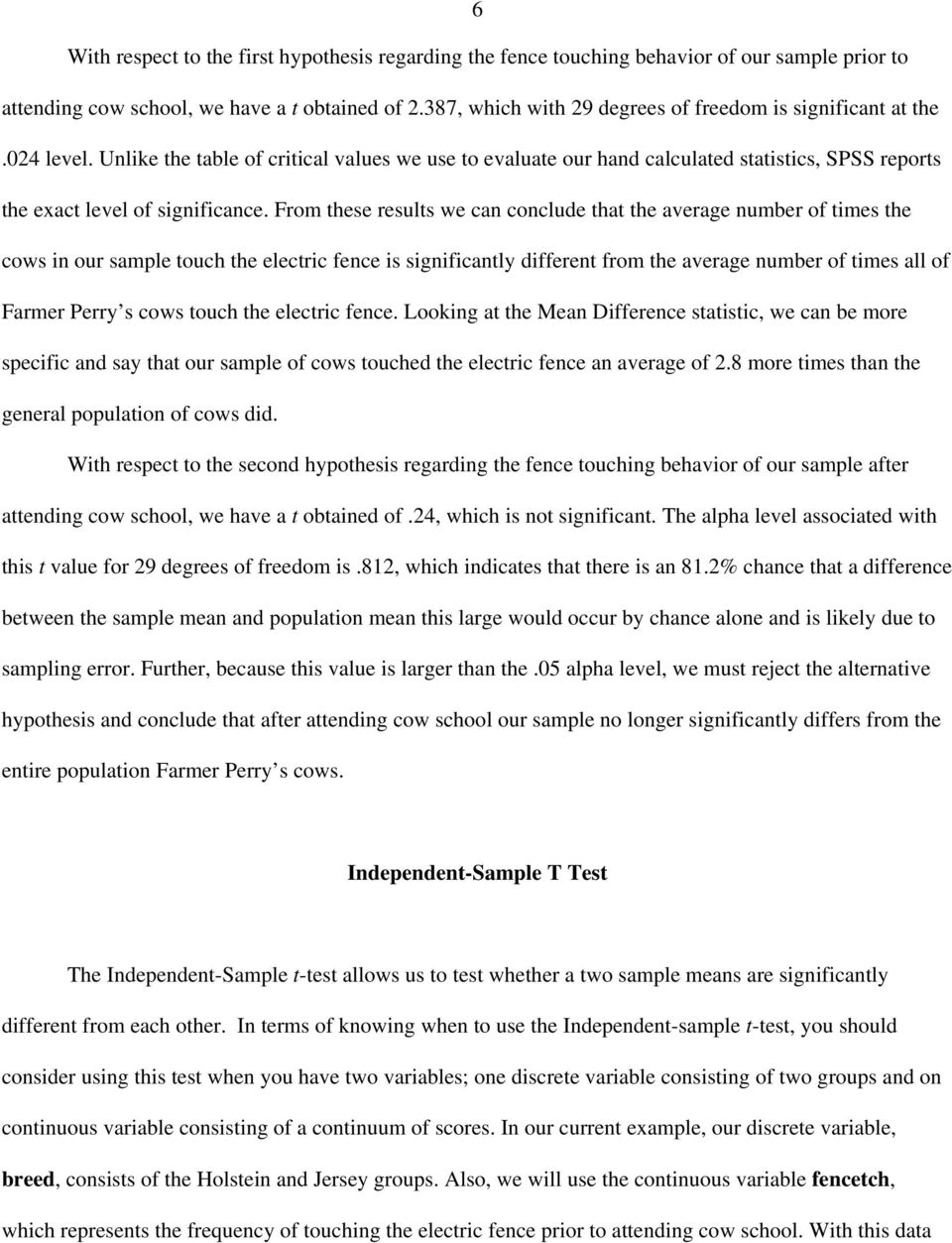
7 7 we can test the hypothesis that the average number of times that unschooled Holsteins touch the electric fence significantly differs from the average number of times that unschooled Jerseys touch the electric fence. Running the Independent-Sample T Test Independent-Sample T Test Steps (See Figure 9.6): From the Analyze (1) pull down menu, select Compare Means (2), then select Independent-Sample T Test... (3) from the side menu. In the Independent-Sample T Test dialogue box, enter the continuous variable fencetch in the Test Variable(s) field (4) by left-clicking the variable and left-clicking on the boxed arrow pointing to the Test Variable(s) field. Next, enter the discrete variable breed in the Grouping Variabel: field (5). To tell SPSS what values have been paired with each group, left-click the Define Groups... button (6). In the Define Groups dialogue box, enter the numerical values that have been used to represent the groups of interest into the Group 1: and Group 2: fields (7). In this case we have used the numerical values of 1 and 2 and have entered them in the Group 1: and Group 2: fields, respectively. Next, left-click Continue (8). Finally, double check your variables and either select OK (9) to run, or Paste to create syntax to run at a later time.
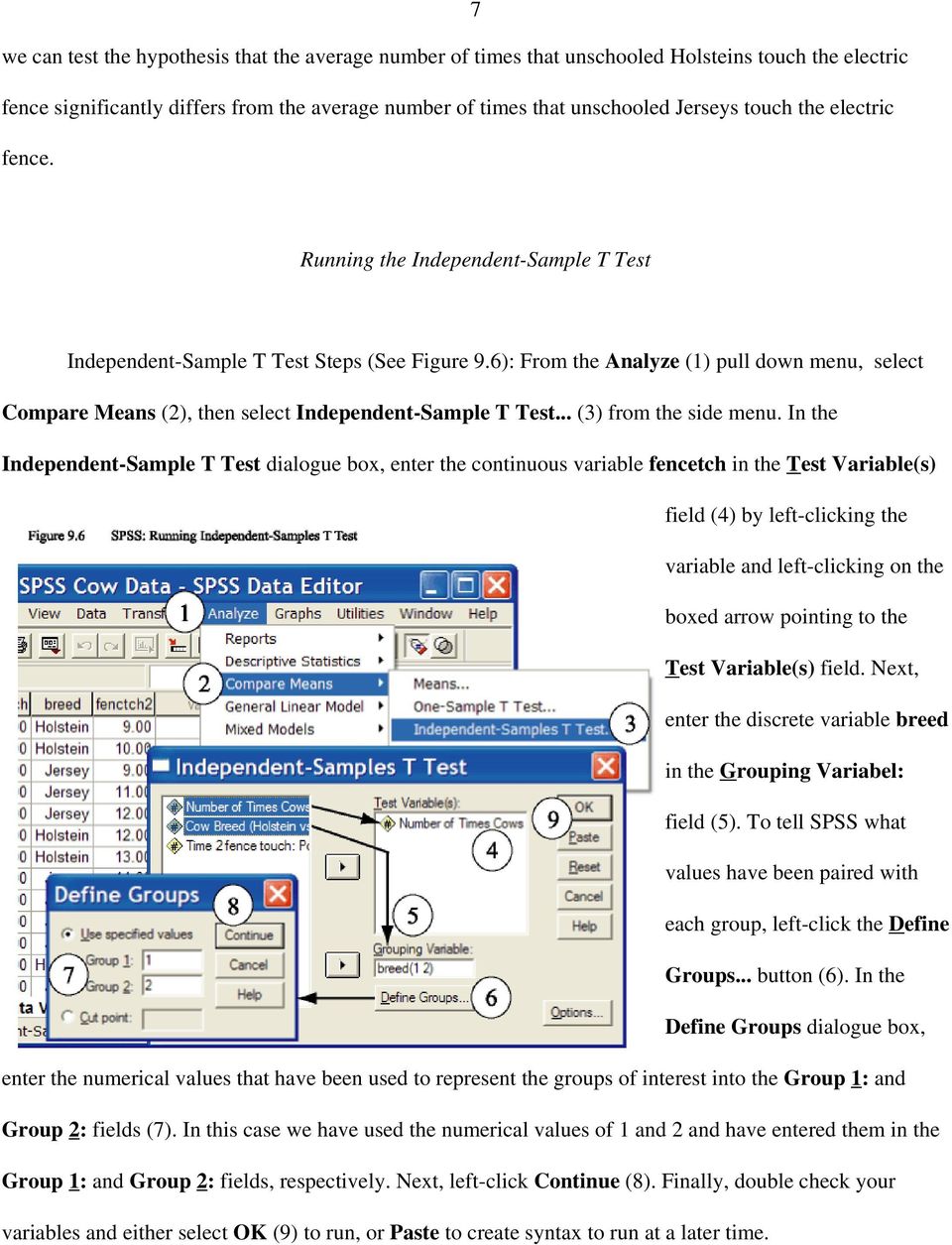
8 8 If you selected the paste option from the procedure above, you should have generated the following syntax: T-TEST GROUPS=breed(1 2) /MISSING=ANALYSIS /VARIABLES=fencetch /CRITERIA=CIN(.95). To run the analyses using the syntax, while in the Syntax Editor, select All from the Run pull-down menu. Reading the Independent-Sample T Test Output Figure 9.7 presents the output for the Independent-Sample T Test. This output consists of two major parts: Group Statistics and Independent Samples Test. The Group Statistics output provides the sample sizes (N), means, standard deviations, and the standard error of the mean (the standard deviation divided by the square root of n) for the continuous variable, separate for each group. With respect to our current example, there were 14 Holsteins in our sample, and they touched the electric fence an average of , with a standard deviation and standard error of the mean of and , respectively. Similarly, there were 16 Jerseys, and they touched the electric fence an average of , with a standard deviation and standard error of the mean of and , respectively. The Independent-Samples Test output presented in Figures 9.7 is further split into three parts. However, depending on your printer settings the format of your printed output may differ somewhat from what we have presented, but all the parts will be same. The first part of this output (which we have labeled A), tests one of the assumptions that must be met in order to properly use independent sample t tests. That is, the group standard deviations should be equal. If they are equal then we can use the standard t test procedures covered in this chapter. However, if the variability within the two groups is not equivalent (equal) then we need to used a test that corrects for this. Both the standard t test and the modified t test

9 9 results are presented in the output box we have labeled as B and are presented in the rows labeled Equal

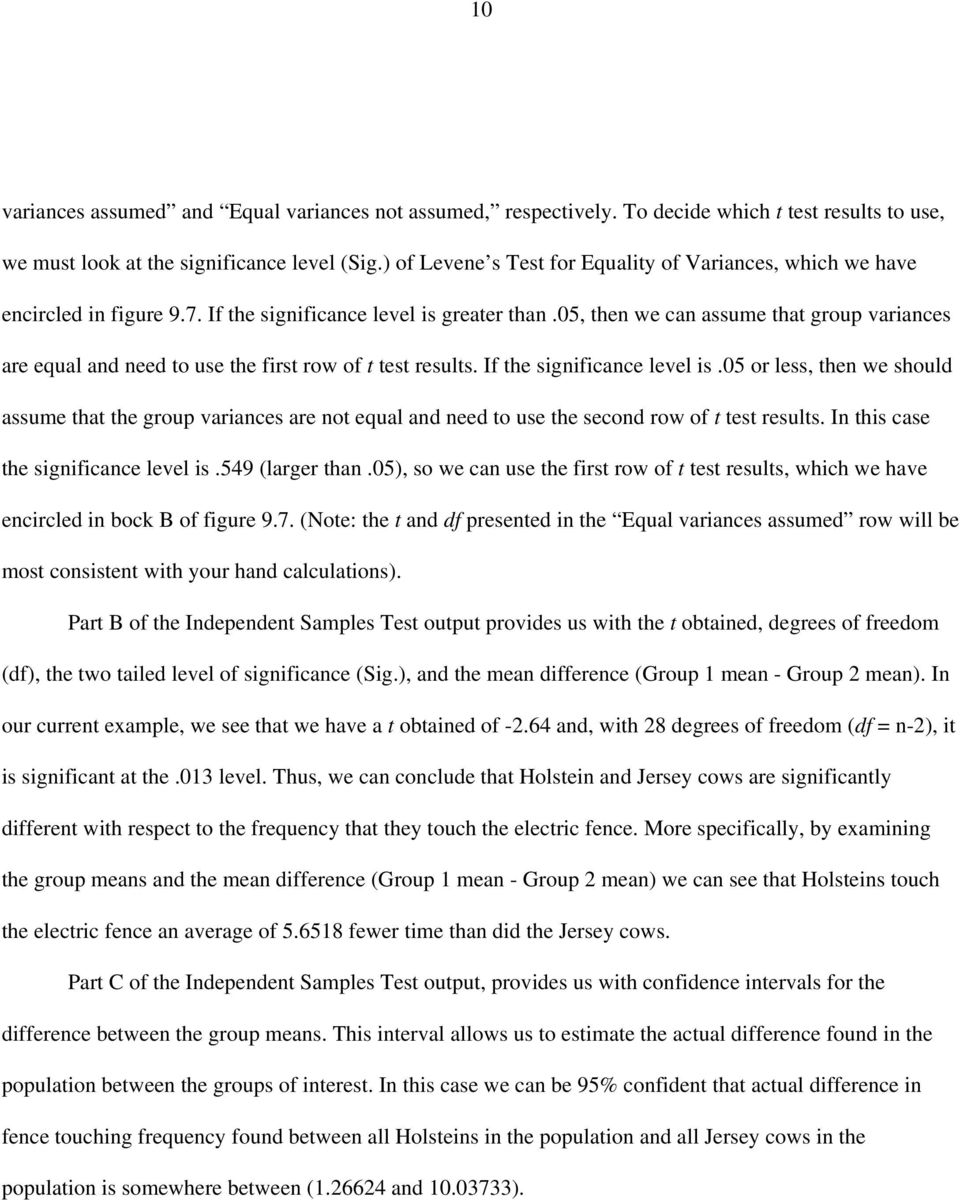
10 10 variances assumed and Equal variances not assumed, respectively. To decide which t test results to use, we must look at the significance level (Sig.) of Levene s Test for Equality of Variances, which we have encircled in figure 9.7. If the significance level is greater than.05, then we can assume that group variances are equal and need to use the first row of t test results. If the significance level is.05 or less, then we should assume that the group variances are not equal and need to use the second row of t test results. In this case the significance level is.549 (larger than.05), so we can use the first row of t test results, which we have encircled in bock B of figure 9.7. (Note: the t and df presented in the Equal variances assumed row will be most consistent with your hand calculations). Part B of the Independent Samples Test output provides us with the t obtained, degrees of freedom (df), the two tailed level of significance (Sig.), and the mean difference (Group 1 mean - Group 2 mean). In our current example, we see that we have a t obtained of and, with 28 degrees of freedom (df = n-2), it is significant at the.013 level. Thus, we can conclude that Holstein and Jersey cows are significantly different with respect to the frequency that they touch the electric fence. More specifically, by examining the group means and the mean difference (Group 1 mean - Group 2 mean) we can see that Holsteins touch the electric fence an average of fewer time than did the Jersey cows. Part C of the Independent Samples Test output, provides us with confidence intervals for the difference between the group means. This interval allows us to estimate the actual difference found in the population between the groups of interest. In this case we can be 95% confident that actual difference in fence touching frequency found between all Holsteins in the population and all Jersey cows in the population is somewhere between ( and ).
11 11 Difference-Sample (Paired-Sample) T Test The Difference-Sample t-test allows us to test whether a two sample means, collected from the same group on two separate occasions, are significantly different from each other. In terms of knowing when to use the Difference- Sample t-test, you should consider using this test when you have two continuous variables that represent the same variable measured on two separate occasions. In our current example, we have measured fence touching behavior twice; once before our cows attended cow school (fencetch) and once after attending cow school (fenctch2). With this data we can test the hypothesis that the average number of times that unschooled cows touch the electric fence significantly differs from the average number of times that the same cows touch the electric fence after attending three weeks of cow school. Running the Dependent-Sample (Paired-Sample) T Test Paired-Sample T Test Steps (See Figure 9.8): From the Analyze (1) pull down menu, select Compare Means (2), then select Paired-Sample T Test... (3) from the side menu. In the Paired-Sample T Test dialogue box, left-click the continuous variable fencetch and then left-click the continuous variable fenctch2. Next enter the analysis pair in the Paired Variable(s) field by left-clicking on the boxed arrow (4) pointing to the Paired Variable(s) field. Finally, double check your variables and either select OK (5)
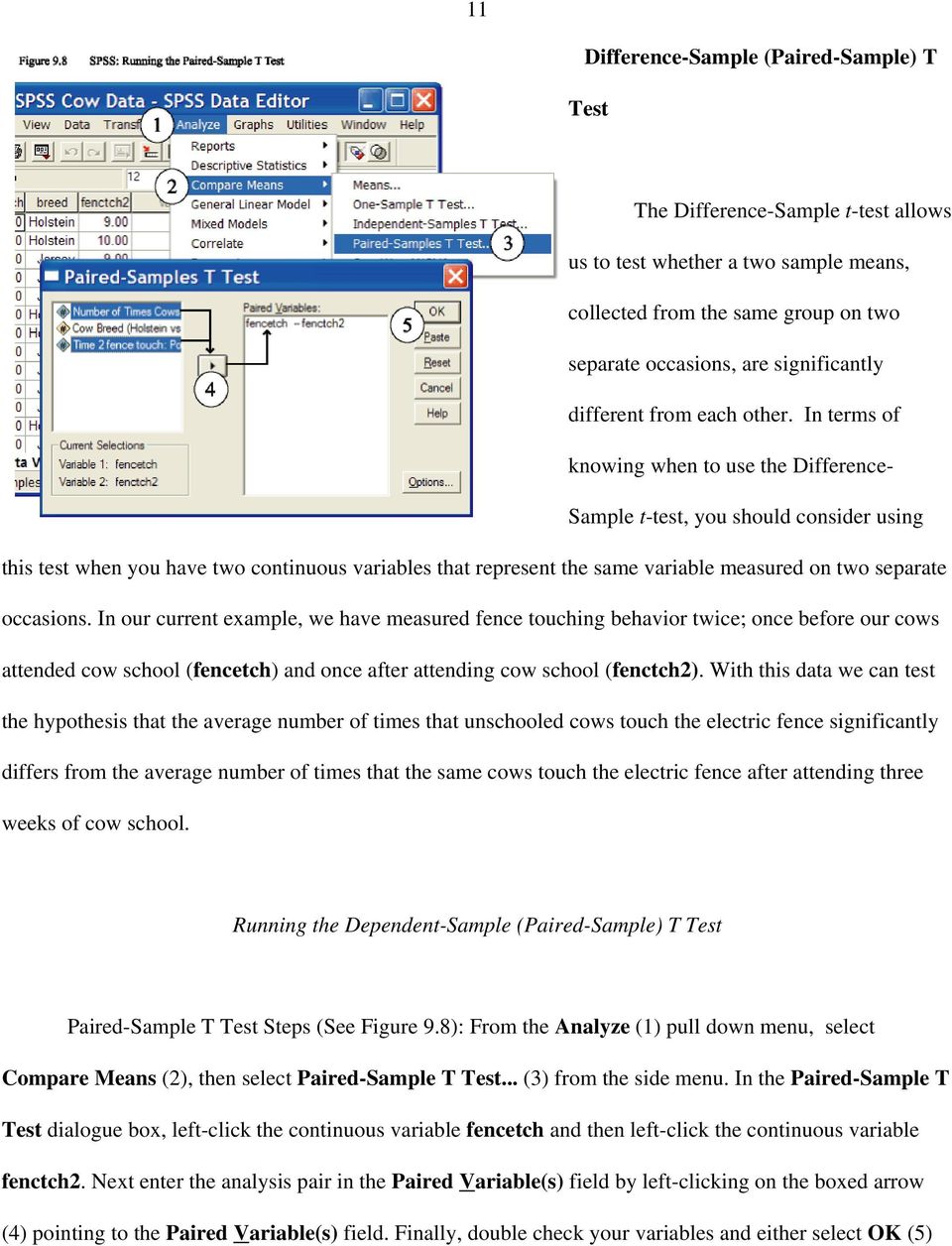
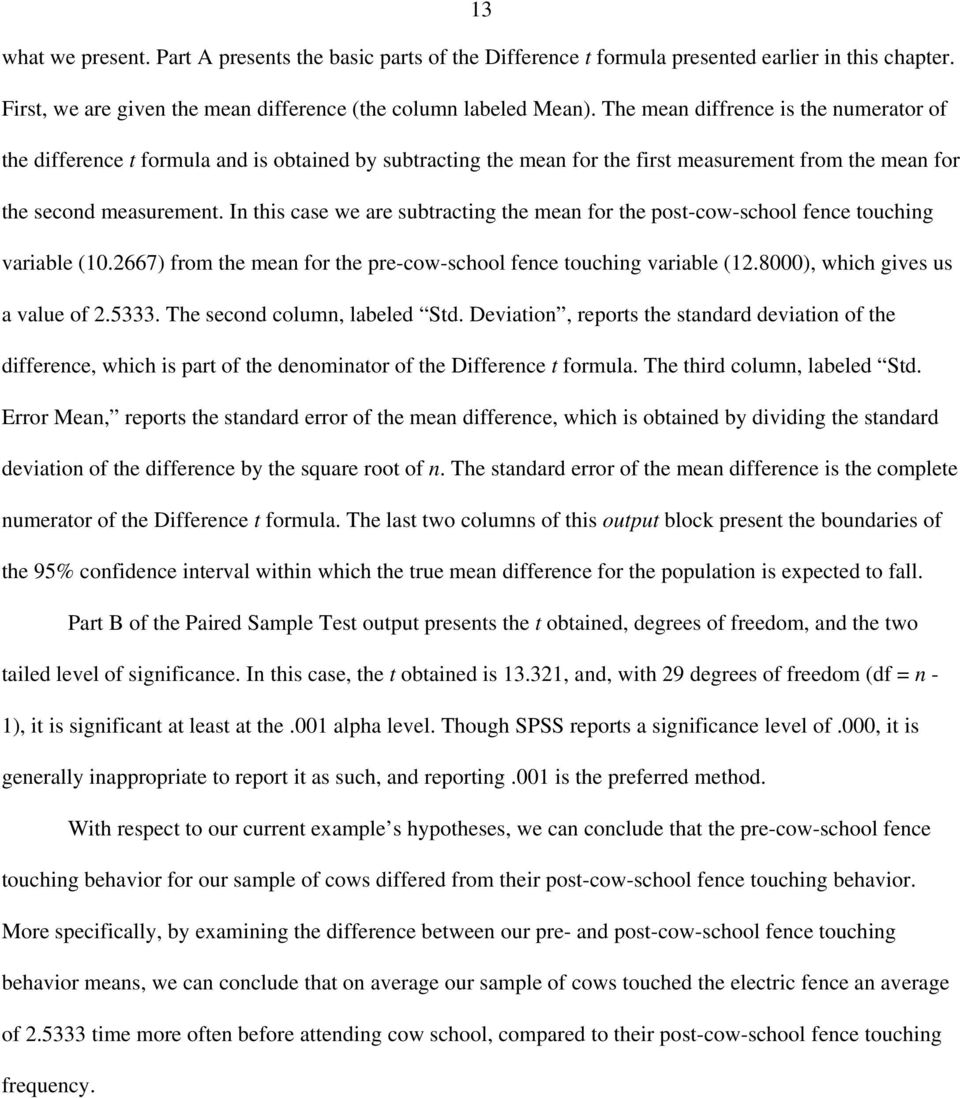
12 12 to run, or Paste to create syntax to run at a later time. If you selected the paste option from the procedure above, you should have generated the following syntax: T-TEST PAIRS= fencetch WITH fenctch2 (PAIRED) /CRITERIA=CIN(.95) /MISSING=ANALYSIS. To run the analyses using the syntax, while in the Syntax Editor, select All from the Run pull-down menu. Reading the Paired-Sample Output Figure 9.9 presents the output for the Paired-Sample T Test. This output consists of three major parts: Paired Samples Statistics, Paired Samples Correlations, and Paired Samples Test. The Paired Samples Statistics output provides the mean, sample sizes (N), standard deviations, and the standard error of the mean (the standard deviation divided by the square root of n) for each continuous variable. The Paired Samples Correlations output presents a hypothesis testing statistic that will be covered in next chapter on Correlation and Regression. Essentially this statistics tells us how strongly related our two variables are. The closer correlation value gets to 1 (or -1) the more related our two variables are. In figure 9.9, the Paired Sample Test output is split into two parts, which we have labeled A and B. Again, depending on your printer settings, the format of your printed output may be little different from
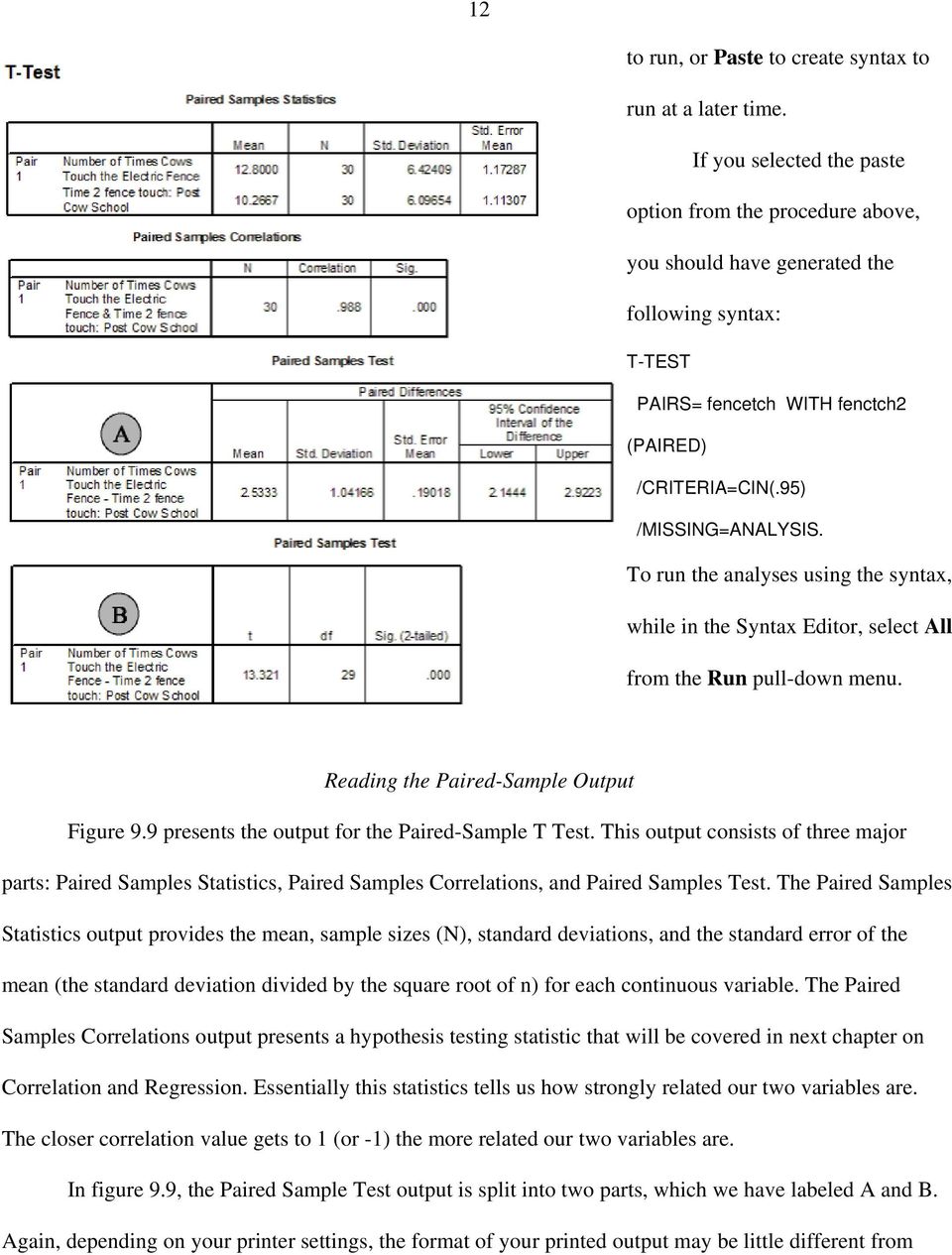
13 13 what we present. Part A presents the basic parts of the Difference t formula presented earlier in this chapter. First, we are given the mean difference (the column labeled Mean). The mean diffrence is the numerator of the difference t formula and is obtained by subtracting the mean for the first measurement from the mean for the second measurement. In this case we are subtracting the mean for the post-cow-school fence touching variable ( ) from the mean for the pre-cow-school fence touching variable ( ), which gives us a value of The second column, labeled Std. Deviation, reports the standard deviation of the difference, which is part of the denominator of the Difference t formula. The third column, labeled Std. Error Mean, reports the standard error of the mean difference, which is obtained by dividing the standard deviation of the difference by the square root of n. The standard error of the mean difference is the complete numerator of the Difference t formula. The last two columns of this output block present the boundaries of the 95% confidence interval within which the true mean difference for the population is expected to fall. Part B of the Paired Sample Test output presents the t obtained, degrees of freedom, and the two tailed level of significance. In this case, the t obtained is , and, with 29 degrees of freedom (df = n - 1), it is significant at least at the.001 alpha level. Though SPSS reports a significance level of.000, it is generally inappropriate to report it as such, and reporting.001 is the preferred method. With respect to our current example s hypotheses, we can conclude that the pre-cow-school fence touching behavior for our sample of cows differed from their post-cow-school fence touching behavior. More specifically, by examining the difference between our pre- and post-cow-school fence touching behavior means, we can conclude that on average our sample of cows touched the electric fence an average of time more often before attending cow school, compared to their post-cow-school fence touching frequency.
One-Way ANOVA using SPSS 11.0. SPSS ANOVA procedures found in the Compare Means analyses. Specifically, we demonstrate
 1 One-Way ANOVA using SPSS 11.0 This section covers steps for testing the difference between three or more group means using the SPSS ANOVA procedures found in the Compare Means analyses. Specifically,
Chapter 13. Chi-Square. Crosstabs and Nonparametric Tests. Specifically, we demonstrate procedures for running two separate
 1 Chapter 13 Chi-Square This section covers the steps for running and interpreting chi-square analyses using the SPSS Crosstabs and Nonparametric Tests. Specifically, we demonstrate procedures for running
Two Related Samples t Test
 Two Related Samples t Test In this example 1 students saw five pictures of attractive people and five pictures of unattractive people. For each picture, the students rated the friendliness of the person
Chapter 2 Probability Topics SPSS T tests
 Chapter 2 Probability Topics SPSS T tests Data file used: gss.sav In the lecture about chapter 2, only the One-Sample T test has been explained. In this handout, we also give the SPSS methods to perform
Simple Linear Regression, Scatterplots, and Bivariate Correlation
 1 Simple Linear Regression, Scatterplots, and Bivariate Correlation This section covers procedures for testing the association between two continuous variables using the SPSS Regression and Correlate analyses.
SPSS Tests for Versions 9 to 13
 SPSS Tests for Versions 9 to 13 Chapter 2 Descriptive Statistic (including median) Choose Analyze Descriptive statistics Frequencies... Click on variable(s) then press to move to into Variable(s): list
UNDERSTANDING THE DEPENDENT-SAMPLES t TEST
 UNDERSTANDING THE DEPENDENT-SAMPLES t TEST A dependent-samples t test (a.k.a. matched or paired-samples, matched-pairs, samples, or subjects, simple repeated-measures or within-groups, or correlated groups)
Independent t- Test (Comparing Two Means)
 Independent t- Test (Comparing Two Means) The objectives of this lesson are to learn: the definition/purpose of independent t-test when to use the independent t-test the use of SPSS to complete an independent
Testing Group Differences using T-tests, ANOVA, and Nonparametric Measures
 Testing Group Differences using T-tests, ANOVA, and Nonparametric Measures Jamie DeCoster Department of Psychology University of Alabama 348 Gordon Palmer Hall Box 870348 Tuscaloosa, AL 35487-0348 Phone:
January 26, 2009 The Faculty Center for Teaching and Learning
 THE BASICS OF DATA MANAGEMENT AND ANALYSIS A USER GUIDE January 26, 2009 The Faculty Center for Teaching and Learning THE BASICS OF DATA MANAGEMENT AND ANALYSIS Table of Contents Table of Contents... i
Lesson 1: Comparison of Population Means Part c: Comparison of Two- Means
 Lesson : Comparison of Population Means Part c: Comparison of Two- Means Welcome to lesson c. This third lesson of lesson will discuss hypothesis testing for two independent means. Steps in Hypothesis
The Dummy s Guide to Data Analysis Using SPSS
 The Dummy s Guide to Data Analysis Using SPSS Mathematics 57 Scripps College Amy Gamble April, 2001 Amy Gamble 4/30/01 All Rights Rerserved TABLE OF CONTENTS PAGE Helpful Hints for All Tests...1 Tests
INTERPRETING THE ONE-WAY ANALYSIS OF VARIANCE (ANOVA)
 INTERPRETING THE ONE-WAY ANALYSIS OF VARIANCE (ANOVA) As with other parametric statistics, we begin the one-way ANOVA with a test of the underlying assumptions. Our first assumption is the assumption of
Chapter 5 Analysis of variance SPSS Analysis of variance
 Chapter 5 Analysis of variance SPSS Analysis of variance Data file used: gss.sav How to get there: Analyze Compare Means One-way ANOVA To test the null hypothesis that several population means are equal,
One-Way Analysis of Variance
 One-Way Analysis of Variance Note: Much of the math here is tedious but straightforward. We ll skim over it in class but you should be sure to ask questions if you don t understand it. I. Overview A. We
Chapter 7 Section 7.1: Inference for the Mean of a Population
 Chapter 7 Section 7.1: Inference for the Mean of a Population Now let s look at a similar situation Take an SRS of size n Normal Population : N(, ). Both and are unknown parameters. Unlike what we used
7. Comparing Means Using t-tests.
 7. Comparing Means Using t-tests. Objectives Calculate one sample t-tests Calculate paired samples t-tests Calculate independent samples t-tests Graphically represent mean differences In this chapter,
Data Analysis in SPSS. February 21, 2004. If you wish to cite the contents of this document, the APA reference for them would be
 Data Analysis in SPSS Jamie DeCoster Department of Psychology University of Alabama 348 Gordon Palmer Hall Box 870348 Tuscaloosa, AL 35487-0348 Heather Claypool Department of Psychology Miami University
SPSS Explore procedure
 SPSS Explore procedure One useful function in SPSS is the Explore procedure, which will produce histograms, boxplots, stem-and-leaf plots and extensive descriptive statistics. To run the Explore procedure,
Psych. Research 1 Guide to SPSS 11.0
 SPSS GUIDE 1 Psych. Research 1 Guide to SPSS 11.0 I. What is SPSS: SPSS (Statistical Package for the Social Sciences) is a data management and analysis program. It allows us to store and analyze very large
Testing for differences I exercises with SPSS
 Testing for differences I exercises with SPSS Introduction The exercises presented here are all about the t-test and its non-parametric equivalents in their various forms. In SPSS, all these tests can
Outline. Definitions Descriptive vs. Inferential Statistics The t-test - One-sample t-test
 The t-test Outline Definitions Descriptive vs. Inferential Statistics The t-test - One-sample t-test - Dependent (related) groups t-test - Independent (unrelated) groups t-test Comparing means Correlation
DDBA 8438: The t Test for Independent Samples Video Podcast Transcript
 DDBA 8438: The t Test for Independent Samples Video Podcast Transcript JENNIFER ANN MORROW: Welcome to The t Test for Independent Samples. My name is Dr. Jennifer Ann Morrow. In today's demonstration,
Using Microsoft Excel to Analyze Data from the Disk Diffusion Assay
 Using Microsoft Excel to Analyze Data from the Disk Diffusion Assay Entering and Formatting Data Open Excel. Set up the spreadsheet page (Sheet 1) so that anyone who reads it will understand the page (Figure
SCHOOL OF HEALTH AND HUMAN SCIENCES DON T FORGET TO RECODE YOUR MISSING VALUES
 SCHOOL OF HEALTH AND HUMAN SCIENCES Using SPSS Topics addressed today: 1. Differences between groups 2. Graphing Use the s4data.sav file for the first part of this session. DON T FORGET TO RECODE YOUR
Study Guide for the Final Exam
 Study Guide for the Final Exam When studying, remember that the computational portion of the exam will only involve new material (covered after the second midterm), that material from Exam 1 will make
t Tests in Excel The Excel Statistical Master By Mark Harmon Copyright 2011 Mark Harmon
 t-tests in Excel By Mark Harmon Copyright 2011 Mark Harmon No part of this publication may be reproduced or distributed without the express permission of the author. [email protected] www.excelmasterseries.com
Projects Involving Statistics (& SPSS)
 Projects Involving Statistics (& SPSS) Academic Skills Advice Starting a project which involves using statistics can feel confusing as there seems to be many different things you can do (charts, graphs,
Using MS Excel to Analyze Data: A Tutorial
 Using MS Excel to Analyze Data: A Tutorial Various data analysis tools are available and some of them are free. Because using data to improve assessment and instruction primarily involves descriptive and
Using Excel for inferential statistics
 FACT SHEET Using Excel for inferential statistics Introduction When you collect data, you expect a certain amount of variation, just caused by chance. A wide variety of statistical tests can be applied
LAB 4 INSTRUCTIONS CONFIDENCE INTERVALS AND HYPOTHESIS TESTING
 LAB 4 INSTRUCTIONS CONFIDENCE INTERVALS AND HYPOTHESIS TESTING In this lab you will explore the concept of a confidence interval and hypothesis testing through a simulation problem in engineering setting.
EXCEL Analysis TookPak [Statistical Analysis] 1. First of all, check to make sure that the Analysis ToolPak is installed. Here is how you do it:
![EXCEL Analysis TookPak [Statistical Analysis] 1. First of all, check to make sure that the Analysis ToolPak is installed. Here is how you do it:](/thumbs/30/14272010.jpg "EXCEL Analysis TookPak [Statistical Analysis] 1. First of all, check to make sure that the Analysis ToolPak is installed. Here is how you do it:") EXCEL Analysis TookPak [Statistical Analysis] 1 First of all, check to make sure that the Analysis ToolPak is installed. Here is how you do it: a. From the Tools menu, choose Add-Ins b. Make sure Analysis
EXCEL Analysis TookPak [Statistical Analysis] 1 First of all, check to make sure that the Analysis ToolPak is installed. Here is how you do it: a. From the Tools menu, choose Add-Ins b. Make sure Analysis
Using Microsoft Excel to Analyze Data
 Entering and Formatting Data Using Microsoft Excel to Analyze Data Open Excel. Set up the spreadsheet page (Sheet 1) so that anyone who reads it will understand the page. For the comparison of pipets:
A Basic Guide to Analyzing Individual Scores Data with SPSS
 A Basic Guide to Analyzing Individual Scores Data with SPSS Step 1. Clean the data file Open the Excel file with your data. You may get the following message: If you get this message, click yes. Delete
Mixed 2 x 3 ANOVA. Notes
 Mixed 2 x 3 ANOVA This section explains how to perform an ANOVA when one of the variables takes the form of repeated measures and the other variable is between-subjects that is, independent groups of participants
HYPOTHESIS TESTING WITH SPSS:
 HYPOTHESIS TESTING WITH SPSS: A NON-STATISTICIAN S GUIDE & TUTORIAL by Dr. Jim Mirabella SPSS 14.0 screenshots reprinted with permission from SPSS Inc. Published June 2006 Copyright Dr. Jim Mirabella CHAPTER
CALCULATIONS & STATISTICS
 CALCULATIONS & STATISTICS CALCULATION OF SCORES Conversion of 1-5 scale to 0-100 scores When you look at your report, you will notice that the scores are reported on a 0-100 scale, even though respondents
Examining Differences (Comparing Groups) using SPSS Inferential statistics (Part I) Dwayne Devonish
 Examining Differences (Comparing Groups) using SPSS Inferential statistics (Part I) Dwayne Devonish Statistics Statistics are quantitative methods of describing, analysing, and drawing inferences (conclusions)
Chapter 9. Two-Sample Tests. Effect Sizes and Power Paired t Test Calculation
 Chapter 9 Two-Sample Tests Paired t Test (Correlated Groups t Test) Effect Sizes and Power Paired t Test Calculation Summary Independent t Test Chapter 9 Homework Power and Two-Sample Tests: Paired Versus
Chapter Seven. Multiple regression An introduction to multiple regression Performing a multiple regression on SPSS
 Chapter Seven Multiple regression An introduction to multiple regression Performing a multiple regression on SPSS Section : An introduction to multiple regression WHAT IS MULTIPLE REGRESSION? Multiple
research/scientific includes the following: statistical hypotheses: you have a null and alternative you accept one and reject the other
 1 Hypothesis Testing Richard S. Balkin, Ph.D., LPC-S, NCC 2 Overview When we have questions about the effect of a treatment or intervention or wish to compare groups, we use hypothesis testing Parametric
UNDERSTANDING THE TWO-WAY ANOVA
 UNDERSTANDING THE e have seen how the one-way ANOVA can be used to compare two or more sample means in studies involving a single independent variable. This can be extended to two independent variables
SPSS Guide: Regression Analysis
 SPSS Guide: Regression Analysis I put this together to give you a step-by-step guide for replicating what we did in the computer lab. It should help you run the tests we covered. The best way to get familiar
Introduction to. Hypothesis Testing CHAPTER LEARNING OBJECTIVES. 1 Identify the four steps of hypothesis testing.
 Introduction to Hypothesis Testing CHAPTER 8 LEARNING OBJECTIVES After reading this chapter, you should be able to: 1 Identify the four steps of hypothesis testing. 2 Define null hypothesis, alternative
Recall this chart that showed how most of our course would be organized:
 Chapter 4 One-Way ANOVA Recall this chart that showed how most of our course would be organized: Explanatory Variable(s) Response Variable Methods Categorical Categorical Contingency Tables Categorical
8 6 X 2 Test for a Variance or Standard Deviation
 Section 8 6 x 2 Test for a Variance or Standard Deviation 437 This test uses the P-value method. Therefore, it is not necessary to enter a significance level. 1. Select MegaStat>Hypothesis Tests>Proportion
Bill Burton Albert Einstein College of Medicine [email protected] April 28, 2014 EERS: Managing the Tension Between Rigor and Resources 1
 Bill Burton Albert Einstein College of Medicine [email protected] April 28, 2014 EERS: Managing the Tension Between Rigor and Resources 1 Calculate counts, means, and standard deviations Produce
An introduction to IBM SPSS Statistics
 An introduction to IBM SPSS Statistics Contents 1 Introduction... 1 2 Entering your data... 2 3 Preparing your data for analysis... 10 4 Exploring your data: univariate analysis... 14 5 Generating descriptive
HYPOTHESIS TESTING: CONFIDENCE INTERVALS, T-TESTS, ANOVAS, AND REGRESSION
 HYPOTHESIS TESTING: CONFIDENCE INTERVALS, T-TESTS, ANOVAS, AND REGRESSION HOD 2990 10 November 2010 Lecture Background This is a lightning speed summary of introductory statistical methods for senior undergraduate
KSTAT MINI-MANUAL. Decision Sciences 434 Kellogg Graduate School of Management
 KSTAT MINI-MANUAL Decision Sciences 434 Kellogg Graduate School of Management Kstat is a set of macros added to Excel and it will enable you to do the statistics required for this course very easily. To
Data Analysis Tools. Tools for Summarizing Data
 Data Analysis Tools This section of the notes is meant to introduce you to many of the tools that are provided by Excel under the Tools/Data Analysis menu item. If your computer does not have that tool
THE FIRST SET OF EXAMPLES USE SUMMARY DATA... EXAMPLE 7.2, PAGE 227 DESCRIBES A PROBLEM AND A HYPOTHESIS TEST IS PERFORMED IN EXAMPLE 7.
 THERE ARE TWO WAYS TO DO HYPOTHESIS TESTING WITH STATCRUNCH: WITH SUMMARY DATA (AS IN EXAMPLE 7.17, PAGE 236, IN ROSNER); WITH THE ORIGINAL DATA (AS IN EXAMPLE 8.5, PAGE 301 IN ROSNER THAT USES DATA FROM
IBM SPSS Statistics 20 Part 4: Chi-Square and ANOVA
 CALIFORNIA STATE UNIVERSITY, LOS ANGELES INFORMATION TECHNOLOGY SERVICES IBM SPSS Statistics 20 Part 4: Chi-Square and ANOVA Summer 2013, Version 2.0 Table of Contents Introduction...2 Downloading the
Introduction to Analysis of Variance (ANOVA) Limitations of the t-test
 Introduction to Analysis of Variance (ANOVA) The Structural Model, The Summary Table, and the One- Way ANOVA Limitations of the t-test Although the t-test is commonly used, it has limitations Can only
Unit 31 A Hypothesis Test about Correlation and Slope in a Simple Linear Regression
 Unit 31 A Hypothesis Test about Correlation and Slope in a Simple Linear Regression Objectives: To perform a hypothesis test concerning the slope of a least squares line To recognize that testing for a
Association Between Variables
 Contents 11 Association Between Variables 767 11.1 Introduction............................ 767 11.1.1 Measure of Association................. 768 11.1.2 Chapter Summary.................... 769 11.2 Chi
NCSS Statistical Software
 Chapter 06 Introduction This procedure provides several reports for the comparison of two distributions, including confidence intervals for the difference in means, two-sample t-tests, the z-test, the
NCSS Statistical Software
 Chapter 06 Introduction This procedure provides several reports for the comparison of two distributions, including confidence intervals for the difference in means, two-sample t-tests, the z-test, the
Calculating P-Values. Parkland College. Isela Guerra Parkland College. Recommended Citation
 Parkland College A with Honors Projects Honors Program 2014 Calculating P-Values Isela Guerra Parkland College Recommended Citation Guerra, Isela, "Calculating P-Values" (2014). A with Honors Projects.
Measuring Evaluation Results with Microsoft Excel
 LAURA COLOSI Measuring Evaluation Results with Microsoft Excel The purpose of this tutorial is to provide instruction on performing basic functions using Microsoft Excel. Although Excel has the ability
ANOVA ANOVA. Two-Way ANOVA. One-Way ANOVA. When to use ANOVA ANOVA. Analysis of Variance. Chapter 16. A procedure for comparing more than two groups
 ANOVA ANOVA Analysis of Variance Chapter 6 A procedure for comparing more than two groups independent variable: smoking status non-smoking one pack a day > two packs a day dependent variable: number of
Doing Multiple Regression with SPSS. In this case, we are interested in the Analyze options so we choose that menu. If gives us a number of choices:
 Doing Multiple Regression with SPSS Multiple Regression for Data Already in Data Editor Next we want to specify a multiple regression analysis for these data. The menu bar for SPSS offers several options:
Odds ratio, Odds ratio test for independence, chi-squared statistic.
 Odds ratio, Odds ratio test for independence, chi-squared statistic. Announcements: Assignment 5 is live on webpage. Due Wed Aug 1 at 4:30pm. (9 days, 1 hour, 58.5 minutes ) Final exam is Aug 9. Review
Chapter 23. Inferences for Regression
 Chapter 23. Inferences for Regression Topics covered in this chapter: Simple Linear Regression Simple Linear Regression Example 23.1: Crying and IQ The Problem: Infants who cry easily may be more easily
3.4 Statistical inference for 2 populations based on two samples
 3.4 Statistical inference for 2 populations based on two samples Tests for a difference between two population means The first sample will be denoted as X 1, X 2,..., X m. The second sample will be denoted
Testing Research and Statistical Hypotheses
 Testing Research and Statistical Hypotheses Introduction In the last lab we analyzed metric artifact attributes such as thickness or width/thickness ratio. Those were continuous variables, which as you
UNDERSTANDING THE INDEPENDENT-SAMPLES t TEST
 UNDERSTANDING The independent-samples t test evaluates the difference between the means of two independent or unrelated groups. That is, we evaluate whether the means for two independent groups are significantly
Part 3. Comparing Groups. Chapter 7 Comparing Paired Groups 189. Chapter 8 Comparing Two Independent Groups 217
 Part 3 Comparing Groups Chapter 7 Comparing Paired Groups 189 Chapter 8 Comparing Two Independent Groups 217 Chapter 9 Comparing More Than Two Groups 257 188 Elementary Statistics Using SAS Chapter 7 Comparing
The Kruskal-Wallis test:
 Graham Hole Research Skills Kruskal-Wallis handout, version 1.0, page 1 The Kruskal-Wallis test: This test is appropriate for use under the following circumstances: (a) you have three or more conditions
Statistical Functions in Excel
 Statistical Functions in Excel There are many statistical functions in Excel. Moreover, there are other functions that are not specified as statistical functions that are helpful in some statistical analyses.
Having a coin come up heads or tails is a variable on a nominal scale. Heads is a different category from tails.
 Chi-square Goodness of Fit Test The chi-square test is designed to test differences whether one frequency is different from another frequency. The chi-square test is designed for use with data on a nominal
Chapter 13 Introduction to Linear Regression and Correlation Analysis
 Chapter 3 Student Lecture Notes 3- Chapter 3 Introduction to Linear Regression and Correlation Analsis Fall 2006 Fundamentals of Business Statistics Chapter Goals To understand the methods for displaing
Descriptive Statistics
 Descriptive Statistics Primer Descriptive statistics Central tendency Variation Relative position Relationships Calculating descriptive statistics Descriptive Statistics Purpose to describe or summarize
THE KRUSKAL WALLLIS TEST
 THE KRUSKAL WALLLIS TEST TEODORA H. MEHOTCHEVA Wednesday, 23 rd April 08 THE KRUSKAL-WALLIS TEST: The non-parametric alternative to ANOVA: testing for difference between several independent groups 2 NON
Linear Models in STATA and ANOVA
 Session 4 Linear Models in STATA and ANOVA Page Strengths of Linear Relationships 4-2 A Note on Non-Linear Relationships 4-4 Multiple Linear Regression 4-5 Removal of Variables 4-8 Independent Samples
Analysis of categorical data: Course quiz instructions for SPSS
 Analysis of categorical data: Course quiz instructions for SPSS The dataset Please download the Online sales dataset from the Download pod in the Course quiz resources screen. The filename is smr_bus_acd_clo_quiz_online_250.xls.
1.5 Oneway Analysis of Variance
 Statistics: Rosie Cornish. 200. 1.5 Oneway Analysis of Variance 1 Introduction Oneway analysis of variance (ANOVA) is used to compare several means. This method is often used in scientific or medical experiments
TI-Inspire manual 1. Instructions. Ti-Inspire for statistics. General Introduction
 TI-Inspire manual 1 General Introduction Instructions Ti-Inspire for statistics TI-Inspire manual 2 TI-Inspire manual 3 Press the On, Off button to go to Home page TI-Inspire manual 4 Use the to navigate
Introduction to Statistics with SPSS (15.0) Version 2.3 (public)
 Babraham Bioinformatics Introduction to Statistics with SPSS (15.0) Version 2.3 (public) Introduction to Statistics with SPSS 2 Table of contents Introduction... 3 Chapter 1: Opening SPSS for the first
Class 19: Two Way Tables, Conditional Distributions, Chi-Square (Text: Sections 2.5; 9.1)
 Spring 204 Class 9: Two Way Tables, Conditional Distributions, Chi-Square (Text: Sections 2.5; 9.) Big Picture: More than Two Samples In Chapter 7: We looked at quantitative variables and compared the
Additional sources Compilation of sources: http://lrs.ed.uiuc.edu/tseportal/datacollectionmethodologies/jin-tselink/tselink.htm
 Mgt 540 Research Methods Data Analysis 1 Additional sources Compilation of sources: http://lrs.ed.uiuc.edu/tseportal/datacollectionmethodologies/jin-tselink/tselink.htm http://web.utk.edu/~dap/random/order/start.htm
Bowerman, O'Connell, Aitken Schermer, & Adcock, Business Statistics in Practice, Canadian edition
 Bowerman, O'Connell, Aitken Schermer, & Adcock, Business Statistics in Practice, Canadian edition Online Learning Centre Technology Step-by-Step - Excel Microsoft Excel is a spreadsheet software application
Testing a Hypothesis about Two Independent Means
 1314 Testing a Hypothesis about Two Independent Means How can you test the null hypothesis that two population means are equal, based on the results observed in two independent samples? Why can t you use
Multivariate Analysis of Variance. The general purpose of multivariate analysis of variance (MANOVA) is to determine
 2 - Manova 4.3.05 25 Multivariate Analysis of Variance What Multivariate Analysis of Variance is The general purpose of multivariate analysis of variance (MANOVA) is to determine whether multiple levels
How To Check For Differences In The One Way Anova
 MINITAB ASSISTANT WHITE PAPER This paper explains the research conducted by Minitab statisticians to develop the methods and data checks used in the Assistant in Minitab 17 Statistical Software. One-Way
Main Effects and Interactions
 Main Effects & Interactions page 1 Main Effects and Interactions So far, we ve talked about studies in which there is just one independent variable, such as violence of television program. You might randomly
Crosstabulation & Chi Square
 Crosstabulation & Chi Square Robert S Michael Chi-square as an Index of Association After examining the distribution of each of the variables, the researcher s next task is to look for relationships among
Biostatistics: DESCRIPTIVE STATISTICS: 2, VARIABILITY
 Biostatistics: DESCRIPTIVE STATISTICS: 2, VARIABILITY 1. Introduction Besides arriving at an appropriate expression of an average or consensus value for observations of a population, it is important to
Reporting Statistics in Psychology
 This document contains general guidelines for the reporting of statistics in psychology research. The details of statistical reporting vary slightly among different areas of science and also among different
Chapter 7. One-way ANOVA
 Chapter 7 One-way ANOVA One-way ANOVA examines equality of population means for a quantitative outcome and a single categorical explanatory variable with any number of levels. The t-test of Chapter 6 looks
TIPS FOR DOING STATISTICS IN EXCEL
 TIPS FOR DOING STATISTICS IN EXCEL Before you begin, make sure that you have the DATA ANALYSIS pack running on your machine. It comes with Excel. Here s how to check if you have it, and what to do if you
Normality Testing in Excel
 Normality Testing in Excel By Mark Harmon Copyright 2011 Mark Harmon No part of this publication may be reproduced or distributed without the express permission of the author. [email protected]
MONT 107N Understanding Randomness Solutions For Final Examination May 11, 2010
 MONT 07N Understanding Randomness Solutions For Final Examination May, 00 Short Answer (a) (0) How are the EV and SE for the sum of n draws with replacement from a box computed? Solution: The EV is n times
Two-Sample T-Tests Assuming Equal Variance (Enter Means)
 Chapter 4 Two-Sample T-Tests Assuming Equal Variance (Enter Means) Introduction This procedure provides sample size and power calculations for one- or two-sided two-sample t-tests when the variances of
An SPSS companion book. Basic Practice of Statistics
 An SPSS companion book to Basic Practice of Statistics SPSS is owned by IBM. 6 th Edition. Basic Practice of Statistics 6 th Edition by David S. Moore, William I. Notz, Michael A. Flinger. Published by
One-Way Analysis of Variance (ANOVA) Example Problem
 One-Way Analysis of Variance (ANOVA) Example Problem Introduction Analysis of Variance (ANOVA) is a hypothesis-testing technique used to test the equality of two or more population (or treatment) means
Two-sample t-tests. - Independent samples - Pooled standard devation - The equal variance assumption
 Two-sample t-tests. - Independent samples - Pooled standard devation - The equal variance assumption Last time, we used the mean of one sample to test against the hypothesis that the true mean was a particular
Introduction to Regression and Data Analysis
 Statlab Workshop Introduction to Regression and Data Analysis with Dan Campbell and Sherlock Campbell October 28, 2008 I. The basics A. Types of variables Your variables may take several forms, and it