
Job Aid. ESS - Create Expense Report
|
|
|
- Neil Rich
- 9 years ago
- Views:
Transcription
1
2 Table of Contents Overview... 3 Objectives... 3 Enterprise Roles... 3 Create an Expense Report... 4 Fill in the General Data Page... 6 Fill in the Enter Expense Details Page Complete the Request and Send for Approval Express Expense Report Detailed Expense Report General Overview on the Subsequent Approval Process Amending an Expense Report After the Expense Report has been Approved Umoja Training 2/14
3 Overview This Job documents traveler s Self-Service creation of an Expense Report, which must be performed no later than 14 calendar days after the trip was completed. The same requirement applies to Travel Administrator s creation of Expense Reports on behalf of travelers who do not have access to Umoja. Failure to submit an Expense Report within the specified period of time will result in an automatic recovery by payroll of previously paid travel advances for the trip. If the allowance was not paid in advance, non-submission of the Expense Report within 14 calendar days upon completion of the trip will prohibit the traveler from filing any claims after the specified period. Objectives This Job will walk the travelers and/or Travel Administrators through the process of creating an Expense Report for an approved Travel Request. Please note that this Job is a condensed version of the steps needed to perform this function. A more detailed version with steps simulation can be located here: To Create an Expense Report To Create an Expense Report for Lump Sum Option (please refer to the specific Job ) To Create a Stand Alone Expense Report (please refer to the specific Job ) To Review Travel Expense Report Status: Note: The above links will lead you to simulations, interactive recordings of the Umoja system, used to help facilitate a hands-on learning experience. Users can access simulations in three different modes: Show me: Users view a video of an entire transaction being conducted Let s do it together: Users will be prompted to input data at key points during the transaction (recommended) Try it: Users can complete an entire transaction on their own, with no additional instructions provided Enterprise Roles Employee Self-Service (available to those staff members with access to Umoja, otherwise a Travel Administrator has the rights to create an Expense Report). Umoja Training 3/14

4 Create an Expense Report 1. Log into Employee Self-Service Portal. NOTE: Some screens may have been modified in production and may therefore differ slightly from the ones displayed in this job aid. 2. Click the Employee Self-Service SM tab at the top of the screen. 3. Click Create Expense Report to begin the process of creating the Expense Report for the travel. Umoja Training 4/14

5 4. On the Create Expense Report screen, you will see the completed list of your trips. Select the trip for which you wish to create the Expense Report. NOTE: The traveler has 14 calendar days upon completion of his/her trip to submit an Expense Report. If the traveller received an advance and failed to submit an Expense Report within designated 14 days, the system will automatically perform the recovery of the advance once the deadline has passed. 5. Click on Start button to begin creating the Expense Report. 6. Answer all the relevant questions by selecting Yes or No radio buttons as applicable. NOTE: If you answer Yes to the question Is the travel undertaken as part of the Secretary-General s or Deputy Secretary-General s Delegation?, your Expense Report will go to the Executive Office of the Secretary-General according to the preset Umoja workflow. Therefore, it is imperative to understand that only travelers in posession of a letter from the EO of the SG confirming that they are part of such Delegation qualify to for this provision. If you do not have such a letter with your name on it, select NO. Umoja Training 5/14
6 7. Select one of the following radio buttons as applicable to confirm the claim settlement method: Payroll - settles your claim through next pay period s payroll EFT - Electronic Funds Transfer for payment directly to a bank account you have on file with UN Treasury Conference Paymaster - should only be used for Meeting Participants who were paid through a Paymaster (person with delegation of authority to disburse funds at the event) Other - allows you to indicate in the remarks if you wish to have your claim settled through Cash, Cheque, or UNDP, which will be further actioned by the TSA 8. Select the required option from the Bank Account Selection drop-down menu. 9. Verify that you have read, understood and agreed with the guidelines related to the submission of travel Expense Report and click on General Data button to go to the next page. NOTE: It is the traveler's responsibility to read and understand the travel Expense Report Information before submitting his/her Expense Report. Fill in the General Data Page 10. You will find that all the details of the trip have been pre-populated on the General Data page. Fill in the required text in Comments/Special Instructions as applicable. NOTE: You can click the Attachments button to add any relevant scanned documents (for example, Special DSA Approval, Ad-Hoc Approval, etc.). Travellers are required to attach proof of travel in the form of scanned boarding passes or entry/departure stamps in their passports For further information about how to attach files, please refer to the Job ESS Create Expense Report (Stand Alone). Umoja Training 6/14

7 11. Click on Display/Edit Detailed Itinerary button to update the itinerary details to accurately reflect the travel undertaken. In our example the traveler has taken an additional side trip which was not part of the original Travel Request itinerary. To reflect the side trip, two lines will need to be added to the itinerary on the Expense Report (see instructions below). NOTE: Use the Comments boxes throughout the form to provide as much additional information as possible to ensure against delay in review and approval process of the claim due to missing details. 12. Enter the required Departure and Arrival time for the trip. NOTE: In the event that your journey included a deviation, please ensure the actually travelled itinerary is recorded here, including the deviation legs/details 13. In our example the traveler had undertaken a side trip from Geneva to Zurich by a private car, and a returned from Zurich to Geneva with a self-ticket by rail. For that purpose, click on Create Itinerary icon to specify the details of the additional side trip. Umoja Training 7/14

8 14. Enter details of the additional side trip. Once all the additional side trip details have been added, click on the Accept button. 15. Click on Enter Deductions button to select the dates, for which you are not entitled to full or partial DSA. After entering the deductions, click on Accept button to verify the selections. NOTE: The above screenshot covers the scenario wherein the accomodation was provided for one night and the DSA is automatically adjusted accordingly once the appropriate box has been selected. Umoja Training 8/14

9 16. Click on Enter Details button to enter the appropriate mileage information to reflect the distance travelled by car from Geneva to Zurich as specified in the additional side trip above. For more information on how to calculate it, please consult ST/IC/2006/52 Rates of reimbursement for travel by private motor vehicle. NOTE: The following steps are an example on how to claim milage. If no side trip by POV was taken during the travel, it will not be necessary to enter Milage details. 17. Enter the required details such as Date, Kilometers Driven, Start and End locations of the trip as well as Trip Region, and click on the Accept button. 18. Click on Enter Expense Details button to proceed to the next screen. Umoja Training 9/14
10 Fill in the Enter Expense Details Page 19. You can click on New Entry button to enter the appropriate expenses for your trip. NOTE: You can use the Expense Details screen to add miscellaneous itemized expenses, for example: excess baggage fees, passport and visa fees, self-ticketing charges, etc. 20. All original expenses obligated during the creation of the initial Travel Request will be automatically displayed on the screen. You can edit the page by manually entering additional expense items incurred during the trip. NOTE: The above screenshot covers the following additional expense items: Train self-ticket cost Rail terminal expenses Excess baggage NOTE: Attach all receipts for items where you are claiming additional expenses. This includes hotel receipts for all pre-approved Higher Rate DSA recipients and for any items over $30 (for more details see ST/AI/2013/3, Section 10, and ST/AI/2014/2, Section 3). NOTE: Travellers are required to attach proof of travel in the form of scanned boarding passes or entry/departure stamps in their passports. Please refer to the Job ESS Create Stand Alone Expense Report for further details on how to attach receipts. Umoja Training 10/14
11 21. Once you have entered all the expense items, click on Accept and then Review buttons to proceed. Umoja Training 11/14
12 Complete the Request and Send for Approval 22. Click on Save and Send for Approval button to certify that all expenses claimed are authorized and represent actual payments made to you. If not, then Save Draft and you can get back to it later. 23. The final screen should look similar to the screenshot below. If there is any error message, it will appear on this screen. NOTE: You can click on Display Expense Form button to view the Expense Report in the pdf format. Express Expense Report For Official Business travel, when a traveler submits an Expense Report for a Travel Request that was undertaken exactly as authorized and the claim is only for DSA and terminal, the claim is processed automatically as an Express Expense Report without any need for review and approval of the Travel and Shipment Approver or Travel Claims Processor. For entitlement travel such as Home Leave, the claim will be an Express Expense Report if there is no deviation from the authorized travel. Detailed Expense Report When a traveller submits an Expense Report for a Travel Request with requests for additional expenses to be paid, such as excess baggage (EBG) fees, or deviates from the previously approved itinerary in any way, the claim is routed to the Travel and Shipment Approver and Travel Claims Processor for review and approval. This is referred to as a Detailed Expense Report. Umoja Training 12/14

13 General Overview on the Subsequent Approval Process After submitting the travel Expense Report, the system will determine if certification and approval are required. If certification is required, the travel Expense Report is routed to the Travel and Shipment Approver (TSA). The certification is required if there are changes to the ticket cost and/or itinerary or if there are expense claims that were not reflected in the original Travel Request. Once certified, the travel Expense Report is sent to the Travel Claims Processor for approval. If not approved, the travel Expense Report is returned to the traveler (or Travel Administrator) for modification. If the travel Expense Report contains any expense types which are flagged for manual validation and approval, the system routes it to the respective office for approval based on the type of expense claimed. For more information on deleting or cancelling the Expense Report, please consult the Job ESS How to Delete or Cancel an Expense Report. In case the certification and/or manual review are not required, the system automatically sets the travel Expense Report status to Approved which makes it available for posting (Express Claim). Once the travel Expense Report is set to Approved, the system picks it up in a nightly batch job that creates Finance documents. Umoja Training 13/14
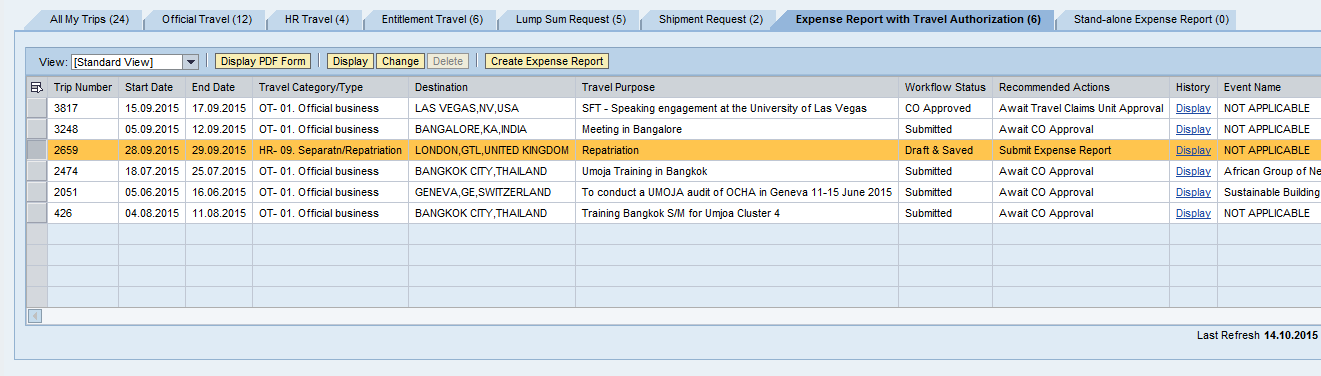
14 Amending an Expense Report You can change an Expense Report or view its status on the Employee Self-Service (ESS) portal s front screen under Traveler Work Center. Before the Expense Report is submitted for approval, it can be modified by following these steps: 1. Go to Employee Self-Service (ESS) portal Traveler Work Center 2. Under the Expense Report with Travel Authorization tab, find and highlight the Expense Report you wish to amend. 3. Click on Change button to amend the Expense Report. 4. The Expense Report cannot be deleted (please see that the Delete button is disabled). After the Expense Report has been Approved To amend or have the Expense Report returned back to the staff member for any changes once it has been approved, a staff member or a Travel Administrator will have to contact the HR Office by phone or but outside of Umoja. If the Expense Report has not been approved it, it can be returned to the staff member and/or Travel Administrator for revision. Umoja Training 14/14
User Guide. Umoja Create Expense Report
 User Guide Umoja Table of Contents Overview... 3 Objectives... 3 Enterprise Roles... 3 Create an Expense Report... 4 Fill in the General Data Page... 7 Fill in the Enter Expense Details Page... 9 Complete
Job Aid. ESS - Create Stand Alone Expense Report
 ESS - Table of Contents Overview... 3 Objectives... 3 Create an Expense Report... 4 Overview Page... 5 General Data Page... 7 Expense Details Page... 9 General Overview on the Subsequent Approval Process...
3147 - Processing of Expense Report. Umoja Processing Expense Report Version 3 Last Modified: 28-April-15 1
 3147 - Processing of Expense Report Umoja Processing Expense Report Version 3 Last Modified: 28-April-15 1 Agenda Course Introduction Module 1: Overview (Expense Report Process) Module 2: Create Expense
Prepare and Submit your Planar Expense Report in 10 Easy Steps
 Prepare and Submit your Planar Expense Report in 10 Easy Steps Step 1: Update Internet Browser Settings Your browser should already be set up to use Concur, but the following steps will ensure that your
Quick Reference Card Create a Mileage Only Expense Report in Concur Travel and Expense
 Use this QRC when completing a mileage only expense report. LOG IN TO CONCUR Go to the Employee Portal at www.purdue.edu/employeeportal Choose Travel System (Concur). Log in using Purdue Career Account
Memo Online Travel Reimbursement Request (OTRR)
 Memo Online Travel Reimbursement Request (OTRR) Dear COST Action participants, In order to optimise the travel reimbursement process and to avoid a duplication of work on the e-cost system, the COST Association
Concur Expense Quick Reference Guide
 Content Section 1: Section 2: Section 3: Section 4: Section 4a: Section 4b: Section 4c: Getting Started, Login Explore My Concur tab Update Your Profile, Add an Expense Delegate Create a New Expense Report
Profile. 2 On the Expense Settings menu on the left
 Section 1: Getting Started Step 1: Log on to Concur Expense 1 In the User Name field, enter your user name. 2 In the Password field, enter your password. 3 Click Login. If you are not sure how to start
United States Agency for International Development Bureau for Management Office of Chief Information Officer E2 Travel Management Service User Guide
 United States Agency for International Development Bureau for Management Office of Chief Information Officer E2 Travel Management Service User Guide Release 1.0 Revisions Release Number Author Comment
Claimants and Delegates
 User Guide Contents Chapter 1: Signing In... 1 Chapter 2: My Profile... 4 Chapter 3: Expense Reimbursements... 9 Chapter 4: Submitting Your Receipts... 17 Chapter 5: Advance Requests... 21 Chapter 6: Acting
Concur FAQ (Frequently Asked Questions)
 Concur Basics What is my login name? Your employee number (found on your paystub). ######@precisiondrilling.com What if I forget my password? Click the Forgot Password on the Concur page. You will be prompted
Once your request has been approved, you can begin creating a new expense report.
 Once your request has been approved, you can begin creating a new expense report. Click on the Requests header. Find the request you want to work on. Notice the Status column says Approved. Click Expense
Travel and Expense Management Training Manual
 Travel and Expense Management Training Manual TEM Team Colorado School of Mines Cindy Kerr - 303.273.3274 Cathy Daniels - 303.273.3264 Tim Huelsman 303.273.3266 Tressa Ries 303.273.3262 1 Overview TEM
University of Alaska Statewide Financial Systems User Documentation. BANNER TRAVEL AND EXPENSE MANAGEMENT TEM (Quick)
 University of Alaska Statewide Financial Systems User Documentation BANNER TRAVEL AND EXPENSE MANAGEMENT TEM (Quick) Travel and Expense Management Table of Contents 2 Table of Contents Table of Contents...
University of Sunderland. Oracle 12 i-expenses. Full Administration Training Guide. Version 1.0 09/05/14
 Oracle 12 i-expenses Full Administration Training Guide Version 1.0 09/05/14 Table of Contents 1 TRAVEL POLICY AT A GLANCE... 2 2 PROCEDURES... 4 2.1 I-Expenses Procedure... 7 3 LOGIN... 8 Login Problems...
e-expenses Quick Guide for Approvers/Checkers
 e-expenses Quick Guide for Approvers/Checkers 1 - Introduction 5 - Certifying claims 2 - Access and Navigation 6 Substitutes 3 - Responsibility of the Approver 7 - Help and Support 4 - Responsibility of
Creating Expense Reports and Spend Authorization Requests
 ALL reimbursement for out-of-pocket businessrelated expenses incurred on or after 2/16/15 will be submitted through Workday, including: mileage, travel, memberships, professional dues, license payments,
Quick Reference Card Review and Approve Expense Report in Concur Travel and Expense
 The following steps can be utilized in approving expense reports. Fiscal approvers will receive an e-mail notification when the traveler submits the report for approval. Log In To Concur Go to the Employee
Purpose. Intended Audience
 Purpose In Umoja you will always be required to mark absence from the office through the Employee self service and you will not normally be required to mark your attendance. However when you work outside
TeamWorks Travel and Expense
 TeamWorks Travel and Expense With Concur Technologies TTE System User Reference TABLE OF CONTENTS SECTION 1: GETTING STARTED... 6 Log on to TTE Travel & Expense... 6 SECTION 2: MY CONCUR... 6 Explore the
Travel Request and Expense Report Processing for Monthly Personal Car Mileage
 Travel Request and Expense Report Processing for Monthly Personal Car Mileage 1 Table of Contents Travel Request Overview... 3 Section 1: Create a New Travel Request for Monthly Personal Car Mileage...
University of Alaska Statewide Financial Systems User Documentation. BANNER TRAVEL AND EXPENSE MANAGEMENT TEM (Detail)
 University of Alaska Statewide Financial Systems User Documentation BANNER TRAVEL AND EXPENSE MANAGEMENT TEM (Detail) Travel and Expense Management Table of Contents 2 Table of Contents Table of Contents...
AR326: Accounts Receivable - Funds Receipts. Instructor Led Training
 AR326: Accounts Receivable - Funds Receipts Instructor Led Training Rev 1/21/2015 Welcome This training provides employees with the skills and information necessary to use Cardinal. It is not intended
How to do the End of Day
 Summary: How to do the End of Day This article is a guideline to using the End of Day Wizard. The End of Day Wizard is designed to guide you through the steps needed to balance the Register(s) and verify
This procedure is used by the Staff Member to certify their monthly time statement.
 Purpose This procedure is used by the Staff Member to certify their monthly time statement. Reference Factsheets contain additional information on the different eligibility and documentation requirements
GA Travel & Expense System. FAQ s
 GA Travel & Expense System FAQ s TABLE OF CONTENTS Travel System Access... 7 1. How do I log in to the GA Travel & Expense System?... 7 2. What should I do if I need to travel and I don t have a vendor
Creating Expense Reports
 KENTUCKY COMMUNITY & TECHNICAL COLLEGE SYSTEM Creating Expense Reports Training Document This training document was developed in support of KCTCS Financials 9.2 Contents Travel and Expense Module... 4
Concur Expense Guide: Version 2
 Concur Expense Guide: Version 2 Welcome to Concur Expense...3 Log on to Concur...3 Explore the My Concur Page...4 Update Your Expense Profile...5 Step 1: Change Your Password...5 Step 2: Review Your Expense
QuickStart Guide. Concur Expense
 QuickStart Guide Concur Expense PROPRIETARY STATEMENT This document contains proprietary information and data that is the exclusive property of Concur Technologies, Inc, Redmond, Washington If you are
CHAPTER 4: VOUCHERS FROM AUTHORIZATIONS
 CHAPTER 4: VOUCHERS FROM AUTHORIZATIONS The Defense Travel System (DTS) uses vouchers from authorizations (vouchers) to record the actual expenses that a traveler incurred during a trip. In order for DTS
Quick Reference Card Create and Edit a Blanket Travel Expense Report in Concur Travel and Expense
 Create and Edit a Blanket Travel Report in Concur Travel and Use this QRC when you are completing a Blanket travel expense report. Blanket travel is defined in ICA as same day trips. LOG IN TO CONCUR Go
Concur Expense System. User Reference Guide
 Concur Expense System User Reference Guide February, 2009 Table of Contents HOW TO GET SETUP IN THE CONCUR EXPENSE SYSTEM... 1 LOG IN... 1 CHANGE YOUR PASSWORD... 1 VIEW AND EDIT YOUR PROFILE INFORMATION...
FAST Travel System. Guide: Creating Expense Reports
 FAST Travel System Guide: Creating Expense Reports Purpose: To provide instructions on how to create an Expense Report (ER) in FAST 9.2 Travel module. Definition: Expense Report submission entered into
Business Online ACH User Guide
 Table of Contents ACH Definitions... 2 Managing Payees... 5 Importing an ACH File... 7 Editing a Payee s Details... 9 Sending a Prenote... 10 Deleting a Payee... 11 Submitting the ACH File... 12 Viewing
UCL FINANCE DIVISION. iexpenses EXPENSE CLAIMS SEASON TICKET LOANS. www.ucl.ac.uk/expenses 1
 UCL FINANCE DIVISION iexpenses EXPENSE CLAIMS SEASON TICKET LOANS www.ucl.ac.uk/expenses 1 iexpenses iexpenses is a new web based Expense Claim and Season Ticket Loan system for UCL Employees. How to log
DEFENSE TRAVEL SYSTEM (DTS) SIMPLIFIED TRAVELER USER GUIDE
 DEFENSE TRAVEL SYSTEM (DTS) SIMPLIFIED TRAVELER USER GUIDE Created by the Ohio National Guard 1 Table of Contents User s Manual What is DTS? 3 Self Registration 4 Understanding the DTS Home Page 16 Navigating
TRAVEL AND EXPENSE CENTER REPORTS
 TRAVEL AND EXPENSE CENTER REPORTS NOTE: This document is designed to be used online and has a number of embedded links to processes and additional information. We discourage the printing of manuals as
Travel and Expense Management User Guide. Revised 02.04.15
 Travel and Expense Management User Guide Revised 02.04.15 2 Table of Contents Access TEM and Review Profile. 4 Submitting a Travel Authorization (TA).. 5 Intro and Login.. 5 Funding Change. 6 Itinerary..
Web-Based T-Pax. The basics to successful submission and processing of travel claims
 Web-Based T-Pax The basics to successful submission and processing of travel claims Web-Based T-Pax First-Time Users (Basic Log In and Profile) Inbox Functionality Authorizations, Advances & Settlements
Core Portal Claimant User Guide. Core Expense
 Core Portal Claimant User Guide Core Expense 1 1 CONTENTS 2 Logging onto the system... 4 3 Payment... 5 3.1.1 Payslips... 6 3.1.2 P60s... 8 3.1.3 PRD60s... 10 3.1.4 Important Dates... 11 4 Entering and
The policy also ensures compliance with the Expense Directive of the Broader Public Sector Accountability Act (BPSAA).
 Policy Name: Originating/Responsible Department: Approval Authority: Date of Original Policy: January 1997 Last Updated: September 2011 Travel and Related Expenses Finance Office Senior Management Committee
Quick Reference Card Booking Travel in Concur Travel and Expense
 This QRC provides the steps for travelers and/or their delegates to book travel and complete the Request Header in Concur Travel and Expense. Log In To Concur Go to the Employee Portal page. www.purdue.edu/employeeportal
Core Expenses Guide. Appendix I Expense Items & Descriptions of Use Page 28 Appendix II Frequently Asked Questions Page 30.
 The purpose of this document is to provide a guide to using the Core Expenses system. It should be read as an aid to getting started with Core Expense. You should not proceed to using Core Expense without
Concur's mobile app iphone
 This version shows the previous user interface. Though the home screen is different in the newest user interface, most procedures and processes remain the same. Videos are available in the training toolkit.
Concur Travel & Expense Frequently Asked Questions
 What is Concur Travel & Expense? How do I log in to Concur Travel & Expense? What should I do the first time I log into Concur Travel & Expense? What are the required fields on the profile page? What if
How to submit your Travel Reimbursement Form (TRR) in e-cost User guide
 How to submit your Travel Reimbursement Form (TRR) in e-cost User guide Version 2 2016-3-18 Content Introduction... 3 Travel Reimbursement Request (TRR) rules... 4 How to submit a Travel Reimbursement
QuickStart Guide Concur Premier: Travel and Expense
 QuickStart Guide Concur Premier: Travel and Expense Proprietary Statement This document contains proprietary information and data that is the exclusive property of Concur Technologies, Inc., Redmond, Washington.
Creating an Expense Report from a Blank Report Form. These instructions are designed for those who do NOT need a Travel Authorization.
 Creating an Expense Report from a Blank Report Form These instructions are designed for those who do NOT need a Travel Authorization. Expense Reports are required for the following reasons: Document all
4. Meetings Financial Support
 4. Meetings Financial Support The MC must determine from amongst eligible participants those who are entitled to be reimbursed. The Action Chair (or Vice Chair if the Action Chair is affiliated to the
FAYETTEVILLE STATE UNIVERSITY ACCOUNTS PAYABLE AND TRAVEL POLICY
 FAYETTEVILLE STATE UNIVERSITY ACCOUNTS PAYABLE AND TRAVEL POLICY Authority: Category: Issued by the Chancellor. Changes or exceptions to administrative policies issued by the Chancellor may only be made
A. BACK UP YOUR CURRENT DATA. QuickBooks Business Accounting Software 2006 2009 for Windows Account Conversion Instructions
 QuickBooks Business Accounting Software 2006 2009 for Windows Account Conversion Instructions As your financial institution completes its system conversion, you will need to modify your QuickBooks settings
UN TRAVEL POLICY SUMMARY
 SUMMARY OF UN TRAVEL POLICY I - TRAVEL ENTITLEMENT 1- Travel by air UN TRAVEL POLICY SUMMARY - The Maximum entitlement is computed on the most economical rate appropriate via a direct route, in the applicable
Expense Report: Detailed Guide. The expense report process has three main steps
 Version: 5-24-2013 Expense Report: Detailed Guide The expense report process has three main steps STEP ONE: Creation and submittal of an expense report using Concur software 1. Select new Expense Report
Accounts Payable Job Aid
 About Using Pay Terms Accounts Payable Job Aid State Agencies and Institutions are required to pay for all completely delivered goods and services by the required payment due date. The CAPP Manual Topic
SUSTAINABLE DEVELOPMENT TECHNOLOGY CANADA Travel & Accommodation Expense Guidelines and Policy
 SUSTAINABLE DEVELOPMENT TECHNOLOGY CANADA Travel & Accommodation Expense Guidelines and Policy Purpose The purpose of this policy is to establish equitable standards and provide fair and consistent treatment
ProMaster User Guide For Travel Expense Allocations (Reconciliations)
 ProMaster User Guide For Travel Expense Allocations (Reconciliations) 1 P a g e Table of Contents Who do I contact with my questions?...3 How do I log in to ProMaster?...4 What do all the Icons mean?...5
BN3125 Umoja Benefits ESS Overview. Umoja ECC Navigation Version 26 1
 BN3125 Umoja Benefits ESS Overview Umoja ECC Navigation Version 26 Copyright Last Modified: United 19-Jan-15 Nations 1 Agenda Course Introduction Module 1: Umoja ESS Benefits Overview Module 2: Umoja ESS
Travel Insurance and Wallet Protection FAQs
 Travel Insurance and Wallet Protection FAQs Credit Card Debit Cards Platinum Elite, Etisalat Platinum & Air Arabia Platinum Smart Saver & Grand Entertainment Card Platinum Debit Cards Issued to MashreqGold,
PY3141 Umoja Payroll Master Data Maintenance
 PY3141 Umoja Payroll Master Data Maintenance 1 Agenda Course Introduction Module 1: Umoja Payroll Overview Module 2: Master Data Module 3: Advance Recovery Module 4: Advance Payment Module 5: Recurring
Knowles Associates Total Fleet Management Ltd. Website E- Expenses and Greyfleet Registration, Additional Jobs, Expenses and Mileage
 Knowles Associates Total Fleet Management Ltd Website E- Expenses and Greyfleet Registration, Additional Jobs, Expenses and Mileage Author: Lennon Carrington Approved by: Owner: Knowles Associates Total
Concur Travel and Expense Integration. 2011 Concur, all rights reserved. Concur is a registered trademark of Concur Technologies, Inc.
 Concur Travel and Expense Integration Travel and Expense Integration This presentation shows the integration of Travel and Expense depicting the End to End Travel and Expense solution. These slides can
How to claim business costs and expenses
 How to claim business costs and expenses Introduction There are a variety of methods to claim the expenses you incur in your parliamentary duties: 1. You can use one of the suppliers we have a direct payment
Completing your CTM Online - RESX Profile
 Completing your CTM Online - RESX Profile Your CTM Online profile information is used to complete online bookings and agent-assisted bookings. Note! Whether booking travel through Enterprise, or directly
TRAVEL MANAGEMENT AND GENERAL EXPENSES PROTOCOL FN 2.0
 TRAVEL MANAGEMENT AND GENERAL EXPENSES PROTOCOL FN 2.0 In Effect: June 15, 2012 Approved by: Executive Group, June 8, 2012 Responsible Office(s): Administration, Finance Responsible Officer(s): CAO, Director
Date Ratified 03/12/2012 Human Resources Committee Review Date 01/12/2014 Director of Finance and Information Expiry Date 02/12/2015 Withdrawn Date
 Policy No: OP7 Version: 4.0 Name of Policy: Submission of Staff Expenses Policy Effective From: 18/12/2012 Date Ratified 03/12/2012 Ratified Human Resources Committee Review Date 01/12/2014 Sponsor Director
Claim Travel Types: Explanatory Note
 How to submit a travel and subsistence claim 1. Log in to travel and subsistence online: https://agresso.nuigalway.ie/agresso/system/login.aspx 2. Fill out the online claim form in Draft mode, (important)
Relocation. Policy. Contents
 Relocation Policy Contents 1 Purpose 1 2 Scope 1 3 Conditions 1 4 Financial Support for Relocation 1 4.1 Special Cases for Assistance 1 5 The Relocation Claims Process 2 6 Relocation Expenses 2 6.1 What
PA STATE SYSTEM OF HIGHER EDUCATION Shared Administrative System TM Travel Management Create Travel Expense Report
 All Travel Expense Reports will be entered by either the Traveler or Travel Assistant via the portal. Log into the portal Page 1 of 22 Revised: 02/2016 From the ESS tab, click on either of the 2 provided
User Guide. ERS Help Desk : 814-863-9713 or http://www.ers.psu.edu/assistance.cfm. Web site at: http://www.ers.psu.edu
 User Guide ERS Help Desk : 814-863-9713 or http://www.ers.psu.edu/assistance.cfm Web site at: http://www.ers.psu.edu Revised 2/18/2015 Table of Contents Introduction... 3 System Overview... 3 Section 1:
Oracle Internal Accounts Management System Manual
 Oracle Internal Accounts Management System Manual School Financial Services Phone: 773-553-2750 Fax: 773-553-2711 Email: [email protected] IAMS Website: https://dev.ocs.cps.k12.il.us/sites/finance/iams/
Travel & Expense Reimbursement System Information IBM GERS SYSTEM
 Travel & Expense Reimbursement System Information IBM GERS SYSTEM 1 Table of Contents Page(s) Contact for Questions/Concerns. 3 T&E Information...4 Getting Started with GERS (First Time Registration).....5-10
Banner Self-Service Direct Deposit Instructions Table of Contents
 Banner Self-Service Direct Deposit Instructions Table of Contents Accessing the Online Form... 2 Primary Accounts... 3 Adding Primary Accounts... 3 Allocation Accounts... 4 Adding Allocation Accounts...
Concur Travel and Expense Frequently Asked Questions
 Topics: Concur Travel and Expense Frequently Asked Questions Travel Terminology... 1 Getting Started and General Information... 2-3 Travel Assistant Booking Travel for Others and One-Time Guests... 3-4
Self Service Business Expenses: Payroll and Human Resources Staff Instructions
 Contents Self Service Business Expenses: Payroll and Human Resources Staff Instructions Introduction... 1 Considerations... 1 Setup and Continuing Maintenance... 2 Entering Business Expenses... 2 Process
Concur Travel and Expense Showcase April 10th
 Concur Travel and Expense Showcase April 10th AGENDA Objectives for Travel Process Transformation List the benefits of Concur Travel and Expense (Concur) Identify the changes in travel partners Describe
Concur Travel and Expense Reporting FAQs
 Concur Travel and Expense Reporting FAQs General: How will I use Concur? The Concur travel and Expense system is for tracking and reconciling employee travel and other travel related expenses purchased
Travel Expense Report I N F O R M A T I O N D E P L O Y E D. S O L U T I O N S A D V A N C E D. M I S S I O N S A C C O M P L I S H E D.
 Travel Expense Report I N F O R M A T I O N D E P L O Y E D. S O L U T I O N S A D V A N C E D. M I S S I O N S A C C O M P L I S H E D. Introduction This How to Guide was developed by Human Resources,
Eastern Washington University TEMS Employee Travel Guide
 This document describes university travel procedures using the Banner Travel and Expense Management System (TEMS). 1 This is a companion document to the TEMS User Guide, a stepby-step tutorial prepared
User s Guide Online train ticket reservations
 User s Guide Carlson Wagonlit Travel Online Helpdesk Tel. +358 (0)205 615 531 E-mail: Copyright 2007-2013 CWT TABLE OF CONTENTS 1 Login through the CWT Portal... 3 2... 4 2.1 Domestic train tickets...
GEMS Program Concur Travel & Expense Quick-Start Guide
 GEMS Program Concur Travel & Expense Quick-Start Guide Your Guide to Booking Travel, and Creating, Submitting, and Approving Expense Reports http://gems.uchicago.edu Proprietary Statement This document
Concur Expense QuickStart Guide. Concur Technologies Version 1.0
 Concur Expense QuickStart Guide Concur Technologies Version 1.0 August 22, 2014 Document Revision History Date Description Version Author 08/22/2014 Concur Expense QuickStart Guide 1.0 Concur Proprietary
User Guide. 1/14/2014 FIS Business Solutions. Internet Expense Reports. Page 1. Copyright University of Pittsburgh. All rights reserved.
 User Guide Page 1 Table of Contents...3 Log On...4 Expenses Home Page...5 Expenses Home Page Tabs...6 Create Expense Report: General Information...9 Create Expense Report: PrePaid Expenses...10 Receipt-Based
Quick Reference Guide Travel & Expense Claim: Using Create Expense Report (The Wizard) What is a travel and expense claim used for?
 (The Wizard) This Quick Reference Guide shows you how to submit a travel and expense claim using Create Expense Report known as The Wizard, for expenses paid with personal funds. What is a travel and expense
Employee Expense Management 5.0 User Guide
 Employee Expense Management 5.0 User Guide Countries without American Express Corporate Card Load Rev. 12.4.1 HP Restricted 1 2 Contents Employee Expense Management 5.0 User Guide... 1 Contents... 2 Overview...
Expense Reimbursement System (ERS) Frequently Asked Questions
 Contents General Questions... 2 What is an Expense Reimbursement System (ERS)?... 2 What is Concur?... 2 Do I have to use the ERS?... 2 Why should I use the ERS?... 2 How do I log in to the ERS?... 2 Is
Banner Travel and Expense Module Traveler User Guide
 November 2014 Banner Travel and Expense Module Traveler User Guide Oregon State University Business Affairs FA&A Table of Contents Banner Travel and Expense Module Overview... 2 Accessing Travel and Expense
Policy and Procedure Statement
 Policy and Procedure Statement SUBJECT: Fleet Vehicle Usage CATEGORY: Materials Management NO. 1001 PREAMBLE By acquiring vehicles in large quantities and operating a central fleet, the Ministry of Central
DECISION No 120/2014. on the implementing provisions for Regulations No 3/2014, No 4/2014 and No 5/2014 of the Committee of the Regions
 DECISION No 120/2014 on the implementing provisions for Regulations No 3/2014, No 4/2014 and No 5/2014 of the Committee of the Regions THE SECRETARY-GENERAL, HAVING REGARD TO HAVING REGARD TO HAVING REGARD
All Platinum Business credit cardholders are covered under TRAVEL PROTECT which includes comprehensive Travel Insurance and Wallet Protection
 All Platinum Business credit cardholders are covered under TRAVEL PROTECT which includes comprehensive Travel Insurance and Wallet Protection Travel Insurance and Wallet Protection Plan policy shall at
Concur's mobile app ipad
 Introduction to... Concur's mobile app ipad Version 8.10 - December 2012 You can use Concur on your ipad to assist with your Expense and Travel needs. Because you are using your ipad, you can access your
I Expense Online Expense submissions For fulltime Faculty & Staff Revised: Sept 2013
 I Expense Online Expense submissions For fulltime Faculty & Staff Revised: Sept 2013 Table of Contents I-EXPENSE PROCESS... 1 IEXPENSE - LOGIN... 3 NAVIGATING THE I-EXPENSE HOME PAGE... 5 Expenses Home
GESCI TRAVEL & EXPENSES POLICY
 GESCI TRAVEL & EXPENSES POLICY Revised 2012 Table of Contents 1 Purpose... 1 2 GESCI Travel Policy... 1 2.1 General... 1 2.2 Approval to travel... 2 2.3 Travel Arrangements/Procedure... 2 2.4 Advances...
The MIL Corporation. Deltek Expense Report Training
 Deltek Expense Report Training Contents Chapter 1: How to Access the Expense Application... 3 Chapter 2: Filling out an Expense Report... 4 Chapter 3: Expense Report Details... 12 Chapter 4: Signing the
Travel Expense Reimbursement: Electronic Receipts (ereceipts)
 This quick reference guide is intended to be a tool to assist the Traveler in complying with Laboratory policy. Travelers should always consult the Laboratory Travel policy to gain a full understanding
POLICY ON RELOCATION SCHEME FOR NEWLY APPOINTED EMPLOYEES
 APPENDIX A POLICY ON RELOCATION SCHEME FOR NEWLY APPOINTED EMPLOYEES Version & Policy Number Guardian Date Produced Next Review Date Version 2 : Relocation HR April 2015 April 2017 Approved by SMT Approved
WELLESLEY COLLEGE TRAVEL POLICIES AND PROCEDURES
 WELLESLEY COLLEGE TRAVEL POLICIES AND PROCEDURES The purpose of this document is to establish and communicate equitable standards and effective procedures for reducing travel costs while complying with