
Dual Chamber Temporary Pacemaker
|
|
|
- Kenneth Parrish
- 9 years ago
- Views:
Transcription
1 5388 Dual Chamber Temporary Pacemaker Technical Manual Caution: Federal Law (USA) restricts this device to sale by c or on the order of a physician. 0123

2

3 MODEL Technical Manual 0 Dual Chamber Temporary Pacemaker

4 Symbols 0 Explanation of symbols Consult instructions for use Type CF applied part 0123 Conformité Européenne (European Conformity) This symbol means that the device fully complies with European Directive 93/42/EEC. Do not dispose of this product in the unsorted municipal waste stream. Dispose of this product according to local regulations. See for instructions on proper disposal of this product. For US audiences only Package contents Temporary pacemaker Product documentation Accessories Storage temperature limitation

5 5 Explanation of symbols Humitidy limitation Battery Reorder number EC REP Authorized representative in the European Community Manufacturer Date of manufacture Serial number

6

7 Contents 1 Overview 9 General Description 10 Intended Use 12 Contraindications 12 2 Warnings, precautions, and adverse effects 15 Warnings 16 Precautions 18 Environmental Precautions 22 Adverse Effects 23 3 Controls, indicators, and other features 25 Controls 26 Light-Emitting Diodes 32 Upper Screen 33 Lower Screen 37 Physical Features 46 Functional Features 49 Timing Violations 53 4 Preparation for use 57 Battery Installation 58 Disposable Pouch 59 Disposable Cover 59 Cables 60 Connector Setup 61 5 User guide 67 Overview 68 Indicators 69 Basic Operation 70 Connector Setup 77 Pacing Parameter Adjustments 79 Thresholds 83 Pacing Setup 88

8 8 Contents RAP (Rapid Atrial Pacing) 90 Battery Replacement 92 Tables 94 6 Device maintenance 97 Cleaning and Sterilization 98 Safety and Technical Checks 99 Service Specifications 101 Device Specifications 102 Device Accessories Warranty information 107 Special Notices 108 A Pacemaker diagnostic diagrams 109 About the Chapter 110 Definitions 110 Single Chamber Modes 113 Dual Chamber Modes 118 Index 139

9 Overview1 1 General Description 10 Intended Use 12 Contraindications 12

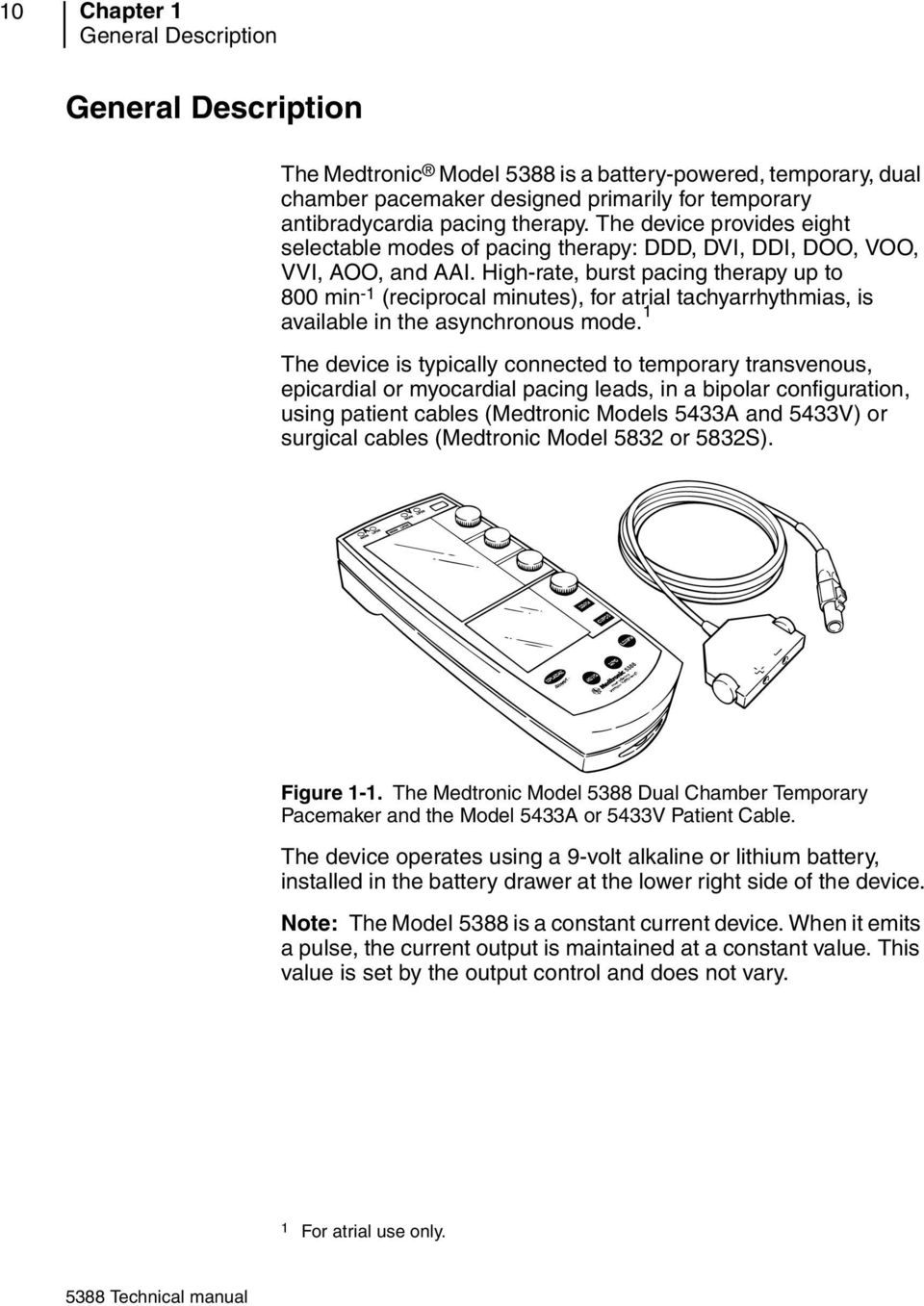
10 10 Chapter 1 General Description General Description The Medtronic Model 5388 is a battery-powered, temporary, dual chamber pacemaker designed primarily for temporary antibradycardia pacing therapy. The device provides eight selectable modes of pacing therapy: DDD, DVI, DDI, DOO, VOO, VVI, AOO, and AAI. High-rate, burst pacing therapy up to 800 min -1 (reciprocal minutes), for atrial tachyarrhythmias, is available in the asynchronous mode. 1 The device is typically connected to temporary transvenous, epicardial or myocardial pacing leads, in a bipolar configuration, using patient cables (Medtronic Models 5433A and 5433V) or surgical cables (Medtronic Model 5832 or 5832S). B RNS T. Fmsr Vnkrbnp Psxrtgbn Nprtgxcsnpl Figure 1-1. The Medtronic Model 5388 Dual Chamber Temporary Pacemaker and the Model 5433A or 5433V Patient Cable. The device operates using a 9-volt alkaline or lithium battery, installed in the battery drawer at the lower right side of the device. Note: The Model 5388 is a constant current device. When it emits a pulse, the current output is maintained at a constant value. This value is set by the output control and does not vary. 1 For atrial use only.
11 Overview General Description 11 Safety Features The Medtronic Model 5388 is designed to be reliable, easy to operate, and comfortable to hold. Safety features of the Model 5388 include: Cables with no exposed electrical connections; Self-test function; Low Battery indicator; Lock feature to prevent accidental change of parameters; Safe, two-step operation to turn the device off; Runaway rate protection; Protection from defibrillation shock; Continuous operation during battery replacement (see page 105); Reversible battery polarity; Electrostatic protection; Minimized susceptibility to electromagnetic and magnetic interference; and Rubber seals to cover the connector pin receptacles. Package Contents See the enclosed card for a detailed list of package contents. Check the package prior to use. Damaged packages should be returned to Medtronic (see back cover for address). Registration Card Please complete the registration card and return it to Medtronic. Consult the back cover of this manual for the address.

12 12 Chapter 1 Intended Use Intended Use The Medtronic Model 5388 temporary pacemaker is intended to be used in conjunction with a cardiac pacing lead system for temporary single or dual chamber pacing in a clinical environment by trained personnel. The Model 5388 can be used where short-term demand (synchronous) or asynchronous pacing is indicated for therapeutic, prophylactic or diagnostic purposes. Specific indications for temporary cardiac pacing include, but are not limited to, the following: Complete heart block; Sinus bradycardia; Sick sinus syndrome; Bradycardia with congestive heart failure; Atrial and/or ventricular arrhythmias; Cardiac arrest; Support, management, and evaluation of a patient prior to permanent pacemaker implantation; Support during permanent pacemaker replacement; Cardiac complications during invasive or surgical procedures; Support following cardiac surgery; Acute myocardial infarction complicated by heart block; and High-rate burst pacing for treatment of atrial tachyarrhythmias. The Model 5388 can be used to determine sensing thresholds of temporary and permanently implanted lead systems. When implanting a permanent pacemaker, however, Medtronic recommends the use of a Medtronic Pacing System Analyzer. Contraindications There are no known contraindications to the use of temporary pacing as a means to control the heart rate. The patient s age and medical condition, however, may dictate the type of temporary pacemaker and lead system used by the physician.

13 Overview Contraindications 13 Atrial Sensing Pacing modes which allow sensing in the atrium to trigger a ventricular response are contraindicated in the presence of rapid atrial arrhythmias such as atrial fibrillation or atrial flutter. Atrial Pacing Atrial pacing is ineffective in the presence of atrial fibrillation or flutter. Single chamber atrial pacing is contraindicated in the presence of AV conduction disorders. Asynchronous Pacing Asynchronous pacing is contraindicated in the presence of intrinsic cardiac rhythms. Atrial High-Rate Burst Pacing Therapy Atrial high-rate burst pacing therapy is intended for use in the atrium only. High-rate burst pacing in the ventricle may result in life-threatening arrhythmias.

14

15 Warnings, precautions, and adverse effects2 2 Warnings 16 Precautions 18 Environmental Precautions 22 Adverse Effects 23

16 16 Chapter 2 Warnings Warnings Equipment Modification Do not modify this equipment. Modifications could impact device effectiveness and adversely affect patient safety. Defibrillation/Cardioversion Defibrillation discharges up to 360 watt-seconds have not affected the Model 5388 in laboratory tests. However, for maximum safety, it is recommended that paddles be placed at least 15 cm (6 inches) away from the Model 5388 or the lead system. Whenever possible, for the safety of the patient, disconnect the pacemaker from the lead system before defibrillating or cardioverting. A relatively low resistance pathway exists between the positive (+) and negative ( ) electrodes of the implanted lead system. During defibrillation a large current could flow across this pathway, causing myocardial damage. Line-powered Equipment An implanted lead or lead with extension cable constitutes a direct, low-resistance current pathway to the myocardium. Due to the danger of tachyarrhythmias resulting from alternating current leakage, extreme caution must be taken to properly ground all line-powered equipment used on or in the vicinity of the patient. Electrosurgical Units (Cautery) Electrosurgical units can cause tachyarrhythmias by inducing current on the leads, and thus should never be used within 15 cm (6 inches) of the pacemaker/lead system. Electromagnetic Interference (EMI) Pacemakers operating in the demand mode respond to intracardiac potentials with magnitudes of a few millivolts. This level of sensitivity makes the pacemaker inherently sensitive to some external fields. In the presence of excessive levels of interference, the Model 5388 may inhibit completely or revert to asynchronous operation, pacing at the rate set by the RATE dial.

17 Warnings, precautions, and adverse effects Warnings 17 It is recommended that the device be set to an asynchronous mode at a rate higher than the patient s intrinsic rate when operated in the presence of strong electromagnetic interference (EMI). Sources of excessively strong EMI which may temporarily affect the operation of the Model 5388 include: Electrosurgical equipment; Diathermy equipment; Some medical telemetry equipment [when operated within one meter (about three feet) of the pacemaker]; Communication transmitters such as cellular phones, walkie talkies, and transmitters in emergency transport vehicles; and Magnetic Resonance Imaging (MRI) equipment. Atrial High-Rate Burst Pacing Therapy Use of high rates in the atrium could result in high-rate conduction to the ventricle. Defibrillation equipment should be on standby, immediately available during atrial high-rate burst pacing therapy. There is no ventricular back-up pacing during delivery of atrial high-rate burst pacing therapy. Connecting the Lead System The patient cable should be connected to the temporary pacemaker before the lead(s) is connected to the patient cable(s). To prevent pacing into the vulnerable period of the T-wave, turn the temporary pacemaker ON and turn A and V OUTPUT down to the minimum amplitude before connecting the temporary pacemaker to the patient s lead system. Determine sensing thresholds (see Sensing Threshold on page 84) before turning A and V OUTPUT up to threshold levels. Handling Implanted Leads When handling implanted leads (temporary or permanent), the terminal pins or exposed metal must not be touched nor be allowed to contact electrically conductive or wet surfaces.

18 18 Chapter 2 Precautions Precautions Random Failures The physician should be aware that operational failure of the Model 5388 temporary pacemaker can occur as the result of battery depletion, mishandling, or random component failure. Possible operational failures of the Model 5388 can include: No output or erratic output; No sensing or erratic sensing; False indicator light signals; Inappropriate variance of rate, output pulse width, or output amplitude; Reversion to asynchronous pacing; and Loss of control of rate, output, sensitivity or power. If loss of control of rate, output, sensitivity or power occurs, and it is not due to a low battery, disconnect the device from the patient and return it to Medtronic for service. Batteries Use of batteries with different physical dimensions from that of the recommended batteries may result in erratic, or no, pacing output. Replace the battery for each new patient, and when the low battery indicator appears during device operation (see page 33). Check the battery status at least twice daily. Replace alkaline batteries at least once every week when the temporary pacemaker is in continuous use or when the low battery indicator is displayed. When replacing the battery, make sure the battery drawer is fully closed and latches in place with an audible click. Inspect the contacts on the battery for visible signs of contamination prior to use. Use of batteries with contamination on the contacts may result in erratic, or no output. Failure to ensure that the battery drawer is fully latched may result in a loss of power. Continued device operation is NOT an indication that the battery drawer is properly latched.

19 Warnings, precautions, and adverse effects Precautions 19 Pacing Leads and Cables Improper connection, displacement or fracture of leads or cables may result in pacemaker system failure. Inspect leads and cables for damage prior to each use. Pacing System Adjustments Monitor the patient s ECG and blood pressure and keep defibrillation equipment on standby, immediately available for emergency use during evaluation of stimulation and sensing thresholds, pacemaker and pacing lead connections and adjustments, and atrial high-rate burst pacing therapy. Bipolar Lead Systems Bipolar lead systems are recommended because they are less susceptible to electromagnetic interference. Separation between the positive (+) electrode and negative ( ) electrode of the same lead system should not exceed 15 mm (0.6 inches). Also, the atrial and ventricular lead systems should be positioned so that the electrodes of one system are a minimum of 4 cm (1.5 inches) from the electrodes of the other system and are at right angles to each other. Unipolar Lead Systems Unipolar lead systems are not recommended because they are more susceptible to electromagnetic interference, which may result in inappropriate pacing. Unipolar lead systems should not be used in the dual-chambered pacing modes because the current path of one lead system may interfere with the current path of the other. Atrial Sensing The atrial sensing threshold should be evaluated to ensure maximum electrogram amplitude and that an adequate atrial sensing threshold is obtained prior to programming to a mode that requires atrial sensing (DDD, DDI, or AAI).

20 20 Chapter 2 Precautions Place the wires on the right atrial free wall, oriented along the direction of the myocardial fibers, approximately 1 cm apart. It is important to achieve a sensing threshold of at least 1.0 mv. The atrial sensitivity should be set to a minimum of one-half the measured threshold. This ensures a minimum safety margin of 2x the sensing threshold. Failure to follow this procedure can lead to delivery of asynchronous pulses. Sensitivity Settings Since the sensitivity setting determines the smallest signal that can be sensed by the pacemaker, set the sensitivity dial to one-half the mv value of the patient s sensitivity threshold (see Sensing Threshold on page 84). This setting will provide a 2x safety margin to ensure proper sensing. A more sensitive setting may be chosen to provide a greater safety margin. However, be aware that setting the sensitivity value too low (too sensitive) could result in inappropriate sensing of far field signals (e.g., sensing of R- or T-waves on the atrial channel or P-waves on the ventricular channel), leading to inappropriate inhibition of pacing pulses. High Output and Maximum Sensitivity Although the pacemaker contains a safety pacing feature that prevents inappropriate inhibition of ventricular pacing due to far-field sensing, the simultaneous use of high output and maximum sensitivity (i.e., the lowest mv value) should be avoided. Electrostatic Discharge (ESD) The pacing lead(s) provides a low-impedance pathway to the heart. Therefore, it is recommended that attending health care professionals discharge any static electricity by touching a large metal or conductive, grounded surface prior to touching the patient, the cable, the leads or the pacemaker. Also, neutralize any static electricity from the patient by touching the patient away from (i.e., distal to) the leads.

21 Warnings, precautions, and adverse effects Precautions 21 Retrograde Conduction If retrograde P-waves are being sensed outside the rate-dependent, automatic Post-Ventricular-Atrial-Refractory Period (PVARP) setting, manually increase the PVARP until the retrograde waves fall inside the PVARP. Failure to follow this procedure may lead to a pacemaker mediated tachycardia (PMT). Termination of Pacing Abrupt termination of pacing stimuli may result in intervals of asystole before an intrinsic rhythm is reestablished. Prior to terminating pacing, set the pacemaker to a demand mode, then gradually reduce the pacing rate below the patient s intrinsic rate. PAUSE Key Use the PAUSE key with care, since the patient is without pacing support (for a maximum of 10 seconds at a time) when PAUSE is pressed and held. A-V Interval Programming long A-V intervals may result in pacing the ventricle during the vulnerable period of ventricular repolarization, thus precipitating ventricular arrhythmias in unstable patients. EMERGENCY Key Use the EMERGENCY key only when high-output asynchronous pacing (DOO) is needed. When the EMERGENCY key is pressed, the emergency pacing mode is entered and remains in effect until the emergency pacing mode is deactivated. Press the ON key to deactivate emergency pacing mode. For more information, see EMERGENCY (ASYNC.) Key on page 29.
22 22 Chapter 2 Environmental Precautions Environmental Precautions The Model 5388 has been carefully designed and tested to ensure reliability during normal use. However, electronic devices are susceptible to many environmental stresses. Precautions should be taken to avoid damage to the unit, including (but not limited to) the precautions listed in this chapter. Do not drop the unit or handle it in a way that might physically damage the device. The device may appear to work appropriately immediately after being dropped or mishandled, but operational damage may have occurred. Do not place the Model 5388 in any area where a patient may interact with it. Tampering with programmed parameters may have direct and serious patient health effects. The temporary pacemaker should be placed in an area that minimizes tampering with the device by unauthorized personnel (patients, visitors, etc.). Medtronic recommends the use of a protective cover, such as the Medtronic Model 5441 clear plastic cover, to minimize tampering. Avoid spilling fluid on the unit. The Model 5388 was carefully designed to minimize leakage, but fluid incursion may still occur. Medtronic recommends the use of a protective cover, such as the Medtronic Model 5409 plastic pouch, to minimize fluid incursion. Avoid contaminating the safety cable receptacle and connector pin receptacles with blood or other body fluids. Always use safe electrostatic discharge (ESD) procedures; this device could be adversely affected by ESD. Do not open the device. The seam joining the unit is designed to minimize fluid incursion and may not be effective if improperly opened and resealed. Furthermore, removing the label on the back of the unit may compromise the ESD barrier. Opening this unit will void the warranty. Do not sterilize the Model 5388 by gamma irradiation or steam (autoclave). See Cleaning and Sterilization on page 98 for more information. Rapid temperature changes may affect proper operation. Always allow the temperature of the device to stabilize in the environment in which the device will be used before attachment and operation (see page 104 for recommended storage and operation temperatures).
23 Warnings, precautions, and adverse effects Adverse Effects 23 Prolonged storage or operation of the device in high humidity may affect proper operation. Allow the device to completely dry after exposure to humidity. Other environmental factors may impact proper performance of the unit in the hospital setting. Use of appropriate environmental health and safety practices will help prevent environmental damage to the unit. Adverse Effects Temporary Pacemakers Potential adverse effects related to the use of temporary external pacemakers such as the Model 5388 include, but are not limited to: Asystole following abrupt cessation of pacing; Inhibition or reversion in the presence of strong electromagnetic interference; and Initiation of a tachyarrhythmia or acceleration of an existing tachyarrhythmia. Atrial High-Rate Burst Pacing Atrial high-rate burst pacing may result in the onset of tachycardia, acceleration of an existing tachycardia, or fibrillation. Application of temporary atrial high-rate burst pacing should be performed in a carefully monitored and controlled patient environment. Monitor the patient s ECG and blood pressure, and keep defibrillation equipment on standby, immediately available for emergency use. Dual Chamber Modes In the DVI, DDI, and DDD modes, the ventricular sense amplifier may sense the atrial pacing pulse. Reducing the atrial amplitude, the ventricular sensitivity, and/or repositioning the electrodes may be necessary to avoid this situation.
24 24 Chapter 2 Adverse Effects Safety Margins Determine an adequate safety margin for sensing and pacing in both the ventricle and atrium (see Chapter 5). Failure to do so may result in inappropriate pacing. Lead Systems Potential adverse effects related to the use of pacing lead systems used in conjunction with the Model 5388 temporary pacemaker include, but are not limited to: Inappropriate lead connections; Inadvertent disconnection of the lead system; Lead fracture or displacement causing intermittent or complete loss of capture and/or sensing; and Perforation and tamponade. Other potential adverse effects related to the use of any implanted lead system include, but are not limited to: Myocardial irritability resulting in fibrillation; Infarction; Pericarditis; Body rejection phenomena (local tissue reaction); Muscle and nerve stimulation; and Infection. Nerve or muscle stimulation can be caused by pacing lead contact with the nerve or muscle tissue and/or by high-output settings. The stimulation may be controlled by repositioning or replacing the electrode, or by reducing the output pulse amplitude.
25 Controls, indicators, and other features3 3 Controls 26 Light-Emitting Diodes 32 Upper Screen 33 Lower Screen 37 Physical Features 46 Functional Features 49 Timing Violations 53
26 26 Chapter 3 Controls Controls The dials and keys used to control the functions and parameter settings of the Model 5388 are described below. Note: All adjustments to the RATE, A (Atrial) OUTPUT, and V (Ventricular) OUTPUT dials take effect within the next two pacing cycles. Lock/Unlock Key This key allows the user to lock and unlock the upper screen parameter values, RATE, AOUTPUT, and VOUTPUT (see Lock Feature on page 49). When the upper screen is unlocked, press this key to lock the upper screen parameters at their current settings. The backlight will turn off and the lock indicator appears in the upper right-hand corner of the upper screen. Pressing this key while a lower menu is active causes the device to exit the menu. Note: If this key is not pressed, the device automatically locks the parameters on the upper screen 60 seconds after the last device adjustment, with the exception of Menu 3. When in Menu 3 (Rapid Atrial Pacing), the device waits five minutes before locking. When the upper screen is locked, press this key to unlock the upper screen, allowing the upper screen parameters to be adjusted again. The backlight turns on, unless the low battery indicator is flashing (see Low Battery Indicator on page 33).
27 Controls, indicators, and other features Controls Pace/Sense LEDs 2. Lock/Unlock Key 1 3. Lock Indicators 4. Rate Dial 5. Atrial Output Dial 6. Ventricular Output Dial 7. Menu Parameter Dial 8. Parameter Selection Key 9. Menu Selection Key ppm RATE A + V A + V DDI Pause Key 11. Power On Key 12. Power Off Key OFF A OUTPUT ma Emergency/Asynchronous Pacing Key 14. Lower Screen 15. Ventricular Output Graphics 15 OFF 0.1 V OUTPUT ma Atrial Output Graphics 17. Upper Screen Rate Graphics 19. Setup Indicators DDI Indicator 21. Low Battery Indicator Setup Labels 13 A SYNC Dual Chamber Temporary Pacemaker 11 Figure 3-1. Controls and Indicators of the Model 5388.
28 28 Chapter 3 Controls ON Key ON Press the ON key once to power the device up. The device first senses, then begins sensing and pacing in both chambers (DDD mode). The upper screen and the backlight illuminate and a self-test is initiated (see Self-test on page 50). After the self-test is successfully completed the following occurs: If the battery has sufficient power, the device begins sensing and pacing in both the atrium and ventricle at the following nominal parameter values: Table 3-1. Power-on values. Base RATE 80 min -1 AOUTPUT and VOUTPUT Atrial pulse width Ventricular pulse width A SENSITIVITY V SENSITIVITY A TRACKING b 10 ma 1.0 ms a 1.5 ms a 0.5 mv 2.0 mv ON UPPER RATE c 110 min -1 PVARP c 300 ms A-V INTERVAL (paced) c 170 ms a Pulse width is not adjustable. b For a description of atrial tracking, see page 40. c These parameters are set to the automatic, rate-dependent values (see Device Specifications on page 103). If the battery is nearing depletion, the low-battery indicator is displayed. If the battery is depleted, the LEDs may come on (see Light-Emitting Diodes on page 32) while ON is pressed, but the device will not operate. When the upper screen is locked, press the ON key once to unlock the upper screen (see Lock/Unlock Key on page 26). The backlight comes on and the upper screen parameters may be adjusted. The device continues to pace at the currently selected values.
29 Controls, indicators, and other features Controls 29 When the device is pacing asynchronously, to return the device to demand (synchronous) pacing: Press the ON key once if the asynchronous pacing message (see page 30) is displayed in the lower screen. Press the ON key twice if the asynchronous pacing message is not displayed in the lower screen. (After the first press of the ON key, the asynchronous pacing message appears). The device begins pacing synchronously at the following values: Table 3-2. ON key synchronous values. RATE current setting A OUTPUT and V OUTPUT current settings A SENSITIVITY V SENSITIVITY a If the corresponding OUTPUT is not OFF. 0.5 mv (nominal) a 2.0 mv (nominal) a OFF Key OFF To turn the device off, press the OFF key twice within 5 seconds. (After the first press, a message appears in the lower screen telling the user to press OFF a second time to turn the device off.) The backlight turns off, the screens blank, and three LEDs illuminate, then turn off, when OFF is pressed the second time. To SHUT DOWN, Press OFF again. Note: If the OFF key is pressed once when the upper screen parameters are locked: The backlight illuminates and the upper screen unlocks, allowing the parameters to be adjusted. The lower screen displays the message telling the user to press OFF a second time (Ignoring this message allows the device to continue pacing at the currently selected values). EMERGENCY (ASYNC.) Key EMERGENCY A SYNC. A single press of this key selects high-output, dual-chamber asynchronous pacing (DOO) at any time, including when the device is off. Avoid accidentally activating the Emergency key. Note: Asynchronous pacing can also be reached by adjusting A and V SENSITIVITY on Menu 1 (see Menu 1 on page 38).
30 30 Chapter 3 Controls To initiate dual-chamber asynchronous pacing, press the EMERGENCY/ASYNC. key once at any time (that is, while the device is on, off, in a Menu or locked). The device will pace at the following values: Table 3-3. Emergency values. RATE AOUTPUT VOUTPUT A SENSITIVITY V SENSITIVITY A TRACKING, UPPER RATE, PVARP A-V INTERVAL current setting, or 80 min -1 if device was off 20 ma 25 ma ASYNC (i.e., no sensing) ASYNC (i.e., no sensing) not applicable automatic rate-dependent, or current manual setting ASYNCHRONOUS PACING To Resume Synchronous Pacing Press ON Note: If the device is locked when EMERGENCY/ASYNC. is pressed, the upper screen parameters unlock, the backlight turns on and the device immediately begins to pace at emergency values. The RATE, AOUTPUT, and VOUTPUT can be adjusted using the three upper dials. The A-V INTERVAL can be manually adjusted or allowed to adjust automatically with the RATE (see A-V Interval on page 40). The message to the left appears in the lower screen. Note: The asynchronous pacing message disappears after one minute. The message reappears anytime the ON key is pressed (see ON Key on page 28) during asynchronous pacing. To resume demand (synchronous) pacing, press the ON key (see ON Key on page 28), or access Menu 1 and adjust A SENSITIVITY and/or V SENSITIVITY (see page 39). PAUSE Key PAUSE This key interrupts pacing and sensing to allow the user to view the patient s intrinsic rhythm. Caution: Use the PAUSE key with care, since the patient is without pacing support (for a maximum of 10 seconds at a time) when PAUSE is pressed and held.
31 Controls, indicators, and other features Controls 31 PACEMAKER PAUSE Caution: Pacing and Sensing are suspended. When the PAUSE key is pressed and held, the device stops pacing and sensing for a maximum of 10 seconds. The message to the left appears in the lower screen, reminding the user that pacemaker operation is suspended. To suspend device operation for up to another 10 seconds, release, then press and hold the PAUSE key again. Repeat this as many times as required. When the PAUSE key is released, the device first senses, then resumes pacing at the programmed parameters. The device also senses before pacing if PAUSE times out at 10 seconds. If the PAUSE key is pressed when the upper screen is locked, pacing and sensing are suspended, as described above, and the upper screen parameters unlock. MENU Key MENU The MENU key is used to activate and page through the Menus on the lower screen, from Menu 1 to Menu M. If pressed when the upper screen is locked, the Menu screen becomes active, and the upper screen parameters unlock. SELECT Key SELECT The SELECT key is only active when the Menu screens are active. In Menus 1 and 2 Use the SELECT key to scroll through the parameters continuously, from top to bottom and back to the top. In Menu 3 (Rapid Atrial Pacing) Press and hold the SELECT key to deliver a Rapid Atrial Pacing burst (see page 44). In Menu M (DIAL-A-MODE) Use the SELECT key to activate a new mode (see page 46). Rate Dial The top dial is used to set the base rate at which pacing pulses are delivered, in reciprocal minutes (min -1 ) (see RATE on page 35).
32 32 Chapter 3 Light-Emitting Diodes Atrial Output Dial The Atrial Output dial is the second dial from the top. It is used to set the current amplitude, in milliamps (ma), of the atrial pacing pulse [see A (Atrial) OUTPUT on page 36]. Ventricular Output Dial The Ventricular Output dial is the third dial from the top. It is used to set the current amplitude, in ma, of the ventricular pacing pulse [see V (Ventricular) OUTPUT on page 36]. Menu Parameter Dial The Menu Parameter Dial is the fourth dial from the top. It is used to adjust the parameters displayed on the Menu Screens (see Lower Screen on page 37). Light-Emitting Diodes All light-emitting diodes (LEDs) are illuminated during the Power-on Self-test. PACE LEDs There are two green LEDs at the top of the device, marked PACE. The green LED next to the A flashes each time the device delivers a pacing pulse on the atrial channel. The green LED next to the V flashes each time the device delivers a pacing pulse on the ventricular channel. Note: These LEDs indicate delivery of a pacing pulse but do not necessarily indicate that the pacing pulse has initiated cardiac stimulation. SENSE LEDs There are two orange LEDs at the top of the device, marked SENSE.
33 Controls, indicators, and other features Upper Screen 33 The orange LED next to the A illuminates when events are sensed on the atrial channel. The A SENSE LED flashes when the device detects events inside and outside the atrial refractory period. The orange LED next to the V illuminates when events are sensed on the ventricular channel. The V SENSE LED flashes only when the device detects an event outside the refractory period. Upper Screen RATE OFF A OUTPUT OFF V OUTPUT A + V A + V DDI 20 min- 1 ma HIGH OUTPUT 25 ma The upper screen displays: Indicators: Low Battery Indicator Pacemaker Setup Indicators Lock Indicators DDI Indicator Parameters for basic pacing: RATE A (Atrial) OUTPUT V (Ventricular) OUTPUT When the device is off, the upper screen is blank, except for the number lines, which are painted on the glass. When the device is on, the numerical and graphical values for the parameters appear, and the screen is illuminated by a backlight. The backlight remains on while parameters are adjusted but is turned off 60 seconds after the last adjustment even while Menu 3 (RAP) is active [see Menu 3 (Rapid Atrial Pacing) on page 44]. Indicators + Low Battery Indicator This indicator comes on and flashes when the battery reaches replacement time.
34 34 Chapter 3 Upper Screen When the Low Battery indicator begins to flash during device operation, the device will operate satisfactorily for a minimum of 24 hours at or below a RATE of 70 min -1, nominal OUTPUTs, and with the lower screen inactive ( Nominal Values on page 104). The backlight will not illuminate once the low battery indicator appears. To extinguish the Low Battery indicator, replace the low battery (see Battery Installation on page 58) with a recommended new 9-Volt battery. PACE A + V SENSE A + V Pacemaker Setup Indicators The PACE and SENSE labels painted on the light gray bar above the upper screen, and the A and V indicators that appear on the screen below the labels communicate to the user which chambers (A for atrium, V for ventricle) the device is currently set to pace and/or sense. These indicators can be used to determine the current pacing mode (see Model 5388 Pacing Setup Table. on page 94). Note: The Setup Indicators do not indicate actual device interaction with the heart. To UNLOCK RATE, A OUTPUT, and V OUTPUT, Press A + V A + V DDI Lock Indicators A [ ] appears when the upper screen parameters are locked. If upper dials are turned while the parameters are locked, this indicator remains on, and a [ ] and a flashing [ ] appear in the upper screen between RATE and A OUTPUT. The message to the left appears in the lower screen. The lower screen message and the two icons in the center of the upper screen disappear after approximately 15 seconds if nothing is done to unlock the upper screen parameters. All three indicators disappear when the parameters are unlocked (see Lock Feature on page 49). DDI Indicator This indicator appears below the Pacemaker Setup Indicators when the device is pacing and sensing in both chambers, but A (Atrial) TRACKING is turned OFF [see A (Atrial) TRACKING on page 40].
35 Controls, indicators, and other features Upper Screen 35 Parameters The RATE, AOUTPUT, and VOUTPUT settings are displayed both numerically and graphically. The line next to each dial shows the range available for that parameter. Line segments appear, showing where, within the range, the parameter is set. The setting s numerical value appears just below the segmented line graph. A + V A + V RATE The base pacing rate ranges from 30 to 200 min -1 and is incremented as in Table 3-4. Table 3-4. Rate Increments. Range Increment 30 to 50 min -1 5 min to 100 min -1 2 min to 200 min -1 5 min -1 Turn the top dial clockwise to increase RATE, and counter-clockwise to decrease RATE. The (nominal) RATE setting at which the device powers up is 80 min RATE min- 1 For rates above 120 min -1, the line segments become taller and wider to warn the user that RATE is set above the typical range. Note: The rate-dependent parameters UPPER RATE, PVARP, and A-V INTERVAL are automatically adjusted each time RATE is adjusted unless they are manually set (see Menu 2 on page 41).
36 36 Chapter 3 Upper Screen A (Atrial) OUTPUT The atrial output ranges from 0.1 to 20 ma, and is incremented as in Table 3-5. Table 3-5. Atrial Output Increments. Range Increment 0.1to0.4mA 0.4to1.0mA 1.0to5 ma Turn the dial clockwise to increase AOUTPUT. Turn the dial counterclockwise to decrease or turn AOUTPUT OFF. The space above OFF fills in when AOUTPUT is turned OFF. When AOUTPUT is set to OFF, both the atrial output and the atrial sensitivity are turned off (i.e., there is no atrial pacing or sensing). If AOUTPUT is turned back on within approximately seven seconds, atrial sensitivity is set to the previously selected value. If AOUTPUT is OFF for longer than approximately seven seconds, atrial sensitivity is set to the nominal value of 0.5 millivolts (mv) when AOUTPUT is turned back on. Note: A SENSITIVITY can be adjusted from Menu 1 on the lower screen [see A (Atrial) SENSITIVITY on page 39]. At power up, AOUTPUT is 10 ma (nominal), A SENSITIVITY is 0.5 mv (nominal), and pulse width is fixed at 1.0 ms. V (Ventricular) OUTPUT 0.1mA 0.2mA 0.5mA 5 to 20 ma 1.0 ma The ventricular output ranges from 0.1 to 25 ma, and is incremented as in Table 3-6. Table 3-6. Ventricular Output Increments Range Increment 0.1to0.4mA 0.4to1.0mA 1.0to5mA 5to25mA 0.1mA 0.2mA 0.5mA 1.0mA
37 Controls, indicators, and other features Lower Screen 37 Turn the dial clockwise to increase VOUTPUT. Turn the dial counterclockwise to decrease or turn VOUTPUT to OFF. The space above OFF fills in when VOUTPUT is turned OFF. If VOUTPUT is set above 20 ma, the line segments becomes taller and wider and an icon with the message, HIGH OUTPUT, appears above the taller segments. When VOUTPUT is set to OFF, both the ventricular output and the ventricular sensitivity are turned off (i.e., there is no ventricular pacing or sensing). If VOUTPUT is turned back on within approximately 7 seconds, ventricular sensitivity is set to the previously selected value. If VOUTPUT is OFF for longer than approximately 7 seconds, ventricular sensitivity is set to the nominal value of 2.0 millivolts (mv) when VOUTPUT is turned back on. Notes: V SENSITIVITY can be adjusted using Menu 1 on the lower screen [see V (Ventricular) SENSITIVITY on page 39]. VOUTPUT is set to OFF when the SELECT key is pressed for RAP delivery [see Menu 3 (Rapid Atrial Pacing) on page 44]. VOUTPUT returns to its previous value when SELECT is released. At power-up VOUTPUT is 10 ma (nominal), V SENSITIVITY is 2.0 mv (nominal), and pulse width is fixed at 1.5 ms. Lower Screen Functions The Lower Screen has two functions: To display warnings and instructions, and To provide access to the four Menus: MENU 1: Allows adjustment of A (Atrial) and V (Ventricular) SENSITIVITY, the A-V INTERVAL, and A (Atrial) TRACKING. MENU 2: Allows adjustment to the rate-dependent parameters UPPER RATE, PVARP, A-V INTERVAL, and to a feature called SETTING. MENU 3: Allows access to Rapid Atrial Pacing (RAP).
38 38 Chapter 3 Lower Screen MENU M: DIAL-A-MODE allows direct selection of DDD, DVI, DOO, or VVI mode. Controls The controls for the Menus and their parameters are: MENU PARAMETER dial. SELECT key, and MENU key. While the Menus in the lower screen are in use, the upper screen remains unlocked, and the upper screen parameters may be adjusted at any time using the corresponding dial. Press [ ] to exit the Menus. Status Line The NASPE and British Pacing and Electrophysiology Group (NBG) code is displayed at the top of every Menu and is updated when parameter adjustments cause a mode change (see page 95 and Pacemaker diagnostic diagrams on page 109 for information on NBG codes). The phrase *MANUAL appears at the top of every Menu screen if one or more of the three rate-dependent parameters are manually adjusted (see SETTING on page 44). Note: Once activated, if Menu 1, 2, M, and the upper screen parameters remain unchanged for over 60 seconds, the menu goes blank. Menu 3 goes blank five minutes after the last adjustment or RAP delivery. Menu 1 This Menu provides access to the: Atrial sensitivity (A SENSITIVITY), Ventricular sensitivity (V SENSITIVITY), A-V Interval (A-V INTERVAL), and Atrial tracking option (A TRACKING). These parameters are displayed both numerically and graphically.
39 Controls, indicators, and other features Lower Screen 39 Parameters that do not apply to the current chambers being paced and sensed are less visible (i.e., grayed out) and are not selectable. To change grayed-out parameters, the chambers being paced and sensed (i.e., the pacing mode) must first be changed (see Model 5388 Pacing Setup Table. on page 94). A (Atrial) SENSITIVITY Unless manually adjusted, the atrial sensitivity (A SENSITIVITY) is set to the nominal value of 0.5 mv. When selected, the A SENSITIVITY may be adjusted between 0.4 and 10 mv by turning the MENU PARAMETER dial. DVI A Sensitivity ASYNC V Sensitivity A-V Interval A Tracking 1 2.0mV 170 ms Turn the dial clockwise to increase A SENSITIVITY (the mv value decreases), and counterclockwise to decrease A SENSITIVITY (the mv value increases). The change will take effect within the next two pacing cycles. A SENSITIVITY can be turned off, allowing the pacemaker to pace asynchronously in the atrium, by turning the MENU PARAMETER dial counterclockwise until the term, ASYNC, appears. The Setup Indicators at the top of the upper screen reflect the change by the absense of the A under SENSE, and the A SENSE LED will no longer flash. The NBG code at the top of the lower screen also reflects the change in mode (i.e., chamber(s) paced and sensed). Note: Modes that are punctuated by!? should be avoided or adjusted to a clinically useful mode. A SENSITIVITY is automatically set to ASYNC when: EMERGENCY is pressed, RAP is delivered, or DVI or DOO mode is selected from Menu M. Note: A SENSITIVITY is inaccessible when AOUTPUT is turned to OFF. V (Ventricular) SENSITIVITY Unless manually adjusted, ventricular sensitivity (V SENSITIVITY) is set to the nominal value of 2.0 mv. When selected, the sensitivity may be adjusted between 0.8 and 20 mv by turning the MENU PARAMETER dial.
40 40 Chapter 3 Lower Screen DOO A Sensitivity V Sensitivity ASYNC ASYNC A-V Interval 170mS A Tracking 1 Turn the dial clockwise to increase V SENSITIVITY (the mv value decreases), and counterclockwise to decrease V SENSITIVITY (the mv value increases). The change will take effect within the next two pacing cycles. V SENSITIVITY can be turned off, allowing the pacemaker to pace asynchronously in the ventricle, by turning the MENU PARAMETER dial counterclockwise until the term, ASYNC, appears. The Setup Indicators at the top of the upper screen reflect the change by the absence of the V under SENSE, and the V SENSE LED will no longer flash. The NBG code at the top of the lower screen also reflects the change in pacing mode (i.e., chamber(s) paced and sensed). Note: Modes that are punctuated by!? should be avoided or adjusted to a clinically useful mode. V SENSITIVITY is automatically set to ASYNC when: EMERGENCY is pressed, or DOO mode is selected from Menu M. Note: V SENSITIVITY is inaccessible when V OUTPUT is turned to OFF. A-V Interval A-V INTERVAL may be adjusted from 20 to 300 ms in increments of 10 ms (see A-V Interval on page 43). A (Atrial) TRACKING This feature is only accessible or applicable when the device is set to sense and pace in both chambers. When ON, A (Atrial) TRACKING causes the device to pace the ventricle in synchrony with intrinsic atrial depolarizations. When A TRACKING is ON (DDD mode), each sensed event on the atrial lead not only inhibits the scheduled atrial pacing pulse, but also triggers an A-V INTERVAL. Warning: If a patient is prone to atrial arrhythmias, atrial tracking could lead to the development of ventricular arrhythmias (see Contraindications on page 12).
41 Controls, indicators, and other features Lower Screen 41 DDI A Sensitivity 0.5mV V Sensitivity 2.0mV A-V Interval 170 ms A Tracking OFF OFF ON 1 When A TRACKING is OFF (DDI mode), an atrial sense does not trigger an A-V INTERVAL. The ventricle is paced at the selected RATE. To turn A TRACKING OFF, use SELECT to highlight the parameter, then turn the MENU PARAMETER dial counterclockwise until OFF replaces ON. Turn the MENU PARAMETER dial clockwise to turn A TRACKING ON. Note: A TRACKING can be manually turned OFF only from DDD mode. A TRACKING can be manually turned ON only from DDI mode. However, A TRACKING is automatically set to ON when the mode changes from DDI to any other mode, regardless of its applicability in the new mode. Menu 2 This Menu allows manual adjustment of these dual chamber, rate-dependent parameters: UPPER RATE, PVARP (post-ventricular atrial refractory period), A-V INTERVAL (appears on Menu 1 also), and SETTING, which is a toggle between automatic and manual settings for the rate-dependent parameters. When not manually adjusted, these parameters are automatically set to a factor of the base pacing rate (see Nominal Values on page 104). When manually set, the rate-dependent parameters do not change with adjustments to the RATE. If further increase of the RATE would cause a timing violation with the UPPER RATE, a warning message appears on the lower screen, and RATE is not allowed to be increased until UPPER RATE is increased (see Timing Violations on page 53). If further increase or decrease of the RATE would cause a timing violation with the A-V INTERVAL or PVARP, a warning message appears on the lower screen and RATE is not allowed to be adjusted until A-V INTERVAL and/or PVARP are adjusted (see Timing Violations on page 53).
42 42 Chapter 3 Lower Screen During manual adjustments, if a rate-dependent parameter is adjusted to a point where further adjustment would cause a timing violation (see Timing Violations on page 53), a warning message will overwrite the Menu for 10 seconds. During those 10 seconds, either: Adjust the RATE, or Press the MENU key to activate Menu 2 and adjust the rate-dependent parameter. After 10 seconds the message will disappear, and the device will continue operating at the currently selected parameter values. Upper Rate This parameter is designed to set the maximum ventricular pacing rate allowed while tracking the atrium. At sensed atrial rates above the UPPER RATE, a Wenckebach-type response results (see page 52). This parameter is adjustable only in dual chamber modes with atrial tracking. Unless manually adjusted, this parameter is limited to the range of 110 to 230 min -1 and is determined by the RATE setting using the following formula: UPPER RATE = RATE + 30 min -1 When selected on Menu 2, however, the UPPER RATE can be adjusted to values from 80 to 230 min -1 incremented as follows: Table 3-7. Upper Rate increments. Rate Increment 80 to 130 min -1 2 min to 230 min -1 5 min -1 PVARP (Post Ventricular Atrial Refractory Period) This parameter sets the length of time following a ventricular event during which atrial sensing does not affect pacemaker timing. PVARP is designed to prevent the device from responding to atrial sensing of ventricular activities such as far-field R-waves, PVCs, and retrograde conduction. Unless manually adjusted, this parameter is determined by the base pacing rate as shown in Table 3-7.
43 Controls, indicators, and other features Lower Screen 43 Table 3-8. Default PVARP settings. Rate 100 min -1 PVARP 300 ms 105 to 150 min ms 155 to 180 min ms >180 min ms The PVARP can be manually adjusted to any value, from 150 ms to 500 ms in 10 ms increments, that does not cause a timing violation (see Timing Violations on page 53). Note: If PVARP is set to 150 ms, atrial events may not be sensed due to the tolerance allowed for blanking after a paced event (see Blanking on page 103) A-V Interval Displayed on both Menu 1 and Menu 2, the A-V Interval after an atrial pace (i.e., PAV, or A-V INTERVAL) is the amount of time, in ms (milliseconds), that the pacemaker waits between the delivery of an atrial pacing pulse and delivery of the corresponding ventricular pacing pulse. Note: The A-V Interval after an atrial sensed event (i.e., SAV) is not programmable. The SAV is automatically set to a value 30 ms less than the A-V INTERVAL. Unless manually adjusted, A-V INTERVAL is set to a value determined by the RATE setting. It can never be shorter than 50 ms or longer than 250 ms, as determined by the following formula: A-V INTERVAL ms = 300 (1.67 x RATE min -1 ) The final value is rounded off to the nearest higher multiple of 10, within the automatic range (i.e., 50, 60, 70, , 240, 250). For example, at a RATE of 70 min -1, the A-V INTERVAL would be rounded to 190 ms. When selected on Menu 1 or 2, however, the A-V INTERVAL can be manually set to values from 20 to 300 ms (in 10 ms increments) that do not cause a timing violation (see Timing Violations on page 53).
44 44 Chapter 3 Lower Screen Note: If A-V INTERVAL is set shorter than 50 ms, ventricular events may not be sensed during that interval, due to ventricular blanking after an atrial event. DDD *MANUAL Upper Rate 110 min- 1 PVARP A-V Interval *200 ms SETTING MANUAL MANUAL AUTO DDD RAP 2 to DELIVER RAPID ATRIAL PACING ms 320 min Press SELECT SETTING This feature sets the A-V INTERVAL, UPPER RATE, and PVARP to automatic, rate-dependent settings (see Auto on page 103). SETTING is inaccessible (grayed-out) when the device is using automatic settings. When a Menu 2 parameter (or A-V INTERVAL on Menu 1) has been manually adjusted: The word MANUAL appears to the right of SETTING and at the top of the lower screen with an asterisk (*), An asterisk (*) appears next to the value of each setting which has been manually adjusted, and SETTING becomes accessible. To change A-V INTERVAL, UPPER RATE, and PVARP back to automatic, rate-dependent settings, select SETTING and turn the MENU PARAMETER dial clockwise until AUTO replaces MANUAL. The user can use the MENU PARAMETER dial to alternate between AUTO and MANUAL parameter settings, as long as SETTING remains selected (turn the dial counterclockwise to reinstate *MANUAL values). Previous MANUAL settings are lost if the user sets the parameters to AUTO and then adjusts an upper or lower screen parameter. Note: The rate-dependent parameter values are immediately updated on the screen and go into effect at the next appropriate event when switching SETTING from AUTO to MANUAL, or MANUAL to AUTO. Menu 3 (Rapid Atrial Pacing) This Menu enables the Rapid Atrial Pacing (RAP) feature, but the device continues to operate at the RATE, A OUTPUT, V OUTPUT, and mode on the upper screen until the SELECT key is pressed. When Menu 3 is accessed, the RAP screen displays either: the most recent RAP rate used, or the nominal RAP rate of 320 min -1 if RAP has not been used since the device has been powered ON.
45 Controls, indicators, and other features Lower Screen 45 The RAP rate is displayed numerically and graphically, and can be adjusted between or during RAP delivery by turning the MENU PARAMETER dial. When SELECT is pressed and held, the device waits a maximum of two pacing cycles, then begins pacing asynchronously in the atrium (AOO) at the selected RAP rate. When SELECT is released, the device stops delivering RAP and resumes operation at the non-rap settings, within three seconds. The device senses before pacing when resuming operation in a demand mode. AOUTPUT may be adjusted during RAP delivery. VOUTPUT is OFF and not accessible during RAP delivery. VOUTPUT returns to its previous value when SELECT is released. Notes: If the device should continue to deliver RAP after the SELECT key is released, press OFF or EMERGENCY to stop RAP. Return the device for service. If AOUTPUT is OFF prior to RAP delivery, AOUTPUT is set to 10 ma when SELECT is pressed. In this case, AOUTPUT may be adjusted during RAP delivery, but returns to OFF when SELECT is released. The backlight turns off 60 seconds after the last adjustment or RAP delivery, but the upper screen parameters do not lock and Menu 3 does not blank. Each time an upper dial or the SELECT key is used, the backlight turns on again. The upper screen parameters do not lock, and the lower screen does not blank until five minutes after the last adjustment or RAP delivery. To exit Menu 3 (RAP) before five minutes have passed, press the [ ] key or the MENU key.
46 46 Chapter 3 Physical Features Menu M (Dial-A-Mode) AAI DIAL-A-MODE DDD DDD DVI DOO VVI Press SELECT to ACTIVATE new Mode M This Menu allows the user to select: DDD, DVI, DOO, or VVI pacing mode. When the mode is underlined, the message to the left appears and an arrow points to the SELECT key. Turn the MENU PARAMETER dial to underline the desired mode. Press the SELECT key. The new mode is activated within the next two cycles. The PACE and SENSE LEDs, the Setup Indicators at the top of the upper screen, and the NBG code at the top of the Menu screens reflect this change. The new mode will retain the current setting of all applicable parameters of the previous mode, if no timing violations occur. If timing violations occur, the rate-dependent parameters will be set to automatic values (see Timing Violations on page 53). Parameters that did not apply in the previous mode will be set to nominal values in the new mode (see Pacing Mode Transitions on page 52). Physical Features Battery Battery Drawer The battery drawer, located on the lower right side of the device, accepts a standard 9-volt alkaline or lithium battery (see Battery Type on page 105). Battery Life Battery life is typically 9 days, minimally 7 days, continuous operation for an alkaline battery or approximately 16 days continuous operation for a lithium battery, when RATE is set at 70 min -1 and all other parameters are at nominal values (see Nominal Values on page 104). Battery Drawer Release Button Press the button at the lower end of the device to open the battery drawer.
47 Controls, indicators, and other features Physical Features 47 Reversible Battery Polarity The polarity is marked inside the battery drawer; however, the device will also function properly if the battery is installed with the polarity reversed. Continued Operation After Battery Removal If the battery is removed, the device will continue to operate for 15 seconds, typical (see Operation After Battery Removal on page 105), under the following conditions: RATE of 70 min -1 or less, A OUTPUT and V OUTPUT of 10 ma or less, backlight off, and lower screen blank. Note: If the battery is removed while the backlight is on or the lower screen is active, the device may shut down immediately depending upon the battery level. Connector Block Located at the top end of the device, the connector block has sockets which accept patient and surgical cables (Medtronic Patient Cable Models 5433A and 5433V and Medtronic Surgical Cable Models 5832 and 5832S). Chamber designations are marked A for atrium and V for Ventricle. The sockets are also color-coded blue for atrium and white for ventricle. The connector block also has openings for the direct connection of heartwires or leads from 0.38 mm to 2.28 mm (0.015 inch to 0.09 inch) in diameter and from mm to 22.8 mm (0.5 inch to 0.9 inch) in length. These connector pin receptacles are covered with removable rubber seals to minimize contamination. Chamber designations are marked A for atrium and V for ventricle. The receptacles are also color-coded blue for atrium and white for ventricle. Figure 3-2. The Model 5388 Connector Block.
48 48 Chapter 3 Physical Features Caution: The connector pin receptacles are to be used in emergency situations only. They have no locking mechanism, so the retention force within the receptacles varies with pin diameter and length. Attachment Ring and Bails The attachment ring and bails are located on the back of the device. The ring is used to attach the device to an IV pole. The bails should only be used to temporarily secure the device to the patient or bed rail when the patient is in transit. When not in use, the ring and the bails fold flat against the back of the device Ring 2. Bails 2 Figure 3-3. Ring and Bails on the Back Side of the Model 5388.
49 Controls, indicators, and other features Functional Features 49 Functional Features Lock Feature This safety feature is intended to prevent inadvertent adjustment of the upper screen parameters RATE, AOUTPUT, and VOUTPUT. Note: The ON, OFF, EMERGENCY/ASYNC., PAUSE, and MENU keys do not lock. When the upper screen is locked, turning the upper screen dials does not change the upper screen parameter values. The upper screen parameters will lock: 60 seconds after the last parameter adjustment has been made, or When the [ ] key is pressed. To UNLOCK RATE, A OUTPUT, and V OUTPUT, Press When the upper screen is locked, the backlight turns off and a padlock [ ] appears in the upper right corner of the upper screen. If the upper dials are turned while the parameters are locked, the [ ] remains on, the backlight illuminates, and a [ ] and a flashing [ ] appear in the center of the upper screen. The lower screen displays the message to the left. To unlock the upper parameters, press the [ ] key. If no action is taken to unlock the upper screen, and no other dial movements occur, the icons in the center of the upper screen disappear, the lower screen blanks, and the backlight turns off. When the upper screen unlocks, all lock indicators on the upper screen disappear, the backlight illuminates, and the RATE, AOUTPUT, and VOUTPUT values can be changed again by turning the upper dials. Notes: When the upper screen unlocks the backlight will not illuminate if the low battery indicator is on. If the ON, OFF, EMERGENCY/ASYNC., PAUSE, or MENU key is pressed while the upper screen is locked, the upper screen parameters will unlock. However, changes in device operation and parameters may occur depending upon which key was pressed (see page 28 through page 31).
50 50 Chapter 3 Functional Features Self-test When the Model 5388 is turned on, the device takes approximately four seconds to complete the power-on self-test and initialize the screens. The self-test includes a check of the SELECT, OFF, PAUSE, MENU, and LOCK keys, and critical internal circuits. The PACE and SENSE LEDS light one at a time during the Power-on Self-test. During the self-test, information in the display buffer from the previous use of the device will appear on the upper display. This information is cleared during screen initialization and nominal values are restored. Note: Pressing a key while the self-test is in process can cause the Model 5388 to fail the self-test, and display error code, The device may interpret the pressed key as being stuck and, therefore, malfunctioning. If a key is pressed during the self-test, remove and re-insert the battery to clear the error code. If the self-test fails again, remove the battery and return the device to Medtronic for service (see the addresses on the back cover of the manual). During screen initialization the low battery indicator may appear. This does not indicate that the battery is low, unless the backlight does not turn on and the indicator remains visible during device operation. Sensing begins after successful completion of the self-test. Pacing begins approximately one second after sensing, if not inhibited by a sensed event. Should the device fail the self-test, one of the PACE or SENSE LEDS remains on and no output pulses are issued. Failure codes may be displayed on the lower screen. Remove the battery. Return the device and battery for service (see the addresses on the back cover of the manual). Note: Each time the MENU key is pressed the device checks the SELECT key. If the SELECT key is found to be stuck, the menus will not advance. Shut the device down by pressing OFF twice and return the device for service.
51 Controls, indicators, and other features Functional Features 51 Blanking and Refractory Periods Blanking Periods Blanking is the interval following a paced or sensed event during which the device sense amplifier is disabled. Blanking following paced events lasts longer than blanking following sensed events (see the specifications on Blanking on page 103). Refractory Periods The refractory period is the interval during which a sensed event does not affect pacing timing. However, an event sensed inside refractory but outside blanking (i.e., a refractory sense) restarts blanking and refractory periods (see the Pacemaker Diagnostic Diagrams ). During refractory, a sensed event in the atrium causes the A SENSE LED to flash. However, a refractory sensed event in the ventricle does not cause the V SENSE LED to flash. Atrial Refractory The two types of atrial refractory periods in the Model 5388 are: Atrial Refractory Period, which is initiated by an atrial sense or pace, and Post-Ventricular Atrial Refractory Period (PVARP), which is initiated by a ventricular sense or pace. Ventricular Refractory The Model 5388 uses one type of ventricular refractory period: Ventricular Refractory Period, which is initiated by a ventricular pace or sense. Reversion Operation This safety feature is designed to prevent inappropriate pacing therapy during continuous interference, such as noise or arrhythmias. When sensed events are continuously detected by the pacemaker, the device reverts to predetermined modes until the interference stops.
52 52 Chapter 3 Functional Features This response occurs when refractory sensed events are continuously detected. In single-chamber pacing, continuous refractory sensing will cause AAI to revert to AOO, and VVI to revert to VOO. In dual-chamber pacing, continuous refractory sensing in the atrium causes the device to inhibit atrial pacing pulses. Continuous refractory sensing in the ventricle causes the device to pace asynchronously in the ventricle. Ventricular Safety Pacing This feature is intended to prevent improper inhibition of ventricular pacing pulses if a non-ventricular event (e.g., cross-talk, noise) is sensed by the ventricular lead. This feature functions when the device is operating in a mode that senses and paces in the ventricle, and paces in the atrium (DVI, DDI, and DDD). If a ventricular sensed event is detected outside the 20 ms blanking window, but within 110 ms after an atrial paced event, a ventricular safety pacing (VSP) pulse is delivered 110 ms after the atrial pace if the A-V INTERVAL is greater than 110 ms. The ventricular pacing pulse is delivered at the A-V INTERVAL if the A-V INTERVAL is less than 110 ms (see Pacemaker Diagnostic Diagrams ). The V PACE LED and the V SENSE LED flash within 15 ms of each other. Wenckebach Response In DDD mode, when the intrinsic atrial rate increases beyond the UPPER RATE, the device continues to lengthen the SAV interval until a P-wave falls within the PVARP, and thus is not sensed. Because the P-wave is not sensed, the SAV interval is not started, and a ventricular pace is not issued. Pacing Mode Transitions The Model 5388 switches modes in accordance with the following guidelines: When switching from an atrial-only mode to a mode involving an A-V Interval (which could be as short as 20 ms), the first ventricular pacing pulse will be inhibited to avoid pacing into a T-wave.
53 Controls, indicators, and other features Timing Violations 53 A complete cycle of the current mode is allowed to expire before implementing a new mode. The device senses before pacing when switching from an asynchronous mode to a synchronous mode. UPPER RATE is implemented immediately after switching to DDD mode. Parameters that did not apply in the previous mode will be set to nominal (or rate-dependent) values in the new mode. Timing Violations If the relationship between two or more parameters reaches a point where improper pacing could occur, further change in the conflicting direction is prevented. A summary of the timing violations not allowed by the 5388 follows. Mode Changes During a mode change, if one or more of the rate-dependent parameters was manually set in the previous mode to a value that will cause improper pacing to occur in the new mode, then the device changes the parameter to its automatic, rate-dependent setting. Parameter Adjustments During adjustments of the rate-dependent parameters, if the user tries to set the parameters to values that violate timing rules, a warning message will overwrite the Menu and stay on for 10 seconds (see the following paragraphs for the specific messages). During those 10 seconds, either: Adjust the RATE, or Press the MENU key to activate Menu 2 and adjust the rate-dependent parameter or set the device to automatic settings, using SETTING (see SETTING on page 44). After 10 seconds, if no adjustments are made, the message will disappear, the lower screen will remain blank, and the device will continue operating at the selected values.
54 54 Chapter 3 Timing Violations WARNING Pacemaker block point reached. Adjust RATE or parameters on Menu 2. UPPER RATE vs. SAV and PVARP The total atrial refractory period (TARP), which is SAV Interval + PVARP, cannot be longer than the Upper Rate Interval, or the device will reach the 2:1 block point before being limited by the UPPER RATE. This condition is prevented by the following formula: SAV Interval + PVARP < UPPER RATE Interval During manual adjustment of RATE, or the rate-dependent parameters, the device will limit adjustment at the block point and display the warning message to the left. WARNING Pacemaker block point reached. Adjust RATE or parameters on Menu 2. Minimum V-A interval The minimum V-A interval required by the Model 5388 when operating in DOO mode is 70 ms. This condition is preserved using the following formula: A-V INTERVAL + 70 ms RATE Interval The minimum V-A interval required by the Model 5388 when operating in DVI mode is 180 ms. This condition is preserved using the following formula: A-V INTERVAL ms RATE Interval During manual adjustment of RATE, or the rate-dependent parameters, the device will limit adjustment at the block point and display the warning message to the left. Note: This limit only occurs in DVI or DOO mode. In DDD and DDI modes the RATE vs. A-V INTERVAL and PVARP block point maintains the 180 ms minimum. WARNING Pacemaker block point reached. Adjust RATE or parameters on Menu 2. RATE versus A-V INTERVAL and PVARP A window must be provided in dual-chamber modes for atrial sensing. The formula used to allow for this window is: A-V INTERVAL + PVARP + 30 ms RATE Interval If the RATE is increased after the rate-dependent parameters have been manually adjusted, the device will limit increase of the RATE at the block point and display the warning message to the left. Turn the RATE down, or access Menu 2 and adjust the manually set parameter, or set the device to automatic using SETTING (see SETTING on page 44).
55 Controls, indicators, and other features Timing Violations 55 WARNING RATE cannot exceed UPPER RATE. Adjust RATE or UPPER RATE on Menu 2. RATE versus UPPER RATE The RATE and UPPER RATE can be set to the same value. However, the RATE cannot be set higher than the UPPER RATE, nor can the UPPER RATE be set lower than the RATE. If the user tries to set the RATE above the UPPER RATE or vice versa, then the message to the left appears in the lower screen: Turn the RATE down, or access Menu 2 and increase UPPER RATE or set UPPER RATE to automatic, using SETTING (see SETTING on page 44).
56
57 Preparation for use4 4 Battery Installation 58 Disposable Pouch 59 Disposable Cover 59 Cables 60 Connector Setup 61 Warning: Properly ground all line-powered equipment used on or in the vicinity of the patient (see Warnings on page 16). Caution: Monitor the patient s ECG and blood pressure and keep defibrillation equipment on standby, immediately available for emergency use during pacing lead insertion and pacemaker connection.
58 BNTZX. 58 Chapter 4 Battery Installation Battery Installation To install (or replace) the battery, press the battery drawer release button until the battery drawer opens (see Figure 4-1). Remove the old battery and replace it with a new 9-Volt type 6LR61 or type 6F22E, or NEDA 1604A (Eveready 522 or equivalent) alkaline battery or a NEDA 1604LC (Ultralife U9VL or equivalent) lithium battery. Make sure the drawer clicks shut. Note: Use of other than the recommended batteries may result in one of the following conditions: (1) less than 24 hours of operation after the low-battery indicator comes on, (2) degraded pacemaker performance, and/or (3) overall reduced battery life. Caution: Use of batteries with different physical dimensions from that of the recommended batteries, or use of batteries with contamination on the battery terminals, may result in erratic, or no, pacing output. Note: Medtronic does not recommend replacing the battery while the pacemaker is turned on. Note: The battery should be removed when the device is not in use. Figure 4-1. Press battery drawer release button.
59 Preparation for use Disposable Pouch 59 Disposable Pouch Description The Model 5409 Disposable Pouch is designed to protect and hold the Model 5388 Temporary Pacemaker. The pouch consists of a see-through plastic pocket mounted on an attachment panel. The pouch should be disposed of after one patient use. The pouch can be hung from an IV stand. Procedure for Use Insert the temporary pacemaker into the pouch, bottom end first, with the front of the pacemaker facing away from the attachment panel. Fold the flip-over top over itself to secure the temporary pacemaker in the pouch. Insert the patient cable connector plugs through the slits in the pouch and insert them into the temporary pacemaker. Note: To prevent accidental changes of pacemaker controls, do not place the Model 5388 Temporary Pacemaker in any area outside of direct observation by medical staff. The temporary pacemaker should be placed in an area that minimizes access to device controls by unauthorized personnel, such as patients or visitors. Disposable Cover Description The Model 5441 Disposable Cover is designed to prevent unathorized access to the controls of the Model 5388 Temporary Pacemaker. The cover consists of rigid see-through plastic. The cover should be disposed of after one patient use. Caution: Use of the cover will prevent direct access to the Model 5388 emergency key. The Model 5388 should be used only according to labeling, and safe handling should still be observed even when the cover is used.
60 60 Chapter 4 Cables Cables Medtronic Models 5433A and 5433V Patient Cables The Patient Cable Models 5433A and 5433V are designed to connect atrial and ventricular pacing lead systems to the Medtronic Model 5388 Temporary Pacemaker for temporary, external pacing. The Patient Cable Models 5433A and 5433V have recessed, non-exposed pins. They are reusable, supplied non-sterile, and should be sterilized prior to use, using either steam (reliable up to 25 autoclave cycles) or ethylene oxide (see Sterilization on page 99). The lead connector assembly at one end of each cable accepts endocardial or myocardial pacing lead connector pins 0.38 mm to 2.41 mm (0.015 inch to inch) in diameter. The terminal connector at the other end of each cable is designed to mate with the output terminal on the Model 5388 pacemaker. Do not expose the cables to storage temperatures above 66 C (150 F) or below -40 C (-40 F). The two cables are identical except for color coding and markings: The Model 5433A, for atrial use, has a blue connector block and blue band around the terminal pin block. One side of the connector block carries a symbol denoting Atrial Use (see Figure 4-2.1). The Model 5433V, for ventricular use, has a white connector block and white band. One side of the connector block carries a symbol denoting Ventricular Use (see Figure 4-2.2). 1 1 Atrial Use 2 Ventricular Use 2 Figure 4-2. The Model 5433A Atrial Use symbol and the Model 5433V Ventricular Use symbol.
61 Preparation for use Connector Setup 61 Connector Setup Connecting or disconnecting the Model 5433A or 5433V Patient Cable to or from the Model 5388 Warning: Connect the patient cable to the temporary pacemaker before connecting the leads to the patient cable. Caution: Do not hang the Model 5388 by the cables. The attachment ring or bails should be used when mechanical support of the pacemaker is necessary. Notes: The Patient Cable Models 5433A and 5433V are supplied non-sterile. They should be cleaned and sterilized according to the instructions in Chapter 6 (see Cleaning on page 98). Carefully inspect the patient cable for visible signs of wear or damage. To connect the cable to the Model 5388: With the Model 5388 pacemaker turned off, fully insert the appropriate (atrial or ventricular) patient cable connector plug into the appropriate Model 5388 connector receptacle (marked A or V ) until it clicks (see Figure 4-3). Note: The click verifies that the plug is completely inserted into the receptacle. Pull gently on the plug after insertion to ensure a good connection. Figure 4-3. Connecting the Model 5433A or 5433V Patient Cable to the Model 5388 Temporary Pacemaker.
62 62 Chapter 4 Connector Setup To disconnect the cable from the Model 5388: 1. To disconnect the patient cable from the device, press the connector release button on the patient cable plug (see Figure 4-4). Figure 4-4. Disconnecting the Model 5433A or Model 5433V Patient Cable from the Model 5388 Temporary Pacemaker. 2. Gently pull the plug from the receptacle. Caution: It is important to keep hands and gloves free of blood and body fluids while connecting or disconnecting the Model 5433A or 5433V patient cable and/or pacing leads to the Model 5388 pacemaker to avoid contaminating difficult to clean areas. Refer to the applicable patient cable technical manual for more information. Connecting the Pacing Lead System to the Model 5433A or 5433V Patient Cable Note: Carefully inspect the leads for visible signs of wear or damage. 1. Loosen the patient cable connector knobs by twisting each knob counterclockwise until resistance is felt. 2. Insert the lead connector pins into the patient cable receptacles as shown (see Figure 4-5). It is important to connect each lead system to the appropriate patient cable (atrial or ventricular).
63 Preparation for use Connector Setup 63 For bipolar systems Insert each connector pin into the appropriate receptacle (marked + and ). Bipolar lead systems may exhibit different threshold values depending on the polarity of the lead connections. 3. Finger tighten each terminal knob clockwise until snug. Gently pull on each lead conductor to verify a secure connection. Caution: Bipolar lead systems are recommended over unipolar systems because they are less susceptible to electromagnetic interference (see Bipolar Lead Systems and Unipolar Lead Systems on page 19). For unipolar systems One lead system (single chamber) Insert the cardiac lead connector pin into the negative ( ) receptacle of the cable. Insert the connector pin of the indifferent electrode (or ground ) into the positive (+) receptacle of the cable. Two lead systems (dual chamber) Insert the connector pin of each cardiac lead into the negative ( ) receptacle of the appropriate cable. Insert the connector pin of the indifferent electrode into the positive (+) receptacle of one patient cable. Then connect the indifferent electrode to the positive receptacle of the other patient cable, using a jumper cable. Note: Failure to use a jumper cable will result in no pacing or sensing in the chamber not jumpered to the indifferent electrode. Figure 4-5. Connecting the pacing lead system to the Model 5433A or 5433V Patient Cable receptacles. Refer to the applicable patient cable technical manual for more information.
64 64 Chapter 4 Connector Setup Connecting the Pacing Lead System Directly to the Model 5388 Pacemaker Warning: Do not connect heartwires or leads directly to the Model 5388 except in emergency situations. Caution: There is no locking mechanism within the connector pin receptacles to hold connector pins securely in place; consequently, use the Model 5433A or 5433V patient cable whenever possible (see Connecting the Pacing Lead System to the Model 5433A or 5433V Patient Cable on page 62). Caution: The connector pins must be at least mm (0.5 inches) in length. Caution: It is recommended that exposed pins and wires be covered to prevent contact with each other, or with electrically conductive or wet surfaces. 1. Remove each connector pin receptacle seal by gripping the rubber handle and pulling it away from the device. A + Figure 4-6. Removing the connector pin receptacle seals. 2. Push the connector pins into the holes on the connector block as shown (see Figure 4-7). Caution: DO NOT insert the pins into the receptacle for the patient cable. For bipolar systems Insert each pin into the proper receptacle (marked + and ) of the appropriate chamber (marked A or V ). Bipolar lead systems may exhibit different threshold values depending on the polarity of the lead connections.
65 Preparation for use Connector Setup Figure 4-7. Connecting connector pins directly to the Model Caution: Bipolar lead systems are recommended over unipolar systems because they are less susceptible to electromagnetic interference (see Bipolar Lead Systems and Unipolar Lead Systems on page 19). 3. To remove the pins, simply pull them out. Caution: It is important to keep hands and gloves free of blood and body fluids while connecting or disconnecting the temporary pacing leads to the Model 5388 pacemaker to avoid contaminating difficult to clean areas.
66
67 User guide5 5 Overview 68 Indicators 69 Basic Operation 70 Connector Setup 77 Pacing Parameter Adjustments 79 Thresholds 83 Pacing Setup 88 RAP (Rapid Atrial Pacing) 90 Battery Replacement 92 Tables 94
68 68 Chapter 5 Overview Overview Features Single chamber pacing AOO, VOO, AAI, VVI Dual chamber pacing DDD, DDI, DVI, DOO Easy-to-view rate and output settings Easy-to-view setup indicators show in which chamber(s) the device is set to pace and/or sense. Pace and sense indicators show pacemaker interaction with the heart Low battery indicator indicates when to replace the battery Three dial operation provides therapy for most patient needs Rate-dependent parameters rate adjustment automatically sets Upper Rate, PVARP, and A-V Interval LOCK/UNLOCK key safeguards against unintentional parameter changes Lower screen messages aid in device operation Menu screens for adjusting additional parameters, including sensitivity, rate-dependent parameters; for RAP (Rapid Atrial Pacing); and for directly selecting four modes: DDD, DVI, DOO and VVI PAUSE key suspends pacing and sensing so patient s intrinsic rhythm can be viewed EMERGENCY key starts dual chamber asynchronous (DOO) pacing at maximum output What is Dual Chamber Pacing? A pacemaker is able to sense the heart s electrical activity and determine if it is necessary to stimulate the heart to contract or beat. A dual chamber pacemaker has the ability to sense and pace in both chambers of the heart the atrium and the ventricle. The Medtronic Model 5388 Temporary Pacemaker is a dual chamber temporary pacemaker. When first turned on, it senses the heart s intrinsic activity. If it senses normal contractions in the atrium or ventricle, pacing is inhibited. If it senses no intrinsic activity in a chamber, pacing occurs in that chamber.
69 User guide Indicators 69 Indicators Pace/Sense LEDs Low Battery Indicator Figure 5-1. Indicators. + DDI Indicator RATE A + V A + V DDI Setup Indicators ppm Padlock Icon Pace/Sense LEDs One set of pace/sense LEDs is for the atrium; the other for the ventricle. The green pace LED flashes each time the device delivers a pacing stimulus. The orange sense LED flashes each time the device senses the patient s heartbeat. Setup Indicators Low Battery Indicator The setup indicators identify in which chamber(s) the device is setup to pace and in which chamber(s) the device is setup to sense A, V, or A + V. When the battery voltage is low, the low battery indicator appears and the backlights do not turn on. When the low battery indicator appears during device operation, the battery should be replaced as soon as possible. (The device operates adequately for approximately 24 hours after the low battery indicator first appears.) DDI Indicator This indicator appears while the device is pacing in the DDI mode. When the device is in DDD mode (dual chamber pacing and sensing), manually turning off A (Atrial) TRACKING changes the mode to DDI.
70 70 Chapter 5 Basic Operation Lock Indicator The padlock icon appears when the three upper dials are locked, indicating that RATE and OUTPUT cannot be adjusted. If you turn the RATE, AOUTPUT, or VOUTPUT dial, the upper screen displays another padlock symbol along with a flashing key symbol. The lower screen displays a message that tells you how to unlock the upper dials for RATE and OUTPUT. Basic Operation On/Off A SYNC. Dual Chamber Temporary Pacemaker Figure 5-2. On/Off. When you press the ON key, the pacemaker performs a power-on self-test that lasts about four seconds. If the battery voltage is low, the battery indicator appears and the backlights do not turn on. If the device fails the self-test, the device remains on but does not pace. If the device passes the self-test, the upper and lower screens initialize, the backlights turn on, and dual chamber pacing and sensing begin at these nominal values:
71 User guide Basic Operation 71 Table 5-1. Nominal Values at Power-On. RATE 80 min -1 A-V INTERVAL 170 ms AOUTPUT 10 ma A SENSITIVITY 0.5 mv VOUTPUT 10 ma V SENSITIVITY 2.0 mv UPPER RATE 110 min -1 Note: During the self-test, information in the display buffer from the previous use of the device will appear on the upper display. This information is cleared during screen initialization and nominal values are restored. To Turn Device On Press the ON key. Note: Pressing the EMERGENCY key also turns the device on. To Turn Device Off Press the OFF key twice within five seconds. Note: After you press OFF the first time, the following message appears on the lower screen as a reminder to press the OFF key a second time within five seconds. To SHUT DOWN, Press OFF again. Figure 5-3. Device Shut-Down Message. Emergency Pacing When you press the EMERGENCY key, the pacemaker initiates high output dual chamber asynchronous pacing, whether the pacemaker is on or off. Pacing occurs at these parameter values:
72 72 Chapter 5 Basic Operation Table 5-2. Emergency Pacing Values. RATE Current setting (or 80 min -1 ) if device is off when EMERGENCY key is pressed) A-V INTERVAL Current setting (or 170 ms if device is off when EMERGENCY key is pressed) AOUTPUT 20 ma A SENSITIVITY ASYNC. VOUTPUT 25 ma V SENSITIVITY ASYNC. To Initiate Emergency Pacing Press the EMERGENCY key (device may be on or off). A SYNC. Dual Chamber Temporary Pacemaker Figure 5-4. Emergency. To Terminate Emergency Pacing Press the ON key to resume dual chamber demand (synchronous) pacing: RATE, A OUTPUT, and V OUTPUT will remain at the values displayed at the time that ON is pressed. A SENSITIVITY and V SENSITIVITY will return to the nominal values. Note: Regardless of which mode the device was operating in before Emergency pacing, pressing the ON key during Emergency, DOO mode, pacing sets the device to DDD mode pacing. If necessary, adjust the parameters to set the device to a different mode. Lock/Unlock The LOCK/UNLOCK key locks and unlocks the three upper dials. When the upper dials are locked, the padlock icon appears and the rate, atrial output, and ventricular output cannot be adjusted. Also, the screen backlight is turned off.
73 User guide Basic Operation 73 A + V A + V RATE min- 1 Figure 5-5. Lock/Unlock. Press the LOCK/UNLOCK key to unlock the upper dials before adjusting rate or output. Press the LOCK/UNLOCK key to lock the upper dials after adjusting rate, output, and other pacing parameters. Notes: To prevent unintentional parameter changes, the upper dials automatically lock 60 seconds after the last parameter adjustment. The ON, OFF, MENU, EMERGENCY, and PAUSE keys also unlock the Model 5388 and allow the upper dials to function. The lock icon and flashing key icon appear in the middle of the screen if dials are turned while the upper screen is locked. Viewing the Patient s Intrinsic Rhythm The recommended method for viewing the patient s intrinsic rhythm is to reduce the pacing rate. Another option, however, is to use the PAUSE key. To Pause A SYNC. Dual Chamber Temporary Pacemaker Figure 5-6. Pause.
74 74 Chapter 5 Basic Operation Press and hold the PAUSE key. Pacing and sensing are suspended for ten seconds unless you release the PAUSE key sooner. Note: To pause up to ten seconds again, release the PAUSE key; then press and hold the PAUSE key again. (This is a safety feature.) Rate and Output Adjustments DDI RATE min- 1 OFF A OUTPUT ma OFF V OUTPUT ma Figure 5-7. Rate and Output. The upper dials are used to adjust the pacing rate (min -1 ), atrial output (ma), and ventricular output (ma). The upper screen displays a numerical value and segmented line graph that reflects the current setting for each dial. To Adjust Rate Turn the RATE dial clockwise to increase the rate; counterclockwise to decrease the rate. Rate range: 30 min -1 to 200 min -1 Note: When the rate is set higher than 120 min -1, the bar size on the segmented line graph gets taller and thicker. To Adjust Atrial Output Turn the AOUTPUT dial clockwise to increase atrial output; counterclockwise to decrease atrial output or set to OFF. Atrial output range: 0.1 ma to 20 ma
75 User guide Basic Operation 75 To Adjust Ventricular Output Turn the VOUTPUT dial clockwise to increase ventricular output; counterclockwise to decrease ventricular output or set to OFF. Ventricular output range: 0.1 ma to 25 ma Note: When VOUTPUT is set higher than 20 ma, the bar size on the segmented line graph gets taller and thicker and the HIGH OUTPUT icon appears. Demand Pacing During demand (synchronous) pacing, output is inhibited when the pacemaker senses intrinsic activity. This minimizes competition between the paced rhythm and the intrinsic activity of the heart. Note: Be sure to determine sensitivity thresholds (see page 83), or asychronous pacing may occur. When the device is off, pressing the ON key immediately initiates dual chamber demand pacing. To quickly change from dual chamber to single chamber demand pacing, set either AOUTPUT or VOUTPUT to OFF. To Set To Dual Chamber Demand Pacing 1. Check the Setup Indicators. If they are A + V A + V, skip to step 3, as the device is already setup to pace and sense in both chambers. 2. Turn A OUTPUT and V OUTPUT on. If sensing is off in both chambers, press ON twice to resume dual chamber demand pacing. Pacing and sensing occurs in both chambers. A SENSITIVITY is 0.5 mv, and V SENSITIVITY is 2.0 mv. If sensing is off in only one chamber, refer to Sensitivity on page Turn the AOUTPUT and VOUTPUT dials to adjust output to appropriate values. Resulting Setup Indicators: A + V A + V To Set To Demand Pacing In The Atrium 1. Verify the Setup Indicators are A + V A + V. These indicate the device is setup to pace and sense in both chambers.
76 76 Chapter 5 Basic Operation 2. Turn the VOUTPUT dial counterclockwise until OFF is highlighted. Pacing and sensing occur only in the atrium. Resulting Setup Indicators: A A To Set To Demand Pacing In The Ventricle 1. Verify the Setup Indicators are A + V A + V. These indicate the device is setup to pace and sense in both chambers. 2. Turn the AOUTPUT dial counterclockwise until OFF is highlighted. Pacing and sensing occur only in the ventricle. Resulting Setup Indicators: Note: When AOUTPUT or VOUTPUT is turned back on, sensitivity returns to the nominal value. V V Asynchronous Pacing Patients best suited for asynchronous (non-sensing) modes have: An intrinsic rate consistently below the pacing rate. or No intrinsic activity. Caution: Because it may compete with the intrinsic activity of the heart, asynchronous pacing may result in tachyarrhythmia. Use caution when setting the device to asynchronous modes. Pressing the EMERGENCY key immediately initiates dual chamber asynchronous pacing. To quickly set the device to single chamber asynchronous pacing, press the EMERGENCY key and turn either AOUTPUT or VOUTPUT to OFF. To Set To Dual Chamber Asynchronous Pacing 1. Press the EMERGENCY key. The ASYNCHRONOUS PACING message appears. 2. Adjust A OUTPUT and V OUTPUT to provide adequate safety margins to assure capture. Pacing occurs in the atrium and ventricle. No sensing occurs. Resulting Setup Indicators: A + V
77 User guide Connector Setup 77 To Set To Asynchronous Pacing In The Atrium 1. Press the EMERGENCY key. The ASYNCHRONOUS PACING message appears. 2. Turn the VOUTPUT dial counterclockwise until OFF is highlighted. Pacing occurs only in the atrium. No sensing occurs. 3. Adjust AOUTPUT to provide an adequate safety margin. Resulting Setup Indicators: A To Set To Asynchronous Pacing In The Ventricle 1. Press the EMERGENCY key. The ASYNCHRONOUS PACING message appears. 2. Turn the AOUTPUT dial counterclockwise until OFF is highlighted. Pacing occurs only in the ventricle. No sensing occurs. 3. Adjust VOUTPUT to provide an adequate safety margin. Resulting Setup Indicators: V Connector Setup Model 5832 Model 5433A/ 5433V Figure 5-8. Cables. Notes: Connect the cable to the temporary pacemaker before connecting the lead system to the cable.
78 78 Chapter 5 Connector Setup Do not connect the Model 5388 to the lead system if the Model 5388 is turned on and is operating at an output amplitude that could cause capture. 1. Plug the Model 5433A and Model 5433V patient cables into appropriate sockets at the top end of device (see Figure 5-9). or Plug a pair of Model 5832 or Model 5832S surgical cables into appropriate sockets at the top end of device (see Figure 5-9). One socket is marked A (atrium); the other V (ventricle). Note: To disconnect cable from the device, press connector release button on cable and pull gently from socket. Figure 5-9. Cable to Device Connections. 2. Connect leads/heartwires to the appropriate cable. Match positive (+) and negative ( ) leads to positive (+) and negative ( ) sockets or clips for the atrium and ventricle (not shown). Figure Emergency Connections.
79 User guide Pacing Parameter Adjustments 79 In an emergency and in the absence of patient or surgical cables, temporary pacing leads or heartwires plug directly into the four smaller sockets (two for the atrium; two for the ventricle) at the top end of device (see Figure 5-10). Caution: These are not the primary connector setup methods because there is no locking mechanism for the connection. Refer to the applicable patient cable technical manual for more information. Pacing Parameter Adjustments Menus allow you to manually adjust pacing parameters. The parameters displayed on menus are based on the currently programmed pacing mode, rate, and output. Parameters not selectable are dimmed (i.e., grayed-out) on the menu screen. The MENU key activates the lower screen and allows you to page through the four menus listed here (see Figure 5-11): Menu 1 Menu 2 Menu 3 Menu M A Sensitivity/V Sensitivity/A-V Interval/A Tracking Upper Rate/PVARP/A-V Interval/ SETTING (AUTO-MANUAL) Rapid Atrial Pacing (RAP) Dial-a-Mode The SELECT key allows you to scroll through and select parameters displayed on each menu. The MENU PARAMETER dial allows you to adjust the value of the selected parameter.
80 80 Chapter 5 Pacing Parameter Adjustments DDD A Sensitivity V Sensitivity A-V Interval mv mv ms DDD Upper Rate PVARP A-V Interval min ms ms A Tracking 1 ON SETTING 2 Menu 1: Pacing Parameters DDD RAP to DELIVER RAPID ATRIAL PACING min Press SELECT Menu 3: Rapid Atrial Pacing Figure Lower Screen Menus. Menu 2: Rate-Based Pacing Parameters AAI DIAL-A-MODE DOO DDD DVI DOO VVI Press SELECT to ACTIVATE new Mode M Menu M: Dial-A-Mode Sensitivity DDD A Sensitivity 0.5 mv V Sensitivity A-V Interval mv ms A Tracking 1 ON SELECT MENU Figure Sensitivity.
81 User guide Pacing Parameter Adjustments 81 To Adjust Atrial/Ventricular Sensitivity 1. Press the MENU key until Menu 1 is displayed. 2. Press the SELECT key until A SENSITIVITY or V SENSITIVITY is highlighted. 3. Turn the MENU PARAMETER dial clockwise to increase sensitivity (decrease numerical value); counterclockwise to decrease sensitivity (increase numerical value). Turn the dial all the way counterclockwise to reach ASYNC (no-sensing). Atrial sensitivity range: 0.4 mv - 10 mv and ASYNC. Ventricular sensitivity range: 0.8 mv - 20 mv and ASYNC. Notes: Setting A SENSITIVITY to ASYNC turns atrial sensing off and starts asynchronous pacing in the atrium. Setting V SENSITIVITY to ASYNC turns ventricular sensing off and starts asynchronous pacing in the ventricle. The highest number (in mv) for A SENSITIVITY or V SENSITIVITY is the least sensitive setting; the lowest number (in mv) is the most sensitive setting. A SENSITIVITY and V SENSITIVITY are not selectable (grayed-out) if the corresponding AOUTPUT or VOUTPUT is OFF. Rate-Dependent Parameters UPPER RATE, PVARP, and A-V INTERVAL are automatically set whenever RATE is adjusted, or can be manually adjusted from Menu 2. Adjusting RATE does not change the UPPER RATE, PVARP, or A-V INTERVAL if these values were manually adjusted from Menu 2. To Adjust Upper Rate 1. Press the MENU key until Menu 2 is displayed. 2. Press the SELECT key until UPPER RATE is highlighted. 3. Turn the MENU PARAMETER dial clockwise to increase the upper rate; counterclockwise to decrease the upper rate.
82 82 Chapter 5 Pacing Parameter Adjustments DDD *MANUAL Upper Rate *106 min PVARP 300 ms A-V Interval SETTING 170 ms MANUAL 2 Figure Upper Rate. To Adjust PVARP 1. Press the MENU key until Menu 2 is displayed. 2. Press the SELECT key until PVARP is highlighted. 3. Turn the MENU PARAMETER dial clockwise to lengthen the PVARP; counterclockwise to shorten the PVARP. DDD Upper Rate *MANUAL *106 min- 1 PVARP * A-V Interval ms 170 ms SETTING MANUAL 2 Figure PVARP. To Adjust A-V Interval 1. Press the MENU key until Menu 1 or 2 is displayed. 2. Press the SELECT key until A-V INTERVAL is highlighted. 3. Turn the MENU PARAMETER dial clockwise to lengthen the A-V INTERVAL; counterclockwise to shorten the A-V INTERVAL.
83 User guide Thresholds 83 DDD Upper Rate PVARP *MANUAL *106 min- 1 *310 ms A-V Interval 2 *200 ms SETTING MANUAL Figure A-V Interval. To Reset Rate-Dependent Values To Automatic Settings 1. Press the MENU key until Menu 2 is displayed. 2. Press the SELECT key until SETTING is highlighted. 3. Turn the MENU PARAMETER dial clockwise to display AUTO. DDD Upper Rate 110 min- 1 PVARP A-V Interval ms ms SETTING AUTO MANUAL AUTO 2 Figure Resetting to Automatic Values. Thresholds Threshold values are needed to determine the appropriate settings for output and sensitivity. Procedures for finding atrial and ventricular sensing and stimulation thresholds are presented in this section. Note: To reduce the risk of competitive pacing, find the sensing thresholds first (if the patient s intrinsic rhythm is adequate).
84 84 Chapter 5 Thresholds Sensing Definitions The ECG below shows intrinsic beats mixed with paced beats. The pacemaker detects the heart s own beat and does not deliver a pacing stimulus. Figure Sensing. The ECG below shows one example of undersensing. The pacemaker does not detect intrinsic activity and thus paces on or between beats. Figure Atrial Undersensing. Sensing Threshold The sensing threshold is the least sensitive setting at which the pacemaker can detect a heartbeat. Monitor the patient s ECG and blood pressure as you follow the procedure to find the atrial and ventricular sensing thresholds. Safety Margin Lead maturation and drug therapy can affect the threshold. To ensure sensing and accommodate a changing threshold, it is important to provide at least a 2:1 safety margin. Set A SENSITIVITY/V SENSITIVITY to a value that is at least one-half to one-third the sensing threshold value. For example, an appropriate setting for a patient with a 5.0 mv sensing threshold is 2.5 mv or less.
85 User guide Thresholds 85 To Find Atrial or Ventricular Sensing Thresholds Caution: Pacing-dependent patients will have limited or no intrinsic rate/rhythm. This procedure should be used only on patients with adequate intrinsic rhythm RATE min- 1 OFF A OUTPUT ma OFF V OUTPUT ma Figure Decrease Rate and Output. 1. Turn on the temporary pacemaker without connecting it to the patient lead system. Caution: Do not connect the temporary pacemaker to the patient lead system before step Set RATE at least 10 min -1 below patient s intrinsic rate. This adjustment ensures non-pacing. 3. Atrial: Set AOUTPUT to 0.1 ma. or Ventricular: Set VOUTPUT to 0.1 ma. This adjustment prevents the risk of competitive pacing. 4. Connect the temporary pacemaker to the patient lead system. 5. Press the MENU key until Menu 1 is displayed. 6. Atrial: A SENSITIVITY is highlighted. or Ventricular: Press the SELECT key to highlight V SENSITIVITY.
86 86 Chapter 5 Thresholds DDD A Sensitivity 0.5 mv V Sensitivity 2.0 Figure Decrease Sensitivity. 7. Decrease SENSITIVITY: Slowly turn the MENU PARAMETER dial counterclockwise (increase mv value) until the sense indicator stops flashing. The pace indicator flashes continuously, but capture is not likely because the output value is at minimum. mv DDD A Sensitivity 0.5 mv V Sensitivity 2.0 Figure Increase Sensitivity. 8. Increase SENSITIVITY: Slowly turn the MENU PARAMETER dial clockwise (decrease mv value) until the sense indicator starts flashing. The pace indicator stops flashing. This value is the sensing threshold. 9. Set SENSITIVITY to half (or less) the threshold value. This setting provides at least a 2:1 safety margin. 10. Restore RATE, AOUTPUT, or VOUTPUT to previous values. mv Capture Definitions When a pacing pulse captures the heart, it causes the heart to beat that is, contract and pump blood. The ECG shows a P-wave or QRS complex after the pulse, as in the example shown here: Figure Capture.
87 User guide Thresholds 87 When capture is lost, the ECG shows no heart response after the pulse, as in the example shown here: Figure Loss of Ventricular Capture. Stimulation Threshold The stimulation threshold is the minimum output (ma) needed to consistently capture the heart. Monitor the patient s ECG and blood pressure as you follow the procedure to find the atrial and ventricular stimulation thresholds. Safety Margin Lead maturation and drug therapy can affect the threshold. To achieve consistent capture and accommodate a changing threshold, it is important to provide at least a 2:1 safety margin. Set A OUTPUT/V OUTPUT to a value at least 2 to 3 times greater than the stimulation threshold value. For example, the appropriate output setting for a patient with a 1.0 ma threshold is 2.0 ma or greater. To Find Atrial or Ventricular Stimulation Thresholds RATE min- 1 OFF A OUTPUT ma OFF V OUTPUT ma Atrial or Ventricular Figure Increase Rate, Decrease Output. 1. Patient is connected to temporary pacemaker and is being monitored on ECG. 2. Set RATE at least 10 min -1 above patient s intrinsic rate.
88 88 Chapter 5 Pacing Setup This adjustment ensures pacing. The pace indicator flashes. 3. Decrease OUTPUT: Slowly turn the OUTPUT dial counterclockwise until ECG shows loss of capture. Pace and sense indicators flash intermittently RATE min- 1 OFF A OUTPUT ma Atrial or Ventricular OFF V OUTPUT ma Figure Increase Output. 4. Increase OUTPUT: Slowly turn the output dial clockwise until ECG shows consistent capture. The pace indicator flashes continuously; the sense indicator stops flashing. This value is the stimulation threshold. 5. Set OUTPUT to a value at least 2 to 3 times greater than the stimulation threshold value. This setting provides at least a 2:1 safety margin. 6. Restore RATE to previous value. Pacing Setup The Medtronic Model 5388 Temporary Pacemaker can be set to a single chamber mode (AOO, VOO, AAI, VVI) or a dual chamber mode (DDD, DDI, DVI, DOO). To quickly set the device to the desired pacing mode, adjust OUTPUT (upper dials), SENSITIVITY (Menu 1), and/or A (Atrial) TRACKING (Menu 1). The Pacing Setup Table (see page 94) provides a quick reference for selecting a pacing mode. Refer to Basic Operation (see page 70) and Pacing Parameter Adjustments (see page 79) for step-by-step instructions on how to adjust output and sensitivity.
89 User guide Pacing Setup 89 Atrial Tracking To change from DDD to DDI mode, set A TRACKING to OFF (from Menu 1). Conversely, to change from DDI to DDD mode, set A TRACKING to ON (from Menu 1). DDI A Sensitivity V Sensitivity A-V Interval mv mv ms 1 OFF A Tracking OFF ON SELECT MENU Figure Atrial Tracking. To Turn Atrial Tracking Off or On 1. Press the MENU key until Menu 1 is displayed. 2. Press the SELECT key until A TRACKING is highlighted. 3. DDI mode: Turn the MENU PARAMETER dial counterclockwise to display OFF. DDI pacing and sensing begin. The DDI indicator appears. DDD mode: Turn the MENU PARAMETER dial clockwise to display ON. DDD pacing and sensing begin. Note: A TRACKING can be set to OFF only from DDD mode and set to ON only from DDI mode. Dial-A-Mode Menu M allows you to select DDD, DOO, DVI, or VVI pacing modes.
90 90 Chapter 5 RAP (Rapid Atrial Pacing) AAI DIAL-A-MODE DOO DDD DVI DOO VVI Press SELECT to ACTIVATE new Mode M SELECT MENU Figure Dial-A-Mode. To Dial-a-Mode 1. Press the MENU key until Menu M is displayed. 2. Turn the MENU PARAMETER dial to underline desired pacing mode. 3. Press the SELECT key to activate the selected pacing mode. Pacing in the selected mode begins as follows: Manually set values for UPPER RATE, PVARP, and A-V INTERVAL are retained when they apply to the newly selected mode. Otherwise, the settings are returned to their automatic, rate-dependent values. Example: If you change from DVI to DDD mode, the setting for A-V INTERVAL is retained or carried forward. UPPER RATE and PVARP are set to their automatic, rate-dependent values. Nominal or previously programmed settings for OUTPUT and SENSITIVITY. Example: If you change from AAI to DDD mode, the value for AOUTPUT is retained; VOUTPUT is set to the nominal value. Previously programmed RATE. RAP (Rapid Atrial Pacing) Caution: RAP is for atrial use only. Be sure the leads are connected to the atrium, not the ventricle, before enabling RAP.
91 User guide RAP (Rapid Atrial Pacing) 91 DDD RAP to DELIVER RAPID ATRIAL PACING min Press SELECT Figure RAP (Rapid Atrial Pacing). To Deliver Rap 1. Verify that the leads are in contact with the atrium and are connected to the atrial channel of the device through a patient or surgical cable. 2. Press the MENU key until Menu 3 is displayed. Screen displays RAP rate (initial rate of 320 min -1 or rate last set). Pacing continues at currently displayed settings. 3. Adjust RAP rate as needed: Turn the MENU PARAMETER dial clockwise to increase rate; counterclockwise to decrease rate. Range: 80 min min Press and hold SELECT to deliver RAP burst. AOO pacing begins at displayed RAP rate and current AOUTPUT. The A PACE LED flashes during delivery of RAP pulses. Note: There is no ventricular support during RAP. Note: If AOUTPUT is set to OFF when you press the SELECT key, RAP is delivered at 10 ma. AOUTPUT returns to the OFF setting as soon as you release the SELECT key even if you adjust AOUTPUT during RAP delivery. To Adjust Rate/Atrial Output During RAP Delivery 1. Continue to press and hold the SELECT key. 2. Turn the MENU PARAMETER dial to adjust RAP rate. 3. Turn the AOUTPUT dial to adjust atrial output. To Resume Pacing at Upper Screen Settings Release the SELECT key.
92 BNTZX. 92 Chapter 5 Battery Replacement Caution: RAP may result in tachycardia, acceleration of existing tachycardia, or fibrillation. Apply high rates under careful patient monitoring and control. Monitor the patient s ECG and blood pressure, and ensure defibrillation equipment is immediately available. Battery Replacement Replace the battery for each new patient. Replace the battery when the low battery indicator appears during device operation (see page 33). Use a fresh 9V alkaline or lithium battery (Ultralife U9VL, Eveready 522, or equivalent). Check the battery status at least twice daily. Replace alkaline batteries at least once every week when the temporary pacemaker is in continuous use. Figure Battery Replacement. To Replace Battery Note: Medtronic does not recommend replacing the battery while the pacemaker is turned on. However, if during an emergency situation the battery must be replaced while the device is in use, ensure that the device is locked (see Lock/Unlock Key on page 26), then replace the battery. Pacing is maintained for 15 seconds, typical, at 70 min -1 and nominal outputs (see Operation After Battery Removal on page 105). 1. Turn device off.
93 User guide Battery Replacement Press button on the bottom of the device to open battery drawer. 3. Remove old battery and discard. 4. Insert fresh battery as shown on the diagram inside the battery drawer. Note: Inspect battery terminals for contamination. Use of replacement batteries with contaminated terminals can result in device shutdown. Note: The device works with the battery polarity reversed. 5. Close battery drawer. Make sure it clicks. Note: Failure to fully close the battery drawer can result in the battery drawer opening and the pacemaker shutting down. 6. Press the ON key to start power-on self-test. The pace/sense and battery indicators flash briefly. If the device passes the power-on self-test, dual chamber demand pacing and sensing begin.
94 94 Chapter 5 Tables Tables Table 5-3. Model 5388 Pacing Setup Table. AOO a VOO AAI VVI DOO DVI DDD DDI Setup Indicators PACE SENSE PACE SENSE PACE SENSE PACE SENSE PACE SENSE PACE SENSE PACE SENSE PACE SENSE A V A A V V A+V A+V V A+V A+V A+V A+V DDI Instructions 1. Set Output A Output On Off On Off On On On On V Output Off On Off On On On On On 2. Set Sensitivity A Sensitivity ASYNC NA On NA ASYNC ASYNC On On V Sensitivity NA ASYNC NA On ASYNC On On On 3. Set ATracking NA NA NA NA NA NA On Off a Caution: DAD and OOO are accessible modes, but are not recommended. Refer to Controls, Indicators, and Other Features in the technical manual.
95 User guide Tables 95 Table Letter NBG Pacemaker Code (1987). X X X Chamber Paced Chamber Sensed Sensed Response V Ventricle V Ventricle T Triggers pacing A Atrium A Atrium I Inhibits pacing D Dual (A+V) D Dual (A+V) D Dual O None O None O None
96 96 Chapter 5 Tables Table 5-5. Rate and Interval Conversion Chart. Rate (min- 1 ) Int (ms) Rate (min- 1 ) Int (ms) Rate (min- 1 ) Int (ms) ,000/ms = min -1 or 60,000/min -1 =ms
97 Device maintenance6 6 Cleaning and Sterilization 98 Safety and Technical Checks 99 Service 100
98 98 Chapter 6 Cleaning and Sterilization Cleaning and Sterilization Model 5388 Temporary Pacemaker Cleaning The Model 5388 temporary pacemaker can be cleaned using a sponge or cloth moistened with water or 70% isopropyl alcohol. Note: Do not expose the unit to ethers, acetone, or chlorinated solvents as these may damage the case or labels. Caution: The Model 5388 must not be immersed in water or cleaning agents. Severe damage to the device may occur. Sterilization The Model 5388 can be exposed to ethylene oxide gas for disinfection. Due to the variability among sterilizers, precise sterilization instructions must come from the sterilizer manufacturer. However, the process should not exceed temperatures of 52 C (125 F) nor pressures of 103 kpa (15 PSIG). Use an acceptable method such as biological indicators for determining sterilizer effectiveness. Model 5433A and 5433V Patient Cables Caution: Do not sterilize the Model 5388 by gamma irradiation and do not steam-sterilize (autoclave) the device. The Model 5433A and 5433V Patient Cables are supplied non-sterile, and must be sterilized by steam or ethylene oxide prior to use. Cleaning Prior to sterilization, the Model 5433A or 5433V Patient Cable should be cleaned thoroughly with a mild detergent or 70% isopropyl alcohol to remove all visible blood and body fluids. The cables may be immersed for cleaning. The cables must be thoroughly dried after cleaning. Inspection and testing by a qualified technician should be done after cleaning to verify proper cable function.
99 Device maintenance Safety and Technical Checks 99 Sterilization Note: While either of the following sterilization methods is acceptable, repeated steam sterilization typically causes more rapid degradation. Steam Sterilization Remove the cable from the original package and place the cable in a suitable autoclavable packaging material. The packaged cable should be autoclaved at: 121 C (250 F) at 103 kpa (15 PSIG) for 30 minutes, or 132 C (270 F) at 186 kpa (27 PSIG) for 7 minutes. Ethylene Oxide Sterilization Remove the cable from the original package and wrap the cable in packaging permeable to ethylene oxide. Follow standard method for ethylene oxide sterilization. Use an acceptable method, such as biological indicators, for determining sterilizer effectiveness. Safety and Technical Checks Safety and technical checks should be carried out on the Model 5388 at least once every 12 months and after any malfunction or accident. Medtronic recommends that the checks be carried out by qualified engineers and technicians trained in the service of Medtronic products. Below is a brief outline of necessary checks. For service or training contact your Medtronic sales or service representative. Visual Inspection: Technical Manual. Inscriptions, information and warning signs properly and completely fixed. Mechanical damage to the device. Inspection of battery compartment and battery connection for corrosion and other contamination. Functional Inspection: Faultless self-test at power-up. Front panel dials, keys, and displays. Inspection of all connections and cables. Examination of warnings.
100 100 Chapter 6 Service Practical Measurements: Rate Test Rapid Atrial Pacing Output Sensitivity Off Current Drain (150 microamp maximum) On Current Drain with backlight and lower screen off (2.95 milliamp max. when measured away from pacing peaks) Leakage and Patient Auxiliary Current Measurements per IEC paragraph 19 Caution: Do not open the device as this will void the warranty. Medtronic does not recommend field repair of the device. For service or repair contact your local Medtronic representative at the appropriate address or telephone number listed on the back cover. Service Medtronic employs highly trained representatives and engineers located throughout the world to serve you and, upon request, to provide training to qualified hospital personnel in the use of Medtronic products. Medtronic also maintains a professional staff to provide technical consultation to product users. For medical consultation, Medtronic can often refer product users to outside medical consultants with appropriate expertise. For more information, contact your local Medtronic representative, or call or write Medtronic at the appropriate address or telephone number listed on the back cover. The Medtronic Model 5388 Temporary Pacemaker has been carefully engineered, manufactured and quality tested to provide long, trouble-free service. Should service or repair be necessary, contact your local Medtronic representative at the appropriate address or telephone number listed on the back cover. A serial number identifying each individual pacemaker is printed on the back surface of the device. This serial number should be referenced in any correspondence regarding this device.
101 Specifications7 7 Device Specifications 102 Device Accessories 105
102 102 Chapter 7 Device Specifications Device Specifications The following specifications apply at 20 C (68 F) ± 2 C (4 F) and with a 500 ohm (± 1%) load. Modes AOO, AAI, VOO, VVI, DOO, DDD, DDI, DVI a Base Rate min -1 ± 5% min -1 in 5 min -1 increments min -1 in 2 min -1 increments min -1 in 5 min -1 increments Rapid Atrial Pacing Rate min -1 ± 5% min -1 in 20 min -1 increments min -1 in 5 min -1 increments min -1 in 10 min -1 increments min -1 in 20 min -1 increments Output Amplitude Atrial ma ± 0.1 ma or 10% ( Ohms) ma in 0.1 ma increments ma in 0.2 ma increments ma in 0.5 ma increments ma in 1.0 ma increments Ventricular ma ± 0.1 ma or 10% ma in 0.1 ma increments ma in 0.2 ma increments ( Ohms) b ma in 0.5 ma increments ma in 1.0 ma increments Pulse Width c (fixed) Atrial 1.0 ms ± 10% Ventricular 1.5 ms ± 10% Sensitivity d Atrial ASYNC, mv in 0.1 mv increments mv ± 0.3 mv or 25% mv in 0.2 mv increments mv in 0.5 mv increments mv in 1.0 mv increments Ventricular A-V Interval ASYNC, mv in 0.2 mv increments mv ± 0.3 mv or 25% mv in 0.5 mv increments mv in 1.0 mv increments mv in 2.0 mv increments
103 Specifications Device Specifications 103 Auto ms ± 5 ms or 5% (PAV) ± 15 ms or 15% (SAV) Paced A-V (PAV) = 300 (1.67 x RATE in min -1 ) Sensed A-V (SAV) = PAV 30 Manual ms ± 5 ms or 5% in 10 ms increments Refractory Period Atrial At atrial event 250 ms ± 10% At ventricular event (PVARP) Auto (all values are ± 10%) Rate range PVARP 100 min ms min ms min ms >180 min ms Manual ms ± 10% in 10 ms increments Ventricular 250 ms ± 10% Upper Rate Auto base rate + 30 min -1 ± 10% minimum of 110 min -1 Manual min -1 ± 10% min -1 in 2.0 min -1 increments min -1 in 5.0 min -1 increments Safety Pace Occurs 110 ms after atrial pace, if A-V interval is set to more than 110 ms, or at programmed A-V interval if A-V interval is set to less than 110 ms Blanking e Atrial At atrial pace DDD, DDI A-V Interval AAI 125 ms + 50 ms/-0 ms At atrial sense DDD, DDI AAI A-V Interval 75 ms + 50 ms/-0 ms At atrial refractory DDD, DDI, AAI 75 ms + 50 ms/-0 ms sense At ventricular pace 125 ms + 50 ms/-0 ms At ventricular 75 ms + 50 ms/-0 ms sense Ventricular At atrial pace f 20 ms + 5 ms/-10 ms
104 104 Chapter 7 Device Specifications At ventricular pace At ventricular sense Rate Limit 125 ms + 50 ms/-0 ms 75 ms + 50 ms/-0 ms A crystal is used to set the pacing rate. If the crystal rate deviates from the appropriate value, the rate runaway protection circuit resets the device once. If the crystal rate remains incorrect, the rate runaway protection circuit turns the device off. Nominal Values Mode DDD DOO for Emergency Rate 80 min -1 Output Amplitude Atrial 10 ma 20 ma for Emergency Ventricular 10 ma 25 ma for Emergency Pulse Width (fixed) Atrial 1.0 ms Ventricular 1.5 ms Sensitivity Atrial 0.5 mv Asynchronous for Emergency Ventricular 2.0 mv Asynchronous for Emergency AV Interval Sensed 140 ms Paced 170 ms PVARP 300 ms Upper Rate 110 min -1 Rapid Atrial Pacing Rate 320 min -1 Dimensions Height 21.1 cm (8.3 in.) ± 15% Width 8.1 cm (3.2 in.) ± 15% Depth (without dials) 3.6 cm (1.4 in.) ± 15% Weight (with battery) 510 g (18 oz.) maximum Temperature Operating 17 C to 33 C (64 F to 92 F) g Storage (without battery) -40 C to 70 C (-40 F to 158 F)
105 Specifications Device Accessories 105 Humidity (storage) Battery Type Battery Life Operation After Battery Removal 90% maximum 9 V Alkaline, type 6LR61, type 6F22E, NEDA 1604A (Eveready 522 or equivalent) 9 V Lithium, NEDA 1604LC (Ultralife U9VL or equivalent) 9 days typical, 7 days minimum (alkaline), or 16 days (lithium), when the rate is 70 min -1, and all other parameters are at the nominal values listed above 15 seconds (typical h ) under the following conditions: RATE of 70 min -1 or less, A OUTPUT and V OUTPUT of 10 ma or less, backlight off, and lower screen blank. i a An NBG code followed by!? indicates a clinically ineffective pacing mode. b ma ± 10% into Ohms. c Pulse width is measured at the 50% amplitude points of the leading and trailing edges, excluding the discharge cycle. d When sensing 40 ms-wide Haversine waveform for ventricular inputs, 30 ms-wide Haversine waveform for atrial inputs. e When tested with a 1 ms square pulse with sufficient amplitude. f Ventricular blanking after an atrial pace is followed by 16 ms of reduced sensitivity. During this time the device detects R-waves with amplitudes of at least 5 mv or twice the V SENSITIVITY setting, whichever is greater. g Within the ranges of 10 C to 17 C (50 F to 64 F) and 33 C to 43 C (92 F to 110 F) the specification for output is derated an additional ± 5%; the specification for sensitivity is derated an additional ± 7%; and the specification for rate is not derated. h Typical is the average minimum value at 24 hours after the low battery indicator first appears. i Medtronic does not recommend replacing the battery while the pacemaker is connected to a patient. Device Accessories Listed below are accessories for use with the Model 5388 Temporary Pacemaker. Contact your local Medtronic representative to obtain them. Model 5441 Disposable Cover Model 5409 Disposable Pouch Model 5433 A/V Cable
106
107 Warranty information8 8 Special Notices 108
108 108 Chapter 8 Special Notices Special Notices Special Notice for the Medtronic Model 5388 Temporary Pacemaker Use of prior Medtronic Temporary Pacemakers has met with some success in the treatment of certain heart disorders, including heart block and heart arrhythmias. However Medtronic makes no warranty that the Model 5388 Temporary Pacemaker will efficiently restore adequate cardiac function for all patients. For information regarding common causes of pacing difficulty, consult other portions of the manual. Special Notice for the Medtronic Model 5433A or Model 5433V Patient Cable Cables may be easily damaged by improper handling or use due to their unavoidably fragile character, which is dictated by the unusual requirements of their application. Consequently, no representation or warranty is made that failure or cessation of function of cables will not occur.
109 Pacemaker diagnostic diagrams A A About the Chapter 110 Definitions 110 Single Chamber Modes 113 Dual Chamber Modes 118
110 110 Appendix A About the Chapter About the Chapter About the Chapter A-110 Definitions A-110 Single Chamber Modes A-113 AOO A-114 VOO A-114 AAI A-115 VVI A-116 Dual Chamber Modes A-118 DOO Mode A-118 DVI Mode A-119 DDD Mode A-124 DDI Mode A-137 Definitions Throughout this manual certain terms and symbols are used that are defined here for clarity. VSP * o The software program operating in the Model 5388 provides the pacemaker with the capabilities to respond to sensed signals in unique ways and to produce appropriate output signals. Some of the most frequently used terms to describe the software program activity of the Model 5388 are: Ventricular Safety Pace. A stimulus to the ventricle to prevent inappropriate inhibition (see Ventricular Safety Pacing on page 52). This small diamond is used to signify the end of the UPPER RATE interval. A star indicates that the pacemaker has emitted an output pulse to that chamber. A circle indicates the pacemaker has sensed an event in that chamber.
111 Pacemaker diagnostic diagrams Definitions 111 ø PVC A circle with a slash indicates an event sensed during a refractory or blanking period. Premature Ventricular Contraction. A ventricular sensed event following another ventricular sensed event without any intervening atrial paced or atrial sensed (inside or outside refractory) event. A-V interval A downward sloped line shows A-V timing initiated by an atrial output pulse or a sensed atrial event. V-A interval An upward sloped line shows the V-A interval initiated by a ventricular output pulse or a sensed ventricular event. This period, which is not directly programmable, has a value equal to the programmed base RATE interval minus the programmed PAV or SAV interval. Blanking A solid rectangle shows a blanking period, or absolute refractory period, during which the pacemaker is totally insensitive to signals. Refractory An open rectangle shows the refractory period. A refractory-sensed event does not affect the A-V or V-A interval, but restarts some blanking and refractory periods. Reversion window Period between the end of blanking and the end of refractory. Reversion occurs when the device senses repeatedly in successive reversion windows, then paces asynchronously. Blanking and Refractory Periods Blanking Periods PAAB Period The Post Atrial Atrial Blanking period prevents the atrial sense amplifier from sensing the atrial pace pulse. PAVB Period The Post Atrial Ventricular Blanking period prevents the ventricular sense amplifier from sensing an atrial pulse (crosstalk). PVAB Period The Post Ventricular Atrial Blanking period prevents the atrial sense amplifier from sensing a ventricular pulse (crosstalk).
112 112 Appendix A Definitions PVVB Period The Post Ventricular Ventricular Blanking period prevents the ventricular sense amplifier from sensing a ventricular pace pulse. A-PACE A V * PAAB Ø PVAB ARS PVAR PAAB PAAR V-PACE Figure A-1. Typical Blanking and Refractory Periods. Refractory Periods PAVB PVARP The Post Ventricular Atrial Refractory Period prevents atrial sensing of crosstalk (far-field R-wave, retrograde conducted R-wave), which may trigger PMT (pacemaker-mediated tachycardia). PVARP also provides a reversion window. PVVR Period The Post Ventricular Ventricular Refractory period provides a reversion window. PAAR Period The Post Atrial Atrial Refractory period is started only when an atrial event is sensed inside PVARP. The two A-V intervals are: PAV Interval Pace A-V interval (A-V INTERVAL) is the A-V interval after an atrial pace. It is programmable. * PVVB PVVR SAV Interval Sense A-V interval is the A-V interval after an atrial sense. This parameter is not programmable and is set to PAV minus 30 ms.
113 Pacemaker diagnostic diagrams Single Chamber Modes 113 Single Chamber Modes The Model 5388 will pace in four single chamber modes: AOO, VOO, AAI, and VVI. AOO and VOO Modes The asynchronous modes (AOO and VOO) emit a pacing pulse into one chamber, either the atrium (AOO) or the ventricle (VOO), at the end of the base rate interval, regardless of any intrinsic activity. When pacing in the AOO mode, the pacemaker will pace the atrium asynchronously at the programmed base RATE. The atrial and ventricular channels are continuously blanked. When pacing in the VOO mode, the pacemaker will pace the ventricle asynchronously at the programmed base RATE. The atrial and ventricular channels are continuously blanked. AAI and VVI Modes In the inhibited (or demand) modes (AAI and VVI), when an intrinsic beat is sensed outside of a refractory period, and before timeout of the base rate interval, the pacemaker inhibits the output pulse. If no intrinsic beat is sensed before the timeout of the base rate, a pacing stimulus is delivered. When pacing in the AAI mode, the pacemaker will pace the atrium at the programmed base RATE in the absence of detected atrial activity. The ventricular channel is continuously blanked. When pacing in the VVI mode, the pacemaker will pace the ventricle at the programmed base RATE in the absence of detected ventricular activity. The atrial channel is continuously blanked.
114 114 Appendix A Single Chamber Modes AOO Intrinsic Atrial Activity Programmed Base Rate A * * * When the base RATE interval times out, the pacemaker will: VOO A00 V Restart the base RATE interval, and Deliver a pacing stimulus to the atrium. PVC Programmed Base Rate * * * * When the base RATE interval times out, the pacemaker will: A V00 V Restart the base RATE interval, and Deliver a pacing stimulus to the ventricle.
115 Pacemaker diagnostic diagrams Single Chamber Modes 115 AAI A AAI Programmed Base Rate Programmed Base Rate Restarted * * * V If the base RATE interval times out, the pacemaker will: Blanking After Sense = 125 ms Blanking After Pace = 175 ms Restart the base RATE interval, Base Rate Interval = 750 ms Atrial Refractory = 250 ms Start the atrial refractory and blanking (after pace) periods, and Deliver a pacing stimulus in the atrium. AAI Programmed Base Rate Noise A AAI Programmed Base Rate Restarted * * * V Blanking After Sense = 125 ms Blanking After Pace = 175 ms Base Rate Interval = 750 ms Atrial Refractory = 250 ms
116 116 Appendix A Single Chamber Modes If a detected atrial event occurs outside of the atrial refractory period, the pacemaker will: Restart the base RATE interval, and Start the atrial refractory and blanking (after sense) periods. If a detected atrial event occurs within the atrial refractory period, the pacemaker will: Not restart the base RATE interval, Restart the atrial refractory and blanking (after sense) periods. Note: This action forces asynchronous atrial pacing in the presence of continuous noise (reversion behavior). If the atrial event occurs within the atrial blanking period, it is not sensed, and no action is taken. VVI A VVI Programmed Base Rate Programmed Base Rate Restarted V * * * If the base RATE interval times out, the pacemaker will: Base Rate Interval = 750 ms Ventricular Refractory = 250 ms Blanking After Pace = 175 ms Blanking After Sense = 125 ms Restart the base RATE interval, Start the ventricular refractory and blanking (after pace) periods, and Deliver a pacing stimulus in the ventricle.
117 Pacemaker diagnostic diagrams Single Chamber Modes 117 VVI Programmed Base Rate Noise Programmed Base Rate Restarted A VVI V * * * If a detected ventricular event occurs outside of the ventricular refractory period, the pacemaker will: Restart the base RATE interval, and Start the ventricular refractory and blanking (after sense) periods. If a detected ventricular event occurs within the ventricular refractory period the pacemaker will: Not restart the base RATE interval, but Base Rate Interval = 750 ms Ventricular Refractory = 250 ms Blanking After Pace = 175 ms Blanking After Sense = 125 ms Restart the ventricular refractory and blanking (after sense) periods. Note: This action forces asynchronous ventricular pacing in the presence of continuous noise (reversion behavior). If the ventricular event occurs within the ventricular blanking period, it is not sensed, and no action is taken.
118 118 Appendix A Dual Chamber Modes Dual Chamber Modes The Model 5388 will pace in four dual-chamber modes: DOO, DVI, DDD, and DDI. Note: Modes that are punctuated by!? on the Menu screens should be avoided or adjusted to a clinically useful mode. DOO Mode When pacing in the A-V sequential asynchronous mode (DOO), the pacemaker will pace the atrium and the ventricle asynchronously at the programmed base RATE and with the programmed A-V INTERVAL. Both channels are continuously blanked. DOO PAC PVC A DOO V * * * * * * Programmed Base Rate * * When the V-A interval times out, the pacemaker will: Start the A-V INTERVAL, and Deliver a pacing stimulus in the atrium. When the A-V INTERVAL times out, the pacemaker will: Start the V-A interval, and Deliver a pacing stimulus in the ventricle.
119 Pacemaker diagnostic diagrams Dual Chamber Modes 119 DVI Mode In the ventricular demand A-V sequential (DVI) mode there is no atrial sensing function. If a ventricular event is sensed outside of a refractory period during the V-A interval, the pacemaker restarts the V-A interval. If a ventricular event is sensed during the programmed A-V INTERVAL, the pacemaker inhibits the ventricular stimulus and starts the V-A interval. The exception to this is safety pacing, which is described later. This mode is normally used when A-V synchrony is desired but the atrium is prone to arrhythmias. Notes: PVARP and UPPER RATE do not apply in this mode. DVI When pacing in the DVI mode, the pacemaker will pace the atrium and the ventricle at the programmed base RATE and with the programmed A-V INTERVAL in the absence of detected ventricular electrical activity. The atrial sense amplifier is continuously blanked. A DVI V * * * * Start * VSP Timer End VSP Timer * If the V-A interval times out, the pacemaker will: AV Interval = 170 ms Ventricular Refractory = 250 ms VA Interval = 580 ms Blanking After Pace = 175 ms Base Rate Interval = 750 ms Blanking After Sense = 125 ms Start the ventricular safety pace timer (VSP), Start the A-V INTERVAL, Start the PAVB period, and
120 120 Appendix A Dual Chamber Modes Deliver a pacing stimulus in the atrium. If no ventricular event is sensed and the A-V INTERVAL times out, the pacemaker will: Start the V-A interval, Start the PVVR and PVVB (after pace) periods, and Deliver a pacing stimulus in the ventricle. DVI PVC A * * * DVI V * VA Interval Restarted * AV Interval = 170 ms VA Interval = 580 ms Base Rate Interval = 750 ms Ventricular Refractory = 250 ms Blanking After Pace = 175 ms Blanking After Sense = 125 ms If the detected ventricular event occurs outside of the ventricular refractory period and in the V-A interval, the pacemaker will: Restart the V-A interval, and Start the PVVR and PVVB (after sense) periods.
121 Pacemaker diagnostic diagrams Dual Chamber Modes 121 DVI PVC * * * A DVI V * * AV Interval = 170 ms VA Interval = 580 ms Base Rate Interval = 750 v Ventricular Refractory = 250 ms Blanking After Pace = 175 ms Blanking After Sense = 125 ms If the ventricular event is sensed inside the ventricular refractory period, and in the V-A interval, the pacemaker will: Not restart the V-A interval DVI Start the PVVR and PVVB (after sense) periods. A * * * * DVI V * Start VSP Timer Stop VSP Timer (110 ms) * AV Interval = 170 ms VA Interval = 580 ms Base Rate Interval = 750 ms Ventricular Refractory = 250 ms Blanking After Pace = 175 ms Blanking After Sense = 125 ms If the ventricular event is sensed outside the ventricular safety pace window, and in the A-V INTERVAL, the pacemaker will:
122 122 Appendix A Dual Chamber Modes Start the V-A interval, and Start the PVVR and PVVB (after sense) periods. DVI A * * * * DVI V * Sense Due To Crosstalk * * Start VSP Timer Safety Pace 110 ms AV Interval = 170 ms VA Interval = 580 ms Base Rate Interval = 750 ms Ventricular Refractory = 250 ms Blanking After Pace = 175 ms Blanking After Sense = 125 ms If the A-V INTERVAL is programmed to more than 110 ms, then when a ventricular sensed event occurs inside the ventricular safety pace window, the pacemaker will: Start PVVR and PVVB (after sense), and Schedule a safety pacing stimulus in the ventricle 110 ms after the atrial event. After the 110 ms period, the pacemaker will: Start the V-A interval, Restart PVVR and PVVB (after pace), and Deliver a pacing stimulus in the ventricle. Note: The response is similar if the ventricular-sensed event is a refractory sense inside the ventricular safety pace window.
123 Pacemaker diagnostic diagrams Dual Chamber Modes 123 DVI A * * * DVI V * Sense Due To Crosstalk * * AV Interval 80 ms AV Interval 80 ms Start VSP Timer Stop VSP Timer (110 ms) VA Interval 670 ms VA Interval 670 ms If the A-V INTERVAL is programmed to less than 110 ms, then when a ventricular sensed event occurs inside the ventricular safety pace window, the pacemaker will: Start the PVVR and PVVB (after sense) periods. At the end of A-V INTERVAL, the pacemaker will: AV Interval = 80 ms VA Interval = 670 ms Base Rate Interval = 750 ms Deliver a pacing stimulus in the ventricle, Start the V-A interval, and Ventricular Refractory = 250 ms Blanking After Pace = 175 ms Blanking After Sense = 125 ms Restart PVVR and PVVB (after pace). Note: The response is similar if the ventricular-sensed event is a refractory sense inside the ventricular safety pace window.
124 124 Appendix A Dual Chamber Modes DVI Noise * * * * A DVI V * * * Safety Pace AV Interval = 170 ms VA Interval = 580 ms Base Rate Interval = 750 ms Ventricular Refractory = 250 ms Ventricular Blanking After Pace = 175 ms Ventricular Blanking After Sense = 125 ms If the detected events occur within successive ventricular refractory periods, the pacemaker will: Restart the PVVR and PVVB (after sense) periods, and Not restart the V-A interval. Asynchronously pace in both chambers. The rate is equal to the V-A interval plus 110 ms if the A-V INTERVAL is set longer than the ventricular safety window (110 ms). The rate will be shorter than the programmed base RATE. The rate is equal to the programmed base RATE if the A-V INTERVAL is set shorter than 110 ms. The pacemaker is essentially in DOO mode. DDD Mode This mode provides a P-wave synchronous rate response with A-V sequential pacing. Intrinsic activity in the atrium and ventricle inhibits output stimuli and restarts certain timers. Without atrial events within certain periods, the pacemaker delivers a pacing stimulus to the atrium at the end of the V-A interval which is equal to the programmed base RATE minus the programmed A-V INTERVAL.
125 Pacemaker diagnostic diagrams Dual Chamber Modes 125 Without ventricular activity during certain periods, the pacemaker delivers a pacing stimulus to the ventricle at the end of the programmed A-V INTERVAL. An exception to this is safety pacing, which is illustrated in the diagrams. The pacing rate can be limited by the programmed UPPER RATE so that the pacemaker does not pace the ventricle too fast in the presence of atrial arrhythmias. When pacing in the DDD mode, the pacemaker will pace the atrium and the ventricle at the programmed base RATE and with the programmed A-V INTERVAL in the absence of detected atrial or ventricular intrinsic events. DDD * * PVARP * A DDD V * Programmed Upper Rate Start VSP Timer * * Stop VSP Timer AV Interval = 170 ms VA Interval = 580 ms Base Rate Interval = 750 ms Upper Rate Interval = 545 ms PVARP = 300 ms Ventricular Refractory = 250 ms Blanking After Pace = 175 ms Blanking After Sense = 125 ms If the V-A interval times out, the pacemaker will: Start the ventricular safety pace timer, Start the PAAB period, which is set to the same value as the A-V INTERVAL, Start the PAVB period, Start the A-V INTERVAL, and Deliver a pacing stimulus in the atrium.
126 126 Appendix A Dual Chamber Modes DDD * * PVARP * A DDD V * * * Programmed Upper Rate Start VSP Timer Stop VSP Timer AV Interval = 170 ms VA Interval = 580 ms Base Rate Interval = 750 ms Upper Rate Interval = 545 ms PVARP = 300 ms Ventricular Refractory = 250 ms Blanking After Pace = 175 ms Blanking After Sense = 125 ms If no ventricular event is sensed, and the A-V INTERVAL times out, and the UPPER RATE interval has timed out, the pacemaker will: Start the PVAB (after pace) period and PVARP, Start the PVVB (after pace) and PVVR periods, Start the UPPER RATE interval, Start the V-A interval, and Deliver a pacing stimulus in the ventricle. Note: UPPER RATE is started by a ventricular pace, a ventricular sense or a ventricular refractory sense. UPPER RATE is effective only after an atrial sense (not an atrial refractory sense).
127 Pacemaker diagnostic diagrams Dual Chamber Modes 127 DDD A * * DDD V Start VSP Timer * Stop VSP Timer * * SAV Interval = 170 ms 30 ms = 140 ms VA Interval = 580 ms Base Rate Interval = 750 ms Upper Rate Interval = 545 ms PVARP = 300 ms Ventricular Refractory = 250 ms Blanking After Pace = 175 ms Blanking After Sense = 125 ms If the detected atrial event occurs outside of the PVARP, the pacemaker will: Start the PAAB period, which is set to the same value as the SAV interval, and Start the SAV interval. Note: There is no PAVB period initiated upon an atrial sensed event since a sensed event (as compared to a paced event) is assumed to be small in amplitude and to not result in crosstalk. An atrial sensed event also does not start the ventricular safety pace timer.
128 128 Appendix A Dual Chamber Modes DDD Retrograde Conduction A DDD * * * V If the atrial event occurs inside the PVARP (a PAC, a far-field ventricular event, a retrograde conducted ventricular event) the pacemaker will: Restart PAAR and PAAB (after sense) periods, and Not start SAV interval. Note: This action prevents pacemaker-mediated tachycardia (PMT). DDD * * * SAV Interval = 170 ms 30 ms = 140 ms VA Interval = 580 ms Base Rate Interval = 750 ms Upper Rate Interval = 545 ms PVARP = 300 ms Ventricular Refractory = 250 ms Blanking After Pace = 175 ms Blanking After Sense = 125 ms PAC A * * DDD V * Programmed Upper Rate * * Programmed Upper Rate SAV Interval = 170 ms 30 ms = 140 ms VA Interval = 580 ms Base Rate Interval = 750 ms Upper Rate Interval = 545 ms = End of Upper Rate Interval PVARP = 300 ms Ventricular Refractory = 250 ms Blanking After Pace = 175 ms Blanking After Sense = 125 ms
129 Pacemaker diagnostic diagrams Dual Chamber Modes 129 If no ventricular event is sensed and the SAV interval times out from a preceding atrial sensed event and the UPPER RATE interval has not timed out, the pacemaker will: Extend PAAB, and Schedule a pacing stimulus in the ventricle when the UPPER RATE interval times out. Then, if no ventricular event is sensed and the UPPER RATE interval times out, the pacemaker will: Start the PVARP and PVAB (after pace) period, DDD Start the PVVR and PVVB (after pace) periods, Restart the UPPER RATE interval, Start the V-A interval, and Deliver a pacing stimulus in the ventricle. A DDD * * V * Programmed Upper Rate * Programmed Upper Rate (Restarted) If a ventricular sensed event occurs outside of the ventricular refractory and the SAV interval has timed out and the UPPER RATE interval has not timed out and a ventricular pace has been scheduled, the pacemaker will: Start the PVARP and PVAB (after sense) period, SAV Interval = 170 ms 30 ms = 140 ms VA Interval = 580 ms Base Rate Interval = 750 ms Upper Rate Interval = 545 ms PVARP = 300 ms Ventricular Refractory = 250 ms Blanking After Pace = 175 ms Blanking After Sense = 125 ms Start the PVVR and PVVB (after sense) periods,
130 130 Appendix A Dual Chamber Modes Restart the UPPER RATE interval, Start the V-A interval, and Cancel the scheduled ventricular pace. DDD A DDD * * * V * Programmed Upper Rate * * Programmed Upper Rate (Restarted) If a ventricular sensed event occurs outside of the ventricular refractory and the SAV interval has not timed out and the UPPER RATE interval has not timed out, the pacemaker will: SAV Interval = 170 ms 30 ms = 140 ms VA Interval = 580 ms Base Rate Interval = 750 ms Upper Rate Interval = 545 ms Start the PVARP and PVAB (after sense) period, Start the PVVR and PVVB (after sense) periods, Restart the UPPER RATE interval, Start the V-A interval, and Cancel the scheduled ventricular pace. PVARP = 300 ms Ventricular Refractory = 250 ms Blanking After Pace = 175 ms Blanking After Sense = 125 ms
131 Pacemaker diagnostic diagrams Dual Chamber Modes 131 DDD * * * * A DDD V * Start VSP Timer Stop VSP Timer * AV Interval = 170 ms VA Interval = 580 ms Base Rate Interval = 750 ms Upper Rate Interval = 545 ms PVARP = 300 ms Ventricular Refractory = 250 ms Blanking After Pace = 175 ms Blanking After Sense = 125 ms If the detected ventricular event occurs outside of the ventricular refractory period and the ventricular safety pace timer has timed out and the A-V INTERVAL timer has not timed out, the pacemaker will: Start the PVARP and PVAB (after sense) period, Start the PVVR and PVVB (after sense) period, Start the UPPER RATE interval, Start the V-A interval, and Cancel the scheduled ventricular pace.
132 132 Appendix A Dual Chamber Modes DDD A * * * * DDD V * Sense Due To Crosstalk Start VSP Timer AV Interval = 170 ms VA Interval = 580 ms Base Rate Interval = 750 ms Upper Rate Interval = 545 ms * Programmed Upper Rate Safety Pace PVARP = 300 ms Ventricular Refractory = 250 ms Blanking After Pace = 175 ms Blanking After Sense = 125 ms * If the A-V INTERVAL is programmed to more than 110 ms and a ventricular event is sensed before the VSP timer times out, the pacemaker will: Start the PVVB (after sense) period, Continue the PVAB (after sense) period, and Schedule a safety pacing stimulus in the ventricle 110 ms after the atrial event. Then when the ventricular safety pace period times out 110 ms later, the pacemaker will: Start the PVARP and PVAB (after pace) period, Start the PVVR and PVVB (after pace) periods, Start the UPPER RATE interval, Start the V-A interval, and Deliver a pacing stimulus in the ventricle. Note: The response is similar if the ventricular-sensed event is a refractory sense inside the ventricular safety pace window.
133 Pacemaker diagnostic diagrams Dual Chamber Modes 133 DDD A * * * DDD V * Sense Due To Crosstalk * * AV Interval AV Interval = 80 ms VA Interval = 670 ms Base Rate Interval = 750 ms Upper Rate Interval = 545 ms 80 ms PVARP = 300 ms Ventricular Refractory = 250 ms Blanking After Pace = 175 ms Blanking After Sense = 125 ms When the A-V INTERVAL is programmed to less than 110 ms and when a detected ventricular event occurs and the A-V INTERVAL has not timed out, the pacemaker will: Start the PVVB (after sense) period, Continue the PVAB (after sense) period, and Schedule a pacing stimulus in the ventricle at the end of A-V INTERVAL. Then when the A-V INTERVAL does time out, the pacemaker will: Start the PVVR and PVVB (after pace) period, Start the PVARP and PVAB (after pace) period, Start the UPPER RATE interval, Start the V-A interval, and Deliver a pacing stimulus to the ventricle. Note: The response is similar if the ventricular-sensed event is a refractory sense inside the ventricular safety pace window.
134 134 Appendix A Dual Chamber Modes DDD PVC Start PVARP (Programmed value) A * Restart PVARP (400 ms) Restart VA Interval * DDD V * This sensed event is treated as a PVC Upper Rate Upper Rate (Restarted) * If the detected ventricular event occurs outside of the ventricular refractory period, and the V-A interval has not timed out, and the event is recognized as a PVC, the pacemaker will: Start the PVARP at a value of 400 ms, or to the programmed value if set longer than 400 ms, because the event is recognized as a PVC, Start the PVAB (after sense) period, Start the PVVR and PVVB (after sense) periods, Restart the UPPER RATE interval, and AV Interval = 170 ms VA Interval = 580 ms Base Rate Interval = 750 ms Upper Rate Interval = 545 ms Restart the V-A interval. PVARP = 300 ms Ventricular Refractory = 250 ms Blanking After Pace = 175 ms Blanking After Sense = 125 ms Note: PVARP is extended only during the cycle in which the PVC is recognized. Otherwise it goes back to the programmed value.
135 Pacemaker diagnostic diagrams Dual Chamber Modes 135 DDD Noise A * * Cancelled A-Pace DDD V * Restart Upper Rate Interval * * AV Interval = 170 ms VA Interval = 580 ms Base Rate Interval = 750 ms Upper Rate Interval = 545 ms PVARP = 300 ms Ventricular Refractory = 250 ms Blanking After Pace = 175 ms Blanking After Sense = 125 ms If ventricular events are sensed in successive ventricular refractory periods, the pacemaker will: Inhibit atrial pacing and sensing, and Asynchronously pace in the ventricle at the programmed base RATE. The pacemaker is essentially in VOO mode. Notes: A cancelled atrial pace will not start a ventricular safety pace window. UPPER RATE does not delay a ventricular pace after a cancelled atrial pace. PVARP, as well as ventricular refractory, is continuously restarted by ventricular refractory sensed events.
136 136 Appendix A Dual Chamber Modes DDD PVC Start PVARP (Programmed value) Restart PVARP (400 ms) Start PVARP (back at programmed value) A If the detected ventricular event occurs within the ventricular refractory period (outside of blanking) and the V-A interval has not timed out, and the event is recognized as a PVC, the pacemaker will: Restart the PVARP, at a value of 400 ms, or to the programmed PVARP if set longer than 400 ms, because the event is recognized as a PVC, Restart the PVAB (after sense) period, Restart the PVVR and PVVB (after sense) periods, Restart the UPPER RATE interval, but DDD V Start Upper Rate Restart Upper Rate * * * This sensed event is treated as a PVC SAV Interval = 170 ms 30 ms = 140 ms VA Interval = 580 ms Base Rate Interval = 750 ms Upper Rate Interval = 545 ms Not restart the V-A interval. PVARP = 300 ms Ventricular Refractory = 250 ms Blanking After Pace = 175 ms Blanking After Sense = 125 ms Note: PVARP is extended only during the cycle in which the PVC is recognized. Otherwise it goes back to the programmed value.
137 Pacemaker diagnostic diagrams Dual Chamber Modes 137 DDD A * Cancelled A-pace DDD V * Start Upper Rate Interval * * Stop Upper Rate Interval AV Interval = 170 ms VA Interval = 580 ms Base Rate Interval = 750 ms Upper Rate Interval = 545 ms PVARP = 300 ms Ventricular Refractory = 250 ms Blanking After Pace = 175 ms Blanking After Sense = 125 ms If atrial events are sensed in successive atrial refractory periods (atrial tachycardia with a cycle time of about 100 to 250 ms), the pacemaker will: Cancel the scheduled atrial pacing stimulus at the end of the V-A interval to prevent pacing into an atrial tachycardia and potentially converting it into atrial fibrillation, and Pace in the ventricle in the demand mode at the programmed base RATE. Note: Since the atrial pacing stimulus is inhibited, the atrial pace indicator will not be lit. The atrial sense indicator will light each time there is an atrial event sensed inside or outside the refractory period. The pacemaker is essentially in VVI mode. Note: A cancelled atrial pace will not start a ventricular safety pace window. DDI Mode The device behaves in DDI mode as in DDD mode in all aspects except the following: the pacing in the ventricle does not track atrial sensed events. This mode is used when physiological pacing is desired, but the patient is prone to atrial arrhythmia.
138 138 Appendix A Dual Chamber Modes Note: In DDI mode, UPPER RATE is not applicable. DDI A * Cancelled A-Pace DDI V Start VSP Timer * Stop VSP Timer * * AV Interval = 170 ms VA Interval = 580 ms Base Rate Interval = 750 ms Ventricular Refractory = 250 ms Blanking After Pace = 175 ms Blanking After Sense = 125 ms If the non-refractory atrial event is detected in the V-A interval, the pacemaker will: Start the PAAB (after sense) period, which starts with the atrial sensed event and continues until the delivery of the ventricular pace, and Not start the SAV interval. At the end of V-A interval, the pacemaker will: Cancel the scheduled atrial pacing stimulus, and Start the A-V INTERVAL.
139 Index Symbols!? 39, 40 Numerics 2:1 safety margin sensing threshold 84 stimulation threshold 87 3-letter code (NBG) definition 95 A A (atrial) OUTPUT 36 during RAP 45, 91 nominal value 104 A (atrial) SENSITIVITY 39 nominal value 104 range, increments 102 vs. A OUTPUT 39 A TRACKING (atrial tracking) 41, 89 DDI indicator 34 AAI mode definition 113 diagnostic diagrams 115 to 116 pacing setup table 94 Adverse effects 23 to 24 Amplitude, inappropriate variance 18 AOO mode definition 113 diagnostic diagram 114 during RAP 45 pacing setup table 94 ASYNC 39, 40 Asynchronous pacing 29, 30, 76 to 77 adjusting A-V INTERVAL 30 caution 76 contraindication 13 diagnostic diagrams 114, 118 EMERGENCY/ASYNC. key 29, 76 to resume demand pacing 30 transition rules 53 Atrial arrhythmias 13 mapping 19 Atrial pacing asynchronous 77 blanking specifications 103 contraindicated 13 demand (synchronous) 75 mode transition 52 output dial 32 refractory (ARF) 51 reversion response 52 Atrial sensing, contraindication 13 Attachment ring, bails 48, 61 fig. 48 AUTO/*MANUAL 38, 44 resetting rate-dependent parameters 83 A-V INTERVAL (PAV) 43, 82, 112 nominal value 104 ranges, automatic and manual 43, 102 safety pacing 52 timing symbol 111 timing violations vs. RATE, PVARP 54 A-V Intervals paced A-V interval see A-V INTERVAL (PAV) sensed A-V interval see SAV (sensed A-V interval) B Backlight during lock 26, 49 during low battery 26 Bails, attachment 48 Base rate see RATE 102 Basic operation 70 to 77 off 70 to 71 on 70 to 71 Battery drawer 46 drawer release button 46 indicator 33 life 46, 105 precaution 18 type 58, 105 Battery replacement 92 continued operation during 47, 105 fig. 92 reversible polarity 47
140 140 Index Bipolar lead system 10 connecting directly to device 64 connecting to patient cable 63 precautions 19 Blanking 103 definitions 51, 111 timing symbol 111 timing symbols 111 C Cable to device connections 78 Cable to lead system connections 63 Cables description, patient 60 precautions 19 sockets for 47 surgical 10 Capture, definition 86 Cardioversion 16 Cautery 16 Cellular phones 17 Chart mode vs parameter settings 94 Checks, safety and technical 99 Cleaning patient cables 98 temporary pacemaker 98 see also Sterilization Communication transmitters 17 Conduction, retrograde 21 Connector block, temporary pacemaker 47 Connector pin receptacles 47 caution 64 seal, fig 64 Connector setup 61 to 65 lead system to patient cables 62 leads directly to device 64 overview 77 to 79 patient cable to device 61 precaution 17 warning 64 Contents, package 11 Contraindications 12 Controls 26 to 32 fig. 27 lower screen 38 upper screen 26, 31 Conversion chart, rate and interval 96 Cover, disposable 59 D DDD mode 28 definition 124 diagnostic diagrams 125 to 137 menu M (Dial-a-mode) 46, 89 pacing setup table 94 DDI mode 89 definition 137 diagnostic diagram 138 indicator 34, 69 pacing setup table 94 pacing setup tableaoo mode pacing setup table 94 Defibrillation 16 Demand (synchronous) pacing definition 75 dual chamber 75 single chamber 75 to resume from asynchronous 72 Description, general 10 Device maintenance 98 to 100 Dial-a-mode (menu M) 46, 89 Dials 31 Diathermy equipment 17 Dimensions 104 Disposable cover 59 Disposable pouch 22, 59 DOO mode definition 118 diagnostic diagram 118 menu M (Dial-a-mode) 46, 89 pacing setup table 94 Dual chamber modes definitions 118, 119, 124, 137 diagnostic diagrams 118 to 138 Dual chamber pacing asynchronous 76 definition 68 demand 75 DVI mode definition 119 diagnostic diagrams 119 to 124 menu M (Dial-a-mode) 46, 89
141 Index 141 E Electromagnetic interference (EMI) 16 Electrostatic discharge (ESD) 20, 22 Electrosurgical equipment 17 Emergency connections 78 Emergency pacing 71 nominal values 72 EMERGENCY/ASYNC. key adjusting RATE, OUTPUT 30 emergency pacing values 30 function 29 if upper screen is locked 49, 30 Environmental precautions 22 to 23 Equipment diathermy 17 electrosurgical 16, 17 line-powered 16 magnetic resonance imaging (MRI) 17 medical telemetry 17 Erratic output, sensing 18 F Failures random 18 self-test 50 Features functional 49 to 55 physical 46 to 48 safety 11 Fluid incursion, precautions 22 G General description 10 H Haversine waveform 105 Heartwires connection to cables 62 connections directly to device 64 device receptacles 47 HIGH OUTPUT adverse effect 24 indicator 37, 75 precaution 20 High-rate indicator 35 High-rate pacing therapy contraindicated in ventricle 13 no ventricular back-up 17 precaution 17, 19 Humidity 23 I Indications 12 Indicators 27, 69 to 70 DDI 34 false signals 18 fig. 27 high output 37, 75 high rates 35 lock 34, 49, 73 low battery 33 pace and sense LEDs 32 pacemaker setup 34 Indifferent electrode 63 Intended use 12 Interference, reversion response 51 Intrinsic rhythm effect on pacing therapy 68 view using PAUSE 30, 73 J Jumper cable 63 K Keys 26 to 31 during lock 49 L Lead systems adverse effects 24 bipolar 10, 19, 63 connecting directly to device 64 fig. 65 connecting to patient cables 62 fig. 63 inappropriate connections 24 precautions 19 reposition 24 unipolar 19, 63 warnings 17 LEDs (light-emitting diodes) during self-test 50 green (pace) 32 orange (sense) 32
142 142 Index Line-powered equipment 16 Lock indicators 34, 70 Lock feature 49, 72 during RAP 45 EMERGENCY/ASYNC.key 30 lock/unlock key 26 MENU key 31 OFF key 29 ON key 28 PAUSE key 30 Locked-up, self-test failure 50 Low battery indicator 33, 69 at power on 28 Lower screen 37 to 46 controls 38, 79 menu 1 38 to 41 menu 2 41 to 44 menu 3 (RAP) 44 to 45 menu M 46 messages 30, 31, 54, 71 M Magnetic resonance imaging (MRI) 17 MANUAL/AUTO 44 Mapping, atrial 19 Medical telemetry equipment 17 Menu 1 38 to 41 A (atrial) SENSITIVITY 39 A TRACKING 40, 89 A-V INTERVAL 40 V (ventricular) SENSITIVITY 39 Menu 2 41 to 44 A-V INTERVAL 43, 82 PVARP 42, 82 SETTING 44, 83 UPPER RATE 42, 81 Menu 3 (RAP) 44 to 45, 90 to 92 see also Rapid atrial pacing MENU key 31 timing violations 53 Menu M (Dial-a-mode) 46, 89 Menu parameter dial 32 Menus 79 fig. 80 status line 38 won t advance 50 Messages 2:1 block point 54 asynchronous pacing 30 OFF 71 PAUSE 31 UPPER RATE violation 54 upper screen is locked 49 Mode selection 88 to 90 DDI 89 menu M (DDD, DVI, DOO, VVI) 46, 89 timing violations 53 transition rules 46, 52 Modes 102 definition, diagrams AAI 113, 115 to 116 AOO 113, 114 DDD 124, 125 to 137 DDI 137, 138 DOO 118 DVI 119, 119 to 124 VOO 113, 114 VVI 113, 116 to 117 nominal 104 N NBG code!? 39, 40 lower screen 38 parameter settings, chart 94 tables 95 Noise, reversion operation 51 Nominal values 104 emergency pacing 72 power-on 71 RAP rate 44 O OFF key function 29, 71 if upper screen is locked 49, 29 ON key 28 function 28, 71 if upper screen is locked 49, 28 to pace synchronously (demand) 29 Operation after battery removal 105 OUTPUT 36 high output indicator 37
143 Index 143 P high, adverse effect 24 inappropriate variance 18 loss of control 18 nominal values 104 ranges and increments 102 symbol 110 vs. SENSITIVITY 39, 40 PACE LEDs 32, 69 during self-test 50 PACE setup indicators 34, 69 Paced A-V interval see A-V INTERVAL (PAV) Pacemaker diagnostic diagrams definition of symbols 110 to 112 dual chamber modes 118 to 138 single chamber modes 113 to 117 Pacemaker setup indicators 69 Pacing asynchronous, contraindication 13 atrial 13 atrial, contraindication 13 dual chamber, asynchronous 76 dual chamber, demand 75 high-output, asynchronous 30 high-rate therapy 13, 17 setup table 94 single chamber, asynchronous 77 single chamber, demand 75 termination of 21 Pacing mode 102 nominal 104 selection 88 to 90 menu M 89 transitions 52 Pacing system analyzer (PSA) 12 Package contents 11 Parameters A TRACKING 40 A-V INTERVAL 43 OUTPUT 74 PVARP 42 RATE 74 SENSITIVITY 39, 80 SETTING 44 timing violations 53 UPPER RATE 42, 81 Patient cable 10 connecting to device 61 fig. 61 connecting to lead system 62 description 60 sockets for 47 PAUSE key 31 how to 73 if upper screen is locked 49 precaution 21, 30 time limit 74 PAVB period, definition 111 Periods blanking 51 refractory 51 Physical features 46 to 48 Pouch, disposable 22, 59 Power, loss of control 18 Power-on 28, 71 Precautions environmental 22 to 23 pressed 50 PSA (pacing system analyzer) 12 Pulse width 102 atrial 36 inappropriate variance 18 ventricular 37 PVAB period definition 111 PVARP 42, 112 manual adjustments 82 nominal value 104 range, increments 103 timing violations vs. RATE, A-V INTERVAL 54 vs. SAV, UPPER RATE 54 wenckebach response 52 R Random failures 18 Rapid atrial pacing (RAP) 44 to 45, 90 to 92 A OUTPUT 45, 91 caution 90, 92 rate, nominal 104 rate, range, increments 102 to resume upper screen pacing 91 RATE 35
144 144 Index dial 31 during RA 45 high-rate indicators 35, 74 inappropriate variance 18 limit 104 loss of control 18 nominal value 35, 104 range, increments 74, 102 timing violations 53, 54 versus A-V INTERVAL, PVARP 54 versus UPPER RATE 55 Rate to interval conversion chart 96 Rate-dependent parameters 81 to 83 manual settings 41 menu 2 41 to 44 mode transition 53 reset using AUTO 83 specifications 103 timing violations 53 Receptacles caution 48 heartwires 47 safety cable 22 seal 64 Refractory periods 51 definitions 112 timing symbols 111 Refractory sense 51 reversion response 52 symbol 111 Registration card 11 Repair 100 Retrograde conduction 21 Reversion operation 51 random failure 18 window 111 Ring, bails 48, 61 S Safety checks 99 features 11 margin, sensing threshold 84 margin, stimulation threshold 87 pacing 52, 103 SAV (sensed A-V interval) 43, 112 nominal value 104 range 102 vs.upper RATE, PVARP 54 Seal, connector pin receptacle 64 SELECT key 31 Menu 3 (rapid atrial pacing) 44 Menu M (Dial-a-mode) 46 Self-test 50 SENSE LEDs 32 during self-test 50 SENSE setup indicators 34, 69 Sensed A-V interval see SAV Sensed event symbol 110 Sensing 84 atrial, contraindication 13 Sensing threshold 84 precaution 19 procedure 85 to 86 safety margin 84 SENSITIVITY 80 loss of control 18 nominal values 104 precaution 20 ranges, increments 102 vs. corresponding output 81 Service 100 SETTING, menu 2 44 resetting manual adjustments 83 Setup indicators 34 OUTPUT 75, 76, 77 SENSITIVITY 39, 40, 75, 76 Shut-down message 71 Single chamber pacing asynchronous 77 demand 75, 76 reversion response 52 unipolar lead system 63 Sockets heartwires 47 patient cables 47 Specifications 102 Status line lower screen 38 upper screen 33 to 35 Sterilization environmental precaution 22
145 Index 145 patient cables 98 temporary pacemaker 98 Stimulation threshold capture definition 86 precaution 19 procedure 87 safety margin 87 Surgical cables 10 sockets for 47 Synchronous (demand) pacing transition rules 53 to resume 72 T Table pacing setup 94 Tables NBG code definition 95 rate and interval conversion 96 Tachyarrhythmia 23 Technical checks 99 Technical service 100 Temperature operating 104 stabilization 22 storage 104 Terminating pacing 21 Threshold evaluations 83 to 88 precaution 19 sensing threshold 84 to 86 stimulation threshold 87 to 88 Timing symbols 110 to 112 Timing violations 53 to 55 Transition rules 52 U Unipolar lead systems connecting to patient cables 63 dual chamber 63 precaution 19 Unlocking device 49 UPPER RATE 42 2:1 block point 52 manual adjustments 81 mode transition 53 nominal value 104 range, increments 103 timing violations vs. RATE 55 vs. SAV, PVARP 54 wenckebach response 52 Upper screen 33 to 37 A OUTPUT 36 locked parameters 49 RATE 35 status line 33 to 35 V OUTPUT 36 Use, intended 12 V V (ventricular) OUTPUT 75 dial 32 during RAP 45 high output indicator 37, 75 nominal value 37, 104 range, increments 36 V (ventricular) SENSITIVITY 39 nominal value 39, 104 range, increments 102 vs. V OUTPUT 40 V-A interval timing symbol 111 timing violations 54 Ventricular pacing asynchronous 77 blanking specifications 103 demand 76 refractory 51 reversion response 52 safety pacing 52 Viewing intrinsic rhythm (PAUSE) 73 VOO mode definition 113 diagnostic diagram 114 pacing setup table 94 VSP (ventricular safety pace) definition 110 specification 103 VVI mode definition 113 diagnostic diagrams 116 to 117 menu M 46, 89 pacing setup table 94
146 146 Index W WARNING messages 41 to 42 Warnings 16 to 17 Wenckebach response 52 Wire attachment ring, bails 48, 61
147
148 Manufacturer Medtronic, Inc. 710 Medtronic Parkway Minneapolis, MN USA Tel Fax Medtronic E.C. Authorized Representative/Distributed by Medtronic B.V. Earl Bakkenstraat PJ Heerlen The Netherlands Tel Fax Europe/Africa/Middle East Headquarters Medtronic International Trading Sàrl Route du Molliau 31 Case Postale 84 CH-1131 Tolochenaz Switzerland Tel Fax Technical manuals: Medtronic, Inc J * *
Introduction. Planned surgical procedures
 Guidelines for the perioperative management of patients with implantable pacemakers or implantable cardioverter defibrillators, where the use of surgical diathermy/electrocautery is anticipated. Introduction
«Δυσλειτουργία βηματοδότη. Πως μπορούμε να την εκτιμήσουμε στο ιατρείο.» Koσσυβάκης Χάρης Καρδιολογικό Τμήμα Γ.Ν.Α. «Γ. ΓΕΝΝΗΜΑΤΑΣ
 «Δυσλειτουργία βηματοδότη. Πως μπορούμε να την εκτιμήσουμε στο ιατρείο.» Koσσυβάκης Χάρης Καρδιολογικό Τμήμα Γ.Ν.Α. «Γ. ΓΕΝΝΗΜΑΤΑΣ Diagnostic tools History: symptoms, physical examination 12 leads ECG,
Basics of Pacing. Ruth Hickling, RN-BSN Tasha Conley, RN-BSN
 Basics of Pacing Ruth Hickling, RN-BSN Tasha Conley, RN-BSN The Cardiac Conduction System Cardiac Conduction System Review Normal Conduction Conduction QRS QRS Complex Complex RR PP ST ST segment segment
Pacers use a 5-letter code: first 3 letters most important
 PACEMAKERS 2 Pacemakers: Nomenclature Pacers use a 5-letter code: first 3 letters most important t First Letter: Chamber Paced A= Atrium V= Ventricle D= Dual (A+V) 2nd Letter: Chamber Sensed A= Atrium
Pacemaker Counter and Histogram Operation and Interpretation. Percentage of total count. Figure 2. Detailed ALTRUA Paced and Sensed Event Counters
 A Closer Look SUMMARY This article provides information regarding the operation and interpretation of Event Counters and Histograms available in ALTRUA, INSIGNIA, PULSAR MAX II, and DISCOVERY II pacemakers.
CCAD Training Manual. Cardiac Rhythm Management (CRM)
 CCAD Training Manual Cardiac Rhythm Management (CRM) Version 1.0 A D Cunningham 19/3/2008 Introduction This manual is intended to assist users of the Notes Client version of the CCAD Cardiac Rhythm Management
MRI Case Study MRI Cervical Spine
 MRI Case Study MRI Cervical Spine Jewish Hospital Louisville, KY The Revo MRI SureScan pacing system is MR Conditional designed to allow patients to undergo MRI under the specified conditions for use.
Reocor D External Pacemaker
 Cardiac Rhythm Management External Devices Quick Reference Guide Reocor D External Pacemaker Quick Reference Guide Reocor D Note: Before using Reocor D, read its user manual, including all safety instructions.
Management of Pacing Wires After Cardiac Surgery
 Management of Pacing Wires After Cardiac Surgery David E. Lizotte, Jr. PA C, MPAS, FAPACVS President, Association of Physician Assistants in Cardiovascular Surgery Conflicts: None Indications 2008 Journal
ENGLISH...3 DEUTSCH...13 FRANÇAIS...23 ESPAÑOL...33 ITALIANO...43 PORTUGUÊS...53
 USERS GUIDE ENGLISH...3 DEUTSCH...13 FRANÇAIS...23 ESPAÑOL...33 ITALIANO...43 PORTUGUÊS...53 NEDERLANDS...63 SVENSKA...113 TABLE OF CONTENTS USERS MANUAL FOR CEFAR MYO XT AND CEFAR ACTIV XT ENGLISH 3 PRECAUTIONARY
INSERTABLE CARDIAC MONITORING SYSTEM. UNLOCK the ANSWER. Your heart and long-term monitoring
 INSERTABLE CARDIAC MONITORING SYSTEM UNLOCK the ANSWER Your heart and long-term monitoring UNLOCK the ANSWER Irregular heartbeats can be related to a variety of conditions, including unexplained fainting,
Basic principles of pacing
 CHAPTER 1 Basic principles of pacing Malcolm Kirk The aim of this chapter is to give sufficient background and information about cardiac pacemakers to allow interpretation of electrocardiograms (ECGs)
INTRODUCTORY GUIDE TO IDENTIFYING ECG IRREGULARITIES
 INTRODUCTORY GUIDE TO IDENTIFYING ECG IRREGULARITIES NOTICE: This is an introductory guide for a user to understand basic ECG tracings and parameters. The guide will allow user to identify some of the
What Are Arrhythmias?
 What Are Arrhythmias? Many people have questions about what the word arrhythmia means, and arrhythmias can be a difficult subject to understand. The text below should give you a better understanding of
Michael Hartman, CRNA, DNP, MSN, BSN, BA
 Michael Hartman, CRNA, DNP, MSN, BSN, BA Intrinsic Conduction Automaticity-cardiac cells ability to spontaneously depolarize and initiate impulse Depolarization-cardiac cells go to a+ intracellular and
GSM Autodialer Professional GJD700 Speech & Text Autodialer
 Text Edit message GSM Autodialer Professional GJD700 Speech & Text Autodialer Introduction The GSM Autodialer Professional works in conjunction with standard alarm systems and makes use of your preferred
Reimbursement Assistance: For Reveal ICM products, please call the Medtronic CRHF Coding Hotline at 1 (866) 877-4102
 Product Support Patient Registration Services: Patient Registration Services will be able to answer implant registration-related questions and change a submitted registration: 1 (877) 527-3426 Portal Account
MRI SureScan Pacing System
 MRI SureScan Pacing System Step-by-step Instructions For A Successful MRI Scan Timothy S. E. Albert, MD Medical Director Advanced Diagnostic Imaging Center Monterey, CA Lisa L. Hungate, BS, RN clinical
Transcutaneous Electrical Nerve Stimulation Device LUMI-TENS
 Transcutaneous Electrical Nerve Stimulation Device LUMI-TENS Operation Manual Read Before Using LUMI-TENS-INS-LAB-RevA08 TABLE OF CONTENTS INTRODUCTION TO TENS INDICATIONS AND CONTRAINDICATIONS WARNINGS
Transcutaneous Electrical Nerve Stimulation Device. Operation Manual Read Before Using
 Transcutaneous Electrical Nerve Stimulation Device Operation Manual Read Before Using TABLE OF CONTENTS INTRODUCTION TO TENS INDICATIONS AND CONTRAINDICATIONS WARNINGS PRECAUTIONS/ADVERSE REACTIONS ABOUT
Purpose: To outline the care of patients with permanent or temporary pacemakers.
 University of Kentucky / UK HealthCare Policy and Procedure Policy # NR08-03 Title/Description: Care of Patients with Pacemakers Purpose: To outline the care of patients with permanent or temporary pacemakers.
VEHICLE SECURITY SYSTEM G25/G20
 VEHICLE SECURITY SYSTEM G25/G20 Limited Lifetime Warranty This vehicle security system is warranted to the original purchaser, to be free from defects in material and workmanship. The manufacturer will
Emergency Insertion of Temporary Trans-venous Pacing Catheter in ICU
 TARGET AUDIENCE Junior Medical Staff Critical Care Trained ICU Nurses PURPOSE This document is intended as a basic guide to managing patients who require insertion of Temporary Trans-venous Cardiac Pacing
Tachyarrhythmias (fast heart rhythms)
 Patient information factsheet Tachyarrhythmias (fast heart rhythms) The normal electrical system of the heart The heart has its own electrical conduction system. The conduction system sends signals throughout
e-4 AWT07MLED 7 Q TFT LCD MONITOR (LED Backlighted) USER MANUAL
 Thank you for purchasing our product. Please read this User s Manual before using the product. Change without Notice AWT07MLED 7 Q TFT LCD MONITOR (LED Backlighted) USER MANUAL e-4 SAFETY PRECAUTIONS Federal
MULTIPLE CHOICE. Choose the one alternative that best completes the statement or answers the question.
 Exam Name MULTIPLE CHOICE. Choose the one alternative that best completes the statement or answers the question. 1) What term is used to refer to the process of electrical discharge and the flow of electrical
Getting started with
 PART NO. CMA113 MADE IN CHINA 1. Measuring CAT II 2. Max. voltage 250V ~ 3. Max. current 71 Amp Getting started with Electricity consumption monitoring single phase for homes and some smaller light commercial
Introduction to Electrophysiology. Wm. W. Barrington, MD, FACC University of Pittsburgh Medical Center
 Introduction to Electrophysiology Wm. W. Barrington, MD, FACC University of Pittsburgh Medical Center Objectives Indications for EP Study How do we do the study Normal recordings Abnormal Recordings Limitations
By the end of this continuing education module the clinician will be able to:
 EKG Interpretation WWW.RN.ORG Reviewed March, 2015, Expires April, 2017 Provider Information and Specifics available on our Website Unauthorized Distribution Prohibited 2015 RN.ORG, S.A., RN.ORG, LLC Developed
Operating Instructions
 Operating Instructions Vision 5L Digital Holter Recorder Document Number: 010-1646-00 Revision: H Bothell, Washington 98021-8969 (608)-764-1919 Caution: U.S. Federal law restricts this device to sale by
Pacemakers 12/04. Pacemakers. 1. What is a pacemaker?
 Pacemakers 12/04 1-What is a pacemaker? 2- What does intrinsic mean? 3- How exactly do pacemakers work on the heart? 4- What are the parts of a pacemaker? 5- Are there different kinds of pacemakers? 6-
Nokia Bluetooth Headset BH-604 User Guide
 Nokia Bluetooth Headset BH-604 User Guide Issue 1 EN DECLARATION OF CONFORMITY Hereby, NOKIA CORPORATION declares that this HS-96W product is in compliance with the essential requirements and other relevant
PRO PLM Installation Instructions
 PRO PLM Installation Instructions PROFESSIONAL INSTALLATION STRONGLY RECOMMENDED Installation Precautions: Roll down window to avoid locking keys in vehicle during installation Avoid mounting components
LD2 One & Two Zone Water Detection Alarm Installation and Operation Manual
 CMR Electrical Ltd Bolton House Five Chimneys Lane Hadlow Down East Sussex TN22 4DX Tel: 01825 733600 LD2 One & Two Zone Water Detection Alarm Installation and Operation Manual Contents 1) Operation 2)
IN-OUT Thermometer with Cable Free Sensor and Clock
 IN-OUT Thermometer with Cable Free Sensor and Clock MODEL: RAR232 USER'S MANUAL INTRODUCTION Congratulations on your purchase of the RAR232 In-Out Thermometer with 433MHz cable free sensor and calendar
Section III. Heart Mate II (2 nd Generation) III.41.1 EMT-BASIC EMT-INTERMEDIATE EMT-PARAMEDIC
 EMT-BASIC EMT-INTERMEDIATE EMT-PARAMEDIC A Ventricular Assist Device, or VAD, is a mechanical device used to substantially support circulation in a patient with significant cardiac ventricular dysfunction.
Evolution Digital HD Set-Top Box Important Safety Instructions
 Evolution Digital HD Set-Top Box Important Safety Instructions 1. Read these instructions. 2. Keep these instructions. 3. Heed all warnings. 4. Follow all instructions. 5. Do not use this apparatus near
CAUTION RISK OF ELECTRIC SHOCK NO NOT OPEN
 Evolution Digital HD Set-Top Box Important Safety Instructions 1. Read these instructions. 2. Keep these instructions. 3. Heed all warnings. 4. Follow all instructions. 5. Do not use this apparatus near
Versione obsoleta. Non utilizzare. Verouderde versie. Niet gebruiken. Föråldrad version. Använd ej. Versão obsoleta. Não utilize.
 Q-TECH PROGRAMMER A COMPONENT OF THE S-ICD SYSTEM USER S MANUAL 2020EU Copyright 2013 Cameron Health, Inc., San Clemente, CA USA. All rights reserved. Limited Software License and Equipment Use. S-ICD,
Electrocardiography I Laboratory
 Introduction The body relies on the heart to circulate blood throughout the body. The heart is responsible for pumping oxygenated blood from the lungs out to the body through the arteries and also circulating
HOW TO USE THE LIFEPAK 1000 DEFIBRILLATOR 3
 3 How to Use the LIFEPAK 1000 Defibrillator HOW TO USE THE LIFEPAK 1000 DEFIBRILLATOR 3 This section provides an overview of information and instructions for using the LIFEPAK 1000 defibrillator. Modes
R Series Quick Reference Guide
 R Series Quick Reference Guide 2010 ZOLL Medical Corporation. All rights reserved. CPR Index, OneStep, R Series, Real CPR Help, See-Thru CPR, statpadz, and ZOLL are trademarks or registered trademarks
Daker DK 1, 2, 3 kva. Manuel d installation Installation manual. Part. LE05334AC-07/13-01 GF
 Daker DK 1, 2, 3 kva Manuel d installation Installation manual Part. LE05334AC-07/13-01 GF Daker DK 1, 2, 3 kva Index 1 Introduction 24 2 Conditions of use 24 3 LCD Panel 25 4 Installation 28 5 UPS communicator
Mobile Data Power Model: MDP-25
 Mobile Data Power Model: MDP-25 Topic Section Features... 2 Operational Features Summary... 2 Back-up Battery Power Internal Charger Voltage Spike Protection RF Noise Filtering Warning of Imminent Loss
F O R E R U N N E R 6 1 0. q u i c k s t a r t m a n u a l
 F O R E R U N N E R 6 1 0 q u i c k s t a r t m a n u a l Important Information warning Always consult your physician before you begin or modify any exercise program. See the Important Safety and Product
Car Alarm Series 2 B 2 Buttons
 Car Alarm Series 2 B 2 Buttons G22 SE (External - Shock Sensor) Version 3 Software 67 Plus www.geniuscaralarm.com 21 CAR ALARM GENIUS Series 2B 2 Buttons - G22 Se (External Shock Sensor) Module controlled
User Guide Microsoft Screen Sharing for Lumia Phones (HD-10)
 User Guide Microsoft Screen Sharing for Lumia Phones (HD-10) Issue 1.1 EN User Guide Microsoft Screen Sharing for Lumia Phones (HD-10) Contents Safety 3 About your accessory 4 Keys and parts 5 Connect
SW012. Installation software for the Right Ventricular Lead Integrity Alert feature. Reference Manual
 Installation software for the Right Ventricular Lead Integrity Alert feature Reference Manual Caution: Federal law (USA) restricts this device to sale by or on the order of a physician. The following list
User's Guide. Integrating Sound Level Datalogger. Model 407780. Introduction
 User's Guide 99 Washington Street Melrose, MA 02176 Phone 781-665-1400 Toll Free 1-800-517-8431 Visit us at www.testequipmentdepot.com Back to the Extech 407780 Product Page Integrating Sound Level Datalogger
Microwave Meter. Instruction Manual
 Microwave Meter 840046 Instruction Manual Microwave Meter 840046 Copyright 2009 by Sper Scientific ALL RIGHTS RESERVED Printed in the USA The contents of this manual may not be reproduced or transmitted
RD2000: SuperC.A.T + SuperC.A.T TL SuperC.A.T S SuperC.A.T CPS T1 Transmitter User Guide
 RD000 SuperC.A.T RD000: SuperC.A.T + SuperC.A.T TL SuperC.A.T S SuperC.A.T CPS T Transmitter User Guide RD000 SuperC.A.T User Guide Functions SuperC.A.T Locator functions 4 6 On/Off Trigger. Press and
PRELIMINARY MANUAL STAGE COLOR 48. Preliminary User Guide. Official version will follow soon on: WWW.BRITEQ-LIGHTING.COM TABLE OF CONTENTS
 STGE COO 48 Preliminary User Guide Official version will follow soon on: WWW.BITEQ-IGHTIG.COM TBE OF COTETS 1. Safety Instruction 2. Technical Specification 3. How To Set The Unit 4. How To Control The
UCSF Anesthesia Resident Pearls: Cardiac Implantable Electronic Devices: Pacemakers and ICDs Table of Contents
 UCSF Anesthesia Resident Pearls: Cardiac Implantable Electronic Devices: Pacemakers and ICDs Table of Contents Page 1 Intro Indications for Pacers and ICDs Page 2 Differentiating between Pacers and ICDs
Atrial Fibrillation and Cardiac Device Therapy RAKESH LATCHAMSETTY, MD DIVISION OF ELECTROPHYSIOLOGY UNIVERSITY OF MICHIGAN HOSPITAL ANN ARBOR, MI
 Atrial Fibrillation and Cardiac Device Therapy RAKESH LATCHAMSETTY, MD DIVISION OF ELECTROPHYSIOLOGY UNIVERSITY OF MICHIGAN HOSPITAL ANN ARBOR, MI Outline Atrial Fibrillation What is it? What are the associated
User manual BETSO WTCS. 16 channel wireless digital TC slate. 1 Copyright BETSO ELECTRONICS Ltd.
 16 channel wireless digital TC slate 1 Copyright BETSO ELECTRONICS Ltd. Contents 1. Product description...3 2. Top features...3 3. Control elements...4 4. Insertion of batteries / accumulators...6 5. External
Introduction 1 The system 1 The meter 2 The display 3 The mode 3 The measurement 4 Coding the meter 4 How to obtain a drop of blood 6 Application of
 Introduction 1 The system 1 The meter 2 The display 3 The mode 3 The measurement 4 Coding the meter 4 How to obtain a drop of blood 6 Application of the blood 7 Procedure to test glucose 7 Procedure to
TV Ears 5.0 Digital & Dual Digital Quick Start Guide
 TV Ears 5.0 Digital & Dual Digital Quick Start Guide Voice Clarifying Circuitry CUSTOM FIT YOUR HEADSET Follow these directions to adjust the width of the headset for your comfort. TV EARS All TV Ears
9.0 Components Description. 10.0 SENTIO MMG System Quick Setup. 10.1 Plugging in Control Unit. 10.2 Attaching Sensor Harness
 9.0 Components Description The main components of the SENTIO MMG System consist of the SENTIO MMG Control Unit with preinstalled SENTIO MMG Software and the SENTIO MMG Sensor Harness. The SENTIO MMG Control
Christopher M. Wright, MD, MBA Pioneer Cardiovascular Consultants Tempe, Arizona
 Christopher M. Wright, MD, MBA Pioneer Cardiovascular Consultants Tempe, Arizona Areas to be covered Historical, current, and future treatments for various cardiovascular disease: Atherosclerosis (Coronary
T7560A,B,C Digital Wall Module
 T7560A,B,C Digital Wall Module HONEYWELL EXCEL 5000 OPEN SYSTEM BEFORE INSTALLATION All wiring must comply with local electrical codes and ordinances or as specified on installation wiring diagrams. Digital
INSTALLATION GUIDE. www.security.soundstream.com FCC ID NOTICE
 AL.1 AUTO SECURITY SYSTEM INSTALLATION GUIDE www.security.soundstream.com FCC ID NOTICE This device complies with Part 15 of the FCC rules. Operation is subject to the following conditions: 1. This device
Wireless Link. Introduction. Setup, Configuration and Connection ENGLISH
 ENGLISH Introduction This document is an addendum to the HeartStart MRx Instructions for Use. It explains how to use the features of the HeartStart MRx s Wireless Link Option. The Wireless Link Option
1. INTRODUCTION TO SUUNTO SMART BELT 2. GETTING STARTED WITH SUUNTO SMART BELT
 EN TABLE OF CONTENTS 1. INTRODUCTION TO SUUNTO SMART BELT... 3 2. GETTING STARTED WITH SUUNTO SMART BELT... 3 3. DOWNLOADING AND ANALYZING DATA RECORDED WITH SUUNTO SMART BELT... 7 4. ERRORS AND WARNINGS...
User Manual. September 18, 2007. Copyright 2004-2007 Thomson. All rights reserved.
 User Manual September 18, 2007 Copyright 2004-2007 Thomson. All rights reserved. Notices and Warranties Notices & Warraties Copyright Regulations It is illegal for anyone to violate any of the rights provided
How To Control A Car Alarm On A Car With A Remote Control System
 MODEL CA100 REMOTE CONTROL AUTO ALARM SYSTEM INSTALLATION & OPERATION INSTRUCTIONS WIRING DIAGRAM Black Antenna Wire 6 Pin 6 Pin Mini Connector Valet Switch Blue LED Indicator Blue Wire: (-) 200mA Unlock
GLOBAL. The world s local mobile phone. Quick Start Guide
 GLOBAL The world s local mobile phone Quick Start Guide 1 SAR This mobile phone meets applicable national SAR limits of 2.0 W/Kg. The specific maximum SAR values can be found in the SAR information section
Features of Your Cisco Unified IP Phone
 Cisco Unified IP Phone 8961, page 1 Cisco Unified IP Phone 9951, page 9 Cisco Unified IP Phone 9971, page 18 General Phone Information, page 27 Cisco Unified IP Phone 8961 The following sections describe
 Epimed Would Like To Congratulate The 20th Annual Budapest Conference The New Shape of Pain Relief SmalleST. ThiNNeST. CoNTouRed design. Precision Novi is the world s smallest, thinnest 16 contact primary
3M Wrist Strap and Footwear Tester 740. User s Guide
 3M Wrist Strap and Footwear Tester 740 User s Guide Table of Contents Section Page Safety Information...3 1.0 General...4 2.0 Description...4 3.0 Operation...5 4.0 Wall Mounting...5 5.0 Wrist Strap Test...6
1R / 4-BUTTON SERIES
 Button 1 1R / 4-BUTTON SERIES VEHICLE SECURITY SYSTEM Standard Features: Two 4-Button Remote Transmitters Status indicator (LED) Valet / override switch Multi-tone siren Dual stage impact detector Remote
Owner s Guide. ca6554
 PROFESSIONAL SERIES Owner s Guide For Models: ca6554 Deluxe Vehicle Security and Remote Start System with 2 Way Confirming LCD Remote Control IMPORTANT NOTE: The operation of the Security and Convenience
Section Four: Pulmonary Artery Waveform Interpretation
 Section Four: Pulmonary Artery Waveform Interpretation All hemodynamic pressures and waveforms are generated by pressure changes in the heart caused by myocardial contraction (systole) and relaxation/filling
Pocket Tach 99 (PT99) Non-Contact Tachometer
 CE DECLARATION OF CONFORMITY As Manufacturer: Monarch Instrument Division of Monarch International Inc. 15 Columbia Drive, Amherst NH 03031 USA declares under Monarch s sole responsibility that the product:
CareLink Network. Clinic Setup Guide WORKFLOWS. FAQs
 INTRODUCTION CareLink Network Clinic Setup Guide All patient and clinical data displayed on the screenshots are fictitious and for demonstration purposes only. Introduction INTRODUCTION Transforming cardiac
User Guide. ExStik TM ph (PH100 & PH110) and ORP (RE300) Waterproof Series Pens. Patent Pending
 User Guide ExStik TM ph (PH100 & PH110) and ORP (RE300) Waterproof Series Pens Patent Pending Getting Started Remove the cap from the bottom of the ExStik TM to expose the electrode bulb and reference
GETTING TO KNOW YOUR TELSTRA PRE-PAID 3G WI-FI
 GETTING TO KNOW YOUR TELSTRA PRE-PAID 3G WI-FI LET S GET THIS SHOW ON THE ROAD You must be excited about your brand new Telstra Pre-Paid 3G Wi-Fi. This guide will help you get connected as quickly and
COMPUTHERM Q7 Programmable, digital room thermostat. Operating Instructions
 COMPUTHERM Q7 Programmable, digital room thermostat Operating Instructions GENERAL DESCRIPTION OF THE THERMOSTAT The COMPUTHERM Q7 type switched-mode room thermostat is suitable to regulate the overwhelming
User Manual Table of Contents. Instructions for Using the LaserTouchOne Charging the Unit... 5 Holding the Device... 5 Treatment Steps...
 User Manual User Manual Table of Contents Introduction The LaserTouchOne... 3 Device Features and Controls (Photo of device)... 4 Product Contents... 4 Laser Safety... 4 Electrical Safety... 5 Instructions
Manufacturer: Phonak AG Laubisrütistrasse 28 CH-8712 Stäfa Switzerland. www.phonak.com. 029-1004-02/V1.00/2009-12/A+W Printed in Switzerland
 Manufacturer: Phonak AG Laubisrütistrasse 28 CH-8712 Stäfa Switzerland www.phonak.com! 029-1004-02/V1.00/2009-12/A+W Printed in Switzerland Phonak AG All rights reserved User Guide Contents 1. Welcome
Activity 4.2.3: EKG. Introduction. Equipment. Procedure
 Activity 4.2.3: EKG The following is used with permission of Vernier Software and Technology. This activity is based on the experiment Analyzing the Heart with EKG from the book Human Physiology with Vernier,
Portable Air Conditioner. OWNER S MANUAL Read these instructions before use. Model: MM14CCS. Voltage rating: 115V~60Hz Power rating : 1400W
 Portable Air Conditioner OWNER S MANUAL Read these instructions before use Model: MM14CCS Customer Support : 1-800-474-2147 Voltage rating: 115V~60Hz Power rating : 1400W For product inquiries or support
INSTALLATION GUIDE. Card Reader & Controller with KIM Swipe Reader for Solitaire 850 / 950 / 850L Learnlok PK2930
 INSTALLATION GUIDE Card Reader & Controller with KIM Swipe Reader for Solitaire 850 / 950 / 850L Learnlok PK2930 Card Reader and Controller Model 3.5 with KIM Swipe Reader Table of Contents 1. Features..................................
HOFFRICHTER DATA box
 HOFFRICHTER DATA box Operating Instructions Serial Number Each HOFFRICHTER device is provided with a serial number which guarantees the product can be traced back. The serial number is on the type identification
Arrhythmia Monitoring Algorithm
 Arrhythmia Monitoring Algorithm Application Note Introduction The ST/AR (ST and Arrhythmia) algorithm is an ECG algorithm that the HeartStart MRx and XL+ monitor/defibrillators utilize for basic and cardiotach
12 Volt 30 Amp Digital Solar Charge Controller
 12 Volt 30 Amp Digital Solar Charge Controller User s Manual WARNING Read carefully and understand all INSTRUCTIONS before operating. Failure to follow the safety rules and other basic safety precautions
Multi Function, User Configurable Remote Vehicle Security System with 4 Button Replaceable Membrane Remote Transmitter
 MODEL PRO-9744 INSTALLATION MANUAL Multi Function, User Configurable Remote Vehicle Security System with 4 Button Replaceable Membrane Remote Transmitter This System Allows The Transmitter Buttons To Be
Operating instructions Optical distance sensor O1D100 O1D103 704991 / 00 08 / 2012
 Operating instructions Optical distance sensor UK O1D100 O1D103 704991 / 00 08 / 2012 Contents 1 Preliminary note4 1.1 Symbols used 4 1.2 Warning signs used 4 2 Safety instructions 4 3 Functions and features
OPERATING INSTRUCTIONS SECURITY SYSTEM KIT NO.: 08E51-EP4-101. 2004 American Honda Motor Co., Inc. - All Rights Reserved. 1
 OPERATING INSTRUCTIONS SECURITY SYSTEM KIT NO.: 8E5-EP4-24 American Honda Motor Co., Inc. - All Rights Reserved. Contents Introduction... 3 Emergency Disarming During Alarming... 4 During the Entry Delay
Targus Wireless RF Mouse USER S GUIDE. Making Your Mobile Life Easier.
 Targus Wireless RF Mouse Visit our Web site at: www.targus.com Features and specifications are subject to change without notice. 2004 Targus Group International and Targus, Inc.. 400-0111-001B USER S GUIDE
Otium Gear S Smart Watch User Guide Please read the manual before use. * For further information, please visit www.otiumobile.com
 Otium Gear S Smart Watch User Guide Please read the manual before use. * For further information, please visit www.otiumobile.com 1 About this manual You can use this Gear S as a companion device to some
Treatments to Restore Normal Rhythm
 Treatments to Restore Normal Rhythm In many instances when AF causes significant symptoms or is negatively impacting a patient's health, the major goal of treatment is to restore normal rhythm and prevent
Technical Update TAA.TU.11093 Rev. 1
 http://www.gambro.com/en/usa_tech/ 800-525-2623 303-222-6500 Technical Update TAA.TU.11093 Rev. 1 Effective: 05 APR 2013 CO# 13084 Product: Subject: From: Phoenix Dialysis System Required Electrical Safety
AC-115 Compact Networked Single Door Controller. Installation and User Manual
 AC-115 Compact Networked Single Controller Installation and User Manual December 2007 Table of Contents Table of Contents 1. Introduction...5 1.1 Key Features... 6 1.2 Technical Specifications... 7 2.
INSTALLATION MANUAL VEHICLE SECURITY SYSTEM CE-SS200
 INSTALLATION MANUAL VEHICLE SECURITY SYSTEM CE-SS200 FUSION CULTURE TABLE OF CONTENTS There s no point doing something if no one notices. We ve always believed the way to make things happen is by getting
INSTALLATION MANUAL 3RP / 5RP 4-BUTTON SERIES VEHICLE SECURITY SYSTEMS
 3RP / 5RP 4-BUTTON SERIES VEHICLE SECURITY SYSTEMS INSTALLATION MANUAL Before you begin the installation Read the INSTRUCTIONS! Always use a multi-meter when verifying vehicle wiring. Before mounting the
Cardiac Rhythm Management Devices (Part II)
 REVIEW ARTICLE Anesthesiology 2001; 95:1492 1506 2001 American Society of Anesthesiologists, Inc. Lippincott Williams & Wilkins, Inc. Cardiac Rhythm Management Devices (Part II) Perioperative Management
Portable Air Conditioner. OWNER S MANUAL Read these instructions before use. Model: MN12CES / MN10CESWW
 Portable Air Conditioner OWNER S MANUAL Read these instructions before use 8 Model: MN12CES / MN10CESWW Voltage rating: 120V~60Hz Power rating : 1100W (MN12CES) Power rating : 900W (MN10CESWW) Customer