
About junk protection
|
|
|
- Corey Marshall
- 10 years ago
- Views:
Transcription
1 About junk protection Entourage 2008 Junk Protection Entourage has a built-in junk mail filter that helps separate junk also called spam from legitimate messages. By default, the level of junk protection is set to low, which filters only the most obvious junk mail messages. You can increase the level of protection, but the filter may classify some legitimate messages as junk mail. Check the Junk folder regularly to make sure that it doesn't contain any legitimate messages. When the filter finds a message that appears to be junk, Entourage does the following: Moves the message to the Junk folder for that account. Assigns the message to the Junk category. Blocks any embedded pictures in the message. In some cases, downloading the pictures in a mail message lets the sender know that your mail address is active. If a junk mail sender knows that your address is active, you are more likely to receive additional junk mail from that sender. To help make the filter more effective, you can do the following: Add important message senders to the Address Book. When a contact is in your address book, Entourage does not classify messages from that contact as junk. Specify domains that you want Entourage to exclude from the junk mail filter. For example, if you add "alpineskihouse.com" to your Safe Domains list, a message from a person with an address that contains "@alpineskihouse.com" is never classified as junk. Specify addresses or domains that you want Entourage to classify as junk. For example, if you add "alpineskihouse.com" to your Blocked Senders list, a message from a person with an address that contains "@alpineskihouse.com" is always classified as junk. Use the Mailing List Manager to manage messages from a mailing list. Messages that are handled by a mailing list rule will not be classified as junk. If you configure the Mailing List Manager to process and move messages to other Inbox folders, the junk mail filter will not process these messages. To process the messages by using the junk mail filter, you can apply junk protection to the folders. Entourage also helps protect you from phishing (pronounced "fishing"). Phishing is an online fraud technique that uses mail messages and Web sites that mimic well-known and trusted brands. Though they seem to be from legitimate organizations, phishing messages and Web sites try to trick you into disclosing personal information, such as account numbers and passwords. Web addresses in phishing messages can be masked to look like the addresses of legitimate sites. Rather than clicking a link in a mail message, it is safer to type the Web address that you know to be correct into the Address bar in your browser. To help protect against phishing, Entourage displays a warning when you click a link in a message found in the Junk folder. You should click the link only if you are certain it will take you to a legitimate Web site. For more information about junk mail and phishing, visit the Microsoft Education and Awareness Web site. Notes Each IMAP and Microsoft Exchange account has its own Junk folder. The name of this folder may vary slightly for server-based folders. With IMAP and Microsoft Exchange accounts, Entourage applies the junk mail filter only to messages received in the Inbox folder. With POP accounts, Entourage applies the junk mail filter to all messages. Customize junk protection You can adjust the junk filter so that it classifies more or fewer messages as "junk." 2. Choose the level of junk protection that you want. Unless the level of junk protection is set to None, legitimate messages might be classified as "junk" and put in the Junk folder. Check the Junk folder regularly to make sure that it doesn't contain any legitimate messages. 3. Do any of the following: To Do this Allow all messages from a specific domain. For example, if you add "alpineskihouse.com" to your Safe Domains list, a message from a person with an address that contains "@alpineskihouse.com" is never classified as junk. Click the Safe Domains tab, and then type the domain name.
2 Tips Block all messages from a specific address or domain. For example, if you add "alpineskihouse.com" to your Blocked Senders list, a message from a person with an address that contains "@alpineskihouse.com" is always classified as junk. Click the Blocked Senders tab, and then type the address or the domain name. Add important message senders to the Address Book. When a contact is in your address book, Entourage does not classify messages from that contact as junk. Use the Mailing List Manager to manage messages from a mailing list. Messages that are handled by a mailing list rule will not be classified as junk. Apply junk protection to a folder If you change your junk mail settings, the new settings apply only to incoming messages. Existing messages are not processed by the junk mail filter unless you manually apply junk protection to the Inbox. In addition, if you have configured the Mailing List Manager to move incoming messages to other Inbox folders, the junk mail filter will not process these messages unless you manually apply junk protection to the folders. Press CONTROL, click the folder that you want to scan for junk , and then click Apply Junk Protection. Entourage filters the messages in the folder and moves any messages that it identifies as junk to the Junk E- mail folder. Note You must turn on junk protection before you apply junk protection to a folder. Quick steps for dealing with junk Why? To see less junk and more of the messages that you want. How? Click Tools > Junk Protection, and then select the level of junk filtering that s right for you. If a legitimate message lands in the Junk folder, select the message, and then click Not Junk.

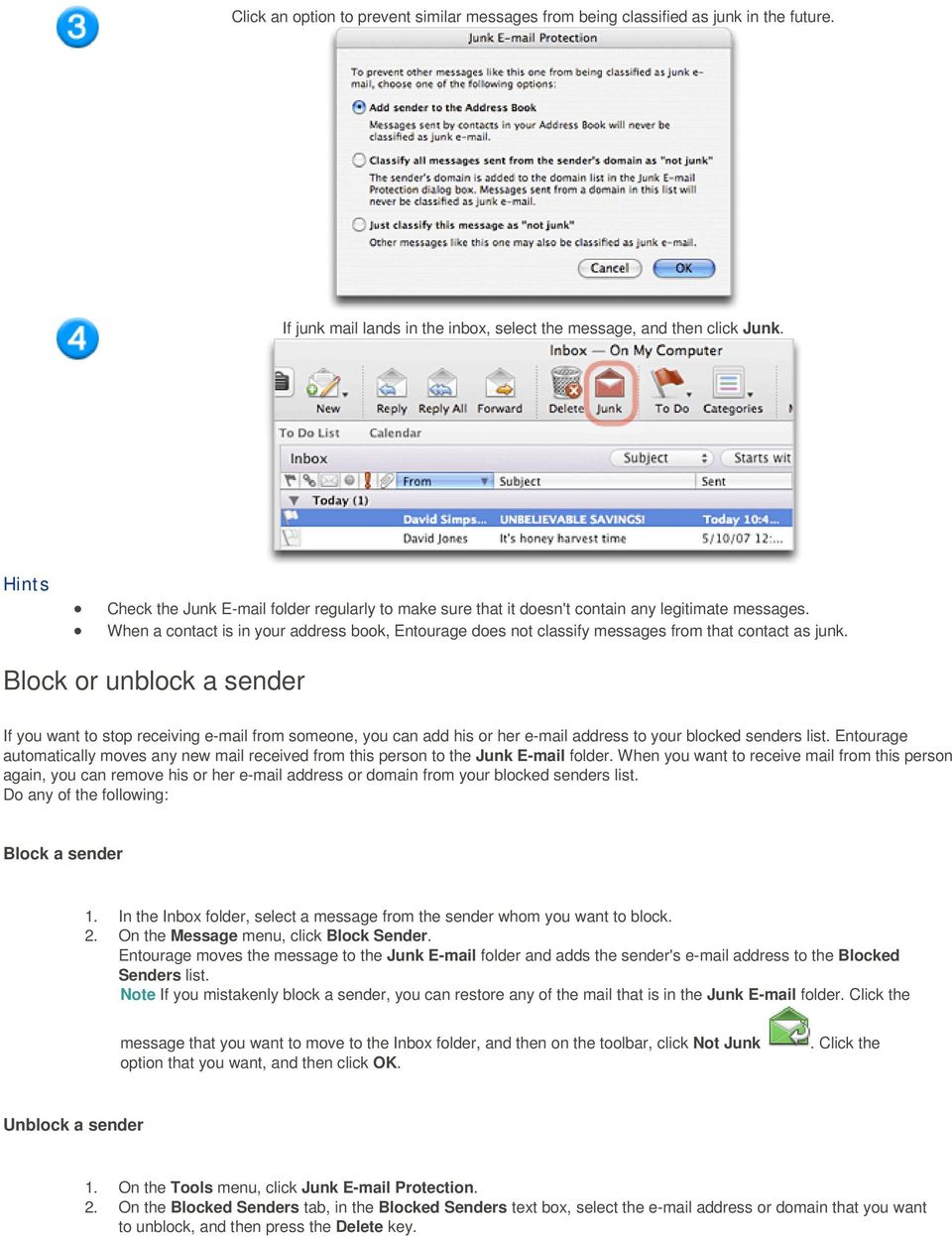
3 Click an option to prevent similar messages from being classified as junk in the future. If junk mail lands in the inbox, select the message, and then click Junk. Hints Check the Junk folder regularly to make sure that it doesn't contain any legitimate messages. When a contact is in your address book, Entourage does not classify messages from that contact as junk. Block or unblock a sender If you want to stop receiving from someone, you can add his or her address to your blocked senders list. Entourage automatically moves any new mail received from this person to the Junk folder. When you want to receive mail from this person again, you can remove his or her address or domain from your blocked senders list. Do any of the following: Block a sender 1. In the Inbox folder, select a message from the sender whom you want to block. 2. On the Message menu, click Block Sender. Entourage moves the message to the Junk folder and adds the sender's address to the Blocked Senders list. Note If you mistakenly block a sender, you can restore any of the mail that is in the Junk folder. Click the message that you want to move to the Inbox folder, and then on the toolbar, click Not Junk option that you want, and then click OK.. Click the Unblock a sender 2. On the Blocked Senders tab, in the Blocked Senders text box, select the address or domain that you want to unblock, and then press the Delete key.
4 Label a message as "junk" or "not junk" The junk filter in Entourage sometimes classifies non-junk messages inaccurately. You can quickly reclassify messages if you need to. Do any of the following: Label a single message or multiple messages as "junk" 1. In the message list, select the junk message or messages. 2. On the toolbar, click Junk. The message is moved to the Junk folder for that account, and it is also assigned to the Junk category. Note Clicking the Junk button does not instruct Entourage to classify similar messages as junk. To help filter messages more accurately, you can increase the level of junk protection or create a rule that sends messages from the same sender to your junk folder. Label a message as "not junk" 1. Open the message. 2. On the toolbar, click Not Junk. 3. Click the option that you want, and then click OK. The message is moved to the Inbox folder of the mail account and removed from the Junk category. Note Clicking Not Junk does not instruct Entourage to classify similar messages as non-junk. To help prevent legitimate messages from reaching the junk folder, you can add a sender to the address book or classify all messages from a sender's domain as nonjunk. If you are on a mailing list, you can use Mailing List Manager to make sure that messages are handled by a mailing list rule and not classified as junk. The wrong amount of is sent to Junk . Cause: The junk filter is set too high or too low. Solution: Increase or decrease the level of junk protection. 2. Choose the level of junk protection that you want. Unless the level of junk protection is set to None, legitimate messages might be classified as "junk" and put in the Junk folder. Check the Junk folder regularly to make sure that it doesn't contain any legitimate messages. Solution: Add individual senders to the address book. When a contact is in your address book, Entourage does not classify messages from that contact as junk. Solution: Add companies or organizations to the Safe Domains list. 2. Click the Safe Domains tab, and then type the domain name. For example, if you add "alpineskihouse.com" to your Safe Domains list, a message from a person with an address that contains "@alpineskihouse.com" is never classified as junk. Solution: Add your mailing lists to the Mailing List Manager. 1. On the Tools menu, click Mailing List Manager. 2. Click New. 3. In the Name box, type a name for the Mailing List that you are adding. 4. In the List address box, enter the address for the mailing list. 5. Optionally, you can set additional parameters for how Entourage handles messages from this mailing list. Adding parameters such as category and folder location is not necessary if you just want Entourage to prevent mailing list messages from being classified as junk. Solution: Add addresses or domains to the Blocked Senders list.

5 2. Click the Blocked Senders tab, and then type the address or the domain name. For example, if you add "alpineskihouse.com" to your Blocked Senders list, a message from a person with an address that contains "@alpineskihouse.com" is always classified as junk.

To help you spot potential junk mail, spam and phishing emails you can read through the guide located on the IT Services website.
 Junk mail filtering Outlook contains tools you can use to manage any suspected junk mail you might receive. Junk mail is also often referred to as spam. Another form of unwanted email is called phishing.
Managing Junk E-mail Folder in Outlook 2010. This document contains instructions for users on how to manage spam filters in Microsoft Outlook 2010.
 Ready Reference 041013 Introduction Managing Junk E-mail Folder in Outlook 2010 This document contains instructions for users on how to manage spam filters in Microsoft Outlook 2010. Manual Filtering of
Managing Junk Mail. About the Junk Mail Filter
 Managing Junk Mail Outlook can filter out certain types of messages and send them to a separate folder to keep your Inbox from being cluttered with junk mail. Outlook can also disable links in suspicious
Outlook Express POP Instructions - Bloomsburg University Students
 1. Open Outlook Express by clicking Start, All Programs, and Outlook Express. 2. Click on the Tools menu and click Accounts. 1 3. Click on Add Mail 4. Enter your name and click Next. 2 5. Enter your full
Spam Management. Manage your FOPE Spam Quarantine
 Spam Management Alverno College uses two tools for email spam management: Microsoft s Forefront Online Protection for Exchange (FOPE) filters spam before it reaches your inbox. FOPE will send you periodic
Anti-Spam Configuration in Outlook 2003 INDEX. Webmail settings Page 2. Client settings Page 6. Creation date 12.12.06 Version 1.2
 Anti-Spam Configuration in Outlook 2003 INDEX Webmail settings Page 2 Client settings Page 6 Creation date 12.12.06 Version 1.2 Webmail settings In this section, you will learn how to activate and configure
Junk E-mail Settings. Options
 Outlook 2003 includes a new Junk E-mail Filter. It is active, by default, and the protection level is set to low. The most obvious junk e-mail messages are caught and moved to the Junk E-Mail folder. Use
Instructions for setting up Junk E mail filters
 Instructions for setting up Junk E mail filters Junk E mail filters must be set up using Microsoft Outlook. Users cannot use My.NWACC.Connection or the Web option to successfully configure their Junk E
GUIDEWIRE. Introduction to Using WebMail. macrobatix. Learn how to: august 2008
 macrobatix GUIDEWIRE august 2008 Introduction to Using WebMail Learn how to: Manage Your Inbox Compose a Message Activate Spam Filter Modify Spam Settings Check Held Messages *To download the complete
Page 1 of 5. How to unblock automatic picture downloads in e-mail messages you receive
 Page 1 of 5 How to unblock automatic picture downloads in e-mail messages you receive Page 2 of 5 Block or unblock automatic picture downloads in e-mail messages To help protect you from junk e-mail senders,
Oakland County Webmail Anti-Spam Setup
 Webmail Anti-Spam is a tool that allows you to filter junk mail (Spam) from your inbox. Once the Anti-Spam control is turned on, most junk mail will be redirected to a Junk Mail folder. Please note that
WINDOWS MAIL VISTA EMAIL ACCOUNT SETUP FOR USE WITH ELLIPSE ADVANCED SPAM FILTER
 *PLEASE NOTE* Specific information such as email servers, usernames, email addresses, and passwords should have already been provided to you by Ellipse. Please contact us before beginning, if you do not
Emailing from The E2 Shop System EMail address Server Name Server Port, Encryption Protocol, Encryption Type, SMTP User ID SMTP Password
 Emailing from The E2 Shop System With recent releases of E2SS (at least 7.2.7.23), we will be allowing two protocols for EMail delivery. A new protocol for EMail delivery Simple Mail Transfer Protocol
Understanding Junk E-mail filtering & Anti-Spam controls
 Understanding Junk E-mail filtering & Anti-Spam controls Overview: the antispam defenses at ODU are a two layered approach. Our first wall of defense is called Spamtrap, and it can be accessed at https://spamtrap.odu.edu
USING OUTLOOK WEB ACCESS
 USING OUTLOOK WEB ACCESS 17 March 2009, Version 1.0 WHAT IS OUTLOOK WEB ACCESS? Outlook Web Access (OWA) is a webmail service of Microsoft Exchange Server. The web interface of Outlook Web Access resembles
Initial Setup of Microsoft Outlook with Google Apps Sync for Windows 7. Initial Setup of Microsoft Outlook with Google Apps Sync for Windows 7
 Microsoft Outlook with Initial Setup of Concept This document describes the procedures for setting up the Microsoft Outlook email client to download messages from Google Mail using Internet Message Access
How To Manage Your Quarantine Email On A Blackberry.Com
 Barracuda Spam Firewall User s Guide 1 Copyright Copyright 2005, Barracuda Networks www.barracudanetworks.com v3.2.22 All rights reserved. Use of this product and this manual is subject to license. Information
Accessing your e-mail using a web browser
 Accessing your e-mail using a web browser The web address for the PTS e-mail site is. http://mailserver.pts.edu Type that web address in the address bar and press . The screen below appears Next,
Click Home > Junk > Not Junk.
 Office 365 (Outlook 2013) Overview of the Junk Email Filter No one likes spam or junk email. The Outlook 2013 Junk Email Filter doesn t stop delivery of junk email messages, but does the next best thing
Email - Spam Spam Email Firewall How Does the Spam Firewall Work? Getting Started username Create New Password
 Email - Spam Spam Email Firewall ODU s Information Services has implemented a Spam Firewall to help you manage spam e-mail from Internet senders. Generally defined, spam e-mail is an unsolicited mailing,
Filtering Email with Microsoft Outlook
 Filtering Email with Microsoft Outlook Microsoft Outlook is an email client that can retrieve and send email from various types of mail servers. It includes some advanced functionality that allows you
Core Essentials. Outlook 2010. Module 1. Diocese of St. Petersburg Office of Training [email protected]
 Core Essentials Outlook 2010 Module 1 Diocese of St. Petersburg Office of Training [email protected] TABLE OF CONTENTS Topic One: Getting Started... 1 Workshop Objectives... 2 Topic Two: Opening and Closing
Mail and Address Book Management
 Mail and Address Book Management How you manage your mail depends in part on how it is being delivered to your Inbox. The following definitions of IMAP and POP will help you better understand where your
HOW TO: Use the UWITC Barracuda Spam Filter System
 HOW TO: Use the UWITC Barracuda Spam Filter System The Barracuda Spam Firewall has a learning engine that learns how to deal with future messages based on the ones you classify as spam and not spam. The
Blocking Junk email in Outlook Version 1.00
 Blocking Junk email in Outlook Version 1.00 Need to Know TM Junk and offensive email is unfortunately a fact of life these days but there is way that you can use Outlook to assist you dealing with these
SOPHOS PureMessage Anti Spam Program
 SOPHOS PureMessage Anti Spam Program The following FAQ s should help clarify some questions you might have about Villanova s new anti spam quarantining program. If your question is not answered below,
Windows Mail POP Instructions - Bloomsburg University Students
 1. Open Windows Mail from your Start Menu. 2. Click on the Tools menu and click Accounts. 1 3. Click on Add to add your account. 4. Click on Email Account and then click Next. 2 5. Enter your full name
Barracuda Spam Firewall User s Guide
 Barracuda Spam Firewall User s Guide 1 Copyright Copyright 2005, Barracuda Networks www.barracudanetworks.com v3.2.22 All rights reserved. Use of this product and this manual is subject to license. Information
Using the University s Spam and Virus E-mail Filtering Service
 Using the University s Spam and Virus E-mail Filtering Service Technology Help Desk 412 624-HELP [4357] http://technology.pitt.edu Overview The University of Pittsburgh s spam and virus e-mail filtering
Using Barracuda Spam Firewall
 Using Barracuda Spam Firewall Creating your Barracuda account Your Barracuda account has been created for you if you are a current Hartwick College student, staff or faculty member. Setting Your Password.
Entourage - an Introduction to E-mail
 Entourage - an Introduction to E-mail Version 2004 for Macintosh Table of Contents What is Entourage Starting Entourage The Navigation Pane Getting Help Creating and Sending a Message Using the UI Exchange
Microsoft Outlook 2003 : Creating an Spam/Junk Mail Filter
 The University of Akron Microsoft Outlook 2003 : Creating an Spam/Junk Mail Filter Spam Filter Following are the steps for creating a Junk Mail folder and setting up the filter to move suspect materials
Vodafone Hosted Services. Getting your email. User guide
 Vodafone Hosted Services Getting your email User guide Welcome. This guide will show you how to get your email, now that it is hosted by Vodafone Hosted Services. Once you ve set it up, you will be able
New Mexico State University
 E-mail Set Up for Microsoft Office Outlook 2003 Click on the option that describes you: I am setting up my NMSU e-mail with Outlook for the first time I currently use Outlook to view my NMSU e-mail and
LOGGING IN. Please take a moment to add this page to the favorites in your preferred Web Browser. ( https://asp.reflexion.
 Total Control Spam Filtering User Guide 11/16/2013 LOGGING IN An e-mail will be sent with your username and password. To reach the log page visit: https://asp.reflexion.net/login this will bring you to
Outlook Express IMAP Instructions - Bloomsburg University Students
 1. Open Outlook Express by clicking Start, All Programs, and Outlook Express. 2. Click on the Tools menu and click Accounts. 1 3. Click on Add Mail 4. Enter your name and click Next. 2 5. Enter your full
Microsoft Office 365 Outlook Web App (OWA)
 CALIFORNIA STATE UNIVERSITY, LOS ANGELES INFORMATION TECHNOLOGY SERVICES Microsoft Office 365 Outlook Web App (OWA) Spring 2013, Version 1.0 Table of Contents Introduction...3 Signing In...3 Navigation
User Guide for Kelani Mail
 User Guide for Kelani Mail Table of Contents Log in to Kelani Mail 1 Using Kelani Mail 1 Changing Password 2 Using Mail Application 3 Using email system folders 3 Managing Your Mail 4 Using your Junk folder
ACCESSING YOUR CHAFFEY COLLEGE E-MAIL VIA THE WEB
 ACCESSING YOUR CHAFFEY COLLEGE E-MAIL VIA THE WEB If a District PC has not been permanently assigned to you for work purposes, access your Chaffey College e-mail account via the Web (Internet). You can
Configuring Outlook 2013 For IMAP Connections
 Configuring Outlook 2013 For IMAP Connections VERSION 1.0 1 P a g e U A C o n n e c t C o n f i g u r i n g O u t l o o k 2013 f o r I M A P 12/2013 Configuring Outlook 2013 for IMAP Connections Overview
Managing Spam With Outlook Express
 Managing Spam with Outlook Express Managing Spam With Outlook Express 4Introduction 4Verizon Online Spam Detector 4Using Outlook Express Tools to Reduce Spam 1 Verizon Online 2 Managing Spam with Outlook
Version 3.x. Barracuda Spam & Virus Firewall User s Guide. Barracuda Networks Inc. 3175 S. Winchester Blvd Campbell, CA 95008 http://www.barracuda.
 Version 3.x Barracuda Spam & Virus Firewall User s Guide Barracuda Networks Inc. 3175 S. Winchester Blvd Campbell, CA 95008 http://www.barracuda.com? 1 Copyright Copyright 2005-2009, Barracuda Networks
Initial Setup of Microsoft Outlook 2011 with IMAP for OS X Lion
 Initial Setup of Microsoft Outlook Concept This document describes the procedures for setting up the Microsoft Outlook email client to download messages from Google Mail using Internet Message Access Protocol
Overview of Registered Envelopes. Registered Envelope Notification Message
 Overview of Registered Envelopes A Registered Envelope is a type of encrypted email message. Some Registered Envelopes are password-protected, while others are encrypted but do not require a password.
IT Email Services page 1 of 10 Spam Filtering. Overview
 IT Email Services page 1 of 10 Overview Comcast Spectacor has implemented a system to control unwanted Internet email (spam) from the Internet. Virus emails and some known spam will be filtered automatically.
Outlook 2010 Essentials
 Outlook 2010 Essentials Training Manual SD35 Langley Page 1 TABLE OF CONTENTS Module One: Opening and Logging in to Outlook...1 Opening Outlook... 1 Understanding the Interface... 2 Using Backstage View...
Windows Live Mail Setup Guide
 Versions Addressed: Windows Live Mail 2011 Document Updated: 11/24/2010 Copyright 2010 Purpose: This document will assist the end user in configuring Windows Live Mail to access a POP3 email account hosted
MS Outlook 2002/2003. V1.0 BullsEye Telecom Email
 IMAP Settings Manual Our application allows you to access your email in many different ways. For those of you who do not wish to use the Webmail interface, you may also manage your email and custom folder
Microsoft Outlook 2010 contains a Junk E-mail Filter designed to reduce unwanted e-mail messages in your
 Overview of the Junk E-mail Filter in Outlook (Much of this text is extracted from the Outlook Help files.) Microsoft Outlook 2010 contains a Junk E-mail Filter designed to reduce unwanted e-mail messages
How to make sure you receive all emails from the University of Edinburgh
 How to make sure you receive all emails from the University of Edinburgh To ensure that any email from The University of Edinburgh - or any address you choose - is not automatically sent to your junk or
How to Use Red Condor Spam Filtering
 What is Spam Filtering? Spam filtering is used to detect unsolicited and unwanted email. By looking for certain words in an email's subject line, or through suspicious word patterns or word frequencies
https://mail.wheelock.edu
 The Wheelock College Guide to Understanding Microsoft Outlook Web Access Maintained by: Wheelock College Department of Information Technology Version 1.1 June 2006 https://mail.wheelock.edu This document
1. Open Thunderbird. If the Import Wizard window opens, select Don t import anything and click Next and go to step 3.
 Thunderbird The changes that need to be made in the email programs will be the following: Incoming mail server: newmail.one-eleven.net Outgoing mail server (SMTP): newmail.one-eleven.net You will also
Outlook basics. Identify user interface elements that you can use to accomplish basic tasks.
 Outlook basics Outlook is a powerful tool for managing your e-mail, contacts, calendars, and tasks. To use it most effectively, you first have to understand the basics. This tutorial introduces some of
BULLGUARD SPAMFILTER
 BULLGUARD SPAMFILTER GUIDE Introduction 1.1 Spam emails annoyance and security risk If you are a user of web-based email addresses, then you probably do not need antispam protection as that is already
Using the Barracuda Spam Firewall to Filter Your Emails
 Using the Barracuda Spam Firewall to Filter Your Emails This chapter describes how end users interact with the Barracuda Spam Firewall to check their quarantined messages, classify messages as spam and
MICROSOFT OUTLOOK 2003
 MICROSOFT OUTLOOK 2003 Follow these steps to update an Outlook 2003 account to send and receive e-mail using GCMUNI's new mail settings. Before you start, you must change your temporary GCMUNI e-mail password.
GroupWise Training How to deal with Junk Mail
 GroupWise Training How to deal with Junk Mail Setting Up Junk Mail Filtering This feature allows you to decide how you want to deal with junk mail and what should be categorized as junk. **Please note
Webmail. Setting up your email account
 Setting up your email account In these notes, yourdomain means the full domain name (i.e. the part of an email address after the @ sign). This doesn t include www, but does include.co.uk or.com. For example,
WineWeb Email Account Services
 As part of WineWeb s website services, we can provide email accounts under your domain name. Although this is optional, almost all of our clients use our mail server for their email accounts. We run the
Managing Spam in E-Mail & More Introduction Spam Detector Block Sender E-Mail Filters
 Managing Spam in E-Mail & More Managing Spam in E-Mail & More Introduction Spam Detector Block Sender E-Mail Filters 1 Verizon Online 2 Managing Spam in E-Mail & More Managing Spam in E-Mail & More Introduction
Using Server-Side Filters to Manage/Organize Your E-Mail (Including Accept and Block Lists) Table of Contents Why Use Server-Side Mail Filters INBOX
 Using Server-Side Filters to Manage/Organize Your E-Mail (Including Accept and Block Lists) 1 of 9 U-M Information Technology Central Services S4325 May 2005 You can create server-side mail filters to
Connecting to LUA s webmail
 Connecting to LUA s webmail Effective immediately, the Company has enhanced employee remote access to email (Outlook). By utilizing almost any browser you will have access to your Company e-mail as well
Email Basics. a. Click the arrow to the right of the Options button, and then click Bcc.
 Email Basics Add CC or BCC You can display the Bcc box in all new messages that you compose. In a new message, do one of the following: 1. If Microsoft Word is your e-mail editor a. Click the arrow to
Mailbox control panel. User guide
 Mailbox control panel User guide Close this window Mailbox control panel user guide Mailbox control panels enable you to configure your settings for a specific mailbox with ease, with features ranging
Email Migration Manual (For Outlook Express 6)
 Email Migration Manual (For Outlook Express 6) By SYSCOM (USA) May 13, 2013 Version 1.0 1 Contents 1. How to Change POP3/SMTP Setup for Outlook Express... 3 2. How to Login to Webmail... 7 3. How to Change
Outlook Web Access End User Guide
 Outlook Web Access End User Guide Page 0 Outlook Web Access is an online, limited version of an Outlook client which can be used to access an exchange account from a web browser, without having an Outlook
Version 5.x. Barracuda Spam & Virus Firewall User s Guide. Barracuda Networks Inc. 3175 S. Winchester Blvd Campbell, CA 95008 http://www.barracuda.
 Version 5.x Barracuda Spam & Virus Firewall User s Guide Barracuda Networks Inc. 3175 S. Winchester Blvd Campbell, CA 95008 http://www.barracuda.com? 1 Copyright Copyright 2005-2012, Barracuda Networks
Outlook Web App. in Office 365. The Outlook Window. Signing In. (Outlook Exchange Faculty & Staff) Getting Started
 Outlook Web App in Office 365 (Outlook Exchange Faculty & Staff) Getting Started The Outlook Window Navigation Bar Settings Navigation Pane View Pane Reading Pane Navigation Bar switch between Outlook,
KUMC Spam Firewall: Barracuda Instructions
 KUMC Spam Firewall: Barracuda Instructions Receiving Messages from the KUMC Spam Firewall Greeting Message The first time the KUMC Spam Firewall quarantines an email intended for you, the system sends
Purchase College Barracuda Anti-Spam Firewall User s Guide
 Purchase College Barracuda Anti-Spam Firewall User s Guide What is a Barracuda Anti-Spam Firewall? Computing and Telecommunications Services (CTS) has implemented a new Barracuda Anti-Spam Firewall to
Outlook 2007 EXPLORE THE OUTLOOK USER INTERFACE. Microsoft. Basic Tasks
 Microsoft Outlook 2007 Basic Tasks EXPLORE THE OUTLOOK USER INTERFACE 1. Instant Search box: Helps you quickly find items in Microsoft Outlook. The Instant Search pane is always available in all of your
Symantec Enterprise Vault
 Symantec Enterprise Vault Guide for Mac OS X Users 10.0 Symantec Enterprise Vault: Guide for Mac OS X Users The software described in this book is furnished under a license agreement and may be used only
Using Outlook WebAccess
 Using Outlook WebAccess Outlook Toolbars - Terminology Update all folders New Move/Copy Reply Forward Check for New Messages Help Show/Hide Folders Delete Reply to All Show/Hide Reading Pain Search Address
Using the Barracuda to Filter Your Emails
 Using the Barracuda to Filter Your Emails The following describes how end users interact with the Barracuda to check their quarantined messages, classify messages as spam and not spam, and modify their
Wilkes University Information & Instructions for Students using Outlook 2003
 Outlook 2003 Wilkes University These tips are for how use some of the features of Outlook 2003. You will first have to install Outlook 2003 on your personal computer. After installing Outlook follow the
Setting up the Mail Sort Function in Outlook Web App
 2015.8 Organization for Information Management and Communication Setting up the Mail Sort Function in Outlook Web App For Faculty and Staff You can set up certain behavioral patterns regarding how your
Personal Spam Solution Overview
 Personal Spam Solution Overview Please logon to https://mailstop.dickinson.edu using your network logon and password. This is an overview of what you can do with this system. Common Terms used in this
Email Client configuration and migration Guide Setting up Thunderbird 3.1
 Email Client configuration and migration Guide Setting up Thunderbird 3.1 1. Open Mozilla Thunderbird. : 1. On the Edit menu, click Account Settings. 2. On the Account Settings page, under Account Actions,
ModusMail Software Instructions.
 ModusMail Software Instructions. Table of Contents Basic Quarantine Report Information. 2 Starting A WebMail Session. 3 WebMail Interface. 4 WebMail Setting overview (See Settings Interface).. 5 Account
How to install and use the File Sharing Outlook Plugin
 How to install and use the File Sharing Outlook Plugin Thank you for purchasing Green House Data File Sharing. This guide will show you how to install and configure the Outlook Plugin on your desktop.
For example, within General Settings, you can change the default language from English to Spanish and change the size of the text that is displayed.
 Atlantic Broadband s free Webmail service makes it easy to read and send email using just a web browser from any computer. This quick reference guide will help you get the most out of Webmail with useful
Barracuda Spam & Virus Firewall User's Guide 5.x
 Barracuda Spam & Virus Firewall Barracuda Spam & Virus Firewall User's Guide 5.x This guide describes how you can check your quarantined messages, classify messages as spam and not spam, manage whitelisting
SENDING EMAILS & MESSAGES TO GROUPS
 SENDING EMAILS & MESSAGES TO GROUPS Table of Contents What is the Difference between Emails and Selltis Messaging?... 3 Configuring your Email Settings... 4 Sending Emails to Groups Option A: Tasks...
How do I use ProofPoint anti-spam software at the GC
 This FAQ contains: ProofPoint Login instructions Introduction to ProofPoint web interface component Views available in Proofpoint ProofPoint Web Interface Actions Introduction to ProofPoint Digest ProofPoint
FastNetSecurity SpamGuard Email Spam Filter How-To
 FastNetSecurity SpamGuard Email Spam Filter How-To Using your web browser, log on to https://spamguard.fastnetsecurity.com Tip: Add a bookmark to this page for easy access! Login credentials will incorporate
Configuring Outlook 2013
 Configuring Outlook 2013 Contents 1. Configuring Outlook 2013... 1 2. Add the new IMAP email account to Outlook... 2 3. Change Start-up default Inbox... 7 4. IMAP Folders:... 8 5. Add/Change your signature....
Online Backup and Recovery Manager Setup for Microsoft Windows.
 Online Backup and Recovery Manager Setup for Microsoft Windows. Backup Wizard Default Interface Recovery Wizard Online Backup and Recovery Manager Setup Backup Wizard After installing and launching the
Microsoft Outlook 2011 The Essentials
 Microsoft Outlook 2011 The Essentials Training User Guide Sue Pejic Training Coordinator Information Technology Services Email : [email protected] Mobile : 0419 891 113 Table of Contents Overview Outlook
http://connectwise.reflexion.net/login?domain=connectwise.net
 ConnectWise Total Control: Managed Email Threat Protection Version: 1.5 Creation Date: 11-September-2009 Last Updated: 24-August-2012 LOGGING IN An e-mail will be or has sent with your username and password.
Outlook Live Basics. for Students
 Outlook Live Basics for Students 2 Outlook Live for Support Staff Outlook Live for Support Staff 3 Getting Started... 6 Signing into your Outlook Account... 6 Migrating your Account... 8 Address Book...