
DIGITAL KEY TELEPHONE SYSTEM GENERAL DESCRIPTION
|
|
|
- Edmund Daniel
- 10 years ago
- Views:
Transcription
1 TOSHIBA SYSTEM PRACTICES DIGITAL KEY TELEPHONE SYSTEMS DIGITAL KEY TELEPHONE SYSTEM COPYRIGHT 1993 TOSHIBA AMERICA INFORMATION SYSTEMS, INC. All rights reserved. No part of this manual, covered by the copyrights hereon, may be reproduced in any form or by any means graphic, electronic, or mechanical, including recording, taping, photocopying, or information retrieval systems without express written permission of the publisher of this material. Version 1.2

2 STRATA DK8 AND DK16 GENERAL END USER INFORMATION The STRATA DK8 and DK16 Digital Key telephone system is registered in accordance with the provisions of Part 68 of the Federal Communications Commission s Rules and Regulations. FCC REQUIREMENTS Means of Connection: The Federal Communications Commission (FCC) has established rules which permit the STRATA DK system to be connected directly to the telephone network. Connection points are provided by the telephone company connections for this type of customerprovided equipment will not be provided on coin lines. Connections to party lines are subject to state tariffs. Incidence of Harm: If the system is malfunctioning, it may also be disrupting the telephone network. The system should be disconnected until the problem can be determined and repaired. If this is not done, the telephone company may temporarily disconnect service. If possible, they will notify you in advance, but, if advance notice is not practical, you will be notified as soon as possible. You will be informed of your right to file a complaint with the FCC. Service or Repair: For service or repair, contact your local Toshiba telecommunications distributor. To obain the nearest Toshiba telecommunications distributor in your area, call Toshiba America Information Systems, Inc., Telecommunication Systems Division in Irvine, CA (714) Telephone Network Compatibility: The telephone company may make changes in its facilities, equipment, operations, and procedures. If such changes affect the compatibility or use of the STRATA DK system, the telephone company will notify you in advance to give you an opportunity to maintain uninterrupted service. Notification of Telephone Company: Before connecting a STRATA DK system to the telephone network, the telephone company may request the following: 1. Your telephone number. 2. FCC registration number: STRATA DK may be configured as a Key or Hybrid telephone system. The appropriate configuration for your system is dependent upon your operation of the system. If the operation of your system is only manual selection of outgoing lines, it may be registered as a Key telephone system. If your operation requires automatic selection of outgoing lines, such as dial access, Least Cost Routing, Pooled Line Buttons, etc., the system must be registered as a Hybrid telephone system. In addi- tion to the above, certain features (Off-premises Stations, etc.) may also require Hybrid telephone system registration in some areas. If you are unsure of your type of operaiton and/or the appropriate FCC registration number, contact your local Toshiba telecommunications distributor for assistance. STRATA DK8 DKSU Manufactured in Malaysia: Key system: CJ6MLA KF-E Hybrid: CJ6MLA MF-E STRATA DK16 DKSU Manufactured in Singapore: Key system: CJ6SNG KF-E Hybrid: CJ6SNG MF-E 3. Ringer equivalence number: 0.2B. The ringer equivalence number (REN) is useful to determine the quantity of devices which you may connect to your telephone line and still have all of those devices ring when your number is called. In most areas, but not all, the sum of the RENs of all devices connected to one line should not exceed five (5.0B). To be certain of the number of devices you may connect to your line, as determined by the REN, you should contact your local telephone company to ascertain the maximum REN for your calling area. 4. Network connection information USOC jack required: RJ11, RJ14C, RJ21X (see Table C). Items 2, 3 and 4 above are also indicated on the equipment label. RADIO FREQUENCY INTERFERENCE Warning: This equipment generates, uses, and can radiate radio frequency energy and if not installed and used in accordance with the manufacturer s instruction manual, may cause interference to radio communications. It has been tested and found to comply with the limits for a Class A computing device pursuant to Subpart J of Part 15 of FCC Rules, which are designed to provide reasonable protection against such interference when operated in a commercial environment. Operation of this equipment in a residential area is likely to cause interference, in which case, the user, at his own expense, will be required to take whatever measures may be required to correct the interference. This system is listed with Underwriters Laboratory. UL Requirement: If wiring from any telephone exits the building or is subject to lightning or other electrical surges, then secondary protection is required. (See Installation & Maintenance Manual for more information.) LISTED U L 49L7 E88891 IMPORTANT NOTICE MUSIC-ON-HOLD In accordance with U.S. Copyright Law, a license may be required from the American Society of Composers, Authors and Publishers, or other similar organization, if radio or TV broadcasts are transmitted through the music-on-hold feature of this telecommunication system. Toshiba America Information Systems, Inc., hereby disclaims any liability arising out of the failure to obtain such a license.
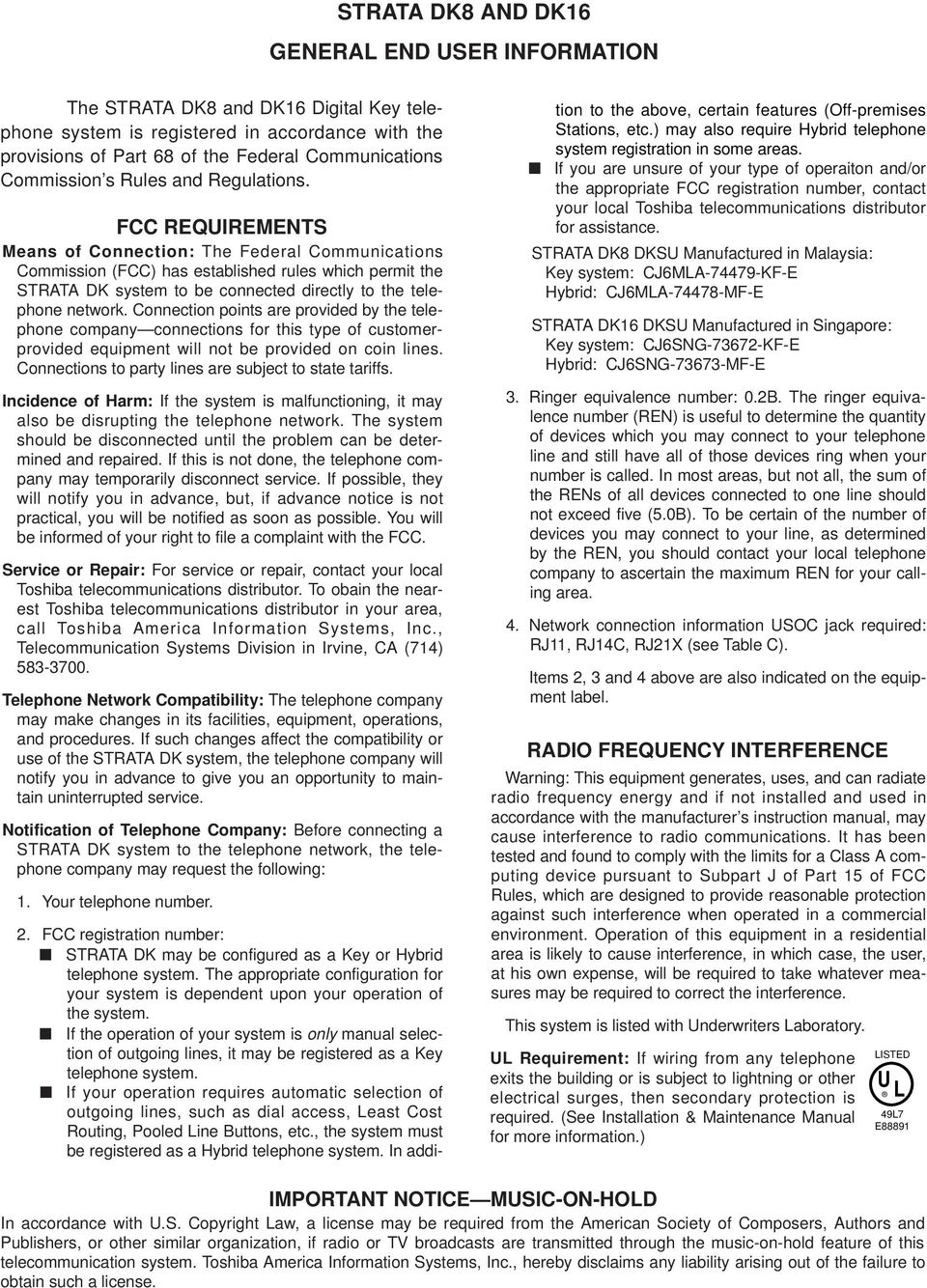
3 TABLE OF CONTENTS PARAGRAPH SUBJECT PAGE 1 GENERAL... 1 Technology... 1 Maintenance and Programming SYSTEM CONFIGURATION SYSTEM COMPONENTS... 4 STRATA DK8 Key Service Unit... 4 STRATA DK8 Optional PCBs... 5 STRATA DK16 Base Key Service Unit... 8 STRATA DK16 Expansion Key Service Unit Toshiba Peripherals Customer-supplied Peripherals Cabling and Connectors SYSTEM FEATURES TELEPHONE FEATURES GLOSSARY FIGURE LIST FIGURE SUBJECT PAGE 1 STRATA DK8 & DK16 PERIPHERALS STRATA DK8 BASE KEY SERVICE UNIT STRATA DK16 BASE KEY SERVICE UNIT STRATA DK16 EXPANSION KEY SERVICE UNIT STRATA DK8 MAXIMUM CONFIGURATION STRATA DK16 MAXIMUM CONFIGURATION STRATA DK8 FUNCTIONAL BLOCK DIAGRAM STRATA DK16 FUNCTIONAL BLOCK DIAGRAM STRATA DK8 KEY SERVICE UNIT INTERIOR (CONNECTORS AND INTERFACES) STRATA DK16 BASE KEY SERVICE UNIT INTERIOR (CONNECTORS AND INTERFACES) STRATA DK16 EXPANSION KEY SERVICE UNIT INTERIOR BUTTON DIGITAL TELEPHONE WITH HANDSFREE ANSWERBACK (DKT2010-H) BUTTON DIGITAL SPEAKERPHONE WITH LIQUID CRYSTAL DISPLAY (DKT2010-SD) BUTTON DIGITAL SPEAKERPHONE (DKT2020-S) BUTTON DIGITAL SPEAKERPHONE WITH LIQUID CRYSTAL DISPLAY (DKT2020-SD) INTEGRATED DATA INTERFACE UNIT (PDIU-DI2) STAND-ALONE DATA INTERFACE UNIT (PDIU-DS) DOOR PHONE (MDFB) i
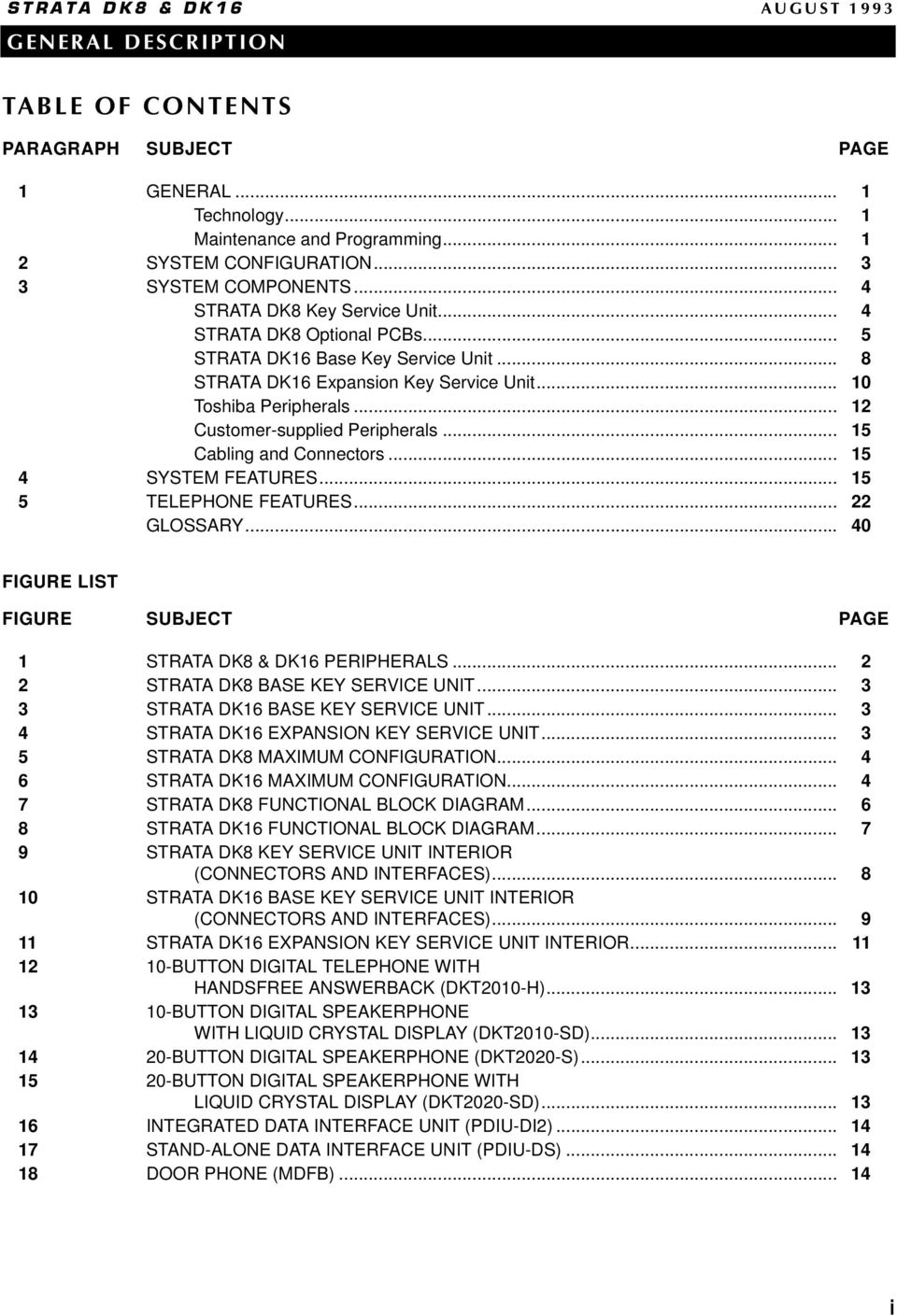
4 FIGURE LIST (CONTINUED) FIGURE SUBJECT PAGE 19 DOOR PHONE/LOCK CONTROL UNIT (DDCB) BUTTON DIRECT STATION SELECTION CONSOLE BUTTON DIGITAL TELPHONE WITH ADD-ON MODULE TABLE LIST TABLE SUBJECT PAGE A DK8 & DK16 GENERAL REQUIREMENTS B DK8 & DK16 STATION LOOP REQUIREMENTS C NETWORK REQUIREMENTS D SYSTEM TONES E DK8 KEY SERVICE UNIT COMPONENTS F DK16 BASE KEY SERVICE UNIT COMPONENTS G DK8 & DK16 TYPICAL RESERVE POWER DURATION ESTIMATES H DK16 EXPANSION KEY SERVICE UNIT COMPONENTS I DK16 PIOU/PIOUS INTERFACE OPTIONS J DK8 & DK16 FEATURE CAPACITIES K DK8 PERIPHERAL CAPACITY L DK16 PERIPHERAL CAPACITY M DATA INTERFACE SPECIFICATIONS N DK8 & DK16 SYSTEM FEATURES O DK8 & DK16 STATION FEATURES ii
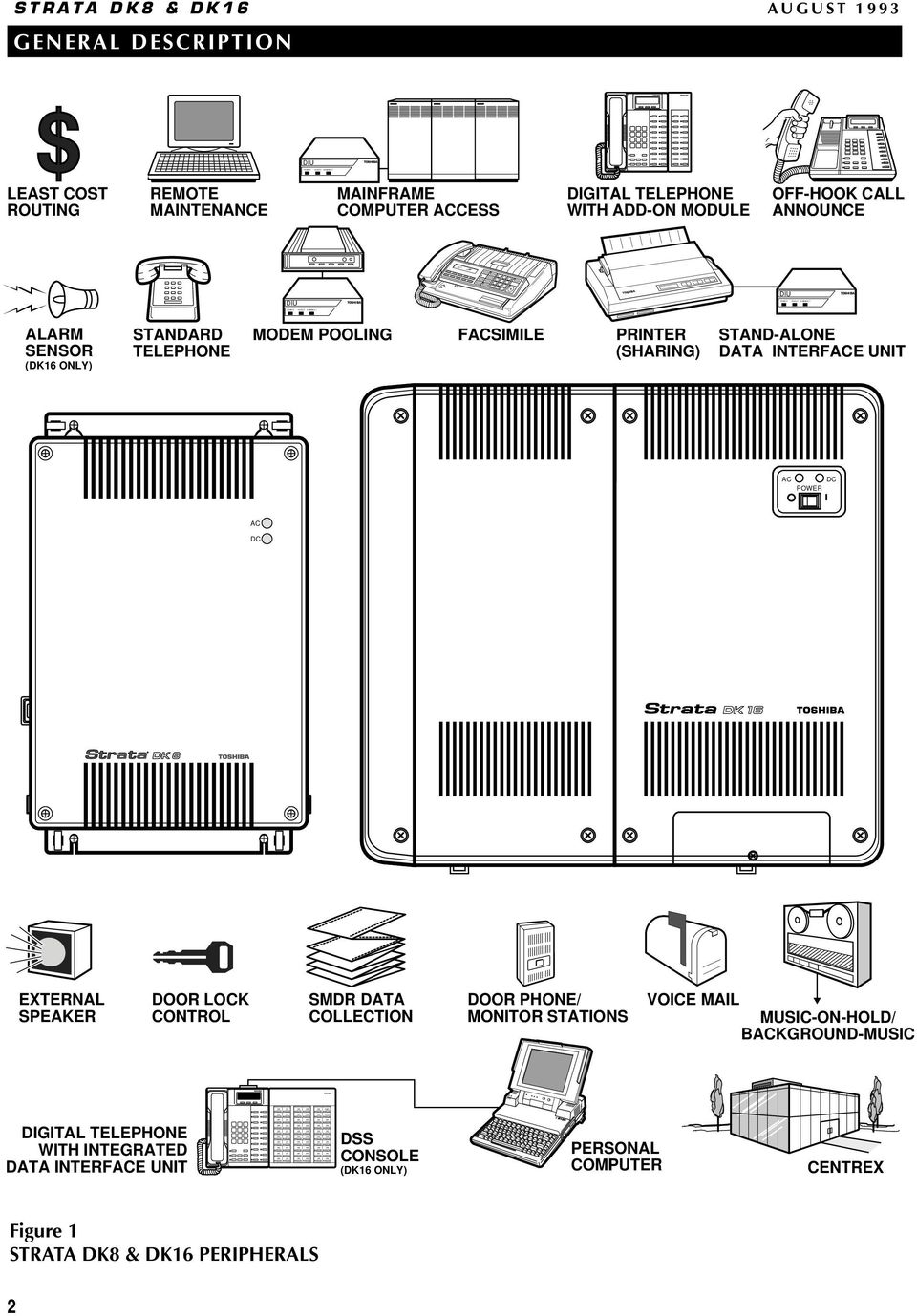
5 1 GENERAL The STRATA DK8 and STRATA DK16 are private telephone systems that are tailor-made for small business applications. Each employs state-of-the-art technology to provide its users with an efficient, easy-touse, feature-rich telephone system. The systems easily connect to outside public telephone lines (central office lines), and all of the telephones (stations) tied to each system can have direct access to each other as well as to the public network. Designed with the knowledge that user needs typically evolve, the STRATA DK8 and DK16 can be upgraded with additional circuit boards to add more features and and/or capacities. Customers are not tied to one configuration; they can start at a standard configuration and then add to their system as their needs grow and change. Furthermore, many of the telephones and peripherals supported by STRATA DK8 and DK16 are also compatible with other STRATA systems. This compatibility saves customers money when they migrate from the smaller STRATA DK8 system to a STRATA DK16, or when they migrate from the STRATA DK8 and DK16 to a larger STRATA DK system. Utilizing specially designed digital or electronic telephones, solid-state electronics within the key service unit translate signals from the station push-button dial pad into either Dual-tone Multi-frequency (DTMF) or rotary-dial signals, as required by the central office. All telephones come equipped with voice announce speakers. Speakerphones and liquid crystal display telephones are also available. A large number of widely-used and sophisticated features are available to STRATA telephone users. Everyday features such as Call Transfer, Call Forwarding, Call Holding, and Call Pickup are executed with just the push of a button or the entry of a brief access code. More sophisticated feature operations are easily accomplished with the aid of optional displays built into telephones. In addition to telephones, a number of other useful peripherals can be connected to the system, including door phones for visitor screening; a music source for Music-on-hold; a speaker for Background Music and Paging; and a voice mail device like the Toshiba VP Voice Processing System for voice mail applications (see Figure 1). TECHNOLOGY The STRATA DK8 and STRATA DK16 utilize the advanced technologies noted below: ISDN-like Architecture: Toshiba digital telephones connect to the system with one-pair cabling, which uses a 2B+D ISDN-like digital link that can transmit and receive simultaneous voice and data along with control information. Pulse Code Modulation: Digital switching talkpaths allow all central office (CO) and intercom lines to be accessed simultaneously. Analog-to-digital and digital-to-analog conversion is accomplished by CODECs (coder plus decoder) on station and CO line printed circuit boards (PCBs). Stored Program Control: The system uses a 16-bit microprocessor for stored program control. System operating software is stored on 1 megabyte of read only memory (ROM), and individual configuration and custom programming is stored on 128 kilobytes of random access memory (RAM) for DK16 and 64K of RAM for DK8. A lithium battery with a life span of at least six years will preserve RAM in the case of a power failure. Microprocessors: The main microprocessor of the system is a 16-bit type that operates at a clock speed of 8 megahertz (MHz). In addition, some printed circuit boards employ 8-bit, TMP90C840-type local microprocessors that run at 10 MHz. This distributed microprocessing architecture is used throughout the system. Custom Electronic Circuitry: Large scale integration (LSI) technology enables STRATA DK8 and DK16 circuit design to be simple and efficient. Gate arrays using very large scale integration save vast amounts of space by utilizing the latest technology. More circuitry fits onto smaller PCBs for a more compact system. Widespread use of CMOS circuits minimize system power requirements. MAINTENANCE AND PROGRAMMING Maintaining and troubleshooting STRATA DK8 and DK16 is easy because of its modular architecture. 1

6 TOSHIBA POWER READY CONNECT POWER READY CONNECT TOSHIBA Night 1 All Call TOSHIBA TOSHIBA TOSHIBA TOSHIBA POWER READY CONNECT TOSHIBA STRATA DK8 & DK16 AUGUST 1993 DIU LEAST COST ROUTING REMOTE MAINTENANCE MAINFRAME COMPUTER ACCESS DIGITAL TELEPHONE WITH ADD-ON MODULE OFF-HOOK CALL ANNOUNCE TOSHIBA DIU DIU ALARM SENSOR (DK16 ONLY) STANDARD TELEPHONE MODEM POOLING FACSIMILE PRINTER (SHARING) STAND-ALONE DATA INTERFACE UNIT AC POWER DC AC DC EXTERNAL SPEAKER DOOR LOCK CONTROL SMDR DATA COLLECTION DOOR PHONE/ MONITOR STATIONS VOICE MAIL MUSIC-ON-HOLD/ BACKGROUND-MUSIC DIGITAL TELEPHONE WITH INTEGRATED DATA INTERFACE UNIT DSS CONSOLE (DK16 ONLY) T5100 PERSONAL COMPUTER CENTREX Figure 1 STRATA DK8 & DK16 PERIPHERALS 2
7 Problems are typically localized and do not affect other units. Hardware maintenance and repair procedures describe how to quickly locate, remove, and replace defective modules. System programming can be performed without taking the system out of service. On-site programming can be executed with any 20-button proprietary LCD (liquid crystal display) telephone, or with an ASCII terminal connected to an optional maintenance port. Off-site programming which can help cut costs and save time is available through an optional modem. 2 SYSTEM CONFIGURATION and a two-circuit standard telephone printed circuit board. An SMDR/TTY interface, a Music-on-hold source, a Background Music (BGM) source, a night bell, and an amplifier/speaker for external page may also be added as needed. At maximum configuration, the DK8 can interface with up to eight digital telephones, four CO lines, and AC DC The main building blocks of each system are cabinet-like units called Key Service Units. The STRATA DK8 consists of a single Key Service Unit (Figure 2). The STRATA DK16 is comprised of the Base Key Service Unit (Figure 3) and the Optional Expansion Key Service Unit (Figure 4). Every central office (CO) line, station, and peripheral connects to these units. The STRATA DK8 Key Service Unit comes equipped to interface with up to four Toshiba-proprietary digital telephones and two CO lines. It can be optionally equipped with up to two one-circuit CO line/two-circuit digital telephone printed circuit boards Figure 2 STRATA DK8 BASE KEY SERVICE UNIT AC POWER DC AC POWER DC Figure 3 STRATA DK16 BASE KEY SERVICE UNIT Figure 4 STRATA DK16 EXPANSION KEY SERVICE UNIT 3
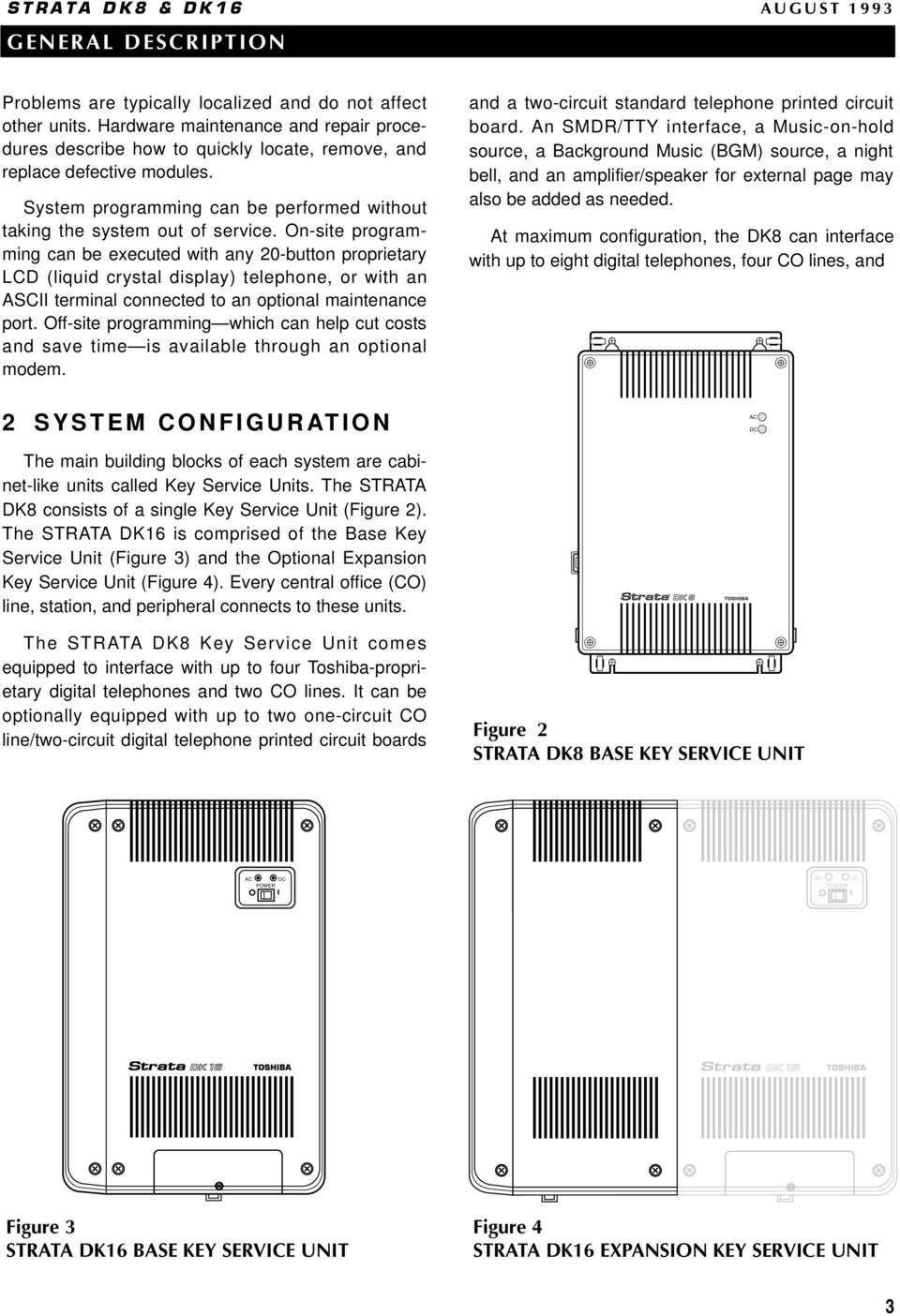
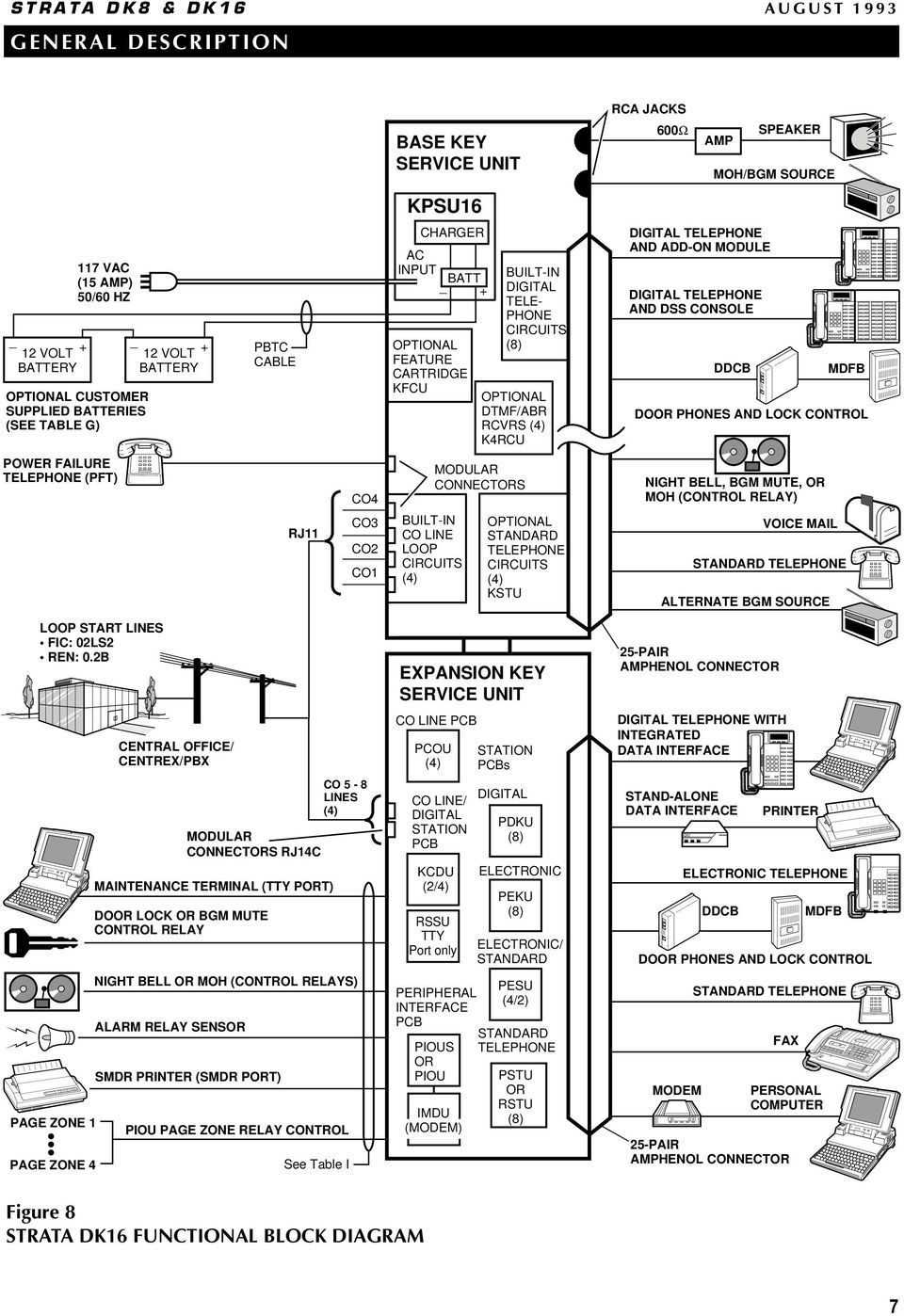
8 two standard telephone devices. Note that while the DK8 provides up to ten station ports, only eight can support digital telephones. The last two standard station ports are designed for peripheral devices or standard telephone interfaces. The STRATA DK16 Base Key Service Unit comes equipped to interface with up to eight Toshibaproprietary digital telephones and four CO lines. It can optionally be equipped with a four-circuit standard telephone printed circuit board, a Music-on-hold source, a BGM source, a night bell, and an amplifier/speaker for external page. The optional STRATA DK16 Expansion Key Service Unit can be attached to the standard unit to increase system capacities. A system equipped with the optional unit can support up to eight CO lines and 16 Toshiba-proprietary telephones by using up to three additional PCBs. An SMDR/TTY interface may also be added as needed. Note that while the DK16 provides up to 20 station ports, only 16 can be digital telephones, with the last four standard station ports designed for peripheral device or standard telephone interface. Maximum capacities for STRATA DK8 and DK16 systems are shown in Figures 5 and 6. 3 SYSTEM COMPONENTS This section describes the components of the STRATA DK8 Key Service Unit and the STRATA DK16 Base and Expansion Key Service Units. The functional block diagrams in Figures 7 and 8 illustrate the organization and connection of these components. STRATA DK8 KEY SERVICE UNIT In addition to the +5 volt converter, main processor and operating software for the system, the Key Service Unit contains the circuitry and components (Figure 9 and Table E) as described in the following CO LINES DIGITAL TELEPHONES STANDARD TELEPHONES BASIC KEY SERVICE UNIT EXPANDED KEY SERVICE UNIT Figure 5 STRATA DK8 MAXIMUM CONFIGURATION BASE KEY SERVICE UNIT WITH EXPANSION KEY SERVICE UNIT CO LINES DIGITAL TELEPHONES ELECTRONIC TELEPHONES STANDARD TELEPHONES Figure 6 STRATA DK16 MAXIMUM CONFIGURATION 4
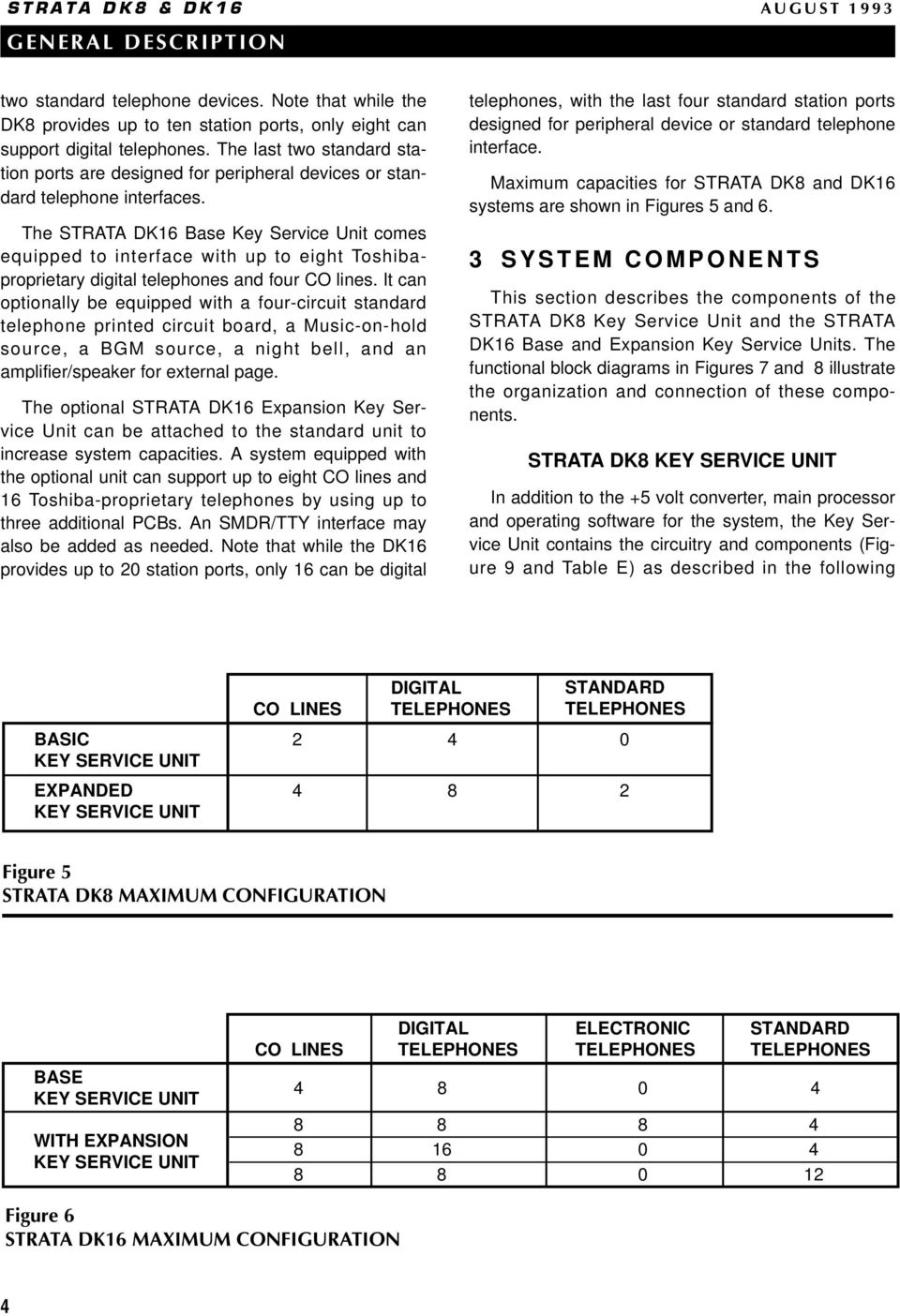
9 paragraphs. The weight and dimensions of the unit, which is designed for wall mounting, are as follows: Height: 16.4 in (416 mm) Width: 10.0 in (254 mm) Depth: 3.0 in (76 mm) Weight: 5.7 lbs (2.59 kg) Digital Telephone Circuits: The main circuit board has four integrated circuits that can connect to digital telephones, stand-alone data interface units (PDIU-DSs), and a digital door phone/lock control unit (DDCB). Furthermore, each of the digital telephones can support an integrated data interface unit (PDIU-DI) or an add-on module (ADM). CO Line Circuits: Two circuits for loop start central office (CO) lines are built into the main circuit board. Each line can be programmed for Dual-tone Multi-frequency (DTMF) or dial pulse signaling and has a switch to control potential excess volume that could be created by a nearby private branch exchange (PBX) or CO. Built-in gas tubes help protect each circuit from lightning. Power Supply: The power supply generates +24VDC for the entire system, even in its expanded configuration. Reserve Power: One or two optional Reserve Power Battery and Chargers (HPFBs) can be connected to the STRATA DK8 power supply to maintain normal operation during a power failure (See Table G for reserve power time.) Power Failure Interface: The Key Service Unit provides an interface for a dedicated backup standard telephone during a power failure. If the system power fails, the backup telephone will automatically connect to the CO1 line. This feature is independent of the HPFB. Music-on-Hold Interface: Customers can connect their own Music-on-hold source to this interface. The source can also feed external page speakers and telephone speakers with Background Music. Paging Interface: This 600-ohm interface can support a Toshiba external speaker (HESB) or a customer-supplied amplifier and speaker for Paging, night ringing, and Background Music applications. Flexible Relay Contact: A relay contact can be programmed to either mute Background Music during a page announcement over external speakers, to operate a device such as an answering machine or ringing bell during the Night Mode, or to provide on-off control for a Music-on-hold source. Conference Interface (QCNU): The standard, factory-installed QCNU provides two conference circuits which provide for simultaneous conversation between stations and/or CO lines connected to the DK8. The first conference circuit allows simultaneous conversation between four parties; the second circuit supports three parties. STRATA DK8 OPTIONAL PCBS Auto Attendant Feature Key (QKYS1): The QKYS1 plugs into the QRCU2A (not QRCU1) card to enable support of Built-in Auto Attendant. CO Line/Digital Telephone Interface Unit (QCDU): The QCDU provides one CO line circuit and two digital telephone circuits. The CO line circuit offers all of the features that the Key Service Unit CO line circuits provide, and the digital telephone circuits can support every peripheral (except DDCB) that the Key Service Unit digital circuits can support. Up to two QCDU units may be installed. Standard Telephone Interface Unit (QSTU): The optional QSTU provides two circuits that can interface with 500- and 2500-type standard telephones, as well as the other single-line devices listed below. These devices may require that the optional QRCU be installed in the Base Key Service Unit to interpret the Dual-tone Multi-frequency (DTMF) signals they may transmit. Fax Machines Modem Dictation Equipment Off-premises Stations Voice Mail Devices Auto Attendant Devices Auto Attendant Digital Announcers DTMF/ABR Tone Detection Receiver (QRCU): Station users in systems that have the optional QRCU installed can access Automatic Busy Redial (ABR) and communicate with devices, such as standard telephones or voice mail machines, that require Dual-tone Multi-frequency (DTMF) signaling. This unit is also required for Direct Inward System 5

10 POWER READY CONNECT TOSHIBA TOSHIBA TOSHIBA STRATA DK8 & DK16 AUGUST 1993 HPFB BATTERY AND CHARGER (FIRST) HPFB BATTERY AND CHARGER (SECOND) 117 (10 AMP) 50/60 HZ NOTE: One or two optional HPFB reserve power units may be installed. (see Table G) POWER FAILURE TELEPHONE DK8 KEY SERVICE UNIT AC INPUT QPSU8 POWER SUPPLY BATTERY CONNECTOR QCNU (STANDARD CONFERENCE PCB) PFT RCA JACKS QRCU (OPTIONAL) DTMF/ABR RECEIVERS (3) QKYSU (OPTIONAL) AUTO ATTENDANT FEATURE KEY KSU MAIN CIRCUIT BOARD (STANDARD) 4 DIGITAL TELEPHONE CKTS 2 LOOP CO LINE CKTS RELAY CONTACT 600Ω SPEAKER AMP PAGE OUTPUT MOH/BGM SOURCE DIGITAL TELEPHONE AND ADD-ON MODULE DIGITAL TELEPHONE DDCB MDFB DOOR PHONES AND LOCK CONTROL LOOP START LINES FIC: 02LS2 REN: 0.2B LINE 1 LINE 2 CO1 CO2 RJ11 MODULAR JACK NIGHT BELL, BGM MUTE, OR MOH (CONTROL RELAY) CENTRAL OFFICE/ CENTREX/PBX LINE 3 LINE 4 QCDU (FIRST/OPTIONAL) 2 DIGITAL TELEPHONE CKTS 1 LOOP CO LINE CKT CO3, RJ11 MODULAR QCDU (SECOND/OPTIONAL) 2 DIGITAL TELEPHONE CKTS 1 LOOP CO LINE CKT CO4, RJ11 MODULAR QSTU (OPTIONAL) 2 STANDARD TELEPHONE CKTS DIGITAL TELEPHONE AND ADD-ON MODULE DIGITAL TELEPHONE WITH INTEGRATED DATA INTERFACE STAND-ALONE DATA INTERFACE DIU SHARED PRINTER STANDARD TELEPHONE FAX QSMU (OPTIONAL) TTY OR SMDR INTERFACE CKT 25-PAIR AMPHENOL CONNECTOR 3-PAIR MODULAR INTERFACE SMDR PRINTER OR MAINTENANCE TERMINAL OR MODEM Figure 7 STRATA DK8 FUNCTIONAL BLOCK DIAGRAM 6

11 POWER READY CONNECT TOSHIBA STRATA DK8 & DK16 AUGUST 1993 RCA JACKS BASE KEY SERVICE UNIT 600Ω AMP SPEAKER MOH/BGM SOURCE KPSU16 _ + 12 VOLT BATTERY 117 VAC (15 AMP) 50/60 HZ OPTIONAL CUSTOMER SUPPLIED BATTERIES (SEE TABLE G) _ + 12 VOLT PBTC BATTERY CABLE CHARGER AC INPUT BATT _ + OPTIONAL FEATURE CARTRIDGE KFCU BUILT-IN DIGITAL TELE- PHONE CIRCUITS (8) OPTIONAL DTMF/ABR RCVRS (4) K4RCU DIGITAL TELEPHONE AND ADD-ON MODULE DIGITAL TELEPHONE AND DSS CONSOLE DDCB MDFB DOOR PHONES AND LOCK CONTROL POWER FAILURE TELEPHONE (PFT) RJ11 CO4 CO3 CO2 CO1 MODULAR CONNECTORS BUILT-IN CO LINE LOOP CIRCUITS (4) OPTIONAL STANDARD TELEPHONE CIRCUITS (4) KSTU NIGHT BELL, BGM MUTE, OR MOH (CONTROL RELAY) VOICE MAIL STANDARD TELEPHONE ALTERNATE BGM SOURCE LOOP START LINES FIC: 02LS2 REN: 0.2B PAGE ZONE 1 PAGE ZONE 4 CENTRAL OFFICE/ CENTREX/PBX DOOR LOCK OR BGM MUTE CONTROL RELAY NIGHT BELL OR MOH (CONTROL RELAYS) ALARM RELAY SENSOR MODULAR CONNECTORS RJ14C MAINTENANCE TERMINAL (TTY PORT) SMDR PRINTER (SMDR PORT) CO 5-8 LINES (4) PIOU PAGE ZONE RELAY CONTROL See Table I EXPANSION KEY SERVICE UNIT CO LINE PCB PCOU (4) CO LINE/ DIGITAL STATION PCB KCDU (2/4) RSSU TTY Port only PERIPHERAL INTERFACE PCB PIOUS OR PIOU IMDU (MODEM) STATION PCBs DIGITAL PDKU (8) ELECTRONIC PEKU (8) ELECTRONIC/ STANDARD PESU (4/2) STANDARD TELEPHONE PSTU OR RSTU (8) 25-PAIR AMPHENOL CONNECTOR DIGITAL TELEPHONE WITH INTEGRATED DATA INTERFACE STAND-ALONE DATA INTERFACE DIU MODEM PRINTER ELECTRONIC TELEPHONE DDCB DOOR PHONES AND LOCK CONTROL STANDARD TELEPHONE FAX PERSONAL COMPUTER 25-PAIR AMPHENOL CONNECTOR MDFB Figure 8 STRATA DK16 FUNCTIONAL BLOCK DIAGRAM 7
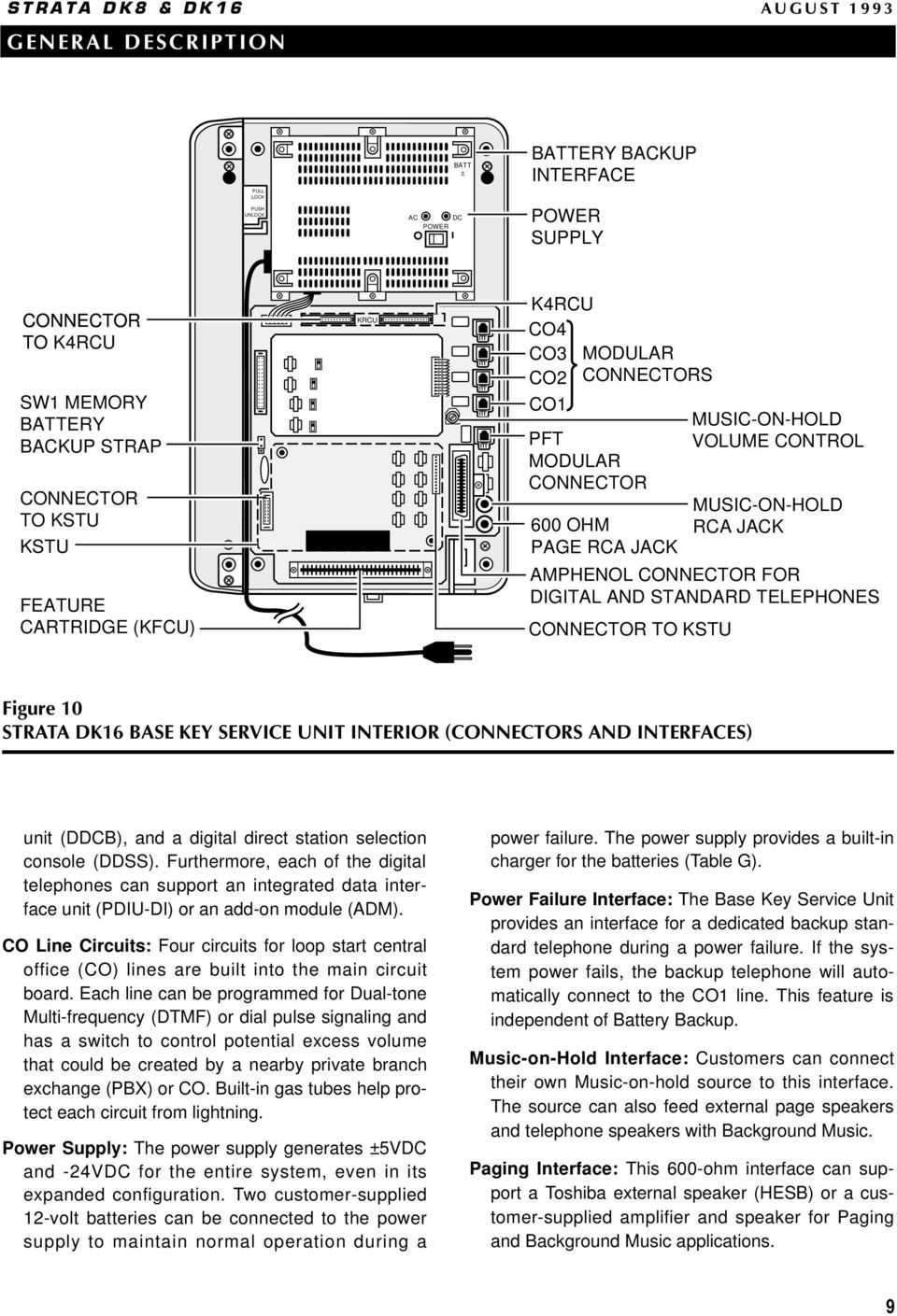
12 BATTERY JUMPER SW1, FOR CUSTOMER DATA MEMORY QPSU8 POWER SUPPLY AC POWER CORD/ PLUG 4' 7" QRCU-3 CIRCUIT DTMF AND ABR TONE DETECTOR PCB (optional) J6-25-PAIR AMPHENOL JACK FOR TELEPHONE TIP/RING AND RELAY CONTACT (FEMALE) WARNING Hazardous voltage inside! If servicing required, remove A.C. cord. QCNU (standard) Conference QSTU (QSTS) (optional) 2-Standard Telephone Circuits ON OFF BATT SW1 QMA ROM QSMU (optional) QCDU (optional) 1-CO line CKT (4) 2-Digital 2-Telephone CKT QCDU (optional) 1-CO line CKT (3) 2-Digital 2-Telephone CKT AC DC DC POWER ON/OFF SWITCH SMDR/TTY 3-PAIR MODULAR JACK CO4 CO2 CO1 CO3 MODULAR RJ11 JACKS RESERVE BATTERY CONNECTOR AC AND DC POWER INDICATOR LEDs QSMU, SMDR/TTY PCB PFT, RJ11 MODULAR JACK MOH JACK 600Ω PAGE MAIN CIRCUIT BOARD MUSIC-ON HOLD RCA JACK VR701 MOH PAGING OUTPUT RCA JACK VOLUME CONTROL Figure 9 STRATA DK8 KEY SERVICE UNIT INTERIOR (CONNECTORS AND INTERFACES) Access (DISA) operation. Each QRCU card provides three shared circuits. IMPORTANT NOTE: The QRCU2 version of this circuit card is required for Built-in Attendant operation. SMDR/TTY Interface Unit (QSMU): The optional QSMU provides an interface for either SMDR output or TTY maintenance port. QSMU operation is software selectable (TTY or SMDR). A customersupplied printer or Call Accounting device can be connected to the QSMU for SMDR or a terminal (local maintenance) or modem (Remote Maintenance) can be connected to the QSMU for system programming. Only one option (SMDR or TTY) can function at a time. STRATA DK16 BASE KEY SERVICE UNIT In addition to the main processor and operating software for the system, the Base Key Service Unit contains the circuitry and components (Figure 10 and Table F) described as follows. The weight and dimensions of the unit, which is designed for wall mounting, are as follows Height: 18.0 in (457 mm) Width: 12.2 in (310 mm) Depth: 3.4 in (86 mm) Weight: 8.4 lbs (3.8 kg) Digital Telephone Circuits: The main circuit board has eight integrated circuits that can connect to digital telephones, stand-alone data interface units (PDIU-DSs), one digital door phone/lock control 8

13 PULL LOCK PUSH UNLOCK BATT ± AC DC POWER BATTERY BACKUP INTERFACE POWER SUPPLY CONNECTOR TO K4RCU SW1 MEMORY BATTERY BACKUP STRAP CONNECTOR TO KSTU KSTU FEATURE CARTRIDGE (KFCU) KRCU K4RCU CO4 CO3 CO2 CO1 MODULAR CONNECTORS PFT MODULAR CONNECTOR 600 OHM PAGE RCA JACK CONNECTOR TO KSTU MUSIC-ON-HOLD VOLUME CONTROL MUSIC-ON-HOLD RCA JACK AMPHENOL CONNECTOR FOR DIGITAL AND STANDARD TELEPHONES Figure 10 STRATA DK16 BASE KEY SERVICE UNIT INTERIOR (CONNECTORS AND INTERFACES) unit (DDCB), and a digital direct station selection console (DDSS). Furthermore, each of the digital telephones can support an integrated data interface unit (PDIU-DI) or an add-on module (ADM). CO Line Circuits: Four circuits for loop start central office (CO) lines are built into the main circuit board. Each line can be programmed for Dual-tone Multi-frequency (DTMF) or dial pulse signaling and has a switch to control potential excess volume that could be created by a nearby private branch exchange (PBX) or CO. Built-in gas tubes help protect each circuit from lightning. Power Supply: The power supply generates ±5VDC and -24VDC for the entire system, even in its expanded configuration. Two customer-supplied 12-volt batteries can be connected to the power supply to maintain normal operation during a power failure. The power supply provides a built-in charger for the batteries (Table G). Power Failure Interface: The Base Key Service Unit provides an interface for a dedicated backup standard telephone during a power failure. If the system power fails, the backup telephone will automatically connect to the CO1 line. This feature is independent of Battery Backup. Music-on-Hold Interface: Customers can connect their own Music-on-hold source to this interface. The source can also feed external page speakers and telephone speakers with Background Music. Paging Interface: This 600-ohm interface can support a Toshiba external speaker (HESB) or a customer-supplied amplifier and speaker for Paging and Background Music applications. 9
14 Flexible Relay Contacts: A pair of relay contacts can be programmed to either mute Background Music during a page announcement over external speakers, to operate a device such as an answering machine or ringing bell during the Night Mode, or to provide on-off control for a Music-on-hold source. Standard Telephone Interface Unit (KSTU): The optional KSTU provides four circuits that can interface with 500- and 2500-type standard telephones, as well as the other single-line devices listed below. These devices may require that the optional K4RCU be installed in the Base Key Service Unit to interpret the Dual-tone Multi-frequency (DTMF) signals they may transmit. Fax Machines Modem Dictation Equipment Alternate Background Music source Off-premises Stations Voice Mail Devices Auto Attendant Devices DTMF/ABR Tone Detection Receiver (K4RCU): Station users in systems that have the optional K4RCU installed can access Automatic Busy Redial (ABR); and, communicate with devices, such as standard telephones or voice mail machines, that require Dual-tone Multi-frequency (DTMF) signaling. This unit is also required for Direct Inward System Access (DISA) operation, as well as for Built-in Auto Attendant operation. Each K4RCU card contains four shared receivers. Feature Cartridge (KFCU): The optional plug-in feature cartridge will allow for the integration of future feature upgrades. The KFCU1A version of this cartridge is required for Built-in Auto Attendant operation. STRATA DK16 EXPANSION KEY SERVICE UNIT The optional Expansion Key Service Unit, which attaches easily to the side of the Base Unit, offers four universal slots (Figure 11), three of which can host any of the printed circuit boards (PCBs) described in the following paragraphs (Table H). The weight and dimensions of the unit are as follows: Height: 18.0 in (457 mm) Width: 7.8 in (198 mm) Depth: 3.4 in (86 mm) Weight: 1 lb (.45 kg) when empty Weight: 5.3 lbs (2.4 kg) when full NOTE: No more than three Expansion Key Service Unit slots can be occupied at one time. The fourth slot is reserved for future use. CO Line Interface Unit (PCOU): The PCOU has four loop start CO line circuits that have the same characteristics as the CO circuits in the Base Key Service Unit. Digital Telephone Interface Unit (PDKU): The PDKU has eight digital telephone circuits that can support the same peripherals as the digital circuits in the Base Key Service Unit. Option Interface Unit (PIOU): The PIOU provides interfaces for such useful features as external zone paging, Station Message Detail Recording (SMDR), and a remote maintenance modem subassembly (IMDU). Additionally, it has relay contacts for the control of a customer-provided door lock, Music-on-hold source, or other optional device (see Table I). The PIOU card's three-watt or 600 Ω paging output is not used since paging is supported by the Base Key Service Unit paging interface. Simplified Option Interface Unit (PIOUS): With the exception of the Zone Paging interface, the PIOUS has everything that the PIOU has, including the SMDR and IMDU interfaces (Table I). Remote Maintenance Modem Subassembly (IMDU): The IMDU is an optional modem that joins to a PIOU or PIOUS to provide the system with a link to off-site programming and maintenance equipment, such as a personal computer or ASCII terminal. It has an internal maintenance channel and does not require a dedicated CO line or station port. Data transmission speed can be set at 300 or 1200 BPS full duplex. Remote/Local Maintenance Interface Unit (RSSU): Option TTY interface PCB used for connecting a maintenance terminal or external modem (local or remote) to the DK16. Requires the DK16 expansion cabinet. 10
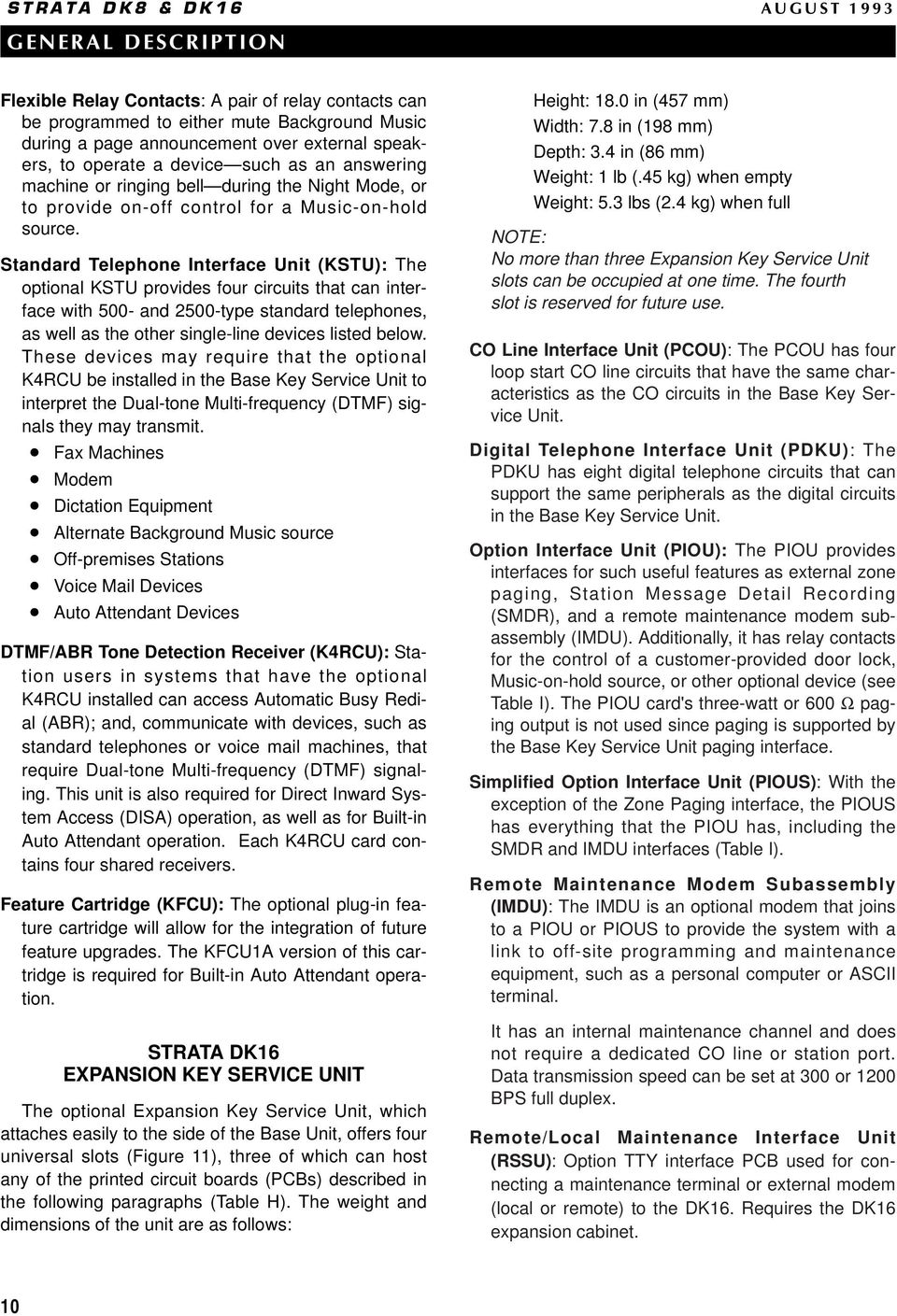
15 STRATA DK16 BASE UNIT EXPANSION CARD SLOTS* STRATA DK16 EXPANSION UNIT SIDE COVER EXPANSION COVER Figure 11 STRATA DK16 EXPANSION KEY SERVICE UNIT INTERIOR * NOTE: One slot is reserved for future use. Standard Telephone Interface Unit (PSTU): The PSTU has eight standard telephone circuits which can interface with the same devices as the optional KSTU in the Base Key Service Unit. A K4RCU installed in the Base Key Service Unit interprets DTMF tones transmitted by devices connected to the PSTU. Standard Telephone Interface Unit (RSTU): The RSTU has eight circuits that can support single-line devices. Besides rotary and push-button standard telephones, the RSTU can support fax machines, dictation equipment, modems, a separate Background Music Source, off-premises stations, Toshiba VP (Voice Processing) systems, digital announcement devices for the optional Built-in Auto Attendant feature, and customer-supplied voice mail devices. A K4RCU installed in the Base Key Service Unit interprets DTMF tones transmitted by devices connected to the RSTU. R48S: The optional R48S unit can be connected to the RSTU to extend the loop length (resistance level) of standard telephone circuits from 600 ohms to 1200 ohms. This allows standard telephones to be connected at further distances from the DK16 system. Electronic Telephone Interface Unit (PEKU): The PEKU provides eight electronic telephone circuits that can interface with electronic telephones, an Alternate Background Music (BGM) source, a direct station selection console (HDSS), an exter- 11

16 nal amplifier for Direct Inward System Access (DISA) or two-co line Conferencing. Standard/Electronic Telephone Interface Unit (PESU): The PESU PCB offers two standard and four electronic telephone circuits. Its standard circuits support the same devices as the KSTU and PSTU, and its electronic circuits interface with the same peripherals as the PEKU, except for the HDSS console. Standard DTMF telephone circuit operation requires a K4RCU in the Base Key Service Unit. Off-hook Call Announce Upgrade Unit (EOCU): Electronic telephones connected to PEKU and PESU PCBs can receive Off-hook Call Announce intercom calls over their speaker while they are on another call if the PCBs are equipped with an EOCU. Digital telephones also support this function but do not require an EOCU type PCB in the KSU. CO Line/Digital Telephone Interface Unit (KCDU): The KCDU provides two CO line circuits and four digital telephone circuits. The CO line circuits offer all of the features that the Base Key Service Unit and the PCOU line circuits provide. The digital telephone circuits can support every peripheral (except for the DDSS console) that the PDKU and a Base Key Service Unit digital circuit can support. TOSHIBA PERIPHERALS Toshiba offers a number of peripherals that can be connected to the STRATA DK8 and DK16 systems. Tables K and L contain the capacity and interface of each peripheral, including customer-supplied peripherals. Digital Telephones: The STRATA 2000-series digital telephones possess the most up-to-date calling and messaging features. Each telephone has an attractive design and is available in either charcoal gray or ash white. The STRATA DK8 can support up to eight of the 2000-series digital telephones; the STRATA DK16 can support as many as 16. There are four models in this series the DKT2010-H (Figure 12), DKT2010-SD (Figure 13), DKT2020-S (Figure 14), and the DKT2020-SD (Figure 15) each of which provides some or all of the features described below. Liquid Crystal Display (LCD) Available with the DKT2010-SD and the DKT2020-SD, LCDs display a variety of calling and messaging information. LCD telephone users can access the following features and more: Feature Prompting Soft Keys Alphanumeric Messaging Busy Lamp Field (BLF) Indication Central Office (CO) Line Identification Timed Reminders with Messaging Intercom User Name/Number Display Called Number Display Call Duration Display Date/Time of Day Display Speakerphone DKT2010-SD, DKT2020-S, and DKT2020-SD users can each receive and make outside calls without lifting the handset. Handsfree Answerback DKT2010-H users can answer intercom calls from the telephone set speaker without lifting the handset. Flexible Buttons Each model has flexible buttons which can be assigned as feature buttons, eliminating the need to dial access codes. The DKT2010-H and the DKT2010-SD both have 10 flexible buttons, and the DKT2020-S and DKT2020-SD have 20 flexible buttons. Fixed Buttons Fixed buttons, which are permanently assigned to all of the models, provide access to frequently-used features, such as Hold and Redial. Digital Telephone Upgrade Options: Digital telephones may be upgraded for the following options. Integrated Data Interface Unit (PDIU-DI2): Users of digital telephones equipped with a PDIU-DI2 (Figure 16) connected to a personal computer (PC) or ASCII terminal can make data calls to printers, personal computers, and other data devices, as well as both internal and external voice calls. Add-on Module (ADM): An ADM (Figure 21) can be connected to a 2000-series digital telephone to provide 20 Direct Station Selection buttons for STRATA DK16; and 10 Direct Station Selection buttons, eight personal Speed Dial buttons, one Night Transfer button, and one All Call Page button for STRATA DK8. 12
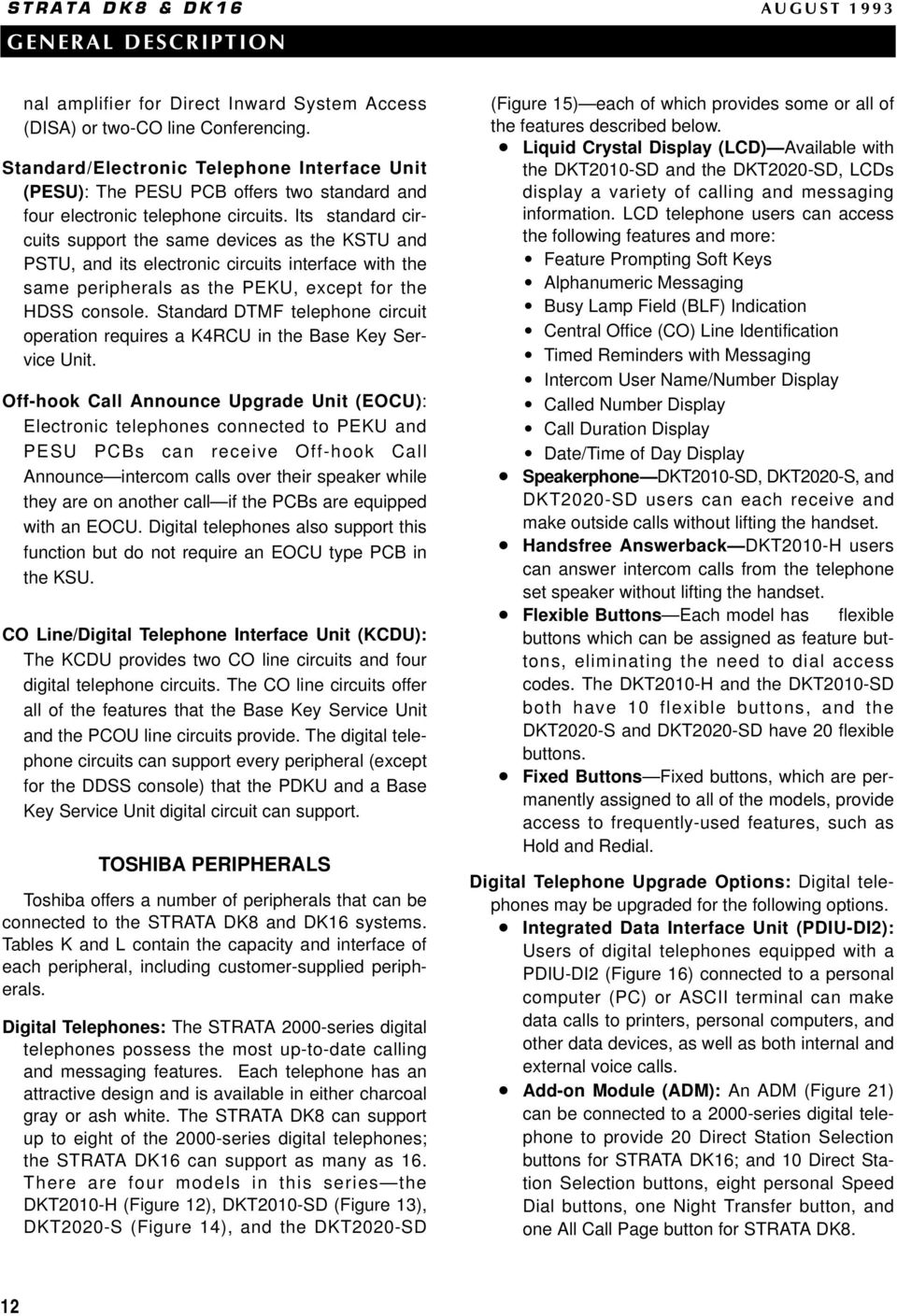
17 white phone Figure BUTTON DIGITAL TELEPHONE WITH HANDSFREE ANSWERBACK (DKT2010-H) Figure BUTTON DIGITAL SPEAKERPHONE WITH LIQUID CRYSTAL DISPLAY (DKT2010-SD) Figure BUTTON DIGITAL SPEAKERPHONE (DKT2020-S) Figure BUTTON DIGITAL SPEAKERPHONE WITH LIQUID CRYSTAL DISPLAY (DKT2020-SD) Off-hook Call Announce (DVSU): DVSUequipped digital telephones can receive Offhook Call Announce. Every digital telephone can have this upgrade, which allows stations to receive intercom calls over their speaker while on another call. No extra wires to the telephone are required. Loud Ringing Bell/Headset Interface (HHEU): The HHEU provides interfaces for both a headset and a Loud Ringing Bell speaker. With Loud Ringing Bell, the speaker circuitry amplifies the ringing or voice announcement of an incoming call. Toshiba VP Voice Messaging Systems: Toshiba VP Voice Messaging Systems, which provide a wide array of useful and progressive features, are compatible with both STRATA DK8 and DK16 systems. Stand-alone Data Interface Unit (PDIU-DS): PDIU- DSs (Figure 17) enable users to make switched data connections for modem pooling, printer sharing, and host/mainframe computer accessing. LEDs on the front panel of the PDIU-DS indicate the status of each call. Door Phone/Lock Control Unit (DDCB): Door phones (MDFBs) (Figure 18) can serve a variety of 13

18 functions. The door phone is often used with a door lock to screen visitors to a building. Door phones also can operate as a hot line calling link between an office and a warehouse. The door phone/lock control unit (DDCB) connects door phones and door locks to the system. The unit (Figure 19) has three interfaces, two of which can each support a door phone and another which can support either a door phone or a customer-provided door lock. The DDCB connects only to digital telephone circuits. Direct Station Selection Consoles STRATA DK16 only (DDSS and HDSS): Consoles are dedicated answering stations that are normally used on systems that receive a heavy volume of incoming calls (Figure 20). They operate alongside a digital or electronic telephone and have 60 buttons which can be programmed for Direct Station Selection, central office (CO) lines, All Call Page, Night Transfer, and Speed Dial. NOTE: Direct station selection consoles can be connected to STRATA DK16 only. There are two types: the digital direct station selection console (DDSS) can only be connected to designated Base KSU and PDKU digital telephone circuits, while the electronic direct station selection console (HDSS) can only be connected to designated circuits on the PEKU, installed in the Expansion KSU. Figure 16 INTEGRATED DATA INTERFACE UNIT (PDIU-DI2) Figure 17 STAND-ALONE DATA INTERFACE UNIT (PDIU-DS) Figure 18 DOOR PHONE (MDFB) Figure 19 DOOR PHONE/LOCK CONTROL UNIT (DDCB) 14

19 white phone Figure BUTTON DIRECT STATION SELECTION CONSOLE (DDSS SHOWN) Figure BUTTON DIGITAL TELEPHONE WITH ADD- ON MODULE Electronic Telephone (STRATA DK16 only): Users migrating upwards from older Strata systems can carry forward up to eight of their electronic telephones to use on a Strata DK16 with expansion cabinet. Most of the features available on the digital telephone are also available on the electronic version; the most important exceptions are the lack of handset adjustable prompting, and LCD larger character size. External Speaker: The HESB is a multifunctional, external 6-inch, 3-watt amplified speaker unit. It can be used as a paging speaker, an amplified talkback speaker, or a Loud Ringing Bell. CUSTOMER-SUPPLIED PERIPHERALS The STRATA DK8 and DK16 support many customer-supplied peripheral devices, several of which are listed below: Voice Mail/Auto Attendant Device Dictation Equipment External Maintenance Modem Fax Machine Local Maintenance Terminal Alternate BGM Source Music-on-Hold/Background Music Source External Page Equipment CABLING AND CONNECTORS STRATA DK8 and DK16 utilize industry standard cabling and connectors to interface with central office (CO) lines, stations, and peripherals. Stations use standard twisted pair cabling to connect to the system via the main distribution frame (MDF). Digital and standard telephones require just one pair, whereas electronic telephones (STRATA DK16 only) need two-pair (Table B). Station printed circuit boards (PCBs) and circuits connect to stations and peripherals with a 25-pair amphenol connector via the MDF. CO line circuits interface with the public telephone network via modular connectors. 4 SYSTEM FEATURES This section describes features that are available on a system-wide basis for both DK8 and DK16, except where otherwise noted (Table N). Account Codes (Forced/Voluntary/Verified): Account Codes provide a method of tracking and categorizing central office (CO) calls on the Station Message Detail Recording (SMDR) report. They may be required before dialing calls (Forced) or can be optionally entered during calls (Voluntary). Codes can be as long as 15 digits and be Verified 15

20 (specific numbers) or Nonverified (nonspecific numbers). A printout of each Account Code prints out on the SMDR report after each call. NOTE: The 911 emergency number bypasses Forced Verified Account Code requirements. In addition, two other customer-assigned numbers (1 ~ 4 digits) may be programmed to bypass Forced Verified Account Code requirements. Alarm Sensor (DK16 only): The optional PIOU/PIOUS printed circuit board (PCB) has a relay that can be connected to a customer-supplied alarm system. If the alarm system is tripped, the relay will cause the speakers of all electronic and digital telephones to emit a loud alert tone. The digital or electronic telephone alarm tone is reset from any station programmed with a designated button. All Call Voice Page: A user can page all station speakers simultaneously. External speakers can also be part of an All Call Voice Page. Alternate Point Answer: Users can answer a transferred central office (CO) line call from any station that also has the CO line. Amplified Conference Interface (DK16 only): This unit provides an interface for a customer-supplied amplifier. The amplifier is shared by all CO lines and will be automatically connected to a two-co line or Direct Inward System Access (DISA) call to provide a louder sound level on these types of calls. To support an Amplified Conference Interface, a PEKU or PESU is required in the expansion unit. A maximum of one amplifier per system can be connected. The amplifier is automatically switched into 2-CO line DISA or conference calls on a first call basis (only one amplified call at a time). Auto Attendant (Built-in): The optional Built-in Auto Attendant feature operates like an automatic station attendant or switchboard operator that quickly and efficiently distributes calls to stations selected by callers. With 24-hour coverage, Auto Attendant can process a large volume of calls, freeing employees to perform other tasks. Incoming callers will hear a menu of dialing prompts, such as Dial 3 for Sales; dial 4 for Customer Service (up to 10 selections are available). After the caller dials the digit, he/she will be routed to a station that has been assigned via system programming to the selected digit. Built-in Auto Attendant utilizes a standard telephone port. Additional supportive hardware requirements for DK8 systems include the DTMF/ABR Tone Detection Receiver (QRCU2 only) and the Auto Attendant Feature Key (QKYS1). DK16 systems require the DK16 DTMF/ABR Tone Detection Receiver (K4RCU) and a plug-in Feature Cartridge (KFCU1A). Automatic Hold: Automatic Hold enables a user to place an outside call appearing on a CO line button on hold simply by pressing another CO line or intercom button. The user can then alternate between the new and the old call simply by pressing the desired button. If this feature is not activated, users need to press the Hold button before accessing another line and switching between calls. This feature is optionally programmable for each telephone set. Automatic Hold/Park Recall: Held calls can be programmed to ring back, after a designated time, the station that placed them on-hold. The recall time of each station can have an individual time set independently in programming for this feature, which helps ensure that held calls are always retrieved. Automatic Release from Hold/DISA: The system can automatically disconnect a central office (CO) line on which a held party hangs up. This also applies to Direct Inward System Access (DISA) calls and voice mail calls. Automatic Release is available on a CO-by-CO-line basis and operates only with COs that provide a disconnect signal. Automatic Station Relocation: System users can relocate their stations and maintain the intercom numbers and features of their telephones, without having to reprogram their system. Background Music (BGM): BGM can be sent to telephone speakers and external speakers. The BGM source can be applied flexibly. One music source can feed both types of speakers, or, in DK16 only, each can have its own source. The music source used for Music-on-hold can also be piped to telephone speakers. An alternate BGM source can be connected to a QSTU in DK8, or a KSTU, PESU, PEKU, PSTU, or RSTU in DK16. 16
21 Busy Station Transfer/Ringing: When a station or external auto attendant device programmed for this feature transfers a call to a busy digital or electronic telephone with this feature, the transferring station or auto attendant device will receive a ringing signal (instead of a busy tone) and the called busy station will receive a distinct call waiting tone and LED indication. At this point, the transferring station or auto attendant device will normally release and the call will camp-on the busy station, providing a distinctive camp-on tone and CO line LED flash. The busy station can then answer the transferred call after it releases, transfers, or places its current call on hold. Without Busy Station Transfer/Ringing, stations and auto attendant devices will receive busy tone when trying to transfer calls to busy stations. Some auto attendant devices cannot transfer calls after receiving busy tone, and the transferred calls are routed back to them. Centrex/PBX Compatible: All system features are compatible with Centrex/PBX operation; including repeat of Centrex/PBX ringing cadence, one-button access to Centrex/PBX features, 1 ~ 4-digit station numbering plan, and delayed ringing to selected stations. Centrex Ringing Repeat: The system mimics CO/Centrex/PBX cadences received from outside lines when it rings a called station. This capability enables STRATA DK8 and DK16 to use special CO/Centrex/PBX calling/callback features. CO Line Groups: For easy access, various types of CO lines can be assigned to groups (normally for pooled line and Least Cost Routing (LCR) applications). All local lines, for example, can be assigned to one group and WATS lines in another group. Station users can access line groups with a dialing code or by pressing a feature button. Up to four CO line groups for DK8 and up to eight CO line groups for DK16 can be created. CO Line Queuing: A station user can use the Automatic Callback feature to queue up for a busy outgoing CO line. When the CO line finally becomes available, the system calls the station back. Queuing applies to single CO lines, CO line groups, and when calling via LCR. Conferencing: A variety of Conferencing combinations are available to all station users, as listed below. Stations and central office (CO) lines can be added in any order. One or two stations and two CO lines Two or three stations and one CO line Four stations Credit Card Calling: Callers can make credit card calls (0+ telephone number + credit card number) that bypass Toll Restriction. The calls are billed to the credit card, not the STRATA DK8 and DK16 central office (CO) line. The system requires that a specific quantity of digits are dialed for this call; otherwise, the call will be dropped within 20 seconds to prevent operator-placed calls that would be billed to the CO line. Data Calling: STRATA DK8 and DK16 offers a sophisticated optional data switching capability that can interconnect a wide range of customer-supplied data equipment, including personal computers (PCs), printers, and modems. Asynchronous data can be transmitted at speeds up to 19.2 kbps (see Table M). The system provides four data security groups to restrict data calls between groups. Dialing by personal computer (both data and voice calls) as well as modem pooling and printer sharing is supported. DAY/NIGHT Modes: The system has three available modes: DAY, DAY2, and NIGHT. Each mode can be assigned a distinct CO-to-station, CO-to DISA, and CO-to-Remote Maintenance channel ringing arrangement. The system can be programmed with either two or three modes (which can be changed by any station programmed with a Night Transfer button): Two modes: Three modes: DAY DAY NIGHT DAY2 NIGHT Delayed Ringing: If a central office (CO) line call rings a station and is unanswered, alternate stations can be programmed to ring 12 or 24 seconds later. The stations that were ringing initially will continue after the Delayed Ringing begins. This feature is assigned on a line-by-line basis. Direct Inward System Access (DISA): Outside callers using a Dual-tone Multi-frequency (DTMF) 17
22 telephone can dial internal stations or outgoing central office (CO) lines directly, without going through a receptionist or operator. A security code can be assigned to prevent undesired access to CO lines. DISA is available to any number of CO lines. Distinctive CO Line/Intercom Ringing: The incoming Central Office (CO) line ringing pattern for both digital and electronic telephones differs from the intercom ringing pattern, thereby helping to indicate the nature of a call. This feature is optional for standard telephones. Door Lock Control: Any telephone programmed with a door unlock button can unlock a customer-supplied electronic door lock just by pressing the button. The DK8 can support as many as two unlock buttons, and the DK16 can support up to three. Each unlock button can have an associated button on designated digital and electronic telephones. (The DDCB, PIOU, and PIOUS can each support door lock control.) Door Phones (MDFB): A door phone is frequently mounted near a building entrance and is associated with a customer-provided door lock to help screen visitors. However, a door phone can also serve other functions: it can operate as a sound monitor (station users can call the door phone and listen to the surrounding area) or as a hot line link. STRATA DK8 and DK16 can each support as many as six door phones. Each door phone must be connected to a door phone/lock control unit (DDCB). DTMF and Dial Pulse CO Line Compatible: DK8 and DK16 systems work with both Dual-tone Multifrequency (DTMF) and rotary dial pulse central office (CO) lines. DTMF Back Tone: DK8 and DK16 systems can be programmed to allow or prevent Dual-tone Multifrequency (DTMF) tones from being returned to a digital or electronic telephone when a user dials over central office (CO) lines or sends digits to a voice mail device. DTMF Signal Time (80/160 milliseconds): The duration of Dual-tone Multi-frequency (DTMF) tones that are sent via Speed Dial to CO lines and via automatic dialing to voice mail devices can be set at 80 or 160 milliseconds. The time can be set independently for CO line outdialing and for voice mail automatic dialing. Dual FCC Registration: DK8 and DK16 systems can be configured for either key or hybrid operation. Separate FCC registration numbers apply to each operation type. The appropriate configuration for an individual system depends on its function. For more details, refer to General End User Information, located in the front of this document. External Page: Station users can make an announcement over an external paging device consisting of an amplifier and speaker, by entering a brief access code. The paging device connects directly to a 600 ohm output that is standard on the DK8 and DK16 Key Service Unit. The 600 ohm output is two-way and supports talk back amplifier applications. For STRATA DK16, paging zone options are also provided by the optional PIOU PCB in the Expansion Unit. External Page Zones (DK16 only): The system can support as many as four external page zones. Station users can access just one page zone or all of them simultaneously simply by entering a brief access code. Zones may be composed of customer-supplied speaker(s) and amplifier(s) which interface with a PIOU printed circuit board in the Expansion Key Service Unit. Flexible Button Assignment: Digital and electronic telephones have 10 or 20 buttons which may be flexibly programmed to access CO lines and features. Flexible Intercom Numbering: A station intercom number can have as many as four digits, whereas it is normally two digits. The numbers can be assigned to any station port, and can be programmed in any sequence. Single-digit intercom numbers, such as 0, can be assigned to an attendant station. Flexible Line Ringing Assignment: Each central office (CO) line can be programmed to ring (or not ring) any station in the system. A different ringing assignment scheme may be created for each of the three ringing modes DAY, DAY2, or NIGHT. Stations assigned to ring can do so with any of the following three timing designations: 18
23 Immediate: Stations assigned IMMEDIATE timing ring as soon as the CO line rings into the system. Delay 1: If stations with IMMEDIATE timing have not answered within 12 seconds, stations assigned DELAY 1 timing begin ringing also. Delay 2: If stations have not answered within 24 seconds, stations assigned DELAY 2 timing begin ringing also. Group Paging: Digital and electronic stations can be divided into as many as four paging groups. Any station user can make an announcement to one or all of these groups via station set speakers. Least Cost Routing (LCR): Eight different plans may be designed to automatically place outgoing calls over the most cost-efficient routes. Three different LCR time schedules with their own priority schedules can be set up for the business day. Stations can be grouped into one of four LCR classes, each with its own routing priority. Selected station users may have priority use of a line, even when the route with the lowest cost is not available. LCR is compatible with Automatic Busy Redial (ABR) and two-central office (CO) line Conference. Live System Programming: Programming the system from an on-site or off-site location does not interrupt service. Service is only interrupted for PCB additions or changes. Memory Protection: If the power fails, the system has an internal battery backup that protects data and the customer s programmed configuration. This information will be maintained within a powerless system for at least six years. Message Waiting: Any station and most voice mail devices can leave a message waiting indication on an LED of a digital or electronic station. The station user can retrieve the message simply by accessing the intercom and pressing the button associated with the LED. A station can store up to four message waiting indications. Modem Pooling: This feature allows many telephone users to share modems. One or more standard, asynchronous type modem(s) that are compatible with industry-type AT commands can be connected to Stand-alone Data Interface Units (PDIU-DS) to form a modem pool. Users with digital telephones equipped with Data Interface Units can connect to the modems to place or receive external data calls. The modems can be connected to Strata DK standard telephone circuits and share external CO lines or they can be connected to dedicated CO lines. Music-on-hold: A customer-supplied radio tuner, compact disc player, or other device can be used to send music or announcements to parties on-hold on central office (CO) or intercom lines. Night Ringing Over External Page: Incoming central office (CO) line or door phone calls can be programmed to ring over an external speaker when the system is in the Night mode. The call can be picked up from any telephone by entering a brief access code. After-hours employees who are not near a ringing telephone are more likely to answer calls with this feature. Night Ringing Over Selected Page Zones (DK16 only): Central office (CO) lines can be programmed to night ring over selected PIOU page zones via customer-supplied paging equipment. The lines can be divided into two groups (Tenant 1 and Tenant 2) which can then be assigned to night ring over the selected zones. Non-blocking Talk Paths: All CO and intercom lines can be used at the same time. The system can operate at full capacity at all times. Off-premises Station: Off-site standard telephones can be part of the system, capable of accessing STRATA DK8 or DK16 features. Each off-site station requires a special line from the central office (OL13A or equivalent). Outgoing Call Restriction: Stations can be selectively restricted from originating calls over any number of CO lines. The same stations can receive incoming calls over the restricted CO lines. Pooled CO Line Buttons: Several central office (CO) lines can be pooled to appear under one digital or electronic telephone CO line button. The lines can be pooled in categories, e.g., WATS lines in one pool, regular lines in another. Power Failure Transfer: A dedicated standard telephone can be connected to the DK8 Key Service Unit or DK16 Base Key Service Unit to provide 19
24 emergency service if the system power fails. While system power is present, the telephone is inoperative. However, if the system power fails, the standard telephone will automatically connect to a designated central office line (CO1), enabling access to the public telephone network. When system power is restored, the standard telephone will become inoperative again. Power failure transfer is independent of reserve (battery) power. Printer Sharing: This feature allows many users to share one or more printers. Serial-type printers can be connected to Stand-alone Data Interface Units (PDIU-DS) to allow users with digital telephones equipped with Data Interface Units to connect (via Data Switching) to the printers. The printers can be almost any type (laser, ink jet, dot matrix, etc.) but they must have a serial interface as opposed to the parallel type. Privacy/Non-privacy: Central office (CO) lines can be private or non-private on a line-by-line basis. Private lines prohibit users from pressing a CO line button and accessing a line that is already in-use; users can do so on non-private lines. Private line users can change the mode with a privacy release button, enabling as many as three stations to be present on a line. Relay Service Options: The DK8 and DK16 Key Service units each contain relay contacts that can be programmed to provide control functions for external equipment. The DK8 KSU and DK16 Base KSU each have a single relay contact. This relay contact can be programmed for one of three functions. The DK16 PIOUS and PIOU printed circuit boards (PCBs) each have two pairs of relay contacts. Each relay contact can be programmed for one of two functions. The PIOUS and PIOU relay options are independent and can be used simultaneously with the DK16 Base Unit relay service to provide multiple control functions. External Page Function: A page over external speakers will mute Background Music that is being broadcast over the same speakers. Door Lock Control Function (PIOUS and PIOU relays only): The relay will open a customer-supplied door lock for three or six seconds when a designated button is pressed on selected telephones. Night Relay Function: An answering machine or a night bell (or chime) will be activated when a call rings in. Hold Relay Function: A music-on-hold source will turn on when a call is placed on-hold. Remote Administration and Maintenance: System administration, programming, and maintenance can be performed from a personal computer or ASCII terminal at a remote location. In addition to the off-site equipment, the DK8 customer needs an external modem and optional QSMU PCB. The DK16 customer needs to have the expansion unit equipped with an optional PIOU or PIOUS printed circuit board and an IMDU piggy-back modem (or external modem) to access this feature. The use of this feature does not interrupt system operation. Reserve Power (DK8): One or two optional Reserve Power Battery and Chargers (HPFBs) can be connected to the system power supply as a power failure backup. If there is a power failure, STRATA DK8 automatically switches over to battery power without any interruption in operation. The built-in charger keeps the batteries charged during normal operation. Reserve power duration depends on the condition of the batteries and the system load. (See Table G for reserve power time.) Reserve Power (DK16): Two customer-supplied 12- volt batteries (gel-cell and maintenance free) can be connected to the system power supply as a power failure backup. If there is a power failure, STRATA DK16 automatically switches over to battery power without any interruption to operation. A standard built-in charger circuit keeps the batteries charged during normal system operation. Reserve power duration depends on the condition of the batteries and the system load (see Table G for reserve power time). Speed Dial: Speed Dial enables users to dial frequently called telephone numbers quickly by just dialing a two-digit access code or by pushing a feature button. STRATA DK8, DK16, and Centrex/PBX feature access codes can also be stored in Speed Dial. There are two types of Speed Dial: System Speed Dial: A designated station can create up to 40 Speed Dial numbers that are available to every station. 20
25 Station Speed Dial: Each station user can create as many as 40 of his or her own personal Speed Dial numbers. Station Hunting: When a called station is busy, the call (data or voice) will hunt to an assigned station. If the assigned station is busy, the call will hunt to the next assigned station, and so on. The hunting sequence can be either consecutive or non-consecutive, and is fully flexible. If a hunt station is call forwarded, calls to the station will ring at the forwarded destination not the hunt destination. The call is eventually routed to the first idle station. Callers will receive busy tone if calling into a hunt group of which all stations are busy. Station Message Detail Recording (SMDR): The system stores calling information that can be printed out with a printer or call accounting device connected to the optional QSMU PCB for STRATA DK8, or the PIOU or PIOUS PCB for STRATA DK16. The report includes time and length of call, as well as the called number. Customers can select what type of calls all calls, outgoing only, long distance calls they want to appear on the report. Account Code information can also be included. System Programming through Any Station: Any liquid crystal display 20-button digital (or electronic telephone for DK16) can be used to program the system. To prevent accidental entry, programmers must dial an access code prior to entering the programming mode. (See Live System Programming.) System Speed Dial: The system can store as many as 40 Speed Dial numbers that can be accessed by all stations with either a two-digit access code or a flexible feature button. A designated station assigns these numbers, which can be telephone numbers, system feature access codes, or Centrex/PBX feature access codes. Tandem CO Line Connections: This feature allows up to two (DK8) or four (DK16) unattended line-toline connections, freeing the originating station for other calls. For supervision purposes, the originating station must have both CO line button appearances to allow tandem operation. Tenant Service: Two small businesses in the same office building can share a system. Tenants can have separate Least Cost Routing and Toll Restriction plans, Night Transfer ringing assignments, and flexible door phone and CO line ringing assignments. Toll Restriction: Stations can be individually restricted from making toll calls. Four restriction levels can be defined, each allowing or denying specific area and office codes, long distance information calls, international calls, and/or operator-assisted calls. Each station is assigned any one of the available restriction levels or no restriction. Individual CO lines can be defined as unrestricted. Toll Restriction Override by System Speed Dial: System Speed Dial numbers can be programmed to override Toll Restriction. For instance, when employees need to access a toll number that falls into a restricted area/ office code for work purposes, an employer can program the particular toll number as a System Speed Dial number. Even if their stations are restricted, they can access the number with speed dialing. Transfer Privacy: Optional transfer privacy can be programmed system-wide. When transfer privacy is programmed and an outside call is answered by one station, and then transferred to another station, the call can only be answered by the second station or by a station that has the Call Pickup feature. Other stations cannot pick up the transferred call with a CO line button. (Refer to Alternate Point Answer earlier in this section and Call Pickup in the next section.) Traveling Class of Service: The normal Toll Restriction class of a station can be temporarily changed to another class. Each of the four Toll Restriction classes can be assigned a four-digit code. If one of these codes is entered at a station, the station will assume the class associated with the code for the next dialed number. The station will revert back to its normal Toll Restriction class for subsequent calls. Traveling Class codes can be added, deleted, or changed by users only from stations selected in programming. Unlimited Handsfree Intercom Paths: All intercom lines can carry handsfree conversations simultaneously. Because intercom paths are non-blocking, the number is only limited by the amount of stations. Unrestricted Call Transfer over Intercom: Any CO line call can be transferred to any station over the intercom line. A station does not need a specific CO line s appearance in order to answer the call. 21
26 Voice Mail Interface: The system can be configured with a Toshiba VP Voice Messaging System or a customer-supplied voice mail messaging system. The optional QSTU and QRCU PCB must be installed for voice mail operation for STRATA DK8. The KSTU and K4RCU must be installed for DK16. The following features are available with many systems. Automated Attendant: An integrated Automated Attendant can streamline the system s call answering capability. Call Forward to Voice Mailbox: Each telephone user can forward calls directly to a personal mailbox. The caller bypasses the usual sequence of voice mail commands and simply leaves a message after hearing a tone. Message Waiting Indication: When a message is recorded in a user s mailbox, the voice mail system automatically sets a message waiting indication typically a flashing LED at the user's telephone. Voice Mail Control via Station: Station users can control voice mail equipment from their telephone dialpads. Feature Integration: The integration of special voice mail features in STRATA DK system software enables the systems to work together more efficiently. Voice or Tone Signaling: The system can be programmed for either Voice Signaling or Tone Signaling as the standard method of intercom call signaling to a digital or electronic telephone. If Tone Signaling is selected, a station will ring when called. The called party will hear a tone burst and then the caller s voice if Voice Signaling is selected. A caller can always select the alternate method immediately after dialing the station number. Tone Signaling ensures privacy, while Voice Signaling enables quick communication. 5 TELEPHONE FEATURES The following features are available to STRATA DK8 and DK16 station users. All of these features are available with digital telephones, and many with electronic and standard telephones (see Table O). Account Code Button: This button, which is available with digital and electronic telephones, enables users to enter Voluntary Account Codes (Verified or Nonverified) during conversations without interrupting the talk path. It can also be used to enter an optionally required Verified Account Code before dialing a long distance call. Add-on Module (ADM): Each 2000-series digital telephone can be connected to an ADM to provide 20 Direct Station Selection buttons for STRATA DK16; and 10 Direct Station Selection buttons, eight personal speed dial buttons, one night transfer button, and one all call page button for STRATA DK8. The ADM connects to a host telephone; no additional KSU station port is required. Automatic Busy Redial (ABR): Digital and electronic telephone users that dial a busy outside telephone number can set ABR and have the number redialed automatically at preprogrammed intervals. The system will call back the station when it successfully dials the non-busy number. ABR is compatible with Least Cost Routing. ABR requires the optional QRCU (for STRATA DK8) or K4RCU (for STRATA DK16). Automatic Callback (ACB): Station users that call busy stations can set ACB and have the system call them back when the busy station comes available. Automatic Hold/Park Recall: A CO line or intercom call placed on hold or parked will automatically recall the station at a preprogrammed elapsed time. A different time period can be selected for each station. Automatic Line Selection: A digital or electronic telephone user with this feature will automatically access a CO line, CO line group, or the intercom whenever its handset is lifted or its speaker button is pressed. Automatic Park/Page: With the push of a button on a digital or electronic telephone, a central office (CO) line can be parked and an external page announcement delivered. Station users can pick up the parked call after the page. Background Music with Station Control: Digital and electronic telephone users can control Back- 22
27 ground Music (BGM) playing over their telephone speakers. The music may be switched on or off and the volume may be adjusted to suit the individual user. A designated station can control (on/off) BGM over external page speakers. Busy Override: Upon calling a busy station and receiving a busy tone, a station user can dial a single-digit access code or press a labeled feature button if calling from a properly configured digital or electronic telephone that sends a tone burst to the called station. The busy station must be a digital or electronic telephone to receive this tone series digital telephones and electronic telephones will receive the tone over their speaker, while 2000-series digital phones may optionally receive it over their handset or headset receiver as well as the speaker. Call Forward: Outside and intercom calls to stations in the Call Forward mode are routed to an alternate station or voice mail device. Stations in this mode can originate calls as usual. There are five Call Forward modes, each described as follows: All Calls: All calls to a busy or idle station set with this mode will forward immediately, and the station will not ring. Busy: All calls to a busy station set with this mode will forward immediately. When the station is idle, incoming calls will ring normally. No Answer: Calls to an idle station set with this mode will ring for 12 seconds and then forward. When the station is busy, incoming calls will receive busy tone. Busy/No Answer: When a station is idle and in this mode, calls to it will ring for 12 seconds and then forward. When the station is busy, incoming calls will forward immediately. Fixed: Calls to an idle or busy digital or electronic telephone in this mode will forward immediately to a destination assigned in system programming. Call Park: A station can place (park) a call on-hold, make another call, and then return to the parked call. This feature can also be used to park an outside central office (CO) line call and page a person internally to pick up the call by dialing an access code. Call Pickup: By going off-hook and dialing an access code, any station can pick up the following type of calls: Calls on-hold or parked (selectively) Calls ringing at other stations An external page CO line ringing at night over external page or night bell Door phone calls Call Transfer with Camp-on: A station user can transfer a call to a busy station, which will receive an alert tone indicating that a call is camped-on. If the busy station fails to answer, the camped on call will return to the station that transferred it. Call Transfer Immediate: Transfers initiated with a designated Feature Prompting Soft Key on digital telephones can transfer immediately after the final digit of the destination is dialed. If the called station is not available or busy, the call will camp-on to it. This feature is a real aid for stations that have to process a large number of calls. CO/Centrex/PBX Feature Buttons: System Speed Dial buttons on digital and electronic telephones can be programmed with access codes, plus any flashes or pauses necessary to access features through a host switching system. Computer Auto Dialing: Voice and data calls can be dialed from the keyboard of a personal computer connected to a digital telephone equipped with an integrated data interface unit (PDIU-DI2). Standard computer dialing protocol is used, and calls can be internal or external (no modem required). Continuous DTMF Signal Time: The DTMF dial signal sent to a central office (CO) line or voice mail/auto attendant device will last as long as a 2000-series digital telephone user presses a button on the dialpad. This feature is not available with electronic, standard, or 1000-series digital telephones; or, 2000-series digital telephone connected to PDKU1 circuits. Data Button: Digital telephones can have a data button that allows manual dialing of internal data calls. Direct Station Selection (DSS) Buttons: A digital or electronic telephone user can ring a selected station by pressing a flexible feature button assigned with DSS. The LED associated with the button pro- 23
28 vides the busy status of the station. Each flexible button can be assigned as a DSS button to a different station. Direct Station Selection Console Features (STRATA DK16 only): Digital and electronic telephones can operate with direct station selection consoles, which offer the following features: Automatic Line Hold Call Forward Override Feature Buttons All Call Voice Page CO line Direct Station Selection Night Transfer Speed Dial Voice or Tone Signaling DISA Security Code Revision: Digital and electronic telephones selected in programming can revise the Direct Inward System Access (DISA) security code. Distinctive LED Color Indications: Central office (CO) line LEDs illuminate as red or green to help digital telephone users determine the status of calls. Electronic telephone LEDs are always red when they light. Distinctive LED Flash Indications: LEDs on digital and electronic telephones will flash at varying rates to indicate calling status. Distinctive Station Ringing: Digital and electronic telephones can have one of two ring tones for incoming central office (CO) line calls. This helps station users identify if their own telephone is ringing. Do Not Disturb (DND): Station users with digital and electronic telephones can activate this feature to prevent intercom and transferred calls from ringing their telephones. Callers will hear a fast busy tone. To ensure that important calls are not missed, direct CO line calls will mute ring DND stations. Stations can make calls while in the DND mode. Do Not Disturb (DND) Override: Privileged digital, electronic, and standard station users can override stations in the DND mode. The called telephone will receive a tone, indicating that someone is calling. DP/DTMF Mode Change: This feature allows a digital and electronic telephone user to change the central office (CO) out-dialing signal mode from dial pulse (DP) to Dual-tone Multi-frequency (DTMF) by pressing a feature button. Exclusive Hold: Exclusive Hold enables a digital or electronic telephone user to place a call on hold so that the call can only be picked up at that station or at another station using Call Pickup. No other station can pick up the call by simply pressing the line button of the call on hold. Executive Override: Privileged station users can enter any conversation in the system by dialing an access code. An optional warning tone notifies conversing parties that an additional party is about to enter their conversation. Executive Override can be blocked selectively to any station in system programming to provide security for modem (data) calls, voice mail calls, FAX calls, etc. Feature Prompting Soft Keys: As an alternative to dialing access codes and using feature buttons, station users with liquid crystal display (LCD) digital telephones can use keys beneath their LCDs to easily access features. The abbreviated name of a different feature will appear on the LCD above each of the keys during a call, in either the ring or talk state. Users can select the feature they want just by pressing the key below it. The features appearing on the LCD change to provide the most logical options during the various call modes. Flash Button: An optional button on a digital or electronic telephone can be used either to disconnect a central office (CO) line and regain CO dial tone, or to gain access to Centrex/PBX features. Handsfree Answerback: When a voice-announced intercom call comes in on a digital or electronic telephone, users can answer without lifting the handset or touching any button. Hearing Aid Compatible: All Toshiba telephones are hearing aid compatible. Liquid Crystal Display Features: The following features operate on all LCD model telephones: Feature Prompting Soft Keys (for digital telephones) Alphanumeric Messaging Busy Station Messaging 24
29 Called Station Messaging Calling Station Messaging Group Station Messaging Busy Lamp Field Indication CO Line Identification Intercom Name/Number Display Speed Dial Memo Station Identification Timed Reminders with Messages Microphone Control Button: Digital and electronic telephones can be programmed with a button that turns the telephone microphone on and off. The button can also enable and disable handsfree answerback, thus allowing or blocking the caller s ability to monitor the sound in the area close to the telephone. Modem Button: This optional multifunctional button allows a digital telephone user to reserve a modem from a pool and to switch from a voice to a data call. Its LED indicates the availability of modems. Modular Handset and Line Cords: All Toshiba telephones are equipped with modular handset and line cords. Modular Headset Interface: Digital and electronic telephones may be optionally equipped with a modular headset jack. Off-hook Call Announce (OCA): Optional OCA allows a station user to call and speak over the speaker of an off-hook, busy digital or electronic telephone. The called station user can respond over his or her microphone without interrupting his or her original conversation. On-hook Dialing: Users of digital and electronic telephones can dial calls without lifting the handset, thus freeing their hands for other tasks. Dial tone, dial pulsing, ringing, and the voice of the answering party are all amplified over the telephone speaker. The handset does not need to be lifted until after the party answers. Pooled Line Buttons: A group of central office (CO) lines can appear under one button on digital and electronic telephones. The system can support as many as four groups (DK8) or eight groups (DK16). A station can have as many as four buttons for the same group to facilitate the handling of several calls in the same group. Privacy Button: This programmable button for digital and electronic telephones denies Privacy Override on common CO lines. It does not block Executive or Busy Override. Privacy Override: Digital and electronic telephones enabled in programming can enter a CO line call on a button in the private mode. Before the overriding station enters the conversation, an optional warning tone notifies conversing parties. As many as two stations can override a call with Privacy Override. Privacy Override can be blocked selectively to any station in system programming, providing security for modem, fax, and voice mail calls. Privacy Release Button: CO lines that appear on stations are in private mode by default. If a digital or electronic telephone user accesses a common CO line and presses this button, then any other station (including stations without the Privacy Override option) can enter that line. Private CO Lines: The system can be programmed to allow certain private CO lines to appear only on one digital or electronic telephone and be accessed only by that station. Push-Button Dialing: All Toshiba telephones are equipped with push-button dialpads. Release Button: Users can disconnect from a call and become idle just by pressing an optional button on their digital and electronic telephones; going onhook or pressing the hookswitch is not required. This feature is useful for headset-equipped stations. Remote Retrieval of Held/Parked Calls: Calls placed on hold or parked by a station can be picked up selectively by another station by pressing a feature button or dialing an access code. Repeat Last Number Dialed: The last number dialed by a station user is stored in system memory, and may be redialed automatically by accessing a CO line and pressing a Redial button. Ringing Line Preference: This feature enables a digital or electronic telephone user to answer an incoming CO line call ringing at his/her station simply by lifting the handset or pressing the speaker button. There is no need to press the ringing line button or dial the access code associated with that line. 25
30 Saved Number Redial: After dialing a telephone number, a user can save that number simply by pressing a feature button on his/her digital or electronic telephone. The number can be redialed later by pressing the feature button again. Speed Dial Buttons: This feature enables digital and electronic station users to dial telephone numbers simply by pushing one button. There are two types of Speed Dial buttons, described as follows: Station Speed Dial: Station users can store their own personal telephone numbers on Station Speed Dial Buttons. System Speed Dial: System Speed Dial buttons are fixed, typically on which numbers called by a number of station users, are stored. To preserve the order of these buttons, only a designated station user can change the numbers associated with them. NOTE: Standard telephone users can dial System and Station Speed Dial numbers by using access codes. Timed Reminder: Five separate reminders can be set at any digital or electronic telephone. A reminder tone sounds at the pre-set time. Each reminder may be set to ring only once, or at the same time daily. A user programmed message may be displayed on the LCD with each reminder. Toll Restriction Override Code Revision: Privileged digital and electronic telephone stations can change Toll Restriction Override Codes. User Programmable Feature Buttons: This feature enables digital and electronic telephone users to program their personal Station Speed Dial buttons to dial feature access code sequences, as well as telephone numbers. Feature button functions, including Hold, Intercom, and Conference/Transfer can be stored on feature buttons. More than one feature can be linked under one button or code. Verified Account Code Revision: Privileged digital and electronic telephone stations can change verified account codes. 26
31 GENERAL Primary power Input AC AC frequency Power Environmental specifications Operating temperature Operating humidity Storage temperature Power supply DC voltage output specification Battery charger characteristics (DK16 only) QSTU, KSTU, PSTU or PESU (circuits 1 & 2) RSTU Ring voltage Ringing capability Ring voltage Ringing capability 85 ~ 135VAC 50/60 Hz DK8-46 watts maximum, DK16-75 watts maximum 32 ~ 104 F (0 ~ 40 C) 20 ~ 80% relative humidity without condensation - 4 ~ 158 F (-20 ~ 70 C) DK16 24VDC: ( 26.3 ~ 27.8VDC) +5VDC: ( +4.5 ~ +5.5VDC) 5VDC: ( 4.5 ~ 5.5VDC) DK8 +24VDC: (+26.3 ~ +27.8VDC) +5VDC: ( +4.5 ~ +5.5VDC) Note: +5V converter on KSU PCB Charger: current limiting Nominal float voltage: volts/cell Charge current: 0.7 amps maximum Battery discharge cut-off voltage: 20.5 ± 0.5VDC Square wave output with high/low option jumper: Low position, 130 ± 20VDC peak to peak (no-load) High position, 190 ± 25VDC peak to peak (no-load) Two ringers maximum per circuit, high or low position Sine wave output: 80V RMS Two ringers maximum per circuit Table A DK8 & DK16 GENERAL REQUIREMENTS 27
32 Device Digital Telephones DDSS Consoles (DK16 only) PDIU-DI2 PDIU-DS DDCB ADM Electronic Telephones (DK16 only) HDSS Consoles (DK16 only) Standard Telephones, Voice Mail, Auto Attendant, etc. Max Loop Resistance (Including Device) 40 ohms 40 ohms 40 ohms 40 ohms 40 ohms 40 ohms 40 ohms 20 ohms 300 ohms Max Distance from KSU to Device 1000 ft. (303 m) 1000 ft. (303 m) 1000 ft. (303 m) 1000 ft. (303 m) 1000 ft. (303 m) 1000 ft. (303 m) 1000 ft. (303 m) Number of Wire Pairs 1 1-pair ft. (152 m) 2-pair Approx ft. (909 m) with pair ohm device. See manufacturer's product specifications for exact resistance of device. 1-pair Shares digital telephone wire-pair 3 1-pair 1-pair Shares digital telephone wire-pair 3 2-pair 2 NOTES: 1. Use 24 AWG twisted pairs pair required for OCA pair wiring or optional telephone power supply is required to achieve maximum range with ADM, OCA, Headset, or Data Interface Unit. Table B DK8 & DK16 STATION LOOP REQUIREMENTS Loop Start Lines DK8 KSU QCDU DK16 Base KSU KCDU PCOU Standard Telephone Circuits Off-premises Station DK8 KSU (QSTU) DK16 Base KSU (KSTU) DK16 Expansion RSTU RSTU with R48S PSTU PESU (circuit 1 and 2) PCB/Interface Facility Interface Code USOC Jack 02LS2 02LS2 02LS2 02LS2 02LS2 OL13A OL13A 0L13B (RSTU, -24V) 0L13B (RSTU, -48V) 0L13A 0L13A RJ11 RJ11 RJ11 RJ14C RJ14C RJ21X RJ21X RJ21X RJ21X RJ21X RJ21X Ringer Equivalence 0.2B 0.2B 0.2B 0.2B 0.2B N/A N/A N/A N/A N/A N/A NOTE: All circuits on the PSTU and RSTU cards provide off-premises station (OPS) capability. On the PESU card, only circuits 1 and 2 support OPS. PSTU/PESU cards must use OL13A or equivalent line conditioning for OPS connection. RSTU cards must use OL13A or OL13B if providing -24 volt loop voltage; or if equipped with the -48 volt loop option card (R48S), either OL13A, OL13B, or OL13C may be used for OPS connection. Table C NETWORK REQUIREMENTS 28
33 CO Line DISA line calls Intercom Line Calls Idle digital telephones Ring tone 1 Ring tone 2 Ring transfer Busy station (queuing) Busy station Transfer (camp-on) Standard telephone or voice mail port: Normal ring option: Distinctive ring option (standard telephone): To busy station Tone first (DKT/EKT) ring signal Door phone A & C Busy override/dnd override Dial tone (intercom) Ringback Busy Do not disturb Voice page warning OCA warning Executive/privacy override warning Hold recall B Standard telephone ringing 500/640 Hz, modulated by 10 Hz, 1 sec. ON 3 sec. OFF 600/800 Hz, modulated by 10 Hz, 1 sec. ON 3 sec. OFF 540/760 Hz, modulated by 10 Hz, 1 sec. ON 3 sec. OFF 2000 Hz, modulated by 10 Hz, 1 sec. ON 3 sec. OFF 2000 Hz, modulated by 10 Hz, one-time 1 sec. tone burst 20 Hz, 1 sec. ON 3 sec. OFF 0.4 sec. ON 0.2 sec. OFF 0.4 sec. ON 3 sec. OFF 400 Hz, 0.25 sec. ON 0.25 sec. OFF or 400 Hz, 0.50 sec. ON 0.50 sec. OFF (programmable option ) 500 Hz, 1 sec. ON 3 sec. OFF 870 Hz, 1 sec./710 Hz, 2.5 sec. (1 or 5 rings) 870 Hz, 0.5 sec./710 Hz, 2.5 sec. (1 or 5 rings) 2400 Hz, 1 sec. ON 3 sec. OFF 400 Hz, continuous 400/480 Hz, 1 sec. ON 3 sec. OFF 400 Hz, 0.25 sec. ON 0.25 sec. OFF 400 Hz, sec. ON sec. OFF 500 Hz, 1 sec. ON (via electronic telephone speaker) 500 Hz, 1 sec. ON only (via electronic telephone speaker) 500 Hz, 1 sec. ON only (via handset or speaker) 2400 Hz, modulated by 10 Hz, 1 sec. ON 1 sec. OFF 20 Hz, 1 sec. ON 3 sec. OFF Voice Mail Special Tones Answer: Disconnect: Recall: DTMF "A" DTMF "D" DTMF "B" 80 or 160 msec., dual-tone Special Confirmation Tones Verified account code confirmation tones1 Code valid Code not valid Station option programming confirmation tones (call forward, timed reminders, etc.) 400 Hz, 0.5 sec. ON 400 Hz, sec. ON sec. OFF sec. ON 400 Hz, 1 sec. ON NOTES: 1. Tones are sent only to the station that enters the code, not to the outside party. Table D SYSTEM TONES 29
34 Item Digital Telephone Circuits (4) CO Line Circuits (2) Power Failure Transfer Interface Battery Backup Interface Music-On-Hold Interface 600 Ohm page Interface CO line CKT (1)/ Digital Telephone CKT (2) (QCDU) (max. 2 QCDU per system) Standard Telephone Interface Unit (QSTU) 2 standard telephone circuits (max.) QSTU per system DTMF/ABR Tone Receiver (QRCU/QRCU2A, each containing 3 receiver circuits) Auto Attendant Feature Key (QKYS1) Control Relay Conferences Circuit Interface Unit (QCNU) SMDR/TTY Interface Unit (QSMU) Supports Connector Type Standard Optional Digital Telephones (with or without PDIU DI2 or ADM) Stand-alone Data Interface Units (PDIU-DS) Door Phone Lock/Control Unit (DDCB) Loop Start CO Lines Standard Telephone (one)* Optional HPFB (one or two per system) Music-on-hold/BGM Source* Amplifier/Speaker* Digital Telephones (with or without PDIU DI2 or ADM) Stand-alone Data Interface Units (PDIU-DS) Door Phone Lock/Control Unit (DDCB) Loop Start CO Line Standard Telephones* Other Single-line Devices* Fax Machine* Voice Mail Devices Alternate BGM source* Auto Attendant Digital Announcers* Automatic Busy Redial Standard telephone ports DISA Built-in Auto Attendant (QRCU2A only) Built-in Auto Attendant (plugs into QRCU2A card) One of the following: Night Relay External Page Mute MOH Control relay 2 Simultaneous Conferences SMDR Printer* or TTY* or Modem 25-pair Amphenol RJ11 Modular RJ11 Modular Proprietary Cable/Connector RCA Jack RCA Jack 25-pair Amphenol RJ11 Modular 25-pair Amphenol Internal 7-pin in-line 25-pair Amphenol Internal 6-pin Modular (PPTC Adaptor) Interface HPFB and cable *Customer supplied equipment. Table E DK8 KEY SERVICE UNIT COMPONENTS 30
35 Item Digital Telephone Circuits (8) Supports Digital Telephones (with or without PDIU DI2 or ADM) Connector Type 25-pair Amphenol Standard Optional Stand-alone Data Interface Units (PDIU-DS) Door Phone Lock/Control Unit (DDCB) Digital Direct Station Selection Console (DDSS) CO Line Circuits (4) Power Failure Transfer Interface Battery Backup Interface with built-in charger Loop Start CO Lines Standard Telephone (one)* Two 12-volt Batteries* RJ11 Modular RJ11 Modular Proprietary Connector/Cable Cable and Batteries Music-On-Hold/BGM Interface 600 Ohm page Interface Standard Telephone* Interface Unit (4-Circuits) (KSTU) Music-on-Hold/BGM source* Amplifier/Speaker* Standard Telephones* Other Single-line Devices* Alternate BGM Source* Fax machine* Voice mail devices Auto Attendant Digital Announcers* RCA Jack RCA Jack 25-pair Amphenol DTMF/ABR Receiver (K4RCU) Automatic Busy Redial Standard Telephone Ports Interprets DTMF Tones DISA Built-in Auto Attendant Internal Feature Cartridge Built-in Auto Attendant Future Feature Upgrades Internal Control Relay Choice of one: MOH Source Control Night Bell Control BGM Mute Control 25-pair Amphenol *Customer supplied equipment. Table F DK16 BASE KEY SERVICE UNIT COMPONENTS 31
36 DK16 Base Unit Expansion Unit Quantity of installed PCBs No KSTU KSTU Approximate (-24v) current drain (DC amperes) Estimated battery operation time (in hours) Time is estimated with the following considerations: 1. Batteries have full charge at start of operation. 2. Batteries (2) are connected in series. 3. Batteries are 12VDC, rated at 80 amp/hours each. 4. System is operating at full load traffic with LCD phones. 5. Batteries used for this test are gel-cell and maintenance-free. Reserve duration will vary depending upon battery type, age, and manufacturer. These figures should be used as an estimate. 6. A maximum of three Expansion Key Service Unit slots may be occupied at one time. The fourth slot is reserved for future features. DK8 (Fully Loaded) One HPFB Two HPFBs Estimated Battery Time (hours).5 ~ ~ Reserve power time varies with system call traffic. Batteries must have full charge at start of operation. HPFB recharge time is 48 hours per HPFB. Table G DK8 & DK16 TYPICAL RESERVE POWER DURATION ESTIMATES 32
37 PCB Circuits per PCB Interfaces Connector PDKU 8 digital telephone circuits Digital telephones (with or without PDIU-DI2 or ADM DDSS console PDIU-DSs DDCB 25-pair Amphenol PEKU PSTU, RSTU 8 electronic telephone circuits 8 standard telephone circuits Electronic telephones HDSS console Alternate BGM source* EOCU PCB for OCA External Conference Amplifier* Standard telephones* Voice mail ports* Off-premises stations* Other similar devices* Alternate BGM source* Auto Attendant Digital Announcer* 25-pair Amphenol 25-pair Amphenol R48S PESU 8 standard telephone circuits 2 standard telephone/ 4 electronic telephone circuits (standard/electronic telephone ports) Optionally interfaces to the RSTU to extend loop length of standard telephones from 600 ohms to 1200 ohms. Standard: same as PSTU Electronic: same as PEKU except PESU does not support HDSS console 25-pair Amphenol 25-pair Amphenol PCOU KCDU 4 CO line circuits (lines) 2 CO line circuits/ 4 digital telephone circuits Central Office loop start lines Central Office loop start lines Digital circuits same as PDKU, except no DDSS RJ14C modular RJ14C Modular (CO Line circuits) 25-pair amphenol (digital telephone circuits) PIOU, PIOUS RSSU See Table I See Table I 25-pair amphenol (PIOU) Spring clip terminal (PIOUS) *Customer supplied equipment. Table H DK16 EXPANSION KEY SERVICE UNIT COMPONENTS PIOU/PIOUS Interface Option PIOU PIOUS RSSU *Zone Page Interface (unamplified, 4 zones) X *Night Transfer or Music-on-Hold Control Relay X X *Door Lock or External Amplifier Control Relay X X *Alarm Sensor X X *SMDR output (RS-232/6-wire modular connector) X X *Maintenance TTY Port for a Local ASCII Terminal or External Modem (RS-232/6-wire modular connector) X X X Remote Maintenance Modem (IMDU subassembly, no external connector) X X NOTE: X = The option is provided. = Customer supplied equipment required. * Table I DK16 PIOU/PIOUS INTERFACE OPTIONS 33
38 Features Maximum Capacities Features Maximum Capacities DK8 DK16 DK8 DK16 Personal Messages Simultaneous Conference 2 3 System Messages CO Line Groups Conference Parties External Page Zones Internal Page Groups Personal Message LCD Telephones /3 N/A Line-to-line Conference (unsupervised) Station Speed Dial System Speed Dial Verified Account Code Amplified Two-CO Line Conference N/A Table J DK8 & DK16 FEATURE CAPACITIES Item Basic System Expanded System Required Circuit Type/Interface Digital Telephones 4 8 Digital Circuit Stand-alone Data Interface Units (PDIU-DSs) 4 8 Digital Circuit Integrated Data Interface Units (PDIU-DIs) 4 8 Digital Telephone Digital Door Phone/Lock Control Unit (DDCB) 2 2 Digital Circuit Door Phones (MDFBs) 6 6 DDCB Door Lock 2 2 DDCB Add-on Module (ADM) 4 8 Digital Telephone Alternate BGM Source 0 1 QSTU Music-on-Hold/BGM Source 1 1 KSU MOH Interface Standard Telephone 0 2 Standard Circuit (QSTU) External Page Amplifier 1 1 KSU 600 Ω Page Interface Night Bell or Page Mute or MOH Device Control 1 1 KSU Control Relay Auto Attendant Digital Anouncers 0 2 QSTU Table K DK8 PERIPHERAL CAPACITY 34
39 Item Base System Expanded System Required Circuit Type/Interface Digital Telephones 8 16 Digital Circuit Stand-alone Data Interface Units (PDIU-DSs) 8 16 Digital Circuit Integrated Data Interface Units (PDIU-DI2s) 8 16 Digital Telephone Digital Door Phone/Lock Control Unit (DDCB) 1 2 Digital Circuit Door Phones (MDFBs) 3 6 DDCB Door Lock 1 3 DDCB and PIOU or PIOUS Digital Direct Station Selection Console (DDSS) 1 2 Digital Circuit Add-on Module (ADM) 8 16 Digital Telephone Alternate Background Music Source 1 1 KSTU, PEKU, PESU or PSTU Music-on-Hold/BGM Source 1 1 Base KSU MOH Interface Electronic Telephones 0 8 Electronic Circuit PEKU or PESU Electronic Direct Station Selection Console (HDSS) 0 1 Electronic Circuit (PEKU) Standard Telephone 4 12 Standard Circuit (KSTU, PESU, or PSTU) External Amplifier For Two-CO Line Conference 0 1 Electronic Circuit PEKU or PESU External Page Amplifier 1 4 Base Unit 600 Ω Page Interface (1) PIOU Page Zone Relays (4) Night Bell or Page Mute or MOH Device Control 1 1 KSU Relay or PIOU/PIOUS Relay Auto Attendant Digital Announcers 4 8 KSTU, PSTU, RSTU Table L DK16 PERIPHERAL CAPACITY 35
40 ITEM SPECIFICATIONS Terminal Interface Specification Data Transmission Speed Flow Control Automatic Dialing Maximum Distance: KSU to DKT/DIU or DIU stand-alone Number of Wire Pairs LED Indicators (stand-alone DIU only) Automatic Disconnect Timeout LSI Technology STRATA DK Option Compatibility Cabling/Connectors RS-232C (EIA) V.24/V.28 (CCITT) Up to 19.2kbps, asynchronous Half and full duplex, utilizing RTS/CTS/CD control leads Based on AT commands: Data speed of AT command is 300, 600, 1200, 2400, 4800, or 9600 Data bit: 7 or 8 bits Stop bit: 1 or 2 bits Parity bit: even, odd, or no parity With standard power supply: 1000 feet with 2-pair (24 AWG) With battery back-up: 675 feet with 2-pair, or 1000 feet external power to telephone 1-pair or 2-pair (24 AWG) POWER: Lights when power is on READY: Lights when DTE or DCE and DIU are ready CONNECT: Lights when DIU is in transmission or ringing mode Forced hang up when DIU does not detect Data on SD or RD within nine minutes One-chip CPU with a clock frequency of MHz Memory: ROM, 16kb; RAM, 512kb Ping-pong transmission: LSI with bearer transmission rate of 512kbps, 2B+D-like link Digital telephones with integrated PDIU-DI2 No wall mount No DVSU (off-hook call announce) Compatible with associated digital DSS console Compatible with headset (HHEU) DIU to DTE/DCE device: 9-wires, 50 feet maximum, 24 AWG: compatible with RJ-45, 8-wire modular cable and RJ-45 to DB25 RS-232 modular adaptors Stand-alone DIU: RJ11 modular connector Integrated DIU: connected inside digital telephone Stand-alone DIU jumper plugs enable straight wire connection to a DTE or DCE device without null-modem cables or adaptors Table M DATA INTERFACE SPECIFICATIONS 36
41 STANDARD Account Codes (Forced/Voluntary/Verified) All Call Voice Page Alternate Point Answer Automatic Hold/Park Recall Automatic Hold Automatic Release from Hold/DISA Automatic Station Relocation Background Music Interface* Busy Station Ringing/Transfer Centrex/PBX Compatible Centrex Ringing Repeat CO Line Groups CO Line Queuing Conferencing Credit Card Dialing DAY/NIGHT Modes Delayed Ringing Distinctive CO Line/Intercom Ringing DTMF Back Tone DTMF and Dial Pulse CO Line Compatible DTMF Signal Time (80/160 ms) Dual FCC Registration External Page Interface* Flexible Button Assignment Flexible Intercom Numbering Flexible Line Ringing Assignment Immediate Delay 1 Delay 2 Group Paging Handsfree Intercom Path (Non-Blocking) Least Cost Routing Live System Programming from any DKT/EKT Memory Protection Message Waiting Indication Music-on-Hold Interface* Night Ringing Answer Code Non-blocking Talk Paths Outgoing Call Restriction Pooled CO Lines Power Failure Transfer Privacy/Non-privacy Relay Service* Station Hunting System Programming through Station System Speed Dial Tandem CO Line Connections Tenant Service Toll Restriction Toll Restriction Override by System Speed Dial Transfer Privacy Traveling Class of Service Unlimited Handsfree Intercom Paths Unrestricted Call Transfer over Intercom Voice Mail Integration Automated Attendant Call Forward to Voice Mailbox Feature Integration Message Waiting Indication Voice Mail Control via Digital/Electronic Station Voice Mail Identification Codes Voice or Tone Signaling Tone First Voice First OPTIONAL Alarm Sensor (DK16 only)* Off-premises Station* Alternate Background Music Interface* Page Zones (DK16 only)* Amplified Conference Interface (DK16 only)* Printer Sharing* Auto Attendant (Built-in)* Relay Service (Expansion Unit-DK16 only)* Data Switching* External Page/Door Lock Relay* Direct Inward System Access Night/Hold Relay* Door Lock Control* Remote Administration and Maintenance* Door Phones Reserve Power* External Amplified Speaker Station Message Detail Recording* Modem Pooling* Standard Telephone Interface Night Ringing Over External Page* Night Pickup Code Night Ringing Over Selected Page Zones (DK16 only)* * May require customer-supplied peripherals; see the detailed feature descriptions. Table N DK8 & DK16 SYSTEM FEATURES 37
42 FEATURE Account Code Button Add-on Module (2000-series DKT only) All Call Voice Page Automatic Busy Redial Automatic Call Back Automatic Hold/Park Recall Automatic Line Selection BGM with Station Control* Busy Override (receive): Over Handset/Headset (2000-series DKT only) Busy Override (send) Call Forward All Calls Busy No Answer Busy/No Answer Fixed Call Park Call Pickup Call Transfer with Camp-on Centrex/PBX Compatible CO/Centrex/PBX Feature Buttons Conferencing Continuous DTMF Tones (2000-series DKT only) Data Button* Data Release Button* Direct Station Selection Buttons Direct Station Selection Feature Console (DK16 Only) DISA Security Code Revision Distinctive LED Indications Dual Color LEDs Distinctive Station Ringing Distinctive Ringing (CO vs. Station Ringing) Do Not Disturb Do Not Disturb Override DP/DTMF Mode Change Exclusive Hold Executive Override Feature Prompting Soft Keys Flash Button Handsfree Answerback Handset/Headset Volume Control Hearing Aid Compatible DIGITAL TELEPHONE * Customer-supplied optional equipment may be required. ELECTRONIC TELEPHONE (DK16 only) STANDARD TELEPHONE STANDARD FEATURE OPTIONAL FEATURE Table O DK8 & DK16 STATION FEATURES 38
43 FEATURE DIGITAL TELEPHONE ELECTRONIC TELEPHONE (DK16 Only) STANDARD TELEPHONE STANDARD FEATURE OPTIONAL FEATURE Liquid Crystal Display Loud Ringing Bell Message Waiting/Indication Microphone Control Button Microphone Sensitivity Control Modem Button* Modular Handset and Line Cords Modular Headset Interface Off-hook Call Announce On-hook Dialing Off-premise Station Pooled Line Buttons Privacy Button Privacy Release Button Privacy Override Private CO Lines Push-button Dialing Release Button Remote Retrieval of Held Calls Repeat Last Number Dialed Ringing Line Preference Saved Number Redial Speed Dial Buttons Speed Dialing (With Codes) Timed Reminder Toll Restriction Override Revision User Programmable Feature Buttons Verified Account Code Revision * Customer-supplied optional equipment may be required. Table O (continued) DK8 & DK16 STATION FEATURES 39
44 GLOSSARY AA ADM BPS CO CODECs Auto Attendant. Add-on Module. Bits per second baud rate. Central office. Coder/decoder semiconductor. K4RCU LCD LED DK16 4-circuit subassembly for Auto Busy Redial and DTMF devices. Also required for Built-in Auto Attendant. Liquid crystal display. Light emitting diode busy lamp indication. DDCB DISA DK DSS DTMF EOCU FCC Door phone/lock control unit that connects to designated digital telephone circuits. Direct Inward System Access. Digital key. Direct Station Selection. Dual-tone Multi-frequency. DK16 Off-hook Call Announce (OCA) subassembly optional PCB upgrade to PEKU or PESU for OCA. Federal Communications Commission. LSI MDF MDFB OCA PBX PCB PCM PCOU Large scale integration. Main distribution frame. Door phone unit. Off-hook Call Announce. Private branch exchange. Printed circuit board. Pulse code modulation. DK16 four circuit CO Line Interface Unit that can be installed in the Expansion Key Service Unit. HESB External speaker unit speaker box with built-in amplifier. PDIU-DI2 Integrated data interface unit that can be attached to digital telephones. HHEU A subassembly to upgrade a digital or electronic telephone with a headset and/or Loud Ringing Bell interface. PDIU-DS Stand-alone data interface unit that can be connected to a digital telephone circuit. IMDU DK16 Remote maintenance modem subassembly that can be installed on the PIOU or PIOUS. PDKU DK16 eight circuit Digital Telephone Interface unit that can be installed in the Expansion Key Service Unit. KCDU KFCU DK16 CO Line/Digital Telephone Interface Unit installed in the Expansion Key Service Unit that provides two loop start CO line circuits and four digital telephone circuits. DK16 optional plug-in feature cartridge that enables the integration of feature upgrades, such as Built-in Auto Attendant. PEKU PESU DK16 eight circuit Electronic Telephone Interface Unit that can be installed in the Expansion Key Service Unit. DK16 combination Standard/Electronic Telephone Interface Unit that has two standard telephone circuits and four electronic telephone circuits. Can be installed in the Expansion Key Service Unit. KPSU16 KSTU KSU DK16 factory installed power supply. DK16 optional four circuit Standard telephone Interface Unit that can be installed in the Base Key Service Unit. Key service unit. PIOU PIOUS DK16 option Interface Unit that can be installed in the Expansion Key Service Unit. DK16 option Interface Unit that can be installed in the Expansion Key Service Unit. 40
45 PSTU QCDU QKYS1 QPSU8 QRCU QSMU QSNU QSTU DK16 eight circuit Standard Telephone Interface Unit that can be installed in the Expansion Key. Service Unit. DK8 optional CO Line/Digital Telephone Interface Unit installed in the KSU to provide one loop start CO line circuit and two digital telephone circuit. DK8 optional key that plugs into the QRCU2A (not QRCU1) card to enable Built-in Auto Attendant operation. DK8 factory-installed power supply. DK8 optional three circuit PCB for Auto Busy Redial and DTMF devices. Also required for Built-in Auto Attendant. DK8 optional SMDR/TTY Interface Unit. DK8 standard two-circuit conference interface. DK8 optional two-circuit standard telephone interface unit. RAM ROM RSSU RSTU R48S SMDR TTY Random access memory. Read only memory. Option TTY interface PCB used for connecting a maintenance terminal or external modem (local or remote) to the DK16. Requires the DK16 expansion unit. DK16 Standard Telephone Interface Unit that contains eight single-line circuits. DK16 optional unit that is connected to the RSTU to extend the loop length of standard telephone circuits. Station Message Detail Record The 3-pair modular jack interface on the QSMU (DK8), PIOU (DK16), PIOUS (DK16) or RSSU (DK16) PCB used to connect a local maintenance/programming terminal or remote maintenance modem. 41
46
Digital Key Telephone Systems DK8 & DK16
 Digital Key Telephone Systems DK8 & DK6 INSTALLATION AND MAINTENANCE MANUAL COPYRIGHT 99 TOSHIBA AMERICA INFORMATION SYSTEMS, INC. Telecommunication Systems Division All rights reserved. No part of this
DIGITAL TELEPHONE USER GUIDE
 DIGITAL TELEPHONE USER GUIDE Release 3 and 4 COPYRIGHT 1992 TOSHIBA AMERICA INFORMATION SYSTEMS, INC. All rights reserved. No part of this manual may be reproduced in any form or by any means graphic,
STANDARD TELEPHONE USER GUIDE
 STANDARD TELEPHONE USER GUIDE Release 1 COPYRIGHT 1993 TOSHIBA AMERICA INFORMATION SYSTEMS, INC. All rights reserved. No part of this manual may be reproduced in any form or by any means graphic, electronic,
Telephone Attributes (Characteristics) All Call Page Alphanumeric Display Attendant Positions
 User Telephone Features are features that the user must initiate and complete an action to activate or complete the feature. Examples of user actions include dialing an access code or pressing a button
Strata CTX28 Communication Solutions For Small Business
 Strata CTX28 Communication Solutions For Small Business SMALL BUSINESSES NEED BIG COMPANY PERFORMANCE When it comes to telecommunications, the Strata CTX28 business communication system delivers. Easy
DIGITAL SUPER HYBRID TELEPHONE SYSTEM KX-TD308. XDP extra Device Port. Caller ID Display. Voice Mail Integration. Toll Restriction
 DIGITAL SUPER HYBRID TELEPHONE SYSTEM KX-TD308 XDP extra Device Port Caller ID Display Voice Mail Integration Toll Restriction KX-TD308 The Adaptable Digital Solution for Your Small Business or Home Office
ELECTRONIC TELEPHONE USER GUIDE
 ELECTRONIC TELEPHONE USER GUIDE Release 1, 2, 3, and 4 COPYRIGHT 1992 TOSHIBA AMERICA INFORMATION SYSTEMS, INC. All rights reserved. No part of this manual may be reproduced in any form or by any means
KX-T7735 KX-T7730 KX-T7720 KX-T7750
 Advanced H y b r i d S y s t e m KXTEB308 The telephone is your main source of communication your link to business partners, customers, friends, and even your family members both inside and outside the
Standard Telephone User Guide
 Telecommunication Systems Division Digital Business Telephone Systems Standard Telephone User Guide May 1999 Publication Information Toshiba America Information Systems, Inc., Telecommunication Systems
466-1936 Rev E October 2004 ZZZ*(6HFXULW\FRP. Part No: 60-883-95R. CareGard. User Guide
 ) *(6HFXULW\ 466-1936 Rev E October 2004 ZZZ*(6HFXULW\FRP Part No: 60-883-95R CareGard User Guide FCC Notices FCC Part 15 Information to the User Changes or modifications not expressly approved by GE Security
KX-TAW848. Advanced Hybrid Wired/Wireless Telephone System
 KX-TAW848 Advanced Hybrid Wired/Wireless Telephone System System Overview The KX-TAW848, designed specifically for upscale home applications and small business environments, offers a modular design that
Big Telecommunication Capabilities for Small and Medium Businesses STRATA. DK14 &DK40i
 Big Telecommunication Capabilities for Small and Medium Businesses STRATA DK14 &DK40i Strata DK delivers the scalability you need to assure maximum communication productivity today and as your business
ADA COMPLIANT BOX STYLE TELEPHONE INSTALLATION, PROGRAMMING AND OPERATING INSTRUCTIONS FOR MODEL PBX
 ADA COMPLIANT BOX STYLE TELEPHONE INSTALLATION, PROGRAMMING AND OPERATING INSTRUCTIONS FOR MODEL PBX INSTALLATION INSTRUCTIONS Step 1. Determine the position for the Hands-free phone in the elevator phone
Advanced Hybrid System KX-TES824
 Advanced Hybrid System KXTES824 The Best Cost Effective Solution For All Your Communication Needs For voice conversation your telephone system is an integral part of your establishment and is your main
Advanced Hybrid System KX-TES824 KX-TEM824
 Advanced Hybrid System KXTES8 KXTEM8 The Best Solution For Your Communication Needs The telephone is your main source of communication your link to business partners, customers, friends, and even your
CONNECTING YOUR BUSINESS WITH TOMORROW KX-TD
 CONNECTING YOUR BUSINESS WITH TOMORROW KX-TD Digital business telephone system range KX-TD range Digital super hybrid systems For today The Panasonic brand has been built upon years of manufacturing top
Personal Assistance System Owner's Guide
 Owner's Guide PSC07 READ THIS FIRST This equipment generates and uses radio frequency energy, and if not installed and used properly, that is, in strict accordance with the manufacturers instructions,
Digital Single Line Telephone User Guide
 Telecommunication Systems Division Digital Business Telephone Systems Digital Single Line Telephone User Guide May 2000 Publication Information Toshiba America Information Systems, Inc., Telecommunication
StrataCTX. Toshiba is one of the world s largest manufacturers of. information, computer and communications technology
 StrataCTX StrataCTX Toshiba is one of the world s largest manufacturers of information, computer and communications technology and is a recognised leader in the telecommunications industry. Toshiba s Business
Lucent Technologies Bell Labs Innovations. MERLIN Plus. COMMUNICATIONS SYSTEM Release 2 System Manual
 Lucent Technologies Bell Labs Innovations MERLIN Plus COMMUNICATIONS SYSTEM Release 2 System Manual 999-507-148 Issue 3 August 1990 1990 AT&T All Rights Reserved Printed in U.S.A. 999-507-148 Issue 3 August
Advanced Hybrid Systems KX-TEA308 KX-TES824
 Advanced Hybrid Systems KXTEA308 KXTES84 For voice conversation your telephone system is an integral part of your establishment and is your main tool of communication. It is your primary link to your business
EncoreCX. The Ideal Communications Solution for BUSINESS and RESIDENTIAL Applications
 EncoreCX The Ideal Communications Solution for BUSINESS and RESIDENTIAL Applications The Scalable, Voice-Centric Communications Platform for BUSINESS and RESIDENTIAL Applications Whether you are at work
Administrative Council for Terminal Attachments (ACTA) Customer Information
 Administrative Council for Terminal Attachments (ACTA) Customer Information Revision: July 2003 Background: The Administrative Council for Terminal Attachments ( ACTA ) has revised its Customer Information
AT&T MERLIN COMMUNICATIONS SYSTEM ADMINISTRATION MANUAL: MODELS 206 AND 410 WITH FEATURE PACKAGE 1
 AT&T MERLIN COMMUNICATIONS SYSTEM ADMINISTRATION MANUAL: MODELS 206 AND 410 WITH FEATURE PACKAGE 1 Table of Contents Page How to Use This Manual The MERLIN Voice Terminal Setting the Control Unit Model
MERLIN MAIL VOICE MESSAGING SYSTEM Release 2
 585-320-704 Issue 1 June 1991 MERLIN MAIL VOICE MESSAGING SYSTEM Release 2 Systems Administrator s Guide for Merlin II Communications System Release 3 1991 AT&T All Rights Reserved Printed in USA Issue
AV Series Key Telephone System
 AV Series Key Telephone System ISO9001 FCC The Modern Foreword 2004 Hook Switch Aristel's AV Series Digital Control Key Telephone System is the result of our many years of experience in telecommunication
INSTALLATION INSTRUCTIONS
 INSTALLATION INSTRUCTIONS DPC100 Doorbell / Paging Controller DESCRIPTION The DPC100 is a Doorbell / Paging Controller that can be combined with a MRC88CTL to provide whole-house paging and doorbell capability.
Digital Super Hybrid Systems KX-TD816 / KX-TD1232
 Digital Super Hybrid Systems KX-TD6 / KX-TD3 Panasonic Digital Super Hybrid Systems Deploy Digital Communication Solutions to Help Your Company Flourish A new weapon for your arsenal from Panasonic to
Discover the Power of Toshiba s IP Communication Solutions Strata CIX40
 Discover the Power of Toshiba s IP Communication Solutions Strata CIX40 Big Business Performance At An Affordable Price Powerful Capabilities for Your Business Toshiba s Strata CIX 40 IP communication
DX 80 Business Communications System
 DX 80 Business Communications System A World Connected Today s growing enterprises are faced with numerous business challenges: an increasingly competitive marketplace, heightened productivity demands,
Discover the Power of Toshiba s IP Communication Solutions CIX40. Business Communication Systems
 Discover the Power of Toshiba s IP Communication Solutions CIX40 Business Communication Systems Small businesses need big company performance When it comes to telecommunications, the Strata CIX40 IP business
Standard Telephone User Guide
 TOSHIBA Telecommunications Division Digital Business Telephone Solutions Standard Telephone User Guide Issue 2 November 2001 Publication Information Toshiba Information Systems (UK) Ltd. reserves the right
KX-TA824. Advanced Hybrid Telephone System
 KX-TA824 Advanced Hybrid Telephone System b u s i n e s s The Panasonic KX-TA824 Advanced Hybrid Telephone System is expressly designed to streamline office communications by organizing your phone lines
Four-Line Intercom Speakerphone 944
 1 USER S MANUAL Part 2 Four-Line Intercom Speakerphone 944 Please also read Part 1 Important Product Information AT&T and the globe symbol are registered trademarks of AT&T Corp. licensed to Advanced American
Mitel IP Phone User Reference Guide Release 5.0
 830 Parkview Drive North, El Segundo, CA 90245 Tel: 310 747 3232 Fax: 310 747 3233 WWW.UNIVOIP.COM OfficeConnect Mitel IP Phone User Reference Guide Release 5.0 Note: The information contained in this
KX-TD500. Digital Super Hybrid Telephone System
 KX-TD500 Digital Super Hybrid Telephone System The flexible telephone system for your growing business. Panasonic is leading the way in today s diverse marketplace by implementing the latest advances in
OfficeSuite Mitel IP Phone User Reference Guide Release 4.1
 OfficeSuite Mitel IP Phone User Reference Guide Release 4.1 2004-2009 Broadview Networks & Natural Convergence Inc. All rights reserved. Table of Contents TABLE OF CONTENTS...I INTRODUCTION...4 WHAT'S
Introducing your Meridian Digital Telephone 1
 Contents Introducing your Meridian Digital Telephone 1 Meridian Digital Telephones 1 M3820 1 M3310 2 M3110 3 Selecting a position for your Meridian Digital Telephone 4 Parts of your Meridian Digital Telephone
Announcement, Call Processing and Music/Messaging-On-Hold System
 Announcement, Call Processing and Music/Messaging-On-Hold System Solutions For Any Industry The XMU+ is Interalia s next generation advanced announcement, call processing and music/messaging-on-hold system.
Multiline Telephone User Guide
 Notice Note that when converting this document from its original format to a.pdf file, some minor font and format changes may occur causing slight variations from the original printed document. When viewing
KX-TDA50. Digital Hybrid IP-PBX System
 KX-TDA50 Digital Hybrid IP-PBX System Making the System Work for You. Panasonic is a major worldwide innovator in business telephone system engineering, and has consistently provided state-of-the-art telephone
PBXport. Rackmount PBX Digital Hybrid. User Guide. JK Audio
 PBXport Rackmount PBX Digital Hybrid User Guide JK Audio Introduction PBXport will allow you to send and receive audio through your multiline PBX, ISDN or analog telephone. While this may seem like a simple
How To Use Panasonic Digital Super Hybrid Systems
 Digital Super Hybrid Systems KX-TD6 / KX-TD3 Panasonic Digital Super Hybrid Systems Deploy Digital Communication Solutions to Help Your Company Flourish A new weapon for your arsenal from Panasonic to
TABLE OF CONTENTS 816 AND 800 KEYSET USER GUIDE. GENERAL INFORMATION About This Book... 1 Keyset Diagrams... 2 3 Things You Should Know...
 TABLE OF CONTENTS 816 AND 800 KEYSET USER GUIDE PROSTAR 816 PLUS September 1996 GENERAL INFORMATION About This Book... 1 Keyset Diagrams... 2 3 Things You Should Know... 4 5 OUTSIDE CALLS Making a Call...
How To Connect A Cell Phone To A Hybrid Hybrid Phone System
 Digital Super Hybrid Telephone System Panasonic Digital Super Hybrid Systems provide the power, flexibility and expansion capability to fully accommodate your growing business. Designed with outstanding,
DIGITAL+FUTURE+DIGITAL+FUTURE+DIGITAL+FUTURE+DIGITAL+FUTURE+DIGITAL+FUTURE
 aria 50, 130, 300 & 600 Digital Business Communications Solutions DIGITAL+FUTURE+DIGITAL+FUTURE+DIGITAL+FUTURE+DIGITAL+FUTURE+DIGITAL+FUTURE Affordable, Reliable and ready for the Future. aria 50, 130,
2.4 GHz Dual Handset Cordless Telephone Answering System 2255 with Caller ID/Call Waiting
 USER S MANUAL Part 2 2.4 GHz Dual Handset Cordless Telephone Answering System 2255 with Caller ID/Call Waiting Please also read Part 1 Important Product Information AT&T and the globe symbol are registered
CONNECTING YOUR BUSINESS WITH TOMORROW KX-TD. Digital business telephone system range
 CONNECTING YOUR BUSINESS WITH TOMORROW KX-TD Digital business telephone system range KX-TD range Digital super hybrid systems For today The Panasonic brand has been built upon years of manufacturing top
OfficeSuite Cloud-Based Phone System Mitel IP Phone User Reference Guide Release 5.0 Final
 OfficeSuite Cloud-Based Phone System Mitel IP Phone User Reference Guide Release 5.0 Final Note: The information contained in this document is the property of Broadview Networks Inc. and is disclosed to
System Administration Guide. Model KS 832. Expandable up to 1664
 System Administration Guide Model KS 832 Expandable up to 1664 Introduction 4 Installation Hints 4 System Programming 5 - System Password 5 - Changing Password 5 Exchange Line Set up 6 - Caller Display
Customer Service: 1-800-288-6794 (for U.S. and Canada) Customer Service E-mail: [email protected]
 Customer Service: 1-800-288-6794 (for U.S. and Canada) Customer Service E-mail: [email protected] 3 Before you begin This guide is designed to introduce you to the various installation and operational
KX-TD connection diagram
 KX-TD connection diagram Application Software Ask for a brochure and/or quotation PanaStat (Call Management Software) Desktop Telephony Assistant (3rd Party CTI solution) Integrated Headsets Optional Features:
Digital Key Telephone System
 Aristel Digital Key Telephone System - Installation Manual INTRODUCTION:... 3 1. SYSTEM SUMMARY... 4 1.1 HARDWARE CONFIGURATION... 4 1.2 SYSTEM SOFTWARE... 4 1.3 SAFETY CONFORMITY... 4 2. HARDWARE CONFIGURATION...
TCB-2 Auto Answer Coupler Product Manual
 TCB-2 Auto Answer Coupler Product Manual About Comrex Comrex has been building reliable, high quality broadcast equipment since 1961. Our products are used daily in every part of the world by networks,
Multiline Telephone User Guide
 NOTICE Note that when converting this document from its original format to a.pdf file, some minor font and format changes may occur. When viewing and printing this document, we cannot guarantee that your
Aspila Topaz - Smart Solutions, Simply Affordable
 Aspila Topaz - Smart Solutions, Simply Affordable Aspila Topaz is a cutting-edge Digital System that accommodates immediate and emerging business requirements of the small and medium enterprises (SMEs),
Customer Service: 1-800-288-6794 (for U.S. and Canada) Customer Service E-mail: [email protected]
 Customer Service: 1-800-288-6794 (for U.S. and Canada) Customer Service E-mail: [email protected] 3 Before you begin This guide is designed to introduce you to the various installation and operational
innkeeper PBX Desktop Digital Hybrid User Guide JK Audio Warranty
 Warranty Innkeeper PBX is covered by a 2-year warranty to be free from defective workmanship and materials. In the event that the innkeeper PBX needs repair, you must call us to get an authorization, and
REQUEST FOR PROPOSAL 2015-07. for. Business Telephone System & Voice Processing System
 REQUEST FOR PROPOSAL 2015-07 for Business Telephone System & Voice Processing System Date Issued: August 14, 2015 Date Due: September 4, 2015 Table of Contents Page I. Introduction...4 II. RFP Instructions...5
KX-TAW848. Advanced Hybrid Wired/Wireless Telephone System
 KX-TAW848 Advanced Hybrid Wired/Wireless Telephone System System Overview The KX-TAW848, designed specifically for upscale residential homes, SOHO applications and small business environments, offers a
silhouette Cloud-Based Phone System Mitel IP Phone User Reference Guide Release 5.0 Final
 silhouette Cloud-Based Phone System Mitel IP Phone User Reference Guide Release 5.0 Final Contents Introduction...1 Setting your language...1 Setting your language for the web interface...1 Setting your
AT&T. DEFINITY Communications. and System 85 8102 and 8110 Telephone User's Guide. System Generic 2
 AT&T DEFINITY Communications System Generic and System 85 810 and 8110 Telephone User's Guide NOTICE While reasonable efforts were made to ensure that the information in this document was complete and
innkeeper PBX Desktop Digital Hybrid User Guide JK Audio
 innkeeper PBX Desktop Digital Hybrid User Guide JK Audio Introduction Innkeeper PBX will allow you to send and receive audio through your multi-line PBX, ISDN or analog telephone. While this may seem like
innkeeper PBX Desktop Digital Hybrid User Guide JK Audio Warranty
 Warranty Innkeeper PBX is covered by a 2-year warranty to be free from defective workmanship and materials. In the event that the innkeeper PBX needs repair, you must call us to get an authorization, and
Dialog 4220 Lite/Dialog 4222 Office
 Dialog 4220 Lite/Dialog 4222 Office System telephones for MD110 Communication System User Guide Flinders University Table of Contents Description 2 Incoming Calls... 10 Outgoing Calls... 12 During Calls
OnQ 2x10 KSU/PBX Telephone System P/N 364565-01. User s Guide P/N 1307724 Rev. A
 OnQ 2x10 KSU/PBX Telephone System P/N 364565-01 User s Guide P/N 1307724 Rev. A For information regarding any of the products discussed in this user s guide, contact your local OnQ product installer or
KX-TA824. Advanced Hybrid Telephone System
 KX-TA824 Advanced Hybrid Telephone System r e s i d e n t i a l The Panasonic KX-TA824 Advanced Hybrid System is expressly designed to maximize home communications in your home. With its wide array of
Universal Host. Desktop Digital Hybrid. User Guide. JK Audio
 Universal Host Desktop Digital Hybrid User Guide JK Audio Introduction Universal Host will allow you to send and receive audio through your multi-line PBX, ISDN, VoIP or analog telephone. While this may
G1E Series eri 40 Port P Hy H brid IP I Communication System
 G1E Series 40 Port Hybrid IP Communication System Outside Line Interfaces PSTN (Public Switch Telephone Network) Traditional and familiar loop start telephone lines. Caller ID is supported. ISDN (Integrated
Multiline Telephone User Guide
 NOTICE Note that when converting this document from its original format to a.pdf file, some minor font and format changes may occur causing slight variations from the original printed document. When viewing
Installation & Operation Manual for EC-8 Phone Line Consolidator
 Installation & Operation Manual for EC-8 Phone Line Consolidator For Use With Talk-A-Phone Hands-Free Emergency Phones Section Page Getting Started 2 Hardware Installation 3 Software Programming 5 Operation
Business Telephone Systems
 Business Telephone Systems Strata CIX40 Powerful Capabilities Whether you re expanding or just getting started, communication is essential for keeping your customers and employees connected. No matter
VPP T1250 Emergency Telephones Installation & Operation Manual
 VPP T1250 Emergency Telephones Installation & Operation Manual T1250B T1250S T1250E Janus is a brand of Avire Avire Inc 415 Oser Avenue, Suite Q, Hauppauge, New York 11788 Phone: 631 864 3699 Toll Free:
VOIP Business Phone User Guide
 VOIP Business Phone User Guide Model 25630/25600 MGCP Please read this manual before operating the product for the first time. Interference Information This device complies with Part 15 of the FCC Rules.
Four-Line Intercom Speakerphone 955
 1 USER S Revised: August 3, 2000 MANUAL Part 2 Four-Line Intercom Speakerphone 955 2000 Advanced American Telephones. All rights reserved. Printed in Indonesia. 850004037 Issue 1AT&T 8/00 Please also read
CTX100 and CTX670 General Description
 726+,%$ Telecommunication Systems Division Digital Business Telephone Systems CTX100 and CTX670 General Description June 2003 Strata CTX100 and CTX670 General End User Information The Strata CTX100 or
AT&T. DEFINITY Communications. 7410 Plus Voice Terminal User's Guide. and System 85. System Generic 2
 AT&T DEFINITY Communications System Generic 2 and System 85 7410 Plus Voice Terminal User's Guide NOTICE While reasonable efforts were made to ensure that the information in this document was complete
SL1100 Installation Instructions. This Installation Packet is Organized into Five Chapters:
 Thank you for choosing NEC SL1100 Distributors! This Installation Packet is Organized into Five Chapters: BLUE: Hardware Installation Overview (Block Wiring, Music On-Hold, Paging, Door Box & Relays) GREEN:
Introducing the Panasonic TD500
 Introducing the Panasonic TD500 Designed for the medium to large organisation. The TD500 is a fully featured, Digital PABX, that is affordable, expandable, and built with the quality you have come to expect
User manual Rev 1.3 Contents
 User manual Rev 1.3 Contents 1. Introduction...4 2. System specifications...5 2.1.. General overview...5 2.2. Maximum capacity...6 2.3. Electrical specifications...6 2.4. Mechanical specifications...6
Programming Manual. Digital Business Telephone Solutions. Software Release 3.1. Software Release 4.3 and ACD
 726+,%$ Telecommunication Systems Division Digital Business Telephone Solutions Programming Manual Software Release 3.1 Software Release 4.3 and ACD May 2000 Strata DK General End User Information The
CTX28, CTX100-S, CTX100 and CTX670 General Description
 TOSHIBA Digital Solutions Division Digital Business Telephone Systems CTX28, CTX100-S, CTX100 and CTX670 General Description October 2004 Strata CTX28, CTX100 and CTX670 General End User Information The
KX-TD816 KX-TD1232 DIGITAL SUPER HYBRID TELEPHONE SYSTEM XDP E X TRA D EVICE P ORT CALLER ID DISPLAY CTI COMPATIBLE AUTOMATIC ROUTE SELECTION
 DIGITAL SUPER HYBRID TELEPHONE SYSTEM KX-TD16 KX-TD1232 XDP E X TRA D EVICE P ORT CALLER ID DISPLAY CTI COMPATIBLE AUTOMATIC ROUTE SELECTION DIRECT INWARD DIAL (DID) Digital Systems That Adapt to Your
Business Communications Manager ATA 2 User Guide
 Business Communications Manager ATA 2 User Guide 2001 Nortel Networks P0941629 Issue 02 Contents About Business Communications Manager ATA 25 What does ATA 2 do? 5 Feature List 7 Alternate Line 7 Call
MITEL IP PHONE USER REFERENCE GUIDE Release 4.0
 MITEL IP PHONE USER REFERENCE GUIDE Release 4.0 Simple as your phone. Smart as the internet. NOTICE The information contained in this document is believed to be accurate in all respects but is not warranted
MERLIN. Service and Maintenance Manual: Models 206, 410, and 820
 MERLIN Service and Maintenance Manual: Models 206, 410, and 820 518-600-012IS Comcode 103973152 Issue 1 February 1985 MERLINTM COMMUNICATIONS SYSTEM SERVICE AND MAINTENANCE MANUAL: MODELS 206, 410, AND
ultiline Telephone y User Guide NEC LEVEL II
 ultiline Telephone @ y User Guide NEC LEVEL II ELECTRA PROFESSIONAL TELEPHONES 8 Line Non Display 16 Line Display 16 Line Non Display with 20 DSS/BLF One Touch Keys 24 Line Display with 12 DSS/BLF One
Dialog Telephone Interface Module Installation Sheet
 Dialog Telephone Interface Module Installation Sheet Description The Dialog Telephone Module (DTIM), model number 60-879- 95R, is a battery operated communication link between the security system control
Operating Instructions. Telephone System tiptel 1/8 fax clip tiptel 2/8 clip. (Release 2) tiptel
 Operating Instructions (UK) Telephone System tiptel 1/8 fax clip tiptel 2/8 clip (Release 2) tiptel Table of Contents Connection of 8 extensions..........3 Connection of 7 extensions and 1 door intercom................4
Release Date Version Supersedes Description. June 2006 Initial Release Initial Release
 45p SLT User Guide Record of Revision Release Date Version Supersedes Description June 2006 Initial Release Initial Release Copyright XBLUE Networks, LLC 2006 XBLUE Networks reserves the right to make
Smart Digital Hybrid PBX for SOHO
 Smart Digital Hybrid PBX for SOHO A Smart Partner for Communication New technologies in the realm of telephony bring us advancement in communications which in turn influence changes in business from large-sized
KX-TDA50. Digital Hybrid IP-PBX System
 KX-TDA50 Digital Hybrid IP-PBX System Making the System Work for You. Panasonic is a major worldwide innovator in business telephone system engineering, and has consistently provided state-of-the-art telephone
EASY PROGRAMMING AND TRANSACTION ANALYSIS SOFTWARE
 EASY PROGRAMMING AND TRANSACTION ANALYSIS SOFTWARE You can program online 24/7 giving you the freedom to work when and where you want. From remote bookkeeping and access, to security control on the ground