
Managing Information Systems Project Time and Resources
|
|
|
- Juliet Carroll
- 10 years ago
- Views:
Transcription
1 06-Avison-45664:06-Avison /29/2008 7:18 PM Page Managing Information Systems Project Time and Resources Themes of Chapter 6 What is project time management? What characteristics define an effective project manager? What principles are important in project management? What tools are useful? What skill sets are important? What is the life cycle of an information systems development project? What are the stages in the information systems development life cycle? Why is there a need for good information systems project managers? How is the balance between sociocultural and technical factors achieved? This chapter describes project time management and its importance to the success of information systems projects. A vital characteristic of successful project managers is the way they manage time and the way they help team members manage time. 153

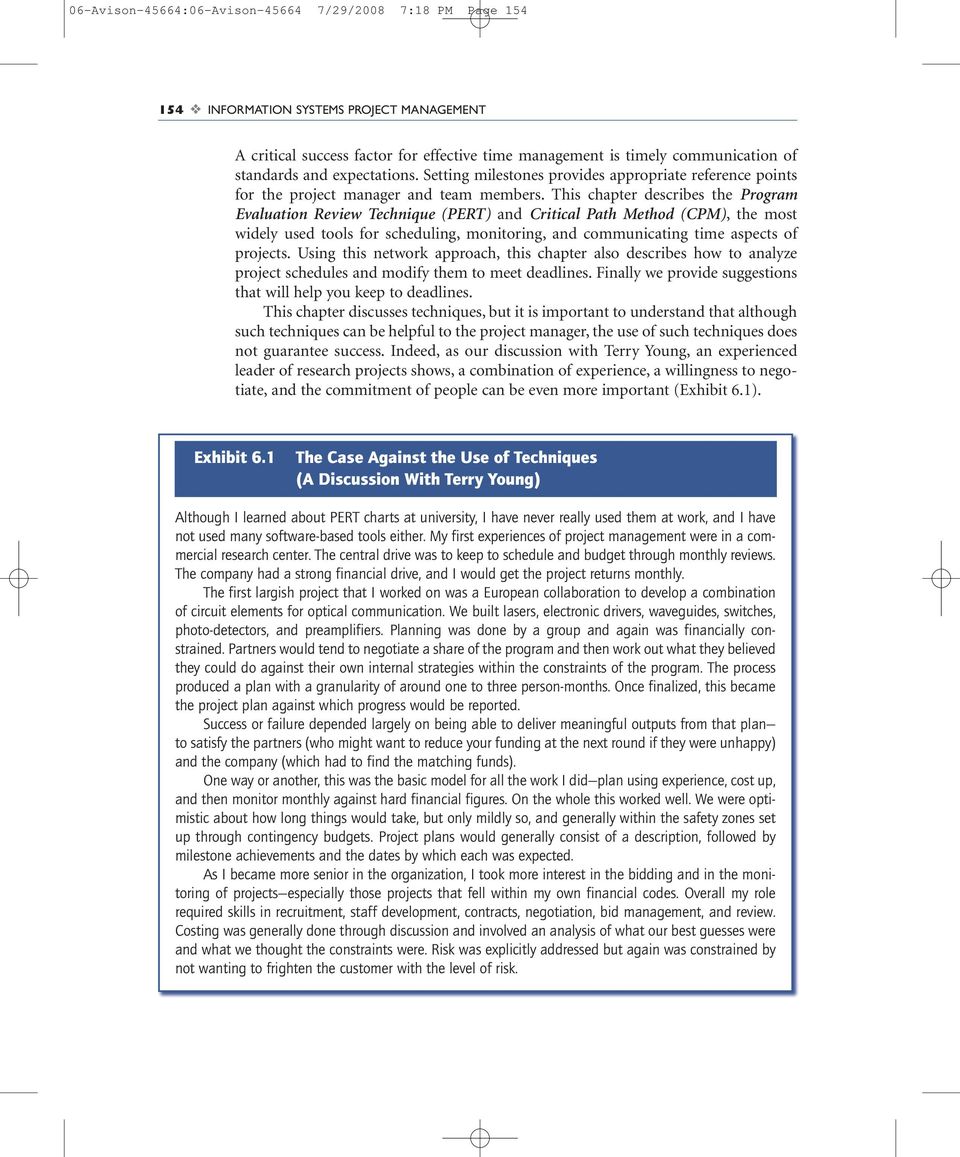
2 06-Avison-45664:06-Avison /29/2008 7:18 PM Page INFORMATION SYSTEMS PROJECT MANAGEMENT A critical success factor for effective time management is timely communication of standards and expectations. Setting milestones provides appropriate reference points for the project manager and team members. This chapter describes the Program Evaluation Review Technique (PERT) and Critical Path Method (CPM), the most widely used tools for scheduling, monitoring, and communicating time aspects of projects. Using this network approach, this chapter also describes how to analyze project schedules and modify them to meet deadlines. Finally we provide suggestions that will help you keep to deadlines. This chapter discusses techniques, but it is important to understand that although such techniques can be helpful to the project manager, the use of such techniques does not guarantee success. Indeed, as our discussion with Terry Young, an experienced leader of research projects shows, a combination of experience, a willingness to negotiate, and the commitment of people can be even more important (Exhibit 6.1). Exhibit 6.1 The Case Against the Use of Techniques (A Discussion With Terry Young) Although I learned about PERT charts at university, I have never really used them at work, and I have not used many software-based tools either. My first experiences of project management were in a commercial research center. The central drive was to keep to schedule and budget through monthly reviews. The company had a strong financial drive, and I would get the project returns monthly. The first largish project that I worked on was a European collaboration to develop a combination of circuit elements for optical communication. We built lasers, electronic drivers, waveguides, switches, photo-detectors, and preamplifiers. Planning was done by a group and again was financially constrained. Partners would tend to negotiate a share of the program and then work out what they believed they could do against their own internal strategies within the constraints of the program. The process produced a plan with a granularity of around one to three person-months. Once finalized, this became the project plan against which progress would be reported. Success or failure depended largely on being able to deliver meaningful outputs from that plan to satisfy the partners (who might want to reduce your funding at the next round if they were unhappy) and the company (which had to find the matching funds). One way or another, this was the basic model for all the work I did plan using experience, cost up, and then monitor monthly against hard financial figures. On the whole this worked well. We were optimistic about how long things would take, but only mildly so, and generally within the safety zones set up through contingency budgets. Project plans would generally consist of a description, followed by milestone achievements and the dates by which each was expected. As I became more senior in the organization, I took more interest in the bidding and in the monitoring of projects especially those projects that fell within my own financial codes. Overall my role required skills in recruitment, staff development, contracts, negotiation, bid management, and review. Costing was generally done through discussion and involved an analysis of what our best guesses were and what we thought the constraints were. Risk was explicitly addressed but again was constrained by not wanting to frighten the customer with the level of risk.
3 06-Avison-45664:06-Avison /29/2008 7:19 PM Page 155 Managing Information Systems Project Time and Resources 155 EMonitoring involved reviewing projects. I was expected to review small projects (less than US $150,000, typically) each month with my staff. Larger projects were reviewed monthly with a team that included my boss, the financial director, and the site director. I was typically responsible for somewhere between $US 5 8 million per annum worth of projects and might have 20 to 30 small projects and 4 to 5 large ones for review. This gave a very clear idea of how much progress could be made in a month and how much it would typically cost. I also would make up my own consolidated spreadsheet, which reviewed how the division as a whole was doing. Ironically, in view of the amount of data we were given, the process became very internalized and intuitive. We used the project-management terminology and understood what it meant, but we did not often apply it formally. The other element of the process was the ancillary systems risk registers, health and safety, export licenses, quality, and so on. People management was also my responsibility annual reviews, target setting, personal development, and pay reviews. These things tended to go on a biannual cycle. My take was that experience and consensus were more important than the use of specific techniques, and we tended to apply the latter in only a general way or when the project was big. However, it is true that people working on big projects ($US 20 million to over $100 million) were much more formal and rigorous in their approach. When I entered the university sector recently, I obtained a grant portfolio of around US $10 million. My research focus lies in the value of healthcare technology and services. However, I discovered it was time to learn a whole new set of skills. I recruited a project manager with commercial experience. But the academic teams hated it. They found it too bureaucratic and, I suspect, too restricting. We had to back off, and what worked best was to set academic targets. Along with my academic colleagues, I reasoned and cajoled the team members through to their deliverables. The thing I have learned from both experiences is the importance of working with people and getting people on our side. The most optimistic estimate can come in on time and to budget with a really committed team. The most generous contingency (and more) will always be spent by a team conditioned to fail, and the use of techniques will hardly affect the result either way Time as a Resource Time is a resource if it is managed effectively; otherwise it will be a constraint. Timely delivery of information systems projects has been one of the biggest challenges for information systems project managers. Managing time effectively is therefore a critical component for project success. Time management relates not only to the anticipated planned activities but also to unexpected events last-minute changes, personnel issues, conflict resolution, and so on. A successful project is the one that is on time, within budget, and delivers what is expected. Project managers should set the standard for a timely outcome by example. If project managers cannot control their time, then they will have difficulties controlling team members, and consequently the entire project is likely to be late. Project managers often work on tight deadlines and feel they have no time to think about time and its effective use. To be effective, a project manager must be organized and prioritize work. Depending on work habits, this could be done in different ways and may or may not be very formal.

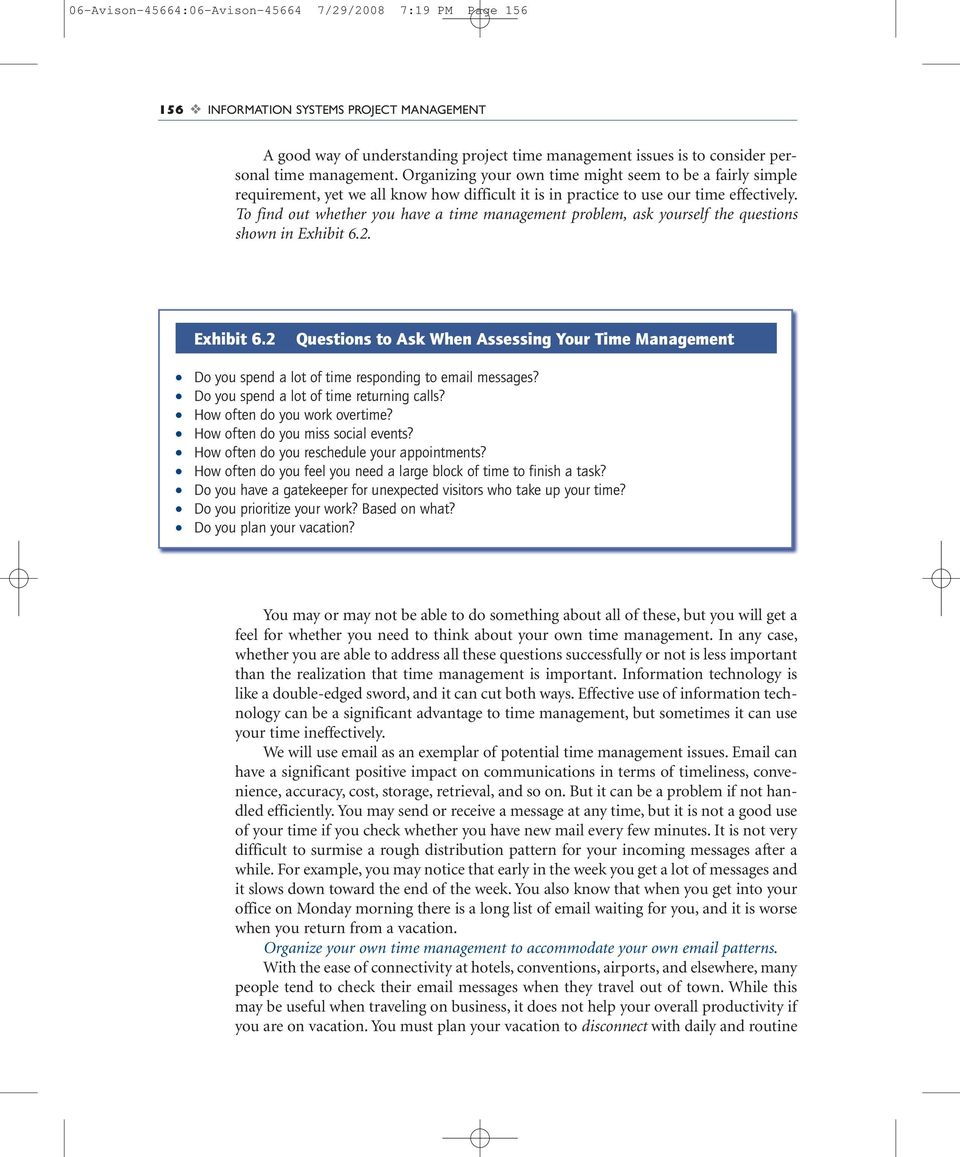
4 06-Avison-45664:06-Avison /29/2008 7:19 PM Page INFORMATION SYSTEMS PROJECT MANAGEMENT A good way of understanding project time management issues is to consider personal time management. Organizing your own time might seem to be a fairly simple requirement, yet we all know how difficult it is in practice to use our time effectively. To find out whether you have a time management problem, ask yourself the questions shown in Exhibit 6.2. Exhibit 6.2 Questions to Ask When Assessing Your Time Management Do you spend a lot of time responding to messages? Do you spend a lot of time returning calls? How often do you work overtime? How often do you miss social events? How often do you reschedule your appointments? How often do you feel you need a large block of time to finish a task? Do you have a gatekeeper for unexpected visitors who take up your time? Do you prioritize your work? Based on what? Do you plan your vacation? You may or may not be able to do something about all of these, but you will get a feel for whether you need to think about your own time management. In any case, whether you are able to address all these questions successfully or not is less important than the realization that time management is important. Information technology is like a double-edged sword, and it can cut both ways. Effective use of information technology can be a significant advantage to time management, but sometimes it can use your time ineffectively. We will use as an exemplar of potential time management issues. can have a significant positive impact on communications in terms of timeliness, convenience, accuracy, cost, storage, retrieval, and so on. But it can be a problem if not handled efficiently. You may send or receive a message at any time, but it is not a good use of your time if you check whether you have new mail every few minutes. It is not very difficult to surmise a rough distribution pattern for your incoming messages after a while. For example, you may notice that early in the week you get a lot of messages and it slows down toward the end of the week. You also know that when you get into your office on Monday morning there is a long list of waiting for you, and it is worse when you return from a vacation. Organize your own time management to accommodate your own patterns. With the ease of connectivity at hotels, conventions, airports, and elsewhere, many people tend to check their messages when they travel out of town. While this may be useful when traveling on business, it does not help your overall productivity if you are on vacation. You must plan your vacation to disconnect with daily and routine
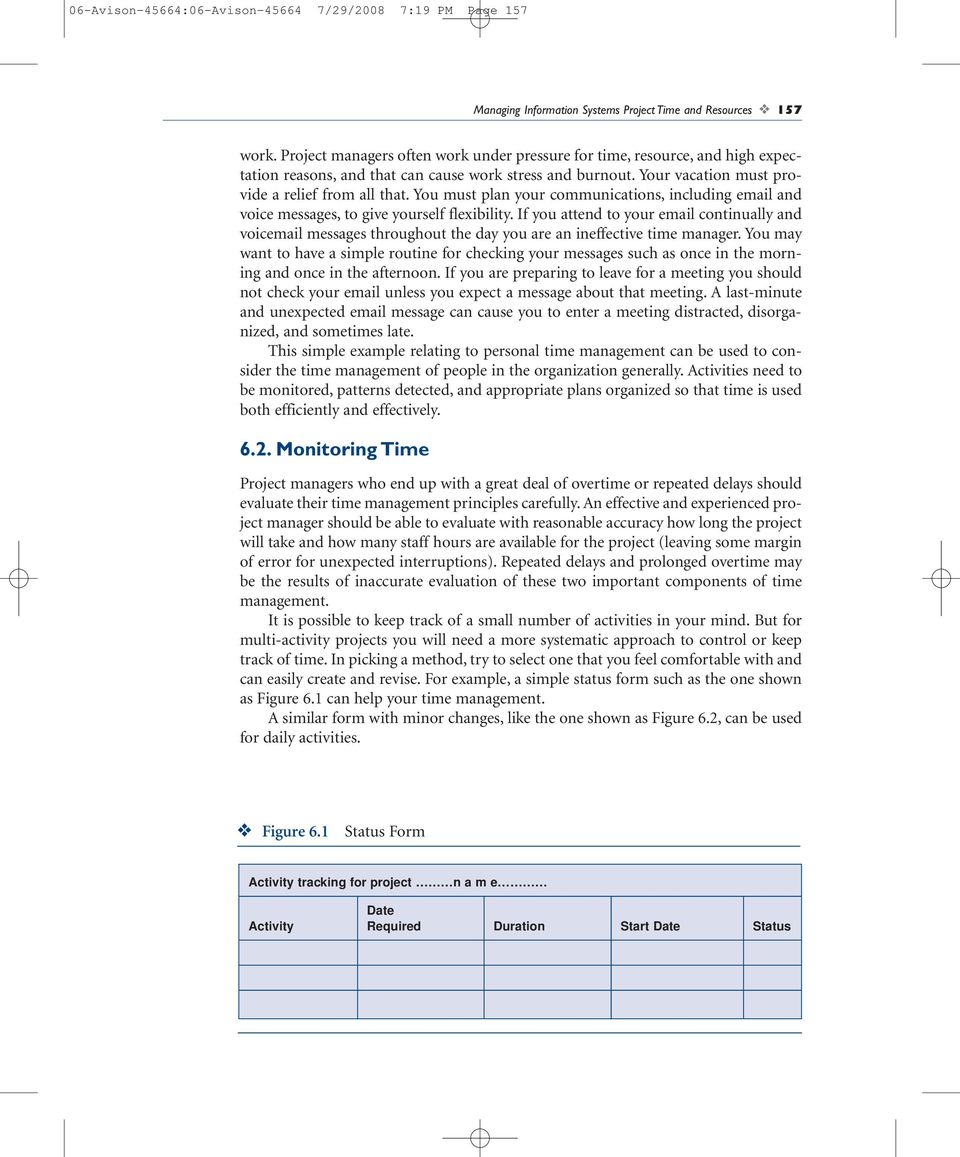
5 06-Avison-45664:06-Avison /29/2008 7:19 PM Page 157 Managing Information Systems Project Time and Resources 157 work. Project managers often work under pressure for time, resource, and high expectation reasons, and that can cause work stress and burnout. Your vacation must provide a relief from all that. You must plan your communications, including and voice messages, to give yourself flexibility. If you attend to your continually and voic messages throughout the day you are an ineffective time manager. You may want to have a simple routine for checking your messages such as once in the morning and once in the afternoon. If you are preparing to leave for a meeting you should not check your unless you expect a message about that meeting. A last-minute and unexpected message can cause you to enter a meeting distracted, disorganized, and sometimes late. This simple example relating to personal time management can be used to consider the time management of people in the organization generally. Activities need to be monitored, patterns detected, and appropriate plans organized so that time is used both efficiently and effectively Monitoring Time Project managers who end up with a great deal of overtime or repeated delays should evaluate their time management principles carefully. An effective and experienced project manager should be able to evaluate with reasonable accuracy how long the project will take and how many staff hours are available for the project (leaving some margin of error for unexpected interruptions). Repeated delays and prolonged overtime may be the results of inaccurate evaluation of these two important components of time management. It is possible to keep track of a small number of activities in your mind. But for multi-activity projects you will need a more systematic approach to control or keep track of time. In picking a method, try to select one that you feel comfortable with and can easily create and revise. For example, a simple status form such as the one shown as Figure 6.1 can help your time management. A similar form with minor changes, like the one shown as Figure 6.2, can be used for daily activities. Figure 6.1 Status Form Activity tracking for project n a m e Date Activity Required Duration Start Date Status
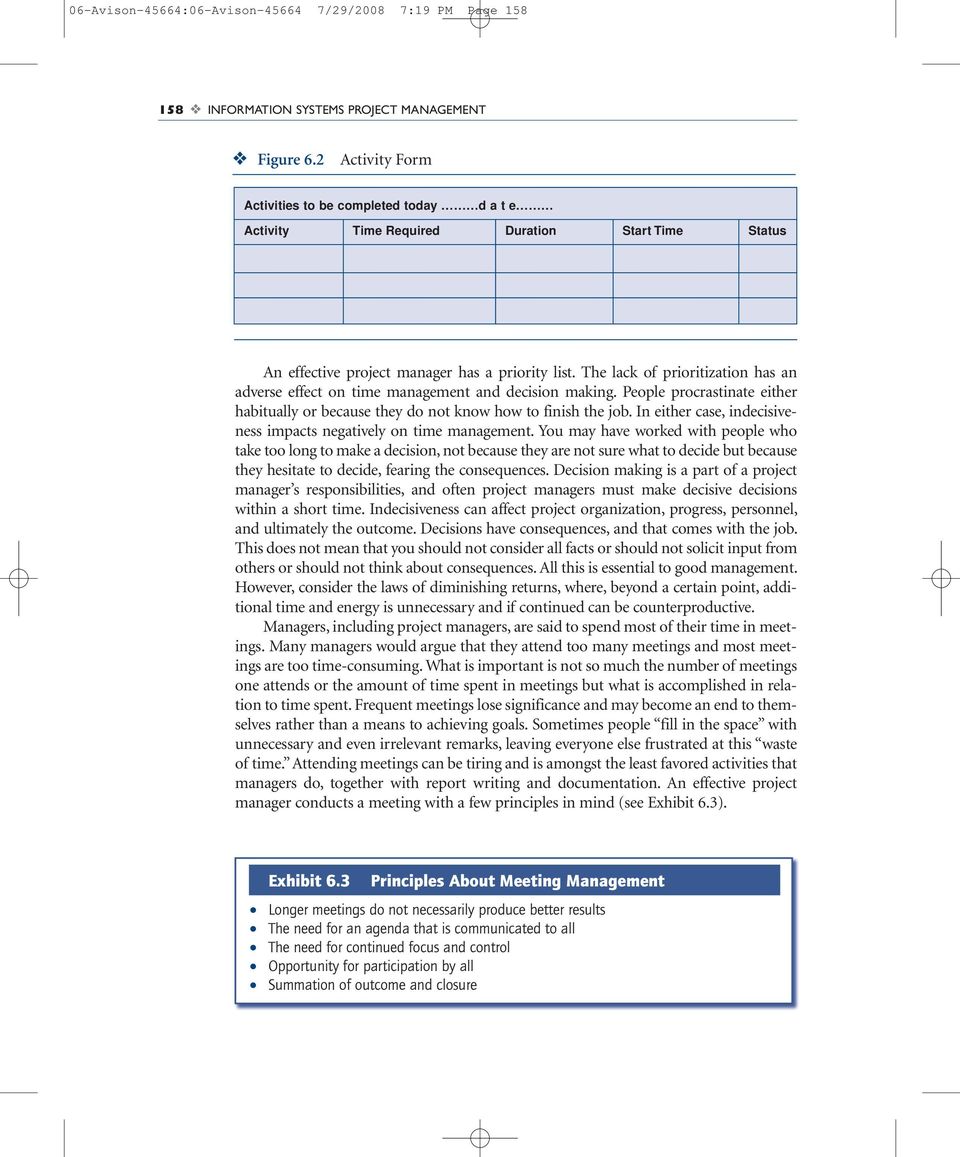
6 06-Avison-45664:06-Avison /29/2008 7:19 PM Page INFORMATION SYSTEMS PROJECT MANAGEMENT Figure 6.2 Activity Form Activities to be completed today d a t e Activity Time Required Duration Start Time Status An effective project manager has a priority list. The lack of prioritization has an adverse effect on time management and decision making. People procrastinate either habitually or because they do not know how to finish the job. In either case, indecisiveness impacts negatively on time management. You may have worked with people who take too long to make a decision, not because they are not sure what to decide but because they hesitate to decide, fearing the consequences. Decision making is a part of a project manager s responsibilities, and often project managers must make decisive decisions within a short time. Indecisiveness can affect project organization, progress, personnel, and ultimately the outcome. Decisions have consequences, and that comes with the job. This does not mean that you should not consider all facts or should not solicit input from others or should not think about consequences. All this is essential to good management. However, consider the laws of diminishing returns, where, beyond a certain point, additional time and energy is unnecessary and if continued can be counterproductive. Managers, including project managers, are said to spend most of their time in meetings. Many managers would argue that they attend too many meetings and most meetings are too time-consuming. What is important is not so much the number of meetings one attends or the amount of time spent in meetings but what is accomplished in relation to time spent. Frequent meetings lose significance and may become an end to themselves rather than a means to achieving goals. Sometimes people fill in the space with unnecessary and even irrelevant remarks, leaving everyone else frustrated at this waste of time. Attending meetings can be tiring and is amongst the least favored activities that managers do, together with report writing and documentation. An effective project manager conducts a meeting with a few principles in mind (see Exhibit 6.3). Exhibit 6.3 Principles About Meeting Management Longer meetings do not necessarily produce better results The need for an agenda that is communicated to all The need for continued focus and control Opportunity for participation by all Summation of outcome and closure
7 06-Avison-45664:06-Avison /29/2008 7:19 PM Page 159 Managing Information Systems Project Time and Resources Project Activity Network A typical information systems project management job involves planning, scheduling, and controlling all activities necessary to design, develop, implement, or maintain a computer application on time and within budget and meet user expectations. Information systems projects involve activities relative to hardware, software, networks, database, procedure, and people. Large and complex projects involve the participation of groups and individuals other than team members. These might include user departments, outside consultants, vendors, and government agencies. Projects will include a variety of interdependent tasks and expertise that require systematic record keeping and good communication channels. It is very important for the project manager to be able to monitor progress for each activity at all times. To help information systems project managers plan, schedule, and control projects, a variety of methodologies currently exist, many of them in the form of software tools that are easy to use and modify. This section will describe the techniques of Program Evaluation Review Technique (PERT) and Critical Path Method (CPM) for planning, scheduling, and controlling information systems project activities. Although PERT and CPM were developed separately and for different reasons, there are similarities between them. In recent years features of both methods have been combined in project management software tools, such as Microsoft Project (see appendix). As shown in Exhibit 6.4, PERT/CPM helps project managers in their role in a number of ways. Exhibit 6.4 Potential of PERT/CPM Estimate minimum time required for completing the entire project. Identify critical activities that must be completed in time for the entire project to be completed as scheduled. Show progress status for critical activities. Show progress status for noncritical activities. Estimate the length of time that these noncritical activities can be delayed. Estimate the likelihood of completing the entire project on schedule. PERT/CPM shows the sequence and duration for each activity and enables the information systems project manager to determine which task may become a bottleneck and thus delay the entire project. It illustrates the interrelationship of events and activities involved in a project. PERT is described in terms of a network that consists of activities connected by arrows. Each activity is labeled by a number or a character and has a beginning, duration, and ending. You should be able to refer to each activity on this network in terms of when it starts, when it ends, and how long it takes to complete. Where each activity is depicted on the network suggests its position relative to other activities; activities that it follows and activities that it precedes.
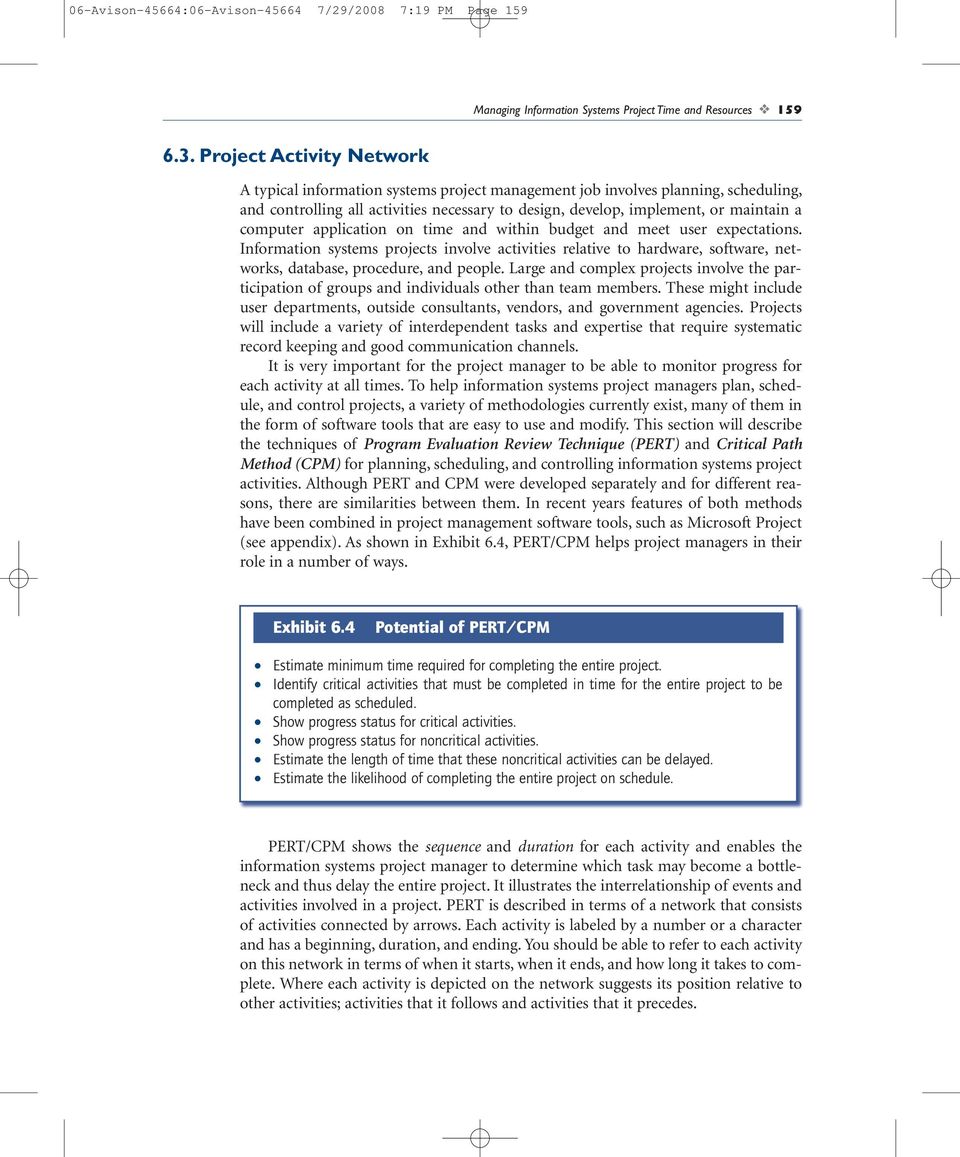
8 06-Avison-45664:06-Avison /29/2008 7:19 PM Page INFORMATION SYSTEMS PROJECT MANAGEMENT Consider, for example, activities involved for a Web page development project. We will use a simplified version just to demonstrate the principles of a typical PERT/CPM network. This project involves the nine activities that were identified when producing the work breakdown structure discussed in Chapter 4. We can also estimate the duration for each activity and establish a sequence. The information can be organized as follows in Figure 6.3. Figure 6.3 Development of a Personal Web Page Activity Activity Description Duration (Days) Preceding Activities A Determine user needs 2 B Review software and languages 2 C Purchase software 1 B D Design format and style 3 A, C E Write programs 5 D F Review outcome product with user 1 E G Make revisions 2 F H Select server site 1 I Install on server and test 2 G Note that the total time required to complete the project is 19 days, but the project can be completed within 16 days because activities A, B, and H can start at the same time and they do not have preceding activities, making them independent of other activities. The PERT/CPM network diagram, shown in Figure 6.4, depicts these nine activities together with the estimated duration for each. An arrow presents each activity. Activity duration is shown below the arrow. The network depicts the interdependence of all activities needed to complete this project. It correctly identifies activity B as the predecessor for activity C, activities A and B as the predecessors for activity D, and activities G and H as the predecessors for activity I, the final activity. An activity can start only after the preceding activity is complete. Using this network we can determine the total project completion time by identifying what is called the critical path. A path is a sequence of connected activities that extends from the starting node (1) to the completion node (8). The critical path in a network represents the longest path activities. Analyzing our nine-activity network, we can identify three paths. One path includes activities B, C, D, E, F, G, and I, which are connected by nodes Another path includes activities A, D, E, F, G, and I, which are connected by nodes And the third path includes activities H and I, which are connected by nodes The total path duration for the first path is 16 days ( ), for the second path is 15 days (2 + 3
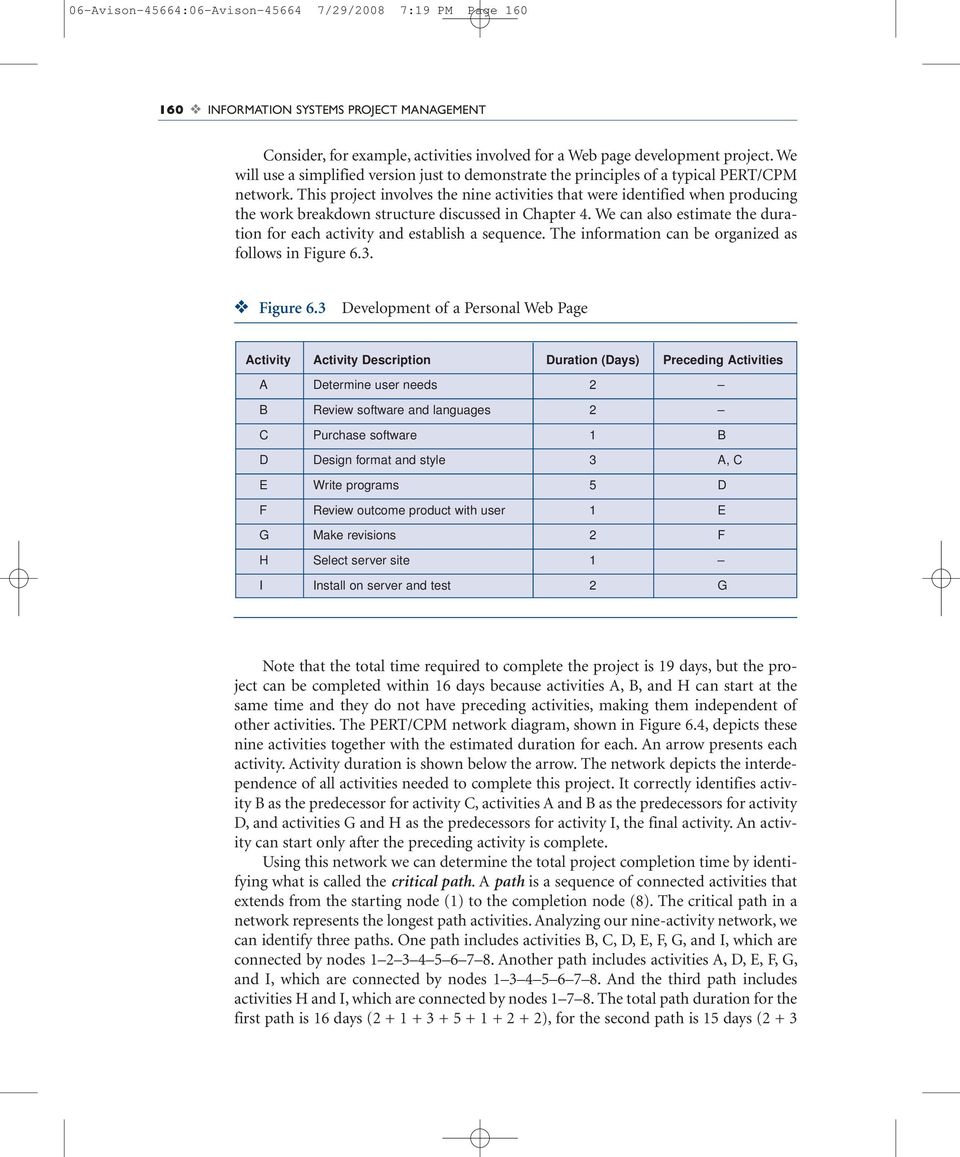
9 06-Avison-45664:06-Avison /29/2008 7:19 PM Page 161 Managing Information Systems Project Time and Resources 161 Figure 6.4 Network of Nine Activities 2 C 1 E B D 3 F A H 6 G 2 I 2 Nodes correspond to the beginning and ending of activities 1 Arrows indicate project activities ), and for the third path is 3 days (1 + 2). Thus the first path with the longest path activities is the critical path in this network. To reduce the total duration of the project, we will need to examine activities on the critical path and try to see if we can shorten the duration of any of those activities. However, as we reduce duration for some activities on the critical path another path may become the longest, making it the new critical path. This process can get complicated as the network gets larger and more complex. A more systematic approach is required that helps identify properties of each activity within the network. It starts by determining the earliest start and the earliest finish as well as the latest start and the latest finish times for each activity as part of what is called critical path analysis Critical Path Analysis To analyze the critical path, we must first compute earliest start (ES) and earliest finish (EF) time for each activity in the network. Starting at the origin of the network that is node 1 in our diagram, we assign 0 to the start of all activities that begin at node 1. The earliest finish time for an activity is calculated by adding the duration for that activity to the earliest start time for that activity. For example, activity A starts at time 0 and has a duration of 2 days to complete. Thus the earliest finish time for activity A is = 2. Using the abbreviations ES and EF to represent earliest start and earliest finish and t to represent time duration, the relationship can be expressed as: EF = ES + t The earliest start time for activities with multiple predecessors is the largest finish time among all preceding activities because all activities leading to any specific activity must be complete before that activity can start. For example, activity D on our

10 06-Avison-45664:06-Avison /29/2008 7:19 PM Page INFORMATION SYSTEMS PROJECT MANAGEMENT network can start only after activities A, B, and C are complete. Even though activity A is estimated to take 2 days, activity D cannot start until activity C is complete that is, on Day 3 because activity C cannot start until its preceding activity, B, is complete. Thus, the rule for setting the earliest start time for any activity is to consider the latest of the earliest finish times for all preceding activities. To make our network more informative, we present ES and EF information above the arrow next to the letter representing each activity as shown in the revised network diagram (Figure 6.5). Figure 6.5 Network of Activities With ES and EF B(0,2) C(2,3) 3 D(3,6) E(6,11) F(11,12) 8 1 A(0,2) 2 Nodes correspond to the beginning and ending of activities 3 H(0,1) 1 Arrows indicate project activities 6 2 G(12,14) 7 2 I(14,16) Once the earliest start and earliest finish times are worked out, we need to calculate the latest start (LS) and latest finish (LF) times. To do this, we must start from the last node and work backward, calculating LS and LF for each activity. In our network, we start from node 8 and activity I first. For activity I to complete on time, the latest finish time must be 16 (the same as EF time), and since it takes 2 days to complete this activity we can calculate the latest start time by subtracting 2 from 16. Using the abbreviations LS and LF to represent latest start and latest finish and t to represent duration, the relationship can be expressed as: LF = LS + t or LS = LF t Using this expression we work backward and calculate the latest start time and the latest finish time for each activity on the network. If there is more than one activity leaving a node, the rule for calculating the latest finish time for that activity is to use the smallest value of the latest start time for all activities leaving that activity. This simply

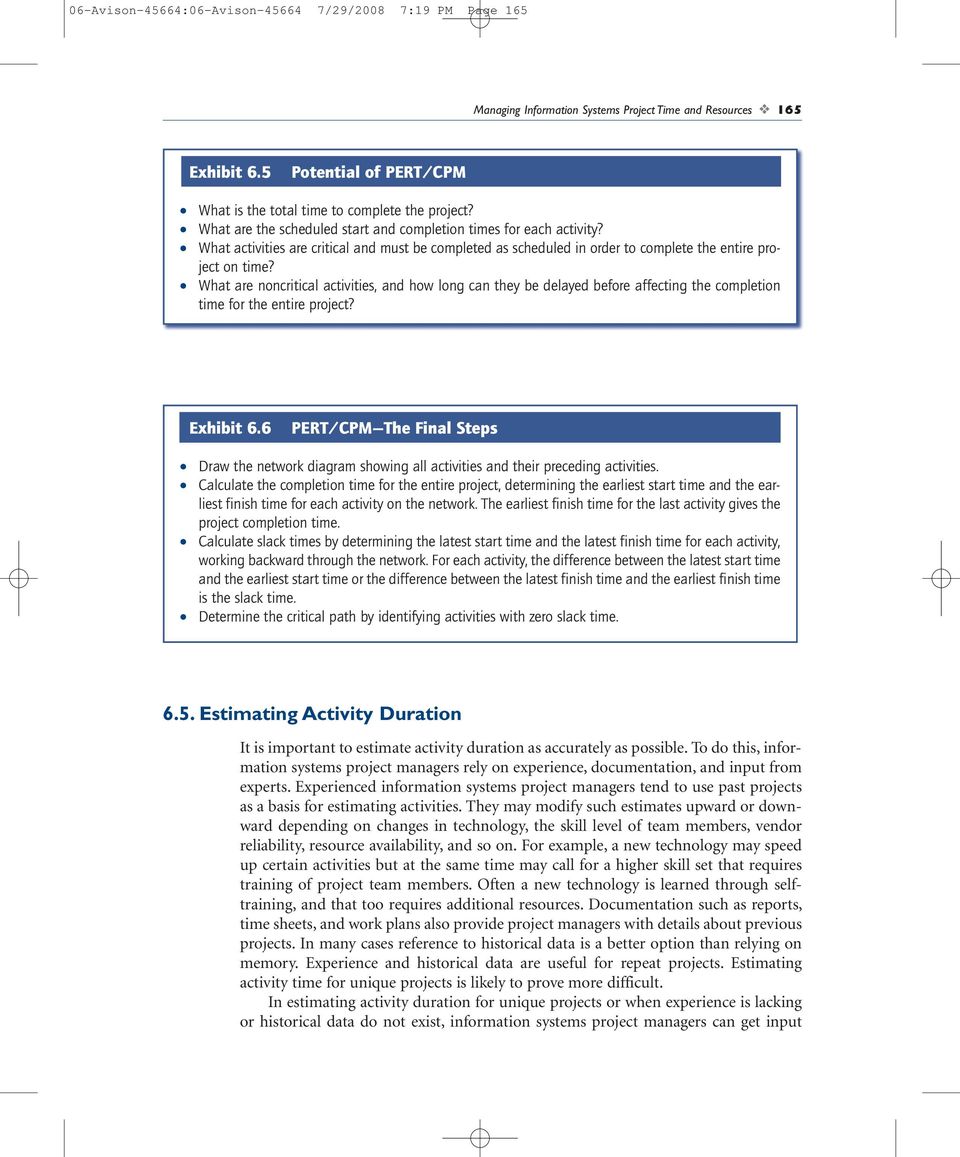
11 06-Avison-45664:06-Avison /29/2008 7:19 PM Page 163 Managing Information Systems Project Time and Resources 163 means that LF for any activity must be the same as the smallest LS for all activities following it. Otherwise it will cause delay in one or more of those activities that follow it. Using the relationship expressed as LF = LS + t (or LS = LF t), we work backward to calculate LS and LF for activity G: LF = 14 LS = 14 2 = 12 We need to continue this calculation for all activities. To reflect this information on our network diagram, we present LS and LF values below the arrow next to the duration for each activity as shown in Figure 6.6. The start and finish times shown on the diagram give detailed information for all activities. For example, Figure 6.7 depicts the information about activity H as part of the entire project network diagram. Figure 6.6 Network of Activities With ES, EF, LS, and LF 1 B(0,2) 2(0,2) 2 A(0,2) 2(1,3) 1(2,3) C(2,3) 3 D(3,6) 3(3,6) E (6,11) 4 5 (6,11) 5 H(0,1) 1(13,14) 1(11,12) F(11,12) G (12,14) 6 2 (12,14) 7 I(14,16) 2(14,16) 8 Note that activities with values of ES = LS and EF = LF form the critical path (Figure 6.6). Thus values in brackets above the arrow are identical to values in brackets below the arrow. Other activities are said to have slack, or free time. For example, activity A has 1-day slack time, calculated by LF EF (3 2 = 1) or LS ES (1 0 = 1). Similarly, activity H has 13 days slack time, calculated by LF EF (14 1 = 13) or LS ES (13 0 = 13). This means that activity A can start 1 day late and activity H can be delayed 13 days without any effect on the completion time for the entire project. Thus, activities with zero slack time form the critical path. This information can be presented in a tabular form in Table 6.1. Activities B, C, D, E, F, G, and I have zero slack and thus form the critical path. To summarize, PERT/CPM provides answers to the important questions listed in Exhibit 6.5.

12 06-Avison-45664:06-Avison /29/2008 7:19 PM Page INFORMATION SYSTEMS PROJECT MANAGEMENT Figure 6.7 ES, EF, LS, and LF for Activity H ES = Earliest start time EF = Earliest finish time Activity 1 H (0,1) 1 (13,14) 7 LS = Latest start time LF = Latest finish time Table 6.1 Activity Schedule for Web Page Development Activity Duration ES LS EF LF Slack A B C D E F G H I The outcome of any PERT/CPM application depends on: A complete list of activities necessary to complete the project A proper sequence of activities and identification of preceding activities Reliable activity estimates Once this information is established, a few steps are required to complete the procedure as shown in Exhibit 6.6.
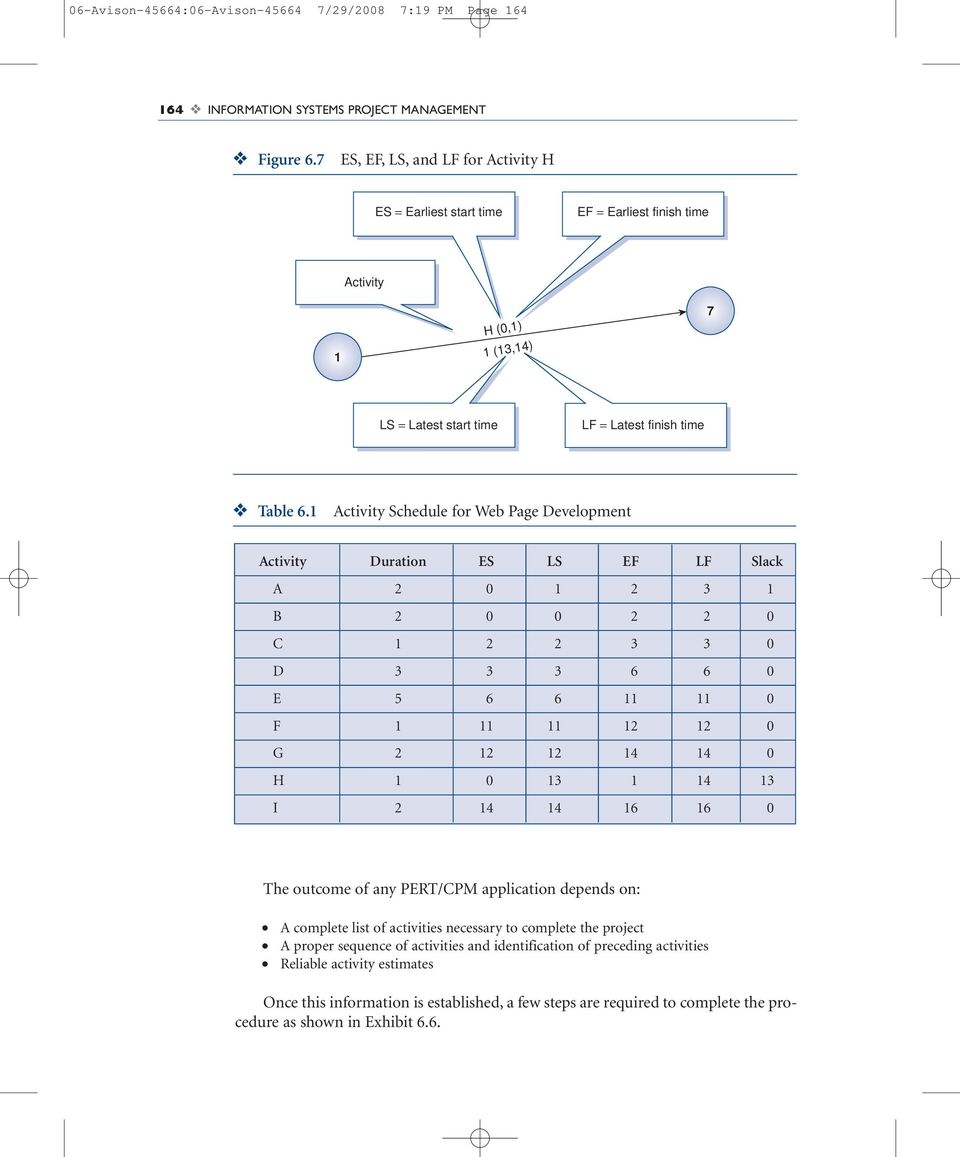
13 06-Avison-45664:06-Avison /29/2008 7:19 PM Page 165 Managing Information Systems Project Time and Resources 165 Exhibit 6.5 Potential of PERT/CPM What is the total time to complete the project? What are the scheduled start and completion times for each activity? What activities are critical and must be completed as scheduled in order to complete the entire project on time? What are noncritical activities, and how long can they be delayed before affecting the completion time for the entire project? Exhibit 6.6 PERT/CPM The Final Steps Draw the network diagram showing all activities and their preceding activities. Calculate the completion time for the entire project, determining the earliest start time and the earliest finish time for each activity on the network. The earliest finish time for the last activity gives the project completion time. Calculate slack times by determining the latest start time and the latest finish time for each activity, working backward through the network. For each activity, the difference between the latest start time and the earliest start time or the difference between the latest finish time and the earliest finish time is the slack time. Determine the critical path by identifying activities with zero slack time Estimating Activity Duration It is important to estimate activity duration as accurately as possible. To do this, information systems project managers rely on experience, documentation, and input from experts. Experienced information systems project managers tend to use past projects as a basis for estimating activities. They may modify such estimates upward or downward depending on changes in technology, the skill level of team members, vendor reliability, resource availability, and so on. For example, a new technology may speed up certain activities but at the same time may call for a higher skill set that requires training of project team members. Often a new technology is learned through selftraining, and that too requires additional resources. Documentation such as reports, time sheets, and work plans also provide project managers with details about previous projects. In many cases reference to historical data is a better option than relying on memory. Experience and historical data are useful for repeat projects. Estimating activity time for unique projects is likely to prove more difficult. In estimating activity duration for unique projects or when experience is lacking or historical data do not exist, information systems project managers can get input
14 06-Avison-45664:06-Avison /29/2008 7:19 PM Page INFORMATION SYSTEMS PROJECT MANAGEMENT from experts to estimate activity duration. In fact, when uncertain, information systems project managers may obtain multiple estimates for each activity and take the weighted average rather than relying on a single estimate. A popular approach for estimating activity duration involves obtaining three estimates. One estimate is referred to as optimistic, and it is based on the assumption that everything is under control and the activity will progress according to an ideal plan. Another estimate is referred to as pessimistic, and it is based on the assumption that whatever can go wrong will go wrong. The third estimate is referred to as the most likely, and it is based on a reasonable assumption of normality, somewhere between the other two. These three estimates provide a range of values from the best possible situation to the worst possible one. To avoid putting undue emphasis on the extreme estimates, the most likely value is counted four times compared with optimistic and pessimistic values. For example, if we have optimistic, most likely, and pessimistic estimates of 3.5 weeks, 5.5 weeks, and 9 weeks for a given activity, we can calculate the t value for that activity using the following formula: t = (o + 4m + p)/6 where o is for the optimistic estimate, m is for the most likely estimate, and p is for the pessimistic estimate. Thus, the expected duration for the activity in our example is: t = ( (5.5) + 9)/6 = 5.75 weeks Given the distribution among the range of values for this activity, we can calculate the variance in these values using commonly used standard deviation formula. The variance is the square of the standard deviation and is calculated using the following formula. σ 2 = ((p o)/6) 2 This formula assumes that standard deviation is approximately 1/6 of the difference between the extreme values of the distribution. Using this formula, the variance for our example will be: σ 2 = ((9 3.5)/6) 2 = 0.84 The variance reflects the degree of uncertainty in the estimated value for any activity duration. The greater the range between the optimistic estimates (o) and the pessimistic estimates (p) the greater the variance and uncertainty. We will review what we have covered for PERT/CPM through an example. Consider an information system project with seven activities listed in Table 6.2. The systems analyst has obtained three estimates that represent optimistic, the most likely, and pessimistic times (in days) for each activity. The activity sequence is also determined, and preceding events for each activity are shown. Given this information we want to: 1. Draw the network diagram. 2. Determine duration for each activity.
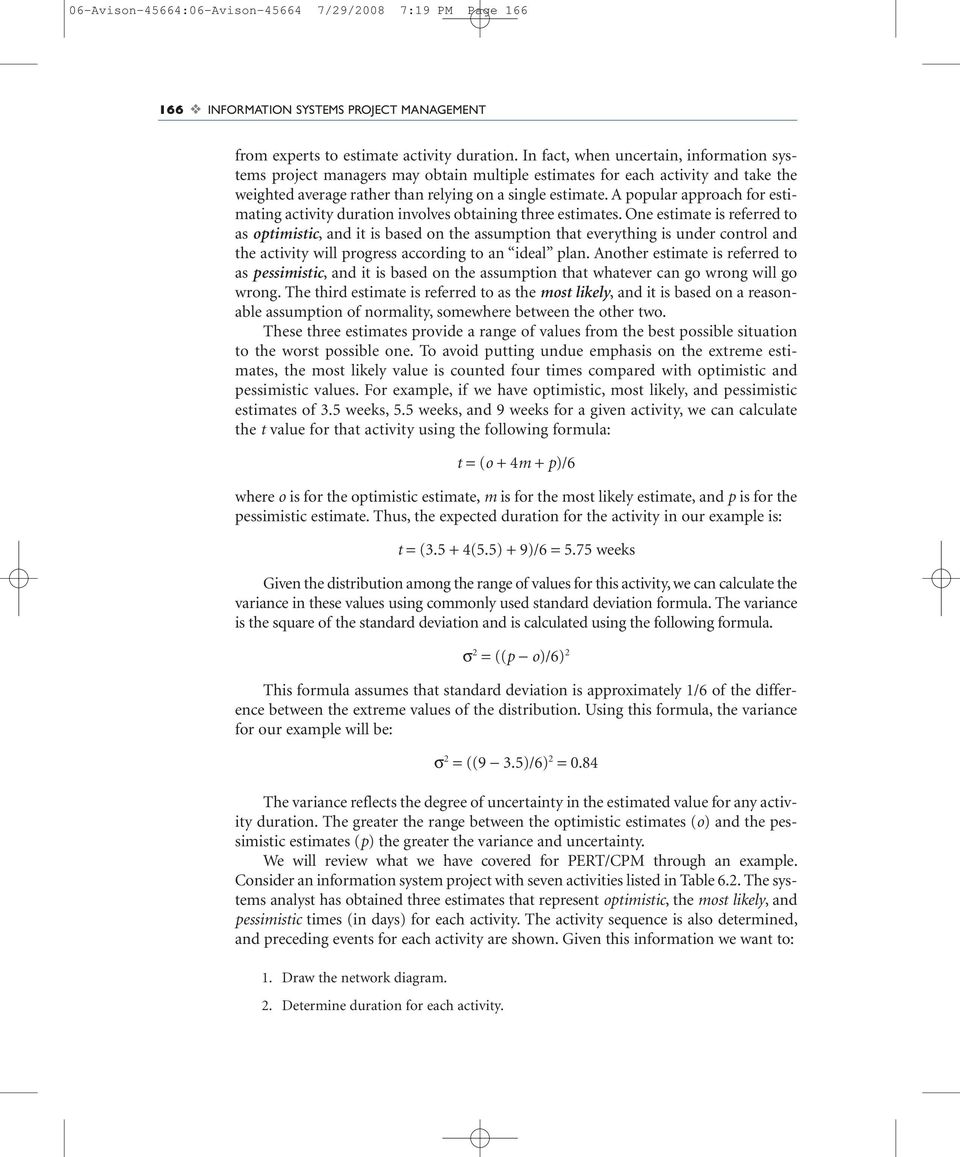
15 06-Avison-45664:06-Avison /29/2008 7:19 PM Page 167 Managing Information Systems Project Time and Resources 167 Table 6.2 Uncertain Duration Estimates for Seven Activities Preceding Activity Activities Optimistic (o) Most Likely (m) Pessimistic (p) A B C A D A E C,B F D G E,F Determine the critical path. 4. Compute slack times for noncritical activities. 5. Compute the expected project completion time and the variance. 6. Use the variance information and compute the probability that the entire project will be complete in 35 days. The PERT/CPM network for the information system project is shown in Figure 6.8. The network depicts the preceding activities as described in Table 6.2. Next, we need to compute the duration for each activity using optimistic, the most likely, and pessimistic estimates given in Table 6.2. For example using the formula provided above, the expected duration t for activity A will be: t = (o + 4m + p)/6 t A = (6 + 4(7) + 8)/6 = 42/6 = 7 days Using the above formula for variance and the distribution between values of 6 (optimistic), 7 (most likely), and 8 (pessimistic), the variance for activity A will be: σ 2 = ((p o)/6) 2 σ 2 A = [8 6)/6]2 = 0.11 Note that for the variance formula we only use extreme values of optimistic and pessimistic. Using the data in Table 6.2 and the above formulas, we continue and calculate expected duration and variance for all activities. Table 6.3 provides the expected

16 06-Avison-45664:06-Avison /29/2008 7:19 PM Page INFORMATION SYSTEMS PROJECT MANAGEMENT Figure 6.8 Network of Seven Activities D 2 4 A 1 C F 6 G B 3 5 E Table 6.3 Expected Duration and Variance for Seven Activities Most Activity Optimistic (o) Likely (m) Pessimistic (p) Expected t (days) Variance σ 2 A B C D E F G duration and variance for each of the seven activities. In this example, activity duration is estimated in terms of days. For larger projects, weeks and months may be used to estimate activity duration. Whatever is the unit of estimates, it should be used consistently throughout the estimating process, in progress reports, and other documents. Based on the information given in Table 6.3 for activity duration, we now proceed to establish the earliest start (ES) and the earliest finish (EF) times for each activity going forward through the network. Figure 6.9 shows the network of seven activities together with activity duration as well as ES and EF information. On this network, the earliest finish time for the last activity, G, is 33.6 days. That means the expected duration for the entire project is 33.6 days.

17 06-Avison-45664:06-Avison /29/2008 7:19 PM Page 169 Managing Information Systems Project Time and Resources 169 Figure 6.9 A(0,7) Network of Seven Activities With ES and EF D(7,16.5) B(0,9.3) C(7,16) 8.5 F(16.5,25) G(25.8,33.6) E(16,25.8) Figure 6.10 Network of Seven Activities With ES, EF, LS, and LF 1 B(0,9.3) 9.3(6.7,16) A(0,7) 7(0,7) D (7,16.5) (7.8,17.3) 4 F (16.5,25) 8.5 (17.3,25.8) C(7,16) 9(7,16) E (16,25.8) (16,25.8) G (25.8,33.6) 7.8 (25.8,33.6) 6 Next, to find the critical path we need to calculate the latest start (LS) and the latest finish (LF) times by working backward through the network. The information computed through this procedure is given in Figure 6.10, showing the network schedule. The information about the earliest start (ES) and the earliest finish (EF) times as well as the latest start (LS) and the latest finish (LF) times are summarized in Table 6.4. This information suggests that activities A, C, E, and G form the critical path for this project. These are the activities with zero slack time. The slack times for noncritical activities are shown in the last column of Table 6.4. Note that activity B can start anytime between zero and 9.3 days without affecting the overall project duration.

18 06-Avison-45664:06-Avison /29/2008 7:19 PM Page INFORMATION SYSTEMS PROJECT MANAGEMENT Table 6.4 Activity Schedule for the Project With Seven Activities Earliest Earliest Latest Latest Slack Activity Start ES Finish EF Start LS Finish LF (LS ES) A B C D E F G Information system project managers are often asked whether a project will be complete by a certain date and the probability of that happening, similar to the last question on the list of questions we posed for the seven-activity project. To compute a response to our final question, we need to use the calculated variance for activities on the critical path and a commonly used table of standard normal distribution. This table gives the information for any value between the mean and a given value of standard deviation from the mean. This value is expressed by the letter z and is calculated by dividing the difference between the mean and the desired completion time (35 days in our example) by standard deviation(σ). As you will recall, the standard deviation is the variance squared. To calculate the variance for the entire project we simply add variance for activities on the critical path. If we represent the duration for the entire project by the letter T, we will have: Variance (T) = σ 2 + A σ2 + C σ2 + E σ2 G = = 1.93 We then compute the standard deviation for the project s completion time as: σ= σ 2 = 1.93 = 1.39 The z value for the normal distribution at day 35 is computed as: z = ( )/1.39 = 1 For z = 1, the normal distribution table suggests the probability value of The chapter on quality includes a normal distribution table (Figure 12.3). This value is a portion in one-half of the area under the normal distribution curve. Thus the

19 06-Avison-45664:06-Avison /29/2008 7:19 PM Page 171 Managing Information Systems Project Time and Resources 171 probability of completing the project in 35 days is = Thus there is an 84% chance that the project will be completed in 35 days. We summarize responses to our six questions in Exhibit 6.7. Exhibit 6.7 Responses to Our Six Questions 1. The network diagram is shown in Figure The durations are shown in Figure The critical path includes A - C - E - G (see Table 6.4). 4. Slack times for noncritical activities are shown in the last column of Table 6.4. Three activities have slack time. 5. The expected project duration is 33.6 days (see Figure 6.9) and the project variance is There is an 84% chance that the entire project will be completed in 35 days Resource Implications The allocation of resources to a project is a task that can make or break a project, and we look in Chapter 9 at the process of forming a project team. However, in this section we consider the more mechanistic aspects. In Table 6.5 we show a simple form using Microsoft Project to support the resource allocation task. Here we are allocating time of people (Joe, Bill, and Ted) to activities (Tasks 1, 2, and 3). By including the hourly rates of people in the resource details we can calculate the costs of our resource usage for each task as shown in Table 6.6. This information can be used to generate a resource allocation graph using a computer software package such as Microsoft Project (see the appendix to this chapter). As you will see when using this software or another planning tool, although it may take Table 6.5 Allocating People Hours to Activities
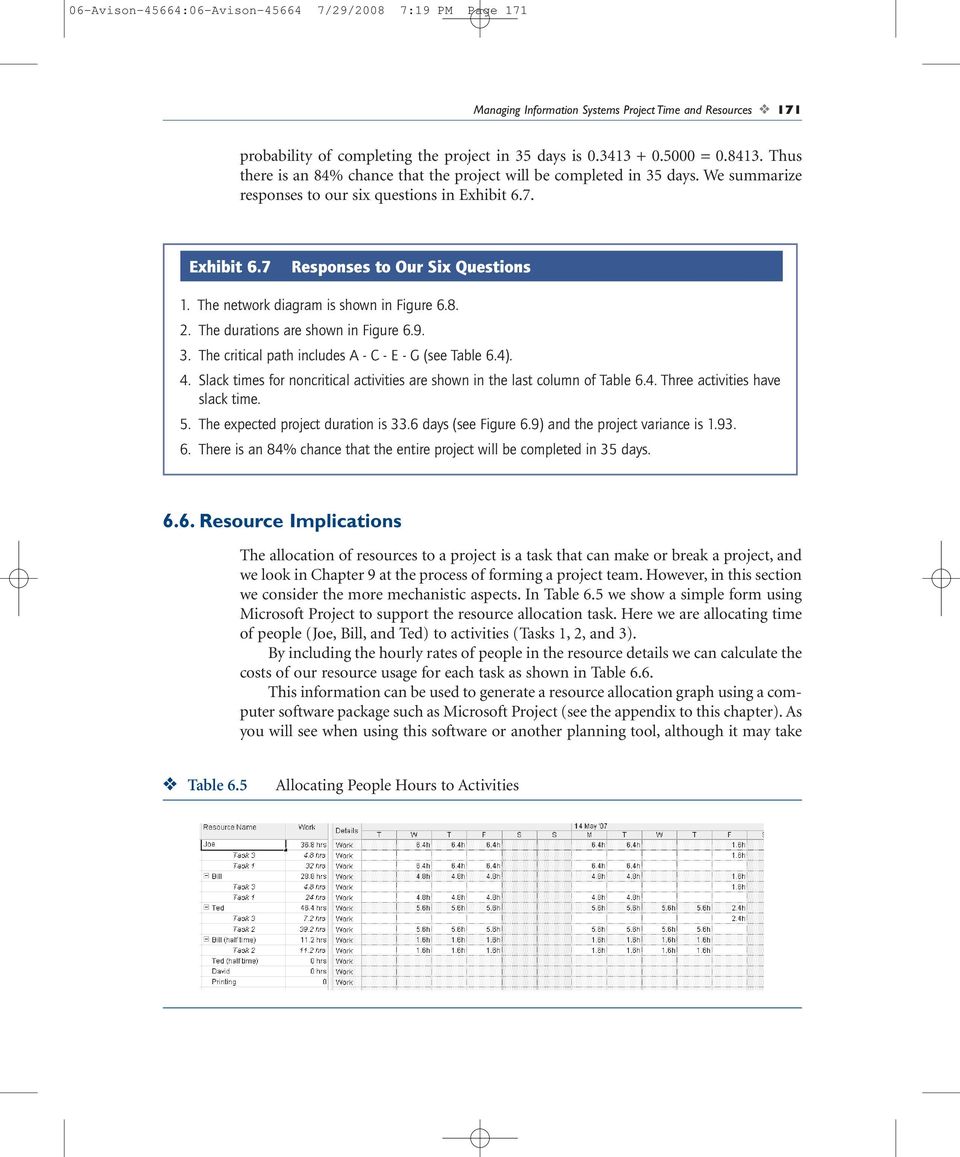
20 06-Avison-45664:06-Avison /29/2008 7:19 PM Page INFORMATION SYSTEMS PROJECT MANAGEMENT Table 6.6 Costs of Tasks time to learn, it does support much of the work of the project manager and eases progress tracking, re-planning, and what-if analysis. Further, the quality of presentation is much better than attempting the same by hand. Software packages can also aggregate the various resources, such as the number of people working on the activity, and attempt to smooth their use throughout the project. This resource smoothing process can be particularly useful as management reviews and approves of plans. It is usually better to use resources as smoothly as possible in the lifetime of the project, otherwise staff will be used efficiently for only part of the project. Although the examples presented here and in the appendix would not be too difficult to replicate by hand, software is required for a project that has hundreds of activities and tens of people working on it. Such numbers are by no means unrealistic. Resource smoothing in such circumstances can have a dramatic effect in reducing overall costs. Normally, although not necessarily, as Fred Brooks has observed (see Section 3.3), there is a tradeoff between time and cost (assuming the same quality); in other words, the more resources allocated (and the more costly the project), the quicker it can be finished. Conversely, resource smoothing may well delay the project as fewer resources may lead to critical activities being delayed. However, by taking resources out of noncritical activities, the reduction in cost may not be associated with an equivalent increase in project time. It might also be possible to exchange certain resources if talents are duplicated. The project manager may also like to input various estimates of resource availability, basing them on past experience in terms of minimum, most likely, and maximum figures. This will give three different results for time/cost comparisons. Many project control packages will report on inconsistencies within the network, such as the same resource being used at the same time on more than one activity. Although the plan should allow for minor deviations, the package may permit the project manager to ask what if? questions so that the consequences of more major deviations can be seen for example, the implications of reallocating staff, unexpected staff leave, or machine breakdown. Useful reports from a package might also include a list of activities presented in order of latest starting date and earliest starting date and information by department or by resource or by responsibility.

21 06-Avison-45664:06-Avison /29/2008 7:20 PM Page 173 Managing Information Systems Project Time and Resources 173 Packages can simulate the effects of prolonging an activity reducing resources applied to it or adding new activities. Similarly, they can be used to show the effects of changing these parameters on project costs. The project manager may be faced with two alternatives: a resource-limited schedule, where the project end date is put back to reflect resource constraints, or a time-limited schedule, where a fixed project end date leads to an increase in other resources used, such as people and equipment. As Exhibit 6.8 shows, a package can also monitor progress to reveal the present situation and look at alternative plans to get a failing project back on track. Exhibit 6.8 Progress Monitoring Compare the time schedule with the actual progress made. Compare the cost schedule with the actual costs. Maintain the involvement of users and clients. Detect problem areas and re-plan and reschedule as a result. Inform management of the new plan and get their agreement. Provide a historical record, both for projects meeting goals and those that do not, as they can both be useful for future project planning Avoiding Project Delay Information systems projects are often not completed on time. Timely delivery remains a difficult task for information systems project managers. Every project manager has reasons for justifying delays. Here are a few suggestions to help more timely delivery. Communications. Time estimates for each activity as well as progress toward completing each activity must be clearly communicated to team members and be readily available to them at all times. Project managers need to decide what method of communication will best serve their situation. Information systems technology and project management tools such as MS Project and spreadsheets are readily available and easily applicable for preparing timetables and controlling schedules. Yet, many projects are late even when a software tool is used to keep track of time. Many project managers use software to keep themselves informed of project activity time and progress. However, they often keep that information to themselves. It needs to be communicated to team members.
22 06-Avison-45664:06-Avison /29/2008 7:20 PM Page INFORMATION SYSTEMS PROJECT MANAGEMENT Methods. Activity times are as good as the methods used to estimate them. Complex and sophisticated methods do not automatically produce reliable estimates. It takes time and needs careful preparation. Rushing through that task will result in project delay later on. Estimates are as good as their source. Experience is, by and large, the best source of estimating time requirements, and that requires good documentation and archiving. For new activities for which we have no records, the judgments of many experts provide a useful source. Team members must understand those methods and believe that estimates are realistic; people will more readily accept and comply if they understand how estimates are prepared. Separation. Team members are responsible for work units that they are specifically assigned to and they are accountable for. Project managers are responsible for separating team members work and responsibilities from those of stakeholders such as users and functional managers who may want to influence the project timetable or process. Team members might be bogged down by stakeholder interference or unexpected demands. Project managers should prepare and communicate clear policies in order to help team members with their time management. Support. Team members must feel confident of project manager support in order to stick to their schedule. Often when functional managers get involved with the project planning they tend to continue that involvement into the development phase, and that could create confusion for team members and their responsibilities. Project managers must act as a buffer between team members and the management in order to provide necessary breathing space to the project team for timely completion of their tasks. Project managers must use their political influence to support and protect their team members. Analysis. Often project delay is due to poor up-front needs analysis. By and large the temptation by system developers is to get to the development phase of a system too quickly and as a result they rush through the analysis phase. To avoid delay later on, project managers must provide leadership to ensure careful needs analysis is carried out before allowing the project to go on. Poor up-front needs analysis may ultimately cause significant project delay, especially in terms of project rework. Closure. Many people do good work but they just don t know when to stop, and that is not unique to information systems professionals. The laws of diminishing returns suggest that marginal benefit relative to time and effort spent on a task will eventually reach a point where benefits turn into costs. Team members need to be reminded that similar to the project itself, each task requires closure and members need to move on to the next tasks. A similar problem exists when people kill a lot of time searching for some information on the Web that may not exist or may be easier to get elsewhere, such as by asking colleagues. Project managers are responsible to move resources, including human resources, on to the next phase and next project.
23 06-Avison-45664:06-Avison /29/2008 7:20 PM Page 175 Managing Information Systems Project Time and Resources Interview With a Project Manager This interview took place with a project manager at one of the largest contractors in the United States. What would you consider to be the most challenging aspect to being a project manager? My company currently has many projects. In fact, they have more projects than project managers. This requires that all of us manage multiple projects concurrently. I am managing three of the top ten projects currently assigned to the IT department. I would say that both proper prioritization and time management are the most challenging. You must ensure you spend the right amount of time on the right project to ensure all your goals are met. What project management tools and computer software do you find the most useful? We are using Project 2002 and Project 2002 Server as our project management software tools. These allow us to track all of our projects and provide pretty accurate time estimates. It s best to estimate the project up front and then provide a work breakdown structure once the estimate is provided. This is a pretty accurate method, provided you have the expertise at your disposal to input accurate time estimates on the project. What skills are essential to becoming a successful project manager? How many projects have you been involved in, and how many have actually been a success? People skill has to be the most important for both internal and external communications. Many times you run into people who are very contentious, and keeping the peace can be both extremely important and paramount to the continued success of your project. Next to that would be organization, especially when you re controlling multiple projects such as we do. Without the ability to stay organized and on track, your project will most assuredly fail! For instance, as a project manager, recording information is everything. Maintaining your paperwork and relaying information to people helps keep your infrastructure [resources] on time, on schedule, and under budget. Most projects fail because everything wasn t recorded and something was omitted during the processing of requirements. Without defining the proper user requirements up front, you can bet your bottom dollar that the project has a good chance of failing. A good case in point would be a colleague of mine who was in charge of a file expense recording system. He failed to ensure the data he was given was both accurate and complete. The project began suffering immensely from scope creep, and the project ended up over time, and over budget, as well as incomplete. How do you forecast the necessary time to complete a step in the work breakdown structure? We use two methods for forecasting time. Both are software driven and were good when we first purchased them. The way they work is that you plug in input transactions, output transactions, and other deliverables and then the program will provide you an estimated time. We are currently preparing to evaluate some different software, as it is more exact than what we currently employ.
24 06-Avison-45664:06-Avison /29/2008 7:20 PM Page INFORMATION SYSTEMS PROJECT MANAGEMENT When calculating project costs, do you budget in slack time or do you provide a full assessment and a separate contingency assessment? If you do use the contingency assessment, how do you determine what constitutes an appropriate amount? Estimates are sometimes, if not most often, overstated by experts. One project we had, not too long ago, estimated a particular timeframe for completion. We provided this estimate to our experts who had actually been involved with a project very similar to this one. They gave us an estimate that cut the original one in half, and we still ended up under time. Estimating is a science that is very difficult to master. One of the estimate tools we own is called QFM. It utilizes historic industry data as a factor where it takes knowledge obtained across the industry and factors that into the calculations for budgeting time. It always seems to provide us a poor time estimate, as they always seem out of whack by our experts. Contingency time isn t something that is well accepted by our upper management. They feel that putting down something called contingency on paper leaves open too many questions. They feel it makes us look unprepared and that we are looking for a way to factor in extra costs. We re always expected to factor the contingency time across the entire project. How do you successfully manage customer expectations without overwhelming them with too much information about the project? People skills! Know your customer! By knowing the technical expertise of your customer, you have a pretty good idea of what or how much information to provide. Remember that scope creep is always a huge danger, so you should know how much to tell your customer, but you should always know where the borders of the project are. Failure to clarify requirements can cause major problems as the project progresses. We call this the Bring Me a Rock syndrome. Basically, the customer asks you to bring them a rock. When you provide it, they say it s too big. The next rock you bring is too small. The next one is too round. This goes on and on and on! You should always negotiate with the user up front for the scope of the project. If something is brought to you later, you must draw the line or negotiate different project phases. You close out the requirements list and then start a second one for the second generation of the project. How do you ensure project team members are spending adequate time on their projectspecific tasks when these people are not under your direct supervision? I use time sheets and weekly reports and weekly meetings to keep track of specific project tasks. Project Server is great for this, as everyone must put in their own time into the program. I can download this weekly to obtain a results synopsis and know where to direct more of my attention. What was the last project under your management? Was the project a success? What hurdles prevented you from successfully completing the project, or what main factors contributed to the successful completion?
25 06-Avison-45664:06-Avison /29/2008 7:20 PM Page 177 Managing Information Systems Project Time and Resources 177 The last project I managed was an Automated Customer Price List Tracking program. The project was originally built by the customer in Microsoft Access, which sat on one person s desktop and allowed no one else to access. We changed this into an enterprise application and brought it to a successful completion. The problems we encountered were the fact that the person who had built and maintained it no longer worked at the company. We had to figure out what the logic behind the application was before we could prepare any type of estimation of the project, and this was extremely difficult. I haven t had a project that failed, but another colleague of mine did. This was a tracking application that just finished 3 weeks ago. It finished 3 weeks late in fact! This was due to scope creep caused by the customer, and we had already received, in writing, the customer confirmation that they knew this would happen due to the additional functionality requested. Have you had to cancel a project after significant resources (time, money, and personnel) were already spent? If so, were there repercussions that affected your management of future projects? Yes!! In fact, I had just finished the project the day before and it was being deployed as I was on my way to work. I received a call from our management screaming at me to stop its deployment immediately! We stopped it right away and later found out that this project was pretty much dead. I had inherited this project from the desk of someone who had been laid off months prior to its scheduled completion. It had been overlooked until the customer had called on a status update. The original estimate provided by the, now departed, project manager had been way off. Additionally, he had not recorded the entire project scope, and much of what the project was expected to do was not available. We lost a lot of money on that project. Of the projects you have managed, which one was the most challenging? Please explain. The Oracle update has to be the most challenging yet. This project started back in the summer of 2000 and went into production in It was a huge effort that cost $3 million in the first year, had three project managers, and consisted of implementing both new hardware and software. The software being used was Oracle, and we had to have it upgraded twice before we could get it to work. This required a huge collaborative effort with the people at Oracle (the customer had a contact there and insisted on us utilizing it as the back end). Budgeting the resources was most challenging, as there was a lot of overtime involved and it was costing a lot to keep the project going. We managed to pull it off, though! How were you able to control a project effectively if there were three project managers? The size of the project pretty much required that many. One project manager was a functional manager, another was in charge of documentation, and I was in charge of coordinating the efforts. This is where documentation and devotion to constant communication becomes necessary. What helped out a lot was co-locating the functional managers for both us and the customer. By working together [side by side], they were able to get instant answers and feedback when it was required.
26 06-Avison-45664:06-Avison /29/2008 7:20 PM Page INFORMATION SYSTEMS PROJECT MANAGEMENT Tell me about the most difficult client contact you have made in the last 6 months. What obstacles did you face? How did you overcome them? I was put in charge of the Work Smart Standards project, which was managed by the Department of Energy (DOE). The DOE asked me to take over for them, and that s when I found out about the problems! No formal requirements had been developed. This caused me to stop the entire project and develop those requirements and time estimates before going anywhere. Several hands have a stake in this, including the DOE, my company, and the federal government. The bureaucracy is unbelievable! I finished the estimates several months ago, and I m still waiting for an okay to proceed. As a project manager, what are some tips you would give to aspiring project managers? Stock up on aspirin and antacids! Seriously, I would say that a project manager should always stay upbeat and take things with a grain of salt. What I mean is that if you get too caught up in the pressures of the job, you re just waiting for something to happen, and it probably will. Always learn from your mistakes and take it all in stride. Most of all have fun doing it! Do you feel organizations consider formal project management processes and training a waste of resources? My company most definitely does not! We are always getting the training we need, and there is an open-door policy anytime something doesn t seem to be going right. Of course, we re not without problems. A good case in point is the title of project manager. Since my company is a project management company, we actually have a department of people who have the title of project manager. Since we are a small part of the overall company, politics decided we shouldn t be called project managers. Do you think employees are adequately evaluated/compensated for their participation in projects, especially when this participation is above and beyond their day-to-day responsibilities? I m not sure how others do this, but when I feel someone has really worked hard, I write letters to their immediate supervisors and department managers recognizing them for their efforts. I have no more control after that point, and so I can t tell you if they receive anything more than a pat on the back. How many of your projects have involved the participation of a third-party company? What unique challenges did you encounter with this type of project team configuration? Most of our projects involve a third party. We are a contractor, and therefore we contract to different companies all the time. Oracle and Northrop-Grumman are a couple of examples. It s really hard to narrow down what unique challenges there are because they vary from company to company. Coordination is probably one of the factors I would say is challenging. Another is aligning our ideas and strategies with theirs.
27 06-Avison-45664:06-Avison /29/2008 7:20 PM Page 179 Managing Information Systems Project Time and Resources Chapter Summary Timely delivery of any information systems project is a critical success factor. Together with cost and project scope, time is considered a constraint in the triple-constraints concept. A large project with many activities requires careful scheduling that allocates time for each individual activity. Communicating and monitoring these activity times is an important task for the information systems project manager. One of the most widely used tools for managing time and schedule is PERT-CPM. This helps the management of the overall project duration as well as the individual activities. This time management tool helps to set time, identify activity sequence, communicate time constraints, and monitor progress. A critical part of developing a PERT-CPM network is obtaining reliable estimates. Sources for estimating activity time include the experience of project managers themselves, input by others involved in similar project activities, and documentation. This chapter highlights the importance of time management and suggests ways to schedule activities better and monitor their progress. It also suggests ways of estimating the likelihood of project completion within a specified time and how time improvement can be made through the critical path analysis. Finally, it discusses resource implications and discusses ways in which resource use can affect project time. DISCUSSION QUESTIONS 1. Discuss the idea that time is a resource but also a constraint. Is this a contradiction? 2. Describe signs that tell you if an information system project manager is managing time effectively or not. What specific suggestions do you have for a project manager who is deficient in time management skills? 3. Discuss ways of obtaining good estimates for a project activity. What are good sources of getting estimates? What is prudent to do when you need to estimate an activity for the first time? Is it prudent to overestimate time for new activities or underestimate them? 4. How does information on variance help you assess uncertainty? What would you do when you have higher confidence in one of the estimators? 5. In Exhibit 6.1 we had the views of Terry Young, who argued that experience, the willingness to negotiate, and the commitment of people were far more important than the use of techniques such as PERT to achieve a successful project. Yet others argue that the correct use of techniques will more likely lead to a positive result. Argue each case and also suggest a middle ground.
28 06-Avison-45664:06-Avison /29/2008 7:20 PM Page INFORMATION SYSTEMS PROJECT MANAGEMENT EXERCISES 1. Consider the IS project with seven activities (Table 6.2) described in this chapter. Use the variance given in Table 6.3 and compute the number of days that gives the project manager a 95% chance of completing the entire project. 2. Again, consider the IS project with seven activities (Table 6.2) described in this chapter. What will happen if activity F took 1 day longer than it is estimated to complete? 3. It is often suggested that project managers obtain three time estimates for work units that have significant uncertainty associated with their time estimates. Assume you have collected three time estimates for each activity for a performance monitoring system at an international airport baggage handling systems. Your cost estimate worksheet suggests the following: Project estimate: Project standard deviation: 250 hours 18 hours Based on this information and assuming three standard deviations from the mean to include approximately 99.75% of the area under the normal distribution curve, calculate: Project highest credible hours Project lowest credible hours Upper confidence limit Lower confidence limit Explain to the airport executives, your project sponsors, what these numbers mean. APPENDIX TO CHAPTER 6: AN INTRODUCTION TO MICROSOFT PROJECT MS Project is a project management tool that allows the tasks involved in a project to be structured in an informative way. We provide two tutorial exercises to using MS Project in this appendix. With software, the best way of getting to know it is through practice. We have used the 2007 version of Microsoft Project.
29 06-Avison-45664:06-Avison /29/2008 7:20 PM Page 181 Managing Information Systems Project Time and Resources 181 PART 1. ENTERING TASK DETAILS AND START DATE 1. Start MS Project. Project1 will appear on the screen, as shown below: Guide Task Sheet Gantt Chart Common to all of Microsoft s 2002, XP, and Vista applications, there is a guide displayed along with the main task sheet and Gantt chart. The guide is shown on the left. The task sheet is a spreadsheet-like table on the middle of the screen, while the (currently empty) Gantt chart is on the righthand side. You will see the Gantt chart being created as you enter information into the task sheet. 2. To give us more room to see what we are doing, close the guide by clicking on the to the right of New Project ( ). 3. Save the project with the file name Project1. Now we will create the project plan. Save as Project 1
30 06-Avison-45664:06-Avison /29/2008 7:21 PM Page INFORMATION SYSTEMS PROJECT MANAGEMENT 4. Using the WBS contained at the end of this first tutorial example, type in the task names in the column that says Task Name. Enter tasks in this column As you type, MS Project will query the length of each task. Don t worry about that for the moment. We will put in names first, then indent, then type in durations, and then define predecessors.
31 06-Avison-45664:06-Avison /29/2008 7:21 PM Page 183 Managing Information Systems Project Time and Resources Once you have typed in all the names, indent the sub-tasks as shown in the WBS. Note, for instance, that DEFINITION is a top-level task name, while Write requirements document is a sub-level task and must be indented in MS Project using the indent ( ) button located middle-right of the toolbar ( ). All indentations must be as they appear in the work breakdown structure. You will notice that all major task names are now shown in bold. NOTE: A number of tasks can be indented at the same time by selecting the rows and clicking on the indent button. Indent sub-tasks
32 06-Avison-45664:06-Avison /29/2008 7:22 PM Page INFORMATION SYSTEMS PROJECT MANAGEMENT 6. Starting from the top again, type in the durations in the Duration column. For instance, the 30-day duration for Write requirements document is entered by typing 30 in the Duration column. Make sure that all 0 durations are also entered, otherwise the default 1 day is left (and that s wrong). BEWARE: You only enter durations for sub-tasks, not for main tasks (the names in bold). It s Project s job to work out the duration of main tasks based on the information you enter for the sub-tasks. Probably now is a good time to save the project file ( ). So do it! Enter durations in this column
33 06-Avison-45664:06-Avison /29/2008 7:22 PM Page 185 Managing Information Systems Project Time and Resources Next, we need to tell MS Project how one task is related to another. If Task 2 depends on the completion of Task 1, we say 1 is the predecessor of 2 (it has to be done first). The WBS gives us that information. So, let s define the predecessors. 8. To make the predecessor column easier to see, use your mouse to drag the right-hand frame bar of the task sheet out, making the Gantt chart smaller as a result. Then find the predecessor column and enter a 2 for Task 4, ANALYSIS, as shown below: Enter dependencies in this column Click and drag the divider to the right to see the predecessors
34 06-Avison-45664:06-Avison /29/2008 7:23 PM Page INFORMATION SYSTEMS PROJECT MANAGEMENT 9. Double-check that you have entered the right predecessors; if it looks OK, save the file ( ). 10. So far, so good. One problem, though: The project doesn t begin today; it starts on March 31, 2010! We had better change the start date. To change the scheduled start, click on Project>Project Information. The Project Information dialog box will appear. Change the project start date here 11. Pull down the Start Date field and advance the calendar to 2010 and then March, then click on the 31st, as shown:
35 06-Avison-45664:06-Avison /29/2008 7:23 PM Page 187 Managing Information Systems Project Time and Resources Click on OK. MS Project will now recalculate calendar start and end dates for all the project activities based on this start date. Scroll down to Task 34 (Project end), if you have done everything right, the end date for the project should read 2/1/11. End date for Task 34 should be 2/1/11 PART 2. DEFINING TASKS AS MILESTONES, AND VIEWING THE PROJECT 1. Tasks 3, 10, 14, 25, and 34 are milestones in the project that is, points at which significant progress in the project should have been made and is open to review. To identify Task 3 as a milestone, double-click on Row 3. The Task Information dialog box will appear. Double-click anywhere on Row 3
36 06-Avison-45664:06-Avison /29/2008 7:24 PM Page INFORMATION SYSTEMS PROJECT MANAGEMENT 2. Click on the Advanced tab. This dialog box allows us to more precisely define the task, including name, duration, start times, and constraint types. If you have important constraints to apply to a task, this is the box to use. Click on the Advanced tab 3. For our milestone, since we have already assigned a 0 duration to the task, MS Project automatically identifies task 3 as a milestone. Otherwise, it would be necessary to click on the Mark Task as Milestone box. Check this box to mark task as a milestone
37 06-Avison-45664:06-Avison /29/2008 7:24 PM Page 189 Managing Information Systems Project Time and Resources 189 In the Gantt chart, a diamond will denote the milestone. Check that Tasks 10, 14, 25, and 34 are all defined as milestones. A diamond in the Gantt chart denoting a milestone
38 06-Avison-45664:06-Avison /29/2008 7:24 PM Page INFORMATION SYSTEMS PROJECT MANAGEMENT 4. I know you re dying to see the complete Gantt chart, so we ll do that one last task. First, reduce the size of the task sheet so as much of the Gantt chart can be seen. Move the divider all the way to the left to see as much of the Gantt chart as the screen allows (like the image below)
39 06-Avison-45664:06-Avison /29/2008 7:25 PM Page 191 Managing Information Systems Project Time and Resources Now click on View>Zoom...and when the Zoom dialog box appears, click on Entire project. Click on Entire project 6. Click on OK. Now click on File>Print Preview and a condensed version of the Gantt will be shown, ready for printing.
40 06-Avison-45664:06-Avison /29/2008 7:25 PM Page INFORMATION SYSTEMS PROJECT MANAGEMENT PART 3. CREATING AND ASSIGNING A CUSTOM CALENDAR 1. The calendar that MS Project uses to calculate dates does make allowances for lunch breaks, weekends, etc, but the defaults do not necessarily fit those we would like to use. To make a more realistic calendar, we must create, save, and then assign a custom calendar to the project. A custom calendar allows certain hours and/or days to be defined as nonworking. When assigned to a project, the Gantt chart is adjusted automatically and a new end date is likely to appear. To create a custom calendar, click on the Tools>Change Working Time... The calendar currently shown is MS Project s Standard (default) project calendar, as shown below: Default Project Calendar
41 06-Avison-45664:06-Avison /29/2008 7:26 PM Page 193 Managing Information Systems Project Time and Resources To create a customized version, click on the Create New Calendar...button. Click on Create New Calendar
42 06-Avison-45664:06-Avison /29/2008 7:26 PM Page INFORMATION SYSTEMS PROJECT MANAGEMENT The Create New Base Calendar dialog box will appear. Click on Create New Base Calendar, and then in the Name field, type: Project1. Click on Create new base calendar Name the new base calendar as Project1
43 06-Avison-45664:06-Avison /29/2008 7:26 PM Page 195 Managing Information Systems Project Time and Resources Click OK. The Change Working Time dialog box will reappear, with Project1 shown in the For field. Project1 is the new base calendar
44 06-Avison-45664:06-Avison /29/2008 7:27 PM Page INFORMATION SYSTEMS PROJECT MANAGEMENT 4. Click on the Work Weeks tab on the bottom half of the Change Working Time dialog box. Then, click on the Details...button on the right. Click on the Work Weeks tab Click on the Details button
45 06-Avison-45664:06-Avison /29/2008 7:27 PM Page 197 Managing Information Systems Project Time and Resources 197 A Details for [Default] dialog box will appear. Select the days Monday, Tuesday, Wednesday, Thursday, and Friday by clicking on Monday and dragging down to Friday or by holding down Ctrl or Shift to select all five days. Also click on Set day(s) to these specific working times. Select Monday to Friday Click on Set day(s) to these specific working times:
46 06-Avison-45664:06-Avison /29/2008 7:27 PM Page INFORMATION SYSTEMS PROJECT MANAGEMENT 5. In the From: time field, change the 8 to a 9 (to read 9:00 am). 6. In the To field, type: 12:30 7. In the second row From field, type: 1:30 pm We will leave the end-of-the-day time at 5:00 pm. So, click OK. Change the work hours here
47 06-Avison-45664:06-Avison /29/2008 7:28 PM Page 199 Managing Information Systems Project Time and Resources Now scroll down the calendar to May 2010 (using the scroll bars to the right of the calendar), and click on the 24th (Memorial Day). Click on May 24 Scroll down to May 2010
48 06-Avison-45664:06-Avison /29/2008 7:28 PM Page INFORMATION SYSTEMS PROJECT MANAGEMENT 9. To make this day a holiday, click on the Exceptions tab. In the Name field, type Memorial Day to name the holiday, and press Tab. Project will automatically populate both Start and Finish fields with 05/24/2010 (the date highlighted in the calendar). This day is now highlighted in blue (exception day) and will not be counted by MS Project in calculating start and end dates for tasks. Click on the Exceptions tab May 24 is now blue Type Memorial Day in the name field Project will automatically populate the Start and Finish fields
49 06-Avison-45664:06-Avison /29/2008 7:29 PM Page 201 Managing Information Systems Project Time and Resources Using the same method, define the following days as holidays: September 6, 2010 (Labor Day) November 11, 2010 (Veterans Day) January 17, 2011 (Martin Luther King Jr. Day) February 21, 2011 (Presidents Day) All five holidays entered should be listed here
50 06-Avison-45664:06-Avison /29/2008 7:29 PM Page INFORMATION SYSTEMS PROJECT MANAGEMENT 11. After entering the last holiday, save the calendar by clicking on the OK button. 12. To assign this customized calendar to Project1, click on Project>Project Information. 13. Using the combo box in the Calendar field, select Project1. Select Project1 from the Calendar field drop down
51 06-Avison-45664:06-Avison /29/2008 7:30 PM Page 203 Managing Information Systems Project Time and Resources Click on the OK button. The Gantt chart will have the customized calendar assigned. By looking at the finish date, you will notice that the completion date for the project has moved forward from February 1 to March 24. It s a good thing we remembered all those nonworking days! The final Gantt chart will look something like that shown below:
52 06-Avison-45664:06-Avison /29/2008 7:30 PM Page INFORMATION SYSTEMS PROJECT MANAGEMENT Work Breakdown Structure (WBS) Status Form Task Name Duration Predecessor 1 DEFINITION 2 Write requirements document 30 3 Done 0 4 ANALYSIS 2 5 Interview users 10 6 Prepare functional specification (FS) Negotiate FS with users Revise FS (1 time only) Renegotiate FS (1 time only) Approval obtained DESIGN High-level software design Mid-level software design User acceptance of design PROGRAMMING System A 17 Module Module Module System B Module Module Module Module Programming complete SYSTEM TEST 25
53 06-Avison-45664:06-Avison /29/2008 7:31 PM Page 205 Managing Information Systems Project Time and Resources 205 Task Name Duration Predecessor 27 System integration and test ACCEPTANCE/SQA Schedule and run test for users OPERATION Training Technical support Follow-up END 0 33 Second Example: Creating a New Project 1. Select File > New and click on Blank Project in the New Project task pane that appears: Select Blank Project
54 06-Avison-45664:06-Avison /29/2008 7:31 PM Page INFORMATION SYSTEMS PROJECT MANAGEMENT 2. We will begin the new project by determining the basic project information. Since the start or finish date is usually the anchor of a project the steps of a project are built around either the start date or the finish date we will enter this information first in the Project Information dialog box. Select Project > Project Information. The Project Information dialog box will appear:
55 06-Avison-45664:06-Avison /29/2008 7:31 PM Page 207 Managing Information Systems Project Time and Resources Select Project Finish Date from the Schedule from: drop down menu and select Fri 5/8/09 in the Finish date: field and click OK. These entries indicate that the project deadline is Friday, May 8, 2009, and MS Project will automatically schedule tasks backwards from the deadline. Select 5/8/09 deadline as the project Select Project Finish Date
56 06-Avison-45664:06-Avison /29/2008 7:31 PM Page INFORMATION SYSTEMS PROJECT MANAGEMENT 4. Next, we will define the work week. Select Tools > Change Working Time...and the Project Information for Project1 dialog box will appear. Click on the Work Weeks tab: Click on Work Weeks
57 06-Avison-45664:06-Avison /29/2008 7:32 PM Page 209 Managing Information Systems Project Time and Resources 209 Then, click on the Details...button: Click on Details
58 06-Avison-45664:06-Avison /29/2008 7:32 PM Page INFORMATION SYSTEMS PROJECT MANAGEMENT The Details for [Default] dialog box will appear: 5. We will now define the work week and the work hours. Select Monday, Tuesday, Wednesday, Thursday, and Friday. Click on Set day(s) to these specific working times:. In Row 1, change the From time to 9:00AM and the To time to 1:00PM. In Row 2, change the From time to 2:00PM and the To time to 6:00PM and click OK. These entries let MS Project know that the project team only works from 9 am to 6 pm on Mondays to Fridays, with a 1-hour lunch break from 1 pm to 2 pm. Click on Set day(s) to these specific work times: Select Monday through Friday Change the work hours here
59 06-Avison-45664:06-Avison /29/2008 7:33 PM Page 211 Managing Information Systems Project Time and Resources Back at the Project Information for Project1 dialog box, click on the Exceptions tab. We will now enter exceptions to the work week we just defined we will enter holidays as nonworking days. Click on Exceptions
60 06-Avison-45664:06-Avison /29/2008 7:33 PM Page INFORMATION SYSTEMS PROJECT MANAGEMENT We will enter the holiday name in the Name column and the date in both the Start and Finish column. Click OK when you are done. Name Start Finish Memorial day Monday, May 26, 2008 Monday, May 26, 2008 Independence day Friday, July 4, 2008 Friday, July 4, 2008 Labor day Monday, September 1, 2008 Monday, September 1, 2008 Thanksgiving day Thursday, November 27, 2008 Thursday, November 27, 2008 Christmas day Thursday, December 25, 2008 Thursday, December 25, 2008 New Year s day Thursday, January 1, 2009 Thursday, January 1, 2009
61 06-Avison-45664:06-Avison /29/2008 7:33 PM Page 213 Managing Information Systems Project Time and Resources Next, let s enter the financial estimates to time usage. Click on Tools > Options and the Options dialog box will appear. Click on the General tab. Under General Options for Project1, set the Default standard rate to $35.00/h and the Default overtime rate to $52.50/h and click OK. Click on General Change the rates here
62 06-Avison-45664:06-Avison /29/2008 7:34 PM Page INFORMATION SYSTEMS PROJECT MANAGEMENT 8. Now that we ve set the basic project parameters, we will enter personnel resource information. Select View > Resource Sheet. The main project screen will change from the Gantt chart view to the resource sheet view.
63 06-Avison-45664:06-Avison /29/2008 7:34 PM Page 215 Managing Information Systems Project Time and Resources 215 In the first row of the Resource Name column, type Susan Johnson. Under Type, select Work from the combo box list. Under Initials enter SJ. MS Project will automatically fill in the remaining fields using the rates we entered previously. In the following rows, enter the information for the rest of the project team. Resource Name Type Initials Richard Smith Work RS James Williams Work JW John Brown Work JB Mary Miller Work MM Enter personnel information here MS Project will fill in the rest of the fields Now, return to the Gantt chart view by selecting View > Gantt Chart.
64 06-Avison-45664:06-Avison /29/2008 7:35 PM Page INFORMATION SYSTEMS PROJECT MANAGEMENT Entering Project Tasks Once the basic project information has been entered in MS Project, we are ready to add the project tasks. Enter the tasks and task information below. Type in the Task Name, Duration, and Predecessors. Select the Resource Name from the drop-down list. The Gantt chart will be created as you enter the tasks. Notice that MS Project creates the Gantt chart backwards from the May 8, 2009, deadline we defined earlier. Duration Task # Task Name (Days) Predecessors Resource 1 INITIATION 2 Form project team 5 SJ 3 Identify prospective vendors 12 2 JW 4 Issue Request for Proposals (RFP) 20 3 SJ 5 Review proposals 25 4 MM 6 Select vendor 5 5 RS 7 Finalize scope of work with vendor 10 6 SJ 8 PLANNING 9 Preliminary design 15 7 JB 10 Review & approval 10 9 MM 11 Finalize design JB 12 Licenses & permits RS 13 Develop execution plan 10 6 SJ 14 EXECUTION 15 Prepare site for construction RS 16 Prepare to begin construction 5 12 JW 17 HAND OFF TO CONSTRUCTION 0 TEAM
65 06-Avison-45664:06-Avison /29/2008 7:35 PM Page 217 Managing Information Systems Project Time and Resources 217 Enter tasks and task information here Entering Material Resource Information 1. Select View > Resource Sheet.
66 06-Avison-45664:06-Avison /29/2008 7:36 PM Page INFORMATION SYSTEMS PROJECT MANAGEMENT 2. In the empty cell below row 5, type Product A for Resource Name. Select Material for Type and type box for Material Label. Enter $100 for Std Rate. 3. In the next empty row, type Product B for Resource Name. Select Material for Type and type lbs for Material Label. Enter $200 for Std Rate.
67 06-Avison-45664:06-Avison /29/2008 7:36 PM Page 219 Managing Information Systems Project Time and Resources Return to the Gantt chart view by selecting View > Gantt Chart. 5. Double-click anywhere on Row 9 (Preliminary design). The Task Information dialog box will appear. Click on the Resources tab. In the empty field below John Brown in the Resource Name column, select Product B from the drop-down list. Type in 5 (5 lbs) in the Units column and click OK.
68 06-Avison-45664:06-Avison /29/2008 7:37 PM Page INFORMATION SYSTEMS PROJECT MANAGEMENT 6. Double-click anywhere on Row 12 (Licenses & Permits). The Task Information dialog box will appear.
69 06-Avison-45664:06-Avison /29/2008 7:37 PM Page 221 Managing Information Systems Project Time and Resources 221 Add 3.5 boxes of Product A to the task and click OK. 7. To view summary information for the project, select Project > Project Information. The Project Information for Project1 dialog box will appear.
70 06-Avison-45664:06-Avison /29/2008 7:38 PM Page INFORMATION SYSTEMS PROJECT MANAGEMENT Click on the Statistics...button. The Project Statistics for Project1 dialog box will appear. The dialog box contains various key statistics pertaining to our project i.e., estimated project start and finish dates, estimated duration, estimated number of work hours, and estimated total cost. All of these statistics are calculated by MS Project based on the parameters we have entered so far. Click on the Close button when you are done reviewing the project statistics. To a more detailed breakdown of the estimated cost, select View > Table: Entry > Cost.
71 06-Avison-45664:06-Avison /29/2008 7:38 PM Page 223 Managing Information Systems Project Time and Resources For a summary view of the project tasks, select View > Table: Cost > Summary.
72 06-Avison-45664:06-Avison /29/2008 7:38 PM Page INFORMATION SYSTEMS PROJECT MANAGEMENT BIBLIOGRAPHY Brooks, F. P. (1995). The mythical man-month. Harlow, UK: Addison Wesley. Cadle, J., & Yeates, D. (2004). Project management for information systems. Harlow, UK: Pearson. Chatfield, C. S. (2003). Microsoft Project 2003 Step by Step. Redmond, WA: Microsoft Corporation. Kerzner, H. (2003). Project management: A systems approach to planning, scheduling, and controlling. New York: Wiley & Sons. Lowery, G., & Stover, T. (2001). Managing projects with Microsoft Project New York: Wiley. Nicholas, J. M. (2004). Project management for business and engineering (2nd ed.). Burlington, MA: Elsevier. Schwalbe, K. (2006). Information technology project management. Boston: Thomson Course Technology. Van Genuchten, M. (1991). Why is software late? An empirical study of reasons for delay in software development. IEEE Transactions on Software Engineering, 17(6).
10 Project Management with PERT/CPM
 10 Project Management with PERT/CPM 468 One of the most challenging jobs that any manager can take on is the management of a large-scale project that requires coordinating numerous activities throughout
Network Calculations
 Network Calculations The concepts and graphical techniques described in this week s readings form the basis of the tools widely used today to manage large projects. There is no way of simplifying the tasks
Operational Research. Project Menagement Method by CPM/ PERT
 Operational Research Project Menagement Method by CPM/ PERT Project definition A project is a series of activities directed to accomplishment of a desired objective. Plan your work first..then work your
22 Project Management with PERT/CPM
 hil61217_ch22.qxd /29/0 05:58 PM Page 22-1 22 C H A P T E R Project Management with PERT/CPM One of the most challenging jobs that any manager can take on is the management of a large-scale project that
Project Planning and Scheduling
 Project Planning and Scheduling MFS606 Project Planning Preliminary Coordination Detailed Task Description Objectives Budgeting Scheduling Project Status Monitoring When, What, Who Project Termination
pm4dev, 2015 management for development series Project Schedule Management PROJECT MANAGEMENT FOR DEVELOPMENT ORGANIZATIONS
 pm4dev, 2015 management for development series Project Schedule Management PROJECT MANAGEMENT FOR DEVELOPMENT ORGANIZATIONS PROJECT MANAGEMENT FOR DEVELOPMENT ORGANIZATIONS A methodology to manage development
Project Time Management
 Project Time Management Plan Schedule Management is the process of establishing the policies, procedures, and documentation for planning, developing, managing, executing, and controlling the project schedule.
Scheduling Glossary Activity. A component of work performed during the course of a project.
 Scheduling Glossary Activity. A component of work performed during the course of a project. Activity Attributes. Multiple attributes associated with each schedule activity that can be included within the
Scheduling. Anne Banks Pidduck Adapted from John Musser
 Scheduling Anne Banks Pidduck Adapted from John Musser 1 Today Network Fundamentals Gantt Charts PERT/CPM Techniques 2 WBS Types: Process, product, hybrid Formats: Outline or graphical organization chart
Project Scheduling: PERT/CPM
 Project Scheduling: PERT/CPM CHAPTER 8 LEARNING OBJECTIVES After completing this chapter, you should be able to: 1. Describe the role and application of PERT/CPM for project scheduling. 2. Define a project
Chapter 2: Project Time Management
 Chapter 2: Project Time Management Learning Objectives o o o o Understand the importance of project schedules and good project time management. Define activities as the basis for developing project schedules.
Unit 1: Project Planning and Scheduling
 Unit : Project Planning and Scheduling Objective Ð To provide a brief introduction to project planning and scheduling. The critical area where project management meets system development. ackground Most
Project Management Chapter 3
 Project Management Chapter 3 How Project Management fits the Operations Management Philosophy Operations As a Competitive Weapon Operations Strategy Project Management Process Strategy Process Analysis
Chapter 4: Project Time Management
 Chapter 4: Project Time Management Importance of Project Schedules Managers often cite delivering projects on time as one of their biggest challenges Time has the least amount of flexibility; it passes
PROJECT EVALUATION REVIEW TECHNIQUE (PERT) AND CRITICAL PATH METHOD (CPM)
 PROJECT EVALUATION REVIEW TECHNIQUE (PERT) AND CRITICAL PATH METHOD (CPM) Project Evaluation Review Technique (PERT) and Critical Path Method (CPM) are scheduling techniques used to plan, schedule, budget
The Project Planning Process Group
 3 The Project Planning Process Group............................................... Terms you ll need to understand: Activity Activity attributes Activity list Activity on arrow diagram (AOA) Activity
SE351a: Software Project & Process Management
 SE351a: Software Project & Process Management W8: Software Project Planning 22 Nov., 2005 SE351a, ECE UWO, (c) Hamada Ghenniwa SE351 Roadmap Introduction to Software Project Management Project Management
Project and Production Management Prof. Arun Kanda Department of Mechanical Engineering Indian Institute of Technology, Delhi
 Project and Production Management Prof. Arun Kanda Department of Mechanical Engineering Indian Institute of Technology, Delhi Lecture - 9 Basic Scheduling with A-O-A Networks Today we are going to be talking
Chapter 6: Project Time Management. King Fahd University of Petroleum & Minerals SWE 417: Software Project Management Semester: 072
 Chapter 6: Project Time Management King Fahd University of Petroleum & Minerals SWE 417: Software Project Management Semester: 072 Learning Objectives Understand the importance of project schedules Define
Network Diagram Critical Path Method Programme Evaluation and Review Technique and Reducing Project Duration
 Network Diagram Critical Path Method Programme Evaluation and Review Technique and Reducing Project Duration Prof. M. Rammohan Rao Former Dean Professor Emeritus Executive Director, Centre for Analytical
Project Management Glossary
 Project Management Glossary THE VOCABULARY OF ACHIEVEMENT RON BLACK THE MENTOR GROUP WWW.RONBLACK.COM 800-381-8686 This glossary is an excerpt from Ron Black s book, The Complete Idiot s Guide to Project
Scheduling Resources and Costs
 Student Version CHAPTER EIGHT Scheduling Resources and Costs McGraw-Hill/Irwin Copyright 2011 by The McGraw-Hill Companies, Inc. All rights reserved. Gannt Chart Developed by Henry Gannt in 1916 is used
Devising new Software Project Risk Management Model: MARUNA
 Devising new Software Project Risk Management Model: MARUNA Bekim Fetaji South East European University, Computer Sciences, Ilindenska bb, 00 Tetovo, Macedonia Abstract The focus of this research is the
CISC 322 Software Architecture. Project Scheduling (PERT/CPM) Ahmed E. Hassan
 CISC 322 Software Architecture Project Scheduling (PERT/CPM) Ahmed E. Hassan Project A project is a temporary endeavour undertaken to create a "unique" product or service A project is composed of a number
Module 11. Software Project Planning. Version 2 CSE IIT, Kharagpur
 Module 11 Software Project Planning Lesson 29 Staffing Level Estimation and Scheduling Specific Instructional Objectives At the end of this lesson the student would be able to: Identify why careful planning
CSC 443: IT Project Management Midterm 1 exam - Spring semester 2011-2012 March 21 st, 2012
 King Saud University College of Computer & Information Sciences Department of Computer Science CSC 443: IT Project Management Midterm 1 exam - Spring semester 2011-2012 March 21 st, 2012 1- Decomposing
Cambridge International AS and A Level Computer Science
 Topic support guide Cambridge International AS and A Level Computer Science 9608 For examination from 2017 Topic 4.4.3 Project management PERT and GANTT charts Cambridge International Examinations retains
Scheduling Fundamentals, Techniques, Optimization Emanuele Della Valle, Lecturer: Dario Cerizza http://emanueledellavalle.org
 Planning and Managing Software Projects 2011-12 Class 9 Scheduling Fundamentals, Techniques, Optimization Emanuele Della Valle, Lecturer: Dario Cerizza http://emanueledellavalle.org Credits 2 This slides
Introduction. http://www.alexsbrown.com/ Page 1
 Modeling Tough Scheduling Problems with Project Management Software Alex S. Brown, PMP, Strategic Planning Manager, Mitsui Sumitomo Marine Management (U.S.A.), Inc. Introduction Despite year-over-year
Importance of Project Schedules. matter what happens on a project. projects, especially during the second half of projects
 Project Time Management Chapter 6 Importance of Project Schedules Managers often cite delivering projects on time as one of their biggest challenges Time has the least amount of flexibility; it passes
Time Management. Part 5 Schedule Development. Richard Boser
 Time Management Part 5 Schedule Development Richard Boser 6.5 Schedule Development Inputs Organizational Process Assets Scope Statement Activity List Activity Attributes Network Diagrams Resource Req ms
Network analysis: P.E.R.T,C.P.M & Resource Allocation Some important definition:
 Network analysis: P.E.R.T,C.P.M & Resource Allocation Some important definition: 1. Activity : It is a particular work of a project which consumes some resources (in ) & time. It is shown as & represented
02 Project planning. There are two approaches to identifying the components of a project: productbased and work- or activity-based.
 C H A P T E R T W O 02 Project planning LEARNING OUTCOMES When you have completed this chapter you should be able to demonstrate an understanding of the following: project deliverables and intermediate
ONLINE SUPPLEMENTAL BAPPENDIX PROJECT SCHEDULES WITH PERT/CPM CHARTS
 ONLINE SUPPLEMENTAL BAPPENDIX PROJECT SCHEDULES WITH PERT/CPM CHARTS Chapter 3 of Systems Analysis and Design in a Changing World explains the techniques and steps required to build a project schedule
HOW TO START WORKING WITH P2WARE PROJECT MANAGER 7?
 HOW TO START WORKING WITH P2WARE PROJECT MANAGER 7? This document contains introduction to P2ware Project Manager 7 views (P2ware Project Manager 7 walkthrough) and shows how to create high quality plans
The work breakdown structure can be illustrated in a block diagram:
 1 Project Management Tools for Project Management Work Breakdown Structure A complex project is made manageable by first breaking it down into individual components in a hierarchical structure, known as
Basic Concepts. Project Scheduling and Tracking. Why are Projects Late? Relationship between People and Effort
 Basic s Project Scheduling and Tracking The process of building a schedule for any case study helps really understand how it s done. The basic idea is to get across to break the software project into well-defined
Use project management tools
 Use project management tools Overview Using project management tools play a large role in all phases of a project - in planning, implementation, and evaluation. This resource will give you a basic understanding
CPM-200: Principles of Schedule Management
 CPM-: Principles of Schedule Management Lesson B: Critical Path Scheduling Techniques Instructor Jim Wrisley IPM Fall Conference PMI-College of Performance Management Professional Education Program Copyright
Table of Contents Author s Preface... 3 Table of Contents... 5 Introduction... 6 Step 1: Define Activities... 7 Identify deliverables and decompose
 1 2 Author s Preface The Medialogist s Guide to Project Time Management is developed in compliance with the 9 th semester Medialogy report The Medialogist s Guide to Project Time Management Introducing
Chapter 6: Project Time Management
 CIS 486 Managing Information Systems Projects Fall 2003 (Chapter 6), PhD [email protected] California State University, LA Computer and Information System Department Chapter 6: Project Time Management
March 30, 2007 CHAPTER 4
 March 30, 07 CHAPTER 4 SUPPORTING PLANNING AND CONTROL: A CASE EXAMPLE Chapter Outline 4.1 Background What was the cause of the desperation that lead to the development of the Program Evaluation and Review
added to the task, using Project, it will automatically calculate the schedule each time a new resource is added.
 Chapter 3 Effort Driven Task Type By now, you will be getting sick of my repetition of the effort driven formula: Resource Units X Duration = Work I make no apologies, as it needs to be engraved in the
NE-50413B Mastering Microsoft Project 2010
 NE-50413B Mastering Microsoft Project 2010 Summary Duration Vendor 3 Days Microsoft Audience This course is intended for both novice and experienced Project Managers and project support personnel who need
ME 407 Mechanical Engineering Design Spring 2016
 ME 407 Mechanical Engineering Design Spring 2016 Project Planning & Management Asst. Prof. Dr. Ulaş Yaman Acknowledgements to Dieter, Engineering Design, 4 th edition Ullman, The Mechanical Design Process,
Deming s 14 Points for TQM
 1 Deming s 14 Points for TQM 1. Constancy of purpose Create constancy of purpose for continual improvement of products and service to society, allocating resources to provide for long range needs rather
Project Time Management
 Project Time Management By Augsburg College 1 Learning Objectives Understand the importance of project schedules and good project time management Define activities as the basis for developing project schedules
8. Project Time Management
 8. Project Time Management Project Time Management closely coordinated Two basic approaches -bottom-up (analytical) -top-down (expert judgement) Processes required to ensure timely completion of the project
CRITICAL PATH METHOD (CPM) SCHEDULES
 96 CRITICAL PATH METHOD (CPM) SCHEDULES How-to for Reading, Understanding, and Using CPM Schedules (without Direct Primavera Access.) 1 Objectives Learn to read, understand, and use CPM schedules (without
A Generalized PERT/CPM Implementation in a Spreadsheet
 A Generalized PERT/CPM Implementation in a Spreadsheet Abstract Kala C. Seal College of Business Administration Loyola Marymount University Los Angles, CA 90045, USA [email protected] This paper describes
Project Scheduling & Tracking
 Project Scheduling & Tracking Traditional Techniques: Work Breakdown Structure (WBS) Gantt Charts Precedence Diagrams Earned Value Planning It is the mark of an instructed mind to rest satisfied with the
MECH 896 Professional Development for MEng Students. Homework Discussion. Scheduling Overview. Winter 2015: Lecture #5 Project Time Management
 MECH 896 Professional Development for MEng Students Mohamed Hefny and Brian Surgenor ([email protected] and [email protected]) Winter : Lecture # Project Time Management Homework Discussion Homework
Information Technology Project Management, Sixth Edition. Note: See the text itself for full citations. More courses at cie-wc.edu
 Note: See the text itself for full citations. More courses at cie-wc.edu Understand the importance of project schedules and good project time management Define activities as the basis for developing project
Module 3: The Project Planning Stage
 Overview Once you've initiated the project and gathered all relevant information, you'll then begin planning your project. The planning stage depends on the size of your project, how much information you
Introduction to Project Management
 L E S S O N 1 Introduction to Project Management Suggested lesson time 50-60 minutes Lesson objectives To be able to identify the steps involved in project planning, you will: a b c Plan a project. You
THE ROLE OF PROJECT MANAGEMENT IN KNOWLEDGE MANAGEMENT
 1-04-15 INFORMATION MANAGEMENT: STRATEGY, SYSTEMS, AND TECHNOLOGY THE ROLE OF PROJECT MANAGEMENT IN KNOWLEDGE MANAGEMENT Ralph L. Kliem INSIDE Basics of Knowledge Management and Project Management; Work
Object-Oriented Analysis. with the Unified Process. John W. Satzinger Southwest Missouri State University. Robert B. Jackson Brigham Young University
 Object-Oriented Analysis and Design with the Unified Process John W. Satzinger Southwest Missouri State University Robert B. Jackson Brigham Young University Stephen D. Burd University of New Mexico ALL
Application Survey Paper
 Application Survey Paper Project Planning with PERT/CPM LINDO Systems 2003 Program Evaluation and Review Technique (PERT) and Critical Path Method (CPM) are two closely related techniques for monitoring
Mastering Microsoft Project 2010
 Mastering Microsoft Project 2010 Duration: 2 days Course Description This two-day instructor-led course provides students with the knowledge and skills to plan and manage projects using Microsoft Project
CRITICAL CHAIN AND CRITICAL PATH, CAN THEY COEXIST?
 EXECUTIVE SUMMARY PURPOSE: This paper is a comparison and contrast of two project management planning and execution methodologies: critical path methodology (CPM) and the critical chain project management
SYSTEMS ANALYSIS AND DESIGN DO NOT COPY
 Systems Analysis and Design in a Changing World, Fourth Edition -488-6-5 Copyright 7 Thomson Course Technology. All rights reserved. FOURTH EDITION SYSTEMS ANALYSIS AND DESIGN IN A C HANGING W ORLD John
Welcome to the Data Analytic Toolkit PowerPoint presentation an introduction to project management. In this presentation, we will take a brief look
 Welcome to the Data Analytic Toolkit PowerPoint presentation an introduction to project management. In this presentation, we will take a brief look at project management to understand the process and some
Chapter 3 Managing the Information Systems (IS) Project
 Content Chapter 3 Managing the Information Systems (IS) Project Process of managing IS projects Skills required to be an effective project manager Skills and activities of a project manager during project
Mastering Microsoft Project 2010 50413B; 3 days, Instructor-led
 Mastering Microsoft Project 2010 50413B; 3 days, Instructor-led Course Description This three-day instructor-led course provides students with the knowledge and skills plan and manage projects using Microsoft
Chapter 11 Monte Carlo Simulation
 Chapter 11 Monte Carlo Simulation 11.1 Introduction The basic idea of simulation is to build an experimental device, or simulator, that will act like (simulate) the system of interest in certain important
SWEN 256 Software Process & Project Management
 SWEN 256 Software Process & Project Management Plan: Identify activities. No specific start and end dates. Estimating: Determining the size & duration of activities. Schedule: Adds specific start and end
Learning Objectives. Learning Objectives (continued) Importance of Project Schedules
 Chapter 6: Project Time Management Information Technology Project Management, Fifth Edition Learning Objectives Understand the importance of project schedules and good project time management Define activities
Notes on the Critical Path Method for project planning and management.
 E90 Engineering Design Notes on the Critical Path Method for project planning and management. CPM models any project by a network of blocks or circles called NODES that are connected by lines called ARROWS.
The Plan s Journey From Scope to WBS to Schedule
 The Plan s Journey From Scope to WBS to Schedule Presented by: Rick Clare, CBAP, PMP, OCP, CSM PM Centers USA, LLC. 2013 Company Background Consulting and Training (Virtual, Public and Private Training)
Is Your Schedule Correct? Common Scheduling Mistakes and How to Avoid Them
 Sponsored by Is Your Schedule Correct? Common Scheduling Mistakes and How to Avoid Them Joseph A. Lukas PMP, CSM, CCP, PE White Paper 1-888-762-3683 www.pmcentersusa.com Joe Lukas & PM Centers USA, LLC
PROGRAM EVALUATION AND REVIEW TECHNIQUE (PERT)
 PROGRAM EVALUATION AND REVIEW TECHNIQUE (PERT) ABSTRACT Category: Planning/ Monitoring - Control KEYWORDS Program (Project) Evaluation and Review Technique (PERT) (G) is a project management tool used
Project Scheduling: PERT/CPM
 Project Scheduling: PERT/CPM Project Scheduling with Known Activity Times (as in exercises 1, 2, 3 and 5 in the handout) and considering Time-Cost Trade-Offs (as in exercises 4 and 6 in the handout). This
Step by Step Project Planning
 Step by Step Project Planning Contents Introduction The Planning Process 1 Create a Project Plan...1 Create a Resource Plan...1 Create a Financial Plan...1 Create a Quality Plan...2 Create a Risk Plan...2
Project Management. Software Projects vs. Engineering Projects
 Read Chapters (a) Project Management, (b) Project Scheduling and (c) Risk Management from Pressman for this lecture. Project Management Rahul Premraj + Andreas Zeller reliability of data questioned! Software
MSc Project Planning
 MSc Project Planning Dr Paul Brunn 4 th February 2009 Project Planning and Control Intro to General Methods Some simple examples How to plan and complete an MSc Dissertation project EPS Graduate Education
Project Management SCM 352. 2011 Pearson Education, Inc. publishing as Prentice Hall
 3 Project Management 3 SCM 35 11 Pearson Education, Inc. publishing as Prentice Hall Boeing 787 Dreamliner Delays are a natural part of the airplane supply business. They promise an unreasonable delivery
Appendix A of Project Management. Appendix Table of Contents REFERENCES...761
 Appendix A Glossary Terms of Project Management Appendix Table of Contents REFERENCES...761 750 Appendix A. Glossary of Project Management Terms Appendix A Glossary Terms of Project Management A Activity
7. PROJECT MANAGEMENT
 7. PROJECT MANAGEMENT Syllabus Definition and scope of project, Technical design, Financing, Contracting, Implementation and performance monitoring. Implementation plan for top management, Planning Budget,
Introduction to Project Management ECE 480. Erik Goodman
 Introduction to Project Management ECE 480 Erik Goodman What is Project Management? a method for organizing tasks a structured framework to help a group work productively tools to aid in task sequencing,
CHAPTER FIVE THE PROJECT SCHEDULE
 CHAPTER FIVE THE PROJECT SCHEDULE THE 2012 ULTIMATE PROJECT MANAGEMENT MANUAL HERE S WHAT YOU LL LEARN Primary reasons for scheduling the project Ten characteristics of a good schedule Common scheduling
Unit 4: Time Management (PMBOK Guide, Chapter 6)
 (PMBOK Guide, Chapter 6) The questions on this topic focus heavily on scheduling techniques, network diagrams, Gantt charts, the critical path, compressing the schedule, PERT, and float. You may or may
Best Practices Statement Project Management. Best Practices for Managing State Information Technology Projects
 State of Arkansas Office of Information Technology 124 W. Capitol Ave. Suite 990 Little Rock, AR 72201 501.682.4300 Voice 501.682.4020 Fax http://www.cio.arkansas.gov/techarch Best Practices Statement
12 Network Scheduling Techniques
 Page 671 12 Network Scheduling Techniques 12.0 Introduction Management is continually seeking new and better control techniques to cope with the complexities, masses of data, and tight deadlines that are
Egypt Scholars Presented by Mohamed Khalifa Hassan Jan 2014
 Project Management Six Session Egypt Scholars Presented by Mohamed Khalifa Hassan Jan 2014 Mohamed Khalifa, 2014 All Rights 1 7. Scheduling 2 7. Scheduling 7.1 Scheduling techniques 7.3 Critical path method
Amajor benefit of Monte-Carlo schedule analysis is to
 2005 AACE International Transactions RISK.10 The Benefits of Monte- Carlo Schedule Analysis Mr. Jason Verschoor, P.Eng. Amajor benefit of Monte-Carlo schedule analysis is to expose underlying risks to
PROJECT COMPLETION PROBABILITY AFTER CRASHING PERT/CPM NETWORK
 PROJECT COMPLETION PROBABILITY AFTER CRASHING PERT/CPM NETWORK M Nazrul, ISLAM 1, Eugen, DRAGHICI 2 and M Sharif, UDDIN 3 1 Jahangirnagar University, Bangladesh, [email protected] 2 Lucian Blaga University
The management of the projects with MS Project
 The management of the projects with MS Project Author: AgimDerguti 1 What is Microsoft Project? Microsoft Project is a project management software program developed and sold by Microsoft Designed to assist
Project management: a simulation-based optimization method for dynamic time-cost tradeoff decisions
 Rochester Institute of Technology RIT Scholar Works Theses Thesis/Dissertation Collections 2009 Project management: a simulation-based optimization method for dynamic time-cost tradeoff decisions Radhamés
Systems Analysis and Design
 Systems Analysis and Design Slides adapted from Jeffrey A. Hoffer, University of Dayton Joey F. George, Florida State University Joseph S. Valacich, Washington State University Modern Systems Analysis
Project Time Management
 Project Time Management Study Notes PMI, PMP, CAPM, PMBOK, PM Network and the PMI Registered Education Provider logo are registered marks of the Project Management Institute, Inc. Points to Note Please
Section Four Learning Module C: Planning for Project Success
 Section Four Learning Module C: Planning For Project Success 4.1 Module C: Objectives At the conclusion of this module you will be able to: Explain the process of planning. Produce an effective plan to
Lecture 6: Project Time Management By: Prof. Lili Saghafi. Information Technology Project Management, Fifth Edition
 Lecture 6: Project Time Management By: Prof. Lili Saghafi Information Technology Project Management, Fifth Edition Learning Objectives 2 Understand the importance of project schedules and good project
pm4dev, 2007 management for development series The Project Management Processes PROJECT MANAGEMENT FOR DEVELOPMENT ORGANIZATIONS
 pm4dev, 2007 management for development series The Project Management Processes PROJECT MANAGEMENT FOR DEVELOPMENT ORGANIZATIONS PROJECT MANAGEMENT FOR DEVELOPMENT ORGANIZATIONS A methodology to manage
Goals of the Unit. spm - 2014 adolfo villafiorita - introduction to software project management
 Project Scheduling Goals of the Unit Making the WBS into a schedule Understanding dependencies between activities Learning the Critical Path technique Learning how to level resources!2 Initiate Plan Execute
PROJECT TIME MANAGEMENT. 1 www.pmtutor.org Powered by POeT Solvers Limited
 PROJECT TIME MANAGEMENT 1 www.pmtutor.org Powered by POeT Solvers Limited PROJECT TIME MANAGEMENT WHAT DOES THE TIME MANAGEMENT AREA ATTAIN? Manages the project schedule to ensure timely completion of
PMP Exam Preparation Answer Key
 Chapter 2 Answers 1) d) They are all of equal importance unless otherwise stated The Triple Constraint of Project Management is that Scope, Time, and Cost are all equal unless otherwise defined as such.
Software Development & Education Center. Microsoft Office 2010. (Microsoft Project 2010)
 Software Development & Education Center Microsoft Office 2010 (Microsoft Project 2010) Mastering Microsoft Project 2010 About This Course This three-day instructor-led course provides students with the
CCPM: TOC Based Project Management Technique
 CCPM: TOC Based Project Management Technique Prof. P.M. Chawan, Ganesh P. Gaikwad, Prashant S. Gosavi M. Tech, Computer Engineering, VJTI, Mumbai. Abstract In this paper, we are presenting the drawbacks
Chapter 11: PERT for Project Planning and Scheduling
 Chapter 11: PERT for Project Planning and Scheduling PERT, the Project Evaluation and Review Technique, is a network-based aid for planning and scheduling the many interrelated tasks in a large and complex
Test Fragen + Antworten. October 2004 Project Management Wilhelm F. Neuhäuser IBM Corporation 2003
 Test Fragen + Antworten October 2004 Project Management Wilhelm F. Neuhäuser IBM Corporation 2003 Question 1 All the following Statements about a WBS are true except that it a. Provides a framework for