
ADP Workforce Now Quick Reference to Employee Self Service
|
|
|
- Beverley Daniels
- 9 years ago
- Views:
Transcription
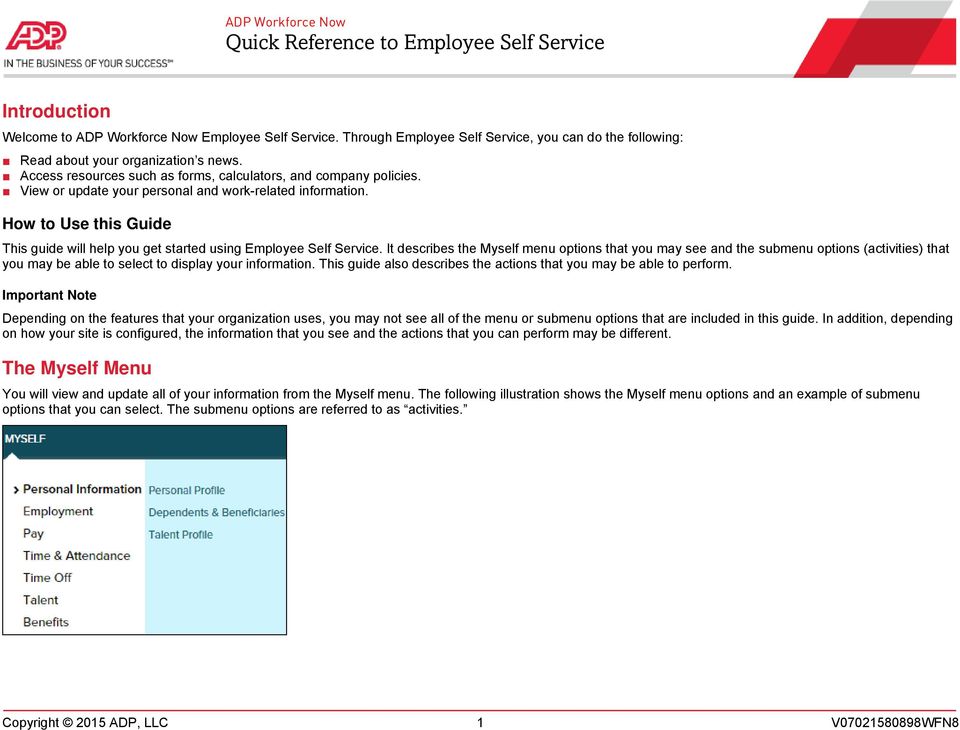
1 ADP Workforce Now Quick Reference to Employee Self Service Introduction Welcome to ADP Workforce Now Employee Self Service. Through Employee Self Service, you can do the following: Read about your organization s news. Access resources such as forms, calculators, and company policies. View or update your personal and work-related information. How to Use this Guide This guide will help you get started using Employee Self Service. It describes the Myself menu options that you may see and the submenu options (activities) that you may be able to select to display your information. This guide also describes the actions that you may be able to perform. Important Note Depending on the features that your organization uses, you may not see all of the menu or submenu options that are included in this guide. In addition, depending on how your site is configured, the information that you see and the actions that you can perform may be different. The Myself Menu You will view and update all of your information from the Myself menu. The following illustration shows the Myself menu options and an example of submenu options that you can select. The submenu options are referred to as activities. Copyright 2015 ADP, LLC 1 V WFN8
2 Menu Options and Activities The following tables list the activities for each menu option and describe the actions that you can perform for each one. The specific section on the activity page is also included, if applicable. Your Personal Information Starting Point: Myself > Personal Information Section Personal Profile Name View or update your name. Add a photo. Demographics View or update information, such as the following: Birth date Marital status Access the EEO Is the Law poster. Gender EEO Ethnicity Disability Identify yourself as disabled, if applicable. Access Invitation to Self-Identify as an Individual with a Disability. Note: This section is available only if your organization is a federal contractor. Addresses View or update your home and work addresses. Designate your legal address (used for Form W-2). Protected Veteran Identify yourself as a protected veteran, if applicable. Access the following: Why Are We Asking? What Is a Protected Veteran? Tax ID Emergency Contacts Custom View your Social Security number (or other applicable tax identifier). Add or update your emergency-contact information. Add or update your doctor information. View or update custom information. Note: Your organization may not set up custom fields in ADP Workforce Now. Dependents & Beneficiaries Add, delete, and update your dependent and beneficiary information. Talent Profile View or update the following information: Licenses and certifications Skills Previous employers Education Awards Languages Training Memberships The specific information that you can update may vary based on how your organization configured your site. Copyright 2015 ADP, LLC 2 V WFN8

3 Your Employment Information Starting Point: Myself > Employment Section Employment Profile Corporate Groups Status Employment Regular Pay Business unit Location Hire/rehire date Leave return date (if applicable) Employee type (full time, part time, and so on) Associate ID Pay rate Annual salary Paycheck calculators Standard hours Department Union (if applicable) Retirement dates Service dates Access financial tools, such as: Gross Pay Calculator 401k/403b Planners W-4 Assistant Note: You can also access these financial tools from Myself > Pay. Work Schedule Custom Fields Assigned shift Accrual date Schedule hours View custom information. Note: If your organization has not set up custom fields in ADP Workforce Now, this activity will not be available. Time Position Info View information related to Time & Attendance, such as your assigned supervisor, pay class, and timeclocks, if applicable. My Documents Upload and manage documents in ADP Workforce Now. Company Property View and update information about company property that was issued to you, if applicable. You can only view the information on these pages (except Custom Fields). If you notice an error in your information, notify your manager or human resources representative. Copyright 2015 ADP, LLC 3 V WFN8

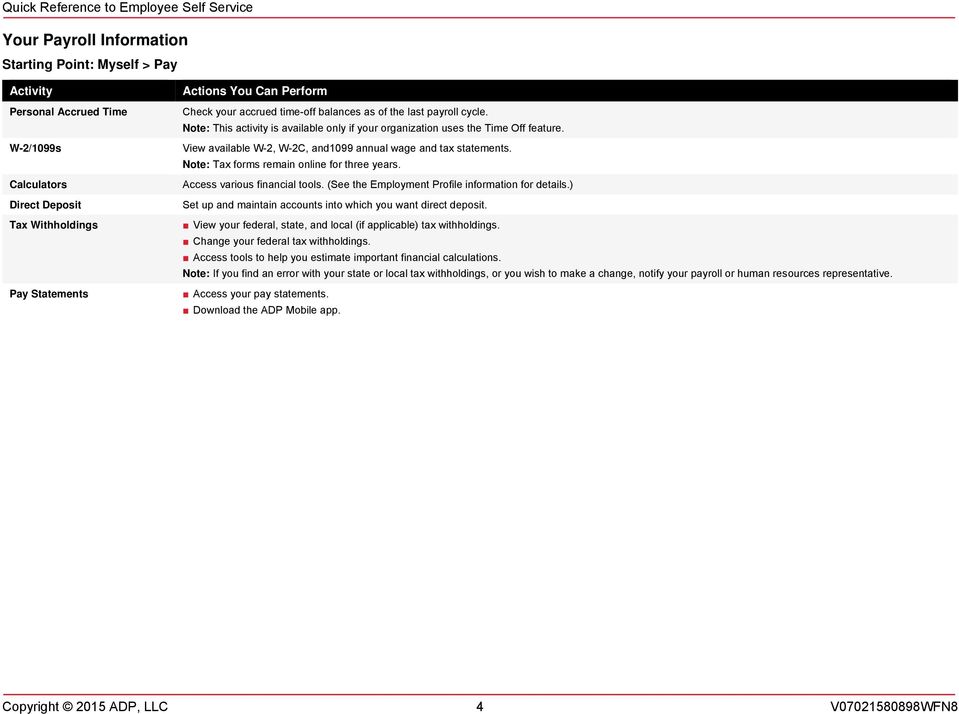
4 Your Payroll Information Starting Point: Myself > Pay Personal Accrued Time W-2/1099s Calculators Direct Deposit Tax Withholdings Pay Statements Check your accrued time-off balances as of the last payroll cycle. Note: This activity is available only if your organization uses the Time Off feature. View available W-2, W-2C, and1099 annual wage and tax statements. Note: Tax forms remain online for three years. Access various financial tools. (See the Employment Profile information for details.) Set up and maintain accounts into which you want direct deposit. View your federal, state, and local (if applicable) tax withholdings. Change your federal tax withholdings. Access tools to help you estimate important financial calculations. Note: If you find an error with your state or local tax withholdings, or you wish to make a change, notify your payroll or human resources representative. Access your pay statements. Download the ADP Mobile app. Copyright 2015 ADP, LLC 4 V WFN8
5 Your Time & Attendance Information Starting Point: Myself > Time & Attendance My Time Entry My Timecard Schedule at a Glance Actual vs Scheduled Monthly Schedule Annual Summary Holiday List Attendance Clock in and out. Review your timecard. Based on your organization s setup, you may be able to do the following: Correct entries. Enter missing time. Approve your timecard. View your schedule for the next seven calendar days. View your actual hours worked compared to your scheduled hours. View past, present, and future schedules of a month-long period. View a one-year summary of your time and attendance. View your organization s list of observed holidays. View your attendance record for a specified period of time. The Time & Attendance submenu is available only if your organization uses this feature. The information that you see and the actions that you can perform may vary based on how your organization defined the feature during implementation. For more information about Time & Attendance, see the following job aids: Clocking, Time-Based, Clocking and Time-Based, Hours Based, and View Only. Note: If your organization uses ADP s Enhanced Time & Attendance, your time-and-attendance and time-off tasks will differ. Copyright 2015 ADP, LLC 5 V WFN8

6 Your Time-Off Information Starting Point: Myself > Time Off Request Time Off Time Off Balances List of Requests Request Carryover Submit requests for time off. View your time-off balances as of a specific date, including the following: Carryover amount Earned and adjusted amount Taken time View the time-off requests that you have submitted. Submit requests to carryover accrued time. Scheduled time Future earned time Note: If your organization uses ADP s Enhanced Time & Attendance, your time-off tasks will differ. Your Talent Information Starting Point: Myself > Talent Performance Reviews Performance Goals Compensation Notices Career Center Review current and historical performance reviews. View the goals that your manager creates for you. Create your own goals. Update your progress. View notices that are sent to you about pay adjustments. Note: This activity is available only if your organization uses the Compensation feature. Search for, review, and apply for open positions within your organization. Note: This activity is available only if your organization uses the Recruitment feature. Copyright 2015 ADP, LLC 6 V WFN8

7 Your Benefits Information Starting Point: Myself > Benefits Enrollments Employee Discounts COBRA Spending Accounts View details of your current enrollments. Change your beneficiary designations. Change your enrollments (when eligible to do so). Compare benefit plans. Access LifeMart s website for employee discounts. Note: This activity is available only if your organization uses LifeMart. Access ADP s COBRA website. Note: This activity is available only if your organization uses ADP s COBRA service. Access ADP s FlexDirect website. Note: This activity is available only if your organization uses ADP s Spending Account service. Access your benefits statement. View the plans for which you waived enrollment. Review your benefits compensation (used to calculate benefit amounts for certain plans for which you may be eligible and enrolled in). The Benefits submenu is only available if your organization uses the Benefits feature. The Benefits feature that your organization uses may or may not allow for self-enrollment in benefit plans. Additional Resources To help you get started using Employee Self Service, see the following resources: Navigating in ADP Workforce Now for Managers, Supervisors, and Employees Employee Self Service Resource Guide Trademarks The ADP logo and ADP are registered trademarks of ADP, LLC. ADP Workforce Now is a registered trademark of ADP, LLC. In the Business of Your Success is a service mark of ADP, LLC. All other trademarks and service marks are the property of their respective owners. Copyright 2015 ADP, LLC. ADP Proprietary and Confidential All Rights Reserved. These materials may not be reproduced in any format without the express written permission of ADP, LLC. ADP provides this publication "as is" without warranty of any kind, either express or implied, including, but not limited to, the implied warranties of merchantability or fitness for a particular purpose. ADP is not responsible for any technical inaccuracies or typographical errors which may be contained in this publication. Changes are periodically made to the information herein, and such changes will be incorporated in new editions of this publication. ADP may make improvements and/or changes in the product and/or programs described in this publication at any time without notice. Copyright 2015 ADP, LLC 7 V WFN8

This job aid guides you through some of the basic Time & Attendance tasks that you will complete. For more information, see online Help.
 ADP Workforce Now Essential Time & Attendance Employee Basics For Hours-Based Employees Overview This job aid guides you through some of the basic Time & Attendance tasks that you will complete. For more
Essential Time & Attendance Supervisor Scheduling Basics
 ADP Workforce Now Essential Time & Attendance Supervisor Scheduling Basics Handout Manual V07201581003WFN90 Copyright 2015 ADP, LLC ADP Trademarks The ADP logo and ADP are registered trademarks of ADP,
What s New in Payroll
 ADP Workforce Now What s New in Payroll Handout Manual V09221480709WFN71 ADP Trademarks The ADP logo and ADP are registered trademarks of ADP, LLC. ADP Workforce Now is a registered trademark of ADP, LLC.
ADP Workforce Now and Pay expert Previewing ACA Annual Reporting Data. Overview. For More Information. Important Dates
 ADP Workforce Now and Pay expert Previewing ACA Annual Reporting Data Important: This document is for Essential or Lite ACA clients only. Overview All Applicable Large Employer Members (ALE Members) are
RUN Powered by ADP Year-End Guide
 RUN Powered by ADP Year-End Guide TDYEG V0115A HR.Payroll.Benefits ADP's Trademarks The ADP Logo, ADP, and RUN Powered by ADP are registered trademarks of ADP, LLC. Third-Party Trademarks Adobe and Acrobat
Lexis Back Office - Payroll. Getting Started
 Lexis Back Office - Payroll Getting Started ADP's Trademarks The ADP Logo is a registered trademark of ADP of North America. Third-Party Trademarks LexisNexis, Lexis, and the Knowledge Burst logo are registered
Implementing Oracle Time Management (US) Release 11.i (A77087-01)
 Implementing Oracle Time Management (US) Release 11.i (A77087-01) Implementing Oracle Time Management, Release 11.i (A77087-01) Copyright Oracle Corporation 1999 Primary Author: Joycelyn Smith. Contributing
Oracle Transactional Business Intelligence Enterprise for Human Capital Management Cloud Service 11.1.1.8.1
 Oracle Transactional Business Intelligence Enterprise for Human Capital Management Cloud Service 11.1.1.8.1 Human Resources Subject Area July 2014 Contents Human Resources Subject Area... 3... 3 This subject
Maintaining Employee Information for ADP Workforce Now. Automatic Data Processing, LLC ES Canada
 Maintaining Employee Information for ADP Workforce Now Automatic Data Processing, LLC ES Canada ADP s Trademarks The ADP Logo, ADP, ADP Workforce Now and IN THE BUSINESS OF YOUR SUCCESS are registered
Sage HRMS Sage 100 ERP Payroll Link User Guide. February 2015
 Sage HRMS Sage 100 ERP Payroll Link User Guide February 2015 This is a publication of Sage Software, Inc. Document version: January 30, 2015 Copyright 2015. Sage Software, Inc. All rights reserved. Sage,
Virtual TimeClock Payroll Export Guide
 Virtual TimeClock Virtual TimeClock Payroll Export Guide Exporting to SurePayroll Virtual TimeClock will export a specially formatted time clock file that allows you to import employee hours into SurePayroll
765 East Rte. 70, Suite A-101, Marlton, NJ, 08053
 To: From: CFG Staff Leti Gomez, Payroll Administrator 856.797.4740-direct line 856.797.4796-payroll fax [email protected] 765 East Rte. 70, Suite A-101, Marlton, NJ, 08053 Subject: Ultipro Workplace Payroll
Employee Self Service Guide
 Introduction The PDS Employee Self Service Portal (ESS) is an interactive web based tool allowing you to view and mange critical information about you, your benefits, and your compensation. The Portal
Client Administrator Quick Reference Guide
 Client Administrator Quick Reference Guide Thank you for using ADP's ipaystatements to view your payroll information. Use this Quick Reference Guide to learn how to view your pay statement, understand
Employee Self Service Instructions
 Employee Self Service Instructions Logging on to ESS There are two ways to login to ESS: PikePeople (Intranet) - You may access through the PikePeople (Intranet) by going to Quick Links and then clicking
Home BancShares, Inc.
 Topic: Payroll Human Resources FAQ s? When do I get paid? We are paid on a bi-weekly basis. Payday is every other Thursday. (See attachment for payroll dates and pay periods.) The payment is for wages
Building a Human Resources Portal Using Business Portal
 Building a Human Resources Portal Using Business Portal Published: December 2005 For the latest information, please see http://mbs.microsoft.com/public/gponline Table of contents Introduction...1 What
Sage HRMS 2015 Sage Employee Self Service Release Notes. November 2014
 Sage HRMS 2015 Sage Employee Self Service Release Notes November 2014 Document version: November 11, 2014 This is a publication of Sage Software, Inc. Copyright 2014 Sage Software, Inc. All rights reserved.
ADP Workforce Now Portal Administrator Guide. Version 1.2
 ADP Workforce Now Portal Administrator Guide Version 1.2 ADP s Trademarks The ADP Logo and ADP are registered trademarks of ADP, Inc. ADP Workforce Now is a trademark of ADP, Inc. Third-Party Trademarks
Employee Quick Reference Guide
 Employee Quick Reference Guide Thank you for using ADP's ipaystatements to view your payroll information. Use this Quick Reference Guide to learn how to view your pay statements, W-2s, 1099s, and adjustments.
ADP Workforce Now V3.0
 ADP Workforce Now V3.0 Manual What s New Checks in and Custom ADP Reporting Grids V12 Instructor Handout Manual Guide V10171180230WFN3 V09171280269ADPR12 2011 2012 ADP, Inc. ADP s Trademarks The ADP Logo
Doing more for less with HR technology tools. Improving results and lowering costs with a Human Resource Management System
 Doing more for less with HR technology tools Improving results and lowering costs with a Human Resource Management System 1 Table of contents Introduction 3 The role of HRMS technology 4 Core HR administration
Approve Time Manager Self Service > Time Management > Approve Time and Exceptions > Payable Time (Payroll Processors/Approvers)
 HR 9.1 Navigations At A Glance Instruction Guide As a part of the new HR Upgrade, several myufl navigational paths to commonly used functions/pages have changed. Please review the lists below for the new
PAYROLL Getting Started Guide. Quick Start Guide
 PAYROLL Getting Started Guide Quick Start Guide PAYROLL Getting Started Guide Welcome to Intuit QuickBooks Payroll Intuit QuickBooks Payroll gives you the tools you need to efficiently manage your payroll.
Sage Abra SQL HRMS System. User Guide
 Sage Abra SQL HRMS System User Guide 2009 Sage Software, Inc. All rights reserved. Sage, the Sage logos, and the Sage product and service names mentioned herein are registered trademarks or trademarks
Scheduling Guide Revised August 30, 2010
 Scheduling Guide Revised August 30, 2010 Instructions for creating and managing employee schedules ADP s Trademarks The ADP Logo is a registered trademark of ADP of North America, Inc. ADP Workforce Now
Employee Central. Employee Central Core HR. HR Transactions. Specification Sheet. Key capabilities and descriptions:
 Specification Sheet Employee Central Key capabilities and descriptions: KEY Employee Central Core HR Global Cloud-Based Payroll Employee Central Core HR As the foundation for SuccessFactors BizX Suite
Welcome to MI HR. Available to employees in these Executive Branch departments:
 STATE OF MICHIGAN CIVIL SERVICE COMMISSION MI HR SERVICE CENTER Welcome to MI HR Available to employees in these Executive Branch departments: Available to employees in these Executive Branch departments:
TheFinancialEdge. Payroll Processing Guide
 TheFinancialEdge Payroll Processing Guide 101811 2011 Blackbaud, Inc. This publication, or any part thereof, may not be reproduced or transmitted in any form or by any means, electronic, or mechanical,
User Manual. for. OrangeHRM & OrangeHRM Live
 User Manual for OrangeHRM & OrangeHRM Live Table of Contents 1.0 Audience...6 2.0 Foreword...6 Admin Module...6 PIM Personal Information Module...7 ESS - Employee Self Service...7 Leave Module...7 Time
SAP HR / HCM Self Learning Course Self Learning Center
 SAP HR / HCM Self Learning Course Self Learning Center Introduction ERP & SAP Overview on SAPHR sub modules System Landscape Three tier Architecture ASAP Methodology System navigation. Implementation road
Oracle Transactional Business Intelligence Enterprise for Human Capital Management Cloud Service 11.1.1.10
 Oracle Transactional Business Intelligence Enterprise for Human Capital Management Cloud Service 11.1.1.10 Human Resources Talent Profile Subject Area July 2015 Contents Human Resources Talent Profile
Microsoft Dynamics GP. Human Resources
 Microsoft Dynamics GP Human Resources Copyright Copyright 2010 Microsoft. All rights reserved. Limitation of liability This document is provided as-is. Information and views expressed in this document,
BEACON Self Service Training. Contractors using VMS
 BEACON Self Service Training Contractors using VMS August 2015 About Artech At the forefront of the staffing industry, Artech is a minority- and women-owned business committed to maximizing global workforce
HR - Tracking Benefits and Human Resources. Handout Manual
 HR - Tracking Benefits and Human Resources Handout Manual V08021075120PR185CMB2 2010 ADP, Inc. ADP s Trademarks The ADP Logo is a registered trademark of ADP, Inc. ADP Workforce Now is a trademark of ADP,
STATE OF SOUTH DAKOTA CLASS SPECIFICATION. Class Title: Human Resource Specialist I Class Code: 11321 Pay Grade: GG
 STATE OF SOUTH DAKOTA CLASS SPECIFICATION Class Title: Human Resource Specialist I Class Code: 11321 Pay Grade: GG A. Purpose: Provides human resource services in one or more areas, which may include benefits,
Sage Abra HRMS. HR Technology Tools: What You May Be Missing Improving results and lowering costs with a Human Resource Management System
 Sage Abra HRMS HR Technology Tools: What You May Be Missing Improving results and lowering costs with a Human Resource Management System Contents Introduction...3 The Role of HRMS Technology...4 Core HR
PeopleSoft Employee Self Service How-To Guide for Newark Public Schools Employees
 5/7/2012 Revised PeopleSoft Employee Self Service How-To Guide for Newark Public Schools Employees As part of an initiative to leverage the District s technology to better serve our customers, Information
BBM for Android. Version: 1.0. User Guide
 BBM for Android Version: 1.0 User Guide Published: 2013-07-30 SWD-20130730124958121 Contents About BBM...4 Get started using BBM... 6 Navigating BBM...6 Signing in with your BlackBerry ID... 6 Change your
Interim Onboarding New Hire and Rehire
 Interim Onboarding New Hire and Rehire March 2015 State of Minnesota Minnesota Management & Budget SEMA4 HR Services 658 Cedar Street St. Paul MN 55155 5/12/2015 Interim Onboarding New Hire and Rehire
Importing Data for ADP Workforce Now. Automatic Data Processing, LLC ES Canada
 Importing Data for ADP Workforce Now Automatic Data Processing, LLC ES Canada ADP s Trademarks The ADP Logo, ADP, ADP Workforce Now and IN THE BUSINESS OF YOUR SUCCESS are registered trademarks of ADP,
Oracle Transactional Business Intelligence Enterprise for Human Capital Management Cloud Service 11.1.1.10
 Oracle Transactional Business Intelligence Enterprise for Human Capital Management Cloud Service 11.1.1.10 Human Resources Succession Management Subject Area July 2015 Contents Human Resources Succession
Family Medical Leave Act Questions & Answers
 Family Medical Leave Act Questions & Answers 1. Introduction Passed in the mid-1990s, the Family Medical Leave Act (FMLA) and Oregon Family Leave Act (OFLA) provide employees with leave from work for their
Munis Self Service. Employee Self Service User Guide Version 9.3. For more information, visit www.tylertech.com.
 Munis Self Service Employee Self Service User Guide Version 9.3 For more information, visit www.tylertech.com. TABLE OF CONTENTS Employee Self Service... 4 Employee Self Service Users... 4 ESS Navigation...
MPHR Comparison. Check what other vendors offer: MPHR
 MPHR Comparison MPHR Check what other vendors offer: Online Job Applicant Tracking Module Customizable Internet job postings Job position total compensation statement On-line job applicants SQL database
Investment Summary. [email protected] (314) 525-3241 314-963-8605. Control # 1 : Quote based on an estimated 180 pays, paid Bi-Weekly
 Investment Summary City Of Brentwood Today's Date: 10/29/2015 2348 S Brentwood Blvd Quote Number: 02-2015-1151747.2 Saint Louis, MO 63144 United States Executive Contact ADP Sales Associate Abimbola Akande
Workday Employee Self Service User Guide
 Workday Employee Self Service User Guide Table of Contents Welcome to Workday 2 Glossary of Terms. 3 Accessing Workday.. 5 Login page (desktop), Quick Tips Screen.. 6 Home pages..... 7 Navigating the Home
APPENDIX: GLOSSARY OF TERMS
 APPENDIX: GLOSSARY OF S Workforce Timekeeper Course A absence accrual accrual balance accrual code accrual profile accrual rule Leave types of pay codes which are entered as non-worked time (e.g. vacation).
CLIENT BOOKKEEPING SOLUTION PAYCHECK. Getting Started. version 2007.x.x
 CLIENT BOOKKEEPING SOLUTION PAYCHECK Getting Started version 2007.x.x TL 20744 (06/08/09) Copyright Information Text copyright 1997 2009 by Thomson Reuters/Tax & Accounting. All rights reserved. Video
North Dakota University System
 North Dakota University System HRMS Self Service Employee PeopleSoft Version 8.9 DISCLAIMER Written by the North Dakota University System, December, 2008; Updated This training manual is considered to
User Guide. BES12 Self-Service
 User Guide BES12 Self-Service Published: 2016-01-27 SWD-20160127153905522 Contents About BES12 Self-Service...4 Log in to BES12 Self-Service... 4 Forgot your login password?... 4 Change your login password...5
PeopleSoft 9.0 Employee Self Service User Guide
 Employee Self Service User Guide 3280 Progress Drive, Suite 100 Orlando, Florida 32826-0140 Phone: (407) 823-2771 Table of Contents Welcome to Employee Self Service... 1 Who Do I Call For Help?... 1 How
PeopleSoft Employee Self Service User Guide
 PeopleSoft Employee Self Service User Guide Table of Contents Welcome to Employee Self Service... 2 Who Do I Call For Help?... 2 Where can I find a current copy of the Employee Self Service User Guide?...
Instructions for Family Care Leave (FCL) of Absence Application New York and New England Bargained for Employees
 Instructions for Family Care Leave (FCL) of Absence Application New York and New England Bargained for Employees Please read the Instructions, the Application and the Conditions for Leave completely before
Sage HRMS I Planning Guide
 I Planning Guide HR Technology Tools: What You May Be Missing Improving results and lowering costs with a Human Resource Management System Table of Contents Introduction... 1 The Role of HRMS Techology...
Deltek Touch Time & Expense for GovCon. User Guide for Triumph
 Deltek Touch Time & Expense for GovCon User Guide for Triumph November 25, 2014 While Deltek has attempted to verify that the information in this document is accurate and complete, some typographical or
TheFinancialEdge. Converting to Payroll 7
 TheFinancialEdge Converting to Payroll 7 101811 2011 Blackbaud, Inc. This publication, or any part thereof, may not be reproduced or transmitted in any form or by any means, electronic, or mechanical,
Performance Management for ADP Workforce Now. Automatic Data Processing, LLC ES Canada
 Performance Management for ADP Workforce Now Automatic Data Processing, LLC ES Canada INSTRUCTOR GUIDE ADP s Trademarks The ADP Logo, ADP, ADP Workforce Now and IN THE BUSINESS OF YOUR SUCCESS are registered
Configuring and Monitoring SharePoint Servers
 Configuring and Monitoring SharePoint Servers eg Enterprise v5.6 Restricted Rights Legend The information contained in this document is confidential and subject to change without notice. No part of this
Time & Attendance Supervisor Basics for ADP Workforce Now. Automatic Data Processing, LLC ES Canada
 Time & Attendance Supervisor Basics for ADP Workforce Now Automatic Data Processing, LLC ES Canada ADP s Trademarks The ADP Logo, ADP, ADP Workforce Now and IN THE BUSINESS OF YOUR SUCCESS are registered
Managing ADP's FSA & Commuter Benefits Plans
 Managing ADP's FSA & Commuter Benefits Plans Administrator s Guide 2005 ADP, Inc. ADP s Trademarks The ADP Logo is a registered trademark of ADP of North America, Inc. Benefits expert is a registered trademark
ADP Workforce Now Security Guide. Version 2.0-1
 ADP Workforce Now Security Guide Version 2.0-1 ADP Trademarks The ADP logo, ADP, and ADP Workforce Now are registered trademarks of ADP, Inc. Third-Party Trademarks Microsoft, Windows, and Windows NT are
Alliance Payroll Services, Inc Payentry.com. Training manual
 Alliance Payroll Services, Inc Payentry.com Training manual 0 Table of Contents Employee Information Getting Started..1-2 Employee Selection..3 Demographics.4 Department/Positions 5 Labor Allocation..6
Welcome to (ESS) Employee Self Service for City & Borough of Juneau, Salary Employee
 Welcome to (ESS) Employee Self Service for City & Borough of Juneau, Salary Employee 1 WORK SITE ACCESS - through CBJ Intranet Explorer; http://cbj, go to CBJ Applications tab, then Lawson Production.
Oracle Transactional Business Intelligence Enterprise for Human Capital Management Cloud Service 11.1.1.10
 Oracle Transactional Business Intelligence Enterprise for Human Capital Management Cloud Service 11.1.1.10 Human Resources Workforce Learning Enrollment and Completion July 2015 Contents Human Resources
ADP WorkForce Now (WFN) Open Enrollment Nov. 2015
 ADP WorkForce Now (WFN) Open Enrollment Nov. 2015 1 Overview In this presentation, we will review the following: Logging into WorkForce Now (WFN) Viewing your benefit enrollments Viewing or printing your
Sentric, Inc. Web Pay User Guide
 Sentric, Inc. Web Pay User Guide Thank you for choosing Sentric, Inc as your payroll service provider! This User Guide, in combination with Web Pay training by one of our Implementation Specialists, will
Disability. Guidelines for Disability Leave. Lawrence Livermore National Security, LLC
 Lawrence Livermore National Security, LLC This checklist explains how your benefits are affected when you are on disability. You may wish to review this information with the Benefits Office to be sure
Secure Held Print Jobs. Administrator's Guide
 Secure Held Print Jobs Administrator's Guide September 2013 www.lexmark.com Contents 2 Contents Overview...3 Configuring Secure Held Print Jobs...4 Configuring and securing the application...4 Using Secure
ADP Spending Account Services Health Savings Account (HSA)
 ADP Spending Account Services Health Savings Account (HSA) Participant Web Account User Guide Version 14.05.1 HR. Payroll. Benefits myspendingaccount.adp.com ADP Copyright Information Copyright 1993 2014
EDUCATION SUPPORT PROFESSIONALS Orientation PAYROLL DEPARTMENT OCTOBER 23, 2014
 EDUCATION SUPPORT PROFESSIONALS Orientation PAYROLL DEPARTMENT OCTOBER 23, 2014 AGENDA Direct Deposit Go Green - Opt-Out of Paper Pay Advices All Days Paid (ADP) Year Round Pay (YRP) Employee Self Service
Job Streaming User Guide
 Job Streaming User Guide By TOPS Software, LLC Clearwater, Florida Document History Version Edition Date Document Software Trademark Copyright First Edition 08 2006 TOPS JS AA 3.2.1 The names of actual
2014 2015 Open Range Schedule
 2014 15 and 2015 16 Instructional Grandfathered/Performance Salary Schedule 2014 2015 Open Range Schedule Minimum Maximum Tier 1 Range $38,500 $43,175 Tier 2 Range $41,080 $49,035 Tier 3 Range $47,370
Building a Human Resources Portal using Microsoft Business Portal
 Building a Human Resources Portal using Microsoft Business Portal Published: March 2005 Table of contents Introduction...1 What is an HR Portal?...1 Why create an HR Portal?...3 Reduce administrative costs...3
EnterpriseOne Xe Human Resources - Benefits PeopleBook
 EnterpriseOne Xe Human Resources - Benefits PeopleBook September 2000 J.D. Edwards World Source Company 7601 Technology Way Denver, CO 80237 Portions of this document were reproduced from material prepared
Changing Your Benefits Status
 My Benefits GUIDE Changing Your Benefits Status Learn what life events allow you to adjust your benefits coverage Understand the eligibility requirements to cover your dependents Determine what are allowable
EMPLOYEE SELF SERVICE: ACCESSING YOUR INFORMATION
 EMPLOYEE SELF SERVICE: ACCESSING YOUR INFORMATION The implementation of the Human Resources Self-Service system means that you can access your information via the University s PipelineMT portal. The official
Installation, Setup, & Uninstall Guide Virtual TimeClock 15 Pro Edition for Windows
 Virtual TimeClock Installation, Setup, & Uninstall Guide Virtual TimeClock 15 Pro Edition for Windows Overview This guide will help you quickly install, configure, and if needed, uninstall Virtual TimeClock
FYI RECORDKEEPING. Employee File Management
 RECORDKEEPING Employee File Management Revised: March 2014 Summary: Organizing information about employees into individual employee files is a common practice because it makes it easier to access information.
Mobile Connect - Approver. ios User Guide
 Mobile Connect - Approver ios User Guide Table of Contents Installing Mobile Connect on your ios Device... 2 Accessing the application... 2 Installing the application... 2 How to Log in... 3 Home Page
Frequently Asked Questions
 Frequently Asked Questions Migration of PTOC Employees Network to HR Direct Access and Related System Changes HR DirectAccess March 31, 2012 1. What is HR DirectAccess? 2. How will I access HR DirectAccess?
ezlabormanager for Administrators Handout Manual
 ezlabormanager for Administrators Handout Manual V12281072192EZ18CANENG 2010 ADP, Inc. ADP s Trademarks The ADP Logo, ezlabormanager, and pay@work are registered trademarks ADP, Inc. PaySpecialist is a
Instant Messaging Nokia N76-1
 Instant Messaging Nokia N76-1 NO WARRANTY The third-party applications provided with your device may have been created and may be owned by persons or entities not affiliated with or related to Nokia. Nokia
Benefits Summary for UAB Hospital Management LLC Employees www.uab.edu/benefits
 Benefits Summary for UAB Hospital Management LLC www.uab.edu/benefits HUMAN RESOURCE MANAGEMENT Health Care, Dental, and Vision Plans For new employees, coverage under UAB s group health care, dental,
BlackBerry World Storefront. Version: 4.3. User Guide
 BlackBerry World Storefront Version: 4.3 User Guide Published: 2013-02-21 SWD-20130221142618627 Contents About BlackBerry World... 5 New features and enhancements... 6 Browsing and searching... 7 Search
New Hire Onboarding. Delivered by
 New Hire Onboarding Delivered by All ideas and information contained within these documents are the intellectual property rights of HKP. These documents are not for general distribution and are meant for
Sage Abra SQL HRMS Setup. User Guide
 Sage Abra SQL HRMS Setup User Guide 2010 Sage Software, Inc. All rights reserved. Sage, the Sage logos, and the Sage product and service names mentioned herein are registered trademarks or trademarks of
Oracle Fusion Applications Workforce Deployment, Expenses Guide. 11g Release 1 (11.1.4) Part Number E22898-04
 Oracle Fusion Applications Workforce Deployment, Expenses Guide 11g Release 1 (11.1.4) Part Number E22898-04 March 2012 Oracle Fusion Applications Workforce Deployment, Expenses Guide Part Number E22898-04
Munis Human Resources/Payroll
 Munis Human Resources/Payroll Major Enhancements Version 10.1 March 9, 2012 For more information, visit www.tylertech.com. TABLE OF CONTENTS Munis Human Resources and Payroll... 4 Munis Ribbon... 4 Human
Frequently Asked Questions
 Frequently Asked Questions I. ABOUT EMPLOYEE SELF SERVICE 1. What is Employee Self Service? Employee Self Service is North Shore-LIJ s secure and user-friendly tool that gives employees online access to
CA Mobile Device Management. How to Create Custom-Signed CA MDM Client App
 CA Mobile Device Management How to Create Custom-Signed CA MDM Client App This Documentation, which includes embedded help systems and electronically distributed materials, (hereinafter referred to as
A Guide to Finding the Pages You Need in PeopleSoft Human Resources (For Decentralized Users) Search for People (Search/Match)
 A Guide to Finding the Pages You Need in PeopleSoft Human Resources (For Decentralized Users) What do you want to do? Search for People (Search/Match) Search the entire PeopleSoft database to see if a
PeopleSoft Compensation
 PeopleSoft Compensation Do you know which of your pay components attract top talent to your organization? Which ones are the most valuable to your employees? What is the right mix that drives employee
Denver Employees Retirement Plan Member Self-Service Portal. A Guide To Creating Your MSS Portal Account
 Denver Employees Retirement Plan Member Self-Service Portal A Guide To Creating Your MSS Portal Account In your preferred internet browser, enter: www.myderp.org Click on the New User link Enter your DERP