
> Technical Configuration Guide for Microsoft Network Load Balancing. Ethernet Routing Switch. Virtual Services Platform.
|
|
|
- Shon Chapman
- 10 years ago
- Views:
Transcription
1 Ethernet Routing Switch Virtual Services Platform Engineering > Technical Configuration Guide for Microsoft Network Load Balancing Avaya Data Solutions Document Date: Document Number: NN Document Version: 4.4

2 2014 Avaya Inc. All Rights Reserved. Notices While reasonable efforts have been made to ensure that the information in this document is complete and accurate at the time of printing, Avaya assumes no liability for any errors. Avaya reserves the right to make changes and corrections to the information in this document without the obligation to notify any person or organization of such changes. Documentation disclaimer Avaya shall not be responsible for any modifications, additions, or deletions to the original published version of this documentation unless such modifications, additions, or deletions were performed by Avaya. End User agree to indemnify and hold harmless Avaya, Avaya s agents, servants and employees against all claims, lawsuits, demands and judgments arising out of, or in connection with, subsequent modifications, additions or deletions to this documentation, to the extent made by End User. Link disclaimer Avaya is not responsible for the contents or reliability of any linked Web sites referenced within this site or documentation(s) provided by Avaya. Avaya is not responsible for the accuracy of any information, statement or content provided on these sites and does not necessarily endorse the products, services, or information described or offered within them. Avaya does not guarantee that these links will work all the time and has no control over the availability of the linked pages. Warranty Avaya provides a limited warranty on this product. Refer to your sales agreement to establish the terms of the limited warranty. In addition, Avaya s standard warranty language, as well as information regarding support for this product, while under warranty, is available to Avaya customers and other parties through the Avaya Support Web site: Please note that if you acquired the product from an authorized reseller, the warranty is provided to you by said reseller and not by Avaya. Licenses THE SOFTWARE LICENSE TERMS AVAILABLE ON THE AVAYA WEBSITE, ARE APPLICABLE TO ANYONE WHO DOWNLOADS, USES AND/OR INSTALLS AVAYA SOFTWARE, PURCHASED FROM AVAYA INC., ANY AVAYA AFFILIATE, OR AN AUTHORIZED AVAYA RESELLER (AS APPLICABLE) UNDER A COMMERCIAL AGREEMENT WITH AVAYA OR AN AUTHORIZED AVAYA RESELLER. UNLESS OTHERWISE AGREED TO BY AVAYA IN WRITING, AVAYA DOES NOT EXTEND THIS LICENSE IF THE SOFTWARE WAS OBTAINED FROM ANYONE OTHER THAN AVAYA, AN AVAYA AFFILIATE OR AN AVAYA AUTHORIZED RESELLER, AND AVAYA RESERVES THE RIGHT TO TAKE LEGAL ACTION AGAINST YOU AND ANYONE ELSE USING OR SELLING THE SOFTWARE WITHOUT A LICENSE. BY INSTALLING, DOWNLOADING OR USING THE SOFTWARE, OR AUTHORIZING OTHERS TO DO SO, YOU, ON BEHALF OF YOURSELF AND THE ENTITY FOR WHOM YOU ARE INSTALLING, DOWNLOADING OR USING THE SOFTWARE (HEREINAFTER REFERRED TO INTERCHANGEABLY AS "YOU" AND "END USER"), AGREE TO THESE TERMS AND CONDITIONS AND CREATE A BINDING CONTRACT BETWEEN YOU AND AVAYA INC. OR THE APPLICABLE AVAYA AFFILIATE ("AVAYA"). Copyright Except where expressly stated otherwise, no use should be made of the Documentation(s) and Product(s) provided by Avaya. All content in this documentation(s) and the product(s) provided by Avaya including the selection, arrangement and design of the content is owned either by Avaya or its licensors and is protected by copyright and other intellectual property laws including the sui generis rights relating to the protection of databases. You may not modify, copy, reproduce, republish, upload, post, transmit or distribute in any way any content, in whole or in part, including any code and software. Unauthorized reproduction, transmission, dissemination, storage, and or use without the express written consent of Avaya can be a criminal, as well as a civil offense under the applicable law. Third Party Components Certain software programs or portions thereof included in the Product may contain software distributed under third party agreements ("Third Party Components"), which may contain terms that expand or limit rights to use certain portions of the Product ("Third Party Terms"). Information regarding distributed Linux OS source code (for those Products that have distributed the Linux OS source code), and identifying the copyright holders of the Third Party Components and the Third Party Terms that apply to them is available on the Avaya Support Web site: Trademarks The trademarks, logos and service marks ("Marks") displayed in this site, the documentation(s) and product(s) provided by Avaya are the registered or unregistered Marks of Avaya, its affiliates, or other third parties. Users are not permitted to use such Marks without prior written consent from Avaya or such third party which may own the Mark. Nothing contained in this site, the documentation(s) and product(s) should be construed as granting, by implication, estoppel, or otherwise, any license or right in and to the Marks without the express written permission of Avaya or the applicable third party. Avaya is a registered trademark of Avaya Inc. All non-avaya trademarks are the property of their respective owners. Downloading documents For the most current versions of documentation, see the Avaya Support. Web site: Contact Avaya Support Avaya provides a telephone number for you to use to report problems or to ask questions about your product. The support telephone number is in the United States. For additional support telephone numbers, see the Avaya Web site: 2

3 Abstract The document provides an overview on how to configure Avaya Ethernet Switches to support Microsoft s Network Load Balancing (NLB) server clustering technology. 3

4 Table of Contents Figures... 5 Tables Overview Architecture Operation Load Balancing Algorithm Convergence MAC Address Formats Implementation Models Static ARP Entries Supported Topologies and Releases Single Layer 2 Switch Centralized Layer 3 Stackable Switch Single Layer 3 Modular Switch Switch Clustering Topologies Appendix Creating a Network Load Balancing Cluster Software Baseline Reference Documentation

5 Figures Figure 1-1 Network Load Balancing Cluster... 8 Figure 1-2 Example Network Load Balancing Cluster... 8 Figure 1.1 Network Load Balancing Stack... 9 Figure Unicast Virtual MAC Assignment Figure Unicast Bogus MAC Assignment Figure Unicast Traffic Flow Figure Multicast MAC Assignment Figure IGMP Multicast MAC Assignment Figure Multicast Traffic Flow Figure IGMP-Multicast Traffic Flow Figure Unicast MAC Format Figure Multicast / IGMP Multicast MAC Format Figure Single Adaptor Unicast Mode Figure Single Adaptor Multicast / IGMP Multicast Mode Figure Multiple Adapters Unicast Mode Figure Multiple Adaptors Multicast / IGMP Multicast Mode Figure 2.1 Single Layer 2 Switch Figure 2.2 Centralized Routing Switch Figure 2.3 Single Ethernet Routing Switch Figure Switch Clustering Topology Figure Switch Clustering Topology Figure Switch Clustering Topology Figure Switch Clustering Topology Figure Switch Clustering Topology Figure 3.1 Windows 2003 Server Cluster

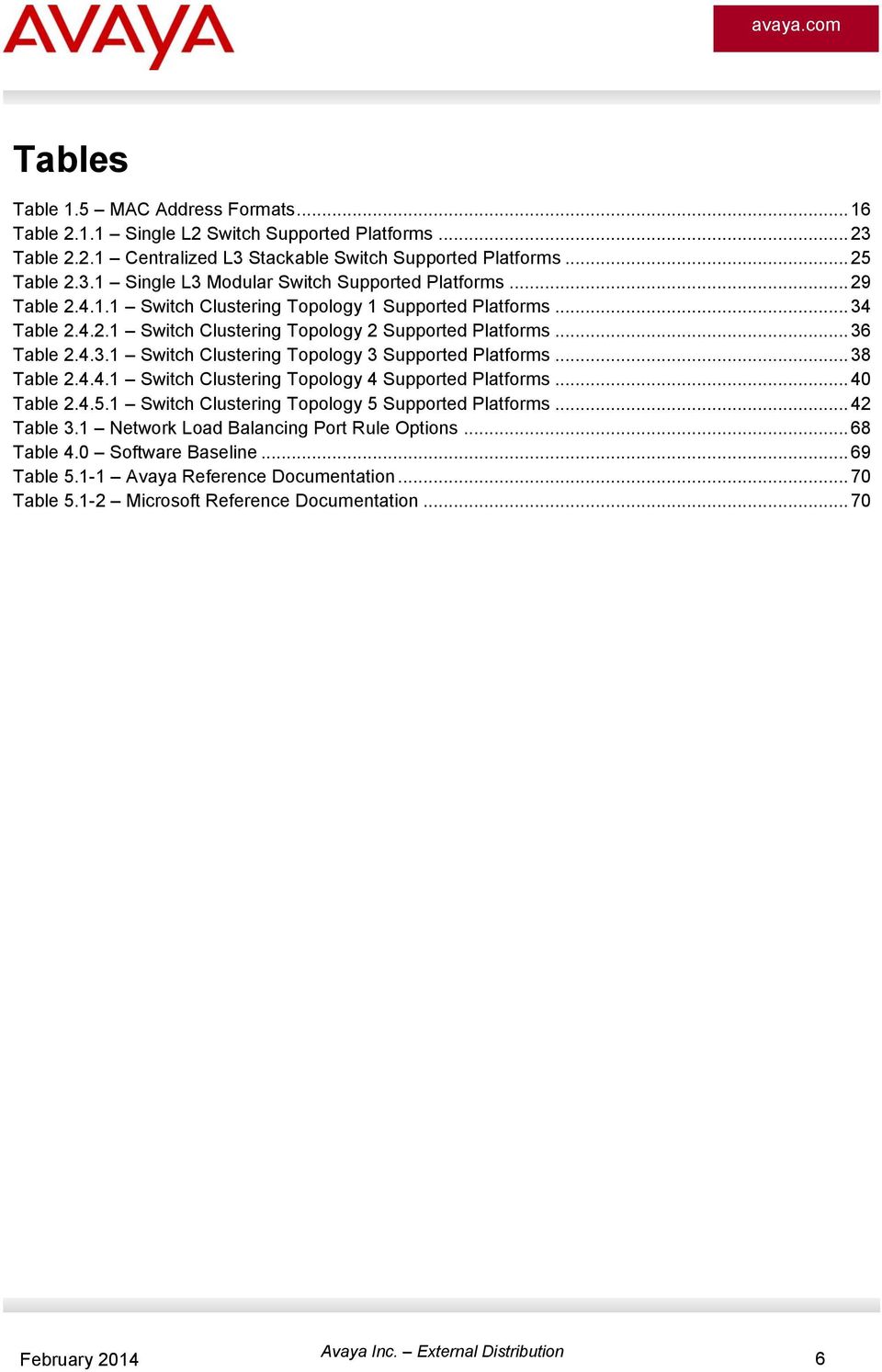
6 Tables Table 1.5 MAC Address Formats Table Single L2 Switch Supported Platforms Table Centralized L3 Stackable Switch Supported Platforms Table Single L3 Modular Switch Supported Platforms Table Switch Clustering Topology 1 Supported Platforms Table Switch Clustering Topology 2 Supported Platforms Table Switch Clustering Topology 3 Supported Platforms Table Switch Clustering Topology 4 Supported Platforms Table Switch Clustering Topology 5 Supported Platforms Table 3.1 Network Load Balancing Port Rule Options Table 4.0 Software Baseline Table Avaya Reference Documentation Table Microsoft Reference Documentation
7 Conventions This section describes the text, image, and command conventions used in this document. Symbols Tip Highlights a configuration or technical tip. Note Highlights important information to the reader. Warning Highlights important information about an action that may result in equipment damage, configuration or data loss. Text Bold text indicates emphasis. Italic text in a Courier New font indicates text the user must enter or select in a menu item, button or command: ERS T# show running-config Output examples from Avaya devices are displayed in a Lucida Console font: ERS T# show sys-info Operation Mode: Switch MAC Address: B0-00 PoE Module FW: Reset Count: 83 Last Reset Type: Management Factory Reset Power Status: Primary Power Autotopology: Enabled Pluggable Port 45: None Pluggable Port 46: None Pluggable Port 47: None Pluggable Port 48: None Base Unit Selection: Non-base unit using rear-panel switch sysdescr: Ethernet Routing Switch T-PWR HW:02 FW: SW:v Mfg Date: HW Dev:H/W rev.02 7

8 1. Overview Network Load Balancing is a clustering technology available with Microsoft Windows 2000 / Windows 2003 Server family of operating systems. Network Load Balancing uses a distributed algorithm to load balance TCP/IP network traffic across a number of hosts, enhancing the scalability and availability of mission critical, IP based services, such as Web, VPN, Streaming Media, Firewalls, etc. Network Load Balancing also provides high availability by detecting host failures and automatically redistributing traffic to remaining operational hosts. Figure 1-1 Network Load Balancing Cluster With Network Load Balancing, each host runs separate copies of the desired server applications, such as Web Server, FTP Server, or ISA Firewall. Network Load Balancing distributes incoming client requests to the hosts in the cluster group. The load weight to be handled by each host can be configured by the administrator and hosts can be dynamically added or removed from the cluster as necessary. In addition, Network Load Balancing can direct all traffic to a designated single host, called the default host. Figure 1-2 Example Network Load Balancing Cluster 8


9 1.1 Architecture Network Load Balancing uses fully distributed software architecture and an identical copy of the Network Load Balancing driver runs in parallel on each cluster host. The drivers arrange for all cluster hosts on a single subnet to concurrently detect incoming network traffic for the cluster's virtual IP address. On each cluster host, the driver acts as a filter between the network adapter's driver and the TCP/IP stack, allowing a portion of the incoming network traffic to be received by the host. By this means incoming client requests are partitioned and load-balanced among the Network Load Balancing cluster hosts. Network Load Balancing runs as a network driver logically situated beneath higher-level application protocols, such as HTTP and FTP. Figure 1.1 shows the implementation of Network Load Balancing as an intermediate driver in the Windows 2000/2003 network stack. Figure 1.1 Network Load Balancing Stack The Network Load Balancing architecture maximizes throughput by using the broadcast domain to deliver incoming network traffic to all cluster hosts and by eliminating the need to route incoming packets to individual cluster hosts. Since filtering unwanted packets is faster than routing packets. As network and server speeds grow, its throughput also grows proportionally, thus eliminating any dependency on a particular hardware routing implementation. Network Load Balancing architecture takes advantage of Ethernet switching architecture to simultaneously deliver incoming network traffic to all cluster hosts. However, this approach may increase the burden on switches by occupying additional port bandwidth. This is usually not a concern in most intended applications, such as Web services and streaming media, since the percentage of incoming traffic is a small fraction of total network traffic. However, if the client-side network connections to the switch are significantly faster than the server-side connections, incoming traffic can occupy a prohibitively large portion of the server-side port bandwidth. The same problem arises if multiple clusters are hosted on the same switch and measures are not taken to setup virtual LANs for individual clusters. 9

10 1.2 Operation Microsoft Network Load Balancing can be deployed in unicast (default), multicast and IGMP-multicast modes. These modes are configured on the MSNLB server cluster. The following sections highlight the three options for MSNLB configuration Unicast Unicast mode is the default option for Network Load Balancing. With unicast mode, Network Load Balancing replaces the network adapter s real MAC address with a cluster virtual MAC address. All Network Load Balancing cluster host adapters share a common virtual MAC address and Virtual IP address and all frames forwarded to the cluster are received by all hosts in the cluster. Figure Unicast Virtual MAC Assignment Sharing a common MAC address amongst multiple hosts works fine in shared media such as repeaters (hubs) but can cause issues in Ethernet switched environments. An Ethernet switch forwards frames to hosts based on MAC addresses. An Ethernet switch does this by learning the MAC addresses of hosts connected to each of its ports. The Ethernet switch builds a forwarding database which provides a logical mapping of a MAC address to the port it was learned on. A switch expects that a MAC address is unique, only connected to one port, and therefore will not associate a MAC address with multiple ports of the switch. As described above, unicast mode creates a cluster virtual MAC address that is common to all cluster hosts and an Ethernet switch would learn the clusters virtual MAC address on multiple ports. Since the switch only associates a MAC address to a single port and not many ports, Network Load Balancing will not function correctly. Network Load Balancing solves this problem by masking the cluster virtual MAC address. When unicast mode is enabled, Network Load Balancing binds a bogus MAC address on each hosts adapter which starts with 02 and contains the host ID in the second octet. The bogus MAC address will appear in the Ethernet frame header and will be learned by the Ethernet switch rather than the clusters virtual MAC address. This ensures that the Ethernet switch will not learn the clusters virtual MAC addresses across multiple ports and will instead learn the unique MAC addresses for each cluster host. Figure Unicast Bogus MAC Assignment 10

11 If each network adapters MAC address is unique, how are frames delivered to all members of the cluster? Microsoft Network Load Balancing solves this problem with IP. A client will learn the clusters MAC address using Address Resolution Protocol (ARP). When a client sends an ARP request for the MAC address of the clusters virtual IP address, the ARP response will contain cluster MAC virtual address and not the bogus MAC addresses. Frames from the client will then be forwarded to the clusters virtual IP address with a destination MAC address set to the cluster MAC address. On receipt of the frames, the Ethernet switch will perform a lookup and will not have a forwarding entry for the clusters virtual MAC address. The switch will then flood the frames to all active ports in the broadcast domain so that all hosts in the cluster will receive the frames. Figure Unicast Traffic Flow Note Please refer to the Microsoft support bulletins and in reference to NLB Unicast operation. Assuming the above switch is an ERS 5520 with NLB VLAN 1300, we can view the MAC address table by using the command shown below. Notice the NLB cluster virtual MAC address is never learned by the layer 2 switch. Hence, when the client forwards traffic to NLB cluster, the packet will be flooded as the NLB cluster virtual MAC is unknown to the switch. 5650TD-PWR# show mac-address-table vid 1300 Mac Address Table Aging Time: 300 Number of addresses: 4 MAC Address Vid Source MAC Address Vid Source f-1f-b3-0b Port: C0-A8-6E Port: C0-A8-6E Port:23 11

12 1.2.2 Multicast / IGMP Multicast Multicast and IGMP-multicast modes are optional modes for Network Load Balancing. With multicast mode, a multicast virtual MAC address with the prefix 03-bf is bound to all cluster hosts but the network adapter's real MAC address is retained. The multicast MAC address is used for client-to-cluster traffic and the adapter s real MAC address is used for network traffic specific to the host computer. MACs starting with odd numbers are multicast. Figure Multicast MAC Assignment With IGMP-multicast mode, a multicast virtual MAC address with the prefix is bound to all cluster hosts and the network adapter's real MAC address is retained. The multicast MAC address is used for client-to-cluster traffic and the adapter s real MAC address is used for network traffic specific to the host computer. Figure IGMP Multicast MAC Assignment Both multicast and IGMP-multicast modes operate by all cluster hosts receiving the frames from the clients. With multicast mode all traffic forwarded to the clusters virtual IP address is flooded to all ports in the broadcast domain which ensures that all hosts in the cluster will receive the frames. Figure Multicast Traffic Flow 12

13 IGMP-multicast mode implements IGMP and all hosts in the cluster forward IGMPv1 group membership reports. IGMP allows the Ethernet switches to prune the multicast traffic and limit the flooding to only the ports that connect to the cluster hosts. When IGMP-multicast mode is enabled, traffic is pruned. Multicast traffic uses a multicast address for both L2 & L3 layers in the packet. NLB traffic is different than normal multicast traffic in that it uses a unicast address for L3 but uses a multicast address on L2. This presents challenges to newer generation L2 switches performing IGMP Snooping. IGMP Snooping works by analyzing IGMP messages from attached hosts and then programming the switch Forwarding Information Base (FIB) in such a way that Multicast packets are only forwarded to the ports where multicast receivers are located instead of flooding to all ports in the VLAN. Older generation L2 switches would program the FIB with the L2 Multicast MAC address and the corresponding ports where to flood matching packets. Newer generation switches (which are L3 capable in hardware) will program the FIB with the L3 Multicast IP address and corresponding ports where to flood matching packets. The use of L3 IP Multicast address in the FIB provides a superior implementation of IGMP Snooping with IP Multicast for a number of reasons: (a) it eliminates the inaccuracy of mapping a L3 IP Multicast address to a L2 Multicast MAC address (up to 32 IP Multicast addresses map to the same L2 Multicast address) and (b) provides for much greater scaling in terms of IGMP Snooping Group entries on L3 capable hardware chipsets than would be possible using a L2 FIB. However, because NLB traffic in Multicast IGMP mode only contains a multicast address at L2, any switch that performs IGMP Snooping with a L3 FIB will not be able to recognize the traffic and prune it accordingly. Instead the switch will flood across the VLAN ports, which renders the NLB IGMP mode less useful on the edge L2 switch as it will thus behave in the same way as the regular Multicast NLB mode without IGMP support. Please check the type of L2 switch that is being used in the environment and confirm what layer the IGMP Snooping is performed on. If the switch performs IGMP Snooping on L3, traffic will not be pruned and NLB IGMP-multicast mode will not bring any additional benefit over NLB multicast mode. Some switches allow the user through software configuration to choose whether IGMP Snooping performs at L2 or L3. For Avaya switches the L2 or L3 programming of IGMP Snooping is not configurable and depends on switch model and/or software version as shown below: IGMP pruning on L2 multicast address: 470 (all releases) 5510 (all releases) 55xx (releases 5.x) 45xx (releases before 5.6) IGMP pruning on L3 IP multicast address: 2500 (4.4 and later) xx (6.0 and later) 56xx 45xx (5.6 and later)

14 VSP7K Frames from clients are forwarded to the clusters virtual IP address with a destination MAC address set to the clusters virtual multicast MAC address. Depending on the multicast mode, the frames are ether flooded to all ports in the broadcast domain or forwarded to only the ports that the cluster hosts are connected to. Figure IGMP-Multicast Traffic Flow 1.3 Load Balancing Algorithm Network Load Balancing employs a fully distributed filtering algorithm to map incoming clients to the cluster hosts. The distributed algorithm enables cluster hosts to make load-balancing decisions independently and quickly for each incoming packet. The distributed algorithm is optimized to statistically load balance traffic for large client populations and is less effective when the client population is small or the client connections produce widely varying loads on the server. Network Load Balancing balances incoming client requests by directing a selected percentage of new requests to each cluster host. The algorithm does not respond to changes in the load on each cluster host (such as the CPU load or memory usage). However, the mapping is modified when the cluster membership changes, and load percentages are renormalized accordingly. When inspecting an arriving packet, all cluster hosts simultaneously perform a statistical mapping to quickly determine which host should handle the packet. The mapping uses a randomization function that calculates a host priority based on the client's IP address, port, and other state information. The corresponding host forwards the packet up the network stack to TCP/IP, and the other cluster hosts discard it. The mapping does not vary unless the membership of cluster hosts changes, ensuring that a given client's IP address and port will always map to the same cluster host. The particular cluster host to which the client's IP address and port map cannot be predetermined since the randomization function takes into account the current and past cluster's membership to minimize re-mappings. 14

15 1.4 Convergence Network Load Balancing hosts periodically exchange multicast or broadcast heartbeat messages within the cluster. This allows the hosts to monitor the status of the cluster. When the state of the cluster changes (such as when hosts fail, leave, or join the cluster), Network Load Balancing invokes a process known as convergence, in which the hosts exchange heartbeat messages to determine a new, consistent state of the cluster and to elect the host with the highest host priority as the new default host. During convergence, the hosts continue to handle incoming network traffic as usual, except that traffic for a failed host does not receive service. Client requests to surviving hosts are unaffected. Convergence terminates when all cluster hosts report a consistent view of the cluster membership for several heartbeat periods. If a host attempts to join the cluster with inconsistent port rules or an overlapping host priority, completion of convergence is inhibited. This prevents an improperly configured host from handling cluster traffic. At the completion of convergence, client traffic for a failed host is redistributed to the remaining hosts. If a host is added to the cluster, convergence allows this host to receive its share of load-balanced traffic. Expansion of the cluster does not affect ongoing cluster operations and is achieved in a manner transparent to both Internet clients and to server programs. However, it may affect client existing sessions because clients may be remapped to different cluster hosts between connections. In unicast, multicast and IGMP-multicast modes, each cluster host generates heartbeat messages. Each heartbeat message occupies one Ethernet frame and is tagged with the cluster's primary IP address so that multiple clusters can reside on the same subnet. Network Load Balancing's heartbeat messages are assigned an ether type-value of hexadecimal 886F and by default are forwarded every second. During convergence, the exchange period is reduced by half in order to expedite the convergence process. Network Load Balancing assumes that a host is functioning properly within the cluster as long as it participates in the normal heartbeat exchange among the cluster hosts. If other hosts do not receive a heartbeat message from any member for several periods of message exchange, they initiate convergence. The number of missed heartbeat messages is set to five by default. 1.5 MAC Address Formats Microsoft Network Load Balancing can be implemented in unicast, multicast or IGMP-multicast modes and the MAC address formats used by the cluster hosts will depend on the cluster mode. The following section describes the IEEE formatting of Ethernet MAC addresses as well as the MAC address formats for each Network Load Balancing mode. In Ethernet there are four types of MAC addresses defined by IEEE: MAC Address Type Globally Unique Locally Administered MAC Address Range x0-xx-xx-xx-xx-xx x4-xx-xx-xx-xx-xx x8-xx-xx-xx-xx-xx xc-xx-xx-xx-xx-xx x2-xx-xx-xx-xx-xx x6-xx-xx-xx-xx-xx xa-xx-xx-xx-xx-xx xe-xx-xx-xx-xx-xx 15

16 Multicast Broadcast x1-xx-xx-xx-xx-xx x3-xx-xx-xx-xx-xx x5-xx-xx-xx-xx-xx x7-xx-xx-xx-xx-xx x9-xx-xx-xx-xx-xx xb-xx-xx-xx-xx-xx xd-xx-xx-xx-xx-xx xf-xx-xx-xx-xx-xx (exception broadcast address) FF-FF-FF-FF-FF-FF Globally Unique Table 1.5 MAC Address Formats Globally unique addresses are allocated by the IEEE in blocks containing 2^24 (16,777,216) addresses and start with even numbers. In each allocation, the first 3 octets are fixed (e.g is Nortel) and the last three octets are variable (e.g through FF-FF-FF). The fixed portion of the allocation is known formally as the Organizationally Unique Identifier (OUI) and is used informally as the Vendor ID Locally Administered Locally administered addresses are MAC addresses which have the second least significant bit of the first octet is set to '1' (for example, 'xxxxxx1x'. Locally administered addresses enable administrators to assign MAC addresses using their own scheme Multicast Multicast addresses have the least significant bit of the first octet set to '1' and start with an odd number. Ethernet multicast addressing is used by protocols which require efficient communication among groups of hosts. 16

17 1.5.4 Network Load Balancing Unicast When NLB is deployed in unicast mode, the globally unique MAC address on each cluster hosts network adaptor is replaced with a locally administered MAC address assigned by Microsoft. The locally administered MAC address starts with a 02:xx prefix and the second octet will contain the host-id of the host in the cluster. The clusters virtual MAC address is also a locally administered MAC address and starts with a 02:bf prefix. Figure Unicast MAC Format Network Load Balancing Multicast / IGMP Multicast When Microsoft Network Load Balancing is deployed in multicast or IGMP-multicast modes, the globally unique MAC address on the hosts network adaptor is retained. The clusters virtual MAC address is multicast MAC address assigned by Microsoft and will start with a 03:bf prefix for multicast mode or 01:00 prefix for IGMP-multicast mode. All the hosts in cluster will be configured with the same multicast virtual MAC address. Figure Multicast / IGMP Multicast MAC Format 17

18 1.6 Implementation Models Microsoft s Network Load Balancing can be deployed using one of four models. This section provides a brief overview of the supported models and provides advantages and disadvantages of each Single Network Adaptor in Unicast Mode The single network adapter unicast model is suitable for a cluster in which ordinary network communication among cluster hosts is not required and there is limited dedicated traffic from outside the cluster subnet to specific cluster hosts. Figure Single Adaptor Unicast Mode Advantages One network adapter per cluster host is required. Minimum configuration is required. Works with all routers and L2 switches. Disadvantages Network communication between cluster hosts is not possible. All traffic from clients to cluster hosts will be flooded throughout the broadcast domain. Not supported by all L3 switches. 18

19 1.6.2 Single Network Adaptor in Multicast / IGMP Multicast Mode The single network adapter multicast / IGMP-multicast model is suitable for a cluster in which ordinary network communication among cluster hosts is necessary or desirable, but in which there is limited dedicated traffic from outside the cluster subnet to specific cluster hosts. Figure Single Adaptor Multicast / IGMP Multicast Mode Advantages One network adapter per cluster host is required. Network communication between cluster hosts is permitted. Disadvantages Some Routers or Routing Switches may not support the ability to map a unicast IP address with a multicast MAC address. Some Routers or Routing Switches may not be able to dynamically learn the clusters virtual MAC address. Flood suppression is available with IGMP-multicast mode. 19

20 1.6.3 Multiple Network Adaptors in Unicast Mode The multiple network adapter unicast model is suitable for a cluster in which ordinary network communication among cluster hosts is necessary or desirable. It is also appropriate when you want to separate the traffic used to manage the cluster from the traffic occurring between the cluster and client computers. Figure Multiple Adapters Unicast Mode Advantages Network communication between cluster hosts is permitted. This model works with all routers and L2 switches. Disadvantages This model requires a second network adapter. All traffic from clients to cluster hosts will be flooded to the broadcast domain. Not supported by all L3 switches. 20

21 1.6.4 Multiple Network Adapters in Multicast / IGMP Multicast Mode The multiple network adapter multicast model is suitable for a cluster in which ordinary network communication among cluster hosts is necessary and in which there is heavy dedicated traffic from outside the cluster subnet to specific cluster hosts. Figure Multiple Adaptors Multicast / IGMP Multicast Mode Advantages Network communication between cluster hosts is permitted. Cluster performance may be enhanced. Disadvantages This model requires a second network adapter. Some Routers or Routing Switches may not support the ability to map a unicast IP address with a multicast MAC address. Some Routers or Routing Switches may not be able to dynamically learn the clusters virtual MAC address. Note There are no restrictions on the number of network adapters that can be bound to network load balancing on a host computer. Each host may have a different number of adapters, but you can never have more than one adapter on a host be part of the same cluster. Warning Network Load Balancing does not support a mixed unicast/multicast environment within a single cluster. Within each cluster, all network adapters in that cluster must be either multicast or unicast; otherwise, the cluster will not function properly. 1.7 Static ARP Entries Static ARP entries are supported for NLB multicast and NLB multicast IGMP. Static ARP entries are not supported for NLB unicast. 21
22 2. Supported Topologies and Releases The following section outlines the tested and supported Network Load Balancing topologies on Avaya Ethernet switching platforms. This section provides information on specific releases of software that may be required as well as any features that may need to be enabled on Avaya Ethernet switching platforms to support Microsoft Network Load Balancing clusters. This section assumes that the reader has configuring experience with parameters such as VLANs, IP interfaces, MLT, SMLT and RSMLT. Step-by-step configuration examples on how to configure these parameters is out of the scope of this document. For assistance with configuring these parameters please refer to the product documentation, technical configuration guides and technical solution guides available on Avaya s technical support Web site. An example of how to create a Microsoft Network Load Balancing cluster for unicast, multicast or IGMPmulticast mode is provided for convenience to the reader in Section Single Layer 2 Switch The following topology is supported on all Avaya Ethernet switching platforms. Using this topology, a customer can deploy Network Load Balancing clusters in unicast, multicast and IGMP-multicast modes. It s important to note that with this topology no IP routing is enabled on the Ethernet switching platform. Figure 2.1 Single Layer 2 Switch 22
23 2.1.1 Supported Avaya Switching Platforms The following table provides a list of Avaya Ethernet switching platforms that can be deployed to support this topology: Avaya Switch Model Unicast Mode Multicast Mode IGMP-Multicast Mode VSP 9000 Yes Yes Yes ERS 8600 / 8800 Yes Yes Yes ERS 8300 Yes Yes Yes ERS 5000 Yes Yes Yes ERS 4000 Yes Yes Yes ERS 3500 Yes Yes Yes ERS 2500 Yes Yes Yes Table Single L2 Switch Supported Platforms Configuration Example To support this topology the following configuration steps need to be performed on the Ethernet switching platforms: Mandatory Configuration Steps No mandatory configuration steps need to be performed. By default Avaya Ethernet switching platforms will flood Network Load Balancing cluster traffic with no additional configuration being required. Optional Configuration Steps If Network Load Balancing clusters are deployed using IGMP-multicast mode, administrators may optionally enable IGMP snooping and proxy to eliminate the flooding of cluster traffic to non-cluster hosts. 23
24 ERS 2500 / 3500 / 4000 / 5000 Configuration Steps The following CLI commands create VLAN 1300 with option to enable / disable IGMP snooping and IGMP proxy for NLB IGMP-Multicast: 1 Create VLAN 1300: 4550T-PWR(config)# vlan configcontrol automatic 4550T-PWR(config)# vlan create 1300 name NLB type port T-PWR(config)# vlan members add Enable IGMP Snooping and Proxy (If using NLB Multicast): 4550T-PWR(config)# vlan igmp 1300 snooping enable 4550T-PWR(config)# vlan igmp 1300 proxy enable ERS 2500 / 3500 / 4000 / 5000 Verification Steps 1 Display the IGMP configuration for VLAN 1300: 4550T-PWR# show vlan igmp 1300 Snooping: Enabled Proxy: Enabled Robust Value: 2 Query Time: 125 seconds IGMPv1 Static Router Ports: NONE IGMPv2 Static Router Ports: NONE Querier Port: NONE Multicast Router Expiration: 0 seconds 2 Display multicast group membership for VLAN In this example the cluster hosts are connected to ports 1/23 & 1/24: 4550T-PWR# show vlan multicast membership 1300 Number of groups: 1 Multicast Group Address Port
25 2.2 Centralized Layer 3 Stackable Switch The following topology is supported when an Ethernet Routing Switch 5000 or 4000 is used to route between server and client VLANs. The Network Load Balancing cluster hosts must be connected to a Layer 2 subtended Ethernet Switch. The clients may be connected directly to the Core switch or to a Layer 2 subtended Ethernet Switch. The subtended Ethernet switch can use a single uplink port or a multi-port MLT/DMLT trunk. This topology supports Network Load Balancing clusters in unicast, multicast and IGMP-multicast modes. Figure 2.2 Centralized Routing Switch Supported Avaya Switching Platforms The following table provides a list of Avaya Ethernet switching platforms that can be deployed to support this topology: Avaya Switch Model Unicast Mode Multicast Mode IGMP-Multicast Mode ERS 5000 Yes Yes Yes ERS 4000 Yes Yes Yes ERS 3500 Yes Yes Yes ERS 2500 Yes Yes Yes Table Centralized L3 Stackable Switch Supported Platforms 25
26 2.2.2 Configuration Example To support this topology the following configuration steps need to be performed on the Ethernet switching platforms: Mandatory Configuration Steps No mandatory configuration steps need to be performed. By default Avaya Ethernet switching platforms will flood Network Load Balancing cluster traffic with no additional configuration being required. Optional Configuration Steps If Network Load Balancing clusters are deployed using multicast or IGMP-multicast modes, administrators must create a static ARP entry on the core mapping the multicast MAC address to the server VLAN and server switch uplink port ERS 5000 Core Configuration Steps The following CLI commands creates VLANs 1300 and 1301, enables IP routing and optionally creates a static ARP entry to support multicast and IGMP-multicast NLB modes: 1 Create VLAN 1300 and 1301 and add port members: TFD(config)# vlan configcontrol automatic TFD(config)# vlan create 1300 name NLB type port TFD(config)# vlan create 1301 name Client type port TFD(config)# vlan members add TFD(config)# vlan members add Add IP addresses to each VLAN and enable IP routing: TFD(config)# ip routing TFD(config)# interface vlan TFD(config-if)# ip address TFD(config-if)# exit TFD(config)# interface vlan TFD(config-if)# ip address TFD(config-if)# exit 3 Create a static ARP entry on the ERS 5530 if the NLB is running in multicast or IGMP-multicast modes: TFD(config)# ip arp :00:5e:7f:32:96 1/1 vid
27 ERS 5000 Core Verification Steps 1 The following CLI command displays the arp entry for : ERS TFD(config)# show ip arp =============================================================================== IP ARP =============================================================================== IP Address Age (min) MAC Address VLAN-Unit/Port/Trunk Flags :00:5e:7f:32:96 VLAN# S Total ARP entries : Flags Legend: S=Static, D=Dynamic, L=Local, B=Broadcast ERS 2500 / 3500 / 4000 Edge Configuration Steps The following CLI commands create VLAN 1300 with option to enable / disable IGMP snooping and IGMP proxy for NLB IGMP-Multicast: 1 Create VLAN 1300: 4550T-PWR(config)# vlan configcontrol automatic 4550T-PWR(config)# vlan create 1300 name NLB type port T-PWR(config)# vlan members add Enable IGMP Snooping and Proxy (If using NLB Multicast): 4550T-PWR(config)# vlan igmp 1300 snooping enable 4550T-PWR(config)# vlan igmp 1300 proxy enable ERS 2500 / 3500 / 4000 Edge Verification Steps 1 Display the IGMP configuration for VLAN 1300: 4550T-PWR# show vlan igmp 1300 Snooping: Enabled Proxy: Enabled Robust Value: 2 27
28 Query Time: 125 seconds IGMPv1 Static Router Ports: NONE IGMPv2 Static Router Ports: NONE Querier Port: NONE 2 Display multicast group membership for VLAN In this example the cluster hosts are connected to ports 1/23 & 1/24: 4550T-PWR# show vlan multicast membership 1300 Number of groups: 1 Multicast Group Address Port
29 2.3 Single Layer 3 Modular Switch The following topology is supported when a Virtual Services Platform 9000, Ethernet Routing Switch 8600/8800 or 8300 is used to route between server and client VLANs when both Network Load Balancing cluster hosts and clients are directly connected to the Avaya switch IP routing is enabled. This topology supports Network Load Balancing clusters in unicast, multicast and IGMP-multicast modes. Figure 2.3 Single Ethernet Routing Switch Supported Avaya Switching Platforms The following table provides a list of Avaya Ethernet switching platforms that can be deployed to support this topology: Avaya Switch Model Unicast Mode Multicast Mode IGMP-Multicast Mode VSP 9000 Yes Yes Yes ERS 8600 / 8800 Yes Yes Yes ERS 8300 Yes Yes Yes Table Single L3 Modular Switch Supported Platforms 29
30 2.3.2 Configuration Example To support this topology the following configuration steps need to be performed on the Ethernet Routing Switch 8600/8800, 8300 and Virtual Services Platform 9000 switching platforms: Mandatory Configuration Steps The Avaya Ethernet Routing Switch VLAN NLB mode must match the Microsoft Server NLB mode. The ERS 8600 must have or higher and the ERS 8300 must have 4.0 or higher. The VSP 9000 must have 3.0 or higher. Optional Configuration Steps None Per VLAN NLB Configuration Steps 1 The following commands enables / disables per VLAN NLB unicast, multicast or IGMPmulticast support for VLAN 1300: ERS-8600# config vlan 1300 nlb-mode <disable/igmp-mcast/multicast/unicast> VSP-9012:1# configure terminal VSP-9012:1(config)# interface vlan 1300 VSP-9012:1(config-if)# nlb-mode <disable/igmp-mcast/multicast/unicast> 2 If IGMP-multicast NLB is enabled, also enable IGMP snoop and proxy using the following command for VLAN 1300: 4550T-PWR(config)# vlan igmp 1300 snooping enable 4550T-PWR(config)# vlan igmp 1300 proxy enable VSP-9012:1# configure terminal VSP-9012:1(config)# interface vlan 1300 VSP-9012:1(config-if)# ip igmp snooping VSP-9012:1(config-if)# ip igmp proxy 30
31 Per VLAN NLB Verification Steps 1 The following command displays the status of the per VLAN NLB support showing the status when NLB unicast support is enabled for VLAN 1300 and cluster hosts are connected to port 1/47 & 1/48. For this example, NLB IGMP-multicast is enabled: ERS8600# show vlan info nlb-mode VSP-9012:1# show interfaces vlan nlb-mode Vlan Nlb VLAN_ID NLB_ADMIN_MODE NLB_OPER_MODE PORT_LIST MLT_GROUPS igmp-mcast igmp-mcast 1/47-1/48 2 If Network Load Balance IGMP-multicast support is enabled for VLAN 1300 and the cluster hosts are connected to port 1/47 & 1/48, you can view the member and group address by issuing the following command: ERS-8600# show ip igmp group VSP-9012:1# show ip igmp group IGMP Group - GlobalRouter GRPADDR INPORT MEMBER EXPIRATION TYPE V1300-1/ Dynamic V1300-1/ Dynamic 31
32 Global ARP Multicast MAC Flooding Configuration Steps In older ERS 8600 / 8800 software releases prior to , Network Load Balancing can be deployed in multicast mode by enabling the global ARP multicast MAC flooding feature. For VSP 9000, the global ARP multicast MAC flooding feature is supported in 3.1 and above: 1 The following commands enables / disables the global ARP multicast MAC flooding feature: ERS-8600# config ip arp multicast-mac-flooding <enable disable> VSP-9012:1(config)# ip arp multicast-mac-flooding <enable disable> Global ARP Multicast MAC Flooding Verification Steps 1 Verify that the NLB mode configured is set to multicast. The NLB operational state should also display multicast if configured correctly with uplink port to the NLB server: ERS8600# config ip arp info multicast-mac-flooding : enable aging : 360 (min) arpreqthreshold : 500 delete : N/A add : VSP-9012:1 show ip arp IP Arp - GlobalRouter IP_ADDRESS MAC_ADDRESS VLAN PORT TYPE TTL(10 Sec) :24:7f:9d:ea:00 10 MLT 1 DYNAMIC :bf:0a:00:81: DYNAMIC :0c:29:b1:47:37 2 MLT 2 DYNAMIC :07:e9:1b:e8:63 2 MLT 2 DYNAMIC 1788 IP Arp Extn - GlobalRouter MULTICAST-MAC-FLOODING AGING ARP-THRESHOLD enable Note The VSP 9000 requires software release 3.1 or above. 32
33 Note When multicast MAC flooding is enabled, NLB traffic will be flooded out all port members in the VLAN. 2.4 Switch Clustering Topologies Section 2.4 will cover various SMLT cluster topologies and the type of configuration required on the SMLT cluster switches. Section 2.5 will cover the configurations details Switch Clustering Topology 1 The following topology is supported when Ethernet Routing Switch 8300 / 8600 / 8800 or Virtual Services Platform 9000s are deployed as a SMLT core where Network Load Balancing cluster hosts and clients are connected to Layer 2 Ethernet switches that are SMLT connected to the SMLT cluster. This topology supports Network Load Balancing clusters in unicast and multicast modes. Figure Switch Clustering Topology 1 33
34 Supported Avaya Switching Platforms The following table provides a list of Avaya Ethernet switching platforms that can be deployed to support this topology: Avaya Switch Microsoft NLB Server Configuration Switch Configuration Unicast Mode Multicast Mode IGMP Multicast Mode VSP 9000 ERS 8600 / 8800 ERS 8300 VSP 9000 ERS 8600 / 8800 VSP 9000 ERS 8600 / 8800 VSP 9000 ERS 8600 / 8800 ERS 8300 NLB Unicast Yes No No NLB Multicast No Yes¹ No NLB IGMP Multicast No No No Static Multicast Entry No Yes² No³ VSP 9000 ERS 8600 / 8800 ERS 8300 ARP Multicast Flooding No Yes No 4 Table Switch Clustering Topology 1 Supported Platforms Note 1 Normally only one of the cluster switches will register the NLB Server ARP and forwarding port entries. Traffic will be forwarded on this cluster switch to the active NLB server either via the local SMLT or via the IST connection. If this node should fail, the peer SMLT cluster switch will forward traffic to the Microsoft NLB server via the SMLT connection. Note 2 Requires the system flag enhanced-operational-mode to be enabled and is not supported on legacy I/O modules. Note 3 Only supported by the VSP A warning is displayed that a conflict might appear with the IP Multicast MAC addresses. Note 4 Only supported by the VSP
35 2.4.2 Switch Clustering Topology 2 The following topology is supported when Ethernet Routing Switch 8600s are deployed as a SMLT core and Network Load Balancing cluster hosts are directly connected and distributed between the ERS 8600s and the clients are connected to Layer 2 Ethernet switch that is SMLT connected to the SMLT cluster. This topology supports Network Load Balancing clusters in unicast and multicast modes. Figure Switch Clustering Topology 2 35
36 Supported Avaya Switching Platforms The following table provides a list of Avaya Ethernet switching platforms that can be deployed to support this topology: Avaya Switch Microsoft NLB Server Configuration Switch Configuration Unicast Mode Multicast Mode IGMP Multicast Mode VSP 9000 ERS 8600 / 8800 ERS 8300 VSP 9000 ERS 8600 / 8800 VSP 9000 ERS 8600 / 8800 VSP 9000 ERS 8600 / 8800 ERS 8300 NLB Unicast Yes No No NLB Multicast No Yes¹ No NLB IGMP Multicast No No No Static Multicast Entry No Yes² No³ VSP 9000 ERS 8600 / 8800 ERS 8300 ARP Multicast Flooding No Yes No 4 Table Switch Clustering Topology 2 Supported Platforms Note 1 Normally only one of the cluster switches will register the NLB Server ARP and forwarding port entries. Traffic will be forwarded on this cluster switch to the active NLB server either via the local SMLT or via the IST connection. If this node should fail, the peer SMLT cluster switch will forward traffic to the Microsoft NLB server via the SMLT connection. Note 2 Requires the system flag enhanced-operational-mode to be enabled and is not supported on legacy I/O modules. Note 3 Only supported by the VSP A warning is displayed that a conflict might appear with the IP Multicast MAC addresses. Note 4 Only supported by the VSP
37 2.4.3 Switch Clustering Topology 3 The following topology is supported when Ethernet Routing Switch 8600s are deployed as a SMLT core and Network Load Balancing cluster hosts and clients are directly connected and distributed between the ERS 8600s in the SMLT cluster. This topology supports Network Load Balancing clusters in unicast and multicast modes. Figure Switch Clustering Topology 3 37
38 Supported Avaya Switching Platforms The following table provides a list of Avaya Ethernet switching platforms that can be deployed to support this topology: Avaya Switch Microsoft NLB Server Configuration Switch Configuration Unicast Mode Multicast Mode IGMP Multicast Mode VSP 9000 ERS 8600 / 8800 ERS 8300 VSP 9000 ERS 8600 / 8800 VSP 9000 ERS 8600 / 8800 VSP 9000 ERS 8600 / 8800 ERS 8300 NLB Unicast Yes No No NLB Multicast No Yes¹ No NLB IGMP Multicast No No No Static Multicast Entry No Yes² No³ VSP 9000 ERS 8600 / 8800 ERS 8300 ARP Multicast Flooding No Yes No 4 Table Switch Clustering Topology 3 Supported Platforms Note 1 Normally only one of the cluster switches will register the NLB Server ARP and forwarding port entries. Traffic will be forwarded on this cluster switch to the active NLB server either via the local SMLT or via the IST connection. If this node should fail, the peer SMLT cluster switch will forward traffic to the Microsoft NLB server via the SMLT connection. Note 2 Requires the system flag enhanced-operational-mode to be enabled and is not supported on legacy I/O modules. Note 3 Only supported by the VSP A warning is displayed that a conflict might appear with the IP Multicast MAC addresses. Note 4 Only supported by the VSP
39 2.4.4 Switch Clustering Topology 4 The following topology is supported when Ethernet Routing Switch 8600s are deployed as a SMLT core and Network Load Balancing cluster hosts and clients are connected to a Layer 2 Ethernet switch that is SMLT connected to the SMLT cluster core. This topology supports Network Load Balancing clusters in unicast and multicast modes. Figure Switch Clustering Topology 4 39
40 Supported Avaya Switching Platforms The following table provides a list of Avaya Ethernet switching platforms that can be deployed to support this topology: Avaya Switch Microsoft NLB Server Configuration Switch Configuration Unicast Mode Multicast Mode IGMP Multicast Mode VSP 9000 ERS 8600 / 8800 ERS 8300 VSP 9000 ERS 8600 / 8800 VSP 9000 ERS 8600 / 8800 VSP 9000 ERS 8600 / 8800 ERS 8300 NLB Unicast Yes No No NLB Multicast No Yes¹ No NLB IGMP Multicast No No No Static Multicast Entry No Yes² No³ VSP 9000 ERS 8600 / 8800 ERS 8300 ARP Multicast Flooding No Yes No 4 Table Switch Clustering Topology 4 Supported Platforms Note 1 Normally only one of the cluster switches will register the NLB Server ARP and forwarding port entries. Traffic will be forwarded on this cluster switch to the active NLB server either via the local SMLT or via the IST connection. If this node should fail, the peer SMLT cluster switch will forward traffic to the Microsoft NLB server via the SMLT connection. Note 2 Requires the system flag enhanced-operational-mode to be enabled and is not supported on legacy I/O modules. Note 3 Only supported by the VSP A warning is displayed that a conflict might appear with the IP Multicast MAC addresses. Note 4 Only supported by the VSP
41 2.4.5 Switch Clustering Topology 5 The following topology is supported when Ethernet Routing Switch 8600s are deployed as a SMLT core using RSMLT edge where Network Load Balancing cluster hosts and clients are connected to Layer 2 Ethernet switches that are SMLT connected to the SMLT cluster core. This topology supports Network Load Balancing clusters in unicast and multicast modes. Figure Switch Clustering Topology 5 41
42 Supported Avaya Switching Platforms The following table provides a list of Avaya Ethernet switching platforms that can be deployed to support this topology: Avaya Switch Microsoft NLB Server Configuration Switch Configuration Unicast Mode Multicast Mode IGMP Multicast Mode VSP 9000 ERS 8600 / 8800 ERS 8300 VSP 9000 ERS 8600 / 8800 VSP 9000 ERS 8600 / 8800 VSP 9000 ERS 8600 / 8800 ERS 8300 NLB Unicast Yes No No NLB Multicast No Yes¹ No NLB IGMP Multicast No No No Static Multicast Entry No Yes² No³ VSP 9000 ERS 8600 / 8800 ERS 8300 ARP Multicast Flooding No Yes No 4 Table Switch Clustering Topology 5 Supported Platforms Note 1 Normally only one of the cluster switches will register the NLB Server ARP and forwarding port entries. Traffic will be forwarded on this cluster switch to the active NLB server either via the local SMLT or via the IST connection. If this node should fail, the peer SMLT cluster switch will forward traffic to the Microsoft NLB server via the SMLT connection. Note 2 Requires the system flag enhanced-operational-mode to be enabled and is not supported on legacy I/O modules. Note 3 Only supported by the VSP A warning is displayed that a conflict might appear with the IP Multicast MAC addresses. Note 4 Only supported by the VSP
43 2.4.6 Switch Clustering Configuration Examples Per VLAN NLB Unicast Configuration Steps The following commands enables / disables per VLAN NLB unicast assuming VLAN 1300 is used to connect to the Microsoft NLB servers. For this example, we will assume ERS is using ACLI and ERS is using CLI. 1 The following commands enables / disables per VLAN NLB unicast, multicast or IGMPmulticast support for VLAN 1300: ERS (config)# interface vlan 1300 ERS (config-if)# nlb-mode <igmp-mcast/multicast/unicast> ERS # config vlan 1300 nlb-mode <disable/igmp-mcast/multicast/unicast> 2 The following command enables per VLAN NLB unicast for VLAN 1300: ERS (config)# interface vlan 1300 ERS (config-if)# nlb-mode unicast ERS (config-if)# exit ERS # config vlan 1300 nlb-mode unicast Note The per VLAN NLB unicast feature needs to be enabled for the VLAN that the cluster hosts are connected to on both Ethernet Routing Switch 8600s in the SMLT core. Note The VSP 9000 can be configured by following the ACLI examples Per VLAN NLB Unicast Verification Steps 1 The following displays the status on the SMLT cluster when Network Load Balancing unicast support is enabled for VLAN Note this table may be different on both ERS 8600s depending on MLT port members and VLAN port assignment: ERS # show interfaces vlan nlb-mode 1300 Vlan Nlb VLAN_ID NLB_ADMIN_MODE NLB_OPER_MODE PORT_LIST MLT_GROUPS unicast unicast 4/1-4/2,5/1 43
44 ERS # show vlan info nlb-mode Vlan Nlb VLAN_ID NLB_ADMIN_MODE NLB_OPER_MODE PORT_LIST MLT_GROUPS unicast unicast 4/1-4/2,5/1 2 The following command displays the ARP entry for the NLB unicast IP address used in this example. The clusters virtual MAC address is a locally administered MAC address and starts with a 02:bf prefix: ERS # show ip arp IP Arp - GlobalRouter IP_ADDRESS MAC_ADDRESS VLAN PORT TYPE TTL(10 Sec) :bf:c0:a8:32: DYNAMIC 2160 ERS # show ip arp info IP Arp - GlobalRouter IP_ADDRESS MAC_ADDRESS VLAN PORT TYPE TTL(10 Sec) :bf:c0:a8:32: DYNAMIC The following command displays the MAC entries for VLAN When unicast mode is enabled, Network Load Balancing binds a bogus MAC address on each hosts adapter which starts with 02 and contains the host ID in the second octet: ERS # show vlan mac-address-entry 1300 Vlan Fdb VLAN MAC QOS SMLT ID STATUS ADDRESS INTERFACE MONITOR LEVEL REMOTE self 00:00:5e:00:01:82 Port-cpp false 1 false 1300 learned 00:01:81:29:1e:1c IST false 1 true 1300 self 00:80:2d:be:22:0e Port-cpp false 1 false 44
45 1300 learned 02:01:c0:a8:32:96 MLT-2 false 1 true 1300 learned 02:03:c0:a8:32:96 MLT-2 false 1 true ERS # show vlan info fdb-entry 1300 Vlan Fdb VLAN MAC QOS SMLT ID STATUS ADDRESS INTERFACE MONITOR LEVEL REMOTE self 00:00:5e:00:01:82 Port-cpp false 1 false 1300 self 00:01:81:29:1e:1c Port-cpp false 1 false 1300 learned 00:80:2d:be:22:0e IST false 1 true 1300 learned 02:01:c0:a8:32:96 MLT-2 false 1 false 1300 learned 02:03:c0:a8:32:96 MLT-2 false 1 false Note If NLB Servers are connected to an SMLT Edge switch the NLB MAC addresses are learned via the SMLT interface. ERS # show vlan mac-address-entry 1300 Vlan Fdb VLAN MAC QOS SMLT ID STATUS ADDRESS INTERFACE MONITOR LEVEL REMOTE self 00:00:5e:00:01:82 Port-cpp false 1 false 1300 learned 00:01:81:29:1e:1c IST false 1 true 1300 learned 00:1b:25:e8:b4: false 1 true 1300 learned 00:1b:25:e8:b4: false 1 true 1300 learned 00:1d:42:36:10:1a 4505 false 1 false 1300 self 00:80:2d:be:22:0e Port-cpp false 1 false 1300 learned 02:01:c0:a8:32:96 Port-1/1 false 1 false 1300 learned 02:03:c0:a8:32:96 IST false 1 true ERS # show vlan info fdb-entry 1300 Vlan Fdb VLAN MAC QOS SMLT ID STATUS ADDRESS INTERFACE MONITOR LEVEL REMOTE self 00:00:5e:00:01:82 Port-cpp false 1 false 1300 self 00:01:81:29:1e:1c Port-cpp false 1 false 45
46 1300 learned 00:1b:25:e8:b4: false 1 false 1300 learned 00:1b:25:e8:b4: false 1 false 1300 learned 00:1d:42:36:10:1a 4505 false 1 true 1300 learned 00:80:2d:be:22:0e IST false 1 true 1300 learned 02:01:c0:a8:32:96 IST false 1 true 1300 learned 02:03:c0:a8:32:96 Port-1/1 false 1 false Note If NLB Servers are connected are directly connected to the SMLT cluster switches, only the locally attached server MAC address will be learned via the local port whereas the remote NLB server MAC will be learned via the IST Per VLAN NLB Multicast Configuration Steps The following commands enables / disables per VLAN NLB multicast assuming VLAN 1300 is used to connect to the Microsoft NLB servers. For this example, we will assume ERS is using ACLI and ERS is using CLI. 1 The following commands enables / disables per VLAN NLB unicast, multicast or IGMPmulticast support for VLAN 1300: ERS (config)# interface vlan 1300 ERS (config-if)# nlb-mode <igmp-mcast/multicast/unicast> ERS # config vlan 1300 nlb-mode <disable/igmp-mcast/multicast/unicast> 2 The following CLI commands enables per VLAN NLB multicast for VLAN 1300: ERS (config)# interface vlan 1300 ERS (config-if)# nlb-mode multicast ERS (config-if)# exit ERS # config vlan 1300 nlb-mode multicast Note The per VLAN NLB multicast feature needs to be enabled for the VLAN that the cluster hosts are connected to on both Ethernet Routing Switch 8600s in the SMLT core. Note Please per VLAN NLB multicast configuration is only supported for Switch Cluster Topology 2 and 3 where the Microsoft NLB servers are directly connected to the Switch Cluster instead of going through a SMLT/SLT attached edge switch. Note The VSP 9000 can be configured by following the ACLI examples. 46
47 Per VLAN NLB Multicast Verification Steps 1 The following displays the status on the SMLT cluster when Network Load Balancing multicast support is enabled for VLAN Note this table may be different on both ERS 8600s depending on MLT port members and VLAN port assignment: ERS # show interfaces vlan nlb-mode 1300 Vlan Nlb VLAN_ID NLB_ADMIN_MODE NLB_OPER_MODE PORT_LIST MLT_GROUPS multicast multicast 1/1 1 ERS # show vlan info nlb-mode Vlan Nlb VLAN_ID NLB_ADMIN_MODE NLB_OPER_MODE PORT_LIST MLT_GROUPS multicast multicast 1/1 1 2 The following command displays the ARP entries for the NLB multicast IP address and the Microsoft NLB server real IP addresses. The clusters virtual multicast MAC address is a locally administered MAC address and starts with a 03:bf prefix: ERS # show ip arp IP Arp - GlobalRouter IP_ADDRESS MAC_ADDRESS VLAN PORT TYPE TTL(10 Sec) :01:81:28:86: LOCAL ff:ff:ff:ff:ff:ff LOCAL :e0:7b:bc:22: MLT 1 DYNAMIC :00:5e:00:01: LOCAL :06:5b:79:cc:5f /1 DYNAMIC :0c:29:bb:17:cc 1300 MLT 1 DYNAMIC :bf:c0:a8:32: DYNAMIC
48 ERS # show ip arp info IP Arp - GlobalRouter IP_ADDRESS MAC_ADDRESS VLAN PORT TYPE TTL(10 Sec) :e0:7b:bc:22: LOCAL ff:ff:ff:ff:ff:ff LOCAL :01:81:28:86: MLT 1 DYNAMIC :00:5e:00:01: LOCAL :06:5b:79:cc:5f 1300 MLT 1 DYNAMIC :0c:29:bb:17:cc /1 DYNAMIC :bf:c0:a8:32: DYNAMIC The following command displays the MAC entries for VLAN When multicast mode is enabled, Network Load Balancing binds a bogus MAC address on each hosts adapter which starts with 0c and contains the host ID in the second octet: ERS # show vlan mac-address-entry 1300 Vlan Fdb VLAN MAC QOS SMLT ID STATUS ADDRESS INTERFACE MONITOR LEVEL REMOTE self 00:00:5e:00:01:82 Port-cpp false 1 false 1300 self 00:01:81:28:86:12 Port-cpp false 1 false 1300 learned 00:06:5b:79:cc:5f Port-1/1 false 1 false 1300 learned 00:0c:29:bb:17:cc IST false 1 true 1300 learned 00:e0:7b:bc:22:30 IST false 1 true ERS # show vlan info fdb-entry 1300 Vlan Fdb VLAN MAC QOS SMLT ID STATUS ADDRESS INTERFACE MONITOR LEVEL REMOTE self 00:00:5e:00:01:82 Port-cpp false 1 false 1300 self 00:01:81:29:1e:1c Port-cpp false 1 false 1300 learned 00:80:2d:be:22:0e IST false 1 true 48
49 1300 learned 00:06:5b:79:cc:5f IST false 1 false 1300 learned 00:0c:29:bb:17:cc Port-1/1 false 1 true Note The Microsoft NLB server s real IP addresses should be displayed. Since the ERS 8600, with the per VLAN NLB multicast parameter enabled, only supports local attached servers connected to the SMLT cluster, the Microsoft NLB Server MAC addresses will be learned either via the local port or from the IST Static Multicast Entries Configuration Steps If NLB Multicast is enabled on the Microsoft NLB servers, the multicast MAC address can be statically entered on both ERS 8600 cluster switches. For this example, we will assume ERS is using ACLI and ERS is using CLI. 1 The following commands enables / disables per VLAN NLB unicast, multicast or IGMPmulticast support for VLAN 1300: ERS (config)# vlan static-mcastmac <vlan id> <multicast mac address> <port> mlt <mlt id> ERS (config)# ip arp static-mcast <ip address> <multicast mac address> vid <vlan id> port <slot/port> <mlt id> ERS # config ip arp static-mcastmac add mac <multicast mac address> ip <ip address> vlan <vlan id> port <slot/port> mlt <mlt id> 2 The following commands add a static arp entry of the Microsoft Multicast NLB address. Please note that the IST MLT ID is 1 and the SMLT ID is 2 as used in this example: ERS (config)# vlan static-mcastmac :bf:c0:a8:32:96 mlt 1,2 ERS (config)# ip arp static-mcast :bf:c0:a8:32:96 vid 1300 ERS # config ip arp static-mcastmac add mac 03:bf:c0:a8:32:96 ip vlan 1300 mlt 1,2 Note The ERS 8600 enhanced-operation-mode flag must be enabled to support static multicast entries. This feature can be enabled by using the ACLI command config sys set flags enhanced-operational-mode true or the CLI command sys flags enhanced-operational-mode. Also note that only R and RS modules are supported in enhanced-operational-mode. If you have legacy models, ARP multicast flooding can be used. Note The ERS 8600 enhanced-operation-mode flag must be enabled to support static multicast entries. This feature can be enabled by using the ACLI command config sys set flags enhanced-operational-mode true or the CLI command sys flags enhanced-operational-mode. Also note that only R and RS modules are supported in enhanced-operational-mode. If you have legacy models, ARP multicast flooding can be used. Note The VSP 9000 can be configured by following the ACLI examples. 49
50 Static Multicast Entries Verification Steps 1 The following command displays the ARP entry for the NLB unicast IP address used in this example. As per the configuration used in this example, the NLB multicast MAC: ERS # show ip arp static-mcastmac IP Static Multicast MAC Arp - GlobalRouter IP_ADDRESS MAC_ADDRESS VLAN PORT MLT ID :bf:c0:a8:32: ,2 ERS # show ip arp static-mcastmac IP Static Multicast MAC Arp - GlobalRouter IP_ADDRESS MAC_ADDRESS VLAN PORT MLT ID :bf:c0:a8:32: ,2 2 The following command displays the ARP entries for VLAN The actual NIC MAC address should be displayed for both Microsoft NLB servers via MLT 2 under normal operations: ERS # show ip arp IP Arp - GlobalRouter IP_ADDRESS MAC_ADDRESS VLAN PORT TYPE TTL(10 Sec) :80:2d:be:22: LOCAL ff:ff:ff:ff:ff:ff LOCAL :00:5e:00:01: LOCAL :01:81:29:1e: MLT 1 DYNAMIC :06:5b:79:cc:5f 1300 MLT 2 DYNAMIC :0c:29:bb:17:cc 1300 MLT 2 DYNAMIC
51 ERS # show ip arp info IP Arp - GlobalRouter IP_ADDRESS MAC_ADDRESS VLAN PORT TYPE TTL(10 Sec) :01:81:29:1e: LOCAL ff:ff:ff:ff:ff:ff LOCAL :00:5e:00:01: LOCAL :80:2d:be:22: MLT 1 DYNAMIC :06:5b:79:cc:5f 1300 MLT 2 DYNAMIC :0c:29:bb:17:cc 1300 MLT 2 DYNAMIC 2107 Note If NLB Servers are connected to an SMLT Edge switch where the NLB MAC addresses are learned via the SMLT interface. ERS # show ip arp IP Arp - GlobalRouter IP_ADDRESS MAC_ADDRESS VLAN PORT TYPE TTL(10 Sec) :80:2d:be:22: LOCAL ff:ff:ff:ff:ff:ff LOCAL :00:5e:00:01: LOCAL :01:81:29:1e: MLT 1 DYNAMIC :06:5b:79:cc:5f /1 DYNAMIC :0c:29:bb:17:cc 1300 MLT 1 DYNAMIC 2101 ERS # show ip arp info IP Arp - GlobalRouter IP_ADDRESS MAC_ADDRESS VLAN PORT TYPE TTL(10 Sec) :01:81:29:1e: LOCAL ff:ff:ff:ff:ff:ff LOCAL :00:5e:00:01: LOCAL :80:2d:be:22: MLT 1 DYNAMIC :06:5b:79:cc:5f 1300 MLT 1 DYNAMIC :0c:29:bb:17:cc /1 DYNAMIC
52 Note If NLB Servers are connected are directly connected to the SMLT cluster switches, only the locally attached server MAC address will be learned via the local port whereas the remote NLB server MAC will be learned via the IST IP ARP Multicast MAC Flooding Configuration Steps For Multicast mode Network Load Balancing, the IP ARP Multicast Flooding parameter can be enabled on both SMLT cluster switches. The IP ARP Multicast MAC flooding feature supports more than one NLB clusters which is a limit when per VLAN NLB modes are enabled. For the VSP 9000 the Per VLAN Multicast or Per VLAN IGMP-Multicast and IP ARP Multicast Flooding can be simultaneously enabled. If both modes are simultaneously enabled on the VSP 9000, the IP ARP Multicast Flooding parameter will take precedence. For this example, we will assume ERS is using ACLI and ERS is using CLI. 1 The following commands enables the global ARP multicast MAC flooding feature: ERS (config)# ip arp multicast-mac-flooding enable ERS # config ip arp multicast-mac-flooding enable Note When global ip arp multicast mac flooding is enabled, the traffic will be flooded to all ports that are members of the NLB vlan even if the NLB servers are present only on a subset of vlan ports. Note The global ARP multicast MAC flooding feature needs to be enabled on both Ethernet Routing Switch 8600s in the SMLT cluster. Note The VSP 9000 requires software release 3.1 or above. Note When multicast MAC flooding is enabled, NLB traffic will be flooded out all port members in the VLAN. Note The VSP 9000 can be configured by following the ACLI examples. 52
53 Global ARP Multicast MAC Flooding Verification Steps 1 Verify that the NLB mode configured is set to multicast. The NLB operational state should also display multicast if configured correctly with uplink port to the NLB server: ERS # show ip arp =============================================================================== IP Arp - GlobalRouter IP_ADDRESS MAC_ADDRESS VLAN PORT TYPE TTL(10 Sec) <arp entries> IP Arp Extn - GlobalRouter MULTICAST-MAC-FLOODING AGING ARP-THRESHOLD enable ERS # show ip arp info multicast-mac-flooding : enable aging : 360 (min) arpreqthreshold : 500 delete : N/A add : 2 The following command displays the ARP entry for the NLB multicast IP address used in this example. The clusters virtual MAC address is multicast MAC address assigned by Microsoft and will start with a 03:bf prefix: ERS # show ip arp IP Arp - GlobalRouter IP_ADDRESS MAC_ADDRESS VLAN PORT TYPE TTL(10 Sec) :80:2d:be:22: LOCAL ff:ff:ff:ff:ff:ff LOCAL :00:5e:00:01: LOCAL :01:81:29:1e: MLT 1 DYNAMIC :06:5b:79:cc:5f /2 DYNAMIC :0c:29:bb:17:cc /2 DYNAMIC :bf:c0:a8:32: DYNAMIC
54 ERS # show ip arp info IP Arp - GlobalRouter IP_ADDRESS MAC_ADDRESS VLAN PORT TYPE TTL(10 Sec) :01:81:29:1e: LOCAL ff:ff:ff:ff:ff:ff LOCAL :00:5e:00:01: LOCAL :80:2d:be:22: MLT 1 DYNAMIC :bf:c0:a8:32: DYNAMIC :06:5b:79:cc:5f /2 DYNAMIC :0c:29:bb:17:cc /2 DYNAMIC 2150 Note The results will display the actual port number for the real IP address even for SMLT connections. 3 The following displays the MAC entries for VLAN When multicast mode is enabled on the NLB servers, the real MAC address of the NLB server interface will be used: ERS # show vlan mac-address-entry 1300 Vlan Fdb VLAN MAC QOS SMLT ID STATUS ADDRESS INTERFACE MONITOR LEVEL REMOTE self 00:00:5e:00:01:82 Port-cpp false 1 false 1300 learned 00:01:81:29:1e:1c IST false 1 true 1300 learned 00:06:5b:79:cc:5f MLT-2 false 1 true 1300 learned 00:0c:29:bb:17:cc MLT-2 false 1 true 1300 self 00:80:2d:be:22:0e Port-cpp false 1 false 54
55 ERS # show vlan info fdb-entry 1300 Vlan Fdb VLAN MAC QOS SMLT ID STATUS ADDRESS INTERFACE MONITOR LEVEL REMOTE self 00:00:5e:00:01:82 Port-cpp false 1 false 1300 self 00:01:81:29:1e:1c Port-cpp false 1 false 1300 learned 00:06:5b:79:cc:5f MLT-2 false 1 true 1300 learned 00:0c:29:bb:17:cc MLT-2 false 1 true 1300 learned 00:80:2d:be:22:0e IST false 1 true Note If NLB Servers are connected to an SMLT Edge switch the NLB MAC addresses are learned via the SMLT interface. ERS # show vlan mac-address-entry 1300 Vlan Fdb VLAN MAC QOS SMLT ID STATUS ADDRESS INTERFACE MONITOR LEVEL REMOTE self 00:00:5e:00:01:82 Port-cpp false 1 false 1300 learned 00:01:81:29:1e:1c IST false 1 true 1300 learned 00:1b:25:e8:b4: false 1 true 1300 learned 00:1b:25:e8:b4: false 1 true 1300 learned 00:1d:42:36:10:1a 4505 false 1 false 1300 self 00:80:2d:be:22:0e Port-cpp false 1 false 1300 learned 02:01:c0:a8:32:96 Port-1/1 false 1 false 1300 learned 02:03:c0:a8:32:96 IST false 1 true 55
56 ERS # show vlan info fdb-entry 1300 Vlan Fdb VLAN MAC QOS SMLT ID STATUS ADDRESS INTERFACE MONITOR LEVEL REMOTE self 00:00:5e:00:01:82 Port-cpp false 1 false 1300 self 00:01:81:29:1e:1c Port-cpp false 1 false 1300 learned 00:1b:25:e8:b4: false 1 false 1300 learned 00:1b:25:e8:b4: false 1 false 1300 learned 00:1d:42:36:10:1a 4505 false 1 true 1300 learned 00:80:2d:be:22:0e IST false 1 true 1300 learned 02:01:c0:a8:32:96 IST false 1 true 1300 learned 02:03:c0:a8:32:96 Port-1/1 false 1 false Note If NLB Servers are directly connected to the SMLT cluster, the NLB server s real MAC addresses are learned via the local interfaces and the IST. 56
57 3. Appendix 3.1 Creating a Network Load Balancing Cluster The following section demonstrates how to create a Network Load Balancing Cluster using two Windows 2003 servers to provide high available HTTP web services. The Windows 2003 Servers used in the following examples were configured as follows: The Windows 2003 servers have been updated with the latest Service Pack 1 and all the current updates applied. Although you can use one network adaptor, for best performance it is recommended that you have two 10/100/1000BASE-T Ethernet network adaptors installed. If you use only one adaptor, it is recommended to select Multicast which allows both the NLB and native traffic to be handled by the adapter. In Unicast mode, NLB will take over the network adapter it is bound to and does not allow any addition network traffic through it. Internet Information Services (IIS) is installed and operational with a default web site tied to the Clusters Virtual IP Address. Figure 3.1 Windows 2003 Server Cluster 1 Start the Microsoft Network Load Balancing Manager Snap-In by clicking Start, Run and typing nlbmgr and then clicking OK. Alternatively select Start All Programs Administrative Tools Network Load Balancing Manager. 57
58 2 To create a new cluster, in the Microsoft Network Load Balancing Manager Application click Cluster then New: 58
59 3 In the Cluster Parameters window, specify the clusters virtual IP address, Subnet Mask and optionally Full Internet name that will used to address this cluster. The Full Internet name is used only for reference. Specify the operational mode for the cluster which can be set to unicast (default), multicast or IGMP-multicast. Note that the Network address field will change depending on the cluster operational mode specified: Cluster Parameters window with unicast operational mode is enabled Cluster Parameters window with multicast operational mode is enabled Cluster Parameters window with IGMPmulticast operational mode is enabled Note If the cluster operational mode is set to multicast, it is possible to change the operational mode to IGMP-multicast at a later time by simply checking the IGMP multicast checkbox. 59
60 4 Click on Next to skip adding a Cluster IP address. This is only required if you need additional IP address to be load balanced via multiple sites using different IP addresses. 60
61 5 The Port Rules window defines the traffic that the load balancing cluster will service as well as how traffic is distributed between hosts. The default port rule will load balance all TCP and UDP traffic using ports 0 through Administrators may specify a single rule or multiple port rules if the application requires it such as a Web server that requires HTTP and HTTPS. For this example we will modify the default port rule to support HTTP traffic by clicking Edit: Modify the Port range fields so that both the From and To fields have a value set to 80 (HTTP) with Affinity value of None. Click OK. Click on Add to another value set to 443 (SSL) with Affinity value of Single. Additional port rule parameters are provided in table
62 6 The default port rule has now been modified so that the Network Load Balancing cluster will load balance HTTP and HTTPS traffic. Click Next: 62
63 7 In the Connect window we will add the first host to the cluster. For this example we have two Windows 2003 servers with the hostnames w3kserver1 and w3kserver2. In the Host field type the hostname for the first server in the cluster and click Connect. Once connected a list of interfaces will be displayed. Highlight the Interface name where Network Load Balancing will be bound to and click Next: 63
64 8 In the Host Parameters window set the Priority for the host to 1. This value needs to be unique for each host in the cluster. Optionally modify the Default state for the cluster host if you do not wish Network Load Balancing to be immediately started. Click Finish: 9 To add the second host to the cluster, in the Network Load Balancing Manager highlight the Domain name of the cluster and then right click and click Add Host To Cluster: 64
65 10 In the Connect window in the Host field type the hostname for the second server in the cluster and click Connect. Once connected a list of interfaces will be displayed. Highlight the Interface name where Network Load Balancing will be bound to and click Next: 65
66 11 In the Host Parameters window set the Priority for the host to 2. This value needs to be unique for each host in the cluster. Optionally modify the Default state for the cluster host if you do not wish Network Load Balancing to be immediately started. Click Finish: 66
67 12 The cluster is created and once converged all operational hosts will be displayed in Network Load Balancing Manager window in a green state. Additionally details for all known clusters as well as log entries are displayed in this window: Note The above configuration assumes you have DNS configured on both NLB servers with the appropriate server names. If DNS is not enabled, you will need to modify the host file C:\winnt\system32\drivers\etc\hosts and add appropriate names of each server. If you are using NLB in Unicast mode and you cannot connect to more than one server, please refer to Microsoft article and
68 The following table provides a detailed overview the Port Rule parameters available in the Add/Edit Port Rule window: Parameter Cluster IP Address All Port Range Protocols Multiple Host Affinity Affinity: None Affinity: Single Affinity: Class C Affinity: Single Host Disable this Port Range Description Specifies options regarding which cluster IP addresses that the port rule should cover. Specifies whether the port rule is a global port rule and will cover all cluster IP addresses associated with the particular Network Load Balancing cluster. Specifies the start and end of the port range for the selected port rule. Port numbers in a range of 0 to 65,535 are currently supported. The default port range is 0 to 65,535. Specifies the IP protocol that a port rule should cover: Transmission Control Protocol (TCP), User Datagram Protocol (UDP), or both. Only the network traffic for the specified protocol is affected by the rule. The default host will handle all traffic not covered by a port rule. Specifies whether multiple hosts in the cluster handle network traffic for the associated port rule. Specifies how requests are routed to a specific server. Specifies whether multiple connections from the same client IP address can be handled by different hosts. Disabling affinity allows for more effective load balancing because it allows multiple connections from the same client to be handled concurrently by different cluster hosts. To maximize scaled performance when client affinity is not needed, disable affinity by selecting None. However, in order to allow Network Load Balancing to properly handle IP fragments, you should avoid using None when selecting UDP or Both for your protocol setting. Specifies that Network Load Balancing direct multiple requests - Transmission Control Protocol (TCP) connections or User Datagram Protocol (UDP) datagram s - from the same client Internet Protocol (IP) address to the same cluster host. Using Single affinity ensures that only one cluster host will handle all connections that are part of the same client session. This is important if the server program running on the cluster host maintains session state (such as "server cookies" or SSL connections for HTTPS) between connections. Specifies that Network Load Balancing direct multiple requests - Transmission Control Protocol (TCP) connections or User Datagram Protocol (UDP) datagram s - from the same TCP/IP Class C address range to the same cluster host. Specifies that network traffic for the associated port rule be handled by a single host in the cluster according to the specified handling priority. This filtering mode provides port specific fault tolerance for the handling of network traffic. Specifies whether all network traffic for the associated port rule will be blocked. Table 3.1 Network Load Balancing Port Rule Options 68
69 4. Software Baseline The following table provides the baseline software releases for each switching platform used to validate the topologies in this guide. If prior versions of software are being used, please refer to the product release notes and product documentation for known issues or limitations with the specific software release. Older switching software should be used at your own risk. Device Windows 2003 Advanced Server Software Release Service Pack 2 and Latest Patches Virtual Services Platform 9000 Release 3.1 Ethernet Routing Switch 8600 / 8800 Release 7.1 Ethernet Routing Switch 8300 Release Ethernet Routing Switch 5000 Release Ethernet Routing Switch 1600 Release Ethernet Routing Switch 3500 Ethernet Routing Switch 4000 Release 5.0.x Release 5.6.x Ethernet Routing Switch 2500 Release 4.4 Ethernet Routing Switch 1600 Release Table 4.0 Software Baseline 69
70 5. Reference Documentation Ethernet Routing Switch 8600 / 8800 Technical Configuration Guide for SMLT Technical Configuration Guide for VRRP Network Design Guidelines (per major release) Configuring IP Routing Operations Configuring VLANs, Spanning Tree, and Link Aggregation Ethernet Routing Switch 8300 Configuring IP Routing and Multicast Operations Configuring VLANs, Spanning Tree, and Static Link Aggregation Ethernet Routing Switch 5000 / 4000 / 2500 Configuring VLANs, Spanning Tree, and MultiLink Trunking Configuring IP Multicast Routing Protocols Microsoft Windows Server 2003 Table Avaya Reference Documentation Windows Server 2003 Clustering Services Table Microsoft Reference Documentation 2014 Avaya Inc. All Rights Reserved. Avaya and the Avaya Logo are trademarks of Avaya Inc. and are registered in the United States and other countries. All trademarks identified by, TM or SM are registered marks, trademarks, and service marks, respectively, of Avaya Inc. All other trademarks are the property of their respective owners. Avaya may also have trademark rights in other terms used herein. References to Avaya include the Nortel Enterprise business, which was acquired as of December 18,
> Technical Configuration Guide for Microsoft Network Load Balancing. Ethernet Switch and Ethernet Routing Switch Engineering
 Ethernet Switch and Ethernet Routing Switch Engineering > Technical Configuration Guide for Microsoft Network Load Balancing Enterprise Solutions Engineering Document Date: March 9, 2006 Document Version:
Wake On LAN Technical Configuration Guide. Ethernet Edge Switch NN48500-598 Engineering
 Ethernet Edge Switch NN48500-598 Engineering Wake On LAN Technical Configuration Guide Avaya Data Solutions Document Date: November 2010 Document Number: NN48500-598 Document Version: 1.1 2010 Avaya Inc.
Avaya Identity Engines Ignition Server Release: 8.0 2013 Avaya Inc. All Rights Reserved.
 / 8.0.1 Ignition Server Release: 8.0 2013 Avaya Inc. All Rights Reserved. Notices While reasonable efforts have been made to ensure that the information in this document is complete and accurate at the
Avaya Identity Engines Ignition Server Getting Started. Avaya Identity Engines Ignition Server Release 7.0
 Getting Started Release 7.0 Document Status: Standard Document Number: NN47280-300 (325633-A) Document Version: 02.03 Date: 2010 Avaya Inc. All Rights Reserved. Notices While reasonable efforts have been
Router - Network Address Translation (NAT)
 BCM50 Rls 6.0 Router - Network Address Translation (NAT) Task Based Guide Copyright 2010 Avaya Inc. All Rights Reserved. Notices While reasonable efforts have been made to ensure that the information in
Avaya Visualization Performance and Fault Manager Discovery Best Practices
 Avaya Visualization Performance and Fault Manager Discovery Best Practices 2.3 NN48014-105 01.02 June 2011 2011 Avaya Inc. All Rights Reserved. Notice While reasonable efforts have been made to ensure
IP Office Embedded Voicemail Mailbox User Guide
 Embedded Voicemail Mailbox User Guide 15-604067 Issue 07b - (15 May 2010) 2010 AVAYA All Rights Reserved. Notices While reasonable efforts have been made to ensure that the information in this document
BCM Rls 6.0. Remote Access. Task Based Guide
 BCM Rls 6.0 Remote Access Task Based Guide Copyright 2010 Avaya Inc. All Rights Reserved. Notices While reasonable efforts have been made to ensure that the information in this document is complete and
IP Office 8.1 Using Voicemail Pro in Intuity Mode
 Using Voicemail Pro in Intuity Mode 15-601066 Issue 13a - (12 June 2012) 2012 AVAYA All Rights Reserved. Notices While reasonable efforts have been made to ensure that the information in this document
IP Office Avaya Radvision Interoperation Notes
 Avaya Radvision Interoperation Notes Issue 1d (02 October 2012) 2012 AVAYA All Rights Reserved. Notices While reasonable efforts have been made to ensure that the information in this document is complete
IP Office Release 7.0 IP Office Embedded Voicemail User Guide
 IP Office Embedded Voicemail User Guide 15-604067 Issue 09a - (21 February 2011) 2011 AVAYA All Rights Reserved. Notices While reasonable efforts have been made to ensure that the information in this document
Avaya 2033 IP Conference Phone User Guide. Avaya Business Communications Manager
 Avaya 2033 IP Conference Phone User Guide Avaya Business Communications Manager Document Status: Standard Document Number: NN40050-102 Document Version: 04.01 Date: May 2010 2010 Avaya Inc. All Rights
What is VLAN Routing?
 Application Note #38 February 2004 What is VLAN Routing? This Application Notes relates to the following Dell product(s): 6024 and 6024F 33xx Abstract Virtual LANs (VLANs) offer a method of dividing one
Avaya Microsoft Lync Integration User Guide for IP Office
 Avaya Microsoft Lync Integration User Guide for IP Office Release 8.1 02-604138, 01.01 December 2012 2012 Avaya Inc. All Rights Reserved. Notice While reasonable efforts have been made to ensure that the
Configuration IP Routing and Multicast Avaya Ethernet Routing Switch 4500 Series
 Configuration IP Routing and Multicast Avaya Ethernet Routing Switch 4500 Series 5.4 NN47205-506, 02.02 November 2010 2010 Avaya Inc. All Rights Reserved. Notice While reasonable efforts have been made
Avaya Engagement Assistant Web Portal Administration
 Avaya Engagement Assistant Web Portal Administration Release 3.0 April 2015 2014-2015, Avaya, Inc. All Rights Reserved. Notice While reasonable efforts have been made to ensure that the information in
IP Office. 1403 Phone User Guide. 15-601013 Issue 04a - (16 January 2015)
 1403 Phone User Guide 15-601013 Issue 04a - (16 January 2015) 2015 AVAYA All Rights Reserved. Notice While reasonable efforts have been made to ensure that the information in this document is complete
IP Office IP Office Softphone Installation
 Softphone Installation - Issue 1a - (15 March 2010) 2010 AVAYA All Rights Reserved. Notices While reasonable efforts have been made to ensure that the information in this document is complete and accurate
Management Software. Web Browser User s Guide AT-S106. For the AT-GS950/48 Gigabit Ethernet Smart Switch. Version 1.0.0. 613-001339 Rev.
 Management Software AT-S106 Web Browser User s Guide For the AT-GS950/48 Gigabit Ethernet Smart Switch Version 1.0.0 613-001339 Rev. A Copyright 2010 Allied Telesis, Inc. All rights reserved. No part of
ACD Setup & Operation
 SCS 4.0 ACD Setup & Operation Task Based Guide Copyright 2010 Avaya Inc. All Rights Reserved. Notices While reasonable efforts have been made to ensure that the information in this document is complete
Avaya Extension to Cellular User Guide Avaya Aura TM Communication Manager Release 6.0
 Avaya Extension to Cellular User Guide Avaya Aura TM Communication Manager Release 6.0 210-100-700 Issue 14 June 2010 2010 Avaya Inc. All Rights Reserved. Notice While reasonable efforts have been made
IP Office Platform. Avaya IP Office Platform Embedded Voicemail User Guide (IP Office Mode) 15-604067 Issue 15b - (22 January 2015)
 Avaya Embedded Voicemail User Guide (IP Office Mode) 15-604067 Issue 15b - (22 January 2015) 2015 AVAYA All Rights Reserved. Notice While reasonable efforts have been made to ensure that the information
Auto Attendant Setup & Operation
 SCS 4.0 Auto Attendant Setup & Operation Task Based Guide Copyright 2010 Avaya Inc. All Rights Reserved. Notices While reasonable efforts have been made to ensure that the information in this document
Using Avaya Aura Messaging
 Using Avaya Aura Messaging 6.0 November 2011 2010 Avaya Inc. All Rights Reserved. Notice While reasonable efforts have been made to ensure that the information in this document is complete and accurate
NN44400-710. Avaya Aura Contact Center Performance Management
 Avaya Aura Contact Center Performance Management NN44400-710 Document status: Standard Document issue: 02.03 Document date: 12 November 2010 Product release: Release 6.0/6.1 Job function: Administration
Using Avaya B189 Conference IP Phone
 Using Avaya B189 Conference IP Phone Release 1.0 16-604295 Issue 1 January 2014 2013 Avaya Inc. All Rights Reserved. Notice While reasonable efforts have been made to ensure that the information in this
Efficient Video Distribution Networks with.multicast: IGMP Querier and PIM-DM
 Efficient Video Distribution Networks with.multicast: IGMP Querier and PIM-DM A Dell technical white paper Version 1.1 Victor Teeter Network Solutions Engineer This document is for informational purposes
Can PowerConnect Switches Be Used in IP Multicast Networks?
 PowerConnect Application Note #6 January 2004 Can PowerConnect Switches Be Used in IP Multicast Networks? This Application Note relates to the following Dell PowerConnect products: PowerConnect 33xx PowerConnect
ProSafe Plus Switch Utility
 ProSafe Plus Switch Utility User Guide 350 East Plumeria Drive San Jose, CA 95134 USA September 2010 202-10524-03 v1.0 ProSafe Plus Switch Utility User Guide 2010 NETGEAR, Inc. All rights reserved. No
IP Office Contact Center Contact Recorder Configuration Task Based Guide
 IP Office Contact Center Contact Recorder Configuration Task Based Guide Release 9.0.3 Issue 1.01 10 2014 Legal 2014 Avaya Inc. All Rights Reserved. Notice While reasonable efforts have been made to ensure
IP Office Essential Edition IP Office Essential Edition - Quick Version Phone Based Administration
 - Quick Version Phone Based Administration - Issue 3d - (31 May 2011) 2011 AVAYA All Rights Reserved. Notices While reasonable efforts have been made to ensure that the information in this document is
hp ProLiant network adapter teaming
 hp networking june 2003 hp ProLiant network adapter teaming technical white paper table of contents introduction 2 executive summary 2 overview of network addressing 2 layer 2 vs. layer 3 addressing 2
Overview of Avaya Aura System Platform
 Overview of Avaya Aura System Platform Release 6.3 Issue 5 June 2015 2015 Avaya Inc. All Rights Reserved. Notices While reasonable efforts have been made to ensure that the information in this document
Data Center Server Access Solution Guide. NN48500-577 Date: July 2010 Version: 1.1
 Data Center Access Solution Guide NN48500-577 Date: Version: 1.1 2010 Avaya Inc. All Rights Reserved. Notices While reasonable efforts have been made to ensure that the information in this document is
Administering Avaya Video Conferencing Solution Advanced Topics
 Administering Avaya Video Conferencing Solution Advanced Topics 04-603308 Issue 1 Release 6.1 April 2012 Contents Chapter 1: Overview of Avaya Video Conferencing Solution....... 9 Components......................................
Easy Smart Configuration Utility
 Easy Smart Configuration Utility REV1.1.0 1910010977 CONTENTS Chapter 1 About this Guide...1 1.1 Intended Readers... 1 1.2 Conventions... 1 1.3 Overview of This Guide... 1 Chapter 2 Getting Started...4
A Dell Technical White Paper Dell Storage Engineering
 Networking Best Practices for Dell DX Object Storage A Dell Technical White Paper Dell Storage Engineering THIS WHITE PAPER IS FOR INFORMATIONAL PURPOSES ONLY, AND MAY CONTAIN TYPOGRAPHICAL ERRORS AND
IP Addressing and Subnetting. 2002, Cisco Systems, Inc. All rights reserved.
 IP Addressing and Subnetting 2002, Cisco Systems, Inc. All rights reserved. 1 Objectives Upon completion, you will be able to: Discuss the Types of Network Addressing Explain the Form of an IP Address
Configuration VLANs, Spanning Tree, and Link Aggregation Avaya Ethernet Routing Switch 5000 Series
 Configuration VLANs, Spanning Tree, and Link Aggregation Avaya Ethernet Routing Switch 5000 Series Release 6.2 NN47200-502 Issue 06.03 September 2013 2013 Avaya Inc. All Rights Reserved. Notice While reasonable
Starting a Management Session
 Management Software AT-S63 Starting a Management Session AT-S63 Version 2.2.0 for the AT-9400 Layer 2+ Switches AT-S63 Version 3.0.0 for the AT-9400 Basic Layer 3 Switches 613-000817 Rev. A Copyright 2007
1 Data information is sent onto the network cable using which of the following? A Communication protocol B Data packet
 Review questions 1 Data information is sent onto the network cable using which of the following? A Communication protocol B Data packet C Media access method D Packages 2 To which TCP/IP architecture layer
How Much Broadcast and Multicast Traffic Should I Allow in My Network?
 PowerConnect Application Note #5 November 2003 How Much Broadcast and Multicast Traffic Should I Allow in My Network? This Application Note relates to the following Dell PowerConnect products: PowerConnect
Avaya Visualization Performance and Fault Manager VPFM SCOM Connector Fundamentals
 Avaya Visualization Performance and Fault Manager VPFM SCOM Connector Fundamentals Release 3.0.2 NN48014-101 Issue 04.01 March 2013 2013 Avaya Inc. All Rights Reserved. Notice While reasonable efforts
VLAN and QinQ Technology White Paper
 VLAN and QinQ Technology White Paper Issue 1.01 Date 2012-10-30 HUAWEI TECHNOLOGIES CO., LTD. 2012. All rights reserved. No part of this document may be reproduced or transmitted in any form or by any
Security Technology White Paper
 Security Technology White Paper Issue 01 Date 2012-10-30 HUAWEI TECHNOLOGIES CO., LTD. 2012. All rights reserved. No part of this document may be reproduced or transmitted in any form or by any means without
BCM Rls 6.0. Feature Codes. Task Based Guide
 BCM Rls 6.0 Feature Codes Task Based Guide Copyright 2010 Avaya Inc. All Rights Reserved. Notices While reasonable efforts have been made to ensure that the information in this document is complete and
Microsoft Network Load Balancing and Cisco Catalyst Configuration
 Microsoft Network Load Balancing and Cisco Catalyst Configuration OVERVIEW... 2 UNICAST MODE... 2 MULTICAST MODE... 3 ANALYSIS... 4 CPU UTILIZATION... 4 CAPTURE PACKETS... 5 MICROSOFT READING... 6 MULTICAST
MailMarshal SMTP in a Load Balanced Array of Servers Technical White Paper September 29, 2003
 Contents Introduction... 1 Network Load Balancing... 2 Example Environment... 5 Microsoft Network Load Balancing (Configuration)... 6 Validating your NLB configuration... 13 MailMarshal Specific Configuration...
Clustering. Configuration Guide IPSO 6.2
 Clustering Configuration Guide IPSO 6.2 August 13, 2009 Contents Chapter 1 Chapter 2 Chapter 3 Overview of IP Clustering Example Cluster... 9 Cluster Management... 11 Cluster Terminology... 12 Clustering
ProSAFE 8-Port and 16-Port Gigabit Click Switch
 ProSAFE 8-Port and 16-Port Gigabit Click Switch Model GSS108E and GSS116E User Manual March 2015 202-11520-01 350 East Plumeria Drive San Jose, CA 95134 USA Support Thank you for selecting NETGEAR products.
Using Avaya Aura Messaging
 Using Avaya Aura Messaging Release 6.2 Issue 2.1 February 2013 2013 Avaya Inc. All Rights Reserved. Notice While reasonable efforts have been made to ensure that the information in this document is complete
50. DFN Betriebstagung
 50. DFN Betriebstagung IPS Serial Clustering in 10GbE Environment Tuukka Helander, Stonesoft Germany GmbH Frank Brüggemann, RWTH Aachen Slide 1 Agenda Introduction Stonesoft clustering Firewall parallel
Configuring IP Routing and Multicast on Avaya Ethernet Routing Switch 3500 Series
 Configuring IP Routing and Multicast on Avaya Ethernet Routing Switch 3500 Series Release 5.2 NN47023-502 Issue 03.01 March 2014 2014 Avaya Inc. All Rights Reserved. Notice While reasonable efforts have
Virtual PortChannels: Building Networks without Spanning Tree Protocol
 . White Paper Virtual PortChannels: Building Networks without Spanning Tree Protocol What You Will Learn This document provides an in-depth look at Cisco's virtual PortChannel (vpc) technology, as developed
Monitoring and Analyzing Switch Operation
 B Monitoring and Analyzing Switch Operation Contents Overview..................................................... B-3....................................... B-4 Menu Access To Status and Counters.........................
Deploying Windows Streaming Media Servers NLB Cluster and metasan
 Deploying Windows Streaming Media Servers NLB Cluster and metasan Introduction...................................................... 2 Objectives.......................................................
GVRP Overview. Overview
 3 GVRP Contents Overview...................................................... 3-2................................................... 3-3 General Operation........................................... 3-4
LANs and VLANs A Simplified Tutorial
 Application Note LANs and VLANs A Simplified Tutorial Version 3.0 May 2002 COMPAS ID 90947 Avaya Labs 1 Companion document IP Addressing: A Simplified Tutorial COMPAS ID 92962 2 Introduction As the name
Guideline to Windows 2003 Network Load Balancing Clustering with Allied Telesyn Switches. What information will you find in this document?
 How To Guideline to Windows 2003 Network Load Balancing Clustering with Allied Telesyn Switches Introduction This is a guideline to Network Load Balancing (NLB) clustering options with Allied Telesyn AT-
Fundamentals of Windows Server 2008 Network and Applications Infrastructure
 Fundamentals of Windows Server 2008 Network and Applications Infrastructure MOC6420 About this Course This five-day instructor-led course introduces students to network and applications infrastructure
IP Office 9.1. IP Office Video Collaboration Solution - Installation Notes. Issue 07a - (02 July 2015)
 IP Office Video Collaboration Solution - Installation Notes Issue 07a - (02 July 2015) 2015 AVAYA All Rights Reserved. Notice While reasonable efforts have been made to ensure that the information in this
> Bring Your Own Device Technical Configuration Guide. Wireless LAN 8100. Identity Engines. Engineering. Avaya Networking Solutions
 Wireless LAN 8100 Identity Engines Engineering > Bring Your Own Device Technical Configuration Guide Avaya Networking Solutions Document Date: April, 2012 Document Number: NN48500-636 Document Version:
Course Syllabus. Fundamentals of Windows Server 2008 Network and Applications Infrastructure. Key Data. Audience. Prerequisites. At Course Completion
 Key Data Product #: 3380 Course #: 6420A Number of Days: 5 Format: Certification Exams: Instructor-Led None This course syllabus should be used to determine whether the course is appropriate for the students,
Use MAC-Forced Forwarding with DHCP Snooping to Create Enhanced Private VLANs
 How To Use MAC-Forced Forwarding with DHCP Snooping to Create Enhanced Private VLANs Introduction In a large network where internal users cannot be trusted, it is nearly impossible to stop a host from
Zarząd (7 osób) F inanse (13 osób) M arketing (7 osób) S przedaż (16 osób) K adry (15 osób)
 QUESTION NO: 8 David, your TestKing trainee, asks you about basic characteristics of switches and hubs for network connectivity. What should you tell him? A. Switches take less time to process frames than
> Ignition Server PEAP Active Directory Authentication Technical Configuration Guide. Ignition Server. Engineering. Avaya Data Solutions
 Ignition Server Engineering > Ignition Server PEAP Active Directory Authentication Technical Configuration Guide Avaya Data Solutions Document Date: Document Number: NN48500-626 Document Version: 1.1 2011
Multimedia Traffic Control with IP Multicast (IGMP)
 4 Multimedia Traffic Control with IP Multicast (IGMP) Contents Overview...................................................... 4-3 General Operation and Features.................................. 4-4 IGMP
How To Use An Ip Office Over An Libresearcher Over An Safv Service On An Iphone Or Ip Office On A Pc Or Ipo On A Network On A Server On A Microsoft Ip Office Vpn On A P
 Avaya IP Office SSL VPN Solutions Guide Release 9.0 Issue 02.01 September 2013 2013 Avaya Inc. All Rights Reserved. Notice While reasonable efforts have been made to ensure that the information in this
CCT vs. CCENT Skill Set Comparison
 Operation of IP Data Networks Recognize the purpose and functions of various network devices such as Routers, Switches, Bridges and Hubs Select the components required to meet a given network specification
UTM Quick Installation Guide
 www.allo.com Version 2.0 1 Copy Right Copyright 2014 Allo. All rights reserved. No part of this publication may be copied, distributed, transmitted, transcribed, stored in a retrieval system, or translated
IP Networking. Overview. Networks Impact Daily Life. IP Networking - Part 1. How Networks Impact Daily Life. How Networks Impact Daily Life
 Overview Dipl.-Ing. Peter Schrotter Institute of Communication Networks and Satellite Communications Graz University of Technology, Austria Fundamentals of Communicating over the Network Application Layer
Chapter 25 DHCP Snooping
 Chapter 25 DHCP Snooping Introduction...25-2 The Binding Database... 25-2 DHCP Filtering... 25-4 DHCP Option 82... 25-4 DHCP Snooping ARP Security... 25-5 Configuration Examples...25-5 Command Reference...25-6
Configure IOS Catalyst Switches to Connect Cisco IP Phones Configuration Example
 Configure IOS Catalyst Switches to Connect Cisco IP Phones Configuration Example Document ID: 69632 Introduction Prerequisites Requirements Components Used Conventions Background Information Configure
Using Avaya Communicator for Microsoft Lync 2010 on IP Office Platform
 Using Avaya Communicator for Microsoft Lync 2010 on IP Office Platform Release 9.1 02-604138 Issue 3 May 2015 2015 Avaya Inc. All Rights Reserved. Notice While reasonable efforts have been made to ensure
CCNA R&S: Introduction to Networks. Chapter 5: Ethernet
 CCNA R&S: Introduction to Networks Chapter 5: Ethernet 5.0.1.1 Introduction The OSI physical layer provides the means to transport the bits that make up a data link layer frame across the network media.
Avaya Aura Session Manager Overview
 Avaya Aura Session Manager Overview 03-603323, Issue 1 Release 1.1 May 2009 2009 Avaya Inc. All Rights Reserved. Notices While reasonable efforts were made to ensure that the information in this document
AT-S60 Version 1.1.4 Management Software for the AT-8400 Series Switch. Software Release Notes
 AT-S60 Version 1.1.4 Management Software for the AT-8400 Series Switch Supported Platforms Software Release Notes Please read this document before you begin to use the AT-S60 management software. The AT-S60
vsphere Networking ESXi 5.0 vcenter Server 5.0 EN-000599-01
 ESXi 5.0 vcenter Server 5.0 This document supports the version of each product listed and supports all subsequent versions until the document is replaced by a new edition. To check for more recent editions
OVERLAYING VIRTUALIZED LAYER 2 NETWORKS OVER LAYER 3 NETWORKS
 OVERLAYING VIRTUALIZED LAYER 2 NETWORKS OVER LAYER 3 NETWORKS Matt Eclavea ([email protected]) Senior Solutions Architect, Brocade Communications Inc. Jim Allen ([email protected]) Senior Architect, Limelight
Advanced VSAT Solutions Bridge Point-to-Multipoint (BPM) Overview
 2114 West 7 th Street Tempe, AZ 85281 USA Voice +1.480.333.2200 E-mail [email protected] Web www.comtechefdata.com Advanced VSAT Solutions Bridge Point-to-Multipoint (BPM) Overview January 2014 2014
ProSafe Plus Switch Utility
 ProSafe Plus Switch Utility User Guide 350 East Plumeria Drive San Jose, CA 95134 USA December 2012 202-10524-05 NETGEAR, Inc. All rights reserved No part of this publication maybe reproduced, transmitted,
AT-S41 Version 1.1.4 Management Software for the AT-8326 and AT-8350 Series Fast Ethernet Switches. Software Release Notes
 AT-S41 Version 1.1.4 Management Software for the AT-8326 and AT-8350 Series Fast Ethernet Switches Software Release Notes Please read this document before you begin to use the AT-S41 management software.
Application Notes for the Ingate SIParator with Avaya Converged Communication Server (CCS) - Issue 1.0
 Avaya Solution & Interoperability Test Lab Application Notes for the Ingate SIParator with Avaya Converged Communication Server (CCS) - Issue 1.0 Abstract These Application Notes describe the configuration
FSM73xx GSM73xx GMS72xxR Shared access to the Internet across Multiple routing VLANs using a Prosafe Firewall
 FSM73xx GSM73xx GMS72xxR Shared access to the Internet across Multiple routing VLANs using a Prosafe Firewall This document describes how to: - Create multiple routing VLANs - Obtain Internet access on
VLANs. Application Note
 VLANs Application Note Table of Contents Background... 3 Benefits... 3 Theory of Operation... 4 IEEE 802.1Q Packet... 4 Frame Size... 5 Supported VLAN Modes... 5 Bridged Mode... 5 Static SSID to Static
Configuring DHCP Snooping
 CHAPTER 19 This chapter describes how to configure Dynamic Host Configuration Protocol (DHCP) snooping on Catalyst 4500 series switches. It provides guidelines, procedures, and configuration examples.
Layer 3 Routing User s Manual
 User s Manual Second Edition, July 2011 www.moxa.com/product 2011 Moxa Inc. All rights reserved. User s Manual The software described in this manual is furnished under a license agreement and may be used
100-101: Interconnecting Cisco Networking Devices Part 1 v2.0 (ICND1)
 100-101: Interconnecting Cisco Networking Devices Part 1 v2.0 (ICND1) Course Overview This course provides students with the knowledge and skills to implement and support a small switched and routed network.
Configuring Windows Server Clusters
 Configuring Windows Server Clusters In Enterprise network, group of servers are often used to provide a common set of services. For example, Different physical computers can be used to answer request directed
AT-S105 Version 1.2.0 Management Software Release Notes AT-FS750/24POE and AT-FS750/48 Fast Ethernet WebSmart Switches
 AT-S105 Version 1.2.0 Management Software Release Notes AT-FS750/24POE and AT-FS750/48 Fast Ethernet WebSmart Switches Please read this document before you begin to use the management software. NOTE This
Configuration Backup Restore
 Configuration Backup Restore June 2010 2010 Avaya Inc. All Rights Reserved. States and other countries. Adobe and Flash are either trademarks or registered trademarks in the United States and/or other
Three Key Design Considerations of IP Video Surveillance Systems
 Three Key Design Considerations of IP Video Surveillance Systems 2012 Moxa Inc. All rights reserved. Three Key Design Considerations of IP Video Surveillance Systems Copyright Notice 2012 Moxa Inc. All
Management Software. User s Guide AT-S84. For the AT-9000/24 Layer 2 Gigabit Ethernet Switch. Version 1.1. 613-000368 Rev. B
 Management Software AT-S84 User s Guide For the AT-9000/24 Layer 2 Gigabit Ethernet Switch Version 1.1 613-000368 Rev. B Copyright 2006 Allied Telesyn, Inc. All rights reserved. No part of this publication
Chapter 3 LAN Configuration
 Chapter 3 LAN Configuration This chapter describes how to configure the advanced LAN features of your ProSafe Dual WAN Gigabit Firewall with SSL & IPsec VPN. This chapter contains the following sections
Objectives. The Role of Redundancy in a Switched Network. Layer 2 Loops. Broadcast Storms. More problems with Layer 2 loops
 ITE I Chapter 6 2006 Cisco Systems, Inc. All rights reserved. Cisco Public 1 Objectives Implement Spanning Tree Protocols LAN Switching and Wireless Chapter 5 Explain the role of redundancy in a converged
Configuring Network Load Balancing for vethernet
 Configuring Network Load Balancing for vethernet This chapter contains the following sections: Information About Microsoft Network Load Balancing, page 1 Guidelines and Limitations, page 1 Configuring
Building a Highly Available and Scalable Web Farm
 Page 1 of 10 MSDN Home > MSDN Library > Deployment Rate this page: 10 users 4.9 out of 5 Building a Highly Available and Scalable Web Farm Duwamish Online Paul Johns and Aaron Ching Microsoft Developer
Configuring the Avaya Session Border Controller for IP Office Remote Workers
 Configuring the Avaya Session Border Controller for IP Office Remote Workers September 2013 2013 Avaya Inc. All Rights Reserved. Notice While reasonable efforts have been made to ensure that the information
LOAD BALANCING 2X APPLICATIONSERVER XG SECURE CLIENT GATEWAYS THROUGH MICROSOFT NETWORK LOAD BALANCING
 SECURE CLIENT GATEWAYS THROUGH MICROSOFT NETWORK LOAD BALANCING Contents Introduction... 3 Network Diagram... 3 Installing NLB... 3-4 Configuring NLB... 4-8 Configuring 2X Secure Client Gateway... 9 About
Virtual Private LAN Service (VPLS) Conformance and Performance Testing Sample Test Plans
 Virtual Private LAN Service (VPLS) Conformance and Performance Testing Sample Test Plans Contents Overview...3 1. VPLS Traffic CoS Test...3 2. VPLS VSI Isolation Test...5 3. VPLS MAC Address Purge Test...7