
CCNA R&S: Introduction to Networks. Chapter 5: Ethernet
|
|
|
- Christine Moore
- 9 years ago
- Views:
Transcription
1 CCNA R&S: Introduction to Networks Chapter 5: Ethernet


2 Introduction The OSI physical layer provides the means to transport the bits that make up a data link layer frame across the network media. Ethernet is now the predominant LAN technology in the world. Ethernet operates in the data link layer and the physical layer.

3 Activity Join My Social Circle!


4 LLC and MAC Sublayers


5 LLC and MAC Sublayers


6 MAC Sublayer Media Access Control The second responsibility of the MAC sublayer is media access control. Media access control is responsible for the placement of frames on the media and the removal of frames from the media. As its name implies, it controls access to the media. This sublayer communicates directly with the physical layer.


7 Media Access Control The CSMA process is used to first detect if the media is carrying a signal. If a carrier signal on the media from another node is detected, it means that another device is transmitting.


8 MAC Address: Ethernet Identity MAC addressing is added as part of a Layer 2 PDU. An Ethernet MAC address is a 48-bit binary value expressed as 12 hexadecimal digits (4 bits per hexadecimal digit).


9 Frame Processing The MAC address is often referred to as a burned-in address (BIA) The address is encoded into the ROM chip permanently - it cannot be changed by software. It is possible to change the MAC address in software. This is useful when attempting to gain access to a network that filters based on BIA - filtering, or controlling, traffic based on the MAC address is no longer as secure.


10 Activity - MAC and LLC Sublayers


11 Ethernet Encapsulation


12 Ethernet Encapsulation At the data link layer, the frame structure is nearly identical for all speeds of Ethernet. The Ethernet frame structure adds headers and trailers around the Layer 3 PDU to encapsulate the message being sent
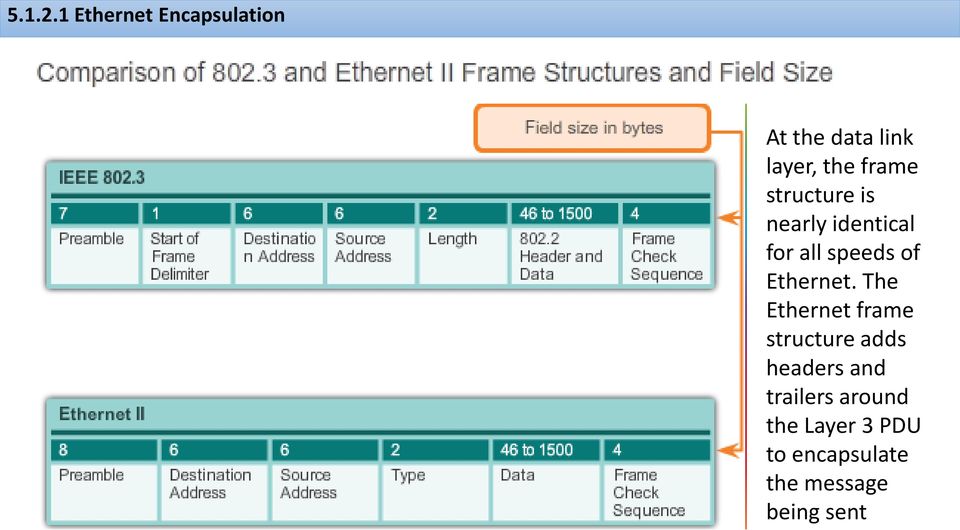

13 Ethernet Frame Size Both the Ethernet II and IEEE standards define the minimum frame size as 64 bytes and the maximum as 1518 bytes. This includes all bytes from the Destination MAC Address field through the Frame Check Sequence (FCS) field. The Preamble and Start Frame Delimiter fields are not included when describing the size of a frame. Any frame less than 64 bytes in length is considered a "collision fragment" or "runt frame" and is automatically discarded by receiving stations


14 Introduction to the Ethernet Frame


15 Activity - Ethernet Frame Fields


16 MAC Addresses and Hexadecimal


17 MAC Address Representations


18 Unicast MAC Address A host with IP address (source) requests a web page from the server at IP address For a unicast packet to be sent and received, a destination IP address must be in the IP packet header. A corresponding destination MAC address must also be present in the Ethernet frame header. The IP address and MAC address combine to deliver data to one specific destination host.

19 Broadcast MAC Address As shown in the figure, a broadcast IP address for a network needs a corresponding broadcast MAC address in the Ethernet frame. On Ethernet networks, the broadcast MAC address is 48 ones displayed as hexadecimal FF-FF-FF-FF- FF-FF.


20 Multicast MAC Address As with the unicast and broadcast addresses, the multicast IP address requires a corresponding multicast MAC address to actually deliver frames on a local network. The multicast MAC address is a special value that begins with E in hexadecimal. The remaining portion of the multicast MAC address is created by converting the lower 23 bits of the IP multicast group address into 6 hexadecimal characters.

21 Lab - Viewing Network Device MAC Addresses In this lab, you will complete the following objectives: Part 1: Set Up the Topology and Initialize Devices Part 2: Configure Devices and Verify Connectivity Part 3: Display, Describe, and Analyze Ethernet MAC Addresses

22 MAC and IP Both the physical MAC and logical IP addresses are required for a computer to communicate on a hierarchical network, just like both the name and address of a person are required to send a letter.
23 End-to-End Connectivity, MAC, and IP End devices on an Ethernet network do not accept and process frames based on IP addresses, rather, a frame is accepted and processed based on MAC addresses. On Ethernet networks, MAC addresses are used to identify, at a lower level, the source and destination hosts. How are the IP addresses of the IP packets in a data flow associated with the MAC addresses on each link along the path to the destination? This is done through a process called Address Resolution Protocol (ARP).
24 Lab - Using Wireshark to Examine Ethernet Frames In this lab, you will complete the following objectives: Examine the Header Fields in an Ethernet II Frame Use Wireshark to Capture and Analyze Ethernet Frames
25 Packet Tracer - Identify MAC and IP Addresses This activity is optimized for viewing PDUs. The devices are already configured. You will gather PDU information in simulation mode and answer a series of questions about the data you collect.

26 Introduction to ARP The ARP protocol provides two basic functions: Resolving IPv4 addresses to MAC addresses Maintaining a table of mappings

27 ARP Functions

28 ARP Operation When ARP receives a request to map an IPv4 address to a MAC address, it looks for the cached map in its ARP table. If an entry is not found, the Layer 2 processes notify ARP that it needs a map. The ARP processes then send out an ARP request packet to discover the MAC address of the destination device on the local network. If a device receiving the request has the destination IP address, it responds with an ARP reply. A map is created in the ARP table. Packets for that IPv4 address can now be encapsulated in frames.

29 ARP Role in Remote Communication If the destination IPv4 host is not on the local network, the source node needs to deliver the frame to the router interface that is the gateway or next hop used to reach that destination. The source node will use the MAC address of the gateway as the destination address for frames containing an IPv4 packet addressed to hosts on other networks.

30 Removing Entries from an ARP Table Commands may also be used to manually remove all or some of the entries in the ARP table. After an entry has been removed, the process for sending an ARP request and receiving an ARP reply must occur again to enter the map in the ARP table.

31 ARP Tables on Networking Devices Router ARP Table Host ARP Table Next

32 ARP Tables on Networking Devices Host ARP Table
33 Packet Tracer - Examine the ARP Table This activity is optimized for viewing PDUs. The devices are already configured. You will gather PDU information in simulation mode and answer a series of questions about the data you collect.
34 Lab - Observing ARP with the Windows CLI, IOS CLI, and Wireshark In this lab, you will complete the following objectives: Part 1: Build and Configure the Network Part 2: Use the Windows ARP Command Part 3: Use the IOS Show ARP Command Part 4: Use Wireshark to Examine ARP Exchanges

35 How ARP Can Create Problems In some cases, the use of ARP can lead to a potential security risk. ARP spoofing, or ARP poisoning, is a technique used by an attacker to inject the wrong MAC address association into a network by issuing fake ARP replies. An attacker forges the MAC address of a device and then frames can be sent to the wrong destination. Manually configuring static ARP associations is one way to prevent ARP spoofing. Authorized MAC addresses can be configured on some network devices to restrict network access to only those devices listed.

36 Mitigating ARP Problems Switches provide segmentation of a LAN, dividing the LAN into independent collision domains. Each port on a switch represents a separate collision domain and provides the full media bandwidth to the node or nodes connected on that port.

37 Switch Port Fundamentals A Layer 2 LAN switch performs switching and filtering based only on the OSI data link layer (Layer 2) MAC address. A switch is completely transparent to network protocols and user applications. A Layer 2 switch builds a MAC address table that it uses to make forwarding decisions. Layer 2 switches depend on routers to pass data between independent IP subnetworks.

38 Switch MAC Address Table Switches use MAC addresses to direct network communications through their switch fabric to the appropriate port toward the destination node. The switch fabric is the integrated circuits and the accompanying machine programming that allows the data paths through the switch to be controlled. For a switch to know which port to use to transmit a unicast frame, it must first learn which nodes exist on each of its ports.

39 Duplex Settings Half-duplex communication relies on unidirectional data flow where sending and receiving data are not performed at the same time. In full-duplex communication, data flow is bidirectional, so data can be sent and received at the same time. The bidirectional support enhances performance by reducing the wait time between transmissions. Most Ethernet, Fast Ethernet, and Gigabit Ethernet NICs sold today offer fullduplex capability. In full-duplex mode, the collision detect circuit is disabled.

40 Auto-MDIX Switch detects the required cable type for copper Ethernet connections and configures the interfaces accordingly. Therefore, you can use either a crossover or a straight-through cable for connections to a copper 10/100/1000 port on the switch, regardless of the type of device on the other end of the connection. The auto-mdix feature is enabled by default on switches running Cisco IOS Release 12.2(18)SE or later. For releases between Cisco IOS Release 12.1(14)EA1 and 12.2(18)SE, the auto- MDIX feature is disabled by default.

41 Frame Forwarding Methods on Cisco Switches In store-and-forward switching, when the switch receives the frame, it stores the data in buffers until the complete frame has been received. During the storage process, the switch analyzes the frame for information about its destination. In this process, the switch also performs an error check using the Cyclic Redundancy Check (CRC) trailer portion of the Ethernet frame.

42 Frame Forwarding Methods on Cisco Switches

43 Cut-Through Switching In cut-through switching, the switch acts upon the data as soon as it is received, even if the transmission is not complete. The switch buffers just enough of the frame to read the destination MAC address so that it can determine to which port to forward the data. The destination MAC address is located in the first 6 bytes of the frame following the preamble
44 Cut-Through Switching Fast-forward switching: offers the lowest level of latency. immediately forwards a packet after reading the destination address. there may be times when packets are relayed with errors. This occurs infrequently, and the destination network adapter discards the faulty packet upon receipt. latency is measured from the first bit received to the first bit transmitted. Fragment-free switching: switch stores the first 64 bytes of the frame before forwarding. compromise between store-and-forward switching and fast-forward switching. most network errors and collisions occur during the first 64 bytes. error check on the first 64 bytes of the frame to ensure that a collision has not occurred Fragment-free switching is a compromise between the high latency and high integrity of store-and-forward switching, and the low latency and reduced integrity of fast-forward switching.

45 Activity - Frame Forwarding Methods

46 Memory Buffering on Switches As discussed, a switch analyzes some or all of a packet before it forwards it to the destination host. An Ethernet switch may use a buffering technique to store frames before forwarding them. Buffering may also be used when the destination port is busy due to congestion and the switch stores the frame until it can be transmitted.

47 Activity - Switch It!
48 Lab - Viewing the Switch MAC Address Table In this lab, you will complete the following objectives: Part 1: Build and Configure the Network Part 2: Examine the Switch MAC Address Table

49 Fixed versus Modular Configuration Fixed configuration switches are fixed in their configuration. What that means is that you cannot add features or options to the switch beyond those that originally came with the switch. The particular model you purchase determines the features and options available. Modular switches offer more flexibility in their configuration. Modular switches typically come with different sized chassis that allow for the installation of different numbers of modular line cards. The line cards actually contain the ports.
50 Fixed versus Modular Configuration
51 Module Options for Cisco Switch Slots Fast Ethernet SFP Modules Gigabit Ethernet SFP Modules 10 Gigabit Ethernet SFP Modules

52 Layer 2 versus Layer 3 Switching Layer 2 LAN switch performs switching and filtering based only on the OSI data link layer (Layer 2) MAC address and depends upon routers to pass data between independent IP subnetworks a Layer 3 switch can also learn which IP addresses are associated with its interfaces. This allows the Layer 3 switch to direct traffic throughout the network based on IP address information as well.

53 Cisco Express Forwarding Cisco Express Forwarding (CEF) CEF decouples the usual strict interdependence between Layer 2 and Layer 3 decision Forwarding IP packets can be slow the constant referencing backand-forth between Layer 2 and Layer 3 constructs The two main components of CEF operation Forwarding Information Base (FIB) Adjacency tables

54 Types of Layer 3 Interfaces Cisco networking devices support a number of distinct types of Layer 3 interfaces. A Layer 3 interface is one that supports forwarding IP packets toward a final destination based on the IP address. The major types of Layer 3 interfaces are: Switch Virtual Interface (SVI) - Logical interface on a switch associated with a virtual local area network (VLAN). Routed Port - Physical port on a Layer 3 switch configured to act as a router port. Layer 3 EtherChannel - Logical interface on a Cisco device associated with a bundle of routed ports.

55 Configuring a Routed Port on a Layer 3 Switch A switch port can be configured to be a Layer 3 routed port and behave like a regular router interface. Specifically, a routed port: Is not associated with a particular VLAN. Can be configured with a Layer 3 routing protocol. Is a Layer 3 interface only and does not support Layer 2 protocol. Configure routed ports by putting the interface into Layer 3 mode with the no switchport interface configuration command. Then assign an IP address to the port. That's it!
56 Packet Tracer - Configure Layer 3 Switches The Network Administrator is replacing the current router and switch with a new Layer 3 switch. As the Network Technician, it is your job to configure the switch and place it into service. You will be working after hours to minimize disruption to the business.
57 Activity - MAC and Choose Please view the video located at the following link: -metcalfe-the-history-of-ethernet Topics discussed include not only where we have come from in Ethernet development, but where we are going with Ethernet technology (a futuristic approach).

58 Summary There are two styles of Ethernet framing: IEEE Ethernet standard and the DIX Ethernet standard which is now referred to Ethernet II. The most significant difference between the two standards is the addition of a Start Frame Delimiter (SFD) and the change of the Type field to a Length field in the Ethernet II is the Ethernet frame format used in TCP/IP networks. As an implementation of the IEEE 802.2/3 standards, the Ethernet frame provides MAC addressing and error checking
59 Thanks Thanks for your attention!!
- Hubs vs. Switches vs. Routers -
 1 Layered Communication - Hubs vs. Switches vs. Routers - Network communication models are generally organized into layers. The OSI model specifically consists of seven layers, with each layer representing
IP Networking. Overview. Networks Impact Daily Life. IP Networking - Part 1. How Networks Impact Daily Life. How Networks Impact Daily Life
 Overview Dipl.-Ing. Peter Schrotter Institute of Communication Networks and Satellite Communications Graz University of Technology, Austria Fundamentals of Communicating over the Network Application Layer
Networking Test 4 Study Guide
 Networking Test 4 Study Guide True/False Indicate whether the statement is true or false. 1. IPX/SPX is considered the protocol suite of the Internet, and it is the most widely used protocol suite in LANs.
Guide to TCP/IP, Third Edition. Chapter 3: Data Link and Network Layer TCP/IP Protocols
 Guide to TCP/IP, Third Edition Chapter 3: Data Link and Network Layer TCP/IP Protocols Objectives Understand the role that data link protocols, such as SLIP and PPP, play for TCP/IP Distinguish among various
CCT vs. CCENT Skill Set Comparison
 Operation of IP Data Networks Recognize the purpose and functions of various network devices such as Routers, Switches, Bridges and Hubs Select the components required to meet a given network specification
100-101: Interconnecting Cisco Networking Devices Part 1 v2.0 (ICND1)
 100-101: Interconnecting Cisco Networking Devices Part 1 v2.0 (ICND1) Course Overview This course provides students with the knowledge and skills to implement and support a small switched and routed network.
ESSENTIALS. Understanding Ethernet Switches and Routers. April 2011 VOLUME 3 ISSUE 1 A TECHNICAL SUPPLEMENT TO CONTROL NETWORK
 VOLUME 3 ISSUE 1 A TECHNICAL SUPPLEMENT TO CONTROL NETWORK Contemporary Control Systems, Inc. Understanding Ethernet Switches and Routers This extended article was based on a two-part article that was
LAN Switching and VLANs
 26 CHAPTER Chapter Goals Understand the relationship of LAN switching to legacy internetworking devices such as bridges and routers. Understand the advantages of VLANs. Know the difference between access
Procedure: You can find the problem sheet on Drive D: of the lab PCs. Part 1: Router & Switch
 University of Jordan Faculty of Engineering & Technology Computer Engineering Department Computer Networks Laboratory 907528 Lab. 2 Network Devices & Packet Tracer Objectives 1. To become familiar with
Zarząd (7 osób) F inanse (13 osób) M arketing (7 osób) S przedaż (16 osób) K adry (15 osób)
 QUESTION NO: 8 David, your TestKing trainee, asks you about basic characteristics of switches and hubs for network connectivity. What should you tell him? A. Switches take less time to process frames than
2. What is the maximum value of each octet in an IP address? A. 128 B. 255 C. 256 D. None of the above
 1. How many bits are in an IP address? A. 16 B. 32 C. 64 2. What is the maximum value of each octet in an IP address? A. 128 B. 255 C. 256 3. The network number plays what part in an IP address? A. It
Interconnecting Cisco Network Devices 1 Course, Class Outline
 www.etidaho.com (208) 327-0768 Interconnecting Cisco Network Devices 1 Course, Class Outline 5 Days Interconnecting Cisco Networking Devices, Part 1 (ICND1) v2.0 is a five-day, instructorled training course
Cisco Certified Network Associate Exam. Operation of IP Data Networks. LAN Switching Technologies. IP addressing (IPv4 / IPv6)
 Cisco Certified Network Associate Exam Exam Number 200-120 CCNA Associated Certifications CCNA Routing and Switching Operation of IP Data Networks Operation of IP Data Networks Recognize the purpose and
Lab - Using IOS CLI with Switch MAC Address Tables
 Topology Addressing Table Objectives Device Interface IP Address Subnet Mask Default Gateway R1 G0/1 192.168.1.1 255.255.255.0 N/A S1 VLAN 1 192.168.1.11 255.255.255.0 192.168.1.1 S2 VLAN 1 192.168.1.12
Data Link Protocols. TCP/IP Suite and OSI Reference Model
 Data Link Protocols Relates to Lab. This module covers data link layer issues, such as local area networks (LANs) and point-to-point links, Ethernet, and the Point-to-Point Protocol (PPP). 1 TCP/IP Suite
IP Addressing and Subnetting. 2002, Cisco Systems, Inc. All rights reserved.
 IP Addressing and Subnetting 2002, Cisco Systems, Inc. All rights reserved. 1 Objectives Upon completion, you will be able to: Discuss the Types of Network Addressing Explain the Form of an IP Address
Candidates should attempt FOUR questions. All questions carry 25 marks.
 UNIVERSITY OF ABERDEEN Exam 2010 Degree Examination in ES 3567 Communications Engineering 1B Xday X Notes: 9.00 a.m. 12 Noon (i) CANDIDATES ARE PERMITTED TO USE APPROVED CALCULATORS (II) CANDIDATES ARE
Protocol Data Units and Encapsulation
 Chapter 2: Communicating over the 51 Protocol Units and Encapsulation For application data to travel uncorrupted from one host to another, header (or control data), which contains control and addressing
How To Learn Cisco Cisco Ios And Cisco Vlan
 Interconnecting Cisco Networking Devices: Accelerated Course CCNAX v2.0; 5 Days, Instructor-led Course Description Interconnecting Cisco Networking Devices: Accelerated (CCNAX) v2.0 is a 60-hour instructor-led
2. What is the maximum value of each octet in an IP address? A. 28 B. 255 C. 256 D. None of the above
 CCNA1 V3.0 Mod 10 (Ch 8) 1. How many bits are in an IP C. 64 2. What is the maximum value of each octet in an IP A. 28 55 C. 256 3. The network number plays what part in an IP A. It specifies the network
hp ProLiant network adapter teaming
 hp networking june 2003 hp ProLiant network adapter teaming technical white paper table of contents introduction 2 executive summary 2 overview of network addressing 2 layer 2 vs. layer 3 addressing 2
Procedure: You can find the problem sheet on Drive D: of the lab PCs. 1. IP address for this host computer 2. Subnet mask 3. Default gateway address
 Objectives University of Jordan Faculty of Engineering & Technology Computer Engineering Department Computer Networks Laboratory 907528 Lab.4 Basic Network Operation and Troubleshooting 1. To become familiar
Switching in an Enterprise Network
 Switching in an Enterprise Network Introducing Routing and Switching in the Enterprise Chapter 3 Version 4.0 2006 Cisco Systems, Inc. All rights reserved. Cisco Public 1 Objectives Compare the types of
Chapter 1 Reading Organizer
 Chapter 1 Reading Organizer After completion of this chapter, you should be able to: Describe convergence of data, voice and video in the context of switched networks Describe a switched network in a small
CCNA 1: Networking Basics. Cisco Networking Academy Program Version 3.0
 CCNA 1: Networking Basics Cisco Networking Academy Program Version 3.0 Table of Contents CCNA 1: NETWORKING BASICS...1 TARGET AUDIENCE...3 PREREQUISITES...3 COURSE DESCRIPTION...3 COURSE OBJECTIVES...3
"Charting the Course...
 Description "Charting the Course... Course Summary Interconnecting Cisco Networking Devices: Accelerated (CCNAX), is a course consisting of ICND1 and ICND2 content in its entirety, but with the content
Interconnecting Cisco Networking Devices, Part 1 (ICND1) v3.0
 Interconnecting Cisco Networking Devices, Part 1 (ICND1) v3.0 COURSE OVERVIEW: Interconnecting Cisco Networking Devices, Part 1 (ICND1) v3.0 is a five-day, instructor-led training course that teaches learners
Protocols and Architecture. Protocol Architecture.
 Protocols and Architecture Protocol Architecture. Layered structure of hardware and software to support exchange of data between systems/distributed applications Set of rules for transmission of data between
BASIC ANALYSIS OF TCP/IP NETWORKS
 BASIC ANALYSIS OF TCP/IP NETWORKS INTRODUCTION Communication analysis provides powerful tool for maintenance, performance monitoring, attack detection, and problems fixing in computer networks. Today networks
INTERCONNECTING CISCO NETWORK DEVICES PART 1 V2.0 (ICND 1)
 INTERCONNECTING CISCO NETWORK DEVICES PART 1 V2.0 (ICND 1) COURSE OVERVIEW: Interconnecting Cisco Networking Devices, Part 1 (ICND1) v2.0 is a five-day, instructor-led training course that teaches learners
Ethernet. Ethernet. Network Devices
 Ethernet Babak Kia Adjunct Professor Boston University College of Engineering ENG SC757 - Advanced Microprocessor Design Ethernet Ethernet is a term used to refer to a diverse set of frame based networking
Howstuffworks "How LAN Switches Work" Click here to go back to the normal view!
 Page 1 of 17 Search ComputerStuff AutoStuff ElectronicsStuff ScienceStuff HomeStuff EntertainmentStuff MoneyStuff TravelStuff Main > Computer > Hardware Click here to go back to the normal view! How LAN
11/22/2013 1. komwut@siit
 11/22/2013 1 Week3-4 Point-to-Point, LAN, WAN Review 11/22/2013 2 What will you learn? Representatives for Point-to-Point Network LAN Wired Ethernet Wireless Ethernet WAN ATM (Asynchronous Transfer Mode)
Exhibit n.2: The layers of a hierarchical network
 3. Advanced Secure Network Design 3.1 Introduction You already know that routers are probably the most critical equipment piece in today s networking. Without routers, internetwork communication would
The OSI and TCP/IP Models. Lesson 2
 The OSI and TCP/IP Models Lesson 2 Objectives Exam Objective Matrix Technology Skill Covered Exam Objective Exam Objective Number Introduction to the OSI Model Compare the layers of the OSI and TCP/IP
Course Contents CCNP (CISco certified network professional)
 Course Contents CCNP (CISco certified network professional) CCNP Route (642-902) EIGRP Chapter: EIGRP Overview and Neighbor Relationships EIGRP Neighborships Neighborship over WANs EIGRP Topology, Routes,
WAN Data Link Protocols
 WAN Data Link Protocols In addition to Physical layer devices, WANs require Data Link layer protocols to establish the link across the communication line from the sending to the receiving device. 1 Data
What is VLAN Routing?
 Application Note #38 February 2004 What is VLAN Routing? This Application Notes relates to the following Dell product(s): 6024 and 6024F 33xx Abstract Virtual LANs (VLANs) offer a method of dividing one
Data Communication and Computer Network
 1 Data communication principles, types and working principles of modems, Network principles, OSI model, functions of data link layer and network layer, networking components, communication protocols- X
LANs and VLANs A Simplified Tutorial
 Application Note LANs and VLANs A Simplified Tutorial Version 3.0 May 2002 COMPAS ID 90947 Avaya Labs 1 Companion document IP Addressing: A Simplified Tutorial COMPAS ID 92962 2 Introduction As the name
Lesson 2-3: Ethernet Basics
 Unit 2: LAN Configurations Lesson 2-3: Ethernet Basics At a Glance Ethernet LAN topology is currently the most common network architecture. Ethernet topologies are generally bus and/or bus-star topologies.
Computer Networks I Laboratory Exercise 1
 Computer Networks I Laboratory Exercise 1 The lab is divided into two parts where the first part is a basic PC network TCP/IP configuration and connection to the Internet. The second part is building a
Gigabit Ethernet. Abstract. 1. Introduction. 2. Benefits of Gigabit Ethernet
 Table of Contents Abstract... 2 1. Introduction... 2 2. Benefits of Gigabit Ethernet... 2 2.1 Easy Migration to Higher Performance Levels... 3 2.2 Decreased Overall Costs Over Time... 3 2.3 Supports for
Can PowerConnect Switches Be Used in IP Multicast Networks?
 PowerConnect Application Note #6 January 2004 Can PowerConnect Switches Be Used in IP Multicast Networks? This Application Note relates to the following Dell PowerConnect products: PowerConnect 33xx PowerConnect
Configuring PROFINET
 CHAPTER 9 This chapter describes how to configure the PROFINET feature on the Cisco IE 3000 switch. Understanding PROFINET, page 9-1, page 9-4 Displaying the PROFINET Configuration, page 9-5 Troubleshooting
Course Overview: Learn the essential skills needed to set up, configure, support, and troubleshoot your TCP/IP-based network.
 Course Name: TCP/IP Networking Course Overview: Learn the essential skills needed to set up, configure, support, and troubleshoot your TCP/IP-based network. TCP/IP is the globally accepted group of protocols
Mathatma Gandhi University
 Mathatma Gandhi University BSc Computer Science IV th semester BCS 402 Computer Network &Internet MULTIPLE CHOICE QUESTIONS 1. The computer network is A) Network computer with cable B) Network computer
CHAPTER 10 LAN REDUNDANCY. Scaling Networks
 CHAPTER 10 LAN REDUNDANCY Scaling Networks CHAPTER 10 10.0 Introduction 10.1 Spanning Tree Concepts 10.2 Varieties of Spanning Tree Protocols 10.3 Spanning Tree Configuration 10.4 First-Hop Redundancy
Cisco Networking Academy CCNP Multilayer Switching
 CCNP 3 v5 - Chapter 4 Cisco Networking Academy CCNP Multilayer Switching Implementing Inter-VLAN Routing VLANs VLANs are associated with individual networks or subnetworks Network devices in different
EE4367 Telecom. Switching & Transmission. Prof. Murat Torlak
 Packet Switching and Computer Networks Switching As computer networks became more pervasive, more and more data and also less voice was transmitted over telephone lines. Circuit Switching The telephone
CCNA Discovery 4.0.3.0 Networking for Homes and Small Businesses Student Packet Tracer Lab Manual
 4.0.3.0 Networking for Homes and Small Businesses Student Packet Tracer Lab Manual This document is exclusive property of Cisco Systems, Inc. Permission is granted to print and copy this document for non-commercial
Securing end devices
 Securing end devices Securing the network edge is already covered. Infrastructure devices in the LAN Workstations Servers IP phones Access points Storage area networking (SAN) devices. Endpoint Security
JOB READY ASSESSMENT BLUEPRINT COMPUTER NETWORKING FUNDAMENTALS - PILOT. Test Code: 4514 Version: 01
 JOB READY ASSESSMENT BLUEPRINT COMPUTER NETWORKING FUNDAMENTALS - PILOT Test Code: 4514 Version: 01 Specific Competencies and Skills Tested in this Assessment: PC Principles Identify physical and equipment
Gigabit Ethernet MAC. (1000 Mbps Ethernet MAC core with FIFO interface) PRODUCT BRIEF
 Gigabit Ethernet MAC (1000 Mbps Ethernet MAC core with FIFO interface) PRODUCT BRIEF 1. INTRODUCTION This document serves as a product info for the Gigabit Ethernet MAC from Hitek Systems. The core supports
Ethernet. Ethernet Frame Structure. Ethernet Frame Structure (more) Ethernet: uses CSMA/CD
 Ethernet dominant LAN technology: cheap -- $20 for 100Mbs! first widely used LAN technology Simpler, cheaper than token rings and ATM Kept up with speed race: 10, 100, 1000 Mbps Metcalfe s Etheret sketch
Unit of Learning # 2 The Physical Layer. Sergio Guíñez Molinos [email protected] 2-2009
 Unit of Learning # 2 The Physical Layer Sergio Guíñez Molinos [email protected] 2-2009 Local Area Network (LAN) Redes de Computadores 2 Historic topologies more used in LAN Ethernet Logical Bus and Physical
From Fieldbus to toreal Time Ethernet
 Process Automation From Fieldbus to toreal Time Ethernet Safety, reliability IEC61158-2 as the physical layer too slow for Ethernet/IP frames Unsafe cables towards wireless solutions Factory automation
Fundamentals of Switching
 1 CCNA 640-801 Exam Notes - Fundamentals of Switching CCNA 640-801 Exam Notes Fundamentals of Switching 1. LAN Segmentation 1.1 In a collision domain, a frame sent by a device can cause collision with
VXLAN: Scaling Data Center Capacity. White Paper
 VXLAN: Scaling Data Center Capacity White Paper Virtual Extensible LAN (VXLAN) Overview This document provides an overview of how VXLAN works. It also provides criteria to help determine when and where
Based on Computer Networking, 4 th Edition by Kurose and Ross
 Computer Networks Ethernet Hubs and Switches Based on Computer Networking, 4 th Edition by Kurose and Ross Ethernet dominant wired LAN technology: cheap $20 for NIC first widely used LAN technology Simpler,
Chapter 2 Reading Organizer
 Chapter 2 Reading Organizer After completion of this chapter, you should be able to: Explain the advantages and disadvantages of static routing Configure initial settings on a Cisco switch Configure switch
Transport and Network Layer
 Transport and Network Layer 1 Introduction Responsible for moving messages from end-to-end in a network Closely tied together TCP/IP: most commonly used protocol o Used in Internet o Compatible with a
Module 15: Network Structures
 Module 15: Network Structures Background Topology Network Types Communication Communication Protocol Robustness Design Strategies 15.1 A Distributed System 15.2 Motivation Resource sharing sharing and
SSVP SIP School VoIP Professional Certification
 SSVP SIP School VoIP Professional Certification Exam Objectives The SSVP exam is designed to test your skills and knowledge on the basics of Networking and Voice over IP. Everything that you need to cover
Performance Analysis of Switches in High Speed LAN
 Performance Analysis of Switches in High Speed LAN Muhammad Imran, Asif Shaikh, Syed S. Rizvi, Khaled M. Elleithy Computer Science and Engineering Department, University of Bridgeport, Bridgeport, CT {mimran,
Interconnecting Cisco Networking Devices Part 2
 Interconnecting Cisco Networking Devices Part 2 Course Number: ICND2 Length: 5 Day(s) Certification Exam This course will help you prepare for the following exam: 640 816: ICND2 Course Overview This course
IT-AD08: ADD ON DIPLOMA IN COMPUTER NETWORK DESIGN AND INSTALLATION
 IT-AD08: ADD ON DIPLOMA IN COMPUTER NETWORK DESIGN AND INSTALLATION Objective of the course: This course is designed to impart professional training to the students of computer Science, computer applications,
CMA5000 SPECIFICATIONS. 5710 Gigabit Ethernet Module
 CMA5000 5710 Gigabit Ethernet Module SPECIFICATIONS General Description The CMA5710 Gigabit Ethernet application is a single slot module that can be used in any CMA 5000. The Gigabit Ethernet test module
6/8/2011. Document ID: 12023. Contents. Introduction. Prerequisites. Requirements. Components Used. Conventions. Introduction
 Page 1 of 9 Products & Services Understanding EtherChannel Load Balancing and Redundancy on Catalyst Switches Document ID: 12023 Contents Introduction Prerequisites Requirements Components Used Conventions
Expert Reference Series of White Papers. Basics of IP Address Subnetting
 Expert Reference Series of White Papers Basics of IP Address Subnetting 1-800-COURSES www.globalknowledge.com Basics of IP Address Subnetting Norbert Gregorio, Global Knowledge Instructor Introduction
Configuring Switch Ports and VLAN Interfaces for the Cisco ASA 5505 Adaptive Security Appliance
 CHAPTER 5 Configuring Switch Ports and VLAN Interfaces for the Cisco ASA 5505 Adaptive Security Appliance This chapter describes how to configure the switch ports and VLAN interfaces of the ASA 5505 adaptive
Cisco Data Centre: Introducing Cisco Data Center Networking
 coursemonster.com/uk Cisco Data Centre: Introducing Cisco Data Center Networking View training dates» Overview In the Introducing Cisco Data Center Networking training course, delegates will learn to:â
Packet Sniffing on Layer 2 Switched Local Area Networks
 Packet Sniffing on Layer 2 Switched Local Area Networks Ryan Spangler [email protected] Packetwatch Research http://www.packetwatch.net December 2003 Abstract Packet sniffing is a technique of monitoring
Chapter 4 Connecting to the Internet through an ISP
 Chapter 4 Connecting to the Internet through an ISP 1. According to Cisco what two things are essential to gaining access to the internet? a. ISPs are essential to gaining access to the Internet. b. No
Computer Network. Interconnected collection of autonomous computers that are able to exchange information
 Introduction Computer Network. Interconnected collection of autonomous computers that are able to exchange information No master/slave relationship between the computers in the network Data Communications.
SSVVP SIP School VVoIP Professional Certification
 SSVVP SIP School VVoIP Professional Certification Exam Objectives The SSVVP exam is designed to test your skills and knowledge on the basics of Networking, Voice over IP and Video over IP. Everything that
Communication Systems Internetworking (Bridges & Co)
 Communication Systems Internetworking (Bridges & Co) Prof. Dr.-Ing. Lars Wolf TU Braunschweig Institut für Betriebssysteme und Rechnerverbund Mühlenpfordtstraße 23, 38106 Braunschweig, Germany Email: [email protected]
Configuring EtherChannels
 25 CHAPTER This chapter describes how to configure EtherChannel interfaces. For complete syntax and usage information for the commands used in this chapter, refer to the Catalyst 2950 Desktop Switch Command
Asynchronous Transfer Mode: ATM. ATM architecture. ATM: network or link layer? ATM Adaptation Layer (AAL)
 Asynchrous Transfer Mode: architecture 1980s/1990 s standard for high-speed (155Mbps to 622 Mbps and higher) Broadband Integrated Service Digital Network architecture Goal: integrated, end-end transport
Chapter 2 - The TCP/IP and OSI Networking Models
 Chapter 2 - The TCP/IP and OSI Networking Models TCP/IP : Transmission Control Protocol/Internet Protocol OSI : Open System Interconnection RFC Request for Comments TCP/IP Architecture Layers Application
Networking 4 Voice and Video over IP (VVoIP)
 Networking 4 Voice and Video over IP (VVoIP) Course Objectives This course will give delegates a good understanding of LANs, WANs and VVoIP (Voice and Video over IP). It is aimed at those who want to move
Introduction to Routing and Packet Forwarding. Routing Protocols and Concepts Chapter 1
 Introduction to Routing and Packet Forwarding Routing Protocols and Concepts Chapter 1 1 1 Objectives Identify a router as a computer with an OS and hardware designed for the routing process. Demonstrate
Configuring EtherChannels
 CHAPTER 12 This chapter describes how to configure EtherChannels on the Cisco 7600 series router Layer 2 or Layer 3 LAN ports. For complete syntax and usage information for the commands used in this chapter,
Outline. CSc 466/566. Computer Security. 18 : Network Security Introduction. Network Topology. Network Topology. Christian Collberg
 Outline Network Topology CSc 466/566 Computer Security 18 : Network Security Introduction Version: 2012/05/03 13:59:29 Department of Computer Science University of Arizona [email protected] Copyright
How To Understand and Configure Your Network for IntraVUE
 How To Understand and Configure Your Network for IntraVUE Summary This document attempts to standardize the methods used to configure Intrauve in situations where there is little or no understanding of
cnds@napier Slide 1 Introduction cnds@napier 1 Lecture 6 (Network Layer)
 Slide 1 Introduction In today s and next week s lecture we will cover two of the most important areas in networking and the Internet: IP and TCP. These cover the network and transport layer of the OSI
- EtherChannel - Port Aggregation
 1 Port Aggregation - EtherChannel - A network will often span across multiple switches. Trunk ports are usually used to connect switches together. There are two issues with using only a single physical
Chapter 3. Enterprise Campus Network Design
 Chapter 3 Enterprise Campus Network Design 1 Overview The network foundation hosting these technologies for an emerging enterprise should be efficient, highly available, scalable, and manageable. This
LAN Switching. 15-441 Computer Networking. Switched Network Advantages. Hubs (more) Hubs. Bridges/Switches, 802.11, PPP. Interconnecting LANs
 LAN Switching 15-441 Computer Networking Bridges/Switches, 802.11, PPP Extend reach of a single shared medium Connect two or more segments by copying data frames between them Switches only copy data when
Operating System Concepts. Operating System 資 訊 工 程 學 系 袁 賢 銘 老 師
 Lecture 7: Distributed Operating Systems A Distributed System 7.2 Resource sharing Motivation sharing and printing files at remote sites processing information in a distributed database using remote specialized
How To Balance On A Cisco Catalyst Switch With The Etherchannel On A Fast Ipv2 (Powerline) On A Microsoft Ipv1 (Powergen) On An Ipv3 (Powergadget) On Ipv4
 Cisco - Understanding EtherChannel Load Balancing and Redundancy on Catalyst Switch...Page 1 of 10 Understanding EtherChannel Load Balancing and Redundancy on Catalyst Switches Document ID: 12023 Contents
Guide to Network Defense and Countermeasures Third Edition. Chapter 2 TCP/IP
 Guide to Network Defense and Countermeasures Third Edition Chapter 2 TCP/IP Objectives Explain the fundamentals of TCP/IP networking Describe IPv4 packet structure and explain packet fragmentation Describe
10/100/1000Mbps Ethernet MAC with Protocol Acceleration MAC-NET Core with Avalon Interface
 1 Introduction Ethernet is available in different speeds (10/100/1000 and 10000Mbps) and provides connectivity to meet a wide range of needs from desktop to switches. MorethanIP IP solutions provide a
Computer Networks. Definition of LAN. Connection of Network. Key Points of LAN. Lecture 06 Connecting Networks
 Computer Networks Lecture 06 Connecting Networks Kuang-hua Chen Department of Library and Information Science National Taiwan University Local Area Networks (LAN) 5 kilometer IEEE 802.3 Ethernet IEEE 802.4
640-607. QUESTION NO: 1 You can configure PPP on which of the following types of physical interfaces? (Choose two)
 640-607 Cisco Certified Network Associate 3.0 CCNA 3.0 Version 17.0 Important Note Please Read Carefully Study Tips This product will provide you questions and answers along with detailed explanations
High-Level Data Link Control
 High-Level Data Link Control This class of data link layer protocols includes High-level Data Link Control (HDLC), Link Access Procedure Balanced (LAPB) for X.25, Link Access Procedure for D-channel (LAPD)
The IP Transmission Process. V1.4: Geoff Bennett
 The IP Transmission Process V1.4: Geoff Bennett Contents Communication Between Hosts Through a MAC Bridge Through a LAN Switch Through a Router The tutorial is divided into four sections. Section 1 looks