
MANUAL HIPERFACE DSL. Implementation
|
|
|
- Damian Griffin Cross
- 10 years ago
- Views:
Transcription
1 MANUAL Implementation en

2 SICK STEGMANN GmbH All rights reserved. No component of the description may by copied or processed in any other way without the written consent of the company. This documentation applies to the, release version 1.06, release date May 31, Subject to modification without notice. SICK STEGMANN GmbH accepts no responsibility for the non-infringement of patent rights, e.g. in the case of recommendations for circuit designs or processes. The trade names listed are the property of the relevant companies. HIPERFACE and HIPERFACE DSL are registered trademarks of SICK STEGMANN GmbH. SICK STEGMANN GmbH Dürrheimer Strasse Donaueschingen, Germany Tel.: +(49) 771 / Fax: +(49) 771 / Internet: [email protected] Made in Germany, /YE98 SICK STEGMANN GmbH Subject to change without notice 1

3 Table of contents 1. Scope of application of the document Symbols used for Motor Feedback Systems Features of Associated documents Protocol overview Process data channel Safe Channel Safe Channel Parameters Channel SensorHub Channel Hardware installation Interface circuit FPGA IP Core Cable specification Interfaces Drive interface SPI PIPE Interface Control signals Test signals Register diagram Explanation of the registers Online Status DSL Master function register Function register for the DSL Slave Central functions System start System diagnostics Fast position Safe position, Channel Parameters Channel Status and error messages Motor feedback system resources Access to resources Resources list FPGA IP-Core Interface blocks Implementation of the IP Core for Xilinx Spartan-3E/ Installation of the IP Core for Altera FPGAs Keywords index Glossary Versions SICK STEGMANN GmbH Subject to change without notice

4 Table of figures Manual Figure 1: Drive system with... 6 Figure 2: Length of protocol packages Figure 3: Data channels in Figure 4: SensorHub interface Figure 5: Interface circuit with separate encoder cable Figure 6: Interface circuit with two core cable (integrated in cable) Figure 7: Block diagrams of the "standard" DSL Master IP Core with interfaces Figure 8: Reset procedure Figure 9: Cross section of the separate encoder cable with four encoder cables Figure 10: Cross section of the integrated cable with two encoder cables Figure 11: DSL system interfaces Figure 12: SPI-PIPE interface time control Figure 13: "Read Pipeline" transaction Figure 14: fast_pos_rdy indication Figure 15: Sample signal Figure 16: Register block overview Figure 17: Interrupt masking Figure 18: DSL Slave status and summary Figure 19: Sequence of the bytes to calculate the CRC Figure 20: Status table for DSL system start Figure 21: Position value format Figure 22: Polling of position registers in free running mode Figure 23: Polling of rotation speed registers in free running mode Figure 24. SYNC mode signals Figure 25: Polling registers for the fast position in SYNC mode Figure 26: Polling of rotation speed registers in SYNC mode Figure 27: Polling the safe position Figure 28: Reading from remote register Figure 29: "Long message" characteristics Figure 30: Example of a "long message" read command Figure 31: Reset of the Parameters Channel Figure 32: Acknowledgment of event bits Figure 33: Tree structure of the resources database /YE98 SICK STEGMANN GmbH Subject to change without notice 3

5 Figure 34: Workflows for data storage Figure 35: SensorHub categories Figure 36: Block circuit diagram of the DSL Master IP Core Figure 37: Combination examples of interface blocks Figure 38: Serial interface block signals Figure 39: Time control of the SPI Figure 40: Parallel interface block signals Figure 41: Allocation of parallel interface block to host Figure 42: Read access basic interface Figure 43: Write access basic interface SICK STEGMANN GmbH Subject to change without notice

6 1. Scope of application of the document Manual This document is for a standard application. For safety applications, please only refer to the document safety manual ( ) Symbols used Note/tip Notes refer to special features of the device. Please pay attention to these notes. They often contain important information. Tips provide additional information that facilitates using the documentation. CAUTION ACHTUNG Safety notes Safety notes contain information about specific or potential dangers, and misuse of the application. This information is to prevent injury. Read and follow the safety notes carefully /YE98 SICK STEGMANN GmbH Subject to change without notice 5

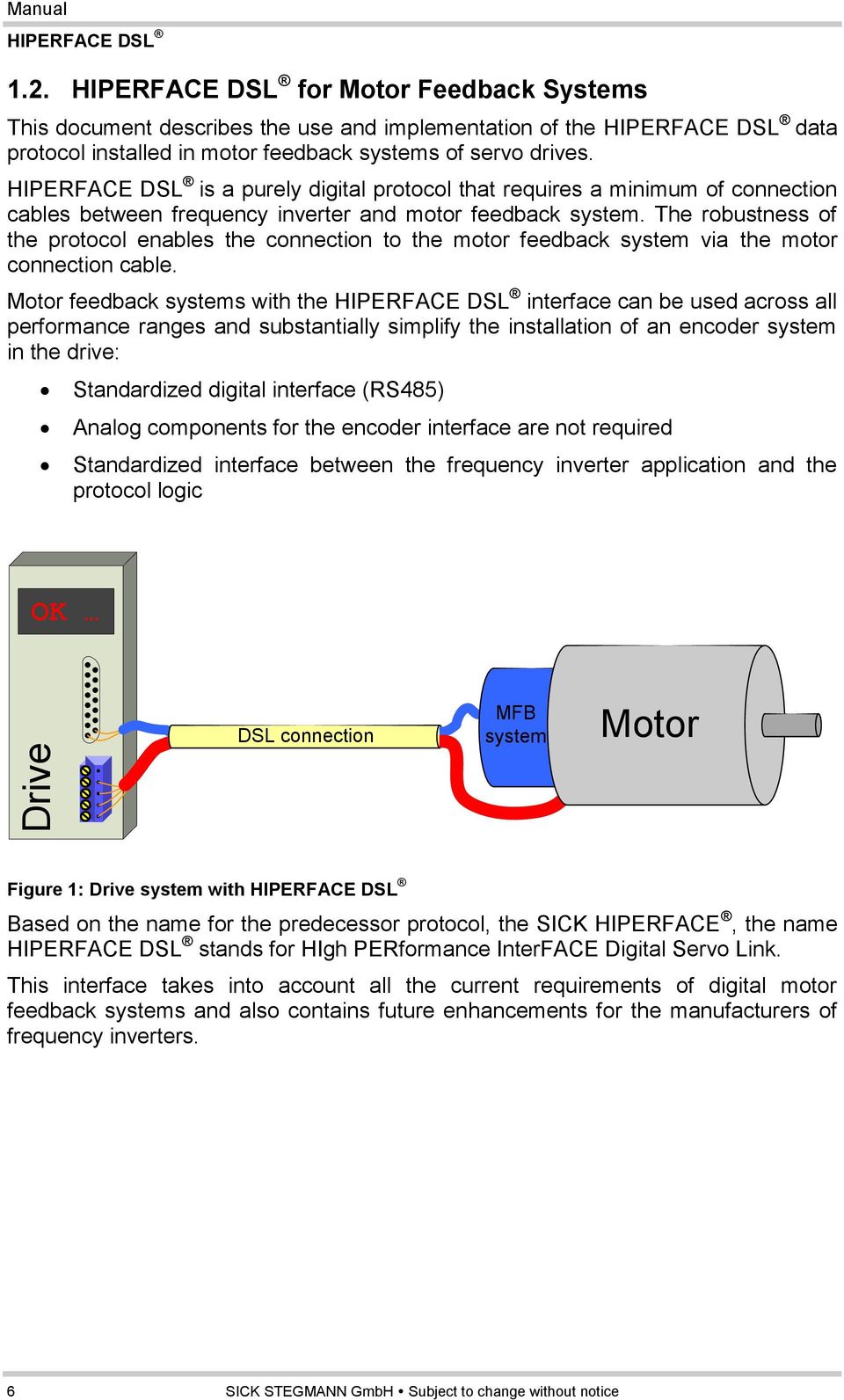
7 1.2. for Motor Feedback Systems This document describes the use and implementation of the data protocol installed in motor feedback systems of servo drives. is a purely digital protocol that requires a minimum of connection cables between frequency inverter and motor feedback system. The robustness of the protocol enables the connection to the motor feedback system via the motor connection cable. Motor feedback systems with the interface can be used across all performance ranges and substantially simplify the installation of an encoder system in the drive: Standardized digital interface (RS485) Analog components for the encoder interface are not required Standardized interface between the frequency inverter application and the protocol logic OK Drive DSL connection MFB system Motor Figure 1: Drive system with Based on the name for the predecessor protocol, the SICK HIPERFACE, the name stands for HIgh PERformance InterFACE Digital Servo Link. This interface takes into account all the current requirements of digital motor feedback systems and also contains future enhancements for the manufacturers of frequency inverters. 6 SICK STEGMANN GmbH Subject to change without notice
8 1.3. Features of Manual Some of the main advantages of are based on the opportunity for connection of the encoder: A digital interface on the frequency inverter for all communication with the motor feedback system. The interface complies with the RS485 standard with a transfer rate of MBaud. Communication with the encoder via a dual cable Power supply and communication with the encoder can be carried out using the same dual cable. This is possible by the enhancement of the frequency - inverter with a transformer. The connection cables to the encoder can be routed as a shielded, twistedpair cable in the power supply cable to the motor. This means that no encoder plug connector to the motor and to the frequency inverter is necessary. The cable length between the frequency inverter and the motor feedback system can be up to 100 m, without degradation of the operating performance. The digital protocol can be used for a variety of frequency inverter applications: For the feedback cycle of the frequency inverter's synchronous cyclic data that enables synchronous processing of position and rotation speed of the encoder. Shortest possible cycle time: 12.1 µs. Transmission of the safe position of the motor feedback system with a maximum cycle time of 192 µs. Redundant transmission of the safe position of the motor feedback system with a maximum cycle time of 192 µs, so that suitable motor feedback systems can be used in SIL2 applications (in accordance with IEC 61508). Transmission of the safe position of the motor feedback system on a second channel with a maximum cycle time of 192 µs, so that suitable motor feedback systems can be used in SIL3 applications (in accordance with IEC 61508). Parameter data channel for bi-directional general data transfer with a band width of up to 340 kbaud. This data includes an electronic type label for designation of the motor feedback system and for storage of frequency inverter data in the motor feedback system. SensorHub channel via which motor data from external sensors is transmitted, that are connected by the SensorHub protocol to the motor feedback system /YE98 SICK STEGMANN GmbH Subject to change without notice 7

9 The protocol is integrated into the frequency inverter in the form of hardware logic. This logic circuit is supplied by several manufacturers as an IP Core for FPGA components (FPGA = Field Programmable Gate Array). The available protocol logic enables free routing when installing the IP Core. The protocol circuit can be installed along with the frequency inverter application on the same FPGA. Choice between full-duplex SPI interface (SPI = serial peripheral interface) or parallel interface between protocol logic and frequency inverter applications for standardized access to process data (position, rotation speed) and parameters. Fast additional full-duplex SPI interface between protocol logic and frequency inverter applications for standardized access to secondary position data Additional configurable SPI interfaces for output of the data from external sensors. Configurable interrupt output 1.4. Associated documents Along with this manual, the following documents are relevant for the use of the interface: Document number Title Status safety manual Table 1: Associated documents Individual encoder types with the interface are described with the following documents: Data sheet Operating instructions Errata document 8 SICK STEGMANN GmbH Subject to change without notice

10 2. Protocol overview Manual is a fast digital protocol for motor feedback systems for the connection between servo drive and motor feedback system. The protocol is installed in the transport layer in the frequency inverter using a digital logic circuit (DSL Master IP Core). The position data are generated in two different ways in, either in free running mode, in which the position values are sampled and transmitted as quickly as possible, or in SYNC mode, in which the position data are sampled and transmitted synchronously with a defined clock signal. With a frequency inverter application, this clock signal is normally the clock feedback of the frequency inverter. In SYNC mode the protocol matches the time points for the sampling of the data without time fluctuations with the clock coming from the frequency inverter. For each frequency inverter cycle at least one position value is sampled and transmitted with constant latency to the DSL Master. As the protocol matches the internal data transfer speed to the frequency inverter cycle, the overall transfer rate of the depends on the frequency inverter clock. The protocol package is matched to the various lengths, see Figure 2. Provided the frequency inverter cycle is long enough, additional sampling points can be positioned in the frequency inverter cycle, known as "extra" packages. The number of additional packages is programmed by the user with a distribution value. The number of packages transmitted per frequency inverter cycle cannot be selected at random, as the lower and upper range length of a protocol package must be adhered to. This must be taken into account when setting the distribution value. In free running mode, the frequency inverter cycle is not taken into account for sampling and transmission and the protocol uses the minimum package length. It must be noted that the minimum package length in free running mode is shorter than the minimum package length in SYNC mode. Table 2 shows the dependency of the lengths of the protocol packages using examples for the length of the frequency inverter cycle /YE98 SICK STEGMANN GmbH Subject to change without notice 9


11 Figure 2: Length of protocol packages Inverter cycle frequency (khz) Length of the frequency inverter cycle (µs) Length of the protocol package (µs) Protocol packages per frequency inverter cycle to to to Free running Table 2: Frequency inverter cycle and length of protocol packages 10 SICK STEGMANN GmbH Subject to change without notice


12 In, the data are transmitted over several channels. Each individual channel is adapted to different requirements according to its content. The cycle time of each individual channel varies with the length of the basic protocol package. Figure 3: Data channels in Table 3 gives an overview of the characteristics of the various channels. It should be noted that the minimum cycle time and the maximum band width only apply if the maximum number of sample points per frequency inverter cycle was programmed (refer to "Register synchronization control", section 5.3.2). Channel in Function Cycle time (µs) Band width (kbaud) Process data channel Fast position, rotation speed 12.1 to to 669 Safe Channel 1 Absolute / safe position, status of Channel to to 334 Safe Channel 2 Absolute / safe position, status of Channel to to 334 Parameter channel General data, parameters Variable 330 to 167 SensorHub channel External data 12.1 to to 334 Table 3: Channels for protocol data /YE98 SICK STEGMANN GmbH Subject to change without notice 11

13 2.1. Process data channel The fast position value of the motor feedback system is transferred on the process data channel synchronously with the position requests that are controlled by the signal at the SYNC input of the frequency inverter cycle. The process data channel is the fastest channel of the protocol. Every protocol package transferred contains a complete update of the content of this channel. This content consists of increments to rotation speed and fast position that are used as feedback parameters for the control loop of the motor drive (see sections and ). If the fast position from the process data channel cannot be calculated (either due to transmission or due to sensor errors), estimation is made by the DSL Master based on the last two available position values of Safe Channel 1. The worst case deviation from the actual mechanical position is also provided. CAUTION ACHTUNG For reliable position estimation, the user needs to provide application specific information about maximum speed and maximum acceleration. Please see section for details Safe Channel 1 The safe position value of the motor feedback system is transferred on the Safe Channel as an absolute value. In addition, the status of the encoder is reported on this channel in the form of errors and warnings. The safe position value transferred on the Safe Channel is not synchronous with the frequency inverter cycle signal at the SYNC input. The safe position is used by the DSL Master IP Core to check the fast position value of the process data channel and can be used by the frequency inverter application for the same purpose. Where there are deviations between the safe and the fast position values, an error message is generated (see section 4.4.2). In this case, the protocol replaces the fast position with the estimated position. Please see section for details. In each package of the safe channel, a collection of status bits is transferred that reflects the error and warning condition of the motor feedback system. It should be noted that each bit of the summary byte of the Safe Channel refers to one status byte the motor feedback system. Each status byte of the encoder can be read with a "short message" (see section 6.5.1). 12 SICK STEGMANN GmbH Subject to change without notice

14 2.3. Safe Channel 2 Manual In Safe Channel 2, copies of the absolute position value and the status of the motor feedback system are transferred. This information can be discarded in standard applications. The Safe Channel 2 is only accessible in the safety variants of the DSL Master IP Core Parameters Channel The Parameters Channel is the interface, over which the frequency inverter application reads and writes parameters of the motor feedback system. In addition to the main task of position measurement, motor feedback systems with the interface also have various internal resources installed. These resources are accessible via the Parameters Channel. Examples of these resources are temperature measurements, monitoring - mechanisms for correct functioning, product data (the "electronic type label") or freely programmable data fields. It should be noted that the resources actually installed for DSL products differ and are listed in the relevant product data sheet. There are two types of communication on the Parameters Channel: - "Short message" transaction - "Long message" transaction A "short message transaction allows access to resources that have an influence on the protocol interface and are used for monitoring them. This includes detailed status and error messages for the motor feedback system and indications of the signal strength on the DSL connection. As a "short message" transaction is processed directly by the interface logic of the motor feedback system, this transaction is completed in a comparatively short time. A "long message" transaction allows access to all the other resources of the motor feedback system. Unlike a "short message" transaction, a "long message" normally requires processing by the motor feedback system processor and therefore has does not have a response time that can be defined in advance. It should be noted that in, a maximum of one "short message" and one "long message" are processed at any time /YE98 SICK STEGMANN GmbH Subject to change without notice 13


15 2.5. SensorHub Channel Data from additional external sensors can be transferred on the SensorHub Channel that can be used in the frequency inverter system. External sensors must be connected to the motor feedback system via the SensorHub interface. Various sensors or sensor networks are accessible via this interface and can be selected using. The configuration of external sensors is carried out via the Parameters Channel, whilst the data are selected via the SensorHub Channel. The transfer of protocol packages in the SensorHub Channel takes place synchronously with the DSL transfer and as an extension of the frequency inverter cycle signal that is present at the DSL Master SYNC input. Depending on the use of the SensorHub interface, external data can therefore be sampled and transferred synchronously. The protocol in the SensorHub Channel is not monitored by. Apart from the monitoring of the data transfer quality, there are no protocol mechanisms on this channel. Figure 4: SensorHub interface 14 SICK STEGMANN GmbH Subject to change without notice

16 3. Hardware installation Manual The installation of in a drive system requires an interface circuit with special components as well as the installation of a digital logic core for an FPGA component. The interface circuit is described thoroughly in this chapter. The chapter also contains recommendations for the selection of components. The digital logic core (IP Core) is supplied by SICK for prescribed FPGA types. In addition, the type of cable recommended for the connection between the frequency inverter and the motor feedback system is described thoroughly in this chapter. It may also be possible to use other sorts of cable. These must be tested before use, however. As a physical layer, uses a transfer in accordance with EIA-485 (RS-485). Valid RS-485 interface drivers must comply with the conditions in Table 4. Characteristic Value Units Transfer rate >20 MBaud Permitted common mode voltage -7 to +12 V Receiver: Differential threshold < 200 mv voltage Load resistance < 55 Ohm Receiver running time delay < 60 ns Sender running time delay < 60 ns Sender power-up delay < 80 ns Sender power-down delay < 80 ns Sender rise time < 10 ns Sender dropout time < 10 ns Protection against short-circuit Protection against bus conflict Table 4: Valid RS-485 interface drivers 3.1. Interface circuit can be used in connection with two different interface circuit configurations. Each configuration requires a different sort of connection cable (see section 3.3). Please note that the use of four core cable is no longer recommended for the motor cable Separate encoder cable - four core cable When using a separate encoder cable (see section 3.3.1), the smallest interface circuit can be used. The separate encoder cable requires a four core connection. In connection with the associated table, Figure 5 below gives the specification of the interface circuit /YE98 SICK STEGMANN GmbH Subject to change without notice 15

17 C1 DSL EN U2 DE VCC RE\ VDC PWR+ DSL IN DSL OUT R D VSS A B C2 R1 R2 DATA+ DATA- PWR- Figure 5: Interface circuit with separate encoder cable Recommended components for the interface circuit are set out in Table 5 Component Part Manufacturer C1 Ceramic capacitor 100 nf C2 Ceramic capacitor 2.2 µf, 16 V R1, R2 Resistors 56R U2 RS485 transceiver SN65LBC176A SN75LBC176A Table 5: Components for the interface circuit with separate encoder cable. Texas Instruments Texas Instruments Integrated cable - two core cable For a connection via a two core cable integrated in the motor cable, (see section 3.3.2), the data cables must be provided with a transformer to raise the common mode rejection ratio. To feed the supply voltage into the data cables choke coils are also required. In connection with the associated table, Figure 6 below gives the specification of the interface circuit. DSL EN DSL IN DSL OUT U2 DE RE\ R D VCC VSS C1 A B C2 R1 R VDC TR1 C3 C4 L1 L2 DSL+ DSL- Figure 6: Interface circuit with two core cable (integrated in cable) Recommended components for the interface circuit are set out in Table SICK STEGMANN GmbH Subject to change without notice

18 Component Part Manufacturer C1 Ceramic capacitor 100 nf C2 Ceramic capacitor 2.2 µf, 16 V C3, C4 Ceramic capacitor 470 nf, 50 V L1, L2 Choke coils , 100 µh ELL6SH101M, 100 µh R1, R2 Resistors 56R U2 RS485 transceiver SN65LBC176A SN75LBC176A Würth Elektronik Panasonic Texas Instruments Texas Instruments TR1 Transformer PE-68386NL 78602/1C B78304B1030A /1C Pulse Engineering Murata Epcos Epcos Table 6: Components of the interface circuit with two core cable (integrated in cable) Motor feedback voltage supply Motor feedback systems with have been developed for operation with a supply voltage of 7 to 12 V. The voltage supply is measured at the encoder plug connector. Table 7 below describes the specification for the power supply. Parameter Switch-on voltage ramp Inrush current Operating current Table 7: Voltage supply Value Max. 180 ms from 0 to 7 V Max. 3.5 A (0 to100 µs) Max. 1 A (100 µs to 400 µs) Max. 250 ma at 7 V /YE98 SICK STEGMANN GmbH Subject to change without notice 17

19 3.2. FPGA IP Core The frequency inverter system communicates with the DSL motor feedback system via a special protocol logic circuit that is designated as the DSL Master. The circuit is supplied by SICK and must be installed in an FPGA component. It is supplied as an Intellectual Property Core (IP Core). The DSL Master IP Core is supplied in different forms, depending on the FPGA vendor preferred by the user (compiled netlist or encrypted VHDL). If there is sufficient space in the FPGA being used, the DSL Master can be installed in the same component as the frequency inverter application. ACHTUNG CAUTION There are two different IP Cores available, one for standard and one for safety applications. This manual only describes the standard variant. Please choose according to the desired system. For interfacing the IP Core, several options are available. For details of those interface blocks see section 8.1. The following figure show the possible combinations of IP Core and interface block variants. A) B) Parallel interface Standard DSL Master (dslm_n) Serial interface Standard DSL Master (dslm_n) Parallel Bus Drive interface DSL SPI Drive interface DSL SPI Pipeline SPI Pipeline Control signals Test signals Control signals Test signals C) User interface Standard DSL Master (dslm_n) Miscellaneous Drive interface DSL Serial interface SPI SPI Pipeline Control signals Test signals Figure 7: Block diagrams of the "standard" DSL Master IP Core with interfaces 18 SICK STEGMANN GmbH Subject to change without notice

20 Value Parameter Minimumum Maxi- Units Remarks Typical System Clock MHz 100 ppm Interface characteristics Cable transfer rate MBd Reset duration µs Reset is High active Recovery time after communication errors 727 µs Characteristics of the motor feedback system Position resolution per rotation Bit The total can be Number of resolved rotations Bit a maximum of 40 bits Rotation speed 262,000 rad/s 24 bit/rotation Acceleration 670,000 rad/s² 24 bit/rotation Sampling latency 10.5 µs SYNC trigger up to valid position Characteristics of the host interface Frequency inverter cycle time ,950 µs in SYNC mode Frame cycle time µs in SYNC mode Frame cycle time µs In free running mode The SYNC signal Duration of the SYNC signal 0.04 µs must be inactive for at least 0.04 µs per cycle. Jitter of the SYNC signal frequency 26 ns 2 system clock cycles Characteristics of the SPI-PIPE interface blocks SPI-PIPE clock 10 MHz Characteristics of the Parameters Channel Theoretical transfer rate kbd Duration of access to the communications resource 167 1,100 µs "Short message" Duration of access to the encoder resource µs "Long message" Characteristics of the SensorHub Channel Transfer rate kbd Table 8: Characteristics of the DSL Master IP Core /YE98 SICK STEGMANN GmbH Subject to change without notice 19

21 DSL Master inputs / outputs Signal name Type Function rst* Input Master reset (High active) clk* Input Clock input sync* Input Position sampling resolution interrupt Output Configurable interrupt link Output Connection indication pos_ready Output Position data availability indication sync_locked Output Position sampling resolution locked bigend Input Byte sequence choice fast_pos_rdy Output Fast position update indication sample Output DSL bit sampling information estimator_on Output Postion Estimator activated safe_channel_err Output Transmission error in safe channel 1 safe_pos_err Output Safe position not valid acceleration_err Output Fast channel / position error acc_thr_err Output Fast channel / position threshold error encoding_err Output DSL message encoding error dev_thr_err Output Estimator deviation threshold reached aux_signals Output (12) Auxiliary signals dsl_in* Input DSL cable, input data dsl_out* Output DSL cable, output data dsl_en* Output DSL cable transceiver, activation spipipe_ss Input SensorHub SPI choice spipipe_clk Input Serial clock for SPI SensorHub spipipe_miso Output SPI SensorHub, master output data/slave input data online_status_d Output (16) IP Core status information hostd_a Input (7) Host interface address hostd_di Input (8) Host interface data in hostd_do Output (8) Host interface data out hostd_r Input Host interface data read hostd_w Input Host interface data write hostd_f Input Host interface register freeze Table 9: Pin functions of the IP Core interface * these signals must be assigned to physical pins of the FPGA. 20 SICK STEGMANN GmbH Subject to change without notice
22 SYNC signal: The HIPERFACE DSL communication can be established in SYNC mode or free running mode. In free running mode, the IP-Core will use the fastest possible transmission timing and this input should be low (0). Please note that the IP-Core is not bound to any timing of the frequency inverter in this mode. In SYNC mode the frequency inverter clock must be supplied to this input/pin. Please refer to table 8 for the signal specification. This signal triggers position sampling of the DSL encoder. The polarity of the edge can be programmed using the SPOL bit in the SYS_CTRL register. As the frame cycle time must always be within a limited range, a divider for the SYNC frequency has to be chosen accordingly. The divider value needs to be written to the SYNC_CTRL register. In case of the SYNC frequency changing, the IP-Core will synchronize automatically. During this synchronization the former sampling frequency is used. Please note that this synchronization takes a few SYNC periods. Reset signal: rst is the reset input (high active) of the DSL Master IP Core. After start-up (switching on) of the frequency inverter, a reset procedure is mandatory to return the DSL Master IP Core to its initialization condition. The reset procedure is established by the parameters listed in Table10 and quoted in Figure 8. rst a b Switch on Figure 8: Reset procedure Diagram reference Parameters in Table 8 Value (cf. Table 8) a Reset delay Variable b Duration of the reset signal >60 ns Table 10: Reset time sequence. Additional pin functions are described in detail in chapter /YE98 SICK STEGMANN GmbH Subject to change without notice 21
23 3.3. Cable specification The cable recommended for connecting the frequency inverter to the HIPERFACE DSL motor feedback system is specified by the parameters set out in Table 10. These technical data apply to all configurations. In the case of integrated cables (see section 3.3.2), the motor cables are not listed. Characteristic Minimum Typical Maximum Units Length 100 m Impedance at 10 MHz DC loop resistance 0.1 /m Velocity ratio 0.66 c Propagation delay 5 ns/m Limit frequency 25 MHz Maximum current per cable 0.25 A Operating temperature C Table 11: Technical data for the cable Separate encoder cable - four core cables The recommended cross section of the separate encoder cable with four encoder cables is given in Figure 9. Cable Sheath Outer shield Taping Extender Insulation Wire Shield cord Pair shield Twisted pair, shielded Figure 9: Cross section of the separate encoder cable with four encoder cables 22 SICK STEGMANN GmbH Subject to change without notice
24 Integrated cable - two core cable The recommended cross section of the integrated cable with two encoder cables is given in Figure 10. Cable Sheath Outer shield Taping Extender Insulation Wire Shield cord Pair shield Twisted pair, shielded Figure 10: Cross section of the integrated cable with two encoder cables More information relating cable construction and installation are available on the Whitepaper Cable and Connector for Motor and Drive Applications /YE98 SICK STEGMANN GmbH Subject to change without notice 23
25 4. Interfaces The IP Core of the DSL Master includes interfaces to the motor feedback system (DSL Slave) and to the frequency inverter application (see Figure 11). The motor feedback system communicates via a DSL connection with the DSL Master. All data channels between the DSL Master and DSL Slave are routed via this connection. The frequency inverter is connected via one interface (choice of SPI or parallel bus) and several control signals. In addition, the frequency inverter provides a clock signal (CLK) and a reset signal (RST) to the DSL Master IP Core. By means of these signals, a defined start-up performance is achieved. According to the requirements of the particular application, an optional serial interface (SPI-PIPE) can be employed to use the SensorHub Channel (see Section 2.5, SensorHub Channel). The various interfaces correspond to the tasks described in Table 12. OK Inverter rst clk Control signals Test signals Drive interface SPI-PIPE Drive Application rst clk Control signals Test signals Drive interface SPI-PIPE DSL Master DSL Request DSL Response MFB system Figure 11: DSL system interfaces Interface Type Function Drive interface Full duplex SPI -or- Parallel bus Register-based access to all DSL Master and DSL Slave functions SPI PIPE SPI with read access Optional register-based access to SensorHub Channel data Control signals Digital in/outputs DSL Master indication and control signals Test signals Digital outputs Test signals for development or fault-finding for a DSL controller CLK Digital input Clock signal for the IP Core circuit RST Digital input Reset signal for the IP Core circuit DSL Half duplex RS485 Connection to the motor feedback system Table 12: Interface functions 24 SICK STEGMANN GmbH Subject to change without notice
26 4.1. Drive interface Manual The drive interface forms the central communications interface between the frequency inverter application and the DSL Master IP Core. Absolute and fast position data can be read via this interface. The functions of the motor feedback system are also accessible via this interface. The following signals are used for Drive interface: Pin name Type Function online_status_d(0:15) Output IP Core status (see section 5.2) hostd_a(0:6) Input Register address bus hostd_di(0:7) Input Register input data bus hostd_do(0:7) Output Register output data bus hostd_r Input Read signal hostd_w Input Write signal hostd_f Input Freeze signal Table 13. Drive interface signals. Example installations of interface blocks for the Drive interface of the DSL Master are supplied together with the IP Core. These examples include a serial SPI interface and a parallel Texas Instruments EMIFA interface. For more information please see section SPI PIPE Interface The SPI PIPE is a write-protected Serial Peripheral Interface (SPI). SPI PIPE is an optional communication channel between the frequency inverter application and the DSL Master IP Core. Read processes on the SensorHub Channel can be carried out via this interface. Alternatively, this data can also be read from the registers by standard transactions via Drive interface. The type of access to the SensorHub Channel is selected by setting or deleting the SPPE bits in the SYS_CTRL register (see section 5.3.1). If the SPPE bit is deleted, the data and the status of the SensorHub channel are accessible via the DSL Master PIPE_S (2Dh) and PIPE_D (2Eh) registers. If the SPPE bit is set, the SensorHub Channel is read using the SPI PIPE "Read Pipeline" transaction. SPI PIPE should be activated if, at a fast frequency inverter cycle, the bandwidth of Drive interface is insufficient to access position and pipeline data, or if the pipeline data is being processed by another frequency inverter application resource. It should be noted that in every case, the configuration of external sensor components at the SensorHub is carried out via the DSL Master Parameters Channel. The SPI PIPE provides only one read access to the SensorHub Channel (see section 2.5, SensorHub Channel) /YE98 SICK STEGMANN GmbH Subject to change without notice 25
27 The SensorHub Channel data is kept in a FIFO (First In First Out) buffer that can hold 8 bytes. In addition, for each data byte, status information is also stored in the FIFO buffer (see sections and ). It should be noted that the FIFO buffer can only store 8 bytes of SensorHub Channel data. If the buffer is not read quickly enough, old data will be overwritten. This is indicated by a flag in the FIFO buffer status information. The SPI Master for the SPI PIPE is the frequency inverter application. The SPI functions "Slave Selection" (Pin: spipipe_sel) and "clock" (Pin: spipipe_clk) are controlled by the frequency inverter application. The SPI function "Data, Master input Slave output" (Pin: spipipe_miso) is controlled by the DSL Master. SPI PIPE has the following SPI characteristics: - PHA = 1 (Sampling for clock trailing edge, data changes for clock leading edge) - POL = 0 (Basic clock value) The data with the highest value bit (MSB) is given first. When accessing the SensorHub Channel via the SPI PIPE, the first four bits of the status buffer (0101) show a different value for each transaction, in order to check the correct function of the interface SPI-PIPE timing The time sequence for SPI PIPE is shown in the time sequence diagram (Figure 12) below and in Table 15. spipipe_clk spipipe_sel spipipe_miso a b c POL=0 d e f PHA= n-1 n Figure 12: SPI-PIPE interface time control Diagram Description Minimum Maximum Units reference A Creation of spipipe_sel before spipipe_clk 30 ns B Time for spipipe_clk high 30 ns C Time for spipipe_clk low 30 ns D spipipe_sel pulse width 30 ns E Delay spipipe_miso after spipipe_sel high ns F Delay spipipe_miso after spipipe_clk high ns Table 14: SPI-PIPE time control 26 SICK STEGMANN GmbH Subject to change without notice
28 Read pipeline The SPI PIPE transaction "Read Pipeline" is used for access to the FIFO buffer values that contain the data and status of the SensorHub Channel. Symbol Meaning PIPE STATUS SensorHub Channel status (see section ) PIPE DATA SensorHub Channel data (see section ) Table 15: "Read Pipeline" transaction spipipe_sel spipipe_clk spipipe_miso PIPE STATUS PIPE DATA Figure 13: "Read Pipeline" transaction /YE98 SICK STEGMANN GmbH Subject to change without notice 27
29 4.3. Control signals Various control signals are available between the DSL Master and the frequency inverter application to configure the performance of the IP Core or to carry out fast monitoring of the IP Core status SYNC signal sync is a DSL Master digital input. One edge on this pin triggers a position sampling. The polarity of the edge can be programmed using the SPOL bit in the SYS_CTRL (00h) register. The protocol requires a constant frequency of the signal at this pin, with deviations permitted within a set tolerance band. At start-up, the protocol synchronizes the protocol frame with the signal frequency at sync. If the sync signal frequency is outside the tolerance range, re-synchronization of the protocol is triggered. During the time that the re-synchronization is taking place, sampling is carried out with the former sync frequency until the re-synchronization is complete. For more details on the sync signal also see section INTERRUPT signal interrupt is a DSL Master digital output. interrupt is set to "1" if an interrupt condition has been fulfilled in the DSL-Master. The interrupt conditions are set using the registers MASK_H, MASK_L and MASK_SUM (see sections and 5.3.6). During each write process in one of the registers EVENT_H or EVENT_L, the interrupt output is triggered until the current SPI transaction has ended LINK signal link is a DSL Master digital output. link reflects the content of the LINK bit in the MASTER_QM register (see section 5.3.3) and therefore indicates whether the DSL Master has produced a communications link to a connected motor feedback system. link is intended to be a control signal for an LED display, but can also be used to control the start-up performance (see section 6.1) or for global error handling. link is reset if communication faults are detected. 28 SICK STEGMANN GmbH Subject to change without notice
30 FAST_POS_RDY signal fast_pos_rdy is a DSL Master digital output. Manual fast_pos_rdy signals that a new fast position value is available and permits an event-based reading of the position for incorporating latency reduction. fast_pos_rdy is always available, even if the position value is invalid or no connection to the encoder has been established. The timing is according to the figure 14 below. fast position available fast_pos_rdy sync Figure 14: fast_pos_rdy indication. Dependent upon the configuration in the register system control (see section 5.3.1), fast_pos_rdy displays either only the availability of positions based on user requirements (edge at sync input) or all transmitted positions SYNC_LOCKED signal sync_locked is a DSL Master digital output. sync_locked indicates whether the sync signal was correctly passed to the encoder, or whether the IP Core is still in a synchronization phase. sync_locked drops to 0 when the provided sync is more than two clock cycles earlier or later than expected BIGEND signal bigend is a DSL Master digital input. The byte sequence of the address allocation for registers can be influenced via bigend (see section 8.1.4). The byte sequence is based on 32 bit-wide data words. The selection influences the allocation independently of the interface block used. Table 16 below lists the selection options for bigend. Value Address allocation byte sequence 0 Little endian 1 Big endian Table 16: bigend selection /YE98 SICK STEGMANN GmbH Subject to change without notice 29

31 4.4. Test signals To support development or fault-finding for controllers that have a DSL interface integrated, the DSL Master supplies some test signals SAMPLE signal sample is a DSL Master digital output. The sample signal is set at the sampling time point of each bit that is transmitted from the DSL motor feedback system. It consists of 50 pulses from Channel 1 followed by a bit pause and 10 pulses from Channel 2 of the motor feedback system. Figure 15: Sample signal The sample signal can be used for eye diagrams to measure time and voltage margins during signal transmission. When making the evaluation, signal delays in the DSL Master must be taken into account. The rising edge of the sample signal is offset by 40 ns from the line driver signal. The time delay of the line driver must also be taken into account. Typically this is 13 ns ESTIMATOR_ON signal estimator_on is a DSL Master digital output. The estimator_on signal is set if some event leads to the transmitted fast position (see ) being invalid and the position estimator supplying the values. Such events are: The DSL motor feedback system reporting a position error A coding error in transmission of the fast position A check-sum error in transmission of the fast position Realignment from fast to safe position The protocol is re-synchronizing following a break in the link The estimator_on signal can be used to carry out a statistical analysis of the incidence of errors in the DSL system. For more information, please refer to section SICK STEGMANN GmbH Subject to change without notice
32 DEV_THR_ERR signal dev_thr_err is a DSL Master digital output. If the fast position from the process data channel cannot be calculated (either due to transmission or due to sensor errors), estimation is made by the DSL Master based on the last two available position values of the Safe Channel. The worst case deviation from the actual mechanical position is also provided, referring to a userdefined parameter for the maximum possible acceleration in the application (fast position acceleration boundary, see section ). A threshold can be set up for a worst case deviation to raise the dev_thr_err output. The threshold is a user defined parameter for the maximum tolerable deviation in the application (fast position estimator deviation, see section ). dev_thr_err indicates whether the maximum tolerable deviation is violated ( 1 ) or kept ( 0 ) SAFE_CHANNEL_ERR signal safe_channel_err is a DSL Master digital output. The safe_channel_err signal is set if some event leads to the safe position (see ) being invalid. Such events are: A coding error in transmission of the safe position A check-sum error in transmission of the safe position The safe_channel_err signal can be used to carry out a statistical analysis of the incidence of errors in the DSL system SAFE_POS_ERR signal safe_pos_err is a DSL Master digital output. safe_pos_err is a DSL Master digital output. The safe_pos_err signal is set if the safe position of Safe Channel 1 is not updated or it has never been written since the startup. Another possible cause can be the DSL motor feedback system reporting a position error ACCELERATION_ERR signal acceleration_err is a DSL Master digital output. The acceleration_err signal is set if an encoding error was detected after transmission of a fast position value. If the acceleration_err signal is set the error counter acc_err_cnt will be incremented with each transmission (see section ). As soon as the acceleration_err signal is reset the error counter acc_err_cnt will be set to 0 again /YE98 SICK STEGMANN GmbH Subject to change without notice 31
33 ACC_THR_ERR signal acc_thr_err is a DSL Master digital output. The acc_thr_err signal is set if the threshold programmed in register acc_err_cnt is exceeded. The acc_thr_err signal can be used to implement a fault-tolerant evaluation in the drive. For this the maximum position deviation can be calculated from the number of transmission errors ENCODING_ERR signal encoding_err is a DSL Master digital output. The encoding_err signal is set if the underlying 8B/10B encoding of a DSL frame transmission is disturbed. The encoding_err signal can be used to make a statistical analysis of the bit error rate of a DSL system. 32 SICK STEGMANN GmbH Subject to change without notice
34 5. Register diagram Manual All IP Core registers and functions can be accessed via drive interface. As an option, the SensorHub Channel data is accessible via the SPI PIPE interface. In addition, the DSL Slave interface registers are mirrored as decentralized registers. The address area 40h to 7Fh is intended for this. The addressing of these registers is identical to the addressing of the registers in the DSL Master. The answer to the transaction is, however, delayed and must be read individually (see under "Short message", in section 6.5.1). Figure 16 below shows via which interface a connection to which register block is established. DSL Master Primary functions 00h 01h Drive interfacexx Registers for all main functions 2Dh 2Eh 3Eh SPI-PIPEx (optional) 3Fh 40h DSL Slave Remote Registers 41h 7Eh 7Fh Figure 16: Register block overview /YE98 SICK STEGMANN GmbH Subject to change without notice 33
35 5.1. Explanation of the registers In the following description of the registers, symbols are used to describe the standard value of a bit following a reset. Additional symbols are used to describe the functions provided to the frequency inverter application for this bit. The bit is described according to the following example: "Function" "Reset value", e.g. "R/W-0" Function symbol Meaning R Bit can be read. W Bit can be set and deleted. C Bit can only be deleted. X Bit is not installed and will always be read as "0". Table 17: Function symbols for bits Reset value Meaning 0 The bit is deleted after a reset. 1 The bit is set after a reset. x After a reset, the bit has no defined value. - In the register diagram: The bit is not installed and will always be read as "0". Table 18: Symbols for bit reset values It should be noted that read access to a bit that can only be written ("W") always returns the value "0". If a register address that is not used is read, the result will be 0 as well. 34 SICK STEGMANN GmbH Subject to change without notice
36 5.2. Online Status Manual The Online Status is a non-storing copy of registers EVENT_H and EVENT_L. The static information in these registers must be deleted by the user after the read process, by writing the value "0" to the corresponding bit in the register, whilst the Online Status only shows the current status without storing previous indications. The signal name of the Online Status is online_status_d (with d indicating drive). online_status_d is given in two bytes. If an SPI block is used for interfacing the IP Core, online_status_d is transmitted in each transaction in the first two bytes via the spi_miso output. When a parallel bus interface is used for drive interface, online_status_d has 16 dedicated output signals available. It should be noted that when the parallel bus interface is used the 16 signals of the Online Status are not frozen during a read access. If required, the user can insert a Latch (e.g. using the hostd_f signal). Bit 7 Bit 6 Online Status, High Byte R-0 R-0 R-1 R-1 R-1 R-1 R-1 R-1 INT SUM SCE FIX1 POS VPOS DTE PRST Bit 7 Bit 0 INT: Status of the Interrupt output This bit represents an exception to the Online Status, as this bit does not relate to an event indication. INT provides the value of the physical INT output so that request management (polling) can be established. The importance of this flag depends on the Interrupt sources monitored. 1 = interrupt output on "High" level 0 = interrupt output on "Low" level SUM: Summary byte 1 = The last valid value from SUMMARY was not zero. The importance of this flag depends on the particular error source that leads to a set SUMMARY (see section ). 0 = The last valid value from SUMMARY was zero /YE98 SICK STEGMANN GmbH Subject to change without notice 35
37 Bit 5 Bit 4 Bit 3 Bit 2 SCE: CRC error on the Safe Channel 1 = The last Safe Channel CRC received was wrong. It is expected that the last safe position transmitted (see section ) is invalid. 0 = The last Safe Channel CRC received was correct. FIX1: This bit always gives a "1". For SPI interfaces, this is used for checking the spi_miso pin for stuck-at- '0' faults. POS: Estimator turned on 1 = A source of an error in the fast position was identified or an alignment procedure is currently being carried out. It is probable that the last fast position is invalid. Be aware that the fast position read through drive interface is provided by the estimator. 0 = No fast position error. VPOS: Safe position invalid 1 = An error in the safe position was identified. It is expected that the safe position transmitted from the encoder is invalid. 0 = The last safe position received was correct. Bit 1 DTE: Deviation Threshold Error (see section 4.4.3) Bit 0 1 = Current value of deviation greater than the specified maximum. 0 = Current value of deviation smaller than the specified maximum. PRST: Protocol reset 1 = IP-Core has restarted the protocol. 0 = IP-Core running. Bit 7-6 Bit 5 Bit 4 Bit 3 Online Status, Low Byte X-0 X-0 R-0 R-0 R-0 R-1 R-0 R-0 POSTX MIN ANS FIX0 QMLW FREL FRES Bit 7 Bit 0 POSTX1:POSTX0: Position transmission status 00: Position request is transmitted to the DSL encoder. 01: Safe Channel was correctly transmitted. 10: Fast position present (see section ). 11: Safe Channel 2 was correctly transmitted. MIN: Acknowledgment of message initialization 1 = The DSL encoder sends a figure by which the initialization of the Parameter Channel is acknowledged. 0 = Parameter Channel not functioning. ANS: Incorrect answer detected. 1 = The last answer to a long message was damaged. 0 = No error detected in the last answer to a long message. FIX0: This bit always gives a "0". For SPI interfaces, this is used for checking the spi_miso pin for stuck-at-'1' faults. 36 SICK STEGMANN GmbH Subject to change without notice
38 Bit 2 QMLW: Quality monitoring at Low level (see section 5.3.3) 1 = Current value of quality monitoring less than = Current value of quality monitoring greater than or equal to 14. Bit 1 Bit 0 FREL: Channel status for long message. 1 = The channel for the long message is free. 0 = The channel for the long message is in use. FRES: Channel status for the "short message". 1 = The channel for the "short message" is free. 0 = The channel for the "short message" is in use DSL Master function register The protocol logic controls the performance of the DSL Master via the registers in the DSL Master IP Core on drive interface. These registers are also used for accessing the position values. The table below contains a list of all the function registers available in the IP Core. The addresses given below are referencing a big-endian addressing. For a table stating the register addresses depending on the endianness, see section /YE98 SICK STEGMANN GmbH Subject to change without notice 37
39 Addr Designation Bit 7 Bit 6 Bit 5 Bit 4 Bit 3 Bit 2 Bit 1 Bit 0 Value at reset 00h SYS_CTRL PRST MRST FRST LOOP PRDY SPPE SPOL OEN h SYNC_CTRL ES h MASTER_QM LINK Quality monitoring h EVENT_H INT SUM SCE - POS VPOS DTE PRST h EVENT_L - - MIN ANS - QMLW FREL FRES h MASK_H - MSUM MVRT - MPOS MVPOS MDTE MPRST h MASK_L - - MMIN MANS - MQMLW MFREL MFRES h MASK_SUM MSUM7: h EDGES Bit sampling pattern Ah DELAY RSSI Cable delay Bh VERSION Coding IP Core version number Dh ENC_ID2 - SCI ENC_ID19: Eh ENC_ID1 ENC_ID15: Fh ENC_ID0 ENC_ID7: h POS4 Fast position, byte h POS3 Fast position, byte h POS2 Fast position, byte h POS1 Fast position, byte h POS0 Fast position, byte h VEL2 Speed, byte h VEL1 Speed, byte h VEL0 Speed, byte h SUMMARY SUM7: h VPOS4 Safe position, byte Ah VPOS3 Safe position, byte Bh VPOS2 Safe position, byte Ch VPOS1 Safe position, byte Dh VPOS0 Safe position, byte Eh VPOSCRC_H CRC of the safe position, byte Fh VPOSCRC_L CRC of the safe position, byte h PC_BUFFER0 Parameters Channel, byte h PC_BUFFER1 Parameters Channel, byte h PC_BUFFER2 Parameters Channel, byte h PC_BUFFER3 Parameters Channel, byte h PC_BUFFER4 Parameters Channel, byte h PC_BUFFER5 Parameters Channel, byte h PC_BUFFER6 Parameters Channel, byte h PC_BUFFER7 Parameters Channel, byte h PC_ADD_H LID LDIR LOFF LIND LLEN LADD9: h PC_ADD_L LADD7: Ah PC_OFF_H LID LOFFADD14: Bh PC_OFF_L LOFFADD7: Ch PC_CTRL LSTA Dh PIPE_S POVR PEMP PERR PSCI Eh PIPE_D SensorHub FIFO, output Fh PC_DATA "Short message" data h ACC_ERR_CNT Acc. error threshold/counter h MAXACC Acc. Res. Acc. Mantissa Ah MAXDEV_H Max. position deviation, byte Bh MAXDEV_L Max. position deviation, byte Fh DUMMY No data Table 19: Description of the registers in DSL Master, drive interface 38 SICK STEGMANN GmbH Subject to change without notice
40 System control The system control register SYS_CTRL contains the main control bits of the DSL Master. It should be noted that apart from a reset of the Master, all system control bits can only be set and deleted by the user. Register 00h: Bit 7 Bit 6 Bit 5 Bit 4 Bit 3 Bit 2 Bit 1 Bit 0 System control R/W-0 R/W-0 R/W-0 R/W-0 R/W-0 R/W-0 R/W-0 R/W-0 PRST MRST FRST LOOP PRDY SPPE SPOL OEN Bit 7 Bit 0 PRST: Protocol reset 1 = A forced reset of the protocol status will be initiated. If the bit is deleted, a restart of the connection is triggered. 0 = Normal protocol action MRST: Messages reset 1 = The Parameters Channel is reset. Current short and long messages are discarded. 0 = Normal Parameters Channel action FRST: Pipeline FIFO, reset 1 = The FIFO is reset. Data is not stored and cannot be read. 0 = Normal FIFO access LOOP: Test drive interface Value for the read back test for drive interface. This value has no other purpose. PRDY: POS_READY mode. 1 = pos_ready shows time of receipt of all position transmissions. 0 = pos_ready shows only the time of receipt of position transmissions following a control clock (sync input). SPPE: SPI-PIPE activation 1 = SPI-PIPE activated. Access to pipeline status and data via SPI-PIPE. The registers PIPE_S and PIPE_D are read as "0". 0 = SPI-PIPE deactivated. Access to pipeline status and data via the registers PIPE_S and PIPE_D. SPOL: Polarity of the synchronization pulse 1 = The sync trailing edge is used. 0 = The sync leading edge is used. OEN: Activation of the output 1 = The DSL cables are activated for output to the DSL Slave. 0 = The impedance of the DSL cable is high /YE98 SICK STEGMANN GmbH Subject to change without notice 39
41 Synchronization control The SYNC_CTRL register for control of the synchronization contains the bit with which the synchronization source for position sampling is controlled. Register 01h: Bit 7-0 Synchronization control W-0 W-0 W-0 W-0 W-0 W-0 W-0 W-1 ES Bit 7 Bit 0 ES: External synchronization = Position sampling during free running at the shortest cycle time. All other values = Position sampling with the sync signal synchronized. The value from ES determines the number of position samplings carried out in one sync cycle. The user must match the number of samplings per cycle to the shortest frame length (see section 6.3.3) Quality monitoring The MASTER_QM quality monitoring register contains the quality monitoring value for the data connection. As soon as the DSL Master detects events that indicate an improvement or degradation of the quality of the data connection, these events are indicated as values higher or lower than the quality monitoring value (see Table 20). Protocol event Value change in quality monitoring Wrong synchronization in Safe Channel (last byte) -4 Wrong synchronization in Safe Channel (1 st 7 th -6 bytes) RSSI <1-4 Wrong encoding in parameter or SensorHub -1 channels Wrong encoding in process data channel -2 Unknown special characters in the protocol package -2 Any identified error in Safe Channel 1-6 Any identified error in Safe Channel 2-8 Correct synchronization in Safe Channel +1 Correct CRC value in Safe Channel +1 Table 20: Quality monitoring events Quality monitoring is initiated with the value "8". The maximum quality monitoring value is "15". This is the standard value during operation. Particular attention must be paid to the quality monitoring value during the development of a DSL drive controller. If a value lower than "15" is indicated, the cause may be a problem with the connection circuit, particularly if the value is continuously displayed. If the quality monitoring value falls below "14", QMLW information is indicated in Online Status and in the EVENT_L register. 40 SICK STEGMANN GmbH Subject to change without notice
42 If the quality monitoring value falls to "0", a forced reset of the protocol is carried out. This is indicated by the PRST error bit in Online Status and in the EVENT_H register. The MASTER_QM register is write protected. Register 03h: Bit 0 Quality monitoring register R-0 X-0 X-0 X-0 R-0 R-0 R-0 R-0 LINK QM Bit 7 Bit 0 LINK: DSL protocol connection status 1 = Protocol connection between DSL Master and Slave was established. 0 = No connection present or connection error due to a communications error. It should be noted that LINK is also represented at the link interface output (see section 4.3.3). Bit 6-4 Not implemented: Read as "0". Bit 3-0 QM3:QM0: Quality monitoring bits 0000 to 1111: Quality monitoring value. Higher values indicate a better connection. If the quality monitoring reaches the value "0000", a forced reset of the protocol is carried out /YE98 SICK STEGMANN GmbH Subject to change without notice 41
43 Events The EVENT_H/EVENT_L registers contain the messaging bits for all warning and error modes of the DSL system. All messaging bits are set by the DSL Master if a corresponding status is determined. The following bit description lists the effects of warning and error conditions as well as the reactions to errors that must be installed in the frequency inverter application. An event bit that has been set is not reset by the DSL Master. The frequency inverter application must delete bits that have been set. Both edge and level-sensitive flags are present in the EVENT registers. Edgesensitive bits are set when the corresponding status arises. They are only set again if the corresponding status disappears and then arises once more. This is the standard action. The level-sensitive bits set a bit as long as the corresponding status exists. It should be noted that all event register bits are also transferred to Online Status (see sections 5.2 and 6.6.2). The event bits are not static there and contain the actual status of each individual event. Register 04h: Bit 7 Bit 6 Bit 5 High Byte events R-0 R/C-0 R/C-0 X-0 R/C-0 R/C-0 R/C-0 R/C-0 INT SUM SCE POS VPOS DTE PRST Bit 7 Bit 0 INT: Interrupt status This bit reflects the status of the interrupt signal (see section 4.3.2). SUM: Remote event monitoring 1 = The DSL Slave has signaled an event and the summary mask is set accordingly (see registers MASK_SUM and SUMMARY). 0 = All DSL Slave events are deleted. When the SUM bit is set, an error or a warning has been transmitted from the DSL Slave. The frequency inverter application must check the SUMMARY register (see section ) to obtain a detailed description. This bit is level sensitive. SCE: Error on the Safe Channel 1 = Data consistency error on the Safe Channel. 0 = Safe Channel data was correctly transmitted. This error usually indicates a transmission error on the DSL connection. If this error occurs frequently, the wiring of the DSL connection should be checked. If this error occurs continuously, there is probably an error in the motor feedback system. This error affects quality monitoring and produces the QMLW warning or a protocol reset. 42 SICK STEGMANN GmbH Subject to change without notice
44 CAUTION ACHTUNG Manual When this error occurs, the last valid value of the safe position is retained (see section ). Only if a fresh value has been transmitted will the safe position be updated and correspond to the actual position of the motor feedback system. The fast position is not affected by this. Bit 4 Not implemented: Read as "0". Bit 3 POS: Estimator turned on 1 = Fast position data consistency error. The fast position read through drive interface is supplied by the estimator. 0 = The data for the fast position was correctly transmitted. This error usually indicates a transmission error on the DSL connection. If this error occurs frequently, the wiring of the DSL connection should be checked. If this error occurs continuously, there is probably an error in the motor feedback system. CAUTION ACHTUNG When this error occurs, the fast position is updated by the estimator (see section 6.3.1). Bit 2 VPOS: Safe position error 1 = Sensor error. 0 = The safe position is correct. This error usually indicates an encoder sensor error. If this error occurs continuously, there is probably an error in the motor feedback system. When this error occurs, the error value FD FD FD FD FDh is displayed instead of the safe and fast position CAUTION ACHTUNG Bit 1 DTE: Estimator Deviation Threshold Error (see section 4.4.3) 1 = Current value of deviation greater than the specified maximum. 0 = Current value of deviation smaller than the specified maximum. CAUTION ACHTUNG This error message is relevant when the estimator deviation threshold is used. See section for details of this function /YE98 SICK STEGMANN GmbH Subject to change without notice 43
45 Bit 0 PRST: Protocol reset warning 1 = The forced protocol reset was triggered. 0 = Normal protocol action Register 05h: This error message indicates that the protocol connection to the DSL Slave has been re-initialized. This error message can be caused by a frequency inverter application request (PRST bit in SYS_CTRL), generated by the DSL Master itself, or activated via the rst input. The DSL Master causes a protocol reset if too many transmission errors indicate a connection problem (see section 5.3.3). A protocol reset causes a re-synchronization with the DSL Slave that can improve the connection quality. Low Byte events X-0 X-0 R/C-0 R/C-0 R/C-0 R/C-0 R/C-0 R/C-0 MIN ANS QMLW FREL FRES Bit 7 Bit 0 Bit 7-6 Not implemented: Read as "0". Bit 5 MIN: Message initialization 1 = An acknowledgment was received from the Slave for the initialization of a message. 0 = No acknowledgment for the initialization received. Bit 4 When this warning is displayed, the Parameters Channel is still in the initialization status and no "short message" or "long message" can be triggered. This bit is level sensitive. ANS: Erroneous answer to "long message" 1 = An error occurred during the answer to a long message. The effectiveness of the previous transaction is not known. 0 = The last answers to "long messages" were error free. This error indicates that the transmission of an answer from the DSL Slave to the last "long message" failed. The frequency inverter application must send the "long message" again. Bit 3 Not implemented: Read as "0". 44 SICK STEGMANN GmbH Subject to change without notice
46 Bit 2 Bit 1 Bit 0 QMLW: Quality monitoring low value warning 1 = Quality monitoring value (see register 03h) below "14" 0 = Quality monitoring value greater than or equal to "14" This warning indicates that a transmission error occurred at bit level for one of the CRC values. If this error occurs frequently, the wiring of the DSL connection should be checked (also see section 5.3.3). FREL: Channel free for "long message" 1 = A "long message" can be sent on the Parameters Channel. 0 = No "long message" can be sent. If the bit is set, the frequency inverter application can trigger a "long message". Provided no answer has been received from the DSL Slave, this bit remains deleted. As the processing duration of a "long message" in the motor feedback system is not specified, a user time limit condition should be installed via the frequency inverter application. When a time limit is exceeded, the MRST bit in the SYS_CTRL register is set, which causes the Parameters Channel to be reset. FRES: Channel free for "short message" 1 = A "short message" can be sent on the Parameters Channel. 0 = No "short message" can be sent. If the bit is set, the frequency inverter application can trigger a "short message". Provided no answer has been received from the DSL Slave, this bit remains deleted. As the processing duration of a "long message" in the motor feedback system is not specified, a time limit condition is installed in the DSL Master. If the time limit is exceeded, attempts are made again automatically (see under RET bit) /YE98 SICK STEGMANN GmbH Subject to change without notice 45
47 Event mask In the event mask registers MASK_H/MASK_L, the events are set with which the interrupt signal is set. Several events can be masked to trigger an interrupt. In addition, events from the DSL Slave summary can be combined with these events (see section 5.3.6). This is explained in figure 17. SUM7 MSUM7 Status (DSL Slave) Reg 18h SUM6 SUM5 SUM4 SUM3 SUM2 SUM1 SUM0 Status Mask Reg 08h MSUM6 MSUM5 MSUM4 MSUM3 MSUM2 MSUM1 MSUM0 OR SUM MSUM Reg 04h SCE -- POS Reg 06h MSCE -- MPOS Events (DSL Master) Reg 05h VPOS DTE PRST MIN ANS -- Event Mask Reg 07h MVPOS MDTE MPRST MMIN MANS -- OR INT output QMLW MQMLW FREL FRES MFREL MFRES Figure 17: Interrupt masking It should be noted that the SUM bit is an OR connection of all bits of the status summary (SUMMARY register). 46 SICK STEGMANN GmbH Subject to change without notice
48 Register 06h: High Byte event mask X-0 W-0 W-0 X-0 W-0 W-0 W-0 W-0 MSUM MSCE MPOS MVPOS MDTE MPRST Bit 7 Bit 0 Bit 7 Not implemented: Read as "0". Bit 6 Bit 5 MSUM: Mask for remote event monitoring 1 = DSL Slave events that are masked in the SUMMARY register set the interrupt signal. 0 = DSL Slave events that are masked in the SUMMARY register do not set the interrupt signal. MSCE: Mask for transmission errors on the Safe Channel 1 = A transmission error on the Safe Channel sets the interrupt signal. 0 = A transmission error on the Safe Channel does not set the interrupt signal. Bit 4 Not implemented: Read as "0". Bit 3 Bit 2 Bit 1 Bit 0 Register 07h: MPOS: Mask for fast position error 1 = An error in the fast position sets the interrupt signal. 0 = An error in the fast position does not set the interrupt signal. MVPOS: Mask for safe position error 1 = An error in the safe position sets the interrupt signal. 0 = An error in the safe position does not set the interrupt signal. MDTE: Mask for estimator deviation threshold error warning 1 = A high estimator deviation threshold error sets the interrupt signal. 0 = A high deviation threshold error value does not set the interrupt signal. MPRST: Mask for protocol reset warning 1 = A protocol reset sets the interrupt signal. 0 = A protocol reset does not set the interrupt signal. Low Byte event mask X-0 X-0 W-0 W-0 X-0 W-0 W-0 W-0 MMIN MANS MQMLW MFREL MFRES Bit 7 Bit 0 Bit 7-6 Not implemented: Read as "0". Bit 5 MMIN: Mask for message initialization confirmation 1 = The acknowledgment for the initialization of a DSL Slave message sets the interrupt signal. 0 = The acknowledgment for the initialization of a DSL Slave message does not set the interrupt signal /YE98 SICK STEGMANN GmbH Subject to change without notice 47
49 Bit 4 MANS: Mask for erroneous answer to long message 1 = A transmission error during the answer to a long message sets the interrupt signal. 0 = A transmission error during the answer to a long message does not set the interrupt signal. Bit 3 Not implemented: Read as "0". Bit 2 Bit 1 Bit 0 MQMLW: Mask for low quality monitoring value warning 1 = A low quality monitoring value (see registers 03h and 05h) sets the interrupt signal. 0 = A low quality monitoring value does not set the interrupt signal. MFREL: Mask for "channel free for "long message"' 1 = If a "long message" can be sent on the Parameters Channel, the interrupt signal is set. 0 = If a "long message" can be sent on the Parameters Channel, the interrupt signal is not set. MFRES: Mask for "channel free for "short message"' 1 = If a "short message" can be sent on the Parameters Channel, the interrupt signal is set. 0 = If a "short message" can be sent on the Parameters Channel, the interrupt signal is not set Summary mask In the MASK_SUM summary mask register, the DSL Slave collective events are determined with which the SUM event monitoring in the event register as well as the signal to the interrupt pin are set (interrupt). Several events can be masked to trigger an interrupt. In addition, events from the DSL Master can be combined with these events (see section 5.3.4). It should be noted that the MSUM bit from the MASK_H register is an OR connection of all bits of the summary mask register. Register 08h: Summary mask W-0 W-0 W-0 W-0 W-0 W-0 W-0 W-0 MSUM7 MSUM6 MSUM5 MSUM4 MSUM3 MSUM2 MSUM1 MSUM0 Bit 7 Bit 0 Bit 7-0 MSUM7:MSUM0: Mask for status summary bits 1 = In the set status, the corresponding status summary bit sets the SUM event monitoring and the signal at the interrupt pin. 0 = In the set status, the corresponding status summary bit does not set the SUM event monitoring and the signal at the interrupt pin. 48 SICK STEGMANN GmbH Subject to change without notice
50 Edges The EDGES edge register contains the time control for the DSL cable bit sampling and can be used to monitor the connection quality. Each individual edge register bit is set if, at system start-up, an edge of the test signal is detected during the time period of the corresponding bit. An edge is defined as a change in cable value between successive detections. The sampling is carried out eight times as fast as the cable bit rate. Clean cable signals mean that only a few bits are set in the edge register, whilst noisy cable signals set a large number of bits. CAUTION ACHTUNG If all bits in the edge register are set, this is an indication of excessive interference in the cable in which no connection can be established. The register is write protected. The content of this register does not change after the start-up phase. A new bit sampling pattern is only generated after a forced reset of the protocol. Register 09h: Bit 7-0 Edges R-0 R-0 R-0 R-0 R-0 R-0 R-0 R-0 Bit sampling pattern Bit 7 Bit 0 Bit sampling pattern: Identification of edges in the cable signal 1 = An edge was detected in the time period of the corresponding bit. 0 = No edge was detected in the time period of the corresponding bit /YE98 SICK STEGMANN GmbH Subject to change without notice 49
51 Delay The DELAY run time register stores information about the run time delay of the system cable and the signal strength. The register can be used to monitor the connection quality. The register is write protected. Register 0Ah: CAUTION ACHTUNG Bit 7-4 Bit 3-0 Run time delay R-0 R-0 R-0 R-0 R-0 R-0 R-0 R-0 RSSI Cable delay Bit 7 Bit 0 RSSI: Indication of the received signal strength 4 bit value for the cable signal strength, from "0" to "12". Higher values indicate better connection quality. If the value is less than "1" a forced reset of the protocol is carried out. RSSI is continuously updated during operation and used for signal monitoring during run time. Cable delay: 4 bit value for cable delay. This value gives the cable signal round trip delay of cable and transceivers in bits. This value enables a rough estimate of cable length to be made. The value for Line Delay does not change after the start-up phase. A fresh value for Line Delay is only measured after a forced reset of the protocol. Table 21 below shows the relationship between the value in Line Delay and the cable length of the DSL connection. Cable delay DSL connection cable delay Cable length DSL connection 0 <100 ns < 10 m to 200 ns 10 to 20 m to 300 ns 20 to 30 m to 400 ns 30 to 40 m to 500 ns 40 to 50 m to 600 ns 50 to 60 m to 700 ns 60 to 70 m to 800 ns 70 to 80 m to 900 ns 80 to 90 m to 1000 ns 90 to 100 m Table 21: Cable delay A value above "9" indicates a delay of greater than 1 µs. Such a value will lead to a violation of the specification for cycle time. In this case, a check should be made of whether the cable complies with the cable specification. 50 SICK STEGMANN GmbH Subject to change without notice
52 Version The VERSION register contains the release version of the DSL Master IP Core. The register is write protected. Register 0Bh: Bit 7-6 Bit 5-4 Bit 3-0 Version R-0 R-1 R-0 R-1 R-0 R-1 R-1 R-0 Coding Major Release Minor Release Bit 7 Bit 0 Coding: Type of IP Core 01= DSL Master IP Core IP Core Major release number: The current version is 1 (01). IP Core Minor release number: The current version is 6 (0110) /YE98 SICK STEGMANN GmbH Subject to change without notice 51
53 Encoder ID The ENC_ID encoder ID registers contain the designation code of the motor feedback system connected to the DSL Master. In the current protocol specification, the designation code is 20 bits long. With later enhancements, the free bits in the encoder ID registers are used to indicate special characters. These registers are write protected. Register 0Dh: Encoder ID, byte 2 X-0 R-0 R-0 R-0 R-0 R-0 R-0 R-0 SCI ENC_ID19:16 Bit 23 Bit 16 Register 0Eh: Encoder ID, byte 1 R-0 R-0 R-0 R-0 R-0 R-0 R-0 R-0 ENC_ID15:8 Bit 15 Bit 8 Register 0Fh: Encoder ID, byte 0 R-0 R-0 R-0 R-0 R-0 R-0 R-0 R-0 ENC_ID7:0 Bit 7 Bit 0 Bit 23 Not implemented: Read as "0". Bit Bit 19-0 SCI: Indication of special characters 3 bit special character for later enhancements of the encoder designation code. Not allocated. ENC_ID: Encoder designation code Designation of the motor feedback system (length: 20 bits) The individual ENC_ID register bits are allocated as follows: Bit 19 Continue: In High status, Continue indicates that ENC_ID is longer than 20 bits (for future use). Bit 18 to 16 Reserved: Read as "0". Bit 15 to 12 User defined encoder index: 4 bit value (0 to 15) for userdefined encoder index (see section ). Bit 11 Reserved: Read as "0". Bit 10 Bit 9 to 4 Bit 3 to 0 Sign: In High status, Sign indicates that the position value is signed, in Low status, Sign indicates that the position value is not signed. #Pos-#Acc: Length of position information (standard value: 40 bits) minus length of the acceleration value transmitted (see section , standard value: 11 bits). #Acc-8: Length of the acceleration value transmitted ( standard value: 11 bits) minus SICK STEGMANN GmbH Subject to change without notice
54 Fast position The POS registers for the fast position contain the value of the motor feedback system connected. This position is generated incrementally from the safe position at start-up and is updated with every protocol frame. After every eight protocol frames, the fast position is checked against the safe position (see under registers 18h to 1Ch). The position sampling point is determined by the ES value of the synchronization control register. Only those POS bits are activated that lie within the range that the motor feedback system has actually measured. All other higher value bits are read as "0". The number of measurable bits can be taken from ENC_ID bits 9 to 0 in the ENC_ID0 to 2 registers. If Sign is set in the ENC_ID register, the value of the fast position is given signed in the two's complement. The units of the position value are (steps). These registers are write protected. Register 10h: Fast position, byte 4 R-0 R-0 R-0 R-0 R-0 R-0 R-0 R-0 Fast position, byte 4 Bit 39 Bit 32 Register 11h: Fast position, byte 3 R-0 R-0 R-0 R-0 R-0 R-0 R-0 R-0 Fast position, byte 3 Bit 31 Bit 24 Register 12h: Fast position, byte 2 R-0 R-0 R-0 R-0 R-0 R-0 R-0 R-0 Fast position, byte 2 Bit 23 Bit 16 Register 13h: Fast position, byte 1 R-0 R-0 R-0 R-0 R-0 R-0 R-0 R-0 Fast position, byte 1 Bit 15 Bit /YE98 SICK STEGMANN GmbH Subject to change without notice 53
55 Register 14h: Fast position, byte 0 R-0 R-0 R-0 R-0 R-0 R-0 R-0 R-0 Fast position, byte 0 Bit 7 Bit 0 Bit 39-0 Fast position, byte 4/3/2/1/0: Position value of the motor feedback system (length: 40 bits), incrementally generated Speed The VEL speed registers contain the speed values of the connected motor feedback system. This value is calculated as a position from the acceleration value ( position) transmitted on the process data channel and the currently updated protocol frame (see section 2). The speed sampling point is determined by the ES value of the SYNC_CTRL register. The units of the speed value are (steps/frame cycle time). These registers are write protected. Register 15h: Speed, byte 2 R-0 R-0 R-0 R-0 R-0 R-0 R-0 R-0 Speed, byte 2 Bit 23 Bit 16 Register 16h: Speed, byte 1 R-0 R-0 R-0 R-0 R-0 R-0 R-0 R-0 Speed, byte 1 Bit 15 Bit 8 Register 17h: Speed, byte 0 R-0 R-0 R-0 R-0 R-0 R-0 R-0 R-0 Speed, byte 0 Bit 7 Bit 0 Bit 23-0 Speed, byte 2/1/0: Speed of the motor feedback system (length: 24 bits) 54 SICK STEGMANN GmbH Subject to change without notice
56 Status summary The SUMMARY status summary register contains the summarized DSL Slave status information. Each status summary bit contains the summarized information from 8 error, warning and event modes of the DSL Slave. The bits in the status summary register can be read only. Figure 18 shows the relationship between the encoder status registers, the status summary register and the SUM bit in the EVENT registers. Encoder Status (DSL Slave registers) Reg 40h Reg 41h Reg 42h Reg 43h Reg 44h Reg 45h Reg 46h Reg 47h Bit 7 Bit 7 Bit 7 Bit 7 Bit 7 Bit 7 Bit 7 Bit 7 Bit 6 Bit 6 Bit 6 Bit 6 Bit 6 Bit 6 Bit 6 Bit 6 Bit 5 Bit 5 Bit 5 Bit 5 Bit 5 Bit 5 Bit 5 Bit 5 Bit 4 Bit 4 Bit 4 Bit 4 Bit 4 Bit 4 Bit 4 Bit 4 Bit 3 Bit 3 Bit 3 Bit 3 Bit 3 Bit 3 Bit 3 Bit 3 Bit 3 Bit 3 Bit 3 Bit 3 Bit 3 Bit 3 Bit 3 Bit 3 Bit 1 Bit 1 Bit 1 Bit 1 Bit 1 Bit 1 Bit 1 Bit 1 Bit 0 Bit 0 Bit 0 Bit 0 Bit 0 Bit 0 Bit 0 Bit 0 Status Summary (Reg 18h DSL Master) Bit 0 Bit 1 Bit 2 Bit 3 Bit 4 Bit 5 Bit 6 Bit 7 Bit SUM (Reg 04h) Figure 18: DSL Slave status and summary A bit that has been set in the SUMMARY register is not automatically deleted by the DSL System. To delete, the frequency inverter application must read the corresponding DSL Slave encoder status register (see section 5.4.1) and acknowledge the status message, by individually deleting each set bit. Register 18h: Bit 7-1 Bit 0 Status summary R-0 R-0 R-0 R-0 R-0 R-0 R-0 R-0 SUM7 SUM6 SUM5 SUM4 SUM3 SUM2 SUM1 SUM0 Bit 7 Bit 0 SUM7:SUM1: Status summary bit (external resource) 1 = An error, a warning or an event associated with DSL Slave external resources was triggered. 0 = The corresponding error, warning or event is not active. SUM0: Status summary bit (interface) 1 = An error, a warning or an event associated with the DSL Slave protocol interface was triggered. 0 = The DSL Slave protocol has not triggered an error, warning or event /YE98 SICK STEGMANN GmbH Subject to change without notice 55
57 Safe position The VPOS registers for the safe position contain the position value from the primary channel of the motor feedback system connected. This safe position is transmitted in every eighth protocol frame if the validity of the data transfer has been checked. The value for each safe position transmitted is compared with the incrementally generated position value (fast position) (see registers 10h to 14h). The safe position is not synchronized with the sync signal. Only those vpos bits are activated that lie within the range that the motor feedback system has actually measured. All other higher value bits are read as "0". The number of measurable bits can be taken from ENC_ID bits 9 to 0 in the ENC_ID0 to 2 registers. If Sign is set in the ENC_ID register, the value of the safe position is given signed in the two's complement. The units of the position value are [steps]. These registers are write protected. Register 19h: Safe position, byte 4 R-0 R-0 R-0 R-0 R-0 R-0 R-0 R-0 Safe position, byte 4 Bit 39 Bit 32 Register 1Ah: Safe position, byte 3 R-0 R-0 R-0 R-0 R-0 R-0 R-0 R-0 Safe position, byte 3 Bit 31 Bit 24 Register 1Bh: Safe position, byte 2 R-0 R-0 R-0 R-0 R-0 R-0 R-0 R-0 Safe position, byte 2 Bit 23 Bit 16 Register 1Ch: Safe position, byte 1 R-0 R-0 R-0 R-0 R-0 R-0 R-0 R-0 Safe position, byte 1 Bit 15 Bit 8 Register 1Dh: Safe position, byte 0 R-0 R-0 R-0 R-0 R-0 R-0 R-0 R-0 Safe position, byte 0 Bit 7 Bit 0 Bit 39-0 Safe position, byte 4/3/2/1/0: Position value transmitted through Safe Channel 1(length: 40 bits), absolute value. 56 SICK STEGMANN GmbH Subject to change without notice
58 Position checksum The POSCRC registers for the position checksum contain the CRC checksum of the safe position VPOS (see section ) and the SUMMARY status summary (see section ). The CRC is checked in the DSL Master IP Core. These registers can be checked with an external cross check by the drive application. The CRC is generated with the following CRC parameters: Parameter Value CRC sequence 16 Bit CRC polynomial C86Ch (x 16 + x 15 + x 12 + x 7 + x 6 + x 4 + x 3 + 1) Starting value 0000h Closing XOR value 00FFh Reverse data bytes No Reverse CRC before closing No XOR Table 22: POSCRC parameters The sequence of the bytes to calculate the CRC is shown in the following figure: SUMMARY VPOS[39:32] VPOS[31:24] VPOS[23:16] VPOS[15:8] VPOS[7:0] Figure 19: Sequence of the bytes to calculate the CRC Register 1Eh: CRC of the safe position, byte 1 R-0 R-0 R-0 R-0 R-0 R-0 R-0 R-0 CRC of the safe position, byte 1 Bit 15 Bit 8 Register 1Fh: CRC of the safe position, byte 0 R-0 R-0 R-0 R-0 R-0 R-0 R-0 R-0 CRC of the safe position, byte 0 Bit 7 Bit 0 Bit 15-0 CRC of the safe position: 16 bit CRC checksum (CRC 16) of the safe position and status summary in Safe Channel /YE98 SICK STEGMANN GmbH Subject to change without notice 57
59 Parameters Channel buffer The eight PC_BUFFER registers of the Parameters Channel buffer contain the answer to the last "long message" request or the data for a "long message" write operation. Access to these registers may only take place if the "long message" channel is free (FREL in the EVENT_L register). Depending on the length of the "long message" answer, the registers are used as follows: Length of the "long message" Register used 8 bytes 20h to 27h 4 bytes 20h to 23h 2 bytes 20h to 21h 0 bytes None Table 23: Data length of the "long message" These registers are also for the reporting of error conditions arising from a "long message" operation. If, when accessing a resource, an error due to a "long message" arises (e.g. invalid data, error in the A/D conversion, time overrun), after the answering message has been received the LOFF bit in the PC_ADD_H register (28h) is set. In this case the Parameters Channel buffer bytes 0 and 1 contain an error code. The meaning of the error code depends on the particular encoder and is described in detail in the data sheet. Register 20h: Parameters Channel buffer, byte 0 R/W-0 R/W-0 R/W-0 R/W-0 R/W-0 R/W-0 R/W-0 R/W-0 Parameters Channel, byte 0 Bit 63 Bit 56 Register 21h: Parameters Channel buffer, byte 1 R/W-0 R/W-0 R/W-0 R/W-0 R/W-0 R/W-0 R/W-0 R/W-0 Parameters Channel, byte 1 Bit 55 Bit 48 Register 22h: Parameters Channel buffer, byte 2 R/W-0 R/W-0 R/W-0 R/W-0 R/W-0 R/W-0 R/W-0 R/W-0 Parameters Channel, byte 2 Bit 47 Bit 40 Register 23h: Parameters Channel buffer, byte 3 R/W-0 R/W-0 R/W-0 R/W-0 R/W-0 R/W-0 R/W-0 R/W-0 Parameters Channel, byte 3 Bit 39 Bit 32 Register 24h: Parameters Channel buffer, byte 4 R/W-0 R/W-0 R/W-0 R/W-0 R/W-0 R/W-0 R/W-0 R/W-0 Parameters Channel, byte 4 Bit 31 Bit 24 Register 25h: Parameters Channel buffer, byte 5 R/W-0 R/W-0 R/W-0 R/W-0 R/W-0 R/W-0 R/W-0 R/W-0 Parameters Channel, byte 5 Bit 23 Bit SICK STEGMANN GmbH Subject to change without notice
60 Register 26h: Parameters Channel buffer, byte 6 Manual R/W-0 R/W-0 R/W-0 R/W-0 R/W-0 R/W-0 R/W-0 R/W-0 Parameters Channel, byte 6 Bit 15 Bit 8 Register 27h: Parameters Channel buffer, byte 7 R/W-0 R/W-0 R/W-0 R/W-0 R/W-0 R/W-0 R/W-0 R/W-0 Parameters Channel, byte 7 Bit 7 Bit 0 Bit 63-0 Parameters Channel buffer, byte 0-7: 8 bytes for the answer to a long message (read operation) or for a "long message" write operation. Bit Error report for a long message, byte 0-1: 2 bytes for reports about errors in encoder resources arising from the previous "long message" operation Long message address The addresses and the addressing mode for "long messages" sent over the Parameters Channel are determined in the PC_ADD_H/PC_ADD_L long message address registers. In addition, the long message address register 28h (PC_ADD_H) contains indications of errors arising from "long message" operations. For this sort of error, the Parameters Channel buffer contains the error code in bytes 0 and 1 associated with this status (see section 6.6.5). Register 28h: Long message address, byte 1 R-1 W-0 R/W-0 W-0 W-0 W-0 W-0 W-0 LID LRW LOFF LIND LLEN LADD9 LADD8 Bit 15 Bit 8 Register 29h: Long message address, byte 0 Bit 15 Bit 14 Bit 13 W-0 W-0 W-0 W-0 W-0 W-0 W-0 W-0 LADD7:0 Bit 7 Bit 0 LID: Long message identification. This is a read only bit that will always return 1 when read. LRW: Long message, read/write mode 1 = "long message" read operation 0 = "Long message" write operation LOFF: Long message addressing mode/long message error Write access: 1 = Offset addressing of "long messages". The offset value from the PC_OFF_H/PC_OFF_L registers is used in the resource of the selected database entry as a sub-address. 0 = Addressing of "long messages" without offset. The offset value from the PC_OFF_H/PC_OFF_L registers is not used. Read access: 1 = The last "long message" caused an error. 0 = The last "long message" was correctly processed /YE98 SICK STEGMANN GmbH Subject to change without notice 59
61 Bit 12 Bit Bit 9-0 LIND: Indirect addressing of long messages 1 = Indirect addressing of "long messages". During this operation, the stored address content in the given database entry is evaluated. 0 = Direct addressing of "long messages". The operation affects the database entry given in the current address. LLEN: Data length of the "long message" 11 = 8 data bytes 10 = 4 data bytes 01 = 2 data bytes 00 = No data bytes LADD: Long message address Database entry with 10 bit address for a "long message" operation. 60 SICK STEGMANN GmbH Subject to change without notice
62 Long message address offset The PC_OFF_H/PC_OFF_L address offset registers for long messages are used in "long message" operations, if LOFF is set in the register 28h. In this case the LOFFADD value from these registers is used to communicate with the sub-address of a multiple byte encoder resource. Only write access is possible for these registers. Register 2Ah: Long message address offset, byte 1 R-1 W-0 W-0 W-0 W-0 W-0 W-0 W-0 LID LOFFADD14:8 Bit 15 Bit 8 Register 2Bh: Long message address offset, byte 0 W-0 W-0 W-0 W-0 W-0 W-0 W-0 W-0 LOFFADD7:0 Bit 7 Bit 0 Bit 15 LID: Long message identification. The value must be "1". Bit 14-0 LOFFADD14:0: Long message offset value The 15 bit offset value of the "long message" address offset is stored in these bits Parameters Channel control The PC_CTRL control register for the Parameters Channel handles the start of "long message" transactions. After setting all "long message" registers (registers PC_BUFFER0 to 7, PC_ADD_H/PC_ADD_L and PC_OFF_H/L), the "long message" is transmitted to the DSL Slave by setting the LSTA bit. Register 2Ch: Parameters Channel control X-0 X-0 X-0 X-0 X-0 X-0 X-0 W-0 LSTA Bit 7 Bit 0 Bit 7-1 Not implemented: Read as "0". Bit 0 LSTA: Control of the long message start 1 = A "long message" transaction is started with the values currently stored in the "long message" registers. 0 = No effect /YE98 SICK STEGMANN GmbH Subject to change without notice 61
63 SensorHub Channel status The SensorHub Channel status register PIPE_S provides information about the current status of the SensorHub Channel (see section 2.5. SensorHub Channel). PIPE_S is only accessible as a register of the DSL Master if SPI-PIPE is deactivated (SPPE in the SYS_CTRL register is deleted). Otherwise the value of PIPE_S is transmitted via SPI-PIPE as the first byte of each read request (see section 4.2). In this case, the first four bits are transmitted as "0101" to check the SPI-PIPE interface for errors due to unchanged values. When this register is read, the current data from the FIFO buffer is read and stored in an intermediate register so that a subsequent read process in the PIPE_D register can be considered to be completed at the same time as the PIPE_S register is read. Using this mechanism, any deviation between status and data information in this instance will prevent new data entering the SensorHub Channel during access to the FIFO buffer. PIPE_S is a write protected register. Register 2Dh: SensorHub Channel status X-0 X-0 X-0 X-0 R-0 R-0 R-0 R-0 POVR PEMP PERR PSCI Bit 7 Bit 0 Bit 7-4 Not implemented: Read as "0". Bit 3 Bit 2 Bit 1 POVR: SensorHub Channel overflow 1 = The capacity of the 8 byte FIFO buffer for SensorHub Channel data was exhausted and since the last read process, values have been discarded. 0 = The capacity of the FIFO buffer for SensorHub Channel data is not yet exhausted. This bit is deleted after the read process. PEMP: The SensorHub channel buffer is empty. 1 = A read request was issued, but the FIFO buffer for SensorHub Channel data is empty. In this case, PIPE_D contains the value 00h. 0 = No "buffer empty" error. This bit is updated after every access to the FIFO buffer. PERR: Coding error of the bits in the SensorHub Channel. 1 = The bit level coding of the data currently in the SensorHub Channel is erroneous. 0 = No error in bit coding. This bit is stored together with the pipeline data byte in question in the FIFO buffer. 62 SICK STEGMANN GmbH Subject to change without notice
64 Bit 0 Manual PSCI: Indication for special characters in the SensorHub Channel. 1 = A special character was received in the SensorHub Channel. 0 = Indication for "no special character". This bit is stored together with the pipeline data byte in question in the FIFO buffer. Special characters are normally used as data separators or to indicate special events. To obtain information about which special character was received, the PIPE_D register must be read. All 8b10b special characters can be used on the SensorHub channel. An exception is the "K30.7" symbol that is used in to indicate "no data" and is not stored in the FIFO buffer. Table 24 below contains the supported 8b10b special characters. Special characters Coding in register PIPE_D K28.0 1Ch K28.1 3Ch K28.2 5Ch K28.3 7Ch K28.4 9Ch K28.5 BCh K28.6 DCh K28.7 FCh K23.7 F7h K27.7 FBh K29.7 FDh Table 24: 8b10b special characters supported in the SensorHub Channel /YE98 SICK STEGMANN GmbH Subject to change without notice 63
65 SensorHub Channel data The PIPE_D SensorHub Channel data register contains the SensorHub Channel data that is stored in an 8 byte FIFO buffer. If new data arrives at the buffer when it is full, before PIPE_D is read, the oldest value is discarded and the POVR bit in PIPE_S is set. If a read request is issued when the buffer is empty, the PEMP bit in PIPE_S is set and the value 00h is transmitted. PIPE_D is only accessible as a register of the DSL Master if SPI-PIPE is deactivated (SPPE in the SYS_CTRL register is deleted). Otherwise the value of PIPE_D is transmitted via SPI-PIPE as the second byte of each read request (see section 4.2). At the moment that the PIPE_S register is accessed, the corresponding PIPE_D value is frozen to guarantee synchronization between status and data information. PIPE_D is a write protected register. Register 2Eh: Sensor Hub Channel data R-0 R-0 R-0 R-0 R-0 R-0 R-0 R-0 SensorHub Channel data Bit 7 Bit 0 Bit 7-0 SensorHub Channel data 8 bit value of the FIFO buffer for SensorHub Channel data Parameters Channel short message The PC_DATA register for the Parameters Channel short message contains the results of "short message" transactions. "Short message" transactions are generated if operations are carried out with remote registers (DSL Slave). Generally, FRES (in the EVENT_L register) must be set after a transaction is started. Only then will PC_DATA contain valid information. Register 2Fh: "Short message" Parameters Channel data R-0 R-0 R-0 R-0 R-0 R-0 R-0 R-0 "Short message" Parameters Channel data Bit 7 Bit 0 Bit 7-0 "Short message" Parameters Channel data 8 bit value of the requested remote register. 64 SICK STEGMANN GmbH Subject to change without notice
66 Fast position error counter The ACC_ERR_CNT register returns the count of transmitted fast position values with consecutive transmission errors. The value is clamped to a maximum of 31 (1Fh). With a writing access the error threshold for the test signal acc_thr_err can be set. This value is also clamped to a maximum of 31 (1Fh). If the count of transmitted fast position values with consecutive transmission errors exceeds this threshold acc_thr_err will be set to 1. Register 38h: Fast position error counter X-0 X-0 X-0 R/W-0 R/W-0 R/W-0 R/W-0 R/W CNT4 CNT3 CNT2 CNT1 CNT0 Bit 7 Bit 0 Bit 7-5 Not implemented: Read as "0". Bit 4-0 CNT4:CNT0: Position error count/threshold for acc_thr_err Read: 5 bit value of count of transmitted fast position values with consecutive transmission errors Write: 5 bit value for threshold of acc_thr_err Fast position acceleration boundary The MAXACC register allows setting an acceleration threshold for a given application. This threshold is used by the fast position estimator to clamp the acceleration of the estimated position during communication or sensor failures of the fast position channel. Register 39h: Bit 7-6 Bit 5-0 Fast position acceleration boundary W-0 W-0 W-0 W-0 W-0 W-0 W-0 W-0 RES1 RES0 MNT5 MNT4 MNT3 MNT2 MNT1 MNT0 Bit 7 Bit 0 RES1:RES0: Resolution of fast position acceleration boundary MNT5:MNT0: Mantissa of fast position acceleration boundary /YE98 SICK STEGMANN GmbH Subject to change without notice 65
67 Fast position estimator deviation The MAXDEV registers return the maximum absolute position deviation while the position estimator is active. The returned 16 bit value has the same format (resolution) as the fast position channel and is clamped to a maximum of steps (0xFFFF). The registers are set to the maximum value 0xFFFF at reset. These registers also allow setting a deviation threshold value for triggering the output signal dev_thr_err (see section 4.4.3). The threshold value can be written with the same format as the deviation (unsigned 16 bit, same resolution as the fast position channel). Register 3Ah: Register 3Bh: Bit 15-0 Fast position estimator deviation high byte R/W-1 R/W-1 R/W-1 R/W-1 R/W-1 R/W-1 R/W-1 R/W-1 DEV15 DEV14 DEV13 DEV12 DEV11 DEV10 DEV09 DEV08 Bit 15 Bit 8 Fast position estimator deviation low byte R/W-1 R/W-1 R/W-1 R/W-1 R/W-1 R/W-1 R/W-1 R/W-1 DEV07 DEV06 DEV05 DEV04 DEV03 DEV02 DEV01 DEV00 Bit 7 Bit 0 DEV15:DEV00: Position deviation/deviation threshold Read: 16 bit value of position deviation Write: 16 bit value for deviation threshold for dev_thr_err 66 SICK STEGMANN GmbH Subject to change without notice
68 5.4. Function register for the DSL Slave Manual The remote registers of the DSL Slave (encoder) are mirrored in the DSL Master under the addresses 40h to 7Fh. These registers are accessible using "short message" transactions (see section 6.5.1). It should be noted that the DSL Slave register can only be accessed via 8 bit addressing. If a 16 bit wide interface is used, the higher value byte will always be returned as "0". The bigend option does not affect the Slave register address allocation. The minimum number of remote registers present in the DSL Slave is set out in Table 25. For real DSL Slave installations, more remote registers can be installed than are set out in the table. Address Designation Bit 7 Bit 6 Bit 5 Bit 4 Bit 3 Bit 2 Bit 1 Bit 0 Value at reset 40h ENC_ST0 ST07 ST06 ST05 ST04 ST03 ST02 ST01 ST h ENC_ST1 ST17 ST16 ST15 ST14 ST13 ST12 ST11 ST h ENC_ST2 ST27 ST26 ST25 ST24 ST23 ST22 ST21 ST h ENC_ST3 ST37 ST36 ST35 ST34 ST33 ST32 ST31 ST h ENC_ST4 ST47 ST46 ST45 ST44 ST43 ST42 ST41 ST h ENC_ST5 ST57 ST56 ST55 ST54 ST53 ST52 ST51 ST h ENC_ST6 ST67 ST66 ST65 ST64 ST63 ST62 ST61 ST h ENC_ST7 ST77 ST76 ST75 ST74 ST73 ST72 ST71 ST Ch SRSSI SRSSI2: Eh MAIL Slav Fh PING Slave-Ping Table 25: Remote slave register Encoder status The ENC_ST encoder status registers contain all slave system errors, events and warnings from the DSL encoder. The allocation between the individual bits and the slave system statuses is determined when the DSL Slave is installed and set out in the associated data sheet. The general application of the status register follows the list in Chapter It should be noted that all bits of an encoder status register are OR linked and mirror bits in the SUMMARY DSL Master register (1Fh) (see Table 26 and Figure 18 in section ). In this way the appropriate groups can react rapidly to slave statuses. Bits in the encoder status register can only be set by the DSL Slave and only deleted by the frequency inverter application (acknowledgment). 1 After a protocol reset, the PING register contains the slave interface version (see section 5.4.4) /YE98 SICK STEGMANN GmbH Subject to change without notice 67
69 Encoder status SUMMARY bit (DSL Master 1Fh) ENC_ST0 (40h) SUM0 ENC_ST1 (41h) SUM1 ENC_ST2 (42h) SUM2 ENC_ST3 (43h) SUM3 ENC_ST4 (44h) SUM4 ENC_ST5 (45h) SUM5 ENC_ST6 (46h) SUM6 ENC_ST7 (47h) SUM7 Table 26: Encoder status and summary register Register 40h: Encoder status, byte 0 R/C-0 R/C-0 R/C-0 R/C-0 R/C-0 R/C-0 R/C-0 R/C-0 Encoder status Bit 7 Bit 0 Register 41h: Encoder status, byte 1 R/C-0 R/C-0 R/C-0 R/C-0 R/C-0 R/C-0 R/C-0 R/C-0 Encoder status Bit 15 Bit 8 Register 42h: Encoder status, byte 2 R/C-0 R/C-0 R/C-0 R/C-0 R/C-0 R/C-0 R/C-0 R/C-0 Encoder status Bit 23 Bit 16 Register 43h: Encoder status, byte 3 R/C-0 R/C-0 R/C-0 R/C-0 R/C-0 R/C-0 R/C-0 R/C-0 Encoder status Bit 31 Bit 24 Register 44h: Encoder status, byte 4 R/C-0 R/C-0 R/C-0 R/C-0 R/C-0 R/C-0 R/C-0 R/C-0 Encoder status Bit 39 Bit 32 Register 45h: Encoder status, byte 5 R/C-0 R/C-0 R/C-0 R/C-0 R/C-0 R/C-0 R/C-0 R/C-0 Encoder status Bit 47 Bit 40 Register 46h: Encoder status, byte 6 R/C-0 R/C-0 R/C-0 R/C-0 R/C-0 R/C-0 R/C-0 R/C-0 Encoder status Bit 55 Bit 48 Register 47h: Encoder status, byte 7 R/C-0 R/C-0 R/C-0 R/C-0 R/C-0 R/C-0 R/C-0 R/C-0 Encoder status Bit 63 Bit SICK STEGMANN GmbH Subject to change without notice
70 Bit 63-0 Manual Encoder status The individual bits indicate different errors, events and warnings. The meaning of each individual bit is determined by the particular DSL Slave installation. Generally the specification in section applies. 1 = Error, event or warning status. 0 = Encoder in normal status Slave RSSI The SRSSI register for indicating the received signal strength at the slave (Slave Received Signal Strength Indicator, RSSI) provides an indication of the strength of the signal arriving at the slave. The value of the register is only updated from frame to frame if the measurement result deteriorates. After a read access to this register, the register is reset to the value "7" (maximum signal strength). The register is write protected. Register 7Ch: Slave RSSI X-0 X-0 X-0 X-0 X-0 R-0 R-0 R-0 SRSSI Bit 7 Bit 0 Bit 7-3 Not implemented: Read as "0". Bit 2-0 Value of the Slave RSSI The values for the Slave RSSI range from "0" (poorest signal strength) to "7" (best signal strength) /YE98 SICK STEGMANN GmbH Subject to change without notice 69
71 Slav The MAIL multi-purpose register of the slave is used for fast communication with the DSL motor feedback system processor. The content of the slave mail register is transmitted to the encoder processor by the most rapid route possible. Register 7Eh: Slave Mail W-0 W-0 W-0 W-0 W-0 W-0 W-0 W-0 Slav Bit 7 Bit 0 Bit 7-0 Slav 8 bit slave mail data for multiple applications Slave-Ping The PING register of the slave is used to carry out connection tests on behalf of the DSL Slave. The register can be written to and read externally, without this affecting the DSL interface. On start-up, the register is initialized with the DSL Slave interface hardware version. Register 7Fh: Slave-Ping R/W-0 R/W-0 R/W-0 R/W-0 R/W-0 R/W-0 R/W-0 R/W-0 Slave-Ping Bit 7 Bit 0 Bit 7-0 Slave-Ping 8 bit hardware version of the DSL encoder at start-up. On first reading, the Ping value of the slave can be used as a connection test on behalf of the slave. 70 SICK STEGMANN GmbH Subject to change without notice

72 6. Central functions Manual In this chapter, access to the central sensor functionality via interfaces and registers is described System start As soon as the motor feedback system is supplied with power, a forced reset ensures that a defined system start status is produced in the DSL Master IP Core. Figure 20 shows the status table for system start. Figure 20: Status table for DSL system start /YE98 SICK STEGMANN GmbH Subject to change without notice 71
73 Individual conditions are described in Table 27. Status Prerequisite Indication DSL Master start Switching on supply voltage. Communication via drive interface is possible Reset process (Duration: 500 ms) DSL synchronization OEN = 1 None (SYS_CTRL register) Synchronization error Time overrun during the DSL synchronization LINK = 0 (MASTER_QM register) Free running mode Successful LINK = 1 DSL synchronization SYNC mode ES > 0 (SYNC_CTRL register), Cyclic signal to SYNC input Invalid position External transmission or encoder error Protocol reset Two successive transmission errors Table 27: Conditions at DSL system start (MASTER_QM register) Synchronous encoder position in the POS0 to POS4 registers Error bit set in EVENT_H, EVENT_L or in Online Status PRST = 1 (EVENT_H register or Online Status) 6.2. System diagnostics provides comprehensive system diagnostics in relation to communications quality both during the development of a DSL system as well as during normal operation System diagnostics during development During the development of a DSL system, several registers are involved in the diagnostics of correct use and operation. These include: - Quality monitoring MASTER_QM - Edge register EDGES - Run time register DELAY After the DSL connection has been activated (OEN bit, see section 5.3.1), the LINK flag in the MASTER_QM register must be checked for the set value "1". This indicates that the connection to the motor feedback system was successfully established. If this bit remains deleted for longer than the expected start-up time (see encoder datasheet), there is a fundamental problem in the connection between the frequency inverter and the motor feedback system. Check whether the encoder is supplied with power. Using an oscilloscope, also check whether any level changes in the transmission frequency range can be identified over the data cables between the frequency inverter and the encoder. Using the run time register (see section 5.3.8), it is possible to identify whether the DSL signal cable delay complies with the specification. The run time is mainly a result of the length of the cable between the frequency inverter and the motor 72 SICK STEGMANN GmbH Subject to change without notice
74 feedback system. In addition, the selection of the interface drive (RS485 transceiver) has an effect on the signal run time. The value of the EDGES register (see section 5.3.7) indicates how well or badly the DSL Master can sample the communication signal coming from the motor feedback system. Start the check of the bit sampling pattern with the motor switched off. If several bits have been set in the sampling pattern (more than four), the encoder shielding design should be checked. The aim should be that, during interference-free operation, the minimum number of bits is set in the sampling pattern. In the second step, check the sampling pattern with the motor switched on, preferably in the target application. In such cases a maximum of seven bits may be set in the EDGES register. CAUTION ACHTUNG If under certain circumstances, however, eight bits are set in the EDGES register, the operation of the DSL motor feedback system cannot be guaranteed System diagnostics during operation When operating the DSL system, system diagnostics are indicated in the following registers: - Run time register DELAY - Quality monitoring MASTER_QM - Indication of the received signal strength at the SRSSI slave The run time register (see section 5.3.8) contains the RSSI value that lies in the range between "0" and "12". The register indicates the quality of the connection during operation with regard to the signal strength. The quality monitoring (see section 5.3.3) contains the QM value that lies in the range between "0" and "15". QM indicates the quality of the connection during operation with regard to transmission errors. For continuous monitoring of the connection quality it is recommended that these two values are polled cyclically. Event-oriented monitoring is also possible. For this, the event bits QMLW and PRST must be polled. These bits indicate QM sinking below a value of "14" (poor quality) or a broken connection if QM has a value of "0" or RSSI has a maximum value of "1". The following table contains the possible conditions: Quality monitoring value RSSI value QMLW PRST Connection status LINK to Good connection quality 1 14 to Poor connection quality Connection broken 0 15 to 0 1 to Connection broken 0 Table 28: Values for quality monitoring and RSSI /YE98 SICK STEGMANN GmbH Subject to change without notice 73

75 Frequent errors can indicate that the shielding design of the DSL connection is inadequate or that the cable does not comply with the specification. The slave RSSI register (see section 5.4.2) contains the SRSSI value that lies in the range between "0" and "7". SRSSI indicates the quality of the run time connection as the signal strength of the data transmitted to the DSL encoder Fast position The fast position and the rotation speed of the encoder shaft are transmitted on the DSL motor feedback system process data channel. These values are the main process values for the drive application control circuit. stores the fast position in the POS0 4 DSL Master registers and the rotation speed in the VEL0 2 registers. The position is given as a 40 bit value that includes the angle setting ("single turn" value) and the number of rotations ("multi-turn" value). Only the position bits actually measured by the motor feedback system are accessible and are stored in the registers as a right-justified value. The other (higher value) bits are constantly set at "0" (see examples "a" to "c" in Figure 21). The fast position is automatically added to the current safe position of the motor feedback system. This mechanism is automatically checked by the DSL Master. For this purpose, the DSL Master compares the fast with the safe position (see section 6.4). Figure 21: Position value format The motor feedback system fast position is sampled and transmitted if the DSL Master receives a SYNC signal. This SYNC signal can be created in two different ways (see sections and 6.3.3). If the encoder detects faults in the fast position sensor or if a transmission fault of the fast position value occurs, the fast position registers POS0 4 and the rotation speed registers VEL0 2 are automatically loaded with estimator values to allow for a ridethrough of non-permanent fault conditions. This state is indicated by a non-zero value in the MAXDEV registers and a raised estimator_on signal. 74 SICK STEGMANN GmbH Subject to change without notice
76 Estimator There are two main reasons why the Estimator is triggered: Manual a) While operating under harsh conditions, sometimes the encoder position cannot be sampled correctly (i.e. mechanical shock). In these cases the encoder will transmit a position not valid character instead of a valid position. b) The fast position CRC or the fast position encoding received by the DSL master is wrong (i.e. EMC problems). In these cases the value in the POS4 POS0 registers is supplied by an estimator calculation instead of a real transmitted position. Whenever the estimator is active, the estimator_on signal is set to 1. Therefore it is highly recommended to monitor this flag during operation. As there is no limit on how long the estimator is running, the user application has to decide on how long the estimated values are accepted. There are two use cases foreseen for the estimator. In one case the user measures the time that the estimator_on signal is active. If this time exceeds a predefined maximum, measures can be taken accordingly. This is the easiest approach to use the estimator and recommended for most applications. No further setup is required. In the other case the user must define the maximum deviation accepted along with the maximum acceleration of the system. Whenever the estimator uncertainty grows bigger than the maximum deviation, the dev_thr_err signal will be raised to 1. This more sophisticated approach gives the user more control over the estimator, and can be used to run the motor feedback system under harsh conditions. However, it requires information about the system that the motor is operating in. The remainder of this chapter will provide the necessary information to set up these values. Usage of deviation threshold: To set the maximum position deviation allowed for the estimator calculation the MAXDEV registers are used (see chapter ). The resolution of this value is the same as the resolution of the fast position. The maximum acceleration needs to be calculated for each individual application. Some margin should also be given to the maximum limit in order to account for noise, inaccuracy and so on. The maximum absolute value of the acceleration must be written to the MAXACC register in a floating point format (see chapter ). The resolution is stored in bits 7 and 6, and a positive integer mantissa on the remaining part of the register. The resulting value can be calculated as follows: /YE98 SICK STEGMANN GmbH Subject to change without notice 75
77 acc max mantissa resolution mantissa is the value stored in bits 5 0 and resolution is defined in the table below: Bit 7,6 Resolution 00 ACC LSB / ACC LSB / ACC LSB / ACC LSB / 4 Table 29: Resolution of fast position acceleration boundary The ACC LSB value is the resolution of the DSL fast position channel which can be calculated as: ACC LSB 2 Pr es 2 T 2 hframe rad / s² with Pres as position resolution per turn in number of bits and T hframe as DSL frame duration in s (see ch. 2). Example: If the DSL frame lasts µs, an 18 bit resolution encoder is used, and a limit of rad/s² is foreseen: ACC LSB rad / s² The finest possible resolution for acc max is ACC LSB /256 = rad/s². Accordingly, acc max can be set to acc max rad / s² rad / s² with a setting of 0x1B in the MAXACC register. Values greater than rad/s² can be achieved by using different resolutions: on the same system as above, a limit of rad/s² can be set using ACC LSB /64 = 1534 rad/s². Therefore: acc max rad / s² rad / s² In this case the data to be written to the MAXACC register would be 0x SICK STEGMANN GmbH Subject to change without notice
78 Free running mode In free running mode, the SYNC signal is automatically created by the DSL Master, for which the maximum frame transmission frequency is used (see Table 8). The free running mode is the standard DSL Master operating mode at start-up. This operating mode can also be selected manually, by setting the ES value in the SYNC_CTRL register to "0". It should be noted that in free running mode, no account is taken of the signals at the SYNC input. The polling of the position and rotation speed values is explained in Figure 22 and Figure 23. Figure 22: Polling of position registers in free running mode Figure 23: Polling of rotation speed registers in free running mode /YE98 SICK STEGMANN GmbH Subject to change without notice 77
79 SYNC mode In SYNC mode, the DSL Master depends on a prepared cyclic control signal. This control signal triggers position measurements and enables polling of position and rotation speed values synchronously with the control signal. The control signal must be applied to the SYNC input and have the characteristics prescribed for the DSL Master (see section 3.2). The position is available after a set delay in relation to the leading edge of the control signal. When SYNC mode is used the following points must be noted: 1.) A correct control signal must be applied at the sync input. The signal must correspond with the specifications for pulse width and cycle time. 2.) Setting or deleting the SPOL bit in the SYS_CTRL register determines whether the position measurements are to be triggered by the leading of the trailing edge of the control signal. The set latency of the DSL system is measured from this edge. 3.) The correct ES divider must be set in the SYNC_CTRL register. This divider determines how many position samplings and transmissions will be undertaken for each control signal. 78 SICK STEGMANN GmbH Subject to change without notice
80 CAUTION ACHTUNG Manual The ES divider must be selected so that the cycle time between the two position samplings corresponds to the prescribed range limits (package cycle time) in Table 8. The range limits for the ES divider can be calculated as follows: ES t Sync / t Min ES t Sync / t Max The symbols used in the formulae are explained as follows: Symbol t Sync t Min t Max Description Cycle time of the pulse signal at the SYNC input Minimum cycle time for the transmission of DSL frames (11.95 µs) Maximum cycle time for the transmission of DSL frames (27,00 µs) Table 30 below contains typical cycle times for the control signal and the valid ranges of ES divider values. Frequency of the SYNC signal (khz) Cycle time of the SYNC signal (µs) Minimum value ES Maximum value ES to 82 23,8 to 12,1 1 1 Table 30: Cycle times for SYNC signals and valid ES values After the sequence described above, SYNC mode is activated. In the specified "start-up time the protocol is synchronized with the applied sync signal. Following this period, the position value is available with constant latency after the data package has been transmitted (see Figure 24). The time profile of the relevant signals in SYNC mode is shown in the following graphic. This shows the sync signal, the cycle signal generated from the ES divider and the dsl_out DSL output signal. sync cycle dsl_out DSL Frame DSL Frame DSL Frame DSL Frame DSL Frame DSL Frame Figure 24. SYNC mode signals The arrival of a requested fast position is indicated by the POSTX Online Status bits of drive interface (see section 5.2) /YE98 SICK STEGMANN GmbH Subject to change without notice 79
81 The position value can be polled via drive interface from the POS0 to POS4 registers of the DSL Master (see section ). Figure 25: Polling registers for the fast position in SYNC mode. It should be noted that polling of fewer than the five full position registers may be appropriate dependent upon the application. This enables fast reading of the position. The rotation speed of the motor feedback system can be read in the same way. The rotation speed is also measured and transmitted synchronously with the sync signal. This is explained in Figure 26. Figure 26: Polling of rotation speed registers in SYNC mode. 80 SICK STEGMANN GmbH Subject to change without notice
82 6.4. Safe position, Channel 1 Manual The motor feedback system safe position is transmitted as a complete absolute position. This makes internal validation of the data transfer possible. The complete transmission is available every eighth protocol frame. Therefore the position values are older than the fast position values received in the same frame. CAUTION The safe position is not synchronized with the last control cycle present at the DSL Master IP Core. The safe position should not be used in the control circuit for frequency inverter position or speed. The safe position is stored in the VPOS0 4 registers and can be polled via drive interface (see Figure 27). Figure 27: Polling the safe position As soon as the DSL master identifies a difference between the transmitted safe position and the integrated fast position, the POS error bit is set in the EVENT_H register (see section 6.5) /YE98 SICK STEGMANN GmbH Subject to change without notice 81
83 6.5. Parameters Channel The Parameters Channel is for access to the motor feedback system parameters. Using two separate access mechanisms, the Parameters Channel distinguishes between two separate data areas: - Interface information is polled via "short messages". - Information on the motor feedback system is polled via "long messages" Short message Remote (DSL motor feedback system) registers that indicate interface information are mirrored in the DSL Master under register addresses 40h to 7Fh. These remote registers are addressed in the same way as DSL Master registers. As the values of remote registers are transmitted via the Parameters Channel and hence via the DSL cables, the delay between polling and answer for "short message" transactions depends on the connection cables of the systems in question. Unlike DSL Master registers, the frequency inverter application must wait for the answer to arrive. Although remote registers are addressed in the same way as DSL Master registers, the answer is recorded in a special DSL Master register (PC_DATA, 2Fh). The value of the direct answer that reaches SPI1 MISO during reading or writing is a dummy value. In the EVENT_L DSL Master register, FRES indicates whether the "short message" channel is busy or whether the answer has reached the DSL Master. FRES can be evaluated for all SPI1 operations as the register content is a component of every SPI1 transmission (bit 0 in ONLINE STATUS L, see section 5.2). The Parameters Channel can only transmit one "short message" at a time. Several remote registers can only be polled in sequence, i.e. after the previous answer has been received. It should be noted that a "short message" can be triggered during a running "long message" transaction (see section 6.5.2) and vice versa. The following figure gives an example of reading from the remote register ENC_ST0 (40h). 82 SICK STEGMANN GmbH Subject to change without notice

84 Figure 28: Reading from remote register /YE98 SICK STEGMANN GmbH Subject to change without notice 83
85 Long message Apart from the interface registers (see section 5.4), access to resources of the motor feedback system takes place by "long message" transactions on the Parameters Channel. The organization and scope of the resources depend on the particular DSL Slave and DSL encoder installation. A "long message" is triggered by setting the corresponding "long message" registers (PC_ADD_H/L, PC_OFF_H/L, PC_CTRL and for write operations PC_BUFFER0:7). The result, where present, is recorded in the PC_BUFFER0:7 registers. When carrying out a long message transaction, FREL is deleted in the EVENT_L register. When the transaction has completed, FREL is set again. It should be noted that a "long message" can be triggered during a running "short message" transaction (see section 6.5.1) and vice versa. A "long message" transaction enables the exchange of general parameter data between the frequency inverter and the motor feedback system. These parameters can contain information on the status of the motor feedback system, control data for the motor feedback system or user-defined data. Individual parameters are defined as resources of the motor feedback system. Chapter 7 lists the usual resources of a DSL encoder. Resources that have actually been installed are specified in the data sheet for individual DSL encoders. A "long message" is triggered by the setting of the corresponding PC_BUFFER, PC_ADD, PC_OFF and PC_CTRL (20h to 2Ch) registers in the DSL Master. Whilst the motor feedback system is processing a "long message", the FREL flag in the EVENT_L (05h) events register is deleted. Once the processing is finished, this flag is set once more to indicate readiness to process a fresh "long message". After the setting of a FREL flag has been indicated, the data returned from a read access can be polled in the PC_BUFFER registers (see section ). It should be noted that only one "long message" can be processed at a time. Access to resources with more than 8 bytes must be done using successive "long messages". A "long message" is defined with the aid of several characteristics present in the registers quoted above. The figure below gives an overview of these characteristics. 84 SICK STEGMANN GmbH Subject to change without notice

86 Figure 29: "Long message" characteristics The meaning of each characteristic is described in the table below. Characteristic Description DATA Content of the "long message" R/W Direction of the "long message" (read/write) O/N Only for triggering the message: "Long message" mode (with offset/without offset) ERR Only for answer to the message: Error indication D/I "Long message" mode (direct/indirect addressing) LEN Data length of the "long message" (0/2/4/8 bytes) ADD Identification/address of the resource for a "long message" OFF ADD Offset address of the resource for a "long message" Start Trigger for the transmission of the "long message" Table 31: "Long message" characteristics DATA contains all the data to be transmitted during write access to the motor feedback system. After a read access, DATA contains all the data from the motor feedback system. Dependent upon the LEN characteristic, separate areas of the DATA register are used /YE98 SICK STEGMANN GmbH Subject to change without notice 85
87 LEN value Data length DATA register used 0 (00b) 0 bytes No data transfer 1 (01b) 2 bytes PC_BUFFER0 PC_BUFFER1 2 (10b) 4 bytes PC_BUFFER0 PC_BUFFER1 PC_BUFFER2 PC_BUFFER3 3 (11b) 8 bytes PC_BUFFER0 PC_BUFFER1 PC_BUFFER2 PC_BUFFER3 PC_BUFFER4 PC_BUFFER5 PC_BUFFER6 PC_BUFFER7 Table 32: DATA register areas The R/W "long message" characteristic is used to determine whether a read or write access is programmed. R/W value Direction of the "long message" 0 Write 1 Read Table 33: R/W value for the "long message" For programmed write access, the data to be transferred must be present in the DATA characteristic. The "long message" characteristic O/N determines whether the message is transmitted with or without an offset address. O/N value "Long message" mode 0 No offset addressing 1 Offset addressing Table 34: O/N value for the "long message" The resource description in section 7.2 contains an explanation of the purpose for which offset addressing is used. Using offset addressing, an additional "long message" parameter can be transmitted to the motor feedback system as well as the address (ADD) and the message data (DATA). If the O/N characteristic is set to "1", then the OFF ADD characteristic must contain the value for the offset address characteristic. The same O/N bit in the PC_ADD_H register can be read after receipt of the "long message" answer to determine the ERR error characteristic. ERR value Error during resource access 0 No error 1 An error was identified Table 35: ERR value for the "long message" If the motor feedback system discovers an error during a resource access, the ERR bit is set and the LEN characteristic is set to 2 bytes (01b). 86 SICK STEGMANN GmbH Subject to change without notice
88 In this case the PC_BUFFER0 and PC_BUFFFER 1 DATA registers will contain an error code as detailed in section This error code enables precise error handling for "long messages". D/I determines whether direct or indirect addressing is used for a "long message". D/I value "Long message" addressing 0 Direct addressing 1 Indirect addressing Table 36: D/I value for the "long message" The resource description in section 7.2 contains an explanation of the purpose for which direct or indirect addressing is used. The LEN characteristic determines the data length of the "long message". Table 32 describes the use of this characteristic. LEN must correspond to the permitted values applicable to the resource addressed (see section 7.2). If these values are not observed, the "long message" in the motor feedback system will be ended and a corresponding error message indicated. The ADD characteristic determines the target resource of the "long message". The ADD value corresponds to the RID resource index. ADD value Resource index (RID) 000h to 3FFh 000h to 3FFh Table 37: ADD value for the "long message" Access to resources not installed in the motor feedback system is ended with a corresponding error message. The OFF ADD "long message" characteristic contains the offset address, provided offset addressing is used (see above under the O/N characteristic). The resource description in section 7.2 contains an explanation of the permitted scope and purpose of each individual resource. OFF ADD value Register used 0000h to 7FFFh PCR_ADD_H/PCR_ADD_L Table 38: OFF ADD value for the "long message" Access to a resource with an invalid OFF ADD value, or one that is too high, will cause the "long message" in the motor feedback system to be ended and a corresponding error message will be indicated. The table below gives an example of a "long message" read command /YE98 SICK STEGMANN GmbH Subject to change without notice 87
89 Figure 30: Example of a "long message" read command 88 SICK STEGMANN GmbH Subject to change without notice
90 Error handling in the Parameters Channel Errors in a "short message" are handled differently than for a "long message". If a "short message" is transmitted to the motor feedback system with an error, the protocol sends the message again automatically until an acknowledgment of correct transmission is received. This is not explicitly indicated to the frequency inverter. The FRES flag remains deleted until correct receipt of the answer to the "short message". If the DSL Master receives no acknowledgment of the transmission of a "short message", the protocol automatically begins cyclic repetition of the transmission. There is no limit to the number of repetitions and the user must decide when to issue a message reset. If the DSL Master receives no acknowledgment of the successful reception of a "long message" from the DSL slave, the protocol automatically begins a cyclic repetition of the transmission until such an acknowledgment is received. This has no internal timeout. If a "long message" is transmitted correctly to the motor feedback system but the answer received from the DSL slave is not valid, the ANS flag in the EVENT_L register will be set. In that case, "the long message" will not be repeated. The user needs to perform the same "long message" action once again. In case of a "long message" being correctly transmitted and an acknowledgement received, the DSL Master will wait for an answer from the DSL Slave. As the processing time of a long message cannot be reliably predicted, there is no timeout implemented in the DSL Master. To determine the time overrun for a "long message" transaction, the user must refer to the time overrun characteristic in each individual resource of the DSL motor feedback system (see section 8.2). To be able to use the Parameters Channel again in case of a pending "short message" or "long message" that is blocking the corresponding message channel, the user application must trigger a Message reset of the Parameters Channel (see section 5.3.1). This reset does not affect position measuring or the transmission of position data. The reset sequence for the Parameters Channel is specified figure /YE98 SICK STEGMANN GmbH Subject to change without notice 89

91 Figure 31: Reset of the Parameters Channel 90 SICK STEGMANN GmbH Subject to change without notice
92 6.6. Status and error messages can be used to monitor the status of the motor feedback system in various ways. Dependent upon the importance of the status or error message, different indication mechanisms are used to inform the frequency inverter application Event register The EVENT_H and EVENT_L registers (see section 5.3.4) contain all important error and status indications for the DSL Master. All events are updated after 200 µs at the latest. More specifically, the EVENT_H register contains all the critical motor feedback system error messages. Recommendations for error handling can be found in section The EVENT_L register contains all motor feedback system warning and status messages. Recommendations for error handling can be found in section All errors and warning conditions indicated in the event registers must be acknowledged by deletion of the corresponding error bits. The DSL Master does not automatically reset these bits. This mechanism is explained below using an example (error in the transmitted fast position, POS bit). Figure 32: Acknowledgment of event bits /YE98 SICK STEGMANN GmbH Subject to change without notice 91
93 In the frequency inverter application, three mechanisms can be installed to allow timely reaction to reports in the event registers. - These registers are polled cyclically. - The Online Status is polled cyclically. Event registers are mirrored here (see section 6.6.2). - Either all, or individual event register events can be masked in the event mask registers (registers MASK_H and MASK_L, see section 5.3.5), in order to issue events via the interrupt interface (see section 4.3.2) Online Status The Online Status (see section 5.2) is transmitted during every SPI communication via drive interface between the frequency inverter application and the DSL Master. The status contains the error and status reports from the event registers. Unlike with direct polling of the event registers, the Online Status only shows the current status values. As soon as the error status of the motor feedback system becomes unavailable, the error is no longer indicated in the Online Status. The event registers retain the error statuses until the registers are acknowledged. After acknowledgment, the event registers are reset (see section 5.3.4). The Online Status is updated after 200 µs at the latest. 92 SICK STEGMANN GmbH Subject to change without notice
94 Status summary of the motor feedback system In addition, detailed motor feedback system errors and warnings are indicated in the SUMMARY status summary register (18h, see section ). Each individual bit of the register indicates an error status of a functionality in the motor feedback system (see Table 39). The safety relevance of all of these error groups is precisely described in this table. Bit no. Error group 0 1 = Fast position error 1 Safe position error 2 Installation error 3 Monitoring error 4 Error when accessing a resource 5 Reserved 6 Reserved 7 User-defined warnings Table 39: Motor feedback system error groups A bit set in the status summary register definitely indicates that one or more individual errors in the motor feedback system have been recognized. The individual errors can be determined by polling the remote encoder status register ENC_ST (see sections and 6.6.4). It should be noted that the SUM error bit in the EVENT_H event register represents an aggregated summary of all error groups (see section 5.3.5). It should be noted that the reading of detailed motor feedback system error messages enables a more precise reaction to all fault indications in the status summary /YE98 SICK STEGMANN GmbH Subject to change without notice 93
95 Motor feedback system error messages Errors recognized in the motor feedback system are indicated in the ENC_ST remote encoder status registers. Access to a remote encoder status register can last up to 1.5 ms. A summary of error groups is indicated at the appropriate time in the status summary register in the DSL Master (see section 6.6.3). To simplify error handling, the motor feedback system errors are grouped logically. Table 40 below contains all error messages and recommendations for error handling. Error group (Register) 0 (40h) Error bit Description Error handling 0 Protocol reset indication After an encoder has been switched on, this message is always displayed and should be reset. If this error is displayed later, it is probable that the position and rotation speed of the encoder are wrong. Automatic communications restart. If this error appears repeatedly, check the cable connection. If the error persists, there is probably a general hardware or mechanical failure. Inform customer service. 1 Acceleration overrun Following the indication of this error, it is probable that the position and rotation speed of the encoder are wrong. Action: Restart the encoder. If "Acceleration overrun" is indicated, the encoder experienced an acceleration outside the HIPERFACE DSL specification. 2 Test running The frequency inverter system has requested a test. All error indications arising from this test are indicated together with the message "Test running" to be able to distinguish this indication from actual errors. 4 Position error: Error in tracking filter If the message "Test running" is shown together with an error indication arising from a previous test message, no action is required apart from having to delete this bit and the corresponding error bit. If the message "Test running" is shown without the expected error indication, there is probably a safety related error in the DSL encoder. In this case the drive system must be placed in a safe condition. Action: Restart the encoder. If the error condition persists, there is probably a general hardware or mechanical failure. Inform customer service. Following the indication of this error, it is probable that the position and rotation speed of the encoder are wrong. The drive system must be placed in a safe condition. Action: Restart the encoder. Check the allocation between encoder and motor. If the error persists, there is probably a general hardware or mechanical failure. Inform customer service. 94 SICK STEGMANN GmbH Subject to change without notice
96 Error group (Register) Error bit Description Error handling 5 Position error: Error in the vector length Manual Following the indication of this error, it is probable that the position and rotation speed of the encoder are wrong. When there is an error, the IP Core advances the fast position in linear fashion until valid values are present again. Dependent upon the application, one or more vector length errors in succession can be tolerated. The tolerable number of errors (possibly application-dependent) can be determined from a calculation of the maximum deviations in each error that occurs. If necessary, the safe position can be used as an alternative to position measurement if this error arises for the fast position. In this case the significantly slower refresh cycle of the safe position must be considered. If the maximum tolerable number of errors is exceeded, the drive system must be placed in a safe condition. If the error persists, there is probably a general hardware or mechanical failure. Inform customer service. 6 Position error: Counter error Following the indication of this error, it is probable that the position and rotation speed of the encoder are wrong. The drive system must be placed in a safe condition. Action: Restart the encoder. Check the allocation between encoder and motor. If the error persists, there is probably a general hardware or mechanical failure. Inform customer service. 7 Position error: Synchronization error Following the indication of this error, it is probable that the position and rotation speed of the encoder are wrong. The drive system must be placed in a safe condition. Action: Restart the encoder. Check the allocation between encoder and motor. If the error persists, there is probably a general hardware or mechanical failure. Inform customer service /YE98 SICK STEGMANN GmbH Subject to change without notice 95
97 Error group (Register) 1 (41h) Error bit Description Error handling 0 Error in Single Turn Following the indication of this error, it is probable that the position of the DSL encoder is wrong. The drive system must be placed in a safe condition if a safe position function is being used. Action: Restart the encoder. Check the allocation between encoder and motor. If the error persists, there is probably a general hardware or mechanical failure. Inform customer service. 1 Error 1 in Multi-Turn Following the indication of this error, it is probable that the position of the DSL encoder is wrong. The drive system must be placed in a safe condition if a safe position function is being used. Action: Restart the encoder. Check the allocation between encoder and motor. Check the magnetic environment of the encoder. If the error persists, there is probably a general hardware or mechanical failure. Inform customer service. 2 Error in Multi-Turn, gear stage 2 3 Error in Multi-Turn, gear stage 3 Following the indication of this error, it is probable that the position of the DSL encoder is wrong. The drive system must be placed in a safe condition if a safe position function is being used. Action: Restart the encoder. Check the allocation between encoder and motor. If the error persists, there is probably a general hardware or mechanical failure. Inform customer service. Following the indication of this error, it is probable that the position of the DSL encoder is wrong. The drive system must be placed in a safe condition if a safe position function is being used. Action: Restart the encoder. Check the allocation between encoder and motor. If the error persists, there is probably a general hardware or mechanical failure. Inform customer service. 96 SICK STEGMANN GmbH Subject to change without notice
98 Error group (Register) 2 (42h) Error bit Description Error handling Manual 0 Switch-on self test Only for DSL safety encoders: Must be set after switching on. Action: Reset after report. If the report persists or is not set after switching on it is probable that the position and rotation speed of the encoder are wrong. The drive system must be placed in a safe condition. 1 Safety parameters warning Only for DSL safety encoders: After switching on, errors were found in the safety parameters that were rectified. No further action necessary, reset after report. If the warning persists, there is probably a memory error or a general hardware fault. Inform customer service. 2 Safety parameters error Only for DSL safety encoders: Following the indication of this error, it is probable that the position and rotation speed of the encoder are wrong. The drive system must be placed in a safe condition. Action: Restart the encoder. If the error persists, there is probably a memory error or a general hardware fault. Inform customer service. 3 Standard parameters error After switching on, errors were found in the standard parameters. Data (except position) given by the encoder may be wrong. Action: Restart the encoder. If the error persists, there is probably a memory error or a general hardware fault. Inform customer service. 4 Internal communications error 1 5 Internal communications error 2 After switching on, an internal communications error was identified. Action: If no other error is indicated, no further action is necessary. Reset after report. If the error persists, there is probably a memory error or a general hardware fault. Inform customer service. After switching on, an internal communications error was identified. Action: If no other error is indicated, no further action is necessary. Reset after report. If the error persists, there is probably a memory error or a general hardware fault. Inform customer service. 6 Internal system error After switching on, an internal electronic error was identified. Action: Restart the encoder. If the error persists, there is probably a memory error or a general hardware fault. Inform customer service /YE98 SICK STEGMANN GmbH Subject to change without notice 97
99 Error group (Register) 3 (43h) 4 (44h) 7 (47h) Error bit Description Error handling 0 Critical temperature Cool or warm the encoder. Check the installation position of the encoder. 1 Critical LED current The encoder LED is defective or fatigued. Internal mechanical damage. Inform customer service. 2 Critical supply voltage Encoder hardware defect. Inform customer service. 3 Critical rotation speed Rotation speed limit prescribed in the data sheet exceeded. Check the application. 4 Critical acceleration Acceleration limit prescribed in the data sheet exceeded. Check the application. 5 Counter overrun Reset the counter 6 Internal monitoring error An internal error was identified during a monitoring operation. Action: Restart the encoder. If the error persists, there is probably a memory error or a general hardware fault. Inform customer service. 0 Invalid argument during access Check the programming of the frequency to a resource inverter application. 1 Access to resource denied Check the programming of the frequency inverter application. Set the correct access code. 2 Error when accessing an Restart the encoder. internal resource If the error persists, there is probably a memory error or a general hardware fault. Inform customer service. 3 Error when accessing a file Check the programming of the frequency inverter application. 0 to 7 User-defined warnings Relevance of the warning dependent upon user-defined warning limits (see section ). The number of available user-defined warnings is specified in the product data sheet. Table 40: Motor feedback system error messages 98 SICK STEGMANN GmbH Subject to change without notice
100 Long message error code Due to the complexity of "long messages", errors occurring here are reported in detail to the user. If the motor feedback system establishes an error when accessing a resource, this error is displayed as an error message (see section 6.6.4). In addition the ERR flag is set, the LEN characteristic is set to 2 bytes (01B) and the PC_BUFFER0 and PC_BUFFER1 DATA registers contain an error code. By means of this error code, the errors in a "long message" transaction can be understood in detail. The table below contains the error codes and their meaning. It should be noted that the value of the PC_BUFFER1 register corresponds to the error code in the ENC_ST encoder status register (see section 5.4.1). PC_BUFFER1 PC_BUFFER0 Meaning of the error code 40h 10h Resource address not installed in the encoder 11h Incorrect length for resource access given 12h Incorrect length for direct resource access given 13h Offset address too high 14h Invalid offset address 15h Invalid "long message" characteristic 16h Missing offset address 41h 10h Write access not possible 11h Read access not possible 12h Write access denied 13h Read access denied 14h Write access for direct resource access denied 42h 10h Resource database entry damaged 11h Time overrun during resource access 12h Internal processing error during resource access 43h 11h File name was not found 12h Invalid address for file access 13h File size may not be altered 14h Memory location for files full 15h File allocation table damaged 16h No file loaded for action 17h File exists with the same name Table 41: "Long message" error codes /YE98 SICK STEGMANN GmbH Subject to change without notice 99
101 7. Motor feedback system resources The resources of a DSL motor feedback system make up most of the functions of the sensor. "Long message" transactions enable access to all resources installed in a DSL motor feedback system. Examples of resources are the values for encoder designation, function and fault monitoring, sensor administration or the storage of user-defined data (i.e. electronic type label). It should be noted that for motor feedback system process values, i.e. position and rotation speed values, separate access mechanisms apply (see sections 6.3 and 6.4). The resources installed in a DSL motor feedback system are accessible via the resources database (RDB). A "long message" is always aimed at an individual RDB entry. The resources set out in this section describe the normal functions of a DSL motor feedback system. The actual resources installed in individual DSL motor feedback systems are given in the appropriate data sheets Access to resources Access to the resources of a DSL motor feedback system is possible in two ways. This section also describes how resource definitions can be read by "direct access" Access by means of an index Each individual resource is defined by a unique resource index (RID). A "long message" can be directed at the associated resource by using the RID as the address characteristic (see section 6.5.2). If a resource is accessed via direct access, the resource definition is returned (see section 7.1.3) Access using the tree The resources database (RDB) is structured in the form of a tree. This enables access to a resource by referencing, in which the access begins with a root resource that returns an indicator to other resources. Figure 33 shows this tree structure. Starting at the "root node" resource with the resource index RID=000h, a write access returns the addresses of the linked nodes. By progressing recursively through further nodes, it is possible to access all levels of the tree. 100 SICK STEGMANN GmbH Subject to change without notice

102 Figure 33: Tree structure of the resources database The characteristics of a "long message" for reading a linked node are listed in Table 42. Characteristic Value Description DATA - - R/W 1 Read O/N 1 Offset D/I 1 Indirect LEN 1 2 bytes ADD Variable Calling node OFF ADD Variable Ordinal number of the linked node Table 42: Parameters for node access /YE98 SICK STEGMANN GmbH Subject to change without notice 101
103 The value stored in OFF ADD shows the ordinal number of the linked node, the resource identification of which should be returned. The ordinal number is given in the following list of all resources. The result of this "long message" transaction is the resource index (RID) of the resource requested. The resources data is described in detail in the resources list (see section 7.1.3) Direct access The defining values of a resource can be read from the DSL encoder by direct access (see section 6.5.2). These defining values consist of a readable description of the resource (max. 8 characters), the data length, the access rights, a value for time overrun and the data type of the resource. The desired value is selected by the user by setting a corresponding offset address. Please note that for different encoders the time overrun values can be different. Therefore it is recommended to check the time overrun values prior to reading. The values provided in the resources list are only examples. Table 43 below sets out all possible access methods (direct and indirect) and their associated values. Resource type Access Offset Data Note (see section 7.2) address Node Direct 0/none Resource name e.g. "ROOT" reading 1 Resource data length e.g. 05h for 5 Sub-entries 2 Read access level e.g. 0 for access level 0 3 Write access level e.g. 2 for access level 2 4 Time overrun e.g. 46h for 70 ms 5 Data type 00h for node indicator Indirect 0 Number of linked e.g. 5 reading nodes 1 RID of the 1st linked e.g. 001h node All remaining Direct 0/none Resource name e.g. ENCTYPE reading 1 Resource data length e.g. 02h for 2 bytes 2 Read access level e.g. 0 for access level 0 3 Write access level e.g. 2 for access level 2 4 Time overrun e.g. 46h for 70 ms 5 Data type e.g. 04h for 16 bits, unsigned Indirect Variable Resource value See section 7.2 read/write Table 43: Different methods of resource access. 102 SICK STEGMANN GmbH Subject to change without notice
104 It should be noted that individual device families of the DSL motor feedback systems can contain different resources. The list of available resources is published in the device data sheet. It should be noted that the defining values of the resources that have been laid down in a motor feedback system have priority over the values published in this manual Resources list This section contains all the resources installed in a DSL motor feedback system. It should be noted that the motor feedback system position and rotation speed values are process values and access to these values is different from access to general resources (see sections 6.3 and 6.4). All resources are indicated using the "long message" characteristics that are valid for access (see section 6.5.2). In addition, the definitions from the resources database (RDB) for each resource are described. These definitions are used to indicate the following resource properties: /YE98 SICK STEGMANN GmbH Subject to change without notice 103
105 RDB definition Data area Description RID h to 3FFh Resources index: Is used as an address characteristic in a "long message". Size to 7FFFh Length of the resources data in bytes. Defines the area that can be used when accessing offset basis in a "long message". R Read access: Read possible for all. For read, the "operator" access level is required. For read, the "maintenance" access level is required. For read, the "authorized client" access level is required. For read, the "service" access level is required. No read access possible. W Time overrun Write access: Write possible for all. For write, the "operator" access level is required. For write, the "maintenance" access level is required. For write, the "authorized client" access level is required. For write, the "service" access level is required. No write access possible. Resources access time overrun in milliseconds. If the DSL system does not react to a "long message" within this period, then there is probably a processing error. 255 The resource needs more than 254 ms for processing or the time overrun is not deterministic. Resource 00h Node indicator (index, 16 bit) data type 01h Void (no data) 02h Bit (1 = true/0 = false) 03h 8 bit, unsigned 04h 16 bit, unsigned 05h 32 bit, unsigned 06h 64 bit, unsigned 07h 8 bit, with sign 08h 16 bit, with sign 09h 32 bit, with sign 0Ah 64 bit, with sign 0Bh String (character chain) 10h to 4Fh Data structure with data length 0 to 63 bytes Table 44: Definitions of the resources database. If the size of a resource gives a higher byte total than the data type needs, then it is an array of the data type given. 104 SICK STEGMANN GmbH Subject to change without notice
106 Node All resources of a DSL motor feedback system have a logical tree structure (see section 7.1.2). This arrangement is structured with node resources. An indirect read access to a node returns the address of a linked node or a linked resource. For this, an offset must be given to determine the type of information: Offset Value 0 Number of linked nodes n 1 RID of the first linked node n RID of the n-th linked node Table 45: Indirect read access to nodes Root node The root node is the uppermost resource of the tree structure for the address (RID) 000h. All nodes representing different resource groups are accessible from the root node. Direct read access to the root node returns the defining values: Defining value Offset Value RID 000h Resource name 0 "ROOT" Data size 1 2 Read access level 2 0 Write access level 3 15 Time overrun 4 75 Data type 5 00h node indicator Table 46: Root node defining values. Indirect read access to root nodes returns information on linked nodes (see Table 45) Designation node The designation node contains indicators to all resources associated with designations in the motor feedback system ("electronic type label"). Direct read access to the designation node returns the defining values: Defining value Offset Value RID 001h Resource name 0 "IDENT" Data size 1 2 Read access level 2 0 Write access level 3 15 Time overrun 4 75 Data type 5 00h node indicator Table 47: Designation node defining values. Indirect read access to the designation node returns information on linked nodes (see Table 45) /YE98 SICK STEGMANN GmbH Subject to change without notice 105
107 Monitoring node The monitoring node contains indicators to all resources associated with monitoring in the motor feedback system (e.g. temperature control). Direct read access to the monitoring node returns the defining values: Defining value Offset Value RID 002h Resource name 0 "MONITOR" Data size 1 2 Read access level 2 0 Write access level 3 15 Time overrun 4 75 Data type 5 00h node indicator Table 48: Monitoring node defining values. Indirect read access to the monitoring node returns information on linked nodes (see Table 45) Administration node The administration node contains indicators to all resources associated with administration in the motor feedback system (e.g. reset, determining access level). Direct read access to the administration node returns the defining values: Defining value Offset Value RID 003h Resource name 0 "ADMIN" Data size 1 2 Read access level 2 0 Write access level 3 15 Time overrun 4 75 Data type 5 00h node indicator Table 49: Administration node defining values. Indirect read access to the administration node returns information on linked nodes (see Table 45) Counter node The counter node contains indicators to all resources associated with the userdefined counter. Direct read access to the counter node returns the defining values: Defining value Offset Value RID 004h Resource name 0 "COUNTER" Data size 1 2 Read access level 2 0 Write access level 3 15 Time overrun 4 75 Data type 5 00h node indicator Table 50: Counter node defining values. Indirect read access to the counter node returns information on linked nodes (see Table 45). 106 SICK STEGMANN GmbH Subject to change without notice
108 Data storage node The data storage node contains indicators to all resources associated with the user defined data storage. Direct read access to the data storage node returns the defining values: Defining value Offset Value RID 005h Resource name 0 "DATA" Data size 1 2 Read access level 2 0 Write access level 3 15 Time overrun 4 75 Data type 5 00h node indicator Table 51: Data storage node defining values. Indirect read access to the data storage node returns information on linked nodes (see Table 45) SensorHub node The SensorHub node contains indicators to all resources associated with the identification and actuation of external sensors. Direct read access to the SensorHub node returns the defining values: Defining value Offset Value RID 006h Resource name 0 "SENSHUB" Data size 1 2 Read access level 2 0 Write access level 3 15 Time overrun 4 75 Data type 5 00h node indicator Table 52: Data storage node defining values. Indirect read access to the SensorHub node returns information on linked nodes (see Table 45) /YE98 SICK STEGMANN GmbH Subject to change without notice 107
109 Designation resources The designation resources of the DSL motor feedback system contain the encoder electronic type label Type of encoder The type of encoder describes the basic functionality of the motor feedback system. Direct read access to the type of encoder returns the defining values: Defining value Offset Value RID 080h Resource name 0 "ENCTYPE" Data size 1 2 Read access level 2 0 Write access level 3 15 Time overrun 4 70 Data type 5 04h 16 Bit, unsigned Table 53: Defining values for type of encoder. The following table contains the possible values for the type of encoder and their meaning. Value (dec.) Value (hex.) Type of encoder h Rotary encoder, bipolar counting h Linear encoder, bipolar counting h Rotary encoder, unipolar counting h Linear encoder, unipolar counting Table 54: Definition of the type of encoder. For this resource, access to the offset base is not meaningful as the size of the resource data is smaller than the maximum for a "long message" transaction. Transaction Register PC_BUFFER0 PC_BUFFER1 PC_BUFFER2 PC_BUFFER3 PC_BUFFER4 PC_BUFFER5 PC_BUFFER6 PC_BUFFER7 PC_ADD_H PC_ADD_L PC_OFF_H PC_OFF_L PC_CTRL Write Wait for FREL = 1 Read Type of encoder Table 55: Read type of encoder. 108 SICK STEGMANN GmbH Subject to change without notice
110 Resolution The resolution value defines the number of steps per rotation of the encoder (rotary encoder) or the length of a measurement step in multiples of 1 nm (linear encoder). Direct read access to resolution returns the defining values: Defining value Offset Value RID 081h Resource name 0 "RESOLUTN" Data size 1 4 Read access level 2 0 Write access level 3 15 Time overrun 4 70 Data type 5 05h 32 bit, unsigned Table 56: Resolution defining values. The resolution value is given as a 32 bit unsigned value. For this resource, access to the offset base is not meaningful as the size of the resource data is smaller than the maximum for a "long message" transaction. Transaction Register PC_BUFFER0 PC_BUFFER1 PC_BUFFER2 PC_BUFFER3 PC_BUFFER4 PC_BUFFER5 PC_BUFFER6 PC_BUFFER7 PC_ADD_H PC_ADD_L PC_OFF_H PC_OFF_L PC_CTRL Write Wait for FREL = 1 Read Resolution (32 bit) Table 57: Reading the resolution Measurement range The measurement range defines the number of coded rotations of the encoder (rotary encoders), or the coded measurement range in multiples of measurement steps (linear encoders). Direct read access to measurement range returns the defining values: Defining value Offset Value RID 082h Resource name 0 "RANGE" Data size 1 4 Read access level 2 0 Write access level 3 15 Time overrun 4 70 Data type 5 05h 32 bit, unsigned Table 58: Resolution defining values. The measurement range is given as a 32 bit unsigned value. For this resource, access to the offset base is not meaningful as the size of the resource data is smaller than the maximum for a "long message" transaction /YE98 SICK STEGMANN GmbH Subject to change without notice 109
111 Transaction Register PC_BUFFER0 PC_BUFFER1 PC_BUFFER2 PC_BUFFER3 PC_BUFFER4 PC_BUFFER5 PC_BUFFER6 PC_BUFFER7 PC_ADD_H PC_ADD_L PC_OFF_H PC_OFF_L PC_CTRL Write Wait for FREL = 1 Read Measurement range (32 bit) Table 59: Reading the measurement range Type name This resource indicates the type name of the encoder. The designation is stored in ASCII format with a maximum length of 18 characters. Unallocated characters are stored with the ASCII code 00h. Direct read access to type name returns the defining values: Defining value Offset Value RID 083h Resource name 0 "TYPECODE" Data size 1 18 Read access level 2 0 Write access level 3 15 Time overrun 4 70 Data type 5 0Bh - string Table 60: Type name defining values. It should be noted that to read the whole code designation requires up to three "long message" transactions, as a "long message" can only contain 8 bytes of data. When accessing offset basis, the OFF ADD characteristic gives the first character of the type name to be returned in the "long message". Transaction Register PC_BUFFER0 PC_BUFFER1 PC_BUFFER2 PC_BUFFER3 PC_BUFFER4 PC_BUFFER5 PC_BUFFER6 PC_BUFFER7 PC_ADD_H PC_ADD_L PC_OFF_H PC_OFF_L PC_CTRL Write 7C Wait for FREL = 1 Read Characters 1 to 8 of the type name Write 7C Wait for FREL = 1 Read Characters 9 to 16 of the type name Write Wait for FREL = 1 Read Characters 17 to 18 of the type name Table 61: Read type name. 110 SICK STEGMANN GmbH Subject to change without notice
112 Serial number This resource indicates the serial number of the encoder. The serial number is stored in ASCII format with a maximum length of 10 characters. Unallocated characters are stored with the ASCII code 00h. Direct read access to serial number returns the defining values: Defining value Offset Value RID 084h Resource name 0 "SERIALNO" Data size 1 10 Read access level 2 0 Write access level 3 15 Time overrun 4 70 Data type 5 0Bh - string Table 62: Serial number defining values. It should be noted that to read the whole serial number requires up to two "long message" transactions, as a "long message" can only contain 8 bytes of data. When accessing offset basis, the OFF ADD characteristic gives the first character of the serial number to be returned in the "long message". Transaction Register PC_BUFFER0 PC_BUFFER1 PC_BUFFER2 PC_BUFFER3 PC_BUFFER4 PC_BUFFER5 PC_BUFFER6 PC_BUFFER7 PC_ADD_H PC_ADD_L PC_OFF_H PC_OFF_L PC_CTRL Write 7C Wait for FREL = 1 Read Characters 1 to 8 of the serial number Write Wait for FREL = 1 Read Characters 9 to 10 of the serial number Table 63: Reading the serial number /YE98 SICK STEGMANN GmbH Subject to change without notice 111
113 Device version This resource indicates the firmware and hardware version of the encoder. The firmware version is stored in ASCII format with a maximum length of 16 characters, the hardware version is in the same format with a maximum of 4 characters. Unallocated characters are stored with the ASCII code 00h. Direct read access to device version returns the defining values: Defining value Offset Value RID 085h Resource name 0 "FWREVNO" Data size 1 20 Read access level 2 0 Write access level 3 15 Time overrun 4 70 Data type 5 0Bh - string Table 64: Device version defining values. It should be noted that to read the whole device version data requires up to three "long message" transactions, as a "long message" can only contain 8 bytes of data. When accessing offset basis, the OFF ADD characteristic gives the first character of the device version to be returned in the "long message". The device version is given in the following format: Byte Description 0 to 15 ASCII characters of the firmware version 16 to 19 ASCII characters of the hardware version Table 65: Definition of the device version. Transaction Register PC_BUFFER0 PC_BUFFER1 PC_BUFFER2 PC_BUFFER3 PC_BUFFER4 PC_BUFFER5 PC_BUFFER6 PC_BUFFER7 PC_ADD_H PC_ADD_L PC_OFF_H PC_OFF_L PC_CTRL Write 7C Wait for FREL = 1 Read Characters 1 to 8 of the firmware version Write 7C Wait for FREL = 1 Read Characters 9 to 16 of the firmware version Write Wait for FREL = 1 Read Characters 1 to 4 of the hardware version Table 66: Reading the device version. 112 SICK STEGMANN GmbH Subject to change without notice
114 Firmware date This resource indicates the firmware date of the encoder. The firmware date is stored in ASCII format with a maximum length of 8 characters. Direct read access to firmware date returns the defining values: Defining value Offset Value RID 086h Resource name 0 "FWDATE" Data size 1 8 Read access level 2 0 Write access level 3 15 Time overrun 4 70 Data type 5 0Bh - string Table 67: Firmware date defining values. The firmware date is given in the following format: Byte Value Description 7/6 '00' to '99' Firmware date year, i.e 20yy 5 '.' Decimal point as separator 4/3 '01' to '12' Firmware date month 2 '.' Decimal point as separator 1/0 '01' to '31' Firmware date day Table 68: Firmware date definition. For this resource, access to the offset basis is not meaningful as the resource data can be read using a "long message" transaction. Transaction Register PC_BUFFER0 PC_BUFFER1 PC_BUFFER2 PC_BUFFER3 PC_BUFFER4 PC_BUFFER5 PC_BUFFER6 PC_BUFFER7 PC_ADD_H PC_ADD_L PC_OFF_H PC_OFF_L PC_CTRL Write 5C Wait for FREL = 1 Read Firmware date "DD.MM.YY" Table 69: Reading the firmware date /YE98 SICK STEGMANN GmbH Subject to change without notice 113
115 EEPROM size This resource indicates the total size of the non-volatile memory in the encoder available for storage of user data. The size of the EEPROM is given as an unsigned 16 bit value, which shows the number of bytes. Direct read access to the EEPROM size returns the defining values: Defining value Offset Value RID 087h Resource name 0 "EESIZE" Data size 1 2 Read access level 2 0 Write access level 3 15 Time overrun 4 70 Data type 5 04h 16 Bit, unsigned Table 70: EEPROM size defining values. For this resource, access to the offset basis is not meaningful as the resource data can be read using a "long message" transaction. Transaction Register PC_BUFFER0 PC_BUFFER1 PC_BUFFER2 PC_BUFFER3 PC_BUFFER4 PC_BUFFER5 PC_BUFFER6 PC_BUFFER7 PC_ADD_H PC_ADD_L PC_OFF_H PC_OFF_L PC_CTRL Write Wait for FREL = 1 Read EEPROM size Table 71: Reading the EEPROM size. 114 SICK STEGMANN GmbH Subject to change without notice
116 Monitoring resources The DSL motor feedback system monitoring resources indicate the current ambient values and their range limits as well as usage statistics and an error stack Temperature range This resource indicates the minimum and maximum permitted values for the temperature of the DSL motor feedback system given in the product data sheet. Direct read access to temperature range returns the defining values: Defining value Offset Value RID 0C0h Resource name 0 "TEMPRNG" Data size 1 4 Read access level 2 0 Write access level 3 15 Time overrun 4 70 Data type 5 08h 16 bit, with sign Table 72: Temperature range defining values. The temperature range values are stored as signed 16 bit values in the form of two's complements. The temperature value units are tenths of degrees Celsius (0.1 C). Examples of temperature range values: Temperature Resource value (bin.) Resource value (hex.) 20.0 C b 00C8h C b 047Eh C b FE70h Table 73: Examples of temperature ranges /YE98 SICK STEGMANN GmbH Subject to change without notice 115
117 The temperature range values are given in the following format: Byte Value Description 3/ to Maximum permitted encoder temperature in 0.1 C 1/ to Minimum permitted encoder temperature in 0.1 C Table 74: Temperature range definition. By accessing offset basis, only one of two temperature range values can be given. Offset value Length of the message Return values 0000h 4 Temperature range minimum and maximum values 0000h 2 Minimum temperature 0002h 2 Maximum temperature Table 75: Selection of the temperature range offset. Transaction Register PC_BUFFER0 PC_BUFFER1 PC_BUFFER2 PC_BUFFER3 PC_BUFFER4 PC_BUFFER5 PC_BUFFER6 PC_BUFFER7 PC_ADD_H PC_ADD_L PC_OFF_H PC_OFF_L PC_CTRL Write 58 C Wait for FREL = 1 Read Min. temp. Max. temp. Table 76: Reading the temperature range. 116 SICK STEGMANN GmbH Subject to change without notice
118 Temperature This resource indicates the current temperature of the DSL motor feedback system. The temperature is measured once per second. If this relates to the temperature of the DSL motor feedback system, an error is indicated if the measured value is outside one or other of the range limits (see section 6.6.4, error group 3, error number 0). Direct read access to temperature returns the defining values: Defining value Offset Value RID 0C1h Resource name 0 "TEMPRTUR" Data size 1 2 Read access level 2 0 Write access level 3 15 Time overrun 4 70 Data type 5 08h 16 bit, with sign Table 77: Temperature defining values. The temperature value is stored as a signed 16 bit two's complement. The temperature value units are tenths of degrees Celsius (0.1 C).The temperature value is given in the following format: Byte Value Description 1/ to Current temperature value in 0.1 C Table 78: Temperature definition. For this resource, access to the offset basis is not meaningful as the resource data can be read using a "long message" transaction. Transaction Register PC_BUFFER0 PC_BUFFER1 PC_BUFFER2 PC_BUFFER3 PC_BUFFER4 PC_BUFFER5 PC_BUFFER6 PC_BUFFER7 PC_ADD_H PC_ADD_L PC_OFF_H PC_OFF_L PC_CTRL Write 74 C Wait for FREL = 1 Read Encoder temperature Table 79: Reading the encoder temperature /YE98 SICK STEGMANN GmbH Subject to change without notice 117
119 LED current range This resource indicates the minimum and maximum permitted values for the LED current values of the optical DSL motor feedback system given in the product data sheet. Direct read access to LED current range returns the defining values: Defining value Offset Value RID 0C2h Resource name 0 "LEDRANGE" Data size 1 4 Read access level 2 0 Write access level 3 15 Time overrun 4 70 Data type 5 04h 16 Bit, unsigned Table 80: LED current range defining values. The values of the LED current range are stored as unsigned 16 bit values. The LED current value units are tenths of a milliampere (0.1mA). Examples of LED current values: Current Resource value (bin.) Resource value (hex.) 5 ma b 0032h 20 ma b 00C8h Table 81: Examples of LED current range. The values for the LED current range are given in the following format: Byte Value Description 3/2 0 to Maximum permitted encoder LED current in 0.1 ma 1/0 0 to Minimum permitted encoder LED current in 0.1 ma Table 82: LED current range definition. By accessing offset basis, only one of two LED current range values can be given. Offset value Length of the Return values message 0000h 4 LED current minimum and maximum values 0000h 2 Minimum LED current 0002h 2 Maximum LED current Table 83: Offset selection for the LED current range. Transaction Register PC_BUFFER0 PC_BUFFER1 PC_BUFFER2 PC_BUFFER3 PC_BUFFER4 PC_BUFFER5 PC_BUFFER6 PC_BUFFER7 PC_ADD_H PC_ADD_L PC_OFF_H PC_OFF_L PC_CTRL Write 58 C Wait for FREL = 1 Read Min. current Max. current Table 84: Reading the LED current range. 118 SICK STEGMANN GmbH Subject to change without notice
120 LED current This resource indicates the LED current of an optical DSL motor feedback system. The LED current is measured once per second. If the measured LED current is near the upper range limit, it is possible that the end of the product life is near. If the measured LED current is outside either one of the range limits, an error is indicated (see section 6.6.4, error group 3, error number 1). Direct read access to LED current returns the defining values: Defining value Offset Value RID 0C3h Resource name 0 "LEDCURR" Data size 1 2 Read access level 2 0 Write access level 3 15 Time overrun 4 70 Data type 5 04h 16 Bit, unsigned Table 85: LED current defining values. The value of the LED current is stored as an unsigned 16 bit value. The LED current value units are tenths of a milliampere (0.1mA). The LED current value is given in the following format: Byte Value Description 1/0 0 to Encoder LED current in 0.1 ma Table 86: LED current definition. For this resource, access to the offset basis is not meaningful as the resource data can be read using a "long message" transaction. Transaction Register PC_BUFFER0 PC_BUFFER1 PC_BUFFER2 PC_BUFFER3 PC_BUFFER4 PC_BUFFER5 PC_BUFFER6 PC_BUFFER7 PC_ADD_H PC_ADD_L PC_OFF_H PC_OFF_L PC_CTRL Write 54 C Wait for FREL = 1 Read LED current Table 87: Reading the LED current /YE98 SICK STEGMANN GmbH Subject to change without notice 119
121 Supply voltage range This resource indicates the minimum and maximum permitted values for the internal supply voltage for the DSL motor feedback system given in the product data sheet. Direct read access to supply voltage range returns the defining values: Defining value Offset Value RID 0C4h Resource name 0 "SUPRANGE" Data size 1 4 Read access level 2 0 Write access level 3 15 Time overrun 4 70 Data type 5 04h 16 Bit, unsigned Table 88: Supply voltage range defining values. The values of the supply voltage range are stored as unsigned 16 bit values. The supply voltage units are 1 mv. The values for the supply voltage range are given in the following format: Byte Value Description 3/2 0 to Maximum permitted internal supply voltage for the encoder in mv 1/0 0 to Minimum permitted internal supply voltage for the encoder in mv Table 89: Supply voltage range definition. By accessing offset basis, only one of two supply voltage range values can be given. Offset value Length of the Return values message 0000h 4 Minimum and maximum value of the supply voltage 0000h 2 Minimum supply voltage 0002h 2 Maximum supply voltage Table 90: Offset selection for the supply voltage range. Transaction Register PC_BUFFER0 PC_BUFFER1 PC_BUFFER2 PC_BUFFER3 PC_BUFFER4 PC_BUFFER5 PC_BUFFER6 PC_BUFFER7 PC_ADD_H PC_ADD_L PC_OFF_H PC_OFF_L PC_CTRL Write 58 C Wait for FREL = 1 Read Min. voltage Max. voltage Table 91: Reading the supply voltage range. 120 SICK STEGMANN GmbH Subject to change without notice
122 Supply voltage This resource indicates the supply voltage of a DSL motor feedback system. The supply voltage is measured every 10 msec. Manual If the measured shaft rotation speed is outside either one of the range limits, an error is indicated (see section 6.6.4, error group 3, error number 2). Direct read access to supply voltage returns the defining values: Defining value Offset Value RID 0C5h Resource name 0 "SUPVOLT" Data size 1 2 Read access level 2 0 Write access level 3 15 Time overrun 4 70 Data type 5 04h 16 Bit, unsigned Table 92: Supply voltage defining values. The value of the supply voltage is stored as an unsigned 16 bit value. The supply voltage units are 1 mv. The supply voltage value is given in the following format: Byte Value Description 1/0 0 to Current encoder supply voltage in mv Table 93: Supply voltage definition. For this resource, access to the offset basis is not meaningful as the resource data can be read using a "long message" transaction. Transaction Register PC_BUFFER0 PC_BUFFER1 PC_BUFFER2 PC_BUFFER3 PC_BUFFER4 PC_BUFFER5 PC_BUFFER6 PC_BUFFER7 PC_ADD_H PC_ADD_L PC_OFF_H PC_OFF_L PC_CTRL Write 58 C Wait for FREL = 1 Read Supply voltage Table 94: Reading the supply voltage /YE98 SICK STEGMANN GmbH Subject to change without notice 121
123 Rotation speed range This resource indicates the permitted maximum shaft rotation speed for rotary DSL motor feedback systems given in the product data sheet. Direct read access to rotation speed range returns the defining values: Defining value Offset Value RID 0C6h Resource name 0 "SPEEDRNG" Data size 1 2 Read access level 2 0 Write access level 3 15 Time overrun 4 70 Data type 5 04h 16 Bit, unsigned Table 95: Rotation speed range defining values. The rotation speed range value is stored as a 16 bit unsigned value. The rotation speed value units are 1 rotation per minute (min -1 ). It should be noted that the current rotation speed value is given as a process value in the "process data channel" (see section 6.3). The rotation speed range value is given in the following format: Byte Value Description 1/0 0 to Maximum permitted rotation speed of the encoder in min -1 Table 96: Rotation speed range definition. For this resource, access to the offset basis is not meaningful as the resource data can be read using a "long message" transaction. Transaction Register PC_BUFFER0 PC_BUFFER1 PC_BUFFER2 PC_BUFFER3 PC_BUFFER4 PC_BUFFER5 PC_BUFFER6 PC_BUFFER7 PC_ADD_H PC_ADD_L PC_OFF_H PC_OFF_L PC_CTRL Write 54 C Wait for FREL = 1 Read Max. rotation speed Table 97: Reading the rotation speed range. 122 SICK STEGMANN GmbH Subject to change without notice
124 Rotation speed This resource indicates the shaft rotation speed of a rotary DSL motor feedback system. The rotation speed is measured once per second. If the measured shaft rotation speed is outside either one of the range limits, an error is indicated (see section 6.6.4, error group 3, error number 3). Direct read access to rotation speed returns the defining values: Defining value Offset Value RID 0C7h Resource name 0 "SPEED" Data size 1 2 Read access level 2 0 Write access level 3 15 Time overrun 4 70 Data type 5 04h 16 Bit, unsigned Table 98: Rotation speed defining values. The rotation speed value is stored as a 16 bit unsigned value. The rotation speed value units are 1 rotation per minute (min -1 ). It should be noted that the rotation speed value is given synchronously with the DSL measurements trigger signal as a process value in the "process data channel" (see section 6.3). The rotation speed value is given in the following format: Byte Value Description 1/0 0 to Current rotation speed of the encoder in min -1 Table 99: Rotation speed definition. For this resource, access to the offset basis is not meaningful as the resource data can be read using a "long message" transaction. Transaction Register PC_BUFFER0 PC_BUFFER1 PC_BUFFER2 PC_BUFFER3 PC_BUFFER4 PC_BUFFER5 PC_BUFFER6 PC_BUFFER7 PC_ADD_H PC_ADD_L PC_OFF_H PC_OFF_L PC_CTRL Write 54 C Wait for FREL = 1 Read Rotation speed Table 100: Reading the rotation speed /YE98 SICK STEGMANN GmbH Subject to change without notice 123
125 Acceleration range This resource indicates the permitted minimum and maximum shaft acceleration for rotary DSL motor feedback systems given in the product data sheet. Direct read access to acceleration range returns the defining values: Defining value Offset Value RID 0C8h Resource name 0 "ACCRANGE" Data size 1 2 Read access level 2 0 Write access level 3 15 Time overrun 4 70 Data type 5 04h 16 Bit, unsigned Table 101: Acceleration range defining values. The value of the acceleration range is stored as an unsigned 16 bit value. The acceleration value units are 1000 rad/s². It should be noted that the current acceleration value can be derived from the rotation speed process value in the "process data channel" (see section 6.3). The acceleration range value is given in the following format: Byte Value Description 1/0 0 to Maximum permitted rotational acceleration of the encoder in 1000 rad/s² Table 102: Acceleration range definition. For this resource, access to the offset basis is not meaningful as the resource data can be read using a "long message" transaction. Transaction Register PC_BUFFER0 PC_BUFFER1 PC_BUFFER2 PC_BUFFER3 PC_BUFFER4 PC_BUFFER5 PC_BUFFER6 PC_BUFFER7 PC_ADD_H PC_ADD_L PC_OFF_H PC_OFF_L PC_CTRL Write 54 C Wait for FREL = 1 Read Max. acceleration Table 103: Reading the acceleration range. 124 SICK STEGMANN GmbH Subject to change without notice
126 Lifetime This resource indicates the operating time and the observed number of shaft rotations for a DSL motor feedback system. For safety variants, the remaining encoder task lifetime is also indicated. Direct read access to lifetime returns the defining values: Defining value Offset Value RID 0CBh Resource name 0 "LIFETIME" Data size 1 8 (12 for safety variants) Read access level 2 0 Write access level 3 15 Time overrun 4 70 Data type 5 05h 32 bit, unsigned Table 104: Lifetime defining values. The number of shaft rotations of the product is determined based on an average rotation speed. The integration time lasts one second. The values for operating time, remaining task lifetime and number of shaft rotations are all stored as unsigned 32- bit values. The operating time units and the remaining task lifetime are 1 minute. The values are stored every 20 minutes in a non-volatile memory. ACHTUNG CAUTION If the remaining task lifetime falls to 0, the encoder continuously issues error message 22 (safety error). If this is the case, the encoder must be replaced /YE98 SICK STEGMANN GmbH Subject to change without notice 125
127 Examples of time values: Duration Resource value (bin.) Resource value (hex.) 10 min b Ah 200 hours b EE0h 5 years b A0h Table 105: Examples of lifetime. The lifetime values are given in the following format: Byte Value Description 11 to 8 0 to Remaining task lifetime in minutes 7 to 4 0 to Number of shaft rotations 3 to 0 0 to Operating time in minutes Table 106: Lifetime definition. By accessing offset basis, only one of the lifetime values can be given. Offset value Length of the Return values message 0000h 4 Operating time 0004h 4 Number of shaft rotations 0008h 4 Remaining task lifetime Table 107: Selection of the lifetime offset. Transaction Register PC_BUFFER0 PC_BUFFER1 PC_BUFFER2 PC_BUFFER3 PC_BUFFER4 PC_BUFFER5 PC_BUFFER6 PC_BUFFER7 PC_ADD_H PC_ADD_L PC_OFF_H PC_OFF_L PC_CTRL Write 7C CB Wait for FREL = 1 Read Operating time Number of shaft rotations Table 108: Reading the lifetime Error protocol This resource returns stored DSL motor feedback system error messages. Direct read access to error protocol returns the defining values: Defining value Offset Value RID 0CCh Resource name 0 "ERRORLOG" Data size 1 16 per error protocol entry Read access level 2 0 Write access level 3 15 Time overrun 4 70 Data type 5 20h structure with 16 bytes Table 109: Error protocol defining values. As soon as the encoder identifies an error, this error is indicated to the frequency inverter application (see section 6.5). In addition, errors are stored in the non-volatile memory of the DSL motor feedback system. 126 SICK STEGMANN GmbH Subject to change without notice
128 In addition, those errors identified when the establishment of a connection to the frequency inverter application failed are also stored in the error protocol. This resource provides an overview of these errors. A DSL motor feedback system can store a set number of errors in its error protocol. If the total of errors recorded exceeds this number, the oldest entries are overwritten. The maximum number of error protocol entries can be found in the product data sheet. All errors are recorded with time information, and several process and condition values from the time at which the error occurred. Error protocol entries are each stored in 16 bytes. The values for the error protocol are given in the following format: Byte Value Description to FFh Error code (see section 6.6.4) 14 - Reserved 13/12 0 to Acceleration in 1000 rad/s² during the error 11/10 0 to Rotation speed in min -1 during the error 9/8 0 to Internal supply voltage in mv during the error 7/6 0 to LED current in 0.1 ma during the error 5/ to Temperature in 0.1 C during the error 3 to 0 0 to Error time information (operating time or real-time stamp) Table 110: Error protocol entries definition. All error protocol entries are stored sequentially and are accessible by giving the individual values for the offset address. To give a complete error entry, two "long message" transactions must be carried out as a message can only contain 8 bytes. It should be noted that the highest offset address that can be given depends on the maximum number of error protocol entries for the particular product. Offset value Length of the Return values message 00 00h 8 Number of stored error messages 00 01h 8 First part of the most recently occurring error 01 01h 8 Second part of the most recently occurring error 00 02h 8 First part of the error protocol entry no h 8 Second part of the error protocol entry no xxh 8 First part of the oldest error protocol entry 01 xxh 8 Second part of the oldest error protocol entry Table 111: Offset selection for the error protocol. The higher value offset byte indicates whether the first part of the error message (00h) or the second part (01h) will be given /YE98 SICK STEGMANN GmbH Subject to change without notice 127
129 The lower value offset byte indicates the desired error number. Transaction Register PC_BUFFER0 PC_BUFFER1 PC_BUFFER2 PC_BUFFER3 PC_BUFFER4 PC_BUFFER5 PC_BUFFER6 PC_BUFFER7 PC_ADD_H PC_ADD_L PC_OFF_H PC_OFF_L PC_CTRL Write 7C CC Wait for FREL = 1 Read Bytes 0-7 of the error protocol entry #1 Write 7C CC Wait for FREL = 1 Read Bytes 8-15 of the error protocol entry #1 Table 112: Reading the error protocol entries. 128 SICK STEGMANN GmbH Subject to change without notice
130 Usage histogram This resource gives histogram values of encoder parameters. The histogram values indicate how often a parameter value was measured during the lifetime of the encoder. Direct read access to usage histogram returns the defining values: Defining value Offset Value RID 0CDh Resource name 0 "USAGEHIS" Data size 1 4 Read access level 2 0 Write access level 3 15 Time overrun 4 70 Data type 5 20h structure with 16 bytes Table 113: Usage histogram defining values. Recorded encoder parameters are measured at one minute intervals and stored every 20 minutes in a non-volatile memory. The following table contains the encoder parameters that can be recorded in a histogram and stored. In addition, the range limits and the resolution of the histogram are given. Encoder parameters Min. class Max. class Width of histogram class Temperature < -40 C >= 120 C 10 C LED current 0 to 5 ma >= 50 ma 5 ma Supply voltage < 6.0 V >= 14.0 V 1.0 V Rotation speed 0 to 500 min -1 >= 10,000 min min -1 Table 114: Encoder parameter histograms definitions. The values of the usage histograms are each stored in 4 bytes. The values for the usage histograms are given in the following format: Byte Value Description 3/2/ h Number of parameter values in the histogram class - FF FF FFh 0 00h Identification of histogram class - FFh Table 115: Value definitions in usage histograms. The identification of the histogram class is transmitted in the offset value with an identification for the requested encoder parameter. The identification of the histogram class depends on the encoder parameter selected (see the following table) /YE98 SICK STEGMANN GmbH Subject to change without notice 129
131 Encoder parameters Histogram class Identification of histogram class Temperature < -40 C 00h -40 to -30 C 01h -30 to -20 C 02h -20 to -10 C 03h -10 to 0 C 04h 0 to 10 C 05h 10 to 20 C 06h 20 to 30 C 07h 30 to 40 C 08h 40 to 50 C 09h 50 to 60 C 0Ah 60 to 70 C 0Bh 70 to 80 C 0Ch 80 to 90 C 0Dh 90 to 100 C 0Eh 100 to 110 C 0Fh 110 to 120 C 10h >= 120 C 11h LED current 0 to 5 ma 00h 5 to 10 ma 01h 10 to 15 ma 02h 15 to 20 ma 03h 20 to 25 ma 04h 25 to 30 ma 05h 30 to 35 ma 06h 35 to 40 ma 07h 40 to 45 ma 08h 45 to 50 ma 09h > 50 ma 0Ah Supply voltage < 6.0 V 00h 6.0 to 7.0 V 01h 7.0 to 8.0 V 02h 8.0 to 9.0 V 03h 9.0 to 10.0 V 04h 10.0 to 11.0 V 05h 11.0 to 12.0 V 06h 12.0 to 13.0 V 07h 13.0 to 14.0 V 08h > 14.0 V 09h 130 SICK STEGMANN GmbH Subject to change without notice
132 Rotation speed 0 to 500 min -1 00h 500 to 1000 min -1 01h 1000 to 1500 min -1 02h 1500 to 2000 min -1 03h 2000 to 2500 min -1 04h 2500 to 3000 min -1 05h 3000 to 3500 min -1 06h 3500 to 4000 min -1 07h 4000 to 4500 min -1 08h 4500 to 5000 min -1 09h 5000 to 5500 min -1 0Ah 5500 to 6000 min -1 0Bh 6000 to 6500 min -1 0Ch 6500 to 7000 min -1 0Dh 7000 to 7500 min -1 0Eh 7500 to 8000 min -1 0Fh 8000 to 8500 min -1 10h 8500 to 9000 min -1 11h 9000 to 9500 min -1 12h 9500 to 10,000 min -1 13h > 10,000 min -1 14h Table 116: Histogram classes. The offset value must be given in the following format: Bits Value Definition 0 to 7 00h to FFh Identification of histogram class 8 to 11 0h 1h 2h 3h Request temperature Request LED current Request supply voltage Request rotation speed Table 117: Selection of the histogram offset. Transaction Register PC_BUFFER0 PC_BUFFER1 PC_BUFFER2 PC_BUFFER3 PC_BUFFER4 PC_BUFFER5 PC_BUFFER6 PC_BUFFER7 PC_ADD_H PC_ADD_L PC_OFF_H PC_OFF_L PC_CTRL Write 78 CD Wait for FREL = 1 Read 07 Number of measurements 20 to 30 C Write 78 CD Wait for FREL = 1 Read 04 Number of measurements 2000 to 2500 rpm Table 118: Reading histogram entries /YE98 SICK STEGMANN GmbH Subject to change without notice 131
133 Administration resources The administration resources of the DSL motor feedback system provide access to the encoder options settings Reset/shut-down An indirect write access to this resource causes a reset or a shut-down of the DSL motor feedback system. Direct read access to reset returns the defining values: Defining value Offset Value RID 100h Resource name 0 "RESET" Data size 1 0 Read access level 2 15 Write access level 3 0 Time overrun Data type 5 01h - empty Table 119: Reset defining values. The effect of a reset is that the encoder is initialized in the same way as at switch-on (see section 6.1). Following a reset command, no report is returned. It should be noted that after the reset the initializing time of the encoder as well as the maximum time overrun need to be taken into account. Shutting down causes the encoder to discontinue all communication. It should be noted that after shut-down, the encoder no longer reacts to any command until it has been switched off and on again. The offset value allows selection of the desired function (reset or shut-down): Value Definition 0 Motor feedback system reset 1 Motor feedback system shut-down Table 120: Function selection. Before carrying out a reset or shut-down, all relevant data is saved. This includes lifetime data and the usage histogram. It should be noted that the shut-down function can be used to reliably store all lifetime data before a planned shut-down. 132 SICK STEGMANN GmbH Subject to change without notice
134 Transaction Register PC_BUFFER0 PC_BUFFER1 PC_BUFFER2 PC_BUFFER3 PC_BUFFER4 PC_BUFFER5 PC_BUFFER6 PC_BUFFER7 PC_ADD_H PC_ADD_L PC_OFF_H PC_OFF_L PC_CTRL Write Wait for FREL = 1 Table 121: Reset write command Set position Using this resource, an arbitrary position value can be allocated to the current mechanical shaft position and the current position offset can be read. CAUTION ACHTUNG With synchronous servo drives, the position information is used for motor commutation. The incorrect use of this resource can adversely affect the motor. This function should only be called up by the motor manufacturers. Direct read access to set position returns the defining values: Defining value Offset Value RID 101h Resource name 0 "SETPOS" Data size 1 8 Read access level 2 0 Write access level 3 2 Time overrun Data type 5 06h 64 bit, unsigned Table 122: Set position defining values. There is no synchronization for movements in progress. This function may only be used when the encoder shaft is stationary. CAUTION ACHTUNG During a write access, the current position is set for the transmitted value. The position value to be allocated to the current shaft position is transmitted as an unsigned 40 bit value. Only values in the measurement range of the DSL motor feedback system are valid. During a read access, the offset value currently being used is transmitted in the same format. The position value for this command must be given in the following format: Byte Value Description 4 to to FF FFFF FFFFh New position value for the current mechanical shaft position. The position value is right justified. Table 123: Set position definition /YE98 SICK STEGMANN GmbH Subject to change without notice 133
135 Transaction Register PC_BUFFER0 PC_BUFFER1 PC_BUFFER2 PC_BUFFER3 PC_BUFFER4 PC_BUFFER5 PC_BUFFER6 PC_BUFFER7 PC_ADD_H PC_ADD_L PC_OFF_H PC_OFF_L PC_CTRL Write Byte 0 to 4 of the target position D Wait for FREL = 1 Table 124: Set write command position. An encoder protocol reset is carried out after this has been done Set access level This resource is used to set or read the encoder access level. The access level determines which functions are accessible for the user application. The access level required for each function is set out in the resources list (section 7.2). Direct read access to Set access level returns the defining values: Defining value Offset Value RID 104h Resource name 0 "SETACCESS" Data size 1 8 Read access level 2 0 Write access level 3 0 Time overrun 4 70 Data type 5 18h structure with 8 bytes Table 125: Set access level defining values. After switch-on or after a reset, the access level is always set to "0", i.e. to the lowest (public) access rights. To alter the access level, the corresponding access key must be transmitted to the DSL encoder. The access level is retained until another level is set using this resource. 134 SICK STEGMANN GmbH Subject to change without notice
136 The table below sets out the access levels and the standard access keys available with which the appropriate level can be set. Access level Standard access key Usage 0 No access key necessary Publicly accessible system functions h Protected system functions - "operator" level h Protected system functions - "maintenance" level h Protected system functions - "authorized client" level h Protected system functions - "service" level Table 126: Access levels and standard access keys. The access level is given in the following format: Byte Value Description 7/6/5/ to Access keys for the requested access level FFFF FFFFh 3/2/1 Reserved for later use 0 00h to 04h Requested access level Table 127: Set access level definition. The currently set access level can be determined using a read access. This access level is returned in byte 0 of the long message. For this resource, access to the offset base is not meaningful as the size of the resource data is smaller than the maximum for a "long message" transaction. Transaction Register PC_BUFFER0 PC_BUFFER1 PC_BUFFER2 PC_BUFFER3 PC_BUFFER4 PC_BUFFER5 PC_BUFFER6 PC_BUFFER7 PC_ADD_H PC_ADD_L PC_OFF_H PC_OFF_L PC_CTRL Write D Wait for FREL = 1 Table 128: Set access level (in this example: 01h with access key h). Transaction Register PC_BUFFER0 PC_BUFFER1 PC_BUFFER2 PC_BUFFER3 PC_BUFFER4 PC_BUFFER5 PC_BUFFER6 PC_BUFFER7 PC_ADD_H PC_ADD_L PC_OFF_H PC_OFF_L PC_CTRL Write Wait for FREL = 1 Read Table 129: Reading the current access level (in this example: 00h) /YE98 SICK STEGMANN GmbH Subject to change without notice 135
137 Change access key This resource is used to change the access key required to set the appropriate access level. The access level determines which functions are accessible for the user application. The access level required for each function is set out in the resources list (section 7.2). Direct read access to change access key returns the defining values: Defining value Offset Value RID 105h Resource name 0 "CHNGKEY" Data size 1 8 Read access level 2 15 Write access level 3 0 Time overrun 4 90 Data type 5 18h structure with 8 bytes Table 130: Change access key defining values. To change the access key, both the old and the new access keys for the target access level as well as the access level itself must be transmitted to the DSL encoder. It should be noted that the access key for any level can be changed irrespective of the access level currently selected. The access key is changed when data in the following format is transmitted: Byte Value Description 7/6/5/ to Old access key FFFF FFFFh 3/2/1/ to New access key FFFF FFFFh Table 131: Change access key definition. A read access to this resource is not possible. The offset value indicates the target access level of the key change. Offset value Description 0 4 Target access level Table 132: Selection of access level. Transaction Register PC_BUFFER0 PC_BUFFER1 PC_BUFFER2 PC_BUFFER3 PC_BUFFER4 PC_BUFFER5 PC_BUFFER6 PC_BUFFER7 PC_ADD_H PC_ADD_L PC_OFF_H PC_OFF_L PC_CTRL Write D Wait for FREL = 1 Table 133: Changing the access key (in this example for access level 02h, changing from h to h). 136 SICK STEGMANN GmbH Subject to change without notice
138 User-defined warnings This resource allows the user to program warnings to be set when thresholds are exceeded or certain bits of the DSL motor feedback system parameters change. All user-defined thresholds or bit masks are checked once per second. The number of available user-defined warnings is set out in the product data sheet. If a user-defined warning is triggered, this appears as a motor feedback system error message (see section 6.6.4) and is recorded in the error protocol (see section ). Direct read access to user-defined warnings returns the defining values: Defining value Offset Value RID 107h Resource name 0 "UWARNING" Data size 1 8 Read access level 2 0 Write access level 3 2 Time overrun 4 90 Data type 5 18h structure with 8 bytes Table 134: User-defined warnings defining values. A user-defined warning is configured by selecting the offset value for configuring the warning (see below): Byte Value Meaning 7/6/5/4 Reserved 3/ to Offset value of the monitored resource FFFFh 0 (bit 1/0) / to 3FFh Resources index of the monitored resource 0 (bit 7/6/5) to 7 Type of warning: Warning switched off Warning if monitored resource below threshold Warning if monitored resource above threshold Warning if monitored resource bit is deleted Warning if monitored resource bit is set Reserved 0 (bit 4/3/2) Threshold data format: Not applicable 16 bit, unsigned 32 bit, unsigned 64 bit, unsigned Not applicable 16 bit, with sign 32 bit, with sign 64 bit, with sign Table 135: User-defined warning configuration bits /YE98 SICK STEGMANN GmbH Subject to change without notice 137
139 The threshold or the bit mask for the user-defined warning is set by selecting the offset value for thresholds (see below) and transmitting the threshold in the following format: Byte Value Meaning 7 to 0 Any Threshold or bit mask for 64 bit value 3 to 0 Any Threshold or bit mask for 32 bit value 1/0 Any Threshold or bit mask for 16 bit value Table 136: Setting value of user-defined warning. Alternatively, the currently set values of a user-defined warning can be read in the same format. The offset value indicates which user-defined warning is to be processed and whether the configuration bits or the value are affected. Offset value Meaning 00h Configuration bits for user-defined warning 1 01h Configuration bits for user-defined warning 2 0Fh Configuration bits for user-defined warning 16 10h Threshold/bit mask for user-defined warning 1 11h Threshold/bit mask for user-defined warning 2 1Fh Threshold/bit mask for user-defined warning 16 Table 137: User-defined warning offset value. Transaction Register PC_BUFFER0 PC_BUFFER1 PC_BUFFER2 PC_BUFFER3 PC_BUFFER4 PC_BUFFER5 PC_BUFFER6 PC_BUFFER7 PC_ADD_H PC_ADD_L PC_OFF_H PC_OFF_L PC_CTRL Write 34 C Wait for FREL = 1 Transaction Register PC_BUFFER0 PC_BUFFER1 PC_BUFFER2 PC_BUFFER3 PC_BUFFER4 PC_BUFFER5 PC_BUFFER6 PC_BUFFER7 PC_ADD_H PC_ADD_L PC_OFF_H PC_OFF_L PC_CTRL Write 03 E Wait for FREL = 1 Table 138: Writing a user-defined warning (here: switch on warning 1 if encoder temperature above 100 C). 138 SICK STEGMANN GmbH Subject to change without notice
140 Factory settings This resource allows all DSL motor feedback system user-defined settings to be reset to the factory settings. The following values are reset by this command: Position offset (see section ) Changed access key (see section ) User-defined warnings (see section ) Counter (see section ) All user files (see section 7.2.6) User settings for SensorHub I/Os (see section ) The "factory settings" command deletes all user-defined settings and data. Use this function with care. CAUTION ACHTUNG It should be noted that lifetime information, the error protocol and the usage histogram are not affected by this command. Direct read access to factory settings returns the defining values: Defining value Offset Value RID 108h Resource name 0 "FACRESET" Data size 1 8 Read access level 2 15 Write access level 3 2 Time overrun Data type 5 0Bh - string Table 139: Factory settings defining values. To revert to factory settings, a write command with specified code word must be sent to this resource. Byte Value Meaning 0 to 7 "RESETALL" Code word to revert to factory settings Table 140: Factory settings definition. A read access to this resource is not possible. Transaction Register PC_BUFFER0 PC_BUFFER1 PC_BUFFER2 PC_BUFFER3 PC_BUFFER4 PC_BUFFER5 PC_BUFFER6 PC_BUFFER7 PC_ADD_H PC_ADD_L PC_OFF_H PC_OFF_L PC_CTRL Write C 4C 1D Wait for FREL = 1 Table 141: Factory settings /YE98 SICK STEGMANN GmbH Subject to change without notice 139
141 User-defined encoder index This resource is used to set or read the user-defined encoder index. This index can be freely programmed by the user and is indicated when the encoder is switched on in the ENC_ID register (see section ). The user-defined encoder index can be used to distinguish between several DSL Master instances occurring in an FPGA. This is required for safety-related use. Direct read access to user-defined encoder index returns the defining values: Defining value Offset Value RID 109h Resource name 0 "ENCIDENT" Data size 1 2 Read access level 2 0 Write access level 3 3 Time overrun 4 90 Data type 5 04h 16 Bit, unsigned Table 142: User-defined encoder index defining values. The user-defined encoder index can be between 0 and 25. Inputting a higher value will cause an error message. The user-defined encoder index is given in the following format: Byte Value Description 7 to 2 Reserved for later use 1/0 0 to 15 Other values Requested user-defined encoder index Reserved for later use Table 143: User-defined encoder index definition. A previously set user-defined encoder index can be identified using a read access. The default value is "0". For this resource, access to the offset base is not meaningful as the size of the resource data is smaller than the maximum for a "long message" transaction. Transaction Register PC_BUFFER0 PC_BUFFER1 PC_BUFFER2 PC_BUFFER3 PC_BUFFER4 PC_BUFFER5 PC_BUFFER6 PC_BUFFER7 PC_ADD_H PC_ADD_L PC_OFF_H PC_OFF_L PC_CTRL Write Wait for FREL = 1 Read Table 144: Reading the current user-defined encoder index (in this example: 00h). 140 SICK STEGMANN GmbH Subject to change without notice
142 Position filter setting This resource is used to adjust or read the DSL motor feedback system position filter setting. In each one of these systems there is a filter with a low pass characteristic that reduces the position value identification interference. Here, more effective filtering must be balanced against a consequent long delay to the signal that affects acceleration. The position filter characteristic depends on individual encoder types and is specified in the related data sheet. Direct read access to position filter setting returns the defining values: Defining value Offset Value RID 10Ah Resource name 0 "POSFILT" Data size 1 4 Read access level 2 0 Write access level 3 3 Time overrun 4 90 Data type 5 05h 32 bit, unsigned Table 145: Position filter setting defining values. The position filter is set in the following format: Byte Value Description 3 to to Mechanical filter limit frequency, measured in rotations per minute (rpm) Table 146: Position filter definition. A previously set position filter can be identified using a read access. For this resource, access to the offset base is not meaningful as the size of the resource data is smaller than the maximum for a "long message" transaction. Transaction Register PC_BUFFER0 PC_BUFFER1 PC_BUFFER2 PC_BUFFER3 PC_BUFFER4 PC_BUFFER5 PC_BUFFER6 PC_BUFFER7 PC_ADD_H PC_ADD_L PC_OFF_H PC_OFF_L PC_CTRL Write 59 0A Wait for FREL = 1 Read B8 Table 147: Reading the current position filter (in this example: 35000) /YE98 SICK STEGMANN GmbH Subject to change without notice 141
143 Counter resources The counter installed in the motor feedback system is a 32 bit counter for user purposes that can be incremented as required. The counter can be read, incremented and reset Read counter This resource indicates the value of a user-defined counter. The counter value is given as a 32 bit unsigned value. Direct read access to read counter returns the defining values: Defining value Offset Value RID 120h Resource name 0 "READCNT" Data size 1 4 Read access level 2 0 Write access level 3 15 Time overrun 4 70 Data type 5 05h 32 bit, unsigned Table 148: Read counter defining values. The counter value is given in the following format: Byte Value Description 3/2/1/ to Value of the user-defined counter FFFF FFFFh Table 149: Read counter definition. For this resource, access to the offset basis is not meaningful as the resource data can be read using a "long message" transaction. Transaction Register PC_BUFFER0 PC_BUFFER1 PC_BUFFER2 PC_BUFFER3 PC_BUFFER4 PC_BUFFER5 PC_BUFFER6 PC_BUFFER7 PC_ADD_H PC_ADD_L PC_OFF_H PC_OFF_L PC_CTRL Write Wait for FREL = 1 Read Counter (32 bit) Table 150: Reading the counter. 142 SICK STEGMANN GmbH Subject to change without notice
144 Increment counter This resource increments the user-defined 32 bit counter. If the incrementation causes an overrun of the counter, error message 35 appears (see section 6.6.4) and the value of the counter remains at the maximum value. Direct read access to increment counter returns the defining values: Defining value Offset Value RID 121h Resource name 0 "INCCOUNT" Data size 1 0 Read access level 2 15 Write access level 3 0 Time overrun 4 90 Data type 5 01h - empty Table 151: Increment counter defining values. The incrementation is carried out using a write command to this resource that contains no data (length of the long message = 0). Transaction Register PC_BUFFER0 PC_BUFFER1 PC_BUFFER2 PC_BUFFER3 PC_BUFFER4 PC_BUFFER5 PC_BUFFER6 PC_BUFFER7 PC_ADD_H PC_ADD_L PC_OFF_H PC_OFF_L PC_CTRL Write Wait for FREL = 1 Table 152: Command to increment the counter Reset counter This resource carries out a reset of the user-defined 32 bit counter. Direct read access to reset counter returns the defining values: Defining value Offset Value RID 122h Resource name 0 "RESETCNT" Data size 1 0 Read access level 2 15 Write access level 3 1 Time overrun Data type 5 01h - empty Table 153: Reset counter defining values. The reset is carried out using a write command to this resource that contains no data (length of the long message = 0) /YE98 SICK STEGMANN GmbH Subject to change without notice 143

145 Transaction Register PC_BUFFER0 PC_BUFFER1 PC_BUFFER2 PC_BUFFER3 PC_BUFFER4 PC_BUFFER5 PC_BUFFER6 PC_BUFFER7 PC_ADD_H PC_ADD_L PC_OFF_H PC_OFF_L PC_CTRL Write Wait for FREL = 1 Read Table 154: Command to reset the counter Data storage resources The user has access to user-defined files to be stored for miscellaneous purposes via the DSL motor feedback system data storage resources. User data is stored in the non-volatile memory (EEPROM) and protected automatically by CRC checksums. The CRC mechanism provides the user with a very high level of reliability for error detection in relation to the storage of user data. The following figure contains workflows for handling data storage. Each step represents an individual resource access (long message). Figure 34: Workflows for data storage (a) Writing to a new file, (b) Reading from a file, (c) Writing to an existing file, (d) Polling the status of an existing file, (e) Deleting a file 144 SICK STEGMANN GmbH Subject to change without notice
146 Load file To be able to access an existing file, it must first be loaded using this resource. Direct read access to load file returns the defining values: Defining value Offset Value RID 130h Resource name 0 "LOADFILE" Data size 1 8 Read access level 2 15 Write access level 3 1 Time overrun Data type 5 0Bh - string Table 155: Load file defined values. It should be noted that only one file can be loaded at a time. When loading a new file, any hitherto loaded file is discarded. A file remains loaded until another file is loaded or the DSL motor feedback system is reset or shut down. A file is specified with its file name that is transmitted to the long message data buffer. If the file name is unknown, the "directory" resource (see section ) can be used to search for existing files. The file name can be up to 8 bytes long. Each byte represents one ASCII character. The end of the file name (when less than 8 bytes) is indicated by the character "\0" (00h). It should be noted that upper or lower case characters are valid. A file can only be loaded if the currently set access level (see section ) permits the reading of writing of a file. Access rights are determined when a file is created or changed (see section ). Byte Value Description 0 to 7 Variable Name of the file to be loaded Table 156: Load file definition. Offset-based access enables it to be determined whether or not a verification of the checksums is carried out by the DSL motor feedback system when a file is loaded. If an error is detected when the verification is carried out, the motor feedback system responds to the "long message" with an error message (4315h, see section 6.6.5). If the verification is not carried out, it is not certain that subsequent read access to the loaded file will produce valid data. Offset value Description 0000h Checksums are verified 0010h Checksums are not verified Other values Reserved Table 157: Selection of the offset for load file /YE98 SICK STEGMANN GmbH Subject to change without notice 145
147 Transaction Register PC_BUFFER0 PC_BUFFER1 PC_BUFFER2 PC_BUFFER3 PC_BUFFER4 PC_BUFFER5 PC_BUFFER6 PC_BUFFER7 PC_ADD_H PC_ADD_L PC_OFF_H PC_OFF_L PC_CTRL Write F I L E D Wait for FREL = 1 Read Table 158: Example of loading a file (in this example: Loading a file with the name "FILE1") Read/write file Read and write access to a user file is possible via this resource. Direct read access to read/write file returns the defining values: Defining value Offset Value RID 131h Resource name 0 "RWFILE" Data size 1 8 (Total size depends on file size) Read access level 2 0 (User determines actual access level) Write access level 3 0 (User determines actual access level) Time overrun Data type 5 0Bh - string Table 159. Read/write file defining values. Before a file can be read or written to, the file must be loaded (see section ). Read or write procedures can be carried out by access to any addresses within the file. If an address given for reading causes the file size to be exceeded, an error message is returned. If an address given for writing causes the file size to be exceeded, the file is automatically enlarged. The largest address allowed for this attachment of data is the size of the file. If the remaining EEPROM memory space is insufficient to accept the enlarged file, access is stopped and an error message is returned (4314h, see section 6.6.5). By setting the length value for a long message, 2, 4 or 8 bytes can be read, or written in a long message. The data from a read access or the data for a write access is stored in the long message buffer. 146 SICK STEGMANN GmbH Subject to change without notice
148 Byte Value Description 7 to 0 Variable Data from, or for a file Table 160: Definition of reading and writing a file. Manual The offset value indicates the target address for the read or write access. It should be noted that the files may be a maximum of bytes in size. Offset value Description 0 to Address for the read or write access Table 161: Offset value for reading or writing a file. Transaction Register PC_BUFFER0 PC_BUFFER1 PC_BUFFER2 PC_BUFFER3 PC_BUFFER4 PC_BUFFER5 PC_BUFFER6 PC_BUFFER7 PC_ADD_H PC_ADD_L PC_OFF_H PC_OFF_L PC_CTRL Write D Wait for FREL = 1 Read Table 162: Reading or writing to a file (in this example: write 8 bytes to address 0033h) File status This resource returns the status of the currently loaded file (see section ). Direct read access to file status returns the defining values: Defining value Offset Value RID 132h Resource name 0 "FILESTAT" Data size 1 4 Read access level 2 0 Write access level 3 15 Time overrun 4 70 Data type 5 14h structure with 4 bytes Table 163: File status defining values. A write access to "file status" returns the file access rights and the size of the file /YE98 SICK STEGMANN GmbH Subject to change without notice 147
149 The file status is given in the following format: Byte Value Description 3/ to FFFFh File size in bytes 1 Reserved for later use 0, bits 7 to 4 0, bits 3 to Write access rights Public Operator Maintenance Authorized client Service Reserved for later use No write operation permitted Read access rights Public Operator Maintenance Authorized client Service Reserved for later use No read operation permitted Table 164: Definition of reading and writing a file. For this resource, access to the offset basis is not meaningful as the resource data can be read using a "long message" transaction. Transaction Register PC_BUFFER0 PC_BUFFER1 PC_BUFFER2 PC_BUFFER3 PC_BUFFER4 PC_BUFFER5 PC_BUFFER6 PC_BUFFER7 PC_ADD_H PC_ADD_L PC_OFF_H PC_OFF_L PC_CTRL Write Wait for FREL = 1 Read File size 35h 00h Table 165: File status (in this example: File with read access 0, write access 2, file size 53 bytes). 148 SICK STEGMANN GmbH Subject to change without notice
150 Create/delete/change file This resource is used for the creation, changing or deletion of a user file. Direct read access to create/delete/change file returns the defining values: Defining value Offset Value RID 133h Resource name 0 "MAKEFILE" Data size 1 8 Read access level 2 15 Write access level 3 0 (User determines actual access level) Time overrun Data type 5 0Bh - string Table 166: Create/delete/change file defining values. Manual A user file must have been previously created before it can be loaded, written to or read from. Before a file can be changed or deleted, the file must be loaded (see section ). To create a file, the name must be set in the long message buffer. Unallocated characters of the file name are set to "00h". If there is a user file with the name given already present, the procedure to create the file is canceled with an error message. The name may only consist of printable ASCII characters (20h - 7Eh). The name must be at least one character long. Byte Value Description 7 to 0 Variable Name of the file to be created Table 167: Create file definition. The offset value is also used to create a file. Bits Value Definition Reserved for later use b Create file Table 168: Offset value for creating a file. Write access rights Public Operator Maintenance Authorized client Service Reserved for later use No write operation permitted Read access rights Public Operator Maintenance Authorized client Service Reserved for later use No read operation permitted /YE98 SICK STEGMANN GmbH Subject to change without notice 149
151 To change a file, only the offset value is used. Bits Value Definition Reserved for later use b Change file Table 169: Offset value for changing a file. Write access rights Public Operator Maintenance Authorized client Service Reserved for later use No write operation permitted Read access rights Public Operator Maintenance Authorized client Service Reserved for later use No read operation permitted To delete a file, the file name (of the currently loaded file) must be set in the long message buffer. Byte Value Description 7 to 0 Variable Name of the file to be deleted Table 170: Delete file definition. The offset value is also used to delete a file. Bits Value Definition Reserved for later use b Delete file 7 0 Reserved for later use Table 171: Offset value for deleting a file. Transaction Register PC_BUFFER0 PC_BUFFER1 PC_BUFFER2 PC_BUFFER3 PC_BUFFER4 PC_BUFFER5 PC_BUFFER6 PC_BUFFER7 PC_ADD_H PC_ADD_L PC_OFF_H PC_OFF_L PC_CTRL Write F I L E D Wait for FREL = 1 Table 172: Creating a file (in the example: Creation of a file with the name "FILE1", read access 0, write access 1). 150 SICK STEGMANN GmbH Subject to change without notice
152 Directory When this resource is accessed, a list of the existing user files is returned. Direct read access to directory returns the defining values: Defining value Offset Value RID 134h Resource name 0 "DIR" Data size 1 8 Read access level 2 0 Write access level 3 15 Time overrun Data type 5 18h structure with 8 bytes Table 173: Directory defining values. Manual In "directory", only those files are listed that are accessible at the access level set (read or write access). In addition, by accessing "directory", the current size of the filled and empty user stores can be read. It should be noted that due to the file header, the user files normally fill more physical stores than their pure data content. The type of data required by the user is set in the offset value during read access to this resource. Bits Value Definition 14 8 Reserved for later use h Return number of files as well as filled and empty 01h user stores 02h Return name of first user file Return name of second user file FFh Return name of 255th user file Table 174: Offset value for "directory". The "directory" basic data (offset = 00h) is returned in the long message buffer as follows: Byte Value Description 7/6 Reserved for later use 5/ Number of filled bytes in the user store 3/ Number of empty bytes in the user store 1 Reserved for later use Number of user files Table 175: Definition of "directory" ("directory" basic data). The data from the user files (offset > 00h) is returned in the long message buffer as follows: Byte Value Description 7 0 Variable File name Table 176: Definition of "directory" (data from user files) /YE98 SICK STEGMANN GmbH Subject to change without notice 151
153 Transaction Register PC_BUFFER0 PC_BUFFER1 PC_BUFFER2 PC_BUFFER3 PC_BUFFER4 PC_BUFFER5 PC_BUFFER6 PC_BUFFER7 PC_ADD_H PC_ADD_L PC_OFF_H PC_OFF_L PC_CTRL Write 7D Wait for FREL = 1 Read # file 02h 00 Empty store 1E40h Used store 0123h Table 177: "Directory" (in this example: Read directory basic data - 2 user files, 123h bytes filled, 1E40h bytes empty). 152 SICK STEGMANN GmbH Subject to change without notice

154 SensorHub resources SensorHub resources refer to additional external sensors that are connected to the motor feedback system. The actual connectivity for external sensors depends on the individual product variant and is specified in the product data sheet. Connectivity for external sensors is divided into two categories: Simple I/Os (inputs, outputs) are connected directly to a suitable DSL motor feedback system. Included in this category, for example, are temperature sensors, temperature switches or digital I/Os. Motor feedback systems with simple I/O connections are generally standard products. Enhanced sensors are connected to an external SensorHub component, which itself has a defined interface to the DSL motor feedback system. This architecture is used if several external sensors, or sensors with complex interfaces, are to be connected (e.g. torque or acceleration sensors). SensorHub components are normally customer-specific and are developed in collaboration with SICK. The following figures give block diagrams for these scenarios: Figure 35: SensorHub categories /YE98 SICK STEGMANN GmbH Subject to change without notice 153
155 Access simple I/Os This resource enables access to simple I/Os connected directly to the motor feedback system. Direct read access to access simple I/Os returns the defining values: Defining value Offset Value RID 200h Resource name 0 "ACCESSIO" Data size 1 4 Read access level 2 0 Write access level 3 0 Time overrun 4 70 Data type 5 05h 32 bit, unsigned Table 178: Access simple I/Os defining values. The availability of read or write access depends on the product variant. Access to an input or output in a non-specific direction produces an error message (see section 6.6.4, error 41h). In general, simple I/Os can carry out one of the following functions: Direction Signal type Example Input Digital Switch Output Digital Braking control Input Analog Temperature sensor Table 179: Functions of simple I/Os. The model name, number and measurement characteristics of simple I/Os for any product variant are specified in the product data sheet. For analog inputs, this also lists the data format and the units of the values measured. Signals for digital I/Os are specified as follows: Byte Value Description 0 00h 01h 02h to FFh 1 to 3 Reserved Table 180: Definition of access simple I/Os. Set to 0 (output) / Value = 0 (input) Set to 1 (output) / Value = 1 (input) Reserved The offset value gives the I/O number to be accessed. It should be noted that the number of I/Os and the associated I/O numbers are specified in the product data sheet. Offset value Description 0 to 127 I/O number Table 181: Offset value for access simple I/Os. 154 SICK STEGMANN GmbH Subject to change without notice
156 Transaction Register PC_BUFFER0 PC_BUFFER1 PC_BUFFER2 PC_BUFFER3 PC_BUFFER4 PC_BUFFER5 PC_BUFFER6 PC_BUFFER7 PC_ADD_H PC_ADD_L PC_OFF_H PC_OFF_L PC_CTRL Write A Wait for FREL = 1 Table 182: "Simple access I/Os" (here: Set digital output with I/O number #0) Manage simple I/Os This resource enables access to the management functions for simple I/Os connected to the motor feedback system. Direct read access to manage simple I/Os returns the defining values: Defining value Offset Value RID 201h Resource name 0 "MANAGEIO" Data size 1 4 Read access level 2 0 Write access level 3 2 Time overrun 4 90 Data type 5 05h 32 bit, unsigned Table 183: Manage simple I/Os defining values. The availability of this function depends on the product variant and is specified in the product data sheet. The offset value determines the requested management function. It should be noted that any additional management functions are specified in the product data sheet. Offset value Description 0 Input filter I/O 0 1 Input filter I/O 1 2 to Reserved Table 184: Offset value for manage simple I/Os. The input filter function enables the user to set the low pass characteristic of an analog input. The value of 1 to 100 specifies as a percentage (%) the weighting of new measured values to previously averaged measurements. Examples: 100 indicates that there was no filtering. 50 indicates that each new measurement will be calculated with a weighting of 50:50 against previous measurements. 1 indicates that each new measurement will be calculated with a weighting of 1% against previous measurements /YE98 SICK STEGMANN GmbH Subject to change without notice 155
157 The values for the input filter functions are determined as follows: Byte Value Description to to 255 Reserved Filter characteristics of the analog input Reserved 1 to 3 Reserved Table 185: Definition of manage simple I/Os (input filter). Transaction Register PC_BUFFER0 PC_BUFFER1 PC_BUFFER2 PC_BUFFER3 PC_BUFFER4 PC_BUFFER5 PC_BUFFER6 PC_BUFFER7 PC_ADD_H PC_ADD_L PC_OFF_H PC_OFF_L PC_CTRL Write A Wait for FREL = 1 Table 186: "Manage simple I/Os" (here: Set filter value 50 for analog input with I/O number #0). 156 SICK STEGMANN GmbH Subject to change without notice
158 8. FPGA IP-Core Manual The interface is installed in the frequency inverter system via a special protocol logic circuit, known as the DSL Master. The circuit is installed in an FPGA component and is supplied as an Intellectual Property Core (IP Core). The IP Core of the DSL master is supplied in a form such that it can be freely connected within the FPGA. If there is sufficient space within the FPGA used, the DSL Master can be installed in the same component as the frequency inverter application. To be able to join different components to the IP Core, e.g. internal FPGA buses, various open-source interface blocks are supplied with the IP Core. Figure 36 shows the block circuit diagram of the DSL Master circuit without the interface blocks. Signal characteristics are listed in table 187, functional characteristics in table 188. DSL Core top level Safety variant only CRC checker Protocol Manager 2 secondary registers Safe 2 Interface Events interrupt controller interrupt 1) DSL IN sampler pipeline SPI PIPE 2) CRC checker main function registers Drive interface 3) Safe 1 interface fast_pos_rdy DSL OUT DSL enable sequencer protocol manager integrator + estimator estimator_on dev_thr_err safe_pos_err safe_channel_err SYNC sync generator framer parameter TX parameter RX CRC checker Figure 36: Block circuit diagram of the DSL Master IP Core 1) interrupt_s generated for safety version in addition to interrupt 2) Optional interface, SPI only 3) Interface only available in Safety variant /YE98 SICK STEGMANN GmbH Subject to change without notice 157
159 Signal characteristics IP Core clock "clk" Frequency Frequency tolerance IP Core reset "rst" Minimum reset duration after switch on/loading HIPERFACE DSL interface "dsl_out" "dsl_in" "dsl_en" Typical signal transmission rate Drive interface "online_status_d(15:0)" "hostd_a(6:0)" "hostd_di(7:0)" "hostd_do(7:0)" "hostd_r" "hostd_w" "hostd_f" SPI PIPE interface - optional, configurable by the user "pipipe_clk" "pipipe_miso" "pipipe_ss" 75.0 MHz 100 ppm High active 20 ns Based on RS-485 specification, see application schematics 9,375,000 baud drive interface signals Based on SPI specification Maximum SPI clock 10 MHz Control signals Digital input "sync" Synchronization to drive clock Sync signal cycle time µs Minimum sync signal duration 40 ns Maximum jitter sync frequency 2 system clock cycles, 26 ns Digital output "sync_locked" Drive clock synchronization indicator Digital output "interrupt" Interrupt configurable by the user, high active Digital output "link" DSL interface indicator, high active Digital output "fast_pos_rdy" Indicator fast position value availability Digital output "dev_thr_err" Indicator position estimator deviation threshold crossed Digital input "bigend" Byte sequence selection for register addresses Test signals Digital output estimator_on Indicator for active position estimator Digital output safe_channel_err Indicator for safety frame transmission errors Digital output safe_pos_err Indicator for safe position update errors Digital output acceleration_err Indicator for transmission error of fast position Digital output acc_thr_err Indicator for crossing of fast position error counter threshold Digital output encoding_err Indicator for 8b/10b encoding transmission fault Table 187: Signal characteristics of the DSL Master IP Core 158 SICK STEGMANN GmbH Subject to change without notice
160 Parameter Value Units Minimum Typical Maximum Remarks System clock MHz 100 ppm Characteristics of the interface Wire transmission rate MBd Reset duration µs Reset is High active Recovery time following communications failure 727 µs Characteristics of the motor feedback system Position resolution per revolution Bit The total can be Number of resolved revolutions Bit a maximum of 40 bit Rotation speed 262,000 rad/s 24 bit/rotation Acceleration 670,000 rad/s² 24 bit/rotation Sampling latency 10.5 µs Time between SYNC edge and valid position present Characteristics of the host interface Cycle time of the frequency inverter µs In SYNC mode Packet cycle time µs In SYNC mode Packet cycle time µs In free-running mode The SYNC signal must Duration of the SYNC signal 0.04 µs be inactive for at least 0.04 µs per cycle. Jitter of the SYNC signal frequency 26 ns Characteristics of the SPI PIPE interface Clock of SPI PIPE 10 MHz Characteristics of the parameter channel 1 Theoretical transmission rate kbd Duration of access to the communications resource Duration of access to the encoder resource Characteristics of the SensorHub channel Transmission rate kbd Table 188: Functional characteristics of the DSL Master IP Core 2 system clock cycles µs "Short message" 75 ms "Long message" 1 These numbers depend on the base transmission rate chosen by the user. The numbers given are calculated using SYNC mode with a packet cycle time of 12.5 µs /YE98 SICK STEGMANN GmbH Subject to change without notice 159
161 The following table contains a description of the pin functions of the DSL Master IP Core. Pin description Type Function Note rst Input Master reset (High active) clk Input Clock input sync Input Drive cycle for position sampling trigger bigend Input Byte sequence selection register addresses interrupt Output Configurable interrupt link Output Connection display fast_pos_rdy Output Indicator fast position value availability sync_locked Output Drive cycle indicator online_status_d(15:0) Output IP-Core status bits hostd_a(6:0) Input Address bus hostd_di(7:0) Input Databus input hostd_do(7:0) Output Databus output hostd_r Input Selection read access hostd_w Input Selection write access hostd_f Input Selection freeze register aux_signals(4:0) Output Interface relevant internal signals sample Output Test signal line sampler estimator_on Output Position estimator indicator safe_channel_err Output Safe position channel error indicator safe_pos_error Output Safe position update error indicator acceleration_err Output Fast position transmission fault indicator acc_thr_err Output Fast position error counter indicator encoding_err Output Encoding fault indicator dev_thr_err Output Error signal Max. estimated position deviation spipipe_ss Input Selection SensorHub-SPI spipipe_clk Input Clock for SensorHub SPI spipipe_miso Output SensorHub SPI, master input data/slave output data dsl_in Input DSL link, input data dsl_out Output DSL link, output data dsl_en Output DSL link transceiver, activation Table 189: Pin functions of the IP Core 160 SICK STEGMANN GmbH Subject to change without notice
162 8.1. Interface blocks Manual Various interface blocks for the IP Core allow simpler access for differing drive architectures. SICK provides two different interface blocks as open-source VHDL modules. This enables individual modifications and adaptations. There are examples for a parallel or serial interface. This section describes the connections between the interface blocks and the IP Core. The figure below shows possible combinations of interface blocks. A) B) Parallel interface Standard DSL Master (dslm_n) Serial interface Standard DSL Master (dslm_n) Parallel Bus Drive interface DSL SPI Drive interface DSL SPI Pipeline SPI Pipeline Control signals Test signals Control signals Test signals C) User interface Standard DSL Master (dslm_n) Miscellaneous Drive interface DSL Serial interface SPI SPI Pipeline Control signals Test signals Figure 37: Combination examples of interface blocks /YE98 SICK STEGMANN GmbH Subject to change without notice 161
163 Serial interface block As an example, a serial interface block is supplied together with the IP Core. In this example, a Full Duplex "Serial Peripheral Interface (SPI)" is installed. The figure and table below show the interface signals. User interface Serial Interface (SPI) IP-Core interface clk spi_miso spi_mosi spi_clk spi_sel rst bit_period(0:2) online_status_d(0:15) hostd_a(0:6) hostd_di(0:7) hostd_do(0:7) hostd_r hostd_w hostd_f Figure 38: Serial interface block signals Pin name Model Function Note name Host interface clk Input Clock input spi_miso output SPI data output spi_mosi Input SPI data input spi_clk Input SPI clock spi_sel Input SPI selection IP Core interface rst Input Internal reset Connect to IUO(1) of the IP Core bit_period(2:0) Input Internal state machine Connect to IUO(4:2) of the IP Core online_status_d(15:0) Input Internal status IP Core hostd_a(6:0) output Register block address bus hostd_di(7:0) output Data bus interface to core hostd_do(7:0) Input Data bus core to interface hostd_r output Read access requirement hostd_w output Write access requirement hostd_f output Freeze register selection Table 190: Serial interface block signals 162 SICK STEGMANN GmbH Subject to change without notice
164 The signal characteristics of the serial interface block are set out in the table below: Parameter Value Units Minimum Typical Maximum Clock spi_clk 10 MHz Clock phase (PHA) PHA = 1, scanning during falling clock edge Clock polarity (POL) POL = 0, base value of the clock is 0 Data endianness MSB is clocked out first Table 191: SPI interface characteristics Comments The SPI interface block implements the following register based transactions: - Read individual register - Read several registers with random access - Write to individual register - Write to several registers (automatic increment) - Read/write sequence It must be noted that during a read/write sequence, the write operation must always be the final transaction. At the beginning of each transaction, the DSL Master transmits the online-status via spi_miso in two bytes /YE98 SICK STEGMANN GmbH Subject to change without notice 163
165 Time control of the SPI When accessing the SPI interface, the following specifications for time control must be adhered to: Each transaction via SPI is included in spi_sel by a "1" level. With each spi_sel reset, a new transaction is started. This causes the online-status to be retransmitted in the first two bytes. The time sequence is shown in the following time sequence diagram and in table 192. spi_clk spi_sel spi_mosi spi_miso POL=0 PHA=1 a b c f i d e n g h n Figure 39: Time control of the SPI The time control is given in the table below: Diagram Description Minimum Maximum Units position a Setting spi_sel before spi_clk 25 ns b Time for spi_clk high 50 ns c Time for spi_clk low 50 ns d Setting spi_mosi before 10 ns spi_clk low e Keep spi_mosi at spi_clk low 25 ns f Keep spi_sel at spi_clk low 260 ns g Delay spi_miso at spi_clk high ns h Delay spi_miso at spi_sel low ns i Time for spi_sel low 50 ns Table 192: Time control of the SPI 164 SICK STEGMANN GmbH Subject to change without notice
166 Dummy read process Due to the transmission of the online-status, read transactions need less time for transmission via spi_mosi than when receiving via spi_miso. Therefore, when receiving via spi_miso, dummy read transactions must be inserted into spi_mosi to avoid unwanted extra transactions. A read access to register 3Fh has no effect and must be used for this purpose Read individual register Using the SPI transaction "Read individual register", an individual register can be read in the IP Core of the DSL Master. Symbol Meaning R Access bit: Read ("1") REG ADDR Register address (00h to 7Fh) DUMMY ADDR Register address for the dummy read process (3Fh) ONLINE STATUS H Online-status High byte ONLINE STATUS L Online-status Low byte REG DATA Register content spi_ss spi_clk spi_mosi R REG ADDR R DUMMY ADDR R DUMMY ADDR spi_miso ONLINE STATUS H ONLINE STATUS L REG DATA Read several registers Using the SPI transaction "Read several registers", several registers can be read in the IP Core of the DSL Master. Registers can be selected for reading in any sequence desired. Symbol Meaning R Access bit: Read ("1") REG ADDR x Register address (00h to 7Fh), no. x DUMMY ADDR Register address for the dummy read process (3Fh) ONLINE STATUS H Online-status High byte ONLINE STATUS L Online-status Low byte REG DATA x Content of register x spi_ss spi_clk spi_mosi R REG ADDR 1 R REG ADDR 2 R DUMMY ADDR R DUMMY ADDR spi_miso ONLINE STATUS H ONLINE STATUS L REG DATA 1 REG DATA /YE98 SICK STEGMANN GmbH Subject to change without notice 165
167 Write to individual register Using the SPI transaction "Write to individual register", an individual register can be written to in the IP Core of the DSL Master. Symbol Meaning W Access bit: Write ("0") REG ADDR Register address (00h to 7Fh) REG DATA Register content ONLINE STATUS H Online-status High byte ONLINE STATUS L Online-status Low byte spi_ss spi_clk spi_mosi W REG ADDR REG DATA spi_miso ONLINE STATUS H ONLINE STATUS L Write to several registers (automatic increment) Using the SPI transaction "Write to several registers", several registers can be written to in the IP Core of the DSL Master. During the transaction only the address of the starting register is transmitted. With each register data byte, the IP Core raises the addresses automatically. If several registers are written to in any desired order, care must be taken that for each new sequence new SPI transactions are started. Symbol Meaning W Access bit: Write ("0") REG ADDR Address of the starting register (00h to 7Fh) REG DATA x Content of register x, beginning at REG ADDR ONLINE STATUS H Online-status High byte ONLINE STATUS L Online-status Low byte spi_ss spi_clk spi_mosi W REG ADDR REG 1 DATA REG 2 DATA REG 3 DATA spi_miso ONLINE STATUS H ONLINE STATUS L 166 SICK STEGMANN GmbH Subject to change without notice
168 Read/write sequence The SPI transaction "Read/write sequence" permits a rapid sequence of actions that consist of read processes at one or more registers and related write processes to several registers in sequence in the IP Core of the DSL Master. The SPI SS is not reset during the transaction and the online-status is not transmitted twice. The write operation must always form the final part of the "Read/write sequence". Multiple and single read or write accesses cannot be combined. Symbol Meaning R Access bit: Read ("1") W Access bit: Write ("0") REG ADDR 1 Register address for read access (00h to 7Fh) REG ADDR 2 Register start address for write access (00h to 7Fh) REG DATA 2 Register content for write access MASTER STATUS H Online-status High byte MASTER STATUS L Online-status Low byte REG DATA 1 Register content for read access spi_ss spi_clk spi_mosi R REG ADDR 1 W REG ADDR 2 REG 2 DATA spi_miso MASTER STATUS H MASTER STATUS L REG 1 DATA SPI errors If the address of the SPI interface is wrong, fault indications are issued via spi_miso. The fault indication is shown by a "1" signal to spi_miso, after which the spi_sel is reset by the frequency inverter application. Table 193 contains a list of the fault conditions that lead to a fault indication. Fault condition of the SPI Incorrect number of CLK impulses Write command without data Table 193: SPI errors Fault indication spi_miso at high level spi_miso at high level /YE98 SICK STEGMANN GmbH Subject to change without notice 167
169 Parallel interface block As an example, a parallel interface block is supplied together with the IP Core. The parallel interface block follows the Texas Instruments Asynchronous External Memory Interface A (EMIFA). The reference document for this interface is the User's Guide SPRUFL6E, dated April The figure and table below show the interface signals. User interface Parallel Interface (EMIFA) IP-Core interface clk dsl_a(0:5) dsl_di(0:15) dsl_do(0:15) dsl_be(0:1) dsl_ba dsl_ce_l dsl_oe_l dsl_we_l dsl_wait dsl_freeze rst bit_period(0:2) hostd_a(0:6) hostd_di(0:7) hostd_do(0:7) hostd_r hostd_w hostd_f dsl_8n16 bigend Figure 40: Parallel interface block signals 168 SICK STEGMANN GmbH Subject to change without notice
170 Pin name Model Function Note name Host interface ema_clk Input Clock input Separate clock domain to the IP Core dsl_a(5:0) Input EMIFA: Address bus dsl_di(15:0) Input EMIFA: Data bus input dsl_do(15:0) output EMIFA: Data bus output dsl_be(1:0) Input EMIFA: Byte switch on dsl_ba Input EMIFA: Memory bank dsl_ce_l Input EMIFA: Slave selection dsl_oe_l Input EMIFA: Output switch on dsl_we_l Input EMIFA: Write access dsl_wait output EMIFA: Maintenance display dsl_freeze Input Freeze register dsl_8n16 Input Data bus width selection bigend Input Byte sequence selection Connect to the bigend input of the IP Core as well IP Core interface rst Input Internal reset Connect to IUO(1) of the IP Core bit_period(2:0) Input Internal state machine Connect to IUO(4:2) of the IP-Core online_status_d(15:0) Input Internal status IP Core hostd_a(6:0) output Register block address bus hostd_di(7:0) output Data bus interface to core hostd_do(7:0) Input Data bus core to interface hostd_r output Read access requirement hostd_w output Write access requirement hostd_f output Freeze register selection Table 194: Parallel interface block signals Note that the parallel interface does not implement the online_status signals. These signals must be recorded by the user separately to the parallel interface. The signal characteristics of the parallel interface block are set out in the table below: Parameter Value Min. Typical Max. Units Clock (ema_clk) 100 MHz Setup time 2 EMA_CLK cycles Strobe time 7 EMA_CLK-cycles Hold time 1 EMA_CLK-cycles Turnaround time 1 EMA_CLK-cycles Table 195: Characteristics of the EMIFA interface /YE98 SICK STEGMANN GmbH Subject to change without notice 169
171 Assignment to the host The assignment of the signals between Host (interfaces master with EMIFA signals) and DSL Master (interfaces slave) should appear as follows: Figure 41: Allocation of parallel interface block to host The table below provides details of the interface installation: Interfaces signal Installation detail dsl_di, dsl_do 16 bit wide data bus with separate input and output direction. dsl_a Address bus for addressing 16 bit registers. dsl_ba Sub-address for 8 bit interface. If the parallel bus is used with a 16 bit wide EMIFA interface, only even addresses are used and this input is not used. dsl_be_l "Switch on single byte" inputs. These inputs are used to access individual bytes of a 16 bit wide EMIFA interface. dsl_ce_l Slave parallel bus selection. This signal can be an internally generated selection signal (chip enable) or part of the address decoding. If this signal is deactivated ('1'), no access to the DSL Master is possible. dsl_oe_l Input "Output switch on". This signal gives the time control for a direction switch of the bi-directional bus. dsl_we_l Input "Switch on write access". This signal gives the time control for a write access to the DSL Master. dsl_wait Waiting time Host direction The minimum requirement for the bus states of the parallel bus are specified in Table 9. Table 196: Details of the parallel interface blocks 170 SICK STEGMANN GmbH Subject to change without notice
172 In addition to the EMIFA signals, the dsl_freeze and dsl_8n16 signals are implemented. Interfaces signal Value Function dsl_freeze 0 1 dsl_8n Table 197: Additional parallel interface block signals Use for consistent multi-byte access Multi-byte registers are refreshed Multi-byte registers are frozen Use for selection of the data bus width 16 bit width 8 bit width Also, because of the selection of bigend, the register assignment of the DSL Master should be taken into account /YE98 SICK STEGMANN GmbH Subject to change without notice 171
173 Basic interface specification If a fast connection of the IP-Core registers is needed the user can develop an own interface block directly connected to the basic interface. The following signals are available for interfacing the IP Core directly: Pin name IP Core Function Note signal type hostd_a(6:0) input Register block address bus hostd_di(7:0) input Data in bus interface to core hostd_do(7:0) output Data out bus core to interface hostd_r input Read access identifier hostd_w input Write access identifier hostd_f input Register block freeze indicator bit_period(2:0) output Internal state machine timing aux_signals (4:2) top level output Table 198: Direct interfacing signals General information The main signals for accessing the basic interface are the address bus (hostd_a), the data in (hostd_di) and data out (hostd_do) lines as well as their respective read and write flags (hostd_r and hostd_w). Apart from these access signals, there are two other important signals: 1) The register freeze flag (hostd_f) This flag controls the updating of multi-byte registers inside the IP Core. When it is raised to 1, no further updates are done for those multi-byte registers. Update values are stored separately, but will not be available in their corresponding registers until the freeze flag drops to 0 again. This procedure should be used whenever a multi-byte register is read, to avoid updates in between read operations of a single set of data. 2) The internal timing reference (bit_period) Some registers care for being read by the user, and there is a specific timing when the data from the data in line is actually written to the register on which the write command is issued. Therefore, when implementing the fastest possible communications, the user needs to be aware of these timings. It should be noted that some commands can only be issued once per eight clock cycles of the IP Core (which translates to roughly 110 ns). If the user interface is designed in a way that guarantees the read/write flags to be always set for a significantly longer time, then the timing reference doesn t need to be monitored. 172 SICK STEGMANN GmbH Subject to change without notice
174 Read access timing The read access through the basic interface must be implemented according to the diagram below. clock hostd_r hostd_a hostd_do address to read register data Figure 42: Read access basic interface The register address to be read must be set at the address bus (hostd_a). Then the read flag (hostd_r) must be set to 1. After two clock cycles (i.e. at the second rising edge of the CLK signal, max. 27 ns) the register data will be available at the data out bus (hostd_do). It will be kept available for as long as the address is not changed. This is the fastest reading procedure possible for the IP Core Write access timing The write access through the basic interface must be implemented according to the diagram below. bit_period hostd_w hostd_a hostd_di register address data to write Figure 43: Write access basic interface For write operations it is important to monitor the bit_period signal when implementing the fastest possible write commands. Register address and data to write to the register must be set on their corresponding busses (hostd_a and /YE98 SICK STEGMANN GmbH Subject to change without notice 173
175 hostd_di). Then the write flag (hostd_w) must be set to 1 and stay active while bit_period is transitioning from 000 to 001. At the time of this transition, the data in the register will be updated with the data of the data in bus. The write flag should be kept high until bit_period has reached 011. bit_period is a three bit gray counter, incrementing every clock cycle (around 13 ns). Thus, it is only possible to execute one write command every eight clock cycles, which takes about 110 ns. Of course, if the customer interface connected will issue commands significantly slower, and it is known that the write flag will be active for a time greater than 110 ns, bit_period doesn t need to be monitored. It is only needed when aiming for the most rapid interfacing Register assignment The address assignment of the registers depends on the bigend control signal and likewise on the dsl_8n16 control signal for 16 bit wide parallel bus interfaces. It should be noted that only 8 bit addressing is available when using the SPI interface block. When using the parallel bus interface block (EMIFA) with 16 bit addressing, the register addresses from Table 200: Address assignment for the DSL Master must be assigned to the dsl_a and dsl_ba signals as follows: Signal Register address dsl_a[5:0] Bit 6:1 dsl_ba Bit 0 Table 199: Parallel bus register address assignment 174 SICK STEGMANN GmbH Subject to change without notice
176 The table below specifies the relevant address assignment. Designation 8 bit, 8 bit, 16 bit, 16 bit, Big-Endian Little-Endian Big-Endian Little-Endian SYS_CTRL 00h 03h 00h (15:8) 02h (15:8) SYNC_CTRL 01h 02h 00h ( 7:0) 02h ( 7:0) MASTER_QM 03h 00h 02h ( 7:0) 00h ( 7:0) EVENT_H 04h 07h 04h (15:8) 06h (15:8) EVENT_L 05h 06h 04h ( 7:0) 06h ( 7:0) MASK_H 06h 05h 06h (15:8) 04h (15:8) MASK_L 07h 04h 06h ( 7:0) 04h ( 7:0) MASK_SUM 08h 0Bh 08h (15:8) 0Ah (15:8) EDGES 09h 0Ah 08h ( 7:0) 0Ah ( 7:0) DELAY 0Ah 09h 0Ah (15:8) 08h (15:8) VERSION 0Bh 08h 0Ah ( 7:0) 08h ( 7:0) ENC_ID2 0Dh 0Eh 0Ch ( 7:0) 0Eh ( 7:0) ENC_ID1 0Eh 0Dh 0Eh (15:8) 0Ch (15:8) ENC_ID0 0Fh 0Ch 0Eh ( 7:0) 0Ch ( 7:0) POS4 10h 17h 10h (15:8) 16h (15:8) POS3 11h 13h 10h ( 7:0) 12h (15:8) POS2 12h 12h 12h (15:8) 12h ( 7:0) POS1 13h 11h 12h ( 7:0) 10h (15:8) POS0 14h 10h 14h (15:8) 10h ( 7:0) VEL2 15h 16h 14h ( 7:0) 16h ( 7:0) VEL1 16h 15h 16h (15:8) 14h (15:8) VEL0 17h 14h 16h ( 7:0) 14h ( 7:0) SUMMARY 18h 1Eh 18h (15:8) 1Eh ( 7:0) VPOS4 19h 1Fh 18h ( 7:0) 1Eh (15:8) VPOS3 1Ah 1Bh 1Ah (15:8) 1Ah (15:8) VPOS2 1Bh 1Ah 1Ah ( 7:0) 1Ah ( 7:0) VPOS1 1Ch 19h 1Ch (15:8) 18h (15:8) VPOS0 1Dh 18h 1Ch ( 7:0) 18h ( 7:0) VPOSCRC_H 1Eh 1Dh 1Eh (15:8) 1Ch (15:8) VPOSCRC_L 1Fh 1Ch 1Eh ( 7:0) 1Ch ( 7:0) PC_BUFFER0 20h 20h 20h (15:8) 20h ( 7:0) PC_BUFFER1 21h 21h 20h ( 7:0) 20h (15:8) PC_BUFFER2 22h 22h 22h (15:8) 22h ( 7:0) PC_BUFFER3 23h 23h 22h ( 7:0) 22h (15:8) PC_BUFFER4 24h 24h 24h (15:8) 24h ( 7:0) PC_BUFFER5 25h 25h 24h ( 7:0) 24h (15:8) PC_BUFFER6 26h 26h 26h (15:8) 26h ( 7:0) PC_BUFFER7 27h 27h 26h ( 7:0) 26h (15:8) PC_ADD_H 28h 2Bh 28h (15:8) 2Ah (15:8) PC_ADD_L 29h 2Ah 28h ( 7:0) 2Ah ( 7:0) PC_OFF_H 2Ah 29h 2Ah (15:8) 28h (15:8) PC_OFF_L 2Bh 28h 2Ah ( 7:0) 28h ( 7:0) PC_CTRL 2Ch 2Dh 2Ch (15:8) 2Ch (15:8) PIPE_S 2Dh 2Fh 2Ch ( 7:0) 2Eh (15:8) PIPE_D 2Eh 2Eh 2Eh (15:8) 2Eh ( 7:0) PC_DATA 2Fh 2Ch 2Eh ( 7:0) 2Ch ( 7:0) ACC_ERR_CNT 38h 38h 38h (15:8) 38h ( 7:0) MAXACC 39h 39h 38h ( 7:0) 38h (15:8) MAXDEV_H 3Ah 3Bh 3Ah (15:8) 3Ah (15:8) MAXDEV_L 3Bh 3Ah 3Ah ( 7:0) 3Ah ( 7:0) DUMMY 3Fh 3Fh n/v n/v Table 200: Address assignment for the DSL Master /YE98 SICK STEGMANN GmbH Subject to change without notice 175
177 8.2. Implementation of the IP Core for Xilinx Spartan-3E/6 The DSL Master IP Core is provided by SICK for Xilinx Spartan-3E and Spartan-6 FPGA components. Table 201 lists the requirements that must be fulfilled for the FPGA components selected. FPGA requirements IP Core variant Spartan-3E Spartan-6 Supported "Speed Grades" Number of "Slices" used / "Slice register" Standard, serial 2,522 1,882 Number of "BUFG/BUFGMUX" used 1 1 Timing requirements (clk periods) 13 ns 13 ns Table 201: Requirements of Xilinx Spartan-3E/6 FPGAs The implementation of the IP Core is based on an installed tool-chain, that is provided by Xilinx. Tool Version Xilinx ISE Design Suite 14.7 Table 202: Xilinx tool-chain 176 SICK STEGMANN GmbH Subject to change without notice
178 Design variants The DSL Master IP Core is supplied in two variants. Standard Manual The "Standard" variant (dslm_n) is a small IP Core, but does not support any safety functions and diagnostics of the protocol and the motor feedback systems connected. Use of the "Standard" variant does not permit a safety relevant application to be supported using SICK motor feedback systems certified for safety applications. Safe The "Safe" variant (dslm_s) is a larger IP Core and supports safety functions and diagnostics in accordance with the requirements which are described in this manual and which are required for specific motor feedback systems (see the corresponding data sheet). Both variants can be combined with various interface blocks (see section 8.1). Example projects are provided on the accompanying CD-ROM. All IP Cores with all interface blocks are packaged as ZIP files that can be found on the accompanying CD-ROM in the "IP Core\Xilinx" folder. Zip file yymmdd.dslmaster_ xilinx.zip Table 203: IP Core Xilinx Spartan-3E/6 yymmdd defines the release date of the IP Core in the format year (yy), month (mm) and day (dd) /YE98 SICK STEGMANN GmbH Subject to change without notice 177
179 Design resources The DSL Master IP Core is supplied as a net list in NGC format. Additional design resources contain a "constraint" file that specifies the time and environmental conditions as well as a VHDL template ("wrapper") for a top level circuit that integrates the IP Core. Path in ZIP archive File Resource dslm_n_bus dslm_n_spi \ISE-sp3\... dslm_n.ngc top.ucf wrapper_n_bus.vhd wrapper_n_bus.xise wrapper_n_spi.vhd wrapper_n_spi.xise x x x x x x x x IP Core, wrapper, timing constraints Spartan-3E \ISE-sp6\... dslm_n.ngc top.ucf wrapper_n_bus.vhd wrapper_n_bus.xise wrapper_n_spi.vhd wrapper_n_spi.xise x x x x x x x x IP core, wrapper, timing constraints Spartan-6 \External_Blocks bus_ctrl.vhd spi_ctrl.vhd Table 204: Design resources x x Open source interface blocks 178 SICK STEGMANN GmbH Subject to change without notice
180 If a Xilinx ISE project is loaded, the NGC net list must be copied directly into the project folder. Please note that the NGC net lists cannot be added via the menu commands "Project > Add Source" or "Project > Add Copy of Source". The instantiation of the NGC net list is by a "black_box" in the source code of the top level design. In VHDL, this instantiation is in accordance with the following template: component dslm_n port (...); end component;... attribute box_type : string; attribute box_type of dslm_n: component is black_box ;... begin... <component_name> : dslm_n port map (...);... In Verilog, this instantiation is in accordance with the following template: module dslm_n (...); endmodule... dslm_n <module_name> (...); //synthesis attribute box_type of dslm_n is black_box /YE98 SICK STEGMANN GmbH Subject to change without notice 179
181 Demo project To get started quickly, each IP Core is supplied with a demo project for Xilinx ISE. This demo project contains all the settings to begin the installation of the IP Core with the accompanying top level design ("wrapper"). Prerequisites for the demo project are: All the files from the ZIP archive for the IP Core have been extracted into a folder. Any preferred location may be used for this. All the tools listed have been installed on the development computer Demo project resources The ZIP archive contains the project file for Xilinx ISE, as well as help files that are automatically generated by Xilinx ISE. The project files for the variants are set out in the table below: Path in ZIP archive File Resource dslm_n_bus dslm_n_spi \ISE_sp3\... wrapper_n_bus.xise wrapper_n_spi.xise x x Xilinx ISE project file Spartan-3E \ISE_sp6\... wrapper_n_bus.xise wrapper_n_spi.xise x x Xilinx ISE project file Spartan-6 Table 205: Demo project resources 180 SICK STEGMANN GmbH Subject to change without notice

182 Sequence of the demo project This chapter lists the steps that are required to carry out the demo project for the "Standard" variant with SPI interface in Xilinx ISE Start "ISE Project Navigator". Open the "Standard" project file /YE98 SICK STEGMANN GmbH Subject to change without notice 181

183 The "ISE Project Navigator" should appear as follows: 182 SICK STEGMANN GmbH Subject to change without notice

184 Start the circuit synthesis: Manual Start the circuit layout: /YE98 SICK STEGMANN GmbH Subject to change without notice 183
185 8.3. Installation of the IP Core for Altera FPGAs The DSL Master IP Core is provided by SICK for Altera FPGA components. The IP Core is available in the form of encrypted VHDL files. These can be used for synthesis on all Altera FPGAs of sufficient size. Table 206 lists the requirements that must be fulfilled for the FPGA components selected. FPGA requirements IP Core variant i.e for Cyclone III Supported "Speed Grades" -7-8 Number of "Logic Elements" used Standard, serial 4,614 Timing requirements (clk) Table 206: Requirements for Altera FPGAs Period: 13 ns The installation of the IP Core is based on an installed Toolchain that is provided by Altera. Tool Version Quartus II v13.0 Table 207: Altera toolchain 184 SICK STEGMANN GmbH Subject to change without notice
186 Design variants The DSL Master IP Core is supplied in two variants. Standard Manual The "Standard" variant (dslm_n) is a small IP Core, but does not support any safety functions and diagnostics of the log and the motor feedback systems connected. Use of the "Standard" variant does not permit a safety relevant application to be supported using SICK motor feedback systems certified for safety applications. Safe The "Safe" variant (dslm_s) is a larger IP Core and supports safety functions and diagnostics in accordance with the requirements which are described in this manual and which are required for specific motor feedback systems (see the corresponding data sheet). Both variants can be combined with various interface blocks (see section 8.1). Example projects are provided on the accompanying CD-ROM. All IP Cores with interface blocks are packaged in a ZIP file and can be found on the accompanying CD-ROM in the "IP Core\Altera" folder Zip file yymmdd.dslmaster_ altera.zip Table 208: Altera IP Core variants yymmdd defines the release date of the IP Core in the format year (yy), month (mm) and day (dd) /YE98 SICK STEGMANN GmbH Subject to change without notice 185
187 Design resources The DSL Master IP Core is supplied as an encrypted VHDL project. The interface blocks are supplied as open source VHDL files. Additional design resources contain a file that specifies the time and environmental conditions as well as a VHDL template for a top level circuit that integrates the IP Core and the interface blocks. Path in ZIP archive File dslm_n_spi dslm_n_bus Resource \ (root) dslm_n_spi.qsf dslm_n_bus.qsf x x Project settings and time conditions \wrapper \source wrapper_n_spi.vhd wrapper_n_bus.vhd e_dslm_n.vhd e_auxiliary.vhd e_check8b10b.vhd e_crc5.vhd e_crc16.vhd e_dec8b10b.vhd e_dsl_core_top.vhd e_dslmaster.vhd e_dualport.vhd e_enc8b10b.vhd e_flag.vhd e_framer.vhd e_globals.vhd e_int_ctrl.vhd e_intg.vhd e_master_pm.vhd e_par_mrx.vhd e_par_mtx.vhd e_par_pm.vhd e_pipeline.vhd e_reset_sync.vhd e_sampler.vhd e_sequencer.vhd e_sync_gen.vhd spi_ctrl.vhd x x x x x x x x x x x x x x x x x x x x x x x x x x x x x x x x x x x x x x x x x x x x x x x x x x x VHDL template for the top level circuit "wrapper" for Altera Quartus II Encrypted VHDL modules \source\ Open VHDL modules External_Blocks bus_ctrl.vhd x \license DSL_encr_license.dat x x License file for use of the encrypted VHDL project Table 209: Design resources 186 SICK STEGMANN GmbH Subject to change without notice

188 Please note: If you import the time lines from the associated qsf file into Quartus II, set the following options in the "Advanced Import Settings" dialog box: /YE98 SICK STEGMANN GmbH Subject to change without notice 187

189 Please note: To compile a circuit with encrypted VHDL modules, the associated license file must be installed. In the "Tools" menu in Quartus II, click on the "License Setup" entry. The "Options" dialog box is displayed. Under the entry "License file", select the associated license file: 188 SICK STEGMANN GmbH Subject to change without notice
190 Demo project To get started quickly, each IP Core is supplied with a demo project for Quartus II. This demo project contains all the settings to begin the installation of the IP Core with the accompanying top level design ("wrapper"). Prerequisites for the demo project are: All the files from the ZIP archive for the IP Core have been extracted into a folder. Any preferred location may be used for this. All the tools listed have been installed on the development computer Demo project resources The ZIP archive contains the project file and project settings for Altera Quartus II, as well as help files that are automatically generated by Quartus II. The project files for the variants are set out in the table below: File Standard_spi.qpf Standard_bus.qpf Resource Project file Altera Quartus II Table 210: Demo project resources /YE98 SICK STEGMANN GmbH Subject to change without notice 189
191 Sequence of the demo project This chapter lists the steps that are required to carry out the demo project for the "Standard" variant. Start "Quartus II". Open the project file "Standard_spi". 190 SICK STEGMANN GmbH Subject to change without notice

192 Select the option "Full Design" from the "Flow" list in the "Tasks" window and start compilation of the circuit: After successful compilation of the circuit, the screen appears as follows: /YE98 SICK STEGMANN GmbH Subject to change without notice 191
193 Keywords index A Absolute value 12, 56 C Cable length 7 Control signals 24, 28 CRC 36, 38, 45, 57, 144, 193 D DSL Master IP Core 9, 12, 18, 21, 24, 25, 28, 37, 51, 57, 71, 81 E Encoder cable 15, 16, 22 Encoder ID 52 Encoder status 67, 68, 69 Encoder temperature 116, 138 Error handling 28, 87, 89, 91, 94 External sensors 8, 14 F Free running mode 9, 72, 77 Frequency inverter cycle 9, 10, 11, 12, 14, 25 Frequency inverter PSDI 9 Full-duplex SPI interface 8 I Interface blocks 18 interrupt 28, 46 L Long message 13, 19, 36, 37, 44, 45, 48, 58, 59, 60, 61, O Online Status 35, 36, 40, 41, 42, 79, 92 P Parallel bus 24, 35 Parameter data 84, 193 Parameters Channel 11 Pin functions 20, 21 Position data 9 Process data 8 Protocol package 9 Q Quality monitoring 37, 38, 40, 41, 42, 45, 47, 48, 72, 73 R Resolution 109, 129 S Safe position 11, 12, 31, 36, 43, 56, 81 SensorHub channel 11 SensorHub resources 153 Set position 133 Short message 12, 13, 19, 33, 37, 38, 44, 45, Speed 38, 54, 81 SPI1 Read individual register 165 Read several registers 165 Read/write sequence 167 Time control 164 Write to individual register 166 SYNC mode 9, 19, 72, 78, 79, 80 SYNC signal 56 Synchronous 9, 12, 14, 78, 80, 123 System diagnostics 72, 73 T Time sequence for SPI PIPE 26 V Voltage supply SICK STEGMANN GmbH Subject to change without notice
194 Glossary 8B/10B CRC Manual 8 bit/10 bit code (line code for transmission of 8 bits with data in 10 bit lengths to achieve DC balance) Cyclic Redundancy Check (algorithm to determine data checksum) DSL Digital Servo Link, complete name: EDIF FIFO FPGA IP Core Long Message Motor feedback system RS485 RSSI SensorHub Short Message SPI VHDL Electronic Design Interchange Format (format for electronic exchange of FPGA netlists) First in First out (storage method in which the first stored elements are the first to be discarded) Field Programmable Gate Array (programmable digital logic component) Intellectual Property Core, for integration into ICs or chip provided for FPGAs Protocol component for polling parameter data of an encoder that must first be processed by the encoder. Rotary or linear encoder for use in servo drives Radio Sector Standard 485 (also designated as EIA-485 or TIA- 485-A standard for serial data transmission over symmetric pair cables) Received Signal Strength Indicator Interface between a motor feedback system and an external sensor component in a drive system Protocol component for polling directly transmitted parameter data of an encoder Serial Peripheral Interface (serial bus system for digital switching) Very high speed integrated circuit Hardware Description Language (hardware abstraction language for FPGAs) /YE98 SICK STEGMANN GmbH Subject to change without notice 193
195 Versions Date Version Change 6/27/ First issue (replacement of HIPERFACE DSL manual and IPCore DSL Master Manual ) 8/21/ Adapted parameter channel error handling description to version 1.06 of the Hiperface DSL IP Core (RET flag no longer available). Part MAX13431E no longer suggested due to decreased availability. Table 211: Document versions. 194 SICK STEGMANN GmbH Subject to change without notice
196 Notes: Manual /YE98 SICK STEGMANN GmbH Subject to change without notice 195
197 _YE98/ MSUP ( ) A4 4c int43 Australia Phone tollfree [email protected] Belgium/Luxembourg Phone +32 (0) [email protected] Brasil Phone [email protected] Canada Phone [email protected] Česká republika Phone [email protected] China Phone [email protected] Phone [email protected] Danmark Phone [email protected] Deutschland Phone [email protected] España Phone [email protected] France Phone [email protected] Great Britain Phone +44 (0) [email protected] India Phone [email protected] Israel Phone [email protected] Italia Phone [email protected] Japan Phone +81 (0) [email protected] Magyarország Phone [email protected] Nederland Phone +31 (0) [email protected] Norge Phone [email protected] Österreich Phone +43 (0) [email protected] Polska Phone [email protected] România Phone [email protected] Russia Phone [email protected] Schweiz Phone [email protected] Singapore Phone [email protected] Slovenija Phone +386 (0) [email protected] South Africa Phone [email protected] South Korea Phone /4 [email protected] Suomi Phone [email protected] Sverige Phone [email protected] Taiwan Phone [email protected] Türkiye Phone +90 (216) [email protected] United Arab Emirates Phone +971 (0) [email protected] USA/México Phone +1(952) (800) tollfree [email protected] More representatives and agencies at SICK AG Waldkirch Germany
WHITEPAPER. Cable and Connector for Hiperface dsl motor drive applications
 WHITEPAPER Cable and Connector for Hiperface dsl motor drive applications information for cable manufacturers Version 02 Content Information for cable manufacturers...3 Communication...3 Crosstalk & shielding...3
EnDat 2.2 Bidirectional Interface for Position Encoders
 Technical Information EnDat 2.2 Bidirectional Interface for Position Encoders Digital drive systems and feedback loops with position s for measured value acquisition require fast data transfer with high
SICK AG WHITEPAPER. Information for cable manufacturers Note-2_03
 SICK AG WHITEPAPER Cable and connector for HIPERFACE DSL motor drive applications Information for cable manufacturers Note-2_03 Juergen Funkhaenel Application Engineer at SICK STEGMANN GmbH Donaueschingen
NTE2053 Integrated Circuit 8 Bit MPU Compatible A/D Converter
 NTE2053 Integrated Circuit 8 Bit MPU Compatible A/D Converter Description: The NTE2053 is a CMOS 8 bit successive approximation Analog to Digital converter in a 20 Lead DIP type package which uses a differential
ABB Drives. User s Manual HTL Encoder Interface FEN-31
 ABB Drives User s Manual HTL Encoder Interface FEN-31 HTL Encoder Interface FEN-31 User s Manual 3AUA0000031044 Rev B EN EFFECTIVE: 2010-04-06 2010 ABB Oy. All Rights Reserved. 5 Safety instructions
Supply voltage Supervisor TL77xx Series. Author: Eilhard Haseloff
 Supply voltage Supervisor TL77xx Series Author: Eilhard Haseloff Literature Number: SLVAE04 March 1997 i IMPORTANT NOTICE Texas Instruments (TI) reserves the right to make changes to its products or to
DS1621 Digital Thermometer and Thermostat
 Digital Thermometer and Thermostat www.dalsemi.com FEATURES Temperature measurements require no external components Measures temperatures from 55 C to +125 C in 0.5 C increments. Fahrenheit equivalent
DS1621 Digital Thermometer and Thermostat
 www.maxim-ic.com FEATURES Temperature measurements require no external components Measures temperatures from -55 C to +125 C in 0.5 C increments. Fahrenheit equivalent is -67 F to 257 F in 0.9 F increments
DeviceNet Bus Software Help for Programming an Allen Bradley Control System
 FBP FieldBusPlug V7 DeviceNet Bus Software Help for Programming an Allen Bradley Control System DeviceNet Software Help for Programming an Allen Bradley Control System Contents Page General Purpose...
DS2155 T1/E1/J1 Single-Chip Transceiver
 www.maxim-ic.com ERRATA SHEET DS2155 T1/E1/J1 Single-Chip Transceiver REVISION A3 ERRATA The errata listed below describe situations where DS2155 revision A3 components perform differently than expected
RS - SPM. Serial parallel translator module
 ReSatron GmbH Boisheimer Str. 162 D-41751 Viersen Telefon (+49) 02162-45 06 80 Telefax (+49) 02162-45 03 04 email: [email protected] RS - SPM Serial parallel translator module RSSPM000215SPM-021 - Subject
Pmod peripheral modules are powered by the host via the interface s power and ground pins.
 Digilent Pmod Interface Specification Revision: November 20, 2011 1300 NE Henley Court, Suite 3 Pullman, WA 99163 (509) 334 6306 Voice (509) 334 6300 Fax Introduction The Digilent Pmod interface is used
Technical Manual. FAN COIL CONTROLLER COOLING or HEATING ANALOG or PWM Art. 119914 631001A
 COOLING or HEATING ANALOG or PWM Art. 119914 631001A TOTAL AUTOMATION GENERAL TRADING CO. LLC SUITE NO.506, LE SOLARIUM OFFICE TOWER, SILICON OASIS, DUBAI. UAE. Tel. +971 4 392 6860, Fax. +971 4 392 6850
ABB Drives. User s Manual. Pulse Encoder Interface Module RTAC-01
 ABB Drives User s Manual Pulse Encoder Interface Module RTAC-0 Pulse Encoder Interface Module RTAC-0 User s Manual 3AFE 64486853 REV A EN EFFECTIVE:.5.00 00 ABB Oy. All Rights Reserved. Safety instructions
Local Interconnect Network Training. Local Interconnect Network Training. Overview
 Overview Local Interconnect Network Training History and introduction Technical features The ISO/OSI reference model and LIN Frames Message Frames Communication concept of LIN Command Frames and Extended
MicroMag3 3-Axis Magnetic Sensor Module
 1008121 R01 April 2005 MicroMag3 3-Axis Magnetic Sensor Module General Description The MicroMag3 is an integrated 3-axis magnetic field sensing module designed to aid in evaluation and prototyping of PNI
1+1 PROTECTION WITHOUT RELAYS USING IDT82V2044/48/48L & IDT82V2054/58/58L HITLESS PROTECTION SWITCHING
 1+1 PROTECTION WITHOUT RELAYS USING IDT82V2044/48/48L & IDT82V2054/58/58L APPLICATION NOTE AN-357 1.0 INTRODUCTION In today's highly competitive market, high quality of service, QOS, and reliability is
Electrical connection
 (I)GSU 14B Ultrasonic Label Fork Dimensioned drawing Part No. 501 09234 4mm 12-30 V DC 4 m/s Ultrasonic forked sensor for universal application Large mouth width, hence also suitable for booklets or fan-fold
Technical Note. Micron NAND Flash Controller via Xilinx Spartan -3 FPGA. Overview. TN-29-06: NAND Flash Controller on Spartan-3 Overview
 Technical Note TN-29-06: NAND Flash Controller on Spartan-3 Overview Micron NAND Flash Controller via Xilinx Spartan -3 FPGA Overview As mobile product capabilities continue to expand, so does the demand
AND8336. Design Examples of On Board Dual Supply Voltage Logic Translators. Prepared by: Jim Lepkowski ON Semiconductor. http://onsemi.
 Design Examples of On Board Dual Supply Voltage Logic Translators Prepared by: Jim Lepkowski ON Semiconductor Introduction Logic translators can be used to connect ICs together that are located on the
Multi-Protocol decoder 76 200 with Load regulation
 Multi-Protocol decoder 76 2 with Load regulation For locomotives with universal motors on digital layouts operating in the DCC and Motorola data format. Features 76 2 Load regulated multi-protocol decoder
Software User Guide UG-461
 Software User Guide UG-461 One Technology Way P.O. Box 9106 Norwood, MA 02062-9106, U.S.A. Tel: 781.329.4700 Fax: 781.461.3113 www.analog.com ezlinx icoupler Isolated Interface Development Environment
PCAN-MicroMod Universal I/O Module with CAN Interface. User Manual. Document version 2.1.0 (2014-01-16)
 PCAN-MicroMod Universal I/O Module with CAN Interface User Manual Document version 2.1.0 (2014-01-16) Products taken into account Product Name Part number Model PCAN-MicroMod IPEH-002080 with firmware
SV 210 Signal Splitter and Incremental Converter for Sine-Cosine Encoders
 control motion interface motrona GmbH Zwischen den Wegen 32 78239 Rielasingen - Germany Tel. +49 (0)7731-9332-0 Fax +49 (0)7731-9332-30 [email protected] www.motrona.com SV 210 Signal Splitter and Incremental
PACKAGE OUTLINE DALLAS DS2434 DS2434 GND. PR 35 PACKAGE See Mech. Drawings Section
 PRELIMINARY DS2434 Battery Identification Chip FEATURES Provides unique ID number to battery packs PACKAGE OUTLINE Eliminates thermistors by sensing battery temperature on chip DALLAS DS2434 1 2 3 256
Elettronica dei Sistemi Digitali Costantino Giaconia SERIAL I/O COMMON PROTOCOLS
 SERIAL I/O COMMON PROTOCOLS RS-232 Fundamentals What is RS-232 RS-232 is a popular communications interface for connecting modems and data acquisition devices (i.e. GPS receivers, electronic balances,
Vehicle data acquisition using CAN By Henning Olsson, OptimumG [email protected]
 Vehicle data acquisition using By Henning Olsson, OptimumG [email protected] Introduction: Data acquisition is one of the best tools to increase the understanding of vehicle behavior. One can
Copley Camming User Guide
 Copley Camming User Guide P/N 95-00501-000 Revision 2 June 2008 Copley Camming User Guide. TABLE OF CONTENTS About This Manual... 5 1: Operational Overview... 7 1.1: Host System Requirements... 8 1.2:
4 non-safe digital I/O channels 2 IO-Link Master V1.1 slots. Figure 1. Figure 2. Type code. TBPN-L1-FDIO1-2IOL Ident no. 6814053.
 PROFINET slave Integrated Ethernet switch 100 Mbps supported 2 x M12, 4-pin, D-coded, Ethernet fieldbus connection Glass-fiber reinforced housing Shock and vibration tested Potted module electronics Protection
The Programming Interface
 : In-System Programming Features Program any AVR MCU In-System Reprogram both data Flash and parameter EEPROM memories Eliminate sockets Simple -wire SPI programming interface Introduction In-System programming
Brake module AX5021. Documentation. Please read this document carefully before installing and commissioning the brake module!
 Documentation Brake module AX5021 Please read this document carefully before installing and commissioning the brake module! Version : 1.2 : 2012.03.05 Date Article-no. : TDmlAX-5021-0000-0200 Page 2/8
CB15/CB155. PROFIBUS Module
 CB15/CB155 PROFIBUS Module Contents Warning and Caution Notes 1. OVERVIEW 1.1 Description and Features 1.2 Application on a PROFIBUS Link 2. INSTALLATION 2.1 Installing the Module 2.1.1 CB15 Installation
6ES7313-5BF03-0AB0. Supply voltages Rated value 24 V DC Yes permissible range, upper limit (DC) circuit breaker type B, min. 4 A
 6ES7313-5BF03-0AB0 Page 1 Product data sheet 6ES7313-5BF03-0AB0 SIMATIC S7-300, CPU 313C, COMPACT CPU WITH MPI, 24 DI/16 DO, 4AI, 2AO 1 PT100, 3 FAST COUNTERS (30 KHZ), INTEGRATED 24V DC POWER SUPPLY,
Contents. : AEOS Blue cabling and technical aspects. NEDAP N.V. IDEAS Information Bulletin No: H032. Date : 12 January 2016
 NEDAP N.V. IDEAS Information Bulletin No: H032 Date : 12 January 2016 Concerns : AEOS Blue cabling and technical aspects AEOS Blue units can easily be connected to each other using the 485bus. This document
Fiessler Programmable Safety Center. Flexible Hard- and Software concept. Available with a safe bus system or/and two counter inputs
 E L E K T R O N I K Appliance Description Programmable safety center FPSC Fiessler Programmable Safety Center Flexible Hard- and Software concept Available with a safe bus system or/and two counter inputs
MPC 4. Machinery Protection Card Type MPC 4 FEATURES. Continuous on-line Machinery Protection Card
 Machinery Protection Card Type FEATURES Continuous on-line Machinery Protection Card Real-time measurement and monitoring using state-of-the-art DSP techniques Fully VME-compatible slave interface Fully
Web Site: www.parallax.com Forums: forums.parallax.com Sales: [email protected] Technical: [email protected]
 Web Site: www.parallax.com Forums: forums.parallax.com Sales: [email protected] Technical: [email protected] Office: (916) 624-8333 Fax: (916) 624-8003 Sales: (888) 512-1024 Tech Support: (888) 997-8267
Allows the user to protect against inadvertent write operations. Device select and address bytes are Acknowledged Data Bytes are not Acknowledged
 Write Protect CAT24WCxxx I 2 C Serial EEPROMs. Allows the user to protect against inadvertent write operations. WP = V CC : Write Protected Device select and address bytes are Acknowledged Data Bytes are
DS1721 2-Wire Digital Thermometer and Thermostat
 www.dalsemi.com FEATURES Temperature measurements require no external components with ±1 C accuracy Measures temperatures from -55 C to +125 C; Fahrenheit equivalent is -67 F to +257 F Temperature resolution
DS1821 Programmable Digital Thermostat and Thermometer
 ma www.maxim-ic.com FEATURES Requires no external components Unique 1-Wire interface requires only one port pin for communication Operates over a -55 C to +125 C (67 F to +257 F) temperature range Functions
Serial Communications
 Serial Communications 1 Serial Communication Introduction Serial communication buses Asynchronous and synchronous communication UART block diagram UART clock requirements Programming the UARTs Operation
SFP-TX 1000BASE-T SFP Transceiver 10/100/1000M SFP Transceiver
 Product Features Up to 1.25Gb/s bi-directional data links SFP form with compact RJ-45 connector +3.3V single power supply 0 to 70 o C operating case temperature Intelligent Auto-Negotiation support for
DeviceNet Communication Manual
 DeviceNet Communication Manual Soft-Starter Series: SSW-07/SSW-08 Language: English Document: 10000046963 / 00 03/2008 Summary ABOUT THIS MANUAL... 5 ABBREVIATIONS AND DEFINITIONS... 5 NUMERICAL REPRESENTATION...
LIN (Local Interconnect Network):
 LIN (Local Interconnect Network): History: LIN (Local Interconnect Network) was developed as cost-effective alternate to CAN protocol. In 1998 a group of companies including Volvo, Motorola, Audi, BMW,
Rack mounted telephone- and leased line modem for industrial applications
 Rack mounted telephone- and leased line modem for industrial applications TR-6 Rack modem for industrial PSTNand /-wire leased line applications The TR-6 is an analogue V. 9 -rack PSTN modem as well as
X8 Option 2 - Technology
 moog AC DC AC 4 to 450 A 4 to 210 A Compact MSD Servo Drive TTL in out Specification X8 Option 2 - Technology TTL Encoder Simulation / TTL Master Encoder moog Specification Option 2 - Technology TTL encoder
FPGA INTEGRATION MANUAL SATURN-SIL 2 MODULES. Dictionary Code. Edition 01. Revision 00. Number of pages 18
 Dictionary Code D741 Edition 01 Revision 00 Number of pages 18 State Approved SATURN-SIL 2 MODULES FPGA CLEARSY : SOCIETE PAR ACTIONS SIMPLIFIEE AU CAPITAL DE 266 880 - R.C.S. AIX-EN-PROVENCE - CODE SIRET
HIPERFACE DSL The digital evolution. The new digital interface for servo motors
 HIPERFACE DSL The digital evolution The new digital interface for servo motors Continuing the tradition of world class excellence in interface communication technology Introducing HIPERFACE DSL. With SSI
Open vs. Closed Encoder Communication Protocols: How to Choose the Right Protocol For Your Application
 Open vs. Closed Encoder Communication Protocols: How to Choose the Right Protocol For Your Application Mr. Cory Mahn Applications Engineer Danaher Industrial Controls Group Gurnee, IL I. Introduction Imagine
MODULE BOUSSOLE ÉLECTRONIQUE CMPS03 Référence : 0660-3
 MODULE BOUSSOLE ÉLECTRONIQUE CMPS03 Référence : 0660-3 CMPS03 Magnetic Compass. Voltage : 5v only required Current : 20mA Typ. Resolution : 0.1 Degree Accuracy : 3-4 degrees approx. after calibration Output
Using FPGAs to Design Gigabit Serial Backplanes. April 17, 2002
 Using FPGAs to Design Gigabit Serial Backplanes April 17, 2002 Outline System Design Trends Serial Backplanes Architectures Building Serial Backplanes with FPGAs A1-2 Key System Design Trends Need for.
GTS-4E Hardware User Manual. Version: V1.1.0 Date: 2013-12-04
 GTS-4E Hardware User Manual Version: V1.1.0 Date: 2013-12-04 Confidential Material This document contains information highly confidential to Fibocom Wireless Inc. (Fibocom). Fibocom offers this information
Whale 3. User Manual and Installation Guide. DC Servo drive. Contents. 1. Safety, policy and warranty. 1.1. Safety notes. 1.2. Policy. 1.3. Warranty.
 Whale 3 DC Servo drive User Manual and Installation Guide Contents 1. Safety, policy and warranty. 1.1. Safety notes. 1.2. Policy. 1.3. Warranty. 2. Electric specifications. 2.1.Operation ranges. 3. Connections
Jena er Antriebstechnik. GmbH. 1. Introduction. 2. Properties. 3. Hardware. 4. Baud Rates. Brief Instructions - CANopen Interface
 Project : ECOSTEP 100/200 Application Note No. 23 Page 1 of 10 Prepared by: Henrik Bräutigam Operation of ECOSTEP at CANopen Bus Date: 05-01-05 Brief Instructions - CANopen Interface 1. Introduction The
SIMATIC NET. CP 243-2 AS-Interface Master B C. Preface Contents. Technical Description and Installation Instructions Interface to the User Program
 Preface Contents SIMATIC NET CP 243-2 AS-Interface Master Manual Technical Description and Installation Instructions Interface to the User Program 2 in the S7-200 CPU Access to the Data of the AS-i Slaves
User Manual Software for DSL Digital Speed Switch
 User Manual Software for DSL Digital Speed Switch Software version from 1.0.1 Baumer Hübner GmbH Max-Dohrn-Str. 2+4 D-10589 Berlin Phone +49 (0)30 690 03-0 Fax +49 (0)30 690 03-104 [email protected]
ADACSNET USB Control Module
 ADACSNET USB Control Module Installation Guide Termination Switch 2-Pin SensorNet Connection Features and Hookup The USB Control Module contains the following: - USB port: Connects to the host computer.
In-Vehicle Networking
 In-Vehicle Networking SAE Network classification Class A networks Low Speed (
TSL213 64 1 INTEGRATED OPTO SENSOR
 TSL 64 INTEGRATED OPTO SENSOR SOES009A D4059, NOVEMBER 99 REVISED AUGUST 99 Contains 64-Bit Static Shift Register Contains Analog Buffer With Sample and Hold for Analog Output Over Full Clock Period Single-Supply
ServoOne. Specification. Option 2 - Technology. x 11. x 8 X 8. x 10. x 9. x 7. x 6 TTL Encoder / TTL Encoder simulation
 x - + - + x L L L AC SO 4-45 A DC SO 4- A ServoOne Specification x 9 - + - + x 7 x 8 X 8 Option - Technology x 6 TTL Encoder / TTL Encoder simulation Specification ServoOne Specification Option - Technology
Multiple clock domains
 DESIGNING A ROBUST USB SERIAL INTERFACE ENGINE(SIE) What is the SIE? A typical function USB hardware interface is shown in Fig. 1. USB Transceiver USB Serial Interface Engine Status Control Data Buffers/
Below is a diagram explaining the data packet and the timing related to the mouse clock while receiving a byte from the PS-2 mouse:
 PS-2 Mouse: The Protocol: For out mini project we designed a serial port transmitter receiver, which uses the Baud rate protocol. The PS-2 port is similar to the serial port (performs the function of transmitting
8-Bit Flash Microcontroller for Smart Cards. AT89SCXXXXA Summary. Features. Description. Complete datasheet available under NDA
 Features Compatible with MCS-51 products On-chip Flash Program Memory Endurance: 1,000 Write/Erase Cycles On-chip EEPROM Data Memory Endurance: 100,000 Write/Erase Cycles 512 x 8-bit RAM ISO 7816 I/O Port
ARM Thumb Microcontrollers. Application Note. Software ISO 7816 I/O Line Implementation. Features. Introduction
 Software ISO 7816 I/O Line Implementation Features ISO 7816-3 compliant (direct convention) Byte reception and transmission with parity check Retransmission on error detection Automatic reception at the
Addendum to the Operating Instructions
 Drive Technology \ Drive Automation \ System Integration \ Services Addendum to the Operating Instructions MOVIMOT with AS-Interface and AC Motor DT/DV Unit Replacement MOVIMOT MM..C -> MM..D with MLK3A
3FBD DC Motor Drive User Manual
 3FBD DC Motor Drive User Manual Via I. Alpi 6 - zona industriale - Lonato (BS) Tel. +39 30 9913491 r.a. Fax. +39 30 9913504 http://www.re-elettronica.it [email protected] Pag. 1 Index Index... pag.1
TEA1024/ TEA1124. Zero Voltage Switch with Fixed Ramp. Description. Features. Block Diagram
 Zero Voltage Switch with Fixed Ramp TEA04/ TEA4 Description The monolithic integrated bipolar circuit, TEA04/ TEA4 is a zero voltage switch for triac control in domestic equipments. It offers not only
Inwall Room Temperature Unit
 Inwall Room Temperature Unit TM11B01KNX TM11B11KNX TM11B21KNX Product Handbook Product: Inwall Room Temperature Unit Order Code: TM11B01KNX TM11B11KNX TM11B21KNX Application Program ETS: TM11B_1KNX Inwall
DS2186. Transmit Line Interface FEATURES PIN ASSIGNMENT
 DS2186 Transmit Line Interface FEATURES Line interface for T1 (1.544 MHz) and CEPT (2.048 MHz) primary rate networks PIN ASSIGNMENT TAIS 1 20 LCLK On chip transmit LBO (line build out) and line drivers
DS1307ZN. 64 x 8 Serial Real-Time Clock
 DS137 64 x 8 Serial Real-Time Clock www.maxim-ic.com FEATURES Real-time clock (RTC) counts seconds, minutes, hours, date of the month, month, day of the week, and year with leap-year compensation valid
DM9368 7-Segment Decoder/Driver/Latch with Constant Current Source Outputs
 DM9368 7-Segment Decoder/Driver/Latch with Constant Current Source Outputs General Description The DM9368 is a 7-segment decoder driver incorporating input latches and constant current output circuits
AVR151: Setup and Use of the SPI. Introduction. Features. Atmel AVR 8-bit Microcontroller APPLICATION NOTE
 Atmel AVR 8-bit Microcontroller AVR151: Setup and Use of the SPI APPLICATION NOTE Introduction This application note describes how to set up and use the on-chip Serial Peripheral Interface (SPI) of the
CAUTION! THE 7I29 USES VOLTAGE AND POWER LEVELS THAT REPRESENT A HAZARD TO LIFE AND LIMB.
 7I29 MANUAL Rev 1.5 CAUTION! THE 7I29 USES VOLTAGE AND POWER LEVELS THAT REPRESENT A HAZARD TO LIFE AND LIMB. THE 7I29 IS INTENDED FOR USE BY OEMS THAT WILL INTEGRATE IT INTO A SYSTEM WITH INTERLOCKS AND
PROGETTO DI SISTEMI ELETTRONICI DIGITALI. Digital Systems Design. Digital Circuits Advanced Topics
 PROGETTO DI SISTEMI ELETTRONICI DIGITALI Digital Systems Design Digital Circuits Advanced Topics 1 Sequential circuit and metastability 2 Sequential circuit - FSM A Sequential circuit contains: Storage
Technical Datasheet Interface ACURO SSI / BiSS
 General... 2 Electrical Data... 2 General Design... 2 Supply Voltage (SELV)... 2 Intrinsic current consumption (w/o output current)... 2 Resolution and Accuracy... 2 Incremental Signals A, B... 3 SSI...
SIMATIC. ET 200S distributed I/O 2AO I ST analog electronic module (6ES7135-4GB01-0AB0) Preface. Properties 1. Parameters 2.
 SIMATIC ET 200S distributed I/O SIMATIC ET 200S distributed I/O 2AO I ST analog electronic module (6ES7135-4GB01-0AB0) Manual Preface Properties 1 Parameters 2 Diagnostics 3 Analog value representation
Digital Subscriber Line (DSL) Transmission Methods
 Digital Subscriber Line (DSL) Transmission Methods 1. Overview... 1 2. SHDSL Transmission Methods... 1 SHDSL Transmission System Versions... 1 SHDSL Transmission Subsystem Structure... 1 SHDSL Modulation
Introduction to CMOS VLSI Design (E158) Lecture 8: Clocking of VLSI Systems
 Harris Introduction to CMOS VLSI Design (E158) Lecture 8: Clocking of VLSI Systems David Harris Harvey Mudd College [email protected] Based on EE271 developed by Mark Horowitz, Stanford University MAH
SafeSPI - Serial Peripheral Interface for Automotive Safety
 Page 1 / 16 SafeSPI - Serial Peripheral Interface for Automotive Safety Technical SafeSPI_specification_v0.15_published.doc 30 July 2015 Page 2 / 16 1 INTRODUCTION 3 1.1 Requirement specification types
11. High-Speed Differential Interfaces in Cyclone II Devices
 11. High-Speed Differential Interfaces in Cyclone II Devices CII51011-2.2 Introduction From high-speed backplane applications to high-end switch boxes, low-voltage differential signaling (LVDS) is the
APSYN420A/B Specification 1.24. 0.65-20.0 GHz Low Phase Noise Synthesizer
 APSYN420A/B Specification 1.24 0.65-20.0 GHz Low Phase Noise Synthesizer 1 Introduction The APSYN420 is a wideband low phase-noise synthesizer operating from 0.65 to 20 GHz. The nominal output power is
ABB i-bus EIB / KNX Analogue Input AE/S 4.2
 Product Manual ABB i-bus EIB / KNX Analogue Input AE/S 4.2 Intelligent Installation Systems This manual describes the functionality of Analogue Input AE/S 4.2. Subject to changes and errors excepted. Exclusion
Clocking. Figure by MIT OCW. 6.884 - Spring 2005 2/18/05 L06 Clocks 1
 ing Figure by MIT OCW. 6.884 - Spring 2005 2/18/05 L06 s 1 Why s and Storage Elements? Inputs Combinational Logic Outputs Want to reuse combinational logic from cycle to cycle 6.884 - Spring 2005 2/18/05
Develop a Dallas 1-Wire Master Using the Z8F1680 Series of MCUs
 Develop a Dallas 1-Wire Master Using the Z8F1680 Series of MCUs AN033101-0412 Abstract This describes how to interface the Dallas 1-Wire bus with Zilog s Z8F1680 Series of MCUs as master devices. The Z8F0880,
Manchester Encoder-Decoder for Xilinx CPLDs
 Application Note: CoolRunner CPLDs R XAPP339 (v.3) October, 22 Manchester Encoder-Decoder for Xilinx CPLDs Summary This application note provides a functional description of VHDL and Verilog source code
Product Information. Gateway For Connecting EnDat Encoders to PROFIBUS-DP
 Product Information Gateway For Connecting EnDat Encoders to PROFIBUS-DP April 2012 PROFIBUS Gateway For Connecting EnDat Encoders Encoders with EnDat interface for connection via gateway All absolute
Application Note. Line Card Redundancy Design With the XRT83SL38 T1/E1 SH/LH LIU ICs
 Application Note Design With the XRT83SL38 T1/E1 SH/LH LIU ICs Revision 1.3 1 REDUNDANCY APPLICATIONS INTRODUCTION Telecommunication system design requires signal integrity and reliability. When a T1/E1
PCI-SIG ENGINEERING CHANGE NOTICE
 PCI-SIG ENGINEERING CHANGE NOTICE TITLE: Separate Refclk Independent SSC Architecture (SRIS) DATE: Updated 10 January 013 AFFECTED DOCUMENT: PCI Express Base Spec. Rev. 3.0 SPONSOR: Intel, HP, AMD Part
2. Terminal arrangement. Default (PV display) (SV display) Communication protocol selection Selects the Communication protocol. Modbus ASCII mode:
 COMMUNICATION INSTRUCTION MANUAL TEMPERATURE CONTROLLER KT4, KT8 and KT9 No.KTC1E6 2009.05 To prevent accidents arising from the misuse of this controller, please ensure the operator receives this manual.
Technical Description. Multifunctional Desk-Top Call Station Digital Version 8, 16 Keys L.No. 1 760 4, 1 761 5
 Technical Description Multifunctional Desk-Top Call Station Digital Version 8, 16 Keys L.No. 1 760 4, 1 761 5 Contents 1. General remarks 2. Design 3. Block diagram 4. Function 4.1 Controller system with
Option field bus: without bus with profibus DP. Design-Index (Subject to change)
 Amplifier / controller cards ED1 Digital amplifier / controller card ED1 for 1 or 2 proportional solenoids 4 analogue inputs, of which 2 for differential inputs 8 digital inputs Card setting via PC, multi-function
DATA SHEET. TDA8560Q 2 40 W/2 Ω stereo BTL car radio power amplifier with diagnostic facility INTEGRATED CIRCUITS. 1996 Jan 08
 INTEGRATED CIRCUITS DATA SHEET power amplifier with diagnostic facility Supersedes data of March 1994 File under Integrated Circuits, IC01 1996 Jan 08 FEATURES Requires very few external components High
MONOCHROME RGB YCbCr VIDEO DIGITIZER
 Active Silicon SNAPPER-PMC-8/24 MONOCHROME RGB YCbCr VIDEO DIGITIZER High quality analogue video acquisition board with square pixel sampling for CCIR, EIA (RS-170) standards, and nonstandard video formats.
Data Sheet. Adaptive Design ltd. Arduino Dual L6470 Stepper Motor Shield V1.0. 20 th November 2012. L6470 Stepper Motor Shield
 Arduino Dual L6470 Stepper Motor Shield Data Sheet Adaptive Design ltd V1.0 20 th November 2012 Adaptive Design ltd. Page 1 General Description The Arduino stepper motor shield is based on L6470 microstepping
DS2187 Receive Line Interface
 Receive Line Interface www.dalsemi.com FEATURES Line interface for T1 (1.544 MHz) and CEPT (2.048 MHz) primary rate networks Extracts clock and data from twisted pair or coax Meets requirements of PUB
Road Vehicles - Diagnostic Systems
 SSF 14230 Road Vehicles - Diagnostic Systems Keyword Protocol 2000 - Part 1 - Physical Layer Swedish Implementation Standard Document: SSF 14230-1 Status: Issue 3 Date: October 22, 1997 This document is
1000BASE-T and 10/100/1000BASE-T Copper SFP Transceiver
 1000BASE-T and 10/100/1000BASE-T Copper SFP Transceiver Features Up to 1.25Gb/s bi-directional data links Hot-pluggable SFP footprint TX Disable and RX Los/without Los function Fully metallic enclosure
www.jameco.com 1-800-831-4242
 Distributed by: www.jameco.com 1-800-831-4242 The content and copyrights of the attached material are the property of its owner. LF411 Low Offset, Low Drift JFET Input Operational Amplifier General Description
DS1104 R&D Controller Board
 DS1104 R&D Controller Board Cost-effective system for controller development Highlights Single-board system with real-time hardware and comprehensive I/O Cost-effective PCI hardware for use in PCs Application
DP8570A DP8570A Timer Clock Peripheral (TCP)
 DP8570A DP8570A Timer Clock Peripheral (TCP) Literature Number: SNAS557 DP8570A Timer Clock Peripheral (TCP) General Description The DP8570A is intended for use in microprocessor based systems where information