
MR-J3-xxBS with QD77MS. Get started with QD77MS-module/ MR-J3-BS servos. Dokmall_sv,
|
|
|
- Shona Morrison
- 10 years ago
- Views:
Transcription
1 MR-J3-xxBS with QD77MS KSS (26)

2 Index 1. Function and use About this document Installing the equipment MR-J3-BS Servo amplifier QD77MS External input connector Encoder inputs Differential-output type Voltage-output/open-collector type Power and control wiring Connecting the control function wiring Operating adjustments and commissioning Operation adjustment of parameters Start up, Step by step Description of the sample program Function block QD77MS16 _Servo_Control Function block QD77MS16_PosData Function block QD77MS16_PosAction Function block QD77MS16_TorqueControl Parameter configuration Description of the sample program functions End limit switches Calibration of the servo motor absolute encoder JOG Absolute positioning Relative positioning Scaling the positions and velocities Scaling with pulses Scaling with degrees Emergency stop Positioning types Troubleshooting Error and warning code for the MR-J3-BS Servo Amplifier Error and warning code for the QD77MS-Module Other failures...25 KSS (26)
3 1. Function and use QD77M module can be used to control an Mitsubishi Melservo AC-Servo type MR-J3/MR-J4 via SSCNET III/H. For this purpose we have developed circuit diagrams and a sample PLC-project. This sample PLC-project includes; a PLC-program with function blocks for controlling the servo axis and a Simple Motion Module Setting file with preprogrammed parameters for the servo axis. Example application includes the following features: Reading of the servo motor actual position to the PLC system. Switching on / off the Servo On. Manual operation with adjustable speed. Absolute and relative positioning to the desired position. Acceleration and deceleration with linear or S-shaped ramp. Stop and restart of the ongoing movement. Ability to select either hardware or software limit switch. Resetting an alarm (Alarm Reset). Digital indication that a positioning has been performed. Interpolation between multiple axes. The sample PLC program in a Q03-cpu containing a control example for a servo axis occupies about 1,000 program steps. 2. About this document This Get started document mustn t be seen as a complete manual. It is a tool to quickly and easily get started with a typical application. For further information please refer to the following manuals: Mitsubishi Melservo MR-J3-BS user manual Mitsubishi QD77MS user manual This document describes connections, functionality, applications. The sample PLC-program is designed for GX Works2 (version 1.91V or later). This document and program examples are included in the file KI-Doc_QD77MSXX_MR-J3-XXBS.Zip which is available on our website under the support tab. Comments and feedback on our Get Started document can be sent to [email protected] 3. Installing the equipment The following section describes how the hardware and its connectors are to be connected MR-J3-BS Servo amplifier The servo amplifier is connected as drawings in Section 3.4 and 3.5. The drawings show a standard connection of a Mitsubishi servo amplifier MR-J3-BS with servo motor and QD77M. The picture below shows the servo amplifier MR-J3-BS and an explanation of the indicators and connectors. KSS (26)

4 Rotary axis setting switch position Function 0 Axis 1 1 Axis 2 2 Axis 3 3 Axis 4 Axis... E Axis 16 F Test mode, used for test driving with MR Configurator2 The table shows the servo amplifier's function depending on the Rotary axis setting switch position. KSS (26)

5 Indication Status Function AA Initiate No power to the control system Ab Initiate No power to the control system Wrong Axis number is set. Error communicating with the controller. B# Ready OFF Ready OFF / Servo OFF e.g. When no power supply is present C# Servo OFF Ready ON / Servo OFF d# Servo ON Ready ON / Servo ON (Normal operating mode) The table shows some of the common indications that the display of the servo amplifier can display. For error codes, see section 7.1. # = Servo axis number KSS (26)


6 3.2. QD77MS External input connector The signal layout for the QD77MS External input connector is shown. KSS (26)


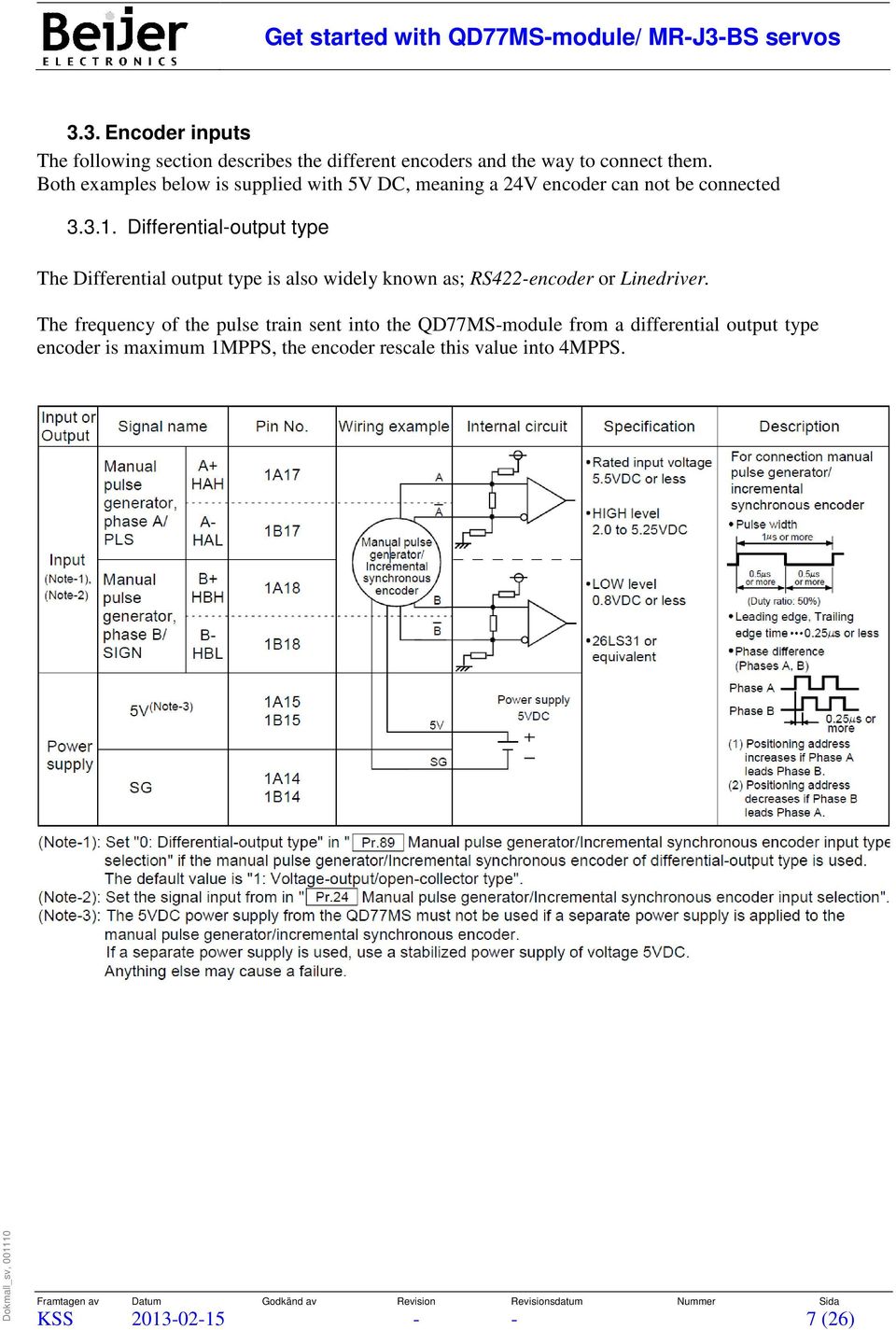
7 3.3. Encoder inputs The following section describes the different encoders and the way to connect them. Both examples below is supplied with 5V DC, meaning a 24V encoder can not be connected Differential-output type The Differential output type is also widely known as; RS422-encoder or Linedriver. The frequency of the pulse train sent into the QD77MS-module from a differential output type encoder is maximum 1MPPS, the encoder rescale this value into 4MPPS. KSS (26)

8 Voltage-output/open-collector type 3.4. Power and control wiring AUTOCAD wiring 3.5. Connecting the control function wiring AUTOCAD wiring 4. Operating adjustments and commissioning The following section describes the operation adjustments of parameters and commissioning Operation adjustment of parameters Before testing the drive, a number of parameters in the servo amplifier and QD77MS-module must be configured. KSS (26)


9 This can be done through the software Simple Motion Module Setting Tool. Simple Motion Module Tool can be opened through GX Works2 by clicking Intelligent Function Module - Simple Motion Module Setting in the project tab. Or, if possible use MR Configurator2, opened from the Simple Motion Module Setting Tool. The Simple Motion Module Setting Tool will open and the assistant tab will ask if you want to create a new project or open an existing project PCW-file. Select open existing and select the preconfigured.pcw-file found in the KI-Doc_QD77MSXX_MR-J3-XXBS.Zip The Simple Motion Module Setting Tool replace the *Init blocks found in older sample projects for QD75 module. The Simple Motion Module Setting Tool lets you configure the module parameters, servo parameters and the system structure Start up, Step by step 1. Compile and download the PLC-project to the PLC. Make sure there are no error. 2. Make sure the parameters are set correctly in the Simple Motion Module Setting Tool. 3. Download the parameters in the Simple Motion Module Setting Tool by pressing Online - Write to module the Simple Motion Module Setting Tool uses the same online configuration as the GX Works2 project. After the PLC program is compiled and downloaded into the PLC without errors. It s time to download the parameter into the module. Make sure the parameters are set correctly in the KSS (26)

10 Simple Motion Module Settings Tool. While in software Simple Motion Module Setting Toolpress online Write to module, the Simple Motion Module Settings Tool uses the same online configuration as the GX Works2 project. After the parameters are downloaded, check so that there are no faults present. Activate the ServoOn so the amplifier will start to regulate. Servo amplifier will display d followed by the axis number, d1 for axis 1. ServoReady in the function block QD77MS16_Control will be activated. Check that the Speed and Distance scaling are correct. Check that the software and hardware limit switches are correct (SoftLSP, SoftLSN, LSP, LSN) You can now hand-drive the motor. Set suitable JOGSpeed and try to move forward by affecting JOGFwd and backward JOGRev. If you have chosen the servo motor encoder to act as an absolute encoder (PA03=1, in the Simple Motion Module Setting Tool/MR Configurator2) you can now hand drive the servo motor to the position desired to be position Zero/Home. Activate variable StartHome to make the position the Zero/Home position. Check that current position is now showing 0 (see also section 6.2). Now the system is calibrated and you can begin to test drive the machine. Software Simple Motion Module Setting Tool/MR Configurator2 can be of great help to fine tune the servo parameters. KSS (26)

11 5. Description of the sample program The sample program is designed for GX Works2 (version 1.91V or later) and Q-series CPU. The sample program contains the following functions: JOG operation at any speed Absolute positioning Relative positioning Stop and restart Management of software and hardware limit Ability to change all of the servo amplifier parameters Resetting the alarms and warnings The.zip file downloadable from Beijer.se contains: GXW2_QD77MS16.GXW is a preconfigured sample project for GX Works2. The project can be downloaded directly (after compilation) and test run. QD77MS16.PCW is a preconfigured Simple Motion Module Setting Tool parameter file. The example program consists of three software components (POU): Function blocks QD77MS16_PosData Function blocks QD77MS16_Control Function blocks QD77MS16_Torque 5.1. Function block QD77MS16 _Servo_Control Input Function HeadAddress Physical address for QD77MS16 AxisNo Specifies what axis the function block operates (1-16) KSS (26)

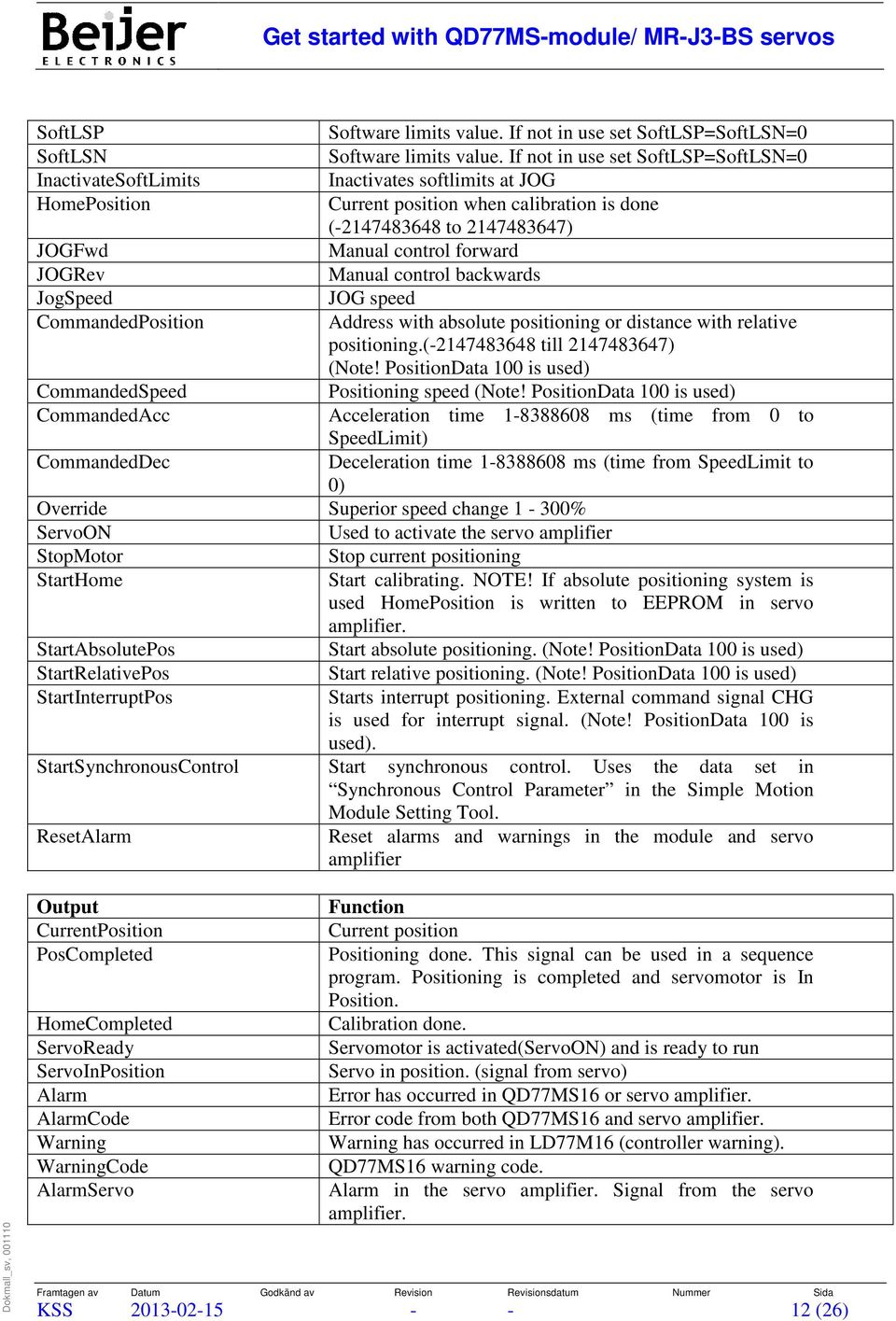
12 SoftLSP Software limits value. If not in use set SoftLSP=SoftLSN=0 SoftLSN Software limits value. If not in use set SoftLSP=SoftLSN=0 InactivateSoftLimits Inactivates softlimits at JOG HomePosition Current position when calibration is done ( to ) JOGFwd Manual control forward JOGRev Manual control backwards JogSpeed JOG speed CommandedPosition Address with absolute positioning or distance with relative positioning.( till ) (Note! PositionData 100 is used) CommandedSpeed Positioning speed (Note! PositionData 100 is used) CommandedAcc Acceleration time ms (time from 0 to SpeedLimit) CommandedDec Deceleration time ms (time from SpeedLimit to 0) Override Superior speed change 1-300% ServoON Used to activate the servo amplifier StopMotor Stop current positioning StartHome Start calibrating. NOTE! If absolute positioning system is used HomePosition is written to EEPROM in servo amplifier. StartAbsolutePos Start absolute positioning. (Note! PositionData 100 is used) StartRelativePos Start relative positioning. (Note! PositionData 100 is used) StartInterruptPos Starts interrupt positioning. External command signal CHG is used for interrupt signal. (Note! PositionData 100 is used). StartSynchronousControl Start synchronous control. Uses the data set in Synchronous Control Parameter in the Simple Motion Module Setting Tool. ResetAlarm Reset alarms and warnings in the module and servo amplifier Output CurrentPosition PosCompleted HomeCompleted ServoReady ServoInPosition Alarm AlarmCode Warning WarningCode AlarmServo Function Current position Positioning done. This signal can be used in a sequence program. Positioning is completed and servomotor is In Position. Calibration done. Servomotor is activated(servoon) and is ready to run Servo in position. (signal from servo) Error has occurred in QD77MS16 or servo amplifier. Error code from both QD77MS16 and servo amplifier. Warning has occurred in LD77M16 (controller warning). QD77MS16 warning code. Alarm in the servo amplifier. Signal from the servo amplifier. KSS (26)
13 OperationStatus IndicationLSP IndicationLSN indicationdog IndicationExtSignal Busy BatteryWarning Axis status. 0: Standby, 1: Stopped, 15: Synchronous Mode, 20: Amplifier not connected to power source, 21: Servo OFF Hardware or software positive limits LSP. Normally FALSE Hardware or software negative limits LSP. Normally FALSE Status of Dog input Status of the Digital In 1-4, depending of parameter configuration. (See Pr.80,95 in Simple Motion Module Setting Tool.) Indication that axis is moving Time to change battery on servo amplifier Function block QD77MS16_Control used to control a servo amplifier. To get the servomotor to perform a specific task, only the corresponding input variable to the block is activated. Function block input variables are on the left side and the function block and the Output Variables on the right side. The function block supports all CPU s of the Q-Series. How the Handshake works: Configure a position and speed setup, thereafter start a positioning (*1) keep the start signal high, or else the positioning will stop midways (*2). When the machine has reached the position, output PosCompleted will be activated (*3) and be kept high until start signal is inactivated. Thereafter the output PosCompleted will be inactivated and a new positioning is ready (*4). This way of handshaking is new to QD77-modules, compared to QD75 modules. See the picture below for a flowchart of the handshake. *1. *2. *3. *4. KSS (26)

14 5.2. Function block QD77MS16_PosData Function block QD77MS16_PosData used to start any position data. Useful e.g. when to start interpolating movements. The function block supports all CPU s of the Q-Series. How the interpolation works: Each axis of QD77M module may be preprogrammed with position data. This example uses position data (PosDataNo) 90 to make a linear movement with two axes. It is always the position data codes utilized by both the master and slave axes. When using the master axis position data 90, this is automatically also the slave position data 90. It is only the position and any Arc_Data (when circular interpolation) that need to be specified for the slave axis. WritePosDataMaster EN Activates writing of position data into QD77MS16. Headaddress Physical address for QD77MS16 AxisNo Specifies the axis (1-16) PosDataNo Specifies what position data the function block will use, PosType Type of positioning (See table in section 8.3 for full list) e.g. 16 # B: This setting means that the two axles shall be driven with incremental encoder. InterpolatedAxisNo 1-3 = 0: This setting means that the axis 1 should be a slave axis. = 1: This setting means that the axis 2 should be a slave axis. =15: This setting means that the axis 16 should be a slave axis. Pattern 0:END, 1:Continuously with stop, 3:Continuously without stop AccRamp Used acceleration ramps (0-3) =0: used value entered in Function block =1-3: used values entered in Simple Motion Module Setting Tool DecRamp Used deceleration ramps (0-3) =0: used value entered in Function block =1-3: used values entered in Simple Motion Module Setting Tool M_Code Optional code for every position data (0 if not used) DwellTime Time before next position data can be driven Speed Speed Position End position(abs) or distance(inc) ARC_Data Help point for circular interpolation KSS (26)

15 EN HeadAddress WritePosDataSlave AxisNo Specifies the axis (1-16) Activates writing of position data into QD77MS16. Physical address for QD77MS16. PosDataNo Positioning data no. to be driven (1-99) Position End position(abs) or distance(inc) ARC_Data This variable identifies a help point for circular interpolation. At position type is a point on the arc and the position type is the center point provided Function block QD77MS16_PosAction Function block QD77MS16_PosAction is used to start pre-loaded positions entered in the Simple Motion Module Setting Tool. Input Function HeadAddress Physical address for QD77MS16. AxisNo Specifies the axis (1-16) StartPosNo Positioningdata to run 1-99 StartPositioning Start positiondata specified by StartPosNo Output PosCompleted Function Positioning done. This signal can be used in a sequence program Function block QD77MS16_TorqueControl Input Function HeadAddress Physical address for QD77MS16. AxisNo Specifies the axis (1-16) NewTorqueValue Maximum torque generated by servomotor. 1 TorqueLimit. Changeable at any time. KSS (26)

16 Output MotorTorque Function Current torque in x0,1% of servomotor rated torque Function block QD77MS16_Torque is used to control the torque of the servo motor. The function block supports all CPU s of the Q-Series Parameter configuration The parameter configuration of the QD77Module can easily be done in the Simple Motion Module Setting Tool, or the MR Configurator2. Here you configure how many axis you have in your application, also the specific configuration for each axis. Below is the most basic parameters to start the servo axis. Here you set how many axes you have in your application, this is done in the Simple Motion Module Setting Tool. Parameter, configured in Simple Motion Module Setting Tool. Pr No. Name of parameter Description 1 Unit Setting Set what unit to use during positioning, Set either mm, inch, degree or pulses according to control target. 2 No. of pulses per rotation Set the number of pulses required for a complete rotation of the motor shaft 3 Movement amount per rotation Set the movement amount per one motor rotation. 8 Speed limit value Set the maximum speed during positioning, OPR and speed/torque 12 Software stroke limit upper limit value 13 Software stroke limit lower limit value 22 Input signal logic selection: lower limit 22 Input signal logic selection: upper limit operations. Set the upper limit of machine s movement range during positioning control. Set the lower limit of machine s movement range during positioning control. Set the I/O signal that matches the signaling specification of the external device connected to the simple motion module or External Input Signal Device or the external input signal of the servo amplifier. 43 OPR method Set OPR method for machine OPR. 80 External input signal selection Set whether to use the simple motion side or the servo amplifier side or buffer memory of simple motion module for external input signal (upper/lower limit, near-point dog and stop signals). 82 Forced stop valid/invalid selection Set the forced stop input valid/invalid. 97 SSCNET Setting Set whether to use SSCNET III/H or SSCNET III in servo system network. KSS (26)

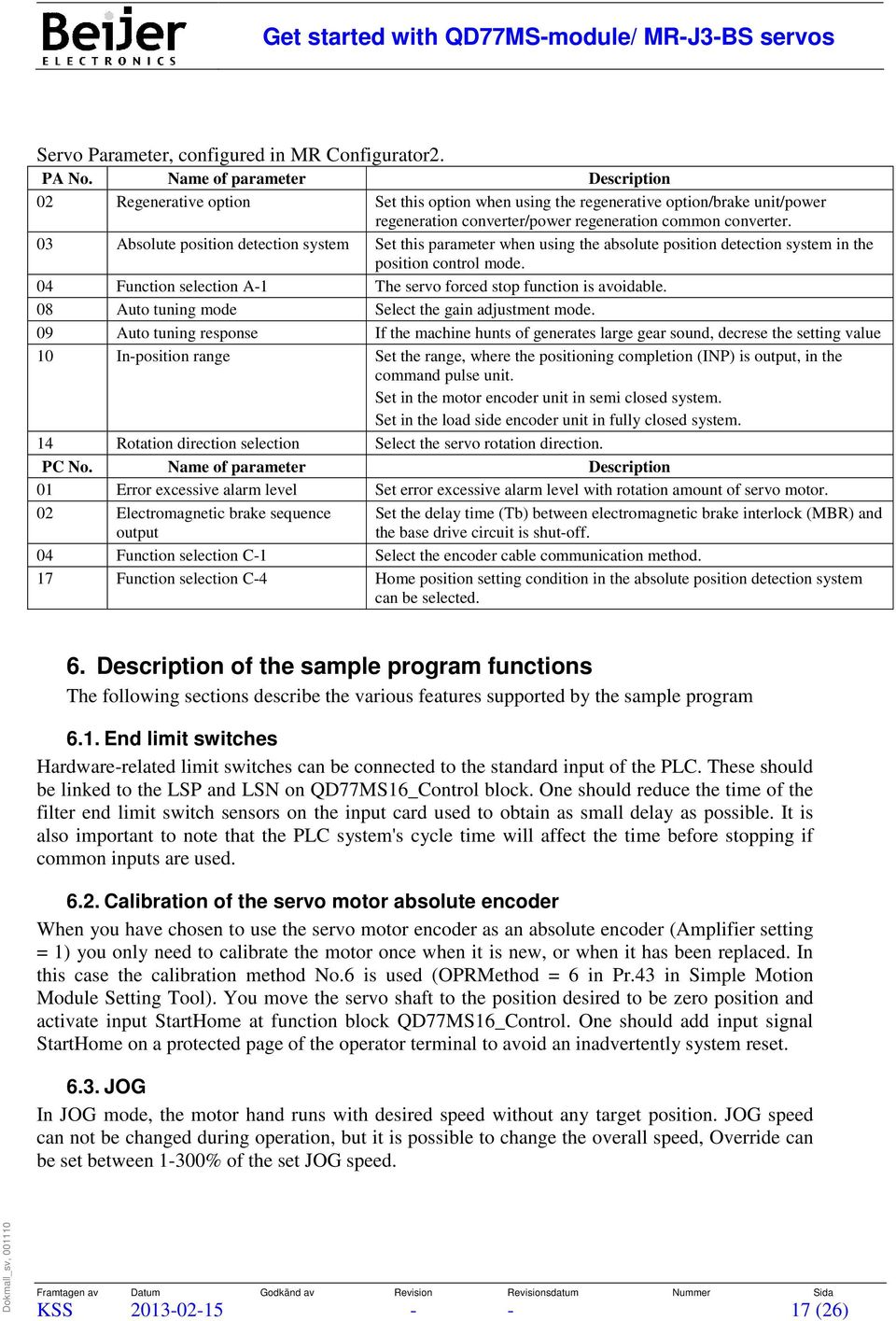
17 Servo Parameter, configured in MR Configurator2. PA No. Name of parameter Description 02 Regenerative option Set this option when using the regenerative option/brake unit/power regeneration converter/power regeneration common converter. 03 Absolute position detection system Set this parameter when using the absolute position detection system in the position control mode. 04 Function selection A-1 The servo forced stop function is avoidable. 08 Auto tuning mode Select the gain adjustment mode. 09 Auto tuning response If the machine hunts of generates large gear sound, decrese the setting value 10 In-position range Set the range, where the positioning completion (INP) is output, in the command pulse unit. Set in the motor encoder unit in semi closed system. Set in the load side encoder unit in fully closed system. 14 Rotation direction selection Select the servo rotation direction. PC No. Name of parameter Description 01 Error excessive alarm level Set error excessive alarm level with rotation amount of servo motor. 02 Electromagnetic brake sequence output Set the delay time (Tb) between electromagnetic brake interlock (MBR) and the base drive circuit is shut-off. 04 Function selection C-1 Select the encoder cable communication method. 17 Function selection C-4 Home position setting condition in the absolute position detection system can be selected. 6. Description of the sample program functions The following sections describe the various features supported by the sample program 6.1. End limit switches Hardware-related limit switches can be connected to the standard input of the PLC. These should be linked to the LSP and LSN on QD77MS16_Control block. One should reduce the time of the filter end limit switch sensors on the input card used to obtain as small delay as possible. It is also important to note that the PLC system's cycle time will affect the time before stopping if common inputs are used Calibration of the servo motor absolute encoder When you have chosen to use the servo motor encoder as an absolute encoder (Amplifier setting = 1) you only need to calibrate the motor once when it is new, or when it has been replaced. In this case the calibration method No.6 is used (OPRMethod = 6 in Pr.43 in Simple Motion Module Setting Tool). You move the servo shaft to the position desired to be zero position and activate input StartHome at function block QD77MS16_Control. One should add input signal StartHome on a protected page of the operator terminal to avoid an inadvertently system reset JOG In JOG mode, the motor hand runs with desired speed without any target position. JOG speed can not be changed during operation, but it is possible to change the overall speed, Override can be set between 1-300% of the set JOG speed. KSS (26)
18 6.4. Absolute positioning Absolute positioning means that servomotor runs with desired speed, acceleration time and deceleration time to a specific position. Position and velocity are written to CommandedPosition respectively CommandedSpeed matter in which position the motor is in the running motor to the position that it specified in CommandedPosition. The speed of the positioning is in CommandedSpeed acceleration and deceleration in CommandedAcc and CommandedDec. The start signal is given with a SET instruction of the variable StartAbsolutePos. When positioning initiated reset variable automatically by the function block as an acknowledgment that the positioning is ongoing. When positioning is completed - variable PosCompleted is activated for one program cycle. The ongoing positioning is stopped with STOP. Restart of the stopped positioning is done with Restart 6.5. Relative positioning Relative positioning means that the servo motor runs at the desired speed, acceleration and deceleration a specific distance. The new position = actual position + the old positioning distance. That is, the motor runs the distance set in variable CommandedPosition. If the engine must be operated in a negative direction, enter a negative distance. The speed of the positioning is in CommandedSpeed, with acceleration and deceleration in CommandedAcc and CommandedDec. The start signal is given with a SET instruction that sets the variable StartAbsolutePos. When positioning is started, reset the variable automatically by the function block as an acknowledgment that the positioning is ongoing. When positioning is completed variable PosCompleted will be activated one program cycle. The ongoing positioning is stopped with STOP. Restart of the stopped positioning is done with Restart Scaling the positions and velocities Scaling can be done using pulses or degrees Scaling with pulses Scaling with pulses / motor to a specific number of pulses / mm is made with Pr.2 and Pr.3 that one finds in the Simple Motion Module Setting Tool. In Pr.2 No. of pulses per rotation you define the number of pulses required for a complete rotation of the motor shaft. ( pulses / rev) In Pr.3 Movement amount per rotation you define the movement amount per one motor rotation, to get the desired accuracy. (10000pulses) If the mechanics is moving 50 mm per engine shaft revolution and you want to make as little movement as 0.01 mm you should enter 5000 in Movement amount per rotation. This means that the position setpoints must be expressed with two decimals, i.e. a displacement of 100 pulses will move the mechanics 1.00mm. The speed you enter will be in (0.01 x mm/sec), i.e. a speed value of 1000 will move mechanics at 10 mm/sec. Maximum speed of a motor with a rated speed of 3000 rpm is then 250,000 by: KSS (26)

19 SpeedSetpoint (Hz) = Movement amount per rotation * MotorSpeed (RPM) e.g. 250,000=5000* Scaling with degrees It is preferred to scale with degrees if there is any type of circular feed table. All of the configuration of the parameters is done in the Simple Motion Module Setting Tool. In Pr.1 Unit Setting, set units to Degrees. In Pr.2 No. of pulses per rotation specify the number of pulses per encoder rotation the engine have. ( pulses / rev). In Pr.3 Movement amount per rotation specify how many degrees you want per engine revolution to get the desired scaling. If mechanics moves 90 degrees per engine shaft rotation (4 times ratio between the engine and mechanics) you must put value 90 in Pr.3 Movement amount per rotation in the Simple Motion Module Setting Tool. If value is to be entered in PLC function block, value have to be entered with 5 decimals e.g. 9,000,000. You can not decide how many decimal digits to be used as the module automatically starts over at zero degrees when it reaches 360 degrees. This means that the position setpoints must be expressed with five decimals, i.e. a position setpoint of 1,000,000 will be moving mechanics 10 degrees. The speeds you enter will be in x10-3 degrees/min, i.e. a value of 600,000 will move mechanics 600 degrees/min or 10 degrees/sec. Maximum speed of a motor with a rated speed of 3000 rpm then becomes 1,080,000,000x10-3, by: SpeedSetpoint (Hz) (x10-3 degrees/min) = Movement amount per rotation (x10-5 degrees) * MotorSpeed (RPM) * Gear Ratio (times) * 10-2 Gear ratio: How many revolutions the servo motor does to rotate the output shaft one. If no gearbox is used, set the value to 1. Motor Speed (RPM): Preferred maximum speed of the servo motor, for example, the rated speed of the servo motor (1500 rpm or 3000 rpm). KSS (26)

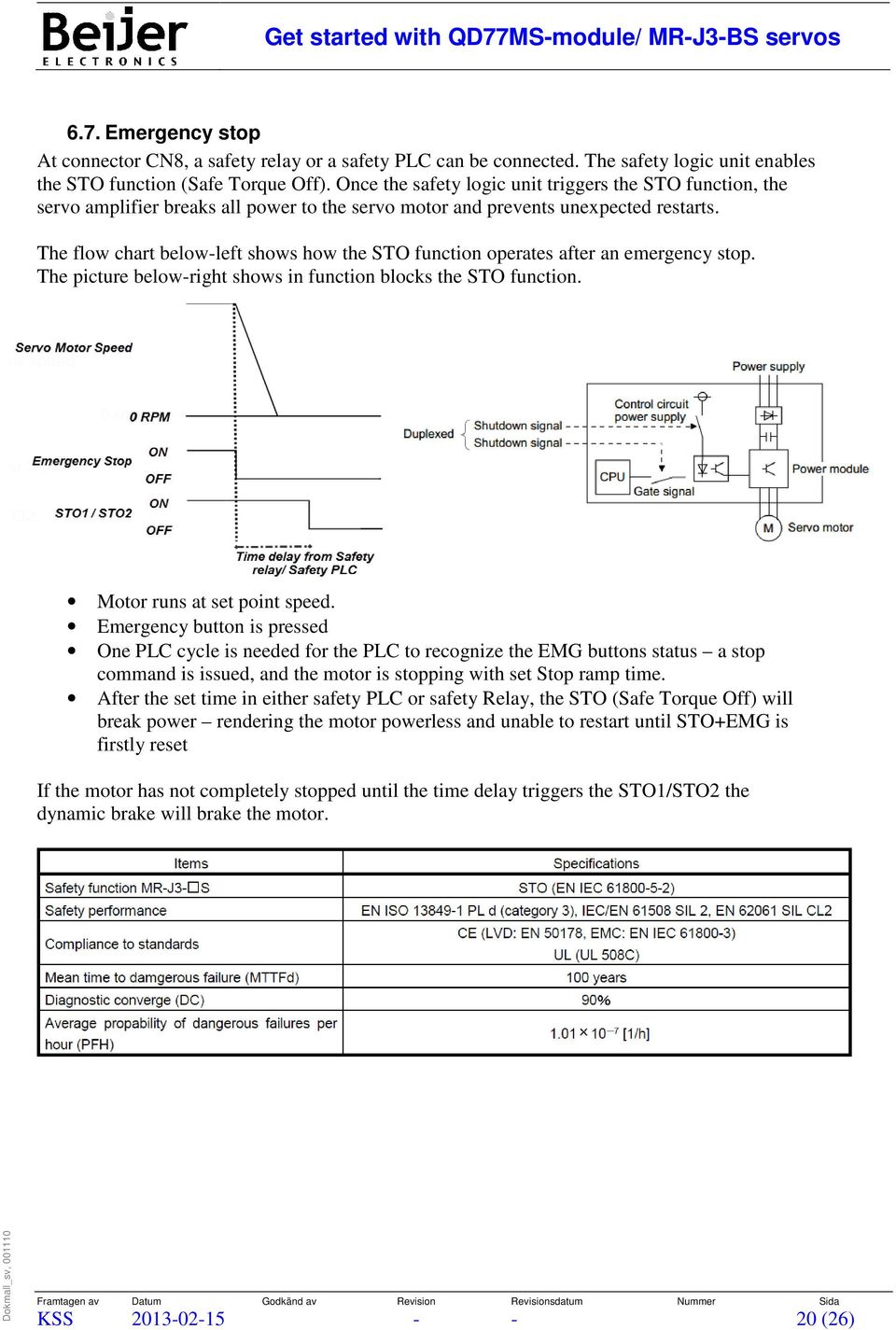
20 6.7. Emergency stop At connector CN8, a safety relay or a safety PLC can be connected. The safety logic unit enables the STO function (Safe Torque Off). Once the safety logic unit triggers the STO function, the servo amplifier breaks all power to the servo motor and prevents unexpected restarts. The flow chart below-left shows how the STO function operates after an emergency stop. The picture below-right shows in function blocks the STO function. Motor runs at set point speed. Emergency button is pressed One PLC cycle is needed for the PLC to recognize the EMG buttons status a stop command is issued, and the motor is stopping with set Stop ramp time. After the set time in either safety PLC or safety Relay, the STO (Safe Torque Off) will break power rendering the motor powerless and unable to restart until STO+EMG is firstly reset If the motor has not completely stopped until the time delay triggers the STO1/STO2 the dynamic brake will brake the motor. KSS (26)
21 Color coding of the cable used to connect to CN8 Pin No. Signal Lead Color Marking Color 1 Not Used Orange Gray 2 Not Used Orange Red 3 STO1- Yellow Gray 4 STO1+ Yellow Red 5 STO2- Gray Black 6 STO2+ Gray Red 7 STOF2 White Black 8 STOF1 White Red Signal Connector Definition I/O Name pin No. STO1- CN8-3 Inputs STO state 1. D1-1 STO1+ CN8-4 STO state (base shutdown): Open between STO1+ and STO1-. STO release state (in driving): Close between STO1+ and STO1-. Be sure to turn off STO1 after the servo motor stops by the servo-off state or D1-1 with forced stop deceleration by turning off the forced stop 2 (EM2) STO2- CN8-5 Inputs STO state 2. D1-1 STO2+ CN8-6 STO state (base shutdown): Open between STO2+ and STO2-. STO release state (in driving): Close between STO2+ and STO2-. Be sure to turn off STO2 after the servo motor stops by the servo-off state or D1-1 with forced stop deceleration by turning off the forced stop 2 (EM2) TOF2 CN8-7 Outputs TOF to safety PLC etc. D0-1 TOF1 CN8-8 STO state (base shutdown): Between TOF1 and TOF2 are opened. STO release state (in driving): Between TOF1 and TOF2 are closed. D Positioning types Below is a table of all available types of positioning module Code (Dec) Code (Hex) Type of positioning Number of Axis axis linear control (ABS) axis linear control (INC) axis fixed-feed control axis speed control (FWD) axis speed control (RVS) Speed-position switching control (FWD) Speed-position switching control (RVS) Position-speed switching control (FWD) Position-speed switching control (RVS) 1 KSS (26)
22 10 A 2 axis linear interpolation (ABS) 2 11 B 2 axis linear interpolation (INC) 2 12 C 2 axis fixed-feed control 2 13 D Circular interpolation control with sub point designation (ABS) 2 14 E Circular interpolation control with sub point designation (INC) 2 15 F Circular interpolation control with center point designation (ABS/CW) Circular interpolation control with center point designation (ABS/CCW) Circular interpolation control with center point designation (INC/CW) Circular interpolation control with center point designation (INC/CCW) axes speed control (FWD) axes speed control (RVS) axes linear interpolation (ABS) axes linear interpolation (INC) axes fixed-feed control axes speed control (FWD) axes speed control (RVS) A 4 axes linear interpolation (ABS) B 4 axes linear interpolation (INC) C 4 axes fixed-feed control D 4 axes speed control (FWD) E 4 axes speed control (RVS) NOP instruction Address CHG Jump instruction Declares the beginning of the LOOP to LEND section Declares the end of the LOOP to LEND section - 7. Troubleshooting The following section describes the alarm codes and various faults. For a full list of alarms and warnings, please see the user manual. Error detected by the Simple Motion module include parameter setting range errors, errors at the operation start or during operation and servo amplifier errors. Error can be confirmed with the LED display of Simple Motion module or GX Works2. Refer to the Simple Motion Module Setting Tool Help of GX Works2 for details. Error Code Classification of Error Description 001 to 009 Fatal errors User s manual (Positioning Control) 100 to 199 Common errors of each Simple Motion Module 200 to 299 OPR or absolute position restoration errors 300 to 399 JOG operation or inching operations errors 500 to 599 Positioning operation errors 600 to 699 Synchronous control input axis errors User manual (Synchronous Control) Section to 799 Synchronous control output axis errors User manual (Synchronous Control) Section to 899 I/F (Interface) errors User s manual (Positioning Control) KSS (26)
23 900 to 999 Parameter setting range errors 1201 to 1209 Encoder errors 2000 to 2999 Servo amplifier errors of each Simple Motion Module Warnings detected by the Simple Motion module include system warnings, axis warnings and servo amplifier warnings. The warning definitions can be found from the warning codes. Confirming them requires GX Works2. Refer to the Simple Motion Module Setting Tool Help of GX Works2 for details. Warning Codes Classification of Warning Description 100 to 199 Common warnings User s manual (Positioning Control) 300 to 399 JOG operations warnings of each Simple Motion Module 400 to 499 Manual pulse generator operation warnings 500 to 599 Positioning operation warning 600 to 699 Synchronous control input axis warnings User manual (Synchronous Control) Section to 799 Synchronous control output axis warnings User manual (Synchronous Control) Section to 899 Cam operation warnings User manual (Synchronous Control) Section to 999 System control data setting range check warnings 2000 to 2999 Servo amplifier warnings (The contents of a vary in the model of servo amplifier) User s manual (Positioning Control) of each Simple Motion Module The servo amplifier display shows the warning codes. The warnings do not mean that the servo motor will stop, but they give an indication of an error that must be corrected. Warning codes disappears automatically when the fault is corrected. KSS (26)
24 7.1. Error and warning code for the MR-J3-BS Servo Amplifier When an error occurs during operation, the corresponding alarm or warning is displayed. If any alarm or warning has occurred, refer to the MR-J3-BS manual and take the appropriate action. KSS (26)
25 When active alarm the servomotor is stopped. The error code generated by the alarm can be read with the function block QD77MS16_Control. Also the display on the servo amplifier displays an error code. Some alarms can be reset with the digital variable alarm while others require that the power supply is turned OFF / ON Error and warning code for the QD77MS-Module Below is a list of common errors in the QD77MS module. Classification of errors Error code Name of Error Common errors 101 PLC READY OFF during operation 102 Servo READY signal OFF during operation 104 Hardware stroke limit (+) 105 Hardware stroke limit (-) 106 Stop signal ON at start 108 Start not possible JOG operation or inching 300 Outside JOG speed range operation errors Positioning operations errors 507 Software stroke limit (+) 508 Software stroke limit (+) 537 PLC READY OFF start 538 READY OFF start Parameter setting range errors 911 Outside acceleration time 0 range 912 Outside deceleration time 0 range Encoder errors 1201 OPR data incorrect 7.3. Other failures Motor actual position is zero or changes after power failure For motor encoders to act as an absolute encoder, parameter PA03 must be set to 0001 in the MR Configurator2 and battery MR-J3BAT be connected in the servo amplifier, at connector CN4. The first time you turn on the power after changing to absolute encoder in Simple Motion Module Setting Tool, error code 25 will be active. Let the servo amplifier to be powered up for a minute and let it fully charge the capacitors. Then turn power OFF/ON to get rid of the error code. ServoReady signal from the servo amplifier not enabled: Is the digital input on the EMG servo amplifier connected to +24 VDC or signal disabled in the Simple Motion Module Setting Tool? Is there an alarm or warning to the servo amplifier display or in the function block QD77MS16_Control? Is the power and control power to the servo amplifier and PLC switched ON? Is the digital ServoON signal from PLC activated? Is the PLC program compiled and downloaded to the PLC system and is the PLC system in RUN position? Is the hardware connected as drawing sections 3.4 and 3.5? KSS (26)
26 Run command is not executed: Is the ServoReady signal obtained from the servo amplifier? Is there an alarm or warning in the function block QD77MS16_Control? Is limit switch (LSP and LSN) connected and provides 24 VDC or disabled in the Simple Motion Module Setting Tool. Is limit switches (LSP and LSN) of the function block QD77MS16_Control activated? Is the software limit switches (SoftLSP and SoftLSN) enabled? Is the actual position counted up in the PLC program without the engine moving? When absolute positioning to the position you are already in, no movement will be executed, nor will a relative positioning with zero distance. Alarms on the servo amplifier will not disappear The fault is of a type that requires the control voltage to the servo amplifier is turned OFF. A non-disappearing alarm after the supply voltage is turned OFF/ON check the meaning of the error code in the Melservo-J3 user manual. Changes in parameter values do not provide the expected functionality For certain parameter changes that will alter the operation it is required that the supply voltage is turned OFF/ON. None of the above tips will help Turn off all power to the servo amplifier and restart the PLC system. Try again. Call the Beijer Electronics Support for further assistance. KSS (26)
TwinCAT NC Configuration
 TwinCAT NC Configuration NC Tasks The NC-System (Numeric Control) has 2 tasks 1 is the SVB task and the SAF task. The SVB task is the setpoint generator and generates the velocity and position control
Application Note AN-SERV-006
 THIS INFORMATION PROVIDED BY AUTOMATIONDIRECT.COM TECHNICAL SUPPORT IS SUPPLIED "AS IS", WITHOUT ANY GUARANTEE OF ANY KIND. These documents are provided by our technical support department to assist others.
SAFETY PRECAUTIONS (Please read these instructions before using this equipment.)
 SAFETY PRECAUTIONS (Please read these instructions before using this equipment.) Before using this product, please read this manual and the relevant manuals introduced in this manual carefully and pay
APPENDIX. SureSERVO QUICK START GUIDE. In This Appendix... Quick Start for SureServo Drives...A 2. Tuning Quick Start for SureServo Drives...
 SureSERVO QUICK START GUIDE APPENDIX BA In This Appendix... Quick Start for SureServo Drives.............A 2 Spin the Motor......................................A 2 Position Mode Quick Start (Pt & Pr)......................A
Copley Camming User Guide
 Copley Camming User Guide P/N 95-00501-000 Revision 2 June 2008 Copley Camming User Guide. TABLE OF CONTENTS About This Manual... 5 1: Operational Overview... 7 1.1: Host System Requirements... 8 1.2:
X8 Option 2 - Technology
 moog AC DC AC 4 to 450 A 4 to 210 A Compact MSD Servo Drive TTL in out Specification X8 Option 2 - Technology TTL Encoder Simulation / TTL Master Encoder moog Specification Option 2 - Technology TTL encoder
ServoOne. Specification. Option 2 - Technology. x 11. x 8 X 8. x 10. x 9. x 7. x 6 TTL Encoder / TTL Encoder simulation
 x - + - + x L L L AC SO 4-45 A DC SO 4- A ServoOne Specification x 9 - + - + x 7 x 8 X 8 Option - Technology x 6 TTL Encoder / TTL Encoder simulation Specification ServoOne Specification Option - Technology
Servo Info and Centering
 Info and Centering A servo is a mechanical motorized device that can be instructed to move the output shaft attached to a servo wheel or arm to a specified position. Inside the servo box is a DC motor
Servo System Network SSCNETIII
 Servo System Network Here the History of Optical Networks Mitsubishi Electric Corporation Nagoya Works is a factory certified for ISO14001 (standards for environmental management systems) and ISO9001(standards
User manual. magnetic absolute positioning drive AG03/1
 User manual magnetic absolute positioning drive AG03/1 1 GENERAL REMARKS... 3 1.1 DOCUMENTATION... 3 1.2 BLOCK DIAGRAM... 3 2 FUNCTIONAL DESCRIPTION... 4 2.1 SYSTEM STATUS WORD... 4 2.2 OPERATING MODES...
SAFETY PRECAUTIONS (Please read these instructions before using this equipment.)
 SAFETY PRECAUTIONS (Please read these instructions before using this equipment.) Before using this product, please read this manual and the relevant manuals introduced in this manual carefully and pay
MOTION CONTROLLERS Q172CPU(N)
 MOTION CONTROLLERS Q173CPU(N) Q172CPU(N) SAFETY PRECAUTIONS (Read these precautions before using.) When using this equipment, thoroughly read this manual and the associated manuals introduced in this manual.
$MPTFE -PPQ 4UFQQJOH 4ZTUFN XJUI /FUXPSL #BTFE.PUJPO $POUSPMMFS
 2 $MPTFE -PPQ 4UFQQJOH 4ZTUFN XJUI /FUXPSL #BTFE.PUJPO $POUSPMMFS 2 Position Table Function Position Table can be used for motion control by digital input and output signals of host controller. You can
Setting up the DeskCNC controller.
 1) Determine the steps to linear motion ratios for each axis. 2 2) Determine Maximum velocity (speed). 3 3) Setting up the software Machine Tab 4 4) Setting up the software DeskCNC Setup Tab 5 5) Setting
R ADVANCED MODEL-SETUP
 M0008487C TYPE S R ADVANCED MODEL-SETUP Setup Software Preface Thank you for selecting our AC Servo Amplifier R ADVANCED MODEL. This User s Manual is a support tool explaining the use and specifications
Machine Automation Controller NJ-series. Startup Guide. for Motion Control W514-E1-01
 Machine Automation Controller NJ-series Startup Guide for Motion Control W514-E1-01 OMRON, 2011 All rights reserved. No part of this publication may be reproduced, stored in a retrieval system, or transmitted,
MELDAS is a registered trademark of Mitsubishi Electric Corporation. Other company and product names that appear in this manual are trademarks or
 MELDAS is a registered trademark of Mitsubishi Electric Corporation. Other company and product names that appear in this manual are trademarks or registered trademarks of the respective companies. PREFACE
FlexPak 3000 Digital DC Drive Software Reference Manual Version 4.3
 FlexPak 3000 Digital DC Drive Software Reference Manual Version 4.3 Instruction Manual D2-3405-2 The information in this manual is subject to change without notice. Throughout this manual, the following
How to read this guide
 How to read this guide The following shows the symbols used in this Quick start guide with descriptions and examples. Symbol Description Example P oint Reference Caution [ ] This symbol explains information
Siemens AG 2011 SINAMICS V60. The perfect solution for basic servo applications. Brochure May 2011 SINAMICS. Answers for industry.
 The perfect solution for basic servo applications Brochure May 2011 SINAMICS Answers for industry. with 1FL5 servomotors The solution for basic servo applications There is a requirement to automate motion
Controller Automation, Model II+
 Controller Automation Page 2 of 2 Automation with the RADAK II+ power controller II+ I/O Points: Inputs 5 Programmable Digital inputs 2 Dedicated digital inputs (Channel select and External SCR control
GPD 506/P5 Start-up Procedure and Checklist
 GPD 506/P5 Start-up Procedure and Checklist Preparation for GPD506/P5 Drive Start-Up...2 HVAC Start-Up Procedure for GPD 506/P5 WITH Bypass Option:...4 HVAC Start-Up Procedure for GPD 506/P5 WITHOUT Bypass
Galil MotionCode Solution: Chip Encapsulation Material Fluid Dispensing Machine
 Galil MotionCode Solution: Chip Encapsulation Material Fluid Dispensing Machine Contents Page 1. MACHINE DESCRIPTION 1 2. REQUIREMTS 1 3. COMPONTS SELECTED 1 4. IMPLEMTATION 2 1. Machine Description Semiconductor
A1000 Cheat Sheet (Open Loop Vector)
 A1000 Cheat Sheet (Open Loop Vector) The following procedure is a supplement to supplied with this equipment and will guide the user in properly wiring the A1000 and. It will also show the user how to
Brake module AX5021. Documentation. Please read this document carefully before installing and commissioning the brake module!
 Documentation Brake module AX5021 Please read this document carefully before installing and commissioning the brake module! Version : 1.2 : 2012.03.05 Date Article-no. : TDmlAX-5021-0000-0200 Page 2/8
BLE Series. Data setting software MEXE02 OPERATING MANUAL. Tabel of contents 1 Synchronization with the driver...2 2 Monitor function...
 HP-5046 Data setting software MEXE02 BLE Series OPERATING MANUAL Thank you for purchasing an Oriental Motor product. This operating manual describes product handling procedures and safety precautions.
A.3 ALARMS (SERIAL SPINDLE)
 A.3 ALARMS (SERIAL SPINDLE) NOTE*1 Note that the meanings of the indications differ depending on which LED, the red or yellow LED, is on. When the red LED is on, the indicates a 2 digit alarm number. When
Analog Servo Drive 25A8
 Description Power Range NOTE: This product has been replaced by the AxCent family of servo drives. Please visit our website at www.a-m-c.com or contact us for replacement model information and retrofit
POSITIONING AND CONTOURING APCI-8001, APCI-8008 AND CPCI-8004 OPERATING MANUAL / OM CONTROL SYSTEM. Rev. 12/052015. www.addi-data.
 POSITIONING AND CONTOURING CONTROL SYSTEM APCI-8001, APCI-8008 AND CPCI-8004 OPERATING MANUAL / OM Rev. 12/052015 www.addi-data.com CONTENTS 3 1 Introduction...4 2 System hardware...5 2.1 The boards APCI-8001,
Actuator cable (LE-C - - ) Controller Power supply plug (usually inserted into socket CN1 of the controller when shipped)
 4 5 Actuator I/O cable (LEC-CN5- ) Actuator cable (LE-C - - ) Controller 4 5 Power supply plug (usually inserted into socket CN of the controller when shipped) I/O cable (LEC-CN5- ) Power Supply Plug Actuator
AKD EtherNet/IP Communication
 AKD EtherNet/IP Communication Edition August 2012, Revision C Valid for firmware version 1.7 Patents Pending Part Number 903-200008-00 Keep all manuals as a product component during the life span of the
Industrial Automation Training Academy. PLC, HMI & Drives Training Programs Duration: 6 Months (180 ~ 240 Hours)
 nfi Industrial Automation Training Academy Presents PLC, HMI & Drives Training Programs Duration: 6 Months (180 ~ 240 Hours) For: Electronics & Communication Engineering Electrical Engineering Instrumentation
Beckhoff TwinCAT The Windows Control and Automation Technology. TwinCAT NC PTP Examples
 Beckhoff TwinCAT The Windows Control and Automation Technology TwinCAT NC PTP Examples Last change: 31.08.2001 3 Contents TwinCAT NC PTP Examples 1. Overview 4 2. Moving axis 5 Install and Start the Example
SMS Alarm Messenger. Setup Software Guide. SMSPro_Setup. Revision 090210 [Version 2.2]
![SMS Alarm Messenger. Setup Software Guide. SMSPro_Setup. Revision 090210 [Version 2.2]](/thumbs/29/13662687.jpg "SMS Alarm Messenger. Setup Software Guide. SMSPro_Setup. Revision 090210 [Version 2.2]") SMS Alarm Messenger SMSPro_Setup Revision 090210 [Version 2.2] ~ 1 ~ Contents 1. How to setup SMS Alarm Messenger?... 3 2. Install the SMSPro_Setup software... 5 3. Connection Type... 6 4. Connection Port
SMS Alarm Messenger SMSPro_Setup Revision 090210 [Version 2.2] ~ 1 ~ Contents 1. How to setup SMS Alarm Messenger?... 3 2. Install the SMSPro_Setup software... 5 3. Connection Type... 6 4. Connection Port
K-Type Thermocouple Sensor User s Guide
 K-Type Thermocouple Sensor User s Guide 1 TABLE OF CONTENTS: 1 INTRODUCTION... 2 2 TYPICAL APPLICATION:... 2 3 INSTALLATION RULES:... 2 3.1 Connecting the sensor to M1/MD4 data logger:... 2 3.2 Connecting
TwinCAT The Windows Control and Automation Technology NC PTP. Numerical Control Point To Point
 TwinCAT The Windows Control and Automation Technology NC PTP Numerical Control Point To Point NC-PTP Part I General Overview Axis types Functional principle Referencing Motion Control Function blocks Part
CAUTION! THE 7I29 USES VOLTAGE AND POWER LEVELS THAT REPRESENT A HAZARD TO LIFE AND LIMB.
 7I29 MANUAL Rev 1.5 CAUTION! THE 7I29 USES VOLTAGE AND POWER LEVELS THAT REPRESENT A HAZARD TO LIFE AND LIMB. THE 7I29 IS INTENDED FOR USE BY OEMS THAT WILL INTEGRATE IT INTO A SYSTEM WITH INTERLOCKS AND
TESTBOX SHAKE TABLE USER MANUAL
 TESTBOX SHAKE TABLE USER MANUAL Writer: Eren AYDIN Date: 05.02.2014 Version: 1.0 Index 1. HARDWARE... 3 1.1 GENERAL OVERVİEW... 3 1.2 CONNECTİONS AND STARTUP... 3 2. SOFTWARE... 6 2.1 SETUP... 6 2.2 IP
1115 4G SERIES GOVERNOR. 4-20 ma ANALOGUE DIGITAL SPEED SETTING
 1115 4G SERIES GOVERNOR with 4-20 ma ANALOGUE & DIGITAL SPEED SETTING PO Box 28, 9300AA Roden, The Netherlands Tel: +31 505019888 Fax: +31 505013618 E-mail: [email protected] 1115 4G
Getting Started - SINAMICS Startdrive. Startdrive. SINAMICS Getting Started - SINAMICS Startdrive. Introduction 1
 Introduction 1 Connecting the drive unit to the PC 2 Startdrive SINAMICS Getting Started - SINAMICS Startdrive Getting Started Creating a project 3 Going online and incorporating devices 4 Commissioning
An overview of Computerised Numeric Control (C.N.C.) and Programmable Logic Control (P.L.C.) in machine automation
 An overview of Computerised Numeric Control (C.N.C.) and Programmable Logic Control (P.L.C.) in machine automation By Pradeep Chatterjee, Engine Division Maintenance, TELCO, Jamshedpur 831010 E-mail: [email protected]
Bluetooth + USB 16 Servo Controller [RKI-1005 & RKI-1205]
![Bluetooth + USB 16 Servo Controller [RKI-1005 & RKI-1205]](/thumbs/40/21161302.jpg "Bluetooth + USB 16 Servo Controller [RKI-1005 & RKI-1205]") Bluetooth + USB 16 Servo Controller [RKI-1005 & RKI-1205] Users Manual Robokits India [email protected] http://www.robokitsworld.com Page 1 Bluetooth + USB 16 Servo Controller is used to control up to
Bluetooth + USB 16 Servo Controller [RKI-1005 & RKI-1205] Users Manual Robokits India [email protected] http://www.robokitsworld.com Page 1 Bluetooth + USB 16 Servo Controller is used to control up to
L5354 ControlNet Communications Interface
 L5354 ControlNet Communications Interface Technical Manual HA470733 Issue 2 Copyright SSD Drives Inc 2005 All rights strictly reserved. No part of this document may be stored in a retrieval system, or
WINDOW's Programming Software USER MANUAL
 www.danahermotion.com High frequency inverter ACO5000 by ACOMEL WINDOW's Programming Software USER MANUAL DANAHER MOTION S.A. La Pierreire 2, CH-1029 Villars-Ste-Croix Telephone +41 21 631 33 33, Telefax
NX Series Inverters. HVAC Pocket Programming Guide
 NX Series Inverters HVAC Pocket Programming Guide HVAC Pocket Programming Guide HVAC Pocket Programming Guide / Contents This guide provides a single reference document for the user of NXL HVAC (product
Whale 3. User Manual and Installation Guide. DC Servo drive. Contents. 1. Safety, policy and warranty. 1.1. Safety notes. 1.2. Policy. 1.3. Warranty.
 Whale 3 DC Servo drive User Manual and Installation Guide Contents 1. Safety, policy and warranty. 1.1. Safety notes. 1.2. Policy. 1.3. Warranty. 2. Electric specifications. 2.1.Operation ranges. 3. Connections
Open Field Network CC-Link Troubleshooting Guide
 2006 Mar Open Field etwork CC-Link Troubleshooting Guide Mitsubishi Electric Corporation agoya Works is a factory certified for ISO14001 (standards for environmental management systems) and ISO9001 (standards
DMX-K-DRV. Integrated Step Motor Driver + (Basic Controller) Manual
 DMX-K-DRV Integrated Step Motor Driver + (Basic Controller) Manual DMX-K-DRV Manual page 1 rev 1.33 COPYRIGHT 2007 ARCUS, ALL RIGHTS RESERVED First edition, June 2007 ARCUS TECHNOLOGY copyrights this document.
3FBD DC Motor Drive User Manual
 3FBD DC Motor Drive User Manual Via I. Alpi 6 - zona industriale - Lonato (BS) Tel. +39 30 9913491 r.a. Fax. +39 30 9913504 http://www.re-elettronica.it [email protected] Pag. 1 Index Index... pag.1
Model SETR-50 and SETR-51 Trim Tab Control
 Model SETR-50 and SETR-51 Trim Tab Control Pictured above is the SETR-50 with black switches on a gray background. The SETR-51 is identical except for the color, wherein it has black switches on a black
Talon and Talon SR User Manual
 Talon and Talon SR User Manual Brushed DC motor controller Version 1.3 Cross the Road Electronics, LLC www.crosstheroadelectronics.com Cross The Road Electronics, LLC Page 1 4/2/2013 Device Overview Clear,
EVAL-UFDC-1/UFDC-1M-16
 Evaluation Board for Universal Frequency-to- Digital Converters UFDC-1 and UFDC-1M-16 EVAL-UFDC-1/UFDC-1M-16 FEATURES Full-Featured Evaluation Board for the Universal Frequency-to-Digital Converters UFDC-1
Solar Tracking Controller
 Solar Tracking Controller User Guide The solar tracking controller is an autonomous unit which, once configured, requires minimal interaction. The final tracking precision is largely dependent upon the
EasyC. Programming Tips
 EasyC Programming Tips PART 1: EASYC PROGRAMMING ENVIRONMENT The EasyC package is an integrated development environment for creating C Programs and loading them to run on the Vex Control System. Its Opening
How To Fix A Fault Fault In A Gbk Gbq (Gbk) Gbx (Gbt) (Gt) (Unmanipulated) (Program) (Powerbk.Org) (Amd64
 Trouble shooting manual (part 2 of 2), Event log messages Robot Controller IRC5 M2004 Trouble Shooting Manual (part 2 of 2), Event log messages Robot Controller IRC5 M2004 Document ID: 3HAC020738-001 Revision:
AUTOMATIC TRANSFER SWITCH CONTROL UNIT OPERATOR S MANUAL
 ATS-220 AUTOMATIC TRANSFER SWITCH CONTROL UNIT OPERATOR S MANUAL For Use in 208 to 240 Volts Single and 3 Phase ATS Systems With 110Volt AC or DC Control Motors and selenoids 4501 NW 27 ave Miami FL 33142
ACS800. Master/Follower Application Guide Supplement to Firmware Manual for ACS800 Standard Application Program
 ACS800 Master/Follower Application Guide Supplement to Firmware Manual for ACS800 Standard Application Program Master/Follower Application Guide Supplement to Firmware Manual ACS800 Standard Application
ABB Drives. User s Manual. Pulse Encoder Interface Module RTAC-01
 ABB Drives User s Manual Pulse Encoder Interface Module RTAC-0 Pulse Encoder Interface Module RTAC-0 User s Manual 3AFE 64486853 REV A EN EFFECTIVE:.5.00 00 ABB Oy. All Rights Reserved. Safety instructions
SMT-BD1/p - CD1-p - User manual. SMT-BD1/p CD1-p gb. PROFIBUS POSITIONER User manual INFRANOR. SMT-BD1/p - CD1-p - User manual 1
 SMT-BD1/p CD1-p gb PROFIBUS POSITIONER User manual INFRANOR SMT-BD1/p - CD1-p - User manual 1 2 SMT-BD1/p - CD1-p - User manual WARNING!! This is a general manual describing a series of servo amplifiers
DeviceNet Bus Software Help for Programming an Allen Bradley Control System
 FBP FieldBusPlug V7 DeviceNet Bus Software Help for Programming an Allen Bradley Control System DeviceNet Software Help for Programming an Allen Bradley Control System Contents Page General Purpose...
DVPPF02-H2. PROFIBUS DP Slave Communication Module Application Manual
 DVPPF02-H2 PROFIBUS DP Slave Communication Module Application Manual Warning Please read this instruction carefully before use and follow this instruction to operate the device in order to prevent damages
EDI Distributor Control Interface Wiring and Setup Instructions
 Universal I/O EDI Distributor Control Interface Wiring and Setup Instructions EDI UNIVERSAL I/O INTERFACE MODULE The only interface needed for EDI-V5 controls Network compatible with all older EDI controls
Transmitter Interface Program
 Transmitter Interface Program Operational Manual Version 3.0.4 1 Overview The transmitter interface software allows you to adjust configuration settings of your Max solid state transmitters. The following
TAC I/NETTM MR-VAV-AX. Application Specific MicroRegulator TM
 TAC I/NETTM TM TAC s TM has an extensive range ofpre-engineered VAV control sequences, which combined with a fully integrated actuator and airflow transducer, makes it a low Total Installed Cost solution
JNIOR. Overview. Get Connected. Get Results. JNIOR Model 310. JNIOR Model 312. JNIOR Model 314. JNIOR Model 410
 The INTEG is an Ethernet I/O (digital, analog) device that monitors and controls a small set of process signals. functions as both basic I/O for integration with another application or system AND as a
Signature and ISX CM870 Electronics
 Signature and ISX CM870 Electronics Cummins West Training Center System Description General Information The Signature and ISX CM870 engine control system is an electronically operated fuel control system
GSM HOME SECURITY SYSTEM
 Cell /Mobile phone home security system GSM HOME SECURITY SYSTEM Model : GSM-120 TABLE OF CONTENTS 1. FEATURES... 1 2. APPLICATION... 2 3. SPECIFICATIONS... 3 4. FRONT PANEL & LAYOUT DESCRIPTION...6 5.
VLT AutomationDrive for Marine winch applications
 MAKING MODERN LIVING POSSIBLE VLT APPLICATION NOTE VLT AutomationDrive for Marine winch applications This Application note is meant to be a guideline for using Danfoss VLT AutomationDrive in winch applications.
Using Arduino Microcontrollers to Sense DC Motor Speed and Position
 ECE480 Design Team 3 Using Arduino Microcontrollers to Sense DC Motor Speed and Position Tom Manner April 4, 2011 page 1 of 7 Table of Contents 1. Introduction ----------------------------------------------------------
How To Set Up A Servo Amplifier
 SERVO OPERATOR CHAPTER 0 INTRODUCTION 0 CHAPTER 1 INSTALLATION 1 CHAPTER 2 SEQUENCE MODE 2 CHAPTER 3 MONITOR MODE 3 CHAPTER 4 COPY MODE 4 CHAPTER 5 EDIT MODE 5 CHAPTER 6 TEST OPERATION MODE 6 CHAPTER
Automation System TROVIS 6400 TROVIS 6493 Compact Controller
 Automation System TROVIS 6400 TROVIS 6493 Compact Controller For panel mounting (front frame 48 x 96 mm/1.89 x 3.78 inch) Application Digital controller to automate industrial and process plants for general
CMMP Function Activation of Multiturn Encoder for Endless Positioning
 Application Note CMMP Function Activation of Multiturn Encoder for Endless Positioning Using CMMP-AS in combination with EMMS-AS and multiturn encoders as permanent stored position mode with multiturn
Speed Controller 4-Quadrant PWM configurable via PC
 4-Quadrant PWM configurable via PC For combination with: DC-Micromotors and Brushless DC-Servomotors Series Power supply for electronic Power supply for motor Max. continuous output current Max. peak output
Current plugin version: V2.145
 UC100 USB CNC motion controller to use with MACH3 software Current plugin version: V2.145 Contents: 1. Product description and background of working. 2. Installation of the USB drivers and the plugin.
PRODUCTIVITY THROUGH INNOVATION 600 CONTROL DIRECT DRIVE TECHNICAL/OPERATION MANUAL
 Rev. D PRODUCTIVITY THROUGH INNOVATION 600 CONTROL DIRECT DRIVE TECHNICAL/OPERATION MANUAL 10 BORIGHT AVENUE, KENILWORTH NEW JERSEY 07033 TELEPHONE: 800-524-0273 FAX: 908-686-9317 TABLE OF CONTENTS Page
Fault codes DM1. Industrial engines DC09, DC13, DC16. Marine engines DI09, DI13, DI16 INSTALLATION MANUAL. 03:10 Issue 5.0 en-gb 1
 Fault codes DM1 Industrial engines DC09, DC13, DC16 Marine engines DI09, DI13, DI16 03:10 Issue 5.0 en-gb 1 DM1...3 Abbreviations...3 Fault type identifier...3...4 03:10 Issue 5.0 en-gb 2 DM1 DM1 Fault
101 COMM. FAILURE WITH MOCON/MOCON MEMORY FAULT
 Al a r m s Any time an alarm is present, the lower right hand corner of the screen will have a blinking Alarm. Push the Alarm display key to view the current alarm. All alarms are displayed with a reference
What Is Regeneration?
 What Is Regeneration? Braking / Regeneration Manual Regeneration Overview Revision 1.0 When the rotor of an induction motor turns slower than the speed set by the applied frequency, the motor is transforming
OPERATION MANUAL. FX Configurator-FP
 OPERATION MANUAL FX Configurator-FP Safety Precautions (Read these precautions before using.) Before installing, operating, maintenance or inspecting this product, thoroughly read and understand this
QR12 (1.22 ) Diameter Optical Encoder
 Improving the Quality of Life through the Power in Light QPhase QR12 (1.22 ) Diameter Optical Encoder Design Features: Low profile assembled height of Bearing design simplifies encoder attachment Resolutions
D-MAX WEB GUIDE CONTROLLER WITH OPERATOR INTERFACE PANEL QUICK START SETUP MANUAL
 1/1 D-MAX.D1 1A Manual S1 D-MAX OPERATOR INTERFACE (Application Home Screen Is Shown) D-MAX CONTROLLER 04/14/2008 2008 Fife Corporation. All rights reserved. Figure Sheet 2-249 This page is intentionally
Series Six Plus Programmable Controller
 Series Six Plus Programmable Controller Gl?K-0147B June 1989 Central Processor Unit 8-Slot Rack 1l-Slot Rack General Description The Central Processor Unit (CPU) for the Series Six Plus Programmable Logic
Product Information. Gateway For Connecting EnDat Encoders to PROFIBUS-DP
 Product Information Gateway For Connecting EnDat Encoders to PROFIBUS-DP April 2012 PROFIBUS Gateway For Connecting EnDat Encoders Encoders with EnDat interface for connection via gateway All absolute
SENSORED BRUSHLESS MOTOR & SPEED CONTROLLER COMBOS
 SENSORED BRUSHLESS MOTOR & SPEED CONTROLLER COMBOS OPERATING INSTRUCTIONS Please keep for future reference Thank you for purchasing this Exceed brushless motor and speed controller combo. We are sure you
IQAN MDM Operation Manual
 IQAN MDM Operation Manual Purpose The primary purpose of this document is to inform a user of the IQAN system on the ease of adjustments of the system. A person can create a much smoother machine control
Ultra3000 Digital Servo Drives
 Ultra3000 Digital Servo Drives Catalog Numbers 2098-DSD-005, -010, and -020 2098-DSD-xxxX 2098-DSD-xxx-SE 2098-DSD-xxx-DN 2098-DSD-xxxX-DN 2098-DSD-030, -075, and -150 2098-DSD-xxxX 2098-DSD-xxx-SE 2098-DSD-xxx-DN
Technical data. General specifications. Signal voltage 15... 30 V DC Signal duration. 1 s Input 2. Signal voltage. 1 s Analog output.
 Model Number Features Very small housing High climatic resistance 4 Bit multiturn Analog output Surge and reverse polarity protection Description This absolute rotary encoder with internal magnetic sampling
EnDat 2.2 Bidirectional Interface for Position Encoders
 Technical Information EnDat 2.2 Bidirectional Interface for Position Encoders Digital drive systems and feedback loops with position s for measured value acquisition require fast data transfer with high
Datasheet of the Easy Servo Drive ES-D808. 24-75VDC, 8.2A Peak, Close-loop, No Tuning. Version 0.1.0. http://www.leadshine.com
 Datasheet of the Easy Servo Drive ES-D808 4-75VDC, 8.A Peak, Close-loop, No Tuning Version 0.1.0 http://www.leadshine.com Features Step and direction control Closed position loop for no loss of movement
User manual DinaSys DTC/DTS and DTC/DTZ
 PiCommIT has developed the DinaSys DTC/DTS and DinaSys DTC/DTZ turntable controller for the Fleischmann / Marklin Turntables in scale H0, H0m, TT, N and Z. One of the most important starting point was
Allen-Bradley/Rockwell
 MANUFACTURER DATA SHEET High Speed Counter Manufacturer: Allen-radley/Rockwell Model Number: 1746-HSCE See www.geomartin.com for additional PDF datasheets Martin Part Number: E-014901-03 VendorPartNumber:
Development of the Induction Motor for Machine Tool Spindles and Servo Amplifier SANMOTION S
 New Products Introduction Development of the Induction Motor for Machine Tool Spindles and Servo Amplifier SANMOTION S Takashi Sekiguchi Masahiro Kidou Yuusuke Shimura Yuji Ide Masahisa Koyama Michio Kitahara
Scripting Language Reference. SimpleBGC 32bit
 Scripting Language Reference SimpleBGC 32bit Firmware ver.: 2.5x Updated: 05.08.2015 Overview Scripting language is intended to control a gimbal by user-written program. This program is uploaded to controller
PLCM-T1 / PLCM-T2 Torch height controller
 www.purelogic.ru Operating guide СОДЕРЖАНИЕ: 1. General information... 2 2. Scope of delivery... 3 3. Specifications... 3 4. The differences between T1 and T2... 4 5. Principle of operation... 6 6. Wiring
Robotics and Automation Blueprint
 Robotics and Automation Blueprint This Blueprint contains the subject matter content of this Skill Connect Assessment. This Blueprint does NOT contain the information one would need to fully prepare for
Getriebebau NORD. User Interface and Bus Systems NORDAC SK 1000E. GmbH & Co. KG. Servo- Controller SK 1000E-101-340-A... SK 1000E-102-340-A
 User Interface and Bus Systems NORDAC SK 1000E Servo- Controller SK 1000E-101-340-A... SK 1000E-102-340-A T.-Nr. 0604 1292 BU 1200 GB 12/ 2003 Getriebebau NORD GmbH & Co. KG 1 GENERAL............ 5 1.1
How To Control Gimbal
 Tarot 2-Axis Brushless Gimbal for Gopro User Manual V1.0 1. Introduction Tarot T-2D gimbal is designed for the Gopro Hero3, which is widely used in film, television productions, advertising aerial photography,
ABB Drives. User s Manual HTL Encoder Interface FEN-31
 ABB Drives User s Manual HTL Encoder Interface FEN-31 HTL Encoder Interface FEN-31 User s Manual 3AUA0000031044 Rev B EN EFFECTIVE: 2010-04-06 2010 ABB Oy. All Rights Reserved. 5 Safety instructions
JCUT CNC Router 3030A/6090/8090/1212/60150/1218/1224/1325/1530/A/B
 JCUT CNC Router 3030A/6090/8090/1212/60150/1218/1224/1325/1530/A/B User s Operation Manual Jinan Jcut CNC Equipment Co., Ltd. Content Content... 1 Ⅰ. Introduction of wiring of CNC router.......2.2 Ⅱ.Install
Automation and Systems Technology. LABCONTROL TFM/TPM User Manual TroxMConnect Operating Software. 1. Introduction 1. 2. Software Installation 2
 1. Introduction 1 2. Software Installation 2 2.1 System Requirements 2 2.2 TroxMConnect Installation 2 2.3 Connection to the PC 3 3. TroxMConnect Description 4 3.1 Starting the Software 4 3.2 Layout 4