
Information Technology. Career Field technical content standards Career-Tech.education.ohio.gov
|
|
|
- Leonard Montgomery
- 10 years ago
- Views:
Transcription
1 Information Technology Career Field technical content standards 2013 Career-Tech.education.ohio.gov

2 Table of Contents Foreword...ii Acknowledgements... iii Philosophy and Principles for Implementation... iv Ohio Career Field Initiative... iv Career Pathways... v Structure and Format... vi Development of Information Technology Career Field Technical Content Standards... vii Research and Development... vii Futuring Panel... vii Validation Panel... viii Postsecondary Alignment... viii Futuring Panel Contributors... ix Development Contributors... x Validation Panel Contributors... xii Career Pathways Definitions... xv Information Support... xv Interactive Media... xv Network Systems... xvi Programming and... xvi Strand/Outcome Pathway Chart... xvii STRANDS Strand 1. Business Operations/21st Century Skills... 2 Strand 2. IT Fundamentals Strand 3. Information Security Strand 4. Infrastructure Systems Strand 5. Programming and Software Systems Strand 6. Web Development Strand 7. Digital Media Strand 8. Databases Information Technology Page i

3 Foreword The Career Field Technical Content Standards serve as the curricular framework for Ohio s career technical education pathway programs as outlined in Ohio Administrative Code (Criteria for Secondary Workforce Development Programs). Career Field Technical Content Standards outline the knowledge and skills needed for success in careers across multiple pathways. Validated by Ohio business and industry representatives in conjunction with Ohio educators, these standards form the basis for developing educational programming in Ohio secondary schools. The standards also serve as the framework for developing strong career pathways that connect secondary education with postsecondary education systems and the workplace. This version of Career Field Technical Content Standards is intended to support the ongoing evolution of career technical education pathway programs. The standards tend to be somewhat broader than previous versions and are not repeated for individual pathways or occupational areas. The broader and non duplicated statements are intended to capture the knowledge and skills that can be applied across any number of occupations in a pathway rather than focusing on the requirement of a single occupation. After all, the intent of a pathway program is to prepare a student for a range of educational and career opportunities following high school. Pathway programs prepare students to combine broad knowledge, insight and understanding of business processes, academic attainment and workplace readiness with depth of knowledge and expertise in a technical area. Knowing that many careers will require some level of postsecondary education, the content standards also delineate the knowledge and skills necessary to seamlessly transition to postsecondary educational programs. This document seeks to provide the basis for educational programming that will provide the employee with fundamental skill sets that employers demand. This ensures that Ohio s workforce of tomorrow is competitive in a global environment. An environment that requires knowledge and skills can be applied in a broader context, aimed at innovation to support new products and services in an ever changing economy. In addition to the extensive engagement of secondary and postsecondary educators and business/industry professionals, development of these standards represents a collaborative effort of the following professional partners: the Ohio Department of Education s Office of Career Technical Education; the Ohio Board of Regents Secondary Career Technical Alignment Initiative; and CETE, known as the Center on Education and Training for Employment, at The Ohio State University. Isaac Kershaw, PhD, Assistant Director Office of Career Technical Education Ohio Department of Education Information Technology Page ii
4 Acknowledgements A number of individuals contributed their time and expertise to this development. Special thanks go to all the business representatives and educators named in this document. Further acknowledgement is due to: Steve Gratz, Director, Office of Career Technical Education, Ohio Department of Education; Isaac Kershaw, Assistant Director, Office of Career Technical Education, Ohio Department of Education; Dwight Anstaett, Assistant Director, Office of Career Technical Education, Ohio Department of Education; Linda O Connor, Assistant Director, Office of Career Technical Education, Ohio Department of Education; Cyndi Brill, Career Technical Education (CTE) Academic Content Expert, Educational Consultant, Office of Career Technical Education, Ohio Department of Education; Aaron Stewart, Consultant for Information Technology, Office of Career Technical Education, Ohio Department of Education; Pat Huston, Consultant, Office of Career Technical Education, Ohio Department of Education; Paula Compton, Associate Vice Chancellor, Articulation and Transfer, Ohio Board of Regents; Jamilah Jones Tucker, Director for Career Technical Initiatives, Ohio Articulation and Transfer Network, Ohio Board of Regents; Robert Haas, Consultant, Ohio Board of Regents; Wendi Howell, Project Manager, CETE at The Ohio State University; Mike Wonacott, Content Development Manager, CETE at The Ohio State University; and Alicia Willis, Program Coordinator Editorial Projects, CETE at The Ohio State University. Those listed above provided vision and implementation support for the Information Technology Career Field Technical Content Standards and Ohio s Information Technology educational programs. Information Technology Page iii

5 Philosophy and Principles for Implementation Ohio Career Field Initiative The overarching framework for Ohio career technical education is outlined in the Ohio Revised Code and subsequent administrative rules, which specify career technical programming based on 16 career fields. To view the full text of Administrative Rule (Criteria for Secondary Workforce Development Programs), go to: Tech/Career Development OCIS/CTE Administrative Rules Update. These 16 fields provide the framework for an Ohio career field initiative that seeks to foster the educational shift necessary to respond to the needs of a rapidly changing global environment. A career field is a group of occupations and broad industries based on common characteristics (see Career fields are the basis for developing both broad and specialized technical content standards that serve as a framework for curriculum, instruction, assessment and program design, addressing the needs of an entire industry and business sector. Ohio s 16 career fields align with national efforts to broaden career technical education, integrate career technical with academic study and reflect the workforce needs of today and tomorrow. For today s students to be adequately prepared for tomorrow s workforce, they must have an education that: Incorporates a broad, long term conception of work in combination with the depth of specialization skills; Employees need a comprehensive understanding beyond a single occupational area. Careertechnical programming needs to be provided in a larger context, so students can generalize learning, make connections between education and work and adapt to changes in their careers. Workplace knowledge and skills are needed to prepare employees for collaborating and problem solving while contributing to the broader business process. Emphasizes the acquisition of strong academic knowledge and skills; and Academic skills provide the foundation for career success. The integration of academic content standards with career field technical content standards helps to contextualize learning for students, making English language arts, mathematics, social studies and science relevant to students as a means to an important end success at work and in life. Facilitates high school to postsecondary transitions. A lifetime of change means a lifetime of learning, including postsecondary education. Students need knowledge and skills for success in a variety of postsecondary options, including apprenticeships, industry credentialing through adult education, two and four year college degree programs and graduate school. Information Technology Page iv

6 Career Pathways A key component of the Ohio Career Field Initiative is a career pathway, which is a coherent, articulated sequence of rigorous academic and career technical coursework commencing in the ninth grade and leading to an associate degree, baccalaureate degree and beyond an industryrecognized certificate and/or licensure. Pathways facilitate a seamless transition from high school to postsecondary education (including apprenticeships, adult education, two and fouryear colleges and graduate school) and from postsecondary education to the workplace. The career pathway is developed, implemented and maintained in partnership among secondary and postsecondary education, business and employers. Career pathways are available to all students, including adult learners and lead to rewarding careers. To effectively facilitate the transition from secondary to postsecondary education and a career, high school career pathways should encompass: 1. Challenging technical coursework in a chosen career field based on career field technical content standards; 2. Rigorous academics that meet Ohio s academic content standards and grade level expectations; 3. Electives that relate to career objectives; 4. Instructional enhancements such as experiential and authentic learning opportunities (e.g., work based learning, mentorships, internships) and career technical student organization participation; 5. Opportunities (when appropriate) for program and student certification and licensure; 6. Preparation for transition to further study that includes college readiness and opportunities to earn college credit while in high school; 7. Preparation for transition to employment with advancement opportunities; 8. Performance targets that include high school academic and technical testing/exit and postsecondary entry/placement requirements; 9. Various sector(s) within an industry or encompass a function that crosses industry sectors; 10. The scope of opportunities in the related industry and available college programs; 11. Opportunities to prepare for a range of careers, including a. multiple employment opportunities after high school and b. opportunities for students to enter and succeed in postsecondary and continuing education programs; 12. Transferable skills required for employment in the range of occupations aligned to the pathway; and 13. Opportunities to learn skills across the pathway as well as in specialized areas. For additional information on the Career Field Initiative, including Ohio Career Field Technical Content Standards and Career Pathways, go to Tech/Career Fields. Information Technology Page v

7 Structure and Format The Career Field Technical Content Standards document is composed of a series of strands comprised of outcomes that each contain a set of competencies. A strand is a large content area under which multiple outcomes are organized, regardless of the pathway. It includes a title and a concise description with statements that capture multiple, broad areas of learner knowledge and skills expected across all outcomes in the strand. There are approximately six strands of content per career field. Strand 1, Business Operations/21 st Century Skills (employability skills, leadership and communications, business ethics and law, knowledge management and information technology, global environment, business literacy, entrepreneurship/entrepreneurs, operations management, financial management, sales and marketing and principles of business economics), is the same for all career technical education career fields. An outcome is an overarching statement that summarizes the knowledge and skills described in a set of individual competencies to be learned by the end of the 12 th grade. There are usually 5 15 outcomes within a strand, depending on the breadth of content to be addressed. A competency is a specific statement of essential knowledge or skill to be learned in the pathway program. There are usually 5 12 competencies under an outcome. Each set of outcomes and competencies is included in one or more pathways in the career field. Outcomes and competencies form the basis for developing secondary courses, programs, instruction and assessment, facilitating transition from one educational level to the next and to the workplace. This supports career readiness and long term career success by: Providing the basis for effective collaboration, teamwork and communication across pathways; Laying the groundwork for successful transfer of knowledge and skills across pathways, thereby facilitating horizontal and vertical career success and Equipping students and workers with the skills needed to transition to new and emerging careers throughout a working lifetime. All outcomes and competencies in the Career Field Technical Content Standards have been verified as essential by business and labor representatives within the pathway or pathways specified. These essential outcomes and competencies specify industry based knowledge or hands on skills that CTE students need by the end of the 12 th grade to be successful in their selected career pathway and on going learning (such as college, apprenticeships and military opportunities). Information Technology Page vi

8 Development of Information Technology Career Field Technical Content Standards The process for the development of the Information Technology Career Field Technical Content Standards began in February 2012 and culminated in June Over the course of , numerous business and industry representatives as well as secondary and postsecondary educators from across the state of Ohio took part in the formal development process. The following summarizes the various stages of the development process. Research and Development The involvement of subject matter experts, including educators, was critical to the completion of the draft revision of the document. Development was also informed by consulting the following sources of information: National Association of State Directors of Career Technical Education Consortium (NASDCTEc); Common Career Technical Core (CCTC) standards and Programs of Study; Industry based certifications/standards; o CompTIA curriculum for A+ Certification, Network +, Security + and Server +; o CISCO curriculum for Cisco Certified Networking Associate, Cisco Academy and Cisco IT Essentials; o Adobe curriculum for Photoshop and Dreamweaver; o Microsoft certification standards; Department of Education, Office of Career Technical Education in Oklahoma, Illinois and New Jersey; itworks.ohio; SkillsUSA; Business Professionals of America (BPA); Partnership for 21 st Century Skills; Career Technical Transfer Assurance Guides (CTAGs); University System of Ohio Academic Program Guide; and Ohio Industry Employment Projections Report, Futuring Panel On May 23, 2012, the Information Technology futuring panel brought together key business and industry representatives from across the state to advise the Ohio Department of Education on trends impacting the Information Technology career field. The participants were asked to share their perceptions on changes in the workplace, employment trends, changes in technical skill requirements, needed workplace readiness skills and available industry recognized standards and credentials. This feedback was used to develop and streamline the standards document into what is most demanded by the labor market. Information Technology Page vii
9 Validation Panel On December 11, 2012, and January 23, 2013, a diverse group of Ohio business and industry representatives participated in panels to validate and rate the importance of the work related competencies in the draft standards document. Drawn from various sectors and regions of the state, the panels identified what employees should know and be able to do in the four Information Technology pathways. Secondary and postsecondary education representatives participated on the panels to gain an understanding of the standards development process as well as to provide their perspective to the business representatives, when needed. Postsecondary Alignment The goal of the Secondary Career Technical Alignment Initiative (SCTAI) was to develop new statewide Career Technical Assurance Guides (CTAGs) for secondary career technical institutions using the combined process of the Ohio Board of Regents CTAG development process with the Ohio Department of Education s Career Field Technical Content Standards development process. The result of this collaboration was a tighter alignment between secondary career technical and postsecondary content and the development of pathways that encourage college going and increase statewide postsecondary options for career technical students. For more information on CTAGs and opportunities for statewide postsecondary articulated transfer credit, visit transfer.ohiohighered.org. Information Technology Page viii
10 Futuring Panel Contributors May 23, 2012 Carol DelGrosso Chief Creative Officer Milenthal DelGrosso Columbus, OH Robert Haas Associate Dean/Professor Marion Technical College Marion, OH Michelle Blaney Ohio Board of Regents Columbus, OH Chris Boyan Interactive Media Instructor Wayne County Career Center Smithville, OH Jim Morrison Director of Communications American Greetings Cleveland, OH Don Plummer Consultant Reynoldsburg, OH Education Leaders Thomas Dulaney Associate Professor Eastern Gateway Community College Steubenville, OH Information Technology Page ix
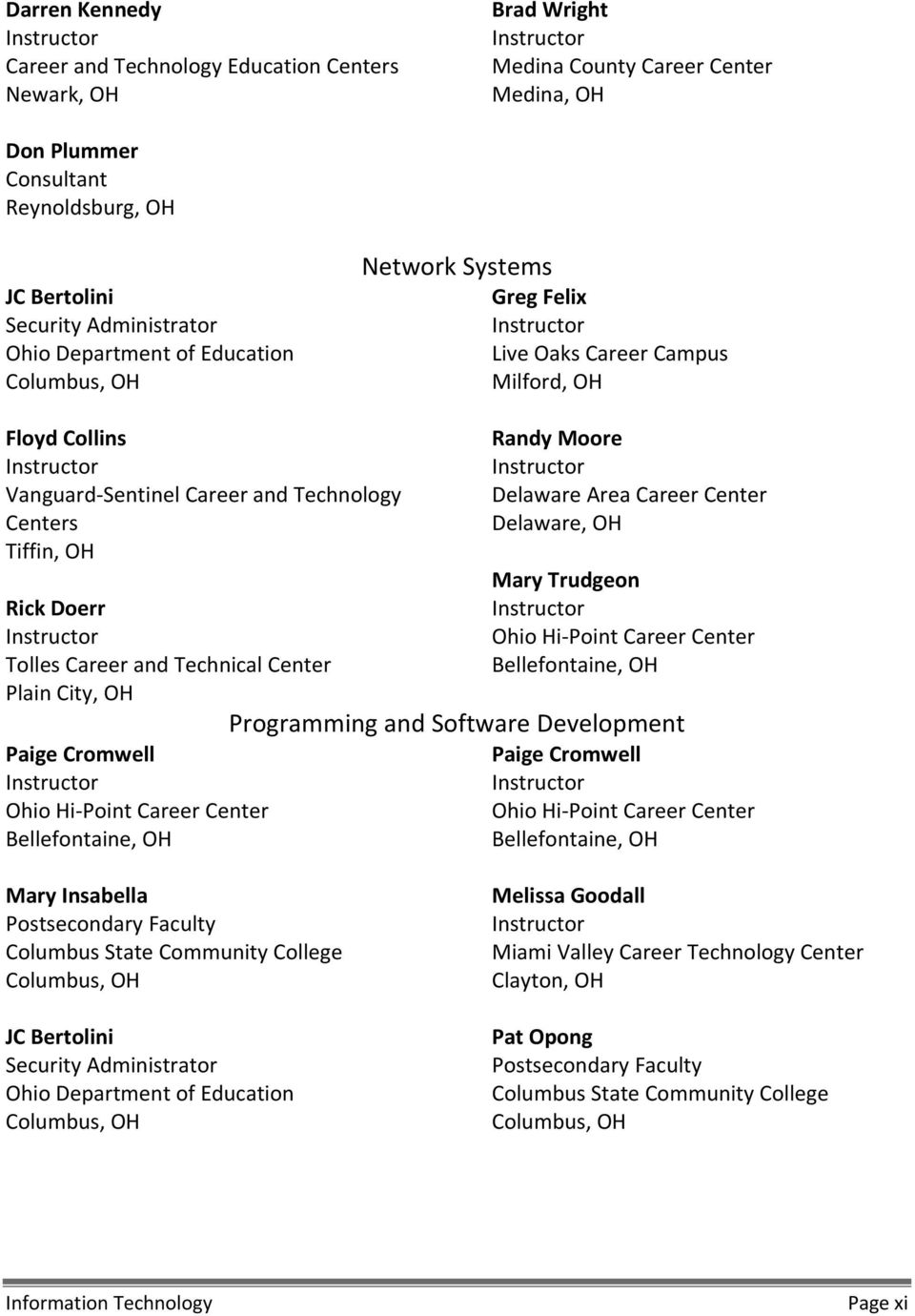
11 JC Bertolini Security Administrator Ohio Department of Education Columbus, OH Development Contributors Information Support Bill Souder Administrator, Adult Workforce Education Ohio Board of Regents Columbus, OH Brad Ely Instructor Cuyahoga Falls High School Cuyahoga Falls, OH Nate Greene Instructor Knox County Career Center Mt. Vernon, OH Melinda O Connor Instructor Mentor High School Mentor, OH Amy Sugden Instructor Miami Valley Career Technology Center Clayton, OH Mark Vukovic Instructor Lakewood High School Lakewood, OH Mike Wilson Instructor Miami Valley Career Technology Center Clayton, OH Thomas O Neill Instructor Butler Technology and Career Development Schools Hamilton, OH JC Bertolini Security Administrator Ohio Department of Education Columbus, OH Interactive Media Josh Galligan Instructor Delaware Area Career Center Delaware, OH Vince Bologna Instructor Medina County Career Center Medina, OH Steve Galloway Program Developer Ohio Department of Rehabilitation and Correction Orient, OH Information Technology Page x

12 Darren Kennedy Instructor Career and Technology Education Centers Newark, OH Brad Wright Instructor Medina County Career Center Medina, OH Don Plummer Consultant Reynoldsburg, OH JC Bertolini Security Administrator Ohio Department of Education Columbus, OH Network Systems Greg Felix Instructor Live Oaks Career Campus Milford, OH Floyd Collins Instructor Vanguard Sentinel Career and Technology Centers Tiffin, OH Rick Doerr Instructor Tolles Career and Technical Center Plain City, OH Paige Cromwell Instructor Ohio Hi Point Career Center Bellefontaine, OH Randy Moore Instructor Delaware Area Career Center Delaware, OH Mary Trudgeon Instructor Ohio Hi Point Career Center Bellefontaine, OH Programming and Paige Cromwell Instructor Ohio Hi Point Career Center Bellefontaine, OH Mary Insabella Postsecondary Faculty Columbus State Community College Columbus, OH JC Bertolini Security Administrator Ohio Department of Education Columbus, OH Melissa Goodall Instructor Miami Valley Career Technology Center Clayton, OH Pat Opong Postsecondary Faculty Columbus State Community College Columbus, OH Information Technology Page xi
13 Validation Panel Contributors December 11, 2012, and January 23, 2013 Toby Bowling IT Manager Path forward IT Cincinnati, OH Information Support Clint Holliday Director of Technology Path forward IT Cincinnati, OH Andy Chileski Chief Information Officer (CIO) Berger Health Systems Circleville, OH Lara Hauswirth IT/Marketing Kingston National Bank Kingston, OH Rodger Orr Infrastructure Manager Park National Bank Newark, OH Eric Wortman Broadcast Engineer E Tech Ohio Columbus, OH Geoff Fauver Senior Architect Information Control Corporation (ICC) Ohio Columbus, OH Interactive Media Kristine Henige Technical Writer Parker Hannefin Cleveland, OH Steve Galloway Training Developer Ohio Department of Rehabilitation and Correction Orient, OH Brad Griffith Web Engineer Buckeye Interactive New Albany, OH Seth Spicer Chief Executive Officer (CEO) SesKey Computers Middletown, OH Shane Spicer Education Tech Consultant Instructional Technology Services of Central Ohio, Inc. Westerville, OH Ricardo Thompsen Web Designer and Developer School of Advertising Art Kettering, OH Information Technology Page xii

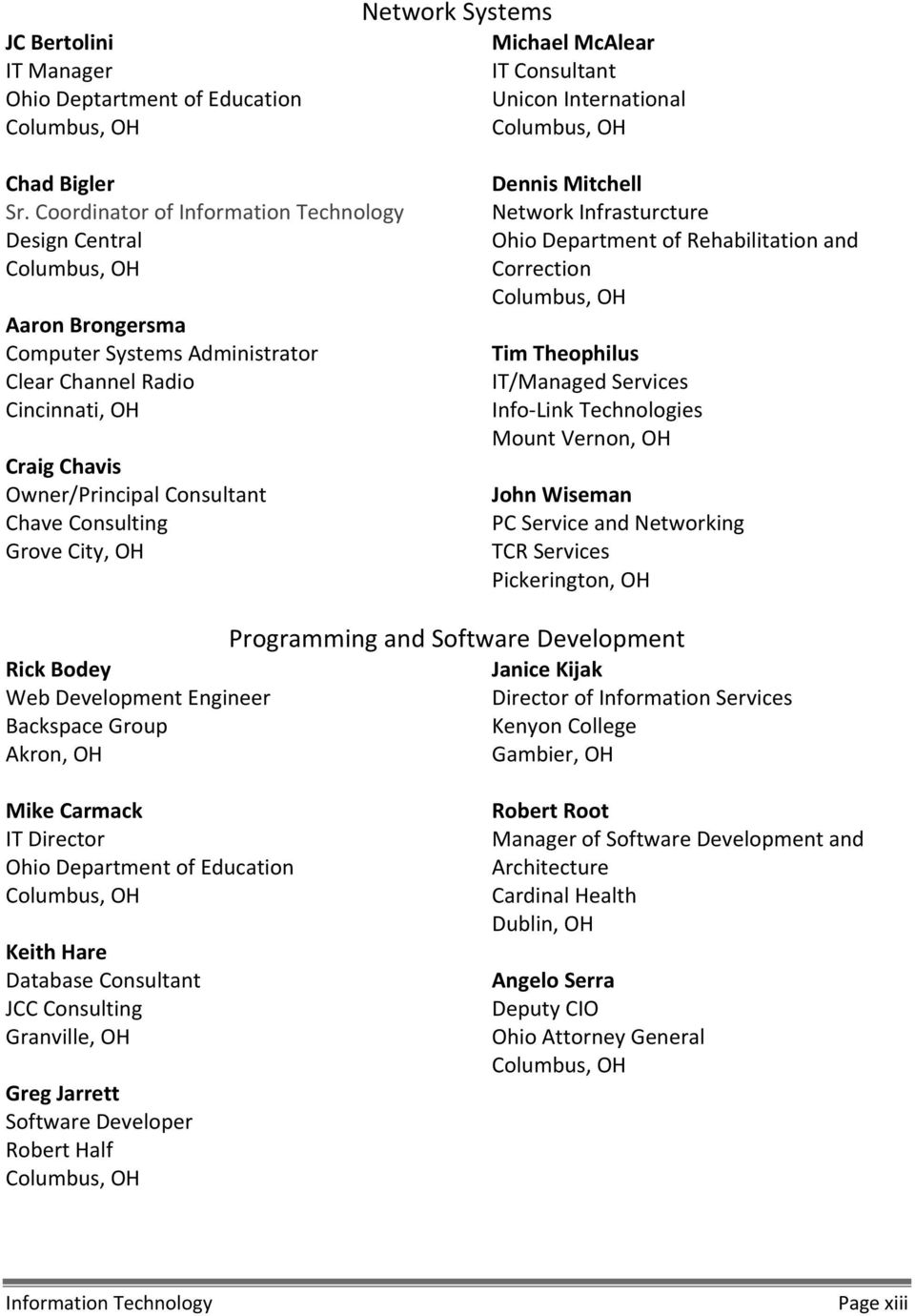
14 JC Bertolini IT Manager Ohio Deptartment of Education Columbus, OH Network Systems Michael McAlear IT Consultant Unicon International Columbus, OH Chad Bigler Sr. Coordinator of Information Technology Design Central Columbus, OH Aaron Brongersma Computer Systems Administrator Clear Channel Radio Cincinnati, OH Craig Chavis Owner/Principal Consultant Chave Consulting Grove City, OH Dennis Mitchell Network Infrasturcture Ohio Department of Rehabilitation and Correction Columbus, OH Tim Theophilus IT/Managed Services Info Link Technologies Mount Vernon, OH John Wiseman PC Service and Networking TCR Services Pickerington, OH Rick Bodey Web Development Engineer Backspace Group Akron, OH Programming and Janice Kijak Director of Information Services Kenyon College Gambier, OH Mike Carmack IT Director Ohio Department of Education Columbus, OH Keith Hare Database Consultant JCC Consulting Granville, OH Greg Jarrett Software Developer Robert Half Columbus, OH Robert Root Manager of and Architecture Cardinal Health Dublin, OH Angelo Serra Deputy CIO Ohio Attorney General Columbus, OH Information Technology Page xiii
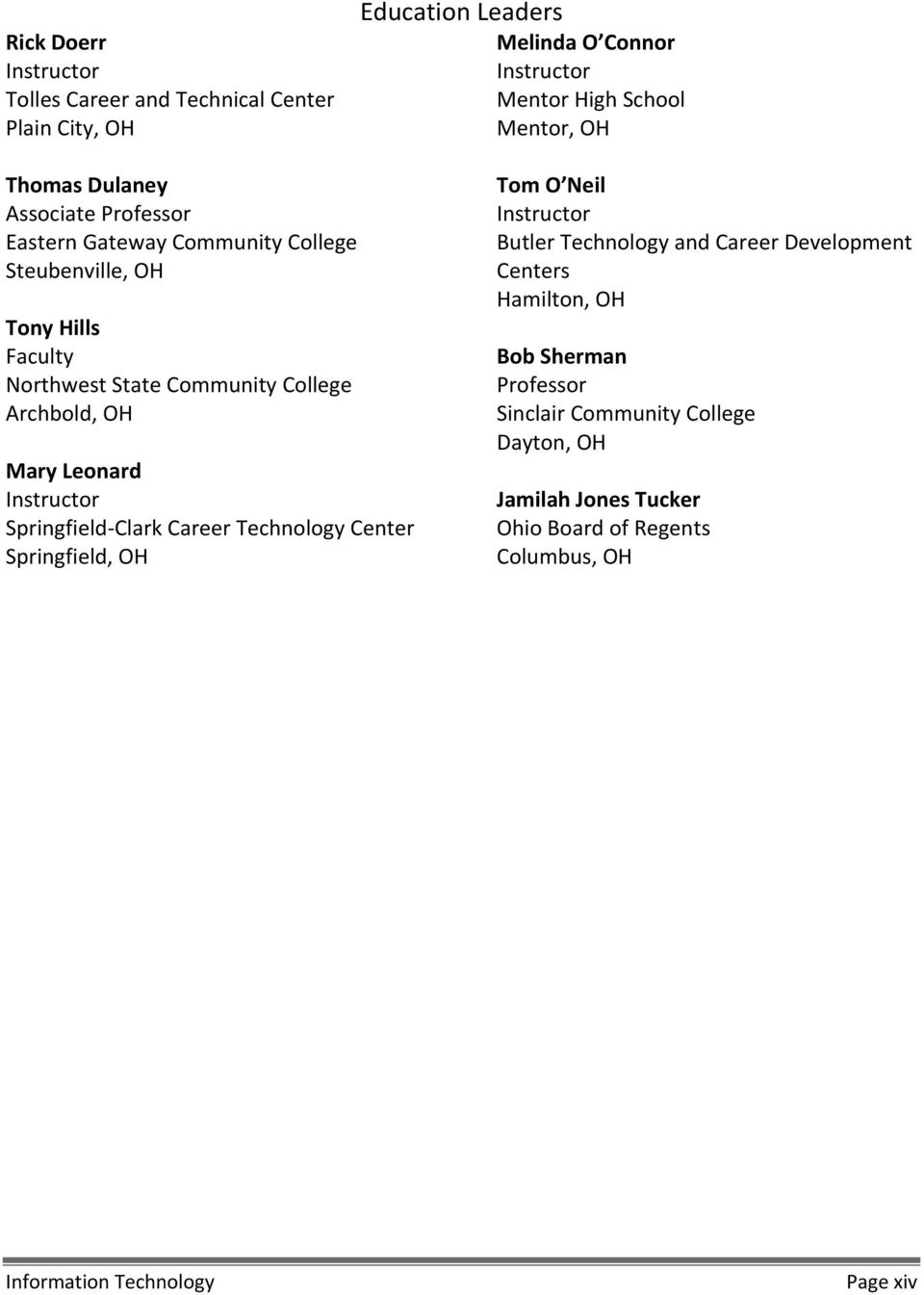
15 Rick Doerr Instructor Tolles Career and Technical Center Plain City, OH Education Leaders Melinda O Connor Instructor Mentor High School Mentor, OH Thomas Dulaney Associate Professor Eastern Gateway Community College Steubenville, OH Tony Hills Faculty Northwest State Community College Archbold, OH Mary Leonard Instructor Springfield Clark Career Technology Center Springfield, OH Tom O Neil Instructor Butler Technology and Career Development Centers Hamilton, OH Bob Sherman Professor Sinclair Community College Dayton, OH Jamilah Jones Tucker Ohio Board of Regents Columbus, OH Information Technology Page xiv
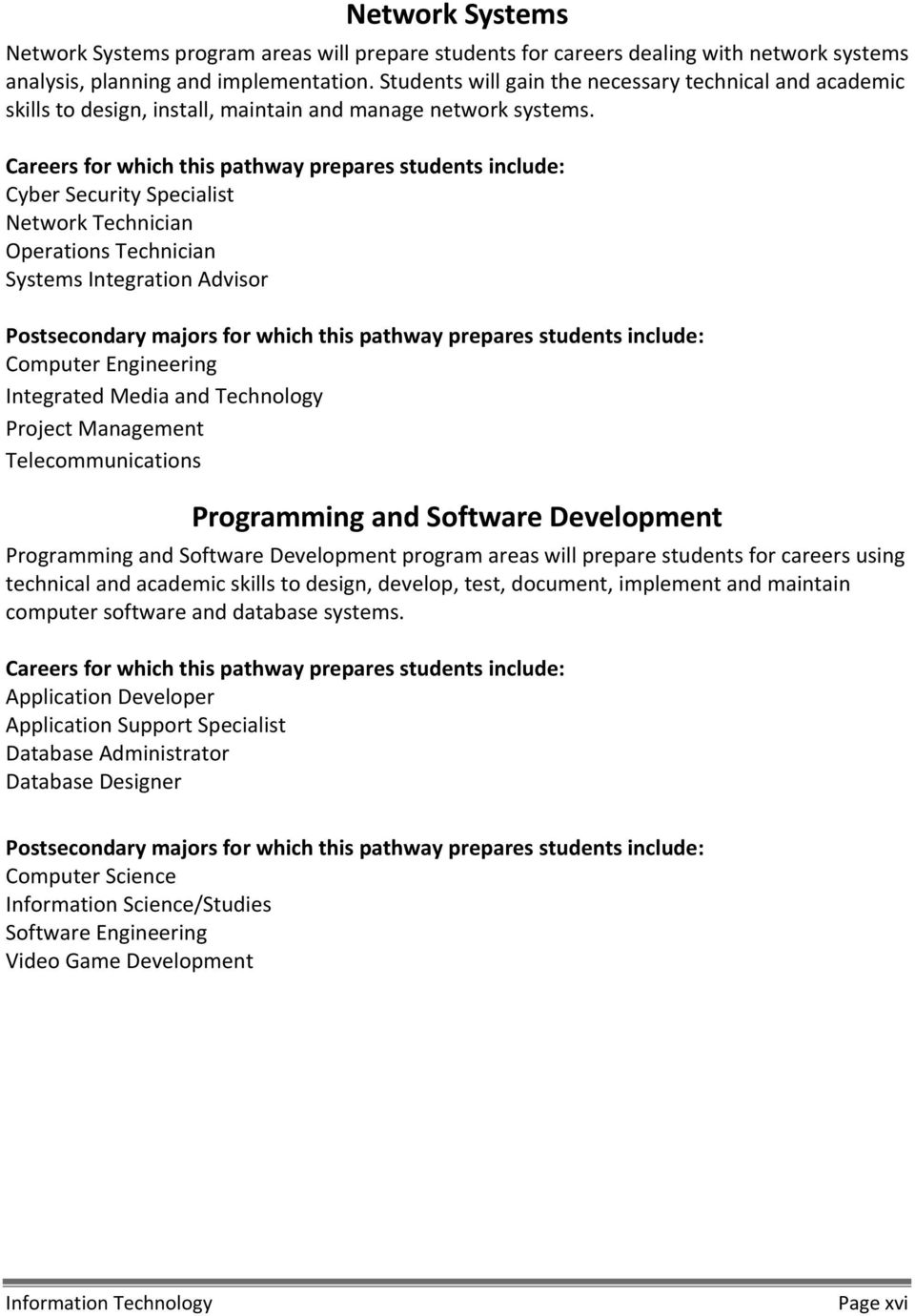
16 Career Pathways Definitions The Information Technology Career Field prepares students for careers in Information Support (ISS), Interactive Media (IM), Network Systems (NS) and Programming and (PSD). Information Support Information Support program areas will prepare students for careers dealing with information technology (i.e., operations, support, deployment/integration). Students will gain the necessary technical and academic skills to implement computer systems and software, provide technical assistance and manage information systems. Careers for which this pathway prepares students include: Application Support Specialist Computer Support Specialist Help Desk Technician Product Support Engineer Postsecondary majors for which this pathway prepares students include: Computer and Information Sciences and Support Services Computer Science Computer Software and Media Applications Information Services Interactive Media Interactive Media program areas will prepare students for careers using multimedia technology to develop online products for business, training, entertainment, communications and marketing. Students will gain the necessary technical and academic skills to create, design and produce interactive media products and services. Careers for which this pathway prepares students include: Desktop Publisher Multimedia Specialist Webmaster Website Developer Postsecondary majors for which this pathway prepares students include: Digital Communication and Media/Multimedia Digital/Multimedia and Information Resources Design Prepress/Desktop Publishing and Digital Imaging Design Web/Multimedia Management and Webmaster Information Technology Page xv

17 Network Systems Network Systems program areas will prepare students for careers dealing with network systems analysis, planning and implementation. Students will gain the necessary technical and academic skills to design, install, maintain and manage network systems. Careers for which this pathway prepares students include: Cyber Security Specialist Network Technician Operations Technician Systems Integration Advisor Postsecondary majors for which this pathway prepares students include: Computer Engineering Integrated Media and Technology Project Management Telecommunications Programming and Programming and program areas will prepare students for careers using technical and academic skills to design, develop, test, document, implement and maintain computer software and database systems. Careers for which this pathway prepares students include: Application Developer Application Support Specialist Database Administrator Database Designer Postsecondary majors for which this pathway prepares students include: Computer Science Information Science/Studies Software Engineering Video Game Development Information Technology Page xvi
18 Strand/Outcome Pathway Chart Pathway Strand/Outcome Information Support Interactive Media Network Systems Programming and Strand 1: Business Operations/21st Century Skills page 2 Outcome 1.1: Employability Skills Outcome 1.2: Leadership and Communications Outcome 1.3: Business Ethics and Law Outcome 1.4: Knowledge Management and Information Technology Outcome 1.5: Global Environment Outcome 1.6: Business Literacy Outcome 1.7: Entrepreneurship/Entrepreneurs Outcome 1.8: Operations Management Outcome 1.9: Financial Management Outcome 1.10: Sales and Marketing Outcome 1.11: Principles of Business Economics Strand 2: IT Fundamentals page 12 Outcome 2.1: Security, Risks, and Safeguards Outcome 2.2: Networking Fundamentals Outcome 2.3: Data Encoding Outcome 2.4: Emerging Technologies Outcome 2.5: Operating Systems Outcome 2.6: Installation and Configuration Outcome 2.7: Web Architecture Outcome 2.8: Databases Outcome 2.9: Project Concept Proposal Outcome 2.10: Equipment Outcome 2.11: Troubleshooting Outcome 2.12: Performance Tests and Acceptance Plans Outcome 2.13: Rollout and Handoff Information Technology Page xvii

19 Pathway Strand/Outcome Information Support Interactive Media Network Systems Programming and Strand 3: Information Security page 19 Outcome 3.1: Components of Information Security Outcome 3.2: General Security Compliance Outcome 3.3: Network Security Outcome 3.4: Multilayer Defense Structure Outcome 3.5: Wireless Security Strand 4: Infrastructure Systems page 22 Outcome 4.1: Network Infrastructure Outcome 4.2: Open Systems Interconnection Outcome 4.3: Network Media Outcome 4.4: Wireless Communications Outcome 4.5: Wireless Network Solutions Outcome 4.6: Network Protocols Outcome 4.7: Transmission Control Protocol/Internet Protocol (TCP/IP) Outcome 4.8: Network Architecture Outcome 4.9: Network Operating Systems Outcome 4.10: Network Administration Outcome 4.11: Cloud Computing Outcome 4.12: Wide Area Network Outcome 4.13: Disaster Recovery Strand 5: Programming and Software Systems page 30 Outcome 5.1: Programming Concepts Outcome 5.2: Computational and String Operations Outcome 5.3: Logical Operations and Control Structures Outcome 5.4: Integrated Development Environment Outcome 5.5: Programming Conventions Outcome 5.6: Lifecycle Outcome 5.7: Configuration Management Strand 6: Web Development page 34 Outcome 6.1: Web pages Information Technology Page xviii
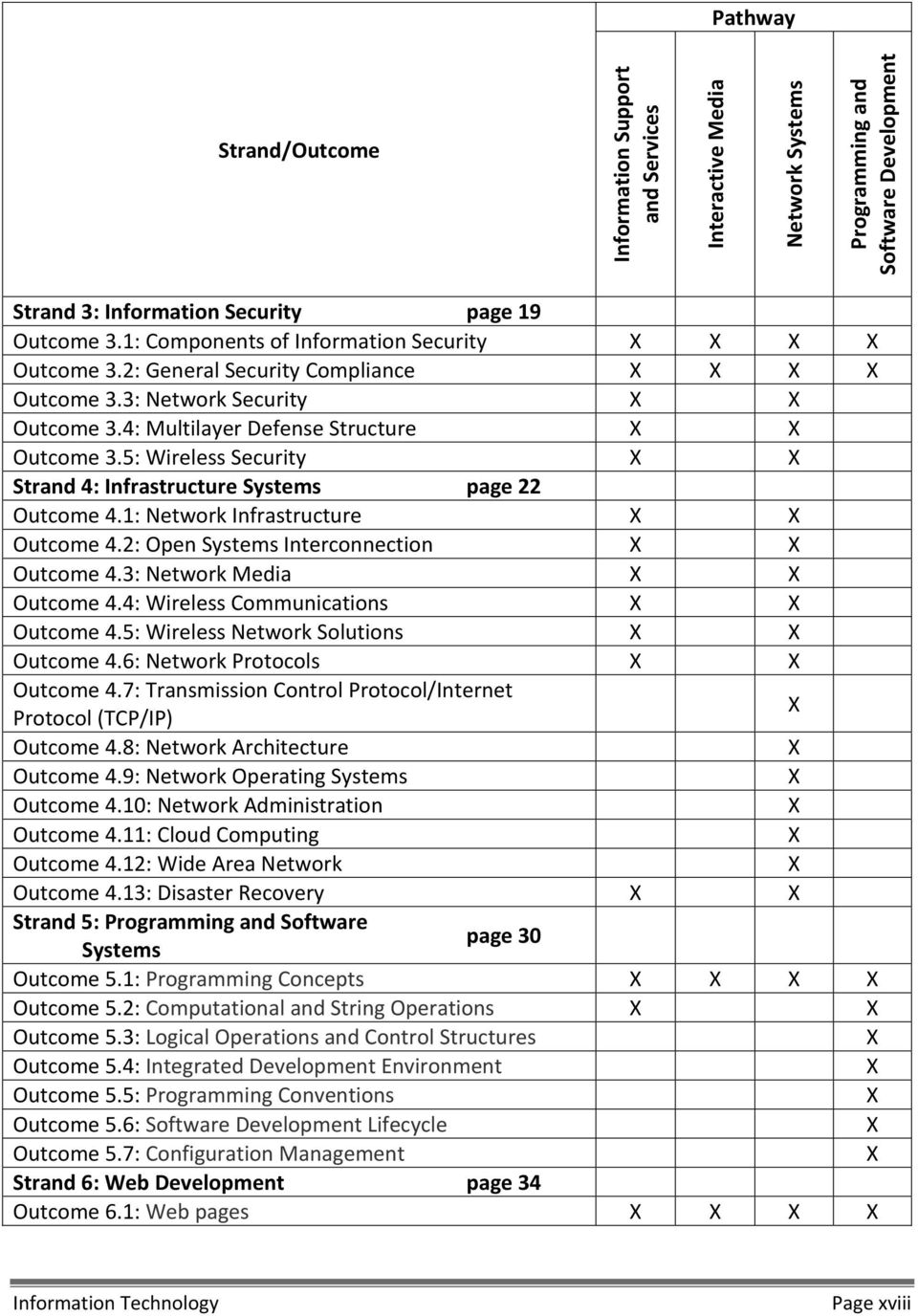
20 Pathway Strand/Outcome Information Support Interactive Media Network Systems Programming and Outcome 6.2: Links and Multimedia Outcome 6.3: Scripting Outcome 6.4: Web Forms Outcome 6.5: Websites Strand 7: Digital Media page 37 Outcome 7.1: Interactive Media Outcome 7.2: Multimedia Tools Outcome 7.3: Production Outcome 7.4: Graphics Outcome 7.5: Typography Outcome 7.6: Animation Outcome 7.7: Video Outcome 7.8: Audio Outcome 7.9: Photographs Strand 8: Databases page 42 Outcome 8.1: Data Modeling Outcome 8.2: Design and Creation Outcome 8.3: Data Entry and Access Outcome 8.4: Database Management Total Outcomes by Pathway: Total Outcomes: 67 Information Technology Page xix

21 INFORMATION TECHNOLOGY CAREER FIELD TECHNICAL CONTENT STANDARDS STRANDS 1 8 Information Technology Page 1
22 Strand 1. Business Operations/21st Century Skills Learners apply principles of economics, business management, marketing, and employability in an entrepreneur, manager, and employee role to the leadership, planning, developing, and analyzing of business enterprises related to the career field. Outcome 1.1. Employability Skills Develop career awareness and employability skills (e.g., face to face, online) needed for gaining and maintaining employment in diverse business settings Identify the knowledge, skills, and abilities necessary to succeed in careers Identify the scope of career opportunities and the requirements for education, training, certification, licensure, and experience Develop a career plan that reflects career interests, pathways, and secondary and postsecondary options Describe the role and function of professional organizations, industry associations, and organized labor and use networking techniques to develop and maintain professional relationships Develop strategies for self promotion in the hiring process (e.g., filling out job applications, resumé writing, interviewing skills, portfolio development) Explain the importance of work ethic, accountability, and responsibility and demonstrate associated behaviors in fulfilling personal, community, and workplace roles Apply problem solving and critical thinking skills to work related issues when making decisions and formulating solutions Identify the correlation between emotions, behavior, and appearance and manage those to establish and maintain professionalism Give and receive constructive feedback to improve work habits Adapt personal coping skills to adjust to taxing workplace demands Recognize different cultural beliefs and practices in the workplace and demonstrate respect for them Identify healthy lifestyles that reduce the risk of chronic disease, unsafe habits, and abusive behavior. Information Technology Page 2
23 Outcome 1.2. Leadership and Communications Process, maintain, evaluate, and disseminate information in a business. Develop leadership and team building to promote collaboration Extract relevant, valid information from materials and cite sources of information Deliver formal and informal presentations Identify and use verbal, nonverbal, and active listening skills to communicate effectively Use negotiation and conflict resolution skills to reach solutions Communicate information (e.g., directions, ideas, vision, workplace expectations) for an intended audience and purpose Use proper grammar and expression in all aspects of communication Use problem solving and consensus building techniques to draw conclusions and determine next steps Identify the strengths, weaknesses, and characteristics of leadership styles that influence internal and external workplace relationships Identify advantages and disadvantages involving digital and/or electronic communications (e.g., common content for large audience, control of tone, speed, cost, lack of non verbal cues, potential for forwarding information, longevity) Use interpersonal skills to provide group leadership, promote collaboration, and work in a team Write professional correspondence, documents, job applications, and resumés Use technical writing skills to complete forms and create reports Identify stakeholders and solicit their opinions Use motivational strategies to accomplish goals. Information Technology Page 3
24 Outcome 1.3. Business Ethics and Law Analyze how professional, ethical, and legal behavior contributes to continuous improvement in organizational performance and regulatory compliance Analyze how regulatory compliance affects business operations and organizational performance Follow protocols and practices necessary to maintain a clean, safe, and healthy work environment Use ethical character traits consistent with workplace standards (e.g., honesty, personal integrity, compassion, justice) Identify how federal and state consumer protection laws affect products and services Access and implement safety compliance measures (e.g., quality assurance information, safety data sheets [SDSs], product safety data sheets [PSDSs], United States Environmental Protection Agency [EPA], United States Occupational Safety and Health Administration [OSHA]) that contribute to the continuous improvement of the organization Identify deceptive practices (e.g., bait and switch, identity theft, unlawful door to door sales, deceptive service estimates, fraudulent misrepresentations) and their overall impact on organizational performance Identify the labor laws that affect employment and the consequences of noncompliance for both employee and employer (e.g., harassment, labor, employment, employment interview, testing, minor labor laws, Americans with Disabilities Act, Fair Labor Standards Acts, Equal Employment Opportunity Commission [EEOC]) Verify compliance with computer and intellectual property laws and regulations Identify potential conflicts of interest (e.g., personal gain, project bidding) between personal, organizational, and professional ethical standards. Information Technology Page 4
25 Outcome 1.4. Knowledge Management and Information Technology Demonstrate current and emerging strategies and technologies used to collect, analyze, record, and share information in business operations Use office equipment to communicate (e.g., phone, radio equipment, fax machine, scanner, public address systems) Select and use software applications to locate, record, analyze, and present information (e.g., word processing, e mail, spreadsheet, databases, presentation, Internet search engines) Verify compliance with security rules, regulations, and codes (e.g., property, privacy, access, accuracy issues, client and patient record confidentiality) pertaining to technology specific to the industry pathway Use system hardware to support software applications Use information technology tools to maintain, secure, and monitor business records Use an electronic database to access and create business and technical information Use personal information management and productivity applications to optimize assigned tasks (e.g., lists, calendars, address books) Use electronic media to communicate and follow network etiquette guidelines. Outcome 1.5. Global Environment Evaluate how beliefs, values, attitudes, and behaviors influence organizational strategies and goals Describe how cultural understanding, cultural intelligence skills, and continual awareness are interdependent Describe how cultural intelligence skills influence the overall success and survival of an organization Use cultural intelligence to interact with individuals from diverse cultural settings Recognize barriers in cross cultural relationships and implement behavioral adjustments Recognize the ways in which bias and discrimination may influence productivity and profitability Analyze work tasks for understanding and interpretation from a different cultural perspective Use intercultural communication skills to exchange ideas and create meaning Identify how multicultural teaming and globalization can foster development of new and improved products and services and recognition of new opportunities. Information Technology Page 5
26 Outcome 1.6. Business Literacy Develop foundational skills and knowledge in entrepreneurship, financial literacy, and business operations Identify business opportunities Assess the reality of becoming an entrepreneur, including advantages and disadvantages (e.g., risk versus reward, reasons for success and failure) Explain the importance of planning your business Identify types of businesses, ownership, and entities (i.e., individual proprietorships, partnerships, corporations, cooperatives, public, private, profit, not for profit) Describe organizational structure, chain of command, the roles and responsibilities of the organizational departments, and interdepartmental interactions Identify the target market served by the organization, the niche that the organization fills, and an outlook of the industry Identify the effect of supply and demand on products and services Identify the features and benefits that make an organization s product or service competitive Explain how the performance of an employee, a department, and an organization is assessed Describe the impact of globalization on an enterprise or organization Describe how all business activities of an organization work within the parameters of a budget Describe classifications of employee benefits, rights, deductions, and compensations. Information Technology Page 6
27 Outcome 1.7. Entrepreneurship/Entrepreneurs Analyze the environment in which a business operates and the economic factors and opportunities associated with self employment Compare and contrast the four types of business ownership (i.e., individual proprietorships, partnerships, corporations, cooperatives) Explain the role of profit as the incentive to entrepreneurs in a market economy Identify the factors that contribute to the success and failure of entrepreneurial ventures Assess the roles of nonprofit and for profit businesses Develop a business plan Describe life cycles of an entrepreneurial business and an entrepreneur Create a list of personal strengths, weaknesses, skills, and abilities needed to be successful as an entrepreneur Explain pathways used to become an entrepreneur Conduct a self assessment to determine entrepreneurial potential Describe techniques for obtaining experience (e.g., apprenticeship, co operative [co op] education, work placement, internship, job shadowing) related to an entrepreneurial objective Identify initial steps in establishing a business (e.g., limited liability company [LLC], tax ID, permits, insurance, licensing) Identify resources available to entrepreneurs (e.g., Small Business Administration, mentors, information resources, educational opportunities) Protect intellectual property and knowledge (e.g., copyright, patent, trademark, trade secrets, processes). Information Technology Page 7
28 Outcome 1.8. Operations Management Plan, organize, and monitor an organization or department to maximize contribution to organizational goals and objectives Forecast future resources and budgetary needs using financial documents (e.g., balance sheet, demand forecasting, financial ratios) Select and organize resources to develop a product or a service Analyze the performance of organizational activities and reallocate resources to achieve established goals Identify alternative actions to take when goals are not met (e.g., changing goals, changing strategies, efficiencies) Use inventory and control systems to purchase materials, supplies, and equipment (e.g., Last In, First Out [LIFO]; First In, First Out [FIFO]; Just in Time [JIT]; LEAN) Identify the advantages and disadvantages of carrying cost and Just in Time (JIT) production systems and the effects of maintaining inventory (e.g., perishable, shrinkage, insurance) on profitability Collect information and feedback to help assess the organization s strategic planning and policymaking processes Identify routine activities for maintaining business facilities and equipment Develop a budget that reflects the strategies and goals of the organization Analyze how business management and environmental management systems (e.g., health, safety) contribute to continuous improvement and sustainability. Information Technology Page 8
29 Outcome 1.9. Financial Management Use financial tools, strategies, and systems to develop, monitor, and control the use of financial resources to ensure personal and business financial well being Create, analyze, and interpret financial documents (e.g., budgets, income statements) Identify tax obligations Review and summarize savings, investment strategies, and purchasing options (e.g., cash, lease, finance, stocks, bonds) Identify credit types and their uses in order to establish credit Identify ways to avoid or correct debt problems Explain how credit ratings and the criteria lenders use to evaluate repayment capacity affect access to loans Review and summarize categories (types) of insurance and identify how insurances can reduce financial risk Identify income sources and expenditures Compare and contrast different banking services available through financial institutions Identify the role of depreciation in tax planning and liability. Information Technology Page 9
30 Outcome Sales and Marketing Manage pricing, place, promotion, packaging, positioning, and public relations to improve quality customer service Identify how the roles of sales, advertising, and public relations contribute to a company s brand Determine the customer's needs and identify solutions Communicate features, benefits, and warranties of a product or service to the customer Identify the company policies and procedures for initiating product and service improvements Monitor customer expectations and determine product/service satisfaction by using measurement tools Discuss the importance of correct pricing to support a product s or service s positioning in the marketing mix Describe the importance and diversity of distribution channels (i.e., direct, indirect) to sell a product Use promotional techniques to maximize sales revenues (e.g., advertising, sales promotions, publicity, public relations) Describe how product mix (e.g., product line, product items, bundling) maximizes sales revenues, market, share, and profit margin Demonstrate sales techniques. Information Technology Page 10
31 Outcome Principles of Business Economics Examine and employ economic principles, concepts, and policies to accomplish organizational goals and objectives Identify the economic principles that guide geographic location of an industry's facilities (e.g., relative scarcity, price, quantity of products and services) Identify the difference between monetary and nonmonetary incentives and explain how changes in incentives cause changes in behavior Use economic indicators to identify economic trends and conditions (e.g., inflation, interest rate fluctuations, unemployment rates) Determine how the quality, quantity, and pricing of goods and services are affected by domestic and international competition in a market economy Analyze factors that affect currency and exchange rates Explain how financial markets and government policies influence interest rates (credit ratings/debt ceiling), trade deficits, and unemployment Describe how economic performance and culture are interdependent Identify the relationships between economy, society, and environment that lead to sustainability Describe how laws and regulations influence domestic and international trade. Information Technology Page 11
32 Strand 2. IT Fundamentals Learners apply fundamental principles of IT, including the history of IT and its impact on society, common industry terms, systems theory, information storage and retrieval, database management, and computer hardware, software, and peripheral device configuration and installation. This base of knowledge and skills may be applied across the career field. Outcome 2.1. Security, Risks, and Safeguards Describe the need for security and explain security risks and security safeguards Explain the need for confidentiality, integrity, and availability (CIA) of information Describe authentication, authorization, and auditing Describe multilevel security Identify security risks and describe associated safeguards and methodologies (e.g., auditing) Describe major threats to computer systems (e.g., internal threats, viruses, worms, spyware, malware, ransomware, spoofing, hacking) Describe the components of the physical environment (e.g., wiring closets, server rooms) and physical security systems Describe the need for security in networking Describe the need for security in application development Track and catalogue physical assets Describe computer forensics, its importance in information security and cybersecurity, and its relevance to law enforcement Identify the need for personal security in digital information and describe how personal information can be safeguarded Practice information security per job requirements Describe privacy security compliance on systems (e.g., Health Insurance Portability and Accountability Act [HIPAA], Payment Card Industry [PCI], Sarbanes Oxley Act [SO], Americans with Disabilities Act [ADA]). Information Technology Page 12
33 Outcome 2.2. Networking Fundamentals Apply networking fundamentals to infrastructure systems Differentiate between Local Area Networks (LANs), Wide Area Networks (WANs), Wireless Local Area Networks (WLANs), and Near Field Communication (NFC) Select the basic point to point (PTP) and point to multipoint (PTMP) network topologies (e.g., star, ring, tree, network, mesh, irregular) and broadband and baseband transmission methods Select network storage techniques (e.g., fiber channel, Internet Small Computer System Interface [iscsi], Internet Protocol [IP], Fiber Channel over Ethernet [FCoE], Serial Attached SCSI [SAS], Network File Systems [NFS], Network Attached Storage/Server Message Blocks [NAS/SMB], Redundant Array of Inexpensive Disks [RAID]) Differentiate between the Internet, intranets, and extranets Identify and apply Transmission Control Protocol and Internet Protocol (TCP/IP), Internet Protocol Version 4 (IPv4), Internet Protocol Version 6 (IPv6) applications and services (e.g., rlogin, Simple Mail Transfer Protocol [SMTP], Telecommunications Network [Telnet], File Transfer Protocol [FTP], Domain Name System [DNS], Network File System [NFS], Voice over Internet Protocol [VoIP], Internet Control Message Protocol [ICMP]) Differentiate between cable types (e.g., fiber optic, twisted pair, coaxial) and interfaces Identify the top level domains (e.g.,.gov,.com,.edu) Describe the characteristics and uses of networks, network devices, and components (e.g., hubs, switches, routers, firewalls). Outcome 2.3. Data Encoding Explain and describe data encoding basics Identify and explain coding information and representation of characters (e.g., American Standard Code for Information Interchange [ASCII], Extended Binary Coded Decimal Interchange Code [EBCDIC], Unicode) Convert between numbering systems (e.g., binary, hexadecimal, decimal). Information Technology Page 13
34 Outcome 2.4. Emerging Technologies Identify trending technologies, their fundamental architecture, and their value in the marketplace Investigate the scope and the impact of mobile computing environments on society Describe the differences, advantages, and limitations of cloud computing (e.g., public cloud, private cloud, hybrid cloud) and on premises computing Utilize cloud computing applications (e.g., services, applications, virtual environments). Outcome 2.5. Operating Systems Maintain operating systems (OSs) Compare and contrast OSs for computer hardware (e.g., personal computers, servers, mainframes, and mobile devices) Describe virtual machines and why they are used Identify the properties of open and proprietary systems Maintain file structures in an OS Use system utilities to maintain an OS Describe OS interfaces (e.g., command line, Graphic User Interface [GUI]) Install and test updates and patches to OSs. Information Technology Page 14
35 Outcome 2.6. Installation and Configuration Install and configure hardware and software Comply with license agreements for software and hardware and describe the consequences of noncompliance Identify hardware requirements for software applications Verify software compatibility and troubleshoot any software incompatibility Install and test new software and software upgrades on stand alone, mobile, and networked systems Preserve, convert, or migrate existing data files to a new format Determine compatibility of software and hardware and resolve any conflicts Install and test hardware peripherals Document the installation and configuration of hardware and software. Outcome 2.7. Web Architecture Explain the fundamentals of delivering information and applications using web architecture Describe methods of securely transmitting data Describe ways to present data (e.g., mobile applications, desktop applications, web applications) Differentiate between a client and a server Identify how the use of different browsers and devices affects the look of a webpage Explain the relationship between data transmission volumes, bandwidth, and latency Describe the characteristics and use of browser plug ins Compare the advantages and disadvantages of running an in house server or using a service provider Describe the difference between static and dynamic sites and the reasons for using each. Information Technology Page 15
36 Outcome 2.8. Databases Describe the fundamentals of databases Identify emerging database technology (e.g., Not only Structured Query Language [NoSQL], New Structured Query Language [NewSQL], graph databases) Identify the purpose and uses of a database Compare and contrast databases (e.g., flat file, hierarchical, relational) Describe the elements of a database (e.g., table, record/row, field, relationships, transactions) Describe the elements of a database user interface (e.g., form, queries, filters, reports) Describe the uses of a Database Management System (DBMS) Describe how data can be stored in and extracted from a database Explain the importance of data integrity and security Differentiate between a front end interface and a back end database. Outcome 2.9. Project Concept Proposal Develop a project concept proposal Identify and incorporate branding strategies Determine the scope and purpose of the project Determine the target audience, client needs, expected outcomes, objectives, and budget Develop a conceptual model and design brief for the project Develop a timeline, a communication plan, a task breakdown, costs (e.g., equipment, labor), deliverables, and responsibilities for completion Develop and present a comprehensive proposal to stakeholders. Information Technology Page 16
37 Outcome Equipment Select, operate, and maintain equipment Identify hardware platforms, configurations, and support models Identify processor, memory, and storage requirements Identify architecture requirements Identify software application requirements Prepare and operate equipment per project design specifications Monitor equipment operation and troubleshoot issues and problems Backup, archive, and manage data Prepare equipment for storage or decommissioning Perform routine maintenance per manufacturer specifications. Outcome Troubleshooting Select and apply troubleshooting methodologies for problem solving Identify the problem Select troubleshooting methodology (e.g., top down, bottom up, follow the path, spot the differences) Investigate symptoms based on the selected methodology Gather and analyze data about the problem Design a solution Test a solution Implement a solution Document the problem and the verified solution. Information Technology Page 17
38 Outcome Performance Tests and Acceptance Plans Develop performance tests and acceptance plans Create a written procedure agreed by the stakeholders and project team for determining the acceptability of the project deliverables Develop a test system that accurately mimics external interfaces Develop test cases that are realistic, compare with expected performance, and include targeted platforms and device types Develop, perform, and document usability and testing integration Make corrections indicated by test results Seek stakeholder acceptance upon successful completion of the test plan. Outcome Rollout and Handoff Plan rollout and facilitate handoff to customer Include overall project goals and timelines in the rollout plan Communicate rollout plans to key stakeholders in a timely manner Conduct final review and approvals according to company standards Identify support staff, training needs, and contingency plans in the rollout plan Test delivered application to assure that it is fully functional for the customer or user and meets all requirements Deliver support and training materials. Information Technology Page 18
39 Strand 3. Information Security Learners apply principles of information security to implement and maintain security compliance and network security. Learners select components and mechanisms required for a multilayer defense structure and evaluate and minimize security risks to wired and wireless networks and devices. Outcome 3.1. Components of Information Security Describe the components associated with information security systems Differentiate between authentication and authorization Compare and contrast authentication techniques (e.g., single factor, multifactor, passwords, biometrics, certificates, Radio Frequency Identification [RFID] cards) Compare and contrast methods of achieving information assurance and integrity and confidentiality (e.g., digital signatures, digital certifications, hashing algorithms, encryption) Describe Virtual Private Networks (VPNs) using tunneling protocols (e.g., Layer 2 Tunneling Protocol [L2TP], Secure Socket Tunneling Protocol [SSTP], Point to Point Tunneling Protocol [PPTP]) and encrypting techniques) Discuss the role of certificate authorities (CAs) and Public Key Infrastructure (PKI). Outcome 3.2. General Security Compliance Implement and maintain general security compliance Identify and implement data and application security Implement backup and verification procedures (e.g., tape, disk, cloud) Describe and assign permissions (e.g., read only, read write) Provide user authentication (e.g., assign and reset user accounts and passwords) Install, test, implement, and update virus and malware detection and protection software Identify sources of virus and malware infection and remove viruses and malware Provide documentation, training, and support to users on established security procedures Identify the need for disaster recovery policies and procedures. Information Technology Page 19
40 Outcome 3.3. Network Security Implement and maintain network security Describe network security policies (e.g., acceptable use policy) Identify security appliances and describe the role of each in a networked environment Devise account administration functions to support network security Describe Access Control Lists (ACLs) and explain why they are used Assess risks based on vulnerability of the organization, likelihood of risk, and impact on the organization Describe patch management and its purposes Train users in network security procedures. Outcome 3.4. Multilayer Defense Structure Explain information technology mechanisms as they apply to a multilayer defense structure Describe available systems for intrusion prevention, detection, and mitigation Review system log files to identify security risks Compare and contrast network analysis software (e.g., network analyzer) and hardware tools to identify security risks and vulnerabilities Identify the components of human security (e.g., social engineering) and techniques to mitigate human security threats (e.g., policies, procedures, training). Information Technology Page 20
41 Outcome 3.5. Wireless Security Implement secure wireless networks Describe wireless security risks (e.g., unauthorized access) and how to mitigate them Compare and contrast methods of increasing the security of wireless networks and devices (e.g., Media Access Control [MAC] address filtering, Wired Equivalent Privacy [WEP], Wi Fi Protected Access [WPA], 802.1x, Remote Authentication Dial In User Service [RADIUS]) Identify security enhancements provided by Institute of Electrical and Electronics Engineers (IEEE) (x) Describe practices and policies for preventing and detecting installation of rogue networks Describe security practices and policies for personal devices Implement and test the security of a wireless network. Information Technology Page 21
42 Strand 4. Infrastructure Systems Learners apply principles of networking and infrastructure related to the installation, administration, and maintenance of computer networks and components. Knowledge and skills may be applied to network connectivity, cabling, protocols, architecture, classification, topologies, operating systems, Open Systems Interconnection (OSI) standards, data encoding, Quality of Service (QoS), Internet Protocol (IP) addressing, and wide area network (WAN) design. Outcome 4.1. Network Infrastructure Build a multinode network Determine the basic point to point (PTP) and point to multipoint (PTMP) network topologies (e.g., star, ring, tree, mesh, hybrid) and identify broadband and baseband (e.g., Ethernet) transmission methods and standards Explain packet switching techniques Compare the characteristics of connection oriented and connectionless protocols and select protocols based on given criteria Identify standard and emerging network technologies (e.g., broadband, satellite nets, optic nets, Integrated Services Digital Network [ISDN], Switched Multimegabit Data Service [SMDS], Asynchronous Transfer Mode [ATM], T1, T3, Synchronous Optical Network [SONET], interplanetary Internet, Long Term Evolution [LTE], High Speed Packet Access [HSPA]) Describe how Unified Communication (UC) integrates voice, data, and video communications Configure and build a network. Information Technology Page 22
43 Outcome 4.2. Open Systems Interconnection Describe the Open Systems Interconnection (OSI) standard (International Organization for Standardization [ISO] Standard 7498) Identify the benefits of using a layered network model Compare OSI stack positions and their relationships to one another Compare the seven layers of the OSI stack to the four layers of the Transmission Control Protocol/Internet Protocol (TCP/IP) stack Compare the basics of TCP/IP layers, components, and functions Describe actions to be performed at each of the OSI physical layers Explain how the OSI layers relate to the elements of network communication. Outcome 4.3. Network Media Select, assemble, terminate, and test media Identify the criteria used in selecting media (e.g., physical properties, transmission technologies, transmission span, bandwidth, topology, security, noise immunity, installation considerations, cost) Differentiate between media types (e.g., coaxial, twisted pair, fiber optic) and interfaces Compare and contrast media categories (e.g., single mode, multimode, CAT5, CAT5E, CAT6+) Describe types of media connectors (e.g., Bayonet Neill Concelman [BNC], Registered Jack [RJ] 45, LC, ST) and grounding techniques Identify media standards (e.g., American National Standards Institute [ANSI], Electronic Industries Alliance/Telecommunications Industry Association [EIA/TIA] 568, EIA/TIA 568A and 568B) Identify the advantages and disadvantages of cabling systems Describe typical problems associated with cable installation Assemble and test Ethernet cable (e.g., straight through, crossover, loopback). Information Technology Page 23
44 Outcome 4.4. Wireless Communications Explain wireless communications Compare and contrast wireless standards in common use (e.g., Institute of Electrical and Electronics Engineers [IEEE] , Bluetooth, Worldwide Interoperability for Microwave Access [WiMA], Radio Frequency Identification [RFID], Near Field Communication [NFC]) Compare and contrast characteristics of wireless signals (e.g., reflection, diffraction, scattering, fading) Differentiate media access methods used by wireless Describe appropriate applications of wireless technologies to specific communication scenarios. Outcome 4.5. Wireless Network Solutions Design and implement wireless network solutions Compare and contrast secure wireless solutions operating in ad hoc mode and infrastructure mode Describe the frequency ranges and associated rules in the wireless spectrum as managed by the Federal Communication Commission (FCC) Describe the Service Set Identifier (SSID) as used in wireless communications Select and install access points, wireless Network Interface Cards (NICs), antennas, and other hardware and software components to provide a wireless networking solution as determined by a site and customer survey Troubleshoot Wireless Local Area Networks (WLANs) using system logs, vendor provided utilities, and diagnostic tools Secure the wireless network. Information Technology Page 24
45 Outcome 4.6. Network Protocols Compare and contrast network protocols Explain network protocols (e.g., Transmission Control Protocol/Internet Protocol [TCP/IP], User Datagram Protocol [UDP], Internet Protocol Version 4 [IPv4], Internet Protocol Version 6 [IPv6]) Identify the advantages and disadvantages of well known protocols (e.g., Domain Name System [DNS], File Transfer Protocol [FTP], Secure Hypertext Transfer Protocol [HTTPS], Telecommunications Network [Telnet], Dynamic Host Configuration Protocol [DHCP], Remote Desktop Protocol [RDP]) and associated port numbers Explain the purposes of encapsulation and decapsulation and their relationship to the Open Systems Interconnection (OSI) model Explain the difference between User Datagram Protocol (UDP) and TCP Identify TCP and UDP conventional ports (e.g., Simple Mail Transfer Protocol [SMTP], Telnet, Hypertext Transfer Protocol [HTTP], FTP) Explain TCP/IP protocol details (e.g., Internet addresses, Address Resolution Protocol [ARP], Reverse Address Resolution Protocol [RARP], IP datagram format, routing IP datagrams, TCP segment format, IPv4, IPv6) Describe a Virtual Private Network (VPN) and identify associated protocols (e.g., Layer 2 Tunneling Protocol [L2TP], Point to Point Tunneling Protocol [PPTP]) Capture and analyze data packets. Information Technology Page 25
46 Outcome 4.7. Transmission Control Protocol/Internet Protocol (TCP/IP) Describe IP addressing schemes and create subnet masks. Information Support Interactive Media Network Systems Programming and Explain Fully Qualified Domain Names (FQDNs) and how they are used Explain the IP addressing scheme and how it is used Identify Class A, B, and C reserved (i.e., private) address ranges and why they are used Identify the class of network to which a given address belongs Differentiate between default subnet masks and custom subnet masks Explain the relationship between an IP address and its associated subnet mask Identify the differences between classful and classless addressing schemes Identify multicasting addresses and explain why they are used Create custom subnet masks to meet network design requirements Compare and contrast Internet Protocol Version 4 (IPv4) and Internet Protocol Version 6 (IPv6). Outcome 4.8. Network Architecture Describe network architecture. Information Support Interactive Media Network Systems Programming and Describe media access protocols (e.g., Carrier Sense Multiple Access with Collision Detection [CSMA/CD], Carrier Sense Multiple Access with Collision Avoidance [CSMA/CA]) Identify the components of and relationships within the Institute of Electrical and Electronics Engineers (IEEE) 802 standards Identify Local Area Network (LAN) performance factors (e.g., signal attenuation, signal propagation delay). Information Technology Page 26
47 Outcome 4.9. Network Operating Systems Describe and install network operating systems (OSs). Information Support Interactive Media Network Systems Programming and Explain how the components of a network OS (i.e., server platform, network services software, network redirection software, communications software) and all support network operations Identify licensing requirements Describe the characteristics of the tiered model (e.g., peer to peer, thin client, thick client, cloud) Analyze the advantages and disadvantages of the client/server model Select network and desktop OSs (e.g., Windows, Linux, MacOS, ios, Android ) Install, test, and patch network OSs manually and using automation Log in to a network device (e.g., router, Secure File Transfer Protocol [SFTP] server, directory server) Evaluate the performance of the network OS. Outcome Network Administration Administer network operating systems and services. Information Support Interactive Media Network Systems Programming and Select physical and logical topology Connect devices to network systems Create domain trusts Maintain domain controllers Create user accounts, groups, and login scripts Establish shared network resources Define and set access controls on files, folders, shares, and directories Configure network domain accounts and profiles Create roaming user profiles and use Group Policy Objects (GPO) to manage the user environment Troubleshoot network performance connectivity (e.g., performance monitor, command line utilities) Explain the fundamentals of Quality of Service (QoS) Securely delegate standard management tasks. Information Technology Page 27
48 Outcome Cloud Computing Implement a hypervisor. Information Support Interactive Media Network Systems Programming and Differentiate between public, private, and hybrid clouds and describe the fundamental cloud components (e.g., shared or dedicated processing, storage, memory, networking, hypervisor) Provision cloud services (e.g., Software as a Service [SaaS], Platform as a Service [PaaS], Infrastructure as a Service [IaaS], Security as a Service). Outcome Wide Area Network Design a wide area network (WAN). Information Support Interactive Media Network Systems Programming and Select WAN connections (e.g., satellite, Synchronous Optical Network [SONET], T1, T3, E1, E3, Digital Subscriber Line [DSL], cable, Worldwide Interoperability for Microwave Access [WiMA], Multiprotocol Label Switching [MPLS], frame relay) Describe point to point (PTP) and point to multipoint (PTMP) interconnection Evaluate and select basic telecommunications services (e.g., satellite, circuit switching, wireless, packet switching) and carriers for WAN requirements Identify the role of telecommunications tariffs Determine availability from Local Area Network (LAN) to meet WAN requirements Determine the speed needed between sites to access applications Determine the subnets needed on the WAN (e.g., Variable Length Subnet Masking [VLSM]) Evaluate and select transmission options Evaluate and select routing protocols (e.g., Border Gateway Routing Protocol [BGRP], Open Shortest Path First [OSPF], Routing Information Protocol Version 2 [RIPv2]). Information Technology Page 28
49 Outcome Disaster Recovery Recommend disaster recovery and business continuity plans Differentiate between disaster recovery and business continuity Identify common backup devices Identify the criteria for selecting a backup system Establish a process for archiving files Develop a disaster recovery plan. Information Technology Page 29
50 Strand 5. Programming and Software Systems Learners apply principles of computer programming and software development to develop code; build, test, and debug programs; create finished products; and plan, analyze, design, develop, implement, and support software applications. Outcome 5.1. Programming Concepts Describe programming concepts Describe how computer programs and scripts can be used to solve problems (e.g., desktop, mobile, enterprise) Explain how algorithms and data structures are used in information processing Model the solution using both graphic tools (e.g., flowcharts) and pseudocode techniques Describe, compare, and contrast the basics of procedural, structured, object oriented (OO), and event driven programming Describe the concepts of data management through programming languages Analyze the strengths and weaknesses of different languages for solving a specific problem Compare and contrast the functions and operations of compilers and interpreters Describe version control and the relevance of documentation. Outcome 5.2. Computational and String Operations Develop code that performs computational and string operations. Information Support Interactive Media Network Systems Programming and Compare and contrast primitive types of numeric and nonnumeric data (e.g., integers, floats, Boolean, strings) Identify the scope of data (e.g., global versus local, variables, constants, arrays) Write code that uses arithmetic operations Write code that uses subtotals and final totals Write code that applies string operations (e.g., concatenation, pattern matching, substring). Information Technology Page 30
51 Outcome 5.3. Logical Operations and Control Structures Develop code that uses logical operations and control structures. Information Support Interactive Media Network Systems Programming and Explain Boolean logic Solve a truth table Write code that uses logical operators (e.g., and, or, not) Write code that uses relational operators and compound conditions Write code that uses conditional control structures (e.g., if, if then else) Write code that uses repetition control structures (e.g., while, for) Write code that uses selection control structures (e.g., case, switch) Write code that uses nested structures and recursion Write code that creates and calls functions Code error handling techniques Write code to access data repositories Write code to create classes, objects, and methods. Outcome 5.4. Integrated Development Environment Build and test a program using an integrated development environment (IDE). Information Support Interactive Media Network Systems Programming and Configure options, preferences, and tools Write and edit code in the IDE Compile or interpret a working program Define test cases Test the program using defined test cases Correct syntax and runtime errors Debug logic errors. Information Technology Page 31
52 Outcome 5.5. Programming Conventions Develop programs using applications security best practices according to information security policies (e.g., cross site scripting, Structured Query Language [SQL] injection attack, boundschecking). Information Support Interactive Media Network Systems Programming and Develop programs using data validation techniques Develop programs that use reuse libraries Develop programs using operating system calls Develop programs that call other programs Use appropriate naming conventions and apply comments Format output (e.g., desktop, mobile, enterprise, reports, data files). Information Technology Page 32
53 Outcome 5.6. Lifecycle Apply the software development lifecycle (SDLC). Information Support Interactive Media Network Systems Programming and Determine requirements specification documentation Identify constraints and system processing requirements Develop and adhere to timelines Identify a programming language, framework, and an integrated development environment (IDE) Identify input and output (I/O) requirements Design system inputs, outputs, and processes Document a design using the appropriate tools (e.g., program flowchart, dataflow diagrams, Unified Modeling Language [UML]) Create documentation (e.g., implementation plan, contingency plan, data dictionary, user help) Review the design (e.g., peer walkthrough) Present the system design to stakeholders Develop the application Compare and contrast software methodologies (e.g., agile, waterfall) Perform code reviews (e.g., peer walkthrough, static analysis) Ensure code quality by testing and debugging the application (e.g., system testing, user acceptance testing) Train stakeholders Deploy the application Collect application feedback and maintain the application. Outcome 5.7. Configuration Management Describe configuration management activities. Information Support Interactive Media Network Systems Programming and Explain version management and interface control Explain baseline and software lifecycle phases Analyze the impact of changes. Information Technology Page 33
54 Strand 6. Web Development Learners apply principles of design and technology, including programming standards and protocols, to create, test, host, and maintain web pages and websites with text, graphics, multimedia, scripting, linking, and data integration in a structure that is easy to navigate and accessible for all users via a variety of hardware and software platforms. Outcome 6.1. Web pages Create basic web pages Describe the basic principles of Hypertext Markup Language (HTML) and its functional relationship with web browsers Plan a web page considering subject, devices, audience, layout, color, links, graphics, and Americans with Disabilities Act (ADA) requirements Format the text of a web page in a WYSIWYG (What You See Is What You Get) editor and in a text editor using HTML formatting tags (e.g., hyperlink, e mail, table formatting, graphic attributes) Use writing process techniques (i.e., drafting, revising, editing, proofreading) to check the web page for format and text accuracy Create and format ordered and unordered lists on a web page using HTML list formatting tags Create and format a table in a web page using HTML table formatting tags and attributes Integrate styles (e.g., inline or external Cascading Style Sheets [CSS]). Outcome 6.2. Links and Multimedia Add links to a web page and insert multimedia files Create absolute links and relative links Write a Hypertext Markup Language (HTML) anchor that links to another section of the same web page Create hyperlinks that send e mail messages and download files Insert image and wrap text around the image using Cascading Style Sheets (CSS) Resize a graphic image in a web page using CSS Insert audio and video files into a web page using HTML tags Build a hover or mouseover effect to change the style of a link. Information Technology Page 34
55 Outcome 6.3. Scripting Integrate scripting into a web page. Information Support Interactive Media Network Systems Programming and Select and apply scripting languages used in web development Insert client side script into a web page Insert comments into client side scripts. Outcome 6.4. Web Forms Integrate forms into a web page. Information Support Interactive Media Network Systems Programming and Design a data entry form from specifications that will accept a variety of user inputs, (e.g., radio buttons, text entry fields, check boxes, drop down menus) Write the Hypertext Markup Language (HTML) code to add a form to a web page Write the HTML code to add text entry fields, radio buttons, check boxes, drop down menus, and other user inputs to a form Explain the concept of a form action Write the HTML code to add a working button (e.g., submit, reset) to a form Format a completed form using HTML and Cascading Style Sheets (CSS) (e.g., fieldset, tabindex) Code scripting to interact with data sources (e.g., database, web services). Information Technology Page 35
56 Outcome 6.5. Websites Create and update a website. Information Support Interactive Media Network Systems Programming and Implement web programming standards and protocols (e.g., World Wide Web Consortium [W3C], Hypertext Markup Language [HTML] 5) Plan a website s structure for navigation and usability Utilize standard web programming languages (e.g., markup, scripting languages) in website development Install and configure a content management system (CMS) Select an integrated development environment (IDE) Create and edit a web page template Create and attach Cascading Style Sheets (CSS) Format website layout (e.g., targeted platforms, text formatting, background color, text, tables, lists, iframes) Incorporate audio and video, forms, and links on a website Develop and execute usability tests on a completed website, checking for information accessibility, ease of use, and navigation Code a website for cross platform and cross browser compatibility and validation Publish the completed website to a web server. Information Technology Page 36
57 Strand 7. Digital Media Learners apply principles of digital media to produce interactive media; develop and produce multimedia applications; integrate typography into media; create 3D models and 2D and 3D animation; and create digital video, audio, and photographs. Outcome 7.1. Interactive Media Describe and explain interactive media and interactive media production Identify the types and uses of interactive media environments (e.g., web based, kiosks, games, mobile devices, video, print) Describe the components of interactive media Identify the major characteristics of interactive media presentations Identify important historical developments and future trends in interactive media Identify the major interactive media genres Perform critical review of interactive media products in different genres Identify the intellectual property rights, responsibilities, and controls related to interactive media Analyze the social and cultural implications of interactive media Identify major applications for interactive media (e.g., sales and marketing, interactive advertising, education, corporate training, corporate communications, distance learning, news, entertainment) Identify specific uses for interactive media in each potential market. Information Technology Page 37
58 Outcome 7.2. Multimedia Tools Develop navigational structures, scripts, storyboards, and flowcharts for multimedia applications. Information Support Interactive Media Network Systems Programming and Choose a navigational menu structure (e.g., rollovers, drop downs, disjointed) Construct and place navigational units Build in interactive elements Determine uses and needs for site maps, multimedia scripts, storyboards, and flowcharts Make preliminary sketches showing placement of images and text on screen Show placement of buttons and navigational graphics Provide information on color schemes Describe music, video, and special effects to be used Provide a sample layout to stakeholders for review Select and create visual design elements appropriate for the intended audience and use Develop characters and narrative to support intended outcomes. Outcome 7.3. Production Produce interactive media. Information Support Interactive Media Network Systems Programming and Select the media elements to be used (e.g., sound, video, graphics, text, animation) Generate text for multi image presentations (e.g., title graphics, charts, graphs) Incorporate graphics (e.g., digital, hand drawn, photographic) Incorporate computer animation Prepare and integrate photographic images and special effects with graphic images Incorporate video footage Edit video footage Record and/or acquire sound tracks (e.g., narrative, voiceover, sound effects, music) Integrate sound with visuals Produce, test, debug, and archive a final product. Information Technology Page 38
59 Outcome 7.4. Graphics Construct and manipulate digital graphics. Information Support Interactive Media Network Systems Programming and Identify the purpose and intended audience of graphics Select color, shape, size, and texture of objects Create or acquire graphics Manipulate and layer objects Differentiate between vector and raster images Select an appropriate graphic file format and resolution Optimize and export graphics files for intended use Select graphic software applications Manipulate graphic objects Compress and decompress graphic files Describe and select color profiles (e.g., Red Green Blue [RGB], Cyan Magenta Yellow Key [CMYK], Pantone). Outcome 7.5. Typography Integrate typography in media. Information Support Interactive Media Network Systems Programming and Identify typographic measurements (e.g., picas, points, pixels, em s) Mix families of type within a project Select appropriate kerning, leading, tracking, and other related formatting Identify appropriate typefaces (e.g., serif, sans serif, Web Safe, screen, print) Prepare a type style guide. Information Technology Page 39
60 Outcome 7.6. Animation Create 2D and 3D animation. Information Support Interactive Media Network Systems Programming and Develop a plan and storyboard for an animation Import 2D or 3D assets Create key frames and apply tweens and paths Create special effects and virtual navigation Create 2D or 3D environments Render and export animations. Outcome 7.7. Video Create a video production. Information Support Interactive Media Network Systems Programming and Identify equipment and other production needs Analyze the script and storyboard to develop a production schedule Set up audio, lighting, and scenery for the shoot Select a video recording format and shoot the video Select a linear or nonlinear editing system and edit the video Add transitions (e.g., dissolves, wipes, cuts), titles, special effects, and digital effects Add a sound track, narration, and/or voiceover Export video to the desired medium. Information Technology Page 40
61 Outcome 7.8. Audio Create an audio production. Information Support Interactive Media Network Systems Programming and Evaluate performance needs and technical resources Identify sound requirements based on script analysis Design score appropriate to production and post production needs Determine microphone and speaker placement Select and incorporate Foley mechanical and electrical sound effects Set up and operate audio for video recording devices Set up and operate a time code system for audio video synchronization Perform audio mixing. Outcome 7.9. Create photographs. Photographs Information Support Interactive Media Network Systems Programming and Select and set up lighting needed (e.g., electronic flash units, reflectors, bounce, spot, daylight) Select a digital file format or film format and camera Select and attach lenses (e.g., wide angle, telephoto, zoom) and filters (e.g., colorcompensating, polarizing, special effects) Determine composition, formal qualities, scale, and use of space Shoot photographs Edit photographs (e.g., color corrections, cropping, enhancements). Information Technology Page 41
62 Strand 8. Databases Learners apply principles of designing, creating, and maintaining databases, including data storage, retrieval, modeling, manipulation, and formatting; database access, management, and administration; and database hardware and software issues. Outcome 8.1. Data Modeling Develop a data model to describe an application s data. Information Support Interactive Media Network Systems Programming and Develop specifications for a database in consultation with the client Identify the real world entities (e.g., customers, purchases) to put in a table and the attributes of the entities (e.g., customer names and addresses, purchase dates and amounts) Identify the relationships between database entities Determine the data types (e.g., text, numbers) and domains (e.g., number greater than zero, text string of two letters) of attributes Determine whether attributes allow for a null value Determine unique identifiers (i.e., keys) of entities Normalize the data model as appropriate for the application Generate data modeling documentation (e.g., entity relationship, workflow, Unified Modeling Language [UML]) Verify that the data model matches specifications. Outcome 8.2. Design and Creation Design and create databases. Information Support Interactive Media Network Systems Programming and Design and create database tables and relationships Create database columns and specify properties (e.g., name, type, domain) Name tables and fields in conformance with naming conventions Define indexes as appropriate for the application. Information Technology Page 42
63 Outcome 8.3. Data Entry and Access Enter and access data in databases. Information Support Interactive Media Network Systems Programming and Create, edit, and delete records Enter and bulk import data into databases and transfer data between databases Write Structured Query Language (SQL) scripts and stored procedures Retrieve, filter, sort, and parse data Commit and roll back transactions Generate and print forms, reports, and results of queries (e.g., calculated fields, functions). Outcome 8.4. Manage databases. Database Management Information Support Interactive Media Network Systems Programming and House database files in an environment appropriate to anticipated user demand Control user access to data Log access to the database by user and type of transaction Backup, verify, and recover data. Information Technology Page 43
Business Subject Matter Requirements. Part I: Content Domains for Subject Matter Understanding and Skill in Business
 Business Subject Matter Requirements Part I: Content Domains for Subject Matter Understanding and Skill in Business Domain 1. Business Management Candidates demonstrate an understanding of the purpose
Iowa. CONTENT STANDARDS and BENCHMARKS. Business and Administration
 Iowa CONTENT STANDARDS and BENCHMARKS Business and Administration 2001 Business, Information Management, and Marketing Career Pathway Framework Illustration of Program Possibilities Occupational Cluster
Field 010: Career and Technical Education Business and Information Technology Assessment Blueprint
 Field 010: Career and Technical Education Business and Information Technology Assessment Blueprint Domain I Business Management and Ownership 0001 Business and Human Resources Management (Standard 1) 0002
Business Education Standards
 Business Education Standards FINAL Approved on January 9, 2004 Copyright 2003 Texas State Board for Educator Certification BUSINESS EDUCATION STANDARDS Standard I. Standard II. Standard III. Standard IV.
TExES Business Education 6 12 (176) Test at a Glance
 TExES Business Education 6 12 (176) Test at a Glance See the test preparation manual for complete information about the test along with sample questions, study tips and preparation resources. Test Name
Law and Public Safety. Career Field technical content standards. 2013 Career-Tech.education.ohio.gov
 Law and Public Safety Career Field technical content standards 2013 Career-Tech.education.ohio.gov Table of Contents Foreword...ii Acknowledgements... iii Philosophy and Principles for Implementation...
Introduction to Information Technology Course Number 10009
 Course Name Introduction to Information Technology Course Number 10009 IT1.0 Understand the need for digital technologies within their life IT1.0 Understand the need and impact of technology IT1.1 Define
T141 Computer Systems Technician MTCU Code 50505 Program Learning Outcomes
 T141 Computer Systems Technician MTCU Code 50505 Program Learning Outcomes Synopsis of the Vocational Learning Outcomes * The graduate has reliably demonstrated the ability to 1. analyze and resolve information
CompTIA Network+ (Exam N10-005)
 CompTIA Network+ (Exam N10-005) Length: Location: Language(s): Audience(s): Level: Vendor: Type: Delivery Method: 5 Days 182, Broadway, Newmarket, Auckland English, Entry Level IT Professionals Intermediate
NEW YORK STATE TEACHER CERTIFICATION EXAMINATIONS
 NEW YORK STATE TEACHER CERTIFICATION EXAMINATIONS TEST DESIGN AND FRAMEWORK September 2014 Authorized for Distribution by the New York State Education Department This test design and framework document
Brief Contents. Part Three: Decisions and Strategies. Part One: Information Technology Infrastructure. Part Four: Organizing Businesses and Systems
 Brief Contents 1 Introduction Part One: Information Technology Infrastructure 2 Information Technology Foundations 3 Networks and Telecommunications 4 Database Management Part Two: Business Integration
Business and Information Technology Middle Level, September 2014, Page 1 of 7. Standards in Bold are essential for students to master.
 Indiana Department of Education Academic Course Framework BUSINESS AND INFORMATION TECHNOLOGY - MIDDLE LEVEL Business and Information Technology - Middle Level course(s) provides concepts and applications
Video Game Design (3 Teams per state, 2 team members minimum)
 Content Area Standard Strand 21st-Century Life & Careers 9.4 Career and Technical Education: All students who complete a career and technical education program will acquire academic and technical skills
126.47. Web Design (One Credit), Beginning with School Year 2012-2013.
 126.47. Web Design (One Credit), Beginning with School Year 2012-2013. (a) General requirements. Students shall be awarded one credit for successful completion of this course. This course is recommended
i. Definition ii. Primary Activities iii. Support Activities iv. Information Systems role in value chain analysis
 ACS 1803 Final Exam Topic Outline I. Enterprise Information Systems a. Enterprise systems vs. inter-organisational systems b. Value Chain Analysis ii. Primary Activities iii. Support Activities iv. Information
Network Technology (10101)
 Network Technology (10101) Rationale Statement: The goal of this course is to help students recognize the significant impact of computer networking in their lives. Virtually any career involves the use
Information Technology Career Cluster Networking Systems and Support Course Number: 11.46200
 Information Technology Career Cluster Networking Systems and Support Course Number: 11.46200 Course Description: Wireless? Wired? How do you communicate? Now that students know the fundamental basics,
Network Technologies
 Network Technologies Career Cluster Information Technology Course Code 10101 Prerequisite(s) Introduction To Information Technology Careers (Recommended), Computer Applications (Recommended), Computer
Introduction to Computers & Information Technology
 130.272. Principles of Information Technology a. General requirements. This course is recommended for students in Grades 9-10. Introduction to Computers & Information Technology 1 Introduction. Students
FUNCTIONAL AREA 12. Network Administration (NET)
 FUNCTIONAL AREA 12 Network Administration (NET) Incumbents in this functional area address interoperability issues related to hardware, software, and connectivity of communications such as cable, fiber
Georgia Department of Education
 Marketing Career Cluster Marketing and Entrepreneurship Course Number 08.44100 Course Description: Marketing and Entrepreneurship is the second course in the Marketing and Management Career Pathway. Marketing
B126 Business Administration Project Management MTCU code - 60200 Program Learning Outcomes
 B126 Business Administration Project Management MTCU code - 60200 Program Learning Outcomes Synopsis of the Vocational Learning Outcomes The graduate has reliably demonstrated the ability to 1. evaluate
Administrative Services Pathway
 Career Cluster: Management and Administration Cluster Big Idea: Organization Administrative Services Pathway Cluster Enduring Understandings: Organization provides the framework for management. Management
Business Management and Administration Career Cluster Cluster Knowledge and Skill Statements
 The following Cluster (Foundation) Knowledge and Skill Chart provides statements that apply to all careers in the Business Management and Administration Cluster. Persons preparing for careers in the Business
Client Server Computing
 Client Server Computing Architecture, Applications and Distribution System Devendra Kumar GLOBAL VISION PUBLISHING HOUSE 20, Ansari Road, Daryaganj, New Delhi-110002 (INDIA) Contents Acknowledgement (vii)
Indiana Content Standards for Educators
 Indiana Content Standards for Educators CAREER AND TECHNICAL EDUCATION MARKETING Marketing teachers are expected to have a broad and comprehensive understanding of the knowledge and skills needed for this
OCCUPATIONAL STANDARD (For use in the development of supply chain related job descriptions, performance evaluations, career development plans, etc.
 OCCUPATIONAL STANDARD (For use in the development of supply chain related job descriptions, performance evaluations, career development plans, etc.) Description of Position (As defined by the CSCSC Stakeholder
APPENDIX A WORK PROCESS SCHEDULE AND RELATED INSTRUCTION OUTLINE. Computer Support Specialist (Existing Title: Help Desk Technician) 15-1151.
 APPENDIX A WORK PROCESS SCHEDULE AND RELATED INSTRUCTION OUTLINE TITLE O*NET-SOC CODE RAPIDS CODE Computer Support Specialist (Existing Title: Help Desk Technician) 15-1151.00 111HY Network and Computer
Career and Financial Management (2003 Curriculum)
 Career and Financial Management (2003 Curriculum) The recently created course tentatively entitled "Career and Financial Management" is a one-half unit requirement that will replace the current Introduction
Business Management and Administration Career Cluster Entrepreneurship Course Number: 06.41610
 Business Management and Administration Career Cluster Entrepreneurship Course Number: 06.41610 Course Description: How do you turn an idea into a business? Experience just that in this course! Entrepreneurship
TAMALPAIS UNION HIGH SCHOOL DISTRICT Larkspur, California. Course of Study. Web Design 1, 2, 3, 4, 5 and 6
 I. INTRODUCTION TAMALPAIS UNION HIGH SCHOOL DISTRICT Larkspur, California Course of Study Web Design 1, 2, 3, 4, 5 and 6 These one-semester courses give students the skills and knowledge necessary to design
Education & Training Plan IT Network Professional with CompTIA Network+ Certificate Program with Externship
 Testing Services and Programs 1200 N. DuPont Highway Dover, DE 19901 https://www.desu.edu/academics/mycaa Contact: Amystique Harris-Church 302.857.6143 [email protected] Education & Training Plan IT Network
BUSINESS AND INFORMATION TECHNOLOGY COMPUTER NETWORK ADMINISTRATOR LEVEL II GRADES 11-12
 PARENT/STUDENT COURSE INFORMATION BUSINESS AND INFORMATION TECHNOLOGY COMPUTER NETWORK ADMINISTRATOR LEVEL II GRADES 11-12 Counselors are available to assist parents and students with course selections
PROGRAM CONCENTRATION:
 Implementation date PROGRAM CONCENTRATION: Business & Computer Science CAREER PATHWAY: Administrative Information/Support COURSE TITLE: Business Communication and Presentation Course Description: The goal
Education & Training Plan IT Network Professional with CompTIA Network+ Certificate Program with Externship
 University of Texas at El Paso Professional and Public Programs 500 W. University Kelly Hall Ste. 212 & 214 El Paso, TX 79968 http://www.ppp.utep.edu/ Contact: Sylvia Monsisvais 915-747-7578 [email protected]
Information Technology Career Cluster Cluster Knowledge and Skill Statements
 Career Cluster The following Cluster (Foundation) Knowledge and Skill Chart provides statements that apply to all careers in the Cluster. Persons preparing for careers in the Information Technology Cluster
The University of Alabama at Birmingham. Information Technology. Strategic Plan 2011 2013
 The University of Alabama at Birmingham Information Technology Strategic Plan 2011 2013 Table of Contents Message from the Vice President... 3 About UAB... 4 About UAB Information Technology Meeting needs
Information Technology Career Cluster Introduction to Cybersecurity Course Number: 11.48100
 Information Technology Career Cluster Introduction to Cybersecurity Course Number: 11.48100 Course Description: Introduction to Cybersecurity is designed to provide students the basic concepts and terminology
Executive Leadership MBA Course Descriptions
 Executive Leadership MBA Course Descriptions MBA 608: Interpersonal Leadership and Managing Organizational Behavior (3 credits) This course provides rising stars learning opportunities to take the next
NETS for Students: Extended Rubric for Grades 6 8
 DRAFT (September 7, 2004) Purpose: This draft version of the NETS extended rubric for Grades 6 8 is available online for educational technology professionals to review and provide feedback to the developers.
PROGRAM CONCENTRATION: Public Safety and Government COURSE TITLE: Exploring Public Safety and Government Education Sixth Grade
 PROGRAM CONCENTRATION: Public Safety and Government COURSE TITLE: Exploring Public Safety and Government Education Sixth Grade COURSE DESCRIPTION: This course serves as an introduction to a variety of
Web Foundations Series Internet Business Associate
 Web Foundations Series Internet Business Associate Internet Business Associate prepares students to work effectively in today's business environment. In this course, you will learn about the tasks involved
SENIOR INFORMATION SYSTEMS MANAGER
 CITY OF PORTLAND Multiple SENIOR INFORMATION SYSTEMS MANAGER FLSA Status: Union Representation: Exempt Nonrepresented DEFINITION To plan, manage, supervise and coordinate information systems activities
Business Management COURSE OUTLINE
 Management COURSE OUTLINE 1. Course Title: Management 2. CBEDS Title: Management 3. CBEDS Number: 4637 4. Job Titles: Bill & Account Collector Billing & Posting Clerk and Machine Operator Brokerage Clerk
Computer Repair Technology
 Job Ready Assessment Blueprint Computer Repair Technology Test Code: 4515 / Version: 01 Copyright 2015. All Rights Reserved. General Assessment Information Blueprint Contents General Assessment Information
3.1 TELECOMMUNICATIONS, NETWORKS AND THE INTERNET
 3.1 TELECOMMUNICATIONS, NETWORKS AND THE INTERNET The Business Value of Telecommunications and Networking Business value impacts of the telecommunications and Networking are: Declining transaction costs
TYLER JUNIOR COLLEGE School of Continuing Studies 1530 SSW Loop 323 Tyler, TX 75701 1.800.298.5226 www.tjc.edu/continuingstudies/mycaa
 TYLER JUNIOR COLLEGE School of Continuing Studies 1530 SSW Loop 323 Tyler, TX 75701 1.800.298.5226 www.tjc.edu/continuingstudies/mycaa Education & Training Plan CompTIA N+ Specialist Program Student Full
Course/Program Credential(s): Credential Certificate Postsecondary Degree University Degree Other:
 Course Title: Information Technology Fundamentals Unit: Computer Basics Content Standard(s) and 1. Distinguish between input and output devices, including monitor, keyboard, mouse, and scanner. 2. Utilize
Education and Training
 Academic Foundations Statement: Apply fundamental knowledge of psychology to enhance learner achievement. Performance Element: Employ fundamental knowledge of developmental theory to enhance learner achievement.
Assessment of Learning Report. Computer Science Networking CPC. Fall 2008 Spring 2010
 Assessment of Learning Report Computer Science Networking CPC Fall 2008 Spring 2010 Report prepared by: Michael Fuszner, Professor Computer Networking Program Coordinator John Phillips, Associate Professor
Information Technology Plan Technology Vision for the Community College
 Information Technology Plan Technology Vision for the Community College At Caldwell Community College and Technical Institute, information technology will be a primary resource for students, faculty, staff,
Information Systems and Tech (IST)
 California State University, San Bernardino 1 Information Systems and Tech (IST) Courses IST 101. Introduction to Information Technology. 4 Introduction to information technology concepts and skills. Survey
Courses in Business and Administrative Services (C4)
 Courses in Business and Administrative Services (C4) PATHWAY COURSES SUBJECT CODE Business Foundations 1 141000 Fundamentals of Business and Administrative Services 2 142000 Management Principles 141025
Computer Apps for Careers (#5000)
 AASD BUSINESS CURRICULUM Computer Apps for Careers (#5000) Description Students will use a variety of software to create personal as well as business documents. The course will emphasize touch-keyboarding
Information Technology Career Field Pathways and Course Structure
 Information Technology Career Field Pathways and Course Structure Courses in Information Support and Services (N0) Computer Hardware 2 145025 Computer Software 145030 Networking 2 145035 Network Operating
Digital Asset Manager, Digital Curator. Cultural Informatics, Cultural/ Art ICT Manager
 Role title Digital Cultural Asset Manager Also known as Relevant professions Summary statement Mission Digital Asset Manager, Digital Curator Cultural Informatics, Cultural/ Art ICT Manager Deals with
9-12 An exploratory level course that provides an exposure to. careers and issues in information technology. Students
 Course Course Name 27101 Introduction to Information Technology 27102 Computer Software Applications 27120 Introduction to Programming Languages 27122 Programming Essentials-Visual Basics Grade 9-12 An
Programming and Software Development. Networking Systems
 Interactive Media Business Information Management I Grades 9-12 (Business Cluster) Digital & Interactive Media Grades 10-12 Web Technologies Programming and Software Development Programming Grades 10-12
Track 2: Introductory Track PREREQUISITE: BASIC COMPUTER EXPERIENCE
 Anne Arundel Community College Tracks Anne Arundel Community College s computer technologies courses have been organized into 10 suggested tracks. The tracks are arranged to ensure that students have the
Chapter 130. Texas Essential Knowledge and Skills for Career and Technical Education. Subchapter C. Arts, Audio/Video Technology, and Communications
 Text of Adopted 19 TAC Chapter 130. Texas Essential Knowledge and Skills for Career and Technical Education Subchapter C. Arts, Audio/Video Technology, and Communications 130.81. Implementation of Texas
G102 Graphic Design MTCU Code 61820 MTCU Program Name- Advanced Graphic Design Program Learning Outcomes
 G102 Graphic Design MTCU Code 61820 MTCU Program Name- Advanced Graphic Design Program Learning Outcomes Synopsis of the Vocational Learning Outcomes* The graduate has reliably demonstrated the ability
2013-2016. Three Year District Technology Plan. Pasco School District #1 July 1, 2013 to June 30, 2016
 2013-2016 Three Year District Technology Plan Pasco School District #1 July 1, 2013 to June 30, 2016 Development History August 2012 November 2012 December 2012 December 2012 February 2013 March 2013 April
Domain 1 The Process of Auditing Information Systems
 Certified Information Systems Auditor (CISA ) Certification Course Description Our 5-day ISACA Certified Information Systems Auditor (CISA) training course equips information professionals with the knowledge
AL RAFEE ENTERPRISES Solutions & Expertise.
 AL RAFEE ENTERPRISES Solutions & Expertise. Virtualization Al Rafee has strategically made substantial investment in building up a large end to end portfolio of Virtualization across the entire IT infrastructure
Executive Leadership MBA Course Descriptions
 Executive Leadership MBA Course Descriptions MBA 608: Interpersonal Leadership and Managing Organizational Behavior (3 credits) This course provides rising stars learning opportunities to take the next
Career Technical Credit Transfer (CT)² Interactive Media Technology Career Technical Assurance Guide (CTAG) February 20, 2015
 Career Technical Credit Transfer (CT)² Interactive Media Technology Career Technical Assurance Guide (CTAG) February 20, 2015 The following programs/courses, indicated by a Career-Technical Articulation
Information Technology Foundations
 Information Technology Foundations Primary Career Cluster: Consultant: Course Code(s): 6095 Recommended Prerequisite(s): Credit: 1-2* Grade Level: 9-10 Aligned Student Organization(s): Teacher Resources:
Fundamentals of a Windows Server Infrastructure Course 10967A; 5 Days, Instructor-led
 Lincoln Land Community College Capital City Training Center 130 West Mason Springfield, IL 62702 217-782-7436 www.llcc.edu/cctc Fundamentals of a Windows Server Infrastructure Course 10967A; 5 Days, Instructor-led
Marketing Management
 Marketing Management Draft 2001 Delta Epsilon Chi Competitive Events for this competitive event are used to define the parameters of the written exam and other activities that are part of the overall competition.
MiraCosta College Computer Studies Department ~
 MiraCosta College Computer Studies Department ~ CSIT: Computer Studies and Information Technology Course Catalog Effective Fall 2010 (pending final approval) Table of Contents CSIT Courses... 3 CSIT 100:
MICHIGAN TEST FOR TEACHER CERTIFICATION (MTTC) TEST OBJECTIVES FIELD 036: MARKETING EDUCATION
 MICHIGAN TEST FOR TEACHER CERTIFICATION (MTTC) TEST OBJECTIVES Subarea Marketing Foundations Marketing Functions Technology, Ethics, and Career Development Approximate Percentage of Questions on Test 40%
Exploring Careers for the 21 st Century 2011
 A Correlation of Exploring Careers for the 21 st Century 2011 To the Georgia Performance Standards for Career Management Grade 8 FORMAT FOR CORRELATION TO THE GEORGIA PERFORMANCE STANDARDS Subject Area:
Functional Area 3. Skill Level 301: Applications Systems Analysis and Programming Supervisor (Mercer 1998 Job 011)
 Functional Area 3 Skill Level 301: Applications Systems Analysis and Programming Supervisor (Mercer 1998 Job 011) Description: Supervises activities of all applications systems analysis and programming
Information Technology Cluster
 Network Systems Pathway Information Technology Cluster Assistant Network Technician -- This major prepares students to install, configure, operate, and connections to remote sites in a wide area network
Updating the International Standard Classification of Occupations (ISCO) Draft ISCO-08 Group Definitions: Occupations in ICT
 InternationalLabourOrganization OrganisationinternationaleduTravail OrganizaciónInternacionaldelTrabajo Updating the International Standard Classification of Occupations (ISCO) Draft ISCO-08 Group Definitions:
ADMINISTRATIVE SUPPORT AND CLERICAL OCCUPATIONS SIN 736 1
 Following are the Contractor Site and Government Site Labor Categories for SIN 736-1, SIN 736-1, and SIN 736-5. Please do not hesitate to contact us at [email protected] if you have any questions ADMINISTRATIVE
Table of Contents. Part 1 The Office in the Business World... 1
 Table of Contents Part 1 The Office in the Business World............. 1 CHAPTER 1 The Office in a Changing Business World............... 2 Topic 1-1 The Office Today.................. 3 Offices Are Information
Course Title: ITAP 2431: Network Management. Semester Credit Hours: 4 (3,1)
 Course Title: ITAP 2431: Network Management Semester Credit Hours: 4 (3,1) I. Course Overview This course introduces students to business data communications and networking concepts, tools and methods.
Contents. Foreword. Acknowledgments
 Foreword Preface Acknowledgments xv xvii xviii CHAPTER 1 Introduction 1 1.1 What Is Mission Critical? 1 1.2 Purpose of the Book 2 1.3 Network Continuity Versus Disaster Recovery 2 1.4 The Case for Mission-Critical
ATLANTA TECHNICAL COLLEGE
 ATLANTA TECHNICAL COLLEGE STRATEGIC PLAN FY 2008 2012 Mission and Vision ATC Mission Atlanta Technical College, a unit of the Technical College System of Georgia, located in the city of Atlanta, is an
ACS 1803. Final Exam Topic Outline. Functional Area Information Systems. V. Enterprise Information Systems
 ACS 1803 Final Exam Topic Outline IV. Functional Area Information Systems a. Financial Information Systems (Lecture Outline 5.1) i. Budgeting Systems ii. Cash Management Systems iii. Capital Management
BIT Course Description
 BIT Course Description Introduction to Operating Systems BTEC 101 This course follows a systematic approach to operating systems explaining why they are needed and what they do. Topics include the basic
Information Technology Career Cluster Advanced Cybersecurity Course Number: 11.48200
 Information Technology Career Cluster Advanced Cybersecurity Course Number: 11.48200 Course Description: Advanced Cybersecurity is designed to provide students the advanced concepts and terminology of
JOB READY ASSESSMENT BLUEPRINT COMPUTER NETWORKING FUNDAMENTALS - PILOT. Test Code: 4514 Version: 01
 JOB READY ASSESSMENT BLUEPRINT COMPUTER NETWORKING FUNDAMENTALS - PILOT Test Code: 4514 Version: 01 Specific Competencies and Skills Tested in this Assessment: PC Principles Identify physical and equipment
Standards/Measurement Criteria. (**Draft) Graphic Communications
 (**Draft) Graphic Communications Photo Imaging - Option C CIP No. 10.0300 *These state standards are designed to be delivered in a sequence of courses. *Standards 1-17 are to be taught as an introduction
E-COMMERCE AND ENTREPRENEURSHIP 579M. Essential Curriculum Course Overview. Total Hours: 125. 01 Should You Become an Entrepreneur?
 E-COMMERCE AND ENTREPRENEURSHIP 579M Essential Curriculum Course Overview Total Hours: 125 UNIT 1: THE BASICS OF ENTREPRENEURSHIP Hours: 10 01 Should You Become an Entrepreneur? (2 hours) The student will
Indiana Academic Standards for Exploring College & Careers
 A Correlation of To the Exploring College & Careers INTRODUCTION This document demonstrates how meets the Indiana Middle School Academic Standards for. Correlation page references are Student Edition,
Business Management & Administration Career Cluster Introduction to Business & Technology Course Number 07.44130
 Business Management & Administration Career Cluster Introduction to Business & Technology Course Number 07.44130 Course Description Introduction to Business & Technology is the foundational course for
Academy of Finance I G/T
 Academy of Finance I (2 credits) Unit I: Financial Planning (40 days) Academy of Finance I G/T Overview This unit provides students with an overview of the job of a financial planner. Students look at
EGG HARBOR TOWNSHIP SCHOOLS CURRICULUM GUIDE HIGH SCHOOL BUSINESS BUSINESS MANAGEMENT/BUSINESS ETHICS
 EGG HARBOR TOWNSHIP SCHOOLS CURRICULUM GUIDE HIGH SCHOOL BUSINESS BUSINESS MANAGEMENT/BUSINESS ETHICS SUBJECT AREA PHILOSOPHY The purpose of business education is to provide students with the knowledge
Network Systems Administrator/Analyst
 Network Systems Administrator/Analyst A+, MCP, MCSA 2003, CCNA, Business Mgmt. National Aboriginal IT Skills Development Program Career opportunities continue to grow for Information Technology (IT) professionals