
Epic EHR Training. Epic Go-Live is August 16, 2015.
|
|
|
- Brandon Dickerson
- 10 years ago
- Views:
Transcription
1 Epic EHR Training Epic Go-Live is August 16, Epic Go-Live for CaroMont Regional Medical Center will begin on August 16, Our Epic training and implementation team has been planning an extensive Epic training program for all hospital-based physicians to help you successfully transition to the new system and meet the Medical Executive Committee (MEC) mandated 80% CPOE goal. Our training is a three-staged approach beginning in July 2015: First phase Prepare by watching short, computer-based learning (CBL) videos on NetLearning to gain important information about Epic then attend on-site classroom training. Second phase Login to the Playground and practice using clinical scenarios. Instructions to access the Playground are attached with the CMIO Update. Third phase Optimization phase to help you create note templates and customize ordersets in the personalization lab or boot camp class, and receive at-the-elbow Physician to Physician dedicated floor support for two weeks after Go-Live begins. We have spent significant time and resources planning Epic for CaroMont and will continue to focus on this project as we help you transition to our new system. We will continue to provide periodic updates in the format of a FAQ (June edition attached) on topics that come up in our run up to the live event. Should you have questions, please feel free to contact me directly at [email protected] or If you have trouble accessing your CBLs, please contact the IT Helpdesk at Sincerely, Salim Saiyed, MD Chief Medical Information Officer Todd Davis, MD VPMA, Patient Safety Officer See opposite for training information.

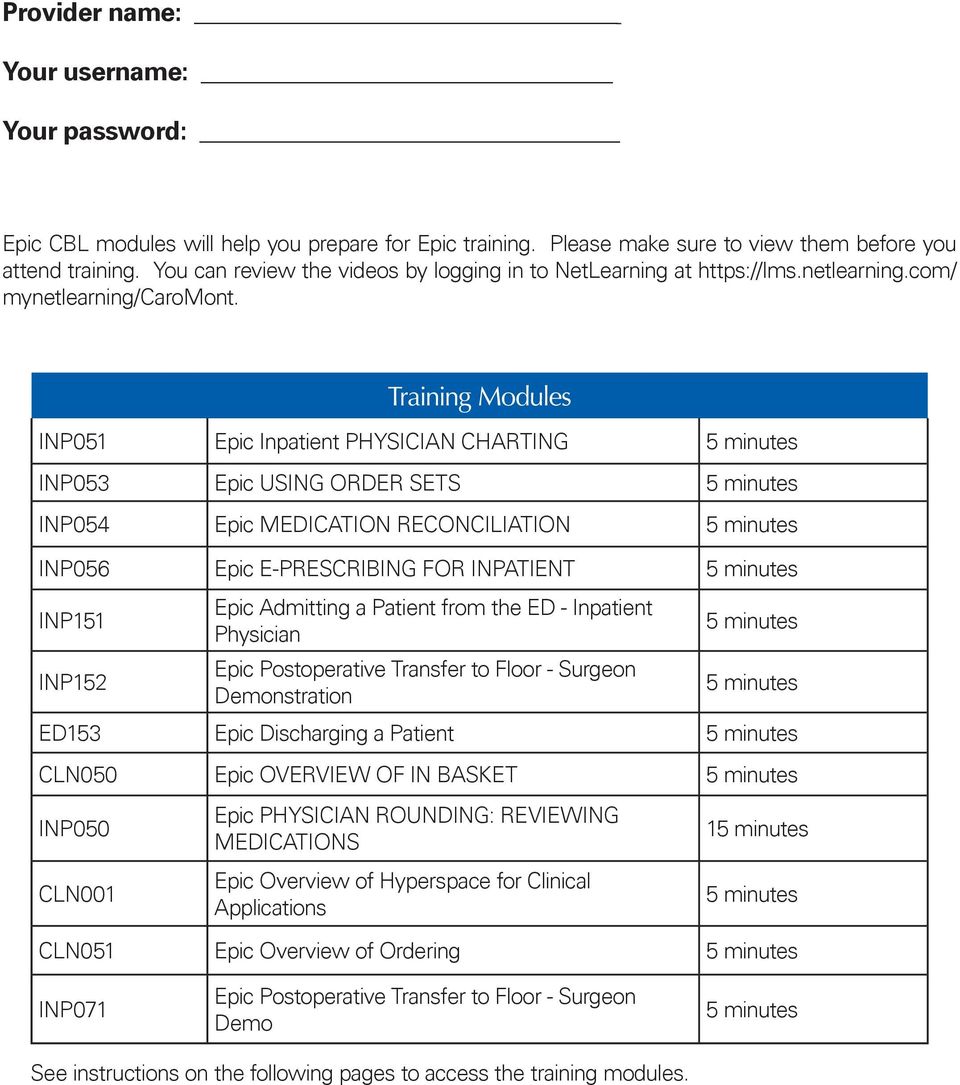
2 Provider name: Your username: Your password: Epic CBL modules will help you prepare for Epic training. Please make sure to view them before you attend training. You can review the videos by logging in to NetLearning at mynetlearning/caromont. Training Modules INP051 Epic Inpatient PHYSICIAN CHARTING INP053 Epic USING ORDER SETS INP054 Epic MEDICATION RECONCILIATION INP056 Epic E-PRESCRIBING FOR INPATIENT INP151 INP152 Epic Admitting a Patient from the ED - Inpatient Physician Epic Postoperative Transfer to Floor - Surgeon Demonstration ED153 Epic Discharging a Patient CLN050 Epic OVERVIEW OF IN BASKET INP050 CLN001 Epic PHYSICIAN ROUNDING: REVIEWING MEDICATIONS Epic Overview of Hyperspace for Clinical Applications 1 CLN051 Epic Overview of Ordering INP071 Epic Postoperative Transfer to Floor - Surgeon Demo See instructions on the following pages to access the training modules.
3 3. Click the green plus sign NetLearning Login Instructions 1. Go to 1. Go to Enter Enter your your login Employee ID ID and PW last 4 digits of SS# and or password for Independent provider your last name. 2. Scroll to CBL tab and search for Epic 2. Scroll to CBL tab and search for Epic Scroll down to to CBL CBL tab tab and and search search for for Epic

4 3. Click the green plus symbol Click the green plus class symbol sign and and enroll enroll in in the the CBL. CBL. 4. Click launch to open the videos 4. Click launch to open the videos Click launch course to to open open the video the video and and click click play. play.

5 CaroMont Epic CMIO Update Who do I contact if I have never had remote access from home to CaroMont? If you have never been set up to have a remote access, you can request an account by calling the IT Help Desk at , ing [email protected] or entering a CHIP ticket request. Your request can take up to hours to complete. We highly encourage everyone who frequently utilizes the hospital to obtain remote access prior to Epic Go-Live to help you meet your MEC mandated 80% CPOE goal. What if I have remote access but do not see the Epic PLY icon or have other access issues? If you have been set up for remote access but cannot access Epic Playground (PLY) icon when you login, please contact the Help Desk at How do I practice before or after attending my Epic training? You can practice by logging to Epic Playground environment. A tip sheet on how to access the Epic Playground is attached. In the Playground are some common clinical scenarios per specialty to help you practice. Short, five-minute videos are also available in NetLearning as refresher courses. Can I attend Epic training with just my group or my specialty peers? You can arrange to have your entire group or specialty peers attend training on the same day. We ask that you coordinate with your partners by picking a date ahead of time. We will try to accommodate your request if notified in advance. Are there any extra resources available after I have attended my basic Epic training? You can register for a boot camp class to learn more about the advanced functionality and customization available in Epic. There will also be personalization labs one week prior to Go-Live where you can create note templates and favorite order sets. One on one sessions are also available with me if you feel you need more help prior to Go-Live. Salim Saiyed, MD Chief Medical Information Officer Office: [email protected] See opposite for training information.

6 1. To use Epic PLY, you will need to go to the following website if Epic PLY icon is not available: Epic Playground Login Instructions 1. To use Epic 2. Log Playground into the website (PLY), using you your will active need directory go to username the following and password website (used if Epic for Document PLY icon is not available: Management) that should usually start with your last name. 2. Log into the website using your active directory username and password (used for Document Management) 3. Select that Epic should PLY to usually open Epic start practice with environment your last name Enter your Active Active Directory/Document Management username username here. here. 3. Select Epic PLY to open the Epic practice environment Select Epic PLY.

7 4. Enter the generic ID and password given to you in the training class. It should start with ord and the password is train. If you do not have one, use the following: Inpatient physicians - ord1850 password - train Specialty physicians: Behavioral Health - crmtbhmd Cardiology - crmtcardiomd OB & NICU - crmtobgynmd Radiant - risrad Surgery - crmtormd Password for all the above - crmt Enter your specialty generic ID/password as per above. Enter your specialty User ID generic and ID/password those as listed per above. 5. Once logged in, select any of the fake patients to practice the scenarios that are provided in the attachment 5. Once logged in, select any of the fake patients to practice the scenarios that are provided in 5. Once logged in, select any of the fake patients to practice the scenarios that are provided in Select Select any any patient from from the the list list to to begin practice specialty your specialty scenario scenario. practice. Select any patient from the list to practice your specialty scenario.

Students. Students. Ambulatory. Rehab Therapy Students. September
 1 EPIC TRAINING Student Manual Medical Students Medical Students EpicCare Ambulatory Medical Assistant Students EpicCare Ambulatory NP and PA Students NP and PA Students EpicCare Ambulatory Nursing Instructors
(You will use the login ID and password below to login through the first two websites.)
 (You will use the login ID and password below to login through the first two websites.) https://providers.cvch.com Citrix Logon: Password: Press the SKIP TO LOG ON selection after
Sunrise Acute Care (SAC) Module 1 New Provider Basic Course
 Sunrise Acute Care (SAC) Module 1 New Provider Basic Course May 2013 Sunrise Acute Care Training Consists of 5 modules To gain access to Acute Care you will need to: Complete all 5 modules Pass the Acute
Pediatric Physician. and Advanced Providers Handbook. for Inpatient Cerner Use
 Pediatric Physician and Advanced Providers Handbook for Inpatient Cerner Use Section Last updated Page(s) Background Jan-13 2 Admission Process Nov-12 11 Codes Nov-12 17 Discharge Process Nov-12 13 Downtime
TAB 32. Electronic Medical Record
 TAB 32 Electronic Medical Record EHR Training for LSU Rotations All LSU house officers are required to fulfill EHR training for each rotation site at which they will practice. It is the primary responsibility
IT Quick Reference Guides Using the Online Ticketing System (mysupport)
 IT Quick Reference Guides Using the Online Ticketing System (mysupport) isupport Guides This guide covers using the Online Ticketing System, or mysupport, to submit tickets, browse knowledgebase articles
ROH On-Boarding Documents
 ROH On-Boarding Documents 1. Orientation Checklist 2. Welcome Letter: Open Lab Dates, Times, & Locations 3. Computer Access: Access Request 4. Required Training (Web Based or Departmental) o Inpatient:
Users Guide to the Epic Training Center
 to the Welcome to the! We know that there is great interest in the software and training. We invite you to log in to the and learn more about the training you will be taking and to become familiar with
ONLINE LEVEL ONE UMPIRES COURSE PARTICIPANT FACT SHEET
 About the course The Level One Online Umpire s Course has been designed to assist you in achieving the necessary skills and knowledge to be an effective umpire and enjoy your officiating role. The course
Entering a Case Into the PeopleSoft Helpdesk (CRM) Logging in
 Entering a Case Into the PeopleSoft Helpdesk (CRM) Logging in Open Internet Explorer Logging in Navigate to the district home page: http://www.fortbend.k12.tx.us/ Click on Employee Services Finally, click
CITRIX REMOTE ACCESS REQUEST FORM
 CITRIX REMOTE ACCESS REQUEST FORM DATE: SUBJECT: Citrix Access Gateway (CAG) Access to CRMC Computer Systems FROM: TO: TO: IT Department - Infrastructure Manager - Mark Bohm Last Name: First Name: MI:
Active Directory Integration for Greentree
 App Number: 010044 Active Directory Integration for Greentree Last Updated 14 th February 2013 Powered by: AppsForGreentree.com 2013 1 Table of Contents Features... 3 Options... 3 Important Notes... 3
Certification Testing and Training System
 USER S GUIDE Certification Testing and Training System Registering, Online Training and Testing Release: 1.9 Date: August 31, 2004 Page 1 of 12 Section 1: Application and Approval Once your company has
Wrightstown School District
 Wrightstown School District Overview E-help desk gives you the ability to create your own Help Desk tickets. It also allows you to be able to check the status of your requests, and add updates (comments)
Understanding the Role of Physician-Focused At-The-Elbow Support During EMR Go-Live
 Understanding the Role of Physician-Focused At-The-Elbow Support During EMR Go-Live Learnings from a mid-sized hospital Epic EMR Implementation. Contents Data Collection... 1 Results... 2...2 Support Events
FirstService Residential Service Desk Plus Support End User Training
 FirstService Residential Service Desk Plus Support End User Training Creating Tickets in Service Desk Plus Finding solutions to common problems Differentiating between Service Requests and Reporting Issues
Client Portal Training
 Client Portal Training Signing In 1. Go to http://www.csus.edu/irt/projects and click on Team Dynamix Client or from your browser, go to https://csus.teamdynamix.com 2. Click on SIGN-IN located in the
ParishSOFT Remote Installation
 Table of Contents Setting up Remote Solution Windows 7 or Vista... 1 Connecting to ParishSOFT... 1 Accessing Your database... 3 Switching to your parish database... 4 Setting up Accounts for users... 5
Remote Access Enhancements
 Remote Access Enhancements Citrix/Epic Set-up Instructions Provided By: Akron Children s IT Department Date: 7/11/2012 Version: v6 2012 Children s Hospital Medical Center of Akron Table of Contents 1.
EpiCare & Clinical Informatics Training Catalog. EpiCare Training Department 860-714-7000 [email protected]
 & Clinical Informatics Training Catalog 2016 Training Department 860-714-7000 [email protected] Most courses can be registered for online by clicking on the HealthStream logo: For more
How to use SURA in three simple steps:
 How to use SURA in three simple steps: Most of SURA s functionality can be accessed through these three steps. 1) Download SURA to your computer Go to the SU Downloads page to obtain the SURA utility.
Remedy ITSM Incident Management User Guide
 Remedy ITSM Incident Management User Guide For use by IT professional support staff with Remedy ITSM at Missouri S&T Version 1.4 December 11, 2013 Revision History Version Date Modified Author Modification
Using the Educator Dashboard
 Reference Guide Using the Educator Dashboard What s Inside How to Create Accounts Get to Know the Educator Dashboard How to Manage Licenses and Create Educators How to Give Accommodations to Students First
Maryland Electronic Health Records (EHR) Incentive Program Registration and Attestation System. Provider User Guide. Version 2
 Maryland Electronic Health Records (EHR) Incentive Program Registration and Attestation System Provider User Guide Version 2 December 2012 Table of Contents Table of Figures... 3 Introduction... 4 Getting
Online Helpdesk System
 Online Helpdesk System How to register: Please visit http://www.support.lonicera.com.au/cgi-bin/pdesk.cgi or access our Quick Links at http://www.lonicera.com.au, and click on the Register link, as shown
RANDOM CASE REVIEW FORM
 RANDOM CASE REVIEW FORM Period I January 1 to June 30 Period II July 1 to December 31 Period: Year: Reviewing Physician: Date: Medical License Number: FACILITY INFORMATION Name: Operating Surgeon: Total
Physician Office EMR Training
 Physician Office EMR Training HERO = Health Electronic Record Online 1 LOGGING IN 1) Log into HERO by accessing one of the following: a. From the DrWeb page drweb.excelahealth.org HERO b. myapps.exceleahealth.org
This tutorial provides an introduction to NextGen, the electronic health record used at Gardner Packard Children s Health Center.
 This tutorial provides an introduction to NextGen, the electronic health record used at Gardner Packard Children s Health Center. Part 1 of the tutorial addresses Record Review. Part 2 will cover eprescribing
Integrations. Help Documentation
 Help Documentation This document was auto-created from web content and is subject to change at any time. Copyright (c) 2016 SmarterTools Inc. Integrations WHMCS SmarterTrack Provisioning Module Package
The following are tips compiled by PeerPlace to assist you as you transition to the new Senior Tracking, Analysis and Reporting System (STARS).
 The following are tips compiled by PeerPlace to assist you as you transition to the new Senior Tracking, Analysis and Reporting System (STARS). First, we would like to thank you all for doing a great job
User Manual for. MANILA IT Resource Center. http://techsupport.manilaconsulting.net
 User Manual for MANILA IT Resource Center http://techsupport.manilaconsulting.net January 2010 MANILA IT Resource Center Purpose The purpose of the IT Resource Center is to provide a centralized location
Horizon Physician Portal Training Guide 13.3.2 (November 2013)
 Horizon Physician Portal Training Guide 13.3.2 (November 2013) For assistance please call the Help Desk at 561-955-4037 Telephone support is available during normal business hours, to resolve access questions,
Meditech 5.6. Re R mot o e A ccess Tra r i a ning No N vemb m er r 2 009 Page 1
 Meditech 5.6 Remote Access Training November 2009 Page 1 This is training module is designed for physicians and their physician office staff. It has all the basic tools to: INFORMATION COVERED apply for
Instructions for installing Citrix Receiver
 Instructions for installing Citrix Receiver Remote Access End User Reference Guide for Access to SJLinked Version 1.0 4/21/2014 Contents Introduction... 2 Installing Citrix Receiver for Windows... 3 Before
Washington State Medicaid EHR Incentive Program (emipp)
 Washington State Medicaid EHR Incentive Program (emipp) NOTE: The decision by CMS to upload the 2015 Proposed Rule will alter these instructions but are valid at this time. Eligible Hospital (EH) Training
Load VPN on mac to use Epic (not remote desktop)
 Load VPN on mac to use Epic (not remote desktop) 1. If you have other citrix applications on your system you need to uninstall them or at least put them in the trash as they may interfere with the installation
How to Get Set Up for the 2014 BE-180 and Request an Extension if Needed
 How to Get Set Up for the 2014 BE-180 and Request an Extension if Needed For instructions on how to get set up for the 2014 BE-180 and to request an extension if one is needed, click on one of the links
Maryland Electronic Health Records (EHR) Incentive Program Registration and Attestation System. Provider User Guide. Version 3
 Maryland Electronic Health Records (EHR) Incentive Program Registration and Attestation System Provider User Guide Version 3 January 2014 Table of Contents Table of Figures... 3 Introduction... 4 Getting
Accessing TP SSL VPN
 Accessing TP SSL VPN This guide describes the steps to install, connect and disconnect the SSL VPN for remote access to TP intranet systems using personal notebooks. A. Installing the SSL VPN client Junos
meridianemr PATIENT PORTAL Release Notes
 meridianemr PATIENT PORTAL Release Notes Click HERE to watch the video tutorials http://hitsehrtraining.com/training/memr/new%20releases/5_9/index.html Version 2.0 July 14, 2014 TABLE OF CONTENTS Contents
Instructor Guide: CPOE (Order Entry) for the Nurse. Trainer Notes. Objective Learn about PowerPlans. Benefits of CPOE. Learn about Nurse Review
 Instructor Guide: CPOE (Order Entry) for the Nurse Trainer Notes Section Name Duration Order Entry 45 minutes Objective Learn about PowerPlans Benefits of CPOE Learn about Nurse Review You ll Need Parking
CareConnect Onboarding
 CareConnect Onboarding Learner Guide Students Only Effective August 1, 2015 CONTENTS OVERVIEW AND PURPOSE... 3 What is CareConnect?... 3 Definition of a Student... 3 Policy... 3 STUDENT ONBOARDING PROCESS...
STUDENT Quick Start Guide
 Faith Academy Learning Management System (LMS) vclassroom STUDENT Quick Start Guide Special Note: It can take up to 48 hours (school days - not weekends) for your vclassroom account to be created by Faith
TD Spread Trading User Guide
 TD Direct Investing TD Spread Trading User Guide Welcome to TD Financial Spread Trading, a trading name of London Capital Group Ltd (LCG) A TD Financial Spread Trading account offers you a quick, flexible
It is vital that you understand the rationale behind the correct answer(s) as wel as the incorrect answer options.
 Getting the Most out of ATI www.atitesting.com What is ATI? ATI is an online resource that will be used throughout the nursing program to help you learn about nursing practice as well as help prepare you
Welcome to the Beckman Coulter Service Content Distribution System!
 Welcome to the Beckman Coulter Service Content Distribution System! This document will guide you through installation, configuration and use of the AirWatch Content Locker software. Click on the Installation
Ready to get started? Click the button below to tell us which account number you currently have:
 We re pleased to announce the launch of your new Energy Online Account. As part of an upgrade in our customer care and billing system, all customers will need to re-register in order to use our new online
Access and Login. Single Sign On Reference. Signoff
 Access and Login To access single sign on, here are the steps: Step 1: type in the URL: postone.onelogin.com Step 2: Enter your Post student email in the username field Step 3: Enter your Post student
Remote Access End User Reference Guide for Access to SJLinked Version 1.0 3/11/2014
 Remote Access End User Reference Guide for Access to SJLinked Version 1.0 3/11/2014 Contents Introduction... 2 Installing Citrix Receiver for Windows... 3 Before You Begin... 3 System Requirements... 3
PrestoFax User Guide Version 3.0
 PrestoFax User Guide Version 3.0 Page 1 of 12 PrestoFax User Guide Table of Contents Incoming Faxes... 3 Outgoing Faxes... 3 PrestoFax Web Interface Instructions... 4 Logging into the PrestoFax Web Interface...
My Class Timetable: How to view, plan and edit your timetable online
 Managing your course via the Current Students page My Class Timetable: How to view, plan and edit your timetable online Find out how to Login to My Class Timetable View your Class Schedule Register into
Add a Class. With PeopleSoft Student Center
 Technology Help Desk 412 624-HELP [4357] technology.pitt.edu Add a Class With PeopleSoft Student Center Overview Students can self-enroll using the PeopleSoft Student Center, which provides online access
Meditech EMR Introduction and Physician Training Tool James W Langley MD MS Director of MHS Medical Informatics October 2006
 Meditech EMR Introduction and Physician Training Tool James W Langley MD MS Director of MHS Medical Informatics October 2006 October 2006 1 Methodist Dallas Medical Center Methodist Charlton Medical Center
Accessing The Doctors Clinic Physician Connect
 Accessing The Doctors Clinic Physician Connect The Doctors Clinic s commitment to excellence in patient care presents healthcare providers in our community access to electronic health records. Here s how:
FAQs. OneDrive for Business?
 Contents FAQs... 1 From a Web Browser (for PCs and mobile devices)... 1 From the OneDrive for Business Sync Application (for PCs only)... 2 From Office 2013 (for PCs only)... 3 From the OneDrive for Business
QuickBooks Business Accounting Software 2013-2006 for Windows
 QuickBooks Business Accounting Software 2013-2006 for Windows Account Conversion Instructions for Web Connect to Direct Connect QuickBooks Business Accounting Software 2008 2010 for Windows Account Connect
Windows Clients and GoPrint Print Queues
 Windows Clients and GoPrint Print Queues Overview The following tasks demonstrate how to configure shared network printers on Windows client machines in a Windows Active Directory Domain and Workgroup
There is a separate guide for students, available from Moodle at Student Resources > General Resources > Using Moodle for Students
 ClickView Help Sheet Using ClickView: Teacher Guide About this Help Sheet This guide is in three parts A. Browsing the ClickView library at ClickView Online B. Adding a ClickView video to a Moodle Course
Montefiore Portal Quick Reference Guide
 Montefiore Portal Quick Reference Guide Montefiore s remote portal allows users to securely access Windows applications, file shares, internal web applications, and more. To use the Portal, you must already
FAQs. OneDrive for Business?
 Contents FAQs... 1 From a Web Browser (for PCs and mobile devices)... 1 From the OneDrive for Business Sync Application (for PCs only)... 2 From Office 2013 (for PCs only)... 3 From the OneDrive for Business
I Expense Online Expense Approvals
 I Expense Online Expense Approvals Page 1 Contents Approving Expense Reports... 3 Viewing Expense Reports Receipts... 7 Alternative Actions... 9 Page 2 Approving Expense Reports Approving Expense Reports
MDM User Guide June 2012
 June 2012 Sy mantec Corporation, 2012 Page 1 Purpose of Document This document provides a guide for users of App Center to set up and use Mobile Device Management (MDM) capabilities. MDM allows the App
SSL VPN Setup for Windows
 SSL VPN Setup for Windows SSL VPN allows you to connect from off campus to access campus resources such as Outlook email client, file sharing and remote desktop. These instructions will guide you through
Using YSU Password Self-Service
 Using YSU Password Self-Service Using YSU Password Self-Service Password Self-Service Web Interface Required Items: YSU (MyYSU) Directory account, Web browser This guide will assist you with using the
Student Access Reference Guide
 Student Access Reference Guide Table of Contents Student Access Overview... 2 Logging on to the Student Portal... 3 Password Security Question Setup... 4 Need Help Signing In... 6 Navigating the Student
Introduction... 2. Download and Install Mobile Application... 2. About Logging In... 4. Springboard... 4. Navigation... 6. List Pages...
 Contents Introduction... 2 Download and Install Mobile Application... 2 About Logging In... 4 Springboard... 4 Navigation... 6 List Pages... 6 Example: Edit Contact... 7 View Pages... 12 Example: Companies...
Online eopf Self-service Feature for Login ID and Password Retrieval for New Users
 For Employees Online eopf Self-service Feature for Login ID and Password Retrieval for New Users eopf provides web-based access for Federal personnel to view and print employment documents. Employees are
MEDICAL OFFICE ASSISTANTS PCM Training
 MEDICAL OFFICE ASSISTANTS PCM Training 1 Learning Objectives OBJECTIVES 1. Understand access to IH via iconnect4 2. Review privacy & security guidelines 3. Log on/off Meditech 6 4. Understand what PCM
Student Service Learning Hours
 Student Service Learning Hours SchoolMAX Version 1.7 Updated 2/17/2010 Contents Getting Started... 3 Verify Service Hours... 4 Add Service Hours... 7 Service Hours Correction... 11 Service Hours by Category...
Fax User Guide 07/31/2014 USER GUIDE
 Fax User Guide 07/31/2014 USER GUIDE Contents: Access Fusion Fax Service 3 Search Tab 3 View Tab 5 To E-mail From View Page 5 Send Tab 7 Recipient Info Section 7 Attachments Section 7 Preview Fax Section
Physician-Centered Hospital network EHR Implementation It Can be DOne. Charles Watson DO, CMIO
 Physician-Centered Hospital network EHR Implementation It Can be DOne Charles Watson DO, CMIO Kettering Health Network Hospital Facilities Ambulatory Sites Kettering 522 Beds Sycamore 181 Beds Kettering
Military Deferred Payment Option Financial Check In
 Military Deferred Payment Option Financial Check In From the Liberty University Home page: www.liberty.edu 1. Student Login tab. 1 Student Login 1. LU Login with username and password. 2. Select ASIST
Note: you will need speakers or headphones in order to hear the narration, but there is a Closed Captioning option.
 Security Awareness Training Program In collaboration with the DAS Bureau of Enterprise Systems and Technology (BEST), DDS has implemented a web-based training program called SANS Securing the Human in
Washington State Medicaid EHR Incentive Program (emipp)
 Washington State Medicaid EHR Incentive Program (emipp) Eligible Professional (EP) Training Guide for Meaningful Use July 15, 2013 Table of Contents 1 Purpose and Scope 2 1.1 Purpose.. 2 1.2 Scope... 2
Table of Contents iphone Setup ipad Setup Android Phone Setup Windows Phone Setup
 IT Help Desk Location: Siebert 101 Phone: (208) 769-3280 Email: [email protected] Skype for Business (formerly Lync 2013) is collaboration software that can be used to communicate with NIC employees via
Mechanics Bank Mobile Banking Mobile Finance Manager (MFM) Application Windows Mobile Phone Installation
 Mechanics Bank Mobile Banking Mobile Finance Manager (MFM) Application Windows Mobile Phone Installation Thank you for your interest in Mechanics Bank Mobile Banking. This guide will help you get started
SIGN Surgical Database Training Manual
 Manual In addition to using the Online Surgical Database for single case entry, you can also use the Offline Data Entry Tool (ODET) to enter each case offline and then upload a batch of cases to the online
Citrix Client Install Instructions
 Citrix Client Install Instructions If you are using Citrix remotely, Information Technology Services recommends updating Citrix client to the newest version available online. You must be an administrator
Finance Reporting. Millennium FAST. User Guide Version 4.0. Memorial University of Newfoundland. September 2013
 Millennium FAST Finance Reporting Memorial University of Newfoundland September 2013 User Guide Version 4.0 FAST Finance User Guide Page i Contents Introducing FAST Finance Reporting 4.0... 2 What is FAST
Web Meetings through VPN. Note: Conductor means person leading the meeting. Table of Contents. Instant Web Meetings with VPN (Conductor)...
 Table of Contents Instant Web Meetings with VPN (Conductor)...2 How to Set Up a Scheduled Web Meeting with VPN (Conductor)...6 How to Set Up a Support Web Meeting with GVSU VPN Service (Conductor)...15
Download and Install the Citrix Receiver for Mac/Linux
 Download and Install the Citrix Receiver for Mac/Linux NOTE: WOW can only be used with Internet Explorer for Windows. To accommodate WOW customers using Mac or Linux computers, a Citrix solution was developed
How to Achieve Meaningful Use with ICANotes
 How to Achieve Meaningful Use with ICANotes Meaningful use involves using an EHR in a way that the government has defined as meaningful to collect incentive payments. but do not participate. Note: If you
Helix Practice Manager
 Helix Practice Manager Guide to Text Messaging Contents Setting up SMS message credits in Clickatell... 1 Setting up Text Messaging in HPM... 8 Using Text Messaging in HPM... 9 Creating new SMS Templates...
RE: Erlanger IT Technology Letter from the Erlanger Chief Medical Informatics Officer Stephen Adams, MD
 June 26, 2015 RE: Erlanger IT Technology Letter from the Erlanger Chief Medical Informatics Officer Stephen Adams, MD Dear Incoming Resident, On behalf of the Erlanger IT staff, I d like to welcome you
SMMUSD WEB HELP DESK 2013
 SMMUSD WEB HELP DESK 2013 THE ONE STOP SHOP The district s new web based help desk is your one stop shop to address all your technical needs. Using a single widely accessible interface, the help desk will
NOVA SCOTIA DRUG INFORMATION SYSTEM
 1 NOVA SCOTIA DRUG INFORMATION SYSTEM Private Healthcare Organization Toolkit Department of Health and Wellness [Type text] Page 0 Version 1.0 (Jul. 1, 2015) 2 Intentionally left blank 3 The Nova Scotia