
Import & Export BiznesPl@net
|
|
|
- Sharleen Atkinson
- 10 years ago
- Views:
Transcription
1 Import & Export Bank BGŻ BNP Paribas Spółka Akcyjna with its seat in Warsaw at Kasprzaka 10/16, Warsaw, registered in the Register of Entrepreneurs of the National Court Register by the District Court for the capital city of Warsaw in Warsaw, XII Business Division of the National Court Register under the number KRS , with tax identification number (NIP): and share capital of PLN 84,238,318 fully paid up

2 1. Defining/odifying Import Template New Template Defining Import template Company: Template type: Domestic Transfer After selecting the New Import template function, a form is displayed enabling to define/modify an import template. Import template definition consists in the following: Specifying the company type (in the case of a Holding), Specifying a template type only after selecting a template, further portion of the format (on change) will be displayed, Specifying a template name obligatory field, Choosing a separator character, Choosing a code page (code pages available are the following: Windows1250, ISO88592, CP 852, ANSI without Polish characters, UTF8) Specifying the choice and sequence of fields from a defined list specific to given dictionary (import template type) Choosing a date format from a defined list; formats available are the following: yy-mm-dd, ddmm-yy, mm-dd-yy, yyyymmdd. Taking into account the Text fields in quotation marks option.

3 Option to choose date separator any character Option to choose a decimal separator dot or comma. When defining a new Import template, you will see two lists displayed next to each other. The list on the left contains field names available for a given template type. The list on the right contains field names that have been added to the template; their sequence on the list is the same as the sequence in the file line. Fields available for a given template type are similar to the field specification in the Transfers module for: Domestic transfers, Cross-border transfers, Tax transfers, ZUS Transfers, Direct debit, T101 Transfers, Domestic contractors (beneficiaries) defined in the Dictionaries, Foreign contractors (beneficiaries) defined in the Dictionaries, Debtors in direct debit as defined in the Dictionaries. Default fields displayed on the list on the right are required in the import template for a given dictionary. Users cannot remove any required fields from the list on the right. If a Domestic Transfer Import template is defined, the list on the right of the format shows the following default fields: Amount (incl. currency), Contractor s short name, Contractor s account number, Principal s account number and Payment title. The list on the left of the format features the remaining fields (optional) according to the specification of fields in the Domestic transfer format. If a Foreign Transfer Import template is defined, the list on the right shows the following default fields: Contractor s name, Contractor s country, Amount (incl. currency), Contractor's account number, SWIFT code, Name and country of the Contractor s bank, Principal s account number, Payment details, cost sharing manner. The list on the left of the format features the remaining fields according to the specification of fields in the Cross-border transfer format. If a ZUS Transfer Import template is defined, the list on the right shows the following default fields: Principal s account number, ZUS account number, Payer s short name, Payer s NIP (tax identification number), Payer s second ID, Type of credit payment. The list on the left of the format features remaining fields according to the specification of fields in the ZUS transfer format. If a Tax Transfer Import template is defined, the list on the right shows the following default fields: Principal s account number, Amount, Tax authority s account number, Taxpayer s name, Complementary ID type, complementary ID, Form or payment s symbol, Commitment period type, Commitment identification The list on the left of the format features the remaining fields according to the specification of fields in the Tax transfer format. If a Direct Debit Import template is defined, the list on the right shows the following default fields: Amount, Debtor s short name, Debtor s account number, Creditor s account number, Creditor s NIP (tax identification number), Payment ID.

4 The list on the left of the format features the remaining fields according to the specification of fields in the Direct Debit format. If a T101 Transfer Import template is defined, the list on the right shows the following default fields: Contractor s name, Contractor s country, Amount (incl. currency), Contractor's account number, SWIFT code, Name and country of the Contractor s bank, Principal s account number, Payment details, cost sharing manner. The list on the left of the format features the remaining fields according to the specification of fields in the T101 transfer format. If a Domestic Contractor Import template is defined, the list on the right of the format shows the following default fields: Contractor s short name, Contractor s account number. The list on the left of the format features the remaining fields according to the specification of fields in the Domestic Contractor details format. If a Foreign Contractor Import template is defined, the list on the right of the format shows the following default fields: Short name, Full name of the Contractor, Contractor s country, name and country of the Contractor s bank, Contractor bank s SWIFT/BIC, Contractor s account number. The list on the left of the format features the remaining fields according to the specification of fields in the Foreign Contractor details format. If an Import template for Direct Debit Debtors is defined, the list on the right shows the following default fields: Short name, account number of the Debtor. The list on the left of the format features the remaining fields according to the specification of fields in the Direct Debit Debtor details format. When you click on the Save button, the template is recorded in the database. This action is available only when a template is defined by the user. If templates are predefined globally (e.g. ulticash PLI or PLA), there is no option to modify or remove such templates. 2. Defining/odifying Export Templates Defining an Export template Company: Template type: Account history Defining/Edi ting the template Account History

5

6 Export template definition/modification includes the following: Establishing the type of data to be exported, Specifying the template name, Choosing a separator character, Choosing a code page (code pages available are the following: Windows1250, ISO88592, CP 852, ANSI without Polish characters, UTF8) Specifying the choice and sequence of fields from a defined list specific to given dictionary (export template type) left and right screen. By default the screen on the right is empty. Choosing a date format from a defined list; formats available are the following: yy-mm-dd, dd-mm-yy, mm-dd-yy, yyyymmdd. Taking into account the Text fields in quotation marks option. Taking into account the Text fields in header option. Option to choose date separator any character Option to choose a decimal separator : dot or comma. When defining a new Export template, you will see two lists displayed next to each other. The list on the left contains field names available for a given template type. The list on the right contains field names that have been added to the template; their sequence on the list is the same as the sequence in the file line. Fields listed on the left of the format, available for a given template type, are similar to the field specification for specific formats where the export command is available: Account history/statement/t940 global template predefined, Card account statement, List of card transactions, Review of executed transfers, Review of rejected transfers, BR/T940 Statement global template predefined by the Bank, Credit account history/t940 global template predefined by the Bank, Domestic contractors, Foreign contractors, Debtors in Direct Debit T940 global template predefined by the Bank 3. Predefined import template: ulticash PLI General information on domestic payment file The Payment instruction file format complies with the standard applicable in the Polish clearing system Elixir developed by KIR SA.

7 Requirements Payment instruction file contains no header. One payment instruction file may contain data pertaining to a number of payment instructions. Every line is a separate transfer instruction. <CR> <LF> is the mark for a new line to separate specific lines/instructions. Text fields are always placed in quotation marks ( ). A comma (,) is the separator for specific fields inside the instruction. Fields containing several lines (e.g. payment details) have a pipe sign " " (Hex 7C) as a separator of lines. The code page for Polish characters is: CP852. All data should be written in capital letters. File format for ordinary domestic orders Format description Field andatory Length (L)/Type ()/Optional (O) (T) Field description 1 3n F The code indicates operation type (110) 2 D Payment date 3 15n V Amount to be paid, e.g for 4, n F Clearing number of the principal s bank 5 1n F Unused; value n F Principal s account number in NRB (Bank Account Number) format 7 26n F Contractor s account number - NRB (Bank Account Number) format 8 4*35a V Principal s name and address (lines separated by pipe sign (Hex 7C) 9 4*35a V Contractor s name and address (lines separated by the pipe sign (Hex 7C) 10 1n F Unused; value n F Clearing number of the contractor s bank 12 4*35 a V Payment details (lines separated by the pipe sign (Hex 7C) 13 empty empty 14 empty empty

8 15 2n F Instruction classification (51) 16 O 6*35a V Client reference number [16a] (lines may be separated by the pipe sign (Hex 7C), e.g. request for confirmation of order execution. System read firt chain characters only. Char : will be replace to char (space) 17 <CR><LF> End-of-line mark. Sample content of a file containing 3 ordinary orders 110, ,410050, ,0," "," ","PHU KOWALSKI PLK. STANISLAWA DABKA 56/ WARSZAWA","BIURO PODROZY HALLERA WARSZAWA",0, ,"PRZEDPLATA FV 2004/0012 ","","","51","REFERENCE1" 110, , , ,0," "," ","PHU KOWALSKI PLK. STANISLAWA DABKA 56/ WARSZAWA","ABC KWIATOWA 487/ ",0, ,"ZAPLATA ZA FAKTURE 154/04 ","","","51","REFERENCE2" 110, ,650000, ,0," "," ","PHU KOWALSKI PLK. STANISLAWA DABKA 56/ WARSZAWA","ZAKLAD TRANSPORTOWY BIESZCZADZKA 12 / SWIETOCH",0, ,"FV 4578 USLUGI TRANSPORTOWE ","","","51" Format of a file containing transfer orders in favour of tax authorities Differences between a transfer instruction in favour of a tax authority and an ordinary transfer instruction: Instruction classification in respect of payment in favour of tax authorities (field 15): 71 Payment in favour of tax authorities requires specific formatting of data contained in the payment details field (field 12) Format of the payment details field in transfer instructions in favour of tax authorities

9 ethod 1: Code word Name of the segment /TI/ ID type and features /OKR/ Period for which the tax payment is made /SFP/ Payment form symbol /TXT/ nature of the commitment, commitment identification andatory status Format Type: 1a F Features: 14a V Year: 2n F Period type: 1a F Period number: 2n F (if the period type is R, period number is not to be specified) Definition of the segment Type: N NIP, R Regon, P Pesel, 1 ID series and number, 2 Passport series and number. Features: ax 14 characters, e.g.: /TI/N Year: e.g. 03 for Period type: R year, K quarter, month, D decade. Period number: e.g. 05 ay; example: /OKR/0312 for Dec a V List of form symbols is presented in item 2.4 hereof. Example: /SFP/PIT37 O 21a V Any text max. 21 characters. Example: /TXT/PIT37XII 2003 Example of a fully completed field: "/TI/N /OKR/03R/SFP/PIT37 /TXT/PIT37XII2003 ". NOTE: If an encoded segment does not fit in one line, the next line (containing further part of the same segment) shall start with the // characters: "/TI/N /OKR/0312/SFP/PIT3 //7/TXT/PIT37XII2003 " Example of file contents: 110, , , ,0," "," ","PHU KOWALSKI PLK. STANISLAWA DABKA WARSZAWA","URZAD SKARBOWY W SOPOCIE ",0, ,"/TI/ N /OKR/03R/SFP/PIT37 /TXT/PIT37XII2003 ","","","71"

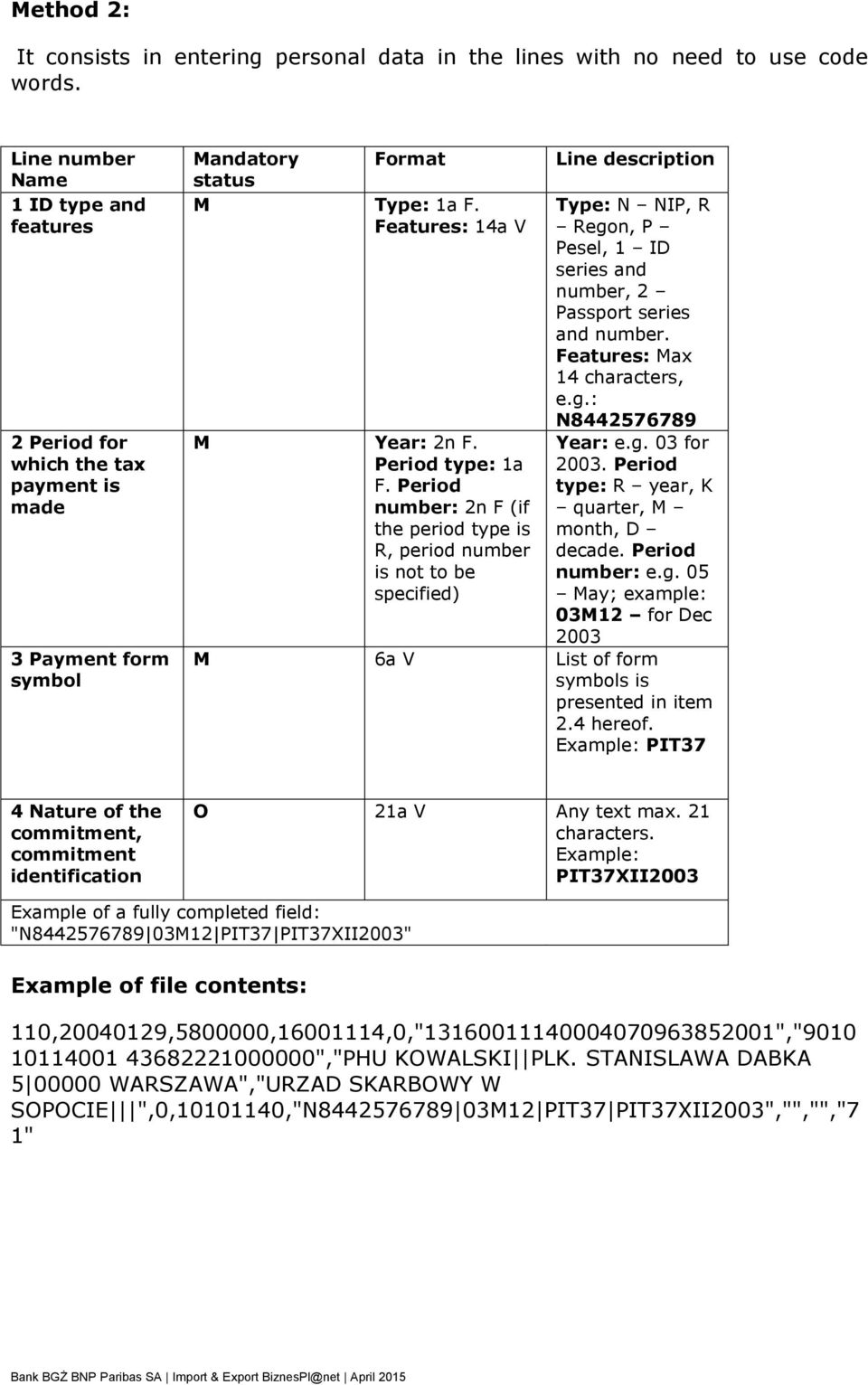
10 ethod 2: It consists in entering personal data in the lines with no need to use code words. Line number Name 1 ID type and features 2 Period for which the tax payment is made 3 Payment form symbol andatory Format status Type: 1a F. Features: 14a V Year: 2n F. Period type: 1a F. Period number: 2n F (if the period type is R, period number is not to be specified) Line description Type: N NIP, R Regon, P Pesel, 1 ID series and number, 2 Passport series and number. Features: ax 14 characters, e.g.: N Year: e.g. 03 for Period type: R year, K quarter, month, D decade. Period number: e.g. 05 ay; example: 0312 for Dec a V List of form symbols is presented in item 2.4 hereof. Example: PIT37 4 Nature of the commitment, commitment identification O 21a V Any text max. 21 characters. Example: PIT37XII2003 Example of a fully completed field: "N PIT37 PIT37XII2003" Example of file contents: 110, , , ,0," "," ","PHU KOWALSKI PLK. STANISLAWA DABKA WARSZAWA","URZAD SKARBOWY W SOPOCIE ",0, ,"N PIT37 PIT37XII2003","","","7 1"
11 4. Predefined import template: ulticash PLA General information on foreign currency payment file The format of a file for foreign currency payment orders (PLA) is based on the SWIFT T100 standard Requirements A payment instruction file should have the following extension:.pla Payment instruction file starts with a header. One payment instruction file may contain data pertaining to a number of payment instructions. A segment containing payment instruction data shall start with the ("{") character and finish with the ("}") character. The instruction segment header is placed in the first section of such a segment. Designations included in format descriptions Requirement /O - andatory/o - Optional Field length e.g. 34 max 34 characters Format (L/T) Field type: n only digits 0-9 a alphanumeric d - date F fixed length Example /O Format (L/T) eaning 26n F Required, always 26 digits O 4*35a V File header Field description /O Format :01:Reference 16 a V :02: Total of the payment 17 n V instruction amounts comprised in the payment instruction file (regardless of the currency) :03:Number of instructions in the file 5 n V :04:ID of the principal s bank O 11 a V

12 :05:Name and address of the principal. Data may be entered in several lines. Each line must be separated by the end-of-line character <CR><LF> 4*35 a V :07:File name 12 a V Payment instruction segment header {1:F01 Fixed nnnnnnnnxxxx ID of the principal s bank (completed to 12 characters with the x bbbb characters bbbb Subsequent payment instruction file number (generated automatically from the range: 0001 to 9999) tttttt} Subsequent payment instruction number in the payment instruction file (generated automatically from the range: 0001 to ) {2:I100 Fixed xxxxxxxxxaaaa ID (SWIFT) of the contractor s bank y payment type N 00 standard transfer U 10 payment via telex or SWIFT A 20 bill of exchange, ordinary transfer B 21 bill of exchange, registered transfer C 22 bill of exchange, express transfer D 23 bill of exchange, registered express transfer E 30 bill of exchange drawn on the principal F 31 bill of exchange drawn on the principal, registered transfer G 32 bill of exchange drawn on the principal, express transfer 1} Fixed Subsequent payment instructions are separated by the character $. Subsequent fields in a payment instructions are separated by the character <. Segment containing instruction details Description /O Format :20: Principal s reference 16 a V :32A: 6 n F Sub-field 1: Instruction value date (YYDD) Sub-field 2: Currency code Sub-field 3: Amount displayed with two decimal places 3 a F 15 n V

13 :50: Principal s name and address (lines with max. 35 characters each separated by the character <CR><LF>) 4*35 a V :52D: Sub-field 1: Principal s account <CR><LF> Sub-field 2: Account for charges <CR><LF> Sub-field 3: Counter currency code Sub-field 4: Statistical code <Empty> (ASCII 32) Contractor s country code <Empty> (ASCII 32) Country code of the contractor s bank max. 34 n V max. 34 n V 3 a F 14 n V 2 a F 2 a F :57A: SWIFT code of the contractor s bank or Identifier of the contractor s bank :57D: Name and address of the contractor's bank (if no SWIFT address has been specified) :59: Sub-field 1: Character "/" Sub-field 2: Contractor s account number Sub-field 3: <CR><LF> Contractor s name and address (max. 4 lines of 35 characters each. Specific lines are separated by <CR><LF>) :70: Payment details (max. 4 lines of 35 characters each. Specific lines are separated by <CR><LF>) :71A: Cost settlement BN1: 0 Fees charged by the principal s bank are payable by the principal, other costs are charged to the payment beneficiary BN2: 1 all costs are charged by contractor 2 OUR: 3 all costs are charged to the principal O 11 a V 4*35 a V 1 a F 34 a V 4*35 a V 4*35 a V 3 a F

14 :72: Sub-field 1: Indications (max. four codes) (doubledigit codes separated by a space (ASCII 32)) 01 Payment only for the contractor 02 Payment by cheque only 6* 35 separated by the character <CR><LF> 4*2 n F O 35 a V 4*35 a V 04 Payment only upon identification 06 Advice for the contractor s bank via phone 07 Advice for the contractor s bank via facsimile 09 Advice for the contractor via phone 10 Advice for the contractor via facsimile Sub-field 2: Contact person Sub-field 3 to Sub-field 6: Additional information to field :52D: (max four lines separated by the character <CR> <LF>) Sample content of a file containing 2 orders :01:REF :02:31500,00 :03:2 :04: :05:PHU KOWALSKI PłK. STANISłAWA DĄBKA WARSZAWA :07: PLA {1:F XXXX }{2:I100GEBAESBARXN1}{4: :20: :32A:040223EUR25000,00 :50:PHU KOWALSKI PťK. STANISťAWA D BKA WARSZAWA :52D: PLN100000,00 B00 ES ES :57A:GEBAESBAR :57D:FORTIS BANK, S.A., SUCURSAL EN ESPA NA PASEO DE GRACIA 85 BARCELONA :59:/ LCF CTLN.

15 PASSEIG. DE LA BARCELONETA 1234 BARCELONA :70:INV. 2004/528 :71A:OUR :72: USLUGI TRANSPORTU USLUGI TRANSPORTU -}${1:F XXXX }{2:I100GEBAESXXXXN1}{4: :20: :32A:040223EUR6500,00 :50:PHU KOWALSKI PťK. STANISťAWA D BKA WARSZAWA :52D: PLN26000,00 B00 ES ES :57A:GEBAES :57D:FORTIS BANK, S.A., SUCURSAL EN ESPA ADRID :59:/ GERARD Y GARCIA SA P. DE LA CASTELLANA 8795 ADRID 70:INV /04 :71A:OUR :72: USLUGI TRANSPORTU -} 5. Export daily statement (T940) T940 message containing an aggregate daily statement from FBP includes designation STARTSU in field :20. Daily statement structure Designations included in the descriptions of formats Column: aximum length in bytes v = Field variable length f = Field fixed length Column: Format an = alphanumeric Letters A to Z, digits 0 to 9, no special characters n = numeric Only digits from 0 to 9, no special characters

16 Column: Required/Optional o = Optional field m = Required field YY = Year number without century number = DD = onth with leading zeros Day with leading zeros T940 message general outline Field name Values entered in the field :20: essage start :25: Account holder s number (IBAN) :28C: ulticash statement number :60F: Initial balance and date :61: Transaction line :86: Transaction details :62F Final balance and date Detailed order of information in the transaction line (:61:) Field name Value date Posting date Debit DR/Credit CR sign Total Posting code Customer s reference // Bank reference Values entered in the field exactly 6 characters, numeric; Date in the YYDD format exactly 4 characters, numeric; 1-2 characters C = Credit; RC = Reversal credit; D = Debit; RD = Reversal debit and third letter ISO code e.g. CN when ISO code is PLN; CD - when ISO code is USD 1-15 numeric characters; Total in decimal format exactly 4 alphanumeric characters; S + 3 digits 1-16 alphanumeric characters. RNR customer ID. If not present, NONREF is entered ID of payment posted on the Bank s side

17 Detailed order of information in the transaction details line (:86:) Field code: aximum length Format /O Name NOTES 3 f n m Bank s transaction code v a o Posting description *27 v an o payment details v an o v an o Contractor s bank number Contractor s account number v an o Contractor s name and address 2 x 27 characters f n o Contractor s account number - NRB (Bank Account Number) format v an o Contractor s account number - NRB (Bank Account Number) format Example of T 940 statement contents :20:1 :25:/PL :28C:160/2009/BPL :60F:D090903PLN ,48 :61: CN ,01N723NONREF//CENT For accounts in NRB format, checksum and contractor s bank account are provided, i.e. ccaaaaaaaa 16 digits of the account number, i.e. bbbbbbbbbbbbbbbb Full bank account number (NRB) for CC 3.0 Full bank account number (NRB) for CC 2.12 :86:723^00PRZELEW OTRZ ELIXIR ^34000 ^ ^20faktura 1360/07/2009/RL 404/^2107/2009/ D ^32TRANSPORT REGIONALNY^33T PIOTR GORA UL. OGRODOWA ^ ^62A KRAKOW :61: CN ,83N721NONREF//CENT

18 :86:721^00PRZELEW OTRZYANY ^34000 ^ ^201319/07/2009/RTL ^32Forters Sp ka z o.o. ul. G^33runwaldzka 48 Krakow ^ :61: CN ,80N632ABC //CENT :86:632^00POLEC ZAPťATY UZNANI ^34000 ^30 ^31 ^20/NIP/ /IDP/037635/^21TXT/ KOSOWSKA 1393/07/200 ^229/RTL ^32PRESTIGE - AGDALENA KOSOWSKA 60 :61: CN ,00N723REF //CENT :86:723^00PRZELEW OTRZ ELIXIR ^34000 ^ ^20Zapˆata za f-r Proforma nr^21 332/09/ 2009 z dn ^2209r. albumy historyczne ^32TRANSPORT REGIONALNY^33ALFRED ZIELONY LUBLIN 2 ^ ^62A LUBLIN :61: CN ,00N723REFERENCE1//CENT :86:723^00PRZELEW OTRZ ELIXIR ^34000 ^ ^20AtQSZ -P^21bASCeNa CA20/11779/09 ^32SOPOCKIE TOWARZYSTWO UBEZPI^33ECZEN. ERGO HESTIA S.A. UL. ^ ^62HESTII SOPOT :61: CN ,05N761NONREF//CENT :86:761^00ZLECENIE SALDO ^34000 ^30 ^31 ^20zlecenie saldo 3011/3012 AI^21P ^32 :62F:D090803PLN ,79

FILES FORMATS USED IN ING ONLINE
 1 FILES FORMATS USED IN ING ONLINE Cash Management Sales Department, March 2006 1 2 TABLE OF CONTENT: FILES FORMATS USED IN ING ONLINE...1 1. PLI file format description...3 2. MT 103 file format description...5
ELECTRONIC BANKING. File format description of Polish Domestic Payments PLI (PLD, PLE, PLS) Ver. 2009-09-29
 ELECTRONIC BANKING File format description of Polish Domestic Payments PLI (PLD, PLE, PLS) Ver. 2009-09-29 CONTENTS 1. File format description of Polish Domestic Payments 3 1.1 General information about
F o r e i g n p a y m e n t i n P o l a n d Page 1 of 6 B u s i n e s s O n l i n e
 F o r e i g n p a y m e n t i n P o l a n d Page 1 of 6 Version 2 Change log Version Date Change 1 2013-10-07 Document created 2 2015-01-09 Field :57D: updated with bank codes (e.g FedWire routing No.
File format description of Polish Foreign Payments PLA. Ver. 2009-09-29 ELECTRONIC BANKING
 File format description of Polish Foreign Payments PLA Ver. 2009-09-29 ELECTRONIC BANKING CONTENTS: 1 File format description of Polish Foreign Payments PLA 3 1.1 General information concerning PLA file
FILE FORMAT OF PAYMENT ORDERS ACCEPTED BY CITIBANK EUROPE PLC FOR CITIBUSINESS DIRECT INTERNET BANKING
 FILE FORMAT OF PAYMENT ORDERS ACCEPTED BY CITIBANK EUROPE PLC FOR CITIBUSINESS DIRECT INTERNET BANKING FILE FORMAT OF PAYMENT ORDERS for Citibank Europe plc, organizační složka CitiBusiness Direct Internet
Format description of MT103 (Multicash PLA) foreign payment file.
 Format description of MT103 (Multicash PLA) foreign payment file. 1 General information about MT103 file This document explains formats of MT103 file - used to import International / Foreign Currency Order
Business Online Transaction Import & Export (Download) File Formats REFERENCE DOCUMENT
 Business Online Transaction Import & Export (Download) File Formats REFERENCE DOCUMENT Table of Contents Introduction... 3 Import (Payments)... 3 Export/Download... 3 Import Formats... 4 Deskbank Import
ELECTRONIC BANKING. RFT MT101 File Format Description Ver. 2009-09-28
 ELECTRONIC BANKING RFT MT101 File Format Description Ver. 2009-09-28 CONTENTS: 1. RFT MT101 File Format Description 3 2. Detailed MT101 File Format Description 3 2.1 Key to description of the records 3
ELECTRONIC BANKING. SWIFT MT 940 Customer Statement Message and SWIFT MT 942 Interim Transaction Report Ver. 2005-06-24
 ELECTRONIC BANKING SWIFT MT 940 Customer Statement Message and SWIFT MT 942 Interim Transaction Report Ver. 2005-06-24 TABLE OF CONTENTS: 1. General information 3 2. MT 940 Format Specifications Customer
1.1. Overview... 5 1.2. Direct credits... 6 1.3. Direct debits... 9 1.4. Nab direct credits... 12
 1.1. Overview... 5 1.2. Direct credits... 6 1.3. Direct debits... 9 1.4. Nab direct credits... 12 2.1. Overview... 16 2.2. Credit card transaction... 17 2.3. Credit card response... 20 3.1. Overview...
Online Banking Record Descriptions
 Record s [email protected] Page 1 of 65 Contents Introduction... 3 Sydbank format... 3 Format descriptions... 5 of fixed-length records... 5 of variable-length records... 6 Payment start... 7 IB000000000000...
BEST client format supported by KB (valid from 28th November 2015)
 supported by KB (valid from 28th November 2015) 1/19 List of contents: 1 Introduction... 4 1.1 Purpose of this document... 4 1.2 Characteristics of BEST format... 4 2 Formal check of BEST format... 4 2.1
CitiDirect Online Banking. Payments
 CitiDirect Online Banking Payments CitiService CitiDirect Helpdesk Tel. 0 801 343 978, +48 (22) 690 15 21 Monday to Friday 8.00 a.m. 5.00 p.m. [email protected] Table of Contents TABLE OF CONTENTS...
ANZ TRANSACTIVE FILE FORMATS WEB ONLY 07.2013. Page 1 of 118
 ANZ TRANSACTIVE FILE FORMATS WEB ONLY 07.2013 Page 1 of 118 ANZ Transactive and ANZ Transactive - Mobile are provided by Australia and New Zealand Banking Group Limited (ACN 005 357 522). References to
Hal E-Bank Foreign payments (Format of export/import files)
 Hal E-Bank Foreign payments (Format of export/import files) Hal E-Bank Foreign payments: format of export/import files Version: 17.x.x.20 Author: HALCOM d.d., Ljubljana Editor: HALCOM a.d., Beograd, July
Format Description SWIFT MT940 Structured
 Format Description SWIFT MT940 Structured Rabo Cash Management Colophon Title Format Description SWIFT MT940 Structured Version, date 3.331, November 2014 On behalf of Zakelijke Klantkanalen Contact address
Format Description MT940. Rabo Cash Management
 Format Description MT940 Rabo Cash Management COLOFON Title Format Description MT940 Version, date 2.4, January 2013 On behalf of Contact address FL-Services Rabobank Nederland, Croeselaan 18, Postbus
Foreign payment orders
 p. 1 Foreign payment orders The Foreign payment orders bank standard deals with the electronic exchange of payment orders in euro or in foreign currencies transmitted by the customer to his bank. For payments
User's manual for OTPdirekt Internet Banking. v.1.0
 User's manual for OTPdirekt Internet Banking v.1.0 1 Contents General... 4 Log in... 4 Logging out... 4 Home page... 5 Accounts... 5 Accounts - Overview of movements... 6 Accounts - OTPdirekt transactions...
SIF Validation Tool. Wages Protection System Qatar Central Bank& Ministry of Labour And Social Affairs. End User Guide
 SIF Validation Tool Wages Protection System Qatar Central Bank& Ministry of Labour And Social Affairs End User Guide [1] SIF Validation Tool at a Glance Content 1 SIF VALIDATION TOOL AT A GLANCE 3 2 GETTING
Internet Banking for Business
 INTERNET BANKING FOR BUSINESS Information you need to know about importing transaction files into Internet Banking for Business For more info bnz.co.nz Internet Banking for Business. This guide provides
KM client format supported by KB valid from 26 March 2007
 supported by KB valid from 26 March 2007 1/15 VRSION 1.2. UPDATD: 13.12.2005. 1 Introduction...2 1.1 Purpose of this document...2 1.2 Characteristics of the KM format...2 2 Formal check of KM format...3
MultiCash PRO STA file format description (from SAT) Ver.2007-03-01 ELECTRONIC BANKING
 MultiCash PRO STA file format description (from SAT) Ver.2007-03-01 ELECTRONIC BANKING TABLE OF CONTENTS 1. Format description of MultiCash STA file 3 1.1 General information about STA file 3 1.1.1 What
DESCRIPTION OF SEPA XML FORMAT FOR ING BUSINESSONLINE IMPORT AND EXPORT TEMPLATES
 DESCRIPTIN F SEPA XML FRMAT FR ING BUSINESSNLINE IMPRT AND EXPRT TEMPLATES TABLE F CNTENTS Import of orders 3 1. Introduction 3 1.1 Notation 3 1.2 File structure 4 1.3 Batching rules 4 1.4 Differentiation
MONEY TRANSFER. Import & Approval User Guide
 MONEY TRANSFER Import & Approval User Guide 1 TABLE OF CONTENTS Overview & Requirements.... 2 MT Import Service... 4 MT Wire Approval.... 6 MT Wire Report.... 9 1 OVERVIEW & REQUIREMENTS The Money Transfer
RULES FOR FOREIGN PAYMENTS
 RULES FOR FOREIGN PAYMENTS The terms used in these Rules have the following meaning: 1. Bank mbank S.A., 2. Client a natural person, legal person or organisational unit without legal personality, provided
User Guide Electronic Funds Transfer (EF T) Service
 User Guide Electronic Funds Transfer (EF T) Service Contents What You Need to Know About ATB s EFT Service 4 Funding EFT Files 4 1.Liquidity Limit 4 2.Exchange Funding 5 Limits 5 1.File Limits 6 2.Limits
Customer Statement - MT940 with Structured Information To Account Owner
 General Information The MT940 customer statement message is an electronic message containing financial statement information for customers concerning their accounts. Danske Bank can send a MT940 either
April 2012 Setup, Configuration and Use. Document Version: Product Version: SAP Version: Localization: 1.1.0 8.80.103 8.
 April 2012 Setup, Configuration and Use Document Version: Product Version: SAP Version: Localization: 1.1.0 8.80.103 8.8 All regions Enprise Bank 2012 Enprise Solutions All rights reserved. No parts of
SWIFT MT940 MT942 formats for exporting data from OfficeNet Direct
 SWIFT MT940 MT942 formats for exporting data from OfficeNet Direct January 2008 2008 All rights reserved. With the exception of the conditions specified in or based on the 1912 Copyright Act, no part of
User Manual. CitiDirect \ CitiDirect EB - Citi Trade Portal. InfoTrade Phone No. 0 801 258 369 [email protected]
 CitiDirect \ CitiDirect EB - Citi Trade Portal User Manual InfoTrade Phone No. 0 801 258 369 [email protected] CitiDirect HelpDesk Phone No. 0 801 343 978, +48 (22) 690 15 21 Monday Friday 8.00 17.00
CitiDirect. CitiDirect Mobile. User Guide. An electronic banking system for businesses
 CitiDirect An electronic banking system for businesses User Guide CitiDirect Mobile CitiService CitiDirect Help Desk Tel. 0 801 343 978, +48 (22) 690 15 21 Monday Friday 8am-5pm [email protected] Table
KM client format supported by KB valid from 1 November 2009
 supported by KB valid from 1 November 2009 1/16 1 Introduction...2 1.1 Purpose of this document...2 1.2 Characteristics of the KM format...2 2 Formal check of KM format...3 2.1 KM format - domestic payments...3
GESTAMP WIND 10 SP. Z O.O.
 Warszawa, 15 September 2014 REQUEST FOR QUOTATION for services of CONSTRUCTION SUPERVISION for project Construction of Szerzawy Wind Farm 10 MW together with associated infrastructure GESTAMP WIND 10 SP.
Table of Commissions and Fees for Enterprises
 Table of Commissions and Fees for Enterprises Effective as of 16 December 2013 scan 1/7 9230 I. BANK ACCOUNTS any in PLN 1. Maintenance of each account (monthly) PLN 100.00 2. Maintenance of a progressive
RULES. MultiCash Electronic Customer Service System
 RULES MultiCash Electronic Customer Service System Warsaw May 2015 Table of Contents CHAPTER 1 GENERAL PROVISIONS... 3 CHAPTER 2 CONDITIONS FOR MAKING THE MULTICASH SYSTEM AVAILABLE... 4 CHAPTER 3 MAKING
OPTION WITH THE FULL STARTING PACK
 Payment Terms and Conditions - MARATHON 1) STARTING FEE: Payment of the starting fee is obligatory for all participants of the 42 kilometre run (Marathon) which is scheduled to take place on 24 April 2016
Tariff of Banking Fees and Commissions for Customers in CaixaBank, S.A. (Spółka Akcyjna) Oddział w Polsce
 Tariff of Banking Fees and Commissions for Customers in CaixaBank, S.A. (Spółka Akcyjna) Oddział w Polsce () www.lacaixa.pl TABLE OF CONTENTS: 1. GENERAL CONDITIONS 3 2. CURRENT ACCOUNTS 5 3. DOMESTIC
File format DETAILS RECORD TYPES ABBREVIATIONS (LEGEND) GENERAL REMARKS. Welcome to
 Consolidated electronic payment order format for national payments in hrk, national payments in foreign currency, international payments in hrk or foreign currency and personal income payments 1 Applied
ipko biznes Administrator s Guide
 ipko biznes Administrator s Guide 1 1. GLOSSARY Client an entity that entered into e-banking agreement with the Bank. User a representative entitled to use e-banking services, that is a person appointed
POLNORD - ŁÓDŹ I SP. Z O.O.
 MERGER PLAN In connection with the intention to merge the companies listed below on 13 December 2012 the Management Boards of the Companies established a plan of merger by acquisition (the "MERGER PLAN
RAIFFEISEN BANK POLSKA SPÓŁKA AKCYJNA. Rules and regulations for opening and maintaining bank accounts for domestic and foreign banks
 RAIFFEISEN BANK POLSKA SPÓŁKA AKCYJNA Rules and regulations for opening and maintaining bank accounts for domestic and foreign banks Warsaw, 2012 1 Table of contents: Chapter 1 General provisions 3 Chapter
Creating Domestic Wire Transfer Payments Reference Guide
 Creating Domestic Wire Transfer Payments Reference Guide Table of Contents Creating and Working with Domestic Wire Transfers 3 Overview 3 Creating a Freeform Payment or Template 3 Use Existing Payments
Beyond EDI - How to import data into any JD Edwards table directly from an Excel spreadsheet without creating a custom program Session ID 36350
 Beyond EDI - How to import data into any JD Edwards table directly from an Excel spreadsheet without creating a custom program Session ID 36350 Shyh-Fang Huang Consulting Technical Manager The following
Wires. z Go to https://www.bellbanks.com z From the Secure login to drop-down, select Business Online Banking z Enter Username and Password
 Wires This tab allows you to perform all the necessary functions to create and submit domestic and international wires online. For companies utilizing the online wire function, all business online banking
JDExperts Sp. z o.o. Polish legal requirement solution pack for JD Edwards World-short
 JDExperts Sp. z o.o. Polish legal requirement solution pack for JD Edwards World-short Short version 1 TABLE OF CONTENTS 1 TABLE OF CONTENTS... 1 1.1.1 Nagłówek3... Błąd! Nie zdefiniowano zakładki. 2 Poland
DTA. Standards and Formats. A joint service provided by the Swiss banks. Version 3.6 / 01.06.2011 1
 DTA Standards and Formats A joint service provided by the Swiss banks Version 3.6 / 01.06.2011 1 Information The information provided in this document represents the current level of development. SIX Interbank
Creating International Wire Transfer Payments Reference Guide
 Creating International Wire Transfer Payments Reference Guide Table of Contents Creating and Working with International Wire Transfers 3 Overview 3 Creating a Freeform Payment or Template 3 Needs Rate
Livestock Office Payments: Creditor Cashbook Transactions
 Livestock Office Payments: Creditor Cashbook Transactions 18/06/2015 Contents Paying Creditors - Find Creditors Due for Payment... 2 Payment Due Report... 2 Creditors Aged Trial Balance... 3 Processing
Entering payment order abroad and payment order in a foreign currency in the Czech Republic via electronic banking service ČSOB InternetBanking 24
 Entering payment order abroad and payment order in a foreign currency in the Czech Republic via electronic banking service ČSOB InternetBanking 24 Content 1. Payment order abroad... 2 1.1. Entering payment
Wage Protection System
 Wage Protection System File Format Specifications Files contain two parts: 1- Header: is allocated for non-replicable main data related to employers and payers' details. 2- Salary records: These include
TERMS AND CONDITIONS OF CASH TRANSACTIONS IN DOMESTIC TRANSACTIONS AT PKO BP SA BANK
 TERMS AND CONDITIONS OF CASH TRANSACTIONS IN DOMESTIC TRANSACTIONS AT PKO BP SA BANK TABLE OF CONTENTS Section 1... 1 GENERAL PROVISIONS... 1 I. Acceptance and execution of the payment order by the Bank...
Corporate Online. Import format for Payment Processing Service files
 Corporate Online Import format for Payment Processing Service files Payment Processing Service file specification About Corporate Online Westpac Corporate Online is an internet-based electronic platform,
Structure of CFA file MCC 3.20 / HC 4.0 / SMO?? / MCT 3.20 (04.04. 2007 version 6)
 Czech freign payent syste Only fr CSOB clients Structure f CFA file MCC 3.20 / HC 4.0 / SMO?? / MCT 3.20 (04.04. 2007 versin 6) Frat f file fr freign payents (\CZAWIN\*.cfa) fr prgra MultiCash Structure
Automated Clearing House Services NACHA File Format Specifications User Guide
 Automated Clearing House Services NACHA File Format Specifications User Guide 00-35-4577NSB CNFIDENTIAL INFRATIN This guide contains proprietary and confidential information of Bank of America and was
Guide. 1 Dec 2010. Introduction of the global Structured Creditor Reference in Finnish companies. 1 December 2010
 1 Dec 2010 Guide Introduction of the global Structured Creditor Reference in Finnish companies 1 December 2010 Federation of Finnish Financial Services Contents Guide Introduction of the global Structured
Time Clock Import Setup & Use
 Time Clock Import Setup & Use Document # Product Module Category CenterPoint Payroll Processes (How To) This document outlines how to setup and use of the Time Clock Import within CenterPoint Payroll.
Standing Instruction - Recurring Payments
 CitiDirect Online Banking Standing Instruction - Recurring Payments CitiService CitiDirect HelpDesk Phone No. 0 801 343 978, +48 (22) 690 15 21 Monday Friday 8:00 17:00 [email protected] Table of Contents
Alior Bank S.A. Table of Fees and Commissions for Individual Customers
 Appendix 1 to Decision no. 18/2010 of the Vice President of the Management Board of Alior Bank S.A. managing the Individual Customer Division of March 29 th, 2009 Applicable to: contracts signed from April
CHAPTER 6: SALES TAX SETUP
 Chapter 6: Sales Tax Setup CHAPTER 6: SALES TAX SETUP Objectives Introduction The objectives are: Provide an overview on sales tax Create Ledger Posting Groups Create Sales Tax Authorities Create Sales
CitiDirect Online Banking - access via portal CitiDirect BE
 1 CitiDirect Online Banking - access via portal CitiDirect BE Login and new menu layout CitiService CitiDirect Helpdesk Phone No. 0 801-343-978, +48 (22) 690-15-21 Monday Friday 8:00 17:00 [email protected]
D a n s k e B a n k M e s s a g e I m p l e m e n t a t i o n G u i d e. M a s t e r C a r d C o r p o r a t e C a r d T r a n s a c t i o n s
 D a n s k e B a n k M e s s a g e I m p l e m e n t a t i o n G u i d e M a s t e r C a r d C o r p o r a t e C a r d T r a n s a c t i o n s Page 1 10 Change log Version Date Change 2 14.10.2014 Unique
Format Differences SWIFT FIN MT940 MT942
 SWIFT FIN MT940 MT942 ABN AMRO versus Fortis [version 1.0] 24 January 2011 Should you have questions and/or remarks regarding this document, please contact the department: ABN AMRO Bank N.V. COO / C&MB
Complete Citibank Online Internet Banking Manual
 Complete Citibank Online Internet Banking Manual 2 Contents 1. INTRODUCTION... 5 2. STARTING AT CITIBANK ONLINE... 5 2.1. REGISTER FOR THE FIRST TIME... 5 2.2. EASY SIGN ON... 6 2.2.1. ACCESS BLOCKING,
HAL E-BANK MANUAL CROSS-BORDER PAYMENTS AND OPERATIONS WITH FOREIGN CURRENCIES. Hal E-Bank version: 18.X.X.01
 HAL E-BANK MANUAL CROSS-BORDER PAYMENTS AND OPERATIONS WITH FOREIGN CURRENCIES Hal E-Bank version: 18.X.X.01 Content of Manual The manual consists of several content sections. The current section is highlighted
User Manual. Firm Bank Manager (includes instructions for employees and firms) U.S Network of Virtual Enterprises Bank. for
 U.S Network of Virtual Enterprises Bank User Manual for Firm Bank Manager (includes instructions for employees and firms) US Network Bank User Manual Bank Manager Page 1 of 8 FOR FIRM BANK MANAGER LOGIN
NAB Connect Consolidated File Format Specifications
 NAB Connect Consolidated File Format Specifications November 2015 1 Introduction... 3 1.1 Document Purpose... 3 1.2 Important Notice... 3 2 Account Information... 4 2.1 Functional Description... 4 2.2
Eastern Bank TreasuryConnect Money Transfer User Manual
 Eastern Bank TreasuryConnect Money Transfer User Manual This user manual provides instructions for setting up new users and accessing services found within the Money Trans Admin group and the Money Transfer
10 Step Guide to Getting Started with BOI Business On Line. Business On Line. 10 Step Guide to Getting Started. A BOL Setup Guide. v.
 Business On Line 10 Step Guide to Getting Started A BOL Setup Guide v.11/13 This Document is published by Bank of Ireland, and both it, and its contents, are the property of Bank of Ireland. Page 1 of
HAL E-BANK MANUAL CROSS-BORDER PAYMENTS AND OPERATIONS WITH FOREIGN CURRENCIES. Hal E-Bank version: 16.X.X.01
 HAL E-BANK MANUAL CROSS-BORDER PAYMENTS AND OPERATIONS WITH FOREIGN CURRENCIES Hal E-Bank version: 16.X.X.01 Content of Manual The manual consists of nine content sections and two sub-sections. The current
Creating international money transfers
 Creating international money transfers About this guide This guide takes you through the process of creating international money transfers (IMT) through CommBiz. Important information If you are making
Instructions for the Completion of the Report on Interest Rates on Loans and Deposits
 CROATIAN NATIONAL BANK RESEARCH AND STATISTICS AREA STATISTICS DEPARTMENT Instructions for the Completion of the Report on Interest Rates on Loans and Deposits 1 CONTENTS GENERAL INSTRUCTIONS 3 1. INTRODUCTION
Directions for the AP Invoice Upload Spreadsheet
 Directions for the AP Invoice Upload Spreadsheet The AP Invoice Upload Spreadsheet is used to enter Accounts Payable historical invoices (only, no GL Entry) to the OGSQL system. This spreadsheet is designed
MT104 Direct Debit and Request for Debit Transfer Message.
 MT104 Direct Debit and Request for Debit Transfer Message. Change log Version Date Edit 1 10.11.2003 Document created 2 22.10.2005 Updated with German Direct Debit 3 21.03.2006 Updated with English Irish
Electronic foreign currency payments, LUM2
 Electronic foreign currency payments, LUM2 Contents 1 Electronic foreign currency payment service... 3 2 Service agreement and testing... 3 2.1 Agreement... 3 2.2 Testing... 4 2.2.1 File transfer and processing...
Tamper protection with Bankgirot HMAC Technical Specification
 Mars 2014 Tamper protection with Bankgirot HMAC Technical Specification Bankgirocentralen BGC AB 2013. All rights reserved. www.bankgirot.se Innehåll 1 General...3 2 Tamper protection with HMAC-SHA256-128...3
Table of commissions and fees for bank services rendered to Individuals (pursuing no business activity)
 Table of commissions and fees for bank services rendered to Individuals (pursuing no business activity) dated 1 April 2015 Table of commissions and fees for bank services rendered to Individuals (pursuing
User Manual V1.3. NCB File Converter. @alahlincb. /alahlincb. 9 2000 1000 www.alahli.com
 User Manual V1.3 NCB File Converter @alahlincb /alahlincb 9 2000 1000 www.alahli.com The National Commercial Bank File Converter User Manual Copyright 2013 The National Commercial Bank Page 2 of 44 Table
OUTGOING PAYMENTS ISO 20022 APPLICATION GUIDELINE
 Version 2.5 13.4.2016 OUTGOING PAYMENTS ISO 20022 APPLICATION GUIDELINE 2 (54) CONTENTS VERSION INFORMATION... 4 1 OUTGOING PAYMENTS, ISO 20022 APPLICATION GUIDELINE... 5 1.1 ISO 20022 MESSAGE DESCRIPTION
Unitel. Payments in EDI/4 format July 2015
 Unitel Payments in EDI/4 format July 2015 Contents 1. Introduction... 3 2. General description... 4 2.1. File names... 4 2.2. File structure... 4 2.3. Format type... 4 2.4. Numerical and alphanumerical
Deutsche Bank Global Transaction Banking. Internet Bankieren. Entering Payments and Collections. www.deutschebank.nl
 Deutsche Bank Global Transaction Banking Internet Bankieren Entering Payments and Collections www.deutschebank.nl Internet Bankieren Entering Payments and Collections 2 Entering payments and collections
Notepads Import File Specification
 s Import File Specification To import a notepad file, select the file using the Browse button then click on the Automatic import link: 1. Select the file to import 2. Click on the Automatic Import link
Wire Transfer. Business Link. Creating a Wire Transfer Template. Wire Transfer Types. Wire Transfer Templates and Transactions
 Wire Transfer Funds Mgmt Check Mgmt Reporting Administration Wire Transfers The Wire Transfer module provides a convenient and secure way to transfer funds between your accounts, or between your accounts
DEBT COLLECTION SYSTEM ACCOUNT SUBMISSION FILE
 CAPITAL RESOLVE LTD. DEBT COLLECTION SYSTEM ACCOUNT SUBMISSION FILE (DCS-ASF1107-7a) For further technical support, please contact Clive Hudson (IT Dept.), 01386 421995 13/02/2012 Account Submission File
Deutsche Bank www.deutschebank.nl. Deutsche Bank MT940/942 format specifications
 Deutsche Bank www.deutschebank.nl Deutsche Bank MT940/942 format specifications Content 1. Introduction 3 2. SWIFT MT940 Customer Statement Message 4 2.1 MT940 Format 4 2.2 MT940 Tag & (sub)field Specifications
Standard pricing for current accounts Valid from 19 th of February 2015
 Standard pricing for current accounts Valid from 19 th of February 2015 CURRENT ACCOUNT OPENING Opening of current accounts UAH UAH 100 EUR UAH 100 USD UAH 100 RUB and other UAH 100 with the opening of
Section VIII: ACH Payment Processing
 Section VIII: ACH Payment Processing Contents About ACH Payments... 2 About the Automated Clearing House... 2 ACH Terms and Features... 2 Workflow Example: ACH Payroll Application... 4 To Add a Database...
Utility Software II lab 1 Jacek Wiślicki, [email protected] original material by Hubert Kołodziejski
 MS ACCESS - INTRODUCTION MS Access is an example of a relational database. It allows to build and maintain small and medium-sized databases and to supply them with a graphical user interface. The aim of
e - zaba PAYMENTS, COLLECTIONS, PURCHASE AND SALE OF FOREIGN CURRENCIES AND FOREIGN CURRENCY TRANSFERS INSTRUCTIONS FOR USE
 e - zaba PAYMENTS, COLLECTIONS, PURCHASE AND SALE OF FOREIGN CURRENCIES AND FOREIGN CURRENCY TRANSFERS INSTRUCTIONS FOR USE CONTENTS: 1. INTRODUCTION... 2 2. LOGGING IN TO e - zaba... 2 3. FOREIGN CURRENCY
Format description XML SEPA Credit Transfer. Format Description
 Format description XML SEPA Credit Transfer Format Description CONTENTS 1 SEPA CT Import format 3 1.1 SEPA CT import format description 3 1.1.1 Description 3 1.1.2 General characteristics 3 1.1.3 Difference
Updated 08/2015. Wire Transfer User Guide
 Updated 08/2015 Wire Transfer User Guide Wire Transfers The Wire section provides you with the ability to create one-time wires or set up template-based wires for ongoing use. Wiring Funds The tasks you
Terms of Cooperation
 Terms of Cooperation 1 Definitions The following terms used in the Terms of Cooperation shall have the meanings assigned to them herein: 1) Company COLWAY INTERNATIONAL Spółka Akcyjna with its registered
10 Step Guide to Getting Started with BOI Business On Line. Business On Line. 10 Step Guide to Getting Started. A BOL Setup Guide. ROI Only. v.
 Business On Line 10 Step Guide to Getting Started A BOL Setup Guide ROI Only v.01/14 This Document is published by Bank of Ireland, and both it, and its contents, are the property of Bank of Ireland. Page