
Format Description MT940. Rabo Cash Management
|
|
|
- Abel Bryce Hill
- 10 years ago
- Views:
Transcription
1 Format Description MT940 Rabo Cash Management

2 COLOFON Title Format Description MT940 Version, date 2.4, January 2013 On behalf of Contact address FL-Services Rabobank Nederland, Croeselaan 18, Postbus HG Utrecht. 3 No part of this publication may be reproduced in any form by print, photo print, microfilm or any other means without written permission by Rabobank.

3 Content Content 2 1 General information Format structure Record structure Schematic representation 4 2 SWIFT MT940 Unstructured export format General information Format structure Content description 7 3 SWIFT MT940 Structured export format General information Format structure Content description 12 4 SWIFT MT940 Extended export format Content Content description Extended options 20 Appendix 1: SWIFT MT940 Structured, SEPA structure within record Appendix 2: SEPA Return Codes 26 Appendix 3: Change Log 28 2

4 1 General information The SWIFT MT940 format is used to export bank account information for processing in financial software applications. With Rabo Cash Management you can export account information (balances, transactions and specifications) in the SWIFT MT940 format. In RCM you may choose between three types of SWIFT MT940 formats: SWIFT MT940 Unstructured (SWIFT-standard) SWIFT MT940 Structured (SWIFT-standard with SEPA structure if relevant) SWIFT MT940 Extended (RABO-standard with several extra configuration options) This version of the SWIFT MT940 format description concerns only RCM (Rabo Cash Management) and no other applications of Rabobank. 1.1 Format structure SWIFT MT940 contains an opening and closing balance and all transactions that took place in between. Both balances are mandatory to create an MT940 (therefore, only complete statements can be exported). 1.2 Record structure Each SWIFT-MT940 starts with a header record 940, followed by record 20, 25, 28(C), 60F, 61 and 0 to 6 records 86; 62F and (optional) record 64 and 65. If more than one day is exported, the information will be shown in the same order as on the RCM screen. If more accounts are exported, the information will be shown in the same order as on the RCM screen. The layout of the default filename of SWIFT MT940 Unstructured is: <account number><currency>< MT940file ><YYYYMMDD><.txt > The layout of the default filename of SWIFT MT940 Structured is: <account number><currency>< MST940file ><YYYYMMDD><.txt > The layout of the default filename of MT940 Extended is: <account number><currency>< ME940file ><YYYYMMDD><.txt > If more than one account is selected, then <account number><currency> is replaced by the user number used to export the statements. 3

5 1.3 Schematic representation The figure below shows the record structure of the MT940: SWIFT-MT940 record structure (schematicaly) :940: Fixed value :20: Mark + date 1 :25: :28: :60F: Accountnumber 1 Statement number Previous account ballance 1 Next account :61: Transaction 1 :86: First description of transaction 1 :86: Second description of transaction 1 :61: Transaction 2 :86: First description of transaction 1 Note: The sequence is first all data for one account, followed by other accounts (if present). :86: Second description of transaction 1 :62F: Current account balance 1 :64: :65: Available balance 1 Forward available balance 1 Next account :20: Mark + date 2 :25: Account number 1 :28: Repetition of previous items :20: Mark + date 1 :25: Account number 2 Of the next account. :28: Repetition of previous items Mandatory Mandatory if present Optional 4

6 2 SWIFT MT940 Unstructured export format 2.1 General information The official name of this reporting format is MT 940 Customer Statement Message. An international format which is used as the digital equivalent of the paper account statements. For each entry date, an account statement is available when the administrative processing of that day is completed. The account statement contains the opening and closing balances and detailed payment information on all transactions that have been booked to the account on the date of the account statement. The SWIFT MT940 which is delivered by RCM is not fully compliant with SWIFT. The allowed maximum length is more than 2000 characters. The statements are empty if no entries are available for the specified entry date (record 61 and 86 are not available). 2.2 Format structure Each information block in an MT940 is preceded by a field (label, tag). The content of the field may consist of different elements. The file begins with a fixed value :940:. Each statement in the file begins with record 20 and ends with the next record 20 or when the end of the file is reached. The order of the fields within an MT940 is described below. Within one statement the group consisting of record 61 and record 86 may occur several times. Field 65 may also occur more than once. The table contains an overview of the fields, section 2.3 contains details per field. Record Subfield Mandatory / Optional Field name :940: M Not applicable 5!x Format, Content, Options []=optional!=fixed length a=text x=alphanumeric d=numeric with decimal separator c=value code list n=numeric :20: M Transaction reference number :21: O Transaction reference number Related reference :25: M Account Identification :28C: M Statement Number / Sequence Number Not SWIFT-compliant 16x, for Rabo accounts <940A> followed by the book date (YYMMDD), for example 940A For non-rabo accounts, the field 20 reference from the original SWIFT message is presented. 16x Not used by RCM 35x 5n[/5n] For Rabo accounts, a sequence number will always be absent. For a non-rabo account, the sequence number is always 1, for example 253/1. 5

7 Record Subfield Mandatory / Optional Field name Format, Content, Options []=optional!=fixed length a=text x=alphanumeric d=numeric with decimal separator c=value code list n=numeric :60F: M Opening Balance 1!a6!n3!a15d :61: O [0-n] Statement Line 6!n[4!n]2a[1!a]15d1!a3!c16x[//16x][34x] 1 M Value Date 6!n 2 O Entry Date [4!n] 3 M (Reversed) 2a Debit/Credit Mark 4 O Funds code [1!a] 5 M Amount 15d 6 M Transaction Type Identification Code 1!a3!c For a Rabo account, always filled with NMSC. For a non-rabo account, filled with the value from the original SWIFT message. 7 M Reference for the Account Owner 8 O Account Servicing Institution s Reference 9 O Supplementary Details :86: O [0-n] Information to Account Owner :62F: M Closing Balance Rekeninghouder (Booked funds) :64: O Closing available balance :65: O [0-n] Forward value balance :86: O Information to account owner 16x For a Rabo account filled with the counteraccount, for a non-rabo account filled with the value from the original SWIFT message. [//16x] This field is filled only for non-rabo accounts with, if present, the value from the original SWIFT message. [34x] 6*65x 1!a6!n3!a15d 1!a6!n3!a15d 1!a6!n3!a15d RCM will provide a maximum of four forward value balances 6*65x Not used by RCM 6
![c16x[//16x][34x] 1 M Value Date 6!n 2 O Entry Date [4!n] 3 M (Reversed) 2a Debit/Credit Mark 4 O Funds code [1!a] 5 M Amount 15d 6 M Transaction Type Identification Code 1!a3!](/docs-images/41/11608092/images/page_7.jpg "c For a Rabo account, always filled with NMSC. For a non-rabo account, filled with the value from the original SWIFT message.")
8 2.3 Content description File header File header Alphanumeric 5 :940: Fixed value, will occur only once in the export file Record :20: Transaction Reference Number For Rabo accounts: Record code Alphanumeric 4 :20: Fixed value Format Alphanumeric Fixed value Usage rule code Alphanumeric 1 A Fixed value Entry Date Numeric 6 Format: YYMMDD For non-rabo accounts, record 20 contains the value from the original SWIFT message Record :25: Account Number Record code Alphanumeric 4 :25: Account identification Alphanumeric 35 RCM convention for Rabobank accounts: AAA, otherwise 35x. For non-rabobank accounts the account is presented as received from the account servicing bank Record :28C: Statement Number/Sequence Number Separator and Sequence number are only present for non-rabo accounts. In those cases, Sequence number is always 1. Record code Alphanumeric 5 :28C: Statement number Numeric 5 No leading zeros. Separator Alphabetic 1 / Sequence number Numeric 5 No leading zeros. 7

9 2.3.5 Record :60F: Opening Balance This field must always be the same as field 62F (closing balance) of the previous customer statement message for this account. Record code Alphanumeric 5 :60F: Debit / Credit Alphanumeric 1 Value: "D" or "C" Entry date Numeric 6 Format YYMMDD The date will be equal to the date of the previous statement. As only one statement is available per date the date will be before the present statement date. Currency code Alphanumeric 3 Format: ISO-Currency code Opening balance Alphanumeric 15 Balance will be equal to the closing balance of the previous statement Record :61: Statement Line Record code Alphanumeric 4 :61: Value date Numeric 6 Format: YYMMDD Entry date Numeric 4 RCM will not provide this subfield Debit / Credit Text 1-2 Value: "D", "C", RD of RC. R=Reversed Amount Numeric 15 Transaction type Alphanumeric 4 NMSC Reference for the Account Owner Alphanumeric 16 If present, otherwise NONREF Account Servicing Institution s Reference Alphanumeric 16 If present preceded by //. Only filled for non- Rabo accounts with, if present, the value from the original SWIFT message. Supplementary Details Alphanumeric 34 Only filled for non- Rabo accounts with, if present, the value from the original SWIFT message. 8

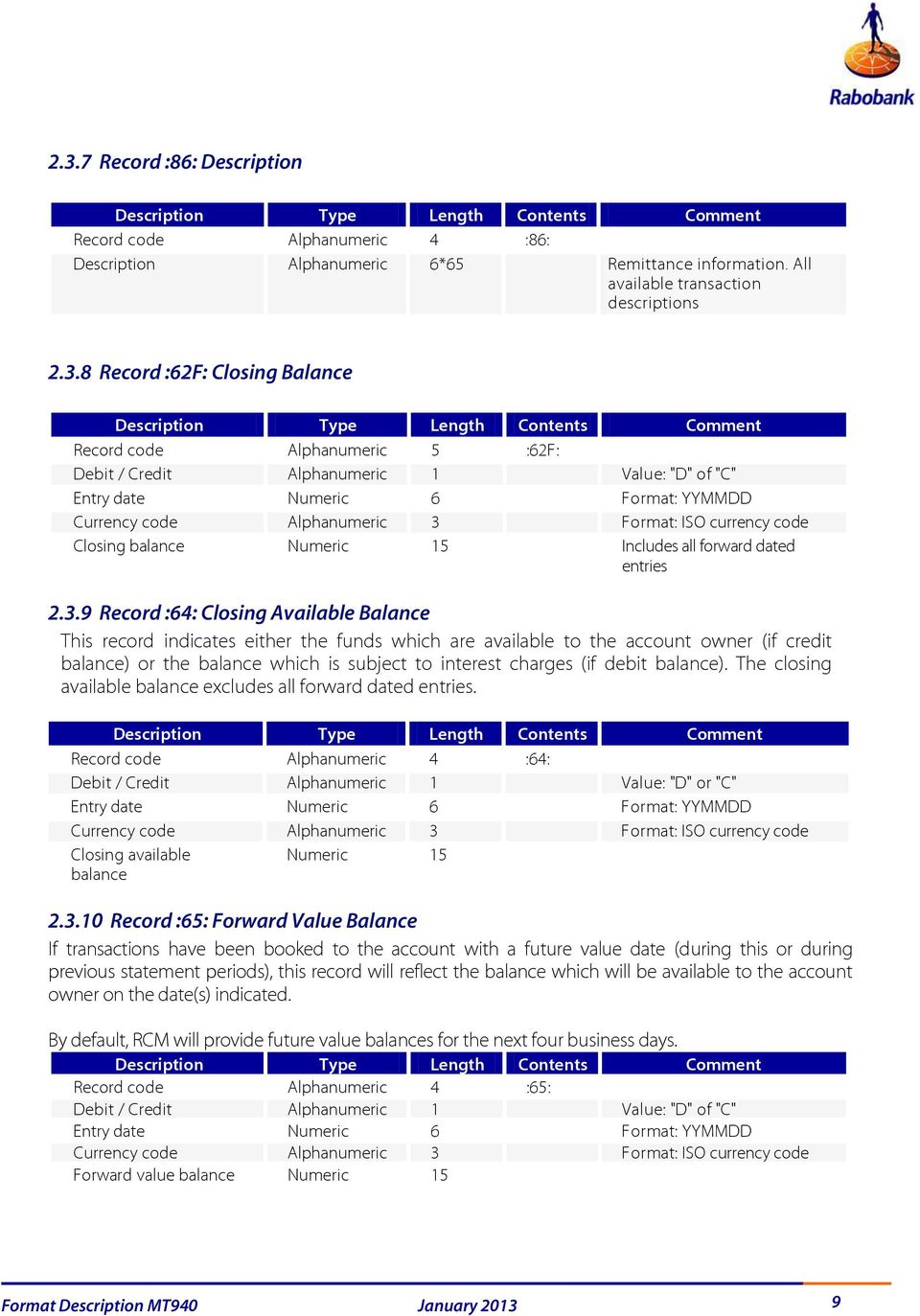
10 2.3.7 Record :86: Description Record code Alphanumeric 4 :86: Description Alphanumeric 6*65 Remittance information. All available transaction descriptions Record :62F: Closing Balance Record code Alphanumeric 5 :62F: Debit / Credit Alphanumeric 1 Value: "D" of "C" Entry date Numeric 6 Format: YYMMDD Currency code Alphanumeric 3 Format: ISO currency code Closing balance Numeric 15 Includes all forward dated entries Record :64: Closing Available Balance This record indicates either the funds which are available to the account owner (if credit balance) or the balance which is subject to interest charges (if debit balance). The closing available balance excludes all forward dated entries. Record code Alphanumeric 4 :64: Debit / Credit Alphanumeric 1 Value: "D" or "C" Entry date Numeric 6 Format: YYMMDD Currency code Alphanumeric 3 Format: ISO currency code Closing available balance Numeric Record :65: Forward Value Balance If transactions have been booked to the account with a future value date (during this or during previous statement periods), this record will reflect the balance which will be available to the account owner on the date(s) indicated. By default, RCM will provide future value balances for the next four business days. Record code Alphanumeric 4 :65: Debit / Credit Alphanumeric 1 Value: "D" of "C" Entry date Numeric 6 Format: YYMMDD Currency code Alphanumeric 3 Format: ISO currency code Forward value balance Numeric 15 9
11 3 SWIFT MT940 Structured export format 3.1 General information The official name of this reporting format is MT 940 Customer Statement Message. An international format which is used as the digital equivalent of the official paper account statements. On the statement the opening and closing balance are stated on the book date, as well as specific information for all entries to the account. The SWIFT MT940 Structured which is delivered by RCM is not fully compliant with SWIFT. The allowed maximum length is more than 2000 characters. The statements are empty if no entries are available for the specified entry date. The structured export format is adapted to provide additional information for SEPA orders. 3.2 Format structure Each information block in an MT940 is preceded by a field (label, tag). The content of the field may consist of different elements. The file begins with a fixed value :940:. Each statement in the file begins with record 20 and ends with the next record 20 or when the end of the file is reached. The order of the fields within an MT940 is described below. Within one statement the group consisting of record 61 and record 86 may occur several times. Record 65 may also occur more than once. Codes in record 86 are separated by a forward slash. These codes are used to provide structure in record 86 and to separate the various data elements. The table contains an overview of the fields, section 2.3 contains details per field. Record Subfield Mandatory / Optional Field name Format, Content, Options []=optional!=fixed length a=text x=alphanumeric d=numeric with decimal separator n=numeric :940: M Not applicable 5!x Not SWIFT-compliant :20: M Transaction Reference Number 16x for Rabo accounts <940A> followed by the bookdate (YYMMDD), for example 940A For non-rabo accounts, the field 20 reference from the original SWIFT message is presented. :21: O Related Reference 16x Not used by RCM :25: M Account Identification 35x. Starting in the second quarter of 2013, for this export format, the account number in record 25 will be presented in IBAN format if available. 10

12 :28C: M Statement Number / Sequence Number 5n[/5n] For a Rabo account, the sequence number will always be absent, 28C will for example contain 253. For a non-rabo account, the sequence number is always 1, for example 253/1. :60F: M Opening balance 1!a6!n3!a15d :61: O [0-n] Statement line 6!n[4!n]2a[1!a]15d1!a3!c16x[//16x] [34x] 1 M Value date 6!n 2 O Entry Date [4!n] For Rabo and non-rabo accounts filled with the book date from field 62F. 3 M Debit/Credit reference 2a 4 O Capital code [1!a] 5 M Amount 15d 6 M Identification code Transaction Type 1!a3!c For debits, filled with NDDT, for credits, filled with NTRF 7 M Reference for the Account Owner 16x 8 O Account Servicing Institution s Reference 9 O Supplementary Details :86: O [0-n] Information to Account Owner :62F: M Closing balance (Booked Funds) :64: O Closing available balance :65: O [0-n] Forward value balance :86: O Information to Account Owner [//16x] Not present for Rabo and non-rabo accounts. For non-rabo accounts, this means that a value from the original SWIFT message won t be presented in this export format. [34x] 6*65x 1!a6!n3!a15d 1!a6!n3!a15d 1!a6!n3!a15d RCM will provide a maximum of four Forward Value balances 6*65x. Not used by RCM. 11
![n 2 O Entry Date [4!n] For Rabo and non-rabo accounts filled with the book date from field 62F. 3 M Debit/Credit reference 2a 4 O Capital code [1!](/docs-images/41/11608092/images/page_12.jpg "a] 5 M Amount 15d 6 M Identification code Transaction Type 1!a3!")
13 3.3 Content description File header File header Alphanumeric 5 :940: Fixed value, will occur only once in the export file Record :20: Transaction Reference Number For Rabo accounts: Record code Alphanumeric 4 :20: Fixed value Format Alphanumeric Fixed value Usage rule code Alphanumeric 1 A Fixed value Entry date Numeric 6 Format: YYMMDD For non-rabo accounts, record 20 will contain the value from the original SWIFT message Record :25: Account Number Record code Alphanumeric 4 :25: Account identification Alphanumeric 35 RCM convention for Rabobank-accounts: AAA, otherwise 35x. Starting in quarter 2 of 2013, Rabo accounts will be presented in IBAN format. N-Rabo accounts are presented as received from the account servicing bank Record :28C: Statement Number/Sequence Number Separator and Sequence number are only present for non-rabo accounts, sequence number will then always be 1. Record code Alphanumeric 5 :28C: Statement number Numeric 5 No leading zeros Separator Alphanumeric 1 / Sequence number Numeric 5 No leading zeros 12

14 3.3.5 Record :60F: Opening Balance For Rabo accounts, this field is always equal to field 62a (closing balance) of the previous customer statement message for this account. Record code Alphanumeric 5 :60F: Debit / Credit Alphanumeric 1 Value: "D" of "C" Entry date Numeric 6 Format: YYMMDD For Rabo accounts, the book date is equal to the book date of the previous statement Currency code Alphanumeric 3 Format: ISO currency code Opening balance Alphanumeric 15 Numeric with decimal separator Record :61: Statement Line Balance will be equal to the closing balance of the previous statement Subfield Record code Alphanum 4 :61: 1 Value date Numeric 6 Format: YYMMDD 2 Entry date Numeric 4 Format: MMDD 3 Debit / Credit Alphanum eric 1-2 Value: "D", "C", RD of RC. R=Reversed 4 Amount Numeric 15 Numeric with decimal separator 5/6 Transaction type Alphanum eric 4 For debits filled with NDDT, for credits filled with NTRF 13

15 Subfield 7 Reference for the Account Owner Alphanum eric 16 Can contain MARF (mandate reference) or EREF (End-to-end reference). The complete reference will be available in record 86. For non-rabo accounts, a value from the original SWIFT message will not be exported. 8 Account Servicing Institution s Reference Alphanum eric 9 Supplementary details Alphanum eric 16 If present preceded by // Not used by RCM 34 Contains, for Rabo accounts and if available, the IBAN of the counterparty. For non-rabo accounts, filled with, if present, the value from the original SWIFT message Record :86: Description In this export format, record 86 may contain more information than just remittance information. The table below contains the additional structured information available in record 86. See appendix 1 for more information on the structure in record 86. Record code Alphanumeric 4 :86: Reference Alphanumeric 35 /EREF/ or /MARF/ An End to End reference is preceded by /EREF/, a mandate reference by /MARF/ Counterparty Alphanumeric 70 /BENM/ or /ORDP/ 14

16 Name 70 /NAME/ Name of the counterparty ID /ID/ ID of the counterparty Remittance information Alphanumeric 140 /REMI/ Remittance information, if structured followed by one or more of the codewords below. Multiple description lines will be presented in one row without spacing. Creditor reference type /CDRTREFTP/ Not applicable for direct debits. Creditor reference type code Creditor reference type issuer 4 /CD/ If present, contains SCOR. Not applicable for direct debits 3 /ISSR/ If present, contains CUR. Not applicable for direct debits Payment reference 35 /CDTRREF/ Not applicable for direct debits Creditor ID Alphanumeric 70 /CSID/ Creditor identifier, only applicable for direct debits Settlement date Alphanumeric 10 /ISDT/ Incorrect value means no settlement date available. E.g.: Return code Alphanumeric 4 /RTRN/ Please refer to appendix 2 for an overview of the return codes Record :62F: Closing Balance Record code Alphanumeric 5 :62F: Debit / Credit Alphanumeric 1 Value: "D" of "C" Entry date Numeric 6 Format: YYMMDD Currency code Alphanumeric 3 Format: ISO currency code Closing balance Numeric 15 Includes all forward dated entries Record :64: Closing Available Balance This record indicates either the funds which are available to the account owner (if credit balance) or the balance which is subjected to interest charges (if debit balance). The closing value balance excludes all forward dated entries. 15

17 Record code Alphanumeric 4 :64: Debit / Credit Alphanumeric 1 Value: "D" of "C" Entry date Numeric 6 Format: YYMMDD Currency code Alphanumeric 3 Format: ISO currency code Closing available balance Numeric 15 Numeric with decimal separator Record :65: Forward Value Balance If transactions have been booked to the account with a future value date (during this or during previous statement periods), this record will reflect the balance which will be available to the account owner on the date(s) indicated. By default, RCM will provide forward value balances for the next four business days. Record code Alphanumeric 4 :65: Debit / Credit Alphanumeric 1 Value: "D" of "C" Entry date Numeric 6 Format: YYMMDD Currency code Alphanumeric 3 Format: ISO currency code Forward value balance Numeric 15 16

18 4 SWIFT MT940 Extended export format 4.1 Content Tag Name (of the tag) Status Length (of the record) :940: Header Mandatory (1-1) 5 :20: Reference number Mandatory (1-1) 14 :25: Account number Mandatory (1-1) 39 :28: Statement number / Sequence Number Mandatory (1-1) 12 :60F: Volgnummer Opening balance Mandatory (1-1) 30 :61: Transaction Optional (0-n) 80 :86: Description Optional (0-6) 69 :62F: Closing balance Mandatory (1-1) 30 :64: Closing available balance Optional (0-1) 29 :65: Forward value balance Optional (0-4) Content description File header File header Alphanumeric 5 :940: Fixed value, will occur only once in the export file Record :20: Reference Number Transaction For Rabo accounts: Record code Alphanumeric 4 :20: Fixed value Format Alphanumeric Fixed value Usage rule code Alphanumeric 1 A Fixed value Entry date Numeric 6 Format: YYMMDD For non-rabo accounts, record 20 contains the value from the original SWIFT message Record :25: Account Number Record code Alphanumeric 4 :25: Account number Alphanumeric 35 Extended option Format account available Format Description MT940 October

19 4.2.4 Record :28: Statement Number/Sequence Number Record code Alphanumeric 4 :28: Statement number Numeric Extended option Add statement number available Separator Alphabetic 1 / Sequence number Numeric 2 00 Fixed value Record :60F: Opening Balance This field must always be the same as field 62F (closing balance) of the previous customer statement message for this account. Record code Alphanumeric 5 :60F: Debit / Credit Text 1 Value: "D" of "C" Entry date Numeric 6 Format YYMMDD The date will be equal to the date of the previous statement. As only one statement is available per date the date will be before the present statement date. Currency code Text 3 Format: ISO currency code Previous accounting balance Record :61: Statement Line Alphanumeric 15 Extended options Amount with leading zeros and Dot (.) as decimal separator available Record code Alphanumeric 4 :61: Specifications Value date Numeric 6 Format: YYMMDD Entry date Numeric 4 Format: MMDD Debit / Credit Alphanumeric 1-2 Value: "D", "C", RD of RC. R=Reversed Amount Numeric 15 Extended options Amount with leading zeros and Dot (.) as decimal separator available Transaction type Alphanumeric 4 Transaction code NMSC by default. Extended option Add transaction type code available Format Description MT940 October

20 Counter account number Alphanumeric 16 If present, if not NONREF. If account number is longer than 16 positions, then the last 16 positions are shown. If the account number is shorter than 16 positions, then the field is filled up with spaces up to 16 positions Name counterparty Alphanumeric 16 Only filled for non-rabo accounts with, if available, the value from the original SWIFT message Supplementary Details Alphanumeric 34 For Rabo accounts name of the counterparty if available. For non- Rabo accounts, filled with, if available, the value from the original SWIFT message Record :86: Description Extended option Insert counterparty IBAN available Record code Alphanumeric 4 :86: Description Alphanumeric 6*65 Extended options Include address information, Include specifications, Include transaction reference, Repeat TAG86 for description lines and Include payment reference available Record :62F: Closing Balance Record code Alphanumeric 5 :62F: Extended Debit / Credit Text 1 Value: "D" of "C" Entry date Numeric 6 Format: YYMMDD Currency code Text 3 Format: ISO currency code Closing balance Numeric 15 Extended options Amount with leading zeros and Dot (.) as decimal separator available Record :64: Closing Available Balance This record indicates either the funds which are available to the account owner (if credit balance) or the balance which is subjected to interest charges (if debit balance). The closing value balance excludes all forward dated entries. Format Description MT940 October

21 Record code Alphanumeric 4 :64: Debit / Credit Text 1 Value: "D" of "C" Entry date Numeric 6 Format: YYMMDD Currency code Text 3 Format: ISO currency code Closing Available balance Numeric 15 Extended options Amount with leading zeros and Dot (.) as decimal separator available Record :65: Forward Value Balance If transactions have been booked to the account with a future value date (during this or during previous statement periods), this record will reflect the balance which will be available to the account owner on the date(s) indicated. By default, RCM will provide forward value balances for the next four business days. Record code Alphanumeric 4 :65: Debit / Credit Text 1 Value: "D" of "C" Entry date Numeric 6 Format: YYMMDD Currency code Text 3 Format: ISO currency code Forward value balance Numeric 15 Extended options Amount with leading zeros and Dot (.) as decimal separator available 4.3 Extended options General information When exporting SWIFT MT940 Extended from RCM, you will find a screen with several options which you can change with checkboxes. These options indicate what information should or should not be included. Underneath you will find the explanations of these options. Specifics: To prevent empty lines in the export file, requested information which is not available will not be filled with blank data Insert counterparty IBAN Record :61:subfield 9 Inactive Active Subfield 9 contains the name of the counterparty, if available Subfield 9 contains the counterparty IBAN, if available Include address information Record :86: Inactive The address information or counterparty account and name will not be shown Format Description MT940 October
22 Record :86: Active The address information or counterparty account and name will be displayed in the first record 86 of the transaction Options Address<space>Postal code<space>city Address (30 characters, fixed length) Postal code (6 characters, fixed length) City (29 characters, fixed length) Counter account <space> Counterparty name Include specifications Record :61: en :86: Inactive Active All transactions are included in the file including composite bookings without specifications. If specifications of the composite booking are available these will be displayed instead of the composite booking Include transaction type code Record :61: Inactive All transactions and specifications will get the transaction type code NMSC Active For Rabo accounts: When available, transactions and specifications will be provided with a numeric transaction type code (N999 where 999 will be the code). If this code is not found or not available/provided, the type code NMSC will be displayed. Specifications of a composite booking will get the same transaction type code of that composite booking. For non-rabo accounts, the transaction type code of the original SWIFT message is presented Include statement number Record :28: Inactive All instances of record 28 contain the value 00000/00 Active The statement number is filled with the sequence number of the statement. This is the same value which is shown as statement number in RCM. The sequence number after the slash is not used in RCM. This part will always be filled with value: 00 Format Description MT940 October
23 4.3.7 Include transaction reference Record :86: Inactive The transaction reference number will not be displayed in the description Active When available, the next available description line needs to contain the PA, RE, LD, FX, BI or AC transaction reference number information if this is available in the transaction in RCM Format account Record :25: Inactive Active No formatting of the account number (default account number only) The account number in this field will be formatted Options AAA Rabo default mask for 9 digit current account numbers and currency code AAA Alternative mask for 9 digit account numbers without separating dots in the number and currency code XXX Mask for 9 or 10 digit account numbers, where 9 digit account numbers are preceded by a 0 (zero), and where currency is only specified when the account is not a EUR account AAA Alternative mask for 9 digit account numbers Repeat TAG86 for description lines Record :86: Inactive Active The first description line of the transaction must start with :86:, the next description lines of the transaction must not start with :86: (Swift standard) De Each eerste description omschrijvingregel line of the transaction moet beginnen must met start de with veldaanduiding: :86:. :86: followed by the Iedere description volgende regel heeft deze aanduiding niet (ofwel: de omschrijving begint aan het begin van de regel). Format Description MT940 October
24 Include payment reference Record :86: Inactive Active There is no payment reference When available, the next available description line must contain the payment reference information Options BETALINGSKENM.: <payment reference> BETALINGSKENM. <payment reference> Betalingskenmerk: <payment reference> BETKENM.: <payment reference> <payment reference> (this option has no identifying text) Amount with leading zeros Record :60F:, :61:, :62F:, :64:, :65: Inactive The amount field is not filled with leading zeros. This is conform the SWIFT standard. The next fields in record 61 may get a variable position in the record. Active The amount will be padded with leading zeros Dot (.) as decimal separator Record :60F:, :61:, :62F:, :64:, :65: Inactive Decimal separator for the amount field is a comma "," Active Decimal separator for the amount field is a dot "." Extra Regarding lay-out of non-rabobank account numbers; RCM will always use the lay-out provided by the other bank(s). All amounts are 15 positions long (comma included). The place of the comma depends on the currency code (ISO). The amount will always be preceded by zeros. See examples underneath. EUR , ,78 USD 0, ,12 TND 123, ,456 YPN , Format Description MT940 October
25 Appendix 1: SWIFT MT940 Structured, SEPA structure within record 86 The table below lists, depending on the scenario, which codewords may be available in record 86 in the SWIFT MT940 Structured export format. 1 2 Reporting of a SEPA debit, account was debited because: Scenario Reference codeword Counterparty Remittance information Unstructured Remittance information Structured Creditor scheme identifier You have made a SEPA payment from your account /EREF/ /BENM/ /NAME/ /ID/ /REMI/ /REMI/ /CDTRREFTP/ /CD/ /ISSR/ /CDTRREF/ /ISDT/ A counterparty has debited your account via a SEPA direct debit /MARF/ /ORDP/ /NAME/ /ID/ /REMI/ /CSID/ /ISDT/ Interbank settlement date Return code 3 A previous SEPA credit has been returned /EREF/ /ORDP/ /NAME/ /ID/ /REMI/ /REMI/ /CDTRREFTP/ /CD/ /ISSR/ /CDTRREF/ /ISDT/ /RTRN/ Reporting of a SEPA credit, account was credited because: A previous SEPA direct debit has been returned /MARF/ /BENM/ /NAME/ /ID/ /REMI/ /CSID/ /ISDT/ /RTRN/ A counterparty has made a SEPA payment to your account /EREF/ /ORDP/ /NAME/ /ID/ /REMI/ /REMI/ /CDTRREFTP/ /CD/ /ISSR/ /CDTRREF/ /ISDT/ You have debited a counteroarty s account via a SEPA direct debit /MARF/ /BENM/ /NAME/ /ID/ /REMI/ /CSID/ /ISDT/ A previous outgoing SEPA credit transfer has been returned to your account /EREF/ /BENM/ /NAME/ /ID/ /REMI/ /REMI/ /CDTRREFTP/ /CD/ /ISSR/ /CDTRREF/ /ISDT/ /RTRN/ You have been debited via a SEPA direct debit previously, this direct debit is returned /MARF/ /ORDP/ /NAME/ /ID/ /REMI/ /CSID/ /ISDT/ /RTRN/ Reporting of a non-sepa debit /BENM/ /NAME/ /ID/ /REMI/ /ISDT/ Reporting of a non-sepa credit /ORDP/ /NAME/ /ID/ /REMI/ /ISDT/ Example: in scenario 1 you have paid beneficiary XYZ Corporation via a Euro Payment. You have entered End to End ID ABCD and you ve chosen remittance information type Unstructured with remittance information Purchase of goods. This will be reported as follows in record 86: :86:/EREF/ ABCD/BENM//NAME/XYZ Corporation/REMI/PURCHASE OF GOODS/ISDT/
26 Should this payment be returned by the bank of the beneficiary (scenario 7), for example because the bank of the beneficiary has closed the account of the beneficiary, this will be reported as follows: :86:/EREF/ ABCD/BENM//NAME/XYZ Corporation/REMI/PURCHASE OF GOODS/ISDT/ /RTRN/AC04 The return code has been added to the original description lines. An explanation of the return codes is available in appendix 2. 25
27 Appendix 2: SEPA Return Codes If a SEPA payment or direct debit is returned, a return code is provided. The table below lists the return codes with their meaning. Return code AC01 AC04 AC06 AC13 AG01 AG02 AGNT AM04 AM05 BE04 BE05 CURR CUST CUTA DUPL FF01 FF05 FOCR MD01 MD02 MD06 MD07 MS02 MS03 PC01 PC02 PC03 RC01 RR01 RR02 RR03 RR04 RO01 RO02 RO03 RO04 SL01 TECH Description Account number incorrect Account number closed Euro Direct Debit blocked Debtor account is a consumer account Administrative reason Invalid file format Incorrect BIC bank beneficiary Administrative reason Duplicate order Address beneficiary missing Remitter unknown Incorrect currency Debtor cancellation Rejected Duplicate order Invalid file format Direct debit type is not correct Cancellation request No mandate Incorrect mandate Return of funds requested by end customer Administrative reason Refused by debtor Refused by bank Technical reason Technical reason Technical reason BIC incorrect Administrative reason No name and address debtor No name and address creditor Administrative reason Order not allowed Order too late or too early Account not found Not allowed on G-account Administrative reason Technical reason Format Description MT940 October
28 Return code TM01 UPAY Description Received after cut-off time Order not allowed Format Description MT940 October
29 Appendix 3: Change Log Title : Format Description MT940 Version : Version 2.4 Date : On behalf of : FL-Services Contact : Rabobank International, Graadt van Roggenweg 400 Postbus CA Utrecht Change Log Date Version Type of change Reason change Version 1.0 Split bundled Format Descriptions into separate. This document Format Description MT940 Usability Version 1.0 Change version 1.0 to version 2.0 Technical Version 1.9 SWIFT MT940 Structured added to format description Content Version 2.4 Textual enhancements Version 2.4 Clarified situation for non-rabo accounts Clarification Version 2.4 Record 64, replaced Value balance by available balance Clarification Version 2.4 Added extended option Insert counterparty IBAN New functionality Version 2.4 Enhanced description of SWIFT MT940 Structured Enhancement Version 2.4 Added appendices 1 and 2 for SWIFT MT940 Structured Version 2.4 Improved references to extended options in SWIFT MT940 Extended description Enhancement Enhancement Format Description MT940 October
Format Description SWIFT MT940 Structured
 Format Description SWIFT MT940 Structured Rabo Cash Management Colophon Title Format Description SWIFT MT940 Structured Version, date 3.331, November 2014 On behalf of Zakelijke Klantkanalen Contact address
Customer Statement - MT940 with Structured Information To Account Owner
 General Information The MT940 customer statement message is an electronic message containing financial statement information for customers concerning their accounts. Danske Bank can send a MT940 either
Format Description. SWIFT MT103 Single Customer Credit Transfer
 De Format Description SWIFT MT103 Single Customer Credit Transfer COLOPHON Title Format Description SWIFT MT103 Version, date 1.3, June 2015 On behalf of Contact address Corporate Client Channels Rabobank
Format Description SWIFT FIN MT101. Rabobank
 Format Description SWIFT FIN MT101 Rabobank COLOPHON Title Format Description SWIFT FIN MT101 Version, date 1.25, September 2015 On behalf of Contact address Corporate Client Channels Rabobank Nederland,
PAIN.002. Format description Functional
 PAIN.002 Format description Functional Content 1. PAIN.002 STATUS EXPORT FORMAT 3 2. PAIN.002 SCENARIOS 5 APPENDIX 1: EXPORTING PAIN.002 FROM RABO CASH MANAGEMENT 12 APPENDIX 2: DOWNLOADING PAIN.002 FROM
Format description XML SEPA Credit Transfer. Format Description
 Format description XML SEPA Credit Transfer Format Description CONTENTS 1 SEPA CT Import format 3 1.1 SEPA CT import format description 3 1.1.1 Description 3 1.1.2 General characteristics 3 1.1.3 Difference
Format Description. SWIFT MT202: General Financial Institution Transfer
 Format Description SWIFT MT202: General Financial Institution Transfer COLOPHON Title Format Description SWIFT MT202 Version, date 1.2, June 2015 On behalf of Contact address Corporate Client Channels
Format description BACS. Rabo Cash Management
 Format description BACS Rabo Cash Management COLOPHON Title Format description BACS Version, date 1.0, October 2013 On behalf of Contact address FL-Services Rabobank Nederland, Croeselaan 18, Postbus 2626
Deutsche Bank www.deutschebank.nl. Deutsche Bank MT940/942 format specifications
 Deutsche Bank www.deutschebank.nl Deutsche Bank MT940/942 format specifications Content 1. Introduction 3 2. SWIFT MT940 Customer Statement Message 4 2.1 MT940 Format 4 2.2 MT940 Tag & (sub)field Specifications
SEPA CREDIT TRANSFER SCHEME INTER-BANK IMPLEMENTATION GUIDELINES
 Doc: EPC115-06 30 November 2012 (Version 7.0 Approved) EPC SEPA CREDIT TRANSFER SCHEME INTER-BANK IMPLEMENTATION GUIDELINES Abstract Document Reference Issue This document sets out the rules for implementing
SEPA CORE DIRECT DEBIT SCHEME CUSTOMER-TO-BANK IMPLEMENTATION GUIDELINES
 Doc: EPC130-08 30 November 2012 (Version 7.0 Approved) EPC SEPA CORE DIRECT DEBIT SCHEME CUSTOMER-TO-BANK IMPLEMENTATION GUIDELINES Abstract Document Reference Issue This document sets out the rules for
SWIFT MT940 MT942 formats for exporting data from OfficeNet Direct
 SWIFT MT940 MT942 formats for exporting data from OfficeNet Direct January 2008 2008 All rights reserved. With the exception of the conditions specified in or based on the 1912 Copyright Act, no part of
SEPA Reason Codes. Direct Debit Customer to Bank Implementation Guidelines
 SEPA Reason s The SEPA reason codes in this document are sourced from the following European Payments Council Implementation Guideline documentation which detail the customer-to-bank and inter-bank formats
SEPA Direct Debit Initiation Customer-to-Bank Implementation Guidelines for the Netherlands
 SEPA Direct Debit Initiation Customer-to-Bank Implementation Guidelines for the Netherlands CORE and Business-to-Business Implementation Guidelines Disclaimer These guidelines may be subject to changes.
Bankline internet banking import file layout user guide
 Bankline internet banking import file layout user guide Bankline internet banking import file layout user guide 2 Contents 1. Introduction to Bankline import...3 1.1 What is Bankline import?...3 1.2 How
SEPA Credit Transfer Customer-to-Bank Implementation Guidelines for the Netherlands
 SEPA Credit Transfer Customer-to-Bank Implementation Guidelines for the Netherlands Disclaimer These guidelines may be subject to changes. Utmost care has been taken to ensure the information in this publication
SEPA Direct Debit Unpaid Report File Format
 SEPA Direct Debit Unpaid Report File Format PAIN.002.001.03 XML File Structure This document is published by Bank of Ireland, and both it, and its contents, are the property of Bank of Ireland. This document
Foreign payment orders
 p. 1 Foreign payment orders The Foreign payment orders bank standard deals with the electronic exchange of payment orders in euro or in foreign currencies transmitted by the customer to his bank. For payments
Wire Transfer. Business Link. Creating a Wire Transfer Template. Wire Transfer Types. Wire Transfer Templates and Transactions
 Wire Transfer Funds Mgmt Check Mgmt Reporting Administration Wire Transfers The Wire Transfer module provides a convenient and secure way to transfer funds between your accounts, or between your accounts
Guidance on reason codes for SDD R-transactions
 EPC173-14 Version 2.0 Date issued:16 April 2015 Guidance on reason codes for SDD R-transs 1. SDD R-TRANSACTION DEFINITION The content of this document applies to the SEPA Direct Debit Core Scheme Rulebook
March 2014. Euro Payment. Manual
 March 2014 Euro Payment Manual Contents 1 Introduction 2 Euro Payment: characteristic features 2.1 Introduction 2.2 Differences compared to the Dutch credit transfer 2.3 IBAN and BIC 2.4 Timelines and
Format description XML SEPA Credit Transfer
 Format description XML SEPA Credit Transfer Rabo Cash Management Colophon Title Format description XML SEPA CT Version, date 1.7, April 30, 2014 Our reference Format description XML SEPA Credit Transfer
NATIONAL BANK OF ROMANIA
 NATIONAL BANK OF ROMANIA Unofficial translation Regulation regarding the usage of the IBAN codes in Romania Having regard to the provisions of Article 2, paragraph (2) and Article 23 of the Law no. 101/1998
Format Differences SWIFT FIN MT940 MT942
 SWIFT FIN MT940 MT942 ABN AMRO versus Fortis [version 1.0] 24 January 2011 Should you have questions and/or remarks regarding this document, please contact the department: ABN AMRO Bank N.V. COO / C&MB
XML message for Payment Initiation Implementation Guideline. Version 1.02
 XML message for Payment Initiation Implementation Guideline Version 1.02 Version 1.02 Changes Updated 20131211 1) SEB specific rule added under tag 2.44 Equivalent Amount 2) To the tag 2.89 Regulatory
F o r e i g n p a y m e n t i n P o l a n d Page 1 of 6 B u s i n e s s O n l i n e
 F o r e i g n p a y m e n t i n P o l a n d Page 1 of 6 Version 2 Change log Version Date Change 1 2013-10-07 Document created 2 2015-01-09 Field :57D: updated with bank codes (e.g FedWire routing No.
Clarification Paper SEPA Credit Transfer and SEPA Direct Debit
 EPC348-12 Version 2.0 Date issued: 16 May 2013 EPC Clarification Paper SEPA Credit Transfer and SEPA Direct Debit Abstract This document addresses operational issues arising from implementation of the
ANZ TRANSACTIVE FILE FORMATS WEB ONLY 07.2013. Page 1 of 118
 ANZ TRANSACTIVE FILE FORMATS WEB ONLY 07.2013 Page 1 of 118 ANZ Transactive and ANZ Transactive - Mobile are provided by Australia and New Zealand Banking Group Limited (ACN 005 357 522). References to
Format description XML SEPA Credit Transfer
 Format description XML SEPA Credit Transfer Version, date Project 1.4, 24 April 2013 Rabo Cash Management 1 Colophon Title Format description XML SEPA CT Version, date 1.4, 24 April 2013 Our reference
OUTGOING PAYMENTS ISO 20022 APPLICATION GUIDELINE
 Version 2.5 13.4.2016 OUTGOING PAYMENTS ISO 20022 APPLICATION GUIDELINE 2 (54) CONTENTS VERSION INFORMATION... 4 1 OUTGOING PAYMENTS, ISO 20022 APPLICATION GUIDELINE... 5 1.1 ISO 20022 MESSAGE DESCRIPTION
Payment Status Report
 Payment Status Report Implementation Guidelines Version 1.0 Beligian Finance Sector Federation rue d Arlon, 82 B-1040 Brussels http://www.febelfin.be T +32 2 507 68 11 F +32 2 888 68 11 2 Table of Contents
SEPA DIRECT DEBIT SCHEME IMPLEMENTATION GUIDELINES
 Doc: EPC114-06 19 June 2007 (Version 2.3 ) OITS SG SEPA DIRECT DEBIT SCHEME IMPLEMENTATION GUIDELINES Abstract Document Reference Issue This document sets out the SEPA rules for implementing the direct
HSBC Your Guide to SEPA. Capitalising on the opportunities
 HSBC Your Guide to SEPA Capitalising on the opportunities Executive Summary Developed by the European Payments Council, the Single Euro Payments Area or SEPA expands on the vision behind the Euro to establish
FILES FORMATS USED IN ING ONLINE
 1 FILES FORMATS USED IN ING ONLINE Cash Management Sales Department, March 2006 1 2 TABLE OF CONTENT: FILES FORMATS USED IN ING ONLINE...1 1. PLI file format description...3 2. MT 103 file format description...5
Hal E-Bank Foreign payments (Format of export/import files)
 Hal E-Bank Foreign payments (Format of export/import files) Hal E-Bank Foreign payments: format of export/import files Version: 17.x.x.20 Author: HALCOM d.d., Ljubljana Editor: HALCOM a.d., Beograd, July
User's manual for OTPdirekt Internet Banking. v.1.0
 User's manual for OTPdirekt Internet Banking v.1.0 1 Contents General... 4 Log in... 4 Logging out... 4 Home page... 5 Accounts... 5 Accounts - Overview of movements... 6 Accounts - OTPdirekt transactions...
Payments Market Practice Document. ISITC Settlements Working Group
 Payments Market Practice Document ISITC Settlements Working Group Publication Date: October, 2012 Author(s): ISITC Settlements Working Group DISCLAIMER This market practice document has been developed
BUSINESS ONLINE USER MANUAL
 BUSINESS ONLINE USER MANUAL Version, date: June 2015 Table of Contents INTRODUCTION... 3 SECURITY... 4 WHAT IS DHB BUSINESS ONLINE?... 5 User Profiles... 5 APPLICATION... 6 If you are already using DHB
FILE FORMAT OF PAYMENT ORDERS ACCEPTED BY CITIBANK EUROPE PLC FOR CITIBUSINESS DIRECT INTERNET BANKING
 FILE FORMAT OF PAYMENT ORDERS ACCEPTED BY CITIBANK EUROPE PLC FOR CITIBUSINESS DIRECT INTERNET BANKING FILE FORMAT OF PAYMENT ORDERS for Citibank Europe plc, organizační složka CitiBusiness Direct Internet
MT104 Direct Debit and Request for Debit Transfer Message.
 MT104 Direct Debit and Request for Debit Transfer Message. Change log Version Date Edit 1 10.11.2003 Document created 2 22.10.2005 Updated with German Direct Debit 3 21.03.2006 Updated with English Irish
Online Banking Record Descriptions
 Record s [email protected] Page 1 of 65 Contents Introduction... 3 Sydbank format... 3 Format descriptions... 5 of fixed-length records... 5 of variable-length records... 6 Payment start... 7 IB000000000000...
BEST client format supported by KB (valid from 28th November 2015)
 supported by KB (valid from 28th November 2015) 1/19 List of contents: 1 Introduction... 4 1.1 Purpose of this document... 4 1.2 Characteristics of BEST format... 4 2 Formal check of BEST format... 4 2.1
Cash Management Balance Reporting Specifications Version 2. Technical Reference Manual
 Cash Management Balance Reporting Specifications Version 2 Technical Reference Manual 10/2005 Printed in the United States of America Copyright 2005 by BAI, Chicago, Illinois All rights reserved. No part
Format Reference Guide
 Fedwire Funds Service Effective November 10, 2014 This provides an overview of the Fedwire Funds Service message format requirements. Please refer to Section 4.3 of the Fedwire Application Interface Manual
Entering payment order abroad and payment order in a foreign currency in the Czech Republic via electronic banking service ČSOB InternetBanking 24
 Entering payment order abroad and payment order in a foreign currency in the Czech Republic via electronic banking service ČSOB InternetBanking 24 Content 1. Payment order abroad... 2 1.1. Entering payment
SEPA Creditors Guide. SEPA Direct Debit Core Scheme. Version 1.3 Final Page 1 of 38
 SEPA Creditors Guide SEPA Direct Debit Core Scheme Version 1.3 Final Page 1 of 38 Log of Revisions to the SDD Creditors Guide Version number Version1.1 Brief description of revision Comprehensive guide
Standards MX Message Implementation Guide and Rule Book
 Solutions SWIFT for Corporates Standards MX Message Implementation Guide and Rule Book Payment Initiation and Account Reporting This document describes and references a set of rules and guidelines you
Spanish legacy branch code 4 numbers. Spanish legacy bank code 4 numbers
 SEPA in Spain Useful links Spanish official SEPA website (in Spanish language) http://www.sepaesp.es/ National Central Bank of Spain www.bde.es/bde/en Official Migration Guide for the Spanish market Download
Format description of MT103 (Multicash PLA) foreign payment file.
 Format description of MT103 (Multicash PLA) foreign payment file. 1 General information about MT103 file This document explains formats of MT103 file - used to import International / Foreign Currency Order
1.1. Overview... 5 1.2. Direct credits... 6 1.3. Direct debits... 9 1.4. Nab direct credits... 12
 1.1. Overview... 5 1.2. Direct credits... 6 1.3. Direct debits... 9 1.4. Nab direct credits... 12 2.1. Overview... 16 2.2. Credit card transaction... 17 2.3. Credit card response... 20 3.1. Overview...
CitiDirect Guide. User manual. > CitiDirect and Your Card. > Logon to CitiDirect. > Payment instructions. > Account information. May 2010.
 CitiDirect Guide User manual > CitiDirect and Your Card > Logon to CitiDirect > Payment instructions > Account information May 00 Dear User, We glad that you have decided to use CitiDirect Online Banking
ISO 20022 PAYMENT GUIDE. Messages: Pain.001.001.03 Pain.002.001.03
 ISO 20022 PAYMENT GUIDE Messages: Pain.001.001.03 Pain.002.001.03 20.11.2012 1 ISO 20022 Payment Guide Table of Contents 1 Background... 3 1.1 SEPA and ISO 20022... 3 1.2 Usage of ISO 20022 in Finland...
State Bank of Pakistan. Guidelines: IBAN Implementation in Pakistan
 State Bank of Pakistan Guidelines: IBAN Implementation in Pakistan Page ii 1. Introduction 2. IBAN Implementation 3. IBAN Benefits 4. Scope 5. IBAN Implementation Phases 6. IBAN Format 7. Proposed IBAN
SEPA Direct Debit Creditor Guide
 SEPA SEPA Direct Debit Creditor Guide Glossary of Terms Version Control Version Date Name Update V1.0 30/10/2013 Bank of Ireland Creditors Guide published on BOI website This document is published by Bank
SEPA Direct Debit Implementation Guide. Version 1.7
 SEPA Direct Debit Implementation Guide Version 1.7 DANSKE BANK Table of contents 1 Change log... 3 2 Purpose of this document... 4 2.1 Target groups... 4 2.2 Help... 4 3 Introduction to SEPA Direct Debit...
Coded statement of account (CODA)
 12/07/2012 Coded statement of account (CODA) This bank standard (also called CODA) specifies the lay-out for the electronic files, by banks to customers, of the account transactions and the information
File format DETAILS RECORD TYPES ABBREVIATIONS (LEGEND) GENERAL REMARKS. Welcome to
 Consolidated electronic payment order format for national payments in hrk, national payments in foreign currency, international payments in hrk or foreign currency and personal income payments 1 Applied
SIF Validation Tool. Wages Protection System Qatar Central Bank& Ministry of Labour And Social Affairs. End User Guide
 SIF Validation Tool Wages Protection System Qatar Central Bank& Ministry of Labour And Social Affairs End User Guide [1] SIF Validation Tool at a Glance Content 1 SIF VALIDATION TOOL AT A GLANCE 3 2 GETTING
CHAPTER 7: CASH AND BANK MANAGEMENT SETUP
 Chapter 7: Cash and Bank Management Setup CHAPTER 7: CASH AND BANK MANAGEMENT SETUP Objectives Introduction The objectives are: Set up cash bank transaction types. Set up bank transaction groups. Set up
Format Description XML SEPA CT
 Format Description XML SEPA CT SWIFT FileAct Rabobank Format Description XML SEPA CT - SWIFT FileAct November 2015 Version 2.2 1 Contents SEPA CT Import Format 3 SEPA CT Structure 4 Segment description
SEPA in Netherlands. Quick facts. International Bank Account Number (IBAN) IBAN structure. 66 SEPA Country Sheets - Netherlands
 SEPA in Netherlands Useful links Information campaign, by National Forum on SEPA migration www.overopiban.nl IBAN-Acceptgiro information www.acceptgiro.nl/ IBAN BIC conversion service www.ibanbicservice.nl
ERP SEPA readiness checklist
 ERP SEPA readiness checklist version July 2013 www.ingsepa.com Financial Supply Chain SEPA This list contains 11 questions to determine the level of SEPA-readiness of an ERP 1. The first 3 questions deal
Price List Valid as of 01.07.2016 1. Accounts, Information Service Charging Terms Price Account Terms
 Price List Valid as of 01.07.2016 1. Accounts, Information Service Charging Terms Price Account Terms CZK Account Opening Free of charge Account Maintenance, incl. Electronic Reporting per account, per
SEPA Mandate Guide. Contents. 1.0 The purpose of this document 2. 2.0 Why mandates are required 2. 2.1 When a new mandate is required 2
 SEPA Mandate Guide Contents 1.0 The purpose of this document 2 2.0 Why mandates are required 2 2.1 When a new mandate is required 2 2.2 Cancellation of a mandate 2 2.3 When to amend a mandate 2 3.0 Mandate
Timeframes for Payment Processing for local Rabobank business clients. Euro Payments, Euro Direct Debits and World Payments. Share in each other
 Timeframes for Payment Processing for local Rabobank business clients November 2015 Euro Payments, Euro Direct Debits and World Payments Share in each other Contents 1 Introduction 3 2 Euro Payments 4
Internet Banking for Business
 INTERNET BANKING FOR BUSINESS Information you need to know about importing transaction files into Internet Banking for Business For more info bnz.co.nz Internet Banking for Business. This guide provides
This translation has been prepared with the greatest possible care; however, in case of doubt, the German text is the authoritative version.
 The Deutsche Bundesbank s technical specifications for the clearing and settlement of interbank SEPA credit transfers via the RPS ( SCT/BCT/SCL technical specifications ) Version 2.4 valid from 30 September
Electronic foreign currency payments, LUM2
 Electronic foreign currency payments, LUM2 Contents 1 Electronic foreign currency payment service... 3 2 Service agreement and testing... 3 2.1 Agreement... 3 2.2 Testing... 4 2.2.1 File transfer and processing...
Danish Implementation Guideline for Common Global Implementation (CGI) Customer Payment Status Report
 Danish Implementation Guideline for Common Global Implementation (CGI) Customer Payment Status Report based on documentation from ISO 20022 Message Definition Report December 15th 2012 FINAL VERSION Page
Tariff of Banking Fees and Commissions for Customers in CaixaBank, S.A. (Spółka Akcyjna) Oddział w Polsce
 Tariff of Banking Fees and Commissions for Customers in CaixaBank, S.A. (Spółka Akcyjna) Oddział w Polsce () www.lacaixa.pl TABLE OF CONTENTS: 1. GENERAL CONDITIONS 3 2. CURRENT ACCOUNTS 5 3. DOMESTIC
STANDARD 48 FORMAT OF THE IBAN ISSUED IN THE UK (International Bank Account Number) June 2007
 STANDARD 48 FORMAT OF THE IBAN ISSUED IN THE UK (International Bank Account Number) June 2007 UK Payments Administration Mercury House, Triton Court Finsbury Square London EC2A 1LQ Limited 2009 COPYRIGHT
OPERATING RULES FOR INTERBANK CLEARING OF PAYMENTS IN FOREIGN EXCHANGE
 Pursuant to Section 4, paragraph 1 of the Decision on Interbank Clearing of Payments in Foreign Exchange (''RS Official Gazette'', No. 31/2007 and 93/2007), the Governor of the National Bank of Serbia
Transactions User Guide (Internet)
 Version Oct 2011 Pg 1 of 256 Table of Contents Purpose...5 1. Transaction Flow Overview...5 2. Bulk Import...6 2.1. Import...6 2.2. Batch Instructions...8 3. Create Transaction From Template...10 4. Copy
EUROPEAN DIRECT DEBIT. ING Luxembourg s SEPA Direct Debit. European Direct Debit 1
 EUROPEAN DIRECT DEBIT ING Luxembourg s SEPA Direct Debit European Direct Debit 1 EUROPEAN DIRECT DEBIT OR SEPA DIRECT DEBIT 3 Introduction to the European direct debit 3 Which countries are part of SEPA?
SEPA DATA MODEL. Reason for Issue Approved by the EPC Plenary on 13 December 2006
 Doc: EPC029-06 (Version 2.2) 13 December2006 OITS SG SEPA DATA MODEL Abstract Document Reference Issue This document sets out the SEPA Data Model which is referred to in the SEPA Credit Transfer and Direct
10 Step Guide to Getting Started with BOI Business On Line. Business On Line. 10 Step Guide to Getting Started. A BOL Setup Guide. ROI Only. v.
 Business On Line 10 Step Guide to Getting Started A BOL Setup Guide ROI Only v.01/14 This Document is published by Bank of Ireland, and both it, and its contents, are the property of Bank of Ireland. Page
DTA. Standards and Formats. A joint service provided by the Swiss banks. Version 3.6 / 01.06.2011 1
 DTA Standards and Formats A joint service provided by the Swiss banks Version 3.6 / 01.06.2011 1 Information The information provided in this document represents the current level of development. SIX Interbank
INTERNATIONAL BANK ACCOUNT NUMBER (IBAN) AND BANK IDENTIFIER CODE (BIC) IN PAYMENTS
 INTERNATIONAL BANK ACCOUNT NUMBER (IBAN) AND BANK 5.7.2015 1 Table of contents 1 IBAN... 2 1.1 IBAN Structure... 2 1.2 IBAN verification... 2 1.3 Usage... 3 1.3.1 IBAN in incoming payments... 3 1.3.2 IBAN
LECTURE No.9 INSTRUMENTS OF PAYMENT
 LECTURE No.9 INSTRUMENTS OF PAYMENT Cash and cash instruments The cashier s work consists in receiving cash and cash instruments such as cheques and other instruments ( documents of title to cash ) in
Title Page. payplace.express giropay Connection for traders and integrators
 Title Page payplace.express giropay Connection for traders and integrators Connection for traders and integrators This document relates to payplace.express version 1.2. Revision: 1.3.4 Date of issue: 14/04/2014
Impact of SEPA on CODA2.3 for SEPA credit transfer (SCT) version April 2013. ing.be/sepa
 Financial Supply Chain SEPA Impact of SEPA on CODA2.3 for SEPA credit transfer (SCT) version April 2013 ing.be/sepa Introduction 1 How does migration to SEPA credit transfer affect CODA2.3? 2 Global debit
TARIFF & CUT-OFF TIMES - IRELAND
 TARIFF & CUT-OFF TIMES - IRELAND January 2015 Domestic Outgoing Payments Transfer Type Product at sender Third-party payments Group transfers Account Transfer External Within Danske Bank in Ireland Account
480.84 en (pf.ch/dok.pf) 10.2015 PF. Manual PostFinance ISO messages for banks [pacs messages]
![480.84 en (pf.ch/dok.pf) 10.2015 PF. Manual PostFinance ISO messages for banks [pacs messages]](/thumbs/27/9803640.jpg "480.84 en (pf.ch/dok.pf) 10.2015 PF. Manual PostFinance ISO messages for banks [pacs messages]") 480.84 en (pf.ch/dok.pf) 10.2015 PF Manual PostFinance ISO messages for banks [pacs messages] Customer service Enquiries concerning service ISO 20022 for banks PostFinance Ltd Customer Service Banks Mingerstrasse
480.84 en (pf.ch/dok.pf) 10.2015 PF Manual PostFinance ISO messages for banks [pacs messages] Customer service Enquiries concerning service ISO 20022 for banks PostFinance Ltd Customer Service Banks Mingerstrasse
Guideline 8A: Submitting Non-SWIFT Electronic Funds Transfer Reports to FINTRAC Electronically
 Guideline 8A: Submitting Non-SWIFT Electronic Funds Transfer Reports to FINTRAC Electronically Rev. 2015-09 Guideline 8A: Submitting Non-SWIFT Electronic Funds Transfer Reports to FINTRAC Electronically
User Guide Electronic Funds Transfer (EF T) Service
 User Guide Electronic Funds Transfer (EF T) Service Contents What You Need to Know About ATB s EFT Service 4 Funding EFT Files 4 1.Liquidity Limit 4 2.Exchange Funding 5 Limits 5 1.File Limits 6 2.Limits
ISO 20022 ACCOUNT STATEMENT GUIDE. v 1.3
 ISO 20022 ACCOUNT STATEMENT GUIDE v 1.3 4.10.2012 1 ISO 20022 Account Statement Guide Table of contents 1 Introduction... 3 2 General... 3 2.1 Effects on customer routines... 4 2.2 Activities... 4 3 Electronic
Oracle FLEXCUBE Direct Banking Release 12.0.1.0.0 Retail Transfer and Payments User Manual. Part No. E52306-01
 Oracle FLEXCUBE Direct Banking Release 12.0.1.0.0 Retail Transfer and Payments User Manual Part No. E52306-01 Retail Transfer and Payments User Manual Table of Contents 1. Transaction Host Integration
Virginia Department of Taxation. Electronic Payment Guide
 Virginia Department of Taxation Electronic Payment Guide Rev. 03/17/2015 Table of Contents Overview of Electronic Payment Options... 3 Electronic Payment Requirements... 3 Filing Requirements ACH Credit
SEPA Country Guide Italy. Introduction
 Introduction This document provides an overview of all the country specific information you need to successfully implement your migration to SEPA in Italy. Intending to provide a global picture of the
Schedule of fees and charges for business customers
 Schedule of fees and charges for business customers Effective 23 February 2015 Bank of Ireland is regulated by the Central Bank of Ireland. 37-560RU.35(02/15) Schedule of fees and charges Contents Introduction
AFN-StudentBillingEFTGuide-040904
 040904 2004 Blackbaud, Inc. This publication, or any part thereof, may not be reproduced or transmitted in any form or by any means, electronic, or mechanical, including photocopying, recording, storage
ELECTRONIC BANKING. RFT MT101 File Format Description Ver. 2009-09-28
 ELECTRONIC BANKING RFT MT101 File Format Description Ver. 2009-09-28 CONTENTS: 1. RFT MT101 File Format Description 3 2. Detailed MT101 File Format Description 3 2.1 Key to description of the records 3
This translation has been prepared with the greatest possible care; however, in case of doubt, the German text is the authoritative version.
 The Deutsche Bundesbank s technical specifications for the clearing and settlement of interbank SEPA credit transfers via the RPS SEPA- Clearer ( SCT/BCT/SCL technical specifications ) Version 2.5 valid
Business Internet Banking System Customers User Guide
 Business Internet Banking System Customers User Guide Version 1.1 Table of Contents Table of Contents... 2 Introduction... 3 Using Business Internet Banking... 4 Accessing the Website... 4 Logging onto
Deutsche Bank Global Transaction Banking. Internet Bankieren. Entering Payments and Collections. www.deutschebank.nl
 Deutsche Bank Global Transaction Banking Internet Bankieren Entering Payments and Collections www.deutschebank.nl Internet Bankieren Entering Payments and Collections 2 Entering payments and collections
International ACH Transactions (IAT) File Format Guide
 U.S Bank created this IAT file format guide to be used as a supplemental tool to the format listed in the NACHA rules. Organizations can use this to help make changes in their system to prepare for the
BT 24 User Manual 1. Useful information... 4 2. Application access... 6 2.1 First log into BT24... 6 2.2 Subsequent logins into BT 24... 6 2.
 BT 24 User Manual 1. Useful information... 4 2. Application access... 6 2.1 First log into BT24... 6 2.2 Subsequent logins into BT 24... 6 2.3 Password changing... 7 2.4 How I reset the password... 8 2.5
Transaction Inquiries
 Transaction Inquiries Publisher guide 3/26/2014 A guide to Tradedoubler s Transaction Inquiries system for publishers Contents 1. Introduction... 3 2. How it works... 3 3. Accessing the interface... 3