
MNS is Motor Control Center System Setup and Operation Quick Guide System Release V5.4/0
|
|
|
- Candice Tyler
- 10 years ago
- Views:
Transcription
1 MNS is Motor Control Center System Setup and Operation Quick Guide System Release V5.4/0

2 MNS is a registered trademark. Microsoft, Windows and Windows XP are registered trademarks of Microsoft Corporation. Product names of other products are registered trademarks of their manufacturers or owners. Technical descriptions relate to System Release 5.4/0. ABB assumes no responsibility for any errors that may appear in this document. In no event shall ABB be liable for direct, indirect, special, incidental, or consequential damages of any nature or kind arising from the use of this document, nor shall ABB be liable for incidental or consequential damages arising from use of any software or hardware described in this document. This document and parts thereof must not be reproduced or copied without ABB s written permission, and the contents thereof must not be imparted to a third party nor be used for any unauthorized purpose. The software described in this document is furnished under a license and may be used, copied, or disclosed only in accordance with the terms of such license. All rights reserved. Copyright 2009 ABB Automation Products GmbH Ladenburg, Germany

3 MNS is System Setup and Operation Quick Guide System Release 5.4/0

4 Content 1 MNS is Design & Components Switchboard Construction Functional separation Cable Compartments Withdrawable Module Design Main Characteristics Dimensions Fixed Module Design Main Characteristics Dimensions Module Type Samples MStart/ MFeed Power Contact Components overview MNS is components Power Modules MStart / MFeed Conventional Feeder Modules Integrated Controller Module MControl Information Exchange via MLink User Interface MView Parameterization SW Tool MNavigate Communication Details MNS is System Setup Cubicle identification Module location setting MControl Overview Mainboard and Extension cards Location Connection Details MControl connection Connection of Conventional feeders MLink Overview General Interfaces and Annunciation Compact Flash (CF) Card Installation and Connection Bus wiring in multiple cubicles Bus wiring in multiple cubicles, dual redundant configuration ABB MNS is System Setup & Operation Quick Guide System Release 5.4/0 Rev.1 October 2009

5 Content 2.6 MView Overview MStart / MFeed installation Project specific parameterization via MNavigate MNS is Operation Withdrawable module operation and interlocking Fixed module operation and interlocking Motor operation Operation modes Control Access Local motor operation Remote motor operation via DCS Motor Operation via Human Machine Interface (Web Interface) Alarms and Trips Technical Data Control and Communication components Certificates Annex Related Documentation Terminology...58 ABB MNS is System Setup & Operation Quick Guide System Release 5.4/0 Rev.1 October

6 1 MNS is Design & Components 1 MNS is Design & Components 1.1 Switchboard Construction MNS is as part of the ABB Low Voltage Switchgear solution uses the well proven ABB MNS standard design aspects. MNS aspects described in this section are fully applicable to MNS is. MNS system is a verified design in accordance with IEC /-2. The consistent application of the modular principle both in electrical and mechanical design as well as the use of standardized components allows its flexible and compact design. Depending on operating and environmental conditions different design levels are offered. Notable system advantages with regard to design aspects: Compact, space-saving design Easy project and detail engineering through standardised components Verified design acc. IEC /-2 Earthquake-, vibration- and shock-proof designs are available Easy retrofitting without the need for switchgear de-energizing Maintenance-free busbar construction High operational reliability and availability Optimum personal protection Functional separation The switchboard is divided into vertical and horizontal compartments thus separating different functional areas. 4 As even power cabling and control wiring are strictly separated within MNS is, the switchboard is structured as follows: 1. Equipment compartment All equipment, including the standard motor starter modules MStart or feeder modules MFeed in withdrawable design, is situated therein. The compartment can be divided in horizontal and vertical sub compartments Control cable compartment Contains the integrated control devices MControl, control cables and terminals. 3. Power cable compartment Contains power cables and connection units. Figure 1 Functional areas: Incomer and MCC 4. Busbar compartment Contains the MNS main busbar system and distribution bars. The distribution bars are embedded in the Multifunction Separation Wall (MFW) which is located between the Equipment compartment and the Busbar compartment 6 ABB MNS is System Setup & Operation Quick Guide System Release 5.4/0 Rev.1 October 2009

7 MNS is Design & Components Cable Compartments Access to integrated components such as electronic protection relays on standard switchgear is usually not possible if the module is energized. As an outstanding attribute MNS is switchgear provides separate compartments, one for power cables on the right hand and another for control cables on the left hand. The two cable compartments can be provided with different key locks in order to assure specific access rights. MNS is motor/feeder cables are housed in their own power cable compartment completely isolated from any control equipment or wiring. The cubicle arrangements are configured suitable for front cable access. The power cable compartment can be provided with cable entry from the top or bottom of the cubicle. The control cables have their own control cable compartment completely segregated from the power compartments. This control compartment also houses the integrated motor control units MControl and other associated control equipment. Figure 2 MNS is switchboard with control cable compartment (left side) and power cable compartment (right side) The control wiring can enter from the top or bottom as required for the project. External signals (such as pushbuttons, indicators etc.) connect directly to the MControl main board. ABB MNS is System Setup & Operation Quick Guide System Release 5.4/0 Rev.1 October

8 1 MNS is Design & Components 1.2 Withdrawable Module Design MStart and MFeed modules of withdrawable design provide a maximum of plant and operator safety. As per definition in IEC /-2 withdrawable modules can be electrically disconnected ( withdrawn ) without the help of a specific tool with respect to the main incoming circuit, the main outgoing circuit as well as the auxiliary circuits. MStart and MFeed are standardized components, ready-to-use and offered for a wide application range leading to maximum flexibility. The high device packing density allows a comparatively low footprint of the MCC. Figure 3 MStart modules in MNS is switchboard Main Characteristics Multi-functional operating handle connecting to module interlocking mechanism (see page 44) Ergonomic module handle to withdraw the module Status display (4 LED) integrated in module front Module rear wall with integrated contact system and sensors Control terminal block MStart and MFeed comprise the power circuit and measurement functionality, thus they are decoupled from integrated control. Integrated control and protection functionality is performed by the allocated MControl located in the control cable compartment. Utilisation of conventional feeder modules for energy distribution is possible for conventional control instead of MControl functionality. Figure 4 MStart size 6E/4 Figure 5 MStart size 6E/2 Figure 6 MStart size 6E 8 ABB MNS is System Setup & Operation Quick Guide System Release 5.4/0 Rev.1 October 2009

9 MNS is Design & Components Dimensions 6E/4 height 150mm; width 150mm 6E/2 height 150mm; width 300mm 6E height 150mm; width 600mm 6 E 6 E 6 E E height 200mm; width 600mm 12E height 300mm; width 600mm 16E height 400mm; width 600mm 24E height 600mm; width 600mm 8 E 12 E 16 E E ABB MNS is System Setup & Operation Quick Guide System Release 5.4/0 Rev.1 October

10 1 MNS is Design & Components 1.3 Fixed Module Design For specific applications MStart is offered in fixed design. The module size is 85E (full height of the switchboard). Fixed modules are utilised for motor starting solutions where a rating in excess of 250kW is required for DOL starting and 160kW for Star Delta. The motor starter components such as the switching device, contactor and shunt modules are mounted in the main compartment. The MControl and field I/O connections are located either in the upper compartment or lower compartment, dependant upon the cable entry requirements. For example, when cable entry is from below the MControl is located in the upper compartment and vice versa. Figure 7 MStart modules in MNS is switchboard Main Characteristics Multi-functional operating handle connecting to module interlocking mechanism with 3 module positions (ON, OFF, Test), see page 45. Status display (4 LED) integrated in front door Cable mounting supports for top or bottom entry. Direct connection to main busbar 10 ABB MNS is System Setup & Operation Quick Guide System Release 5.4/0 Rev.1 October 2009

11 MNS is Design & Components Dimensions 85E Cable entry from top Height 2125mm Width 400/600mm Depth 600/800/1000mm 85E Cable entry from bottom Height 2125mm Width 400/600mm Depth 600/800/1000mm ABB MNS is System Setup & Operation Quick Guide System Release 5.4/0 Rev.1 October

12 1 MNS is Design & Components 1.4 Module Type Samples MStart/ MFeed Motor Starters MStart NR-DOL, HD Direct Online starters, Heavy-duty starters REV-DOL Reversing starters (not available in Fixed Design) NR-SD Star/Delta starters MSD MSD MSD MM MM MM -N01 Contactor Feeders and Energy Distribution Modules MFeed (not available in Fixed design) Contactor Feeder Energy Distribution -T01 4 -F03 -Q01 MSD -F01 3 or 4 3 or 4 -Q01 I>> 4 MM -N01 MM -N01 MM Abbreviations: MM = Measuring module (option for Energy Distribution) MSD = Main switching device (Fused or Fuseless) 12 ABB MNS is System Setup & Operation Quick Guide System Release 5.4/0 Rev.1 October 2009

13 MNS is Design & Components Power Contact The precision engineered power contact type 101 is characterized by a turn-able bearing, thus uncoupling cable and contact. Consequently any occurring bending forces can-not affect the stability of the contact. The mechanical stabilisation is taken over by the supporting plate whereas the contact fingers ensure positive electrical contact. Contact fingers are silver plated. The contact design has been verified and exceeds the requirements of IEC /-2. Tests: Design verified acc. IEC /-2 Corrosion test acc. DIN and IEC Crimping quality check acc. IEC Vibration and shock test acc. IEC and IEC Further on during manufacturing each single contact is subject to a particular routine test screening its function and contact force. Figure 8 Withdrawable module contacts ABB MNS is System Setup & Operation Quick Guide System Release 5.4/0 Rev.1 October

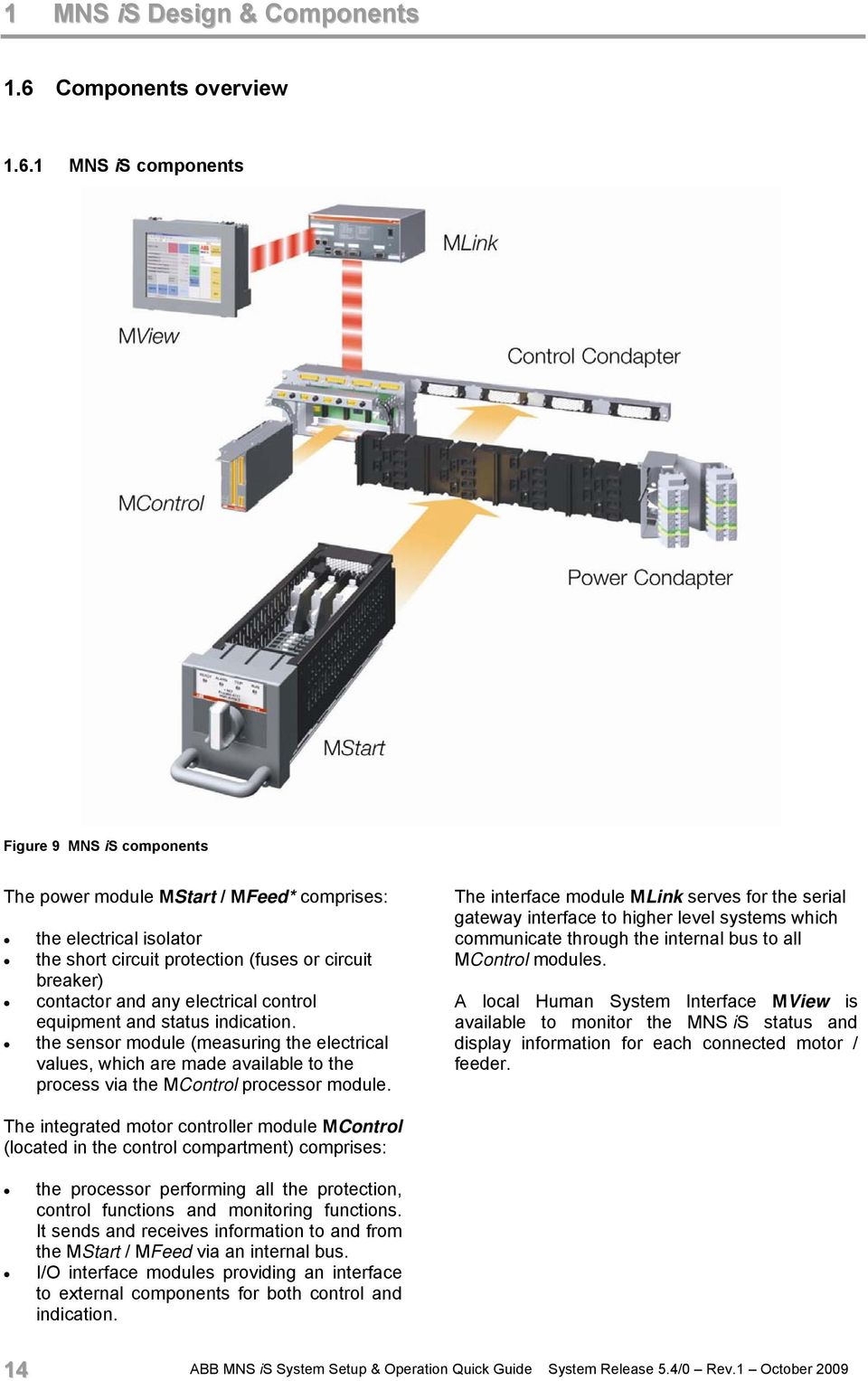
14 1 MNS is Design & Components 1.6 Components overview MNS is components Figure 9 MNS is components The power module MStart / MFeed* comprises: the electrical isolator the short circuit protection (fuses or circuit breaker) contactor and any electrical control equipment and status indication. the sensor module (measuring the electrical values, which are made available to the process via the MControl processor module. The interface module MLink serves for the serial gateway interface to higher level systems which communicate through the internal bus to all MControl modules. A local Human System Interface MView is available to monitor the MNS is status and display information for each connected motor / feeder. The integrated motor controller module MControl (located in the control compartment) comprises: the processor performing all the protection, control functions and monitoring functions. It sends and receives information to and from the MStart / MFeed via an internal bus. I/O interface modules providing an interface to external components for both control and indication. 14 ABB MNS is System Setup & Operation Quick Guide System Release 5.4/0 Rev.1 October 2009
15 MNS is Design & Components Power Modules MStart / MFeed *Specific characteristics of Fixed MStart modules see page 10 The withdrawable MStart / MFeed modules are available in the sizes from 6E/4 to 24E depending on the kw rating of the connected motor / load. For module dimensions and selection tables, please see page 9. A combination of high precision shunt and microprocessor forms a complete measuring system, which does not only measure current very precisely, but at the same time measures the voltage and contact temperature. Figure 10 MStart module size 6E/ Conventional Feeder Modules Feeder modules with module sizes described on page 9, are also available for conventional solutions, ready to be integrated into MNS is switchgear. Utilisation of this option enables more cost effective solutions for energy distribution applications, where integrated solutions are not required. Connection details see section Control terminal plug for 6E/4 conventional feeder module Control Condapter conventional type Control connection plug set with 3x8 control terminals Figure 11 Control Condapter for conventional feeders ABB MNS is System Setup & Operation Quick Guide System Release 5.4/0 Rev.1 October

16 1 MNS is Design & Components Integrated Controller Module MControl The MControl is a powerful and modular platform for communication, control, data processing and protection functions. The main control board is based on a microprocessor platform and includes memory for application and process data and a fast communication interface to MLink as well as an interface to the MStart / MFeed. The module is fully scalable and offers multiple solutions for digital and analogue I/O together with addition relay, measurement and communication cards for specific applications For description of available interfaces/ connectors, please see section 2.3. Version example PROFIBUS board Main board DIDO board AIAO board PTC board The MControl modules are plugged into separate slots in the control cable compartment. Each slot belongs to a dedicated power module. Figure 12 MControl module Remote Control Unit and Emergency Stop connection Control Terminal Plugs (interface to MStart / MFeed)) Control Condapter MControl connected to Control Condapter MFuse connection Figure 13 MControl connected to Control Condapter 16 ABB MNS is System Setup & Operation Quick Guide System Release 5.4/0 Rev.1 October 2009

17 MNS is Design & Components Information Exchange via MLink Information collected through MControl is sent to a communication interface module MLink in MNS is. MLink is the communication centre internally to a maximum of 60 MControl modules and externally between MNS is and the higher level PLC or Process Control System. The main tasks are gateway functionality and information provider. As an option, through an Ethernet interface on MLink, access to information from and controlling of each MControl is available via a web server. Figure 14 Information exchange via MLink ABB MNS is System Setup & Operation Quick Guide System Release 5.4/0 Rev.1 October

18 1 MNS is Design & Components User Interface MView The local Human Machine Interface MView can be installed in the switchgear and connected to MLink to monitor and operate the system depending on the access rights. The MView is a standard Industrial Panel. Touch screen functionality allows easy operation and navigation through windows. The connection to MNS is is configuration free, all information displayed is received directly from a web server integrated in the MLink. In addition a standard PC, running Web browser software, can be connected directly or through a standard Ethernet network to access the web server in MLink. Figure 15 MView in MNS is Switchboard Parameterization SW Tool MNavigate The Microsoft Windows XP based software application MNavigate can be used to parameterize MNS is from a convenient location outside the switch room environment. The PC is connected via Ethernet network topology to the MLink devices in this network. Capabilities: User settings/ Access control Parameterization, Configuration and Download Diagnostic function Archive/ Restoration/ Reports of project data Switchgear Arrangement overview Guidance by Online help Figure 16 MNavigate motor starter parameter screen For details see section 2.8 Project specific parameterization via MNavigate 18 ABB MNS is System Setup & Operation Quick Guide System Release 5.4/0 Rev.1 October 2009

19 MNS is Design & Components Communication Details The communication between MLink and the MControl devices internally is a RS485 peer-topeer communication (max 10MBps) with a deterministic Master-Slave protocol. Up to 60 MControl devices can be connected to one MLink. The wiring between all MControl and MLink Motor Operation via Human Machine Interface (Web Interface) is built-in inside the switchboard, no additional wiring is required. Multiple MLink can communicate via fieldbus (Profibus or MODBUS) to the control systems. The MLink acts as a standard fieldbus slave device in Master-Slave communication protocols. The MLink contains time server / client functionality as an option to provide accurate time signal to all MControl. The time stamp of alarm and events from MControl is distributed to a higher level Process Control System via the Ethernet network. As an option, redundancy in communication systems and fieldbus technology allows data communication between a PLC or PCS master to slave devices on two independent communication links. This may be utilized if a higher availability of the communication link is required. Figure 17 Typical Communications Overview ABB MNS is System Setup & Operation Quick Guide System Release 5.4/0 Rev.1 October

20 2 MNS is System Setup 2 MNS is System Setup 2.1 Cubicle identification For the MNS is System to operate correctly each cubicle requires an identification number. One MLink communicate to a maximum of 7 cubicles. This numbering is defined at the project engineering stage. Cubicle numbers are accordingly set by defined connections of the terminal blocks to the fuse holder on the top of the 24 V DC Control voltage supply bar. MLink identifies the cubicle based on the live supply bars. Figure 18 shows exemplarily the coding of cubicle number 1. Fuse holder terminal block 0 V (A) + 24 VDC Terminal blocks B C D E 0 V + 24 VDC 0 V 0 V Example Cubicle number Connection of the terminal blocks B C D (Binary code 2 0 ) (Binary code 2 1 ) (Binary code 2 2 ) 1 A E E 2 E A E 3 A A E 4 E E A 5 A E A 6 E A A 7 A A A Figure 18 Switchboard identification (example) 20 ABB MNS is System Setup & Operation Quick Guide System Release 5.4/0 Rev.1 October 2009

21 MNS is System Setup Module location setting Each single MControl as well as MStart / MFeed module position is defined in the MNS is project configuration data As a precondition for the allocation between particular MControl and MStart / MFeed devices the vertical position of the MControl in the switchboard has to be set. The BCD rotary switches used for this setting are located on the backplane of the control condapter, see Figure 19. Both switches indicate the horizontal position of the module top edge as decimal code. The horizontal positions 1 through 4 on each level are registered automatically with the insertion of the particular MControl. Sample configuration BCD rotary switches x10 x1 Figure 19 BCD rotary switches on control condapter BCD rotary switch x 10 x Module location (2E steps) Position Position BCD rotary switch position x 10 x 1 Horizontal level of module in switchboard (upper edge) Module height (Sample configuration) Vertical position of module in compartment (No. of MControl main board) x 6E/4 1 / 1 1 / 2 1 / 3 1 / x 6E/2 4 / 1 4 / E 7 / E 10 / E 16 / E 25 / ABB MNS is System Setup & Operation Quick Guide System Release 5.4/0 Rev.1 October
22 2 MNS is System Setup 2.3 MControl Overview For an introduction to MControl functionality see section MNS is Design and Components, page Mainboard and Extension cards The basic component of the MControl unit is the main board. It is contained in a metal housing. The main board is the main processing unit providing basic digital I/Os switchgear bus interface serial connection to MStart / MFeed power supply If specified, extension cards providing optional functionality are added to the main board: Extended Digital I/O Extended Analog I/O Profibus Direct Interface PTC I/O Relay cards 3-channel PT 100 Extension cards can be used if they are selected with the project specific configuration within the ABB Engineering tool. LED Indicators: Profibus Interface LED3 (red): not connected LED4 (green): connected MNS is Internal Communication LED1 (orange): Flashing: Communication to MLink working LED2 (green) Flashing: MControl healthy MControl main board MControl extension cards: DIDO board or Relay card or PT100 card AIAO board PTC board Profibus Direct Interface Figure 20 MControl components 22 ABB MNS is System Setup & Operation Quick Guide System Release 5.4/0 Rev.1 October 2009
23 MNS is System Setup Location Each MControl is plugged into a slot of the control condapter located in the control compartment of the MNS is cubicle (see Figure 21). The horizontal and vertical position of this slot corresponds with the dedicated power module (MStart / MFeed) location. After insertion, the MControl unit is internally connected (hardwired) to this MStart / MFeed module. MControl MStart / MFeed module position in compartment Figure 21 MControl location ABB MNS is System Setup & Operation Quick Guide System Release 5.4/0 Rev.1 October
24 2 MNS is System Setup 2.4 Connection Details MControl connection After insertion, the MControl is mechanically locked by pivoting the locking lever on the top of the unit. The connection of MControl with the MStart/ MFeed module works as the plug and produce method via the rear connector of the MControl unit. The MControl front connectors are wired according the project specific pin allocation of I/Os, bus interfaces etc. RCU MFuse Figure 22 MControl connection Important: The contactor control circuit for each starter can be opened for the optional use of a Remote Control Unit (RCU) or Emergency Stop at connector X35 (above MControl). Connectors X35.1 and X35.4 are to be bridged in case none of these options is used. See connection diagram on page ABB MNS is System Setup & Operation Quick Guide System Release 5.4/0 Rev.1 October 2009
25 MNS is System Setup 2 MControl Connection Diagrams Overview of connectors on the control condapter backplane and the MControl unit: Connector X V or N + 24 VDC or 230 VAC Connector X Connector X Connector X Connector X Coupler for control voltage supply Figure 23 MControl connectors overview For detailed connection diagrams see the following figures. They show the options available for the control and auxiliary circuits. Please refer to the project specific documentation for a more detailed overview. Figure 24 Connection diagram X35 ABB MNS is System Setup & Operation Quick Guide System Release 5.4/0 Rev.1 October
26 2 MNS is System Setup Figure 25 Connection diagram X30 Main Board Figure 26 Connection diagram X31 DI/DO 26 ABB MNS is System Setup & Operation Quick Guide System Release 5.4/0 Rev.1 October 2009
27 MNS is System Setup 2 Remark: Relay cards are not available in conjunction with other MControl extension cards. Figure 27 Connection diagram X31 Relay card Figure 28 Connection diagram X31 3 channel PT100 ABB MNS is System Setup & Operation Quick Guide System Release 5.4/0 Rev.1 October
28 2 MNS is System Setup Figure 29 Connection diagram X32 Analog In-/Outputs Figure 30 Connection diagram X33 PTC 28 ABB MNS is System Setup & Operation Quick Guide System Release 5.4/0 Rev.1 October 2009
29 MNS is System Setup 2 Figure 31 Connection diagram X34 Profibus Direct Interface ABB MNS is System Setup & Operation Quick Guide System Release 5.4/0 Rev.1 October
30 2 MNS is System Setup Connection of Conventional feeders Pin assignments on the control condapter connectors for conventional feeder modules, valid for module sizes 6E/4, 6E/2 and 6E: X10. 1 X10.2 X10.3 X10.4 X40.1 X40.2 X40.3 X40.4 Wires for L1/N Wires for +/- 24VDC X40.1 X Module control plug connecting to condapter view from inside the module Figure 32 Connection of conventional feeders pin assignment X40 X10 30 ABB MNS is System Setup & Operation Quick Guide System Release 5.4/0 Rev.1 October 2009
31 MNS is System Setup 2 Example: Terminal pin assignment for X40.1 to X10.1: 3x8 pole control plug at control condapter X pole control plug at withdrawable module X X X X X The terminal pin assignments of X40.2 X10.2 X40.3 X10.3 X40.4 X10.4 are according to this example. External wires L1 14 X10.1. N V 44 X V 45 ABB MNS is System Setup & Operation Quick Guide System Release 5.4/0 Rev.1 October
32 2 MNS is System Setup 2.5 MLink Overview General The communication interface module MLink collects information from the connected MControl units. Maximum units per MLink: 7 cubicles or 60 modules In case more cubicles/ modules are required, several MLink units are linked via a Network Switch Interfaces and Annunciation Device IP Address LAN1+2 Internal switchgear bus Indication Switchgear Bus Tx Rx Side view left ABB LAN 1 IP Address LAN 2 IP Address LAN 1 LAN 2 LED Indication 1 Power ON R MLink RESET Button 2 LAN 1 Comm. OK 3 LAN 1 Link OK 4 LAN 2 Comm. OK 5 LAN 2 Link OK 6 DCS Comm. OK 7 MLink FAULT MLink RUN Swg. Bus Receive 13 Swg. Bus Transmit MLink Swg. Bus Side view right CF card slot USB 1 Serial 1 Serial 2 PROFIBUS Slave Address Power supply R USB 2 Modbus TCP/ Profinet connection Ethernet connection LED Indication USB interfaces (reserved) Serial Modbus RTU interface interface (Redundancy) Profibus interface Earthing clamp Figure 33 MLink interfaces and annunciation Compact Flash (CF) Card The compact flash card contains: Operating System IP address MLink parameters Fieldbus parameters The card is inserted to the slot at the left side of the MLink unit. As soon as the flash card is inserted and MLink is connected to the voltage supply, MLink starts polling the MControl units connected to the switchgear network. 32 ABB MNS is System Setup & Operation Quick Guide System Release 5.4/0 Rev.1 October 2009
33 MNS is System Setup Installation and Connection 0 V + 24 VDC Connection example Figure 34 MLink installation Bus wiring in multiple cubicles Figure 35 Bus wiring in multiple cubicles ABB MNS is System Setup & Operation Quick Guide System Release 5.4/0 Rev.1 October
34 2 MNS is System Setup Bus wiring in multiple cubicles, dual redundant configuration Figure 36 Bus wiring in multiple cubicles Redundant MLinks approved topology example 1 34 ABB MNS is System Setup & Operation Quick Guide System Release 5.4/0 Rev.1 October 2009
35 MNS is System Setup 2 Figure 37 Bus wiring in multiple cubicles Redundant MLinks approved topology example 2 ABB MNS is System Setup & Operation Quick Guide System Release 5.4/0 Rev.1 October
36 2 MNS is System Setup 2.6 MView Overview A standard touchscreen running web browser software is used as MView mounted at a central place in the switchboard. General information on MView functionality is given in section MNS is Design & Components, page 18. The touchscreen is installed in the control cable room door and connected to MLink as shown in Figure 38 hereunder. Note: Figure 38 refers to the ABB s standard device, however also other industrial touchscreens can be used. Control cable room door Front view Control cable room door Rear view MView voltage supply 24 VDC CAT5 network crossover cable Figure 38 MView installation and connection 36 ABB MNS is System Setup & Operation Quick Guide System Release 5.4/0 Rev.1 October 2009
37 MNS is System Setup MStart / MFeed installation MStart / MFeed modules installation depends upon the type and function of that particular application defined within the ABB Engineering software. The MControl associated with the power module confirms that the correct power module is utilised, if there is a conflict a location supervision alarm is activated. Therefore any mismatch of applications or power ratings is prevented. For more information on module operation, please see section MNS is Operation, page 44. Example: MControl 1 MStart / MFeed 1 Figure 39 MControl and MStart / MFeed connected to control and power condapters ABB MNS is System Setup & Operation Quick Guide System Release 5.4/0 Rev.1 October
38 2 MNS is System Setup 2.8 Project specific parameterization via MNavigate The parameterization tool MNavigate is used for setting/ editing project specific parameters. Note: Precondition for the use of MNavigate for above actions is the availability of an MNS is project application imported from the ABB Engineering tool. This application contains all plant specific fixed information for example the device list (MStart, MFeed, MControl, MLink) device locations used hardware options (e.g. MControl extension cards). For more information on MNavigate, please refer to the MNavigate online help, see section hereunder the MNavigate help file as separate chm file. Hence parameterization with MNavigate only refers to the alterable attributes like parameters (motor characteristics, protection settings) configuration parameters (MControl I/O settings) Help files for MNavigate users are available via the MNavigate entry in the Windows Start menu or the Help button in the upper MNavigate navigation bar as a separate chm file These files contain information on MNavigate Software itself Starter, Control, Protection and Maintenance Functions View options for the content are order by fixed content sections order by index words (incl. details like single parameters) search function Figure 40 Help function 38 ABB MNS is System Setup & Operation Quick Guide System Release 5.4/0 Rev.1 October 2009
39 MNS is System Setup 2 Parameterization steps: (1) After program startup and project data import the start page is shown. Use the following buttons for further actions: Change Switchgear Tree View to Network Tree View (alternating button) Change Network Tree View to Switchgear Tree View Collapse Tree Expand Tree Close Tree View (alternating button) Open Tree View Figure 41 MNavigate Start View Help Show Event Log (Download History) Hide Event Log Close current project and open startup window to select another project (2) Views and device selection selects the Switchgear tree view in the left navigation showing all MNS is components belonging to the particular project. Figure 42 Switchgear tree view Figure 43 Network tree view is used for changeover to Network tree view showing MLink allocation. Symbols mean the following: Project name Switchgear name Cubicle name MLink name MControl (motor starter) MControl (feeder) is used for changeover to Bitmap view which delivers a switchgear front view in the main window. Selection of MControl units for further actions can also be done from here. ABB MNS is System Setup & Operation Quick Guide System Release 5.4/0 Rev.1 October
40 2 MNS is System Setup To select an MControl from the Tree view, simply right click with the mouse, this will, in one action select the required MControl and show the functions that are possible for that particular module. Alternatively the MControl can be selected from the Bitmap view (Switchgear front view) For each MControl you have the options to: Parameterize Download Assign to MControls Figure 44 Bitmap view (switchgear front view) (3) Parameterization The MControl Parameterization screen is open in the window area once the Parameterize option has been selected for the particular module. Note: The parameters shown here are those held within the MLink (CF Card). The parameters are not changed in the MControl until they have been downloaded. Figure 45 MControl parameterization screen 40 ABB MNS is System Setup & Operation Quick Guide System Release 5.4/0 Rev.1 October 2009
41 MNS is System Setup 2 A parameterization window has different areas. In the top area the MStart data is shown (Consumer Id, MStart Id, Power and Current Rating and Starter type). This data is not editable, and is imported from the ABB Engineering tool. The area below is used for the firmware module and its settings. Each firmware module has its own window. Only those applications are presented, which are available for the selected MControl/MStart. Depending on the firmware function the module has motor related parameters and configuration parameters Figure 46 Parameterization window sections The change of configuration parameters alters the functions of the MControl I/Os. Within the parameterization window it is possible to toggle forwards and backwards with the arrow keys on the right hand side of the window. This will then display the list of parameters available for the selected module. It is also possible to select the required protection function by the name tab. To edit / enable / disable functions is simply a matter of editing the values available in the fields, moving the cursor over the field shows the available values for that particular field. Figure 47 Parameter list (example) Once a field is edited and Apply is selected, the information is saved within the MNavigate package. The icon for the particular MControl in the Tree View changes from the normal MControl icon to the warning icon. Now the parameters in the MNavigate differ from those in the actual MControl. User can now proceed to edit more parameters. Each time a field is edited and shall be saved, select Apply. Cancel discards the data input. OK closes the parameterization window returning to the start page. Figure 48 Saved parameters ABB MNS is System Setup & Operation Quick Guide System Release 5.4/0 Rev.1 October
42 2 MNS is System Setup (4) Parameter download To download the edited parameters to the MControl, select Download, then Parameters from the options given from right clicking on the required MControl. For information on the status of the parameter download select the event log icon from the toolbar, this opens an additional pane at the bottom of the screen. As long as the download is in process the indicator in the bottom left hand corner of the screen flashes Green, in addition the status is given in the event log window. Once the download has been completed the indicator the bottom left hand corner returns to the steady state Red condition, conformation is also given in the event log window, and the MControl icon returns to the state. Figure 49 Download of parameters (5) The option Assign to MControl allows the user to copy the settings of one MControl to other MControls. Select one MControl to be the data source. Figure 50 Assign parameters 42 ABB MNS is System Setup & Operation Quick Guide System Release 5.4/0 Rev.1 October 2009
43 MNS is System Setup 2 Within the Copy configuration window, all target MControls are selected from the left list to the right list. Re-moving them to the left discards the assignment. Figure 51 Copy parameters Afterwards all parameter groups to be copied are selected in the respective window. After selection, user must click on Assign to copy the data to all selected MControls. Figure 52 Choose parameter groups to be copied ABB MNS is System Setup & Operation Quick Guide System Release 5.4/0 Rev.1 October
44 3 MNS is Operation 3 MNS is Operation 3.1 Withdrawable module operation and interlocking MNS is withdrawable power modules are operated with the module operating handle. This handle also activates the electrical and mechanical interlocking of the module. Handle positions are shown in Figure 55. Status information such as ON, OFF, READY, ALARM, TRIP can be indicated with the 4 LED s above the module operating handle. The allocation of status information to these LEDs is defined with the project configuration data and can be modified with MNavigate. The label attached to the module indicates the motor/starter identification as well as the LED function, see Figure 54. Figure 53 Power module front view Example of an individual designation Figure 54 LED designation example 44 ABB MNS is System Setup & Operation Quick Guide System Release 5.4/0 Rev.1 October 2009
45 MNS is Operation 3 Withdrawable modules operation/interlocking modes Position Mechanical status Electrical status 6E/4, 6E/2 6E 24E Designation Module interlocked Padlock possible Withdrawable contacts Main switch Control circuit ON position ( I ) --- OFF position ( O ) Test position Disconnected position (Isolated position) 30 mm withdrawn Moving Position (Withdrawn position) --- removal possible --- or Figure 55 Operating handle positions 3.2 Fixed module operation and interlocking Status information LEDs (incl. label) are installed in the front door of the central compartment of fixed MStart modules. Characteristics are the same as for withdrawable MStart modules, see page 44. Fixed modules operation/interlocking modes Position Mechanical status Electrical status 85E 6E 24E Designation Module interlocked Padlock possible Withdrawable contacts Main switch Control circuit ON position ( I ) (optional) OFF position ( O ) Test position ABB MNS is System Setup & Operation Quick Guide System Release 5.4/0 Rev.1 October
46 3 MNS is Operation 3.3 Motor operation Operation modes Location Operation via Operation mode See section Motor Pushbutton at local control panel Local Switchgear room MView Bus-Local DCS DCS Command Remote Figure 56 Operation modes Control Access Before operators at any location are able to send a command, a control access request must be sent to the MControl Local motor operation Motors can be operated from a local control panel which is connected to MControl digital inputs (DI). There are 2 alternatives to enable local operation: Hardware-Local: Selector switch (local/remote) at the local control panel hard-wired to MControl digital inputs (DI) Software-Local: DCS command sent to MLink, enabling local control panel to operate the motor 46 ABB MNS is System Setup & Operation Quick Guide System Release 5.4/0 Rev.1 October 2009
47 MNS is Operation Remote motor operation via DCS Details of communication with DCS using Profibus or MODBUS can be obtained from the respective MNS is Interface Manuals (see page 58) Motor Operation via Human Machine Interface (Web Interface) Motors are operated via the MNS is Web Interface by connecting an MView unit or a standard PC to one MLink in the switchgear. These devices run a standard web browser enabling them to communicate with the MLink. 1) The first step is to enter the IP address (e.g. of any MLink in the network into the browser address bar. A list of all connected MLinks shows up. Select one MLink by touching the related button, e.g. Pump Station 1. Figure 57 Addressing 2) A logon screen appears after choosing one MLink. User and password is entered via the virtual keyboard in the MView window (or optionally by a real keyboard if existing). After pressing the Logon button the entered data is checked (according to the user definition). Note: Default user: mview Figure 58 Logon ABB MNS is System Setup & Operation Quick Guide System Release 5.4/0 Rev.1 October
48 3 MNS is Operation 3) If the password is correct the user is logged in and the user name appears in the yellow field besides the ABB sign. Clicking on Log off will cancel this step and user gets back to the logon screen (see step 2). The switchgear view appearing after logon shows a list of all cubicles (max. 7) containing configured MControl devices. Figure 59 Switchgear view 4) After choosing e.g. B101-01, the cubicle view of B appears, showing the position of the devices in the cubicle. The green navigation buttons are used to navigate between the single modules. Blue buttons are used to select the operate or setup view for this particular starter module. Use the yellow Options button to change between indication of different MLink and MControl (motor) identifiers. Figure 60 Specific cubicle view MControl colors indicate the current status of the particular device. The operate view can be called for all MControl devices that are indicated online. Configured but currently absent In place but offline Online and switched on Online and switched off Online and tripped Online, switched on and alarm Online, switched off and alarm Online, tripped and alarm Configured according to device list but application file missing (MControl application download required) and device currently absent Online, application file missing (MControl application download required) 48 ABB MNS is System Setup & Operation Quick Guide System Release 5.4/0 Rev.1 October 2009
49 MNS is Operation 3 5) The operate view is the main view for monitoring and operating a starter module via its MControl. Use the green button Show diagnostics to change between measurement values diagnostics (service information) device status Motors are started/ stopped using the blue buttons at the bottom. Press the button twice for 1. Selection (button changes colour from light to dark blue, indicating ready for activation ) 2. Activation (activates the required function) Appearing alarms/trips are shown with red and blue indicators next to the Alarms/trips window. Pushing the red or blue button opens the alarm/trip view. Figure 61 Operate view 6) A detailed alarm/trip view appears after pressing the blue or red indicators in the Operate view (see step 5). Time stamp relates to the last change of MControl alarm/event information. If the list extends the screen size, use Up and Down buttons to scroll. Use the yellow Options button to change between indication of either the complete alarms/events list (with active alarms marked) or only active alarms/events Figure 62 Alarm/Trip View Different alarm/trip and reset situations are distinguished with a variety of indicators. The system acts in accordance with the selected reset parameters for each drive and each single protection function. No alarm no trip Trip Alarm Alarm and Trip Trip resettable (trip situation removed) Trip acknowledged (trip will be reset as soon as trip situation is removed) ABB MNS is System Setup & Operation Quick Guide System Release 5.4/0 Rev.1 October
50 3 MNS is Operation 7) Via the Device Setup menu downloads of configuration data, parameters and new firmware are initiated. Precondition: Prior to the download any necessary modification of configuration data or parameters has to be executed via MNavigate and made available in MLink. Depending on the user s profile some of the options may not be available (light blue buttons). After execution of selected operations, result messages come up in the 2 nd column (grey fields). Note: For configuration data download the corresponding MControl unit has to be set offline. Figure 63 Device setup menu 8) By selecting the option MC Parameter overview it is possible to view the protection functions (applications) that have been selected for that particular module. Figure 64 MC Parameter overview 9) To then view the parameter details select the required function to review. Figure 65 Parameter details 50 ABB MNS is System Setup & Operation Quick Guide System Release 5.4/0 Rev.1 October 2009
51 MNS is Operation Alarms and Trips Relates to Message Alarm condition Trip condition Motor Starter System Power Module Communication Error X No communication with the power module (MStart/ MFeed) or no power module inserted No communication with the power module (MStart/ MFeed) or no power module inserted Condition MStart main switch and test switch off Condition MStart main switch or test switch on Power Module Identnumber Error or Range Error Location Supervision X n.a. MStart/ MFeed identnumber or I n differs from configuration stored in MLink X n.a. MControl inserted in wrong location Motor still running X (X) X n.a. Contactor feedback after OFF command ok, but current detected Feeder still current X (X) n.a. Contactor feedback after OPEN command ok, but current detected Welded X n.a. Contactor feedback after OFF command missing and current detected Motor not running X (X) X n.a. Contactor feedback after ON command ok, but no current detected Feedback Supervision (K1,K2,K3) X X Feedback from contactor does not correspond with motor status Condition Current as expected Feedback from contactor does not correspond with motor status Condition Even current not as expected Testmode failure X n.a. MStart/ MFeed is in test position but current detected Main Switch Supervision X Main switch off (motor not running) Main switch off while motor is running No Load X Alarm level reached Trip level reached Underload X Alarm level reached I Lmax Underload Cos Phi X Alarm level reached Cos Phi Trip level reached I Lmax Trip level reached Cos Phi ABB MNS is System Setup & Operation Quick Guide System Release 5.4/0 Rev.1 October
52 3 MNS is Operation Relates to Message Alarm condition Trip condition Motor Starter System TOL X Alarm level reached % of thermal image TOL Eexe X Alarm level reached % of thermal image Trip level reached 100% of thermal image DCS bypass command available up to 200% of thermal image Trip level reached 100% of thermal image No bypass command accepted Stall X Alarm level reached Trip level reached Phase failure X Alarm level reached Trip level reached Phase unbalance X Alarm level reached Trip level reached Undervoltage X Alarm level reached U Lmin / U n Trip level reached U Lmin / U n Control Voltage Supervision X Control voltage dip < 95% U n (fixed) Control voltage dip < 65% U n (fixed) PTC supervision X Alarm level reached R = 1650 Ω (fixed) Trip level reached R = 3600 Ω (fixed) PTC supervision/ short circuit PTC supervision/ open circuit X n.a. Trip level reached R short circuit X n.a. Trip level reached R open circuit 10kΩ (fixed) PT100 Low (Channel 1,2,3) X Alarm level reached PT100 Low Alarm Level Trip level reached PT100 Low Trip Level PT100 High (Channel 1,2,3) X Alarm level reached PT100 High Alarm Level Trip level reached PT100 High Trip Level PT100 Card Failure X PT100 Measurement not working, no PT100 low/high alarms & trips initiated Condition PT100 Card Failure Trip disabled PT100 Measurement not working, no PT100 low/high alarms & trips initiated Condition PT100 Card Failure Trip enabled PT100 short circuit (Channel 1,2,3) PT100 open circuit (Channel 1,2,3) X n.a. Trip level reached PT100 short circuit X n.a. Trip level reached PT100 open circuit Start Limitation X Alarm level reached Number of starts per time limit Trip level reached Number of starts per time limit and motor stopped Autorestart Inhibit X Autorestart Inhibit is active n.a. 52 ABB MNS is System Setup & Operation Quick Guide System Release 5.4/0 Rev.1 October 2009
53 MNS is Operation 3 Message Relates to Motor Starter System Alarm condition Trip condition Star/Delta Transition failure Actuator Both end switch active Actuator Torque open Actuator Torque close X n.a. Trip level reached I L /I N Changeover Current [%] X n.a. Both end switches active X n.a. Torque open direction X n.a. Torque close direction Emergency Stop X n.a. Emergency Stop activated Earth Leakage X Alarm level reached I O Trip level reached I O Contact Temperature Unbalance Fuse Supervision (L1,L2,L3) Contact Temperature Supervision (L1A,L2A,L3A) Switch Cycle Supervision (K1,K2,K3) X Alarm level reached T diff Trip level reached T diff X n.a. One of the fuses blown X Alarm level reached T Trip level reached T X Alarm level reached n.a. Operating Hours X Alarm level reached n.a. MStart Insertion Cycles IRF Hardware (alternative 1) NOTE: This message is generated due to internal hardware house keeping tasks within the MNS is System X Alarm level reached n.a. X n.a. Incorrect Application Download Should an application be utilized requiring an Extended I/O card, AIAO, PTC, DI/DO and that application downloaded to an MControl without the extended I/O card present, the MControl will issue the IRF Hardware Trip. Please ensure the correct firmware application and the correct MControl hardware are utilised. ABB MNS is System Setup & Operation Quick Guide System Release 5.4/0 Rev.1 October
54 3 MNS is Operation Message Relates to Motor Starter System Alarm condition Trip condition IRF Hardware (alternative 2) NOTE: This message is generated due to internal hardware house keeping tasks within the MNS is System IRF Hardware (alternative 3) NOTE: This message is generated due to internal hardware house keeping tasks within the MNS is System X n.a. PTC Load Not Connected Should the PTC application be selected and enabled and no field wiring or load connected to the PTC terminals, the MControl will issue the IRF Hardware Trip. Connect the required PTC field wiring. X n.a. Internal Hardware Error MStart The MStart modules constantly perform house keeping checks. Should MStart detect an internal hardware problem, this information is then relayed to the MControl. The MControl will issue the IRF Hardware Trip. This MStart related trip may clear if the MStart is withdrawn and re-inserted. Should the problem persist please replace the MStart. 54 ABB MNS is System Setup & Operation Quick Guide System Release 5.4/0 Rev.1 October 2009
55 Technical Data 4 4 Technical Data 4.1 Control and Communication components MStart MControl MLink MView Electrical Data Auxiliary supply voltage(s) Supply voltage 24 VDC 24 VDC 24 VDC 24 VDC Voltage range VDC VDC VDC VDC Power consumption Typical 200 ma 150 ma 1000 ma 1200 ma Maximum 240 ma 270 ma 1700 ma 1500 ma Mechanical Data Dimensions (HxWxD) mm Weight Depending on starter type Depending on starter type 125x53x x265x x185x kg 2.0 kg 5.0 kg Environmental conditions Storage temperature C C C C Operation temperature C C C C * Degree of protection IP20 IP20 IP20 IP20 * Max. operation temperature for MView display (switchgear room temperature) Reliability MTBF (Meantime between failures) at 40 C 48 years 19 years In combination: 13 years 15 years 8 years ABB MNS is System Setup & Operation Quick Guide System Release 5.4/0 Rev.1 October
56 4 Technical Data In-/ Output connection on MControl front Input (optical isolated, one common) Output (two outputs share one common) Over voltage class II II Pollution severity 3 3 Nominal voltage 24 VDC 250 VAC 50/60 Hz Impulse voltage withstand level 0.33 kv 2.5 kv Nominal current (cosphi 0.4) 10 ma (16mA) 1 A Nominal cross-section of connector 1.5 mm mm 2 Minimum operations 5 * 10 6 mechanical 3 * 10 4 electrical Max switching voltage 230V AC 230 VDC 24 VDC Max switching current 1 A 150 ma 6 A Max switching capacity 500 VA 56 ABB MNS is System Setup & Operation Quick Guide System Release 5.4/0 Rev.1 October 2009
57 Technical Data Certificates Low Voltage Switchgear Standard Subject Note IEC IEC IEC/EN Low voltage switchgear and controlgear assemblies General rules Low voltage switchgear and controlgear assemblies Power switchgear and controlgear assemblies Low voltage switchgear and controlgear General rules Verified Design in accordance with standard Verified Design in accordance with standard IEC/EN Low voltage switchgear and controlgear Contactors and motor-starters Electromechanical contactors and motorstarters Electromagnetic Compatibility Standard Subject Performance Criterion EN Radio Interference Voltage Level A EN Radio Interference Field Strength Level A IEC Electromagnetic compatibility (EMC) Generic standard Immunity for industrial environments Criteria for applications in industrial environment are met or even exceeded, see following results of IEC x IEC Electrostatic Discharge - Contact Discharge - Air Discharge Level A Level A IEC Radiation Level A IEC Burst Level A IEC Surge Level A IEC Inlet Level A IEC Power Frequency magnetic field Level A IEC Voltage Dips 230 V Not applicable, for power supply only ABB MNS is System Setup & Operation Quick Guide System Release 5.4/0 Rev.1 October
58 Annex 5 Annex 5.1 Related Documentation Document MNS is System Guide MNS is Interface Manual MLink - Release 5.4 MNS is Interface Manual Web Interface - Release 5.4 MNS is Interface Manual OPC Server - Release 5.4 MNS is Interface Manual Profibus - Release 5.4 MNS is MControl Interface Manual Profibus Direct Release 5.4 MNS is Interface Manual Modbus - Release 5.4 MNS is Dual Redundancy Manual Release 5.4 MNS is MNavigate Help file V5.4 Publication Number 1TGC910001B0204 1TGC910127M0201 1TGC910137M0201 1TGC910147M0201 1TGC910157M0201 1TGC910187M0201 1TGC910167M0201 1TGC910177M0201 1TGC910069M Terminology Abbreviation Term Aspect Object Alarm Bus Local Description ABB technology. An Aspect Object is a computer representation of a real object such as a pump, a valve, an order or a virtual object such as a service or an object type. An Aspect Object is described by its aspects and is organized in structures. Alarm is defined as status transition from any state to abnormal state. Status transition to abnormal state can be data crossing over the pre-defined alarm limit. A Control Access term describing that the MControl accepts its commands from a device on the switchgear control network, e.g. the Web Interface, MView. COTS Commercial off the shelf Commercial off the shelf product, term to describe products available on the market, ready to use. DCS Distributed Control System See also PCS DTM Device Type Manager Software module used to manage devices via fieldbus (e.g. PROFIBUS) using frame application environment (e.g. PactWare, ABB Fieldbus Builder etc.) 58 ABB MNS is System Setup & Operation Quick Guide System Release 5.4/0 Rev.1 October 2009
59 Annex Abbreviation Term Description Eth. Ethernet Ethernet is a local area network (LAN) technology. The Ethernet standard specifies the physical medium, access control rules and the message frames. Event An event is a status transition from one state to another. It can be defined as alarm, if the state is defined as abnormal or as warning as a pre-alarm state. FBP FieldBusPlug ABB technology for exchangeable fieldbus interface on intelligent field devices (e.g. transmitter, simple motor starter) FD Field Device Term for devices connected to the fieldbus (e.g. motor control units or circuit breaker protection) GSD file Geräte Stamm Datei (German abbreviation) Hardware description file for a PROFIBUS-DP or PROFIBUS-DP/V1 slave type GPS Global Positioning System System to detect local position, universal time and time zone, GPS technology provides accurate time to a system HMI Human Machine Interface Generic expression LVS Low voltage switchgear A factory built assembly built to conform with IEC MCC Motor Control Centre Common term for a switchgear used for motor control and protection. MNS The Modular Low Voltage Switchgear family from ABB MNS is The integrated intelligent switchgear solution from ABB MStart MFeed MControl MLink MView MNavigate MODBUS MODBUS RTU Motor Starter MNS is components integrated in the switchgear, see the MNS is System Guide for technical details Fieldbus communication protocol Fieldbus communication protocol Consists of motor controller and electrical components to control and protect a motor, part of Motor Control Center. NLS Native Language Support Providing the ability to change the language of software tools in order to support native languages (English is basis, others are optional) OPC OLE for Process Control, an industrial standard for exchange of information between components and process control application ABB MNS is System Setup & Operation Quick Guide System Release 5.4/0 Rev.1 October
60 Annex Abbreviation Term Description PCS Process Control System High level process control system PLC Programmable Local Controller PROFIBUS-DP PROFIBUS-DP/V1 PROFIBUS-DP/V2 Low level control unit Fieldbus communication protocol with cyclic data transfer (V0). Fieldbus communication protocol, extension of PROFIBUS- DP allowing acyclic data transfer and multi master (V1). Fieldbus communication protocol, extension of PROFIBUS- DP allowing time stamp and communication between master and slave (V2). RCU Remote Control Unit Local control unit with pushbutton and indicator to operate a device (e.g. motor) from field level RS232 RS485 Standard No. 232 for PC communication, established by EIA (Electronics Industries Association, USA) Communication interface standard from EIA (Electronics Industries Association, USA), operating on voltages between 0V and +5V. RS-485 is more noise resistant than RS-232C, handles data transmission over longer distances, and can drive more receivers RTC Real Time Clock Integrated clock function in devices used to generate time and date information if a remote clock system is not present SNTP TCP/IP Software Local Simple Network Time Protocol Switchgear Bus Network Transmission Control Protocol / Internet Protocol A Control Access term describing that the MControl accepts its commands from the hardwired inputs as a result of either the PCS or MView passing the Control Access Authority to Soft-Local. Note: Does not require the hardwired local input to be set to true. A protocol used for time synchronization in Control Network through Ethernet Term used to describe the internal switchgear communication network, between MLink and MControl TCP/IP is a high-level connection oriented, reliable, full duplex communication protocol developed for integration of the heterogenous systems. 60 ABB MNS is System Setup & Operation Quick Guide System Release 5.4/0 Rev.1 October 2009
61 Annex Abbreviation Term Trip Description A consequence of an alarm activated or an external trip command from another device to stop the motor or trip the circuit breaker. UTC Coordinated Universal Time Coordinated Universal Time is the international time standard. It is the current term for what was commonly referred to as Greenwich Meridian Time (GMT). Zero (0) hours UTC is midnight in Greenwich England, which lies on the zero longitudinal meridian. Universal time is based on a 24 hour clock. Warning A warning is defined as status transition from any state to pre-alarm state to inform in advance before an alarm level is reached. ABB MNS is System Setup & Operation Quick Guide System Release 5.4/0 Rev.1 October
62 Contact us ABB Low Voltage Systems Publication Editor: ABB Automation Products GmbH Ladenburg, Germany Copyright 2009 ABB All rights reserved. Publication No. 1TGC910609M0201 Local Contacts on
MNS is Motor Control Center MControl Interface Manual Profibus Direct System Release V7.6
 MNS is Motor Control Center MControl Interface Manual System Release V7.6 MNS is a registered trademark. Emax, Tmax are registered trademarks of ABB SACE Spa. Microsoft, Windows and Windows XP are registered
MNS is Switchgear System Technical Overview
 Switchgear System Technical Overview Innovative Design ABB s innovative MNS is concept combines the long term experience, energy efficiency, grid reliability and industrial productivity of the well-known
Waveguide Access Point WGA631. Product Guide
 Waveguide Access Point Product Guide Waveguide Access Point Contents 1. Description............................ 3 2. Application............................ 3 3. Technical data... 4 4. Physical interfaces......................
AC 800M. EtherNet/IP DeviceNet Linking Device LD 800DN. Power and productivity for a better world TM SP1134
 AC 800M EtherNet/IP DeviceNet Linking Device LD 800DN SP1134 Power and productivity for a better world TM AC 800M EtherNet/IP DeviceNet Linking Device LD 800DN NOTICE This document contains information
How to read this guide
 How to read this guide The following shows the symbols used in this Quick start guide with descriptions and examples. Symbol Description Example P oint Reference Caution [ ] This symbol explains information
Automation System TROVIS 6400 TROVIS 6493 Compact Controller
 Automation System TROVIS 6400 TROVIS 6493 Compact Controller For panel mounting (front frame 48 x 96 mm/1.89 x 3.78 inch) Application Digital controller to automate industrial and process plants for general
Medium Voltage Products. ZN1 12 kv arc-proof air-insulated switchgear for primary distribution
 Medium Voltage Products ZN1 12 kv arc-proof air-insulated switchgear for primary distribution ZN1 an innovative switchgear for power distribution requirements ABB ZN1 primary distribution switchgear is
Quick Connect. quick - simple - efficient. www.g-mw.de
 Quick Connect quick - simple - efficient www.g-mw.de Phone: +49 9103 7129-0 Fax: +49 9103 7129-207 Innovative connection technology to plug three single-phase current transformers to multifunctional power
Product Description Full Voltage Starting Electric Fire Pump Controllers FTA1000
 Product Description Full Voltage Starting Electric Fire Pump Controllers FTA1000 Description Firetrol FTA1000 Full Voltage Fire Pump Controllers are intended for use with electric motor driven fi re pumps
Lifecycle Service Tool. Operator's manual
 REF 542plus 1MRS756725 Issued: 23.12.2008 Version: A/23.12.2008 REF 542plus Contents Copyrights... 5 1. Introduction...7 1.1. This manual... 7 1.2. Use of symbols... 7 1.3. Intended audience... 7 1.4.
UniGear ZS1. Medium voltage, arc proof, air insulated switchgear for primary distribution
 UniGear ZS1 Medium voltage, arc proof, air insulated switchgear for primary distribution UniGear ZS1: an innovative solution for all installation requirements ABB UniGear is medium voltage metal-clad,
Low Voltage Switchgear MNS is with MSpeed
 Low Voltage Switchgear MNS is with MSpeed Even better Introduction Variable Speed Drive (VSD) is the established technology for efficient operation and control of electric motor. It provides a system by
Application/Connection Examples
 This Quick Start Guide is designed to familiarize the user with the connection and configuration of the DTS-305 DIN rail mounted single / 3 phase power & energy meter with RS-485 or TCP communications.
Combi switchbox with integrated 3/2 way pilot valve
 H Combi switchbox with integrated 3/2 way pilot valve Construction The GEMÜ combi switchbox with integrated 3/2 way pilot valve for pneumatically operated quarter turn actuators has a micro-processor controlled
Application. Characteristics RTU560. Data Sheet Communication Unit 560CMD11. Communication Unit 560CMD11
 Communication Unit 560CMD11 The SLC works as master for the RTU560 serial peripheral bus (I/O-Interface/ Wired-OR-Bus ). The MPU is responsible for the other tasks. The MPU handles the absolute time and
MNS Low Voltage Switchgear System Guide
 MNS Low Voltage Switchgear System Guide 2 MNS is a registered trademark. Product names of other products are registered trademarks of their manufacturers or owners. Technical descriptions relate to MNS
Electronic timer CT-AHD.12 OFF-delayed with 1 c/o (SPDT) contact
 Data sheet Electronic timer CT-AHD.12 OFF-delayed with 1 c/o (SPDT) contact The CT-AHD.12 is an electronic time relay with OFF-delay. It is from the CT-D range. With their MDRC profile and a width of only
SIMATIC NET. CP 243-2 AS-Interface Master B C. Preface Contents. Technical Description and Installation Instructions Interface to the User Program
 Preface Contents SIMATIC NET CP 243-2 AS-Interface Master Manual Technical Description and Installation Instructions Interface to the User Program 2 in the S7-200 CPU Access to the Data of the AS-i Slaves
Permissible ambient temperature Operation Storage, transport
 The Sitras PRO combined DC protective unit and controller is used in the power supply for DC railways in mass transit and main-line systems up 3,000 V DC. It protects DC switch gear and contact line systems
BT300 HVAC Drives Conventional Bypass (C-Bypass) Options
 BT300 HVAC Drives Conventional Bypass (C-Bypass) Options Description The BT300 Conventional Bypass is a companion package for the family of BT300 HVAC Drives. For information on the family of BT300 HVAC
Medical Vacuum Systems-PXMI
 Medical Vacuum Systems-PXMI Please read and save these instructions. Read carefully before attempting to assemble, install, operate or maintain the product described. Protect yourself and others by observing
DeviceNet Bus Software Help for Programming an Allen Bradley Control System
 FBP FieldBusPlug V7 DeviceNet Bus Software Help for Programming an Allen Bradley Control System DeviceNet Software Help for Programming an Allen Bradley Control System Contents Page General Purpose...
xepi 2 Installation Guide Diagnostic Unit and Configuration Interface Doc. Version 4.0 English
 xepi 2 Diagnostic Unit and Configuration Interface Doc. Version 4.0 Installation Guide English Dear Customer, This "Installation Guide" will help you to install the hardware. If you have any further questions,
Firmware version: 1.10 Issue: 7 AUTODIALER GD30.2. Instruction Manual
 Firmware version: 1.10 Issue: 7 AUTODIALER GD30.2 Instruction Manual Firmware version: 2.0.1 Issue: 0.6 Version of the GPRS transmitters configurator: 1.3.6.3 Date of issue: 07.03.2012 TABLE OF CONTENTS
Daker DK 1, 2, 3 kva. Manuel d installation Installation manual. Part. LE05334AC-07/13-01 GF
 Daker DK 1, 2, 3 kva Manuel d installation Installation manual Part. LE05334AC-07/13-01 GF Daker DK 1, 2, 3 kva Index 1 Introduction 24 2 Conditions of use 24 3 LCD Panel 25 4 Installation 28 5 UPS communicator
DCM. Product Brochure. Diagnostic Communication Master
 DCM Product Brochure Diagnostic Communication Master DCM The DCM Diagnostic Communication Master is the best solution for the control of actuators from a remote control room through a two-wire transmission-mode
Technical Information POWER PLANT CONTROLLER
 Technical Information POWER PLANT CONTROLLER Content The Power Plant Controller offers intelligent and flexible solutions for the control of all PV power plants in the megawatt range. It is suitable for
TrueAlarm Fire Alarm Systems
 TrueAlarm Systems UL, ULC, CSFM Listed; FM Approved* Network Annunciators; es Features Provides a dedicated local area network (LAN) for connection of a TrueSite workstation server to remote clients: es
MAKING MODERN LIVING POSSIBLE. AK-SC255 On-Site Installation Guide DANFOSS ELECTRONIC CONTROLS & SENSORS
 MAKING MODERN LIVING POSSIBLE AK-SC255 On-Site Installation Guide DANFOSS ELECTRONIC CONTROLS & SENSORS How to Use This Guide Read this Guide completely as you install and start up your new AK-SC 255 controller.
L5354 ControlNet Communications Interface
 L5354 ControlNet Communications Interface Technical Manual HA470733 Issue 2 Copyright SSD Drives Inc 2005 All rights strictly reserved. No part of this document may be stored in a retrieval system, or
5-port / 8-port 10/100BaseTX Industrial Ethernet Switch User Manual
 5-port / 8-port 10/100BaseTX Industrial Ethernet Switch User Manual Content Overview... 1 Introduction... 1 Features... 3 Packing List... 4 Safety Precaution... 4 Hardware Description... 5 Front Panel...
User manual Compact Web PLC WP240 series IEC-line
 User manual Compact Web PLC WP240 series IEC-line update: 09-01-2014 IEC-line by OVERDIGIT overdigit.com 1. General description The WP240 device is a PLC, programmable in IEC61131-3 language using CoDeSys
Communication Unit 560CMU05 Data sheet
 RTU560 product line Communication Unit 560CMU05 Data sheet E1 10/100 MB LAN E2 10/100 MB LAN CP1, CP2 RS232C or RS485 Ethernet Controller Ethernet Controller USART Processor bus MPU ELAN520 /Flash Memory
MEDIUM VOLTAGE CE-BF SWITCHBOARDS. UP TO 40.5 kv. CE - BF - C - en - REV.00 2012.4
 CE - BF - C - en - REV.00 2012.4 APPLICATION CE-BF Switchbords up to 40.5 kv are designed for use in public and industrial distribution system up to 40,5KV for the operation and protection of lines, transformers,
NX Series Inverters. HVAC Pocket Programming Guide
 NX Series Inverters HVAC Pocket Programming Guide HVAC Pocket Programming Guide HVAC Pocket Programming Guide / Contents This guide provides a single reference document for the user of NXL HVAC (product
3.1.1 Full Type Tests & Routine Tests according to Clause 8 2 & 8 3. 4.0 Instructions For Installation, Operation & Maintenance
 SPECIFICATION FOR LOW VOLTAGE SWITCHBOARD SEN I N D E X Description 10 STANDARD TECHNICAL REQUIREMENTS 11 Standards 12 General Operating Conditions 13 General Description Of Switchboard 131 Structure 132
Bulletin 150 Smart Motor Controllers SMC-3 Smart Motor Controller
 Overview/Modes of Operation Bulletin 150 Smart Motor Controller The SMC-3 is a compact, simple to use, solid-state motor controller designed to operate 3-phase motors. It features a built-in overload relay
Short Form Catalogue. Alarm Systems. Reliable Supervision and Control
 Short Form Catalogue Alarm Systems Reliable Supervision and Control Alarm Monitors and Indicators The SELCO product range includes a number of alarm monitors and indicator panels for use in numerous applications.
ADM1TE 5/30A DIN rail single phase two wire energy meter
 ADMTE 5/30A DIN rail single phase two wire energy meter. Safety instruction.2 Foreword.3 Performance criteria.4 Specifications.5 Basic errors.6 Description.7 Dimensions.8 Installation.9 Operating.0 Troubleshooting.
New SACE Emax 2 for UL 1066 From Circuit Breaker to Power Manager
 New SACE Emax 2 for UL 1066 From Circuit Breaker to Power Manager 2 1SDC200039B0201 New SACE Emax 2 for UL 1066 Circuit breakers switch power SACE Emax 2 manages it. SACE Emax 2 is the new benchmark of
LevelOne IFE-0500 4-Port PoE + 1-Port TP Industrial Fast Ethernet Switch User Manual
 LevelOne IFE-0500 4-Port PoE + 1-Port TP Industrial Fast Ethernet Switch User Manual Ver. 1.0.0-0711 1 FCC Warning This Equipment has been tested and found to comply with the limits for a Class-A digital
Remote Monitoring and REC 501 Control Unit Product Guide
 Remote Monitoring and Control Unit REC 501 Product Guide Issued: May 1999 Status: Updated Version: B/06.11.2001 Data subject to change without notice Features Remote control and monitoring unit for the
ENET-710. ENET-710 - Ethernet Module ENET-710 JAN / 06 FOUNDATION
 ENET-710 ENET-710 - Ethernet Module JAN / 06 ENET-710 FOUNDATION E N E T 7 1 0 ME smar www.smar.com Specifications and information are subject to change without notice. Up-to-date address information is
F453. TiF453. User guide 10/11-01 PC
 F453 TiF453 User guide 10/11-01 PC 2 TiF453 User guide Contents 1. Hardware and Software requirements 4 2. Installation 4 1.1 Minimum Hardware requirements 4 1.2 Minimum Software requirements 4 3. Fundamental
Energy Depot GmbH PRODUCT AND APPLICATION GUIDE. Total Monitoring Solution for PV. Delivering Solutions for Energy Management
 Energy Depot GmbH Delivering Solutions for Energy Management PRODUCT AND APPLICATION GUIDE Total Monitoring Solution for PV SOLAR LOGGER & ANALYSIS DC STRING MONITORING Residential Comprehensive Solar
DRM75A 230V 20/100A DIN rail single phase two wire energy meter
 DRM75A 230V 20/100A DIN rail single phase two wire energy meter 1.1 Safety instruction 1.2 Foreword 1.3 Performance criteria 1.4 Specifications 1.5 Basic errors 1.6 Description 1.7 Dimensions 1.8 Installation
Three-phase monitoring relay CM-PFE
 Data sheet Three-phase monitoring relay CM-PFE The CM-PFE is a three-phase monitoring relay that monitors the phase parameter phase sequence and phase failure in three-phase mains. 2CDC 251 005 S0012 Characteristics
Operating instructions. AS-i Profibus gateway AC1411 / AC1412 7390884/00 04/2014
 Operating instructions AS-i Profibus gateway AC1411 / AC1412 7390884/00 04/2014 Contents 1 Preliminary note 4 1.1 Notes on this document 4 1.2 Symbols used 4 2 Safety instructions 4 2.1 General 4 2.2 Installation
DVPPF02-H2. PROFIBUS DP Slave Communication Module Application Manual
 DVPPF02-H2 PROFIBUS DP Slave Communication Module Application Manual Warning Please read this instruction carefully before use and follow this instruction to operate the device in order to prevent damages
4 non-safe digital I/O channels 2 IO-Link Master V1.1 slots. Figure 1. Figure 2. Type code. TBPN-L1-FDIO1-2IOL Ident no. 6814053.
 PROFINET slave Integrated Ethernet switch 100 Mbps supported 2 x M12, 4-pin, D-coded, Ethernet fieldbus connection Glass-fiber reinforced housing Shock and vibration tested Potted module electronics Protection
PROFINET IO Diagnostics 1
 PROFINET IO is a very cost effective and reliable technology. However, extensive installations can have thousands of PROFINET IO devices operating on many networks. The reliable operation of these networks
Tutorial: Configuring GOOSE in MiCOM S1 Studio 1. Requirements
 Tutorial: Configuring GOOSE in MiCOM S1 Studio 1. Requirements - Two (2) MiCOM Px4x IEDs with Version 2 implementation of IEC 61850 - Two (2) Cat 5E Ethernet cable - An Ethernet switch 10/100 Mbps - MiCOM
e 2 ALPHA Medium Voltage Switchgear Data Sheet K-1.1.2 EN
 e 2 ALPHA Medium Voltage Switchgear Data Sheet K-1.1.2 EN We create ideas with power! ELEKTROMETAL ENERGETYKA SA is a new Polish company providing solutions for electrical power engineering. Our services
Amcrest 960H DVR Quick Start Guide
 Amcrest 960H DVR Quick Start Guide Welcome Thank you for purchasing our Amcrest 960H DVR! This quick start guide will help you become familiar with our DVR in a very short time. Before installation and
Programmable set for Ethernet Modbus/TCP in IP20 TI-BL20-PG-EN-8
 CoDeSys-programmable acc. to IEC 61131-3 Cable max. 50 m between interface and read/write head 10/100 Mbps LEDs for display of supply voltage, group and bus errors as well as status and diagnostics Connection
MasterINTERFACE 39 Series - Relay interface modules
 MasterINTERFACE 39 Series - Relay interface modules Common features Space saving 6.2 mm wide Connections for 16-way jumper link Integral coil indication and protection circuit Secure retention and easy
Voltage Regulator SPAU 341 C. Product Guide
 Issued: July 1998 Status: Updated Version: D/25.04.2006 Data subject to change without notice Features Comprehensive voltage regulation for power transformers with on-load tapchangers in distribution substations
Ethernet Radio Configuration Guide
 Ethernet Radio Configuration Guide for Gateway, Endpoint, and Repeater Radio Units April 20, 2015 Customer Service 1-866-294-5847 Baseline Inc. www.baselinesystems.com Phone 208-323-1634 FAX 208-323-1834
MODEL 5010 DUAL CHANNEL SMOKE/FIRE DETECTION MODULE
 DESCRIPTION MODEL 5010 DUAL CHANNEL SMOKE/FIRE DETECTION MODULE DESCRIPTION The SST Model 5010 Two Channel Smoke/Fire Detection Module provides two independent detection input channels for the NOVA-5000
Positive-guided relay outputs: 3 safety contacts (N/O), instantaneous. 1 auxiliary contact (N/C), instantaneous
 Safety relay for monitoring E-STOP pushbuttons. Approvals Unit features Positive-guided relay outputs: 3 safety contacts (N/O), instantaneous 1 auxiliary contact (N/C), instantaneous Safe separation of
EDI Distributor Control Interface Wiring and Setup Instructions
 Universal I/O EDI Distributor Control Interface Wiring and Setup Instructions EDI UNIVERSAL I/O INTERFACE MODULE The only interface needed for EDI-V5 controls Network compatible with all older EDI controls
R&S AFQ100A, R&S AFQ100B I/Q Modulation Generator Supplement
 I/Q Modulation Generator Supplement The following description relates to the Operating Manuals, version 03 of R&S AFQ100A, and version 01 of R&S AFQ100B. It encloses the following topics: LXI features,
ModBus Server - KNX. Gateway for integration of KNX equipment into Modbus (RTU and TCP) control systems.
 IntesisBox ModBus Server - KNX Gateway for integration of KNX equipment into Modbus (RTU and TCP) control systems. Integrate KNX based lighting control into your SCADA, BMS, PLC "talking" Modbus. Master
Multi-Range Programmable DC Power Supplies 9115 Series
 Data Sheet 1200 W Multi-Range DC Power Supplies Features & Benefits Any 9115 series model can replace several supplies on your bench or in your rack. Unlike conventional supplies with fixed output ratings,
JNIOR. Overview. Get Connected. Get Results. JNIOR Model 310. JNIOR Model 312. JNIOR Model 314. JNIOR Model 410
 The INTEG is an Ethernet I/O (digital, analog) device that monitors and controls a small set of process signals. functions as both basic I/O for integration with another application or system AND as a
Disclaimers. Important Notice
 Disclaimers Disclaimers Important Notice Copyright SolarEdge Inc. All rights reserved. No part of this document may be reproduced, stored in a retrieval system, or transmitted, in any form or by any means,
1 Serial RS232 to Ethernet Adapter Installation Guide
 Installation Guide 10/100 Mbps LED (amber color ) Link/Activity LED (green color ) 1. Introduction Thank you for purchasing this 1-port RS232 to Ethernet Adapter (hereinafter referred to as Adapter ).
Panel Meters and Controllers Modular Panel Meter Type EDM 35
 Panel Meters and Controllers Modular Panel Meter Type EDM 35 Modular digital panel meter, 3 1/2-digit Indicating or controlling current, voltage, resistance, temperature, tacho or frequency. Easy programming
AuCom s IMS2 soft starters are a total motor starting solution, combining highlevel functionality with ease of use:
 AuCom s IMS2 soft starters are a total motor starting solution, combining highlevel functionality with ease of use: advanced soft start and soft stop control protection functions that operate even when
Communicate and view data from meters with one simple device
 Communicate and view data from meters with one simple device PowerLogic EGX300 integrated gateway-server Web Monitoring Communications Plug and Play Plug into your energy usage with a simple mouse click
Wireless Router Setup Manual
 Wireless Router Setup Manual NETGEAR, Inc. 4500 Great America Parkway Santa Clara, CA 95054 USA 208-10082-02 2006-04 2006 by NETGEAR, Inc. All rights reserved. Trademarks NETGEAR is a trademark of Netgear,
Electrical data Nominal voltage AC/DC 24 V Nominal voltage frequency
 echnical data sheet NV24A--RE Communicative globe valve actuator for 2-way and 3-way globe valves Actuating force 1000 N Nominal voltage AC/DC 24 V Control Modulating DC (0)2...10 V Variable Nominal stroke
Process Alarm Solutions
 Process Alarm Solutions Reliable Supervision and Control www.selco.com SELCO flexible alarm panels for supervision and control SELCO provides efficient and reliable solutions for alarm monitoring of electrical
CM705B - Universal Expander Module CM707B - Plug On Zone Expander Security Systems
 CM705B - Universal Expander Module CM707B - Plug On Zone Expander Security Systems EN Security System CM705B CM705B - Universal Expander Module The CM705B universal expander provides a cost effective way
RTM X42 Multi-Channel Radio Transmission Tension Monitoring and Control System
 RTM X42 Multi-Channel Radio Transmission Tension Monitoring and Control System RTM X42 is an innovative system that utilizes force measuring rollers to capture the tension of individual wires or strands,
Install the DeviceNet Module using the following procedure:
 Installation INSTALLATION INSTRUCTIONS: MCD DEVICENET MODULE Order Code: 175G9002 1. Installation Install the DeviceNet Module using the following procedure: 1. Remove control power and mains supply from
Products and solutions for pumping, irrigation and piping
 Products and solutions for pumping, irrigation and piping 100% electricity www.lovatoelectric.com Tra dition and Innovation LOVATO Electric S.p.A. - Bergamo - Italy Since 1922 The first LOVATO Electric
Product Manual. ABB i-bus KNX IP Interface IPS/S 2.1. Intelligent Installation Systems ABB
 Product Manual ABB i-bus KNX IP Interface IPS/S 2.1 Intelligent Installation Systems ABB This manual describes the function of the IP Interface IPS/S 2.1 with the application program IP Interface. Subject
Optimize your simple machines... Modicon M218 Selection Guide
 Optimize your simple machines... Modicon M218 Selection Guide Compact Solution for Simple Machines Optimized Logic Controller Modicon M218 With intelligent software platform, specialized functional s,
USER MANUAL. PingBrother EPIW104 managed passive poe switch & IP watchdog
 USER MANUAL PingBrother EPIW104 managed passive poe switch & IP watchdog CONTENT Content... 2 Chapter 1... 3 1.1 Preface... 3 1.2 CE mark warning... 3 1.3 FCC warning... 4 Chapter 2... 5 2.1 Physical description...
SOLARCARE SERIES PRODUCT AND APPLICATION GUIDE
 SOLARCARE SERIES PRODUCT AND APPLICATION GUIDE for solar energy management LEATEC Delivering Solutions for Energy Management SOLAR ENERGY DATA CENTER BUILDING 4 to8 String Monitoring with 0.% Accuracy
Set for PROFINET IO in IP20 TI-BL20-EN-PN-4
 Cable max. 50 m between interface and read/write head Connection of up to 4 read/write heads via BL ident extension cables Mixed operation of HF and UHF read/ write heads Connectors /S2500 Type code Ident
TRACTION NETWORK MONITORING AND PROTECTION SYSTEM SMTN-3 CITY ELECTRIC TRANSPORT RAILWAYS METRO INDUSTRY
 TRACTION NETWORK MONITORING AND PROTECTION SYSTEM SMTN-3 CITY ELECTRIC TRANSPORT RAILWAYS METRO INDUSTRY 2 TRACTION NETWORK MONITORING AND PROTECTION SYSTEM Traction network monitoring and protection system,
LV MCC LOW VOLTAGE SWITCHGEAR MOTOR CONTROL CENTRE PRODUCT GUIDE
 LV MCC LOW VOLTAGE SWITCHGEAR MOTOR CONTROL CENTRE PRODUCT GUIDE 380/415/690 Volt AC 50/65/80/100 ka 1. Product Guide Low Voltage Motor Control Centre CONTSTRUCTION Continuous "poured in place" gasket
The following components are common to most cubicles; this example is an ABB HK cubicle.
 4.0 CIRCUIT BREAKER CUBICLE Learning Objectives The circuit breaker cubicle is the component of the switchgear that holds the circuit breaker, and the controls and cabling for the distribution system.
SIMATIC S7-300. Getting Started for First Time Users. Order No.: 6ZB5310-0NC02-0BA0 04/2007 A5E01094750-01
 SIMATIC S7-300 Getting Started for First Time Users Order No.: 6ZB5310-0NC02-0BA0 04/2007 A5E01094750-01 Safety Guidelines This manual contains notices you have to observe in order to ensure your personal
Module 1 Overview ControlLogix5000
 Module 1 Overview ControlLogix5000 Module Overview This module takes a fundamental approach to a ControlLogix system. It begins with an overview of the architecture and migrates into an introduction of
M1000 Process Alarm Monitor
 Data Sheet Process Alarm Monitor Reliable Supervision and Control 10 inputs with LED indications Supports both NO/NC input contacts 10 open collector outputs Built-in siren relay Text label for alarm descriptions
Application & Quick-Start Guide
 Model: CRMWIC Web Intelligent Controller 1 This document will illustrate various ways to connect and use a CRM-WIC as well as programming examples. When connecting CRM-WIC, the installer has several interface
SecureLinx Spider Duo Quick Start Guide
 SecureLinx Spider Duo Quick Start Guide SecureLinx Spider Duo Quick Start Guide SecureLinx Spider Duo QUICK START GUIDE CONTENTS Overview... 2 What s In The Box... 3 Installation and Network Settings...
Application Note - Connecting an Electricity Meter to SolarEdge Devices (Europe and APAC)
 February 2015 February 2015 Application Note - Connecting an Electricity Meter to SolarEdge Devices (Europe and APAC) This document describes how to connect an electricity meter to a SolarEdge device (inverters,
Eaton Safety & Reliability Solutions in the Oil & Gas Industry Electrical
 Eaton Safety & Reliability Solutions in the Oil & Gas Industry Electrical Victor Lee Commercial Marketing Manager SEA Eaton Oil & Gas Solution Tech Day 2013 Eaton. All Rights Reserved. Eaton is a leading
Catalog. Arc Guard System TM TVOC-2
 Catalog Arc Guard System TM TVOC-2 Introduction An even better Arc Guard System TVOC-2, ABB s latest Arc Monitor, builds on the well known TVOC design. Its new functions and features improve an already
GE Healthcare Life Sciences UNICORN 5.31. Administration and Technical Manual
 GE Healthcare Life Sciences UNICORN 5.31 Administration and Technical Manual Table of Contents Table of Contents 1 Network setup... 1.1 Network terms and concepts... 1.2 Network environment... 1.3 UNICORN
OPERATION MANUAL. MV-410RGB Layout Editor. Version 2.1- higher
 OPERATION MANUAL MV-410RGB Layout Editor Version 2.1- higher Table of Contents 1. Setup... 1 1-1. Overview... 1 1-2. System Requirements... 1 1-3. Operation Flow... 1 1-4. Installing MV-410RGB Layout
Current valve. for AC 24 V pulse/pause control of electrical loads up to 30 kw
 4 937 DESIO Current valve for AC 24 V pulse/pause control of electrical loads up to 30 kw SEA45.1 Use The current valve is used for the control of electric heating elements in heating, ventilation and
Cyberex BCM-SFCM Configurator/Monitor User's Manual
 BRANCH/SUBFEED CIRCUIT MANAGEMENT Cyberex BCM-SFCM Configurator/Monitor User's Manual Updated: 04/01/13 Thomas & Betts Power Solutions 5900 Eastport Boulevard Richmond, VA 23231-4453 Tel: 800-238-5000
TX OPEN RS232/485 module
 s 8 185 8185P01 TX-I/O ; DESIGO OPEN TX OPEN RS/485 module for integrating third-party systems and devices to DESIGO (V4 or higher) TXI1.OPEN Platform to integrate third-party systems and devices to the
ELEKTROTEHNI KO PODJETJE Leskoπkova cesta 12, 1000 Ljubljana, SLOVENIA
 MRO Modularne Razdelilne Omare d.o.o. ELEKTROTEHNI KO PODJETJE Leskoπkova cesta 2, 000 Ljubljana, LOVENIA MC GENERAL When to use? MC - modular switchgear cabinets are type-tested, factory built switchgears,