
AVR068: STK500 Communication Protocol. 8-bit Microcontrollers. Application Note. Features. 1 Introduction
|
|
|
- Ezra Townsend
- 10 years ago
- Views:
Transcription
1 AVR068: STK500 Communication Protocol Features Interfaces both STK500 and AVRISP Supports STK500 FW 2.XX 1 Introduction This document describes the 2.0 version of the communication protocol between the Atmel STK500 and the PC controlling the STK500. The firmware is distributed with AVR Studio 4.11 build 401 or later. The definition of all commands, responses, parameters and other defined values can be found in the file command.h. This file can be downloaded from the Atmel web site. Most device specific values can be found in the xml files for each part. The xml files are distributed with AvrStudio 4.11 or later. Download the latest AVR Studio 4.x from the Atmel web site, The xml file format is described in section 6. For values not present in the XML file, please refer to the device datasheet. This document mainly refers to STK500, but mostly everything also applies to the AVRISP. In the few cases where the behavior is different between STK500 and AVRISP, it will be noted. 8-bit Microcontrollers Application Note Rev.
2 2 Communication interface The communication between the STK500 and the PC is done over RS232 (PC COM port). The STK500 uses: 115.2kbps, 8 data bits, 1stop bits, no parity. The PC should be set up similarly for the communication to work. 3 Message Format All commands and responses share a common message format: Figure 3-1. Message format. MESSAGE_START SEQUENCE_NUMBER MESSAGE_SIZE TOKEN MESSAGE_BODY CHECKSUM Table 3-1. Common message format fields Parameter Name Size/Format Description MESSAGE_START 1 byte Always 0x1B SEQUENCE_NUMBER 1 byte Incremented by one for each message sent. Wraps to zero after 0xFF is reached. MESSAGE_SIZE 2 bytes, MSB first Size of the message body (1) TOKEN 1 byte Always 0x0E MESSAGE_BODY MESSAGE_SIZE bytes Message body, from 0 to bytes (1) CHECKSUM 1 byte Uses all characters in message including MESSAGE_START and MESSAGE_BODY. XOR of all bytes. Note: 1. The current STK500 firmware can only handle messages with a message body of maximum of 275 bytes. 4 Protocol Layer State Table The host (PC) sends commands, the STK500 responds with answers. One command will result in one answer. STK500 cannot send a message to the host that is not an answer to a received command. The sequence number for an answer is always the same as for the corresponding command. This section describes the state machine in the PC software that handles incoming packets from the STK500. When an incoming packet is expected, the state machine is initialized to the Start state. 2 AVR068

3 Table 4-1. Protocol Layer State Table AVR068 The table describes all states, events and conditions for the handling of incoming data. Current State Event Condition Action Next State Start Read character from Char == ASCII 27 Get Sequence Number inbuf Read character from inbuf Char!= ASCII 27 Update statistics Start Total timeout Exit with error Get Sequence Number Get Message Size 1 Get Message Size 2 Get Token Get Data Get Checksum Read character from inbuf Read character from inbuf Total timeout Read character from inbuf Total timeout Read character from inbuf Total timeout Read character from inbuf Read character from inbuf Total timeout Read character from inbuf Read character from inbuf Total timeout Read character from inbuf Read character from inbuf Total timeout Received sequence number == Sent sequence number Received sequence number!= Sent sequence number Char == ASCII 14 Update statistics Exit with error Exit with error Calculate message size Exit with error Get Message Size Start Get Message Size 2 Get Token Get Data Char!= ASCII 14 Update statistics Start Nmb char read == MESSAGE_SIZE Nmb char read < MESSAGE_SIZE Exit with error Get Checksum Get Data Exit with error Checksum OK Exit successfully and handle packet Checksum NOT OK Update statistics Start Exit with error The state machine on the STK500 side, which receives incoming packets from the PC, is similar apart from that there is no total timeout in the reception. The total timeout period is from a command is sent to the answer must be completely received. The total timeout period is 200 ms for the CMD_SIGN_ON command, 5 seconds for the CMD_READ/PROGRAM_FLASH/EEPROM commands, and 1 second for all other commands. 3

4 5 Commands 5.1 General Commands CMD_SIGN_ON STK500 commands are sent in the MESSAGE_BODY part of a message (see chapter 2). This section describes all commands that can be entered to the STK500, and all the possible responses that each command can give back to the host. In general, all programming modes use the same protocol commands, but various parameters are sent with the different programming modes in order to avoid unnecessary overhead in the protocol layer. For all commands, the STK500 will return an answer with an answer ID that is equal to the command ID. The first byte in a command is always the command ID, the first byte in an answer is always the answer ID. These commands are not related to a specific programming mode. This command returns a unique signature string for the STK500/AVRISP with this implementation of the protocol. The signature is STK500_2 or AVRISP_2. Table 5-1. Command format Command ID 1 byte CMD_SIGN_ON Command id Table 5-2. Answer format if target is an STK500 Answer ID 1 byte CMD_SIGN_ON Answer id Status 1 byte STATUS_CMD_OK Signature length 1 byte 8 Length of signature string 8 bytes STK500_2 The signature string (not null-terminated) Table 5-3. Answer format if target is an AVRISP Answer ID 1 byte CMD_SIGN_ON Answer id Status 1 byte STATUS_CMD_OK Signature length 1 byte 8 Length of signature string 8 bytes AVRISP_2 The signature string (not null-terminated) 4 AVR068

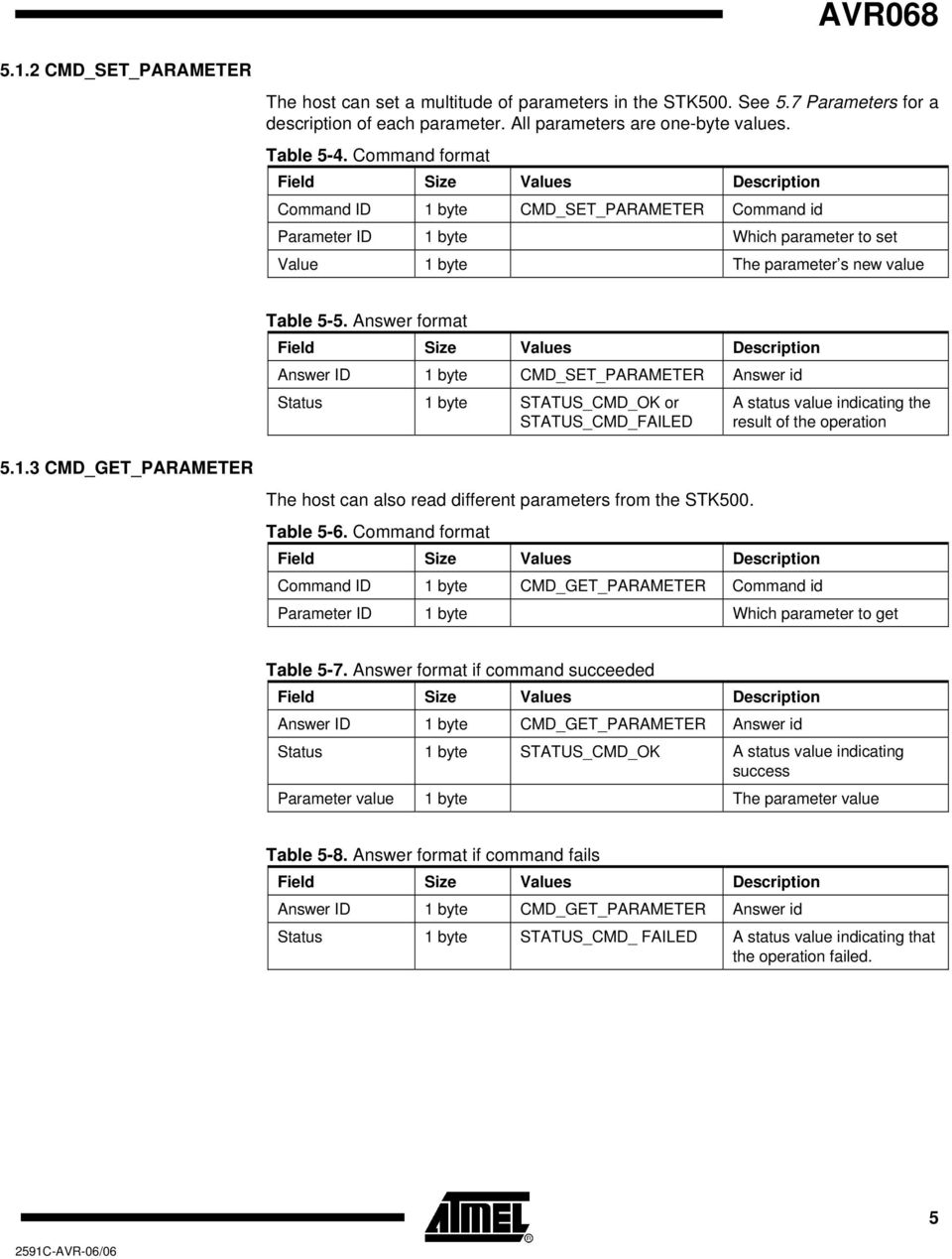
5 AVR CMD_SET_PARAMETER The host can set a multitude of parameters in the STK500. See 5.7 Parameters for a description of each parameter. All parameters are one-byte values. Table 5-4. Command format Command ID 1 byte CMD_SET_PARAMETER Command id Parameter ID 1 byte Which parameter to set Value 1 byte The parameter s new value Table 5-5. Answer format Answer ID 1 byte CMD_SET_PARAMETER Answer id Status 1 byte STATUS_CMD_OK or STATUS_CMD_FAILED A status value indicating the result of the operation CMD_GET_PARAMETER The host can also read different parameters from the STK500. Table 5-6. Command format Command ID 1 byte CMD_GET_PARAMETER Command id Parameter ID 1 byte Which parameter to get Table 5-7. Answer format if command succeeded Answer ID 1 byte CMD_GET_PARAMETER Answer id Status 1 byte STATUS_CMD_OK A status value indicating success Parameter value 1 byte The parameter value Table 5-8. Answer format if command fails Answer ID 1 byte CMD_GET_PARAMETER Answer id Status 1 byte STATUS_CMD_ FAILED A status value indicating that the operation failed. 5
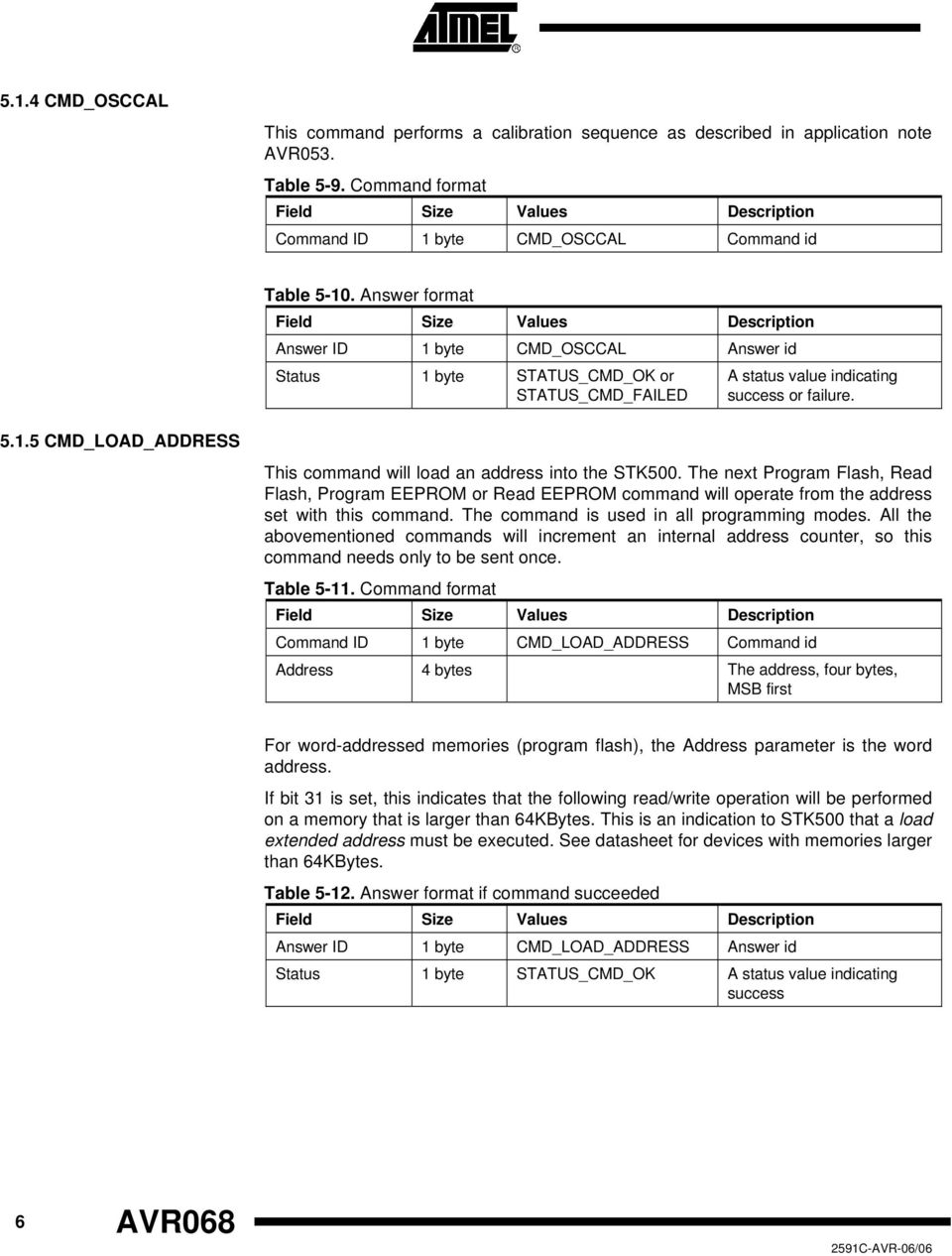
6 5.1.4 CMD_OSCCAL This command performs a calibration sequence as described in application note AVR053. Table 5-9. Command format Command ID 1 byte CMD_OSCCAL Command id Table Answer format Answer ID 1 byte CMD_OSCCAL Answer id Status 1 byte STATUS_CMD_OK or STATUS_CMD_FAILED A status value indicating success or failure CMD_LOAD_ADDRESS This command will load an address into the STK500. The next Program Flash, Read Flash, Program EEPROM or Read EEPROM command will operate from the address set with this command. The command is used in all programming modes. All the abovementioned commands will increment an internal address counter, so this command needs only to be sent once. Table Command format Command ID 1 byte CMD_LOAD_ADDRESS Command id Address 4 bytes The address, four bytes, MSB first For word-addressed memories (program flash), the Address parameter is the word address. If bit 31 is set, this indicates that the following read/write operation will be performed on a memory that is larger than 64KBytes. This is an indication to STK500 that a load extended address must be executed. See datasheet for devices with memories larger than 64KBytes. Table Answer format if command succeeded Answer ID 1 byte CMD_LOAD_ADDRESS Answer id Status 1 byte STATUS_CMD_OK A status value indicating success 6 AVR068
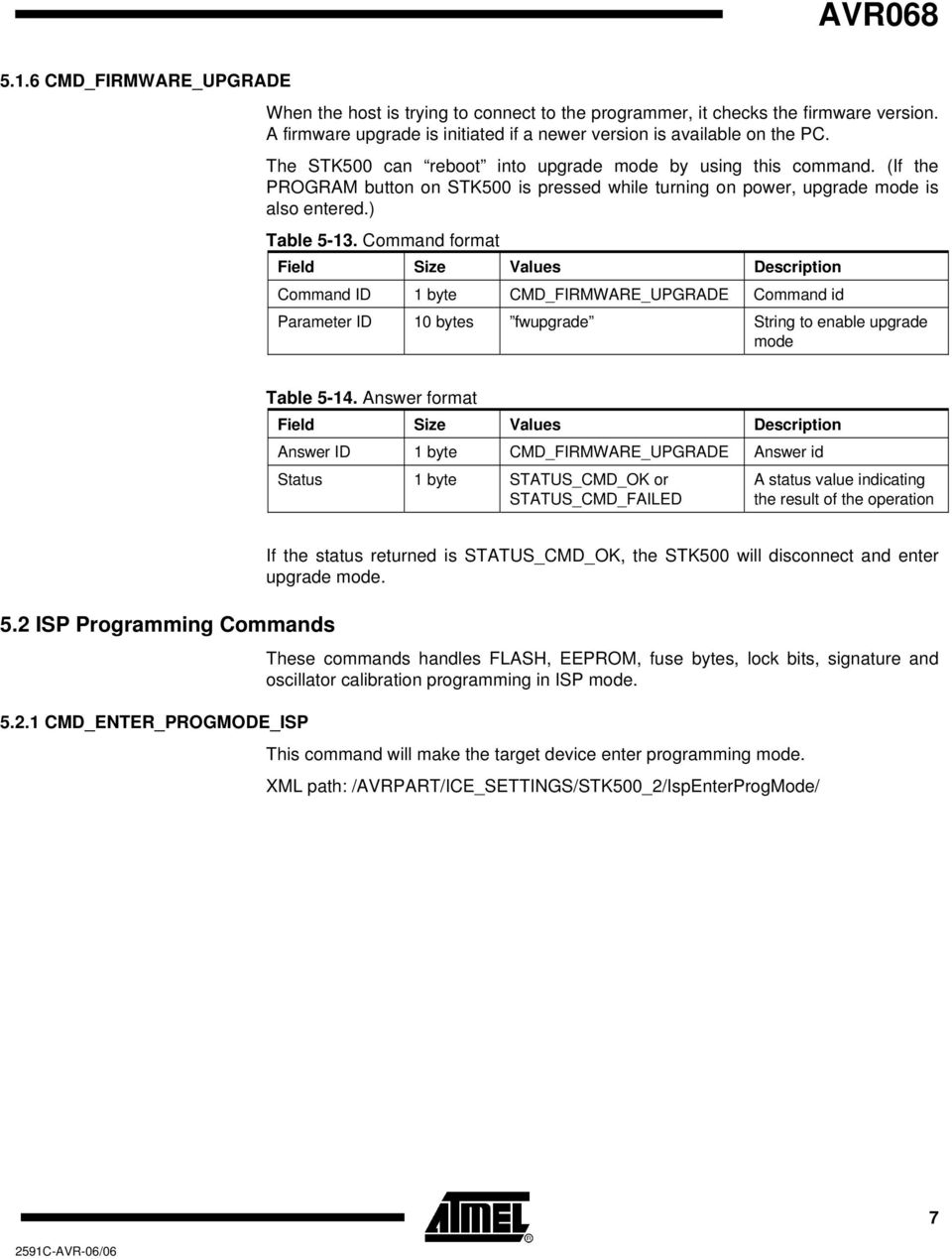
7 AVR CMD_FIRMWARE_UPGRADE When the host is trying to connect to the programmer, it checks the firmware version. A firmware upgrade is initiated if a newer version is available on the PC. The STK500 can reboot into upgrade mode by using this command. (If the PROGRAM button on STK500 is pressed while turning on power, upgrade mode is also entered.) Table Command format Command ID 1 byte CMD_FIRMWARE_UPGRADE Command id Parameter ID 10 bytes fwupgrade String to enable upgrade mode Table Answer format Answer ID 1 byte CMD_FIRMWARE_UPGRADE Answer id Status 1 byte STATUS_CMD_OK or STATUS_CMD_FAILED A status value indicating the result of the operation If the status returned is STATUS_CMD_OK, the STK500 will disconnect and enter upgrade mode. 5.2 ISP Programming Commands These commands handles FLASH, EEPROM, fuse bytes, lock bits, signature and oscillator calibration programming in ISP mode CMD_ENTER_PROGMODE_ISP This command will make the target device enter programming mode. XML path: /AVRPART/ICE_SETTINGS/STK500_2/IspEnterProgMode/ 7
8 Table Command format Command ID 1 byte CMD_ENTER_ Command id PROGMODE_ISP timeout 1 byte XML: timeout Command time-out (in ms) stabdelay 1 byte XML: stabdelay Delay (in ms) used for pin stabilization cmdexedelay 1 byte XML: cmdexedelay Delay (in ms) in connection with the EnterProgMode command execution synchloops 1 byte XML: synchloops Number of synchronization loops bytedelay 1 byte XML: bytedelay Delay (in ms) between each byte in the EnterProgMode command. pollvalue 1 byte XML: pollvalue Poll value: 0x53 for AVR, 0x69 for AT89xx pollindex 1 byte XML: pollindex Start address, received byte: 0 = no polling, 3 = AVR, 4 = AT89xx cmd1 1 byte Command Byte # 1 to be transmitted cmd2 1 byte Command Byte # 2 to be transmitted cmd3 1 byte Command Byte # 3 to be transmitted cmd4 1 byte Command Byte # 4 to be transmitted Note: The pollvalue parameter indicates after which of the transmitted bytes on the SPI interface to store the return byte, as the SPI interface is implemented as a ring buffer (one byte out, one byte in). Table Answer format Answer ID 1 byte CMD_ENTER_ PROGMODE_ISP Answer id Status 1 byte STATUS_CMD_TOUT, STATUS_CMD_OK or STATUS_CMD_FAILED A status value indicating the result of the operation 8 AVR068
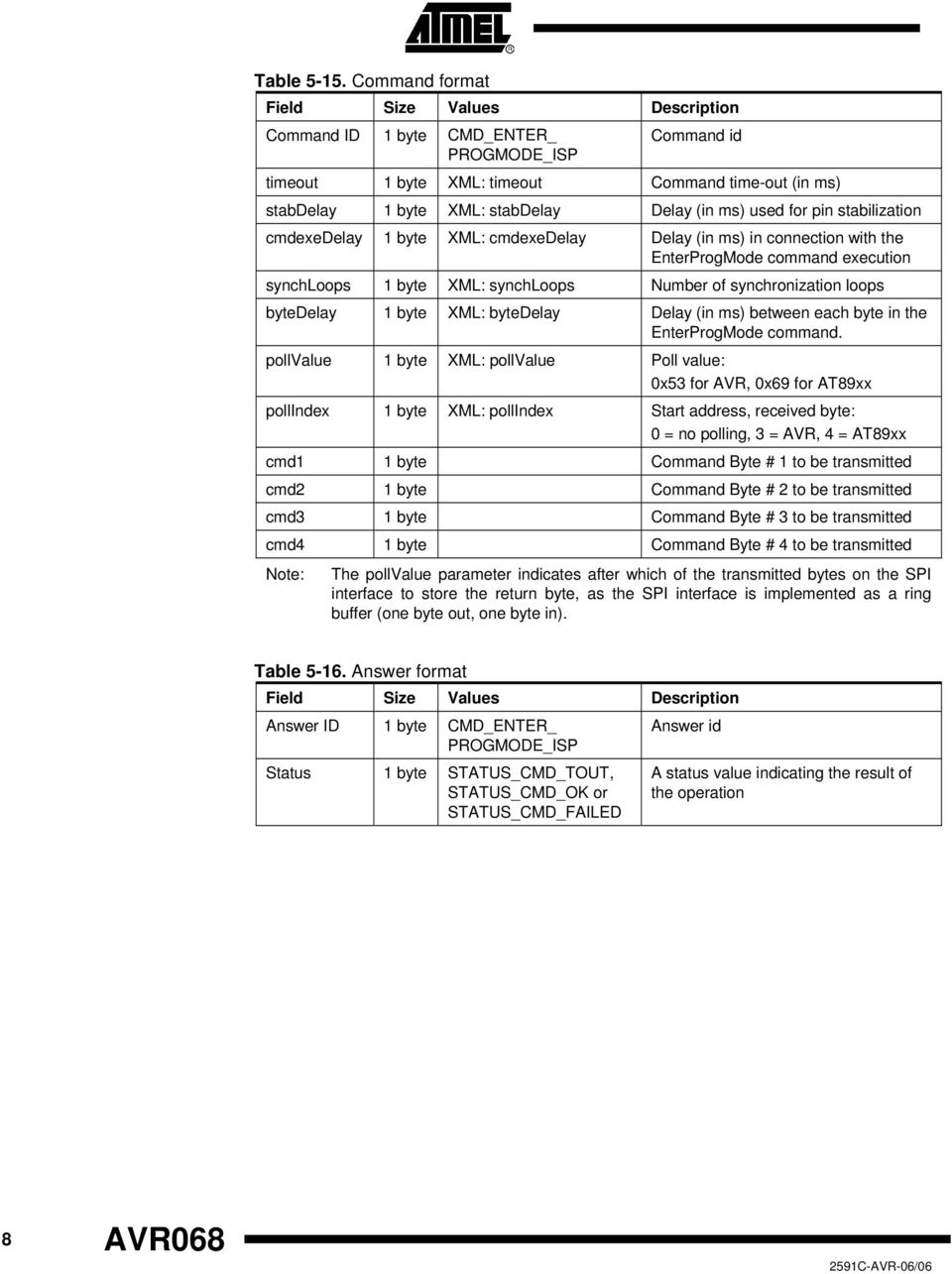
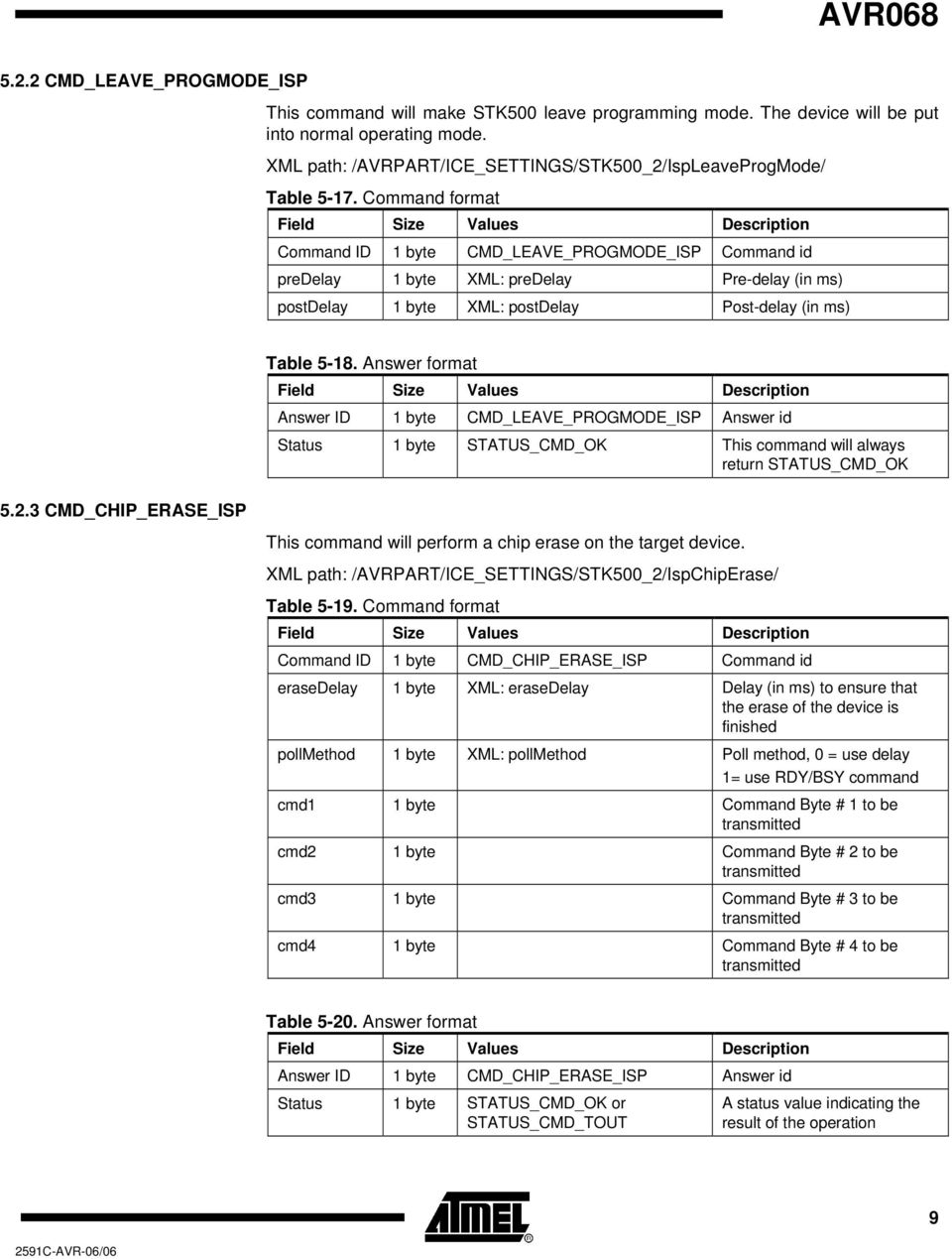
9 AVR CMD_LEAVE_PROGMODE_ISP This command will make STK500 leave programming mode. The device will be put into normal operating mode. XML path: /AVRPART/ICE_SETTINGS/STK500_2/IspLeaveProgMode/ Table Command format Command ID 1 byte CMD_LEAVE_PROGMODE_ISP Command id predelay 1 byte XML: predelay Pre-delay (in ms) postdelay 1 byte XML: postdelay Post-delay (in ms) Table Answer format Answer ID 1 byte CMD_LEAVE_PROGMODE_ISP Answer id Status 1 byte STATUS_CMD_OK This command will always return STATUS_CMD_OK CMD_CHIP_ERASE_ISP This command will perform a chip erase on the target device. XML path: /AVRPART/ICE_SETTINGS/STK500_2/IspChipErase/ Table Command format Command ID 1 byte CMD_CHIP_ERASE_ISP Command id erasedelay 1 byte XML: erasedelay Delay (in ms) to ensure that the erase of the device is finished pollmethod 1 byte XML: pollmethod Poll method, 0 = use delay 1= use RDY/BSY command cmd1 1 byte Command Byte # 1 to be transmitted cmd2 1 byte Command Byte # 2 to be transmitted cmd3 1 byte Command Byte # 3 to be transmitted cmd4 1 byte Command Byte # 4 to be transmitted Table Answer format Answer ID 1 byte CMD_CHIP_ERASE_ISP Answer id Status 1 byte STATUS_CMD_OK or STATUS_CMD_TOUT A status value indicating the result of the operation 9
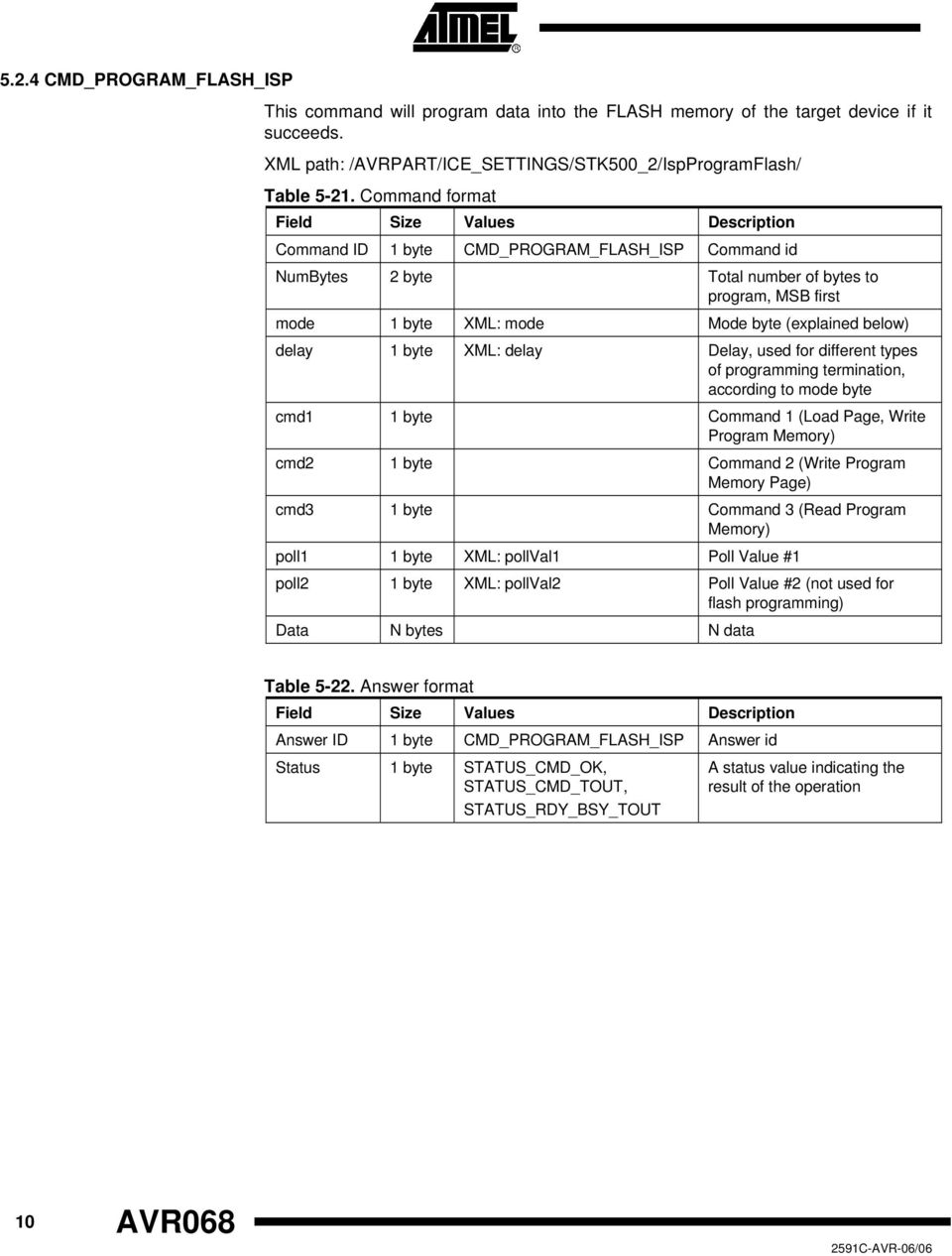
10 5.2.4 CMD_PROGRAM_FLASH_ISP This command will program data into the FLASH memory of the target device if it succeeds. XML path: /AVRPART/ICE_SETTINGS/STK500_2/IspProgramFlash/ Table Command format Command ID 1 byte CMD_PROGRAM_FLASH_ISP Command id NumBytes 2 byte Total number of bytes to program, MSB first mode 1 byte XML: mode Mode byte (explained below) delay 1 byte XML: delay Delay, used for different types of programming termination, according to mode byte cmd1 1 byte Command 1 (Load Page, Write Program Memory) cmd2 1 byte Command 2 (Write Program Memory Page) cmd3 1 byte Command 3 (Read Program Memory) poll1 1 byte XML: pollval1 Poll Value #1 poll2 1 byte XML: pollval2 Poll Value #2 (not used for flash programming) Data N bytes N data Table Answer format Answer ID 1 byte CMD_PROGRAM_FLASH_ISP Answer id Status 1 byte STATUS_CMD_OK, STATUS_CMD_TOUT, STATUS_RDY_BSY_TOUT A status value indicating the result of the operation 10 AVR068
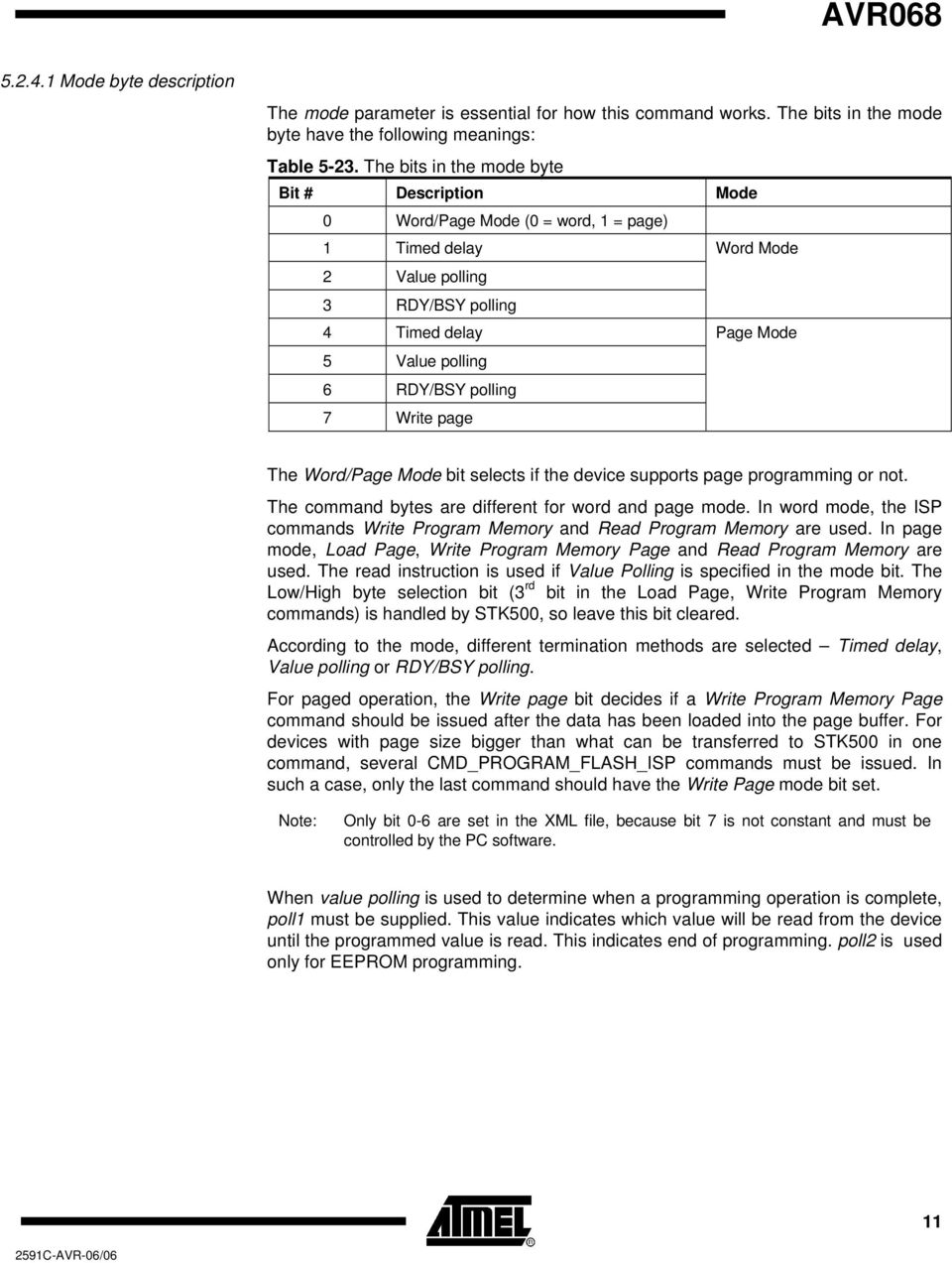
11 AVR Mode byte description The mode parameter is essential for how this command works. The bits in the mode byte have the following meanings: Table The bits in the mode byte Bit # Description Mode 0 Word/Page Mode (0 = word, 1 = page) 1 Timed delay Word Mode 2 Value polling 3 RDY/BSY polling 4 Timed delay Page Mode 5 Value polling 6 RDY/BSY polling 7 Write page The Word/Page Mode bit selects if the device supports page programming or not. The command bytes are different for word and page mode. In word mode, the ISP commands Write Program Memory and Read Program Memory are used. In page mode, Load Page, Write Program Memory Page and Read Program Memory are used. The read instruction is used if Value Polling is specified in the mode bit. The Low/High byte selection bit (3 rd bit in the Load Page, Write Program Memory commands) is handled by STK500, so leave this bit cleared. According to the mode, different termination methods are selected Timed delay, Value polling or RDY/BSY polling. For paged operation, the Write page bit decides if a Write Program Memory Page command should be issued after the data has been loaded into the page buffer. For devices with page size bigger than what can be transferred to STK500 in one command, several CMD_PROGRAM_FLASH_ISP commands must be issued. In such a case, only the last command should have the Write Page mode bit set. Note: Only bit 0-6 are set in the XML file, because bit 7 is not constant and must be controlled by the PC software. When value polling is used to determine when a programming operation is complete, poll1 must be supplied. This value indicates which value will be read from the device until the programmed value is read. This indicates end of programming. poll2 is used only for EEPROM programming. 11
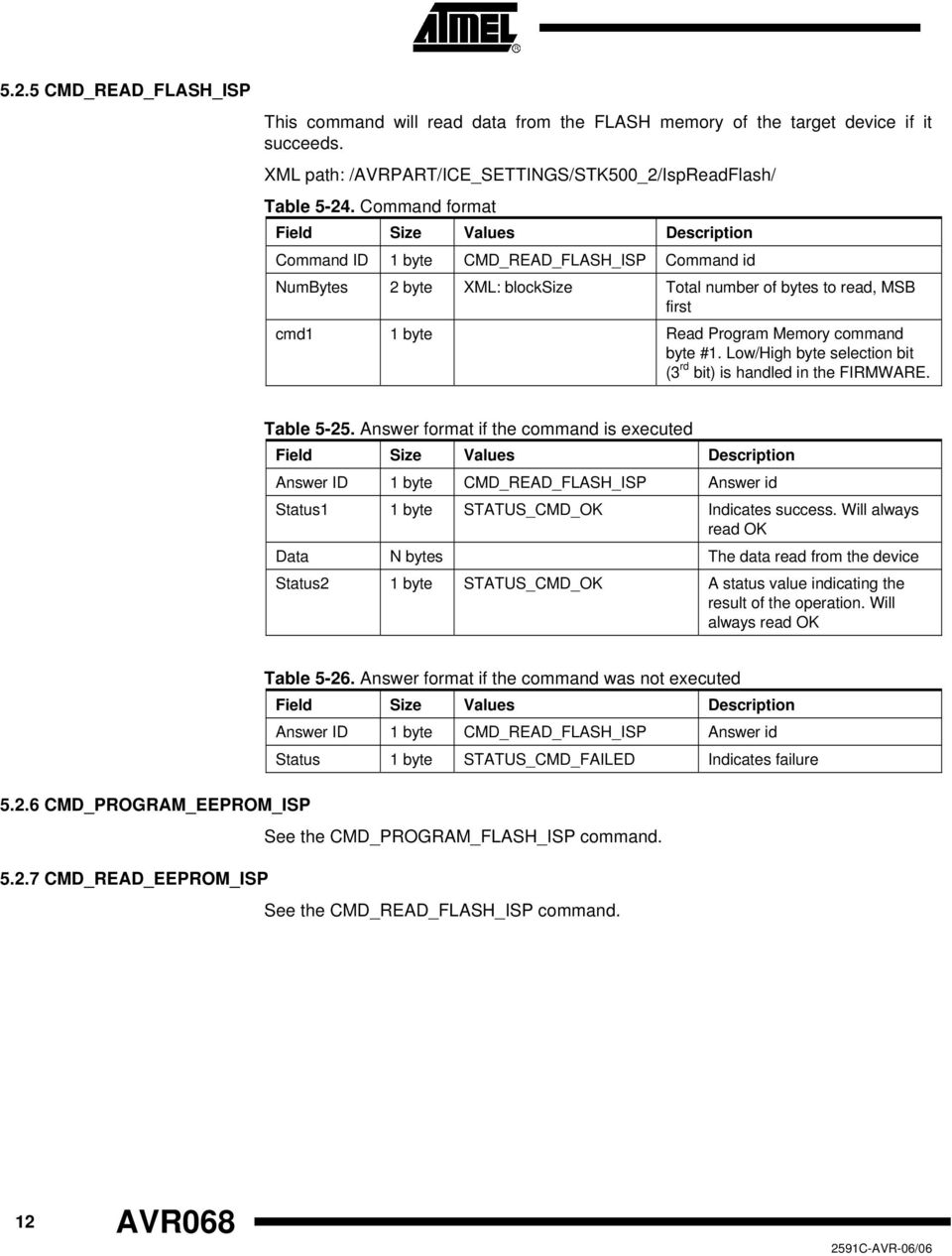
12 5.2.5 CMD_READ_FLASH_ISP This command will read data from the FLASH memory of the target device if it succeeds. XML path: /AVRPART/ICE_SETTINGS/STK500_2/IspReadFlash/ Table Command format Command ID 1 byte CMD_READ_FLASH_ISP Command id NumBytes 2 byte XML: blocksize Total number of bytes to read, MSB first cmd1 1 byte Read Program Memory command byte #1. Low/High byte selection bit (3 rd bit) is handled in the FIRMWARE. Table Answer format if the command is executed Answer ID 1 byte CMD_READ_FLASH_ISP Answer id Status1 1 byte STATUS_CMD_OK Indicates success. Will always read OK Data N bytes The data read from the device Status2 1 byte STATUS_CMD_OK A status value indicating the result of the operation. Will always read OK Table Answer format if the command was not executed Answer ID 1 byte CMD_READ_FLASH_ISP Answer id Status 1 byte STATUS_CMD_FAILED Indicates failure CMD_PROGRAM_EEPROM_ISP See the CMD_PROGRAM_FLASH_ISP command CMD_READ_EEPROM_ISP See the CMD_READ_FLASH_ISP command. 12 AVR068
13 5.2.8 CMD_PROGRAM_FUSE_ISP AVR068 This command programs the fuses of the target device. Table Command format Command ID 1 byte CMD_PROGRAM_FUSE_ISP Command id cmd1 1 byte Command Byte #1 cmd2 1 byte Command Byte #2 cmd3 1 byte Command Byte #3 cmd4 1 byte Command Byte #4 Note: cmd1, cmd2, cmd3 and cmd4 are the four bytes of the low-level program fuse ISP command Table Answer format Answer ID 1 byte CMD_PROGRAM_FUSE_ISP Answer id Status1 1 byte STATUS_CMD_OK Will always read OK Status2 1 byte STATUS_CMD_OK Will always read OK CMD_READ_FUSE_ISP This command reads the fuses of the target device. Table Command format Command ID 1 byte CMD_READ_FUSE_ISP Command id RetAddr 1 byte XML: pollindex Return address cmd1 1 byte Command Byte #1 cmd2 1 byte Command Byte #2 cmd3 1 byte Command Byte #3 cmd4 1 byte Command Byte #4 Note: RetAddr indicates after which of the transmitted bytes on the SPI interface to store the return byte, as the SPI interface is implemented as a ring buffer (one byte out, one byte in) 13
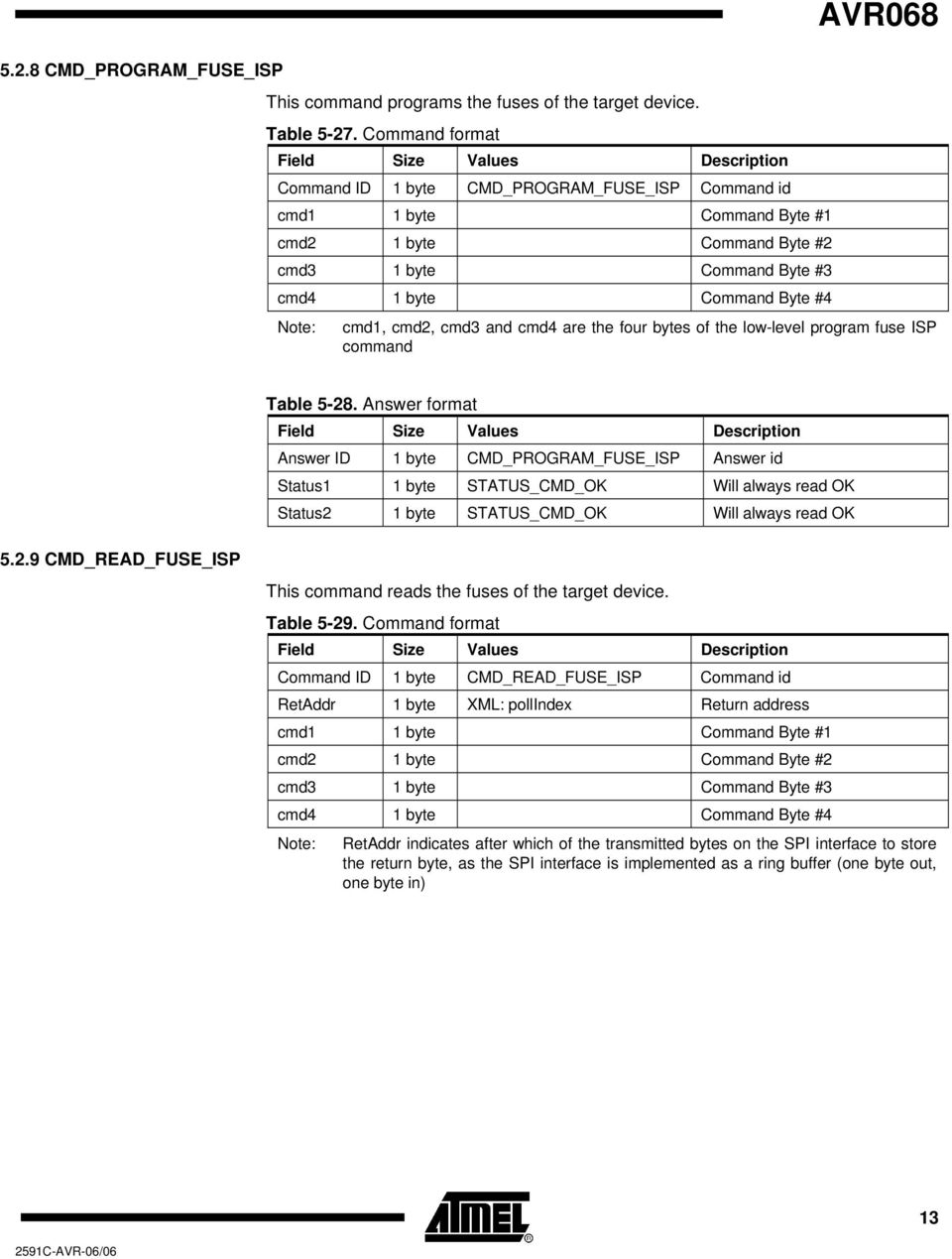
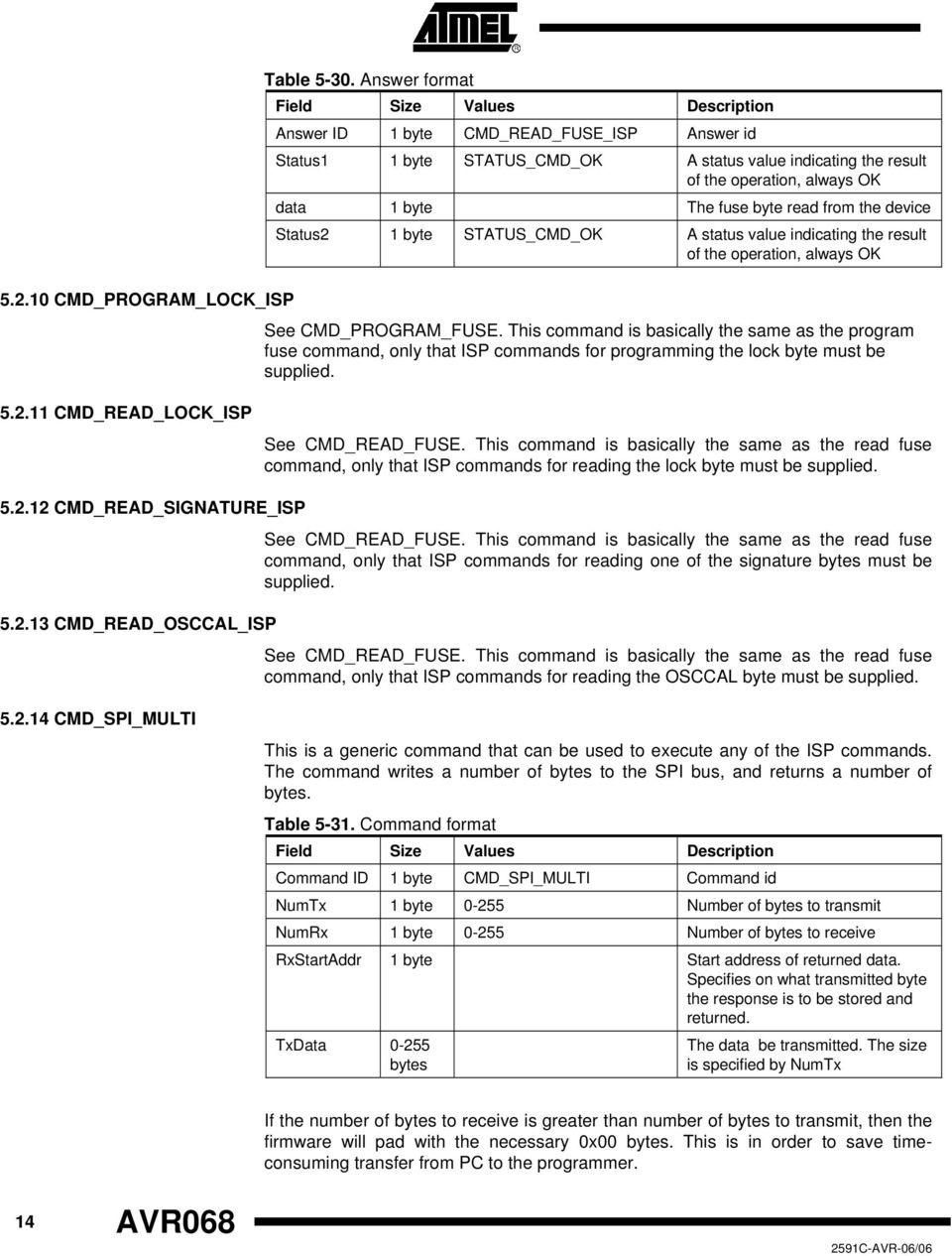
14 CMD_PROGRAM_LOCK_ISP Table Answer format Answer ID 1 byte CMD_READ_FUSE_ISP Answer id Status1 1 byte STATUS_CMD_OK A status value indicating the result of the operation, always OK data 1 byte The fuse byte read from the device Status2 1 byte STATUS_CMD_OK A status value indicating the result of the operation, always OK See CMD_PROGRAM_FUSE. This command is basically the same as the program fuse command, only that ISP commands for programming the lock byte must be supplied CMD_READ_LOCK_ISP See CMD_READ_FUSE. This command is basically the same as the read fuse command, only that ISP commands for reading the lock byte must be supplied CMD_READ_SIGNATURE_ISP CMD_READ_OSCCAL_ISP See CMD_READ_FUSE. This command is basically the same as the read fuse command, only that ISP commands for reading one of the signature bytes must be supplied. See CMD_READ_FUSE. This command is basically the same as the read fuse command, only that ISP commands for reading the OSCCAL byte must be supplied CMD_SPI_MULTI This is a generic command that can be used to execute any of the ISP commands. The command writes a number of bytes to the SPI bus, and returns a number of bytes. Table Command format Command ID 1 byte CMD_SPI_MULTI Command id NumTx 1 byte Number of bytes to transmit NumRx 1 byte Number of bytes to receive RxStartAddr 1 byte Start address of returned data. Specifies on what transmitted byte the response is to be stored and returned. TxData bytes The data be transmitted. The size is specified by NumTx If the number of bytes to receive is greater than number of bytes to transmit, then the firmware will pad with the necessary 0x00 bytes. This is in order to save timeconsuming transfer from PC to the programmer. 14 AVR068
15 Table Answer format Answer ID 1 byte CMD_SPI_MULTI Answer id Status1 1 byte STATUS_CMD_OK Will always read OK data bytes 5.3 Parallel Programming Mode Commands CMD_ENTER_PROGMODE_PP AVR068 The data read from the ISP bus as indicated in the command Status2 1 byte STATUS_CMD_OK Will always read OK This command will make the target device enter programming mode if it succeeds. XML PATH: /AVRPART/ICE_SETTINGS/STK500_2/PpEnterProgMode/ Table Command format Command ID 1 byte CMD_ENTER_ PROGMODE_PP Command id stabdelay 1 byte XML: stabdelay Delay (in ms) used for pin stabilization progmodedelay 1 byte XML: progmodedelay Delay (in ms) in connection with the EnterProgMode command execution latchcycles 1 byte XML: latchcycles Number of xtal cycles used to latch OSCCAL togglevtg 1 byte XML: togglevtg Toggle Vtg when entering prog.mode (0=no, 1=yes). For parts with RSTDSBL functionality poweroffdelay 1 byte XML: poweroffdelay Power-off delay. Additional delay (in ms) after Vtg is turned off in order to make sure the Vtg is low enough resetdelayms 1 byte XML: resetdelayms RSTDELAY #1 (in ms) Additional delay between Vtg is turned on and reset goes high. resetdelayus 1 byte XML: resetdelayus RSTDELAY #2(in us x 10) Additional delay between Vtg is turned on and reset goes high. Total delay is RSTDELAY #1 (ms) + RSTDELAY #2 (us x 10) 15

16 Table Answer format (same for all results) Answer ID 1 byte CMD_ENTER_ Answer id PROGMODE_PP Status 1 byte See table below A Result Value indicating the result of the operation Table Valid Result Values for the answer to this command Values Description STATUS_CMD_OK Operation succeeded STATUS_CMD_ FAILED Operation failed CMD_LEAVE_PROGMODE_PP This command will make the target device leave programming mode if it succeeds. XML PATH: /AVRPART/ICE_SETTINGS/STK500_2/PpLeaveProgMode/ Table Command format Command ID 1 byte CMD_LEAVE_ Command id PROGMODE_PP stabdelay 1 byte XML: stabdelay Delay (in ms) used for pin stabilization resetdelay 1 byte XML: resetdelay Delay (ms) for holding RESET low Table Answer format Answer ID 1 byte CMD_LEAVE_ Answer id PROGMODE_PP Status 1 byte STATUS_CMD_OK A Result Value indicating the result of the operation CMD_CHIP_ERASE_PP This command will perform a chip erase on the target device if it succeeds. XML PATH: /AVRPART/ICE_SETTINGS/STK500_2/PpChipErase/ Table Command format Command ID 1 byte CMD_CHIP_ Command id ERASE_PP pulsewidth 1 byte XML: pulsewidth Width (in ms) of the /WR pulse. 0 => 1 cycle polltimeout 1 byte XML: polltimeout Timeout period (in ms) to wait for RDY/BSY flag to rise. If 0, RDY/BSY flag is NOT used. 16 AVR068

17 Table Answer format (same for all results) AVR068 Answer ID 1 byte CMD_CHIP_ Answer id ERASE_PP Status 1 byte See table below A Result Value indicating the result of the operation CMD_PROGRAM_FLASH_PP Table Valid Result Values for the answer to this command Values Description STATUS_CMD_OK Operation succeeded STATUS_RDY_BSY_ No response from target device within specified timeframe TOUT This command will program data into the FLASH memory of the target device if it succeeds. For devices with the FLASH organized in pages, the data address and size used with this command must confirm to that of the device. I.e. one ProgramFlash command is used to program one page in the target device. XML PATH: /AVRPART/ICE_SETTINGS/STK500_2/PpProgramFlash/ Table Command format Command ID 1 byte CMD_PROGRAM_ FLASH_PP Command id Nmb bytes (MSB) Nmb bytes (LSB) 1 byte Total number of bytes to program (MSB) 1 byte Total number of bytes to program (LSB) mode 1 byte XML: mode Mode byte (explained below) polltimeout 1 byte XML: polltimeout polltimeout (in ms) Data 1 byte Data 1 Data 1 byte... Data 1 byte Data N Table Answer format (same for all results) Answer ID 1 byte CMD_PROGRAM_ Answer id FLASH_PP Status 1 byte See table below A Result Value indicating the result of the operation 17

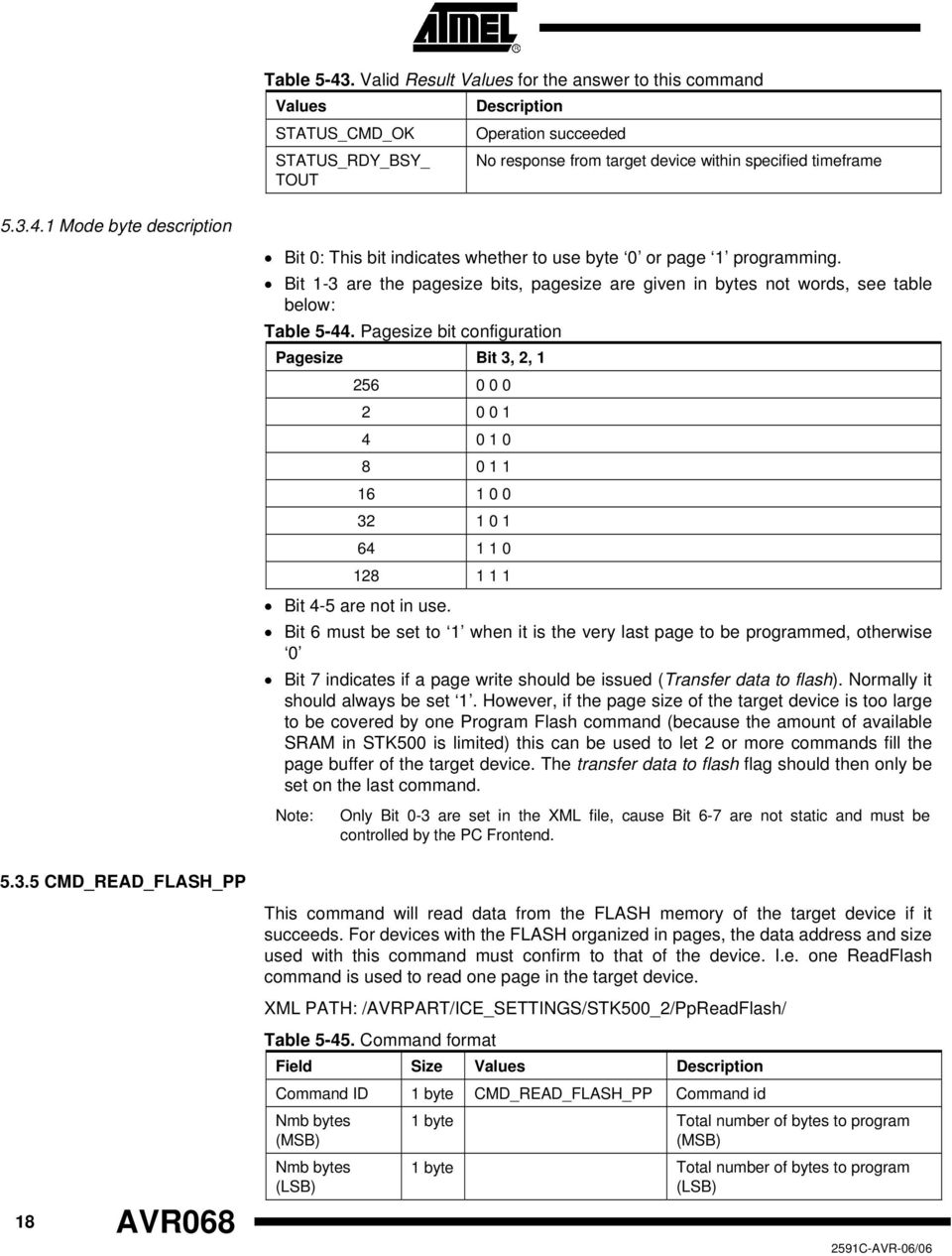
18 Table Valid Result Values for the answer to this command Values STATUS_CMD_OK STATUS_RDY_BSY_ TOUT Description Operation succeeded No response from target device within specified timeframe Mode byte description Bit 0: This bit indicates whether to use byte 0 or page 1 programming. Bit 1-3 are the pagesize bits, pagesize are given in bytes not words, see table below: Table Pagesize bit configuration Pagesize Bit 3, 2, Bit 4-5 are not in use. Bit 6 must be set to 1 when it is the very last page to be programmed, otherwise 0 Bit 7 indicates if a page write should be issued (Transfer data to flash). Normally it should always be set 1. However, if the page size of the target device is too large to be covered by one Program Flash command (because the amount of available SRAM in STK500 is limited) this can be used to let 2 or more commands fill the page buffer of the target device. The transfer data to flash flag should then only be set on the last command. Note: Only Bit 0-3 are set in the XML file, cause Bit 6-7 are not static and must be controlled by the PC Frontend CMD_READ_FLASH_PP This command will read data from the FLASH memory of the target device if it succeeds. For devices with the FLASH organized in pages, the data address and size used with this command must confirm to that of the device. I.e. one ReadFlash command is used to read one page in the target device. XML PATH: /AVRPART/ICE_SETTINGS/STK500_2/PpReadFlash/ 18 AVR068 Table Command format Command ID 1 byte CMD_READ_FLASH_PP Command id Nmb bytes (MSB) 1 byte Total number of bytes to program (MSB) Nmb bytes (LSB) 1 byte Total number of bytes to program (LSB)
19 Table Answer format if the command is executed Answer ID 1 byte CMD_READ_FLASH_PP Answer id Status 1 byte STATUS_CMD_OK Data CMD_PROGRAM_EEPROM_PP Nmb bytes AVR068 Data read from device. Will be padded with 0 s if errors occurred during read-out. Status 1 byte STATUS_CMD_OK A Result Value indicating the result of the operation This command programs one page the EEPROM memory of the target device if it succeeds. XML PATH: /AVRPART/ICE_SETTINGS/STK500_2/PpReadEeprom/ Command format: See CMD_PROGRAM_FLASH_PP CMD_READ_EEPROM_PP This command will read data from the EEPROM memory of the target device if it succeeds. XML PATH: /AVRPART/ICE_SETTINGS/STK500_2/PpReadEeprom/ Command format: See CMD_READ_FLASH_PP CMD_PROGRAM_FUSE_PP XML PATH: /AVRPART/ICE_SETTINGS/STK500_2/PpProgramFuse/ Table Command format Command ID 1 byte CMD_PROGRAM_ Command id FUSE_PP Address 1 byte Address of fuse byte to program (low, high, ext, ext2) Data 1 byte Fuse byte value to be programmed pulsewidth 1 byte XML: pulsewidth Width (ms) of /WR pulse (0 => 1 cycle) polltimeout 1 byte XML: polltimeout Time-out (ms) for polling RDY/BSY (0 = don t poll) Table Answer format Answer ID 1 byte CMD_PROGRAM_ Answer id FUSE_PP Status 1 byte See table below A Result Value indicating the result of the operation 19

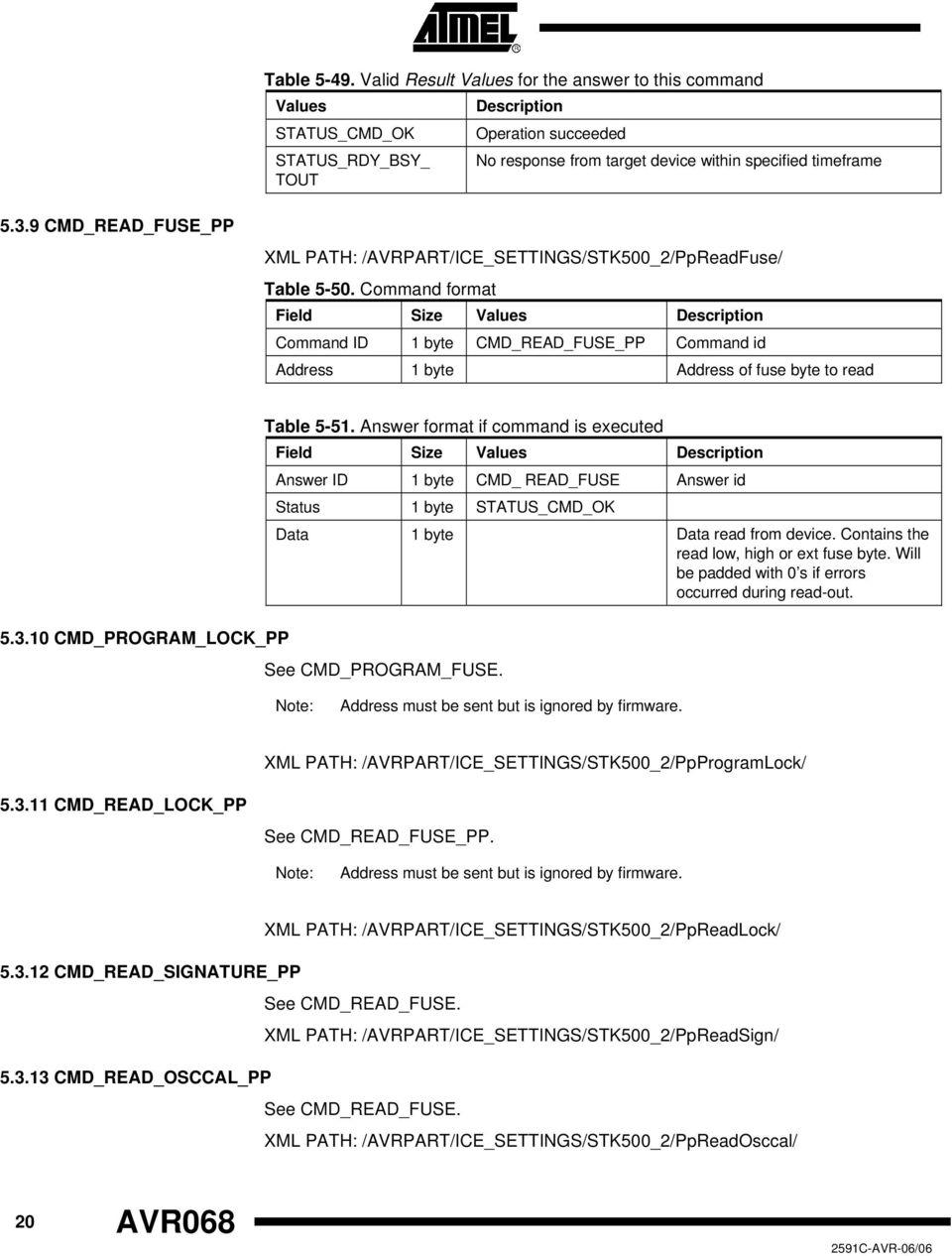
20 Table Valid Result Values for the answer to this command Values STATUS_CMD_OK STATUS_RDY_BSY_ TOUT Description Operation succeeded No response from target device within specified timeframe CMD_READ_FUSE_PP XML PATH: /AVRPART/ICE_SETTINGS/STK500_2/PpReadFuse/ Table Command format Command ID 1 byte CMD_READ_FUSE_PP Command id Address 1 byte Address of fuse byte to read CMD_PROGRAM_LOCK_PP Table Answer format if command is executed Answer ID 1 byte CMD_ READ_FUSE Answer id Status 1 byte STATUS_CMD_OK Data 1 byte Data read from device. Contains the read low, high or ext fuse byte. Will be padded with 0 s if errors occurred during read-out. See CMD_PROGRAM_FUSE. Note: Address must be sent but is ignored by firmware. XML PATH: /AVRPART/ICE_SETTINGS/STK500_2/PpProgramLock/ CMD_READ_LOCK_PP See CMD_READ_FUSE_PP. Note: Address must be sent but is ignored by firmware. XML PATH: /AVRPART/ICE_SETTINGS/STK500_2/PpReadLock/ CMD_READ_SIGNATURE_PP See CMD_READ_FUSE. XML PATH: /AVRPART/ICE_SETTINGS/STK500_2/PpReadSign/ CMD_READ_OSCCAL_PP See CMD_READ_FUSE. XML PATH: /AVRPART/ICE_SETTINGS/STK500_2/PpReadOsccal/ 20 AVR068
21 CMD_SET_CONTROL_STACK Uploads the control stack to the STK. This is used for both PP and HVSP. AVR068 Note: The Control stack must always be uploaded before performing any programming commands in high voltage mode if the STK500 has been powered down. To check if the controller has a valid control stack: Read PARAM_CONTROLLER_INIT Se chapter : PARAM_CONTROLLER_INIT Table Command format Command ID 1 byte CMD_SET_CONTROL_ STACK Command id Data 32 bytes Control stack Data 5.4 High Voltage Serial Programming Commands CMD_ENTER_PROGMODE_HVSP Table Answer format (same for all results) Answer ID 1 byte CMD_SET_CONTROL_ Answer id STACK Status 1 byte STATUS_CMD_OK A Result Value indicating the result of the operation This chapter describes the High Voltage Serial Programming (HVSP) commands. Note that the SetControlStack command is required for HVSP as for PP. Description of the SetControlStack is found in section under Parallel Programming. This command will make the target device enter programming mode if it succeeds. XML path: /AVRPART/ICE_SETTINGS/STK500_2/HvspEnterProgMode/ 21
22 Table Command format Command ID 1 byte CMD_ENTER_ Command id PROGMODE_HVSP StabDelay 1 byte XML: stabdelay Delay (in ms) used for pin stabilization CmdexeDela y 1 byte XML: cmdexedelay Delay (in ms) in connection with the EnterProgMode command execution SynchCycles 1 byte XML: synchcycles Number of synchronization clock cycles LatchCycles 1 byte XML: latchcycles Number of PulseXtal1_HVSP cycles ToggleVtg 1 byte XML: togglevtg Toggle Vtg when entering prog.mode (0=no, 1=yes). For parts with RSTDSBL functionality PowoffDelay 1 byte XML: powoffdelay Power-off delay. Additional delay (in ms) after Vtg is turned off in order to make sure the Vtg is low enough resetdelay1 1 byte XML: resetdelay1 RSTDELAY #1 (in ms) Additional delay between Vtg is turned on and reset goes high. resetdelay2 1 byte XML: resetdelay2 RSTDELAY #2(in us x 10) Additional delay between Vtg is turned on and reset goes high. Total delay is RSTDELAY #1 (ms) + RSTDELAY #2 (us x 10) CMD_LEAVE_PROGMODE_HVSP Table Answer format Answer ID 1 byte CMD_ENTER_ PROGMODE_HVSP Answer id Status 1 byte STATUS_CMD_OK or STATUS_CMD_FAILED A Result Value indicating the result of the operation. If failed the target voltage is >5.5V or <4.5V This command will make the target device leave programming mode if it succeeds. XML path: /AVRPART/ICE_SETTINGS/STK500_2/HvspLeaveProgMode/ Table Command format Command ID 1 byte CMD_LEAVE_ Command id PROGMODE_HVSP stabdelay 1 byte XML: stabdelay Delay (in ms) used for pin stabilization resetdelay 1 byte XML: resetdelay Delay (in ms) in connection with the LeaveProgMode command execution and Reset_low_duration 22 AVR068
23 AVR068 Table Answer format Answer ID 1 byte CMD_LEAVE_ PROGMODE_HVSP Answer id Status 1 byte STATUS_CMD_OK A Result Value indicating the result of the operation. Will always read OK CMD_CHIP_ERASE_HVSP This command will perform a chip erase on the target device if it succeeds. XML path: /AVRPART/ICE_SETTINGS/STK500_2/HvspChipErase/ Table Command format Command ID 1 byte CMD_CHIP_ERASE_ HVSP Command id polltimeout 1 byte XML: polltimeout Timeout period (in ms) to wait for RDY/BSY flag to rise. If 0, RDY/BSY flag is NOT used. erasetime 1 byte XML: erasetime Delay (in ms) to ensure that the erase of the device is finished. If 0, polling will be used. Table Answer format Answer ID 1 byte CMD_CHIP_ERASE_ HVSP Status 1 byte STATUS_CMD_OK or STATUS_RDY_BSY_TOUT Answer id A Result Value indicating the result of the operation CMD_PROGRAM_FLASH_HVSP This command will program data into the FLASH memory of the target device if it succeeds. For devices with the FLASH organized in pages, the data address and size used with this command must confirm to that of the device. I.e. one ProgramFlash command is used to program one page in the target device. XML path: /AVRPART/ICE_SETTINGS/STK500_2/HvspProgramFlash/ Table Command format Command ID 1 byte CMD_PROGRAM_FLASH_HVSP Command id NumBytes 2 byte XML: blocksize Total number of bytes to program, MSB first Mode 1 byte XML: mode Mode byte (explained below) polltimeout 1 byte XML: polltimeout polltimeout (in ms) Data 1 1 byte Data Data N 1 byte Data N 23
24 Table Answer format Answer ID 1 byte CMD_PROGRAM_FLASH_HVSP Answer id Status 1 byte STATUS_CMD_OK or STATUS_RDY_BSY_TOUT A Result Value indicating the result of the operation Mode byte description Bit 0: This bit indicates whether to use byte 0 or page 1 programming. Bit 1-3 are the pagesize bits, pagesize are given in bytes not words, see table below: Table Pagesize bit configuration Pagesize Bit 3, 2, Bit 4-5 are not in use. Bit 6 must be set to 1 when it is the very last page to be programmed, otherwise 0 Bit 7 indicates if a page write should be issued (Transfer data to flash). Normally it should always be set 1. However, if the page size of the target device is too large to be covered by one Program Flash command (because the amount of available SRAM in STK500 is limited) this can be used to let 2 or more commands fill the page buffer of the target device. The transfer data to flash flag should then only be set on the last command. Note: Only Bit 0-3 are set in the XML file, cause Bit 6-7 are not static and must be controlled by the PC Frontend CMD_READ_FLASH_HVSP This command will read data from the FLASH memory of the target device if it succeeds. For devices with the FLASH organized in pages, the data address and size used with this command must confirm to that of the device. I.e. one ReadFlash command is used to read one page in the target device. XML path: /AVRPART/ICE_SETTINGS/STK500_2/HvspReadFlash/ Table Command format Command ID 1 byte CMD_READ_FLASH_HVSP Command id 24 AVR068 NumBytes 2 byte XML: blocksize Total number of bytes to read, MSB first
25 AVR068 Table Answer format if the command is executed Command ID 1 byte CMD_READ_FLASH_HVSP Answer id Status1 1 byte STATUS_CMD_OK Temporary status, will always read OK Data Byte*N Data read from device. Will be padded with 0 s if errors occurred during read-out. Status2 1 byte STATUS_CMD_OK A Result Value indicating the result of the operation. Will always read OK CMD_PROGRAM_EEPROM_HVSP See the CMD_WRITE_FLASH_HVSP command CMD_READ_EEPROM_HVSP See the CMD_READ_FLASH_HVSP command CMD_PROGRAM_FUSE_HVSP This command programs one fuse byte, addressed by the Fuse Address byte. XML path: /AVRPART/ICE_SETTINGS/STK500_2/HvspProgramFuse/ Table Command format Command ID 1 byte CMD_PROGRAM_FUSE_HVSP Command id Fuse Address 1 byte 0, 1 or 2 Address of byte to write (0=low, 1=high, 2=ext) Fuse Byte 1 byte Fuse byte value (low, high or ext) to be programmed polltimeout 1 byte XML: polltimeout Poll timeout Table Answer format Command ID 1 byte CMD_PROGRAM_FUSE_HVSP Answer id Status 1 byte STATUS_CMD_OK or STATUS_RDY_BSY_TOUT A Result Value indicating the result of the operation CMD_READ_FUSE_HVSP This command programs one fuse byte, addressed by the Fuse Address byte. XML path: /AVRPART/ICE_SETTINGS/STK500_2/HvspReadFuse/ 25
26 Table Command format Command ID 1 byte CMD_ READ_FUSE_HVSP Command id Fuse Address 1 byte 0, 1 or 2 Address of byte to read (0=low, 1=high, 2=ext) CMD_PROGRAM_LOCK_HVSP Table Answer format if command was executed Command ID 1 byte CMD_ READ_FUSE_HVSP Answer id Status 1 byte STATUS_CMD_OK A Result Value indicating the result of the operation. Will always read OK Fuse Byte 1 byte Data read from device. Contains the read low, high or ext fuse byte. Will be padded with 0 s if errors occurred during read-out. See CMD_PROGRAM_FUSE_HVSP. Note: Address is required but ignored CMD_READ_LOCK_HVSP See CMD_READ_FUSE_HVSP. Note: Address is required but ignored CMD_READ_SIGNATURE_HVSP See CMD_READ_FUSE_HVSP CMD_READ_OSCCAL_HVSP See CMD_READ_FUSE_HVSP. 26 AVR068
27 AVR Special answers Answers that don t correspond to a specific command ANSWER_CKSUM_ERROR This is an answer generated by the transport layer, indicating that a message with incorrect checksum has been received. Table Answer format Command ID 1 byte ANSWER_CKSUM_ERROR Answer id Status 1 byte ANSWER_CKSUM_ERROR A status value indicating checksum error 5.6 Return values This section describes all possible return values and their meaning in detail Success Table Success return value Value STATUS_CMD_OK Meaning Command executed OK Warnings Errors All warnings have MSB set to 1 and MSB-1 set to 0. Table Warning return values Value Meaning STATUS_CMD_TOUT Command timed out STATUS_RDY_BSY_TOUT Sampling of the RDY/nBSY pin timed out STATUS_SET_PARAM_MISSING The Set Device Parameters have not been executed in advance of this command All errors have MSB and MSB-1 set to 1. Table Error return values Value Meaning STATUS_CMD_FAILED Command failed STATUS_CKSUM_ERROR Checksum Error STATUS_CMD_UNKNOWN Unknown command 27
28 5.7 Parameters The following parameters can be read and/or written by the CMD_GET_PARAM and CMD_SET_PARAM commands: Table Available parameters Value Meaning R/W PARAM_BUILD_NUMBER_LOW Firmware build number, high byte R PARAM_BUILD_NUMBER_HIGH Firmware build number, low byte R PARAM_HW_VER Hardware version R PARAM_SW_MAJOR Firmware version number, major byte R PARAM_SW_MINOR Firmware version number, minor byte R PARAM_VTARGET Target Voltage RW PARAM_VADJUST Adjustable (AREF) voltage RW PARAM_OSC_PSCALE Oscillator timer prescaler value RW PARAM_OSC_CMATCH Oscillator timer compare match value RW PARAM_SCK_DURATION ISP SCK duration RW PARAM_TOPCARD_DETECT Top card detect R PARAM_STATUS Returns status register R PARAM_DATA DATA pins values used in HVPP mode R PARAM_RESET_POLARITY Active low or active high RESET handling W PARAM_CONTROLLER_INIT Controller initialization RW PARAM_BUILD_NUMBER_LOW The PARAM_BUILD_NUMBER_LOW and PARAM_BUILD_NUMBER_HIGH together return a number that is incremented for each build of the firmware. Mainly for ATMEL internal use PARAM_BUILD_NUMBER_HIGH See PARAM_BUILD_NUMBER_LOW PARAM_HW_VER PARAM_SW_MAJOR PARAM_SW_MINOR Returns a hardware revision number. The PARAM_SW_MAJOR and PARAM_SW_MINOR returns the firmware version. See PARAM_SW_MAJOR. 28 AVR068
29 AVR PARAM_VTARGET This parameter only applies to STK500, not the AVRISP. STK500 has a controllable target voltage supply, which can be set and monitored with this parameter. The parameter value is voltage in volts x10, i.e. a parameter value of 42 (decimal) corresponds to 4.2V. The VTARGET voltage is adjustable between 0 and 6V PARAM_VADJUST This parameter only applies to STK500, not the AVRISP. STK500 has an adjustable analog reference in the same way as the supply voltage. This adjustable reference voltage (AREF) can be set and monitored with the PARAM_ADJUST parameter. The parameter value is voltage in volts x10, i.e. a parameter value of 42 (decimal) corresponds to 4.2V. The VADJUST voltage is adjustable between 0 and 6V PARAM_OSC_PSCALE This parameter only applies to STK500, not the AVRISP. The STK500 has a programmable clock generator used to supply a clock signal to the target device. The generator is actually the TIMER2 of the AT90S8535 MCU. The timer in running in Toggle OC2 line mode, where the timer value is cleared on a compare match. The following code example shows how the firmware handles changes in PARAM_OSC_PSCALE or PARAM_OSC_CMATCH: // Stop Timer2 TCCR2 = 0x18; // Initialize counter value TCNT2 = 0xFF; // Set compare match value OCR2 = osc_cmatch; // Set timer operation mode and prescaler TCCR2 = (0x18 (0x07 & osc_pscale)); 29
30 The STK500 system clock is f sys = 7.37MHz., which gives the following relation between prescaler and compare values and the resulting frequency: f = prescaled clock / (compare value + 1) / 2 The prescale clock is the system clock divided by some factor according to this table: Table Prescaler values Prescaler Value Prescaled clock frequency f sys 2 f sys / 8 3 f sys / 32 4 f sys / 64 5 f sys / f sys / f sys / 1024 The host software can compute the prescale and match values by a using a brute force approach, scanning through all possible prescale and match values, computing the resulting frequency, and using the parameters that gives the best result PARAM_OSC_CMATCH This parameter only applies to STK500, not the AVRISP. See PARAM_OSC_PSCALE PARAM_SCK_DURATION When using the ISP programming interface, the ISP clock frequency must not exceed what the target device supports. (The maximum ISP clock frequency depends on the device system clock, internal clock division etc.) 30 AVR068
31 AVR068 The STK500 and AVRISP supports ISP frequencies from 4 khz up to 1.8 MHz. The value for PARAM_SCK_DURATION can be found using the following algorithm: #define T_STK e-9 #define T_AVRISP e-9 #define B 12.0 unsigned char CalcSckDur(int freq) { if (STK500) { if (freq >= ) sck_dur = 0; else if (freq >= ) sck_dur = 1; else if (freq >= ) sck_dur = 2; else if (freq >= 57600) sck_dur = 3; else sck_dur = ceil(1/(2 * B * freq * T_STK500) - 10/B); } else // if (AVRISP) { if (freq >= ) sck_dur = 0; else if (freq >= ) sck_dur = 1; else if (freq >= 57600) sck_dur = 2; else if (freq >= 28800) sck_dur = 3; else sck_dur = ceil(1/(2 * B * freq * T_AVRISP) - 10/B); } } return min(254, sck_dur); // 255 is an illegal value 31
32 PARAM_TOPCARD_DETECT This parameter only applies to STK500, not the AVRISP. Expansion cards can be connected to STK500. Each type of card has an id circuitry, so that the STK500 can detect which type of card that is mounted. The following IDs are in use: Table Topcard IDs Card ID STK501 0xAA STK502 0x55 STK503 0xFA STK504 0xEE STK505 0xE4 STK520 0xDD PARAM_DATA This parameter only applies to STK500, not the AVRISP. This parameter returns the value on the PROG DATA connector used for High-Volt Parallel Programming PARAM_RESET_POLARITY The STK500 and AVRISP can program both AT90 (AVR) family and AT89 (8051) family of microcontrollers. They have different RESET pin polarity. The AVR has active low reset, while the AT89 has active high. This parameter sets the polarity of the reset signal. Set the parameter to 1 when programming AVRs, and 0 when programming AT89 controllers. Note: STK500 and AVRISP store this parameter in EEPROM, so they are available the next time power is applied to the programmers. For STK500, also the RESET button change polarity according to this parameter PARAM_CONTROLLER_INIT This parameter is internally set to 0 when the programmer MCU resets. The host software can write any value it wants to this parameter, and it can be read back later. This parameter is intended to be used as a way of telling if the power on STK500/AVRISP has been lost or turned off and then back again. This way, the host software can tell if the programmer needs to be initialized again before continuing with its operation. 32 AVR068
33 6 XML Parameter Values AVR068 One of the major enhancements in the 2.0 version of the STK500 protocol is the ability to describe parameters for all details of the programming algorithms. A parameter set is specific for a certain AVR device, thus the parameter settings belong in the XML part description file. Below is a description where to find the STK500 parameter values in the device specific XML file. After installing AvrStudio 4, all xml files can be found at: \Program Files\Atmel\AVR Tools\PartDescriptionFiles\ Figure 6-1. XML file example: ATmega2561.xml Open the XML file in xml editor/viewer (e.g XML Notepad or Internet Explorer). All device specific values for STK500 and AVRISP are located under STK500_2 node. For parameters for the CMD_ENTER_PROGMODE_ISP command, look in /AVRPART/ICE_SETTINGS_STK500_2/IspEnterProgMode. 33
34 7 Command Sequence Example 7.1 Connect 7.2 Read Signature In System Programming This chapter contains examples of how to connect to the STK500 from the PC Frontend and how to read signature from a device. See chapter 5 Commands for the description of the commands and parameters. The sequence of commands and parameters sent from AvrStudio to the STK500 in order to connect is listed below. CMD_SIGN_ON CMD_GET_PARAMETER, PARAM_TOPCARD_DETECT CMD_GET_PARAMETER, PARAM_HW_VER CMD_GET_PARAMETER, PARAM_SW_MAJOR CMD_GET_PARAMETER, PARAM_SW_MINOR The sequence of commands and parameters sent from AvrStudio to the STK500 in order to read the device signature through ISP is listed below. Note that one already have to be connected to do this. CMD_GET_PARAMETER, PARAM_TOPCARD_DETECT CMD_GET_PARAMETER, PARAM_CONTROLLER_INIT CMD_SET_PARAMETER, PARAM_CONTROLLER_INIT CMD_SET_PARAMETER, PARAM_RESET_POLARITY CMD_ENTER_PROGMODE_ISP CMD_READ_SIGNATURE_ISP CMD_READ_SIGNATURE_ISP CMD_READ_SIGNATURE_ISP CMD_LEAVE_PROGMODE_ISP 34 AVR068
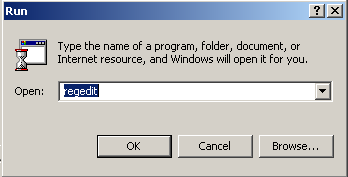
35 AVR High Voltage Programming The sequence of commands and parameters sent from AvrStudio to the STK500 in order to read the device signature through High Voltage Programming is listed below. Note that one already have to be connected to do this. This sequence goes for both High Voltage Parallel Programming and High Voltage Serial Programming. CMD_GET_PARAMETER, PARAM_TOPCARD_DETECT CMD_GET_PARAMETER, PARAM_CONTROLLER_INIT CMD_SET_CONTROL_STACK CMD_GET_PARAMETER, PARAM_CONTROLLER_INIT CMD_ENTER_PROGMODE_PP (_HVSP) CMD_READ_SIGNATURE_PP (_HVSP) CMD_READ_SIGNATURE_PP (_HVSP) CMD_READ_SIGNATURE_PP (_HVSP) CMD_LEAVE_PROGMODE_ PP (_HVSP) 7.3 STK500 Communication Logging For further details and examples of the communication between AvrStudio and STK500 one can set up logging of all communication to a text file. This can be done by adding a register key in the Registry as described below. 1. Open the Registry by running regedit : Figure 7-1. The Run dialog box 2. Browse to the path: HKEY_CURRENT_USER\Software\Atmel\AVRTools\STK500\ 3. Make a new String Value (right-click > New > String Value) named LogFilePath 4. Enter Data e.g. c:\stk500com.txt (right-click LogFilePath > Modify > enter Value Data) 35
36 Figure 7-2. The Edit String dialog box After editing the Registry, open AvrStudio and start the STK500 Programming Dialog. All commands will now be written to the text file specified in the Registry. This file will look like this: Figure 7-3. Example log file contents Notes: 1. This is the Command ID, in this case 0x03 which is CMD_GET_PARAMETER 2. This is the Parameter ID, in this case 0x9A which is PARAM_TOPCARD_DETECT 36 AVR068
37 Disclaimer Atmel Corporation 2325 Orchard Parkway San Jose, CA 95131, USA Tel: 1(408) Fax: 1(408) Regional Headquarters Europe Atmel Sarl Route des Arsenaux 41 Case Postale 80 CH-1705 Fribourg Switzerland Tel: (41) Fax: (41) Asia Room 1219 Chinachem Golden Plaza 77 Mody Road Tsimshatsui East Kowloon Hong Kong Tel: (852) Fax: (852) Japan 9F, Tonetsu Shinkawa Bldg Shinkawa Chuo-ku, Tokyo Japan Tel: (81) Fax: (81) Atmel Operations Memory 2325 Orchard Parkway San Jose, CA 95131, USA Tel: 1(408) Fax: 1(408) Microcontrollers 2325 Orchard Parkway San Jose, CA 95131, USA Tel: 1(408) Fax: 1(408) La Chantrerie BP Nantes Cedex 3, France Tel: (33) Fax: (33) ASIC/ASSP/Smart Cards Zone Industrielle Rousset Cedex, France Tel: (33) Fax: (33) East Cheyenne Mtn. Blvd. Colorado Springs, CO 80906, USA Tel: 1(719) Fax: 1(719) Scottish Enterprise Technology Park Maxwell Building East Kilbride G75 0QR, Scotland Tel: (44) Fax: (44) RF/Automotive Theresienstrasse 2 Postfach Heilbronn, Germany Tel: (49) Fax: (49) East Cheyenne Mtn. Blvd. Colorado Springs, CO 80906, USA Tel: 1(719) Fax: 1(719) Biometrics/Imaging/Hi-Rel MPU/ High Speed Converters/RF Datacom Avenue de Rochepleine BP Saint-Egreve Cedex, France Tel: (33) Fax: (33) Literature Requests Disclaimer: The information in this document is provided in connection with Atmel products. No license, express or implied, by estoppel or otherwise, to any intellectual property right is granted by this document or in connection with the sale of Atmel products. EXCEPT AS SET FORTH IN ATMEL S TERMS AND CONDITIONS OF SALE LOCATED ON ATMEL S WEB SITE, ATMEL ASSUMES NO LIABILITY WHATSOEVER AND DISCLAIMS ANY EXPRESS, IMPLIED OR STATUTORY WARRANTY RELATING TO ITS PRODUCTS INCLUDING, BUT NOT LIMITED TO, THE IMPLIED WARRANTY OF MERCHANTABILITY, FITNESS FOR A PARTICULAR PURPOSE, OR NON-INFRINGEMENT. IN NO EVENT SHALL ATMEL BE LIABLE FOR ANY DIRECT, INDIRECT, CONSEQUENTIAL, PUNITIVE, SPECIAL OR INCIDENTAL DAMAGES (INCLUDING, WITHOUT LIMITATION, DAMAGES FOR LOSS OF PROFITS, BUSINESS INTERRUPTION, OR LOSS OF INFORMATION) ARISING OUT OF THE USE OR INABILITY TO USE THIS DOCUMENT, EVEN IF ATMEL HAS BEEN ADVISED OF THE POSSIBILITY OF SUCH DAMAGES. Atmel makes no representations or warranties with respect to the accuracy or completeness of the contents of this document and reserves the right to make changes to specifications and product descriptions at any time without notice. Atmel does not make any commitment to update the information contained herein. Atmel s products are not intended, authorized, or warranted for use as components in applications intended to support or sustain life Atmel Corporation. All rights reserved. Atmel, logo and combinations thereof, AVR, Everywhere You Are and AVR Studio are registered trademarks of Atmel Corporation or its subsidiaries. Other terms and product names may be trademarks of others.
AVR317: Using the Master SPI Mode of the USART module. 8-bit Microcontrollers. Application Note. Features. Introduction
 AVR317: Using the Master SPI Mode of the USART module Features Enables Two SPI buses in one device Hardware buffered SPI communication Polled communication example Interrupt-controlled communication example
AVR319: Using the USI module for SPI communication. 8-bit Microcontrollers. Application Note. Features. Introduction
 AVR319: Using the USI module for SPI communication Features C-code driver for SPI master and slave Uses the USI module Supports SPI Mode 0 and 1 Introduction The Serial Peripheral Interface (SPI) allows
General Porting Considerations. Memory EEPROM XRAM
 AVR097: Migration between ATmega128 and ATmega2561 Features General Porting Considerations Memory Clock sources Interrupts Power Management BOD WDT Timers/Counters USART & SPI ADC Analog Comparator ATmega103
AVR305: Half Duplex Compact Software UART. 8-bit Microcontrollers. Application Note. Features. 1 Introduction
 AVR305: Half Duplex Compact Software UART Features 32 Words of Code, Only Handles Baud Rates of up to 38.4 kbps with a 1 MHz XTAL Runs on Any AVR Device Only Two Port Pins Required Does Not Use Any Timer
AT89C5131A Starter Kit... Software User Guide
 AT89C5131A Starter Kit... Software User Guide Table of Contents Section 1 Introduction... 1-1 1.1 Abbreviations...1-1 Section 2 Getting Started... 2-3 2.1 Hardware Requirements...2-3 2.2 Software Requirements...2-3
AVR106: C functions for reading and writing to Flash memory. 8-bit Microcontrollers. Application Note. Features. Introduction
 AVR106: C functions for reading and writing to Flash memory Features C functions for accessing Flash memory - Byte read - Page read - Byte write - Page write Optional recovery on power failure Functions
AVR134: Real Time Clock (RTC) using the Asynchronous Timer. 8-bit Microcontrollers. Application Note. Features. 1 Introduction
 AVR134: Real Time Clock (RTC) using the Asynchronous Timer Features Real Time Clock with Very Low Power Consumption (4 μa @ 3.3V) Very Low Cost Solution Adjustable Prescaler to Adjust Precision Counts
Application Note. C51 Bootloaders. C51 General Information about Bootloader and In System Programming. Overview. Abreviations
 C51 General Information about Bootloader and In System Programming Overview This document describes the Atmel Bootloaders for 8051 family processors. Abreviations ISP: In-System Programming API : Applications
8-bit Microcontroller. Application Note. AVR400: Low Cost A/D Converter
 AVR400: Low Cost A/D Converter Features Interrupt Driven : 23 Words Low Use of External Components Resolution: 6 Bits Measurement Range: 0-2 V Runs on Any AVR Device with 8-bit Timer/Counter and Analog
AVR030: Getting Started with IAR Embedded Workbench for Atmel AVR. 8-bit Microcontrollers. Application Note. Features.
 AVR030: Getting Started with IAR Embedded Workbench for Atmel AVR Features How to open a new workspace and project in IAR Embedded Workbench Description and option settings for compiling the c-code Setting
8-bit Microcontroller. Application Note. AVR105: Power Efficient High Endurance Parameter Storage in Flash Memory
 AVR105: Power Efficient High Endurance Parameter Storage in Flash Memory Features Fast Storage of Parameters High Endurance Flash Storage 350K Write Cycles Power Efficient Parameter Storage Arbitrary Size
8-bit RISC Microcontroller. Application Note. AVR236: CRC Check of Program Memory
 AVR236: CRC Check of Program Memory Features CRC Generation and Checking of Program Memory Supports all AVR Controllers with LPM Instruction Compact Code Size, 44 Words (CRC Generation and CRC Checking)
8-bit Microcontroller. Application Note. AVR222: 8-point Moving Average Filter
 AVR222: 8-point Moving Average Filter Features 31-word Subroutine Filters Data Arrays up to 256 Bytes Runable Demo Program Introduction The moving average filter is a simple Low Pass FIR (Finite Impulse
8-bit Microcontroller. Application Note. AVR415: RC5 IR Remote Control Transmitter. Features. Introduction. Figure 1.
 AVR415: RC5 IR Remote Control Transmitter Features Utilizes ATtiny28 Special HW Modulator and High Current Drive Pin Size Efficient Code, Leaves Room for Large User Code Low Power Consumption through Intensive
AT91 ARM Thumb Microcontrollers. AT91SAM CAN Bootloader. AT91SAM CAN Bootloader User Notes. 1. Description. 2. Key Features
 User Notes 1. Description The CAN bootloader SAM-BA Boot4CAN allows the user to program the different memories and registers of any Atmel AT91SAM product that includes a CAN without removing them from
8-bit. Application Note. Microcontrollers. AVR282: USB Firmware Upgrade for AT90USB
 AVR282: USB Firmware Upgrade for AT90USB Features Supported by Atmel FLIP program on all Microsoft O/S from Windows 98SE and later FLIP 3.2.1 or greater supports Linux Default on chip USB bootloader In-System
AT91 ARM Thumb Microcontrollers. Application Note. Interfacing a PC Card to an AT91RM9200-DK. Introduction. Hardware Interface
 Interfacing a PC Card to an AT91RM9200-DK Introduction This Application Note describes the implementation of a PCMCIA interface on an AT91RM9200 Development Kit (DK) using the External Bus Interface (EBI).
8-bit RISC Microcontroller. Application Note. AVR182: Zero Cross Detector
 AVR182: Zero Cross Detector Features Interrupt Driven Modular C Source Code Size Efficient Code Accurate and Fast Detection A Minimum of External Components Introduction One of the many issues with developing
How to Calculate the Capacitor of the Reset Input of a C51 Microcontroller 80C51. Application Note. Microcontrollers. Introduction
 How to Calculate the Capacitor of the Reset Input of a C51 Microcontroller This application note explains how the reset of the 80C51 microcontroller works when the RST pin is a pure input pin and when
AVR245: Code Lock with 4x4 Keypad and I2C LCD. 8-bit Microcontrollers. Application Note. Features. 1 Introduction
 AVR245: Code Lock with 4x4 Keypad and I2C LCD Features Application example for code lock - Ideal for low pin count AVRs Uses I/O pins to read 4x4 keypad Uses Timer/Counter to control piezoelectric buzzer
Using CryptoMemory in Full I 2 C Compliant Mode. Using CryptoMemory in Full I 2 C Compliant Mode AT88SC0104CA AT88SC0204CA AT88SC0404CA AT88SC0808CA
 Using CryptoMemory in Full I 2 C Compliant Mode 1. Introduction This application note describes how to communicate with CryptoMemory devices in full I 2 C compliant mode. Full I 2 C compliance permits
8-bit Microcontroller. Application Note. AVR314: DTMF Generator
 AVR314: DTMF Generator Features Generation of Sine Waves Using PWM (Pulse-Width Modulation) Combine Different Sine Waves to DTMF Signal Assembler and C High-level Language Code STK500 Top-Module Design
AVR32701: AVR32AP7 USB Performance. 32-bit Microcontrollers. Application Note. Features. 1 Introduction
 AVR32701: AVR32AP7 USB Performance Features Linux USB bulk transfer performance ATSTK1000 (32-bit SDRAM bus width) ATNGW100 (16-bit SDRAM bus width) GadgetFS driver and gadgetfs-test application USB performance
AVR115: Data Logging with Atmel File System on ATmega32U4. Microcontrollers. Application Note. 1 Introduction. Atmel
 AVR115: Data Logging with Atmel File System on ATmega32U4 Microcontrollers 01101010 11010101 01010111 10010101 Application Note 1 Introduction Atmel provides a File System management for AT90USBx and ATmegaxxUx
Table of Contents. Section 1 Introduction... 1-1. Section 2 Getting Started... 2-1. Section 3 Hardware Description... 3-1
 ISP... User Guide Table of Contents Table of Contents Section 1 Introduction... 1-1 1.1 Features...1-1 1.2 Device Support...1-2 Section 2 Getting Started... 2-1 2.1 Unpacking the System...2-1 2.2 System
AVR1309: Using the XMEGA SPI. 8-bit Microcontrollers. Application Note. Features. 1 Introduction SCK MOSI MISO SS
 AVR1309: Using the XMEGA SPI Features Introduction to SPI and the XMEGA SPI module Setup and use of the XMEGA SPI module Implementation of module drivers Polled master Interrupt controlled master Polled
AVR1900: Getting started with ATxmega128A1 on STK600. 8-bit Microcontrollers. Application Note. 1 Introduction
 AVR1900: Getting started with ATxmega128A1 on STK600 1 Introduction This document contains information about how to get started with the ATxmega128A1 on STK 600. The first three sections contain information
AVR033: Getting Started with the CodeVisionAVR C Compiler. 8-bit Microcontrollers. Application Note. Features. 1 Introduction
 AVR033: Getting Started with the CodeVisionAVR C Compiler Features Installing and Configuring CodeVisionAVR to Work with the Atmel STK 500 Starter Kit and AVR Studio Debugger Creating a New Project Using
Application Note. 8-bit Microcontrollers. AVR270: USB Mouse Demonstration
 AVR270: USB Mouse Demonstration Features Runs with AT90USB Microcontrollers at 8MHz USB Low Power Bus Powered Device (less then 100mA) Supported by any PC running Windows (98SE or later), Linux or Mac
Tag Tuning/RFID. Application Note. Tag Tuning. Introduction. Antenna Equivalent Circuit
 Tag Tuning Introduction RFID tags extract all of their power to both operate and communicate from the reader s magnetic field. Coupling between the tag and reader is via the mutual inductance of the two
8-bit Microcontroller. Application Note. AVR461: Quick Start Guide for the Embedded Internet Toolkit. Introduction. System Requirements
 AVR461: Quick Start Guide for the Embedded Internet Toolkit Introduction Congratulations with your AVR Embedded Internet Toolkit. This Quick-start Guide gives an introduction to using the AVR Embedded
Application Note. 8-bit Microcontrollers. AVR280: USB Host CDC Demonstration. 1. Introduction
 AVR280: USB Host CDC Demonstration 1. Introduction The RS232 interface has disappeared from the new generation of PCs replaced by the USB interface. To follow this change, applications based on UART interface
8-bit Microcontroller. Application Note. AVR134: Real-Time Clock (RTC) using the Asynchronous Timer. Features. Theory of Operation.
 AVR134: Real-Time Clock (RTC) using the Asynchronous Timer Features Real-Time Clock with Very Low Power Consumption (4µA @ 3.3V) Very Low Cost Solution Adjustable Prescaler to Adjust Precision Counts Time,
Quick Start Guide. CAN Microcontrollers. ATADAPCAN01 - STK501 CAN Extension. Requirements
 ATADAPCAN01 - STK501 CAN Extension The ATADAPCAN01 - STK501 CAN add-on is an extension to the STK500 and STK501 development boards from Atmel Corporation, adding support for the AVR AT90CAN128 device in
8-bit RISC Microcontroller. Application Note. AVR155: Accessing an I 2 C LCD Display using the AVR 2-wire Serial Interface
 AVR155: Accessing an I 2 C LCD Display using the AVR 2-wire Serial Interface Features Compatible with Philips' I 2 C protocol 2-wire Serial Interface Master Driver for Easy Transmit and Receive Function
AVR32100: Using the AVR32 USART. 32-bit Microcontrollers. Application Note. Features. 1 Introduction
 AVR32100: Using the AVR32 USART Features Supports character length from 5 to 9 bits Interrupt Generation Parity, Framing and Overrun Error Detection Programmable Baud Rate Generator Line Break Generation
APPLICATION NOTE. Atmel AVR134: Real Time Clock (RTC) Using the Asynchronous Timer. Atmel AVR 8-bit Microcontroller. Introduction.
 APPLICATION NOTE Atmel AVR134: Real Time Clock (RTC) Using the Asynchronous Timer Introduction Atmel AVR 8-bit Microcontroller This application note describes how to implement a real time counter (RTC)
AVR32110: Using the AVR32 Timer/Counter. 32-bit Microcontrollers. Application Note. Features. 1 Introduction
 AVR32110: Using the AVR32 Timer/Counter Features Three independent 16 bit Timer/Counter Channels Multiple uses: - Waveform generation - Analysis and measurement support: Frequency and interval measurements
AVR442: PC Fan Control using ATtiny13. 8-bit Microcontrollers. Application Note. Features. 1 Introduction
 AVR442: PC Fan Control using ATtiny13 Features Variable speed based on: - Temperature sensor (NTC). - External PWM input. Stall detection with alarm output. Implementation in C code to ease modification.
AT86RF230 (2450 MHz band) Radio Transceiver... User Guide
 ATAVRRZ200 Demonstration Kit AT86RF230 (2450 MHz band) Radio Transceiver... User Guide Section 1 1.1 Organization...1-1 1.2 General Description...1-1 1.3 Demonstration kit features...1-2 1.4 Included
Application Note. USB Mass Storage Device Implementation. USB Microcontrollers. References. Abbreviations. Supported Controllers
 USB Mass Storage Device Implementation References Universal Serial Bus Specification, revision 2.0 Universal Serial Bus Class Definition for Communication Devices, version 1.1 USB Mass Storage Overview,
8-bit Microcontroller. Application Note. AVR201: Using the AVR Hardware Multiplier
 AVR201: Using the AVR Hardware Multiplier Features 8- and 16-bit Implementations Signed and Unsigned Routines Fractional Signed and Unsigned Multiply Executable Example Programs Introduction The megaavr
8-bit RISC Microcontroller. Application Note. AVR910: In-System Programming
 AVR910: In-System Programming Features Complete In-System Programming Solution for AVR Microcontrollers Covers All AVR Microcontrollers with In-System Programming Support Reprogram Both Data Flash and
AVR241: Direct driving of LCD display using general IO. 8-bit Microcontrollers. Application Note. Features. Introduction AVR
 AVR241: Direct driving of LCD display using general IO Features Software driver for displays with one common line Suitable for parts without on-chip hardware for LCD driving Control up to 15 segments using
AVR120: Characterization and Calibration of the ADC on an AVR. 8-bit Microcontrollers. Application Note. Features. Introduction
 AVR120: Characterization and Calibration of the ADC on an AVR Features Understanding Analog to Digital Converter (ADC) characteristics Measuring parameters describing ADC characteristics Temperature, frequency
3-output Laser Driver for HD-DVD/ Blu-ray/DVD/ CD-ROM ATR0885. Preliminary. Summary
 Features Three Selectable Outputs All Outputs Can Be Used Either for Standard (5V) or High Voltage (9V) Maximum Output Current at All Outputs Up to 150 ma On-chip Low-EMI RF Oscillator With Spread-spectrum
Atmel AVR4921: ASF - USB Device Stack Differences between ASF V1 and V2. 8-bit Atmel Microcontrollers. Application Note. Features.
 Atmel AVR4921: ASF - USB Device Stack Differences between ASF V1 and V2 Features Advantages Implementation differences Integration Migration from stack V1 to stack V2 8-bit Atmel Microcontrollers Application
AVR1301: Using the XMEGA DAC. 8-bit Microcontrollers. Application Note. Features. 1 Introduction
 AVR1301: Using the XMEGA DAC Features 12 bit resolution Up to 1 M conversions per second Continuous drive or sample-and-hold output Built-in offset and gain calibration High drive capabilities Driver source
32-bit AVR UC3 Microcontrollers. 32-bit AtmelAVR Application Note. AVR32769: How to Compile the standalone AVR32 Software Framework in AVR32 Studio V2
 AVR32769: How to Compile the standalone AVR32 Software Framework in AVR32 Studio V2 1. Introduction The purpose of this application note is to show how to compile any of the application and driver examples
USER GUIDE EDBG. Description
 USER GUIDE EDBG Description The Atmel Embedded Debugger (EDBG) is an onboard debugger for integration into development kits with Atmel MCUs. In addition to programming and debugging support through Atmel
AVR034: Mixing C and Assembly Code with IAR Embedded Workbench for AVR. 8-bit Microcontroller. Application Note. Features.
 AVR034: Mixing C and Assembly Code with IAR Embedded Workbench for AVR Features Passing Variables Between C and Assembly Code Functions Calling Assembly Code Functions from C Calling C Functions from Assembly
AVR32138: How to optimize the ADC usage on AT32UC3A0/1, AT32UC3A3 and AT32UC3B0/1 series. 32-bit Microcontrollers. Application Note.
 AVR32138: How to optimize the ADC usage on AT32UC3A0/1, AT32UC3A3 and AT32UC3B0/1 series 1 Introduction This application note outlines the steps necessary to optimize analog to digital conversions on AT32UC3A0/1,
AVR1922: Xplain Board Controller Firmware. 8-bit Microcontrollers. Application Note. Features. 1 Introduction
 AVR1922: Xplain Board Controller Firmware Features USB interface - Mass-storage to on-board DataFlash memory Atmel AVR XMEGA TM reset control 1 Introduction The Xplain board controller, an AT90USB1287,
USB Test Environment ATUSBTEST- SS7400. Summary
 Features Simple Command-driven Host Model Comprehensive Reports by Monitor Protocol Validation by Monitor Comprehensive Test Suite Fully Compliant with USB Forum Checklist Generates and Monitors Packets
AVR055: Using a 32kHz XTAL for run-time calibration of the internal RC. 8-bit Microcontrollers. Application Note. Features.
 AVR055: Using a 32kHz XTAL for run-time calibration of the internal RC Features Calibration using a 32 khz external crystal Adjustable RC frequency with maximum +/-2% accuracy Tune RC oscillator at any
AVR1318: Using the XMEGA built-in AES accelerator. 8-bit Microcontrollers. Application Note. Features. 1 Introduction
 AVR1318: Using the XMEGA built-in AES accelerator Features Full compliance with AES (FIPS Publication 197, 2002) - Both encryption and decryption procedures 128-bit Key and State memory XOR load option
AVR353: Voltage Reference Calibration and Voltage ADC Usage. 8-bit Microcontrollers. Application Note. Features. 1 Introduction
 AVR353: Voltage Reference Calibration and Voltage ADC Usage Features Voltage reference calibration. - 1.100V +/-1mV (typical) and < 90ppm/ C drift from 10 C to +70 C. Interrupt controlled voltage ADC sampling.
Atmel AVR4903: ASF - USB Device HID Mouse Application. Atmel Microcontrollers. Application Note. Features. 1 Introduction
 Atmel AVR4903: ASF - USB Device HID Mouse Application Features USB 2.0 compliance - Chapter 9 compliance - HID compliance - Low-speed (1.5Mb/s) and full-speed (12Mb/s) data rates Standard USB HID mouse
Application Note. 8-bit Microcontrollers. AVR091: Replacing AT90S2313 by ATtiny2313. Features. Introduction
 AVR091: Replacing AT90S2313 by ATtiny2313 Features AT90S2313 Errata Corrected in ATtiny2313 Changes to Bit and Register Names Changes to Interrupt Vector Oscillators and Selecting Start-up Delays Improvements
8-bit Microcontroller. Application. Note. AVR204: BCD Arithmetics. Features. Introduction. 16-bit Binary to 5-digit BCD Conversion bin2bcd16
 AVR204: BCD Arithmetics Features Conversion 16 Bits 5 Digits, 8 Bits 2 Digits 2-digit Addition and Subtraction Superb Speed and Code Density Runable Example Program Introduction This application note lists
AVR1510: Xplain training - XMEGA USART. 8-bit Microcontrollers. Application Note. Prerequisites. 1 Introduction
 AVR1510: Xplain training - XMEGA USART Prerequisites Required knowledge AVR1500: Xplain training XMEGA Basics AVR1502: Xplain training XMEGA Direct Memory Access Controller Software prerequisites Atmel
How To Use An Atmel Atmel Avr32848 Demo For Android (32Bit) With A Microcontroller (32B) And An Android Accessory (32D) On A Microcontroller (32Gb) On An Android Phone Or
 APPLICATION NOTE Atmel AVR32848: Android Accessory Demo 32-bit Atmel Microcontrollers Features Control an accessory from an Android device Send data to and from an Android device to an accessory Supported
AVR151: Setup and Use of the SPI. Introduction. Features. Atmel AVR 8-bit Microcontroller APPLICATION NOTE
 Atmel AVR 8-bit Microcontroller AVR151: Setup and Use of the SPI APPLICATION NOTE Introduction This application note describes how to set up and use the on-chip Serial Peripheral Interface (SPI) of the
AVR287: USB Host HID and Mass Storage Demonstration. 8-bit Microcontrollers. Application Note. Features. 1 Introduction
 AVR287: USB Host HID and Mass Storage Demonstration Features Based on AVR USB OTG Reduced Host Runs on AT90USB647/1287 Support bootable/non-bootable standard USB mouse Support USB Hub feature (Mass Storage
How To Prevent Power Supply Corruption On An 8Bit Microcontroller From Overheating
 AVR180: External Brown-out Protection Features Low-voltage Detector Prevent Register and EEPROM Corruption Two Discrete Solutions Integrated IC Solution Extreme Low-cost Solution Extreme Low-power Solution
DIP Top View VCC A16 A15 A12 A7 A6 A5 A4 A3 A2 A1 A0 I/O0 I/O1 I/O2 GND A17 A14 A13 A8 A9 A11 A10 I/O7 I/O6 I/O5 I/O4 I/O3. PLCC Top View VCC A17
 Features Fast Read Access Time 70 ns 5-volt Only Reprogramming Sector Program Operation Single Cycle Reprogram (Erase and Program) 1024 Sectors (256 Bytes/Sector) Internal Address and Data Latches for
AVR1600: Using the XMEGA Quadrature Decoder. 8-bit Microcontrollers. Application Note. Features. 1 Introduction. Sensors
 AVR1600: Using the XMEGA Quadrature Decoder Features Quadrature Decoders 16-bit angular resolution Rotation speed and acceleration 1 Introduction Quadrature encoders are used to determine the position
Application Note. 8-bit Microcontrollers. AVR272: USB CDC Demonstration UART to USB Bridge
 AVR272: USB CDC Demonstration UART to USB Bridge Features Supported by Windows 2000 or later No driver installation Virtual COM Port Enumeration USB to RS232 Bridge with dynamic baudrate Bus powered 8-bit
Atmel AVR4920: ASF - USB Device Stack - Compliance and Performance Figures. Atmel Microcontrollers. Application Note. Features.
 Atmel AVR4920: ASF - USB Device Stack - Compliance and Performance Figures Features Compliance to USB 2.0 - Chapters 8 and 9 - Classes: HID, MSC, CDC, PHDC Interoperability: OS, classes, self- and bus-powered
Two-wire Automotive Serial EEPROM AT24C01A AT24C02 AT24C04 AT24C08 (1) AT24C16 (2)
 Features Medium-voltage and Standard-voltage Operation 5.0 (V CC = 4.5V to 5.5V) 2.7 (V CC = 2.7V to 5.5V) Internally Organized 128 x 8 (1K), 256 x 8 (2K), 512 x 8 (4K), 1024 x 8 (8K) or 2048 x 8 (16K)
USB 2.0 Full-Speed Host/Function Processor AT43USB370. Summary. Features. Overview
 Features USB 2.0 Full Speed Host/Function Processor Real-time Host/Function Switching Capability Internal USB and System Interface Controllers 32-bit Generic System Processor Interface with DMA Separate
SMARTCARD XPRO. Preface. SMART ARM-based Microcontrollers USER GUIDE
 SMART ARM-based Microcontrollers SMARTCARD XPRO USER GUIDE Preface Atmel SMARTCARD Xplained Pro is an extension board to the Atmel Xplained Pro evaluation platform. Atmel SMARTCARD Xplained Pro is designed
AVR318: Dallas 1-Wire master. 8-bit Microcontrollers. Application Note. Features. Introduction
 AVR318: Dallas 1-Wire master Features Supports standard speed Dallas 1-Wire protocol. Compatible with all AVRs. Polled or interrupt-driven implementation. Polled implementation requires no external hardware.
Application Note. 8-bit Microcontrollers. AVR293: USB Composite Device
 AVR293: USB Composite Device Features Combining several USB applications using ONE DEVICE No HUB needed Bus powered 1. Introduction Adding to the flexibility given to the user with the Hot Plug & Play,
AVR2006: Design and characterization of the Radio Controller Board's 2.4GHz PCB Antenna. Application Note. Features.
 AVR26: Design and characterization of the Radio Controller Board's 2.4GHz PCB Antenna Features Radiation pattern Impedance measurements WIPL design files NEC model Application Note 1 Introduction This
AVR1321: Using the Atmel AVR XMEGA 32-bit Real Time Counter and Battery Backup System. 8-bit Microcontrollers. Application Note.
 AVR1321: Using the Atmel AVR XMEGA 32-bit Real Time Counter and Battery Backup System Features 32-bit Real Time Counter (RTC) - 32-bit counter - Selectable clock source 1.024kHz 1Hz - Long overflow time
Application Note. Migrating from RS-232 to USB Bridge Specification USB Microcontrollers. Doc Control. References. Abbreviations
 Migrating from RS-232 to USB Bridge Specification USB Microcontrollers Doc Control Rev Purpose of Modifications Date 0.0 Creation date 24 Nov 2003 Application Note 1.0 updates 22 Dec 2003 References Universal
8051 Flash Microcontroller. Application Note. A Digital Thermometer Using the Atmel AT89LP2052 Microcontroller
 A Digital Thermometer Using the Atmel AT89LP2052 Microcontroller Features Temperature range -55 C to +125 C in.5 C increments LCD Display RS485 Interface Applicable to any AT89LP Microcontroller C and
STK 500, AVRISP, AVRISP
 AVR053: Calibration of the internal RC oscillator Features Calibration using STK 500, AVRISP, AVRISP mkii, JTAGICE or JTAGICE mkii Calibration using 3 rd party programmers Adjustable RC frequency with
AT88CK490 Evaluation Kit
 AT88CK490 Evaluation Kit CryptoAuthentication USB Dongle HARDWARE USER GUIDE Atmel AT88CK490 CryptoAuthentication Evaluation Kit Introduction The Atmel AT88CK490 CryptoAuthentication Evaluation Kit is
AVR125: ADC of tinyavr in Single Ended Mode. 8-bit Microcontrollers. Application Note. Features. 1 Introduction
 AVR125: ADC of tinyavr in Single Ended Mode Features Up to 10bit resolution Up to 15kSPS Auto triggered and single conversion mode Optional left adjustment for ADC result readout Driver source code included
AVR32788: AVR 32 How to use the SSC in I2S mode. 32-bit Microcontrollers. Application Note. Features. 1 Introduction
 AVR32788: AVR 32 How to use the SSC in I2S mode Features I²S protocol overview I²S on the AVR32 I²S sample rate configurations Example of use with AT32UC3A on EVK1105 board 32-bit Microcontrollers Application
APPLICATION NOTE. Atmel AT02985: User s Guide for USB-CAN Demo on SAM4E-EK. Atmel AVR 32-bit Microcontroller. Features. Description.
 APPLICATION NOTE Atmel AT02985: User s Guide for USB-CAN Demo on SAM4E-EK Atmel AVR 32-bit Microcontroller Features USB-CAN gateway USB CDC class (virtual serial port) provides low level data stream Customized
APPLICATION NOTE. Atmel AVR600: STK600 Expansion, Routing and Socket Boards. Atmel Microcontrollers. Introduction
 APPLICATION NOTE Atmel AVR600: STK600 Expansion, Routing and Socket Boards Introduction Atmel Microcontrollers This application note describes the process of developing new routing, socket and expansion
APPLICATION NOTE. AT07175: SAM-BA Bootloader for SAM D21. Atmel SAM D21. Introduction. Features
 APPLICATION NOTE AT07175: SAM-BA Bootloader for SAM D21 Atmel SAM D21 Introduction Atmel SAM Boot Assistant (Atmel SAM-BA ) allows In-System Programming (ISP) from USB or UART host without any external
AVR131: Using the AVR s High-speed PWM. Introduction. Features. AVR 8-bit Microcontrollers APPLICATION NOTE
 AVR 8-bit Microcontrollers AVR131: Using the AVR s High-speed PWM APPLICATION NOTE Introduction This application note is an introduction to the use of the high-speed Pulse Width Modulator (PWM) available
Application Note. Atmel ATSHA204 Authentication Modes. Prerequisites. Overview. Introduction
 Application Note Atmel Authentication Modes Prerequisites Hardware Atmel AT88CK454BLACK Evaluation Board Atmel AT88CK109STK8 Kit Software Atmel Crypto Evaluation Studio (ACES) Overview Understand which
USER GUIDE. ZigBit USB Stick User Guide. Introduction
 USER GUIDE ZigBit USB Stick User Guide Introduction This user guide describes how to get started with the Atmel ZigBit USB sticks. The ZigBit USB sticks is targeted for evaluating the USB features of the
Atmel AVR4027: Tips and Tricks to Optimize Your C Code for 8-bit AVR Microcontrollers. 8-bit Atmel Microcontrollers. Application Note.
 Atmel AVR4027: Tips and Tricks to Optimize Your C Code for 8-bit AVR Microcontrollers Features Atmel AVR core and Atmel AVR GCC introduction Tips and tricks to reduce code size Tips and tricks to reduce
AT91SAM ARM-based Flash MCU. Application Note
 Modbus Slave Stack for the Atmel Family of SAM3 Microcontrollers (Free Modbus Stack from Embedded Solutions) 1. Scope This application note provides directions and instructions to application engineers
Two-wire Serial EEPROM AT24C1024 (1)
 Features Low-voltage Operation 2.7 (V CC = 2.7V to 5.5V) Internally Organized 131,072 x 8 Two-wire Serial Interface Schmitt Triggers, Filtered Inputs for Noise Suppression Bidirectional Data Transfer Protocol
2-wire Serial EEPROM AT24C1024. Advance Information
 Features Low-voltage Operation 2.7(V CC =2.7Vto5.5V) Internally Organized 3,072 x 8 2-wire Serial Interface Schmitt Triggers, Filtered Inputs for Noise Suppression Bi-directional Data Transfer Protocol
Application Note. Atmel CryptoAuthentication Product Uses. Atmel ATSHA204. Abstract. Overview
 Application Note Atmel CryptoAuthentication Product Uses Atmel Abstract Companies are continuously searching for ways to protect property using various security implementations; however, the cost of security
APPLICATION NOTE Atmel AT02509: In House Unit with Bluetooth Low Energy Module Hardware User Guide 8-bit Atmel Microcontroller Features Description
 APPLICATION NOTE Atmel AT259: In House Unit with Bluetooth Low Energy Module Hardware User Guide Features 8-bit Atmel Microcontroller Low power consumption Interface with BLE with UART Bi-direction wake
APPLICATION NOTE. Atmel AT04389: Connecting SAMD20E to the AT86RF233 Transceiver. Atmel SAMD20. Description. Features
 APPLICATION NOTE Atmel AT04389: Connecting SAMD20E to the AT86RF233 Transceiver Description Atmel SAMD20 This application note describes a method to connect an Atmel ATSAMD20E microcontroller to an Atmel
AT91 ARM Thumb Microcontrollers. Application Note. GNU-Based Software Development on AT91SAM Microcontrollers. 1. Introduction. 2.
 GNU-Based Software Development on AT91SAM Microcontrollers 1. Introduction Most development solutions used today in the ARM world are commercial packages, such as IAR EWARM or ARM RealView. Indeed, they
2-Wire Serial EEPROM AT24C32 AT24C64. 2-Wire, 32K Serial E 2 PROM. Features. Description. Pin Configurations. 32K (4096 x 8) 64K (8192 x 8)
 Features Low-Voltage and Standard-Voltage Operation 2.7 (V CC = 2.7V to 5.5V) 1.8 (V CC = 1.8V to 5.5V) Low-Power Devices (I SB = 2 µa at 5.5V) Available Internally Organized 4096 x 8, 8192 x 8 2-Wire
AVR106: C Functions for Reading and Writing to Flash Memory. Introduction. Features. AVR 8-bit Microcontrollers APPLICATION NOTE
 AVR 8-bit Microcontrollers AVR106: C Functions for Reading and Writing to Flash Memory APPLICATION NOTE Introduction The Atmel AVR devices have a feature called Self programming Program memory. This feature
MODFLEX MINI GATEWAY ETHERNET USER S GUIDE
 MODFLEX MINI GATEWAY ETHERNET Last updated March 15 th, 2012 330-0076-R1.0 Copyright 2011-2012 LS Research, LLC Page 1 of 19 Table of Contents 1 Introduction... 3 1.1 Purpose & Scope... 3 1.2 Applicable
3-output Laser Driver for HD-DVD/ Blu-ray/DVD/ CD-ROM ATR0885. Preliminary. Summary. Features. Applications. 1. Description
 Features Three Selectable Outputs All Outputs Can Be Used Either for Standard (5V) or High Voltage (9V) Maximum Output Current at All Outputs Up to 150 ma On-chip Low-EMI RF Oscillator With Spread-spectrum