
Table of Contents. General Information... Power Control Console. Features... Operation Instructions... Irrigation Controls...
|
|
|
- Juliana Marsh
- 9 years ago
- Views:
Transcription
1

2 Table of Contents General Information... Power Control Console Features... Operation Instructions... Irrigation Controls Modular Motor Units Hand Controlled Motor Unit and Cord... Lever Arm Motor Unit and Cord... Series II Low Profile Motor Unit and Cord... Footswitch Operations... Handpiece Modules 1:1 Straight Drill and Lubrication Sleeve... Bearing Replacement... Lubrication Instructions... OsteoGraft Bone Grafting Wheel... 4:1 Universal Pilot Drill... 1:1 Contra Angle Drill... Contra Angle Drill Driver... Reciprocating Saw and Wrench Set... Quick Connect Reciprocating Saw... Sagittal Saw... Oscillating Saw... VRO Saw... Wire/Pin Driver (W/P Driver) Body... LAMU Wire/Pin Driver (W/P Driver) Body... Wire/Pin Driver ( ) & LAMU Wire/Pin ( ) Attachments... Jacobs Chuck ( ) & LAMU Jacobs Chuck ( ) Attachments... A.O. Chuck Handpiece ( ) & LAMU A.O. Chuck Handpiece ( ) General Information Maintenance Cleaning & Maintenance Recommendations... Cutting Tools... Sterilization Recommendations... Troubleshoot Guide... Service Information... Limited Warranty... Definitions

3 SYSTEM COMPONENTS The OsteoPower System is comprised of handpiece modules, and Motor Unit(s) (MU), a Power Control Console (PCC) with or without irrigation, and Footswitches, as well as many other accessories. General Information DESCRIPTIONS Power Control Console (PCC): Motor Unit (MU): Footswitch: 1:1 Straight Drill: 1:1/18:1/100:1 Contra Angle Drills: Reciprocating Saw: Oscillating Saw: VRO Saw: Sagittal Saw: Wire/Pin Driver: SPECIFICATIONS Classification: Type B, Class 1 1:1 Straight Drill 18:1 Contra Angle Drill 100:1 Contra Angle Drill 1:1 Contra Angle Drill Wire Pin Driver/Jacobs Chuck Reciprocating Saw Oscillating Saw Sagittal Saw VRO Saw Electronic Control and Power Supply unit for Motor Unit(s) A high speed, high torque motor with a housing which is connected to the PC and converts power to the drills, saws, or drivers A foot control unit which is connected to the PCC to control the speed and direction of the MU A high speed module which is attached to the MU for cutting, drilling, and deburring Angular drills with or without gear reduction for cutting, drilling, and tapping A module for cutting with reciprocating motion A module for cutting with oscillating motion A module for cutting with oscillating motion A module for cutting with sagittal motion A slow speed module to drive different sizes of wire or pins and for drilling Duty Cycle Cycle ON Cycle OFF Total Number of Cycles Minimum Break Time Between Cycles 20 sec 30 sec minutes 20 sec 30 sec minutes 20 sec 30 sec minutes 20 sec 30 sec minutes 20 sec 30 sec minutes 20 sec 30 sec minutes 20 sec 30 sec minutes 20 sec 30 sec minutes 20 sec 30 sec minutes ELECTRICAL REQUIREMENTS VAC, 1 Phase, 4 Amp, Hospital Grade SYMBOL DESCRIPTIONS ON: OFF: Safety: Variable Speed Ranges (PCC): Variable Speed Range (FS): Variable Speed (Motor Unit Sensor): Fuse: Audio/Speaker (on/off): Disengage/Engage: Electrical Warning: Footswitch: Forward/Reverse: Forward: Reverse: Irrigation (Pump Flow): IN: OUT: Di: Main Power On Switch Main Power Off Switch Motor Unit Control switch to temporarily disable the MU Speed settings for MU=SAFETY, Di, 25, 50, 75, 100% Speed control for MU on Footswitch Motor speed control Current Limit safety mechanism Power On/Off switch for speaker Direction to insert/extract module from MU Safety and Warning signs A foot-activated unit to control the speed and direction of the MU Forward and Reverse motor control switch on MU Forward control switch on PCC Reverse control switch on PCC Speed setting in steps for irrigation: High, Medium, Low, OFF Direction of irrigation flow from irrigation bag Direction of irrigation flow to the Motor Unit Dental Implant setting. Lower speed and specific torque settings: 12.5% speed range. 2

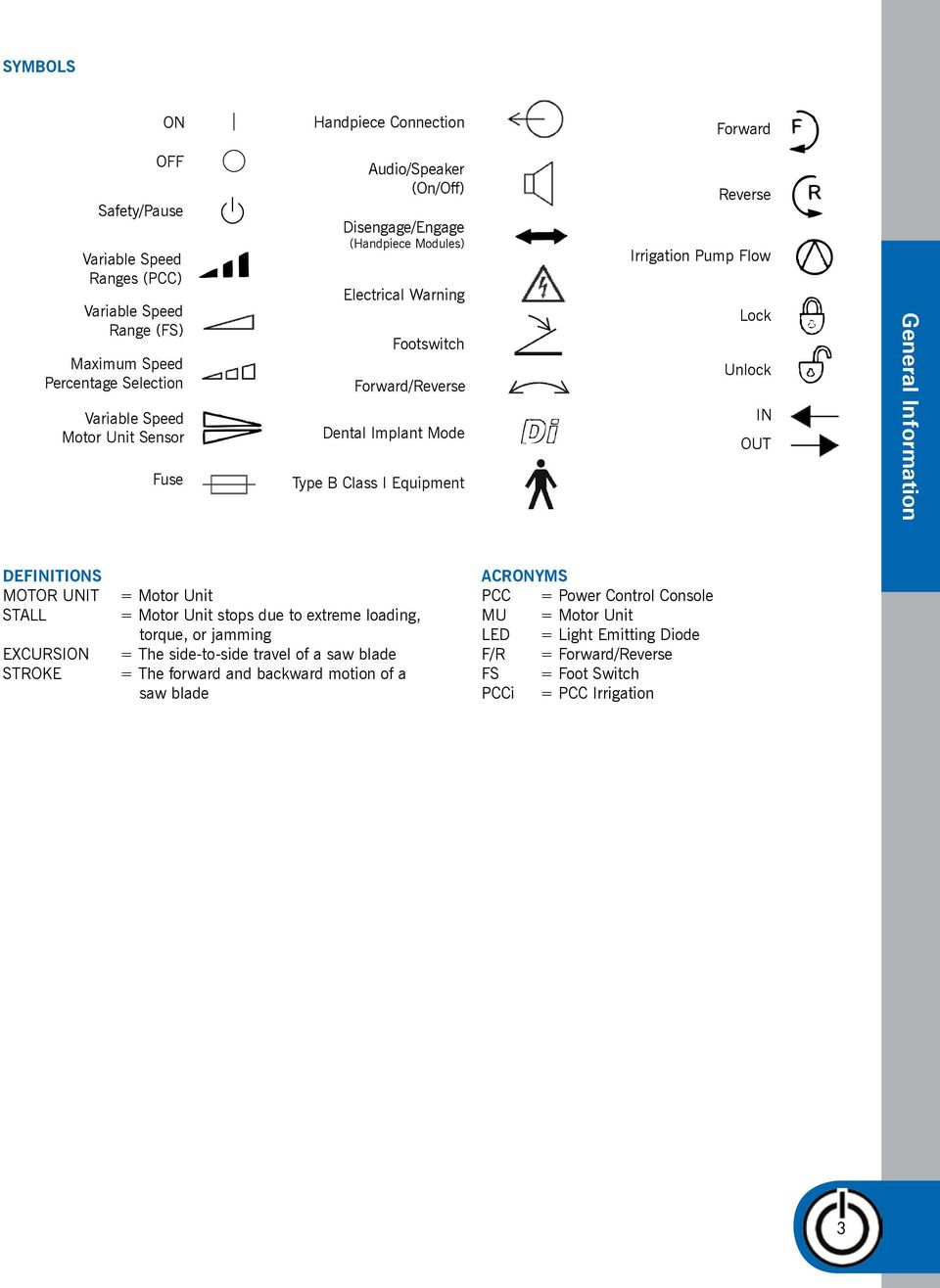
4 SYMBOLS ON Handpiece Connection Forward OFF Safety/Pause Variable Speed Ranges (PCC) Variable Speed Range (FS) Maximum Speed Percentage Selection Variable Speed Motor Unit Sensor Fuse Audio/Speaker (On/Off) Disengage/Engage (Handpiece Modules) Electrical Warning Footswitch Forward/Reverse Dental Implant Mode Type B Class I Equipment Reverse Irrigation Pump Flow Lock Unlock IN OUT General Information DEFINITIONS MOTOR UNIT STALL EXCURSION STROKE = Motor Unit = Motor Unit stops due to extreme loading, torque, or jamming = The side-to-side travel of a saw blade = The forward and backward motion of a saw blade ACRONYMS PCC = Power Control Console MU = Motor Unit LED = Light Emitting Diode F/R = Forward/Reverse FS = Foot Switch PCCi = PCC Irrigation 3
5 POWER CONTROL CONSOLE (PCC) Part Number: , (voice), X (custom voice) Power Control Console POWER CONTROL CONSOLE with IRRIGATION (PCCi) Part Number: , (voice), (English, Spanish and Italian) The Power Control Console is the brain of the OsteoPower System. A number of features have been designed into the Power Control Console. FEATURES 4

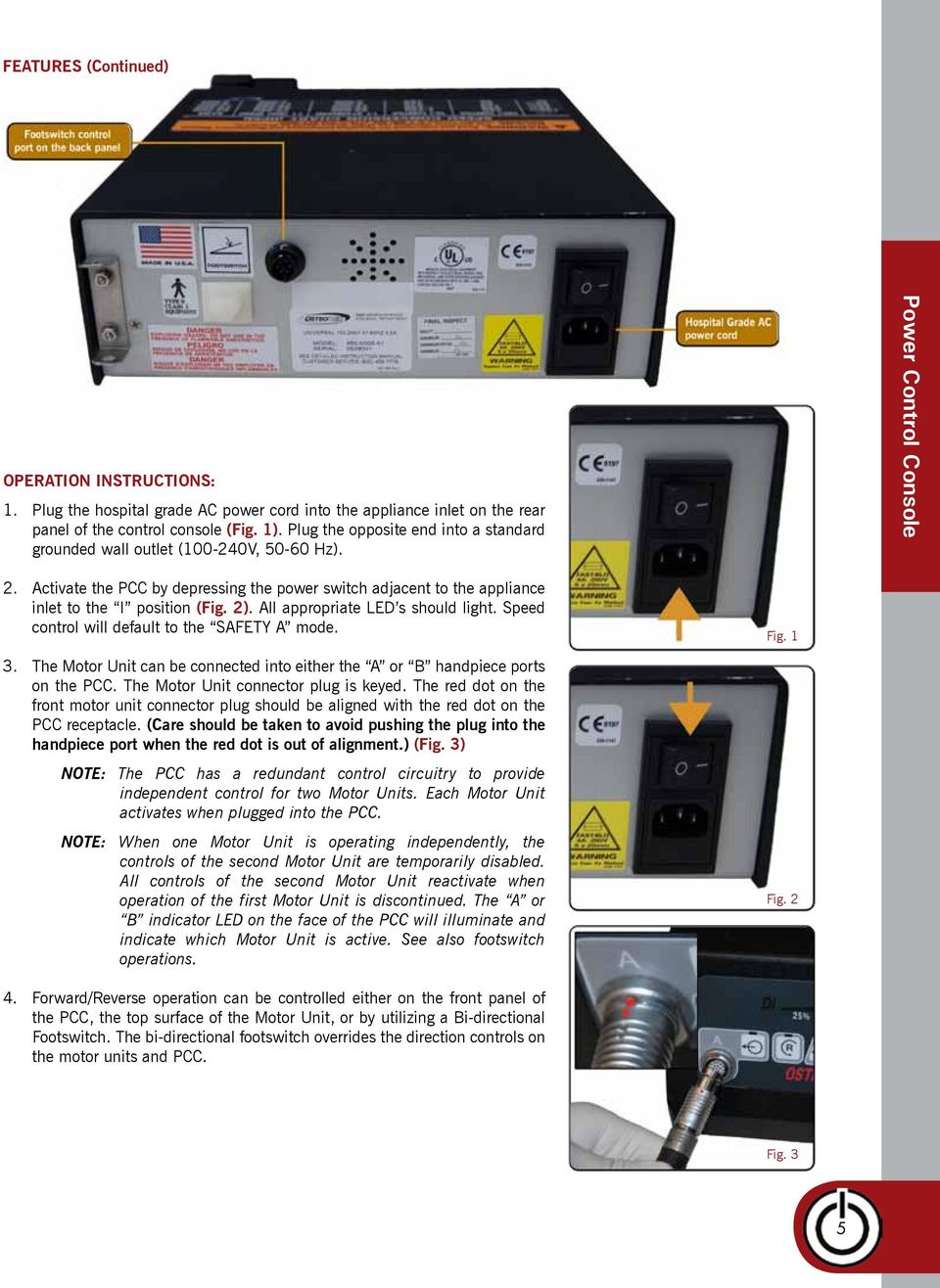
6 FEATURES (Continued) OPERATION INSTRUCTIONS: 1. Plug the hospital grade AC power cord into the appliance inlet on the rear panel of the control console (Fig. 1). Plug the opposite end into a standard grounded wall outlet ( V, Hz). Power Control Console 2. Activate the PCC by depressing the power switch adjacent to the appliance inlet to the I position (Fig. 2). All appropriate LED s should light. Speed control will default to the SAFETY A mode. 3. The Motor Unit can be connected into either the A or B handpiece ports on the PCC. The Motor Unit connector plug is keyed. The red dot on the front motor unit connector plug should be aligned with the red dot on the PCC receptacle. (Care should be taken to avoid pushing the plug into the handpiece port when the red dot is out of alignment.) (Fig. 3) NOTE: The PCC has a redundant control circuitry to provide independent control for two Motor Units. Each Motor Unit activates when plugged into the PCC. NOTE: When one Motor Unit is operating independently, the controls of the second Motor Unit are temporarily disabled. All controls of the second Motor Unit reactivate when operation of the first Motor Unit is discontinued. The A or B indicator LED on the face of the PCC will illuminate and indicate which Motor Unit is active. See also footswitch operations. Fig. 1 Fig Forward/Reverse operation can be controlled either on the front panel of the PCC, the top surface of the Motor Unit, or by utilizing a Bi-directional Footswitch. The bi-directional footswitch overrides the direction controls on the motor units and PCC. Fig. 3 5
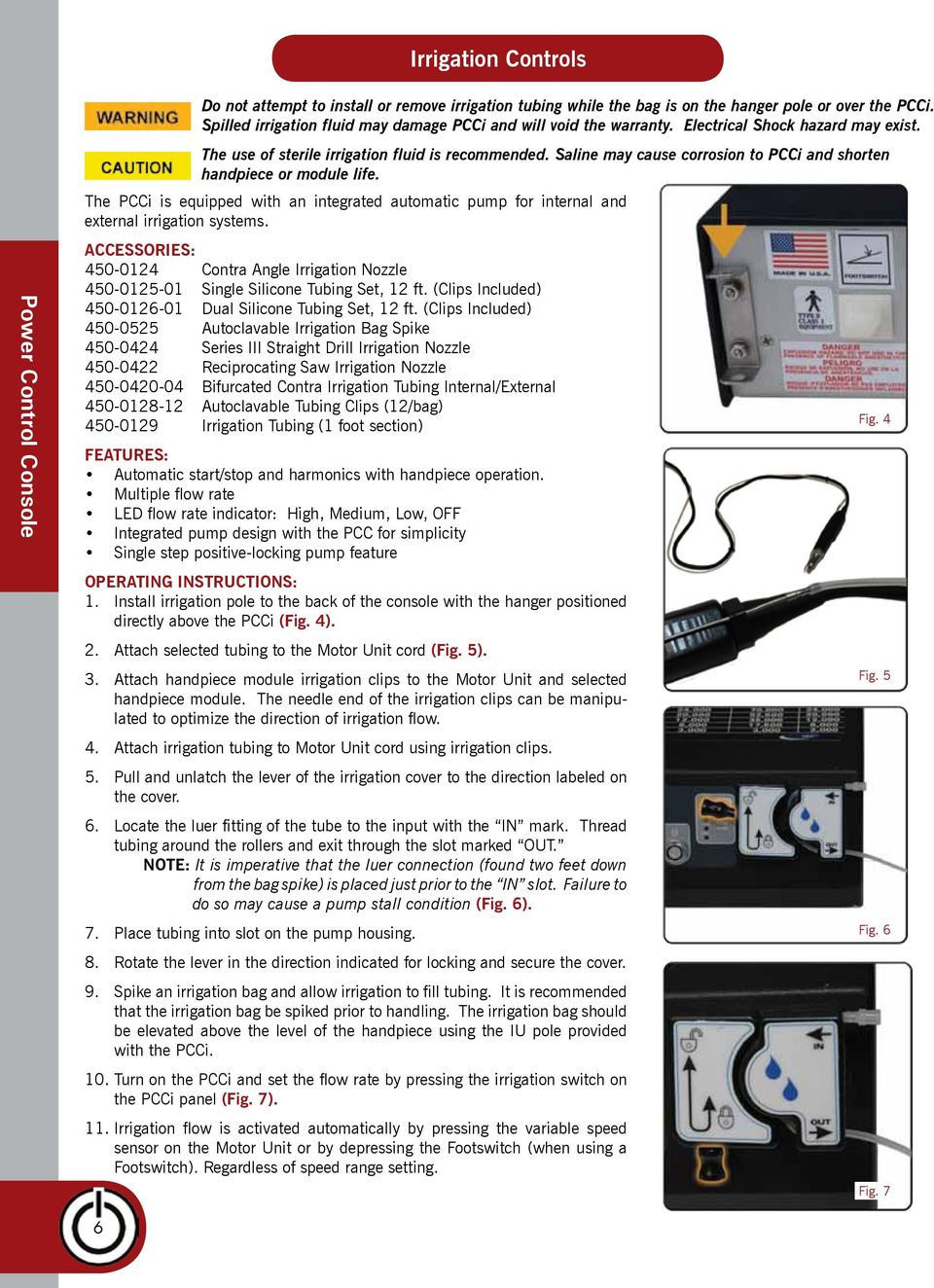
7 Irrigation Controls Power Control Console Do not attempt to install or remove irrigation tubing while the bag is on the hanger pole or over the PCCi. Spilled irrigation fluid may damage PCCi and will void the warranty. Electrical Shock hazard may exist. The use of sterile irrigation fluid is recommended. Saline may cause corrosion to PCCi and shorten handpiece or module life. The PCCi is equipped with an integrated automatic pump for internal and external irrigation systems. ACCESSORIES: Contra Angle Irrigation Nozzle Single Silicone Tubing Set, 12 ft. (Clips Included) Dual Silicone Tubing Set, 12 ft. (Clips Included) Autoclavable Irrigation Bag Spike Series III Straight Drill Irrigation Nozzle Reciprocating Saw Irrigation Nozzle Bifurcated Contra Irrigation Tubing Internal/External Autoclavable Tubing Clips (12/bag) Irrigation Tubing (1 foot section) FEATURES: Automatic start/stop and harmonics with handpiece operation. Multiple flow rate LED flow rate indicator: High, Medium, Low, OFF Integrated pump design with the PCC for simplicity Single step positive-locking pump feature OPERATING INSTRUCTIONS: 1. Install irrigation pole to the back of the console with the hanger positioned directly above the PCCi (Fig. 4). 2. Attach selected tubing to the Motor Unit cord (Fig. 5). 3. Attach handpiece module irrigation clips to the Motor Unit and selected handpiece module. The needle end of the irrigation clips can be manipulated to optimize the direction of irrigation flow. 4. Attach irrigation tubing to Motor Unit cord using irrigation clips. 5. Pull and unlatch the lever of the irrigation cover to the direction labeled on the cover. 6. Locate the luer fitting of the tube to the input with the IN mark. Thread tubing around the rollers and exit through the slot marked OUT. NOTE: It is imperative that the luer connection (found two feet down from the bag spike) is placed just prior to the IN slot. Failure to do so may cause a pump stall condition (Fig. 6). 7. Place tubing into slot on the pump housing. 8. Rotate the lever in the direction indicated for locking and secure the cover. 9. Spike an irrigation bag and allow irrigation to fill tubing. It is recommended that the irrigation bag be spiked prior to handling. The irrigation bag should be elevated above the level of the handpiece using the IU pole provided with the PCCi. 10. Turn on the PCCi and set the flow rate by pressing the irrigation switch on the PCCi panel (Fig. 7). 11. Irrigation flow is activated automatically by pressing the variable speed sensor on the Motor Unit or by depressing the Footswitch (when using a Footswitch). Regardless of speed range setting. Fig. 4 Fig. 5 Fig. 6 Fig. 7 6
8 Features Common To All OsteoPower Motor Units: Proprietary brushless DC motor delivers exceptional, reliability and consistent speeds Ergonomic shape provides exceptional control Advanced electronic circuitry brakes motor instantaneously Operates in both high speed (0-70,000 RPM) and standard speed (0-24,000 RPM) modes Lightweight integrated power cord Internal module coupling mechanism allows the easy and quick insertion of a wide variety of handpiece modules All handpiece modules can be inserted in four different orientations at 90 degree intervals. This allows the operator to orient the handpiece module based on clinical assessment, visibility and comfort Insulating thermoplastic housing assures cool handpiece operation and extremely high durability Motor Unit and Cord are fully autoclavable Hand Controlled Motor Unit and Cord (Fig. 8) The Hand Controlled Motor Unit allows for finger tip control of: Variable speed Maximum Speed Range Forward/Reverse SAFETY mode operation Operating Instructions : 1. To activate the Motor Unit, depress the sensor to a setting other than SAFETY (Fig. 9) a. Maximum Speed Range selection choices are: SAFETY, 100%, 75%, 50%, 25% or Di (12.5%) of maximum speed capability b. Please refer to Speed Conversion Chart affixed to the top of the console to select handpiece module maximum speed c. At initial start up, the Motor Unit defaults to the SAFETY mode and the Forward direction d. Prior to inserting or removing handpiece modules, make sure the Motor Unit Speed Range Sensor is set to the SAFETY mode 2. After selecting the desired speed range setting, motor speed is controlled by depressing the variable speed control sensor pad. (Fig. 10) By varying the amount of finger pressure at any point along the length of the sensor, motor speed will vary. Greater pressure exerted on the surface sensor results in higher motor speed. 3. For handpiece modules designed to operate at 70,000 RPM, insert the handpiece module into the Motor Unit with the high speed dot in alignment with the speed control sensor on the Motor Unit. (Fig. 11) 4. To select a maximum speed of 24,000 RPM, insert the handpiece module into the Motor Unit in any other orientation. 5. Motor direction is controlled by the Forward/Reverse section of the sensor pad. (Fig. 12) By depressing this sensor, motor direction will be reversed. A repeating audible beep will occur when the motor is operating in reverse. The Reverse LED indicator on the Power Control Console will also illuminate when the motor is in the Reverse mode. Depression of the F/R sensor will change motor direction. Fig. 8 Fig. 9 Fig. 10 Fig. 11 Modular Motor Units Fig. 12 7

9 Lever Arm Motor Unit and Cord (LAMU) (Fig. 13) Modular Motor Units Features: The Lever Arm Motor Unit allows for finger control of: Variable speed Maximum Speed Range Forward/Reverse SAFETY mode operation Detachable Telescopic Lever Arm Operating Instructions : 1. Before the Lever Arm Motor Unit (LAMU) can be activated, the safety wheel must be rotated backward to show green dot (Fig. 14) a. Maximum Speed Range selection choices are: SAFETY, 100%, 75%, 50%, 25% or Di (12.5%) of maximum speed capability (Fig. 15) b. Please refer to Speed Conversion Chart affixed to the top of the console to select handpiece module maximum speed c. At initial start up, the Motor Unit defaults to the SAFETY mode and Forward direction d. Prior to inserting or removing handpiece modules, make sure the Motor Unit Safety Lever is set to the SAFETY mode 2. To select a speed percentage setting, momentarily slide the speed control button backward. To change direction slide forward. 3. After selecting the desired speed range setting, motor speed is controlled by depressing the Lever Arm. By varying the amount of finger pressure at any point along the length of the Lever Arm, motor speed will vary. Greater pressure exerted on the Lever Arm results in higher motor speed. (Fig. 16) 4. Motor direction is controlled by the speed control button. By momentarily sliding the speed control button toward the handpiece module, motor direction will be reversed. A repeating audible beep will occur when the motor is operating in reverse. The Reverse LED indicator on the console will also illuminate when the motor is in the Reverse mode. (Fig. 17) 5. For handpiece modules designed to operate at 70,000 RPM, insert the handpiece module into the Motor Unit with the high speed dot in alignment with the laser marking on the distal tip of the LAMU. (Fig. 18) 6. To select a maximum speed of 24,000 RPM, insert the handpiece module into the Motor Unit in any other orientation. 7. When using the optional footswitch, the lever will be disabled. The lever may be removed by rotating the lever 180 degrees toward to motor unit cord and pull the lever arm out. Fig. 13 Fig. 14 Fig. 15 Fig. 16 Fig. 17 Fig. 18 8

10 Series II low profile motor unit and cord, footswitch only (Fig. 19) NOTE: The Motor Unit requires a Footswitch to operate. MAXIMUM SPEED PERCENTAGE SELECTION 1. For handpiece modules designed to operate at 70,000 RPM, insert the handpiece into the Motor Unit with the high speed dot in alignment with the arrow located on the Motor Unit (Fig. 20) 2. To select a maximum speed of 24,000 RPM, insert the handpiece into the Motor Unit in any other orientation (Fig. 21) 3. Prior to inserting or removing the handpiece modules, make sure the Motor Unit Speed Range sensor is set to the SAFETY mode. OPERATING INSTRUCTIONS 1. To activate the Motor Unit, set the speed range on the console to a setting other than SAFETY 2. Maximum Speed Range selection choices are: SAFETY, 100%, 75%, 50%, 25% or Di (12.5%) of maximum speed capability. (Fig. 22) 3. Please refer to the Speed Conversion Chart affixed to the top of the console to set module maximum speed. 4. During power up, the Motor Unit is automatically set to the SAFETY mode and the Forward direction. CONTROL OF SPEED AND DIRECTION 1. After selecting the desired speed range setting on the console, motor speed is controlled by depressing the Footswitch sensor pad. By varying the amount of foot pressure at any point along the sensor, motor speed will vary. Greater pressure exerted on the surface sensor results in higher motor speed. 2. Motor direction is controlled by the Forward/Reverse section of the Footswitch pad (Bi-directional Footswitch, P/N ). By depressing the Yellow side of the Footswitch sensor, motor direction will be reversed. A repeating audible beep will occur when the motor is operating in reverse. The Reverse LED indicator on the console will also illuminate when the motor is in the Reverse mode. Depression of the F or R sensor on the console will change motor direction. (Fig. 23) Fig. 19 Fig. 20 Fig. 21 Modular Motor Units Fig. 22 Fig. 23 9

11 footswitch (Fig. 24) Footswitch Operations Bi-directional Multi-Function Footswitch (BMF Footswitch) (Fig. 24) Do not drop Footswitch. Dropping the Footswitch may cause damage and void the warranty. BMF FOOTSWITCH OPERATION The Bi-directional Multi-Function Footswitch is designed for hands-free control of the A or B Motor Unit, Variable Speed and Forward/Reverse motor direction. 1. To activate the Bi-Directional Footswitch, insert its cord connector into the Footswitch receptacle on the back panel of the Power Control Console (Fig. 25). Once the Footswitch is plugged in, the hand control Motor Unit s ( ) speed actuation and forward/reverse surface sensors are deactivated. 2. By varying the amount of foot pressure on either the Forward or Reverse sections of the Footswitch, the motor speed will vary. The greater the foot pressure, the higher the speed. Forward is controlled on the right (GREEN) side of the Footswitch, Reverse on the left (YELLOW) side (Fig. 26). NOTE: Maximum Speed Range setting and SAFETY continue to be controlled by the Motor Unit or the Power Control Console when utilizing a Footswitch. 3. By depressing the A/B button on the Footswitch, either the A or B Motor Unit can be selected for operation. Each Motor Unit can be operated sequentially; however, the proper A/B mode must be selected using the Footswitch in order to activate the desired Motor Unit (Fig. 27). NOTE: Unplugging the Footswitch enables the Motor Unit s speed actuation and direction sensors. The maximum speed percentage sensor on the Motor Unit is always active with or without a Footswitch plugged in. NOTE: The footswitch may also be used to activate the irrigation pump, if equipped, when the PCCi is in safety mode. TANDEM FOOTSWITCH OPERATION The BMF Footswitch can be connected in tandem to allow single or dual Motor Units to be operated from two Footswitch locations (Fig. 28). This capability was designed to allow Footswitch placement on either side of an operating room table. SETUP 1. Plug a BMF Footswitch into the receptacle located on the rear of the selected BMF Footswitch (Fig. 29). 2. Plug the selected BMF Footswitch cord connector into the female receptacle on the back panel of the Power Control Console. 3. Operate either Footswitch as described in BMF Footswitch Operation. TANDEM FOOTSWITCH OPERATION When using tandem Footswitches, either Footswitch can control a single Motor Unit. To activate a Motor Unit, depress the A/B button on either Footswitch until the LED on the Power Control Console is lit next to the connector port that the Motor Unit is plugged into. When two Motor Units are plugged into the Power Control Console, either Footswitch can control either the A or B Motor Unit. The A/B button on either Footswitch must be depressed to switch from activating either the A or B Motor Unit. The A or B LED on the Power Control Console will illuminate to indicate which Motor Unit has been activated. Operate either Footswitch as described in BMF Footswitch Operation. Fig. 24 Fig. 25 Fig. 26 Fig. 27 Fig. 28 Fig

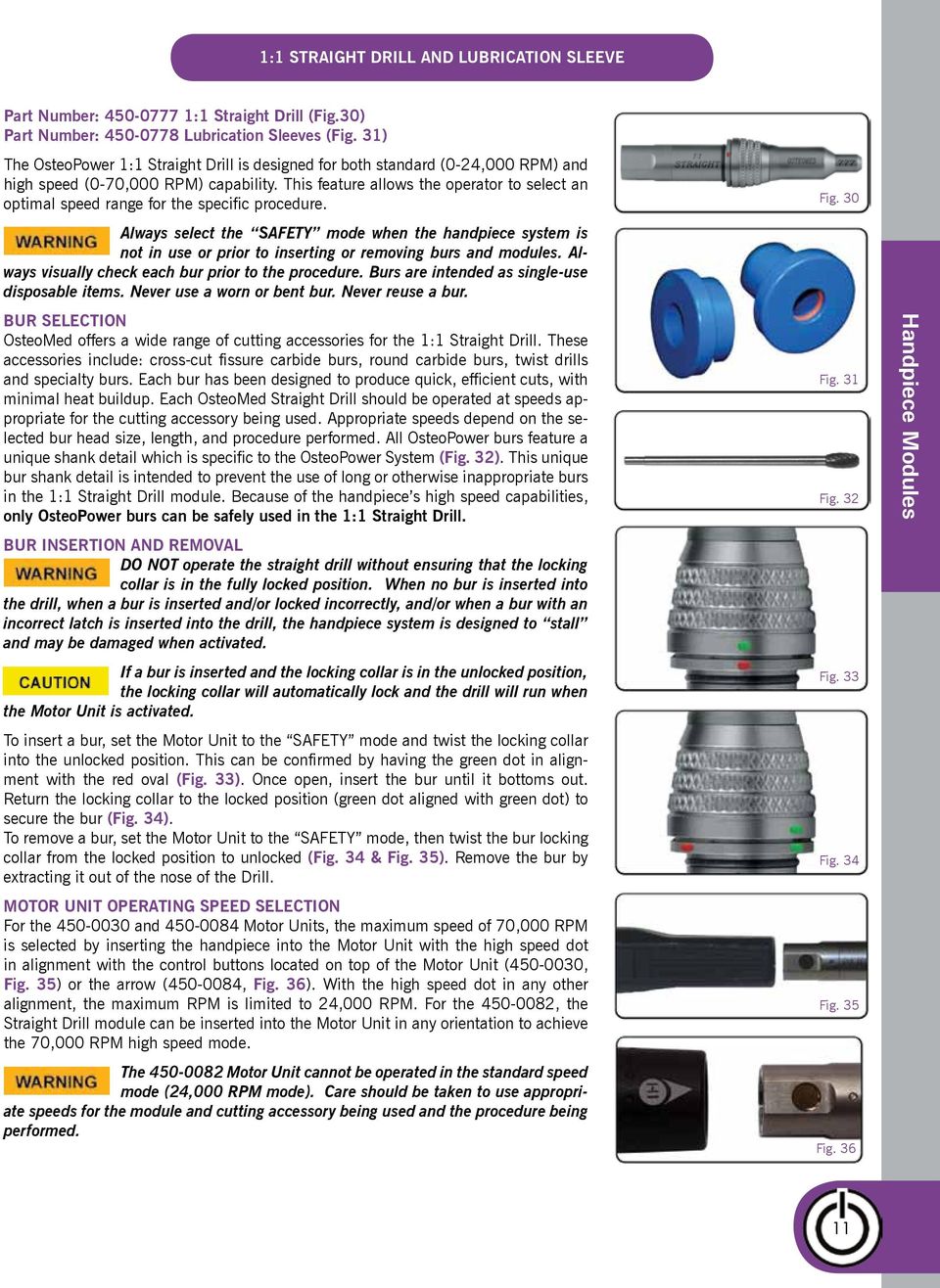
12 1:1 Straight Drill and Lubrication Sleeve Part Number: :1 Straight Drill (Fig.30) Part Number: Lubrication Sleeves (Fig. 31) The OsteoPower 1:1 Straight Drill is designed for both standard (0-24,000 RPM) and high speed (0-70,000 RPM) capability. This feature allows the operator to select an optimal speed range for the specific procedure. Always select the SAFETY mode when the handpiece system is not in use or prior to inserting or removing burs and modules. Always visually check each bur prior to the procedure. Burs are intended as single-use disposable items. Never use a worn or bent bur. Never reuse a bur. BUR SELECTION OsteoMed offers a wide range of cutting accessories for the 1:1 Straight Drill. These accessories include: cross-cut fissure carbide burs, round carbide burs, twist drills and specialty burs. Each bur has been designed to produce quick, efficient cuts, with minimal heat buildup. Each OsteoMed Straight Drill should be operated at speeds appropriate for the cutting accessory being used. Appropriate speeds depend on the selected bur head size, length, and procedure performed. All OsteoPower burs feature a unique shank detail which is specific to the OsteoPower System (Fig. 32). This unique bur shank detail is intended to prevent the use of long or otherwise inappropriate burs in the 1:1 Straight Drill module. Because of the handpiece s high speed capabilities, only OsteoPower burs can be safely used in the 1:1 Straight Drill. BUR INSERTION AND REMOVAL DO NOT operate the straight drill without ensuring that the locking collar is in the fully locked position. When no bur is inserted into the drill, when a bur is inserted and/or locked incorrectly, and/or when a bur with an incorrect latch is inserted into the drill, the handpiece system is designed to stall and may be damaged when activated. If a bur is inserted and the locking collar is in the unlocked position, the locking collar will automatically lock and the drill will run when the Motor Unit is activated. To insert a bur, set the Motor Unit to the SAFETY mode and twist the locking collar into the unlocked position. This can be confirmed by having the green dot in alignment with the red oval (Fig. 33). Once open, insert the bur until it bottoms out. Return the locking collar to the locked position (green dot aligned with green dot) to secure the bur (Fig. 34). To remove a bur, set the Motor Unit to the SAFETY mode, then twist the bur locking collar from the locked position to unlocked (Fig. 34 & Fig. 35). Remove the bur by extracting it out of the nose of the Drill. MOTOR UNIT OPERATING SPEED SELECTION For the and Motor Units, the maximum speed of 70,000 RPM is selected by inserting the handpiece into the Motor Unit with the high speed dot in alignment with the control buttons located on top of the Motor Unit ( , Fig. 35) or the arrow ( , Fig. 36). With the high speed dot in any other alignment, the maximum RPM is limited to 24,000 RPM. For the , the Straight Drill module can be inserted into the Motor Unit in any orientation to achieve the 70,000 RPM high speed mode. The Motor Unit cannot be operated in the standard speed mode (24,000 RPM mode). Care should be taken to use appropriate speeds for the module and cutting accessory being used and the procedure being performed. Fig. 30 Fig. 31 Fig. 32 Fig. 33 Fig. 34 Fig. 35 Fig. 36 Handpiece Modules 11
13 1:1 Straight Drill and Lubrication Sleeve Bearing replacement The nose and bearing design of the straight drill minimizes but does not eliminate the chance for heat buildup, especially when side loads to the drill are applied. Handpiece Modules Use of a drill with contaminated and/or worn bearings may rapidly generate heat and cause patient injury. The straight drill must be thoroughly cleaned and lubricated (see instruction below) after each use to prevent bearing contamination and to prolong drill life. In addition, the drill must be well maintained, including periodically returning to OsteoMed for maintenance. Failure to properly clean, lubricate, and send in for periodic maintenance can lead to contaminated bearings that can fail and generate excessive heat. Increased use of a drill will reduce the life of the bearings, requiring maintenance on a more frequent basis. Indications of Contaminated or Worn Bearings: CHECK FOR: 1. Heat: OsteoMed Straight Drills are designed to operate within safe temperature ranges and without excessive heat if operated within specified duty cycles (refer to the Specification/Duty Cycle section of the OsteoPower Operating Instructions and Maintenance Manual for specified duty cycles). If a drill appears to generate heat, immediately stop using the drill and call OsteoMed Customer Service. 2. Unusual noise or vibration: If the straight drill creates unusual noise or vibration during use, immediately stop using the drill and call OsteoMed Customer Service. 3. Radial marks on the bur shaft: After the straight drill has been used, always inspect the shaft of the bur or drill bit before it is discarded. If the shaft of the bur or drill bit shows radial marks or grooves after use (Fig. 37), immediately stop using the drill and call OsteoMed Customer Service. 4. Failure of spin test (Fig 9): To conduct a spin test, insert a bur into the handpiece module. Hold the distal tip of the bur and spin the handpiece module (Fig 38). The module should spin freely. If the module does not spin freely, call OsteoMed Customer Service to return the module for service. Fig. 37 Fig

14 1:1 Straight Drill and Lubrication Sleeve Lubrication Instructions In order to properly lubricate the straight drill, the lubrication sleeve (Fig. 31 on page 11) must be used. The lubrication sleeve is comprised of two parts. The top is labeled Place over tip of drill with an arrow facing down (Fig. 39) and the bottom has an arrow facing up. 1. To use the lubrication sleeve, hold the module as shown in Fig. 40, then slide the top component over the tip of the module with the arrow facing towards the magnet end of the module. 2. After locking the top component in place, slide the bottom component over the magnet end of the module with the arrow facing the distal end (Fig. 41). 3. Push the two components together tightly (Fig. 42). 4. Follow the lubrication instructions in the instruction manual (P/N ) (Fig. 43 & 44). Note: The lubrication sleeve should ONLY be used with the :1 Straight Drill. Handpiece Modules Fig. 39 Fig. 40 Fig. 41 Fig. 42 Fig. 43 Fig

15 OsteoGraft Bone Grafting Wheel Handpiece Modules Part Number: (Fig. 45) Speed Range: 0-35,000 50% The OsteoGraft Bone Grafting Wheel is a circular saw and soft tissue guard attachment for OsteoMed 1:1 Straight Drill part number The OsteoGraft attachment is intended for the cutting of mandibular bone at precise depths. There are two sterile-packed blades (Fig. 46) available for the OsteoGraft attachment. The blade choices are a.25mm thickness and.5mm thickness. Both blades have a cut depth of 4mm. NOTE: An Allen wrench and a set screw are packaged with every blade (Fig. 47). Prior to inserting or removing blades, make sure the Motor Unit is set to the SAFETY mode. Running the OsteoGraft at a speed higher than 35,000 RPMs could cause the blade to strike the tissue guard. Any blades not specifically designed for the OsteoPower Osteo- Graft Bone Grafting Attachment will not secure properly and may damage the locking collar or handpiece. ATTACHING AND REMOVING THE SOFT TISSUE GUARD: 1. To attach the soft tissue guard to the Straight Drill, slide the soft tissue guard onto the nose of the straight drill as shown (Fig. 48). 2. Once the soft tissue guard is fully seated onto the nose of the Straight Drill, use the Allen wrench provided with blade to tighten the hex nut in a clockwise direction (Fig. 49). 3. Tighten the hex nut until the soft tissue guard attachment is secure on the Straight Drill 4. To remove the soft tissue guard attachment, use the Allen wrench to loosen the locking hex nut in a counterclockwise direction. The soft tissue guard attachment can then be removed from the nose of the Straight Drill. BLADE INSERTION AND REMOVAL DO NOT operate the handpiece (Motor Unit) while the straight drill locking collar is in the unlocked position. When the locking collar is in the unlocked position and/or no blade is inserted into the drill, the Motor Unit will stall and may be damaged when the Motor Unit is activated. When using part number , if a blade is inserted and the locking collar is in the unlocked position, the locking collar will automatically lock and the drill will run when the Motor Unit is activated. 1. Make sure the soft tissue guard attachment is properly secured to the Straight Drill before inserting and locking a blade into position. 2. To insert a blade, set the Motor Unit to the SAFETY mode and twist the locking collar clockwise into the unlocked position. This can be confirmed by having the green dot in alignment with the red oval (Fig. 50). Once open, insert the blade until it bottoms out. Twist the locking collar to the locked position (green dot aligned with green dot) to secure the blade (Fig. 51). 3. To remove a blade, set the Motor Unit to the SAFETY mode, then twist the locking collar from the locked position to unlocked. Remove the blade by extracting it out of the nose of the Drill. Fig. 45 Fig. 46 Fig. 47 Fig. 48 Fig. 49 Fig. 50 Fig

16 4:1 Universal Pilot Drill Part Number: (Fig.52) The OsteoPower 4:1 Universal Pilot Drill is designed for operation within 0-6,000 RPM. NOTE: Always select the SAFETY mode when the handpiece system is not in use or prior to inserting or removing drill bits or modules. Always visually check each drill bit prior to the procedure. Drill bits are intended as single-use disposable items. Never use a worn or bent drill bit. Never reuse a drill bit. DRILL BIT SELECTION The Universal Pilot Drill accepts any bur/drill bit with either a straight shank or a J- latch shank, OsteoMed Shank and D-latch Shank in the Universal Straight Drill. The drill should be operated at speeds appropriate for the cutting accessory being used. Appropriate speeds depend on the selected bur head size, length, and procedure performed. The 4:1 Universal Pilot Drill only accepts Straight Shank, J-Latch, OsteoMed or D- Latch drill bits with a 44.5mm, 51.0mm or 65.0 mm length shaft. Use of longer burs/pilot drills may cause whipping and/or damage to the drill. 4:1 UNIVERSAL PILOT DRILL BUR GUARDS The following bur guards should be used with the drill bits shaft lengths noted: Short Bur Guard ( ) mm length shaft (Comes standard with the drill) Medium Bur Guard ( ) mm length shaft Long Bur Guard ( ) mm length shaft DRILL BIT INSERTION AND REMOVAL NOTE: DO NOT operate the 4:1 Universal Pilot Drill without ensuring that the locking collar is in the fully locked position. 1. To insert a bur, set the Motor Unit to the SAFETY mode and twist the locking collar into the unlocked position. This can be confirmed by aligning the green mark with the red mark. Once open, insert the drill bit until it bottoms out. Return the locking collar to the locked position (re-align the two green marks) to secure the drill bit (Fig.53). 2. To remove a drill bit, set the Motor Unit to the SAFETY mode, then twist the bur locking collar from the locked position to unlocked (Fig.54). Remove the bur by extracting it out of the nose of the drill. BUR GUARD REPLACEMENT The bur guard design of the 4:1 Universal Pilot Drill minimizes but does not eliminate the chance for heat buildup especially when side loads to the drill are applied. Use of a module with contaminated and/or worn bearings may rapidly generate heat and cause patient injury. The 4:1 Universal Pilot Drill must be thoroughly cleaned and lubricated after each use to prevent bearing contamination and to prolong module life. In addition, the module must be well maintained including the periodic replacement of the bearings. Failure to properly clean, lubricate, and change the bearings on a periodic basis can lead to contaminated bearings that can fail and generate excessive heat. Increased use of a drill will reduce the life of the bearings, requiring that bearings be replaced on a more frequent basis. Fig. 52 Fig. 53 Fig. 54 Handpiece Modules 15

17 4:1 Universal Pilot Drill (cont.) Handpiece Modules INDICATIONS OF CONTAMINATED OR WORN BEARINGS: 1. Heat: The OsteoMed 4:1 Universal Pilot Drill is designed to operate within safe temperature ranges and without excessive heat if operated within specified duty cycles (refer to the Specification/Duty Cycle section of the OsteoPower Operating Instructions and Maintenance Manual for specified duty cycles). If the module appears to generate heat, immediately stop using the module and call OsteoMed Customer Service. 2. Unusual noise or vibration: If the module creates unusual noise or vibration during use, immediately stop using the module and call OsteoMed Customer Service. 3. Radial marks on the bur shaft: After the module has been used, always inspect the shaft of the bur or drill bit before it is discarded. If the shaft of the bur or drill bit shows radial marks or grooves after use (Fig.55), immediately stop using the drill and call OsteoMed Customer Service. 4. Failure of spin test (Fig.56): Insert a drill bit into the module. Hold the distal tip of the drill bit and spin the module (Fig.56). The module should spin freely. If the module does not spin freely, call OsteoMed Customer Service to return the module for service. Module may stall when under excessive load. If the module begins to stall, set the console to reverse mode and back the drill bit/bur out of the site. If the drill stalls again, STOP THE MOTOR UNIT, REMOVE THE MODULE and complete the procedure using manual instruments. Fig. 55 Fig. 56 LUBRICATION INSTRUCTIONS: In order to properly lubricate the 4:1 Universal Pilot Drill, the lubrication sleeve must be used. NOTE: The Lubrication Sleeve should ONLY be used with the 4:1 Universal Pilot Drill. The lubrication sleeve is comprised of two parts. The top is labeled Place over tip of drill with an arrow facing down and the bottom has an arrow facing up. Step 1. The use the lubrication sleeve, hold the module as shown in Step 1 then slide the top component over the tip of the module with the arrow facing toward the bottom of the module. Step 2. After locking the top component in place, slide the bottom component over the magnet end of the module with the arrow facing the distal end. Step 3. Push the two components together tightly. Step 4. Follow the lubrication instructions on page 13 of this instruction manual. 16

18 1:1 Contra Angle Drill Part Number: (Fig. 57) The 1:1 Contra Angle Drill is intended for third molar removal procedures only. This module should not be used for low speed applications such as dental implant procedures. NOTE: The 1:1 Contra Angle Drill has built-in external irrigation capability. This module does not require additional nozzles for irrigation applications. 1:1 CONTRA ANGLE OPERATION 1. Insert the drill into the Motor Unit. To obtain a maximum speed of 70,000 RPM, insert the handpiece into the Motor Unit with the dot symbol oriented as indicated in (Fig. 58). This insertion requires the drill to be inserted with the round dot in alignment with the control buttons located on top of the Motor Unit. NOTE: Although the 1:1 Contra Angle Drill can operate in the 70,000 RPM mode, to ensure long life of the module, OsteoMed recommends operation be limited to a maximum of 75% or 52,500 RPM. 1:1 CONTRA ANGLE ACCESSORY INSERTION AND REMOVAL A wide range of accessories are available for the 1:1 Contra Angle Drill (Fig. 59). Any standard type of dental latch bur, reamer, or drill can be used. OsteoMed offers cross-cut fissure carbide burs, round carbide burs, twist drills, and screwdrivers for this handpiece. Each bur has been designed to produce quick, efficient cuts, with minimal heat buildup. 1. To load an accessory, move the bur latch to the OPEN position and rotate the accessory during insertion (Fig. 60). Return the bur latch to the LOCK position, then pull on the accessory to ensure it is locked securely (Fig. 61). 2. To remove an accessory, push the latch forward with your thumb and pull it out of the head. Prior to inserting or changing burs, make sure the Motor Unit is set to SAFETY mode. Use only accessories that insert easily and smoothly, securely latching into the Contra Head. NOTE: The 1:1 Contra Angle Drill comes with a built-in external irrigation nozzle. The spray nozzle can be manually adjusted, as can the end where the silicone tubing is attached (Fig. 62). Fig. 57 Fig. 58 Fig. 59 Fig. 60 Handpiece Modules Fig. 61 Fig

19 Contra Angle Drill/Driver 18:1 CONTRA ANGLE DRILL/DRIVER Part Number: (Built-In External Irrigation) (Fig. 63) 100:1 CONTRA ANGLE DRILL/DRIVER Part Number: and (Built-In External Irrigation) (Fig. 64) Fig. 63 Handpiece Modules The 18:1 Contra Angle Drill is designed for medium speed (0-1,330 RPM) high torque contra angle drill applications, with or without internal or external irrigation. The 100:1 Contra Angle Drill is designed for low speed (0-240 RPM) maximum torque contra angle drill applications, with or without internal or external irrigation. A wide range of accessories are available for the 18:1 and 100:1 Contra Angle Drills (Fig. 65). Any standard type of dental latch bur, reamer, or drill can be used. OsteoMed offers cross-cut fissure carbide burs, round carbide burs, twist drills and screwdrivers for this handpiece. Each bur has been designed to produce quick efficient cuts with minimal heat buildup. Prior to inserting or changing burs, make sure the Motor Unit is set to SAFETY mode. 18:1 and 100:1 CONTRA ANGLE ACCESSORY INSERTION AND REMOVAL 1. To load an accessory, push the spring-loaded latch forward with your thumb and rotate the accessory during insertion (Fig. 66). Release the latch mechanism, then pull on the accessory to ensure it is locked securely (Fig. 67). 2. To remove an accessory, push the latch forward with your thumb and pull it out of the head (Fig. 68). Use only accessories that insert easily and smoothly, securely latching into the Contra Head. During implant procedures, NEVER BOTTOM OUT A TAP. If the handpiece begins to stall, STOP THE MOTOR UNIT, REMOVE THE CONTRA ANGLE DRILL and complete the procedure using manual instruments. DO NOT TWIST the handpiece to assist the tap at any time. NEVER FULLY SEAT AN IMPLANT USING THE HANDPIECE. Seat the implant into the bone up to its collar and complete the placement manually. NOTE: The Contra Angle Drills can be inserted into the Motor Unit in four orientations at 90 degree intervals (Fig. 69). This versatile feature allows the operator to orient the drill based on access, visibility, and the most comfortable handpiece holding position. Fig. 64 Fig. 65 Fig. 66 Fig. 67 Fig. 68 Fig

20 Reciprocating Saw and Wrench Set RECIPROCATING SAW Part Number: (Fig. 70) RECIPROCATING SAW WRENCH SET Part Number: (Fig. 71) The Reciprocating Saw is designed for producing quick and accurate bone cuts. This module reciprocates blades at approx. 20,000 cycles per minute (see WARNING note below). In addition to its high speed, the stroke has been designed to not exceed 2.4mm. The combination of short stroke and high speed allows the handpiece to cut quickly, efficiently, and safely. The Reciprocating Saw operates with specifically designed saw blades to ensure secure and safe operation. The Reciprocating Saw is designed to reciprocate at approx. 20,000 cycles per minute in the Forward mode. The Motor Unit must be set to 75% of the maximum speed setting when operating the Reciprocating Saw. Operation of the Reciprocating Saw at higher speeds may result in excessive vibration, loss of control at the osteotomy site, and/or damage to the saw module. Use of any blades not specifically designed for the OsteoPower Reciprocating Saw will not secure properly and may cause injury to the user, patient, or operating personnel and/or damage the locking collar or handpiece. A wide range of cutting accessories are available for the Reciprocating Saw (Fig. 72). The blade choices range from short to long cut lengths and straight, tapered and curved blade shapes. Rasps are also offered. Each blade has been specifically designed to produce quick, efficient cuts, with minimal heat buildup. SAW BLADE/ACCESSORY INSERTION AND REMOVAL WARNING: Prior to inserting the Reciprocating Saw into the Motor Unit, make sure the Motor Unit is set to the Safety mode. 1. To insert saw blades, loosen the Locking Collar (Fig. 73) and insert the desired blade. Rotate the blade shaft until the flat on the proximal end of the blade shaft seats fully in the blade Locking Collet. (Fig. 74) Blade seating is best accomplished by rotating the blade clockwise and counterclockwise during insertion. 2. Next, use the Reciprocating Saw Wrench Set (Fig. 75) to secure the blade. Begin by capturing the shaft of the saw using the wrench labeled RECIP SAW SHAFT STATIONARY (Fig. 75). Next, use the wrench labeled RECIP SAW COLLAR TIGHTEN (Fig. 75) to lock the blade in place. Do not over-tighten the blade Locking Collar. Over-tightening the blade Locking Collar may result in damage to Reciprocating Saw. 3. To remove saw blades, use the Reciprocating Saw Wrench Set to loosen the Locking Collar and remove the blade or accessory. The Reciprocating Saw can be inserted into the Motor Unit in four orientations at 90 degree intervals. (Fig. 76). This versatile feature allows the operator to orient the blade s cutting edge based on access, visibility, and the most comfortable handpiece holding position. Fig. 70 Fig. 71 Fig. 72 Fig. 73 Fig. 74 Fig. 75 Fig. 76 Handpiece Modules 19

21 Quick Connect Reciprocating Saw Part Number: (Fig. 77) Handpiece Modules The Quick Connect Reciprocating Saw is designed for producing quick and accurate bone cuts. This module reciprocates blades at approx. 20,000 cycles per minute. In addition to its high speed, the stroke has been designed to not exceed 2.4mm. The combination of short stroke and high speed allows the handpiece to cut quickly, efficiently, and safely. The Reciprocating Saw operates with specifically designed saw blades to ensure secure and safe operation. The Quick Connect Reciprocating Saw is designed to reciprocate at approx. 20,000 cycles per minute in the Forward mode. The power setting of the Motor Unit should not exceed 75% when operating the Quick Connect Reciprocating Saw. Operation of the Quick Connect Reciprocating Saw at higher speeds may result in excessive vibration, loss of control at the osteotomy site, and/or damage to the saw module. NOTE: The (Quick Connect Reciprocating Saw) only works with OsteoPower Quick Connect accessories. (ie. 451-XXXX-SP) SAW BLADE/ACCESSORY INSERTION AND REMOVAL Prior to inserting the Quick Connect Reciprocating Saw into the Motor Unit, make sure the Motor Unit is set to the Safety mode. Inserting Blade/Accessory: 1. To insert saw/rasp blades, align the flat on the proximal end of the blade shank with the flat depicted on the etching on the reciprocating saw (Fig. 78) 2. Retract the Quick Connect Reciprocating Saw collet (Fig. 79) and insert the blade. Keep the flat of the blade shank aligned with the flat of the laser mark (Fig. 80) 3. Release the saw collet to secure the blade. (Fig. 81) NOTE: Pull on the blade to insure it is properly seated NOTE: There is a black laser mark on the distal circumference of the blade/rasp shank. This laser mark will not be visible when the blade/rasp is completely seated. Removing Blade: 1. To remove the blade from the Quick Connect Reciprocating Saw, retract the collet and pull the blade away from the saw Fig. 77 Fig. 78 Fig. 79 Fig. 80 Fig
22 Sagittal Saw Part Number: (Fig. 82) The Sagittal Saw is designed for producing quick and accurate bone cuts. At full speed, the Sagittal Saw blades oscillate at 24,000 cycles per minute. Blade stroke is limited to 3.5 degrees clockwise and 3.5 degrees counterclockwise. The combination of short stroke and high speed allows the Sagittal Saw to cut quickly, efficiently, and safely. Fig. 82 A wide range of cutting accessories are available for the Sagittal Saw (Fig. 83). The blade selection ranges from 5mm wide to 43mm long. Blade lengths and widths have been selected based on the cut depths and widths associated with the most common craniofacial and extremity osteotomies. Each blade has been designed to produce quick, efficient cuts, with minimal heat buildup. The Sagittal Saw blades mount at an elevation to one side to allow for superior visibility of the surgical site and to simplify blade insertion and removal. The plane formed by the Blade Capture Hub can be used to improve visual orientation prior to making a bone cut. The Blade Capture Hub allows blades to be inserted in any of five different positions within a 160 degree range (Fig. 84). NOTE: All Sagittal Saw blades are interchangeable with the Oscillating Saw blades Fig. 83 Handpiece Modules Prior to inserting or removing the Sagittal Saw, make sure the Motor Unit is set to the SAFETY mode. It is recommended that the MU Maximum Speed Range Sensor be set to 75% or less to reduce the potential for blade vibration associated with the use of blades longer than 25mm. SAW BLADE INSERTION AND REMOVAL 1. To insert a blade, depress the Blade Release Button and slide the selected blade between the elevated cap and the Blade Capture Hub. The Release Button is located on the underside of the Saw module (Fig. 85). 2. While continuing to depress the Blade Release Button, insert the desired blade over the Drive Pins in any of five different positions within a 160 degree range. 3. To remove a saw blade, depress the Blade Release Button, lift and remove the blade. To ensure proper blade retention upon insertion, care must be taken to orient holes in the blade with the pin locations on the Blade Capture Hub. The Blade Capture Cap should seat completely flush against the blade Fig. 84 Fig. 85 The Sagittal Saw can be inserted into the Motor Unit in four orientations at 90 degree intervals (Fig. 6). This versatile feature allows the operator to orient the blade s cutting edge based on access, visibility, and the most comfortable handpiece holding position. Fig
23 Oscillating Saw Part Number: (Fig. 87) Handpiece Modules The Oscillating Saw is designed for producing quick and accurate bone cuts. At full speed, the Oscillating Saw blades oscillate at 24,000 cycles per minute. Blade stroke is limited to 7 degrees per full stroke. The combination of short stroke and high speed allows the Oscillating Saw to cut quickly, efficiently, and safely. A wide range of cutting accessories are available for the Oscillating Saw (Fig. 88). The blade selection ranges from 5mm wide to 43mm long. Blade lengths and widths have been selected based on the cut depths and widths associated with the most common craniofacial and extremity osteotomies. Each blade has been designed to produce quick, efficient cuts, with minimal heat buildup. NOTE: All Oscillating Saw blades are interchangeable with the Sagittal Saw blades. Prior to inserting or removing blades, make sure the Motor Unit is set to the SAFETY mode. Use of any blades not specifically designed for the OsteoPower Oscillating Saw will not secure properly and may damage the Locking Collar or handpiece. It is recommended that the MU Maximum Speed Range Sensor be set to 75% or less to reduce the potential for blade vibration associated with the use of blades longer than 25mm. SAW BLADE INSERTION AND REMOVAL 1. To insert saw blades, pull back on the Locking Collar and insert desired blade on to the mounting pins (Fig. 89). Make sure that the slotted section of the blade inserts fully into the blade drive shaft. Once the blade is fully seated, release the blade Locking Collar. The Locking Collar should close completely against the blade for secure retention (Fig. 90). 2. To remove saw blades, pull back on the Locking Collar, lower blade from pins and remove the blade. To ensure proper blade lock upon insertion, care must be taken to make sure the orientation holes in the blade align with the pin locations and the slotted end of the blade seats fully into the blade Lock Collar. Fig. 87 Fig. 88 Fig. 89 Fig. 90 Fig. 91 The Oscillating Saw can be inserted into the Motor Unit in four orientations at 90 degree intervals. This versatile feature allows the operator to orient the blade s cutting edge based on access, visibility, and the most comfortable handpiece holding position. 22
24 VRO Saw Part Number: (Fig. 92) The VRO Saw is designed for Vertical Ramus Osteotomy and other intra-oral posterior procedures. At full speed, the VRO Saw blades oscillate at 24,000 cycles per minute. The VRO Saw module extends approximately seven inches beyond the handpiece. Fig. 92 There are two blades available for the VRO Saw. The blade choices are a 7mm and 12mm length. Each blade has been designed to produce quick, efficient cuts, with minimal heat buildup. NOTE: The Allen wrench is included sterile packed with every blade. (Fig. 93). Prior to inserting or removing blades, make sure the Motor Unit is set to the SAFETY mode. Use of any blades not specifically designed for the OsteoPower VRO Saw will not secure properly and may damage the Locking Collar or handpiece. SAW BLADE INSERTION AND REMOVAL 1. To attach a saw blade, insert the desired blade shaft into the locking collar. (Fig. 94). 2. Once the blade is fully seated, tighten the locking collar screws using the included Allen wrench. (Fig. 95). NOTE: The Allen wrench is included sterile packed with every blade (Fig. 93). 3. To remove saw blades, use the Allen wrench to loosen locking collar screws. The blade can then be removed from the locking collar and disposed. Fig. 93 Fig. 94 Handpiece Modules Fig. 95 The VRO Saw can be inserted into the Motor Unit in four orientations at 90 degree intervals (Fig. 96). This versatile feature allows the operator to orient the blade s cutting edge based on access, visibility, and the most comfortable handpiece holding position. Fig
25 Wire/Pin Driver (w/p Driver) Body Handpiece Modules Part Number: Wire/Pin Driver Body (Fig. 97) NOTE: The Wire/Pin Driver Body is designed to ONLY work with the Hand Controlled Motor Unit and the Low Profile, Footswitch only Motor Unit. The Wire/Pin (W/P) Driver Body is the connection between 2 OsteoPower Modular Motor Units and 3 Handpiece Modules with triggers. The 2 Modular Motor Units* that work with the are the Hand Controlled Motor Unit ( ) and the Low Profile Motor Unit-Footswitch Only ( ).The 3 handpiece modules are the Wire/Pin Driver Module ( ), High Torque Jacob s Chuck ( ) and A.O. Chuck ( ). (Fig. 98) Wire/Pin Driver Jacob s Chuck A.O. Chuck Fig. 97 Fig. 99 Fig. 98 * The Lever Am Motor Unit (LAMU) has it s own LAMU W/P Driver Body ( ). Refer to page 25 of this manual. The Wire/Pin Driver (W/P Driver) Body has a maximum speed of 3,645 RPM and produces 80 inch ounces of torque. However, it is recommended that the W/P Driver Body be operated at a maximum of 50% power (except when using the Jacobs Chuck attachment), resulting in 1,823 RPM. INSERTION AND REMOVAL OF MOTOR UNITS: 1. To attach the Hand Controlled Motor Unit to the W/P Driver Body: a. Align the High Speed Dot on the motor unit connection of the W/P Driver Body with the surface controls of the Hand Controlled Motor Unit. b. Maintaining the dot to surface control alignment, insert the W/P Driver Body into the Motor Unit until fully seated. 2. To attach the Low Profile Motor Unit (Footswitch Only) to the W/P Driver Body: a. Align the High Speed Dot on the motor unit connection of the W/P Driver Body with the Dot on the top of the Low Profile Motor Unit (Footswitch Only). b. Maintaining the dot to dot alignment, insert the W/P Driver Body into the Motor Unit until fully seated. NOTE: The trigger mechanism will only function if the W/P Driver Body is inserted into the Motor Unit with the dot symbol oriented as indicated. 3. Remove either motor unit from the W/P Driver Body by: a. Taking hold of the W/P Driver Body and the body of the motor unit b. Pull until the two components separate Fig. 100 Fig. 101 INSERTION AND REMOVAL OF W/P DRIVER BODY ATTACHMENTS: 1. Insertion of any of the 3 attachments is accomplished by carefully inserting the desired W/P Driver Body attachment into the W/P Driver Body until it is fully seated 2. Removal of the W/P Driver Body attachment is accomplished by releasing the attachment locking latch located on the top of the W/P Driver Body. 24
26 LAMU Wire/Pin Driver (w/p Driver) Body Part Number: Wire/Pin Driver Body Lever Arm Motor Unit (LAMU) (Fig. 102) NOTE: The LAMU Wire/Pin Driver Body is designed to ONLY work with the Lever Arm Motor Unit. The LAMU Wire/Pin (W/P) Driver Body is the connection between the Lever Arm Motor Unit and 3 Handpiece Modules with triggers. The 3 handpiece modules are the LAMU Wire/Pin Driver Module ( ), LAMU High Torque Jacob s Chuck ( ) and LAMU A.O. Chuck ( ). LAMU A.O. Chuck LAMU Jacob s Chuck LAMU Wire/Pin Driver Fig. 103 Fig. 102 Handpiece Modules The LAMU Wire/Pin Driver (W/P Driver) Body has a maximum speed of 3,645 RPM and produces 80 inch ounces of torque. However, it is recommended that the LAMU W/P Driver Body be operated at a maximum of 50% power (except when using the LAMU Jacobs Chuck attachment), resulting in 1,823 RPM. INSERTION AND REMOVAL OF LAMU MOTOR UNIT: 1. Remove the lever arm from the Lever Arm Motor Unit (LAMU) by rotating the lever 180 degrees toward the cord and pull the lever arm out. 2. To attach the Lever Arm Motor Unit (with the lever arm removed) to the W/P Driver Body: a. Align the front of the motor unit connection (the side facing the Handpiece Module Connection) of the LAMU W/P Driver Body with the surface controls of the Lever Arm Motor Unit. b. Maintaining the surface control alignment, insert the W/P Driver Body into the Motor Unit until fully seated. NOTE: The trigger mechanism will only function if the W/P Driver Body is inserted into the Motor Unit oriented as indicated. 3. Remove the LAMU from the W/P Driver Body by: a. Taking hold of the W/P Driver Body and the body of the LAMU b. Pull until the two components separate INSERTION AND REMOVAL OF LAMU W/P DRIVER BODY ATTACHMENTS: 1. Insertion of any of the 3 attachments is accomplished by carefully inserting the desired W/P Driver Body attachment into the LAMU W/P Driver Body until it is fully seated 2. Removal of the W/P Driver Body attachment is accomplished by releasing the attachment locking latch located on the top of the W/P Driver Body. 25
27 Wire/Pin Driver ( & ) & LAMU Wire/Pin ( & ) Attachments Handpiece Modules WIRE/PIN DRIVER HANDPIECE MODULE: Part Number: & Speed Range: 0-1,823 50% LAMU WIRE/PIN DRIVER HANDPIECE MODULE: Part Number: & Speed Range: 0-1,823 50% The W/P Driver Handpiece Modules with trigger were designed to accommodate a wide range of wires, pins, and accessories. The W/P Driver Handpiece Modules accommodate wires as small as and pins up to INSERTION AND REMOVAL OF K-WIRES AND STEINMANN PINS 1. To set the W/P Driver Handpiece Module to the desired wire/pin size, rotate the size selector in either direction until the desired wire/pin size is located within the window on the top of the housing. (Fig. 108). NOTE: The handpiece module lever arm should be in the relaxed position during the size selection. NOTE: If you are turning the size selector and it bottoms out, you should rotate in the opposite direction to get the desired size. NOTE: Never rotate the size selector when an accessory is inserted. Accessory may become lodged in the collet. NOTE: Prior to inserting or changing wires, pins, or accessories, make sure the Motor Unit is set to the SAFETY mode. 2. To insert a wire or pin, rotate the size selector collet to the appropriate size, then slide the wire or pin into the opening of the collet. The W/P Driver accepts K -wire and pin sizes:.028,.035,.045,.054,.062,.078,.094,.109 and To drive a wire or pin, depress the Locking Lever toward the Motor Unit while activating the trigger or Footswitch (Fig. 106 & 107). 4. To release a wire or pin, release the Locking Lever, then advance or retract the W/P Driver Handpiece Module along the wire or pin. Depressing the Locking Lever will then re-grip the wire or pin. Fig. 104 Fig. 105 Housing Size Selector Fig. 106 Wire/Pin Size Fig. 108 Fig
28 Jacobs chuck ( ) & LAMU jacobs chuck ( ) Attachments HIGH TORQUE JACOBS CHUCK HANDPIECE MODULE: Part Number: Speed Range: % LAMU HIGH TORQUE JACOBS CHUCK HANDPIECE MODULE: Part Number : Speed Range: % The Jacobs Chuck Handpiece Modules were designed to be used with accessories having a diameter up to The Jacobs Chuck Handpiece Modules have a maximum speed of 1,215 RPM and produces three times the torque of the 1:1 straight drill; however, it is recommended that the Jacobs Chuck Handpiece Modules be operated at a maximum of 50% power, resulting in 608 RPM. NOTE: The Jacobs Chuck Handpiece Modules require the use of a key to open and lock its collet. NOTE: Prior to inserting or changing wires, pins or accessories, make sure the Motor Unit is set to the SAFETY mode. 1. To load the Jacobs Chuck Handpiece Modules, the jaws must be open to a size larger that the diameter of the accessory to be used. The included chuck key ( ) is used to adjust the opening of the locking jaws. 2. Use the chuck key to tighten the locking jaws on the accessory until hand tight. NOTE: It is necessary to have the accessory centered between all three of the locking jaws. Failure to do so will cause the accessory to rotate eccentrically. 3. To drive an accessory, depress the trigger or footswitch. 4. To release an accessory, use the included chuck key to loosen the locking jaws until the accessory can be pulled out using hand force. Fig. 109 Fig. 110 Handpiece Modules Trigger Fig
29 A.O. Chuck Handpiece ( ) & LAMU A.O. Chuck Handpiece ( ) Handpiece Modules A.O. CHUCK HANDPIECE MODULE: Part Number: Speed Range: 0-1,823 50% LAMU A.O. CHUCK HANDPIECE MODULE: Part Number : Speed Range: 0-1,823 50% The A.O. Chuck Handpiece Modules were designed to be used with accessories having an A.O. shank. NOTE: Prior to inserting or changing wires, pins or accessories, make sure the Motor Unit is set to the SAFETY mode. 1. Insert accessories into the A.O. Chuck by pulling back on the locking sleeve, inserting the accessory, then releasing the locking sleeve. 2. To drive an accessory, depress the trigger or footswitch. 3. To release an accessory, pull back on the locking sleeve and remove the accessory from the A.O. Chuck. NOTE: The trigger mechanism will only function if the W/P Driver Body is inserted into the motor unit properly. Fig. 112 Fig
30 Cleaning & Maintenance Recommendations MOTOR UNIT DO NOT immerse Modular Motor Unit or connector cord. DO NOT use ultrasonic cleaning devices to clean handpiece modules. DO NOT allow water to run into or stand in electrical connectors. DO NOT use solvents, lubricants, or other chemicals to clean the Motor Unit, unless otherwise specified. The use of such materials may cause the Motor Unit to malfunction or leak foreign materials during use, resulting in contamination of the surgical site. 1. Remove handpiece module from Motor Unit prior to cleaning. 2. Wipe Motor Unit clean with a lint-free cloth, mild detergent, soap, or surgical instrument cleaning solution and water. A soft brush may be used to remove debris from the E-Couple mechanism inside the Motor Unit. 3. Wipe away cleaning agent with a lint-free cloth and sterile water. 4. Dry with a lint-free towel. If available, forced air drying is preferred. 5. Refer to STERILIZATION RECOMMENDATIONS for sterilization details. 6. After sterilization, components may be cooled by wrapping in a sterilized damp sponge or cloth. DO NOT immerse any component of the OsteoPower System to cool. Maintenance HANDPIECE MODULES DO NOT immerse handpiece modules. DO NOT use ultrasonic cleaning devices to clean handpiece modules. 1. Remove cutting tool or accessory from handpiece module prior to cleaning. 2. Wipe clean with a lint-free cloth, mild detergent, Ivory soap, or surgical instrument cleaning solution and water. A soft brush may be used to remove debris (Fig. 3). 3. Wipe away cleaning agent with a lint-free cloth and sterile water. 4. Dry with a lint-free towel. If available, forced air drying is preferred. DO NOT direct forced air into the handpiece modules. 5. Refer to STERILIZATION RECOMMENDATIONS for sterilization details. 6. After sterilization, handpiece modules may be cooled by wrapping in a sterilized damp sponge or cloth. DO NOT immerse to cool. CONTROL CONSOLES/FOOT SWITCHES Unplug the control consoles prior to cleaning. Electrical shock hazard may exist. 1. The control consoles and footswitches may be wiped clean with alcohol or a mild detergent such as soap and water. 2. Tubing, tips, clips, and assemblies should be flushed with water, then sterilized after every procedure. WIRE/PIN DRIVER MODULE, JACOBS MODULE & A.O. CHUCK MODULE LUBRICATION INSTRUCTIONS Parts Required: OsteoPower System Lubricant/Conditioner W/P Driver/Jacobs/AO Nozzle 1. Attach the (W/P Driver/Jacobs/AO Nozzle) to the (OsteoPower System Lubricant/Conditioner) by first pressing on the white nozzle, then threading it until it is hand tight. 2. After every four (4) surgeries, use the OsteoPower System Lubricant/Conditioner. Spray Lubricant/Conditioner into the open end of the handpiece module until the expressed cleaner is clear and contaminate free. Note: Make sure the W/P Driver/Jacobs/AO Nozzle is fully seated on the handpiece module. 3. Wipe the handpiece module clean using a cloth or disinfectant wipe to remove any exceess spray. 4. Sterilize the handpiece module according to STERILIZATION RECOMMENDATIONS. 29
31 Cutting ACCESSORIES Maintenance ALL OSTEOMED CUTTING ACCESSORIES ARE SINGLE USE ONLY. Indications of a worn cutting accessory: Blunted flutes (cutting edges) Pitting and nicks Stains and metal discoloration (not harmful in themselves, but indicative of a cutting tool that has been used and autoclaved many times) RECOMMENDED PERIODIC MAINTENANCE SCHEDULE DO NOT use solvents, lubricants, or other chemicals to clean the Motor Unit. The use of such materials may cause the Motor Unit to malfunction or leak foreign materials during use, resulting in contamination of the surgical site. 1. Inspect the Motor Unit to assure it is in proper working order and there are no loose, damaged, or missing components. 2. Test handpiece by assembling system and running. Be aware of unusual sounds or vibrations and note operating speed. Be conscious of any overheating after 1 minute of running without cutting (surface temperature in excess of 120 degrees F, 49 degrees C or uncomfortable to touch). If overheating occurs, return the Motor Unit to OsteoMed for service. 3. Contamination is the number one cause of bearing failure. To ensure the longevity of the handpiece modules, OsteoMed recommends that each handpiece module be cleaned on a frequent and scheduled basis as follows: Straight Drills after every case; contra angles, saws and wire/pin drivers after every four cases. 4. Inspect each handpiece module to ensure it is in proper working order and that there are no loose, damaged, or missing components. Check all moving parts for free movement. 5. Thoroughly clean and condition each handpiece module on a regular schedule using the lubrication instructions: LUBRICATION INSTRUCTIONS: (Fig. 114) Parts Required: OsteoPower System Lubricant/Conditioner Cleaning Spray Aerosol Nozzle 1. Attach the (Cleaning Spray Aerosol Nozzle) to the (OsteoPower System Lubricant/Conditioner) by first pressing it on the white spray can nozzle, then threading it until it is hand tight (Fig. 115). 2. After each surgery, use the OsteoPower System Lubricant/Conditioner. Spray Lubricant/Conditioner into the open end of each handpiece module until expressed cleaner is clear and contaminant free. NOTE: Make sure that the module is fully seated on the aerosol nozzle (Fig. 116). 3. Operate the handpiece module in the forward direction for approximately 30 seconds or conduct a spin test (see 1:1 Straight Drill Operating Instructions). 4. Repeat the lubrication process detailed in step Wipe the handpiece module clean using a cloth or disinfectant wipe to remove any excess spray. 6. Sterilize the handpiece module according to STERILIZATION RECOMMENDA- TIONS. The useful life of a cutting accessory is significantly reduced if it is allowed to come into contact with other cutting accessories and various objects in sterilizing pans and trays. Fig. 114 Fig. 115 Fig
32 Sterilization Recommendations Steam sterilization is recommended for the Motor Unit and cord, handpiece modules, silicone tubing sets, irrigation nozzles and clips, burs, blades, drills, and accessories. Accessories such as drills, burs, and saw blades are provided either sterilely pre-packaged, by means of gamma sterilization, or non-sterile in a poly bag. Use sterilization methods listed below. Other methods can damage handpiece components and cause them to overheat. DO NOT autoclave PCC or Footswitch. The use of OsteoPower autoclave trays (P/N ) when sterilizing handpiece modules is recommended to promote quick drainage and even heat distribution. DO NOT leave handpieces in steam sterilizer. Remove from sterilizer immediately after sterilization. DO NOT use ethylene oxide sterilization for the handpiece or connector cord. DO NOT operate Motor Unit or handpiece modules immediately after autoclave. Allow sufficient time for surface temperatures to cool. A minimum 10 minute cooling period is recommended. STERILIZATION TIMES (Full OsteoPower System) Aluminum Tray ( ) Pre-vacuum 270 F Gravity displacement sterilizer: sterilizer Minimum temperature 270 F (132 C) 3 Preconditioning pulses Wrapped (Polypropylene) 4 minute cycle time 30 minute minimum dry time Wrapping Technique: Individually wrap in two layers of 1-ply polypropylene wrap using sequential wrapping techniques with a surgical towel placed between the wraps and the bottom of the tray. Minimum temperature 270 F (132 C) Wrapped (Polypropylene) 50 minute minimum exposure 45 minute minimum dry time Wrapping Technique: Individually wrap in two layers of 1-ply polypropylene wrap using sequential wrapping techniques. 250 F Gravity displacement sterilizer: Minimum temperature 250 F (132 C) Wrapped (Polypropylene) 80 minute minimum exposure 45 minute minimum dry time Wrapping Technique: Individually wrap in two layers of 1-ply polypropylene wrap using sequential wrapping techniques. Maintenance Plastic Tray ( ) Pre-vacuum sterilizer Minimum temperature 270 F (132 C) 3 Preconditioning pulses Wrapped (Polypropylene) 10 minute cycle time 70 minute minimum dry time Wrapping Technique: Individually wrap in two layers of 1-ply polypropylene wrap using sequential wrapping techniques. STERILIZATION TIMES - The following sterilization recommendation offers a reduced cycle time for a minimal amount of equipment including no more than one straight drill module and the irrigation accessories for each. Flash Autoclave: Pre-vacuumed sterilizer F ( C) Wrapped or Unwrapped 5 minute minimum exposure 0 minute minimum dry time Please reference OsteoPower Handpiece System product insert (P/N ) for additional information. 31
33 Troubleshoot Guide Symptom Probable Cause Check Maintenance No lights or beeps from PCC Power cord not connected to PCC appliance inlet Console continuously makes beeping sound Blown fuse(s) on appliance inlet Power switch is off No power at AC power source Failed PCC Faulty motor unit Faulty PCC Verify hospital grade power cord is connected between a hospital grade power source and the appliance inlet on the rear of the PCC. Check each fuse adjacent to the appliance inlet. Replace as may be necessary. Verify that switch is in the I position Verify that voltage source provides Vac Contact Customer Service Disconnect all motor units and footswitches to verify that the beeping stops. If so, contact customer service for repair of the faulty motor unit. Disconnect all motor units and footswitches to verify that the beeping stops. If not, contact customer service for repair of the PCC. Console remains in Safety Mode. Pressing speed range button causes beep but remains in safety mode Overheated PCC Continue to use other available motor unit port on PCC. Cool-down of overheated condition will reset the PCC to normal operating condition. Reference duty cycle for handpiece module being used. No High Speed operation Module is not inserted with magnet facing high speed orientation. High speed feature not available on specific modules Remove module and re-insert aligning the dot with the high speed indication on the motor unit. Identify module used with motor unit. Some modules are not equipped with high speed dots. Motor unit with cord surface controls are inoperative Check footswitch controls Motor unit is not equipped with controls Motor unit controls are disabled when the footswitch is connected to the PCC. Remove footswitch to verify that the motor unit controls are available. Identify motor units used X series motor units do not have hand controls. Wire pin driver does not trigger motor unit operation 32 Incompatible modules used with motor unit. Incompatible modules used with motor unit. Identify modules used with motor unit. The X series Wire Pin products are not compatible with the motor unit. Use X or X series Wire Pin products. Identify modules used with motor unit. The X or X series Wire Pin products are not compatible with the motor unit. Use X series Wire Pin products.
34 Troubleshoot Guide (Cont.) Symptom Probable Cause Check Motor unit stalls PCC Attached drill is running without a bur installed or bur or drill is not an OsteoPower reduced shank device. Damaged motor unit. See Damaged PCC symptom also. Use of alternate motor unit or PCC should help determine which specific device is damaged. Damaged PCC. See Damaged motor unit symptom also. Use of alternate motor unit port on PCC to determine if problem is associated with original motor unit port. Install correct bur or drill and operate drill to verify that the motor unit does not stall PCC. Use alternate motor unit. Contact Repair Service Center. Continue to use other available motor unit port on PCC. Contact Repair Service Center. Maintenance Drills, saw or driver modules are difficult to insert or remove from handpiece Damaged expansion ring, o- ring or extremely worn output coupler on motor unit. Damaged module interface Try using alternate motor unit. Inspect motor unit coupling on motor unit. Contact Repair Service Center if repair is needed. Try using alternate module. Inspect module input interface and contact Repair Service Center if repair is needed. Motor Unit overheats Damaged or worn module Attached drill is running without a bur installed or bur or drill is not an OsteoPower reduced shank device Drill s collet is in the unlocked position Operate motor unit without the module inserted and verify that the motor unit does not overheat. Install correct bur or drill and operate drill to verify that the motor unit does not overheat. Install bur or drill and ensure that the green indicator or laser mark on the drill s locking collet aligns with the locked indicator or laser marking on the drill s housing. Motor Unit runs continuously without user command Damaged motor unit Damaged PCC Damaged Footswitch Use alternate motor unit. Contact Repair Service Center. Try using alternate port on PCC. Unplug footswitch and use alternate motor unit to verify that motor unit does not run continuously. If problem persists contact Repair Service Center Unplug footswitch to verify that motor unit stops. Contact Repair Service Center. 33
35 Troubleshoot Guide (Cont.) Symptom Probable Cause Check Footswitches No speed or direction control Footswitch is a unidirectional model. Unidirectional devices are , Damaged footswitch Damaged PCC Use bi-directional footswitch if reverse is needed. Ref , and Try alternate footswitch. Contact Repair Service Center if problem persists. Try footswitch on alternate PCC. Contact Repair Service Center if problem persists. Maintenance Bur guard heats up Damaged, dirty or worn bur guard. Bur does not seat Damaged, dirty or worn drill. Damaged bur Incorrect bur Drill s locking collet is not in the Locked position. Bur or drill is not fully seated in drill. Replace as required. Contact Repair Service Center Replace. Burs are single use only. Multiple indentations (>3) on the proximal end of bur are indicative of the bur being removed and reseated multiple times. OsteoPower burs can only be used with drill models , , and Standard (non-reduce) shank burs may be used with drill models and Rotate collet to the Locked position. Unlock collet and reseat bur or drill in drill module. Module heats up Damaged, dirty or worn module. Drill - Damaged bur Drill - Incorrect bur Drill s locking collet is not in the Locked position. Drill - Bur or drill is not fully seated in drill. Module is not fully seated in motor unit. Module is being operated above its maximum rated speed. Clean per Cleaning and Maintenance section. Contact Repair Service Center if problem persists. Replace. Burs are single use only. Multiple indentations (>3) on the proximal end of bur are indicative of the bur being removed and reseated multiple times. OsteoPower burs can only be used with drill models , , and Standard (non-reduce) shank burs may be used with drill models and Rotate collet to the Locked position. Unlock collet and reseat bur or drill in drill module. Remove and reseat saw into motor unit. Inspect module and motor unit interfaces for excessive wear. Contact Repair Service Center is repair is needed. Reduce speed setting value at or below recommended maximum settings for module being used. 34
36 Troubleshoot Guide (Cont.) Symptom Probable Cause Check Module produces excessive noise PCC stalls. Stall is defined as a startup command followed by an immediate or delayed reset to Safety mode. Drills - Bur or drill is bent. Damaged, dirty or worn drill. Drill s locking collet is not in the Locked position. Saw - Saw blade is not fully seated. Module is not fully seated in motor unit. Damaged, dirty or worn module. Module is being operated above its maximum rated speed. Damaged bur Incorrect bur Drill s locking collet is not in the Locked position. Bur or drill is not fully seated in drill. Overheated PCC Damaged motor unit. See Damaged PCC symptom also. Use of alternate motor unit or PCC should help determine which specific device is damaged. Damaged PCC Inspect bur or drill for straightness or run-out. Try using another bur or drill. Contact Repair Service Center Rotate collet to the Locked position. Remove and reseat blade. No gap should be visible around blade in capture cap. Remove and reseat saw into motor unit. Inspect module and motor unit interfaces for excessive wear. Contact Repair Service Center is repair is needed. Contact Repair Service Center Reduce speed setting value at or below recommended maximum settings for module being used. Replace. Burs are single use only. Multiple indentations (>3) on the proximal end of bur are indicative of the bur being removed and reseated multiple times. OsteoPower burs can only be used with drill models , , and Standard (non-reduce) shank burs may be used with drill models and Rotate collet to the Locked position. Unlock collet and reseat bur or drill in drill module. Continue to use other available motor unit port on PCC. Cool-down of overheated condition will reset the PCC to normal operating condition. Reference duty cycles for handpiece module being used. Use alternate motor unit. Contact Repair Service Center. Try using other motor unit port. If problem is resolved using other port, contact Repair Service Center for PCC repair. Maintenance 35
37 Troubleshoot Guide (Cont.) Symptom Probable Cause Check Maintenance Reciprocating saw blades will not insert Sagittal/Oscillating saw blades will not insert Blade is improperly rotated in collet. Blade is improperly rotated in collet. Blade collet is damaged or excessively worn. Incorrect non-quick change blade 450-XXXX-SP series being used on Quick-Change saw Damaged blade capture mechanism. Damaged or missing capture cap pins Loosen collet. Rotate blade 360 degrees until fully seated in collet. Retighten Pull back quick-change collet to release blade. Reinsert 451-XXXX- SP series blade and rotate it until the quick change collar clicks to its outward position. Contact Repair Service Center Use only Quick-Change blades 451-XXXX-SP on the saw. Verify correct blade capture using new blade. Contact Repair Service Center if problem persists with module. Saw module disengages from motor unit during use Damaged expansion ring, o- ring or extremely worn output coupler on motor unit. Damaged module interface Try using alternate motor unit. Inspect motor unit coupling on motor unit. Contact Repair Service Center if repair is needed. Try using alternate module. Inspect module input interface and contact Repair Service Center if repair is needed. Irrigation pump does not run Irrigation tubing is too tight through pump Damaged PCCi Verify that pump operates without tubing installed in pump. If pump runs, reinstall tubing with less tensile force around the pump rollers. Contact Repair Service Center. Irrigation pump runs continuously Motor unit control is malfunctioning Damaged PCCi Disconnect enabled motor unit from PCCi. Contact Repair Service Center for motor unit if problem is resolved when disconnected from PCCi. Disconnect enabled motor unit and footswitch from PCCi. Contact Repair Service Center if PCCi continues to run. 36
38 Troubleshoot Guide (Cont.) Symptom Probable Cause Check Irrigation fluid continues to flow or drip when the pump is not running Irrigation tubing is too tight through pump Irrigation Pump Lever is not secured to lock position. Damaged PCC Open pump housing and re-attach irrigation tubing leaving a small gap around the peristaltic pinch rollers. Close pump housing lever. Fully open and lock irrigation pump lever until handle seats into the pump housing detent. Contact Repair Service Center. Maintenance 37
39 Service Information The OsteoPower System does not contain any bio-hazardous materials. No special disposal instruction is required. Contact OsteoMed Customer Service in the event any component of the OsteoMed OsteoPower System requires servicing or is found to malfunction. OsteoMed Customer Service can be reached at 800/ Outside the United States, contact your local OsteoMed distributor. INSTRUMENT REPAIR AND LOANER PROGRAM Most OsteoPower System components are not field repairable. Unauthorized repairs to any component will void the component s warranty. In case of operating problems, the affected component(s) must be returned to OsteoMed for repair or maintenance. By request, OsteoMed will provide loaner component(s) while repairs or maintenance are being performed. Service Information To have OSTEOPOWER components repaired or returned, or to request loaner components: 1. Call OsteoMed CUSTOMER SERVICE at 800/ to receive a service repair order (SRO) number and request a loaner component, if needed. A request for loaner components must be covered by a purchase order and service repair order (SRO) number. All loaner components will be invoiced at the time of shipping. 2. Return the component in need of maintenance or repair to: OSTEOMED L.P. ATTN: SERVICE DEPARTMENT 3885 Arapaho Road Addison, Texas Make sure to include a purchase order number and SRO number Include a brief description explaining the nature of the problem Include your complete name, address, and shipping instructions 3. The repaired or replaced component(s) will be shipped to the indicated return address along with an invoice for any repair charges, if the component is out of warranty. 4. A memo billing invoice will be provided with the repaired component(s) along with a request for the return of any loaner components. An SRO number must be obtained to return loaner components. 38
40 Limited Warranty OsteoMed L.P. warrants that all new OsteoPower components are free from defects in materials and workmanship for a period of one (1) year after the date of shipment from OsteoMed. This warranty extends to all purchasers and is limited to the repair or replacement of the affected product, without charge, when returned to OsteoMed. Any defective parts replaced under this warranty shall become the property of OsteoMed. This shall be purchaser s exclusive remedy and in no event shall OsteoMed L.P. be liable for any incidental or consequential damages. OsteoMed warrants that any service or repair work performed by OsteoMed on components out of warranty will be free from defects in materials and workmanship for a period of 90 days after the date of shipment to the customer. This warranty only applies to work performed by OsteoMed. Any defective parts replaced under this warranty shall become the property of OsteoMed. OsteoMed warrants that all parts used in the repair or service of any OsteoPower component will meet new part functional specifications although some parts may be reconditioned. THIS WARRANTY IS PURCHASER S EXCLUSIVE REMEDY AND IS MADE IN LIEU OF ALL OTHER WARRANTIES WHETHER WRITTEN, ORAL, EXPRESSED OR IMPLIED. THERE ARE NO WARRANTIES WHICH EXTEND BEYOND THIS WARRANTY, AND THIS WARRANTY SPECIFICALLY EXCLUDES ALL OTHER EXPRESSED OR IMPLIED WARRAN- TIES FOR MERCHANTABILITY, FITNESS FOR A PARTICULAR PURPOSE, OR OTHERWISE. OsteoMed recommends that all OsteoPower handpiece components be examined every twelve (12) months for preventative maintenance. Contact your OsteoMed representative or OsteoMed Customer Service to schedule examinations. EXCEPTIONS: All Contra Angle modules are warranted for a period of six (6) months from the date of shipment All irrigation tubing sets, connectors, clips and nozzles are warranted for a period of thirty (30) days from the date of shipment All burs, blades, and cutting accessories ARE NOT warranted Limited Warranty EXCLUSIONS: This warranty does not apply in the event OsteoPower components have been tampered with, damaged, altered or misused. This warranty does not apply in the event OsteoPower components are used in a way contrary to the guidelines outlined in this OPERATING INSTRUCTIONS AND MAINTENANCE MANUAL. 39
41 Definitions indicates an imminently hazardous situation which, if not avoided, will result in death or serious injury and may result in property damage. indicates a potentially hazardous situation which, if not avoided, could result in death or serious injury and may result in property damage. indicates a potentially hazardous situation which, if not avoided, may result in minor or moderate injury and may result in property damage. used without the safety alert symbol indicates a potentially hazardous situation which, if not avoided, may result in property damage. Definitions Explosion Hazard. DO NOT operate the OsteoPower System in the presence of flammable gases, liquids or anesthetics. GENERAL WARNINGS Read and understand the information in this manual prior to assembly and operation of any component of the OsteoPower Modular Handpiece System. Familiarization with the OsteoPower System prior to use is very important. The OsteoPower System is designed to be used by persons familiar with surgical procedures. Misuse may cause damage to the system components and could injure the operator, patient, or operating room personnel. Refer all servicing of any operating component to OsteoMed service personnel. Prior to use, each system component and accessory must be inspected for proper operation. DO NOT use if damage is apparent. DO NOT operate any handpiece component without the use of proper eyewear protection. Eye injury or blindness can result from dislodged burs, blades, bone or tooth fragments during handpiece operation. DO NOT attempt to change an accessory while running any handpiece module. Always select the SAFETY mode before changing burs, blades or system components. Accidental activation of the handpiece could injure the operator, patient, or operating room personnel. Use only OsteoMed-approved burs, blades, or accessories. Use of burs, blades, or accessories not intended for use with the OsteoPower System may result in injury to the operator, patient, or operating room personnel. DO NOT modify any bur, blade, or accessory. Always inspect burs and blades prior to insertion and use in any handpiece module. Bent or damaged burs or blades may whip severely and dislodge from handpiece modules with great force, causing injury to the patient or operating room personnel. NOTE: DO NOT attempt to straighten a bent bur or blade. Use of dull, worn, or overused burs or blades may cause heat buildup in bone and handpiece modules. Overheating may cause serious injury to operator, patient, and/or operating room personnel. All OsteoMed burs and blades are intended for single use only. Excessive bending or prying pressure may cause burs, blades, or handpiece modules to break and cause harm to operator, patient, or operating room personnel. 40
42 Definitions (Cont.) Overheating of handpiece modules may occur if bearings are not kept clean, or if the handpiece module operates above the specified duty cycles (listed on page 4 under Specifications ). It is recommended that all handpiece modules be regularly inspected for overheating and/or proper operation. Discontinue use of any handpiece modules that appear to be overheating. Overheating may cause serious injury to operator, patient, or operating room personnel. DO NOT attempt to open or service the Power Control Console, Motor Unit, or Footswitches. An electrical shock hazard may exist. There are no user-serviceable parts and the user should refer to the manufacturer for repairs. If there is a malfunction, call OsteoMed Customer Service or your sales representative to have the system serviced. DO NOT use the Motor Unit if the connector cord shows evidence of damage such as nicks, cuts, or exposed wires. An electrical shock hazard may exist. Adequate ground can only be achieved when connected to an equivalent receptacle marked Hospital Grade. DO NOT modify the ground of the Power Control Console power cord. Electrical shock hazard may exist. The power cord is the main isolation device. Isolation from the AC main supply may only be obtained by disconnection of the power cord from the AC main supply receptacle. Use only properly rated AC power cord supplied by OsteoMed to match the voltage/frequency rating of the AC power source. Contact OsteoMed Customer Service for approved power cord. This equipment generates, uses and can radiate radio frequency energy and, if not installed and used in accordance with the instructions, may cause harmful interference to other devices in the vicinity. However, there is no guarantee that interference will not occur in a particular installation. If this equipment does cause harmful interference to other devices, which can be determined by turning the equipment off and on, the user is encouraged to try to correct the interference by one or more of the following measures: Definitions Reorient or relocate the receiving device Increase the separation between the equipment Connect the equipment into an outlet on a circuit different from that to which the other device(s) is connected Contact OsteoMed Customer Service for help GENERAL CAUTION Should a bur bind in bone during a procedure, DO NOT leverage or twist the handpiece module to attempt to dislodge the bur. Slowly reverse the motor and back the bur out of the bone. If the reverse action will not free the bur, remove the handpiece module from the bur and dislodge the bur from the bone utilizing surgical pliers. DO NOT continue to operate any handpiece module when in a stall condition (see page 4 under Definitions ). Overloading the PCC will trigger an internal overload circuit, resetting the Power Control Console to SAFETY mode. Repeated attempts to restart a stalled handpiece may result in Power Control Console (PCC) failure. NOTE: Each Power Control Console motor unit output is equipped with a thermal overload feature. If overheating occurs due to extensive motor unit loading, the Power Control Console will reset to SAFETY mode. If attempts to restart the motor unit fail resulting in a continuous SAFETY mode, use the other motor unit output until the over heated motor unit output has cooled (approximately 5 minutes). If the continuous SAFETY mode persists, call OsteoMed Customer Service or your representative to have the system serviced. 41
43 Definitions (Cont.) DO NOT autoclave the Power Control Console or the Footswitches. The CLEANING AND MAINTENANCE RECOMMENDATIONS section in this manual must be followed to ensure proper operation and reliability of handpiece modules. DO NOT immerse any handpiece module in any solution. Partial or full immersion may damage handpiece components and may void warranty. DO NOT lubricate the Motor Unit. See CLEANING AND MAINTENANCE RECOMMENDATIONS for proper cleaning and maintenance of the Motor Unit. Definitions Confirm that the Power Control Console is used with the proper input voltage. Refer to the Power Control Console specifications for further information. DO NOT use any fuse rated other than that indicated on the Power Control Console label. Use only OsteoMed approved fuses rated for this product. DO NOT open or insert objects into the pump during operation. Use OsteoMed-approved irrigation tubes only. Only change tubes when the pump is in OFF mode. PRECAUTIONS: When operating the Footswitch and after changing Motor Unit settings, always confirm which handpiece is selected to be in use with the A/B switch on the Footswitch. Use the voice feedback feature for supplemental information only. Always confirm the operating mode by referencing the display on the Power Control Console. DO NOT pull the Motor Unit cable from the Power Control Console connector to unplug the connector. Always unplug the connector by first pulling back on the sleeve of the connector to release the mating connectors. Refer to handpiece module specifications for recommended operating speeds and duty cycles. 42
44
STEERING HANDLEBAR/FRONT WHEEL/ FRONT SHOCK ABSORBER
 14 14 STEERING HANDLEBAR/FRONT WHEEL/ SCHEMATIC DRAWING ------------------------------------------------- 14-1 SERVICE INFORMATION------------------------------------------------ 14-2 TROUBLESHOOTING-----------------------------------------------------
SECTION G2: CABLE PROCESSOR MODULE MAINTENANCE
 SECTION G2: CABLE PROCESSOR MODULE MAINTENANCE Cable Processor Module overview WARNING! When tipping the Cable Processor Module back, (after removing the toggle arm pin), use extreme caution not to drop
Volkswagen Jetta, Golf, GTI 1999, 2000 Brake System 46 Brakes - Mechanical Components (Page GR-46)
 46 Brakes - Mechanical Components (Page GR-46) Front brakes Brake pads, removing and installing Brake pads, removing and installing FN 3 brake caliper, servicing FS III brake caliper, servicing Rear wheel
SERVICE PARTS LIST PAGE 1 OF 6 BASE ASSEMBLY SPECIFY CATALOG NO. AND SERIAL NO. WHEN ORDERING PARTS 12" DUAL BEVEL COMPOUND MITER SAW B27A
 PAGE 1 OF 6 BASE ASSEMBLY 00 0 EXAMPLE: Component Parts (Small #) Are Included When Ordering The Assembly (Large #). SPECIFY CATALOG NO. AND NO. WHEN ORDERING PARTS 1 02-80-0050 Thrust Bearing (1) 2 05-80-0510
Original Assembly Guide
 TCT Multipurpose Single Bevel Sliding Compound Mitre Saw Original Assembly Guide Read instructions before assembling this tool. Table of Contents GB Assembly Guide Read instructions before assembling this
Rear wheel brakes, servicing. Стр. 1 из 45. Note:
 Volkswagen Touareg - Rear wheel brakes, servicing Стр. 1 из 45 46-2 Rear wheel brakes, servicing Rear brakes, FN 44 brake caliper, servicing Note: After replacing brake pads, depress brake pedal firmly
Rebuild Instructions for 70001 and 70010 Transmission
 Rebuild Instructions for 70001 and 70010 Transmission Brinn, Incorporated 1615 Tech Drive Bay City, MI 48706 Telephone 989.686.8920 Fax 989.686.6520 www.brinninc.com Notice Read all instructions before
Table of Contents. www.hunterfan.com. What to Expect with. Preparation. Tools Needed. Wiring. Hanging the Fan. Blades. Motor Housing.
 www.hunterfan.com Table of Contents What to Expect with Your Installation 30 inches Hanging the Fan Wiring 8 Maintenance, Operation & Cleaning Light Kit 13??? 14 1 9 Troubleshooting 11 5 Blades Motor Housing
Front brakes (FN- 3), servicing
 j a t Front brakes (FN- 3), servicing 46-1 Front brakes, servicing Note: Install complete repair kit. After replacing brake pads and before moving vehicle, depress brake pedal several times firmly to properly
POSEIDON 2-29, 2-25 & 2-22 POSEIDON 2-29, 2-25 & 2-22 XT
 POSEION 2-29, 2-25 & 2-22 POSEION 2-29, 2-25 & 2-22 XT Repair Manual Index A. Safety precautions 3 B. Technical data 4 C. Structure 5-6. Service / Repair 7-23 E. Tools 24 F. Function 25-26 G. Electric
INSTALLATION AND OPERATING INSTRUCTIONS For Model GL1 Gate Locks
 Securitron Magnalock Corp. www.securitron.com ASSA ABLOY, the global leader Tel 800.624.5625 [email protected] in door opening solutions INSTALLATION AND OPERATING INSTRUCTIONS For Model GL1 Gate
SET-UP AND INSTALLATION FOR LEAD SCREW CARTRIDGE ASSEMBLY
 SET-UP AND INSTALLATION FOR LEAD SCREW CARTRIDGE ASSEMBLY 82-13-1 O-Ring (Rear) The Lead Screw Assembly is shipped separately. Note: Install Electrical and Pneumatic Circuitry. Be Sure electrical and pneumatic
Owners & Installation Manual for the Sheridan, Mountainair, Pine Valley and Old Forge Ceiling Fan Family
 Owners & Installation Manual for the Sheridan, Mountainair, Pine Valley and Old Forge Ceiling Fan Family Part of the Kiva Lighting Family Custom Lighting and Fans Since 1992 1312 12th St NW Albuquerque,
Technique Guide. Screw Removal Set. Instruments for removing Synthes screws.
 Technique Guide Screw Removal Set. Instruments for removing Synthes screws. Table of Contents Introduction Screw Removal Set 2 Surgical Technique Preoperative Planning and Preparation 6 Removal of Intact
ZAPPY 3 OWNER S MANUAL. Read this manual completely before riding your Electric ZAPPY 3.
 ZAPPY 3 OWNER S MANUAL Read this manual completely before riding your Electric ZAPPY 3. TECHNICAL INFORMATION Model No. : ZAPPY 3 Product size Type of motor Motor power Battery type Battery Charger Charging
TERMINATION EQUIPMENT INSTRUCTION MANUAL TELE-PIERCE P/N 356-246
 TERMINATION EQUIPMENT INSTRUCTION MANUAL TELE-PIERCE P/N 356-246 OPERATION AND SERVICE INSTRUCTIONS AMPHENOL 157 SERIES TELE-PIERCE MULTI-WIRE TERMINATION TOOL 356-246 AMPHENOL TERMINATION SYSTEMS 1830
Fleck 4650. Service Manual INSTALLATION AND START-UP PROCEDURE TABLE OF CONTENTS JOB SPECIFICATION SHEET
 Fleck 4650 Service Manual TABLE OF CONTENTS JOB SPECIFICATION SHEET...1 INSTALLATION AND START-UP PROCEDURE...1 CONTROL VALVE DRIVE ASSEMBLY...2 CONTROL DRIVE ASSEMBLY FOR CLOCK...3 BYPASS VALVE ASSEMBLY...4
BLOOD COLLECTION MIXER
 USER S MANUAL BLOOD COLLECTION MIXER Model CM735 No. CAT.CM73522Ce Centron Technologies Corporation 319-25 Sadang-4-dong, Dongjak-ku Seoul, Korea 156-823 Tel. +82-2.522.7807 Fax +82-2.522.7806 Table of
4.3-inch Back-Up Camera
 TM 4.-inch Back-Up Camera Model No.: PKC0BU4 Owner s Manual and Warranty Information Read these instructions completely before using this product. Retain this Owner s Manual for future reference. INTRODUCTION
This is the civilian transfer case with the cooling loop only found in the driven gear half of the front case.
 INTRODUCTION The Transfer case used in the AMG Hummer is a New Venture Gear, model 242. This case has been in use for the H-1/Hummer since the early 1990 s. There have been modifications to the internal
STEADYfast Stabilizer Installation Notes Fifth Wheel and Travel Trailers 11/23/13
 STEADYfast Stabilizer Installation Notes Fifth Wheel and Travel Trailers 11/23/13 (See Supplemental Instructions for trailers with heavy duty round footplates and/or Power Leveling Systems) PHONE SUPPORT
Wiper Motor Marinco 2.5. Installation Instructions
 Wiper Motor Marinco 2.5 Installation Instructions Wiper Motor Marinco-2.5 The Marinco 2.5 Wiper Motor Offers the Following Features: Fully sealed base and housing which allows installation in outdoor wet
TS93 EMR T/PT/TDE. Surface applied door closer
 TS EMR T/PT/TDE Surface applied door closer Installation instructions: Pull side track mount door closer with smoke detector (EMR T) Push side track mount door closer with smoke detector (EMR PT) Double
Class 5 to 7 Truck and Bus Hydraulic Brake System
 Class 5 to 7 Truck and Bus Hydraulic Brake System Diagnostic Guide 1st Edition * 5+0 Important Service tes The information in this publication was current at the time of printing. The information presented
ELECTRIC BICYCLE OWNER S MANUAL
 ELECTRIC BICYCLE OWNER S MANUAL For Owners of EG Athens 250 Electric Bicycle Table of Contents Descriptions: Page Installation Instructions 2 How to install the bicycle out of the box 2 Operation Instructions
Technique Guide. Reamer/Irrigator/Aspirator (RIA). For intramedullary reaming and bone harvesting.
 Technique Guide Reamer/Irrigator/Aspirator (RIA). For intramedullary reaming and bone harvesting. Table of Contents Introduction Reamer/ Irrigator/ Aspirator (RIA) 2 Indications 4 Surgical Technique Preparation
Manual for GlobePharma Mini-Press II Rotary Tablet Press
 1 of 13 Preparing the Rotary Press 1. Make sure the rotary press is unplugged. 2. Open the bottom cabinet of the rotary press and take out the grey tool kit, and the beige box of punches and dies. 3. Take
Operating instructions. SCORP 220 Plus SCORP 360. Pipe Cutter. Code 790 014 762 Machine-no.:
 precision. power. simplicity. Operating instructions Pipe Cutter SCORP 220 Plus SCORP 360 Code 790 014 762 Machine-no.: All rights reserved, in particular the rights of duplication and distribution as
Mini multi-purpose sewing machine
 TROUBLESHOOTING Problem Problem cause Amendment No power or the machine runs slowly Batteries are installed incorrectly Batteries are low Reinstall the batteries making sure they are the correct way around
Installation Instructions 4508 4508S
 SYMPHONY Spread Lavatory Faucet with Speed Connect Drain Congratulations on purchasing your American Standard faucet with Speed Connect drain, a feature found only on American Standard faucets. Speed Connect
UPLIFT Height Adjustable Standing Desk (T-Frame) DIRECTIONS FOR ASSEMBLY AND USE - - ALSO - - Watch our assembly video
 UPLIFT Height Adjustable Standing Desk (T-Frame) DIRECTIONS FOR ASSEMBLY AND USE - - ALSO - - Watch our assembly video http://bit.ly/9ywwh! CAUTION MAKE SURE NO OBSTACLES ARE IN THE DESK S PATH AND ALL
Dentalaire Owner s Manual for all Dental Stations
 Dentalaire Owner s Manual for all Dental Stations DENTALAIRE SET UP PROCEDURE FOR DENTALAIRE DENTAL STATIONS STEP # 1 - Open crate using a large screwdriver. Please check crate for any damages and report
GUTTER MACHINE CONTROLS STANDARD
 GUTTER MACHINE CONTROLS STANDARD Note: determine what type of control package is installed on the machine. --more-- All operators should familiarize themselves with the appropriate controls prior to any
Z-Truck (Vertical Moving) Z-truck Flag. Y-Truck (Horizontal Moving) FIGURE 1: VIEW OF THE Z-TRUCK. Flexshaft Assembly
 Replacing the Cover Micro-Switch To remove and replace the Cover Micro-Switch you will need the following tools: #2 Phillips screwdriver (magnetic tip preferred) #1 Phillips screwdriver (magnetic tip preferred)
HEAVY DUTY STAIR LIFT SYSTEM Installation and Service Manual
 HEAVY DUTY STAIR LIFT SYSTEM Installation and Service Manual WARNING! STRICT ADHERENCE TO THESE INSTALLATION INSTRUCTIONS is required and will promote the safety of those installing this product, as well
MAINTENANCE & TROUBLESHOOTING
 MAINTENANCE & TROUBLESHOOTING This section describes how to: clean the lens replace the projection lamp replace the batteries in the remote use the security lock feature troubleshoot the projector Cleaning
UB1 AIR CONDITIONING UNIT INSTALLATION INSTRUCTIONS
 UB1 AIR CONDITIONING UNIT INSTALLATION INSTRUCTIONS INSTALLATION INSTRUCTIONS: Carefully read these instructions before installing your new air-conditioner. AUSTRALIAN AUTOMOTIVE AIR AL00500054E 1 Table
Front axle components, overview
 just a test. Front axle components, overview 40-1 General Information Load bearing components and parts of the suspension must not be welded or straightened. Vehicles without drive axle must not be moved,
ELECTRIC BICYCLE OWNER S MANUAL SUPPLEMENT
 ELECTRIC BICYCLE OWNER S MANUAL SUPPLEMENT For Owners of EG Le Mans, EG Milan Electric Bicycle Table of Contents Descriptions: Page Installation Instructions 2 How to install the bicycle out of the box
tidesmarine Smart Seal Temperature Alarm System Generation II Installation Instructions Starboard side cable
 tidesmarine Smart Seal Temperature Alarm System Generation II Installation Instructions Starboard side cable Port side cable (with black cable tie attached) Power cable Preparing for Installation 1 Overall
Kiosk Group, Inc. ASSEMBLY INSTRUCTIONS FOR THE STANDALONE. EXQUISITE ipad KIOSK. For ipad 2-3-4-5 Version Tablets.
 Kiosk Group, Inc. ASSEMBLY INSTRUCTIONS FOR THE STANDALONE EXQUISITE ipad KIOSK For ipad 2-3-4-5 Version Tablets ipad 2-3-4-5 Version Tablet Items Required: ipad data/power cable that came with your ipad.
AstroSystems Digital Setting Circles for Zhumell, GSO, Apertura and Astro-Tech
 AstroSystems Digital Setting Circles for Zhumell, GSO, Apertura and Astro-Tech Components 1 Sky Commander Digital Setting Circle Computer 2 Encoders 10,000 step 1 Sky Commander Digital Setting Circle Manual
MBSAW. Meat Cutting Band Saw With Meat Grinder Assembly & Operating Instructions
 06/2011 MBSAW Meat Cutting Band Saw With Meat Grinder Assembly & Operating Instructions READ ALL INSTRUCTIONS AND WARNINGS BEFORE USING THIS PRODUCT. This manual provides important information on proper
3. SEISCO PARTS & SERVICE REMOVAL AND REPAIR GUIDE
 4 3. SEISCO PARTS & SERVICE REMOVAL AND REPAIR GUIDE A. Changing the Control Board B. Replacing a Heating Element C. Thermistor Replacement D. High Limit Switch Replacement E. Level Detector Replacement
INSTRUCTION. Industrial Sewing Machines. No. 010012. First published : June 1997 Second edition : March 2001
 INSTRUCTION Industrial Sewing Machines First published : June 1997 Second edition : March 2001 No. 010012 INTRODUCTION Thank you for your purchasing Kansai Special's DLR Series. Read and study this instruction
Cable Drum Installation
 20 Cable Drum Installation COUNTERBALANCE None Shake the TorqueMaster spring tube gently to extend the winding shafts out about 5" on each side. For single spring applications, there will be no left hand
ELECTRIC BICYCLE OWNER S MANUAL
 ELECTRIC BICYCLE OWNER S MANUAL For Owners of EG Bali 500EX and EG Milan 500EX Electric Bicycle Table of Contents Descriptions: Page Installation Instructions 2 How to install the bicycle out of the box
BODY-12, Door Handle - Removal, Installation, and Adjustment
 Introduction BODY-12, Door Handle - Removal, Installation, and Adjustment There are many different procedures floating around describing how to replace the door handles on a 944 and every one of them will
Overview PARTS LIST. B. Lever mounting base C. Flush handle assembly D. Grey/Blue float stop E. Grey float (Full Flush) F. Flush valve washer
 Overview READ ENTIRE INSTRUCTIONS BEFORE STARTING INSTALLATION PARTS LIST A. Flush valve B. Lever mounting base C. Flush handle assembly D. Grey/Blue float stop E. Grey float (Full Flush) F. Flush valve
JANUS INTERNATIONAL CORPORATION INSTALLATION INSTRUCTIONS Pantheon Mini Operator
 JANUS INTERNATIONAL CORPORATION INSTALLATION INSTRUCTIONS Pantheon Mini Operator The Janus Pantheon mini operator does not typically require the provision of any additional site requirements other than
GPS AutoSteer System Installation Manual
 GPS AutoSteer System Installation Manual Supported Vehicles John Deere Sprayers 4720 4630 4730 4830 AutoTrac Ready PN: 602-0227-01-A LEGAL DISCLAIMER Note: Read and follow ALL instructions in this manual
GeniJet Pipeless Motor Spa Installation
 GeniJet Pipeless Motor Spa Installation NOTE: Keller International, LLC. recommends using rubber silicone when installing the gasket. If the surface of the Spa is flat and smooth use the flat gasket with
USE &CARE GUIDE. Remote Faucet Pump System. See Important Safeguards on page 2
 Remote Faucet Pump System USE &CARE GUIDE See Important Safeguards on page 2 An exclamation point within an equilateral triangle is intended to alert user to the presence of important operating and maintenance
S&G Model 2937 Group 1 Combination Lock
 Installation and Combination Changing Instructions S&G Model 2937 Group 1 Combination Lock NOTE: READ COMPLETE INSTRUCTIONS BEFORE INSTALLATION These instructions should be followed when installing the
1. SAFETY RULES. 8. Avoid placing objects in the path of the blades.
 1 1. SAFETY RULES 1. To reduce the risk of electric shock, insure electricity has been turned off at the circuit breaker or fuse box before beginning. 2. All wiring must be in accordance with the National
Express5800/120Ed. Rack Mount Kit Installation Procedures PN: 455-01607-001
 Express5800/120Ed Rack Mount Kit Installation Procedures PN: 455-01607-001 Proprietary Notice and Liability Disclaimer The information disclosed in this document, including all designs and related materials,
Model 2300DR Installation Guide
 Model 2300DR Installation Guide POWER ACCESS CORPORATION P.O. BOX 1050 170 MAIN STREET NEW HARTFORD, CT 06057 800-344-0088 WEBSITE: www.power-access.com EMAIL: [email protected] 1 STANDARD PARTS
COMBINATION SLAB & TRIM SAW INSTRUCTIONS 12, 14, & 16 MODELS
 COMBINATION SLAB & TRIM SAW INSTRUCTIONS 12, 14, & 16 MODELS DESCRIPTION Covington s Combination Trim & Slab Saws are similar in design with different blade and pulley sizes. Sawing operations remain the
M-9424-463V Intake Manifold INSTALLATION INSTRUCTIONS
 Please visit www.fordracingparts.com for the most current instruction information!!! PLEASE READ ALL OF THE FOLLOWING INSTRUCTIONS CAREFULLY PRIOR TO INSTALLATION. AT ANY TIME YOU DO NOT UNDERSTAND THE
BUILT-IN DISHWASHER INSTALLATION INSTRUCTIONS
 BUILT-IN DISHWASHER INSTALLATION INSTRUCTIONS PLEASE READ COMPLETE INSTRUCTIONS BEFORE YOU BEGIN LEAVE INSTALLATION INSTRUCTIONS AND USER'S GUIDE WITH OWNER ALL ELECTRIC WIRING AND PLUMBING MUST BE DONE
Your safety and the safety of others are very important.
 NATURAL GAS TO PROPANE CONVERSION KIT 090 INSTALLATION INSTRUCTIONS FOR ALTITUDES 0 -,00 FT. ONLY PROPANE CONVERSION KIT SAFETY... INSTALLATION REQUIREMENTS... Tools and Parts... LP Gas Requirements...
LIFT-505. BMF Lift Kit. Yamaha Drive Gas or Electric. Installation Instructions
 LIFT-505 BMF Lift Kit Yamaha Drive Gas or Electric Installation Instructions Contents of LIFT-505 Yamaha Drive BMF Lift Kit: a (1 ea.) BMF A-Arm Assembly b (1 ea.) Driver Side Shock Tower c (1 ea.) Passenger
Micrio WS1 Replacement Wind Speed Sensor and WC1 Replacement Wind Compass Sensor for Raymarine ST50 and ST60 Wind Instruments. Rev 4.
 Micrio WS1 Replacement Wind Speed Sensor and WC1 Replacement Wind Compass Sensor for Raymarine ST50 and ST60 Wind Instruments. Rev 4.1 The Micrio WS1 Wind Speed Sensor and WC1 Compass Sensor are direct
Operating Manual Please Read Before Operating Unit
 Operating Manual Please Read Before Operating Unit Model RT2S Wire Stripper & Component Lead Cleaner Service and All Spare Parts Available The Eraser Company, Inc. PO Box 4961/ Oliva Drive Syracuse, NY
Tool Holder Catalog INDEX ABC VDI 25 LL3602.30051-10.04.2014. 0414/Rö
 Tool Holder Catalog INDEX ABC VDI 25 LL3602.30051-10.04.2014 0414/Rö Disclaimer The illustrations in this documents may deviate from the delivered product. We reserve the right to make changes due to errors
LED Security Spotlight User Manual
 MOT ION-TR ACKING LED Security Spotlight User Manual www.jascoproducts.com 1-800-654-8483 2 TABLE OF CONTENTS Parts List 3 Questions? Missing Parts? 4 Installation (Wall mount) 6-9 Installation (Eave mount)
TECHNICAL BULLETIN. Meritor WABCO Cab Leveling Valves and Chassis Leveling Valves. How the Cab Leveling and Chassis Leveling Valves Work
 Revised 02-00 TECHNICAL BULLETIN Meritor WABCO Cab Leveling Valves and Chassis Leveling Valves This technical bulletin covers both cab and chassis leveling valves manufactured by Meritor WABCO. While the
OPERATING INSTRUCTIONS FOR
 OPERATING INSTRUCTIONS FOR MEDECO KEY MACHINES FOR MEDECO ORIGINAL, BIAXIAL, MEDECO 3, KEYMARK CLASSIC & KEYMARK X4 PRODUCTS MEDECO HIGH SECURITY LOCKS ASSUMES NO RESPONSIBILITY FOR INJURY OR PROPERTY
Arctic Leash Instruction Manual Alaskan Products Company LLC.
 Retractable Cord Reel for Engine Block Heaters Arctic Leash Instruction Manual Alaskan Products Company LLC. INSTALLATION INSTRUCTIONS This instruction manual is a reference guide for installing and operating
Processor Cage Fans, Front and Rear Replacement Instructions
 apple Mac Pro Processor Cage Fans, Front and Rear Replacement Instructions First Steps 1 Shut down computer. Note: Follow these instructions carefully. Failure to do so could damage your equipment and
INSTALL INSTRUCTIONS: Blend Door Repair Kit
 Dorman Products A/C Blend Door Repair Tool For 2006 Chevrolet Equinox / Pontiac Torrent 902-600 Installation Instructions Parts Included 1. Plastic Replacement Sleeve 2. Mounting Plate 3. Saw 4. Drill
LU6X-130 Instructions and Parts List (including LU6X Basic) Operating Instructions
 LORTONE LU6X-130 Item # 061-092 LU6X Basic Item # 061-090 LU6X-130 Instructions and Parts List (including LU6X Basic) Operating Instructions Introduction The LU6X is one the most versatile pieces of equipment
HT-0095 Mini PV Receptacles 22-32 AWG Crimping Hand Tool. Tool P/N HT-0095
 HT-0095 Mini PV Receptacles 22-32 AWG Crimping Hand Tool Tool P/N HT-0095 FCI MANUAL P/N 415988-001 Issued: Date (03/12/99) Page 1 of 18 HT-0095 Issued: Date (03/12/99) Page 2 of 18 Introduction Table
ELECTRIC KNIFE SHARPENER
 PRODUCT MANUAL- M109 MODEL 401 ELECTRIC KNIFE SHARPENER Please read thoroughly before operation and keep for future reference Model 401 Knife Sharpener Specifications Model No. #401 Power Requirements
3. Loosen 3 x grub screws in the Dec end cap and unscrew the cap and counterweight shaft. NEQ6 Belt Modification Kit.
 NEQ6 Belt Modification Kit. Thank you for your purchase. Please read these instructions fully before fitting. Your package should contain 2 off 47 & 2 off 12 tooth aluminium pulleys 2 off belts 6mm wide
SERVICE GUIDE For WARN PULLZALL 120v AC &100v AC P/N 685000 & 685001
 SERVICE GUIDE For WARN PULLZALL 120v AC &100v AC P/N 685000 & 685001 REPAIR / REPLACEMENT INSTRUCTIONS TROUBLE SHOOTING GUIDE 986765A2.doc Page 1 of 50 WARNING This guide identifies potential hazards and
5800 Temperature Sensor Cable Assembly
 5800 Temperature Sensor Cable Assembly Removal and Replacement Instruction Sheet #60-4702-070 Revision D, January 14, 2013 Overview The 5800 has two refrigeration temperature sensors, one attached to the
Stainless Steel Single and Dual Circulation Kits
 Instruction Sheet P/N 160780 01 Stainless Steel Single and Dual Circulation Kits Introduction The single and dual high-pressure circulation kits allow you to vary and control the circulation rate of coating
LT SERIES User s Manual
 LT SERIES User s Manual 1 - LT Series Operations Manual TABLE OF CONTENTS Specifications... 2 Introduction... 3 LT Series Models... 4 Optional Features... 4 Getting Started... 5 Installation... 5 Registration...
SIMPLEX UNICAN LOCKS CHANGING THE CODE / COMBINATION 900 Series 1000 Series L1000 Series LP1000 Series EE1000 Series 2000 Series 2015 Series
 SIMPLEX UNICAN LOCKS CHANGING THE CODE / COMBINATION 900 Series 1000 Series L1000 Series LP1000 Series EE1000 Series 2000 Series 2015 Series 2400/2500 Series 3000 Series 3100 Series Simplex 5000 Series
SAFETY & OPERATING INSTRUCTIONS
 SAFETY & OPERATING INSTRUCTIONS EDLUND TOMATO LASER, Models ETL -316, -140 & -380 READ AND UNDERSTAND THIS MANUAL AND ALL INSTRUCTIONS BEFORE OPERATING THIS SLICER. 159 Industrial Parkway, Burlington,
Volkswagen Jetta, Golf, GTI 1999, 2000 Brake System 47 Brakes - Hydraulic Components (Page GR-47)
 47 Brakes - Hydraulic Components (Page GR-47) FS III front brake calipers, servicing Front brake caliper piston, removing and installing FN 3 front brake calipers, servicing Front caliper piston, removing
Char-Lynn Spool Valve Hydraulic Motors. Repair Information. W Series Geroler Motors
 Char-Lynn Spool Valve Hydraulic Motors Repair Information W Series Geroler Motors with Parking Brake 004 Nut Key Ring, Retaining Bearing Ring, Retaining Ring, Retaining Washer (Thick), Pressure Washer,
MINI ELECTRIC SEWING MACHINE OPERATION MANUAL
 MINI ELECTRIC SEWING MACHINE OPERATION MANUAL 1 Parts & Accessories Takeup Lever(D) Spindle(C) Spool(E) MAIN UNIT Bobbin Holder(V) Bobbin winder Spool(T) Needle Clamp Screw(O) Adjusting Screw(Q) Needle
Troubleshooting Guide for Dispenser Model #900172
 Troubleshooting Guide for Dispenser Model #900172 Q. The cold water is room temperature. A. There is a cold water thermostat control mounted to the back of the majority of our appliances. Simply unplug
Installing RNS-E SAT NAV for Audi A4
 As one of the major options on the A4 you can get a DVD Satellite Navigation System call the RNS-E. With the help of ebay these sat nav systems are now available to by at a rough cost of 650 plus the cost
DIAMOND Retractable Rodding Robot Model SPRAYROD-R
 2004-12-21 2 1 (23) DIAMOND Retractable Rodding Robot Model SPRAYROD-R 2004-12-21 2 2 (23) Table of contents 1 TECHNICAL DESCRIPTION...4 1.1 MAIN DETAILS...5 1.2 COMPONENTS DESCRIPTION...5 1.2.1 Pneumatic
EXPLORE 4-Leg Teaming Table with Screen Share Assembly Instructions
 EXPLORE 4-Leg Teaming Table with Screen Share Monitor Display Requirements: your flat panel display must confirm to the following requirements. y With the stand removed, the monitor must not exceed 40
TABLE OF CONTENTS. I. TROUBLESHOOTING... 2 - Section 1.01: Common Problems/Solutions... 2
 BAL Accu-Slide System I. Table of Contents TABLE OF CONTENTS I. TROUBLESHOOTING... 2 - Section 1.01: Common Problems/Solutions... 2 II. GETTING STARTED... 5 - Section 2.01: Tools You Will Need... 5 - Section
Installation Guide. WSD-100 Wind Speed and Direction Sensor For XR5 Data Loggers. February, 2011
 WSD-100 Wind Speed and Direction Sensor For XR5 Data Loggers Installation Guide February, 2011 Pace Scientific Inc www.pace-sci.com Tel: 704-799-0688 [email protected] 1 Disclaimer The following warranty
Quickie Rhapsody Service Manual
 Quickie Rhapsody Service Manual 2006 Sunrise Medical Inc. 101976 Rev A Quickie Rhapsody Service Manual Contents Introduction... 0.1 VR2 Controller... 0.2 Plugs/Connectors... 0.3 Basic Tool List & Main
INSTRUCTION MANUAL. Specification: collective pitch 3D quadcopter. TYPE: Collective Pitch Electric 3D Quadcopter. Rotor Diameter: 118MM.
 collective pitch 3D quadcopter INSTRUCTION MANUAL Specification: TYPE: Collective Pitch Electric 3D Quadcopter Rotor Diameter: 118MM Length:635 MM Width: 365 MM Weight: 986g w/out battery Flying weight
Front Panel Board Cable Replacement Instructions
 apple Mac Pro Front Panel Board Cable Replacement Instructions First Steps 1 Shut down computer. Note: Follow these instructions carefully. Failure to do so could damage your equipment and void its warranty.
Laserlyte-Flex Alignment System
 Laserlyte-Flex Alignment System LaserLyte-Flex The LaserLyte-Flex Alignment System is a unique, interchangeable, low cost plug and play laser system. Designed specifically for aligning and positioning
INSTALLATION INSTRUCTIONS for Bifold Doors (JII103)
 Thank you for selecting JELD-WEN products. Attached are JELD-WEN s recommended installation instructions for premium composite, hollow and solid core molded Bifold Doors. Bifolds are designed for fast
Model 5600 & 5600 Econominder
 Service Manual IMPORTANT: Fill in pertinent information on page 3 for future reference. Table of Contents Job Specification Sheet...................................................................................
INSTALLATION MANUAL. Contents JAPANESE ENGLISH GERMAN FRENCH ITALIAN SPANISH. To the installing technician: CEILING BRACKET
 Be sure to read this installation manual thoroughly prior to installation. If installation methods or non-standard parts not specified in this installation manual are used, accidents or injury may result.
Posterior Referencing. Surgical Technique
 Posterior Referencing Surgical Technique Posterior Referencing Surgical Technique INTRO Introduction Instrumentation Successful total knee arthroplasty depends in part on re-establishment of normal lower
Tool Holder Catalog TRAUB TNX 65/42 VDI 30 HSK 40 142856-21.02.2014. 0214/Rö
 Tool Holder Catalog TRAUB TNX 65/42 VDI 30 HSK 40 142856-21.02.2014 0214/Rö Disclaimer The illustrations in this documents may deviate from the delivered product. We reserve the right to make changes due
INSTALLATION INSTRUCTIONS
 INSTALLATION INSTRUCTIONS Accessory Application 2009 PILOT Publications No. AII 39408 Issue Date MAY 2008 PARTS LIST Steering Wheel Trim (With Cruise and Audio) P/N 08Z13-SZA-130B (Chocolate) P/N 08Z13-SZA-140B