
Server Configuration. Server Configuration Settings CHAPTER
|
|
|
- Tracey Newton
- 9 years ago
- Views:
Transcription
1 CHAPTER 2 This chapter contains information on the following topics: Settings, page 2-1 Finding a Server, page 2-4 Configuring a Server, page 2-5 Deleting a Server, page 2-6 Related Topics, page 2-8 Settings Use the window to specify the address of the server where Cisco Unified Communications Manager is installed. Table 2-1 describes the server configuration settings. For related procedures, see the Related Topics section on page 2-8. Before You Begin Before you configure a server, review the following information: Make sure that you only add each server once in the window. If you add a server by using the hostname and add the same server again by using the IP address, Cisco Unified Communications Manager cannot accurately determine component versions for the server after a Cisco Unified Communications Manager upgrade. If you have two entries in Cisco Unified Communications Manager Administration for the same server, delete one of the entries before you upgrade (see the Deleting a Server section on page 2-6). When you perform a fresh installation of Cisco Unified Communications Manager, you must define any subsequent servers (nodes) in the Cisco Unified Communications Manager Administration window before you can install Cisco Unified Communications Manager on each subsequent server. To define a subsequent node, click Add New and perform the procedure in the Configuring a Server section on page 2-5. After you add the subsequent server, you can then install the Cisco Unified Communications Manager software on that server. If you use IPv4 in your network, you must update the DNS server with the appropriate Cisco Unified Communications Manager name and address information before you use that information to configure the Cisco Unified Communications Manager server. 2-1
2 Settings Chapter 2 Caution If your network supports IPv6 or IPv4 and IPv6 in dual-stack mode, you can provision your DNS server for IPv6 prior to upgrading from Cisco Unified Communications Manager Release 7.0(1) to Release 7.1(2). However, do not configure the DNS records for Cisco Unified Communications Manager for IPv6 until after you upgrade to Release 7.1(2). Configuring the DNS records for Cisco Unified Communications Manager for IPv6 prior to upgrading to Release 7.1(2) causes the upgrade to fail and causes your system to become nonfunctional after you reboot. For DNS, make sure that you map the IP addresses of all servers, including dummy nodes, to the host names on the DNS server. If you do not perform this task, Cisco Unified Communications Manager generates alarms that inform you that the License Manager service is down. Cisco Unified Communications Manager Administration does not prevent you from updating the IP Address field under any circumstances. When you attempt to change the IP address in the window, the following message displays after you save the configuration: Changing the host name/ip Address of the server may cause problems with Cisco Unified Communications Manager. Are you sure that you want to continue? Before you click OK, make sure that you understand the implications of updating the Host Name/IP Address field; for example, incorrectly updating this setting may cause Cisco Unified Communications Manager to become inoperable; that is, the database may not work, you may not be able to access Cisco Unified Communications Manager Administration, and so on. In addition, updating this field without performing other related tasks may cause problems for Cisco Unified Communications Manager. For additional information on changing the IP address or host name, refer to the document, Changing the IP Address and Host Name for Cisco Unified Communications Manager Release 7.1(2). Table 2-1 Settings Field Server Information Host Name/IP Address Description If your network uses DNS that can map to IPv4 addresses, you can enter the host name of the Cisco Unified Communications Manager server. Otherwise, you must enter the full IPv4 address of the server. If your network supports IPv6 (or IPv4 and IPv6), configure the IPv6 Name field in addition to the Hostname/IP Address field. You must update the DNS server with the appropriate Cisco Unified Communications Manager name and address information before you enter that information in this field. 2-2

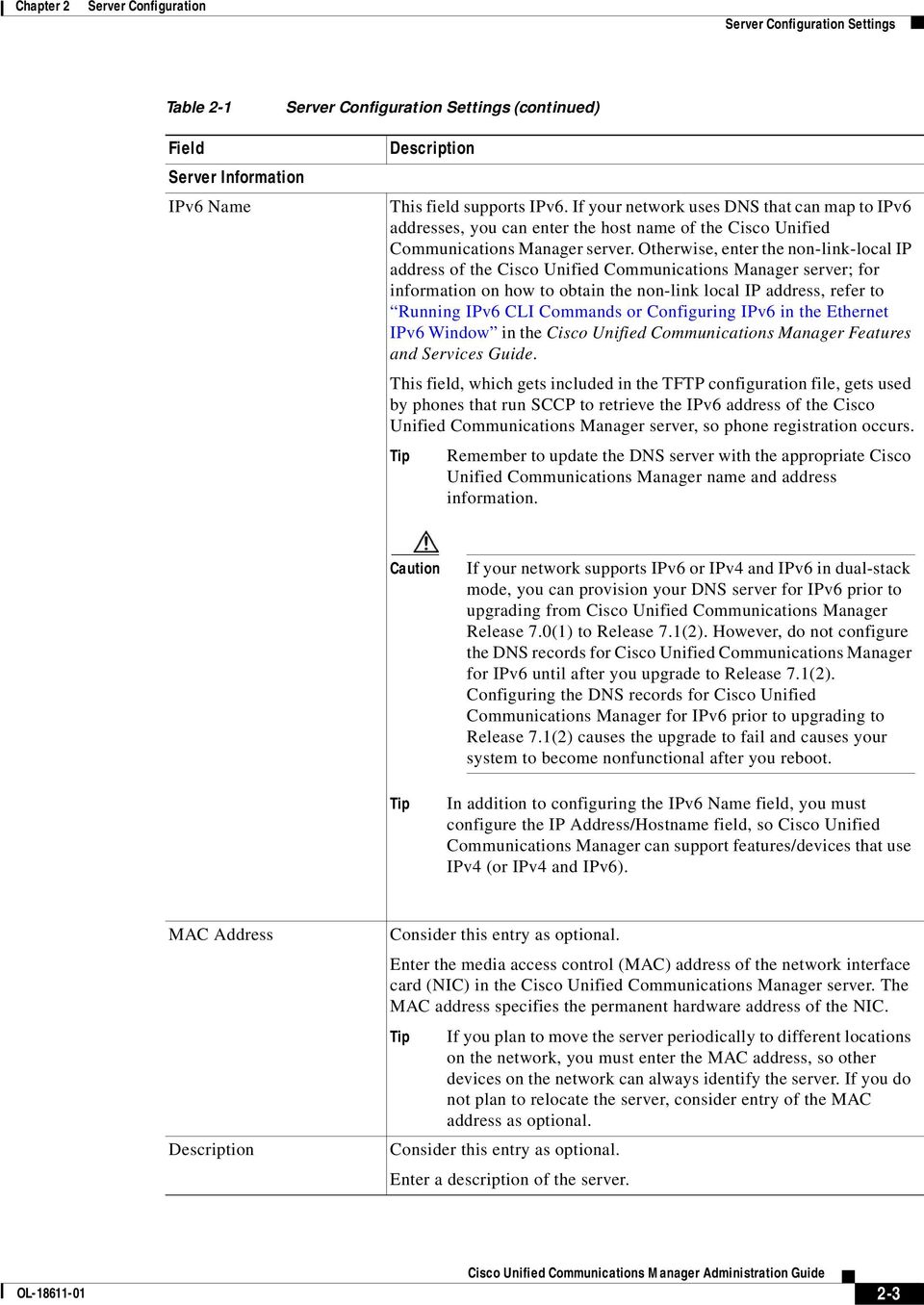
3 Chapter 2 Settings Table 2-1 Settings (continued) Field Server Information IPv6 Name Description This field supports IPv6. If your network uses DNS that can map to IPv6 addresses, you can enter the host name of the Cisco Unified Communications Manager server. Otherwise, enter the non-link-local IP address of the Cisco Unified Communications Manager server; for information on how to obtain the non-link local IP address, refer to Running IPv6 CLI Commands or Configuring IPv6 in the Ethernet IPv6 Window in the Cisco Unified Communications Manager Features and Services Guide. This field, which gets included in the TFTP configuration file, gets used by phones that run SCCP to retrieve the IPv6 address of the Cisco Unified Communications Manager server, so phone registration occurs. Remember to update the DNS server with the appropriate Cisco Unified Communications Manager name and address information. Caution If your network supports IPv6 or IPv4 and IPv6 in dual-stack mode, you can provision your DNS server for IPv6 prior to upgrading from Cisco Unified Communications Manager Release 7.0(1) to Release 7.1(2). However, do not configure the DNS records for Cisco Unified Communications Manager for IPv6 until after you upgrade to Release 7.1(2). Configuring the DNS records for Cisco Unified Communications Manager for IPv6 prior to upgrading to Release 7.1(2) causes the upgrade to fail and causes your system to become nonfunctional after you reboot. In addition to configuring the IPv6 Name field, you must configure the IP Address/Hostname field, so Cisco Unified Communications Manager can support features/devices that use IPv4 (or IPv4 and IPv6). MAC Address Description Consider this entry as optional. Enter the media access control (MAC) address of the network interface card (NIC) in the Cisco Unified Communications Manager server. The MAC address specifies the permanent hardware address of the NIC. If you plan to move the server periodically to different locations on the network, you must enter the MAC address, so other devices on the network can always identify the server. If you do not plan to relocate the server, consider entry of the MAC address as optional. Consider this entry as optional. Enter a description of the server. 2-3
4 Finding a Server Chapter 2 Finding a Server Because you might have several servers in your network, Cisco Unified Communications Manager lets you locate specific servers on the basis of specific criteria. Use the following procedure to locate servers. During your work in a browser session, the cookies on the client machine store your find/list search preferences. If you navigate to other menu items and return to this menu item, or if you close the browser and then reopen a new browser window, your Cisco Unified Communications Manager search preferences get retained until you modify your search. Procedure Step 1 Choose System > Server. The Find and List Servers window displays. Records from an active (prior) query may also display in the window. Step 2 To find all records in the database, ensure the dialog box is empty; go to Step 3. To filter or search records From the first drop-down list box, select a search parameter. From the second drop-down list box, select a search pattern. Specify the appropriate search text, if applicable. To add additional search criteria, click the + button. When you add criteria, the system searches for a record that matches all criteria that you specify. To remove criteria, click the button to remove the last added criterion or click the Clear Filter button to remove all added search criteria. Step 3 Click Find. All matching records display. You can change the number of items that display on each page by choosing a different value from the Rows per Page drop-down list box. You can delete multiple records from the database by checking the check boxes next to the appropriate record and clicking Delete Selected. You can delete all configurable records for this selection by clicking Select All and then clicking Delete Selected. Step 4 From the list of records that display, click the link for the record that you want to view. To reverse the sort order, click the up or down arrow, if available, in the list header. The window displays the item that you choose. Additional Information See the Related Topics section on page

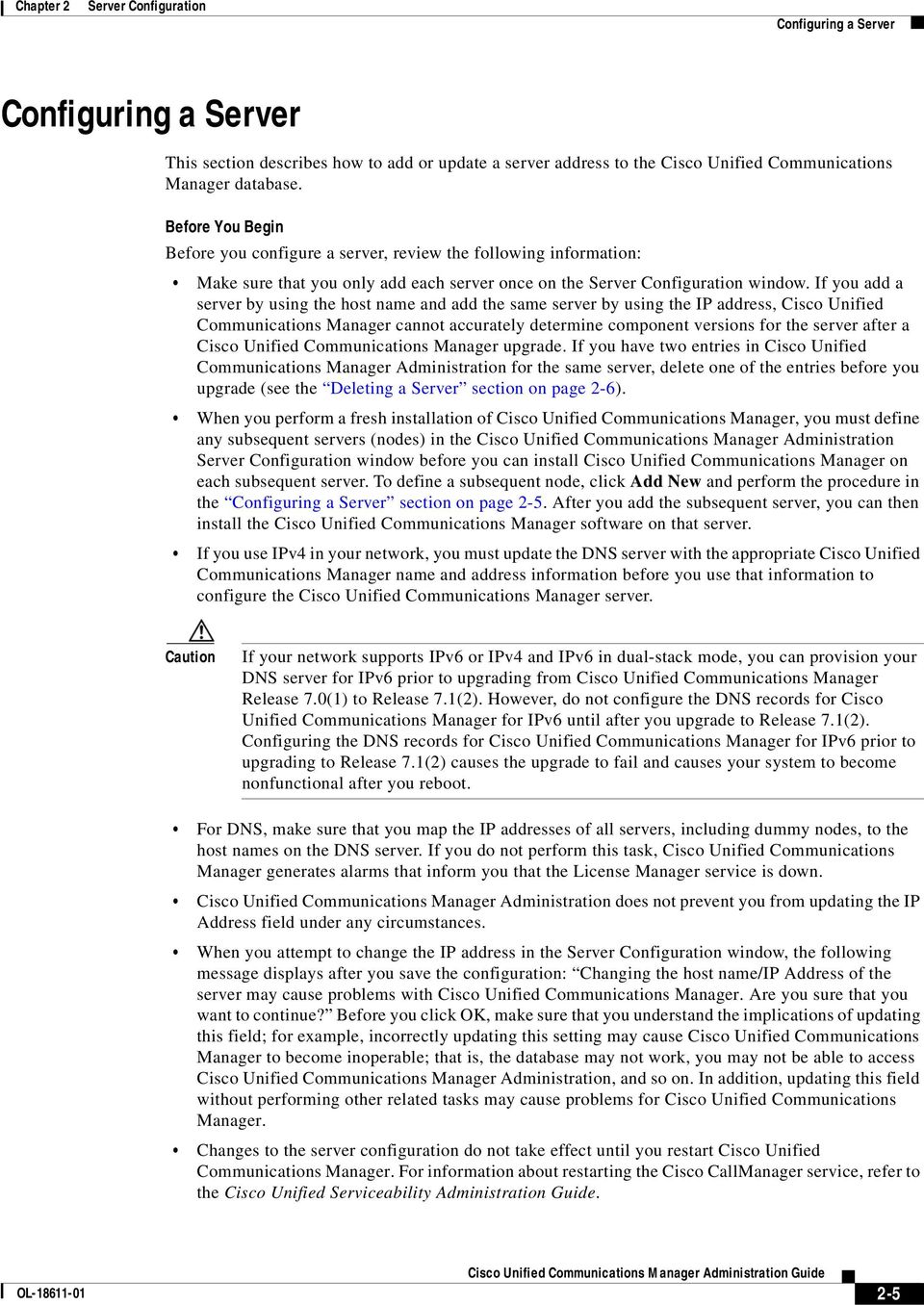
5 Chapter 2 Configuring a Server Configuring a Server This section describes how to add or update a server address to the Cisco Unified Communications Manager database. Before You Begin Before you configure a server, review the following information: Make sure that you only add each server once on the window. If you add a server by using the host name and add the same server by using the IP address, Cisco Unified Communications Manager cannot accurately determine component versions for the server after a Cisco Unified Communications Manager upgrade. If you have two entries in Cisco Unified Communications Manager Administration for the same server, delete one of the entries before you upgrade (see the Deleting a Server section on page 2-6). When you perform a fresh installation of Cisco Unified Communications Manager, you must define any subsequent servers (nodes) in the Cisco Unified Communications Manager Administration window before you can install Cisco Unified Communications Manager on each subsequent server. To define a subsequent node, click Add New and perform the procedure in the Configuring a Server section on page 2-5. After you add the subsequent server, you can then install the Cisco Unified Communications Manager software on that server. If you use IPv4 in your network, you must update the DNS server with the appropriate Cisco Unified Communications Manager name and address information before you use that information to configure the Cisco Unified Communications Manager server. Caution If your network supports IPv6 or IPv4 and IPv6 in dual-stack mode, you can provision your DNS server for IPv6 prior to upgrading from Cisco Unified Communications Manager Release 7.0(1) to Release 7.1(2). However, do not configure the DNS records for Cisco Unified Communications Manager for IPv6 until after you upgrade to Release 7.1(2). Configuring the DNS records for Cisco Unified Communications Manager for IPv6 prior to upgrading to Release 7.1(2) causes the upgrade to fail and causes your system to become nonfunctional after you reboot. For DNS, make sure that you map the IP addresses of all servers, including dummy nodes, to the host names on the DNS server. If you do not perform this task, Cisco Unified Communications Manager generates alarms that inform you that the License Manager service is down. Cisco Unified Communications Manager Administration does not prevent you from updating the IP Address field under any circumstances. When you attempt to change the IP address in the window, the following message displays after you save the configuration: Changing the host name/ip Address of the server may cause problems with Cisco Unified Communications Manager. Are you sure that you want to continue? Before you click OK, make sure that you understand the implications of updating this field; for example, incorrectly updating this setting may cause Cisco Unified Communications Manager to become inoperable; that is, the database may not work, you may not be able to access Cisco Unified Communications Manager Administration, and so on. In addition, updating this field without performing other related tasks may cause problems for Cisco Unified Communications Manager. Changes to the server configuration do not take effect until you restart Cisco Unified Communications Manager. For information about restarting the Cisco CallManager service, refer to the Cisco Unified Serviceability Administration Guide. 2-5
6 Deleting a Server Chapter 2 For additional information on changing the IP address or host name, refer to the document, Changing the IP Address and Host Name for Cisco Unified Communications Manager Release 7.1(2). Procedure Step 1 Perform one of the following tasks: To add a server, choose System > Server and click Add New. To update a server, find the server by using the procedure in the Finding a Server section on page 2-4. The window displays. Step 2 Enter the appropriate settings as described in Table 2-1. Step 3 To save the data and to add the server to the database, click the Save icon that displays in the tool bar in the upper, left corner of the window (or click the Save button that displays at the bottom of the window). Changes to the server configuration do not take effect until you restart Cisco Unified Communications Manager. For information about restarting the Cisco CallManager service, refer to the Cisco Unified Serviceability Administration Guide. Additional Information See the Related Topics section on page 2-8. Deleting a Server This section describes how to delete a server from the Cisco Unified Communications Manager database and how to add a deleted server back to the Cisco Unified Communications Manager cluster. Before You Begin In Cisco Unified Communications Manager Administration, you cannot delete the first node of the cluster, but you can delete subsequent nodes. Before you delete a subsequent node in the Find and List Servers window, Cisco Unified CM Administration displays the following message: You are about to permanently delete one or more servers. This action cannot be undone. Continue?. If you click OK, the server gets deleted from the Cisco Unified CM database and is not available for use. When you attempt to delete a server from the window, a message that is similar to the one in the preceding paragraph displays. If you click OK, the server gets deleted from the Cisco Unified CM database and is not available for use. Before you delete a server, consider the following information: Cisco Unified Communications Manager Administration does not allow you to delete the first node in the cluster, but you can delete any subsequent node. Cisco recommends that you do not delete any node that has Cisco Unified Communications Manager running on it, especially if the node has devices, such as phones, registered with it. Although dependency records exist for the subsequent nodes, the records do not prevent you from deleting the node. 2-6

7 Chapter 2 Deleting a Server If any call park numbers are configured for Cisco Unified Communications Manager on the node that is being deleted, the deletion fails. Before you can delete the node, you must delete the call park numbers in Cisco Unified Communications Manager Administration. If a configuration field in Cisco Unified Communications Manager Administration contains the IP address or host name for a server that you plan to delete, update the configuration before you delete the server. If you do not perform this task, features that rely on the configuration may not work after you delete the server; for example, if you enter the IP address or host name for a service parameter, enterprise parameter, service URL, directory URL, IP phone service, and so on, update this configuration before you delete the server. If an application GUI, for example, Cisco Unity, Cisco Unity Connection, and so on, contains the IP address or host name for the server that you plan to delete, update the configuration in the corresponding GUIs before you delete the server. If you do not perform this task, features that rely on the configuration may not work after you delete the server. The system may automatically delete some devices, such as MOH servers, when you delete a server. Before you delete a node, Cisco recommends that you deactivate the services that are active on the subsequent node. Performing this task ensures that the services work after you delete the node. Changes to the server configuration do not take effect until you restart Cisco Unified Communications Manager. For information on restarting the Cisco CallManager service, refer to Cisco Unified Serviceability Administration Guide. To ensure that database files get updated correctly, you must reboot the cluster after you delete a server. After you delete the node, access Cisco Unified Reporting to verify Cisco Unified Communications Manager removed the node from the cluster. In addition, access Cisco Unified Reporting, RTMT, or the CLI to verify that database replication is occurring between existing nodes; if necessary, repair database replication between the nodes by using the CLI. Procedure Step 1 Find the server by using the procedure in the Finding a Server section on page 2-4. Step 2 Step 3 From list of matching records, choose the server that you want to delete. Click the Delete Selected Item icon that displays in the tool bar in the upper, left corner of the window (or click the Delete Selected button that displays at the bottom of the window). If you delete a subsequent node (subscriber) from Cisco Unified Communications Manager Administration and you want to add it back to the cluster, perform the following procedure: Procedure for Adding a Deleted Server Back to the Cluster Step 1 In Cisco Unified Communications Manager Administration, add the server by choosing System > Server. Step 2 After you add the subsequent node to Cisco Unified Communications Manager Administration, perform an installation on the server by using the disk that Cisco provided in your software kit. 2-7

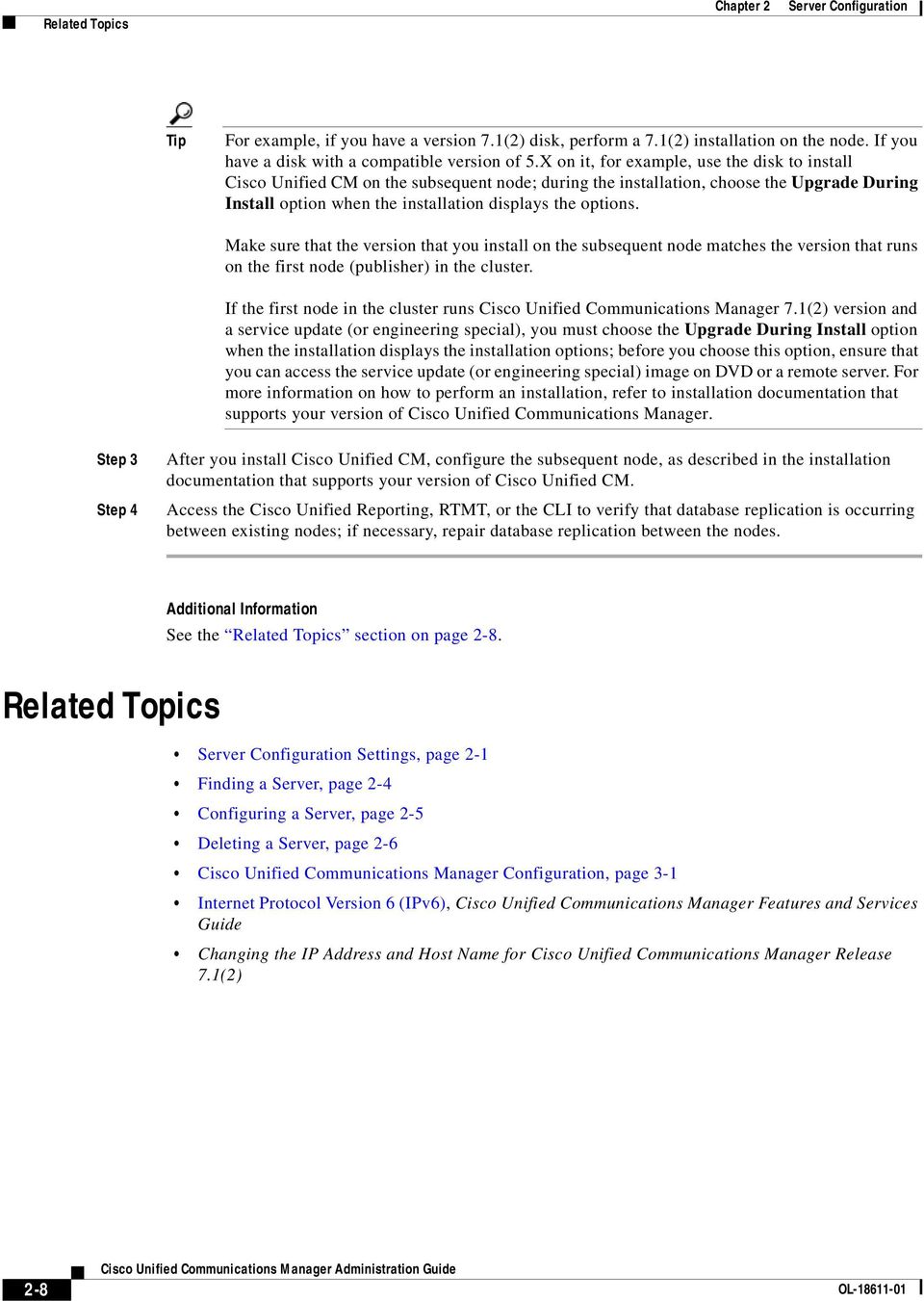
8 Related Topics Chapter 2 For example, if you have a version 7.1(2) disk, perform a 7.1(2) installation on the node. If you have a disk with a compatible version of 5.X on it, for example, use the disk to install Cisco Unified CM on the subsequent node; during the installation, choose the Upgrade During Install option when the installation displays the options. Make sure that the version that you install on the subsequent node matches the version that runs on the first node (publisher) in the cluster. If the first node in the cluster runs Cisco Unified Communications Manager 7.1(2) version and a service update (or engineering special), you must choose the Upgrade During Install option when the installation displays the installation options; before you choose this option, ensure that you can access the service update (or engineering special) image on DVD or a remote server. For more information on how to perform an installation, refer to installation documentation that supports your version of Cisco Unified Communications Manager. Step 3 Step 4 After you install Cisco Unified CM, configure the subsequent node, as described in the installation documentation that supports your version of Cisco Unified CM. Access the Cisco Unified Reporting, RTMT, or the CLI to verify that database replication is occurring between existing nodes; if necessary, repair database replication between the nodes. Additional Information See the Related Topics section on page 2-8. Related Topics Settings, page 2-1 Finding a Server, page 2-4 Configuring a Server, page 2-5 Deleting a Server, page 2-6 Cisco Unified Communications Manager Configuration, page 3-1 Internet Protocol Version 6 (IPv6), Cisco Unified Communications Manager Features and Services Guide Changing the IP Address and Host Name for Cisco Unified Communications Manager Release 7.1(2) 2-8
IP Phone Services Configuration
 CHAPTER 96 Using Cisco Unified Communications Manager Administration, you define and maintain the list of IP phone services to which users can subscribe at their site. IP phone services comprise XML applications
End User Configuration
 CHAPTER114 The window in Cisco Unified Communications Manager Administration allows the administrator to add, search, display, and maintain information about Cisco Unified Communications Manager end users.
Database Replication Error in Cisco Unified Communication Manager
 Database Replication Error in Cisco Unified Communication Manager Document ID: 100781 Contents Introduction Prerequisites Requirements Components Used Conventions Use Unifed Reports to Debug Replication
Disaster Recovery System Administration Guide for Cisco Unified Contact Center Express Release 8.5(1)
 Disaster Recovery System Administration Guide for Cisco Unified Contact Center Express Release 8.5(1) This guide provides an overview of the Disaster Recovery System, describes how to use the Disaster
Cisco Unified CM Disaster Recovery System
 Disaster Recovery System, page 1 Quick-Reference Tables for Backup and Restore s, page 3 Supported Features and Components, page 4 System Requirements, page 5 Log In to Disaster Recovery System, page 7
Administering Cisco ISE
 CHAPTER 8 This chapter describes the administrative activities for the Cisco Identity Services Engine (ISE) and how to perform them. The following topics are covered: Logging In, page 8-1 System Time and
IM and Presence Disaster Recovery System
 Disaster Recovery System, page 1 Access the Disaster Recovery System, page 2 Back up data in the Disaster Recovery System, page 3 Restore scenarios, page 9 Backup and restore history, page 15 Data authentication
Disaster Recovery System Administration Guide for Cisco Unified Contact Center Express Release 8.0(2)
 Disaster Recovery System Administration Guide for Cisco Unified Contact Center Express Release 8.0(2) This guide provides an overview of the Disaster Recovery System, describes how to use the Disaster
Intercluster Lookup Service
 When the (ILS) is configured on multiple clusters, ILS updates Cisco Unified Communications Manager with the current status of remote clusters in the ILS network. The ILS cluster discovery service allows
Viewing and Troubleshooting Perfmon Logs
 CHAPTER 7 To view perfmon logs, you can download the logs or view them locally. This chapter contains information on the following topics: Viewing Perfmon Log Files, page 7-1 Working with Troubleshooting
Disaster Recovery System Administration Guide for Cisco Unified Contact Center Express Release 8.5(1)
 Disaster Recovery System Administration Guide for Cisco Unified Contact Center Express Release 8.5(1) This guide provides an overview of the Disaster Recovery System, describes how to use the Disaster
Disaster Recovery System Administration Guide for Cisco Unified Communications Manager Release 8.5(1)
 Disaster Recovery System Administration Guide for Cisco Unified Communications Manager Release 8.5(1) Published: Decemer 02, 2010 This guide provides an overview of the Disaster Recovery System, describes
CLI Commands and Disaster Recovery System
 CLI Commands on Cisco Prime Collaboration Deployment, page 1 CLI Commands on Cisco Prime Collaboration Deployment The main functions of Cisco Prime Collaboration Deployment (such as creating migration,
Changing Your Cameleon Server IP
 1.1 Overview Technical Note Cameleon requires that you have a static IP address defined for the server PC the Cameleon server application runs on. Even if the server PC has a static IP address, you may
Only LDAP-synchronized users can access SAML SSO-enabled web applications. Local end users and applications users cannot access them.
 This chapter provides information about the Security Assertion Markup Language (SAML) Single Sign-On feature, which allows administrative users to access certain Cisco Unified Communications Manager and
Configure Cisco Unified Customer Voice Portal
 Cisco Unified Customer Voice Portal Configuration, page 1 Configure Gateways, page 1 Transfer Unified CVP Scripts and Media Files, page 2 Unified Customer Voice Portal Licenses, page 2 Configure SNMP,
Lab - Using Wireshark to View Network Traffic
 Topology Objectives Part 1: (Optional) Download and Install Wireshark Part 2: Capture and Analyze Local ICMP Data in Wireshark Start and stop data capture of ping traffic to local hosts. Locate the IP
How To Backup In Cisco Uk Central And Cisco Cusd (Cisco) Cusm (Custodian) (Cusd) (Uk) (Usd).Com) (Ucs) (Cyse
 This chapter includes the following sections: Backup and Import in Cisco UCS Central, page 1 Backing up and Restoring Cisco UCS Central, page 4 Backing up and Restoring Cisco UCS Domains, page 8 Import
Configuring Cisco CallManager IP Phones to Work With IP Phone Agent
 Configuring Cisco CallManager IP Phones to Work With IP Phone Agent Document ID: 40564 Contents Introduction Prerequisites Requirements Components Used Conventions Configuration Procedures in Cisco CallManager
In This Issue: Excel Sorting with Text and Numbers
 In This Issue: Sorting with Text and Numbers Microsoft allows you to manipulate the data you have in your spreadsheet by using the sort and filter feature. Sorting is performed on a list that contains
Troubleshooting. System History Log. System History Log Overview CHAPTER
 CHAPTER 10 This section provides you will tools to help you to troubleshoot the Cisco Intercompany Media Engine server. For more information on troubleshooting the Cisco Intercompany Media Engine feature,
IM and Presence Service Network Setup
 Configuration changes and service restart notifications, page 1 DNS Domain Configuration, page 2 IM and Presence Service Default Domain Configuration, page 6 IM Address Configuration, page 7 Domain Management
Configuring Network Load Balancing with Cerberus FTP Server
 Configuring Network Load Balancing with Cerberus FTP Server May 2016 Version 1.0 1 Introduction Purpose This guide will discuss how to install and configure Network Load Balancing on Windows Server 2012
Configuring Trend Micro Content Security
 9 CHAPTER This chapter describes how to configure the CSC SSM using the CSC Setup Wizard in ASDM and the CSC SSM GUI, and includes the following sections: Information About the CSC SSM, page 9-1 Licensing
shortcut Tap into learning NOW! Visit www.informit.com/shortcuts for a complete list of Short Cuts. Your Short Cut to Knowledge
 shortcut Your Short Cut to Knowledge The following is an excerpt from a Short Cut published by one of the Pearson Education imprints. Short Cuts are short, concise, PDF documents designed specifically
Dial Up Config & Connecting Instructions with Graphics
 Dial Up Config & Connecting Instructions with Graphics Dial Up Config & Connecting Below are the Basic Manual Configurations Connecting to the Internet for the following operating systems: Windows 2000
Registering with Cisco UCM
 FLX VoIP Registering with Cisco UCM Date: May 15 th, 2012 This technical note gives a detailed description on how to register a Revolabs FLX conference phone with a Cisco Unified Communications Manager
Cisco Unified Communications Manager 5.1 SIP Configuration Guide
 Valcom Session Initiation Protocol (SIP) VIP devices are compatible with Cisco Unified Communications Manager (formerly Cisco Unified CallManager) (SIP enabled versions). The Valcom device is added to
Install MS SQL Server 2012 Express Edition
 Install MS SQL Server 2012 Express Edition Sohodox now works with SQL Server Express Edition. Earlier versions of Sohodox created and used a MS Access based database for storing indexing data and other
Disaster Recovery System Administration Guide for Cisco Unified Communications Manager and IM & Presence Service, Release 9.1(1)
 Disaster Recovery System Administration Guide for Cisco Unified Communications Manager and IM & Presence First Published: December 20, 2012 Americas Headquarters Cisco Systems, Inc. 170 West Tasman Drive
Configure Cisco Emergency Responder Disaster Recovery System
 Configure Cisco Emergency Responder Disaster Recovery System Disaster Recovery System overview, page 1 Backup and restore procedures, page 2 Supported features and components, page 4 System requirements,
Ad Hoc Conferencing. Command or Action Step 1
 Overview, page 1 Task Flow, page 1 Conference Interactions and Restrictions, page 9 Overview Ad Hoc conferences allow the conference controller (or in some cases, another participant) to add participants
MiaRec. Cisco Built-in-Bridge Recording Interface Configuration Guide. Revision 1.2 (2015-10-06)
 Cisco Built-in-Bridge Recording Interface Configuration Guide Revision 1.2 (2015-10-06) Table of Contents 1 Overview... 3 1.1 Purpose... 3 2 Architecture... 4 3 Requirements... 5 4 Identify Phones that
Cisco Unified Communications Manager SIP Trunk Configuration Guide
 Valcom PagePro SIP (Session Initiation Protocol) Paging Servers, models VIP-201 and VIP-204, are compatible with Cisco Unified Communications Manager as either a Third-party SIP Device (Basic or Advanced)
CISCO UNIFIED COMMUNICATIONS MANAGER
 CISCO UNIFIED COMMUNICATIONS MANAGER V10 UPDATED TOPICS LOCAL ROUTE GROUP ENHANCEMENT Multiple Local Route Groups can be associated with Route Groups for Emergency Dialing. In releases 8 and 9, administrators
Unity Error Message: Your voicemail box is almost full
 Unity Error Message: Your voicemail box is almost full Document ID: 111781 Contents Introduction Prerequisites Requirements Components Used Conventions Problem Solution Delete Voice Mail Messages from
User Manual. Onsight Management Suite Version 5.1. Another Innovation by Librestream
 User Manual Onsight Management Suite Version 5.1 Another Innovation by Librestream Doc #: 400075-06 May 2012 Information in this document is subject to change without notice. Reproduction in any manner
Disaster Recovery System Administration Guide for Cisco Unified Communications Manager, Release 9.0(1)
 Disaster Recovery System Administration Guide for Cisco Unified Communications Manager, Release 9.0(1) First Published: July 18, 2012 Last Modified: July 18, 2012 Americas Headquarters Cisco Systems, Inc.
Disaster Recovery System Administration Guide for Cisco Unity Connection Release 10.x
 Disaster Recovery System Administration Guide for Cisco Unity Connection Release 10.x Published November, 2013 This guide provides an overview of the Disaster Recovery System, describes how to use the
64-Bit Compatibility with Micromeritics Applications
 Tech Tip 7 64-Bit Compatibility with Micromeritics Applications Micromeritics products are designed to operate in most Microsoft Windows environments. However, more current versions of Microsoft Windows,
Cisco Prime Collaboration Deployment Administration Guide, Release 10.5(1)
 Cisco Prime Collaboration Deployment Administration Guide, Release 10.5(1) First Published: May 07, 2014 Americas Headquarters Cisco Systems, Inc. 170 West Tasman Drive San Jose, CA 95134-1706 USA http://www.cisco.com
Using ELM Reports in WhatsUp Gold. This guide provides information about configuring ELM reports in WhatsUp Gold v15.0
 Using ELM Reports in WhatsUp Gold This guide provides information about configuring ELM reports in WhatsUp Gold v15.0 Using Event Log Management (ELM) Reports in WhatsUp Gold In This Chapter Event Log
Connecting to the Internet
 Connecting to the Internet Connecting the Gateway to the Internet Configuration of TCP/IP Protocol Installing the USB Drivers Connecting Ethernet Network Devices Connecting USB Network Devices Connecting
Fixing Problems with IP Phone Services
 Fixing s with IP Phone Services Document ID: 13959 Contents Introduction Prerequisites Requirements Components Used Conventions Change the URL Services in Cisco CallManager Reset the TFTP Server Reset
Cisco Unified Communications Manager 7.1 SIP Configuration Guide
 Valcom Session Initiation Protocol (SIP) VIP devices are compatible with Cisco Unified Communications Manager (formerly Cisco Unified CallManager) (SIP enabled versions). The Valcom device is added to
Tool for Automated Provisioning System (TAPS) Version 1.2 (1027)
 Tool for Automated Provisioning System (TAPS) Version 1.2 (1027) 2015 VoIP Integration Rev. July 24, 2015 Table of Contents Product Overview... 3 Application Requirements... 3 Cisco Unified Communications
Practice Fusion API Client Installation Guide for Windows
 Practice Fusion API Client Installation Guide for Windows Quickly and easily connect your Results Information System with Practice Fusion s Electronic Health Record (EHR) System Table of Contents Introduction
Using Remote Desktop with the Cisco AnyConnect VPN Client in Windows Vista
 Using Remote Desktop with the Cisco AnyConnect VPN Client in Windows Vista 1. In order to use Remote Desktop and the VPN client, users must first complete the Blackboard Remote Users training course and
Changing the IP Address and Hostname for Cisco Unified Communications Manager, Release 9.1 (1)
 Changing the IP Address and Hostname for Cisco Unified Communications Manager, Release 9.1 (1) Published: December 20, 2012 This document provides the steps to change the IP address or hostname on a Cisco
Disaster Recovery System Administration Guide for Cisco Unified Communications Manager, Release 10.0(1)
 Disaster Recovery System Administration Guide for Cisco Unified Communications Manager, Release 10.0(1) First Published: December 03, 2013 Americas Headquarters Cisco Systems, Inc. 170 West Tasman Drive
Setup Cisco Call Manager on VMware
 created by: Rainer Bemsel Version 1.0 Dated: July/09/2011 The purpose of this document is to provide the necessary steps to setup a Cisco Call Manager to run on VMware. I ve been researching for a while
Honeywell Internet Connection Module
 Honeywell Internet Connection Module Setup Guide Version 1.0 - Page 1 of 18 - ICM Setup Guide Technical Support Setup - Guide Table of Contents Introduction... 3 Network Setup and Configuration... 4 Setting
Qvis Security Technical Support Field Manual LX Series
 Table of Contents Page 1: Motion Detection 1.0 Configuring Motion Detection for LX Apollo / LX Zeus DVRs 2 1.1 Motion Playback on LX Apollo / LX Zeus DVRs 3 1.2 Scheduling Motion and Continuous Recording
Installing and Using the vnios Trial
 Installing and Using the vnios Trial The vnios Trial is a software package designed for efficient evaluation of the Infoblox vnios appliance platform. Providing the complete suite of DNS, DHCP and IPAM
Browser Settings for Optimal Site Performance
 1 Browser Settings for Optimal Site Performance With the constant upgrades to browsers and to City National s systems, an occasional problem may develop with your browser and our program compatibility.
Managing Software and Configurations
 55 CHAPTER This chapter describes how to manage the ASASM software and configurations and includes the following sections: Saving the Running Configuration to a TFTP Server, page 55-1 Managing Files, page
Administrator s Guide for the Polycom Video Control Application (VCA)
 Administrator s Guide for the Polycom Video Control Application (VCA) Version 1.1 November 2007 Edition 3725-26448-004/A Trademark Information Polycom and the Polycom logo design are registered trademarks
Deploying Windows Streaming Media Servers NLB Cluster and metasan
 Deploying Windows Streaming Media Servers NLB Cluster and metasan Introduction...................................................... 2 Objectives.......................................................
Networking Guide Redwood Manager 3.0 August 2013
 Networking Guide Redwood Manager 3.0 August 2013 Table of Contents 1 Introduction... 3 1.1 IP Addresses... 3 1.1.1 Static vs. DHCP... 3 1.2 Required Ports... 4 2 Adding the Redwood Engine to the Network...
HYPERLINK Internet PC setup guide. HYPERLINK Internet support helpdesk at 1-866-302-5525.
 HYPERLINK Internet support helpdesk at 1-866-302-5525. Congratulations on your new residence and welcome to HYPERLINK Internet service. In a few short moments you will be connected to one of the fastest
NSi Mobile Installation Guide. Version 6.2
 NSi Mobile Installation Guide Version 6.2 Revision History Version Date 1.0 October 2, 2012 2.0 September 18, 2013 2 CONTENTS TABLE OF CONTENTS PREFACE... 5 Purpose of this Document... 5 Version Compatibility...
Security certificate management
 The operating system security options enable you to manage security certificates in these two ways: Certificate Management Manages certificates, Certificate Trust Lists (CTL), and Certificate Signing Requests
Maintaining the Content Server
 CHAPTER 7 This chapter includes the following Content Server maintenance procedures: Backing Up the Content Server, page 7-1 Restoring Files, page 7-3 Upgrading the Content Server, page 7-5 Shutting Down
Pre-Change Tasks and System Health Checks
 Pre-Change Task List for Cisco Unified Communications Manager Nodes, page 1 Pre-Change Task List for IM and Presence Service Nodes, page 2 System Health Checks, page 4 Pre-Change Setup, page 6 Pre-Change
AT-UWC Wireless LAN Controller. Installation Guide. Software Version
 Software Version Installation Guide This Installation Guide is an introductory guide to help you start the software-based AT-UWC Wireless LAN Controller. It describes how to run the AT-UWC-Install program
User guide. Business Email
 User guide Business Email June 2013 Contents Introduction 3 Logging on to the UC Management Centre User Interface 3 Exchange User Summary 4 Downloading Outlook 5 Outlook Configuration 6 Configuring Outlook
Increased operational efficiency by providing customers the ability to: Use staff resources more efficiently by reducing troubleshooting time.
 , page 1 This chapter provides an overview of the Cisco Cisco Unified Communications Manager service and describes how to configure the Cisco Cisco Unified Communications Manager feature. The feature allows
TMS Phone Books Troubleshoot Guide
 TMS Phone Books Troubleshoot Guide Document ID: 118705 Contributed by Adam Wamsley and Magnus Ohm, Cisco TAC Engineers. Jan 05, 2015 Contents Introduction Prerequisites Requirements Components Used Related
STATIC IP SET UP GUIDE
 STATIC IP SET UP GUIDE VERIZON D-LINK 2750B & ACTIONTEC GT784 WNV WIRELESS GATEWAY Verizon High Speed Internet for Business Verizon High Speed Internet for Business YOUR NEW STATIC IP CONNECTION AND SET
Dell OpenManage Mobile Version 1.4 User s Guide (Android)
 Dell OpenManage Mobile Version 1.4 User s Guide (Android) Notes, cautions, and warnings NOTE: A NOTE indicates important information that helps you make better use of your computer. CAUTION: A CAUTION
NComputing vspace Server 8.3 for Windows. Software and Firmware Upgrade Guide. Document version 1.2
 NComputing vspace Server 8.3 for Windows Software and Firmware Upgrade Guide Document version 1.2 October 20, 2015 Table of contents 1. Introduction... 4 1.1. Purpose of the document... 4 1.2. Intended
How To Restore Your Data On A Backup By Mozy (Windows) On A Pc Or Macbook Or Macintosh (Windows 2) On Your Computer Or Mac) On An Pc Or Ipad (Windows 3) On Pc Or Pc Or Micro
 Online Backup by Mozy Restore Common Questions Document Revision Date: June 29, 2012 Online Backup by Mozy Common Questions 1 How do I restore my data? There are five ways of restoring your data: 1) Performing
Novell ZENworks Asset Management 7.5
 Novell ZENworks Asset Management 7.5 w w w. n o v e l l. c o m October 2006 USING THE WEB CONSOLE Table Of Contents Getting Started with ZENworks Asset Management Web Console... 1 How to Get Started...
How To Configure A Cisco Unified Ip Phone On A Cnet Box On A Microsoft Powerbook 2.5 (Powerbook) On A Mini Ip Phone (Mini Ip) On An Ip Phone With A Mini Cell Phone (Microsoft Power
 CHAPTER 2 Configuring the Cisco Unified IP Phone for MIDlets Revised: January 2012, Contents This chapter describes how to configure and manage the Cisco Unified IP Phone and the Enhanced Phone User Interface
Managing Identities and Admin Access
 CHAPTER 4 This chapter describes how Cisco Identity Services Engine (ISE) manages its network identities and access to its resources using role-based access control policies, permissions, and settings.
IP phone services setup
 IP phone services setup This chapter provides information to configure IP phone services. About IP phone service setup, page 1 IP phone service deletion, page 2 IP phone service settings, page 3 IP phone
Troubleshooting Failover in Cisco Unity 8.x
 CHAPTER 16 Troubleshooting Failover in Cisco Unity 8.x This chapter describes methods for troubleshooting Cisco Unity failover. See the following sections: Failover Configuration Wizard Does Not Finish
Optimal Browser Settings for Internet Explorer Running on Microsoft Windows
 Optimal Browser Settings for Internet Explorer Running on Microsoft Windows If you have Internet Explorer 7 or 8: Each time you log in to our web site, it evaluates whether you are using the same computer
IM and Presence Service Network Setup
 Configuration changes and service restart notifications, page 1 Domain Value Configuration, page 2 Routing Information Configuration on IM and Presence Service, page 3 Configure Proxy Server Settings,
USING THE DNS/DHCP ADMINISTRATIVE INTERFACE Last Updated: 2012-3-5
 USING THE DNS/DHCP ADMINISTRATIVE INTERFACE TABLE OF CONTENTS When is registration needed? What about the zoned network?... 3 What about guests?... 3 Explaining split horizon DNS... 3 Accessing the DNS/DHCP
BusinessObjects Enterprise XI Release 2
 BusinessObjects Enterprise XI Release 2 How to configure an Internet Information Services server as a front end to a WebLogic application server Overview Contents This document describes the process of
This section describes how to set up, find and delete community strings.
 SNMP V1/V2c setup SNMP community strings, page 1 SNMP notification destinations, page 4 SNMP community strings Set up community string This section describes how to set up, find and delete community strings.
January 9, 2014. Xerox Global Print Driver Installation Guide
 January 9, 2014 Xerox Global Print Driver Installation Guide 2010-2014 Xerox Corporation. All Rights Reserved. Xerox, Xerox and Design, WorkCentre, Global Print Driver, and Mobile Express Driver are trademarks
VOIP-500 Series Phone CUCM 8.0.3a Integration Guide
 I. Introduction This provides general instructions for integration of the VOIP-500 Series Phone with a Cisco Call Manager installation. It is recommended to read this instruction set completely before
Step-by-Step Setup Guide Wireless File Transmitter FTP Mode
 EOS Step-by-Step Setup Guide Wireless File Transmitter FTP Mode Infrastructure & Ad Hoc Networks Mac OS X 10.5-10.6 2012 Canon U.S.A., Inc. All Rights Reserved. Reproduction in whole or in part without
Step-by-Step Setup Guide Wireless File Transmitter
 EOS Step-by-Step Setup Guide Wireless File Transmitter Server Mode Infrastructure & Ad Hoc Networks Macintosh OS X 10.5-10.6 2012 Canon U.S.A., Inc. All Rights Reserved. Reproduction in whole or in part
SNMP Web Management. User s Manual For SNMP Web Card/Box
 SNMP Web Management User s Manual For SNMP Web Card/Box Management Software for Off-Grid Inverter Version: 1.2 Table of Contents 1. Overview... 1 1.1 Introduction... 1 1.2 Features... 1 1.3 Overlook...
EXPRESSCLUSTER X for Windows Quick Start Guide for Microsoft SQL Server 2014. Version 1
 EXPRESSCLUSTER X for Windows Quick Start Guide for Microsoft SQL Server 2014 Version 1 NEC EXPRESSCLUSTER X 3.x for Windows SQL Server 2014 Quick Start Guide Document Number ECX-MSSQL2014-QSG, Version
Avaya Modular Messaging Microsoft Outlook Client Release 5.2
 Avaya Modular Messaging Microsoft Outlook Client Release 5.2 Important: Instructions in this guide are applicable only if your message store is the Avaya Message Storage Server (MSS) or Microsoft Exchange
User Guide. SysMan Utilities. By Sysgem AG
 SysMan Utilities User Guide By Sysgem AG Sysgem is a trademark of Sysgem AG. Other brands and products are registered trademarks of their respective holders. 2013 Sysgem AG, Lavaterstr. 45, CH-8002 Zürich,
Configuring Spectralink IP-DECT Server 400/6500 and DECT Server 2500/8000 for Cisco Unified Call Manager
 Configuring Spectralink IP-DECT Server 400/6500 and DECT Server 2500/8000 for Cisco Unified Call Manager Contents Introduction... 2 IP-DECT Server... 2 Licensing... 2 SIP Settings... 3 Feature Codes...
Hallpass Instructions for Connecting to Mac with a Mac
 Hallpass Instructions for Connecting to Mac with a Mac The following instructions explain how to enable screen sharing with your Macintosh computer using another Macintosh computer. Note: You must leave
MyReports Recommended Browser Settings MYR-200a
 MyReports Recommended Browser Settings MYR-200a Note: If you have installed an additional Tool Bar on your browser, such as Yahoo Tool Bar or Google Tool Bar, be sure that it is also configured to allow
ECAT SWE Exchange Customer Administration Tool Web Interface User Guide Version 6.7
 ECAT SWE Exchange Customer Administration Tool SWE - Exchange Customer Administration Tool (ECAT) Table of Contents About this Guide... 3 Audience and Purpose... 3 What is in this Guide?... 3 CA.mail Website...
Preparing the Computers for TCP/IP Networking
 Configuration Preparing the Computers for TCP/IP Networking Configuring Windows 98, and ME for TCP/IP Networking Verifying TCP/IP Properties Configuring Windows 2000 or XP for IP Networking Install or
Managing Contacts in Outlook
 Managing Contacts in Outlook This document provides instructions for creating contacts and distribution lists in Microsoft Outlook 2007. In addition, instructions for using contacts in a Microsoft Word
Installing, Uninstalling, and Upgrading Service Monitor
 CHAPTER 2 Installing, Uninstalling, and Upgrading Service Monitor This section contains the following topics: Preparing to Install Service Monitor, page 2-1 Installing Cisco Unified Service Monitor, page
Moving Exchange Message Stores and Transaction Logs to an Alternate Drive
 Moving Exchange Message Stores and Transaction Logs to an Alternate Drive Document ID: 26520 Contents Introduction Prerequisites Requirements Components Used Conventions Problem Solutions Exchange 5.5
Adding Traffic Sources to a Monitoring Session, page 7 Activating a Traffic Monitoring Session, page 8 Deleting a Traffic Monitoring Session, page 9
 This chapter includes the following sections: Traffic Monitoring, page 1 Guidelines and Recommendations for Traffic Monitoring, page 2 Creating an Ethernet Traffic Monitoring Session, page 3 Setting the
STATISTICA VERSION 10 STATISTICA ENTERPRISE SERVER INSTALLATION INSTRUCTIONS
 Notes: STATISTICA VERSION 10 STATISTICA ENTERPRISE SERVER INSTALLATION INSTRUCTIONS 1. The installation of the STATISTICA Enterprise Server entails two parts: a) a server installation, and b) workstation