
Autodesk Navisworks Supported File Formats & Applications
|
|
|
- Winifred Wheeler
- 9 years ago
- Views:
Transcription
1 Autodesk Navisworks 2011 Supported File s & Applications

2 This document details support provided by the current release of Autodesk Navisworks 2011 solutions (including Autodesk Navisworks Simulate and Autodesk Navisworks Manage) for: CAD file formats. Laser scan formats. CAD applications. Scheduling software. NOTE: When referring to Navisworks or Autodesk Navisworks 2011 solutions in this document this does NOT include Autodesk Navisworks Freedom 2011, which only reads NWD or 3D DWF files. Product release version: 2011 Document version: 1.0 February Autodesk, Inc. All rights reserved. Except as otherwise permitted by Autodesk, Inc., this publication, or parts thereof, may not be reproduced in any form, by any method, for any purpose. Autodesk, AutoCAD, Civil 3D, DWF, DWG, DXF, Inventor, Maya, Navisworks, Revit, and 3ds Max are registered trademarks or trademarks of Autodesk, Inc., in the USA and other countries. All other brand names, product names, or trademarks belong to their respective holders. Autodesk reserves the right to alter product offerings and specifications at any time without notice, and is not responsible for typographical or graphical errors that may appear in this document. Disclaimer Certain information included in this publication is based on technical information provided by third parties. THIS PUBLICATION AND THE INFORMATION CONTAINED HEREIN IS MADE AVAILABLE BY AUTODESK, INC. AS IS. AUTODESK, INC. DISCLAIMS ALL WARRANTIES, EITHER EXPRESS OR IMPLIED, INCLUDING BUT NOT LIMITED TO ANY IMPLIED WARRANTIES OF MERCHANTABILITY OR FITNESS FOR A PARTICULAR PURPOSE REGARDING THESE MATERIALS.

3 Contents Supported CAD File s... 7 Supported Laser Scan s... 8 Supported Applications... 9 Autodesk... 9 AutoCAD 2004 to ADT 2004 to 2007, AutoCAD Architecture Building Systems , AutoCAD MEP Autodesk Plant 3D Autodesk Inventor 5 to 11, AutoCAD Civil 3D MDT 8 to Revit 4 to Revit Building 8.1 to 9.1, Revit Architecture Revit Structure 2 to 4, Revit Systems, MEP Autodesk 3ds Max 5 to Autodesk VIZ 4 to Autodesk Maya Bentley AutoPLANT MicroStation SE MicroStation J MicroStation v8 to 8.5, XM (8.9) ProSteel 3D (formerly from Kiwi Software GmbH) TriForma J TriForma v8 to Graphisoft ArchiCAD 8 to Constructor 2005 to AceCad StruCad... 18

4 auto.des.sys form.z AEC CADPIPE AVEVA PDMS CADopia IntelliCAD CEA Technology Plant-4D COADE, Inc CADWorx Plant CADWorx Pipe CADWorx Steel COINS BSLink Framing CSC D Dassault Systemes CATIA Google SketchUp (up to v6) Hannappel SOFTWARE GmbH elcocad R Intergraph PDS Informatix MicroGDS ITandFactory CADISON TRICAD MS Kubotek USA... 24

5 CADKEY M.A.P CAD-Duct McNeel North America Rhino Mensch und Maschine RoCAD MultiSUITE MultiSTEEL Nemetschek Allplan PROCAD DSMART PTC Pro/ENGINEER CADDS QuickPen PipeDesigner 3D DuctDesigner 3D RAM International CADstudio SolidWorks SolidWorks Tekla Tekla Structures Xsteel think thinkdesign UGS I-deas Solid Edge NX (Unigraphics) FactoryCAD... 30

6 UHP Process Piping FabPro Pipe x-plant x-plant Supported Scheduling Software... 32

7 Supported CAD File s Navisworks has its own native file formats (.nwd,.nwf,.nwc); however Autodesk Navisworks solutions can additionally read a combination of many popular 3D CAD formats. The following table lists the CAD file formats currently supported by Autodesk Navisworks 2011 solutions. Extension Extension Navisworks.nwd.nwf.nwc Inventor.ipt.iam. ipj AutoCAD.dwg,.dxf Informatix MicroGDS.man.cv7 MicroStation (SE, J, V8 & XM).dgn.prp.prw JT Open 1.jt 3D Studio.3ds.prj PDS Design Review.dri ACIS SAT.sat.sab Parasolids.x_b CIS/2.stp RVM.rvm DWF.dwf SketchUp.skp FBX.fbx STEP.stp.step IFC.ifc STL.stl IGES.igs.iges VRML.wrl.wrz 1 JT Open support to JT Open specification v8.1 rev B. Supported CAD File s 7

8 Supported Laser Scan s The following table lists the laser scan formats currently supported by Autodesk Navisworks 2011 solutions. Extension ASCII Laser File.asc.txt Faro.fls.fws.iQscan.iQmod.iQwsp Leica.pts.ptx Riegl.3dd Trimble file NOT supported. Convert to ASCII laser file Z+F.zfc.zfs Supported Laser Scan s 8

9 Supported Applications The following table is a non-exhaustive list of CAD applications and properties currently supported by Autodesk Navisworks 2011 solutions, along with any additional information that may be necessary to review your project files in Navisworks software. Autodesk AutoCAD 2004 to 2011 AutoCAD Details DXF, 3DS Navisworks reads the native AutoCAD.dwg file format. Navisworks supports AutoCAD Point Cloud. Models can be exported from AutoCAD software as either.nwc or.nwd format. Object properties, (such as Material Colors and Entity Handles) are also supported by Navisworks and these can be viewed in the '' window. To open the window, go to View > Control Bars >. ADT 2004 to 2007, AutoCAD Architecture AutoCAD Architecture Details DXF, 3DS Navisworks can read AutoCAD Architecture.dwg files, without the necessity to install an Object Enabler. Models can be exported from ADT/AutoCAD Architecture software as either.nwc or.nwd format. Navisworks supports AutoCAD Architecture object properties and these can be viewed in the '' window. To open the window, go to View > Control Bars >. Automatic are also supported for AutoCAD Architecture. Autodesk Navisworks Simulate and Autodesk Navisworks Manage software support ADT/AutoCAD Architecture textures. Building Systems , AutoCAD MEP AutoCAD MEP Details DXF, 3DS Navisworks can read AutoCAD MEP dwg files, without the necessity to install an Object Enabler. Supported Applications 9

10 Models can be exported from Building Systems/AutoCAD MEP software as either.nwc or.nwd format. In order to read a Building Systems 2007 or AutoCAD MEP dwg file into Navisworks, you will need to install the corresponding Object Enabler. NOTE: When using an object enabler, ensure the corresponding loader version (year) is selected in Tools > Global Options > File Readers > DWG/DXF > DWG Loader Version. Navisworks supports Building Systems/AutoCAD MEP object properties and these can be viewed in the '' window. To open the window, go to View > Control Bars >. Autodesk Navisworks Simulate and Autodesk Navisworks Manage software support Building Systems/AutoCAD MEP textures. Autodesk Plant 3D Autodesk Plant 3D Details DXF, 3DS Models can be exported from Plant 3D software as either.nwc or.nwd format. In order to read an Autodesk Plant 3D dwg file into Navisworks, you will need to install the corresponding Object Enabler. NOTE: When using an object enabler, ensure the corresponding loader version (year) is selected in Tools > Global Options > File Readers > DWG/DXF > DWG Loader Version. Autodesk Inventor 5 to 11, Inventor Details IGES, STEP, JT Navisworks 2011 now supports Inventor properties and these can be viewed in the '' window. To open the window, go to View > Control Bars >. In order to read an Inventor software file into Navisworks, you either need Inventor 5 (or higher), Inventor Design Tracking 5 (or higher), or Inventor View installed on the same machine as Navisworks (you ll need to install either the same or later version relevant to the file you wish to read). Inventor View can be downloaded from support.autodesk.com. If you are using an Inventor Project file, (*.ipj) you will need to set this as the Active Project in Navisworks, prior to opening your assembly drawings (*.iam). You can set the Active Project either by opening your *.ipj file in Navisworks, or by going to Tools > Global Options > File s > Inventor, then enter the full path and file name of your *.ipj file (e.g. C:\my Inventor projects\project 1.ipj). Once loaded, you can then Open the corresponding assembly drawing(s) as usual. Supported Applications 10

11 AutoCAD Civil 3D Civil 3D Details DXF, 3DS Navisworks supports AutoCAD Point Cloud. The Civil 3D native.dwg file can be read directly into Navisworks; however you will need to install the Civil 3D Object Enabler (available to download from the Autodesk website). NOTE: When using an object enabler, ensure the corresponding loader version (year) is selected in Tools > Global Options > File Readers > DWG/DXF > DWG Loader Version. Models can be exported from Civil 3D software as either.nwc or.nwd format. For Civil 3D 2011 object properties (such as Material Colors and Entity Handles) are also supported by Navisworks and these can be viewed in the '' window. To open the window, go to View > Control Bars >. MDT 8 to 2009 MDT Details DXF, 3DS, VRML You can export a file from MDT software to.nwc or.nwd. This is the preferred route to Navisworks due to the extra properties that are supported. The MDT native.dwg file can be read directly into Navisworks; however you will need to install the MDT Object Enabler (available to download from the Autodesk website). NOTE: When using an object enabler, ensure the corresponding loader version (year) is selected in Tools > Global Options > File Readers > DWG/DXF > DWG Loader Version. Object properties, (such as Material Colors and Entity Handles) are also supported by Navisworks and these can be viewed in the '' window. To open the window, go to View > Control Bars >. Revit 4 to 7 Revit Details DWG, DXF, DGN Revit platform files can be viewed in Navisworks if they have been saved as either a.dwg,.dxf, or.dgn file format. If you use the.dwg Export out of Revit 6 and 7, then object properties such as Element ID, Type and Category are supported. Supported Applications 11

12 Revit Building 8.1 to 9.1, Revit Architecture Revit Architecture Details DWG, DXF, DGN Navisworks can export.nwc files directly from Revit Building/Revit Architecture software. You will need to install Navisworks on the same machine as Revit Building/Revit Architecture. Revit properties are supported. These can be viewed in the '' window. To open the window, go to View > Control Bars >. Autodesk Navisworks Simulate and Autodesk Navisworks Manage software support the export of textures and materials from Revit Architecture. Revit Structure 2 to 4, Revit Structure Details DWG, DXF, DGN, CIS/2 Navisworks can export.nwc files directly from Revit Structure software. You will need to install Navisworks on the same machine as Revit Structure. Revit properties are supported. These can be viewed in the '' window. To open the window, go to View > Control Bars >. Revit Systems, MEP Revit MEP Details DWG, DXF, DGN Navisworks can export.nwc files directly from Revit Systems/Revit MEP software. You will need to install Navisworks on the same machine as Revit Systems/Revit MEP. Revit properties are supported. These can be viewed in the '' window. To open the window, go to View > Control Bars >. Supported Applications 12

13 Autodesk 3ds Max 5 to ds Max Details, IGES To view your 3ds Max model in Navisworks, you will need to have 3ds Max software installed on the same machine and export to.nwc for use in Navisworks. Navisworks does not support.max files, so you cannot read the native file format directly into Navisworks. NOTE: Navisworks Simulate and Manage both support the export of textures and materials from 3ds Max. Autodesk VIZ 4 to 2008 Viz Details To view your VIZ model in Navisworks, you will need to have VIZ software installed on the same machine, and export to.nwc for use in Navisworks. Navisworks does not support.max files, so you cannot read the native file format directly into Navisworks. NOTE: Autodesk Navisworks Simulate and Autodesk Navisworks Manage both support the export of textures and materials from Autodesk 3ds Max. Autodesk Maya Maya Details DXF, IGES, VRML Navisworks has file readers for.dxf,.igs.iges and.wrl.wrz. Supported Applications 13

14 Bentley AutoPLANT AutoPlant Details In order to read an AutoPLANT DWG file into Navisworks, you will first need to install the AutoPLANT Object Enabler. NOTE: When using an object enabler, choose one of the same or later version as the authoring application, and then ensure the corresponding (Navisworks) loader version (year) is selected in Tools > Global Options > File Readers > DWG/DXF > DWG Loader Version. You can also export to.nwc or.nwd if you have Navisworks installed on the same machine as AutoPLANT. NOTE: To ensure geometry is rendered correctly when reading a DWG file into Navisworks, or exporting from AutoPLANT, ensure the render type is set to Shaded in Tools > Global Options > File Readers > DWG/DXF > Render Type. MicroStation SE MicroStation SE Details DWG, DXF, DGN, IGES, VRML Models can be exported as NWC or NWD files from MicroStation SE if you have Navisworks installed on the same machine. Navisworks supports the native MicroStation.dgn file format, which can be read directly into Navisworks. Object properties, such as colors and ambient, diffuse and shininess properties of materials from.pal and.mat palette and material files are supported. Autodesk Navisworks Simulate and Autodesk Navisworks Manage support MicroStation materials and textures. NOTE: For optimum file fidelity we recommend the NWC (or NWD) from within MicroStation whenever possible. Supported Applications 14

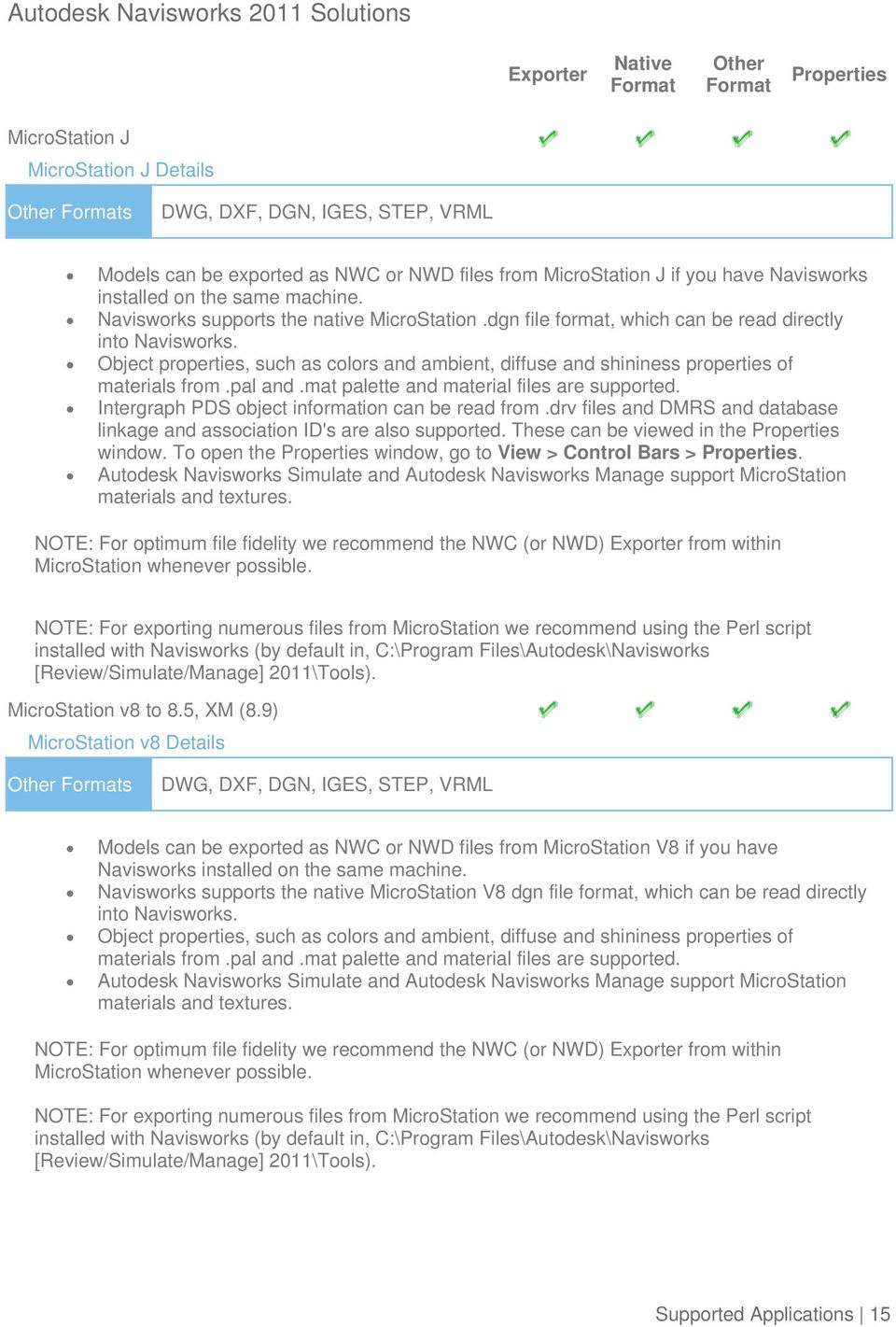
15 MicroStation J MicroStation J Details DWG, DXF, DGN, IGES, STEP, VRML Models can be exported as NWC or NWD files from MicroStation J if you have Navisworks installed on the same machine. Navisworks supports the native MicroStation.dgn file format, which can be read directly into Navisworks. Object properties, such as colors and ambient, diffuse and shininess properties of materials from.pal and.mat palette and material files are supported. Intergraph PDS object information can be read from.drv files and DMRS and database linkage and association ID's are also supported. These can be viewed in the window. To open the window, go to View > Control Bars >. Autodesk Navisworks Simulate and Autodesk Navisworks Manage support MicroStation materials and textures. NOTE: For optimum file fidelity we recommend the NWC (or NWD) from within MicroStation whenever possible. NOTE: For exporting numerous files from MicroStation we recommend using the Perl script installed with Navisworks (by default in, C:\Program Files\Autodesk\Navisworks [Review/Simulate/Manage] 2011\Tools). MicroStation v8 to 8.5, XM (8.9) MicroStation v8 Details DWG, DXF, DGN, IGES, STEP, VRML Models can be exported as NWC or NWD files from MicroStation V8 if you have Navisworks installed on the same machine. Navisworks supports the native MicroStation V8 dgn file format, which can be read directly into Navisworks. Object properties, such as colors and ambient, diffuse and shininess properties of materials from.pal and.mat palette and material files are supported. Autodesk Navisworks Simulate and Autodesk Navisworks Manage support MicroStation materials and textures. NOTE: For optimum file fidelity we recommend the NWC (or NWD) from within MicroStation whenever possible. NOTE: For exporting numerous files from MicroStation we recommend using the Perl script installed with Navisworks (by default in, C:\Program Files\Autodesk\Navisworks [Review/Simulate/Manage] 2011\Tools). Supported Applications 15
16 ProSteel 3D (formerly from Kiwi Software GmbH) ProSteel 3D Details, CIS/2 This information relates to ProSteel 3D / ProStahl 3D / AutoPLANT Structural. In order to read ProSteel files into Navisworks, you either need ProSteel 3D installed on the same machine as Navisworks, or the relevant ProSteel 3D object enabler. Only basic AutoCAD properties are supported (such as Entity Handle and Material) and these can be viewed in the window. This can be opened by going to View > Control Bars >. TriForma J TriForma J Details DWG, DXF, DGN, IGES, STEP, VRML Models can be exported as NWC or NWD files from Triforma J if you have Navisworks installed on the same machine. Navisworks supports the native Triforma J.dgn file format, which can be read directly into Navisworks. Object properties, such as colors and ambient, diffuse and shininess properties of materials from.pal and.mat palette and material files are supported. Family and Part information from TriForma and PDS object information can be read from.drv files and DMRS and database linkage and association ID's are also supported. These can be viewed in the window. To open the window, go to View > Control Bars >. Autodesk Navisworks Simulate and Autodesk Navisworks Manage support TriForma materials and textures. NOTE: For optimum file fidelity we recommend the NWC (or NWD) from within TriForma whenever possible. NOTE: For exporting numerous files from TriForma we recommend using the Perl script installed with Navisworks (by default in, C:\Program Files\Autodesk\Navisworks [Review/Simulate/Manage] 2011\Tools). Supported Applications 16

17 TriForma v8 to 8.9 TriForma v8 Details DWG, DXF, DGN, IGES, STEP, VRML Models can be exported as NWC or NWD files from TriForma V8 if you have Navisworks installed on the same machine. Navisworks supports the native TriForma V8 dgn file format, which can be read directly into Navisworks. Object properties, such as colors and ambient, diffuse and shininess properties of materials from.pal and.mat palette and material files are supported. Autodesk Navisworks Simulate and Autodesk Navisworks Manage support TriForma materials and textures. NOTE: For optimum file fidelity we recommend the NWC (or NWD) from within TriForma whenever possible. NOTE: For exporting numerous files from TriForma we recommend using the Perl script installed with Navisworks (by default in, C:\Program Files\Autodesk\Navisworks [Review/Simulate/Manage] 2011\Tools). Graphisoft ArchiCAD 8 to 13 ArchiCAD 8 to 13 Details DWG, DXF, DGN, IFC ArchiCAD can export to Navisworks.nwc file format. Navisworks does NOT have a direct reader for ArchiCAD files. ArchiCAD can also save files as.dwg,.dxf,.dgn and.ifc formats. These can be read directly by Navisworks. Object properties, such as GUIDS and Library Part Parameters can optionally be exported with the Navisworks file. Constructor 2005 to 2007 Constructor Details DWG, DXF, DGN Constructor 2005 can export to the Navisworks.nwc file format. Navisworks does NOT have a direct reader for Constructor 2005 files. Object properties, such as GUIDS and Library Part Parameters can optionally be exported with the Navisworks file. Supported Applications 17

18 AceCad StruCad StruCad Details DXF, CIS/2 StruCad files can be viewed in Navisworks, if they have been saved as.dxf or.stp format. Object properties are not supported. auto.des.sys form.z form.z Details, IGES, STL, VRML Navisworks supports all of the above file formats, which form.z can export to. AEC CADPIPE CADPIPE Details To view CADPIPE object properties in Navisworks, you may need to turn on the Convert Object option. To do this, go to Tools > Global Options > File Readers > DWG/DXF > Advanced and select the CADPIPE option. Any CADPIPE properties can then be viewed in the '' window. To open the window, go to View > Control Bars >. CADPIPE 'Industrial' and 'Commercial' cannot be used at the same time. If both are installed, then industrial is used. You can disable either or both by going to Tools > Global Options > Registry > Current User > CADPIPE. Change the version you require to one (1) and disable the other version by changing that value to zero (0). Supported Applications 18

19 AVEVA PDMS PDMS Details RVM Navisworks can read.rvm files exported from PDMS. AVEVA Review.rvs files are also supported. These require the same filename as the.rvm file. PDMS attribute files are supported, output using either the 'Dump Attributes' or 'Data' formats. These can be viewed in the '' window. To open the window, go to View > Control Bars >. CADopia IntelliCAD IntelliCAD Details DWG, DXF Navisworks supports the native IntelliCAD.dwg file format, which can be read directly into Navisworks. CEA Technology Plant-4D Plant-4D Details DWG, DGN Navisworks has file readers for.dwg and.dgn files, both of which are supported by Plant- 4D. Supported Applications 19

20 COADE, Inc. CADWorx Plant CADWorx Plant Details Models can be exported from CADWorx as either.nwc or.nwd format, if you have Navisworks installed on the same machine. Navisworks also provides support for.dwg files enabling native CADWorx models to be read directly into Navisworks. CADWorx object properties are also supported by Navisworks and these can be viewed in the '' window. To open the window, go to View > Control Bars >. CADWorx piping, steel, and equipment data is fully supported by Navisworks. CADWorx Pipe CADWorx Pipe Details Models can be exported from CADWorx as either.nwc or.nwd format, if you have Navisworks installed on the same machine. Navisworks also provides support for.dwg files enabling native CADWorx models to be read directly into Navisworks. CADWorx object properties are also supported by Navisworks and these can be viewed in the '' window. To open the window, go to View > Control Bars >. The legacy product, CADWorx Pipe, is fully supported by Navisworks. CADWorx Steel CADWorx Steel Details Models can be exported from CADWorx as either.nwc or.nwd format, if you have Navisworks installed on the same machine. Navisworks also provides support for.dwg files enabling native CADWorx models to be read directly into Navisworks. CADWorx object properties are also supported by Navisworks and these can be viewed in the '' window. To open the window, go to View > Control Bars >. CADWorx Steel is fully supported by Navisworks. Supported Applications 20

21 COINS BSLink BSLink Details In order to read a BSLink file into Navisworks, you either need BSLink installed on the same machine as Navisworks, or AutoCAD installed complete with the BSLink object enabler. If BSLink is installed, the object enabler is not necessary. With Navisworks installed on the same machine, simply export to.nwc or.nwd. In Navisworks, object properties can be viewed in the 'BSLink' tab in the '' window. To open the properties window, go to View > Control Bars >. Framing Framing Details In order to read a Framing file into Navisworks, you either need COINS Framing installed on the same machine as Navisworks, or ADT installed complete with the Framing object enabler. If COINS Framing is installed, the object enabler is not necessary. If Navisworks is installed on the same machine, simply export to.nwc or.nwd. In Navisworks, object properties can be viewed in the Framing tab in the window. To open the properties window, go to View > Control Bars >. CSC 3D+ 3D+ Details DWG, CIS/2 3D+ has a Navisworks, enabling you to export a Navisworks file out of 3D+. Also see the 3D+ website for information on their 3D+ Navisworks Reader. This is a plugin to Navisworks, enabling you to read the native.3nwc file format in Navisworks. 3D+ object properties are supported by Navisworks via either of the above routes. Supported Applications 21
22 Dassault Systemes CATIA CATIA Details DXF, IGES, STEP, JT Navisworks has file readers for.dxf,.igs,.stp and.jt files, all of which can be exported from CATIA. STEP is the preferred exchange format. Google SketchUp (up to v6) SketchUp Details DWG, 3DS SketchUp.skp files can be read directly into Navisworks. Texture materials are supported in Navisworks Simulate and Manage. Grouping objects in SketchUp will make it easier to use the model in Navisworks, for example applying Presenter materials, or attaching objects to TimeLiner tasks. Google SketchUp 7 files can be saved as an earlier version (e.g. version 6 SKP file), which can then be read into Navisworks. Hannappel SOFTWARE GmbH elcocad R4 elcocad R4 Details Models can be exported from elcocad as either.nwc or.nwd format. Navisworks also supports the native elcocad.dwg file format, which can be read directly into Navisworks. Object properties are also supported by Navisworks and these can be viewed in the '' window. To open the window, go to View > Control Bars >. Supported Applications 22
23 Intergraph PDS PDS Details DWG, DXF, DGN, IGES, STEP Intergraph PDS will save the model geometry in a.dgn file and the property information in a.drv file. Both files are required by Navisworks to read the model with object properties. In Navisworks, go to Tools > Global Options > DGN, scroll down and check the 'Convert PDS Data' option. Ensure the.dgn and.drv files reside in the same directory. Navisworks will then import the model, along with its properties. PDS object properties can be viewed in the '' window. To open the window, go to View > Control Bars >. If Navisworks has been installed onto the same machine as Intergraph PDS, you will be able to export from PDS as a Navisworks.nwc or.nwd file. Informatix MicroGDS MicroGDS Details MAN Navisworks supports the native MicroGDS.man file format, which can be read directly into Navisworks. Colors and Materials from the file are supported. The.man File Reader options can be found in Tools > Global Options > File Readers > MAN. Supported Applications 23
24 ITandFactory CADISON CADISON Details DXF, 3DS Navisworks can directly read CADISON.dwg files, utilizing the.dwg file reader. In order to read a CADISON file into Navisworks, you either need CADISON installed on the same machine as Navisworks, or you will need to install the CADISON Object Enabler. If CADISON is installed, the object enabler is not necessary. NOTE: When using an object enabler, ensure the corresponding loader version (year) is selected in Tools > Global Options > File Readers > DWG/DXF > DWG Loader Version. With either CADISON or the Object Enabler installed, simply open the CADISON.dwg file in Navisworks. If CADISON is installed on the same machine as Navisworks, then you can also export to.nwc or.nwd. Exporting a Navisworks file from CADISON also retains the models object properties that can be viewed in the '' window. To open the window, go to View > Control Bars >. TRICAD MS TRICAD Details VRML If TriCAD MS is installed on the same machine as Navisworks, then you can also export to.nwc or.nwd. Exporting a Navisworks file from TRICAD MS also retains the models object properties that can be viewed in the '' window. To open the window, go to View > Control Bars >. Kubotek USA CADKEY CADKEY Details DWG, DXF, IGES, STEP Navisworks has file readers for.dwg files and also.dxf,.igs and.stp files, all of which are supported by CADKEY. Supported Applications 24
25 M.A.P. CAD-Duct CAD-Duct Details In order to read a CAD-Duct file into Navisworks, you either need CAD-Duct installed on the same machine as Navisworks, or have the CAD-Duct Object Enabler installed. The CAD-Duct Object Enabler can be downloaded from the CAD-Duct website, found under Support > Additional Files. NOTE: When using an object enabler, ensure the corresponding loader version (year) is selected in Tools > Global Options > File Readers > DWG/DXF > DWG Loader Version. If CAD-Duct is installed, the Object Enabler is not necessary. Simply export to.nwd or.nwc. In Navisworks, object properties can be viewed in the 'CAD-Duct' tab in the '' window. To open the window, go to View > Control Bars >. McNeel North America Rhino Rhino Details, IGES, STEP To view your Rhino models in Navisworks, you will have to export to one of the supported file formats (above). These can then be read directly into Navisworks. Supported Applications 25
26 Mensch und Maschine RoCAD RoCAD Details Models can be exported from RoCAD as either.nwc or.nwd. Navisworks also supports the.dwg file format, which can be read directly into Navisworks. If you do not have RoCAD installed on the same machine as Navisworks, you will need to have AutoCAD installed, along with the RoCAD Object Enabler. NOTE: When using an object enabler, ensure the corresponding loader version (year) is selected in Tools > Global Options > File Readers > DWG/DXF > DWG Loader Version. Object properties, (such as Material Colors and Entity Handles) are also supported by Navisworks and these can be viewed in the '' window. To open the window, go to View > Control Bars >. MultiSUITE MultiSTEEL MultiSTEEL Details.dwg files from MultiSTEEL can be read directly into Navisworks utilizing the.dwg file reader. Models can also be exported from MultiSTEEL as either.nwc or.nwd. MultiSTEEL object properties can be viewed in the '' window. To open the window, go to View > Control Bars >. Nemetschek Allplan Allplan Details DWG, DXF, DGN, IFC All Plan files can be viewed in Navisworks if they have been saved in one of the above formats. Object properties are not supported. Supported Applications 26
27 PROCAD 3DSMART 3DSMART Details With 3DSMART installed on the same machine as Navisworks, you can read your DWG file directly into Navisworks, utilizing the DWG file reader. You can also export a.nwc or.nwd file directly from 3DSMART. PTC Pro/ENGINEER Pro/ENGINEER Details IGES, STEP, VRML, JT You can read your Pro/ENGINEER models into Navisworks via any of the above file formats. CADDS 5 CADDS 5 Details IGES, STEP You can read CADDS 5 3D models into Navisworks, by exporting either an IGES or STEP file from CADDS 5 and then utilize either the Navisworks.igs, or.stp file readers. Supported Applications 27
28 QuickPen PipeDesigner 3D PipeDesigner 3D Details Models can be exported from PipeDesigner 3D as either.nwc or.nwd format. Navisworks also supports the native.dwg file format, which can be read directly into Navisworks if the relevant Object Enabler is installed. Object properties, (such as Material Colors and Entity Handles) are also supported by Navisworks and these can be viewed in the '' window. To open the window, go to View > Control Bars >. DuctDesigner 3D DuctDesigner 3D Details Models can be exported from DuctDesigner 3D as either.nwc or.nwd format. Navisworks also supports the native.dwg file format, which can be read directly into Navisworks if the relevant Object Enabler is installed. Object properties, (such as Material Colors and Entity Handles) are also supported by Navisworks and these can be viewed in the '' window. To open the window, go to View > Control Bars >. RAM International CADstudio CADstudio Details Models can be exported from CADstudio as either.nwc or.nwd format. Navisworks also supports the native CADstudio.dwg file format, which can be read directly into Navisworks. Object properties are also supported by Navisworks and these can be viewed in the '' window. To open the window, go to View > Control Bars >. Supported Applications 28
29 SolidWorks SolidWorks SolidWorks Details DWG, DXF, IGES, STEP, VRML, JT SolidWorks models can be exported to DWG, DXF, IGES, STEP, VRML or JT format which can then be read into Navisworks. Tekla Tekla Structures Tekla Structures Details DGN, VRML, CIS/2 Tekla Structures can export to the.dgn file format, which can be read directly into Navisworks. Tekla Structures can additionally output to CIS/2. This may then be converted to VRML using the translator from the National Institute of Standards and Technology (see the NIST website for more information). The VRML file can then be read directly into Navisworks. Limited object properties are supported via the.dgn route. Xsteel Xsteel Details DGN Xsteel can export to the.dgn file format, which can be read directly into Navisworks. Limited object properties are supported via the.dgn route. think3 thinkdesign thinkdesign Details DWG, DXF, IGES, STEP Navisworks has file readers for.dwg/.dxf files and also.igs and.stp files. Supported Applications 29
30 UGS I-deas I-deas Details DXF, IGES, STEP, JT Navisworks has file readers for.dxf,.igs.stp and.jt files. Solid Edge Solid Edge Details IGES, STEP, JT Solid Edge can export to IGES STEP and JT files, which can be read directly into Navisworks. NX (Unigraphics) NX Details DXF, IGES, STEP, JT Navisworks has file readers for.dxf,.igs.stp and.jt files. FactoryCAD FactoryCAD Details In order to read a FactoryCAD file into Navisworks, you either need FactoryCAD or the FactoryCAD object enabler installed on the same machine. NOTE: When using an object enabler, ensure the corresponding loader version (year) is selected in Tools > Global Options > File Readers > DWG/DXF > DWG Loader Version. If FactoryCAD is installed, the object enabler is not necessary. Simply export to.nwc or.nwd. Supported Applications 30
31 UHP Process Piping FabPro Pipe FabPro-Pipe Details Models can be exported from FabPro Pipe as either.nwc or.nwd format. Navisworks also supports the native FabPro Pipe.dwg file format, which can be read directly into Navisworks. x-plant x-plant x-plant Details Models can be exported from x-plant as either.nwc or.nwd format. Navisworks also supports the native x-plant.dwg file format, which can be read directly into Navisworks. Supported Applications 31
32 Autodesk Navisworks 2009 Solutions Supported Scheduling Software The following table contains a list of the project scheduling software and formats supported by Autodesk Navisworks Simulate 2011 and Autodesk Navisworks Manage Developer Product File Notes Asta Powerproject 8 to 10.pp Requires Asta Powerproject to be installed on same machine, to make link. Microsoft Project 2000 to 2007.mpp Requires Microsoft Project to be installed on same machine, to make link. Primavera ProjectPlanner (P3) n/a Requires P3 to be installed on same machine. The file format is not read directly. Instead, TimeLiner logs into P3 and retrieves project information. Primavera Primavera Engineering and Construction n/a Requires Primavera v4.1, 5 or 6 Engineering and Construction to be installed on same machine, along with the Primavera SDK. TimeLiner connects to the Primavera database via an ODBC data source link. Microsoft Microsoft Project Exchange.mpx Does not require any project software to be installed. This is the common project exchange format which can be exported to from a number of scheduling packages. N/A CSV Exchange.csv Does not require any project software to be installed. This is a common exchange format which can be exported from a number of applications including, Microsoft Excel. Navisworks Simulate and Manage can additionally export TimeLiner task information to this format. Supported Scheduling Software 32
Your CAD Programme. Virtually all 3D Rapid Prototyping machines and 3D Printers use the STL file format for input.
 Export STL Files From Your CAD Programme Introduction Virtually all 3D Rapid Prototyping machines and 3D Printers use the STL file format for input. Almost all CAD programs have a way to save or export
CoCreate OneSpace.net 3D CAD Conversion
 CoCreate 3D This document contains the individual conversion specifications Table of Contents CATIA V4 4.2 to conversion Unigraphics NX2 to conversion Pro/E Wildfire to conversion I-DEAS MS10 to conversion
School of Architecture Computer Requirement
 School of Architecture Computer Requirement Updated June 3, 2015 ALL STUDENTS IN THE SCHOOL OF ARCHITECTURE ARE REQUIRED TO PROVIDE THEIR OWN PERSONAL LAPTOP COMPUTER. All ENTERING GRADUATE STUDENTS in
Effective Collaboration
 AUTODESK BUILDING SOLUTIONS Effective Collaboration Exporting Revit Architecture Models as ACIS Solids for Use in AutoCAD MEP The intent of this paper is to explain a process by which architects using
Creo Elements/Direct CAD Interfaces
 Data Sheet Creo Elements/Direct CAD Interfaces Bi-directional CAD data exchange between Creo Elements/Direct Modeling, Creo Elements/Direct 3D Access and other CAD systems With the Creo Elements/Direct
PTC Creo Elements/Direct Modeling Express
 Modeling Express Edition Comparison Chart Learn how upgrading to 19.0, the leading direct 3D CAD design software, can deliver faster design cycles and responsiveness to change throughout your design process.
For designers and engineers, Autodesk Product Design Suite Standard provides a foundational 3D design and drafting solution.
 Autodesk Product Design Suite Standard 2013 System Requirements Typical Persona and Workflow For designers and engineers, Autodesk Product Design Suite Standard provides a foundational 3D design and drafting
Building Information Modeling for MEP Engineering. Revit MEP 2008
 Building Information Modeling for MEP Engineering Revit MEP 2008 Design Intuitively with Tools That Work the Way Engineers Think Revit MEP software is an intuitive design tool that works the way engineers
Autodesk Product Manager Tool
 Autodesk Product Manager Tool A Step Guide for Conducting a Software Audit 2007 Autodesk 1 Autodesk Product Manager Installing and Conducting a Software Audit The Autodesk Product Manager (APM) utility
Building Information Modeling (BIM) Requirements for PT Projects Today s Capabilities for a BIM based Design
 Building Information Modeling (BIM) Requirements for PT Projects Today s Capabilities for a BIM based Design Florian Aalami CEO ADAPT Corporation [email protected] What is BIM? The ability to model
Working with Clients and Consultants Who Don t Use the Autodesk Revit Format
 Who Don t Use the Autodesk Revit Format Ed Hannabas - Avatech Solutions SE114-2 Best practices for importing, linking, and exporting to various 2D and 3D file formats such as DWG, DGN, DXF, IFC, and CIS/2.
Progress Report: Bim adoption from a supplier s Point of View
 Progress Report: Bim adoption from a supplier s Point of View text By Ricky GillenwateR images By new millennium BUilDinG systems One steel joist and metal decking supplier shares what it has learned about
IronCAD s Hyper-Operability. IRONCAD TRANS Translators & Data Sharing
 With IronCAD s Design Collaboration Suite, engineers communicate more freely. Dual ACIS and Parasolid kernels allow precise, error-free import and export of native SAT and _T files as well as common file
BIM BUILDING INFORMATION MODELLING. Understanding its functions in the future of the Architectural profession.
 BIM BUILDING INFORMATION MODELLING. Understanding its functions in the future of the Architectural profession. Ar Chan Seong Aun 7 November 2015 SYNOPSIS Recently there have been many discussions both
Get to know your Autodesk Design and Creation Suites 2014
 Get to know your Design and Creation Suites 2014 Design and Creation Suites 2014 offer more tools and cloud services so you can take advantage of smoother workflows, better access to project information,
What s New in Autodesk Revit 2014
 Building Design Suite 2014 What s New in Revit 2014 * Revit 2014 software is only available as part of the Building Design Suite 2014 Premium and Ultimate Editions. New & Enhanced Features Platform & For
Olilo's AEC Design Services. SrinSoft Inc, Partners of
 Olilo's AEC Design Services SrinSoft Inc, Partners of Olilo provides design services that include design and analysis, cost estimation, 3D modeling, 2D drafting, conversion from 2D to 2D, quantity take-off,
Questions and Answers
 Autodesk Building Design Suite 2013 Questions and Answers Autodesk Building Design Suite is a comprehensive software solution that combines Building Information Modelling (BIM) and CAD tools to help you
Effective Collaboration using Revit Structure and AutoCAD MEP
 REVIT STRUCTURE Effective Collaboration using Revit Structure and AutoCAD MEP This white paper explains how structural engineers using Revit Structure software and mechanical/electrical/plumbing (MEP)
Autodesk Cloud Frequently Asked Questions for Customers
 Autodesk Cloud Customer FAQ Autodesk Cloud Frequently Asked Questions for Customers September 27, 2011 What are web services, cloud services and cloud computing? All of these terms refer to software technology
Questions and Answers
 AUTODESK IMPRESSION 3 Questions and Answers Contents 1. General Product Information... 2 1.1 What is Autodesk Impression?... 2 1.2 Who uses Autodesk Impression?... 2 1.3 What are the primary benefits of
Questions and Answers
 Autodesk Factory Design Suite 2013 Questions and Answers Autodesk Factory Design Suite enhances the power of AutoCAD with the benefits of Digital Prototyping, so you spend less time drafting and more time
Digital Prototyping: Questions and Answers
 Autodesk Manufacturing Digital Prototyping: Questions and Answers 1. What is a digital prototype? A digital prototype is created with Autodesk Inventor software and is a digital simulation of a product
Design & Drafting Services
 Design & Drafting Services 1. Mechanical CAD Services 1. Mechanical CAD Services Mechanical Design Services: Custom machine design Packaging machine design Mechanism design Machine tool design Material
Bluebeam vs. Adobe. Bluebeam Vu vs. Adobe Reader X
 Bluebeam vs. Adobe Bluebeam s PDF solutions are smart, so you don t have to be. Whether you are an engineer that needs to FTP complex CAD drawings or a project coordinator that wants to e-mail secure MS
MultiCAx Products. encad consulting GmbH www.encad-consulting.de [email protected]
 MultiCAx Products www.encad-consulting.de [email protected] Customer needs in Data Exchange 1. Exchange CAD data with subcontractors 2. Archive reference product data 3. Make design review with
Design without compromise. Autodesk Revit. Architecture 2010
 Design without compromise. Autodesk Revit Architecture 2010 BIM Simply a Better Way of Working Deliver projects faster, more economically, and with enhanced potential for reduced environmental impact.
Autodesk Inventor 2013
 Autodesk Inventor 2013 AMS CAD + CAFM Solutions amscad.com Image courtesy of Brimrock Group Inc. and Mechanix Design Solutions Inc. Autodesk Inventor Takes You From 2D to 3D Digital Prototyping The Inventor
keytech keytech 13 FP 2 - What's New
 keytech keytech 13 FP 2 - What's New keytech 13 - What's New Table of Contents 1. 1.1 1.2 1.3 1.3.1 1.3.1.1 1.3.1.2 1.3.2 1.3.2.1 1.3.2.2 1.3.2.3 1.3.2.4 1.3.3 1.3.4 1.4 1.4.1 1.4.2 1.5 1.6 Structured
Vantage Product Lifecycle Management
 Vantage Product Lifecycle Management Abstract PLM enable companies to manage all information regarding a product, from the initial design and engineering through to manufacture, sourcing, support and run
imaginit.com/autodeskcfd Scalable, robust fluid flow and thermal simulation solution
 Scalable, robust fluid flow and thermal simulation solution Fast, accurate, and flexible solution to test the fluid flow and thermal performance of your design Accurately predict behavior, optimize designs,
Features Autodesk Revit 2008 Graphisoft ArchiCAD 11 Bentley Microstation
 Features Autodesk Revit 2008 Graphisoft ArchiCAD 11 Bentley Microstation Overview Revit is built upon the Modeling strategy of full integration in one place, allowing you to simply choose what portion
SKANSKA S NEW HEADQUARTER IN HELSINKI, FINLAND. Tiina Koppinen Skanska Finland
 openbim building project: SKANSKA S NEW HEADQUARTER IN HELSINKI, FINLAND Skanska Finland 1 Contents t Skanska k Who are we? BIM Implementation in Skanska Globally openbim in Finland Example Skanska House,
Autodesk Building Design Suite 2012 Standard Edition System Requirements... 2
 Autodesk Building Design Suite 2012 System Requirements Autodesk Building Design Suite 2012 Standard Edition System Requirements... 2 Autodesk Building Design Suite 2012 Premium Edition System Requirements...
Practical Strategy and Workflow for Large Projects: A Realistic Solution
 Practical Strategy and Workflow for Large Projects: A Realistic Solution Marco Brasiel/Diego Faria Frazillio & Ferroni SE3193 This class presents a strategy for development of structural projects using
System Requirements. Autodesk Building Design Suite Standard 2013
 There are separate system requirements for each of the three different editions of the Autodesk Building Design Suite. Please make sure that you are referencing the appropriate section of this document
3397 American Drive, Unit # 1 Mississauga, Ontario. L4V 1T8 Phone: 905 672 9328 Fax: 905 672 2706
 Contact: Robert C. Lansdale Okino Computer Graphics, Inc. Phone 905 672 9328 [email protected] 3397 American Drive, Unit # 1 Mississauga, Ontario. L4V 1T8 Phone: 905 672 9328 Fax: 905 672 2706 Okino Computer
Design without compromise. Autodesk Revit. Architecture
 Design without compromise. Autodesk Revit Architecture Definitive Design From conception to construction documentation, design projects within an intuitive environment. Building information modeling and
Distributed Services & Distributed Pro/BATCH Distributed Services & Distributed Pro/BA May 2010 Rev I
 Distributed Services & Distributed Pro/BATCH May 2010 Rev I Distributed Services - Overview > Modular Set of Applications Client and Server Components Example: Distributed Pro/BATCH IT Executive R&D >
Appendix E Specific Examples of Digital Technologies for Construction
 Appendix E Specific Examples of Digital Technologies for Construction This appendix provides additional comments and identifies specific providers and examples for the five digital technologies identified
MCADD COURSE STRUCTURE
 MCADD COURSE STRUCTURE S.No Course code Software used Duration Master Diploma in Product Design and Analysis 1 MCADD MD40 CATIA V5 +NX CAD +NX CAM +Ansys +PPM Concepts +MSP 2010 (mechanical)+gd & T 360
and 2010: rprise Increasingly, must ation, es, partners, s intelligence.
 Autodesk Vault 2012 Autodesk Vault 2012 and Microsoft SharePoint 2010: Providing Accesss to Design Data Across the Enter rprise Increasingly, to succeed, businesses must collaborate effectively y both
Feature Comparison of PTC Creo View MCAD. Product Suite. Topic Sheet. Page 1 of 6 Feature Comparison of PTC Creo View MCAD Product Suite
 Comparison of Product Suite User Interface Lite Microsoft Fluent paradigm Ribbon User Interface User interface customization Command finder Usage Standalone version Interoperability with PTC Products Performance
Questions and Answers
 Autodesk Inventor Questions and Answers Contents 1. Why should I move from AutoCAD to Autodesk Inventor Products?... 2 2. What does the Autodesk Inventor product line deliver?... 2 3. Which Autodesk Inventor
Synergis Software 18 South 5 TH Street, Suite 100 Quakertown, PA 18951 +1 215.302.3000, 800.836.5440 www.synergissoftware.com version 20150330
 Synergis Software 18 South 5 TH Street, Suite 100 Quakertown, PA 18951 +1 215.302.3000, 800.836.5440 www.synergissoftware.com version 20150330 CONTENTS Contents... 2 Overview... 2 Adept Server... 3 Adept
Adept 2014 System Requirements
 Synergis Software 200 Kelly Road, Quakertown, PA 18951 +1 215.302.3000, 800.836.5440 www.synergissoftware.com version 080613 This document provides an overview of the Adept 2014 System requirements to
zspace Studio BETA 3D Model File Import Guide
 zspace Studio BETA 3D Model File Import Guide This guide provides tips for exporting models from other programs for viewing in zspace Studio. This guide covers seven 3D modeling programs: Autodesk 123D
Questions and Answers
 Autodesk Inventor Questions and Answers Contents 1. Why should I move from AutoCAD to Autodesk Inventor Products?... 2 2. What does the Autodesk Inventor product line deliver?... 2 3. Which Autodesk Inventor
CAD.TIMKEN.COM QUICK START GUIDE. Stronger. Value. Stronger. By Design.
 A D C CAD.TIMKEN.COM QUICK START GUIDE Stronger. Value. Stronger. By Design. 1 SEARCH YOUR QUICK START GUIDE TO CAD.TIMKEN.COM Go directly to cad.timken.com or visit timken.com and use the Quick Links
MultiREBAR CAD. www.multirebarcad.com
 MultiREBAR CAD Rebar Detailing Made Easy www.multirebarcad.com Who Uses MultiREBAR CAD? MultiREBAR is the complete concrete bar detailing solution and can be used by both detailers and Rebar fabricators.
SharePoint for Engineering Document Management & Control
 SharePoint for Engineering Document Management & Control Managing and controlling engineering documents and drawings with SharePoint A white paper by Cadac Organice BV Date: 01-03-2012 Table of contents
Best Practices for Implementing Autodesk Vault
 AUTODESK VAULT WHITE PAPER Best Practices for Implementing Autodesk Vault Introduction This document guides you through the best practices for implementing Autodesk Vault software. This document covers
CAP VR WALKTHROUGH ENVIRONMENT: 3DS MAX INTEROPERABILITY BETWEEN PROGRAMS
 CAP VR WALKTHROUGH ENVIRONMENT: 3DS MAX INTEROPERABILITY BETWEEN PROGRAMS [SKETCHUP to 3DS MAX] 1. In SKETCHUP go to FILE SAVE AS Save the file as a.skp. 2. In 3DS MAX go to FILE IMPORT Change the file
Version 4.1 Release Notes. Release notes for 3D PDF Converter detailing new features, bug fixes and updated format support.
 Version 4.1 Release Notes Release notes for 3D PDF Converter detailing new features, bug fixes and updated format support. Table of Contents OVERVIEW... 2 Version Information... 2 Language Support Overview...
Dell Precision Technology Partner Program - Hardware Certifications
 Dell Precision Technology Partner Program - Hardware Certifications Current Hardware Certifications 2015.12.07 THIS DOCUMENT IS FOR INFORMATIONAL PURPOSES ONLY, AND MAY CONTAIN TYPOGRAPHICAL ERRORS AND
BUILDING INFORMATION MODELLING. The Designer. CIC East and IDBE. David Hymas
 BUILDING INFORMATION MODELLING The Designer CIC East and IDBE David Hymas David Hymas Technical Director - BNI Building Services Engineer Building Services BIM Champion for MM Mott MacDonald 4 Years 18
STL GENERATION INTRODUCTION TO STL. Written by Greta D Angelo
 STL GENERATION Written by Greta D Angelo In this section: An introduction on.stl files How to make good.stl files How to make.stl on different softwares (Solidworks, PTC Creo, Rhinoceros 5, Autodesk Inventor)
Questions and Answers
 AutoCAD WS Questions and Answers Contents 1. General Product Information... 2 1.1 What is AutoCAD WS?... 2 1.2 Who should use AutoCAD WS?... 2 1.3 What can I do with AutoCAD WS?... 2 1.4 Is AutoCAD WS
CAD & BIM: Is There A Free Pass? A Report on GRAPHISOFT ArchiCAD s DWG Workflow. Ralph Grabowski December 2010
 CAD & BIM: Is There A Free Pass? A Report on GRAPHISOFT ArchiCAD s DWG Workflow Ralph Grabowski December 2010 a research paper from funded by Graphisoft an imprint of upfront.ezine Publishing, Ltd. CAD
System requirements for Autodesk Building Design Suite 2017
 System requirements for Autodesk Building Design Suite 2017 For specific recommendations for a product within the Building Design Suite, please refer to that products system requirements for additional
Nationwide BIM project experience Industry-leading Dynamic Joist design software Expert steel joist modeling and process management
 Nationwide BIM project experience Industry-leading Dynamic Joist design software Expert steel joist modeling and process management Dynamic Joist 6D BIM Process Management We ve engineered a better process
Summary of Results of CAD File Format Compatibility Tests
 Summary of Results of CAD File Format Compatibility Tests Michael Perreur-Lloyd, Ian Wilmut, Calum Torrie 1. INTRODUCTION A series of tests have been run to find out the best way of transferring files
AC 2011-96: IMPLEMENTING BUILDING INFORMATION MODELING IN CONSTRUCTION ENGINEERING CURRICULA
 AC 2011-96: IMPLEMENTING BUILDING INFORMATION MODELING IN CONSTRUCTION ENGINEERING CURRICULA Don Chen, University of North Carolina, Charlotte Professional Preparation Iowa State University, Ames, Iowa
MatchMover Release Notes
 MatchMover Release Notes Copyright Notice 2010 Autodesk, Inc. All rights reserved. Except as otherwise permitted by Autodesk, Inc., this publication, or parts thereof, may not be reproduced in any form,
Autodesk Software Grant for F1 in Schools Step by Step Instructions
 Autodesk Software Grant for F1 in Schools Step by Step Instructions John Helfen Partnership Strategy Manager, Autodesk Education 2013 Autodesk Autodesk Software Students and Institution Student/Faculty/Mentor
PRODUCT BROCHURE SPATIAL ANALYZER. Powerful, traceable and easy-to-use metrology and analysis software
 PRODUCT BROCHURE SPATIAL ANALYZER Powerful, traceable and easy-to-use metrology and analysis software SPATIAL ANALYZER SpatialAnalyzer (SA) is a powerful, traceable and easy to use metrology and analysis
Commonly Referenced Autodesk Products and Services (2015) UPDATED QUARTERLY
 Autodesk 123D Autodesk 123D Catch Autodesk 123D Circuits Autodesk 123D Creature Autodesk 123D Design Autodesk 123D Make Autodesk 123D Premium Autodesk 123D Sculpt Autodesk Autodesk SketchBook Designer
Allplan 2013 Data Exchange Formats
 Allplan 2013 Data Exchange Formats Import General import formats File extension Version, notes DXF, DWG, AutoCAD-Data.dxf,.dwg,.dwt,.dxb Up to DWG version 2012 DGN, MicroStation-Data.dgn Up to DGN version
3D Laser Scanning Software Solutions
 3D Laser Scanning Software Solutions www.lfm-software.com LFM Software Overview Realise the true value of your laser scan data. Outside the EPC environment, Owner Operators are now also recognising the
Maxwell Render 1.5 complete list of new and enhanced features
 Maxwell Render 1.5 complete list of new and enhanced features Multiprocessor Maxwell Render can exploit all of the processors available on your system and can make them work simultaneously on the same
Lots and Lots of Symbols, Free. Introduction. Tutorial: Getting Symbols. New Commands in AutoCAD 2010: Part 8. by Ralph Grabowski
 New Commands in AutoCAD 2010: Part 8 Lots and Lots of Symbols, Free by Ralph Grabowski Introduction AutoCAD 2010 introduces a new way to access symbols from Autodesk's Web site -- and a way to share yours
Importing and exporting content
 Importing and exporting content Welcome to Corel DESIGNER, a comprehensive vector-based drawing application for creating technical graphics. In this tutorial, you will import an AutoCAD DWG file into Corel
BIM: FOR PROJECT MANAGERS. 2011 CSI Southwest Region Conference Program 1B 8:45am 11:00am
 BIM: FOR PROJECT MANAGERS ANA BAKER BRANDON GARRETT 2011 CSI Southwest Region Conference Program 1B 8:45am 11:00am 1 2 3 4 BIM Overview BIM Level of Development Evolution of the Drawing Process BIM Workflow
Questions and Answers
 AutoCAD Architecture 2010 Questions and Answers AutoCAD Architecture 2010 software the version of AutoCAD software for architects. Creating designs and documentation is much more efficient using the software
Tesla Outsourcing Services An Architectural & Engineering Company
 Tesla Outsourcing Services An Architectural & Engineering Company Offices Our Spread USA UK Office India Office Canada Office Australia Office JBH-Tesla Design Group, Inc. 100 Executive Boulevard-Suite
Autodesk Revit Architecture. Design without compromise.
 Autodesk Revit Architecture Design without compromise. Definitive Design From conception to construction documentation, design projects within an intuitive environment. Building information modeling and
How To Use Autocad Design Suite 2013
 AutoCAD Design Suite 2013 Questions and Answers For the people who shape and create the world around us, AutoCAD Design Suite 2013 includes the most powerful AutoCAD software ever, plus tools to help you
Questions and Answers
 Autodesk Product Design Suite 2013 Questions and Answers Autodesk Product Design Suite 2013 is a comprehensive solution for Digital Prototyping, delivering tools to complete your entire engineering design
Engineering Document Release Management
 Engineering Document Release Management Design Release Archive ImageSite is a comprehensive yet easy-to-use Engineering Document Management system that automates the engineering data lifecycle across your
Questions and Answers
 Autodesk Citrix Ready Products Questions and Answers Citrix Systems, Inc. and Autodesk have partnered to provide customers with greater efficiency and flexibility in their use of Autodesk s applications.
HOW TO LINK AND PRESENT A 4D MODEL USING NAVISWORKS. Timo Hartmann [email protected]
 Technical Paper #1 HOW TO LINK AND PRESENT A 4D MODEL USING NAVISWORKS Timo Hartmann [email protected] COPYRIGHT 2009 VISICO Center, University of Twente [email protected] How to link and present
CAGILA 2D and 3D software
 CAGILA 2D and 3D software CAM-Service does present the new CAGILA 3D software. Beside all common data formats like STEP, IGES, VDAFS, CAGILA 3D also supports interfaces for popular native formats like
MapInfo Universal Translator User Guide
 MapInfo Universal Translator User Guide The MapInfo Universal Translator translates files in MapInfo formats to several different spatial data formats and translates files from several formats into MapInfo.TAB
Benchmark Test Reveals Best CAD Tool for Assembly Performance
 Benchmark Test Reveals Best CAD Tool for Assembly Performance Speed is everything in product development, especially when it comes to creating and managing large assemblies. And while some 3D CAD vendors
Autodesk Moldflow Communicator 2016. System Requirements
 Autodesk Moldflow Communicator 2016 System Requirements 01-19-2015 Autodesk Moldflow Communicator 2015 Autodesk, Inc. All Rights Reserved. Except where otherwise noted, this work is licensed under a Creative
Les clés de produit pour les produits Autodesk 2014
 Autodesk AutoCAD AutoCAD Architecture AutoCAD Civil 3D AutoCAD Design Suite Premium AutoCAD Design Suite Standard AutoCAD Design Suite Ultimate AutoCAD ecscad AutoCAD Electrical AutoCAD Inventor LT Suite
The Shorten AutoCAD the road solution for mechanical, electrical, to done. and plumbing engineering. AutoCAD AutoCAD.
 The Shorten AutoCAD the road solution for mechanical, electrical, to done. and plumbing engineering. AutoCAD AutoCAD Civil 3D MEP 2009 More Productivity, Same Skills Michigan-based Peter Basso Associates
Introduction. Configurations. Installation. Vault Manufacturing Server
 Introduction Autodesk Vault Manufacturing (hence forth referred to as Vault Manufacturing) bridges the gap between tracking CAD design tools and ERP (Engineering Resource Procurement) systems with its
Amazing renderings of 3D data... in minutes.
 Amazing renderings of 3D data... in minutes. What is it? KeyShot is a standalone 3D rendering and animation application for anyone with a need to quickly and easily create photo-realistic images of 3D
Autodesk Revit 2016 Product Line System Requirements and Recommendations
 Autodesk Revit 2016 Product Line System Requirements and Recommendations Autodesk Revit 2016, Autodesk Revit Architecture 2016, Autodesk Revit MEP 2016, Autodesk Revit Structure 2016 Minimum: Entry-Level
Windows 7 (32/64bit) Windows 8 (32/64bit) Windows 10 (32/64bit)*
 3D-Tool Version 12 - Specifications 3D-Tool is a professional CAD-Viewer for 3D-models and 2D-drawings. You do not need any special CAD skills to view models in 3D, to measure distances, angles, radii
Transition to 3D Fabrication Workflows
 Autodesk Autodesk Fabrication Solutions Transition to 3D Fabrication Workflows Autodesk is committed to the use of Building Information Modeling (BIM) to drive integrated and connected data across the
Revit products will use multiple cores for many tasks, using up to 16 cores for nearphotorealistic
 Autodesk Revit 2013 Product Line System s and Recommendations Autodesk Revit Architecture 2013 Autodesk Revit MEP 2013 Autodesk Revit Structure 2013 Autodesk Revit 2013 Minimum: Entry-Level Configuration
Interoperability with Structural Disciplines
 Interoperability with Structural Disciplines GRAPHISOFT Visit the GRAPHISOFT website at http://www.graphisoft.com for local distributor and product availability information. Interoperability with Structural
BLUECIELO MERIDIAN ENTERPRISE 2014
 BLUECIELO MERIDIAN ENTERPRISE 2014 Supported Software Reference BlueCielo ECM Solutions bluecieloecm.com Thursday, July 17, 2014 LEGAL NOTICE 2014 BlueCielo ECM Solutions B. V. Handelskade 49 2288 BA Rijswijk
FUJITSU Workstation CELSIUS ISV Certification Overview April 2015
 FUJITSU Workstation CELSIUS ISV Certification Overview April 2015 ISV stands for Independent Software Vendor. ISVs are developing software applications for specific markets. Fujitsu is working with the
BEDIFFERENT A C E 2 0 1 2 I N T E R N A T I O N A L
 BEDIFFERENT A C E 2 0 1 2 I N T E R N A T I O N A L ACE 2012 I N TERNATIONAL Integration Basics Nathan Brown Director of Product Management Aras www. Slide 3 Agenda Integration Landscape Packaged Integration
What s New SURFCAM 2014 R1 \ R2
 SURFCAM R1 \ R2 Contents General/System - R1 3 New InstallShield Wizard >>...3 SURFCAM - Recommended System Requirements >>...4 Utilities - R1 5 New Support Assistant >>...5 Functionality - R1 6 Improved
AutoCAD Structural Detailing 2011. Getting Started with AutoCAD Structural Detailing, Reinforcement module
 AutoCAD Structural Detailing 2011 Getting Started with AutoCAD Structural Detailing, Reinforcement module 2010 Autodesk, Inc. All Rights Reserved. Except as otherwise permitted by Autodesk, Inc., this