
Device/PLC CONNECTION MANUAL ADDITIONAL MANUAL. Keyence Corporation KV Series CPU Direct Connection
|
|
|
- Meryl Mosley
- 9 years ago
- Views:
Transcription
1 Device/PLC CONNECTION MANUAL ADDITIONAL MANUAL Keyence Corporation KV Series CPU Direct Connection

2 Reading the Device/PLC Connection Manual This additional manual provides connection information for the Keyence Corporation KV Series models, and is a supplement to the GP-PRO/PBIII for Windows Device/ PLC Connection Manual. Please refer to this data when connecting a Keyence Corporation KV Series unit. For information concerning general type PLC connections and this document s documentation conventions, please refer to your Device/PLC Connection manual. When connecting a Factory Gateway unit, please substitute the words Factory Gateway for this document s GP/GLC. The information in this document will be included in the next version of the Device/PLC Connection manual. Therefore, please consider this a provisional document.

3 Installation This CD-ROM includes all the driver files required by the GP/GLC to communicate with a KV Series Controllers. This document assumes that one or more of the following software applications are already installed on your PC. Please note that if more than one of these applications are installed, the screen and data transfer files included in this CD- ROM must be installed in each of those applications. For information about the installation of the software, refer to that software's Operation Manual. n Software Applications GP-PRO/PBIII for Windows Ver.5.0 or later Pro-server with Pro-Studio for Windows Ver.3.0 or later *1 1) Confirm that the Screen Editor software is installed on your hard drive. 2) Double-click on the kv10rw.exe file contained in the CD-ROM. 3) Once the set up program starts, follow the instructions given in the installation program. When using a KV Series unit, select [KEYENCE KV-10_80RW/TW SERIES] for the " PLC Type". When using GP-PRO/PBIII for Windows Ver. 6.0 or later, click on the Device/PLC area s [others] selection and then click on [KEYENCE KV-10_80RW/TW SERIES]. *1 When using the Factory Gateway unit, GP-Web Ver. 1.0 or later, or GP-Viewer Ver. 1.0 or later, Pro-Server with Pro-Studio for Windows must also be installed.

4 Chapter 2 - PLC-GP Connection 2.18 Keyence 2.18 Keyence System Structure The following describes the system structure for connecting the GP to Keyence PLCs. Reference The Cable Diagrams mentioned in the following tables are listed in the section titled " Cable Diagrams". KZ-300/KZ-350 Series (using Link I/F) CPU Link I/F Cable Diagram GP KZ-300 KZ-350 KZ-L2 PC Link Unit RS-232C Port 1 Connection (Cable Diagram 1) RS-232C Port 2 Connection (Cable Diagram 2) GP Series RS-422 Port 2 Connection (Cable Diagram 3) Port 1 and Port 2 can be connected at the same time on the GP. When connected at the same time, the Communication Setup for Port 1 and Port 2 must be the same. KZ-A500 Series (using Link I/F) CPU Link I/F Cable Diagram GP KZ-A500 KZ-L10 RS-232C, connected to Port 1. (Cable Diagram 4) RS-232C,connected to Port 2. (Cable Diagram 2) RS-232C,connected to Port 2. (Cable Diagram 3) GP Series Port 1 (RS232C), Port 2 (RS232-C or RS422) and the modular controller on CPU unit can be used at the same time
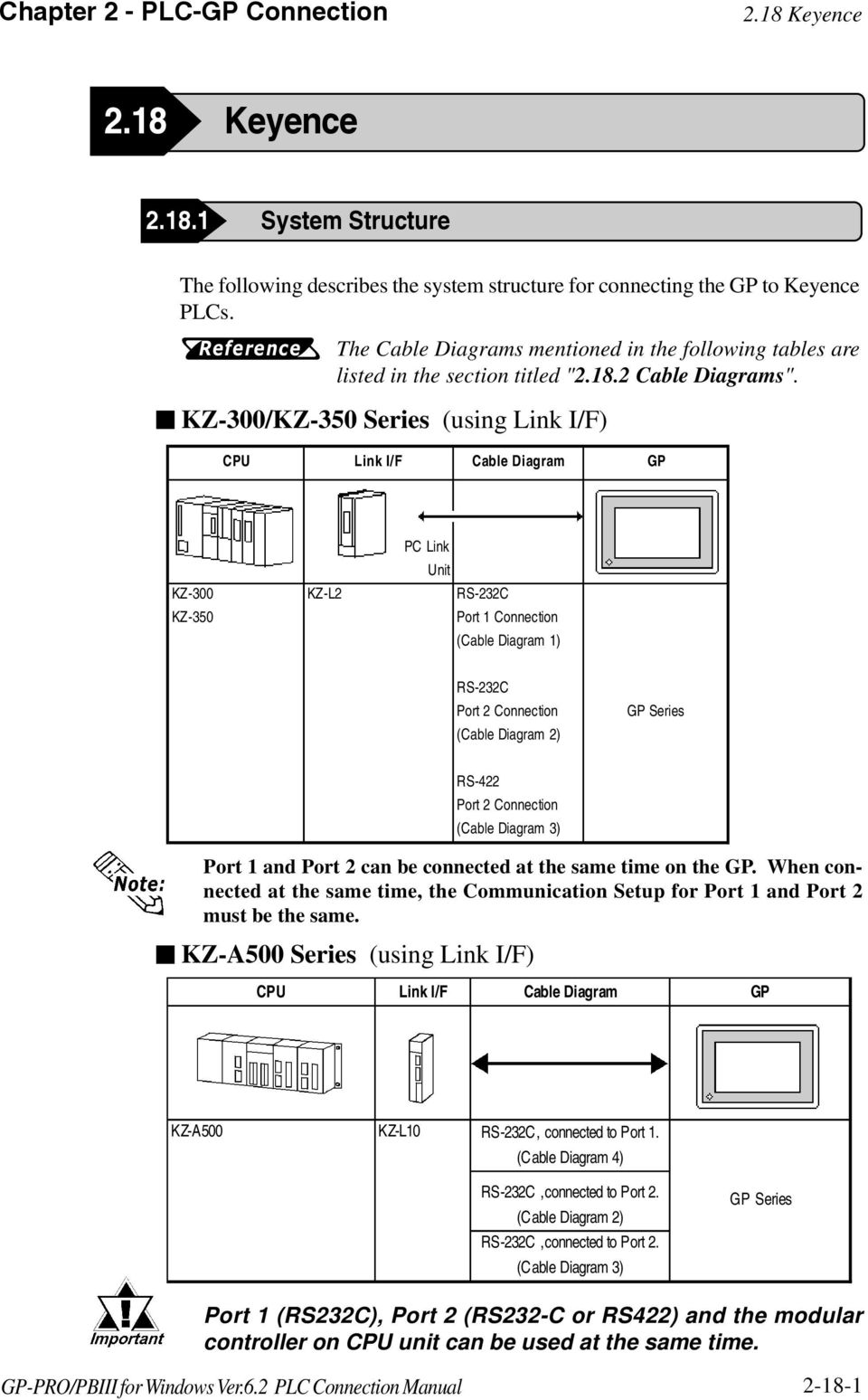
5 2.18 Keyence Chapter 2 - PLC-GP Connection KZ-A500 (CPU Direct Connection) CPU Cables Connector GP Modular Modular KZ-A500 Keyence Corp.'s OP Keyence Corp.'s OP *1 GP Series *1 The above CPU cannot be directly connected to GP2300/GP2301/GLC2300 series units because of the connector cover size. In this case, use Digital s CA1-EXCBL/D25-01 extension cable. Visual KV Series (CPU Direct Connection) CPU Cables Connector GP/GLC Modular Socket Modular Socket KV-10Ao,KV-10Do *1 KV-16Ao,KV-16Do KV-24Ao,KV-24Do KV-40Ao,KV-40Do Key ence Corp.'s OP Key ence Corp.'s OP *2 GP Series GLC Series *1 The value of o depends on the PLC specifications. *2 The above CPU cannot be directly connected to GP2300/GP2301/GLC2300 series units because of the connector cover size. In this case, use Digital s CA1-EXCBL/D25-01 extension cable. KV-700 Series (using Link I/F) CPU Link I/F Cable Diagram GP/GLC PC Link Unit KV-700 KV-L20 RS-232C (Communication Port 1) <Cable Diagram 5> RS-232C (Communication Port 2) <Cable Diagram 6> RS-422 (Communication Port 2) <Cable Diagram 7> GP Series GLC Series

6 Chapter 2 - PLC-GP Connection 2.18 Keyence KV-700 Series (CPU Direct Connection) CPU Cables Connector GP/GLC Modular Modular KV-700 Keyence Corp.'s OP Keyence Corp.'s OP *1 *2 GP Series GLC Series *1 The above CPU cannot be directly connected to GP2300/GP2301/GLC2300 series units because of the connector cover size. In this case, use Digital s CA1-EXCBL/D25-01 extension cable. *2 In the GP70 series units, only GP377 series units can be used. KV Series (CPU Direct Connection) CPU Cables Connector GP/GLC Modular Socket Modular Socket KV-10RW,KV-10T2W KV-16RW,KV-16T2W KV-24RW,KV-24T2W KV-40RW,KV-40T2W KV-80RW,KV-80TW Keyence Corp.'s OP Keyence Corp.'s OP *1 GP Series *2 GLC Series *1 The above CPU cannot be directly connected to GP2300/GP2301/GLC2300 series units because of the connector cover size. In this case, use Digital s CA1-EXCBL/D25-01 extension cable. *2 GP70 Series (except for GP377 Series units) and GLC100 Series units cannot be used

7 2.18 Keyence Chapter 2 - PLC-GP Connection Cable Diagrams The cable diagrams illustrated below and the cable diagrams recommended by Keyence may differ, however, using these cables for your PLC operations will not cause any problems. Connect the FG line of the Shield cable to the GP. For the RS-232C connection, use a cable length less than 15m. If a communications cable is used, it must be connected to the SG (signal ground). For the RS-422 connection, refer to Keyence's PLC manual for the cable length. Cable Diagram 1 (RS-232C) NC CD Cable Diagram 2 (RS-232C) NC CD

8 Chapter 2 - PLC-GP Connection 2.18 Keyence Cable Diagram 3 (RS-422) Turn the PLC's Termination Resistor switch ON. The reading of the A and B signals is reversed on the GP and PLC. When using Digital's RS-422 connector terminal adapter, GP070-CN10-0 When using Digital's RS-422 Cable, GP230-IS11-0 When making your own cable connections Hirakawa Densen's H-9293A (C0-HC-ESV-3P*7/0.2) is the recommended cable. When connecting the #9 and #10 pins in the GP Serial I/F, a termination resistance of 100Ω is added between RDA and RDB. When using RS-422 connection, please check the cable length with Keyence PLC users manual

9 2.18 Keyence Chapter 2 - PLC-GP Connection Cable Diagram 4 (RS-232C) port1 When using an RS-232C cable, the cable must be no longer than 15meters. When using an RS-422 cable, the cable must be no longer than 500meters. GP Unit (25P) 1 FG 2 SD 3 RD 4 RS 5 CS 7 SG Shield PLC (25P) 2 SD 3 RD 4 RS 5 CS 7 SG Cable Diagram 5 (RS-232C) port 1 GP Unit (D-sub 25P Male) 1 FG 2 SD 3 RD 4 RS 5 CS 6 NC 7 SG 8 CD 20 ER Shield PLC (D-sub 9P Female) 2 RD 3 SD 7 RS 8 CS 5 SG Cable Diagram 6 (RS-232C) port 2 GP Unit (D-sub 25P Male) 1 FG 2 SD 3 RD 4 RS 5 CS 6 NC 7 SG 8 CD 20 ER Shield Terminal for communication 1 SG 3 SD 5 RD

10 Chapter 2 - PLC-GP Connection 2.18 Keyence Cable Diagram 7 (RS-422) 4-wire type The termination resistance on the PLC side becomes active when the Terminator Select switch on the unit is turned ON. The names of poles A and B are inverted between the GP and the PLC. The cable length should be within 500 meters. When using Digital's RS-422 connector terminal adapter, GP070-CN10-0 Terminal for Termination resistance GP Unit Shield communication 1/2W, 470Ω RDA 1 SG REB 2 REA GP070-CN10-0 SDA 3 SDA SDB 4 RDB Termination resistance 1/2W, 470Ω TERM SG FG 5 SDB When using Digital's RS-422 Cable, GP230-IS11-0 GP Unit RDA REB SDA SDB GP230-IS11-0 SG FG Ground Terminal for communication 1 SG 2 RDA 3 SDA 4 RDB 5 SDB When making your own cable connections GP Unit Shield Terminal for communication Termination resistance 1/2W, 470Ω Termination resistance 1/2W, 470Ω 1 FG 7 SG 9 TRMX 10 RDA 16 RDB 11 SDA 15 SDB 18 CSB 19 ERB 21 CSA 22 ERA 1 SG 2 RDA 3 SDA 4 RDB 5 SDB

11 2.18 Keyence Chapter 2 - PLC-GP Connection Supported Devices The following describes the range of devices supported by the GP. KZ-300/KZ-350 Series Set up System Area here. Device Bit Address Word Address Particulars Input Relay ~ ~ ~ ~ 174 *1 Output Relay 0500 ~ ~ ~ ~ 179 *2 Help Relay 0504 ~ Internal Help Relay 1000 ~ ~ 69 Special Help Relay 2000 ~ ~ 29 L/H Timer (contact) T000 ~ T Counter (contact) C000 ~ C Timer (current value) --- T000 ~ T249 Counter (current value) --- C000 ~ C249 Data Memory --- DM0000 ~ DM9999 Temporary Data Memory --- TM00 ~ TM31 * 1 Address numbers *000~*400 are available for the bit device addresses,and *0~*4 are available for the word addresses displayed. Bit Address Word Address addr addr 7001 to addr to 74 addr addr 8100 to addr to 84 addr to addr to 174 * 2 Address numbers *500~*900 are available for the bit device addresses, and *5~*9 are available for the word addresses displayed. Bit Address Word Address addr addr 7600 to addr to 79 addr addr 8600 to addr to 89 addr to addr to

12 Chapter 2 - PLC-GP Connection 2.18 Keyence KZ-A500 (CPU Direct Connection) Device Bit Address Word Address Set up System Area here. Particulars Input Relay X0000 ~ X07FF X0000 ~ X07F0 Output Relay Y0000 ~ Y07FF Y0000 ~ Y07F0 Internal Relay M0000 ~ M8191 M000 ~ M8176 Latch Relay L0000 ~ L Special Relay M9000 ~ M9255 M9000 ~ M9240 Annunciator F0000 ~ F2047 F0000 ~ F2032 Link Relay B0000 ~ B0FFF --- Timer (contact) TS0000 ~ TS Timer (coil) TC0000 ~ TC L/H Counter (contact) CS0000 ~ CS Counter (coil) CC0000 ~ CC Timer (current value) --- TN0000 ~ TN2047 Counter (current value) --- CN0000 ~ CN1023 Data Register --- D0000 ~ D6143 Special Register --- D9000 ~ D9255 Link Register --- W0000 ~ W0FFF File Register --- R0000 ~ R

13 2.18 Keyence Chapter 2 - PLC-GP Connection KZ-A500 (using Link I/F) Set up System Area here. Device Bit Address Word Address Particulars Input Relay X0000 ~ X07FF X0000 ~ X07F0 Output Relay Y0000 ~ Y07FF Y0000 ~ Y07F0 Internal Relay M0000 ~ M8191 M0000 ~ M8176 Latch Relay L0000 ~ L8191 L0000 ~ L8176 Link Relay B0000 ~ B0FFF Annunciator Relay F0000 ~ F2047 F0000 ~ F2032 Special Relay M9000 ~ M9255 M9000 ~ M9240 Timer (connect) TS0000 ~ TS2047 Timer (coil) TC0000 ~ TC2047 L/H Counter (connect) Counter (coil) Timer (current value) Counter (current value) Data Register Link Register File Register Special Register CS0000 ~ CS1023 CC0000 ~ CC1023 TN0000 ~ TN2047 CN0000 ~ CN1023 D0000 ~ D6143 W0000 ~ W0FFF R0000 ~ R8191 D9000 ~ D

14 Chapter 2 - PLC-GP Connection 2.18 Keyence Visual KV Series (KV-10A/KV-10D/KV-16A/KV-16D//KV-24A/ KV-24D/KV-40A/KV-40D) Set up System Area here. Device Bit Address Word Address Particulars Input/Output Relay Internal AUX Relay ~ ~ ~ ~ ~ ~ ~ ~ 069 Special AUX Relay ~ ~ 029 *1 Timer (contact) Counter (contact) Comparator (contact) T000 ~ T249 C000 ~ C249 CTC0 ~ CTC3 *2 Timer (set value) Counter (set value) Timer (current value) Counter (current value) Data Memory Temporary Data Memory TS000 ~ TS249 CS000 ~ CS249 TC000 ~ TC249 CC000 ~ CC249 DM0000 ~ DM1999 TM00 ~ TM31 L/H Digital Trimmer (current value) Comparator (set value) AT0 ~ AT1 CTH0 ~ CTH1 CTC0 ~ CTC3 *2 *1 Some addresses are not available for writes. *2 Not available for writes

15 2.18 Keyence Chapter 2 - PLC-GP Connection KV-700 Series (using the KZ-300 series protocol) Set up System Area here. Device Bit Address Word Address Particulars Input Relay ~ ~ 000 *1 Output Relay ~ ~ 005 Internal AUX Relay ~ ~ 009 Extended Input/Output Relay Internal AUX Relay ~ ~ 599 Control Relay ~ ~ 639 *2 Timer (contact) Counter (contact) T000 ~ T511 C000 ~ C511 *3 *3 L/H Timer (current value) T000 ~ T511 *3 Counter (current value) C000 ~ C511 *3 Data Memory DM0000 ~ DM9999 *4 Temporary Data Memory Control Memory TM000 ~ TM511 TM0520 ~ TM4519 *5 *1 PLC or GP data writing is not possible. *2 GP cannot write data to any address. *3 Only available when the timer command and the counter command exist in the ladder program. *4 The device range for the PLC is between DM0000 and DM19999, but addresses up to DM9999 are only accessible to the GP. *5 Some addresses are not available for writes

16 Chapter 2 - PLC-GP Connection 2.18 Keyence KV-700 Series (using the KZ-A500 (link) protocol) Set up System Area here. Device Bit Address Word Address Particulars Input Relay X000 ~ X009 X00 ~ X00 *1*2 Output Relay X050 ~ X053 X05 ~ X05 *2 Internal AUX Relay X054 ~ X09F X05 ~ X09 *2 Control Relay M0000 ~ M3915 M0000 ~ M3904 *3*4 Timer (contact) TS000 ~ TS511 *5 Counter (contact) CS000 ~ CS511 *5 Comparator (contact) CS512 ~ CS515 *5*6 L/H Timer (current value) TN000 ~ TN511 *5 Counter (current value) CN000 ~ CN511 *5 (current value) CN512 ~ CN513 *5 Data Memory D00000 ~ D19999 *7*8 Control Memory D50000 ~ D53999 *7*3 *1 PLC or GP data writing are not available for writes. *2 Addresses must be specified using hexadecimal numbers. *3 Some addresses are not available for writes. *4 For addresses, only multiples of 16 may be specified. *5 Only available when the timer command, the counter command, and the highspeed timer command exist in the ladder program. *6 GP cannot write data to any address. *7 Even if the file registers are registered as R50000 to R539999, similar device addresses can be used, e.g., R51111 = D

17 2.18 Keyence Chapter 2 - PLC-GP Connection KV-700 Series (CPU Direct Connection) Set up System Area here. Device Bit Address Word Address Particulars Input/Output Relay Internal AUX Relay 00000~ ~599 Control Relay CR0000~CR3915 CR00~CR39 Timer (contact) Counter (contact) Comparator (contact) T000~T511 C000~C511 CTC0~CTC3 *1 Timer (set value) TS000~TS511 *2 Counter (set value) CS000~CS511 *2 Timer (current value) TC000~TC511 *2 L/H Counter (current value) CC000~CC511 *2 Data Memory Temporary Data Memory Control Memory DM00000~DM39999 TM000~TM511 CM0000~CM3999 Digital Trimmer TRM0~TRM7 *2 (current value) Comparator (set value) CTH0~CTH1 *2 CTC0~CTC3 *2 *1 Not available for writes. *2 32-bit device

18 Chapter 2 - PLC-GP Connection 2.18 Keyence KV Series (KV-10RW/KV-10T2W/KV-16RW/KV-16T2W/KV- 24RW/KV-24T2W/KV-40RW/KV-40T2W/KV-80RW/KV-80TW) Set up System Area here. Device Bit Address Word Address Particulars Input/Output Relay ~ Internal AUX Relay ~ * ~ Special AUX Relay ~ *1 Timer (contact) Counter (contact) Comparator (contact) Timer (set value) Counter (set value) Timer (current value) Counter (current value) Data Memory Temporary Data Memory T000 ~ T119 C000 ~ C119 *2 CTC0 ~ CTC3 TS000 ~ TS119 CS000 ~ CS119 TC000 ~ TC119 CC000 ~ CC119 DM0000 ~ DM1999 TM00 ~ TM31 L/H Analog Timer AT0 ~ AT1 *2 (current value) Comparator (set value) *1 Some addresses are not available for writes. *2 Not available for writes CTH0 ~ CTH1 CTC0 ~ CTC3 The device ranges available will depend on the PLC model used. Be sure to check your PLC's manual prior to connecting it to the GP

19 2.18 Keyence Chapter 2 - PLC-GP Connection Environment Setup The following lists Digital's recommended PLC and GP communication setups. KZ-300/KZ-350 Series GP Setup PC Link Unit Setup Baud Rate bps Baud Rate bps Data Length 7 bits Data Bit 7 bits Stop Bit 2 bits Stop Bit 2 bits Parity Bit Even Parity Bit Even Data Flow Control ER Control --- Communication Format (RS-232C) RS-232C Port 2 Toggle Switch (RS-232C) *1 RS-232C Communication Format (RS-422) 4-wire type Port 2 Toggle Switch (RS-422) *1 RS-422A --- RUN Mode Link Mode Unit No. 0 Station Number 0 *1 Setup not necessary when using Port1. KZ-A500 (CPU Direct Connection) Baud Rate Data Length Stop Bit Parity Bit GP Setup 9600 bps 8 bits (fixed) 1 bit (fixed) Odd (fix ed) PLC Setup Data Flow Control Communication Format (RS-232C) Unit No. ER Control RS-232C 0 (fixed) Effect of PLC program on cycle time If the KZ-A500 is connected directly to the CPU, the cycle time of the PLC program is delayed by about 8% after communication with the GP begins

20 Chapter 2 - PLC-GP Connection 2.18 Keyence KZ-A500 (using Link I/F) GP Setup PLC Setup Baud Rate 19200bps *1 Baud Rate 19200bps Data Length 7 bits Data Length 7 bits Stop Bit 1 bit Stop Bit 1 bit Parity Bit None Parity Bit None Data Flow Control Communication Format (RS-232C) Communication Format (RS-422) ER RS-232C RS-232C Communication Port Port 1 or Port 2 *2 4-Wire Type RS-422 Communication Port Port 2 *3 Communication Type Changing device data during RUN Checksum Normal Possible Yes Operation Mode Protocol Mode 4 Unit No. 0 STATION No. 0 *1 The maximum baud rate is 38400bps. *2 When using an RS-232C cable on port 2, be sure to set the INTERFACE switch to 232C (right side setting.) Also, set the TERMINATOR switch to OFF, since it will not be used. *3 When using an RS-422 cable, set the INTERFACE switch to 422 ( left side setting,) and the TERMINATOR switch to ON. Visual KV/KV-700 Series (CPU Direct Connection) GP Setup PLC Setup Baud Rate Data Length Stop Bit Parity Bit Data Flow Control Communication Format 19200bps 8 bits (fixed) 1 bit (fixed) Even (fix ed) ER Control RS-232C Unit No. 0 The baud rate can be from 9600 to bps. The PLC requires no setup due to its automatic recognition of settings

21 2.18 Keyence Chapter 2 - PLC-GP Connection KZ-700 Series (using the KZ-300 series protocol) GP Setup PLC Setup Baud Rate 19200bps *1 Baud Rate 19200bps Data Length 7 bits Data Length 7 bits Stop Bit 2 bits Stop Bit 2 bits Parity Bit Even Parity Bit Even Data Flow Control ER Control RS, CS Flow Control No Communication Format (RS-232C) RS-232C Communication Port 1 Communication Port 2 Selector Switch Fixed to 232C 232C Communication Format (RS-422) 4-Wire Type Communication Port 2 Selector Switch 422A Operation Mode Link Mode Unit No. 0 Station No. 0 *1 The maximum baud rate is 115,200 bps. KZ-700 Series (using the KZ-A500 series protocol) GP Setup PLC Setup Baud Rate 19200bps *1 Baud Rate 19200bps Data Length 7 bits Data Length 7 bits Stop Bit 1 bits Stop Bit 1 bits Parity Bit None Parity Bit None Data Flow Control ER Control Communication Format (RS-232C) RS-232C Communication Port 1 Communication Port 2 Selector Switch Fixed to 232C 232C Communication Format (RS-422) 4-Wire Type Communication Port 2 Selector Switch 422A Operation Mode Protocol Mode 4 Checksum Yes Unit No. 0 Station No. 0 *1 The maximum baud rate is 115,200 bps
22 Chapter 2 - PLC-GP Connection 2.18 Keyence KV Series (CPU Direct Connection) GP Setup PLC Setup Baud Rate Data Length Stop Bit Parity Bit Data Flow Control Communication Format Unit No bps 8 bits (fixed) 1 bit (fixed) Even (fix ed) ER Control RS-232C 0 (fixed) The baud rate can be from 9600 to bps. The PLC requires no setup due to its automatic recognition of settings. If your ladder program is currently stopped and you attempt data transfer at bps, a communication error can occur. If it does, either change to RUN mode, or use a different communication speed
23 2.18 Keyence Chapter 2 - PLC-GP Connection Error Codes nplc Error Codes Controller error codes are indicated by the "Host communication error (02:**)", and appear in the left lower corner of the GP screen. (** stands for an error code.) Host Communication Error (02:**) PLC Error Code uvisual KV/KV-700 Series (CPU Direct Connection) <PLC Error Code> Error Code 02 Description Occurs when you write to a device that cannot be written to. (High Speed Counter Comparator (contact)) 04 Occurs when the PLC uses an unsupported baud rate to send data. 31 Occurs when an undefined device is accessed. *1 *1 When writing to a Timer (contact/current value/set value), Counter (contact/ current value/set value), High Speed Counter, High Speed Counter Comparator (set value), these values must be set in advance using a Ladder Program. ukv Series (CPU Direct Connection) <PLC Error Code> Error Code Description 02 A ladder program has not yet been set up in the PLC. 04 A Device was accessed that has not yet been defined. 13 Setting values were attempted to be changed for a write-protected program's Counters, Timers, and High-speed Counter Comparator
24 Appendix A1 Maximum Number of Consecutive PLC Addresses The following lists the maximum number of consecutive addresses that can be read by each PLC. Refer to these tables to utilize Block Transfer. KV Series Device Input/Output Relay Internal AUX Relay Special AUX Relay Timer (contact) Counter (contact) Comparator (contact) Timer (set value) Counter (set value) Timer (current value) Counter (current value) Data Memory Temporary Data Memory Analog Timer (current value) Comparator (set value) Max No. of Consecutive Address 1 Bit 1 Word 30 Words 1 Word 2 Words 1 Word GP-PRO/PBIII for Windows Ver.6.0 PLC Connection Manual Appendix-1
25 Appendix A2 Device Codes and Address Codes Device codes and address codes are used to specify indirect addresses for E-tags and K- tags. KV Series Device Word Address Device Code (HEX) Address Code Timer (set value) TS000 ~ 6800 Word Address Counter (set value) CS000 ~ 7800 Word Address Timer (current value) TC000 ~ 6000 Word Address Counter (current value) CC000 ~ 7000 Word Address Data Memory DM0000 ~ 0000 Word Address Temporary Data Memory TM00 ~ 4800 Word Address Analog Timer AT 0 ~ 5800 Word Address (current value) CTH0 ~ 1000 Word Address Comparator (set value) CTC0 ~ 2000 Word Address LS area LS0000 ~ 4000 Word Address Appendix-2 GP-PRO/PBIII for Windows Ver.6.0 PLC Connection Manual
26 Appendix A3 Address Conversion Table Before Conversion Refer to the following Address Conversion Table to convert addresses correctly. m: When the selected conversion mode is [Word], both word and bit addresses are converted. When the [Bit] is selected, only bit addresses are converted. q: When the [Word] mode is selected, only word addresses are converted. : When the [Bit] mode is selected, only bit addresses are converted. Blank:Cannot be converted. KV Series After Conversion - T C CTC TS CS TC CC DM TM AT CTH CTC LS Relay T Timer (contact) C Counter (contact) CTC High-Speed Counter Comparator (contact) TS Timer (set value) CS Counter (set value) TC Timer (current value) CC Counter (current value) DM Data Memory TM Temporary Data Memory AT Analog Timer CTH High-Speed Counter (current value) CTC High-Speed Counter Comparator (set value) LS LS area GP-PRO/PBIII for Windows Ver.6.0 PLC Connection Manual Appendix-3
KV-10_80RW/TW CPU Direct Driver
 KEYENCE Corporation KV-10_80RW/TW CPU Direct Driver 1 System Configuration... 3 2 External Device Selection... 7 3 Communication Settings... 8 4 Setup Items... 9 5 Cable Diagrams... 13 6 Supported Devices...
Mitsubishi Electric Q Series PLC Ladder Monitor. Operation Manual
 Mitsubishi Electric Q Series PLC Ladder Monitor Operation Manual Preface Thank you for purchasing Pro-face's PLC Ladder Monitor Add-on Kit for the Mitsubishi Electric Q Series PLC. This manual ("Mitsubishi
2-Port RS232/422/485 Combo Serial to USB2.0 Adapter (w/ Metal Case and Screw Lock Mechanism) Installation Guide
 2-Port RS232/422/485 Combo Serial to USB2.0 Adapter (w/ Metal Case and Screw Lock Mechanism) Installation Guide 1. Introduction Thank you for purchasing this 2-Port RS232/422/485 Combo Serial to USB Adapter.
RS232C < - > RS485 CONVERTER S MANUAL. Model: LD15U. Phone: 91-79-4002 4896 / 97 / 98 (M) 0-98253-50221 www.interfaceproducts.info
 RS232C < - > RS485 CONVERTER S MANUAL Model: LD15U INTRODUCTION Milestone s model LD-15U is a RS232 to RS 485 converter is designed for highspeed data transmission between computer system and or peripherals
FINS Gateway For OMRON PLCs
 1 Purpose This Technical Note describes how to set up a remote collaboration. A remote collaboration consists in configuring, programming or monitoring a PLC from a remote location, without the need of
KOYO DIRECT. HMI Setting: PLC Setting: Supported Series: KOYO DirectLogic series PLC DL05, DL06, DL105, DL205, DL305, and DL405 series.
 KOYO DIRECT Supported Series: KOYO DirectLogic series PLC DL05, DL06, DL105, DL205, DL305, and DL405 series. Website: http://www.automationdirect.com HMI Setting: Parameters Recommended Options Notes PLC
USB to RS-422/485 Serial Adapter
 USB to RS-422/485 Serial Adapter User Manual Ver. 2.00 All brand names and trademarks are properties of their respective owners. Contents: Chapter 1: Introduction... 3 1.1 Product Introduction... 3 1.2
Programming and Using the Courier V.Everything Modem for Remote Operation of DDF6000
 Programming and Using the Courier V.Everything Modem for Remote Operation of DDF6000 1.0 Introduction A Technical Application Note from Doppler System July 5, 1999 Version 3.x of the DDF6000, running version
ETHERNET WEATHER STATION CONNECTIONS Application Note 33
 ETHERNET WEATHER STATION CONNECTIONS Application Note 33 With WeatherLink and a Device Server INTRODUCTION It is possible to substitute an Ethernet connection for the direct USB or serial connection that
This guide describes the details that are necessary for making a HMI (PC RT or panel) for an S5 PLC.
 Page 1 of 8 HOWTO_setup_and_connect_panel_to_S5.doc date: 20-01-11. - JMP / 6011 This guide describes the details that are necessary for making a HMI (PC RT or panel) for an S5 PLC. A typical application
MS830 / MS833 Barcode Reader v1.0 9-December-2014
 MS830 / MS833 Barcode Reader v1.0 9-December-2014 Publication Information 2014 Imagine Communications Corp. Proprietary and Confidential. Imagine Communications considers this document and its contents
Toshiba Serial Driver Help. 2012 Kepware Technologies
 2012 Kepware Technologies 2 Table of Contents Table of Contents 2 3 Overview 3 Device Setup 4 Modem Setup 4 Cable Diagram - EX100/200 PLCs 4 Cable Diagram - T1 PLCs 5 Cable Diagram - T2/T3 PLCs 5 Cable
1-Port R422/485 Serial PCIe Card
 1-Port R422/485 Serial PCIe Card Installation Guide 1. Introduction Thank you for purchasing this 1-Port RS422/485 Serial PCI Express (PCIe) Card. It is a universal add in card that connects to a PC or
NC-12 Modbus Application
 NC-12 Modbus Application NC-12 1 Table of Contents 1 Table of Contents... 2 2 Glossary... 3 SCADA...3 3 NC-12 Modbus in general... 3 4 Entire system... 4 4.1 PFC to PC connection alternatives...4 4.1.1
The modular concept of the MPA-3 system is designed to enable easy accommodation to a huge variety of experimental requirements.
 HARDWARE DESCRIPTION The modular concept of the MPA-3 system is designed to enable easy accommodation to a huge variety of experimental requirements. BASE MODULE GO LINE Digital I/O 8 Analog Out AUX 1
PCMCIA 1 Port RS232 2.1 EDITION OCTOBER 1999
 232 232232 PCMCIA 1 Port RS232 2.1 EDITION OCTOBER 1999 Guarantee. FULL 36 MONTHS GUARANTEE. We guarantee your interface card for a full 36 months from purchase, parts and labour, provided it has been
LINDY ELECTRONICS LIMITED & LINDY-ELEKTRONIK GMBH - SECOND EDITION
 RS-422/485 PCI Card User Manual English No. 51200 (2 Port) No. 51202 (4 Port) No. 51204 (8 Port) www.lindy.com LINDY ELECTRONICS LIMITED & LINDY-ELEKTRONIK GMBH - SECOND EDITION (Nov 2005) 1.0 Introduction
1 Application Description... 2 2 System Topology... 2 3 Hardware and Software Requirements... 3
 Contents Moxa Technical Support Team [email protected] 1 Application Description... 2 2 System Topology... 2 3 Hardware and Software Requirements... 3 3.1 Hardware Requirement... 3 3.2 Software Equipment...
Different Ways of Connecting to. 3DLevelScanner II. A.P.M Automation Solutions LTD. www.apm-solutions.com Version 3.0
 3DLevelScanner II Different Ways of Connecting to 3DLevelScanner II A.P.M Automation Solutions LTD. www.apm-solutions.com Version 3.0 2 Different Ways of Connecting to 3DLevelScanner II Version 3.0 Table
IP Link Device Interface Communication Sheet
 This document provides additional assistance with wiring your Extron IP Link enabled product to your device. Different components may require a different wiring scheme than those listed below. For complete
16-Port RS232 to USB2.0 High Speed Multi Serial Adapter (w/ Metal Case) Installation Guide
 16-Port RS232 to USB2.0 High Speed Multi Serial Adapter (w/ Metal Case) Installation Guide 1. Introduction Thank you for purchasing this 16-Port RS232 to USB2.0 High Speed Multi Serial Adapter. It is an
Modbus Communications for PanelView Terminals
 User Guide Modbus Communications for PanelView Terminals Introduction This document describes how to connect and configure communications for the Modbus versions of the PanelView terminals. This document
ProLink II Software for Micro Motion Transmitters
 Instruction Manual P/N 20001909, Rev. DA August 2009 ProLink II Software for Micro Motion Transmitters Installation and Use Manual 2009 Micro Motion, Inc. All rights reserved. The Micro Motion and Emerson
MAC Ope ra tor Terminal
 MITSUBISHI ELECTRIC MAC Ope ra tor Terminal Human-Machine-Interface In stal la tion Manual MAC 40+ MITSUBISHI ELECTRIC EUROPE B.V. FACTORY AUTOMATION Contents Safety precautions...2 Introduction...4 Function
MEMOBUS/Modbus Communications
 2 2.1 MEMOBUS/MODBUS CONFIGURATION............260 2.2 COMMUNICATION SPECIFICATIONS..............261 2.3 COMMUNICATION TERMINAL RESISTANCE........262 2.4 CONNECTING A PLC...........................263 2.5
Modbus and ION Technology
 70072-0104-14 TECHNICAL 06/2009 Modbus and ION Technology Modicon Modbus is a communications protocol widely used in process control industries such as manufacturing. PowerLogic ION meters are compatible
DAM Series DAM124 4DIN+8AI+4DO Module Model No.:DAM124 WebSite: www.gsm-m2m.com
 DAM Series DAM124 4DIN+8AI+4DO Module Model No.:DAM124 WebSite: www.gsm-m2m.com This handbook has been designed as a guide to the installation and operation of King Pigeon Hi-Tech.Co.,Ltd DAM series. Statements
Easy! Smooth! GP/ST-3500 Series->GP4000 Series Replacement Guidebook
 Easy! Smooth! GP/ST-3500 Series->GP4000 Series Replacement Guidebook 1/46 The 6th Edition April 2013 Copyright 2013.4 Digital Electronics Corporation. All Rights Reserved. Preface This guidebook introduces
Data Acquisition Module with I2C interface «I2C-FLEXEL» User s Guide
 Data Acquisition Module with I2C interface «I2C-FLEXEL» User s Guide Sensors LCD Real Time Clock/ Calendar DC Motors Buzzer LED dimming Relay control I2C-FLEXEL PS2 Keyboards Servo Motors IR Remote Control
USER S MANUAL Communication Function
 UM-TS01 -E033 PROGRAMMABLE CONTROLLER PROSEC T1-16S USER S MANUAL Communication Function TOSHIBA CORPORATION Important Information Misuse of this equipment can result in property damage or human injury.
RFID MODULE Mifare Reader / Writer SL025B User Manual Version 1.4 Nov 2012 StrongLink
 RFID MODULE Mifare Reader / Writer User Manual Version 1.4 Nov 2012 StrongLink CONTENT 1. MAIN FEATURES... 3 2. PINNING INFORMATION... 4 3. BAUD RATE SETTING... 5 4. COMMUNICATION PROTOCOL... 5 4-1. COMMUNICATION
Online simulator YES Broadcast command YES Extend address mode YES
 MODBUS RTU Supported Series : MODBUS RTU CONTROLLER Website : http://www.modbus.org HMI Setting: Parameters Recommended Options Notes PLC type MODBUS RTU PLC I/F RS485 RS232/RS485 Baud rate 9600 9600~115200
Modbus RTU Master Communications
 Modbus RTU Master Communications This document describes the operation of Modbus RTU Master from the user interface point of view. Use this information as a supplement to the Serial Communications User
MIDECO 64-outputs MIDI note decoder USER MANUAL. Roman Sowa 2012
 MIDECO 64-outputs MIDI note decoder USER MANUAL Roman Sowa 2012 www.midi-hardware.com 1.Overview Thank you for choosing MIDECO as your new MIDI-to-digital converter. This short manual will guide you through
LDG Electronics External Meter Serial Communications Protocol Specification
 M1000 METER PROTOCOL SPECIFICATION MANUAL REV A LDG Electronics External Meter Serial Communications Protocol Specification LDG Electronics 1445 Parran Road St. Leonard MD 20685-2903 USA Phone: 410-586-2177
2-Port RS232/422/485 Combo Serial PCI Card
 2-Port RS232/422/485 Combo Serial PCI Card Installation Guide 1. Introduction Thank you for purchasing this 2-Port RS232/422/485 Combo Serial PCI Card. It is a universal add in card that connects to a
CENTRONICS interface and Parallel Printer Port LPT
 Course on BASCOM 8051 - (37) Theoretic/Practical course on BASCOM 8051 Programming. Author: DAMINO Salvatore. CENTRONICS interface and Parallel Printer Port LPT The Parallel Port, well known as LPT from
PLC training panel (Twido version)
 PLC training panel (Twido version) User manual Name School of Trades Produced by: GJR October 2012 Colour leaves: 9 BW leaves: 2 Cover colour: White Cover image: G.J.Rogerson Acknowledgments: Much of the
How to read this guide
 How to read this guide The following shows the symbols used in this Quick start guide with descriptions and examples. Symbol Description Example P oint Reference Caution [ ] This symbol explains information
INTELLIGENT CONTROL MODULE SA-2000-II HARDWARE MANUAL. Access Technologies International, Inc.
 SA-2000-II HARDWARE MANUAL Access Technologies International, Inc. 1 Table of Contents 1. Introduction 3 2. Features 3 3. Specification 4 4. Identifying Supplied Parts 4 5. Panel Description 5 6. Connection
SIMATIC S7-1200. It s the Interplay that makes the difference. Siemens AG 2010. All Rights Reserved.
 SIMATIC S7-1200 It s the Interplay that makes the difference SIMATIC S7-1200 Controller SIMATIC S7-1200 CPUs CPU 1211C 3 configurations per CPU Dimensions W x H x D (mm) CPU 1212C CPU 1214C DC/DC/DC, AC/DC/RLY,
PNSPO! Modbus Solution CP1H / CP1L / CJ1 / CJ2 / CS1. Version 2.05 6/18/2009
 PNSPO!! Modbus Solution CP1H / CP1L / CJ1 / CJ2 / CS1 Version 2.05 6/18/2009 Section 1. Overview The Omron CP1H and CP1L PLCs offer a built in function called Easy Modbus, that performs a Modbus RTU Master
1. SAFETY INFORMATION
 RS-232 Sound Level Meter 72-860A INSTRUCTION MANUAL www.tenma.com 1. SAFETY INFORMATION Read the following safety information carefully before attempting to operate or service the meter. Use the meter
UTILITY INSTRUCTION MANUAL BNP-B2196 (ENG)
 UTILITY INSTRUCTION MANUAL BNP-B2196 (ENG) MELDASMAGIC is a registered trademark of Mitsubishi Electric Corporation. Microsoft and Windows are registered trademark of Microsoft Corporation in the USA.
Master-Touch and ValuMass. Modbus Communications. INSTRUCTION MANUAL 80202201 (Rev. 2.1)
 Master-Touch and ValuMass Modbus Communications INSTRUCTION MANUAL 80202201 (Rev. 2.1) Eldridge Products, Inc. 2700 Garden Road, Building A Monterey, CA 93940 Tel: 800/321-3569 or 831/648-7777 Fax: 831/648-7780
Table of Contents. Creating a VC1000 Network... 3
 2 Table of Contents Creating a VC1000 Network... 3 Topology... 3 Unit ddressing... 4 Terminating Resistors... 5 Shielding... 5 Interconnecting the common... 6 ias Resistors... 6 VC1000 Hardware Configuration...
The Answer to the 14 Most Frequently Asked Modbus Questions
 Modbus Frequently Asked Questions WP-34-REV0-0609-1/7 The Answer to the 14 Most Frequently Asked Modbus Questions Exactly what is Modbus? Modbus is an open serial communications protocol widely used in
CPU systron S 200 - S 250 - S 250c. systron S 200 - S 250 - S 250c. CPUs to the process modules. Stand-alone PLC
 E031019 000823 systron S 200 - S 250 - S 250c CPU systron S 200 - S 250 - S 250c 45 mm width Flexible and expandable Easy to use software for bus connection (S 250/ S 250c) CPUs to the process modules
STIM202 Evaluation Kit
 Table of contents: 1 FEATURES... 2 2 GENERAL DESCRIPTIONS AND SYSTEM CONTENTS... 2 3 SYSTEM REQUIREMENTS... 2 4 GETTING STARTED... 3 4.1 INSTALLATION OF NI-SERIAL CABLE ASSEMBLY DRIVER... 3 4.2 INSTALLATION
Hitachi EH Series PLC
 Hitachi EH Series PLC (Supports Communication Mode: Procedure 1, Procedure 2) HMI Factory Setting: Baud rate: 19200, 7, Even, 1 (RS-232) Station Number: 0 Control Area / Status Area: W0 / W10 Connection
Connecting instruments serially to your computer
 Connecting instruments serially to your computer This TechNote will review how to connect instruments (GPS, Sounder, Heading Sensor ) to a computer. Important points such as electrical specification (RS-232
USER GUIDE. Ethernet Configuration Guide (Lantronix) P/N: 2900-300321 Rev 6
 KRAMER ELECTRONICS LTD. USER GUIDE Ethernet Configuration Guide (Lantronix) P/N: 2900-300321 Rev 6 Contents 1 Connecting to the Kramer Device via the Ethernet Port 1 1.1 Connecting the Ethernet Port Directly
Modbus RTU Communications RX/WX and MRX/MWX
 15 Modbus RTU Communications RX/WX and MRX/MWX In This Chapter.... Network Slave Operation Network Master Operation: RX / WX Network Master Operation: DL06 MRX / MWX 5 2 D0 Modbus Network Slave Operation
Introduction: Implementation of the MVI56-MCM module for modbus communications:
 Introduction: Implementation of the MVI56-MCM module for modbus communications: Initial configuration of the module should be done using the sample ladder file for the mvi56mcm module. This can be obtained
485USBTB-2W & 485USBTB-4W
 RS-485 2-Wire RS-485 4-Wire Connector Data Rate Connector Standard Data Rate Source Input Voltage Consumption Driver CD Dimensions Enclosure Weight Operating Temp Storage Temp Op Humidity MTBF MTBF Method
Modbus RTU Master Communications
 Modbus RTU Master Communications This document describes the operation of Modbus RTU Master from the user interface point of view. Use this information as a supplement to the Serial Communications User
Easy! Smooth! GP-3300 Series->GP4000 Series Replacement Guidebook
 Easy! Smooth! GP-3300 Series->GP4000 Series Replacement Guidebook 1 Fifth Edition Jul. 2012 Copyright 2012.7 Digital Electronics Corporation. All Rights Reserved. Preface This guidebook introduces the
PLC Master / Slave Example
 PLC Master / Slave Example A 2 PLC The Example This chapter provides an example of a PLC master / slave network and is designed for the experienced user. This chapter does not provide detailed descriptions
BIT COMMANDER. Serial RS232 / RS485 to Ethernet Converter
 BIT COMMANDER Serial RS232 / RS485 to Ethernet Converter (Part US2000A) Copyrights U.S. Converters 1 Contents Overview and Features... 3 Functions..5 TCP Server Mode... 5 Httpd Client Mode.5 TCP Auto mode....6
Quick Installation. A Series of Intelligent Bar Code Reader with NeuroFuzzy Decoding. Quick Installation
 Quick Installation A Series of Intelligent Bar Code Reader with NeuroFuzzy Decoding This chapter intends to get your new FuzzyScan scanner working with your existing system within minutes. General instructions
WHQL Certification Approval...2 User Interface...3 SUNIX s COMLab..4
 INDEX WHQL Certification Approval...2 User Interface....3 SUNIX s COMLab..4 1.0 Introduction...5 2.0 Specification..5 2.1 Features 2.2 Universal Serial PCI Card 2.3 RS-232 Specification 2.4 Low Profile
Programming A PLC. Standard Instructions
 Programming A PLC STEP 7-Micro/WIN32 is the program software used with the S7-2 PLC to create the PLC operating program. STEP 7 consists of a number of instructions that must be arranged in a logical order
WHQL Certification Approval...2 User Interface...3 128K software FIFO 4 Universal PCI Interface...5 Ready for 64-bit System...5
 0 INDEX WHQL Certification Approval...2 User Interface...3 128K software FIFO 4 Universal PCI Interface...5 Ready for 64-bit System...5 1.0 Introduction 6 2.0 Features.. 6 3.0 Hardware Guide... 7 3.1 System
Table of Contents. Page Number. PLC Connections 1 Cable Solutions for Omron PLCs 11 Cable Solutions for Multi-Vendor PLCs 15
 Table of Contents Name Page Number PLC Connections 1 Cable Solutions for Omron PLCs 11 Cable Solutions for Multi-Vendor PLCs 15 i Reference Information PLC Connections The following pages illustrate the
UDG1000 Hach PCX2200 Serial Port Input Driver configuration
 UDG1000 Hach PCX2200 Serial Port Input Driver configuration Introduction: The UDG1000 Hach PCX2200 Serial Port Input Driver is used to collect data from one or more daisy-chained Hach 2200 PCX Particle
How To Connect A Directsofl To A Powerpoint With An Acd With An Ctel With An Dm-Tel Modem On A Pc Or Ipad Or Ipa (Powerpoint) With A Powerline 2 (Powerline
 Application Note Last reviewed: 03/17/2008 AN-KEP-003.doc Page 1 of 23 Introduction... 1 Recommended s and ports to use... 1 Cable Wiring... 2 MDM-TEL Configuration ( Wizard)... 3 Direct Logic Communications
32 Transferring Projects and Data
 32 Transferring Projects and Data This Chapter explains how to transfer GP-Pro EX project files to the GP and how to transfer the project files stored on the GP to your PC. Please start by reading 32.1
LS-101 LAN to Serial Device server. User s Manual
 LS-101 LAN to Serial Device server User s Manual Revision History Revision No Date Author Remarks 0.1 August 29, 2001 IDC Initial document INTRODUCTION Overview Almost all instruments and most industrial
APNT#1168 Modbus - Establishing Communications Hints
 Application Note #1168: Modbus - Establishing Communications Hints Introduction This document provides supplemental information about configuring Pro-face Device/PLC drivers to communicate with your device.
Troubleshooting and Diagnostics
 Troubleshooting and Diagnostics The troubleshooting and diagnostics guide provides instructions to assist in tracking down the source of many basic controller installation problems. If there is a problem
S88XPressNetLI v1.0. Installation, user and reference manual. 2008 KDesign Electronics, PCB design by RoSoft
 S88XPressNetLI v1.0 Installation, user and reference manual 2008 KDesign Electronics, PCB design by RoSoft Table of contents 1 Introduction... 3 2 Specifications... 4 3 Installation... 5 3.1 Connecting
PM1122 INT DIGITAL INTERFACE REMOTE
 PM1122 INT DIGITAL INTERFACE REMOTE PM1122 INT front panel description: 1. Clear wireless remotes knob: push this button for more than 2 seconds to clear the list of all assigned wireless remote settings
RS-485 Protocol Manual
 RS-485 Protocol Manual Revision: 1.0 January 11, 2000 RS-485 Protocol Guidelines and Description Page i Table of Contents 1.0 COMMUNICATIONS BUS OVERVIEW... 1 2.0 DESIGN GUIDELINES... 1 2.1 Hardware Design
RTU-EN01 Modbus TCP Remote I/O Communication Module Operation Manual
 RTU-EN01 Modbus TCP Remote I/O Communication Module Operation Manual DVP-0213920-01 Introduction This operation manual only provides introductory information on electrical specification, installation
User Manual Connection to Beckhoff ADS serial
 User Manual Connection to Beckhoff ADS serial Part Number: 80 860.665 Version: 2 Date: 22.11.2005 Valid for: TSwin.net 4.0x TSwin.net 4.1x Version Date Modifications 1 21.09.2005 First edition 2 22.11.2005
M2M/IoT Solutions. www.contec.com
 M2M/IoT Solutions www.contec.com M2M/IoT Solutions TM Hardware Highly Reliable M2M Controllers for Various Solutions M2M Controllers Compact design available on DIN rails Low-power design using a CPU tailored
Programmable set for Ethernet Modbus/TCP in IP67 TI-BL67-PG-EN-2
 Type code Ident no. 1545065 Number of channels 2 Dimensions (W x L x H) 108 x 145 x 77.5 mm CoDeSys-programmable acc. to IEC 61131-3 Cable max. 50 m between interface and read/write head 10/100 Mbps Male
ZEN-SOFT01-V3. Cat.No.W386-E1-03
 ZEN-SOFT01-V3 Cat.No.W386-E1-03 ZEN-SOFT01-V3 ZEN Support Software Operation Manual Revised April 2003 iv Notice: OMRON products are manufactured for use according to proper procedures by a qualified operator
SVA025 Netcom2 FAQ Rev 1. Mitsubishi Netcom 2 FAQ
 SVA025 Netcom2 FAQ Rev 1 Mitsubishi Netcom 2 FAQ SVA025 Netcom2 FAQ Rev 1 2 What series of Netcom did we purchase? Netcom 2 FAQ Mitsubishi has several different versions of communications available. 1.
Fanuc 0 M/T Model C Serial (RS232) Connection Guide
 Memex Automation Inc., Burlington, Ontario Canada L7N 1 http://www.memex.ca Fanuc 0 M/T Model C Serial (RS232) Connection Guide The Fanuc 0-C control has two RS-232 interfaces. Interface number 1 (M5)
EXPERIMENT 2 TRAFFIC LIGHT CONTROL SYSTEM FOR AN INTERSECTION USING S7-300 PLC
 YEDITEPE UNIVERSITY ENGINEERING & ARCHITECTURE FACULTY INDUSTRIAL ELECTRONICS LABORATORY EE 432 INDUSTRIAL ELECTRONICS EXPERIMENT 2 TRAFFIC LIGHT CONTROL SYSTEM FOR AN INTERSECTION USING S7-300 PLC Introduction:
Programming Flash Microcontrollers through the Controller Area Network (CAN) Interface
 Programming Flash Microcontrollers through the Controller Area Network (CAN) Interface Application te Programming Flash Microcontrollers through the Controller Area Network (CAN) Interface Abstract This
User Manuals. Connection to Siemens S5 PU (AS511) Part Number: 80860.699. Version: 2. Date: 18.10.2006
 User Manual Connection to Siemens S5 PU (AS511) Part Number: 80860.699 Version: 2 Date: 18.10.2006 Valid for: User Manuals Version Date Modifications 1 09.06.2006 First Edition 2 18.10.2006 Optimized data
NHD-0420D3Z-FL-GBW-V3
 NHD-0420D3Z-FL-GBW-V3 Serial Liquid Crystal Display Module NHD- Newhaven Display 0420-4 Lines x 20 Characters D3Z- Model F- Transflective L- Yellow/Green LED Backlight G- STN-Gray B- 6:00 Optimal View
DVPPF02-H2. PROFIBUS DP Slave Communication Module Application Manual
 DVPPF02-H2 PROFIBUS DP Slave Communication Module Application Manual Warning Please read this instruction carefully before use and follow this instruction to operate the device in order to prevent damages
7.7 Ethernet Communication (AFPX-COM5)
 7.7 Ethernet Communication (AFPX-COM5) 7.7.1 AFPX-COM5 Overview The communication cassette AFPX-COM5 has an Ethernet interface at the COM1 port and a 3-wire RS232C interface at the COM2 port. The Ethernet
Omron I/O Driver (Series 2) Programmable Serial Interface Card
 Omron I/O Driver (Series 2) Programmable Serial Interface Card USER MANUAL Rev. P1.55 June 8, 2012 DeltaV is a trademark of Emerson Process Management, Inc Emerson Process Management, Inc. 1998, 1999.
Dial-Up / Leased-Line Modem. User Manual. AGM Electronics, Inc Dial-Up / Leased-Line Modem, Series ( ) 5019-1 Manual Rev A + - DLM CTS RTS DTR DSR
 AGM Electronics, Inc Dial-Up / Leased-Line Modem, Series ( ) 5019-1 Manual Rev A User Manual + - CD CTS RTS DTR. DSR RI RX TX PHONE LINE DLM Dial-Up / Leased-Line Modem Dial-Up / Leased-Line Modem CONTENTS
1.1 Connection. 1.1.1 Direct COM port connection. 1. Half duplex RS232 spy cable without handshaking
 POS function Marchen POS-DVR surveillance system is a professional surveillance integrated with POS system. By bringing video and POS transaction data together, the POS-DVR surveillance system provides
Schneider OS-Loader usage via Ethernet or USB.
 LHC Gas Systems 28 th February, 2007 Schneider OS-Loader usage via Ethernet or USB. Jacques ROCHEZ - IT/CO/FE Abstract This document is a guideline on how to configure correctly a PC for the use of the
Sartorius YAD01IS Win
 T I F I E D C E R T I F I E D Sartorius YAD01IS Win Service Software for Windows Program Description, Version 1.00 2 Contents Intended Purpose...5 Operating Design...6 YAD01IS Software...7 Installation...7
Cat. No. V068-E1-01 NT21. Programmable Terminal. Setup Manual
 Cat. No. V068-E1-01 NT21 Programmable Terminal Setup Manual NT21 Programmable Terminal Setup Manual Produced October 2001 TABLE OF CONTENTS PRECAUTIONS................................. xi 1 Intended Audience...........................................................
Vision OPLC. V350-35-R34/V350-J-R34 Technical Specifications. Technical Specifications
 Vision OPLC V350-35-R34/V350-J-R34 Technical Specifications The Unitronics V350-35-R34/V350-J-R34 offers the following onboard I/Os: 22 Digital Inputs, configurable via wiring to include 2 Analog and 3
WEB log. Device connection plans
 WEB log LIGHT+ 20 BASIC 100 PRO unlimited Device connection plans Version 20160425* Copyright Copyright for this manual remains with the manufacturer. No part of this manual may be reproduced or edited,
USER MANUAL. VS-81H 8x1 HDMI Switcher MODEL: P/N: 2900-000670 Rev 4
 KRAMER ELECTRONICS LTD. USER MANUAL MODEL: VS-81H 8x1 HDMI Switcher P/N: 2900-000670 Rev 4 Contents 1 Introduction 1 2 Getting Started 2 2.1 Achieving the Best Performance 2 2.2 Safety Instructions 3
WinLIN Setup and Operation:
 Frequently Asked Questions about the 07551-Series Masterflex L/S Computer-Compatible drives and about the Masterflex WinLIN Linkable Instrument Control Software (07551-70) WinLIN Setup and Operation: Will
Digital and Analog I/O
 70072-0127-07 TECHNICAL NOTE 02/2007 Digital and Analog I/O This document discusses the application and configuration of digital and analog inputs/outputs (I/O). Details are for both onboard I/O and external
STEP 7 MICRO/WIN TUTORIAL. Step-1: How to open Step 7 Micro/WIN
 STEP 7 MICRO/WIN TUTORIAL Step7 Micro/WIN makes programming of S7-200 easier. Programming of S7-200 by using Step 7 Micro/WIN will be introduced in a simple example. Inputs will be defined as IX.X, outputs
Digital I/O: OUTPUT: Basic, Count, Count+, Smart+
 Digital I/O: OUTPUT: Basic, Count, Count+, Smart+ The digital I/O option port in the 4-Series provides us with 4 optically isolated inputs and 4 optically isolated outputs. All power is supplied externally.