
Introduction: Implementation of the MVI56-MCM module for modbus communications:
|
|
|
- Denis Young
- 10 years ago
- Views:
Transcription
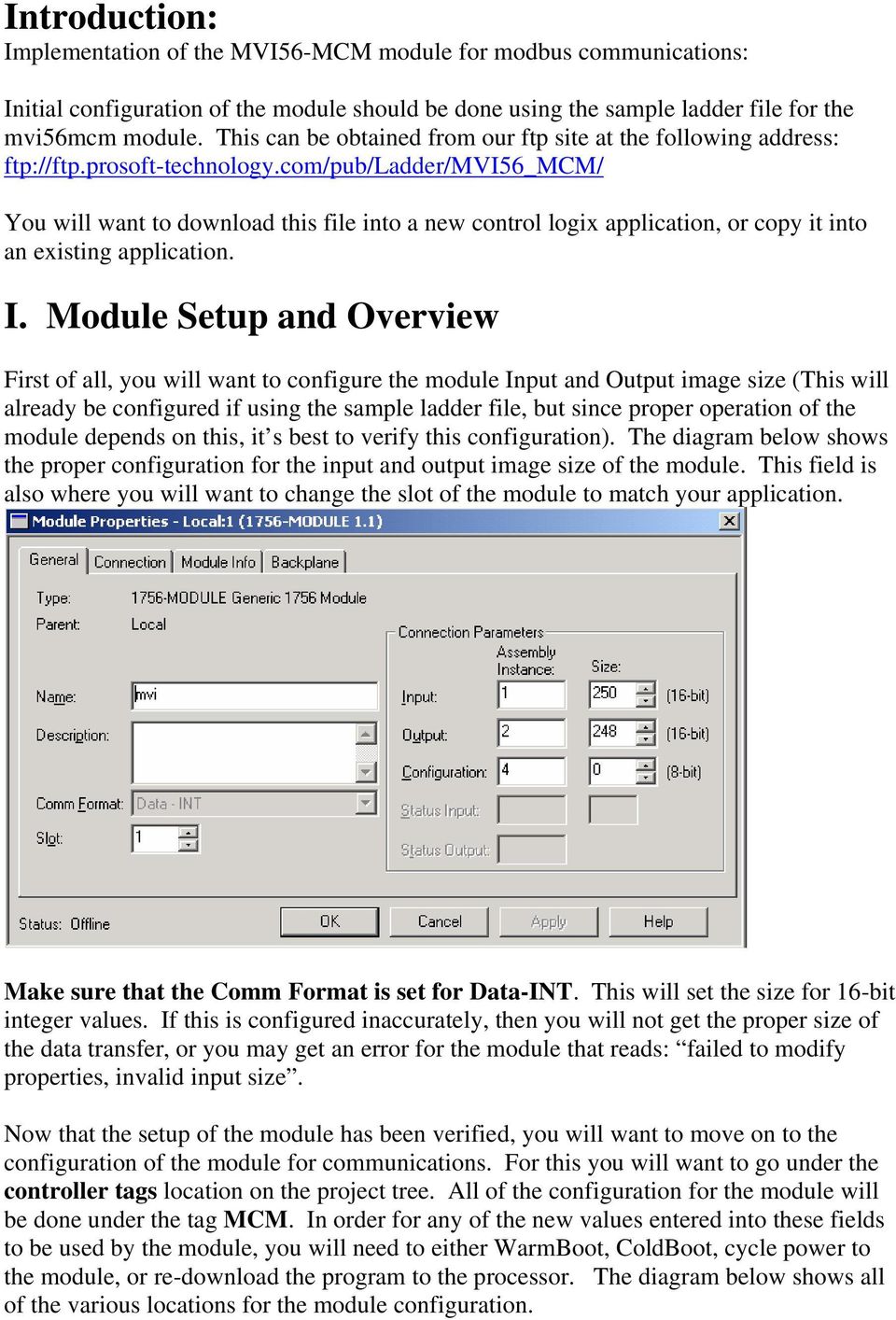
1 Introduction: Implementation of the MVI56-MCM module for modbus communications: Initial configuration of the module should be done using the sample ladder file for the mvi56mcm module. This can be obtained from our ftp site at the following address: ftp://ftp.prosoft-technology.com/pub/ladder/mvi56_mcm/ You will want to download this file into a new control logix application, or copy it into an existing application. I. Module Setup and Overview First of all, you will want to configure the module Input and Output image size (This will already be configured if using the sample ladder file, but since proper operation of the module depends on this, it s best to verify this configuration). The diagram below shows the proper configuration for the input and output image size of the module. This field is also where you will want to change the slot of the module to match your application. Make sure that the Comm Format is set for Data-INT. This will set the size for 16-bit integer values. If this is configured inaccurately, then you will not get the proper size of the data transfer, or you may get an error for the module that reads: failed to modify properties, invalid input size. Now that the setup of the module has been verified, you will want to move on to the configuration of the module for communications. For this you will want to go under the controller tags location on the project tree. All of the configuration for the module will be done under the tag MCM. In order for any of the new values entered into these fields to be used by the module, you will need to either WarmBoot, ColdBoot, cycle power to the module, or re-download the program to the processor. The diagram below shows all of the various locations for the module configuration.
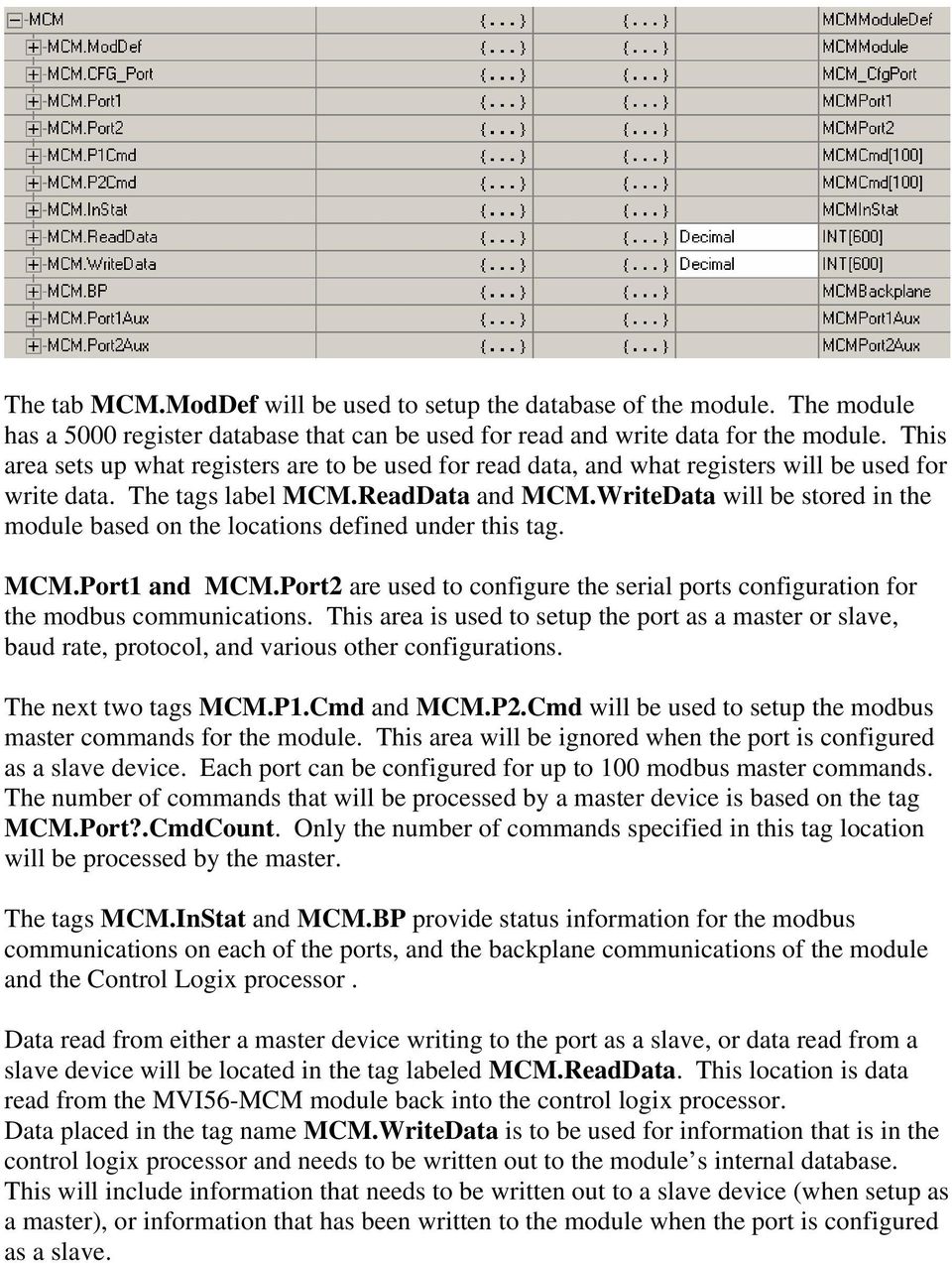
2 The tab MCM.ModDef will be used to setup the database of the module. The module has a 5000 register database that can be used for read and write data for the module. This area sets up what registers are to be used for read data, and what registers will be used for write data. The tags label MCM.ReadData and MCM.WriteData will be stored in the module based on the locations defined under this tag. MCM.Port1 and MCM.Port2 are used to configure the serial ports configuration for the modbus communications. This area is used to setup the port as a master or slave, baud rate, protocol, and various other configurations. The next two tags MCM.P1.Cmd and MCM.P2.Cmd will be used to setup the modbus master commands for the module. This area will be ignored when the port is configured as a slave device. Each port can be configured for up to 100 modbus master commands. The number of commands that will be processed by a master device is based on the tag MCM.Port?.CmdCount. Only the number of commands specified in this tag location will be processed by the master. The tags MCM.InStat and MCM.BP provide status information for the modbus communications on each of the ports, and the backplane communications of the module and the Control Logix processor. Data read from either a master device writing to the port as a slave, or data read from a slave device will be located in the tag labeled MCM.ReadData. This location is data read from the MVI56-MCM module back into the control logix processor. Data placed in the tag name MCM.WriteData is to be used for information that is in the control logix processor and needs to be written out to the module s internal database. This will include information that needs to be written out to a slave device (when setup as a master), or information that has been written to the module when the port is configured as a slave.
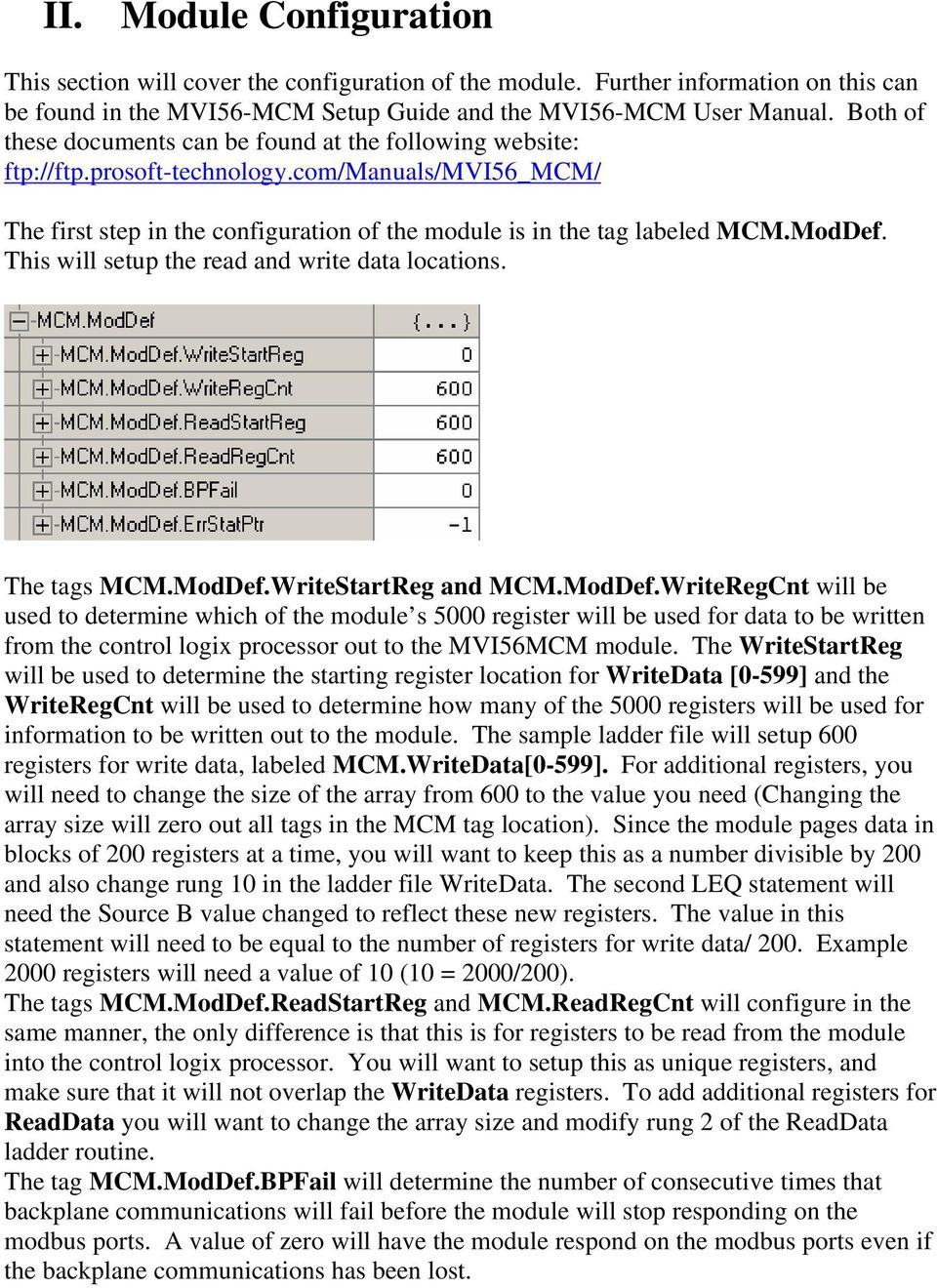
3 II. Module Configuration This section will cover the configuration of the module. Further information on this can be found in the MVI56-MCM Setup Guide and the MVI56-MCM User Manual. Both of these documents can be found at the following website: ftp://ftp.prosoft-technology.com/manuals/mvi56_mcm/ The first step in the configuration of the module is in the tag labeled MCM.ModDef. This will setup the read and write data locations. The tags MCM.ModDef.WriteStartReg and MCM.ModDef.WriteRegCnt will be used to determine which of the module s 5000 register will be used for data to be written from the control logix processor out to the MVI56MCM module. The WriteStartReg will be used to determine the starting register location for WriteData [0-599] and the WriteRegCnt will be used to determine how many of the 5000 registers will be used for information to be written out to the module. The sample ladder file will setup 600 registers for write data, labeled MCM.WriteData[0-599]. For additional registers, you will need to change the size of the array from 600 to the value you need (Changing the array size will zero out all tags in the MCM tag location). Since the module pages data in blocks of 200 registers at a time, you will want to keep this as a number divisible by 200 and also change rung 10 in the ladder file WriteData. The second LEQ statement will need the Source B value changed to reflect these new registers. The value in this statement will need to be equal to the number of registers for write data/ 200. Example 2000 registers will need a value of 10 (10 = 2000/200). The tags MCM.ModDef.ReadStartReg and MCM.ReadRegCnt will configure in the same manner, the only difference is that this is for registers to be read from the module into the control logix processor. You will want to setup this as unique registers, and make sure that it will not overlap the WriteData registers. To add additional registers for ReadData you will want to change the array size and modify rung 2 of the ReadData ladder routine. The tag MCM.ModDef.BPFail will determine the number of consecutive times that backplane communications will fail before the module will stop responding on the modbus ports. A value of zero will have the module respond on the modbus ports even if the backplane communications has been lost.
4 Finally the tag MCM.ModDef.ErrStatPtr determines where in the module database you will place status information. A value of 1 disables this parameter for the sample application. All of this information is also available in the MCM.InStat fields. The following configuration sets up the module database for WriteData[0-599] to be stored in the module memory at register 0-599, and ReadData[0-599] to be stored in the module memory at registers like shown below: With the above configuration, the following is the layout of the tags and addressing: Control Logix Processor MVI56MCM Internal Reg. Address (IntAddress) MCM.WriteData[0] MCM.WriteData[1] MCM.WriteData[598] MCM.WriteData[599] MCM.ReadData[0] MCM.ReadData[1] MCM.ReadData[598] MCM.ReadData[599] (Reg Not used in the sample program) Data to write to slaves when module is a master or data to be read by a master when the module is a slave Data read from slaves when module is master or data to be written by the master when module is a slave
![The following configuration sets up the module database for WriteData[0-599] to be stored in the module memory at register 0-599, and ReadData[0-599] to be stored in the module memory at registers](/docs-images/40/866892/images/page_4.jpg "600-1199 like shown below: With the above configuration, the following is the layout of the tags and addressing: Control Logix Processor MVI56MCM Internal Reg. Address (IntAddress) MCM.")
5 III. Port Setup The following section will setup the configuration of the port for communications with the various modbus devices. These values will need to be configured for Port1 and Port2. The tag MCM.Port1.Enabled will either enable or disable the port (note: even a port that is disabled will require valid data values for baud rate, data bits, and stop bits). Valid values for this location are 0 for disabled, 1 for enabled. MCM.Port1.Type will determine if the port is to be used as a modbus master port or a modbus slave port. Valid values for this field are as follows: 0- Modbus master 1- Modbus slave port 2- Modbus slave port with pass thru. This will allow for a write message to this slave to be passed through the MVI56-MCM module database, and go directly into the ladder logic. This module will set the MCM.BP.LastRead value to 9996 and the modbus write command will be handled by rung 8 in the ReadData ladder file in the expanded ladder logic. This will allow for an unparsed modbus message to be moved into the tag location MBMsg[0-499]. Here you will need to

6 parse out the data value and move it into the appropriate registers using the ladder logic. 3- Modbus slave port with formatted pass thru and data values swapped. This mode will allow for the same register to be read and written by a modbus master device, and will also swap the bytes within the data value (some devices may require the byte swapping, but with most device you will want to use a value of 4). 4- Modbus slave port with formatted pass thru (no swapping). This mode will also allow for the same register location to be read and written by the master device. Rungs 9, 10, and 11 in the ReadData ladder file will handle this information. Special consideration must be taken into effect when implementing this mode. Please see the MVI56_MCM_User_Manual for more details on this mode of operation. Note: Port type 2 through 4 require the expanded ladder logic samples. The tags MCM.Port1.FloatFlag, MCM.Port1.FloatStart, and MCM.Port1.FloatOffset can be used to setup floating point data. Please see the Set Up Guide for more information on these features. MCM.Port1.Protocol will define whether the module will operate using Modbus RTU (value of 0), or Modbus ASCII (value of 1). When this is an option, you will want to use Modbus RTU mode since data transfer in this mode is more reliable and efficient. MCM.Port1.Baudrate is to be used to setup the baud rate of traffic on the serial port. Valid values for this field are 110, 150, 300, 600, 1200, 2400, 4800, 9600, 19200, 28800, 384 or 3840 (for 38,400), 576 or 5760 (for 57,600), and 115, 1152, or (for 115,200). The tag MCM.Port1.Parity will define the type of parity to be used by that port. Valid values for this field are 0= None, 1= Odd, 2= Even, 3= Mark, and 4= Space. The tags DataBits, and StopBits setup how many data bits and how many stop bits will be used in the Modbus message. Valid values for DataBits are 7 or 8, and valid values for StopBits are 1 or 2. Note: Modbus RTU mode will always need to use 8 data bits The tags MCM.Port1.RTSOn and MCM.Port1.RTSOff will configure RTS on and off delays for the port. These values are helpful when the port is using RS-422 or RS-485 wiring. Values in this field are represented in milliseconds. A value of 10 will configure the delay for 10 milliseconds. Generally a value of 0 for the RTSOff is recommended as too large of a value in this field can cause you to miss the beginning part of the return response. The MinResp tag is used to set the minimum number of milliseconds the port, configured as a slave, will wait before sending a response back to the master.
7 UseCTS will enable the use of the cts line. A value of 0 will not enable the CTS line, while a value of 1 will enable the use of the CTS line. The tag MCM.Port1.SlaveID will be used to set the slave ID number of the module when the port is configured as a slave. The next set of values, BitInOffset, WordInOffset, OutOffset, and HoldOffset will configure the internal database offset values for that port. This will only be used when the port is configured as a slave, and when you need to setup specific modbus addressing. Please refer to the MVI56_MCM_Set_Up_Guide for more details on the use of these features. The value CmdCount will configure the number of modbus master commands that the module will issue to the various slave devices on that port. The value in this field will determine the number of MCM.P1 or P2.Cmd that the port will scan. Example: A value of 10 in this field will allow the master to look at P1.Cmd[0] P1.Cmd[9]. The MinCmdDelay will setup the minimum number of milliseconds the master will wait before sending a query out to the slave device. This is a delay time between commands The CmdErrPtr will determine where in the module database the command errors will be stored. This will need to be place in a location that is in the ReadData tag location for this information to be seen. A value of 1100 will place this information in the location ReadData[500] and will extend for the number of commands that are configured in the CmdCount field. Each Modbus master command will have an error code associated with it. A value of 0 indicates that the command is operating properly, for a complete list of error codes refer to the MVI56_MCM_User_Manual. MCM.Port1.RespTO will configure the minimum number of milliseconds the port configured as a master will wait for a response from the slave device. A value of 0 will default to 1000 milliseconds or 1 second. RetryCount will set the number of times the master will retry a command to a slave device before moving on to the next command. A value of 2 will setup 2 retries. This means that a message will be sent out to the slave device, if there is no response, then the master will retry that command 2 more times before moving onto the next command in the scan list. MCM.Port1.ErrorDelayCntr can be used to setup the number commands that will be skipped in the P1.Cmd field when a command has gone into error. For most applications a value of 0 is best for this field, since when configured inaccurately this can cause communications with the slave devices to cease.

8 IV. Master Command Configuration The following section will detail the configuration of the Modbus master commands. This section determines the communications with the master port and the slave devices that are connected to that port. The tag MCM.P1.Cmd[0].Enable will need to be configured for the command to be executed. A value of 0 in this field will disable the command and it will not be sent out the port. A value of 1 will enable the command to be transmitted by the master every time it comes to that command in the scan list. If a value of 2 is entered in this field, the command will only be issued when the data to be written out to the slave device has changed. This can only be used on write commands to be sent out to the slaves. IntAddress will determine where in the module s 5000 register database the data will be stored to or written from. On a read command this will determine once the information has been read from a slave, where it will be placed in the module database. On read commands you will want to configure this for a location that is setup for ReadData. The internal database location of the ReadData and WriteData tags is determined by the configuration setup in the MCM.ModDef tag location. For write data the IntAddress will determine where to obtain the information to be written out to the slave device. This will need to be a location that is setup as WriteData.
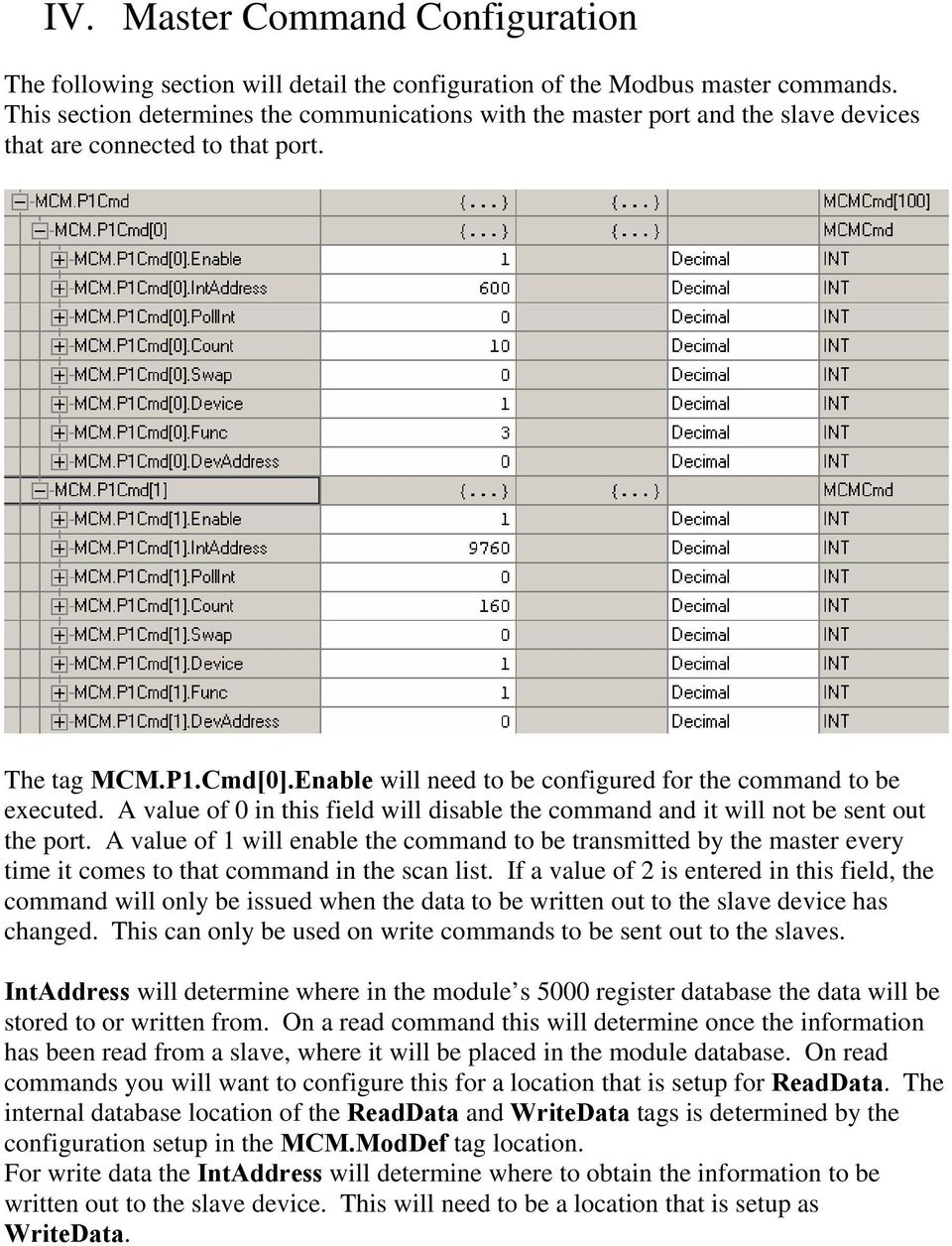
9 NOTE: When using a bit level command you will want to define this field at the bit level. For instance, when using a function code 1,2 for a read command you will need to have a value of 9600 to place the data in MCM.ReadData[0] (register 600 * 16 bits per register = 9600). In the above configuration for MCM.P1Cmd[1] a value of 9760 will place the data in address 610 of the module memory and this will then be stored in MCM.ReadData[10]. The tag PollInt can be used to setup an interval for the data to be polled at. Values in this field will represent the number of seconds that a master device will wait before issuing this command. This is helpful for non-critical information. For example a value of 60 will setup this command to be issued every 60 seconds or 1 minute. MCM.P1.Cmd[0].Count will setup how many words (when using a word range read or write command) or bits will be read from the slave device. Swap will be used to setup the swapping of the data values received from the slave device. This is useful when reading floating point data. Valid values for this field are as follows: 0- Module performs no data swapping (mode that will be used for most applications). 1- Swap word values from each word pair received. 2- Swap word and byte values for each word pair received. 3- Swap bit values. Device will determine the modbus slave address that the command will be issued to. Valid values for a Modbus slave are A Device of 0 will be used to issue write commands to all slaves on this port(cannot be used for read commands). MCM.P1.Cmd[0].Func will determine the modbus function code that will be issued in the command to the slave device. Valid values for this field are as follows: 1- Read Coil Status. This will read modbus addresses These are bit values used to indicate coil status, and can also be written to using a function code of 5 or Read Input Coils. This will read modbus addresses These are also bit values, but are read only data values. 3- Read Holding Registers. This is to be used for Modbus addresses This is a 16 bit word value, and can be written to using the function codes of 6 and Read Input Registers. Will read modbus addresses These are also 16 bit word values, but are read only data, and cannot be written to by the master. 5- Write Single Coil Status. This will write to modbus addresses This command will write to only one coil. If you want to write to multiple coils you will need to use a function code of Write Single Register. For modbus addresses This will write one single register value out to a slave device. For multiple register writes you will need to use a function code of 16.
![In the above configuration for MCM.P1Cmd[1] a value of 9760 will place the data in address 610 of the module memory and this will then be stored in MCM.ReadData[10].](/docs-images/40/866892/images/page_9.jpg "The tag PollInt can be used to setup an interval for the data to be polled at. Values in this field will represent the number of seconds that a master device will wait before issuing this command.")
10 15- Multiple Coil Write. This function code will write multiple coil values to the slave addresses Multiple Register Write. Will write multiple register values to the slave device at addresses DevAddress will be used to indicate the modbus slave address for the register or registers associated with that command. This is the offset address for the modbus slave device. With modbus, to read an address of 40001, what will actually be transmitted out port is a function code of 03 (one byte) with an address of (two bytes). This means that to read an address of 40501, you would want to put a Func of 3 with a DevAddress of 500. This applies to modbus addresses This is why you will always need to make sure of the function code that is to be used to read or write information from the slave. Below is a definition that will help with your DevAddress setup: FC 1,5, or 15 DevAddress = Modbus address in device 0001 Example: Modbus address 0001 = DevAddress 0 Modbus address 1378 = DevAddress 1377 FC 2 DevAddress = Modbus address in device Example: Modbus address = DevAddress 0 Modbus address = DevAddress 344 FC 3,6, or 16 DevAddress = Modbus address in device Example: Modbus address = DevAddress 0 Modbus address = DevAddress 590 FC 4 DevAddress = Modbus address in device Example: Modbus address = DevAddress 0 Modbus address = DevAddress 4289 Note: Some devices show their addressing already as an offset address (the address that actually goes out on the modbus communication line). If your device manufacturer tells you to use a function code 3 with an address of 100, then that is what you want to use in the DevAddress field. If they give you the modbus address like shown above, use the offset formula.

11 V. Jumper and wiring settings The MVI56MCM module will support RS232, 422, and 485 wiring. This selection is set by a jumper on the module shown in the following picture: The setup jumper should always be in the UNJUMPERED position, unless instructed by the factory to install this jumper. Each of the PRT jumpers is clearly labeled. PRT2 is the label for P1, and PRT3 is the jumper setting for P2 (the bottom port). The following is the wiring diagram for each type of cable: RS-232 When the RS-232 interface is selected, the use of the modem control lines is user definable. If no modem control lines will be used, the cable to connect to the port is as shown below: MVI56-MCM Modbus Port RS-232 Cable (No Handshaking) DB-9 Male RS-232 Host RxD TxD COM TxD RxD COM The RTS line is controlled by the RTS on and off parameters set for the port. If the CTS line is used (usually only required for half-duplex modems), the RTS and CTS lines must either be connected together or connected to the modem. The diagram below displays the cable required when connecting the port to a modem.

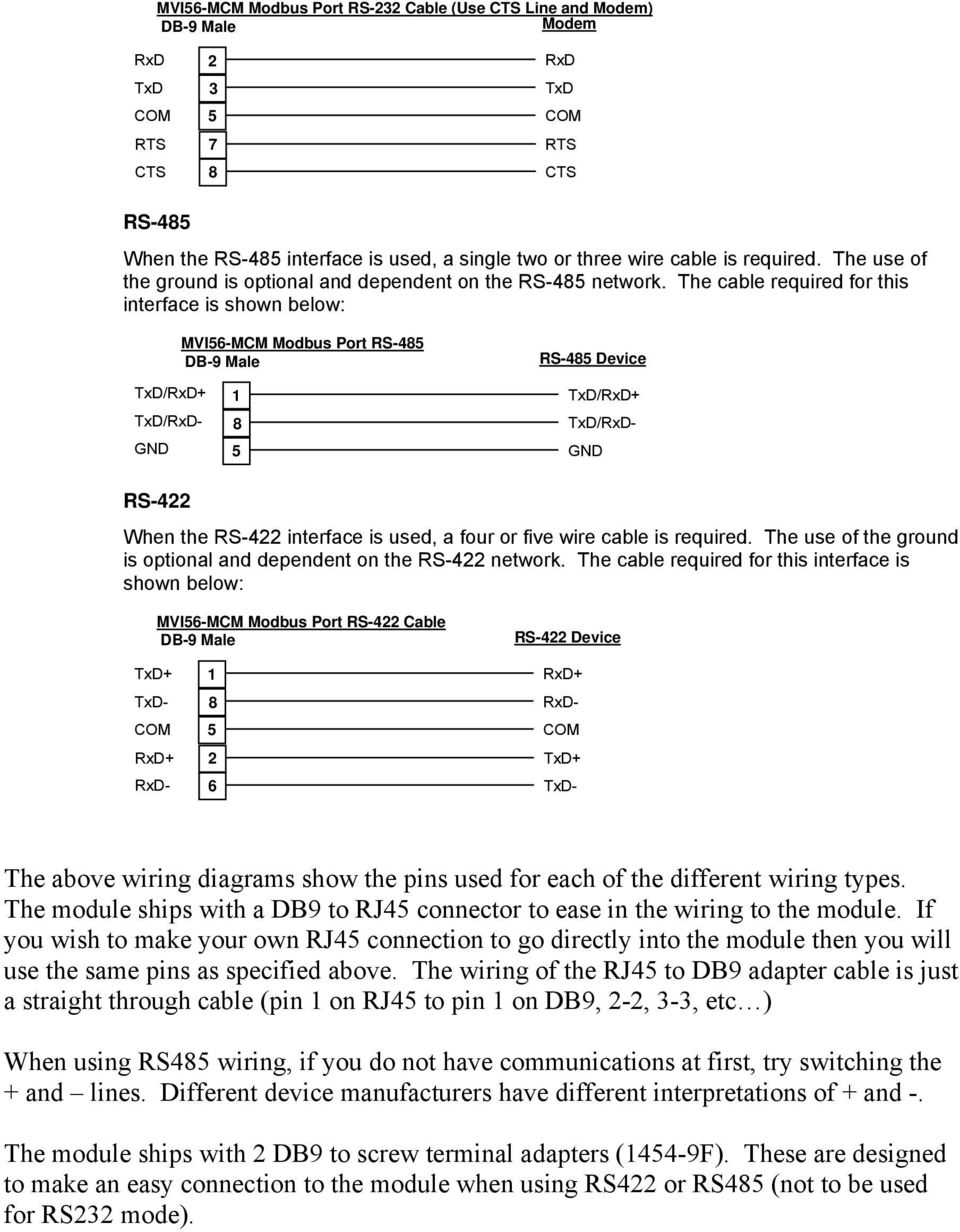
12 MVI56-MCM Modbus Port RS-232 Cable (Use CTS Line and Modem) DB-9 Male Modem RxD TxD COM RTS CTS RxD TxD COM RTS CTS RS-485 When the RS-485 interface is used, a single two or three wire cable is required. The use of the ground is optional and dependent on the RS-485 network. The cable required for this interface is shown below: MVI56-MCM Modbus Port RS-485 DB-9 Male RS-485 Device TxD/RxD+ GND TxD/RxD+ GND RS-422 When the RS-422 interface is used, a four or five wire cable is required. The use of the ground is optional and dependent on the RS-422 network. The cable required for this interface is shown below: MVI56-MCM Modbus Port RS-422 Cable DB-9 Male RS-422 Device TxD/RxD- TxD/RxD- TxD+ TxD- COM RxD+ RxD- RxD+ RxD- COM TxD+ TxD- The above wiring diagrams show the pins used for each of the different wiring types. The module ships with a DB9 to RJ45 connector to ease in the wiring to the module. If you wish to make your own RJ45 connection to go directly into the module then you will use the same pins as specified above. The wiring of the RJ45 to DB9 adapter cable is just a straight through cable (pin 1 on RJ45 to pin 1 on DB9, 2-2, 3-3, etc ) When using RS485 wiring, if you do not have communications at first, try switching the + and lines. Different device manufacturers have different interpretations of + and -. The module ships with 2 DB9 to screw terminal adapters (1454-9F). These are designed to make an easy connection to the module when using RS422 or RS485 (not to be used for RS232 mode).
13 This manual was designed to ease implementation of ProSoft Technology s MVI56- MCM module. Not all of the features and specifications of the module were described in this manual. For complete functionality of the module you will need to reference the following documents: MVI56_MCM_User_Manual These documents can be found at on our ftp site at the following location: ftp://ftp.prosoft-technology.com/pub/manuals/mvi56_mcm

Modbus Communications for PanelView Terminals
 User Guide Modbus Communications for PanelView Terminals Introduction This document describes how to connect and configure communications for the Modbus versions of the PanelView terminals. This document
Using HyperTerminal with Agilent General Purpose Instruments
 Using HyperTerminal with Agilent General Purpose Instruments Windows HyperTerminal can be used to program most General Purpose Instruments (not the 531xx series counters) using the RS-232 Serial Bus. Instrument
How To Connect A Directsofl To A Powerpoint With An Acd With An Ctel With An Dm-Tel Modem On A Pc Or Ipad Or Ipa (Powerpoint) With A Powerline 2 (Powerline
 Application Note Last reviewed: 03/17/2008 AN-KEP-003.doc Page 1 of 23 Introduction... 1 Recommended s and ports to use... 1 Cable Wiring... 2 MDM-TEL Configuration ( Wizard)... 3 Direct Logic Communications
Programming and Using the Courier V.Everything Modem for Remote Operation of DDF6000
 Programming and Using the Courier V.Everything Modem for Remote Operation of DDF6000 1.0 Introduction A Technical Application Note from Doppler System July 5, 1999 Version 3.x of the DDF6000, running version
Single channel data transceiver module WIZ2-434
 Single channel data transceiver module WIZ2-434 Available models: WIZ2-434-RS: data input by RS232 (±12V) logic, 9-15V supply WIZ2-434-RSB: same as above, but in a plastic shell. The WIZ2-434-x modules
Using IDENT M System T with Modbus/TCP
 Using IDENT M System T with Modbus/TCP Introduction The Pepperl+Fuchs IDENT M System T consists of two models MTT3000-F180-B12- V45-MON, which is a read only unit and the MTT6000-F120-B12-V45 which is
RS-232 COMMUNICATIONS
 Technical Note D64 0815 RS-232 COMMUNICATIONS RS-232 is an Electronics Industries Association (EIA) standard designed to aid in connecting equipment together for serial communications. The standard specifies
Application/Connection Examples
 This Quick Start Guide is designed to familiarize the user with the connection and configuration of the DTS-305 DIN rail mounted single / 3 phase power & energy meter with RS-485 or TCP communications.
PLC Master / Slave Example
 PLC Master / Slave Example A 2 PLC The Example This chapter provides an example of a PLC master / slave network and is designed for the experienced user. This chapter does not provide detailed descriptions
The Answer to the 14 Most Frequently Asked Modbus Questions
 Modbus Frequently Asked Questions WP-34-REV0-0609-1/7 The Answer to the 14 Most Frequently Asked Modbus Questions Exactly what is Modbus? Modbus is an open serial communications protocol widely used in
MODBUS TCP to RTU/ASCII Gateway. User s Manual
 MODBUS TCP to RTU/ASCII Gateway User s Manual 1 INTRODUCTION... 1 1.1 FEATURES... 2 1.2 PRODUCT SPECIFICATIONS... 3 1.3 DEFAULT SETTINGS... 4 2 MAKING THE HARDWARE CONNECTIONS... 5 2.1 POWER CONNECTION...
APNT#1168 Modbus - Establishing Communications Hints
 Application Note #1168: Modbus - Establishing Communications Hints Introduction This document provides supplemental information about configuring Pro-face Device/PLC drivers to communicate with your device.
Online simulator YES Broadcast command YES Extend address mode YES
 MODBUS RTU Supported Series : MODBUS RTU CONTROLLER Website : http://www.modbus.org HMI Setting: Parameters Recommended Options Notes PLC type MODBUS RTU PLC I/F RS485 RS232/RS485 Baud rate 9600 9600~115200
Cable Specifications and Information
 APPENDIXA This appendix provides the connector and pinout information you need for making or purchasing cables used with Cisco VG350 Voice Gateway. To order cables from Cisco, see the Obtaining Technical
ALL-USB-RS422/485. User Manual. USB to Serial Converter RS422/485. ALLNET GmbH Computersysteme 2015 - Alle Rechte vorbehalten
 ALL-USB-RS422/485 USB to Serial Converter RS422/485 User Manual ALL-USB-RS422/485 USB to RS-422/485 Plugin Adapter This mini ALL-USB-RS422/485 is a surge and static protected USB to RS-422/485 Plugin Adapter.
ENET-710. ENET-710 - Ethernet Module ENET-710 JAN / 06 FOUNDATION
 ENET-710 ENET-710 - Ethernet Module JAN / 06 ENET-710 FOUNDATION E N E T 7 1 0 ME smar www.smar.com Specifications and information are subject to change without notice. Up-to-date address information is
2-Port RS232/422/485 Combo Serial to USB2.0 Adapter (w/ Metal Case and Screw Lock Mechanism) Installation Guide
 2-Port RS232/422/485 Combo Serial to USB2.0 Adapter (w/ Metal Case and Screw Lock Mechanism) Installation Guide 1. Introduction Thank you for purchasing this 2-Port RS232/422/485 Combo Serial to USB Adapter.
Using Logix5000 Controllers as Masters or Slaves on Modbus
 Application Solution Using Logix5000 Controllers as Masters or Slaves on Modbus Purpose of the Document This application solution, and the associated RSLogix 5000 project files, help you use Logix5000
IP Link Device Interface Communication Sheet
 This document provides additional assistance with wiring your Extron IP Link enabled product to your device. Different components may require a different wiring scheme than those listed below. For complete
Data Bulletin. Communications Wiring for POWERLINK G3 Systems Class 1210 ABOUT THIS BULLETIN APPLICATION INTRODUCTION.
 Data Bulletin 1210DB0002R3/05 03/2005 LaVergne, TN, USA Communications Wiring for POWERLINK G3 Systems Class 1210 Retain for future use. ABOUT THIS BULLETIN This data bulletin describes the proper wiring
1.Eastron SDM220Modbus Smart Meter Modbus Protocol Implementation V1.0
 1.Eastron SDM220Modbus Smart Meter Modbus Protocol Implementation V1.0 1.1 Modbus Protocol Overview This section provides basic information for interfacing the Eastron Smart meter to a Modbus Protocol
Cable Pinouts. SRP I/O Module
 Cable Pinouts C This appendix lists the cables and connector pinout assignments for the cables used with the ERX-700 series and ERX-1400 series. Topic Page SRP I/O Module C-1 CT1 and CE1 I/O Modules C-4
Quick Installation. A Series of Intelligent Bar Code Reader with NeuroFuzzy Decoding. Quick Installation
 Quick Installation A Series of Intelligent Bar Code Reader with NeuroFuzzy Decoding This chapter intends to get your new FuzzyScan scanner working with your existing system within minutes. General instructions
Part Number 129777-01 Revision A, January 1996. 3500 Monitoring System Rack Configuration and Utilities Guide
 Part Number 129777-01 Revision A, January 1996 3500 Monitoring System Rack Configuration and Utilities Guide Copyright 1995 Bently Nevada Corporation All Rights Reserved. No part of this publication may
eztcp Technical Document Modbus/TCP of eztcp Caution: Specifications of this document may be changed without prior notice for improvement.
 eztcp Technical Document Modbus/TCP of eztcp Version 1.3 Caution: Specifications of this document may be changed without prior notice for improvement. Sollae Systems Co., Ltd. http://www.sollae.co.kr Contents
Dial-Up / Leased-Line Modem. User Manual. AGM Electronics, Inc Dial-Up / Leased-Line Modem, Series ( ) 5019-1 Manual Rev A + - DLM CTS RTS DTR DSR
 AGM Electronics, Inc Dial-Up / Leased-Line Modem, Series ( ) 5019-1 Manual Rev A User Manual + - CD CTS RTS DTR. DSR RI RX TX PHONE LINE DLM Dial-Up / Leased-Line Modem Dial-Up / Leased-Line Modem CONTENTS
1.1 Connection. 1.1.1 Direct COM port connection. 1. Half duplex RS232 spy cable without handshaking
 POS function Marchen POS-DVR surveillance system is a professional surveillance integrated with POS system. By bringing video and POS transaction data together, the POS-DVR surveillance system provides
1-Port R422/485 Serial PCIe Card
 1-Port R422/485 Serial PCIe Card Installation Guide 1. Introduction Thank you for purchasing this 1-Port RS422/485 Serial PCI Express (PCIe) Card. It is a universal add in card that connects to a PC or
Toshiba Serial Driver Help. 2012 Kepware Technologies
 2012 Kepware Technologies 2 Table of Contents Table of Contents 2 3 Overview 3 Device Setup 4 Modem Setup 4 Cable Diagram - EX100/200 PLCs 4 Cable Diagram - T1 PLCs 5 Cable Diagram - T2/T3 PLCs 5 Cable
Making a DB to RJ45 adapter.
 Making a DB to RJ45 adapter. DB9 to RJ45 adapters are often used in combination with a RS232 repeater for extending the distance of a serial RS232 link, but can be used for any adapter or converter purposes.
LTM-1338B. Plus Communications Manual
 LTM-1338B Plus Communications Manual 2000. Best Power, Necedah, Wisconsin All rights reserved. Best Power The System Setup option from the Main Menu on the front panel is passwordprotected. The default
ModBus Server - KNX. Gateway for integration of KNX equipment into Modbus (RTU and TCP) control systems.
 IntesisBox ModBus Server - KNX Gateway for integration of KNX equipment into Modbus (RTU and TCP) control systems. Integrate KNX based lighting control into your SCADA, BMS, PLC "talking" Modbus. Master
SMS Alarm Messenger. Setup Software Guide. SMSPro_Setup. Revision 090210 [Version 2.2]
![SMS Alarm Messenger. Setup Software Guide. SMSPro_Setup. Revision 090210 [Version 2.2]](/thumbs/29/13662687.jpg "SMS Alarm Messenger. Setup Software Guide. SMSPro_Setup. Revision 090210 [Version 2.2]") SMS Alarm Messenger SMSPro_Setup Revision 090210 [Version 2.2] ~ 1 ~ Contents 1. How to setup SMS Alarm Messenger?... 3 2. Install the SMSPro_Setup software... 5 3. Connection Type... 6 4. Connection Port
SMS Alarm Messenger SMSPro_Setup Revision 090210 [Version 2.2] ~ 1 ~ Contents 1. How to setup SMS Alarm Messenger?... 3 2. Install the SMSPro_Setup software... 5 3. Connection Type... 6 4. Connection Port
Encore Controller to Router Connections
 Encore Presentation System Encore Controller to Router Connections Contents: Scope... 2 EXT COMM Pinouts... 2 Cable Connection Straight Through... 3 Cable Connection Null Modem... 3 Lantronix Ethernet
Modicon Modbus Protocol Reference Guide. PI MBUS 300 Rev. J
 Modicon Modbus Protocol Reference Guide PI MBUS 300 Rev. J 1 Modicon Modbus Protocol Reference Guide PI MBUS 300 Rev. J June 1996 MODICON, Inc., Industrial Automation Systems One High Street North Andover,
Virtual Integrated Design Getting started with RS232 Hex Com Tool v6.0
 Virtual Integrated Design Getting started with RS232 Hex Com Tool v6.0 Copyright, 1999-2007 Virtual Integrated Design, All rights reserved. 1 Contents: 1. The Main Window. 2. The Port Setup Window. 3.
RN-XV-RD2 Evaluation Board
 RN-XV-RD2 Evaluation Board 2012 Roving Networks. All rights reserved. -1.01Version 1.0 9/28/2012 USER MANUAL OVERVIEW This document describes the hardware and software setup for Roving Networks RN-XV-RD2
KOYO DIRECT. HMI Setting: PLC Setting: Supported Series: KOYO DirectLogic series PLC DL05, DL06, DL105, DL205, DL305, and DL405 series.
 KOYO DIRECT Supported Series: KOYO DirectLogic series PLC DL05, DL06, DL105, DL205, DL305, and DL405 series. Website: http://www.automationdirect.com HMI Setting: Parameters Recommended Options Notes PLC
Table of Contents. Creating a VC1000 Network... 3
 2 Table of Contents Creating a VC1000 Network... 3 Topology... 3 Unit ddressing... 4 Terminating Resistors... 5 Shielding... 5 Interconnecting the common... 6 ias Resistors... 6 VC1000 Hardware Configuration...
Ethernet. Customer Provided Equipment Configuring the Ethernet port.
 Installing the RDSP-3000A-NIST Master Clock. Ethernet Connect the RJ-45 connector to a TCP/IP network. Equipment The following equipment comes with the clock system: RDSP-3000A-NIST Master Clock Module.
Modbus RTU Master Communications
 Modbus RTU Master Communications This document describes the operation of Modbus RTU Master from the user interface point of view. Use this information as a supplement to the Serial Communications User
Wifi Web Server Module w TF Socket User s Guide
 Wifi Web Server Module w TF Socket User s Guide 2004-2010 Sure Electronics Inc. MB-CM14117_Ver1.0 WIFI WEB SERVER MODULE W TF SOCKET USER S GUIDE Table of Contents Chapter 1. Overview...1 1.1 Overview...
BIT COMMANDER. Serial RS232 / RS485 to Ethernet Converter
 BIT COMMANDER Serial RS232 / RS485 to Ethernet Converter (Part US2000A) Copyrights U.S. Converters 1 Contents Overview and Features... 3 Functions..5 TCP Server Mode... 5 Httpd Client Mode.5 TCP Auto mode....6
Serial over Ethernet Device Server. User s Manual
 Serial over Ethernet Device Server User s Manual Second Edition, November 2005 SUNIX Co., Ltd. Tel : +886-2-8913-1987 Fax: +886-2-8913-1986 Http://www.sunix.com.tw [email protected] Serial over Ethernet
4511 MODBUS RTU. Configuration Manual. HART transparent driver. No. 9107MCM100(1328)
 4511 MODBUS RTU Configuration Manual HART transparent driver No. 9107MCM100(1328) 9107 CONTENTS Introduction... 3 Modbus basics... 3 Modbus RTU... 3 Supported Function Codes... 3 Modbus Parameters and
Keep it Simple Timing
 Keep it Simple Timing Support... 1 Introduction... 2 Turn On and Go... 3 Start Clock for Orienteering... 3 Pre Start Clock for Orienteering... 3 Real Time / Finish Clock... 3 Timer Clock... 4 Configuring
Bluetooth Serial Adapter
 RN-BT-SRL-UM Bluetooth Serial Adapter 0 Roving Networks. All rights reserved. RN-BT-SRL-UM-.0 Version.0 //0 USER MANUAL RN-BT-SRL-UM-.0 OVERVIEW Roving Networks offers a variety of Bluetooth serial adapters
PM1122 INT DIGITAL INTERFACE REMOTE
 PM1122 INT DIGITAL INTERFACE REMOTE PM1122 INT front panel description: 1. Clear wireless remotes knob: push this button for more than 2 seconds to clear the list of all assigned wireless remote settings
Modbus and ION Technology
 70072-0104-14 TECHNICAL 06/2009 Modbus and ION Technology Modicon Modbus is a communications protocol widely used in process control industries such as manufacturing. PowerLogic ION meters are compatible
Technical Note A007 Modbus Gateway Vantage Pro2 25/09/2009 Rev. A 1 de 7
 1 de 7 1. Introduction This Technical Note explains how to configure the Modbus Gateway for Vantage Pro2. The Modbus Gateway allows the easy connection of a PLC (Programmable Logic Controller), RTU (Remote
Bluetooth UART/RS232 Module
 Introduction BLUEMORE600 is a professional, slim, wireless module ready for integration in brand new or existing electronic products. Based on CSR chipset BC03MM it s fully compatible for Serial Port profiles.
MCB3101 (Class I) WiRobot Serial Bluetooth Wireless Module User Manual
 MCB3101 (Class I) WiRobot Serial Bluetooth Wireless Module User Manual Version: 1.0.1 Dec. 2005 Table of Contents I. Introduction 2 II. Operations 2 II.1. Theory of Operation 2 II.2. Configuration (PC-PC
Different Ways of Connecting to. 3DLevelScanner II. A.P.M Automation Solutions LTD. www.apm-solutions.com Version 3.0
 3DLevelScanner II Different Ways of Connecting to 3DLevelScanner II A.P.M Automation Solutions LTD. www.apm-solutions.com Version 3.0 2 Different Ways of Connecting to 3DLevelScanner II Version 3.0 Table
POS Integration. Prepared by: Binh Nguyen
 POS Integration Prepared by: Binh Nguyen Point of Sale (POS) Compatibility To know whether it is possible to integrate your POS system with our DVR, please check whether the type of printer the POS system
PNSPO! Modbus Solution CP1H / CP1L / CJ1 / CJ2 / CS1. Version 2.05 6/18/2009
 PNSPO!! Modbus Solution CP1H / CP1L / CJ1 / CJ2 / CS1 Version 2.05 6/18/2009 Section 1. Overview The Omron CP1H and CP1L PLCs offer a built in function called Easy Modbus, that performs a Modbus RTU Master
SAFphire Application Notes
 Page 2 Table of Contents INTRODUCTION TO SAFPHIRE APPLICATION NOTES...5 Assumptions...5 SAFPHIRE RS232 COMMUNICATIONS OVERVIEW...5 Supported Protocols...5 Typical Configurations...5 Programming...6 SAFPHIRE
Master-Touch and ValuMass. Modbus Communications. INSTRUCTION MANUAL 80202201 (Rev. 2.1)
 Master-Touch and ValuMass Modbus Communications INSTRUCTION MANUAL 80202201 (Rev. 2.1) Eldridge Products, Inc. 2700 Garden Road, Building A Monterey, CA 93940 Tel: 800/321-3569 or 831/648-7777 Fax: 831/648-7780
User manual Compact Web PLC WP240 series IEC-line
 User manual Compact Web PLC WP240 series IEC-line update: 09-01-2014 IEC-line by OVERDIGIT overdigit.com 1. General description The WP240 device is a PLC, programmable in IEC61131-3 language using CoDeSys
Modbus RTU Communications RX/WX and MRX/MWX
 15 Modbus RTU Communications RX/WX and MRX/MWX In This Chapter.... Network Slave Operation Network Master Operation: RX / WX Network Master Operation: DL06 MRX / MWX 5 2 D0 Modbus Network Slave Operation
MDM192 MULTI-DROPS DIGITAL MODEM FOR PRIVATE LINE. USER GUIDE Document reference : 9010709-03
 MDM192 MULTI-DROPS DIGITAL MODEM FOR PRIVATE LINE USER GUIDE Document reference : 9010709-03 If you have questions about the MDM192 or desire assistance, contact ETIC TELECOMMUNICATIONS at the following
Kepware Technologies Optimizing KEPServerEX V5 Projects
 Kepware Technologies Optimizing KEPServerEX V5 Projects September, 2010 Ref. 50.16 Kepware Technologies Table of Contents 1. Overview... 1 2. Factors that Affect Communication Speed... 1 2.1 Defining Bandwidth...
User Manual Revision 1.400 English Converter / Adapter Ethernet to RS232 / RS485 (Order Code: HD67038-2 HD67038-2-M HD67038-25 HD67038-25-M)
 Document code: MN67038-2_ENG Revision 1.400 Page 1 of 25 User Manual Revision 1.400 English Converter / Adapter Ethernet to RS232 / RS485 (Order Code: HD67038-2 HD67038-2-M HD67038-25 HD67038-25-M) for
EDI Distributor Control Interface Wiring and Setup Instructions
 Universal I/O EDI Distributor Control Interface Wiring and Setup Instructions EDI UNIVERSAL I/O INTERFACE MODULE The only interface needed for EDI-V5 controls Network compatible with all older EDI controls
Modbus RTU Master Communications
 Modbus RTU Master Communications This document describes the operation of Modbus RTU Master from the user interface point of view. Use this information as a supplement to the Serial Communications User
Omron I/O Driver (Series 2) Programmable Serial Interface Card
 Omron I/O Driver (Series 2) Programmable Serial Interface Card USER MANUAL Rev. P1.55 June 8, 2012 DeltaV is a trademark of Emerson Process Management, Inc Emerson Process Management, Inc. 1998, 1999.
Process Control and Automation using Modbus Protocol
 Process Control and Automation using Modbus Protocol Modbus is the fundamental network protocol used in most industrial applications today. It is universal, open and an easy to use protocol. Modbus has
SEC 4100 SYSTEM MONITOR Programmable Serial Interface Card Series 2
 SEC 4100 SYSTEM MONITOR Programmable Serial Interface Card Series 2 USER MANUAL Rev. P1.11 September 13, 2006 DeltaV is a trademark of Emerson Process Management, Inc Emerson Process Management, Inc. 1998,
IP Link Device Interface Communication Sheet
 This document provides additional assistance with wiring your Extron IP Link enabled product to your device. Different components may require a different wiring scheme than those listed below. For complete
7.7 Ethernet Communication (AFPX-COM5)
 7.7 Ethernet Communication (AFPX-COM5) 7.7.1 AFPX-COM5 Overview The communication cassette AFPX-COM5 has an Ethernet interface at the COM1 port and a 3-wire RS232C interface at the COM2 port. The Ethernet
MODBUS RTU. Communications Guide. for use with MODCELL, MOD 30ML and Commander Products
 MODBUS RTU Communications Guide for use with MODCELL, MOD 30ML and Commander Products CONTENTS CONTENTS Page OVERVIEW... 1 HARDWARE REQUIREMENTS... 2 SERIAL INTERFACE CONSIDERATIONS... 2 CABLE REQUIREMENTS...
DK40 Datasheet & Hardware manual Version 2
 DK40 Datasheet & Hardware manual Version 2 IPC@CHIP DK40 Evaluation module Beck IPC GmbH http://www.bcl.de page 1 of 11 Table of contents Table of contents... 2 Basic description... 3 Characteristics...
L5354 ControlNet Communications Interface
 L5354 ControlNet Communications Interface Technical Manual HA470733 Issue 2 Copyright SSD Drives Inc 2005 All rights strictly reserved. No part of this document may be stored in a retrieval system, or
Develop a Dallas 1-Wire Master Using the Z8F1680 Series of MCUs
 Develop a Dallas 1-Wire Master Using the Z8F1680 Series of MCUs AN033101-0412 Abstract This describes how to interface the Dallas 1-Wire bus with Zilog s Z8F1680 Series of MCUs as master devices. The Z8F0880,
SDN INSTRUCTIONS 07/10, Ver 1.2. Somfy Digital Network (SDN) Installation and Programming
 Somfy Digital Network (SDN) Installation and Programming SSoomffyy SSyysst teemss IInncc.. 1 Table of Contents 1 General Information and Features... 3 1.1 ILT2 Motor... 3 1.2 SDN Switches... 4 1.3 ILT2
LAN / WAN Connection Of Instruments with Serial Interface By Using a Terminal Server
 Products: EFA with EFA Scan, DVRM and DVMD with Realtime Monitor or Stream Explorer DVMD-B1 LAN / WAN Connection Of Instruments with Serial Interface By Using a Terminal Server Remote control of test and
Elettronica dei Sistemi Digitali Costantino Giaconia SERIAL I/O COMMON PROTOCOLS
 SERIAL I/O COMMON PROTOCOLS RS-232 Fundamentals What is RS-232 RS-232 is a popular communications interface for connecting modems and data acquisition devices (i.e. GPS receivers, electronic balances,
One Port Serial Server Users Manual Model ESP901, ESP901E
 One Port Serial Server Users Manual Model ESP901, ESP901E Documentation Number: ESP901-2303 International Headquarters B&B Electronics Mfg. Co. Inc. 707 Dayton Road -- P.O. Box 1040 -- Ottawa, IL 61350
Alcalde # 1822 Col. Miraflores C.P. 44270 Guadalajara, Jal. Mexico MX 01 (33) 3854-5975 y 3823-4349 USA 001 (619)- 884-94-93 (San Diego, CA.
 Tu Sitio de Automatización! Description Modbus is very wide known protocol in the industrial manufacturing and environment monitoring fields. It is suit master-slave or query-response distributed I/O applications.
RS232 Programming and Troubleshooting Guide for Turbo Controls
 RS232 Programming and Troubleshooting Guide for Turbo Controls This Troubleshooting guide is intended for the set up and troubleshooting of the control panels onboard RS232 output. Refer to the Installation
F2103 GPRS DTU USER MANUAL
 F2103 GPRS DTU USER MANUAL Add:J1-J2,3rd Floor,No.44,GuanRi Road,SoftWare Park,XiaMen,China 1 Zip Code:361008 Contents Chapter 1 Brief Introduction of Product... 3 1.1 General... 3 1.2 Product Features...
Application Bulletin
 INTELLIGENT CONTROLS INC PO BOX 638 34 SPRING HILL RD SACO, ME 04072 U S A Application Bulletin 000-2045 REV. B Retrieving Tap Change Indication Data from an INCON1250B via an SEL 2020 or 2030 Communications
MVI56E-MNET / MNETXT. ControlLogix Platform Modbus TCP/IP Communication Module SETUP GUIDE
 MVI56E-MNET / MNETXT ControlLogix Platform Modbus TCP/IP Communication Module SETUP GUIDE Important Safety Information - MVI56E and MVI56E-XT Modules North America Warnings A Warning - Explosion Hazard
Application Note: Connecting to a 2500 Series Processor using PLC Workshop
 Application Note: Connecting to a 2500 Series Processor using PLC Workshop This application note will describe a step by step process for the three ways to connect to a 2500-CXXX with PLC Workshop. The
RS232C < - > RS485 CONVERTER S MANUAL. Model: LD15U. Phone: 91-79-4002 4896 / 97 / 98 (M) 0-98253-50221 www.interfaceproducts.info
 RS232C < - > RS485 CONVERTER S MANUAL Model: LD15U INTRODUCTION Milestone s model LD-15U is a RS232 to RS 485 converter is designed for highspeed data transmission between computer system and or peripherals
16-Port RS232 to USB2.0 High Speed Multi Serial Adapter (w/ Metal Case) Installation Guide
 16-Port RS232 to USB2.0 High Speed Multi Serial Adapter (w/ Metal Case) Installation Guide 1. Introduction Thank you for purchasing this 16-Port RS232 to USB2.0 High Speed Multi Serial Adapter. It is an
How to setup a serial Bluetooth adapter Master Guide
 How to setup a serial Bluetooth adapter Master Guide Nordfield.com Our serial Bluetooth adapters part UCBT232B and UCBT232EXA can be setup and paired using a Bluetooth management software called BlueSoleil
RJ45 Shielded (standard) port pinout. CS9000, Jetstream 4000 + 8500, Lanstream 2000, RTA8/RJX, RRC16, MTA8/RJX & SXDC8/RJX
 Shielded (standard) port pinout Pin Circuit Function 1 DCD Input Data Carrier Detect 2 DSR Output Data Set Ready 3 DTR Input Data Terminal Ready 4 S/GND Signal Ground 5 TXD Output Transmit Data 6 RXD Input
TRP-C31M MODBUS TCP to RTU/ASCII Gateway
 TRP-C31M MODBUS TCP to RTU/ASCII Gateway User s Manual Printed Feb. 2007 Rev 1.0 Trycom Technology Co., Ltd 1F, No.2-11, Sihu street, Yingge Township, Taipei, Taiwan ROC Tel: 886-2-86781191, Fax: 886-2-86781172
SenseLink TM. End-Point Controller. Addendum
 SenseLink TM End-Point Controller Addendum MKS Instruments, Inc. Control & Information Technology Products Group 3350 Scott Blvd Bldg 4 Santa Clara, CA 95054 Main: 408.235.7620 Fax: 408.235.7625 SenseLink
Chapter. PLC Communications
 PL ommunications hapter In This hapter... Introduction... PL ommunication Ports Specifications... LE Status Indicators... Steps to Using the LIK PL ommunications... Typical ommunications pplications...
Why you need to monitor serial communication?
 Why you need to monitor serial communication Background RS232/RS422 provides 2 data lines for each data channel. One is for transmitting data and the other for receiving. Because of these two separate
OPERATOR INTERFACE PRODUCTS APPLICATION NOTE. Xycom 4800/2000 OIL (Operator Interface Language)- Series Terminals: Backup and Restore with ProComm
 Page 1 of 9 Xycom 4800/2000 OIL (Operator Interface Language)- Series Terminals: Backup and Restore with ProComm Introduction The Xycom 4800/2000 OIL-series terminals offer you the ability to backup and
Cable Guide. Click on the subject to view the information. Digi Cables Building Cables General Cable Information
 Cable Guide Click on the subject to view the information. Digi Cables Building Cables General Cable Information Digi Cables Click on the subject to view the information. Digi Connector Options Digi Connector
Fanuc 0 M/T Model C Serial (RS232) Connection Guide
 Memex Automation Inc., Burlington, Ontario Canada L7N 1 http://www.memex.ca Fanuc 0 M/T Model C Serial (RS232) Connection Guide The Fanuc 0-C control has two RS-232 interfaces. Interface number 1 (M5)
Modbus Protocol. PDF format version of the MODBUS Protocol. http://www.http://www.modicon.com/techpubs/toc7.html. The original was found at:
 Modbus Protocol PDF format version of the MODBUS Protocol The original was found at: http://www.http://www.modicon.com/techpubs/toc7.html (In case of any discrepancies, that version should be considered
RJ11 RS-232 Interface
 H NS TN30 RJ11 RS-232 Interface 1.0 General The back panel of the CPP-3794 provides a combination of 9 pin DB connectors and RJ11 connectors for connecting RS-232 serial cables. The 9 pin DB connector
Vicon Flash Upgrade Software
 INSTRUCTION MANUAL Notes Refer to XX134 NO. XX134-13-01 REV. 1212 Vicon Flash Upgrade Software It is possible to upgrade software for the SurveyorVFT and Surveyor -Mini Camera Domes through a PC using
Additional Setup Instructions for Modbus: RTU, ASCII, TCP, Omni & Enron
 Additional Setup Instructions for Modbus: RTU, ASCII, TCP, Omni & Enron Copyright 2000 2010 Frontline Test Equipment, Inc. All rights reserved. You may not reproduce, transmit, or store on magnetic media
Modbus Tutorial 7/30/01. Tutorial on TTDM-PLUS and TTSIM System Integration using Modbus
 Modbus Tutorial 7/30/01 Tutorial on TTDM-PLUS and TTSIM System Integration using Modbus There are two ways that system integrators can access leak detection information using the Modbus interface: either
Bluetooth to Serial Adapter
 Bluetooth to Serial Adapter Third Edition, Oct 2007 Version 3.0 771-BTS1009C3-001 Contents 1.0 Features....P.2 2.0 Package Content....P.2 3.0 Hard Drives Requirement.P.2 4.0 Specifications.P.3 5.0 Pin