
Model SS2000SM Series ELECTRONIC SIREN/LIGHT CONTROL SYSTEM WITH SignalMaster DIRECTIONAL LIGHT (with Slide Switch Control Head)
|
|
|
- Ruby Fisher
- 9 years ago
- Views:
Transcription
1 Price $4.00 Model SS2000SM Series ELECTRONIC SIREN/LIGHT CONTROL SYSTEM WITH SignalMaster DIRECTIONAL LIGHT (with Slide Switch Control Head) HARDWARE INSTALLATION AND MAINTENANCE INSTRUCTIONS

2 LIMITED WARRANTY The Signal Division, Federal Signal Corporation (Federal), warrants each new product to be free from defects in material and workmanship, under normal use and service, for a period of two years on parts replacement and one year on labor from the date of delivery to the first user-purchaser. During this warranty period, the obligation of Federal is limited to repairing or replacing, as Federal may elect, any part or parts of such product which after examination by Federal discloses to be defective in material and/or workmanship. Federal will provide warranty for any unit which is delivered, transported prepaid, to the Federal factory or designated authorized warranty service center for examination and such examination reveals a defect in material and/or workmanship. This warranty does not cover travel expenses, the cost of specialized equipment for gaining access to the product, or labor charges for removal and re-installation of the product. Lamps, flash tubes, or batteries are not covered under warranty. This warranty does not extend to any unit which has been subjected to abuse, misuse, improper installation or which has been inadequately maintained, nor to units which have problems relating to service or modification at any facility other than the Federal factory or authorized warranty service centers. THERE ARE NO OTHER WARRANTIES, EXPRESSED OR IMPLIED, INCLUDING BUT NOT LIMITED TO, ANY IMPLIED WARRANTIES OF MERCHANTABILITY OR FITNESS FOR A PARTICULAR PURPOSE. IN NO EVENT SHALL FEDERAL BE LIABLE FOR ANY LOSS OF PROFITS OR ANY INDIRECT OR CONSEQUENTIAL DAMAGES ARISING OUT OF ANY SUCH DEFECT IN MATERIAL OR WORKMANSHIP.

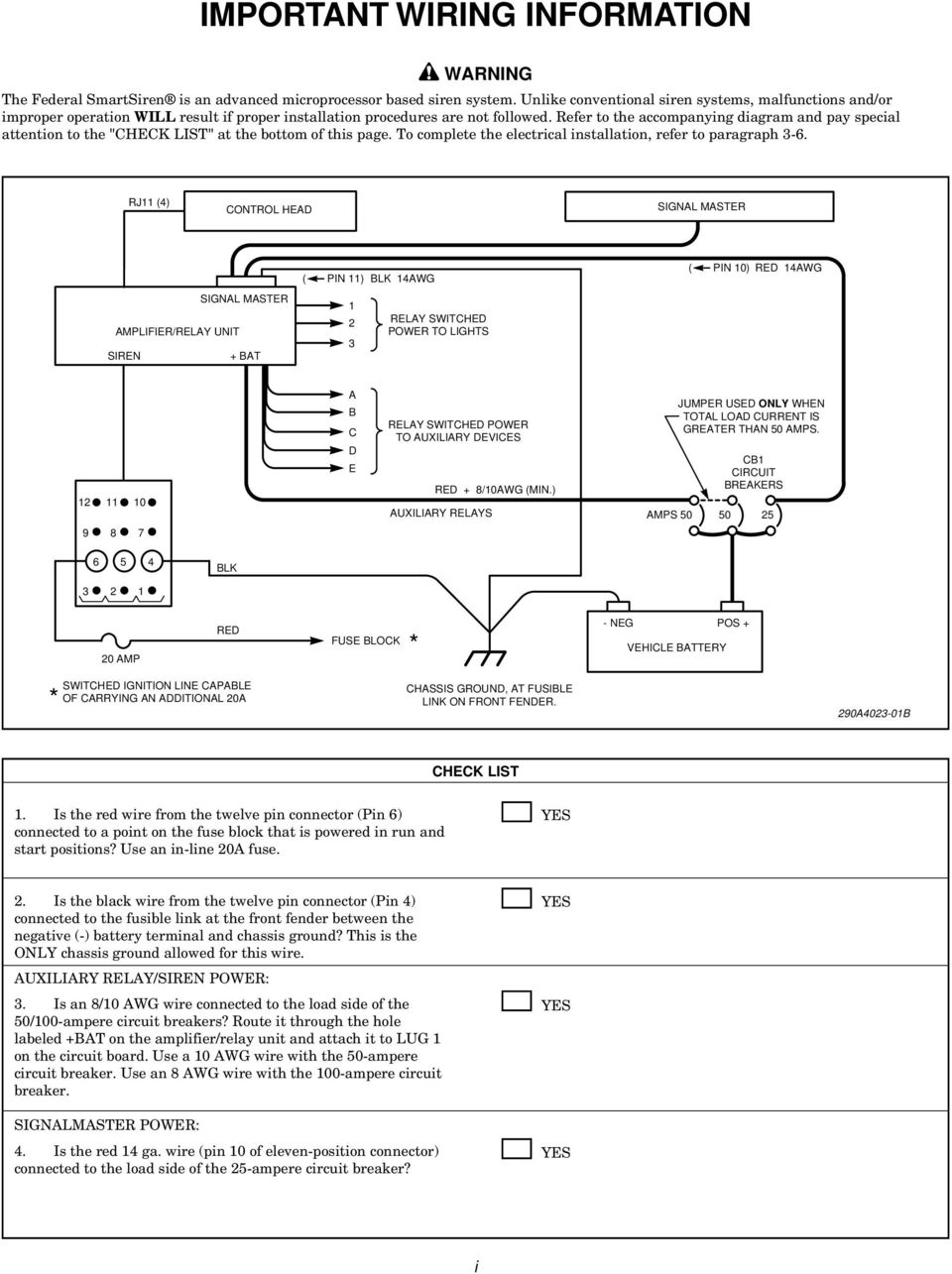
3 IMPORTANT WIRING INFORMATION WARNING The Federal SmartSiren is an advanced microprocessor based siren system. Unlike conventional siren systems, malfunctions and/or improper operation WILL result if proper installation procedures are not followed. Refer to the accompanying diagram and pay special attention to the "CHECK LIST" at the bottom of this page. To complete the electrical installation, refer to paragraph 3-6. RJ11 (4) CONTROL HEAD SIGNAL MASTER SIGNAL MASTER AMPLIFIER/RELAY UNIT SIREN + BAT ( PIN 11) BLK 14AWG RELAY SWITCHED POWER TO LIGHTS ( PIN 10) RED 14AWG A B C D E RELAY SWITCHED POWER TO AUXILIARY DEVICES RED + 8/10AWG (MIN.) AUXILIARY RELAYS AMPS 50 JUMPER USED ONLY WHEN TOTAL LOAD CURRENT IS GREATER THAN 50 AMPS. CB1 CIRCUIT BREAKERS BLK AMP RED FUSE BLOCK * - NEG POS + VEHICLE BATTERY SWITCHED IGNITION LINE CAPABLE * OF CARRYING AN ADDITIONAL 20A CHASSIS GROUND, AT FUSIBLE LINK ON FRONT FENDER. 290A B CHECK LIST 1. Is the red wire from the twelve pin connector (Pin 6) connected to a point on the fuse block that is powered in run and start positions? Use an in-line 20A fuse. YES 2. Is the black wire from the twelve pin connector (Pin 4) connected to the fusible link at the front fender between the negative (-) battery terminal and chassis ground? This is the ONLY chassis ground allowed for this wire. AUXILIARY RELAY/SIREN POWER: 3. Is an 8/10 AWG wire connected to the load side of the 50/100-ampere circuit breakers? Route it through the hole labeled +BAT on the amplifier/relay unit and attach it to LUG 1 on the circuit board. Use a 10 AWG wire with the 50-ampere circuit breaker. Use an 8 AWG wire with the 100-ampere circuit breaker. SIGNALMASTER POWER: 4. Is the red 14 ga. wire (pin 10 of eleven-position connector) connected to the load side of the 25-ampere circuit breaker? YES YES YES i
4 SECTION I GENERAL DESCRIPTION This system provides the automatic, simultaneous light and siren activation required by some laws. Momentary, push-on/push-off, or timed relay operation can be selected. A security shotgun timer is also provided to minimize the possibility of unauthorized shotgun release. The SS2000SM s technology allows variation of these features during programming. The Control Head can be customized with an assortment of replaceable function labels (supplied) to identify the switches. 290A Figure 1-1. The Federal Model SS2000SM (figure 1-1) is a full-featured, programmable electronic siren and light control system. State-of-the-art microprocessor technology is utilized to produce a system with a small, compact Control Head, and an Amplifier/ SignalMaster Control/Relay Unit which may be remotely mounted. Programming of the various features is done from the keys on the Control Head, without disassembly or removing the unit from its mounting location. When properly programmed, the Model SS2000SM provides a highly versatile electronic siren and light system. The SS2000SM produces wail, yelp, priority, and hi-lo siren tones, as well as an air horn sound. A horn ring transfer feature allowing horn ring control of siren tones (Tap II) is also provided. Public address (PA), with and without common microphone operation, and radio rebroadcast are available. Eight relay outputs are available for control of light bars, other auxiliary lights, and accessories. In addition, a full feature SignalMaster controller is integrated into the system. Provision is made to allow installation of a usersupplied switch, such as a foot switch, to activate lights and siren in the pursuit mode. The SS2000SM may be installed in the trunk, under the seat, or under the dash of any vehicle with a 12 volt, NEGATIVE ground electrical system. The siren circuits are protected from failure modes by an in-line fuse that is replaceable without tools. Relay outputs are protected by individual fuses. Connection between the Control Head and the SS2000SM is via a telephone-type, four-conductor cable with standard modular phone connectors at both ends for simple installation. The SS2000SM can drive one or two 11-ohm impedance high power (100 Watt) or low power (58 Watt) speakers. When two speakers are used they must always be connected in parallel and in phase. The SS2000SM controls the SignalMaster with the top row of switches and/or the slide switch on the remote control head. Directional and warning signals can be generated on the SignalMaster as well as fast and low power versions of these signals. Control of a six lamp SignalMaster is also available. Other advanced features of the SS2000SM include: High degree of reliability and compact size through the use of CMOS microprocessor and other integrated circuits. Simplified installation and service through use of plug-in cables and printed circuit boards. Relay outputs are individually fused with standard automotive type fuses. A one-inch thin remotely mounted control head operates all lighting and siren functions. The siren tones comply with SAE J1849 JUL89 for the following model: SS2000SM. -1-

5 SECTION II SPECIFICATIONS A. GENERAL. Input Voltage... 11VDC to 15VDC. Polarity... Negative ground only. Operating Temperature Range C to +65 C. Standby Current... Less than.5 ampere Dimensions: Amplifier/SignalMaster Control/Relay Unit Height /8" Width /8" (16.2cm) Length /4" (15.9cm) Net Weight /4 lbs. (1.704kg). Control Head Height /8" (5.87cm). Width " (3.18cm). Length /4" (17.15cm). Net Weight /8 oz. (0.273kg). Shipping Weight lbs. (3.09kg). B. SIREN SPECIFICATIONS. Operating Current... 9 amperes (nominal). (no lamps on) (13.6V battery, 11 ohm high power) Frequency Range to 1600Hz. Nominal Cycle Rate... Wail - 12 cycles/min. Yelp cycles/min. Hi-Lo- 60 cycles/min. Nominal Voltage Output... Audio Response... Audio Power... Harmonic Distortion... Input Impedance (PA)... 64V peak to peak (siren tones). 300Hz to 3,000Hz ± 3db. 45 watts in PA Mode (typical with 1.4V peak to peak input). Less than 10% from 5 to 45 watts ohms (nominal). C. SIGNALMASTER SPECIFICATIONS. Fuse amperes (Halogen and LED) 7.5 amperes (CudaTriOptic, 6 and 8 module) Output Drive Capability (Total)... 8,27 watt lamps Normal Flash Rate Directional patterns/min. Warn patterns/min. Fast Flash Rate Directional patterns/min. Warn patterns/min. -2-

6 WARNING The lives of people depend on your proper installation and servicing of Federal products. It is important to read and follow all instructions shipped with the products. In addition, listed below are some other important safety instructions and precautions you should follow: Before Installation SECTION III INSTALLATION SAFETY MESSAGE TO INSTALLERS OF ELECTRONIC SIRENS Sound output will be severely reduced if any objects are in front of the speaker. If maximum sound output is required for your application, you should ensure that the front of the speaker is clear of any obstructions. Install the speaker(s) as far forward on the vehicle as possible, in a location which provides maximum signaling effectiveness and minimizes the sound reaching the vehicle s occupants. Refer to the National Institute of Justice guide for further information. Qualifications To properly install an electronic siren: you must have a good understanding of automotive electrical procedures and systems, along with proficiency in the installation and service of safety warning equipment. Always refer to the vehicle's service manuals when performing equipment installations on a vehicle. Sound Hazards Your hearing and the hearing of others, in or close to your emergency vehicle, could be damaged by loud sounds. This can occur from short exposures to very loud sounds, or from longer exposures to moderately loud sounds. For hearing conservation guidance, refer to federal, state, or local recommendations. OSHA Standard offers guidance on Permissible Noise Exposure. All effective sirens and horns produce loud sounds (120 db) that may cause permanent hearing loss. Always minimize your exposure to siren sound and wear hearing protection. Do not sound the siren indoors or in enclosed areas where you and others will be exposed to the sound. Federal Signal siren amplifiers and speakers are designed to work together as a system. Combining a siren and speaker from different manufacturers may reduce the warning effectiveness of the siren system and may damage the components. You should verify or test your combination to make sure the system works together properly and meets federal, state and local standards or guidelines. During Installation DO NOT get metal shavings inside the product. Metal shavings in the product can cause the system to fail. If drilling must be done near the unit, place an ESD approved cover over the unit to prevent metal shavings from entering the unit. Inspect the unit after mounting to be sure there are no shavings present in or near the unit. DO NOT connect this system to the vehicle battery until ALL other electrical connections are made, mounting of all components is complete, and you have verified that no shorts exist. If wiring is shorted to vehicle frame, high current conductors can cause hazardous sparks resulting in electrical fires or flying molten metal. Be sure the siren amplifier and speaker(s) in your installation have compatible wattage ratings. In order for the electronic siren to function properly, the ground connection must be made to the NEGATIVE battery terminal. -3- Mounting the speakers behind the grille will reduce the sound output and warning effectiveness of the siren system. Before mounting speakers behind the grille, make sure the vehicle operators are trained and understand that this type of installation is less effective for warning others. Sound propagation and warning effectiveness will be severely reduced if the speaker is not facing forward. Carefully follow the installation instructions and always install the speaker with the projector facing forward. DO NOT install the speaker(s ) or route the speaker wires where they may interfere with the operation of air bag sensors. Installation of two speakers requires wiring speakers in phase. Never attempt to install aftermarket equipment, which connects to the vehicle wiring, without reviewing a vehicle wiring diagram - available from the vehicle manufacturer. Insure that your installation will not affect vehicle operation and safety functions or circuits. Always check vehicle for proper operation after installation. DO NOT install equipment or route wiring or cord in the deployment path of an air bag. Locate the control head so the vehicle, controls, and microphone can be operated safely. When drilling into a vehicle structure, be sure that both sides of the surface are clear of anything that could be damaged. After Installation After installation, test the siren system and light system to ensure that it is operating properly. Test all vehicle functions, including horn operation, vehicle safety functions and vehicle light systems, to ensure proper operation. Ensure that installation has not affected vehicle operation or changed any vehicle safety function or circuit. After testing is complete, provide a copy of these instructions to the instructional staff and all operating personnel. File these instructions in a safe place and refer to them when maintaining and/or reinstalling the product. Failure to follow all safety precautions and instructions may result in property damage, serious injury, or death to you or others.

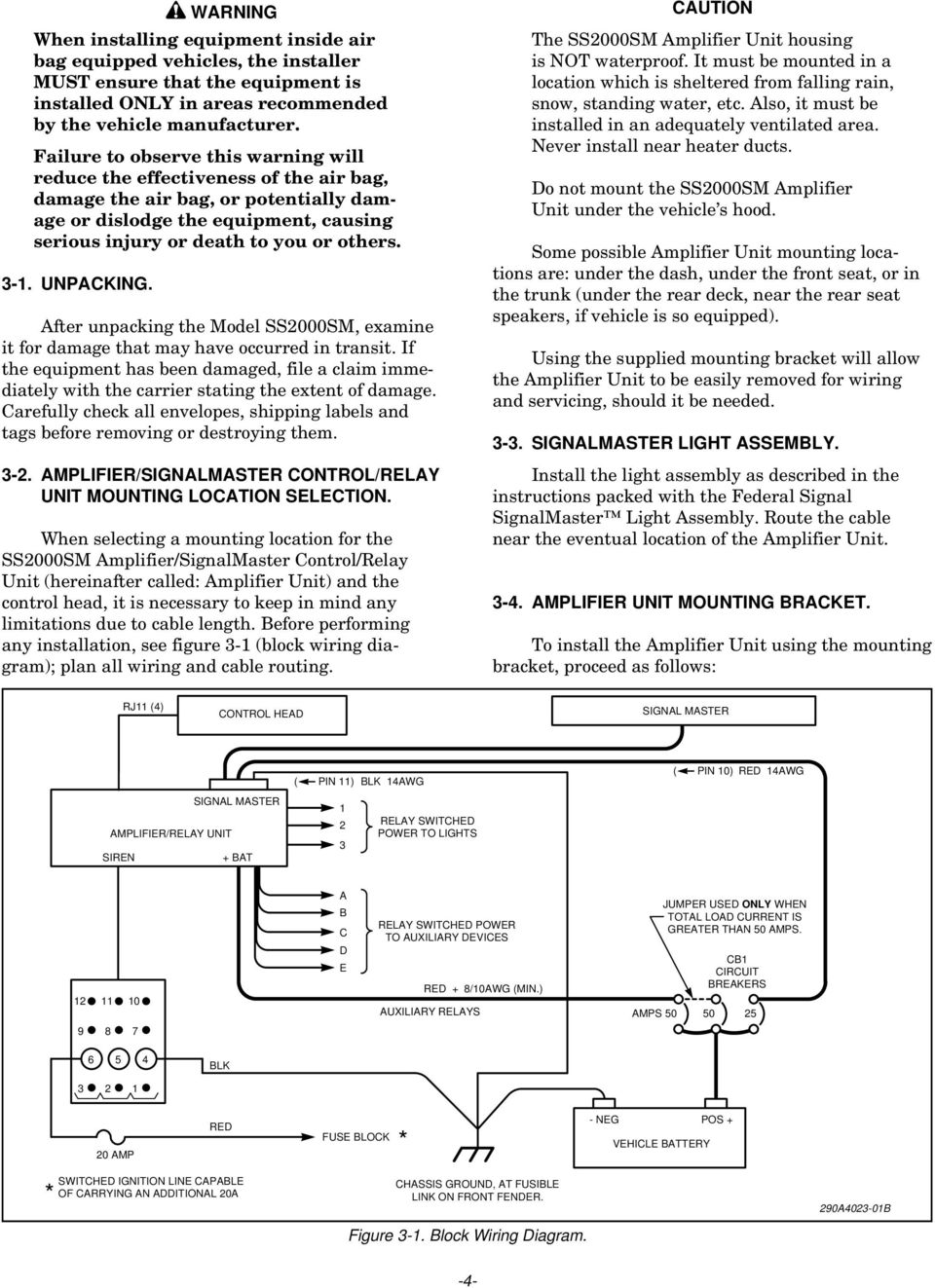
7 WARNING When installing equipment inside air bag equipped vehicles, the installer MUST ensure that the equipment is installed ONLY in areas recommended by the vehicle manufacturer. Failure to observe this warning will reduce the effectiveness of the air bag, damage the air bag, or potentially damage or dislodge the equipment, causing serious injury or death to you or others UNPACKING. After unpacking the Model SS2000SM, examine it for damage that may have occurred in transit. If the equipment has been damaged, file a claim immediately with the carrier stating the extent of damage. Carefully check all envelopes, shipping labels and tags before removing or destroying them AMPLIFIER/SIGNALMASTER CONTROL/RELAY UNIT MOUNTING LOCATION SELECTION. When selecting a mounting location for the SS2000SM Amplifier/SignalMaster Control/Relay Unit (hereinafter called: Amplifier Unit) and the control head, it is necessary to keep in mind any limitations due to cable length. Before performing any installation, see figure 3-1 (block wiring diagram); plan all wiring and cable routing. The SS2000SM Amplifier Unit housing is NOT waterproof. It must be mounted in a location which is sheltered from falling rain, snow, standing water, etc. Also, it must be installed in an adequately ventilated area. Never install near heater ducts. Do not mount the SS2000SM Amplifier Unit under the vehicle s hood. Some possible Amplifier Unit mounting locations are: under the dash, under the front seat, or in the trunk (under the rear deck, near the rear seat speakers, if vehicle is so equipped). Using the supplied mounting bracket will allow the Amplifier Unit to be easily removed for wiring and servicing, should it be needed SIGNALMASTER LIGHT ASSEMBLY. Install the light assembly as described in the instructions packed with the Federal Signal SignalMaster Light Assembly. Route the cable near the eventual location of the Amplifier Unit AMPLIFIER UNIT MOUNTING BRACKET. To install the Amplifier Unit using the mounting bracket, proceed as follows: RJ11 (4) CONTROL HEAD SIGNAL MASTER SIGNAL MASTER AMPLIFIER/RELAY UNIT SIREN + BAT ( PIN 11) BLK 14AWG RELAY SWITCHED POWER TO LIGHTS ( PIN 10) RED 14AWG A B C D E RELAY SWITCHED POWER TO AUXILIARY DEVICES RED + 8/10AWG (MIN.) AUXILIARY RELAYS AMPS 50 JUMPER USED ONLY WHEN TOTAL LOAD CURRENT IS GREATER THAN 50 AMPS. CB1 CIRCUIT BREAKERS BLK AMP RED FUSE BLOCK * - NEG POS + VEHICLE BATTERY SWITCHED IGNITION LINE CAPABLE * OF CARRYING AN ADDITIONAL 20A CHASSIS GROUND, AT FUSIBLE LINK ON FRONT FENDER. Figure 3-1. Block Wiring Diagram. 290A B -4-
8 A. Use the mounting bracket as a template and scribe two drill positioning marks at the selected mounting location. Before drilling holes in ANY part of a vehicle, be sure that both sides of the mounting surface are clear of parts that could be damaged; such as brake lines, fuel lines, electrical wiring or other vital parts. NOTE If desired, the #14 thread-forming screws may be used in place of the 1/4-20 x 3/4 hex head screws. B. Drill two mounting holes at the position marks. C. Secure the mounting bracket to the mounting surface with (2 each) 1/4-20 x 3/4 hex head screws, 1/4 split lockwashers and 1/4-20 hex nuts as shown in figure CONTROL HEAD INSTALLATION. Several control head mounting methods are available. The mounting method used will depend on available room, and user preference. 1/4-20 HEX NUT (2) 1/4" SPLIT LOCKWASHER (4) MOUNTING BRACKET (1) MOUNTING 1/4-20 x 3/4" HEX HD. CAP SCREW (2) OPTIONAL #14 THD. FRM. SCREW (2) MAY BE SUBSTITUTED (BOTH SUPPLIED) Unreliable switch activation and loss of tactile feedback will result if the control head mounting method allows movement. DO NOT mount the control head on padded surfaces. WARNING When installing equipment inside air bag equipped vehicles, the installer MUST ensure that the equipment is installed ONLY in areas recommended by the vehicle manufacturer. Failure to observe this warning will reduce the effectiveness of the air bag, damage the air bag, or potentially damage or dislodge the equipment, causing serious injury or death to you or others. Choose a location for the control head that allows the vehicle, controls, and microphone to be operated safely at all times. See figure 3-3. The supplied hinged mounting bracket enables the control head to be mounted in a variety of positions. Positioning the bracket above the unit allows mounting the control head on the underside of the dash. Positioning the bracket below the unit will permit mounting on any horizontal surface. To mount the control head using the bracket, proceed as follows: A. Assemble a bracket to the control head using the 6-32 x 1/4 screws and #6 lockwashers. Assemble the other bracket to the control head/ bracket assembly using the 1/4-20 x 3/4 hex head screws and 1/4" lockwashers as shown in figure 3-4. NOTE 1/4-20 x 7/16" SCREW, TYPE TT THD. HEX WSH.HD BLK. OXIDE (2) 1/4" SPLIT LOCKWASHER KEYPAD AUX OUTPUT LIGHTS A B C D E FEDERAL SIGNAL CORP. Smartsiren SM SS2000SM NOTE: ONLY ONE BRACKET IS SUPPLIED. Figure 3-2. Mounting Bracket Installation. + BAT SignalMaster FUSE MIC SignalMaster R SmartSiren SM SS2000SM 290A B The brackets are not symmetrical. After assembling the brackets to the control head, ensure that the assembly can be properly positioned at the intended mounting location. If proper positioning cannot be achieved, reverse the bracket. B. Use the mounting bracket as a template and scribe two drill positioning marks at the selected mounting location. Before drilling holes in ANY part of a vehicle, be sure that both sides of the mounting surface are clear of parts that could be damaged; such as brake lines, fuel lines, electrical wiring or other vital parts. -5-

9 CONTROL HEAD NOTE: USE ONE OF THE THREE SETS OF HOLES. THIS ALLOWS UP/DOWN CONTROL POSITION OF THE PIVOT BRACKET. 12 PIN CONNECTOR TB1 TB2 J2 LIGHTS AUX OUTPUTS NO NC C #6 SPLIT LOCKWASHER (2) #6-32 x 1/4" SCREW, PHL. PAN HD (2) S I R E N + BAT SignalMaster FUSE 3 MIC KEYPAD INPUT 2 1 A B C D E SignalMaster TM FEDERAL SIGNAL CORP. UNIVERSITY PARK, IL USA R SmartSiren SM SS2000SM U.S PATENTS 5,296,840 OTHER PAT'S PENDING BRACKET (1 OF 2) Figure 3-3. Control Head Bracket Assembly. C. Drill two mounting holes at the position marks. D. Secure the mounting bracket to the mounting surface with the #10 thread-forming screws as shown in figure ELECTRICAL INSTALLATION. A. Power Cable Connections. The power cable included in the carton is equipped with a twelve-pin plug that mates with the connector on the rear of the Amplifier Unit (see figure 3-5). The cable is supplied with a 20-ampere in-line fuse. Additional wire (the same gauge or heavier) may be spliced to the leads as required. The various wires on the connector must be connected as follows: 1. Speaker. PEM-NUT (ATTACHED TO BRACKET) 290A The unit is designed to operate with one 11-ohm impedance speaker or two 11-ohm impedance, low power (58W) or high power (100W), speakers connected in parallel and in phase. On Federal speakers, this can be accomplished by connecting the two speaker leads marked 1 to the SPEAKER COMMON power cable lead and the two PREVIOUSLY ASSEMBLED CONTROL HEAD AND BRACKET PEM-NUTS (ATTACHED TO BRACKETS) 1/4" LOCKWASHER, EXT. TOOTH (2) 1/4-20 x 3/4" SCREW, HEX HD. (2) #10 SCREWS, THD. FORM. (2) Figure 3-5. Rear View of SS2000SM. speaker leads marked 2 to the SPEAKER HI POWER or SPEAKER LO POWER power cable leads. See figure 3-6. Using 18 gauge wire, connect the speaker leads (58W speakers to SPEAKER LO POWER or 100W speakers to SPEAKER HI POWER) as shown in Power Cable Wiring Diagram, figure Radio. To allow incoming radio messages to be rebroadcast over the outside speakers, connect the two brown zip cord leads (pins 9 and 12 of the power cable) across the two-way radio s speaker. 3. Horn Ring. In order to utilize the horn ring control of siren tones (Tap II) and other features of the siren, the following procedure must be performed RED WIRE FEMALE CLIP FUSE MALE CLIP BLU ORN BRN BLK RED WHT/YEL PRP BRN BRN GRA WHT SPEAKER, COMMON SPEAKER, LOW POWER(58W) SPEAKER, HIGH POWER(100W) (NEG.) (-) AT FUSIBLE LINK 20 AMP 290A B (POS.) (+) FUSE BLOCK HORN RING COMMON MIC. / EXTERNAL RELAY VEHICLE TWO-WAY RADIO SPEAKER PURSUIT OR PARK DEACTIVATOR HORN 290A B 1. SLIP MALE CLIP OVER THE FUSE. 2. INSERT CLIP AND FUSE INTO FUSE BLOCK. 3. ATTACH THE RED WIRE WITH FEMALE CLIP. BRACKET (2 OF 2) PILOT HOLES (2) MOUNTING HOLES FOR #10 SCREWS Figure 3-4. Control Head and Bracket Installation. MOUNTING SURFACE 290A TOP OF FUSE BLOCK 290A Figure 3-6. Amplifier Unit Power Cable and Fuse Clip Adapter Installation.

10 a. Locate the wire that connects the vehicle horn ring switch to the horn or horn relay. Cut this wire. b. See figure 3-7. Splice the white/ yellow power cable wire to the horn ring side of the wire that was cut in step a. Insulate the splice with the wire nuts (supplied). The horn ring transfer circuit of the siren is capable of switching a maximum of 2-amperes. Some vehicles do not have a horn relay and, consequently, will draw more than 2-amperes when the vehicle horn is activated. Consult your vehicle service manual or a qualified mechanic to determine the current required to activate the horn. If it is less than 2-amperes, perform the procedure in step c. If it is greater than 2-amperes, perform steps d through j. c. Splice the white power cable wire to the horn side of the cut wire. Insulate the splice with a wire nut. d. Obtain a SPST relay of sufficient contact current capacity to activate the vehicle horn. Refer to figure 3-7 while performing the following steps. e. Mount the relay in a suitable location. f. Connect the horn side of the wire cut in step a to the relay contact terminal. g. Determine the sense of the vehicle s horn ring activation circuit, i.e., does the horn circuit require a switched positive voltage or switched ground for activation. h. Connect the switched relay contact terminal to the positive or negative potential determined in step g. i. Connect the white power cable wire to one end of the relay coil. j. Connect the other end of the relay coil to the opposite potential of that connected to the switched relay contact terminal in step h. VEHICLE HORNS RELAY (USER SUPPLIED) SW TO BATTERY STEERING COLUMN CUT WIRE WHT TO HORN, OR HORN RELAY CONTROL CABLE ASSEMBLY WHT/YEL TO HORN SWITCH 290A Figure 3-7. Horn Ring Connections Park-Siren Deactivator. IMPORTANT It is the installer s responsibility to determine an appropriate location in the vehicle circuitry to connect the pursuit wire. This feature uses the pursuit wire to automatically deactivate siren tones when the vehicle is shifted into PARK. See figure 3-6. To use this feature, connect the power cable s gray wire to a vehicle circuit that is grounded when the vehicle is shifted into PARK. 5. Pursuit Switch. NOTE When the Model SS2000SM is shipped from the factory, the pursuit function is NOT ACTI- VATED. The Operation and Configuration Instructions (Part No ) describes the procedure for activating the pursuit function. Either the pursuit function or the park-siren deactivator function must be selected. Both functions are not available at the same time. The SS2000SM Pursuit function is activated by momentarily grounding the Pursuit switch input using a user-supplied momentary switch (Federal Part Numbers 122A108 and 164B101) or other equivalent momentary contact SPST switch. a Install the pursuit switch in a location which allows the vehicle, controls, and microphone to be operated safely at all times. In addition, the pursuit switch should be installed in a location which allows minimum reaction time in an emergency situation. b. Connect one side of the switch to a RELIABLE chassis ground using #18AWG or larger wire. c. See figure 3-6. Connect the other side of the switch to the power cable s gray wire using #18AWG or larger wire. 6. Common Microphone. a. If the PA and RADIO transmitter are to share a common microphone, the audio switching must be performed by a user-supplied switching device. The violet wire provides +12VDC when the SS2000SM is operating in the PA mode.

11 Refer to the instructions provided with the switching device. Connect the +12VDC ACTIVATED (1-ampere or less) switching device to the violet wire. b. If the PA and RADIO transmitter are to have separate microphones, fold back and insulate the violet wire. 7. External Auxiliary Relay. When switch 11 of the control head is not used for the common microphone function, it can be used to activate an external relay. In addition to the SmartSiren s eight relay-controlled outputs, this external relay can be used to activate another auxiliary device. Switch 11 can function only in a push-on/ push-off mode. When switch 11 is activated, +12VDC is supplied on the power cable s violet wire. This +12VDC is capable of supplying 1-amp., which should be adequate for most automotive relays. A 40-amp. relay (Federal Signal Part No. 131A175) is recommended. Figure 3-8 shows the wiring for any single pole relay. The pin numbers shown are for the recommended Federal Signal relay. 8. Connection to Power Source (see figure 3-6). The SS2000SM must operate from a 12 volt NEGATIVE ground vehicle electrical system. Therefore, before making any electrical connections, verify the polarity of the vehicle electrical system ground. NOTE Transient noise pulses caused by the automotive power system or surge currents due to switching inductive or incandescent lamp loads may cause malfunctions in the SS2000SM if proper wire routing is not followed. The Amplifier Unit red (positive) power cable lead should be as short and direct to the fuse block or user-supplied switch (current capacity of at least 20 amps) as possible. DO NOT splice to accessory power leads. The Amplifier Unit black (negative) power cable lead should be as short and direct to the fusible link on the front fender as possible. DO NOT splice to accessory negative (black) leads. PRP. WIRE FROM SIREN POWER CABLE, PIN 8 GROUND Figure 3-8. External Auxiliary Relay. IMPORTANT The SS2000SM does not have an on-off switch. If power is obtained directly from the vehicle battery, the system will continuously draw approximately 0.5A and will eventually discharge the vehicle s battery. It is RECOM- MENDED that Amplifier Unit power be obtained from a vehicle circuit that is powered in the RUN, and START positions. Power can also be obtained from a user-supplied switch (current capacity of at least 20 amps). Before drilling holes in ANY part of a vehicle, ensure that both sides of the surface are clear of parts that could be damaged; such as brake lines, fuel lines, electrical wiring or other vital parts. a. Power for the Amplifier Unit can be obtained from the vehicle s fuse block; or a 20- ampere fused, switched circuit. When obtaining power from the vehicle s fuse block, refer to the vehicle s wiring manual to ensure the unit will be powered in the RUN and START positions. Route the red (+) power cable lead to the fuse block or user-supplied switch. When the red (+) power cable lead is routed to the fuse block, install the supplied fuse clip adapter as follows (see figure 3-6): over the fuse VDC 290A (1). Slip the fuse clip adapter (2). Insert the adapter clip/fuse into the applicable fuse block location (refer to the vehicle s wiring manual) with the adapter clip end toward the top of the fuse block. Make sure that the selected fuse block location is capable of supplying an additional 20-amperes. (3). Attach the power cable s red wire on the fuse clip. 87 AUXILIARY DEVICE -8-

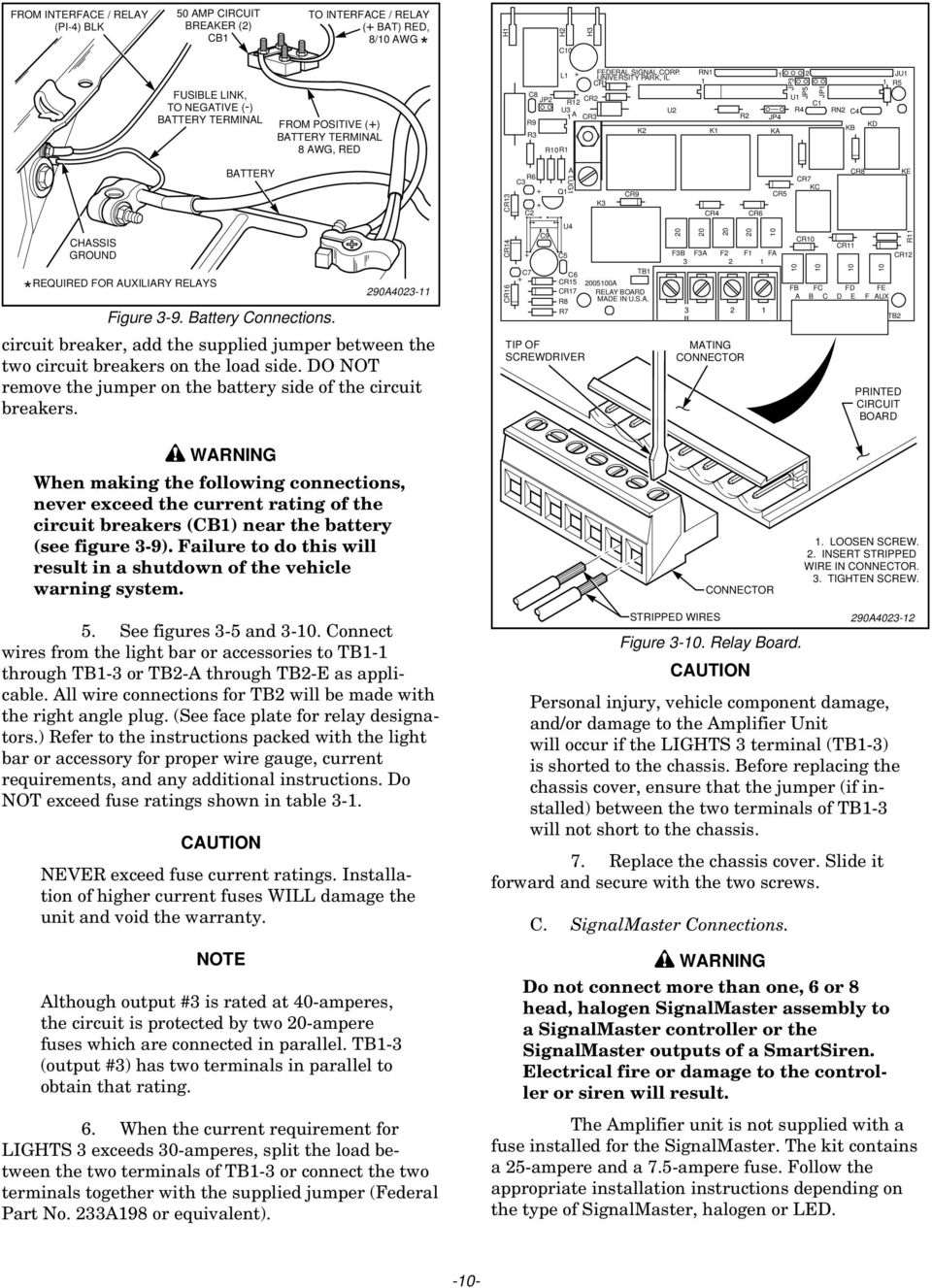
12 b. To protect the wires, use the inline fuseholder and 20-ampere fuse. The fuseholder and fuse should be installed in the red (+) lead as close as practical to the power source. c. Route the black (-) power cable lead through the previously drilled hole into the engine compartment, and through existing clamps and holders toward the fusible link on the front fender. DO NOT make any connections to the battery until all other wiring is complete. B. Light Bar and Auxiliary Light Connections. The SS2000SM is programmed at the factory to satisfy most installation requirements. Before proceeding with installation, refer to the supplied Operation and Configuration Instructions for a description of the standard program, and instructions on how to change the programming. The SS2000SM provides two terminal strips (TB1 & TB2) for control of light bars, auxiliary lights and accessories. A total of eight fused relaycontrolled outputs are available. Each output switches a nominal +12-volts to the controlled device. Do NOT use the black wire in the power cable for grounding the switched device(s). Ground the switched devices separately. Refer to the installation instructions provided with the light bar or auxiliary light for additional precautions and details. IMPORTANT Since the terminals labeled LIGHTS 1, 2, and 3 can be reprogrammed to activate in any of the three modes, select the terminals used for the various loads in accordance with the current ratings of the terminals. Primary rotating lights normally require more current than flashing or secondary warning lights. If, for example, primary rotating lights are to be activated in Modes 2 and 3, connect the rotators to LIGHTS 3 (rated at 40-amperes). Then, reprogram the unit to activate the LIGHTS 3 terminal in Modes 2 and 3. Fuse current ratings and suggested uses for each output are shown in table 3-1. Complete the wiring to the light bar or accessories as follows: Output Fuse / Rating Relay Suggested Terminal Application LIGHTS 1 F1 / 20-amps K1 Rear Flashing LIGHTS 2 F2 / 20-amps K2 Front Flashing or Secondary Warning Lights LIGHTS 3 F3A & F3B / K3 Rotating or Primary two 20-amps= Warning Lights 40-amps total A - E FA, FB, FC, KA, KB, Auxiliary Lights FD, FE / KC, KD, (Takedown, Alley, etc.) 10-Amps. ea. KE Note: Output E provides both normally open/normally closed (NO/NC) and common contacts. By removing the fuse labeled FE, it can be isolated from the +12-volt battery supply for switching other POSITIVE voltages. Table 3-1. Output Ratings. The relay board WILL be damaged if correct polarity is not observed. 1. Remove the chassis cover by loosening the 2 screws on the bottom of the unit. Slide the cover to expose the relay board and terminal strips. 2. Route a #10AWG (minimum) red wire through the hole labeled +BAT and attach it to the large lug-type terminal (LUG1) on the relay board. The lug is accessible through the top of the unit via the hole labeled +BAT. Use a flathead screwdriver to loosen and tighten this lug. Use a #8 AWG red wire if the total light bar and auxiliary load currents exceed 50-amperes. Since this wire provides the power source for all switched lighting functions, a good mechanical and electrical connection here is important. 3. Route this wire through the previously drilled hole into the engine compartment and through existing clamps and holders toward the battery. Do NOT make any connections to the battery until all wiring is complete. 4. See figure 3-9. To protect the wire, 2 circuit breakers (CB1) rated at 50-amperes (Federal Part No. 8474A176 or equivalent) should be connected as close as practical to the positive (+) battery terminal. When the total load current is greater than 50-amperes, use a 100-ampere circuit breaker. When the total load current is less than 50-amperes, use a 50-ampere circuit breaker. To use the Federal 50-ampere circuit breakers (Part No. 8474A176) as a 100-ampere -9-

13 FROM INTERFACE / RELAY (PI-4) BLK 50 AMP CIRCUIT BREAKER (2) CB1 FUSIBLE LINK, TO NEGATIVE (-) BATTERY TERMINAL BATTERY TO INTERFACE / RELAY (+ BAT) RED, 8/10 AWG * FROM POSITIVE (+) BATTERY TERMINAL 8 AWG, RED CR13 H1 C8 R9 R3 C3 R6 C2 H2 H3 C10 L1 FEDERAL SIGNAL CORP. RN1 UNIVERSITY PARK, IL 1 CR1 1 JP2 R12 U3 1A R10R1 A Q1 LUG1 CR2 CR3 K3 JU1 1 R5 U1 C1 U2 R4 RN2 C4 R2 JP4 KD K2 K1 KB KA CR8 KE CR7 KC CR9 CR5 CR4 CR6 JP3 2 JP5 JP1 * CHASSIS GROUND REQUIRED FOR AUXILIARY RELAYS Figure 3-9. Battery Connections. 290A circuit breaker, add the supplied jumper between the two circuit breakers on the load side. DO NOT remove the jumper on the battery side of the circuit breakers. CR14 CR16 C7 C9 C5 U4 C6 CR15 CR17 R8 R7 TIP OF SCREWDRIVER TB A RELAY BOARD MADE IN U.S.A MATING CONNECTOR 10 F1 F3B F3A F2 FA CR10 10 CR FB FC FD FE A B C E AUX D F CR12 TB2 PRINTED CIRCUIT BOARD R11 WARNING When making the following connections, never exceed the current rating of the circuit breakers (CB1) near the battery (see figure 3-9). Failure to do this will result in a shutdown of the vehicle warning system. CONNECTOR 1. LOOSEN SCREW. 2. INSERT STRIPPED WIRE IN CONNECTOR. 3. TIGHTEN SCREW. 5. See figures 3-5 and Connect wires from the light bar or accessories to TB1-1 through TB1-3 or TB2-A through TB2-E as applicable. All wire connections for TB2 will be made with the right angle plug. (See face plate for relay designators.) Refer to the instructions packed with the light bar or accessory for proper wire gauge, current requirements, and any additional instructions. Do NOT exceed fuse ratings shown in table 3-1. NEVER exceed fuse current ratings. Installation of higher current fuses WILL damage the unit and void the warranty. NOTE Although output #3 is rated at 40-amperes, the circuit is protected by two 20-ampere fuses which are connected in parallel. TB1-3 (output #3) has two terminals in parallel to obtain that rating. 6. When the current requirement for LIGHTS 3 exceeds 30-amperes, split the load between the two terminals of TB1-3 or connect the two terminals together with the supplied jumper (Federal Part No. 233A198 or equivalent). STRIPPED WIRES Figure Relay Board. Personal injury, vehicle component damage, and/or damage to the Amplifier Unit will occur if the LIGHTS 3 terminal (TB1-3) is shorted to the chassis. Before replacing the chassis cover, ensure that the jumper (if installed) between the two terminals of TB1-3 will not short to the chassis. 7. Replace the chassis cover. Slide it forward and secure with the two screws. C. SignalMaster Connections. 290A WARNING Do not connect more than one, 6 or 8 head, halogen SignalMaster assembly to a SignalMaster controller or the SignalMaster outputs of a SmartSiren. Electrical fire or damage to the controller or siren will result. The Amplifier unit is not supplied with a fuse installed for the SignalMaster. The kit contains a 25-ampere and a 7.5-ampere fuse. Follow the appropriate installation instructions depending on the type of SignalMaster, halogen or LED. -10-
14 1. Halogen. a. Unless previously routed, route the SignalMaster cable toward the Amplifier Unit. Use caution to avoid scraping the wires on any sharp edges. MATING CONNECTOR TIP OF SCREWDRIVER PRINTED CIRCUIT BOARD b. Cut the cable to the appropriate length as required. c. Route user-supplied red and black 14-gauge wires through the firewall and toward the battery. Connect the red wire to one end of the supplied 25-ampere circuit breaker (Part No ). Do not connect the other end of the circuit breaker to the (+) positive terminal until ALL wiring is complete. d. Strip 1/4" of insulation off each wire at the eleven-position connector end. Insert the eight 22-gauge wires, the 16-gauge red wire, and the 14-gauge red and black wires into the connector as shown in figures 3-11 and Tighten the screw at each connector position to secure the wires in the connector. e. As supplied in the kit, insert a 25- ampere fuse in the fuse holder in the back of the Amplifier unit. 2. LED. a. Unless previously routed, route the SignalMaster cable toward the Amplifier Unit. Use caution to avoid scraping the wires on any sharp edges. b. Cut the cable to the appropriate length as required. STRIPPED WIRES CONNECTOR Figure SignalMaster Eleven-position Connector. c. Route user-supplied black 14- gauge wire through the firewall and toward the battery. Route the user-supplied red 14-gauge wire toward the ignition terminal. Connect the red wire to one end of the supplied 25-ampere circuit breaker (Part No ). Do not connect the other end of the circuit breaker to the ignition terminal until ALL wiring is complete. d. Strip 1/4" of insulation off each wire at the eleven-position connector end. Insert the eight 22-gauge wires, the 16-gauge red wire, and the 14- gauge red and black wires into the connector as shown in figure Tighten the screw at each connector position to secure the wires in the connector. e. As supplied in the kit, insert the appropriate fuse (25-ampere for LED SignalMasters or 7.5-ampere for Cuda TriOptic, 6 or 8 module) in the fuse holder in the back of the Amplifier unit. D. Control Head Connections. 1. LOOSEN SCREW. 2. INSERT STRIPPED WIRE IN CONNECTOR. 3. TIGHTEN SCREW. 290A /4" + BAT SignalMaster FUSE MIC KEYPAD LIGHTS OUTPUT NO NC C AUX A B C D E All connections between the SS2000SM control head and Amplifier Unit are accomplished by a single 20-foot telephone-type cable (provided). It is terminated with modular-type connectors on each end. SignalMaster SmartSiren SS2000SM WHT (1) BRN (2) GRN (3) ORN (4) PRP (5) GRA (6) (11) BLK 14AWG - GND YEL (7) BLU (8) (10) RED 14AWG + BAT RED (9) 25 AMP BREAKER 9 CONDUCTOR CABLE FROM SIGNAL MASTER 290A B Figure SignalMaster Connections. The unit will not operate if the telephone-type cable is improperly wired. If it is necessary to shorten the 4 conductor telephone-type cable, ensure that the connections made to the modular connector are exactly the same as the original cable connections. -11-

15 To complete this portion of the installation, proceed as follows: 1. Route the 20-foot cable between the SS2000SM control head and the Amplifier Unit. Secure the cable with user-supplied clamps and hold downs as required. 2. Insert the modular connector in the receptacle on the back of the SS2000SM Amplifier Unit. Secure with user-supplied clamps and/or wire ties to provide strain relief. 3. Insert the other modular connector in the receptacle on the control head. Secure with usersupplied clamps and/or wire ties to provide strain relief. E. Microphone Connections. The SS2000SM is not supplied with a microphone. A Federal Model MNCT-SB microphone may be plugged into the microphone jack on the rear of the Amplifier Unit. If the Amplifier Unit is remotely mounted, Model RMK (microphone extension kit) is available from Federal. It includes a 20- foot extension cable with phone plug, jack, and dashboard mounting bracket. Carefully route the extension cable through the vehicle along with the telephone-type cable, and secure with user-supplied clamps and ties as required INSPECTION AND FINAL INSTALLATION. A. See figure 3-2. Secure the SS2000SM Amplifier Unit to the mounting bracket with the BLACK 1/4-20 x 1/2 hex head screws and 1/4 split lockwashers. Ensure all fasteners are properly tightened. B. Before connection to the power source, perform a visual check of all connections and wiring. C. Ensure that there are no loose wire strands or other bare wire which may cause a short circuit. Also, all wires must be protected from any sharp edges which could eventually cut through the insulation. D. Use an ohmmeter to verify that a short circuit does NOT exist between the positive (+) and negative (-) power cable leads. Also, there must be NO short circuits between the positive (+) wires and the vehicle chassis. E. After performing steps 1 through 4, connect all black (-) wires to the fusible link on the front fender. Secure mechanical and electrical connections are required. WARNING If wires are shorted to the vehicle frame or each other, high current conductors can cause hazardous sparks resulting in electrical fires and molten metal. Verify that no short circuits exist before connecting to the Positive (+) battery terminal. DO NOT connect this system to the vehicle battery until ALL other electrical connections are made and mounting of all components is complete. Failure to observe this WARNING will result in fire, burns and blindness. F. Connect all #8 or #10AWG (minimum) red (+) wires to the positive (+) terminal of the power source. Also, connect a 14-gauge red wire from the unused end of the 25-ampere circuit breaker (from the SignalMaster connector) to the positive (+) terminal of the power source. Again, secure mechanical and electrical connections are required REPLACEABLE FUNCTION LABELS. See figure Replaceable function labels identify the switches on the control head. A sheet of applicable function legends is supplied. To install the function legends, proceed as follows: -12-

16 Select the appropriate labels from the supplied sheet of function legends. Peel the labels from the sheet and apply to the key pad in the area provided as shown in figure Verify that the label is properly tucked under the retaining ridge on the pushbutton. Y MAN FAST LOW POWER LEGEND INSERT (REMOVED FROM SHEET) P 3-9. TESTING AFTER INSTALLATION. E DOOR AREA WARNING All effective sirens and horns produce loud sounds (120 db) that may cause permanent hearing loss. Always minimize your exposure to siren sound and wear hearing protection. Do not sound the siren indoors or in enclosed areas where you and others will be exposed to the sound. RIGHT ALLEY KEYBOARD BLANK KEYPADS LEGEND INSERTED WAIL LEGEND SHEET AUX 1 A / H Figure Function Label Installation. AUX 2 WAIL DOM AU 290A tions, including horn operation and vehicle light systems, to ensure proper operation. Programming is described in the supplied Operation and Configuration Instructions. After testing is complete, provide a copy of this manual to all operating personnel. Before testing, read and understand the supplied Operation and Configuration Instructions. After installation is complete, test all siren and light functions to ensure that all functions and controlled devices operate as intended. Test all vehicle func- -13-

17 WARNING The lives of people depend on your safe operation of Federal products. It is important to read and follow all instructions shipped with the products. In addition, listed below are some other important safety instructions and precautions you should follow: Qualifications To properly use an electronic siren and speaker(s): you must have a good understanding of general vehicle operation, a high proficiency in the use of safety warning equipment, and thorough knowledge of state and federal UNIFORM TRAFFIC CODES. Sound Hazards Your hearing and the hearing of others, in or close to your emergency vehicle, could be damaged by loud sounds. This can occur from short exposures to very loud sounds, or from longer exposures to moderately loud sounds. For hearing conservation guidance, refer to federal, state, or local recommendations. OSHA Standard offers guidance on Permissible Noise Exposure. All effective sirens and horns produce loud sounds (120 db) that may cause permanent hearing loss. Always minimize your exposure to siren sound, roll up your windows and wear hearing protection. Do not sound the siren indoors or in enclosed areas where you and others will be exposed to the sound. Only use the siren for emergency response situations. Sound Limitations Before using the vehicle, check to see if the siren speakers are concealed from view. If the siren speaker is not in clear view on the front of the vehicle, use extra caution when operating the vehicle. A concealed siren speaker installation is less effective at warning others. Maximum sound output will be severely reduced if any objects are in front of the speaker. If your installation has obstructions in front of the speaker, drive even more cautiously. Frequently inspect the speaker to ensure that it is clear of any obstruction, such as mud or snow, which will reduce maximum sound output. SECTION IV OPERATION SAFETY MESSAGE TO OPERATORS OF FEDERAL SIGNAL ELECTRONIC SIRENS AND LIGHT/SOUND SYSTEMS Signaling Limitations Be aware that the use of your visual and audible signaling devices does not give you the right to force your way through traffic. Your emergency lights, siren, and actions are REQUESTING the right-of-way. Although your warning system is operating properly, it may not alert everyone. People may not hear, see, or heed your warning signal. You must recognize this fact and continue driving cautiously. Situations may occur which obstruct your warning signal when natural or man-made objects are between your vehicle and others. This can also occur when you raise your hood or trunk lid. If these situations occur, be especially careful. Driving Limitations At the start of your shift, you should ensure that the light/sound system is securely attached to the vehicle and operating properly. If the unique combination of emergency vehicle equipment installed in your vehicle has resulted in the siren controls being installed in a position that does not allow you to operate them by touch only, OPERATE CONTROLS ONLY WHILE YOUR VEHICLE IS STOPPED. If driving conditions require your full attention, you should avoid operating the siren controls while the vehicle is in motion. Continuing Education File these instructions in a safe place and refer to them periodically. Give a copy of these instructions to new recruits and trainees. Failure to follow these safety precautions may result in property damage, serious injury, or death to you, to passengers, or to others. IMPORTANT Since many SS2000SM features are programmable, operation is described for the standard program. Refer to the supplied Operation and Configuration Instructions for additional discussion of the standard program. It is the operator s responsibility to understand how his particular unit is configured (programmed) to operate. -14-

18 OPERATING INSTRUCTIONS The SS2000SM control head is designed to assist the operator s selection of functions. Each control head switch is recessed and aids guiding the operator s finger to the switch s center for activation. When a switch is pressed, tactile feedback provides function selection indication as follows: a click is felt, a beep is heard, and the selected function s key illuminates brightly. Specific operating instructions are provided in the supplied Operation and Configuration Instructions. SECTION V CONFIGURATION WARNING Property damage, serious injury, or death to you or others may result if the SmartSiren is improperly programmed. Programming, if required, is to be performed at the time of installation. It is NOT intended for operators to customize the unit s operation for their individual preferences. It is the USER s responsibility to determine compatibility, suitability, and ensure proper programming of the SmartSiren. The person responsible for programming MUST be familiar with local codes and procedures for safe emergency vehicle siren and light operation. CONFIGURATION INSTRUCTIONS The SmartSirenSM is an extremely versatile and configurable electronic siren and light control system. Available siren tones are: wail, yelp, priority, hi-lo, and an air horn sound. Horn ring control of siren tones is provided. Public address and radio rebroadcast are available. Eight relay outputs are available for controlling light bars, other auxiliary lights, and accessories. An integrated SignalMaster controller is available for controlling directional lights. For configuration instructions, refer to the supplied Operation and Configuration Instructions. -15-

19 SECTION VI SERVICE AND MAINTENANCE SAFETY MESSAGE TO PERSONNEL SERVICING FEDERAL SIGNAL ELECTRONIC SIRENS WARNING The lives of people depend on your proper servicing of Federal products. It is important to read and follow all instructions shipped with the products. In addition, listed below are some other safety instructions and precautions you should follow: Read and understand all instructions in this manual before servicing the electronic siren or speaker. To properly service an electronic siren or speaker: you must have a good understanding of automotive electrical procedures and systems, along with proficiency in the installation and service of safety warning equipment. Always refer to the vehicle's service manuals when performing service on a vehicle. Electronic circuit and speaker repairs must be performed by a qualified and competent electronic technician. Your hearing and the hearing of others, in or close to your emergency vehicle, could be damaged by loud sounds. This can occur from short exposures to very loud sounds, or from longer exposures to moderately loud sounds. For hearing conservation guidance, refer to federal, state, or local recommendations. OSHA Standard offers guidance on Permissible Noise Exposure. All effective sirens and horns produce loud sounds (120 db) that may cause permanent hearing loss. Always minimize your exposure to siren sound and wear hearing protection. Do not sound the siren indoors or in enclosed areas where you and others will be exposed to the sound. DO NOT connect this system to the positive terminal of the battery until servicing is complete, and you have verified that there are no short circuits to ground. In order for the electronic siren to function properly, the ground connection must be made to the NEGATIVE battery terminal. After repair, test the electronic siren and speaker system to ensure that it is operating properly. Federal Signal siren amplifiers and speakers are designed to work together as a system. Combining a siren and speaker from different manufacturers may reduce the warning effectiveness of the siren system and may damage the components. You should verify or test your combination to make sure the system works together properly and meets both federal, state and local standards or guidelines. Failure to follow all safety precautions and instructions may result in property damage, serious injury, or death to you or others GENERAL. The factory can and will service your equipment or assist you with technical problems that cannot be handled satisfactorily and promptly locally. Communications and shipments should be addressed to: Service Department Federal Signal Corporation 2645 Federal Signal Drive University Park, IL CONTROL HEAD. The SS2000SM control head consists of two circuit boards stacked on top of each other. See figure 6-1. To disassemble the control head, proceed as follows: A. Disconnect the control head cable at the control head. Remove the control head from its bracket (if used). B. Remove and retain the four screws from the rear of the control head. Separate the control head rear housing (base) from the bezel. Lift the keyboard assembly out through the bezel. C. Separate the two circuit boards by gently pulling them apart. D. Disconnect the green wire at the stud on the keypad circuit board. For warranty service, contact your local Distributor. -16-

20 KEYBOARD ASSEMBLY SmartSirenSM FEDERAL SIGNAL 5. Reassemble the control head as described in paragraph AMPLIFIER/SIGNALMASTER/RELAY UNIT. A. General. BEZEL (TOP) OFF x 5/8" PHILLIPS ROUND HEAD MACH. SCREWS (4) Any competent TV repairman or electronic technician should have little difficulty in tracing a malfunction, should any occur. For emergency replacement of any of the small components, care must be used when soldering. Heat easily damages transistors, capacitors and circuit boards. It is therefore advisable to use longnose pliers or a similar heat sink on the lead being soldered. To avoid damage to the unit, disconnect both red wires to the SS2000SM at the battery before proceeding. B. Removal for Servicing. BASE Figure 6-1. Control Head Disassembly. 290A E. Observe the slide switch connector s orientation and then disconnect the slide switch connector. F. After repair or replacement, reconnect the green wire and slide switch connector. Ensure the slide switch connector is reconnected in the proper orientation white wire toward the edge of the circuit board and the connector s wires away from the component side of the lower circuit board. Reassemble the control head using the previously removed screws. Reassemble the control head in its bracket (if used), and insert the modular connector in the receptacle.slide switch connector is reconnected in the proper orientation white wire toward the edge of the circuit board and the connector s wires away from the component side of the lower circuit board. Reassemble the control head using the previously removed screws. Reassemble the control head in its bracket (if used), and insert the modular connector in the receptacle SLIDE SWITCH REPLACEMENT. 1. Disassemble the control head as described in paragraph Observe the orientation of the slide switch. Remove and retain the knob, the two torx head screws and the switch bezel. 3. Place the new switch in position with the same orientation as the old switch. 4. Secure the switch in position using the previously removed switch bezel and phillips head screws. Install the switch knob When removing the chassis for servicing, loosen the two hexagon head screws on the underside of the unit. Slide the entire chassis out of the case. Excess heat can damage the unit. When reassembling, ensure that the cover s vent slots are positioned over the transformer. C. Printed Circuit Board Removal. The SS2000SM consists of three circuit boards stacked on top of each other. The top board is the relay board, the center board is the SignalMaster Controller board, and the bottom board is the amplifier board. 1. To remove the relay board, proceed as follows: a. Disconnect the wires from the terminal strip TB1. LUG1. b. Disconnect the large red wire at c. Disconnect the red, black, and red wires at positions H1, H2, and H3. d. Unplug the ribbon cable (JU1) from the relay board. e. The relay board is secured to the amplifier board by four stand-offs. Remove and retain the two relay board screws at the rear of the siren. Depress the locking tab on the two stand-offs and gently lift the relay board off the stand-offs.

21 2. To remove the SMC (SignalMaster Controller) board, proceed as follows: a. Remove the relay board as described above. b. Unplug all connectors and plug-in type terminals from the printed circuit board. c. Remove the four stand-offs which secure the SMC board to the amplifier stand-offs. 3. To remove the amplifier board, proceed as follows: a. Remove the SMC board as described above. b. Unplug all connectors and plug-in type terminals from the printed circuit board. c. Remove the screws that secure the output transistors. d. Remove the four stand-offs which hold the amplifier board to the chassis. D. Control Head Fuse. A solder-in sub-miniature fuse (F1 on the amplifier board) provides short-circuit protection for the control head and cable. F1 is located next to J3 (the phono jack) on the amplifier board. Failure of this fuse, although unlikely, will cause the SS2000SM to be completely inoperative. If failure of F1 is suspected, proceed as follows: 1. Remove the amplifier board as described in 6-3.C.2. above. 2. Check the fuse for continuity with an ohmmeter. 3. If fuse failure has occurred, replace with an EXACT replacement (refer to paragraph 6-5.). NOTE Failure of the control head fuse is usually the result of a shorted control head cable, or the control head cable was damaged during installation. Ensure that the cause of F1 s failure is located and repaired before reapplying power to the unit. E. Replacement of Output Transistors. Failure of one or both of the output transistors (Q3, Q4) is usually the result of a defective speaker (short circuited voice coil). Rebroadcast of unsquelched radio or music for long periods will also have a detrimental effect on the output transistors, and is therefore not recommended. Federal recommends that both output transistors be replaced should only one device prove to be defective. This practice will ensure long periods of service between failures. When installing new output transistors, ensure that the Sil-Pad insulators are installed between the heat-sink and transistors. F. Testing. Make certain that the speaker is not defective prior to installing the repaired SS2000SM. WARNING All effective sirens and horns produce loud sounds (120 db) that may cause permanent hearing loss. Always minimize your exposure to siren sound and wear hearing protection. Do not sound the siren indoors or in enclosed areas where you and others will be exposed to the sound. After servicing is complete, perform a test of all functions to ensure the siren is operating properly. -18-
22 6-5. REPLACEMENT PARTS LIST. Reference Description Part Number Designation SS2000SM Components T2 Transformer, Output 120C Q3, Q4 Transistor, Output Legend Sticker Card RJ-11 Data Cable Power Harness (11 Conductor) CB1 Circuit Breaker (2-50 ampere) Circuit Breaker, 25 Amp Mounting Bracket, Amplifier Mounting Bracket, Control Head Installation Accessory Kit Microphone MNCT-SB Remote Microphone Cable RMK Remote Microphone Cable RMK-V with volume Plug, SignalMaster Slide Switch Assembly Slide Switch Knob 8536C1041 Slide Switch Bezel Two Position Jumper 233A198 Right Angle Plug, Relay Reference Description Part Number Designation Fuses Fuse, 2 Amp., Pico Fuse FA, FB, Fuse, 10 Amp., Automotive Blade 148A FC, FD, FE F1, F2, Fuse, 20 Amp., Automotive Blade 148A142 F3A, F3B Fuse, 25 Amp., Automotive Blade 148A Fuse, 20 Amp., In-line 148A127 Fuse, 7.5 Amp., Automotive Blade 148A Assemblies Control Head Assy Amplifier Assy SignalMaster PCB Assy Amplifier PCB Assy Relay PCB Assy
23
24 255336E REV. E 903 Printed in U.S.A.
MS4000/MS4000U Mini-Siren
 MAN MS4000 INSTALL REV: 1/26/01 255331B INSTALLATION AND OPERATING INSTRUCTIONS MS4000/MS4000U Mini-Siren i Section Title Page I General Description...... 1 II Specifications... 2 III Safety Message To
PRICE $4.00 MODEL PA400SS-CAN ELECTRONIC SIREN INSTALLATION AND OPERATION INSTRUCTIONS
 PRICE $4.00 MODEL PA400SS-CAN ELECTRONIC SIREN INSTALLATION AND OPERATION INSTRUCTIONS LIMITED WARRANTY The Signal Division, Federal Signal Corporation (Federal), warrants each new product to be free from
INSTALLATION. Omega 8000 Series Controller For Use With Omega 90 Siren/P.A. Amplifier
 22-UM8000-00 ECO# 104-06-MAN INSTALLATION Omega 8000 Series Controller For Use With Omega 90 Siren/P.A. Amplifier FS Unitrol 1108 Raymond Way Anaheim CA 92801 (714)871-3336 (800)854-3375 FAX(714)871- BASIC
SA-400-10 SIREN AMPLIFIER
 Carson Manufacturing Co., Inc. 5451 North Rural Street Indianapolis, IN 46220 Phone: (888) 577-6877 Fax: (317) 254-2667 www.carsonsirens.com SA-400-10 SIREN AMPLIFIER RADIO MAN WAIL YELP PHASER O FF SA-400
HP UPS R1500 Generation 3
 HP UPS R1500 Generation 3 Installation Instructions Part Number 650952-001 NOTE: The rating label on the device provides the class (A or B) of the equipment. Class B devices have a Federal Communications
Advantium 2 Plus Alarm
 ADI 9510-B Advantium 2 Plus Alarm INSTALLATION AND OPERATING INSTRUCTIONS Carefully Read These Instructions Before Operating Carefully Read These Controls Corporation of America 1501 Harpers Road Virginia
Solar Power Systems Models: PVS220W-24 and PVS220W-48 Installation Manual
 Solar Power Systems Models: PVS220W-24 and PVS220W-48 Installation Manual 255379 Rev. D0 1015 Printed in U.S.A. Copyright 2015 Federal Signal Corporation Limited Warranty The Alerting and Notification
ELECTRONICS G H I J K L M
 ELECTRONICS TM LASER INSTALLATION INSTRUCTIONS PARTS KIT Parts Kit includes the following: A- (1) Universal Mounting Bracket A B- (1) Red L.E.D. Laser Alert Light C- (1) Piezo Beeper w/ O Ring Tape D-
REDI-LINE ELECTRIC GENERATORS USER'S GUIDE. Rugged, Reliable, DC to AC Power Conversion
 REDI-LINE ELECTRIC GENERATORS USER'S GUIDE Rugged, Reliable, DC to AC Power Conversion REDI-LINE ELECTRIC GENERATOR MODEL INPUT ACTUAL OUTPUT ACTUAL OUTPUT WATTS SERIAL NO. PACIFIC SCIENTIFIC MOTOR PRODUCTS
SC-409-10 SIREN AMPLIFIER WITH LIGHT CONTROL
 Carson Manufacturing Co., Inc. 5451 North Rural Street Indianapolis, IN 46220 Phone: (888) 577-6877 Fax: (317) 254-2667 www.carsonsirens.com SC-409-10 SIREN AMPLIFIER WITH LIGHT CONTROL INSTALLATION AND
UNIVERSAL LUMBAR INSTALLATION INSTRUCTIONS
 UNIVERSAL LUMBAR INSTALLATION INSTRUCTIONS CONTENTS Parts List... 2 Parts Diagram... 2 Helpful Hints... 3 Installation... 4 Operation and Troubleshooting Guide... 6 Warranty Information... 8 Form #3132,
AEROMOTIVE Part # 16302 INSTALLATION INSTRUCTIONS
 AEROMOTIVE Part # 16302 INSTALLATION INSTRUCTIONS CAUTION: Installation of this product requires detailed knowledge of automotive systems and repair procedures. We recommend that this installation be carried
************* OWNER'S MANUAL BAMF800/2 BAMF1250/2 BAMF1800/2 BAMF2200/2 BAMF2600/2 BAMF1200/4 BAMF1600/4 BAMF2000/1D BAMF4000/1D BAMF5500/1D
 ************* OWNER'S MANUAL BAMF800/2 BAMF1250/2 BAMF1800/2 BAMF2200/2 BAMF2600/2 BAMF1200/4 BAMF1600/4 BAMF2000/1D BAMF4000/1D BAMF5500/1D INTRODUCTION Power Acoustik amplifiers provide high-performance
KEYLESS ENTRY UPGRADE SECURITY SYSTEM for 2004 TOYOTA HIGHLANDER
 KEYLESS ENTRY UPGRADE SECURITY SYSTEM for 2004 TOYOTA HIGHLANDER DEALER SERVICE AND INSTALLATION MANUAL KIT NO. 00016-30915 Contents PARTS LIST... 2 PARTS ILLUSTRATIONS... 2 VEHICLE PREPARATION... 3 INSTALLING
P150SC15. Designed for 2015 Ford F150 Super-Cab and Super-Crew vehicles without Sony System. 2015 Stillwater Designs P150SC15-A2-20150813
 P150SC15 Designed for 2015 Ford F150 Super-Cab and Super-Crew vehicles without Sony System Subwoofer Assembly Amplifier Assembly Amplifier Harness 2015 Stillwater Designs P150SC15-A2-20150813 M6 Bolt M6
SSW-iLM Keypad. Wire Harness Configuration. Note: This product is designed to be installed and serviced by security and lock industry professionals
 SSW-iLM Keypad Note: This product is designed to be installed and serviced by security and lock industry professionals Specifications Case dimensions: 6 1/2 L x 1 3/4 W x 1 1/8 D Electrical: 5-12VDC Only
Vehicle Alarm System With Channel 2 Auxiliary Output Installation Instructions
 Model PRO 9842 Installation Manual Vehicle Alarm System With Channel 2 Auxiliary Output Installation Instructions This Unit Is Intended For Installation In Vehicles With 12 Volt Negative Ground Electrical
12-Volt Negative Ground Installation Instructions
 12-Volt Negative Ground Installation Instructions For Part Number: 1141, 1164, 1165, 1181 CAUTION!!! Before installing, please read the following important information... 1. The Ignitor is designed for
INSTRUCTIONS FOR THE INSTALLATION AND OPERATION OF ACTIVATOR II
 INSTRUCTIONS FOR THE INSTALLATION AND OPERATION OF ACTIVATOR II ELECTRONIC TRAILER BRAKE CONTROL 5500 FOR 2, 4, 6 & 8 BRAKE SYSTEMS IMPORTANT: READ AND FOLLOW THESE INSTRUCTIONS CAREFULLY. KEEP THESE INSTRUCTIONS
R02GA. July 31, 2002. Dear Blue Bird Owner:
 R02GA July 31, 2002 Dear Blue Bird Owner: This notice is sent to you in accordance with the requirements of the National Traffic and Motor Vehicle Safety Act. Blue Bird Body Company has determined that
Installation Instructions
 520 Installation Instructions Thank you very much for purchasing PIAA product. Please read this entire manual before installation and use of this product. For Installers Please give this Installation Manual
SOLAR ELECTRIC MODULE ES-124 & ES-62T Owners Manual and Installation Guide
 SOLAR ELECTRIC MODULE ES-124 & ES-62T Owners Manual and Installation Guide circuit. Reverse connection will damage the module and may result in fire. CAUTIONS Solar electric modules produce DC electricity
ATS Overhead Table Shelf System INSTRUCTION MANUAL
 ATS Overhead Table Shelf System INSTRUCTION MANUAL ATS Overhead Table Shelf System Instruction Manual Warranty Newport Corporation warrants this product to be free of defects in material and workmanship
Heat Surge Model X5C Fire Place Insert Service Manual Applies to all units w/30000208 circuit board
 Heat Surge Model X5C Fire Place Insert Service Manual Applies to all units w/30000208 circuit board 2012 HS M4417A BR16597R-1 HEAT SURGE 8000 FREEDOM AVE, N. CANTON, OH 44720 330-244-8161 WWW.HEATSURGE.COM
DTM04 TANK MONITOR DTM08 TANK MONITOR Dtm12 TANK MONITOR. Installation and Operation Manual
 DTM04 TANK MONITOR DTM08 TANK MONITOR Dtm12 TANK MONITOR Installation and Operation Manual 1 ENGLISH Safety Instructions 2 Features 2-3 Specifications 3 Installation 4-5 Wiring Diagrams 6-7 Warranty 8
V-2901 UNIVERSAL DOOR ANSWERING SYSTEM
 VSP-V-2901 Issue 6 V-2901 UNIVERSAL DOOR ANSWERING SYSTEM INTRODUCTI The V-2901 is a Universal Door Answering System for use with any single line telephone, electronic or 1A2 key system, or PABX. These
INSTALLATION & OPERATION MANUAL
 INSTALLATION & OPERATION MANUAL HB6PAKX & HB6PAKXX HIDE-A-BLAST STANDARD HIDE A BLAST UNIT HB6PAK-PI-X NGPI TWIST LOCK HIDE-A-BLAST LED WARNING LIGHT NGPI TWIST LOCK HIDE A BLAST UNIT IMPORTANT: 6 LED
1978-83 Malibu 1978-87 Monte Carlo 1978-87 El Camino
 Important facts about this kit. 1. The dash panel used in this picture is used by permission of Covan's Classic. 2. This kit requires some modification to your original under dash wiring harness. It is
PagePac PAGEPAL V-5335700
 PagePac Issue 3 by PAGEPAL V-5335700 INTRODUCTION The PagePal unit interfaces most telephone systems (PBX, KTS, Centrex) to virtually any public address audio system. In addition, PagePal furnishes inputs
Multi Function, User Configurable Remote Vehicle Security System with 4 Button Replaceable Membrane Remote Transmitter
 MODEL PRO-9744 INSTALLATION MANUAL Multi Function, User Configurable Remote Vehicle Security System with 4 Button Replaceable Membrane Remote Transmitter This System Allows The Transmitter Buttons To Be
Zebra RW 420 Mobile Battery Eliminator Kits
 Zebra Technologies Corporation 475 Half Day Road, Suite 500 Lincolnshire, IL 60069 USA Zebra RW 420 Mobile Battery Eliminator Kits Installation Instructions September, 2010 RW 420 Mobile Battery Eliminator
Installation and Operation Guide for PD4000 Series Power Control Center
 Extended warranties are available for purchase at www.progressivedyn.com Installation and Operation Guide for PD4000 Series Power Control Center Member Thank you for selecting Progressive Dynamics as your
Express5800/120Ed. Rack Mount Kit Installation Procedures PN: 455-01607-001
 Express5800/120Ed Rack Mount Kit Installation Procedures PN: 455-01607-001 Proprietary Notice and Liability Disclaimer The information disclosed in this document, including all designs and related materials,
INSTALLATION AND OPERATING INSTRUCTIONS For Model GL1 Gate Locks
 Securitron Magnalock Corp. www.securitron.com ASSA ABLOY, the global leader Tel 800.624.5625 [email protected] in door opening solutions INSTALLATION AND OPERATING INSTRUCTIONS For Model GL1 Gate
MODEL 2202IQ (1991-MSRP $549.00)
 F O R T H E L O V E O F M U S I C F O R T H E L O V E O F M U S I C MODEL 2202IQ (1991-MSRP $549.00) OWNER'S MANUAL AND INSTALLATION GUIDE INTRODUCTION Congratulations on your decision to purchase a LINEAR
Mobile Data Power Model: MDP-25
 Mobile Data Power Model: MDP-25 Topic Section Features... 2 Operational Features Summary... 2 Back-up Battery Power Internal Charger Voltage Spike Protection RF Noise Filtering Warning of Imminent Loss
INSTALLATION & OPERATION MANUAL LED
 INSTALLATION & OPERATION MANUAL LED Duo Beam TM Introduction... 2 Lightbar Unpacking & Pre-Installation... 2 Installation & Mounting... 3 Wiring Instructions... 4 Maintenance... 4 Flash Pattern Selection...
MCR1900 Media Converter 19-Slot Chassis
 MCR1900 Media Converter 19-Slot Chassis Installation Guide Part #5500304-11 Copyright Statement This document must not be reproduced in any way whatsoever, either printed or electronically, without the
VK-250 WARRANTY REGISTRATION FORM
 VK-250 WARRANTY REGISTRATION FORM Unit Serial Number: Customer Name: Address: Date of Purchase: Purchased From: Dealer Name: Address: IMPORTANT NOTE: In order to receive the full five year product warranty,
GENUINE PARTS INSTALLATION INSTRUCTIONS
 GENUINE PARTS INSTALLATION INSTRUCTIONS DESCRIPTION: Illuminated Kick Plate APPLICATION: Rogue (2011) PART NUMBER: 999G6 GX010 KIT CONTENTS: Item A B C G H QTY 1 1 1 D 1 E 1 F 3 15 6 Description Kick Plate,
Perseus. Owner s Manual. Vacuum Tube Preamplifier. Rogue Audio, Inc. 3 Marian Lane Brodheadsville, PA 18322. Issue date: 02/01/06
 Perseus Vacuum Tube Preamplifier Owner s Manual Rogue Audio, Inc. 3 Marian Lane Brodheadsville, PA 18322 Issue date: 02/01/06 TABLE OF CONTENTS 1) Introduction 2 2) Unpacking the Perseus Preamplifier 2
TOYOTA TACOMA 2008- HANDS FREE BLU LOGIC Preparation
 TOYOTA TACOMA 2008- HANDS FREE BLU LOGIC Preparation Part #: PT923-00112 Conflicts: JBL Audio, Factory Navigation NOTE: Part number of this accessory may not be the same as the part number shown. Kit Contents:
ANTI-THEFT SYSTEM. 1995 Volvo 850 DESCRIPTION & OPERATION BASIC ALARM. 1995-96 ACCESSORIES & EQUIPMENT Volvo Anti-Theft Systems
 ANTI-THEFT SYSTEM 1995 Volvo 850 1995-96 ACCESSORIES & EQUIPMENT Volvo Anti-Theft Systems 850 DESCRIPTION & OPERATION WARNING: Deactivate air bag system before performing any service operation. For 1995
JANUS INTERNATIONAL CORPORATION INSTALLATION INSTRUCTIONS Pantheon Mini Operator
 JANUS INTERNATIONAL CORPORATION INSTALLATION INSTRUCTIONS Pantheon Mini Operator The Janus Pantheon mini operator does not typically require the provision of any additional site requirements other than
2003/2004/2005 TOYOTA COROLLA
 2003/2004/2005 TOYOTA COROLLA KEYLESS ENTRY UPGRADE SECURITY SYSTEM INSTALLATION INSTRUCTIONS KIT NO. 00016-30120 SPECIAL NOTE: Installation Sequences After TMS and Safety mandated preparatory steps have
INSTALLATION MANUAL ELECTRIC RANGE. Please read these instructions thoroughly before installing and operating the range.
 ENGLISH ESPAÑOL INSTALLATION MANUAL ELECTRIC RANGE Please read these instructions thoroughly before installing and operating the range. LRE3025ST LRE3085ST LRE3083ST LRE3083SB LRE3083SW LRE3021ST LDE3037ST
ILISC515-A Shift Interlock (Manual Lift Door) 2015 Ford Transit, 3.7L and 3.5L
 An ISO 9001:2008 Registered Company ILISC515-A Shift Interlock (Manual Lift Door) 2015 Ford Transit, 3.7L and 3.5L Introduction The ILISC515-A is a microprocessor driven system for controlling wheelchair
Before installation it is important to know what parts you have and what the capabilities of these parts are.
 INSTALLATION GUIDE Before installation it is important to know what parts you have and what the capabilities of these parts are. The Recon XZT is the smallest and most powerful gauge of its kind. With
LED NarrowStik LED LC-Stik
 INSTALLATION & OPERATION MANUAL NASL547/39 NASL847/39 NAS3547/39 NAS3847/39 NarrowStik LCC547/39 LC847/39 LC-Stik LC-STIK NARROWSTIK 3-Up OPTIX TM NARROWSTIK LED NarrowStik LED LC-Stik Contents: Introduction
CUSTOM AUXILIARY FORWARD LIGHTING KIT
 -J0 REV. 0--0 CUSTOM AUXILIARY FORWARD LIGHTING KIT GENERAL Kit Number -0, 0000 Models This Custom Auxiliary Lighting Kit adds lamps and turn signals to 00 and later FLHX model motorcycles. Additional
CONTENTS TOOLS REQUIRED: Ratchet 13mm Socket 10mm Socket Phillips Screwdriver Pliers Panel Removal Tool. Amp Installation
 CONTENTS 1EA. SUBWOOFER ASSEMBLY P/N RUWRANGLER 1EA. 200 WATT AMP/BRACKET ASSEMBLY P/N RM11JKBTL - Bracket P/N RE08BTL200R - Amp 1EA. POWER HARNESS P/N RHWRANGLERPWR 1EA. OVERLAY HARNESS P/N RHWRANGLER
Digital FM/AM Receiver
 Digital FM/AM Receiver Model RM-350D User s Guide 54-5021-01 9609 Printed in USA Specifications Band Coverage............ AM.....................530-1620KHz FM......................87.5-107.9MHz Tuning....................PLL
Operating Instructions
 Operating Instructions Series L 000 Cord Reels Model Numbers: L 000 L 0 0 L 0 B L 0 X L 00 L A X L 0 L 0 0 L 00 L 0 L 0 B L 0 0 X L 00 L 0 A L 0 X IMPORTANT Read this manual carefully before installing,
Single Station Remote Alarm
 ADI 5106G Certified ISO 9001:2000 Single Station Remote Alarm 529 5106-01-120 529 5106-01-220 INSTALLATION AND OPERATING INSTRUCTIONS Carefully Read These Instructions Before Operating Controls Corporation
INSTALLATION & SERVICE MANUAL. Display Panel
 INSTALLATION & SERVICE MANUAL Display Panel The PowerLine EMS TM is a specialized power distribution and energy management system intended to be used in recreational vehicles. The Control Module is housed
Manual for Fire Suppression & Methane Detection System
 Manual for Fire Suppression & Methane Detection System Fogmaker North America Post address: 150 Gordon Dr Exton, PA 19341 Delivery address: 150 Gordon Dr Exton, PA 19341 Tel: 610-265-3610 Fax: 610-265-8327
OPERATOR S MANUAL 18 VOLT, 1 HOUR CHARGER
 OPERATOR S MANUAL 18 VOLT, 1 HOUR CHARGER P110 Your battery charger has been engineered and manufactured to Ryobi s high standard for dependability, ease of operation, and operator safety. When properly
INSTALLATION INSTRUCTIONS: Viewline 52 mm
 -5 Safety information The product was developed, manufactured and inspected according to the basic safety requirements of EC Guidelines and state-of-the-art technology. The instrument is designed for use
Back-Up Camera Installation Guide
 Hz Hz In This Guide: Back-up camera installation requires connecting power wiring to the existing reverse lighting circuit and adding a chassis ground, as well as routing a video signal cable to the front
LIEBERT VNSA Installation Sheet
 LIEBERT VNSA Installation Sheet Description The Liebert vnsa network switch is designed for connecting multiple Ethernet-ready devices and comes in various models. The unit may have: A Liebert icom display
LINE POWERED ADA TELEPHONE USER S MANUAL Use With Part Numbers 11-580, 11-581, 11-582, 11-583, 11-585,11-586 and 11-589
 LINE POWERED ADA TELEPHONE USER S MANUAL Use With Part Numbers 11-580, 11-581, 11-582, 11-583, 11-585,11-586 and 11-589 6200 Brent Drive, Toledo, Ohio 43611 Phone: 800-837-1066 Fax: 419-729-5764 Email:
INSTALLATION GUIDE. Card Reader & Controller with KIM Swipe Reader for Solitaire 850 / 950 / 850L Learnlok PK2930
 INSTALLATION GUIDE Card Reader & Controller with KIM Swipe Reader for Solitaire 850 / 950 / 850L Learnlok PK2930 Card Reader and Controller Model 3.5 with KIM Swipe Reader Table of Contents 1. Features..................................
ZAPPY 3 OWNER S MANUAL. Read this manual completely before riding your Electric ZAPPY 3.
 ZAPPY 3 OWNER S MANUAL Read this manual completely before riding your Electric ZAPPY 3. TECHNICAL INFORMATION Model No. : ZAPPY 3 Product size Type of motor Motor power Battery type Battery Charger Charging
Universal Vehicle Power Supply 9007AX01. Installation Instructions
 Universal Vehicle Power Supply 9007AX01 Installation Instructions Disclaimer Honeywell International Inc. ( HII ) reserves the right to make changes in specifications and other information contained in
TOYOTA Tundra 2007 - BACK-UP CAMERA SYSTEM Preparation
 Preparation Part Number(s): PT233-34070, PT923-35070-11, PT923-35070-43 NOTE: Part number of this accessory may not be the same as part number shown. Back Up Monitor Kit Contents PT923-35070-11 / PT923-35070-43
Battery Power Inverters
 Battery Power Inverters Renogy 500W 1000W 2000W Pure Sine Wave Inverter Manual 2775 E. Philadelphia St., Ontario, CA 91761 1-800-330-8678 1 Version 1.1 Important Safety Instructions Please save these instructions.
BUILT-IN DISHWASHER INSTALLATION INSTRUCTIONS
 BUILT-IN DISHWASHER INSTALLATION INSTRUCTIONS PLEASE READ COMPLETE INSTRUCTIONS BEFORE YOU BEGIN LEAVE INSTALLATION INSTRUCTIONS AND USER'S GUIDE WITH OWNER ALL ELECTRIC WIRING AND PLUMBING MUST BE DONE
Lighting Controls ! WARNING RISK OF ELECTRIC SHOCK. Installation Instructions DESCRIPTION
 GE Lighting Installation Instructions Lighting Controls Centralized Lighting Control Panel Interior Catalog Number CLCINTxx DESCRIPTION The Centralized Lighting Control System is a small network of relay
e-ask electronic Access Security Keyless-entry
 e-ask electronic Access Security Keyless-entry e-fob Keyless-entry entry System Full-Function Function Installation Manual FCC ID: TV2EFOB1 (UM20 ~ 22793-02) Table of Contents Introduction... 1 e-fob Operation
1970-72 Chevelle. 1970-72 Chevelle. (500645) Gauge Cluster Kit Installation Instructions. (500645) Gauge Cluster Kit Installation Instructions
 1970-72 Chevelle (500645) Gauge Cluster Kit Installation Instructions 1970-72 Chevelle (500645) Gauge Cluster Kit Installation Instructions STEP 1: There are 4 small gauges. This is a photo of the bare
Andersen Electric Window Opener for Andersen Awning and Roof Windows
 W A Electric Window Opener Electric Window Opener for Awning and Roof Windows Congratulations! You have just purchased one of the many fine products. For ease of installation and continued enjoyment of
INSTALLATION INSTRUCTIONS
 INSTALLATION INSTRUCTIONS Electric Vacuum Pump Kit 28146 Thank you for choosing STAINLESS STEEL BRAKES CORPORATION for your braking needs. Pleases take the time to read and carefully follow these instructions
Installation and Operation Guide PD4600 Series Converter Replacement
 Installation and Operation Guide PD4600 Series Converter Replacement Extended warranties are available for purchase at www.progressivedyn.com Member Thank you for selecting Progressive Dynamics as your
4.3-inch Back-Up Camera
 TM 4.-inch Back-Up Camera Model No.: PKC0BU4 Owner s Manual and Warranty Information Read these instructions completely before using this product. Retain this Owner s Manual for future reference. INTRODUCTION
WINEGARD MOTORIZED SENSAR ANTENNA Models MA1055W & MA1055G MADE IN U.S.A. U.S. Patents D500,496 and 7,358,909 INSTALLATION MANUAL
 WINEGARD MOTORIZED SENSAR ANTENNA Models MA1055W & MA1055G MADE IN U.S.A. U.S. Patents D500,496 and 7,358,909 INSTALLATION MANUAL CAUTION: This system is not for use with antenna in raised position while
Mobile 3G. Cellular Signal Booster 460102. Need help? www.wilsonelectronics.com Tech Support 866-294-1660 Mon.- Fri. Hours: 7 am to 6 pm MST
 Mobile 3G Cellular Signal Booster 460102 Need help? www.wilsonelectronics.com Tech Support 866-294-1660 THE ALUMINUM CASING OF YOUR SIGNAL BOOSTER!! WILL ADJUST TO THE TEMPERATURE OF ITS ENVIRONMENT, BUT
Model: LCDM40 4.0 LCD Rear Vision Mirror Monitor Installation Manual Features
 Model: LCDM40 4.0 LCD Rear Vision Mirror Monitor Installation Manual Features Mirror with built in 4.0 LCD Monitor Low Profile, Slim Design High Resolution TFT LCD Built in Speaker Two video inputs Fully
DirectCommand Installation DirectCommand 3-Channel Spreader Kit
 Note: Indented items indicate parts included in an assembly listed above Part Name/Description Part Number With Switch Box Quantity With Remote Switch Display Cable Kit 4100814 1 1 Power Control Relay
Smart-UPS RT External Battery Pack Stack/Rack-Mount 6U
 Smart-UPS RT External Battery Pack Stack/Rack-Mount 6U SURT192RMXLBP2 SURT192RMXLBP2J English 990-2485B 02/2009 Introduction About this UPS The American Power Conversion (APC ) SURT192RMXLBP2 external
12-Volt 10-Amp Regulated Power Supply
 22-506.fm Page 1 Friday, August 6, 1999 12:55 PM Cat. No. 22-506 OWNER S MANUAL Please read before using this equipment. 12-Volt 10-Amp Regulated Power Supply 22-506.fm Page 2 Friday, August 6, 1999 12:55
Battery Chargers. Revised 8/00 Form Number 56041170 FORM NO. 56041170 / BATTERY CHARGER SERVICE MANUAL / PARTS LIST - 45
 Battery Chargers SERVICE MANUAL / PARTS LIST AUTOMATIC Advance MODELS 0980, 098, 797, 8809, 90, 880, 880, 099, 08,, 09788, 098, 7, 097, 70, 790, 889 Lester MODELS 007,, 8, 8, 89, 80, 9, 00, 00, 008 MANUAL
ADA COMPLIANT BOX STYLE TELEPHONE INSTALLATION, PROGRAMMING AND OPERATING INSTRUCTIONS FOR MODEL PBX
 ADA COMPLIANT BOX STYLE TELEPHONE INSTALLATION, PROGRAMMING AND OPERATING INSTRUCTIONS FOR MODEL PBX INSTALLATION INSTRUCTIONS Step 1. Determine the position for the Hands-free phone in the elevator phone
TOA 900 SERIES II MIXER POWER AMPLIFIER
 Operating Instructions TOA 900 SERIES II MIXER POWER AMPLIFIER A-903MK2 A-906MK2 A-912MK2 TO REDUCE THE RISK OF ELECTRICAL SHOCK, DO NOT REMOVE COVER. NO USER SERVICEABLE PARTS INSIDE. REFER SERVICING
AUTOMATIC BEST BATTERY SELECTOR INSTALLATION & OPERATION BBS-1600 BBS-1600E
 AUTOMATIC BEST BATTERY SELECTOR INSTALLATION & OPERATION BBS-1600 BBS-1600E SENS part no: 101314 Document revision: F DCN No. 106811 Date 8/3/15 1840 Industrial Circle Longmont, CO 80501 Fax: (303) 678-7504
ScreenLogic Wireless Connection Kit. Installation Guide. pool/spa control system
 pool/spa control system ScreenLogic Wireless Connection Kit Installation Guide P/N 520663 - Rev B 8 Technical Support Contact Technical Support at: Sanford, North Carolina (8 A.M. to 5 P.M.) Phone: (800)
Installation & Operation Manual HANDS-FREE BLUETOOTH MEDIA INTEGRATION KIT. Perfect for ANDROID TM
 GET CONNECTED Installation & Operation Manual HANDS-FREE BLUETOOTH MEDIA INTEGRATION KIT TranzIt BLU HF ISFM2351 Perfect for ANDROID TM Note to Readers, The information contained within the following documentation
AutoRanging Digital MultiMeter
 Owner's Manual AutoRanging Digital MultiMeter Model No. 82139 CAUTION: Read, understand and follow Safety Rules and Operating Instructions in this manual before using this product. Safety Operation Maintenance
Owner s Manual & Safety Instructions
 Owner s Manual & Safety Instructions Save This Manual Keep this manual for the safety warnings and precautions, assembly, operating, inspection, maintenance and cleaning procedures. Write the product s
Owner s Manual AWM910 JENSEN AWM910 COMPACT DISC PLAYER RADIO CD COMPACT MUSIC SYSTEM MUTE AUX BAND AUX IN PUSH PUSH PWR VOL ALARM T/F AUD SPK A SPK B
 AWM910 Owner s Manual COMPACT DISC PLAYER PUSH 1 2 3 4 5 6 RPT SCAN RDM H M PUSH PWR VOL ALARM SET ON/OFF EQ T/F AUD RADIO CD COMPACT MUSIC SYSTEM MUTE AUX BAND CD AUX IN A B A+B JENSEN AWM910 Thank You!
SB-C-CTS/10TW3 SKU# 94552 2008 & Up Cadillac CTS/CTS-V
 INSTALLATION GUIDE for the SB-C-CTS/10TW3 SKU# 94552 2008 & Up Cadillac CTS/CTS-V If you choose to perform the installation yourself, it is absolutely vital that the Stealthbox be properly mounted to the
Installation/Operator Manual For use with WFCO ULTRA III Power Center Model WF-8712P and WF-8725P
 Installation/Operator Manual For use with WFCO ULTRA III Power Center Model WF-8712P and WF-8725P Distributed in the U.S.A. and Canada by CHENG USA, INC. Sales (574) 294-8997 Warranty Service (877) 294-8997
Installation and Operation Manual. Digital Remote Meter for Monitoring System Performance. Version: RM-1
 REMOTE METER TM Installation and Operation Manual. Digital Remote Meter for Monitoring System Performance. Version: RM-1 1098 Washington Crossing Road Washington Crossing, PA 18977 USA www.morningstarcorp.com
Operating Instructions
 Operating Instructions Series L 4000 Spring Driven Cord Reels 63 3 3 3 7A 63 0 63 3 3-RP 3 7B 63 X 6 3 3A 63 8 3 X 6 3 3A-RP 63 8 L 4000 63 3 3 3B 63 9 L 400 63 3-RP A 63 5 3 9 L 4500 63 3 A 63 5 3 9G
Service Guide. Gateway M275
 Service Guide Gateway M275 Contents Replacing Gateway M275 Components.................................... 1 Identifying the convertible tablet PC model...................................... 2 Identifying
WARNING! REQUIRED TOOLS & SUPPLIES: HIGH VOLTAGE
 INSTRUCTIONS Product: GEM Electric Motorcars Models: All Subject: Instructions for installing Stereo Accessory Estimated Completion Time:.75 Hours Parts: See Page # 7 REQUIRED TOOLS & SUPPLIES: (1) 3/8
INSTALLATION MANUAL 3RP / 5RP 4-BUTTON SERIES VEHICLE SECURITY SYSTEMS
 3RP / 5RP 4-BUTTON SERIES VEHICLE SECURITY SYSTEMS INSTALLATION MANUAL Before you begin the installation Read the INSTRUCTIONS! Always use a multi-meter when verifying vehicle wiring. Before mounting the
Master Time Clock MTC-200 MTC-400 MTC-600. Users Manual
 Master Time Clock MTC-200 MTC-400 MTC-600 Users Manual Toll Free (888)713-0373 Phone (972)987-4408 FAX (877)720-9291 www.midwest-time.com [email protected] TABLE OF CONTENTS TOPIC PAGE GENERAL DESCRIPTION
Part Name/Description Part Number Quantity. Power Cable 4000950-5 1
 Note: Indented items indicate parts included in an assembly listed above Part Name/Description Part Number Quantity Power Cable 4000950-5 1 Raven Harness Adapter Kit 4100525 1 Installation Instructions
ISL-540 TBTS SERIES D EMERGENCY LIGHTING EQUIPMENT
 P.O. BOX 11846 TUCSON, AZ 85734 (520) 294-3292 FAX (520) 741-2837 www.iotaengineering.com INSTRUCTION MANUAL IMPORTANT SAFEGUARDS When using electrical equipment, basic safety precautions should always