
STRANTROL SYSTEM5F TECHNICAL GUIDE
|
|
|
- Audrey Fitzgerald
- 9 years ago
- Views:
Transcription
1 STRANTROL SYSTEM5F TECHNICAL GUIDE Stranco Products P.O. Box 389 Bradley, IL phone phone fax USFilter Corporation

2

3 Chapter Contents Mounting the System5F Chapter 1 Plumbing Flowcell Chapter 2 Assembling the Flowcell Plumbing the Flowcell Checking the Flowcell System Startup Chapter 3 System5F Board Types Running Power to System5F CPU Board Connections Wiring Devices to Relays in the System5F Warning Connecting Flowcell to System5F ph, HRR and Temperature Water Ground Flow Switch Optional: Signal Transmitter Input Board Connections Output Board 4-20mA Connections Serial Input/Output Connections on the Modem Board Printer Board Connections (Optional) Pin Connections Between System5F Terminal and Printer DB25 Pin Connector Common Installation Errors Review of common problems and solutions Feed devices will not start The HRR or ph Displays Fluctuate Rapidly The Chlorine Reading is WAIT Menu Access Quick Reference Guide - Functions & Access Levels Data Logging Event Event Buffer High/Low Resolution Logs Control Logic & Functionality System Startup Temperature Option Enabling the Temperature Control Option Ozone Option Enabling the Ozone Option Parts & Supplies Maintenance Cleaning The Sensors

4 Technical Guide Control Tuning Chapter 4 ph Control Options Chlorine or Bromine Control Options Alarm Warning Bands Availability Rules/Logic Example High Alarm Warning Band Example Low Alarm Warning Bands Recorder Outputs Chapter ma Outputs ma Linear Relationship Menu Options Chapter 6 Menu Tree v 5.10 Reference Guide Menu Tree v 5.10 Definitions Sensor Wash Option Chapter 7 Sensor Wash Configure Sensor Wash Programming Sensor Wash Menu Displays Example Superchlorination Option Chapter 8 Superchlorination Programming Superchlorination Functionality Example Calculate LSI Setup Option Chapter 9 LSI Programming LSI Ryznar Index Dosage Calculated Example Alternate HRR Setpoint Option Chapter 10 Alternate HRR Setpoint Programming Alternate HRR Setpoint Functionality

5 Chapter Contents Dechlorination Setpoint Chapter 11 Dechlorination Programming Dechlorination Functionality Cl/Br Booster Option Chapter 12 Cl/Br Booster Functionality Communication Capabilities Chapter 13 Communication Functionality Direct Connection Data Modem Connection Voice Data Modem Connection (optional) Programming Call Out Feature Programming Fax Out Feature Programming Pager Out Feature Voice Data Modem Terminology & Operations Call into the Voice Data Modem for Reports Setup the Voice Data Modem to Call Out Customize the Ring Pickup Value Customize the Call Out Pre-Delay Customize the Delay The FCC and Your Voice Data Modem

6

7 Warning Notifications Note: Please pay particular attention to the warning notices found on the following pages and throughout this manual. NEVER OVERRIDE SAMPLE FLOW SWITCH Flow switches are provided with all Strantrol controllers and are an integral safety device to prevent the uncontrolled feed of chemicals, which could cause personal injury or death. The flow switch should NEVER be bypassed, even temporarily, as this critical safety device will not be available to protect the swimmers. TEST FLOW SWITCH FUNCTION If flow switch does not stop and remain stopped during backwash, no-flow, or very low flow conditions, the controller cannot prevent the uncontrolled feed of chemicals, which could cause personal injury or death. Testing of the flow switch installation is essential to assure the flow switch stops, remains stopped, and controller shows NO-FLOW ALARM within 20 seconds, whenever filter is in backwash or circulation flow stops. If the flow switch does not stop completely, plumbing corrections or the installation of additional safeguards will be necessary to avoid uncontrolled chemical feed.

8 Technical Guide NEVER CONNECT FEEDER DIRECTLY TO POWER SOURCE If the chemical feeders are connected to a wall outlet, the safety devices integral to your Strantrol controller, and to the safe feeding of chemicals, will be bypassed. It is very important that the chemical feeders are connected to the controller and never to a wall outlet. If the chemical feeders are connected to a wall outlet and feeding continuously, when the flow of water to the pool stops due to filter backwash, the circulation pump losing prime or other causes, potentially hazardous concentrations of chemicals can be fed into pool or spa. ALWAYS USE ANTI-SIPHON DEVICES If a vacuum is created in the water circulation line and no anti-siphon device is installed on the chemical feeders, potentially hazardous concentrations of chemicals can be drawn into pool or spa. Always use injection check valves and anti-siphon valves in the chemical feed lines to prevent this situation from occurring.

9 Warning Notifications ELECTRICAL SURGES CAN DAMAGE YOUR CONTROLLER Strantrol controllers, like all modern electronic devices can be damaged by severe electrical spikes and surges (think lightning ). Every effort has been made to harden your Strantrol controller against such surges, but no precautions are 100% effective. Additional surge protection can be installed at time of installation, but even that is not a guarantee that surge damage will not occur. If surge damage occurs, chemicals could be fed to your pool or spa, continuously with no safety controls. If you inspect your Strantrol after a possibly damaging power surge (thunderstorm or power outage) and suspect the controller is not operating properly, disconnect the chemical feeders at once, and contact your Strantrol dealer for service. DISCONNECT AND LOCKOUT POWER BEFORE SERVICING Line voltage (120/240VAC) can be present inside the Strantrol controller and caution should be used to prevent electrical shock, burns or electrocution. Be sure electric power is disconnected before opening the cover of any Strantrol. Follow all local safety policies, procedures and electrical codes, to prevent injury from electrical hazards, before opening the cover of this controller. If you are not trained and comfortable performing work on electrical equipment, contact a licensed electrician to perform the work.

10 Technical Guide WARNING REGARDING CIRCULATION PUMP INTERLOCK If concentrated Chlorine and Acid are combined, chlorine gas is released. Chlorine gas causes severe irritation to lungs and can be toxic in certain situations. If water is not flowing in the return line to the pool, and both these concentrated chemicals are allowed to combine in still water, a chlorine gas bubble will be created. When the flow eventually resumes to the pool, the chlorine bubble would then be flushed into the pool and released into the air around the pool, beginning at the water surface. To help prevent this situation, a chemical pump interlock must be installed. An interlock removes power from the chemical feed pumps whenever the power to the recirculation pump power is switched off

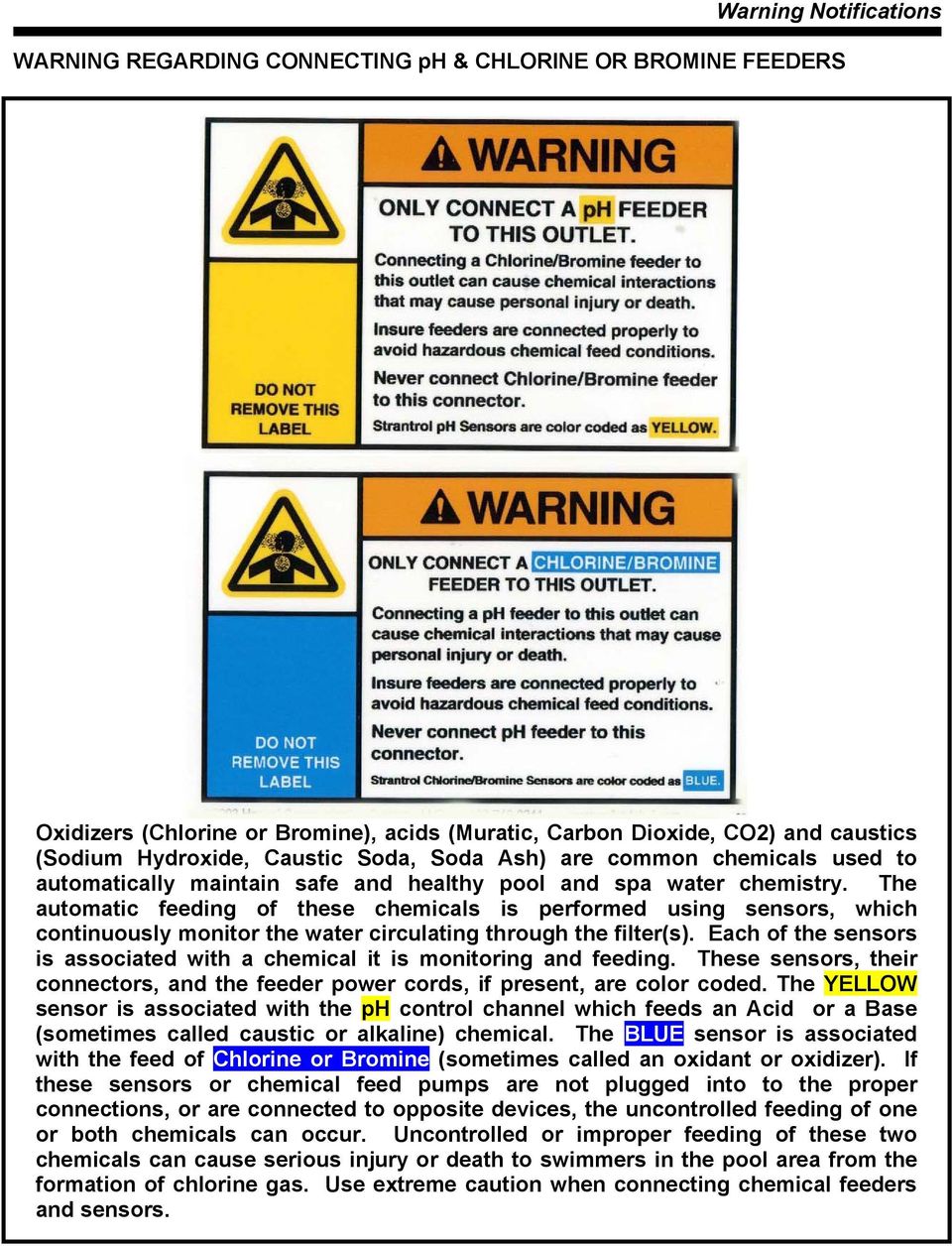
11 Warning Notifications WARNING REGARDING CONNECTING ph & CHLORINE OR BROMINE FEEDERS Oxidizers (Chlorine or Bromine), acids (Muratic, Carbon Dioxide, CO2) and caustics (Sodium Hydroxide, Caustic Soda, Soda Ash) are common chemicals used to automatically maintain safe and healthy pool and spa water chemistry. The automatic feeding of these chemicals is performed using sensors, which continuously monitor the water circulating through the filter(s). Each of the sensors is associated with a chemical it is monitoring and feeding. These sensors, their connectors, and the feeder power cords, if present, are color coded. The YELLOW sensor is associated with the ph control channel which feeds an Acid or a Base (sometimes called caustic or alkaline) chemical. The BLUE sensor is associated with the feed of Chlorine or Bromine (sometimes called an oxidant or oxidizer). If these sensors or chemical feed pumps are not plugged into to the proper connections, or are connected to opposite devices, the uncontrolled feeding of one or both chemicals can occur. Uncontrolled or improper feeding of these two chemicals can cause serious injury or death to swimmers in the pool area from the formation of chlorine gas. Use extreme caution when connecting chemical feeders and sensors.
12

13 Mounting the System5F Mounting the System5F - Chapter 1 The Strantrol System5F should be mounted to the wall. Make sure that the System5F is mounted in a location that is easily accessible, (Fig 1.1) free from chemical fumes and excessive heat, isolated from electrical interference, and powered by a power source protected by a ground fault interrupter. The System5F enclosure is weather resistant, but if mounting outdoors, locating the unit under a hood or overhang is recommended. Fig 1.1 The flowcell can be mounted using two different techniques: Mount the flowcell next to the controller and run tubing from the flowcell to the sampling point (after filter, before heater) and discharge (before recirculation pump) of the recirculation system. (Fig 1.2) Fig 1.2 Chapter 1-1

14 Technical Guide Mount the flowcell next to the sampling point (after filter, before heater) of the recirculation system and run wires to the System5F using a Signal Transmitter (refer to Signal Transmitter). (Fig 1.3) Fig 1.3 Chapter 1-2

15 Plumbing Flowcell Plumbing Flowcell - Chapter 2 Assembling the flowcell First, wrap each fitting three times around clockwise with the Teflon tape provided. Install ½ ball valves to allow isolation of the sample lines. Once you have finished assembling the flowcell, close the valves. Install the Paddlewheel Flow Switch in the sample stream. Make sure you only wrap the male fitting three times with Teflon tape so as not to risk breaking the female fitting on the Paddlewheel Flow Switch. (Fig 2.1) Flow switches are provided with all Strantrol controllers and are an integral safety device to prevent the uncontrolled feed of chemicals, which could cause personal injury or death. The flow switch should NEVER be bypassed, even temporarily, as this critical safety device will not be available to protect the swimmers. Fig 2.1 Chapter 2-1

16 Technical Guide Plumbing the flowcell Half-inch tubing is recommended for sample stream pickup and return. We have included two connector fittings with the flowcell if needed. For the sampling point of the flowcell, tap downstream (after) of filter and upstream (before) of heater and chemical injection points. For the discharge point of the flowcell, tap upstream (before) of recirculation pump. (Fig 2.2) Remove the cap to the ph and HRR sensors, clean tips with a toothbrush and dish soap and then a light acid. Screw ph, HRR and Temperature sensors into flowcell. (Fig 2.1) If a vacuum is created in the water circulation line and no anti-siphon device is installed on the chemical feeders, potentially hazardous concentrations of chemicals can be drawn into the pool or spa. Always use injection check valves and anti-siphon valves in the chemical feed lines to prevent this situation from occurring. WARNING: INSURE SAMPLE STREAM IS INSTALLED TO ASSURE THE FLOW SWITCH STOPS WHENEVER WATER IS NOT FLOWING PAST CHEMICAL INJECTION POINTS. THIS MUST INCLUDE FILTER BACKWASH AND LOSS OF PRIME IN THE MAIN WATER RECIRCULATION PUMP. BE SURE TO TEST THAT THE FLOW SWITCH STOPS WITHIN 20 SECONDS AND THE FLOW ALARM ACTIVATES, WHENEVER FLOW IS INTERRUPTED TO THE RETURN LINE. THE FLOW SWITCH MUST BE CHECKED PERIODICALLY (AT LEAST MONTHLY). WARNING: TO AVOID THE CREATION OF HAZARDOUS CHEMICAL CONCENTRATIONS, NEVER COMBINE CHEMICALS INTO A COMMON INJECTION LINE. ALWAYS SEPARATE THE INDIVIDUAL CHEMICAL INJECTION POINTS BY AT LEAST 12 INCHES. CHEMICAL INJECTION POINTS MUST BE DOWNSTREAM FROM ANY HEATERS AND THE LAST ITEMS IN THE RETURN LINE TO THE POOL OR SPA. ph FEED DEVICE INJECTION POINT Cl/Br FEED DEVICE INJECTION POINT CAUTION: ANTI-SIPHON DEVICES MUST BE INSTALLED TO INSURE THAT UNCONTROLLED FEED OF CHEMICAL WILL NOT OCCUR IF A VACUUM IS CREATED IN THE RETURN LINE. WARNING: FAILURE TO INCORPORATE A FLOW SWITCH INTO THE SAMPLE STREAM OF YOUR CHEMICAL CONTROL SYSTEM CAN RESULT IN INJURY OR DEATH TO SWIMMERS IN OR AROUND THE POOL, IF THE RECIRCULATION PUMP SHOULD FAIL OR IS SHUT DOWN. Fig 2.2 Chapter 2-2

17 Plumbing Flowcell Checking the Flowcell Open the sample stream valves and check for leaks. Make sure the compound pressure gauge is showing a positive and steady pressure. Adjust the valves or relocate point at which the sample stream is connected to the recirculation system to ensure positive and steady pressure. Allow the sensors to rinse in the sample flowcell while you do the wiring. Open wet-test valve and make sure that it generates a vigorous stream. If flow switch does not stop and remain stopped during backwash, no-flow, or very low flow conditions, the controller cannot prevent the uncontrolled feed of chemicals, which could cause personal injury or death. Testing of the flow switch installation is essential to assure the flow switch stops, remains stopped, and controller shows NO-FLOW ALARM within 20 seconds, whenever filter is in backwash or circulation flow stops. If the flow switch does not stop completely, plumbing corrections or the installation of additional safeguards will be necessary to avoid uncontrolled chemical feed. Chapter 2-3

18

19 System Startup System Startup - Chapter 3 System5F Board Types This page describes connections that your Strantrol representative needs to make in order for your System5F to function. Connections are presented in order of board type (or location): Key Description 4 Modem Board (for Serial/Output connections) (Fig 3.1) 3 Output Board(4-20 ma) (Fig 3.1) (Optional) 2 Input Board (Fig 3.1) 1 CPU Board (Fig 3.1) Fig 3.1 Chapter 3-1

20 Technical Guide Running Power to System5F Open System5F and place lid to the left, lining up the right two holes of the lid with the left two holes of the base. (Fig 3.3) Fig 3.3 If you are planning to use pigtails for the power, be sure to use NEMA 4X cord grips and plugs for unused holes. In addition, you must install warning labels on the pigtails. You may obtain these warning labels from Stranco Customer Service Department. Before wiring System5F, locate and check the S1 switch for the right type of line voltage. (Fig 3.4) (Refer to page Chapter 3-5) Strantrol controllers, like all modern electronic devices can be damaged by severe electrical spikes and surges (think lightning ). Every effort has been made to harden your Strantrol controller against such surges, but even that is not a guarantee that surge damage will not occur. If surge damage occurs, chemicals could be prevented from being fed to your pool or spa, continuously with no safety controls. If you inspect your Strantrol after a possibly damaging power surge (thunderstorm or power outage) and suspect the controller is not operating properly, disconnect the chemical feeders at once, and contact your Strantrol dealer for service. Chapter 3-2

21 System Startup Fig 3.4 Locate Terminal labeled TB5. Run 120VAC, 60Hz, 15 AMP surge protected Line (Black) to terminal labeled Line. (Both Line terminals are connected.) Run Ground (Green) to terminal labeled Ground. (All three Ground terminals are connected.) Run Neutral (White) to terminal labeled Neutral. (All three Neutral terminals are connected.) (Fig 3.5) Fig 3.5 Chapter 3-3
22 Technical Guide CPU Board Connections Terminal Description Comments/Notes TB7 TB5 1 Connects to face panel board terminal 1 (RS422 A) 2 Connects to face panel board terminal 2 (RS422B) 3 Connects to face panel board terminal 3 (RS422 Y) 4 Connects to face panel board terminal 4 (RS422 Z) 5 Connects to face panel board terminal 5 (RS422 V+) 6 Connects to face panel board terminal 6 (RS422 GND) 7 AC Line (Main) (Black) 8 AC Line 9 Earth Ground (Green) 10 Earth Ground 11 Earth Ground 12 AC Neutral (White) 13 AC Neutral 14 AC Neutral TB7 provides wiring positions for connection to the user interface. Terminals 1 through 6 should be connected to TB1 on the user interface in the same order. (This cable may be extended up to 4000 feet by using the remote interface kit.) One line terminal is used for power in. 120VAC, 60Hz, 15 AMP surge protected Used as Main Power, Earth, and Neutral connections. NEVER connect controller power neutral to pump power neutral. Warranty will be voided! If the chemical feeders are connected to a wall outlet, the safety devices integral to your Strantrol controller, and to the safe feeding of chemicals, will be bypassed. It is very important that the chemical feeders are connected to the controller and never to a wall outlet. If the chemical feeders are connected to a wall outlet and feeding continuously, when the flow of water to the pool stops due to filter backwash, the circulation pump losing prime or other causes, potentially hazardous concentrations of chemicals can be fed into pool or spa. Chapter 3-4
23 System Startup TB1 There are two common terminals on TB1, terminals 16 & 19. Each one is a common for two of the four dry-contact relays. The other four terminals (15,17,18, and 20) on TB1, are the remaining output contacts for those relays. 15 Relay Output 1 Switched AC LOAD from Relay #1 (default configuration is ph control) Oxidizers (Chlorine or Bromine), acids (Muratic, Carbon Dioxide, CO2) and caustics (Sodium Hydroxide, Caustic Soda, Soda Ash) are common chemicals used to automatically maintain safe and healthy pool and spa water chemistry. The automatic feeding of these chemicals is performed using sensors, which continuously monitor the water circulating through the filter(s). Each of the sensors is associated with a chemical it is monitoring and feeding. These sensors, their connectors, and the feeder power cords, if present, are color coded. The YELLOW sensor is associated with the ph control channel which feeds an Acid or a Base (sometimes called caustic or alkaline) chemical. If this sensor or chemical feed pumps are not plugged into to the proper connections, or are connected to opposite devices, the uncontrolled feeding of one or both chemicals can occur. Uncontrolled or improper feeding of these two chemicals can cause serious injury or death to swimmers in the pool area from the formation of chlorine gas. Use extreme caution when connecting chemical feeders and sensors. 16 Common AC Power for Relay Output 1 & 2 LINE Power to Relay 1 & 2 (MAINS) which must be interlocked with main water recirculation pump control relay (motor starter aux. contact) to disable chemical feed when main recirculation pump is disabled. 17 Relay Output 2 Switched AC LOAD from Relay # 2 (default configuration is Sensor Wash) 18 Relay Output 3 Switched AC LOAD from Relay # 3 (default configuration is Chlorine/Bromine) Chapter 3-5
24 Technical Guide TB1 19 Common AC Power for Relay Output 3 & 4 Oxidizers (Chlorine or Bromine), acids (Muratic, Carbon Dioxide, CO2) and caustics (Sodium Hydroxide, Caustic Soda, Soda Ash) are common chemicals used to automatically maintain safe and healthy pool and spa water chemistry. The automatic feeding of these chemicals is performed using sensors, which continuously monitor the water circulating through the filter(s). Each of the sensors is associated with a chemical it is monitoring and feeding. These sensors, their connectors, and the feeder power cords, if present, are color coded. The BLUE sensor is associated with the feed of Chlorine or Bromine (sometimes called an oxidant or oxidizer). If these sensors or chemical feed pumps are not plugged into to the proper connections, or are connected to opposite devices, the uncontrolled feeding of one or both chemicals can occur. Uncontrolled or improper feeding of these two chemicals can cause serious injury or death to swimmers in the pool area from the formation of chlorine gas. Use extreme caution when connecting chemical feeders and sensors. LINE Power to Relay 3 & 4 (MAINS) which must be interlocked with main water recirculation pump control relay (motor starter aux. contact) to disable chemical feed when main recirculation pump is disabled. 20 Relay Output 4 Switched AC LOAD from Relay # 4(default configuration is an Alarm Relay) Chapter 3-6
25 System Startup CPU Board Connections CN5 S1-Line Voltage Selector Switch. This switch is factory-set for either 115 or 230 volts. CPU BOARD FUSE DESCRIPTIONS Terminal F1 F2 F3 F4 F5 Description 3 amp Slo Blo fuse for Relay Output 1 1 amp Slo Blo fuse for Relay Output 2 3 amp Slo Blo fuse for Relay Output 3 1 amp Slo Blo fuse for Relay Output 4 Internal 3/4 amp Fuse for Strantrol Power Fig amp and 3 amp fuses needed for CSA, UL, and CE approvals JP4 is the battery switch. Place jumper to the two right most pins to turn the battery ON. Typical life of the battery is 5 years. Chapter 3-7
26 Technical Guide Wiring Devices to Relays in the System5F WARNING! Controller power and feed device power must be separated. This setup reduces noise inside the controller and eliminates controller damage due to transient spikes from the pumps. Line voltage (120/240VAC) can be present inside the Strantrol controller and caution should be used to prevent electrical shock, burns or electrocution. Be sure electric power is disconnected before opening the cover of any Strantrol. Follow all local safety policies, procedures and electrical codes, to prevent injury from electrical hazards, before opening the cover of this controller. If you are not trained and comfortable performing work on electrical equipment, contact a licensed electrician to perform the work. If the chemical feeders are connected to a wall outlet, the safety devices integral to your Strantrol controller, and to the safe feeding of chemicals, will be bypassed. It is very important that the chemical feeders are connected to the controller and never to a wall outlet. If the chemical feeders are connected to a wall outlet and feeding continuously, when the flow of water to the pool stops due to filter backwash, the circulation pump losing prime or other causes, potentially hazardous concentrations of chemicals can be fed into pool or spa. NEVER connect controller power neutral to feed device power neutral or WARRANTY WILL BE VOID! Relays 1 through 4 are already configured for specific functions but can be reconfigured for your application. Relay 1 Relay 2 Relay 3 Relay 4 ph Feed Down Sensor Wash Chlorine Feed Audible or Visual Alarm Chapter 3-8
27 System Startup Other relay functions are below. Control Action Factory Default ph Feed - Down Relay 1 ph Feed - Up Sensor Wash Relay 2 Chlorine/Bromine Relay 3 Alarm Relay 4 Dechlorination Superchlorination Heater Chlorine/Bromine Boost System Ozone The relays can be interchanged in any order, including multiple relays controlling the same function. Note: If two relays control the same function, they will trigger at the same setpoint. Locate Terminal labeled TB1 in the System5F. (Fig. 3.7) Connect device line to terminal labeled N.O.# (the # corresponds to the Relay #). PREVENT ELECTROCUTION DISCONNECT ALL SUPPLY CONNECTIONS BEFORE SERVICING THIS APPLIANCE HAS UP TO 3 SUPPLY CONNECTIONS CAUTION: FOR CHANGE OF OPERATING VOLTAGE, REFER TO AUTHORIZED SERVICE PERSON. ATTENTION: POUR ADAPTER L APPAREIL À LA TENSION D ALIMENTATION, COMMUNIQUER AVEC UN TECHNICIEN AUTORISÉ. CAUTION: THIS UNIT MAY HAVE UP TO 3 POWER SUPPLY CONNECTIONS. DISCONNECT ALL POWER SUPPLY CONNECTIONS BEFORE SERVICING. ATTENTION: CET APPAREIL REÇOIT PLUSIEURS ALIMENTATIONS. LE DÉBRANCHMENT DES CORDONS NE SUFFIT PAS NÉCESSAIREMENT À LE METTRE HORS TENSION. RELAY WIRING MUST HAVE MINIMUM RATINGS OF 105 C, 600VAC, 14AWG AND HAVE INSULATION OF PVC TO COMPLY WITH THE MAXIMUM LOAD RATINGS FOR THIS EQUIPMENT. CONSULT YOUR NATIONAL OR LOCAL ELECTRICAL CODES FOR PROPER WIRING OF LESSER LOADS. Chapter 3-9
28 Technical Guide (Example: ph feed and Chlorine feed) ph feed Locate Terminal labeled N.O.1. (TB1 #15) Run Line from ph feed device to N.O.1. (TB1 #15) Run Neutral to feed device neutral. Run Ground to feed device ground. Oxidizers (Chlorine or Bromine), acids (Muratic, Carbon Dioxide, CO2) and caustics (Sodium Hydroxide, Caustic Soda, Soda Ash) are common chemicals used to automatically maintain safe and healthy pool and spa water chemistry. The automatic feeding of these chemicals is performed using sensors, which continuously monitor the water circulating through the filter(s). Each of the sensors is associated with a chemical it is monitoring and feeding. These sensors, their connectors, and the feeder power cords, if present, are color coded. The YELLOW sensor is associated with the ph control channel which feeds an Acid or a Base (sometimes called caustic or alkaline) chemical. If these sensors or chemical feed pumps are not plugged into to the proper connections, or are connected to opposite devices, the uncontrolled feeding of one or both chemicals can occur. Uncontrolled or improper feeding of these two chemicals can cause serious injury or death to swimmers in the pool area from the formation of chlorine gas. Use extreme caution when connecting chemical feeders and sensors. Chlorine Feed Locate Terminal labeled N.O.3. (TB1 #18) Run Line from chlorine device to N.O.3. (TB1 #18) Run Neutral to feed device neutral. Run Ground to feed device ground. Chapter 3-10
29 System Startup Oxidizers (Chlorine or Bromine), acids (Muratic, Carbon Dioxide, CO2) and caustics (Sodium Hydroxide, Caustic Soda, Soda Ash) are common chemicals used to automatically maintain safe and healthy pool and spa water chemistry. The automatic feeding of these chemicals is performed using sensors, which continuously monitor the water circulating through the filter(s). Each of the sensors is associated with a chemical it is monitoring and feeding. These sensors, their connectors, and the feeder power cords, if present, are color coded. The BLUE sensor is associated with the feed of Chlorine or Bromine (sometimes called an oxidant or oxidizer). If these sensors or chemical feed pumps are not plugged into to the proper connections, or are connected to opposite devices, the uncontrolled feeding of one or both chemicals can occur. Uncontrolled or improper feeding of these two chemicals can cause serious injury or death to swimmers in the pool area from the formation of chlorine gas. Use extreme caution when connecting chemical feeders and sensors. Chapter 3-11
30 Technical Guide Connecting Flowcell to System5F ph, HRR and Temperature Sensors Plug ph sensor into the BNC jack on the left side of the System5F by twisting it a quarter of a turn to lock it. Plug HRR sensor into the BNC jack on the right side of the System5F by twisting it a quarter of a turn to lock it. Use a NEMA 4X cord grip to insert the Temperature Sensor cable into the System5F. Locate the Input Board. (Fig. 3.10) Locate +Temp- in the Terminal labeled TB1. (Fig. 3.11) Connect the white wire to TB1 position 3. Connect the black wire to TB1 position 4. Water Ground Locate the Input Board. (Fig 3.10) Locate W.Gnd in the Terminal labeled TB1. (Fig 3.11) Locate the stainless steel grounding screw provided as a part of the Flowcell. Using a recommended 18 gauge wire. Connect the stainless steel grounding screw to W.Gnd in TB1 position 1. Flow Switch Flow switches are provided with all Strantrol controllers and are an integral safety device to prevent the uncontrolled feed of chemicals, which could cause personal injury or death. The flow switch should NEVER be bypassed, even temporarily, as this critical safety device will not be available to protect the swimmers. Locate the Input Board (Fig 3.10) Locate Flow, V+, V- in the Terminal labeled TB1. (Fig. 3.11) Locate the Flow Switch from the flowcell. Connect the White wire to Flow in TB1 position 5. Connect the Red wire to V+ in TB1 position 6. Connect the Black wire to V- in TB1 position 7. Chapter 3-12
31 System Startup Fig & Fig If flow switch dos not stop and remain stopped during backwash, no-flow, or very low flow conditions, the controller cannot prevent the uncontrolled feed of chemicals, which could cause personal injury or death. Optional: Signal Transmitter Locate Input Board (Fig. 3.10) Locate Switch labeled S6 just above TB1. (Fig. 3.11) S6 must be in the up position. (Fig. 3.12) Locate the Terminal labeled JP1 in the Signal Transmitter. Connect Flow on the Input Board to JP1 position 5. Connect V+ on the Input Board to JP1 position 1. Connect V- on the Input Board to JP1 position 2. Connect 1Pamp on the Input Board to JP1 position 3. Connect Pamp2 on the Input Board to JP1 position 4. Chapter 3-13
32 Technical Guide System5F Input Board Signal Transmitter Flow (TB1 position 5) JP1 position 5 V+ (TB1 position 6) JP1 position 1 V- (TB1 position 7) JP1 position 2 1Pamp (TB1 position 8) JP1 position 3 Pamp2 (TB1 position 9) JP1 position 4 Connect the White wire from the Flow Switch to JP2 position 7 in the Signal Transmitter. Connect the Red wire from the Flow Switch to JP2 position 6 in the Signal Transmitter. Connect the Black wire from the Flow Switch to JP2 position 8 in the Signal Transmitter. Plug ph sensor into the BNC jack on the left side of the Signal Transmitter by twisting it a quarter of a turn to lock it. Plug HRR sensor into the BNC jack on the right side of the Signal Transmitter by twisting it a quarter of a turn to lock it. Connect the Temperature sensor to the terminals on the lid of the Signal Transmitter. Connect the terminals of the lid to the Temperature TB1 positions 3 & 4 on the Input Board. Make sure the polarity is correct. White in +Temp (TB1 position 3). Black in Temp- (TB1 position 4). The Signal Transmitter is just a junction box for the Temperature Sensor. Fig 3.12 Chapter 3-14
33 System Startup Input Board Connections Input Board Terminal Descriptions (TB1) - Analog Input Connections Terminal/Description Comments/Notes 1 Water Ground The water ground MUST be connected to the water. This may be done by connecting wire between Terminal 1 and stainless screw provided in flowcell. 2 Chlorine reference voltage 4 channel unit only. 3 Temperature (+) signal Connect from Temperature Probe (White) 4 Temperature (-) signal Connect from Temperature Probe (Black) 5 Flow Input Connect to white wire from flow switch VDC Connect to red wire from flow switch. 7 DC Common Connect to black wire from flow switch. 8 Transmitter Input #1 9 Transmitter Input #2 Isolated signal transmitter hook-up. Remote mounting up to 1000 ft. Flow switches are provided with all Strantrol controllers and are an integral safety device to prevent the uncontrolled feed of chemicals, which could cause personal injury or death. The flow switch should NEVER be bypassed, even temporarily, as this critical safety device will not be available to protect the swimmers. Chapter 3-15
34 Technical Guide Fig 3.14 INPUT BOARD S5 POSITIONS / DESCRIPTIONS Position Description 1 ON Removes ppm reading OFF Normal display 2 Not Used 3 European Date. ON=dd/mm/yy English Date. OFF=mm/dd/yy 4 Not Used 5 Direct / Modem selection OFF = Direct ON = Modem (or voice) 6 Voice Modem. ON = voice modem OFF = No voice modem 7 Factory Use Only 8 Factory Use Only Input Board Connections INPUT BOARD PUSH BUTTONS (MOMENTARY CONTACT) Switch # Description S1 Manual Override for Relay 1 S2 Manual Override for Relay 2 S3 Manual Override for Relay 3 S4 Manual Override for Relay 4 S1 through S4 will be used only by authorized personnel during installation. Chapter 3-16
35 System Startup INPUT BOARD NOTES CN2 Description Connector for BNC inputs from ph/hrr sensors Comments/Notes See S6 below and use input terminal connections if using a signal transmitter. S5 S6 Main Dip Switch Bank Determines whether the ph/hrr sensor inputs are from the BNC connector or from a remote signal transmitter. Set this switch UP to use the signal transmitter input. Set this switch DOWN to use the BNC input. Output Board 4-20 ma Connections All output signals are 4-20 ma. Output connections are made to TB1. Output signals may be for either: Control and/or Recording. Fig 3.15 Chapter 3-17
36 Technical Guide Output Board 4-20 ma Connections 4-20 ma OUTPUT BOARD TERMINAL DESCRIPTIONS TERMINAL DESCRIPTION DEFAULT VALUES 1 (+) 4-20 ma output signal for Channel #1 Recorder ph (-) 4-20 ma output signal for Channel #1 Recorder 3 (+) 4-20 ma output signal for Channel #2 Recorder HRR mv 4 (-) 4-20 ma output signal for Channel #2 Recorder 5 (+) 4-20 ma output signal for Channel #3 Recorder ppm 0-20 ppm 6 (-) 4-20 ma output signal for Channel #3 Recorder 7 (+) 4-20 ma output signal for Channel #4 Recorder Temperature (-) 4-20 ma output signal for Channel #4 Recorder Chapter 3-18
37 System Startup Serial Input/Output Connections on the Modem Board CN2 (phone) is the phone line connection for the modem. CN3 (PC-Con) is the RS-232 direct connect port. NOTICE: If you plan to use the Voice Modem (optional) with the System5F, ignore this page and the next page on Modem Board Connection. COM SELECT switch allows a switch between remote access and direct access. Along with dipswitch #5 on input board. Fig 3.16 For remote connection, CN2 is a standard RJ-11 phone connection. This connector utilizes remote communication outlet only. (Switch COM SELECT to phone (forward) and use CN2). Dipswitch #5 on input board to up position. For direct computer connection, switch COM SELECT to PC-Con (toward back) and use CN3 (offset MMJ connector). Set dipswitch #5 to off position. Fig 3.16 Chapter 3-19
38 Technical Guide Printer Board Connections (Optional) Printer Board Terminal Descriptions Terminal Description Color 1 Signal Ground Black 2 Receive (no connection) 3 Transmit Red 4 Clear to Send White 5 Ready to Send (no connection) Note: To connect to a printer other than supplied by USFilter Stranco Products, please consult your authorized USFilter Stranco Products representative. Pin Connections Between System5F Terminal and Printer DB25 Pin Connector: System6 Terminal Printer 25 Pin System6 Terminal Printer 25 Pin TAN PRINTER GRAY PRINTER (OLD) Common Installation Errors Review of Common Problems and Solutions Before contacting the USFilter Stranco Products service staff with questions on your new installation, review the following common problems and solutions. The most common installation error is an improperly connected water ground. Chapter 3-20
39 System Startup The water ground must be connected to the proper terminal in the controller and to the connector on the flowcell. Feed devices will not start The relays are dry contact. To activate a feed device, power must be provided to the relay contacts. To provide 120 VAC to all four relays: Connect a jumper wire from the CPU board TB5 #7 or #8 (both are AC line) to TB1 #16 (Com 1,2). Connect another jumper from TB1 #16 to TB1 #19 (Com 3,4). WARNING: This will bypass the interlocking protection and should only be done for troubleshooting purposes. Consult the wiring diagram for correct wiring. Fig 3.12 The HRR or ph Displays Fluctuate Rapidly The chlorine reading is WAIT. Check the water ground connection, both in the controller and on the flowcell. Connect a signal generator and verify that the SG-700 ground lead is connected. Verify that the display matches the signal generator readings. Check BNC to input board connections. Check S6 input switch position. Down (off) for BNC/sensor input, Up (on) for preamp input. If the ph changes more than.08 in one minute, the WAIT message is displayed in place of the ppm reading. It prevents standardization of the chlorine display until ph stabilizes. This wait time may be up to 30 seconds. Chapter 3-21
40 Technical Guide Menu Access An Operator, Manager or Representative access code is required to perform procedures described in this chapter. Fig 3.17 Chapter 3-22
41 System Startup Quick Reference Guide - Functions & Access Levels Functions - Listed by Level: Representative Level Manager Level Operator Level Hardware Calibration Recorder Outputs Software Calibration Rep startup All Manager Level options All Operator Level options Control tuning To Gain Access: Alarm setup Sensor wash programming Superchlorination programming Current date programming Current time programming All Operator Level options ph setpoint ph auto-off-manual ph calibration (standardize) HRR setpoint HRR auto-off-manual ppm setpoint ppm auto-off-manual ppm calibration Representative Level Manager Level Operator Level 1 Press the Enter key to display the different viewing options. 2 Press 9 to enter the Representative access code. Press 2 to enter the Manager access code. Press 1 to enter the Operator access code 3 Press the Numbered keys to enter in your access code. 4 Menus have a two-minute time-out. If there is no activity on the control buttons for at least two minutes, the system exits the menu and reverts to the Display Level. Chapter 3-23
42 Technical Guide Data Logging Event The System5F considers changes within its system as events. Examples of events would be: Relays opening and closing Alarm conditions Parameter changes Event Buffer Each time an event occurs, an entry is made in the event buffer. When an event is stored it received a time stamp. You can, therefore, trace changes to the system to the time the event occurred. The event buffer has room for 1000 entries. When the buffer fills up, the oldest entry is erased to make room for new entries. The SVC program allows you to download the event buffer to a PC hard drive or a floppy diskette. If you download the event buffer before it fills up, you will have a PC-compatible record of the event history saved. In the meantime, the System5F will erase the oldest entries to make room for new ones. How frequently you schedule your downloads depends on whether you want to save high resolution or low resolution storage information. High/Low Resolution Logs The System5F stores parameter readings at two resolutions simultaneously: High Resolution, which stores minimum, maximum, average and sample values for the specified time frame. Low Resolution, which stores minimum, maximum, average and sample values for the specified time frame. Chapter 3-24
43 System Startup High Resolution Low Resolution The default time period stores values every: 6 minutes 2 hours The minimum setting is: 1 minute 1 hour The maximum setting is: 6 minutes (the default) 4 hours When using the minimum setting, history is stored for: When using the maximum setting, history is stored for: When using the default setting, history is stored for: 9 hours 17 days 2 days - 6 hours 68 days 2 days - 6 hours 34 days The amount of time that history is stored represents the maximum amount of time you can schedule downloads. For example, if your high resolution is set at the default, you must download high-resolution data every 2 days -6 hours. If you wait 2 days - 7 hours between downloads, System5F will erase the oldest information in the buffer in order to make room for the new information. Chapter 3-25
44 Technical Guide Control Logic & Functionality System Startup Temperature Option Enabling the Temperature Control Option A system startup occurs after a power cycle or a system reset. During system startup the LCD displays the message "System Startup." An underscore moves along the bottom of the System Startup message. The temperature is displayed on the screen and is used in determining the LSI and the Ryznar index. The temperature default for this calculation, if temperature probe is not present, is 83 F. To enable or disable the Temperature Option, enter the menu through the Representative Level. [Diagnostics] : [Hardware Calibration] : [Temperature] : 0 [enable] : 1 [disable]. Here is some useful information on the ranges and resolution of ph and HRR. ph Input HRR Input ppm Input High Scale Range: 0.0 to 14.0 ph 0 mv to 1000 mv 0.0 to 6.0 ppm Resolution: 0.01 ph 1 mv 0.1 ppm Chapter 3-26
45 System Startup Ozone Option The purpose of the ozone option is to allow control of an ozonator. The operation of the ozonator relay is basic. The relay is normally closed (i.e. the ozonator is "ON") under normal operation. When the System5F recognizes a high HRR alarm, the relay switches (in other words, the ozonator is "OFF"). Enabling the Ozone Option 1. Enter the menu system using the Representative access code. 2. Select [Rep Startup]. 3. Select one of the four relays to operate the ozone. Selecting a relay for ozone enables ozone control on that relay. 4. Adjust HRR High Alarm parameter as needed. Chapter 3-27
46 Technical Guide Parts and Supplies You may order parts needed below from your local representative or by calling your local USFilter Stranco Products office and ask for Aquatic Customer Support. If you need any other parts for your Strantrol System 5F, contact your local Strantrol representative or your nearest USFilter Stranco Products office. Your nearest USFilter Stranco Products office is listed on the back of this manual. Part Reference Part Description USFilter Stranco Part Number Fuse F1 and F3 3 Amperes, 250 Volt S403 Locally available Fuse F2 and F4 1 Ampere, 250 Volt S403 Locally available Fuse F5 ¾ Ampere, 250 Volt S403 Locally available Relays R1, R2, R3, and R4 5 Amperes, 280 Volt, solid state Battery B1 Lithium, 3 Volt Acid/Caustic Sensor Short Yellow ph Sensor 32 inches Acid/Caustic Sensor Long Yellow ph Sensor 10 Feet Chlorine/Bromine Sensor Short Blue HRR Sensor 32 inches Chlorine/Bromine Sensor Long Blue HRR Sensor 10 Feet Temperature Sensor RTD, 100 ohm, 2 wire, w/thermowell Maintenance Cleaning the Sensors The System5F requires no maintenance other than a periodic calibration check and sensor cleaning. 1. Isolate the Flowcell, then remove the sensors. If flow switch does not stop and remain stopped during backwash, no-flow, or very low flow conditions, the controller cannot prevent the uncontrolled feed of chemicals, which could cause personal injury or death. Testing of the flow switch installation is essential to assure the flow switch stops, remains stopped, and controller shows NO- FLOW ALARM within 20 seconds, whenever filter is in backwash or circulation flow stops. If the flow switch does not stop completely, plumbing corrections or the installation of additional safeguards will be necessary to avoid uncontrolled chemical feed. Chapter 3-28
47 System Startup 2. Clean the tips with HRR Cleaning Solution and a toothbrush. 3. Check Teflon sealing tape on threads and reinstall sensor. 4. Open valves and let sensors rinse 10 to 15 minutes in sample stream water before making any adjustments. NOTE: If the sample stream is shut down for more than a short time (particularly in freezing temperatures), remove the sensors from the flowcell and unplug the System5F. Store the sensors in a heated, secure area, with the sensor caps in place or with the tips immersed in any small container of water to prevent them from drying out. Chapter 3-29
48
49 Control Tuning Control Tuning - Chapter 4 ph Control Options ph Feed-down Feed-down means that when chemical is fed, the ph lowers. Hook-up the ph feed device to appropriate relay as shown in the wiring diagrams. ph Feed-up Feed-up means that when chemical is fed, the ph rises. Hook-up the ph feed device to appropriate relay as shown in the wiring diagrams. (Reprogram Relay) 1 Enter the menu system using a Manager or Representative access code. 2 Select [ph SETUP]:[pH feeddn or feedup Mode]. 3 Select whether the ph control is on/off[0] or proportional[1]. With on/off control (and ph feeddown), whenever the ph is above the setpoint, the ph feed device will be [on] until setpoint is reached. With on/off control (and ph feed-up), whenever the ph is below the setpoint, the ph feed device will be [on] until setpoint is reached. 4 Select [ph prop span](proportional span). 5 If you selected on/off control, ignore this step. If you selected proportional mode, select the control proportional span. The proportional span defines the "window" of control for the ph chemicals. 6 Settings Setpoint 7.5 Proportional span.5 Input ph Value Feed device Duty Cycle % % 7.5 0% Select [ph feed down F/S]. Settings Setpoint 7.5 Proportional span.5 Input ph Value Feed device Duty Cycle % % 7.5 0% Select [ph feed down F/S]. 7 The fail/safe alarm sets a feed time-out value. If the feed device operates for this period of time without reaching setpoint, a fail/safe alarm is recognized and the control relay is disabled (locked out). Chapter 4-1
50 Technical Guide Chlorine or Bromine Control Options Hook-up the chlorine (or bromine) feed device to the appropriate relay. Action of chlorine feed device will be controlled from an HRR sensor. Software Programming for the Chlorine (or Bromine) Relay (relay 3). 1 Enter menu system using Manager or Representative access codes. 2 Select [HRR SETUP: HRR/Cl ppm cntrl]. 3 Select [HRR]. Select [ppm]. 4 Select [HRR (Cl/Br) Feed Mode]. 5 Select whether the chlorine control is on/off [0] or proportional [1]. NOTE: With on/off control, whenever the chlorine is below the set point, the chlorine feed device will be [on] until setpoint is reached. 6 Select [HRR F/S Alarm]. 7 The fail/safe alarm sets a feed time-out value. If the feed device operates for this period of time without reaching set point, a fail/safe alarm is recognized and the control relay is disabled (locked out). 8 Select [HRR prop span]. 9 If proportional mode was selected (in step #6), select the control proportional span. If on/off was selected, ignore this step. 10 NOTE: The proportional span defines the "window" of control for the System5F. HRR Settings Set point = 750 Proportional span = 20 Input ph Value Feed device Duty Cycle % % 750 0% Chapter 4-2
51 Control Tuning Alarm Warning Bands Alarm warning bands and warning time counters are exclusive features of the Strantrol product line. A warning band serves as a time delay for an alarm and allows the controller to anticipate the trend of the reading as it nears the alarm setpoint. As the values approach the alarm setpoint, the warning time needed to recognize and respond to an alarm condition is triggered. This prevents an alarm from tripping due to a short term out-of-range condition. The System5F uses alarm warning bands and warning times to: Ignore transient conditions, which could create unnecessary alarms. Extend the "range of concern" beyond the alarm setpoint: Values beginning to move toward a high (or low) alarm are allowed a degree of warning time. Figure 2.1 Values closely approaching a high (or low) alarm are allowed less warning time than values further away from the alarm point. Values that exceed an alarm point will trigger an immediate alarm (the warning time become 0). Availability The System5F is shipped from the factory with all warning bands disabled (i.e., set to 0.0 or 0 mv). Rules/Logic A counter for the warning time activates whenever a value falls within a warning band range. If the value: Then... : Stays within the warning band long enough to exceed the warning time,... Changes, but still falls within the warning band,... Drops back out of the warning band,... The alarm is sounded. The warning time is automatically adjusted. The alarm will be cleared. Chapter 4-3
52 Technical Guide Example High Alarm Warning Band For an explanation of high alarm warning bands, follow the example below. Figure 2.2 Scenario ph High Alarm = 8.5 Warning band = 0.5 Current ph reading = 8.2 ph high reading time 5.0 minutes This current ph reading (8.2) is 60% away from high alarm. Calculation: (High Alarm - Current Reading) / Warning Band ( ) /.5 =.6 = 60% The proportional warning time will be 60% of the standard warning time. Calculation: % from High Alarm* Warning Time 60% * 5 minutes = 3 minutes Consequently, if the alarm counter exceeds 3 minutes, a high alarm occurs. If the ph changes to 8.1 (before the 3 minute alarm), then System5F automatically re-adjusts the standard alarm warning time to a new proportional warning time: Calculation: (High Alarm - Current Reading) / Warning Band ( ) /.5 =.8 = 80% % from High Alarm* Warning Time 0.80% * 5 minutes = 4 minutes In this case, the alarm counter will not reset because the ph changed within the warning band. Remember that the high alarm is the absolute high. Whenever the current reading exceeds the high alarm, a high alarm occurs regardless of any warning band time counters. Chapter 4-4
53 Control Tuning Example Low Alarm Warning Bands The low alarm warning band is very similar; however, the warning band is reversed. Scenario ph High Alarm = 6.0 Warning band = 0.5 Current ph reading = 6.3 ph high reading time 5.0 minutes If current ph value remains at 6.3 for 3 minutes, a low alarm occurs. Calculation: ( ) /.5 =.6 = 60% away from setpoint 0.60%* 5 minutes = 3 minutes Figure 2.3 Chapter 4-5
54
55 Recorder Outputs Recorder Outputs - Chapter ma Outputs The Strantrol System5F two-channel controller is capable of handling two or four analog outputs. Each of the channels can be independently configured for ph, HRR, ppm or temperature from within the menu system. Furthermore, the values corresponding to 4 ma and 20 ma (0-100%) can be specified for each channel, thus making the channel available as either a recorder or control output. All analog channels are configured in the same way. EXAMPLE: Configure Channel #1 for recording ph from 6.0 to Enter menu system using Representative access code. 2 Select [RECORDER OUTPUTS: Channel #1 Recorder]. 3 Select, by pressing the corresponding number to the left, which input Channel #1 will record or control. The choices are ph, HRR, ppm and Temperature. (For this example, choose ph.) 4 Select [RECORDER OUTPUTS: Channel #1 Recorder: Chan #1 Rec]. This is a display only of the current parameter to be recorded or controlled. 5 Select [RECORDER OUTPUTS: Channel #1 Recorder: Chan #1 Rec Min]. 6 Select the minimum value to be recorded or controlled. (Select 6.0 for this example.) A ph of 6.0 = 4 ma output. 7 Select [RECORDER OUTPUTS: Channel #1 Recorder: Chan #1 Rec Max]. 8 Select the maximum value to be recorded or controlled. (Select 9.0 for this example.) A ph of 9.0 = 20 ma output. Channel #1 is now configured to record ph from 6.0 to 9.0. The output signal is the same for control as it is for recording. Consult the factory if using outputs for control. Chapter 5-1
56 Technical Guide 4-20 ma Linear Relationship If the analog 4-20 ma output is being used for control, the following example explains the linear relationship that the Strantrol System5F utilizes. NOTE: The control algorithm is proportional only. EXAMPLE: Channel #1 Channel #1 Recorder = HRR Output % Chan #1 Min = ma 0% Chan #1 Max = ma 100% The example shows with an HRR reading of 500 mv the controller will output a 4 ma signal. In addition, with an HRR reading of 900 mv the controller will output a 20 ma signal. Having understood this the halfway point would be the HRR reading 700 mv and the controller would be sending a 12 ma signal. Chapter 5-2
57 Menu Options Menu Options - Chapter 6 Menu Tree v 5.10 Reference Guide This section outlines the options that may appear in the Strantrol System5F menus. The menu hierarchy is represented by the indented options. (For example, the ph Low Alarm can only be accessed from the Alarms menu.) Descriptions of each option can be found later in this chapter. Some options may not appear, depending on how your authorized Strantrol Representative set up your system. For this reason, symbols are used. A plus (+) indicates that this option is ALWAYS present when you work through the menu system. An asterisk (*) indicates that this option may not appear, depending on the system state. An "R" indicates that this option appears ONLY under Strantrol Representative access. The brackets { } indicate the default values that were shipped on the ROM chip. + ph SETUP * ph feed down Setpoint {7.5} * ph feed up Setpoint {7.5} + ph High Alarm {8.0} + ph Low Alarm {7.0} * ph feed-down F/S {04:00 hr/min} * ph feeddn Mode {on-off} * ph prop span {.5} * ph cycle time {01:00 min/sec} + ph Calibrate + HRR SETUP + HRR Setpoint {740mV} + HRR High Alarm {800mV} + HRR Low Alarm {650mV} + HRR F/S Alarm {04:00 hr/min} + HRR (Cl/Br) Feed Mode {proportional} * HRR prop span {20 mv} * HRR cycle time {01:00 min/sec} + HRR/Cl ppm cntrl {HRR} + HRR Calibrate + ppm SETUP * Cl ppm Setpoint {1.5 ppm Cl} + Cl ppm High Alarm {5.0 ppm Cl} + Cl ppm Low Alarm {0.5 ppm Cl} + Cl ppm Calibrate * TEMPERATURE SETUP * Temperature Setpoint {80 o F} * Temperature High Alarm {90 o F} * Temperature Low Alarm {70 o F} * Temperature Calibrate Chapter 6-1
58 Technical Guide * CALCULATE LSI SETUP * Based on {00/00/00} * Calculated LSI {0.0} * Alkalinity {0} * Ca hardness {0} * TDS {0} * Temperature {32 o F} * ph {0.0} * Enter LSI parameters * Alkalinity {0} * Ca hardness {0} * TDS {0} * Exit (don't compute LSI) * Other LSI parameters * Pool Size {0 gal} * LSI Hi band {0.0} * LSI Lo band {0.0} * RYZNAR STABILITY SETUP * Based on {00/00/00} * Ryznar Index {0.0} * DOSAGE CALCULATED * Based on {00/00/00} * Pool Size {0 gal} * Pool is balanced: {No chemical treatment is needed now.} + SENSOR WASH + current week/day + Event #1 {every week/every day} + Start Time #1 {23:59 hr/min} + Wash Duration #1 {02:00 min/sec} + Event #2 {disabled} + Start Time #2 {00:00 hr/min} + Wash Duration #2 {00:00 min/sec} + Event #3 {disabled} + Start Time #3 {00:00 hr/min} + Wash Duration #3 {00:00 min/sec} + Event #4 {disabled} + Start Time #4 {00:00 hr/min} + Wash Duration #4 {00:00 min/sec} + ALTERNATE HRR SETPOINT + current week/day + Event #1 {disabled} + Alt. HRR Setpoint #1 {740 mv} + Start Time {00:00 hr/min} + Duration {00:00 hr/min} * DECHLORINATION * current week/day * Auto Dechlor {yes} * Cl/HRR stop point {chlorine} * Stop HRR point {750 mv} Chapter 6-2
59 Menu Options * Stop Cl ppm point {1.0 ppm Cl} * Duration #1 {04:00 hr/min} + SUPER CHLORINATION + current week/day + SuperCl start day {disabled} + Start Time {00:00 hr/min} + Cl/HRR stop point {chlorine} * HRR setpoint {800 mv} * Cl ppm setpoint {5.0 ppm Cl} + Duration {00:04 hr/min} + Elapsed time {00:00 hr/min} + RELAY MODES * ph feed down {automatic} * ph feed up {automatic} * Cl/Br feed {automatic} * Dechlor feed {automatic} * SuperCl feed {automatic} * Sensor wash {automatic} * Ozone {automatic} * Heater {automatic} * Cl/Br booster {automatic} + COMMUNICATION + Connection type {direct} + Direct baud {1200} + Modem baud {2400} + MODEM CALL OUT + Callout enable {enable} + Callout Type {fax} + Ring pickup {1} + Call begin {08:00 hr/min} + Call end {17:00 hr/min} + Pre-delay {30:00 min/sec} + Phone #1 {!} + Delay#1 {00:00 min/sec} + Phone #2 {!} + Delay#2 {00:00 min/sec} + Phone #3 {!} + Delay#3 {00:00 min/sec} + Phone #4 {!} + Delay#4 {00:00 min/sec} + Phone #5 {!} + Delay#5 {00:00 min/sec} + Phone #6 {!} + Delay#6 {00:00 min/sec} + CALENDAR + Current date {01/01/1997 mm/dd/yy} + Current time {00:00 hr/min} Chapter 6-3
60 Technical Guide + ACCESS CODES + MANAGER CODES + Manager #1 {000} + Manager #2 {000} + OPERATOR CODES + Operator #1 {000} + Operator #2 {000} + Operator #3 {000} + Operator #4 {000} + Operator #5 {000} + Operator #6 {000} + ENABLE OPTIONS FOR OPERATOR LEVEL + Setpoints {enable} + Alarms {enable} + Feed Modes {enable} + Calibrate ph, HRR {enable} * Calibrate temperature {enable} + LSI calculations {enable} + Pool Size {enable} + Sensor Wash {enable} + Alt. HRR Setpoint. {enable} + Dechlorination {enable} + Super Chlor {enable} + Relay Modes {enable} + Communication {enable} + Modem Call Out {enable} R+ RECORDER OUTPUTS + Channel #1 Recorder + Chan #1 Rec {ph} + Chan #1 Rec Min {6.0} + Chan #1 Rec Max {9.0} + Channel #2 Recorder + Chan #2 Rec {HRR} + Chan #2 Rec Min {0 mv} + Chan #2 Rec Max {1000mV} + Channel #3 Recorder + Chan #3 Rec {ppm} + Chan #3 Rec Min {0.0 ppm Cl} + Chan #3 Rec Max {20.0 ppm Cl} + Channel #4 Recorder + Chan #4 Rec {Temp} + Chan #4 Rec Min {60 o F} + Chan #4 Rec Max {100 o F} R+ DIAGNOSTICS + Version + Program Version {v5.10*} + Factory Defaults + Software Calibration + ph point 1 cal + ph point 2 cal + HRR Point 1 Cal + HRR Point 2 Cal + Cyanuric {disable} Chapter 6-4
61 Menu Options + Alt ppm Lookup {disable} * ph for ppm lookup {7.5} + Lookup offset {250} + Temp point1 cal + Temp point2 cal + Temperature units { o F} + Units (US/ metric) {U.S.} + Hardware Calibration + Temperature {disable} + Connection Type {direct} + Direct Baud {1200} + Modem Baud {2400} R+ WARNING BANDS + ph hi band {0.0} + ph hi warn time {00:05 hr/min} + ph lo band {0.0} + ph lo warn time {00:05 hr/min} + HRR hi band {0 mv} + HRR hi warn time {00:05 hr/min} + HRR lo band {0 mv} + HRR lo warn time {00:05 hr/min} + Cl ppm hi band {0.0 ppm Cl} + Cl ppm hi warn tm {00:05 hr/min} + Cl ppm lo band {0.0 ppm Cl} + Cl ppm lo warn tm {00:05 hr/min} R+ DATA LOGGING + High frequency {Every 6 minutes} + Low frequency {Every 2 hours} + Print time intrvl {01:00 hr/min} R+ REP. STARTUP + Current date {01/01/1997 mm/dd/yy} + Current time {00:00 hr/min} + System ID {0} + customer name {!} + system location {!} + rep phone num {!} + Startup date {00/00/00} + Rep code {000} + Relay #1 {ph feed-down} + Relay #2 {sensor wash} + Relay #3 {Cl/Br} + Relay #4 {alarm} * ph feeddn Point {7.5} * ph feedup Point {7.5} + ph High Alarm {8.0} + ph Low Alarm {7.0} * ph feeddn Mode {on-off} * ph feedup Mode {on-off} + HRR/Cl ppm control {HRR} * HRR Setpoint {740 mv} + HRR High Alarm {800 mv} + HRR Low alarm {650 mv} Chapter 6-5
62 Technical Guide * HRR (Cl/Br) Mode {proportional} * Cl ppm setpoint {1.5 ppm Cl} + Cl ppm High Alarm {5.0 ppm Cl} + Cl ppm Low Alarm {0.5 ppm Cl} * Cl ppm Feed Mode {proportional} + Cyanuric {disable} + LSI {enable} + Ryznar {enable} + TDS {enable} + Dosage {enable} Chapter 6-6
63 Menu Options Menu Tree v 5.10 Definitions The menu options in the front of this chapter are shown in the order that they appear in the Menu Tree structure. Factory defaults are listed in the right column of the Menu Tree pages. Option Name ph SETUP ph feed down Setpoint ph feed up Setpoint ph High Alarm ph Low Alarm ph feed-down F/S Alarm ph feed-up F/S Alarm ph feeddn Mode ph feedup Mode ph prop span ph cycle time ph Calibrate HRR SETUP HRR feed down setpoint HRR feed up setpoint HRR High Alarm HRR Low Alarm HRR F/S Alarm HRR prop span HRR cycle time HRR/Cl ppm cntrl Description Title text only. Houses all ph control parameters. For feeding a chemical (like acid) that will cause the ph to decrease. For feeding a chemical (like base) that will cause the ph to increase. The high alarm triggers when the ph reaches this amount. The low alarm triggers when the ph drops to this amount. The amount of time that the feeder will feed continuously without achieving setpoint before it stops feeding and alarms. Describes whether the ph control relay is in proportional mode or on/off mode. The proportional span for the ph relay. The total time the feeder will be both on and off while in proportional mode cycle. Use a test kit to determine actual ph and type it in. Title text only. Houses all HRR control parameters. For feeding a chemical (like dechlor) that will cause the HRR to decrease. For feeding a chemical (like chlorine or bromine) that will cause the HRR to increase. The high alarm triggers when the HRR reaches this amount. The low alarm triggers when the HRR drops to this amount. The amount of time that the feeder will feed continuously without achieving setpoint before it stops feeding and alarms. If HRR control mode is selected, this option sets the proportional span for the HRR control. The total time the feeder will be both on and off while in proportional mode. Mode of control for process chlorine. If HRR is selected, the control is based from the HRR setpoint. If ppm is selected, the control is based from the derived value. HRR (Cl/Br) Feed up/down Mode If HRR control mode is selected, this option sets what type of control is needed. Chapter 6-7
64 Technical Guide HRR Calibrate ppm SETUP Cl ppm High Alarm Cl ppm Low Alarm Cl ppm Calibrate TEMPERATURE SETUP Temperature Setpoint Temperature High Alarm Temperature Low Alarm Temperature Calibrate CALCULATE LSI SETUP Based on Calculated LSI Alkalinity Ca Hardness TDS Temperature ph Enter LSI Parameters Alkalinity Ca Hardness TDS Sensor wash Current week/day Event #1 Allows Representative to align HRR on controller to HRR on mv generator. Title text only. Houses all Cl ppm control parameters. Alarm that warns user when Cl ppm is too high. Alarm that warns user when Cl ppm is too low. Allows user to align Cl ppm readout to water test. Title text only. Houses all Temperature control parameters. Temperature must be enabled. Desired temperature of water. Relay must be assigned to heater. Alarm that warns user when Temperature is too high. Alarm that warns user when Temperature is too low. Allows user to align Temperature readout to actual water temperature. Title text only. Houses all LSI parameters to be entered by user. Date that the LSI was last calculated. LSI from the last calculation. Alkalinity of the last LSI calculation. Ca Hardness of the last LSI calculation. TDS of the last LSI calculation. TDS is normally done by a lab. Temperature of the last LSI calculation from probe. ph of the last LSI calculation from probe. Title text only. Parameters to be entered to calculate LSI. Entered after a test kit reading. Entered after a test kit reading. From test kit or enter zero. Title text only. This is only present when one of the relays has been assigned to sensor wash. This is a read only value of the current week and day. You may choose the first sensor wash to be in the first, second, third or fourth weeks of operation (sensor wash operates on a four-week calendar). You may choose it occur in even or odd weeks, every week or disable it completely. Enter in day - Mon., Tues., Wed., Thurs., Fri., Sat., Sun. or All days. NOTE: Each event for the sensor wash (-2, -3, -4) has the identical description as -1 above. Chapter 6-8
65 Menu Options Start Time #1 Wash Duration#1 Alternate HRR Setpoint Current week/day Event #1 Alt. HRR Setpoint Start Time Duration Dechlorination Current week/day Auto Dechlor Cl/HRR stop point Duration Superchlorination Current week/day SuperCl start day Start Time #1 Cl/HRR stop point Duration Elapsed Time Enter the time you would like the first sensor wash to begin using military time (24-hour clock). NOTE: Each start time for the sensor wash (-2, -3, -4) has the identical description as -1 above. Enter the duration of the first sensor wash from 0 to 2 minutes. NOTE: Each wash duration for the sensor wash (-2, -3, -4) has the identical description as -1 above. Title text only. Houses all parameters for the alternate HRR setpoint function. This is a read only value of the current week and day. You may choose the alternate HRR setpoint to be in the first, second, third or fourth weeks of operation. You may choose it occur in even or odd weeks, every week or disable it completely. Enter in day - Mon., Tues., Wed., Thurs., Fri., Sat., Sun. or All days. NOTE: Each event for the alternate HRR setpoint (-2, -3, and -4) has the identical description as -1 above. This is the alternate setpoint. Enter the time you would like the Alternate setpoint to begin using military time (24-hour clock). Enter how long you would like the Alternate Setpoint to be in effect (number of hours and minutes). Title text only. Houses all parameters for the Dechlorination function. This is only present when one of the relays has been assigned to dechorination. This is a read only value of the current week and day. Yes if you want dechorination to automatically begin after the superchlorination process and No if, you don't.. The Chlorine or HRR point at which the process will stop. How long you want the process to last in hours and minutes. This functions as a failsafe timer, stopping the process after a certain time even if the stop setpoint has not yet been reached. Title text only. Houses all parameters for the Superchlorination function. This is only present when one of the relays has been assigned to superchlorination. This is a read only value of the current week and day. You may choose the first super chlorination to be the first, second, third or fourth weeks of operation. You may choose to have it occur in only even or odd weeks, every week or disable it completely. Enter in day - Mon., Tues., Wed., Thurs., Fri., Sat., Sun. or All days. Enter the time you would like the super chlorination to begin using military time. Do you want to use chlorine or HRR setpoint to stop the process. How long you want the process to last in hours and minutes. This functions as a failsafe timer, stopping the process after a certain time even if the stop setpoint has not yet been reached. The time since the process began. Chapter 6-9
66 Technical Guide Relay Modes ph Feed down ph Feed up Cl/Br feed Cl/Br booster Heater Dechlor SuperCl Sensor wash Alarm Ozone Communication Chapter 6-10 Title text only. This menu displays what function the relays are operating and what mode the relay is currently. For ph control. For ph control. For disinfection control. A booster is a secondary feed device that comes on a low alarm. For Temperature control. To quickly lower ppm residual valve after superchlor. To eliminate ammonia in pool. To auto clean the Sensors. General alarm to signal horn, etc To feed ozone for the disinfection process. Title text only. Provides the parameters that the controller uses to communicate. Connection type Based on Dip Switch #5. Direct baud rate Modem baud rate Modem Callout Callout enable Ring Pickup Call begin Call end Pre delay Phone #1.6 Delay #1.5 Calendar Current Date Current Time Access Codes Manager Codes Operator Codes Enable options for operator level Data Logging Select the correct baud rate for direct. Select the correct baud rate for modem. Title text only. If the controller has a Voice modem, this menu will allow to enable and specify the restrictions for the controller to follow when calling out. DipSwitch #6 needs to be on to see this option. Select enable if you want the modem to call out.. Number of rings the modem allows before answering. The time the modem will begin calling. The time the modem will stop calling. The amount of time the controller waits after an alarm before calling. The telephone number and Pager message will call out (up to six different telephone numbers). The amount of time the modem will wait before going to the next telephone number. Title text only. This option will display the current date and time. Enter the current date as follows: month/day/year. Enter the current date as follows: hour/minutes. Title text only. This option allows the user to enter in access codes for managers and operators. For both manager and operator access the controller will not require a code if no code has been programmed. Three digit codes may be entered for up two different managers. Three digit codes may be entered for up six different operators. Operators may be enabled to have access to Main Menu. Title text only. Sub-menu appears when Select/Enter key is pressed.
67 Chan #1 4 Rec Chan #1 4 Min Chan #1 4 Rec Max Diagnostics Program Version Factory Default Software Calibration Menu Options Selects which item that the first 4-20 ma output will record or control. The options are ph, HRR, ppm, temperature. Selects minimum value to be recorded. For example, if ph is selected and this value is set at 6, the bottom of the recorder or controller (4 ma) will represent a ph of 6. Selects maximum value to be recorded. For example, if ph is selected and this value is set at 9, the top of the recorder or controller (20 ma) will represent a ph of 9. NOTE: Each Chan output (#2, #3, and #4) has the identical description as Chan #1 min and Chan #1 max above. Title text only. If the Select/Enter key is pressed, a sub-menu is displayed. This is present using a Representative access code only. Display only if ROM software version present in the controller. [Factory Default] Command that allows all parameters to be reset to factory calibration. The Select/Enter key must be pressed twice to avoid accidental engagement. Title text only. If the Select/Enter key is pressed, a sub-menu is displayed. This is present ONLY using a Representative access code. ph point 1 cal Use a buffer solution or signal generator to generate a ph point, wait 30 seconds and type it in. ph Point 2 Cal HRR Point 1 Cal Use a buffer solution or signal generator to generate a second, higher ph point, wait 30 seconds and type it in. Use a signal generator to generate an HRR point, wait 30 seconds and type it in. HRR Point 2 Cal Use a signal generator a second, higher HRR point, wait 30 seconds and type it in. ppm Point 1 Cal Use a buffer solution to generate a ppm point, wait 30 seconds and type it in. ppm Point 2 Cal Use a buffer solution to generate a second ppm point, higher point, wait 30 seconds and type it in. Cyanuric Enable if using stabilizer in pool. alt ppm lookup This uses a fixed ph for the lookup table. Lookup offset 250 mv is defined as 0 ppm. Any difference represents how much the unit has been calibrated. WARNING: A 50 mv difference or more. Temp point 1 Cal Use a signal generator or buffer solution to generate a Temp point, wait 30 seconds and type it in. Press Enter. Temp Point 2 Cal Use a signal generator or buffer solution to generate a second, higher, Temp point. Wait 30 seconds and type it in. Press Enter. Temperature Units Fahrenheit (F) or Centigrade (C). Units (US/metric) Hardware Calibration Temperature Connection Type Select U.S. or Metric units for dosage calculations. Title text only. Includes temperature enable or disable and communication parameters. You must enable temperature in order to use a temperature sensor with the system and see temperature menu. This is a display only of the current connection type as selected by the controller or the PC software. Chapter 6-11
68 Technical Guide Direct baud Modem Baud Warning Bands ph hi band ph hi warn time ph lo band ph hi warn time HRR hi band HRR hi warn time HRR lo band HRR lo warn time Cl ppm hi band Cl ppm hi warn time Cl ppm lo band Cl ppm hi warn time Datalogging High Frequency Low Frequency Print time Interval Rep Start Up Current Date Chapter 6-12 The com port on your PC talks to the controller com port at this baud rate. The max setting is The modem talks to the PC at this baud rate. Currently, the Data Modem is 33,600 baud; the Data/Voice modem is 2400 baud. Title text only. Warning bands provide a series of gradual alarms over a time period. They alert the user before water gets too far out of control. High end ph alarm that will trigger before the actual alarm. The time the warning band will sound and wait before triggering the actual alarm. Low end ph alarm that will trigger before the actual alarm. The time the warning band will sound and wait before triggering the actual alarm. High end HRR alarm that will trigger before the actual alarm. The time the warning band will sound and wait before triggering the actual alarm. Low end HRR alarm that will trigger before the actual alarm. The time the warning band will sound and wait before triggering the actual alarm. High end Cl ppm alarm that will trigger before the actual alarm. The time the warning band will sound and wait before triggering the actual alarm. Low end Cl ppm alarm that will trigger before the actual alarm. The time the warning band will sound and wait before triggering the actual alarm. Title text only. Specifications for the controller to follow while datalogging information. Information will be recorded in 1-6 minute intervals. Information will be recorded in 1-4 hour intervals. Specify when the controller is to print out the water parameters. Title text only. Quick controller setup menu. Current date shown as mm/dd/yy Current Time Current time shown as 0-24:00 System ID Customer Name System Location Rep Phone Num. Startup Date Rep. Code Relay # ph High Alarm Type in the serial number of the unit here. The name entered here will show on the facepanel Location entered here will show on the facepanel. Number entered here will show on the facepanel. This is the date the unit was put into use. This is the access code of the Rep. Relays may be configured as ph Feed down, ph Feed up, Cl/Br Feed Cl/Br booster, heater, Dechlor feed, SuperCl feed, Sensor Wash, Alarm and Ozone. The ph High Alarm point.
69 Menu Options ph Low Alarm ph Mode HRR/Cl ppm control HRR setpoint HRR High Alarm HRR Low Alarm HRR (Cl/Br) Mode Cl ppm High Alarm Cyanuric LSI, Ryznar, TDS, Dosage The ph Low Alarm point. ph feeding on/off or proportional The form of control you wish. The HRR setpoint. The HRR High Alarm point. The HRR Low Alarm point. HRR feeding on/off or proportional. The range for ppm is 0-20 if you have a ppm sensor and 0-6 if you do not.. Cyanuric acid lowers the HRR disinfection values. This value is configured for levels between ppm of Cyanuric. If you disable LSI, then LSI, Ryznar, TDS (Total Dissolved Solids) and Dosage will not appear under Manager Access. Chapter 6-13
70
71 Sensor Wash SENSOR WASH OPTION - Chapter 7 Sensor Wash If the optional sensor wash is used, install the plumbing and configure the system for Sensor Wash use. NOTE: For most applications, the default settings need not be changed. Configure Sensor Wash 1. Choose one of the unused relays and assign it to sensor wash. Select Menu: [rep startup], the default sensor wash relay is #2. 2. Connect the feed device to the appropriate relay output. 3. Enter [Sensor Wash] sub-menu to modify the sensor wash settings. Chapter 7-1
72 Technical Guide Programming Sensor Wash After the sensor wash option is enabled, steps must be taken to program the automatic sensor wash. The System5F automatic sensor wash program is based on: A four-week cycle that does not correspond to the day and week of the calendar. The cycle begins with Sunday, week 1, and ends with Saturday, week 4. A 24-hour clock Add 12 hours to calculate afternoon and evening times. Sensor Wash should be done on a daily basis. Time should be set for All week/every day. The operator should select time of day. Four programmable times that allows you to select 4 days out of selected weeks to run feed device. NOTE: There is only one on-line duration setting. Start times are based on two components: week and day hour and minutes Chapter 7-2
73 Sensor Wash Menu Displays An explanation of the controller displays is presented in the following table. Controller Choices Characters Shown on Display Description Days of the week 1 st week week 1 2 nd week week 2 3 rd week week 3 4 th week week 4 Odd week odd number week Even week even number week Every week All weeks disabled No sensor wash Monday Tuesday Wednesday Thursday Friday Saturday Sunday Everyday Chapter 7-3
74 Technical Guide EXAMPLE: Program the sensor wash system to wash the sensors every Monday, at 1:00 p.m., and every Thursday at 6:00 a.m. Before programming a sensor wash cycle, verify that all steps in Configure Sensor Wash have been completed. 1 Enter the menu system using a Manager or Representative Level access code. 2 Select [Sensor Wash]. 3 Select [Wash Duration]. 4 Select the duration of sensor wash. If you select 2 minutes, then the sensor wash feed device will run for two minutes. 5 Select [Event #1]. 6 Select [every week] and [Monday]. This means that on Monday of every week, the sensor wash feed device will engage at the designated time. 7 Select [Start time #1]. 8 Enter [13:00]. (13.00 in military time represents 1.00 p.m.) 9 Select [Event #2]. 10 Select [every week] and [Thursday]. This means that on Thursday of every week, the sensor wash feed device will engage at the designated time. 11 Select [Start time #2]. 12 Select [06:00]. (06:00 represents 6:00 am) NOTE: This example is being used to demonstrate how the sensor wash timer is set-up. Sensor wash should be initiated every day. Chapter 7-4
75 Superchlorination Superchlorination - Chapter 8 Superchlorination Programming The System5F superchlorination program features a single programmable time used to start the superchlorination procedure. To obtain superchlorination one of the four relays must be assigned to superchlorination. This start time is based on: A four-week cycle that does NOT correspond to the day and week of the calendar. A 24-hour clock. Two components week and day hour and minutes An example programming situation is outlined later in this section. Chapter 8-1
76 Technical Guide Superchlorination Functionality Normal alarms, fail/safes, and lockouts are not active during superchlorination feed. When superchlorination starts, programming temporarily suspends the normal HRR or ppm control and takes over the chlorine (or bromine) control relay (relay #3). This relay is activated and stays active until the input reading is driven up to the superchlorination point. If the superchlorination point is NOT reached by the end of the time set as fail/safe, an alarm [SuperCl limit] triggers. If the HRR value drops below the normal control setpoint, control will resume. Pressing the Reset Fail/Safe is not necessary or required in this case. You can reset this fail/safe alarm from the front panel: Press the RESET FAIL/SAFE key (on the front panel). This resets all fail/safes. Or, you can ignore the alarm: After ppm or HRR, values reach normal levels... Control will automatically resume (even if the Fail/Safe timer has NOT been reset). You can determine whether superchlorination timed out by looking at the [Elapsed Time]. Chapter 8-2
77 Superchlorination EXAMPLE: Program a superchlorination for Tuesday at 2:00 p.m. every fourth week. 1 Enter the menu system using a Manager or Representative access code. 2 Select [superchlorination]. The current week and day of the cycle is displayed. The day of the cycle should correspond to the current day of the week. If this is not the case, consult authorized USFilter Stranco Products personnel. 3 Select [SuperCl start day]. 4 Select [4 th week] and [Tuesday]. This means that on Tuesday of every 4 th week, the superchlorination feed device will engage at the designated time. 5 Select [Start Time]. Enter [14:00]. (14:00 in military time represents 2:00 p.m.) 6 Select [Cl/HRR stop point]. Select the control of superchlorination. [chlorine] or [HRR] 7 Select [Cl ppm setpoint] or [HRR setpoint] depending on what you selected for the stop point. Enter in value that you wish the controller to superchlorinate. 8 Select [Duration]. Select the duration of superchlorination. If you select 2 hours, then the superchlorination feed device will run for two hours before triggering the F/S alarm. 9 [Elapsed Time] If the controller is in the middle of superchlorination (and the feed device is ON), this value represents how long the feed device has been running. If the feed device is not on, this value is equal to the prior [superchlorination time to complete]. For example, if the superchlorination setpoint is set to 800 mv, and superchlorination is reached in two hours, the value displayed will be 2 hours. Chapter 8-3
78
79 Calculate LSI Setup Calculate LSI Setup - Chapter 9 LSI Programming LSI Ryznar Index Dosage Calculated The System5F will calculate and display a LSI after the user has entered certain water chemistry values. After the user has entered a value, an asterisk will appear next to the value. The LSI will only be calculated after all values have been entered or updated. The System5F will calculate and display a Ryznar Index after the user has entered the values that were previously entered for the LSI. The values only need to be entered once for the calculation of both Ryznar and LSI. NOTE: All the parameters must be re-entered with every new calculation. Even if only one parameter has changed, all must be re-entered. The System5F will calculate and display the chemicals needed for a balanced pool. Chapter 9-1
80 Technical Guide EXAMPLE: Entering values for LSI and Ryznar Index calculations 1 Enter the menu system using a Operator, Manager or Representative access code. 2 Select [Calculate LSI Setup]. 3 Select [Enter LSI parameters]. 4 Select [Alkalinity] then enter. Enter test kit reading. 5 Select [Ca hardness] then enter. Enter test kit reading. 6 Select [TDS] then enter. Most pools are from 1500 to This value doesn't have a big affect on calculations, so TDS doesn't have to be accurate. NOTE: An asterisk must be on the right side of each value for step # 7 to appear. 7 Select [Compute LSI and Exit]. 8 Select [Enter other parameters]. 9 Select [Pool Size] then enter. Enter in approximate volume of pool. 10 Select [LSI Hi band] then enter. Usually.5 11 Select [LSI Lo band] then enter. Usually Press Previous Screen button until the Main Menu is displayed. 13 Select [Ryznar Stability Setup]. Date of Calculation and Ryznar will be displayed. 14 Press Previous Screen button until the Main Menu is displayed. 15 Select [Dosage Calculated]. Date of Calculation, Pool Size and what chemicals are needed to balance pool plus quantities. Chapter 9-2
81 Alternate HRR Setpoint Alternate HRR Setpoint - Chapter 10 Alternate HRR Setpoint Programming The System5F alternate HRR setpoint program features a single programmable time used to start the alternate HRR setpoint procedure. To obtain alternate HRR setpoint the time must be enabled and the timer set. No relay is assigned. This start time is based on: A four-week cycle that does NOT correspond to the day and week of the calendar. A 24-hour clock. Two components week and day hour and minutes An example-programming situation is outlined later in this section. Chapter 10-1
82 Technical Guide Alternate HRR Setpoint Functionality Normal alarms, fail/safes, and lockouts are active during an alternate HRR feed. When alternate HRR setpoint starts, programming temporarily suspends the normal HRR or ppm control and takes over the chlorine (or bromine) control relay (relay #3). The Alternate Setpoint is activated and stays active through the duration time desired. EXAMPLE: Program an alternate HRR setpoint for Tuesday at 8:00 p.m. until 9:00 a.m. every first week. 1 Enter the menu system using an Operator, Manager or Representative access code. 2 Select [Alternate HRR Setpoint]. The current week and day of the cycle is displayed. The day of the cycle should correspond to the current day of the week. If this is not the case, consult authorized USFilter Stranco Products personnel. 3 Select [Event #1]. 4 Select [1 st week] and [Tuesday]. This means that on Tuesday of every 1 st week, the alternate HRR will engage at the designated time. 5 Select [Alt. HRR Setpoint]. Enter Alternate HRR Setpoint. 6 Select [Start Time]. Enter [20:00]. (20:00 in military time represents 8:00 p.m.) 7 Select [Duration]. Enter [13:00]. (13:00 is hours from start time) Chapter 10-2
83 Dechlorination Setpoint Dechlorination Setpoint - Chapter 11 Dechlorination Programming The System5F dechlorination program is activated only after Superchlorination is done. If a relay is assigned and Dechlor is enabled the Auto Dechlor will be activated. Chapter 11-1
84 Technical Guide Dechlorination Functionality Normal alarms, fail/safes, and lockouts are not active during a dechlorination feed. The dechlorination relay is a separate relay and needs to be assigned for activation through Representative Access. When dechlorination starts, programming temporarily suspends the normal HRR or ppm control. This relay is activated only after a Super Cl 2 and stays active until the HRR or Cl ppm reaches stop setpoint or until fail/safe time is reached. EXAMPLE: Program a dechlorination for 2:00 hours after superchlorination. 1 Enter the menu system using an Operator, Manager or Representative access code. 2 Select [Dechlorination]. The current week and day of the cycle is displayed. 3 Select [Cl/HRR stop point]. Dechlorination can be controlled by either Cl or HRR. 4 Select [Stop HRR or Cl point]. Dechlorination will stop and regular control will engage at this point. 5 Select [Duration]. Enter [2:00]. (2:00 means hours from start time) Chapter 11-2
85 Cl/Br Booster Option Cl/Br Booster Option - Chapter 12 Cl/Br Booster Functionality Normal alarms, fail/safes, and lockouts are active during a Cl/Br Boost feed. The Cl/Br Booster is activated when the HRR low alarm is triggered. When the Cl/Br Booster starts, both the Cl/Br feed device and the Cl/Br Booster work together to bring the HRR value above the low alarm and to feed setpoint. The Cl/Br booster feed device is programmed by assigning a relay. In addition to assigning a relay, that relay must be wired to an extra Cl/Br feed device. The wiring for the extra feed device is done in the same manner as the other feed devices, only to a different relay. The following example shows how to assign the relay. EXAMPLE: Assigning Cl/Br boost feed device to a relay. 1 Enter the menu system using a Representative access code. 2 Select [Rep Startup]. 3 Select Relay #1 thru #4 NOTE: Relays #2 thru #4 will be on the second page. 4 From the list choose Cl/Br booster. 5 Now if a heavy load occurs and HRR drops to a low alarm point, the boost feed device will begin to feed device and help the existing feed device increase the HRR level to setpoint. Chapter 12-1
86
87 Communication Capabilities Communication Capabilities - Chapter 13 Communication Functionality The user has the ability to communicate the System5F through either direct connection or telephone connection. Direct Connection is done with a direct connection cable (RS-232). Direct connection is meant for communication up to 50'. To properly direct connect the dipswitch #5 on S5 should be in the OFF position and the dipswitch labeled COM SELECT on the modem board should be switched to PC-CON. The purpose of a direct connection is to communicate with the controller without a telephone line. Data Modem Connection is done with an analog telephone line. Data modem connection is meant for the computer to call up the controller and communicate. The data modem connection also can be programmed to call the operator's pager or fax out in case of any alarm conditions. To properly connect via data modem the dipswitch #5 on S5 should be in the ON position and the dipswitch labeled COM SELECT on the modem board should be switched to PHONE. The Data Modem is standard in all System5F units. Voice Data Modem Connection (Optional) is done with an analog telephone line. Voice data modem connection is meant for the computer and/or telephone to call up the controller and communicate. The operator may use a telephone to find out parameters of the controller by selecting options given to the operator from the controller. The voice data modem connection also can be programmed to call the operator's telephone and/or pager in case of any alarm conditions. To properly connect via voice data modem the dipswitch #5 and #6 on S5 should be in the ON position. Chapter 13-1
88 Technical Guide Programming the Call Out Feature Press enter to Access Menu. Press 9 for rep access. Press access code. Press 9 for more choices. Press the number to the left that corresponds to modem callout. Select Ring pickup. Select Call begin. Select Call end. Select Pre-delay. Select Phone#1. Voice and Data Modem Example: ,,,,,1234 Voice Data Modem only Example: Ring pickup tells the controller to wait before transmitting. Call begin tells the controller that the calling can only begin after this time. Call end tells the controller that the calling cannot be done after this time. Pre-delay is the time that the controller will be in alarm before calling out. 1 st number to be called. This method will call a pager and dial 1234 for the pager to read. The commas are for the delay if the pager has a message before the tone. Each comma is two seconds of delay. This method will call a telephone, give the alarm, and ask for an access code so you can hear the parameters. Chapter 13-2
89 Communication Capabilities Programming the Fax Out Feature Enter menu system by using Manager or Representative access Press 9 for More Choices Press the number that corresponds to Modem Call Out Select Callout Type Select Fax Select Ring pickup Select Call begin Select Call end Select Pre-Delay Press 6 for Phone #1 Enter Fax machine number Example: Ring pickup tells the controller to wait for the number of rings before transmitting. Call begin tells the controller that the calling can only begin after this time. Call end tells the controller that the calling cannot be done after this time. Pre-delay is the time that the controller will be in alarm before calling out. System5F will fax out the following: System ID Customer Name System Location Alarm: Chapter 13-3
90 Technical Guide Programming the Pager Out Feature Enter menu system by using Manager or Representative access Press 9 for More Choices Press the number that corresponds to Modem Call Out Select Callout Type Select Pager Select Ring pickup Select Call begin Select Call end Select Pre-Delay Select Phone #1 Enter Pager number and numeric message Example: ,,,,1234 Ring pickup tells the controller to wait for the number of rings before transmitting. Call begin tells the controller that the calling can only begin after this time. Call end tells the controller that the calling cannot be done after this time. Pre-delay is the time that the controller will be in alarm before calling out. System5F will call the pager and leave 1234 on the display Chapter 13-4
91 Communication Capabilities Voice Data Modem Terminology & Operations Dial In Your staff can always call up (or dial) the Voice Data Modem via telephone or modem. Call Out You have the choice of setting up the Voice Data Modem to call out pool facility staff members in the event of an alarm. You program the list of staff phone numbers for the Voice Data Modem to call. Staff answering the call will hear a synthesized voice presenting an alarm report. Enabling the call out allows the Voice Data Modem to dial out to facility staff. Disabling the call out means that the Voice Data Modem will not be able to call your staff. Access Code When you call in or when the Voice Data Modem calls out, you will be asked to enter your access code. The Manager Level access code is the same as the one used on the System5F controller keypad, followed by the pound (#) sign. Manager Level access allows users to change Voice Data Modem AND System5F settings. If you wish, staff can also use an access that allows them to only monitor the System5F and listen to reports. Use access code ##. Anyone using ## will NOT be able to modify Voice Data Modem or System5F settings. Overall Delay The overall delay value sets the amount of time that the Voice Data Modem will wait to begin calling down the call out list AFTER an alarm has been activated. Data Mode If you have a PC, you can use Strantrol Virtual Controller (SVC) software to call your Voice Data Modem. This offers an alternative programming method for customizing the Voice Data Modem settings. If you do not have SVC, programming the Voice Data Modem will be done from the System5F facepanel. Decimal Placement for Values Entered Decimal Points are added automatically because the decimal placement logic is built into the Voice Data Modem factory programming. For example, when entering the ph feed point, pressing 75# will be interpreted as 7.5. Carrier The carrier tone is the long beep that you hear before the PC connects to the Voice Data Modem. Enabling the carrier allows users to "call in" using a computer (SVC) or a telephone. Disabling the carrier allows users to "call in" using only the telephone. Chapter 13-5
92 Technical Guide SAVE or ENTER All data entered on the telephone touch tone pad must be followed by the # button. For example: The Voice Data Modem says: You Enter: "Please enter ph feeddown point" 75# "Please enter ring pickup value" 4# "You are about to Enable [option], # press # to confirm. "You are about to Disable [option], press # to confirm. When you call the Voice Data Modem, you will be working with a simple menu structure START # Caller dials the Voice Data Modem Phone rings at Voice Data Modem When number of Rings = ring pickup value Connection is made to the Voice Data Modem Welcome to the Strantrol System5F. Please enter Access Code Caller enters his access code See the ACCESS CODE section. HOME MENU See the flowchart on the next page for HOME MENU. Chapter 13-6
93 Communication Capabilities HOME MENU Listen to Menu Choices Press 0 through 9 Press # To hear the Home Menu Choices repeated Press 0 for Status Report A Voice Data Modem message reports on the System5F status # To repeat the report * To return to Home Menu Press 3 for Modem Setting 1 Modify Ring Pickup Value 3 Enable/Disable Carrier 5 Enable/Disable Alarm Call Out # To repeat the report * To return to Home Menu Press 5 for Alarm A Voice Data Modem message reports on the alarms # To repeat the alarm message * To return to Home Menu Press 9 to Terminate Call Stop Press 1 for Setpoints 1 Modify ph feed down point 3 Modify ph feed up point 5 Modify HRR setpoint 7 Modify ppm feedpoint # To repeat the setpoints * To return to Home Menu Press 5 for Access Code 1 Modify Manager Access Code 3 Modify Representative Access Code # To repeat the the Access Menu choices * To return to Home Menu Chapter 13-7
94 Technical Guide To Call into the Voice Data Modem for Reports Set up the Voice Data Modem to Call Out Staff can call in at any time to hear a Voice Data Modem report: a. Dial in and hear the welcome greeting. b. Enter the access code, then the # key. c. At the home menu level, press: 0 for a status report 7 for an alarm report Enable the Alarm Call Out You can enable the alarm call out setting from either a Voice Data Modem call in or from the System5F controller. If you use the Voice Data Modem: If you use the System5F keypad: (Remote connection) a. Dial in and hear the welcome greeting. a. Enter the menu system. b. Enter a manager or representative access b. Enter your manager or representative access code. code. c. At the home menu level, press 3 to access c. Find [Voice Menu] option and press modem settings. corresponding number. d. Press 5 to modify the Alarm Call Out d. Find the [Call Out] option and press setting. corresponding number. e. Press 3 to enable the call out. The Voice e. Select [Enable] or [Disable]. Data Modem will warn that you are about to enable (or disable) the call out. Press # to confirm that you want to make the change. Train Staff To get facility staff ready to use the Voice Data Modem follow the steps listed below: a. Inform staff of their access code. b. Point out the flow charts of the Voice Data Modem menus (on page 4 and 5 of this section). c. Copy and distribute the quick reference guides at the back of this section. Chapter 13-8
95 Communication Capabilities Customize the Ring Pickup Value Default = 1 The ring pickup value controls the number of times the Voice Data Modem will "ring' before an incoming call will be connected. (You may need to change this value if your facility is using phone switching equipment.) Customize the Call Out Pre-Delay a. Dial in and hear the welcome greeting. b. Enter a manager or representative access code. c. At the home menu level, press 3 to access Modem settings. d. Press 1 to modify. e. Enter a new value. f. Press the # button to save the new value. Default = 30 minutes The overall delay value sets the amount of time that the Voice Data Modem will wait before calling down the call out list. If no one on the list answers the Voice Data Modem call out, it will wait this same amount of time before calling down the list again. Customize the Delay #1, #2, #3, #4, #5 and #6 For example, let's say the System5F has an alarm event. The Voice Data Modem calls the first person on the list, but there is no answer. It calls the rest of the people on the list. If no one answers, the Voice Data Modem will continue to call out. The delay value establishes a waiting period. If the value is set to 10 minutes, the Voice Data Modem will wait ten minutes after the last call out before it attempts to call down the list again. To set up the call out phone numbers, use the Strantrol Virtual Controller (SVC) program (from your computer) or access the System5F facepanel using either a Representative or Manager Access Code. Default = 10 seconds In addition to setting the Overall Delay, you can set the amount of time that the Voice Data Modem waits between dialing each call out number within the list. For example, if no one answers at phone #1, delay #1 tells the Voice Data Modem to wait before calling phone #2. Chapter 13-9
96 Technical Guide The FCC and Your Voice Data Modem Your new USFilter Stranco Products product has been registered with the Federal Communication Commission (FCC). This product complies with standards in Part 68 of the FCC rules. The FCC requires USFilter Stranco Products to provide you with the following information: Connection and Use With the Nationwide Telephone Network The FCC requires that you connect your Voice Data Modem to the nationwide telephone network through a modular telephone outlet or jack. The modular telephone outlet or jack to which the telephone equipment must be connected is a USOC RJ-11C or RJ-11W. This equipment may NOT be used with Party Line Service or with coin telephone lines. Notification to the Telephone Company The FCC requires that upon request of you local telephone company, you provide the following information: A. The "line" (that is, the phone number) to which you will connect the Voice Data Modem, and B. The telephone equipment's FCC registration number and ringer equivalence number (REN). These numbers are on the inside of your controller/telephone equipment. The REN is useful to determine how many devices you may connect to your telephone line and still having them ring when your telephone line is called. In most areas, the sum of all RENs should be 5 or less. You may want to contact your local telephone company. Repair Instructions Rights of the Telephone Company Chapter If it is determined that your Voice Data Modem is malfunctioning, the FCC requires that it not be used and that it be unplugged from the modular outlet until the problem has been corrected. Repairs to this Voice Data Modem equipment can only be made by the manufacturer or its authorized agents or by others who may be authorized by the FCC. For repair procedures, follow the instructions outlined under the USFilter Stranco Products warranty procedure. If your Voice Data Modem is causing harm to the telephone network, the telephone company may temporarily discontinue your telephone service. If possible, they will notify you before they interrupt service. If advance notice isn't practical, you will be notified as soon as possible. You will be given the opportunity to correct the problem, and you will be informed of your right to file a complaint with the FCC.
97
98 Strantrol System5F Technical Guide SALES/SERVICE Fax: Products manufactured and marketed by United States Filter Corporation (USFilter) and its affiliates are protected by patents issued or pending in the United States and other countries. USFilter reserves the right to change the specifications referred to in this literature at any time without prior notice. STRANTROL is a trademark of United States Filter Corporation and/or its affliates. Stranco Products Level 1, 6-10 Talavera Road Priory Works, Tonbridge P.O. Box 389 North Ryde, NSW 2113 Kent, TN11 0QL Bradley, IL U.S.A. Australia United Kingdom phone phone +44.(0) phone phone fax +44.(0) fax fax USFilter
99 Communication Capabilities Lit No. ST-System5F-MAN-Rev 0304 Chapter 13-1
STRANTROL SET POINT CONTROLLER INSTALLATION, OPERATION & MAINTENANCE MANUAL
 STRANTROL SET POINT CONTROLLER INSTALLATION, OPERATION & MAINTENANCE MANUAL Table of Contents Section Page General Guidelines... Shipping Package Contents... Warning Notifications... Mounting/Plumbing...
Manual Ranging MultiMeter
 Owner s Manual Manual Ranging MultiMeter Model 82345 CAUTION: Read, understand and follow Safety Rules and Operating Instructions in this manual before using this product.! Safety! Operation! Maintenance!
PART 8: FIELD WIRING. n WARNING NOTICE. Boiler Manual
 PART 8: FIELD WIRING A. INSTALLATION MUST COMPLY WITH: 1. National Electrical Code and any other national, state, provincial or local codes or regulations. 2. In Canada, CSA C22.1 Canadian Electrical Code
AutoRanging Digital MultiMeter
 Owner's Manual AutoRanging Digital MultiMeter Model No. 82139 CAUTION: Read, understand and follow Safety Rules and Operating Instructions in this manual before using this product. Safety Operation Maintenance
OPL BASIC. Dosing System for Professional Laundry machines. Contents
 OPL BASIC Dosing System for Professional Laundry machines Contents 1 Getting Started. Page 2 2 Installation. Page 4 3 Set Up & Operation. Page 8 4 Maintenance & Accessories. Page 10 5 Troubleshooting Page
Short Range Wireless Switch System Handheld 8 Installation and Operations Guide
 Phone: (866) 701-1146 Fax: (425) 216-7558 www.remotecontroltech.com Short Range Wireless Switch System Handheld 8 Installation and Operations Guide Introduction... 2 Before Installation... 2 Receiver Installation...
Heat Pump. Quick Start Guide Models: 035, 055, 075, 090, 115, 110, 120, 121, 135, 155, 156, & 175
 Heat Pump Quick Start Guide Models: 035, 055, 075, 090, 115, 110, 120, 121, 135, 155, 156, & 175 For product manuals and further installation / operation procedures visit www.aquacal.com Important Read
Instruction Manual. 2in1 LAN Tester & Multimeter. Model: LA-1011
 Instruction Manual 2in1 LAN Tester & Multimeter Model: LA-1011 1 Contents Introduction... Features... Safety Precautions.. Meter Description... Electrical Specification... Operation.. AutoRanging Multimeter.
Pro Logic Version 4.10. Diagnostics Manual
 Pro Logic Version 4.10 Diagnostics Manual Turbo Cell & Control Electronics 2009 Hayward Industries Table of Contents Important safety instructions Pg. 1 No Cell Power 1 & No Cell Power 2 Pg. 2 No Cell
INSTALLATION GUIDE. Card Reader & Controller with KIM Swipe Reader for Solitaire 850 / 950 / 850L Learnlok PK2930
 INSTALLATION GUIDE Card Reader & Controller with KIM Swipe Reader for Solitaire 850 / 950 / 850L Learnlok PK2930 Card Reader and Controller Model 3.5 with KIM Swipe Reader Table of Contents 1. Features..................................
Rain+Birdt. Simple To Set Timer (SST) Setup & Operation Instructions. English. 1-800- RAIN BIRD (800-724-6247) or visit www.rainbird.
 Rain+Birdt Simple To Set r (SST) Setup & Operation Instructions English Installation...2 Tools and Supplies Needed...2 Step 1. Mount r...2 Step 2. Connect Power...2 Indoor r...2 Outdoor r...2 Step 3. Connect
Troubleshooting Salt Generators
 Troubleshooting Salt Generators NOTE Turn off power to unit prior to attempting service or repair. Problems and Corrective Action Problem Possible Cause Corrective Action Low or no chlorine. Low stabilizer
P R O D U C T S P E C I F I C A T I O N MSA Ultima X Series Sensor/Transmitter Specification
 P R O D U C T S P E C I F I C A T I O N MSA Ultima X Series Sensor/Transmitter Specification 1.0 This specification details the attributes and operating characteristics of the MSA Ultima X Series sensors/transmitters.
INSTALLATION INSTRUCTIONS
 LIGHTING CONTROL PANELS 4 AND 8 RELAYS INSTALLATION INSTRUCTIONS INSTALLATION OVERVIEW The installation instructions contained in this document are provided as a guide for proper and reliable installation.
SERVICE MANUAL FOR 12 VDC WALL THERMOSTAT AIR CONDITIONING SYSTEMS ROOF TOP UNITS ONLY
 RV Products Division SERVICE MANUAL FOR 12 VDC WALL THERMOSTAT AIR CONDITIONING SYSTEMS ROOF TOP UNITS ONLY Airxcel, Inc. RV Products Division P.O. Box 4020 Wichita, KS 67204 1976A376 (1-11) TABLE OF CONTENTS
IP DSLAM IDL-2402. Quick Installation Guide
 IP DSLAM IDL-2402 Quick Installation Guide Table of Contents Package Contents... 3 Overview... 4 Setup the IDL series IP DSLAM... 5 Safety Instruction... 5 Hardware Installation... 6 WEB Configuration...
POOL SUNSHINE IONIZER MODELS SPD, SPD2 AND SPS INSTALLATION INSTRUCTIONS
 Sunshine Pool Products, LLC Manufacturer of Quality Pool & Spa Products 902 W 2010 S, Syracuse, Utah 84075 USA Voice: 801-825-4523 Website: www.sunshinepool.com Email: [email protected] POOL SUNSHINE
RI-215A Operator s Manual. Part Number: 71-0045RK Revision 0 Released: 10/3/05
 RI-215A Operator s Manual Part Number: 71-0045RK Revision 0 Released: 10/3/05 Warranty RKI Instruments, Inc., warrants gas alarm equipment sold by us to be free from defects in materials and workmanship,
Advantium 2 Plus Alarm
 ADI 9510-B Advantium 2 Plus Alarm INSTALLATION AND OPERATING INSTRUCTIONS Carefully Read These Instructions Before Operating Carefully Read These Controls Corporation of America 1501 Harpers Road Virginia
T7560A,B,C Digital Wall Module
 T7560A,B,C Digital Wall Module HONEYWELL EXCEL 5000 OPEN SYSTEM BEFORE INSTALLATION All wiring must comply with local electrical codes and ordinances or as specified on installation wiring diagrams. Digital
Troubleshooting and Diagnostics
 Troubleshooting and Diagnostics The troubleshooting and diagnostics guide provides instructions to assist in tracking down the source of many basic controller installation problems. If there is a problem
with MERCURY FREE 1 HP Relays ! WARNING Before using this product read and understand instructions.
 B Installation & Maintenance Instructions MM-414 Series 150E and 157E Low Water Cut-Off/Pump Controllers For Steam Boilers and Other Level Control Applications A Typical Applications: Primary or secondary
12 Volt 30 Amp Digital Solar Charge Controller
 12 Volt 30 Amp Digital Solar Charge Controller User s Manual WARNING Read carefully and understand all INSTRUCTIONS before operating. Failure to follow the safety rules and other basic safety precautions
NOTE: It is the responsibility of the installation organization to have only technically qualified personnel performing the installation.
 This quick start guide provides, basic installation information, drawings, first time power-on instructions, and short descriptions of key terms and concepts for installing the EntraGuard Platinum Telephone
LG Air Conditioning Multi F(DX) Fault Codes Sheet. Multi Split Units
 Multi Split Units If there is a fault on any LG Multi unit, an Error mark is indicated on the display window of the indoor unit, wired-remote controller, and LED s of outdoor unit control board. A two
EVANS ELECTRONIC TEMPERATURE CONTROL TROUBLESHOOTING GUIDE for systems equipped with electric coolant valve and external PC board.
 EVANS ELECTRONIC TEMPERATURE CONTROL TROUBLESHOOTING GUIDE for systems equipped with electric coolant valve and external PC board. This Troubleshooting Guide covers the electric coolant valve and control
Applied Electronics. Commercial Dimming System UPDATE NOTICE
 REV. A Applied Electronics Commercial Dimming System UPDATE NOTICE This notice is to inform the end user of an additional feature added to this DP12/2400 dimming unit. This unit has been outfitted with
HP UPS R1500 Generation 3
 HP UPS R1500 Generation 3 Installation Instructions Part Number 650952-001 NOTE: The rating label on the device provides the class (A or B) of the equipment. Class B devices have a Federal Communications
Match. GE Digital Energy. Uninterruptible Power Supply 500-1500 VA. Technology for the Digital World. Match UPS. GE Digital Energy.
 Match Uninterruptible Power Supply 500-1500 VA Manufactured by: General Electric Company Telephone +41 (0)91 / 850 51 51 CH 6595 Riazzino (Locarno) Fax +41 (0)91 / 850 51 44 Switzerland Website www.gedigitalenergy.com
Streaming Potential System (SPT1000, SPD1000)
 Streaming Potential System (SPT1000, SPD1000) User's Manual Sentrol Systems, Inc. 3949 Cotswold Dr. SW, Lilburn, GA 30047-2371 Tel: 770-564-1541, Fax: 770-564-8605 www.sentrolsystems.com Since the streaming
DIGITAL ALARM II FOR HOSPITALS AND LABORATORIES INSTALLATION AND OPERATING INSTRUCTIONS 52 635.0
 Form No. 74-00-4001 S168-195-001 Revision E DIGITAL ALARM II FOR HOSPITALS AND LABORATORIES INSTALLATION AND OPERATING INSTRUCTIONS 52 635.0 INTRODUCTION Allied Healthcare Products, Inc. s Digital Alarm
The Control of ph and Oxidation Reduction Potential (ORP) in Cooling Tower Applications By Charles T. Johnson, Walchem Corporation
 The Control of ph and Oxidation Reduction Potential (ORP) in Cooling Tower Applications By Charles T. Johnson, Walchem Corporation Introduction The importance of keeping cooling tower water in proper chemical
INSTALLATION & SERVICE MANUAL. Display Panel
 INSTALLATION & SERVICE MANUAL Display Panel The PowerLine EMS TM is a specialized power distribution and energy management system intended to be used in recreational vehicles. The Control Module is housed
Roof Top Air Conditioner INSTALLATION AND OPERATING INSTRUCTIONS
 Roof Top Air Conditioner INSTALLATION AND OPERATING INSTRUCTIONS Ducted System RECORD THIS UNIT INFORMATION FOR FUTURE REFERENCE: Model Number: Serial Number: Date Purchased: This manual must be read and
Water Leak Detection System
 Water Leak Detection System Installation and Operating Manual 505-334-5865 ph 505-334-5867 fax www.rodisystems.com email:[email protected] 936 Highway 516 Aztec, NM 87410-2828 Manual Revisions and Copyright
Digi-Motor Installation Guide
 Digi-Motor Installation Guide Installation Video...located at marsdelivers.com Digi-Motor Installation Guide Digi-Motor For technical assistance with your Azure Digi-Motor, call the MARS technical support
* DISCLAIMER: Contents. How to Use This Guide: COMMERCIAL INSTALL GUIDE 2
 COMMERCIAL INSTALL GUIDE 2 Contents How to Use This Guide: The first section of this guide is designed to assist you with the installation of your DECK Monitoring hardware. The revenue grade meter and
SECTION 26 09 26 LOW VOLTAGE LIGHTING CONTROLS
 SECTION 26 09 26 LOW VOLTAGE LIGHTING CONTROLS PART 1 - GENERAL 1.01 RELATED DOCUMENTS: A. The Conditions of the Contract and applicable requirements of Division 1, "General Requirements", and Section
Your safety and the safety of others are very important.
 NATURAL GAS TO PROPANE CONVERSION KIT 090 INSTALLATION INSTRUCTIONS FOR ALTITUDES 0 -,00 FT. ONLY PROPANE CONVERSION KIT SAFETY... INSTALLATION REQUIREMENTS... Tools and Parts... LP Gas Requirements...
PRODUCTIVITY THROUGH INNOVATION 600 CONTROL DIRECT DRIVE TECHNICAL/OPERATION MANUAL
 Rev. D PRODUCTIVITY THROUGH INNOVATION 600 CONTROL DIRECT DRIVE TECHNICAL/OPERATION MANUAL 10 BORIGHT AVENUE, KENILWORTH NEW JERSEY 07033 TELEPHONE: 800-524-0273 FAX: 908-686-9317 TABLE OF CONTENTS Page
OWNER S MANUAL FORCE 10 MARINE COMPANY 23080 HAMILTON ROAD RICHMOND, BC CANADA V6V 1C9 TEL: (604) 522-0233 FAX: (604) 522-9608
 Electric Water Heater OWNER S MANUAL FORCE 10 MARINE COMPANY 23080 HAMILTON ROAD RICHMOND, BC CANADA V6V 1C9 TEL: (604) 522-0233 FAX: (604) 522-9608 If your water Heater is Damaged or you have questions
Online UPS. PowerWalker VFI 1000R/1U
 Online UPS PowerWalker VFI 1000R/1U Manual Uninterruptible Power Supply System Table of Contents 1. Important Safety Warning... 1 1-1. Transportation... 1 1-2. Preparation... 1 1-3. Installation... 1 1-4.
Model 53603. Owner s Manual. Español - P. 19 Français - P. 39
 Model 53603 Owner s Manual Español - P. 19 Français - P. 39 Table of Contents I. Introduction............................ 1 Sample Watering Plan.......................... 1 II. Installation...........................
AMS-1000 Multi-Channel Air Management System for Boost Control
 AMS-000 Multi-Channel Air Management System for Boost Control The terminal pin descriptions may also be viewed on screen. See Page 4 of manual for details. Clutch Input Shift Input Scramble Boost Input
TECHNICAL SERVICE DEPARTMENT Technical Service Bulletin 1-800-432-8373. 2 Inch PowerVent LED Indicator Explanations & Troubleshooting Table
 New Robertshaw control valve was introduced in May 2008 as a replacement part. See last page for troubleshooting this replacement part. All voltage inputs are 120V. All electrical connectors are Molex
Programmable Room Thermostat 7 Day (5-2 Day) Models: 22083 / 22087 Power Supply: Battery / Mains
 Drayton Programmable Room Thermostat 7 Day (5-2 Day) Models: 22083 / 22087 Power Supply: Battery / Mains Invensys Controls Europe Technical Helpline: +44 (0) 845 130 7722 www.draytoncontrols.co.uk Installation
Single Station Remote Alarm
 ADI 5106G Certified ISO 9001:2000 Single Station Remote Alarm 529 5106-01-120 529 5106-01-220 INSTALLATION AND OPERATING INSTRUCTIONS Carefully Read These Instructions Before Operating Controls Corporation
EVOLUTION Thermal Imaging Camera Remote Wireless Video Receiver System
 EVOLUTION Thermal Imaging Camera Remote Wireless Video Receiver System Instruction Manual DELUXE AND MINI RECEIVER KIT (RX) INSTRUCTIONS " WARNING THIS MANUAL MUST BE READ CAREFULLY BY ALL INDIVIDUALS
SERVICE MANUAL 12VDC WALL THERMOSTAT AIR CONDITIONING SYSTEMS ROOFTOP UNITS ONLY
 SERVICE MANUAL 12VDC WALL THERMOSTAT AIR CONDITIONING SYSTEMS ROOFTOP UNITS ONLY! WARNING - SHOCK HAZARD! TO PREVENT THE POSSIBILITY OF SEVERE PERSONAL INJURY, DEATH, OR EQUIPMENT DAMAGE DUE TO ELECTRICAL
Troubleshooting Guide, Freedom and Fleet Power Inverter/Chargers
 Technical Note Freedom/Fleet Power 512-0084-01-01 Rev 1 Troubleshooting Guide, Freedom and Fleet Power Inverter/Chargers Overview This document is a guide for troubleshooting inverters, battery chargers,
SERVICE MANUAL FOR 6535 SERIES TWO TON HIGH EFFICIENCY PACKAGED HEAT PUMPS
 SERVICE MANUAL FOR 6535 SERIES TWO TON HIGH EFFICIENCY PACKAGED HEAT PUMPS TABLE OF CONTENTS 1. Warnings...2 2. Accessibility Of Appliance...3 3. Unit Dimensions And Specifications...3 4. Unit Specifications
Operating Manual Color Changing Fountains
 Operating Manual Color Changing Fountains 1-877-80-PONDS www.atlanticwatergardens.com Introduction Thank you for purchasing Atlantic s Color Changing Fountains overflowing features that glow from within.
EVOLUTION Thermal Imaging Camera Remote Wireless Video Receiver System
 EVOLUTION Thermal Imaging Camera Remote Wireless Video Receiver System Instruction Manual DELUXE AND MINI RECEIVER KIT (RX) INSTRUCTIONS " WARNING THIS MANUAL MUST BE READ CAREFULLY BY ALL INDIVIDUALS
Installation and Operation Back-UPS 1250, 1300, 1500
 Installation and Operation Back-UPS 1250, 1300, 1500 Inventory bu001a Safety and General Information This unit is intended for indoor use only. Do not operate this unit in direct sunlight, in contact with
Utility Distribution Systems
 Utility Distribution Systems 6/2012 A0011037 1 WARRANTY This equipment is warranted to be free from defects in materials and workmanship, under normal use and service, for a period of 12 months from date
Zebra RW 420 Mobile Battery Eliminator Kits
 Zebra Technologies Corporation 475 Half Day Road, Suite 500 Lincolnshire, IL 60069 USA Zebra RW 420 Mobile Battery Eliminator Kits Installation Instructions September, 2010 RW 420 Mobile Battery Eliminator
SP1790JK 900MHz Wireless Indoor/Outdoor Speakers. User Manual INTRODUCTION FEATURES IMPORTANT SAFETY INFORMATION
 SP1790JK 900MHz Wireless Indoor/Outdoor Speakers INTRODUCTION This 900 MHz digital hybrid wireless speaker system uses the latest wireless technology that enables you to enjoy music and TV sound anywhere
PART 1 - INTRODUCTION...
 Table of Contents PART 1 - INTRODUCTION... 3 1.1 General... 3 1.2 Sensor Features... 3 1.3 Sensor Specifications (CDE-45P)... 4 Figure 1-1 CDE-45P Sensor Dimensions (standard, convertible style)... 4 PART
G670 Intermittent Pilot Ignition Controls
 Installation Sheets Manual 121 Gas Combustion Combination Controls and Systems Section G Technical Bulletin Issue Date 0300 Intermittent Pilot Ignition Controls Figure 1: Intermittent Pilot Ignition Control
i ChatterBox! Motorcycle Security
 i Before you Start the Installation * Please read this manual to become familiar with the requirements necessary to complete the installation. * Use a high quality multi-meter to test all wires before
Back-UPS Pro 1300/1500 Installation and Operation
 Back-UPS Pro 1300/1500 Installation and Operation Inventory Safety Do not install the Back-UPS in direct sunlight, in excessive heat, humidity, or in contact with fluids. Connect the battery bu059a bu058a
Introduction. Safety Guidelines. Part Numbers. Operation and Maintenance Manual. Operation and Maintenance Manual
 Operation and Maintenance Manual Introduction Read all instructions thoroughly. Installation of the OilTector must comply with all Federal, State and Local Codes, Regulations and Practices. The OilTector
Model 5511 Filler Controller User s Manual Version 1.1 October 2011
 Thompson Scale Company WEIGHING SYSTEMS & PACKAGING MACHINERY CONTROLS 2758 Bingle Road Houston, Texas 77055 Phone: 713/932-9071 Fax: 713/932-9379 www.thompsonscale.com Model 5511 Filler Controller User
IMPORTANT SAFETY INSTRUCTIONS WARNING READ AND SAVE THESE OPERATING AND SAFETY INSTRUCTIONS BEFORE USING THIS HEATER.
 THERMAWAVE CERAMIC HEATER Model HZ-850 Series Model HZ-860 Series IMPORTANT SAFETY INSTRUCTIONS WARNING READ AND SAVE THESE OPERATING AND SAFETY INSTRUCTIONS BEFORE USING THIS HEATER. Warning Failure to
DORMA MODEL PS-406BB POWER SUPPLY INSTALLATION INSTRUCTIONS
 Features: INSTALLATION Install in accordance with NFPA 70. DORMA MODEL PS-406BB POWER SUPPLY INSTALLATION INSTRUCTIONS Up to 1.95 Amps Load Capacity Class 2 Rated Outputs Overload, Over Voltage, and Short
BUILT-IN DISHWASHER INSTALLATION INSTRUCTIONS
 BUILT-IN DISHWASHER INSTALLATION INSTRUCTIONS PLEASE READ COMPLETE INSTRUCTIONS BEFORE YOU BEGIN LEAVE INSTALLATION INSTRUCTIONS AND USER'S GUIDE WITH OWNER ALL ELECTRIC WIRING AND PLUMBING MUST BE DONE
EMBEDDED ACCESS CONTROL Hardware Installation Guide
 EMBEDDED ACCESS CONTROL Hardware Installation Guide Lenel goentry Hardware Installation Guide, product version 1.00. This guide is item number DOC- ENHW-ENU, revision 1.003, April 2009 Copyright 2009 Lenel
SWIMMING POOL HEAT PUMP Owners Manual
 SWIMMING POOL HEAT PUMP Owners Manual This manual refers to the 17.0kw and 21.0kw models only. The heat pump unit is sold with a 1 year warranty. In addition there is a 2 year parts warranty on the compressor
OEM Manual MODEL 2350 ELECTRONIC DUAL CYLINDER SCALE
 OEM Manual MODEL 2350 ELECTRONIC DUAL CYLINDER SCALE Scaletron Industries, Ltd. Bedminster Industrial Park 53 Apple Tree Lane P.O. Box 365 Plumsteadville, PA 18949 USA Toll Free: 1-800-257-5911 (USA &
CTV-1500 Cooling Tower Vacuum Operating & Maintenance Manual
 CTV-1500 Cooling Tower Vacuum Operating & Maintenance Manual Goodway Technologies Corporation 420 West Avenue Stamford, CT 06902-6384 (203)359-4708 Sales: 1-800-333-7467 Customer Service: 1-800-370-2855
Overheating limit control
 Pahlén electric heater Maxi Heat with digital control is a compact and effective heater for swimming pools. It consists of a glassfibre reinforced polypropylene tank containing resistance-type heating
SERVICE & OPERATING MANUAL ELECTRONIC LEAK DETECTOR 032-044-000 032-045-000 WARNING 12-32 VDC
 SERVICE & OPERATING MANUAL ELECTRONIC LEAK DETECTOR 032-044-000 032-045-000 } 12-32 VDC Specifications 032-044-000 and 032-045-000 WARNING Hazardous voltage. This Leak Detector is an electrical device.
PRO PLM Installation Instructions
 PRO PLM Installation Instructions PROFESSIONAL INSTALLATION STRONGLY RECOMMENDED Installation Precautions: Roll down window to avoid locking keys in vehicle during installation Avoid mounting components
R22. K Control. Indoor Unit. Nomenclature. Compatibility PL H 3 G K H B. Unit style Heat Pump Horse Power
 R22. K Control. Indoor Unit. Nomenclature. PL H 3 G K H B Compatibility Unit style Heat Pump Horse Power Control Boost Heaters R22. K Control. Outdoor Unit. Nomenclature. PU H 3 Y K A Compatibility Outdoor
IntelliBrite Controller (For IntelliBrite Pool, Spa and Landscape Lighting Fixtures) Installation and User s Guide
 IntelliBrite Controller (For IntelliBrite Pool, Spa and Landscape Lighting Fixtures) Installation and User s Guide *619751* P/N 619751 - Rev C IMPORTANT SAFETY INSTRUCTIONS READ AND FOLLOW ALL INSTRUCTIONS
IPX AUTOMATIC IP NETWORK LOSS BACKUP A/B SWITCH INSTRUCTION BOOK IB6444-02
 IPX AUTOMATIC IP NETWORK LOSS BACKUP A/B SWITCH INSTRUCTION BOOK IB6444-02 TABLE OF CONTENTS DESCRIPTION 2 MOUNTING INSTRUCTIONS 2 HOW TO CABLE THE IPX 2/3 POWER SUPPLY INSTALLATION 3 OPERATION 3 CARE
prestige Condensing Water Boiler SERVICE TECHNICIAN S TROUBLE SHOOTING GUIDE 2008-36 TSG-PRESTIGE Date revised: 12/6/10
 prestige Condensing Water Boiler SERVICE TECHNICIAN S TROUBLE SHOOTING GUIDE Date revised: 12/6/10 2008-36 TSG-PRESTIGE Table of Contents INTRODUCTION Page 1-2 SERVICING TIPS AND INSTRUCTIONS Page 3-4
User's Guide. True RMS Industrial Multimeter
 User's Guide 97650 True RMS Industrial Multimeter Ω C ã F ã 10A V µ 10A V ã ã ma A Introduction This meter measures AC/DC Voltage, AC/DC Current, Resistance, Capacitance, Frequency (electrical & electronic),
Comfort Control Relay Panel (CCRP)
 CCRP9 "Commitment to Innovation" OPERATION & INSTALLATION GUIDE FOR Comfort Control Panel (CCRP) Off-Peak System Control 9 Pole CCRP 4 Pole CCRP (Applicable to Software Version 14.0-14.9) "Manufactured
ISL-540 TBTS SERIES D EMERGENCY LIGHTING EQUIPMENT
 P.O. BOX 11846 TUCSON, AZ 85734 (520) 294-3292 FAX (520) 741-2837 www.iotaengineering.com INSTRUCTION MANUAL IMPORTANT SAFEGUARDS When using electrical equipment, basic safety precautions should always
Duct Humidity Transmitter
 SDC-H Duct Humidity Transmitter Features Replaceable sensor element Humidity measurement for air ducts Minimum and maximum value memory 0 0V, 0 0mA or 0V, 4 0mA measuring signals selectable with jumpers
Wireless 7 Day Programmable Room Thermostat
 Wireless 7 Day Programmable Room Thermostat Cat. No. TRT037 Transmitter Receiver Operating & Installation Instructions What is a programmable room thermostat? an explanation for householders A programmable
IMPACT ALARM SYSTEM FOR HOSPITALS AND LABORATORIES INSTALLATION AND OPERATING INSTRUCTIONS INTRODUCTION
 Form No. 74-00-4001 S168-527-001 Rev. B IMPACT ALARM SYSTEM FOR HOSPITALS AND LABORATORIES INSTALLATION AND OPERATING INSTRUCTIONS INTRODUCTION Allied Healthcare Products, Inc. s IMPACT alarms are designed
Whale 3. User Manual and Installation Guide. DC Servo drive. Contents. 1. Safety, policy and warranty. 1.1. Safety notes. 1.2. Policy. 1.3. Warranty.
 Whale 3 DC Servo drive User Manual and Installation Guide Contents 1. Safety, policy and warranty. 1.1. Safety notes. 1.2. Policy. 1.3. Warranty. 2. Electric specifications. 2.1.Operation ranges. 3. Connections
JNIOR. Overview. Get Connected. Get Results. JNIOR Model 310. JNIOR Model 312. JNIOR Model 314. JNIOR Model 410
 The INTEG is an Ethernet I/O (digital, analog) device that monitors and controls a small set of process signals. functions as both basic I/O for integration with another application or system AND as a
MIC-WKT and MIC-WKT-IR
 MIC-WKT and MIC-WKT-IR Installation Manual Bosch Security Systems EN Installation and Operation Manual MIC-WKTI and MIC-WKT-IR Installation Manual EN 2 MIC-WKT and MIC-WKT-IR Washer Pump Drive Card Kits
! WARNING. McDonnell & Miller Installation & Maintenance Instructions MM-217(I) Series 150S and 157S (Snap Switch, All Models except 157S-RB-P)
 Series 150S and 157S (Snap Switch, All Models except 157S-RB-P) Low Water Cut-Off/Pump Controllers For Steam Boilers and Other Level Control Applications McDonnell & Miller Installation & Maintenance Instructions
OPERATING INSTRUCTIONS
 PIPELINE INSPECTION COMPANY LTD. OPERATING INSTRUCTIONS Wet Sponge Holiday Detectors 670,673, and MSRB Wet Sponge Holiday Detectors Portable and In-Plant Detectors Table of Contents General Information.......................3
Aqua Rite & Aqua Rite XL Diagnostics Manual
 Aqua Rite & Aqua Rite XL Diagnostics Manual Turbo Cell & Control Electronics Software Revision 1.58 Copyright 2011 Hayward Industries Inc. Leave Blank- Inside Front Cover Table of Contents Important safety
User Manual. English. APC Smart-UPS SC. 1000/1500 VA 110/120/230 Vac. 2U Tower/Rack-Mount Uninterruptible Power Supply
 User Manual English APC Smart-UPS SC 1000/1500 VA 110/120/230 Vac 2U Tower/Rack-Mount Uninterruptible Power Supply 990-1851C, 10/2005 Introduction The APC Uninterruptible Power Supply (UPS) is designed
PT-6000 Power Tower INSTALLATION MANUAL SPECIFICATIONS
 PT-6000 Power Tower INSTALLATION MANUAL 10.5 9.75 12 22.75 10.75 MAXIMUM SOIL HEIGHT: DO NOT ALLOW FILL TO EXCEED THIS LEVEL! 11.5 4 4 13 Optional PT-BASE for new installations or when previous 2000/6000
SYSTEM 4C. C R H Electronics Design
 SYSTEM 4C C R H Electronics Design SYSTEM 4C All in one modular 4 axis CNC drive board By C R Harding Specifications Main PCB & Input PCB Available with up to 4 Axis X, Y, Z, A outputs. Independent 25
12-Volt 10-Amp Regulated Power Supply
 22-506.fm Page 1 Friday, August 6, 1999 12:55 PM Cat. No. 22-506 OWNER S MANUAL Please read before using this equipment. 12-Volt 10-Amp Regulated Power Supply 22-506.fm Page 2 Friday, August 6, 1999 12:55
HM-W536 Install Guide
 HM-W536 Install Guide 9/13/2013 IMPORTANT SAFETY INSTRUCTIONS Warning - When using electrical devices, basic safety precautions should be followed to reduce the risk of fire, electrical shock or injury.
Toroidal Conductivity Sensor
 Instruction Sheet PN 51A-/rev.C June 2012 Toroidal Conductivity Sensor For additional information, please visit our website at www.emersonprocess.com/rosemountanalytical.com SPECIFICATIONS Wetted Materials:
OWNER S MANUAL 2.5/3.0 ACS PANEL (ADVANCED CONTROL SYSTEM) 7725 Lougheed Highway Burnaby, BC V5A 4V8 Canada
 2.5/3.0 ACS PANEL (ADVANCED CONTROL SYSTEM) OWNER S MANUAL 7725 Lougheed Highway Burnaby, BC V5A 4V8 Canada Tel: (604) 420-1585 Fax: (604) 420-1591 http:// www. statpower.com PROsine 2.5/3.0 ACS Panel
Oil and Coolant Circulating Heating System. Model - OCSM
 Oil and Coolant Circulating Heating System Model - OCSM Installation & Operation Manual 216280-000 REV 2 Identifying Your System The HOTSTART heating system is designed to heat fluids for use in marine
VS CONTROL PACK INSTALLATION INSTRUCTIONS
 VS CONTROL PACK INSTALLATION INSTRUCTIONS Hot Tub Works www.hottubworks.com 1-800-770-0292 [email protected] Congratulations! You have purchased and are about to install in your spa, the most
Series 510 Submersible Level Transmitters
 Series 510 Submersible Level Transmitters The Series 510 Submersible Level Transmitters are solid state instruments designed for direct submergence into many types of liquid for quick, accurate and reliable
Contents. Document information
 User Manual Contents Document information... 2 Introduction... 3 Warnings... 3 Manufacturer... 3 Description... Installation... Configuration... Troubleshooting...11 Technical data...12 Device Scope: PCB