
Important Health Warning: Photosensitive Seizures
|
|
|
- Silvester Taylor
- 9 years ago
- Views:
Transcription
1

2 WARNING Before playing this game, read the Xbox 360 console, Xbox 360 Kinect Sensor, and accessory manuals for important safety and health information. Important Health Warning: Photosensitive Seizures A very small percentage of people may experience a seizure when exposed to certain visual images, including flashing lights or patterns that may appear in video games. Even people with no history of seizures or epilepsy may have an undiagnosed condition that can cause photosensitive epileptic seizures while watching video games. Symptoms can include light-headedness, altered vision, eye or face twitching, jerking or shaking of arms or legs, disorientation, confusion, momentary loss of awareness, and loss of consciousness or convulsions that can lead to injury from falling down or striking nearby objects. Immediately stop playing and consult a doctor if you experience any of these symptoms. Parents, watch for or ask children about these symptoms children and teenagers are more likely to experience these seizures. The risk may be reduced by being farther from the screen; using a smaller screen; playing in a well-lit room, and not playing when drowsy or fatigued. If you or any relatives have a history of seizures or epilepsy, consult a doctor before playing.

3 TABLE OF CONTENTS CONTROLS...3 STARTING THE GAME...9 LEARNING THE BASICS GAME MODES...15 CONTROLS NOTE: The controls in this manual refer to the Classic configuration. Move player First touch/knock-on Sprint Stop and face goal Protect/Slow dribble/jockey Face up dribbling Skill moves Stop ball Short pass/header Lob pass/cross/header Through ball Shoot/Volley/Header Trigger player run Chip shot Finesse shot Fake shot Fake pass MOVEMENT + (hold) (release) + (hold) + (release) + ATTACKING (SIMPLE) + +,, ONLINE PLAY...23 WARRANTY NEED HELP?

4 ATTACKING (ADVANCED) Hard stop protect (when dribbling) + Lobbed through ball + Bouncing lob pass + Low cross (double tap) Ground cross (triple tap) Early cross + Dummy a pass (hold) Cancel + Fancy pass + Fake shot to pass + Flair shot (hold) + Offside trap Team press Swap wings CB joins attack Change player Switch player (manual) Tackle/push or pull (when chasing) Pull and hold (when chasing) Sliding tackle Clearance Jockey Contain Teammate contain Running jockey Drop kick Throw/Pass Charge/Drop ball Stay on goal line Pick up ball Switch to GK TACTICS,,,, DEFENDING (hold) (hold) (hold) (hold) + GOALKEEPER / (double tap) 4

5 FREE KICKS (SIMPLE) Ground pass High pass/cross Curled shot Driven shot + Wall jump (when defending) Wall charge Move wall / Wall creep FREE KICKS (ADVANCED) Call 2nd kick taker 2nd kick taker curled shot + 2nd kick taker layoff pass + 2nd kick taker layoff chip + 2nd kick taker run over ball +, Call 3rd kick taker 3rd kick taker curled shot + 3rd kick taker run over ball +, CORNERS AND THROW INS Corners (lob cross) Corners (low cross) (double tap) Corners (ground cross) (triple tap) Corners (pass) Use Set Play Tactics Short throw in Short throw in (manual) Long throw in Switch to Receiver (flick) PENALTIES Shoot Finesse shot + Chip shot + Goalkeeper dive Goalkeeper move side to side (move side to side) 5

6 ASSISTANCE FOR NEW PLAYERS You don t have to be a pro to make impressive moves when you re out on the pitch. If you re new to FIFA, go to CUSTOMISE > SETTINGS & CONTROLS > CUSTOMISE CONTROLS to turn on assistance for specific moves. This makes passes and saves easier, without the need for perfect timing or positioning. When you re ready for more of a challenge, choose SEMI for less assistance or MANUAL to earn every one of your goals without aid. SKILL MOVES NOTE: Only the most skilled players can complete the more challenging moves! Ball juggle (while standing) Foot fake (while standing) Body feint (left or right) Stepover (left or right) Reverse stepover (left or right) Ball roll (left or right) Drag back (while standing) 1 STAR MOVES (hold) + (hold) 2 STAR MOVES / (flick),, /,,,, /,, / (hold) + (flick) 3 STAR MOVES Heel flick, (flick) Flick up,, (flick) Roulette (left or right),,,,,, /,,,,,, Fake left and go right,,,, Fake right and go left,,,, 4 STAR MOVES Ball hop (while standing) (tap) Ball roll cut left (hold), (hold) Ball roll cut right (hold), (hold) Heel to heel flick, (flick) Simple rainbow,, (flick) Advanced rainbow (flick), (hold), (flick) Feint left and exit right,,,, Feint right and exit left,,,, Spin left, Spin right, Stop and turn left/right (while running), (flick)/, (flick) 6

7 5 STAR MOVES Elastico,,,, Reverse elastico,,, Drag back fake and exit left (while standing) +,,,,,, Drag back fake and exit right (while standing) +,,,,,, Hocus pocus,,,,, Triple elastico,,,,,, Ball roll and flick left (hold), (flick) Ball roll and flick right (hold), (flick) Quick ball rolls (while standing) (hold) Sombrero flick (while standing),, (flick) Turn and spin (left or right), (flick)/, (flick) Ball roll fake left (while standing) (hold), (flick) Ball roll fake right (while standing) (hold), (flick) Rabona fake (while jogging) + /, + Elastico chop left, (flick) Elastico chop right, (flick) Alternate heel chop left +, (flick) Alternate heel chop right +, (flick) Heel to toe +,,,, 5 STAR JUGGLING TRICKS Laces flick up + (hold) Sombrero flick backwards (hold) Sombrero flick left (hold) Sombrero flick right (hold) Toe bounce left (hold) Toe bounce right (hold) Around the world,,,,,,, /,,,,,,, Double around the world,,,,,,,,,,,,,,,, In air elastico, (flick) /, (flick) Flick up for volley (hold) Chest flick, (hold), (triple tap) T. around the world,,,,,,,, (flick) 7

8 KINECT VOICE COMMANDS Keeper charge Go run ahead On your horse Go go go Run on Pass the ball Pass it Give it here To feet Through to me Through through Through ball Play it through Shoot Have a shot Crack it In the mixer Cross it Center it Front stick Near post Back stick Back post Get it out of there Clear it Tactics Offside trap Team pressing Swap wings Center back joins CB joins attack Quick tactics attack Custom tactic 1 Custom tactic 2 Custom tactic 3 Custom tactic 4 Formations Formation one Formation two Formation three Formation four Formation five Mentality Park the bus Ultra defensive Defensive Balanced Attacking Ultra attacking All out attack Substitution Striker Midfielder Defender Sub one Sub two Sub three Sub four Sub five Sub striker Sub midfielder Sub defender Sub goalkeeper Cancel Camera tele broadcast Camera tele Camera co-op Camera dynamic Camera end to end Camera pro Camera broadcast Camera enhanced broadcast Change camera tele broadcast Change camera end to end Hard five minutes Route one now boys Get tight on them Change camera tele Change camera pro Pressure on the ball Change camera co-op Change camera broadcast Go all out now Change camera dynamic Change camera enhanced broadcast Shoot from anywhere Everybody back Shut up shop Let s slow it down Watch for the long ball Take it to the corners We need the win Look after the ball Ease off a little Step it up 8

9 STARTING THE GAME CHOOSE YOUR CLUB The first time you launch FIFA 15, you ll have the opportunity to select your favourite team. Your club s crest will feature beside your name in EA SPORTS Football Club, so all of your friends playing FIFA 15 will know which team you support! CONNECT WITH EA SPORTS FOOTBALL CLUB More than ever, playing FIFA can be a social experience. You can choose to connect to your favourite club in real life through EA SPORTS Football Club, which will give you access to the club s news and promotions. You can also connect to your friends playing FIFA 15 to share your major game events and accomplishments with them, and compare progress in the leaderboards. Take advantage of the social features here, such as sending Catalogue unlockables or commenting on your friends accomplishments through EA SPORTS Football Club. EARN REWARDS FOR PAST FIFA EXPERIENCE If you have played previous FIFA games, your EA SPORTS Football Club level, XP, and Football Club Credits (FCC) will carry over to FIFA 15. You ll also receive rewards for past progress in FIFA 14 modes such as Ultimate Team, Career, and Seasons, and for playing EA SPORTS 2014 FIFA World Cup Brazil. SAVING AND LOADING FIFA 15 uses an autosave feature that automatically saves your progress and most recent Settings. Do not turn off your Xbox 360 console while the autosave icon is displayed, or you will lose all unsaved information. You can also press to save progress while viewing the menus of game modes such as Career. MATCH PREPARATIONS Before you head out onto the pitch, you can go to CUSTOMISE > SETTINGS & CONTROLS > GAME SETTINGS to customise your matches. Choose the length of your matches, difficulty level, commentary team, CPU, and the ball you use, among many other details. You can also toggle rules like injuries and offsides on or off, depending on how realistic you want your matches to be. 9

10 MAIN MENU HOME Home provides you with quick access to your most recently played game mode. Depending on what you ve been playing in FIFA 15, you might continue your latest career, jump into Ultimate Team, play your favourite team s next real-world fixture, or view the latest EA SPORTS Football Club News and Notifications from here. PLAY This is your hub for jumping into FIFA 15 s major game modes, including Kick Off, Ultimate Team, Career, Skill Games, Learn to Play, Highlights of the Week, Tournaments, and Be a Pro. ONLINE When connected to EA servers, you can access online modes such as Seasons, Co-op Seasons, Online Friendlies, and Match Lobbies here. CUSTOMISE Fine-tune your FIFA 15 experience in the Customise panel. You can adjust various settings, review the controls, edit your teams, access the FIFA Store and Creation Centre, create or edit a player, or check out past highlights in the Replay Theatre. Emotions run high when cheers, chants, and music complete your football experience. Set the victory cheer for a favourite team or the chants for a team rival, along with other custom audio for various events. You can also browse music and select songs to customise your own FIFA 15 soundtrack with EA SPORTS Trax, or see the talented team behind the title by viewing the game s credits. EA SPORTS FOOTBALL CLUB In the main menu and throughout the game, you can access EA SPORTS Football Club from the upper right corner of the screen when signed in to EA servers. This shows your current level, XP, Football Club Credits (FCC), and favourite team crest. Press to access this profile in greater detail. You can move or pull or to navigate through the following categories: 10

11 My Activities News Notifications Catalogue See the FIFA 15 events you have completed, and share your recent accomplishments with other friends playing the game. Check out the accomplishments you and your friends have shared, then give your thoughts by adding comments and tags to them. View the latest notifications from your friends and the FIFA Dev Team. Browse the Catalogue and use the FCC you ve earned to redeem items such as new celebrations, special kits, and teams. Many items are locked until you reach a certain level in FIFA 15. LEARNING THE BASICS LEARN TO PLAY If you re new to the FIFA series, select LEARN TO PLAY from the Play panel to get started learning the basics. This is a great place to break in your boots with drills, one-on-one practice, set pieces, and practice matches. The Basics Create Set Piece Practice Set Piece Practice Match One-on-One Learn specific skills such as ground passes, shooting, dribbling, and defending through drills the choice is yours. As you meet practice goals, you ll accumulate points toward completing the challenge. You can then choose to retry a challenge for a better score or continue to the next challenge, until you ve successfully mastered all four basic skills. Customise your own set piece to practice the skills you most want to master. Practice a set piece, such as penalty kicks, corner kicks, free kicks, or throw ins. Then adjust settings such as the number of attackers and defenders, which team and side of the pitch you will play as, and the camera angle. Play a practice match to put your new skills to the test with full teams of players out on the pitch. Play some one-on-one in a quiet field just you against the goalkeeper. From the pause menu (), you can also choose to practice a set piece, jump into a practice match, create a set piece, or choose to play the other side. 11

12 Select Arena Player Select Arena Goalkeeper Select the arena player you would like to be when you re practicing. After making your choice and returning to the Learn to Play menu, the game auto-saves your selection. Select the arena goalkeeper you would like to be when you re defending the net. Your choice will auto-save when you return to the Learn to Play menu. SKILL GAMES Practice your moves on the pitch and challenge yourself against the global FIFA 15 community! Start off with Bronze drills that teach you specific skills, such as ground passing, shooting, defending, crossing, free kicks, and how to defend the net as goalkeeper. Once you complete a drill, you ll unlock a more challenging one in the next level. Make it through Bronze, Silver, and Gold drills to unlock Skill Challenges, where you can take on a special drill or game to put your new moves to the test. As you rack up points, you ll progress past Amateur Level and can compare yourself to your friends on the Friends Leaderboard or even the Global Top 100 players! Do you have the skills to be a World Class level player? GAME SCREEN Match clock Score Controlled player Radar PLAYER STATUS BAR Fitness level Kick power 12

13 TEAM MANAGEMENT Ready to select your starting 11 and plan your plays for the next time you re out on the pitch? From the main menu, go to CUSTOMISE > EDIT TEAMS > TEAM MANAGEMENT to start making adjustments. These settings affect your squad throughout FIFA 15. SQUAD Select your starting 11 to determine who will take the field today. Highlight a player and press to select him, and then select a second play to swap their positions on the field. You can also replace anyone on the field with a player from Substitutes/ Reserves at the bottom of the screen. While making your selections, review each player s information and attributes on the right side of the screen. You can also press to view Suggested Subs for the position you have highlighted onscreen. INJURIES If one of your players is injured during a match, visit Team Management from the pause menu () to make adjustments. While viewing your Squad, look for red injury icons that indicate a player has been injured. Highlight the player to view his injury in the upper right corner of the screen, and then select another player to replace him. This is a smart time to highlight his starting position and press to view Suggested Subs! FORMATIONS Browse formations and highlight one to view it onscreen. Once you ve found the setup you like, press to select it for the current match! You can customise your formation in detail to dictate how players will take action on the pitch. In Formations, press to Customise Formations and start making changes. Select PLAYER INSTRUCTIONS to set individual player instructions for each position. For instance, you might select your striker and set his instructions to Stay Central or Drift Wide, depending on the rest of your coverage and overall strategy. If you need more details to understand what each option means, check the right side of the screen for information. If you want to reposition a player on the pitch in your current formation, just select PLAYER POSITIONING from Customise Formations, select a player, and move to adjust his position. 13

14 TACTICS View the current tactics assigned to for your team. You can select any of the slots here to choose a new tactic for that button, or create your own tactics and assign them to,,, or. This gives you quick access to the moves you deem the most useful when you re in the middle of a match! ROLES View your team s roles, such as club captain and various kick takers, and see which player is currently filling each. If you want another player to take on a role, just highlight that role, press to select it, and then choose which player on your current Squad you would like to fill the role. INSTANT REPLAY During a match, you ll see replays of big moments right after they happen just as you would if you were watching a real match on television. When you see the prompt in the upper left corner of the screen, press if you want to access Instant Replay to save the clip. You can also access Instant Replay from the pause menu at any time during a match. In Instant Replay, you can edit the match highlight to save it to your personal Replay Theatre or upload it to To view your highlights later, go to CUSTOMISE > REPLAY THEATRE from the main menu. INSTANT REPLAY CONTROLS Play/Pause Rewind Fast forward Change playback speed (while playing) Change camera view Zoom (with Orbit camera view) Rotate camera (with Orbit camera view) Keyframe Shift Select on-field camera target Snap screenshot / / / 14

15 GAME MODES MATCH DAY KICK OFF Select KICK OFF from the main menu s Play panel to jump into a quick match as any club or national team. Before you begin the game, you can select TEAM MANAGEMENT or GAME SETTINGS to fine-tune your match experience. HIGHLIGHTS OF THE WEEK View real-world upcoming Games of the Week and choose a match to play in it. The higher the skill level you choose, the more XP you earn! Match Day Challenges are based on recent matches, giving you a chance to rewrite history. CAREER Career mode is an immersive experience that offers you the chance to play through a lifelong football career. Depending on your personal goals for the mode, you can choose to play as a manager or a player. MANAGER CAREER As manager, you ll hand-pick a winning team, set tactics for each match, and make sure all of your players are well-trained and happy so you can win matches! To get started, select the team you want to manage, adjust Career Settings, and set your Manager Preferences. These cover everything from the way you ll handle your budget to the type of outfit you ll wear all of which makes a big difference in how you present yourself and run your club. FINANCIAL STRICTNESS In Career Settings, make sure you set your desired Financial Strictness this makes a big impact on your long-term earnings and budget! This setting affects how much cash income from player sales will go to your transfer budget. 15

16 MANAGER CAREER MENU Central This panel provides an overview of your managerial duties and the current standings. Review the latest news headlines, top scores, and results and fixtures. Send out scouts or advance the calendar to start progressing through the season. Squad This is where you ll manage your Squad, from your starting lineup right down to the numbers your players wear. You can edit your Squad, Formations, Tactics, Roles, and Kit Numbers. You can also review the Squad Report, Squad Ranking, and Injury List here. Transfers Build the strongest possible team in the Transfers panel. You can scout for new players via the Global Transfer Network, see all players available for loan or transfer, review past and current transfer talks, and even search for specific players. Check out your shortlist, Transfer History, and Finances as you go to make sure you re making the smartest decisions for your team in the long term. Office This is where you ll call the shots as manager. Check your inbox, manage your players Contracts, request funds if you re coming up short, hire youth scouts, view the Objectives you want to meet as manager, review your Career Summary, or even look for a new managerial job. You can also adjust Game Settings here. Season Keep tabs on your progress throughout the seat. Here, you can access your calendar, tables, results and fixtures, and current standings to keep a finger on the pulse of international football, or review your team s stats and individual player stats to make sure your boys can handle whatever competition they meet. GLOBAL TRANSFER NETWORK One of your jobs as manager is to scout for new players, and the Global Transfer Network makes this a rewarding experience. Go to CENTRAL > GLOBAL TRANSFER NETWORK to start reeling in fresh talent for your team. In the Scouts tab, choose scouts and send them to specific countries to set up scouting networks. In the Instructions tab, you can set instructions for your scouts by selecting the desired Position, Age, and Contract length, along with up to six desirable Attributes you would like in your players. You might look for playmakers who are quick on offense or go for defensive-minded players who work hard to shut down potential plays from their opponents. Once you ve found possible recruits, assign a scout to watch them and make the best decision for your team. 16

17 TEAM SHEETS You can now create multiple match day Squads to handle any scenario that comes your way. You might create a Squad for your league, domestic Cups, or European Cups. Just go to the Squad panel and select TEAM SHEET to start adjusting your Squad. Press from the Squad panel to rename a custom Team Sheet. PLAYER CAREER Start as a young footballer and work your way up to being a valuable member of your football club. Help your team win matches to become a star, and eventually you might be able to retire as a legend or continue your football career by managing a team. To begin, create your own pro player or choose a real player from your currently selected team. If you create your own pro, you can fine-tune his details such as his name, appearance, position, and attributes. GAME FACE Make your player look like you with EA SPORTS Game Face! Visit and sign in to start creating your 3D Avatar with your real face. You ll be able to edit the details of your Avatar before importing it into FIFA 15. The key to being a successful player is to meet your primary and secondary Objectives! These might be scoring a certain number of goals or setting up a certain number of assists during the season. You can review your current Objectives from the Central panel in the career menu. PLAYER CAREER MENU Central Advance the calendar to progress through the season, view your Objectives, browse the latest news headlines, or edit your player. My Pro This is where you keep tabs on your progress as a rising football star. Check your inbox, review the Squad Report and Squad Ranking, or track your progress through My Actions, Accomplishments, and My Career. You can also adjust your settings. Season Panel View the schedule, your team s statistics, individual player stats, results and fixtures, and current league tables from around the globe. 17

18 FIFA ULTIMATE TEAM Create your own Ultimate Team, fine-tune it to perfect Team Chemistry, and try to reach the top of the FIFA Ultimate Team (FUT) leaderboards. Choose Players to build Squads with high Chemistry, buy or sell items on the 24/7 live Transfer Market, and play in a variety of both single-player and online game modes. GETTING STARTED When you first start Ultimate Team, you ll learn how to swap and link Players to improve Team Chemistry before playing a starter match. From there, you can start your own Squad and explore the Transfer Market, Pack Store, and your Club. CHEMISTRY Chemistry is at the core of what makes your Ultimate Team successful. Having a team of star Players can help you shine on the pitch, but your Squad must also have the right Chemistry to allow you to maximize its performance. The higher your Chemistry, the better your team performs during matches and that means a better chance at winning games. Your team s Chemistry Rating appears in the upper right corner when viewing your Active Squad. Placing players in their preferred positions can improve Chemistry. You should also encourage stronger Chemistry by matching Nationality, League, and Club Chemistry green lines indicate strong links between Players. Swap your players around on the Active Squad screen and add new ones from your Club or the Transfer Market to find the ideal balance for your team! CHEMISTRY STYLES Every player in Ultimate Team has a Chemistry Style. This affects which attributes will be improved based on the Player s Chemistry Rating. Arrows appear beside the attributes that a specific Chemistry Style affects, and as you start building up Chemistry, they will turn from white to green. To get the most out of your Squad, you can apply new Styles to Players to upgrade different attributes and, in turn, the team s overall tactics. The effects remain on a Player until a new Style is applied. You can find these Styles in Packs and on the Transfer Market. 18

19 CONTRACTS Before players can excel out on the pitch, they need Contracts to play matches. When viewing your Active Squad, highlight a Player and access the Actions menu, then select APPLY CONSUMABLE to apply a Contract to a Player. Move to switch to the status view, which shows the amount of remaining Contracts for every player. To give you a head start, the Players from your Starter Pack will come with special long-term Contracts (45 matches). All Players found in Packs start with seven Contracts, and each match they play reduces the number of Contracts by one. If a Player is in your subs or reserves but doesn t head onto the pitch at all, he does not lose a Contract for that match. MATCHES, TOURNAMENTS, AND SEASONS Challenge your team and reap the rewards in Matches, Tournaments, and Seasons. Tournament matches are always single-round knockout matches, and can be played online or as single-player games. Win matches to earn Coins, or take your team to the top and win a Tournament to gain Trophies, Coins, and sometimes even Packs. Seasons consist of 10 games, playable Online or in Single Player mode. Try to make it through and win the Season or gain promotion! In this mode, the promotion, hold, and relegation system means that losing a match doesn t eliminate your team from the season, giving you the opportunity to bounce back from defeats. Friendly Seasons allows you to challenge your friends in a five-match season format. Keep track of your record and other stats against every one of your friends, and win seasons to earn the Current Title Holder position and the bragging rights that come with it. TRANSFER MARKET The Transfer Market is the hub for purchasing, listing, and selling items. Here, you can find new Players to increase your Squad s overall rating and Chemistry Rating. If you re looking for a new Player, use the search filters such as Quality, Position, Chemistry Style, and Pricing to quickly find the ideal footballer to complement your Active Squad. SEARCH BY NAME If you want to search for a specific Player to fill out your Squad, use the first option in Player Search to type in his first or last name. This lets you easily select the Player you want based on the search results that appear. 19

20 CONCEPT SQUADS Concept Squads is a powerful new Squad Planning tool that lets you put together Squads using every Player available in FUT. To use Concept Squads, select a Player or empty slot in the Active Squad screen, and then access the Actions menu to choose SWAP/ADD PLAYER. Use Concept Squads to plan out your next moves. Find replacements for a Player, test out the Chemistry of an entirely new midfield, or try a whole new Squad before investing in the Transfer Market. LOAN PLAYERS Loan Players are Players that you can sign to your Squad for a limited number of matches, allowing you to try out some of the most highly sought after Players in the game. When you first create your club in FUT 15, you ll be given the opportunity to sign one Loan Player for free. More Loan Players are available in the Football Club Catalogue. PACK STORE Purchase Packs from the store to find new Players for your Squad. You ll also sometimes earn Packs from winning Tournaments or as a special reward at the end of a Season. MY CLUB As you gain new players through the Transfer Market and from Packs you have purchased or won, you will have more than enough for one Squad. My Club contains all of the Players not in your current Squad, as well as your Consumables and other Items. LEADERBOARDS Check out the leaderboards to compare yourself to your friends or the top 100 FUT users across the globe as you build your Ultimate Team, play Tournaments and Seasons, and grow your Club. TOURNAMENT Play an official league or tournament, or create a tournament and play matches to see who wins your fictional cup. Choose how many teams will participate and set the rules and fixtures to fine-tune the events. Once you get started, you can play matches or simulate them. A screen with a calendar, team statistics, match results, records, and tournament brackets keeps you up to date as teams compete in hopes of becoming the tournament victors. 20

21 BE A PRO Play to win and bring the crowd to its feet in Be A Pro mode. You can take control of a specific player or goalkeeper on the field and follow all the action with the player-focused 3rd Person Cam. Select BE A PRO PLAYER or BE A PRO GOALKEEPER from Play panel to get started. NOTE: The 3rd Person Cam is only available when playing as a single player in Be A Pro modes. When playing with your friends, the normal Be A Pro camera is used. BE A PRO PLAYER CONTROLS If you re going to play as a pro, you ve got to think like one. When your team is on the attack, time your runs and call for the ball at the right time. When defending, ensure you cover any dangers posed by your opponents. Teamwork is everything in football, and communication with your teammates is the key to success. Wherever you are on the field, make sure you use the following controls to increase your chances of victory. Call for pass/cross Call for or suggest through ball Suggest shot INDICATORS Be A Pro Player provides many of the same challenges faced by real players. Use the indicators provided to ensure you re in the best position on the pitch. POSITIONING Knowing where to be on the pitch at any given moment is a must, whatever position you ve adopted. In order to improve your positional sense, use the arrows as a guide. Follow them until they disappear to make sure you re in the right place at the right time. OFFSIDE To ensure the assistant referee doesn t bring a swift end to another attacking move, make sure you keep an eye out for his flag. When you stray offside, a flag icon appears. To avoid being pulled up, run back past the last defender to get into an onside position. MARKING Goals are often scored when opposing players are left unmarked, and it is your responsibility to make sure that doesn t happen. A red ring appears underneath any player with open room that you should be marking. Close in on them as soon as possible! 21
22 BE A PRO GOALKEEPER CONTROLS Goalkeeper is one of the most important positions on the pitch. In Be A Pro Goalkeeper, you take control of the goalie and must keep your team s net secure! Maintain good positioning in front of the net, make saving shots, cut off crosses, and distribute the ball to your teammates after saves. Stay alert! You cannot afford to fail. NOTE: There are two camera modes in Be A Pro Goalkeeper. One allows you to follow the ball as the action takes place on the pitch. The other allows you to focus on the goalkeeper and prepare for oncoming attacks. Press to switch between them in order to maintain appropriate positioning on the pitch. Call for or suggest pass Suggest through ball Suggest cross Suggest shot Toggle camera target Dive Autopositioning Slow movement facing ball Charge/Punch Dive at feet Anticipation save 2nd defender contain Toggle camera target ATTACKING OFF THE BALL DEFENDING OWN BOX (hold)/ (while moving) (hold) + (hold) (hold) 22
23 ONLINE PLAY SEASONS Enjoy ranked online play at its best and most competitive with Seasons. As you play through 10 games per season, try to earn enough points to avoid relegation and gain promotion to the next division or even win the division title. It won t be easy! Higher divisions mean tougher competition and promotions, so get ready for a true football challenge. CO-OP SEASONS Dominate the pitch with a friend as you play through Seasons mode on the same team. Co-op Seasons is the next evolution in online play, allowing you and a friend to team up online and play 2v2. Take up the challenge of reaching Division 1 and fill up your trophy cabinet. ONLINE FRIENDLIES Invite a friend to play a match online, and track your rivalry to prove who has the most skills on the pitch in five-game seasons. Earn the most points in five games to hoist the trophy, and then keep the competition going with the next season as you try to defend your title! MATCH LOBBIES Select MATCH LOBBIES to find online matches through your Xbox Live account and EA Servers. You can choose to play ranked or unranked matches. CREATION CENTRE Visit to create custom teams and players, or browse User-Generated Content such as teams, players, and tournaments. Mark items you like to download to your console. You can also manage your team s formations and tactics right from the Internet. Once you re back playing FIFA 15, from the main menu, go to CUSTOMISE > CREATION CENTRE to view the Creation Centre Gallery. Here, you can download the items you have marked online or download those teams and players you just crafted. 23
24 WARRANTY Limited Warranty Electronic Arts warrants to the original purchaser of this computer software product that the recording media on which the software programs are recorded will be free from defects in materials and workmanship for 90 days from the date of purchase. During such period defective media will be replaced if the original product is returned to Electronic Arts at the below address, together with a dated proof of purchase, a statement describing the defects, the faulty media and your return address. This warranty is in addition to, and does not affect your statutory rights in any way. This warranty does not apply to the software program themselves, which are provided as is, nor does it apply to media which has been subject to misuse, damage or excessive wear. Returns After Warranty Electronic Arts will replace user-damaged media, current stocks allowing, if the original media is returned with a Eurocheque or postal order for 10 per disc, payable to Electronic Arts Ltd. If you have any queries on warranty replacements or userdamaged discs or manuals, please us on [email protected]. Please note that this is only for warranty and NOT technical queries. Please remember to include full details of the defect, your name, address and, where possible, a daytime telephone number where we can contact you. Online Warranty Information: EA Warranty Mailing Address: Electronic Arts Customer Warranty, PO Box 1096, Guildford, GU1 9JN, United Kingdom 24
25 NEED HELP? The EA Worldwide Customer Experience team is here to ensure you get the most out of your game anytime, anywhere. Whether online, in community forums, through chat, on the phone, or in your social network, our game experts are available and ready to help. Online Support For instant access to all of our FAQs and help articles, please visit help.ea.com/uk. We update daily, so check here for the latest issues and resolutions. Telephone Support Help is also available 6 days a week (Monday-Saturday) from 9am to 9pm GMT by calling us at (Calls are charged at standard national rate; please consult your telecoms provider for details). Twitter & Facebook Support Need a quick tip? Reach out on Twitter or post on facebook.com/askeasupport where our online game experts are available and ready to help. Internet connection and Facebook and Twitter accounts required to access this feature. You must be 13+ to register a Facebook account. 25
CONTENTS COMPLETE CONTROLS
 CONTENTS COMPLETE CONTROLS 2 SETTING UP 11 MAIN MENU 12 PLAYING THE GAME 13 COMPLETE CONTROLS PC CONTROL INFORMATION FIFA 14 on PC allows you to play the game on a variety of control devices. For the best
WARNING: PHOTOSENSITIVITY/EPILEPSY/SEIZURES
 WARNING: PHOTOSENSITIVITY/EPILEPSY/SEIZURES A very small percentage of individuals may experience epileptic seizures or blackouts when exposed to certain light patterns or flashing lights. Exposure to
SONY ENTERTAINMENT NETWORK
 FIFA 13 MANUAL FIFA 13 MANUAL 1 COMPLETE CONTROLS 3 SETTING UP THE GAME 30 PLAYING THE GAME 31 GAME MODES 33 SONY ENTERTAINMENT NETWORK 37 FIFA 13 MANUAL FIFA 13 MANUAL 2 VIRTUAL PRO 38 CUSTOMISE 39 TEAM
Important Health Warning: Photosensitive Seizures
 WARNING Before playing this game, read the Xbox 360 console, Xbox 360, and accessory manuals for important safety and health information. www.xbox.com/support. Important Health Warning: Photosensitive
Team Selection. Team Selection. Advanced Game. Positions. Advanced Game
 Welcome to Subbuteo Dream Team Stadium: the classic game of tabletop football, now with an all-star, international line-up. You are the player-manager of an elite dream team, made up of the most talented
Need for Speed ProStreet (Xbox 360)
 Need for Speed ProStreet (Xbox 360) WARNING Before playing this game, read the Xbox 360 Instruction Manual and any peripheral manuals for important safety and health information. Keep all manuals for future
ACL Soccer 4 v 4 Small Sided Games (SSG s)
 KEY TO THE DIAGRAMS Introduction In recent years, the 4v4 method has rapidly increased in popularity however this method is certainly not a new one. The method was introduced by the Dutch Football Association
Themes. Best wishes. Michael Beale Youth Development Officer 01932 596 122 07841 460 235 [email protected]
 Themes Dear Coach, Its my pleasure to present you with our foundation development coaching manual. This manual is a sample of the work that is conducted in our Foundation programme. The programme is put
Player Development Guideline U11 & U12 Boys and Girls Soccer. www.marlboroyouthsoccer.org
 Player Development Guideline U11 & U12 Boys and Girls Soccer www.marlboroyouthsoccer.org Marlboro Youth Soccer Overview 2 Marlboro Youth Soccer Mission Marlboro Youth Soccer (MYS) is dedicated to providing
The Ajax Youth Development Scheme
 The Ajax Youth Development Scheme Continuity is particularly important in youth development. Everyone involved needs to be well informed and pulling in the same direction. At Ajax, there is great value
Important Health Warning: Photosensitive Seizures
 WARNING Before playing this game, read the Xbox 360 console, Xbox 360 Kinect Sensor, and accessory manuals for important safety and health information. www.xbox.com/support. Important Health Warning: Photosensitive
Topic: Passing and Receiving for Possession
 U12 Lesson Plans Topic: Passing and Receiving for Possession Objective: To improve the players ability to pass, receive, and possess the soccer ball when in the attack Dutch Square: Half of the players
17 Laws of Soccer. LAW 5 The Referee The referee enforces the 17 laws.
 17 Laws of Soccer The 17 laws explained below are the basic laws of soccer accepted throughout the world. These laws are usually altered slightly so the game is more fun and beneficial for young players.
Team Defending. Understand the terms that describe the roles of players and parts of the field. The person you are marking.
 Team Defense is a Dance Team Defending Dancers must learn individual dance steps, but must also learn to dance in rhythm with other dancers, and must never miss a beat. Team defense is a dance. The individual
Important Health Warning: Photosensitive Seizures
 WARNING Before playing this game, read the Xbox 360 console, Xbox 360 Kinect Sensor, and accessory manuals for important safety and health information. www.xbox.com/support. Important Health Warning: Photosensitive
Soccer Control and Trapping Small Sided Game, Soccer Control, Soccer Trapping
 Mini Soccer Games Soccer Control and Trapping Small Sided Game, Soccer Control, Soccer Trapping Create a grid that is approximately 40X60 yards with goals on each end. Split the teams into 6v6 and place
Golfshot : Golf GPS User Guide
 Golfshot : Golf GPS User Guide Version 3.0 Scorecard Version 3.0 QUICK TIPS: New in 3.0: Track Menu Track Menu Press the Golf Ball icon in the upper left corner to peel back the Track Menu. Here you can
17 Basic Rules of Soccer
 17 Basic Rules of Soccer Soccer has 17 laws or rules by which the game is played. Most of these laws are easy to understand. The laws are designed to make soccer fun, safe, and fair for all participants.
Elements and the Teaching of Creative and Deceptive Play F. Trovato Alaska Youth Soccer Association
 Elements and the Teaching of Creative and Deceptive Play F. Trovato Alaska Youth Soccer Association What is creativity in players? Is it just beating another player in a 1v1 situation? When we think about
SECTION CANADA SOCCER PATHWAY: COACH S TOOL KIT STAGE TWO FUNDAMENTALS CANADA SOCCER PATHWAY: COACH S TOOL KIT STAGE 2: FUNDAMENTALS 1
 SECTION CANADA SOCCER PATHWAY: COACH S TOOL KIT STAGE TWO FUNDAMENTALS CANADA SOCCER PATHWAY: COACH S TOOL KIT STAGE 2: FUNDAMENTALS 1 CANADA SOCCER BELIEVES EVERY PLAYER DESERVES THE BEST POSSIBLE SOCCER
Copyright AC Ramskill (AcademyCoach83) October 2007
 Copyright AC Ramskill (AcademyCoach83) October 2007 All Rights reserved no part of this publication maybe reproduced, transmitted or utilized in any form or by any means, electronic, mechanical photocopying
Introduction. Below is a list of benefits for the 4v4 method
 KEY TO THE DIAGRAMS Introduction There are many debates on how best to coach the next generation of football players. This manual is putting forward the case for the 4v4 games method. In recent years,
Get More From Your Games! Collect Units as you play to unlock the following rewards:
 Get More From Your Games! Collect Units as you play to unlock the following rewards: Create your free account on uplay.com to benefit from exclusive in-game content - Far Cry 3 wallpaper - Tattoo Pack
HTC Hotline Support: 1866-449-8358 7 days a week 8am EST to 1am EST. Your HTC Desire 601 User guide
 HTC Hotline Support: 1866-449-8358 7 days a week 8am EST to 1am EST Your HTC Desire 601 User guide 21 Phone setup and transfer Home screen Your Home screen is where you make HTC Desire 601 your own. After
FIFA Laws of the Game U10-18
 FIFA Laws of the Game U10-18 Law 1: Field of Play Law 2: The Ball Field size for U6-U12 players is reduced for small- sided play. U14 U19 play on regulation size fields. U6 & U8 play with size 3 soccer
Moxi Whole Home HD DVR QUICK REFERENCE GUIDE
 Moxi Whole Home HD DVR QUICK REFERENCE GUIDE Let s get started with learning more about what your Moxi System can do. This is a quick reference guide to get you up and running. Contents: Menu Quick Look
How To Assess Soccer Players Without Skill Tests. Tom Turner, OYSAN Director of Coaching and Player Development
 How To Assess Soccer Players Without Skill Tests. Tom Turner, OYSAN Director of Coaching and Player Development This article was originally created for presentation at the 1999 USYSA Workshop in Chicago.
YMCA Basketball Games and Skill Drills for 3 5 Year Olds
 YMCA Basketball Games and s for 3 5 Year Olds Tips ( s) Variations Page 2 Dribbling Game 10 Players will learn that they must be able to dribble to attack the basket (target) to score in basketball. The
hockeyplayerdeveloper.com
 Every position on the team is important, but not many teams win championships that don t have wingers who are strong physically along the boards, in front of their net and in their corners, and/or can
SCHOOL NETBALL LEAGUE RULES FORMAT AND LOGISTICS
 SCHOOL NETBALL LEAGUE RULES FORMAT AND LOGISTICS Sporting-world.net schools Netball league handbook Aims Hasten the progress of youngsters to the standard game. Offer a game to suit the curriculum, extra-curricular
Collection of Backyard Games and Activities
 Collection of Backyard Games and Activities Dribbling Yard Dribble -Around your yard, scatter cones, tin cans, towels, etc throughout the yard. You will then dribble from cone-cone. Examples: a) Dribble
COACHING GOALS FOR U7 TO U10 PLAYERS
 COACHING GOALS FOR U7 TO U10 PLAYERS The players in these age groups are fundamental to the growth and success of Mandeville Soccer Club. More importantly, what these players are taught during these years
10 FREE BASKETBALL DRILLS
 BASKETBALL DRILLS AND PRACTICE PLANS 1 10 FREE BASKETBALL DRILLS by Coach Patrick Anderson BASKETBALL DRILLS AND PRACTICE PLANS 2 CONTENTS 1.1 Rapid Swing Pass... 3 1.2 Box Out React Drill... 3 1.3 Bump...
DVR GUIDE. Using your DVR/Multi-Room DVR. 1-866-WAVE-123 wavebroadband.com
 DVR GUIDE Using your DVR/Multi-Room DVR 1-866-WAVE-123 wavebroadband.com Table of Contents Control Live TV... 4 Playback Controls... 5 Remote Control Arrow Buttons... 5 Status Bar... 5 Pause... 6 Rewind...
secondary Intra-school/Level 1 Resource football - 9 v 9
 secondary Intra-school/Level 1 Resource football - 9 v 9 Quick introduction This game uses smaller goals and a smaller pitch. With large squads and roll-on, roll-off substitutions, many players can be
Soccer Lingo! Things you may have heard at a Soccer game but were afraid to ask!
 Soccer Lingo! Things you may have heard at a Soccer game but were afraid to ask! 4-3-3 A formation that consists of 4 defenders, 3 midfielders and 3 forwards 4-4-2 A formation that consists of 4 defenders,
Coaching Session from the Academies of the Italian Serie A
 Coaching Session from the Academies of the Italian Serie A Written By the Soccer Italian Style Coach s Mirko Mazzantini Simone Bombardieri Published By www.soccertutor.com Soccer Italian Style Coaches
FUTSAL RULES Below are additions and/or highlights to FIFA Futsal Rules For details on FIFA Rules, see Rules PDF.
 FUTSAL RULES Below are additions and/or highlights to FIFA Futsal Rules For details on FIFA Rules, see Rules PDF. Equipment & Uniforms Game balls are to be provided. Personal Futsal balls are allowed,
FLAG FOOTBALL SKILLS
 FLAG FOOTBALL SKILLS Colonial Baptist Church SNAPPING SKILLS Each play begins with the snap. There are 2 types of snaps used in Flag Football; Under Center and Shot Gun. Without a good center to quarterback
Welcome to SCANIA Truck Driving Simulator - The Game
 MANUAL Welcome to SCANIA Truck Driving Simulator - The Game Put your Truck driving skills to the test in SCANIA Truck Driving Simulator The Game! Once you ve completed basic training hopefully you ll be
Field Hockey Tryout Secrets!
 Field Hockey Tryout Secrets! Picking the best team from your tryouts! 2006 All Rights Reserved Field Hockey Tryout Secrets! The cuts can be tough; you have to make a decision between a quick power inner
Player Information eligible to play on only one intramural soccer team per season. Illegal or Ineligible Penalty: Penalty: poor weather conditions
 Soccer Rules The following rules will govern play in Intramural Soccer. Rules not covered below are governed by FIFA (Federation International of Football Association) Rules. I. Player Information A. Player
Fun Games for u3 - u8
 Technical Game (15mins) - Robin Hood 20x20 grid with central 3x3 grid 4 Teams of 3 players. If possible more soccer balls than players into the central grid. First player from each team can start on the
Table of Contents. Use. Troubleshooting. Setup. Welcome. 11 How to arm/disarm system/camera(s) 19 Sync Module setup issues. 3 Installing the Blink app
 User Guide Table of Contents Welcome Setup Use Troubleshooting 2 What s in the box 2 What you need 3 Installing the Blink app 4 Setting up the Sync Module 5 Connecting the Sync Module to Your Wi-Fi 7 Adding
Socci Sport Alternative Games
 - 1 - Socci Sport Alternative Games Table of Contents 1 Roller Socci 2 2 Pass and Shoot Socci 2 3 Punt & Catch Socci 2 4 Long Pass Socci 3 5 Pass, Dribble, and Shoot Socci 3 6 Scooter Socci Basketball
READ AND REACT OFFENSE
 READ AND REACT OFFENSE WHAT IT S NOT Not motion offense Motion offense is good if you have 5 intelligent great multi-dimensional players Most offenses are predicated on a certain type of player. Its also
Digital Cable TV. User Guide
 Digital Cable TV User Guide T a b l e o f C o n T e n T s DVR and Set-Top Box Basics............... 2 Remote Playback Controls................ 4 What s on TV.......................... 6 Using the OK Button..................
U13/U16 Practice Plans. Introduction to U13/U16
 U13/U16 Practice Plans Introduction to U13/U16 Adolescence can often play havoc with agility, coordination and balance and these skills may regress for a period of time until nature s time for rapid maturation
Soccer Centre Curriculum
 Warm up s Variations of Tig 5 to 7 yrs Toilet tig Players caught stand with arm out for free players to flush and free. Tunnel tig - Players caught stand with legs apart for players to crawl under and
Rugby 101 - The Basics
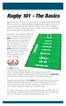 Rugby 101 - The Basics Rugby Union was, if the legend is to be believed first played when William Webb Ellis was involved in a game of football at Rugby School in England in 1823. The story goes that Master
THE WISDOM OF 14 ACCOUNTING TEXTBOOKS.
 THE WISDOM OF 14 ACCOUNTING TEXTBOOKS. ALL IN ONE FUN, INTERACTIVE GAME. Students get a kick out of learning when it s more engaging than a textbook. Sorry, textbooks. We wrapped up all the stuff they
Lacrosse Terminology
 Lacrosse Terminology Lacrosse is a great game to watch, but with all sports there are rules and terms that, once understood, bring you to a whole new level of understanding. These terms open the door to
Shake N Bake Basketball Services High School Level
 Shake N Bake Basketball Services High School Level Author: Ganon Baker 1-866-626-0412 www.shakenbakebasketball.com Methods of Teaching 1. Be a mirror: correct wrong, praise right, repetition. 2. Teach
U8/U9 FUTSAL DEVELOPMENT PROGRAM. Club Coaches Curriculum
 U8/U9 FUTSAL DEVELOPMENT PROGRAM Club Coaches Curriculum Curriculum Outline Curriculum Introduction The curriculum for this program contains a seasonal plan for the year where the emphasis is on using
INSTRUCTION MANUAL FOR GBA / SNES / NES / GENESIS / FAMICOM. For additional information, please visit www.retron5.com
 INSTRUCTION MANUAL FOR GBA / SNES / NES / GENESIS / FAMICOM For additional information, please visit www.retron5.com TABLE OF CONTENTS Warning... 2 Package Contents... 3 RetroN 5 Console... 4 RetroN 5
Peoria Park District Youth Soccer Practice Drills
 Peoria Park District Youth Soccer Practice Drills Goals of practice: Keep everyone involved and active Stress everyone touching the soccer ball as much as possible in practice Do NOT scrimmage the entire
Getting Started Guide
 Getting Started Guide Contents Welcome to Corel VideoStudio Pro X6............................ 2 New Features and Enhancements................................ 4 Understanding the Workspace..................................
Golfshot: Golf GPS. ios VERSION 3.0+
 Golfshot: Golf GPS ios VERSION 3.0+ CONTENTS Home Screen Rounds Statistics Handicap Index Course Preview GolfNow Tee Times Apple Watch Golfplan Awards Settings Select Facility Round Setup Hole List GPS
Playing in a 4-4-2 (Diamond Midfield)
 Playing in a 4-4-2 (Diamond Midfield) GK CD CD RD LD DM RM LM OM Playing against a 4-4-2 flat 4 defenders 4 midfielders 2 forwards Mirror image on both sides of field Formation adds 1 player to the defensive
Tee Ball Practice Plans and Drills
 Tee Ball Practice Plans and Drills Introduction: Whether you are a parent whose child is about to start Tee Ball for the first time or you are about to take on the responsibility of coaching a Tee Ball
Harleysville Girls Softball Association Youth Softball 6U League Rules
 Harleysville Girls Softball Association Youth Softball 6U League Rules ASA rules will apply except as listed below. It is the responsibility of the coach and parents of children to enforce the rules. Uniform
Youth Football Drills
 Angle Tackle Drill Combines tackling skills with proper pursuit and leverage and position. Align two cones five yards apart. Divide defenders into two single file lines five yards apart facing one another
SIMPLE CROSSING - FUNCTIONAL PRACTICE
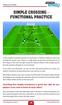 SIMPLE CROSSING - FUNCTIONAL PRACTICE In this simple functional practice we have pairs of strikers waiting in lines just outside the centre circle. There is a wide player positioned out toward one of the
U10 and U12 Technical Lessons
 U10 and U12 Technical Lessons WEEK # 1 Topic: Moves Circle-Take and Fake and Take DIAGRAM DESCRIPTION COACHING POINTS 6 Surfaces: Talk to your feet Each player has a ball. Have the players Correct surface
Team Handball Study Guide
 Team Handball Study Guide Grotthuss History Team Handball originated in northern Europe (Denmark, Germany, Norway and Sweden) in the end of the 19 th century. The Dane Holger Nielsen drew up the rules
Hi! Let s get started.
 Hi! Let s get started. What s in the Box Roku player Remote control 2 x AAA batteries for remote A/V cable RCA Power adapter Get to know your roku A Front view B C F Back view D E A B C D E F Status light
Hockey IQ Quiz. player by answering a few multiple choice questions.
 Hockey IQ Quiz Ever wonder how your hockey sense or what I and others like to call hockey IQ compares to other hockey players? While size, strength, stickhandling and shot power are all skills that are
Arcade Retro Gaming. Operating Manual. Multiple Classic Computer (MCC) Model No. MCC-TV. Dear customer: Operations Reference Getting started
 Arcade Retro Gaming Operating Manual Multiple Classic Computer (MCC) Model No. MCC-TV Dear customer: Thank you for purchasing Multiple Classic Computer (MCC-TV). For optimum performance and saftey, please
THE GREEK YOUTH PROGRAM: OFFENSIVE PHILOsOPHY
 FIBA EUROPE COACHES - FUNDAMENTALS AND YOUTH BASKETBALL by Nikos Stavropoulos THE GREEK YOUTH PROGRAM: OFFENSIVE PHILOsOPHY Nikos Stavropoulos is the Head Coach of the Greek National Junior Men s Team.
Tab Ramos Sports Center Adult Roller Hockey Rules & Regulations
 Tab Ramos Sports Center Adult Roller Hockey Rules & Regulations 1) Leagues / Format: Sunday/Monday/Wednesday Men s Open will play 4v4 w/goalie & two 24 minute halves Tuesday Men s Over 30 will play 4v4
Basic Lesson Plans for Football
 Basic Lesson Plans for Football Developed in conjunction with the Tesco Football Coaching Team Five UEFA qualified coaches (all ex professional players) Basic Lesson Plans for Football Key Player movement
Principles of Soccer
 What criteria can we use to tell how well our team is playing? Analysis of soccer always starts out with the same question, Who has the ball? Principle #1: Possession If our team has possession of the
White Noise Help Guide for iphone, ipad, and Mac
 White Noise Help Guide for iphone, ipad, and Mac Created by TMSOFT - www.tmsoft.com - 12/08/2011 White Noise allows you to create the perfect ambient sound environment for relaxation or sleep. This guide
It starts like this...
 Need help with your phone? No problem. Just get in touch with the store or website you bought it from. If you need a hand with your mobile service, one of our team will be happy to help. 789 on your mobile
DIGITAL / HD GUIDE. Using Your Interactive Digital / HD Guide. 1-866-WAVE-123 wavebroadband.com
 DIGITAL / HD GUIDE Using Your Interactive Digital / HD Guide 1-866-WAVE-123 wavebroadband.com Using Your Interactive Digital/HD Guide Wave s Digital/HD Guide unlocks a world of greater choice, convenience
Contents of the Guide
 BeoCenter 1 Guide Contents of the Guide 3 The following is an index to the contents of the separate Reference book with page references: How to set up BeoCenter 1, 4 Connect your TV cables, 5 Connect
Dual or Quad Core Processor 2.2+ GHz 2 GB RAM 512 MB video card: GeForce GTS 250 or better, ATI Radeon HD 4850 or better
 Welcome to Put your Truck driving skills to the test in! Once you've completed basic training hopefully you'll be up to mastering the wide variety of tasks that lie ahead. Manoeuvring these huge vehicles
Read and React Offense
 Read and React Offense. Position-less basketball.. Five Out (0), Four Out -One In (), and Three Out -Two In () configurations. Can stay completely in one configuration or flow freely between layers at
Luiz Felipe Scolari, Portuguese National Team Coach: Who scores, wins!
 The complete soccer coaching experience SOCCERCOACHING Interna tiona l SPECIAL Luiz Felipe Scolari, Portuguese National Team Coach: Who scores, wins! Portugal started Euro 2008 as one of the favorites
Big Sandy Broadband DVR Guide
 Big Sandy Broadband DVR Guide Contents Big Sandy Broadband DVR Don t Miss a Thing 3 Control Live TV 3 Playback Controls Using the Video Control Buttons 4 Playback Controls Using the Remote Control Arrow
The Technical Committee of the Alberta Soccer Association wishes to thank
 The Technical Committee of the Alberta Soccer Association wishes to thank The St. Albert Soccer Association and Sherwood Park Soccer Association for their assistance with the development of the RULES for
Dual core CPU 3.0 GHz 4 GB system memory Dedicated graphics card with 1024 MB memory (GeForce GTS 450-class equivalent or better)
 Welcome to SCANIA Truck Driving Simulator - The Game Put your Truck driving skills to the test in SCANIA Truck Driving Simulator The Game! Once you've completed basic training hopefully you'll be up to
The Progression from 4v4 to 11v11
 The Progression from 4v4 to 11v11 The 4v4 game is the smallest model of soccer that still includes all the qualities found in the bigger game. The shape of the team is a smaller version of what is found
DANONE NATIONS CUP SOUTH AFRICA SASFA U12 SUMMARISED RULES 2016
 DANONE NATIONS CUP SOUTH AFRICA SASFA U12 SUMMARISED RULES 2016 PREAMBULE By participating in the Danone Nations Cup, all the teams undertake to respect the values of the event (humanism, open-mindedness,
Coaching Session from the Academies of the Italian Serie A
 Coaching Session from the Academies of the Italian Serie A Written By the Soccer Italian Style Coach s Mirko Mazzantini Simone Bombardieri Published By www.soccertutor.com Soccer Italian Style Coaches
R e f e r e e s G u i d e l i n e s Issued by Director of Refereeing
 Page 1 of 6 R e f e r e e s G u i d e l i n e s Issued by Director of Refereeing No one goes to a Sports Event to see the Referees. We are the people without fans But we have a commitment with the sport;
Drills to Improve Football Skills www.ulster.gaa.ie 1
 Drills to Improve Football Skills www.ulster.gaa.ie 1 Drills to Improve Football Skills Drills to Improve Football Skills has been designed with the intention that the coach should step back to take a
Leaf River Outdoor Products Vibrashine, Inc. P.O. Box 557 Taylorsville, MS 39168 (601) 785-9854 FAX (601) 785-9874 www.vibrashine.
 MULTI-CARD PICTURE VIEWER Model PV-2.5 Leaf River Outdoor Products Vibrashine, Inc. P.O. Box 557 Taylorsville, MS 39168 (601) 785-9854 FAX (601) 785-9874 www.vibrashine.com 2 THANKS and WELCOME What does
SPECTATORS GUIDE TO RUGBY (Borrowed from a USA RUGBY brochure)
 SPECTATORS GUIDE TO RUGBY (Borrowed from a USA RUGBY brochure) The sport of Rugby is often referred to as the father of American football. Football evolved with many of the same principles, strategies
RingCentral for Desktop. UK User Guide
 RingCentral for Desktop UK User Guide RingCentral for Desktop Table of Contents Table of Contents 3 Welcome 4 Download and install the app 5 Log in to RingCentral for Desktop 6 Getting Familiar with RingCentral
Fetch TV App Guide 1. Fetch TV App. ios and Android Document Version 1.13
 Fetch TV App Guide 1 Fetch TV App ios and Android Document Version 1.13 2 Fetch TV App Guide Fetch TV App Guide 3 Contents Welcome to the Fetch TV App 4 Before you start 5 Installing the Fetch TV App 9
MOBILE APP TRAINING MANUAL
 MOBILE APP TRAINING MANUAL TABLE OF CONTENTS DOWNLOAD THE JIGSAW MOBILE APP... 3 LOGIN... 4 VIRTUAL CLASSROOM MOBILE APP... 6 PARTICIPANT WINDOW... 7 CHAT OPTIONS... 9 RESIZE OPTIONS... 10 MAXIMIZE PANE
Andover Soccer Association U7 Boys / Girls High-Level Playing Rules
 Andover Soccer Association U7 Boys / Girls All players must play at 50% of each game Game Size: 3 v 3 (although depending on team sizes it is OK to go 4 v 4 so that all players play at least 50% of the
Lottery Looper. User Manual
 Lottery Looper User Manual Lottery Looper 1.7 copyright Timersoft. All rights reserved. http://www.timersoft.com The information contained in this document is subject to change without notice. This document
Coaching Session from the Academies of the Italian Serie A
 Coaching Session from the Academies of the Italian Serie A Written By the Soccer Italian Style Coach s Mirko Mazzantini Simone Bombardieri Published By www.soccertutor.com Soccer Italian Style Coaches
Updated: Jan. 24, 2016
 Section 4 Officiating Philosophies The following rules-based philosophies have been adopted for NCAA games. They also appear in the appropriate sections of this manual. Ball-Spotting 1. The ball can be