
BUILDING DIGITAL LITERACY PURPOSE DEFINING DIGITAL LITERACY USING THIS GUIDE
|
|
|
- Darren Christopher Greer
- 9 years ago
- Views:
Transcription
1 BUILDING PURPOSE In today s society, it is critical for students to be able to use the vast amount of technology available to them. Computer literacy will provide students with skills they need to succeed in the technological age. The purpose of this document is to support districts and schools in building students digital literacy by authentically incorporating technology into instruction at every grade level. DEFINING Digital literacy is the ability to use technology to find, evaluate, create, and communicate information. Along with a working knowledge of computer software and hardware, students will benefit from an understanding of wide range of applications (e.g., word processing, presentations, web-based resources). With software applications becoming so mainstream, it is vital to be fluent in their use when entering the work force. USING THIS GUIDE This document presents guidelines, not a curriculum, for teachers as they support their students in learning to use technology. This guide should not dictate when students can and cannot experience technology content. However, teachers may find this useful in guiding instructional choices. Skills are noted as introductory and mastery at each grade level and organized into seven specific categories: Basic Computer Operations Word Processing Spreadsheet (Tables, Charts, and Graphs) Mathematical Applications Presentation and Multimedia Tools Acceptable Use, Copyright, Plagiarism, and Online Safety Research and Information Gathering Communication and Collaboration Optional at this grade level Introduce the concept Reinforce the concept Master the concept 1
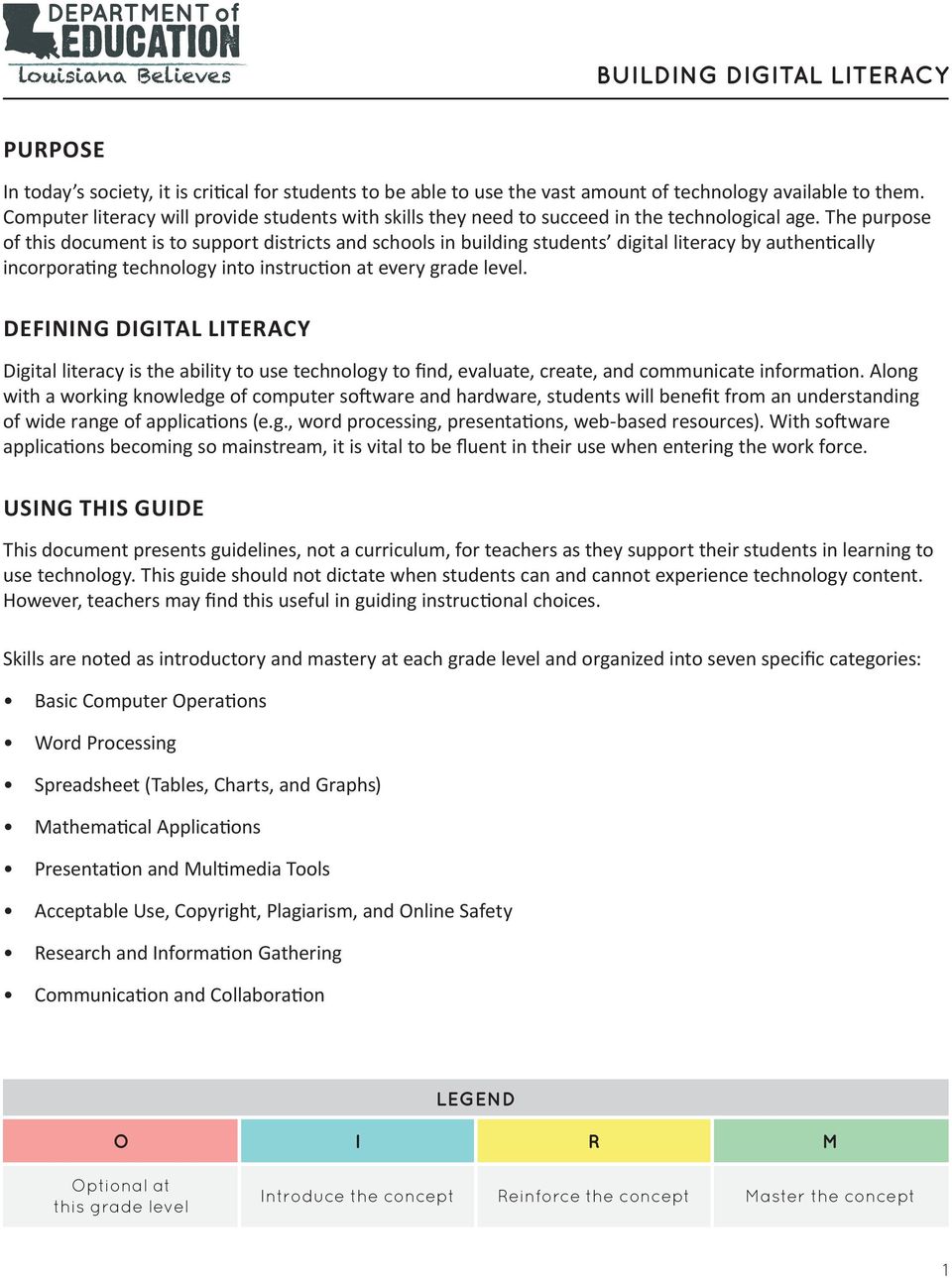
2 BASIC COMPUTER OPERATIONS Identify basic terms and usage for technology systems (e.g., keyboard, mouse, word processing software, spreadsheets, etc.) M M M M M M Turn on a computer and login M M M M M M Use a pointing device, such as a mouse, to manipulate shapes and icons; click on URLs, radio buttons, and check boxes; and use scroll bars Use desktop icons, windows, and menus to open applications and documents Understand how to manage files and save documents Explain and use age-appropriate online tools and resources (e.g., tutorials, assessments, and web browsers) Keyboarding Use proper posture and ergonomics Locate and use letter and number keys with correct left and right hand placement Locate and use correct finger for space bar, return key, and shift key Gain proficiency and speed in touch typing Demonstrate automatically in keyboarding skills by increasing accuracy and speed. (For students with disabilities, demonstrate alternate input techniques, as appropriate) Identify successful troubleshooting strategies for minor hardware and software issues or problems (e.g., frozen screen) Independently operate peripheral equipment (e.g., scanner, digital camera) M M M M M M M M M M M M O M M M M M M M M M M O I R R R M M M M M M M M M M M O M M Compress and expand large files Identify and use a variety of storage media and systems (e.g., optical disks, flash drives, networked storage, cloud services, etc.) and provide a rationale for using a certain medium for a specific purpose Identify and assess the capabilities and limitations of emerging technologies 2

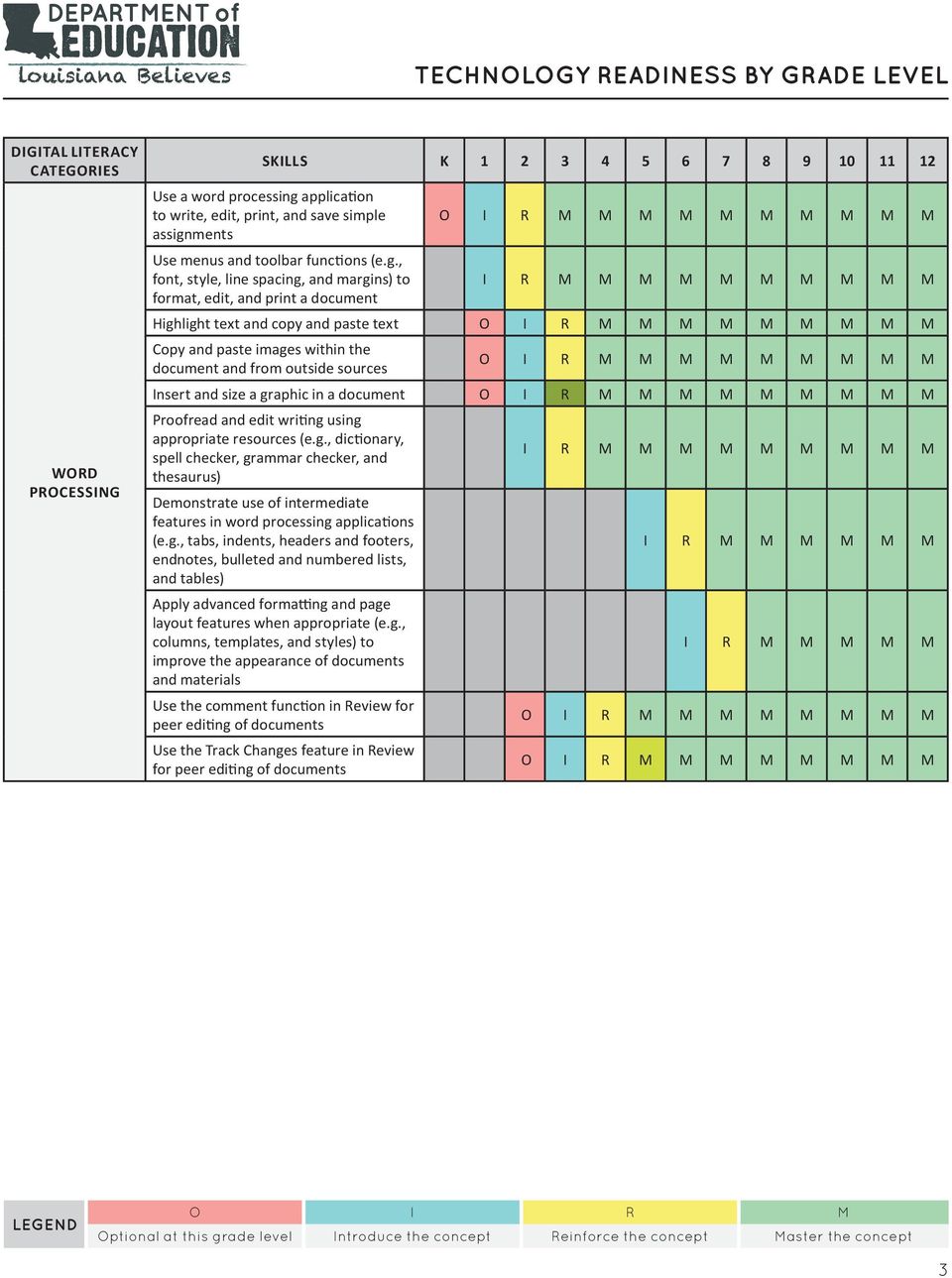
3 WORD PROCESSING Use a word processing application to write, edit, print, and save simple assignments Use menus and toolbar functions (e.g., font, style, line spacing, and margins) to format, edit, and print a document O M M M M M M M M M M Highlight text and copy and paste text O M M M M Copy and paste images within the document and from outside sources O M M M M Insert and size a graphic in a document O M M M M Proofread and edit writing using appropriate resources (e.g., dictionary, spell checker, grammar checker, and thesaurus) Demonstrate use of intermediate features in word processing applications (e.g., tabs, indents, headers and footers, endnotes, bulleted and numbered lists, and tables) Apply advanced formatting and page layout features when appropriate (e.g., columns, templates, and styles) to improve the appearance of documents and materials Use the comment function in Review for peer editing of documents Use the Track Changes feature in Review for peer editing of documents M M M M M O M M M O M M M 3
4 SPREADSHEET (TABLES, CHARTS, AND GRAPHS) Demonstrate an understanding of the spreadsheet as a tool to record, organize, graph, and analyze information Identify and explain terms and concepts related to spreadsheets (e.g., cell, column, row, values, labels, chart, graph, etc.) Use the auto-fill feature in a spreadsheet application O M M M O M M M O M M M Enter and edit data in spreadsheets O M M M Use mathematical symbols (i.e. +(add), -(subtract), *(multiply), /(divide), and ^(exponents)); perform calculations using formulas Use spreadsheets and other applications to analyze data, make predictions, solve problems, draw conclusions, and propose solutions Use spreadsheets to calculate, graph, organize, and present data in a variety of real-world settings and chose the most appropriate type to represent given data Use functions of a spreadsheet application (e.g. sort, filter, and find) Use various number formats (e.g. scientific notations, percentages, exponents) as appropriate Use advanced formatting features of a spreadsheet application (e.g. reposition columns and rows, add and name worksheets, color coding) Differentiate between formulas with absolute and relative cell references (i.e., formulas that remain constant or change when copied from one cell to another) Use multiple sheets within a workbook, and create links among worksheets to solve problems Import and export data between spreadsheets and other applications M M M M M M I R M M M M M M M 4

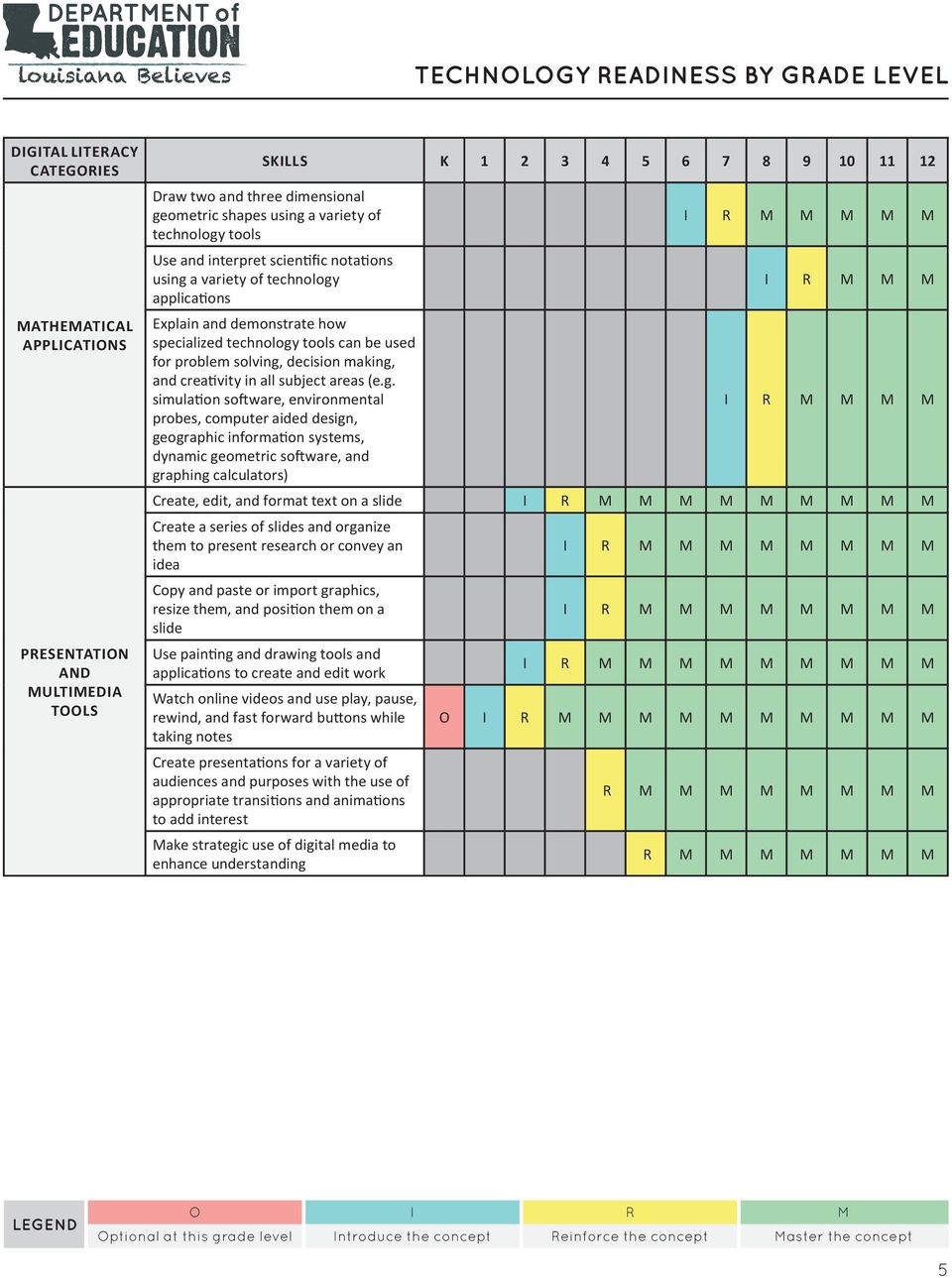
5 MATHEMATICAL APPLICATIONS PRESENTATION AND MULTIMEDIA TOOLS Draw two and three dimensional geometric shapes using a variety of technology tools Use and interpret scientific notations using a variety of technology applications Explain and demonstrate how specialized technology tools can be used for problem solving, decision making, and creativity in all subject areas (e.g. simulation software, environmental probes, computer aided design, geographic information systems, dynamic geometric software, and graphing calculators) I R M M M I R M M M M Create, edit, and format text on a slide M M M M Create a series of slides and organize them to present research or convey an idea Copy and paste or import graphics, resize them, and position them on a slide Use painting and drawing tools and applications to create and edit work Watch online videos and use play, pause, rewind, and fast forward buttons while taking notes Create presentations for a variety of audiences and purposes with the use of appropriate transitions and animations to add interest Make strategic use of digital media to enhance understanding M M M M M M M M M M O M M M M M R M M M M M M M M R M M M M M M M 5
6 ACCEPTABLE USE, COPYRIGHT, PLAGIARISM, AND ONLINE SAFETY Explain and demonstrate compliance with classroom and school rules (Acceptable Use Policy) regarding responsible use of computers and networks Explain responsible uses of technology and digital information and describe possible consequences of inappropriate use Explain Fair Use guidelines for the use of copyrighted materials (e.g. text, images, audio, and video in student projects) and giving credit to media creators Identify and explain the strategies for the safe and efficient use of computers (e.g., password, virus protection software, spam filters, and pop-up blockers) Demonstrate safe practices, recognition of the potential public exposure of , and appropriate etiquette Identify cyber-bullying and describe strategies to deal with such a situation Recognize and describe the potential risks and dangers associated with various forms of online communications Comply with the district s Acceptable Use Policy related to ethical use, cyberbullying, privacy, plagiarism, spam, viruses, hacking, and file sharing Analyze and explain how media and technology can be used to distort, exaggerate, and misrepresent information Give examples of hardware and applications that enable people with disabilities to use technology Explain the possible risks associated with the use of networked digital environments (e.g. Internet, mobile phones, wireless, and LANs and WANs) and sharing personal information M M M M M M M M M M M M M M M M M M M M M M M M M M M M M M M M M M M M M M M M M M M M M 6

7 RESEARCH AND INFORMATION GATHERING Use age-appropriate technologies to locate, collect, and organize content from media collection activities for specific purposes, citing sources Perform basic searches on databases (e.g. library, card catalog, encyclopedia) to locate information Evaluate teacher- or self- selected Internet resources in terms of their usefulness for research Use content specific technology tools (e.g., environmental probes, sensors, measuring devices, and simulations) to gather and analyze data Use Web 2.0 tools (e.g., online discussions, blogs, and wikis) to gather and share information Identify probable types and locations of websites by examining their domain extensions (e.g..edu,.com,.org,.gov,.au) Use effective search strategies for locating and retrieving electronic information (e.g. using syntax and Boolean logic operators) Use search engines and online directories and explain the differences among various search engines and how they rank results Use appropriate academic language in online learning environments (e.g., post, thread, intranet, discussion forum, drop box, account, and password) Explain how technology can support communication and collaboration, personal and professional productivity, and lifelong learning Write correct in-text citations and reference lists for text and images gathered from electronic sources Use web browsing to access information (e.g., enter a URL, access links, create bookmarks and favorites, print webpages) Develop and/or use teacher-developed guidelines to evaluate the content, organization, design, use of citations, and presentation of technologically enhanced projects O I R R M M M M M M M O M M M M M M M O M M M O M M R M M M M M M O M M M 7

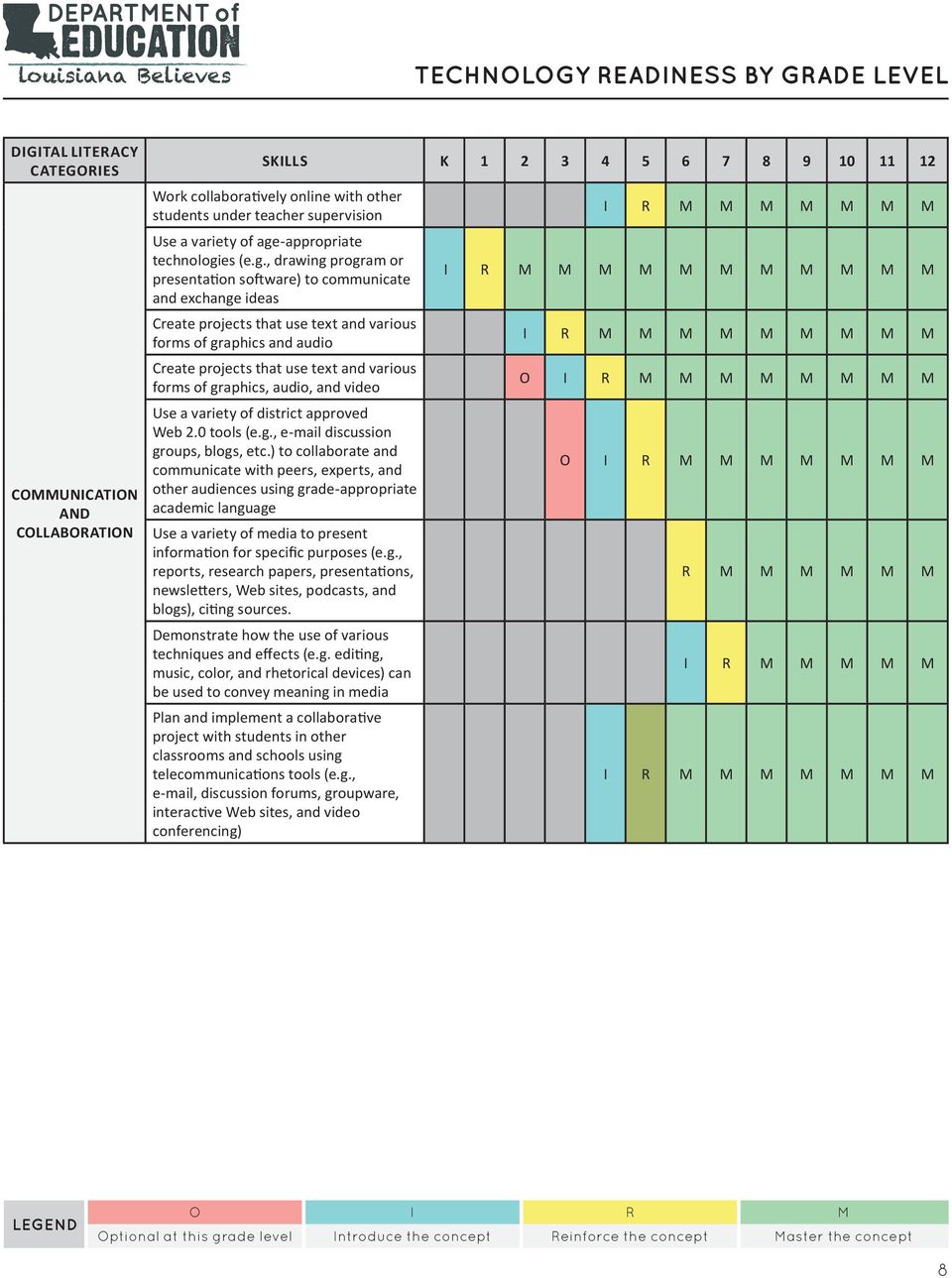
8 COMMUNICATION AND COLLABORATION Work collaboratively online with other students under teacher supervision Use a variety of age-appropriate technologies (e.g., drawing program or presentation software) to communicate and exchange ideas Create projects that use text and various forms of graphics and audio Create projects that use text and various forms of graphics, audio, and video Use a variety of district approved Web 2.0 tools (e.g., discussion groups, blogs, etc.) to collaborate and communicate with peers, experts, and other audiences using grade-appropriate academic language Use a variety of media to present information for specific purposes (e.g., reports, research papers, presentations, newsletters, Web sites, podcasts, and blogs), citing sources. Demonstrate how the use of various techniques and effects (e.g. editing, music, color, and rhetorical devices) can be used to convey meaning in media Plan and implement a collaborative project with students in other classrooms and schools using telecommunications tools (e.g., , discussion forums, groupware, interactive Web sites, and video conferencing) M M M M M M M M M M M M O M M M O M M R M M M M M M M M 8
Common Core State Standards K 12 Technology Skills Scope and Sequence
 This scope and sequence is aligned to the Common Core State Standards requirements for Mathematics and English Language Arts & Literacy in History/Social Studies, Science, and Technical Subjects as well
Information Technology Grades 11-12. Students will know and be able to: Basic Operations 1.1 (I)
 Information Technology Grades 11-12 Basic Operations, Concepts, and Productivity Tools Basic Operations Word Processing Database Students will know and be able to: Identify the platform, version, properties,
Montclair Public School District Technology Scope and Sequence K- 5 (Rev. August 18, 2015)
 PS K-5 Technology August 18, 2015 1 of 7 ontclair Public School District Technology Scope and Sequence K- 5 (ev. August 18, 2015) ntroduction to the Scope and Sequence Document The skills identified for
Students will know and be able to: 1.1. Basic Operations
 Information Technology Grades 9-10 Basic Operations, Concepts, and Productivity Tools Basic Operations Word Processing Database Spreadsheet Identify the platform, version, properties, function, and interoperability
Technology (Information Technology) Benchmarks
 Technology (Information Technology) Benchmarks Kindergarten A. With teacher support, demonstrate knowledge of ergonomics and electrical safety when using computers. B. With teacher support, explain that
Massachusetts Technology Literacy Standards
 Massachusetts Technology Literacy Standards The Massachusetts Technology Literacy Standards incorporate the Information and Communication Technology (ICT) Literacy skills developed by the Partnership for
Bruce-Guadalupe Community School Bruce-Guadalupe Middle School. Technology Education Curriculum. Program Scope and Sequence
 Bruce-Guadalupe Community School Bruce-Guadalupe Middle School Technology Education Curriculum Program Scope and Sequence Written by Rachel Klug Bruce-Guadalupe Library Media Specialist April 2011 Bruce-Guadalupe
Technology Curriculum Kindergarten Gwinn Area Community Schools
 Technology Curriculum Kindergarten Gwinn Area Community Schools * Standards are to be introduced. All other standards are to be reinforced or applied. 1. Basic Operations and Concepts a. Students demonstrate
NETS for Students: Achievement Rubric
 NETS for Students: Achievement Rubric DRAFT (March 22, 2005) Purpose: This draft version of the NETS for Students: Achievement Rubric is available online for educational technology professionals to review
K 1 2 K 1 2 K 1 2 K 1 2 K 1 2 K 1 2 K 1 2
 Michigan Educational Technology Standards (METS) - K-8 Checklist by Grade Levels Grades K through 2 Technology Standards and Expectations (by the end of Grade 2) 1. Basic Operations and Concepts. a. Students
NETS for Students: Extended Rubric for Grades 6 8
 DRAFT (September 7, 2004) Purpose: This draft version of the NETS extended rubric for Grades 6 8 is available online for educational technology professionals to review and provide feedback to the developers.
Computer/Technology Curriculum 2015-2016 Kindergarten
 Kindergarten K.1 Students will understand BASIC COMPUTER SKILLS. (a) Students will learn how to log onto a computer with their username and password (b) Students will become proficient in using the mouse
Howard County Public School System Educational Technology. Essential Curriculum Grades 9-12
 Howard County Public School System Educational Technology DRAFT Essential Curriculum Grades 9-12 Goal 1: The students at all grade levels 9-12 will demonstrate the ability to explain basic technology operations
NETS for Teachers: Achievement Rubric
 NETS for Teachers: Achievement Rubric DRAFT (March 18, 2005) Purpose: This draft version of the NETS for Teachers: Achievement Rubric is available online for educational technology professionals to review
Information Technology Curriculum
 Information Technology Curriculum St. Francis School District Committee Review Members: Sue Dohr, Peter Graven, Sandy Korom, Michelle Mancl District Websites: http://www.wggators.org http://www.dcchargers.org
Florida Department of Education Student Performance Standards
 Florida Department of Education Student Performance Standards 2016 2017 Course Title: Digital Information Technology Course Number: 8207310 Course Credit: 1 Course Description: This course is designed
126.47. Web Design (One Credit), Beginning with School Year 2012-2013.
 126.47. Web Design (One Credit), Beginning with School Year 2012-2013. (a) General requirements. Students shall be awarded one credit for successful completion of this course. This course is recommended
Maryland Technology Literacy Standards for Students
 Standard 1.0 Technology Systems: Develop foundations in the understanding and uses of technology systems Pre-kindergarten Kindergarten Grade 1 Grade 2 Grade 3 A. Systems A. Systems A. Systems A. Systems
TECHNOLOGY APPLICATIONS STANDARDS FOR ALL BEGINNING TEACHERS
 TECHNOLOGY APPLICATIONS STANDARDS FOR ALL BEGINNING TEACHERS Standard I. Standard II. Standard III. Standard IV. Standard V. Standard VI- Standard XI. All teachers use technology-related terms, concepts,
Computer Technology: Literacy and Usage KINDERGARTEN. Standard 1.0 Students will understand basic operations and concepts of technology.
 Computer Technology: Literacy and Usage KINDERGARTEN Standard 1.0 Students will understand basic operations and concepts of technology. 1.1. Students will demonstrate an understanding of the nature and
NOVA COLLEGE-WIDE COURSE CONTENT SUMMARY ITE 115 - INTRODUCTION TO COMPUTER APPLICATIONS & CONCEPTS (3 CR.)
 Revised 5/2010 NOVA COLLEGE-WIDE COURSE CONTENT SUMMARY ITE 115 - INTRODUCTION TO COMPUTER APPLICATIONS & CONCEPTS (3 CR.) Course Description Covers computer concepts and Internet skills and uses a software
Massachusetts Recommended K-12 Instructional Technology Standards
 Massachusetts Recommended K-12 Instructional Technology Standards August, 2007 Massachusetts Department of Education 350 Main Street, Malden, MA 02148 Phone 781-338-3000 TTY: N.E.T. Relay 800-439-2370
Educational Technology Standard Articulated by Grade Level. Pre-K to 6 th Grade
 Pre-K to 6 th Grade Arizona Department of Education Educational Technology Division Approved 5.18.2009 Strand 1: Creativity and Innovation 2 Strand 1: Creativity and Innovation Concept 1: Knowledge and
2014 New Jersey Core Curriculum Content Standards - Technology
 2014 New Jersey Core Curriculum Content s - Technology Content Area Grade Content Statement Students will: Technology A. Technology Operations and Concepts: Students demonstrate a sound understanding of
Computer Skills Checklist 1
 Computer Checklist 1 Computer User Levels 1 The following skills checklist is organized according to program title and categorized into three levels of computer literacy:,, and. users demonstrate little
Technology Curriculum Draft Grades 6-8
 Tichenor Middle School Curriculum Technology Curriculum Technology Big Idea: Big Idea: Information, Communication and Productivity Students demonstrate a sound understanding of the nature and operations
Curriculum Map (Computer Technology 9 th grade)
 Curriculum Map (Computer Technology 9 th grade) Month August Main Concept (General terms) Operating Systems. 1. What is the difference between operating system software and Application Software 3. Print
It provides the performance indicators to evaluate the level of knowledge and competence of teacher to apply ICT in the educational setting.
 COMMISSION ON INFORMATION AND COMMUNICATIONS TECHNOLOGY NATIONAL ICT COMPETENCY STANDARD (NICS) FOR TEACHERS INTRODUCTION The National ICT Competency Standard (NICS) for Teachers defines the competency
Computer Skills: Levels of Proficiency
 Computer Skills: Levels of Proficiency September 2011 Computer Skills: Levels of Proficiency Because of the continually increasing use of computers in our daily communications and work, the knowledge of
The National Educational Technology Standards. (Upon which our local standards are based)
 The National Educational Standards (Upon which our local standards are based) Students demonstrate a sound understanding of the nature and operation of technology systems. Students are proficient in the
Lower School. Third Grade
 Lower School The goal of the Lower School Computer curriculum is to continue to develop technology skills for both academic learning and personal productivity in the 21 st century. Students learn the science
HONORS BUSINESS COMPUTER SYSTEMS
 FREEHOLD REGIONAL HIGH SCHOOL DISTRICT OFFICE OF CURRICULUM AND INSTRUCTION BUSINESS ADMINISTRATION SPECIALIZED LEARNING CENTER HONORS BUSINESS COMPUTER SYSTEMS COURSE PHILOSOPHY Technology literacy is
Oregon State Bar Software Standards 2005. Software Proficiency Expectations (Items in bold are to be demonstrated)
 Oregon State Bar Software Standards 2005 Computer Basics (all users) Software Proficiency Expectations (Items in bold are to be demonstrated) Touch typing (at least 25 words per minute). Starting, shutting
COMPUTER SCIENCE (5651) Test at a Glance
 COMPUTER SCIENCE (5651) Test at a Glance Test Name Computer Science Test Code 5651 Time Number of Questions Test Delivery 3 hours 100 selected-response questions Computer delivered Content Categories Approximate
Proposed Course title: - Basic Computer Course
 Proposed Course title: - Basic Computer Course Objective: The course is designed to aim at imparting a basic level appreciation programme for the common man. After completing the course the incumbent is
Computer Technology Standards of Learning for Virginia s Public Schools
 Computer Technology Standards of Learning for Virginia s Public Schools February 2013 Board of Education Commonwealth of Virginia Introduction As the new century has unfolded, various studies have postulated
LEWIS-CLARK STATE COLLEGE BUSINESS TECHNOLOGY AND SERVICE DIVISION SYLLABUS
 LEWIS-CLARK STATE COLLEGE BUSINESS TECHNOLOGY AND SERVICE DIVISION SYLLABUS Course Title: Business Computer Skills Course Number: CITPT 110-01/PT01 and CITPT 110-02/PT02 Credit Hours: 3 Semester: Fall
Computer Literacy Skills A Companion to the Maryland Technology Literacy Standards for Students
 This document is intended to provide guidance as to what computer skills students should know and be able to do independently at various levels (basic, intermediate, proficient) with specific types of
CTSO Course Alignments: Computer Applications
 CTSO Course Alignments: Computer Applications Below you will find standards for the Computer Applications course aligned with competitive from appropriate career and technical student organizations (CTSOs).
MS OFFICE PUBLISHER IDEAS IN THE CURRICULUM
 MS OFFICE PUBLISHER IDEAS IN THE CURRICULUM RICHARDSON INDEPENDENT SCHOOL DISTRICT INSTRUCTIONAL TECHNOLOGY RICHARDSON, TEXAS Prepared By: RISD Instructional Staff Development Revised by GPISD Instructional
Massachusetts Technology Literacy Standards and Expectations
 Massachusetts Technology Literacy Standards and Expectations April 2008 Massachusetts Department of Elementary and Secondary Education 350 Main Street, Malden, MA 02148 Phone 781-338-3000 TTY: N.E.T. Relay
Introduction to Microsoft Word 2003
 Introduction to Microsoft Word 2003 Sabeera Kulkarni Information Technology Lab School of Information University of Texas at Austin Fall 2004 1. Objective This tutorial is designed for users who are new
Educational Technology and Library Media Learning Expectations k-5
 Educational Technology and Library Media Learning Expectations k-5 Basic Operations Literature Appreciation Research Skills Processing and Sharing Media Literacy Digital Literacy and Citizenship Introduction
Microsoft Excel 2007 Level 2
 Information Technology Services Kennesaw State University Microsoft Excel 2007 Level 2 Copyright 2008 KSU Dept. of Information Technology Services This document may be downloaded, printed or copied for
Nevada Computer and Technology Education Standards. Introduction
 Nevada Computer and Technology Education Standards Introduction The Nevada Legislature has recognized the importance of computer and technology education in SB 466, Section 8. NAC 389.688 requires a minimum
Middle School. Sixth Grade
 Middle School The goal of the Middle School Computer curriculum is to further develop technology skills for both academic learning and personal productivity in the 21 st century. Students learn the science
Introduction to Computers & Information Technology
 130.272. Principles of Information Technology a. General requirements. This course is recommended for students in Grades 9-10. Introduction to Computers & Information Technology 1 Introduction. Students
Chapter 3. Basic Application Software. McGraw-Hill/Irwin. Copyright 2008 by The McGraw-Hill Companies, Inc. All rights reserved.
 Chapter 3 Basic Application Software McGraw-Hill/Irwin Copyright 2008 by The McGraw-Hill Companies, Inc. All rights reserved. Competencies (Page 1 of 2) Discuss common features of most software applications
Chapter 3. Application Software. Chapter 3 Objectives. Application Software
 Chapter 3 Objectives Chapter 3 Application Software Identify the categories of application software Explain ways software is distributed Explain how to work with application software Identify the key features
MASTER COURSE OUTLINE
 A. BUSA 1065 Microcomputer Applications B. COURSE DESCRIPTION: MASTER COURSE OUTLINE This course provides a basic understanding of computer history, concepts, and microcomputer applications using IBM or
How to Use the Text Editor in Blackboard
 How to Use the Text Editor in Blackboard The image below is the text editor in Blackboard. No matter you add an item or discussion forum for your course as an instructor, post threads and replies on a
Combined Curriculum Document Technology High School
 Big Idea: Information, Communication and Productivity High School Students demonstrate a sound understanding of the nature and operations of technology systems. Students use technology to learn, to communicate,
DESKTOP PRODUCTIVITY SOFTWARE
 USING WINDOWS 8 UNIT 1: INTRODUCTION TO COMPUTERS Topic A: Overview of computers Topic B: How computers work Topic C: Starting the computer UNIT 2: INPUT DEVICES Topic A: Mouse and keyboard basics Topic
CREATING FORMAL REPORT. using MICROSOFT WORD. and EXCEL
 CREATING a FORMAL REPORT using MICROSOFT WORD and EXCEL TABLE OF CONTENTS TABLE OF CONTENTS... 2 1 INTRODUCTION... 4 1.1 Aim... 4 1.2 Authorisation... 4 1.3 Sources of Information... 4 2 FINDINGS... 4
Google Docs Basics Website: http://etc.usf.edu/te/
 Website: http://etc.usf.edu/te/ Google Docs is a free web-based office suite that allows you to store documents online so you can access them from any computer with an internet connection. With Google
Microsoft Word 2010 Prepared by Computing Services at the Eastman School of Music July 2010
 Microsoft Word 2010 Prepared by Computing Services at the Eastman School of Music July 2010 Contents Microsoft Office Interface... 4 File Ribbon Tab... 5 Microsoft Office Quick Access Toolbar... 6 Appearance
BSBITU402A Develop and use complex spreadsheets
 BSBITU402A Develop and use complex spreadsheets Revision Number: 1 BSBITU402A Develop and use complex spreadsheets Modification History Not applicable. Unit Descriptor Unit descriptor This unit describes
Computer Applications (10004)
 Computer Applications (10004) Rationale Statement: With the growing need for computers in school and business, it is important that South Dakota high school students have an understanding of common application
Computer Literacy Syllabus Class time: Mondays 5:00 7:00 p.m. Class location: 955 W. Main Street, Mt. Vernon, KY 40456
 Computer Literacy Syllabus Class time: Mondays 5:00 7:00 p.m. Class location: 955 W. Main Street, Mt. Vernon, KY 40456 INSTRUCTOR: Jamie A. McFerron OFFICE: 245 Richmond Street Mt. Vernon, KY 40456 PHONE:
Business Information Management I
 Business Information Management I Texas 130.114 This document describes the correlation between curriculum, supplied by Applied Educational Systems, and the Business Information Management I standard,
Technology Proficiencies of Administrators, Teachers & Teacher-Librarians
 Technology Proficiencies of Administrators, Teachers & Teacher-Librarians Since the launch of Washington State s standards for educational technology, there has been a corresponding attention given to
Spreadsheet. Parts of a Spreadsheet. Entry Bar
 Spreadsheet Parts of a Spreadsheet 1. Open the AppleWorks program. Select spreadsheet. 2. Explore the spreadsheet setup for a while. Active Cell Address Entry Bar Column Headings Row Headings Active Cell
Creating Electronic Portfolios using Microsoft Word and Excel
 Step-by-Step Creating Electronic Portfolios using Microsoft Word and Excel The Reflective Portfolio document will include the following: A Cover Page for the portfolio - Include a Picture or graphic A
Computer Apps for Careers (#5000)
 AASD BUSINESS CURRICULUM Computer Apps for Careers (#5000) Description Students will use a variety of software to create personal as well as business documents. The course will emphasize touch-keyboarding
K-12 Information and Digital Literacy
 K-12 Information Digital Literacy K-12 Information Digital Literacy It is the goal of the educators of the Burlington Public Schools to foster a dynamic learning environment that promotes engagement, relevant
Introduction To Microsoft Office PowerPoint 2007. Bob Booth July 2008 AP-PPT5
 Introduction To Microsoft Office PowerPoint 2007. Bob Booth July 2008 AP-PPT5 University of Sheffield Contents 1. INTRODUCTION... 3 2. GETTING STARTED... 4 2.1 STARTING POWERPOINT... 4 3. THE USER INTERFACE...
Chapter 3. Application Software. Chapter 3 Objectives. Application Software. Application Software. Application Software. What is application software?
 Chapter 3 Objectives Chapter 3 Application Software Identify the the categories of of application software Explain ways software is is distributed Explain how to to work with application software Identify
Basic Microsoft Excel 2007
 Basic Microsoft Excel 2007 The biggest difference between Excel 2007 and its predecessors is the new layout. All of the old functions are still there (with some new additions), but they are now located
Cashion High School Fundamentals of Administrative Technologies Syllabus Course Number: 8103 (OK Promise Approved)
 Cashion High School Fundamentals of Administrative Technologies Syllabus Course Number: 8103 (OK Promise Approved) Course Title: Fundamentals of Administrative Technologies (Prerequisite: Fundamentals
Discovering Computers 2008. Chapter 3 Application Software
 Discovering Computers 2008 Chapter 3 Application Software Chapter 3 Objectives Identify the categories of application software Explain ways software is distributed Explain how to work with application
MINISTRY OF EDUCATION, SPORT AND CULTURE PRIMARY SCHOOL COMPUTER STUDIES SYLLABUS GRADES 1-7
 MINISTRY OF EDUCATION, SPORT AND CULTURE PRIMARY SCHOOL COMPUTER STUDIES SYLLABUS GRADES 1-7 Curriculum Development Unit P.O. Box MP 133 Mount Pleasant Harare All rights reserved 2007 ACKNOWLEDGEMENTS
Task Force on Technology / EXCEL
 Task Force on Technology EXCEL Basic terminology Spreadsheet A spreadsheet is an electronic document that stores various types of data. There are vertical columns and horizontal rows. A cell is where the
Getting Started with Internet Explorer 10
 Getting Started with Internet Explorer 10 Objectives Understand Web browsers Explore the browser View and navigate Web pages Use tabbed browsing Objectives Save favorite Web pages Browse safely Search
Technology Plan. Delton Kellogg Schools
 Technology Plan Delton Kellogg Schools 327 N. Grove Street Delton, Michigan 49046 District Code Number: 08010 www.dkschools.org Beginning Date June, 2011 Review Date June, 2014 Contact Person: Thang Nguyen
Information and communication technology (ICT) skills audit for returning teachers
 Information and communication technology (ICT) skills audit for returning teachers Please rate your ICT skills using the following values: 1 I have no knowledge at all of this area of ICT 2 I have a small
Excel 2003 Tutorial I
 This tutorial was adapted from a tutorial by see its complete version at http://www.fgcu.edu/support/office2000/excel/index.html Excel 2003 Tutorial I Spreadsheet Basics Screen Layout Title bar Menu bar
Enduring Understandings: Web Page Design is a skill that grows and develops throughout the careful planning and study of software and design.
 Curriculum Map for Web Design SEPTEMBER Targeted NJ Core Curriculum Content Standards: Design develop, test, implement, update, and evaluate web solutions Technology Use, Media Literacy, Responsible Use
COMPUTERIZED BUSINESS APPLICATIONS Curriculum Content Frameworks
 COMPUTERIZED BUSINESS APPLICATIONS Curriculum Content Frameworks Please note: All assessment questions will be taken from the knowledge portion of these frameworks. Prepared by Kathy Woodcock, Conway West
Computer Applications
 Computer Applications This course is designed to develop computer technology skills. Students will use a variety of computer software and hardware tools and features of an electronic information network.
National Education Technology Standards and Performance Indicators As Aligned with the ODS Educator Personal Technology Use Proficiency Exam
 National Education Technology Standards and Performance Indicators As Aligned with the ODS Educator Personal Technology Use Proficiency Exam 1. Creativity and Innovation Demonstrate creative thinking,
Microsoft Excel 2010 Part 3: Advanced Excel
 CALIFORNIA STATE UNIVERSITY, LOS ANGELES INFORMATION TECHNOLOGY SERVICES Microsoft Excel 2010 Part 3: Advanced Excel Winter 2015, Version 1.0 Table of Contents Introduction...2 Sorting Data...2 Sorting
ASSOCIATE OF APPLIED SCIENCE IN BUSINESS OFFICE TECHNOLOGY ADMINISTRATION
 ASSOCIATE OF APPLIED SCIENCE IN BUSINESS OFFICE TECHNOLOGY ADMINISTRATION ASSOCIATE OF APPLIED SCIENCE IN BUSINESS OFFICE TECHNOLOGY ADMINISTRATION Program Overview The Business Office Technology Administration
COMPUTER APPLICATIONS AND WEB TECHNOLOGIES
 CREDIT PROGRAMS / COURSE DESCRIPTIONS Plus six units from the following: COMPUTER APPLICATIONS AND WEB TECHNOLOGIES Associate in Science Degree and Certificate of Achievement: Computer Applications The
Digital Web Design Syllabus/Online Course Plan
 Digital Web Design Syllabus/Online Course Plan Certificated Teacher: Date: 2015-2016 Desired Results Digital Web Design: Grades 9 12 Credit: X one semester (.5) two semesters (1) Estimate of hours per
Creating a Website with Publisher 2013
 Creating a Website with Publisher 2013 University Information Technology Services Training, Outreach, Learning Technologies & Video Production Copyright 2015 KSU Division of University Information Technology
126CSR44N TITLE 126 LEGISLATIVE RULE BOARD OF EDUCATION SERIES 44N
 TITLE 126 LEGISLATIVE RULE BOARD OF EDUCATION SERIES 44N 21 st CENTURY LEARNING SKILLS AND TECHNOLOGY TOOLS CONTENT STANDARDS AND OBJECTIVES FOR WEST VIRGINIA SCHOOLS (2520.14) 126-44N-1. General. 1.1.
Unit 1: ICT skills for business (LEVEL 2)
 (LEVEL 2) Learning outcomes By completing this unit candidates will develop the ability to create files in different software packages, including word processing or DTP, spreadsheet, database and presentation
Microsoft Office Word 2010: Level 1
 Microsoft Office Word 2010: Level 1 Workshop Objectives: In this workshop, you will learn fundamental Word 2010 skills. You will start by getting acquainted with the Word user interface, creating a new
Create a Poster Using Publisher
 Contents 1. Introduction 1. Starting Publisher 2. Create a Poster Template 5. Aligning your images and text 7. Apply a background 12. Add text to your poster 14. Add pictures to your poster 17. Add graphs
Level 1 Certificate in Practical ICT Skills
 LCCI International Qualifications Level 1 Certificate in Practical ICT Skills Syllabus Effective from 2001 For further information contact us: Tel. +44 (0) 8707 202909 Email. [email protected] www.lcci.org.uk
PowerPoint 2013 Basics of Creating a PowerPoint Presentation
 Revision 4 (01-31-2014) PowerPoint 2013 Basics of Creating a PowerPoint Presentation MICROSOFT POWERPOINT PowerPoint is software that lets you create visual presentations. PowerPoint presentations are