
Computer/Technology Curriculum Kindergarten
|
|
|
- Adam Harrington
- 9 years ago
- Views:
Transcription
1 Kindergarten K.1 Students will understand BASIC COMPUTER SKILLS. (a) Students will learn how to log onto a computer with their username and password (b) Students will become proficient in using the mouse appropriately, including when to use single click, double click, left click, and right click. (c) Students will discover the process of typing with both hands. K.2 Students will understand basic SOFTWARE APPLICATIONS for KIDPIX. (a) Students will work with all tools in the KidPix program. (b) Students will learn how to open and close a program properly. (c) Students will learn how to save files to the network drive. (d) Students will learn how to print documents to the appropriate printer. K.3 Students will understand basic SOFTWARE APPLICATIONS for MS WORD. (a) Students will work on basic word processing skills such as typing and entering information. (b) Students will learn how to open and close a program properly. (c) Students will learn how to save files to the network drive. (d) Students will learn how to print documents to the appropriate printer. K.4 Students will understand basic COMPUTER SCIENCE. (a) Students will know the basic parts of the computer. K.5 Students will understand BASIC INTERNET SKILLS. (a) Students will be able to open and exit a program properly. (b) Students will be able to navigate through basic websites. (c) Students will know basic search techniques. K.6 Students will understand basic INTERNET SAFETY and DIGITAL CITIZENSHIP. (c) Students will understand when it is appropriate to post or send photos or personal information online.

2 1 st Grade 1.1 Students will understand BASIC COMPUTER SKILLS. (a) Students will be proficient at logging onto a computer with their username and password (b) Students will be introduced to home row keys. (c) Students will demonstrate proper typing posture. 1.2 Students will understand basic SOFTWARE APPLICATIONS for KIDPIX. (a) Students will work with all tools in the KidPix program. (b) Students will learn how to open and close a program properly. (c) Students will learn how to save files to the network drive. (d) Students will learn how to print documents to the appropriate printer. (e) Students will create slides shows of 3-5 slides. 1.3 Students will understand basic SOFTWARE APPLICATIONS for MS WORD. (a) Students will do basic word processing, including: change font typeface, size, and color, and insert pictures and changing layout. (b) Students will learn how to open existing documents and name documents appropriately. (c) Students will learn how to save files to the network drive. 1.4 Students will understand basic SOFTWARE APPLICATIONS for MS EXCEL. (a) Students will understand basic vocabulary. (b) Students will learn how to change fonts, size, color, and add pictures and change layout. (c) Students will learn how to add pie, line, and bar charts and change colors. 1.5 Students will understand basic COMPUTER SCIENCE. (a) Students will know the basic parts of the computer. 1.6 Students will understand BASIC INTERNET SKILLS. (a) Students will be able to open and exit a program properly. 1.7 Students will understand basic INTERNET SAFETY and DIGITAL CITIZENSHIP. (c) Students will understand when it is appropriate to post or send photos or personal information online.

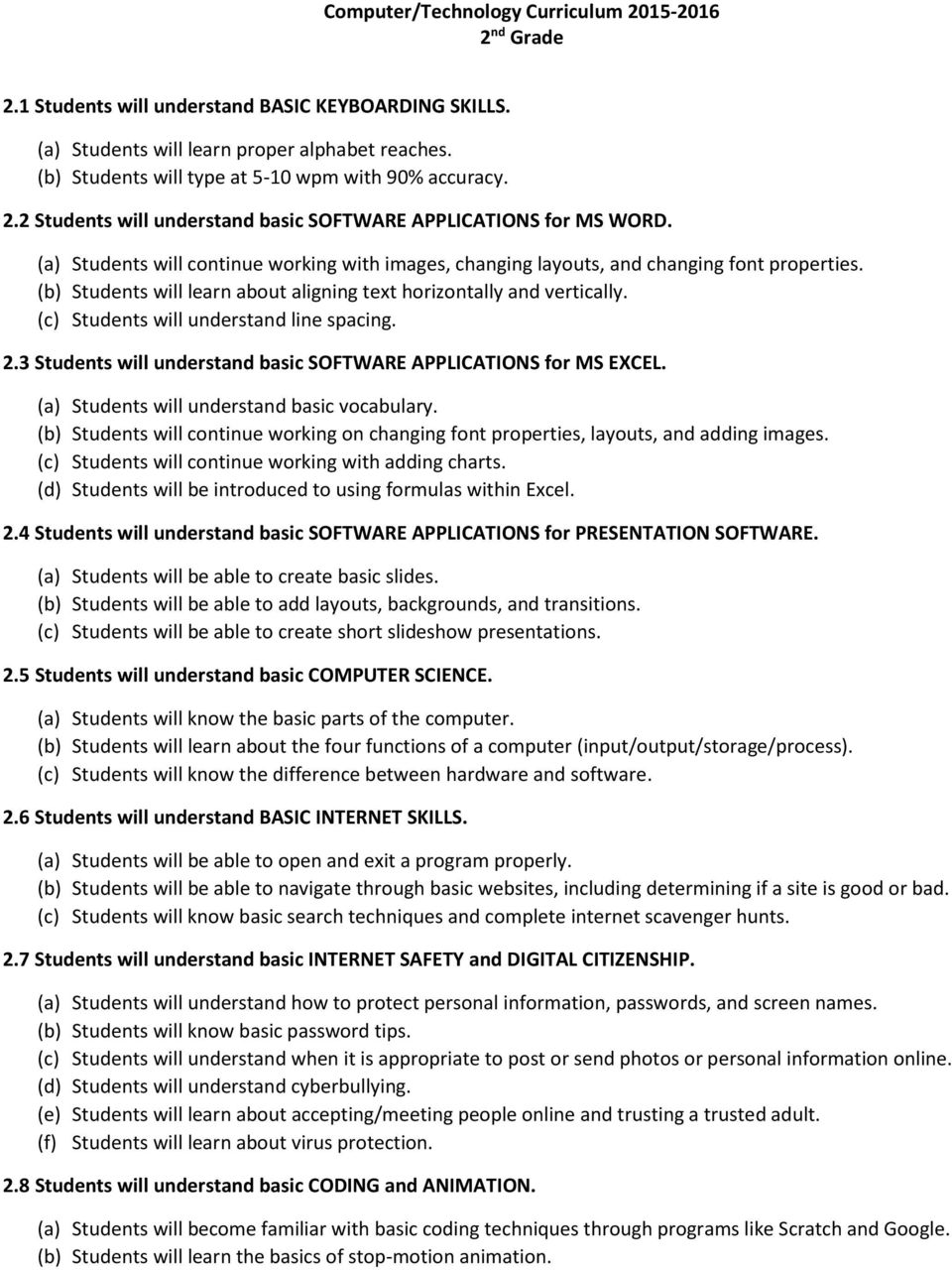
3 2 nd Grade 2.1 Students will understand BASIC KEYBOARDING SKILLS. (a) Students will learn proper alphabet reaches. (b) Students will type at 5-10 wpm with 90% accuracy. 2.2 Students will understand basic SOFTWARE APPLICATIONS for MS WORD. (a) Students will continue working with images, changing layouts, and changing font properties. (b) Students will learn about aligning text horizontally and vertically. (c) Students will understand line spacing. 2.3 Students will understand basic SOFTWARE APPLICATIONS for MS EXCEL. (a) Students will understand basic vocabulary. (b) Students will continue working on changing font properties, layouts, and adding images. (c) Students will continue working with adding charts. (d) Students will be introduced to using formulas within Excel. 2.4 Students will understand basic SOFTWARE APPLICATIONS for PRESENTATION SOFTWARE. (a) Students will be able to create basic slides. (b) Students will be able to add layouts, backgrounds, and transitions. (c) Students will be able to create short slideshow presentations. 2.5 Students will understand basic COMPUTER SCIENCE. (a) Students will know the basic parts of the computer. 2.6 Students will understand BASIC INTERNET SKILLS. (a) Students will be able to open and exit a program properly. 2.7 Students will understand basic INTERNET SAFETY and DIGITAL CITIZENSHIP. (c) Students will understand when it is appropriate to post or send photos or personal information online. 2.8 Students will understand basic CODING and ANIMATION. (a) Students will become familiar with basic coding techniques through programs like Scratch and Google. (b) Students will learn the basics of stop-motion animation.
4 3 rd Grade 3.1 Students will understand BASIC KEYBOARDING SKILLS. (a) Students will learn punctuation and number keys. (b) Students will type at wpm with 90% accuracy. 3.2 Students will understand basic SOFTWARE APPLICATIONS for MS WORD. (a) Students will create basic reports. (b) Students will use spellchecker and thesaurus tools and understand the toolbar icons. (c) Students will insert and format text and textboxes. (d) Students will know how to insert graphics watermarks, draft text, etc. 3.3 Students will understand basic SOFTWARE APPLICATIONS for MS EXCEL. (a) Students will create basic spreadsheets. (b) Students will add charts. (c) Students will use basic functions. 3.4 Students will understand basic SOFTWARE APPLICATIONS for PRESENTATION SOFTWARE. (a) Students will be able to create basic slides. (b) Students will be able to add layouts, backgrounds, and transitions. (c) Students will be able to create slideshow presentations. 3.5 Students will understand basic COMPUTER SCIENCE. (a) Students will know the basic parts of the computer. 3.6 Students will understand BASIC INTERNET SKILLS. (a) Students will be able to open and exit a program properly. 3.7 Students will understand basic INTERNET SAFETY and DIGITAL CITIZENSHIP. (c) Students will understand when it is appropriate to post or send photos or personal information online. 3.8 Students will understand basic CODING and ANIMATION. (a) Students will become familiar with basic coding techniques through programs like Scratch and Google. (b) Students will learn the basics of stop-motion animation.

5 4 th Grade 4.1 Students will understand BASIC KEYBOARDING SKILLS. (a) Students will type at wpm with 90% accuracy. 4.2 Students will understand basic SOFTWARE APPLICATIONS for MS WORD. (a) Students will learn how to cut/copy/and paste text and find and replace. (b) Students will understand how to use bullets and numbering and create an outline. (c) Students will insert and format text and textboxes. 4.3 Students will understand basic SOFTWARE APPLICATIONS for MS EXCEL. (a) Students will create spreadsheets. (b) Students will insert functions. (c) Students will sort data. 4.4 Students will understand basic SOFTWARE APPLICATIONS for DESKTOP PUBLISHING. (a) Students will be able to add, format, group, and arrange objects. 4.5 Students will understand basic COMPUTER SCIENCE. (a) Students will know the basic parts of the computer, inside and out. (d) Students will learn binary numbers. (e) Students will be able to take apart and reassemble a computer. 4.6 Students will understand BASIC INTERNET SKILLS. (a) Students will be able to use the internet as a research tool, properly citing sources. 4.7 Students will understand basic INTERNET SAFETY and DIGITAL CITIZENSHIP. (c) Students will understand appropriate safety for social networking and posting/sending personal information. (g) Students will understand digital ethics and researching. 4.8 Students will understand basic CODING and ANIMATION. (a) Students will become familiar with basic coding techniques through programs like Scratch and Google. (b) Students will learn the basics of stop-motion animation.

6 5 th Grade 5.1 Students will understand BASIC KEYBOARDING SKILLS. (a) Students will type at wpm with 90% accuracy. 5.2 Students will understand basic SOFTWARE APPLICATIONS for MS WORD. (a) Students will learn how to use tabs and leaders and special characters. (b) Students will learn how to insert tables. 5.3 Students will understand basic SOFTWARE APPLICATIONS for MS EXCEL. (a) Students will learn how to use conditional formatting. (b) Students will insert functions. (c) Students will sort data. 5.4 Students will understand basic SOFTWARE APPLICATIONS for DESKTOP PUBLISHING and PRESENTATIONS. (a) Students will be able to add, format, group, and arrange objects. (b) Students will know how to add objects, hyperlinks, animation, and transitions. (c) Students will reinforce presentation skills and present information to an audience. 5.5 Students will understand basic COMPUTER SCIENCE. (a) Students will know the basic parts of the computer, inside and out. (d) Students will learn binary numbers. (e) Students will be able to take apart and reassemble a computer. 5.6 Students will understand BASIC INTERNET SKILLS. (a) Students will be able to use the internet as a research tool, properly citing sources. 5.7 Students will understand basic INTERNET SAFETY and DIGITAL CITIZENSHIP. (c) Students will understand appropriate safety for social networking and posting/sending personal information. (g) Students will understand digital ethics and researching. 5.8 Students will understand basic CODING, WEB DESIGN, and ANIMATION. (a) Students will become familiar with basic coding techniques through programs like Scratch and Google. (b) Students will be introduced to basic web design concepts and build a webpage. (c) Students will learn the basics of stop-motion animation.

7 6 th 8 th Grade MS.1 Students will demonstrate creative thinking, construct knowledge, and develop innovative products and processes using technology (CREATIVITY AND INNOVATION). (a) Students will apply existing knowledge to generate new ideas, products, or processes. (b) Students will create original works as a means of personal or group expression. (c) Students will use models and simulations to explore complex systems and issues. (d) Students will identify trends and forecast possibilities. Skills: Plan message considering audience for meaningful purpose, creating story board/plan/script (Multimedia); Choose software appropriate to the task and use it effectively to convey message; Design or find graphics and edit them purposefully; Record/edit audio; Include multimedia: take and edit photos and video. Potential Assessment Topics: Word Processing Software, Presentation Software (creating slideshow presentations), Desktop Publishing Software (adding, formatting, grouping, and arranging objects), Web Design Concepts, Web Tools (ex. Picasa, Google SketchUp), Genius Hour Projects, Stop-Motion Animation, Coding/Programming. MS.2 Students will use digital media and environments to communicate and work collaboratively, including at a distance, to support individual learning and contribute to the learning of others (COMMUNICATION AND COLLABORATION). (a) Students will interact, collaborate, and publish with peers, experts or others employing a variety of digital environments and media. (b) Students will communicate information and ideas effectively to multiple audiences using a variety of media and formats. (c) Students will develop cultural understanding and global awareness by engaging with learners of other cultures. (d) Students will contribute to project teams to produce original works or solve problems. Skills: Know how to use Web 2.0 tools to discuss, share, and engage with course content; Collaborate from local to global communities between classrooms, between locations; Develop cultural understandings and an enlarged view of the world through work with others online; Consult experts (knowing how/when); Share work, use peer review/feedback to improve final product. Potential Assessment Topics: Word Processing (track changes, peer review), Presentation software (performing to an audience), Web Design, Google Classroom (Drive, Gmail), Stop-Motion Animation, Coding/Programming, Genius Hour Projects. MS.3 Students will apply digital tools to gather, evaluate, and use information (RESEARCH AND INFORMATION FLUENCY). (a) Students will plan strategies to guide inquiry. (b) Students will locate, organize, analyze, evaluate, synthesize, and ethically use information from a variety of sources and media. (c) Students will evaluate and select information sources and digital tools based on the appropriateness to specific tasks. (d) Students will process data and report results. Skills: Plan strategies to guide inquiry, creating essential questions/narrowing topic; Navigate a browser; Know how to evaluate websites for currency, relevance, validity and cross-reference multiple sources; Know how to evaluate
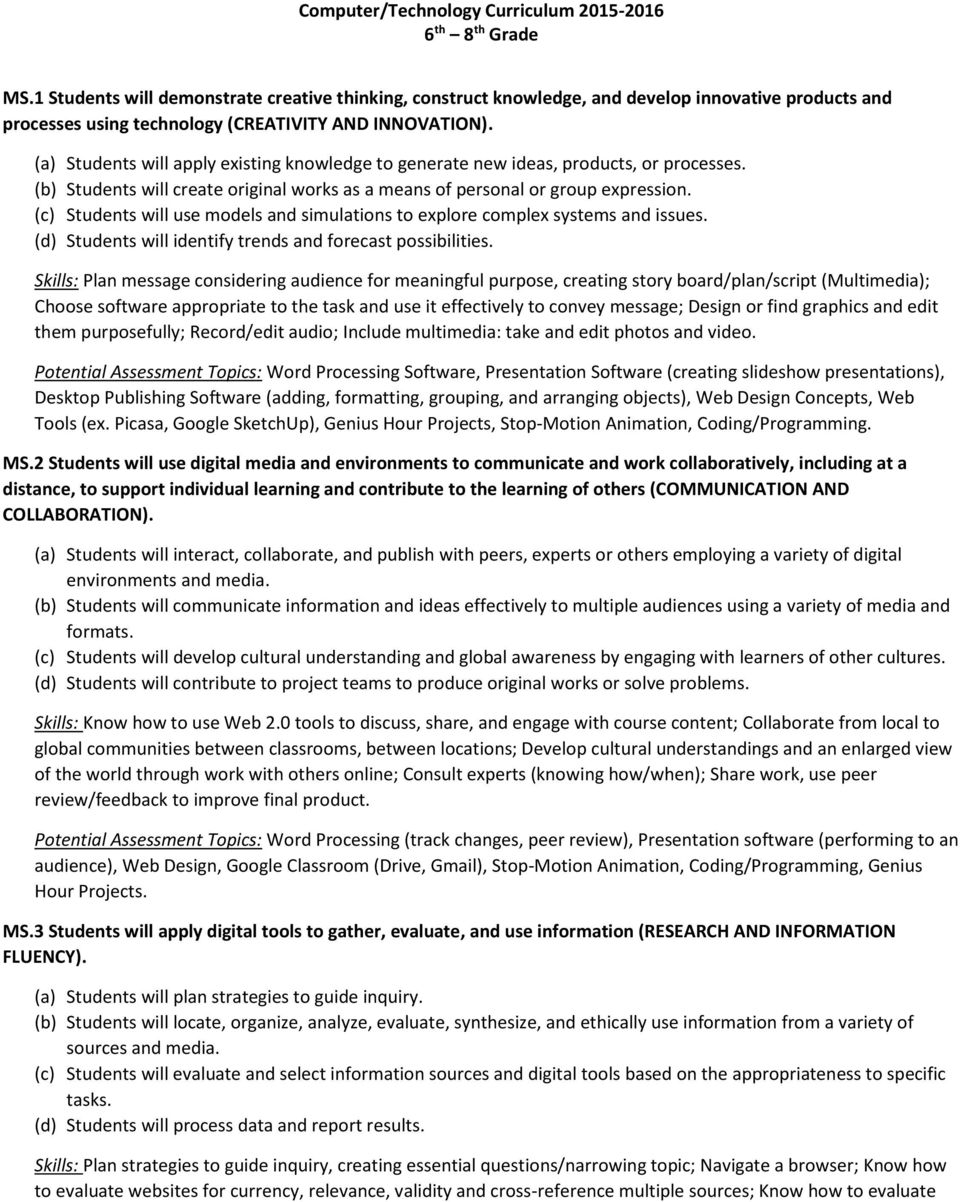
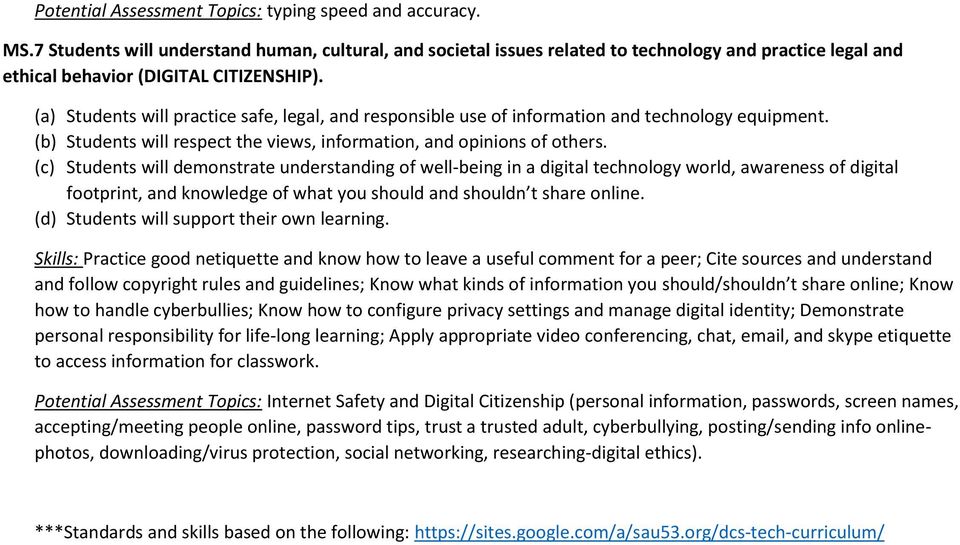
8 websites for accuracy and bias; Use systems for bookmarking/saving sites for personal and group use; Know how to use appropriate search terms and strategies to find information on a research topic. Potential Assessment Tools: Using the internet as a research tool, citing sources properly (avoiding plagiarism), completing internet scavenger hunts, Genius Hour Projects. MS.4 Students will use critical thinking skills to plan and conduct research, manage projects, solve problems and make informed decisions using appropriate digital tools and resources (CRITICAL THINKING, PROBLEM-SOLVING, AND DECISION-MAKING). (a) Students will identify and define authentic problems and significant questions for investigation. (b) Students will plan and manage activities to develop a solution or complete a project. (c) Students will collect and analyze data to identify solutions and/or make informed decisions. (d) Students will use multiple processes and diverse perspectives to explore alternative solutions. Skills: Look for solutions to authentic problems. Plan and manage problem solving process to develop solutions or complete a project; Gather real world information; Use spreadsheet program to record, display and graph data and perform calculations; Analyze results (use trends to predict future development); Communicate data in an effective and engaging way to a larger audience. Potential Assessment Topics: Spreadsheet software (using functions, linking worksheets, inserting comments, data validation), Presentation software (creating slideshows, performing to an audience), Database software (creating tables and forms, utilizing and manipulating data in queries, creating reports to display data), Completing internet scavenger hunts, Stop-Motion Animation, Coding/Programming, Genius Hour Projects. MS.5 Students will demonstrate a sound understanding of technology concepts, systems, and operations (TECHNOLOGY OPERATIONS AND CONCEPTS). (a) Students will understand and use technology systems (b) Students will select and use applications effectively and productively. (c) Students will troubleshoot systems and applications. (d) Students will transfer current knowledge to learning of new technologies Skills: Log into a computer using a one-word single sign-on; Log into web-based tool accounts; Log into a computer using your own personal account; Name and save file as; Open and close files and programs; Locate files and navigate files independently; Organize files; Save and convert file types; Know computer parts and vocabulary; Know how to copy/paste and format text in a variety of programs; Know basic keyboard shortcuts; Use basic menus within a variety of applications. Potential Assessment Topics: Word Processing (indents, page/column breaks, headers and footers, footnotes and endnotes, creating works cited and table of contents pages, macros, mail merge), Spreadsheet software (inserting functions, linking worksheets, data validation), Presentation software (creating slideshows), Database software (creating tables and forms, utilizing and manipulating data in queries, creating reports to display data), Desktop Publishing software (adding, formatting, grouping, and arranging objects), Coding/Programming, Computer Science (parts of the computers, hardware/software, input/output, four functions, binary and hexadecimal numbering). MS.6 Students will demonstrate advancing keyboard skills (KEYBOARDING). (a) Students will be able to type at WPM with 90% accuracy by the end of 6 th grade. (b) Students will be able to type at WPM with 95% accuracy by the end of 7 th grade. (c) Students will be able to type at WPM with 90% accuracy by the end of 8 th grade. Skills: Find keys on the keyboard to construct sentences, type name, and complete word activities; Know how to make capital letters; Type with two hands.
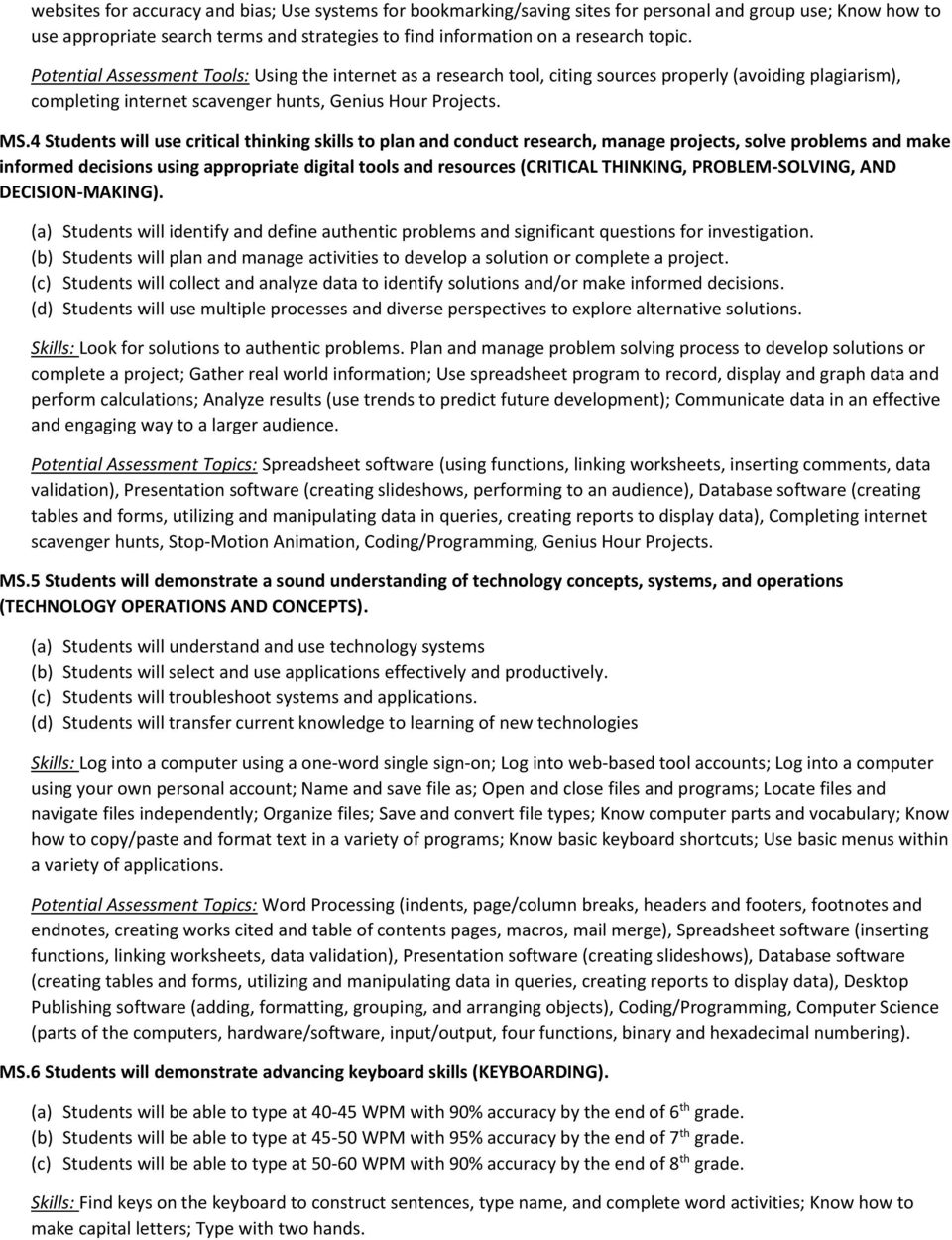
9 Potential Assessment Topics: typing speed and accuracy. MS.7 Students will understand human, cultural, and societal issues related to technology and practice legal and ethical behavior (DIGITAL CITIZENSHIP). (a) Students will practice safe, legal, and responsible use of information and technology equipment. (b) Students will respect the views, information, and opinions of others. (c) Students will demonstrate understanding of well-being in a digital technology world, awareness of digital footprint, and knowledge of what you should and shouldn t share online. (d) Students will support their own learning. Skills: Practice good netiquette and know how to leave a useful comment for a peer; Cite sources and understand and follow copyright rules and guidelines; Know what kinds of information you should/shouldn t share online; Know how to handle cyberbullies; Know how to configure privacy settings and manage digital identity; Demonstrate personal responsibility for life-long learning; Apply appropriate video conferencing, chat, , and skype etiquette to access information for classwork. Potential Assessment Topics: Internet Safety and Digital Citizenship (personal information, passwords, screen names, accepting/meeting people online, password tips, trust a trusted adult, cyberbullying, posting/sending info onlinephotos, downloading/virus protection, social networking, researching-digital ethics). ***Standards and skills based on the following:
BUILDING DIGITAL LITERACY PURPOSE DEFINING DIGITAL LITERACY USING THIS GUIDE
 BUILDING PURPOSE In today s society, it is critical for students to be able to use the vast amount of technology available to them. Computer literacy will provide students with skills they need to succeed
Bruce-Guadalupe Community School Bruce-Guadalupe Middle School. Technology Education Curriculum. Program Scope and Sequence
 Bruce-Guadalupe Community School Bruce-Guadalupe Middle School Technology Education Curriculum Program Scope and Sequence Written by Rachel Klug Bruce-Guadalupe Library Media Specialist April 2011 Bruce-Guadalupe
Howard County Public School System Educational Technology. Essential Curriculum Grades 9-12
 Howard County Public School System Educational Technology DRAFT Essential Curriculum Grades 9-12 Goal 1: The students at all grade levels 9-12 will demonstrate the ability to explain basic technology operations
Technology Curriculum Kindergarten Gwinn Area Community Schools
 Technology Curriculum Kindergarten Gwinn Area Community Schools * Standards are to be introduced. All other standards are to be reinforced or applied. 1. Basic Operations and Concepts a. Students demonstrate
Information Technology Grades 11-12. Students will know and be able to: Basic Operations 1.1 (I)
 Information Technology Grades 11-12 Basic Operations, Concepts, and Productivity Tools Basic Operations Word Processing Database Students will know and be able to: Identify the platform, version, properties,
NETS for Students: Achievement Rubric
 NETS for Students: Achievement Rubric DRAFT (March 22, 2005) Purpose: This draft version of the NETS for Students: Achievement Rubric is available online for educational technology professionals to review
National Education Technology Standards and Performance Indicators As Aligned with the ODS Educator Personal Technology Use Proficiency Exam
 National Education Technology Standards and Performance Indicators As Aligned with the ODS Educator Personal Technology Use Proficiency Exam 1. Creativity and Innovation Demonstrate creative thinking,
Massachusetts Technology Literacy Standards
 Massachusetts Technology Literacy Standards The Massachusetts Technology Literacy Standards incorporate the Information and Communication Technology (ICT) Literacy skills developed by the Partnership for
2014 New Jersey Core Curriculum Content Standards - Technology
 2014 New Jersey Core Curriculum Content s - Technology Content Area Grade Content Statement Students will: Technology A. Technology Operations and Concepts: Students demonstrate a sound understanding of
Common Core State Standards K 12 Technology Skills Scope and Sequence
 This scope and sequence is aligned to the Common Core State Standards requirements for Mathematics and English Language Arts & Literacy in History/Social Studies, Science, and Technical Subjects as well
Educational Technology Standard Articulated by Grade Level. Pre-K to 6 th Grade
 Pre-K to 6 th Grade Arizona Department of Education Educational Technology Division Approved 5.18.2009 Strand 1: Creativity and Innovation 2 Strand 1: Creativity and Innovation Concept 1: Knowledge and
Oregon State Bar Software Standards 2005. Software Proficiency Expectations (Items in bold are to be demonstrated)
 Oregon State Bar Software Standards 2005 Computer Basics (all users) Software Proficiency Expectations (Items in bold are to be demonstrated) Touch typing (at least 25 words per minute). Starting, shutting
NETS for Students: Extended Rubric for Grades 6 8
 DRAFT (September 7, 2004) Purpose: This draft version of the NETS extended rubric for Grades 6 8 is available online for educational technology professionals to review and provide feedback to the developers.
Computer Technology: Literacy and Usage KINDERGARTEN. Standard 1.0 Students will understand basic operations and concepts of technology.
 Computer Technology: Literacy and Usage KINDERGARTEN Standard 1.0 Students will understand basic operations and concepts of technology. 1.1. Students will demonstrate an understanding of the nature and
Middle School. Sixth Grade
 Middle School The goal of the Middle School Computer curriculum is to further develop technology skills for both academic learning and personal productivity in the 21 st century. Students learn the science
TECHNOLOGY APPLICATIONS STANDARDS FOR ALL BEGINNING TEACHERS
 TECHNOLOGY APPLICATIONS STANDARDS FOR ALL BEGINNING TEACHERS Standard I. Standard II. Standard III. Standard IV. Standard V. Standard VI- Standard XI. All teachers use technology-related terms, concepts,
Students will know and be able to: 1.1. Basic Operations
 Information Technology Grades 9-10 Basic Operations, Concepts, and Productivity Tools Basic Operations Word Processing Database Spreadsheet Identify the platform, version, properties, function, and interoperability
K 1 2 K 1 2 K 1 2 K 1 2 K 1 2 K 1 2 K 1 2
 Michigan Educational Technology Standards (METS) - K-8 Checklist by Grade Levels Grades K through 2 Technology Standards and Expectations (by the end of Grade 2) 1. Basic Operations and Concepts. a. Students
APPLIED EDUCATIONAL SYSTEMS, Inc. (800) 220-2175 www.aeseducation.com
 Introduction to Computers and IT Correlation to: Standards for Students: Instructional Content Areas (Units) Telecommunications and Ethics Information Management and Evaluation Word Processing Basic Computer
Lower School. Third Grade
 Lower School The goal of the Lower School Computer curriculum is to continue to develop technology skills for both academic learning and personal productivity in the 21 st century. Students learn the science
COMPUTER SCIENCE (5651) Test at a Glance
 COMPUTER SCIENCE (5651) Test at a Glance Test Name Computer Science Test Code 5651 Time Number of Questions Test Delivery 3 hours 100 selected-response questions Computer delivered Content Categories Approximate
Florida Department of Education Student Performance Standards
 Florida Department of Education Student Performance Standards 2016 2017 Course Title: Digital Information Technology Course Number: 8207310 Course Credit: 1 Course Description: This course is designed
Computer Skills: Levels of Proficiency
 Computer Skills: Levels of Proficiency September 2011 Computer Skills: Levels of Proficiency Because of the continually increasing use of computers in our daily communications and work, the knowledge of
Chapter 3. Application Software. Chapter 3 Objectives. Application Software
 Chapter 3 Objectives Chapter 3 Application Software Identify the categories of application software Explain ways software is distributed Explain how to work with application software Identify the key features
CTSO Course Alignments: Computer Applications
 CTSO Course Alignments: Computer Applications Below you will find standards for the Computer Applications course aligned with competitive from appropriate career and technical student organizations (CTSOs).
Montclair Public School District Technology Scope and Sequence K- 5 (Rev. August 18, 2015)
 PS K-5 Technology August 18, 2015 1 of 7 ontclair Public School District Technology Scope and Sequence K- 5 (ev. August 18, 2015) ntroduction to the Scope and Sequence Document The skills identified for
Computer Technology Standards of Learning for Virginia s Public Schools
 Computer Technology Standards of Learning for Virginia s Public Schools February 2013 Board of Education Commonwealth of Virginia Introduction As the new century has unfolded, various studies have postulated
Computer Applications (10004)
 Computer Applications (10004) Rationale Statement: With the growing need for computers in school and business, it is important that South Dakota high school students have an understanding of common application
Microsoft Word 2010 Prepared by Computing Services at the Eastman School of Music July 2010
 Microsoft Word 2010 Prepared by Computing Services at the Eastman School of Music July 2010 Contents Microsoft Office Interface... 4 File Ribbon Tab... 5 Microsoft Office Quick Access Toolbar... 6 Appearance
126.47. Web Design (One Credit), Beginning with School Year 2012-2013.
 126.47. Web Design (One Credit), Beginning with School Year 2012-2013. (a) General requirements. Students shall be awarded one credit for successful completion of this course. This course is recommended
Computer Skills Checklist 1
 Computer Checklist 1 Computer User Levels 1 The following skills checklist is organized according to program title and categorized into three levels of computer literacy:,, and. users demonstrate little
Maryland Technology Literacy Standards for Students
 Standard 1.0 Technology Systems: Develop foundations in the understanding and uses of technology systems Pre-kindergarten Kindergarten Grade 1 Grade 2 Grade 3 A. Systems A. Systems A. Systems A. Systems
PowerPoint 2013 Basics of Creating a PowerPoint Presentation
 Revision 4 (01-31-2014) PowerPoint 2013 Basics of Creating a PowerPoint Presentation MICROSOFT POWERPOINT PowerPoint is software that lets you create visual presentations. PowerPoint presentations are
Advanced Presentation Features and Animation
 There are three features that you should remember as you work within PowerPoint 2007: the Microsoft Office Button, the Quick Access Toolbar, and the Ribbon. The function of these features will be more
MS Word 2007 practical notes
 MS Word 2007 practical notes Contents Opening Microsoft Word 2007 in the practical room... 4 Screen Layout... 4 The Microsoft Office Button... 4 The Ribbon... 5 Quick Access Toolbar... 5 Moving in the
Introduction to OpenOffice Writer 2.0 Jessica Kubik Information Technology Lab School of Information University of Texas at Austin Fall 2005
 Introduction to OpenOffice Writer 2.0 Jessica Kubik Information Technology Lab School of Information University of Texas at Austin Fall 2005 Introduction: OpenOffice Writer is a word processing application
Computer Literacy Syllabus Class time: Mondays 5:00 7:00 p.m. Class location: 955 W. Main Street, Mt. Vernon, KY 40456
 Computer Literacy Syllabus Class time: Mondays 5:00 7:00 p.m. Class location: 955 W. Main Street, Mt. Vernon, KY 40456 INSTRUCTOR: Jamie A. McFerron OFFICE: 245 Richmond Street Mt. Vernon, KY 40456 PHONE:
NETS for Teachers: Achievement Rubric
 NETS for Teachers: Achievement Rubric DRAFT (March 18, 2005) Purpose: This draft version of the NETS for Teachers: Achievement Rubric is available online for educational technology professionals to review
Microsoft Migrating to Word 2010 from Word 2003
 In This Guide Microsoft Word 2010 looks very different, so we created this guide to help you minimize the learning curve. Read on to learn key parts of the new interface, discover free Word 2010 training,
Discovering Computers 2008. Chapter 3 Application Software
 Discovering Computers 2008 Chapter 3 Application Software Chapter 3 Objectives Identify the categories of application software Explain ways software is distributed Explain how to work with application
K-12 Information and Digital Literacy
 K-12 Information Digital Literacy K-12 Information Digital Literacy It is the goal of the educators of the Burlington Public Schools to foster a dynamic learning environment that promotes engagement, relevant
Curriculum Map (Computer Technology 9 th grade)
 Curriculum Map (Computer Technology 9 th grade) Month August Main Concept (General terms) Operating Systems. 1. What is the difference between operating system software and Application Software 3. Print
Publisher 2010 Cheat Sheet
 April 20, 2012 Publisher 2010 Cheat Sheet Toolbar customize click on arrow and then check the ones you want a shortcut for File Tab (has new, open save, print, and shows recent documents, and has choices
Page 1. 1.0 Create and Manage a Presentation 1.1 Create a Presentation Pages Where Covered
 Page 1 Study Guide for MOS Objectives in Microsoft PowerPoint 2013 Illustrated 1.0 Create and Manage a Presentation 1.1 Create a Presentation creating blank presentations 6 creating presentations using
Cyber Safety Workshop from CyberSmart! Online PD N/A
 1. Creativity and Innovation Students demonstrate creative thinking, construct knowledge, and develop innovative products and processes using technology. Students: a. apply existing knowledge to generate
NAVIGATION TIPS. Special Tabs
 rp`=j~êëü~ää=påüççä=çñ=_ìëáåéëë Academic Information Services Excel 2007 Cheat Sheet Find Excel 2003 Commands in Excel 2007 Use this handout to find where Excel 2003 commands are located in Excel 2007.
Lab 11: Budgeting with Excel
 Lab 11: Budgeting with Excel This lab exercise will have you track credit card bills over a period of three months. You will determine those months in which a budget was met for various categories. You
NJ Department of Education Office of Educational Technology Digital Learning NJ (DLNJ)
 8.1 Educational Technology: All students will use digital tools to access, manage, evaluate, and synthesize information in order to solve problems individually and collaborate to create and communicate
Technology (Information Technology) Benchmarks
 Technology (Information Technology) Benchmarks Kindergarten A. With teacher support, demonstrate knowledge of ergonomics and electrical safety when using computers. B. With teacher support, explain that
CREATING FORMAL REPORT. using MICROSOFT WORD. and EXCEL
 CREATING a FORMAL REPORT using MICROSOFT WORD and EXCEL TABLE OF CONTENTS TABLE OF CONTENTS... 2 1 INTRODUCTION... 4 1.1 Aim... 4 1.2 Authorisation... 4 1.3 Sources of Information... 4 2 FINDINGS... 4
Computer Literacy Skills A Companion to the Maryland Technology Literacy Standards for Students
 This document is intended to provide guidance as to what computer skills students should know and be able to do independently at various levels (basic, intermediate, proficient) with specific types of
FAIRFIELD PUBLIC SCHOOLS K-12 Library Media Department DRAFT. Library Media Curriculum Linking Core Curriculum with 21 st Century Skills
 FAIRFIELD PUBLIC SCHOOLS K-12 Library Media Department Library Media Curriculum Linking Core Curriculum with 21 st Century Skills DRAFT Draft September, 2014 1 Fairfield Public Schools Library Media Department,
Introduction to Microsoft Word 2003
 Introduction to Microsoft Word 2003 Sabeera Kulkarni Information Technology Lab School of Information University of Texas at Austin Fall 2004 1. Objective This tutorial is designed for users who are new
WordPerfect for Windows shortcut keys for the Windows and DOS keyboards
 WordPerfect for Windows shortcut keys for the Windows and DOS keyboards Courtesy of the Toolbox for WordPerfect at Http://wptoolbox.com [Revised: Jan 3, 2016] [From the WordPerfect X7 Help (Index):]...
WHAT S NEW IN WORD 2010 & HOW TO CUSTOMIZE IT
 WHAT S NEW IN WORD 2010 & HOW TO CUSTOMIZE IT The Ribbon... 2 Default Tabs... 2 Contextual Tabs... 2 Minimizing and Restoring the Ribbon... 3 Customizing the Ribbon... 3 A New Graphic Interface... 5 Live
LEWIS-CLARK STATE COLLEGE BUSINESS TECHNOLOGY AND SERVICE DIVISION SYLLABUS
 LEWIS-CLARK STATE COLLEGE BUSINESS TECHNOLOGY AND SERVICE DIVISION SYLLABUS Course Title: Business Computer Skills Course Number: CITPT 110-01/PT01 and CITPT 110-02/PT02 Credit Hours: 3 Semester: Fall
PowerPoint 2013 Basics for Windows Training Objective
 PowerPoint 2013 Basics for Windows PowerPoint 2013 Basics for Windows Training Objective To learn the tools and features to get started using PowerPoint more efficiently and effectively. What you can expect
Chapter 3. Application Software. Chapter 3 Objectives. Application Software. Application Software. Application Software. What is application software?
 Chapter 3 Objectives Chapter 3 Application Software Identify the the categories of of application software Explain ways software is is distributed Explain how to to work with application software Identify
Word processing software
 Unit 244 Word processing software UAN: Level: 2 Credit value: 4 GLH: 30 Assessment type: Relationship to NOS: Assessment requirements specified by a sector or regulatory body: Aim: R/502/4628 Portfolio
I ntroduction. Accessing Microsoft PowerPoint. Anatomy of a PowerPoint Window
 Accessing Microsoft PowerPoint To access Microsoft PowerPoint from your home computer, you will probably either use the Start menu to select the program or double-click on an icon on the Desktop. To open
Macros in Word & Excel
 Macros in Word & Excel Description: If you perform a task repeatedly in Word or Excel, you can automate the task by using a macro. A macro is a series of steps that is grouped together as a single step
DESKTOP PRODUCTIVITY SOFTWARE
 USING WINDOWS 8 UNIT 1: INTRODUCTION TO COMPUTERS Topic A: Overview of computers Topic B: How computers work Topic C: Starting the computer UNIT 2: INPUT DEVICES Topic A: Mouse and keyboard basics Topic
Google Docs Basics Website: http://etc.usf.edu/te/
 Website: http://etc.usf.edu/te/ Google Docs is a free web-based office suite that allows you to store documents online so you can access them from any computer with an internet connection. With Google
The National Educational Technology Standards. (Upon which our local standards are based)
 The National Educational Standards (Upon which our local standards are based) Students demonstrate a sound understanding of the nature and operation of technology systems. Students are proficient in the
Microsoft Word 2013 Basics
 Media Type: DVD Duration: 155 minutes Goal: To provide a foundation for completing documents using Microsoft Word Description: Microsoft Word is one of the most widely used software programs in today s
Microsoft Word Tips and Tricks
 Microsoft Word Tips and Tricks Viewing the Document There are 4 views for every Word document. These are found in the lower left corner of the screen. The most common is the print layout view. Hold your
Word Processing programs and their uses
 Word Processing programs and their uses An application that provides extensive tools for creating all kinds of text based programs. They are not limited to working with text and enable you to add images
Chapter 3. Basic Application Software. McGraw-Hill/Irwin. Copyright 2008 by The McGraw-Hill Companies, Inc. All rights reserved.
 Chapter 3 Basic Application Software McGraw-Hill/Irwin Copyright 2008 by The McGraw-Hill Companies, Inc. All rights reserved. Competencies (Page 1 of 2) Discuss common features of most software applications
Microsoft Office Topics per Course
 Microsoft Office Topics per Course This document contains: List of courses Details of what is covered in each course Registration links Please review prerequisites and topics before registering. MS Office
Microsoft Office Word 2010: Level 1
 Microsoft Office Word 2010: Level 1 Workshop Objectives: In this workshop, you will learn fundamental Word 2010 skills. You will start by getting acquainted with the Word user interface, creating a new
Qualification Specification
 BCS Level 2 Certificate in IT User Skills (ECDL Core) Version 1.0 December 2015. Contents 1. About BCS 3 2. Equal Opportunities 3 3. Introduction to the qualification 4 3.1 Qualification summary 4 3.2
In this session, we will explain some of the basics of word processing. 1. Start Microsoft Word 11. Edit the Document cut & move
 WORD PROCESSING In this session, we will explain some of the basics of word processing. The following are the outlines: 1. Start Microsoft Word 11. Edit the Document cut & move 2. Describe the Word Screen
Microsoft PowerPoint 2010
 Microsoft PowerPoint 2010 Starting PowerPoint... 2 PowerPoint Window Properties... 2 The Ribbon... 3 Default Tabs... 3 Contextual Tabs... 3 Minimizing and Restoring the Ribbon... 4 The Backstage View...
Google Sites: Creating, editing, and sharing a site
 Google Sites: Creating, editing, and sharing a site Google Sites is an application that makes building a website for your organization as easy as editing a document. With Google Sites, teams can quickly
Google Sites: Site Creation and Home Page Design
 Google Sites: Site Creation and Home Page Design This is the second tutorial in the Google Sites series. You should already have your site set up. You should know its URL and your Google Sites Login and
Microsoft Office Excel 2007 Key Features. Office of Enterprise Development and Support Applications Support Group
 Microsoft Office Excel 2007 Key Features Office of Enterprise Development and Support Applications Support Group 2011 TABLE OF CONTENTS Office of Enterprise Development & Support Acknowledgment. 3 Introduction.
EDIT202 PowerPoint Lab Assignment Guidelines
 EDIT202 PowerPoint Lab Assignment Guidelines 1. Create a folder named LABSEC-CCID-PowerPoint. 2. Download the PowerPoint-Sample.avi video file from the course WebCT/Moodle site and save it into your newly
Basic Microsoft Excel 2007
 Basic Microsoft Excel 2007 The biggest difference between Excel 2007 and its predecessors is the new layout. All of the old functions are still there (with some new additions), but they are now located
Microsoft PowerPoint 2010 Templates and Slide Masters (Level 3)
 IT Services Microsoft PowerPoint 2010 Templates and Slide Masters (Level 3) Contents Introduction... 1 Installed Templates and Themes... 2 University of Reading Templates... 3 Further Templates and Presentations...
Microsoft Excel Basics
 COMMUNITY TECHNICAL SUPPORT Microsoft Excel Basics Introduction to Excel Click on the program icon in Launcher or the Microsoft Office Shortcut Bar. A worksheet is a grid, made up of columns, which are
Starting User Guide 11/29/2011
 Table of Content Starting User Guide... 1 Register... 2 Create a new site... 3 Using a Template... 3 From a RSS feed... 5 From Scratch... 5 Edit a site... 6 In a few words... 6 In details... 6 Components
Combined Curriculum Document Technology High School
 Big Idea: Information, Communication and Productivity High School Students demonstrate a sound understanding of the nature and operations of technology systems. Students use technology to learn, to communicate,
Personal Portfolios on Blackboard
 Personal Portfolios on Blackboard This handout has four parts: 1. Creating Personal Portfolios p. 2-11 2. Creating Personal Artifacts p. 12-17 3. Sharing Personal Portfolios p. 18-22 4. Downloading Personal
Microsoft Office System Tip Sheet
 Experience the 2007 Microsoft Office System The 2007 Microsoft Office system includes programs, servers, services, and solutions designed to work together to help you succeed. New features in the 2007
WebLearning Education Services
 Module I - Basic Concepts of Information Technology (IT) The following is the Syllabus for Module 1, Basic Concepts of Information Technology (IT), which is the basis for the theoretical test. The module
Adobe Dreamweaver CC 14 Tutorial
 Adobe Dreamweaver CC 14 Tutorial GETTING STARTED This tutorial focuses on the basic steps involved in creating an attractive, functional website. In using this tutorial you will learn to design a site
How to Build a SharePoint Website
 How to Build a SharePoint Website Beginners Guide to SharePoint Overview: 1. Introduction 2. Access your SharePoint Site 3. Edit Your Home Page 4. Working With Text 5. Inserting Pictures 6. Making Tables
HONORS BUSINESS COMPUTER SYSTEMS
 FREEHOLD REGIONAL HIGH SCHOOL DISTRICT OFFICE OF CURRICULUM AND INSTRUCTION BUSINESS ADMINISTRATION SPECIALIZED LEARNING CENTER HONORS BUSINESS COMPUTER SYSTEMS COURSE PHILOSOPHY Technology literacy is
Course Outline 1.0 IDENTIFICATION COURSE INFORMATION 2.0 LEARNING OVERVIEW SUBSECTION. Subject Code INFO. Course Name PowerPoint.
 Course Outline 1.0 IDENTIFICATION COURSE INFORMATION Subject Code INFO Course Name PowerPoint Course Code 10082 Effective Term Winter 2013 Classification Specialized Program Code and Name 915 - Business
NDSU Technology Learning & Media Center. Introduction to Google Sites
 NDSU Technology Learning & Media Center QBB 150C 231-5130 www.ndsu.edu/its/tlmc Introduction to Google Sites Get Help at the TLMC 1. Get help with class projects on a walk-in basis; student learning assistants
Introduction To Microsoft Office PowerPoint 2007. Bob Booth July 2008 AP-PPT5
 Introduction To Microsoft Office PowerPoint 2007. Bob Booth July 2008 AP-PPT5 University of Sheffield Contents 1. INTRODUCTION... 3 2. GETTING STARTED... 4 2.1 STARTING POWERPOINT... 4 3. THE USER INTERFACE...
DESIGN A WEB SITE USING PUBLISHER Before you begin, plan your Web site
 Page 1 of 22 DESIGN A WEB SITE USING PUBLISHER Before you begin, plan your Web site Before you create your Web site, ask yourself these questions: What do I want the site to do? Whom do I want to visit
PowerPoint 2013: Basic Skills
 PowerPoint 2013: Basic Skills Information Technology September 1, 2014 1 P a g e Getting Started There are a variety of ways to start using PowerPoint software. You can click on a shortcut on your desktop
Course Descriptions for Focused Learning Classes
 Course Descriptions for Focused Learning Classes Excel Word PowerPoint Access Outlook Adobe Visio Publisher FrontPage Dreamweaver EXCEL Classes Excel Pivot Tables 2 hours Understanding Pivot Tables Examining
Creating a Website with Publisher 2013
 Creating a Website with Publisher 2013 University Information Technology Services Training, Outreach, Learning Technologies & Video Production Copyright 2015 KSU Division of University Information Technology