
Topic: Forces and Motion Grade Level: 8
|
|
|
- Margaret Tucker
- 9 years ago
- Views:
Transcription
1 8 th Grade Science Unit: It s All Relative Unit Snapshot Topic: Forces and Motion Grade Level: 8 Lesson Duration: 9 days Summary The following activities allow students to explore, explain, and elaborate on the qualities of motion in relation to reference points through on-line simulation, modeling, and a stop-animation project. CLEAR LEARNING TARGETS I can statements describe motion in relation to reference points. Activity Highlights and Suggested Timeframe Day 1 Engagement: Teachers will use the GIZMO simulation: Measuring Motion to formatively assess students prior knowledge related to motion, reference points, and speed. Day 2 Exploration: Students will complete a filmstrip animation activity to explore motion as it relates to the use of reference points. Day 3 Explanation: Students will explain how reference points can be used to detect motion by modeling motion in the On The Bus activity. Day 4-7 Day 8 and on-going Day 9 Elaboration: A Walter and Gromit Video will introduce students to stop-animation photography. Students will then develop their own stop-animation photo project using clay or small toys. Evaluation: Formative and summative assessments are used to assess student knowledge and growth to gain evidence of student learning or progress throughout the unit, and to become aware of students misconceptions related to motion and reference points. A teacher-created short cycle assessment can be administered at the end of the unit to assess all clear learning targets (Day 7). Extension/Intervention: Based on the results of the short-cycle assessment, facilitate extension and/or intervention activities. 1

2 LESSON PLANS NEW LEARNING STANDARDS: 8.PS.2 Forces have magnitude and direction. The motion of an object is always measured with respect to a reference point SCIENTIFIC INQUIRY and APPLICATION PRACTICES: During the years of grades K-12, all students must use the following scientific inquiry and application practices with appropriate laboratory safety techniques to construct their knowledge and understanding in all science content areas: Asking questions (for science) and defining problems (for engineering) that guide scientific investigations Developing descriptions, models, explanations and predictions. Planning and carrying out investigations Constructing explanations (for science) and designing solutions (for engineering)that conclude scientific investigations Using appropriate mathematics, tools, and techniques to gather data/information, and analyze and interpret data Engaging in argument from evidence Obtaining, evaluating, and communicating scientific procedures and explanations *These practices are a combination of ODE Science Inquiry and Application and Frame-work for K-12 Science Education Scientific and Engineering Practices COMMON CORE STATE STANDARDS for LITERACY in SCIENCE: CCSS.ELA-Literacy.SL.8.1b Follow rules for collegial discussions and decision-making, track progress toward specific goals and deadlines, and define individual roles as needed. CCSS.ELA-Literacy.SL.8.1c Pose questions that connect the ideas of several speakers and respond to others questions and comments with relevant evidence, observations, and ideas. CCSS.ELA-Literacy.SL.8.2 Analyze the purpose of information presented in diverse media and formats (e.g., visually, quantitatively, orally) and evaluate the motives (e.g., social, commercial, political) behind its presentation. CCSS.ELA-Literacy.SL.8.5 Integrate multimedia and visual displays into presentations to clarify information, strengthen claims and evidence, and add interest. STUDENT KNOWLEDGE: Prior Concepts K-2: Forces are introduced as pushes and pulls that can change the motion of objects. Forces are required to change the motion of an object. Greater force on a given object results in greater change of motion. Grades 3-5: The amount of change in movement of an object is based on the mass* of the object and the amount of force exerted. Grades 6-7: An object s motion can be described by its speed and the direction in which it is moving. An object s position and speed can be measured and graphed as a function of time. *While mass is the scientifically correct term to use in this context, the NAEP 2009 Science Framework (page 27) recommends using the more familiar term "weight" in the elementary grades with the distinction between mass and weight being introduced at the middle school level. In Ohio, students will not be assessed on the differences between mass and weight until Grade 6. Future Application of Concepts High School: Newton s second law will be developed quantitatively and situations will be explored mathematically. 2

3 MATERIALS: Engage Computer/Internet/Projector Explore Filmstrip Animation Handouts Scissors Glue Explain On the Bus entrance tickets On the Bus worksheets (1 per student) On the Bus assembled manipulatives Elaborate Computer/Projector/Internet Clay or action figures/small toys Digital camera (phone or ipad with connector cord allowing upload to computer) computer with presentation software such as PowerPoint Storyboards (1/group of 5 students) VOCABULARY: Primary Motion Position Reference Point Secondary Stationary Speed SAFETY ADVANCED PREPARATION ENGAGE (1 day) (What will draw students into the learning? How will you determine what your students already know about the topic? What can be done at this point to identify and address misconceptions? Where can connections are made to the real world?) All CCS Lab Safety Rules apply Copy worksheets for distribution Preview the GIZMO on-line simulation: Measuring Motion Explore phase requires uploading photos to a computer Create your own reference point animation (see example screen shot) to demonstrate what excellent work would resemble Have plain trifold boards or similar backdrops available for student use during photo shoots Cut and assemble On the Bus manipulatives Save student examples for future years Objective: Students discover how they detect motion. What is the teacher doing? GIZMO: Measuring Motion (Day 1) See Teacher Page Ask students probing questions. Project the Measuring Motion GIZMO on the screen or SMARTBoard. Facilitate as students manipulate the GIZMO while the teacher asks probing questions. OPTIONAL: Allow students to create their own example of using reference points to detect motion at their seats. If needed show the videoclip: Reference Points [3:49] What are the students doing? GIZMO: Measuring Motion (Day 1) 1. Students participate in class discussion and the on-line simulation tasks. 3

4 EXPLORE (1 Day) (How will the concept be developed? How is this relevant to students lives? What can be done at this point to identify and address misconceptions?) Objective: Students will investigate detecting motion using reference points through a hands-on experience using stop animation. What is the teacher doing? Filmstrip Animation (Day 2) Distribute the Filmstrip Animation sheets. Facilitate as students are cutting and pasting. What are the students doing? Filmstrip Animation (Day 2) 1. Complete the Filmstrip Animation by cutting and gluing the pictures in an order that shows motion. 2. Answer questions based on the finished filmstrip. Objective: Students learn that motion is relative and can only be defined in respect to a point of reference. EXPLAIN (1 Day) (What products could the students develop and share? How will students share what they have learned? What can be done at this point to identify and address misconceptions?) What is the teacher doing? On The Bus (Day 3) Distribute entrance tickets or display the questions for students. - Think about what happens when you are at a stoplight and the light in your lane turns green, while the light in the lane next to you stays red. -What happens to your car? How do you know? -Where is the car that was next to you? How do you know? Have several students share their responses. Were they able to recognize that even though the car next to them was stationary, it appeared to be moving backwards? Have students sit with a partner. Distribute the On the Bus worksheets (1/student) Distribute the assembled manipulatives (1/pair) Complete Scenario 1 with the class. Teacher models the use of the manipulatives and thinks-aloud Students work in pairs to use the manipulatives, discuss the scenarios, and independently complete the worksheet. What are the students doing? On The Bus (Day 3) 1. Students answer teacher-led questions. 2. Students work with a partner and complete the On the Bus activity. 4

5 Engage the class in a wonderfest of relative motion by posing thought provoking questions. Some to consider are. -What does down really mean? -Are the people in China standing upside down? -Is there a down or up in space? -When you are riding in a car, why do the objects outside your window appear to be moving faster than those far away? -Would a slug think that an ant is a speed demon? 3. Participate in a teacher-led class discussion. Optional: Invite students to create Wonderfest questions for homework/extra credit. Display on a bulletin board or Learning Center for research. ELABORATE (4 Days) (How will the new knowledge be reinforced, transferred to new and unique situations, or integrated with related concepts?) Objective: Students apply their knowledge of motion and references points to create a stop-animation. What is the teacher doing? Photo Animation Project (Day 4) Play Wallace and Gromit video (or Strange Folk): atch?v=cjdhmlmqt60 Ask students, How do we know Gromit (or gnome) is moving? (Accept any answer that says he changes position in respect to another object) Distribute Wallace & Gromit Questionnaire 1/student Assist as students complete questionnaire. Assess their knowledge of depiction of motion in an animation. Have them relate the activity to real world. Ask probing questions like, How is the motion in this video different than the motion on a reality show? (One is filmed live; the other is animation) and If I were watching a highlight film of a football game, how would I What are the students doing? Photo Animation Project (Day 4) 1. Observe Claymation. 2. Complete questionnaire. 3. Discuss relative motion 5

6 know my team is about to score a touchdown? (close to goal line/post/end zone) Invite students to share their drawings of the scenes. Facilitate class discussion about perceived motion (Days 5-7) See Teacher Page Group students for differentiation Distribute materials for students to plan and complete their animations. Students submit storyboard Facilitate as students create their backgrounds and plan their animations. It is important to take the photographs of each scene with a camera that is stationary. Consider setting up a tripod/camera at a station for you or a responsible student to take the photos. Put photos into PowerPoint and show as a slideshow to see the animation. 4. Illustrate relative motion 5. Write about relative motion 6. Present depictions of motion. (Days 5-7) 1. Students create a film strip storyboard of each frame in their animation 2. Construct each stop-animation scene and take a picture of each scene. 3. Complete worksheet as class animations are presented. EVALUATE (On-going) (What opportunities will students have to express their thinking? When will students reflect on what they have learned? How will you measure learning as it occurs? What evidence of student learning will you be looking for and/or collecting?) EXTENSION/ INTERVENTION Objectives: The objective of the assessments is to focus on and assess student knowledge and growth to gain evidence of student learning or progress throughout the lesson, and to become aware of students misconceptions related to motion and reference points. Formative How will you measure learning as it occurs? Consider developing a teacher-created formative assessment. 1. Measuring Motion GIZMO will formatively assess students prior knowledge. 2. Teacher observation and questioning during group work will yield data for intervention/extension. EXTENSION 1. Students compose, and film an instructional video that depicts a moving object from various points of reference 2. Dr. Skateboard s Action Science Activity Guide. df/motion_point_reference.pdf Summative What evidence of learning will demonstrate to you that a student has met the learning objectives? 1. Filmstrip Animation and On the Bus activities will assess student knowledge throughout the unit. 2. Stop Animation project will assess students ability to use reference points to detect motion. 3. Teacher-created short cycle assessment will assess all clear learning targets (Day 8). INTERVENTION 1. videoclips 2. Detecting Motion (Lessons on CiMS) 6

7 COMMON MISCONCEPTIONS DIFFERENTIATION ADDITIONAL RESOURCES Reference points change as the position of an object changes Motion can only be described from one reference point Only non-moving objects can be reference points Strategies to address misconceptions: Misconceptions can be addressed through the use of Discovery Ed video clips, and other types of video media to show motion from various perspectives. Lower-Level: Teacher should have a small baggie ready with an assortment of miniature toys that can be used to demonstrate reference point to students. (small car, people, dog, etc.) Students then can manipulate the objects to show their understanding. (eg: The man sees the car moving forward (backward) away from him. The dog is not moving from the man s viewpoint because it is keeping pace with him. ) Increase use of teacher think-aloud strategy. Provide relevant graphic organizers for students to record their understanding. Higher-Level: Require more than one moving object in the Claymation video. Have students research to find at least two additional video clips that show relative motion and have them make and record voiceovers that can be used to teach future students about relative motion. Strategies for meeting the needs of all learners including gifted students, English Language Learners (ELL) and students with disabilities can be found at the following sites: ELL Learners: = Gifted Learners: = Students with Disabilities: ntid= Discovery Ed: The Future of Motion Capture [0:55] Reference Points [3:49] Movies/Film: All about Motion & Balance [DVD]. (2004). Schlessinger Science Library - Physical Science for Children Series. Produced and Directed by First Light Pictures. Children explore the concepts of motion and balance, learning how they are related. 7


8 Teacher Background 8

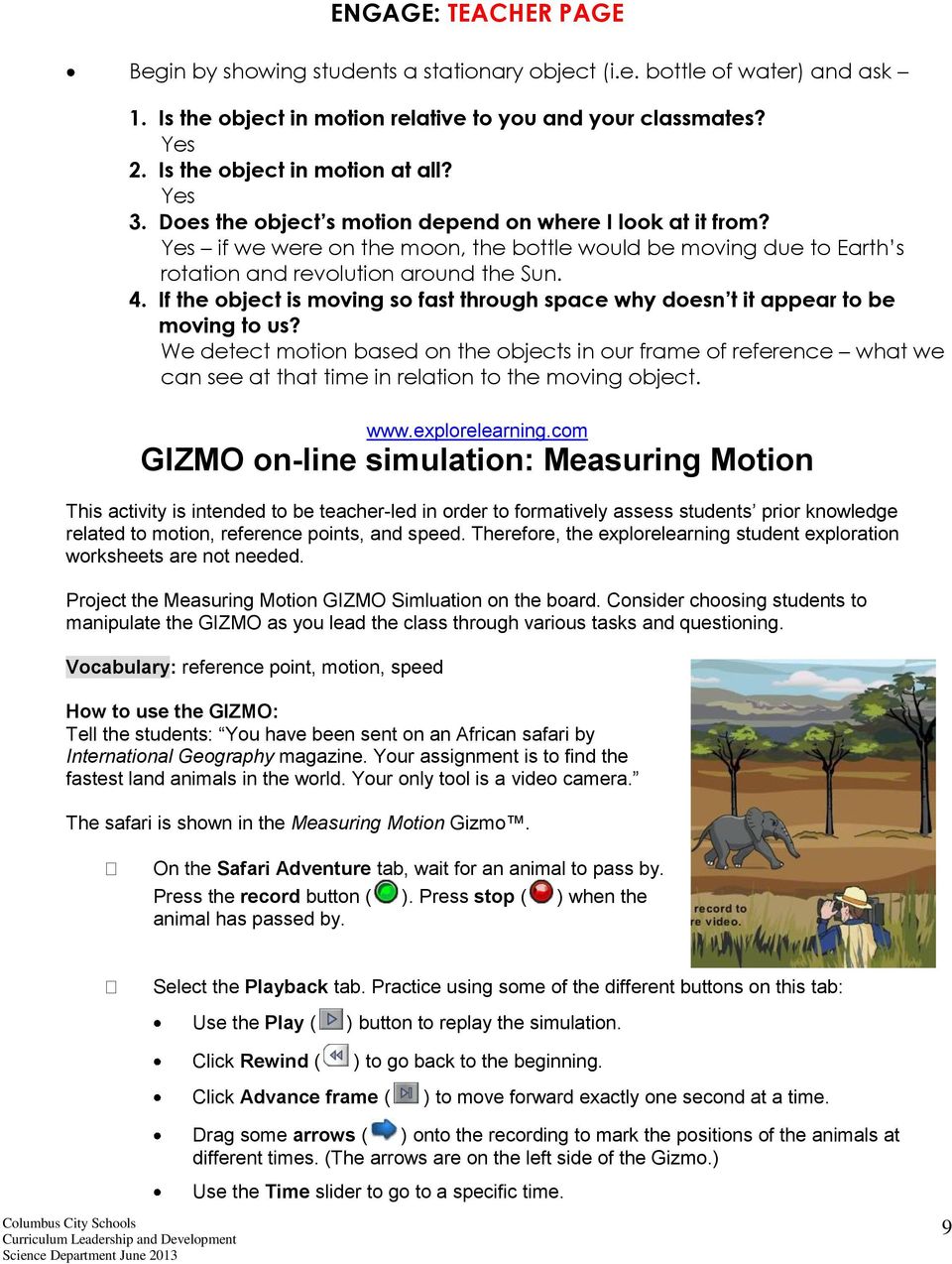
9 ENGAGE: TEACHER PAGE Begin by showing students a stationary object (i.e. bottle of water) and ask 1. Is the object in motion relative to you and your classmates? Yes 2. Is the object in motion at all? Yes 3. Does the object s motion depend on where I look at it from? Yes if we were on the moon, the bottle would be moving due to Earth s rotation and revolution around the Sun. 4. If the object is moving so fast through space why doesn t it appear to be moving to us? We detect motion based on the objects in our frame of reference what we can see at that time in relation to the moving object. GIZMO on-line simulation: Measuring Motion This activity is intended to be teacher-led in order to formatively assess students prior knowledge related to motion, reference points, and speed. Therefore, the explorelearning student exploration worksheets are not needed. Project the Measuring Motion GIZMO Simluation on the board. Consider choosing students to manipulate the GIZMO as you lead the class through various tasks and questioning. Vocabulary: reference point, motion, speed How to use the GIZMO: Tell the students: You have been sent on an African safari by International Geography magazine. Your assignment is to find the fastest land animals in the world. Your only tool is a video camera. The safari is shown in the Measuring Motion Gizmo. On the Safari Adventure tab, wait for an animal to pass by. Press the record button ( ). Press stop ( ) when the animal has passed by. Select the Playback tab. Practice using some of the different buttons on this tab: Use the Play ( ) button to replay the simulation. Click Rewind ( ) to go back to the beginning. Click Advance frame ( ) to move forward exactly one second at a time. Drag some arrows ( ) onto the recording to mark the positions of the animals at different times. (The arrows are on the left side of the Gizmo.) Use the Time slider to go to a specific time. 9
10 Teacher-led Questions: 1. Describe the motion of the animal? -Students should describe direction, relative speed, etc. 2. How did you know that the animal was moving? -Students should describe the animals position based on the reference points in the picture or the projection screen (near the first tree, right side of the screen, passed in front of the cameraman, etc.) 3. How can we use the trees to estimate the speed of the animal? -This question is a lead into the next task. Estimating Speed: Click Rewind ( ). Use Advance frame ( ) to advance the recording one second. Mark the animal s position with an arrow ( ) and repeat. If we use the trees as a reference point, estimate the distance the animal traveled in one second. Note: The trees in the background are 5 meters apart Teacher-led Questions: 1. About how far did the animal travel in 1 second? -Answers will vary depending on the animal. Example: It took the Rhino 5.4 seconds to move from tree 1 to tree 5 (trees are 5 meters apart = 25 meters). Speed = Distance divided by Time. 25 meters 5.4 seconds Speed is 4.6m/s 2. Allow students to try a few more animals. 3. Optional: Try this in the classroom by allowing students to create and develop their own example of using reference points to detect motion at their desk. (i.e. pencil rolls from one side of the desk to the other reference point are student books sitting on the table). If needed, show the video: Reference Points [3:49] 10

11 FILMSTRIP ANIMATION Name : Date: Goal: Be able to use reference points to put pictures in order based on their motion. Directions: Cut out the filmstrip sections and glue together to make one long filmstrip. Cut out and glue the pictures in the correct order on the filmstrip to show continuous change in motion. Questions: 1. Describe what is happening in the filmstrip? 2. If this filmstrip was shown as a movie, what objects in this movie would be in motion? 3. If this filmstrip was shown as a movie, what things in this movie would not be in motion? 4. What do we call these non-moving objects used for comparison, to detect motion? 5. You are sitting in a car that is stopped, and then out of the corner of your eye you see a tree on the side of the road begin to move forward The tree isn t actually moving, so in terms of motion, what is happening? 6. Motion is relative to a reference point. Can an object be in motion and not in motion at the same time? Explain. 11


12 Filmstrip Animation Directions: Cut out the following animation frames and paste them in the proper order on the film strip worksheet. 12

13 1 Filmstrip Animation 2 Attach top of Filmstrip 2 Here Attach top of Filmstrip 3 Here 13

14 3 4 Name: Attach top of Filmstrip 4 Here 14


15 Filmstrip Animation - Teacher Answer Key 15


16 FILMSTRIP ANIMATION ANSWER KEY Name : Date: Goal: Be able to use reference points to put pictures in order based on their motion. Directions: Cut out the filmstrip sections and glue together to make one long filmstrip. Cut out and glue the pictures in the correct order on the filmstrip to show continuous change in motion. Questions: 1. Describe what is happening in the filmstrip? The scientist is either moving from left to right to right to left (will vary depending on the students order) and the bunny is doing a flip. 2. If this filmstrip was shown as a movie, what objects in this movie would be in motion? The Scientist and the bunny 3. If this filmstrip was shown as a movie, what things in this movie would not be in motion? The Computers and Stands 4. What do we call these non-moving objects used for comparison, to detect motion? Reference Points 5. You are sitting in a car that is stopped, and then out of the corner of your eye you see a tree on the side of the road begin to move forward The tree isn t actually moving, so in terms of motion, what is happening? I am moving backwards 6. Motion is relative to a reference point. Can an object be in motion and not in motion at the same time? Explain. Yes. We are moving 67,000mph due to the Earth s orbit around the Sun, yet it can appear that we are not moving if we are in a stationary position. It is based on our perspective and frame of reference. 16

17 Entrance Ticket Name Date Period Think about what happens when you are at a stoplight and the light in your lane turns green, while the light in the lane next to you stays red. What happens to your car? How do you know? Where is the car that was next to you? How do you know? Entrance Ticket Name Date Period Think about what happens when you are at a stoplight and the light in your lane turns green, while the light in the lane next to you stays red. What happens to your car? How do you know? Where is the car that was next to you? How do you know? 17


18 Name Date Period Describing Motion Using a Reference Point Motion is defined as an object's change in position over time when compared with a reference point. You can manipulate objects to model motion scenarios and answer questions about motion. Scenario 1 Justin was sitting in the school bus, which was parked in front of the school. Another bus pulled up beside him and stopped to wait for a pedestrian to cross in front of it. His friend, Elijah, was on the other bus. After the walker crossed, Elijah's bus pulled out. To Elijah, how does it appear that Justin's bus is moving? Task Card A represents the stationary object. Is this Justin's or Elijah's bus? Card B represents the object in motion. Is this Justin's or Elijah's bus? Hold Card A still while slowly moving Card B forward. Follow the sight line from Card B to Card A. It points from the viewer to the other object. Does it point forward or backward? Question: To Elijah, how does it appear that Justin's bus is moving? 18

19 Name Date Period 1. You are riding our bicycle down the street. You pass the mailman pulling mail from the corner mailbox. To the mailman how do you appear to move? A. forward B. backward C. You do not appear to be moving D. In the same direction as the mailman 2. As you are riding in our car down the road, how do the light poles appear to move? A. forward B. backward C. They are stationary and do not move D. In the same direction as you 3. While sitting on the 50 yard line at the football game, you watch the quarterback of your team break loose to run 43 yards and score a touchdown. List two things you could use as reference points to describe the quarterback s motion. 4. Shaun s mother walks with him to the bus stop every morning. When the bus pulls up, Shaun gets on as his mother waves goodbye. As the bus pulls out, Shaun sees her still waving. To Shaun, how does his mother appear to move? A. forward B. backward C. She is standing still and doesn t appear to move D. In the same direction as Shaun 19


20 20


21 Name Date Period Wallace & Gromit Questionnaire A reference point is the object or place on an object to which we compare another object s motion. Motion is the change of an object s position in comparison to a reference point. 1. In the Wallace and Gromit clip, how do we know that Wallace is eating a sandwich? 2. Pick one of the scenes from this clip and draw the reference point in each frame below. What objects will you compare to the reference point to show motion? Add those objects to the two frames showing that they moved. 3. Explain in words why the observer infers that the object has moved. 21
22 Reference Point Photo Animation Project Teacher Page Summary of Task: Students will create a 5 scene picture animation using reference points to help show the motion of objects in the scene. Students will create a background, scene, and characters as well as a 5 frame sequence of actions for the objects/characters in the scene. This activity is designed to be student-centered. As students examine the motion of objects using reference points, it is recommended that they work in small groups. Encourage students to keep the perceived actions of the objects in each frame of the animation as simple as possible in order to see an obvious change in position. Students should only have 1-2 objects in motion during the animation. Also, allow students to bring in their own materials if they choose. 1. Divide the class into groups of 3-4 students. Ensure that each group contains at least one proficient artist and one student who has a basic understanding of reference point. 2. Consider designating roles and duties. Artist draws storyboard; Tech uploads images and creates PowerPoint; Cameraman-takes snapshots; Sculptor-makes clay forms/moves objects 3. Explain the directions and parameters for the activity. 4. Students will begin by discussing what the scene will look like. Students will determine which objects will remain stationary (reference points) and which object(s) will be in motion. It is recommended that no more than 2 objects should be in motion. A storyboard template is provided and should be used as a roughdraft. 5. Students will draw a background on a piece of poster board (cut in ½). Students should include 3 or more reference points on their background. 6. Students will create a 5 frame animation showing the actions of no more than 2 objects. 7. Set up digital camera stations so students can take their 5 pictures when ready. Tripods with digital cameras should be set up with a table in front so students can set their poster board backgrounds and props on the table. Optional: Include green, tan, white, and/or black ground table coverings. 8. When students have practiced their animation several times, they will go over to the digital camera station(s) and photograph each frame of their animation. Students should include a picture of their animation title and group member names before they take the pictures so you know which pictures belong to each group. Hint: Make sure that the camera stays in place and is not moved in any way. 9. Students should write 1-2 paragraphs explaining the actions occurring in the scene. Students should identify the reference points as well as the objects in motion. Example: 22
23 10. Upload the images to PowerPoint (imovie or MovieMaker) as separate slides. 11. Set up the slideshow to run automatically advancing slides every 0.25 sec. (You will need to type this in as the drop down is graduated in full seconds only.) 12. Share the animations with the class by showing the slides in slideshow mode. Extension & Interdisciplinary Connections 1. As an interdisciplinary connection to English, have students create a story to go along with the actions occurring in the animation. Be sure to include imagery and sequencing. 2. As an interdisciplinary connection to English, have students create comic strip captions to go along with their picture animation. 3. As an extenstion, have students act out their own animation. Photograph or videotape their actions. 23
24 ANIMATION STORYBOARD 24
25 Name Date Period PHOTO ANIMATION PROJECT Write a paragraph describing the events of your animation. Motion and Reference Points Questions: Circle the correct answer. 1. A crossing guard is to the right of a stop sign. A school bus is to the left of the stop sign. A flower bed is directly in front of the stop sign. What is the reference point used to describe positions in the paragraph above? a. the flower bed b. the school bus c. the stop sign d. the crossing guard 2. The post office is 4 blocks south and 6 blocks east of the school. What directions are used to describe the position of the post office? a. east and south b. the school c. 4 blocks d. 6 blocks 3. You are moving all the time because the Earth is moving. Relative to the sun, you are moving 67,000mph. Why don t you feel like you are moving this fast? a. You may feel like you are not moving because your reference point is the Earth. You are moving at the same speed as the Earth and thus don t feel the movement. b. You feel like you are moving, but the speed of the Earth compensates for a large part of the 67,000 mph. c. You are not moving unless your legs or some vehicle enables you to move. d. Since the Earth is moving in a circle, it will equalize any sense of movement you might feel. 25
26 Name Date Period Class Animations As you watch each animation, list the objects in motion, and 2 reference points you used to detect the motion. GROUP # Objects in Motion 2 Reference Points used to detect motion
Topic: Cycles and Patterns of Earth and the Moon Grade Level: 7
 7 th Grade Science Unit: Experiencing Eclipses Unit Snapshot Topic: Cycles and Patterns of Earth and the Moon Grade Level: 7 Duration: 7 Days Summary The following activities allow students to examine
Webelos Scouts will use old and new media in this adventure to bring stories to life as movies. Lights! Camera! Action!
 MOVIEMAKING RATIONALE FOR ADVENTURE Webelos Scouts will use old and new media in this adventure to bring stories to life as movies. Lights! Camera! Action! TAKEAWAYS FOR CUB SCOUTS Creating projects with
Pushes and Pulls. TCAPS Created June 2010 by J. McCain
 Pushes and Pulls K i n d e r g a r t e n S c i e n c e TCAPS Created June 2010 by J. McCain Table of Contents Science GLCEs incorporated in this Unit............... 2-3 Materials List.......................................
Changes in Our Sky Grade Two
 Ohio Standards Connection: Earth and Space Sciences Benchmark A Observe constant and changing patterns of objects in the day and night sky. Indicator 2 Observe and describe how the sun, moon and stars
Personal Timelines Grade Two
 Ohio Standards Connection Data Analysis and Probability Benchmark C Represent data using objects, picture graphs and bar graphs. Indicators 3. Read and construct simple timelines to sequence events. 5.
Science Grade 05 Unit 04 Exemplar Lesson 01: Types of Energy
 Grade 05 Unit 04 Exemplar Lesson 01: Types of Energy This lesson is one approach to teaching the State Standards associated with this unit. Districts are encouraged to customize this lesson by supplementing
Suggested Grade 1 2 Lesson Plan Students Rights and Responsibilities
 Suggested Grade 1 2 Lesson Plan Students Rights and Responsibilities Lesson 1 My Rights and Responsibilities Grade 1 st and 2 nd Objective: The students will discuss and summarize their rights and responsibilities
Force and Motion: Ramp It Up
 Force and Motion: Grade Level: 4-5 Time: 3 class periods By: Carrie D. Perry (Bedford County Public Schools) Overview After watching an engaging video on Olympic alpine skiers, students then participate
Lesson 4 What Is a Plant s Life Cycle? The Seasons of a Tree
 Lesson 4 What Is a Plant s Life Cycle? The Seasons of a Tree STUDENT SKILLS: predicting, communicating prior observations and knowledge, listening, cooperating, observing, sequencing, communicating, reasoning,
Topic: Rocks, Minerals and Soil Duration: Grade Level: 6 9 days
 6 th Grade Science Unit: Sedimentary Rocks Unit Snapshot Topic: Rocks, Minerals and Soil Duration: Grade Level: 6 9 days Summary The following activities allow students to focus on the study of rocks.
Science Grade 1 Forces and Motion
 Science Grade 1 Forces and Motion Description: The students in this unit will use their inquiry skills to explore pushing, pulling, and gravity. They will also explore the different variables which affect
Transportation: Week 2 of 2
 The Minnesota Literacy Council created this curriculum with funding from the MN Department of Education. We invite you to adapt it for your own classrooms. Beginning Level (CASAS reading scores of 181-200)
FIRST GRADE 1 WEEK LESSON PLANS AND ACTIVITIES
 FIRST GRADE 1 WEEK LESSON PLANS AND ACTIVITIES UNIVERSE CYCLE OVERVIEW OF FIRST GRADE UNIVERSE WEEK 1. PRE: Describing the Universe. LAB: Comparing and contrasting bodies that reflect light. POST: Exploring
Comparing Sets of Data Grade Eight
 Ohio Standards Connection: Data Analysis and Probability Benchmark C Compare the characteristics of the mean, median, and mode for a given set of data, and explain which measure of center best represents
Systems of Transportation and Communication Grade Three
 1 Ohio Standards Connection: Geography Benchmark D Analyze ways that transportation and communication relate to patterns of settlement and economic activity. Indicator 8 Identify systems of transportation
3rd/4th Grade Science Unit: Forces and Motion. Melissa Gucker TE 804 Spring 2007
 3rd/4th Grade Science Unit: Forces and Motion Melissa Gucker TE 804 Spring 2007 Part I: Learning Goals Documentation Unit Title: Forces and Motion Grade Level: 3 rd Designer: Melissa Gucker The Main Idea(s)/Importance
The University of Texas at Austin. Gravity and Orbits
 UTeach Outreach The University of Texas at Austin Gravity and Orbits Time of Lesson: 60-75 minutes Content Standards Addressed in Lesson: TEKS6.11B understand that gravity is the force that governs the
Understand numbers, ways of representing numbers, relationships among numbers, and number systems
 Equivalent Fractions and Comparing Fractions: Are You My Equal? Brief Overview: This four day lesson plan will explore the mathematical concept of identifying equivalent fractions and using this knowledge
NJ ASK PREP. Investigation: Mathematics. Paper Airplanes & Measurement. Grade 3 Benchmark 3 Geometry & Measurement
 S E C T I O N 4 NJ ASK PREP Mathematics Investigation: Paper Airplanes & Measurement Grade 3 Benchmark 3 Geometry & Measurement This work is licensed under the Creative Commons Attribution-NonCommercial-NoDerivs
Kindergarten Math Curriculum Course Description and Philosophy Text Reference:
 Kindergarten Math Curriculum Course Description and Philosophy How do numbers and math affect our daily lives? What types of problems can be solved by understanding numbers and math concepts? Through inquiry,
Authority versus Power by Melissa McDermott
 Authority versus Power by Melissa McDermott Lesson Description: This formative lesson focuses on developing an understanding of the concept of authority. Students will identify and role play scenarios
Acquisition Lesson Plan for the Concept, Topic or Skill---Not for the Day
 Acquisition Lesson Plan Concept: Linear Systems Author Name(s): High-School Delaware Math Cadre Committee Grade: Ninth Grade Time Frame: Two 45 minute periods Pre-requisite(s): Write algebraic expressions
Lesson 3: Behind the Scenes with Production
 Lesson 3: Behind the Scenes with Production Overview: Being in production is the second phase of the production process and involves everything that happens from the first shot to the final wrap. In this
Scarcity and Choices Grade One
 Ohio Standards Connection: Economics Benchmark A Explain how the scarcity of resources requires people to make choices to satisfy their wants. Indicator 1 Explain that wants are unlimited and resources
Phonics. High Frequency Words P.008. Objective The student will read high frequency words.
 P.008 Jumping Words Objective The student will read high frequency words. Materials High frequency words (P.HFW.005 - P.HFW.064) Choose target words. Checkerboard and checkers (Activity Master P.008.AM1a
Getting to Know Newton
 Introduction Overview This first program introduces students to the idea of motion, and the forces that start the movement of an object. Students are introduced to Isaac Newton who is best known for the
Newton s Laws of Motion Project
 Newton s Laws of Motion Project Sir Isaac Newton lived during the 1s. Like all scientists, he made observations about the world around him. Some of his observations were about motion. His observations
Windows Live Movie Maker Tutorial
 Introduction Welcome to the Windows Live Movie Maker (WLMM) Tutorial. This tutorial will help you create, edit, and finalize your WLMM video project. Table of Contents Creating and Saving a Project.. Importing
I. Title of Lesson: Learning from Artifacts and What Artifacts Tell Us
 Lesson Plan Class: Seventh Grade Subject: World History Ancient Civilizations Topic: Unit One Investigating the Past: How are social scientists like detectives? I. Title of Lesson: Learning from Artifacts
Commutative Property Grade One
 Ohio Standards Connection Patterns, Functions and Algebra Benchmark E Solve open sentences and explain strategies. Indicator 4 Solve open sentences by representing an expression in more than one way using
Energy Unit: (Approximately 5 weeks)
 The following instructional plan is part of a GaDOE collection of Unit Frameworks, Performance Tasks, examples of Student Work, and Teacher Commentary. Many more GaDOE approved instructional plans are
Local Government and Leaders Grade Three
 Ohio Standards Connection: Government Benchmark A Identify the responsibilities of the branches of the U.S. government and explain why they are necessary. Indicator 2 Explain the structure of local governments
Science Safety is Elementary Grade Three
 Ohio Standards Connection: Scientific Inquiry Benchmark C Develop, design and safely conduct scientific investigations and communicate the results. Indicator 4 Identify and apply science safety procedures.
PUSD High Frequency Word List
 PUSD High Frequency Word List For Reading and Spelling Grades K-5 High Frequency or instant words are important because: 1. You can t read a sentence or a paragraph without knowing at least the most common.
1. Get to know the SCRATCH Work Space:
 1. Get to know the SCRATCH Work Space: iquest Lesson http://www.csusm.edu/iquest - NSF Project Award Number: 0833753 Scratch 1 2. Click Control Drag When green flag is clicked. Always start every new script
Differentiated Instruction
 Differentiated Instruction In any classroom, students will have a range of abilities, needs and interests. Differentiated instruction is any instructional strategy that recognizes and supports individual
Elements of Physics Motion, Force, and Gravity Teacher s Guide
 Teacher s Guide Grade Level: 9 12 Curriculum Focus: Physical Science Lesson Duration: Three class periods Program Description Examine Isaac Newton's laws of motion, the four fundamental forces of the universe,
Animals that move slowly, animals that move quickly
 Unit Three Time 74 Animals that move slowly, animals that move quickly Unit 3: Time Image courtesy of: Microsoft clipart Focus: Animals that move slowly and quickly linked with time Whole class activity
Lesson 5: School Bus Safety
 Time: approximately 40 minutes Lesson 5: School Bus Safety LESSON PLAN: Lesson 5 This curriculum does not cover every possible scenario that a child may encounter as a pedestrian, but instead addresses
SOUTHERN REGIONAL SCHOOL DISTRICT BUSINESS CURRICULUM. Course Title: Multimedia Grade Level: 9-12
 Content Area: Business Department Course Title: Multimedia Grade Level: 9-12 Unit 1 Digital Imaging 10 Weeks Unit 2 Cell Animation 10 Weeks Unit 3 Sound Editing 10 Weeks Unit 4 Visual Editing 10 Weeks
Bar Graphs with Intervals Grade Three
 Bar Graphs with Intervals Grade Three Ohio Standards Connection Data Analysis and Probability Benchmark D Read, interpret and construct graphs in which icons represent more than a single unit or intervals
Paper Airplanes. Linsey Fordyce. Fall 2014. TEFB 413 Section # 504
 Model- Based Inquiry Learning Lesson Plan Paper Airplanes Linsey Fordyce Fall 2014 TEFB 413 Section # 504 1. BACKGROUND INFORMATION OF LESSON LESSON OBJECTIVES Students will investigate through model-
Counting Money and Making Change Grade Two
 Ohio Standards Connection Number, Number Sense and Operations Benchmark D Determine the value of a collection of coins and dollar bills. Indicator 4 Represent and write the value of money using the sign
What s My Point? - Grade Six
 Ohio Standards Connection Reading Applications: Informational, Technical and Persuasive Text Benchmark D Identify arguments and persuasive techniques used in persuasive writing. Indicators 6 Identify an
Digital Story Telling with Windows Movie Maker Step by step
 . PAGE 1 Superhighways 2013 CONTENTS Before you open Windows Movie Maker (WMM)... 3 Organising your digital assets... 3 Windows Live Photo Gallery... 3 Your First Project in WMM... 4 Adding Audio... 6
Phonics. P.041 High Frequency Words. Objective The student will read high frequency words.
 2005 The Florida Center for Reading Research (Revised, 2008) Objective The student will read high frequency words. Phonics P.041 High Frequency Words Sandpaper Words Materials Tactile word patterns (Activity
You ll have leverage as you guide
 Teacher s Guide Simple Machines Dear Educator, You ll have leverage as you guide students in the exploration of simple machines. In KIDS DISCOVER Simple Machines, your young scientists will learn about
Creating an Animation using Windows Movie Maker
 Creating an Animation using Windows Movie Maker Previewing Sample Photographs Now that you have learned a little bit about the history of clay animation and you are familiar with how to use software to
Virtual Classroom Student Guide
 Virtual Classroom Student Guide Table of Contents Overview 3 Grade Weights 3 Finding Help 3 Virtual Classroom Login 4 Virtual Classroom Lobby 5 The Course Map 6 Activities in the Virtual Classroom 7 Vocabulary
Force and Motion Grade 2
 Suggested Time Frame: 2-3 days Materials: Tennis balls, 10 Golf balls, 10 Marbles, 10 Ping pong balls, 10 Measuring tapes, 10 Rulers, 10 Stopwatch Masking tape Towel Sandpaper Wax paper Paper cups Matching
Explore 3: Crash Test Dummies
 Explore : Crash Test Dummies Type of Lesson: Learning Goal & Instructiona l Objectives Content with Process: Focus on constructing knowledge through active learning. Students investigate Newton s first
COURSE TITLE: PHOTOGRAPHY 1 GRADES 9-12 LENGTH: ONE SEMESTER SCHOOLS: RUTHERFORD HIGH SCHOOL RUTHERFORD, NEW JERSEY DATE:
 COURSE TITLE: PHOTOGRAPHY 1 GRADES 9-12 LENGTH: ONE SEMESTER SCHOOLS: RUTHERFORD HIGH SCHOOL RUTHERFORD, NEW JERSEY DATE: SPRING 2015 PHOTOGRAPHY 1 2 Rutherford High School Rutherford, NJ Photography 1
Week 4 Lesson Plan. Pre-K. Animals in the Wild. Macmillan /McGraw-Hill. Extend. the Unit
 Lesson Plan Extend Unit the Unit Pre-K Animals in the Wild Alphabet Time.....................2-3 Book Time.........................-5 Retelling Puppets................... 6 Content Area......................7-8
Herzog Keyboarding Grades 3 through 5. Overarching Essential Questions
 Herzog Keyboarding Grades 3 through 5 Overarching Essential Questions How will learning to keyboard help me with my academics today and my career tomorrow? Introduction The lessons in the Herzog Keyboarding
Teaching Methodology for 3D Animation
 Abstract The field of 3d animation has addressed design processes and work practices in the design disciplines for in recent years. There are good reasons for considering the development of systematic
I. ABSTRACT II. III. IV.
 Teaching About Magnets in Kindergarten Grade Level or Special Area: Kindergarten Written by: Lori Dawn Montanez, Swallows Charter Academy, Pueblo West, CO Length of Unit: Five lessons (approximately two
Episode 1: Literacy Resource Pack
 Episode 1: Literacy Resource Pack These resources have been written to provide teachers with starter activities and ideas relating to Episode One of Inanimate Alice. They do not constitute a complete course,
1. I have 4 sides. My opposite sides are equal. I have 4 right angles. Which shape am I?
 Which Shape? This problem gives you the chance to: identify and describe shapes use clues to solve riddles Use shapes A, B, or C to solve the riddles. A B C 1. I have 4 sides. My opposite sides are equal.
Project Based Learning First Grade: Science- Plants and Animals By: Nikki DiGiacomo
 Project Based Learning First Grade: Science- Plants and Animals By: Nikki DiGiacomo How do plants and animals live? Essential Question Sub Questions What are plants? What are animals? What are the basic
Note: The teacher will need to construct one sample automobile using the parts above to show to the students.
 Preview of Main Idea The development of the assembly line was critical to the success of Henry Ford s Model T vehicle and to the development of Detroit as the Motor City. The efficiencies of the assembly
Basic Computer Skills Module 4. Introduction to Microsoft PowerPoint 2010
 Basic Computer Skills Module 4 Introduction to Microsoft PowerPoint 2010 Basic Computer Skills Module 4 Introduction to Microsoft PowerPoint 2010 Summary Goal(s): This unit includes lessons on how to use
Doing Your Own PhotoVoice Project A Guide By Laura Lorenz, PhD and Barbara Webster
 Doing Your Own PhotoVoice Project A Guide By Laura Lorenz, PhD and Barbara Webster PhotoVoice is an activity that someone with a brain injury or anyone can do. On their own With a friend, family member,
Instructional Technology & Distance Education
 Lincoln Land Community College When you first enter a classroom, you ll most likely want to start by turning on the projector and projecting your computer desktop. You can switch to another source to project
READING THE NEWSPAPER
 READING THE NEWSPAPER Outcome (lesson objective) Students will comprehend and critically evaluate text as they read to find the main idea. They will construct meaning as they analyze news articles and
Common Core Standards for Literacy in Science and Technical Subjects
 A Correlation of Miller & Levine Biology To the Common Core Standards for Literacy in Science and Technical Subjects INTRODUCTION This document demonstrates how meets the Common Core Standards for Literacy
Lesson #13 Congruence, Symmetry and Transformations: Translations, Reflections, and Rotations
 Math Buddies -Grade 4 13-1 Lesson #13 Congruence, Symmetry and Transformations: Translations, Reflections, and Rotations Goal: Identify congruent and noncongruent figures Recognize the congruence of plane
Space Exploration Classroom Activity
 Space Exploration Classroom Activity The Classroom Activity introduces students to the context of a performance task, so they are not disadvantaged in demonstrating the skills the task intends to assess.
Second Grade Science Curriculum
 Second Grade Science Curriculum Approved July 12, 2004 The Georgia Performance Standards are designed to provide students with the knowledge and skills for proficiency in science at the second grade level.
Geometric Transformations Grade Four
 Ohio Standards Connection Geometry and Spatial Sense Benchmark I Describe, identify and model reflections, rotations and translations, using physical materials. Indicator 7 Identify, describe and use reflections
The students will be introduced to the immigration station Ellis Island and participate in a reenactment of the experience of Ellis Island.
 Title The Experience of Ellis Island Key Words Ellis Island, Citizenship, Immigration Grade Level First Time Allotted 45 minute lesson Lesson Overview The students will be introduced to the immigration
Dr. Seuss and Read Across America
 Published on AASL Learning4Life Lesson Plan Database Dr. Seuss and Read Across America Created by: Honor Zalewski Title/Role: Teacher-Librarian Organization/School Name: Cumberland County Public Schools
Energy Chains Grade Seven
 Ohio Standards Connection: Physical Science Benchmark D Describe that energy takes many forms, some forms represent kinetic energy and some forms represent potential energy; and during energy transformations
Title: The Fight to End Separate but Equal in American Schools
 Background: From the time the 14th Amendment was ratified in 1868, it was challenged. The Plessy v. Ferguson decision introduced the separate but equal standard that legalized segregation until the Brown
Science Grade 06 Unit 05 Exemplar Lesson 01: Advantages and Disadvantages of Energy Resources
 Grade 06 Unit 05 Exemplar Lesson 01: Advantages and Disadvantages of Energy Resources This lesson is one approach to teaching the State Standards associated with this unit. Districts are encouraged to
Journey to other celestial objects. learning outcomes
 The eight planets Journey to other celestial objects C 44 time 80 minutes. learning outcomes To: know which planets have moons know which planets have rings know the colours of the different planets know
Working with Windows Movie Maker
 518 442-3608 Working with Windows Movie Maker Windows Movie Maker allows you to make movies and slide shows that can be saved to your computer, put on a CD, uploaded to a Web service (such as YouTube)
Background Biology and Biochemistry Notes A
 Background Biology and Biochemistry Notes A Vocabulary dependent variable evidence experiment hypothesis independent variable model observation prediction science scientific investigation scientific law
Interaction at a Distance
 Interaction at a Distance Lesson Overview: Students come in contact with and use magnets every day. They often don t consider that there are different types of magnets and that they are made for different
Second Grade Landforms/Sense of Place Project Tami Morrison Linderman Elementary School, Polson, MT
 Unit Overview Second Grade Landforms/Sense of Place Project Tami Morrison Linderman Elementary School, Polson, MT The purpose of this unit is to help students learn the major landforms on Earth, to relate
Creating a Poster in PowerPoint 2010. A. Set Up Your Poster
 View the Best Practices in Poster Design located at http://www.emich.edu/training/poster before you begin creating a poster. Then in PowerPoint: (A) set up the poster size and orientation, (B) add and
A Beginner s Guide to PowerPoint 2010
 A Beginner s Guide to PowerPoint 2010 I. The Opening Screen You will see the default opening screen is actually composed of three parts: 1. The Slides/Outline tabs on the left which displays thumbnails
Creation. Then God spoke and Creation came into being. God formed everything: Creation Week God called all that He had created good.
 Creation Teacher Pep Talk: Imagine darkness and emptiness and nothing else except God. God in His own time decides that He is going to create something wonderful: something which will eventually cost Him
Writing Simple Stories Grade One
 Ohio Standards Connections Writing Applications Benchmark A Compose writings that convey a clear message and include well-chosen details. Indicator 1 Write simple stories with a beginning, middle and end
STOP MOTION. Recommendations:
 STOP MOTION Stop motion is a powerful animation technique that makes static objects appear to be moving. Creating stop motion draws attention to placement, framing, direction and speed of movement. There
Discovering Math: Using and Collecting Data Teacher s Guide
 Teacher s Guide Grade Level: 3-5 Curriculum Focus: Mathematics Lesson Duration: Four class periods Program Description Discovering Math: Using and Collecting Data From data points and determining spread
Fry Phrases Set 1. TeacherHelpForParents.com help for all areas of your child s education
 Set 1 The people Write it down By the water Who will make it? You and I What will they do? He called me. We had their dog. What did they say? When would you go? No way A number of people One or two How
Adding emphasis to a presentation in PowerPoint 2010 and 2013 for Windows
 Adding emphasis to a presentation in PowerPoint 2010 and 2013 for Windows This document introduces technique to add interest to your presentation using graphics, audio and video. More detailed training
Digital Curriculum Instructional Delivery
 This resource sponsored by Intel Education A planning resource for personalizing learning Digital Curriculum Instructional Delivery toolkits With game-based learning, online lessons, virtual simulations
Tips and Ideas for Making Visuals to Support Young Children with Challenging Behavior
 Tips and Ideas for Making Visuals to Support Young Children with Challenging Behavior Why Use Visual Strategies 1. Visual strategies can be used to prevent challenging behavior. 2. Visual strategies are
Guest Editorial: Digital Videos as Tools for Learning Mathematics
 Niess, M. L. & Walker, J. M. (2010). Guest editorial: Digital videos as tools for learning mathematics. Contemporary Issues in Technology and Teacher Education, 10(1), 100-105. Guest Editorial: Digital
Chapter 1 Time-Lapse Introduction and theory By E.M (Ted) Kinsman Rochester, NY June 2006
 Chapter 1 Time-Lapse Introduction and theory By E.M (Ted) Kinsman Rochester, NY June 2006 First a few words about terminology and spelling. Time-Lapse is the correct spelling, although other spellings
Plot Connections Grade Five
 Ohio Standards Connection Reading Applications: Literary Text Benchmark C Identify the elements of plot and establish a connection between an element and a future event. Indicator 3 Identify the main incidents
STUDENT CURRICULUM TEMPLATE Adapted from STARTALK program template
 STUDENT CURRICULUM TEMPLATE Adapted from STARTALK program template Teacher Name: Hong Jiang Grade or Level: Grades 6-8 Language(s): Target Proficiency Level: Novice-Low Novice -Mid Number of Contact Hours:
CREATE A 3D MOVIE IN DIRECTOR
 CREATE A 3D MOVIE IN DIRECTOR 2 Building Your First 3D Movie in Director Welcome to the 3D tutorial for Adobe Director. Director includes the option to create three-dimensional (3D) images, text, and animations.
HOW TO DO A SCIENCE PROJECT Step-by-Step Suggestions and Help for Elementary Students, Teachers, and Parents Brevard Public Schools
 HOW TO DO A SCIENCE PROJECT Step-by-Step Suggestions and Help for Elementary Students, Teachers, and Parents Brevard Public Schools 1. Get an Idea for Your Project Find an area that interests you. You
Week 4 Lesson Plan. Pre-K. Our Neighborhood. Macmillan /McGraw-Hill. Extend. the Unit
 Lesson Plan Extend Unit the Unit Pre-K Our Neighborhood Alphabet Time.....................2-3 Book Time.........................-5 Retelling Puppets..................6-7 Content Area......................8-9
Interactive Science Grade 5 2012
 A Correlation of Interactive Science Grade 5 2012 To the New Jersey Science Standards Grade 5 Introduction This document demonstrates the close alignment between Interactive Science, 2012, and the for
Visual Storytelling, Shot Styles and Composition
 Pre-Production 1.2 Visual Storytelling, Shot Styles and Composition Objectives: Students will know/be able to >> Understand the role of shot styles, camera movement, and composition in telling a story
Intro to the Art of Computer Science
 1 LESSON NAME: Intro to the Art of Computer Science Lesson time: 45 60 Minutes : Prep time: 15 Minutes Main Goal: Give the class a clear understanding of what computer science is and how it could be helpful