
API Reference Guide for Web Services
|
|
|
- Hortense Terry
- 9 years ago
- Views:
Transcription
1 API Reference Guide for Web Services June 2011 Version 1.0

2 This manual and accompanying electronic media are proprietary products of Optimal Payments plc. They are to be used only by licensed users of the product Optimal Payments plc. All rights reserved. The information within this document is subject to change without notice. The software described in this document is provided under a license agreement, and may be used or copied only in accordance with this agreement. No part of this manual may be reproduced or transferred in any form or by any means without the express written consent of Optimal Payments plc. All other names, trademarks, and registered trademarks are the property of their respective owners. Optimal Payments plc makes no warranty, either express or implied, with respect to this product, its merchantability or fitness for a particular purpose, other than as expressly provided in the license agreement of this product. For further information, please contact Optimal Payments plc. International Head Office 3500 de Maisonneuve W., Suite 700 Montreal, Quebec H3Z 3C1 Canada Tel.: (514) Fax: (514) [email protected] Technical support: [email protected] Web: U.K. Office Third Floor, Mount Pleasant House Mount Pleasant Cambridge CB3 0RN United Kingdom [email protected] Technical Support: [email protected] Web: U.S. Office 1209 Orange Street Wilmington, DE Gatineau Office 75 Promenade du Portage Gatineau, Quebec J8X 2J9 Canada

3 Contents 1 NETBANX Web Services What are NETBANX Web Services? Web Services supported for Direct Debit Web Services supported for credit cards Web Services supported for Information Lookup Service System requirements Accessing the NETBANX WSDLs and links Direct Debit Credit card Information Lookup Service Testing NETBANX Web Services Security features AVS CVD Negative database D Secure Using this guide Audience Functionality Symbols Direct Debit Transactions Introduction NET example Building charge, verify, or credit requests charge example C# ddcheckrequestv1 schema ddcheckrequestv1 elements Building updateshippinginfo requests updateshippinginfo example C# ddshippingrequestv1 schema ddshippingrequestv1 elements Processing the response Credit/Debit Card Transactions Introduction API Reference Guide for Web Services 1.0 III

4 June 2011.NET example Building Purchase/Authorization/Verification requests Purchase example C# ccauthrequestv1 schema ccauthrequestv1 elements addendumdata tag/value pairs Building Authorization Reversal requests Authorization Reversal example C# ccauthreversalrequestv1 schema ccauthreversalrequestv1 elements Building Settlement/Credit requests Settlement example C# ccpostauthrequestv1 schema ccpostauthrequestv1 elements Building Stored Data Requests Stored Data Authorization example C# ccstoreddatarequestv1 schema ccstoreddatarequestv1 elements Building Cancel requests Cancel Settle example C# cccancelrequestv1 schema cccancelrequestv1 elements Building Payment requests Payment example C# ccpaymentrequestv1 schema ccpaymentrequestv1 elements Building Enrollment Lookup requests Enrollment Lookup example C# ccenrollmentlookuprequestv1 schema ccenrollmentlookuprequestv1 elements Building Authentication requests Authentication example C# ccauthenticaterequestv1 schema ccauthenticaterequestv1 elements Processing the response detail tag/value pairs addendumresponse tag/value pairs Currency codes Information Lookup Service Transactions Introduction NETBANX ILS WSDLs and links NET example Building ILS requests ILS C# IV

5 June 2011 ilslookuprequestv1 schema ilslookuprequestv1 elements Processing the response ilslookupresponsev1 schema Response element contents Authorizations response details Settlements response details Credits response details Chargebacks response details Reason codes Chargeback reason codes Retrieval request reason codes A Using the HTTP Post Method Introduction A-1 Direct Debit requests A-1 charge/verify/credit A-1 HTML example charge A-2 updateshippinginfo A-4 HTML example updateshippinginfo A-4 Credit card requests A-5 Purchase/Authorization/Verification A-5 HTML example Authorization A-7 Authorization Reversal A-9 HTML example Authorization Reversal A-9 Settlement/Credit A-10 HTML example Settlement A-11 Stored Data Authorization/Purchase A-12 HTML example Stored Data Authorization A-12 Cancel Settle/Credit/Payment A-13 HTML example Cancel A-14 Payment request A-14 HTML example Payment A-15 Enrollment Lookup A-16 HTML example Enrollment Lookup A-17 Authentication A-18 HTML example Authentication A-19 Information Lookup Service requests A-19 HTML example - ILS A-20 Sample HTTP Post A-21 Sample HTTP Post responses A-22 B Response Codes Overview B-1 Response codes B-1 API Reference Guide for Web Services 1.0 V

6 June 2011 Action codes B-16 Return codes B-16 C Geographical Codes Province codes C-1 State codes C-2 Country codes C-3 VI
7 CHAPTER 1 NETBANX Web Services What are NETBANX Web Services? Web Services are a technology that allows applications to communicate with each other in a platform- and programming language independent manner. A Web Service is a software interface that describes a collection of operations that can be accessed over the network through standardized XML messaging. It uses protocols based on the XML language to describe an operation to execute or data to exchange with another Web Service. Web Services are built on open standards such as SOAP and WSDL. NETBANX Web Services offer the following benefits: Merchants can integrate easily with the Web Service API, using their favourite platform and language. Merchants can automate operation and avoid manually keying in information via the NET- BANX Web page. Merchants can operate independently of changes and updates to the NETBANX Web site. Web Services supported for Direct Debit NETBANX currently supports the following Web Services for Direct Debit: Table 1-1: Direct Debit Operations Operation verify charge credit updateshippinginfo Description Allows you to confirm that a customer s bank account is in good standing, without actually transferring money out of that account. Allows you to transfer money from a customer s bank account to your merchant account. This transaction is completed in real time, though the banking network takes 3 5 days to transfer the funds. Allows you to transfer money from your merchant account directly to a customer s bank account. This transaction is completed in real time, though the banking network takes 3 5 days to transfer the funds. Allows you to send shipping information, including a tracking number, once you have shipped goods for which you previously processed a charge transaction. Availability of Direct Debit operation types is allotted on a merchant-by-merchant basis, since not all merchant banks support all operations. If you have any questions, contact your account manager. Web Services supported for credit cards NETBANX currently supports the following Web Services for credit cards: API Reference Guide for Web Services

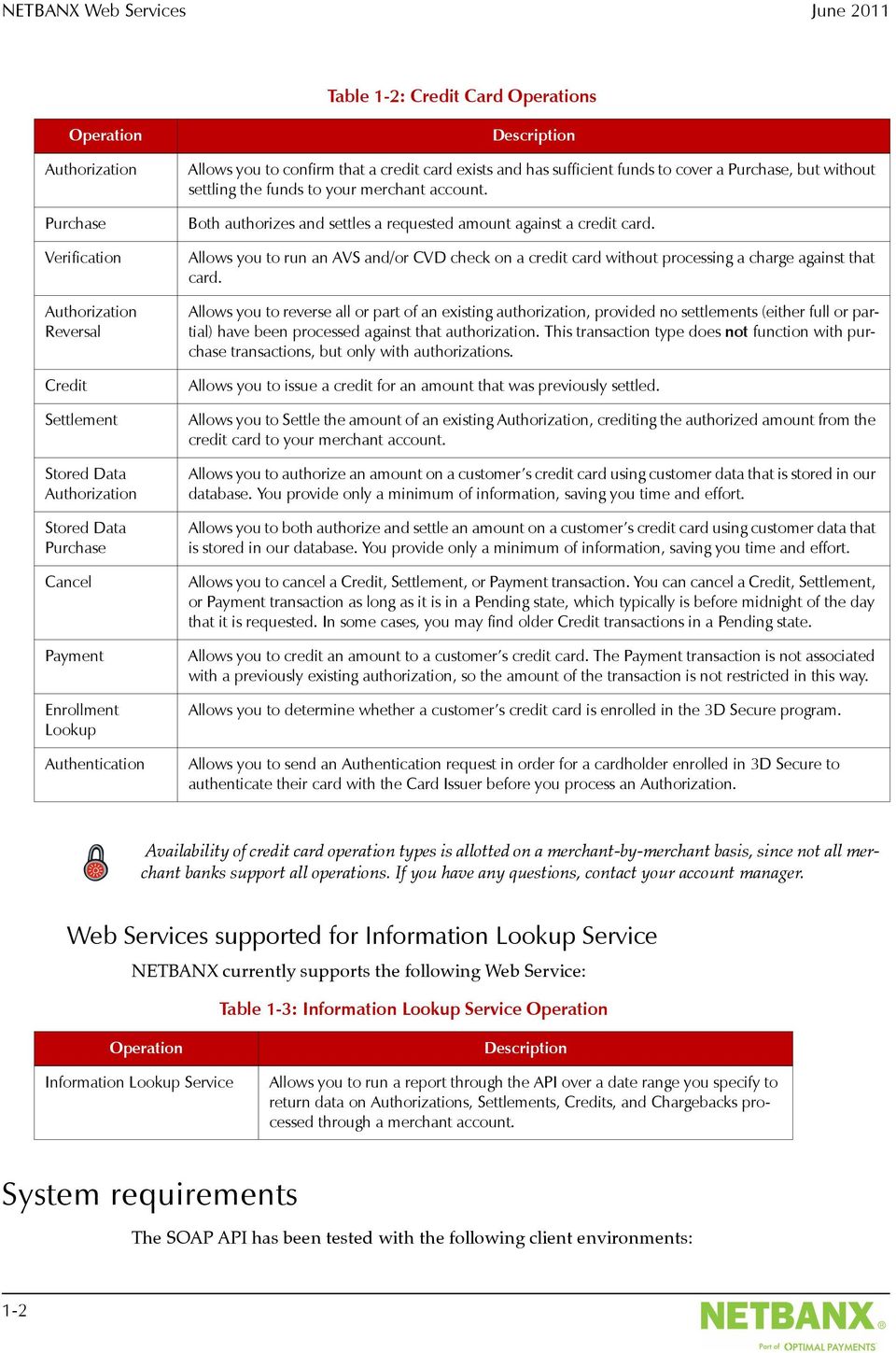
8 NETBANX Web Services June 2011 Table 1-2: Credit Card Operations Operation Authorization Purchase Verification Authorization Reversal Credit Settlement Stored Data Authorization Stored Data Purchase Cancel Payment Enrollment Lookup Authentication Description Allows you to confirm that a credit card exists and has sufficient funds to cover a Purchase, but without settling the funds to your merchant account. Both authorizes and settles a requested amount against a credit card. Allows you to run an AVS and/or CVD check on a credit card without processing a charge against that card. Allows you to reverse all or part of an existing authorization, provided no settlements (either full or partial) have been processed against that authorization. This transaction type does not function with purchase transactions, but only with authorizations. Allows you to issue a credit for an amount that was previously settled. Allows you to Settle the amount of an existing Authorization, crediting the authorized amount from the credit card to your merchant account. Allows you to authorize an amount on a customer s credit card using customer data that is stored in our database. You provide only a minimum of information, saving you time and effort. Allows you to both authorize and settle an amount on a customer s credit card using customer data that is stored in our database. You provide only a minimum of information, saving you time and effort. Allows you to cancel a Credit, Settlement, or Payment transaction. You can cancel a Credit, Settlement, or Payment transaction as long as it is in a Pending state, which typically is before midnight of the day that it is requested. In some cases, you may find older Credit transactions in a Pending state. Allows you to credit an amount to a customer s credit card. The Payment transaction is not associated with a previously existing authorization, so the amount of the transaction is not restricted in this way. Allows you to determine whether a customer s credit card is enrolled in the 3D Secure program. Allows you to send an Authentication request in order for a cardholder enrolled in 3D Secure to authenticate their card with the Card Issuer before you process an Authorization. Availability of credit card operation types is allotted on a merchant-by-merchant basis, since not all merchant banks support all operations. If you have any questions, contact your account manager. Web Services supported for Information Lookup Service NETBANX currently supports the following Web Service: Table 1-3: Information Lookup Service Operation Operation Information Lookup Service Description Allows you to run a report through the API over a date range you specify to return data on Authorizations, Settlements, Credits, and Chargebacks processed through a merchant account. System requirements The SOAP API has been tested with the following client environments: 1-2
9 June 2011 Accessing the NETBANX WSDLs and links Table 1-4: Client Environments SOAP Client Programming Environment Operating Environment Microsoft.NET 1.1 and 2.0 Framework Microsoft Visual Studio.NET 2003 Microsoft Windows Server 2003 and Windows XP Apache Axis 1.4 Java (J2SE 1.4.X and higher) Linux and Microsoft Windows XP, Server 2003 Apache Axis 2.0 Java (J2SE 1.4.X and 1.5.X) Linux and Microsoft Windows XP, Server 2003 For more information: J2SE or J2EE or newer (1.4.X recommended) Sun Microsystems, Inc. Apache Axis 1.4, The Apache Software Foundation Apache Axis2, 1.2, The Apache Software Foundation Microsoft.NET Framework Version 1.1/2.0 Microsoft Corporation Regardless of which SOAP client you adopt, it must support document-style messaging. Accessing the NETBANX WSDLs and links Direct Debit Credit card WSDL: Web Service: HTTP Post: WSDL: Web Service: HTTP Post: API Reference Guide for Web Services

10 NETBANX Web Services June 2011 Information Lookup Service WSDL: Web Service: HTTP Post: Testing NETBANX Web Services Once you have configured your Web Services enabled application, please contact our Technical Support team for instructions on how to test your API calls. Telephone Security features For some transactions (e.g., Purchase) the NETBANX transaction processor provides additional features to protect the merchant from fraudulent card usage. Address verification system (AVS) Card validation data (CVD) Negative database 3D Secure AVS The NETBANX transaction processor supports address verification checks (AVS) wherever the issuing bank supports this feature. AVS verifies whether the address supplied by the customer using a card matches the billing address associated with that card at the issuing bank. This makes it more difficult to use the card fraudulently, since in order to use a stolen card someone must also know the billing address associated with it. In addition, if goods are to be shipped, the merchant can require that they be shipped to the billing address associated with the card. Within NETBANX, each payment method is configured with the acceptable set of AVS return codes. If the bank returns a code that is not acceptable for the payment method, then the request is rejected with an Authorization Failed error. If you get an Authorization Failed error in response to a transaction request, and an Authorization number is returned in the response, then the failure was caused by the AVS check. You can look at the AVS code returned to determine exactly why the AVS check failed. The NETBANX transaction processor returns the following codes, in the avsresponse element, to the merchant application in response to a transaction request, with A, N, and E indicating AVS failure: Table 1-5: AVS Codes Code Letter Explanation A Address matches, but zip code does not. 1-4

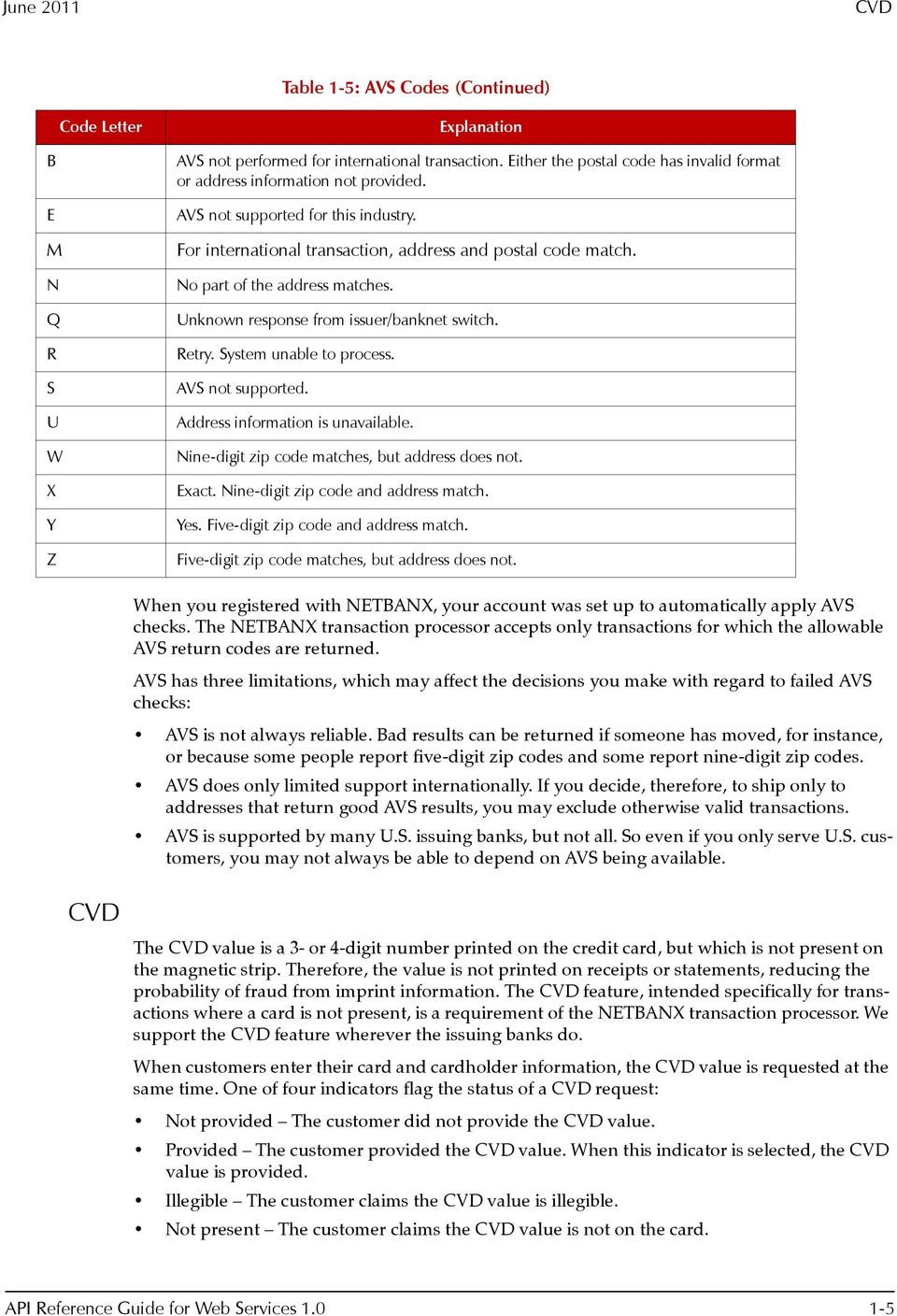
11 June 2011 CVD Table 1-5: AVS Codes (Continued) Code Letter Explanation B E M N Q R S U W X Y Z AVS not performed for international transaction. Either the postal code has invalid format or address information not provided. AVS not supported for this industry. For international transaction, address and postal code match. No part of the address matches. Unknown response from issuer/banknet switch. Retry. System unable to process. AVS not supported. Address information is unavailable. Nine-digit zip code matches, but address does not. Exact. Nine-digit zip code and address match. Yes. Five-digit zip code and address match. Five-digit zip code matches, but address does not. When you registered with NETBANX, your account was set up to automatically apply AVS checks. The NETBANX transaction processor accepts only transactions for which the allowable AVS return codes are returned. AVS has three limitations, which may affect the decisions you make with regard to failed AVS checks: AVS is not always reliable. Bad results can be returned if someone has moved, for instance, or because some people report five-digit zip codes and some report nine-digit zip codes. AVS does only limited support internationally. If you decide, therefore, to ship only to addresses that return good AVS results, you may exclude otherwise valid transactions. AVS is supported by many U.S. issuing banks, but not all. So even if you only serve U.S. customers, you may not always be able to depend on AVS being available. CVD The CVD value is a 3- or 4-digit number printed on the credit card, but which is not present on the magnetic strip. Therefore, the value is not printed on receipts or statements, reducing the probability of fraud from imprint information. The CVD feature, intended specifically for transactions where a card is not present, is a requirement of the NETBANX transaction processor. We support the CVD feature wherever the issuing banks do. When customers enter their card and cardholder information, the CVD value is requested at the same time. One of four indicators flag the status of a CVD request: Not provided The customer did not provide the CVD value. Provided The customer provided the CVD value. When this indicator is selected, the CVD value is provided. Illegible The customer claims the CVD value is illegible. Not present The customer claims the CVD value is not on the card. API Reference Guide for Web Services
12 NETBANX Web Services June 2011 Negative database 3D Secure Using this guide Audience NETBANX administers a negative database that provides additional protection against misuse of cards and inappropriate transaction requests. Card numbers and addresses are entered into the negative database for the following reasons: A chargeback associated with the card number or address has occurred. The card number or address was involved in, or suspected to have been involved in, fraudulent activity. Your account is configured to automatically implement this security feature, and any transaction request that attempts to use either a card number or address that is in the negative database will not be processed. NETBANX supports 3D Secure, an online cardholder authentication program designed to make Internet purchase transactions safer by authenticating a cardholder's identity at the time of purchase, before the merchant submits an authorization request. It is currently supported by several card brands, including Visa (Verified by Visa), MasterCard (SecureCode), and JCB (J/Secure). Authorizations processed using 3D Secure are guaranteed against most common types of chargeback disputes. This user guide details major system functions. Each section provides an overview of functions, which are then broken down into procedures with steps to be followed. This user s guide is intended for NETBANX merchants using our Web Services API to process transaction requests with NETBANX. Functionality Symbols This guide may document some features to which you do not have access. Access to such functionality is allotted on a merchant-by-merchant basis. If you have any questions, contact your account manager. This user guide uses the following symbols to bring important items to your attention: Table 1-6: Symbols Symbol Description This note icon denotes a hint or tip to help you use the transaction processing application more efficiently. This warning icon alerts you about actions you might take that could have important consequences. 1-6

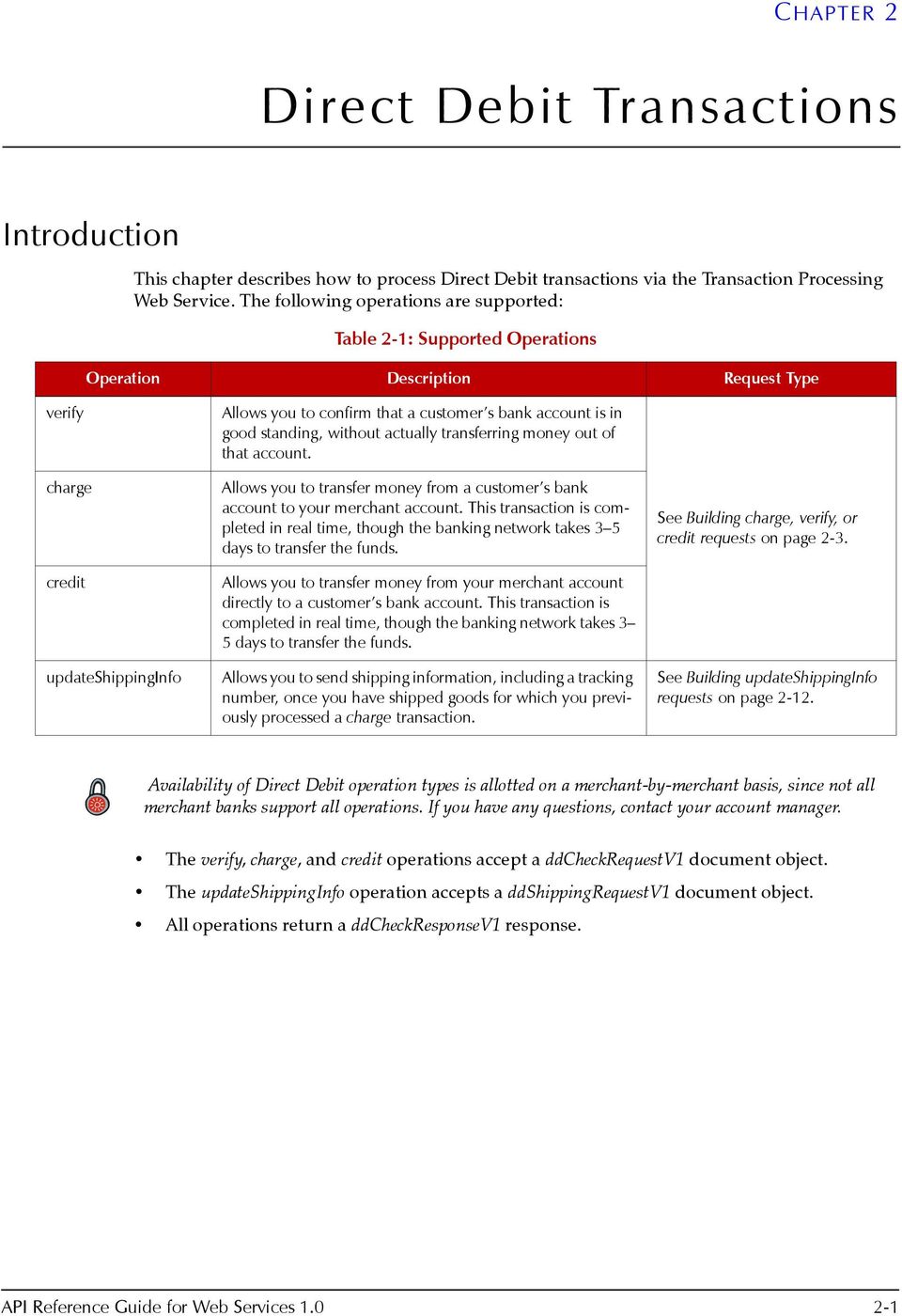
13 CHAPTER 2 Direct Debit Transactions Introduction This chapter describes how to process Direct Debit transactions via the Transaction Processing Web Service. The following operations are supported: Table 2-1: Supported Operations Operation Description Request Type verify charge credit updateshippinginfo Allows you to confirm that a customer s bank account is in good standing, without actually transferring money out of that account. Allows you to transfer money from a customer s bank account to your merchant account. This transaction is completed in real time, though the banking network takes 3 5 days to transfer the funds. Allows you to transfer money from your merchant account directly to a customer s bank account. This transaction is completed in real time, though the banking network takes 3 5 days to transfer the funds. Allows you to send shipping information, including a tracking number, once you have shipped goods for which you previously processed a charge transaction. See Building charge, verify, or credit requests on page 2-3. See Building updateshippinginfo requests on page Availability of Direct Debit operation types is allotted on a merchant-by-merchant basis, since not all merchant banks support all operations. If you have any questions, contact your account manager. The verify, charge, and credit operations accept a ddcheckrequestv1 document object. The updateshippinginfo operation accepts a ddshippingrequestv1 document object. All operations return a ddcheckresponsev1 response. API Reference Guide for Web Services

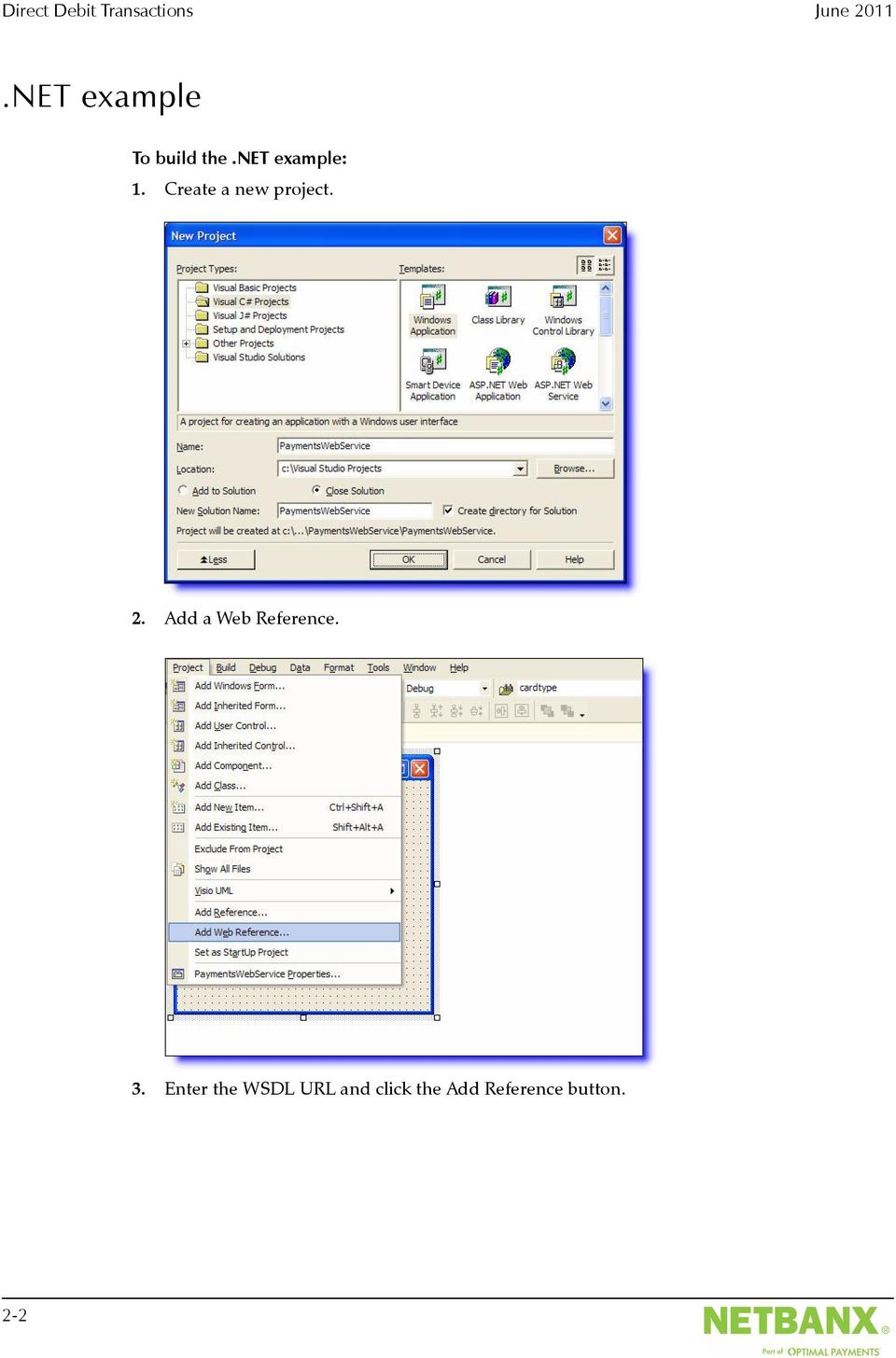
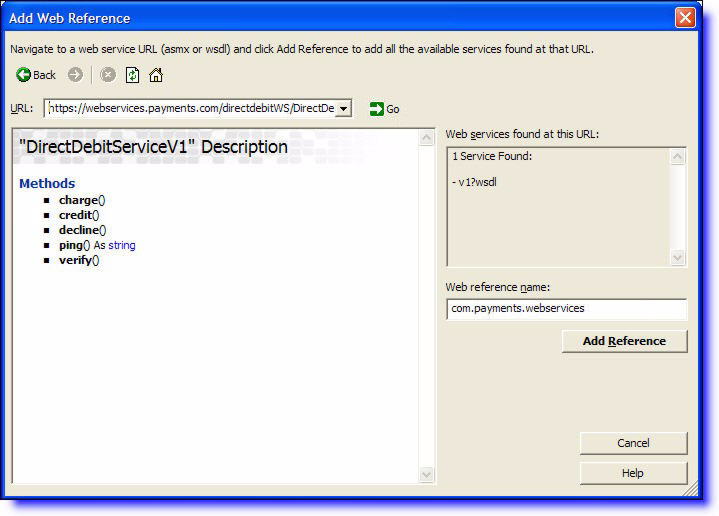
14 Direct Debit Transactions June 2011.NET example To build the.net example: 1. Create a new project. 2. Add a Web Reference. 3. Enter the WSDL URL and click the Add Reference button. 2-2
15 June 2011 Building charge, verify, or credit requests The Web client is now built. 4. Build a Direct Debit request and process response. See Building charge, verify, or credit requests on page 2-3 See Building updateshippinginfo requests on page 2-12 See Processing the response on page 2-16 Building charge, verify, or credit requests Charge, verify, and credit requests require the ddcheckrequestv1 document object. This section describes the structure of a ddcheckrequestv1 and how to construct one. See Table 2-2: ddcheckrequestv1 Elements on page 2-6 for details on elements required. charge example C# The following is a charge example in C#. API Reference Guide for Web Services

16 Direct Debit Transactions June 2011 To make this a credit or verify request, just modify the value charge (underlined below) to credit or verify, respectively. // Prepare the call to the Direct Debit Web Service DDCheckRequestV1 ddcheckrequest = new DDCheckRequestV1(); ddcheckrequest.amount = "10.00"; MerchantAccountV1 merchantaccount = new MerchantAccountV1(); merchantaccount.accountnum = " "; merchantaccount.storeid = "mystoreid"; merchantaccount.storepwd = "mystorepwd"; ddcheckrequest.merchantaccount = merchantaccount; CheckV1 check = new CheckV1(); check.routingnum = " "; check.accountnum = " "; check.accounttype = BankAccountTypeV1.PC; check.bankname = "Chase"; check.checknum = 12; check.payee = "ACME Inc."; ddcheckrequest.check = check; BillingDetailsV1 billingdetails = new BillingDetailsV1(); billingdetails.firstname = "Jane"; billingdetails.lastname = "Jones"; billingdetails.street = "123 Main Street"; billingdetails.city = "LA"; billingdetails.country = CountryV1.US; billingdetails.zip = "90210"; billingdetails.phone = " "; billingdetails.checkpaymethod = CheckPayMethodV1.WEB; ddcheckrequest.billingdetails = billingdetails; //Perform the Web Services call to process the charge DirectDebitServiceV1 ddservice = new DirectDebitServiceV1(); DDCheckResponseV1 ddtxnresponse = ddservice.charge(ddcheckrequest); // Print out the result String responsetxt = ddtxnresponse.code + " - " + ddtxnresponse.decision + " - " + ddtxnresponse.description; responsetxt += "Details:" + Environment.NewLine; if (ddtxnresponse.detail!= null) { for (int i = 0; i < ddtxnresponse.detail.length; i++) { responsetxt += " - " + ddtxnresponse.detail[i].tag + " - " + ddtxnresponse.detail[i].value + Environment.NewLine; } } responsetxt = responsetxt.replace("\n", Environment.NewLine); System.Console.WriteLine(responseTxt); if (DecisionV1.ACCEPTED.Equals(ddTxnResponse.decision)) { System.Console.WriteLine("Transaction Successful."); } else { System.Console.WriteLine("Transaction Failed with decision: " + ddtxnresponse.decision); } 2-4

17 June 2011 ddcheckrequestv1 schema ddcheckrequestv1 schema A ddcheckrequestv1 document object has the following structure: API Reference Guide for Web Services

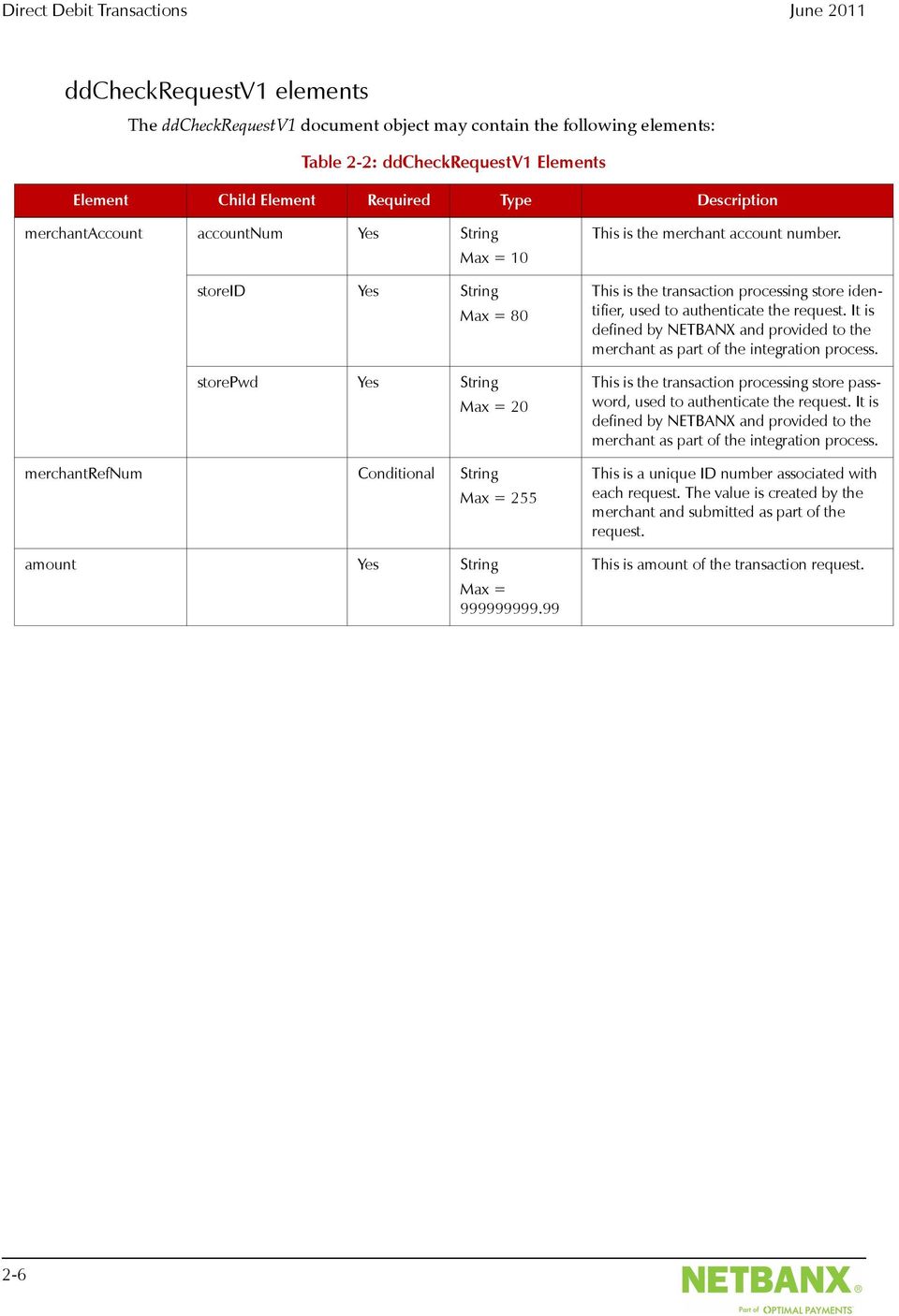
18 Direct Debit Transactions June 2011 ddcheckrequestv1 elements The ddcheckrequestv1 document object may contain the following elements: Table 2-2: ddcheckrequestv1 Elements Element Child Element Required Type Description merchantaccount accountnum Yes String Max = 10 storeid Yes String Max = 80 storepwd Yes String Max = 20 merchantrefnum Conditional String Max = 255 amount Yes String Max = This is the merchant account number. This is the transaction processing store identifier, used to authenticate the request. It is defined by NETBANX and provided to the merchant as part of the integration process. This is the transaction processing store password, used to authenticate the request. It is defined by NETBANX and provided to the merchant as part of the integration process. This is a unique ID number associated with each request. The value is created by the merchant and submitted as part of the request. This is amount of the transaction request. 2-6
19 June 2011 ddcheckrequestv1 elements Table 2-2: ddcheckrequestv1 Elements (Continued) Element Child Element Required Type Description check accounttype Yes Enumeration This is the type of checking account used for the transaction. Possible values are: PC (Personal Checking) PS (Personal Savings) PL(Personal Loan) BC (Business Checking) BS (Business Savings) BL (Business Loan) bankname Yes String Max = 40 checknum Yes Long Max = 8 accountnum Yes String Max = 17 routingnum Yes String Min = 6 Max = 9 payee Conditional String Max = 81 This is the name of the customer s bank, to which this transaction is posted. This is the check serial number, provided at the time of the transaction request. NOTE: The checknum element is required for the verify operation, where it serves as a unique transaction ID, even though no money is transferred between accounts for this operation. This is the customer s bank account number. For USD accounts, this is the 9-digit routing number of the customer s bank. For British pound accounts, this is the 6-digit sort code of the customer s bank. For Canadian dollar accounts, this is a combination of the 3-digit institution ID followed by the 5-digit transit number of the customer s bank branch. They must be entered in this order. Do not include spaces or dashes. This is the descriptor that will appear on the customer s bank account. It is required only for credit and verify transactions. If you provide a value for this field, this value will be used as the statement descriptor. If you do not provide a value for this field, a default value configured for the merchant account will be used. bankcountry Conditional Enumeration This is the country in which the bank is located. See Country codes on page C-3 for correct codes to use. This is a required element only for certain countries. bankcity Conditional String Max = 40 This is the city in which the bank is located. This is a required element only for certain countries. API Reference Guide for Web Services

20 Direct Debit Transactions June 2011 Table 2-2: ddcheckrequestv1 Elements (Continued) Element Child Element Required Type Description billingdetails checkpaymethod Yes Enumeration This is the payment type. Possible values are: WEB (Personal Check Only) TEL (Personal Check Only) PPD (Personal Check Only) CCD (Business Check Only) firstname Conditional String Max = 40 lastname Conditional String Max = 40 companyname Conditional String Max = 50 street Yes String Max = 50 street2 Optional String Max = 50 city Yes String Max = 40 state/region Conditional If state, then Enumeration If region, then string Max = 40 This is the customer s first name. Required if checkpaymethod is set to WEB or TEL. This is the customer s last name. Required if checkpaymethod is set to WEB or TEL. This is the company s name. Required if checkpaymethod is a business check. This is the first line of the customer s street address. This is the second line of the customer s street address. This is the city in which the customer resides. This is the state/province/region in which the customer resides. Provide state if within U.S./Canada. Provide region if outside of U.S./Canada. See Appendix C: Geographical Codes for correct codes to use. country Yes Enumeration This is the country in which the customer resides. See Country codes on page C-3 for correct codes to use. zip Optional String Max = 10 phone Yes String Max = 40 Optional String Max = 100 This is the customer s ZIP code if in the U.S.; otherwise, this is the customer s postal code. This is the customer s telephone number. This is the customer s address. 2-8

21 June 2011 ddcheckrequestv1 elements Table 2-2: ddcheckrequestv1 Elements (Continued) Element Child Element Required Type Description personalid idnumber Optional String Max = 20 This is the number of the ID provided for the idtype element. idtype Optional Enumeration This is the type of ID used to identify the owner of the bank account. Possible values are: DL (Driver s License) SS (Government ID) MI (Military ID) GN(Generic ID) state/region Optional If state, then Enumeration If region, then string Max = 40 country Optional String Length = 2 This is the state/province/region in which the ID was issued. Provide state if within U.S./Canada. Provide region if outside of U.S./Canada. See Appendix C: Geographical Codes for correct codes to use. This is the country in which the ID was issued. Possible values are: CA (Canada) US (United States) expiry Optional The expiry child element has three further child elements. Child Element of expiry day Optional Int Length = 2 month Optional Int Length = 2 year Conditional Int Length = 4 This is the day the ID expires. This is the month the ID expires. This is the year the ID expires. This element is required if the expiry element is included. API Reference Guide for Web Services
22 Direct Debit Transactions June 2011 Table 2-2: ddcheckrequestv1 Elements (Continued) Element Child Element Required Type Description shippingdetails carrier Optional Enumeration This is the shipment carrier. Possible values are: APC = APC Overnight APS = AnPost CAD = Canada Postal Service DHL FEX = Fedex RML = Royal Mail UPS = United Parcel Service USPS = United States Postal Service OTHER trackingnumber Optional String Max = 50 This is the shipping tracking number provided by the carrier. shipmethod Optional Enumeration This is the method of shipment. Possible values are: N = Next Day/Overnight T = Two-Day Service C = Lowest Cost O = Other firstname Optional String Max = 40 lastname Optional String Max = 40 street Optional String Max = 50 street2 Optional String Max = 50 city Optional String Max = 40 state/region Optional If state, Enumeration If region, then string Max = 40 This is the recipients s first name. This is the recipient s last name. This is the first line of the recipient s street address. This is the second line of the recipient s street address. This is the city in which the recipient resides. This is the state/province/region in which the recipient resides. Provide state if within U.S./Canada. Provide region if outside of U.S./Canada. See Appendix C: Geographical Codes for correct codes to use. country Optional Enumeration This is the country in which the recipient resides. See Country codes on page C-3 for correct codes to use. zip Optional String Max = 10 phone Optional String Max = 40 Optional String Max = 100 This is the recipient s ZIP code if in the U.S.; otherwise, this is the recipient s postal code. This is the recipient s phone number. This is the recipient s address. 2-10
23 June 2011 ddcheckrequestv1 elements Table 2-2: ddcheckrequestv1 Elements (Continued) Element Child Element Required Type Description customerip Optional String Max = 50 This is the customer s IP address. producttype Optional Enumeration This is the type of product sold. Possible values are: P (Physical Goods) D (Digital Goods) C (Digital Content) G (Gift Certificate/Digital Cash) S (Shareware) M (Both Digital and Physical) R (Account Replenish) txnappliedto No This element is not applicable for Direct Debit transactions. confirmationnumber Conditional String Max = 20 This is the confirmation number returned by NETBANX in response to the original charge request. Include this element only if you are using the ddcheckrequestv1 to process a credit request. targetvirtualaccount No This element is not applicable for Direct Debit transactions. checkriskservice No This element is not applicable for Direct Debit transactions. txndate Optional datetime This is the date and time that the transaction took place. sdk version Conditional String Max = 20 platform Conditional String Max = 10 provider Conditional String Max = 20 This is the version of the SDK used, if any. Required if sdk element is provided. This is the integration language of the SDK used (e.g., Java,.NET). Required if sdk element is provided. This is the author of the SDK used. Set to value op when the SDK is provided by NETBANX. Required if sdk element is provided. origin Optional Enumeration The is the origin of the request. Possible values are: Wireless Wireline addendumdata tag Optional String Max = 30 value Optional String Max = 1024 This is additional data that the merchant can include with the transaction request. This is additional data that the merchant can include with the transaction request. API Reference Guide for Web Services
24 Direct Debit Transactions June 2011 Building updateshippinginfo requests All optional elements that take non-nullable data types (e.g., int or enum) must have their specified attribute set to true when setting values for those elements. See the shipmethod element in the example below. The updateshippinginfo request requires the ddshippingrequestv1 document object. This section describes the structure of a ddshippingrequestv1 and how to construct one. See Table 2-3: ddshippingrequestv1 Elements on page 2-15 for details on elements required. updateshippinginfo example C# The following is an updateshippinginfo example in C#. // Prepare the call to the Direct Debit Web Service DDShippingRequestV1 ddshippingrequest = new DDShippingRequestV1(); MerchantAccountV1 merchantaccount = new MerchantAccountV1(); merchantaccount.accountnum = " "; merchantaccount.storeid = "mystoreid"; merchantaccount.storepwd = "mystorepwd"; ddshippingrequest.merchantaccount = merchantaccount; ddshippingrequest.confirmationnumber = "123456"; // A valid confirmation number from a previous settle auth or purchase ddshippingrequest.carrier = CarrierV1.FEX; // Fedex ddshippingrequest.shipmethod = ShipMethodV1.T; ddshippingrequest.shipmethodspecified = true; ddshippingrequest.trackingnumber = " "; ddshippingrequest.firstname = "Jane"; ddshippingrequest.lastname = "Jones"; ddshippingrequest.street = "123 Main Street"; ddshippingrequest.city = "LA"; ddshippingrequest.country = CountryV1.US; ddshippingrequest.countryspecified = true; ddshippingrequest.zip = "90210"; ddshippingrequest. = "janejones@ server.com"; // optional address //Perform the Web Services call to update the shipping info DirectDebitServiceV1 ddservice = new DirectDebitServiceV1(); DDCheckResponseV1 ddtxnresponse = ddservice.updateshippinginfo(ddshippingrequest); // Print out the result String responsetxt = ddtxnresponse.code + " - " + ddtxnresponse.decision + " - " + ddtxnresponse.description; responsetxt += "Details:" + Environment.NewLine; if (ddtxnresponse.detail!= null) { for (int i = 0; i < ddtxnresponse.detail.length; i++) { responsetxt += " - " + ddtxnresponse.detail[i].tag + " - " + ddtxnresponse.detail[i].value + Environment.NewLine; } } responsetxt = responsetxt.replace("\n", Environment.NewLine); System.Console.WriteLine(responseTxt); if (DecisionV1.ACCEPTED.Equals(ddTxnResponse.decision)) { System.Console.WriteLine("Transaction Successful."); 2-12
25 June 2011 updateshippinginfo example C# } else { } System.Console.WriteLine("Transaction Failed with decision: " + ddtxnresponse.decision); API Reference Guide for Web Services
26 Direct Debit Transactions June 2011 ddshippingrequestv1 schema A ddshippingrequestv1 document object has the following structure: 2-14
27 June 2011 ddshippingrequestv1 elements ddshippingrequestv1 elements The ddshippingrequestv1 document object may contain the following elements: Table 2-3: ddshippingrequestv1 Elements Element Child Element Required Type Description merchantaccount accountnum Yes String Max = 10 storeid Yes String Max = 20 storepwd Yes String Max = 20 This is the merchant account number. This is the transaction processing store identifier, used to authenticate the request. It is defined by NETBANX and provided to the merchant as part of the integration process. This is the transaction processing store password, used to authenticate the request. It is defined by NETBANX and provided to the merchant as part of the integration process. carrier Yes Enumeration This is the shipment carrier. Possible values are: APC = APC Overnight APS = AnPost CAD = Canada Postal Service DHL FEX = Fedex RML = Royal Mail UPS = United Parcel Service USPS = United States Postal Service OTHER trackingnumber Yes String Max = 50 confirmationnumber Yes String Max = 20 This is the shipping tracking number provided by the carrier. This is the confirmation number returned by NETBANX. shipmethod Optional Enumeration This is the method of shipment. Possible values are: N = Next Day/Overnight T = Two-Day Service C = Lowest Cost O = Other firstname Optional String Max = 40 lastname Optional String Max = 40 street Optional String Max = 50 street2 Optional String Max = 50 This is the customer s first name. This is the customer s last name. This is the first line of the customer s street address. This is the second line of the customer s street address. API Reference Guide for Web Services
28 Direct Debit Transactions June 2011 Table 2-3: ddshippingrequestv1 Elements (Continued) Element Child Element Required Type Description city Optional String Max = 40 state/region Optional If state, then Enumeration If region, then string Max = 40 This is the city in which the customer resides. This is the state/province/region in which the customer resides. Provide state if within U.S./Canada. Provide region if outside of U.S./Canada. See Appendix C: Geographical Codes for correct codes to use. country Optional Enumeration This is the country in which the customer resides. See Country codes on page C-3 for correct codes to use. zip Optional String Max = 10 phone Optional String Max = 40 Optional String Max = 100 This is the customer s ZIP code if in the U.S.; otherwise, this is the customer s postal code. This is the customer s telephone number. This is the customer s address. Processing the response A ddcheckresponsev1 has the following structure: 2-16
29 June 2011 Processing the response The following elements are relevant for a ddcheckresponsev1: Table 2-4: ddcheckresponsev1 Elements Element Child Element Required Type Description confirmationnumber Yes String Max = 20 This is the confirmation number returned by NETBANX. decision Yes Enumeration This is the status of the transaction. One of the following is returned: Accepted the transaction was processed. Error the transaction was attempted, but failed for some reason. Declined the transaction was declined before it was sent for processing. code Yes Int This is a numeric code that categorizes the response. See Response codes on page B-1. actioncode Optional Enumeration This indicates what action to take. The following values are possible: C = Consumer Parameter Error. The consumer has provided incorrect information. Ask the customer to correct the information. D = Do Not Retry. Further attempts will fail. M = Merchant Parameter Error. Your application has provided incorrect information. Verify your information. R = Retry. The problem is temporary. Retrying the request will likely succeed. description Optional String Max = 100 detail tag Optional String Max = 1024 value Optional String Max = 30 This is a human readable description of the code element. This is the classification of the detail element. This is the description of the detail. txntime Yes datetime This is the date and time the transaction was processed by NETBANX. To process the response: 1. Get the response details, which are available via get() methods of the response. String responsetxt = ddtxnresponse.code + " - " + ddtxnresponse.decision + " - " + ddtxnresponse.description; responsetxt += "Details:" + Environment.NewLine; if (ddtxnresponse.detail!= null) { for (int i = 0; i < ddtxnresponse.detail.length; i++) { responsetxt += " - " + ddtxnresponse.detail[i].tag + " - " + ddtxnresponse.detail[i].value + Environment.NewLine; } API Reference Guide for Web Services
30 Direct Debit Transactions June 2011 } responsetxt = responsetxt.replace("\n", Environment.NewLine); System.Console.WriteLine(responseTxt); if (DecisionV1.ACCEPTED.Equals(ddTxnResponse.decision)) { System.Console.WriteLine("Transaction Successful."); } else { System.Console.WriteLine("Transaction Failed with decision: " + ddtxnresponse.decision); } 2. Process based on the decision element. You would insert handling code appropriate to your application. You can also look at the code element to provide more fine-grained control for your application. See Response codes on page B-1 for more details. 2-18
31 CHAPTER 3 Credit/Debit Card Transactions Introduction This chapter describes how to process credit and debit card transactions via the Transaction Processing Web Service. The following operations are supported: Table 3-1: Supported Operations Operation Description Request Type Authorization Purchase Verification Authorization Reversal Credit Settlement Stored Data Authorization Stored Data Purchase Cancel Payment Allows you to authorize an amount on a customer s credit/ debit card. The authorized amount must be settled in a subsequent settlement transaction. Allows you to both authorize and settle an amount on a customer s credit/debit card in a single transaction. Allows you to run an AVS and/or CVD check on a customer s credit card without processing a charge against that card. Allows you to reverse all or part of an existing authorization, provided no settlements (either full or partial) have been processed against that authorization. This transaction type does not function with purchase transactions, but only with authorizations. Allows you to credit back to a customer s credit/debit card an amount that has previously been settled. You can credit all or part of an existing settlement. Allows you to settle an amount that was previously authorized on a customer s credit/debit card. You can settle all or part of an existing authorization. Allows you to authorize an amount on a customer s credit/debit card using customer data that is stored in our database. You provide only a minimum of information, saving you time and effort. Allows you to both authorize and settle an amount on a customer s credit/debit card using customer data that is stored in our database. You provide only a minimum of information, saving you time and effort. Allows you to cancel a Credit, Settlement, or Payment transaction. You can cancel a Credit, Settlement, or Payment transaction as long as it is in a Pending state, which typically is before midnight of the day that it is requested. In some cases, you may find older Credit transactions in a Pending state. Allows you to credit an amount to a customer s credit/debit card. The Payment transaction is not associated with a previously existing authorization, so the amount of the transaction is not restricted in this way. See Building Purchase/Authorization/Verification requests on page 3-4. See Building Authorization Reversal requests on page See Building Settlement/Credit requests on page See Building Stored Data Requests on page See Building Cancel requests on page See Building Payment requests on page API Reference Guide for Web Services
32 Credit/Debit Card Transactions June 2011 Table 3-1: Supported Operations Operation Description Request Type Enrollment Lookup Authentication Allows you to determine whether a customer s credit card is enrolled in the 3D Secure program. Allows you to send an Authentication request, in order to validate a cardholder s password for credit cards enrolled in the 3D Secure program. See Building Enrollment Lookup requests on page See Building Authentication requests on page Availability of credit card operation types is allotted on a merchant-by-merchant basis, since not all merchant banks support all operations. If you have any questions, contact your account manager. The Authorization, Purchase, and Verification operations accept a ccauthrequestv1 document object. The Authorization Reversal operation accepts a ccauthreversalrequestv1 document object. The Settlement and Credit operations accept a ccpostauthrequestv1 document object. The Stored Data operations accept a ccstoreddatarequestv1 document object. The Cancel Settle, Cancel Credit, and Cancel Payment operations accept a cccancelrequestv1 document object. The Payment operation accepts a ccpaymentrequestv1 document object. The Enrollment Lookup operation accepts a ccenrollmentlookuprequestv1 document object. The Authentication operation accepts a ccauthenticaterequestv1 document object. All operations return a cctxnresponsev1 response..net example To build the.net example: 1. Create a new project. 3-2
33 June 2011.NET example 2. Add a Web Reference. 3. Enter the WSDL URL and click the Add Reference button. API Reference Guide for Web Services

34 Credit/Debit Card Transactions June 2011 The Web client is now built. 4. Build the request and process response: See Building Purchase/Authorization/Verification requests on page 3-4 See Building Authorization Reversal requests on page 3-15 See Building Settlement/Credit requests on page 3-18 See Building Stored Data Requests on page 3-22 See Building Cancel requests on page 3-25 See Building Payment requests on page 3-29 See Building Enrollment Lookup requests on page 3-35 See Building Authentication requests on page 3-39 See Processing the response on page 3-43 Building Purchase/Authorization/Verification requests Purchase, Authorization, and Verification requests require the ccauthrequestv1 document object. This section describes the structure of a ccauthrequestv1 and how to construct one. See Table 3-2: ccauthrequestv1 Elements on page 3-8 for details on the elements required. Purchase example C# All optional elements that take non-nullable data types (e.g., int or enum) must have their specified attribute set to true when setting values for those elements. See the cardtype element in the example below. The following is a Purchase example in C#. To make this an Authorize or Verification request, just modify the value ccpurchase (underlined below) to ccauthorize or ccverification, respectively. //Prepare the call to the Credit Card Web Service CCAuthRequestV1 ccauthrequest = new CCAuthRequestV1(); MerchantAccountV1 merchantaccount = new MerchantAccountV1(); merchantaccount.accountnum = " "; 3-4
35 June 2011 Purchase example C# merchantaccount.storeid = "mystoreid"; merchantaccount.storepwd = "mystorepwd"; ccauthrequest.merchantaccount = merchantaccount; ccauthrequest.merchantrefnum = "Ref-12345"; ccauthrequest.amount = "10.00"; CardV1 card = new CardV1(); card.cardnum = " "; CardExpiryV1 cardexpiry = new CardExpiryV1(); cardexpiry.month = 11; cardexpiry.year = 2006; card.cardexpiry = cardexpiry; card.cardtype = CardTypeV1.VI; card.cardtypespecified = true; card.cvdindicator = 1; card.cvdindicatorspecified = true; card.cvd = "111"; ccauthrequest.card = card; BillingDetailsV1 billingdetails = new BillingDetailsV1(); billingdetails.cardpaymethod = CardPayMethodV1.WEB; //WEB = Card Number Provided billingdetails.cardpaymethodspecified = true; billingdetails.firstname = "Jane"; billingdetails.lastname = "Jones"; billingdetails.street = "123 Main Street"; billingdetails.city = "LA"; billingdetails.item = (object) StateV1.CA; // California billingdetails.country = CountryV1.US; // United States billingdetails.countryspecified = true; billingdetails.zip = "90210"; billingdetails.phone = " "; billingdetails. = "janejones@ server.com"; ccauthrequest.billingdetails = billingdetails; ccauthrequest.customerip = " "; ccauthrequest.producttype = ProductTypeV1.M; //M = Both Digital and Physical(e.g., software downloaded followed by media shipment) ccauthrequest.producttypespecified = true; // Perform the Web Services call for the purchase CreditCardServiceV1 ccservice = new CreditCardServiceV1(); CCTxnResponseV1 cctxnresponse = ccservice.ccpurchase(ccauthrequest); // Print out the result String responsetxt = cctxnresponse.code + " - " + cctxnresponse.decision + " - " + cctxnresponse.description + Environment.NewLine; if (cctxnresponse.detail!= null) { for (int i = 0; i < cctxnresponse.detail.length; i++) { responsetxt += " - " + cctxnresponse.detail[i].tag + " - " + cctxnresponse.detail[i].value + Environment.NewLine; } } responsetxt = responsetxt.replace("\n", Environment.NewLine); System.Console.WriteLine(responseTxt); if (DecisionV1.ACCEPTED.Equals(ccTxnResponse.decision)) { System.Console.WriteLine("Transaction Successful."); } API Reference Guide for Web Services
36 Credit/Debit Card Transactions June 2011 else { } System.Console.WriteLine("Transaction Failed with decision: " + cctxnresponse.decision); 3-6
37 June 2011 ccauthrequestv1 schema ccauthrequestv1 schema A ccauthrequestv1 has the following structure: API Reference Guide for Web Services
38 Credit/Debit Card Transactions June 2011 ccauthrequestv1 elements The ccauthrequestv1 document object may contain the following elements: Table 3-2: ccauthrequestv1 Elements Element Child Element Required Type Description merchantaccount accountnum Yes String Max = 10 storeid Yes String Max = 80 storepwd Yes String Max = 20 merchantrefnum Yes String Max = 255 amount Yes String Max= This is the merchant account number. This is the transaction processing store identifier, used to authenticate the request. It is defined by NETBANX and provided to the merchant as part of the integration process. This is the transaction processing store password, used to authenticate the request. It is defined by NETBANX and provided to the merchant as part of the integration process. This is a unique ID number associated with each request. The value is created by the merchant and submitted as part of the request. This is amount of the transaction request. NOTE: Though mandatory, this value will be ignored for the ccverification transaction. 3-8
39 June 2011 ccauthrequestv1 elements Table 3-2: ccauthrequestv1 Elements (Continued) Element Child Element Required Type Description card cardnum Yes String Min = 8 Max = 20 This is the card number used for the transaction. cardexpiry Yes The cardexpiry child element has two further child elements month and year. Child Element of cardexpiry month Yes Int Max = 2 year Yes Int Length = 4 This is the month the credit card expires. This is the year the credit card expires. cardtype Optional Enumeration This is the type of card used for the transaction. Possible values are: AM = American Express DC = Diners Club DI = Discover JC = JCB LA = Laser MC = MasterCard MD = Maestro SF = Swiff SO = Solo SW = Switch VD = Visa Debit VE = Visa Electron VI = Visa issuenum Optional Integer Max = 2 cvdindicator Optional Integer Length = 1 cvd Conditional String Length = 3 or 4 The 1- or 2-digit number located on the front of the card, following the card number. NOTE: The issuenum element can be used only when the cardtype is MD (Maestro), SO (Solo), or SW (Switch). This is the status of CVD value information. Possible values are: 0 The customer did not provide a value. 1 The customer provided a value. 2 The value is illegible. 3 The value is not on the card. NOTE: The cvdindicator element is mandatory for the ccverification transaction. Also note that even though this element is optional, it is required for several risk-related checks and we strongly advise you to include it to avoid failed transactions. The 3- or 4-digit security code that appears on the card following the card number. This code does not appear on imprints. NOTE: The cvd element is mandatory when the cvdindicator element value = 1. API Reference Guide for Web Services
40 Credit/Debit Card Transactions June 2011 Table 3-2: ccauthrequestv1 Elements (Continued) Element Child Element Required Type Description authentication Use this element with ccauthorize or ccpurchase requests only. indicator Optional Integer Value = 1 cavv Optional String Max = 80 xid Optional String Max = 80 This is the Electronic Commerce Indicator code, a 2-digit value that gets returned by the card issuer indicating whether the cardholder was successfully authenticated. Possible values are: Visa / JCB 05 Identifies a successfully authenticated transaction. 06 Identifies an attempted authenticated transaction. 07 Identifies a non-authenticated transaction. MasterCard 01 Identifies a non-authenticated transaction. 02 Identifies a successfully authenticated transaction. This value is returned in the eci child element of the tdsauthenticateresponse element in the cctxnresponsev1 to your ccauthenticaterequestv1 request. This is the Cardholder Authentication Verification Value. This value is returned in the cavv child element of the tdsauthenticateresponse element in the cctxnresponsev1 to your ccauthenticaterequestv1 request. This is the transaction identifier returned by the card issuer. This value is returned in the xid child element of the tdsauthenticateresponse element in the cctxnresponsev1 to your ccauthenticaterequestv1 request. 3-10
41 June 2011 ccauthrequestv1 elements Table 3-2: ccauthrequestv1 Elements (Continued) Element Child Element Required Type Description billingdetails cardpaymethod Optional Enumeration For internal use only. firstname Optional String Max = 40 lastname Optional String Max = 40 street Optional String Max = 50 street2 Optional String Max = 50 city Optional String Max = 40 state/region Optional If state, Enumeration If region, then string Max = 40 This is the customer s first name. This is the customer s last name. This is the first line of the customer s street address. NOTE: the street element is mandatory if you are processing a ccverification transaction. This is the second line of the customer s street address. This is the city in which the customer resides. This is the state/province/region in which the customer resides. Provide state if within U.S./Canada. Provide region if outside of U.S./Canada. See Appendix C: Geographical Codes for correct codes to use. country Optional Enumeration This is the country in which the customer resides. See Country codes on page C-3 for correct codes to use. zip Mandatory String Max = 10 phone Optional String Max = 40 Optional String Max = 100 This is the customer s ZIP code if in the U.S.; otherwise, this is the customer s postal code. This is the customer s telephone number. This is the customer s address. API Reference Guide for Web Services
42 Credit/Debit Card Transactions June 2011 Table 3-2: ccauthrequestv1 Elements (Continued) Element Child Element Required Type Description shippingdetails carrier Optional Enumeration This is the shipment carrier. Possible values are: APC = APC Overnight APS = AnPost CAD = Canada Postal Service DHL FEX = Fedex RML = Royal Mail UPS = United Parcel Service USPS = United States Postal Service OTHER shipmethod Optional Enumeration The method of shipment. Possible values are: N = Next Day/Overnight T = Two-Day Service C = Lowest Cost O = Other firstname Optional String Max = 40 lastname Optional String Max = 40 street Optional String Max = 50 street2 Optional String Max = 50 city Optional String Max = 40 state/region Optional If state, Enumeration If region, then string Max = 40 This is the recipients s first name. This is the recipient s last name. This is the first line of the recipient s street address. This is the second line of the recipient s street address. This is the city in which the recipient resides. This is the state/province/region in which the recipient resides. Provide state if within U.S./Canada. Provide region if outside of U.S./Canada. See Appendix C: Geographical Codes for correct codes to use. country Optional Enumeration This is the country in which the recipient resides. zip Optional String Max = 10 phone Optional String Max = 40 Optional String Max = 100 This is the recipient s ZIP code if in the U.S.; otherwise, this is the recipient s postal code. This is the recipient s phone number. This is the recipient s address. 3-12
43 June 2011 ccauthrequestv1 elements Table 3-2: ccauthrequestv1 Elements (Continued) Element Child Element Required Type Description recurring Optional recurringindicator Conditional Enumeration Use this parameter to indicate whether a transaction is an initial or a repeat transaction for a specific customer for whom you will be processing recurring transactions. Depending on which processing gateway is used, if the value for a repeat transaction is set to R, the gateway may be more lenient regarding certain requirements such as CVD data and address information, authorizing the request without this data. Possible values are: I Initial Recurring R Subsequent Recurring originalconfirmationnumber Conditional String Max = 20 If this is a recurring transaction, this is the confirmation number returned by NET- BANX for the initial transaction in the series. If you include this value, NETBANX will be able to more precisely identify an Authorization to Settle or a Settlement to Credit, should either of those transactions be required in the future. previousconfirmationnumber Conditional String Max = 20 If this is a recurring transaction, this is the confirmation number returned by NET- BANX for the most recent transaction in the series. If you include this value, NETBANX will be able to more precisely identify an Authorization to Settle or a Settlement to Credit, should either of those transactions be required in the future. customerip Optional String Max = 50 This is the customer s IP address. producttype Optional Enumeration This is the type of product sold. Possible values are: P (Physical Goods) D (Digital Goods) C (Digital Content) G (Gift Certificate/Digital Cash) S (Shareware) M (Both Digital and Physical) R (Account Replenish) targetvirtualaccount No This element is not applicable for credit card transactions. cardriskservice No For internal use only. dupecheck Optional Boolean This validates that this request is not a duplicate. A request is considered a duplicate if the cardnum, amount, and merchantrefnum are the same. API Reference Guide for Web Services
44 Credit/Debit Card Transactions June 2011 Table 3-2: ccauthrequestv1 Elements (Continued) Element Child Element Required Type Description sdk version Conditional String Max = 20 platform Conditional String Max = 10 provider Conditional String Max = 20 addendumdata tag Optional String Max = 30 value Optional String Max = 1024 This is the version of the SDK used, if any. Required if sdk element is provided. This is the integration language of the SDK used (e.g., Java,.NET). Required if sdk element is provided. This is the author of the SDK used. Set to value op when the SDK is provided by NETBANX. Required if sdk element is provided. This is additional data that can be included with the transaction request. See addendumdata tag/value pairs on page 3-14 for details. This is additional data that can be included with the transaction request. See addendumdata tag/value pairs on page 3-14 for details. merchantdescriptor NOTE: Not all processing gateways support this parameter. Contact your account manager for more information. dynamicdescriptor Optional String Max = 25 phone Optional String Max = 13 This is a merchant descriptor that will be displayed on a customer s credit card statement. This is the merchant s phone number, which will be appended to the merchant descriptor on a customer s credit card statement. addendumdata tag/value pairs Not all processing gateways support all addendumdata tag/value pairs. Contact your account manager for more information The following table contains the tag/value pairs supported for the addendumdata element. Table 3-3: addendumdata Tag/Value Pairs Tag CUST_ACCT_OPEN_DATE CUSTOMER_ID CUSTOMER_SESSION_ID Value This is the date the merchant account opened. Format = yyyymmdd This is an ID used by the merchant. Maximum of 64 numeric characters. This string is used to initiate a lookup call with a device profiler. It must be the same string you use as the session identifier in the profiling JavaScript on the HTML page you present to your customer for device profiling. Accepted characters are: [a-z][a-z][_][-] 3-14
45 June 2011 Building Authorization Reversal requests Table 3-3: addendumdata Tag/Value Pairs (Continued) Tag Value KEYWORD MERCHANT_COUNTRY_CODE MERCHANT_SIC_CODE MERCHANT_ZIP_CODE PRODUCT_TYPE PRODUCT_CODE SERVICE_REQUEST_CURRENCY NOTE: This tag/value pair can be included with the ccauthrequestv1 document object only (i.e., for Authorization, Purchase, and Verification card transaction requests). USER_DATA_04 USER_DATA_05 USER_DATA_06 This value can be any text the merchant wants to use, e.g., used for reporting purposes in the NETBANX merchant back office. For example, you can use this as a tag to identify the transaction or the product purchased at your site. Maximum of 255 alphanumeric characters. Can be specified more than once, with a different value each time. Valid for CCAuthRequestV1 and CCStoredDataRequestV1 objects. This is a two-character country code. Value is not validated. This is the ISO Standard Industry Code (SIC) for the merchant. This is a 4-character numerical string. Maximum of 10 alphanumeric characters. This is the type of product purchased. Possible values are: P Physical goods D Digital goods C Digital content G Gift certificate/digital cash S Shareware M Digital and physical R Account replenish (e.g., subscription renewal) This is the product code of the item purchased. Maximum of 18 alphanumeric characters. Include this tag/value pair in order to have the merchant account s currency returned in the transaction response. Possible values: on off This is a user-defined field. Maximum of 255 alphanumeric characters. This is a user-defined field. Maximum of 255 alphanumeric characters. This is a user-defined field. Maximum of 255 alphanumeric characters. Building Authorization Reversal requests Authorization Reversal requests allow you to reverse all or part of an existing authorization, provided no settlements (either full or partial) have been processed against that authorization. You can use Authorization Reversal transactions to reverse Authorizations only. You cannot reverse Purchase transactions. Authorization Reversal requests require the ccauthreversalrequestv1 document object. This section describes the structure of a ccauthreversalrequestv1 and how to construct one. See Table 3-4: ccauthreversalrequestv1 Elements on page 3-17 for details on the elements required. API Reference Guide for Web Services
46 Credit/Debit Card Transactions June 2011 Authorization Reversal example C# The following is an Authorization Reversal example in C#. //Prepare the call to the Credit Card Web Service CCAuthReversalRequestV1 authreversalrequest = new CCAuthReversalRequestV1(); MerchantAccountV1 merchantaccount = new MerchantAccountV1(); merchantaccount.accountnum = " "; merchantaccount.storeid = "mystoreid"; merchantaccount.storepwd = "mystorepwd"; authreversalrequest.merchantaccount = merchantaccount; authreversalrequest.confirmationnumber = " "; authreversalrequest.merchantrefnum = "AR2"; authreversalrequest.reversalamount = "18.00"; // Perform the Web Services call for the Auth Reversal CreditCardServiceV1 ccservice = new CreditCardServiceV1(); CCTxnResponseV1 cctxnresponse = ccservice.ccauthorizereversal(authreversalrequest); // Print out the result String responsetxt = cctxnresponse.confirmationnumber + " - " + cctxnresponse.code + " - " + cctxnresponse.decision + " - " + cctxnresponse.description; responsetxt += Environment.NewLine; responsetxt += "Details:" + Environment.NewLine; if (cctxnresponse.detail!= null) { for (int i = 0; i < cctxnresponse.detail.length; i++) { responsetxt += " - " + cctxnresponse.detail[i].tag + " - " + cctxnresponse.detail[i].value + Environment.NewLine; } } responsetxt = responsetxt.replace("\n", Environment.NewLine); System.Console.WriteLine(responseTxt); consoletextbox.text = responsetxt; if (DecisionV1.ACCEPTED.Equals(ccTxnResponse.decision)) { System.Console.WriteLine("Transaction Successful."); } else { System.Console.WriteLine("Transaction Failed with decision: " + cctxnresponse.decision); } ccauthreversalrequestv1 schema A ccauthreversalrequestv1 has the following structure: 3-16
47 June 2011 ccauthreversalrequestv1 elements ccauthreversalrequestv1 elements The ccauthreversalrequestv1 document object contains the following elements: Table 3-4: ccauthreversalrequestv1 Elements Element Child Element Required Type Description merchantaccount accountnum Yes String Max = 10 storeid Yes String Max = 80 storepwd Yes String Max = 20 confirmationnumber Yes String Max = 20 merchantrefnum Yes String Max = 255 This is the merchant account number. This is the transaction processing store identifier, used to authenticate the request. It is defined by NETBANX and provided to the merchant as part of the integration process. This is the transaction processing store password, used to authenticate the request. It is defined by NETBANX and provided to the merchant as part of the integration process. This is the confirmation number returned by NETBANX for the Authorization you want to reverse. This is a unique ID number associated with each request. The value is created by the merchant and submitted as part of the request. API Reference Guide for Web Services
48 Credit/Debit Card Transactions June 2011 Table 3-4: ccauthreversalrequestv1 Elements (Continued) Element Child Element Required Type Description reversalamount Optional String Max= addendumdata tag Optional String Max = 30 value Optional String Max = 1024 This is amount of the original authorization that you want to reverse. If you omit this element, the full amount of the original authorization will be reversed. NOTE: Not all processing gateways support partial authorization reversals. Contact your account manager for more information. This is additional data that can be included with the transaction request. See addendumdata tag/value pairs on page 3-14 for details. This is additional data that can be included with the transaction request. See addendumdata tag/value pairs on page 3-14 for details. Building Settlement/Credit requests Settlement and Credit requests require the ccpostauthrequestv1 document object. This section describes the structure of a ccpostauthrequestv1 and how to construct one. See Table 3-5: ccpostauthrequestv1 Elements on page 3-21 for details on the elements required. Settlement example C# The following is a Settlement example in C#. To make this a Credit request, just modify the value ccsettlement (underlined below) to cccredit. //Prepare the call to the Credit Card Web Service CCPostAuthRequestV1 ccpostauthrequest = new CCPostAuthRequestV1(); ccpostauthrequest.confirmationnumber = "123456"; MerchantAccountV1 merchantaccount = new MerchantAccountV1(); merchantaccount.accountnum = " "; merchantaccount.storeid= "mystoreid"; merchantaccount.storepwd = "mystorepwd"; ccpostauthrequest.merchantaccount = merchantaccount; ccpostauthrequest.merchantrefnum = "Ref-12345"; ccpostauthrequest.amount = "10.00"; // Perform the Web Service call for the Settlement CreditCardServiceV1 ccservice = new CreditCardServiceV1(); CCTxnResponseV1 cctxnresponse = ccservice.ccsettlement(ccpostauthrequest); // Print out the result String responsetxt = cctxnresponse.code + " - " + cctxnresponse.decision + " - " + cctxnresponse.description ; responsetxt += "Details:" + Environment.NewLine; 3-18
49 June 2011 Settlement example C# if (cctxnresponse.detail!= null) { for (int i = 0; i < cctxnresponse.detail.length; i++) { responsetxt += " - " + cctxnresponse.detail[i].tag + " - " + cctxnresponse.detail[i].value + Environment.NewLine; } } responsetxt = responsetxt.replace("\n", Environment.NewLine); System.Console.WriteLine(responseTxt); if (DecisionV1.ACCEPTED.Equals(ccTxnResponse.decision)) { System.Console.WriteLine("Transaction Successful."); } else { System.Console.WriteLine("Transaction Failed with decision: " + cctxnresponse.decision); } API Reference Guide for Web Services
50 Credit/Debit Card Transactions June 2011 ccpostauthrequestv1 schema A ccpostauthrequestv1 document object has the following structure: 3-20
51 June 2011 ccpostauthrequestv1 elements ccpostauthrequestv1 elements The ccpostauthrequestv1 document object may contain the following elements: Table 3-5: ccpostauthrequestv1 Elements Element Child Element Required Type Description merchantaccount accountnum Yes String Max = 10 storeid Yes String Max = 20 storepwd Yes String Max = 20 confirmationnumber Yes String Max = 20 merchantrefnum Yes String Max = 40 amount Optional String Max= origmerchanttxn Conditional String Max = 255 This is the merchant account number. This is the transaction processing store identifier, used to authenticate the request. It is defined by NETBANX and provided to the merchant as part of the integration process. This is the transaction processing store password, used to authenticate the request. It is defined by NETBANX and provided to the merchant as part of the integration process. This is the confirmation number returned by the payment processor for the original request. This is a unique ID number associated with each request. The value is created by the merchant and submitted as part of the request. This is amount of the transaction request. You can Settle all or part of an Authorization. You can Credit all or part of a Settlement. This is the merchant transaction ID from a Settlement that was processed via the Direct Payment API and that is now being credited via the Web Services API. dupecheck Optional Boolean This validates that this request is not a duplicate. A request is considered a duplicate if the cardnum, amount, and merchantrefnum are the same. sdk version Conditional String Max = 20 platform Conditional String Max = 10 provider Conditional String Max = 20 This is the version of the SDK used, if any. Required if sdk element is provided. This is the integration language of the SDK used (e.g., Java,.NET). Required if sdk element is provided. This is the author of the SDK used. Set to value op when the SDK is provided by NETBANX. Required if sdk element is provided. API Reference Guide for Web Services
52 Credit/Debit Card Transactions June 2011 Table 3-5: ccpostauthrequestv1 Elements (Continued) Element Child Element Required Type Description addendumdata tag Optional String Max = 30 value Optional String Max = 1024 This is additional data that can be included with the transaction request. See addendumdata tag/value pairs on page 3-14 for details. This is additional data that can be included with the transaction request. See addendumdata tag/value pairs on page 3-14 for details. Building Stored Data Requests Stored Data Authorization/Purchase requests require the ccstoreddatarequestv1 document object. This section describes the structure of a ccstoreddatarequestv1 and how to construct one. See Table 3-6: ccstoreddatarequestv1 Elements on page 3-25 for details on the elements required. Stored Data requests allow you to perform credit card Authorizations and Purchases by providing a minimum of customer information. The Stored Data request requires a Confirmation Number from a previous Authorization or Purchase. This Confirmation Number allows NET- BANX to access from its database most of the data required for the transaction. Stored Data Authorization example C# The following is a Stored Data Authorization example in C#. To make this a Stored Data Purchase request, just modify the value ccstoreddataauthorize (underlined below) to ccstoreddatapurchase. //Prepare the call to the Credit Card Web Service MerchantAccountV1 merchantaccount = new MerchantAccountV1(); merchantaccount.accountnum = " "; merchantaccount.storeid = "mystoreid"; merchantaccount.storepwd = "mystorepwd"; CCStoredDataRequestV1 ccstoreddatarequest = new CCStoredDataRequestV1(); ccstoreddatarequest.confirmationnumber = " "; ccstoreddatarequest.amount = "97.97"; ccstoreddatarequest.merchantrefnum = "jim55"; ccstoreddatarequest.merchantaccount = merchantaccount; // Perform the Web Service call for the Stored Data Transaction CreditCardServiceV1 ccservice = new CreditCardServiceV1(); CCTxnResponseV1 cctxnresponse = ccservice.ccstoreddataauthorize(ccstoreddatarequest); String responsetxt = ""; // Print out the result if (cctxnresponse.detail!= null) { for (int i = 0; i < cctxnresponse.detail.length; i++) { 3-22
53 June 2011 Stored Data Authorization example C# responsetxt += " - " + cctxnresponse.detail[i].tag + " - " + cctxnresponse.detail[i].value + Environment.NewLine; } } responsetxt = responsetxt.replace("\n", Environment.NewLine); System.Console.WriteLine(responseTxt); if (DecisionV1.ACCEPTED.Equals(ccTxnResponse.decision)) { System.Console.WriteLine("Transaction Successful."); } else { System.Console.WriteLine("Transaction Failed with decision: " + cctxnresponse.decision); } API Reference Guide for Web Services
54 Credit/Debit Card Transactions June 2011 ccstoreddatarequestv1 schema A ccstoreddatarequestv1 document object has the following structure: ccstoreddatarequestv1 elements The ccstoreddatarequestv1 document object may contain the following elements: 3-24
55 June 2011 Building Cancel requests Table 3-6: ccstoreddatarequestv1 Elements Element Child Element Required Type Description merchantaccount accountnum Required String Max = 10 storeid Required String Max = 20 storepwd Required String Max = 20 merchantrefnum Required String Max = 255 confirmationnumber Required String Max = 20 amount Required String Max= cardexpiry month Optional Int Max = 2 year Optional Int Length = 4 addendumdata tag Optional String Max = 30 value Optional String Max = 1024 This is the merchant account number. This is the transaction processing store identifier, used to authenticate the request. It is defined by NETBANX and provided to the merchant as part of the integration process. This is the transaction processing store password, used to authenticate the request. It is defined by NETBANX and provided to the merchant as part of the integration process. This is a unique ID number associated with each request. The value is created by the merchant and submitted as part of the request. This is the confirmation number returned by the payment processor for the original request. This is amount of the transaction request. This is the month the credit card expires. Use this element to include updated card expiry date information, if required, to be included with the rest of the transaction data. This is the year the credit card expires. Use this element to include updated card expiry date information, if required, to be included with the rest of the transaction data. This is additional data that can be included with the transaction request. See addendumdata tag/value pairs on page 3-14 for details. This is additional data that can be included with the transaction request. See addendumdata tag/value pairs on page 3-14 for details. Building Cancel requests Use the cccancelrequestv1 document object to cancel Settle, Credit, and Payment transactions. This section describes the structure of a cccancelrequestv1 and how to construct one. See Table 3-7: cccancelrequestv1 Elements on page 3-28 for details on the elements required. API Reference Guide for Web Services
56 Credit/Debit Card Transactions June 2011 Cancel Settle example C# The following is a Cancel Settle example in C#. To make this a request to cancel a Credit or a Payment, just modify the value cccancelsettle (underlined below) to cccancelcredit or cccancelpayment, respectively. //Prepare the call to the Credit Card Web Service CCCancelRequestV1 cccancelrequest = new CCCancelRequestV1(); MerchantAccountV1 merchantaccount = new MerchantAccountV1(); merchantaccount.accountnum = " "; merchantaccount.storeid= "mystoreid"; merchantaccount.storepwd = "mystorepwd"; cccancelrequest.merchantaccount = merchantaccount; cccancelrequest.confirmationnumber = "123456"; // Perform the Web Services call for the cancel settle CreditCardServiceV1 ccservice = new CreditCardServiceV1(); CCTxnResponseV1 cctxnresponse = ccservice.cccancelsettle(cccancelrequest); // Print out the result String responsetxt = cctxnresponse.code + " - " + cctxnresponse.decision + " - " + cctxnresponse.description ; responsetxt += "Details:" + Environment.NewLine; if (cctxnresponse.detail!= null) { for (int i = 0; i < cctxnresponse.detail.length; i++) { responsetxt += " - " + cctxnresponse.detail[i].tag + " - " + cctxnresponse.detail[i].value + Environment.NewLine; } } responsetxt = responsetxt.replace("\n", Environment.NewLine); System.Console.WriteLine(responseTxt); if (DecisionV1.ACCEPTED.Equals(ccTxnResponse.decision)) { System.Console.WriteLine("Transaction Successful."); } else { System.Console.WriteLine("Transaction Failed with decision: " + cctxnresponse.decision); } 3-26
57 June 2011 cccancelrequestv1 schema cccancelrequestv1 schema A cccancelrequestv1 document object has the following structure: API Reference Guide for Web Services
58 Credit/Debit Card Transactions June 2011 cccancelrequestv1 elements The cccancelrequestv1 document object may contain the following elements: Table 3-7: cccancelrequestv1 Elements Element Child Element Required Type Description merchantaccount accountnum Yes String Max = 10 storeid Yes String Max = 20 storepwd Yes String Max = 20 confirmationnumber Yes String Max = 20 sdk version Conditional String Max = 20 platform Conditional String Max = 10 provider Conditional String Max = 20 addendumdata tag Optional String Max = 30 value Optional String Max = 1024 This is the merchant account number. This is the transaction processing store identifier, used to authenticate the request. It is defined by NETBANX and provided to the merchant as part of the integration process. This is the transaction processing store password, used to authenticate the request. It is defined by NETBANX and provided to the merchant as part of the integration process. This is the confirmation number returned by the payment processor for the original Settlement or Credit request. This is the version of the SDK used, if any. Required if sdk element is provided. This is the integration language of the SDK used (e.g., Java,.NET). Required if sdk element is provided. This is the author of the SDK used. Set to value op when the SDK is provided by NETBANX. Required if sdk element is provided. This is additional data that can be included with the transaction request. See addendumdata tag/value pairs on page 3-14 for details. This is additional data that can be included with the transaction request. See addendumdata tag/value pairs on page 3-14 for details. 3-28
59 June 2011 Building Payment requests Building Payment requests Payments require the ccpaymentrequestv1 document object. This section describes the structure of a ccpaymentrequestv1 and how to construct one. See Table 3-8: ccpaymentrequestv1 Elements on page 3-31 for details on the elements required. Payment example C# The following is a Payment example in C#. All optional elements that take non-nullable data types (e.g., int or enum) must have their specified attribute set to true when setting values for those elements. See the cardtype element in the example below. //Prepare the call to the Credit Card Web Service CCPaymentRequestV1 ccpaymentrequest = new CCPaymentRequestV1(); MerchantAccountV1 merchantaccount = new MerchantAccountV1(); merchantaccount.accountnum = " "; merchantaccount.storeid = "mystoreid"; merchantaccount.storepwd = "mystorepwd"; ccpaymentrequest.merchantaccount = merchantaccount; ccpaymentrequest.merchantrefnum = "Ref-12345"; ccpaymentrequest.amount = "10.00"; CardV1 card = new CardV1(); card.cardnum = " "; CardExpiryV1 cardexpiry = new CardExpiryV1(); cardexpiry.month = 11; cardexpiry.year = 2006; card.cardexpiry = cardexpiry; card.cardtype = CardTypeV1.VI; card.cardtypespecified = true; card.cvdindicator = 1; card.cvdindicatorspecified = true; card.cvd = "111"; ccpaymentrequest.card = card; BillingDetailsV1 billingdetails = new BillingDetailsV1(); billingdetails.cardpaymethod = CardPayMethodV1.WEB; //WEB = Card Number Provided billingdetails.cardpaymethodspecified = true; billingdetails.firstname = "Jane"; billingdetails.lastname = "Jones"; billingdetails.street = "123 Main Street"; billingdetails.city = "LA"; billingdetails.item = (object)statev1.ca; // California billingdetails.country = CountryV1.US; // United States billingdetails.countryspecified = true; billingdetails.zip = "90210"; billingdetails.phone = " "; billingdetails. = "janejones@ server.com"; ccpaymentrequest.billingdetails = billingdetails; // Perform the Web Services call for the payment request CreditCardServiceV1 ccservice = new CreditCardServiceV1(); CCTxnResponseV1 cctxnresponse = ccservice.ccpayment(ccpaymentrequest); // Print out the result String responsetxt cctxnresponse.code + " - " + cctxnresponse.decision + " - " API Reference Guide for Web Services
60 Credit/Debit Card Transactions June cctxnresponse.description ; responsetxt += "Details:" + Environment.NewLine; if (cctxnresponse.detail!= null) { for (int i = 0; i < cctxnresponse.detail.length; i++) { responsetxt += " - " + cctxnresponse.detail[i].tag + " - " + cctxnresponse.detail[i].value + Environment.NewLine; } } responsetxt = responsetxt.replace("\n", Environment.NewLine); System.Console.WriteLine(responseTxt); if (DecisionV1.ACCEPTED.Equals(ccTxnResponse.decision)) { System.Console.WriteLine("Transaction Successful."); } else { System.Console.WriteLine("Transaction Failed with decision: " + cctxnresponse.decision); } } catch (WebException we) { consoletextbox.text += we.message.tostring(); consoletextbox.refresh(); } 3-30
61 June 2011 ccpaymentrequestv1 schema ccpaymentrequestv1 schema A ccpaymentrequestv1 has the following structure: ccpaymentrequestv1 elements The ccpaymentrequestv1 document object may contain the following elements: Table 3-8: ccpaymentrequestv1 Elements Element Child Element Required Type Description merchantaccount accountnum Yes String Max = 10 storeid Yes String Max = 80 storepwd Yes String Max = 20 merchantrefnum Yes String Max = 40 This is the merchant account number. This is the transaction processing store identifier, used to authenticate the request. It is defined by NETBANX and provided to the merchant as part of the integration process. This is the transaction processing store password, used to authenticate the request. It is defined by NETBANX and provided to the merchant as part of the integration process. This is a unique ID number associated with each request. The value is created by the merchant and submitted as part of the request. API Reference Guide for Web Services
62 Credit/Debit Card Transactions June 2011 Table 3-8: ccpaymentrequestv1 Elements (Continued) Element Child Element Required Type Description amount Yes String This is amount of the transaction request. The amount maximum is configured on a merchant-by-merchant basis. It applies to each transaction and to the daily maximum per credit card. Contact your account manager for details. 3-32
63 June 2011 ccpaymentrequestv1 elements Table 3-8: ccpaymentrequestv1 Elements (Continued) Element Child Element Required Type Description card cardnum Yes String Min = 8 Max = 20 This is the card number used for the transaction. cardexpiry Yes The cardexpiry child element has two further child elements month and year. Child Element of cardexpiry month Yes Int Max = 2 year Yes Int Length = 4 This is the month the credit card expires. This is the year the credit card expires. cardtype Optional Enumeration This is the type of card used for the transaction. Possible values are: AM = American Express DC = Diners Club DI = Discover JC = JCB LA = Laser MC = MasterCard MD = Maestro SO = Solo SW = Switch VD = Visa Debit VE = Visa Electron VI = Visa issuenum Optional Integer Max = 2 cvdindicator Optional Integer Length = 1 cvd Conditional String Length = 3 or 4 The 1- or 2-digit number located on the front of the card, following the card number. NOTE: The issuenum element can be used only when the cardtype is MD (Maestro), SO (Solo), or SW (Switch). This is the status of CVD value information. Possible values are: 0 The customer did not provide a value. 1 The customer provided a value. 2 The value is illegible. 3 The value is not on the card. NOTE: Even though this element is optional, it is required for several risk-related checks and we strongly advise you to include it to avoid failed transactions. The 3- or 4-digit security code that appears on the card following the card number. This code does not appear on imprints. NOTE: The cvd element is mandatory when the cvdindicator element value = 1. API Reference Guide for Web Services
64 Credit/Debit Card Transactions June 2011 Table 3-8: ccpaymentrequestv1 Elements (Continued) Element Child Element Required Type Description billingdetails cardpaymethod Optional Enumeration For internal use only. firstname Optional String Max = 40 lastname Optional String Max = 40 street Optional String Max = 50 street2 Optional String Max = 50 city Optional String Max = 40 state/region Optional If state, Enumeration If region, then string Max = 40 This is the customer s first name. This is the customer s last name. This is the first line of the customer s street address. This is the second line of the customer s street address. This is the city in which the customer resides. This is the state/province/region in which the customer resides. Provide state if within U.S./Canada. Provide region if outside of U.S./Canada. See Appendix C: Geographical Codes for correct codes to use. country Optional Enumeration This is the country in which the customer resides. See Country codes on page C-3 for correct codes to use. zip Mandatory String Max = 10 phone Optional String Max = 40 Optional String Max = 100 sdk version Conditional String Max = 20 platform Conditional String Max = 10 provider Conditional String Max = 20 This is the customer s ZIP code if in the U.S.; otherwise, this is the customer s postal code. This is the customer s telephone number. This is the customer s address. This is the version of the SDK used, if any. Required if sdk element is provided. This is the integration language of the SDK used (e.g., Java,.NET). Required if sdk element is provided. This is the author of the SDK used. Set to value op when the SDK is provided by NETBANX. Required if sdk element is provided. 3-34
65 June 2011 Building Enrollment Lookup requests Table 3-8: ccpaymentrequestv1 Elements (Continued) Element Child Element Required Type Description addendumdata tag Optional String Max = 30 value Optional String Max = 1024 This is additional data that can be included with the transaction request. See addendumdata tag/value pairs on page 3-14 for details. This is additional data that can be included with the transaction request. See addendumdata tag/value pairs on page 3-14 for details. Building Enrollment Lookup requests Use the Enrollment Lookup request to determine whether a cardholder s credit card is enrolled in the 3D Secure program. Enrollment Lookup requests require the ccenrollmentlookuprequestv1 document object. This section describes the structure of a ccenrollmentlookuprequestv1 and how to construct one. See Table 3-9: ccenrollmentlookuprequestv1 Elements on page 3-38 for details on the elements required. Enrollment Lookup example C# The following is an Enrollment Lookup example in C#. All optional elements that take non-nullable data types (e.g., int or enum) must have their specified attribute set to true when setting values for those elements. See the cardtype element in the example below. //Prepare the call to the Credit Card Web Service CCEnrollmentLookupRequestV1 enrollmentlookuprequest = new CCEnrollmentLookupRequestV1(); MerchantAccountV1 merchantaccount = new MerchantAccountV1(); merchantaccount.accountnum = " "; merchantaccount.storeid = "mystoreid"; merchantaccount.storepwd = "mystorepwd"; enrollmentlookuprequest.merchantaccount = merchantaccount; enrollmentlookuprequest.merchantrefnum = "Ref-12345"; enrollmentlookuprequest.amount = "97.97"; CardV1 card = new CardV1(); card.cardnum = " "; CardExpiryV1 cardexpiry = new CardExpiryV1(); cardexpiry.month = 11; cardexpiry.year = 2013; card.cardexpiry = cardexpiry; card.cardtype = CardTypeV1.VI; card.cardtypespecified = true; enrollmentlookuprequest.card = card; // Perform the Web Services call for the TDS Enrollment Lookup CreditCardServiceV1 ccservice = new CreditCardServiceV1(); CCTxnResponseV1 cctxnresponse = ccservice.cctdslookup(enrollmentlookuprequest); API Reference Guide for Web Services
66 Credit/Debit Card Transactions June 2011 // Print out the result String responsetxt = cctxnresponse.confirmationnumber + " - " + cctxnresponse.code + " - " + cctxnresponse.decision + " - " + cctxnresponse.description; responsetxt += Environment.NewLine; responsetxt += "Details:" + Environment.NewLine; if (cctxnresponse.detail!= null) { for (int i = 0; i < cctxnresponse.detail.length; i++) { responsetxt += " - " + cctxnresponse.detail[i].tag + " - " + cctxnresponse.detail[i].value + Environment.NewLine; } } responsetxt += "TDSResponse:" + Environment.NewLine; if (cctxnresponse.tdsresponse!= null) { responsetxt += " - " + cctxnresponse.tdsresponse.acsurl + Environment.NewLine; responsetxt += " - " + cctxnresponse.tdsresponse.paymentrequest + Environment.NewLine; responsetxt += " - " + cctxnresponse.tdsresponse.enrollmentstatus + Environment.NewLine; responsetxt += " - " + cctxnresponse.tdsresponse.eci + Environment.NewLine; } responsetxt = responsetxt.replace("\n", Environment.NewLine); System.Console.WriteLine(responseTxt); consoletextbox.text = responsetxt; if (DecisionV1.ACCEPTED.Equals(ccTxnResponse.decision)) { System.Console.WriteLine("Transaction Successful."); } else { System.Console.WriteLine("Transaction Failed with decision: " + cctxnresponse.decision); } 3-36
67 June 2011 ccenrollmentlookuprequestv1 schema ccenrollmentlookuprequestv1 schema A ccenrollmentlookuprequestv1 has the following structure: ccenrollmentlookuprequestv1 elements The ccenrollmentlookuprequestv1 document object may contain the following elements: API Reference Guide for Web Services
68 Credit/Debit Card Transactions June 2011 Table 3-9: ccenrollmentlookuprequestv1 Elements Element Child Element Required Type Description merchantaccount accountnum Yes String Max = 10 storeid Yes String Max = 20 storepwd Yes String Max = 20 merchantrefnum Yes String Max = 255 amount Yes String Max= This is the merchant account number. This is the transaction processing store identifier, used to authenticate the request. It is defined by NETBANX and provided to the merchant as part of the integration process. This is the transaction processing store password, used to authenticate the request. It is defined by NETBANX and provided to the merchant as part of the integration process. This is a unique ID number associated with each request. The value is created by the merchant and submitted as part of the request. This is amount of the transaction request. NOTE: Though the amount element is mandatory for the Enrollment Lookup transaction, no amount is actually processed against the credit card. 3-38
69 June 2011 Building Authentication requests Table 3-9: ccenrollmentlookuprequestv1 Elements (Continued) Element Child Element Required Type Description card cardnum Yes String Min = 8 Max = 20 This is the card number used for the transaction. cardexpiry Yes The cardexpiry child element has two further child elements month and year. Child Element of cardexpiry month Yes Int Max = 2 year Yes Int Length = 4 This is the month the credit card expires. This is the year the credit card expires. cardtype Optional Enumeration This is the type of card used for the transaction. Possible values are: JC = JCB MC = MasterCard VI = Visa issuenum Optional Integer Max = 2 cvdindicator Optional Integer Length = 1 cvd Conditional String Length = 3 or 4 The 1- or 2-digit number located on the front of the card, following the card number. NOTE: The issuenum element is not used for this request type. This is the status of CVD value information. Possible values are: 0 The customer did not provide a value. 1 The customer provided a value. 2 The value is illegible. 3 The value is not on the card. NOTE: the cvdindicator element is not used for this request type. The 3- or 4-digit security code that appears on the card following the card number. This code does not appear on imprints. NOTE: The cvd element is not used for this request type. Building Authentication requests Use the Authentication request to allow a cardholder to authenticate their card at the issuer and to retrieve the values required for the authentication element of a ccauthrequestv1 transaction. Authentication requests require the ccauthenticaterequestv1 document object. This section describes the structure of a ccauthenticaterequestv1 and how to construct one. See Table 3-10: ccauthenticaterequestv1 Elements on page 3-41 for details on the elements required. API Reference Guide for Web Services
70 Credit/Debit Card Transactions June 2011 Authentication example C# The following is an Authentication example in C#. //Prepare the call to the Credit Card Web Service CCAuthenticateRequestV1 authenticaterequest = new CCAuthenticateRequestV1(); MerchantAccountV1 merchantaccount = new MerchantAccountV1(); merchantaccount.accountnum = " "; merchantaccount.storeid = "mystoreid"; merchantaccount.storepwd = "mystorepwd"; authenticaterequest.merchantaccount = merchantaccount; authenticaterequest.confirmationnumber = "myconfirmationnumber"; authenticaterequest.paymentresponse = "mypaymentresponse"; // Perform the Web Services call for the authentication CreditCardServiceV1 ccservice = new CreditCardServiceV1(); CCTxnResponseV1 cctxnresponse = ccservice.cctdsauthenticate(authenticaterequest); // Print out the result String responsetxt = cctxnresponse.confirmationnumber + " - " + cctxnresponse.code + " - " + cctxnresponse.decision + " - " + cctxnresponse.description; responsetxt += Environment.NewLine; responsetxt += "Details:" + Environment.NewLine; if (cctxnresponse.detail!= null) { for (int i = 0; i < cctxnresponse.detail.length; i++) { responsetxt += " - " + cctxnresponse.detail[i].tag + " - " + cctxnresponse.detail[i].value + Environment.NewLine; } } responsetxt = responsetxt.replace("\n", Environment.NewLine); System.Console.WriteLine(responseTxt); consoletextbox.text = responsetxt; if (DecisionV1.ACCEPTED.Equals(ccTxnResponse.decision)) { System.Console.WriteLine("Transaction Successful."); } else { System.Console.WriteLine("Transaction Failed with decision: " + cctxnresponse.decision); } ccauthenticaterequestv1 schema A ccauthenticaterequestv1 has the following structure: 3-40
71 June 2011 ccauthenticaterequestv1 elements ccauthenticaterequestv1 elements The ccauthenticaterequestv1 document object may contain the following elements: Table 3-10: ccauthenticaterequestv1 Elements Element Child Element Required Type Description merchantaccount accountnum Yes String Max = 10 storeid Yes String Max = 20 storepwd Yes String Max = 20 confirmationnumber Yes String Max = 20 This is the merchant account number. This is the transaction processing store identifier, used to authenticate the request. It is defined by NETBANX and provided to the merchant as part of the integration process. This is the transaction processing store password, used to authenticate the request. It is defined by NETBANX and provided to the merchant as part of the integration process. This is the confirmation number in the cctxnresponsev1 returned by NETBANX in response to the ccenrollmentlookuprequestv1. API Reference Guide for Web Services
72 Credit/Debit Card Transactions June 2011 Table 3-10: ccauthenticaterequestv1 Elements (Continued) Element Child Element Required Type Description paymentresponse Yes String This is the Payment Authentication Response that is returned from the issuing bank via your customer s Web browser once your customer has provided their authentication information. It is an encoded response generated by the Issuer ACS software. Its digital signature will be verified through NETBANX to ensure it was generated by a legitimate Issuer. merchantrefnum Optional String Max = 255 This is a unique ID number associated with each request. The value is created by the merchant and submitted as part of the request. 3-42

73 June 2011 Processing the response Processing the response A cctxnresponsev1 has the following structure: API Reference Guide for Web Services
74 Credit/Debit Card Transactions June 2011 The following elements are relevant for a cctxnresponsev1: Table 3-11: cctxnresponsev1 Elements Element Child Element Required Type Description confirmationnumber Yes String Max = 20 merchantrefnum Optional String Max = 255 childaccountnum Optional String Max = 10 This is the confirmation number returned by NETBANX. This is a unique ID number that was created by the merchant and submitted as part of the request. This is the child merchant account number, and provided only if the transaction was processed via a master account. decision Yes Enumeration This is the status of the transaction. One of the following is returned: Accepted the transaction was processed. Error the transaction was attempted, but failed for some reason. Declined the transaction was declined before it was sent for processing. code Yes Int This is a numeric code that categorizes the response. See Response codes on page B-1. actioncode Optional Enumeration This indicates what action the caller should take. Possible values are: C = Consumer Parameter Error. The consumer has provided incorrect information. Ask the customer to correct the information. D = Do Not Retry. Further attempts will fail. M = Merchant Parameter Error. Your application has provided incorrect information. Verify your information. R = Retry. The problem is temporary. Retrying the request will likely succeed. description Yes String Max = 1024 authcode Optional String Max = 20 This is a human readable description of the code element. This is the Authorization code assigned by the issuing bank and returned by the transaction processor. 3-44
75 June 2011 Processing the response Table 3-11: cctxnresponsev1 Elements (Continued) Element Child Element Required Type Description avsresponse Optional Enumeration This is the AVS response from the card issuer. Possible values are: X Exact. Nine-digit zip code and address match. Y Yes. Five-digit zip code and address match. A Address matches, but zip code does not. W Nine-digit zip code matches, but address does not. Z Five-digit zip code matches, but address does not. N No part of the address matches. U Address information is unavailable. R Retry. System unable to process. S AVS not supported. E AVS not supported for this industry. B AVS not performed. Q Unknown response from issuer/banknet switch. cvdresponse Optional Enumeration This is the response to the cvdvalue submitted with the transaction request. Possible values are: M (Match) The CVD value provided matches the CVD value associated with the card. N (No Match) The CVD value provided does not match the CVD value associated with the card. P (Not Processed) The CVD value was not processed. Q (Unknown Response) No results were received concerning the CVD value. S (Not Present) CVD should be on the card. However, the cardholder indicated it was not present. U Issuer is not certified and/or has not provided Visa encryption keys. detail tag Optional String Max = 30 value Optional String Max = 1024 This is the tag/value pair returned as part of the detail element. See detail tag/value pairs on page 3-49 for details. txntime Yes datetime This is the date and time the transaction was processed by the payment processor. API Reference Guide for Web Services
76 Credit/Debit Card Transactions June 2011 Table 3-11: cctxnresponsev1 Elements (Continued) Element Child Element Required Type Description duplicatefound Yes boolean This indicates if this transaction is a duplicate transaction, if a duplicate check was requested. duplicatetransactionresp onse Optional CCTxnResponse V1 If a duplicate record was found, this element contains the details of that record. tdsresponse This element and its child elements are returned only in response to the ccenrollmentlookup- RequestV1 transaction request. acsurl Optional String Max = 255 This is a fully qualified URL to redirect the consumer to complete the Payment Authentication Request transaction. paymentrequest Optional String This is an encoded Payment Authentication Request generated by the merchant authentication processing system (MAPS). enrollmentstatus Yes Enumeration This indicates whether or not the cardholder is enrolled in 3-D Secure. Possible values are: Y Authentication available N Cardholder not enrolled U Authentication unavailable E Error eci Optional Enumeration Visa / JCB 05 Identifies a successfully authenticated transaction. 06 Identifies an attempted authenticated transaction. 07 Identifies a non-authenticated transaction. MasterCard 01 Identifies a non-authenticated transaction. 02 Identifies a successfully authenticated transaction. If the cardholder is not enrolled in 3D Secure, you can use this E-Commerce Indicator value for the indicator child element of the authentication element in your ccauthrequestv1 Authorization/Purchase request. However, if the cardholder is enrolled in 3D Secure, use the eci value in the tdsauthenticateresponse element below. 3-46
77 June 2011 Processing the response Table 3-11: cctxnresponsev1 Elements (Continued) Element Child Element Required Type Description tdsauthenticateresponse This element and its child elements are returned only in response to the ccauthenticaterequestv1 transaction request. status Yes Enumeration This indicates the outcome of the authentication request. Possible values are: Y Cardholder successfully authenticated with their Card Issuer. A Cardholder authentication was attempted. N Cardholder failed to successfully authenticate with their Card Issuer. U Authentication with the Card Issuer was unavailable. E Error cavv Optional String Max = 80 This is the Cardholder Authentication Verification Value returned by the card issuer. Use this value for the indicator child element of the authentication element in a ccauthrequestv1. signatureverification Yes Enumeration This indicates whether the paymentresponse element that was submitted with the Authentication request passed integrity checks. Possible values are: Y All transaction and signature checks satisfied N At least one transaction or signature check failed. xid Optional String Max = 80 This is the transaction identifier returned in response to a ccauthenticaterequestv1 Authentication request. eci Optional Enumeration Use this E-Commerce Indicator value for the indicator child element of the authentication element in your ccauthrequestv1 Authorization/Purchase request. Visa / JCB 05 Identifies a successfully authenticated transaction. 06 Identifies an attempted authenticated transaction. 07 Identifies a non-authenticated transaction. MasterCard 01 Identifies a non-authenticated transaction. 02 Identifies a successfully authenticated transaction. API Reference Guide for Web Services
78 Credit/Debit Card Transactions June 2011 Table 3-11: cctxnresponsev1 Elements (Continued) Element Child Element Required Type Description lbcascading Optional This element provides information on transactions that were retried due to load balancing. retrycount Conditional Int This is the number of times NETBANX retried the transaction. originalcode Conditional Int The original response code returned by the system that caused NETBANX to retry the transaction. addendumresponse Optional This element allows NETBANX to return certain gateway-specific response values to the merchant. service Conditional String Max = 50 This is the service provider who provides the values for the tag/value pair. detail Conditional There may be multiple detail elements, if required. Child Element of detail tag Conditional String Max = 30 value Conditional String Max = 30 This is the tag/value pair returned as part of the addendumresponse. See addendumresponse tag/value pairs on page 3-49 for details. To process the response: 1. Get the response details, which are available via get() methods of the response. String responsetxt = cctxnresponse.code + " - " + cctxnresponse.decision + " - " + cctxnresponse.description ; responsetxt += "Details:" + Environment.NewLine; if (cctxnresponse.detail!= null) { for (int i = 0; i < cctxnresponse.detail.length; i++) { responsetxt += " - " + cctxnresponse.detail[i].tag + " - " + cctxnresponse.detail[i].value + Environment.NewLine; } } responsetxt = responsetxt.replace("\n", Environment.NewLine); System.Console.WriteLine(responseTxt); if (DecisionV1.ACCEPTED.Equals(ccTxnResponse.decision)) { System.Console.WriteLine("Transaction Successful."); } else { System.Console.WriteLine("Transaction Failed with decision: " + cctxnresponse.decision); } 3-48
79 June 2011 detail tag/value pairs 2. Process based on the decision element. You would insert handling code appropriate to your application. You can also look at the code element to provide more fine-grained control for your application. See Response codes on page B-1 for more details. detail tag/value pairs Not all processing gateways support all detail tag/value pairs. Contact your account manager for more information. The following table contains the tag/value pairs supported for the data element. Table 3-12: detail Tag/Value Pairs Tag Value CurrencyCode BalanceResponse This value is returned if the addendumdata tag element of the original transaction was set to SERVICE_REQUEST_CURRENCY. The value will be one of the currency codes in Table 3-14: Currency Codes on page This value is the balance remaining on a gift card, if a gift card was used for the original transaction. Note that decimal is implied for currency, so, for example, in dollars = $ addendumresponse tag/value pairs Not all processing gateways support all addendumresponse tag/value pairs. Contact your account manager for more information. The following table contains the tag/value pairs supported for the addendumresponse element. Table 3-13: addendumresponse Tag/Value Pairs Tag Service Value BATCH_NUMBER DJN This is your batch number. EFFECTIVE_DATE DJN This is the date of the bank deposit associated with the transaction. Format = YYMMDD SEQ_NUMBER DJN This is your sequence number. TERMINAL_ID DJN This is your terminal ID. Currency codes Table 3-14: Currency Codes Code Currency ARS AUD Argentine Peso Australian Dollar API Reference Guide for Web Services
80 Credit/Debit Card Transactions June 2011 Table 3-14: Currency Codes (Continued) Code Currency BGN BRL CAD CHF CZK DKK EUR GBP HKD HUF ILS ISK JPY MXN NOK NZD PLN RON SEK SGD THB TWD USD ZAR Bulgarian Lev Brazilian Real Canadian Dollar Swiss Franc Czech Koruna Danish Krone Euro Pound Sterling Hong Kong Dollar Forint New Israeli Sheqel Iceland Krona Yen Mexican Peso Norwegian Krone New Zealand Dollar Zloty New Leu Swedish Krona Singapore Dollar Baht New Taiwan Dollar US Dollar Rand 3-50
81 CHAPTER 4 Information Lookup Service Transactions Introduction The Information Lookup Service (ILS) operation allows you to run a report through the API over a date range you specify to return data on Authorizations, Settlements, Credits, and Chargebacks processed through a merchant account. You can use the type element to combine one or more transaction types in a single request. See Table 4-1: ilslookuprequestv1 Elements on page 4-6 for more information on the type element. This chapter describes how to process the ILS operation via the Transaction Processing Web Service. The ILS operation accepts an ilslookuprequestv1 document object. The ILS operation returns an ilslookupresponsev1 response. The maximum range for an ILS request is 24 hours. NETBANX ILS WSDLs and links WSDL: Web Service: HTTP Post: API Reference Guide for Web Services
82 Information Lookup Service Transactions June 2011.NET example To build the.net example: 1. Create a new project. 2. Add a Web Reference. 3. Enter the WSDL URL and click the Add Reference button. 4-2
83 June 2011 Building ILS requests The Web client is now built. 4. Build the request and process response. See Building ILS requests on page 4-3. Building ILS requests ILS requests require the ilslookuprequestv1 document object. This section describes the structure of an ilslookuprequestv1 and how to construct one. See Table 4-1: ilslookuprequestv1 Elements on page 4-6 for details on the elements required. ILS C# The following is an ILS example in C#: //Prepare the call to the Credit Card Web Service ILSLookupRequestV1 ilslookuprequest = new ILSLookupRequestV1(); MerchantAccountV1 merchantaccount = new MerchantAccountV1(); merchantaccount.accountnum = " "; merchantaccount.storeid = "mystoreid"; merchantaccount.storepwd = "mystorepwd"; API Reference Guide for Web Services
84 Information Lookup Service Transactions June 2011 DateV1 startdate = new DateV1(); startdate.year = 2008; startdate.month = 11; startdate.day = 3; startdate.hour = 0; startdate.minute = 0; startdate.second = 0; DateV1 enddate = new DateV1(); enddate.year = 2008; enddate.month = 11; enddate.day = 3; enddate.hour = 14; enddate.minute = 40; enddate.second = 59; RequestTypeV1[] txntypes = new RequestTypeV1[1]; txntypes[0] = RequestTypeV1.settlements; IlsLookupRequestV1 req = new IlsLookupRequestV1(); req.merchantaccount = merchantaccount; req.startdate = startdate; req.enddate = enddate; req.type = txntypes; System.Console.WriteLine("Sending request..."); IlsServiceV1 ilsservice = new IlsServiceV1(); IlsLookupResponseV1 response = null; response = ilsservice.ilslookup( req ); System.Console.WriteLine("Response received: "); String responsetxt = ""; if( response!= null ) { responsetxt += "Decision: " + response.decision + Environment.NewLine; responsetxt += "Description: " + response.description + Environment.NewLine; if( response.decision == DecisionV1.ACCEPTED ) { responsetxt += "Authorizations: " + response.transactions.authorizations + Environment.NewLine; responsetxt += "Settlements: " + response.transactions.settlements + Environment.NewLine; responsetxt += "Chargebacks: " + response.transactions.chargebacks + Environment.NewLine; responsetxt += "Credits: " + response.transactions.credits + Environment.NewLine; } } System.Console.WriteLine( responsetxt ); 4-4
85 June 2011 ilslookuprequestv1 schema ilslookuprequestv1 schema An ilslookuprequestv1 has the following structure: API Reference Guide for Web Services
86 Information Lookup Service Transactions June 2011 ilslookuprequestv1 elements The ilslookuprequestv1 document object contains the following elements: Table 4-1: ilslookuprequestv1 Elements Element Child Element Required Type Description merchantaccount accountnum Yes String Max = 10 storeid Yes String Max = 80 storepwd Yes String Max = 20 startdate year Yes Int Max = 9999 month Yes Int Min = 1 Max = 12 day Yes Int Min = 1 Max = 31 hour Yes Int Min = 0 Max = 23 minute Yes Int Min = 0 Max = 59 second Yes Int Min = 0 Max = 59 enddate year Yes Int Max = 9999 month Yes Int Min = 1 Max = 12 day Yes Int Min = 1 Max = 31 This is the merchant account number. This is the transaction processing store identifier, used to authenticate the request. It is defined by NETBANX and provided to the merchant as part of the integration process. This is the transaction processing store password, used to authenticate the request. It is defined by NETBANX and provided to the merchant as part of the integration process. This is the year set for the search start. This is the month set for the search start. This is the day set for the search start. This is the hour set for the search start. This is the minute set for the search start. This is the second set for the search start. This is the year set for the search end. This is the month set for the search end. This is the day set for the search end. 4-6
87 June 2011 Processing the response Table 4-1: ilslookuprequestv1 Elements (Continued) Element Child Element Required Type Description hour Yes Int Min = 0 Max = 23 minute Yes Int Min = 0 Max = 59 second Yes Int Min = 0 Max = 59 This is the hour set for the search end. This is the minute set for the search end. This is the second set for the search end. type Yes Enumeration This is the type of transaction for which you are looking for data. Possible values are: authorizations settlements credits chargebacks The maximum range for an ILS request is 24 hours. Processing the response The following is an example of a typical ilslookupresponsev1 for a successful transaction. See Table 4-2: ilslookupresponsev1 Elements on page 4-9 for a description of the parameters returned. <ilslookupresponsev1 xmlns=" <decision>accepted</decision> <description/> <merchantaccount> </merchantaccount> <currency>usd</currency> <startdate> <year>2011</year> <month>2</month> <day>5</day> <hour>0</hour> <minute>0</minute> <second>0</second> </startdate> <enddate> <year>2011</year> <month>3</month> <day>5</day> <hour>23</hour> <minute>59</minute> <second>59</second> </enddate> <txntype> <code>authorizations</code> API Reference Guide for Web Services
88 Information Lookup Service Transactions June 2011 <count>2</count> </txntype> <txntype> <code>settlements</code> <count>2</count> </txntype> <txntype> <code>credits</code> <count>1</count> </txntype> <txntype> <code>chargebacks</code> <count>1</count> </txntype> <transactions childfma=' '> <authorizations> FS :57:54 test </authorizations> <settlements> C :57:55 test </settlements> <credits> C :17:09 test USD </credits> <chargebacks> test 123 test USD </chargebacks> </transactions> <transactions childfma=' '> <authorizations> FS :57:54 test </authorizations> <settlements> C :57:55 test </settlements> </transactions> </ilslookupresponsev1> The following is an example of a typical ilslookupresponsev1 for a rejected transaction. In this example, an invalid merchant ID or password was submitted. <ilslookupresponsev1 xmlns=" <decision>rejected</decision> <description>invalid Credentials</description> </ilslookupresponsev1> 4-8
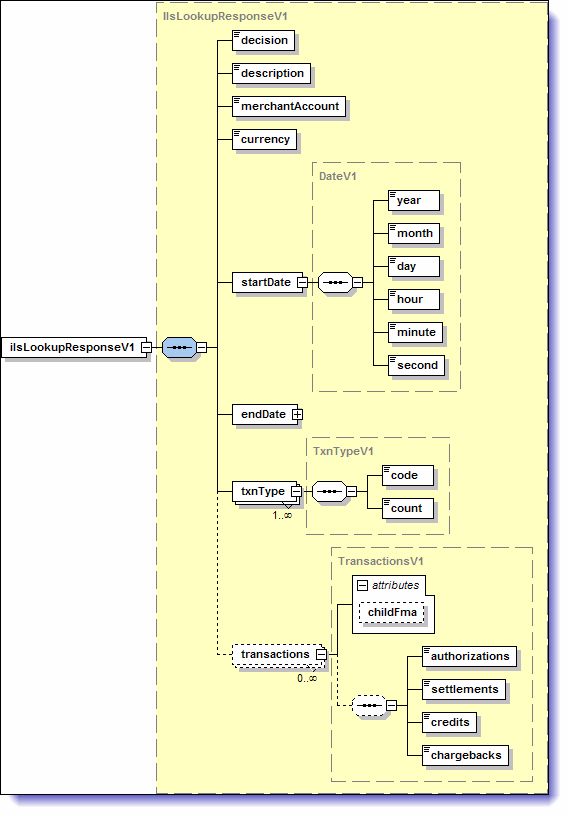
89 June 2011 ilslookupresponsev1 schema ilslookupresponsev1 schema An ilslookupresponsev1 has the following structure: The following elements are relevant for an ilslookupresponsev1: Table 4-2: ilslookupresponsev1 Elements Element Child Element Required Type Description decision Yes Enumeration This is the status of the transaction. One of the following is returned: Accepted the transaction was processed. Error the transaction was attempted, but failed for some reason. Rejected the request was rejected, e.g., due to invalid merchant credentials. description Yes String Max = 1024 If the decision returned is Error or Rejected, this is a description of the error. API Reference Guide for Web Services
90 Information Lookup Service Transactions June 2011 Table 4-2: ilslookupresponsev1 Elements (Continued) Element Child Element Required Type Description merchantaccount Yes String Max = 10 currency Yes String Length = 3 startdate year Yes Int Max = 9999 month Yes Int Min = 1 Max = 12 day Yes Int Min = 1 Max = 31 hour Yes Int Min = 0 Max = 23 minute Yes Int Min = 0 Max = 59 second Yes Int Min = 0 Max = 59 enddate year Yes Int Max = 9999 month Yes Int Min = 1 Max = 12 day Yes Int Min = 1 Max = 31 hour Yes Int Min = 0 Max = 23 minute Yes Int Min = 0 Max = 59 second Yes Int Min = 0 Max = 59 This is the merchant account number. This is the currency of the merchant account. This is the year set for the search start date. This is the month set for the search start date. This is the day set for the search start date. This is the hour set for the search start date. This is the minute set for the search start date. This is the second set for the search start date. This is the year set for the search end date. This is the month set for the search end date. This is the day set for the search end date. This is the hour set for the search end date. This is the minute set for the search end date. This is the second set for the search end date. 4-10
91 June 2011 Response element contents Table 4-2: ilslookupresponsev1 Elements (Continued) Element Child Element Required Type Description txntype code Yes String This is the type of transaction for which you searched for data. Possible values are: authorizations settlements credits chargebacks count Yes Int This is the number of the transaction type returned in the code element above. Each code element returned has its own count. transactions Optional Attribute of transactions childfma Conditional String Max = 10 This is the child merchant account number, and provided only if the account provided for the merchantaccount element is a master account. authorizations Optional String Each instance of authorizations contains further details. See Authorizations response details on page 4-12 for a description. settlements Optional String Each instance of settlements contains further details. See Settlements response details on page 4-12 for a description. credits Optional String Each instance of credits contains further details. See Credits response details on page 4-13 for a description. chargebacks Optional String Each instance of chargebacks contains further details. See Chargebacks response details on page 4-13 for a description. Response element contents NETBANX may without warning, when necessary, add additional detail elements to each of the transaction response types documented below (authorizations, settlements, credits, and chargebacks). These additional detail elements will be added at the end of the current pipe-separated element list, as in the example below. <ilslookupresponsev1 xmlns=" <transactions childfma=' '> <authorizations> FS :57:54 test added element added element API Reference Guide for Web Services
92 Information Lookup Service Transactions June 2011 </authorizations> <settlements> C :57:55 test added element added element </settlements> <credits> C :17:09 test USD added element added element </credits> <chargebacks> test 123 test USD added element </chargebacks> </ilslookupresponsev1> It is the merchant s responsibility to ensure that their integration for the ilslookuprequestv1 is not adversely affected by the addition of extra detail elements by NETBANX. Authorizations response details The following details may returned for authorizations: Table 4-3: Authorizations Response Details Parameter Record Sequence Authorization Status Transaction Date/Time Merchant Transaction ID Amount Description This is the confirmation number assigned by NETBANX to the transaction. This is the status of the Authorization. Possible values are: A Authorized FS Fully Settled AS Partially Settled This is the date and time the Authorization was processed. This is the transaction ID assigned by the merchant to the Authorization. This is the amount of the Authorization. Settlements response details The following details may be returned for settlements: Table 4-4: Settlements Response Details Parameter Record Sequence Settlement Status Transaction Date/Time Description This is the confirmation number assigned by NETBANX to the transaction. This is the current status of the Settlement transaction. Possible values are: B Batched E Error P Pending C Complete K Cancelled HO Hold DE Declined MI Manual This is the date and time the Settlement was processed. 4-12
93 June 2011 Response element contents Table 4-4: Settlements Response Details (Continued) Merchant Transaction ID Amount Parameter This is the transaction ID assigned by the merchant to the Settlement. This is the amount of the Settlement. Description Credits response details The following details may be returned for credits: Table 4-5: Credits Response Details Parameter Record Sequence Credit Status Transaction Date/Time Merchant Transaction ID Amount Settlement Record Sequence Description This is the confirmation number assigned by NETBANX to the transaction. This is the status of the Settlement that is being credited. Possible values are: B Batched E Error P Pending C Complete K Cancelled HO Hold DE Declined MI Manual This is the date and time the Credit was processed. This is the transaction ID assigned by the merchant to the Credit. This is the amount of the Credit. This the confirmation number originally assigned to the Settlement that was credited. Chargebacks response details The following details may be returned for chargebacks: Table 4-6: Chargebacks Response Details Parameter Chargeback ID Authorization Transaction ID Authorization Merchant Transaction ID Settlement Merchant Transaction ID Card Ending Original Settlement Date Original Settlement Amount Currency Code Description This is the Record ID in our Dispute Management system. Each chargeback has a unique Record ID to identify it. This is the transaction ID assigned by NETBANX to the original Authorization. This is the transaction ID assigned by the merchant to the original Authorization. This is the transaction ID assigned by the merchant to the Settlement that was charged back. This is the last 4 digits of the credit card used for the original Authorization. This is the date of the Settlement of the original Authorization. Format = yyyy-mm-dd This is the amount that was settled against the original Authorization. This is the currency of the merchant account. API Reference Guide for Web Services
94 Information Lookup Service Transactions June 2011 Table 4-6: Chargebacks Response Details (Continued) Parameter Chargeback Amount Description This is the amount that is being charged back against the Settlement. Reason Code This is the reason the transaction was charged back. See Reason codes on page 4-14 for an explanation of the codes. ARN Original Authorization Code CBTY Code Disputed Flag FMA Posting Date This is the Acquirer s Reference Number, a unique identification reference number assigned to each settlement transaction by the acquirer. This is the authorization code assigned by the issuing bank and returned by NET- BANX if the transaction was process via the Direct Payment protocol. This is the type of chargeback. Possible values are: 1 Chargeback 2 Chargeback Reversal C Risk Only Notice D Denied/Lost Representment RET Retrieval Request This flag indicates whether a transaction is being disputed. Possible values are: Null Yes This is the date the chargeback was posted to the merchant account. Format = yyyy-mm-dd Reason codes Chargeback reason codes One of the following chargeback reason codes may be returned with a chargebacks response: Table 4-7: Visa/MasterCard Chargeback Reason Codes Card Brand Code Description MC 01 Requested Transaction Data Not Received MC 02 Requested item illegible MC 07 Warning Bulletin File MC 08 Requested/Required Authorization Not Obtained MC 12 Account Number Not on File VI 30 Services Not Provided or Merchandise Not Received MC 31 Transaction Amount Differs MC 34 Duplicate Processing MC 35 Card Not Valid or Expired MC 37 Fraudulent Mail/Phone Order Transaction MC 40 Fraudulent Processing of Transaction 4-14
95 June 2011 Chargeback reason codes Table 4-7: Visa/MasterCard Chargeback Reason Codes (Continued) Card Brand Code Description MC 41 Canceled Recurring Transaction VI 41 Canceled Recurring Transaction MC 42 Late Presentment MC 47 Exceeds Floor Limit, Not Authorized, and Fraudulent Transaction MC 49 Questionable Merchant Activity MC 50 Credit Posted as a Debit MC 53 Cardholder Dispute Defective/Not as Described VI 53 Not as Described/Defective Merchandise MC 54 Cardholder Dispute - Not Elsewhere classified (US Only) MC 55 Non-Receipt of Merchandise VI 57 Fraudulent Multiple Transactions MC 59 Services Not Rendered MC 60 Credit Not Processed VI 60 Requested Copy Illegible MC 62 Counterfeit Transaction Magnetic Stripe POS Fraud VI 62 Counterfeit Transaction MC 63 Cardholder Does Not Recognize Potential Fraud VI 71 Authorization Request Declined / Declined Authorization VI 72 No Authorization / Transaction Exceeds Floor Limit VI 73 Expired Card VI 74 Late Presentment VI 75 Cardholder Does Not Recognize the Transaction VI 76 Incorrect Transaction Code VI 77 Non-Matching Account Number VI 79 Requested Transaction Information Not Received VI 80 Incorrect transaction amount or account number VI 81 Fraudulent transaction Card Present Environment VI 82 Duplicate Processing VI 83 Fraudulent Transaction Card Absent Environment VI 85 Credit Not Processed VI 86 Paid by Other Means API Reference Guide for Web Services
96 Information Lookup Service Transactions June 2011 Retrieval request reason codes One of the following retrieval request reason codes may be returned with a chargebacks response: Table 4-8: Visa/MasterCard Retrieval Request Reason Codes Card Brand Code Description MC 05 Chargeback Support Card Holder Does Not Agree with Amount Billed MC 21 Cardholder Inquiry Does Not Recognize Transaction (Merchant Name, City, State or Date) MC 22 Cardholder Inquiry Disagrees With Billing MC 23 Cardholder Inquiry Needs for Personal Records MC 24 Cardholder Inquiry No Reason Code VI 28 Cardholder Requests Copy Bearing Signature VI 29 Request for T&E Documents VI 30 Cardholder Dispute, Cardholder Request Draft VI 33 Legal Process or Fraud Analysis VI 34 Repeat Request for Copy MC 41 Legal/Fraud Analysys Signature Verification MC 42 Potential Chargeback or Compliance Documentation MC 43 Legal/Fraud Imprint Verification 4-16
97 APPENDIX A Using the HTTP Post Method Introduction In addition to a standard Web Service based call, you can also use the HTTP Post method to post transaction requests to NETBANX. Note that the URLs in the examples below point to the NETBANX Production environment. In order to test your integration, please contact Technical Support to obtain Test URLs and Test merchant account parameters. [email protected] Telephone All transactions sent using the HTTP Post method must be URL encoded using the application/x-www-form-urlencoded format. Otherwise, they run the risk of failing because any reserved characters (e.g., slashes, ampersands, etc.) are stripped from requests that are not properly URL encoded. Direct Debit requests charge/verify/credit For more information on these request types, see Building charge, verify, or credit requests on page 2-3. To send a charge, verify, or credit request via HTTP Post: 1. Create a transaction request like the following example: <ddcheckrequestv1 xmlns=" <merchantaccount> <accountnum> </accountnum> <storeid>mystoreid</storeid> <storepwd>mystorepwd</storepwd> </merchantaccount> <merchantrefnum>ref-12345</merchantrefnum> <amount>10.00</amount> <check> <accounttype>pc</accounttype> <bankname>chase</bankname> <checknum>12</checknum> <accountnum> </accountnum> <routingnum> </routingnum> </check> <billingdetails> <checkpaymethod>web</checkpaymethod> <firstname>jane</firstname> API Reference Guide for Web Services 1.0 A-1
98 Using the HTTP Post Method June 2011 <lastname>jones</lastname> <street>123 Main Street</street> <city>la</city> <state>ca</state> <country>us</country> <zip>90210</zip> <phone> </phone> </billingdetails> <sdk> <version>1.0</version> platform>http</platform> <provider>merchant</provider> </sdk> </ddcheckrequestv1> See Table 2-2: ddcheckrequestv1 Elements on page 2-6 for a list and description of parameters to include in this request. 2. Include this transaction request in an HTTP Post (see HTML example charge on page A-2). This HTTP Post must include two parameters: txnmode charge, credit, or verify txnrequest the transaction request above 3. Send the HTTP Post to the following URL: HTML example charge This example shows a form version of a charge/verify/credit request containing the example above that you could post to NETBANX. <!DOCTYPE HTML PUBLIC "-//W3C//DTD HTML 4.01 Transitional//EN"> <html> <title>netbanx - Direct Debit Test</title> <body> <form NAME="Direct Debit" METHOD="post" ACTION=" > <b>transaction Mode: </b> <br> <select name="txnmode"> <option value="charge">charge</option> <option value="credit">credit</option> <option value="verify">verify</option> </select> <br> <br> <b>xml Message body:</b> <TEXTAREA class="xmlbox" name="txnrequest" COLS=100 ROWS=10> <ddcheckrequestv1 xmlns=" <merchantaccount> <accountnum> </accountnum> <storeid>mystoreid</storeid> A-2
99 June 2011 charge/verify/credit <storepwd>mystorepwd</storepwd> </merchantaccount> <merchantrefnum>ref-12345</merchantrefnum> <amount>10.00</amount> <check> <accounttype>pc</accounttype> <bankname>chase</bankname> <checknum>12</checknum> <accountnum> </accountnum> <routingnum> </routingnum> </check> <billingdetails> <checkpaymethod>web</checkpaymethod> <firstname>jane</firstname> <lastname>jones</lastname> <street>123 Main Street</street> <city>la</city> <state>ca</state> <country>us</country> <zip>90210</zip> <phone> </phone> </billingdetails> <sdk> <version>1.0</version> <platform>http</platform> <provider>merchant</provider> </sdk> </ddcheckrequestv1> </TEXTAREA> <br> <input TYPE=submit class=input VALUE="Send Request"></form> </body> </html> The maximum file size supported is 100K. If your HTTP Post exceeds 100K it will fail. See Sample HTTP Post on page A-21 to see what this would look like viewed with a browser. Clicking the Send Request button sends the transaction via HTTP Post to NETBANX. API Reference Guide for Web Services 1.0 A-3
100 Using the HTTP Post Method June 2011 updateshippinginfo For more information on this request type, see Building updateshippinginfo requests on page To send an updateshippinginfo request via HTTP Post: 1. Create a transaction request like the following example: <ddshippingrequestv1 xmlns=" <merchantaccount> <accountnum> </accountnum> <storeid>mystoreid</storeid> <storepwd>mystorepwd</storepwd> </merchantaccount> <carrier>fex</carrier> <trackingnumber> </trackingnumber> <confirmationnumber>123456</confirmationnumber> <shipmethod>t</shipmethod> <firstname>jane</firstname> <lastname>jones</lastname> <street>123 Main Street</street> <city>la</city> <state>ca</state> <country>us</country> <zip>90210</zip> <phone> </phone> < >janejones@ server.com</ > </ddshippingrequestv1> See Table 2-3: ddshippingrequestv1 Elements on page 2-15 for a list and description of parameters to include in this request. 2. Include this transaction request in an HTTP Post (see HTML example updateshippinginfo on page A-4). This HTTP Post must include two parameters: txnmode updateshippinginfo txnrequest the transaction request above 3. Send the HTTP Post to the following URL: HTML example updateshippinginfo This example shows a form version of an updateshippinginfo request containing the example above that you could post to NETBANX. <!DOCTYPE HTML PUBLIC "-//W3C//DTD HTML 4.01 Transitional//EN"> <html> <title>direct Debit Test</title> <body> <form NAME="Direct Debit" METHOD="post" ACTION=" > <input type=hidden name="txnmode" value="updateshippinginfo" > A-4
101 June 2011 Credit card requests <br> <b>xml Message body:</b> <TEXTAREA class="xmlbox" name="txnrequest" COLS=100 ROWS=10> <ddshippingrequestv1 xmlns=" <merchantaccount> <accountnum> </accountnum> <storeid>mystoreid</storeid> <storepwd>mystorepwd</storepwd> </merchantaccount> <carrier>fex</carrier> <trackingnumber> </trackingnumber> <confirmationnumber>123456</confirmationnumber> <shipmethod>t</shipmethod> <firstname>jane</firstname> <lastname>jones</lastname> <street>123 Main Street</street> <city>la</city> <state>ca</state> <country>us</country> <zip>90210</zip> <phone> </phone> </ddshippingrequestv1> </TEXTAREA> <br> <input TYPE=submit class=input VALUE="Send Request"></form> </body> </html> The maximum file size supported is 100K. If your HTTP Post exceeds 100K it will fail. See Sample HTTP Post on page A-21 to see what this would look like viewed with a browser. Clicking the Send Request button sends the transaction via HTTP Post to NETBANX. Credit card requests Purchase/Authorization/Verification For more information on these request types, see Building Purchase/Authorization/Verification requests on page 3-4. To send a credit card Purchase/Authorization/Verification transaction request via HTTP Post: 1. Create a transaction request like the following example: <ccauthrequestv1 xmlns=" xmlns:xsi=" xsi:schemalocation=" <merchantaccount> <accountnum> </accountnum> <storeid>mystoreid</storeid> <storepwd>mystorepwd</storepwd> API Reference Guide for Web Services 1.0 A-5
102 Using the HTTP Post Method June 2011 </merchantaccount> <merchantrefnum>ref-12345</merchantrefnum> <amount>10.00</amount> <card> <cardnum> </cardnum> <cardexpiry> <month>11</month> <year>2008</year> </cardexpiry> <cardtype>vi</cardtype> <cvdindicator>1</cvdindicator> <cvd>111</cvd> </card> <authentication> <indicator>05</indicator> <cavv>aaabb4wzlqaaaaaacjmveniwiv+=</cavv> <xid>q2prwui2rfnbc3fotxnlem50ewy=</xid> </authentication> <billingdetails> <cardpaymethod>web</cardpaymethod> <firstname>jane</firstname> <lastname>jones</lastname> <street>123 Main Street</street> <city>la</city> <state>ca</state> <country>us</country> <zip>90210</zip> <phone> </phone> </billingdetails> <shippingdetails> <carrier>fex</carrier> <shipmethod>t</shipmethod> <firstname>jane</firstname> <lastname>jones</lastname> <street>44 Main Street</street> <city>la</city> <state>ca</state> <country>us</country> <zip>90210</zip> <phone> </phone> </shippingdetails> <recurring> <recurringindicator>i</recurringindicator> <originalconfirmationnumber> </originalconfirmationnumber> </recurring> <customerip> </customerip> <producttype>m</producttype> <addendumdata> <tag>cust_acct_open_date</tag> <value> </value> </addendumdata> <addendumdata> <tag>merchant_country_code</tag> <value>us</value> </addendumdata> <addendumdata> <tag>service_request_currency</tag> A-6
103 June 2011 Purchase/Authorization/Verification <value>on</value> </addendumdata> </ccauthrequestv1> See Table 3-2: ccauthrequestv1 Elements on page 3-8 for a list and description of parameters to include in this request. 2. Include this transaction request in an HTTP Post (see HTML example Authorization on page A-7). This HTTP Post must include two parameters: txnmode ccauthorize, ccpurchase, or ccverification txnrequest the transaction request above 3. Send the HTTP Post to the following URL: HTML example Authorization This example shows a form version of a credit card Authorization request containing the example above that you could post to NETBANX. To make this a Purchase or Verification request, just modify the txnmode value ccauthorize (underlined below) to ccpurchase or ccverification, respectively. <!DOCTYPE HTML PUBLIC "-//W3C//DTD HTML 4.01 Transitional//EN"> <html> <title>credit Card Test</title> <body> <form NAME="Credit Card" METHOD="post" ACTION=" <input type=hidden name="txnmode" value="ccauthorize" > <b>xml Message body:</b> <TEXTAREA class="xmlbox" name="txnrequest" COLS=100 ROWS=10 > <ccauthrequestv1 xmlns=" xmlns:xsi=" xsi:schemalocation=" <merchantaccount> <accountnum> </accountnum> <storeid>mystoreid</storeid> <storepwd>mystorepwd</storepwd> </merchantaccount> <merchantrefnum>ref-12345</merchantrefnum> <amount>10.00</amount> <card> <cardnum> </cardnum> <cardexpiry> <month>11</month> <year>2008</year> </cardexpiry> <cardtype>vi</cardtype> <cvdindicator>1</cvdindicator> <cvd>111</cvd> </card> API Reference Guide for Web Services 1.0 A-7
104 Using the HTTP Post Method June 2011 <authentication> <indicator>05</indicator> <cavv>aaabb4wzlqaaaaaacjmveniwiv+=</cavv> <xid>q2prwui2rfnbc3fotxnlem50ewy=</xid> </authentication> <billingdetails> <cardpaymethod>web</cardpaymethod> <firstname>jane</firstname> <lastname>jones</lastname> <street>123 Main Street</street> <city>la</city> <state>ca</state> <country>us</country> <zip>90210</zip> <phone> </phone> </billingdetails> <shippingdetails> <carrier>fex</carrier> <shipmethod>t</shipmethod> <firstname>jane</firstname> <lastname>jones</lastname> <street>44 Main Street</street> <city>la</city> <state>ca</state> <country>us</country> <zip>90210</zip> <phone> </phone> </shippingdetails> <recurring> <recurringindicator>i</recurringindicator> <originalconfirmationnumber> </originalconfirmationnumber> </recurring> <customerip> </customerip> <producttype>m</producttype> <addendumdata> <tag>cust_acct_open_date</tag> <value> </value> </addendumdata> <addendumdata> <tag>merchant_country_code</tag> <value>us</value> </addendumdata> <addendumdata> <tag>service_request_currency</tag> <value>on</value> </addendumdata> </ccauthrequestv1> </TEXTAREA> <br> <input TYPE=submit class=input VALUE="Send Request"> </form> </body> </html> The maximum file size supported is 100K. If your HTTP Post exceeds 100K it will fail. A-8
105 June 2011 Authorization Reversal See Sample HTTP Post on page A-21 to see what this would look like viewed with a browser. Clicking the Send Request button sends the transaction via HTTP Post to NETBANX. Authorization Reversal For more information on these request types, see Building Authorization Reversal requests on page To send a credit card Authorization Reversal transaction request via HTTP Post: 1. Create a transaction request like the following example: <ccauthreversalrequestv1 xmlns=" xmlns:xsi=" xsi:schemalocation=" <merchantaccount> <accountnum> </accountnum> <storeid>mystoreid</storeid> <storepwd>mystorepwd</storepwd> </merchantaccount> <confirmationnumber> </confirmationnumber> <merchantrefnum>ar2</merchantrefnum> <reversalamount>18.00</reversalamount> </ccauthreversalrequestv1> See Table 3-4: ccauthreversalrequestv1 Elements on page 3-17 for a list and description of parameters to include in this request. 2. Include this transaction request in an HTTP Post (see HTML example Authorization Reversal on page A-9). This HTTP Post must include two parameters: txnmode ccauthorizereversal txnrequest the transaction request above 3. Send the HTTP Post to the following URL: HTML example Authorization Reversal This example shows a form version of a credit card Authorization Reversal request containing the example above that you could post to NETBANX. <!DOCTYPE HTML PUBLIC "-//W3C//DTD HTML 4.01 Transitional//EN"> <html> <title>reverse Authorization Transaction</title> <body> <form NAME="Credit Card" METHOD="post" ACTION=" <input type=hidden name="txnmode" value="ccauthorizereversal" > <b>xml Message body:</b> <TEXTAREA class="xmlbox" name="txnrequest" COLS=100 ROWS=10 > <ccauthreversalrequestv1 xmlns=" xmlns:xsi=" API Reference Guide for Web Services 1.0 A-9
106 Using the HTTP Post Method June 2011 xsi:schemalocation=" <merchantaccount> <accountnum> </accountnum> <storeid>mystoreid</storeid> <storepwd>mystorepwd</storepwd> </merchantaccount> <confirmationnumber> </confirmationnumber> <merchantrefnum>ar2</merchantrefnum> <reversalamount>18.00</reversalamount> </ccauthreversalrequestv1> </TEXTAREA> <br> <input TYPE=submit class=input VALUE="Send Request"> </form> </body> </html> The maximum file size supported is 100K. If your HTTP Post exceeds 100K it will fail. See Sample HTTP Post on page A-21 to see what this would look like viewed with a browser. Clicking the Send Request button sends the transaction via HTTP Post to NETBANX. Settlement/Credit For more information on these request types, see Building Settlement/Credit requests on page To send a credit card Settlement/Credit transaction request via HTTP Post: 1. Create a transaction request like the following example: <ccpostauthrequestv1 xmlns=" xmlns:xsi=" xsi:schemalocation=" <merchantaccount> <accountnum> </accountnum> <storeid>mystoreid</storeid> <storepwd>mystorepwd</storepwd> </merchantaccount> <confirmationnumber>123456</confirmationnumber> <merchantrefnum>ref-12345</merchantrefnum> <amount>10.00</amount> <addendumdata> <tag>merchant_data</tag> <value>merchant_data</value> </addendumdata> </ccpostauthrequestv1> See Table 3-5: ccpostauthrequestv1 Elements on page 3-21 for a list and description of parameters to include in this request. 2. Include this transaction request in an HTTP Post (see HTML example Settlement on page A-11). A-10
107 June 2011 Settlement/Credit This HTTP Post must include two parameters: txnmode ccsettlement or cccredit txnrequest the transaction request above 3. Send the HTTP Post to the following URL: HTML example Settlement This example shows a form version of a credit card Settlement request containing the example above that you could post to NETBANX. To make this a Credit request, just modify the txnmode value ccsettlement (underlined below) to cccredit. <!DOCTYPE HTML PUBLIC "-//W3C//DTD HTML 4.01 Transitional//EN"> <html> <title>credit Card Test</title> <body> <form NAME="Credit Card" METHOD="post" ACTION=" <input type=hidden name="txnmode" value="ccsettlement" > <b>xml Message body:</b> <TEXTAREA class="xmlbox" name="txnrequest" COLS=100 ROWS=10 > <ccpostauthrequestv1 xmlns=" xmlns:xsi=" xsi:schemalocation=" <merchantaccount> <accountnum> </accountnum> <storeid>mystoreid</storeid> <storepwd>mystorepwd</storepwd> </merchantaccount> <confirmationnumber>123456</confirmationnumber> <merchantrefnum>ref-12345</merchantrefnum> <amount>10.00</amount> <addendumdata> <tag>merchant_data</tag> <value>merchant_data</value> </addendumdata> </ccpostauthrequestv1> </TEXTAREA> <br> <input TYPE=submit class=input VALUE="Send Request"> </form> </body> </html> The maximum file size supported is 100K. If your HTTP Post exceeds 100K it will fail. See Sample HTTP Post on page A-21 to see what this would look like viewed with a browser. Clicking the Send Request button sends the transaction via HTTP Post to NETBANX. API Reference Guide for Web Services 1.0 A-11
108 Using the HTTP Post Method June 2011 Stored Data Authorization/Purchase For more information on these request types, see Building Stored Data Requests on page To send a Stored Data Authorization/Purchase transaction request via HTTP Post: 1. Create a transaction request like the following example: <ccstoreddatarequestv1 xmlns=" xmlns:xsi=" xsi:schemalocation=" <merchantaccount> <accountnum> </accountnum> <storeid>mystoreid</storeid> <storepwd>mystorepwd</storepwd> </merchantaccount> <merchantrefnum>ref-12345</merchantrefnum> <confirmationnumber>123456</confirmationnumber> <amount>18.00</amount> </ccstoreddatarequestv1> See Table 3-6: ccstoreddatarequestv1 Elements on page 3-25 or a list and description of parameters to include in this request. 2. Include this transaction request in an HTTP Post (see HTML example Stored Data Authorization on page A-12). This HTTP Post must include two parameters: txnmode ccstoreddataauthorize or ccstoreddatapurchase txnrequest the transaction request above 3. Send the HTTP Post to the following URL: HTML example Stored Data Authorization This example shows a form version of a credit card Stored Data Authorization request containing the example above that you could post to NETBANX. To make this a Stored Data Purchase request, just modify the txnmode value ccstoreddataauthorize (underlined below) to ccstoreddatapurchase. <!DOCTYPE HTML PUBLIC "-//W3C//DTD HTML 4.01 Transitional//EN"> <html> <title>credit Card Test</title> <body> <form NAME="Credit Card" METHOD="post" ACTION=" <input type=hidden name="txnmode" value="ccstoreddataauthorize" > <b>xml Message body:</b> <TEXTAREA class="xmlbox" name="txnrequest" COLS=100 ROWS=10 > <ccstoreddatarequestv1 xmlns=" xmlns:xsi=" A-12
109 June 2011 Cancel Settle/Credit/Payment xsi:schemalocation=" <merchantaccount> <accountnum> </accountnum> <storeid>mystoreid</storeid> <storepwd>mystorepwd</storepwd> </merchantaccount> <merchantrefnum>ref-12345</merchantrefnum> <confirmationnumber>123456</confirmationnumber> <amount>18.00</amount> </ccstoreddatarequestv1> </TEXTAREA> <br> <input TYPE=submit class=input VALUE="Send Request"> </form> </body> </html> The maximum file size supported is 100K. If your HTTP Post exceeds 100K it will fail. See Sample HTTP Post on page A-21 to see what this would look like viewed with a browser. Clicking the Send Request button sends the transaction via HTTP Post to NETBANX. Cancel Settle/Credit/Payment For more information on these request types, see Building Cancel requests on page To cancel a credit card Settle/Credit/Payment request via HTTP Post: 1. Create a transaction request like the following example: <cccancelrequestv1 xmlns=" xmlns:xsi=" xsi:schemalocation=" <merchantaccount> <accountnum> </accountnum> <storeid>mystoreid</storeid> <storepwd>mystorepwd</storepwd> </merchantaccount> <confirmationnumber>123456</confirmationnumber> <addendumdata> <tag>merchant_data</tag> <value>merchant_data</value> </addendumdata> </cccancelrequestv1> See Table 3-7: cccancelrequestv1 Elements on page 3-28 for a list and description of parameters to include in this request. 2. Include this transaction request in an HTTP Post (see HTML example Cancel on page A-14). This HTTP Post must include two parameters: txnmode cccancelsettle, cccancelcredit, or cccancelpayment txnrequest the transaction request above 3. Send the HTTP Post to the following URL: API Reference Guide for Web Services 1.0 A-13
110 Using the HTTP Post Method June HTML example Cancel This example shows a form version of a credit card Cancel request containing the example above that you could post to NETBANX to cancel a Settle transaction. To make this a Cancel Credit or Cancel Payment request, just modify the txnmode value cccancelsettle (underlined below) to cccancelcredit or cccancelpayment, respectively. <!DOCTYPE HTML PUBLIC "-//W3C//DTD HTML 4.01 Transitional//EN"> <html> <title>credit Card Test</title> <body> <form NAME="Credit Card" METHOD="post" ACTION=" <input type=hidden name="txnmode" value="cccancelsettle" > <b>xml Message body:</b> <TEXTAREA class="xmlbox" name="txnrequest" COLS=100 ROWS=10 > <cccancelrequestv1 xmlns=" xmlns:xsi=" xsi:schemalocation=" <merchantaccount> <accountnum> </accountnum> <storeid>mystoreid</storeid> <storepwd>mystorepwd</storepwd> </merchantaccount> <confirmationnumber>123456</confirmationnumber> <addendumdata> <tag>merchant_data</tag> <value>merchant_data</value> </addendumdata> </cccancelrequestv1> </TEXTAREA> <br> <input TYPE=submit class=input VALUE="Send Request"> </form> </body> </html> The maximum file size supported is 100K. If your HTTP Post exceeds 100K it will fail. See Sample HTTP Post on page A-21 to see what this would look like viewed with a browser. Clicking the Send Request button sends the transaction via HTTP Post to NETBANX. Payment request For more information on this request type, see Building Payment requests on page To make a Payment request via HTTP Post: 1. Create a transaction request like the following example: <ccpaymentrequestv1 xmlns=" A-14
111 June 2011 Payment request xmlns:xsi=" xsi:schemalocation=" <merchantaccount> <accountnum> </accountnum> <storeid>mystoreid</storeid> <storepwd>mystorepwd</storepwd> </merchantaccount> <merchantrefnum>ref-12345</merchantrefnum> <amount>10.00</amount> <card> <cardnum> </cardnum> <cardexpiry> <month>11</month> <year>2008</year> </cardexpiry> <cardtype>vi</cardtype> <cvdindicator>1</cvdindicator> <cvd>111</cvd> </card> <billingdetails> <cardpaymethod>web</cardpaymethod> <firstname>jane</firstname> <lastname>jones</lastname> <street>123 Main Street</street> <city>la</city> <state>ca</state> <country>us</country> <zip>90210</zip> <phone> </phone> </billingdetails> </ccpaymentrequestv1> See Table 3-8: ccpaymentrequestv1 Elements on page 3-31 for a list and description of parameters to include in this request. 2. Include this transaction request in an HTTP Post (see HTML example Payment on page A-15). This HTTP Post must include two parameters: txnmode ccpayment txnrequest the transaction request above 3. Send the HTTP Post to the following URL: HTML example Payment This example shows a form version of a credit card Payment request containing the example above that you could post to NETBANX. <!DOCTYPE HTML PUBLIC "-//W3C//DTD HTML 4.01 Transitional//EN"> <html> <head> <title>cc Payment</title> </head> API Reference Guide for Web Services 1.0 A-15
112 Using the HTTP Post Method June 2011 <body> <h1> Credit Card Webservice Tester </h1> <form NAME="creditcard" id="creditcard" METHOD="post" ACTION=" <input type=hidden name="txnmode" value="ccpayment" > <b>xml Message body:</b> <TEXTAREA class="xmlbox" name="txnrequest" COLS=100 ROWS=10 > <ccpaymentrequestv1 xmlns=" xmlns:xsi=" xsi:schemalocation=" <merchantaccount> <accountnum> </accountnum> <storeid>mystoreid</storeid> <storepwd>mystorepwd</storepwd> </merchantaccount> <merchantrefnum>ref-12345</merchantrefnum> <amount>10.00</amount> <card> <cardnum> </cardnum> <cardexpiry> <month>11</month> <year>2008</year> </cardexpiry> <cardtype>vi</cardtype> <cvdindicator>1</cvdindicator> <cvd>111</cvd> </card> <billingdetails> <cardpaymethod>web</cardpaymethod> <firstname>jane</firstname> <lastname>jones</lastname> <street>123 Main Street</street> <city>la</city> <state>ca</state> <country>us</country> <zip>90210</zip> <phone> </phone> </billingdetails> </ccpaymentrequestv1> </TEXTAREA> <br> <input TYPE=submit class=input VALUE="Send Request"> </form> </body> </html> The maximum file size supported is 100K. If your HTTP Post exceeds 100K it will fail. See Sample HTTP Post on page A-21 to see what this would look like viewed with a browser. Clicking the Send Request button sends the transaction via HTTP Post to NETBANX. Enrollment Lookup For more information on this request type, see Building Enrollment Lookup requests on page A-16
113 June 2011 Enrollment Lookup To send a credit card Enrollment Lookup transaction request via HTTP Post: 1. Create a transaction request like the following example: <ccenrollmentlookuprequestv1 xmlns=" xmlns:xsi=" xsi:schemalocation=" <merchantaccount> <accountnum> </accountnum> <storeid>mystoreid</storeid> <storepwd>mystorepwd</storepwd> </merchantaccount> <merchantrefnum>ref-12345</merchantrefnum> <amount>21.00</amount> <card> <cardnum> </cardnum> <cardexpiry> <month>01</month> <year>2011</year> </cardexpiry> <cardtype>vi</cardtype> </card> </ccenrollmentlookuprequestv1> See Table 3-9: ccenrollmentlookuprequestv1 Elements on page 3-38 for a list and description of parameters to include in this request. 2. Include this transaction request in an HTTP Post (see HTML example Enrollment Lookup on page A-17). This HTTP Post must include two parameters: txnmode cctdslookup txnrequest the transaction request above 3. Send the HTTP Post to the following URL: HTML example Enrollment Lookup <!DOCTYPE HTML PUBLIC "-//W3C//DTD HTML 4.01 Transitional//EN"> <html> <title>enrollment Lookup</title> <form NAME="Enrollment Lookup" METHOD="post" ACTION=" <input type=hidden name="txnmode" value="cctdslookup" > <b>xml Message body:</b> <TEXTAREA class="xmlbox" name="txnrequest" COLS=100 ROWS=25 > <ccenrollmentlookuprequestv1 xmlns=" xmlns:xsi=" xsi:schemalocation=" <merchantaccount> API Reference Guide for Web Services 1.0 A-17
114 Using the HTTP Post Method June 2011 <accountnum> </accountnum> <storeid>mystoreid</storeid> <storepwd>mystorepwd</storepwd> </merchantaccount> <merchantrefnum>ref-12345</merchantrefnum> <amount>21.00</amount> <card> <cardnum> </cardnum> <cardexpiry> <month>01</month> <year>2011</year> </cardexpiry> <cardtype>vi</cardtype> </card> </ccenrollmentlookuprequestv1> </TEXTAREA> <br> <input TYPE=submit class=input VALUE="Send Request"> </form> </body> </html> The maximum file size supported is 100K. If your HTTP Post exceeds 100K it will fail. See Sample HTTP Post on page A-21 to see what this would look like viewed with a browser. Clicking the Send Request button sends the transaction via HTTP Post to NETBANX. Authentication For more information on this request type, see Building Authentication requests on page To send a credit card Authentication transaction request via HTTP Post: 1. Create a transaction request like the following example: <ccauthenticaterequestv1 xmlns=" xmlns:xsi=" xsi:schemalocation=" <merchantaccount> <accountnum> </accountnum> <storeid>mystoreid</storeid> <storepwd>mystorepwd</storepwd> </merchantaccount> <confirmationnumber>123456</confirmationnumber> <paymentresponse>mypaymentresponse</paymentresponse> </ccauthenticaterequestv1> See Table 3-10: ccauthenticaterequestv1 Elements on page 3-41 for a list and description of parameters to include in this request. 2. Include this transaction request in an HTTP Post (see HTML example Authentication on page A-19). A-18
115 June 2011 Information Lookup Service requests This HTTP Post must include two parameters: txnmode cctdsauthenticate txnrequest the transaction request above 3. Send the HTTP Post to the following URL: HTML example Authentication This example shows a form version of a credit card Authentication request containing the example above that you could post to NETBANX. <!DOCTYPE HTML PUBLIC "-//W3C//DTD HTML 4.01 Transitional//EN"> <html> <title>credit Card Test</title> <body> <form NAME="Credit Card" METHOD="post" ACTION=" <input type=hidden name="txnmode" value="cctdsauthenticate" > <b>xml Message body:</b> <TEXTAREA class="xmlbox" name="txnrequest" COLS=100 ROWS=10 > <ccauthenticaterequestv1 xmlns=" xmlns:xsi=" xsi:schemalocation=" <merchantaccount> <accountnum> </accountnum> <storeid>mystoreid</storeid> <storepwd>mystorepwd</storepwd> </merchantaccount> <confirmationnumber>123456</confirmationnumber> <paymentresponse>mypaymentresponse</paymentresponse> </ccauthenticaterequestv1> </TEXTAREA> <br> <input TYPE=submit class=input VALUE="Send Request"> </form> </body> </html> The maximum file size supported is 100K. If your HTTP Post exceeds 100K it will fail. See Sample HTTP Post on page A-21 to see what this would look like viewed with a browser. Clicking the Send Request button sends the transaction via HTTP Post to NETBANX. Information Lookup Service requests For more information on this request type, see Building ILS requests on page 4-3. API Reference Guide for Web Services 1.0 A-19
116 Using the HTTP Post Method June 2011 To send an ILS request via HTTP Post: 1. Create a transaction request like the following example: <ilslookuprequestv1 xmlns=" xmlns:xsi=" xsi:schemalocation=" <merchantaccount> <accountnum> </accountnum> <storeid>mystoreid</storeid> <storepwd>mystorepwd</storepwd> </merchantaccount> <startdate> <year>2008</year> <month>03</month> <day>05</day> <hour>00</hour> <minute>00</minute> <second>00</second> </startdate> <enddate> <year>2008</year> <month>03</month> <day>05</day> <hour>23</hour> <minute>59</minute> <second>59</second> </enddate> <type>authorizations</type> <type>settlements</type> <type>credits</type> <type>chargebacks</type> </ilslookuprequestv1> See Table 4-1: ilslookuprequestv1 Elements on page 4-6 for a list and description of parameters to include in this request. 2. Include this transaction request in an HTTP Post (see HTML example - ILS on page A-20). 3. Send the HTTP Post to the following URL: HTML example - ILS This example shows a form version of an ILS request containing the example above that you could post to NETBANX. <!DOCTYPE HTML PUBLIC "-//W3C//DTD HTML 4.01 Transitional//EN"> <html> <title>information Lookup Service</title> <body> <form NAME="ILS" METHOD="post" ACTION=" <b>xml Message body:</b> <TEXTAREA class="xmlbox" name="txnrequest" COLS=100 ROWS=10 > <ilslookuprequestv1 xmlns=" xmlns:xsi=" xsi:schemalocation=" A-20
117 June 2011 Sample HTTP Post <merchantaccount> <accountnum> </accountnum> <storeid>mystoreid</storeid> <storepwd>mystorepwd</storepwd> </merchantaccount> <startdate> <year>2008</year> <month>03</month> <day>05</day> <hour>00</hour> <minute>00</minute> <second>00</second> </startdate> <enddate> <year>2008</year> <month>03</month> <day>05</day> <hour>23</hour> <minute>59</minute> <second>59</second> </enddate> <type>authorizations</type> <type>settlements</type> <type>credits</type> <type>chargebacks</type> </ilslookuprequestv1> </TEXTAREA> <br> <input TYPE=submit class=input VALUE="Send Request"> </form> </body> </html> The maximum file size supported is 100K. If your HTTP Post exceeds 100K it will fail. See Sample HTTP Post on page A-21 to see what this would look like viewed with a browser. Clicking the Send Request button sends the transaction via HTTP Post to NETBANX. Sample HTTP Post This is what the HTTP Post examples of the transaction types described in this chapter would look like viewed in a browser: API Reference Guide for Web Services 1.0 A-21
118 Using the HTTP Post Method June 2011 Clicking the Send Request button sends the transaction via HTTP Post to NETBANX. Sample HTTP Post responses NETBANX returns a response like the following for a successful transaction request: NETBANX returns a response like the following for a failed transaction request: For an explanation of the elements in the response, see Processing the response on page For an explanation of error codes, see Response codes on page B-1. A-22
119 APPENDIX B Response Codes Overview NETBANX Web Services can return different types of code if a transaction attempt fails: Response codes Action codes Return codes Response codes The following table describes the response codes that could be returned by NETBANX Web Services. Table B-1: Response Codes Response Code Action Description 1000 R An internal error occurred. Please retry the transaction R An error occurred with the external processing gateway. Please retry the transaction R An internal error occurred. Please retry the transaction D An error occurred with the external processing gateway. Do not retry the transaction. Contact Technical Support for more information M Your account is not enabled for this transaction type. Please verify your parameters and retry the transaction D An error occurred with the external processing gateway. Do not retry the transaction. Contact Technical Support for more information R An internal error occurred. Please retry the transaction D An internal error occurred. Do not retry the transaction. Contact Technical Support for more information D The external processing gateway has reported the transaction is unauthorized. Do not retry the transaction. Contact Technical Support for more information M The external processing gateway has reported invalid data. Please verify your parameters and retry the transaction D The external processing gateway has reported the account type is invalid. Do not retry the transaction. Contact Technical Support for more information D The external processing gateway has reported a limit has been exceeded. Do not retry the transaction R The external processing gateway has reported a system error. Please retry the transaction D The external processing gateway has rejected the transaction. Do not retry the transaction. Contact Technical Support for more information D The echeck status cannot be found. API Reference Guide for Web Services 1.0 B-1
120 Response Codes June 2011 Table B-1: Response Codes (Continued) Response Code Action Description 2001 C You submitted a request containing a check number already used within the last 24 hours. Please use another Check Number value and retry the transaction M The echeck request cannot be found. Please verify your parameters and retry M The payment type you provided conflicts with the bank account type you provided. Please verify your parameters and retry the transaction D The echeck transaction cannot be found M An internal error occurred. Please verify your parameters and retry the transaction C You have submitted a Decline transaction in response to a Settlement attempt M The payment type included with your request cannot be used in Credit transaction mode. Please verify your parameters and retry the request C You have submitted an invalid routing number. Please verify your parameter and retry the transaction C You have submitted an invalid bank account number. Please verify your parameter and retry the transaction C You have submitted an invalid check number. Please verify your parameter and retry the transaction D You have attempted to refund a Charge transaction that is not in a completed state. Do not retry the transaction R The requested refund amount exceeds the remaining Charge amount. Please verify your parameters and retry the transaction R You have submitted an invalid bank country in your request. Please verify your parameter and retry the transaction D A suitable merchant account could not be found for this request. Do not retry the transaction. Contact Technical Support for more information D An internal error occurred. Do not retry the transaction. Contact Technical Support for more information M The authentication failed for your transaction request. Either your credentials were entered incorrectly or your request was tampered with. Please verify your request and retry the transaction M You submitted an invalid shop ID. It must be a numeric value M You submitted a shop ID for which a shop does not exist. Please verify your parameters and retry the transaction M No merchant account could be found for the currency you submitted. Please verify your parameters and retry the transaction M More than one merchant account was found for the currency you submitted. Please provide a merchant account number and retry the request M The merchant account submitted does not correspond to the shop ID you submitted. Please verify your parameters and retry the transaction M You submitted a request that is missing the encodedmessage parameter. Please verify your parameters and retry the transaction M You submitted a request that has an invalid encodedmessage parameter. The encodedmessage could not be Base64 decoded. Please verify your parameters and retry the request. B-2
121 June 2011 Response codes Table B-1: Response Codes (Continued) Response Code Action Description 2510 M You submitted an invalid XML request. Please verify your request and retry the transaction R An internal error occurred. Please retry the transaction. If the error persists, contact Technical Support M You submitted a request that is missing the signature parameter. Please verify your parameters and retry the transaction M You submitted a request that is missing the Shop ID parameter. Please verify your parameters and retry the transaction D An internal error occurred. Your merchant credentials could not be found. Do not retry the transaction. Contact Technical Support for more information R An internal error occurred. Please retry the transaction D An internal error occurred. Do not retry the transaction. Please contact Technical Support D An internal error occurred. Do not retry the transaction. Please contact Technical Support R An internal error occurred. Please retry the transaction. If the error persists, contact Technical Support D You submitted a request for a shop that is disabled. Do not retry the transaction M The cartitem and feeitem amounts do not equal the totalamount. Please verify your parameters and retry the transaction D An internal error occurred. Your shop is not configured properly. Do not retry the transaction. Contact Technical Support for more information R An internal error occurred. Please retry the transaction. If the error persists, contact Technical Support D An internal error occurred. The customer profile is not configured properly. Do not retry the transaction. Contact Technical Support for more information M The customer profile associated with the token provided could not be located. Please verify your parameters and retry the transaction R An internal profile management error occurred and your request could not be processed. Please retry the transaction. If the error persists, contact Technical Support M You submitted a request with an unsupported locale. Please verify your parameters and retry the transaction M You submitted a request with a merchant customer ID that is not associated with the customer token provided. Please verify your parameters and retry the transaction R An internal error occurred. Please retry the transaction D An internal error occurred. Do not retry the transaction. Contact Technical Support for more information M A customer profile with the same merchant customer ID already exists. Please verify your parameters and retry the transaction D Your shop is not configured to process any payments. Do not retry the transaction. Contact Technical Support for more information D Your shop is not configured to process the selected payment method. Do not retry the transaction. Contact Technical Support for more information. API Reference Guide for Web Services 1.0 B-3
122 Response Codes June 2011 Table B-1: Response Codes (Continued) Response Code Action Description 2534 M The customer profile associated with the token you provided is not active. Please verify your parameters and ensure the customer status is active, and retry the transaction M The customer profile associated with the token you provided has a bank account that is not validated. Please verify your parameters or have your customer validate their account, and retry the transaction D The transaction was declined because the maximum number of attempts has been reached. Do not retry the transaction D The bank account validation failed because the maximum number of attempts has been reached. Do not retry the transaction D The customer entered an invalid micro deposit amount R An internal error occurred. Please retry the transaction. If the error persists, contact Technical Support M The merchant reference number already exists. Please verify your parameters and retry the transaction R An internal error occurred when sending the micro deposit transaction. Please retry the transaction. If the error persists, contact Technical Support D The customer profile validation failed the AVS check M The customer has a status that cannot be validated. Please reset the customer status before retrying the transaction D The customer profile does not have the credit card information required for validation D The customer tried to register an EFT bank account that is already used by another customer. Do not retry the transaction D The customer tried to register a credit card that is already used by another customer. Do not retry the transaction M The customer profile associated with the token you provided does not have a credit card. Please verify your parameters, and retry the transaction M The customer profile used for this transaction has not been created. Please verify your parameters and retry the transaction M Your shop is not configured to register a bank account for the country you submitted. Please verify your parameters and retry the transaction M The customer profile associated with the token you provided does not have a registered bank account. Please verify your parameters and retry the transaction None The Equifax validation was accepted with the condition that the customer's request should be verified R An internal error has occurred while processing an Equifax transaction. Retry the transaction. If the error persists, contact Technical Support R Some or all of the Equifax databases are down. Retry the transaction. If the error persists, contact Technical Support D The Equifax validation was rejected. Do not retry the transaction R The Equifax validation was rejected and should be treated manually. For example, the merchant can contact the customer directly R The Equifax validation was rejected due to invalid input. Please verify your parameters and retry the transaction. B-4
123 June 2011 Response codes Table B-1: Response Codes (Continued) Response Code Action Description 2707 R The Equifax validation was rejected due to an invalid address. Please verify your parameters and retry the transaction R An internal error occurred. The Equifax response codes are missing. Please verify your parameters and retry the transaction D The bank rejected the transaction. It could not process the request C You submitted an unsupported card type with your request. Please verify this parameter and retry the transaction C You submitted an invalid card number or brand or combination of card number and brand with your request. Please verify these parameters and retry the transaction C You submitted an incorrect value for the cvdindicator parameter with your request. Please verify this parameter and retry the transaction C You have requested an AVS check. Please ensure that the zip/postal code is provided C You submitted an incorrect value for the cvd parameter with your request. Please verify this parameter and retry the transaction C You submitted an expired credit card number with your request. Please verify this parameter and retry the request D Your request has failed the AVS check. Note that the amount has still been reserved on the customer s card and will be released in 3-5 business days. Please ensure the billing address is accurate before retrying the transaction D You submitted a card type for which the merchant account is not configured D Your request has been declined by the issuing bank D Your request has been declined by the issuing bank because the credit card expiry date submitted is invalid D Your request has been declined by the issuing bank due to problems with the credit card account D Your request has been declined the issuing bank has returned an unknown response. Contact the cardholder s credit card company for further investigation 3015 D The bank has requested that you process the transaction manually by calling the cardholder s credit card company D The bank has requested that you retrieve the card from the cardholder it may be a lost or stolen card C You submitted an invalid credit card number with your request. Please verify this parameter and retry the transaction R The bank has requested that you retry the transaction C Your request has failed the CVD check. Please note that the amount has still been reserved on the customer s card and will be released in 3 5 business days. Please ensure the CVD value is accurate before retrying the transaction R The bank has requested that you retry the transaction M The confirmation number included in this request could not be found. Please verify this parameter and retry the transaction D The card has been declined due to insufficient funds. API Reference Guide for Web Services 1.0 B-5
124 Response Codes June 2011 Table B-1: Response Codes (Continued) Response Code Action Description 3023 D Your request has been declined by the issuing bank due to its proprietary card activity regulations D Your request has been declined because the issuing bank does not permit the transaction for this card R The external processing gateway has reported invalid data. Please verify your parameters and retry the transaction D The external processing gateway has reported the account type is invalid. Do not retry the transaction. Contact Technical Support for more information D The external processing gateway has reported a limit has been exceeded. Do not retry the transaction R The external processing gateway has reported a system error. Please retry the transaction D The external processing gateway has rejected the transaction. Do not retry the transaction. Contact Technical Support for more information D The external processing gateway has reported the transaction is unauthorized. Do not retry the transaction. Contact Technical Support for more information M You have submitted an invalidly formatted authorization ID for this settlement. Please verify this parameter and retry the transaction M The authorization ID included in this settlement request could not be found. Please verify this parameter and retry the transaction D You have exceeded the maximum number of settlements allowed. Contact Technical Support for more information M The authorization is either fully settled or cancelled M The requested settlement amount exceeds the remaining authorization amount M The authorization you are attempting to settle has expired D The external processing gateway has rejected the transaction. Do not retry the transaction. Contact Technical Support for more information M The requested credit amount exceeds the remaining settlement amount M You have already processed the maximum number of credits allowed for this settlement M The settlement has already been fully credited M The settlement you are attempting to credit has expired M The settlement you are attempting to credit has not been batched yet. There are no settled funds available to credit M The settlement referred to by the transaction response ID you provided cannot be found. Please verify this parameter and retry the transaction M You have submitted an invalidly formatted response ID for the original purchase or settlement. Please verify this parameter and retry the transaction M The authorization ID included in this credit request could not be found. Please verify this parameter and retry the transaction M The Credit transaction you attempted was not permitted because your merchant account is in overdraft. B-6
125 June 2011 Response codes Table B-1: Response Codes (Continued) Response Code Action Description 3413 M The requested Credit amount exceeds the permissible Visa credit ratio. Please verify this parameter and retry the transaction M The credit referred to by the transaction response ID you provided cannot be found. Please verify this parameter and retry the transaction D You cannot cancel this transaction. It is not in a state that can be cancelled for example, it may already have been completed and therefore not be in a pending state M The confirmation number included in this request could not be found. Please verify this parameter and retry the transaction M The requested authorization reversal amount exceeds the remaining authorization amount D The authorization has already been settled. You cannot process an authorization reversal transaction against an authorization that has been settled M The authorization reversal transaction is not supported for the card type used for the authorization you are attempting to reverse M The external processing gateway for which your merchant account is configured does not support partial authorization reversals. Ensure that the amount you are trying to reverse is identical to the amount in the original authorization and retry the transaction D The 3D Secure authentication of this cardholder by the card issuer failed M The confirmation number included in the 3D Secure authentication request could not be found. The confirmation number must be the one returned by the payment processor in response to the original authorization or purchase M You submitted a request that is not available for 3D Secure authentication D The original authorization or purchase request has expired. The 3D Secure authentication request must be completed within 60 minutes of the original authorization or purchase D The 3D Secure authentication service was not available for the card used in this transaction M The confirmation number included in this request could not be found. Please verify this parameter and retry the transaction D You cannot cancel this payment transaction. It is not in a state that can be cancelled for example, it may already have been completed and therefore not be in a pending state D The transaction was declined by the authentication gateway. Do not retry the transaction D The transaction was declined by the payment gateway. Do not retry the transaction R The transaction was not completed successfully. Please retry the transaction D The transaction attempt failed. Do not retry the transaction. Please contact Technical Support for more information D The card number or address associated with this transaction is in our negative database D The transaction was declined by our Risk Management department. API Reference Guide for Web Services 1.0 B-7
126 Response Codes June 2011 Table B-1: Response Codes (Continued) Response Code Action Description 5000 M Your merchant account authentication failed. Either your store ID/password are invalid or the IP address from which you are sending the transaction has not been authorized. Please verify these parameters and retry the transaction. Please contact Technical Support if the error persists M You submitted an invalid currency code with your request. Please verify this parameter and retry the transaction M You submitted an invalid payment method with your request. Please verify this parameter and retry the transaction C You submitted an invalid amount with your request. Please verify this parameter and retry the transaction M You submitted an invalid account type with your request. Please verify this parameter and retry the transaction M You submitted an invalid operation type with your request. Please verify this parameter and retry the transaction M You submitted an invalid personal ID type with your request. Please verify this parameter and retry the transaction M You submitted an invalid product type with your request. Please verify this parameter and retry the transaction M You submitted an invalid carrier with your request. Please verify this parameter and retry the transaction M You submitted an invalid ship method with your request. Please verify this parameter and retry the transaction M You submitted an invalid ID country with your request. Please verify this parameter and retry the transaction M You submitted an invalid order date and time with your request. Please verify this parameter and retry the transaction M You submitted an invalid ship country parameter with your request. Please verify this parameter and retry the transaction M You submitted an invalid ship state parameter with your request. Please verify this parameter and retry the transaction M You submitted an invalid transaction type with your request. Please verify this parameter and retry the transaction M Either you submitted an invalid merchant account or the merchant account could not be found. Please verify this parameter and retry the transaction. Please contact Technical Support if the error persists D The merchant account submitted with your request is not enabled. Do not retry the transaction. Contact Technical Support for more information M You submitted a request that is missing a mandatory field. Please verify your parameters and retry the transaction D There is no processor set up for the merchant account submitted with your request. Do not retry the transaction. Contact Technical Support for more information M The currency type included with your request does not match the currency type of your merchant account. Please verify your parameters and retry the request. B-8
127 June 2011 Response codes Table B-1: Response Codes (Continued) Response Code Action Description 5021 D Your transaction request has been declined. Please verify the transaction details before you attempt this transaction again. Should you require more information, please contact Technical Support M You submitted a request that is missing search criteria. Please verify your parameters and retry the transaction M You submitted an invalid XML request. Please verify your request and retry the transaction M You submitted an invalid ID expiry date for this request. Please verify this parameter and retry the transaction M The search criteria you submitted is currently not supported. Please verify your search criteria and retry M The Web Services API does not currently support credit card transactions. Please verify your parameters and retry your transaction M You submitted an invalid risk service name with your transaction request. Please verify your parameters and retry your transaction M You submitted a batch file with the same file name, file size, and number of entries within the last 24 hours M You submitted an improperly formatted batch file M You submitted a batch file that has exceeded the maximum number of rows allowed M The transaction you have submitted has already been processed C You submitted an invalid city with your request. Please verify this parameter and retry the transaction C You submitted an invalid country with your request. Please verify this parameter and retry the transaction C You submitted an invalid address with your request. Please verify this parameter and retry the transaction C You submitted an invalid name with your request. Please verify this parameter and retry the transaction C You submitted an invalid phone number with your request. Please verify this parameter and retry the transaction C You submitted an invalid zip/postal code with your request. Please verify this parameter and retry the transaction C You submitted an invalid state/province with your request. Please verify this parameter and retry the transaction C You submitted an invalid street with your request. Please verify this parameter and retry the transaction D Your merchant account is not configured for the transaction you attempted. Please contact Technical Support for more information M You submitted an invalid merchantdata parameter. Please verify this parameter and retry the transaction M The merchant reference number is missing or invalid or it exceeds the maximum permissible length. Please verify this parameter and retry the transaction. API Reference Guide for Web Services 1.0 B-9
128 Response Codes June 2011 Table B-1: Response Codes (Continued) Response Code Action Description 5043 M You submitted an invalid account open date with your request. Please verify this parameter and retry the transaction M You submitted an invalid customer ID with your request. Please verify this parameter and retry the transaction M You submitted an invalid customer IP address with your request. Please verify this parameter and retry the transaction M You submitted an invalid merchant SIC code with your request. Please verify this parameter and retry the transaction M You submitted an invalid value for the previous customer parameter with your request. Please verify this parameter and retry the transaction M You submitted an invalid product code with your request. Please verify this parameter and retry the transaction M You submitted an invalid value for user data with your request. Please verify this parameter and retry the transaction D An error occurred with your merchant account configuration. Please contact Technical Support C You have submitted an invalid confirmation number. Please verify your parameter and retry C You have submitted an invalid Zip/Postal code. Please verify your parameter and retry the transaction C You have submitted invalid personal ID information. Please verify your parameters and retry the transaction M You cannot submit recurring billing elements with this operation type. Please verify that your request includes the correct operation type and retry the transaction M You submitted an invalid ECI value. Please verify this parameter and retry the transaction M An ECI value must be provided for 3D Secure authentication. Please verify this parameter and retry the transaction M You submitted a credit card brand that does not support 3D Secure authentication. Please verify this parameter and retry the transaction M A CAVV value must be provided for 3D Secure authentication. Please verify this parameter and retry the transaction M You submitted an invalid value for the currency request service M You submitted an invalid recurringindicator parameter with your request. Please verify this parameter and retry the transaction M A security check failed while processing this transaction. Please retry the transaction. If the error persists, contact Technical Support M You have submitted invalid characters as part of your request. Please verify that all parameters contain only characters that can be URL encoded, and retry the transaction M You have submitted an invalid KEYWORD with your request. Please verify this parameter and retry the transaction." 7000 D The address you are trying to create already exists. B-10
129 June 2011 Response codes Table B-1: Response Codes (Continued) Response Code Action Description 7001 M Unable to create address. Try again or contact Technical Support M Unable to update address. Try again or contact Technical Support M Unable to locate the specified address M Unable to load address. Try again or contact Technical Support M You have provided an invalid address type M Unable to locate addresses for consumer M Unable to load addresses. Try again or contact Technical Support D The consumer you are trying to create already exists M Unable to create consumer. Try again or contact Technical Support M Unable to update consumer. Try again or contact Technical Support M Unable to locate the specified consumer M Unable to load consumer. Try again or contact Technical Support M You have specified an invalid consumer creation type M You have specified an invalid consumer title D The contact method you are trying to create already exists M Unable to create contact method. Try again or contact Technical Support M Unable to update contact method. Try again or contact Technical Support M Unable to locate the specified contact method M Unable to load contact method. Try again or contact Technical Support M You have provided an invalid contact method type M Unable to locate contact methods for consumer M Unable to load contact methods. Try again or contact Technical Support D The payment method you are trying to create already exists M Unable to create payment method. Try again or contact Technical Support M Unable to update payment method. Try again or contact Technical Support M Unable to locate the specified payment method M Unable to load payment method. Try again or contact Technical Support M You have provided an invalid payment method type M Unable to locate payment methods for consumer M Unable to load payment methods. Try again or contact Technical Support D The billing schedule you are trying to create already exists M Unable to create billing schedule. Try again or contact Technical Support M Unable to update billing schedule. Try again or contact Technical Support M Unable to locate the specified billing schedule M Unable to load billing schedule. Try again or contact Technical Support M You have provided an invalid payment interval type. API Reference Guide for Web Services 1.0 B-11
130 Response Codes June 2011 Table B-1: Response Codes (Continued) Response Code Action Description 7056 M Unable to locate billing schedules for consumer M Unable to load billing schedules. Try again or contact Technical Support M Billing amount must be greater than zero M Unable to update billing schedule status. Try again or contact Technical Support M Unable to execute the search operation. Try again or contact Technical Support M Unable to update records. Try again or contact Technical Support D The consumer status you are trying to create already exists M Unable to create consumer status. Try again or contact Technical Support M Unable to update consumer status. Try again or contact Technical Support M Unable to locate the specified consumer status M Unable to load consumer status. Try again or contact Technical Support M Unable to locate the merchant legal entity M Unable to retrieve merchant legal entity. Try again or contact Technical Support D An internal error occurred. Response Detail could not be generated M You have provided an invalid credit card number M Unable to perform operation. Try again or contact Technical Support M You have submitted an invalid request. Please verify your parameters and retry M Your request is missing the consumerinfo element M Your request is missing a value for the firstname element M Your request is missing a value for the lastname element M Your request is missing the billingaddress/shippingaddress element M Your request is missing billingaddress/shippingaddress information. There is no value for the street element M Your request is missing billingaddress/shippingaddress information. There is no value for the city element M Your request is missing billingaddress/shippingaddress information. There is no value for the zip element M Your request is missing billingaddress/shippingaddress information. There is no value for the country element M Your request is missing billingaddress/shippingaddress information. There is no value for the state or region element M Your request is missing the contactmethod element M Your request is missing a home telephone number or a cell phone number or an address for the type element M Your request is missing the paymentmethod element M Your request is missing a value for the id child element of the billingaddress element M Your request is missing either the card or check child element of the paymentmethod element. B-12
131 June 2011 Response codes Table B-1: Response Codes (Continued) Response Code Action Description 8016 M Your request is missing the card element M Your request is missing a value for the cardnum element M Your request is missing a value for the cardtype element M Your request is missing the cardexpiry element M Your request is missing a value for the month element M Your request is missing a value for the year element M Your request is missing the check element M Your request is missing a value for the accountnum element M Your request is missing a value for the accounttype element M Your request is missing a value for the routingnum element M Your request is missing a value for the bankname element M Your request is missing a value for the checknum element M Your request is missing the billingschedule element M Your request is missing a value for the intervalcode element M Your request is missing a value for the nextbillingdate element M Your request is missing a value for the startdate element M Your request is missing a value for the amount element M Your request is missing the merchantaccount element M Your request is missing a value for the accountnum element M Your request is missing a value for the storeid element M Your request is missing a value for the storepwd element M The credentials supplied with the merchantaccount element could not be validated M An internal error occurred. Please retry the request M Your request is missing a value for the consumerid element M Your request is missing a value for the title element M Your request is missing a value for the merchantrefnum child element of the consumerinfo element M Your request is missing a value for the street2 element M You have submitted an invalid address id element. It does not match the consumerid submitted with the request M You have submitted an invalid contactmethod id element. It does not match the consumerid submitted with the request M Your request is missing a value for the paymentmethodid element M Your request is missing a value for the ccholdername element M Your request is missing a value for the merchantrefnum child element of the paymentmethod element M Your request is missing a value for the id child element of the billingschedule element. API Reference Guide for Web Services 1.0 B-13
132 Response Codes June 2011 Table B-1: Response Codes (Continued) Response Code Action Description 8049 M Your request is missing a value for the servicename element M Your request is missing a value for the statuscode element M Your request is missing a value for the lastdayofthemonth element M Your request is missing a value for the merchantrefnum child element of the billingschedule element M Your request contains two consumerid elements that don t match M You attempted an unsupported operation M You have submitted an invalid enddate element M You have submitted an invalid issuenumber element M You have submitted an invalid statuscode element M You have submitted an invalid intervalcode element M You have submitted an invalid title element M You have submitted an invalid cardtype element M You have submitted an invalid accounttype element M You have submitted an invalid state element M You have submitted an invalid country element M You have submitted an invalid startdate element M You have submitted an invalid enddate element M You have submitted an invalid nextbillingdate element M The enddate cannot be before the startdate M The nextbillingdate cannot be after the enddate M The nextbillingdate cannot be before the startdate M You have submitted an invalid cardexpiry element M You have submitted an invalid paymentmethod billingaddressid. Either it does not match the consumerid submitted with the request or it is the wrong address type M You have submitted an invalid paymentmethod shippingaddressid. Either it does not match the consumerid submitted with the request or it is the wrong address type M You have submitted an invalid contactmethod type element M You have submitted an invalid paymentmethod id element. It does not match the consumerid submitted with the request M You have submitted an invalid billingschedule id element. It does not match the consumerid submitted with the request M You have submitted an invalid consumerid element. The consumer specified is not registered with this merchant M You have submitted an invalid billingschedule paymentmethodid element. The payment method identified is not registered with this consumer D You have submitted a duplicate request within the last 24 hours D You have submitted a file that has already been processed within the last 24 hours. B-14
133 June 2011 Response codes Table B-1: Response Codes (Continued) Response Code Action Description 8080 M You have submitted an invalid record type. It is missing the recurringbillingdetails element D You have submitted an empty file M You have submitted an invalid request M Your request is missing a value for the cvv element M You have submitted an invalid cvv element M Your request is missing a value for the Merchant Transaction ID element M Your request is missing a value for the Transaction ID element M You have submitted an invalid accountnum element M You have submitted a record with an invalid number of fields D You have submitted a file that exceeds the file size limit M You have submitted an invalid Transaction Date element M You have submitted an invalid ID Expiration element M Your have submitted an unsupported transaction type for the Transaction Code element M You have submitted an invalid billingschedule element. Your request is either missing a paymentmethodid or missing a new paymentmethod element M You have submitted an invalid paymentmethod element. Your request is either missing a billingaddressid or missing a new billingaddress element M You have submitted a file that exceeds the limit of 1000 records M You have submitted an invalid transactionmode element. Please verify this parameter and retry the transaction M Your request is missing a value for the aggregateaccountnum element M You have submitted an invalid aggregateaccountnum element M You have submitted an invalid Version element M You have submitted an invalid storeid element M You have submitted an invalid storepwd element M You have submitted an accountnum element that is not associated with the aggregate- AccountNum element M You have submitted an invalid aggregateaccountnum element. No aggregated accounts were found M Your request is missing a value for the intervalvalue element M You have submitted an invalid intervalvalue element M The intervalvalue element cannot be provided with the defined intervalcode M The value for the intervalvalue element must be between 1 and M You have submitted an invalid merchantaccount element. The merchant account number provided is not set up for Recurring Billing M Your request is missing a value for the username element. API Reference Guide for Web Services 1.0 B-15
134 Response Codes June 2011 Table B-1: Response Codes (Continued) Response Code Action Description 8120 M Your request is missing a value for the password element M Your request is missing a value for the customerip element M Your request is missing a value for the siteurl element M Your request is missing a value for the keyword element M Your request is missing a value for the welcome element D Your transaction request could not be processed because your merchant account has no available child accounts for load balancing D Your transaction request could not be processed because your merchant account has no available child accounts for tier routing D Your transaction request could not be processed because your merchant account has no available child accounts for sticky routing D Your transaction request could not be processed because your merchant account has no available child accounts for bin country routing D Your transaction request could not be processed because your merchant account has no available child accounts for brand routing D Your transaction request could not be processed because your merchant account has no available child accounts for keyword routing. R01 R02 R03 R04 R06 Action codes The transaction processor returns an action along with each response code. The meanings for the action codes are as follows: C = Consumer Parameter Error. The consumer has provided incorrect information. Ask the customer to correct the information. D = Do Not Retry M = Merchant Parameter Error. Your application has provided incorrect information. Verify your information. R = Retry Return codes Code These are the codes used by the ACH or EFT system for identifying the various reasons a check or payment is returned. These codes are generated by customers banks (RDFI) to return items. Table B-2: Return Codes Insufficient Funds Account Closed No Account/Unable to Locate Account Invalid Account Number Returned per ODFI s Request R07 Authorization Revoked by Customer * Description B-16
135 June 2011 Return codes Table B-2: Return Codes (Continued) Code Description R08 Payment Stopped or Stop Payment R09 Uncollected Funds R10 Customer Advises Not Authorized * R11 Check Truncation Entry Return R12 Branch Sold to Another RDFI R13 RDFI Not Qualified to Participate R14 Representative Payee Deceased or Unable to Continue in that Capacity R15 Beneficiary or Account Holder Deceased R16 Account Frozen R17 File Record Edit Criteria R18 Improper Effective Entry Date R19 Amount Field Error R20 Non-Transaction Account R21 Invalid Company Identification R22 Invalid Individual ID Number R23 Credit Entry Refused by Receiver R24 Duplicate Entry R25 Addenda Error R26 Mandatory Field Error R27 Trace Number Error R28 Routing Number Check Digit Error R29 Corporate Customer Advises Not Authorized R30 RDFI Not Participant in CK Truncation Program R31 Permissible Return Entry R32 RDFI Non-Settlement R33 Return of XCX Entry R34 Limited Participation DFI R35 Return of Improper Debit Entry R36 Return of Improper Credit Entry R51 Item is Ineligible, Notice Not Provided, Signature Not Genuine, or Item Altered R52 Stop Payment on Item 900 Validation Rejection 901 Insufficient Funds ( RA direct withdrawals only) 902 Cannot Locate Account 903 Stopped/Recalled/Revoked Payment 904 Post-Dated or Date Expired API Reference Guide for Web Services 1.0 B-17
136 Response Codes June 2011 Table B-2: Return Codes (Continued) Code Description 905 Account Closed 906 Account Transferred 907 No Chequing Privileges 908 Funds Not Free 910 Drawee/Payee Deceased 911 Blocked Account 912 Erroneous or Invalid Account Number 914 Erroneous Drawee/Payee Name 915 Refused by Drawee/Payee 916 Exceeds Funds Transfer Cap 917 Funds Transfer Not Accepted 990 Default by a Financial Institution 998 No Return Agreement *An initially cleared item can be returned as Unauthorized, Authorized, or Authorization Revoked for up to 60 days following the date of Presentment. B-18
137 APPENDIX C Geographical Codes Province codes Table C-1: Province Codes Province Alberta British Columbia Manitoba New Brunswick Newfoundland Nova Scotia Northwest Territories Nunavut Ontario Prince Edward Island Quebec Saskatchewan Yukon Code AB BC MB NB NL NS NT NU ON PE QC SK YT API Reference Guide for Web Services 1.0 C-1
138 Geographical Codes June 2011 State codes Table C-2: State Codes State Code State Code Alabama AL Alaska AK Arizona AZ Arkansas AR California CA Colorado CO Connecticut CT Delaware DE District of Columbia DC Florida FL Georgia GA Hawaii HI Idaho ID Illinois IL Indiana IN Iowa IA Kansas KS Kentucky KY Louisiana LA Maine ME Maryland MD Massachusetts MA Michigan MI Minnesota MN Mississippi MS Missouri MO Montana MT Nebraska NE Nevada NV New Hampshire NH New Jersey NJ New Mexico NM New York NY North Carolina NC North Dakota ND Ohio OH Oklahoma OK Oregon OR Pennsylvania PA Rhode Island RI South Carolina SC South Dakota SD Tennessee TN Texas TX Utah UT Vermont VT Virginia VA Washington WA West Virginia WV Wisconsin WI Wyoming WY United States Federal US International IT Puerto Rico PR U.S. Virgin Islands VI Northern Mariana Is. MP Guam GU American Samoa AS Palau PW Armed Forces Americas AA Armed Forces Europe AE Armed Forces Pacific AP C-2
139 June 2011 Country codes Country codes Table C-3: Country Codes Country Code Country Code Afghanistan AF Åland Islands AX Albania AL Algeria DZ American Samoa AS Andorra AD Angola AO Anguilla AI Antarctica AQ Antigua and Barbuda AG Argentina AR Armenia AM Aruba AW Australia AU Austria AT Azerbaijan AZ Bahamas BS Bahrain BH Bangladesh BD Barbados BB Belarus BY Belgium BE Belize BZ Benin BJ Bermuda BM Bhutan BT Bolivia BO Bosnia and Herzegovina BA Botswana BW Bouvet Island BV Brazil BR British Indian Ocean Territory IO Brunei Darussalam BN Bulgaria BG Burkina Faso BF Burundi BI Cambodia KH Cameroon CM Canada CA Cape Verde CV Cayman Islands KY Central African Republic CF Chad TD Chile CL China CN Christmas Island CX Cocos (Keeling) Islands CC Colombia CO Comoros KM Congo CG Congo, Democratic Republic of CD Cook Islands CK Costa Rica CR Côte D Ivoire CI Croatia HR Cuba CU Cyprus CY Czech Republic CZ Denmark DK Djibouti DJ Dominica DM Dominican Republic DO Ecuador EC Egypt EG API Reference Guide for Web Services 1.0 C-3
140 Geographical Codes June 2011 Table C-3: Country Codes (Continued) Country Code Country Code El Salvador SV Equatorial Guinea GQ Eritrea ER Estonia EE Ethiopia ET Falkland Islands FK Faroe Islands FO Fiji FJ Finland FI France FR Metropolitan France FX French Guiana GF French Polynesia PF French Southern Territories TF Gabon GA Gambia GM Georgia GE Germany DE Ghana GH Gibraltar GI Greece GR Greenland GL Grenada GD Guadeloupe GP Guam GU Guatemala GT Guernsey GG Guinea GN Guinea-Bissau GW Guyana GY Haiti HT Heard and McDonald Islands HM Honduras HN Hong Kong HK Hungary HU Iceland IS India IN Indonesia ID Iran (Islamic Republic of) IR Iraq IQ Ireland IE Isle of Man IM Israel IL Italy IT Jamaica JM Japan JP Jersey JE Jordan JO Kazakhstan KZ Kenya KE Kiribati KI Korea, Democratic People s Republic KP Korea, Republic of KR Kuwait KW Kyrgyzstan KG Lao People s Democratic Republic LA Latvia LV Lebanon LB Lesotho LS Liberia LR Libyan Arab Jamahiriya LY Liechtenstein LI Lithuania LT Luxembourg LU Macau MO Macedonia MK Madagascar MG Malawi MW C-4
141 June 2011 Country codes Table C-3: Country Codes (Continued) Country Code Country Code Malaysia MY Maldives MV Mali ML Malta MT Marshall Islands MH Martinique MQ Mauritania MR Mauritius MU Mayotte YT Mexico MX Micronesia, Federated States of FM Moldova, Republic of MD Monaco MC Mongolia MN Montenegro ME Montserrat MS Morocco MA Mozambique MZ Myanmar MM Namibia NA Nauru NR Nepal NP The Netherlands NL Netherlands Antilles AN New Caledonia NC New Zealand NZ Nicaragua NI Niger NE Nigeria NG Niue NU Norfolk Island NF Northern Mariana Islands MP Norway NO Oman OM Pakistan PK Palau PW Palestinian Territory, Occupied PS Panama PA Papua New Guinea PG Paraguay PY Peru PE Philippines PH Pitcairn PN Poland PL Portugal PT Puerto Rico PR Qatar QA Reunion RE Romania RO Russian Federation RU Rwanda RW Saint Barthélemy BL Saint Helena SH Saint Kitts and Nevis KN Saint Lucia LC Saint Vincent and the Grenadines VC Samoa WS San Marino SM Sao Tome and Principe ST Saudi Arabia SA Senegal SN Serbia RS Seychelles SC Sierra Leone SL Singapore SG Slovakia (Slovak Republic) SK Slovenia SI Solomon Islands SB API Reference Guide for Web Services 1.0 C-5
142 Geographical Codes June 2011 Table C-3: Country Codes (Continued) Country Code Country Code Somalia SO South Africa ZA South Georgia and the South Sandwich Islands GS Spain ES Sri Lanka LK St. Pierre and Miquelon PM Sudan SD Suriname SR Svalbard and Jan Mayen Islands SJ Swaziland SZ Sweden SE Switzerland CH Syrian Arab Republic SY Taiwan TW Tajikistan TJ Tanzania, United Republic of TZ Timor-Leste TL Thailand TH Togo TG Tokelau TK Tonga TO Trinidad and Tobago TT Tunisia TN Turkey TR Turkmenistan TM Turks and Caicos Islands TC Tuvalu TV Uganda UG Ukraine UA United Arab Emirates AE United Kingdom GB United States US United States Minor Outlying Islands UM Uruguay UY Uzbekistan UZ Vanuatu VU Vatican City State (Holy See) VA Venezuela VE Vietnam VN Virgin Islands (British) VG Virgin Islands (U.S.) VI Wallis and Futuna Islands WF Western Sahara EH Yemen YE Zambia ZM Zimbabwe ZW C-6
API Reference Guide for Web Services
 API Reference Guide for Web Services June 2015 Version 1.0 This manual and accompanying electronic media are proprietary products of Optimal Payments plc. They are to be used only by licensed users of
Web Services Credit Card Errors A Troubleshooter
 Web Services Credit Card Errors A Troubleshooter March 2011 This manual and accompanying electronic media are proprietary products of Optimal Payments plc. They are to be used only by licensed users of
Web Services Credit Card Errors A Troubleshooter
 Web Services Credit Card Errors A Troubleshooter January 2012 This manual and accompanying electronic media are proprietary products of Optimal Payments plc. They are to be used only by licensed users
NETBANX Back Office User s Guide
 NETBANX Back Office User s Guide January 2014 This manual and accompanying electronic media are proprietary products of Optimal Payments plc. They are to be used only by licensed users of the product.
Web Services Credit Card Errors A Troubleshooter
 Web Services Credit Card Errors A Troubleshooter January 2014 This manual and accompanying electronic media are proprietary products of Optimal Payments plc. They are to be used only by licensed users
Direct Payment Protocol Errors A Troubleshooter
 Direct Payment Protocol Errors A Troubleshooter December 2011 This manual and accompanying electronic media are proprietary products of Optimal Payments plc. They are to be used only by licensed users
Optimal Payments Recurring Billing API. May 2014 Version 1.0
 Optimal Payments Recurring Billing API May 2014 Version 1.0 This manual and accompanying electronic media are proprietary products of Optimal Payments plc. They are to be used only by licensed users of
Java Web Services SDK
 Java Web Services SDK Version 1.5.1 September 2005 This manual and accompanying electronic media are proprietary products of Optimal Payments Inc. They are to be used only by licensed users of the product.
Payment Processor Errors A Troubleshooter
 Payment Processor Errors A Troubleshooter November 2005 Version 2.4 This manual and accompanying electronic media are proprietary products of Optimal Payments Inc. They are to be used only by licensed
Gateway Direct Post API
 Gateway Direct Post API http://merchantguy.com @MerchantGuy Questions? [email protected] Contents Methodology....3! Direct Post Method (Server to Server FIG. 1...3 Transaction Types.....4! Sale (sale)..4!
Blackbaud Merchant Services Web Portal Guide
 Blackbaud Merchant Services Web Portal Guide 06/11/2015 Blackbaud Merchant Services Web Portal US 2015 Blackbaud, Inc. This publication, or any part thereof, may not be reproduced or transmitted in any
Virtual Terminal User s Guide
 Virtual Terminal User s Guide For Professional Use Only Currently only available in English. A usage Professional Uniquement Disponible en Anglais uniquement pour l instant. Last updated: June 2008 PayPal
Merchant One Payment Systems Integration Resources. Direct Post API Documentation June 2007
 Merchant One Payment Systems Integration Resources Direct Post API Documentation June 2007 Table of Contents Methodology... 2 Direct Post Method (Server to Server) FIG. 1... 2 Transaction Types... 3 Sale
Guide to BBPS and BBMS Blackbaud Payment Services and Blackbaud Merchant Services explained.
 For etapestry Customers www.blackbaud.co.uk Guide to BBPS and BBMS Blackbaud Payment Services and Blackbaud Merchant Services explained. What is BBPS/BBMS? Blackbaud Payment Services (BBPS) is Blackbaud
Merchant e-solutions Payment Gateway Back Office User Guide. Merchant e-solutions January 2011 Version 2.5
 Merchant e-solutions Payment Gateway Back Office User Guide Merchant e-solutions January 2011 Version 2.5 This publication is for information purposes only and its content does not represent a contract
The Wells Fargo Payment Gateway Business Center. User Guide
 The Wells Fargo Payment Gateway Business Center User Guide Contents 1 Introduction 1 About the Wells Fargo Payment Gateway service Business Center 1 About this guide 2 Access the Business Center 2 Log
Credomatic Integration Resources. Browser Redirect API Documentation June 2007
 Credomatic Integration Resources Browser Redirect API Documentation June 2007 Table of Contents Methodology... 2 Browser Redirect Method (Browser to Server) FIG. 1... 2 API Authentication Parameters...
Network Merchants Inc (NMI) Integration Resources. Direct Post API Documentation April 2010
 Network Merchants Inc (NMI) Integration Resources Direct Post API Documentation April 2010 Table of Contents Methodology... 2 Direct Post Method (Server to Server) FIG. 1... 2 Transaction Types... 3 Sale
Volume PLANETAUTHORIZE PAYMENT GATEWAY. vtiger CRM Payment Module. User Guide
 Volume 2 PLANETAUTHORIZE PAYMENT GATEWAY vtiger CRM Payment Module User Guide S A L E M A N A G E R M E R C H A N T S E R V I C E S User Guide and Installation Procedures Information in this document,
Guide to BBPS and BBMS Blackbaud Payment Services and Blackbaud Merchant Services explained.
 Guide to BBPS and BBMS Blackbaud Payment Services and Blackbaud Merchant Services explained. What is BBPS/BBMS? Blackbaud Payment Services (BBPS) is Blackbaud s solution for secure credit card storage.
Electronic Check Services
 Title Page Electronic Check Services Using the Simple Order API October 2015 CyberSource Corporation HQ P.O. Box 8999 San Francisco, CA 94128-8999 Phone: 800-530-9095 CyberSource Contact Information For
I. Simplifying Payment Processing. II. Authorizing Your Transactions Correctly page 6
 Welcome to PaySimple! Congratulations on choosing PaySimple for all your payment processing needs! You will quickly notice that billing and collections is transformed into an effortless process. With PaySimple,
Merchant Web Services API
 Merchant Web Services API Advanced Integration Method (AIM) XML Guide February 2013 Authorize.Net Developer Support http://developer.authorize.net Authorize.Net LLC 082007 Ver.2.0 Authorize.Net LLC ( Authorize.Net
Chargeback Reason Code List - U.S.
 AL Airline Transaction Dispute AP Automatic Payment AW Altered Amount CA Cash Advance Dispute CD Credit Posted as Card Sale CR Cancelled Reservation This chargeback occurs because of a dispute on an Airline
Risk Management Service Guide. Version 4.2 August 2013 Business Gateway
 Risk Management Service Guide Version 4.2 August 2013 Business Gateway This page is intentionally blank. Table Of Contents About this Guide... 1 Change History... 1 Copyright... 1 Introduction... 3 What
Virtual Terminal User s Guide
 Virtual Terminal User s Guide For Professional Use Only Currently only available in English. A usage Professional Uniquement Disponible en Anglais uniquement pour l instant. Last updated: August 2009 PayPal
Virtual Terminal User s Guide
 Virtual Terminal User s Guide For Professional Use Only Currently only available in English. A usage Professional Uniquement Disponible en Anglais uniquement pour l instant. Last updated: June 2009 PayPal
Electronic Check Services
 Title Page Electronic Check Services User Guide July 2015 CyberSource Corporation HQ P.O. Box 8999 San Francisco, CA 94128-8999 Phone: 800-530-9095 CyberSource Contact Information For technical support
My Sage Pay User Manual
 My Sage Pay User Manual Page 1 of 32 Contents 01. About this guide..4 02. Getting started.4 Online help Accessing My Sage Pay Test Servers Live Servers The Administrator account Creating user accounts
API Integration Payment21 Button
 API Integration Payment21 Button The purpose of this document is to describe the requirements, usage, implementation and purpose of the Payment21 Application Programming Interface (API). The API will allow
Resource Online User Guide JUNE 2013
 Resource Online User Guide JUNE 2013 CHASE PAYMENTECH SOLUTIONS MAKES NO WARRANTY OF ANY KIND, EITHER EXPRESSED OR IMPLIED, WITH REGARD TO THIS MATERIAL, INCLUDING, BUT NOT LIMITED TO, THE IMPLIED WARRANTIES
NETELLER Merchant User Guide
 NETELLER Merchant User Guide This manual and accompanying electronic media are proprietary products of Optimal Payments plc. They are only to be used by licensed users of the product. 1999 2014 Optimal
Your Gateway to Online Success
 The NETBANX gateway is a leading, proprietary online payment processing platform operating on a world class technology infrastructure. Trusted by global brands and companies around the world, the NETBANX
Merchant e-solutions Payment Gateway FX Processing. Merchant e-solutions October 2008 Version 1.3
 Merchant e-solutions Payment Gateway FX Processing Merchant e-solutions October 2008 Version 1.3 This publication is for information purposes only and its content does not represent a contract in any form.
Integrated EFTPOS User Guide
 business Integrated EFTPOS User Guide www.bendigobank.com.au Table of contents Keypad layout....3 Debit card purchase...4 Credit and charge card purchase...5 Processing a tip (restaurants only)...6 Pre-authorisation
MySagePay. User Manual. Page 1 of 48
 MySagePay User Manual Page 1 of 48 Contents About this guide... 4 Getting started... 5 Online help... 5 Accessing MySagePay... 5 Supported browsers... 5 The Administrator account... 5 Creating user accounts...
Virtual Terminal User Guide
 Virtual Terminal User Guide For Professional Use Only Currently only available in English. A usage Professional Uniquement Disponible en Anglais uniquement pour l'instant. Last Updated: 2005 PayPal Virtual
Title Page. Credit Card Services. User Guide. August 2015. CyberSource Corporation HQ P.O. Box 8999 San Francisco, CA 94128-8999 Phone: 800-530-9095
 Title Page Credit Card Services User Guide August 2015 CyberSource Corporation HQ P.O. Box 8999 San Francisco, CA 94128-8999 Phone: 800-530-9095 CyberSource Contact Information For technical support questions,
CRM4M Accounting Set Up and Miscellaneous Accounting Guide Rev. 10/17/2008 rb
 CRM4M Accounting Set Up and Miscellaneous Accounting Guide Rev. 10/17/2008 rb Topic Page Chart of Accounts 3 Creating a Batch Manually 8 Closing a Batch Manually 11 Cancellation Fees 17 Check Refunds 19
Merchant Guide to the Visa Address Verification Service
 Merchant Guide to the Visa Address Verification Service Merchant Guide to the Visa Address Verification Service TABLE OF CONTENTS Table of Contents Merchant Guide to the Visa Address Verification Service
Authorize.Net Mobile Application
 Authorize.Net Mobile Application ios User Guide October 2015 Authorize.Net Developer Support http://developer.authorize.net Authorize.Net LLC 082007 Ver.2.0 Authorize.Net LLC ( Authorize.Net ) has made
Bank and SecurePay Response Codes
 Bank and SecurePay s Last updated: 19/07/2013 Bank s for Credit Card Transactions APPROVED 00 Approved 08 Honour with ID 11 Approved VIP (not used) 16 Approved, Update Track 3 (not used) 77 Approved (ANZ
Ease-E-Club Client Management Software by Computerease
 Ease-E-Club Client Management Software by Computerease Bluefin Payment Setup and Processing The Bank Export, Point of Sale and Client file are integrated with Bluefin Payment Systems: http://bluefin.com/computerease.
Elavon Payment Gateway- Reporting User Guide
 Elavon Payment Gateway- Reporting User Guide Version: v1.1 Contents 1 About This Guide... 4 1.1 Purpose... 4 1.2 Audience... 4 1.3 Prerequisites... 4 1.4 Related Documents... 4 1.5 Terminology... 4 1.6
6. REPONSE CODE DEFINITION
 6. REPONSE CODE DEFINITION 6.1 ACTION KEY: Action Description Call Call your Chase Paymentech Customer Service for assistance Cust. Resend Voice Wait Try to resolve with customer or obtain alternate payment
Realex Payments Integration Guide - Ecommerce Remote Integration. Version: v1.1
 Realex Payments Integration Guide - Ecommerce Remote Integration Version: v1.1 Document Information Document Name: Realex Payments Integration Guide Ecommerce Remote Integration Document Version: 1.1 Release
Hosted Credit Card Forms Implementation Guide
 Hosted Credit Card Forms Implementation Guide Merchant implementation instructions to integrate to the Setcom s hosted credit card forms. Covers: fraud screening, Verified by Visa, MasterCard SecureCode
Authorize.Net Mobile Application
 Authorize.Net Mobile Application Android User Guide October 2015 Authorize.Net Developer Support http://developer.authorize.net Authorize.Net LLC 082007 Ver.2.0 Authorize.Net LLC ( Authorize.Net ) has
PayWithIt for Android Devices User Guide Version 1.0.0
 PayWithIt for Android Devices User Guide Table of Contents About PayWithIt... 1 Installing PayWithIt... 1 Logging on to PayWithIt... 2 Logging Off from PayWithIt... 2 Configuring PayWithIt Settings...
Mobile PayWay. User guide
 Mobile PayWay User guide The following help desks and authorisation centres are available to you 24 hours a day, 7 days a week. St.George Electronic Banking Service Centre Service and Sales Support Help
First Data Global Gateway Virtual Terminal User Manual. Version 1.0
 First Data Global Gateway Virtual Terminal User Manual Version 1.0 Table of Contents 1 Introduction 5 1.1 First Data Global Gateway Virtual Terminal Overview 5 1.1.1 Processing Transactions 5 1.1.2 Managing
Mobile PayWay User guide
 Mobile PayWay User guide Phone numbers Westpac Merchant Business Solutions Help Desk Service, Sales and Support Card reader difficulties Westpac Key Auth Service Cardholder Behaving Suspiciously Note:
Bar Tabs and Credit Cards: The Mixology for POS Developers
 Bar Tabs and Credit Cards: The Mixology for POS Developers Point of sale (POS) systems used in bars and nightclubs have features to support running tabs for customers who order multiple rounds of drinks
Merchant Administration
 Merchant Administration User Guide Version 4.2.0 For TNSPay 4.2 Disclaimer Copyright 2010 TNS Payment Technologies Pty Ltd ("TNS"). All rights reserved. This document is provided by TNS on the basis that
API Integration Payment21 Recurring Billing
 API Integration Payment21 Recurring Billing The purpose of this document is to describe the requirements, usage, implementation and purpose of the Payment21 Application Programming Interface (API). The
Refer to the Integration Guides for the Connect solution and the Web Service API for integration instructions and issues.
 Contents 1 Introduction 4 2 Processing Transactions 5 2.1 Transaction Terminology 5 2.2 Using Your Web Browser as a Virtual Point of Sale Machine 6 2.2.1 Processing Sale transactions 6 2.2.2 Selecting
Payvision Payment Processor. Technical Integration
 Payvision Payment Processor Technical Integration Rights of use: COMPLYING WITH ALL APPLICABLE COPYRIGHT LAWS IS THE RESPONSABILITY OF THE USER. WITHOUT LIMITING THE RIGHTS UNDER COPYRIGHT, NO PART OF
Elavon Payment Gateway Integration Guide- Remote
 Elavon Payment Gateway Integration Guide- Remote Version: v1.1 Table of Contents 1 About This Guide 3 1.1 Purpose 3 1.2 Audience 3 1.3 Prerequisites 3 1.4 Related Documents 3 2 Elavon Payment Gateway Remote
Process Transaction API
 Process Transaction API Document Version 5.9 March 2011 For further information please contact Beanstream customer support at (250) 472-2326 or [email protected]. BEAN # Page 2 of 90 Date Overview...
Dolphin's Automatic Credit Card Authorisation and Fund Transfer - Servebase
 Dolphin Dynamics Dolphin's Automatic Credit Card Authorisation and Fund Transfer - Servebase Copyright 2009 Dolphin Dynamics Ltd. The information contained herein is the property of Dolphin Dynamics Ltd.
User s Guide Simple Order API Version 1.14 May 2005
 CyberSource Business Center Simple Order API User s Guide Simple Order API Version 1.14 May 2005 CyberSource Contact Information For technical support questions, go to the Home page in the Business Center
PayPal Express Checkout Services
 Title Page PayPal Express Checkout s Using the Simple Order API January 2016 CyberSource Corporation HQ P.O. Box 8999 San Francisco, CA 94128-8999 Phone: 800-530-9095 CyberSource Contact Information For
cardholder USER GUIDE Purchasing
 cardholder Purchasing Table of Contents Published by: J.P. Morgan 2008 JPMorgan Chase & Co. All rights reserved. PaymentNet is a registered trademark of JPMorgan Chase & Co., registered in the United States.
Merchant Integration Guide
 Merchant Integration Guide Card Not Present Transactions Authorize.Net Customer Support [email protected] Authorize.Net LLC 071708 Authorize.Net LLC ( Authorize.Net ) has made efforts to ensure the
Introduction to Online Payment Processing and PayPal Payment Solutions
 Introduction to Online Payment Processing and PayPal Payment Solutions PayPal Helps Bring You New Customers Drivers of Consumer Demand for PayPal Opportunities for Merchants PayPal is: Secure Simple Fast
Virtual Terminal & Online Portal
 Authipay Gateway Virtual Terminal & Online Portal User Guide Version 5 (EMEA) Virtual Terminal & Online Portal User Guide Version 5 (EMEA) CONTENTS 1 Introduction... 5 2 Processing Transactions... 6 2.1
Fraud Detection. Configuration Guide for the Fraud Detection Module v.4.2.0. epdq 2014, All rights reserved.
 Configuration Guide for the Fraud Detection Module v.4.2.0 Table of Contents 1 What is the... Fraud Detection Module? 4 1.1 Benefits 1.2 Access 1.3 Contents... 4... 4... 4 2 Fraud detection... activation
PayDollar. Merchant User Guide
 PayDollar Merchant User Guide (Leave Blank Intentionally) PayDollar Merchant User Guide Page 1 Copyright Information AsiaPay (HK) Limited Room 1702, 17/F K. Wah Centre 191 Java Road Hong Kong. Telephone
Skipjack Merchant Services Guide
 Skipjack Merchant Services Guide COPYRIGHT INFORMATION Skipjack Financial Services and Skipjack Transaction Network are registered trademarks of the Bradley-Madison Company. It is the policy of Skipjack
CyberSource PayPal Services Implementation Guide
 CyberSource PayPal Services Implementation Guide Simple Order API SCMP API September 2015 CyberSource Corporation HQ P.O. Box 8999 San Francisco, CA 94128-8999 Phone: 800-530-9095 CyberSource Contact Information
Account Management System Guide
 Account Management System Guide Version 2.2 March 2015 Table of Contents Introduction...5 What is the Account Management System?...5 Accessing the Account Management System...5 Forgotten Password...5 Account
TSYS Credit Card Driver for 3700 POS
 Restaurant Enterprise Series TSYS Credit Card Driver for 3700 POS Version 4.14 June 24, 2013 Copyright 2013 by MICROS Systems, Inc. Columbia, MD USA All Rights Reserved Declarations Warranties Although
Elavon Payment Gateway - Redirect Integration Guide
 Elavon Payment Gateway - Redirect Integration Guide Version: v1.1 Table of Contents 1 About This Guide 3 1.1 Purpose 3 1.2 Audience 3 1.3 Prerequisites 3 1.4 Related Documents 3 2 Elavon Payment Gateway
CyberSource Business Center Simple Order API
 CyberSource Business Center Simple Order API User s Guide Simple Order API June 2006 CyberSource Contact Information For technical support questions, go to the Home page in the Business Center to see the
PathwayLINK Recurring Billing Document Version 1.7 Published NOV 2011
 PathwayLINK Recurring Billing Document Version 1.7 Published NOV 2011 Email: [email protected] T-Gate, LLC 1821 Walden Square Suite 220 Schaumburg, IL 60173 www.tgatepayments.com PathwayLINK
MiGS Merchant Administration Guide. July 2013 Software version: MR 29
 MiGS Merchant Administration Guide July 2013 Software version: MR 29 Copyright MasterCard and its vendors own the intellectual property in this Manual exclusively. You acknowledge that you must not perform
Payment Status Definitions
 Corporate Gateway Payment Status Definitions V5.2 October 2015 Use this guide to: See the different statuses a payment can be given during its life cycle Payment Status Definitions > Contents Contents
Fraud Management Filters
 Fraud Management Filters For Professional Use Only Currently only available in English. The PDF version of this guide is no longer maintained. For the latest updates, please refer to the HTML version of
PROCESS TRANSACTION API
 PROCESS TRANSACTION API Document Version 8.7 May 2015 For further information please contact Digital River customer support at (888) 472-0811 or [email protected]. 1 TABLE OF CONTENTS 2 Lists of tables
Enhancing Payment Card Security New Measures to be Phased in from 2 nd Quarter 2010 to 1 st Quarter 2011
 Enhancing Payment Card Security New Measures to be Phased in from 2 nd Quarter 2010 to 1 st Quarter 2011 On 5 th March 2010, The Association of Banks in Singapore announced key measures to adopt a holistic
Setting Up a CyberSource Web Payment Account
 Setting Up a CyberSource Web Payment Account Contents Setting Up a CyberSource Web Payment Account... 1 Introduction... 1 Setting Up a CyberSource Account... 2 Get Username and Password... 2 Log in to
Merchant Account Reports
 Title Page Merchant Account Reports User Guide June 2014 CyberSource Corporation HQ P.O. Box 8999 San Francisco, CA 94128-8999 Phone: 800-530-9095 CyberSource Contact Information For general information
Recurring Billing. Using the Simple Order API for CyberSource Essentials. March 2016
 Title Page Recurring Billing Using the Simple Order API for CyberSource Essentials March 2016 CyberSource Corporation HQ P.O. Box 8999 San Francisco, CA 94128-8999 Phone: 800-530-9095 CyberSource Contact
Visa Debit processing. For ecommerce and telephone order merchants
 Visa Debit processing For ecommerce and telephone order merchants Table of contents About this guide 3 General procedures 3 Authorization best practices 3 Status check transactions 4 Authorization reversals
Transaction Management
 Access Online Transaction Management User Guide Version 3.6 Cardholder and Program Administrator Contents Introduction... 2 Transaction Management Variables by Organization... 2 Procedures in This Guide...
MiGS Virtual Payment Client Integration Guide. July 2011 Software version: MR 27
 MiGS Virtual Payment Client Integration Guide July 2011 Software version: MR 27 Copyright MasterCard and its vendors own the intellectual property in this Manual exclusively. You acknowledge that you must
Merchant Integration Guide
 Merchant Integration Guide Card Not Present Transactions January 2012 Authorize.Net Developer Support http://developer.authorize.net Authorize.Net LLC 082007 Ver.2.0 Authorize.Net LLC ( Authorize.Net )
Recurring Billing. Using the Simple Order API. October 2015. CyberSource Corporation HQ P.O. Box 8999 San Francisco, CA 94128-8999 Phone: 800-530-9095
 Title Page Recurring Billing Using the Simple Order API October 2015 CyberSource Corporation HQ P.O. Box 8999 San Francisco, CA 94128-8999 Phone: 800-530-9095 CyberSource Contact Information For general
epnplugin v3.1.58 Financial Software Payments Module for QuickBooks Receive Payments & Invoices
 epnplugin v3.1.58 Financial Software Payments Module for QuickBooks Receive Payments & Invoices eprocessing Network LLC 7/2/2012 epnplugin 3 Receive Payments & Invoices Table of Contents OVERVIEW... 3
By placing an order with International Checkout Inc. and / or using its website, you agree and are bound to the Terms & Conditions below.
 By placing an order with International Checkout Inc. and / or using its website, you agree and are bound to the Terms & Conditions below. 1. How It Works International Checkout Inc. ( we / us ) has agreements
Getting Started. Quick Reference Guide for Payment Processing
 Getting Started Quick Reference Guide for Payment Processing In today s competitive landscape, you have many choices when it comes to selecting your payments provider, and we appreciate your business.
First Data Merchant Solutions Virtual Terminal & Manager
 First Data Merchant Solutions Virtual Terminal & Manager User Guide Version 2.2 firstdatams.co.uk First Data Merchant Solutions is a trading name of First Data Europe Limited, a private limited company
itransact Gateway Fast Start Guide
 itransact Gateway Fast Start Guide itransact Gateway Fast Start Guide Table of Contents 1. Version and Legal Information... 1 2.... 2 Quick Setup... 2 The Card Setup... 2 Order Form Setup... 3 Simple
BinBase.com REPORT: credit card fraud
 BinBase.com REPORT: credit card fraud Whether you are a security specialist, an e-commerce web developer, or an online merchant, a knowledge of how credit card fraud works and what you can do to prevent
PayPal Website Payments Pro and Virtual Terminal Agreement
 >> View all legal agreements PayPal Website Payments Pro and Virtual Terminal Agreement Last Update: Oct 22, 2013 Print Download PDF This PayPal Pro / Virtual Terminal Agreement ("Pro/VT Agreement") is
Sage Pay Fraud Prevention Guide
 Sage Pay Fraud Prevention Guide April 2014 Table of Contents 1.0 Introduction to fraud prevention 3 1.1 What are the fraud prevention tools 3 2.0 AVS/CV2 4 2.1 What is AVS/CV2 4 2.2 How it works 5 2.3