
PLC, PLC Plus and PLC Select Trailer ABS Installation/Service Manual
|
|
|
- Ursula Norton
- 9 years ago
- Views:
Transcription
1 L30030W 6/03 PLC, PLC Plus and PLC Select Trailer ABS Installation/Service Manual Innovative Vehicle Technology PLC4Trucks $7.00

2 Technical Service and Engineering Support In the U.S., please call: Brake Systems Division World Headquarters (Press 2) In Canada, please call Brake Systems Division Haldex, Limited

3 Table of Contents Contents: Table of Contents... 1 General Operation Sensor Block Installation... 4 Exciter Ring Installation Wheel Speed Sensor Installation ABS System Plumbing PLC Family Application PLC Select Hardware - Electrical Wiring - Installation Test - Road Test - Troubleshooting/Diagnostics - PLC Select PLC Hardware - Electrical Wiring - Installation Test - Road Test - Troubleshooting/Diagnostics - PLC PLC Plus Hardware - Electrical Wiring - Installation Test - Road Test - Troubleshooting/Diagnostics - PLC Plus Diagnostics Blink Codes - PLC Info Center - PLC - PC Diagnostics - Diagnostic Fault Code List InfoCenter Safety First! Please follow your company s safety procedure when you install this equipment. Be sure that you understand all instructions before you begin. Note: Remove all air pressure and electrical power from the brake system before beginning work. 1

4 General Operation General Operation ABS Basics: The PLC family of Trailer ABS, is the latest in a full line of Haldex trailer ABS systems that provide stability and control during braking by preventing wheel lock up. As with other ABS systems, PLC uses a combination of valves, sensors, exciter rings, and the Electronic Control Unit (ECU) working in union to maximize the control of a braking trailer. When the ECU detects the rapid decrease in speed of a wheel about to lock up, it releases the air pressure from the brake chambers of the affected wheel via one or two modulator valves. The release of air from the chambers prevents the wheels from locking up and ensures vehicle stability. As soon as the wheels begin to rotate again, the ECU signals the modulator valve(s) to reapply the pressure in the affected brake chambers to maximize brake effort. If the condition that caused the lock up remains, the cycle is repeated until either the vehicle is stopped, or the brake has been released. This function is totally automatic and can occur up to six times per second. Configurations: A 2S/1M system is the most popular configuration. This system is the least complex and simplest to install. There are 2 sensors and 1 ABS Modulator Relay Valve. The system meets the minimum FMVSS-121 ABS requirements for semi-trailers and dollies, and is designed to work on 1, 2, or 3 axle trailers, or dollies. A 2S/2M system is the least popular configuration. In most cases, there is no significant benefit of a 2S/2M system over the 2S/1M SLH product. Consult Haldex Engineering for assistance in this area. A 4S/2M system offers the best performance overall on multiple axle trailers and is required by FMVSS 121 for full trailers. The control is provided through 4 sensors and 2 Modulator valves. The system has the flexibility to be installed as 4S/2M Side-By-Side control, with lift axle compatibility, or 4S/2M Axle-By-Axle control. All configurations meet the requirements of FMVSS-121. The 4S/2M system can be installed on a variety of trailers. Full trailers, spread axle trailers, and multiple axle trailers are particularly well suited to this system. 2

5 Available Options: PLC, PLC Plus and PLC Select systems are available in 2 valve platforms: With a patented Haldex Full Function ABS (FFABS) Valve or an ABS Relay Valve. The difference is that FFABS uses a single valve to provide the ABS function and control the spring (emergency) brakes as well as the service brakes (along with pressure protection and anti-compounding features). The ABS Relay is a 2 valve system which requires a separate spring brake control valve such as the Haldex RT-4. PLC PLus, and PLC system have two Select Low High software versions available. The SLH-A7 software is designed for multiple axle trailers. The SLH-A8 software is required on dollies and single axle trailers. Do not use SLH-A7 on dollies or single axle trailers. PLC, PLC Plus and PLC Select Trailer ABS all come standard with an Electronic Hub Odometer. This feature can be accessed through a Haldex Info Center or through PC Diagnostics and the appropriate adapter. Installation: Installation of the PLC systems can be completed in 4 easy steps: 1. Installation of wheel speed sensors and related hardware, if required (see page 4-5). 2. Installation of ABS Relay Valve(s) and related hardware (see page 6-9, 13-18). 3. Installation of electrical system (see pages 22, 34-38, 49-53) PLC, PLC Plus and PLC Select). 4. Final system checkout (see pages 23-25, 39-40, 54-55). An important consideration of installing ABS is placement of the wheel sensors. This is especially true when an ABS relay (modulator) valve controls multiple axles. Haldex recommends that the sensors be placed on the axle that will lock first during a brake application. Information on which axle that is mostly likely to lock is included in this Manual. Refer to (pages 6-11) for sensor placement on standard suspension configurations. In the Event of a Malfunction: General Operation In the event of a failure in the permanent power circuit, the system will receive power from the stoplight circuit and work normally. If the power fails in both circuits, the system reverts to a standard braking system. Refer to the Troubleshooting section of this manual on pages 26-31, 41-46, and the diagnostics section on (pages 62-71). 3

6 Sensor Block Installation No more than.080 off center.156 ±.031" Sensor Centerline (CL) B ± 2.5 LC ± 2.5 C L Exciter Ring Exciter Ring C Block Block Centerline (CL) A No more than.080 off center.156 ±.031" Sensor 9 O'clock 3 O'clock Sensor Block; allowable placement Axle Figure 1 Sensor Block Sensor Clip Sensor Block Installation: Sensor The clearance between block and exciter ring should be ±.031. Any deviation from this clearance as a result of hub exciter ring position must be approved by the sensor manufacturer. The radial clocking position should be between 9 and 3 O clock see Figure 1A. While the ABS performance is not affected with the sensor located in the lower half of the axle, the structural integrity of the axle could be compromised. The sensor block should not interfere with any wheel end hardware. In general, the position of the wheel speed sensor center axis to the exciter ring surface should be as close as possible to a 90 angle in both directions (see Figure 1B). Deviation will result in a reduction of the wheel speed sensor signal output. The sensor block must be mounted to provide adequate sensor to exciter ring contact. When the sensor is pushed against the exciter ring, the centerline of the sensor should be no more than.080 above or.080 below the centerline of the exciter teeth (see Figure 1C). 4 Note: The sensor block is generally welded to the axle. Refer to axle manufacturer s manual to insure that welding won t affect structural integrity.

7 Exciter Ring Installation Figure R X 15 Chamfer Dia. Maximum Seal Bore Dia. 100 Tooth Exciter Ring Exciter Ring Machining: 1. Remove the hub and drum assemblies of all wheel ends. 2. Ensure the hub has a seal bore of 6.00 inches or less (see figure 2). 3. Machine area to the dimensions indicated in Figure 2. Figure 3 Hub Press the exciter ring right to the shoulder allowing no gaps Exciter Ring Exciter Ring Installation: 1. Heat the exciter ring uniformly to approximate 350 F. 2. Place the exciter ring on the machined area of the axle hub (see figure 3). 3. Make sure the exciter ring fits squarely onto the machined surface of the hub. 4. When the exciter ring cools, it will shrink fit on the hub. 5. Make sure the exciter ring fits tightly onto the machined area and does not slip. 5

8 Wheel Speed Sensor Installation 2S/1M Configurations: Sensors should be installed on the axle that locks first when the trailer is loaded. Recommended locations are shown below. The 1A sensor should be installed on the curb side, and the 1B sensor should be installed on the road side of the trailer. Make sure sensors are pushed firmly against the exciter rings. Dollies and Single Axle Trailers: Use 6 port valve Use 2 port valve Use 2 port valve Multi- Axle Trailers Use 4 or 6 port Valve Spring Suspension Spring Suspension Sensor Fitting ECU w/abs Valve King Pin Air Suspension Air Suspension 6

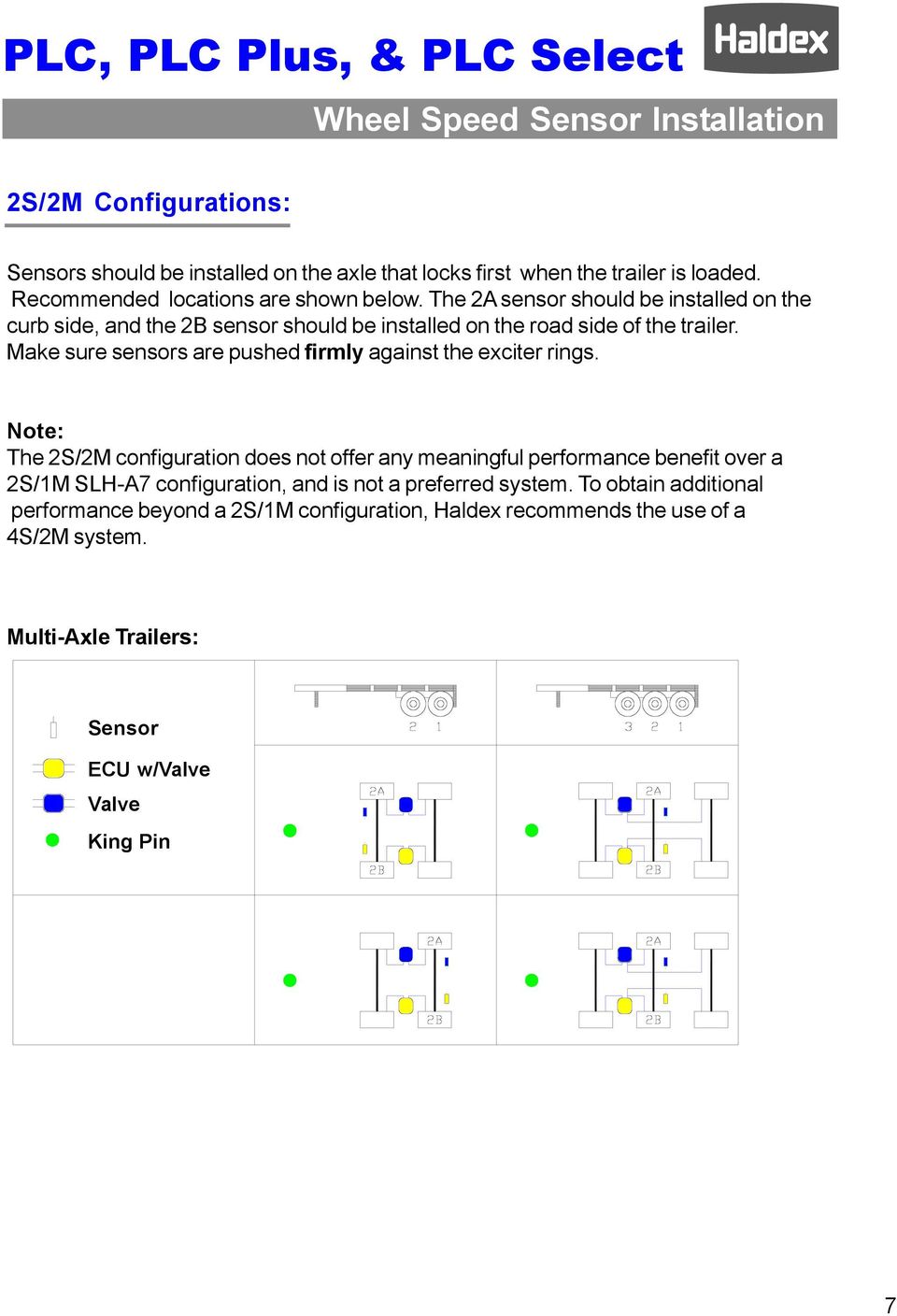
9 Wheel Speed Sensor Installation 2S/2M Configurations: Sensors should be installed on the axle that locks first when the trailer is loaded. Recommended locations are shown below. The 2A sensor should be installed on the curb side, and the 2B sensor should be installed on the road side of the trailer. Make sure sensors are pushed firmly against the exciter rings. Note: The 2S/2M configuration does not offer any meaningful performance benefit over a 2S/1M SLH-A7 configuration, and is not a preferred system. To obtain additional performance beyond a 2S/1M configuration, Haldex recommends the use of a 4S/2M system. Multi-Axle Trailers: Sensor ECU w/valve Valve King Pin 7
10 Wheel Speed Sensor Installation 4S/2M Axle-by-Axle Configurations: The placement of the sensors at the wheel end is an important consideration. Incorrect installation of the sensors and exciters will result in poor or no ABS operation. Sensors connected to yellow leads must sense the wheel controlled by the valve connected to the yellow valve lead. Similarly, sensors connected to blue leads must sense the wheel controlled by the valve connected to the blue lead. In the case of a 4S/2M Axle-By-Axle configuration, the blue modulator lead must be connected to the valve that controls the front axle wheel ends and is sensed by the blue sensors (3A and 2A). The yellow valve cable lead must be connected to the valve that controls the rear axle wheel ends and is sensed by the yellow sensors (3B and 2B). The schematic below shows the proper placement of the sensor and valve leads (the king pin indicates the front of the trailer). Make sure sensors are pushed firmly against the exciter rings. Wrong Multi-Axle Trailers: Correct Wrong Sensor ECU w/valve Valve King Pin 8

11 4S/2M Side-by-Side Configurations: Wheel Speed Sensor Installation The placement of the sensors at the wheel end is an important consideration. Incorrect installation of the sensors and exciters will result in poor or no ABS operation. Sensors connected to yellow leads must sense the wheel controlled by the valve connected to the yellow valve lead. Similarly, sensors connected to blue leads must sense the wheel controlled by the valve connected to the blue lead. In the case of a 4S/2M Side-By-Side configuration, the blue modulator lead must be connected to the valve that controls the curb side wheel ends and are sensed by the blue sensors (3A and 2A). The yellow valve cable lead must be connected to the valve that controls the road side wheel ends and are sensed by the yellow sensors (3B and 2B). The schematic below shows proper placement of the sensor and valve leads (king pin indicates the front of the trailer). Make sure sensors are pushed firmly against the exciter rings. Multi-Axle Trailers: Wrong Correct Wrong Sensor ECU w/valve Valve King Pin 9

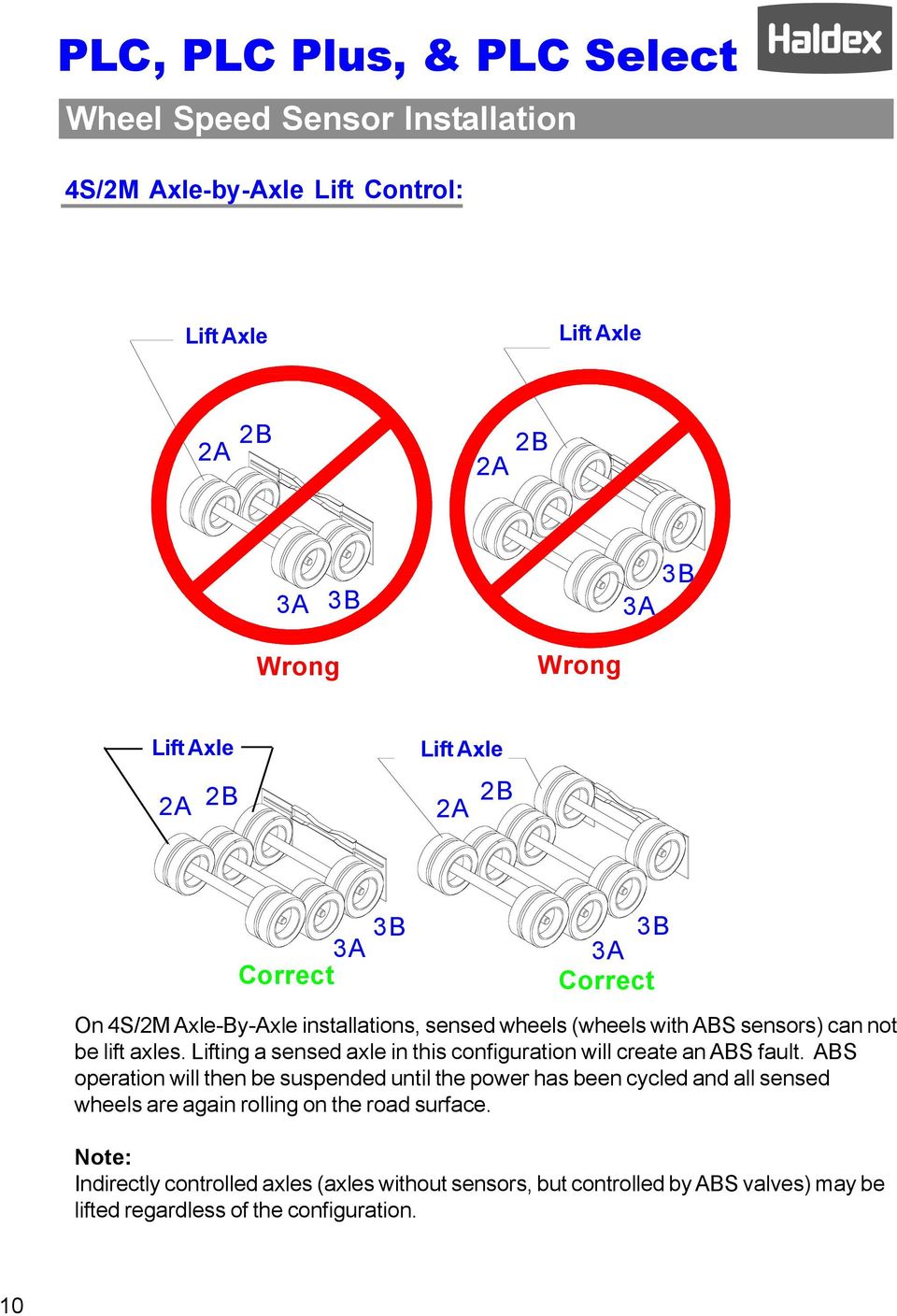
12 Wheel Speed Sensor Installation 4S/2M Axle-by-Axle Lift Control: Lift Axle Lift Axle 2A 2B 2B 2A 3A 3B 3B 3A Wrong Wrong Lift Axle 2A 2B Lift Axle 2A 2B 3B 3A Correct 3B 3A Correct On 4S/2M Axle-By-Axle installations, sensed wheels (wheels with ABS sensors) can not be lift axles. Lifting a sensed axle in this configuration will create an ABS fault. ABS operation will then be suspended until the power has been cycled and all sensed wheels are again rolling on the road surface. Note: Indirectly controlled axles (axles without sensors, but controlled by ABS valves) may be lifted regardless of the configuration. 10
13 Wheel Speed Sensor Installation 4S/2M Side-by-Side Lift Control: Lift Axle 3A 2A 2B 3A Lift Axle 2A 3B 2B 3B Correct Wrong Lift Axle 2A 3A Lift Axle 2A 3A Correct 2B 3B 3B 2B Correct On 4S/2M Side-By-Side installations, the sensed wheels 3A and 3B can be used on a lift axle. The sensed wheels 2A and 2B must remain on the ground at all times. Attention: The trailer has to roll over 6 MPH with the lift axle UP, after each ignition key on cycle in order for the ABS system to recognize that a lift axle is present. Once this is done, the axle can be raised or lowered without issue for that ignition on cycle. If the trailer rolls over 6 MPH with the lift axle down after an ignition on cycle, lifting the axle will cause an ABS fault to occur. Note: Indirectly controlled axles (axles without sensors, but controlled by ABS valves) may be lifted regardless of the configuration. 11

14 Wheel Speed Sensor Installation Cable Routing: 3-Way Clip (optional) Block Clip Sensor Push sensor firmly against exciter Tie strap Lightly grease the sensor with a lithium based grease. Use Dow Corning Molycoat CU7439 or equivalent. Sensor Cable Clip 3-WayClip 6-12 Sensor cable clip or Double tie straps recommended Leave some slack in cable to accommodate movement between components. Bundle excess cable with tie straps as shown below. 4 Diameter Loops Tie strap Long (dog bone) cable 4 Diameter Loop Don t over tighten tie straps. This could cause a cable failure, especially where attached to air lines, since air lines flex. 1. Insert the sensor clip into the sensor block. 2. Insert the sensor into the sensor clip and push until it is firmly against the exciter ring. (First grease the sensor with a lithium based grease.) 3. Route all sensor cables through vacant bolt holes, etc. Use a grommet or corrugated tubing when the cable is touching sharp edges. 4. Attach cable ties as needed to ensure the cable is secured. 5. Typical routing of cable is along the brake chamber air hose (see detail above). 6. Use sensor cable clip (highly recommended) or double tie straps when attaching the cables to the air lines. 7. Sensor cable clip or double tie straps should be no closer than 6 and no farther then 12 inches apart. 12 Use caution when attaching tie straps to air lines. Over tightening can cause a cable failure down the road.

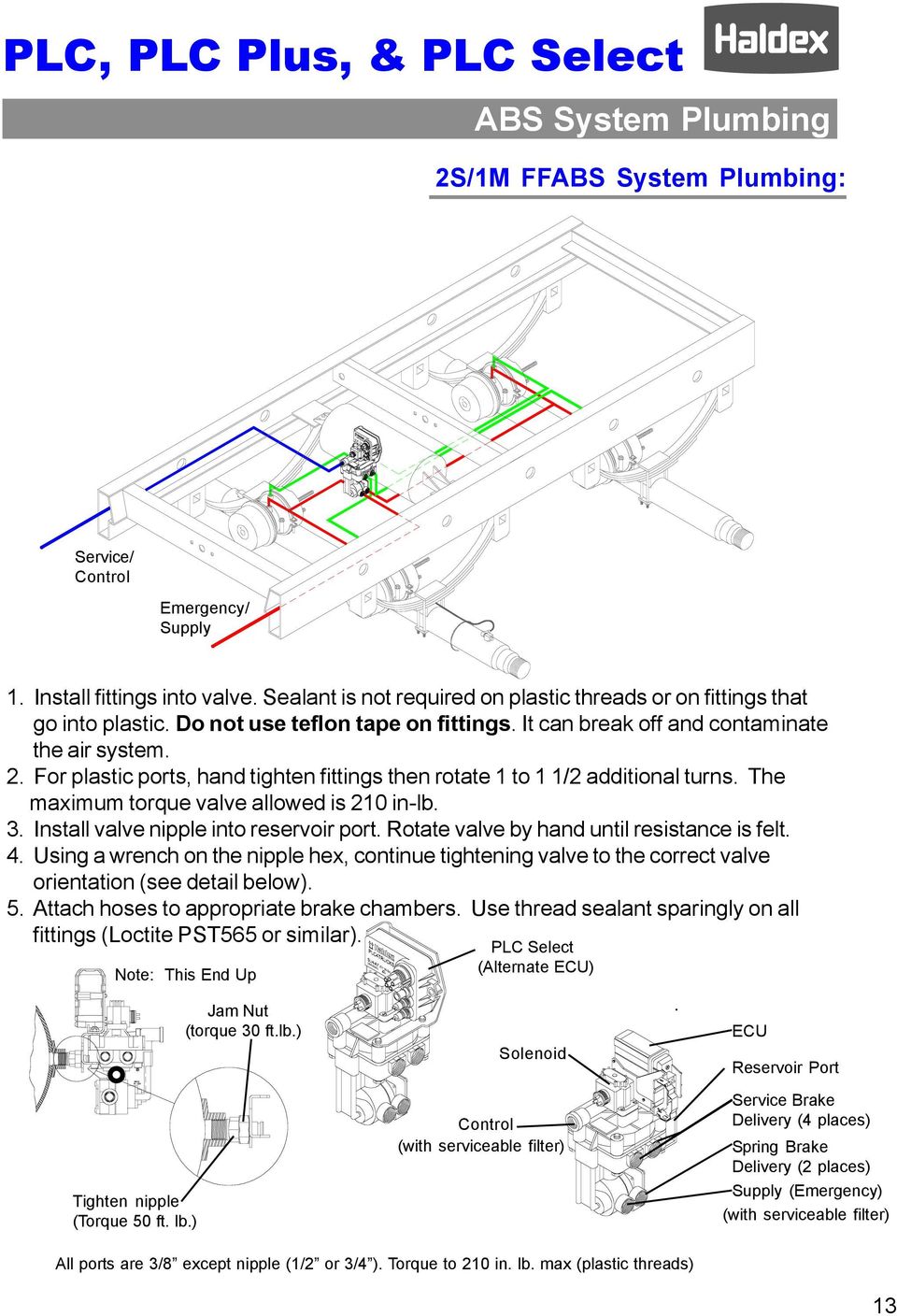
15 ABS System Plumbing 2S/1M FFABS System Plumbing: Service/ Control Emergency/ Supply 1. Install fittings into valve. Sealant is not required on plastic threads or on fittings that go into plastic. Do not use teflon tape on fittings. It can break off and contaminate the air system. 2. For plastic ports, hand tighten fittings then rotate 1 to 1 1/2 additional turns. The maximum torque valve allowed is 210 in-lb. 3. Install valve nipple into reservoir port. Rotate valve by hand until resistance is felt. 4. Using a wrench on the nipple hex, continue tightening valve to the correct valve orientation (see detail below). 5. Attach hoses to appropriate brake chambers. Use thread sealant sparingly on all fittings (Loctite PST565 or similar). Note: This End Up PLC Select (Alternate ECU) Tighten nipple (Torque 50 ft. lb.) Jam Nut (torque 30 ft.lb.) Solenoid Control (with serviceable filter) ECU Reservoir Port Service Brake Delivery (4 places) Spring Brake Delivery (2 places) Supply (Emergency) (with serviceable filter) All ports are 3/8 except nipple (1/2 or 3/4 ). Torque to 210 in. lb. max (plastic threads) 13
16 ABS System Plumbing 2S/1M ABS Relay System Plumbing: When an ABS Relay Valve is used, a Spring Brake Control Valve is required such as a Haldex RT4 Valve. Service/ Control Emergency/ Supply 1. Apply sealant sparingly to fittings, or use fittings with pre-applied sealant, and install into valve. Do not use teflon tape on fittings. It can break off and contaminate the air system. 2. Install heavy wall nipple into valve reservoir port. Thread nipple into reservoir. Rotate valve by hand until resistance is felt. 3. Using a wrench on the nipple hex, continue tightening valve to the correct valve orientation (see detail below). 4. Attach hoses to appropriate brake chambers. Use thread sealant sparingly on all fittings (Loctite PST565 or similar). Note: This End Up PLC Select (Alternate ECU) Supply (Emergency) Control Supply (Emergency) Spring Brake Delivery (4 places) ECU Solenoid Control 14 Tighten nipple (Torque 50 ft. lb.) Service Brake Delivery (6 places)

17 ABS System Plumbing 2S/2M ABS Relay System Plumbing: When an ABS Relay Valve is used, a Spring Brake Control Valve is required such as a Haldex RT4 Valve. Service/ Control Emergency/ Supply 1. Apply sealant sparingly to fittings, or use fittings with pre-applied sealant, and install into valve. Do not use teflon tape on fittings. It can break off and contaminate the air system. 2. Install heavy wall nipple into valve reservoir port. Thread nipple into reservoir. Rotate valve by hand until resistance is felt. 3. Using a wrench on the nipple hex, continue tightening valve to the correct valve orientation (see detail below). 4. Attach hoses to appropriate brake chambers. Use thread sealant sparingly on all fittings (Loctite PST565 or similar). Note: This End Up Supply (Emergency) Control ECU Spring Brake Delivery (4 places) Solenoid Control Tighten nipple (Torque 50 ft. lb.) Service Brake Delivery (2 places) 15

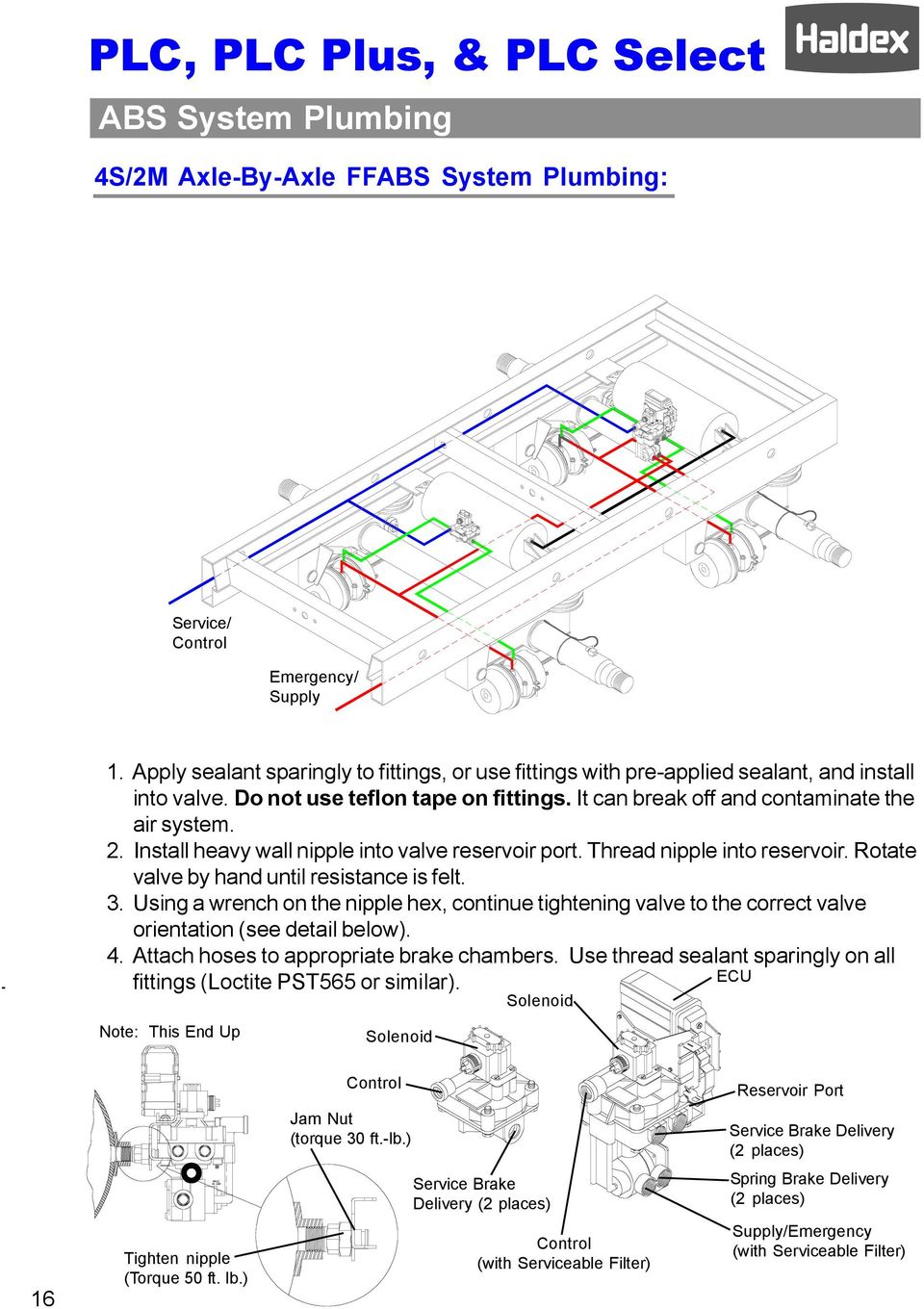
18 ABS System Plumbing 4S/2M Axle-By-Axle FFABS System Plumbing: Service/ Control Emergency/ Supply 1. Apply sealant sparingly to fittings, or use fittings with pre-applied sealant, and install into valve. Do not use teflon tape on fittings. It can break off and contaminate the air system. 2. Install heavy wall nipple into valve reservoir port. Thread nipple into reservoir. Rotate valve by hand until resistance is felt. 3. Using a wrench on the nipple hex, continue tightening valve to the correct valve orientation (see detail below). 4. Attach hoses to appropriate brake chambers. Use thread sealant sparingly on all fittings (Loctite PST565 or similar). ECU Note: This End Up Solenoid Solenoid Control Reservoir Port Jam Nut (torque 30 ft.-lb.) Service Brake Delivery (2 places) Service Brake Delivery (2 places) Spring Brake Delivery (2 places) 16 Tighten nipple (Torque 50 ft. lb.) Control (with Serviceable Filter) Supply/Emergency (with Serviceable Filter)
19 ABS System Plumbing 4S/2M Axle-By-Axle Relay System Plumbing: When an ABS Relay Valve is used, a Spring Brake Control Valve is required such as a Haldex RT4 Valve. Service/ Control Emergency/ Supply 1. Apply sealant sparingly to fittings, or use fittings with pre-applied sealant, and install into valve. Do not use teflon tape on fittings. It can break off and contaminate the air system. 2. Install heavy wall nipple into valve reservoir port. Thread nipple into reservoir. Rotate valve by hand until resistance is felt. 3. Using a wrench on the nipple hex, continue tightening valve to the correct valve orientation (see detail below). 4. Attach hoses to appropriate brake chambers. Use thread sealant sparingly on all fittings (Loctite PST565 or similar). Note: This End Up Solenoid ECU Supply (Emergency) Control Control Spring Brake Delivery (4 Places) Tighten nipple (Torque 50 ft. lb.) Service Brake Delivery (2 places) 17

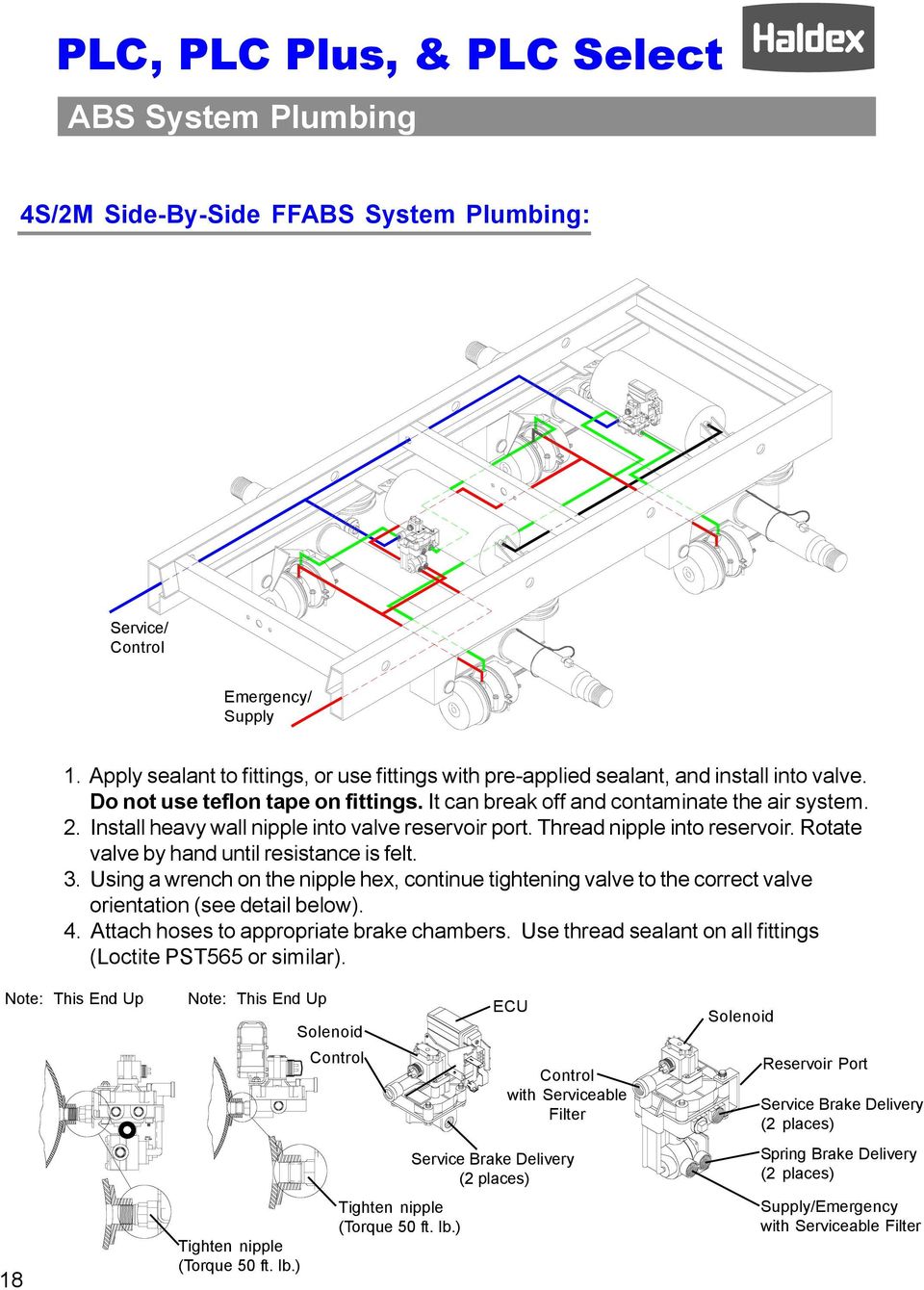
20 ABS System Plumbing 4S/2M Side-By-Side FFABS System Plumbing: Service/ Control Emergency/ Supply 1. Apply sealant to fittings, or use fittings with pre-applied sealant, and install into valve. Do not use teflon tape on fittings. It can break off and contaminate the air system. 2. Install heavy wall nipple into valve reservoir port. Thread nipple into reservoir. Rotate valve by hand until resistance is felt. 3. Using a wrench on the nipple hex, continue tightening valve to the correct valve orientation (see detail below). 4. Attach hoses to appropriate brake chambers. Use thread sealant on all fittings (Loctite PST565 or similar). Note: This End Up 18 Note: This End Up Tighten nipple (Torque 50 ft. lb.) Solenoid Control Tighten nipple (Torque 50 ft. lb.) ECU Control with Serviceable Filter Service Brake Delivery (2 places) Solenoid Reservoir Port Service Brake Delivery (2 places) Spring Brake Delivery (2 places) Supply/Emergency with Serviceable Filter
21 Most compact package with a No-Loom design offers the best in ABS solution for 2S/1M Applications. PLC Family Application Platform: Configurations: Application: PLC Select 2S/1M Single Axle Dollies Tandem Axle Dollies Single Axle Trailers Tandem Axle Trailers Tri-axle Trailers PLC Self-configuring design, from 2S/1M, 2S/2M, and 4S/2M, offers a flexible ABS solution for all applications with a single ECU. 2S/1M, 2S/2M, 4S/2M Single Axle Trailers Tandem Axle Trailers Tri-axle Trailers Single Axle Dollies Tandem Axle Dollies Feature rich design encompass all the flexibility of the PLC platform with added control and monitoring capabilities for a variety of auxiliary functions to provide preventive maintence, warning, and operational benefits. PLC Plus 2S/1M, 2S/2M, 4S/2M Plus Aux. Functions Single Axle Trailers Tandem Axle Trailers Tri-axle Trailers Single Axle Dollies Tandem Axle Dollies 19
22 PLC Select ABS Information PLC Select ABS 20
23 Hareware - PLC Select ABS Relay Valve FFABS Valve 7.1 Swing Radius 3-Way Clip (Optional) Sensor 7.1 Swing Radius ABS Lamp Tie Strap Power Cable Sensor Cable Clip 21
24 2S/1M System Wiring - PLC Select 2S/1M System Wiring: Legend Sensor Cable Power Cable 1A Solenoid Connection Hand Tighten Collar Valve Cable Sensor Connection Power Connection Apply dielectric grease to all electrical connections 1B 7 Way Wiring Sensor Connection Cover all exposed connections before painting ABS Light (Mounted on road side of trailer, at the rear.)* SAE J560 Power Connector Pins A (B+ Stop) B (B+ Perm) E (Ground) C (Cab Light) D (Trailer Light) B A E D C * Distance of ABS Lamp from red rear clearance side marker lamp:5.9 min. to 23 inches max. Note: Federal regulations require that new trailers, starting 3/1/2001, have the capability to provide an ABS fault signal from the trailer ABS into the tractor. Haldex provides two (2) options for this, one is through Industry standard PLC 4 Trucks multiplexing (the signal is carried on Pin 7), and the other is a hard wire (through Pin C of the power connector via the ISO 3731 connector). The requirement for the trailer mounted ABS lamp remains in effect until March of
25 ABS Road Test - PLC Select Installation Test - PLC Select: ECU Power Connection Modulator Valve Solenoid Cable Wheel Speed Sensor (S1A) (Curb Side) Wheel Speed Sensor (S1B) (Road Side) This step will ensure the ABS system (less power cable and warning lamp) is functioning properly, before the bogey is assembled to the trailer. Test Equipment: 12 VDC power source (do not use a battery charger), and interface cable with a Packard 5 pin male power connector and an ABS test light attached, and shop air. Procedure: 1. Charge the supply and service air systems. 2. Connect test power cable to wiring harness power lead. 3. ABS valve should blow down first. You will hear a brief shot of air from the valve. 4. The ABS light should illuminate for about 3 seconds and then turn off. 23
26 Production Testing - PLC Select End of Line ABS Check: Test Equipment: 12 VDC power source (do not use a battery charger) and shop air. Procedure: 1. Charge the supply and service air system. 2. Apply power source to 7-way receptacle. 3. The ABS Valve should blow down first. You will hear a brief shot of air from the valve. 4. The ABS light should illuminate for about 3 seconds and then turn off. 5. If desired, information such as the name of the Inspector, the date inspected, or the Trailer VIN can be stored in the ABS ECU using a PC, in conjunction with Haldex s PC Diagnostics software. Note: If ABS light never illuminates, or stays illuminated during the ABS check, refer to the Troubleshooting Section of this Manual (see pages 30-31). 24
27 Road Test - PLC Select Road Test - PLC Select: To check the operation of the entire ABS system, connect a tractor to the trailer and charge the trailer s air tanks. Turn on the ignition key and ensure that the warning light comes on briefly, then goes out. Pull the trailer at a speed above 6 mph and make a brake application until the tractor-trailer has come to a complete stop. Verify that the ABS light has remained OFF. If the light remains OFF, the system is functioning properly. If the ABS system detected an error during the stop, the warning light will be ON. If the light never comes ON when the ignition is turned ON, then refer to the Troubleshooting - No ABS Warning Light Illumination section of this Manual (see page 31). If the light stays ON with the ignition key on, refer to the Troubleshooting - ABS Warning Light Illuminates; Stays On Permanently section of this Manual (see page 30). Notes: 1. Disconnect power from the ABS system before testing or making any repairs. 2. Most ABS problems are related to: A) Cut, corroded, or abraded wires. B) Corroded connectors and terminals. C) Connector terminals not latched or seated correctly to mating assemblies. D) Excessive sensor air gap, sensor clip retention, or wheel bearing end play. 3. After making any repairs go to the Diagnostic Tools section of this Manual (see page 25-30) to confirm that the Fault is corrected. If a Fault # 11, 12, 21, 22, 41 or 42 has occurred, and has been corrected, the code will read an 07. The trailer must then be driven above 6 mph for the ABS warning light to turn OFF. 25
28 Troubleshooting - PLC Select Diagnostic Tools - PLC Select: Blink Codes: ABS fault codes can be accessed using the ABS Light without the use of any other tools. The Blink code Simple Fault Mode diagnostics can be activated by pressing on the brake pedal to activate the trailer brakes and switching ignition power on, off, then back on in 1 second intervals. See Blink Code information on Pages PLC Info Center: The PLC Info Center has a screen that can display ABS fault codes plus a number of other items. The PLC Info Center only needs to be connected to vehicle power and ground. (A diagnostic interface cable is available to accommodate this connection.) Available functions include: 1. View active fault codes (2 digit code) and fault occurrance count. 2. View stored fault codes and fault occurrance count. 3. Clear stored fault codes. 4. View wheel speed sensor identification corresponding to each individual wheel when a wheel is rotated. 5. View sensor and valve configuration code. 6. View ABS ECU type and serial number. 7. Energize individual valve solenoids. 8. Odometer A. View Odometer, Tire Scale Factor, Service Interval and Trip Distance. B. Set Odometer units (miles or kilometers), Scale Factor and Service Interval. 9. Monitor and control trailer auxiliary devices such as: lift axle, dome light, low reservoir, door ajar, overload, etc. (when used with PLC Plus ABS) 26 PLC PC Diagnostics: PLC PC Diagnostics displays the most 9 to 25 information. Fuunctions available include: Way Cable 1. View ABS ECU Part Number. 2. Save ABS diagnostic results for a print out of test verification. 3. Read/ Write data internally to ABS ECU. Minimum Requirements: Pentium II, 32 MB Ram, 233 MHz, Windows 95B, RS232 9 pin com port J1708/ PLC Adapter ABS PC Diagnostic Software Note: PLC Info Center and PLC PC Diagnostics are not compatible with older generations of ABS manufactured prior to March Diagnostic Interface Cable PLC Interface Cable
29 Troubleshooting - PLC Select Troubleshooting - PLC Select: Code 00, 07, A7, or C0: This indicates that the system is working OK with the trailer moving or 07 with the trailer not moving indicates there are no active faults. 2. A4, A7, and A8 are configuration codes and may or may not be present. 3. C0 indicates that the ABS is a 2S/1M system. Code 01, or 02: This Indicates that a wheel speed sensor or its wiring has a short or open circuit. 1. Disconnect the relevant sensor connector from the sensor and measure the resistance between the two pins in the sensor connector housing. The ohmmeter reading for the sensor should be between 980 and 2350 ohms. The sensor should be replaced if the reading is outside of these limits. 2. The connections and sensor cable can be disconnected at the ECU to check for open or shorts. If there is a sensor extension cable attached to the sensor, test this separately for continuity. Replace any defective hardware and retest. Code 11, or 12 (Occurs when the trailer is moving): Indicates that the output of a wheel speed sensor of a moving trailer is insufficient. 1. The most likely reason for this is the gap between one sensor and the exciter is too great. Measure the AC voltage at the sensor in question while rotating the wheel at a rate of about 1 revolution every two seconds. The output should be at least 200 millivolts. If the output is less than 200 millivolts, try pushing in the sensor until it touches the exciter. If this doesn t correct the problem, then replace the sensor. 2. If the gap on both sensors is too great, you may not get a fault. If the ECU isn t getting voltage from any sensor it will assume that the trailer is not moving, even when it is. If you suspect this is the case, check each wheel separately for sensor output. 27
30 Troubleshooting - PLC Select Troubleshooting - PLC Select: Code 21, or 22 (Occurs when the trailer is moving): Indicates that there is an intermittent loss of a sensor signal when the trailer is traveling down the road. This type of fault is often difficult to diagnose. 1. The most likely causes include: a broken sensor retaining clip, a damaged or misaligned exciter, or excessive wheel bearing end play*. Check components at the affected wheel. 2. Other possible causes are: a loose, damaged, or corroded sensor electrical connection or a break in the cable. Check the connectors for these items. If the connections look good, then look for visual external damage to the cable. Replace any suspect components and retest. * Ensure that the wheel bearings are torqued per the manufacture s specification. Code 41 (Occurs when the trailer is moving): Indicates that a wheel is slow to come back up to speed when ABS releases the brake during an ABS event. 1. The most likely causes include: a dragging brake, a pinched or kinked delivery hose, or defective modulator valve, or an unequal number of exciter teeth between wheels. Check the brakes to ensure that they release completely. Look for visual external damage to the delivery hoses or delivery tubing. Replace any defective hardware and retest. Code 61, or 67: Indicates that a solenoid or its cable has an open circuit internally. 1. The most likely causes include: a bad solenoid or a loose solenoid connection. Disconnect the solenoid and check the resistance at the solenoid pins. Readings across the two bottom pins should be between 7 and 9 ohms. Check the female terminals on the connector for excessive pin spread or corrosion. Replace defective hardware as required and retest. 2. Additional possible causes are: a bad solenoid cable or loose connection. Remove the Valve Cable from the ECU and check for continuity. Repair or replace. 28
31 Troubleshooting - PLC Select Troubleshooting - PLC Select: Code 71, or 77: Indicates that a solenoid or its cable has a short circuit to ground (negative). 1. The most likely causes include: a damaged cable or solenoid. An example of this is a worn or chafed cable that has exposed wires contacting the trailer. Disconnect the solenoid connector and check for continuity between each solenoid terminal and trailer ground. Next remove the valve cable from the ECU and check for continuity between pins and trailer ground. If the resistance is less than 10M ohms in any case, replace suspect hardware and retest. If the code still exists, than the ECU is likely defective. Code 81, or 87: Indicates that the solenoid or its cable has a short circuit to B+ (positive 12 volts). 1. The most likely cause is a damaged cable or solenoid. Remove the valve cable from the ECU and test for continuity and trailer B+, with power disconnected. If the resistance is less than 10M ohms in any case, replace suspect hardware and retest. If the code still exists, then the ECU is likely defective. Code 90: Indicates that ABS voltage is below about 8.5 volts. This fault will disappear when the voltage exceeds 8.5 volts, without the ignition being recycled. 1. The most likely causes include: a damaged or corroded wire, terminal, or splice in the ABS power supply circuit. Check the voltage drop between the SAE J560 7-way and the ABS ECU. The voltage drop should not exceed 2 volts. Remove the power cable from the ECU and test for continuity with power disconnected. 2. If power is coming from somewhere other than the tractor; make sure the tester battery is fully charged or the voltage converter has adequate DC voltage and current capacity. Do NOT use a battery charger. 3. Another possible cause is undersized wiring. Recommended vehicle harness wire sizes are 10 gauge for power (permanent and stoplight) and 8 gauge for ground. 29
32 Troubleshooting - PLC Select Troubleshooting - PLC Select: Code 92: Indicates that the ABS voltage is above 16.5 volts. 1. The most likely cause is a malfunctioning voltage regulator or tester power supply set too high. If this occurs while troubleshooting the trailer without a tractor connected, verify that the tester power supply is below 16 volts before proceeding. Code 80, 93, 99, E0-E9, or EA-EF: Indicates that the ECU is likely defective. 1. Replace the ECU and retest to confirm problem is resolved. Code CA, CC: 1. A CA code is an invitation to clear all stored faults stored in memory. Note that if dynamic faults are stored in memory, the ABS Warning Lamp may remain ON until the trailer is driven above 6 mph. If the Lamp remains ON, the fault still exist. Correct the problem and retest, then clear stored faults from memory. 2. A CC code will be displayed during the third consecutive time that a Clear All is attempted. This is an invitation to Clear Configuration and should be avoided. This is only used to reconfigure the ABS to a 2S/1M after it has been configured to a 2S/2M or 4S/2M. If a CC is displayed, power the system down and power back up. ABS Warning Light Stays On Permanently: 30 Upon power up of the ABS system, the ABS warning light should come ON for about 3 seconds, then go OFF. If the light stays ON, it may be caused by improper light wiring, or by a fault in the ABS system. 1. Check for diagnostic fault codes. If anything other than an 07 is displayed, review the Troubleshooting section of this Manual for possible solutions. After the problem is repaired, clear all stored faults. 2. If an 07 is displayed but there was an, 11, 12, 21, 22, or 41 stored in memory, then correct the problem and drive. The trailer needs to be driven above 6 mph to get the ABS light to turn OFF. 3. If there are no stored faults and an 07 is displayed, and the ABS light is still ON, then the ABS light is miswired. Remove the main wire harness 5 pin connector at the ECU and verify continuity between pin D and the trailer light. The remaining light wire must be grounded to the trailer chassis or connected to the SAE J560 7-way connector ground wire. Check for continuity between the ABS light wire and ground. Repair as necessary and retest.
33 Troubleshooting - PLC Select Troubleshooting - PLC Select: No ABS Warning Light Illumination: 1. Check the bulb to verify that it is functional. If not functional, replace it. 2. Verify that there is power to the ECU. Disconnect the main wire harness 5 pin connector and check for B+ (positive power) between either pin A or pin B and ground, (pin A requires a brake application, as it is stoplight power). The voltage drop between the SAE J560 7-way and the ECU should not exceed 2 volts. If no power exists at either pin, then check continuity from these pins to the SAE J way connector red and blue circuits. Make necessary repairs and retest. 3. If the problem is still present, remove the main wire harness 5 pin connector at the ECU and verify continuity between pin D and the light. The remaining light wire must be grounded to the trailer chassis or connected to the SAE J560 7-way connector ground wire. Check for continuity between the ABS light wire and ground. Repair as necessary and retest. 31
34 PLC ABS Information PLC ABS 32
35 Hardware - PLC ABS ABS Relay Valve * FFABS Valve 7.28 Swing Radius Clasp PLC Loom 7.28 Swing Radius Sensor Tie Strap Sensor Cable Clip Power Cable 3-Way Clip (Optional) ABS Lamp 33
36 2S/1M System Wiring - PLC ABS 2S/1M System Wiring - PLC ABS: Legend Sensor Cable Power Cable Valve Cable 1A Solenoid Connection Hand Tighten Collar Wire Harness Sensor Connection Apply dielectric grease to all electrical connections Sensor Connection 1B 7 Way Wiring Cover all exposed connections before painting ABS Light (Mounted on road side of trailer, at the rear.)* SAE J560 Power Connector Pins A (B+ Stop) B (B+ Perm) E (Ground) C (Cab Light) D (Trailer Light) B A E D C * Distance of ABS Lamp from red rear clearance side marker lamp:5.9 min. to 23 inches max. Note: 34 Federal regulations require that new trailers, starting 3/1/2001, have the capability to provide an ABS fault signal from the trailer ABS into the tractor. Haldex provides two (2) options for this, one is through Industry standard PLC 4 Trucks multiplexing (the signal is carried on Pin 7), and the other is a hard wire (through Pin C of the power connector via the ISO 3731 connector). The requirement for the trailer mounted ABS lamp remains in effect until March of 2009.
37 2S/2M System Wiring - PLC ABS: 2S/2M System Wiring - PLC ABS Legend Sensor Cable Power Cable Valve Cable 2A Solenoid Connection Hand Tighten Collar Wire Harness Sensor Connection Apply dielectric grease to all electrical connections Sensor Connection 2B 7 Way Wiring Cover all exposed connections before painting ABS Light (Mounted on road side of trailer, at the rear.)* SAE J560 Power Connector Pins A (B+ Stop) B (B+ Perm) E (Ground) C (Cab Light) D (Trailer Light) B A E D C * Distance of ABS Lamp from red rear clearance side marker lamp:5.9 min. to 23 inches max. Note: Federal regulations require that new trailers, starting 3/1/2001, have the capability to provide an ABS fault signal from the trailer ABS into the tractor. Haldex provides two (2) options for this, one is through Industry standard PLC 4 Trucks multiplexing (the signal is carried on Pin 7), and the other is a hard wire (through Pin C of the power connector via the ISO 3731 connector). The requirement for the trailer mounted ABS lamp remains in effect until March of
38 4S/2M Axle-By-Axle System Wiring - PLC ABS Legend Sensor Cable Power Cable 2B Solenoid Connection Hand Tighten Collar Valve Cable 2A Wire Harness Sensor Connection Apply dielectric grease to all electrical connections 3B 7 Way Wiring Sensor Connection 3A ABS Light (Mounted on road side of trailer, at the rear.)* Cover all exposed connections before painting SAE J560 Power Connector Pins A (B+ Stop) B (B+ Perm) E (Ground) C (Cab Light) D (Trailer Light) B A E D C * Distance of ABS Lamp from red rear clearance side marker lamp:5.9 min. to 23 inches max. Note: Federal regulations require that new trailers, starting 3/1/2001, have the capability to provide an ABS fault signal from the trailer ABS into the tractor. Haldex provides two (2) options for this, one is through Industry standard PLC 4 Trucks multiplexing (the signal is carried on Pin 7), and the other is a hard wire (through Pin C of the power connector via the ISO 3731 connector). The requirement for the trailer mounted ABS lamp remains in effect until March of
39 4S/2M Side-By-Side System Wiring - PLC ABS Legend Sensor Cable Power Cable 2A Solenoid Connection Hand Tighten Collar Valve Cable 3A Wire Harness Sensor Connection Apply dielectric grease to all electrical connections 2B 7 Way Wiring Sensor Connection Cover all exposed connections before painting 3B ABS Light (Mounted on road side of trailer, at the rear.)* SAE J560 Power Connector Pins A (B+ Stop) B (B+ Perm) E (Ground) C (Cab Light) D (Trailer Light) B A E D C * Distance of ABS Lamp from red rear clearance side marker lamp:5.9 min. to 23 inches max. Note: Federal regulations require that new trailers, starting 3/1/2001, have the capability to provide an ABS fault signal from the trailer ABS into the tractor. Haldex provides two (2) options for this, one is through Industry standard PLC 4 Trucks multiplexing (the signal is carried on Pin 7), and the other is a hard wire (through Pin C of the power connector via the ISO 3731 connector). The requirement for the trailer mounted ABS lamp remains in effect until March of
40 Harness Connetion - PLC ABS Harness Connection - PLC ABS: Care must be taken when attaching the wiring harness to the ECU. The clasp and bail latch must be properly latched to ensure trouble-free ABS operation. ECU PLC ABS Bail Latch Clasp Support Clasp Step #1 Open the clasp by inserting a screwdriver into the clip slot and prying forward. "click" Step #2 Connect the wiring harness to the ECU (listen for 2 clicks as the latches fall into place). "click" Step #3 Close the clasp and lock into place. Band should completely cover the enlarged portion of the wiring harness overmold. 38 Step #4 Slide the bail latch over the ears on the loom to complete the assembly.
41 Installation Test - PLC ABS: Production Testing - PLC ABS This step will ensure the ABS system (less power cable and warning lamp) is functioning properly, before the bogey is assembled to the trailer. Test Equipment: 12 VDC power source (do not use a battery charger), and interface cable with a Packard 5 pin male power connector and an ABS test light attached, and shop air. Procedure: 1. Charge the supply and service air systems. 5 pin 2. Connect test power cable to wiring harness power lead. 3. ABS valves should blow down first. You will hear a brief shot of air for each valve; and each valve will only exhaust once: a. 2S/1M : The Red Channel will exhaust b. 2S/2M or 4S/2M : The Blue Channel will exhaust first, then the Yellow Channel 4. The ABS light should illuminate for about 3 seconds and then turn off. End of Line ABS Check: Test Equipment: 12 VDC power source (do not use a battery charger) and shop air. Procedure: 1. Charge the supply and service air system. 2. Apply power source to 7-way receptacle. 3. The ABS Valve(s) should blow down first. You will hear a brief shot of air for each valve; and each valve will only exhaust once: a. 2S/1M: the Red Channel will exhaust. b. 2S/2M or 4S/2M : the Blue Channel will exhaust first, then the Yellow Channel. 4. The ABS light should illuminate for about 3 seconds and then turn off. 5. If desired, information such as the name of the Inspector, the date inspected, or the Trailer VIN can be stored in the ABS ECU using a PC, in conjunction with Haldex s PC Diagnostics software (see page 41.) Note: If ABS light never illuminates, or stays illuminated during the ABS check, refer to the Troubleshooting Section of this Manual (see page 42-46). 39
42 Road Test - PLC ABS Road Test - PLC ABS: To check the operation of the entire ABS system, connect a tractor to the trailer and charge the trailer s air tanks. Turn on the ignition key and ensure that the warning light comes on briefly, then goes out. Pull the trailer at a speed above 6 mph and make a brake application until the tractor-trailer has come to a complete stop. Verify that the ABS light has remained OFF. If the light remains OFF, the system is functioning properly. If the ABS system detected an error during the stop, the warning light will be ON. If the light never comes ON when the ignition is turned ON, then refer to the Troubleshooting - No ABS Warning Light Illumination section of this Manual see page 46. If the light stays ON with the ignition key on, refer to the Troubleshooting - ABS Warning Light Illuminates; Stays On Permanently section of this Manual (see page 45). PLC 19 pin connector Modulator Hold Yel (Red: 2S/1M) Trailer Lamp Modulator Dump Yel (Red: 2S/1M) Modulator Common Yel (Red: 2S/1M) Modulator Common Blue Modulator Hold Blue Modulator Dump Blue Sensor 3B LO (1B LO: 2S/1M) Sensor 3B HI (1B HI: 2S/1M) B- Permanent and Stop Light Cab Lamp Perm B+ Sensor 2A HI B+ Stop Light Sensor 2A LO Sensor 3A HI Sensor 2B HI (1A HI: 2S/1M) Sensor 3A LO Sensor 2B LO (1A LO: 2S/1M) 40 Notes: 1. Disconnect power from the ABS system before testing or making any repairs. 2. Most ABS problems are related to: A) Cut, corroded, or abraded wires. B) Corroded connectors and terminals. C) Connector terminals not latched or seated correctly to mating assemblies. D) Excessive sensor air gap, sensor clip retention, or wheel bearing end play. 3. After making any repairs go to the Diagnostic Tools section of this Manual (see page 41) to confirm that the Fault is corrected. If a Fault # 11 thru 16, 21 thru 26, or 41 thru 43 has occurred, and has been corrected, the code will read an 07. The trailer must then be driven above 6 mph for the ABS warning light to turn OFF.
43 Diagnostic Tools - PLC ABS: Blink Codes: PLC Info Center: Troubleshooting - PLC ABS ABS fault codes can be accessed using the ABS Light without the use of any other tools. The Blink code Simple Fault Mode diagnostics can be activated by pressing on the brake pedal to activate the trailer brakes and switching ignition power on, off, then back on in 1 second intervals. See Blink Code information on Pages The PLC Info Center has a screen that can display ABS fault codes plus a number of other items. The PLC Info Center only needs to be connected to vehicle power and ground. (A diagnostic interface cable is available to accommodate this connection.) Available functions include: 1. View active fault codes (2 digit code) and fault occurrance count. 2. View stored fault codes and fault occurrance count. 3. Clear stored fault codes. 4. View wheel speed sensor identification corresponding to each individual wheel when a wheel is rotated. 5. View sensor and valve configuration code. 6. View ABS ECU type and serial number. 7. Energize individual valve solenoids. 8. Odometer A. View Odometer, Tire Scale Factor, Service Interval and Trip Distance. B. Set Odometer units (miles or kilometers), Scale Factor and Service Interval. 9. Monitor and control trailer auxiliary devices such as: lift axle, dome light, low reservoir, door ajar, overload, etc. (when used with PLC Plus ABS) PLC PC Diagnostics: PLC PC Diagnostics displays the most 9 to 25 information. Functions available include: Way Cable 1. View ABS ECU Part Number. 2. Save ABS diagnostic results for a print out of test verification. 3. Read/ Write data internally to ABS ECU. Minimum Requirements: Pentium II, 32 MB Ram, 233 MHz, Windows 95B, RS232 9 pin com port J1708/ PLC Adapter ABS PC Diagnostic Software Note: PLC Info Center and PLC PC Diagnostics are not compatible with older generations of ABS manufactured prior to March Diagnostic Interface Cable PLC Interface Cable 41
44 Troubleshooting - PLC ABS Troubleshooting - PLC ABS: Code 00, 07, A4, A7, C0 or C1 or C2: This indicates that the system is working OK with the trailer moving or 07 with the trailer not moving indicates there are no active faults. 2. A4, A7, and A8 are configuration codes and may or may not be present. 3. C0, C1, or C2 indicate that the ABS is a 2S/1M, 2S/2M or 4S/2M system. Code 01, 02, 03, 04, 05, or 06: This Indicates that a wheel speed sensor or its wiring has a short or open circuit. 1. Disconnect the relevant sensor connector from the sensor and measure the resistance between the two pins in the sensor connector housing. The ohmmeter reading for the sensor should be between 980 and 2350 ohms. The sensor should be replaced if the reading is outside of the limits. 2. The main wire harness 19 pin connector can be disconnected at the ECU to check for open or shorts in the sensor cables. Sensor cable pins are #2, 4, 5, 6, 11, 12, 13, and 19. Check for open and short circuits between the connector and its related cable end. Also check for damaged harness pins. If there is a sensor extension cable attached to the wire harness, test this separately for continuity. Replace any defective hardware and retest. 3. Be sure to listen for two clicks when reconnecting the main wire harness to the ECU. Secure the connection with the attached metal clasp and bail latch. Code 11, 12, 13, 14, 15, or 16 (Occurs when the trailer is moving): Indicates that the output of a wheel speed sensor of a moving trailer is insufficient. 1. The most likely reason for this is the gap between one sensor and the exciter is too great. Measure the AC voltage at the sensor in question while rotating the wheel at a rate of about 1 revolution every two seconds. The output should be at least 200 millivolts. If the output is less than 200 millivolts, try pushing in the sensor until it touches the exciter. If this doesn t correct the problem, then replace the sensor. 2. If the gap on all sensors is too great, you may not get a fault. If the ECU isn t getting voltage from any sensor it will assume that the trailer is not moving, even when it is. If you suspect this is the case, check each wheel separately for sensor output. 42
45 Troubleshooting - PLC ABS Troubleshooting - PLC ABS: Code 21, 22, 23, 24, 25, or 26 (Occurs when the trailer is moving): Indicates that there is an intermittent loss of a sensor signal when the trailer is traveling down the road. This type of fault is often difficult to diagnose. 1. The most likely causes include: a broken sensor retaining clip, a damaged exciter, or excessive wheel bearing end play*. Check components at the affected wheel. 2. Other possible causes are: a loose, damaged, or corroded sensor electrical connection or a break in the cable. Check the connectors for these items. If the connections look good, then look for visual external damage to the cable. Replace any suspect components and retest. * Ensure that the wheel bearings are torqued per the manufacture s specification. Code 41, 42 or 43 (Occurs when the trailer is moving): Indicates that a wheel is slow to come back up to speed when ABS releases the brake during an ABS event. 1. The most likely causes include: a dragging brake, a pinched or kinked delivery hose, or defective modulator valve, or an unequal number of exciter teeth between wheels. Check the brakes to ensure that they release completely. Look for visual external damage to the delivery hoses or delivery tubing. Replace any defective hardware and retest. Code 61, 62, 63, 67, 68, or 69: Indicates that a solenoid or its cable has an open circuit internally. 1. The most likely causes include: a bad solenoid or a loose solenoid connection. Disconnect the solenoid and check the resistance at the solenoid pins. Readings across the two bottom pins should be between 7 and 9 ohms. Check the female terminals on the connector for excessive pin spread or corrosion. Replace defective hardware as required and retest. 2. Additional possible causes are: a bad solenoid cable, the main wire harness 19 pin connector is not completely latched into the ECU, or a harness pin is damaged or bent. Remove the harness from the ECU and check for continuity between pins 7, 14, 15, 16, 17, and 18 and their related terminals on the cable end. Repair as required and retest. 3. Be sure to listen for two clicks when reconnecting the main wire harness to the ECU and secure the connection with the attached metal clasp and bail latch. 43
46 Troubleshooting - PLC ABS Troubleshooting - PLC ABS: Code 71, 72, 73, 77, 78, or 79: Indicates that a solenoid or its cable has a short circuit to ground (negative). 1. The most likely causes include: a damaged cable or solenoid. An example of this is a worn or chafed cable that has exposed wires contacting the trailer. Disconnect the solenoid connector and check for continuity between each solenoid terminal and trailer ground. Next remove the main wire harness 19 pin connector and check for continuity between the trailer ground and pins 7, 14, 15, 16, 17, and 18. If the resistance is less than 10M ohms in any case, replace suspect hardware and retest. If the code still exists, than the ECU is likely defective. 2. Be sure to listen for two clicks when reconnecting the main wire harness to the ECU and secure the connection with the attached metal clasp and bail latch. Code 81, 82, 83, 87, 88, or 89: Indicates that the solenoid or its cable has a short circuit to B+ (positive 12 volts). 1. The most likely cause is a damaged cable or solenoid. Remove the harness from the ECU and test for continuity between pins 7, 14, 15, 16, 17, and 18 and trailer B+, with power disconnected. If the resistance is less than 10M ohms in any case, replace suspect hardware and retest. If the code still exists, then the ECU is likely defective. 2. Be sure to listen for two clicks when reconnecting the main wire harness to the ECU and secure the connection with the attached metal clasp and bail latch. Code 90: Indicates that ABS voltage is below about 8.5 volts. This fault will disappear when the voltage exceeds 8.5 volts, without the ignition being recycled. 1. The most likely causes include: a damaged or corroded wire, terminal, or splice in the ABS power supply circuit. Check the voltage drop between the SAE J560 7-way and the ABS ECU. The voltage drop should not exceed 2 volts. Remove the power cable from the ECU and test for continuity with power disconnected. 2. If power is coming from somewhere other than the tractor; make sure the tester battery is fully charged or the voltage converter has adequate DC voltage and current capacity. DO NOT use a battery charger. 3. Another possible cause is undersized wiring. Recommended vehicle harness wire sizes are 10 gauge for power (permanent and stoplight) and 8 gauge for ground. 44
47 Troubleshooting - PLC ABS Troubleshooting - PLC ABS: Code 92: Indicates that the ABS voltage is above 16.5 volts. 1. The most likely cause is a malfunctioning voltage regulator or tester power supply set too high. If this occurs while troubleshooting the trailer without a tractor connected, verify that the tester power supply is below 16 volts before proceeding. Code 80, 93, 99, E0-E9, or EA-EF: Indicates that the ECU is likely defective. 1. Replace the ECU and retest to confirm problem is resolved. Code CA, CC: 1. A CA code is an invitation to clear all stored faults stored in memory. Note that if dynamic faults are stored in memory, the ABS Warning Lamp may remain ON until the trailer is driven above 6 mph. If the Lamp remains ON, the fault still exist. Correct the problem and retest, then clear stored faults from memory. 2. A CC code will be displayed during the third consecutive time that a Clear All is attempted. This is an invitation to Clear Configuration and should be avoided. This is only used to reconfigure the ABS to a 2S/1M after it has been configured to a 2S/2M or 4S/2M. If a CC is displayed, power the system down and power back up. ABS Warning Light Stays On Permanently: Upon power up of the ABS system, the ABS warning light should come ON for about 3 seconds, then go OFF. If the light stays ON, it may be caused by improper light wiring, or by a fault in the ABS system. 1. Check for diagnostic fault codes. If anything other than an 07 is displayed, review the Troubleshooting section of this Manual for possible solutions. After the problem is repaired, clear all stored faults. 2. If an 07 is displayed but there was a 11-16, 21-26, or stored in memory, then correct the problem and drive the trailer above 6 mph to get the ABS light to turn OFF. 3. If there are no stored faults and an 07 is displayed, and the ABS light is still ON, then the ABS light is mis-wired. Remove the main wire harness 19 pin connector at the ECU and verify continuity between pin #10 and the trailer light. (Pin #10 and the light should be connected through pin D of the Delphi Packard 5 pin power connection.) The remaining light wire must be grounded to the trailer chassis or connected to the SAE J560 7-way connector ground wire. Check for continuity between the ABS light wire and ground. Repair as necessary and retest. 4. Be sure to listen for two clicks when reconnecting the main wire harness to the ECU and secure the connection with the attached metal clasp and bail latch. 45
48 Troubleshooting - PLC ABS Troubleshooting - PLC ABS: No ABS Warning Light Illumination: 1. Check the bulb to verify that it is functional. If not functional, replace it. 2. Verify that there is power to the ECU. Disconnect the main wire harness 19 pin connector and check for B+ (positive power) between either pin #1 or #3 and ground pin #8 (pin #3 requires a brake application as it is stoplight power). The voltage drop between the SAE J560 7-way and the ECU should not exceed 2 volts. If no power exists at either pin, then check continuity from these pins to the SAE J way connector red and blue circuits. Make necessary repairs and retest. 3. If the problem is still present, remove the main wire harness 19 pin connector at the ECU and verify continuity between pin #10 and the light (pin #10 and the light should be connected through pin D of the Delphi Packard 5 pin power connection.) The remaining light wire must be grounded to the trailer chassis or connected to the SAE J560 7-way connector ground wire. Check for continuity between the ABS light wire and ground. Repair as necessary and retest. 4. Be sure to listen for two clicks when reconnecting the main wire harness to the ECU and secure the connection with the attached metal clasp and bail latch. 46
49 PLC PLUS Information PLC PLUS 47
50 Components - PLC PLUS * ABS Relay Valve FFABS Valve 7.28 Swing Radius Clasp 7.28 Swing Radius PLC PLUS Loom Tie Strap Sensor Cable Clip Sensor Power Cable 3-Way Clip (Optional) ABS Lamp 48
51 2S/1M System Wiring - PLC ABS: 2S/1M System Wiring - PLC PLUS Legend Sensor Cable Power Cable Solenoid Connection Hand Tighten Collar Valve Cable Auxiliary Cables 1A Wire Harness Sensor Connection (Auxillary Cables PLC Plus Only) 7 Way Wiring Sensor Connection 1B Apply dielectric grease to all electrical connections Cover all exposed connections before painting ABS Light (Mounted on road side of trailer, at the rear.)* SAE J560 Power Connector Pins A (B+ Stop) B (B+ Perm) E (Ground) C (Cab Light) D (Trailer Light) B A E D C * Distance of ABS Lamp from red rear clearance side marker lamp:5.9 min. to 23 inches max. Note: Federal regulations require that new trailers, starting 3/1/2001, have the capability to provide an ABS fault signal from the trailer ABS into the tractor. Haldex provides two (2) options for this, one is through Industry standard PLC 4 Trucks multiplexing (the signal is carried on Pin 7), and the other is a hard wire (through Pin C of the power connector via the ISO 3731 connector). The requirement for the trailer mounted ABS lamp remains in effect until March of
52 2S/2M System Wiring - PLC PLUS 2S/2M System Wiring - PLC ABS: Legend Sensor Cable Power Cable Solenoid Connection Hand Tighten Collar Valve Cable Auxiliary Cables 2A Wire Harness Sensor Connection (Auxillary Cables PLC Plus Only) 7 Way Wiring Sensor Connection 2B Apply dielectric grease to all electrical connections Cover all exposed connections before painting ABS Light (Mounted on road side of trailer, at the rear.)* SAE J560 Power Connector Pins A (B+ Stop) B (B+ Perm) E (Ground) C (Cab Light) D (Trailer Light) B A E D C * Distance of ABS Lamp from red rear clearance side marker lamp:5.9 min. to 23 inches max. Note: 50 Federal regulations require that new trailers, starting 3/1/2001, have the capability to provide an ABS fault signal from the trailer ABS into the tractor. Haldex provides two (2) options for this, one is through Industry standard PLC 4 Trucks multiplexing (the signal is carried on Pin 7), and the other is a hard wire (through Pin C of the power connector via the ISO 3731 connector). The requirement for the trailer mounted ABS lamp remains in effect until March of 2009.
53 4S/2M Axle-By-Axle System Wiring - PLC PLUS Legend Sensor Cable Power Cable Valve Cable Auxiliary Cable 2A Sensor Connection 2B Solenoid Connection Hand Tighten Collar Wire Harness (Auxillary Cables PLC Plus Only) 3B 7 Way Wiring Sensor Connection 3A ABS Light (Mounted on road side of trailer, at the rear.)* Cover all exposed connections before painting Apply dielectric grease to all electrical connections SAE J560 Power Connector Pins A (B+ Stop) B (B+ Perm) E (Ground) C (Cab Light) D (Trailer Light) B A E D C * Distance of ABS Lamp from red rear clearance side marker lamp:5.9 min. to 23 inches max. Note: Federal regulations require that new trailers, starting 3/1/2001, have the capability to provide an ABS fault signal from the trailer ABS into the tractor. Haldex provides two (2) options for this, one is through Industry standard PLC 4 Trucks multiplexing (the signal is carried on Pin 7), and the other is a hard wire (through Pin C of the power connector via the ISO 3731 connector). The requirement for the trailer mounted ABS lamp remains in effect until March of
54 4S/2M Side-By-Side System Wiring - PLC PLUS Legend Sensor Cable Power Cable Valve Cable 3A 2A Solenoid Connection Hand Tighten Collar Wire Harness Auxiliary Cable Sensor Connection (Auxillary Cables PLC Plus Only) 2B 7 Way Wiring Sensor Connection 3B Cover all exposed connections before painting Apply dielectric grease to all electrical connections ABS Light (Mounted on road side of trailer, at the rear.)* SAE J560 Power Connector Pins A (B+ Stop) B (B+ Perm) E (Ground) C (Cab Light) D (Trailer Light) B A E D C * Distance of ABS Lamp from red rear clearance side marker lamp:5.9 min. to 23 inches max. Note: Federal regulations require that new trailers, starting 3/1/2001, have the capability to provide an ABS fault signal from the trailer ABS into the tractor. Haldex provides two (2) options for this, one is through Industry standard PLC 4 Trucks multiplexing (the signal is carried on Pin 7), and the other is a hard wire (through Pin C of the power connector via the ISO 3731 connector). The requirement for the trailer mounted ABS lamp remains in effect until March of
55 Harness Connetion - PLC PLUS Harness Connection - PLC Plus: Care must be taken when attaching the wiring harness to the ECU. The clasp and bail latch must be properly latched to ensure trouble-free ABS operation. ECU PLC PLUS Bail Latch Support Clasp Clasp Step #1 Open the clasp by inserting a screwdriver into the clip slot and prying forward. "click" "click" Step #2 Connect the wiring harness to the ECU (listen for 2 clicks as the latches fall into place). Step #3 Close the clasp and lock into place. Band should completely cover the enlarged portion of the wiring harness overmold. Step #4 Slide the bail latch over the ears on the loom to complete the assembly. 53
56 Production Testing - PLC PLUS Installation Test - PLC Plus: This step will ensure the ABS system (less power cable and warning lamp) is functioning properly, before the bogey is assembled to the trailer. Test Equipment: 12 VDC power source (do not use a battery charger), and interface cable with a Packard 5 pin male power connector and an ABS test light attached, and shop air. Procedure: 1. Charge the supply and service air systems. 5 pin 2. Connect test power cable to wiring harness power lead. 3. ABS valves should blow down first. You will hear a brief shot of air for each valve; and each valve will only exhaust once: a. 2S/1M : The Red Channel will exhaust b. 2S/2M or 4S/2M : The Blue Channel will exhaust first, then the Yellow Channel 4. The ABS light should illuminate for about 3 seconds and then turn off. End of Line ABS Check: Test Equipment: 12 VDC power source (do not use a battery charger) and shop air. Procedure: 1. Charge the supply and service air system. 2. Apply power source to 7-way receptacle. 3. The ABS Valve(s) should blow down first. You will hear a brief shot of air for each valve; and each valve will only exhaust once: a. 2S/1M: the Red Channel will exhaust. b. 2S/2M or 4S/2M : the Blue Channel will exhaust first, then the Yellow Channel. 4. The ABS light should illuminate for about 3 seconds and then turn off. 5. If desired, information such as the name of the Inspector, the date inspected, or the Trailer VIN can be stored in the ABS ECU using a PC, in conjunction with Haldex s PC Diagnostics software. Note: If ABS light never illuminates, or stays illuminated during the ABS check, refer to the Troubleshooting Section of this Manual (see pages 57-61). 54
57 Production Testing - PLC PLUS Road Test - PLC PLUS To check the operation of the entire ABS system, connect a tractor to the trailer and charge the trailer s air tanks. Turn on the ignition key and ensure that the warning light comes on briefly, then goes out. Pull the trailer at a speed above 6 mph and make a brake application until the tractor-trailer has come to a complete stop. Verify that the ABS light has remained OFF. If the light remains OFF, the system is functioning properly. If the ABS system detected an error during the stop, the warning light will be ON. If the light never comes ON when the ignition is turned on, then refer to the Troubleshooting - No ABS Warning Light Illumination section of this Manual (see page 61). If the light stays ON with the ignition key on, refer to the Troubleshooting - ABS Warning Light Illuminates; Stays On Permanently section of this Manual (see page 60). PLC PLUS 28 - pin connector Sensor 3B HI Sensor 3B LO Sensor 3A HI Blue Valve Common Yellow Valve Common Analog Ground B- Ground Auxiliary Ground Auxiliary 1 Input/Output Yellow Valve Hold Trailer Lamp ABS (Hi Side Drive) Trailer Lamp Auxiliary (Hi Side Drive) In Cab Lamp (LO Side Drive) Open on Loom Analog 2 Input (Fast) Auxiliary 3 Input Only Notes: 1. Disconnect power from the ABS system before testing or making any repairs. 2. Most ABS problems are related to: A) Cut, corroded, or abraded wires. B) Corroded connectors and terminals. C) Connector terminals not latched or seated correctly to mating assemblies. D) Excessive sensor air gap, sensor clip retention, or wheel bearing end play. 3. After making any repairs go to the Diagnostic Tools section of this Manual (see page 56) to confirm that the Fault is corrected. If a Fault # 11 thru 16, 21 thru 26, or 41 thru 43 has occurred, and has been corrected, the code will read an 07. The trailer must then be driven above 6 mph for the ABS warning light to go OFF Sensor 2A HI Sensor 2B LO Sensor 3A LO Blue Valve Hold Sensor 2A LO Sensor 2B HI Blue Valve Dump Yellow Valve Dump B+ Stoplamp Power B+ Permanent Power Analog 1 Input (Slow) Analog +5V Output Auxiliary 2 I/O 55
58 Production Testing - PLC PLUS Diagnostic Tools - PLC PLUS: Blink Codes: ABS fault codes can be accessed using the ABS Light without the use of any other tools. The Blink code Simple Fault Mode diagnostics can be activated by pressing on the brake pedal to activate the trailer brakes and switching ignition power on, off, then back on in 1 second intervals. See Blink Code information on Pages PLC Info Center: 56 The PLC Info Center has a screen that can display ABS fault codes plus a number of other items. The PLC Info Center only needs to be connected to vehicle power and ground. (A diagnostic interface cable is available to accommodate this connection.) Available functions include: 1. View active fault codes (2 digit code) and fault occurrance count. 2. View stored fault codes and fault occurrance count. 3. Clear stored fault codes. 4. View wheel speed sensor identification corresponding to each individual wheel when a wheel is rotated. 5. View sensor and valve configuration code. 6. View ABS ECU type and serial number. 7. Energize individual valve solenoids. 8. Odometer A. View Odometer, Tire Scale Factor, Service Interval and Trip Distance. B. Set Odometer units (miles or kilometers), Scale Factor and Service Interval. 9. Monitor and control trailer auxiliary devices such as: lift axle, dome light, low reservoir, door ajar, overload, etc. (when used with PLC Plus ABS) PLC PC Diagnostics: PLC PC Diagnostics displays the most 9 to 25 information. Functions available include: Way Cable 1. View ABS ECU Part Number. 2. Save ABS diagnostic results for a print out of test verification. 3. Read/ Write data internally to ABS ECU. Minimum Requirements: Pentium II, 32 MB Ram, 233 MHz, Windows 95B, RS232 9 pin com port J1708/ PLC Adapter ABS PC Diagnostic Software Diagnostic Interface Cable PLC Interface Cable Note: PLC Info Center and PLC PC Diagnostics are not compatible with older generations of ABS manufactured prior to March 2001.
59 Troubleshooting - PLC PLUS Troubleshooting - PLC Plus: Code 00, 07, A4, A7, C0 or C1 or C2: This indicates that the system is working OK with the trailer moving or 07 with the trailer not moving indicates there are no active faults. 2. A4, A7, and A8 are configuration codes and may or may not be present. 3. C0, C1, or C2 indicate that the ABS is a 2S/1M, 2S/2M or 4S/2M system. Code 01, 02, 03, 04, 05, or 06: This Indicates that a wheel speed sensor or its wiring has a short or open circuit. 1. Disconnect the relevant sensor connector from the sensor and measure the resistance between the two pins in the sensor connector housing. The ohmmeter reading for the sensor should be between 980 and 2350 ohms. The sensor should be replaced, if the reading is outside of the these limits. 2. The main wire harness 28 pin connector can be disconnected, at the ECU to check for open or shorts in the sensor cables. Sensor cable pins are #1, 2, 10, 11, 12, 20, 21, and 22 on PLC PLUS. Check for open and short circuits between the connector and its related cable end. Also check for damaged harness pins. If there is a sensor extension cable attached to the wire harness, test this separately for continuity. Replace any defective hardware and retest. 3. Be sure to listen for two clicks when reconnecting the main wire harness to the ECU. Secure the connection with the attached metal clasp and bail latch. Code 11, 12, 13, 14, 15, or 16 (Occurs when the trailer is moving): Indicates that the output of a wheel speed sensor of a moving trailer is insufficient. 1. The most likely reason for this is the gap between one sensor and the exciter is too great. Measure the AC voltage at the sensor in question while rotating the wheel at a rate of about 1 revolution every two seconds. The output should be at least 200 millivolts. If the output is less than 200 millivolts, try pushing in the sensor until it touches the exciter. If this doesn t correct the problem, then replace the sensor. 2. If the gap on all sensors is too great, you may not get a fault. If the ECU isn t getting voltage from any sensor it will assume that the trailer is not moving, even when it is. If you suspect this is the case, check each wheel separately for sensor output. 57
60 Troubleshooting - PLC ABS Troubleshooting - PLC Plus: Code 21, 22, 23, 24, 25, or 26 (Occurs when the trailer is moving): Indicates that there is an intermittent loss of a sensor signal when the trailer is traveling down the road. This type of fault is often difficult to diagnose. 1. The most likely causes include: a broken sensor retaining clip, a damaged exciter, or excessive wheel bearing end play*. Check components at the affected wheel. 2. Other possible causes are: a loose, damaged, or corroded sensor electrical connection or a break in the cable. Check the connectors for these items. If the connections look good, then look for visual external damage to the cable. Replace any suspect components and retest. * Ensure that the wheel bearings are torqued per the manufacture s specification. Code 41, 42 or 43 (Occurs when the trailer is moving): Indicates that a wheel is slow to come back up to speed when ABS releases the brake during an ABS event. 1. The most likely causes include: a dragging brake, a pinched or kinked delivery hose, or defective modulator valve, or an unequal number of exciter teeth between wheels. Check the brakes to ensure that they release completely. Look for visual external damage to the delivery hoses or delivery tubing. Replace any defective hardware and retest. Code 61, 62, 63, 67, 68, or 69: Indicates that a solenoid or its cable has an open circuit internally. 1. The most likely causes include: a bad solenoid or a loose solenoid connection. Disconnect the solenoid and check the resistance at the solenoid pins. Readings across the two bottom pins should be between 7 and 9 ohms. Check the female terminals on the connector for excessive pin spread or corrosion. Replace defective hardware as required and retest. 2. Additional possible causes are: a bad solenoid cable, the main wire harness 28 pin connector is not completely latched into the ECU, or a harness pin is damaged or bent. Remove the harness from the ECU and check for continuity between pins #3, 4, 13, 14, 23, and 24 and their related terminals on the cable end. Repair as required and retest. 3. Be sure to listen for two clicks when reconnecting the main wire harness to the ECU and secure the connection with the attached metal clasp and bail latch. 58
61 Troubleshooting - PLC PLUS Troubleshooting - PLC Plus: Code 71, 72, 73, 77, 78, or 79: Indicates that a solenoid or its cable has a short circuit to ground (negative). 1. The most likely causes include: a damaged cable or solenoid. An example of this is a worn or chafed cable that has exposed wires contacting the trailer. Disconnect the solenoid connector and check for continuity between each solenoid terminal and trailer ground. Next remove the main wire harness 28 pin connector and check for continuity between the trailer ground and pins 3, 4, 13, 14, 23, and 24. If the resistance is less than 10M ohms in any case, replace suspect hardware and retest. If the code still exists, than the ECU is likely defective. 2. Be sure to listen for two clicks when reconnecting the main wire harness to the ECU and secure the connection with the attached metal clasp and bail latch. Code 81, 82, 83, 87, 88, or 89: Indicates that the solenoid or its cable has a short circuit to B+ (positive 12 volts). 1. The most likely cause is a damaged cable or solenoid. Remove the harness from the ECU and test for continuity between pins 3, 4, 13, 14, 23, and 24 and trailer B+ power connection, with power disconnected. If the resistance is less than 10M ohms in any case, replace suspect hardware and retest. If the code still exists, then the ECU is likely defective. 2. Be sure to listen for two clicks when reconnecting the main wire harness to the ECU and secure the connection with the attached metal clasp and bail latch. Code 90: Indicates that ABS voltage is below about 8.5 volts. This fault will disappear when the voltage exceeds 8.5 volts, without the ignition being recycled. 1. The most likely causes include: a damaged or corroded wire, terminal, or splice in the ABS power supply circuit. Check the voltage drop between the SAE J560 7-way and the ABS ECU. The voltage drop should not exceed 2 volts. Remove the power cable from the ECU and test for continuity with power disconnected. 2. If power is coming from somewhere other than the tractor; make sure the tester battery is fully charged or the voltage converter has adequate DC voltage and current capacity. DO NOT use a battery charger. 3. Another possible cause is undersized wiring. Recommended vehicle harness wire sizes are 10 gauge for power (permanent and stoplight) and 8 gauge for ground. 59
62 Troubleshooting - PLC ABS Troubleshooting - PLC Plus: Code 92: Indicates that the ABS voltage is above 16.5 volts. 1. The most likely cause is a malfunctioning voltage regulator or tester power supply set too high. If this occurs while troubleshooting the trailer without a tractor connected, verify that the tester power supply is below 16 volts before proceeding. Code 80, 93, 99, E0-E9, or EA-EF: Indicates that the ECU is likely defective. 1. Replace the ECU and retest to confirm problem is resolved. Code CA, CC: 1. A CA code is an invitation to clear all stored faults stored in memory. Note that if dynamic faults are stored in memory, the ABS Warning Lamp may remain on until the trailer is driven above 6 mph. If the Lamp remains ON, the fault still exist. Correct the problem and retest, then clear stored faults from memory. 2. A CC code will be displayed during the third consecutive time that a Clear All is attempted. This is an invitation to Clear Configuration and should be avoided. This is only used to reconfigure the ABS to a 2S/1M after it has been configured to a 2S/2M or 4S/2M. If a CC is displayed, power the system down and power back up. ABS Warning Light Stays On Permanently: Upon power up of the ABS system, the ABS warning light should come ON for about 3 seconds, then go OFF. If the light stays ON, it may be caused by improper light wiring, or by a fault in the ABS system. 1. Check for diagnostic fault codes. If anything other than an 07 is displayed, review the Troubleshooting section of this Manual (pages 57-61) for possible solutions. After the problem is repaired, clear all stored faults. 2. If an 07 is displayed but there was a 11-16, 21-26, or stored in memory, then correct the problem and drive the trailer above 6 mph to get the ABS light to turn OFF. 3. If there are no stored faults and an 07 is displayed, and the ABS light is still ON, then the ABS light is mis-wired. Remove the main wire harness 28 pin connector at the ECU and verify continuity between pin #15 and the trailer light. (Pin #15 and the light should be connected through pin D of the Delphi Packard 5 pin power connection.) The remaining light wire must be grounded to the trailer chassis or connected to the SAE J560 7-way connector ground wire. Check for continuity between the ABS light wire and ground. Repair as necessary and retest. 4. Be sure to listen for two clicks when reconnecting the main wire harness to the ECU and secure the connection with the attached metal clasp and bail latch. 60
63 Troubleshooting - PLC PLUS Troubleshooting - PLC Plus: No ABS Warning Light Illumination: 1. Check the bulb to verify that it is functional. If not functional, replace it. 2. Verify that there is power to the ECU. Disconnect the main wire harness 28 pin connector and check for B+ (positive power) between either pin #5 and 6 and ground pin #26 (Pin #5 requires a brake application as it stoplight power). The voltage drop between the SAE J560 7-way and the ECU should not exceed 2 volts. If no power exists at either pin, then check continuity from these pins to the SAE J560 7-way connector red and blue circuits. Make necessary repairs and retest. 3. If the problem is still present, remove the main wire harness 28 pin connector at the ECU and verify continuity between pin #15 and the trailer light. (Pin #15 and the light should be connected through pin D of the Delphi Packard 5 pin power connection.) The remaining light wire must be grounded to the trailer chassis or connected to the SAE J560 7-way connector ground wire. Check for continuity between the ABS light wire and ground. Repair as necessary and retest. 4. Be sure to listen for two clicks when reconnecting the main wire harness to the ECU and secure the connection with the attached metal clasp and bail latch. 61
64 Diagnostics Diagnostics Info Center 7-Way Diagnostic Interface Cable PC Diagnostic 62
65 Diagnostics Blink Code Diagnostics: There are 4 Blink Code modes: Mode: Description I gnition Cycles (1 second ON/ 1 second OFF) 1 Simple / Wheel Speed Mode 2 Active Faults Mode 3 Stored Faults / Clear Mode 4 Configuration Mode ON, off, ON ON, off, ON, off, ON ON, off, ON, off, ON, off, ON ON, off, ON, off, ON, off, ON, off, ON Procedure For Activating Blink Code Diagnostics: 1. The trailer must be stationary. 2. The trailer must be connected to a DC-power supply (8-14 volts). Do not use a battery charger. 3. Constant power (8-14 volts) must be provided to the stoplight circuit (apply trailer brakes). 4. Ignition power must be cycled on and off (trailer auxiliary circuit) to reach the desired mode (shown above). Note: Stoplight and ignition power must be independent for blink code troubleshooting. If ignition power is required to be on for your brake light to operate, then the blink code diagnositcs will not function. Procedure Notes: 1. Once entered, a mode can only be terminated by completely disconnecting all trailer power. 2. All modes repeat endlessly. Each repeat is separated by 10 seconds of continuous lamp energization. 3. All codes are separated by 2 seconds of lamp OFF. 4. All fault codes are followed by an occurrence count which is displayed at a much faster rate than the fault code. Simple Mode Diagnostics: This mode has a shortened list of fault codes that will display. Faults are grouped to simplify the diagnostics. Up to 3 active codes will display at one time. These faults need to be repaired before other active faults can be displayed. See Simple Mode Faults Code Table on next page. 63
66 Diagnostics Blink Code Diagnostics: Mode 1 - Simple Mode Diagnostics Faults Table (ON, OFF, ON): ITEM FLASH COUNT ACTUAL FAULT System OK Sensor Sensor Sensor Sensor Sensor Sensor Red Blue 1A 1B 2A 2B 3A 3B Valve Valve Yellow Valve Low Voltage ECU Failure Lamp Stays On 07 1 Flash 01 2 Flashes 02 3 Flashes 03 4 Flashes 04 5 Flashes 05 6 Flashes 06 7 Flashes 61, 67, 71, 77, 81, 87 8 Flashes 62, 68, 72, 78, 82, 88 9 Flashes 63, 69, 73, 79, 83, Flashes Flashes 93, 99, E-Codes Note: If the simple mode does not show a fault code, but the ABS lamp remains ON after powering the ABS, there maybe dynamic faults stored in the memory. In this case, proceed to the stored fault mode of diagnostics. Wheel Speed Mode: Wheel Speed Mode is accessible only when in Simple Mode. This Mode is not activated until the ECU has received a signal from the wheel speed sensor of a spinning wheel. The hold solenoid of the modulator associated with the particular sensed spinning wheel will be cycled. The blink codes for the sensed wheels are as follows: 64 S1A: 1 Flash S1B: 2 Flashes S2A: 3 Flashes S2B: 4 Flashes S3A: 5 Flashes S3B: 6 Flashes Note 1: Spin only one wheel at a time. Note 2: Once a wheel is rotated, the ABS lamp will remain on after the wheel is stopped, until the next wheel is rotated.
67 Diagnostics Blink Code Diagnostics: Mode 2 - Active Fault Mode (ON, OFF, ON, OFF, ON): When the Active Fault Mode is enabled (see page 63), the ABS lamp displays a numerical fault code sequence for each existing fault, up to nine fault codes at a time. The nine faults must be repaired before additional active faults can be displayed. The blink codes used in the Active Fault Mode are related to the Haldex standard fault codes and are shown on pages Mode 3 - Stored (Passive) Faults Mode (ON, OFF, ON, OFF, ON, OFF, ON): In this mode (see page 63) the ABS lamp displays a numerical fault code sequence for each stored fault. All stored faults (not currently active) are displayed in this mode. The lamp will display up to nine passive stored faults at a time. The most recent stored fault is displayed last. The blink codes used in the Passive Stored Fault Mode are related to the Haldex standard fault codes and are shown on pages Clearing Stored Codes: The passive stored fault codes may be cleared by switching ignition power off and on twice during the 10 seconds of lamp energization that occurs prior to each repeat of the fault code blink sequence. The lamp will flash rapidly for 10 seconds to show that the faults are being erased. Active / Stored Mode Fault Occurrences: The fault code blink sequence is followed by the occurrence count for that fault in either the Active or Passive Mode. The occurrence count is displayed at a much faster rate in order to differentiate between the code and its occurrence count. Active / Stored Fault Mode Notes: 1. A zero for codes such as 01 is indicated by a two second lamp ON condition. All other digits are indicated by a half second lamp ON condition. Example: Fault code 23 is indicated by the lamp flashing ON twice for one half second each time - followed by two seconds of lamp unlit - followed bye three 1/2 second flashes. The third flash is the occurance count and as 1/4 second flashes. 2. There is a two second lamp OFF delay between the digits in each code. 3. Code 07 (system OK, vehicle at rest) is displayed as a continuous Lamp ON condition. 65
68 Diagnostics Blink Code Diagnostics: Mode 4 - Configuration Mode (ON, OFF, ON, OFF, ON, OFF, ON, OFF, ON): This Mode displays Configuration and Auxiliary Codes. The Configuration Code is displayed prior to Auxiliary Codes. The tables below show a list of Configuration Codes and a list of Auxiliary Codes which are supported by Blink Codes. Auxiliary Codes are displayed low to high. Each blink code digit will refer to a digit in the Haldex configuration codes. Clear Configuration Mode: The configuration codes may be cleared by switching ignition power off and on twice during the 10 seconds of lamp energization that occurs prior to each repeat of the fault code blink sequence. The lamp will flash rapidly for 10 seconds to indicate that the configuration has been erased from the ECU s memory. The ECU will then store its full configuration on the next power up. Config Code Blinks Function Axle Lifted Sensor Used C0 1 2S/1M S1A S1B C1 2 2S/2M S2A S2B C2 3 4S/2M S3A S2A S2B S3B Modulators Used RED BLUE, BLUE, YELLOW YELLOW C3 4 4S/2M 2 or 3 ( S3A) S2A S2B (S3B) BLUE, YELLOW Aux Code Blinks Description A0 1 Not Applicable A1 2 Not Applicable A2 3 Not Applicable A3 4 Not Applicable A4 5 No load sense valve - momentarily displayed when power is applied. A5 6 Not Applicable A6 7 Not Applicable A7 8 SLH programming for yellow valve channel (red valve is 2S/1M) A8 9 MSLH programming for yellow valve channel (red valve is 2S/1M) 66
69 Diagnostics Diagnostic Codes: C ODE: E XPLANATION : SOLUTION: 00 No Fault found - wheel speed is over 6 mph 01 Red channel wheel speed sensor wiring S1A has an Open or Short circuit. ABS is operational Check cable connections then replace cable or ensor as necessary. PLC Select PLC PLC PLUS x x x s x x x 02 Red channel wheel speed sensor wiring S1B has an Open or Short circuit. 03 Blue channel wheel speed sensor wiring S2A has an Open or Short circuit. 04 Yellow channel wheel speed sensor wiring S2B has an Open or Short circuit. 05 Blue channel wheel speed sensor wiring S3A has an Open or Short circuit. 06 Yellow channel wheel speed sensor wiring S3B has an Open or Short circuit. Check cable connections then replace cable or ensor as necessary. s x x x Check cable connections then replace cable or ensor as necessary. s x x Check cable connections then replace cable or ensor as necessary. s x x Check cable connections then replace cable or ensor as necessary. s x x Check cable connections then replace cable or ensor as necessary. s x x 07 N O FAULT FOUND. ABS ECU is fully operational. Displays: "07"< 6 mph. 11 Red channel speed sensor S1A gap too large. Gap should be kept to a minimum. Check gap & alignment between sensor and exciter ing. Sensor may be defective. x x x r x x x 12 Red channel speed sensor S1B gap too large. Gap should be kept to a minimum. 13 Blue channel speed sensor S2A gap too large. Gap should be kept to a minimum. 14 Yellow channel speed sensor S2B gap too large. Gap should be kept to a minimum. 15 Blue channel speed sensor S3A gap too large. Gap should be kept to a minimum. 16 Yellow channel speed sensor S3B gap too large. Gap should be kept to a minimum. 20 Incorrect exciter (tone) ring used. Check gap & alignment between sensor and exciter ing. Sensor may be defective. r x x x Check gap & alignment between sensor and exciter ing. Sensor may be defective. r x x Check gap & alignment between sensor and exciter ing. Sensor may be defective. r x x Check gap & alignment between sensor and exciter ing. Sensor may be defective. r x x Check gap & alignment between sensor and exciter ing. Sensor may be defective. r x x Check number of teeth on exciter ring. Number of eeth should be uniform for all wheel ends. t x x x 67
70 Diagnostics Diagnostic Codes: C ODE: E XPLANATION : SOLUTION: PLC Select PLC PLC PLUS 21 Red channel wheel speed sensor S1A has an erratic output voltage. 22 Red channel wheel speed sensor S1B has an erratic output voltage. Check cable connections; sensor/exciter ring misaligned, damaged sensor cable, sensor, exciter, or wheel bearing. Check cable connections; sensor/exciter ring misaligned, damaged sensor cable, sensor, exciter, or wheel bearing. X X X X X X 23 Blue channel wheel speed sensor S2A has an erratic output voltage. Check cable connections; sensor/exciter ring misaligned, damaged sensor cable, sensor, exciter, or wheel bearing. X X 24 Yellow channel wheel speed sensor S2B has an erratic output voltage. Check cable connections; sensor/exciter ring misaligned, damaged sensor cable, sensor, exciter, or wheel bearing. X X 25 Blue channel wheel speed sensor S3A has an erratic output voltage. Check cable connections; sensor/exciter ring misaligned, damaged sensor cable, sensor, exciter, or wheel bearing. X X 26 Yellow channel wheel speed sensor S3B has an erratic output voltage. Check cable connections; sensor/exciter ring misaligned, damaged sensor cable, sensor, exciter, or wheel bearing. X X 30 Auxiliary channel 0 fault (digital channe l 0) I/O Check digital cable connections, auxiliary box relay failure X 31 Auxiliary channel 1 fault (digital channe l 1) I/O Check digital cable connections, auxiliary box relay failure X 32 Auxiliary channel 2 fault (digital channe l 2) I/O Check digital cable connections, auxiliary box relay failure X 33 Auxiliary channel 3 fault (digital channe l 3) Input only Check digital cable connections, auxiliary box relay failure X 34 Auxiliary channel 4 fault (analog channe l 1) Input only Check analog cable connections X 35 Auxiliary channel 5 fault (analog channe l 2) Input only Check analog cable connections X 37 amp signaled by external device L X X X 40 S ensor wiring crossed across an axle heck sensor cable connections. C X X X 68
71 Diagnostics Diagnostic Codes: C ODE: E XPLANATION : SOLUTION: PLC Select PLC PLC PLUS 41 Slow wheel recovery on Red valve channel. Check for mechanical faults piping or defective valve. i.e. dragging brake, restricted X X X 42 Slow wheel recovery on Blue valve channel. Check for mechanical faults piping or defective valve. i.e. dragging brake, restricted X X 43 Slow wheel recovery on yellow valve channel Check for mechanical faults piping or defective valve. i.e. dragging brake, restricted X X 61 Hold solenoid Open circuit on Red valve channel. Check cable connections. be defective. Solenoid on Red valve channel may X X X 62 Hold solenoid Open circuit on Blue valve channel. Check cable connections. be defective. Solenoid on Blue valve channel may X X 63 Hold solenoid Open circuit on Yello w valve channel. Check cable connections. Solenoid on Yellow valve channel may be defective. X X 67 Dump solenoid Open circuit on Red valve channel. Check cable connections. be defective. Solenoid on Red valve channel may X X X 68 Dump solenoid Open circuit on Blue valve channel. Check cable connections. be defective. Solenoid on Blue valve channel may X X 69 Dump solenoid Open circuit on Yello w valve channel. Check cable connections. Solenoid on Yellow valve channel may be defective. X X 71 Hold solenoid Short circuit to ground on Red valve channel. Check cable connections. be defective. Solenoid on Red valve channel may X X X 72 Hold solenoid Short circuit to ground on Blue valve channel. Check cable connections. be defective. Solenoid on Blue valve channel may X X 73 Hold solenoid Short circuit to ground on Yellow valve channel. Check cable connections. Solenoid on Yellow valve channel may be defective. X X 77 Dump solenoid Short circuit to ground on Red valve channel Check cable connections. Solenoid on Red valve channel valve be defective. X X X 78 Dump solenoid Short circuit to ground on Blue valve channel. Check cable connections. be defective. Solenoid on Blue valve channel may X X 69
72 Diagnostics Diagnostic Codes: C ODE: E XPLANATION : SOLUTION: PLC Select PLC PLC PLUS 79 Dump solenoid short circuit to ground on Yellow valve channel. Check cable connections. Solenoid on Yellow valve channel may be defective. X X 80 Output leakage or poor insulation on any of the valve channels. Check all valves and ECU. Any one of these could be defective. X X X 81 Hold solenoid short circuit to B+ on Red valve channel. Check cable connections. be defective. Solenoid on Red valve channel may X X X 82 Hold solenoid short circuit to B+ on Blue valve channel. Check cable connections. be defective. Solenoid on Blue valve channel may X X 83 Hold solenoid short circuit to B+ on Yellow valve channel. Check cable connections. Solenoid on Yellow valve channel may be defective. X X 87 Dump solenoid output shorted to B+ on Red valve channel. Check cable connections. be defective. Solenoid on Red valve channel may X X X 88 Dump solenoid output shorted to B+ on Blue valve channel. Check cable connections. be defective. Solenoid on Blue valve channel may X X 89 Dump solenoid output shorted to B+ on Yellow valve channel. Check cable connections. Solenoid on Yellow valve channel may be defective. X X 90 Low supply Voltage fault. Does NOT latch. Is not stored in memory 91 No internal ABS ECU solenoid voltag e available. 92 Power input Over Voltage fault. Power supply voltage level at ECU is less than required. DO NOT USE A BATTERY CHARGER AS POWER SUPPLY. Faulty power supply or fuse blown. No source. Power supply is malfunction. Solenoid Valve power over the 16 volt limit; voltage regulato r X X X X X X X X X 93 S hort circuit on ABS ECU internal relay. efective ABS ECU, valve cable, or solenoid. D X X X 99 A BS Corrupt Memory efective ABS ECU. D X X X 9A A BS Corrupt Memory efective ABS ECU. D X X X 70
73 Diagnostics Diagnostic Codes: C ODE: E XPLANATION : SOLUTION: PLC Select PLC PLC PLUS Auxiliary Codes: Codes A(x) displayed when power is applied to the ABS ECU. They should more than 2 seconds; if codes remain permanently displayed, repair is necessary. not be displayed for X X X A 7 Trailer: channel. SLH on Yellow (Red 2S/1M) A 8 Trailer: MSLH on Red channel. (Steerable or single axles only). Trailer: Auxiliary option on Yellow (Red 2S/1M) valve channel. X X X Trailer: Auxiliary option on Red valve channel. X X X C0 2 S/1M configuratio n 1A, S1B sensors. Red modulator. S X X X C1 2 S/2M configuratio n 2A, S2B sensors. Blue, yellow modulators. S X X C2 4 S/2M configuratio n 3A, S2A, S2B, S3B sensors. Blue, yellow modulators. S X X C3 4S/2M configuratio n S3A, S2A, S2B, S3B sensors. Blue, yellow modulators. (S3A and S3B lift axle sense) X X CA CC CF Erase memory invitation. configuration code). Erase configuration prompt configuration code). (not a Unacceptable combination of and solenoids. (not a sensors X X X X X X X X X E(x) Codes: E0 thru EF are generated when internal problems exist within the ABS ECU. ABS ECU is defective. Replace the ABS ECU. X X X 71
74 InfoCenter PLC InfoCenter Hand Held or Vehicle Mounted ABS Diagnostic Tool Instruction Manual 72 I n n o v a t i v e V e h i c l e T e c h n o l o g y
75 InfoCenter is a diagnostic tool used for readout of odometer and fault codes as well as other information as available in the ABS Electronic Control Unit (ECU). The InfoCenter is normally connected to the ECU s power source. While the ECU is powered from its normal sources, information is transferred to the InfoCenter on the permanent power. A power supply cable is included with the InfoCenter. Optional 7-Way T Connector or In-Cab Cigarette Lighter Adapter is available. InfoCenter has FLASH memory and can be reprogrammed when used in conjunction with our premium PLC Plus ABS Platform. Contact Haldex Brake Systems for further details. FUNCTIONS PLC, PLC Plus, & PLC Select InfoCenter - Introduction Odometer: Total Distance ABS ECU Information: Serial Number Trip Distance Product Code Service/Interval Distance Setting System Configuration Tire Scale Setting Diagnostics: OK if No Fault Codes Modulator Valve Tests Current Fault Code Trailer ABS In-Cab Warning Lamp Test Store Fault Codes and Occurrence Count Trailer Auxiliary Monitor and Control with Sensor Check -- Wheel Speed Bars PLC Plus ABS INSTRUCTIONS THE DISPLAY THE LEGENDS Some functions require you to hold the function button for two seconds; most, however, require that you press the function button only once. When a COM FAIL message appears, check ABS power and press either button again. Flashing = ABS Communications Flashes for Suspension Control Total Distance Trip Distance 2 Dots above the Active Fault ON = Scheduled Service Due Flashing = Current ABS Fault PRODUCT IDENTIFICATION AND CONFIGURATION ABS Product Type: Configuration Codes: PLC S/1M, 2S/2M or 4S/2M PLC SELECT S/1M Only (Does Not Require A Wiring Harness) PLC PLUS S/1M, 2S/2M or 4S/2M (Optional Trailer Auxiliaries) Figures in parentheses indicate sensing is disabled when axle is lifted. CODE FUNCTION SENSORS USED (AXLE LIFTED) MODULATORS USED CFG C0 2S/1M 1A, 1B Red CFG C1 2S/2M 2A, 2B Blue, Yellow CFG C2 4S/2M 2A, 2B, 3A, 3B Blue, Yellow CFG C3 4S/2M 2A, 2B, (3A), (3B) Blue, Yellow 73
76 InfoCenter - Table of Contents Diagnostic Fault Code List Tire Scale Factor Chart Power Up Information Diagnostic Mode: View/Clear Stored Fault Codes Wheel Speed Sensor Output Test Odometer Information * Clear Trip Distance * Set The Tire Scale Factor * Set The Service Maintenance Interval View ABS Information Modulator Valve Test (2S/1M Application) Trailer ABS In-Cab Lamp Test Location of the PLC InfoCenter IMPORTANT NOTICE The data listed herein is correct to the best of Haldex s knowledge and belief, having been compiled from reliable and official sources of information. However, HALDEX CAN NOT ASSUME ANY RESPONSIBILITY for possible error or misapplication of the product. Final determination of the suitability of the products for the use contemplated by the Buyer is the sole responsibility of the Buyer. Haldex shall have no rresponsibility in connection with this suitability. 74 Copyright 2002 by Haldex Brake Systems Division World Headquarters N. Pomona Avenue Kansas City, MO All rights reserved. Materials may only be reproduced with written permission of Haldex.
77 NOTE: The codes listed here are indications of where to start your diagnostic investigation, NOT a direction to necessarily replace the part(s) affected. Simple electronic tests (ie. continuity and ohms resistance checks) will help pinpoint the problem. POSSIBLE CAUSE(S) BLANK No supply on ignition switched line. Fuse blown, InfoCenter or cable DISPLAY fault, Open circuit B -. SENSOR Bar Displayed = Sensor Output O.K. Spin one wheel at a time to check BAR for sensor output. Bar Not Displayed = Sensor Output Low. Check sensor resistance and sensor to exciter alignment. OPEN OR SHORT SENSOR OUTPUT GROUP OK 00 System is O.K. Vehicle is moving Indicates a wheel speed sensor or S1A 01 1A sensor/wiring open or short circuit its wiring has a short or open S1B 02 1B sensor/wiring open or short circuit circuit. Disconnect the relevant S2A 03 2A sensor/wiring open or short circuit sensor and measure the resistance S2B 04 2B sensor/wiring open or short circuit between the two pins in the sensor S3A 05 3A sensor/wiring open or short circuit connector housing. The ohmmeter S3B 06 3B sensor/wiring open or short circuit reading for the sensor should be OK 07 System is O.K. vehicle is stationary between 980 and 2350 ohms. The sensor should be replaced, if this is not the case. Refer to ABS Manual L30030HBS to check ABS Harness. LOW SENSOR OUTPUT GROUP (Dynamic Codes) InfoCenter - Diagnostic Fault Code List S1A 11 1A sensor system fault Sensor is worn or not properly S1B 12 1B sensor system fault adjusted, wiring open or short S2A 13 2A sensor system fault circuit, wheel bearing not properly S2B 14 2B sensor system fault adjusted (these faults will only S3A 15 3A sensor system fault occur at speeds greater than six S3B 16 3B sensor system fault mph). Measure the AC voltage at EXC 20 Incorrect exciter type the sensor in question while rotating the wheel at a rate of about one revolution every two seconds. The output should be at least 200 millivolts. If this is not the case, push in the sensor until it touches the exciter and rotate the wheel again. If this doesn t correct the problem, then the sensor should be replaced. 75
78 InfoCenter - Diagnostic Fault Code List NOTE: The codes listed here are indications of where to start your diagnostic investigation, NOT a direction to necessarily replace the part(s) affected. Simple electronic tests (ie. continuity and ohms resistance checks) will help pinpoint the problem. INTERMITTENT LOW SENSOR OUTPUT GROUP (Dynamic Codes) POSSIBLE CAUSE(S) S1A 21 1A sensor system fault Loose sensor, connection, bracket S1B 22 1B sensor system fault or exciter, damaged exciter, sensor S2A 23 2A sensor system fault is not properly adjusted or has worn S2B 24 2B sensor system fault cable insulation, wheel bearing S3A 25 3A sensor system fault failure, wheel bearing is not S3B 26 3B sensor system fault properly adjusted (these faults will only occur at speeds greater than six mph). Measure the AC voltage at the sensor in question while rotating the wheel at a rate of about one revolution every two seconds. The output should be at least 200 millivolts. If this is not the case, push in the sensor until it touches the exciter and rotate the wheel again. If this doesn t correct the problem, then the sensor should be replaced. OPEN OR SHORT CIRCUIT AUXILIARY CHANNEL GROUP (PLC Plus Only) CH0 30 Auxiliary channel 0 fault (digital channel 0) Input/Output Analog or digital cable connections, CH1 31 Auxiliary channel 1 fault (digital channel 1) Input/Output Auxiliary box relay failure. Refer to CH2 32 Auxiliary channel 2 fault (digital channel 2) Input/Output ABS Manual L30030HBS to check CH3 33 Auxiliary channel 3 fault (digital channel 3) Input Only ABS Harness. CH4 34 Auxiliary channel 4 fault (analog 1) Input Only CH5 35 Auxiliary channel 5 fault (analog 2) Input Only EXT 37 Lamp signaled by external device. ONE WHEEL WITH SLOW RECOVERY GROUP XSn 40 Sensor wiring crossed across an axle Slow brake release, foundation SLW41 Slow recovery of one wheel of red channel brake mechanical faults, dry SLW42 Slow recovery of one wheel of blue channel bearings, broken spring, restricted SLW43 76 Slow recovery of one wheel of yellow channel piping. Modulator fault. Check for kinks and blockages etc. Incorrect piping, wiring.
79 InfoCenter - Diagnostic Fault Code List NOTE: The codes listed here are indications of where to start your diagnostic investigation, NOT a direction to necessarily replace the part(s) affected. Simple electronic tests (ie. continuity and ohms resistance checks) will help pinpoint the problem. MODULATOR SOLENOID WIRING OR SOLENOID OPEN CIRCUIT GROUP POSSIBLE CAUSE(S) RDH 61 Hold solenoid circuit fault, red channel. Modulator valve solenoid failure, BUH 62 Hold solenoid circuit fault, blue channel. solenoid connection, or valve YEH 63 Hold solenoid circuit fault, yellow channel. cable damage. The most likely RDD 67 Dump solenoid circuit fault, red channel. causes include: a bad solenoid or BUD 68 Dump solenoid circuit fault, blue channel. a loose solenoid connection. YED 69 Dump solenoid circuit fault, yellow channel. Disconnect the indicated solenoid and check the resistance at the solenoid pins. Readings across the two bottom pins should be between 7 and 9 ohms. Check the female terminals on the connector for excessive pin spread or corrosion. Replace defective hardware as required and retest. Refer to ABS Manual L30030HBS to check ABS Harness. MODULATOR SOLENOID WIRING OR SOLENOID SHORT TO B- GROUP RDH 71 Hold solenoid circuit fault, red channel. Modulator valve solenoid failure, BUH 72 Hold solenoid circuit fault, blue channel. or valve cable damage. The most YEH 73 Hold solenoid circuit fault, yellow channel. likely causes include: a damaged RDD 77 Dump solenoid circuit fault, red channel. cable or solenoid. An example of BUD 78 Dump solenoid circuit fault, blue channel. this is a worn or chafed cable that YED 79 Dump solenoid circuit fault, yellow channel. has exposed wires contacting the trailer. Disconnect the indicated solenoid and check the resistance at the cable end of solenoid. Readings from each bottom pin to ground should be open circuit. Disconnect the solenoid connector and check for continuity between each solenoid terminal and trailer ground. Replace defective hardware as required and retest. Refer to ABS Manual L30030HBS to check ABS Harness. 77
80 InfoCenter - Diagnostic Fault Code List NOTE: The codes listed here are indications of where to start your diagnostic investigation, NOT a direction to necessarily replace the part(s) affected. Simple electronic tests (ie. continuity and ohms resistance checks) will help pinpoint the problem. MODULATOR SOLENOID WIRING OR SOLENOID SHORT TO B+ GROUP POSSIBLE CAUSE(S) SOL 80 Poor insulation in the modulator solenoid Modulator valve solenoid failure or wiring fault or valve cable damage. Indicates RDH 81 Hold solenoid circuit fault, red channel that the solenoid or its cable has a BUH 82 Hold solenoid circuit fault, blue channel short circuit to B+ (positive 12 YEH 83 Hold solenoid circuit fault, yellow channel volts). The most likely cause is a RDD 87 Dump solenoid circuit fault, red channel damaged cable or solenoid. BUD 88 Dump solenoid circuit fault, blue channel Disconnect the indicated solenoid YED 89 Dump solenoid circuit fault, yellow channel and check the resistance at the cable end at solenoid. Readings from each bottom pin to B+ should be an open circuit. Refer to ABS Manual L30030HBS to check ABS Harness. SUPPLY VOLTAGE GROUP BLO 90 Supply voltage at ECU less than 9V when a Verify +12V dc power source. solenoid is energized DO NOT USE BATTERY ISO 91 Faulty supply from ISO 7638 Pin 1 or fuse blown CHARGER AS POWER SUPPLY. BHI 92 Supply voltage at the ECU greater than 16V ECU 93 Internal ECU fault ECU failure. ECU 99 Internal ECU fault ECU 9A Internal ECU fault SYSTEM FUNCTION GROUP NLV A4 No load sensing valve installed SLH A5 Select Low High Channel 1 SLH A6 Select Low High Channel 2 (blue) SLH A7 Select Low High Channel 3 (2S/1M; red) (4S/2M; yellow) SLH A8 78 Modified Select Low High (2S/1M; red) (4S/2M; yellow)
81 InfoCenter - Diagnostic Fault Code List NOTE: The codes listed here are indications of where to start your diagnostic investigation, NOT a direction to necessarily replace the part(s) affected. Simple electronic tests (ie. continuity and ohms resistance checks) will help pinpoint the problem. VARIOUS CODES CLR CA CLR CC CFG CF COM FAIL STUCK BT Erase stored faults Clear configuration Sensors and solenoid not connected. Alternating with Code 90 (incomplete solenoid function). Check ECU supply voltage. Communication failure between ECU and InfoCenter. Verify Pin 7 of J560 has +12 V. Press either button or repower to re-establish communications. A button is stuck closed. Press either button or repower to re-establish communications. 79
82 InfoCenter - Tire Scale Factor Chart Trailer Tire Scaling Factor 100T (miles) * Factory Tire Scale Set At 502 Rev/Mile. USEFUL NUMBERS: 1 mile = km 1 km = mile SCALE FACTOR (SF) FOR OTHER TIRE SIZES: Scaling Factor 100T (km) Scaling Factor 80T (miles) Scaling Factor 80T (km) 80T Smallest Tire /75R R /65R17.5HC R /70R /75R /70R R R17.5HC R /70R /70R T Smallest Tire /70R R17.5HC R15TR /70R /70R R R /75R /75R /80R R * R /80R T Largest Tire R /75R R R R /65R R T Largest Tire OPTION 1: SF = (1000/Rc) x (T/100) OPTION 2: SF = N x (T/100) Rc = Rolling Circumference in meters N = Revolutions per mile T = Exciter actual tooth count T = Exciter actual tooth count
83 InfoCenter - Power Up Information First screen displays InfoCenter type: PLC InfoCenter. Next screen displays ABS type: PLC, PLC SLCT or PLC Plus ABS. Next screen displays an all Segment Display Test. Next screen displays ABS Sensor/Valve Configuration: C0 2S/1M (equals two sensors/one valve) Next screen displays: NLV A4 Auxiliary Code A4. Next screen displays: SLH A7 or A8. Auxiliary Codes A7 or A8. -OR- -OR- If powers up to an 07 code, vehicle is stationary. ABS is fully operational. If trailer ABS lamp is still ON, check stored faults. (See Pages 1-5 for complete fault code list.) If fault code is present, the display will power up to the active fault code (See Pages 1-5 for complete fault code list.) An active fault code and a flashing wrench will be displayed. If COM FAIL is displayed, the ABS system is not powered up or only powered by stoplight power. 81
84 InfoCenter - Diagnostic Mode: View/Clear Stored Faults From the active fault screen, CODE 07, vehicle is stationary ABS is fully operational. Hold right button two seconds until BUSY is displayed. The first stored fault is displayed. Example: 67 fault, occurred 1 time. If OK 00 is displayed, no stored faults are present. Repeat right button hold for next stored fault. Example: 61 fault, occurred 2 times. Repeat right button hold for two seconds until BUSY is displayed. The next stored fault is displayed. Example: 01 fault, occurred 3 times. Repeat right button hold for two seconds until BUSY is displayed. Repeat right button hold and record all stored faults until CLR? CA is displayed. Repeat right button hold to clear stored fault codes. Otherwise wait to return to the active fault screen. After clearing stored faults, the display returns to the active fault screen. If display is other than 07, reference Pages 1-5. Repair, re-power and clear stored faults again. 82
85 InfoCenter - Wheel Speed Sensor Output Test From the active fault screen, Code 07, vehicle is stationary; ABS is fully operational. Press the right button to display WHEEL. Rotate the wheel with sensor 1A (1 Rev/2 Sec) four seconds minimum. 1A will remain displayed. Rotate the wheel with sensor 1B (1 Rev/2 Sec) four seconds minimum. 1B will remain displayed. Upon rotation of a wheel, the sensor identification is displayed. The display will remain on until rotation of another wheel. If no sensor identification is displayed, verify sensor connection and sensor/exciter alignment. ABS CONFIGURATION 2 Sensors/1 Modulator Valve (2S/1M) 2 Sensors / 2 Modulator Valves (2S/2M) 4 Sensors / 2 Modulators Valves (4S/2M) SENSOR IDENTIFICATION 1A 1B 2A 2B 2A 2B 3A 3B 83
86 InfoCenter - Odometer Information Permanent power must be available to the trailer ABS for the odometer to be accurate. From the active fault screen, CODE 07, vehicle is stationary; ABS is fully operational. Press the left button to display the odometer. Example: 18.7 miles Press the left button again to display trip distance. Example: 1.6 miles Press the left button again to display distance to service. Example: 123,000.0 miles Press the left button again to display the service interval. Example: SI 123 SI is 123,000 miles Press the left button again to display the tire scale factor. Example: 502 rev/mile Press the left button again to return to the odometer. Example: 18.7 miles Infocenter - Clear Trip Distance From the active fault screen, CODE 07, vehicle is stationary; 84 ABS is fully operational. Press the left button to display the odometer. Example: 18.7 miles Press the left button again to display trip distance. Example: 1.6 miles Hold the right button two seconds to clear the trip distance to 0.0 miles.
87 InfoCenter - Set The Tire Scale Factor Refer to the Tire Scaling Factor Chart on Page 6 to choose the correct rev/mile for your tire size. From the active fault screen, CODE 07, vehicle is stationary; ABS is fully operational. Press the left button to display the odometer. Example: 18.7 miles Press the left button again to display trip distance. Example: 1.6 miles Press the left button again to display distance to service. Example: 123,000.0 miles Press the left button again to display the service interval. Example: SI 123 (thousands) Press the left button again to display tire scale factor. Example: 502 rev/mile Hold the right button for two seconds. The first digit will begin flashing. Press the right button to set the first digit (0-9). Press the left button to advance to the next digit. Repeat for all three digits. (thousands) After setting all three digits and the mile or km icon. hold the right button for two seconds until BUSY is displayed. The Tire Scale Factor is now set. Example: 625 rev/mile. 85
88 InfoCenter - Set The Service Maintenance Interval The Service Maintenance Interval is the distance traveled before service is due. Example: SI 123 = 123,000.0 miles. From the active fault screen, CODE 07, vehicle is stationary; ABS is fully operational. Press the left button to display the odometer. Example: 18.7 miles Press the left button again to display trip distance. Example: 1.6 miles Press the left button again to display distance to service. Example: 0.0 miles Press the left button again to display service interval. Example: 000 Hold the right button for two seconds. The first digit will begin flashing. Press the right button to set the first digit (0-9). Service Interval is in 1,000 mile increments. Example:100 =100,000 miles The left button advances to the next digit. Repeat for all three digits. After setting all three digits, hold the right button for two seconds until BUSY is displayed. Service Interval is set to 123 = 123, miles. Press the left button again to display the tire scale factor. Press the left button to display the odometer. Example: 18.7 miles Press the left button again to display trip distance. Example: 1.6 miles
89 InfoCenter - Set The Service Maintenance Interval (cont d) Press the left button again to display distance to service. Example: 0.0 miles Hold the right button for two seconds. Service Interval = 123 (123,000.0 miles) Hold the right button for two seconds until BUSY is displayed to set the distance to service to 123,000 miles. Distance to Service is now set to 123,000.0 miles. The Distance to Service is the Service Interval Counting Down. Once it reaches zero, service is required. The Trailer ABS Warning Lamp will flash three times on power up until distance to service is set again or until a new service interval is set. 87
90 InfoCenter - View ABS Information From the active fault screen, CODE 07, vehicle is stationary ABS is fully operational. Press the right button to display WHEEL. Press the right button again to display the ECU Serial Number. Press the left button to view ABS Type PLC, PLC SLCT or PLC PLUS. Press the left button again to view Sensor/ Valve ABS configuration. Example: C2 = 4S/2M (4 Sensors/2 Modulator Valves) Press the left button again to view Auxiliary Code A4. Press the left button again to view Auxiliary Code A7. Press the left button again to view InfoCenter Software Version. Example: Version 3.9 Press the left button again to view segment display test. Press the left button again to return to ECU Serial Number. 88
91 InfoCenter - Modulator Valve Test (2S/1M Application) From the active fault screen, Code 07, vehicle is stationary; ABS is fully operational. Press the right button to display WHEEL. Press the left button to display VLV TEST. Hold the right button for two seconds. Request to test the red valve channel. (Red if 2S/1M) Press the right button until BUSY is displayed. The red channel valve is energized. The ABS Warning Lamp will begin to flash. After the valve is tested, the ABS will not be functional. Re-power the ABS System. 2S/2M and 4S/2M A pplications: If multiple Modulator Valves are used, the Blue and Yellow Channels are displayed for testing. 89
92 InfoCenter - Trailer ABS In-Cab Lamp Test This test can only be performed if no active faults are present on the trailer ABS System and the iin-cab trailer ABS Warning Lamp is OFF. From the active fault screen, CODE 07, vehicle is stationary; ABS is fully operational. Press the right button to display WHEEL. Press the left button to display VLV TEST. -OR- Press the left button again. If the ABS has Trailer Auxiliaries, TRLR AUX menu will be displayed. If the ABS has no Trailer Auxiliaries, the CAB LAMP menu will be displayed. With CAB LAMP displayed, press the right button until BUSY is displayed. The in-cab Trailer ABS Warning Lamp is turned ON for ten seconds. The display returns to CAB LAMP. Press the right button to repeat the in-cab lamp test. Press the left button to return to display WHEEL. 90
93 InfoCenter - Connecting the PLC InfoCenter Use the InfoCenter as a handheld dia gnostic tool or an in-ca b trailer auxiliary tool using InfoCenter Kit AQ Use the InfoCenter as a handheld diagnostic tool or as an in-cab trailer auxiliary tool to monitor or control devices on the trailer. Pictured below are the optional cable adapters available for vehicle interface. This InfoCenter does not contain an internal battery for maintaining memory and therefore requires vehicle power to operate. PLC Diagnostic Interface Options for Vehicles Manufactured After March 1, 2001 * Power supply or battery cable Included with InfoCenter Kit AQ15849 * Cigarette lighter plug adapter Optional (Part Number AL ) * J560 (7-Way) Diagnostic Interface Cable Adapter.. Optional (Part Number AL230010) 91
94 Notes 92
95 Notes 93
96 Notes 94
97 Notes 95
98 Notes 96
99 North American Sales Division Haldex Brake Products Corporation NW Airworld Drive Kansas City, MO Phone: Fax: North American Sales Division Haldex Limited 525 Southgate Drive, Unit 1 Guelph, Ontario CANADA N1G 3W6 Phone: Fax: /03 5M CM L30030 W WEB ONLY (last revised 6/02)
TROUBLESHOOTING ABS DIAGNOSTIC CODES L20293, Rev. 1/13
 TROUBLESHOOTING ABS DIAGNOSTIC CODES L20293, Rev. 1/13 Additional information regarding complete ABS Systems can be found in the Haldex Service Manual L30041. This manual can be found on the Haldex website
ABS Flash Code (Blink Code) Instructions
 ABS Flash Code (Blink Code) Instructions Innovative Products of America Incorporated Tinker Street, Woodsttock, NY 8 Local: 8-6-00 Toll Free: 888-86-8 Fax: 8-6-600 www.ipatools.com [email protected] ABS
Electronically Controlled Air Suspension (ECAS) for Trucks
 $2.50 Electronically Controlled Air Suspension (ECAS) for Trucks Maintenance Manual No. 36 Issued 7-99 ECAS System for 6 x 2 and 6 x 4 Vehicles with Rear Air Suspensions Service Notes Service Notes This
Meritor WABCO Pneumatic Antilock Braking System (ABS) 42.22
 (ABS) 2.22 Troubleshooting WARNING Before testing a vehicle equipped with Automatic Traction Control (ATC) on a dynamometer, the ATC system must be disabled. See Subject 160 for instructions. Activation
VEHICLE SPEED CONTROL SYSTEM
 PL VEHICLE SPEED CONTROL SYSTEM 8H - 1 VEHICLE SPEED CONTROL SYSTEM TABLE OF CONTENTS page DESCRIPTION AND SPEED CONTROL SYSTEM...1 SPEED CONTROL SERVO-PCM OUTPUT....2 SPEED CONTROL SWITCHES PCM INPUT...2
R02GA. July 31, 2002. Dear Blue Bird Owner:
 R02GA July 31, 2002 Dear Blue Bird Owner: This notice is sent to you in accordance with the requirements of the National Traffic and Motor Vehicle Safety Act. Blue Bird Body Company has determined that
User s Manual. Diagnostic and On-Screen Service Instructions For:
 Rev 01-04 User s Manual TOOLBOX TM SOFTWARE W H ME R I T O R A T Y O U WA B C O Diagnostic and On-Screen Service Instructions For: TOOLBOX Pneumatic ABS (D and E Versions) Trailer ABS (Easy-Stop TM and
Service Manual Supplement
 Volvo Trucks North America, Inc. Greensboro, NC USA This Service Bulletin is a supplement to Service Manual, Group, Anti-lock Brake System (ABS), Bendix, VNL, VNM publication number PV /. Service Manual
VOYAGER 570G. 744A Sprayer Control
 VOYAGER 570G 744A Sprayer Control U S E R M A N U A L U S E R M A N U A L Table of Contents CHAPTER 1 - INTRODUCTION...1 SYSTEM CONFIGURATIONS...1 KIT CONTENTS...3 CONTROL HOUSING ASSEMBLY...5 CHAPTER
i ChatterBox! Motorcycle Security
 i Before you Start the Installation * Please read this manual to become familiar with the requirements necessary to complete the installation. * Use a high quality multi-meter to test all wires before
INSTALLATION AND OPERATING INSTRUCTIONS For Model GL1 Gate Locks
 Securitron Magnalock Corp. www.securitron.com ASSA ABLOY, the global leader Tel 800.624.5625 [email protected] in door opening solutions INSTALLATION AND OPERATING INSTRUCTIONS For Model GL1 Gate
DiscPlus DX195 and DX225 Air Disc Brakes
 Revised 11-04 Technical Bulletin Revised 1 Technical 11-04 Bulletin DiscPlus DX195 and DX225 Air Disc Brakes Inspection, Installation and Diagnostics Air Disc Brake Inspection Intervals and Procedures
Webinar Series. Committee. Disc Brake Wheels Off Inspection and Reline. Presents
 1 APTA Bus Webinar Technical Series Maintenance Committee Webinar Series Presents Disc Brake Wheels Off Inspection and Reline January 21, 2015 2 Introduction Welcome to today s webinar in which we will
Networkfleet 3500 Product Line Installation Guide
 Networkfleet 3500 Product Line Installation Guide Light/Medium Duty (L3500) Heavy Duty (H3500) Universal (U3500) www.networkcar.com/fleet Customer Care: (866) 227-7323 [email protected] Table
TECHNICAL BULLETIN. Meritor WABCO Cab Leveling Valves and Chassis Leveling Valves. How the Cab Leveling and Chassis Leveling Valves Work
 Revised 02-00 TECHNICAL BULLETIN Meritor WABCO Cab Leveling Valves and Chassis Leveling Valves This technical bulletin covers both cab and chassis leveling valves manufactured by Meritor WABCO. While the
Turbocharger system components, servicing
 21-1 Turbocharger system components, servicing Engine codes: AAZ, 1Z, AHU Observe rules of cleanliness Page 21-10 Turbocharger hoses and lines, connecting Page 21-11 WARNING! Do not re-use any fasteners
CPL SYSTEMS / GROENEVELD AUTOMATIC GREASING SYSTEM COMPLETE SYSTEM CHECK PNEUMATIC PUMP
 CPL SYSTEMS / GROENEVELD AUTOMATIC GREASING SYSTEM COMPLETE SYSTEM CHECK PNEUMATIC PUMP Feb 5, 2003 1 CPL SYSTEMS / GROENEVELD AUTOMATIC GREASING COMPLETE SYSTEM CHECK - PNEUMATIC PUMP THE SYSTEM DOES
ARVINMERITOR UNITIZED FRONT WHEEL HUB INSPECTION AND MAINTENANCE
 SERVICE BULLETIN (Also applies to Mack Trucks Australia) NUMBER: SB-423-002 DATE: 8/23/02 MODEL: All with FF981 Front Axle ARVINMERITOR UNITIZED FRONT WHEEL HUB INSPECTION AND MAINTENANCE The ArvinMeritor
3. SEISCO PARTS & SERVICE REMOVAL AND REPAIR GUIDE
 4 3. SEISCO PARTS & SERVICE REMOVAL AND REPAIR GUIDE A. Changing the Control Board B. Replacing a Heating Element C. Thermistor Replacement D. High Limit Switch Replacement E. Level Detector Replacement
16 April 2012 1032011-F 1994-2002 Dodge Adjustable Track bar with Relocation Bracket 1
 16 April 2012 1032011-F 1994-2002 Dodge Adjustable Track bar with Relocation Bracket 1 BD Adjustable Track Bar w/bracket Dodge 2500-3500 4WD Models 1994-2002 Dodge 1500 4WD Model 1994-2001 P/N# 1032011-F
Overview PARTS LIST. B. Lever mounting base C. Flush handle assembly D. Grey/Blue float stop E. Grey float (Full Flush) F. Flush valve washer
 Overview READ ENTIRE INSTRUCTIONS BEFORE STARTING INSTALLATION PARTS LIST A. Flush valve B. Lever mounting base C. Flush handle assembly D. Grey/Blue float stop E. Grey float (Full Flush) F. Flush valve
KEYLESS ENTRY UPGRADE SECURITY SYSTEM for 2004 TOYOTA HIGHLANDER
 KEYLESS ENTRY UPGRADE SECURITY SYSTEM for 2004 TOYOTA HIGHLANDER DEALER SERVICE AND INSTALLATION MANUAL KIT NO. 00016-30915 Contents PARTS LIST... 2 PARTS ILLUSTRATIONS... 2 VEHICLE PREPARATION... 3 INSTALLING
SERVICE GUIDE For WARN PULLZALL 120v AC &100v AC P/N 685000 & 685001
 SERVICE GUIDE For WARN PULLZALL 120v AC &100v AC P/N 685000 & 685001 REPAIR / REPLACEMENT INSTRUCTIONS TROUBLE SHOOTING GUIDE 986765A2.doc Page 1 of 50 WARNING This guide identifies potential hazards and
Installation Guide. Enhanced Easy-Stop Trailer ABS 2S/2M, 4S/2M and 4S/3M Premium with PLC Installation Instructions. Hazard Alert Messages
 Revised 11-15 Installation Guide Revised 1 Technical 11-15 Bulletin Enhanced Easy-Stop Trailer ABS 2S/2M, 4S/2M and 4S/3M Premium with PLC Installation Instructions Hazard Alert Messages Read and observe
ABS. L20555 Rev 6/09. Your ABS Superstore
 ABS L20555 Rev 6/09 Your ABS Superstore ABS All Makes. All Models We re the Stop for ABS All-Makes Trailer ABS Replacement Kits Symbol Key 2S/M Multi-Axle 2S/M Multi-Axle 2S/M Tandem Dolly 2S/M Single-Axle
S-Cam Air Brakes. Braking Systems - Air. Operation
 Operation S-Cam Air Brakes Trailer air brakes are operated by the tractor air supply through a series of relay and check valves. When braking is desired, the air is supplied to the axle air chamber which
XL PREMIUM OIL COOLER KIT
 -J05 REV. 0-0-0 XL PREMIUM OIL COOLER KIT GENERAL Kit Number 0008 Models For model fitment information, see the P&A Retail Catalog or the Parts and Accessories section of www.harley-davidson.com (English
Drive shaft, servicing
 Volkswagen Passat B6 - Drive shaft, servicing Стр. 1 из 41 40-7 Drive shaft, servicing Drive shafts, overview I - Assembly overview: Drive axle with CV joint VL100 40-7, Drive axle with CV joint VL100,
Rear wheel brakes, servicing. Стр. 1 из 45. Note:
 Volkswagen Touareg - Rear wheel brakes, servicing Стр. 1 из 45 46-2 Rear wheel brakes, servicing Rear brakes, FN 44 brake caliper, servicing Note: After replacing brake pads, depress brake pedal firmly
Bendix ABS for Trailers
 BENDIX PARTS CATALOG CATALOG 13-TLR-1 Bendix ABS for Trailers Antilock Systems and Components Bendix EC-30 ABS Pages 13-TLR-1 to 13-TLR-13 Gen 4 and Gen 5 ABS (formerly marketed under the Eaton brand name)
Section 6 Brake Drum Failure Analysis. Brake Drum Wear Conditions. What is Normal Wear? What is Deep or Excessive Wear? WARNING. Deep, Uniform Wear
 Section Brake Drum 6 Failure Analysis WARNING To prevent serious eye injury, always wear safe eye protection when you perform vehicle maintenance or service. Figure 6.1 ASBESTOS AND NON-ASBESTOS FIBERS
M113 VEHICLE FAMILY RUBBER TRACK INSTALLATION INSTRUCTIONS SOUCY TRACK SYSTEM 04-M113-1ENS (SPLIT IDLER) Litho d in Canada 1 04-M113-1ENS
 M113 VEHICLE FAMILY RUBBER TRACK INSTALLATION INSTRUCTIONS (SPLIT IDLER) 1 # TABLE OF CONTENTS List of parts and tools................................................3 Installation of complete kit...................................................5
BB -508L/509L INSTALLATION MANUAL LATTICE BOOM CRANES. Greer Company Crane Systems. Greer Company
 BB -508L/509L ANTI TWO-BLOCK ALARM SYSTEM LATTICE BOOM CRANES INSTALLATION MANUAL BB TM -508/509 Anti Two-Block System Lattice 1 of 14 PN W250015 01/21/01 BB -508L/509L ANTI TWO-BLOCK ALARM SYSTEM INSTALLATION
Universal Vehicle Power Supply 9007AX01. Installation Instructions
 Universal Vehicle Power Supply 9007AX01 Installation Instructions Disclaimer Honeywell International Inc. ( HII ) reserves the right to make changes in specifications and other information contained in
Volkswagen Jetta, Golf, GTI 1999, 2000 Brake System 46 Brakes - Mechanical Components (Page GR-46)
 46 Brakes - Mechanical Components (Page GR-46) Front brakes Brake pads, removing and installing Brake pads, removing and installing FN 3 brake caliper, servicing FS III brake caliper, servicing Rear wheel
SELF-STEERING AXLE TABLE OF CONTENTS
 SELF-STEERING AXLE TABLE OF CONTENTS Section 1 - Introduction Section 2 - Pre-Installation Check List Section 3 - Ride Height Adjustments Section 4 - Suspension Mount Section 5 - Axle Mount Section 6 -
ABS/VDC WHEEL SPEED SENSOR DIAGNOSIS
 Classification: Reference: Date: BR10-007a NTB10-102a September 25, 2012 ABS/VDC WHEEL SPEED SENSOR DIAGNOSIS This bulletin has been amended to revise the Applied Vehicles and Service Information. Please
Companion Service Guide
 Companion Service Guide This Service Guide contains: Troubleshooting Replacement Instructions Contact Information Golden Technologies 401 Bridge Street Old Forge, PA 18518 Toll-free: 800-624-6374 Fax:
46431x92A Garden Tractor (1998) Page 1 of 16 Body Chassis
 46431x92A Garden Tractor (1998) Page 1 of 16 Body Chassis 46431x92A Garden Tractor (1998) Page 2 of 16 Body Chassis 1 092546E701 Bracket, Seat 2 091963 Z Plate Assembly, Switch 3 164X26 Spring, Compression
POSEIDON 2-29, 2-25 & 2-22 POSEIDON 2-29, 2-25 & 2-22 XT
 POSEION 2-29, 2-25 & 2-22 POSEION 2-29, 2-25 & 2-22 XT Repair Manual Index A. Safety precautions 3 B. Technical data 4 C. Structure 5-6. Service / Repair 7-23 E. Tools 24 F. Function 25-26 G. Electric
STEERING HANDLEBAR/FRONT WHEEL/ FRONT SHOCK ABSORBER
 14 14 STEERING HANDLEBAR/FRONT WHEEL/ SCHEMATIC DRAWING ------------------------------------------------- 14-1 SERVICE INFORMATION------------------------------------------------ 14-2 TROUBLESHOOTING-----------------------------------------------------
543-0032-00, 943-0032-00. User s Manual
 543-0032-00, 943-0032-00 User s Manual 1 Comfort Alert Diagnostics Faster Service And Improved Accuracy The Comfort Alert diagnostics module is a breakthrough innovation for troubleshooting heat pump and
Heavy Duty Trailer ABS by Wabash National
 Installation Guide APRIL 2003 Heavy Duty Trailer ABS by Wabash National Notes, Cautions, and Warnings This manual contains Notes, Cautions, and Warnings in addition to the assembly instructions. Notes:
INSTRUMENT PANEL. 1995 Volvo 850 DESCRIPTION & OPERATION. 1995-96 ACCESSORIES & EQUIPMENT Volvo Instrument Panels
 INSTRUMENT PANEL 1995 Volvo 850 1995-96 ACCESSORIES & EQUIPMENT Volvo Instrument Panels 850 WARNING: When working around steering column and before performing repairs, disconnect and shield battery ground
DANGER DANGER. General Information. Safety Is Your Responsibility. Ordering Parts. Contact Information
 Safety Safety Is Your Responsibility DANGER To avoid personal injury or death, carefully read and understand all instructions pertaining to the Anthony Liftgates product. Do not attempt to install, operate,
with installation dynafact boost GAUGE this manual is for use with systems 64050-64054
 owners manual with installation instructions dynafact boost GAUGE this manual is for use with systems 64050-64054 GENERAL INSTALLATION PRACTICES This manual is an installation guide for all 1. Banks DynaFact
2100 AD 015 0009 Mirror Elevator Ball Nut Replacement Procedure
 2100 AD 015 0009 Mirror Elevator Ball Nut Replacement Procedure Derek Guenther 1/28/2015 Rev. Purpose The purpose of this document is to describe the procedure necessary to replace one of the ball nuts
jbs nfb INSTALLATION INSTRUCTIONS AND OWNERS MANUAL Mechanical Steering for Inboard, Outboard, and Sterndrive Powered Vessels
 MEMBER INSTALLATION INSTRUCTIONS AND OWNERS MANUAL Part # IS-SH5094, Rev 3, 04/204 www.seastarsolutions.com SH5294 DUAL SH5094 SINGLE jbs nfb Mechanical Steering for Inboard, Outboard, and Sterndrive Powered
04 13 ANTILOCK BRAKE SYSTEM
 04 13 ANTILOCK BRAKE SYSTEM ABS LOCATION INDEX............. 04 13 1 ABS SYSTEM DIAGRAM............ 04 13 2 ABS HYDRAULIC UNIT (HU)/ CONTROL MODULE (CM) SYSTEM INSPECTION............. 04 13 3 System Inspection................
Windshield Wiper System
 Windshield Wiper System Page 1 / 17 92-1 Windshield Wiper System General information Caution! When disconnecting and reconnecting battery terminals, observe all applicable Notes and torque specifications,
INSTALLATION INSTRUCTIONS. 6111 Air Spring Kit 2011+ Ford F250/F-350 Single Wheel 2WD 2011+ Ford F350 Dually 2WD IMPORTANT NOTES
 INSTALLATION INSTRUCTIONS 6111 Air Spring Kit 2011+ Ford F250/F-350 Single Wheel 2WD 2011+ Ford F350 Dually 2WD Thank you for purchasing a quality Hellwig Product. PLEASE READ THIS INSTRUCTION SHEET COMPLETELY
Trouble Shooting Tech Tips Operation
 Steering Components TroubleShooting Tech Tips Table of Contents Basic Steering System Operation 2 Sector Shaft Adjustments 4 Drag Link Adjustment 5 Relief Valve/Unloading Valve Adjustment 6 Ross TAS Automatic
ALLDATA Online - 2006 Dodge Truck RAM 2500 Truck 2WD L6-5.9L DSL Turbo VI... Service and Repair
 Page 1 of 15 Home Account Contact ALLDATA Log Out Help PAUL REDEHOFT Select Vehicle New TSBs Technician's Reference Component Search: OK 2006 Dodge Truck RAM 2500 Truck 2WD L6-5.9L DSL Turbo VIN C Conversion
Thermo Top - Troubleshooting Tree
 Thermo Top - Troubleshooting Tree 07-15-2002 CAUTION Troubleshooting requires comprehensive knowledge about the structure and theory of operation of the Thermo Top heater. Troubleshooting and repairs may
Navico-Northstar 2kW JRC Radar Package, Scanner Cable Removal and Replacement
 Navico-Northstar 2kW JRC Radar Package, Scanner Cable Removal and Replacement This work instruction describes the methods and means for which to remove and reinstall optional scanner cable configurations
Electronic Power Control
 Service. Self-Study Programme 210 Electronic Power Control Design and Function With the Electronic Power Control system, the throttle valve is actuated only by an electric motor. This eliminates the need
Volkswagen B3 Passat Manual Transmission 02A 34 Manual Transmission - Controls, Assembly (Page GR-34) 02A 5-speed. Gearshift cable/lever installing
 34 Manual Transmission - Controls, Assembly (Page GR-34) 02A 5-speed Gearshift cable/lever installing Gearshift housing repairing Gearshift lever repairing lever/relay lever, installing Gearshift mechanism
Electronic Brake Controller Hayes Brake Controller Company ENERGIZE III P/N # 81741B or ENERGIZE XPC P/N #81745 OPERATION MANUAL
 Electronic Brake Controller Hayes Brake Controller Company ENERGIZE III P/N # 81741B or ENERGIZE XPC P/N #81745 OPERATION MANUAL ENERGIZE III is for trailers with 2 or 4 electric brakes and vehicles with
BRAKE DRUM AND ROTOR SERVICE INFORMATION
 SERVICE INFORMATION To achieve maximum drum life and optimum performance, proper brake maintenance and brake balance are essential. Consult your truck or trailer manufacturer s maintenance manual for proper
L31125 4/96. Haldex INSTALLATION INSTRUCTIONS HALDEX PURE AIR PLUS EXTENDED PURGE KIT (DQ6027) HEAVY DUTY CANISTER KIT (DQ6028)
 L31125 4/96 Haldex INSTALLATION INSTRUCTIONS HALDEX PURE AIR PLUS EXTENDED PURGE KIT (DQ6027) HEAVY DUTY CANISTER KIT (DQ6028) EXTENDED PURGE/HEAVY DUTY CANISTER KIT INSTALL ATION INSTRUCTIONS ' A WARNING
Volkswagen Jetta, Golf, GTI 1999, 2000 Brake System 47 Brakes - Hydraulic Components (Page GR-47)
 47 Brakes - Hydraulic Components (Page GR-47) FS III front brake calipers, servicing Front brake caliper piston, removing and installing FN 3 front brake calipers, servicing Front caliper piston, removing
AXLE SHAFTS - FRONT. 1998 Pontiac Bonneville MODEL IDENTIFICATION DESCRIPTION & OPERATION TROUBLE SHOOTING REMOVAL & INSTALLATION
 AXLE SHAFTS - FRONT 1998 Pontiac Bonneville 1998-99 DRIVE AXLES FWD Axle Shafts - Cars - "C", "G" & "H" Bodies GM Aurora, Bonneville, Eighty Eight, LeSabre, LSS, Park Avenue, Regency, Riviera MODEL IDENTIFICATION
Class 5 to 7 Truck and Bus Hydraulic Brake System
 Class 5 to 7 Truck and Bus Hydraulic Brake System Diagnostic Guide 1st Edition * 5+0 Important Service tes The information in this publication was current at the time of printing. The information presented
LIFT-505. BMF Lift Kit. Yamaha Drive Gas or Electric. Installation Instructions
 LIFT-505 BMF Lift Kit Yamaha Drive Gas or Electric Installation Instructions Contents of LIFT-505 Yamaha Drive BMF Lift Kit: a (1 ea.) BMF A-Arm Assembly b (1 ea.) Driver Side Shock Tower c (1 ea.) Passenger
TS93 EMR T/PT/TDE. Surface applied door closer
 TS EMR T/PT/TDE Surface applied door closer Installation instructions: Pull side track mount door closer with smoke detector (EMR T) Push side track mount door closer with smoke detector (EMR PT) Double
MEASURING WHEEL ALIGNMENT
 MEASURING WHEEL ALIGNMENT 2003-04 WHEEL ALIGNMENT Specifications & Procedures - Hummer - H2 Steering and vibration complaints are not always the result of improper alignment. One possible cause is wheel
GENUINE PARTS INSTALLATION INSTRUCTIONS
 GENUINE PARTS INSTALLATION INSTRUCTIONS DESCRIPTION: Illuminated Kick Plate APPLICATION: Rogue (2011) PART NUMBER: 999G6 GX010 KIT CONTENTS: Item A B C G H QTY 1 1 1 D 1 E 1 F 3 15 6 Description Kick Plate,
FOR ANY QUESTIONS, PLEASE CALL US @ 727.347.9915 M-F 8:00a.m.-8:00p.m. EST. REAR BRAKES 1 AEROSPACE COMPONENTS 727.347.9915
 REAR BRAKES 1 AEROSPACE COMPONENTS 727.347.9915 REAR BRAKES Before getting started, remove all stock braking components. Pre-assembly of parts: Clean the bolts and the threads in the hat with acetone.
ADDING AN ELECTRIC AUXILIARY FAN TO RADIATOR STACK ON 03 ALPINE COACH
 ADDING AN ELECTRIC AUXILIARY FAN TO RADIATOR STACK ON 03 ALPINE COACH The original design of the 03 Alpine Coaches (and perhaps other years as well) did not include any kind of engine fan engage mechanism
Micrio WS1 Replacement Wind Speed Sensor and WC1 Replacement Wind Compass Sensor for Raymarine ST50 and ST60 Wind Instruments. Rev 4.
 Micrio WS1 Replacement Wind Speed Sensor and WC1 Replacement Wind Compass Sensor for Raymarine ST50 and ST60 Wind Instruments. Rev 4.1 The Micrio WS1 Wind Speed Sensor and WC1 Compass Sensor are direct
Installation and Troubleshooting Instructions for Electric Tankless Residential Water Heaters.
 Model Number: Serial Number: Information Manual Installation and Troubleshooting Instructions for Electric Tankless Residential Water Heaters. ATTENTION: IF YOU ARE NOT A LICENSED PLUMBER OR A LICENSED
TC Series Hydraulic Brake ABS System
 TC Series Hydraulic Brake ABS System Blue Bird Corporation assumes sole responsibility for ensuring that the information provided herein is accurate to the best of its knowledge at the time of printing.
PIGGY BACK Delivery System. EASY HITCH Truck/Trailer 3-Position Mounting Installation Instruction Manual
 PIGGY BACK Delivery System EASY HITCH Truck/Trailer 3-Position Mounting Installation Instruction Manual PIGGY BACK Delivery System EASY HITCH Truck/Trailer 3-Position Mounting Installation Instruction
The Black Box Push Button Control Box
 Roll Rite, LLC and its entire staff would like to not only Thank You but congratulate you on your purchase of one of what we feel to be the finest line of tarping systems in the industry. The Black Box
ILISC515-A Shift Interlock (Manual Lift Door) 2015 Ford Transit, 3.7L and 3.5L
 An ISO 9001:2008 Registered Company ILISC515-A Shift Interlock (Manual Lift Door) 2015 Ford Transit, 3.7L and 3.5L Introduction The ILISC515-A is a microprocessor driven system for controlling wheelchair
INSTALLATION INSTRUCTIONS
 INSTALLATION INSTRUCTIONS Application Outboards Faria 5 Gauge Set* Publication No. Description Part Number Honda Code PII53606A White faced, flat lens 06300-ZW5-010ZB 6315410 Issue Date Black faced, flat
SERVICE PARTS INSTRUCTIONS
 WACO MERITOR SERVICE PARTS INSTRUCTIONS Installing the Meritor WABCO System Saver 1000 and 1200 Series Air Dryers For Use on Tractors, Trucks and Buses with Air Brakes Installation Requirements 5 P/N 434
MERITOR/WABCO STYLE TRACTOR & TRAILER ABS VALVE INFORMATION
 MERITOR/WABCO STYLE TRACTOR & TRAILER ABS VALVE INFORMATION DISCLAIMER All of the pictures, specifications, descriptions, text and other data in this catalog have been carefully checked and researched
1998½-2007 Dodge Ram 5.9L Cummins
 9 January 2014 1081130-33 Dodge Cummins Low Fuel Pressure Alarm Light Kit (I-00143) 1 1998½-2007 Dodge Ram 5.9L Cummins LOW FUEL PRESSURE ALARM LIGHT - Installation Manual - Part Number Sequence: 1081130
Windshield Wiper System
 Volkswagen Golf 5 - Windshield Wiper System Volkswagen Technical Site: http://volkswagen.msk.ru http://vwts.info Page 1 / 15 92-1 Windshield Wiper System General information The windshield wiper system
DO NOT attempt to repair hub and wheel bearing assembly.
 Page 1 of 6 HUB & WHEEL BEARINGS (WITH PULSE VACUUM HUBLOCK) DO NOT attempt to repair hub and wheel bearing assembly. Removal DO NOT remove hub lock assembly by prying on hub lock legs. This can crack
Installation Guide L31234 7/07
 Installation Guide L31234 7/07 Installation Instructions AQ960515 - Haldex Trailer ABS 2S/1M PLC Select ABS 1M (4 Delivery Ports) WNC Replacement Kit General Information The Haldex 2S/1M PLC Select ABS
Juice Box Stages 1&2 135&335 Installation Guide 5/10/08
 Tools Required: 8mm socket or nut driver Small flat head screwdriver Electrical tape, masking tape, or shrink tube Pep talk: Although the install looks daunting at first, once you get the learning curve
Mobile Data Power Model: MDP-25
 Mobile Data Power Model: MDP-25 Topic Section Features... 2 Operational Features Summary... 2 Back-up Battery Power Internal Charger Voltage Spike Protection RF Noise Filtering Warning of Imminent Loss
TABLE OF CONTENTS. I. TROUBLESHOOTING... 2 - Section 1.01: Common Problems/Solutions... 2
 BAL Accu-Slide System I. Table of Contents TABLE OF CONTENTS I. TROUBLESHOOTING... 2 - Section 1.01: Common Problems/Solutions... 2 II. GETTING STARTED... 5 - Section 2.01: Tools You Will Need... 5 - Section
INSTALLATION MANUAL 3RP / 5RP 4-BUTTON SERIES VEHICLE SECURITY SYSTEMS
 3RP / 5RP 4-BUTTON SERIES VEHICLE SECURITY SYSTEMS INSTALLATION MANUAL Before you begin the installation Read the INSTRUCTIONS! Always use a multi-meter when verifying vehicle wiring. Before mounting the
AUTO TRANS DIAGNOSIS Article Text 1998 Volkswagen Passat This file passed thru Volkswagen Technical Site - http://volkswagen.msk.
 AUTO TRANS DIAGNOSIS Article Text 1998 Volkswagen Passat This file passed thru Volkswagen Technical Site - http://volkswagen.msk.ru ARTICLE BEGINNING 1997-98 AUTOMATIC TRANSMISSIONS Volkswagen Shift Interlock
12. REAR WHEEL/BRAKE/SUSPENSION
 12 12 12-0 SERVICE INFORMATION... 12-1 REAR BRAKE... 12-5 TROUBLESHOOTING... 12-2 REAR SHOCK ABSORBER... 12-8 REAR WHEEL... 12-3 REAR FORK... 12-9 SERVICE INFORMATION GENERAL INSTRUCTIONS When installing
Step-by-step instructions:
 Spark plug thread repair for Ford Triton cylinder heads Step-by-step instructions: Identification Installation Verification Specifically designed and tested for 4.6L, 5.4L, and 6.8L 2 and 4 valve heads,
ZAPPY 3 OWNER S MANUAL. Read this manual completely before riding your Electric ZAPPY 3.
 ZAPPY 3 OWNER S MANUAL Read this manual completely before riding your Electric ZAPPY 3. TECHNICAL INFORMATION Model No. : ZAPPY 3 Product size Type of motor Motor power Battery type Battery Charger Charging
User Manual. Instructions for installing the Sure Stitch on the Next Generation Quilting Frame. Parts Included:
 User Manual Instructions for installing the Sure Stitch on the Next Generation Quilting Frame. Parts Included: 1: Display Console 1: Control Box 2: Encoder (Wires attached) (Not Shown) 1: 5v Power Supply
ANTI-THEFT SYSTEM. 1995 Volvo 850 DESCRIPTION & OPERATION BASIC ALARM. 1995-96 ACCESSORIES & EQUIPMENT Volvo Anti-Theft Systems
 ANTI-THEFT SYSTEM 1995 Volvo 850 1995-96 ACCESSORIES & EQUIPMENT Volvo Anti-Theft Systems 850 DESCRIPTION & OPERATION WARNING: Deactivate air bag system before performing any service operation. For 1995
13. REAR WHEEL/BRAKE/SUSPENSION
 13. REAR WHEEL/BRAKE/SUSPENSION 13 3.5~4.5kg-m 8.0~10.0kg-m 0.8~1.2kg-m 3.0~4.0kg-m 2.4~3.0kg-m 3.5~4.5kg-m 6.0~8.0kg-m 13-0 13. REAR WHEEL/BRAKE/SUSPENSION 13 REAR WHEEL/BRAKE/SUSPENSION SERVICE INFORMATION...
Service Manual Trucks
 Service Manual Trucks Group 36 Vehicle Electronic Control Unit (MID 144), Diagnostic Trouble Code (DTC), Guide From build date 1.2007 PV776-88951780 Foreword The descriptions and service procedures contained
GEK-90214B. GE Lift Truck. User s Guide 144D2933G1 144D2912G1 144D2911G5
 g GEK-90214B GE Lift Truck User s Guide 144D2933G1 144D2912G1 144D2911G5 GE LIFT TRUCK EACH USER HAS THE RESPONSIBILITY TO INSTRUCT ALL PERSONNEL ASSOCIATED WITH THIS EQUIPMENT ON ALL SAFETY PRECAUTIONS
DIAMOND Retractable Rodding Robot Model SPRAYROD-R
 2004-12-21 2 1 (23) DIAMOND Retractable Rodding Robot Model SPRAYROD-R 2004-12-21 2 2 (23) Table of contents 1 TECHNICAL DESCRIPTION...4 1.1 MAIN DETAILS...5 1.2 COMPONENTS DESCRIPTION...5 1.2.1 Pneumatic
VEHICLE THEFT/SECURITY SYSTEMS
 DN VEHICLE THEFT/SECURITY SYSTEMS 8Q - 1 VEHICLE THEFT/SECURITY SYSTEMS TABLE OF CONTENTS page GENERAL INFORMATION INTRODUCTION...1 VEHICLE THEFT SECURITY SYSTEM....1 ENABLING...1 ARMING...1 DISARMING...2
ETC TWO STAGE ELECTRONIC TEMPERATURE CONTROL
 RANCO INSTALLATION INSTRUCTIONS ETC TWO STAGE ELECTRONIC TEMPERATURE CONTROL Relay Electrical Ratings PRODUCT DESCRIPTION The Ranco ETC is a microprocessor-based family of electronic temperature controls,
P150SC15. Designed for 2015 Ford F150 Super-Cab and Super-Crew vehicles without Sony System. 2015 Stillwater Designs P150SC15-A2-20150813
 P150SC15 Designed for 2015 Ford F150 Super-Cab and Super-Crew vehicles without Sony System Subwoofer Assembly Amplifier Assembly Amplifier Harness 2015 Stillwater Designs P150SC15-A2-20150813 M6 Bolt M6