
BYOD. and Mobile Device Security. Shirley Erp, CISSP CISA November 28, 2012
|
|
|
- Kevin Anthony
- 9 years ago
- Views:
Transcription
1 BYOD and Mobile Device Security Shirley Erp, CISSP CISA November 28, 2012
2 Session is currently being recorded, and will be available on our website at If you wish to ask questions: Click on the Raise Hand button. The webinar administrator will unmute you at the appropriate time. Note: Remember to turn down your speaker volume to avoid feedback. Questions may also be typed in the GoToWebinar Question panel. CPE credit is available for this webinar for attendees who attend the live webinar. Please request credit by sending an to the UT Systemwide Compliance Office at Please provide your feedback in the post session survey.

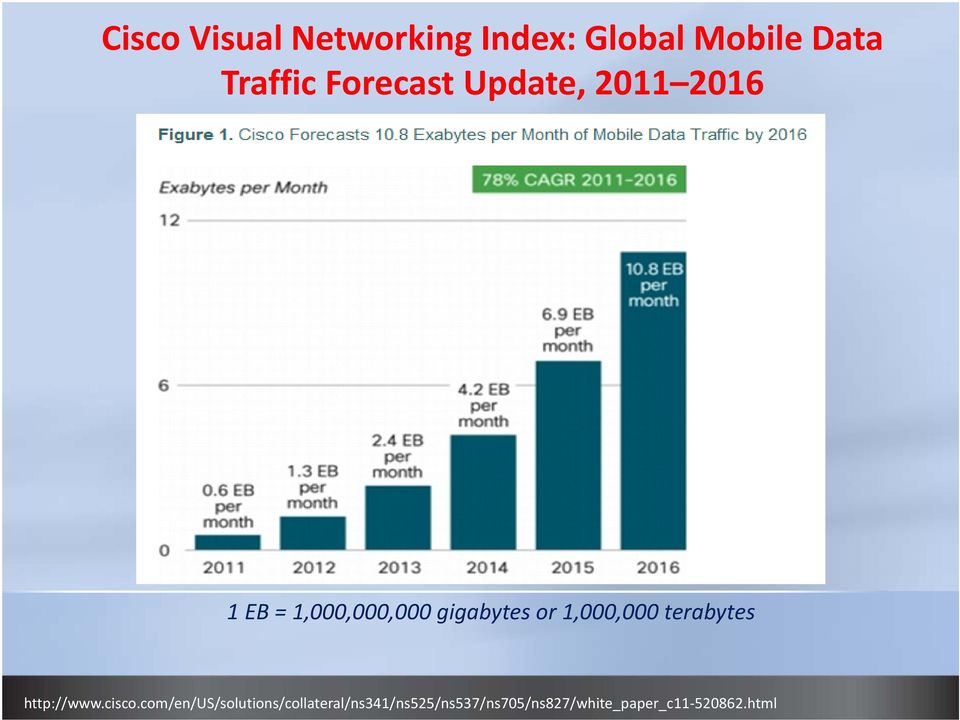
3 Cisco Visual Networking Index: Global Mobile Data Traffic Forecast Update, EB = 1,000,000,000 gigabytes or 1,000,000 terabytes html
4 Why? = Savings: BYOD (Bring Your Own Device) No product purchases, management, or maintenance No training, replacement, or support headaches Employee satisfaction with freedom to choose Device consolidation (work cell + personal cell + work ipad + etc.) Work and communication flexibility 24x7

5 BYOD (Bring Your Own Device) User Considerations: Privacy personal phone is like a wallet Device ownership and service expenses Numerous applications and malware Insecure habits Unencrypted sensitive university data

6 It Is The Way We Live

7 Work

8 Eat

9 And Play

10 March 1, 2012 Article From BYOD is a Security Problem Summary: More of us are bringing our smartphones and tablets to work, but very few enable even the most basic security measures. 100% 90% 80% 70% 60% 50% 40% 30% 20% 10% 0% 51% 38% 15% 1/3 1/4 1/10 Laptop Smartphone Tablet Personal Devices Used for Work Unprotected Use Auto Lock gadgeteer/byod security problem less than 10 of tablet owners use auto lock/5536

11 Assume Owners are Zombies

12 Mobile Data Risks Key findings from Symantec s Smartphone Honey Stick Project 100% 90% 80% 70% 60% 50% 40% 30% 20% 10% 0% 50% 70% 83% 89% 96% General Access Accessed Personal Accessed Business Accessed Personal and Business Owner Contacted

13 Default Configuration After Configuration

14 Default Configuration After Configuration
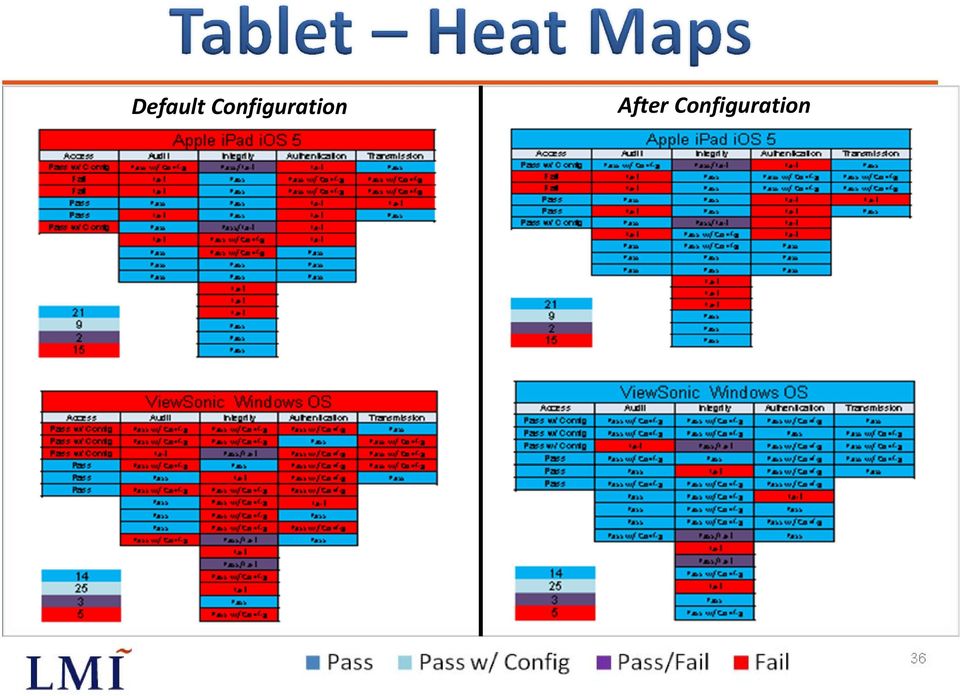
15 Default Configuration After Configuration

16 What is MDM? MDM (Mobile Device Management) Enterprise software that secures, monitors, manages and supports various mobile devices Devices include: mobile phones, tablets, laptops, etc. May be a managed Cloud service or a company run technology A server component with web enabled remote management Agent or Agentless

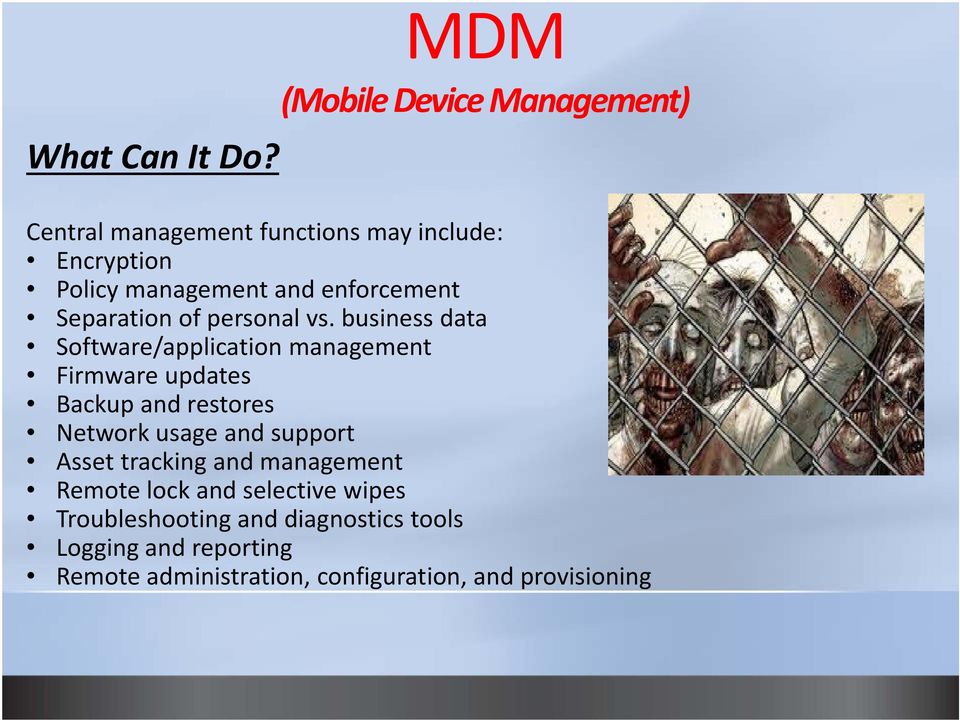
17 MDM (Mobile Device Management) What Can It Do? Central management functions may include: Encryption Policy management and enforcement Separation of personal vs. business data Software/application management Firmware updates Backup and restores Network usage and support Asset tracking and management Remote lock and selective wipes Troubleshooting and diagnostics tools Logging and reporting Remote administration, configuration, and provisioning
18 ActiveSync vs. MDM ActiveSync is a data synchronization technology and protocol integrated into Exchange, which provides: Synchronization of , calendar, contacts, and tasks Supports various mobile platforms Supports basic security policies limited to those ActiveSync features integrated into the mobile device ActiveSync has no way of identifying which mailboxes have a mobile device paired with it ActiveSync cannot identify the number of mobile devices or type of mobile devices paired with a mailbox

19 ActiveSync vs. MDM ActiveSync Security Features Include: Transmission Encryption SSL Two factor authentication Remote wipe erases all data from the mobile phone Device password policies include several options: 1) Minimum password length 2) Require alphanumeric password 3) Inactivity time lockup 4) Enforce password history 5) Enable password recovery 6) Wipe device after failed attempts Device Encryption Policies include: 1) Requiring encryption on device 2) Require encryption on storage cards

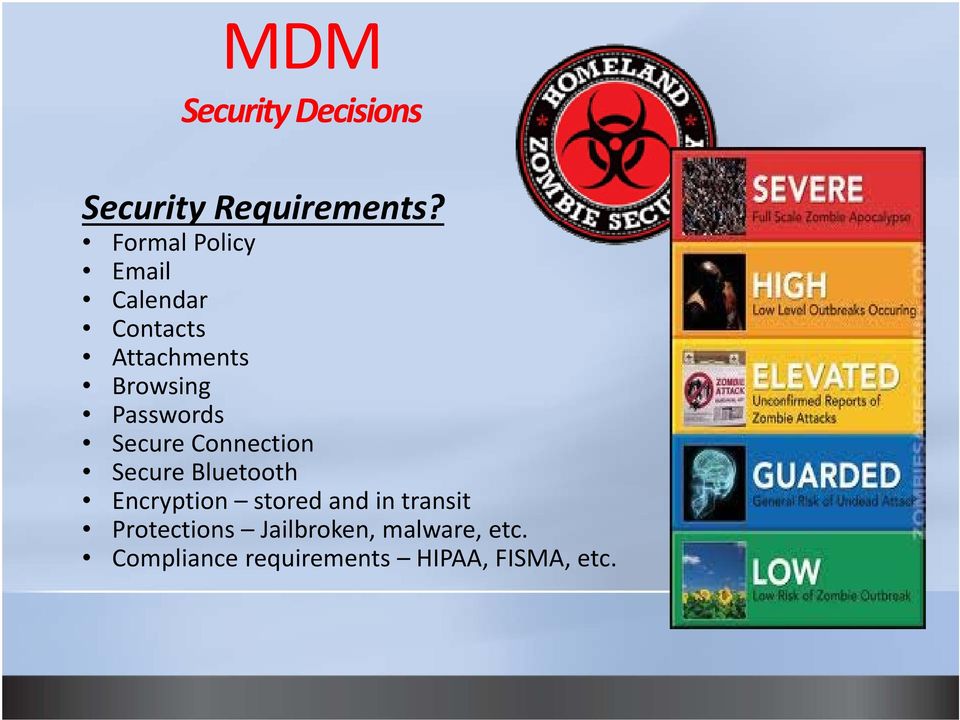
20 MDM Security Decisions Security Requirements? Formal Policy Calendar Contacts Attachments Browsing Passwords Secure Connection Secure Bluetooth Encryption stored and in transit Protections Jailbroken, malware, etc. Compliance requirements HIPAA, FISMA, etc.
21 MDM Considerations Enterprise Needs: Platforms iphone, Android, tablet, laptop, etc. Location mobility BYOD Bring your own device Ease of use and deployment Assistance help desk or self service Staff resources Enterprise Applications SharePoint, Web apps Administration inside and outside Travel to Foreign Countries Carrier cost for enterprise agents Total Cost of Ownership (TCO)
22 INSIDE Architecture? OUTSIDE Enterprise Apps MDM Server? BYOD
23 A Perspective Must Haves: Support device diversity Not allow jail broken devices (must be able to detect) Support auto password locking features Encrypt institution s data (both data at rest and in transit) Support containerization Be user friendly and intuitive Remotely lock devices Support automated agent software updates Be affordable and scalable Wipe university data remotely (controlled wipe) Support controls for access to enterprise assets Auto clean devices that have not access the network over a specified period of time Have the ability to manage attachments (i.e. read only, not allowing.exe)
24 A Perspective Nice To Haves: Antivirus where needed and available Software and version standards and requirements prior to access Register and vet users with an Active Directory association with the university Administrative control and viewing of activity and tagging for stolen devices Password and encrypt strength controls Grouping and role capabilities that allow for varying configurations up to and including FISMA standards Reporting, monitoring, and inventory management Easy user registration with auto network identity integration checks Support/service channels within the product
25 . MDM Project Plan Initiate BYOD plan Risk assessment MDM research Desired features Identify stakeholders Designate sponsor Funding source Business case Preliminary budget estimate Plan Scope MDM Requirements Product testing Product selection Architecture Procurement Resource staffing Schedule Budget Carrier requirements Decide performance metrics Implement Mobile Policy Carrier and service needs awareness User agreements Security standards Training Communication Support structure Phased roll out Performance tracking Reporting Maintain Monitor Troubleshoot Update product Update agents User Instructions FAQs, Tips, Q&As Self service options User support Device management and retirement Assess new features Review risks
26 Example BYOD Policy
27 Example BYOD Policy continued
28 Example Standards All mobile devices will: Support certificates for registration and authentication Must run the latest operating systems available and within a month of being released Be locked with a PIN containing a minimum length of 6 characters Run university approved and required anti virus software, where possible Access enterprise applications using the provided VPN client, SSL or IPSec Change their PIN annually or immediately after exposure Use the encryption container for storing sensitive university data on the device Have the device wiped after a maximum of 15 failed attempts Set the auto lock feature or idle time out to 5 minutes Not allow peer to peer (P2P) file sharing applications Not install unapproved cloud based applications for use with university data Not utilize instant messaging applications for university information Not utilize unapproved third party applications for university data or business etc.
29 Requirements: MDM User Agreements Make known the security vs. privacy tradeoffs Avoid bill shock awareness of the usage implications If employer stipends are available Communicate security configuration requirements and IT actions: wiping data tracking locations removing applications restricting attachments deploying agents Monitoring User responsibilities legal mandates, open records, audits device purchases, service charges, accessories Employer notification (lost, stolen, replacements)
30 Example BYOD User Agreement I understand and will abide by the following: 1. I understand by using my mobile device(s) for university business, there are some privacy and usability tradeoffs due to technology constraints or required security controls. 2. By using my personal mobile device(s) for university business, I understand it is my responsibility to help protect university data located on my mobile device(s) and protect the information on any backup systems. 3. I am responsible for providing and maintaining my mobile device(s), cellular service plan(s), associated equipment, and accessories. 4. I am solely responsible for any and all expenses incurred from the use, damage, loss and/or theft of my mobile device(s) and the university has no financial or legal liability. 5. I shall observe all applicable local, state, and federal laws for my mobile device(s), which are used for university purposes. 6. I understand a university product agent will be installed on my mobile device to provide security and remote management for protecting university data. 7. I understand the university reserves the right to wipe some or all data from my mobile device(s) in the event that I separate, opt out, or loose/replace the mobile device. Where possible, reasonable measures will be taken to preserve personal data. 8. If my mobile device(s) is placed on legal hold, I must surrender it immediately to the university if requested and all relevant files may be copied and used in a university legal matter. 9. I understand my mobile device(s) are subject to open records requests or audit processes, where I must cooperate by providing the university data stored on my mobile device(s) in a verifiable manner. 10. The password on the mobile device(s) must be maintained at all times and must only be known to me. 11. I understand university administrators own and manage the agent on my mobile device(s) and I also give them permission to manage my mobile device(s) according to the university mobile device configuration standard. 12. I understand the university has the right, at any time and without notice, to suspend or deny access to university resources. 13. I have the right to opt out of the university BYOD mobile device program; however, all university owned data will be removed. I am also responsible for removing any university data from all other locations where it has been copied. 14. The university has a right to change or terminate stipend programs at any time upon thirty (60) days advance notice without further reimbursement obligation. 15. I have read and will abide by all university policies. Printed Name Signature Date
31 Discussion Policy BYOD Direction Resources Technologies Priorities
BYOD Guidelines A practical guide for implementing a successful BYOD Management program in an organization of any size.
 April 2014 BYOD Guidelines A practical guide for implementing a successful BYOD Management program in an organization of any size. Bring your own device (BYOD) refers to the policy of permitting employees
BYOD: End-to-End Security
 BYOD: End-to-End Security Alen Lo MBA(CUHK), BSc(HKU), CISA, CCP, CISSP, CISM, CEH IRCA Certified ISMS Lead Auditor, itsmf ISO 20000 Auditor Principal Consultant i-totalsecurity Consulting Limited [email protected]
Tom Schauer TrustCC [email protected] 253.468.9750 - cell
 Tom Schauer TrustCC [email protected] 253.468.9750 - cell Mobile Mobile Mobile Devices in the CU Environ Mobile Banking Risks and Reward Tom Schauer ü Since 1986 ü TrustCC Founded TrustCC in 2001 ü
ONE Mail Direct for Mobile Devices
 ONE Mail Direct for Mobile Devices User Guide Version: 2.0 Document ID: 3292 Document Owner: ONE Mail Product Team Copyright Notice Copyright 2014, ehealth Ontario All rights reserved No part of this document
[BRING YOUR OWN DEVICE POLICY]
![[BRING YOUR OWN DEVICE POLICY]](/thumbs/33/16168462.jpg "[BRING YOUR OWN DEVICE POLICY]") 2013 Orb Data Simon Barnes [BRING YOUR OWN DEVICE POLICY] This document specifies a sample BYOD policy for use with the Orb Data SaaS MDM service Contents 1 ACCEPTABLE USE... 3 1.1 GENERAL RULES... 3 2
2013 Orb Data Simon Barnes [BRING YOUR OWN DEVICE POLICY] This document specifies a sample BYOD policy for use with the Orb Data SaaS MDM service Contents 1 ACCEPTABLE USE... 3 1.1 GENERAL RULES... 3 2
How To Write A Mobile Device Policy
 BYOD Policy Implementation Guide BYOD Three simple steps to legally secure and manage employee-owned devices within a corporate environment We won t bore you with the typical overview that speaks to the
Feature List for Kaspersky Security for Mobile
 Feature List for Kaspersky Security for Mobile Contents Overview... 2 Simplified Centralized Deployment... 2 Mobile Anti-Malware... 3 Anti-Theft / Content Security... Error! Bookmark not defined. Compliance
1. What are the System Requirements for using the MaaS360 for Exchange ActiveSync solution?
 MaaS360 FAQs This guide is meant to help answer some of the initial frequently asked questions businesses ask as they try to figure out the who, what, when, why and how of managing their smartphone devices,
How To Protect The Agency From Hackers On A Cell Phone Or Tablet Device
 PRODUCT DESCRIPTION Product Number: 0.0.0 MOBILE DEVICE MANAGEMENT (MDM) Effective Date: Month 00, 0000 Revision Date: Month 00, 0000 Version: 0.0.0 Product Owner: Product Owner s Name Product Manager:
Mobile Device Security Is there an app for that?
 Mobile Device Security Is there an app for that? Session Objectives. The security risks associated with mobile devices. Current UC policies and guidelines designed to mitigate these risks. An approach
Frequently Asked Questions & Answers: Bring Your Own Device (BYOD) Policy
 Frequently Asked Questions & Answers: Bring Your Own Device (BYOD) Policy Converting a Device Whose phones will be wiped on Wednesday, January 30? If you continue to have a company-paid phone, you are
Mobile Device Management for CFAES
 Mobile Device Management for CFAES What is Mobile Device Management? As smartphones and other mobile computing devices grow in popularity, management challenges related to device and data security are
OWA vs. MDM. Once important area to consider is the impact on security and compliance policies by users bringing their own devices (BYOD) to work.
 OWA vs. MDM Introduction SmartPhones and tablet devices are becoming a common fixture in the corporate environment. As feature phones are replaced with new devices such as iphone s, ipad s, and Android
{ipad Security} for K-12. Understanding & Mitigating Risk. plantemoran.com
 {ipad Security} plantemoran.com for K-12 Understanding & Mitigating Risk Plante Moran The ipad is in K-12. Since its debut in April 2010, the ipad has quickly become the most popular tablet, outselling
BYOD and Its Impact on IT. Making it easy to deploy, integrate and manage Macs, iphones and ipads in a Windows environment
 BYOD and Its Impact on IT Making it easy to deploy, integrate and manage Macs, iphones and ipads in a Windows environment BYOD and IT D means Apple products Macs iphones ipads Android phones IT means Microsoft
Mobile Devices Policy
 Mobile Devices Policy Item Policy description Division Director Contact Description Guidelines to ensure that mobile devices are deployed and used in a secure and appropriate manner. IT Services and Records
AirWatch for Android Devices
 Overview What is AirWatch AirWatch is the mobile device management (MDM) system provided by UMHS to ensure security for smart phones and tablets that connect to the UMHS environment. AirWatch provides
Junos Pulse for Google Android
 Junos Pulse for Google Android User Guide Release 4.0 October 2012 R1 Copyright 2012, Juniper Networks, Inc. Juniper Networks, Junos, Steel-Belted Radius, NetScreen, and ScreenOS are registered trademarks
Auditing the Security and Management of Smart Devices. ISACA Dallas Meeting February 13, 2014
 Securely Manage your devices, applications and data. Deploy your corporate policies on smart devices. Comply with Regulatory Laws. Auditing the Security and Management of Smart Devices ISACA Dallas Meeting
How To Manage A Mobile Device Management (Mdm) Solution
 Mobile Device Management Buyers Guide IT departments should be perceived as the lubricant in the machine that powers an organization. BYOD is a great opportunity to make life easier for your users. But
BlackBerry Enterprise Service 10. Universal Device Service Version: 10.2. Administration Guide
 BlackBerry Enterprise Service 10 Universal Service Version: 10.2 Administration Guide Published: 2015-02-24 SWD-20150223125016631 Contents 1 Introduction...9 About this guide...10 What is BlackBerry
Chris Boykin VP of Professional Services
 5/30/12 Chris Boykin VP of Professional Services Future Com! 20 years! Trusted Advisors! Best of brand partners! Brand name customers! 1000 s of solutions delivered!! 1 5/30/12 insight to the future, bringing
Top. Enterprise Reasons to Select kiteworks by Accellion
 Top 10 Enterprise Reasons to Select kiteworks by Accellion Top 10 Enterprise Reasons to Select kiteworks Accellion enables enterprise organizations to enhance business productivity, while ensuring data
Security Guide. BlackBerry Enterprise Service 12. for ios, Android, and Windows Phone. Version 12.0
 Security Guide BlackBerry Enterprise Service 12 for ios, Android, and Windows Phone Version 12.0 Published: 2015-02-06 SWD-20150206130210406 Contents About this guide... 6 What is BES12?... 7 Key features
Windows Phone 8.1 Mobile Device Management Overview
 Windows Phone 8.1 Mobile Device Management Overview Published April 2014 Executive summary Most organizations are aware that they need to secure corporate data and minimize risks if mobile devices are
Research Information Security Guideline
 Research Information Security Guideline Introduction This document provides general information security guidelines when working with research data. The items in this guideline are divided into two different
When enterprise mobility strategies are discussed, security is usually one of the first topics
 Acronis 2002-2014 Introduction When enterprise mobility strategies are discussed, security is usually one of the first topics on the table. So it should come as no surprise that Acronis Access Advanced
COMMONWEALTH OF PENNSYLVANIA DEPARTMENT S OF PUBLIC WELFARE, INSURANCE AND AGING
 COMMONWEALTH OF PENNSYLVANIA DEPARTMENT S OF PUBLIC WELFARE, INSURANCE AND AGING INFORMATION TECHNOLOGY STANDARD Name Of Standard: Mobile Device Standard Domain: Security Date Issued: 09/07/2012 Date Revised:
Mobile Devices: Know the RISKS. Take the STEPS. PROTECT AND SECURE Health Information.
 Mobile Devices: Know the RISKS. Take the STEPS. PROTECT AND SECURE Health Information. Mobile Devices: Risks to Health Information Risks vary based on the mobile device and its use. Some risks include:
iphone in Business How-To Setup Guide for Users
 iphone in Business How-To Setup Guide for Users iphone is ready for business. It supports Microsoft Exchange ActiveSync, as well as standards-based services, delivering email, calendars, and contacts over
Enterprise Mobility Management Migration Migrating from Legacy EMM to an epo Managed EMM Environment. Paul Luetje Enterprise Solutions Architect
 Enterprise Mobility Management Migration Migrating from Legacy EMM to an epo Managed EMM Environment Paul Luetje Enterprise Solutions Architect Table of Contents Welcome... 3 Purpose of this document...
HIGH-SECURITY MOBILITY MANAGEMENT FROM BLACKBERRY
 GOLD EMM SUBSCRIPTIONS Experience the most secure mobility management solution with BES12 and Gold Enterprise Mobility Management (EMM) subscriptions. HIGH-SECURITY MOBILITY MANAGEMENT FROM BLACKBERRY
Corporate-level device management for BlackBerry, ios and Android
 B L A C K B E R R Y E N T E R P R I S E S E R V I C E 1 0 Corporate-level device management for BlackBerry, ios and Android Corporate-level (EMM) delivers comprehensive device management, security and
Use of tablet devices in NHS environments: Good Practice Guideline
 Use of Tablet Devices in NHS environments: Good Practice Guidelines Programme NPFIT Document Record ID Key Sub-Prog / Project Technology Office Prog. Director Chris Wilber Status APPROVED Owner James Wood
Advanced Configuration Steps
 Advanced Configuration Steps After you have downloaded a trial, you can perform the following from the Setup menu in the MaaS360 portal: Configure additional services Configure device enrollment settings
Mobile Devices: Know the RISKS. Take the STEPS. PROTECT AND SECURE Health Information.
 Mobile Devices: Know the RISKS. Take the STEPS. PROTECT AND SECURE Health Information. Mobile Devices: Risks to to Health Mobile Information Devices: Risks to Health Information Risks vary based on the
Information Security It s Everyone s Responsibility
 Information Security It s Everyone s Responsibility The University of Texas at Dallas Information Security Office (ISO) Purpose of Training Information generated, used, and/or owned by UTD has value. Because
Athena Mobile Device Management from Symantec
 Athena Mobile Device Management from Symantec Scalable, Secure, and Integrated Device Management for ios and Android Data Sheet: Endpoint Management and Mobility Overview The rapid proliferation of mobile
MDM Mobile Device Management
 Page 1 About 1Mobility 1Mobility has successfully established itself as a global company, offering cloud based, internationalized and scalable Enterprise Mobility Management (EMM) solution that monitors,
BYOD Policy for [AGENCY]
![BYOD Policy for [AGENCY]](/thumbs/24/2163525.jpg "BYOD Policy for [AGENCY]") BYOD Policy for [AGENCY] This document provides policies, standards, and rules of behavior for the use of smartphones, tablets and/or other devices ( Device ) owned by [AGENCY] employees personally (herein
BYOD Policy for [AGENCY] This document provides policies, standards, and rules of behavior for the use of smartphones, tablets and/or other devices ( Device ) owned by [AGENCY] employees personally (herein
Ensuring the security of your mobile business intelligence
 IBM Software Business Analytics Cognos Business Intelligence Ensuring the security of your mobile business intelligence 2 Ensuring the security of your mobile business intelligence Contents 2 Executive
Securing Patient Data in Today s Mobilized Healthcare Industry. A Good Technology Whitepaper
 Securing Patient Data in Today s Mobilized Healthcare Industry Securing Patient Data in Today s Mobilized Healthcare Industry 866-7-BE-GOOD good.com 2 Contents Executive Summary The Role of Smartphones
Top. Reasons Federal Government Agencies Select kiteworks by Accellion
 Top 10 Reasons Federal Government Agencies Select kiteworks by Accellion Accellion Government Customers Include: Top 10 Reasons Federal Government Agencies Select kiteworks Accellion provides government
Kaspersky Security for Mobile
 Kaspersky Security for Mobile See. Control. Protect. MOVING TARGETS Mobile devices play a key role in connectivity and productivity. But they also introduce new risks to the business: in the past 12 months
SIMPLIFY MULTI-PLATFORM ENTERPRISE MOBILITY MANAGEMENT
 DATASHEET SIMPLIFY MULTI-PLATFORM ENTERPRISE MOBILITY MANAGEMENT Silver level EMM Enterprise Mobility Management for Corporate-owned and BYOD devices BlackBerry Enterprise Service 10 is a powerful device,
Data Protection Act 1998. Bring your own device (BYOD)
 Data Protection Act 1998 Bring your own device (BYOD) Contents Introduction... 3 Overview... 3 What the DPA says... 3 What is BYOD?... 4 What are the risks?... 4 What are the benefits?... 5 What to consider?...
Access All Your Files on All Your Devices
 d Access All Your Files on All Your Devices The Best Performance, Features and Price for Private cloud storage for all platforms Windows, Mac, Linux, ios, Android, Blackberry & more Enterprise Private
ADDING STRONGER AUTHENTICATION for VPN Access Control
 ADDING STRONGER AUTHENTICATION for VPN Access Control Adding Stronger Authentication for VPN Access Control 1 ADDING STRONGER AUTHENTICATION for VPN Access Control A VIRTUAL PRIVATE NETWORK (VPN) allows
The BYOD of Tomorrow: BYOD 2.0. What is BYOD 1.0? What is BYOD 2.0? 3/27/2014. Cesar Picasso, MBA SOTI Inc. April 02, 2014
 The BYOD of Tomorrow: BYOD 2.0 Cesar Picasso, MBA SOTI Inc. April 02, 2014 What is BYOD 1.0? BYOD 1.0 was the first wave of mobile device management that controlled the entire device BYOD 1.0 was inadequate
Policy Checklist. Directorate of Performance and Reform. Stephen Hylands, Head of Information Technology
 Policy Checklist Name of Policy: Purpose of Policy: Directorate responsible for Policy Name & Title of Author: Does this meet criteria of a Policy? Trade Union consultation? Equality Screened by: Date
11 Best Practices for Mobile Device Management (MDM)
 MaaS360.com > White Paper 11 Best Practices for Mobile Device Management (MDM) 11 Best Practices for Mobile Device Management (MDM) www.maas360.com Copyright 2014 Fiberlink Communications Corporation.
The Workplace of the Future and Mobile Device Risk ISACA Pittsburgh. May 20 th, 2013
 The Workplace of the Future and Mobile Device Risk ISACA Pittsburgh May 20 th, 2013 Companies are leveraging mobile computing today Three major consumption models: 1. Improving productivity Improving employee
Bell Mobile Device Management (MDM)
 Bell MDM Business FAQs 1 Bell Mobile Device Management (MDM) Frequently Asked Questions INTRODUCTION Bell Mobile Device Management provides business customers an all in one device administration tool to
Android support for Microsoft Exchange in pure Google devices
 Android support for Microsoft Exchange in pure Google devices Note: The information presented here is intended for Microsoft Exchange administrators who are planning and implementing support for any of
ForeScout MDM Enterprise
 Highlights Features Automated real-time detection of mobile Seamless enrollment & installation of MDM agents on unmanaged Policy-based blocking of unauthorized Identify corporate vs. personal Identify
Sophos Mobile Control SaaS startup guide. Product version: 6
 Sophos Mobile Control SaaS startup guide Product version: 6 Document date: January 2016 Contents 1 About this guide...4 2 About Sophos Mobile Control...5 3 What are the key steps?...7 4 Change your password...8
AirWatch for ios Devices
 Overview What is AirWatch AirWatch is the mobile device management (MDM) system provided by UMHS to ensure security for smart phones and tablets that connect to the UMHS environment. AirWatch provides
Kony Mobile Application Management (MAM)
 Kony Mobile Application Management (MAM) Kony s Secure Mobile Application Management Feature Brief Contents What is Mobile Application Management? 3 Kony Mobile Application Management Solution Overview
Hands on, field experiences with BYOD. BYOD Seminar
 Hands on, field experiences with BYOD. BYOD Seminar Brussel, 25 september 2012 Agenda Challenges RIsks Strategy Before We Begin Thom Schiltmans Deloitte Risk Services Security & Privacy Amstelveen [email protected]
Symantec Mobile Management 7.2
 Scalable, secure, and integrated device management Data Sheet: Endpoint Management and Mobility Overview The rapid proliferation of mobile devices in the workplace is outpacing that of any previous technology
Bring Your Own Device. Individual Liable User Policy Considerations
 Bring Your Own Device Individual Liable User Contents Introduction 3 Policy Document Objectives & Legal Disclaimer 3 Eligibility Considerations 4 Reimbursement Considerations 4 Security Considerations
Deploying iphone and ipad Mobile Device Management
 Deploying iphone and ipad Mobile Device Management ios supports Mobile Device Management (MDM), giving businesses the ability to manage scaled deployments of iphone and ipad across their organizations.
Android 4.0.4 Support on Galaxy Nexus, Nexus S, and Motorola Xoom for Microsoft Exchange Policies
 Android 4.0.4 Support on Galaxy Nexus, Nexus S, and Motorola Xoom for Microsoft Exchange Policies Overview Requirements Supported Information Services Supported Security Policies Require password Require
GO!Enterprise MDM Device Application User Guide Installation and Configuration for Android with TouchDown
 GO!Enterprise MDM Device Application User Guide Installation and Configuration for Android with TouchDown GO!Enterprise MDM for Android, Version 3.x GO!Enterprise MDM for Android with TouchDown 1 Table
System Configuration and Deployment Guide
 System Configuration and Deployment Guide This guide provides information on...... Configuring an Organization using the Organization Wizard... Setting a default Policy Suite using the Organization Wizard...
Securely Yours LLC IT Hot Topics. Sajay Rai, CPA, CISSP, CISM [email protected]
 Securely Yours LLC IT Hot Topics Sajay Rai, CPA, CISSP, CISM [email protected] Contents Background Top Security Topics What auditors must know? What auditors must do? Next Steps [Image Info]
ONE DEVICE TO RULE THEM ALL! AUDITING MOBILE DEVICES / BYOD NSAA IT CONFERENCE OCTOBER 2, 2014
 ONE DEVICE TO RULE THEM ALL! 1993 2013 1 AUDITING MOBILE DEVICES / BYOD NSAA IT CONFERENCE OCTOBER 2, 2014 2 1 AGENDA Mobile Devices / Smart Devices Implementation Models Risks & Threats Audit Program
Bell Mobile Device Management (MDM)
 Bell MDM Technical FAQs 1 Bell Mobile Device Management (MDM) Frequently Asked Questions INTRODUCTION Bell Mobile Device Management provides business customers an all in one device administration tool
COMMUNITAKE TECHNOLOGIES MOBILE DEVICE MANAGEMENT FROM BELL USER GUIDE
 COMMUNITAKE TECHNOLOGIES MOBILE DEVICE MANAGEMENT FROM BELL USER GUIDE Mobile Device Management, User Guide Copyright 2013, CommuniTake Technologies Ltd., Yokneam, Israel. All rights reserved. For a hard-copy
Mobile Device Management
 Mobile Device Management Complete remote management for company devices Corporate and personal mobile devices (commonly referred to as Bring Your Own Device, or BYOD) must be provisioned, configured, monitored,
How To Protect Your Mobile Devices From Security Threats
 Back to the Future: Securing your Unwired Enterprise By Manoj Kumar Kunta, Global Practice Leader - Security Back to the Future: Securing your Unwired Enterprise The advent of smartphones and tablets has
FileDrawer An Enterprise File Sharing and Synchronization (EFSS) solution.
 FileDrawer An Enterprise File Sharing and Synchronization (EFSS) solution. In today s world the potential for ready access to data from virtually any device over any type of network connection creates
Cisco BYOD Smart Solution: Take a Comprehensive Approach to Secure Mobility
 Solution Overview Cisco BYOD Smart Solution: Take a Comprehensive Approach to Secure Mobility What You Will Learn Whether you want to simply allow tablets on your network or transform business processes
WHITE PAPER THE CIO S GUIDE TO BUILDING A MOBILE DEVICE MANAGEMENT STRATEGY AND HOW TO EXECUTE ON IT
 WHITE PAPER THE CIO S GUIDE TO BUILDING A MOBILE DEVICE MANAGEMENT STRATEGY AND HOW TO EXECUTE ON IT Executive Summary The explosive growth of worker mobility is driving the rapid adoption of mobile devices
LabTech Mobile Device Management Overview
 You are here: Using LabTech > Mobile Device Management > Mobile Device Management Overview LabTech Mobile Device Management Overview Features LabTech mobile device management (MDM) is a fully integrated
ipad in Business Mobile Device Management
 ipad in Business Mobile Device Management ipad supports Mobile Device Management, giving businesses the ability to manage scaled deployments of ipad across their organizations. These Mobile Device Management
Mobile Device Management Solution Hexnode MDM
 Mobile Device Management Solution Hexnode MDM Frequently Asked Questions www.hexnode.com Frequently Asked Questions How is Hexnode MDM license calculated?...4 Which ports do I need to open for Hexnode
Bring Your Own Device Mobile Security
 Abstract Energized by the capability of consumer mobile devices employees demanded them in the workplace. Information technology organizations had neither the time nor budget to satisfy employee demands.
BYOD Guidance: BlackBerry Secure Work Space
 GOV.UK Guidance BYOD Guidance: BlackBerry Secure Work Space Published 17 February 2015 Contents 1. About this guidance 2. Summary of key risks 3. Secure Work Space components 4. Technical assessment 5.
Preparing for GO!Enterprise MDM On-Demand Service
 Preparing for GO!Enterprise MDM On-Demand Service This guide provides information on...... An overview of GO!Enterprise MDM... Preparing your environment for GO!Enterprise MDM On-Demand... Firewall rules
The ForeScout Difference
 The ForeScout Difference Mobile Device Management (MDM) can help IT security managers secure mobile and the sensitive corporate data that is frequently stored on such. However, ForeScout delivers a complete
BYOD: Should Convenience Trump Security? Francis Tam, Partner Kevin Villanueva, Senior Manager
 BYOD: Should Convenience Trump Security? Francis Tam, Partner Kevin Villanueva, Senior Manager 1 AGENDA Mobile Explosion Mobile Trends BYOD Benefits, Challenges and Threats BYOD Security BYOD Strategy
Securing Corporate Email on Personal Mobile Devices
 Securing Corporate Email on Personal Mobile Devices Table of Contents The Impact of Personal Mobile Devices on Corporate Security... 3 Introducing LetMobile Secure Mobile Email... 3 Solution Architecture...