
NATIONAL BOARD FOR TECHNICAL EDUCATION NATIONAL DIPLOMA (ND) COMPUTER SCIENCE CURRICULUM AND COURSE SPECIFICATIONS. November 2004
|
|
|
- Carol Tate
- 10 years ago
- Views:
Transcription
1 NATIONAL BOARD FOR TECHNICAL EDUCATION NATIONAL DIPLOMA (ND) IN COMPUTER SCIENCE CURRICULUM AND COURSE SPECIFICATIONS November 2004 Produced by the National Board for Technical Education (NBTE) Plot B, Bida Road, P.M.B. 2239, Kaduna Nigeria.

2 GENERAL INFORMATION 1.0 Programme Goal The National Diploma programme is designed to produce computer personnel capable of applying the use of computer in most areas of data analysis. 1.1 Objective of the programme Diplomats of this programme should be able to:- Solve simple hardware problems Use various programming languages: Visual BASIC OO FORTRAN OO COBOL, JAVA Know the Operation of Computer systems Use Computer packages Maintain hardware 1.2 Higher National Diploma Programme Goal This syllabus is designed to produce technically competent graduates to meet National middle-level manpower needs in Computer Science. 1.3 Objective of the programme A product of this programme should be able to: Install manage a Computer system. Design run efficient programmes in a wide spectrum of fields, in various languages. Advise on the installation management of Computer facilities. Detect technical faults in a Computer installation. Carry out routine (preventive) maintenance of Computer facilities. 2

3 2.0 Entry Requirements 2.1 National Diploma The entry requirements into National Diploma Computer Science programme are as follows:- a) Four credit level passes in GCE O level or Senior Secondary School Certificate (SSCE) at not more than two sittings The four subjects must include mathematics, Physics, English language any other subject. b) Four credit passes in an NBTE recognized preliminary National Diploma course offered in a Polytechnic or similar post secondary technical institution. The credit passes must include mathematics, physics, English language any other subject c) A pass in Computer Foundation Examination (CFE) of Computer Professionals Registration Council of Nigeria (CPN). The student must be prima fascia qualified as in (1) above. 2.2 Higher National Diploma The minimum entry requirement into the Higher National Diploma in Computer Science is as follows:_ a) The National Diploma in Computer Science obtained from an accredited programme, with at least the lower credit pass or b) The Nigerian certificates in Education with major in Computer Education, at not more than the merit level pass. c) CPE I of CPN with at least the lower Credit. In addition to (a), (b) (c) above the cidate must have acquired not less than one year post ND/NCE/PCE I cognate work experience. In exceptional cases, ND diplomats with a pass (CGPA of ) in the ND examination with two or more years of cognate experience in the specific field may be considered for admission into the HND programme. 3.0 Curriculum 3.1 The curriculum of all ND HND programmes consists of four main components. These are:- I. General studies/education II. Foundation courses III. Professional courses IV. Supervised Industrial work experience scheme (SIWES). 3.2 The General Education component shall include course in 3

4 English Language Communication Mathematics Citizenship (the Nigerian Constitution), Sociology Entrepreneurship 3.3 The General Education component shall account for not more than 15% of total contact hours for the programme. 3.4 Foundation Courses include courses in Mathematics, Statistics etc. The number of hours will vary with the programmes may account for about 10 15% of the total contact hours. 3.5 Professional Courses are courses, which give the student the theory practical skills he needs to practice his field of calling at the technical/technologists level. 3.6 Student Industrial Work Experience Scheme (SIWES) shall be taken during the long vacation following the end of the second semester of the first year. See details of SIWES at paragraph Curriculum structure 4.1 ND programmes The structure of the programme courses of four semesters of classroom, laboratory workshop activities in the college a period (3-4 months) of supervised industrial work experience scheme (SIWES). Each semester shall have 17 weeks duration made up as follows:- 15 contact weeks of teaching, i.e. recitation, practical exercises, quizzes, test, etc; 2 weeks for examinations registration. SIWES shall take place at the end of the second semester of the first year. 4.2 HND programme The structure of the programme is similar to that of the ND save that the SIWES at the end of the first year is not compulsory. 4

5 5.0 Accreditation Each programme offered either at the ND or HND level shall be accredited by the NBTE before the diplomats can be awarded either of the two diploma certificates. Details about the process of accredit ting a programme for the award of the ND or HND are available from the Executive Secretary, National Board for Technical Education, P. M. B. 2239, Kaduna, Nigeria. 6.0 Conditions for the Award of the National Diploma Higher National Diploma Institution offering accredited programme will award the National Diploma Higher National Diploma to cidates who successfully completed the programme after passing the prescribed course work, examinations, diploma project the supervised industrial work experience. Such cidates should have completed a minimum of between semester credit units depending on the programme. 6.1 Unified Grading System The unified grading system to be applied in scoring all course work, examinations, project, etc is as stated on table below: % Score Range Letter Grade Grade Point Course Grade Classification A AB B BC C CD D E F Excellent Very Good Good Fair Pass Failure Failure Failure Failure 5

6 6.2 Classification of Diplomas The final Cumulative Grade Point Average (CGPA) shall be determined (calculated) applied to the classification of the National Diploma Higher National diploma as follows: Class (Level of Pass) Distinction Upper Credit Lower Credit Pass Fail CGPA 3.50 Above Below Guidance notes for Teachers teaching the programme 7.1 The new curriculum is drawn in unit courses. This is in keeping with the provisions of the National Policy on Education which stress the need to introduce the semester credit units which will enable a student who so wish to transfer the units already completed in an institution of similar stard from which he is transferring. 7.2 In designing the units, the principle of the modular system by product has been adopted; thus making each of the professional modules, when completed provides the student with technician operative skills, which can be used for employment purposes. 7.3 As the success of the credit unit system depends on the articulation of programmes between the institutions industry, the curriculum content has been written in behavioural objectives, so that it is clear to all the expected performance of the student who successfully completed some of the courses or the diplomats of the programme. There is a slight departure in the presentation of the performance based curriculum which requires the conditions under which the performance are expected to be carried out the criteria for the acceptable levels of performance. It is a deliberate attempt to further involve the staff of the department teaching the programme to write their own curriculum stating the conditions existing in their institution under which the performance can take place to follow that with the criteria for determining an acceptable level of performance. The Academic Board of the institution may vet departmental submission on the final curriculum. Our aim is to continue to see to it that a solid internal evaluation system exists in each institution for ensuring minimum stard quality of education in the programmes offered throughout the polytechnic system. 6

7 7.4 The teaching of the theory practical work should, as much as possible, be integrated. Practical exercises, especially those in professional courses laboratory work should not be taught in isolation from the theory. For each course, there should be a balance of theory to practice in the ratio of about 40: Guidelines on SIWES programme 8.1 For the smooth operation of the SIWES, the following guidelines shall apply: Responsibility for placement of Students a. Institutions offering the ND programme shall arrange to place the students in industry. By April 30 of each year, six copies of the master list showing where each student has been placed shall be submitted to the Executive Secretary, NBTE which shall, in turn, authenticate the list forward it to the industrial Training Fund, Jos b. The Placement officers should discuss agree with industries on the following: I. A task inventory of what the students should be expected to experience during the period of attachment. It may be wise to adopt the one already approved for each field. II. The industry-based supervisor of the students during the period, likewise the institution based supervisor. III. The evaluation of the student during the period. It should be noted that the final grading of the student during the period of attachment should be weighted more on the evaluation by his industry-based supervisor. 8.2 Evaluation of Students during the SIWES In the evaluation of the student, cognizance should be taken of the following items: a) Punctuality b) Attendance c) General attitude to work d) Respect for authority e) Interest in the field/technical area f) Technical competence as a potential technician in his field. 8.3 Grading of SIWES To ensure uniformity of grading scales, the institution should ensure that the uniform grading of students work which has been agreed to by all polytechnics is adopted. 7

8 8.4 The Institution based Supervisor The institution-based supervisor should initial the log book during each visit. This will enable him to check determine to what extent the objectives of the scheme are being met to assist students having any problems regarding the specific given to them by their industry-based supervisor. 8.5 Frequency of visit Institution should ensure that students placed on attachment are visited within one month of their placement. Other visits shall be arranged so that: I. There is another visit six weeks after the first visit; II. A final visit in the last month of the attachment. 8.6 Stipend for Students in SIWES The rate of stipend payable shall be determined from time to time by the Federal Government after due consultation with the Federal Ministry of Education, the Industrial Training Fund the NBTE. 8.7 SIWES As a component of the Curriculum The completion of SIWES is important in the final determination of whether the student is successful in the programme or not. Failure in the SIWES is an indication that the student has not shown sufficient interest in the field or has no potential to become a skilled technician in his field. The SIWES should be graded on a fail or pass basis. Where a student has satisfied all other requirements but failed SIWES, he may only be allowed to repeat another four months SIWES at his own expense. National Board for Technical Education, Kaduna,

9 COMPUTER SCIENCE NATIONAL DIPLOMA YEAR I SEMESTER I Course Code Course Title L P CHW CH Prerequisite COM 101 Introduction to computing None COM 112 Introduction to Digital Electronics None COM 113 Introduction to Programming None STA 111 Descriptive Statistics I None STA 112 Elementary Probability Theory None MTH 111 Logic Linear Algebra None MTH 112 Functions Geometry None OTM 112 Technical English I None GNS 127 Citizenship Education I None

10 COMPUTER SCIENCE NATIONAL DIPLOMA YEAR I SEMESTER 2 Course Code Course Title L P CHW CH Prerequisite COM 121 Scientific Programming Language using COM 101,113 OO Java. COM 122 Introduction to the internet COM 101 COM 123 Computer application packages I COM 101 COM 124 Data structure Algorithms COM 113 COM 125 Introduction to Systems Analysis None COM 126 PC Upgrade & Maintenance None GNS 128 Citizenship Education II GNS

11 COMPUTER SCIENCE NATIONAL DIPLOMA YEAR II SEMESTER I Course Code Course Title L P CHW CH Prerequisite COM 211 Computer Programming using OO Basic COM 113 COM 212 Introduction to systems Programming COM101 COM 213 Commercial Programming Language using OOCOBOL COM 113 COM 214 File Organization Management COM 101 COM 215 Computer Packages II COM 123 COM 216 Computer Systems Troubleshooting I None OTM 217 Technical English II OTM

12 COMPUTER SCIENCE NATIONAL DIPLOMA YEAR II SEMESTER 2 Course Code Course Title L P CHW CH Prerequisite COM 221 Computer Programming using OO COM 113, FORTRAN COM 101 COM 222 Seminar on Computer Society None COM 223 Basic Hardware Maintenance COM 112 COM 224 Management Information system COM 101, 103 COM 225 Web Technology COM 122 COM 226 Computer Systems Troubleshooting II COM 216 COM 229 Project COM 123 STA 226 Small Business Start Up None

13 Programme: Statistics (National Diploma) Course Code: COM 101 Total Hours: 60 Course: Introduction to Computers Theoretical: 2 hours /week Year: 1 Semester: 1 Pre-requisite: Practical: 2 hours /week Goal: This course is designed to enable students to acquire a basic knowledge of computers General Objectives: On completion of this course the diplomat, should be able to: 1. Underst the history, classification impact of computers. 2. Know the concept of computer hardware 3. Know the concept of computer software. 4. Underst computer data processing systems. 5 Know the procedures for computer data preparation method. 6. Underst security safety procedures within a computer environment. 7. Underst the concept of a computer network 8. Underst the use of the internet. 13

14 Week Theoretical Content Practical Content General Objective 1 (COM 101): Underst the history, classification impact of computers. Specific Learning Outcomes Teacher s activities Resources Specific Learning Outcomes Teacher s activities Resources Define the computer 1.2 Describe the development of computers, in particular abacas, Pascal, Babbage, Hollerith ENIAC. 1.3 Classify computers according to generations from 1st 5th generation (any subsequent generation) Define computer Trace the history of computer. Classify the computer according to generations White Board. PC loaded with Power point connected to OHP Be able to classify computer systems. Guide students to classify computer systems Networke d PCs loaded with software packages Distinguish between analogue, digital, hybrid computers 1.5 Explains the social implication of computers on society in particular privacies quality of life. 1.6 List the benefits of computers to the society. Distinguish between types classes of computers. Highlight the implications of computers to the society. Outline the benefit of computer to the society. General Objective 2 (COM 101): Know the concept of computer hardware White Board. PC loaded with Power point connected to OHP Be able to classify computer systems. Guide students to classify computer systems Networke d PCs loaded with software packages. 14
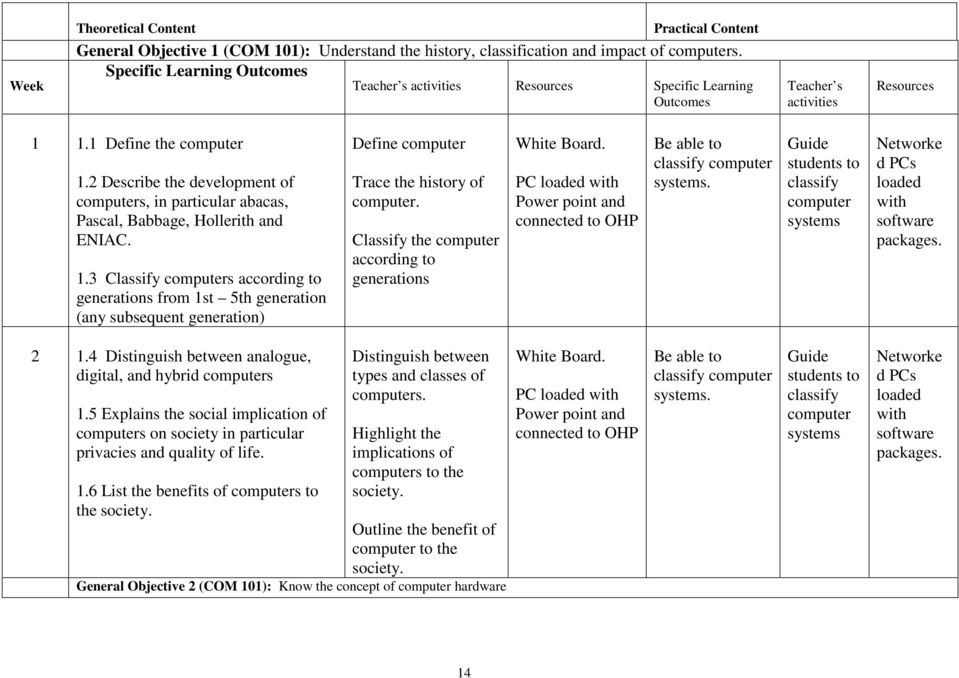
15 3 2.1 Describe computer hardware configuration. 2.2 List some input output units 2.3 Describe the function of the out unit. Discuss the meaning of hardware. Discuss the various components functions of various hardware units. Discuss computer software programming languages differentiate between the levels. White Board. PC loaded with Power point connected to OHP Be able to Identify the various components of a computer system Guide the students on how to identify the various componen ts of a computer system A DEMO PC showing its componen ts Describe the function of C.P.U. 2.5 List some auxiliary Units. 2.6 Describe the function of the auxiliary memory 2.7 Define bits, byte, nibble, word storage size. Discuss the various components functions of various hardware units. Discuss computer software programming languages differentiate between the levels. Week/s General Objective 3 (COM 101): Know the concept of computer software. White Board. PC loaded with Power point connected to OHP Be able to Identify the various components of a computer system Guide the students on how to identify the various componen ts of a computer system A DEMO PC showing its componen ts 15

16 5 3.1 Explain software its various types 3.2 Distinguish between the low level high level languages. 3.3 Explain source object programmes. Discuss software its various types. Explain computer packages its various types. White Board. PC loaded with Power point connected to OHP Be able to load computer packages on computer system Demonstra te how to load various computer packages on computer systems Networke d PCs loaded with different computer packages Define a translator. 3.5 Explain types of translators: assembler, compiler, interpreter. 3.6 Explain the use of package programs. Discuss software its various types. Explain computer packages its various types. Week/s General Objective 4 (COM 101): Underst computer data processing systems. White Board. PC loaded with Power point connected to OHP Be able to load computer packages on computer system Demonstra te how to load various computer packages on computer systems Networke d PCs loaded with different computer packages Explain different processing modes. Explain offline online concepts Define batch processing, real time, time sharing distributed processing Differentiate between White Board. PC loaded with Power point connected to OHP Be able to recognize life problems requiring the application of the various modes Guide the students on how to identify real life problems requiring the various data Networke d PCs loaded with different computer packages 16

17 batch processing, real time processing, time-sharing distributed processing system. Week/s General Objective 5 (COM 101): Know the procedures for computer data preparation method. processing techniques Be able to explain how to operate a computer system Discuss the principles procedures of operating the computer system, the fix up, start up shut-down systems White Board. PC loaded with Power point connected to OHP Diskettes Be able to boot shut down computer system Format diskettes Guide the students on how to operate the computer. Show different storage media to students Networke d PCs storage media such as diskette Underst the initialization formatting of storage media. Discuss initialization formatting of storage devices such as disks diskettes White Board. PC loaded with Power point connected to OHP Diskettes Week/s General Objective 6 (COM 101): Underst security safety procedures within a computer environment. Be able to boot shut down computer system Format diskettes Guide the students on how to operate the computer. Show different storage media to students Networke d PCs storage media such as diskette. 17

18 Underst data control techniques, operating procedure of a computer installation, safety regulation in computer installation, method of preventing hazards such as fire, flooding sabotage Explain data control techniques. Describe stard operating procedures of a computer installation. Explain the need for computer room security. White Board PC loaded with relevant software packages connected to OHP Be able to formulate passwords. Guide students on how to formulate simple password that they could easily remember Networke d PCs storage media such as diskette. Explain computer system auditing Explain methods of preventing hazards fire, flooding sabotage etc Underst security methods in computer installation the need for users passwords Describe file security methods in computer installations. Explain the need for file security in computer installation. Explain the user passwords user White Board PC loaded with relevant software packages connected to OHP Be able to formulate passwords. Guide students on how to formulate simple password that they could easily remember Networke d PCs storage media such as diskette. 18

19 name. Week/s General Objective 7 (COM 101): Underst the concept of a computer network Define explain network, 7.2 Describe different types of network organization such as star, ring bus. Define computer network. Explain different types of network organization such as star, ring, bus etc. White Board PC loaded with power point connected to OHP Be able to identify various computer topologies Find out different organizations using the different topologies. Guide the students on how to identify various network topologies. Networke d PCs storage media such as diskette Explain LAN WAN. Describe different types of network: LAN, WAN Week/s General Objective 8 (COM 101): Underst the use of the internet White Board PC loaded with power point connected to OHP Be able to identify various computer topologies Find out different organizations using the different topologies. Guide the students on how to identify various network topologies. Networke d PCs storage media such as diskette Define internet describe its resources 8.2 Explain the processes involved in searching the internet for materials. Define internet Describe resources of internet White Board. PC loaded with power point internet browser Be able to Search for materials on the internet. Guide students on how to search for materials Networke d PCs connected to the internet. 19

20 Explain the processes involved in browsing searching the internet. connected to OHP on the internet. Explain the meaning of ISP Explain the concept of Explain the concept of address. Describe the processes of acquiring an address. Describe the process of sending receiving an . White Board. PC loaded with power point internet browser connected to OHP Compose send . Demonstra te how to compose send . Networke d PCs connected to the internet. Assessment: Give details of assignments to be used: Coursework/ Assignments %; Course test %; Practical %; Projects %; Examination % Type of Assessment Purpose Nature of Assessment (COM 101) Weighting (%) Examination Final Examination (written) to assess knowledge 60 understing Test At least 2 progress tests for feed back. 20 Practical At least 5 home works to be assessed by the teacher 20 Total 100 Recommended Textbooks & References: 20

21 Department/ Programme: Computer Science (ND) Subject/Course: Introduction To Digital Electronics Course Code: com 112 Contact Hours: 4 hours/week Theoretical: 2hours/week Year: 1 Semester: I Pre-requisite: Practical: 2hours /week General Objectives: On completion of this course, the diplomats should be able to 1.0 Underst number system, codes code conversion. 2.0 Know the fundamental of Boolean Algebra 3.0 Know the implementation of the addition operation in the computer. 4.0 Underst small Scale Integrated Circuit 5.0 Underst the concept methodology of sequential circuit design. 6.0 Underst counter Data transfer. 21
22 Course: Computer Science (ND) Course Code: Com 112 Credit Hours: 4hrs/week Theoretical: 2 hours/week Year: I Semester: I Pre-requisite: Practical: 2 hours /week Week/s 1-3 Theoretical Content General Objective 1.0: Underst number system, codes code conversion. Specific Learning Outcomes Ability to: 1.1 Describe the binary, octal, decimal hexadecimal number system. 1.2 Convert from one number system to another e.g. decimal to binary. 1.3 Define a code. 1.4 Explain the conversion from one code to another. 1.5 Describe explain a code. 1.6 Describe the BCD code, excessthree code codes. Practical Content Teacher s activities Resources Specific Learning Outcomes The teacher should: - Explain flowcharts show how flowchart can help in solving problems. - Describe the code, BCD was excess three code 2x421 codes. - Describe conversion from one code to another. - Describe the seven-segment. - Display code. PC connected to an OHP projector. Power point presentatio n of lecture Online lecture White Ability to develop formulas using Excel spread sheet to convert Binary numbers, into other number systems. Convert from one code to another. Teacher s activities Assist student in their practical work. Resources Networked PC lab, with MS office professional. 22
23 Week/ s Describe the conversion from one code to another e.g. from BCD to excess-three code. 1.8 Describe the seven-segment display code. General Objective 2.0: Know the fundamental of Boolean Algebra 2.1 Sate the Boolean postulates: the commutative law, associative law, Distributive law, identify law, Negation Law, Redundancy law, De Morgan s theorem. 2.2 Construct a truth table for up to 4 variables. 2.3 Form logic expression from statements of conditions. 2.4 Minimize a logic expression algebraically. 2.5 Explain a karnaugh map (K.Map) 2.6 Construct a.k Map for 2,3,4 variable. 2.7 Minimize a logic expression using a k-map 2.1 State, explain relate the Boolean postulate request the student to list examples of Boolean pastorate s application. 2.2 Design a truth table for up to 4 variables. 2.3 Design logic expression from statements of condition. 2.4 Using the stated Boolean postulate explain the steps in minimizing a logic expression algebraically, there after, demonstrate the action. 2.6 Define discuss the karnaugh map. board. PC connected to an OHP projector. Power point presentatio n of lecture Online lecture White board. Ability to design implement Boolean logical equations. Assist student in their practical work Networked PC lab, with MS office professional Logic Simulator packages such as Electronic work Bench, or Digital work. 2.8 Progressively design a karnaugh map for 2 variable, 3 4 variables explain each step. 23
24 Week/ s Use the principles in K-Map minimize logic expression. General Objective 3.0: Know the implementation of the addition operation in the computer. To underst 3.1 Design of an adder hardware. To explain: The design of Half Adder. The design of Full Adder. The serial adder The parallel adder PC connected to an OHP projector. Power point presentatio n of lecture Implement various adder hardware. ( Half Full adder) Assist student in their practical work Networked PC lab, with MS office professional Logic Simulator packages such as Electronic work Bench, or Digital work. Week/ s 9-11 General Objective 4.0: Underst small Scale Integrated Circuit Ability to: 4.1 List the various terminologies used to characteristics integrated circuits e.g. fan-out, fan in threshold, heat dissipation, noise margin etc. 4.1 Explain pin The teacher should: Explain the various terminologies used to characterize integrated circuits. Describe some pin arrangement of ICS (Dual in-line, straightline circular) apply Online lecture White board. PC connected to an OHP projector. Power point To note the characteristics of various logical gates. Technological advances in Assist student in their practical work Networked PC lab, with MS office professional Logic Simulator 24
25 12 connections/arrangement of ICS. 4.2 Explain the technology of TTC. 4.3 Explain all the characteristics of DTL, ECL technologies. 4.4 Explain pulse pulse shaping. same to solve given problem. Draw, explain construct electronic circuits using DTL. Explain the Limitation of DTL gates. Explain demonstrate the applications of the up downfollowers. Draw construct the electronic circuits of logic expressions using DTL. Draw explain the structure of TTL, ECL, EEL then construct the electronic circuit. presentatio n of lecture Online lecture White board. General Objective 5.0: Underst the concept methodology of sequential circuit design. To underst: 5.1 The design operations of various bi-stables. 5.2 Digital pulse methods of pulse shaping The teacher to: - Explain the design of operations of R.S., D-Type, J-K, - Explain the digital pulse shaping. PC connected to an OHP projector. Power point presentatio n of lecture Online lecture White manufacturing gates. To implement Bi-stable circuits Assist student in their practical work packages such as Electronic work Bench, or Digital work. Networked PC lab, with MS office professional Logic Simulator packages such as Electronic work Bench, or Digital work. 25
26 board. Week/ s General Objective 6.0: Underst counter Data transfer. Ability to: 6.1 Describe the operations of the basic binary ripple counter. 6.2 Describe the operation of the modules counter. 6.3 Describe a shift transfer of data through registers. The teach should: Describe the operation of the basic binary ripple counter. Describe the operation of the count down counter. Describe explain the operation of the modules counter using as example Mod-6 counters. Define explain a shift, a shift-right a shift- round register. Describe the parallel transfer of data through registers. Describe the parallel transfer of data through registers. Describe a serial transfer of data through registers. Describe the serial-parallel transfer operations. PC connected to an OHP projector. Power point presentatio n of lecture Online lecture White board. Ability to design : Counter circuits. Register circuits Assist student in their practical work Networked PC lab, with MS office professional Logic Simulator packages such as Electronic work Bench, or Digital work. 26
27 Assessment: Give details of assignments to be used: Coursework/ Assignments 10 %; Course test 10 %; Practical 20 %; Projects %; Examination 60 % Type of Assessment Purpose Nature of Assessment (COM 112) Weighting (%) Examination Final Examination (written) to assess knowledge 60 understing Test At least 1 progress test for feed back. 10 Practical / Projects To be assessed by the teacher 20 Course work/ To be assessed by the teacher 10 assignment Total 100 Recommended Textbooks & References: 27
28 Department/ Programme: ND COMPUTER SCIENCE Subject/Course: INTRODUCTION TO COMPUTER PROGRAMMING Course Code: COM 113 Contact Hours: 60 Theoretical: 2 hours/week Year: 1 Semester: 1 Pre-requisite: Practical: 2 hours /week General Objectives: On completion of this course the student should be able to: 1.0 Underst features of a good program. 2.0 To underst the concept of Algorithms flowcharting. 3.0 Underst the principles of designing algorithms for common programming problem. 4.0 Underst General modular program design principles. 5.0 Underst the procedure n solving programming problems. 6.0 Underst the various levels of programming language. 7.0 Underst the concept of debugging maintain program. 8.0 To underst good programming practices. 28
29 Course: Introduction to Computer Programming Course Code:COM 113 Credit Hours: 60 Theoretical: 2 hours/week Year: 1 Semester:1 Pre-requisite: Practical: 2 hours /week Week/s Theoretical Content Practical Content General Objective 1: underst features of a good program. Specific Learning Outcomes Teacher s activities Resources Specific Learning Outcomes 1 Be able to: Define a program Explain features of good program (Accuracy, maintenance, efficiency, reliability, etc). Week/s Define explain program with concrete illustration. Explain in details the various feature of a good program. General Objective 2: Underst the concept of Algorithms flowcharting. PC loaded with traditional languages such as Basic, Cobol, Fortran etc OO languages Such as VB, OO- COBOL, OO-Pascal connected to OHP. To be able to view some programming languages in computer Teacher s activities To assist student view some programmi ng languages in computer Resources. PC loaded with traditional languages such as Basic, Cobol, Fortran etc OO languages Such as VB, OO-COBOL, OO-Pascal in a networked laboratory 29
30 2-4 Week/s 5-6 Be able to: Define algorithm on a general basic. Explain features of an algorithms (e.g. please, effective, finite) Describe the methods of algorithm representation of English language, flowchart, pseudo code, decision table, data flow diagram (DFO) etc. Describe main ANSI flowcharts as describe algorithms. Draw flowcharts to implement some simple programming tasks Describe the concept of algorithm with its features. Give concrete examples algorithms. Teach the various methods of oppressing algorithm with examples. PC loaded with traditional languages such as Basic, Cobol, Fortran etc OO languages Such as VB, OO- COBOL, OO-Pascal connected to OHP. To be able to draw flowcharts for simple programming problems. General Objective ; 3: Underst the principles of designing algorithms for common programming problem Be able to: To be able to Design algorithm for problems involving. write simple -Strictly sequence control structure programs using -Selection control structure different control -Iteration control structure structure Show the Structure how develop simple programming problem involving each of basic control structure. Give class Exercise, assignments to strict to practice on. Correct the algorithm developed by the PC loaded with traditional languages such as Basic, Cobol, Fortran etc OO languages Such as VB, OO- COBOL, OO-Pascal To assist students in drawing flowcharts for simple programmi ng problems. To assist student in writing simple programs using different control structure. PC loaded with traditional languages such as Basic, Cobol, Fortran etc OO languages Such as VB, OO- COBOL, OO-Pascal in a networked laboratory.. PC loaded with traditional languages such as Basic, Cobol, Fortran etc OO languages Such as VB, OO- COBOL, OO-Pascal 30
31 Week/s 7-8 Week/s 9 students. General Objective 4: Underst General modular program design principles. Be able to: Discuss the Explain modular programming concept. concept Explain top-down design technique. advantage of Illustrate program design with program modular structure charts, hierarchical Network, programming Hierarchical. Discuss Demonstrate each of the above. illustrate with like programs e.g. payroll, student records, etc. Top-down design principles. connected to OHP. PC loaded with traditional languages such as Basic, Cobol, Fortran etc OO languages Such as VB, OO- COBOL, OO-Pascal connected to OHP. General Objective 5: Underst the procedure in solving a programming problems Be able to: Discuss the PC loaded Identify the problem confirm it Stages involved with solvable. developing traditional Design algorithm for the chosen method program. languages of solution with flowcharts or pseudo Demonstrate such as codes. the stages above Basic, Code the algorithm by using a suitable with real life Cobol, programming language. program possible. Fortran etc Test run the program on the computer. OO languages To be able to design a program using top-down technique To be able to code a simple algorithm using any suitable language. To assist student to design a program using topdown technique To assist student in coding a simple algorithm using any suitable language. in a networked laboratory. PC loaded with traditional languages such as Basic, Cobol, Fortran etc OO languages Such as VB, OO- COBOL, OO-Pascal in a networked laboratory. PC loaded with traditional languages such as Basic, Cobol, Fortran etc OO languages 31
32 Week/s Week/s 12 Such as VB, OO- COBOL, OO-Pascal connected to OHP. General Objective 6: 0 Underst the various levels of programming languages Be able to: Discuss the Explain machine language, low-level feature of machine language High level languages language, low Give examples of the languages stated level language, above. high level Explain the distinguishing features of language. languages in 6.1. Distinguish between system commends program statements. High light the advantages disadvantage of level of programming layout PC loaded with traditional languages such as Basic, Cobol, Fortran etc OO languages Such as VB, OO- COBOL, OO-Pascal connected to OHP. General Objective 70 Underst the concept of debugging maintaining program: Be able to: Discuss PC loaded Define debugging. various methods of with Identify sources of bugs in a program debugging, aids. traditional Explain syntax, run-time logical High light languages errors. classes such as Identify techniques of locating bugs in a Differentiate Basic, program between Cobol, To be able to code a very simple high level language translate it to assembly language. To be able to create a simple bug in a simple program correct it To assist student code a very simple high level language translate it to assembly language. T assist student create a simple bug in a simple program correct Such as VB, OO- COBOL, OO-Pascal in a networked laboratory. PC loaded with traditional languages such as Basic, Cobol, Fortran etc OO languages Such as VB, OO- COBOL, OO-Pascal in a networked laboratory. PC loaded with traditional languages such as Basic, Cobol, 32
33 Explain program maintenance. Distinguish between debugging maintaining a program debugging maintenance. Discuss sources of bugs in program General Objective 8: To underst good programming practices Be able to: Discuss Employ structured approach to both flowcharting program development. structured approach to Employ program documents technique flowcharting HIPS, data flow diagram, pseudo-cal. Explain graphic user interface, GUI. programming.. Define interactive processing. Week/s Fortran etc OO languages Such as VB, OO- COBOL, OO-Pascal connected to OHP. PC loaded with traditional languages such as Basic, Cobol, Fortran etc OO languages Such as VB, OO-COBOL, OO-Pascal connected to OHP. General Objective 9: Underst the concept of object oriented programming. Ability to underst : --Explain object oriented (00) program. PC loaded with The concept of OO programming. --State the features of traditional the features of OO programming. OOP languages To be able to write simple structured program To be able to identify properties, events, objects it To assist student write simple structured program To assist students identify properties, Fortran etc OO languages Such as VB, OO- COBOL, OO-Pascal in a networked laboratory. PC loaded with traditional languages such as Basic, Cobol, Fortran etc OO languages Such as VB, OO- COBOL, OO-Pascal in a networked laboratory. PC loaded with traditional languages 33
34 15 the concept of properties, events, objects classes. --Explain the concept of properties -- Know the obstacles to internet growth in Nigeria. --Discuss writes, methods, events, objects classes. --List various objects oriented programming languages --State The advantages of OOP such as Basic, Cobol, Fortran etc OO languages Such as VB, OO- COBOL, OO-Pascal connected to OHP. class in a running OOP events, objects class in a running OOP such as Basic, Cobol, Fortran etc OO languages Such as VB, OO- COBOL, OO-Pascal in a networked laboratory Assessment: Give details of assignments to be used: Coursework/ Assignments %; Course test20 %; Practical %; Project20s %; Examination 60 % Type of Assessment Purpose Nature of Assessment (COM 113) Weighting (%) Examination Final Examination (written) to assess knowledge 60 understing Test At least 1 progress test for feed back. 20 Practical / Projects To be assessed by the teacher 20 Total 100 Recommended Textbooks & References: 34
35 Programme: Statistics (National Diploma) Course Code: STA 111 Contact Hours: 45 Course: Descriptive statistics I Theoretical: 1 hour /week Year: 1 Semester: 1 Pre-requisite: Practical: 2 hours /week Goal: This course is designed to enable students to acquire a basic knowledge of descriptive statistics. General Objectives: On completion of this course the diplomate, should be able to: 1. Underst the nature of statistical data, their types uses 2. Underst the procedures for collection of statistical data. 3. Underst the difference between total coverage partial coverage in data collection 4. Underst the methods of data compilation 5. Underst the methods of data presentation 35
36 Week Theoretical Content Practical Content General Objective 1 (STA 111): Underst the nature of statistical data, their types uses Specific Learning Outcomes Teacher s activities Resources Specific Learning Outcomes Teacher s activities Resources Define Statistics 1.2 Identify various sources of statistical data 1.3 State important uses of statistics Explain the nature of statistics Introduce various sources discuss how they are used (e.g. social, economic, health, biological, demographic industrial) Books of recorded statistics Internet Locate sources of statistical data Identify sources for specific needs Encourage investigating sources Encourage use of Internet Books of recorded statistics Internet Text books State uses of statistical data 1.5 Explain quantitative data 1.6 Identify various scales of measurement Explain uses of data Explain nature of quantitative data Discuss various scales (e.g. nominal, interval, ratio ordinal). Books of recorded statistics Internet General Objective 2 (STA 111): Underst the procedures for collection of statistical data Decide on use of data found Determine scale of measurement of data found Comment on effectiveness Encourage investigating sources Encourage use of Internet Books of recorded statistics Internet Textbooks 36
37 3 2.1 Describe basic sampling techniques: 2.2 Distinguish between the following methods of data collection Discuss simple rom sampling, Discuss systematic sampling Textbooks Lecture notes Determine the concept of rom sampling using simple data Discuss simple rom sampling, Textbooks Lecture Discuss stratified sampling Discuss quota sampling Design questionnaires formats for data collection 2.4 Identify the problems types of errors that arise in data collection. Explain discuss the process of carrying out field work to collect data. Textbooks Identify types of errors in data collection Encourage students to carry out field work to collect data. Textbooks Collect data on various sources listed in 1.2 above. 2.6 Collect primary secondary data Explain discuss the process of carrying out field work to collect data. Textbooks Identify types of errors in data collection Encourage students to carry out field work to collect data Textbooks Collect primary secondary data Explain discuss the process of carrying out field Textbooks Field trip Rom Classify data into primary/secondar Encourage students to carry out Textbooks 37
38 work to collect data. number table General Objective 3 (STA 111): Underst the difference between total coverage partial coverage in data collection y field work to collect data Distinguish between census sampling surveys. 3.2 Explain the meaning purpose of pilot enquires. Explain discuss the process of undertaking a statistical sample Field trip Use examples to illustrate theoretical contents Encourage students to collect astatistical sample Field trip 3.3 Identify the advantages disadvantages of sampling Distinguish between probability nonprobability methods 3.5 Explain the various probability-sampling methods Explain discuss the concepts covered Field trip Use examples to illustrate theoretical contents Encourage students to collect astatistical sample Field trip Explain the various non-probability sampling method purpose, judgement quota) 3.7 Explain the use of post enumeration surveys. Explain discuss the concepts covered Rom number table Use examples to illustrate theoretical contents Encourage students to collect statistical sample Rom number table 3.8 Collect data applying the sampling methods in 3.5 above General Objective 4 (STA 111): Underst methods of data compilation 38
39 Identify the different categories of collected data 4.2 Classify the data into the various categories Explain discuss the concepts covered Statistical kits Show ability to categorise various data collected Explain supervise student exercises assess student work Statistical kits Verify the sorted data 4.4 Identify the different data storage methods Explain discuss the concepts covered Statistical kits Use examples to illustrate theoretical contents Explain supervise student exercises assess student work Statistical kits Compile of discrete continuous data Explain discuss the concepts covered General Objective 5 (STA 111): Underst the methods of data presentation Textbooks Use examples to illustrate theoretical contents Explain supervise student exercises assess student work Textbooks Identify the various types of statistical table (frequency contingency tables, simple Explain discuss the concepts covered Textbooks Statistical Demonstrate, using examples, Explain supervise Textbooks Statistical 39
40 informative tables, table for reference, complex tables) 5.2 Explain various methods of data presentation (tabular, graphical, pictorial, text etc) tables various methods of data presentation student exercises assess student work tables Construct scatter diagrams frequency tables, graphs. 5.4 Explain merits demerits of chart/diagrams above. Explain discuss the concepts covered Statistical tables Demonstrate by examples, charts tables Explain supervise student exercises assess student work Statistical tables Present life data Explain discuss the concepts covered Drawing materials Demonstrate by examples, charts tables Explain supervise student exercises assess student work Drawing materials 40
41 Assessment: Give details of assignments to be used: Coursework/ Assignments %; Course test %; Practical %; Projects %; Examination % Type of Assessment Purpose Nature of Assessment (STA 111) Weighting (%) Examination Final Examination (written) to assess knowledge 50 understing Test At least 1 progress test for feed back. 10 Practical At least 10 home works to be assessed by the teacher 40 Total 100 Recommended Textbooks & References: 41
42 Programme: Statistics (National Diploma) Course Code: STA 112 Total Hours: 3 Course: Elementary Probability Theory Theoretical: 2 hours /week Year: 1 Semester: 1 Pre-requisite: Practical: 1 hours /week Goal: This course is designed to introduce the student to the basic concepts of set theory the theory of probability. General Objectives: On completion of this course, the diplomate will be able to: 1. Underst the concept of set set operations 2. Underst mapping, functions relations 3. Underst the concept of permutations combinations as used in probability 4. Underst the concept of a sample space 5. Underst the basic concepts of probability 42
43 Week Theoretical Content General Objective 1 (STA 112): Underst the concept of set set operations Specific Learning Outcomes Practical Content Teacher s activities Resources Specific Learning Outcomes Teacher s activities Resources Define a set with set notation { } examples 1.2 Define a set, a subset, use set notations such as A. 1.3 Define elements of a set with notation a 1.4 Define a subset of a set-using the notation. Explain discuss examples to illustrate sets, subsets, notations for sets subsets. Textbooks lecture Generate sets of data classify them as sets, subsets; using appropriate notations for sets subsets. Explain supervise exercises assess students work Dice, coloured bulbs, etc to generate data. Then lecture note Write sets using the two different methods:- the set builder method the roaster method 1.6 Define the null set with set notation ϕ 1.7 Define the universal set with notation U Explain discuss examples to illustrate sets, subsets, notations for sets subsets. Textbooks lecture Generate sets of data classify them as sets, subsets; using appropriate notations for sets subsets. Explain supervise exercises asses students work Dice, coloured bulbs, etc to generate data. Then note books Define basic set operations such as union Explain discuss Venn Demonstrate Explain Textbooks 43
44 , intersection, complement, etc 1.9 State the laws of algebra of set 1.10 Illustrate the set operations using Venn diagrams examples to illustrate basic set operations set identities. Diagrams knowledge of set operations supervise exercises asses students work Lecture 1.11 Prove some simple set identities General Objective 2 (STA 112): Underst mapping, functions relations Define mapping illustrate with examples 2.2 Define a function illustrate with examples Explain discuss examples to illustrate mapping functions Textbooks Lecture Demonstrate the theoretical content of mapping functions Supervise assess exercises on the topic Textbooks Lecture Distinguish between mapping function. 2.4 Define relation illustrate with examples Explain discuss examples to illustrate mapping functions; relations Textbooks Lecture Demonstrate the theoretical content of mapping functions; relations. Supervise assess exercises on the topic Textbooks Lecture Distinguish between function relation. Explain discuss examples to illustrate functions relations Textbooks Lecture Demonstrate the theoretical content of functions relations General Objective 3 (STA 112): Underst the concept of permutations combinations as used in probability Supervise assess exercises on the topic Textbooks Lecture 44
45 7 3.1 Review permutations combinations from the aspects of arrangement selection 3.2 Distinguish between arrangements selections Explain discuss examples to illustrate permutation combination Textbooks Lecture Demonstrate the theoretical content of permutation combination Supervise assess exercises on the topic Textbooks Lecture Undertake simple experiments involving permutations combinations Explain discuss practical applications of the topic General Objective 4 (STA 112): Underst the concept of a sample space. Life data Textbooks Lecture Demonstrate the practical content of the topic Supervise assess exercises on the topic Life data Textbooks Lecture Define a statistical experiment 4.2 Define a sample space sample point. 4.3 Construct sample spaces using simple experiments such as the tossing of a coin, rolling of a die, etc. Explain discuss simple experiments Textbooks Lecture Statistical kits Formulate perform simple experiments Supervise assess simple experimen ts Textbooks Lecture Statistical kits Define an event illustrate with examples 4.5 Distinguish between simple compound events Explain discuss events combination of events. Textbooks Lecture Statistical Generate events from the simple experiments undertaken in the previous Supervise assess the content of the topic Textbooks Lecture Statistical 45
46 4.6 Define mutually exclusive events illustrate with examples e.g. tossing a coin. kits week kits Define independent events illustrate with examples e.g. tossing two coins 4.8 Distinguish between mutually exclusive independent event. 4.9 Define exclusive events illustrate with examples. Explain illustrate operations on events. General Objective 5 (STA 112): Underst the basic concept of probability Textbooks Lecture Statistical kits Use events in combined expt. of tossing a coin throwing a die to illustrate topics covered Supervise assess the content of the topic Textbooks Lecture Statistical kits Explain the Axiomatic approach 5.2 Explain the relative frequency approach 5.3 Define the probability of an event 5.4 Define probability as a function of the sample space Explain illustrate probability using various approaches. Textbooks Lecture Statistical kits Demonstrate the derivation of probabilities by simple experiment Explain supervise exercises assess student work Textbooks Lecture Statistical kits Calculate the probability of an event 5.6 State the properties of probabilities of events 5.7 State apply the addition laws of probability Explain illustrate properties of probability. Textbooks Lecture Statistical kits Demonstrate the derivation of probabilities by simple experiment Explain supervise exercises assess student work Textbooks Lecture Statistical kits 46
47 State apply to multiplication law of probability. 5.9 Define conditional probability (including the use of tree diagram) illustrate with examples 5.10State the Bayes theorem (rule) Explain illustrate conditional probability using various approaches. Textbooks Lecture Statistical kits Demonstrate the derivation of conditional probabilities by simple experiments Explain Supervise exercises assess student work Textbooks Lecture Statistical kits Evaluate conditional probabilities using the Bayes formula Explain illustrate conditional probability using various approaches. Textbooks Lecture Statistical kits Demonstrate the derivation of conditional probabilities by simple experiments Explain Supervise exercises assess student work Textbooks Lecture Statistical kits 47
48 Assessment: Give details of assignments to be used: Coursework/ Assignments %; Course test %; Practical %; Projects %; Examination % Type of Assessment Purpose Nature of Assessment (STA 112) Weighting (%) Examination Final Examination (written) to assess knowledge 60 understing Test At least 2 progress tests for feed back. 20 Practical At least 5 home works to be assessed by the teacher 20 Total 100 Recommended Textbooks & References: Theory Problems of Probability, H. L. Lipschutz An Introduction to Contemporary Statistics, H. L. Koopmans. 48
49 Programme: Statistics (National Diploma) Course Code: MTH 111 Contact Hours: 30 Course: Logic Linear Algebra Theoretical: 1 hour /week Year: 1 Semester: 1 Pre-requisite: Practical: 1 hour /week Goal: This course is designed to provide the student with basic knowledge of logic linear algebra General Objectives: On completion of this course, the diplomat will be able to: 1. Underst the concept of logic abstract thinking. 2. Underst the concept of permutations combinations 3. Undertake binomial expansion of algebraic expressions. 4. Underst the algebraic operations of matrixes determinants 49
50 Week Theoretical Content General Objective 1 (MTH 111): Underst the concept of logic abstract thinking. Specific Learning Outcomes Practical Content Teacher s activities Resources Specific Learning Outcomes Teacher s activities Resources Define the essential connectives, negation, conjunction, disjunction, implication biimplication. 1.2 Illustrate the essential connectives define in 1.1 above Explain discuss the concepts covered Textbooks Lecture Notes Demonstrate understing of the concepts covered by solving examples Explain supervise student exercises assess student work Textbooks Lecture Notes 1.3 Describe grouping parenthesis in logic 1.4 Explain Truth tables. 1.5 Define tautology Illustrate types of tautology. 1.7 Define universal quantifier existential quantifier Explain discuss the concepts covered Textbooks Lecture Notes Demonstrate understing of the concepts covered by solving examples Explain supervise student exercises assess student Textbooks Lecture Notes 50
51 work Translate sentences into symbolic form using quantifiers. E.g. some freshmen are intelligent can be stated as for some x,x is a freshman x is intelligent can be translated in symbols as (ix) (f x & ix) Explain discuss the concepts covered Textbooks Lecture Notes Demonstrate understing of the concepts covered by solving examples Explain supervise student exercises assess student work Textbooks Lecture Notes 1.9 Define the scope of a quantifier. eg R=Gauss was a contemporary of Napoleon S=Napoleon was a contemporary of Julius Caesar (Thus P, Q R are true, S is false Then find the truth value of sentences: (a) (P Q) = R (b) (P Q) (c) PAND Q = R - S 1.10 Define bond free variables Define term formula Explain the validity of formulae Explain discuss the concepts covered Textbooks Lecture Notes General Objective 2 (MTH 111): Underst the concept of permutations combinations Demonstrate understing of the concepts covered by solving examples Explain supervise student exercises assess student work Textbooks Lecture Notes Define permutation s Combination Explain discuss Textbooks Demonstrate Explain Textbooks 51
52 2.2 Give illustrative examples of each of 2.1 above 2.3 State prove the fundamental principle of permutations. 2.4 Give illustrative examples of the fundamental principles of permutations. the concepts covered Lecture Notes understing of the concepts covered by solving examples supervise student exercises assess student work Lecture Notes 2.5 Establish the formula npr = n! (n-r)! Prove that npr= (n-r+1) *npr Solve problems of permutations with restrictions on some of. the objects 2.8 Solve problems of permutations in which the objects may be repeated. 2.9 Describe circular permutations. Explain discuss the concepts covered Textbooks Lecture Notes Demonstrate understing of the concepts covered by solving examples Explain supervise student exercises assess student work Textbooks Lecture Notes 2.10Solve problems of permutations of N identical objects Establish the formula ncr = n! r!(n-r)! 2.12 State prove the theorem ncr-1+ n Cr = n+1 Cr 2.14 Explain problems of combinations with restrictions on some of the objects. Explain discuss the concepts covered Textbooks Lecture Notes Demonstrate understing of the concepts covered by solving examples Explain supervise student exercises assess student Textbooks Lecture Notes 52
53 2.15 Solve problems of combination of n different objects taken any number of it at a time. work General Objective 3 (MTH 111): Undertake the binomial expansion of algebraic expressions Explain with illustrative examples the method of mathematical induction. 3.2 State prove binomial theorem for positive integral index. Explain discuss the concepts covered Textbooks Lecture Notes Demonstrate understing of the concepts covered by solving examples Explain supervise student exercises assess student work Textbooks Lecture Notes Describe, with examples, the properties of binomial expansion. Explain discuss the concepts covered Textbooks Lecture Notes Demonstrate understing of the concepts covered by solving examples Explain supervise student exercises assess student work Textbooks Lecture Notes State the binomial theorem for a rational number. 3.5 State the properties of binomial coefficients Explain discuss the concepts covered Textbooks Lecture Notes Demonstrate understing of the concepts covered by solving examples Explain supervise student exercises assess Textbooks Lecture Notes 53
54 student work Apply binomial expansion in approximations (simple examples only). Explain discuss the concepts covered Textbooks Lecture Notes General Objective 4 (MTH 111): Underst the algebraic operations of matrixes determinants Demonstrate understing of the concepts covered by solving examples Explain supervise student exercises assess student work Textbooks Lecture Notes Define Matrix 4.2 Define the special matrixes of zero matrixes e.g. zero matrix, identity matrix, square matrix, triangular matrix, symmetric matrix. Explain discuss the concepts covered Textbooks Lecture Notes Demonstrate understing of the concepts covered by solving examples Explain supervise student exercises assess student work Textbooks Lecture Notes State examples for each of the matrixes in 4.2 above 4.4 State the laws of addition multiplication of matrixes. 4.5 Illustrate the commutative, associative distributive nature of the laws stated in 4.4 above. 4.6 Define the transpose of a matrix. Explain discuss the concepts covered Textbooks Lecture Notes Demonstrate understing of the concepts covered by solving examples Explain supervise student exercises assess student work Textbooks Lecture Notes 54
55 4.7 Determine a determine the minors cofactors 2 by 2 3 by 3 matrixes Define the minors cofactors of a determinant. 4.8 Explain the method of evaluating determinants. Explain discuss the concepts covered Textbooks Lecture Notes Demonstrate understing of the concepts covered by solving examples Explain supervise student exercises assess student work Textbooks Lecture Notes State prove the theorem two rows or two columns of a matrix are identical, then the value of its determinant is zero State prove the theorem if two rows or two columns of a matrix are interchanged, the sign of the Value of its determinant is changed Explain discuss the concepts covered Textbooks Lecture Notes Demonstrate understing of the concepts covered by solving examples Explain supervise student exercises assess student work Textbooks Lecture Notes 55
56 Assessment: Give details of assignments to be used: Coursework/ Assignments %; Course test %; Practical %; Projects %; Examination % Type of Assessment Purpose Nature of Assessment (MTH 111) Weighting (%) Examination Final Examination (written) to assess knowledge 60 understing Test At least 2 progress tests for feed back. 20 Practical At least 5 homeworks to be assessed by the teacher 20 Total 100 Recommended Textbooks & References: 56
57 Programme: Statistics (National Diploma) Course Code: MTH 112 Contact Hours: 3 hours/week Course: Functions & geometry Theoretical: 2 hours /week Year: 1 Semester: 1 Pre-requisite: Practical: 1 hour /week Goal: This course is designed to enable the student to underst basic concepts of functions geometry General Objectives: On completion of this course, students will be able to: 6. Underst the concept of function relations 7. Underst some special properties of functions 8. Underst the algebra of functions 9. Underst the fundamental elements of trigonometry 10. Underst analytic geometry of a straight line 6. Underst the concept of symmetry their application to comic sections 57
58 Week Theoretical Content General Objective 1 (MTH 112): Underst the concept of function relations Specific Learning Outcomes Practical Content Teacher s activities Resources Learning Outcomes Teacher s activities Resources Form a Cartesian product of two sets X Y. 1.2 Identify a relation from a set X into a set Y. 1.3 Determine the domain range of a given function. Explain discuss the concepts covered Textbooks Lecture Notes Demonstrate understing of the concepts covered by solving examples Explain supervise student exercises assess student work Textbooks Lecture Notes Define a function from the set X into the set Y 1.5 Distinguish between various types of functions; the polynomial; exponential logarithmic functions etc.. Explain discuss the concepts covered General Objective 2 (MTH 112): Underst some special properties of functions Textbooks Lecture Notes Demonstrate understing of the concepts covered by solving examples Explain supervise student exercises assess student work Textbooks Lecture Notes Distinguish between even odd functions. 2.2 Identify 1 to1 onto functions using appropriate examples. Explain discuss the concepts covered Textbooks Lecture Demonstrate understing of the concepts Explain supervise Textbooks Lecture 58
59 Notes covered by solving examples student exercises assess student work Notes Form a composite function. 2.4 Determine the inverse of a function when it exists Explain discuss the concepts covered General Objective 3 (MTH 112): Underst the algebra of functions Textbooks Lecture Notes Demonstrate understing of the concepts covered by solving examples Explain supervise student exercises assess student work Textbooks Lecture Notes Form the sum, difference product quotient of two functions Explain discuss the concepts covered Textbooks Lecture Notes Demonstrate understing of the concepts covered by solving examples Explain supervise student exercises assess student work Textbooks Lecture Notes Determine the domain of the sum, difference, product quotient of two functions Explain discuss the concepts covered Textbooks Lecture Notes Demonstrate understing of the concepts covered by solving examples Explain supervise student exercises assess Textbooks Lecture Notes 59
60 General Objective 4 (MTH 112): Underst the fundamental elements of trigonometry student work Define the various trigonometric functions; sine; cosine, tangent; etc. 4.2 Define a radian convert from radian to degrees vice versa. 4.3 Derive trigonometric identities. Explain discuss the concepts covered Textbooks Lecture Notes Demonstrate understing of the concepts covered by solving examples Explain supervise student exercises assess student work Textbooks Lecture Notes State prove the addition formulae 4.5 Resolve a typical trigonometric equation. 4.6 Resolve a typical trigonometric equation, using the formulae relating to half angles double angles Explain discuss the concepts covered Textbooks Lecture Notes Demonstrate understing of the concepts covered by solving examples Explain supervise student exercises assess student work Textbooks Lecture Notes Draw the graphs of the various trigometric functions 4.8 Express Acos ax + Bsin ax in the form Hsin (ax+b) as a sine wave 4.9 Identify phase shift amplitude period Explain discuss the concepts covered Textbooks Lecture Notes General Objective 5 (MTH 112): Underst the analytic geometry of a straight line Demonstrate understing of the concepts covered by solving examples Explain supervise student exercises assess student work Textbooks Lecture Notes 60
61 State the distance formula 5.2 Determine the slope of a straight line. Explain discuss the concepts covered Textbooks Lecture Notes Demonstrate understing of the concepts covered by solving examples Explain supervise student exercises assess student work Textbooks Lecture Notes State the equation of a straight line in various forms. 5.4 State the properties of parallel lines perpendicular lines. Explain discuss the concepts covered Textbooks Lecture Notes Demonstrate understing of the concepts covered by solving examples Explain supervise student exercises assess student work Textbooks Lecture Notes Determine the distance from a point to a line Explain discuss the concepts covered Textbooks Lecture Notes Demonstrate understing of the concepts covered by solving examples Explain supervise student exercises assess student work General Objective 6 (MTH 112): Underst the concept of symmetry their applications to conic sections Textbooks Lecture Notes Define reflection symmetry illustrate with examples. Explain discuss the concepts covered Textbooks Demonstrate understing Explain Textbooks 61
62 6.2 State the general equation of each conic section; circle, parabola ellipse. Lecture Notes of the concepts covered by solving examples supervise student exercises assess student work Lecture Notes Translate rotate axes. 6.4 Solve problems relating to conic sections e.g. find centre, foci, axies of symmetry, vertices eccentricity etc. Explain discuss the concepts covered Textbooks Lecture Notes Demonstrate understing of the concepts covered by solving examples Explain supervise student exercises assess student work Textbooks Lecture Notes Draw graph each of the conic sections Explain discuss the concepts covered Textbooks Lecture Notes Demonstrate understing of the concepts covered by solving examples Explain supervise student exercises assess student work Textbooks Lecture Notes 62
63 Assessment: Give details of assignments to be used: Coursework/ Assignments %; Course test %; Practical %; Projects %; Examination % Type of Assessment Purpose Nature of Assessment (MTH 112) Weighting (%) Examination Final Examination (written) to assess knowledge 60 understing Test At least 2 progress tests for feed back. 20 Practical At least 5 homeworks to be assessed by the teacher 20 Total 100 Recommended Textbooks & References: 63
64 PROGRAMME: ND Office Technology Management Code: OTM 112 (GNS ) Credit Hours: 4 hours Course: Technical English I Pre-requisite O/L Credit in English Theoretical: 2 hours/week - 50% Semester: 1 Practical: 2 hours/week - 50% Course main Aim/Goal: This course is designed to enable the student acquire the necessary language communication skills which will enable him/her to use the English Language in a business environment to know the techniques of correspondence. General Objectives: 1.0 Develop appropriate study skills in English Language. 2.0 Know the nature of language the basic rules of grammar. 3.0 Appreciate literary works in English. 4.0 Underst the concept of communication. 5.0 Know how to make oral written presentations. 6.0 Know the rules of comprehension interpretation. 64
65 PROGRAMME: Office Technology Management Code: GNS Credit Hours: 4 hours Course: Technical English I Pre-requisite O/L Credit in English Theoretical: 2 hours/week - 50 % Semester: 1 Practical: 2 hours/week - 50% Week Theoretical Content General Objective 1.0: Develop appropriate study skills using English Language. Specific Learning Outcomes Teacher s Activities Resources Specific Learning Outcomes Underst the principles of good note taking making techniques in English. 1.2 Underst method of note taking/making English Identify sources of library information. 1.4 Identify information in the sources listed in 1.3. Explain the necessity for acquiring good notemaking/making techniques in English. Show methods of notetaking/making in English. Expose students to sources of library information in English. Discuss with students how to locate the sources listed in1.3. -Flip charts -Felt pen -Textbooks -Workbooks -Closecircuit TV Model notes Library Dictionary, reference books, etc As in 1.3 Demonstrate good note-taking skill in English. List methods of notetaking/making in English. Classify sources of library information. Locate information in the coerces listed in 1.3. Practical Content Teacher s Activities Provide assignments on note taking. Provide sources of information on notetaking/making. Refer students to sources of library information. Guide students in locating the sources listed in 1.3. Resources -Flip charts -Felt pen -Textbooks -Workbooks -Library -Internet Sections of Library -Internet As in Identify good reading habits Discuss the principles of Class -Apply good reading Set tasks -Newspapers 65
66 in English. good reading habits. houts habits supervise activities General Objective 2.0: Know the nature of language the basic rules of grammar List the characteristics of language. Explain the concept of language Textbooks 2.2 Appreciate the four language skills speaking listening, writing, & reading Underst the functions of language. Textbooks Discuss the four language skills. Explain the functions of language. Houts As in 2.2 above. Role playing in the four language skills. Discuss the functions in groups. Supervise the students activities. As in 2.2 above. -Textbooks -Magazine - Selected Novels Audio tapes Radio Video recorder Cd-rom As in 2.2 above. 2.4 List the uses of English Language in Nigeria. 2.5 Underst grammar parts of speech. Explain the uses of English Language in Nigeria eg as the language of Research, government, business, etc. Explain grammar parts of speech. Resource persons from government, business, research, etc Houts Role playing as researchers, government officials, business, etc. Evaluate students activities Underst the use of part of speech in sentences. 2.7 Identify common errors in the use of parts of speech. Analyse the use of parts of speech in sentences. Explain what constitute errors in the use of parts of speech. Demonstration tapes. Class houts Examples Work on the assigned exercises. Correct common errors in the use of parts of speech. Provide exercise as parts of speech. Provide passages containing common errors in parts of speech. Textbooks Workbooks related materials. Passages, Extracts Speech s 66
67 6 2.8 Underst correct synthetic arrangement punctuation marks Appreciate idioms, figures of speech, offices. Demonstrate to students correct synthetics arrangement punctuation marks. Explain idioms, figures of speech affixes. Houts Examples As in 2.7 above. General Objective 3.0 Appreciate literacy works in English. Underst the meaning Define trace the Literary stages of development of development of literature. materials. literature. Houts Construct sentences with correct syntactic arrangement punctuation. Construct sentences to illustrate idioms, figures of speech affixes. Set activities provide feedback Set activities provide feedback As in 2.7 above. As in 2.7 above. Classify the literary game. 8 Appreciate the terminology functions of literature. 9 Different between the literacy genres. Explain the terminology functions of literature such prose fiction in terms of eg plot, setting, characterisation, etc. Classical modern literary works. As in 5.2 above General Objective 4.0: Underst the concept of communication. Define outline the process of communication. Define analyse the process of Textbooks, Charts, etc. List the purpose of communication. communication. Analyse the purposes of communication As in 4.1 above. Analyse the characteristics of different literacy genres. Differentiate among the following fiction, prose, plot, setting characterisation etc. Supervise the students activity. Evaluate students activity. Class houts Selected literary examples Role playing of the characters. 67
68 Differentiate between communication language. 10 Appreciate the impact of interference on communication at various levels. 11 Appreciate code mixing, code switching, dissonance in communication. Explain the relationship between communication language. Explain the impact of interference on communication at various levels eg phonological, syntactic, etc. Explain code mixing code switching dissonance in communication. As in 4.1 above. Telephone receivers, Radio Television, etc. Class houts Graphic examples General Objective 5.0: Know to make oral written presentations. 5.1 List the organs functions of Class speech. houts Label describe the functions of the organs of speech. Identify barriers to effective communication at various levels. Group discussion a. Label organs of speech. b. Classify functions of organs of speech. Evaluate students work. Module the students discussion. Role plays Guide the students. Houts 5.2 List the phonemes of English. Explain the phonemes of English. Houts Produce correctly each of the phonemes enumerated by the teacher. Guide the students. Houts Appreciate the different sound contrast as demonstrated by the teacher. Distinguish between the different sound contrasts in the consonantal vowel systems of English Language through correct pronunciation. Sound tracts eg video, audio, etc Pronounce the different sound contrasts in English Language. Evaluate students work. Oral written speeches. 68
69 5.4 Note the principles of effective speaking List the various types of correspondence. Explain principles of effective speaking viz, correct use of stress, rhythm, intonation pattern. Explain illustrate the various types of correspondence, eg letter, memo, notices, etc. Houts Models of formal informal letters, memo, notices, etc. General Objective 6.0: Know the rules of comprehension interpretation Recognise the idea in a given passage as distinct from Explain the concept of main idea Selected passages from details. differentiate it from relevant texts. details Note the use of main idea in anticipating details. 6.3 Appreciate the use of context dues in comprehension. Explain the use of main idea in anticipating specific details. Explain how to use contest dues such as definitions, restatements, examples to aid comprehension. As in 6.1 above. As in 6.2 above Give short speeches eg welcome address, stories, vote of thanks, etc. Write formal informal letters, memos notices. a. Identify main idea in a given passage. b. Distinguish between main idea details. Predict specific details from main idea. Draw conclusions from available information. Illustrate techniques of effective speaking. Evaluate students work. Group work. Guide students in their work. Evaluate students work. Guide evaluate students work. Selected passages houts Coursework % 30 ASSESSMENT CRITERIA Course test % Practical % 30 Other (Examination/project/portfolio) % 60 69
70 LANGUAGE Department/ Programme: Computer Science Subject/Course: INTRODUCTION TO SCIENTIFIC PROGRAMMINGANGUAGE USING OO -JAVA Course Code: COM 121 Credit Hours: 6 hours/week Theoretical: 2 hours/week Year: 1 Semester: 11 Pre-requisite: COM 101 Practical: 4 hours /week General Objectives: On completion of this course, the diplomat should be able to: 1.0 Know Java programming Basics. 2.0 Know the use of Numerical data in Java. 3.0 Underst insatiable classes. 4.0 Underst processing input with applet. 5.0 Use selection statements. 6.0 Use Conditional Statements. 7.0 Underst characters string. 8.0 Underst Array Processing in Java. 9.0 Underst Event driven programs Underst inheritance Polymorphism 70
71 Course: Scientific programming using OO language (Java) Course Code: COM 121 Credit Hours: 6 hours/week Theoretical:2 hours/week Year: 1 Semester: 1 Pre-requisite: Practical: 4 hours /week Theoretical Content Practical Content Week/s 1-2 Specific Learning Outcomes General Objective 1: Know Java programming Basics Be able to: Identify the basic components of Java programs. Distinguish two types of Java constructs Application applets. Differentiate between object declaration object creation. Describe the process of creating running Java programs. Apply main window message Box classes. Apply graphic classes. Teacher s activities Resources Specific Learning Outcomes Show basic components of Java programs. Compile Run Java programs PC Loaded with OO-JAVA Compiler, Power point package connected to an OHP To be able to identify different components o java compilation of a java program Teacher s activities To assist student identify different components o java compilation of a java program Resources PC in a networked laboratory Loaded with OO-JAVA Compiler, Power point package connected to Internet Week/s General Objective 2: Know the use of Numerical data in Java Be able to: Give the Select proper type of numerical data. general format of Educate arithmetic expressions using Arithmetic PC Loaded with To be able to write simple java program To assist student to write PC in a networked 71
72 3-4 precedence rules. Describe how memory allocation works for objects primitive data value. Write programs that input/output data using input Box out box. Apply the incremental development technique in writing programs. Describe how integer real numbers are represented in memory. Week/s 5 Week/s 6 General Objective 3: 0 Underst Insatiable classes Be able to: Define a insatiable class with multiple methods a constructor. Differentiate between local instance variables Define classes value-returning method. Distinguish between private public data. Describe parameter passing in method definitions expression. Explain operators precedence rules. Evaluate simple complicates arithmetic expression. Give programming assignments Using program segments, illustrate the differences between local instance methods. Write programs using constructor. Explain parameter passing. General Objective 4: Underst Processing input with applet Be able to: Write an Define applet with multiple methods. applet. Incorporate a simple event hling Give routine to as applet to process input. samples of data Construct input processing applets.. conversion i.e Convert string data to numerical data. string to numeric. Apply the reserved word This Use this is a program OO-JAVA Compiler, Power point package connected to an OHP PC Loaded with OO-JAVA Compiler, Power point package connected to an OHP PC Loaded with OO-JAVA Compiler, Power point package to evaluate arithmetic expression. To be able to write simple java program to show different variable passing of parameter To be able to write run applets string to numeric conversion program. simple java program to evaluate arithmetic expression. To assist student to write simple java program to show different variable passing of parameter To assist student write run applets string to numeric conversion program. laboratory Loaded with OO-JAVA Compiler, Power point package connected to Internet. PC in a networked laboratory Loaded with OO-JAVA Compiler, Power point package connected to Internet PC in a networked laboratory Loaded with OO-JAVA Compiler, Power point package 72
73 Week/s General Objective 5: Use Conditional statements Be able to: Implement the IF statement. 7 Apply switch statement Write Boolean expressions using relational Boolean operations. Nest IF statements correctly. Apply list Box color class. segment. connected to an OHP Give different formats of IF statements. Write programs containing IF statement. PC Loaded with OO-JAVA Compiler, Power point package connected to an OHP To be able to write run simple java program using IF Nest-IF Conditional statement. To be able to write run simple java program using IF Nest- IF Conditional statement. connected to Internet PC in a networked laboratory Loaded with OO-JAVA Compiler, Power point package connected to Internet General Objective 6: Use selection statements 8-9 Be able to: Apply while statement. Apply DO-while statement Apply for statement Apply Next LOOP statement Apply the repose Box class Format output data using format class Write simple recursive methods. Week/s Give the format of all the statements. Write sample program containing all the statements Write sample format statement. General Objective 7: 0 Underst characters string Be able to: Illustrate Describe manipulate character data type. string Differentiate between string string buffer manipulation in PC Loaded with OO-JAVA Compiler, Power point package connected to an OHP PC Loaded with OO-JAVA To be able to write run simple java program using DO-WHILE NEXT - LOOP statement. To be able to write a simple java To assist student write run simple java program using DO- WHILE NEXT -LOOP statement. To assist student write PC in a networked laboratory Loaded with OO-JAVA Compiler, Power point package connected to Internet PC in a networked laboratory 73
74 10 classes Distinguish between the primitive reference data types. Differentiate between equality equivalence testing for string objects. Show how objects passed to methods returns from method. Week/s Java. Write sample programs to teach parameter passing mechanism. General Objectives: 8. Underst Array Processing in Java. Be able to: Give the general Manipulate a collection of data values using format of Arrays. array. Format of arrays. Declare use array of primitive data type. -Write Array Declare use array of objects. statement. Implement 2- dimensional array as an array of - Write program arrays. regent to Illustrate Manipulate objects using vectors. multi input Box Input array of strings using multi Input Box. manipulation, Define methods that accept array as pointers in parameters methods that return array. methods. Apply self-reference pointers in methods. Compiler, Power point package connected to an OHP PC Loaded with OO-JAVA Compiler, Power point package connected to an OHP program for string manipulation To be able to write a simple java program involving array hling simple java program for string manipulation To assist student write simple java program involving array hling Loaded with OO-JAVA Compiler, Power point package connected to Internet PC in a networked laboratory Loaded with OO-JAVA Compiler, Power point package connected to Internet 13 General Objectives:9: Underst Event driven programs Be able to: -Illustrate events Place buttons on a Frame. driven Hle events programming with Place text field objects on a Frame examples Write menus -Ask students to Hle mouse events run the examples Hle other GUI events. -Give programming exercise on event driven programs. PC Loaded with OO-JAVA Compiler, Power point package connected to an OHP To be able to write a simple java event driven program To assist students to write a simple java event driven program PC in a networked laboratory Loaded with OO-JAVA Compiler, Power point package connected to 74
75 Week/s General Objectives:10 Underst inheritance Polymorphism Be able to: Use skeletal Define classes, inheritance program polymorphism codes to Illustrate Define classes with inheritance. topics covered. Apply classes effectively with Give programming polymorphism. assignment to State the rules of inheritance cover topics. accessibility. Questions Apply inheritance variables. Answer Explain how constructors of a class are sessions. affected by inheritance Create instances of abstract super classes write abstract methods. Write programs involving inheritance polymorphism. Questions answer session. Defense of programming project. PC Loaded with OO-JAVA Compiler, Power point package connected to an OHP To be able to write simple java program involving inheritance polymorph -ism Internet PC in a networked laboratory Loaded with OO-JAVA Compiler, Power point package connected to Internet Assessment: Give details of assignments to be used: Coursework/ Assignments %; Course test20 %; Practical %; Projects 20 %; Examination 60 % Type of Assessment Purpose Nature of Assessment (COM 121) Weighting (%) Examination Final Examination (written) to assess knowledge 60 understing Test At least 1 progress test for feed back. 20 Practical / Projects To be assessed by the teacher 20 Total 100 Recommended Textbooks & References: 75
76 Department/ Programme: COMPUTER SCIENCE (ND) Subject/Course: INTRODUCTION TO INTERNET Course Code: COM 122 Credit Hours: 4 hours/week Theoretical: 2 hours/week Year: One Semester: Two Pre-requisite: Practical: 2 hours /week General Objectives: On completion of this course the student should be able to: 1.0 Explain the concept of Internet. 2.0 Know the concept of Internet. 3.0 Know the various services on the Internet. 4.0 Underst Internet connectivity. 5.0 Know the obstacles to Internet growth in Nigeria. 76
77 Programme: Computer Science Course Code: COM 122 Credit Hours: 4 Course: INTRODUCTION TO INTERNET Theoretical: 2 hours/week Year: One Semester: Two Pre-requisite: COM 101 Practical: 2 hours /week Week/s 1-2 Theoretical Content Practical Content General Objective 1: explain the concept of Internet Specific Learning Outcomes Teacher s activities Resources Specific Learning Outcomes Be able to: Define Internet Narrate History of Internet Distinguish between internet intranet Define Data transmission Explain Internet concept Explain historical background of the Internet. Discuss Intranet Extranet Distinguish between Internet, Intranet Extranet. Discuss data transmission. White Board PC loaded with Power point connected OHP Be able to find organizations using Intranet Extranet Teacher s activities Assist students to find organizatio ns having Intranet Extranet. Resources Networked PC s connected to the Internet Discuss the various transmission media General Objective 2: Know the concept of internet. Be able to: Introduce simple computer Network techniques Discuss computer networks such as APPANET, NUFNET AND MILNET Ditto Be able to Get documentations of APPANET, Guide the students on how to obtain Ditto 77
78 3-5 Week/s 6-8 Classify computer network by geographical coverage. List some major networks. Highlight the benefits of Internet Classifications of computer network. Distinguish between APPANET, NUFNET MILNET The economics, social, political, educational cultural benefits of Internet. General Objective 3: 0 Know various services on the internet Be able to: List explain Internet Services Underst the meaning of cyber-café State general procedures in a Cybercafé Discuss Various Internet services like E-commerce, , file transfer protocol (FTP), Bulletin Board Service, Audio- Video Communication, Digital Library, world wide web, Telnet other services. The concept of cyber-café White Board PC loaded with Power point connected to OHP NUFNET MILNET from the Internet. Be able to use the various services available on the Internet. materials from the Internet about the structure of the APPANET, NUFNET MILNET Demonstrat e how to use the various Internet services. Take the students to a cyber café. The steps involved in cybercafé operations. Personnel requirements of a cybercafé e g. server/network administrator. 78
79 Week/s 9-13 Security devices in a cybercafé General Objective 4: 0 Underst internet connectivity List explain the basic hardware required for Internet Be able to: connectivity. State Basic Hardware requirements for Internet connectivity Define a MODEM state its functions Explain the basic concept of wireless transmission. Enumerate the steps required to connect to the Internet. Describe various network protocol Discuss MODEM its functions Explain the data transfer rate of various modems. Explain the concept of wireless transmission bwidth. Discuss various wireless transmission media: VSAT, Radio etc Discuss obstacles to effective transmission. Discuss the steps required to connect a PC to the internet. White Board. PC loaded with PowerPoint connected to the Internet OHP Different types of MODEM Be able to Identify different types of Modem s Connect to the Internet Identify VSAT, Radio Dialup links. Show different types of Modem s to students Demonstrat e how to connect to the Internet Take students to different cyber café that use VSAT, Radio Dial-up to connect to the Internet. Networked PC s connected to the Internet. Explain network protocol. Give examples of network protocol 79
80 Week/s State advantages of TCP/IP for Internet connectivity. General Objective 5: Know obstacles to internet growth in Nigeria Be able to: Discuss Problems of telecommunication infrastructure in Nigeria. Explain obstacles to Internet growth in Nigeria. Describe Internet Service Provider (ISP) concept. Underst the concept of Domain Name System Technical know-how Economic factors in Nigeriapoverty level of the people. Level of awareness. The government policies on internet access. White Board PC loaded with PowerPoint connected to Internet OHP A popular ISP Be able to Discuss possible solutions to the problems of Internet connectivity in Nigeria Guide students on how to name servers in Domain Name System Take students to a popular ISP Ditto Explain the concept of ISP the need for it. Explain the economic effect of using local or foreign ISP. Describe domain name system (DNS) its space Explain how to name servers in the DNS. Assessment: Give details of assignments to be used: 80
81 Coursework/ Assignments 20%; Course test 10%; Practical 10%; Examination 60% Type of Assessment Purpose Nature of Assessment (COM 122) Weighting (%) Examination Final Examination (written) to assess knowledge 60 understing Test At least 1 progress test for feed back. 10 Practical To be assessed by the teacher 10 Assignment To be assessed by the teacher 20 Total 100 Recommended Textbooks & References: 81
82 Programme: Statistics (National Diploma) Course Contact Hours: 6 hours/week Code: COM 123 Course: Computer Packages I Theoretical: 2 hours /week Year: 1 Semester: 2 Pre-requisite: Practical: 4 hours /week Goal: This course is designed to introduce the student to basic computer packages. General Objectives: On completion of this course, the diplomate will be able to: 1. Know the existing application packages. 2. Underst word processing packages. 3. Know electronic spread sheets. 4. Know the fundamentals of accounting packages. 5. Underst presentation packages. 6. Know how to use education, medical other packages. 82
83 Week Theoretical Content General Objective 1 (COM 123): Know the existing application packages. Specific Learning Outcomes Practical Content Teacher s activities Resources Specific Learning Outcomes Teacher s activities Resources Underst the difference between systems software, program generators application packages. Explain the difference between systems software, program generators application packages White board PC Loaded with different packages connected to an OHP To be able to view different software packages know their features T o assist student view different software packages know their features White board PC in a networked laboratory loaded with different packages connected to internet Identify the modes of package acquisition 1.3 State the criteria for package acceptability Identify the modes of package acquisition State the criteria for package acceptability White board PC Loaded with different packages connected to an OHP To be able to view different software packages know their features T o assist student view different software packages know their features White board PC in a networked laboratory loaded with different packages connected to internet. 83
84 Week/s General Objective 2 (COM 123): Underst word processing packages Underst a word processing package Explain meaning of a word processor State the advantages use of word processors. Explain the features of the main, help other menus. White board PC Loaded with different packages connected to an OHP Show ability to carry out different assignments in word processing as may be determined by the lecturer. Assist student carry out different assignm ents in word processi ng White board PC in a networked laboratory loaded with different packages connected to internet (continued) Underst a word processing package Identify functions of word processors in other professional packages like in desk top publishing (Core/draw, PageMaker, etc) Explain use of document non-document text processing including mail merging. White board PC Loaded with different packages connected to an OHP Show ability to carry out different assignments in word processing as may be determined by the lecturer. Assist student carry out different assignm ents in word processi ng White board PC in a networked laboratory loaded with different packages connected to internet (continued) Underst a word processing package Explain the import of graphics the creation of drawing objects, White board PC Show ability to carry out different assignments in Assist student carry out different White board PC in a networked 84
85 Explain sharing of data with other users Week/s General Objective 3 (COM 123): Know electronic spread sheets. Loaded with different packages connected to an OHP word processing as may be determined by the lecturer. assignm ents in word processi ng laboratory loaded with different packages connected to internet Underst the concept of a spread sheet. 3.2 Underst the use of a spread sheet in a forecasting project, financial analysis, production scheduling control other forms of modelling. List the types of existing spread sheets. Introduce spread sheet concepts. Explain the use of spread sheet in a forecasting project, financial analysis, production scheduling control other forms of modelling. White board PC Loaded with different packages connected to an OHP Show ability to carry out different assignments in spreadsheets as may be determined by the lecturer. Assist student carry out different assignm ents in spreadsh eets White board PC in a networked laboratory loaded with different packages connected to internet Underst the use of spread sheet to carry out general statistical functions using cell references in a spreadsheet. Explain carrying out general statistical functions using cell references in a spreadsheet. White board PC Loaded with different packages Show ability to carry out different assignments in spreadsheets as may be determined by the lecturer. Assist student carry out different assignm ents in spreadsh eets White board PC in a networked laboratory loaded with different packages 85
86 8 3.4 Underst the use of a spread sheet to perform specific accounting functions highlight data security requirements on spread sheet data. 3.5 Transfer information graphics between applications. Explain performing specific accounting functions using spread sheets highlight data security requirements on spread sheet data. Explain formatting worksheets working with formulas. Explain transfer of information graphics between applications. connected to an OHP White board PC Loaded with different packages connected to an OHP Week/s General Objective 4 (COM 123): Know the fundamentals of accounting packages. Show ability to carry out different assignments in spreadsheets as may be determined by the lecturer. Assist student carry out different assignm ents in spreadsh eets connected to internet. White board PC in a networked laboratory loaded with different packages connected to internet Underst areas in accounting financial management prone to using accounting packages. 4.2 Underst existing accounting packages highlighting facilities that make each package unique (Peach tree, DacEasy, Sage, Quick brooks. Explain accounting financial management Identify areas in accounting to using accounting packages. Describe an overview of the various types of available existing accounting packages highlighting facilities that White board PC Loaded with different packages connected to an Show ability to carry out different assignments in accounting payroll as may be determined by the lecturer. Assist student carry out different assignm ents in accounti ng payroll White board PC in a networked laboratory loaded with different packages connected to internet. 86
87 make each package Explain payroll, job costing, invoicing order processing. OHP Underst the following accounting system: general ledger system, accounts receivable, accounts payable, 4.4 Underst payroll, job costing, invoicing order processing. Explain accounting financial management Identify areas in accounting to using accounting packages. Describe an overview of the various types of available existing accounting packages highlighting facilities that make each package Explain payroll, job costing, invoicing order processing. Week/s General Objective 5 (COM 123): Underst presentation packages. White board PC Loaded with different packages connected to an OHP Show ability to carry out different assignments in accounting payroll as may be determined by the lecturer. Assist student carry out different assignm ents in accounti ng payroll White board PC in a networked laboratory loaded with different packages connected to internet Underst the functions of a presentation package using power point to illustrate. Explain the functions of a presentation package using power point. Explain types of presentation White board PC Loaded with different packages Show ability to carry out different presentation assignments as may be determined by the lecturer. Assist student carry out different presentat ion assignm ents White board PC in a networked laboratory loaded with different packages connected to 87
88 connected to an OHP internet Underst types of presentation presentations on strategies, sales promotion, training, marketing plan, company meetings using the auto content wizard templates. Create presentations on strategies, sales promotion, training, marketing plan, company meetings using the auto content wizard templates. White board PC Loaded with different packages connected to an OHP Show ability to carry out different presentation assignments as may be determined by the lecturer. Assist student carry out different presentat ion assignm ents White board PC in a networked laboratory loaded with different packages connected to internet Underst the use of slides to illustrate different views presentations. Use slides to illustrate different views presentations. White board PC Loaded with different packages connected to an OHP Week/s General Objective 6 (COM 123): Know how to use education, medical other packages. Show ability to carry out different presentation assignments as may be determined by the lecturer. Assist student carry out different presentat ion assignm ents White board PC in a networked laboratory loaded with different packages connected to internet. 88
89 Undertake a general overview of educational, medical other packages Explain an overview of educational, medical other packages White board PC Loaded with different packages connected to an OHP Carry out an assignment using a medical package Assist student to carry out an assignm ent using a medical package White board PC in a networked laboratory loaded with different packages connected to internet (continued) Undertake a general overview of educational, medical other packages Explain an overview of educational, medical other packages White board PC Loaded with different packages connected to an OHP Carry out an assignment using a medical package Assist student to carry out an assignm ent using a medical package White board PC in a networked laboratory loaded with different packages connected to internet 89
90 Assessment: Give details of assignments to be used: Coursework/ Assignments 10 %; Course test 10 %; Practical 20 %; Projects %; Examination 60 % Type of Assessment Purpose Nature of Assessment (COM 123) Weighting (%) Examination Final Examination (written) to assess knowledge 60 understing Test At least 1 progress test for feed back. 10 Practical To be assessed by the teacher 20 Assignment To be assessed by the teacher 10 Total 100 Recommended Textbooks & References: 90
91 Department/ Programme: COMPUTER SCIENCE (ND) Subject/Course: DATA STRUCTURE AND ALGORITHMS Course Code COM 124 Contact hours: 4 hours/ week Theoretical: 3 hours/week Year: One Semester: Two Pre-requisite: Practical: 1 hours /week General Objectives: On completion of this course the student should be able to: 1.0 Underst concepts of data structure tools for studying. 1.0 Know tools for studying data: symbols, relations graph. 2.0 Know sets relations string structure. 3.0 Know data life cycle data representation, properties of ordered occupancy. 4.0 Know the properties of order linear list. 5.0 Know simple linked lists. 6.0 Know non-linear structures. 7.0 Underst different sorting searching techniques 91
92 Week/s Theoretical Content General Objective 1: Underst concepts of data structure tools for studying. Specific Learning Outcomes Teacher s activities Resources Specific Learning Outcomes 1 Be able to: Define data structure Define data attributes; name, value range, data types. Define units for identify data character, fields, sub fields, records, files. Week/s 2-3 Week/s 4 Discuss concept of data structure Explain data attributes, name value range data types Explain concepts of character, fields, sub field, records files White Board. PC loaded with PowerPoint connected to an OHP General Objective 2: Know tools for studying data: symbols, relations, graph. Be able to: Define symbols, relations graph. Explain the symbols for expressing relations among data. Position relation cell contents, record location, transfer key. Order relation; record rank, cell rank. State properties of graph: routes, edge, sequences, directed non-directed. Describe operations such as precede, less than points to, move to, search, change, entry. Explain the meaning of data structure. Discuss symbols, relations graph Discuss the symbols for expressing relations among data, position relation cell contents, record location, transfer key. Explain the properties of graph: routes, edge, sequences, directed non-directed. Describe operations such as precede, less than points to, move to, search, change, entry. General Objective 3: Know sets Relations string structure. Be able to: Discuss Define sets relation Sets relations Define the elements of set, subsets, super sets, Universal 92 Concepts of subsets, super set null set. set, Universal set null Describe set operations set. White Board. PC loaded with PowerPoint connected to OHP Ditto Practical Content Be able to use Data attributes, fields, sub fields, records files. Be able to use symbols, relations graph. Be able to write simple programs to carry out set operations Teacher s activities Demonstrate using relevant examples Concepts of attributes, name, value range data types. Concept of character, fields, sub field, records files. Demonstrate using relevant examples on how to use symbols, relations graph Demonstrate giving real life example. Guide the students on how to develop simple programs to Resources Networked PC s loaded with relevant software Networked PC s loaded with relevant software. Ditto
93 Week/s 6 Week/s 7 General Objective 4: Know data life cycle data representation, properties of ordered Occupancy Be able to: Explain Ditto Be able to Demonstrate Explain the term occupancy Different life cycle of data use variable concept of fixed leans, empty, loose. fixed length variable length Distinguish define birth, Discuss sequential list record using appropriate death change of data. examples. Define a sequential list, Record length outlining the Explain the differences fixed variable length. between fixed variable length fields. Implement fixed variable fields. General Objective 5: Know the properties of ordered linear list Be able to: Define ordered linear Ditto Define ordered linear list. list. Explain operations that can be performed on an ordered list: Discuss various operations append, search (including that can be performed on delete, sort, selection ordered list. exchange, merge, including multiway merge balance merge.) Week/s General Objective 6: Know simple linked lists. Be able to: Describe different types of linked list array, double linked list, queues, stock, dequeues, trees. 8-9 Explain the use of pointers. Describe storage mapping for Define linked list compare it with linear list. Explain types of linked list. Discuss different types of trees. Discuss the use of pointers Ditto Be able to Carry out ordered list operations Be able to apply linked list. Demonstrate using appropriate examples concept of ordered linear lists. Demonstrate how to perform ordered list operations Demonstrate the push pop operation possibly with diagram. Carry out operations on linked lists e.g push pop on stacks all operations Ditto Ditto Ditto 93
94 linked lists. on over list Week/s General Objective 7: Know non linear structures. Be able to: Define a tree State properties of tree Describe different types of tree. (General tree, binary tree) Explain binary tree representation. Define graph, its types properties Discuss tree its properties Explain binary tree representation Define graph State properties of graph: routes, queued nondirected Describe different types of graphs: circle, loops, etc. Ditto Be able to write simple program to implement trees write simple program to implement graphs Demonstrate how to write simple program to illustrate trees Demonstrate how to write simple program to illustrate graphs Ditto Describe operations such as proceeds, less than etc. Week/s General Objective 8: Underst different sorting searching techniques Be able to: Ditto Be able to Define sorting Define sorting explain the various sorting techniques Explain Comparison based sorting Explain bubble sorting algorithm Explain selection sorting algorithm Be able to implement different sorting techniques in program Guide students on how to write programs to implement different sorting techniques Guide students on how to Perform different sorting searching Ditto 94
95 Explain insertion sorting algorithm Explain linear binary search algorithm techniques Apply sorting algorithm to sort an array of objects. Assessment: Give details of assignments to be used: Coursework/ Assignments20%; Course test 10%; Practical 10%; Examination 60% Type of Assessment Purpose Nature of Assessment (COM 124) Weighting (%) Examination Final Examination (written) to assess knowledge 60 understing Test At least 1 progress test for feed back. 10 Practical / Projects To be assessed by the teacher 10 Assignment To be set assessed by the teacher 20 Total 100 Recommended Textbooks & References: 95
96 Department/ Programme: COMPUTER SCIENCE ( ND) Subject/Course: INTRODUCTION TO SYSTEMS ANALYSIS AND DESIGN Course Code COM 125 Credit Hours: 45 Theoretical: 2 hours/week Year: Two Semester: One Pre-requisite: None Practical: 1 hours /week General Objectives: On completion of this course the student should be able to 1.0 Underst the system concepts. 2.0 Underst the stages of system analysis. 3.0 Underst the process of feasibility study it s objectives major factors 4.0 Know the basic guide lines for writing a feasibility study report. 5.0 Underst systems implementation process. 6.0 Underst Systems Design. 7.0 Underst Data Base Design. 8.0 Underst input Design output design. 9.0 Underst output design 10.0 Underst system implementation 11.0 Underst systems evaluation process Underst systems maintenance process. 96
97 Course: INTRODUCTION TO SYSTEM ANALYSIS AND DESIGN Course Code: COM 125 Credit Hours: 45 Theoretical: 2 hours/week Year: Two Semester: One Pre-requisite: None Practical: 1 hours /week Week/s Theoretical Content General Objective 1: 0 Underst the system concepts. Specific Learning Outcomes Teacher s activities Resources Specific Learning Outcomes 1. To underst: Week/s The definition of a system its basic features. To Recognize manual automated systems. To distinguish between manual automated systems. To Explain: System its basic features. System classifications: automated, manual, To distinguish between manual automated system. To list examples of manual automated systems. General Objective 2: Know the stages of system analysis To underst: To explain: The logical stages of systems Systems analysis logical The development, initiation Pc connected to an OHP Power Point Presentation of lecture Online lecture Pc connected to an OHP Power Point Ability to: Recognize basic features of a system. To note differences between manual automated system. Ability to: Analyze a Practical Content Teacher s activities To assist students in their practical work. To assist students in their practical work. Resources Networked PC lab Internet connection SSADM package, Or any appropriate system analysis package. Networked PC lab Internet 97
98 2 Week/s 3 stages of systems development. The systems development process, planning, control coordination preliminary survey, feasibility. The Study, investigation, analysis, design, programming, implementation, evaluation maintenance. To explain: The system development process, planning, control coordination. General Objective 3: Underst the process of feasibility study. To underst: Explain feasibility study Feasibility study, its objectives, Explain the major factors. major factors to be considered in feasibility study Determine the objectives of the user of a feasibility study. Presentation of lecture Online lecture Pc connected to an OHP Power Point Presentation of lecture Online lecture system. Plan, coordinate develop a system. Ability to: Set objectives consider major factors of a system. To assist students in their practical work. connection SSADM package, Or any other appropriate system analysis package.. Networked PC lab Internet connection SSADM package, Week/s 4 General Objective 4: Know the basic guide lines for writing a feasibility study report To underst: To describe: The main features of a feasibility study report. Features of feasibility study report. Concept of Data flow diagram. Analysis specification. To explain: The concept of Data flow Diagram (DFD) techniques To write: Pc connected to an OHP Power Point Presentation of lecture Online lecture Ability to: Perform feasibility studies Provide data flow diagram To assist students in their practical work. Or any appropriate system analysis package. Networked PC lab Internet connection SSADM 98
99 Week/s 5 analysis specification General Objective 5: 0 Underst systems implementation process To explain: To underst: Fact finding techniques Ideal system selection Resources requirements of a system Fact finding techniques. To select a system for development. Pc connected to an OHP Power Point Presentation of lecture Online lecture Provide system specifications. Ability to: Do fact finding for a system. Select an ideal system for a given set of requirements. To assist students in their practical work. package, Or any appropriate system analysis package. Networked PC lab Internet connection SSADM package, Or any appropriate system analysis package. Week/s 6 General Objective 6: Underst systems Design To explain: To underst: System design System specification Program specification System documentation systems design system specification To List the tools used for systems specification To Explain program specification. Pc connected to an OHP Power Point Presentation of lecture Online lecture Ability to: Design a system according to a set system specification to provide documentation for it. To assist students in their practical work. Networked PC lab Internet connection SSADM package, Or any other appropriate 99
100 To list the tools used for program specification. To explain: Systems documentation (input, system analysis package. output, processing, access mode, etc) stard. Week/s General Objective : 7 Underst Data Base Design To explain: 7 To underst: Database design The similarities differences between conventional database files Data Base concept. The similarities differences between conventional files data base files. The goals pre-requisites for a Data Base design To show: The design structure of a simple Data Base file. Pc connected to an OHP Power Point Presentation of lecture Online lecture Ability to: Design a data base. To distinguish between different data base files. To design a structured data base file. To assist students in their practical work. Networked PC lab Internet connection SSADM package, Or any other appropriate system analysis package. Week/s The design of the structures of a database file General Objective 8: Underst Input output design 100
101 8 9 Week/s 10 To underst: Input to a system Methods used for data capture To underst: Current trends in automatic data collection technology. The concept of prototyping design of computer inputs To explain: The input to a system The methods used for data capture input The current trend in automatic Data collection technology. The Prototyping design of computer inputs To explain: The trends in automatic data collection Prototyping concept its implementation. General Objective 9: Underst Output Design To underst: To explain: The principles guidelines The different types of outputs. The principles guidelines for out put design. To describe: The different types of output Pc connected to an OHP Power Point Presentation of lecture Online lecture Samples OMR/OCR forms, smart cads, magnetic, tapes, diskettes, ruled papers. Pc connected to an OHP Power Point Presentation of lecture Online lecture P.C. with different output devices, such as printers, plotters, CRT display terminals Ability to: Implement data capture in a system. To implement: Automatic data capture. Ability to prototype a system. Ability to: Hel data outputs underst its significance. To assist students in their practical work. To assist students in their practical work. To assist students in their practical work. Networked PC lab Internet connection SSADM package, Or any appropriate system analysis package. Networked PC lab Internet connection SSADM package, Or any appropriate system analysis package. Networked PC lab Internet connection SSADM 101
102 11 Week/s 12 To underst: The output media formats. The concept of prototyping design of computer output. The output media formats The prototyping design of computer output To explain: Different output formats The process of system prototyping. General Objective 10: Underst System implementation To underst; To explain: System implementation systems implementation How to generate test data To explain: The need for data bank Pc connected to an OHP Power Point Presentation of lecture Online lecture Pc connected to an OHP Power Point Presentation of lecture Online lecture Ability to: Prototype system output. Implement different output design for different media. Ability to: Implement a system based on a set of specifications. To assist students in their practical work. To assist students in their practical work. package, Or any other appropriate system analysis package. Networked PC lab Internet connection SSADM package, Or any other appropriate system analysis package Networked PC lab Internet connection SSADM package, program installation Or any appropriate system software installation. system analysis package. To underst: To explain: Pc connected to an Ability to: To assist Networked PC 102
103 13 The process of hardware software installation. The methods used in system testing System installation both hardware software. How to test a system perform fault diagnosis. OHP Power Point Presentation of lecture Online lecture Perform hardware software system installation. Perform testing. students in their practical work. lab Internet connection SSADM package, Week/s 14 General Objective 11: Underst Systems evaluation process To Define: To underst: system evaluation The methods used in system evaluating, amendments cost analysis. To explain: The need for system evaluation The program amendment request. Pc connected to an OHP Power Point Presentation of lecture Online lecture Ability to: Perform system evaluation cost analysis. To assist students in their practical work. Or any appropriate system analysis package. Networked PC lab Internet connection SSADM package, System amendment To design: Amendment request form. To explain: Or any appropriate system analysis package. performance variation systems cost components Week/s system cost analysis General Objective 12: Underst Systems Maintenance process To underst: To define Pc connected to an To assist Networked PC 103
104 15 The concepts of systems maintenance stards. systems maintenance To describe: The need for systems maintenance To state: Systems stard OHP Power Point Presentation of lecture Online lecture Ability to: Maintain systems stards. students in their practical work. lab Internet connection SSADM package, To explain: Users role in systems maintenance Or any appropriate system analysis package. Assessment: Give details of assignments to be used: Coursework/ Assignments 40 %; Course test 10 %; Practical 20 %; Examination 30 % Recommended Textbooks & References: 104
105 Department/ Program: ND Course Code: COM 126 Contact Hours: 6 hours/week Computer Science Subject/Course: PC Upgrade & Maintenance Theoretical: 1 hours/week Year: One Semester: Two Pre-requisite: Practical: 5 hours /week General Objectives: The course provides the knowledge skills to begin PC Upgrade & Maintenance :- 1. To underst the concept of upgrading maintenance for PC. 2. To underst the limitation of a PC scope for upgrading. 3. To underst technical specifications for PC upgrading. 105
106 Department/ Program: ND Computer Course Code: COM Contact Hours: 6 hours/week Science 126 Subject/Course: PC Upgrade & Maintenance Theoretical: 1 hours/week Year: One Semester: Two Pre-requisite: Practical: 5 hours /week Week/s 1 Theoretical Content General Objective: To underst the concept of upgrading maintenance for PC Specific Learning Outcomes Teacher s activities Resources Specific Learning Outcomes The ability to: To underst : To provide: PC connected to an OHP. The need for PC maintenance. An introduction in PC maintenance. To explain: Typical hazards threatening the normal operation of PC. E.g. static electricity, power fluctuation, power surge, dusty environment, excessive ambiance temperature, Power Point presentation of Lectures. On line lecture Smart/White board Assess a computer maintenance requirement. Appropriate hardware tools. Protect the computer components from static electricity. Clean computer from dust. Clean the computer Practical Content Teacher s activities To help: Student with their maintenance assessment of a computer. To choose appropriate hardware tools. How to clean a computer from dust. How to clean a computer from Resources Computer hardware software tools 106
107 viruses.. The need for computer backups systems from the viruses. Perform system backup. viruses. How to Perform system backup. 2 To underst : The need for PC upgrade. To explain: Technological changes in computer hardware. User dem for a higher processing power. The emergence of complicated software package. PC connected to an OHP. Power Point presentation of Lectures. On line lecture Smart/White board The ability to: Assess the require computing power for a new application software. General Objective: To underst the limitation of a PC scope for upgrading To provide advice on student assessment of new required computing power. Access to a variety of computer components Internet access to obtain the latest information on hardware software upgrade. 107
108 Week/s Specific Learning Outcomes Teacher s activities Resources Specific Learning Outcomes Teacher s activities Resources 3 To underst: The process of hardware upgrading. How to choose hardware components for upgrading. To explain: How to open the case of a PC. How to make a list of components to upgrade. How to get prepared for a component change (obtaining the required hardware/software tools components). How to check verify the specifications of new components against the new requirements. PC connected to an OHP. Power Point presentation of Lectures. On line lecture Smart/White board The ability to: Open a computer case identify components for upgrading. List the current computer components specifications. To choose components that matches the new hardware/software requirements. Verify specifications against requirements. To show student how to: Open a computer case identify components for upgrading. List the current computer components specifications. To choose components that matches the new hardware/software requirements. Verify specifications against requirements. Access to a variety of computer components Internet access to obtain the latest information on hardware software upgrade. General Objective: To underst technical specifications for PC upgrading 108
109 Week/s 4 5 Specific Learning Outcomes Teacher s activities Resources Specific Learning Outcomes To underst : How to replace the computer case. To underst : How to replace the computer case. To explain: How to choose a suitable case which meets specifics requirements. How to dismantle the old computer. How to assemble the upgraded components the unupgraded components in the new case. To explain: How to choose a suitable case which meets specifics requirements. How to dismantle the old computer. How to assemble the upgraded PC connected to an OHP. Power Point presentation of Lectures. On line lecture Smart/White board PC connected to an OHP. Power Point presentation of Lectures. On line lecture Smart/White The ability to : Choose appropriate new PC cases which match the new requirements. Assemble disassemble personal computers. The ability to : Choose appropriate new PC cases which match the new requirements. Assemble disassemble personal computers. Teacher s activities To provide advise assistance on choosing computer case. To provide advise assistance on Assemble disassemble a personal computers. To provide advise assistance on choosing computer case. To provide advise assistance on Assemble disassemble a personal computers. Resources Access to a variety of computer components Internet access to obtain the latest information on hardware software upgrade. Sample of different computer cases. Access to a variety of computer components Internet access to obtain the latest information on hardware software upgrade. 109
110 components the unupgraded components in the new case. board Sample of different computer cases. 6 To underst : How to replace the computer power supply. To explain: How to choose a suitable power supply which meets specifics requirements. How to dismantle the old power supply computer. How to assemble the new power supply. PC connected to an OHP. Power Point presentation of Lectures. On line lecture Smart/White board The ability to : Choose appropriate new PC power supplies which match the new requirements. Assemble disassemble computer power supply. To provide advise assistance on choosing computer power supply. To provide advise assistance on Assemble disassemble a computers power supply. Access to a variety of computer components Internet access to obtain the latest information on hardware software upgrade. Sample of different computer power supply. 110
111 7 To underst : How to replace the computer mainboard. To explain: How to choose a suitable mainboard which meets specifics requirements. How to dismantle the old mainboard computer. How to assemble the new mainboard. PC connected to an OHP. Power Point presentation of Lectures. On line lecture Smart/White board The ability to : Choose appropriate new PC cases which match the new requirements. Assemble disassemble personal computers. To provide advise assistance on choosing computer mainboard. To provide advise assistance on Assemble disassemble a personal computers. Access to a variety of computer components Internet access to obtain the latest information on hardware software upgrade. Sample of different computer mainboard. 8 To underst : How to replace the computer CPU. To explain: How to choose a suitable CPU which meets specifics requirements. How to dismantle the CPU. How to assemble the new CPU. PC connected to an OHP. Power Point presentation of Lectures. On line lecture Smart/White board The ability to : Choose appropriate new PC cases which match the new requirements. Assemble disassemble personal computers. To provide advise assistance on choosing computer case. To provide advise assistance on Assemble disassemble a personal computers. Access to a variety of computer components Internet access to obtain the latest information on hardware software upgrade. Sample of different computer CPU. 111
112 To underst : How to replace the computer mass storage. To underst : How to replace the computer display unit. To explain: How to choose a suitable mass storage which meets specifics requirements. How to dismantle the mass storage. How to assemble the new mass storage. To explain: How to choose a suitable display unit which meets specifics requirements. How to dismantle the display unit. How to assemble the new display unit. PC connected to an OHP. Power Point presentation of Lectures. On line lecture Smart/White board PC connected to an OHP. Power Point presentation of Lectures. On line lecture Smart/White board The ability to : Choose appropriate new PC cases which match the new requirements. Assemble disassemble personal computers. The ability to : Choose appropriate new PC cases which match the new requirements. Assemble disassemble personal computers. To provide advise assistance on choosing computer case. To provide advise assistance on Assemble disassemble a personal computers. To provide advise assistance on choosing computer case. To provide advise assistance on Assemble disassemble a personal computers. Access to a variety of computer components Internet access to obtain the latest information on hardware software upgrade. Sample of different computer mass storage. Access to a variety of computer components Internet access to obtain the latest information on hardware software upgrade. Sample of different computer display unit. 112
113 12-13 To underst : How to replace the computer add-on cards. To explain: How to choose a suitable add-on cards which meets specifics requirements. How to dismantle the old add-on cards. How to assemble the new add-on cards. PC connected to an OHP. Power Point presentation of Lectures. On line lecture Smart/White board The ability to : Choose appropriate new PC cases which match the new requirements. Assemble disassemble personal computers. To provide advise assistance on choosing computer case. To provide advise assistance on Assemble disassemble a personal computers. Access to a variety of computer components Internet access to obtain the latest information on hardware software upgrade. Sample of different computer addon cards. 14 To underst : How to replace the computer keyboard mouse. To explain: How to choose a suitable keyboard mouse which meets specifics requirements. How to dismantle the old keyboard mouse. How to assemble the new keyboard PC connected to an OHP. Power Point presentation of Lectures. On line lecture Smart/White board The ability to : Choose an appropriate new PC case which matches the new requirements. Assemble disassemble personal computers. To provide advise assistance on choosing computer case. To provide advise assistance on Assemble disassemble a personal computers. Access to a variety of computer components Internet access to obtain the latest information on hardware software upgrade. Sample of different 113
114 mouse. computer keyboard mouse. 15 To underst : How to replace the computer modems. To explain: How to choose a suitable modems which meets specifics requirements. How to dismantle the old modems. How to assemble the new modems PC connected to an OHP. Power Point presentation of Lectures. On line lecture Smart/White board The ability to : Choose appropriate new PC cases which match the new requirements. Assemble disassemble personal computers. To provide advise assistance on choosing computer case. To provide advise assistance on Assemble disassemble a personal computers. Access to a variety of computer components Internet access to obtain the latest information on hardware software upgrade. Sample of different computer modems. Assessment: Give details of assignments to be used: Coursework/ Assignments 0%; Course test 20%; Practical lab activities 50%; Projects 0%; Examination 30% Recommended Textbooks & References: 114
115 Department/ Programme: Computer Science (ND) Subject/Course: Computer Programming Using OOBASIC Year: II Semester: I Course Code: COM 211 Pre-requisite: Com 113 Credit Hours: 5 hrs/week Theoretical: 1 hour/week Practical: 4hours /week General Objectives: 1.0 Underst integrated development environment. 2.0 Underst the visual basic programming concept. 3.0 Underst, statements, Operations, Expressions, object variables. 4.0 Know control statement in OOP. 5.0 Know the usage of procedure functions. 6.0 Underst the use of Arrays structures. 7.0 Underst how to create classes functions. 8.0 Know how to create manipulate Data Files. 9.0 Underst Data Management Concepts in OO Basic 10.0 Know how to design report formats Underst the Dialog box concepts. 115
116 Course: Computer Science (ND) Course Code: COM 211 Credit Hours: 5 hrs/week Theoretical: 1hours/week Year: II Semester: I Pre-requisite: COM 113 Practical: 4hours /week Week/s 1 Theoretical Content General Objective 1.0: Underst the integrated Development Environment. Specific Learning Outcomes Be able to describe: The Integrated Development Environment (IDE) Project window Toolbox Form layout window Properties window Menu toolbars Practical Content Teacher s activities Resources Specific Learning Outcomes Describe: The Integrated Development Environment (IDE) Project Window Toolbox Form layout window Properties window Menu toolbars Week/s General Objective 2.0: Underst the visual basic programming concept. 2-3 Be able to discuss: Visual programming Be able to discuss: Visual programming PC loaded with Visual BASIC, compiler connected to OHP Power Point Presentation of lecture Online lecture PC loaded with Visual BASIC, Be able to identify IDE, Project window, Toolbox, Form layout, Properties window, Menu toolbars. Be able to Identify VB Teacher s activities Guide students to Identify IDE, Project Window, Toolbox, Form Layout, Properties window, Menu toolbars Guide students to identify VB Resources Networked PC s loaded with OOFORTR, a compiler Networked PC s loaded with 116
117 Event-Driving Programming. VB character set Data types Data type conversion The various types of variables The rules for forming variable names. Declaration of variables Storing retrieving data in a variable.. Event-Driving Programming. VB character set Data types Data type conversion The various types of variables The rules for forming variable names. Declaration of variables compiler connected to OHP Power Point Presentation of lecture Online lecture character set Use data types Variable names Write simple program to store retrieve data character set. Demonstrat e the use of data types Variable names. Write simple program to store retrieve data OOFORTR, a compiler Storing retrieving data in a variable. Week/s General Objective 3.0: Underst Statements, Operators, Expressions object variables. Be able to discuss: Discuss: 4-5 Visual Basic Statements, Operators, Operators their Expressions, Object variables various types Object variable declaration Scope of variable Object data types Object variable declaration PC loaded with Visual BASIC, compiler connected to OHP Power Point Be able to use operators, object data types scope of variables Write simple program. Demonstrat e how to use Operators Object data types Networked PC s loaded with OOFORTR, a compiler 117
118 Instances of an Object Week/s General Objective 4.0: Know control statements in OOP 7 Be able to discuss: IF.ELSE, SWITCH, CASE, FOR.. NEXT, WHILE DO, DO WHILE, DO UNTIL statements Scope of variable Instances of an object Discuss IF THEN statement IF.. THEN.. ELSE statement SWITCH function CASE statement FOR.. NEXT statement Presentation of lecture Online lecture PC loaded with Visual BASIC, compiler connected to OHP Power Point Presentation of lecture Be able to: Write program using the various control statements. Scope of variable Guide students on how to write simple program to implement the use of operators, object data type scope of variable Guide students on how to write program to implement the various control statements.. Networked PC s loaded with OOFORTR, a compiler WHILE DO statement Online lecture 118
119 DO WHILE statement DO UNTIL statement Week/s General Objective 5.0: Know the use of procedure functions 8 Be able to discuss: The scope of variables such as public, private, global static. The different types of constants e.g. system defined. The scope of constants. The concept of circular referencing. The concept of procedure. User s defined functions How to define call a function. Discuss: The scope of variables such as public, private, global static. The different types of constants e.g. system defined. The scope of constants. The concept of circular referencing. The concept of procedure. PC loaded with Visual BASIC, compiler connected to OHP Power Point Presentation of lecture Online lecture Be able to: Write program using the various variable declaration.different types of constants. Implement functions Write recursive procedures Guide students on how to write program to implement the various control statements. Networked PC s loaded with OOFORTR, a compiler How to define recursive procedures. User s defined functions How to define call a function. How to define 119
120 recursive procedures. Week/s General Objective6.0: Underst the use of Arrays structures. 9 Ability to: 5.1 Explain array declaration subscript range. 5.2 Explain multiple array declaration. 5.3 Explain static, global dynamic array declaration. 5.4 Explain static dynamic allocations. The teacher explain array when they are required in a program. He should demonstrate the multiple arrays using a practical problem. He should illustrate explain with example static dynamic array declaration. The teacher should give a practical test to use student. PC loaded with Visual BASIC, compiler connected to OHP Power Point Presentation of lecture Online lecture Week/s General Objectives 7.0: Underst how to create classes objects Explain the constructors destructors 7.2 Explain information guiding using private, public protected. 7.3 Explain instances of class variables 7.4 Explain the creation of methods. 7.5 Demonstrate above with a sample program. The teacher should explain constructor destructors explain their role in the utilization of objects. He should explain the instances access now it is done. Examples should be given by it. The teacher should PC loaded with Visual BASIC, compiler connected to OHP Power Point Presentation of lecture Online To be able to write programs, which uses any static, global dynamic array. To write programs which uses constructor destructor, define instances of class variables? Guide students on how to write program to implement the various array declaration. Assist students on their practical work. Networked PC s loaded with OOFORTR, a compiler Networked PC s loaded with OOFORTR, a compiler 120
121 explain methods the procedure for creating it. The teacher should explain with a sample program. lecture Week/s General Objectives 8.0: Know how to create Manipulate Data files. 11 Ability 8.1 Describe the different types of Data files e.g. sequential, rom, Binary. 8.2 Explain how to create the file types. 8.3 Explain how to read write to the file type mentioned above. 8.4 Demonstrate above with a sample. The teacher should explain data kills, the sissies purpose of each type. The teacher should explain demonstrate how to create data file. The teacher should also explain write program to demonstrate how to read write a file. The teacher should explain give procedural steps for creating, linking a database using codes, data control data environment. PC loaded with Visual BASIC, compiler connected to OHP Power Point Presentation of lecture Online lecture To be able to: Create files operate on them. To assist students in their practical work. Networked PC s loaded with OOFORTR, a compiler The teacher should 121
122 demonstrate explain the importance of SQL in database access. Week/s General Objective 9.0: Underst database management concept in OO BASIC. 13 Ability to: 9.1 Explain Database 9.2 Describe the procedure for creating a Database 9.3 Describe the different ways of accessing a database e.g. codes, data control, data environment. 9.4 Describe how to perform the following operations: adding, editing, updating, deleting searching. Explain the relevance of structure query language ( SQL The teacher should explain data kills, the The teacher should explain give procedural steps for creating, linking a database using codes, data control data environment. The teacher should demonstrate explain the importance of SQL in database access. Week/s General Objective 10.0: Know how to design report format. 14 Ability to: 10.1 Explain how to design a report format using data report object Describe how to retrieve output using the format in 10.1 above Demonstrate 10.1 above with a sample data. The teacher should explain demonstrate with example how to create use a report format. PC loaded with Visual BASIC, compiler connected to OHP Power Point Presentation of lecture Online lecture PC loaded with Visual BASIC, compiler connected to OHP Power Point Presentation To be able to: Create a database implement different ways of accessing, updating, adding, searching data items using SQL. To be able to : Write report format using Data objects. Retrieve outputs using data objects To assist students in their practical work Assist students in their practical work Networked PC s loaded with OOFORTR, a compiler Networked PC s loaded with OOFORTR, a compiler 122
123 of lecture Online lecture Week/s General Objective 11.0: Underst Dialogue Box Concepts 15 Ability to: 11.1 State the different Dialogue boxes available e.g. message box, input box file/open dialogue box file/save dialogue Box, File/print Dialogue Box e.t.c Write a program to demonstrate the use of 13.1 above. Revision The should explain demonstrate with example the available custom control the use. The teacher should revise the course content. The teacher should complete revision. PC loaded with Visual BASIC, compiler connected to OHP Power Point Presentation of lecture Online lecture To be able to: Write dialogue boxes Assist students in their practical work. Networked PC s loaded with OOFORTR, a compiler Assessment: Give details of assignments to be used: Coursework/ Assignments 20 %; Course test %; Practical 20 %; Projects 20 %; Examination 40 % 123
124 Type of Assessment Purpose Nature of Assessment (COM 211) Weighting (%) Examination Final Examination (written) to assess knowledge 40 understing Practical Set assessed by teacher 20 Projects To be assessed by the teacher 20 Assignment Set by the teacher 20 Total 100 Recommended Textbooks & References: 124
125 Department/ Programme: Computer Science (ND) Subject/Course: Introduction To Systems Programming Course Code: COM 212 Contact Hours : 5 hrs/week Theoretical: 2hours/week Year: II Semester: I Pre-requisite: COM101 Practical: 3hours /week General Objectives: On completion of this course the student should be able to: 1.0 To underst the general concepts of systems programming. 2.0 Underst Assembler Assembly Processes 3.0 Underst the compilation process 4.0 Underst the use of utilities libraries. 5.0 Underst the functions of Operating System 6.0 Underst I/O device hlers. 125
126 Course: Computer Science (ND) Course Code: COM 212 Credit Hours: 5 hrs/week Theoretical: 2hours/week Year: II Semester: I Pre-requisite: Practical: 3hours /week Week/s Theoretical Content Practical Content General Objective 1.0: To underst the general concepts of systems programming. Specific Learning Outcomes Teacher s activities Resources Specific Learning Outcomes 1-3 Ability to underst: The concept of system programming The differences between systems programs application programs. The differences between Assembler operating systems. The meaning work of 1-pass 2-pass assembler. To:..Define systems programming...define Application Programming..Differentiate between systems programs application programs...list examples of systems application programs..define Assembler r operating systems...define the work of 1-pass assembler...define the work of 2-pass assembler. General Objective 2.0: Underst Assembler Assembly Processes A flip chart. OHP connected to a personal computer loaded with assembler applica-tion programs To be able to view a source assembly language application programs in the computers Teacher s activities To assist students to view a source assembly language application programs in the computers Resources Personal computers loaded with assembler application programs in a networked laboratory connected to internet 126
127 4-6 Ability to underst: The general format of an Assembly program statement. The purpose of each field of assembly language statement. The meaning of symbolic operations. To: --Describe the general format of an Assembly (language program statement. (Label, opcode, Address, correct) Explain the purpose of each field of assembly language statement. --List some examples uses of operation code A flip chart. OHP connected to a personal computer loaded with assembler applica-tion program To be able to write a simple assembly language program using the general format. To assist students in writing simple assembly language program using the general format. Personal computers loaded with assembler applica-tion programs in a networked laboratory connected to internet 7 --List examples of symbolic operations. General Objective 3.0: Underst the compilation process. Ability to underst: To: The meaning of translation --Define translation: compilation interpretation. Compilation The stages of translation. interpretation.. --Describe multi-pass single-pass compilation. --Explain the load go process. --Explain interpretation --Differentiate between interpretation compilation --Define tokens delimiters --Describe the scanning process --Explain sentence recognition --Describe types of tables A flip chart. OHP connected to a personal computer loaded with assembler application program To be able to write compile a simple assembly language program hle the errors To assist the students in writing compiling a simple assembly language program hle the errors Personal computers loaded with assembler applica-tion programs in a networked laboratory connected to internet 127
128 generated in the process of compilation e.g inter table, symbol table, etc. --Explain code generation code optimization Describe error Hling General Objective 4.0: Underst the use of utilities libraries. Ability to underst: TO: -- Explain utilities The meaning uses of utilities -- List example of utilities libraries. -- List uses of simple utilities The relationship between utilities -- Describe libraries libraries -- List examples uses of libraries -- Relate utilities to library -- Implement Library utilities programs. General Objective 5.0: Underst the functions of Operating System. Ability to underst: To:..Outline the historical The historical development of development of operating systems. operating systems. The importance uses of operating -- Describe operating systems System. --Explain importance uses Batch processing, multiprogramming; of operating System. multiprocessing, time-sharing. -- List examples of operating Batch, real-time, time sharing on micro main frame. network operating system --Explain batch processing, The system comms of MS-DOS, multiprogramming; Unix, Windows operating systems. multiprocessing, A flip chart. OHP connected to a personal computer loaded with assembler applica-tion program A flip chart. OHP connected to a personal computer loaded with assembler applica-tion program To be able to write compile simple libraries utilities assembly anguage program. To be able to run program in different operating system such as unix windows To be able to write compile simple libraries utilities assembly language program. To assist students to run program in different operating system such as unix windows Personal computers loaded with assembler applica-tion programs in a networked laboratory connected to internet Personal computers loaded with assembler applica-tion programs in a networked laboratory connected to internet 128
129 13-15 General Objective 6.0: Underst I/O device hlers. Ability to underst: The process of hling1/0 The concept of interrupts s traps. Interrupt hling process. The operation of pooling The CPU activity in interrupt mode pooling the CPU status. time-sharing. --List example of batch, realtime, time sharing network operating system -- State the system comms of MS- DOS Unix, Windows operating system To: --Explain the process of hling1/0 --Explain the concept of interrupts traps. --Explain interrupt hling process. --Explain the operation of pooling --Explain the CPU activity in interrupt mode pooling note the CPU status. A flip chart. OHP connected to a personal computer loaded with assembler applica-tion program To be able to write run a simple interrupt program using assembly language To assist student to write run a simple interrupt program using assembly language Personal computers loaded with assembler applica-tion programs in a networked laboratory connected to internet Assessment: Give details of assignments to be used: Coursework/ Assignments %; Course test 20 %; Practical 20 %; Projects %; Examination 60 % Type of Assessment Purpose Nature of Assessment (COM 212) Weighting (%) Examination Final Examination (written) to assess knowledge 60 understing Test At least 2 progress tests for feed back. 20 Practical At least 5 home works to be assessed by the teacher 20 Total 100 Recommended Textbooks & References: 129
130 Department/ Programme: COMPUTER SCIENCE (ND) Course Code: COM 213 Credit Hours: 6 hours/week Subject/Course: Commercial Programming Using OOCOBOL Theoretical: 2 hours/week Year: TWO Semester: ONE Pre-requisite: COM 113 Practical: 4 hours /week General Objectives: On completion of this course the student should be able to: 1.0 Underst the concept of OOCOBOL 2.0 Underst the word types Abstract data types in OOCOBOL 3.0 Describe the Divisions of OOCOBOL Program 4.0 Underst the Identification Environment Divisions Entries 5.0 Underst the Data Division entries 6.0 Underst OOCOBOL statements the coding of the Procedure Division 7.0 Underst Sequential file processing 8.0 Underst Indexed file processing 9.0 Underst concepts of subprogram 10.0 Know classes objects in OOCOBOL 130
131 Week General Objective 2: 0 Underst the word types Abstract data types in OOCOBOL Course: COMMERCIAL PROGRAMMING USING OOCOBOL Course Code: COM 213 Credit Hours: 6 hours/week Theoretical: 2 hours/week Year: 1 Semester: 1 Pre-requisite: Practical: 4 hours /week Week/s Theoretical Content Practical Content General Objective 1: Underst the concept of OOCOBOL Specific Learning Outcomes Teacher s activities Resources Specific Learning Outcomes Teacher s activities Resources 1. Be able to discuss The object oriented concept The benefits of object oriented approach.. Discuss: Object orientation The benefits of object oriented over traditional approach PC loaded with OOCOBOL compiler; Power Point connected to OHP Be able to provide relevant examples of object orientation Illustrate object orientation using relevant examples. Networked PC s loaded with OOCOBOL compiler 2 Be able to discuss: OOCOBOL character set, reserved words Data types. Discuss: OOCOBOL character set. OOCOBOL reserved words PC loaded with OOCOBOL compiler; Power Point connected to OHP Be able to recognize use different types of reserved words in statements Guide students to recognize the different types of OOCOBOL reserved words. Networked PC s loaded with OOCOBOL compiler 131
132 Week 3 Week 4 General Objective 3: Describe the Divisions of OOCOBOL Program Be able to discuss the various Discuss: Divisions available in OOCOBOL The various divisions of OOCOBOL the order in which they are coded The sections paragraphs of the divisions. PC loaded with OOCOBOL compiler; Power Point connected to OHP General Objective 4: Underst the Identification Environment Divisions Entries Discuss the structure of PC loaded with Be able to discuss the structure of the Identification Identification OOCOBOL Environment divisions. Environment Divisions compiler; Power stating clearly the Point sections paragraphs connected to contained in them OHP Be able to rganize the divisions along with their sections paragraphs. Be able to code Identification Environment Divisions Demonstrate how to use OOCOBOL reserved words in statements Guide students on how to organize the divisions, sections paragraph Guide students on how to code Identificatio n Environment Divisions Network ed PC s loaded with OOCOB OL compiler. Network ed PC s loaded with OOCOB OL compiler Week 5 General Objective 5: Underst the Data Division entries Be able to explain the structures of the Data Division Discuss the overall structure of the Data division Explain the file, working-storage, screen linkage sections PC loaded with OOCOBOL compiler; Power Point connected to OHP Be able to code Data Division for a sample problem. Demonstrate the coding of the Data division using sample problem.. Network ed PC s loaded with OOCOB OL compiler Explain the picture, value clauses. 132
133 Week/s 6-7 General Objective 6:Underst OOCOBOL statements the coding of the Procedure Division Be able to explain: Explain: PC loaded with OOCOBOL The various statements used compiler; in COBOL. Power Point connected to OHP The various COBOL statements their classification: The various opening modes available in COBOL The Imperative, Conditional compiler directing statements The various opening modes available. That is, e Input, Output, Extend I-O. Be able to: List classify COBOL statements into Imperative, Conditional Compiler directing. Code sample Procedure Division for a problem. List the various statements available in COBOL Classify COBOL statements into Imperative, Conditional Compiler directing. Demonstrate the use of the statements listed above. Netw orked PC s loade d with OOC OBO L compi ler. Guide students on how to code a Procedure Division for a sample problem that do not require file definitions a sample problem that requires file definition 133
134 Guide students on how to code a complete Cobol program. week 8-9 General Objective 7: Underst Sequential file processing Be able to explain: File processing concepts. Record update in sequential file processing. Explain the use of file- Processing class Discuss record update in sequential File processing PC loaded with OOCOBOL compiler; Power Point connected to OHP Be able to perform Sequential file update. Demonstrate how sequential file update is performed. Network ed PC s loaded with OOCOB OL compiler. 134
135 Week/s General Objective 8: Underst Indexed File Processing Week To underst: The key concepts in Indexed File Processing General Objective 9: Underst concepts of subprogram Be able to explain: The uses of subprogram. The concept of local global data. The implementation of subprogram. Explain key concept in Indexed file processing. Discuss subprograms, local global data Explain the concept of a program calling a subprogram PC loaded with OOCOBOL compiler; Power Point connected to OHP PC loaded with OOCOBOL compiler; Power Point connected to OHP Be able to code sample program that uses indexed files. Be able to code subprogram, calling program a complete COBOL program that calls a subprogram Demonstrate the use of indexed file in OO- COBOL Guide students on how to code sample program that uses file indexed. Guide students on how to code subprogram, calling program a complete COBOL program that calls a subprogram Network ed PC s loaded with OOCOB OL compiler. Networke d PC s loaded with OOCOBO L compiler. 135
136 Week/s General Objective 10: Know classes objects in OOCOBOL Be able to explain: The concepts of classes, objects, polymorphism, Inheritance Encapsulation. The concepts of class user, class builder, Dialect directive, programme name, program driver. Discuss classes, objects, Polymorphism, Inheritance Encapsulation. Explain class user class Builder, Dialect Directive, program names, program driver PC loaded with OOCOBOL compiler; Power Point connected to OHP Be able to build class, objects, polymorphism, inheritance encapsulation. Use relevant examples to demonstrate concept of classes, objects, polymorphism, inheritance encapsulation. Guide students on how to build classes, objects, polymorphism Inheritance in OOCOBOL Networ ked PC s loaded with OOCO BOL compile r. Assessment: Type of Assessment Purpose Nature of Assessment (COM213) Weighting (%) Examination Final Examination (written) to assess knowledge 40 understing Test At least 2 progress tests for feed back. 30 Practical At least 5 home works to be assessed by the teacher 30 Total 100 Recommended Textbooks & References: 136
137 Department/ Programme: Computer Science (ND) Subject/Course: File Organisation Management Course Code: COM 214 Credit Hours: 3 Hours/week Theoretical: 2ours/week Year: II Semester: I Pre-requisite: COM 101 Practical: 1hours /week General Objectives: On completion of this course the student should be able to: 1.0 Know simple file organization concept 2.0 Underst the concept of file operations 3.0 Underst the basic storage devices media 4.0 Underst different file access methods the buffering techniques. 5.0 Underst file organizational structure processing. 6.0 Know the process of file updating, protection security. 137
138 Course: Computer Science Course Code: COM 214 Contact Hours : 3 (ND) hours/week File Organisation management Theoretical: 2 hours/week Year: II Semester: I Pre-requisite: COM 101 Practical: 1 hours /week Week/s 1-3 Theoretical Content General Objective 1: Know simple file organisation concept Specific Learning Outcomes Ability to underst: The concept of in computing The concept of record, field, character, byte bits in relation to a file The seek, read, write, fetch, insert, delete update operations Qualitatively file system performance in terms of fetch, insert, update reorganization. Practical Content Teacher s activities Resources Specific Learning Outcomes To : --Identify a file in computing --Relate record, field, character, byte bits to a file --Explain blocks of data --Describe seek, read, write, fetch, insert, delete update operations --Explain qualitatively file system performance in terms of fetch, insert, update re-organization A flip chart, A white board, OHP connected to PC loaded with appropriate software. A PC with most input output devices that can be opened for demonstration. To be able to write a simple program that creates updates records of a file. Teacher s activities To assist students write a simple program that create updates records of a file Resources OHP connected to PC loaded with appropriat e software in a networked laboratory. A PC with most input output devices that can be opened for demonstra t- 138
139 ion. General Objective 2.0: Underst the concept of file operations 4-6 Ability to underst: Different methods of file organisation in computer system (heap ) File design alternatives The different file operations; storage, retrieval, add delete, update maintenance. Activity ratio hit rate. Different types of files: Master file, Transaction file, Reference file, etc. The concept of master file, transaction file activity file. To: --Describe different methods of file organisation in computer system (heap ) --Evaluate the file design alternatives. --State illustrative examples of the application of the different design alternatives. --Explain the different file operations; storage, retrieval, add delete, update maintenance. --Define posting. --Define activity ratio hit rate. --Explain different types of files: Master file, Transaction file, Reference file, etc. --Differentiate among old master file, new master file, transaction A flip chart, A white board, OHP connected to PC loaded with appropriate software. A PC with most input output devices that can be opened for demonstration. To be able to write a simple program for creating maintaining different file organisation. To assist students to write a simple program for creating maintainin g different file organisati on. OHP connected to PC loaded with appropriat e software in a networked laboratory. A PC with most input output devices that can be opened for demonstra t- ion. 139
140 file activity file. -- Explain the use gr father, father son analogy. General Objective 3.0: Underst the basic storage devices media. Ability to Underst: Types of storage devices media The characteristics of magnetic storage media, tape, disk, cartridge, bubble, hard disk, CD- ROM, floppy disks, zip disk, tape streamer, flash memory, optical disk. TO; --Identify types of storage devices media --Describe the characteristics of magnetic storage media, tape, disk, cartridge, bubble, hard disk, CD- ROM, floppy disks, zip disk, tape streamer, flash memory, optical disk. --Describe the nature characteristics of media listed above --Describe optical storage device. A flip chart, A white board, OHP connected to PC loaded with appropriat e software. A PC with most input output devices that can be opened for demonstra t- ion. To be able to load retrieve documents to from different storage media. General Objective 4: Underst different file access methods the buffering techniques. Ability to underst: TO: A flip --State different file chart, Different file access types:- access types:- rom A white rom access direct access access direct access board, To be able to write simple programs involving To assist students to load retrieve documents to from different storage media. To assist students to write simple OHP connected to PC loaded with appropriat e software in a networked laboratory. A PC with most input output devices that can be opened for demonstra t- ion.. OHP connected to PC loaded 140
141 11-13 storage methods. Seek time rotational delay The concept of a buffer its functions The calculation of buffer requirement of a file. storage methods. --Define seek time rotational delay --Explain the parameters above in relation to different access methods mentioned above. --Define a buffer --List the functions of a buffer --Calculate buffer requirement of a file. OHP connected to PC loaded with appropriat e software. A PC with most input output devices that can be opened for demonstra t- ion. General Objective 5: Underst file organizational structure processing. Ability to underst: To: File structure organization File processing technique Acoustical data structure File generation management File sorting merging. --Explain file structure organization --Explain acoustical data structure --Describe table arrays. --Describe lists. --Compare stacks queues A flip chart, A white board, OHP connected to PC loaded with appropriat e software. A PC with most sequential rom access methods. To be able to write simple program involving 1,2,3 dimensional arrays, stacks Queues. programs involving sequential rom access methods. To assist students to write simple programs involving 1,2,3 dimension al arrays, stacks Queues. with appropriat e software in a networked laboratory. A PC with most input output devices that can be opened for demonstra t- ion. OHP connected to PC loaded with appropriat e software in a networked laboratory. A PC with most input 141
142 --Decribe plex structures --Describe the techniques of file processing: batch, real-time, online, serial, sequential, indexedsequential, rom, etc. --Describe methods of generating files: e.g key to tape, key to disk. --Explain file creation procedures --Describe file sorting merging. General Objectives 6: Underst file update, Protection security input output devices that can be opened for demonstra t- ion. output devices that can be opened for demonstra t- ion Ability to underst: The concept of file access, file protection (passwords access rights, priority status, cryptography etc) File indexing index maintenance. File status, dumping archiving. TO: --Describe file update procedures file access --Explain file protection (passwords access rights, priority status, cryptography etc) --Explain indexing A flip chart, A white board, OHP connected to PC loaded with appropriat e software. To be able to write a file access protection security program. To assist students to write a file access protection security program. OHP connected to PC loaded with appropriat e software in a networked laboratory. A PC 142
143 The problems relating to file access, protection, Security, archiving backing up. index maintenance. --Describe file status --Explain dumping --Explain archiving. --List problems relating to file access, protection, Security, archiving backing up. A PC with most input output devices that can be opened for demonstra t- ion. with most input output devices that can be opened for demonstra t- ion. --Explain approaches to each problem above. Assessment: Give details of assignments to be used: Coursework/ Assignments %; Course test 20 %; Practical 20 %; Projects %; Examination 60 % Type of Assessment Purpose Nature of Assessment (COM 214) Weighting (%) Examination Final Examination (written) to assess knowledge 60 understing Test At least 2 progress tests for feed back. 20 Practical At least 5 home works to be assessed by the teacher 20 Total 100 Recommended Textbooks & References: 143
144 Programme: Statistics (National Diploma) Course Code: COM 215 Contact Hours: 6 hours/week Course: Computer Packages II Theoretical: 2 hours /week Year: 2 Semester: I Pre-requisite: COM 123 Practical: 4 hours /week Goal: This course is designed to enable the student to acquire a better understing of stard computer packages. General Objectives: On completion of this course, the diplomats will be able to: 1. Underst common graphics packages 2. Underst the concept of computer aided design. 3. Underst database management. 4. Underst a data analysis package. 144
145 Week Theoretical Content General Objective 1 (COM 215): Underst common graphics packages Specific Learning Outcomes Practical Content Teacher s activities Resources Specific Learning Outcomes Teacher s activities Resources Obtain awareness of different types of graphic representation e.g. pictures, drawings, charts in computer system. Illustrate Graphics using pictures, drawings, charts graphs. Classroom computer resources - CorelDraw, PageMaker Windows Operating System etc. Show understing of topics covered Oversee practical applicatio n of topics covered Classroom computer resources - CorelDraw, PageMaker Windows Operating System etc Obtain appreciation of the difference between DTP computer aided design. 1.3 List the types uses of graphics packages (e.g. drawing packages, painting, computer aided design, charting packages) Show examples of DTP computer aided design Carryout an overview of graphic packages in existence if possible identify merits demerits of each Classroom computer resources - CorelDraw, PageMaker Windows Operating System etc. Show understing of topics covered Oversee practical applicatio n of topics covered Classroom computer resources - CorelDraw, PageMaker Windows Operating System etc Obtain ability to underst how to use graphic software to produce a newsletter flyers, Collect documented samples of a newsletter, flyers certificates Classroom computer resources - Show understing of topics Oversee practical applicatio Classroom computer resources - 145
146 certificates or other one page publication. let students design to exact specification. Highlight omissions errors. CorelDraw, PageMaker Windows Operating System etc. covered n of topics covered CorelDraw, PageMaker Windows Operating System etc Design brochures letter heads. Collect documented samples of brochures letterheads let students design to exact specification. Highlight omissions errors. Classroom computer resources - CorelDraw, PageMaker Windows Operating System etc. Show understing of topics covered Oversee practical applicatio n of topics covered Classroom computer resources - CorelDraw, PageMaker Windows Operating System etc Design greetings cards, invitations folders Collect samples of greetings cards similar items. Classroom computer resources - CorelDraw, PageMaker Windows Operating System etc. Show understing of topics covered Oversee practical applicatio n of topics covered Classroom computer resources - CorelDraw, PageMaker Windows Operating System etc Creating, opening saving card presentations. 1.8 Work in different views with slides. Let students design using samples from templates clip arts. Classroom computer resources - CorelDraw, PageMaker Windows Show understing of topics covered Oversee practical applicatio n of topics covered Classroom computer resources - CorelDraw, PageMaker Windows 146
147 Operating System etc. General Objective 2 (COM 215): Underst the concept of computer aided design. Operating System etc Underst layout planning plotting 2.2 Underst how to create 3D images. Explain the basics of AutoCAD Explain drawing with precision using the AutoCAD package. Classroom computer resources - AutoCAD software Show understing of topics covered Oversee practical applicatio n of topics covered Classroom computer resources - AutoCAD software Explain controlling the drawing display in AutoCAD Underst the use of blocks, attributes external references 2.4 Underst how to create layer, projection types solid modelling. Explain applying dimensioning tolerancing techniques to drawing Classroom computer resources - AutoCAD software Show understing of topics covered Oversee practical applicatio n of topics covered Classroom computer resources - AutoCAD software Acquire ability to carry the following using AutoCAD: (a) plan a layout carryout plotting. (b) create three- dimensional images (c) use blocks, attributes external references (d) create layering, projection types solid modelling. Explain use of manual creations to draw, plan, create produce a complete architectural design using AutoCAD software. Classroom computer resources - AutoCAD software Show understing of topics covered Oversee practical applicatio n of topics covered Classroom computer resources - AutoCAD software 147
148 General Objective 3 (COM 215): Underst database management Underst the functions of any DBMS e.g. Microsoft Access. Explain variable, constant, data type objects, collection, events. Give examples of DBMS activities (update, sorting, etc.) Classroom computer resources - Access software Apply Access to work with sets of records such as: (a) personnel records (creation retrieval) (b) medical records (creation retrieval) (c) library records (creation retrieval) Oversee practical applicatio n of topics covered Classroom computer resources - Access software Underst data base structure. Explain variable, constant, data type objects, collection, events. Classroom computer resources - Access software Carry out the following: using the above records Find sort data Oversee practical applicatio n of topics covered Classroom computer resources - Access software Work with queries forms (continued) Underst data base structure. Give examples of DBMS activities (update, sorting, etc.) Classroom computer Share data between other Oversee practical Classroom computer 148
149 resources - Access software applications Create macros Generate reports applicatio n of topics covered resources - Access software General Objective 4 (COM 215): Underst a data analysis package Underst the functions of data analysis packages (SPSS, SSIDM) 4.2 Underst the definition of data analysis 4.3 Acquire an overview of data analysis packages. Explain data analysis Explain various functions of a data analysis package Give an overview of data analysis packages. Classroom computer resources - SPSS software Hle run time errors secure your data. Show understing of topics covered Oversee practical applicatio n of topics covered Classroom computer resources - SPSS, software Underst the basics of a data analysis package. 4.5 Underst build execute comms Present an overview of how to use build execute comms read, write code data. Classroom computer resources - SPSS software Show understing of topics covered Oversee practical applicatio n of topics covered Classroom computer resources - SPSS, software Underst reading, writing code of data. 4.7 Underst the presentation of Explain (a) statistical graphs, (b) frequency distribution (c) correlation analysis Classroom computer resources - SPSS Show understing of topics covered Oversee practical applicatio n of topics Classroom computer resources - SPSS, 149
150 statistical graphs, freer distribution correlation analysis. (d) comparison of means (e) construction of report summary of reproduction of statistical reports. software covered software Assessment: Give details of assignments to be used: Coursework/ Assignments %; Course test %; Practical %; Projects %; Examination % Type of Assessment Purpose Nature of Assessment (COM 215) Weighting (%) Examination Final Examination (written) to assess knowledge 60 understing Test At least 1 progress test for feed back. 20 Practical / Projects To be assessed by the teacher 20 Total 100 Recommended Textbooks & References: 150
151 Department/ Program: ND Computer Course Code: COM Contact Hours: 5 hours/week Science 216 Subject/Course: Computer Systems Troubleshooting I Theoretical: 1 hours/week Year: Two Semester: One Pre-requisite: Practical: 4 hours /week General Objectives: The course Provides the knowledge skills to begin to repair Hardware & software 4. To underst the process of fault diagnosis. 5. To underst the causes of computer start up failure. 6. To underst memory failure symptoms. 7. To underst hard drive failure symptoms. 8. To underst floppy drive failure symptoms 9. To underst CD-ROM failure symptoms. 10. To underst mouse keyboard failure symptoms. 11. To underst Display system failure symptoms. 12. To underst sound failure symptoms. 151
152 Department/ Program: ND Computer Course Code: COM Credit Hours: 5 hours/week Science 216 Subject/Course: Computer Systems Troubleshooting I Theoretical: 1 hours/week Year: Two Semester: One Pre-requisite: Practical: 4 hours /week Week/s 1 Theoretical Content General Objective: To underst the process of fault diagnosis Specific Learning To underst : Practical Content Outcomes Teacher s activities Resources Specific Learning Outcomes Teacher s activities Resources The power on self test. Power fault diagnosis. To explain : How to complete a fault report form The visible audible codes. How to check the motherboard other PC components power supply connections. PC connected to an OHP. Power Point presentation of Lectures. On line lecture Smart/Whit e board The ability to: Complete the fault report form. Specify the POST error Messages. Check the motherboard other PC components power supply. To help student: To complete the fault report form. Specify the POST error Messages Check the motherboard other PC components power supply. Personal computer loaded with diagnostics packages. To underst : To explain: PC connected The ability to use: To help student how to use Personal computer 152
153 2 The usage of different software diagnostic tests for hardware. How to use a verity of software diagnostic test. to an OHP. Power Point presentation of Lectures. Software diagnostic packages to test hardware. diagnostic packages. loaded with diagnostics packages. On line lecture Smart/Whit e board General Objective: To underst the causes of computer start up failure 153
154 Week/s Specific Learning Outcomes Teacher s activities Resources Specific Learning Outcomes Teacher s activities Resources 3-5 To recognise the cause of start up failure. To explain: Why the display is on but several beeps heard. Why no beeps were heard, but the POST runs the system starts up normally with faults. How to take note off the fault message from the screen. Why the power LED is on but nothing else happened. PC connected to an OHP. Power Point presentation of Lectures. On line lecture Smart/Whit e board The ability to: Identify name the type of the faults from hearing the beeps. Identify the type of faults from the error messages. Remedy the fault by taking appropriate hardware/software repair /or re-instalment. To help the student to : Identify name the type of the faults from hearing the beeps. Identify the type of faults from the error messages. Remedy the fault by taking appropriate hardware/softwar e repair /or re-instalment. Personal computer loaded with diagnostics packages. Why the system does not switch on. General Objective: To underst memory failure symptoms 154
155 Week/s Specific Learning Outcomes Teacher s activities Resources Specific Learning Outcomes Teacher s activities Resources 6 To underst: To recognise the cause of memory failure. To explain: How to recognise POST error message code as memory failure. Memory failure remedy. PC connected to an OHP. Power Point presentation of Lectures. On line lecture Smart/Whit e board General Objective: To underst hard drive failure symptoms The ability to : Recognise POST error message code as an indication of a memory problem. Rectify the memory problem by reinsertion or replacement. To help student to : Recognise POST error message code as an indication of a memory problem. Rectify the memory problem by reinsertion or replacement. Personal computer loaded with diagnostics packages. 155
156 Week/s 7 Week/s Specific Learning Outcomes Teacher s activities Resources Specific Learning Outcomes Teacher s activities Resources To underst: To recognise the cause of hard drive failure. To explain: How to use scisk software to detect hard drive problems such as: Slow disk access failure to read from hard drive. PC connected to an OHP. Power Point presentation of Lectures. On line lecture The ability to: Recognise POST error message code as an indication of a hard drive problem. Rectify the hard drive problem by replacement /or reformatting. To help student to : Recognise POST error message code as an indication of a hard drive problem. Rectify the hard drive problem by replacement /or reformatting Personal computer loaded with diagnostics packages. Smart/Whit e board General Objective: To underst floppy drive failure symptoms Specific Learning Outcomes Teacher s activities Resources Specific Learning Outcomes Teacher s activities Resources 8 To underst: To recognise the cause of floppy drive failure. To explain: How to use scisk software to detect floppy drive problems such as: Slow disk access failure to read PC connected to an OHP. Power Point presentation of Lectures. On line lecture The ability to: Recognise POST error message code as an indication of a floppy drive problem. Rectify the floppy drive problem by replacement /or reformatting. To help student to : Recognise POST error message code as an indication of a floppy drive problem. Rectify the floppy Personal computer loaded with diagnostics packages. 156
157 Week/s from floppy disk. drive problem by replacement /or reformatting Smart/Whit e board General Objective: To underst CD-ROM failure symptoms Specific Learning Outcomes Teacher s activities Resources Specific Learning Outcomes Teacher s activities Resources 9 To underst: To recognise the cause of CD-ROM drive failure. To explain: How to recognise POST error message code as CD-ROM failure Why data cannot be accessed from the CD-ROM drive. Why the CD- ROM drive is not registered. PC connected to an OHP. Power Point presentation of Lectures. On line lecture Smart/Whit e board The ability to: General Objective: To underst mouse keyboard failure symptoms Recognise POST error message code as an indication of a CD-ROM drive problem. Rectify the CD-ROM drive problem by replacement /or reformatting To help student to : Recognise POST error message code as an indication of a CD-ROM drive problem. Rectify the CD-ROM drive problem by replacement /or reformatting Personal computer loaded with diagnostics packages 157
158 Week/s Week/s Specific Learning Outcomes Teacher s activities Resources Specific Learning Outcomes Teacher s activities Resources To underst: To recognise the cause of mouse keyboard failure. To explain: Why the mouse/keyboard are not recognise in window. Why the cursor may be difficult to move. Why the cursor movements may be jerky. Why some keys may not function properly. PC connected to an OHP. Power Point presentation of Lectures. On line lecture Smart/Whit e board The ability to: Recognise POST error message code as an indication of a mouse/keyboard problem. Rectify the mouse/keyboard problem by replacement /or cleaning part replacement. To help students to: Recognise POST error message code as an indication of a mouse/keyboard problem. Rectify the mouse/keyboard problem by replacement /or cleaning part replacement. Personal computer loaded with diagnostics packages General Objective: To underst Display system failure symptoms Specific Learning Outcomes Teacher s activities Resources Specific Learning Outcomes Teacher s activities Resources To underst: To recognise the cause of display system failure. To explain: How to test the monitor connections. PC connected to an OHP. Power Point presentation The ability to: Recognise POST error message code as an indication of a To help student to: Recognise POST error message code as an indication of a Personal computer loaded with diagnostics packages 158
159 12-13 How to test monitor power supply. How to test a video card reseat to check its functionality again. of Lectures. On line lecture Smart/Whit e board display/graphic card problem. Rectify the display/graphic card problem by replacement /or part replacement. display/graphic card problem. Rectify the display/graphic card problem by replacement /or part replacement. How to replace the video card. How to replace the motherboard if the video card is embedded in the motherboard. How to check : Windows display properties. Week/s Display adaptor in device manager. General Objective: To underst sound failure symptoms Specific Learning Outcomes Teacher s activities Resources Specific Learning Outcomes Teacher s activities Resources To underst: To explain how to PC The ability to: To help students to: Personal computer 159
160 14-15 To recognise the cause of display system failure. check: Windows volume control. Device conflicts in device manager. Speaker. And reseat the sound card. connected to an OHP. Power Point presentation of Lectures. On line lecture Recognise POST error message code as an indication of a sound card problem. Rectify the sound card problem by replacement /or part replacement. Recognise POST error message code as an indication of a sound card problem. Rectify the sound card problem by replacement /or part replacement loaded with diagnostics packages And replace the sound card. Smart/Whit e board And replace the motherboard for embedded sound chips. Assessment: Give details of assignments to be used: Coursework/ Assignments %; Course test 20 %; Practical lab activities 50 %; Projects 0 %; Examination 30 % Recommended Textbooks & References: 160
161 PROGRAMME: ND Office Technology Management Code: OTM 217 (GNS ) Credit Hours: 4 hours Course: Technical English II Pre-requisite Theoretical: 2 hours/week - 50% Semester: 3 Technical English I Practical: 2 hours/week - 50% Course main Aim/Goal: This course is designed to consolidate the student s competence in use of English Technical in business. At the end of this course the student should underst the key rules techniques of English in a business environment. General Objectives: 1.0 Review the rules of grammar. 2.0 Know how to write good essay, reports, articles. 3.0 Comprehend the difference between denotative connotative use of words. 4.0 Underst the techniques of comprehension summary writing. 5.0 Underst registers. 6.0 Underst the principles of correspondence. 161
162 Week Theoretical Content General Objective 1.0: Develop appropriate study skills using English Language. Teacher s Activities Resources Specific Learning Outcomes Specific Learning Outcomes Revise the concepts of phrase clause Revisit the definition of the sentence. Define the terms phrase in Clause explain their various types. Define the sentence remind the various types. Passages from relevant source books As in 1.1 General Objective 2.0: Know how to write good essays, reports, articles List the different types of essay identify the features of each type. Model essays, literature, etc Underst a report; its types, uses characteristics. List explain the different types, features of each type of essay. Define a report list types. Enumerate uses characteristics of a good report. Explain techniques for writing articles. Houts Model of good reports. Identify structural functional phrases clauses. Identify structural functional sentences. a. Generate relevant information on a given topic. b. Draw up a good outline. c. Write a good essay on a given topic. Practical Content Teacher s Activities Guide students in the identification. Guide the students in the process. Assign topics evaluate students work. Write a report. Evaluate the report Appreciate the techniques for writing articles. Model essays articles. Write good articles for publication. Evaluate analyze Houts published essays.. General Objective 3.0 Comprehend the difference between denotative connotative use of words. Resources Phrases clauses from relevant source books. Sentences from source books. Houts Houts Newspapers Journals Magazines 162
163 6 3.1 Underst the term denotation Underst the term connotative. Explain the term denotation. Explain the term connotation. Groups of synonyms from source books. As in 3.1 above. a. Identify words used denotatively. b. Use words denotatively. a. Identify words used connotatively. b. Use words connotatively. Compare denotative connotative usage in group of synonyms eg woman, lady, female, client, customer, patient, fear, terror, dread, etc. Guide students evaluate their work. Groups of synonyms from source books. Houts 8 General Objective 4.0: Underst the techniques of comprehension summary writing. 4.1 Give contextual explanations to Comprehensi statement from a text. on passages. Explain the techniques answering questions on comprehension at a higher level of difficulty. Answer questions on comprehension passages at a higher level of difficulty. Guide grade students work Underst summary writing types steps in writing them Identify colloquialism, slangs jargons. Explain illustrate summary writing, types, steps in writing them. Explain illustrate colloquialisms, slangs jargons. Passages from source books. Passages from relevant sources. Write, within a specified length, a good summary of a given passage. State appropriate use of jargons. Guide evaluate students work. Guide students. 163
164 General Objective 5.0: Underst registers Underst registers. Explain registers factors influencing them viz field, mode, tenor. Passages from source books. a. Identify items of register in a given passage. b. List items of register in a given passage. Guide evaluate students work. Textbooks, workbooks General Objective 6.0: Underst the principles of correspondence. 6.1 Recognise the different types of business letters. 6.2 Apply suitable language for business letters. Coursework % 30 Describe illustrate the different types of business letters eg applications enquiry, invitation, complaints, their replies. Explain suitable language for specific types of business letter. Model business letters. ASSESSMENT CRITERIA Course test % Houts Write business letters. Guide grade students work. Practical % 30 Houts Example of generic business letters Other (Examination/project/portfolio) %
165 Programme: COMPUTER SCIENCE (ND) Subject/Course: OBJECT ORIENTED FORTRAN Course Code: COM 221 Contact Hours: 6 hours/week Theoretical: hours/week 2 Year: II Semester: II Pre-requisite: COM 101, COM 113 Practical: hours /week 4 General Objectives: On completion of this course the student should be able to: 1.0 Know the basics of scientific programming language. 2.0 Know the basic concepts of OOFOTRAN 3.0 Underst Arithmetic Operations Expressions 4.0 Know OOFORTRAN statements 5.0 Know control statements 6.0 Know the use application of arrays. 7.0 Know the implementation of structured programming in OOFOTRAN 8.0 Know the use of pointers. 9.0 Know object features of OOFORTRAN 165
166 Week/s Theoretical Content Practical Content General Objective 1: Know basic to Scientific programming Language Specific Learning Outcomes Teacher s activities Resources Specific Learning Outcomes 1 Be able to discuss The features of scientific programming languages. Discuss the futures of scientific programming languages. State examples of scientific programming languages PC loaded with OOFORTRAN compiler; connected to OHP Power point presentation of lecture On line lecture Be able to identify the scientific features in a given problem. Teacher s activities Guide students to identify scientific programmin g features in a given problem Resources Networke d PC s loaded with OOFORT RAN compiler 2-3 General Objective 2: 0 Know the basic concepts of OOFORTRAN Be able to discuss Describe OOFORTRAN The OOFORTRAN character set character set. Constants Variables their various types. Describe constants its various types Describe variable its various types. List the rules for forming variables in OOFORTRAN PC loaded with OOFORTRAN compiler; connected to OHP Power point presentation of lecture On line lecture Be able to use different types of constants in FORTRAN program. Be able to form Valid variables Guide students to use different types of constants in OOFORTR AN program Demonstrat e how to form valid Networke d PC s loaded with OOFORT RAN compiler 166
167 4-5 6 General Objective 3: Underst Arithmetic Operations Expressions Be able to discuss: the arithmetic operations in OOFORTRAN: The stard mathematical function. The Boolean operations. The string operations. The Arithmetic, Boolean string expressions. Describe the arithmetic operations in FORTRAN the stard mathematical functions. the Boolean operations the string operations General Objective 4: 0 Know OOFORTRAN Statements Ability to underst: The arithmetic, Data type, input output statements. Arithmetic, Boolean string expressions. Discuss : OOFORTRAN arithmetic statements e.g. assignment, parameter, Data e.t.c. Data type statements e.g. integer, real, character, double precision, complex, implicit, etc. The coding convention. The input statement e.g. read PC loaded with OOFORTRAN compiler; connected to OHP Power point presentation of lecture On line lecture PC loaded with OOFORTRAN compiler; connected to OHP Power point presentation of lecture On line lecture Be able to use Mathematical, Boolean String expressions Be able to use Arithmetic, Input Output statements in FORTRAN programs. variables Guide students on how to use Mathematical, Boolean String operators Demonstrate the use of Mathematical, Boolean String expression using a simple OOFORTRA N program. Demonstrate how to use Arithmetic, Input Output statements in OOFORTRA N using simple Programs Networke d PC s loaded with OOFORT RAN compiler Networke d PC s loaded with OOFORT RAN compiler The output statement e.g. 167
168 writes. Formatted input statement. Formatted output statement. Week/s 7-8 FORMAT statement e.g. I, F, X, T,A, H, E, D, G, L formats etc. General Objective 5: Underst the control statements Discuss Be able to discuss the various control statements used in OOFORTRAN e.g. block IF, Nested IF, DO-ENDDO Block-1F statements. The Nested if statement. The Base if statement. The Logical if statement. The Arithmetic if statement. The Case statement. PC loaded with OOFORTRAN compiler; connected to OHP Power point presentation of lecture On line lecture Be able to use the various Control statements Guide Students on how to use the Various Control statements available in OOFORTRA N Networke d PC s loaded with OOFORT RAN compiler The Conditional GOTO statement Discuss Looping using: The DO-ENDDO statement. The nested DO END DO PC loaded with Be able to use various loop Demonstrate how to implement Networke d PC s loaded with OOFORT 168
169 Week/s 9-11 The implied Do ENDDO Discuss the rules governing the use of DO-ENDDO Statements Explain the stop statement. General Objective 6: Know the use Application of Arrays Be able to discuss Discuss arrays Array Array elements in FORTRAN Describe the use of Array The concept of one dimensional elements in FORTRAN multidimensional arrays. statements Describe the use of onedimensional Arrays. Describe the use of multidimensional Arrays.. OOFORTRAN compiler; connected to OHP Power point presentation of lecture On line lecture PC loaded with OOFORTRAN compiler; connected to OHP Power point presentation of lecture On line lecture Week/s General Objective 7: Know the implementation of structured programming in OOFOTRAN Discuss: Be able to discuss: PC loaded with the concepts of subroutine: Subroutines OOFORTRAN Automatic arrays, modules procedures, compiler; FORTRAN functions Recursive Automatic arrays connected to procedure. OHP Sharing of data using modules. Modules procedures Power point presentation of lecture statements in OOFORTRAN Be able to implement arrays in OOFORTRAN programs Be able to use Subroutines, Automatic arrays, Module procedures Recursive procedures in FORTRAN programs looping using the various loop statements available in OOFORTRA N. Guide students on how to implement One Multiple dimensional arrays in OOFORTRA N program. Use examples to demonstrate the implementat ion of subroutine, Automatic arrays, Functions, RAN compiler Networke d PC s loaded with OOFORT RAN compiler Networked PC s loaded with OOFORTR AN compiler 169
170 FORTRAN functions Passing of functions or subroutines as argument to procedures. On line lecture Modules procedures Recursive procedures. Recursive procedures. General Objective 8: Underst the use of pointers Discuss 14 Be able to discuss the to allocate arrays, Allocation of arrays pointers. Pointers Ditto Be able to: allocate arrays pointers Guide students on how to use arrays Pointers Networked PC s loaded with OOFORTR AN compiler Week/s 15 General Objective 9: Know object oriented features of OOFORTRAN Be able to discuss: Discuss Object Oriented programming. the object oriented features of OOFORTRAN Describe Object Oriented features of OOFORTRAN Ditto Be able to identify Object Oriented Features of OOFORTRAN Demonstrat e the concept of Object oriented Programmin g Networked PC s loaded with OOFORTR AN compiler Assessment: Give details of assignments to be used: Lab Activities 25 Assignment 25%; Examination 50 % Type of Assessment Purpose Nature of Assessment (COM 221) Weighting (%) Examination Final Examination (written) to assess knowledge 50 understing Lab Activities Work carried out in the Lab 25 Assignment Appropriate No of assignment set by the teacher. 25 Total
171 Programme: COMPUTER SCIENCE (ND) Subject/Course: OBJECT ORIENTED FORTRAN Course Code: COM 221 Contact Hours: 6 hours/week Theoretical: hours/week 2 Year: II Semester: II Pre-requisite: COM 101, COM 113 Practical: hours /week 4 General Objectives: On completion of this course the student should be able to: 1.0 Know the basics of scientific programming language. 2.0 Know the basic concepts of OOFOTRAN 3.0 Underst Arithmetic Operations Expressions 4.0 Know OOFORTRAN statements 10.0 Know control statements 11.0 Know the use application of arrays Know the implementation of structured programming in OOFOTRAN 13.0 Know the use of pointers Know object features of OOFORTRAN 171
172 Week/s Theoretical Content Practical Content General Objective 1: Know basic to Scientific programming Language Specific Learning Outcomes Teacher s activities Resources Specific Learning Outcomes 1 Be able to discuss The features of scientific programming languages. Discuss the futures of scientific programming languages. State examples of scientific programming languages PC loaded with OOFORTRAN compiler; connected to OHP Power point presentation of lecture On line lecture Be able to identify the scientific features in a given problem. Teacher s activities Guide students to identify scientific programmin g features in a given problem Resources Networke d PC s loaded with OOFORT RAN compiler 2-3 General Objective 2: 0 Know the basic concepts of OOFORTRAN Be able to discuss Describe OOFORTRAN The OOFORTRAN character set character set. Constants Variables their various types. Describe constants its various types Describe variable its various types. List the rules for forming variables in OOFORTRAN PC loaded with OOFORTRAN compiler; connected to OHP Power point presentation of lecture On line lecture Be able to use different types of constants in FORTRAN program. Be able to form Valid variables Guide students to use different types of constants in OOFORTR AN program Demonstrat e how to form valid Networke d PC s loaded with OOFORT RAN compiler 172
173 4-5 6 General Objective 3: Underst Arithmetic Operations Expressions Be able to discuss: the arithmetic operations in OOFORTRAN: The stard mathematical function. The Boolean operations. The string operations. The Arithmetic, Boolean string expressions. Describe the arithmetic operations in FORTRAN the stard mathematical functions. the Boolean operations the string operations General Objective 4: 0 Know OOFORTRAN Statements Ability to underst: The arithmetic, Data type, input output statements. Arithmetic, Boolean string expressions. Discuss : OOFORTRAN arithmetic statements e.g. assignment, parameter, Data e.t.c. Data type statements e.g. integer, real, character, double precision, complex, implicit, etc. The coding convention. The input statement e.g. read PC loaded with OOFORTRAN compiler; connected to OHP Power point presentation of lecture On line lecture PC loaded with OOFORTRAN compiler; connected to OHP Power point presentation of lecture On line lecture Be able to use Mathematical, Boolean String expressions Be able to use Arithmetic, Input Output statements in FORTRAN programs. variables Guide students on how to use Mathematical, Boolean String operators Demonstrate the use of Mathematical, Boolean String expression using a simple OOFORTRA N program. Demonstrate how to use Arithmetic, Input Output statements in OOFORTRA N using simple Programs Networke d PC s loaded with OOFORT RAN compiler Networke d PC s loaded with OOFORT RAN compiler The output statement e.g. 173
174 writes. Formatted input statement. Formatted output statement. Week/s 7-8 FORMAT statement e.g. I, F, X, T,A, H, E, D, G, L formats etc. General Objective 5: Underst the control statements Discuss Be able to discuss the various control statements used in OOFORTRAN e.g. block IF, Nested IF, DO-ENDDO Block-1F statements. The Nested if statement. The Base if statement. The Logical if statement. The Arithmetic if statement. The Case statement. PC loaded with OOFORTRAN compiler; connected to OHP Power point presentation of lecture On line lecture Be able to use the various Control statements Guide Students on how to use the Various Control statements available in OOFORTRA N Networke d PC s loaded with OOFORT RAN compiler The Conditional GOTO statement Discuss Looping using: The DO-ENDDO statement. The nested DO END DO PC loaded with Be able to use various loop Demonstrate how to implement Networke d PC s loaded with OOFORT 174
175 Week/s 9-11 The implied Do ENDDO Discuss the rules governing the use of DO-ENDDO Statements Explain the stop statement. General Objective 6: Know the use Application of Arrays Be able to discuss Discuss arrays Array Array elements in FORTRAN Describe the use of Array The concept of one dimensional elements in FORTRAN multidimensional arrays. statements Describe the use of onedimensional Arrays. Describe the use of multidimensional Arrays.. OOFORTRAN compiler; connected to OHP Power point presentation of lecture On line lecture PC loaded with OOFORTRAN compiler; connected to OHP Power point presentation of lecture On line lecture Week/s General Objective 7: Know the implementation of structured programming in OOFOTRAN Discuss: Be able to discuss: PC loaded with the concepts of subroutine: Subroutines OOFORTRAN Automatic arrays, modules procedures, compiler; FORTRAN functions Recursive Automatic arrays connected to procedure. OHP Sharing of data using modules. Modules procedures Power point presentation of lecture statements in OOFORTRAN Be able to implement arrays in OOFORTRAN programs Be able to use Subroutines, Automatic arrays, Module procedures Recursive procedures in FORTRAN programs looping using the various loop statements available in OOFORTRA N. Guide students on how to implement One Multiple dimensional arrays in OOFORTRA N program. Use examples to demonstrate the implementat ion of subroutine, Automatic arrays, Functions, RAN compiler Networke d PC s loaded with OOFORT RAN compiler Networked PC s loaded with OOFORTR AN compiler 175
176 FORTRAN functions Passing of functions or subroutines as argument to procedures. On line lecture Modules procedures Recursive procedures. Recursive procedures. General Objective 8: Underst the use of pointers Discuss 14 Be able to discuss the to allocate arrays, Allocation of arrays pointers. Pointers Ditto Be able to: allocate arrays pointers Guide students on how to use arrays Pointers Networked PC s loaded with OOFORTR AN compiler Week/s 15 General Objective 9: Know object oriented features of OOFORTRAN Be able to discuss: Discuss Object Oriented programming. the object oriented features of OOFORTRAN Describe Object Oriented features of OOFORTRAN Ditto Be able to identify Object Oriented Features of OOFORTRAN Demonstrat e the concept of Object oriented Programmin g Networked PC s loaded with OOFORTR AN compiler Assessment: Give details of assignments to be used: Lab Activities 25 Assignment 25%; Examination 50 % Type of Assessment Purpose Nature of Assessment (COM 221) Weighting (%) Examination Final Examination (written) to assess knowledge 50 understing Lab Activities Work carried out in the Lab 25 Assignment Appropriate No of assignment set by the teacher. 25 Total 100 Recommended Textbooks & References: 176
177 Department/ Programme: COMPUTER SCIENCE (ND) Subject/Course: SEMINAR ON COMPUTER AND SOCIETY Course Code: COM 225 COM 222 Credit Hours: 2 hours/week Theoretical: 2 hours/week Year: Semester: Pre-requisite: None Practical: hours /week General Objectives 11. Underst the impacts of computer in society 177
178 Course: SEMINAR ON COMPUTER AND SOCIETY Course Code: COM 225 Contact Hours:30 Theoretical: 2 hours/week Year: Two Semester: 2 Pre-requisite: None Practical: 0 hours /week Theoretical Content General Objective 1: UNDERSTAND THE IMPACTS OF COMPUTER IN SOCIETY Practical Content 178
179 Week/s Specific Learning Outcomes Teacher s activities Resources Specific Learning Outcomes Teacher s activities Resources To Underst: The purpose of Computer in Society The importance of Computers in Education. The importance of Computer in manufacturing industries. The importance of Computers in Business, Banking Finance TO: inform students of the nature of the course modalities for implementation Collect topics from students approve appropriately Classroom flip charts Board PC with Power point presentation software installed 5 6 The importance of Computers in Transport. The importance of Computers in legal forms Present seminar on some current topics also invite other professionals/colleag ues to present seminars on current topics to students. 7 The importance of Computers in Tourism 179
180 Present Seminars Present Seminars Present Seminars Present Seminars Present Seminars Present Seminars Present Seminars Prepare students for Examination Arrange the students/sessions for the student s presentations. Arrange sessions for student s presentations. Solve questions for students. 180
181 Department/ Programme: Course Code: COM 223 Credit Hours: 5 hours/week Computer Science Subject/Course: Basic Hardware Maintenance Theoretical: hours/week 2 Year: Two Semester: Two Pre-requisite: COM 112 Practical: hours /week 3 General Objectives 12. Underst the basic electric current theory. 13. Underst the function of circuit components. 14. To be able to use basic general measuring equipments 15. Underst integrated circuit terminologies. 16. Underst preventative maintenance of hardware components. 17. Underst diagnostic techniques involved in corrective maintenance. 18. Underst computer installation procedure. 181
182 Course: Basic Hardware Maintenance Course Code: COM 223 Credit Hours: 5 hours/week Theoretical: 2 hours/week Year: TWO Semester: TWO Pre-requisite: COM112 Practical: 3 hours /week Week/s Theoretical Content General Objective 1: Comprehension of Basic Electric Theory. Specific Learning Outcomes 1-2 To underst the basic electric theory. 3-4 Practical Content Teacher s activities Resources Specific Learning Outcomes To explain: Voltage, Current, sources Ohm s Law Kerchief s laws Therenin theory. General Objective 2: Underst the function of circuit components. To explain: The functions ratings, application of passive circuit components. To Underst the function of circuit components White board. OHP connected to a PC. Loaded with an appropriate simulation package such as Electronic work bench. White board. OHP connected to a PC. Loaded Ability to use a Voltage /current source in a circuit, to test verify the electric theory. Ability to test active passive circuits. Teacher s activities To assist student in setting up small circuits to verify the basic electric theory, using either hardware or simulated packages. To assist student in setting up small circuits to Resources Voltage source, various measuring devices, PC loaded with a simulation package. Function boards connected to a PC. Voltage source, various measuring devices, PC loaded with 182
183 5-6 The functions, rating applications of active circuit components. General Objective 3: To be able to use basic general measuring equipments The ability to underst the operations principles of basic measuring instruments. To introduce explain the operation of maintenance tools such as, Multimeters, Oscilloscopes. To explain how to use multimeters to measure current voltage, resistance, inductance, capacitance. To explain how an Oscilloscope is used to observe signals, pulses, To explain how diagnostic operations are performed in fault finding. General Objective 4: To underst integrated circuits Terminologies. with an appropriate simulation package such as Electronic work bench. White board. OHP connected to a PC. Loaded with an appropriate simulation package such as Electronic work bench Oscilloscope with projection facilities. The ability to use basic measuring equipments perform fault diagnostics maintenance of electrical electronic circuits. test circuit componen ts of passive active componen ts. To assist student in using basic measuring devices to perform fault diagnostic s parameter measurem ents perform repairs maintanen ce of electrical electronic circuits. a simulation package. Function boards connected to a PC. Voltage source, various measuring devices, PC loaded with a simulation package. Function boards connected to a PC. 183
184 7-8 To Underst Integrated Circuit Terminologies 9-10 To explain the Various terminologies for characterising logic circuits, such as fan out, fan in, noise margin, Voltage tolerance,.etc. State different attributes of logic families, such as Hling care, voltage tolerance, switching speeds,.etc To show some IC pin arrangement such as dualin-line DI2, strait line, circular, quad, etc.. General Objective 5: Underst preventative maintenance of hardware components. To show awareness of the importance of preventative measures in system maintanence Hardware care. To explain : The use of maintanence log book. The importance of preventative maintenance applied to hardware. The properties of drives, such as head alignment, White board. OHP connected to a PC. Loaded with an appropriate simulation package such as Electronic work bench with projection facilities. Data sheets of Ics various slides in electronic format to be projected. PC connected to an HP projector, White board, Electronic slides showing system components The ability to use basic measuring equipments perform fault diagnostics maintenance of electrical electronic circuit The ability to carry out preventative system maintenance. To assist the student to perform measuring tasks, perform diagnostic operations, maintenan ce. To assist student in taking part in preventati ve system maintenan ce. Voltage source, various measuring devices, PC loaded with a simulation package. Function boards connected to a PC. Various IC discrete components. Various systems systems Component to be used as examples. 184
185 11-12 clearance, characteristics.etc. The steps in dust prevention procedures. How to carry out routine cleaning maintenance routing being performed. Audio Visual programs showing the process. General Objective 6:Underst diagnostic techniques involved in corrective maintenance. To show awareness underst procedures to repair restore hardware functionality. To explain : Trouble-shooting methodology The methods of testing IC with appropriate tools. The need for diagnostic programs. Eg partition checks, virus detectors, file allocation tables checkers.etc. PC connected to an HP projector, White board, Audio Visual programs showing the process. The ability to perform system repair restoration of hardware functionality. To assist student in carrying out system repair restoration of hardware/s oftware functionali ty. PC various diagnostic tools/ hardware software How to use diagnostic programs in restoring system functionality. General Objective 7:Underst system installation procedure To show awareness underst the background procedures To explain : Site preparation methods The requirements for PC connected to an HP projector, The ability to install systems test its To assist student in carrying out system PC components for hardware installation. 185
186 needed for system installation. equipment inventory. Modular testing procedures its advantages. How to use installation manuals The pre=installation checks of a computer system. E.g. electric voltages(220 vs. 110 Volts, physical connections.etc White board, Audio Visual programs showing the installation process. functionality. installatio n testing its functionali ty. Software installation packs relevant manuals for system installation. Assessment: Give details of assignments to be used: Coursework/ Assignments 50 %; Lab Activities 50 %; Practical Examination 100 % Type of Assessment Purpose Nature of Assessment (COM 223) Weighting (%) Examination Final Examination (written) to assess knowledge 100 understing Lab Activities Work carried out in the Lab 50 Assignment Appropriate No of assignment set by the teacher. 50 Total 100 The overall grade is 40% of the examination mark 60% lab activities & assignment. Recommended Textbooks & References: 186
187 Programme: Statistics (National Diploma) Course Code: COM 224 Contact Hours: 4 hours/week Course: Management Information Systems Theoretical: 2 hours /week Year: 2 Semester: 4 Pre-requisite: COM101, COM103 Practical: 2 hours /week Goal: This course is designed to enable introduce students to management information systems General Objectives: On completion of this course the diplomat should be able to: 1. Know different systems. 2. Underst systems theory. 3. Underst the concept of management information. 4. Know the features of management information systems (MIS) 5. Underst the concept of transaction processing. 6. Underst the concept of office automation. 7. Underst the different applications of MIS. 8. Underst the principles of decision making 9. Know the development cycle of an MIS 10.Underst the principles of project management. 11.Underst total systems. 187
188 Week Theoretical Content General Objective 1 (COM 224): Know different systems. Specific Learning Outcomes Underst a system its characteristics. 1.2 Underst the taxonomy of systems; deterministic, probabilities, static, dynamic etc. 1.3 Underst organization business education as make up of systems or subsystems Practical Content Teacher s activities Resources Specific Learning Outcomes Define a system State the characteristics of a system. Explain the taxonomy of a system: deterministic, probabilistic, static, dynamic etc. Explain organizations, business, education, etc as made up of systems or subsystems OHP connected to PC. Power point presentation of Lecture On line lecture A To be able to f develop a l simple MIS i p c h a r t. Teacher s activities To assist student in developin g a simple MIS Resources OHP connected to PC. Networked PC laboratory, with internet access loaded with MIS packages. 188
189 General Objective 2 (COM 224): Underst systems theory Underst closed open loop systems. 2.2 Underst feedback control n a system 2.3 Underst a system model 2.4 Underst how to represent a system Distinguish between closed open loop systems. Explain feed back control in system. Define a system model List types of models Represent systems as models. White board. A To be able to f develop a l simple MIS i p c h a r t. To assist student in developin g a simple MIS OHP connected to PC. Networked PC laboratory, with internet access loaded with MIS packages. OHP connected to PC. Power point presentation of Lecture On line lecture General Objective 3 (COM 224): Underst the concept of management information Underst management it s functions Define management White board. A To be able to To assist OHP connected to 189
190 List the functions of management f develop a l simple MIS i p c h a r t. student in developin g a simple MIS PC. Networked PC laboratory, with internet access loaded with MIS packages. OHP connected to PC. Power point presentation of Lecture On line lecture Underst information needs of management levels. 3.3 Underst attributes of information Explain the information needs of management levels. Explain give attributes of information White board. A To be able to f develop a l simple MIS i p To assist student in developin g a simple MIS OHP connected to PC. Networke d PC laboratory, 190
191 c h a r t. with internet access loaded with MIS packages. OHP connected to PC. Power point presentation of Lecture On line lecture White board. General Objective 4 (COM 224): Know the features of management information systems (MIS) Underst an information system it s characteristics. 4.2 Underst a management information system. 4.3 Appreciate the importance of MIS to business organizations. 4.4 Recognise features of information Define information system. Explain the characteristics of an information system. Define management information system. Explain the importance of MIS to business organization. A To be able to f develop a l simple MIS i p c h a r To assist student in developin g a simple MIS OHP connected to PC. Networked PC laboratory, with internet access loaded with MIS packages 191
192 systems Explain the features of an information system. OHP connected to PC. Power point presentation of Lecture t. On line lecture White board. Week/s General Objective 5 (COM 224): Underst the concept of transaction processing Underst the concept of data information 5.2 Underst data capture 5.3 Underst verification validation 5.4 Underst data processing stages 5.5 Underst the concept of a database management system (DBMS), including insertion, delete update Explain concept of data information. Explain data processing stages. Explain the concepts of data capture, verification validation. Explain concepts of a database management system (DBMS) Explain insertion, deletion A f l i p c h a r t. To be able to develop a simple MIS To assist student in developin g a simple MIS OHP connected to PC. Networked PC laboratory, with internet access loaded with MIS packages. 192
193 operations. update operations OHP connected to PC. Power point presentation of Lecture On line lecture White board. Week/s General Objective 6 (COM 224): Underst the concept of office automation Underst office automation it s components, , voice mail, fax machine, teleconferencing 6.2 Underst telecommuting 6.3 Underst the importance of office automation (OA) to an organization Define office automation. Explain components of office aautomation i.e. , voic fax machine, teleconferencing, Explain telecommuting. Explain the importance of office automation (O.A.) to an organization. ATo be able to develop a f simple MIS l i p c h a r t. To assist student in developin g a simple MIS OHP connected to PC. Networked PC laboratory, with internet access loaded with MIS packages OHP connected to PC. 193
194 Power point presentation of Lecture On line lecture White board. Week/s General Objective 7 (COM 224): Underst the different applications of MIS Underst various types of information systems their objectives. 7.2 Recognise the elements required for any information system 7.3 Underst reports required for any types of information system List the various types of information system. Explain the objectives of each type of information system Explain the elements required for any information system. Explain the nature of reports required for each type of information system. ATo be able to develop a f simple MIS l i p c h a r t. To assist student in developin g a simple MIS OHP connected to PC. Networked PC laboratory, with internet access loaded with MIS packages. OHP connected to PC. Power point presentation of Lecture 194
195 On line lecture Underst sources of data for each type of information system 7.5 Underst the information needs, strategic technical operational advantages of MIS Identify sources of data for each type of information system. Identify information needs: strategic, technical, operational. Identify some advantages of MIS White board. A To be able to f develop a l simple MIS i p c h a r t. To assist student in developin g a simple MIS OHP connected to PC. Networke d PC laboratory, with internet access loaded with MIS packages. OHP connected to PC. Power point presentation of Lecture On line lecture White board. 195
196 Week/s General Objective 8 (COM 224): Underst the principles of decision making Underst the stages in decision making 8.2 Underst various approaches to decision making 8.3 Undertake application of some decision making techniques Explain decision making. Teacher to represent this diagrammatically. Teacher to explain the approaches to decision making. Teacher to give students a case study on decision making techniques A To be able to f develop a l simple MIS i p c h a r t. To assist student in developin g a simple MIS OHP connected to PC. Networked PC laboratory, with internet access loaded with MIS packages OHP connected to PC. Power point presentation of Lecture On line lecture White board. Week/s General Objective 9 (COM 224): Know the development cycle of an MIS Underst the need for information system development Explain the need for information system A To be able to f develop a To assist student in OHP connected to PC. 196
197 development l i p c h a r t. simple MIS developin g a simple MIS Networked PC laboratory, with internet access loaded with MIS packages. OHP connected to PC. Power point presentation of Lecture Underst the phases importance in the development cycle of MIS Identify the phases in the development cycle of MIS State the importance of each phase Describe each of the phases of the development cycle of an MIS. On line lecture White board. A To be able to f develop a l simple MIS i p c h To assist student in developin g a simple MIS OHP connected to PC. Networke d PC laboratory, with internet access 197
198 a r t. loaded with MIS packages. OHP connected to PC. Power point presentation of Lecture On line lecture White board. Week/s General Objective 10 (COM 224): Underst the principles of project management Underst project management its objectives Underst some tools used in project management their application Define project management Explain the objectives of project management. Identify tools to be used in project management. Apply the tools A flip chart. OHP connected to PC. Power point presentation of Lecture On line lecture White board. To be able to develop a simple MIS To assist student in developin g a simple MIS OHP connected to PC. Networked PC laboratory, with internet access loaded with MIS packages. 198
199 Week/s General Objective 11 (COM 224): Underst total systems Underst the objectives of a total system Underst rationalization of information flows, timing accuracy of destination of output. State the objectives of a total system Explain rationalizing information flows, timing accuracy of destination of output. A flip chart. OHP connected to PC. Power point presentation of Lecture To be able to develop a simple MIS To assist student in developin g a simple MIS OHP connected to PC. Networked PC laboratory, with internet access loaded with MIS packages Underst the effect of time lag on inputs 11.4 Underst the effect of deviating from stards. Explain the effect of time lag on inputs. Explain the effect of deviating from stards. Develop an MIS. On line lecture White board. A flip chart. OHP connected to PC. Power point presentation of Lecture On line lecture To be able to develop a simple MIS To assist student in developin g a simple MIS OHP connected to PC. Networked PC laboratory, with internet access loaded with MIS packages. White board. Assessment: Give details of assignments to be used: Coursework/ Assignments %; Course test %; Practical %; Projects %; Examination % 199
200 Type of Assessment Purpose Nature of Assessment (COM 224) Weighting (%) Examination Final Examination (written) to assess knowledge 50 understing Test At least 2 progress tests for feed back. 20 Practical At least 5 homework to be assessed by the teacher 30 Total 100 Recommended Textbooks & References: 200
201 Department/ Programme: Course Code: Credit Hours: 6 hours/week COMPUTER SCIENCE ND COM 225 Subject/Course: WEB TECHNOLOGY Theoretical: 2hours/week Year: 2 Semester: 2 Pre-requisite: COM122 Practical: 4hours /week GENERAL OBJECTIVES: On completion of this course the student should be able to: 1.0 Know the fundamental concepts of WWW. 2.0 Underst Hypertext mark-up language HTML 3.0 Underst scripting for HTML. 4.0 Underst DH TML. 5.0 Underst cascading style sheets. 6.0 Underst dynamic content. 7.0 Know web development tools. 8.0 Underst Multimedia. 9.0 Know XML. 201
202 Course: Web technology Course Code: COM 225 Contact Hours: 6 hours/week Theoretical: 2 hours/week Year: 2 Semester:2 Pre-requisite: COM122 Practical: 4 hours /week Week/s 1 Theoretical Content General Objective 1: Specific Learning Outcomes Ability to underst Internet concept Web (WWW) definition WWW history outline Anatomy of WWW connection how a WWW page works how mark-up languages work How hypertext works How Universal Resource Location (URL) works Practical Content Teacher s activities Resources Specific Learning Outcomes 1.1 Define internet. 1.2 Define world wide web (WWW) 1.3 Outline the history of WWW. 1.4 Explain the Anatomy of a Web connection. 1.5 Explain how a web page works. 1.6 Explain how mark-up languages work. 1.7 Explain how hypertext works. P.C connected to OHP Power point presentatio n of Lecture On line lecture notes Ability to brose the internet. Apply different URL to examine a very basic HTML file written which when manifested give rise to a web page. Teacher s activities To help student to: Brose the net Apply different URLs Examine simple web page written in HTML Resources Networked PC Lab connected to the internet.. Web application packages such as Dream weaver, MS front page 202
203 1.8 Explain how URL works. Week/s General Objective 2: Underst creation customizing in HTML 3 Ability to underst Functions of HTML. Planning of an HTML document. Writing of an HTML document. Preview editing of a web page. Creating links to other web pages. Printing of an HTML document. Creation of ordered/unordered list in HTML document. Customizing font Controlling font selection Aligning text in HTML document. 2.1 State functions of HTML. Text formatting, hyperlinks, tables lists, graphics, sound video support. 2.2 Plan write a HTML document. 2.3 Preview edit a web page. 2.4 Create links to other web pages. 2.5 Print an HTML document. 2.6 Create ordered list in HTML document. 2.7 Create unordered list in HTML document. 2.8 Control font P.C connected to OHP Power point presentatio n of Lecture On line lecture notes To write a simple HTML based document To Create a simple web page. To be able to use various HTML tags to enhance quality appearance of a web page..assists students in performin g their Lab work Networked PC Lab connected to the internet.. Web application packages such as Dream weaver, MS front page 203
204 selection in HTML document. 2.9 Customize fonts in HTML document Align text in HTML document. 4 To underst how to: Insert graphic insertion specify graphic size. Link graphics in HTML document. Insert on image map in HTML document. Add background image in HTML document. Explore multimedia options Insert graphics specify graphic size Link graphics in HTML document Insert on image map in HTML document Add background image in HTML document Explore multimedia options. P.C connected to OHP Power point presentatio n of Lecture On line lecture notes Ability to : Add graphics multimedia to HTML documents.assists students in performin g their Lab work Networked PC Lab connected to the internet.. Web application packages such as Dream weaver, MS front page 2.15 Use forms to Networked PC 204
205 5 To underst 2.11Use of forms to control input Creating a text entry field Adding radio buttons Adding checkboxes 2.21 Creating a pull down menu 2.22 Adding a push button 2.23 Connecting forms back end. control input Create a text entry field Add radio buttons Add checkboxes 2.21 Create a pull down menu 2.22 Add a push button 2.23 Connect a forms back end. P.C connected to OHP Power point presentatio n of Lecture On line lecture notes To Plan a form use it to control input. Assists students in performin g their Lab work Lab connected to the internet.. Web application packages such as Dream weaver, MS front page 6 Ability to underst table creation manipulations pay out control creation of navigational bar, tramerat, target links. formatting frame borders creating a structuring table adding two toned background creating a template 2.24 Work with tables; create a simple table span rows Format borders modify table backgrounds, change table dimensions; align table counters; portion page elements. 2.26Control pay P.C connected to OHP Power point presentatio n of Lecture The ability to Plan a table out illustrate table concepts. Illustrate web principles. Networked PC Lab connected to the internet.. Web application packages such as Dream weaver, MS front page 205
206 layout Create a navigational bar Create a tram rat 2.29 Create target links 2.30 Format frame boarders 2.31 Create a structuring table 2.32 Add a two toned background 2.33 Create a template. Week/s General Objective 3: Underst scripting for HTML. 7-8 To underst how to perform scripting in an HTML documents. 3.1 To Explain the advantages of using scripting with HTML (Flexibility, Simplification immediate response, improved interactivity, reduced server loads) On line lecture notes P.C connected to OHP Power point presentatio n of Lecture On line lecture notes Ability to: Create & design scripts using objects Design & implement scripts, using Java scripts event hlers. Create functions, assign Assist students in their practical work.. Networked PC Lab connected to the internet.. Web application packages such as Dream weaver, MS front page 206
207 variables, Create conditional scripts. Week/s General Objective 4: Underst Dynamic Hypertext mark-up language (DH TML) To underst DHTML, its building blocks, object models design. 4.1 Define dynamic HTML 4.2 Explain the building blocks of DHTML 4.3 Tour DHTML pages 4.4 Describes DHTML object model 4.5 Describe Browser variability 4.6 Design D HTML pages 4.7 Research into code architecture 4.8 Keep up with DHTML charges. Week/s General Objective 5: Underst cascading style sheets Explain 5.1 Show hide P.C P.C connected to OHP Power point presentatio n of Lecture On line lecture notes The ability to design implement web page using DHTML. The ability to: Create an Provide guidance assistance in student practical work. Provide guidance Networked PC Lab connected to the internet.. Web application packages such as Dream weaver, MS front page Networked PC Lab 207
208 11 To underst creation of embedded style sheet, class criterion, Browser detect. page elements 5.2 Change font size dynamically 5.3 Control font colour dynamically 5.4 Use external style sheet for above. connected to OHP Power point presentatio n of Lecture On line lecture notes embedded style sheet, class. Implement browsers detection. Show hide page elements Chang font size, font colour dynamically assistance in student practical work. connected to the internet.. Web application packages such as Dream weaver, MS front page 12 General Objective 6: 6.0 Underst dynamic content. To underst the dynamic content by inserting deleting dynamically Replacing graphics dynamically Bind manipulate data dynamically Explain dynamic content by Inserting content dynamically Deleting content dynamically Modifying, Content P.C connected to OHP Power point presentatio n of Lecture Use external style sheet in a document. Ability to: Insert, delete, modify content dynamically. Incorporate assent advanced content Provide guidance assistance in student practical work. Networked PC Lab connected to the internet.. Web application packages such as Dream weaver, MS front 208
209 Week/s 13 Dynamically Incorporatin g assent advanced content function. Replacing graphics dynamically. Bind data Manipulate bound data dynamically. General Objective 7.0 Know web development tools. To underst: The tools for Web development. Explain how to 7.1 Position an element absolutely. 7.2 Position an element relatively 7.3 Size an element manually 7.4 Stack screen elements 7.5 Add a scroll bar 7.6 Create a side bar 7.7 Incorporate an On line lecture notes P.C connected to OHP Power point presentatio n of Lecture On line lecture notes function. Replace graphics, bind data dynamically. Ability to: Position an element absolutely, relatively. Size an element manually. Stack screen elements Add a scroll Provide guidance assistance in student practical work. page Networked PC Lab connected to the internet.. Web application packages such as Dream weaver, MS front page 209
210 advanced positioning function. bar, create side bar. Incorporate an advanced positioning function. Week/s General Objective 8: Underst Multimedia 14 To underst: The operation of Web application development Packages Explain: The operation of Graphic packages such as: PhotoShop, Animation Packages, Dreamweaver, Flash, P.C connected to OHP Power point presentatio n of Lecture On line lecture notes Ability to: Use web application software to develop a simple web application. Provide guidance assistance in student practical work. Networked PC Lab connected to the internet.. Web application packages such as Dream weaver, MS front page, Flash, PhotoShop 210
211 Week/s General Objective 9: Underst the operation usage of XML 15 To underst: The operation application of To provide: An introduction to XML To demonstrate how XML is used To explain the advantages of using XML P.C connected to OHP Power point presentatio n of Lecture Ability to: Use XML package apply to a given case. Provide guidance assistance in student practical work. Networked PC Lab connected to the internet.. XML CSS packages On line lecture notes Assessment: Give details of assignments to be used: Coursework/ Assignments 20 %; Course test 10 %; Practical 50 %; Projects %; Examination 20 % Type of Assessment Purpose Nature of Assessment (COM 225) Weighting (%) Examination Final Examination (written) to assess knowledge 20 understing Test At least 1 progress test for feed back. 10 Practical / Projects To be assessed by the teacher 50 Course work/ To be assessed by the teacher 20 assignment Total 100 Recommended Textbooks & References: 211
212 Department/ Program: ND Computer Science Course Code: COM 226 Contact Hours: 5 hours/week Subject/Course: Computer System Troubleshooting Theoretical: 1 hours/week II Year: Two Semester: Two Pre-requisite: COM 216 Practical: 4 hours /week General Objectives: The course Provides the knowledge skills to begin to repair Hardware & software 1. To underst Serial, parallel USB failure symptoms 2. To underst printers failure symptoms problems 3. To underst dial up failure symptoms problems 4. To underst common start-up failure symptoms 5. To underst illegal operational failure symptoms 6. To underst virus protection utility failure symptoms 7. To underst networks failure symptoms 212
213 Department/ Program: ND Computer Science Course Code: COM Constant Hours: 5 hours/week 226 Subject/Course: Computer System Troubleshooting II Theoretical: 1 hours/week Year: Two Semester: Two Pre-requisite: COM 216 Practical: 4 hours /week Week/s Theoretical Content Practical Content General Objective: Serial, parallel USB problems Specific Learning Outcomes Teacher s activities Resources Specific Learning Outcomes Teacher s activities Resources 1-2 To underst: The cause of serial, parallel USB port failure. To explain: How to recognise POST error message code as serial, parallel USB failure. PC connected to an OHP. Power Point presentation of Lectures. The ability to : Recognise POST error message code as an indication of a serial, parallel USB problem. To help student to : Recognise POST error message code as an indication of a serial, parallel USB problem. Personal computer loaded with diagnostics packages Serial, parallel USB failure remedy. On line lecture Smart/Whit e board General Objective: To underst printers failure symptoms problems Rectify the serial, parallel USB problem by reinsertion or replacement Rectify the serial, parallel USB problem by reinsertion or replacement 213
214 Week/s Specific Learning Outcomes Teacher s activities Resources Specific Learning Outcomes Teacher s activities Resources 3-4 To underst: The cause of printer's failure. To explain: How to recognise POST error message code as printer s failure. To list possible: Hardware faulty: E.g. connection problems. Power fault Software faulty: E.g. driver installation Conflict PC connected to an OHP. Power Point presentation of Lectures. On line lecture Smart/Whit e board The ability to : Recognise POST error message code as an indication of a printer s problem. Rectify the printers problem by reinsertion or replacement To help student to : Recognise POST error message code as an indication of a printer s problem. Rectify the printers problem by reinsertion or replacement Personal computer loaded with diagnostics packages Printer s failure remedy. General Objective: To underst MODEM failure symptoms problems 214
215 Week/s Specific Learning Outcomes Teacher s activities Resources Specific Learning Outcomes Teacher s activities Resources 5-6 To underst: The cause of MODEM failure. To explain: How to recognise POST error message code as MODEM failure. MODEM failure remedy. PC connected to an OHP. Power Point presentation of Lectures. On line lecture Smart/Whit e board The ability to : Recognise POST error message code as an indication of a MODEM problem. Rectify the MODEM problem by reinsertion or replacement Rectify software problems by re-installation. General Objective: To underst common windows start-up failure symptoms To help student to : Recognise POST error message code as an indication of a MODEM problem. Rectify the MODEM problem by reinsertion or replacement Investigate a possible hardware faults. Personal computer loaded with diagnostics packages 215
216 Week/s Specific Learning Outcomes Teacher s activities Resources Specific Learning Outcomes Teacher s activities Resources 7-8 To underst: The cause of windows startup failure. To explain: How to recognise POST error message code as windows start-up failure. To list possible software possible: E.g. Missing file. Conflict PC connected to an OHP. Power Point presentation of Lectures. On line lecture Smart/Whit e board Windows start-up failure remedy. General Objective: To underst illegal operational failure symptoms The ability to : Recognise POST error message code as an indication of a windows start-up problem. Rectify the windows startup problem by reinsertion or replacement To help student to : Recognise POST error message code as an indication of a windows start-up problem. Rectify the windows start-up problem by reinsertion or replacement Personal computer loaded with diagnostics packages 216
217 Week/s Specific Learning Outcomes Teacher s activities Resources Specific Learning Outcomes Teacher s activities Resources 9-10 To underst: The cause of illegal operational failure. To explain: How to recognise POST error message code as illegal operational failure. Illegal operational failure remedy. PC connected to an OHP. Power Point presentation of Lectures. On line lecture The ability to : Smart/Whit e board General Objective: To underst virus protection utility failure symptoms Recognise POST error message code as an indication of a illegal operational problem. Rectify the illegal operational problem by reinsertion or replacement To help student to : Recognise POST error message code as an indication of a illegal operational problem. Rectify the illegal operational problem by reinsertion or replacement Personal computer loaded with diagnostics packages 217
218 Week/s Week/s Specific Learning Outcomes Teacher s activities Resources Specific Learning Outcomes Teacher s activities Resources To underst: The cause of virus protection utility failure. To explain: How to recognise POST error message code as virus protection utility failure. virus protection utility failure remedy. PC connected to an OHP. Power Point presentation of Lectures. On line lecture The ability to : Recognise POST error message code as an indication of a virus protection utility problem. Rectify the virus protection utility problem by reinsertion or replacement To help student to : Recognise POST error message code as an indication of a virus protection utility problem. Rectify the virus protection utility problem by reinsertion or replacement Personal computer loaded with diagnostics packages Smart/Whit e board General Objective: To underst networks failure symptoms Specific Learning Outcomes Teacher s activities Resources Specific Learning Outcomes Teacher s activities Resources To underst: The cause of networks failure. To explain: How to recognise POST error message code as networks failure. Networks failure remedy. PC connected to an OHP. Power Point presentation of Lectures. On line lecture The ability to : Recognise POST error message code as an indication of a networks problem. Rectify the networks problem by reinsertion or replacement To help student to : Recognise POST error message code as an indication of a networks problem. Rectify the networks Personal computer loaded with diagnostics packages 218
219 Smart/Whit e board problem by reinsertion or replacement Week/s General Objective: To underst external devises failure symptoms Specific Learning Outcomes Teacher s activities Resources Specific Learning Outcomes Teacher s activities Resources To underst: The cause of external devises failure. To explain: How to recognise POST error message code as external devises failure. To list possible hardware faulty: E.g. flash disk not detected. Scanner failure External DVD not detected. PC connected to an OHP. Power Point presentation of Lectures. On line lecture Smart/Whit e board The ability to : Recognise POST error message code as an indication of a external devises problem. Rectify the external devises problem by reinsertion or replacement To help student to : Recognise POST error message code as an indication of an external devises problem. Rectify the external devises problem by reinsertion or replacement Personal computer loaded with diagnostics packages 219
220 External devises failure remedy. Assessment: Give details of assignments to be used: Coursework/ Assignments 0%; Course test 20%; Projects lab activities 50%; Examination 30% Recommended Textbooks & References: 220
221 Department/ Programme: All Course Code: COM 229 Credit Hours: 4 hours/week computing programmes Subject/Course: Project Theoretical: 0 hours/week Year: 2 Semester: 2 Pre-requisite: Practical: 4 hours /week General Objectives 19. To integrate apply the learning outcomes from the programme to the later stages of a sustained project. 221
222 Course: Group Project 2 Course Code: COM 229 Credit Hours: 4 hours/week Theoretical: 0 hours/week Year: 2 Semester: 2 Pre-requisite: year 1 Practical: 4 hours /week Week/s 1-14 Theoretical Content Practical Content General Objective 1: Work in a team to integrate apply the learning outcomes from the programme to the later stages of a sustained project. Specific Learning Outcomes Teacher s activities Resources Specific Learning Outcomes Teacher s activities Resources Able to: Implement a client-based project in a professional manner. Use appropriate techniques to plan the implementation of a sustained project requiring the allocation management of multiple resources. Provide a minimum of four hours supervision each week. Requirement s Document for a clientbased project. Signed-off by the client. Project management software. 15 Able to: Make a formal presentation of a final product to clients. Observe presentation viva students. Presentation software projector. 222
223 Obtain client acceptance of the implementation. Justify their decisions, assess the results learn from reflecting on the process in a written report. Assessment: Give details of assignments to be used: Project Plan: 20% %; Projects 80 % Recommended Textbooks & References: 223
224 Programme: Statistics (National Diploma) Course Code: STA 226 Total Hours: 3 Course: Small Business Management I Theoretical: 2 hour /week Year: 2 Semester: 4 Pre-requisite: Practical: 1 hour /week Goal: This course is designed to provide the student with the basic knowledge on the various tools used in the management of small-scale businesses. General Objectives: On completion of this course, the diplomate will be able to: 1. Underst the nature of small-scale enterprises. 2. Underst the legal framework for small-scale enterprises. 3. Underst the role of governments in small-scale enterprises in Nigeria 4. Underst a business plan for a small-scale business enterprise. 5. Underst marketing management in a small business enterprise 6. Underst the general concept of production management 7. Know human capital needs for an enterprise 224
225 Week Theoretical Content General Objective 1 (STA 226): Underst the nature of small-scale enterprises. Specific Learning Outcomes Teacher s activities Resources Specific Learning Outcomes Practical Content Teacher s activities Resources Define the range scope of a small business. 1.2 Explain the importance of a small business. 1.3 Describe the problems associated with small business operations. Explain range, scope importance of a small scale business. Explain problems associated with small business operations. Text Books Journals Publication s Select a small business enterprise indicate its signs of success failures. Use case studies based on a local organisation. Guide students in identifying range, scope importance of a small scale business. Internet relevant websites Guest speaker on small businesses Describe types of businesses that could be run on a small scale. 1.5 Describe the merits demerits of being self-employed. 1.6 Identify the starting problems signs of failure of a small business Explain types of businesses that could be run on small scale, their associated problems signs of failure during operations. Text Books Journals Publication s Select a small business enterprise indicate its signs of success failures. Use case Guide students in identifying types of businesses that could be run on small scale, their associated problems signs of failure Internet relevant websites Guest speaker on small businesses 225
226 Explain wage employment self employment. studies based on a local organisation. during operations. Explain the merits demerits of self employment. General Objective 2 (STA 226): Underst the legal framework for small-scale enterprises Explain the types of business organization. 2.2 Identify the legal form of business. Explain the types of business organization Explain legal formation regulatory status of small business. Explain environmental factors of business. Text Books Journals Publication s Use CAMB to explain the regulatory frame work of small business. Group work to set up a small business realistic scenarios Use of relevant documentation taken from the internet. Guide students to identify the legal formation regulatory status of small business. Internet relevant websites Describe the environmental factors of business law of sales, licenses, failure signs, etc. 2.4 Explain regulatory status formation of small business. Explain legal formation regulatory status of small business. Explain environmental factors of business. Text Books Journals Publication s Use CAMB to explain the regulatory frame work of small business. Group work to set up a small business Guide students to identify the environmental factors of business. Internet relevant websites 226
227 realistic scenarios Use of relevant documentation taken from the internet. General Objective 3 (STA 226): Underst the role of governments in small-scale enterprises in Nigeria Explain government policies for small enterprises development. 3.2 Explain the effects of government policies on direct indirect assistance to small businesses Explain government policies for small enterprises development effects of the policies on direct indirect assistance to these enterprises. Text Books Journals Publications Identify government policies their effects on small scale business. Guide students to evaluate the contributions of the promoting bodies (IDC, NASA, NERFUND, NDE, NAPEP etc to growth of small business in Nigeria. Internet relevant websites State the role of the following institutions in promoting small enterprises (a) Industrial Development Centre (IDC) (b) State Ministries of Commerce Industries. (c) State Export Promotion Committees. (d) Centre for Management Development (CMD) (e) National Directorate of Employment (NDE) (f) NAPPEP (g) CIRD (h) NERFUND (i) NACRDB, NEPC Explain the following institutions their roles in promoting small scale enterprises. - IDC, State Ministries of Commerce, State Export Promotion Committees, CMD, NDE, NAPPEP, CIRD NERFUND NACRDB, NEPC NASSI, NASME, etc Text Books Journals Publication s Identify explain beneficiaries of the bodies. Promotion SME in Nigeria. Guide students to evaluate the contributions of the promoting bodies (IDC, NASA, NERFUND, NDE, NAPEP etc to growth of small business in Nigeria. Internet relevant websites 227
228 (j) NASSI, NASME, etc General Objective 4 (STA 226): Underst a business plan for a small-scale business enterprise Explain business plan. 4.2 Explain the purpose of business plan 4.3 Identify the components of a business plan from project development up to project cost. Explain business Plan, its purpose components from project development to project cost. Text Books Journals Publication s Identify business plan. Identify how to plan in small business. Guide students to:- Work in pairs to develop a relevant business plan. Internet relevant websites Formulate a business plan for a particular project. Refer to business planning information on the internet Present the plans justify the goals State the necessary steps in carrying out financial analysis planning for a small business 4.5 Compare personal goal business goals. 4.6 Identify influences of family goals in business goals Explain steps in carrying out financial analysis planning for a small business. Explain personal goals business goals. Text Books Journals Publication s Identify business plan. Identify how to plan in small business. Guide students to:- Work in pairs to develop a relevant business plan. Internet relevant websites Explain influences of family goals in Formulate a business plan Refer to business 228
229 business goals. Invite a successful entrepreneur to give a talk. for a particular project. General Objective 5 (STA 226): Underst marketing management in a small business enterprise planning information on the internet Present the plans justify the goals Underst the basic concept of marketing. 5.2 Identify the steps in conducting market surveys to determine dem supply for particular products. 5.3 Identify markets for specific products. Explain basic concepts of marketing. Explain steps in conducting marketing survey to determine dem supply for particular products. Explain how to identify markets for specific products. Text Books Journals Publication s Identify the process of conducting a marketing survey. Identify appropriate training strategies for products produced on a small scale. Guide students to use the internet to identify the marketing needs of small business enterprises. Internet relevant websites Identify channels of distribution for a selected product or service. 5.5 Explain the promotional sales activities for a selected product or service 5.6 Explain appropriate pricing Explain channels of distribution for a selected product or service. Explain promotional sales activities for a selected product or Text Books Journals Publication s Identify the process of conducting a marketing survey. Identify appropriate Guide students to use the internet to identify the marketing needs of small business enterprises. Internet relevant websites 229
230 strategies service Explain appropriate pricing strategies training strategies for products produced on a small scale. General Objective 6 (STA 226): Underst the general concept of production management Explain the basic concepts of production 6.2 Explain choice of appropriate technology 6.3 Identify types sources of machinery equipment. 6.4 Explain the installed capacity. 6.5 Explain the utilized capacity. Explain the basic concepts of production Explain choice of appropriate technology Explain types sources of machinery equipment, their installed utilized capacity. Text Books Journals Publication s Sample business Identify appropriate technology for different types of SME. Identify sources of machinery material from the internet. Identify appropriate locations their problems for SMES Guide students to prepare a case study on the location of an industry factory layout Oversee group work guide reference to relevant web sites Internet relevant websites Identify sources of raw materials. 6.7 Describe factory location factors in the selection of site. 6.8 Describe factory layout. Explain sources of raw materials. Explain factory location, its layout Text Books Journals Publication Identify appropriate technology for different types of SME. Guide students to prepare a case study on the location of an industry Internet relevant websites 230
231 6.9 Explain plant machinery maintenance. 6.10Explain Plan scheduling. safety measures. Explain Plant machinery maintenance. Explain plan scheduling. s Sample business Identify sources of machinery material from the internet. Identify appropriate locations their problems for SMES factory layout Oversee group work guide reference to relevant web sites Explain quality control issues. 6.12Explain factory safety measures. 6.13Identify problems of production in the Nigerian situation. 6.14Explain how to cope with production problems in Nigeria. Explain quality control. Explain problems of production in the Nigerian situation how to cope with them. Organise a field trip to a successful small business establishment. Text Books Journals Publication s Sample business Identify appropriate technology for different types of SME. Identify sources of machinery material from the internet. Guide students to prepare a case study on the location of an industry factory layout Oversee group work guide reference to relevant web sites Internet relevant websites Identify appropriate locations their problems 231
232 General Objective 7 (STA 226): Know human capital needs for an enterprise for SMES Identify human capital needs for an enterprise. 7.2 Explain recruitment procedures. 7.3 Explain need for training of workers. 7.4 Explain how to motivate workers. Explain human capital management its needs for small business enterprises. Explain recruitment procedures Text Books Journals Publication s Cardboard Identify the recruitment compensation training procedures of workers in SMES. Identify problems of human capital management how to solve them in SMEs Guide students to prepare organizational charts for SME how to forecast their employment needs. Internet relevant websites Explain how to compensate workers. 7.6 Explain organization of work force, organizational chart. 7.7 Explain problems of human capital management in small business enterprises. 7.8 Explain how to cope with the problems of human capital management. Explain need for training of workers. Explain how to motivate. compensate workers Explain organization of work force. Guide students to prepare organizational, chart for a small business enterprise. Text Books Journals Publication s Cardboard Identify the recruitment compensation training procedures of workers in SMES. Identify problems of human capital management Guide students to prepare organizational charts for SME how to forecast their employment needs. Internet relevant websites 232
233 Explain problems of human capital management in small business enterprises how to cope with them. how to solve them in SMEs Assessment: Give details of assignments to be used: Coursework/ Assignments %; Course test %; Practical %; Project %; Examination % Type of Assessment Purpose Nature of Assessment (STA 226) Weighting (%) Examination Final Examination (written) to assess knowledge 0 understing Test At least 1 progress test for feed back. 25 Practical / Project Project with group (25%) individual (50%) components 75 to be assessed by the teacher Total 100 Recommended Textbooks & References: 233
234 LIST OF EQUIPMENT / SOFTWARE / PACKAGES. The list below is required as minimum for teaching the National Diploma Computer Science programme. Teaching Equipment I) 20 MINI computer with at least 10 no. Networked terminals or workstations. II) 10 printers III) 20 UPS. IV) Over Head Projector (OHP) Basic Maintenance Equipment I) Digital Multimeter II) Set of Screw Drivers III) Soldering Iron IV) Oscilloscope V) I.C. Board VI) Error Diagnostic Package VII) Probe VIII) Cleaning Kit Software I) Visual BASIC II) OO FORTRAN III) OO COBOL IV) JAVA V) C LANGUAGE / ASSEMBLER VI) LOGO 234
235 Packages I) Word processing II) Spread sheet III) Statistical IV) Graphical V) Educational 235
236 LIST OF EQUIPMENT / SOFTWARE / PACKAGES. The list below is required as minimum for teaching the Higher National Diploma Computer Science programme. Teaching Equipment I) 30 MINI computer with at least 10 no. Networked terminals or workstation. II) 10 printers III) 30 UPS. IV) Over Head Projector (OHP) Basic Maintenance Equipment I) Digital Multimeter II) Set of Screw Drivers III) Soldering Iron IV) Oscilloscope V) I.C. Board VI) Error Diagnostic Package VII) Probe VIII) Cleaning Kit Software I) Visual BASIC II) OO FORTRAN III) OO COBOL IV) JAVA V) C LANGUAGE / ASSEMBLER VI) LOGO 236
237 Packages I) Word processing II) Spread sheet III) Statistical IV) Graphical V) Educational 237
238 LIST OF PARTICIPANTS S/NO NAME ADDRESS 1. Dr (Mrs.) A. O. Osofisan Dept. of Computer Science, University of Ibadan, Ibadan 2. Dr. Ninuola I. Akinwe Dept. of Maths & Computer Science, Federal University of Tech, Minna 3. Dr. E. R. Adagunodo Dept of Comp. Sc. & Engineering, Obafemi Awolowo University, Ile-Ife, Nigeria. 4. Mrs. A. O. Itegboje Dept. of Comp. Tech. Yaba College of Technology, P. M. B. 2011, Yaba, Lagos 5. A. A. Tapha Dept. of Computer, Maths, & Statistics, The Polytechnic, Ibadan. 6. M. A. Karimu Dept. of Computer Science, Federal Polytechnic, P. M. B. 420, Offa 7. B. R. Amari Dept. of Computer Science, Federal Polytechnic, P. M. B. 420, Offa. 8. Kunle Badmos Dept. of Computer Science, Osun State College of Technology, Esa-oke 9. I. A. Akinrinlola Dept. of Computer Science, Lagos State Polytechnic, Ikorodu, Lagos. 10. E. k. Olatunji Dept. of Computer Science, Kwara State Polytechnic, Ilorin. 11. S. A. Onwere Dept. of Computer Science, Abia State Polytechnic, Aba 12. I. K. Oyeyinka Dept. of Comp. Tech. Yaba College of Technology, P. M. B. 2011, Yaba, Lagos 13. O. Oludipe Dept. of Comp. Tech. Yaba College of Technology, P. M. B. 2011, Yaba, Lagos 14. W. A. Akanji Dept. of Computer Science, Lagos State Polytechnic, Ikorodu, Lagos. 15. Chief J. Kunle Akinjobi Dept. of Comp. Sc. /Informtn. Tech, All over Central Poly Sango- Ota, Ogun State 16. Obasa Adekunle I. Dept. of Maths, Statistics & Computer Science, Kaduna Polytechnic, Kaduna. 17 Anameje J. A. Dept. of Computer Science, Federal Polytechnic, Oko, Anambra State. 18 Mal M.M. Rufai Dept of Computer Science, Lagos City Poly, Ikeja. 19 O.E. Okafo National Board for Technical Education, Kaduna. 20 Mrs. F. I. Omoniwa National Board for Technical Education, Kaduna. 21 Dr. Rufai Ibrahim National Board for Technical Education, Kaduna. 22 Ogbonna Fidelis National Board for Technical Education, Kaduna. 238
Computer Science National Diploma (ND)
 ED/STV/2004/PI/14 Computer Science National Diploma (ND) Curriculum and Course Specifications NATIONAL BOARD FOR TECHNICAL EDUCATION Federal Republic of Nigeria UNESCO Nigeria Project 2004 Computer Science
COMPUTER SOFTWARE ENGINEERING
 NATIONAL BOARD FOR TECHNICAL EDUCATION NATIONAL INNOVATION DIPLOMA (NID IN COMPUTER SOFTWARE ENGINEERING CURRICULUM AND COURSE SPECIFICATIONS 2007 Produced by the National Board for Technical Education
SECTION C [short essay] [Not to exceed 120 words, Answer any SIX questions. Each question carries FOUR marks] 6 x 4=24 marks
![SECTION C [short essay] [Not to exceed 120 words, Answer any SIX questions. Each question carries FOUR marks] 6 x 4=24 marks](/thumbs/35/17285180.jpg "SECTION C [short essay] [Not to exceed 120 words, Answer any SIX questions. Each question carries FOUR marks] 6 x 4=24 marks") UNIVERSITY OF KERALA First Degree Programme in Computer Applications Model Question Paper Semester I Course Code- CP 1121 Introduction to Computer Science TIME : 3 hrs Maximum Mark: 80 SECTION A [Very
UNIVERSITY OF KERALA First Degree Programme in Computer Applications Model Question Paper Semester I Course Code- CP 1121 Introduction to Computer Science TIME : 3 hrs Maximum Mark: 80 SECTION A [Very
RARITAN VALLEY COMMUNITY COLLEGE COURSE OUTLINE. CISY 103 Computer Concepts and Programming
 RARITAN VALLEY COMMUNITY COLLEGE COURSE OUTLINE CISY 103 Computer Concepts and Programming I. Basic Course Information A. Course Number and Title: CISY-103, Computer Concepts and Programming B. New or
THREE YEAR DEGREE (HONS.) COURSE BACHELOR OF COMPUTER APPLICATION (BCA) First Year Paper I Computer Fundamentals
 THREE YEAR DEGREE (HONS.) COURSE BACHELOR OF COMPUTER APPLICATION (BCA) First Year Paper I Computer Fundamentals Full Marks 100 (Theory 75, Practical 25) Introduction to Computers :- What is Computer?
Digital Electronics Detailed Outline
 Digital Electronics Detailed Outline Unit 1: Fundamentals of Analog and Digital Electronics (32 Total Days) Lesson 1.1: Foundations and the Board Game Counter (9 days) 1. Safety is an important concept
Electrical Engineering Technology National Diploma (ND)
 ED/STV/2001/PI/8 Electrical Engineering Technology National Diploma (ND) Curriculum and Course Specifications NATIONAL BOARD FOR TECHNICAL EDUCATION Federal Republic of Nigeria UNESCO Nigeria Project 2001
FACULTY OF COMPUTER SCIENCE AND ENGINEERING CURRICULUM FOR POSTGRADUATE PROGRAMMES. (Master in Information Technology)
 FACULTY OF COMPUTER SCIENCE AND ENGINEERING CURRICULUM FOR POSTGRADUATE PROGRAMMES (Master in Information Technology) MASTER IN INFORMATION TECHNOLOGY (MIT) CURRICULUM 1.1 Introduction This programme is
One LAR Course Credits: 3. Page 4
 Course Descriptions Year 1 30 credits Course Title: Calculus I Course Code: COS 101 This course introduces higher mathematics by examining the fundamental principles of calculus-- functions, graphs, limits,
Banking and Finance Higher National Diploma (HND)
 ED/STV/2004/PI/3 Banking and Finance Higher National Diploma (HND) Curriculum and Course Specifications NATIONAL BOARD FOR TECHNICAL EDUCATION Federal Republic of Nigeria UNESCO Nigeria Project 2004 Banking
NATIONAL BOARD FOR TECHNICAL EDUCATION, KADUNA NATIONAL VOCATIONAL CERTIFICATE COMPUTER STUDIES CURRICULUM AND COURSE SPECIFICATIONS
 NATIONAL BOARD FOR TECHNICAL EDUCATION, KADUNA NATIONAL VOCATIONAL CERTIFICATE IN COMPUTER STUDIES CURRICULUM AND COURSE SPECIFICATIONS 2007 PLOT B BIDA ROAD, P.M.B. 2239, KADUNA-NIGERIA GENERAL INFORMATION
T146 Electro Mechanical Engineering Technician MTCU Code 51021 Program Learning Outcomes
 T146 Electro Mechanical Engineering Technician MTCU Code 51021 Program Learning Outcomes Synopsis of the Vocational Learning Outcomes* The graduate has reliably demonstrated the ability to: 1. fabricate
Accountancy Higher National Diploma (HND)
 ED/STV/2004/PI/1 Accountancy Higher National Diploma (HND) Curriculum and Course Specifications NATIONAL BOARD FOR TECHNICAL EDUCATION Federal Republic of Nigeria UNESCO Nigeria Project 2004 Accountancy
The Elective Part of the NSS ICT Curriculum D. Software Development
 of the NSS ICT Curriculum D. Software Development Mr. CHEUNG Wah-sang / Mr. WONG Wing-hong, Robert Member of CDC HKEAA Committee on ICT (Senior Secondary) 1 D. Software Development The concepts / skills
EE360: Digital Design I Course Syllabus
 : Course Syllabus Dr. Mohammad H. Awedh Fall 2008 Course Description This course introduces students to the basic concepts of digital systems, including analysis and design. Both combinational and sequential
3 SOFTWARE AND PROGRAMMING LANGUAGES
 3 SOFTWARE AND PROGRAMMING LANGUAGES 3.1 INTRODUCTION In the previous lesson we discussed about the different parts and configurations of computer. It has been mentioned that programs or instructions have
NATIONAL BOARD FOR TECHNICAL EDUCATION, KADUNA NATIONAL INOVATION DIPLOMA MULTIMEDIA TECHNOLOGY. Plot B. Bida Road, P.M.B. 2239, Kaduna.
 NATIONAL BOARD FOR TECHNICAL EDUCATION, KADUNA NATIONAL INOVATION DIPLOMA IN MULTIMEDIA TECHNOLOGY Plot B. Bida Road, P.M.B. 2239, Kaduna. 2007 NATIONAL INNOVATION DIPLOMA IN MULTIMEDIA TECHNOLOGY Title
University of St. Thomas ENGR 230 ---- Digital Design 4 Credit Course Monday, Wednesday, Friday from 1:35 p.m. to 2:40 p.m. Lecture: Room OWS LL54
 Fall 2005 Instructor Texts University of St. Thomas ENGR 230 ---- Digital Design 4 Credit Course Monday, Wednesday, Friday from 1:35 p.m. to 2:40 p.m. Lecture: Room OWS LL54 Lab: Section 1: OSS LL14 Tuesday
Course Structure of Three Year Degree B.A Programme in Computer Application under Semester System of Dibrugarh University (General Programme)
 Course Structure of Three Year Degree B.A Programme in Computer Application under Semester System of Dibrugarh University (General Programme) COURSE LECTURE DURATION(LD) /paper SEMESTER-I 1. Course Code:CAN101
Chapter 13: Program Development and Programming Languages
 Understanding Computers Today and Tomorrow 12 th Edition Chapter 13: Program Development and Programming Languages Learning Objectives Understand the differences between structured programming, object-oriented
Experiment # 9. Clock generator circuits & Counters. Eng. Waleed Y. Mousa
 Experiment # 9 Clock generator circuits & Counters Eng. Waleed Y. Mousa 1. Objectives: 1. Understanding the principles and construction of Clock generator. 2. To be familiar with clock pulse generation
Quantity Surveying National Diploma (ND)
 ED/STV/2001/PI/22 Quantity Surveying National Diploma (ND) Curriculum and Course Specifications NATIONAL BOARD FOR TECHNICAL EDUCATION Federal Republic of Nigeria UNESCO Nigeria Project 2001 Quantity Surveying
AQA GCSE in Computer Science Computer Science Microsoft IT Academy Mapping
 AQA GCSE in Computer Science Computer Science Microsoft IT Academy Mapping 3.1.1 Constants, variables and data types Understand what is mean by terms data and information Be able to describe the difference
Business Administration and Management Higher National Diploma (HND)
 ED/STV/2004/PI/5 Business Administration and Management Higher National Diploma (HND) Curriculum and Course Specifications NATIONAL BOARD FOR TECHNICAL EDUCATION Federal Republic of Nigeria UNESCO Nigeria
2. Advance Certificate Course in Information Technology
 Introduction: 2. Advance Certificate Course in Information Technology In the modern world, information is power. Acquiring information, storing, updating, processing, sharing, distributing etc. are essentials
Describe the process of parallelization as it relates to problem solving.
 Level 2 (recommended for grades 6 9) Computer Science and Community Middle school/junior high school students begin using computational thinking as a problem-solving tool. They begin to appreciate the
Chapter 13: Program Development and Programming Languages
 15 th Edition Understanding Computers Today and Tomorrow Comprehensive Chapter 13: Program Development and Programming Languages Deborah Morley Charles S. Parker Copyright 2015 Cengage Learning Learning
WESTMORELAND COUNTY PUBLIC SCHOOLS 2011 2012 Integrated Instructional Pacing Guide and Checklist Computer Math
 Textbook Correlation WESTMORELAND COUNTY PUBLIC SCHOOLS 2011 2012 Integrated Instructional Pacing Guide and Checklist Computer Math Following Directions Unit FIRST QUARTER AND SECOND QUARTER Logic Unit
Accountancy National Diploma (ND)
 ED/STV/2004/PI/2 Accountancy National Diploma (ND) Curriculum and Course Specifications NATIONAL BOARD FOR TECHNICAL EDUCATION Federal Republic of Nigeria UNESCO Nigeria Project 2004 Accountancy - National
Design and Development of Virtual Instrument (VI) Modules for an Introductory Digital Logic Course
 Session ENG 206-6 Design and Development of Virtual Instrument (VI) Modules for an Introductory Digital Logic Course Nikunja Swain, Ph.D., PE South Carolina State University [email protected] Raghu Korrapati,
Civil Engineering Technology National Diploma (ND)
 ED/STV/2001/PI/6 Civil Engineering Technology National Diploma (ND) Curriculum and Course Specifications NATIONAL BOARD FOR TECHNICAL EDUCATION Federal Republic of Nigeria UNESCO Nigeria Project 2001 Civil
ANALOG & DIGITAL ELECTRONICS
 ANALOG & DIGITAL ELECTRONICS Course Instructor: Course No: PH-218 3-1-0-8 Dr. A.P. Vajpeyi E-mail: [email protected] Room No: #305 Department of Physics, Indian Institute of Technology Guwahati,
LAGUARDIA COMMUNITY COLLEGE CITY UNIVERSITY OF NEW YORK DEPARTMENT OF MATHEMATICS, ENGINEERING, AND COMPUTER SCIENCE
 LAGUARDIA COMMUNITY COLLEGE CITY UNIVERSITY OF NEW YORK DEPARTMENT OF MATHEMATICS, ENGINEERING, AND COMPUTER SCIENCE MAT 119 STATISTICS AND ELEMENTARY ALGEBRA 5 Lecture Hours, 2 Lab Hours, 3 Credits Pre-
FEAWEB ASP Issue: 1.0 Stakeholder Needs Issue Date: 03/29/2000. 04/07/2000 1.0 Initial Description Marco Bittencourt
 )($:(%$63 6WDNHKROGHU1HHGV,VVXH 5HYLVLRQ+LVWRU\ 'DWH,VVXH 'HVFULSWLRQ $XWKRU 04/07/2000 1.0 Initial Description Marco Bittencourt &RQILGHQWLDO DPM-FEM-UNICAMP, 2000 Page 2 7DEOHRI&RQWHQWV 1. Objectives
Philadelphia University Faculty of Information Technology Department of Computer Science ----- Semester, 2007/2008.
 Philadelphia University Faculty of Information Technology Department of Computer Science ----- Semester, 2007/2008 Course Syllabus Course Title: Computer Logic Design Course Level: 1 Lecture Time: Course
School of Computer Science
 School of Computer Science Computer Science - Honours Level - 2014/15 October 2014 General degree students wishing to enter 3000- level modules and non- graduating students wishing to enter 3000- level
UNIVERSITY OF ULSTER: COLERAINE PROGRAMME SPECIFICATION. COURSE TITLE: B.Sc. (HONS) SOCIAL PSYCHOLOGY/ B.Sc. (HONS) SOCIAL PSYCHOLOGY with DPP
 25 UNIVERSITY OF ULSTER: COLERAINE PROGRAMME SPECIFICATION COURSE TITLE: B.Sc. (HONS) SOCIAL PSYCHOLOGY/ B.Sc. (HONS) SOCIAL PSYCHOLOGY with DPP PLEASE NOTE: This specification provides a concise summary
Course Syllabus. MATH 1350-Mathematics for Teachers I. Revision Date: 8/15/2016
 Course Syllabus MATH 1350-Mathematics for Teachers I Revision Date: 8/15/2016 Catalog Description: This course is intended to build or reinforce a foundation in fundamental mathematics concepts and skills.
Programme Specification for Computer Systems Engineering (Software Systems) MSc
 Programme Specification for Computer Systems Engineering (Software Systems) MSc This programme is only recruiting at Linton Education Group, Malaysia and FTMS, Malaysia. Recruitment to this programme at
CTI Higher Certificate in Information Systems (Engineering)
 CTI Higher Certificate in Information Systems (Engineering) Module Descriptions 2015 CTI is part of Pearson, the world s leading learning company. Pearson is the corporate owner, not a registered provider
Eastern Washington University Department of Computer Science. Questionnaire for Prospective Masters in Computer Science Students
 Eastern Washington University Department of Computer Science Questionnaire for Prospective Masters in Computer Science Students I. Personal Information Name: Last First M.I. Mailing Address: Permanent
NATIONAL BOARD FOR TECHNICAL EDUCATION KADUNA NATIONAL DIPLOMA (ND) BUSINESS ADMINISTRATION & MANAGEMENT CURRICULUM AND COURSE SPECIFICATIONS
 NATIONAL BOARD FOR TECHNICAL EDUCATION KADUNA NATIONAL DIPLOMA (ND) IN BUSINESS ADMINISTRATION & MANAGEMENT CURRICULUM AND COURSE SPECIFICATIONS AUGUST 2004 PLOT `B BIDA ROAD, P.M.B. 2239, KADUNA NIGERIA.
ADVANCED SCHOOL OF SYSTEMS AND DATA STUDIES (ASSDAS) PROGRAM: CTech in Computer Science
 ADVANCED SCHOOL OF SYSTEMS AND DATA STUDIES (ASSDAS) PROGRAM: CTech in Computer Science Program Schedule CTech Computer Science Credits CS101 Computer Science I 3 MATH100 Foundations of Mathematics and
Digital Systems. Syllabus 8/18/2010 1
 Digital Systems Syllabus 1 Course Description: This course covers the design and implementation of digital systems. Topics include: combinational and sequential digital circuits, minimization methods,
DOVER-SHERBORN HIGH SCHOOL PROGRAM OF STUDIES
 DOVER-SHERBORN HIGH SCHOOL PROGRAM OF STUDIES 2014-2015 Educational Technologies Intro to Computer Applications Computer Graphics Astronomy Web Design & Development Intro to Programming (Visual Basic)
Algorithm & Flowchart & Pseudo code. Staff Incharge: S.Sasirekha
 Algorithm & Flowchart & Pseudo code Staff Incharge: S.Sasirekha Computer Programming and Languages Computers work on a set of instructions called computer program, which clearly specify the ways to carry
Business Administration and Management National Diploma (ND)
 ED/STV/2004/PI/6 Business Administration and Management National Diploma (ND) Curriculum and Course Specifications NATIONAL BOARD FOR TECHNICAL EDUCATION Federal Republic of Nigeria UNESCO Nigeria Project
PROGRAMME SPECIFICATION UNDERGRADUATE PROGRAMMES
 PROGRAMME SPECIFICATION UNDERGRADUATE PROGRAMMES KEY FACTS Programme name BEng Electrical & Electronic Engineering / BEng Electrical & Electronic Engineering with Placement Award BEng (Hons) School School
RUTHERFORD HIGH SCHOOL Rutherford, New Jersey COURSE OUTLINE STATISTICS AND PROBABILITY
 RUTHERFORD HIGH SCHOOL Rutherford, New Jersey COURSE OUTLINE STATISTICS AND PROBABILITY I. INTRODUCTION According to the Common Core Standards (2010), Decisions or predictions are often based on data numbers
IC 1101 Basic Electronic Practice for Electronics and Information Engineering
 7. INDUSTRIAL CENTRE TRAINING In the summer between Year 1 and Year 2, students will undergo Industrial Centre Training I in the Industrial Centre (IC). In the summer between Year 2 and Year 3, they will
EMC Publishing. Ontario Curriculum Computer and Information Science Grade 11
 EMC Publishing Ontario Curriculum Computer and Information Science Grade 11 Correlations for: An Introduction to Programming Using Microsoft Visual Basic 2005 Theory and Foundation Overall Expectations
IST639 Enterprise Technologies Course Syllabus Spring 2014
 Location: Hinds Hall 117 Wednesday Nights 5:15 PM to 8:05 PM Doug Taber 315-558-2359 [email protected] Office Hours: By Appointment Course Overview IST639 builds the basic understanding of the technical
COURSE SYLLABUS -----------------------------------------------------------------------------------
 Last Reviewed by: Leslie Wurst Date Approved: Date Revised: Fall 2012 COURSE SYLLABUS Syllabus for: MATH 1010 Math for General Studies Former Course and Title: Former Quarter Course(s): Mat 1260 Contemporary
A Comparison of Student Learning in an Introductory Logic Circuits Course: Traditional Face-to-Face vs. Fully Online
 A Comparison of Student Learning in an Introductory Logic Circuits Course: Traditional Face-to-Face vs. Fully Online Dr. Brock J. LaMeres Assistant Professor Electrical & Computer Engineering Dept Montana
EKT150 Introduction to Computer Programming. Wk1-Introduction to Computer and Computer Program
 EKT150 Introduction to Computer Programming Wk1-Introduction to Computer and Computer Program A Brief Look At Computer Computer is a device that receives input, stores and processes data, and provides
50 Computer Science MI-SG-FLD050-02
 50 Computer Science MI-SG-FLD050-02 TABLE OF CONTENTS PART 1: General Information About the MTTC Program and Test Preparation OVERVIEW OF THE TESTING PROGRAM... 1-1 Contact Information Test Development
Subject knowledge requirements for entry into computer science teacher training. Expert group s recommendations
 Subject knowledge requirements for entry into computer science teacher training Expert group s recommendations Introduction To start a postgraduate primary specialist or secondary ITE course specialising
Bachelor Program in Analytical Finance, 180 credits
 Program Curriculum Page 1 of 7 Program code: RMV20 Bachelor Program in Analytical Finance, 180 credits This is a translation of the original program study plan in Swedish, which was approved by the Faculty
Thomas Jefferson High School for Science and Technology Program of Studies Foundations of Computer Science. Unit of Study / Textbook Correlation
 Thomas Jefferson High School for Science and Technology Program of Studies Foundations of Computer Science updated 03/08/2012 Unit 1: JKarel 8 weeks http://www.fcps.edu/is/pos/documents/hs/compsci.htm
Upon completion of unit 1.1, students will be able to
 Upon completion of unit 1.1, students will be able to 1. Demonstrate safety of the individual, class, and overall environment of the classroom/laboratory, and understand that electricity, even at the nominal
Mathematics, Computer Science and Engineering Department or equivalent Computer Science
 PROGRAMME SPECIFICATION POSTGRADUATE PROGRAMMES KEY FACTS Programme name MSc Health Informatics Award MSc School Mathematics, Computer Science and Engineering Department or equivalent Computer Science
Masters in Human Computer Interaction
 Masters in Human Computer Interaction Programme Requirements Taught Element, and PG Diploma in Human Computer Interaction: 120 credits: IS5101 CS5001 CS5040 CS5041 CS5042 or CS5044 up to 30 credits from
CHAPTER 3 Boolean Algebra and Digital Logic
 CHAPTER 3 Boolean Algebra and Digital Logic 3.1 Introduction 121 3.2 Boolean Algebra 122 3.2.1 Boolean Expressions 123 3.2.2 Boolean Identities 124 3.2.3 Simplification of Boolean Expressions 126 3.2.4
Computer Science/Software Engineering
 292 School of Science and Engineering Computer Science/Software Engineering Everald E. Mills, PhD, Chair Objectives The computer science program seeks to prepare students for careers that require sophisticated
Masters in Computing and Information Technology
 Masters in Computing and Information Technology Programme Requirements Taught Element, and PG Diploma in Computing and Information Technology: 120 credits: IS5101 CS5001 or CS5002 CS5003 up to 30 credits
Chapter 12 Programming Concepts and Languages
 Chapter 12 Programming Concepts and Languages Chapter 12 Programming Concepts and Languages Paradigm Publishing, Inc. 12-1 Presentation Overview Programming Concepts Problem-Solving Techniques The Evolution
Digital Logic Design. Basics Combinational Circuits Sequential Circuits. Pu-Jen Cheng
 Digital Logic Design Basics Combinational Circuits Sequential Circuits Pu-Jen Cheng Adapted from the slides prepared by S. Dandamudi for the book, Fundamentals of Computer Organization and Design. Introduction
Trade Diploma in Mechanical Engineering
 COLLEGE OF ENGINEERING, SCIENCE & TECHNOLOGY SCHOOL OF MECHANICAL ENGINEERING Trade Diploma in Mechanical Engineering Programme Details & Unit Descriptions 2014 1 COLLEGE OF ENGINEERING, SCIENCE & TECHNOLOGY
Masters in Networks and Distributed Systems
 Masters in Networks and Distributed Systems Programme Requirements Taught Element, and PG Diploma in Networks and Distributed Systems: 120 credits: IS5101 CS5001 CS5021 CS4103 or CS5023 in total, up to
Programme Specification: MSc Electronic Commerce
 Programme Specification: MSc Electronic Commerce 1. Awarding institution Middlesex University 2. Teaching institution Middlesex University 3. Programme accredited by 4. Final qualification MSc 5. Programme
Current Standard: Mathematical Concepts and Applications Shape, Space, and Measurement- Primary
 Shape, Space, and Measurement- Primary A student shall apply concepts of shape, space, and measurement to solve problems involving two- and three-dimensional shapes by demonstrating an understanding of:
TRADE DIPLOMA IN ELECTRICAL ENGINEERING
 COLLEGE OF ENGINEERING, SCIENCE & TECHNOLOGY SCHOOL OF ELECTRICAL & ELECTRONIC ENGINEERING DEPARTMENT OF ELECTRICAL ENGINEERING PROGRAMME DOCUMENT TRADE DIPLOMA IN ELECTRICAL ENGINEERING This programme
MBA/PGDip/PGCert in Construction and Real Estate N/A For students entering in 2009
 MBA/PGDip/PGCert in Construction and Real Estate N/A For students entering in 2009 UCAS Code: Awarding Institution: The University of Reading Teaching Institution: College of Estate Management Faculty:
Prentice Hall Mathematics: Course 1 2008 Correlated to: Arizona Academic Standards for Mathematics (Grades 6)
 PO 1. Express fractions as ratios, comparing two whole numbers (e.g., ¾ is equivalent to 3:4 and 3 to 4). Strand 1: Number Sense and Operations Every student should understand and use all concepts and
Office Technology and Management Higher National Diploma (HND)
 ED/STV/2004/PI/11 Office Technology and Management Higher National Diploma (HND) Curriculum and Course Specifications NATIONAL BOARD FOR TECHNICAL EDUCATION Federal Republic of Nigeria UNESCO Nigeria Project
Henley Business School at Univ of Reading
 MSc in Marketing and International Management For students entering in 2012/3 Awarding Institution: Teaching Institution: Relevant QAA subject Benchmarking group(s): Faculty: Programme length: Date of
PROGRAMME SPECIFICATION UNDERGRADUATE PROGRAMMES. Programme BEng Computer Systems Engineering/BEng Computer Systems Engineering with Placement
 PROGRAMME SPECIFICATION UNDERGRADUATE PROGRAMMES KEY FACTS Programme BEng Computer Systems Engineering/BEng name Computer Systems Engineering with Placement Award BEng (Hons) School School of Engineering
Curriculum Form. 1. Name of the curriculum Küberturbe tehnoloogiad 2. Name of the curriculum in Cyber Security Engineering
 Curriculum Form 1. Name of the curriculum Küberturbe tehnoloogiad 2. Name of the curriculum in Cyber Security Engineering English 3. Level of higher education Applied higher education 4. Form of study
Lecture 8: Synchronous Digital Systems
 Lecture 8: Synchronous Digital Systems The distinguishing feature of a synchronous digital system is that the circuit only changes in response to a system clock. For example, consider the edge triggered
How To Get A Computer Science Degree At Appalachian State
 118 Master of Science in Computer Science Department of Computer Science College of Arts and Sciences James T. Wilkes, Chair and Professor Ph.D., Duke University [email protected] http://www.cs.appstate.edu/
RESTRICTED. Professional Accreditation Handbook For Computer Science Programmes
 Professional Accreditation Handbook For Computer Science Programmes Revised by authority of the Accreditation Committee for Computer Science Programmes as of August 2014 CONTENTS 1. FRAMEWORK FOR ACCREDITATION
MICHIGAN TEST FOR TEACHER CERTIFICATION (MTTC) TEST OBJECTIVES FIELD 050: COMPUTER SCIENCE
 MICHIGAN TEST FOR TEACHER CERTIFICATION (MTTC) TEST OBJECTIVES Subarea Educational Computing and Technology Literacy Computer Systems, Data, and Algorithms Program Design and Verification Programming Language
CURRICULUM REVISION OF THE HIGHER NATIONAL DIPLOMA IN INFORMATION TECHNOLOGY PROGRAMME AT THE SRI LANKA INSTITUTE TECHNOLOGICAL STUDIES FOR ADVANCE
 CURRICULUM REVISION OF THE HIGHER NATIONAL DIPLOMA IN INFORMATION TECHNOLOGY PROGRAMME AT THE SRI LANKA INSTITUTE FOR ADVANCE TECHNOLOGICAL STUDIES Consultant s Final Report and Curriculum, 0 TABLE OF
V05: Diploma in Computer Hardware maintenance and Network Technologies (Windows 2000 Server) (32 CP)
 V05: Diploma in Computer Hardware maintenance and Network Technologies (Windows 2000 Server) (32 CP) DHW101: Digital Computer Electronics, Theory (4CP) DHW 102:Digital Computer Electronics, Practical (4CP)
Masters in Advanced Computer Science
 Masters in Advanced Computer Science Programme Requirements Taught Element, and PG Diploma in Advanced Computer Science: 120 credits: IS5101 CS5001 up to 30 credits from CS4100 - CS4450, subject to appropriate
Comparing Student Learning in a Required Electrical Engineering Undergraduate Course: Traditional Face-to-Face vs. Online
 Comparing Student Learning in a Required Electrical Engineering Undergraduate Course: Traditional Face-to-Face vs. Online Carolyn Plumb and Brock LaMeres Montana State University, Bozeman, Montana, U.S.A.,
ZIMBABWE SCHOOL EXAMINATIONS COUNCIL. COMPUTER STUDIES 7014/01 PAPER 1 Multiple Choice SPECIMEN PAPER
 ZIMBABWE SCHOOL EXAMINATIONS COUNCIL General Certificate of Education Ordinary Level COMPUTER STUDIES 7014/01 PAPER 1 Multiple Choice SPECIMEN PAPER Candidates answer on the question paper Additional materials:
Masters in Artificial Intelligence
 Masters in Artificial Intelligence Programme Requirements Taught Element, and PG Diploma in Artificial Intelligence: 120 credits: IS5101 CS5001 CS5010 CS5011 CS4402 or CS5012 in total, up to 30 credits
Appendix M INFORMATION TECHNOLOGY (IT) YOUTH APPRENTICESHIP
 Appendix M INFORMATION TECHNOLOGY (IT) YOUTH APPRENTICESHIP PROGRAMMING & SOFTWARE DEVELOPMENT AND INFORMATION SUPPORT & SERVICES PATHWAY SOFTWARE UNIT UNIT 5 Programming & and Support & s: (Unit 5) PAGE
Competencies for Secondary Teachers: Computer Science, Grades 4-12
 1. Computational Thinking CSTA: Comp. Thinking 1.1 The ability to use the basic steps in algorithmic problemsolving to design solutions (e.g., problem statement and exploration, examination of sample instances,
Instructor Özgür ZEYDAN BEU Dept. of Enve. Eng. http://cevre.beun.edu.tr/zeydan/ CIV 112 Computer Programming Lecture Notes (1)
 Instructor Özgür ZEYDAN BEU Dept. of Enve. Eng. http://cevre.beun.edu.tr/zeydan/ CIV 112 Computer Programming Lecture Notes (1) Computer Programming A computer is a programmable machine. This means it
LOUGHBOROUGH UNIVERSITY
 LOUGHBOROUGH UNIVERSITY Programme Specification Computer Science Please note: This specification provides a concise summary of the main features of the programme and the learning outcomes that a typical
COWLEY COLLEGE & Area Vocational Technical School
 COWLEY COLLEGE & Area Vocational Technical School COURSE PROCEDURE FOR COBOL PROGRAMMING CIS1866 3 Credit Hours Student Level: This course is open to students on the college level in either Freshman or
Alabama Department of Postsecondary Education
 Date Adopted 1998 Dates reviewed 2007, 2011, 2013 Dates revised 2004, 2008, 2011, 2013, 2015 Alabama Department of Postsecondary Education Representing Alabama s Public Two-Year College System Jefferson
Aims and Objectives. E 3.05 Digital System Design. Course Syllabus. Course Syllabus (1) Programmable Logic
 Aims and Objectives E 3.05 Digital System Design Peter Cheung Department of Electrical & Electronic Engineering Imperial College London URL: www.ee.ic.ac.uk/pcheung/ E-mail: [email protected] How to go
Ch. 10 Software Development. (Computer Programming)
 Ch. 10 Software Development (Computer Programming) 1 Definitions Software or Program Instructions that tell the computer what to do Programmer Someone who writes computer programs 2 Instruction Set A vocabulary
Masters in Human Computer Interaction
 Masters in Human Computer Interaction Programme Requirements Taught Element, and PG Diploma in Human Computer Interaction: 120 credits: IS5101 CS5001 CS5040 CS5041 CS5042 or CS5044 up to 30 credits from
Curriculum for the Bachelor programme in sound engineering
 Curriculum for the Bachelor programme in sound engineering BMus (sound engineering) Rhythmic Music Conservatory 18 August 2014 Contents Introduction... 3 General provisions... 4 1 Title, entrance requirements,