
SAP BusinessObjects Business Intelligence platform Document Version: 4.2 Support Package Web Application Deployment Guide for Windows
|
|
|
- Dayna Fox
- 10 years ago
- Views:
Transcription
1 SAP BusinessObjects Business Intelligence platform Document Version: 4.2 Support Package Web Application Deployment Guide for Windows

2 Content 1 Document History Getting Started About this document What's new in the Web Application Deployment Guide? Who should read this documentation Variables Terminology Overview of web application deployment Overview of OSGi WAR files Fail-over and load balancing Web application clustering support SAP BusinessObjects Business Intelligence platform WAR and EAR files To deploy MobileOTA14.war for mobile application support To deploy OpenSearch.war for OpenSearch support Default context roots Custom root contexts and context paths To change the root context To change a web application's context path To deploy web applications with the WDeploy tool Overview of WDeploy WDeploy prerequisites Before you deploy web applications Hardware requirements bit support Enable 8-dot-3 filename support To set up the Java environment Web application server parameter configuration files To install WDeploy on remote web application server SAP System Landscape Directory (SLD) registration To enable SLD registration for SAP Netweaver Technology Platform To enable SLD registration for Tomcat To enable SLD registration for WebSphere Deployment modes Standalone deployments Split web tier deployments SAP SE or an SAP affiliate company. All rights reserved. Content

3 4.5 WDeploy configuration files WDeploy configuration file Web application server configuration files Web application configuration property file Using the WDeploy command-line tool Syntax Examples of using WDeploy Special considerations Split web tier pre-deployment without access to a web application server To disable the CMC or BI launch pad web applications Changes to installed languages Using the WDeploy GUI tool Starting WDeploy GUI tool WDeploy GUI tool window Web application updates made by WDeploy WDeploy GUI tool options Adding the password to the WDeploy GUI file After deploying web applications Log files To deploy web applications with the administrative console To manually deploy web applications JBoss administrative console manual deployment JBoss 7.1 administrative console manual deployment SAP NetWeaver Technology Platform Tomcat 7 and 8 administrative console manual deployment WebLogic 11gR1 administrative console manual deployment WebSphere 7.0 and 8.5 administrative console manual deployment Known issues and work-arounds Renaming BOE web application or web application source tree Using WDeploy in a pure IPv6 environment Web Services on split web tier servers Paths with a trailing backslash character (\) cause deployment to fail WDeploy with non-english languages WDeploy GUI Browse window on Windows operating systems Web application not removed from server Copy MobileOTA14.properties after performing Web Tier installation Cancel button in WDeploy GUI tool JBoss Security exception when deploying AdminTools, dswsbobje, or BusinessProcessBI to JBoss Content 2015 SAP SE or an SAP affiliate company. All rights reserved. 3

4 6.11 SAP NetWeaver Technology Platform Incorrect service level, patch level and name parameters displayed when deploying to SAP NetWeaver Technology Platform using SUM The WDeploy tool does not support deployment to or undeployment from SAP NetWeaver Technology Platform Tomcat Using Tomcat in IPv6-only mode on Windows Vista or 2008 Server Undeploy web applications from Tomcat using WDeploy Tomcat may not initially load web applications after running WDeploy HTTP 404 error is displayed when explorer url is launched after an update installation WebLogic Undeploy Web Services from WebLogic WebSphere Deployment to WebSphere in secured mode Internal server error after deploying Web Services to WebSphere WASX7017E: Exception deploying in WebSphere SAP SE or an SAP affiliate company. All rights reserved. Content

5 1 Document History The following table provides an overview of the most important document changes. For an up-to-date list of web application servers supported by this release, see the Product Availability Matrix (Supported Platforms/PAR), available on the SAP BusinessObjects section of the SAP Support Portal at: Table 1: Version Date Description SAP BusinessObjects Business Intelligence platform 4.1 SAP BusinessObjects Business Intelligence platform 4.1 Support Package 1 May, 2013 August, 2013 First release of this document. Updated Security exception when deploying AdminTools, dswsbobje, or BusinessProcessBI to JBoss 7.1 [page 94]. Workaround may also be required for dswsbobje and BusinessProcessBI applications when deploying to JBoss 7.1. SAP Software Update Manager (SUM) is now used instead of SAP Java Support Package Manager (JSPM) to deploy web applications to SAP Netweaver technology platform. Updated SAP NetWeaver Technology Platform Deployment with SAP Software Update Manager (SUM) [page 74]. SAP BusinessObjects Business Intelligence platform 4.1 Support Package 2 November, 2013 Weblogic 10 has been dropped from supported platforms Changes to installed languages has been updated because you can add languages by doing a modify installation rather than a full re-installation. Updated wdeploy predeploy and wdeploy predeployall sections to include jrockit parameter added WebSphere as a supported platform SAP BusinessObjects Business Intelligence platform 4.1 Support Package 4 June, 2014 Added MOBIServer to Split web tier deployments Changed weblogic11 to sapappsvr73 in the section SAP NetWeaver technology platform deployment with SAP Software Update Manager (SUM changed contents of config.apache in section To deploy to separate IHS web and WebSphere web application servers Updated Web Services on split web tier servers, Web application clustering support, and Fail-over and load balancing. Updated Split web tier deployments to state that web applications are supported, though no performance improvement is realized. Removed section SAP configuration file because WDeploy is not supported for deployment to SAP NetWeaver technology platform. SAP BusinessObjects Business Intelligence platform 4.1 Support Package 5 November, 2014 Updated the section Web application clustering support. Updated the Fault tolerant for BI launchpad and CMC. Document History 2015 SAP SE or an SAP affiliate company. All rights reserved. 5

6 Version Date Description SAP BusinessObjects Business Intelligence platform 4.2 SAP BusinessObjects Business Intelligence platform 4.2 Support Package 01 November 2015 December 2015 Removed Tomcat 6 as it is deprecated and updated Tomcat 8. Added Information about JDK 8 in To deploy web applications on a remote machine [page 26] Added Information in Tomcat Known Issues Error is displayed when explorer is launched after an update [page 96]. Added JBoss administrative console manual deployment JBoss administrative console manual deployment [page 71] SAP SE or an SAP affiliate company. All rights reserved. Document History
![Added Information about JDK 8 in To deploy web applications on a remote machine [page 26] Added Information in Tomcat Known Issues Error is displayed when](/docs-images/40/14900309/images/page_6.jpg "explorer is launched after an update [page 96]. Added JBoss 6.4.0 administrative console manual deployment JBoss 6.4.0 administrative console manual deployment [page 71] 6 2015 SAP SE or an SAP affiliate company.")
7 2 Getting Started 2.1 About this document This document tells you how to deploy BI platform web applications to a web application server using the WDeploy tool. For information related to the installation of the BI platform, see the SAP BusinessObjects Business Intelligence Platform Installation Guide. For information related to the administration of an SAP BusinessObjects Business Intelligence platform server, see the SAP BusinessObjects Business Intelligence Platform Administrator Guide. 2.2 What's new in the Web Application Deployment Guide? Web application server support For a list of platforms, databases, web application servers, web servers, and other systems supported by this release, see the Product Availability Matrix (Supported Platforms/PAR), available on the SAP BusinessObjects section of the SAP Support Portal at: The Product Availability Matrix takes precedence over any discrepancies in the Web Application Deployment Guide. BI platform 4.x The following features have been introduced as of BI platform 4.x: Table 2: What's new with the WDeploy deployment tool Feature GUI interface Two levels of log files Easier configuration Localization support No intermediate WAR files Description New GUI interface for deployall and undeployall actions. One log summary to help administrators understand the deployment status; one detailed log to help developers troubleshoot deployment issues. Centralized configuration file for WDeploy global parameters; access server and WDeploy parameters from WDeploy GUI. WDeploy GUI localization support. Intermediate WAR files are no longer created as a part of the deployment process. If you need to create a WAR file that is not tailored to a specific web application server, use the wdeploy buildwarall command. Getting Started 2015 SAP SE or an SAP affiliate company. All rights reserved. 7
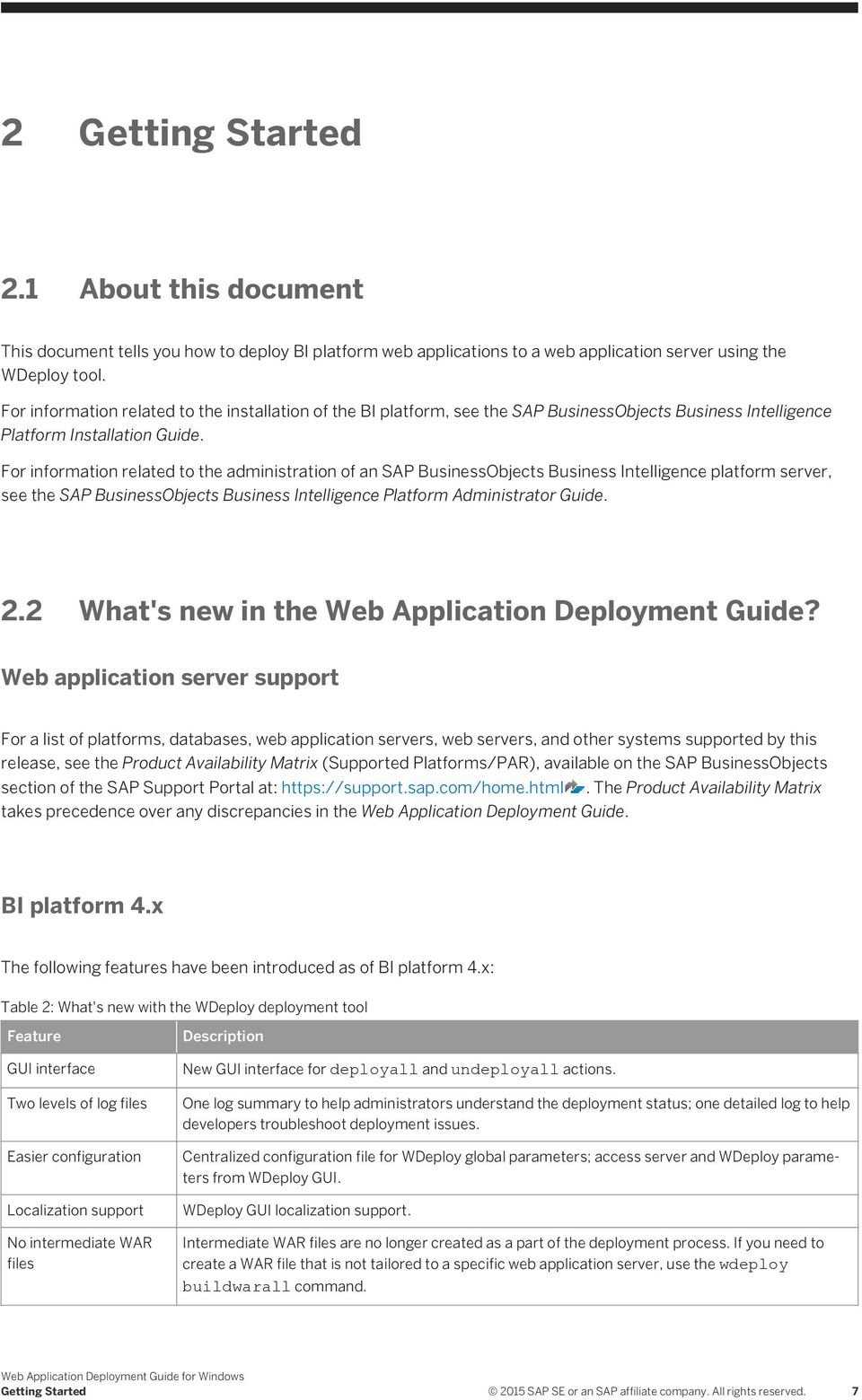
8 Feature Simplified deployment Description The number of WAR files used for BI platform web applications has been reduced. This helps reduce duplicate resource consumption and number of queries made from the web application server to the CMS. Table 3: What's new in this document Feature Content reorganization New features documented Description Rather than list each WDeploy command for every web application server, now a WDeploy command is now shown only once, with examples for each supported web application server. New WDeploy features have been documented. BI platform product documentation is available in supported languages from the support web site, and is refreshed with up-to-date content as it becomes available between releases. For the most recent product documentation, visit Who should read this documentation This documentation is intended for the system administrator or IT professional working to support an installation of the BI platform. Familiarity with your overall network environment, port usage conventions, database environment, and web server software is essential. 2.4 Variables The following variables are used throughout this guide. Variable <BIP_INSTALL_DIR> Description The directory where the BI platform is installed. On Windows, the default directory is C:\Program Files (x86)\sap BusinessObjects\. <WAS_HOSTNAME> <WEB_APP> The hostname or IP of the web application server where BI platform web applications are deployed. The name of a BI platform web application. For example, a value for <WEB_APP> is BOE. This application has a configuration file called BOE.properties, and the WDeploy tool creates BOE.war during predeploy steps for certain application servers SAP SE or an SAP affiliate company. All rights reserved. Getting Started

9 Variable Description For a complete list of BI platform web applications, see SAP BusinessObjects Business Intelligence platform WAR and EAR files [page 12]. <WEB_APP_SERVER> The shorthand name of the web application server used by the WDeploy tool. For example, the value of <WEB_APP_SERVER> for Tomcat 8.0 is tomcat8. For a complete list of values, see Values for WEB_APP_SERVER [page 43]. 2.5 Terminology The following terms are used throughout the BI platform documentation: Table 4: Term add-on products Auditing Data Store (ADS) BI platform bundled database; bundled web application server cluster (noun) cluster (verb) Definition Products that work with the BI platform but have their own installation program, such as SAP BusinessObjects Explorer The database used to store auditing data An abbreviation for the SAP BusinessObjects Business Intelligence platform The database or web application server shipped with the BI platform Two or more Central Management Servers (CMSs) working together and using a single CMS database To create a cluster. For example, to create a cluster: 1. Install a CMS and CMS database on machine A. 2. Install a CMS on machine B. 3. Point the CMS on machine B to the CMS database on machine A. cluster key Used to decrypt the keys in the CMS database. You can change the cluster key in the CCM, but you cannot reset the key like a password. It contains encrypted content and is important not to lose. Getting Started 2015 SAP SE or an SAP affiliate company. All rights reserved. 9
![For a complete list of values, see Values for WEB_APP_SERVER [page 43]. 2.](/docs-images/40/14900309/images/page_9.jpg "5 Terminology The following terms are used throughout the BI platform documentation: Table 4: Term add-on products Auditing Data Store (ADS) BI platform bundled database; bundled web application")
10 Term CMS CMS database deployment installation machine Definition An abbreviation for the Central Management Server The database used by the CMS to store information about the BI platform The BI platform software installed, configured, and running on one or more machines An instance of BI platform files created by the installation program on a machine The computer on which the BI platform software is installed major release A full release of the software, such as 4.0 migration The process of transferring BI content from a previous major release (for example, from XI 3.1), using the upgrade management tool. This term does not apply to deployments with the same major release. See promotion. minor release A release of some components of the software, such as 4.2 node Patch promotion server Server Intelligence Agent (SIA) Support Package web application server upgrade A group of BI platform servers that run on the same machine and are managed by the same Server Intelligence Agent (SIA) A small update for a specific Support Package version The process of transferring BI content between deployments with the same major release (for example, 4.0 to 4.0), using the promotion management application A BI platform process. A server hosts one or more services. A process that manages a group of servers, including stopping, starting, and restarting servers A software update for a minor or major release A server that processes dynamic content. For example, the bundled web application server for 4.2 is Tomcat 8. The planning, preparation, migration, and post-processes required to complete a migration process SAP SE or an SAP affiliate company. All rights reserved. Getting Started

11 3 Overview of web application deployment The BI platform installation program can deploy web applications only to the bundled Tomcat web application server. All other supported web application servers require that web applications be deployed after the installation is complete. It is recommended that you use the WDeploy web application deployment tool. For information and instructions on how to deploy using the WDeploy tool, see the To deploy web applications with the WDeploy tool section of this guide. You can also deploy web applications with your application server's administrative console if you prefer. Web applications deployed with the web application server's administrative console must first be modified to be deployable WAR or EAR files. The wdeploy predeploy and wdeploy predeployall commands automate this process. After using these predeployment commands, jump to the To deploy web applications with the administrative console section of the guide for instructions. However, if you have extensive knowledge of your web application server and know how to customize web applications for deployment, this process can be done by hand. The manual tailoring of web applications for deployment to a web application server is not covered in this guide. 3.1 Overview of OSGi WAR files The OSGi framework for Java web applications simplifies the deployment of the web applications bundled with the BI platform. It allows web applications, language packs, SDKs, plugins, and other resources to exist in a single bundle that can be deployed to a web application server in one step. Deploying a single WAR file also means fewer web sessions are needed when a user accesses multiple web applications, which reduces the memory, disk, and processing load placed on a web application server. 3.2 Fail-over and load balancing The BI platform supports clustered web application servers with load balancing. Hardware or software load balancers can be used as the entry-point for the web application servers to ensure that the processing is evenly distributed among the web application servers. The following persistence types are currently supported: Source IP address persistence. Cookie persistence Insert mode (ArrowPoint Cookie) Load balancing a cluster of BI platform servers is not required, as the Central Management Server (CMS) already distributes work between cluster nodes. Overview of web application deployment 2015 SAP SE or an SAP affiliate company. All rights reserved. 11

12 3.2.1 Web application clustering support The BI platform can be used in environments with different clustered, load balanced, or fault tolerant configurations. The table below lists configuration support for Web-hosted BI tools, CMC, and BI launch pad web applications. Web application Clustered web application servers Load balancers with session affinity Load balances without session affinity Fault tolerant (See Description of fault tolerance). BI launch pad (stateless) Supported Supported Unsupported No CMC (stateful) Supported Supported Unsupported No Web-hosted BI tools Supported Supported Unsupported Yes The WDeploy tool is not supported for deployment to a cluster or cluster software such as Websphere Application Server Network Deployment. Description of fault tolerance Fault Tolerance (or failover) is supported in the form of document serialization by BI platform tools. The CMC and the BI Launchpad do not support failover.if the web tier has been configured correctly, the following behavior is supported in event of a web server failure: Table 5: Web application BI Launchpad CMC Web-hosted BI tool Description of fault tolerance You need to log on again. You need to log on again. You need to log on again but the document content will be preserved. When configuring failover you must consider the frequency with which data from objects is serialized. Saving state too frequently can cause additional overhead on the web application servers and cause the user experience to be slower. Consult the web application vendor s documentation for suggested configuration settings. 3.3 SAP BusinessObjects Business Intelligence platform WAR and EAR files The functionality that makes up the BI platform is divided between several web applications to make it easy to deploy only the components required by your organization. In the BI platform 4.2, many of the core web SAP SE or an SAP affiliate company. All rights reserved. Overview of web application deployment

13 applications included with previous releases have been bundled into a single OSGi archive. This saves web application server memory and the reduces the number of web sessions needed for web applications that previously had multiple archives. For example, BI platform XI 3.x included the Central Management Console (CMC) and InfoView (now BI launch pad) web applications archived as CMC.war and InfoView.war. The BI platform 4.2 has consolidated the CMC and InfoView (now BI launch pad) web applications, along with others, into a single archive named BOE.war or BOE.ear. The WDeploy tool is used to automate the process of tailoring web applications to be deployable on a supported web application server. While it is possible for an experienced administrator to manually tailor a web application for a specific web application server, it is recommended that the WDeploy tool be used to automate the process. The following table lists the web application archives, the web applications that require them. Web applications not automatically deployed by the installation program must be deployed post-install. Web application archive (may be WAR or EAR) Deployed automatically? Description BOE Yes OSGi archive of core web applications, including: Analytical Reporting CMC SAP Crystal Reports BI launch pad (formerly InfoView) Eclipse IDE support Lifecycle Manager Monitoring OpenDocument BI workspace (formerly Dashboard Builder) Platform search Platform services Visual difference SAP BusinessObjects Dashboards (formerly Xcelsius) BusinessProcessBI (deprecated) Yes This web application is deprecated. It provides support for legacy Crystal Reports web services and SDK components, including: Crystal Enterprise Crystal Reports Report Application Server (RAS) SAP BusinessObjects Dashboards (formerly Xcelsius) SAP BusinessObjects Analysis, OLAP edition (formerly Voyager) clientapi Yes SAP Crystal Reports JavaScript API support. dswsbobje Yes Web Services components, including: Session Overview of web application deployment 2015 SAP SE or an SAP affiliate company. All rights reserved. 13

14 Web application archive (may be WAR or EAR) Deployed automatically? Description BI platform BI catalog Federation Administration tool Live Office Web service query tool (formerly Query as a Web Service) Publishing Report Engine SAP BusinessObjects Web Intelligence (formerly Web Intelligence) SAP BusinessObjects Dashboards web services (formerly Xcelsius) jsfplatform No Java Server Faces support and examples. MobileOTA14 No Web application for mobile client support. OpenSearch No OpenSearch support. AdminTools Yes Query Builder support. The following table compares the WAR files shipped in previous versions, and where to find the functionality in the BI platform 4.2. Previous web application archive (may be WAR or EAR) AdminTools AnalyticalReporting BusinessProcessBI CmcApp CmcAppActions CrystalReports Xcelsius dswsbobje InfoViewApp InfoViewAppActions LCM OpenDocument PerformanceManagement PlatformServices PMC_Help New web application archive (may be WAR or EAR) AdminTools BOE BusinessProcessBI (deprecated) BOE BOE BOE BOE dswsbobje BOE BOE BOE BOE BOE BOE BOE SAP SE or an SAP affiliate company. All rights reserved. Overview of web application deployment

15 Previous web application archive (may be WAR or EAR) VoyagerClient XCTemplateUploader New web application archive (may be WAR or EAR) BOE BOE To deploy MobileOTA14.war for mobile application support The BI platform installation program does not deploy the MobileOTA14 web application that provides support for mobile applications. To use mobile applications, you must deploy the MobileOTA14 archive (MobileOTA14.war or MobileOTA14.ear) manually once the installation process is complete. The WDeploy GUI tool cannot be used to deploy individual web applications. To deploy an individual web application, such as MobileOTA14, use the WDeploy command-line tool. 1. Before deploying the MobileOTA14 web application, ensure that the WDeploy configuration file config.<web_application_server> has been configured appropriately for your web application server. See WDeploy configuration files [page 27]. 2. Deploy the MobileOTA14 web application. To deploy the MobileOTA14 web application, use the following WDeploy command: wdeploy.bat <WEB_APPLICATION_SERVER> -Dwar_dir=<LOCATION_OF_MOBILEOTA14.WAR> -DAPP=MobileOTA14 deploy For example, the following command deploys MobileOTA14 to a WebSphere 7 web application server: wdeploy.bat websphere7 -Dwar_dir="C:\Program Files (x86)\sap BusinessObjects\Mobile 14\Client" -DAPP=MobileOTA14 deploy 3. Restart the web application server. 4. Access the following URL to ensure that the MobileOTA14 web application is working: Substitute <HOSTNAME> for the web application server hostname, and <PORT> for the web application server port number. For more information on mobile products, refer to the SAP BusinessObjects Mobile Installation and Deployment Guide. Overview of web application deployment 2015 SAP SE or an SAP affiliate company. All rights reserved. 15

16 3.3.2 To deploy OpenSearch.war for OpenSearch support The installation program does not deploy the OpenSearch web application that provides support for OpenSearch applications. To use OpenSearch applications, you must deploy the OpenSearch.war archive manually once the installation process is complete. The WDeploy GUI tool cannot be used to deploy individual web applications. To deploy an individual web application, such as OpenSearch, use the WDeploy command-line tool. 1. Ensure that web application server's connection details have been set in the WDeploy web application server configuration file. The file is located in: <BIP_INSTALL_DIR>\SAP BusinessObjects Enterprise XI 4.0\wdeploy\conf \config.<web_app_server> For more information on the WDeploy web application server configuration file, see Configuration files in the SAP BusinessObjects Business Intelligence Platform Web Application Deployment Guide. 2. Update the OpenSearch configuration in the OpenSearch web application's config.properties file. The file is located in: <BIP_INSTALL_DIR>\SAP BusinessObjects Enterprise XI 4.0\warfiles\OpenSearch\WEB-INF Ensure that the following parameters are configured for your server: cms: the CMS hostname and CMS port number. For example, use the format: <CMS_HOSTNAME>:<PORT>. opendoc: the URL of the OpenDocument web application. For example: <WAS_HOSTNAME>:<PORT>/BOE/OpenDocument/opendoc/openDocument.jsp. proxy.rpurl: reverse proxy URL, if your organization uses a reverse proxy server. proxy.opendoc.rpurl: the OpenDoc reverse proxy server URL, if your organization uses an OpenDoc reverse proxy server. 3. Deploy the OpenSearch web application. To deploy the OpenSearch web application, use the following WDeploy command: wdeploy.bat WEB_APPLICATION_SERVER -Dapp_source_dir=<LOCATION_OF_OPENSEARCH_WEB_APP_SOURCE_TREE> -DAPP=OpenSearch deploy For example, the following command deploys the OpenSearch web application to a WebSphere 7 web application server: wdeploy.bat websphere7 -Dapp_source_dir="C:\Program Files (x86)\sap BusinessObjects\SAP BusinessObjects Enterprise XI 4.0\warfiles\OpenSearch" -DAPP=OpenSearch deploy For more information on OpenSearch related products, refer to OpenSearch section of the SAP BusinessObjects Business Intelligence Platform Administrator Guide SAP SE or an SAP affiliate company. All rights reserved. Overview of web application deployment

17 3.4 Default context roots All web applications can be deployed to a custom context root on your web application server. The following table lists the context roots for each web application. Web application Central Management Console (CMC) BI launch pad Open Document SAP Crystal Reports JavaScript API Web Services provider BI Business Processes (deprecated) Context path /BOE/CMC /BOE/BI /BOE/OpenDocument /clientapi /dswsbobje /BusinessProcessBI 3.5 Custom root contexts and context paths BI platform web applications can be deployed to a custom location on a web application server. This location is reflected in the URL used to access the web application from a web browser, and is often known as the context. A root context is the top-level folder on a web application server in which web applications are located. The default root context for BI platform web applications is /BOE. For example, on a web application server named the URL prefix used to access web applications on the server would be A context path (sometimes referred to as a virtual directory) is a folder within a root context, in which a web application is located. For example, the default context path for the BI launch pad application is /BI. The URL used to access the BI launch pad web application on a web application server named would be Both the root context and the context path can be changed to suit the needs of your organization. The following table lists examples of deploying a web application named MyApp to different root and web application context paths. The following topics describe how to customize root and web application context paths To change the root context You can change the root context used by the BI platform web applications (excluding the AdminTools web application. AdminTools must use the default root context to function correctly). The default setting is to have an empty root context, so the web application context path is shown directly after the server address in a URL. For example, an empty root context results in a URL such as where is the server and port number, there is no root context, and BOE/CMC is the web application context path. Setting the root context to /MY_COMPANY would change the URL example shown above to Overview of web application deployment 2015 SAP SE or an SAP affiliate company. All rights reserved. 17

18 When using the WDeploy tool, the root context can be set in the Options screen. When using the WDeploy command-line tools, the root context for the BI platform web applications is set in the following configuration file: <BIP_INSTALL_DIR>\SAP BusinessObjects Enterprise XI 4.0\wdeploy\conf\wdeploy.conf Use a text editor to update the value for root_context_path given in wdeploy.conf. For example, wdeploy.conf configuration file contains the following parameters by default: as_lang=en work_dir= war_dir= app_source_tree= disable_cmc=false disable_infoview=false JCoStandalone= root_context_path= recent_app_svr=<web_app_server> To change a web application's context path You can change the default context path (sometimes referred to as the virtual directory) of BI platform web applications. For example, the BOE web application's default context path is BOE, which can be seen in the sample URL In this example, is the server and port number, BOE is the web application, and /CMC is a component included within the BOE web application. The context path for BI platform web applications is set in the following configuration file: <BIP_INSTALL_DIR>\SAP BusinessObjects Enterprise XI 4.0\wdeploy\conf\apps \WEB_APP.properties Use a text editor to update the value of the appvdir parameter found in configuration file WEB_APP.properties. For example, the BOE.properties configuration file contains the following parameters by default: warfile=boe.war appvdir=boe buildfile=boe.xml osgisupported=true SAP SE or an SAP affiliate company. All rights reserved. Overview of web application deployment

19 4 To deploy web applications with the WDeploy tool 4.1 Overview of WDeploy The WDeploy tool is included with the BI platform to ease deployment of web applications to Java-based web application servers. There are two different interfaces to WDeploy: A traditional, text-based interface that processes commands and parameters given on the command-line. A new Windows-based guided assistant similar to the BI platform installation program, which prompts the user to enter deployment parameters. While each supported web application server requires different commands and web application package updates, WDeploy provides a consistent interface for administrators, and automates the adjustments needed for deployment to a specific web application server. For example, to deploy a web application to an IBM WebSphere web application server, a single WDeploy command performs the following tasks: 1. Creates settings specific to IBM WebSphere in the web application's web.xml file. 2. Bundles the web application content into a web archive. 3. Creates an EAR file containing the web application. 4. Calls IBM WebSphere deployment tools to deploy the web application. 4.2 WDeploy prerequisites This section details prerequisites for the deployment of the BI platform web applications to supported web application servers. Before deploying web applications to WebSphere, see WASX7017E: Exception deploying in WebSphere [page 98] Before you deploy web applications Your web application server must be installed and working before you install the BI platform. Consult your web application server documentation for installation instructions. To deploy web applications with the WDeploy tool 2015 SAP SE or an SAP affiliate company. All rights reserved. 19

20 Your web application server should have at least 5 GB of free disk space, in addition to any other requirements given by other software installed on the machine. We recommended that you change the heap size and maximum perm size settings of your JVM to -Xms128m - Xmx2048m -XX:MaxPermSize=512m. If using Tomcat for example, your modified settings would look like this: JAVA_OPTS="-Xms128m -Xmx2048m -XX:MaxPermSize=512m" For SAP Netweaver technology platform, ensure that the maximum heap size is at least 4096 megabytes. For example: JAVA_OPTS="-Xms128m -Xmx4096m -XX:MaxPermSize=512m" Consult your JVM documentation for information on changing your Java memory settings. Before you begin the deployment process, ensure that the web application server is installed and verify that the application server is running correctly by launching its administrative console Hardware requirements The deployment of web applications to a web application server with the WDeploy tool requires at least 4 GB of RAM (8 GB for SAP Netweaver technology platform), and 15 GB of free disk space, plus a minimum 5 GB of free space on the drive that hosts the temporary folder defined with the %TEMP% environment variable, for the deployment of web applications. This is in addition to any other requirements of the web application server or any other servers or services installed on the host bit support The BI platform is only supported on 64-bit operating systems and only supports 64-bit web application servers with a 64-bit JDK Enable 8-dot-3 filename support Windows 8-dot-3 filename support refers to the way in which Windows file systems maintain two filenames for each file: one filename up to eight characters with a three-character extension, and the full name that can be hundreds of characters long. This feature is enabled by default on Windows operating systems, and ensures backwards compatibility with legacy Microsoft operating and file systems. The BI platform requires 8-dot-3 support to be enabled. Verify that your Windows server has 8-dot-3 filenames enabled: 1. From the Windows Start menu, select Run... The Run dialog window is displayed SAP SE or an SAP affiliate company. All rights reserved. To deploy web applications with the WDeploy tool

21 2. Type regedit into the Open field. The Registry Editor program runs. 3. Browse the registry tree to HKEY_LOCAL_MACHINE SYSTEM CurrentControlSet Control FileSystem 4. Double-click <NtfsDisable8dot3NameCreation> and ensure that its value is set to 0. When set to 0, Windows 8-dot-3 filename support is enabled. Windows now supports both long and short filenames. Reboot the system for the change to take effect To set up the Java environment WDeploy requires a Java Virtual Machine to be available on the host system. Java Development Kit (JDK) 1.6 is installed automatically by the BI platform installation program, but must be set up or copied from the BI platform server when manually installed on a dedicated machine. The JDK installed by the BI platform installation program is used by default. If you are using a dedicated web application server, you must set up the JDK by performing either a Web Tier installation, or manually installing an appropriate JDK (1.5 or 1.6, as supported by the web application server). When setting up a JDK manually, ensure that the following environment settings have been configured: WDeploy attempts to use the JVM installed with the BI platform first. If this JVM cannot be found, then WDeploy attempts to use the <JAVA_HOME> environment variable setting that is set to a valid Java directory. If no valid or suitable JVM is found, WDeploy exits. The user account PATH environment variable includes: <JAVA_HOME>\bin To allow WDeploy to run from any directory, update the PATH environment variable to include: <BIP_INSTALL_DIR>\SAP BusinessObjects Enterprise XI 4.0\wdeploy Web application server parameter configuration files Before using the WDeploy command-line interface to deploy a web application, ensure that the correct parameters are set in the WDeploy web application deployment server parameter configuration file. Set parameters are used as default settings, and no longer need to be given on the command-line. You do not need to set parameters in these deployment configuration files if you are using the GUI interface, or if you are only predeploying using the wdeploy predeploy or wdeploy predeployall commands. The configuration file appropriate for your web application server is located in the following folder: <BIP_INSTALL_DIR>\SAP BusinessObjects Enterprise XI 4.0\wdeploy\conf. For example, if you are using Tomcat 8, select C:\Program Files (x86)\sap BusinessObjects\SAP BusinessObjects Enterprise XI 4.0\wdeploy\conf\config.tomcat8. To deploy web applications with the WDeploy tool 2015 SAP SE or an SAP affiliate company. All rights reserved. 21
22 Use a text editor to update values specific to your organization's web application server. For more information on how to configure WDeploy configuration files, see WDeploy configuration files [page 27]. Parameters set in the WDeploy web application server parameter configuration file can be overridden when calling WDeploy from the command-line, using switches and parameters to change the default behavior. However, it is highly recommended that you configure the parameters in the config.<web_app_server> configuration file appropriate for your deployment To install WDeploy on remote web application server To deploy web applications to a dedicated web application server, perform a Web Tier or Custom / Expand installation with the BI platform installation program. If you prefer to copy the WDeploy tool manually, copy the following folder to the web application server: <BIP_INSTALL_DIR>\SAP BusinessObjects Enterprise XI 4.0\wdeploy When copying the WDeploy tool manually, ensure that the environment variable JAVA_HOME is configured appropriately on the web application server. 4.3 SAP System Landscape Directory (SLD) registration Your organization may use the SAP System Landscape Directory (SLD) Data Supplier (DS) to maintain a central repository of information about your organization's SAP software. It provides administrators with detailed information about the system's topology and software components. For more information on setting up the BI platform for SLD, see Registration of BI platform in the System Landscape in the SAP BusinessObjects Business Intelligence Platform Administrator Guide and SAP The SLD registration notifies the SLD when web applications are deployed or undeployed, keeping the SLD database current with the latest information about your organization's web application deployments. Web application components can be registered with SLD on the following web application servers: SAP Netweaver Technology Platform Apache Tomcat 7.0 and 8.0 IBM WebSphere To enable SLD registration for SAP Netweaver Technology Platform SAP System Landscape Directory Data Supplier (SLD-DS) integration is available for SAP Netweaver technology platform. For information on SLD-DS integration and SAP Netweaver technology platform, see the System Landscape Directory SCN document at: SAP SE or an SAP affiliate company. All rights reserved. To deploy web applications with the WDeploy tool
23 4.3.2 To enable SLD registration for Tomcat To use SAP System Landscape Directory Data Supplier (SLD-DS) with Apache Tomcat, the SLDREG registration tool must be installed on each Apache Tomcat web application server. SLDREG is not installed as a part of the BI platform. For information on installing SLDREG, refer to SAP To configure SLDREG so that the SLD is updated whenever web applications are deployed or undeployed from an Apache Tomcat web application server, refer to SAP The required sap.com~tomcatslddatasupplierweb.war file attached to SAP can also be found in the <<BIP_INSTALL_DIR>>\SAP BusinessObjects\SAP BusinessObjects Enterprise XI 4.0\warfiles\webapps folder after the Java Web Applications feature is installed during a Web Tier installation To enable SLD registration for WebSphere To use SAP System Landscape Directory Data Supplier (SLD-DS) with WebSphere, the SLDREG registration tool must be installed on each WebSphere web application server. SLDREG is not installed as a part of the BI platform. For information on installing SLDREG, refer to SAP To configure SLDREG so that the SLD is updated whenever web applications are deployed or undeployed from a WebSphere web application server, refer to SAP Deployment modes WDeploy supports two different deployment modes: 1. Standalone mode (a web application server) The web application server serves both static content (HTML pages, images, documents, JavaScript, Cascading Style Sheets) and dynamic content (Java Server Pages, JAR files, XML files). 2. Split web tier mode (a web application server plus a dedicated web server) A dedicated web server receives requests from web browsers and serves all static content (HTML pages, images, documents, JavaScript, Cascading Style Sheets). Requests for dynamic content (Java Server Pages, JAR files, XML files) are forwarded to the dedicated application server and returned to the web browser when the content has been formed. To deploy web applications with the WDeploy tool 2015 SAP SE or an SAP affiliate company. All rights reserved. 23
24 This mode is suited to larger production deployments where scalability and performance are key. It is also possible to use WDeploy to deploy web applications to a web application server installed on the same system as the BI platform. This configuration can be used for small development or test systems, and is not recommended for production systems Standalone deployments Standalone mode refers to a web application server serving both static and dynamic content to web clients. The web application server could run on the same machine as the BI platform, or on a separate machine connected by network. In the following diagram, web clients connect through a firewall to a web application server [1] that serves both static and dynamic content. Processing requests from the web application server are sent to the BI platform Central Management Server (CMS) [2]. In the diagram above, the WDeploy is installed as a component of the CMS [2], and web applications are separated out into directories for static and dynamic content. The dynamic content can now be copied to the web application server [1]. The WDeploy tool can also be installed or copied to a dedicated web application server [1], making it easy to deploy separated content received from a CMS [2]. This mode is best suited for small deployments with a limited number of users. The advantage of a standalone deployment is that it is easy to deploy and maintain, but it may not scale to a large number of users because the web application server delivers both static and dynamic content Split web tier deployments A web tier deployment separates static and dynamic web application content so that static content is served by a web server, and dynamic content is served by a web application server. The web and web application servers could run on the same machine, or separate machines connected to a network. There is no performance improvement if you deploy the following web applications in split web tier mode. WDeploy will process these web applications as standalone web applications even in split tier mode: Web Services MobileOTA SAP SE or an SAP affiliate company. All rights reserved. To deploy web applications with the WDeploy tool
25 MOBIServer OpenSearch jsfplatform In the following diagram, web clients connect through a firewall to a web server [1] that serves only static content (HTML pages, images, documents, JavaScript, Cascading Style Sheets). When dynamic content is required, the web server sends a request to the web application server [2]. Any requests that require further processing by the BI platform are sent to Central Management Server (CMS) for processing [3]. In the diagram above, the WDeploy is installed as a component of the CMS [3], and web applications are separated out into directories for static and dynamic content. The dynamic content can now be copied to the web application server [2], and the static content copied to the web server [1]. The WDeploy command can also be installed on dedicated web [1] and web application [2] servers, making it easy to deploy separated content received from a CMS [3]. If an organization implements security measures that restrict access to server machines, the separated static and dynamic content can be sent separately to those with the authority to deploy content. Split deployments are best suited to mid or large-sized deployments with a large or increasing number of users. The advantage of a split deployment is that it is scalable and provides good performance. Web, web application, and BI platform servers can be clustered to provide an even greater degree of scalability, availability, and performance Supported dedicated web and web application server combinations WDeploy supports the following web and web application server configurations for split deployments: Apache 2.2 web server with Tomcat 7 or 8 Apache 2.2 web server with WebLogic 10.3.x IBM IHS web server 7 with WebSphere 7.0 IBM IHS web server 8.5 with WebSphere 8.5 or Apache and IBM IHS web servers are all given as apache in WDeploy configuration files. To deploy web applications with the WDeploy tool 2015 SAP SE or an SAP affiliate company. All rights reserved. 25
26 To deploy web applications on a remote machine Use the procedure below to deploy web applications to a remote machine. In this procedure, Box 1 refers to the machine hosting a BI platform installation, and Box 2 is the remote machine on which the web application server is installed. 1. Create on Box 2 the following directories. <BIP_INSTALL_DIR>\SAP BusinessObjects Enterprise XI 4.0\wdeploy <BIP_INSTALL_DIR>\SAP BusinessObjects Enterprise XI 4.0\warfiles\webapps <BIP_INSTALL_DIR>\InstallData These directories reflect the default directory structure installed on Box 1. Tip Although you can customize the folder structure to meet your specific requirements, it is recommended that you maintain files within the same folder structure or hierarchy in Box 2 as in Box Copy the following files from Box 1 to Box 2. Folder <BIP_INSTALL_DIR>\SAP BusinessObjects Enterprise XI 4.0\wdeploy. Tip Remove the contents under <BIP_INSTALL_DIR>\SAP BusinessObjects Enterprise XI 4.0\wdeploy\workdir before the file copy, if that folder is not empty. Folder <BIP_INSTALL_DIR>\SAP BusinessObjects Enterprise XI 4.0\warfiles\webapps. Folder <BIP_INSTALL_DIR>\InstallData\setup.engine. 3. Set the JAVA_HOME environment variable to the JDK 8 directory. To deploy any web application server using Wdeploy tool we recommend you to use bundled SAP JVM Modify the WDeploy configuration file for your web application server. Provide all the required information to enable WDeploy to deploy the web application. For example, to modify the configuration file for WebLogic 11, you would modify the file to: as_domain_dir=c:\oracle\middleware\user_projects\domains\base_domain as_instance=adminserver as_admin_port=7001 as_admin_username=weblogic as_admin_password=weblogic The configuration file is located in the following directory: <BOE_INSTALL_DI>R\SAP BusinessObjects Enterprise XI 4.0\wdeploy\conf \config.<web_app_server> 5. Run the WDeploy script from its location in Box 2 by opening command line console and entering the following command: <BIP_INSTALL_DIR>\SAP BusinessObjects Enterprise XI 4.0\wdeploy\wdeploy.bat <WEB_APP_SERVER> SAP SE or an SAP affiliate company. All rights reserved. To deploy web applications with the WDeploy tool
27 -Dapp_source_tree= <BIP_INSTALL_DIR>\SAP BusinessObjects Enterprise XI 4.0\warfiles\webapps deployall You can set WDeploy parameter defaults values in the WDeploy configuration file <BIP_INSTALL_DIR>\SAP BusinessObjects Enterprise XI 4.0\wdeploy\conf \wdeploy.conf, instead of giving parameters on the command-line. For example, set the parameters: app_source_tree or war_dir work_dir root_context_path For more information, see WDeploy configuration file [page 28]. You pass the argument -Dwar_dir to specify the location of generic WAR files as input for deployment. For example, to deploy a generic BOE.war file: <BIP_INSTALL_DIR>\SAP BusinessObjects Enterprise XI 4.0\wdeploy \wdeploy.bat <WEB_APP_SERVER>> -Dwar_dir="C:\myGenericWarFiles\BOE.war" -DAPP=BOE deploy To create generic WAR files for all BI platform applications, run the following command: <BIP_INSTALL_DIR>\SAP BusinessObjects Enterprise XI 4.0\wdeploy \wdeploy.bat buildwarall -Dapp_source_tree= <BIP_INSTALL_DIR>\SAP BusinessObjects Enterprise XI 4.0\warfiles\webapps -Dwar_dir= C:\myGenericWarFiles Pass the parameter -Dwar_dir=<TARGET_LOCATION_OF_GENERIC_WAR_FILE> to specify the location to output the generic WAR files to. 4.5 WDeploy configuration files The WDeploy configuration files contain settings saved in a key-value pair text format. Read by WDeploy when it starts, the options and parameters saved in the configuration files are used as default settings and no longer need to be given on the command-line. However, all options and parameters can still be given on the command-line, which overrides the configuration file. Options and parameters given on the command-line do not change the options stored in configuration files. It is recommended that web application server administrator account passwords are not stored in the WDeploy configuration file, but rather passed to WDeploy from the command-line with the parameter - Das_admin_password=<PASSWORD>. There are three configuration files used by WDeploy: To deploy web applications with the WDeploy tool 2015 SAP SE or an SAP affiliate company. All rights reserved. 27
28 WDeploy configuration file (<BIP_INSTALL_DIR>\SAP BusinessObjects Enterprise XI 4.0\wdeploy\conf\wdeploy.conf): stores general WDeploy settings that apply to all web applications severs. Web application server configuration files (<BIP_INSTALL_DIR>\SAP BusinessObjects Enterprise XI 4.0\wdeploy\conf\config.<WEB_APP_SERVER>): stores settings for a specific web application server. Web application configuration file (<BIP_INSTALL_DIR>\SAP BusinessObjects Enterprise XI 4.0\wdeploy\conf\apps\<WEB_APP>.properties): stores individual deployment settings for each web application WDeploy configuration file The <BIP_INSTALL_DIR>\SAP BusinessObjects Enterprise XI 4.0\wdeploy\conf\wdeploy.conf configuration file stores settings likely to be shared among any web application servers in your deployment. Properties stored in the WDeploy configuration file can be overridden from the command-line using the - D<PROPERTY> switch parameter. However, it is highly recommended that you configure the parameters in the config.<web_app_server> configuration file appropriate for your deployment. For a complete list of WDeploy properties, see WDeploy property parameters [page 34] Web application server configuration files As each web server and web application server requires different WDeploy settings, the WDeploy tool references a configuration file for each supported server. The configuration files are stored in the WDeploy conf folder as follows: <BIP_INSTALL_DIR>\SAP BusinessObjects Enterprise XI 4.0\wdeploy\conf \config.<web_app_server> Substitute <WEB_APP_SERVER> for the name of the web application server to which the WDeploy tool deploys. The following list shows all configuration files for currently supported web application servers: config.jboss7 (JBoss 7.1) config.sapappsvr73 (SAP NetWeaver Technology Platform) config.tomcat7 (Tomcat 7.0) config.tomcat8 (Tomcat 8.0) config.weblogic11 (WebLogic 11gR1) config.websphere7 (WebSphere 7.0) config.websphere8 (WebSphere 8.5 or 8.5.5) The following sections list the configuration options available for each supported web and web application server SAP SE or an SAP affiliate company. All rights reserved. To deploy web applications with the WDeploy tool
29 JBoss 7.1 configuration file Set default values for the following parameters in config.jboss7 (JBoss 7.1) to avoid having to give them on the command-line every time. Table 6: Mandatory WDeploy parameters for JBoss 7.1 Parameter name Description Example as_dir as_instance Installed location of the JBoss web application server (<JBOSS_HOME>). Name of the JBoss application server instance. C:\jboss-as Final default Tomcat 7 or 8 configuration file Set default values for the following parameters in config.tomcat7 or config.tomcat8 to avoid having to give them on the command-line every time. When deploying to a split environment, where a Tomcat web application server is paired with a dedicated Apache web server, see To deploy to separate Apache web and Tomcat web application servers [page 55]. Table 7: Mandatory WDeploy parameters for Tomcat 7 or 8 Parameter name Description Example as_instance Application server instance name. localhost as_service_name Name of the Tomcat service when the application server is installed as a Windows service (only applicable for installations on Microsoft Windows). Tomcat7 or Tomcat8 as_dir Installed location of Tomcat 7 or 8. C:\Program Files\Apache Software Foundation\Tomcat 8.0 as_service_key Registry key used by Tomcat to give Java parameters (only applicable for installations on Microsoft Windows). HKLM\SOFTWARE\Wow6432Node \Apache Software Foundation \Procrun 2.0\ $<as_service_name>\parameters \Java as_service_key_value Tomcat's Java parameters: the value of the registry key as_server_key. Options WebLogic 11gR1 configuration file Set default values for the following parameters in config.weblogic11 to avoid having to give them on the command-line every time. To deploy web applications with the WDeploy tool 2015 SAP SE or an SAP affiliate company. All rights reserved. 29
30 Table 8: Mandatory WDeploy parameters for WebLogic 11gR1 Parameter name Description Example as_admin_port WebLogic administration request port as_admin_username as_admin_password as_instance as_domain_dir WebLogic administrative account username. WebLogic administrative account password. Name of the WebLogic application server instance. WebLogic domain directory. weblogic password AdminServer C:\bea\weblogic \user_projects\domains \base_domain WebSphere 7, 8.5, or configuration file Set default values for the following parameters in config.websphere7 or config.websphere8 to avoid having to give them on the command-line every time. Table 9: Mandatory WDeploy parameters for WebSphere 7, 8.5, or Parameter name Description Example value as_soap_port as_instance as_admin_password as_admin_username as_profile_name as_virtual_host Port number for SOAP application server administration. If not set, the default SOAP port number will be used. The name of the WebSphere application server instance. WebSphere administrative account password. WebSphere administrative account username. Name of the profile created for Websphere Application Server. Give this parameter when a non-default profile is used for the deployment. Virtual host to which the application must be bound server1 password administrator AppSrv01 default_host SAP SE or an SAP affiliate company. All rights reserved. To deploy web applications with the WDeploy tool
31 Parameter name Description Example value as_admin_is_secure Instructs WDeploy that WebSphere security is enabled. false Values for as_admin_username and as_admin_password must be set when as_admin_is_secure is true"). as_dir ws_instance enforce_file_limit as_plugin_cfg_dir Installed location of WebSphere. Web server instance when deployed to a split environment (dedicated web server). Indicates to WDeploy whether or not the web application server may encounter issues loading applications that contain more than 65,535 files (false by default). Location of the WebSphere plugincfg.xml file. This parameter is only required for split web tier deployments. C:\Program Files \IBM\WebSphere \AppServer webserver1 false C:\AppServers\IBM\Web Sphere7\profiles \AppSrv01\config\cells \<cell_name> \nodes \<webserver_node> \servers \<webserver_name> Dedicated web servers in split deployments When deploying web applications to a dedicated web server in split deployments, use the name of the supported web server: config.apache (Apache Web Server or IBM IHS) It is recommended that web application server administrator account passwords are not stored in the WDeploy configuration file, but rather passed to WDeploy from the command-line with the parameter - Das_admin_password=<PASSWORD>. Split deployments employ a dedicated web application server to serve dynamic content, and a dedicated web server to serve static content. The following table lists the web application servers that can be configured for a split deployment of the BI platform. To deploy web applications with the WDeploy tool 2015 SAP SE or an SAP affiliate company. All rights reserved. 31
32 Application Server JBoss 7.1 SAP Netweaver Technology Platform Tomcat 7.0 Tomcat 8.0 WebLogic 11gR1 Apache web server No N/A Yes Yes Yes WebSphere 7 Yes (IHS 7) WebSphere 8.5 and Yes (IHS 8.5) Apache or IBM IHS (split deployment) configuration file Set default values for the following parameters in config.apache to avoid having to give them on the commandline every time. The same configuration file (config.apache) is used for Apache 2.2 or IBM IHS. Table 10: Mandatory WDeploy parameters for Apache 2.2 or IBM IHS (split deployment) Parameter name Description Example connector_type deployment_dir plugin_install_dir ws_dir The Apache connector type used to configure split mode Directory under which WDeploy creates a subdirectory for static content served by the web server. WDeploy creates a virtual directory on the web server, mapping the subdirectory to the URL The root plugin installation directory for WebSphere application servers. The Apache web server installation directory. tomcat8 C:\apache2\htdocs ${ws_dir}\plugins C:\apache2 When using IBM IHS with a WebSphere 7, 8.5, or web application server, ensure that as_plugin_cfg_dir is correctly configured in config.websphere7 or config.websphere SAP SE or an SAP affiliate company. All rights reserved. To deploy web applications with the WDeploy tool
33 4.5.3 Web application configuration property file Each web application can be deployed to a different location on the web application server, and can be configured with different packaging options. Each deployable web application is configured in the configuration file <BIP_INSTALL_DIR>\SAP BusinessObjects Enterprise XI 4.0\wdeploy\conf\app\<WEB_APP>.properties. The following settings are available in a <WEB_APP>.properties configuration file: Table 11: Variable Description Example warfile appvdir buildfile deploy_as_a_filetree classloading_mode classloader_package_ filtering Name of the WAR file to create for this web application. Name of the context path (also known as a virtual directory) to which the web application is deployed. Ant build file used to build the web application. Toggle to enable the deployment of an exploded WAR file when true. Setting to determine the Classloader order. Filter for classloader. dswsbobje.war dswsbobje dswsbobje.xml true PARENT_LAST com.ctc.wstx.*,javax.xml.*,org.apache. * When deploying a web application to a specific location on a web application server, use the appvdir variable to set the location of the web application within the server's root context. For example, if a web application server's root context was setting appvdir to mywebapp/ would result in the web application being accessible from Using the WDeploy command-line tool Before using the WDeploy command-line tool, ensure that the WDeploy configuration files have been configured appropriately for your web application server. See WDeploy configuration files [page 27]. For information on WDeploy prerequisites, see: WDeploy prerequisites [page 19] The WDeploy command-line tool is installed as a part of the BI platform: <BIP_INSTALL_DIR>\SAP BusinessObjects Enterprise XI 4.0\wdeploy\wdeploy.bat There are two types of commands: General commands To deploy web applications with the WDeploy tool 2015 SAP SE or an SAP affiliate company. All rights reserved. 33
34 Used to provide high-level information about the tool itself and the available web application server deployment. They are not used together with server names, properties, or actions. For example: wdeploy.bat help wdeploy.bat listappservers Deployment commands Used to deploy specific web applications to a specific web application server. These commands always follow the format: server, properties, action. For example: wdeploy.bat <WEB_APP_SERVER> [-D<PROPERTY>=<value>] <ACTION> Where: <WEB_APP_SERVER> is the name of the web or web application server and must match the name of the WDeploy configuration file <BIP_INSTALL_DIR>\SAP BusinessObjects Enterprise XI 4.0\wdeploy\conf\config.<WEB_APP_SERVER>. For example, for SAP NetWeaver Technology Platform, the configuration file is named <BIP_INSTALL_DIR>\SAP BusinessObjects Enterprise XI 4.0\wdeploy\conf \config.sapappsvr73, so the name given for the <WEB_APP_SERVER> parameter given to WDeploy on the command-line is sapappsvr73. -D<PROPERTY>=<value> is at least one key-value pair. Parameters given on the command-line override those in the configuration file. For example, to deploy the BOE web application, use -DAPP=BOE. This overrides any value for -DAPP= stored in the web application server configuration file config.<web_app_server>. <ACTION> is the name of the operation to perform. For example, the deployall action will deploy all web applications to the web application server given as <WEB_APP_SERVER> in the first parameter Syntax WDeploy server names WDeploy uses a server name on the command-line and as part of the filename for server configuration files. The server name is the first parameter given on the command-line when running the WDeploy tool: wdeploy.bat <WEB_APP_SERVER> [-D<PROPERTY>=<value>] <ACTION> <WEB_APP_SERVER> is the name of the web or web application server. The name given must match the name of the configuration file in <BIP_INSTALL_DIR>\SAP BusinessObjects Enterprise XI 4.0\wdeploy \config. For a complete list of valid names for <WEB_APP_SERVER>, see Values for WEB_APP_SERVER [page 43] WDeploy property parameters WDeploy properties can be set on the command-line with the -D<PROPERTY> switch parameter. Repeat the - D<PROPERTY> switch parameter for each property to be set SAP SE or an SAP affiliate company. All rights reserved. To deploy web applications with the WDeploy tool
35 For example, in the following command, multiple invocations of the -D<PROPERTY> switch parameter are used to set multiple properties for a Tomcat 8 web application server (as_dir, as_instance, as_service_name, and APP: wdeploy.bat Tomcat8 -Das_dir=C:\Tomcat8 -Das_instance=localhost -Das_service_name=Tomcat8 -DAPP=BOE deployonly Properties can also be configured in the wdeploy.config configuration file. This allows properties to be set by default, and over-ridden from the command-line when required. For more information on the wdeploy.conf configuration file, see WDeploy configuration file [page 28]. The following table lists all properties for WDeploy. Table 12: Properties for WDeploy Property Description Example value APP app_source_dir app_source_tree as_admin_is_secure Name of the web application to deploy, as found in the WAR or EAR file name and the web application properties file: <BIP_INSTALL_DIR>SAP BusinessObjects Enterprise XI 4.0\wdeploy\conf\apps \<WEB_APP>.properties This property is used when working with individual web applications, as with the wdeploy predeploy, wdeploy deploy, or wdeploy deployonly commands. Location of an individual web application's source files. This property is used when working with individual web applications, as with the wdeploy predeploy, wdeploy deploy, or wdeploy deployonly commands. Location of the source files for all available web applications (the parent folder of app_source_dir). This property is used when working with all available web applications simultaneously, as with the wdeploy predeployall, wdeploy deployall or wdeploy deployonlyall commands. For web application servers that use SSL encryption during web application deployment, such as WebSphere. Setting this value to true indicates requires that you also give an administrator account name and password. BOE <BIP_INSTALL_DIR> \SAP BusinessObjects Enterprise XI 4.0\wdeploy\warfiles \webapps\<web_app> <BIP_INSTALL_DIR> \SAP BusinessObjects Enterprise XI 4.0\wdeploy\warfiles \webapps false (default) true To deploy web applications with the WDeploy tool 2015 SAP SE or an SAP affiliate company. All rights reserved. 35
36 Property Description Example value as_admin_password as_admin_port as_admin_username as_dir as_domain_dir as_instance Web application server administrative account password. Port number for web application server administrative access. Web application server administrative account username. Installation directory of the web application server. Installation directory of the web application server. For WebLogic application servers, as_domain_dir is the domain root. Mandatory for all the application servers. Name of the web application server instance. password 8080 administrator C:\tomcat8 C:\BEA\Weblogic localhost as_lang Preferred language for the WDeploy user interface. Czech: CS Danish: DA Dutch: NL English: EN Finnish: FI French: FR German: DE Hungarian: HU Italian: IT Japanese: JA Korean: KO Norwegian Bokmal: NB Polish: PL Portuguese: PT Romanian: RO Russian: RU Simplified Chinese: zh_cn Slovak: SK Spanish: ES Swedish: SV Thai: TH Traditional Chinese: zh_tw Turkish: TR as_mode Type of web application deployment. A standalone is a web application server that serves both static and dynamic web content. A split deployment uses a dedicated web server to serve static content, and a web application server to serve dynamic content. standalone split SAP SE or an SAP affiliate company. All rights reserved. To deploy web applications with the WDeploy tool
37 Property Description Example value as_service_key as_service_key_value as_service_name For Tomcat running on Windows. When installed as a service, the name of the Windows registry key where the JVM startup parameters are stored. For Tomcat running on Windows. When installed as a service, the value of Windows registry key where the JVM startup parameters are stored. For Tomcat running on Windows. The name of the Tomcat service. HKLM\SOFTWARE\Apache Software Foundation \Procrun 2.0\<AS_SERVICE_NAME >\Parameters\Java Tomcat8 as_sid The system ID of the target instance. AS1 as_soap_port as_virtual_host connector_type deploy_as_a_filetree deployment_dir disable_cmcapp disable_infoview enforce_file_limit Mandatory for WebSphere. Port number for SOAP application server administration. If not set, the default SOAP port number is used. For WebSphere only. Virtual host to which the application must be bound. For web servers running in split mode, such as Apache. Set connector_type to the name of the dedicated web application server used by the web server. For WebLogic web application servers. Indicates whether the application must be deployed as a file tree (expanded format) or as a packaged WAR or EAR file. Directory under which WDeploy creates a subdirectory for static content served by a dedicated web server. WDeploy creates a virtual directory on the web server, mapping the subdirectory to the URL. Disables the CMC web application when set to true. Disables the BI launch pad web application when set to true. Tells WDeploy whether or not the web application contains more than 85,535 files. Set to false by default, except for WebSphere default_host tomcat8 false (default) true C:\apache2\htdocs false true false true false (default) true To deploy web applications with the WDeploy tool 2015 SAP SE or an SAP affiliate company. All rights reserved. 37
38 Property Description Example value JCoStandalone recent_app_svr root_context_path work_dir ws_dir ws_instance ws_type Use when the BI platform is integrated with an SAP BW system. Set to false when deploying to an SAP Netweaver Web application server component. Set to true when deploying to any other application server. The most recent web application server to which web applications were deployed. Web application root context path to which all web applications are deployed. To deploy a web application to a folder within the root context, see the appvdir setting in the web application.properties configuration file. Folder in which WDeploy manipulates the web applications WAR or EAR archives (for example, to split static and dynamic content in a web application). This folder stores the results of the wdeploy predeploy action and stores data required to undeploy web applications. For web servers running in split mode, such as Apache. The web server home directory. For WebSphere only. The name of the web server where the application is installed, in split mode. For web servers running in split mode, such as Apache. The name of the web server, as found to the <BIP_INSTALL_DIR>\SAP BusinessObjects Enterprise XI 4.0\wdeploy\conf \config.<web_server> file. false true Tomcat8 /BOE <BIP_INSTALL_DIR> \SAP BusinessObjects Enterprise XI 4.0\wdeploy\workdir C:\apache2 webserver1 apache Apache and IBM HTTP Server both have a ws_type of apache. war_dir Location of WAR or EAR archives to deploy or the target output location to create generic WAR files in. C:\myGenericWarFiles Mandatory property parameters for split web tier deployments Some properties are required for split web tier deployments (separate web and web application servers). When deploying to a split web tier deployment, ensure that the following property parameters are either given on the SAP SE or an SAP affiliate company. All rights reserved. To deploy web applications with the WDeploy tool
39 command-line, or are configured in the web or web application server configuration file (config.<web_app_server>). Set the -Das_mode=split property to separate static content for the web server and dynamic content for the web application server. Set the -Dconnector_type=<CONNECTOR_TYPE> property to the appropriate connector type. Set connector_type to the name of the dedicated web application server used by the web server. For example, when using an Apache web server and a Tomcat 8 web application server, connector_type should be set to tomcat8. On deployments where the web server runs on the same host as the web application server, you must give the -Dws_type=<WEB_SERVER_TYPE> and -Dws_dir=<WEB_SERVER_DIR> properties WDeploy actions The last parameter of a WDeploy command is the action to be performed. The following section defines each valid action, and what each does. Table 13: WDeploy Actions Action predeploy Description The wdeploy predeploy command prepares a web application for deployment to the target web application server. The web application's web.xml configuration file is updated, along with any other changes required to make the web application deployable to the target web application server. Once configured, the web application is packaged into a WAR or EAR file and saved to <BIP_INSTALL_DIR>\SAP BusinessObjects Enterprise XI 4.0\wdeploy \workdir\<web_app_server>. This file can be deployed manually through the web application server's administrative console, or with the wdeploy deploy command. Use wdeploy predeploy to prepare the BOE web application so that it is ready for deployment to a specific web application server. For example: wdeploy.bat <WEB_APP_SERVER> -DAPP=BOE predeploy To deploy web applications with the WDeploy tool 2015 SAP SE or an SAP affiliate company. All rights reserved. 39
40 Action predeployall Description The wdeploy predeployall command performs the wdeploy predeploy command for all web applications located in the BI platform web application source directory: <BIP_INSTALL_DIR>SAP BusinessObjects Enterprise XI 4.0\warfiles \webapps Use wdeploy predeployall to apply the wdeploy predeploy command to all web applications. For example: wdeploy.bat <WEB_APP_SERVER> predeployall Predeployment does not require access to the web application server, with the exception of WebSphere. When deploying to WebSphere, the default_virtual_host parameter is mandatory. deploy The wdeploy deploy command is a concatenation of the wdeploy predeploy and wdeploy deployonly commands, which prepares and deploys a web application to the target web application server with just one command. Use wdeploy deploy to prepare and deploy the BOE web application to the target web application server. wdeploy.bat <WEB_APP_SERVER> -DAPP=BOE deploy deployall The wdeploy deployall command performs the wdeploy deploy command for all web applications located in the BI platform web application source directory: <BIP_INSTALL_DIR>SAP BusinessObjects Enterprise XI 4.0\warfiles \webapps Use wdeploy deployall to apply the wdeploy deploy command to all web applications. For example: wdeploy.bat <WEB_APP_SERVER> deployall SAP SE or an SAP affiliate company. All rights reserved. To deploy web applications with the WDeploy tool
41 Action deployonly Description The wdeploy deployonly command deploys a prepared web application to the target web application server. Deployable WAR or EAR files located in <BIP_INSTALL_DIR>\SAP BusinessObjects Enterprise XI 4.0\wdeploy\workdir\<WEB_APP_SERVER> are deployed to the web application server by the wdeploy deployonly command invoking the web application server's command-line interface. If a web application has not already been prepared for deployment, the wdeploy predeploy command is called automatically. Use wdeploy deployonly to deploy a prepared BOE web application to a web application server. For example: wdeploy.bat <WEB_APP_SERVER> -DAPP=BOE deployonly deployonlyall The wdeploy deployonlyall command performs the wdeploy deployonly command for all prepared web applications. Use wdeploy deployonlyall to apply the wdeploy deployonly command to all prepared web applications. For example: wdeploy.bat <WEB_APP_SERVER> deployonlyall buildwarall Builds a generic WAR file from the web application source tree. For example: wdeploy.bat buildwarall -Dapp_source_tree=<LOCATION_OF_APP_SOURCE_TREE> -Dwar_dir=<TARGET_LOCATION_OF_GENERIC_WAR_FILE> listapps Lists the web applications available for deployment to a web application server. For example: wdeploy.bat <WEB_APP_SERVER> listapps listdeployedapps Lists all web applications currently deployed to a web application server. This action can only be run on a web server or web application server system. For example: wdeploy.bat <WEB_APP_SERVER> listdeployedapps undeploy The wdeploy undeploy command invokes the target web application server's commandline interface to remove a deployed BI platform web application from the server. Use the wdeploy undeploy command to undeploy the BOE web application from the target web application server. wdeploy.bat <WEB_APP_SERVER> -DAPP=BOE undeploy To deploy web applications with the WDeploy tool 2015 SAP SE or an SAP affiliate company. All rights reserved. 41
42 Action undeployall Description The wdeploy undeployall command performs the wdeploy undeploy command for all BI platform web applications deployed to the target web application server. For example: wdeploy.bat <WEB_APP_SERVER> undeployall validateconfig Validates the WDeploy configuration for the supported web application servers to ensure that the deployment can be successful. For example: wdeploy.bat <WEB_APP_SERVER> validateconfig Substitute <WEB_APP_SERVER> for the name of the web application server WDeploy general commands WDeploy general commands are used to provide high-level information about the tool itself and the available web application server deployment. They are not used together with server names, properties, or actions. The following general commands are available: wdeploy help: displays a summary of available WDeploy command-line usage. wdeploy listappservers: lists all Java web application servers supported by this version of WDeploy. wdeploy version: displays the version number of the WDeploy tool itself. wdeploy buildwarall: generates a generic WAR file by using the web application source tree. Usage: wdeploy.bat buildwarall -Dapp_source_tree=<LOCATION_OF_WEB_APP_SOURCE> -Dwar_dir=<TARGET_LOCATION_OF_GENERIC_WAR_FILES> For example: wdeploy.bat buildwarall -Dapp_source_tree="C:\Program Files (x86)\sap BusinessObjects\SAP BusinessObjects Enterprise XI 4.0\warfiles\webapps" -Dwar_dir="C:\myGenericWarFiles" Examples of using WDeploy This section contains examples of using WDeploy commands for supported web application servers. Remember Before using WDeploy, ensure that the WDeploy configuration files have been configured appropriately for your web application server. See WDeploy configuration files [page 27]. Read Special considerations [page 54] for a list of important information specific to your web application server SAP SE or an SAP affiliate company. All rights reserved. To deploy web applications with the WDeploy tool
43 Values for WEB_APP_SERVER In the following examples, substitute the variable <WEB_APP_SERVER> for the name of your web application server, as shown in the table below. Table 14: Web application server JBoss 7.1 SAP NetWeaver Technology Platform Tomcat 7.0 Tomcat 8.0 WebLogic 11gR1 WebSphere 7.0 WebSphere 8.5 or <WEB_APP_SERVER> name jboss7 sapappsvr73 tomcat7 tomcat8 weblogic11 websphere7 websphere wdeploy predeploy The wdeploy predeploy command prepares a web application for deployment to the target web application server. The web application's internal web.xml configuration file is set by WDeploy, along with any other changes required to make the web application deployable to the target web application server. Once configured, the web application is packaged into a WAR or EAR file and saved to <BIP_INSTALL_DIR>\SAP BusinessObjects Enterprise XI 4.0\wdeploy\workdir\<WEB_APP_SERVER>. The resulting WAR or EAR file can be deployed manually through the web application server's administrative console, or with the wdeploy deploy command. Example For example, use wdeploy predeploy to prepare the BOE web application so that it is ready for deployment to a specific web application server. wdeploy.bat <WEB_APP_SERVER> -DAPP=BOE predeploy Substitute <WEB_APP_SERVER> for the name of the web application server, as shown in the following table. The table below lists example parameters for predeploying the BOE web application for specific web application servers. All parameters are required, unless they are marked as optional in the configuration files. Parameters given on the command-line over-ride those stored in configuration files. However, it is recommended that you configure the parameters in the config.<web_app_server> configuration file appropriate for your deployment. To deploy web applications with the WDeploy tool 2015 SAP SE or an SAP affiliate company. All rights reserved. 43
44 Table 15: Server JBoss 7.1 (jboss7) Parameters wdeploy.bat jboss7 -DAPP=BOE predeploy SAP Technology (sapappsvr73) wdeploy.bat sapappsvr73 -DAPP=BOE predeploy Tomcat 7.0 (tomcat7) wdeploy.bat tomcat7 -DAPP=BOE predeploy Tomcat 8.0 (tomcat8) wdeploy.bat tomcat8 -DAPP=BOE predeploy WebLogic 11gR1 (weblogic11) wdeploy.bat weblogic11 -DAPP=BOE predeploy WebSphere 7.0 (websphere7) wdeploy.bat websphere7 -Das_virtual_host=default_host -DAPP=BOE predeploy WebSphere 8.5 or (websphere8) wdeploy.bat websphere8 -Das_virtual_host=default_host -DAPP=BOE predeploy wdeploy predeployall The wdeploy predeployall command performs the wdeploy predeploy command for all web applications located in the BI platform web application source directory: <BIP_INSTALL_DIR>\SAP BusinessObjects Enterprise XI 4.0\warfiles\webapps Example For example, use wdeploy predeployall to apply the wdeploy predeploy command to all web applications. wdeploy.bat <WEB_APP_SERVER> predeployall Substitute <WEB_APP_SERVER> for the name of the web application server, as shown in the following table SAP SE or an SAP affiliate company. All rights reserved. To deploy web applications with the WDeploy tool
45 The table below lists example parameters for predeploying all web applications for specific web application servers. All parameters are required, unless they are marked as optional in the configuration files. Parameters given on the command-line over-ride those stored in configuration files. However, it is recommended that you configure the parameters in the config.<web_app_server> configuration file appropriate for your deployment. Table 16: Server JBoss 7.1 (jboss7) Parameters wdeploy.bat jboss7 predeployall SAP Technology (sapappsvr73) wdeploy.bat sapappsvr73 predeployall Tomcat 7.0 (tomcat7) wdeploy.bat tomcat7 predeployall Tomcat 8.0 (tomcat8) wdeploy.bat tomcat8 predeployall WebLogic 11gR1 (weblogic11) wdeploy.bat weblogic11 predeployall WebSphere 7.0 (websphere7) wdeploy.bat websphere7 -Das_virtual_host=default_host predeployall WebSphere 8.5 and (websphere8) wdeploy.bat websphere8 -Das_virtual_host=default_host predeployall wdeploy deployonly The wdeploy deployonly command deploys a prepared web application to the target web application server. Deployable WAR or EAR files located in <BIP_INSTALL_DIR>\SAP BusinessObjects Enterprise XI 4.0\wdeploy\workdir\<WEB_APP_SERVER> are deployed to the web application server by the wdeploy deployonly command invoking the web application server's command-line interface. If a web application has not already been prepared for deployment, the wdeploy predeploy command is called automatically. To deploy web applications with the WDeploy tool 2015 SAP SE or an SAP affiliate company. All rights reserved. 45
46 Example For example, use wdeploy deployonly to deploy a prepared BOE web application to a web application server. wdeploy.bat <WEB_APP_SERVER> -DAPP=BOE deployonly Substitute <WEB_APP_SERVER> for the name of the web application server, as shown in the following table. The table below lists example parameters for deploying the BOE web application to specific web application servers. All parameters are required, unless they are marked as optional in the configuration files. Parameters given on the command-line over-ride those stored in configuration files. However, it is recommended that you configure the parameters in the config.<web_app_server> configuration file appropriate for your deployment. Table 17: Server JBoss 7.1 (jboss7) SAP NetWeaver Technology Platform(sapappsvr73) Tomcat 7.0 (tomcat7) Parameters The wdeploy deployonly command does not support JBoss 7.1. You must use the wdeploy predeploy or wdeploy predeployall commands of the WDeploy tool to create WAR files and deploy manually using the JBoss Command Line Interface (CLI) or the file system deployment scanner. The wdeploy deployonly command does not support SAP NetWeaver Technology Platform. You must use the wdeploy predeploy or wdeploy predeployall commands of the WDeploy tool to create SCA files and deploy manually using SAP Software Update Manager (SUM). wdeploy.bat tomcat7 -Das_dir=C:\Tomcat7 -Das_instance=localhost -Das_service_name=Tomcat7 -DAPP=BOE deployonly Tomcat 8.0 (tomcat8) wdeploy.bat tomcat8 -Das_dir=C:\Tomcat8 -Das_instance=localhost -Das_service_name=Tomcat8 -DAPP=BOE deployonly WebLogic 11gR1 (weblogic11) wdeploy.bat weblogic11 -Das_domain_dir=C:\bea\user_projects\domains \base_domain -Das_admin_port=7001 -Das_instance=AdminServer -Das_admin_username=weblogic -Das_admin_password=weblogic -DAPP=BOE deployonly SAP SE or an SAP affiliate company. All rights reserved. To deploy web applications with the WDeploy tool
47 Server WebSphere 7.0 (websphere7) Parameters wdeploy.bat websphere7 -Das_dir=C:\IBM\WebSphere\AppServer -Das_instance=server1 -Das_virtual_host=default_host -Das_profile_name=AppSrv01 -Das_soap_port=8880 -DAPP=BOE deployonly WebSphere 8.5 or (websphere8) wdeploy.bat websphere8 -Das_dir=C:\IBM\WebSphere\AppServer -Das_instance=server1 -Das_virtual_host=default_host -Das_profile_name=AppSrv01 -Das_soap_port=8880 -DAPP=BOE deployonly wdeploy deployonlyall The wdeploy deployonlyall command performs the wdeploy deployonly command for all prepared web applications. Example For example, use wdeploy deployonlyall to apply the wdeploy deployonly command to all prepared web applications. wdeploy.bat <WEB_APP_SERVER> deployonlyall Substitute <WEB_APP_SERVER> for the name of the web application server, as shown in the following table. The table below lists example parameters for deploying all web applications to specific web application servers. All parameters are required, unless they are marked as optional in the configuration files. Parameters given on the command-line over-ride those stored in configuration files. However, it is recommended that you configure the parameters in the config.<web_app_server> configuration file appropriate for your deployment. Table 18: Server JBoss 7.1 (jboss7) Parameters The wdeploy deployonlyall command does not support JBoss 7.1. You must use the wdeploy predeploy or wdeploy predeployall commands of the WDeploy tool to create WAR files and deploy manually using the JBoss Command Line Interface (CLI) or the file system deployment scanner. To deploy web applications with the WDeploy tool 2015 SAP SE or an SAP affiliate company. All rights reserved. 47
48 Server SAP Technology (sapappsvr73) Tomcat 7.0 (tomcat7) Parameters The wdeploy deployonlyall command does not support SAP technology. You must use the wdeploy predeploy or wdeploy predeployall commands of the WDeploy tool to create SCA files and deploy manually using SAP Software Update Manager (SUM). wdeploy.bat tomcat7 -Das_dir=C:\Tomcat7 -Das_instance=localhost -Das_service_name=Tomcat7 deployonlyall Tomcat 8.0 (tomcat8) wdeploy.bat tomcat8 -Das_dir=C:\Tomcat8 -Das_instance=localhost -Das_service_name=Tomcat8 deployonlyall WebLogic 11gR1 (weblogic11) wdeploy.bat weblogic11 -Das_domain_dir=C:\bea\user_projects\domains \base_domain -Das_admin_port=7001 -Das_instance=AdminServer -Das_admin_username=weblogic -Das_admin_password=weblogic deployonlyall WebSphere 7.0 (websphere7) wdeploy.bat websphere7 -Das_dir=C:\IBM\WebSphere\AppServer -Das_instance=server1 -Das_virtual_host=default_host -Das_profile_name=AppSrv01 -Das_soap_port=8880 deployonlyall WebSphere 8.5 or (websphere8) wdeploy.bat websphere8 -Das_dir=C:\IBM\WebSphere\AppServer -Das_instance=server1 -Das_virtual_host=default_host -Das_profile_name=AppSrv01 -Das_soap_port=8880 deployonlyall wdeploy deploy The wdeploy deploy command is a concatenation of the wdeploy predeploy and wdeploy deployonly commands, which prepares and deploys a web application to the target web application server with just one command SAP SE or an SAP affiliate company. All rights reserved. To deploy web applications with the WDeploy tool
49 Example For example, use wdeploy deploy to prepare and deploy the BOE web application to the target web application server. wdeploy.bat <WEB_APP_SERVER> -DAPP=BOE deploy Substitute <WEB_APP_SERVER> for the name of the web application server, as shown in the following table. The table below lists example parameters for deploying the BOE web application to specific web application servers. All parameters are required, unless they are marked as optional in the configuration files. Parameters given on the command-line over-ride those stored in configuration files. However, it is recommended that you configure the parameters in the config.<web_app_server> configuration file appropriate for your deployment. Table 19: Server JBoss 7.1 (jboss7) SAP Technology AS Java (sapappsvr73) Tomcat 7.0 (tomcat7) Parameters The wdeploy deploy command does not support JBoss 7.1. You must use the wdeploy predeploy or wdeploy predeployall commands of the WDeploy tool to create WAR files and deploy manually using the JBoss Command Line Interface (CLI) or the file system deployment scanner. The wdeploy deploy command does not support SAP technology AS Java. You must use the wdeploy predeploy or wdeploy predeployall commands of the WDeploy tool to create SCA files and deploy manually using SAP Software Update Manager (SUM). wdeploy.bat tomcat7 -Das_dir=C:\Tomcat7 -Das_instance=localhost -Das_service_name=Tomcat7 -DAPP=BOE deploy Tomcat 8.0 (tomcat8) wdeploy.bat tomcat8 -Das_dir=C:\Tomcat8 -Das_instance=localhost -Das_service_name=Tomcat8 -DAPP=BOE deploy WebLogic 11gR1 (weblogic11) wdeploy.bat weblogic11 -Das_domain_dir=C:\bea\user_projects\domains \base_domain -Das_admin_port=7001 -Das_instance=AdminServer -Das_admin_username=weblogic -Das_admin_password=weblogic -DAPP=BOE deploy To deploy web applications with the WDeploy tool 2015 SAP SE or an SAP affiliate company. All rights reserved. 49
50 Server WebSphere 7.0 (websphere7) Parameters wdeploy.bat websphere7 -Das_dir=C:\IBM\WebSphere\AppServer -Das_instance=server1 -Das_virtual_host=default_host -Das_profile_name=AppSrv01 -Das_soap_port=8880 -DAPP=BOE deploy WebSphere 8.5 or (websphere8) wdeploy.bat websphere8 -Das_dir=C:\IBM\WebSphere\AppServer -Das_instance=server1 -Das_virtual_host=default_host -Das_profile_name=AppSrv01 -Das_soap_port=8880 -DAPP=BOE deploy wdeploy deployall The wdeploy deployall command performs the wdeploy deploy command for all web applications located in the BI platform web application source directory: <BIP_INSTALL_DIR>\SAP BusinessObjects Enterprise XI 4.0\warfiles\webapps Example For example, use wdeploy deployall to apply the wdeploy deploy command to all web applications. wdeploy.bat <WEB_APP_SERVER> deployall Substitute <WEB_APP_SERVER> for the name of the web application server, as shown in the following table. The table below lists example parameters for deploying the all web applications to specific web application servers. All parameters are required, unless they are marked as optional in the configuration files. Parameters given on the command-line over-ride those stored in configuration files. However, it is recommended that you configure the parameters in the config.<web_app_server> configuration file appropriate for your deployment. Table 20: Server JBoss 7.1 (jboss7) Parameters The wdeploy deployall command does not support JBoss 7.1. You must use the wdeploy predeploy or wdeploy predeployall commands of the WDeploy tool to create WAR files and deploy manually using the JBoss Command Line Interface (CLI) or the file system deployment scanner SAP SE or an SAP affiliate company. All rights reserved. To deploy web applications with the WDeploy tool
51 Server SAP Netweaver Technology Platform (sapappsvr73) Tomcat 7.0 (tomcat7) Parameters The wdeploy deployall command does not support SAP Netweaver technology platform. You must use the wdeploy predeploy or wdeploy predeployall commands of the WDeploy tool to create SCA files and deploy manually using SAP Software Update Manager (SUM). wdeploy.bat tomcat7 -Das_dir=C:\Tomcat7 -Das_instance=localhost -Das_service_name=Tomcat7 deployall Tomcat 8.0 (tomcat8) wdeploy.bat tomcat8 -Das_dir=C:\Tomcat8 -Das_instance=localhost -Das_service_name=Tomcat8 deployall WebLogic 11gR1 (weblogic11) wdeploy.bat weblogic11 -Das_domain_dir=C:\bea\user_projects\domains \base_domain -Das_admin_port=7001 -Das_instance=AdminServer -Das_admin_username=weblogic -Das_admin_password=weblogic deployall WebSphere 7.0 (websphere7) wdeploy.bat websphere7 -Das_dir=C:\IBM\WebSphere\AppServer -Das_instance=server1 -Das_virtual_host=default_host -Das_profile_name=AppSrv01 -Das_soap_port=8880 deployall WebSphere 8.5 or (websphere8) wdeploy.bat websphere8 -Das_dir=C:\IBM\WebSphere\AppServer -Das_instance=server1 -Das_virtual_host=default_host -Das_profile_name=AppSrv01 -Das_soap_port=8880 deployall wdeploy undeploy The wdeploy undeploy command invokes the target web application server's command-line interface to remove a deployed BI platform web application from the server. To deploy web applications with the WDeploy tool 2015 SAP SE or an SAP affiliate company. All rights reserved. 51
52 Example For example, use the wdeploy undeploy command to undeploy the BOE web application from the target web application server. wdeploy.bat <WEB_APP_SERVER> -DAPP=BOE undeploy Substitute <WEB_APP_SERVER> for the name of the web application server, as shown in the following table. The table below lists example parameters for undeploying the BOE web application from specific web application servers. All parameters are required, unless they are marked as optional in the configuration files. Parameters given on the command-line over-ride those stored in configuration files. However, it is recommended that you configure the parameters in the config.<web_app_server> configuration file appropriate for your deployment. Table 21: Server JBoss 7.1 (jboss7) SAP Netweaver Technology Platform (sapappsvr73) Tomcat 7.0 (tomcat7) Parameters The wdeploy undeploy command does not support JBoss 7.1. The wdeploy undeploy command does not support SAP Netweaver technology platform. wdeploy.bat tomcat7 -Das_dir=C:\Tomcat7 -Das_instance=localhost -DAPP=BOE -Das_service_name=Tomcat7 undeploy Tomcat 8.0 (tomcat8) wdeploy.bat tomcat8 -Das_dir=C:\Tomcat8 -Das_instance=localhost -DAPP=BOE -Das_service_name=Tomcat8 undeploy WebLogic 11gR1 (weblogic11) wdeploy.bat weblogic11 -Das_domain_dir=C:\bea\user_projects\domains \base_domain -Das_admin_port=7001 -Das_instance=AdminServer -Das_admin_username=weblogic -Das_admin_password=weblogic -DAPP=BOE undeploy SAP SE or an SAP affiliate company. All rights reserved. To deploy web applications with the WDeploy tool
53 Server WebSphere 7.0 (websphere7) Parameters wdeploy.bat websphere7 -Das_dir=C:\IBM\WebSphere\AppServer -Das_instance=server1 -Das_virtual_host=default_host -Das_profile_name=AppSrv01 -Das_soap_port=8880 -DAPP=BOE undeploy WebSphere 8.5 or (websphere8) wdeploy.bat websphere8 -Das_dir=C:\IBM\WebSphere\AppServer -Das_instance=server1 -Das_virtual_host=default_host -Das_profile_name=AppSrv01 -Das_soap_port=8880 -DAPP=BOE undeploy wdeploy undeployall The wdeploy undeployall command performs the wdeploy undeploy command for all BI platform web applications deployed to the target web application server. Example wdeploy.bat <WEB_APP_SERVER> undeployall Substitute <WEB_APP_SERVER> for the name of the web application server, as shown in the following table. The table below lists example parameters for undeploying all web applications from specific web application servers. All parameters are required, unless they are marked as optional in the configuration files. Parameters given on the command-line over-ride those stored in configuration files. However, it is recommended that you configure the parameters in the config.<web_app_server> configuration file appropriate for your deployment. Table 22: Server JBoss 7.1 (jboss7) SAP Technology (sapappsvr73) Parameters The wdeploy undeployall command does not support JBoss 7.1. The wdeploy undeployall command does not support SAP technology. To deploy web applications with the WDeploy tool 2015 SAP SE or an SAP affiliate company. All rights reserved. 53
54 Server Tomcat 7.0 (tomcat7) Parameters wdeploy.bat tomcat7 -Das_dir=C:\Tomcat7 -Das_instance=localhost -Das_service_name=Tomcat7 undeployall Tomcat 8.0 (tomcat8) wdeploy.bat tomcat8 -Das_dir=C:\Tomcat8 -Das_instance=localhost -Das_service_name=Tomcat8 undeployall WebLogic 11gR1 (weblogic11) wdeploy.bat weblogic11 -Das_domain_dir=C:\bea\user_projects\domains \base_domain -Das_admin_port=7001 -Das_instance=AdminServer -Das_admin_username=weblogic -Das_admin_password=weblogic undeployall WebSphere 7.0 (websphere7) wdeploy.bat websphere7 -Das_dir=C:\IBM\WebSphere\AppServer -Das_instance=server1 -Das_virtual_host=default_host -Das_profile_name=AppSrv01 -Das_soap_port=8880 undeployall WebSphere 8.5 or (websphere8) wdeploy.bat websphere8 -Das_dir=C:\IBM\WebSphere\AppServer -Das_instance=server1 -Das_virtual_host=default_host -Das_profile_name=AppSrv01 -Das_soap_port=8880 undeployall Special considerations The following section contains important information related to the deployment of web applications on your web application server SAP SE or an SAP affiliate company. All rights reserved. To deploy web applications with the WDeploy tool
55 SAP NetWeaver Technology Platform Prerequisites for deployment on SAP NetWeaver Technology Platform If you have any existing SAP BusinessObjects Business Intelligence platform web applications running on the server, they must be undeployed before continuing. Before deploying BI platform web applications to an SAP NetWeaver Application Server component(any version), you must ensure that.html and.htm files are never compressed. For example, in SAP NetWeaver AS component 7.3: 1. Logon to your SAP Administrator portal. For example: 2. Navigate to: Configuration Infrastructure Java System Properties. 3. On the Services tab, select HTTP provider. 4. Under Extended Details, modify the AlwaysCompressed and NeverCompressed properties as follows: AlwaysCompressed: Remove *.htm,*.html,text/html from this property. This field cannot be blank - enter a space if blank. NeverCompressed: Add *.htm,*.html,text/html to this property. Table 23: Example Name AlwaysCompressed NeverCompressed Default Calculated Value (set to empty space if blank) *.htm,*.html,text/html 5. Save your changes before exiting Tomcat To deploy to separate Apache web and Tomcat web application servers To reduce the load on a web application server, you can set up a separate, dedicated, web server to serve static content. All static content will be served by the web server, while dynamic content will be served by the web application server. The following instructions show you how to use the WDeploy tool to split web application resources into static and dynamic content and deploy this content appropriately. 1. Set up the Apache web server and ensure that it is working correctly. Load a web page, such as Apache's default test page, to verify that the web server is serving content correctly. Open a web browser and enter the web server URL. For example: To deploy web applications with the WDeploy tool 2015 SAP SE or an SAP affiliate company. All rights reserved. 55
56 2. Ensure that your Tomcat web application server is working correctly. Open a web browser and enter the IP address or hostname of the web application server, and a port number. For example: If you have any existing BI platform web applications running on the server, they must be undeployed before continuing. 3. Download the Apache Tomcat connector from the Tomcat web site. The Apache Tomcat connector allows you to connect an Apache web server with a Tomcat web application server, so Apache can forward requests for dynamic resources to Tomcat. 4. Follow the plug-in configuration instructions on the Apache web site for configuring the bridge between Apache web server and Tomcat web application server. Requests for dynamic resources are now forwarded to Tomcat when received by Apache. 5. Ensure that the bridge between the web server and web application server is working by pointing a browser to the web server and verifying that dynamic content from the web application server is served correctly. For example, visit the URL: This example URL will only work if you have manually deployed the jsp-examples web application. 6. If the web application server is installed on the same machine as the BI platform, run WDeploy locally on that machine. If the web application server runs on a different machine copy the WDeploy command and environment to the web application server. See To deploy web applications on a remote machine. 7. Configure WDeploy environment to separate content between the web server and the web application server. This is known as "split" mode. The WDeploy configuration files for Apache and Tomcat are located in <BIP_INSTALL_DIR>\SAP BusinessObjects Enterprise XI 4.0\wdeploy\conf. Edit the WDeploy configuration file for Tomcat. For example, for Tomcat 8.0, the file config.tomcat8 will look similar to this: as_dir=c:\appserver\tomcat as_instance=localhost as_service_name=tomcat8 as_service_key=hklm\software\apache Software Foundation\ Procrun 2.0\tomcat8\Parameters\Java as_service_key_value=options Edit config.apache. For example: ws_dir=c:\webserver\apache224 connector_type=tomcat8 deployment_dir=c:\webserver\apache224\htdocs 8. Use wdeploy predeploy in split mode to separate source web applications into static and dynamic files. For example: Run the following command to extract static content for the Apache web server. wdeploy.bat tomcat8 -Das_mode=split -Dws_type=apache predeployall SAP SE or an SAP affiliate company. All rights reserved. To deploy web applications with the WDeploy tool
57 9. Run wdeploy deployonlyall command to deploy the dynamic content to Tomcat application server and static content to Apache. If Apache and Tomcat are on the same machine, static and dynamic content will be automatically deployed to servers by the following command: wdeploy.bat tomcat8 -Das_mode=split -Dws_type=apache deployonlyall If your dynamic and static content are in a custom location, use the -Dwork_dir parameter. If Apache and Tomcat are on different machines, dynamic content will be automatically deployed to Tomcat by the following command. Static content must be manually deployed to the remote Apache machine afterwards. wdeploy.bat tomcat8 -Das_mode=split deployonlyall If your dynamic and static content are in a custom location, use the -Dwork_dir parameter. Copy static content to the htdocs directory on the web server: Extract the zip files on the web application server under <BIP_INSTALL_DIR>\SAP BusinessObjects Enterprise XI 4.0\wdeploy\workdir\tomcat8\resources. Copy these folders from the Tomcat web application server to the Apache <WS_DIR>\htdocs folder on the Apache server. Copy the bobj.<application>.conf files from the Tomcat web application server to the Apache <WS_DIR>\conf folder on the Apache server. Update Apache httpd.conf under <WS_DIR>\conf with the application configuration files. For each web application include an entry in httpd.conf. For example, to include BOE, you would enter: Include conf\bobj.boe.conf Static content is now served by a dedicated web server, and dynamic content is served by a dedicated web application server Tomcat gzip compression If you install a new installation of the BI platform and choose to use the bundled Tomcat web application server, Tomcat's HTTP gzip compression is enabled automatically. The gzip compression improves web application server response time and throughput. However, if you plan to deploy web applications to the Tomcat web application server, note that the deployment of web applications to a Tomcat server with gzip compression enabled may differ from the process used to deploy web applications to a version of Tomcat bundled with an earlier release of the BI platform. To deploy web applications with the WDeploy tool 2015 SAP SE or an SAP affiliate company. All rights reserved. 57
58 WebLogic To deploy to separate Apache web and WebLogic web application servers To reduce the load on a web application server, you can set up a separate, dedicated, web server to serve static content. All static content will be served by the web server, while dynamic content will be served by the web application server. The following instructions show you how to use the WDeploy tool to split web application resources into static and dynamic content and deploy this content appropriately. 1. Set up the Apache web server and ensure that it is working correctly. Load a web page, such as Apache's default test page, to verify that the web server is serving content correctly. Open a web browser and enter the IP address or hostname of the web server, and a port number if the server is not listening on port 80. For example: 2. Ensure that your WebLogic web application server is working correctly. Open a web browser and enter the IP address or hostname of the web application server, and a port number. For example: If you have any existing BI platform web applications running on the server, they must be undeployed before continuing. 3. Download the WebLogic Apache HTTP Server Plug-In from the BEA web site. The plug-in allows you to connect an Apache web server with a WebLogic web application server, so Apache can forward requests for dynamic resources to WebLogic. 4. Follow the plug-in configuration instructions on the BEA web site for configuring the bridge between Apache web server and WebLogic. Requests for dynamic resources are now forwarded to WebLogic when received by Apache. 5. Ensure that the bridge between the web server and web application server is working by pointing a browser to the web server and verifying that dynamic content from the web application server is served correctly. For example, visit the URL: This example URL will only work if you have manually deployed the jsp-examples web application. 6. If the web application server is installed on the same machine as the BI platform, run WDeploy locally on that machine. If the web application server runs on a different machine copy the WDeploy command and environment to the web application server. See To deploy web applications on a remote machine. 7. Configure the WDeploy environment to separate content between the web server and the web application server. This is known as "split" mode. The WDeploy configuration files for Apache and WebLogic are located in <BIP_INSTALL_DIR>\SAP BusinessObjects Enterprise XI 4.0\wdeploy\conf. Edit config.weblogic11. For example: as_admin_port=7001 as_admin_username=weblogic SAP SE or an SAP affiliate company. All rights reserved. To deploy web applications with the WDeploy tool
59 as_admin_password=weblogic as_instance=adminserver as_domain_dir=c:\bea\user_projects\domains\base_domain Edit config.apache. For example: ws_dir=c:\webserver\apache224 connector_type=weblogic11 deployment_dir=c:\webserver\apache224\htdocs 8. Use wdeploy predeploy in split mode to split source web applications into separate static and dynamic resources. For example: Run the following command to extract static content for the Apache web server and dynamic content for WebLogic application server. wdeploy.bat weblogic11 -Das_mode=split -Dws_type=apache predeployall Dynamic content is located in: <BIP_INSTALL_DIR>\SAP BusinessObjects Enterprise XI 4.0\wdeploy\workdir\weblogic11\application. Static content is located in: <BIP_INSTALL_DIR> \SAP BusinessObjects Enterprise XI 4.0\wdeploy\workdir\weblogic11\resources. 9. Run wdeploy deployonlyall to deploy the dynamic content to WebLogic application server and static content to Apache. If Apache and WebLogic are on the same machine, static and dynamic content will be automatically deployed to the servers with this command: wdeploy.bat weblogic11 -Das_mode=split -Dws_type=apache deployonlyall If your dynamic and static content are in a custom location, use the -Dwork_dir parameter. If Apache and WebLogic are on different machines, dynamic content will be automatically deployed to WebLogic by the following command. Static content must then be manually copied over and deployed to the remote Apache machine. wdeploy.bat weblogic11 -Das_mode=split deployonlyall If your dynamic and static content resides in a custom location, use the -Dwork_dir parameter. Copy static content to the htdocs directory on the web server: Extract the zip files on the web application server under <BIP_INSTALL_DIR>\SAP BusinessObjects Enterprise XI 4.0\wdeploy\workdir\WebLogic11\resources. Copy these folders from the WebLogic web application server to the Apache <WS_DIR>\htdocs folder on the Apache server. Copy the bobj.<application>.conf files from the WebLogic web application server to the Apache <WS_DIR>\conf folder on the Apache server. To deploy web applications with the WDeploy tool 2015 SAP SE or an SAP affiliate company. All rights reserved. 59
60 Update Apache httpd.conf under <WS_DIR>\conf with the application configuration files. For each web application include an entry in httpd.conf. For example, to include BOE, you would enter: Include conf\bobj.boe.conf Static content is now served by a dedicated web server, and dynamic content is served by a dedicated web application server WebSphere To deploy to separate IHS web and WebSphere web application servers To reduce the load on a web application server, you can set up a separate, dedicated, web server to serve static content. All static content will be served by the web server, while dynamic content will be served by the web application server. The following instructions show you how to use the WDeploy tool to split web application resources into static and dynamic content and deploy this content appropriately. 1. Set up an IBM HTTP Server (IHS) web server and ensure that it is working correctly. Load a web page, such as the IHS default test page, to verify that the web server is serving content correctly. Open a web browser and enter the IP address or hostname of the web server, and a port number if the server is not listening on port 80. For example: 2. Ensure that your WebSphere web application server is working correctly. Open a web browser and enter the IP address or hostname of the web application server, and a port number. For example: If you have any existing BI platform web applications running on the server, they must be undeployed before continuing. 3. Run the web server plug-in installation wizard to install the plug-in that bridges WebSphere with IHS, and follow the directions to enter information about your IHS web server. 4. Follow the plug-in configuration instructions on the WebSphere web site for configuring the bridge between IHS and WebSphere. Requests for dynamic resources are now forwarded to WebSphere when received by IHS. 5. Ensure that the bridge between the web server and web application server is working by pointing a browser to the web server and verifying that dynamic content from the web application server is served correctly. For example, visit the URL: 6. If the web application server is installed on the same machine as the BI platform, run WDeploy locally on that machine. If the web application server runs on a different machine copy the WDeploy command and environment to the web application server. See To deploy web applications on a remote machine. 7. Configure WDeploy environment to separate content between the web server and the web application server. This is known as "split" mode. The WDeploy configuration files for Apache and WebSphere are located in <BIP_INSTALL_DIR>\SAP BusinessObjects Enterprise XI 4.0\wdeploy\conf SAP SE or an SAP affiliate company. All rights reserved. To deploy web applications with the WDeploy tool
61 Edit config.apache. For example: ws_dir=c:\program Files\Apache Software Foundation\Apache 2.2 connector_type=websphere7 deployment_dir=c:\program Files\Apache Software Foundation\Apache 2.2\htdocs plugin_install_dir=${ws_dir}/plugins Edit config.websphere7. For example: as_soap_port=8880 #as_admin_username=admin #as_admin_password=password as_dir=c:\program Files\IBM\WebSphere\AppServer as_instance=server1 as_plugin_cfg_dir=c:\program Files\IBM\WebSphere\AppSever\profiles \AppSrv01\config\cells\<CELLNAME>\nodes\<NODENAME>\servers\${ws_instance} as_profile_name=appsrv01 as_virtual_host=default_host as_admin_is_secure=false enforce_file_limit=true ws_instance=webserver1 8. Use wdeploy predeploy in split mode to split source web applications into separate static and dynamic resources. Before running wdeploy predeploy, ensure that parameter as_plugin_cfg_dir in config.websphere<x> has been set to the folder that contains the WebSphere file plugin-cfg.xml. For example: Run the following command to extract static content for the IHS web server. wdeploy.bat websphere7 -Das_mode=split -Dws_type=apache predeployall The dynamic content of web applications is located in: <BIP_INSTALL_DIR>\SAP BusinessObjects Enterprise XI 4.0\wdeploy\workdir\websphere7\application. The static content is located in: <BIP_INSTALL_DIR>\SAP BusinessObjects Enterprise XI 4.0\wdeploy\workdir \websphere7\resources. 9. Run wdeploy deployonlyall command to deploy the dynamic content to WebSphere application server and static content to IHS. If IHS and WebSphere are on the same machine, static and dynamic content will be automatically deployed to servers by the following command: wdeploy.bat websphere7 -Das_mode=split -Dws_type=apache deployonlyall If your dynamic and static content are in a custom location, use the -Dwork_dir parameter. To deploy web applications with the WDeploy tool 2015 SAP SE or an SAP affiliate company. All rights reserved. 61
62 If IHS and WebSphere are on different machines, dynamic content will be automatically deployed to WebSphere by the following command. Static content must be manually deployed to the remote IHS machine afterwards. wdeploy.bat websphere7 -Das_mode=split deployonlyall If your dynamic and static content are in a custom location, use the -Dwork_dir parameter. Copy static content to the htdocs directory on the web server: Extract the zip files on the web application server under <BIP_INSTALL_DIR>\SAP BusinessObjects Enterprise XI 4.0\wdeploy\workdir\websphere7\resources. Copy these folders from the WebSphere web application server to the IHS <WS_DIR>\htdocs folder on the IHS server. Copy the bobj.<application>.conf files from the WebSphere web application server to the IHS <WS_DIR>\conf folder on the IHS server. Update IHS httpd.conf under <WS_DIR>\conf with the application configuration files. For each web application include an entry in httpd.conf. For example, to include BOE, you would enter: Include conf\bobj.boe.conf 10. Copy the plugin-cfg.xml file to the IHS and WebSphere work folders. If you are using the WebSphere administrative console to deploy, and IHS and WebSphere are installed on the same host system, skip to the next step. The WDeploy command will automatically copy plugin-cfg.xml when IHS and WebSphere are installed on the same host system. For example, copy the following file: <BIP_INSTALL_DIR>\SAP BusinessObjects Enterprise XI 4.0\wdeploy\work_dir \websphere7\application\pluginsplit\plugin-cfg.xml To the WebSphere work folder: <WS_HOME>\AppServer\profiles\AppSrv01\config\cells\<CELL_NAME>\nodes\<NODE_NAME> \servers\<server_name> And to the IHS work folder: <WS_DIR>\Plugins\config\<WEB_SERVER_NAME> 11. Ensure that both static and dynamic content are correctly configured by trying to access a web application through the web server. For example, create a URL that includes the address of the web server with the root context of a web application deployed to the web application server: CMC/. In this example, ihs.mycompany.com is the web server, and /BOE/CMC/ is a deployed web application. Static content is now served by a dedicated web server, and dynamic content is served by a dedicated web application server SAP SE or an SAP affiliate company. All rights reserved. To deploy web applications with the WDeploy tool
63 To load classes with application class loader first You should set the class-loading behavior of your installed web applications to Classes loaded with application class loader first (parent last) using the WebSphere Administrative console. This ensures that common classes bundled with the BI platform web applications, such as the JavaServer Faces (JSF) library, are used rather than any implementations supplied by WebSphere. Log in to the WebSphere Integrated Solutions Console with the Administrator account. You can run the WebSphere Administrative console program, or use a web browser to open <WAS_HOSTNAME>:<PORT>/ibm/console where <WAS_HOSTNAME> is the name of your WebSphere server, and <PORT> is the port number on which the server listens for login requests. The default port number is Select Applications Application Type WebSphere enterprise applications in the menu. The Enterprise Applications screen appears. 2. Choose the web application deployed by WDeploy from the list of administered resources. The Enterprise Applications configuration screen appears. 3. Click Manage Modules. The Manage Modules screen appears. 4. Select the web application module (in the Module column). The Manage Modules General Properties screen appears. 5. Select Classes loaded with application class loader first (parent last) from the Class loader order property. A confirmation message appears. 6. Click Save directly to the master configuration. The web application configuration is saved and you are returned to the Manage Modules screen. 7. Click OK. A master configuration change confirmation message appears. 8. Click Save directly to the master configuration. The web application configuration is saved and you are returned to the Enterprise Applications screen. 9. Select the web application checkbox and click Start. A message appears to confirm that the web application started successfully. When deploying more than one web application, repeat steps 2 to 9 for each web application Split web tier pre-deployment without access to a web application server The WDeploy command can separate static and dynamic content for deployment to a web server and web application server. Access to a web application server's deployment folder is not required: the separated content can be copied from the server hosting WDeploy to the web and web application servers manually. When WDeploy is installed on a dedicated web server, the wdeploy predeploy or wdeploy predeployall commands are used to create static content from web applications directly to the web server's content directory. Some parameters are mandatory for particular web or web application servers: To deploy web applications with the WDeploy tool 2015 SAP SE or an SAP affiliate company. All rights reserved. 63
64 Table 24: Web or web application server WebSphere Application Server Apache and IBM IHS Parameters required for predeployment as_virtual_host ws_dir, deployment_dir, connector_type To disable the CMC or BI launch pad web applications The Central Management Console (CMC) and BI launch pad (previously InfoView) web applications are now included within the BOE archive (BOE.war or BOE.ear). To disable either the CMC or BI launch pad web application, so either or both cannot be accessed when the BOE archive is deployed to a web application server, use the WDeploy tool. To disable the CMC web application, use the -Ddisable_CmcApp=true switch when deploying BOE.war to the web applications server. For example, the following command will deploy BOE.war to a Tomcat 8 web application server but disable the CMC: wdeploy.bat tomcat8 -DAPP=BOE -Ddisable_CmcApp=true deploy To disable the BI launch pad web application, included the -Ddisable_InfoView=true switch when deploying BOE.war to the web applications server. For example, the following command will deploy BOE.war to a Tomcat 8 web application server but disable BI launch pad: wdeploy.bat tomcat8 -DAPP=BOE -Ddisable_InfoView=true deploy Changes to installed languages To add language support for web applications, you must re-install the BI platform and select the required language(s) during the installation process. Once the second installation is complete, any deployed web applications that require the new language(s) must be re-deployed to the web application server. This is because the installation program does not redeploy web applications automatically. The web applications must be re-packaged and re-deployed to the web application server. 4.7 Using the WDeploy GUI tool The WDeploy GUI tool is installed as a part of the BI platform and provides an alternative, graphical, method of running the wdeploy deployall or wdeploy undeployall commands. We recommend using the WDeploy command-line tool rather than the WDeploy GUI tool. The commandline tool has more robust functionality SAP SE or an SAP affiliate company. All rights reserved. To deploy web applications with the WDeploy tool
65 The WDeploy GUI tool cannot be used to predeploy web applications. Use the command-line tool to run the wdeploy predeployall command. For information on WDeploy requirements, see: WDeploy prerequisites [page 19] To perform other deployment operations, use the command-line version of WDeploy. The WDeploy GUI tool defaults to an English interface, but prompts the user to choose a language if any language packs are installed and the tool is run for the first time. The following language packs are supported by the BI platform: Czech Simplified Chinese Traditional Chinese Danish Dutch English Finnish French German Hungarian Italian Japanese Korean Norwegian Bokmal Polish Portuguese Romanian Russian Slovak Spanish Swedish Thai Turkish Starting WDeploy GUI tool Run the WDeploy GUI tool by selecting Start Programs SAP BusinessObjects BI platform 4 SAP BusinessObjects BI platform WDeploy. It can also be started by running <BIP_INSTALL_DIR>\SAP BusinessObjects Enterprise XI 4.0\wdeploy\wdeployGUI.bat. When the WDeploy GUI tool is run for the first time, it prompts for which language to use for displaying information in the user interface. Select a language and continue. To deploy web applications with the WDeploy tool 2015 SAP SE or an SAP affiliate company. All rights reserved. 65
66 4.7.2 WDeploy GUI tool window The WDeploy GUI tool allows users to deploy and undeploy web applications to a web application server. Any web applications not deployed by the BI platform installation program or WDeploy tool will be unaffected. Select a supported web application server from the Select Web Application Server Type drop-down. When a web application server is selected, review the information in the Web Application Server Information section and the Application Server Domain Root Directory section to ensure that it is correct for your web application server. For more advanced options, select Options. Not all web applications are deployed automatically. Web applications that are not deployed automatically must be deployed with the WDeploy command-line tool or with the web application server administrative console. Web application archive (may be WAR or EAR) BOE AdminTools dswsbobje BusinessProcessBI (deprecated) clientapi MobileOTA14 jsfplatform OpenSearch Deployed automatically? Yes Yes Yes Yes No No No No Web application updates made by WDeploy Table 25: Changes made to web application configuration by WDeploy Server Apache web server Changes made For each application, ${ws_dir}/conf/bobj.${app}.conf file is created, containing connector configuration, directory and servlet mapping information. File $ {ws_dir}/conf/httpd.conf is modified to include that file SAP SE or an SAP affiliate company. All rights reserved. To deploy web applications with the WDeploy tool
67 Server Tomcat Changes made Files added to the classpath are dropped in ${as_dir}/shared/lib ${as_dir}/bin/bobjeenv.${app}.[sh bat] file is created, containing library path modifications, and java properties modifications to add the application's properties. ${as_dir}/bin/catalina.[sh bat] file is modified to include this file. On Windows, additional java properties are added to the Tomcat service startup parameters. Library path modifications must manually be made to the system-wide PATH environment variable. Restart Tomcat to take changes into account. WebLogic Files to add to the classpath are bundled in the application (added to WEB-INF/ lib). ${as_domain_dir}/bin/bobjeenv.${app}.[sh cmd]file is created, containing library path and java properties modifications. ${as_domain_dir}/bin/startweblogic.[sh cmd] file is modified to include this file. WebSphere Files to add to the classpath are bundled in the application (added to WEB-INF/ lib). Properties are added as JVM custom properties. Library path modifications are done modifying the environment of the JVM. Web Server plugin gets automatically regenerated WDeploy GUI tool options The Options screen of the WDeploy GUI tool allows you to select custom folders to use for the deployment of web applications. This is equivalent to setting properties when using the WDeploy command-line. For more information on WDeploy parameters, see WDeploy property parameters [page 34]. WDeploy work directory (equivalent to the work_dir parameter). Web application source tree location (equivalent to the app_source_tree parameter) or Generic WAR files location (equivalent to the war_dir parameter). Web applications root context (equivalent to the root_context_path parameter). Non-English characters in paths are currently not accepted as valid by the WDeploy GUI tool. To deploy web applications with the WDeploy tool 2015 SAP SE or an SAP affiliate company. All rights reserved. 67
68 4.7.5 Adding the password to the WDeploy GUI file The WDeploy GUI tool saves your input in a file and uses that information to deploy the web applications. You must manually add your password to this file even if you entered it when running the GUI, because passwords are not automatically recorded for security reasons. To add your web application server password to the WDeploy GUI file: 1. Open the file containing WDeploy information: <BOE_INSTALL_DIR>\wdeploy\conf\config.<WEB_APP_SERVER> 2. Locate the line containing the password information: as_admin_password= 3. Replace the value for the password, if any, with your web application password. 4. Save the file and re-run the WDeploy GUI. 4.8 After deploying web applications After deploying or undeploying web applications, restart the web application server. To verify the web application server configuration, make sure that BI launch pad and the Central Management Console (CMC) can be launched in a web browser. For example: http[s]://<web_app_server>:<port>/<bi_launchpad_context> http[s]://<web_app_server>:<port>/<cmc_context> Replace <WEB_APP_SERVER> with the hostname or IP address of the web or web application server, and <PORT> with the port number used for either HTTP or HTTPS communication. The default root context used for BI launch pad is /BOE/BI; the default context used for the CMC is /BOE/CMC. 4.9 Log files The WDeploy tool creates two log files with detailed information that may be useful for diagnosing problems or monitoring activity. 1. <BIP_INSTALL_DIR>\SAP BusinessObjects Enterprise XI 4.0\wdeploy\logs \WDeploy_summary.log: a high-level record of WDeploy activity that includes information on the version of WDeploy, the JDK being used, the command issued, configuration, WAR file location, actions or events and their outcomes, and any error messages or warnings displayed to the user at runtime. 2. <BIP_INSTALL_DIR>\SAP BusinessObjects Enterprise XI 4.0\wdeploy\logs\WDeploy.log: includes everything in WDeploy_summary.log, but also includes timestamps and any warning or error messages. When a WDeploy command is issued, WDeploy_summary.log.01 is overwritten with the current command, and WDeploy.log is appended SAP SE or an SAP affiliate company. All rights reserved. To deploy web applications with the WDeploy tool
69 As the WDeploy.log file grows to more than 512 KB, the file is renamed with a unique numbered suffix. For example, WDeploy.log will be renamed to WDeploy.log.01. If a file named WDeploy.log.01 already exists, WDeploy.log.02 will be created. To deploy web applications with the WDeploy tool 2015 SAP SE or an SAP affiliate company. All rights reserved. 69
70 5 To deploy web applications with the administrative console 5.1 To manually deploy web applications The WDeploy tool must be used to generate deployable WAR or EAR files before they can be deployed to your web application server. The following steps will deploy a web application using the application server's administrative console. 1. Run the wdeploy predeploy command to prepare a single web application, or wdeploy predeployall to prepare all web applications. Example 1: using wdeploy predeploy to prepare the BOE.war web application WAR file for deployment to Tomcat. wdeploy.bat tomcat8 -DAPP=BOE predeploy Example 2: using wdeploy predeployall to prepare all web applications for deployment to Tomcat. wdeploy.bat tomcat8 predeployall The predeploy and predeployall commands can be used on machines that do not host a web application server, as long as the parameters required by the predeploy or predeployall commands are given. The WDeploy command will prepare web applications for deployment on a web application server, and creates WAR or EAR files in <BIP_INSTALL_DIR>\SAP BusinessObjects Enterprise XI 4.0\wdeploy\workdir\<APP_SERVER>\application unless you provide the -Dwork_dir parameter. 2. Follow the manual deployment procedure specific to your web application server. Your web application can now be manually deployed on your web application server. Repeat these steps for any other web applications that need to be installed SAP SE or an SAP affiliate company. All rights reserved. To deploy web applications with the administrative console
71 5.1.1 JBoss administrative console manual deployment Ensure that the web application server is installed, configured, and running (either in standalone or domain mode depending on your environment). Use the wdeploy predeploy command to create WAR files such as BOE.war or AdminTools.war that can be deployed manually to JBoss: wdeploy.bat jboss6 predeployall The wdeploy predeploy command creates an exploded WAR file structure for the Web Services web applications (folders named dswsbobje.war and BusinessProcessBI.war). For example: jboss6 application dswsbobje.war axis2-web images META-INF WEB-INF Once the WAR files are created, copy them to a new location before deploying to JBoss using the JBoss Command Line Interface (CLI). 1. From the JBoss bin directory, run the command jboss-cli to start the JBoss CLI and press enter. 2. Run the command connect to connect to application server and press enter. 3. Run the/deployment command on the compressed WAR file or exploded WAR folder. For compressed.war files, such as BOE.war: deploy BOE.war For exploded.war file structures, such as dswsbobje.war: cd subsystem=deployment-scanner/scanner=default :write-attribute(name=auto-deploy-exploded,value=true) A message indicating successful deployment is displayed after completion: {"outcome" => "success"} Log onto the JBoss Administration Console web interface with the Administrator account at <WAS_HOSTNAME:/WAS_PORT>/console to confirm that your application is running JBoss 7.1 administrative console manual deployment Ensure that the web application server is installed, configured, and running (either in standalone or domain mode depending on your environment). Use the wdeploy predeploy command to create WAR files such as BOE.war or AdminTools.war that can be deployed manually to JBoss: wdeploy.bat jboss7 -DAPP=BOE predeploy The wdeploy predeploy command creates an exploded WAR file structure for the Web Services web applications (folders named dswsbobje.war and BusinessProcessBI.war). For example: jboss7 application dswsbobje.war To deploy web applications with the administrative console 2015 SAP SE or an SAP affiliate company. All rights reserved. 71
72 axis2-web images META-INF WEB-INF Once the WAR files are created, copy them to a new location before deploying to JBoss using the JBoss Command Line Interface (CLI). When deploying the AdminTools, dswsbobje, or BusinessProcessBI web applications to JBoss 7.1, we recommend you to refer Security exception when deploying AdminTools, dswsbobje, or BusinessProcessBI to JBoss 7.1 [page 94] 1. From the JBoss bin directory, run the command jboss-cli --connect to start the JBoss CLI and connect to the application server. 2. Run the/deployment command on the compressed WAR file or exploded WAR folder. If you are deploying to a managed domain, also run the /server-group command. Assume for the following examples that the WAR is stored in C:\BIPwebapps\ and the server group is named main-server-group. For compressed.war files, such as BOE.war set the archive value to true: Standalone server: Managed domain: /deployment=boe.war:add(runtime-name="boe.war",content=[{"path"=>"c:/ BIPwebapps/BOE.war","archive"=>true}]) /server-group=main-server-group /deployment=boe.war:add(enabled=true) For exploded.war file structures, such as dswsbobje.war set the archive value to false: Standalone server: /deployment=boe.war:add(enabled="true",runtimename="boe.war",content=[{"path"=>"c:/bipwebapps/boe.war","archive"=>true}]) /deployment=dswsbobje.war:add(enabled="true",runtimename="dswsbobje.war",content=[{"path"=>"c:/bipwebapps/ dswsbobje.war","archive"=>false}]) Managed domain: /deployment=dswsbobje.war:add(runtimename="dswsbobje.war",content=[{"path"=>"c:/bipwebapps/ dswsbobje.war","archive"=>false}]) /server-group=main-server-group /deployment=dswsbobje.war:add(enabled=true) A message indicating successful deployment is displayed after completion: {"outcome" => "success"} Log onto the JBoss Administration Console web interface with the Administrator account at <WAS_HOSTNAME>:9990/console to confirm that your application is running SAP SE or an SAP affiliate company. All rights reserved. To deploy web applications with the administrative console
73 5.1.3 SAP NetWeaver Technology Platform Prerequisites for deployment on SAP NetWeaver Technology Platform If you have any existing SAP BusinessObjects Business Intelligence platform web applications running on the server, they must be undeployed before continuing. Before deploying BI platform web applications to an SAP NetWeaver Application Server component(any version), you must ensure that.html and.htm files are never compressed. For example, in SAP NetWeaver AS component 7.3: 1. Logon to your SAP Administrator portal. For example: 2. Navigate to: Configuration Infrastructure Java System Properties. 3. On the Services tab, select HTTP provider. 4. Under Extended Details, modify the AlwaysCompressed and NeverCompressed properties as follows: AlwaysCompressed: Remove *.htm,*.html,text/html from this property. This field cannot be blank - enter a space if blank. NeverCompressed: Add *.htm,*.html,text/html to this property. Table 26: Example Name AlwaysCompressed NeverCompressed Default Calculated Value (set to empty space if blank) *.htm,*.html,text/html 5. Save your changes before exiting Configuration required before deploying SAP BusinessObjects Explorer to SAP NetWeaver Technology Platform Before deploying the BI platform web application (explorer) to SAP NetWeaver Technology Platform, you must set the disable.compression.filter property to true in the /WEB-INF/classes/ default.settings.properties file. By default this value is set to false. Modify default.settings.properties from the following location: <BIP_INSTALL_DIR>\SAP BusinessObjects Enterprise XI 4.0\warfiles\webapps\explorer\WEB-INF \classes\ To deploy web applications with the administrative console 2015 SAP SE or an SAP affiliate company. All rights reserved. 73
74 The WDeploy tool does not support deployment to or undeployment from SAP NetWeaver Technology Platform. You must use the predeploy or predeployall commands of the WDeploy tool to create SCA files and deploy manually using SAP Software Update Manager (SUM). For detailed instructions on how to perform a manual deployment to SAP NetWeaver Technology Platform, see SAP NetWeaver Technology Platform Deployment with SAP Software Update Manager (SUM) [page 74] SAP NetWeaver Technology Platform Deployment with SAP Software Update Manager (SUM) Make sure that the web application server is installed, configured, and running. Use the wdeploy predeploy command to create SCA packages such as BOE.sca and AdminTools.sca that can be deployed manually to SAP NetWeaver technology platform. wdeploy.bat sapappsvr73 -DAPP=BOE predeploy You need the SAP Software Update Manager (SUM) to deploy web applications to SAP NetWeaver technology platform. Download SUM from the following location: >Support Packages and Patches >A Z Index>S>SL Toolset <release>>entry by Component>Software Update Manager (SUM). Install SUM on the same system that hosts SAP NetWeaver technology platform, with network access to the SCA packages to be deployed. 1. Unpack the Software Update Manager package with the following command: SAPCAR - xvf <download directory>\<path>\<archive>.sar -R <SAPNW_INSTALL_DRIVE>: \usr\sap\<sapsid> Extracting the above files creates a SUM folder under the path specified by you. SAPSID is the System ID which you specify when installing NetWeaver SAP SE or an SAP affiliate company. All rights reserved. To deploy web applications with the administrative console
75 SAPSID: Every R/3 installation (SAP system) of a database server and several app servers running the application logic is uniquely identified by a single SID (SAP System Identification), SAPSID a threecharacter code such as C11, PRD, E56, etc.) 2. Run the following predeploy or predeployall command to generate the SCA files: wdeploy.bat sapappsvr73 predeployall <BIP_INSTALL_DIR>\SAP BusinessObjects Enterprise XI 4.0\wdeploy\workdir \sapappsvr73\application 3. Copy all SCA files to the following folder: <SAPNW_INSTALL_DRIVE>\usr\sap\Trans\EPS\in 4. Start the SAP NetWeaver application server component and perform the following steps: a. Start SAP Management Console. To deploy web applications with the administrative console 2015 SAP SE or an SAP affiliate company. All rights reserved. 75
76 b. Choose Start. c. Enter the local machine details where you installed the NetWeaver application. d. Choose OK. 5. Start the Software Update Manager server process with the following command, using a <SID>ADM user: <sid>adm user is an OS user created during installation of NetWeaver. You have to log on as <sid>adm user to start the Software Update Manager. <SAPNW_INSTALL_DRIVE>:\<update directory>\startup.bat You can find the batch files in the driver where you extracted the SAR.files to the SUM folder.in the following screenshot for example, I specified the C drive as the location to extract the.sar files. You will therefore find the batch file under the SUM folder on the C drive: SAP SE or an SAP affiliate company. All rights reserved. To deploy web applications with the administrative console
77 6. Start the GUI of SUM from a browser at You can also start the GUI of SUM using the following command: <SAPNW_INSTALL_DRIVE>:\usr\sap\<sapsid>\SUM\sdt\exe\DSUGui.bat 7. When prompted, create a temporary Administrator user for the maintenance procedure. Refer to the SUM guide at Update of SAP Systems Using Software Update Manager 1.0 SP08 on the SAP service marketplace. To deploy web applications with the administrative console 2015 SAP SE or an SAP affiliate company. All rights reserved. 77
78 8. After creating a temporary Administrator user, log on with your Netweaver Administrator account to provide the Administrator role to the temporary Administrator user SAP SE or an SAP affiliate company. All rights reserved. To deploy web applications with the administrative console
79 9. When prompted during the Select Target roadmap step, use the SUM option Manually Prepared Directory. To deploy web applications with the administrative console 2015 SAP SE or an SAP affiliate company. All rights reserved. 79
80 10. Navigate to choose <SAPNW_INSTALL_DRIVE>\usr\sap\Trans\EPS\in and click Next SAP SE or an SAP affiliate company. All rights reserved. To deploy web applications with the administrative console
81 11. Follow the update procedure until the deployment is complete and a confirmation tab is displayed. For details, see the latest ProcessOverview.html report, stored in <SAPNW_INSTALL_DRIVE>:\usr \sap\<sapsid>\sum\sdt\htdoc. For more information on the Software Update Manager, see the user guides and other documentation at help.sap.com. If you encounter an HTTP or session error when accessing a successfully deployed application (such as the CMC), wait a few minutes and then try refreshing the page. To deploy web applications with the administrative console 2015 SAP SE or an SAP affiliate company. All rights reserved. 81
82 5.1.4 Tomcat 7 and 8 administrative console manual deployment Ensure that the web application server is installed, configured, and running. Use the wdeploy predeploy command to create WAR files such as BOE.war and AdminTools.war that can be deployed manually to Tomcat: wdeploy.bat tomcat8 -DAPP=BOE predeploy 1. Log onto the Tomcat Manager administrative console application at manager/html. The default port number is Set the Context Path for the web application to be deployed. The context path must be the name of the WAR file, but without its extension and prefaced by a forwardslash. For example, to deploy a web application packaged as <YOUR_WEB_APPLICATION>.war, the context path must be /<YOUR_WEB_APPLICATION>. 3. Set the XML Configuration File setting the location of an XML file that contains the context path and document base. The document base is the predeployed WAR file you created with the wdeploy predeploy command. For example: <Context docbase="<boe_install_dir>/sap BusinessObjects Enterprise XI 4.0/wdeploy/ workdir/tomcat8/application/<your_web_application>.war" path="<context_path>" crosscontext="false" debug="0" reloadable="false" trusted="false" /> 4. Enter the full path to the WAR file and press Deploy. The WAR file is deployed To deploy to a Tomcat cluster To manually deploy web applications to a Tomcat web application cluster distributed over multiple machines, deploy the web applications to each Tomcat web application server. Use the administrative console to deploy web applications to the webapps subfolder in the Tomcat home directory for each server instance. When using Tomcat, stop the web application server before issuing the wdeploy undeployall action command. Tip It is recommended that you install and configure a hardware or software load balancer if running BI platform web applications on a Tomcat web application cluster. Consult the Tomcat documentation for information on setting up load balancing on a Tomcat cluster SAP SE or an SAP affiliate company. All rights reserved. To deploy web applications with the administrative console
83 5.1.5 WebLogic 11gR1 administrative console manual deployment Before deploying, ensure that the web application server is installed, configured, and running. Create a WebLogic domain in which to run BI platform web applications. Use the wdeploy predeploy command to create WAR files such as BOE.war and AdminTools.war that can be deployed manually to WebLogic: wdeploy.bat weblogic11 -DAPP=BOE predeploy The wdeploy predeploy command creates an unpackaged folder structure for the Web Services web applications (dswsbobje and BusinessProcessBI) rather than a WAR file. For example: weblogic11 application dswsbobje dswsbobje META-INF Resources axis2-web images META-INF WEB-INF lib You must select the second, inner dswsbobje or BusinessProcessBI folder when deploying to WebLogic. 1. Log onto the WebLogic Server Administrative Console with a web browser at <WAS_HOSTNAME>:<PORT>/console. The default port number is The WebLogic Server Administration Console web page is displayed. 2. (Optional) On the Change Center panel, click Lock & Edit. This step is only required if your domain configuration is locked, such as in a production environment. 3. On the Domain Structure panel, click Deployments. 4. On the Summary of Deployments page, click Install and on the Install Application Assistant page navigate to the WAR file or folder path: Option WAR file (such as BOE.war) Folder structure (such as dswsbobje) Description Select the path to the WAR file. For example: <BIP_INSTALL_DIR>\SAP BusinessObjects Enterprise XI 4.0\wdeploy \workdir\weblogic11\application\boe.war Select the path to the folder structure. For example: <BIP_INSTALL_DIR>\SAP BusinessObjects Enterprise XI 4.0\wdeploy \workdir\weblogic11\application\dswsbobje\dswsbobje To deploy web applications with the administrative console 2015 SAP SE or an SAP affiliate company. All rights reserved. 83
84 Option Description You must select the second, inner dswsbobje or BusinessProcessBI folder when deploying to WebLogic. Click Next. 5. Select Install this deployment as an application and click Next. After reviewing and providing any additional parameters in the wizard, click Finish. 6. (Optional) On the Change Center panel, click Activate Changes to apply the changes to the web application server. This step is only required if your domain configuration is locked, such as in a production environment. Open the web application in a web browser to confirm that it now runs To deploy to a WebLogic cluster When deploying web applications to a WebLogic cluster, deploy to the machine hosting the WebLogic administration server. The WebLogic administrative console can push web applications out to the other machines in the cluster. A hardware or software load balancer is recommended for deployments running on a WebLogic cluster. WebLogic cluster deployments use the following general workflow. 1. Use the WebLogic Administrative Console to create a WebLogic XML Registry for the instance serving BI platform web applications. Use the values in the table below to create the XML Registry. Property Name Document Builder Factory SAX Parser Factory Transformer Factory Value <REGISTRY_NAME> (Name the registry) weblogic.apache.xerces.jaxp.documentbuil derfactoryimpl weblogic.apache.xerces.jaxp.saxparserfac toryimpl weblogic.apache.xalan.processor.transfor merfactoryimpl 2. If the BI platform is installed to the same machine hosting the WebLogic administration server, skip to step 6. If the BI platform and the WebLogic administration server run on different machines, copy the WDeploy tool and environment to the machine hosting the WebLogic administration server. 3. Modify the config.weblogic11 configuration file located in BIP_INSTALL_DIR\SAP BusinessObjects Enterprise XI 4.0\wdeploy\conf SAP SE or an SAP affiliate company. All rights reserved. To deploy web applications with the administrative console
85 For example: as_domain_dir=c:\bea\user_projects\domains\base_domain as_instance=adminserver as_admin_port=7001 as_admin_username=weblogic as_admin_password=password 4. Modify the PersistentStoreType setting in weblogic.xml, located in the following directory: <BIP_INSTALL_DIR>\SAP BusinessObjects Enterprise XI 4.0\wdeploy\conf\templates \weblogic.xml. For example: <weblogic-web-app> <session-descriptor> <session-param> <param-name>persistentstoretype</param-name> <param-value>replicated</param-value> </session-param> </session-descriptor> 5. Open a command-line console and run the following command: wdeploy.bat weblogic<x> predeployall 6. Use the WebLogic administration console to separately install each web application to deploy from the following directory: <BIP_INSTALL_DIR>\SAP BusinessObjects Enterprise XI 4.0\wdeploy\workdir\weblogic<X> \application\. 7. In the Select deployment targets workflow select the cluster name and All servers in the cluster. 8. After the Select deployment targets is complete, select all the installed applications and go to Start Servicing all requests WebSphere 7.0 and 8.5 administrative console manual deployment WebSphere 7.0 administrative console manual deployment Ensure that the web application server is installed, configured, and running. Use the wdeploy predeploy command to create EAR files such as BOE.ear and AdminTools.ear that can be deployed manually to WebSphere: wdeploy.bat websphere7 -DAPP=BOE predeploy If you are deploying the BOE application, or all web applications, increase the time-out setting to avoid a time-out message and deployment failure (see To change the WebSphere 7.0 or 8.5 deployment time-out setting [page 88]). 1. Log onto the WebSphere Integrated Solutions Console with the Administrator account at <WAS_HOSTNAME>:<PORT>/ibm/console. To deploy web applications with the administrative console 2015 SAP SE or an SAP affiliate company. All rights reserved. 85
86 The default port number is Select Applications Application Types WebSphere enterprise applications in the menu. The Enterprise Applications screen appears. 3. Click Install. The Preparing for the application installation screen Path to the new application appears. 4. Click Browse and choose the web application's EAR file. The fully-qualified path to the web application's EAR file appears in the Full Path field. 5. Proceed to the next screen. The How do you want to install the application? screen appears. 6. Accept the default option of Fast Path and proceed to the next screen. The Install New Application screen Step 1: Select installation options appears. 7. Accept the default options and proceed to the next screen. The Step 2: Map modules to servers screen appears. 8. Accept the default options and proceed to the next screen. The Step 3: Summary screen appears. 9. Review the summary and click Finish. The web application is installed and a master configuration change confirmation message appears. 10. Click Save directly to the master configuration. The web application configuration is saved and you are returned to the Enterprise Applications screen. Notice that the web application is not yet running. 11. Choose the web application from the list of deployed applications (administered resources). The Configuration screen appears. 12. Click Manage Modules. The Manage Modules screen appears. 13. Select the web application module (in the Module column). The Manage Modules General Properties screen appears. 14. Select Classes loaded with local class loader first (parent last) from the Class loader order property. A confirmation message appears. 15. Click Save directly to the master configuration. The web application configuration is saved and you are returned to the Manage Modules screen. 16. Click OK. A master configuration change confirmation message appears. 17. Click Class loading and update detection. The Class loader configuration screen appears. 18. Enter a desired polling interval in the Polling interval for updated files box and click OK. A master configuration change confirmation message appears. 19. Click Save directly to the master configuration. The web application configuration is saved and you are returned to the Enterprise Applications screen. 20.Select the web application checkbox and click Start. A message appears to confirm that the web application started successfully. The web application has been deployed, configured, and started. Test the web application by using the root context you provided above. Repeat these steps for each web application SAP SE or an SAP affiliate company. All rights reserved. To deploy web applications with the administrative console
87 WebSphere 8.5 administrative console manual deployment Ensure that the web application server is installed, configured, and running. Use the wdeploy predeploy command to create EAR files such as BOE.ear and AdminTools.ear that can be deployed manually to WebSphere: wdeploy.bat websphere8 -DAPP=BOE predeploy If you are deploying the BOE application, or all web applications, increase the time-out setting to avoid a time-out message and deployment failure (see To change the WebSphere 7.0 or 8.5 deployment time-out setting [page 88]). 1. Log onto the WebSphere Integrated Solutions Console with the Administrator account at <WAS_HOSTNAME>:<PORT>/ibm/console. The default port number is Select Applications Application Types WebSphere enterprise applications in the menu. The Enterprise Applications screen appears. 3. Click Install. The Preparing for the application installation screen Path to the new application appears. 4. Click Browse and choose the web application's EAR file. The fully-qualified path to the web application's EAR file appears in the Full Path field. 5. Proceed to the next screen. The How do you want to install the application? screen appears. 6. Accept the default option of Fast Path and proceed to the next screen. The Install New Application screen Step 1: Select installation options appears. 7. Accept the default options and proceed to the next screen. The Step 2: Map modules to servers screen appears. 8. Select the modules you want to deploy and proceed to the next screen. The Step 3: Summary screen appears. 9. Review the summary and click Finish. The web application is installed and a master configuration change confirmation message appears. 10. Click Save directly to the master configuration. The web application configuration is saved and you are returned to the Enterprise Applications screen. Notice that the web application is not yet running. 11. Choose the web application from the list of deployed applications (administered resources). The Configuration screen appears. 12. Click Manage Modules. The Manage Modules screen appears. 13. Select the web application module (in the Module column). The Manage Modules General Properties screen appears. 14. Select Classes loaded with local class loader first (parent last) from the Class loader order property. A confirmation message appears. 15. Click Save directly to the master configuration. The web application configuration is saved and you are returned to the Manage Modules screen. 16. Click OK. To deploy web applications with the administrative console 2015 SAP SE or an SAP affiliate company. All rights reserved. 87
88 A master configuration change confirmation message appears. 17. Click Class loading and update detection. The Class loader configuration screen appears. 18. Enter a desired polling interval in the Polling interval for updated files box and click OK. A master configuration change confirmation message appears. 19. Click Save directly to the master configuration. The web application configuration is saved and you are returned to the Enterprise Applications screen. 20.Select the web application checkbox and click Start. A message appears to confirm that the web application started successfully. The web application has been deployed, configured, and started. Test the web application by using the root context you provided above. Repeat these steps for each web application To change the WebSphere 7.0 or 8.5 deployment time-out setting The deployment of the BI platform web applications to a WebSphere 7, 8.5, or web application server may take some time. If you receive a time-out message while deploying web applications to a WebSphere 7, 8.5, or 8.5.5, increase the deployment time-out setting. 1. Use a text editor to edit the configuration file deployment.xml. The location of deployment.xml will vary depending on how your server was installed and configured. The deployment.xml configuration file is typically located in <DEPLOYMENT_CELL>\applications \isclite.ear\deployments\isclite\deployment.xml. Substitute <DEPLOYMENT_CELL> with the name of the deployment server cell name. For example, if the cell is named NetworkDeploymentCell01, the full path to deployment.xml could be C: \Program Files\IBM\WebSphere\AppServer\profiles\Dmgr01\config\cells \NetworkDeploymentCell01\applications\isclite.ear\deployments\isclite \deployment.xml. 2. Set the attribute invalidationtimeout to the desired value, in minutes, where the maximum value is -1 (do not time out). 3. Save deployment.xml. 4. Restart the WebSphere service. The WebSphere time-out setting has been changed To deploy to a WebSphere cluster To manually deploy the BI platform web applications to a WebSphere web application cluster distributed over multiple machines, you need to deploy the web applications to the machine hosting the WebSphere Deployment Manager. Once all the required web applications have been installed, you can use the WebSphere Integrated Solutions Console to separately deploy these applications to the cluster SAP SE or an SAP affiliate company. All rights reserved. To deploy web applications with the administrative console
89 Tip It is recommended that you install and configure a hardware or software load balancer if running BI platform web applications on a WebSphere web application cluster. To configure the load balancer and cluster setup, consult your WebSphere documentation. To deploy your web applications to a WebSphere cluster, use the following general workflow: 1. If the BI platform is installed to the same machine hosting the WebSphere Deployment Manager, skip to step 3. If the BI platform and the WebSphere Deployment Manager runs on different machines first copy the WDeploy tool and environment to the machine hosting the WebSphere administration server. 2. Modify the config.websphere<x> file located in <BIP_INSTALL_DIR>\SAP BusinessObjects Enterprise XI 4.0\wdeploy\conf. You need to provide information for the administration server. For example: as_dir=c:\program Files\IBM\WebSphere\AppServer as_soap_port=8779 as_virtual_host=default_host as_admin_is_secure=false enforce_file_limit=true 3. Open a command-line console and run the following command: wdeploy.bat websphere7 predeployall Use websphere8 for WebSphere 8.5 or Open the WebSphere Integrated Solutions Console. 5. Go to Applications Enterprise Applications to separately install each web application to deploy from the following directory: <BIP_INSTALL_DIR>\SAP BusinessObjects Enterprise XI 4.0\wdeploy \workdir\websphere<x>\application\ All web applications are stored as EAR modules. 6. Follow the Install new application steps in the console to install the web application In Map modules to servers, make sure that you highlight the target cluster and select the module to install before clicking Apply. 7. After installing the application, click Save. 8. Repeat steps 5 to 7 for each EAR file to install. 9. Go to System administration Nodes and select the nodes in the cluster that are not indicated as synchronized 10. Click Synchronize. To deploy web applications with the administrative console 2015 SAP SE or an SAP affiliate company. All rights reserved. 89
90 11. For each application server in the cluster, go to Servers Application servers <app_server_name> Session management Distributed environment settings Tuning parameters Custom tuning parameters and select All session attributes from the Write contents property. The Write contents property must be set to All session attributes to ensure proper fail-over of your web application. If you are not using custom settings, ensure that you are using a suitable tuning level for your deployment, such as High or Low, that sets this property to All session attributes. 12. Go to Applications Enterprise Applications to start the application just installed SAP SE or an SAP affiliate company. All rights reserved. To deploy web applications with the administrative console
91 6 Known issues and work-arounds 6.1 Renaming BOE web application or web application source tree When the BI platform web application source tree in folder is renamed, it may not be properly deployed by the WDeploy tool. This occurs on all supported platforms. The source tree folder is located in: <BIP_INSTALL_DIR>\SAP BusinessObjects Enterprise XI 4.0\warfiles\webapps To work around this issue, follow these steps: 1. Locate the BOE web application configuration file, BOE.properties in <BIP_INSTALL_DIR>\SAP BusinessObjects Enterprise XI 4.0\wdeploy\conf\apps 2. Rename BOE.properties so that it reflects the new name for the web application WAR file. For example, if you want to rename the web application from BOE to MYBOE, and you have already renamed BOE.war to MYBOE.war, rename BOE.properties to MYBOE.properties. 3. Use a text editor to update the contents of the newly named.properties file. Update the web application information in the configuration file. #Business Objects Configuration Utility #BOE specific properties warfile=<web_app_name>.war appvdir=<web_app_name> buildfile=<web_app_name>.xml osgisupported=true For example, if you want to rename the web application from BOE to MYBOE, replace <WEB_APP_NAME> above with MYBOE. 4. Rename BOE.xml so it reflects the new name for the web application WAR file. For example, if you want to rename the web application from BOE to MYBOE, and you have already renamed BOE.war or BOE.ear to MYBOE.war or MYBOE.ear, rename BOE.xml to MYBOE.xml. The WDeploy tool can now deploy the newly-named web application to the web application server. 6.2 Using WDeploy in a pure IPv6 environment Using the wdeploy command in a pure IPv6 environment with the Oracle Java Development Kit (JDK), the Oracle JDK may not allow the web application server to bind with an IPv6 address, causing wdeploy commands to fail. This is because the Oracle JDK defaults to use IPv4 addresses. Change the Oracle JDK settings so that Java uses IPv6 addresses by setting the JAVA_OPTIONS variable in your environment or start-up script: JAVA_OPTIONS="-Djava.net.preferIPv6Addresses=true" Known issues and work-arounds 2015 SAP SE or an SAP affiliate company. All rights reserved. 91
92 For example, on a WebLogic web application server, add JAVA_OPTIONS="- Djava.net.preferIPv6Addresses=true" to the setdomainenv.sh or setdomainenv.cmd scripts. Restart your web application server, and verify connectivity with the ::1 or localhost alias in the hosts file. 6.3 Web Services on split web tier servers The Web Services web application (dswsbobje.war) is not supported on split web tier deployments. Split web tier deployments have separate web and web application servers. WDeploy will process the Web Services web application as a standalone web application even in a split web tier deployment. 6.4 Paths with a trailing backslash character (\) cause deployment to fail The deployment of web applications may fail when giving a path enclosed in double-quote characters (") to the WDeploy command with a trailing backslash character (\). Parameters affected by this issue include: as_dir ws_dir war_dir appsource_dir app_source_tree For example, calling the WDeploy command-line tool with the parameter -Dwar_dir="C:\App Server\" may fail to deploy web applications to the web application server. To resolve this issue, do not use a trailing backslash character when giving a path enclosed in double-quotes to the WDeploy command. For example, to correct the war_dir parameter above, the trailing backslash can be removed: -Dwar_dir="C: \App Server". 6.5 WDeploy with non-english languages When using a non-english language in the WDeploy tool: The WDeploy GUI tool does not support non-english characters in the server admin username or password parameters in the config.<web_app_server> configuration file. On Windows, the WDeploy GUI and command-line tools may fail and throw an exception when passing in non- English file paths with UTF-8 characters. The log file indicates that the path consists of invalid characters and cannot be found SAP SE or an SAP affiliate company. All rights reserved. Known issues and work-arounds
93 6.6 WDeploy GUI Browse window on Windows operating systems The WDeploy UI Browse buttons may not function with the keyboard on some Microsoft Windows operating systems. This is a known limitation with Windows operating systems. 6.7 Web application not removed from server If a web application was not removed with the WDeploy undeploy or undeployall commands, use the administrative console to stop all web applications and restart the server, then re-run the undeploy or undeployall command. 6.8 Copy MobileOTA14.properties after performing Web Tier installation If you plan to use BI platform Mobile support, and you have performed a Web Tier installation, you must copy the MobileOTA14.properties file to the host that received the Web Tier installation (mostly likely, the web application server). To copy MobileOTA14.properties to the host that received the Web Tier installation, use the following steps. 1. Locate MobileOTA14.properties on a host that received a Full or Custom / Expand installation of the BI platform. The file MobileOTA14.properties is located in: <BIP_INSTALL_DIR>\SAP BusinessObjects Enterprise XI 4.0\wdeploy\conf\apps 2. Copy MobileOTA14.properties to the corresponding path on the host that received the Web Tier installation. 6.9 Cancel button in WDeploy GUI tool Pressing the WDeploy Cancel button during the deployment of web applications to a web application server may not remove web applications or supporting files that have already been copied to the web application server. To work around this problem, manually undeploy or delete the files from the web application server. With some web application servers, the Cancel button may be disabled. This is a known limitation of the JDK being used for deployment. Known issues and work-arounds 2015 SAP SE or an SAP affiliate company. All rights reserved. 93
94 6.10 JBoss Security exception when deploying AdminTools, dswsbobje, or BusinessProcessBI to JBoss 7.1 When deploying the AdminTools, dswsbobje, or BusinessProcessBI web applications to JBoss 7.1, you may encounter the following error: java.lang.securityexception: Toolkit not encapsulated by a jar. This error is thrown by an RSA library. To resolve the issue, you must make changes to the web application source files and to your JBoss application server before predeploying and deploying the web application. The following example uses the AdminTools application. Follow the same steps for the dswsbobje and BusinessProcessBI applications: 1. Copy all files from the following WDeploy RSA module directory: <BIP_INSTALL_DIR>\SAP BusinessObjects Enterprise XI 4.0\wdeploy\rsa_module 2. On your JBoss application server, create an rsa\main directory under modules\com and paste all files copied in Step 1: <JBOSS_INSTALL_DIR>\modules\com\rsa\main 3. Move the jboss-deployment-structure.xml file from: <JBOSS_INSTALL_DIR>\modules\com\rsa\main and place the file in the following AdminTools source file directory: <BIP_INSTALL_DIR>\SAP BusinessObjects Enterprise XI 4.0\warfiles\webapps\AdminTools \WEB-INF 4. Remove the RSA JAR files certjfips.jar, cryptojfips.jar, and ssljfips.jar from the AdminTools source files: <BIP_INSTALL_DIR>\SAP BusinessObjects Enterprise XI 4.0\warfiles\webapps\AdminTools \WEB-INF\lib 5. Predeploy the modified AdminTools web application using the WDeploy tool. For example: wdeploy jboss7 predeploy -DAPP=AdminTools 6. Deploy the modified AdminTools WAR file using the JBoss Command Line Interface (CLI). See JBoss 7.1 administrative console manual deployment [page 71] for examples on using CLI SAP NetWeaver Technology Platform Incorrect service level, patch level and name parameters displayed when deploying to SAP NetWeaver Technology Platform using SUM When deploying BI platform 4.0 Support Package 1 or later web applications to your SAP NetWeaver application server component using SAP Software Update Manager (SUM), the servicelevel, patchlevel and scn SAP SE or an SAP affiliate company. All rights reserved. Known issues and work-arounds
95 parameters may display incorrect values and need correcting. To resolve the issue, ensure that each web application bundle's SAP_metadata.Properties file has their parameters set to the following values: The servicelevel and patchlevel parameters must match the actual Support Pack and Patch release you are applying. For example: For Support Package 1, set servicelevel to 1 and patchlevel to 0. For Support Package 2 Patch 1, set servicelevel to 2 and patchlevel to 1. The scn and name parameters must have identical values. For example, if the name property is set to a value of BOEWEBAPPJAVA then scn property must also be set to BOEWEBAPPJAVA. The SAP_metadata.Properties files for different web application bundles can be found in the following locations: BOE.sca: <BIP_INSTALL_DIR>\SAP BusinessObjects Enterprise XI 4.0\wdeploy\SLDSupport \NWSLD\BOE dswsbobje.sca: <BIP_INSTALL_DIR>\SAP BusinessObjects Enterprise XI 4.0\wdeploy \SLDSupport\NWSLD\dswsbobje BusinessProcessBI.sca (deprecated): <BIP_INSTALL_DIR>\SAP BusinessObjects Enterprise XI 4.0\wdeploy\SLDSupport\NWSLD\BusinessProcessBI MobileOTA14.sca: <BIP_INSTALL_DIR>\SAP BusinessObjects Enterprise XI 4.0\wdeploy \SLDSupport\NWSLD\MobileOTA14 OpenSearch.sca: <BIP_INSTALL_DIR>\SAP BusinessObjects Enterprise XI 4.0\wdeploy \SLDSupport\NWSLD\OpenSearch The WDeploy tool does not support deployment to or undeployment from SAP NetWeaver Technology Platform The WDeploy tool does not support deployment to or undeployment from SAP NetWeaver technology platform. You must use the predeploy or predeployall commands of the WDeploy tool to create SCA files and deploy manually using SAP Software Update Manager (SUM). For detailed instructions on how to perform a manual deployment to SAP NetWeaver technology platform, see SAP NetWeaver Technology Platform Deployment with SAP Software Update Manager (SUM) [page 74] Tomcat Using Tomcat in IPv6-only mode on Windows Vista or 2008 Server If you are using Tomcat on a Windows Vista or 2008 Server in IPv6-only mode, disable IPv4 through the Windows Control Panel Network Connections applet. Do not uninstall IPv4. If you do, Tomcat may not start. Known issues and work-arounds 2015 SAP SE or an SAP affiliate company. All rights reserved. 95
96 This is a known issue with JDK 5 and Undeploy web applications from Tomcat using WDeploy The wdeploy undeploy command on a Tomcat web application server may encounter an error if the web application server is not shut down and still in use. Work around this issue by shutting down the Tomcat web application server before attempting to run the wdeploy undeploy command Tomcat may not initially load web applications after running WDeploy Web applications newly deployed on Tomcat with the WDeploy tool may not initially load if a non-default context path is used. Restart Tomcat for the changes to take effect HTTP 404 error is displayed when explorer url is launched after an update installation If you deploy SAP BusinessObjects Business Intelligence (BI) web applications to Tomcat 8 after you update SAP BusinessObjects Business Intelligence (BI) from 4.0 SP8 and onwards to 4.1 SP6 onwards, and if you launch explorer url, the following error is displayed: HTTP Status / explorer. For Example: If you deploy BI web applications to Tomcat 8, after you update BI from from 4.0 SP8 to 4.2 or 4.0 SP10 to 4.2, and if you launch explorer the following error is displayed: HTTP Status / explorer. To workaround this issue, perform the following steps: 1. Navigate to Start Central Configuration Manager. 2. In the Central Configuration Manager window, select Apache Tomcat Choose stop at the top of the window to stop the Apache Tomcat Navigate to <BOE_Install_Dir>SAP BusinessObjects\SAP BusinessObjects Enterprise XI 4".0\warfiles\webapps\explorer\WEB-INF. 5. In the Web.XML file replace com.businessobjects.webutil.internal.filters.strutsparamfilter with com.businessobjects.bip.core.web.filters.strutsparamfilter and save the file. 6. Redeploy the BOE and explorer web applications to tomcat 8 using Wdeploy. 7. In the Central Configuration Manager window, Select Apache Tomcat 8 and choose start SAP SE or an SAP affiliate company. All rights reserved. Known issues and work-arounds
97 6.13 WebLogic Undeploy Web Services from WebLogic The wdeploy undeploy or wdeploy undeployall commands may not remove the BusinessProcessBI and dswsbobje Web Services web applications from a WebLogic 10.3.x web application server. To work around this problem, stop the BusinessProcessBI and dswsbobje web applications with the WebLogic administrative console and restart the web application server. When the web application server has restarted, use the wdeploy undeploy or wdeploy undeployall commands to remove BusinessProcessBI and dswsbobje WebSphere Deployment to WebSphere in secured mode A validation error may be generated when using WDeploy with a WebSphere installation that uses Secure Socket Layer (SSL) encryption. To work around this issue, use the wsadmin command to manually accept the SSL certificate before attempting to deploy with WDeploy. For example, change directories to <WEBSPHERE_INSTALL_DIR>\AppServer\bin and run the following command: wsadmin -conntype SOAP -port <SOAP_admin_port> -user <as_admin_username> -password <as_admin_password> Replace <SOAP_admin_port> with the port number used by WebSphere (e.g. 8880), <as_admin_username> with the username for your administrator account (e.g. admin), and <as_admin_password> with the password for the account you specified for <as_admin_username>. Press Y to accept the certificate, then proceed with the web application deployment using WDeploy Internal server error after deploying Web Services to WebSphere 7.0 You may encounter an internal server error after deploying the Web Services provider (dswsbobje.war) to WebSphere 7.0 with the Axis2 WS-addressing module enabled. The web services provider application (dswsbobje.war) is built on the Apache Axis2 web service framework which contains this module. To workaround this issue, the addressing module is disabled in a default installation of the BI platform. If you are deploying to a web application server other than WebSphere 7.0, and want to enable the Axis2 WSaddressing module, edit the axis2.xml file and uncomment the line <!--<module ref="addressing"/>-->. Known issues and work-arounds 2015 SAP SE or an SAP affiliate company. All rights reserved. 97
98 The axis2.xml file is located at /WEB-INF/conf in your Web Service provider WAR file. Restart your web application server for the changes to take effect WASX7017E: Exception deploying in WebSphere You may encounter the following exception while using WebSphere: com.ibm.websphere.management.exception.configserviceexception com.ibm.websphere.management.exception.connectorexception org.apache.soap.soapexception: [SOAPException: faultcode=soap-env:client; msg=read timed out; targetexception=java.net.sockettimeoutexception: Read timed out] To workaround this issue, try modifying the timeout values in the following locations: Open the soap.client.props file and increase or remove the SOAP connection timeout set by the property: com.ibm.soap.requesttimeout=0 soap.client.props is located at: <WAS_INSTALL_DIR>\profiles\<PROFILE>\properties\soap.client.props In the WebSphere Integrated Solutions Console, increase the value of the requesttimeout property on the JMX SOAP connector for the application server: Figure 1: Images created using the third party tools are available in English language only SAP SE or an SAP affiliate company. All rights reserved. Known issues and work-arounds
99 Access the WebSphere console at The default port number is Known issues and work-arounds 2015 SAP SE or an SAP affiliate company. All rights reserved. 99
100 Important Disclaimers and Legal Information Coding Samples Any software coding and/or code lines / strings ("Code") included in this documentation are only examples and are not intended to be used in a productive system environment. The Code is only intended to better explain and visualize the syntax and phrasing rules of certain coding. SAP does not warrant the correctness and completeness of the Code given herein, and SAP shall not be liable for errors or damages caused by the usage of the Code, unless damages were caused by SAP intentionally or by SAP's gross negligence. Accessibility The information contained in the SAP documentation represents SAP's current view of accessibility criteria as of the date of publication; it is in no way intended to be a binding guideline on how to ensure accessibility of software products. SAP in particular disclaims any liability in relation to this document. This disclaimer, however, does not apply in cases of wilful misconduct or gross negligence of SAP. Furthermore, this document does not result in any direct or indirect contractual obligations of SAP. Gender-Neutral Language As far as possible, SAP documentation is gender neutral. Depending on the context, the reader is addressed directly with "you", or a gender-neutral noun (such as "sales person" or "working days") is used. If when referring to members of both sexes, however, the third-person singular cannot be avoided or a gender-neutral noun does not exist, SAP reserves the right to use the masculine form of the noun and pronoun. This is to ensure that the documentation remains comprehensible. Internet Hyperlinks The SAP documentation may contain hyperlinks to the Internet. These hyperlinks are intended to serve as a hint about where to find related information. SAP does not warrant the availability and correctness of this related information or the ability of this information to serve a particular purpose. SAP shall not be liable for any damages caused by the use of related information unless damages have been caused by SAP's gross negligence or willful misconduct. All links are categorized for transparency (see: SAP SE or an SAP affiliate company. All rights reserved. Important Disclaimers and Legal Information
101 Important Disclaimers and Legal Information 2015 SAP SE or an SAP affiliate company. All rights reserved. 101
102 SAP SE or an SAP affiliate company. All rights reserved. No part of this publication may be reproduced or transmitted in any form or for any purpose without the express permission of SAP SE or an SAP affiliate company. The information contained herein may be changed without prior notice. Some software products marketed by SAP SE and its distributors contain proprietary software components of other software vendors. National product specifications may vary. These materials are provided by SAP SE or an SAP affiliate company for informational purposes only, without representation or warranty of any kind, and SAP or its affiliated companies shall not be liable for errors or omissions with respect to the materials. The only warranties for SAP or SAP affiliate company products and services are those that are set forth in the express warranty statements accompanying such products and services, if any. Nothing herein should be construed as constituting an additional warranty. SAP and other SAP products and services mentioned herein as well as their respective logos are trademarks or registered trademarks of SAP SE (or an SAP affiliate company) in Germany and other countries. All other product and service names mentioned are the trademarks of their respective companies. Please see index.epx for additional trademark information and notices.
SAP BusinessObjects Business Intelligence platform Document Version: 4.1 Support Package 3-2014-03-25. Web Application Deployment Guide
 SAP BusinessObjects Business Intelligence platform Document Version: 4.1 Support Package 3-2014-03-25 Table of Contents 1 Document History....5 2 Getting Started....6 2.1 About this document....6 2.2 What's
SAP BusinessObjects Business Intelligence platform Document Version: 4.1 Support Package 3-2014-03-25. Web Application Deployment Guide
 SAP BusinessObjects Business Intelligence platform Document Version: 4.1 Support Package 3-2014-03-25 Table of Contents 1 Document History....5 2 Getting Started....6 2.1 About this document....6 2.2 What's
SAP BusinessObjects Enterprise Web Application Deployment Guide SAP BusinessObjects Enterprise XI 4.0
 SAP BusinessObjects Enterprise Web Application Deployment Guide SAP BusinessObjects Enterprise XI 4.0 Copyright 2010 SAP AG. All rights reserved.sap, R/3, SAP NetWeaver, Duet, PartnerEdge, ByDesign, SAP
SAP BusinessObjects Business Intelligence Suite Document Version: 4.1 Support Package 3-2014-05-07. Patch 3.x Update Guide
 SAP BusinessObjects Business Intelligence Suite Document Version: 4.1 Support Package 3-2014-05-07 Table of Contents 1 Document History....3 2 Introduction....4 2.1 About this Document....4 2.1.1 Constraints....4
SAP Crystal Server Document Version: 2016 2015-11-12. SAP Crystal Server Installation Guide for Windows
 SAP Crystal Server Document Version: 2016 2015-11-12 SAP Crystal Server Installation Guide for Windows Content 1 Document History....5 2 Introduction.... 7 2.1 About this Document....7 2.2 Purpose....7
Business Intelligence Platform Installation Guide for Windows
 SAP BusinessObjects Business Intelligence platform Document Version: 4.1 Support Package 3-2014-03-25 Business Intelligence Platform Installation Guide for Windows Table of Contents 1 Document History....5
SAP Business Intelligence Suite Patch 10.x Update Guide
 SAP BusinessObjects Business Intelligence Suite Document Version: 4.0 Support Package 10-2014-07-25 SAP Business Intelligence Suite Patch 10.x Update Guide Table of Contents 1 Introduction.... 3 1.1 About
SAP Crystal Server Document Version: 2013 SP7 2015-11-24. SAP Crystal Server Installation Guide for Windows
 SAP Crystal Server Document Version: 2013 SP7 2015-11-24 SAP Crystal Server Installation Guide for Windows Content 1 Document History....4 2 Introduction.... 5 2.1 About this Document....5 2.2 Purpose....5
Crystal Server Upgrade Guide SAP Crystal Server 2013
 Crystal Server Upgrade Guide SAP Crystal Server 2013 Copyright 2013 SAP AG or an SAP affiliate company. All rights reserved. No part of this publication may be reproduced or transmitted in any form or
Business Intelligence Platform Installation Guide for Windows
 SAP BusinessObjects Business Intelligence platform Document Version: 4.1 Support Package 6 2015-07-20 Business Intelligence Platform Installation Guide for Windows Content 1 Document History....5 2 Introduction....
SAP BusinessObjects BI 4.0 Installation Deployment Tips Dhirendra Gehlot Shivaji Patnaik
 [ SAP BusinessObjects BI 4.0 Installation Deployment Tips Dhirendra Gehlot Shivaji Patnaik [ Disclaimer This presentation is based on presentes personal and shared experiences. The tips and recommendations
Business Intelligence Platform Installation Guide for Windows
 SAP BusinessObjects Business Intelligence platform Document Version: 4.2 Support Package 01 2015-12-10 Business Intelligence Platform Installation Guide for Windows Content 1 Document History....5 2 Introduction....
SAP Crystal Server Document Version: 2011 Support Package 12 2015-10-29. SAP Crystal Server Installation Guide for Linux
 SAP Crystal Server Document Version: 2011 Support Package 12 2015-10-29 SAP Crystal Server Installation Guide for Linux Content 1 Document History....4 2 Introduction.... 5 2.1 About this Document....5
Application Servers - BEA WebLogic. Installing the Application Server
 Proven Practice Application Servers - BEA WebLogic. Installing the Application Server Product(s): IBM Cognos 8.4, BEA WebLogic Server Area of Interest: Infrastructure DOC ID: AS01 Version 8.4.0.0 Application
Simba XMLA Provider for Oracle OLAP 2.0. Linux Administration Guide. Simba Technologies Inc. April 23, 2013
 Simba XMLA Provider for Oracle OLAP 2.0 April 23, 2013 Simba Technologies Inc. Copyright 2013 Simba Technologies Inc. All Rights Reserved. Information in this document is subject to change without notice.
Crystal Reports Server 2008 V1 Upgrade Guide Crystal Reports Server 2008 V1
 Crystal Reports Server 2008 V1 Upgrade Guide Crystal Reports Server 2008 V1 2009-09-22 Copyright 2009 SAP BusinessObjects. All rights reserved. SAP BusinessObjects and its logos, BusinessObjects, Crystal
BUSINESS OBJECTS EDGE
 You can read the recommendations in the user guide, the technical guide or the installation guide for BUSINESS OBJECTS EDGE 3.1. You'll find the answers to all your questions on the BUSINESS OBJECTS EDGE
BusinessObjects Enterprise XI Release 2 Administrator s Guide
 BusinessObjects Enterprise XI Release 2 Administrator s Guide BusinessObjects Enterprise XI Release 2 1 Patents Trademarks Copyright Third-party contributors Business Objects owns the following U.S. patents,
SAP BusinessObjects Query as a Web Service Designer SAP BusinessObjects Business Intelligence platform 4.0
 SAP BusinessObjects Query as a Web Service Designer SAP BusinessObjects Business Intelligence platform 4.0 Copyright 2011 SAP AG. All rights reserved.sap, R/3, SAP NetWeaver, Duet, PartnerEdge, ByDesign,
How To Upgrade Your System With Bib 4.6.1.1
 Best Practices and Methodologies for Upgrading SAP BusinessObjects Enterprise to SAP BusinessObjects BI 4.0 Disclaimer This presentation outlines our general product direction and should not be relied
SAP Crystal Server Document Version: 2013 SP3-2014-03-26. SAP Crystal Server Installation Guide for Windows
 SAP Crystal Server Document Version: 2013 SP3-2014-03-26 SAP Crystal Server Installation Guide for Windows Table of Contents 1 Document History....4 2 Introduction.... 5 2.1 About this Document....5 2.2
Crystal Reports Installation Guide
 Crystal Reports Installation Guide Version XI Infor Global Solutions, Inc. Copyright 2006 Infor IP Holdings C.V. and/or its affiliates or licensors. All rights reserved. The Infor word and design marks
Synchronizer Installation
 Synchronizer Installation Synchronizer Installation Synchronizer Installation This document provides instructions for installing Synchronizer. Synchronizer performs all the administrative tasks for XenClient
Business Objects BI Server Installation Guide - Linux
 Business Objects BI Server Installation Guide - Linux Business Objects BI Server Linux Patents Trademarks Copyright Third-party contributors Business Objects owns the following U.S. patents, which may
Setting Up a Unisphere Management Station for the VNX Series P/N 300-011-796 Revision A01 January 5, 2010
 Setting Up a Unisphere Management Station for the VNX Series P/N 300-011-796 Revision A01 January 5, 2010 This document describes the different types of Unisphere management stations and tells how to install
IBM WEBSPHERE LOAD BALANCING SUPPORT FOR EMC DOCUMENTUM WDK/WEBTOP IN A CLUSTERED ENVIRONMENT
 White Paper IBM WEBSPHERE LOAD BALANCING SUPPORT FOR EMC DOCUMENTUM WDK/WEBTOP IN A CLUSTERED ENVIRONMENT Abstract This guide outlines the ideal way to successfully install and configure an IBM WebSphere
Viewing Documents Using OpenDocument SAP BusinessObjects Business Intelligence platform 4.0 Support Package 2
 Viewing Documents Using OpenDocument SAP BusinessObjects Business Intelligence platform 4.0 Support Package 2 Copyright 2011 SAP AG. All rights reserved.sap, R/3, SAP NetWeaver, Duet, PartnerEdge, ByDesign,
EVALUATION ONLY. WA2088 WebSphere Application Server 8.5 Administration on Windows. Student Labs. Web Age Solutions Inc.
 WA2088 WebSphere Application Server 8.5 Administration on Windows Student Labs Web Age Solutions Inc. Copyright 2013 Web Age Solutions Inc. 1 Table of Contents Directory Paths Used in Labs...3 Lab Notes...4
24x7 Scheduler Multi-platform Edition 5.2
 24x7 Scheduler Multi-platform Edition 5.2 Installing and Using 24x7 Web-Based Management Console with Apache Tomcat web server Copyright SoftTree Technologies, Inc. 2004-2014 All rights reserved Table
Installation Guide for Windows
 Installation Guide for Windows SAP BusinessObjects Enterprise XI 3.1 Service Pack 6 windows Copyright 2012 SAP AG. All rights reserved.sap, R/3, SAP NetWeaver, Duet, PartnerEdge, ByDesign, SAP BusinessObjects
CA Business Intelligence
 CA Business Intelligence N-Tier Implementation and Configuration Guide Release 3.2 This documentation, which includes embedded help systems and electronically distributed materials, (hereinafter referred
Tips and tricks for using SAP BusinessObjects Web Intelligence with SAP BW
 Orange County Convention Center Orlando, Florida May 15-18, 2011 Tips and tricks for using SAP BusinessObjects Web Intelligence with SAP BW Deepu Sasidharan ] [ Agenda Introduction System Landscape Advanced
Securing SAS Web Applications with SiteMinder
 Configuration Guide Securing SAS Web Applications with SiteMinder Audience Two application servers that SAS Web applications can run on are IBM WebSphere Application Server and Oracle WebLogic Server.
IBM WebSphere Application Server Version 7.0
 IBM WebSphere Application Server Version 7.0 Centralized Installation Manager for IBM WebSphere Application Server Network Deployment Version 7.0 Note: Before using this information, be sure to read the
Configuring Apache HTTP Server as a Reverse Proxy Server for SAS 9.3 Web Applications Deployed on Oracle WebLogic Server
 Configuration Guide Configuring Apache HTTP Server as a Reverse Proxy Server for SAS 9.3 Web Applications Deployed on Oracle WebLogic Server This document describes how to configure Apache HTTP Server
Sage 300 ERP 2014. Sage CRM 7.2 Integration Guide
 Sage 300 ERP 2014 Sage CRM 7.2 Integration Guide This is a publication of Sage Software, Inc. Version 2014 Copyright 2013. Sage Software, Inc. All rights reserved. Sage, the Sage logos, and the Sage product
Charl du Buisson Charl du Buisson Britehouse Specialist SAP Division
 Business Objects 4.0 Upgrade Lessons Learned Charl du Buisson Charl du Buisson Britehouse Specialist SAP Division Agenda Our Reasons to upgrade to BOBJ 4.0 Lessons Upgrade strategy Was the Wait for Service
CA Identity Manager. Installation Guide (WebLogic) r12.5 SP8
 CA Identity Manager Installation Guide (WebLogic) r12.5 SP8 This documentation, which includes embedded help systems and electronically distributed materials, (hereinafter referred to as the Documentation
Configuring IBM HTTP Server as a Reverse Proxy Server for SAS 9.3 Web Applications Deployed on IBM WebSphere Application Server
 Configuration Guide Configuring IBM HTTP Server as a Reverse Proxy Server for SAS 9.3 Web Applications Deployed on IBM WebSphere Application Server This document is revised for SAS 9.3. In previous versions
Implementing a SAS 9.3 Enterprise BI Server Deployment TS-811. in Microsoft Windows Operating Environments
 Implementing a SAS 9.3 Enterprise BI Server Deployment TS-811 in Microsoft Windows Operating Environments Table of Contents Introduction... 1 Step 1: Create a SAS Software Depot..... 1 Step 2: Prepare
Workshop for WebLogic introduces new tools in support of Java EE 5.0 standards. The support for Java EE5 includes the following technologies:
 Oracle Workshop for WebLogic 10g R3 Hands on Labs Workshop for WebLogic extends Eclipse and Web Tools Platform for development of Web Services, Java, JavaEE, Object Relational Mapping, Spring, Beehive,
Installation Instructions for Version 8 (TS M1) of the SAS System for Microsoft Windows
 Installation Instructions for Version 8 (TS M1) of the SAS System for Microsoft Windows Table of Contents Chapter 1, Introduction...1 Terminology and Symbols Used in this Document...1 SASROOT Directory...1
Oracle Product Data Quality
 Oracle Product Data Quality Oracle DataLens Server Installation Guide Version 55 E18261-01 August 2010 Oracle Product Data Quality Oracle DataLens Server Installation Guide, Version 55 E18261-01 Copyright
XenClient Enterprise Synchronizer Installation Guide
 XenClient Enterprise Synchronizer Installation Guide Version 5.1.0 March 26, 2014 Table of Contents About this Guide...3 Hardware, Software and Browser Requirements...3 BIOS Settings...4 Adding Hyper-V
0513 - Make It Look Like Your Own: Customizing SAP BI 4.1
 September 9 11, 2013 Anaheim, California 0513 - Make It Look Like Your Own: Customizing SAP BI 4.1 Derrick Wan, BusinessObjects BI Platform, SAP Disclaimer The information in this presentation is confidential
TIBCO Administrator User s Guide. Software Release 5.7.1 March 2012
 TIBCO Administrator User s Guide Software Release 5.7.1 March 2012 Important Information SOME TIBCO SOFTWARE EMBEDS OR BUNDLES OTHER TIBCO SOFTWARE. USE OF SUCH EMBEDDED OR BUNDLED TIBCO SOFTWARE IS SOLELY
WhatsUp Gold v16.2 Installation and Configuration Guide
 WhatsUp Gold v16.2 Installation and Configuration Guide Contents Installing and Configuring Ipswitch WhatsUp Gold v16.2 using WhatsUp Setup Installing WhatsUp Gold using WhatsUp Setup... 1 Security guidelines
Install guide for Websphere 7.0
 DOCUMENTATION Install guide for Websphere 7.0 Jahia EE v6.6.1.0 Jahia s next-generation, open source CMS stems from a widely acknowledged vision of enterprise application convergence web, document, search,
EMC Documentum Content Services for SAP Repository Manager
 EMC Documentum Content Services for SAP Repository Manager Version 6.0 Installation Guide P/N 300 005 500 Rev A01 EMC Corporation Corporate Headquarters: Hopkinton, MA 01748 9103 1 508 435 1000 www.emc.com
VERSION 9.02 INSTALLATION GUIDE. www.pacifictimesheet.com
 VERSION 9.02 INSTALLATION GUIDE www.pacifictimesheet.com PACIFIC TIMESHEET INSTALLATION GUIDE INTRODUCTION... 4 BUNDLED SOFTWARE... 4 LICENSE KEY... 4 SYSTEM REQUIREMENTS... 5 INSTALLING PACIFIC TIMESHEET
StruxureWare Power Monitoring 7.0.1
 StruxureWare Power Monitoring 7.0.1 Installation Guide 7EN02-0308-01 07/2012 Contents Safety information 5 Introduction 7 Summary of topics in this guide 7 Supported operating systems and SQL Server editions
026-1010 Rev 7 06-OCT-2011. Site Manager Installation Guide
 026-1010 Rev 7 06-OCT-2011 Site Manager Installation Guide Retail Solutions 3240 Town Point Drive NW, Suite 100 Kennesaw, GA 30144, USA Phone: 770-425-2724 Fax: 770-425-9319 Table of Contents 1 SERVER
SAP Crystal Reports & SAP HANA: Integration & Roadmap Kenneth Li SAP SESSION CODE: 0401
 SAP Crystal Reports & SAP HANA: Integration & Roadmap Kenneth Li SAP SESSION CODE: 0401 LEARNING POINTS Learn about Crystal Reports for HANA Glance at the road map for the product Overview of deploying
User's Guide - Beta 1 Draft
 IBM Tivoli Composite Application Manager for Microsoft Applications: Microsoft Hyper-V Server Agent vnext User's Guide - Beta 1 Draft SC27-2319-05 IBM Tivoli Composite Application Manager for Microsoft
Oracle WebLogic Server
 Oracle WebLogic Server Creating WebLogic Domains Using the Configuration Wizard 10g Release 3 (10.3) November 2008 Oracle WebLogic Server Oracle Workshop for WebLogic Oracle WebLogic Portal Oracle WebLogic
WhatsUp Gold v16.1 Installation and Configuration Guide
 WhatsUp Gold v16.1 Installation and Configuration Guide Contents Installing and Configuring Ipswitch WhatsUp Gold v16.1 using WhatsUp Setup Installing WhatsUp Gold using WhatsUp Setup... 1 Security guidelines
DS License Server V6R2013x
 DS License Server V6R2013x DS License Server V6R2013x Installation and Configuration Guide Contains JAVA SE RUNTIME ENVIRONMENT (JRE) VERSION 7 Contains IBM(R) 64-bit SDK for AIX(TM), Java(TM) Technology
bbc Installing and Deploying LiveCycle ES2 Using JBoss Turnkey Adobe LiveCycle ES2 November 30, 2011 Version 9
 bbc Installing and Deploying LiveCycle ES2 Using JBoss Turnkey Adobe LiveCycle ES2 November 30, 2011 Version 9 2011 Adobe Systems Incorporated and its licensors. All rights reserved. Installing and Deploying
Chapter 1 - Web Server Management and Cluster Topology
 Objectives At the end of this chapter, participants will be able to understand: Web server management options provided by Network Deployment Clustered Application Servers Cluster creation and management
Configuring Apache HTTP Server as a Reverse Proxy Server for SAS 9.2 Web Applications Deployed on BEA WebLogic Server 9.2
 Configuration Guide Configuring Apache HTTP Server as a Reverse Proxy Server for SAS 9.2 Web Applications Deployed on BEA WebLogic Server 9.2 This document describes how to configure Apache HTTP Server
CA Business Intelligence
 CA Business Intelligence Installation Guide r2.1 This documentation and any related computer software help programs (hereinafter referred to as the Documentation ) is for the end user s informational purposes
Installation Guide for Pulse on Windows Server 2012
 MadCap Software Installation Guide for Pulse on Windows Server 2012 Pulse Copyright 2014 MadCap Software. All rights reserved. Information in this document is subject to change without notice. The software
Sage ERP Accpac 6.0A. SageCRM 7.0 I Integration Guide
 Sage ERP Accpac 6.0A SageCRM 7.0 I Integration Guide 2010 Sage Software, Inc. All rights reserved. Sage, the Sage logos, and all Sage ERP Accpac product and service names mentioned herein are registered
SIEMENS. Teamcenter 11.2. Windows Server Installation PLM00013 11.2
 SIEMENS Teamcenter 11.2 Windows Server Installation PLM00013 11.2 Contents Part I: Getting started with Teamcenter server installation Requirements and overview.............................................
Sage 300 ERP 2012. Sage CRM 7.1 Integration Guide
 Sage 300 ERP 2012 Sage CRM 7.1 Integration Guide This is a publication of Sage Software, Inc. Version 2012 Copyright 2012. Sage Software, Inc. All rights reserved. Sage, the Sage logos, and the Sage product
WhatsUp Gold v16.3 Installation and Configuration Guide
 WhatsUp Gold v16.3 Installation and Configuration Guide Contents Installing and Configuring WhatsUp Gold using WhatsUp Setup Installation Overview... 1 Overview... 1 Security considerations... 2 Standard
http://docs.trendmicro.com
 Trend Micro Incorporated reserves the right to make changes to this document and to the products described herein without notice. Before installing and using the product, please review the readme files,
DS License Server. Installation and Configuration Guide. 3DEXPERIENCE R2014x
 DS License Server Installation and Configuration Guide 3DEXPERIENCE R2014x Contains JAVA SE RUNTIME ENVIRONMENT (JRE) VERSION 7 Contains IBM(R) 64-bit SDK for AIX(TM), Java(TM) Technology Edition, Version
SAP Data Services and SAP Information Steward Document Version: 4.2 Support Package 7 (14.2.7.0) 2016-05-06 PUBLIC. Master Guide
 SAP Data Services and SAP Information Steward Document Version: 4.2 Support Package 7 (14.2.7.0) 2016-05-06 PUBLIC Content 1 Getting Started....4 1.1 Products Overview.... 4 1.2 Components overview....4
BusinessObjects Enterprise XI 3.0 Monitoring Guide
 BusinessObjects Enterprise XI 3.0 Monitoring Guide BusinessObjects Enterprise XI 3.0 Copyright 2008 Business Objects, an SAP company. All rights reserved. Business Objects owns the following U.S. patents,
WebSphere Business Monitor V7.0: Clustering Single cluster deployment environment pattern
 Copyright IBM Corporation 2010 All rights reserved WebSphere Business Monitor V7.0: Clustering Single cluster deployment environment pattern What this exercise is about... 2 Exercise requirements... 2
Platform Architecture Evolution : SAP BO Enterprise XI (R2) to SAP BO Enterprise XI (3.1) to SAP BusinessObjects Business Intelligence Platform 4.
 Platform Architecture Evolution : SAP BO Enterprise XI (R2) to SAP BO Enterprise XI (3.1) to SAP BusinessObjects Business Intelligence Platform 4.1 Overview Since 2005 there have been a number of major
Automated Process Center Installation and Configuration Guide for UNIX
 Automated Process Center Installation and Configuration Guide for UNIX Table of Contents Introduction... 1 Lombardi product components... 1 Lombardi architecture... 1 Lombardi installation options... 4
Installation Guide for Pulse on Windows Server 2008R2
 MadCap Software Installation Guide for Pulse on Windows Server 2008R2 Pulse Copyright 2014 MadCap Software. All rights reserved. Information in this document is subject to change without notice. The software
http://docs.trendmicro.com
 Trend Micro Incorporated reserves the right to make changes to this document and to the products described herein without notice. Before installing and using the product, please review the readme files,
User's Guide - Beta 1 Draft
 IBM Tivoli Composite Application Manager for Microsoft Applications: Microsoft Cluster Server Agent vnext User's Guide - Beta 1 Draft SC27-2316-05 IBM Tivoli Composite Application Manager for Microsoft
How To Install An Aneka Cloud On A Windows 7 Computer (For Free)
 MANJRASOFT PTY LTD Aneka 3.0 Manjrasoft 5/13/2013 This document describes in detail the steps involved in installing and configuring an Aneka Cloud. It covers the prerequisites for the installation, the
NSi Mobile Installation Guide. Version 6.2
 NSi Mobile Installation Guide Version 6.2 Revision History Version Date 1.0 October 2, 2012 2.0 September 18, 2013 2 CONTENTS TABLE OF CONTENTS PREFACE... 5 Purpose of this Document... 5 Version Compatibility...
Sage Intelligence Financial Reporting for Sage ERP X3 Version 6.5 Installation Guide
 Sage Intelligence Financial Reporting for Sage ERP X3 Version 6.5 Installation Guide Table of Contents TABLE OF CONTENTS... 3 1.0 INTRODUCTION... 1 1.1 HOW TO USE THIS GUIDE... 1 1.2 TOPIC SUMMARY...
KINETIC SR (Survey and Request)
 KINETIC SR (Survey and Request) Installation and Configuration Guide Version 5.0 Revised October 14, 2010 Kinetic SR Installation and Configuration Guide 2007-2010, Kinetic Data, Inc. Kinetic Data, Inc,
TIBCO Hawk SNMP Adapter Installation
 TIBCO Hawk SNMP Adapter Installation Software Release 4.9.0 November 2012 Two-Second Advantage Important Information SOME TIBCO SOFTWARE EMBEDS OR BUNDLES OTHER TIBCO SOFTWARE. USE OF SUCH EMBEDDED OR
Sage 100 ERP. Installation and System Administrator s Guide
 Sage 100 ERP Installation and System Administrator s Guide This is a publication of Sage Software, Inc. Version 2014 Copyright 2013 Sage Software, Inc. All rights reserved. Sage, the Sage logos, and the
INSTALLING AND DEPLOYING ADOBE LIVECYCLE ES4 FOR WEBSPHERE
 INSTALLING AND DEPLOYING ADOBE LIVECYCLE ES4 FOR WEBSPHERE Legal notices Legal notices For legal notices, see http://help.adobe.com/en_us/legalnotices/index.html. iii Contents Chapter 1: About This Document
vsphere Upgrade vsphere 6.0 EN-001721-03
 vsphere 6.0 This document supports the version of each product listed and supports all subsequent versions until the document is replaced by a new edition. To check for more recent editions of this document,
XenDesktop Implementation Guide
 Consulting Solutions WHITE PAPER Citrix XenDesktop XenDesktop Implementation Guide Pooled Desktops (Local and Remote) www.citrix.com Contents Contents... 2 Overview... 4 Initial Architecture... 5 Installation
Installation manual SAP BusinessObjects BI4.0
 Installation manual SAP BusinessObjects BI4.0 (inclusive connection between SAP BW and SAP BO) (inclusive mobile configuration for ipad) on a Microsoft Windows 7 64 bit machine Creator: Twitter: Blog:
SSL CONFIGURATION GUIDE
 HYPERION RELEASE 9.3.1 SSL CONFIGURATION GUIDE CONTENTS IN BRIEF About This Document... 2 Assumptions... 2 Information Sources... 2 Identifying SSL Points for Hyperion Products... 4 Common Activities...
Crystal Reports Server 2008
 Revision Date: July 2009 Crystal Reports Server 2008 Sizing Guide Overview Crystal Reports Server system sizing involves the process of determining how many resources are required to support a given workload.
Deploying Intellicus Portal on IBM WebSphere
 Deploying Intellicus Portal on IBM WebSphere Intellicus Web-based Reporting Suite Version 4.5 Enterprise Professional Smart Developer Smart Viewer Intellicus Technologies [email protected] www.intellicus.com
John D. Bonam Disaster Recovery Architecture Session # 2841
 John D. Bonam Disaster Recovery Architecture Session # 2841 LEARNING POINTS Understand the known Traditional approach to Backup Recovery of the BusinessObjects Environment Understand the need for Disaster
IUCLID 5 Guidance and support. Installation Guide Distributed Version. Linux - Apache Tomcat - PostgreSQL
 IUCLID 5 Guidance and support Installation Guide Distributed Version Linux - Apache Tomcat - PostgreSQL June 2009 Legal Notice Neither the European Chemicals Agency nor any person acting on behalf of the
TANDBERG MANAGEMENT SUITE 10.0
 TANDBERG MANAGEMENT SUITE 10.0 Installation Manual Getting Started D12786 Rev.16 This document is not to be reproduced in whole or in part without permission in writing from: Contents INTRODUCTION 3 REQUIREMENTS
Installing and Configuring vcenter Multi-Hypervisor Manager
 Installing and Configuring vcenter Multi-Hypervisor Manager vcenter Server 5.1 vcenter Multi-Hypervisor Manager 1.1 This document supports the version of each product listed and supports all subsequent
WhatsUp Gold v16.2 MSP Edition Deployment Guide This guide provides information about installing and configuring WhatsUp Gold MSP Edition to central
 WhatsUp Gold v16.2 MSP Edition Deployment Guide This guide provides information about installing and configuring WhatsUp Gold MSP Edition to central and remote sites. Contents Table of Contents Using WhatsUp
BusinessObjects Enterprise InfoView User's Guide
 BusinessObjects Enterprise InfoView User's Guide BusinessObjects Enterprise XI 3.1 Copyright 2009 SAP BusinessObjects. All rights reserved. SAP BusinessObjects and its logos, BusinessObjects, Crystal Reports,
Attix5 Pro Server Edition
 Attix5 Pro Server Edition V7.0.3 User Manual for Linux and Unix operating systems Your guide to protecting data with Attix5 Pro Server Edition. Copyright notice and proprietary information All rights reserved.
Oracle WebLogic Foundation of Oracle Fusion Middleware. Lawrence Manickam Toyork Systems Inc www.toyork.com http://ca.linkedin.
 Oracle WebLogic Foundation of Oracle Fusion Middleware Lawrence Manickam Toyork Systems Inc www.toyork.com http://ca.linkedin.com/in/lawrence143 History of WebLogic WebLogic Inc started in 1995 was a company