
Driver for JDBC Implementation Guide
|
|
|
- Rosamund Wilkerson
- 10 years ago
- Views:
Transcription
1 Driver for JDBC Implementation Guide Identity Manager January 2014
2 Legal Notices Novell, Inc. makes no representations or warranties with respect to the contents or use of this documentation, and specifically disclaims any express or implied warranties of merchantability or fitness for any particular purpose. Further, Novell, Inc. reserves the right to revise this publication and to make changes to its content, at any time, without obligation to notify any person or entity of such revisions or changes. Further, Novell, Inc. makes no representations or warranties with respect to any software, and specifically disclaims any express or implied warranties of merchantability or fitness for any particular purpose. Further, Novell, Inc. reserves the right to make changes to any and all parts of Novell software, at any time, without any obligation to notify any person or entity of such changes. Any products or technical information provided under this Agreement may be subject to U.S. export controls and the trade laws of other countries. You agree to comply with all export control regulations and to obtain any required licenses or classification to export, re-export or import deliverables. You agree not to export or re-export to entities on the current U.S. export exclusion lists or to any embargoed or terrorist countries as specified in the U.S. export laws. You agree to not use deliverables for prohibited nuclear, missile, or chemical biological weaponry end uses. For more information on exporting Novell software, see the Novell International Trade Services Web page ( Novell assumes no responsibility for your failure to obtain any necessary export approvals. Copyright Novell, Inc. All rights reserved. No part of this publication may be reproduced, photocopied, stored on a retrieval system, or transmitted without the express written consent of the publisher. Novell, Inc South Novell Place Provo, UT U.S.A. Online Documentation: To access the online documentation for this and other Novell products, and to get updates, see Novell Documentation ( Novell Trademarks For a list of Novell trademarks, see Trademarks ( Third-Party Materials All third-party trademarks are the property of their respective owners.

3 Contents About This Guide 9 1 Introducing the Identity Manager Driver for JDBC Driver Concepts JDBC Identity Manager JDBC driver Third-Party JDBC Driver Identity Vault Directory Schema Application Schema Database Schema Synchronization Schema Logical Database Class XDS Database Concepts Structured Query Language Data Manipulation Language Data Definition Language View Identity Columns/Sequences Transaction Stored Procedures or Functions Trigger Instead-Of-Trigger Driver Features Local and Remote Platforms Password Synchronization Data Synchronization Models Triggerless vs. Triggered Publication Installing the Driver Files Installing the Driver Files Installing JDBC Driver Jar Files Installing and Configuring Database Objects SQL Script Conventions Installing IBM DB2 Universal Database (UDB) Installing Informix Dynamic Server (IDS) Installing Microsoft SQL Server Installing MySQL Installing Oracle Installing PostgreSQL Installing PostgreSQL Installing Sybase Adaptive Server Enterprise (ASE) Testing the Database Object Installation Contents 3
4 4 Creating a New Driver Object Creating the Driver Object in Designer Importing the Current Driver Packages Installing the Driver Packages Configuring the Driver Object Deploying the Driver Object Starting the Driver Object Activating the Driver JDBC Driver Settings Configuring the JDBC Driver Smart Configuration Specifying Custom Descriptor Files Reserved Filenames for Descriptor Files Import Descriptor Files Descriptor File Locations Precedence Custom Descriptor Best Practices Descriptor File DTDs Configuration Parameters Viewing Driver Parameters Deprecated Parameters Authentication Parameters Driver Parameters Uncategorized Parameters Database Scoping Parameters Connectivity Parameters Compatibility Parameters Subscription Parameters Uncategorized Parameters Primary Key Parameters Publication Parameters Uncategorized Parameters Triggered Publication Parameters Triggerless Publication Parameters Polling Parameters Trace Levels Configuring Third-Party JDBC Drivers Configuring jtds Support for the JDBC Driver Upgrading an Existing Driver Supported Upgrade Paths What s New in Version Upgrade Procedure Managing the Driver 89 8 Schema Mapping High-Level View Logical Database Classes Indirect Synchronization Mapping edirectory Classes to Logical Database Classes Parent Tables Identity Manager Driver for JDBC Implementation Guide
5 8.3.3 Parent Table Columns Child Tables Referential Attributes Single-Value Referential Attributes Multivalue Referential Attributes Direct Synchronization View Column Meta-Identifiers Primary Key Columns Schema Mapping Synchronizing Primary Key Columns Synchronizing Multiple Classes Mapping Multivalue Attributes to Single-Value Database Fields Mapping XDS Events to SQL Statements Mapping XDS Events for Indirect Synchronization Mapping XDS Events for Direct Synchronization The Event Log Table Event Log Columns record_id table_key status event_type event_time perpetrator table_name column_name old_value new_value Event Types Embedded SQL Statements in XDS Events Common Uses of Embedded SQL Embedded SQL Basics Elements Namespaces Embedded SQL Example Token Substitution Virtual Triggers Manual vs. Automatic Transactions Transaction Isolation Level Statement Type SQL Queries Data Definition Language (DDL) Statements Logical Operations Implementing Password Set with Embedded SQL Implementing Modify Password with Embedded SQL Implementing Check Object Password Calling Stored Procedures and Functions Using Embedded SQL to Call Stored Procedures or Functions Using the jdbc:call-procedure Element Using the jdbc:call-function Element Best Practices Contents 5

6 12 Supported Databases Database Interoperability Supported Databases Database Characteristics Database Features Current Time Stamp Statements Syntaxes for Calling Stored Procedures and Functions Left Outer Join Operators Undelimited Identifier Case Sensitivity Supported Transaction Isolation Levels Commit Keywords IBM DB2 Universal Database (UDB) Informix Dynamic Server (IDS) Microsoft SQL Server MySQL Oracle PostgreSQL Sybase Adaptive Server Enterprise (ASE) Third-Party JDBC Drivers Third-Party JDBC Driver Interoperability Third-Party JDBC Driver Types Driver Types Which Type To Use? Supported Third-Party JDBC Drivers (Recommended) Third-Party JDBC Driver Features JDBC URL Syntaxes JDBC Driver Class Names Supported Third-Party Jar File Placement IBM DB2 Universal Database Type 4 JDBC Driver Informix JDBC Driver jtds JDBC Driver MySQL Connector/J JDBC Driver Oracle Thin Client JDBC Driver Oracle OCI JDBC Driver PostgreSQL JDBC Driver Sybase Adaptive Server Enterprise JConnect JDBC Driver Supported Third-Party JDBC Drivers (Not Recommended) Third-Party JDBC Driver Features JDBC URL Syntaxes JDBC Driver Class Names IBM DB2 Universal Database JDBC Driver Microsoft SQL Server 2005 Driver for JDBC Microsoft SQL Server 2008 JDBC Driver Microsoft SQL Server 2008 R2 JDBC Driver Deprecated Third-Party JDBC Drivers Other Third-Party JDBC Drivers IBM Toolbox for Java/JTOpen Minimum Third-Party JDBC Driver Requirements Considerations When Using Other Third-Party JDBC Drivers Security Issues The Association Utility Independent Operations Before You Begin Identity Manager Driver for JDBC Implementation Guide

7 14.3 Using the Association Utility Parameters for Searching and Replacing Troubleshooting the JDBC Driver The Dirxml-Accounts Attribute Shows Incorrect Value When a User is Enabled or Disabled in the Identity Vault on the DB2 and Oracle Database Drivers Password Changes for Users Are Not Synchronized from the Identity Vault for the Oracle Database Driver Adding Users on the Subscriber Channel for the Sybase Driver in Direct Mode Causes Error Recognizing Publication Events Executing Test Scripts Troubleshooting Driver Processes A Uninstalling the Driver 183 A.1 Deleting Identity Manager Driver Objects A.2 Running the Product Uninstaller A.3 Executing Database Uninstallation Scripts A.3.1 IBM DB2 Universal Database (UDB) Uninstallation A.3.2 Informix Dynamic Server (IDS) Uninstallation A.3.3 Microsoft SQL Server Uninstallation A.3.4 MySQL Uninstallation A.3.5 Oracle Uninstallation A.3.6 PostgreSQL Uninstallation A.3.7 Sybase Adaptive Server Enterprise (ASE) Uninstallation B Known Issues and Limitations 187 B.1 Known Issues B.2 Limitations C Best Practices 189 C.1 Tips for Synchronizing Millions of User Records on the Publisher Channel C.2 Schema Name Use Cases D FAQ 193 D.1 Can t See Tables or Views D.2 Synchronizing with Tables D.3 Processing Rows in the Event Log Table D.4 Managing Database User Accounts D.5 Synchronizing Large Data Types D.6 Slow Publication D.7 Synchronizing Multiple Classes D.8 Encrypted Transport D.9 Mapping Multivalue Attributes D.10 Synchronizing Garbage Strings D.11 Running Multiple JDBC Driver Instances Contents 7

8 E Supported Data Types 197 F java.sql.databasemetadata Methods 199 G JDBC Interface Methods 201 H Third-Party JDBC Driver Descriptor DTD 207 I Third-Party JDBC Driver Descriptor Import DTD 209 J Database Descriptor DTD 211 K Database Descriptor Import DTD 213 L Policy Example: Triggerless Future Event Processing 215 M Setting Up an OCI Client on Linux 217 M.1 Downloading the Instant Client M.2 Setting Up the OCI Client M.3 Configuring the OCI Driver N Sybase Chain Modes and the Identity Manager JDBC driver 219 N.1 Error Codes N.2 Procedures and Modes N.2.1 Using Stored Procedure sp_proxmode N.2.2 Chained and Unchained Modes N.2.3 Managing Transactions in a Policy N.2.4 Useful Links Identity Manager Driver for JDBC Implementation Guide

9 About This Guide The Identity Manager Driver for Java Database Connectivity (JDBC) provides a generic solution for synchronizing data between an Identity Vault and relational databases. This guide provides an overview of the driver s technology as well as configuration instructions. Chapter 1, Introducing the Identity Manager Driver for JDBC, on page 11 Chapter 2, Installing the Driver Files, on page 23 Chapter 3, Installing and Configuring Database Objects, on page 25 Chapter 4, Creating a New Driver Object, on page 33 Chapter 5, Configuring the JDBC Driver, on page 41 Chapter 6, Upgrading an Existing Driver, on page 87 Chapter 7, Managing the Driver, on page 89 Chapter 8, Schema Mapping, on page 91 Chapter 9, Mapping XDS Events to SQL Statements, on page 103 Chapter 10, The Event Log Table, on page 105 Chapter 11, Embedded SQL Statements in XDS Events, on page 117 Chapter 12, Supported Databases, on page 141 Chapter 13, Third-Party JDBC Drivers, on page 153 Chapter 14, The Association Utility, on page 177 Chapter 15, Troubleshooting the JDBC Driver, on page 181 Appendix A, Uninstalling the Driver, on page 183 Appendix B, Known Issues and Limitations, on page 187 Appendix C, Best Practices, on page 189 Appendix D, FAQ, on page 193 Appendix E, Supported Data Types, on page 197 Appendix F, java.sql.databasemetadata Methods, on page 199 Appendix G, JDBC Interface Methods, on page 201 Appendix H, Third-Party JDBC Driver Descriptor DTD, on page 207 Appendix I, Third-Party JDBC Driver Descriptor Import DTD, on page 209 Appendix J, Database Descriptor DTD, on page 211 Appendix K, Database Descriptor Import DTD, on page 213 Appendix L, Policy Example: Triggerless Future Event Processing, on page 215 Appendix M, Setting Up an OCI Client on Linux, on page 217 Appendix N, Sybase Chain Modes and the Identity Manager JDBC driver, on page 219 About This Guide 9

10 Audience This guide is for Novell edirectory and Identity Manager administrators who are using the Identity Manager Driver for JDBC. Feedback We want to hear your comments and suggestions about this manual and the other documentation included with Novell Identity Manager. Please use the User Comment feature at the bottom of each page of the online documentation. Documentation Updates For the most recent version of this document, see the Identity Manager Drivers Documentation Web site ( Additional Documentation For documentation on using Identity Manager and the other drivers, see the Identity Manager Documentation Web site ( 10 Identity Manager Driver for JDBC Implementation Guide
11 1 1Introducing the Identity Manager Driver for JDBC The Identity Manager Driver for Java DataBase Connectivity (JDBC) provides a generic solution for synchronizing data between Identity Manager and JDBC-accessible relational databases. The principal value of this driver resides in its generic nature. Unlike most drivers that interface with a single application, this driver can interface with most relational databases and database-hosted applications. Section 1.1, Driver Concepts, on page 11 Section 1.2, Database Concepts, on page 13 Section 1.3, Driver Features, on page Driver Concepts JDBC Section 1.1.1, JDBC, on page 11 Section 1.1.2, Identity Manager JDBC driver, on page 12 Section 1.1.3, Third-Party JDBC Driver, on page 12 Section 1.1.4, Identity Vault, on page 12 Section 1.1.5, Directory Schema, on page 13 Section 1.1.6, Application Schema, on page 13 Section 1.1.7, Database Schema, on page 13 Section 1.1.8, Synchronization Schema, on page 13 Section 1.1.9, Logical Database Class, on page 13 Section , XDS, on page 13 Java DataBase Connectivity (JDBC) is a cross-platform database interface standard that Sun Microsystems developed. Most enterprise database vendors provide a unique implementation of the JDBC interface. Three versions of the JDBC interface are available: JDBC 1 (Java 1.0) JDBC 2 (Java 1.2 or 1.3) JDBC 3 (Java 1.4 or 1.5) The JDBC driver primarily uses the JDBC 1 interface. It uses a small subset of JDBC 2 or JDBC 3 methods when supported by third-party JDBC drivers. Introducing the Identity Manager Driver for JDBC 11
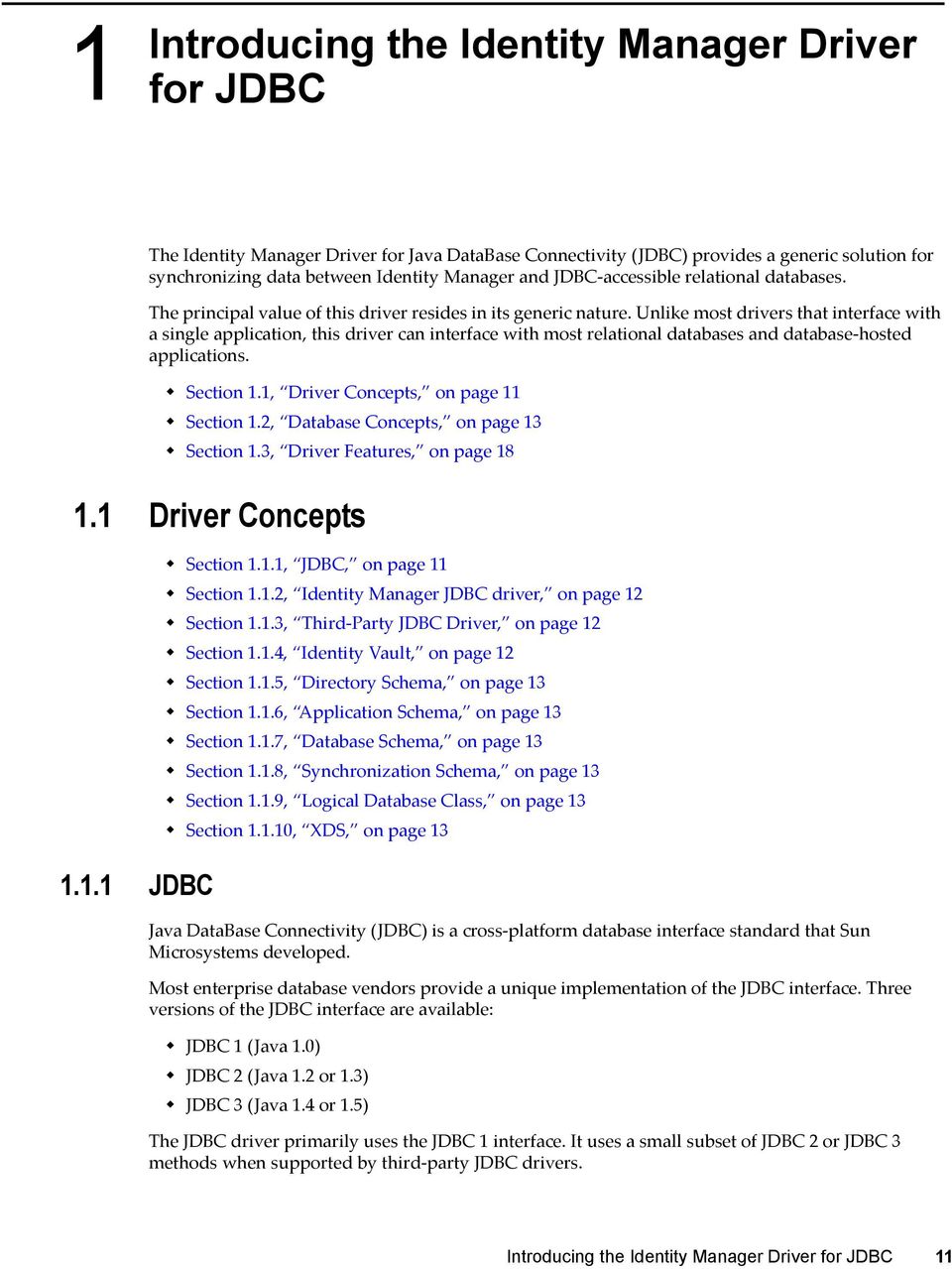
12 1.1.2 Identity Manager JDBC driver The Identity Manager JDBC driver uses the JDBC interface to synchronize data and identities between an Identity Vault and relational databases. The driver consists of four jar files: JDBCShim.jar JDBCUtil.jar JDBCConfig.jar CommonDriverShim.jar In addition to these files, you need a third-party JDBC driver to communicate with each individual database Third-Party JDBC Driver A third-party JDBC driver is one of the numerous JDBC interface implementations that the Identity Manager JDBC driver uses to communicate with a particular database. For example, classes12.zip is one of the Oracle JDBC drivers. Different third-party JDBC drivers implement different portions of the JDBC interface specification and implement the interface in a relatively consistent manner. The following illustration indicates the relationship between the Identity Manager JDBC driver and third-party JDBC drivers. Figure 1-1 Identity Manager JDBC Driver vs. Third-Party JDBC Drivers Identity Vault An Identity Vault is the data store that Identity Manager uses. 12 Identity Manager Driver for JDBC Implementation Guide

13 1.1.5 Directory Schema The directory schema is the set of object classes and attributes in the directory. For example, the edirectory User class and Given Name attribute are part of the edirectory schema Application Schema The application schema is the set of classes and attributes in an application. Because databases have no concept of classes or attributes, the JDBC driver maps edirectory classes to tables or views, and maps edirectory attributes to columns Database Schema Database schema is essentially synonymous with ownership. A database schema consists of database objects (for example, tables, views, triggers, stored procedures, and functions) that a database user owns. With the JDBC driver, schema is useful to scope the database (reduce the number of database objects visible to the driver at runtime). Ownership is often expressed by using a qualified dot notation (for example, indirect.usr, where indirect is the name of the database user that owns the table usr). All of the database objects owned by indirect constitute the indirect database schema Synchronization Schema The synchronization schema is the database schema visible to the driver at runtime Logical Database Class XDS The logical database class is the set of tables or view used to represent an edirectory class in a database. XDS format is the defined Novell subset of possible XML formats that Identity Manager can use. XDS is the initial format for data coming from the Identity Vault. By modifying default rules and changing the style sheets, you can configure the JDBC driver to work with any XML format. 1.2 Database Concepts Section 1.2.1, Structured Query Language, on page 14 Section 1.2.2, Data Manipulation Language, on page 14 Section 1.2.3, Data Definition Language, on page 14 Section 1.2.4, View, on page 14 Section 1.2.5, Identity Columns/Sequences, on page 15 Section 1.2.6, Transaction, on page 15 Introducing the Identity Manager Driver for JDBC 13

14 Section 1.2.7, Stored Procedures or Functions, on page 16 Section 1.2.8, Trigger, on page 16 Section 1.2.9, Instead-Of-Trigger, on page Structured Query Language Structured Query Language (SQL) is the language used to query and manipulate data in relational databases Data Manipulation Language Data Manipulation Language (DML) statements are highly standardized SQL statements that manipulate database data. DML statements are essentially the same, regardless of the database that you use. The JDBC driver is DML-based. It maps Identity Manager events expressed as XDS XML to standardized DML statements. The following example shows several DML statements: SELECT * FROM usr; INSERT INTO usr(lname) VALUES('Doe'); UPDATE usr SET fname = 'John' WHERE idu = 1; Data Definition Language Data Definition Language (DDL) statements manipulate database objects such as tables, indexes, and user accounts. DDL statements are proprietary and differ substantially between databases. Even though the JDBC driver is DML-based, you can embed DDL statements in XDS events. For additional information, refer to Chapter 11, Embedded SQL Statements in XDS Events, on page 117, The following examples show several DDL statements: CREATE TABLE usr ( idu INTEGER, fname VARCHAR2(64), lname VARCHAR2(64) ); CREATE USER idm IDENTIFIED BY novell; NOTE: Examples used throughout this guide are for the Oracle database View A view is a logical table. When queried by using a SELECT statement, the view is created by executing the SQL query supplied when the view was defined. Views are a useful abstraction mechanism for representing multiple tables of arbitrary structure as a single table or logical database class. 14 Identity Manager Driver for JDBC Implementation Guide

15 CREATE VIEW view_usr ( pk_idu, fname, lname ) AS SELECT idu, fname, lname from usr; Identity Columns/Sequences Identity columns and sequences are used to generate unique primary key values. Identity Manager can associate with these values, among other things. An identity column is a self-incrementing column used to uniquely identify a row in a table. Identity column values are automatically filled in when a row is inserted into a table. A sequence object is a counter that can be used to uniquely identify a row in a table. Unlike an identity column, a sequence object is not bound to a single table. However, if it is used by a single table, a sequence object can be used to achieve an equivalent result. The following is an example of a sequence object: CREATE SEQUENCE seq_idu START WITH 1 INCREMENT BY 1 NOMINVALUE NOMAXVALUE ORDER; Transaction A transaction is an atomic database operation that consists of one or more statements. When a transaction is complete, all statements in the transaction are committed. When a transaction is interrupted or one of the statements in the transaction has an error, the transaction is said to roll back. When a transaction is rolled back, the database is left in the same state it was before the transaction began. Transactions are either manual (user-defined) or automatic. Manual transactions can consist of one or more statements and must be explicitly committed. Automatic transactions consist of a single statement and are implicitly committed after each statement is executed. Manual (User-Defined) Transactions on page 15 Automatic Transactions on page 16 Manual (User-Defined) Transactions Manual transactions usually contain more than one statement. DDL statements typically cannot be grouped with DML statements in a manual transaction. The following example illustrates a manual transaction: SET AUTOCOMMIT OFF INSERT INTO usr(lname) VALUES('Doe'); UPDATE usr SET fname = 'John' WHERE idu = 1; COMMIT; -- explicit commit Introducing the Identity Manager Driver for JDBC 15

16 Automatic Transactions Automatic transactions consist of only one statement. They are often referred to as auto-committed statements because changes are implicitly committed after each statement. An auto-committed statement is autonomous of any other statement. The following example illustrates an automatic transaction: SET AUTOCOMMIT ON INSERT INTO emp(lname) VALUES('Doe'); -- implicit commit Stored Procedures or Functions A stored procedure or function is programmatic logic stored in a database. Stored procedures or functions can be invoked from almost any context. The Subscriber channel can use stored procedures or functions to retrieve primary key values from rows inserted into tables, to create associations. Stored procedures or functions can also be invoked from within embedded SQL statements or triggers. The distinction between stored procedures and functions varies by database. Typically, both can return output, but they differ in how they do it. Stored procedures usually return values through parameters. Functions usually return values through a scalar return value or result set. The following example illustrates a stored procedure definition that returns the next value of a sequence object: CREATE SEQUENCE seq_idu START WITH 1 INCREMENT BY 1 NOMINVALUE NOMAXVALUE ORDER; CREATE PROCEDURE sp_idu( io_idu IN OUT INTEGER) IS BEGIN IF (io_idu IS NULL) THEN SELECT seq_idu.nextval INTO io_idu FROM DUAL; END IF; END sp_idu; Trigger A database trigger is programmatic logic associated with a table, which executes under certain conditions. A trigger is said to fire when its execution criteria are met. Triggers are often useful for creating side effects in a database. In the context of the JDBC driver, triggers are useful to capture event publications. The following is an example of a database trigger on the usr table. CREATE TABLE usr ( idu INTEGER, fname VARCHAR2(64), lname VARCHAR2(64) ); 16 Identity Manager Driver for JDBC Implementation Guide

17 -- t = trigger; i = insert CREATE TRIGGER t_usr_i AFTER INSERT ON usr FOR EACH ROW BEGIN UPDATE usr SET fname = 'John'; END; When a statement is executed against a table with triggers, a trigger fires if the statement satisfies the conditions specified in the trigger. For example, using the above table, suppose the following insert statement is executed: INSERT INTO usr(lname) VALUES('Doe') Trigger t_emp_i fires after the insert statement is executed, and the following update statement is also executed: UPDATE usr SET fname = 'John' A trigger can typically be fired before or after the statement that triggered it. Statements that are executed as part of a database trigger are typically included in the same transaction as the triggering statement. In the above example, both the INSERT and UPDATE statements are committed or rolled back together Instead-Of-Trigger An instead-of-trigger is programmatic logic associated with a view, which executes under certain conditions. Instead-of-triggers are useful for making views writable or subscribeable. They are often used to define what it means to INSERT, UPDATE, and DELETE from a view. The following is an example of an instead-of-trigger on the usr table. CREATE TABLE usr ( idu INTEGER, fname VARCHAR2(64), lname VARCHAR2(64) ); CREATE VIEW view_usr ( pk_idu, fname, lname ) AS SELECT idu, fname, lname from usr; -- t = trigger; i = insert CREATE TRIGGER t_view_usr_i INSTEAD OF INSERT ON usr BEGIN INSERT INTO usr(idu, fname, lname) VALUES(:NEW.pk_idu, :NEW.fname, :NEW.lname); END; When a statement is executed against a view with instead-of-triggers, an instead-of-trigger executes if the statement satisfies the conditions specified in the trigger. Unlike triggers, instead-of-triggers always execute before the triggering statement. Also, unlike regular triggers, instead-of-triggers are executed instead of, not in addition to, the triggering statement. For example, using the above view, suppose the following insert statement is executed instead of the original insert statement: Introducing the Identity Manager Driver for JDBC 17

18 INSERT INTO view_usr(pk_idu, fname, lname) VALUES(1, John', Doe') Rather than executing the original statement, instead-of-trigger t_view_usr_i fires and executes the following statement: INSERT INTO usr(idu, fname, lname) VALUES(:NEW.pk_idu, :NEW.fname, :NEW.lname); In this example, the statements happen to be equivalent. 1.3 Driver Features Section 1.3.1, Local and Remote Platforms, on page 18 Section 1.3.2, Password Synchronization, on page 18 Section 1.3.3, Data Synchronization Models, on page 18 Section 1.3.4, Triggerless vs. Triggered Publication, on page Local and Remote Platforms The driver runs on all platforms supported for Identity Manager 4.0.2, including any local installation (Metadirectory server) or remote installation (Remote Loader). For information about supported platforms for Identity Manager 4.0.2, see System Requirements in the Identity Manager Integrated Installation Guide. For information on supported databases, see Database Interoperability on page 141. For information on supported third-party JDBC drivers, see Third-Party JDBC Driver Interoperability on page Password Synchronization The JDBC driver supports password set and check on the Subscriber channel. The driver does not support bidirectional password synchronization Data Synchronization Models The JDBC driver supports two data synchronization models: direct and indirect. Both terms are best understood with respect to the final destination of the data being synchronized. Model Association Description Direct Usually associated with views Views provide the abstraction mechanism that best facilitates integration with existing customer tables. Indirect Usually associated with tables Customer tables probably don t match the structure required by the driver. Therefore, it s usually necessary to create intermediate staging tables that do match the structure that the driver requires. Although the structures might match, it is highly unlikely. 18 Identity Manager Driver for JDBC Implementation Guide
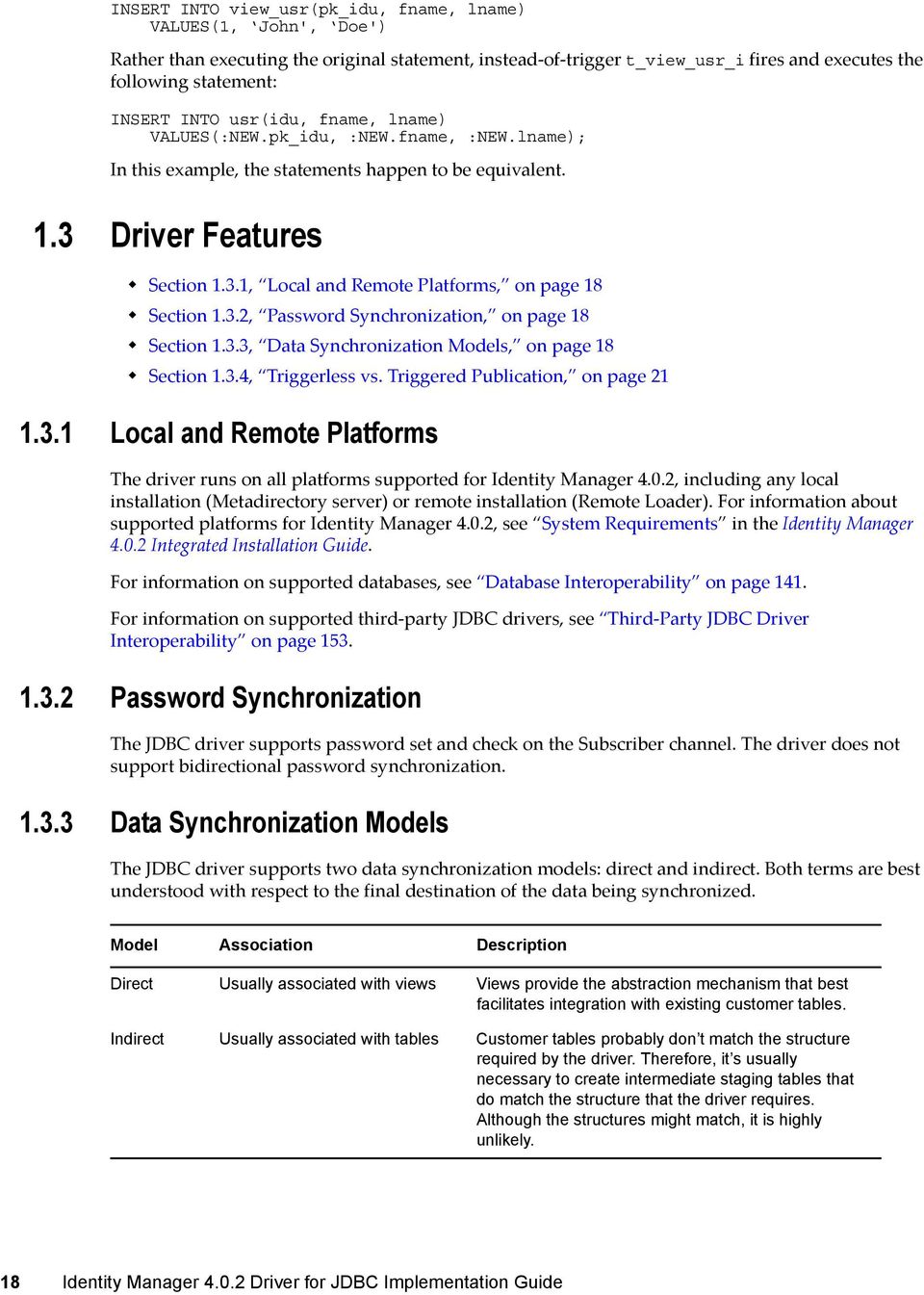
19 The following sections describe how direct and indirect synchronization work on both the Subscriber and Publisher channels. Indirect Synchronization on page 19 Direct Synchronization on page 20 Indirect Synchronization Indirect synchronization uses intermediate staging tables to synchronize data between the Identity Vault and a database. The following diagrams illustrate how indirect synchronization works on the Subscriber and Publisher channels. In the following scenarios, you can have one or more customer tables and intermediate staging tables. Subscriber Channel Figure 1-2 Indirect Synchronization on the Subscriber Channel The Subscriber channel updates the intermediate staging tables in the synchronization schema. The synchronization triggers then update customer tables elsewhere in the database. Publisher Channel Figure 1-3 Indirect Synchronization on the Publisher Channel When customer tables are updated, synchronization triggers update the intermediate staging tables. Publication triggers then insert one or more rows into the event log table. The Publisher channel then reads the inserted rows and updates the Identity Vault. Introducing the Identity Manager Driver for JDBC 19

20 Depending on the contents of the rows read from the event log table, the Publisher channel might need to retrieve additional information from the intermediate tables before updating the Identity Vault. After updating the Identity Vault, the Publisher channel then deletes or marks the rows as processed. Direct Synchronization Direct synchronization typically uses views to synchronize data between Identity Manager and a database. You can use tables if they conform to the structure that the JDBC driver requires. The following diagrams illustrate how direct synchronization works on the Subscriber and Publisher channels. In the following scenarios, you can have one or more customer views or tables. Subscriber Channel Figure 1-4 Direct Synchronization on the Subscriber Channel The Subscriber channel updates existing customer tables through a view in the synchronization schema. Direct synchronization without a view is possible only if customer tables match the structure that the JDBC driver requires. For additional information, see Section 8.3, Indirect Synchronization, on page 91. Publisher Channel Figure 1-5 Direct Synchronization on the Publisher Channel When a customer table is updated, publication triggers insert rows into the event log table. The Publisher channel then reads the inserted rows and updates the Identity Vault. 20 Identity Manager Driver for JDBC Implementation Guide
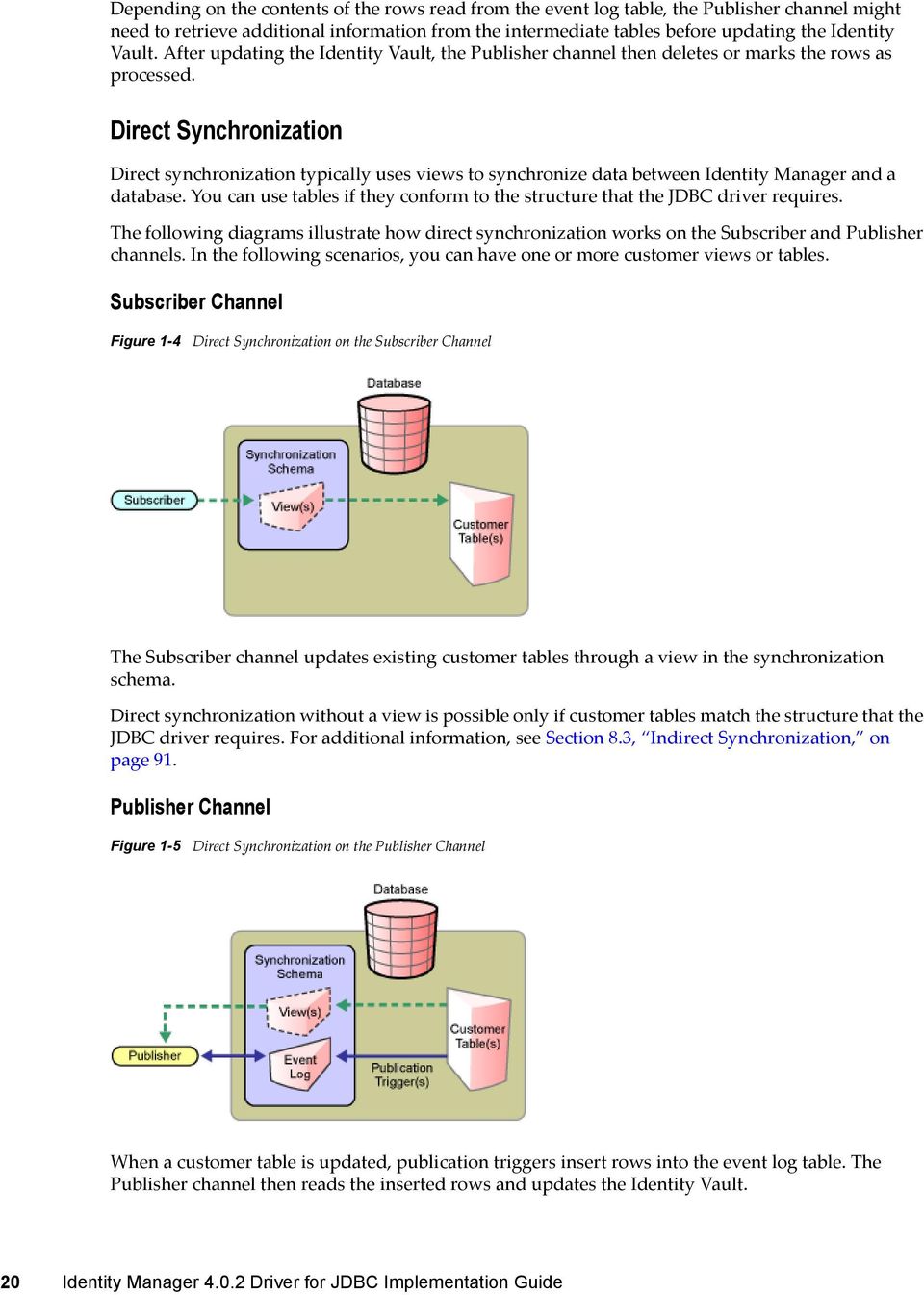
21 Depending on the contents of the rows read from the event log table, the Publisher channel might need to retrieve additional information from the view before updating the Identity Vault. After updating the Identity Vault, the Publisher channel then deletes or marks the rows as processed Triggerless vs. Triggered Publication Triggers are not required to log events for the Publisher channel. In situations where triggers cannot be used to capture granular events, the Publisher channel can derive database changes by inspecting database data. Triggerless publication is particularly useful when support contracts forbid the use of triggers on database application tables or for rapid prototyping. However, triggerless publication is less efficient than triggered publication. With triggered publication, what changed is already known. With triggerless publication, change calculation must occur before events can be processed. Triggerless publication, unlike triggered publication, does not preserve event order. It only guarantees that, by the end of a polling cycle, objects in the database and the Identity Vault are in sync. Triggerless publication, unlike triggered publication, does not provide historical data such as old values. It provides information on the current state of an object, not the previous state. Triggerless publication does have the advantage of being much simpler because it reduces databaseside dependencies. Writing database triggers can be complicated and requires extensive knowledge of database-specific SQL syntaxes. The following figure illustrates direct triggerless publication: Figure 1-6 Direct Triggerless Publication The following figure illustrates indirect triggerless publication: Introducing the Identity Manager Driver for JDBC 21
22 Figure 1-7 Indirect Triggerless Publication If you move the driver without moving the state files, the driver must build up new state files by resynchronizing. For information on this situation, see State Directory on page Identity Manager Driver for JDBC Implementation Guide
23 2 2Installing the Driver Files By default, the JDBC driver files are installed on the Metadirectory server at the same time as the Metadirectory engine. The installation program extends the Identity Vault s schema and installs the driver shim and a driver configuration file. It does not create the driver object in the Identity Vault (see Chapter 4, Creating a New Driver Object, on page 33) or upgrade an existing driver s configuration (see Chapter 6, Upgrading an Existing Driver, on page 87). The JDBC driver can either be located on the same server as the JDBC database or any other server. The following sections explain what to do if the JDBC driver files are not on the JDBC database server and how to install the third-party JDBC jar files that the driver uses to communicate with the database: Section 2.1, Installing the Driver Files, on page 23 Section 2.2, Installing JDBC Driver Jar Files, on page 23 For information about uninstalling the driver, see Chapter A, Uninstalling the Driver, on page Installing the Driver Files You can install the JDBC driver files in the following ways: On a local machine: Install the JDBC driver files on the Metadirectory server and connect to the database by using the Provider URL (Connection Properties). For information on installing the Metadirectory server, see Installing Identity Manager in the Identity Manager Integrated Installation Guide. On a remote machine: Install the JDBC driver files on the Remote Loader. For information on installing the Remote Loader, see Installing Identity Manager in the Identity Manager Integrated Installation Guide. 2.2 Installing JDBC Driver Jar Files To communicate with the JDBC database, the JDBC driver requires that you copy the appropriate JDBC driver jar files to the driver location. 1 Locate the appropriate JDBC driver jar files. Information about the jar files you need and where to download them from is found in Section 13.3, Supported Third-Party JDBC Drivers (Recommended), on page Place the files in the appropriate location. The following tables identify the paths where you need to place JDBC driver jar files on a Metadirectory server or on a Remote Loader server that is running the JDBC driver. Installing the Driver Files 23
24 Table 2-1 Locations for JAR Files: Metadirectory Server Platform Solaris, Linux, or AIX Windows Directory Path /opt/novell/edirectory/lib/dirxml/classes novell\nds\lib Table 2-2 Locations for JAR Files: Remote Loader Platform Solaris, Linux, or AIX Windows Directory Path /opt/novell/edirectory/lib/dirxml/classes novell\remoteloader\lib 24 Identity Manager Driver for JDBC Implementation Guide
25 3 3Installing and Configuring Database Objects You need to install and configure database objects (for example, tables, triggers, and indexes) for synchronization with the sample driver configuration. If you don t configure database objects, the sample configuration file won t work. Section 3.1, SQL Script Conventions, on page 25 Section 3.2, Installing IBM DB2 Universal Database (UDB), on page 27 Section 3.3, Installing Informix Dynamic Server (IDS), on page 27 Section 3.4, Installing Microsoft SQL Server, on page 28 Section 3.5, Installing MySQL, on page 28 Section 3.6, Installing Oracle, on page 29 Section 3.7, Installing PostgreSQL 8, on page 29 Section 3.8, Installing PostgreSQL 9, on page 30 Section 3.9, Installing Sybase Adaptive Server Enterprise (ASE), on page 30 Section 3.10, Testing the Database Object Installation, on page SQL Script Conventions The following table lists default locations for SQL scripts: Table 3-1 Default Locations for SQL Scripts Platform Windows UNIX/Linux Default Location c:\novell\identitymanager\nds\dirxmlutilities\jdbc\sql\ /opt/novell/edirectory/lib/dirxml/rules/jdbc/sql/ For example, when the scripts are installed on a SUSE Linux Enterprise Server with edirectory, the DB2 scripts are found in opt/novell/edirectory/lib/dirxml/rules/jdbc/db2_udb/install directory. All SQL scripts use the same conventions, regardless of the database. The maximum size of a DB2 identifier is 18 characters. This least common denominator length defines the upper bound of database identifier length across all SQL scripts. Because of this restricted length, abbreviations are used. The following table summarizes identifier abbreviations and their meanings: Installing and Configuring Database Objects 25
26 Table 3-2 Identifier Abbreviations and Meanings Abbreviation proc_ idx_ trg i _u _d chk_ pk_ fk_ mv_ sv_ Interpretation stored procedure/function index trigger on insert trigger on update trigger on delete trigger check constraint view primary key constraint view foreign key constraint view multi-valued column view single-valued column (implicit default) Instead of proc_, the more common abbreviation is sp_. This prefix is reserved for system-stored procedures on Microsoft SQL Server. Also, this prefix forces lookup of a procedure first in the master database before evaluating any qualifiers (for example, database or owner). To maximize procedure lookup efficiency, this prefix has been deliberately avoided. The following table indicates identifier naming conventions for indexes, triggers, stored procedures, functions, and constraints: Table 3-3 Identifier Naming Conventions Database Object Naming Convention Examples stored procedure/ function proc_procedure-or-function-name proc_idu index idx_unqualified-table-name_sequence-number idx_indirectlog_ 1 trigger tgr_unqualified-table-name_triggering-statementtype_sequence-number tgr_usr_i_1 primary key constraint pk_unqualified-table-name_column-name pk_usr_idu foreign key constraint fk_unqualified-table-name_column-name fk_usr_idu check constraint chk_unqualified-table-name_column-name chk_usr_idu Other conventions: All database identifiers are lowercase. This is the most commonly used case convention between databases. String field lengths are 64 characters. Fields of this length can hold most edirectory attribute values. You might want to refine field lengths to enhance storage efficiency. 26 Identity Manager Driver for JDBC Implementation Guide
27 For performance reasons, primary key columns use native, scalar numeric types whenever possible (such as BIGINT as opposed to NUMERIC). The record_id column in event log tables has the maximum numeric range permitted by each database to avoid overflow. Identity columns and sequence objects do not cache values. Some databases throw away cached values when a rollback occurs. This action can cause large gaps in identity column or sequence values. 3.2 Installing IBM DB2 Universal Database (UDB) IMPORTANT: For IBM DB2, you must manually create operating system user accounts before running the provided SQL scripts. Because the process to create user accounts differs between operating systems, Step 1 below is OSspecific. These instructions are for a Windows NT operating environment. If you rerun the SQL scripts, repeat only Step 2 through Step 4. The directory context for DB2 is found in the installdir\dirxmlutilities\jdbc\sql\db2_udb\install directory on Windows or install-dir/lib/ dirxml/rules/jdbc/sql/db2_udb/install directory on UNIX/Linux platforms. 1 Create user accounts for users idm, indirect and direct. Use novell as the password in User Manager for Domains. Remember to deselect User Must Change Password at Next Login for this account. You might want to also select Password Never Expires. NOTE: The remaining instructions are OS-independent. 2 Adjust the file path to idm_db2.jar in the 1_install.sql installation script. The file path to idm_db2.jar should reflect the location of this file on your client machine. 3 Execute the 1_install.sql script from the Command Line Processor (CLP.) For example: db2 -f 1_install.sql IMPORTANT: The scripts won t execute in the Command Center interface beyond version 7. The scripts use \ as the line continuation character. Later versions of the Command Center don t recognize this character. 4 For versions 9 or later, execute the 2_install_9.sql script. For example: db2 -f 2_install_9.sql 3.3 Installing Informix Dynamic Server (IDS) For Informix Dynamic Server, you must manually create an operating system user account before running the provided SQL scripts. Because the process of creating user accounts differs between operating systems, Step 1 below is OSspecific. These instructions are for a Windows operating environment. If you rerun the SQL scripts, you should repeat only Steps 2 through 4. Installing and Configuring Database Objects 27
28 The directory context for Informix SQL scripts is found in the installdir\dirxmlutilities\jdbc\sql\informix_ids\install on Windows or install-dir/lib/ dirxml/rules/jdbc/sql/informix_ids/install directory on UNIX/Linux platforms. 1 In Windows, create a user account for user idm. Use novell as the password in User Manager for Domains. Remember to deselect User Must Change Password at Next Login for this account. You might want to also select Password Never Expires. NOTE: The remaining instructions are OS-independent. 2 Start a client such as SQL Editor or DBAccess. 3 Log in to your server as the informix user or another user with DBA (database administrator) privileges. By default, the password for the informix user is informix. If you execute scripts as a user other than informix, change all references to informix in the scripts prior to execution. 4 Open and execute 1_install_9.sql from either the ansi (transactional, ANSI-compliant), log (transactional, non-ansi-compliant), or no_log (non-transactional, non-ansi-compliant) subdirectory, depending upon which type of database you want to create. 5 For version 11 or later, open and execute 2_install_10.sql from either the ansi (transactional, ANSI-compliant), log (transactional, non-ansi-compliant), or no_log (non-transactional, non- ANSI-compliant) subdirectory, depending upon which type of database you want to create. 3.4 Installing Microsoft SQL Server The directory context for Microsoft SQL Server scripts is found in the installdir\dirxmlutilities\jdbc\sql\mssql\install directory on Windows or install-dir/lib/ dirxml/rules/jdbc/sql/mssql/install directory on UNIX/Linux platforms. 1 Start a client. For example, Microsoft SQL Server Management Studio. 2 Log in to your database server as the sa user. By default, the sa user has no password. 3 Execute the installation script. For version 2005, execute 1_install_2005.sql. For version 2008, execute 1_install_2005.sql. For version 2008 R2, execute 1_install_2005.sql. 3.5 Installing MySQL The directory context for MySQL SQL scripts is found in the installdir\dirxmlutilities\jdbc\sql\mysql\install directory on Windows or install-dir/lib/ dirxml/rules/jdbc/sql/mysql/install directory on UNIX /Linux platforms. 1 From a MySQL client, such as mysql, log in as root user or another user with administrative privileges. For example, from the command line, execute mysql -u root -p By default, the root user has no password. 28 Identity Manager Driver for JDBC Implementation Guide
29 2 Execute the installation script 1_install_innodb.sql or 1_install_myisam.sql, depending upon which table type you wish to use. For version use the scripts in subdirectory 5. For example: mysql> \. c:\1_install_innodb.sql Don t use a semicolon to terminate this statement. 3.6 Installing Oracle The directory context for Oracle SQL scripts is found in the installdir\dirxmlutilities\jdbc\sql\oracle\install directory on Windows or install-dir/lib/ dirxml/rules/jdbc/sql/oracle/install directory on UNIX/ Linux platforms. 1 From an Oracle client, such as SQL Plus, log in as the SYSTEM user. By default, the password for SYSTEM is MANAGER. If you execute scripts as a user other than SYSTEM with password MANAGER, change all references to SYSTEM in the scripts prior to execution. 2 Execute the installation script 1_install.sql. For example: 3.7 Installing PostgreSQL 8 The directory context for PostgreSQL scripts is found in the installdir\dirxmlutilities\jdbc\sql\postgres\install directory on Windows or install-dir/lib/ dirxml/rules/jdbc/sql/postgres/install directory on UNIX/Linux platforms. The directory context for executing Postgres commands is postgres-install-dir/pgsql/bin. 1 Create the idm database. For example, from the UNIX command line, execute the following command:./createdb idm 2 From a Postgres client such as psql, log in as user postgres to the idm database. For example, from the UNIX command line, execute the following command:./psql -d idm postgres By default, the Postgres user has no password. 3 From inside psql, execute the script 1_install_8.sql. For example: idm=# \i 1_install_8.sql 4 Update the pg_hba.conf file. As of version 8, this can be done through pgadminiii. After you start, go to Tools > Connect to connect to the server, select the IDM database, then go to Tools > Server Configuration > pg_hba.conf. In the pgadminiii pg_hba.conf editor, the IP-ADDRESS and IP-MASK columns in the file are combined into a single field: IP-Address. Place both the IP-ADDRESS and IP- MASK values in that field, separated by a single whitespace character. For example, add entries for the idm database user. Adjust the IP-ADDRESS and IP-MASK as necessary: # TYPE DATABASE USER IP-ADDRESS IP-MASK METHOD# allow driver user idm to connect to database idm host idm idm <ip-address> <net-mask> password Installing and Configuring Database Objects 29
30 5 Restart the Postgres server to effect changes made to the pg_hba.conf file. 6 (Conditional) If you are using pgadminiii, in the pg_hba.conf editor select the disk icon (save file) in the toolbar. When prompted, press Yes. 3.8 Installing PostgreSQL 9 The directory context for PostgreSQL scripts is found in the installdir\dirxmlutilities\jdbc\sql\postgres\install directory on Windows or install-dir/lib/ dirxml/rules/jdbc/sql/postgres/install directory on UNIX/Linux platforms. The directory context for executing Postgres commands is postgres-install-dir/pgsql/bin. 1 Create the database idm. For example, from the UNIX command line, execute the following command:./createdb idm 2 Install the plpgsql procedural language to database idm. For example, from the UNIX command line, execute the following command:./createlang plpgsql idm 3 From a Postgres client such as psql, log on as user postgres to the idm database. For example, from the UNIX command line, execute the following command:./psql -d idm postgres By default, the Postgres user has no password. 4 From inside psql, execute the script 1_install_8.sql. For example: idm=# \i 1_install_8.sql 5 Update the pg_hba.conf file. For example, add entries for the idm database user. Adjust the IP-ADDRESS and IP-MASK as necessary: # TYPE DATABASE USER IP-ADDRESS IP-MASK METHOD# allow driver user idm to connect to database idm host idm idm <ip-address> <net-mask> password 6 Restart the Postgres server to effect changes made to the pg_hba.conf file. 3.9 Installing Sybase Adaptive Server Enterprise (ASE) The directory context for Sybase SQL scripts is found in the installdir\dirxmlutilities\jdbc\sql\sybase_ase\install directory on Windows or install-dir/ lib/dirxml/rules/jdbc/sql/sybase_ase/install directory on UNIX/Linux platforms. 1 From a Sybase client, such as isql, log in as the sa user and execute the 1_install.sql installation script. For example, from the command line, execute: isql -U sa -P -i 1_install.sql By default, the sa account has no password. 30 Identity Manager Driver for JDBC Implementation Guide
31 3.10 Testing the Database Object Installation Test scripts for each database are located in the following directories: Table 3-4 Location of Database Scripts Database IBM DB2 Universal Database Test SQL Scripts Location UNIX/Linux: install-dir/lib/dirxml/rules/jdbc/sql/ db2_udb/test Windows: installdir\dirxmlutilities\jdbc\sql\db2_udb\test Informix Dynamic Server UNIX/Linux: The test scripts are located in the following directories: install-dir/lib/dirxml/rules/jdbc/sql/ informix_ids/test/log install-dir/lib/dirxml/rules/jdbc/sql/ informix_ids/test/no_log Windows: The test scripts are located in the following directories: installdir\dirxmlutilities\jdbc\sql\informix_ids\lo g\test installdir\dirxmlutilities\jdbc\sql\informix_ids\no _log\test Informix: Informix ANSI test scripts are located in the log subdirectory. Microsoft SQL Server UNIX/Linux: The test scripts are located in the following directories: install-dir/lib/dirxml/rules/jdbc/sql/mssql/ 3or4/test install-dir/lib/dirxml/rules/jdbc/sql/mssql/ 5/test Windows: installdir\dirxmlutilities\jdbc\sql\mssql\test MySQL UNIX/Linux: The test scripts are located in the following directories: install-dir/lib/dirxml/rules/jdbc/sql/mysql/ 3or4/test install-dir/lib/dirxml/rules/jdbc/sql/mysql/ 5/test Windows: installdir\dirxmlutilities\jdbc\sql\mysql\test Installing and Configuring Database Objects 31
32 Database Oracle Test SQL Scripts Location UNIX/Linux: install-dir/lib/dirxml/rules/jdbc/sql/ oracle/test Windows: installdir\dirxmlutilities\jdbc\sql\oracle\test PostgreSQL UNIX/Linux: install-dir/lib/dirxml/rules/jdbc/sql/ postgres/test Windows: installdir\dirxmlutilities\jdbc\sql\postgres\test Sybase Adaptive Server Enterprise UNIX/Linux: install-dir/lib/dirxml/rules/jdbc/sql/ sybase_ase/test Windows: installdir\dirxmlutilities\jdbc\sql\sybase_ase\test You should try the test scripts before starting the sample driver. If you encounter issues while testing, see the following sections: Section 15.4, Recognizing Publication Events, on page 182. Section 15.5, Executing Test Scripts, on page Identity Manager Driver for JDBC Implementation Guide
33 4 4Creating a New Driver Object After the JDBC driver files are installed on the server where you want to run the driver object (see Chapter 2, Installing the Driver Files, on page 23), you can create a driver object in the Identity Vault. You do so by installing the driver packages and then modifying the driver configuration to suit your environment. The following sections provide instructions: Section 4.1, Creating the Driver Object in Designer, on page 33 Section 4.2, Activating the Driver, on page 39 Section 4.3, JDBC Driver Settings, on page Creating the Driver Object in Designer You create the JDBC driver by installing the driver packages and then modifying the configuration to suit your environment. After you create and configure the driver object, you need to deploy it to the Identity Vault and start it. Section 4.1.1, Importing the Current Driver Packages, on page 33 Section 4.1.2, Installing the Driver Packages, on page 34 Section 4.1.3, Configuring the Driver Object, on page 38 Section 4.1.4, Deploying the Driver Object, on page 38 Section 4.1.5, Starting the Driver Object, on page 39 NOTE: You should not create driver objects by using the Identity Manager 4.0 and later configuration files through imanager. This method of creating driver objects is no longer supported. To create drivers, you need to use the new package management features provided in Designer Importing the Current Driver Packages The driver packages contain the items required to create a driver object, such as policies, entitlements, filters, and Schema Mapping policies. These packages are only available in Designer. You can upgrade any package that is installed if there is a newer version of the package available. For more information on upgrading packages, see Upgrading Installed Packages in the Designer for Identity Manager Administration Guide. Before creating a driver object in Designer, you need to verify that you have all the required packages already imported in the Package Catalog of Designer. Designer prompts you for importing the required packages when it creates the driver object. You can create packages based on the schema for your environment, keeping in mind the data synchronization model (direct/indirect) and its dependent packages. Creating a New Driver Object 33
34 To verify you have the most recent version of the driver packages in the Package Catalog: 1 Open Designer. 2 In the toolbar, click Help > Check for Package Updates. 3 Click OK to update the packages or Click OK if the packages are up-to-date. 4 In the Outline view, right-click the Package Catalog. 5 Click Import Package. You can download the new packages from the Designer Auto-update site ( cdn.novell.com/cached/designer/packages/idm/updatesite1_0_0/). 6 Select any JDBC driver packages or Click Select All to import all of the packages displayed. By default, only the base packages are displayed. Deselect Show Base Packages Only to display all packages. 7 Click OK to import the selected packages, then click OK in the successfully imported packages message. 8 After the current packages are imported, continue with Section 4.1.2, Installing the Driver Packages, on page Installing the Driver Packages After you have imported the current driver packages into the Package Catalog, you can install the driver packages to create a new driver. 1 In Designer, open your project. 2 In the Modeler, right-click the driver set where you want to create the driver, then click New > Driver. 3 Select an appropriate JDBC Base Database Package, such as Oracle Base, then click Next. 4 Select the optional features to install for the JDBC driver, then click Next. All options are selected by default. The options are: Entitlements Support: These packages contain the policies that provision the user accounts on the connected database. For more information, see the Identity Manager Entitlements Guide. 34 Identity Manager Driver for JDBC Implementation Guide
35 Data Collection: These packages contain the policies that enable the driver to collect data for reports. If you are using the Identity Reporting Module, ensure that this option is selected. For more information, see the Identity Reporting Module Guide. Account Tracking: These packages contain the policies that enable account tracking information for reports. If you are using the Identity Reporting Module, ensure that this option is selected. For more information, see the Identity Reporting Module Guide. The Account Tracking feature was introduced with the Novell Compliance Management Platform. The Compliance Management Platform helps you mitigate risk, simplify business governance, and ensures compliance throughout the enterprise. The platform enables you to provision users based on how you do business, secure both Web and Client applications by granting access to users based upon provisioning policy, and monitor and validate user and system activity in real time with automated, policy-based corrective actions for non-compliant activities. For more information, see the Novell Compliance Management Platform product page ( Synchronization Mode: These packages contain the GCVs and sample policies. If you choose the direct/indirect synchronization mode, ensure that you don t change this setting on the driver creation and configuration pages. By default, the Show only Applicable packages versions option is selected. IMPORTANT: The JDBC packages provide examples of the core functions of the JDBC driver. These examples help you customize the driver for your environment. You can add new policies and settings to the driver to meet your business requirements. The final implementation can be packaged and deployed in Identity Manager. 5 (Conditional) If there are package dependencies for the packages you selected to install for this driver, you must install them to install the selected package. Click OK to install the package dependency listed. 6 (Conditional) If more than one type of package dependency must be installed, you are presented with separate configuration pages for each package. Continue to click OK to install any additional package dependencies. 7 (Conditional) The Common Settings page is displayed only if the Common Settings package is installed as a dependency. On the Install Common Settings page, specify the common settings for User and Group containers: Creating a New Driver Object 35
36 User Container: Select the Identity Vault container where the user accounts will be added in the Identity Vault. This value becomes the default for all drivers in the driver set. Group Container: Select the Identity Vault container where the groups will be added in the Identity Vault. This value becomes the default for all drivers in the driver set. 8 Click Next. When all dependencies are installed, the components must be configured. 9 On the Driver Information page, specify a name for the driver that is unique within the driver set, then click Next. 10 On the Application Authentication page, fill in the following information for the connected database: Version: Specify the version of the connected database. Synchronization Model: Specify the mode of data synchronization based on the selected package. Data Flow: Specify whether the authoritative source of data is the database, Identity Manager, or bidirectional. IMPORTANT: Ensure that you don t change the setting for Synchronization Model and Data Flow options that you selected earlier in the Package Configuration Wizard. JDBC Implementation: Specify the database connection details. Connection Information: Specify the database information for the driver to use to connect to the database, such as the IP address, port, and name of the database. Authentication ID: Specify the authentication ID for the connected database. Password: Specify the password for the driver to connect to the database. For more information, see Section 4.3, JDBC Driver Settings, on page Click Next. 12 Fill in the following fields for Remote Loader information: Connect To Remote Loader: Select Yes or No to determine if the driver will use the Remote Loader. For more information, see the Identity Manager Remote Loader Guide. If you select No, skip to Step 13. If you select Yes, use the following information to complete the configuration of the Remote Loader: Host Name: Specify the IP address or DNS name of the server where the Remote Loader is installed and running. Port (Connection): Specify the port number for this driver object. Each driver object connects to the Remote Loader on a separate port. The default value is Remote Loader Password: Specify a password to control access to the Remote Loader. It must be the same password that is specified as the Remote Loader password on the Remote Loader. Driver Password: Specify a password for the driver object to authenticate to the Metadirectory server. It must be the same password that is specified as the Driver Object password on the Remote Loader. 13 Click Next. 14 (Conditional) This page is displayed only if you selected to install the Data Collection and Account Tracking groups of packages. On the JDBC Managed System Information page, fill in the following fields to define your connected database application: Name: Specify a descriptive name for the connected database application. The name is displayed in reports. 36 Identity Manager Driver for JDBC Implementation Guide
37 Description: Specify a brief description for the connected database application. The description is displayed in reports. Location: Specify the physical location of the connected database application. The location is displayed in reports. Vendor: Specify the vendor of the connected database application. This information is displayed in reports. Version: Specify the version of the connected database application. The version is displayed in reports. 15 Click Next. 16 (Conditional) This page is displayed only if you selected to install the Managed System packages and the Account Tracking packages. On the Install JDBC Managed System Information page, fill in the following fields to define the classification of the connected database application: Classification: Select the classification of the connected database application. This information is displayed in the reports. Your options are: Mission-Critical Vital Not-Critical Other If you select Other, you must specify a custom classification for the JDBC system. Environment: Select the type of environment the connected database application provides. The options are: Development Test Staging Production Other If you select Other, you must specify a custom classification for the database application. 17 Click Next. 18 (Conditional) This page is displayed only if you selected to install the Data Collection and Account Tracking groups of packages. Fill in the following fields to define the ownership of the connected database application: Business Owner: Select a user object in the Identity Vault that is the business owner of the database application. This can only be a user object, not a role, group, or container. Application Owner: Select a user object in the Identity Vault that is the application owner of the database application. This can only be a user object, not a role, group, or container. 19 Click Next. 20 On the Entitlements Information page, specify a name for the Account Entitlement Value field, then click Next. 21 (Conditional) This page is displayed only if you selected to install the Account Tracking groups of packages. On the Account Tracking page, fill in the following fields: Connected Database: Specify the connected database application. Synchronization Model: Specify the mode of data synchronization. Creating a New Driver Object 37
38 NOTE: Ensure that you don t change the setting that you selected earlier in the Package Configuration Wizard. If you change it after installing the package in a driver object, make sure that you change the SyncModel in the Publication Mode GCV. Object Class: This field is populated based on your selection in the Synchronization Model. Specify the table or view in the connected database for which account tracking is enabled. By default, the value is usr. Realm: Specify the name of the realm that uniquely identifies the location of user accounts in the connected database. For example, mysql.indirect.usr, where MySQL is the database name with the indirect data synchronization model, and user is the table or view in the connected database for which account tracking is enabled. 22 Click Next. 23 Review the summary of tasks that will be completed to create the driver, then click Finish. 24 After you have installed the driver object, you must change the configuration for your environment. Proceed to Section 4.1.3, Configuring the Driver Object, on page Configuring the Driver Object After importing the packages and creating the driver object, you need to configure the driver to make it operational. There are many settings that can help you customize and optimize the driver. Although it is important for you to understand all of the settings, your first priority should be to configure the driver parameters located on the Driver Configuration page. For information about the driver parameters, see Chapter 5, Configuring the JDBC Driver, on page 41. After completing the configuration tasks, continue with the next section, Deploying the Driver Object. NOTE: If the connected system is MS SQL Server database and if you have chosen a direct Synchronization Model option, ensure that you change the Key-Gen-Method option to Subscriber Generated in the Subscriber channel Deploying the Driver Object After the driver object is created in Designer, it must be deployed into the Identity Vault. 1 In Designer, open your project. 2 In the Modeler, right-click the driver icon or the driver line, then select Live > Deploy. 3 If you are authenticated to the Identity Vault, skip to Step 5; otherwise, specify the following information: Host: Specify the IP address or DNS name of the server hosting the Identity Vault. Username: Specify the DN of the user object used to authenticate to the Identity Vault. Password: Specify the user s password. 4 Click OK. 5 Read the deployment summary, then click Deploy. 6 Read the successful message, then click OK. 7 Click Define Security Equivalence to assign rights to the driver object: The driver object requires rights to objects within the Identity Vault. The Admin user object is most often used to supply these rights. However, you might want to create a DriversUser (for example) and assign security equivalence to that user. For receiving events from the Identity Vault, ensure that driver object s Security Equals DN has the following rights in the Identity Vault: 38 Identity Manager Driver for JDBC Implementation Guide
39 Entry Rights: The rights to create entries in the Identity Vault. Attributes Rights: The rights to modify the attributes in the Identity Vault. 7a Click Add, then browse to and select the object with the correct rights. 7b Click OK twice. For more information about defining a Security Equivalent User in objects for drivers in the Identity Vault, see Establishing a Security Equivalent User in the Identity Manager Security Guide. 8 Click Exclude Administrative Roles to exclude users that should not be synchronized: You should exclude any administrative User objects (for example, Admin and DriversUser) from synchronization. 8a Click Add, then browse to and select the user object you want to exclude. 8b Click OK. 8c Repeat Step 8a and Step 8b for each object you want to exclude. 8d Click OK. 9 Click OK Starting the Driver Object When a driver is created, it is stopped by default. To make the driver work, you must start the driver. Identity Manager is an event-driven system, so after the driver is started, it won t do anything until an event occurs. You can use imanager or dxevent commands to start the driver. To start the driver: 1 If you are using the Remote Loader with the driver, make sure the Remote Loader driver instance is running. For instructions, see Starting the Remote Loader in the Identity Manager Remote Loader Guide. 2 In Designer, open your project. 3 In the Modeler, right-click the driver icon or the driver line, then select Live > Start Driver. 4 Continue with Section 4.2, Activating the Driver, on page Activating the Driver If you created the driver in a driver set that has not been activated, you must activate the driver within 90 days. Otherwise, the driver stops working. If driver activation has expired, the following error message is displayed in the ndstrace window: DirXML Log Event Driver: \META-RHEL6\system\DriverSet\eDirDriver-BulkOperations Channel: Subscriber Status: Error Message: Code(-9075) Shutting down because DirXML engine evaluation period has expired. Activation is required for further use. To use the driver, you must reactivate it. For information on activation, refer to Activating Novell Identity Manager Products in the Identity Manager Integrated Installation Guide. Creating a New Driver Object 39
40 4.3 JDBC Driver Settings You can change the driver options to align with your connected database.the following table summarizes the JDBC driver settings: Table 4-1 JDBC Driver Settings Setting Driver name Target database Driver is local/remote Synchronization model Third-party JDBC implementation Data flow Database host IP address Database port User container DN Group container DN Publication mode Description The name of the driver that you want to display in the driver set. The database that the driver connects to. Whether the driver runs locally or remotely on a Remote Loader. Whether the driver uses views to synchronize directly to existing tables of arbitrary structure or synchronize to intermediate staging tables of a particular structure. The class of the third-party JDBC file specific to the database being synchronized with Identity Manager. For more information, see Section , JDBC Driver Class Names, on page 156. Whether the authoritative source of data is the database, Identity Manager, or bidirectional (both the database and Identity Manager). The IP address of the database host. The port that the driver shim uses to communicate with the database. If you don t provide a port number, the Driver Configuration Wizard provides a default port number for the database that you selected at install time. The distinguished name (complete context) of the container where the database users are published. For example: data\company\users. The distinguished name (complete context) of the container where the database groups are published. For example: data\company\groups. Whether publication is triggered (default) or triggerless. 40 Identity Manager Driver for JDBC Implementation Guide
41 5 5Configuring the JDBC Driver Section 5.1, Smart Configuration, on page 41 Section 5.2, Configuration Parameters, on page 43 Section 5.3, Driver Parameters, on page 45 Section 5.4, Subscription Parameters, on page 67 Section 5.5, Publication Parameters, on page 75 Section 5.6, Trace Levels, on page 84 Section 5.7, Configuring Third-Party JDBC Drivers, on page 85 Section 5.8, Configuring jtds Support for the JDBC Driver, on page Smart Configuration The JDBC driver can recognize the supported set of third-party JDBC drivers and databases. Also, the driver can dynamically and automatically configure the majority of driver compatibility parameters so you don t need to understand and explicitly set such parameters. These features are implemented via the following four types of XML descriptor files, which describe a third-party JDBC driver or database to the JDBC driver. Third-party JDBC driver Third-party JDBC driver import Database Database import In addition to predefined descriptor files, you can create custom descriptor files for a database or third-party JDBC driver. Section 5.1.1, Specifying Custom Descriptor Files, on page 42 Section 5.1.2, Reserved Filenames for Descriptor Files, on page 42 Section 5.1.3, Import Descriptor Files, on page 42 Section 5.1.4, Descriptor File Locations, on page 42 Section 5.1.5, Precedence, on page 43 Section 5.1.6, Custom Descriptor Best Practices, on page 43 Section 5.1.7, Descriptor File DTDs, on page 43 Configuring the JDBC Driver 41
42 5.1.1 Specifying Custom Descriptor Files You can force the driver to use a custom descriptor file for a database or third-party JDBC driver. To specify a custom database descriptor file, see Database Descriptor Filename on page 58. To specify a custom third-party driver descriptor file, see JDBC Driver Descriptor Filename on page 58. This is useful when multiple descriptor files exist for the same database or third-party JDBC driver. For the custom descriptor file to take effect, set the driver parameter as the jdbc-driver-descriptor Reserved Filenames for Descriptor Files Descriptor filenames that ship with the driver begin with the underscore character ( _ ). Such filenames are reserved to ensure that descriptor files that ship with the driver do not conflict with custom descriptor files. Obviously, custom descriptor filenames must not begin with the underscore character Import Descriptor Files Import descriptor files allow multiple, nonimport descriptor files to share content. This functionality reduces the size of nonimport descriptor files, minimizes the need for repetition of content, and increases maintainability. Import files cannot be imported across major types. That is, JDBC driver descriptors cannot import database imports, and database descriptors cannot import JDBC driver imports. Furthermore, custom nonimport descriptors cannot import reserved descriptor imports. For example, if a custom third-party JDBC driver descriptor file named custom.xml tries to import a reserved third-party JDBC driver descriptor named _reserved.xml, an error is issued. These limitations accomplish the following: Ensure that no dependencies exist between reserved and custom import files Allow extension of existing reserved descriptor files in later versions of the driver Descriptor File Locations Descriptor files must be located in a.jar file whose name begins with the prefix jdbc (caseinsensitive) and resides in the runtime classpath. The following table identifies where to place descriptors within a descriptor.jar file: Table 5-1 Where to Place Descriptors Descriptor Type Third-party JDBC driver Third-party JDBC driver import Database Database import Directory Path com/novell/nds/dirxml/driver/jdbc/db/ descriptor/driver com/novell/nds/dirxml/driver/jdbc/db/ descriptor/driver/import com/novell/nds/dirxml/driver/jdbc/db/ descriptor/db com/novell/nds/dirxml/driver/jdbc/db/ descriptor/db/import 42 Identity Manager Driver for JDBC Implementation Guide
43 Reserved descriptor files are located in the JDBCConfig.jar file. To ensure that these reserved files are not overwritten when the JDBC driver is updated, place custom descriptors in a different.jar file Precedence Parameters explicitly specified through a management console, such as imanager, always have precedence over parameters specified through descriptor files. Descriptor file parameters only take effect when a parameter is not set through the management console. Parameters and other information specified in a nonimportable descriptor file always have precedence over information specified in descriptor import files. If a parameter or other information is duplicated within a descriptor file, the first instance of the parameter or information takes precedence over subsequent instances. Among import files, precedence is determined by import order. Import files declared earlier in the import list take precedence over those that follow Custom Descriptor Best Practices Do not begin custom descriptor files name with the underscore ( _ ) character. Place custom descriptor files in a jar file other than JDBCConfig.jar, and begin the filename with the prefix jdbc (case-insensitive). Do not use custom descriptors to import reserved import files (filenames that begin with the underscore character) Descriptor File DTDs The following sections contain DTDs for all descriptor file types. These DTDs can help you construct custom descriptor files. Table 5-2 Where to Find Descriptor DTDs Descriptor Type Appendix Third-party JDBC driver Appendix H, Third-Party JDBC Driver Descriptor DTD, on page 207 Third-party JDBC driver import Appendix I, Third-Party JDBC Driver Descriptor Import DTD, on page 209 Database Appendix J, Database Descriptor DTD, on page 211 Database import Appendix K, Database Descriptor Import DTD, on page Configuration Parameters Section 5.2.1, Viewing Driver Parameters, on page 44 Section 5.2.2, Deprecated Parameters, on page 44 Section 5.2.3, Authentication Parameters, on page 44 Configuring the JDBC Driver 43
44 5.2.1 Viewing Driver Parameters 1 In imanager, click Identity Manager > Identity Manager Overview. 2 Locate the driver set containing the driver, then click the driver s icon and edit properties. imanager displays the driver s configuration parameters Deprecated Parameters The following parameters have been deprecated since version 1.6: Table 5-3 Deprecated Parameters Tag Name connection-tester-class connection-test-stmt reconnect-interval Justification The driver now dynamically creates a connection tester class at runtime, based upon information in XML descriptor files. This parameter is still operable, to ensure backwards compatibility. Its continued use, however, is discouraged. The driver now dynamically creates a connection tester class at runtime, based upon information in XML descriptor files. This parameter is still operable, to ensure backwards compatibility. Its continued use, however, is discouraged. The reconnect interval is now fixed at 30 seconds on both channels Authentication Parameters After you import the driver, provide authentication information for the target database. Authentication ID on page 44 Authentication Context on page 45 Application Password on page 45 Authentication ID An Authentication ID is the name of the driver s database user/login account.the installation SQL script for each database provides information on the database privileges required for this account to authenticate to a supported database. The scripts are located in the installdir\dirxmlutilities\jdbc\sql\abbreviated-database-name\install directory. This value can be referenced in the Connection Properties parameter value via the token {$username}. See Connection Properties on page 56. The default value for the sample configuration is idm. 44 Identity Manager Driver for JDBC Implementation Guide
45 Authentication Context The authentication context is the JDBC URL of the target database. URL format and content are proprietary. They differ among third-party JDBC drivers. However, they have some similarities in content. Each URL, whatever the format, usually includes an IP address or DNS name, port number, and a database identifier. For the exact syntax and the content requirements of your driver, consult your third-party driver documentation. For a list of JDBC URL syntaxes for supported third-party drivers, see JDBC URL Syntaxes on page 155. IMPORTANT: Changing anything in this value other than URL properties forces a resynchronization of all objects when triggerless publication is used. Application Password An application password is the password for the driver s database user/login account. The default value for the sample driver configuration is novell. This value can be referenced in the Connection Properties parameter value via the token {$password}. See Connection Properties on page Driver Parameters The Driver Parameters section lets you configure the driver-specific parameters. When you change driver parameters, you tune driver behavior to align with your network environment. The following table summarizes all driver-level parameters and their properties: Table 5-4 Driver Parameters and Properties Display Name Tag Name Sample Value Default Value Required Third-Party JDBC Driver Class Name jdbc-class oracle.jdbc.driver.oracledri ver (none) yes Preserve white space in SQL statements? preservesqlwhitespace yes no yes Synchronization Filter sync-filter schema (include by schema membership) (none) no Time Syntax time-syntax 1 (integer) 1 (integer) no State directory state-dir. (current directory). (current directory) no Use Minimal Number of Connections? Connection Initialization Statements use-single-connection 0 (no) (dynamic 3 ) no connection-init USE idm (none) no Configuring the JDBC Driver 45
46 Display Name Tag Name Sample Value Connection Properties connection-properties USER={$username}; PASSWORD={$password} Default Value (dynamic 3 ) Required no JDBC Driver Descriptor Filename Database Descriptor Filename Enable Referential Attribute Support? Enable Meta-Identifier Support? jdbc-driver-descriptor ora_client_thin.xml (none) no database-descriptor ora_10g.xml (none) no enable-refs 1 (yes) 1 (yes) no enable-meta-identifiers 1 (yes) 1 (yes) no Use Manual Transactions? Transaction Isolation Level use-manualtransactions transaction-isolationlevel 1 (yes) (dynamic 2 ) no read committed (dynamic 3 ) no Reuse Statements? reuse-statements 1 (reuse) (dynamic 3 ) no Number of Returned Result Sets Enable Statement- Level Locking? handle-stmt-results one (dynamic 3 ) no enable-locking 1 (yes) 0 (no) no Force Username Case force-username-case upper (to uppercase) (none) no Left Outer Join Operator Retrieve Minimal Metadata Function Return Method left-outer-join-operator (+) (dynamic 3 ) no minimal-metadata 0 (no) (dynamic 3 ) no function-return-method result set (dynamic 3 ) no Supports Schemas in Metadata Retrieval? supports-schemas-inmetadata-retrieval 1 (yes) (dynamic 3 ) no Sort Column Names By column-positioncomparator com.novell.nds.dirxml.drive r.jdbc.util.config.comp.strin gbytecomparator (hexadecimal value) (dynamic 3 ) no Schema Name sync-schema indirect (none) yes 1 Include Filter Expression Exclude Filter Expression include-table-filter IDM_.* (none) no exclude-table-filter BIN\$.{22}==\$0 (none) no Table/View Names sync-tables usr (none) yes 1 Lock Statement Generator Class lock-generator-class com.novell.nds.dirxml.drive r.jdbc.db.lock.oralockgen erator (dynamic 3 ) no 46 Identity Manager Driver for JDBC Implementation Guide
47 1 One of these mutually exclusive parameters must be present if the Synchronization Filter parameter is not present. See Synchronization Filter on page This default is derived dynamically at runtime from descriptor files and database metadata. 3 This default is derived dynamically from descriptor files at runtime. Driver parameters fall into the following subcategories: Section 5.3.1, Uncategorized Parameters, on page 47 Section 5.3.2, Database Scoping Parameters, on page 51 Section 5.3.3, Connectivity Parameters, on page 55 Section 5.3.4, Compatibility Parameters, on page Uncategorized Parameters Third-Party JDBC Driver Class Name on page 47 Time Syntax on page 47 State Directory on page 49 Third-Party JDBC Driver Class Name This parameter is the fully-qualified Java class name of your third-party JDBC driver. The following table lists the properties of this parameter: Table 5-5 Third-Party JDBC Driver Class Name: Properties Property Tag Name Required? Case-Sensitive? Sample Value Default Value Value jdbc-class yes yes oracle.jdbc.driver.oracledriver (none) For a list of supported third-party JDBC driver classnames, see JDBC Driver Class Names on page 156. Time Syntax The Time Syntax parameter specifies the format of time-related data types that the driver returns. The format can be any of the following options: Return Database Time, Date, and Timestamp Values as 32-Bit Integers on page 48 Return Database Time, Date, and Timestamp Values as Canonical Strings on page 48 Return database Time, Date, and Timestamp Values in their Java String Representation as Returned by the Method tostring():java.lang.string on page 48 Configuring the JDBC Driver 47
48 Return Database Time, Date, and Timestamp Values as 32-Bit Integers This is the default. edirectory Time and Timestamp syntaxes are composed of unsigned, 32-bit integers that express the number of whole seconds that have elapsed since 12:00 a.m., January 1st, 1970 UTC. The maximum range of this data type is approximately 136 years. When interpreted as unsigned integers (as originally intended), these syntaxes are capable of expressing dates and times to the second in the range of 1970 to When interpreted as a signed integer, these syntaxes are capable of expressing dates and times to the second in the range of 1901 to This option has two problems: Identity Vault Time and Timestamp syntaxes cannot express as large a date range as database Date or Timestamp syntaxes. Identity Vault Time and Timestamp syntaxes are granular to the second. Database Timestamp syntaxes are often granular to the nanosecond. The second and third options overcome these two limitations. Map the database Time, Date, and Timestamp values to edirectory attributes of type Time or Timestamp. Return Database Time, Date, and Timestamp Values as Canonical Strings The following table shows abstract database data types and their corresponding canonical string representations: Table 5-6 Database Types and Canonical String Representations JDBC Data Type java.sql.time java.sql.date java.sql.timestamp Canonical String Format1 HHMMSS CCYYMMDD CCYYMMDDHHMMSSNNNNNNNNN C = century, Y = year, M = month D = day, H = hour, M= minute, S = second, N = nano These fixed-length formats collate in chronological order on any platform in any locale. Even though the precision of nanoseconds varies by database, the length of Timestamps does not. Map the database Time, Date, and Timestamp values to attributes of type Numeric String. Return database Time, Date, and Timestamp Values in their Java String Representation as Returned by the Method tostring():java.lang.string The following table shows abstract database data types and their corresponding Java String representations: 48 Identity Manager Driver for JDBC Implementation Guide
49 Table 5-7 Database Types and Java String Formats JDBC Data Type java.sql.time java.sql.date java.sql.timestamp Java String Format1 hh:mm:ss yyyy-mm-dd yyyy-mm-dd hh:mm:ss.fffffffff y= year, m= month, d= day, h= hour, m= minute, s= second, f= nano These fixed-length formats collate in chronological order on any platform in any locale. The precision of nanoseconds, and therefore the length of Timestamps, varies by database. Map the database Time, Date, and Timestamp values to attributes of type Case Ignore/Case Exact String. The following table lists the properties of the Time Syntax parameter: Table 5-8 Time Syntax: Properties Property Tag Name Required? Default Value Legal Values Schema-Dependent? Value time-syntax no 1 (integer) 1 (integer) 2 (canonical string) 3 (java string) True State Directory The State Directory parameter specifies where a driver instance should store state data. State data is currently used for triggerless publication. See Triggerless Publication Parameters on page 80. State data might be used to store additional state information in the future. Each driver instance has two state files. State filenames follow the formats jdbc_driver-instanceguid.db and jdbc_driver-instance-guid.lg. For example, jdbc_bd2a3dd5-d a b87e.db and jdbc_bd2a3dd5-d a b87e.lg are state filenames. State files are named to be unique. These names are not intuitive. The names begin with jdbc_ and end in.lg or.db. The rest of the filename is the driver's GUID value (that is why the filename is unique) which can be looked up by using a directory browser as the GUID attribute of the driver object. Defunct state files (those belonging to deleted drivers) in the state directory are deleted each time a driver instance with the same state directory is started. Configuring the JDBC Driver 49
50 Changes That Can Force Triggerless Publisher Resynchronization If you delete state files, the triggerless publisher will build new state files by resynchronizing. If you move the JDBC driver without moving the state files, the triggerless publisher builds new state files by resynchronizing. Changing to and from the Remote Loader is a move. Therefore, if you move the JDBC driver using triggerless publication and want to avoid a full resync, also move all jdbc_*.lg and jdbc_*.db files in the state directory. If more than two files exist in the specified state directory, you must look up the GUID to know which files belong to the driver instance being moved. To identify a driver instance s state files, you can use DSTrace. For convenience, the Identity Manager engine traces each driver's GUID in DSTrace on startup. If no value is provided for the state directory parameter, or the value is a period (.), the state directory is the current directory. The current directory depends upon the following: The platform that the driver is running on Whether the driver is running locally or remotely When a process is started, a default directory in the file system is assigned to it. The default directory is the current directory. If you don't supply a value, the default State Directory is the current directory (the one that the process is running in). Table 5-9 Default Directories Platform or Environment Linux and Solaris, for the Remote Loader Linux and Solaris, for Identity Manager (local; not on the Remote Loader) Windows, for the Remote Loader Windows, for Identity Manager (local; not on the Remote Loader) Default Directory /opt/novell/dirxml /var/opt/novell/edirectory/data/dib/ novell\remoteloader c:\novell\nds\dibfiles The current directory might be different for a custom installation. No data is lost when resynchronization occurs, although additional data might remain. For example, because deletes are not captured, users that were deleted in the database during the move will not be disabled/deleted (depending upon the policy). Moving the driver is not to be undertaken whimsically. As a rule of thumb, don't move the driver unless you must do so. Properties The following table lists the properties of the State Directory parameter: 50 Identity Manager Driver for JDBC Implementation Guide
51 Table 5-10 State Directory: Properties Property Tag Name Required? Case-Sensitive? Sample Value Default Value Value state-dir no platform-dependent c:\novell\nds\dibfiles. (current directory) Database Scoping Parameters Synchronization Filter on page 51 Schema Name on page 53 Include Filter Expression on page 54 Exclude Filter Expression on page 54 Table/View Names on page 54 Synchronization Filter The Synchronization Filter parameter determines which database objects, such as tables and views, are members of the synchronization schema (the set of tables/views visible to the driver at runtime). With the addition of this parameter, the driver can now run in two modes: schema-aware or schemaunaware. Schema-Unaware Mode When the Synchronization Filter parameter is present and set to empty (exclude all tables/views), the driver is schema-unaware. It does not retrieve table/view metadata on startup. Therefore, no metadata methods are required. See Appendix F, java.sql.databasemetadata Methods, on page 199. When it is schema-unaware, the synchronization schema can be empty. Both the Schema Name and Sync Tables/Views parameters are completely ignored. Neither is required. Both can be absent, present, valued or valueless. See Schema Name on page 53 and Table/View Names on page 54. In schema-unaware mode, the driver acts as a passthrough agent for embedded SQL. In this state, standard XDS events (for example, Add, Modify, and Delete) are ignored. See Chapter 11, Embedded SQL Statements in XDS Events, on page 117. Also, triggered or triggerless publication no longer work. Schema-Aware Mode When the Synchronization Filter parameter is not present or set to a value other than empty (exclude all tables/views), the driver is schema-aware. It retrieves table/view metadata on a limited number of tables/views to facilitate data synchronization. You can cache metadata on all tables/views owned by a single database user (include by schema membership), or cache metadata on an explicit list of table/ Configuring the JDBC Driver 51
52 view names (include by table/view name). When schema-aware, the driver retrieves database table/ view metadata on startup. For a list of required metadata methods, see Appendix F, java.sql.databasemetadata Methods, on page 199. When schema-aware, parameter Schema Name or Table/View Names must be present and have a value. Because these two parameters are mutually exclusive, only one parameter can have a value. See Schema Name on page 53 and Table/View Names on page 54. The following table lists the parameters that require the driver to be schema-aware. When the driver is schema-unaware, these parameters do not have any effect on driver behavior. Table 5-11 Schema-Dependent Parameters Parameter Lock Statement Generator Class Enable Referential Attribute Support? Enable Meta-Identifier Support? Left Outer Join Operator Retrieve Minimal Metadata Supports Schemas in Metadata Retrieval? Sort Column Names By Disable Statement-Level Locking Check Update Counts? Add Default Values on Insert? Generation/Retrieval Method (Table-Global) Retrieval Timing (Table-Global) Retrieval Timing Disable Publisher? Disable Statement-Level Locking? Publication Mode Enable Future Event Processing? Event Log Table Name Delete Processed Rows? Allow Loopback? Startup Option Polling Interval (In Seconds) Publication Time of Day Post Polling Statements Batch Size 52 Identity Manager Driver for JDBC Implementation Guide
53 The following table lists the properties of the Synchronization Filter parameter: Table 5-12 Synchronization Filter: Properties Property Tag Name Required? Case-Sensitive? Sample Value Legal Values Default Value: Value sync-filter no no list empty (exclude all tables/views), schema (include by schema membership), list (include by table/view name) (none) Schema Name The Schema Name parameter identifies the database schema being synchronized. A database schema is analogous to the name of the owner of the tables or views being synchronized. For example, to synchronize two tables, usr and grp, each belonging to database user idm, you enter idm as this parameter s value. For more information about the Schema Name use cases, see Section C.2, Schema Name Use Cases, on page 189. When using this parameter instead of Table/View Names, names of database objects are implicitly schema-qualified by the driver. As such, parameters referencing stored procedure, function, or table names do not need to be schema-qualified unless they reside in a schema other than the one specified here. In particular, Method and Timing (Table-Local) and Event Log Table Name are affected. See Table/View Names on page 54, Method and Timing (Table-Local) on page 72, and Event Log Table Name on page 79. The following table lists the properties of the Schema Name parameter: Table 5-13 Schema Name: Properties Property Tag Name Required? Value sync-schema yes Case-Sensitive? See Undelimited Identifier Case Sensitivity on page 145. Sample Value Default Value: indirect (none) When the Schema Name parameter is used without the Synchronization Filter parameter, the Table/ View Names parameter must be left empty or omitted from a configuration. See Synchronization Filter on page 51 and Table/View Names on page 54. Changing the value of the Schema Name parameter forces a resync of all objects when triggerless publication is used. Configuring the JDBC Driver 53
54 Include Filter Expression The Include Filter Expression parameter is only operative when the Schema Name parameter is used. See Schema Name on page 53. The following table lists the properties of the Include Filter Expression parameter: Table 5-14 Include Filter Expression: Properties Property Tag Name Required? Case-Sensitive? Sample Value Default Value Legal Values Value include-table-filter no yes idm_.* (all table/view names starting with idm_ ) (none) (any legal Java regular expression) Exclude Filter Expression This parameter is only operative when the Schema Name parameter is used. See Schema Name on page 53. The following table lists the properties of the Exclude Filter Expression parameter: Table 5-15 Exclude Filter Expression: Properties Property Tag Name Required? Case-Sensitive? Sample Value Default Value Legal Values Value exclude-table-filter no yes bin.* (all table/view names starting with bin ) (none) (any legal Java regular expression) Table/View Names The Table/View Names parameter allows you to create a logical database schema by listing the names of the logical database classes to synchronize. Logical database class names are the names of parent tables and views. It is incorrect to list child table names. This parameter is particularly useful for synchronizing with databases that do not support the concept of schema, such as MySQL, or when a database schema contains a large number of tables or views of which only a few are of interest. Reducing the number of table/view definitions cached by the driver can shorten startup time as well as reduce runtime memory utilization. 54 Identity Manager Driver for JDBC Implementation Guide
55 When using this parameter instead of Schema Name, you probably need to schema-qualify other parameters that reference stored procedure, function, or table names. In particular, the Method and Timing (Table-Local) and Event Log Table Name parameters are affected. See Schema Name on page 53, Method and Timing (Table-Local) on page 72 and Event Log Table Name on page 79. The following table lists the properties of the Table/View Names parameter: Table 5-16 Table/View Names: Properties Property Tag Name Required? Value sync-tables yes Case-Sensitive? See Undelimited Identifier Case Sensitivity on page 145. Delimiters Sample Value Default Value semicolon, white space, comma indirect.usr; indirect.grp (none) When this parameter is used without the Synchronization Filter parameter, the Schema Name parameter must be left empty or omitted from a configuration. See Synchronization Filter on page 51 and Schema Name on page 53. Changing anything in the Table/View Name parameter other than URL properties forces a resynchronization of all objects when triggerless publication is used Connectivity Parameters Use Minimal Number of Connections? on page 55 Connection Initialization Statements on page 56 Connection Properties on page 56 Use Minimal Number of Connections? The Use Minimal Number of Connections? parameter specifies whether the driver should use two instead of three database connections. By default, the driver uses three connections: one for subscription, and two for publication. The Publisher channel uses one of its two connections to query for events and the other to facilitate queryback operations. When this parameter is set to Boolean True, the number of required database connections is reduced to two. One connection is shared between the Subscriber and Publisher channels. It is used to process subscription and publication query-back events. The other is used to query for publication events. In previous versions, the driver was able to support bidirectional synchronization by using a single connection. The publication algorithm was redesigned to increase performance, enable support for future event processing, and to overcome limitations of the previous algorithm at the expense of requiring an additional connection. Configuring the JDBC Driver 55
56 Table 5-17 Use Minimal Number of Connections?: Properties Property Tag Name Required? Default Value Legal Values Schema-Dependent Value use-single-connection no (dynamic) 1, yes, true (yes) 0, no, false (no) False The Default Value property is derived dynamically from descriptor files at runtime. Otherwise, the default value is Boolean False. Setting this parameter to Boolean True reduces performance. Connection Initialization Statements The Connection Initialization Statements parameter specifies what SQL statements, if any, should be executed immediately after connecting to the target database. Connection initialization statements are useful for changing database contexts and setting session properties. These statements are executed each time the driver, irrespective of channel, connects or reconnects to the target database. The following table lists the properties of this parameter: Table 5-18 Connection Initialization Statements: Properties Property Tag Name Required? Value connection-init no Case-Sensitive? See Undelimited Identifier Case Sensitivity on page 145. Delimiters Sample Value Default Value Schema-Dependent semicolon USE idm; SET CHAINED OFF (none) False Connection Properties The Connection Properties parameter specifies authentication properties. This parameter is useful for specifying properties that cannot be set via the JDBC URL specified in the Authentication Context parameter. See Authentication Context on page 45. The primary purpose of this parameter is to enable encrypted transport for third-party JDBC drivers. For a list of relevant connection properties, see Sybase Adaptive Server Enterprise JConnect JDBC Driver on page 166 and Oracle Thin Client JDBC Driver on page 162. Connection properties are specified as key-value pairs. The key is specified as the value to the left of the = character. The value is the value to the right of the = character. You can specify multiple keyvalue pairs, but each pair must be delimited by the ; character. 56 Identity Manager Driver for JDBC Implementation Guide
57 When you use the Connection Properties parameter, authentication information can be passed via the JDBC URL specified in the Authentication Context parameter or here. See Authentication Context on page 45. If specified as connection properties, value tokens can be used as placeholders for the database username specified in the Authentication ID parameter and the password specified in the Application Password parameter. See Authentication ID on page 44 and Application Password on page 45. For username, the token is {$username}. For password, the token is {$password}. The following table lists the properties of this parameter: Table 5-19 Connection Properties: Properties Property Tag Name Required? Case-Sensitive? Delimiters Sample Value Default Value Schema-Dependent Value connection-properties no third-party JDBC driver-dependent semicolon user={$username}; password={$password}; oracle.jdbc.defaultnchar=true (none) False Compatibility Parameters JDBC Driver Descriptor Filename on page 58 Database Descriptor Filename on page 58 Use Manual Transactions? on page 59 Transaction Isolation Level on page 59 Reuse Statements? on page 60 Number of Returned Result Sets on page 61 Enable Statement-Level Locking? on page 61 Lock Statement Generator Class on page 62 Enable Referential Attribute Support? on page 62 Enable Meta-Identifier Support? on page 63 Force Username Case on page 63 Left Outer Join Operator on page 64 Retrieve Minimal Metadata on page 64 Function Return Method on page 65 Supports Schemas in Metadata Retrieval? on page 65 Sort Column Names By on page 66 Preserve white space in SQL statements? on page 67 Configuring the JDBC Driver 57
58 JDBC Driver Descriptor Filename The JDBC Driver Descriptor Filename parameter specifies the third-party JDBC descriptor file to use. Descriptor file names must not be prefixed with the underscore character (for example, _mysql_jdriver.xml) because such filenames are reserved. Place descriptor files in a jar file beginning with the case-insensitive prefix 'jdbc' (for example jdbccustomconfig.jar) in the jar file's com/novell/nds/dirxml/driver/jdbc/db/descriptor/db directory. The following table lists the properties of this parameter: Table 5-20 JDBC Driver Descriptor Filename: Properties Property Tag Name Required? Case-Sensitive? Sample Value Default Value Schema-Dependent Value jdbc-driver-descriptor no platform-dependent my_custom_jdbc_driver_descriptor.xml (none) False Database Descriptor Filename The Database Descriptor Filename parameter specifies the database descriptor file to use. Do not use the underscore character in prefixes to Descriptor filenames (for example, _mysql.xml). Such names are reserved. Place Descriptor files in a jar file beginning with the case-insensitive prefix jdbc (for example, JDBCCustomConfig.jar). Also, place Descriptor files in the jar file s com/novell/nds/ dirxml/driver/jdbc/db/descriptor/db directory. The following table lists the properties of this parameter: Table 5-21 Database Descriptor Filename: Properties Property Tag Name Required? Case-Sensitive? Sample Value Default Value Schema-Dependent Value jdbc-driver-descriptor no platform-dependent my_custom_database_descriptor.xml (none) False 58 Identity Manager Driver for JDBC Implementation Guide
59 Use Manual Transactions? The Use Manual Transactions? parameter specifies whether to use manual or user-defined transactions. This parameter is primarily used to enable interoperability with MySQL MyISAM table types, which do not support transactions. When set to Boolean True, the driver uses manual transactions. When set to Boolean False, each statement executed by the driver is executed autonomously (automatically). The following table lists the properties of this parameter: Table 5-22 Use Manual Transactions?: Properties Property Tag Name Required? Case-Sensitive? Default Value Legal Values Schema-Dependent Value use-manual-transactions no no (dynamic) 1, yes, true (yes) 0, no, false (no) False The Default Value property is derived dynamically from descriptor files and database metadata at runtime. To ensure data integrity, set this parameter to Boolean True whenever possible. Transaction Isolation Level The Transaction Isolation Level parameter sets the transaction isolation level for connections that the driver uses. Six values exist: unsupported none read uncommitted read committed repeatable read serializable Five of the values correspond to the public constants defined in the java.sql Interface Connection ( Because some third-party drivers do not support setting a connection s transaction isolation level to none, the driver also supports the additional non-standardized value of unsupported. PostgreSQL online documentation ( has one of the better, concise primers on what each isolation level actually means. Configuring the JDBC Driver 59
60 IMPORTANT: The list of supported isolation levels varies by database. For a list of supported transaction isolation levels for supported databases, see Supported Transaction Isolation Levels on page 145. We recommend using a transaction isolation level of read committed because it is the minimum isolation level that prevents the driver from seeing uncommitted changes (dirty reads). The following table lists the properties of this parameter: Table 5-23 Transaction Isolation Level: Properties Property Tag Name Required? Case-Sensitive? Default Value Legal Values Schema-Dependent Value transaction-isolation-level no no (dynamic) unsupported, none, read uncommitted, read committed, repeatable read, serializable False The Default Value property is derived dynamically from descriptor files at runtime. Otherwise, the default value is read committed. Reuse Statements? The Reuse Statements? parameter specifies whether one or more java.sql.statement items are active at a time on a given connection. See java.sql.statement ( sql/statement.html). This parameter is primarily used to enable interoperability with Microsoft SQL Server 2000 Driver for JDBC. When set to Boolean True, the driver allocates a Java SQL Statement once and then reuses it. When set to Boolean False, the driver allocates/deallocates statement objects each time they are used, ensuring that no more than one statement is active at a time on a given connection. The following table lists the properties of this parameter: 60 Identity Manager Driver for JDBC Implementation Guide
61 Table 5-24 Reuse Statements?: Properties Property Tag Name Required? Case-Sensitive? Default Value Legal Values Schema-Dependent Value reuse-statements no no (dynamic) 1, yes, true (yes) 0, no, false (no) False The Default Vault is derived dynamically from descriptor files at runtime. Otherwise, the default value is Boolean True. Setting this parameter to Boolean False degrades performance. Number of Returned Result Sets The Number of Returned Result Sets parameter specifies how many java.sql.result objects can be returned from an arbitrary SQL statement. See java.sql.resultset ( api/java/sql/resultset.html). This parameter is primarily used to avoid infinite loop conditions in Oracle Thin Client JDBC Driver on page 162 when evaluating the results of arbitrary SQL statements. The following table lists the properties of this parameter: Table 5-25 Number of Returned Result Sets: Properties Property Tag Name Required? Sample Value Default Value Legal Values Schema-Dependent Value handle-stmt-results no one (dynamic) none, no (none) single, one (one) multiple, many, yes (multiple) False The Default Value property is derived dynamically from descriptor files at runtime. Otherwise, the default value is multiple, many, or yes. Enable Statement-Level Locking? The Enable Statement-Level Locking? parameter specifies whether the driver explicitly locks database resources before executing SQL statements. The following table lists the properties of this parameter: Configuring the JDBC Driver 61
62 Table 5-26 Enable Statement-Level Locking?: Properties Property Tag Name Required? Default Value Legal Values Schema-Dependent Value enable-locking no 0 (no) 1, yes, true (yes) 0, no, false (no) True Lock Statement Generator Class The Lock Statement Generator Class parameter specifies which DBLockStatementGenerator implementation to use to generate the SQL statements necessary to explicitly lock database resources for a pending SQL statement. Information on the DBLockStatementGenerator interface is in the Java documents that ship with the driver. The following table lists the properties of this parameter: Table 5-27 Lock Statement Generator Class: Properties Property Tag Name Required? Sample Value Default Value Legal Values Schema-Dependent Value lock-generator-class no com.novell.nds.dirxml.driver.jdbc.db.lock.oralockgenerator (dynamic) 1, yes, true (yes) 0, no, false (no) True Th Default Value property is derived dynamically from descriptor files at runtime. Otherwise, the default value is com.novell.nds.dirxml.driver.jdbc.db.lock.dblockgenerator. Enable Referential Attribute Support? The Enable Referential Attribute Support? parameter toggles whether the driver recognizes foreign key constraints between logical database classes. These are used to denote containment. Foreign key constraints between parent and child tables within a logical database class are unaffected. When set to Boolean True, foreign key columns are interpreted as referential. When set to Boolean False, foreign key columns are interpreted as non-referential. The primary purpose of this parameter is to ensure backward compatibility with the 1.0 version of the driver. For 1.0 compatibility, set this parameter to Boolean False. The following table lists the properties of this parameter: 62 Identity Manager Driver for JDBC Implementation Guide
63 Table 5-28 Enable Referential Attribute Support?: Properties Property Tag Name Required? Default Value Legal Values Schema-Dependent Value enable-refs no 1 (yes) 1, yes, true (yes) 0, no, false (no) True Enable Meta-Identifier Support? The Enable Meta-Identifier Support? parameter toggles whether the driver interprets view column name prefixes such as pk_ and fk_ strictly as metadata. When interpreted as metadata, such prefixes are not considered part of the view column name. For example, when meta-identifier support is enabled, column pk_idu has an effective column name of idu, prohibiting the existence of another column with the same effective name in the same view. When meta-identifier support is disabled, column pk_idu has the effective column name of pk_idu, allowing the existence of another column named idu. Furthermore, when meta-identifier support is enabled, a view with a primary key named pk_idu would conflict with a table having a primary key column named idu. When meta-identifier support is disabled, they would not conflict. When set to Boolean True, view column prefixes are interpreted as metadata. When set to Boolean False, view column name prefixes are interpreted as part of the column name proper. The primary purpose of this parameter is to ensure backward compatibility with the 1.5 version of the driver. For 1.5 compatibility, set this parameter to Boolean False. The following table lists the properties of this parameter: Table 5-29 Enable Meta-Identifier Support?: Properties Property Tag Name Required? Default Value Legal Values Schema-Dependent Value enable-meta-identifiers no 1 (yes) 1, yes, true (yes) 0, no, false (no) True Force Username Case The Force Username Case parameter changes the case of the driver s username used to authenticate to the target database. The primary purpose of this parameter is to enable interoperability with the Informix JDBC Driver when used against ANSI-compliant databases. See Informix JDBC Driver on page 158. The following table lists the properties of this parameter: Configuring the JDBC Driver 63
64 Table 5-30 Force Username Case: Properties Property Tag Name Required? Default Value Legal Values Schema-Dependent Value force-username-case no (don t force) lower (to lowercase), mixed (to mixed case), upper (to uppercase), don t force (default) False Left Outer Join Operator The Left Outer Join Operator parameter specifies the left outer join operator used in the triggerless publication query. It might be used for other purposes in the future. The following table lists the properties of this parameter: Table 5-31 Left Outer Join Operator: Properties Property Tag Name Required? Default Value Legal Values Schema-Dependent Value left-outer-join-operator no (dynamic) *= (+) LEFT OUTER JOIN True The Default Value property is derived dynamically from descriptor files at runtime. Otherwise, the default value is LEFT OUTER JOIN. Retrieve Minimal Metadata When set to Boolean True, the driver calls only required metadata methods. When set to Boolean False, the driver calls required and optional metadata methods. For a list of required and optional metadata methods, refer to Appendix F, java.sql.databasemetadata Methods, on page 199. Optional metadata methods are required for multivalue and referential attribute synchronization. 64 Identity Manager Driver for JDBC Implementation Guide
65 Table 5-32 Retrieve Minimal Metadata: Properties Property Tag Name Required? Default Value Legal Values Schema-Dependent Value minimal-metadata no (dynamic) 1, yes, true (yes) 0, no, false (no) True The Default Value property is derived dynamically from descriptor files at runtime. Otherwise, the default value is Boolean False. Setting this value to Boolean True improves startup time and third-party JDBC driver compatibility at the expense of functionality. Function Return Method The Function Return Method parameter specifies how data is retrieved from database functions. The primary purpose of this parameter is to enable interoperability with the Informix JDBC driver. See Informix JDBC Driver on page 158. When set to result set, function results are retrieved through a result set. When set to return value, the function result is retrieved as a single, scalar return value. Table 5-33 Function Return Method: Properties Property Tag Name Required? Default Value Legal Values Schema-Dependent Value function-return-method no (dynamic) result set, return value (scalar return value) False The Default Value property is derived dynamically from descriptor files at runtime. Supports Schemas in Metadata Retrieval? The Supports Schemas in Metadata Retrieval? parameter specifies whether schema names should be used when retrieving database metadata. The primary purpose of this parameter is to enable interoperability with the Informix JDBC Driver when used against ANSI-compliant databases. See Informix JDBC Driver on page 158. When set to Boolean True, schema names are used. When set to Boolean False, they are not. Configuring the JDBC Driver 65
66 Table 5-34 Supports Schemas in Metadata Retrieval?: Properties Property Tag Name Required? Default Value Legal Values Schema-Dependent Value supports-schemas-in-metadata-retrieval no (dynamic) 1, yes, true (yes) 0, no, false (no) False The Default Value property is derived dynamically from descriptor files at runtime. Otherwise, the default value is Boolean True. Sort Column Names By The Sort Column Names By parameter specifies how column position is to be determined for legacy databases that do not support sorting by column names. The primary purpose of this parameter is to enable interoperability with legacy databases, such as DB2/AS400. Sorting columns names by hexadecimal value ensures that if a driver instance is relocated to a different server, it continues to function without modification. Sorting column names by platform or locale string collation order is more intuitive, but might require configuration changes if a driver instance is relocated to a different server. In particular, log table column order and compound column name order might change. In the case of the latter, Schema-Mapping policies and object association values might need to be updated. In the case of the former, log table columns might have to be renamed. It is also possible to specify any fully-qualified Java class name as long as the following occur: The Java class name implements the java.util.comparator ( api/java/util/comparator.html) interface. The Java class name accepts java.lang.string ( String.html) arguments. The class is in the runtime classpath. Table 5-35 Sort Column Names By: Properties Property Tag Name Required? Default Value Legal Values Schema-Dependent Value column-position-comparator no (dynamic) com.novell.nds.dirxml.driver.jdbc.util.config.comp.stringbytecompara tor (hexadecimal value), com.novell.nds.dirxml.driver.jdbc.util.config.comp.stringcomparator (string collation order), (any java.util.comparator that accepts java.lang.string arguments) True 66 Identity Manager Driver for JDBC Implementation Guide
67 The Default Value property is derived dynamically from descriptor files at runtime. Otherwise, the default value is com.novell.nds.dirxml.driver.jdbc.util.config.comp.stringbytecomparator. IMPORTANT: After you set this parameter for a given configuration, don t change the parameter. Preserve white space in SQL statements? The Preserve white space in SQL statements? parameter specifies whether trailing spaces in the field names of the SQL statements should be removed or not. The primary purpose of this parameter is to remove the unintentional trailing spaces from the field names. If the option is set to no, the trailing spaces are removed from the fields. Set the option to yes, if you do not want to remove the trailing whitespaces. Table 5-36 Preserve white space in SQL statements?: Properties Property Tag Name Required? Default Value Legal Values Schema-Dependent Value preserve-sql-whitespace yes no yes, no False NOTE: When the Preserve white space in SQL statements? parameter is set to no, ensure that you do not add trailing spaces, because extra spaces are removed while formatting. 5.4 Subscription Parameters The following table summarizes Subscriber-level parameters and their properties: Table 5-37 Subscriber-Level Parameters and Properties Display Name Tag Name Sample Value Default Value Require d Disable Subscriber? disable 1 (yes) 0 (no) no Generation/Retrieval Method (Table-Global) Retrieval Timing (Table- Global) key-gen-method auto none (subscription event) key-gen-timing after (after row insertion) before (before row insertion) no Method and Timing (Table-Local) key-gen usr("?=indirect.proc_idu()", before) (none) no Configuring the JDBC Driver 67
68 Display Name Tag Name Sample Value Default Value Require d Disable Statement-Level Locking? disable-locking 1 (yes) 0 (no) no Check Update Counts? Add Default Values on Insert? check-updatecount add-defaultvalues-on-viewinsert 0 (no) 1 (yes) no 0 (no) (dynamic) no This default for the Add Default Values on Insert property is derived dynamically from descriptor files at runtime. Subscription parameters are in two subcategories: Section 5.4.1, Uncategorized Parameters, on page 68 Section 5.4.2, Primary Key Parameters, on page Uncategorized Parameters Disable Subscriber? on page 68 Disable Statement-Level Locking? on page 69 Check Update Counts? on page 69 Add Default Values on Insert? on page 69 Disable Subscriber? The Disable Subscriber? parameter specifies whether the Subscriber channel is disabled. When this parameter is set to Boolean True, the Subscriber channel is disabled. When the parameter is set to Boolean False, the Subscriber channel is active. Table 5-38 Disable Subscriber?: Properties Property Tag Name Required? Default Value Legal Values Schema-Dependent Value disable no 0 (no) 1, yes, true (yes) 0, no, false (no) False 68 Identity Manager Driver for JDBC Implementation Guide
69 Disable Statement-Level Locking? The Disable Statement-Level Locking? parameter specifies whether database resources are explicitly locked on this channel before each SQL statement is executed. This parameter is active only if Enable Statement-Level Locking? is set to Boolean True. When this parameter is set to Boolean True, database resources are explicitly locked. When this parameter is set to Boolean False, database resources are not explicitly locked. Table 5-39 Disable Statement-Level Locking?: Properties Property Tag Name Required? Default Value Legal Values Schema-Dependent Value disable-locking no 0 (no) 1, yes, true (yes) 0, no, false (no) True Check Update Counts? The Check Update Counts? parameter specifies whether the Subscriber channel checks to see if a table was actually updated when INSERT, UPDATE, and DELETE statements executed against a table. When set to Boolean True, update counts are checked. If nothing is updated, an exception is thrown. When set to Boolean False, update counts are ignored. When statements are redefined in before-trigger logic, set his parameter to Boolean False When using Microsoft SQL Server, use the default value, because errors in trigger logic (that might roll back a transaction) are not propagated back to the Subscriber channel. Table 5-40 Check Update Counts?: Properties Property Tag Name Required? Default Value Legal Values Schema-Dependent Value check-update-count no 1 (yes) 1, yes, true (yes) 0, no, false (no) True Add Default Values on Insert? The Add Default Values on Insert? parameter specifies whether the Subscriber channel provides default values when executing an INSERT statement against a view. The primary purpose of this parameter is to enable interoperability with Microsoft SQL Server This database requires that view columns constrained NOT NULL have a non-null value in an INSERT statement. Configuring the JDBC Driver 69
70 When this parameter is set to Boolean True, default values are provided for INSERT statements executed against views, and explicit values are not already available. When this parameter is set to Boolean False, default values are not provided. Table 5-41 Add Default Values on Insert?: Properties Property Tag Name Required? Default Value Legal Values Schema-Dependent Value add-default-values-on-view-insert no (dynamic) 1, yes, true (yes) 0, no, false (no) True The Default Value property is derived dynamically from descriptor files at runtime Primary Key Parameters Generation/Retrieval Method (Table-Global) on page 71 Retrieval Timing (Table-Global) on page 71 Method and Timing (Table-Local) on page 72 When processing <add> events, which map to INSERT statements, the Subscriber channel uses primary key values to create Identity Manager associations. These parameters specify how and when the Subscriber channel obtains the primary key values necessary to construct association values. How primary key values are obtained is the primary key generation/retrieval method. The retrieval timing indicates when primary key values are retrieved. The following table identifies the supported methods and timings: Table 5-42 Supported Methods and Timings Method Timing: before (row insertion) Timing: after (row insertion) None (subscription event) Y N 1 Driver (Subscriber-generated) Y Y Auto (auto-generated/identity column) N 2 Y (stored procedure/function) Y Y 1 The Subscriber channel automatically overrides this timing and changes it to before. 2 The Subscriber channel automatically overrides this timing and changes it to after. 70 Identity Manager Driver for JDBC Implementation Guide
71 Generation/Retrieval Method (Table-Global) The Generation/Retrieval Method (Table-Global) parameter specifies how primary key values are generated or retrieved for all parent tables and views. The Method and Timing parameter overrides this parameter on a per-table/view basis. See Method and Timing (Table-Local) on page 72. When this parameter is set to none, primary key values are assumed to already exist in the subscription event. When this parameter is set to driver, primary key values are generated by one of the following: Using a SELECT (MAX(pk_columname)+1) statement if retrieval timing is set to before Using a SELECT MAX(pk_columname) statement if retrieval timing is set to after For string column types, the Subscriber channel generates a value by using the return value of System.CurrentTimeMillis(). Other data types are not supported. When this parameter is set to auto, primary key values are retrieved via the java.sql.statement.getgeneratedkeys():java.sql.resultset method. The MySQL Connector/J JDBC driver is the only supported third-party JDBC driver that currently implements this method. See MySQL Connector/J JDBC Driver on page 161. Table 5-43 Generation/Retrieval Method (Table-Global): Properties Property Tag Name Required? Default Value Legal Values Schema-Dependent Value key-gen-method no none (subscription event) none (subscription event), driver (Subscriber-generated), auto (autogenerated/identity column) True Retrieval Timing (Table-Global) The Retrieval Timing (Table-Global) parameter specifies when the Subscriber channel retrieves primary key values for all parent tables and views. The Method and Timing (Table-Local) parameter overrides this parameter. See Method and Timing (Table-Local) on page 72. When this parameter is set to before, primary key values are retrieved before insertion. When this parameter is set to after, primary key values are retrieved after insertion. Table 5-44 Retrieval Timing (Table-Global): Properties Property Tag Name Required? Default Value Legal Values Schema-Dependent Value key-gen-timing no before (before row insertion) before (before row insertion), after (after row insertion) True Configuring the JDBC Driver 71
72 Method and Timing (Table-Local) The Method and Timing (Table-Local) parameter specifies the primary key generation/retrieval method and retrieval timing on a per parent table/view basis. It essentially maps a generation/ retrieval method and retrieval timing to a table or view name. The syntax for this parameter mirrors a procedural programming language method call with multiple arguments (such as methodname(argument1, argument2)). When using the Table/View Names parameter, you probably need to explicitly schema-qualify any tables, views, stored procedures or functions referenced in this parameter s value. When you use the Schema Name parameter, then tables, views, stored procedures, or functions referenced in this parameter s value are implicitly schema-qualified with that schema name. If tables, views, stored procedures, or functions referenced in this parameter s value are located in a different schema than the implicit schema, they must be schema-qualified. BNF on page 72 Generation or Retrieval Method on page 72 Retrieval Timing on page 74 BNF The BNF (Backus Naur Form ( AboutBNF.html)) notation for this parameter s value is the following: <key-gen> ::= <table-or-view-name> "(" <generation-retrieval-method>, <retrieval-timing> ")" {[<delimiter>] <key-gen>} <generation-retrieval-method> ::= none driver auto """ <procedure-signature> """ """ <function-signature> """ <table-or-view-name> ::= <legal-undelimited-database-table-or-viewidentifier> <delimiter> ::= ";" "," <white-space> <procedure-signature> ::= <schema-qualifier> "." <stored-routinename>"("<argument-list>")" <function-signature> ::= "?=" <procedure-signature> <schema-qualifier> ::= <legal-undelimited-database-username-identifier> <stored-routine-name> ::= <legal-undelimited-database-stored-routine -identifier> <argument-list> ::= <column-name>{"," <column-name>} <column-name> ::= <column-from-table-or-view-name-previously-specified> Generation or Retrieval Method The generation or retrieval method specifies how primary key values are to be generated, if necessary, and retrieved. The possible methods are None, Driver, Auto, and Stored Procedure/ Function: None: By default, the Subscriber channel assumes that the Identity Vault is the authoritative source of primary key values and that the requisite values are already present in a given <add> event. If this is the case, no primary values need to be generated because they already exist. They only need to be retrieved from the current <add> event. This method is desirable when an edirectory attribute, such as GUID, is explicitly schema-mapped to a parent table or view s primary key column. 72 Identity Manager Driver for JDBC Implementation Guide
73 Assuming the existence of a table named usr and a view named view_usr where the Identity Vault is the authoritative source of primary key values, this parameter s value would be similar to the following: usr(none); view_usr(none) When you use this method, we recommend mapping GUID rather than CN to a parent table or view s primary key column. Driver: This method assumes that the driver is the authoritative source of primary key values for the specified parent table or view. When prototyping or in the initial stages of deployment, it is often desirable to have the Subscriber channel generate primary key values before a stored procedure or function is written. You can also use this method against databases that do not support stored procedures or functions. When you use this method in a production environment, however, all SQL statements generated by an <add> event should be contained in a serializable transaction. For additional information, refer to Transaction Isolation Level on page 59. Instead of making all transactions serializable, you can also set individual transaction isolation levels by using embedded SQL attributes. For additional information, refer to Section 11.6, Transaction Isolation Level, on page 123. For any numeric column types, the Subscriber channel uses the following to generate primary key values: A simple SELECT(MAX+1)statement for before timing A SELECT MAX()statement for after timing For string column types, the Subscriber channel generates a value by using the return value of System.CurrentTimeMillis(). Other data types are not supported. Assuming the existence of a table named usr and a view named view_usr, where the database is the authoritative source of primary key values, this parameter s value would be similar to the following: usr(driver); view_usr(driver) When you use this method, we recommend that you omit primary key columns from Schema Mapping policies and channel filters. Auto: This method assumes that the database is the authoritative source of primary key values for the specified parent table or view. Some databases support identity columns that automatically generate primary key values for inserted rows. This method retrieves auto-generated primary key values through the JDBC 3 interface method java.sql.statement.getgeneratedkeys():java.sql.resultset. The MySQL Connector/J JDBC driver is the only supported third-party JDBC driver that currently implements this method. See MySQL Connector/J JDBC Driver on page 161. Assuming the existence of a table named usr and a view named view_usr, where the database is the authoritative source of primary key values, this parameter s value would be similar to the following: usr(auto); view_usr(auto) When you use this method, we recommend that you omit primary key columns from Schema Mapping policies and channel filters. Stored-Procedure/Function: This method assumes that the stored-procedure / function is the authoritative source of primary key values for the specified parent table or view. Configuring the JDBC Driver 73
74 Assuming The existence of a table named usr with a primary key column named idu A view named view_usr with a primary key values named pk_idu The existence of a database function func_last_usr_idu and stored procedure sp_last_view_usr_pk_idu that both return the last generated primary key value for their respective table/view This parameter s value would be similar to the following: usr("?=func_last_usr_idu()"); view_usr("sp_last_view_usr_pk_idu(pk_idu)") In the previous examples, a parameter is passed to the stored procedure. Parameters can also be passed to functions, but this is not usually necessary. Unlike functions, stored procedures usually return values through parameters. For stored procedures, primary key columns must be passed as IN OUT parameters. Non-key columns must be passed as IN parameters. For both stored procedures and functions, parameter order, number and data type must correspond to the order, number and data type of the parameters expected by the procedure or function. When you use this method, we recommend that you omit primary key columns from Schema Mapping policies and channel filters. Retrieval Timing The Retrieval Timing parameter specifies when primary key values are retrieved. An <add> event always results in at least one INSERT statement against a parent table or view. This portion of this parameter specifies when primary key values are to be retrieved relative to the initial INSERT statement. Before: This is the default setting. When this setting is specified, primary key values are retrieved before the initial INSERT statement. This retrieval timing is supported for all generation/retrieval methods except auto. Retrieval timing is required for the none method. After: When this setting is specified, primary key values are retrieved after the initial INSERT statement. This retrieval timing is supported for all generation/retrieval methods except none. Retrieval timing is required for the auto method. The following examples augment the previous ones by adding retrieval timing information: usr(none, before); view_usr(none, before) usr(driver, before); view_usr(driver, after) usr(auto, after); view_usr(auto, after) usr("?=func_last_usr_idu()", before); view_usr("sp_last_view_usr_pk_idu(pk_idu)", after) The following table lists the properties of this parameter: 74 Identity Manager Driver for JDBC Implementation Guide
75 Table 5-45 Retrieval Timing: Properties Property Tag Name Required? Value key-gen no Case-Sensitive? See Undelimited Identifier Case Sensitivity on page 145. Sample Value Default Value Legal Values Schema-Dependent usr("?=proc_idu()", before) (none) (any string adhering to the BNF) True 5.5 Publication Parameters The following table summarizes publisher-level parameters and their properties: Table 5-46 Publisher-Level Parameters and Properties Display Name Tag Name Sample Value Default Value Require d Disable Publisher? disable 1 (yes) 0 (no) no Disable Statement-Level Locking? disable-locking 1 (yes) 0 (no) no Publication Mode publication-mode 2 (triggerless) 1 (triggered) no Event Log Table Name log-table indirect_process (none) yes 1 Delete Processed Rows? delete-from-log 0 (no) 1 (yes) no Allow Loopback? allow-loopback 1 (yes) 0 (no) no Enable Future Event Processing? handle-future-events 1 (yes) 0 (no) no Startup Option startup-option no Polling Interval (In Seconds) polling-interval no 2 Publication Time of Day time-of-day 15:30:00 (none) no 2 Post Polling Statements post-poll-stmt DELETE FROM direct.direct_process (none) no Batch Size batch-size 16 1 no Query Limit (default 10000) Heartbeat Interval (In Minutes) query limit no pub-heartbeat-interval 10 0 no Configuring the JDBC Driver 75
76 1 Required for triggered publication mode. 2 These parameters are mutually exclusive. Publication parameters fall into four major subcategories: Section 5.5.1, Uncategorized Parameters, on page 76 Section 5.5.2, Triggered Publication Parameters, on page 78 Section 5.5.3, Triggerless Publication Parameters, on page 80 Section 5.5.4, Polling Parameters, on page Uncategorized Parameters Disable Publisher? on page 76 Disable Statement-Level Locking? on page 76 Publication Mode on page 77 Enable Future Event Processing? on page 77 Disable Publisher? The Disable Publisher? parameter specifies whether the Publisher channel is disabled. When disabled, the Publisher channel does not query for database events. Unlike the Disable Subscriber? parameter, you can still issue database queries on the Publisher channel to facilitate alternative publication algorithms. When this parameter is set to Boolean True, the Publisher channel is disabled. When this parameter is set to Boolean False, the Publisher channel is active. Table 5-47 Disable Publisher?: Properties Property Tag Name Required? Default Value Legal Values Schema-Dependent Value disable no 0 (no) 1, yes, true (yes) 0, no, false (no) True Disable Statement-Level Locking? The Disable Statement-Level Locking? parameter specifies whether database resources should be explicitly locked on this channel before each SQL statement is executed. This parameter is only active if the Enable Statement-Level Locking? parameter is set to Boolean True. When this parameter is set to Boolean True, database resources are explicitly locked. When this parameter is set to Boolean False, database resources are not explicitly locked. 76 Identity Manager Driver for JDBC Implementation Guide
77 Table 5-48 Disable Statement-Level Locking?: Properties Property Tag Name Required? Default Value Legal Values Schema-Dependent Value disable-locking no 0 (no) 1, yes, true (yes) 0, no, false (no) True Publication Mode The Publication Mode parameter specifies which publication algorithm is used. When set to 1 (triggered), the Publisher channel polls the event log table for events. When set to 2 (triggerless), the Publisher channel searches all tables/views in the synchronization schema for changes, and synthesizes events. The following table lists the properties of this parameter: Table 5-49 Publication Mode: Properties Property Tag Name Required? Default Value Legal Values Schema-Dependent Value publication-mode no 1 (triggered) 1 (triggered) 2 (triggerless) True Enable Future Event Processing? For triggered publication, Enable Future Event Processing? specifies whether rows in the event log table are ordered and processed by insertion order (the record_id column) or chronologically (the event_time column). When this parameter is set to Boolean False, rows in the event log table are published by order of insertion. When this parameter is set to Boolean True, rows in the event log table are published chronologically. For triggerless publication, Enable Future Event Processing specifies whether database local time is published with each event. This additional information can be used to force a retry of future-dated events. In order for this to work, a column specifying when an event should be processed must be part of each logical database class utilizing this feature and placed in the Publisher filter as a notification-only attribute. Database local time is published as an attribute on each XDS event (for example, add, modify, delete). The attribute name is jdbc:database-local-time, where the jdbc namespace prefix is bound to urn:dirxml:jdbc. The format is the Java string representation of a java.sql.timestamp: yyyy-mm-dd Configuring the JDBC Driver 77
78 hh:mm:ss.fffffffff. Depending upon the value of the Time Syntax parameter, the value indicating when an event should be processed can be published as an integer, as a canonical string, or as a Java string. See Time Syntax on page 47. Regardless of the publication syntax, this value can be parsed and compared to the database local time value. The following table maps the time syntax to the appropriate parse method. Table 5-50 Mapping Time Syntax to Parse Methods Time Syntax integer canonical string java string Parse Method java.sql.timestamp(long) ( Timestamp.html) com.novell.nds.dirxml.driver.jdbc.db.dstime(java.lang.string, java.lang.string, java.lang.string, java.lang.string) java.sql.timestamp.valueof(java.lang.string):java.sql.timestamp ( java.sun.com/j2se/1.5.0/docs/api/java/sql/timestamp.html) After both time values are in a common Timstamp object representation, they can be compared by using the following methods: com.novell.nds.dirxml.driver.jdbc.db.timestamputil.before(java.sql.timestamp, java.sql.timestamp):boolean com.novell.nds.dirxml.driver.jdbc.db.timestamputil.after(java.sql.timestamp, java.sql.timestamp):boolean An example policy is provided in Appendix L, Policy Example: Triggerless Future Event Processing, on page 215. When this parameter is set to Boolean True, local database time is published with each event. When this parameter is set to Boolean False, this information is omitted. The following table lists the properties of this parameter: Table 5-51 Enable Future Event Processing?: Properties Property Tag Name Required? Default Value Legal Values Schema-Dependent Value handle-future-events no 0 (no) 1, yes, true (yes) 0, no, false (no) True Triggered Publication Parameters The JDBC driver can use any of four triggered publication parameters. Event Log Table Name on page 79 Delete Processed Rows? on page 79 Allow Loopback? on page Identity Manager Driver for JDBC Implementation Guide
79 Event Log Table Name The Event Log Table Name parameter specifies the name of the event log table where publication events are stored. The table specified here must conform to the definition of Chapter 10, The Event Log Table, on page 105. When using Table/View Names on page 54, you should explicitly schema-qualify this table name. When you use Schema Name on page 53, this table name is implicitly schema-qualified with that schema name. If this table is located in a schema other than the implicit schema, it must be schemaqualified. The following table lists the properties of this parameter: Table 5-52 Event Log Table Name: Properties Property Tag Name Required? Value log-table no Case-Sensitive? See Undelimited Identifier Case Sensitivity on page 145. Sample Value Default Value Schema-Dependent eventlog (none) True This parameter is required if Publication Mode on page 77 is set to 1 (triggered publication). Delete Processed Rows? The Delete Processed Rows? parameter specifies whether processed rows are deleted from the event log table. When this parameter is set to a Boolean True, processed rows are deleted. When this parameter is set to Boolean False, processed row s status field values are updated. To mitigate the performance hit caused when processed rows remain in the event log table, we recommend periodically moving the rows into a history table. Do one of the following: Call a clean-up stored procedure via the parameter Post Polling Statements on page 82. Place a before-delete trigger on the event log table to intercept delete events executed against the event log table and to move deleted rows to a history table before they are deleted from the event log table. The following table lists the properties of this parameter: Configuring the JDBC Driver 79
80 Table 5-53 Delete Processed Rows?: Properties Property Tag Name Required? Default Value Legal Values Schema-Dependent Value delete-from-log no 0 (no) 1, yes, true (yes) 0, no, false (no) True Setting this parameter to Boolean False degrades publication performance unless processed rows are periodically removed from the event log table. Allow Loopback? The Allow Loopback? parameter specifies whether events caused by the driver s database user account should be published. When this parameter is set to Boolean True, loopback events are published. When this parameter is set to Boolean False, loopback events are ignored. The following table lists the properties of this parameter: Table 5-54 Allow Loopback?: Properties Property Tag Name Required? Default Value Legal Values Schema-Dependent Value allow-loopback no 0 (no) 1, yes, true (yes) 0, no, false (no) True Setting this parameter to Boolean True might degrade performance because extraneous events might be published Triggerless Publication Parameters The Startup Option parameter specifies what happens when a triggerless publisher starts. Table 5-55 Startup Option: Settings and Results Setting Result 1 All objects are assumed to have changed and are republished. 2 Past and present changes are ignored. 3 All past and present changes are published. 80 Identity Manager Driver for JDBC Implementation Guide
81 The following table lists the properties of this parameter: Table 5-56 Startup Option: Properties Property Tag Name Required? Default Value Legal Values Schema-Dependent Value startup-option no 1 (process all changes) 1 (resync all objects) 2 (process future changes only) 3 (process all changes) True The following configuration changes can force a full resynchronization: Changing anything in the Authentication Context parameter other than URL properties forces a resynchronization of all objects when triggerless publication is used. Changing the value of the Schema Name parameter or the Table/View Names parameter forces a resynchronization of all objects when triggerless publication is used. Changing the State Directory parameter value. Moving or deleting state files. See Changes That Can Force Triggerless Publisher Resynchronization on page 50. Changing the table/view structure in the database (in particular, changing the position or type of key columns) Polling Parameters Polling Interval (In Seconds) on page 81 Publication Time of Day on page 82 Post Polling Statements on page 82 Batch Size on page 83 Query Limit (default 10000) on page 84 Heartbeat Interval (In Minutes) on page 84 Polling Interval (In Seconds) The Polling Interval (In Seconds) parameter specifies how many seconds of inactivity elapse between polling cycles. The following table lists the properties of this parameter: Configuring the JDBC Driver 81
82 Table 5-57 Polling Interval (In Seconds): Properties Property Tag Name Required? Default Value Legal Values Schema-Dependent Value polling-interval no 10 (seconds) (1 week) True We recommend that you set this value to no less than 10 seconds. Publication Time of Day The Publication Time of Day parameter specifies at what time, each day, publication begins. Time is understood to mean server local time (the time on the server where the driver is running). You can specify a single time each day, or multiple times. The following table lists the properties of this parameter: Table 5-58 Publication Time of Day: Properties Property Tag Name Required? Sample Value (Single time) Sample Value (Multiple times) Default Value Legal Values Schema-Dependent Value time-of-day no 13:00:00 (1PM) 13:00:00 (1 PM), 16:00:00 (4 PM), 20:00:00 (8PM) (none) hh:mm:ss (h = hour, m = minute, s = second) True This parameter overrides the parameter Polling Interval (In Seconds). See Polling Interval (In Seconds) on page 81. Post Polling Statements The Post Polling Statements parameter specifies the SQL statements that are executed at the end of each active polling cycle. An active polling cycle is one where some publication activity has occurred. The primary purpose of this parameter is to allow cleanup of the event log table following publication activity. You should explicitly schema-qualify any database objects (for example, tables, stored procedures, and functions) referenced in these statements. The following table lists the properties of this parameter: 82 Identity Manager Driver for JDBC Implementation Guide
83 Table 5-59 Post Polling Statements: Properties Property Tag Name Required? Value post-poll-stmt no Case-Sensitive? See Undelimited Identifier Case Sensitivity on page 145. Delimiters Sample Value Default Value Legal Values Schema-Dependent semicolon DELETE FROM direct.direct_process (none) (any set of legal SQL statements) True Batch Size The Batch Size parameter specifies how many events are sent in a single publication document. Basically, the larger the batch, the better the performance. Larger batches necessitate fewer trips across the network in both directions. More events in a single document require fewer trips from the Publisher channel to the Identity Manager engine (assuming that query-back events are not being used). Larger batches minimize the number of trips from the Publisher channel to the database (assuming that the third-party JDBC driver and database support batch processing). Larger batches require fewer commits to state files in the local file system. Commits can also be costly. This parameter defines an upper bound. The Publisher channel might override the specified value under certain conditions. The upper bound of 128 was chosen to minimize the likelihood of overflowing the Java heap and to mitigate delaying termination of the Publisher thread on driver shutdown. The following table lists the properties of this parameter: Table 5-60 Batch Size: Properties Property Tag Name Required? Value batch-size no Default Value 1 Legal Values 1 to 128 Schema-Dependent True Configuring the JDBC Driver 83
84 Query Limit (default 10000) The Query Limit specifies the maximum number of events that should read from connected system per polling cycle. The default is events. Table 5-61 Query Limit (default 10000): Properties Property Tag Name Required? Value query limit yes Default Value Legal Values 0 to 2,147,483,647 (java.lang.integer.max_value) Schema-Dependent False Heartbeat Interval (In Minutes) The Heartbeat Interval (In Minutes) parameter specifies how many minutes the Publisher channel can be inactive before it sends a heartbeat document. In practice, more than the number of minutes specified can elapse. That is, this parameter defines a lower bound. The Publisher channel sends a heartbeat document only if the Publisher channel has been inactive for the specified number of minutes. Any publication document sent is, in effect, a heartbeat document. The following table lists the properties of this parameter: Table 5-62 Heartbeat Interval (In Minutes): Properties Property Tag Name Required? Value pub-heartbeat-interval no Default Value 0 Legal Values Schema-Dependent 0 to 2,147,483,647 (java.lang.integer.max_value) False 5.6 Trace Levels To see debugging output from the driver, add a DirXML-DriverTraceLevel attribute value from 1 to 7 on the driver set containing the driver instance. This attribute is commonly confused with the DirXML-XSL TraceLevel attribute. For more information on driver set trace levels, refer to Viewing Identity Manager Processes in the NetIQ Identity Manager Common Driver Administration Guide. The driver supports the following seven trace levels: 84 Identity Manager Driver for JDBC Implementation Guide
85 Table 5-63 Supported Trace Levels Level Description 1 Minimal tracing 2 Database properties 3 Connection status, SQL statements, event log records 4 Verbose output 5 Database resource allocation/deallocation; state file contents 6 JDBC API (invoked methods, passed arguments, returned values, etc.) 7 Third-party driver Levels 6 and 7 are particularly useful for debugging third-party drivers. 5.7 Configuring Third-Party JDBC Drivers The following guidelines help you configure third-party drivers. For specific configuration instructions, refer to your third-party driver s documentation. Use the latest version of the driver. Third-party driver behavior might be configurable. In many cases, incompatibility issues can be resolved by adjusting the driver s JDBC URL properties. When you work with international characters, you often must explicitly specify to third-party drivers the character encoding that the database uses. Do this by appending a property string to the end of the driver s JDBC URL. Properties usually consist of a property keyword and character encoding value (for example, jdbc:odbc:mssql;charset=big5). The property keyword might vary among third-party drivers. The possible character encoding values are defined by Sun. For more information, refer to Sun s Supported Encoding Web site ( encoding.doc.html). The following table lists the recommended settings for maximum driver compatibility. These settings are useful when you use an unsupported third-party driver during initial configuration. Configuring the JDBC Driver 85
86 Table 5-64 Recommended Settings for Third-Party JDBC Drivers Parameter Name Synchronization filter Reuse statements? Use manual transactions? Use minimal number of connections? Retrieve minimal metadata? Number of returned result sets Compatibility Value empty 0 (no) 0 (no) yes 1 (yes) one 5.8 Configuring jtds Support for the JDBC Driver The JDBC driver can be configured to support jtds classes. The jtds classes (jtds jar files) improve the performance of the driver. The following table defines the set of databases and the driver classes that support the jtds jar files: Database Name Class Name Connection URL Jar File Name MS SQL version 2000/ 2005 net.sourceforge.jt ds.jdbc.driver jdbc:jtds:sqlserve r:// <server>:<port1433 >;DatabaseName=<da tabase> jtds jar Sybase net.sourceforge.jt ds.jdbc.driver jdbc:jtds:sybase:/ / <server>:<port5000 >;DatabaseName=<da tabase> jtds jar Use the latest jtds jar file available(jtds jar). Place the jar file in the specific directory path for the platform being used. For information on placing the jar files, refer to Section , Supported Third-Party Jar File Placement, on page Identity Manager Driver for JDBC Implementation Guide
87 6 6Upgrading an Existing Driver The following sections provide information to help you upgrade an existing driver to version 4.0.2: Section 6.1, Supported Upgrade Paths, on page 87 Section 6.2, What s New in Version 4.0.2, on page 87 Section 6.3, Upgrade Procedure, on page Supported Upgrade Paths You can upgrade from any Identity Manager 3.x version of the JDBC driver. Upgrading a pre-3.x version of the driver directly to version is not supported. If you are upgrading a JDBC driver to from a previous version and are using MySQL, PostgreSQL, Informix, and Sybase databases, refer to the information provided in the following TID's: MySQL ( PostgreSQL, Informix, and Sybase ( Download?buildid=lcA2jv1IOzk) 6.2 What s New in Version Version of the driver does not include any new features. 6.3 Upgrade Procedure The process for upgrading the JDBC driver is the same as for other Identity Manager drivers. For detailed instructions, see Upgrading Drivers to Packages in the Identity Manager Upgrade and Migration Guide. Upgrading an Existing Driver 87
88 88 Identity Manager Driver for JDBC Implementation Guide
89 7 7Managing the Driver As you work with the JDBC driver, there are a variety of management tasks you might need to perform, including the following: Starting, stopping, and restarting the driver Viewing driver version information Using Named Passwords to securely store passwords associated with the driver Monitoring the driver s health status Backing up the driver Inspecting the driver s cache files Viewing the driver s statistics Using the DirXML Command Line utility to perform management tasks through scripts Securing the driver and its information Synchronizing objects Migrating and resynchronizing data Activating the driver Because these tasks, as well as several others, are common to all Identity Manager drivers, they are included in one reference, the NetIQ Identity Manager Common Driver Administration Guide. Managing the Driver 89
90 90 Identity Manager Driver for JDBC Implementation Guide
91 8 8Schema Mapping Section 8.1, High-Level View, on page 91 Section 8.2, Logical Database Classes, on page 91 Section 8.3, Indirect Synchronization, on page 91 Section 8.4, Direct Synchronization, on page 98 Section 8.5, Synchronizing Primary Key Columns, on page 101 Section 8.6, Synchronizing Multiple Classes, on page 102 Section 8.7, Mapping Multivalue Attributes to Single-Value Database Fields, on page High-Level View The following table shows a high-level view of how the driver maps Novell Identity Vault objects to database objects. Table 8-1 Mapping Identity Vault Objects to Database Objects Identity Vault Object Tree Class Attribute Association Database Object Schema Table/View Column Primary Key 8.2 Logical Database Classes A logical database class is the set of tables or the view used to represent an edirectory class in a database. A logical database class can consist of a single view or one parent table and zero or more child tables. The name of a logical database class is the name of the parent table or view. 8.3 Indirect Synchronization In an indirect synchronization model, the driver maps the following: Schema Mapping 91
92 Table 8-2 Mappings in Indirect Synchronization Identity Vault Object Classes Attributes Database Object Tables Columns 1 Class 1 parent table and 0 or more child tables Single-value attribute Multivalue attribute Parent table column Parent table column (holding delimited values) or Child table column (preferred) Section 8.3.1, Mapping edirectory Classes to Logical Database Classes, on page 92 Section 8.3.2, Parent Tables, on page 93 Section 8.3.3, Parent Table Columns, on page 94 Section 8.3.4, Child Tables, on page 95 Section 8.3.5, Referential Attributes, on page 96 Section 8.3.6, Single-Value Referential Attributes, on page 96 Section 8.3.7, Multivalue Referential Attributes, on page Mapping edirectory Classes to Logical Database Classes In the following example, the logical database class usr consists of the following: One parent table usr Two child tables: usr_phone and usr_faxno. Logical class usr is mapped to the edirectory class User. CREATE TABLE indirect.usr ( idu INTEGER NOT NULL, fname VARCHAR2(64), lname CHAR(64), pwdminlen NUMBER(4), pwdexptime DATE, disabled NUMBER(1), username VARCHAR2(64), loginame VARCHAR2(64), photo LONG RAW, manager INTEGER, CONSTRAINT pk_usr_idu PRIMARY KEY (idu), CONSTRAINT fk_usr_manager FOREIGN KEY (manager) REFERENCES indirect.usr(idu) ) 92 Identity Manager Driver for JDBC Implementation Guide
93 CREATE TABLE indirect.usr_phone ( idu INTEGER NOT NULL, phoneno VARCHAR2(64) NOT NULL, CONSTRAINT fk_phone_idu FOREIGN KEY (idu) REFERENCES indirect.usr(idu) ) CREATE TABLE indirect.usr_fax ( idu INTEGER NOT NULL, faxno VARCHAR2(64) NOT NULL, CONSTRAINT fk_fax_idu FOREIGN KEY (idu) REFERENCES indirect.usr(idu) ) <rule name="schema Mapping Rule"> <attr-name-map> <class-name> <nds-name>user</nds-name> <app-name>indirect.usr</app-name> </class-name> <attr-name class-name="user"> <nds-name>given Name</nds-name> <app-name>fname</app-name> </attr-name> <attr-name class-name="user"> <nds-name>surname</nds-name> <app-name>lname</app-name> </attr-name> <attr-name class-name="user"> <nds-name>password Expiration Time</nds-name> <app-name>pwdexptime</app-name> </attr-name> <attr-name class-name="user"> <nds-name>jpegphoto</nds-name> <app-name>photo</app-name> </attr-name> <attr-name class-name="user"> <nds-name>manager</nds-name> <app-name>manager</app-name> </attr-name> <attr-name class-name="user"> <nds-name>password Minimum Length</nds-name> <app-name>pwdminlen</app-name> </attr-name> <attr-name class-name="user"> <nds-name>facsimile Telephone Number</nds-name> <app-name>usr_fax.faxno</app-name> </attr-name> <attr-name class-name="user"> <nds-name>telephone Number</nds-name> <app-name>usr_phone.phoneno</app-name> </attr-name> <attr-name class-name="user"> <nds-name>login Disabled</nds-name> <app-name>disabled</app-name> </attr-name> </attr-name-map> </rule> Parent Tables Parent tables are tables with an explicit primary key constraint that contains one or more columns. In a parent table, an explicit primary key constraint is required so that the driver knows which fields to include in an association value. Schema Mapping 93
94 CREATE TABLE indirect.usr ( idu INTEGER NOT NULL, CONSTRAINT pk_usr_idu PRIMARY KEY (idu) ) The following table contains sample data for table indirect.usr. idu fname lname 1 John Doe The resulting association for this row is idu=1,table=usr,schema=indirect The case of database identifiers in association values is determined dynamically from database metadata at runtime Parent Table Columns Parent table columns can contain only one value. As such, they are ideal for mapping single-value edirectory attributes, such as mapping the single-value edirectory attribute Password Minimum Length to the single-value parent table column pwdminlen. Parent table columns are implicitly prefixed with the schema name and name of the parent table. It is not necessary to explicitly table-prefix parent table columns. For example, indirect.usr.fname is equivalent to fname for schema mapping purposes. <rule name="schema Mapping Rule"> <attr-name-map> <class-name> <nds-name>user</nds-name> <app-name>indirect.usr</app-name> </class-name> <attr-name class-name="user"> <nds-name>given Name</nds-name> <app-name>fname</app-name> </attr-name> </attr-name-map> </rule> Large binary and string data types should usually be mapped to parent table columns. To map to a child table column, data types must be comparable in SQL statements. Large data types usually cannot be compared in SQL statements. Large binary and string data types can be mapped to child table columns if the following occur: Each <remove-value> event on these types is transformed in a policy into a <remove-allvalues>element An <add-value> element follows each <remove-value> event 94 Identity Manager Driver for JDBC Implementation Guide
95 8.3.4 Child Tables A child table is a table that has a foreign key constraint on its parent table s primary key, linking the two tables together. The columns that comprise the child table s foreign key can have different names than the columns in the parent table s primary key. The following example shows the relationship between parent table usr and child tables usr_phone and usr_faxno: CREATE TABLE indirect.usr ( idu INTEGER NOT NULL, CONSTRAINT pk_usr_idu PRIMARY KEY (idu) ) CREATE TABLE indirect.usr_phone ( idu INTEGER NOT NULL, phoneno VARCHAR2(64) NOT NULL, CONSTRAINT fk_phone_idu FOREIGN KEY (idu) ) CREATE TABLE indirect.usr_fax ( idu INTEGER NOT NULL, faxno VARCHAR2(64) NOT NULL, CONSTRAINT fk_fax_idu FOREIGN KEY (idu) ) In a child table, constrain all columns NOT NULL. REFERENCES indirect.usr(idu) REFERENCES indirect.usr(idu) The first constrained column in a child table identifies the parent table. In the above example, the constrained column in child table usr_phone is idu. The only purpose of this column is to relate tables usr_phone and usr. Because constrained columns do not contain any useful information, omit them from publication triggers and Schema Mapping policies. The unconstrained column is the column of interest. It represents a single, multivalue attribute. In the above example, the unconstrained columns are phoneno and faxno. Because unconstrained columns can hold multiple values, they are ideal for mapping multivalue edirectory attributes (for example, mapping the multivalue edirectory attribute Telephone Number to usrphone.phoneno). The following table contains sample data for indirect.usr_phone. Table 8-3 Sample Data idu phoneno Like parent table columns, child table columns are implicitly schema-prefixed. Unlike parent table columns, however, a child table column name must be explicitly prefixed with the child table name (for example, usr_phone.phoneno). Otherwise, the driver implicitly interprets column phoneno (the parent table column) as usr.phoneno, not the child table column usr_phone.phoneno. Schema Mapping 95
96 <rule name="schema Mapping Rule"> <attr-name-map> <class-name> <nds-name>user</nds-name> <app-name>indirect.usr</app-name> </class-name> <attr-name class-name="user"> <nds-name>facsimile Telephone Number</nds-name> <app-name>usr_fax.faxno</app-name> </attr-name> <attr-name class-name="user"> <nds-name>telephone Number</nds-name> <app-name>usr_phone.phoneno</app-name> </attr-name> </attr-name-map> </rule> Map each multivalue edirectory attribute to a different child table Referential Attributes You can represent referential containment in the database by using foreign key constraints. Referential attributes are columns within a logical database class that refer to the primary key columns of parent tables in the same logical database class or those of other logical database classes Single-Value Referential Attributes You can relate two parent tables through a single-value parent table column. This column must have a foreign key constraint pointing to the other parent table s primary key. The following example relates a single parent table usr to itself: CREATE TABLE indirect.usr ( idu INTEGER NOT NULL, manager INTEGER, CONSTRAINT pk_usr_idu PRIMARY KEY (idu), CONSTRAINT fk_usr_manager FOREIGN KEY (manager) indirect.usr(idu) ) REFERENCES NOTE: Single-valued referential columns should be nullable. <rule name="schema Mapping Rule"> <attr-name-map> <class-name> <nds-name>user</nds-name> <app-name>indirect.usr</app-name> </class-name> <attr-name class-name="user"> <nds-name>manager</nds-name> <app-name>manager</app-name> </attr-name> </attr-name-map> </rule> In the above example, each user can have only one manager who himself is a user. 96 Identity Manager Driver for JDBC Implementation Guide
97 8.3.7 Multivalue Referential Attributes You can relate two parent tables through a common child table. This child table must have a column constrained by a foreign key pointing to the other parent table s primary key. The following example relates two parent tables usr and grp through a common child table member. CREATE TABLE indirect.usr ( idu INTEGER NOT NULL, CONSTRAINT pk_usr_idu PRIMARY KEY (idu) ) CREATE TABLE indirect.grp ( idg INTEGER NOT NULL, CONSTRAINT pk_grp_idg PRIMARY KEY (idg) ) CREATE TABLE indirect.grp_member ( idg INTEGER NOT NULL, idu INTEGER NOT NULL, CONSTRAINT fk_member_idg FOREIGN KEY (idg) CONSTRAINT fk_member_idu FOREIGN KEY (idu) ) Constrain all columns in a child table NOT NULL. REFERENCES indirect.grp(idg), REFERENCES indirect.usr(idu) <rule name="schema Mapping Rule"> <attr-name-map> <class-name> <nds-name>group</nds-name> <app-name>indirect.grp</app-name> </class-name> <class-name> <nds-name>user</nds-name> <app-name>indirect.usr</app-name> </class-name> <attr-name class-name="group"> <nds-name>member</nds-name> <app-name>grp_member.idu</app-name> </attr-name> </attr-name-map> </rule> The first constrained column in a child table determines which logical database class the child table grp_member belongs to. In the above example, grp_member is considered to be part of logical database class grp. grp_member is said to be a proper child of grp. The second constrained column in a child table is the multivalue referential attribute. In the following example, the order of the constrained columns has been reversed so that grp_member is part of class usr. To more accurately reflect the relationship, table grp_member has been renamed to usr_mbr_of. CREATE TABLE indirect.usr ( idu INTEGER NOT NULL, CONSTRAINT pk_usr_idu PRIMARY KEY (idu) ) Schema Mapping 97
98 CREATE TABLE indirect.grp ( idg INTEGER NOT NULL, CONSTRAINT pk_grp_idg PRIMARY KEY (idg) ) CREATE TABLE indirect.usr_mbr_of ( idu INTEGER NOT NULL, idg INTEGER NOT NULL, CONSTRAINT fk_mbr_of_idu FOREIGN KEY (idu) REFERENCES indirect.usr(idu) ON DELETE CASCADE, CONSTRAINT fk_mbr_of_idg FOREIGN KEY (idg) REFERENCES indirect.grp(idg) ON DELETE CASCADE ) <rule name="schema Mapping Rule"> <attr-name-map> <class-name> <nds-name>group</nds-name> <app-name>indirect.grp</app-name> </class-name> <class-name> <nds-name>user</nds-name> <app-name>indirect.usr</app-name> </class-name> <attr-name class-name="user"> <nds-name>group Membership</nds-name> <app-name>usr_mbr_of.idg</app-name> </attr-name> </attr-name-map> </rule> In databases that have no awareness of column position (such as DB2/AS400), order is determined by sorting column names by string or hexadecimal value. For additional information, see Sort Column Names By on page 66. In general, it is necessary to synchronize only bidirectional, multivalue, referential attributes as part of one class or the other, not both. If you want to synchronize referential attributes for both classes, construct two child tables, one for each class. For example, if you want to synchronize edirectory attributes Group Membership and Member, you need two child tables. In practice, when you synchronize User and Group classes, we recommend that you synchronize the Group Membership attribute of class User instead of the Member attribute of class Group. Synchronizing the group memberships of a user is usually more efficient than synchronizing all members of a group. 8.4 Direct Synchronization In a direct synchronization model, the driver maps the following: Table 8-4 Mappings in Direct Synchronization Identity Vault Object Classes Attributes Class Database Object Views View Columns View 98 Identity Manager Driver for JDBC Implementation Guide
99 Identity Vault Object Single-value attribute Multivalue attribute Database Object View Column View Column The update capabilities of views vary between databases. Most databases allow views to be updated when they are comprised of a single base table. (That is, they do not join multiple tables.) If views are read-only, they cannot be used for subscription. Some databases allow update logic to be defined on views in instead-of-triggers, which allow a view to join multiple base tables and still be updateable. For a list of databases that support instead-of-triggers, see Database Features on page 142. Insteadof-trigger logic can be simulated, regardless of database capability using embedded SQL. See Section 11.4, Virtual Triggers, on page 121. Section 8.4.1, View Column Meta-Identifiers, on page 99 Section 8.4.2, Primary Key Columns, on page 101 Section 8.4.3, Schema Mapping, on page View Column Meta-Identifiers A view is a logical table. Unlike tables, views do not physically exist in the database. As such, views usually cannot have traditional primary key/foreign key constraints. To simulate these constructs, the JDBC driver embeds constraints and other metadata in view column names. The difference between these constraints and traditional ones is that the former are not enforced at the database level. They are an application-level construct. For example, to identify to the driver which fields to use when constructing association values, place a primary key constraint on a parent table. The corollary to this for a view is to prefix one or more column names with pk_ (case-insensitive). The following table lists the constraint prefixes that can be embedded in view column names. Table 8-5 Constraint Prefixes Constraint Prefixes (caseinsensitive) pk_ fk_ sv_ mv_ Interpretation primary key foreign key single-value multivalue The following example views contain all of these constraint prefixes. These are examples and not the actual samples. Therefore, they should not be used in the driver implementation. The real samples are bundled with the Identity Manager media. Schema Mapping 99
100 CREATE VIEW direct.view_usr ( pk_idu, -- primary key column; implicitly single-valued sv_fname, -- single-valued column mv_phoneno, -- multi-valued column fk idu manager, -- self-referential foreign key column; refers -- to primary key column idu in view_usr; -- implicitly single-valued ) AS fk_mv idg mbr_of -- extra-referential foreign key column; refers -- to primary key column idg in view_grp; -- multi-valued CREATE VIEW direct.view_grp ( pk_idg, -- primary key column; implicitly single-valued fk_mv idu mbr -- extra-referential foreign key column; refers -- to primary key column idu in view_usr; -- multi-valued ) AS BNF The BNF (Backus Naur Form ( AboutBNF.html)) notation for view column meta-identifiers: <view-column-name> ::= [<meta-info>] <column-name> <column-name> ::= <legal-unquoted-database-identifier> <meta-info> ::= <referential> <non-referential> <non-referential> ::= [<single-value> <multiple-value>] <single-value> ::= "sv_" <multiple-value> ::= "mv_" <referential> ::= <primary-key> <foreign-key> <primary-key> ::= "pk_" [<single-value>] [<column-group-id>] [<referenced-column-name>] <column-group-id> ::= <non-negative-integer> "_" <referenced-column-name> ::= "_" <column-name> " " <foreign-key> ::= "fk_" [<non-referential>] [<column-group-id>] <referenced-column-name> Normalized Forms By default, all view column names are single-valued. Therefore, explicitly specifying the sv_ prefix in a view column name is redundant. For example, sv_fname and fname are equivalent forms of the same column name. Also, primary key column names implicitly refer to themselves. Therefore, it is redundant to specify the referenced column name. For example, pk_idu is equivalent to pk idu idu. The JDBC driver uses two normalized forms of view meta-identifiers: Database native form 100 Identity Manager Driver for JDBC Implementation Guide
101 Database native form is the column name as declared in the database. This form is usually much more verbose than schema mapping form, and contains all necessary meta information. Schema mapping form Schema mapping form is returned when the driver returns the application schema. This form is much more concise than database native form because much of the meta information included in database native form is represented in XDS XML and not in the identifier. The referential prefixes pk_ and fk_ are the only meta information preserved in schema mapping form. This limitation ensures backward compatibility. The following table provides examples of each form: Table 8-6 Example Normalized Forms of View Meta-Identifiers Database Native Form pk_idu sv_fname mv_phoneno fk_mv idg mbr_of Schema Mapping Form pk_idu fname phoneno fk_mbr_of Equivalent Forms A view column name without meta information is called its effective name, which is similar to a directory object s effective rights. For the driver, view column name equivalency is determined without respect to meta information by default. For example, pk_idu is equivalent to idu, and fk_mv idg mbr_of is equivalent to mbr_of. Any variant form of a view meta column identifier can be passed to the driver at runtime. For backward compatibility reasons, meta information can be treated as part of the effective view column name. See Enable Meta-Identifier Support? on page Primary Key Columns Primary key column names must be unique among all views in the synchronization schema Schema Mapping Schema mapping conventions for views and view columns are equivalent to that used for parent tables and parent table columns. 8.5 Synchronizing Primary Key Columns When the database is the authoritative source of primary key columns, generally omit the columns from the Publisher and Subscriber filters, Schema Mapping policies, and publication triggers. When the Identity Vault is the authoritative source of primary key columns, include the columns in the Subscriber filter and Schema Mapping policies, but omit the columns from the Publisher filter and publication triggers. Also, GUID rather than CN is recommended for use as a primary key. CN is a multivalue attribute and can change. GUID has a single value and is static. Schema Mapping 101
102 8.6 Synchronizing Multiple Classes When synchronizing multiple edirectory classes, synchronize each class to a different parent table or view. Each logical database class must have a unique primary key column name. The Publisher channel uses this common column name to identify all rows in the event log table pertaining to a single logical database class. For example, both the logical database classes usr and grp have a unique primary key column name. CREATE TABLE usr ( idu INTEGER NOT NULL, lname VARCHAR2(64) NOT NULL, CONSTRAINT pk_usr_idu PRIMARY KEY(idu) ); CREATE TABLE grp ( idg INTEGER NOT NULL, CONSTRAINT pk_grp_idg PRIMARY KEY(idg) ); 8.7 Mapping Multivalue Attributes to Single-Value Database Fields By default, the driver assumes that all edirectory attributes mapped to parent table columns or view columns have a single value. Because the driver is unaware of the edirectory schema, it has no way of knowing whether an edirectory attribute has a single value or has multiple values. Accordingly, multivalue and single-value attribute mappings are handled identically. The driver implements the Most Recently Touched (MRT) algorithm with regard to single-value parent table or view columns. An MRT algorithm ensures that the most recently added attribute value or most recently deleted attribute value is stored in the database. The algorithm is adequate if the attribute in question has a single value. If the attribute has multiple values, the algorithm has some undesirable consequences. When a value is deleted from a multivalue attribute, the database field it is mapped to is set to NULL and remains NULL until another value is added. The preferred solution to this undesirable behavior is to extend the edirectory schema so that only single-value attributes are mapping to parent table or view columns. Other solutions include the following: For indirect synchronization, map each multivalue attribute to its own child table. For both direct or indirect synchronization, use a policy to delimit multiple values before inserting them into a table or view column. Implement a first or last value per replica policy in style sheets by using methods provided in the com.novell.nds.indirect.driver.jdbc.util.mappingpolicy class. Under a first-valueper-replica (FPR) policy, the first attribute value on the edirectory replica is always synchronized. Under a last-value-per-replica (LPR) policy, the last attribute value on a replica is always synchronized. By using global configuration values, you can configure the sample driver configuration to use either FPR or LPR mapping policies. Multivalue to single-value attribute mapping policies are contained in the Subscriber Command Transformation policy container. The sample driver configuration maps the multivalue edirectory attributes Given Name and Surname to the single-value columns fname and lname respectively. 102 Identity Manager Driver for JDBC Implementation Guide
103 9 9Mapping XDS Events to SQL Statements Section 9.1, Mapping XDS Events for Indirect Synchronization, on page 103 Section 9.2, Mapping XDS Events for Direct Synchronization, on page Mapping XDS Events for Indirect Synchronization The following table summarizes how the Subscriber channel maps XDS events to DML SQL statements for indirect synchronization: Table 9-1 Mapping XDS Events for Indirect Synchronization XML Event <add> <modify> <delete> <query> <move> <rename> <modifypassword> <check-objectpassword> SQL Equivalent 0 or more select statements, depending upon the matching policy. 1 parent table insert statement for all single value <addattr> elements. 0 or 1 stored procedure/function calls to retrieve primary key values before or after the parent table insert statement. 1 child table insert statement for each multivalue <addattr> element. 1 parent table update statement for each single value <addvalue> or <remove-value> element. 1 child table insert statement for each multivalue <addvalue> element. 1 child table delete statement for each <remove-value> element. 1 parent table delete statement. 1 delete statement for each child table. 1 parent table select statement. 1 select statement for each childtable. 0 statements unless bound to embedded SQL statements. Mapping XDS Events to SQL Statements 103
104 9.2 Mapping XDS Events for Direct Synchronization The following table summarizes how the Subscriber channel maps XDS events to DML SQL statements for direct synchronization: Table 9-2 Mapping XDS Events for Direct Synchronization XML Event <add> <modify> <delete> <query> <move> <rename> <modifypassword> <check-objectpassword> SQL Equivalent 0 or more select statements, depending upon the matching policy. 1 view insert statement for all single value <add-attr> element. 0 or 1 stored procedure/function call to retrieve primary key values before or after the view insert statement. 1 view insert statement for each multivalue <add-attr> element. 1 view update statement for each single value <add-value> or <remove-value> element. 1 view insert statement for each multivalue <add-value> element. 1 view delete statement for each <remove-value> element. 1 view delete statement. 1 view select statement. 0 statements unless bound to embedded SQL statements. 104 Identity Manager Driver for JDBC Implementation Guide
105 10 10The Event Log Table The event log table stores publication events. This section describes the structure and capabilities of the event log table. You can customize the name of the event log table and its columns to avoid conflicts with reserved database keywords. The order, number, and data types of its columns, however, are fixed. In databases that are unaware of column position, order is determined by the Sort Column Names By parameter. See Sort Column Names By on page 66. Events in this table can be ordered either by order of insertion (the record_id column) or chronologically (the event_time column). Ordering events chronologically allows event processing to be delayed. To order publication events chronologically, set the Enable Future Event Processing parameter to Boolean True. See Enable Future Event Processing? on page 77. Section 10.1, Event Log Columns, on page 105 Section 10.2, Event Types, on page Event Log Columns This section describes columns in the event log table. Columns are ordered by position record_id Section , record_id, on page 105 Section , table_key, on page 106 Section , status, on page 106 Section , event_type, on page 107 Section , event_time, on page 107 Section , perpetrator, on page 107 Section , table_name, on page 107 Section , column_name, on page 107 Section , old_value, on page 108 Section , new_value, on page 108 The record_id column is used to uniquely identify rows in the event log table and order publication events. This column must contain sequential, ascending, positive, unique integer values. Gaps between record_id values no longer prematurely end a polling cycle. The Event Log Table 105
106 table_key status Format values for this column are exactly the same in all triggers for a logical database class. The BNF or Backus Naur Form ( of this parameter is defined below: <table-key> ::= <unique-row-identifier> {"+" <unique-row-identifier>} <unique-row-identifier> ::= <primary-key-column-name> "=" <value> For example, for the usr table referenced throughout this chapter, this column s value might be idu=1. For the view_usr view referenced throughout this chapter, this column s value might be pk_empno=1. For a hypothetical compound primary key (one containing multiple columns), this column s value might be pkey1=value1+pkey2=value2. If primary key values placed in the table_key field contain any of the special characters {, ; ' + " = \ < >}, where { and } contain the set of special characters, delimit the value with double quotes. You also need to escape the double quote character " as \" and the literal escape character \ as \\ when they are contained inside a pair of double quotes. For a hypothetical primary key containing special characters, this column s value might be pkey=", ; ' + \" = \\ < >". (Note the double quotes and escaped characters.) Differences in padding or formatting might result in out-of-order event processing. For performance reasons, remove any unnecessary white space from numeric values. For example, idu=1 is preferred over idu= 1. The status column indicates the state of a given row. The following table lists permitted values: Table 10-1 Permitted Values for Status Columns Character Value N S W E F Interpretation new success warning error fatal To be processed, all rows inserted into the event log table must have a status value of N. The remainder of the status characters are used solely by the Publisher channel to designate processed rows. All other characters are reserved for future use. Status values are case sensitive. 106 Identity Manager Driver for JDBC Implementation Guide
107 event_type Values in this column must be between 1 and 8. All other numbers are reserved for future use. The following table describes each event type: Table 10-2 Event Types Event Type Interpretation 1 insert field 2 update field 3 update field (remove all values) 4 delete row 5 insert row (query-back) 6 update row (query-back) 7 insert field (query-back) 8 update field (query-back) For additional information on this field, see Section 10.2, Event Types, on page event_time This column serves as an alternative ordering column to record_id. It contains the effective date of the event. It must not be NULL. For this column to become the ordering column, set the Enable Future Event Processing parameter to Boolean True. See Enable Future Event Processing? on page perpetrator This column identifies the database user who instigated the event. A NULL value is interpreted as a user other than the driver user. Rows with a NULL value or value not equal to the driver s database username are published. Rows with a value equal to the driver s database username are not published unless the Allow Loopback Publisher parameter is set to Boolean True. See Allow Loopback? on page table_name The name of the table or view where the event occurred column_name The name of the column that was changed. This column is used only for per-field (1-3, 7-8) event types. Nevertheless, it must always be present in the event log table. If it is missing, the Publisher channel cannot start. The Event Log Table 107
108 old_value The field s old value. This column is used only for per-field, non-query-back event types (1-3). Nevertheless, it must always be present in the event log table. If it is missing, the Publisher channel cannot start new_value The field s new value. This column is used only by per-field, non-query-back event types (1-3). Nevertheless, it must always be present in the event log table. If it is missing, the Publisher channel cannot start Event Types The following table describes each event type: Table 10-3 Event Types Event Type Interpretation 1 insert field 2 update field 3 update field (remove all values) 4 delete row 5 insert row (query-back) 6 update row (query-back) 7 insert field (query-back) 8 update field (query-back) Event types are in four major categories. Some categories overlap. The following table describes each category and indicates which event types are members: 108 Identity Manager Driver for JDBC Implementation Guide
109 Table 10-4 Event Categories and Types Event Category Event Types Per-field (attribute) 1, 2, 3, 7, 8 Per-row (object) 4, 5, 6 Non-query-back 1, 2, 3, 4 Query-back 5, 6, 7, 8 Per-field, non-query-back 1, 2, 3 Per-field, query-back 7, 8 Per-row, non-query-back 4 Per-row, query-back 5, 6 In general, a combination of event types from each category yields the best trade-off in terms of space, time, implementation complexity, and performance. Per-field event types are more granular, require more space, and are more complex to implement than per-row event types. Per-row events are less granular, require less space, and are easier to implement than per-field event types. Query-back event types use less space but require more time to process than non-query-back event types. Non-query-back event types use more space but require less time to process than query-back event types. Query-back event types take precedence over their non-query-back counterparts. Non-query-back events are ignored if a query-back event is logged for the same field or object. For example, if an event of type 2 (update-field, non-query-back) and 8 (update-field, query-back) are logged on the same field, the type 2 event is ignored in favor of the type 8 event. Furthermore, query-back row event types take precedence over query-back field event types. For example, if an event type 8 (update field, query-back) and a event type 6 (update row query-back) are logged on the same object, the type 8 event is ignored in favor of the type 6 event. Query-back events are ignored by the Publisher if the database object no longer exists. They are dependent upon the database object still being available at processing time. Therefore, logged queryback adds and modifies (event types 5, 6, 7, 8) have no effect once the database object they refer to is deleted. The following table shows the basic correlation between publication event types and the XDS XML generated by the Publisher channel. Table 10-5 Basic Correlation of Publication Event Types Event Type insert update delete Resulting XDS <add> <modify> <delete> The following example illustrates XML that the Publisher channel generates for events logged on the usr table for each possible event type. The Event Log Table 109
110 CREATE TABLE indirect.usr ( idu INTEGER NOT NULL, fname VARCHAR2(64), photo LONGRAW, CONSTRAINT pk_usr_idu PRIMARY KEY(idu) ); The following table shows the initial contents of usr after a new row has been inserted: Table 10-6 An Inserted Row in the usr Table idu fname lname photo 1 Jack Frost 0xAAAA The following table shows the current contents of usr after the row has been updated: Table 10-7 An Updated Row in the usr Table idu fname lname photo 1 John Doe 0xBBBB Insert Field The table below shows the contents of the event log table after a new row is inserted into table usr. The value for column photo has been Base64-encoded. The Base64-encoded equivalent of 0xAAAA is qqo=. Table 10-8 Event Log Table: Insert Field event_type table table_key column_name old_value new_value 1 usr idu=1 fname NULL Jack 1 usr idu=1 lname NULL Frost 1 usr idu=1 photo NULL qqo= The Publisher channel generates the following XML: <add class-name="usr"> <association>idu=1,table=usr,schema=indirect </association> <add-attr attr-name="fname"> <value type="string">jack</value> </add-attr> <add-attr attr-name="lname"> <value type="string">frost</value> </add-attr> <add-attr attr-name="photo"> <value type="octet">qqo=</value> </add-attr> </add> 110 Identity Manager Driver for JDBC Implementation Guide
111 Update Field The following table shows the contents of the event log table after the row in table usr has been updated. The values for column photo has been Base64-encoded. The Base64-encoded equivalent of 0xBBBB is u7s=. Table 10-9 Event Log Table: Update Field event_type table table_key column_name old_value new_value 2 usr idu=1 fname Jack John 2 usr idu=1 lname Frost Doe 2 usr idu=1 photo qqo= u7s= The Publisher channel generates the following XML: <modify class-name="usr"> <association>idu=1,table=usr,schema=indirect </association> <modify-attr attr-name="fname"> <remove-value> <value type="string">jack</value> </remove-value> <add-value> <value type="string">john</value> </add-value> </modify-attr> <modify-attr attr-name="lname"> <remove-value> <value type="string">frost</value> </remove-value> <add-value> <value type="string">doe</value> </add-value> </modify-attr> <modify-attr attr-name="photo"> <remove-value> <value type="octet">qqo=</value> </remove-value> <add-value> <value type="octet">u7s=</value> </add-value> </modify-attr> </modify> Update Field (Remove-All-Values) The following table shows the contents of the event log table after the row in table usr has been updated. The value for column photo has been Base64-encoded. Table Event Log Table: Update Field (Remove-All-Values event_type table table_key column_name old_value new_value 3 usr idu=1 fname Jack John 3 usr idu=1 lname Frost Doe 3 usr idu=1 photo qqo= u7s= The Event Log Table 111
112 The Publisher channel generates the following XML: <modify class-name="usr"> <association>idu=1,table=usr,schema=indirect </association> <modify-attr attr-name="fname"> <remove-all-values/> <add-value> <value type="string">john</value> </add-value> </modify-attr> <modify-attr attr-name="lname"> <remove-all-values/> <add-value> <value type="string">doe</value> </add-value> </modify-attr> <modify-attr attr-name="photo"> <remove-all-values/> <add-value> <value type="octet">u7s=</value> </add-value> </modify-attr> </modify> Delete Row The table below shows the contents of the event log table after the row in table usr has been deleted. Table Event Log Table: Delete Row event_type table table_key column_name old_value new_value 4 usr idu=1 NULL NULL NULL The Publisher channel generates the following XML: <delete class-name="usr"> <association>idu=1,table=usr,schema=indirect </association> </delete> Insert Row (Query-Back) The following table shows the contents of the event log table after a new row is inserted into table usr. Table Event Log Table: Insert Row (Query-Back) event_type table table_key column_name old_value new_value 5 usr idu=1 NULL NULL NULL The Publisher channel generates the following XML. The values reflect the current contents of table usr, not the initial contents. 112 Identity Manager Driver for JDBC Implementation Guide
113 <add class-name="usr"> <association>idu=1,table=usr,schema=indirect </association> <add-attr attr-name="fname"> <value type="string">john</value> </add-attr> <add-attr attr-name="lname"> <value type="string">doe</value> </add-attr> <add-attr attr-name="photo"> <value type="octet">u7s=</value> </add-attr> </add> Update Row (Query-Back) The table below shows the contents of the event log table after the row in table usr has been updated. Table Event Log Table: Update Row (Query-Back) event_type table table_key column_name old_value new_value 6 usr idu=1 NULL NULL NULL The Publisher channel generates the following XML. The values reflect the current contents of table usr, not the initial contents. <modify class-name="usr"> <association>idu=1,table=usr,schema=indirect </association> <modify-attr attr-name="fname"> <remove-all-values/> <add-value> <value type="string">john</value> </add-value> </modify-attr> <modify-attr attr-name="lname"> <remove-all-values/> <add-value> <value type="string">doe</value> </add-value> </modify-attr> <modify-attr attr-name="photo"> <remove-all-values/> <add-value> <value type="octet">u7s=</value> </add-value> </modify-attr> </modify> Insert Field (Query-Back) The following table shows the contents of the event log table after a new row is inserted into table usr. Old and new values are omitted because they are not used. The Event Log Table 113
114 Table Event Log Table: Insert Field (Query-Back) event_type table table_key column_name old_value new_value 7 usr idu=1 fname NULL NULL 7 usr idu=1 lname NULL NULL 7 usr idu=1 photo NULL NULL The Publisher channel generates the following XML. The values reflect the current contents of table usr, not the initial contents. <add class-name="usr"> <association>idu=1,table=usr,schema=indirect </association> <add-attr attr-name="fname"> <value type="string">john</value> </add-attr> <add-attr attr-name="lname"> <value type="string">doe</value> </add-attr> <add-attr attr-name="photo"> <value type="octet">u7s=</value> </add-attr> </add> Update Field (Query-Back) The following table shows the contents of the event log table after the row in table usr has been updated. Old and new values are omitted because they are not used. Table Event Log Table: Update Field (Query-Back) event_type table table_key column_name old_value new_value 8 usr idu=1 fname NULL NULL 8 usr idu=1 lname NULL NULL 8 usr idu=1 photo NULL NULL The Publisher channel generates the following XML. The values reflect the current contents of table usr, not the initial contents. 114 Identity Manager Driver for JDBC Implementation Guide
115 <modify class-name="usr"> <association>idu=1,table=usr,schema=indirect </association> <modify-attr attr-name="fname"> <remove-all-values/> <add-value> <value type="string">john</value> </add-value> </modify-attr> <modify-attr attr-name="lname"> <remove-all-values/> <add-value> <value type="string">doe</value> </add-value> </modify-attr> <modify-attr attr-name="photo"> <remove-all-values/> <add-value> <value type="octet">u7s=</value> </add-value> </modify-attr> </modify> The Event Log Table 115
116 116 Identity Manager Driver for JDBC Implementation Guide
117 11 11Embedded SQL Statements in XDS Events Embedded SQL allows you to embed SQL statements in XDS-formatted XML documents. You can use embedded SQL statements along with XDS events or use them alone. When embedded SQL statements are used alone, embedded SQL processing does not require that the driver know anything about tables/view in the target database. Therefore, the driver can run in schema-unaware mode. See Synchronization Filter on page 51. When using embedded SQL alone, you must establish associations manually. The driver won t establish them for you. When used in conjunction with XDS events, embedded SQL can act as a virtual database trigger. In the same way that you can install database triggers on a table and cause side effects in a database when certain SQL statements are executed, embedded SQL can cause side effects in a database in response to certain XDS events. All examples in this section reference the following indirect.usr table. CREATE TABLE indirect.usr ( idu INTEGER NOT NULL, fname VARCHAR2(64), lname VARCHAR2(64), ); CONSTRAINT pk_usr_idu PRIMARY KEY(idu) Section 11.1, Common Uses of Embedded SQL, on page 118 Section 11.2, Embedded SQL Basics, on page 118 Section 11.3, Token Substitution, on page 119 Section 11.4, Virtual Triggers, on page 121 Section 11.5, Manual vs. Automatic Transactions, on page 122 Section 11.6, Transaction Isolation Level, on page 123 Section 11.7, Statement Type, on page 124 Section 11.8, SQL Queries, on page 125 Section 11.9, Data Definition Language (DDL) Statements, on page 127 Section 11.10, Logical Operations, on page 127 Section 11.11, Implementing Password Set with Embedded SQL, on page 128 Section 11.12, Implementing Modify Password with Embedded SQL, on page 128 Section 11.13, Implementing Check Object Password, on page 129 Section 11.14, Calling Stored Procedures and Functions, on page 129 Section 11.15, Best Practices, on page 138 Embedded SQL Statements in XDS Events 117
118 11.1 Common Uses of Embedded SQL You can accomplish the following by embedding SQL in XDS events: Create database users or roles. Set, check, or modify user passwords. Manage database user or role privileges. For examples of each, consult the User DDL Command Transformation style sheet on the Subscriber channel in the example driver configuration Embedded SQL Basics Elements Section , Elements, on page 118 Section , Namespaces, on page 118 Section , Embedded SQL Example, on page 118 SQL is embedded in XDS events through the <jdbc:statement> and <jdbc:sql> elements. The <jdbc:statement> element can contain one or more <jdbc:sql> elements Namespaces The namespace prefix jdbc used throughout this section is implicitly bound to the namespace urn:dirxml:jdbc when referenced outside of an XML document. You must use namespace-prefixed embedded SQL elements and attributes. Otherwise, the driver does not recognize them. In all examples in this section, the prefix used is jdbc. In practice, the prefix can be whatever you want it to be, as long as it is bound to the namespace value urn:dirxml:jdbc. The following XML example illustrates how to use and properly namespace-prefix embedded SQL elements. In the following example, the namespace declaration and namespace prefixes are bolded: <input xmlns:jdbc="urn:dirxml:jdbc"> <add class-name="usr"> <add-attr name="lname"> <value>doe</value> </add-attr> </add> <jdbc:statement> <jdbc:sql>update indirect.usr SET fname = 'John' </jdbc:statement> </input> </jdbc:sql> Embedded SQL Example The following XML example illustrates how to use the <jdbc:statement> and <jdbc:sql> elements and their interpretation. In the following example, embedded SQL elements are bolded: 118 Identity Manager Driver for JDBC Implementation Guide
119 <input xmlns:jdbc="urn:dirxml:jdbc"> <add class-name="usr"> <add-attr name="lname"> <value>doe</value> </add-attr> </add> <jdbc:statement> <jdbc:sql>update indirect.usr SET fname = 'John' </jdbc:statement> </input> </jdbc:sql> Because the Subscriber channel resolves <add> events to one or more INSERT statements, the XML shown above resolves to: SET AUTOCOMMIT OFF INSERT INTO indirect.usr(lname)values('doe'); COMMIT; --explicit commit UPDATE indirect.usr SET fname = 'John'; COMMIT; --explicit commit 11.3 Token Substitution Rather than require you to parse field values from an association, the Subscriber channel supports token substitution in embedded SQL statements. In the following examples, tokens and the values they reference are bolded: <input xmlns:jdbc="urn:dirxml:jdbc"> <modify class-name="usr"> <association>idu=1,table=usr,schema=indirect</association> <modify-attr name="lname"> <add-value> <value>doeraeme</value> </add-value> </modify-attr> </modify> <jdbc:statement> <jdbc:sql>update indirect.usr SET fname = John WHERE idu = {$idu}</jdbc:sql> </jdbc:statement> </input> Token placeholders must adhere to the XSLT attribute value template syntax {$field-name}. Also, the referenced association element must precede the <jdbc:statement> element in the XDS document, or must be present as a child of the <jdbc:statement> element. Alternatively, instead of copying the association element as child of the <jdbc:statement> element, you could copy the src-entry-id of the element containing the association element onto the <jdbc:statement> element. Both approaches are bolded in the following examples: <input xmlns:jdbc="urn:dirxml:jdbc"> <modify class-name="usr"> <association>idu=1,table=usr,schema=indirect</association> <modify-attr name="lname"> <add-value> <value>doeraeme</value> </add-value> </modify-attr> </modify> <jdbc:statement> <association>idu=1,table=usr,schema=indirect</association> <jdbc:sql>update indirect.usr SET fname = John WHERE idu = {$idu}</jdbc:sql> </jdbc:statement> </input> Embedded SQL Statements in XDS Events 119
120 <input xmlns:jdbc="urn:dirxml:jdbc"> <modify class-name="usr" src-entry-id="0"> <association>idu=1,table=usr,schema=indirect</association> <modify-attr name="lname"> <add-value> <value>doeraeme</value> </add-value> </modify-attr> </modify> <jdbc:statement src-entry-id="0"> <jdbc:sql>update indirect.usr SET fname = John WHERE idu = {$idu}</jdbc:sql> </jdbc:statement> </input> The {$field-name} token must refer to one of the naming RDN attribute names in the association value. The above examples have only one naming attribute: idu. An <add> event is the only event where an association element is not required to precede embedded SQL statements with tokens because the association has not been created yet. Additionally, any embedded SQL statements using tokens must follow, not precede, the <add> event. For example: <input xmlns:jdbc="urn:dirxml:jdbc"> <add class-name="usr"> <add-attr name="lname"> <value>doe</value> </add-attr> </add> <jdbc:statement> <jdbc:sql>update indirect.usr SET fname = John WHERE idu = {$idu}</jdbc:sql> </jdbc:statement> </input> To prevent tracing of sensitive information, you can use the {$$password} token to refer to the contents of the immediately preceding <password> element within the same document. In the following example, the password token and the value it refers to are bolded: <input xmlns:jdbc="urn:dirxml:jdbc"> <add class-name="usr"> <password>some password</password> <add-attr name="fname"> <value>john</value> </add-attr> <add-attr name="lname"> <value>doe</value> </add-attr> </add> <jdbc:statement> <jdbc:sql>create USER jdoe IDENTIFIED BY {$$password}</jdbc:sql> </jdbc:statement> </input> Furthermore, you can also refer to the driver s database authentication password specified by the Application Password parameter as {$$$driver-password}. See Application Password on page 45. Named password substitution is not yet supported. Just as with association elements, the referenced password element must precede the <jdbc:statement> element in the XDS document or must be present as a child of the <jdbc:statement> element. Alternatively, instead of copying the password element as child of the <jdbc:statement> element, you could copy the src-entry-id of the element containing the password element onto the <jdbc:statement> element. Both approaches are bolded in the following examples: 120 Identity Manager Driver for JDBC Implementation Guide
121 <input xmlns:jdbc="urn:dirxml:jdbc"> <add class-name="usr"> <password>some password</password> <add-attr name="fname"> <value>john</value> </add-attr> <add-attr name="lname"> <value>doe</value> </add-attr> </add> <jdbc:statement> <password>some password</password> <jdbc:sql>create USER jdoe IDENTIFIED BY {$$password}</jdbc:sql> </jdbc:statement> </input> <input xmlns:jdbc="urn:dirxml:jdbc"> <add class-name="usr" src-entry-id="0"> <password>some password</password> <add-attr name="fname"> <value>john</value> </add-attr> <add-attr name="lname"> <value>doe</value> </add-attr> </add> <jdbc:statement src-entry-id="0"> <jdbc:sql>create USER jdoe IDENTIFIED BY {$$password}</jdbc:sql> </jdbc:statement> </input> 11.4 Virtual Triggers In the same way that database triggers can fire before or after a triggering statement, embedded SQL can be positioned before or after the triggering XDS event. The following examples show how you can embed SQL before or after an XDS event. Virtual Before Trigger <input xmlns:jdbc"urn:dirxml:jdbc"> <jdbc:statement> <association>idu=1,table=usr,schema=indirect</association> <jdbc:sql>update indirect.usr SET fname = 'John' WHERE idu = {$idu}</jdbc:sql> </jdbc:statement> <modify class-name="usr"> <association>idu=1,table=usr,schema=indirect</association> <modify-attr name="lname"> <remove-all-values/> <add-value> <value>doe</value> </add-value> </modify-attr> </modify> </input> This XML resolves to: Embedded SQL Statements in XDS Events 121
122 SET AUTOCOMMIT OFF UPDATE indirect.usr SET fname = 'John' WHERE idu = 1; COMMIT; --explicit commit UPDATE indirect.usr SET lname = 'Doe' WHERE idu = 1; COMMIT; --explicit commit Virtual After Trigger <input xmlns:jdbc"urn:dirxml:jdbc"> <modify class-name="usr"> <association>idu=1,table=usr,schema=indirect</association> <modify-attr name="lname"> <remove-all-values/> <add-value> <value>doe</value> </add-value> </modify-attr> </modify> <jdbc:statement> <jdbc:sql>update indirect.usr SET fname = 'John' WHERE idu = {$idu}</jdbc:sql> </jdbc:statement> </input> This XML resolves to: SET AUTOCOMMIT OFF UPDATE indirect.usr SET lname = 'Doe' WHERE idu = 1; COMMIT; --explicit commit UPDATE indirect.usr SET fname = 'John' WHERE idu = 1; COMMIT; --explicit commit 11.5 Manual vs. Automatic Transactions You can manually group embedded SQL and XDS events by using two custom attributes: jdbc:transaction-type jdbc:transaction-id jdbc:transaction-type This attribute has two values: manual and auto. By default, most XDS events of interest (<add>, <modify>, and <delete>) are implicitly set to the manual transaction type. The manual setting enables XDS events to resolve to a transaction consisting of one or more SQL statement. By default, embedded SQL events are set to auto transaction type because some SQL statements, such as DDL statements, cannot usually be included in a manual transaction. In the following example, the attribute is in bold text. <input xmlns:jdbc="urn:dirxml:jdbc"> <add class-name="usr" jdbc:transaction-type="auto"> <add-attr name="lname"> <value>doe</value> </add-attr> </add> <jdbc:statement> <jdbc:sql>update indirect.usr SET fname = John WHERE idu = {$idu}</jdbc:sql> </jdbc:statement> </input> This XML resolves to: 122 Identity Manager Driver for JDBC Implementation Guide
123 SET AUTOCOMMIT ON INSERT INTO indirect.usr(lname) VALUES( Doe ); -- implicit commit UPDATE indirect.usr SET fname = John WHERE idu = 1; -- implicit commit jdbc:transaction-id The Subscriber channel ignores this attribute unless the element s jdbc:transaction-type attribute value defaults to or is explicitly set to manual. The following XML shows an example of a manual transaction. The attribute is in bold text. <input xmlns:jdbc="urn:dirxml:jdbc"> <add class-name="usr" jdbc:transaction-id="0"> <add-attr name="lname"> <value>doe</value> </add-attr> </add> <jdbc:statement jdbc:transaction-type="manual" jdbc:transaction-id="0"> <jdbc:sql>update indirect.usr SET fname = John WHERE idu = {$idu}</jdbc:sql> </jdbc:statement> </input> This XML resolves to: SET AUTOCOMMIT OFF INSERT INTO indirect.usr(lname) VALUES('Doe ); UPDATE indirect.usr SET fname = John WHERE idu = 1; COMMIT; -- explicit commit 11.6 Transaction Isolation Level In addition to grouping statements, you can use transactions to preserve the integrity of data in a database. Transactions can lock data to prevent concurrent access or modification. The isolation level of a transaction determines how locks are set. Usually, the default isolation level that the driver uses is sufficient and should not be altered. The custom attribute jdbc:isolation-level allows you to adjust the isolation transaction level if necessary. The java.sql.connection parameter defines five possible values in the interface. See java.sql.connection ( none read uncommitted read committed repeatable read serializable The driver s default transaction isolation level is read committed unless overridden by a descriptor file. In manual transactions, place the jdbc:isolation-level attribute on the first element in the transaction. This attribute is ignored on subsequent elements. In the following example. the attribute is in bold text. Embedded SQL Statements in XDS Events 123
124 <input xmlns:jdbc="urn:dirxml:jdbc"> <add class-name="usr" jdbc:transaction-id="0" jdbc:isolation-level="serializable"> <add-attr name="lname"> <value>doe</value> </add-attr> </add> <jdbc:statement jdbc:transaction-type="manual" jdbc:transaction-id="0"> <jdbc:sql>update indirect.usr SET fname = John WHERE idu = {$idu}</jdbc:sql> </jdbc:statement> </input> This XML resolves to: SET AUTOCOMMIT OFF SET TRANSACTION ISOLATION LEVEL SERIALIZABLE INSERT INTO indirect.usr(lname) VALUES( Doe ); UPDATE indirect.usr SET fname = John WHERE idu = 1; COMMIT; -- explicit commit 11.7 Statement Type The Subscriber channel executes embedded SQL statements, but it doesn t understand them. The JDBC 1 interface defines several methods for executing different types of SQL statements. The following table contains these methods: Table 11-1 Methods for Executing SQL Statements Statement Type SELECT INSERT UPDATE DELETE CALL or EXECUTE SELECT INSERT UPDATE DELETE Method Executed java.sql.statement.executequery(string query):java.sql.resultset java.sql.statement.executeupdate(string update):int java.sql.statement.executeupdate(string update):int java.sql.statement.executeupdate(string update):int java.sql.statement.execute(string sql):boolean The simplest solution is to map all SQL statements to the java.sql.statement.execute(string sql):boolean method. By default, the Subscriber channel uses this method. Some third-party drivers, particularly Oracle s JDBC drivers, incorrectly implement the methods used to determine the number of result sets that this method generates. Consequently, the driver can get caught in an infinite loop leading to high CPU utilization. To circumvent this problem, you can use the jdbc:type attribute on any <jdbc:statement> element to map the SQL statements contained in it to the following methods instead of the default method: java.sql.statement.executequery(string query):java.sql.resultset java.sql.statement.executeupdate(string update):int The jdbc:type attribute has two values: update and query. For INSERT, UPDATE, or DELETE statements, set the value to update. For SELECT statements, set the value to query. In the absence of this attribute, the driver maps all SQL statements to the default method. If placed on any element other than <jdbc:statement>, this attribute is ignored. 124 Identity Manager Driver for JDBC Implementation Guide
125 Recommendations: Place the jdbc:type= query attribute value on all SELECT statements. Place the jdbc:type= update attribute value on all INSERT, UPDATE, and DELETE statements. Place no attribute value on stored procedure/function calls. The following XML shows an example of the jdbc:type attribute. The attribute is in bold text. <input xmlns:jdbc="urn:dirxml:jdbc"> <add class-name="usr"> <add-attr name="lname"> <value>doe</value> </add-attr> </add> <jdbc:statement jdbc:type="update"> <jdbc:sql>update indirect.usr SET fname = John WHERE idu = {$idu}</jdbc:sql> </jdbc:statement> </input> 11.8 SQL Queries To fully support the query capabilities of a database and avoid the difficulty of translating native SQL queries into an XDS format, the driver supports native SQL query processing. You can embed select statements in XDS documents in exactly the same way as any other SQL statement. For example, assume that the table usr has the following contents: Table 11-2 Example Contents idu fname lname 1 John Doe The XML document below results in an output document containing a single result set. <input xmlns:jdbc="urn:dirxml:jdbc"> <jdbc:statement jdbc:type="query"> <jdbc:sql>select * FROM indirect.usr</jdbc:sql> </jdbc:statement> </input> Embedded SQL Statements in XDS Events 125
126 <output xmlns:jdbc="urn:dirxml:jdbc"> <jdbc:result-set jdbc:number-of-rows="1"> <jdbc:row jdbc:number="1"> <jdbc:column jdbc:name="idu" jdbc:position="1" jdbc:type="java.sql.types.bigint <jdbc:value>l</jdbc:value> </jdbc:column> <jdbc:column jdbc:name="fname" jdbc:position="2" jdbc:type="java.sql.types.varchar> <jdbc:value>john</jdbc:value> </jdbc:column> <jdbc:column jdbc:name="lname" jdbc:position="3" jdbc:type="java.sql.types.varchar> <jdbc:value>doe</jdbc:value> </jdbc:column> </jdbc:row> </jdbc:result-set> <status level="success"/> </output> SQL queries always produce a single <jdbc:result-set> element whether or not the result set contains any rows. If the result set is empty, the jdbc:number-of-rows attribute is set to zero. You can embed more than one query in a document. SQL queries don t require that the referenced tables/views in the synchronization schema be visible to the driver. However, XDS queries do. If you are building an event to be sent via the Command Processor instead of part of the regular event flow, you need to build the XML in a nodeset variable and use the Parse XML token before issuing the command. For more information, see XML Parse in the Policies in Designer Example logic XML: <policy xmlns:cmd=" com.novell.nds.dirxml.driver.xdscommandprocessor"> <rule> <description>generate SQL Select Statement</description> <conditions> <and> <if-class-name op="equal">user</if-class-name> </and> </conditions> <actions> <do-set-local-variable name="sqlstatement"> <arg-node-set> <token-xml-parse> <token-text xml:space="preserve"><input xmlns:jdbc="urn:dirxml:jdbc"><jdbc:statement jdbc:type="query"><jdbc:sql></ token-text> <token-text xml:space="preserve">select * FROM lab.users;</token-text> <token-text xml:space="preserve"></jdbc:sql></ jdbc:statement></input></token-text> </token-xml-parse> </arg-node-set> </do-set-local-variable> <do-trace-message color="yellow" level="1"> <arg-string> <token-xpath expression="cmd:execute($destcommandprocessor, $sqlstatement)"/> </arg-string> </do-trace-message> <do-veto/> </actions> </rule> </policy 126 Identity Manager Driver for JDBC Implementation Guide
127 NOTE: The queries on the Publisher channel with srccommandprocessor are scheduled for execution on the Subscriber channel and the script processing does not wait for the result to become available Data Definition Language (DDL) Statements Generally, it is not possible to run a Data Definition Language (DDL) statement in a database trigger because most databases do not allow mixed DML and DDL transactions. Although virtual triggers do not overcome this transactional limitation, they do allow DDL statements to be executed as a side effect of an XDS event. For example: <input xmlns:jdbc="urn:dirxml:jdbc"> <add class-name="usr"> <add-attr name="fname"> <value>john</value> </add-attr> <add-attr name="lname"> <value>doe</value> </add-attr> </add> <jdbc:statement> <jdbc:sql>create USER jdoe IDENTIFIED BY novell</jdbc:sql> </jdbc:statement> </input> This XML resolves to: SET AUTOCOMMIT OFF INSERT INTO indirect.usr(fname, lname) VALUES( John, Doe ); COMMIT; -- explicit commit SET AUTOCOMMIT ON CREATE USER jdoe IDENTIFIED BY novell; -- implicit commit Using the jdbc:transaction-id and jdbc:transaction-type attributes to group DML and DDL statements into a single transaction causes the transaction to be rolled back on most databases. Because DDL statements are generally executed as separate transactions, it is possible that the insert statement in the above example might succeed and the create user statement might roll back. It is not possible, however, that the insert statement fails and the create user statement succeeds. The driver stops executing chained transactions at the point where the first transaction is rolled back Logical Operations Because it is not generally possible to mix DML and DDL statements in a single transaction, a single event can consist of one or more transactions. You can use the jdbc:op-id and jdbc:op-type to group multiple transactions together into a single logical operation. When grouped in this way, all members of the operation are handled as a single unit with regard to status. If one member has an error, all members return the same status level. Similarly, all members share the same status type. Embedded SQL Statements in XDS Events 127
128 <input xmlns:jdbc="urn:dirxml:jdbc"> <add class-name="usr" jdbc:op-id="0" jdbc:op-type="password-set-operation"> <add-attr name="fname"> <value>john</value> </add-attr> <add-attr name="lname"> <value>doe</value> </add-attr> <password>doe{$idu}</password> </add> <jdbc:statement jdbc:op-id="0"> <jdbc:sql>create USER jdoe IDENTIFIED BY {$$password} </jdbc:sql> </jdbc:statement> </input> The jdbc:op-type attribute is ignored on all elements except the first element in a logical operation Implementing Password Set with Embedded SQL Initially setting a password is usually accomplished by creating a database user account. Assuming that an <add> event is generated on the Subscriber channel, the following is an example of the output generated by XSLT style sheets that implement password set as a side effect of an XDS <add> event: <input xmlns:jdbc="urn:dirxml:jdbc"> <add class-name="usr" jdbc:op-id="0" jdbc:op-type="password-set-operation"> <add-attr name="fname"> <value>john</value> </add-attr> <add-attr name="lname"> <value>doe</value> </add-attr> <password>doe{$idu}</password> </add> <jdbc:statement jdbc:op-id="0"> <jdbc:sql>create USER jdoe IDENTIFIED BY {$$password} </jdbc:sql> </jdbc:statement> </input> The <add> event is logically bound to the CREATE USER DDL statement by the jdbc:op-id and jdbc:op-type attributes. The User DDL Command Transformation style sheet in the example.xml configuration file contains sample XSLT templates that bind user account creation DDL statements to <add> events for all databases that support them Implementing Modify Password with Embedded SQL Modifying a password is usually accomplished by altering an existing database user account. Assuming that a <modify-password> event is generated on the Subscriber channel, the following is an example of the output generated by XSLT style sheets that implement modify-password: 128 Identity Manager Driver for JDBC Implementation Guide
129 <input xmlns:jdbc="urn:dirxml:jdbc"> <modify-password jdbc:op-id="0" jdbc:op-type="password-set-operation"> <password>new password</password> </modify-password> <jdbc:statement jdbc:op-id="0"> <jdbc:sql>alter USER jdoe IDENTIFIED BY {$$password} </jdbc:sql> </jdbc:statement> </input> NOTE: Some databases, such as Sybase Adaptive Server Enterprise and Microsoft SQL Server, differentiate between user account names and login account names. Therefore, you might need to supply the login name instead of the username. The <modify-password> event is logically bound to the ALTER USER DDL statement by the jdbc:opid and jdbc:op-type attributes. The User DDL Command Transformation style sheet in the example.xml configuration contains sample XSLT templates that bind password maintenance DDL statements to <modify-password> events for all databases that support them Implementing Check Object Password Unlike password set, check object password does not require embedded SQL statements or attributes. Only a user account name is required. This could be obtained from an association value (assuming that associations are being maintained manually), a directory attribute, or a database field. If stored in the directory or database, a query must be issued to retrieve the value. The example.xml configuration file stores database user account names in database fields. NOTE: Some databases, such as Sybase Adpative Server Enterprise and Microsoft SQL Server, differentiate between user account names and login account names. Therefore, you might need to store two names, not just one. To implement check object password, append a dest-dn attribute value to the <check-objectpassword> event. In the following example, the dest-dn attribute is bolded: <input xmlns:jdbc="urn:dirxml:jdbc"> <check-object-password dest-dn="jdoe"> <password>whatever</password> </check-object-password> </input> Calling Stored Procedures and Functions The JDBC driver enables you to use stored procedures. The ability to use the <jdbc:callprocedure> and <jdbc:call-function> elements to call stored procedures from a policy has been tested only against Oracle and is supported only on that platform. Section , Using Embedded SQL to Call Stored Procedures or Functions, on page 130 Section , Using the jdbc:call-procedure Element, on page 131 Section , Using the jdbc:call-function Element, on page 134 Embedded SQL Statements in XDS Events 129
130 Using Embedded SQL to Call Stored Procedures or Functions You can call stored procedures or functions in one of two ways: Call the procedure or function by using a Statement object. Call the procedure by using a Callable Statement object. Example 1: Calling a Stored Procedure by Using a Statement <!-- call syntax is Oracle --> <jdbc:statement> <jdbc:sql>call schema.procedure-name</jdbc:sql/> </jdbc:statement> Example 2: Calling a Stored Procedure as a CallableStatement <!-- call syntax is vendor agnostic --> <jdbc:statement> <jdbc:call-procedure jdbc:name="schema.procedure-name"/> </jdbc:statement> Example 3: Calling a Function by Using a Statement <!-- call syntax is Informix --> <jdbc:statement> <jdbc:sql>execute FUNCTION schema.function-name</jdbc:sql/> </jdbc:statement> Example 4: Calling a Function as a CallableStatement <!-- call syntax is vendor agnostic --> <jdbc:statement> <jdbc:call-function jdbc:name="schema.function-name"/> </jdbc:statement> The principle advantage of using the CallableStatement interface is that you do not need to know the proprietary call syntaxes of each database vendor or JDBC implementation. Other advantages include the following: It's much easier to build procedure or function calls in the Policy Builder. You can differentiate between Null and empty string parameter values. You can call functions on all database platforms. Oracle, for instance, doesn't support calling functions by using a statement. You can retrieve Out parameter values from stored procedure calls. 130 Identity Manager Driver for JDBC Implementation Guide
131 Using the jdbc:call-procedure Element Stored procedures do not necessarily require parameters. Only a name is required. If a database supports schemas, we recommend that you schema-qualify the name. If a schema qualifier isn't provided, how names are resolved depends upon your third-party JDBC implementation and might change, depending upon driver configuration settings. The jdbc:call-procedure element must be wrapped in a jdbc:statement element. Specifying a Procedure Name on page 131 Passing In or In Out Parameter Values on page 131 Handling Out or In Out Parameters on page 132 Example Complex Stored Procedure Calls on page 133 Specifying a Procedure Name <jdbc:call-procedure jdbc:name="schema.procedure-name"/> Passing In or In Out Parameter Values The number of jdbc:param elements specified must match the number of param elements declared in the procedure. Only jdbc:param elements corresponding to In or In Out procedure parameters can have values. Out parameters (those that can't be passed values) must be represented by an empty jdbc:param element. Calling a Procedure with No Parameters on page 131 Calling a Procedure with a Null Parameter on page 131 Calling a Procedure with an Empty String Parameter on page 131 Calling a Procedure with a Literal Value on page 132 Calling a Procedure with an Out Parameter on page 132 Calling a Procedure with No Parameters <jdbc:statement> <jdbc:call-procedure jdbc:name="schema.procedure-name"/> </jdbc:statement> Calling a Procedure with a Null Parameter <jdbc:call-procedure jdbc:name="schema.procedure-name"> <!-- no value element = pass null --> <jdbc:param/> </jdbc:call-procedure> Calling a Procedure with an Empty String Parameter <jdbc:call-procedure jdbc:name="schema.procedure-name"> <!-- empty value element = pass empty string --> <jdbc:param> <jdbc:value/> </jdbc:param> <jdbc:param> Literals can be passed only to procedure parameters declared as In or In Out. Passed literals must be type-compatible with declared procedure parameters. Embedded SQL Statements in XDS Events 131
132 Calling a Procedure with a Literal Value <jdbc:call-procedure jdbc:name="schema.procedure-name"> <!-- non-empty value element = pass literal --> <jdbc:param> <jdbc:value>literal</jdbc:value> </jdbc:param> <jdbc:param> Calling a Procedure with an Out Parameter Assuming that a procedure has two parameters, the first Out and the second In, you invoke the procedure as follows: <jdbc:call-procedure jdbc:name="schema.procedure-name"> <!-- the OUT param place --> <jdbc:param/> <!-- the IN param --> <jdbc:param> <jdbc:value>literal</jdbc:value> </jdbc:param> <jdbc:param> Handling Out or In Out Parameters Stored procedures with Out or In Out parameters can return values. These values are returned by the driver and are accessible to policies. Out or In Out parameters values are returned at the same position as their corresponding declared parameter. Also, to facilitate correlation of procedure calls and output parameter values, Out parameters contain the same event-id value as the procedure call that generated them. This is particularly useful when multiple calls are made in the same document. Null or No Return Value on page 132 Empty String Return Value on page 132 Literal Return Value on page 133 Null or No Return Value Assuming that a procedure has a single Out or In parameter, the following output is generated: <output> <!-- no value element = OUT param returned null or IN param --> <jdbc:out-parameters event-id="0" jdbc:number-of-params="1"> <jdbc:param/> </jdbc:out-parameters> <status event-id="0" level="success"/> </output> Empty String Return Value Assuming that a procedure has a single Out or In Out parameter, the following output is generated: <output> <!-- empty value element = returned empty string --> <jdbc:out-parameters event-id="0" jdbc:number-of-params="1"> <jdbc:param> <jdbc:value/> </jdbc:param> </jdbc:out-parameters> <status event-id="0" level="success"/> </output> 132 Identity Manager Driver for JDBC Implementation Guide
133 Literal Return Value Assuming that a procedure has a single Out or In Out parameter, the following output is generated: <output> <!-- no-empty value element = returned literal value --> <jdbc:out-parameters event-id="0" jdbc:number-of-params="2"> <jdbc:param> <jdbc:value>literal<jdbc:value> </jdbc:param> </jdbc:out-parameters> <status event-id="0" level="success"/> </output> Example Complex Stored Procedure Calls Procedure Declaration on page 133 Procedure Call from Policy on page 133 Procedure Output to Policy on page 134 Procedure Declaration This procedure uses Oracle PSQL syntax. CREATE PROCEDURE indirect.p1(i1 IN VARCHAR2, io2 IN OUT VARCHAR2, o3 OUT INTEGER, i4 IN VARCHAR2) AS BEGIN SELECT 'literal' INTO io2 FROM DUAL; SELECT 1 INTO o3 FROM DUAL; END p1; Procedure Call from Policy <input> <jdbc:statement event-id="0"> <jdbc:call-procedure jdbc:name="indirect.p1"> <!-- i1 IN VARCHAR2 --> <jdbc:param> <!-- pass empty string --> <jdbc:value/> </jdbc:param>!-- io2 IN OUT VARCHAR2 --> <jdbc:param> <!-- pass literal --> <jdbc:value>literal</jdbc:value> </jdbc:param> <!-- o3 OUT INTEGER --> <!-- param placeholder --> <jdbc:param/> <!-- o4 IN VARCHAR2 --> <!-- pass null --> <jdbc:param/> </jdbc:call-procedure> </jdbc:statement> </input> Embedded SQL Statements in XDS Events 133
134 Procedure Output to Policy <output> <jdbc:out-parameters event-id="0" jdbc:number-of-params="2"> <jdbc:param/> <jdbc:param jdbc:name="io2" jdbc:param-type="inout" jdbc:position="2" jdbc:sql-type="java.sql.types.varchar"> <jdbc:value>literal</jdbc:value> </jdbc:param> <jdbc:param jdbc:name="o3" jdbc:param-type="out" jdbc:position="3" jdbc:sql-type="java.sql.types.decimal"> <jdbc:value>1</jdbc:value> </jdbc:param> <jdbc:param/> </jdbc:out-parameters> <status event-id="0" level="success"/> </output> Using the jdbc:call-function Element Functions do not necessarily require parameters. Only a name is required. If a database supports schemas, we recommend that you schema-qualify the name. If a schema qualifier isn't provided, how names are resolved depends upon your third-party JDBC implementation and might change depending upon driver configuration settings. The jdbc:call-function element must be wrapped in a jdbc:statement element. Specifying a Function Name on page 134 Passing In Parameter Values on page 134 Calling a Function with No Parameter on page 134 Calling a Function with a Null Parameter on page 135 Calling a Function with an Empty String Parameter on page 135 Calling a Function with a Literal Value on page 135 Handling Function Results on page 135 Example Complex Function Calls on page 137 Specifying a Function Name <jdbc:call-function jdbc:name="schema.function-name"/> Passing In Parameter Values The number of jdbc:param elements specified must match the number of params declared in the function. Calling a Function with No Parameter <jdbc:call-function jdbc:name="schema.function-name"/> 134 Identity Manager Driver for JDBC Implementation Guide
135 Calling a Function with a Null Parameter <jdbc:call-function jdbc:name="schema.function-name"> <!-- no value element = null --> <jdbc:param/> </jdbc:call-procedure> Calling a Function with an Empty String Parameter <jdbc:call-function jdbc:name="schema.function-name"> <!-- empty value element = pass empty string --> <jdbc:param> <jdbc:value/> </jdbc:param> <jdbc:param> Literals can be passed to function parameters declared as In. Passed literals must be type-compatible with declared function parameters. Calling a Function with a Literal Value <jdbc:call-function jdbc:name="schema.function-name"> <!-- non-empty value element = pass literal --> <jdbc:param> <jdbc:value>literal</jdbc:value> </jdbc:param> <jdbc:param> Handling Function Results Unlike stored procedures, functions do not support Out or In Out parameters. They can, however, return a single, scalar value (such as an integer or string) or return a result set. Also, to facilitate correlation of function calls and results, results contain the same event-id value as the function call that generated them. This is particularly useful when multiple calls are made in the same document. Scalar Return Value on page 135 Empty Set on page 136 Non-Empty Results Set on page 136 Multiple Result Sets on page 136 Oracle Results Set on page 136 Returning Result Sets as Out Parameters on page 136 Special Attributes on page 137 Scalar Return Value Scalar return values are returned by using the same syntax as stored procedure Out parameters. The scalar return value is always returned in the first parameter position. <output> <jdbc:out-parameters event-id="0" jdbc:number-of-params="1"> <jdbc:param jdbc:name="return value" Embedded SQL Statements in XDS Events 135
136 jdbc:param-type="out" jdbc:position="1" jdbc:sql-type="java.sql.types.varchar"> <jdbc:value>1</jdbc:value> </jdbc:param> </jdbc:out-parameters> <status event-id="0" level="success"/> </output Empty Set Assuming that a function returns no results set or an empty result set, the following output is generated: <output> <jdbc:result-set event-id="0" jdbc:number-of-rows="0"/> <status event-id="0" level="success"/> </output> Non-Empty Results Set Assuming a function returns a non-empty result set, output similar to the following is generated: <output> <jdbc:result-set event-id="0" jdbc:number-of-rows="1"> <jdbc:row jdbc:number="1"> <jdbc:column jdbc:name="sysdate" jdbc:position="1 jdbc:type="java.sql.types.timestamp"> <jdbc:value> :52:20.0</jdbc:value> </jdbc:column> </jdbc:row> </jdbc:result-set> <status event-id="0" level="success"/> </output> Multiple Result Sets Multiple result sets are returned in the order returned by the function. They all share a common event-id value. <output> <jdbc:result-set event-id="0" jdbc:number-of-rows="0"/> <jdbc:result-set event-id="0" jdbc:number-of-rows="0"/> <status event-id="0" level="success"/> </output> Oracle Results Set Oracle's JDBC implementation uses a proprietary mechanism to return a single result set from a function. To return a result set from an Oracle function, you need to explicitly set the jdbc:return-type value to OracleTypes.CURSOR on the jdbc:call-function element. Returning Result Sets as Out Parameters See the special attribute jdbc:return-format on page Identity Manager Driver for JDBC Implementation Guide
137 Special Attributes jdbc:return-format This attribute can be placed on the jdbc:call-function element to format the first row of a returned results set as stored procedure Out parameters of the result. This works only when the jdbc:return-type attribute isn't used. <input> <jdbc:statement> <jdbc:call-function jdbc:name="schema.function-name" jdbc:return-format="return value"> </jdbc:call-function> </jdbc:statement> </input> jdbc:return-type This attribute can be placed on the jdbc:call-function element to allow Oracle functions to return a result set. <input> <jdbc:statement> <jdbc:call-function jdbc:name="schema.function" jdbc:return-type="oracletypes.cursor"> </jdbc:call-function> </jdbc:statement> </input> Example Complex Function Calls Function Declaration on page 137 Function Call from a Policy on page 137 Function Results to a Policy on page 138 Function Declaration This declaration is for Oracle PSQL syntax. CREATE OR REPLACE FUNCTION indirect.f1(i1 IN VARCHAR2, i2 IN INTEGER) RETURN VARCHAR2 AS o_idu VARCHAR2(32); BEGIN SELECT 'literal' INTO o_idu FROM DUAL; RETURN o_idu; END f1; Function Call from a Policy <input> <jdbc:statement> Embedded SQL Statements in XDS Events 137
138 <jdbc:call-function jdbc:name="indirect.f1"> <jdbc:param> <jdbc:value>literal</jdbc:value> </jdbc:param> <jdbc:param> <jdbc:value>1</jdbc:value> </jdbc:param> </jdbc:call-function> </jdbc:statement> </input> Function Results to a Policy <output> <jdbc:out-parameters event-id="0" jdbc:number-of-params="1"> <jdbc:param jdbc:name="return value" jdbc:param-type="out" jdbc:position="1" jdbc:sql-type="java.sql.types.varchar"> <jdbc:value>literal</jdbc:value> </jdbc:param> </jdbc:out-parameters> <status event-id="0" level="success"/> </output> Best Practices For performance reasons, it is better to call a single stored procedure/function that contains multiple SQL statements than to embed multiple statements in an XDS document. In the following examples, the single stored procedure or function is preferred. Single Stored Procedure <input xmlns:jdbc="urn:dirxml:jdbc"> <add class-name="usr"> <add-attr name="fname"> <value>john</value> </add-attr> <add-attr name="lname"> <value>doe</value> </add-attr> </add> <jdbc:statement> <jdbc:sql>call PROCEDURE set_name('john', 'Doe')</jdbc:sql> </jdbc:statement> </input> 138 Identity Manager Driver for JDBC Implementation Guide
139 Multiple Embedded Statements <input xmlns:jdbc="urn:dirxml:jdbc"> <add class-name="usr"> <add-attr name="lname"> <value>doe</value> </add-attr> </add> <jdbc:statement> <jdbc:sql>update indirect.usr SET fname = 'John' = {$idu}</jdbc:sql> </jdbc:statement> <jdbc:statement> <jdbc:sql>update indirect.usr SET lname = 'Doe' = {$idu}</jdbc:sql> </jdbc:statement> </input> WHERE idu WHERE idu The syntax used to call stored procedures or functions varies by database. For additional information, see Syntaxes for Calling Stored Procedures and Functions on page 144. Embedded SQL Statements in XDS Events 139
140 140 Identity Manager Driver for JDBC Implementation Guide
141 12 12Supported Databases Section 12.1, Database Interoperability, on page 141 Section 12.2, Supported Databases, on page 141 Section 12.3, Database Characteristics, on page Database Interoperability The Identity Manager Driver for JDBC is designed to interoperate with a specific set of JDBC driver implementations, instead of a specific set of databases. Consequently, the list of supported databases is primarily driven by the capabilities of supported third-party JDBC drivers. A secondary factor is testing resources Supported Databases The following databases or database versions have been tested and are recommended for use with this product: Table 12-1 Supported Databases Database IBM DB2 Universal Database (UDB) 9 Informix Dynamic Server (IDS) Microsoft SQL Server 2005 Minor Version 9.0 or later 11.0 or later Service Pack 1 or later Microsoft SQL Server 2008 Microsoft SQL Server 2008 R2 MySQL 5 Oracle 10g Oracle 11i PostgreSQL 8 PostgreSQL 9 Sybase Adaptive Server Enterprise (ASE) x or later Release 1 (10.0.2) or later Release 1 (11.1) or later 8.4.x or later 9.0.x or later 15.0 or later Supported Databases 141
142 You can use the JDBC driver with other databases or database versions. However, Novell does not support them. To interoperate with the JDBC driver, a database must meet the following requirements: Support the SQL-92 entry level grammar. Be JDBC-accessible Database Characteristics Section , Database Features, on page 142 Section , Current Time Stamp Statements, on page 143 Section , Syntaxes for Calling Stored Procedures and Functions, on page 144 Section , Left Outer Join Operators, on page 144 Section , Undelimited Identifier Case Sensitivity, on page 145 Section , Supported Transaction Isolation Levels, on page 145 Section , Commit Keywords, on page 146 Section , IBM DB2 Universal Database (UDB), on page 146 Section , Informix Dynamic Server (IDS), on page 147 Section , Microsoft SQL Server, on page 148 Section , MySQL, on page 148 Section , Oracle, on page 149 Section , PostgreSQL, on page 150 Section , Sybase Adaptive Server Enterprise (ASE), on page Database Features Table 12-2 Database Features Database Schema s Views Identity Columns Sequence s Stored Procedure s Function s Triggers Instead- Of- Trigger s IBM DB2 UDB 9.x Informix IDS 11.x MS SQL 2005, 2008 and 2008 R2 MySQL 5.5.x Oracle 10g and 11i Y Y Y N Y 1 Y 1 Y Y Y Y Y 2 N Y 3 Y Y Y Y Y Y N Y Y Y Y Y Y Y 4 N Y Y Y N Y Y N Y Y Y Y Y 142 Identity Manager Driver for JDBC Implementation Guide
143 Database Schema s Views Identity Columns Sequence s Stored Procedure s Function s Triggers Instead- Of- Trigger s Postgres 8.4.x and 9.0.x Sybase ASE 15.0 Y Y Y 5 Y Y Y Y 6 Y 6 Y Y Y N Y N Y N 1 DB2 natively supports stored procedures or functions written in Java. To write procedures by using the native SQL procedural language, install a C compiler on the database server. 2 The Informix identity column keyword is SERIAL8. 3 Informix stored procedures cannot return values through OUT parameters. 4 The MySQL identity column keyword is AUTO_INCREMENT. 5 You can use a Postgres sequence object to provide default values for primary key columns, effectively simulating an identity column. 6 Postgres has a native construct called rules. This construct can be used to effectively simulate triggers and instead-of-triggers. It also supports the use of triggers or instead-of-triggers written in a variety of procedural programming languages Current Time Stamp Statements The following table lists SQL statements used to retrieve the current date and time by database: Table 12-3 Time Stamp Statements Database IBM DB2 UDB Informix IDS Current Time Stamp Statement SELECT (CURRENT TIMESTAMP) FROM SYSIBM.SYSDUMMY1 FETCH FIRST 1 ROW ONLY SELECT FIRST 1 (CURRENT YEAR TO FRACTION(5)) FROM INFORMIX.SYSTABLES ANSI- Compliant No No MSSQL SELECT (CURRENT_TIMESTAMP) Yes MySQL SELECT (CURRENT_TIMESTAMP) Yes Oracle SELECT (SYSDATE) FROM SYS.DUAL No PostgreSQL SELECT (CURRENT_TIMESTAMP) Yes Sybase ASE SELECT GETDATE() No Supported Databases 143
144 Syntaxes for Calling Stored Procedures and Functions The following table lists the syntaxes for calling a stored procedure or function by database vendor. There s also a vendor-neutral JDBC escape syntax (see JDBC Escape Syntax ( wls/docs81/jdbc_drivers/sqlescape.html)). Whenever possible, it is more secure to call a stored procedure or function by using the jdbc:call-function or jdbc:call-procedure syntax. See Section 11.14, Calling Stored Procedures and Functions, on page 129.) Other syntaxes should be used only when specifying procedure or function calls in driver parameters (for example, Post Polling Statements on page 82 and Connection Initialization Statements on page 56). Table 12-4 Calling a Stored Procedure or Function Database Stored Procedure/Function JDBC Call Syntax IBM DB2 UDB {call schema-name.procedure-name(parameter-list)} Informix IDS MSSQL MySQL Oracle 1 PostgreSQL Sybase ASE EXECUTE [PROCEDURE FUNCTION] schema-name.routine-name(parameter-list) EXECUTE schema-name.procedure-name(parameter-list) CALL schema-name.procedure-name(parameter-list) CALL schema-name.procedure-name(parameter-list) SELECT schema-name.procedure-name(parameter-list) EXECUTE schema-name.procedure-name(parameter-list) 1 Oracle s JDBC implementation does not support calling functions as a string Left Outer Join Operators The following table lists outer join operators by database. Table 12-5 Outer Join Operators Database Left Outer Join Operator ANSI-Compliant IBM DB2 UDB LEFT OUTER JOIN Yes Informix IDS LEFT OUTER JOIN Yes MSSQL 2005 LEFT OUTER JOIN Yes MySQL LEFT OUTER JOIN Yes Oracle LEFT OUTER JOIN Yes PostgreSQL LEFT OUTER JOIN Yes Sybase ASE *= No 144 Identity Manager Driver for JDBC Implementation Guide
145 Undelimited Identifier Case Sensitivity Table 12-6 Case Sensitivity for Undelimited Identifiers Database IBM DB2 UDB Informix IDS MSSQL MySQL Oracle PostgreSQL Sybase ASE Case-Sensitive? No No No Yes No No Yes Supported Transaction Isolation Levels Table 12-7 Supported Transaction Isolation Levels Database None Read Uncommitte d Read Committe d Repeatabl e Read Serializab le URL IBM DB2 UDB MySQL (InnoDB* Table Type) N Y Y 1 Y Y Setting JDBC Transaction Isolation Levels ( publib.boulder.ibm.com/ infocenter/db2help/ index.jsp?topic=/ com.ibm.db2.udb.doc/ad/ tjvjdiso.htm) N Y Y Y 1 Y InnoDB Transaction Isolation Levels ( dev.mysql.com/doc/mysql/ en/innodb-transactionisolation.html) Oracle N N Y 1 N Y JDBC Transaction Optimization ( oramag/oracle/02-jul/ o42special_jdbc.html) PostgreSQL N N 2 Y 1 N 2 Y Transaction Isolation ( current/static/transactioniso.html) 1 This is the default isolation level for this database. 2 Can be set, but it is aliased to a supported isolation level. Supported Databases 145
146 Commit Keywords The following table identifies the commit keywords for supported databases: Table 12-8 Commit Keywords Database IBM DB2 UDB Commit Keyword COMMIT Informix IDS COMMIT WORK 1 MSSQL MySQL Oracle PostgreSQL Sybase ASE GO COMMIT COMMIT COMMIT GO 1 For logging and ANSI-compliant databases. Non-logging databases do not support transactions IBM DB2 Universal Database (UDB) Database Properties on page 146 Dynamic Defaults on page 146 Known Issues on page 147 Database Properties Table 12-9 Properties for IBM DB2 UDB Property Current Timestamp Statement Case-Sensitive? Commit Keyword Left Outer Join Operator Value SELECT (CURRENT TIMESTAMP) FROM SYSIBM.SYSDUMMY1 FETCH FIRST 1 ROW ONLY No COMMIT LEFT OUTER JOIN Dynamic Defaults The following table lists database compatibility parameters that the JDBC driver implicitly sets at runtime. Do not explicitly override these settings. 146 Identity Manager Driver for JDBC Implementation Guide
147 Table Dynamically Configured IBM DB2 Universal Database Settings Display Name Tag Name Value Current Timestamp Statement: Timestamp Translator class: time-translator-class SELECT (CURRENT TIMESTAMP) FROM SYSIBM.SYSDUMMY1 FETCH FIRST 1 ROW ONLY com.novell.nds.dirxml.driver.jdbc.db.db2timestamp Known Issues The timestamp format is proprietary. See Known Issues on page Informix Dynamic Server (IDS) Database Properties on page 147 Dynamic Defaults on page 147 Known Issues on page 148 Database Properties Table Settings for Informix Dynamic Server Property Current Timestamp Statement Case-Sensitive? Value SELECT FIRST 1 (CURRENT YEAR TO FRACTION(5)) FROM INFORMIX.SYSTABLES No Commit Keyword COMMIT WORK 1 Left Outer Join Operator LEFT OUTER JOIN 1 For logging and ANSI-compliant databases. Nonlogging databases do not support transactions. Dynamic Defaults The following table lists database compatibility parameters that the JDBC driver implicitly sets at runtime. Do not explicitly overwrite these settings. Table Dynamically Configured Informix Dynamic Server Settings Display Name Tag Name Value Current Timestamp Statement: current-timestampstmt current-timestampstmt SELECT FIRST 1 (CURRENT YEAR TO FRACTION(5)) FROM INFORMIX.SYSTABLES Supported Databases 147
148 Known Issues NUMERIC or DECIMAL columns cannot be used as primary keys unless the scale (the number of digits to the right of the decimal point) is explicitly set to 0 when the table is created. By default, the scale is set to 255. DBAs cannot grant privileges to objects they don t own Microsoft SQL Server Database Properties on page 148 Dynamic Defaults on page 148 Database Properties Table Settings for Microsoft SQL Server Property Current Timestamp Statement Case-Sensitive? Commit Keyword Left Outer Join Operator (2005,2008,2008 R2) Value SELECT (CURRENT_TIMESTAMP) No GO LEFT OUTER JOIN Dynamic Defaults The following table lists database compatibility parameters that the JDBC driver implicitly sets at runtime. Do not explicitly overwrite these settings. Table Dynamically Configured Microsoft SQL Server Settings Display Name Tag Name Value Add default values on insert? add-default-values-on-view-insert True Left outer-join operator (2005,2008,2008 R2) left-outer-join-operator LEFT OUTER JOIN MySQL Database Properties on page 149 Dynamic Defaults on page 149 Known Issues on page Identity Manager Driver for JDBC Implementation Guide
149 Database Properties Table Settings for MySQL Property Current Timestamp Statement Case-Sensitive? Commit Keyword Left Outer Join Operator Value SELECT (CURRENT_TIMESTAMP) Yes COMMIT LEFT OUTER JOIN Dynamic Defaults The following table lists database compatibility parameters that are dynamically configured at runtime for this database. Table Dynamically Configured MySQL Settings Display Name Tag Name Value Supports schemas in metadata retrieval? supports-schemas-in-metadata-retrieval false Known Issues Oracle TIMESTAMP columns, when they are updated after being initially set to 0 or NULL, are always set to the current date and time. To compensate for this behavior, we recommend that you map Identity Vault Time and Timestamp syntaxes to DATETIME columns. Database Properties on page 149 Dynamic Defaults on page 150 Limitations on page 150 Database Properties Table Settings for Oracle Property Current Timestamp Statement Case-Sensitive? Commit Keyword Value SELECT (SYSDATE) FROM SYS.DUAL No COMMIT Left Outer Join Operator (+) Supported Databases 149
150 Dynamic Defaults The following table lists database compatibility parameters that the JDBC driver implicitly sets at runtime. Do not explicitly overwrite these settings. Table Dynamically Configured Oracle Settings Display Name Tag Name Value Left outer-join operator left-outer-join-operator (+) Exclude filter expression exclude-table-filter BIN\$.{22}==\$0 Lock statement generator class lock-generator-class com.novell.nds.dirxml.driver.jdbc.db.lock. OraLockGenerator The default exclusion filter omits dropped tables (that are visible in Oracle 10g) from the synchronization schema. Limitations LONG, LONG RAW, and BLOB columns cannot be referenced in a trigger. You can t reference columns of these types by using the :NEW qualifier in a trigger, including instead-of-triggers PostgreSQL Database Properties on page 150 Known Issues on page 150 Database Properties Table Settings for PostgreSQL Property Current Timestamp Statement Case-Sensitive? Commit Keyword Left Outer Join Operator Value SELECT (CURRENT_TIMESTAMP) No COMMIT LEFT OUTER JOIN Known Issues PostgreSQL does not support <check-object-password> events. You control authentication by manually inserting entries into the pg_hba.conf file. 150 Identity Manager Driver for JDBC Implementation Guide
151 Sybase Adaptive Server Enterprise (ASE) Database Properties on page 151 Dynamic Defaults on page 151 Known Issues on page 151 Database Properties Table Settings for Sybase ASE Property Current Timestamp Statement Case-Sensitive? Commit Keyword Value SELECT GETDATE() Yes GO Left Outer Join Operator *= Dynamic Defaults The following table lists database compatibility parameters that the JDBC driver implicitly sets at runtime. Do not explicitly overwrite these settings. Table Dynamically Configured Sybase ASE Settings Display Name Tag Name Value Current timestamp statement current-timestamp-stmt SELECT GETDATE() Left outer-join operator left-outer-join-operator *= Timestamp Translator class time-translator-class com.novell.nds.dirxml.driver.jdbc.db.sybaseti mestamp Known Issues Padding and truncation of binary values. To ensure ANSI-compliant padding and truncation behavior for binary values, make sure that binary column types (other than IMAGE) meet the following criteria: They are exactly the size of the edirectory attribute that maps to them. They are constrained NOT NULL. They are added to the Publisher and Subscriber Creation policies. If they are constrained NULL, trailing zeros, which are significant to edirectory, are truncated. If binary columns exceed the size of their respective edirectory attributes, extra 0s are appended to the value. The recommended solution is to use only the IMAGE data type when synchronizing binary values. Supported Databases 151
152 DATETIME fractions of a second are rounded. Sybase Timestamps are at best accurate to 1/300 th of a second (approximately.003 seconds). The database server rounds to the nearest 1/300 th of a second as opposed to the nearest 1/1000 th of a second (.001 seconds or 1 millisecond). Timestamp formats are proprietary. 152 Identity Manager Driver for JDBC Implementation Guide
153 13 13Third-Party JDBC Drivers Section 13.1, Third-Party JDBC Driver Interoperability, on page 153 Section 13.2, Third-Party JDBC Driver Types, on page 153 Section 13.3, Supported Third-Party JDBC Drivers (Recommended), on page 154 Section 13.4, Supported Third-Party JDBC Drivers (Not Recommended), on page 167 Section 13.5, Deprecated Third-Party JDBC Drivers, on page 173 Section 13.6, Other Third-Party JDBC Drivers, on page 174 Section 13.7, Security Issues, on page Third-Party JDBC Driver Interoperability The Identity Manager JDBC driver is designed to interoperate with a specific set of third-party JDBC drivers, instead of a specific set of databases. In fact, the third-party JDBC driver, not the database, is the primary determinant of whether the JDBC driver works against any given database. As a general rule, if the JDBC driver interoperates well with a given third-party JDBC driver, it interoperates well with databases and database versions that the third-party driver supports. We strongly recommend that you use the third-party JDBC drivers supplied by major enterprise database vendors whenever possible, such as those listed in Section 13.3, Supported Third-Party JDBC Drivers (Recommended), on page 154. They are usually free, mature, and known to interoperate well with the JDBC driver and the databases they target. You can use other third-party drivers, but Novell does not support them. In general, most third-party drivers are backward compatible. However, even if they are backward compatible, they are generally not forward compatible. Anytime a database server is upgraded, the third-party driver used with this product should probably be updated as well. Also, as a general rule, we recommend that you use the latest version of a third-party driver, unless otherwise noted Third-Party JDBC Driver Types The following sections describe four third-party JDBC driver types and explains the recommended type for use with the Identity Manager JDBC driver: Section , Driver Types, on page 154 Section , Which Type To Use?, on page 154 Third-Party JDBC Drivers 153
154 Driver Types There are four types of third-party drivers: Type 1: A third-party JDBC driver that is partially Java and communicates indirectly with a database server through a native ODBC driver. Type 1 drivers serve as a JDBC-ODBC bridge. Sun provides a JDBC-ODBC bridge driver for experimental use and for situations when no other type of third-party JDBC driver is available. Type 2: A third-party JDBC driver that is part Java and communicates indirectly with a database server through its native client APIs. Type 3: A third-party JDBC driver that is pure Java and communicates indirectly with a database server through a middleware server. Type 4: A third-party JDBC driver that is pure Java and communicates directly with a database server Which Type To Use? Type 3 and 4 drivers are generally more stable than type 1 and 2 drivers. Type 1 and 2 drivers are generally faster than type 3 and 4 drivers. Type 2 and 3 drivers are generally more secure than type 1 and 4 drivers. Because Identity Manager uses a directory as its datastore, and because databases are usually significantly faster than directories, performance isn t a primary concern. Stability, however, is an issue. For this reason, we recommend that you use a type 3 or 4 third-party JDBC driver whenever possible. Because third-party code is being executed within the environment, it is recommended to always use the Remote Loader to execute third-party code on its own to ensure the integrity of the directory process. This also makes upgrades of the shim or third-party code simple and safe because the directory does not need to be restarted Supported Third-Party JDBC Drivers (Recommended) This section discusses supported third-party drivers. Using one of these supported drivers is recommended. Section , Third-Party JDBC Driver Features, on page 155 Section , JDBC URL Syntaxes, on page 155 Section , JDBC Driver Class Names, on page 156 Section , Supported Third-Party Jar File Placement, on page 156 Section , IBM DB2 Universal Database Type 4 JDBC Driver, on page 156 Section , Informix JDBC Driver, on page 158 Section , jtds JDBC Driver, on page 159 Section , MySQL Connector/J JDBC Driver, on page 161 Section , Oracle Thin Client JDBC Driver, on page 162 Section , Oracle OCI JDBC Driver, on page 164 Section , PostgreSQL JDBC Driver, on page 165 Section , Sybase Adaptive Server Enterprise JConnect JDBC Driver, on page Identity Manager Driver for JDBC Implementation Guide
155 Additional drivers are supported but not recommended. For a list of these drivers, see Section 13.4, Supported Third-Party JDBC Drivers (Not Recommended), on page Third-Party JDBC Driver Features The following table summarizes third-party JDBC driver features: Table 13-1 Third-Party JDBC Driver Features Driver Supports Encrypted Transport? Supports Retrieval of Auto- Generated Keys? IBM DB2 UDB Type 4 No No Informix No No MySQL Connector/J Yes Yes jtds Yes Yes Oracle Thin Client Yes No Oracle OCI Yes No PostgreSQL Yes, for JDBC 3 (Java 1.4) versions and later No Sybase jconnect Yes No JDBC URL Syntaxes The following table lists URL syntaxes for supported third-party JDBC drivers: Table 13-2 URL Syntaxes Third-Party JDBC Driver IBM DB2 UDB Type 4, Universal Informix jtds MySQL Connector/J Oracle OCI Oracle Thin Client PostgreSQL Sybase jconnect JDBC URL Syntax jdbc:db2://ip-address:50000/database-name jdbc:informix-sqli://ip-address:1526/databasename:informixserver=server-id jdbc:jtds:sqlserver://ip-address/database-name jdbc:mysql://ip-address:3306/database-name jdbc:oracle:oci8:@tns-name jdbc:oracle:thin:@ip-address:1521:sid jdbc:postgresql://ip-address:5432/database-name jdbc:sybase:tds:ip-address:2048/database-name This information is used in conjunction with the Authentication Context parameter. For information on this parameter, see Authentication Context on page 45. Third-Party JDBC Drivers 155
156 JDBC Driver Class Names The following table lists the fully qualified Java class names of supported third-party JDBC drivers: Table 13-3 Class Names of Third-Party JDBC Drivers Third-Party JDBC Driver IBM DB2 UDB Type 4, Universal Informix jtds MySQL Connector/J Oracle OCI Oracle Thin Client PostgreSQL Sybase jconnect 6.0 Sybase jconnect 7.0 Class Name com.ibm.db2.jcc.db2driver com.informix.jdbc.ifxdriver net.sourceforge.jtds.jdbc.driver org.gjt.mm.mysql.driver oracle.jdbc.driver.oracledriver oracle.jdbc.driver.oracledriver org.postgresql.driver com.sybase.jdbc3.jdbc.sybdriver com.sybase.jdbc4.jdbc.sybdriver This information is used in conjunction with the JDBC Driver Class Name parameter. For information on this parameter, see Third-Party JDBC Driver Class Name on page Supported Third-Party Jar File Placement The following tables identify the paths where third-party JDBC driver jar files should be placed on an Identity Manager or Remote Loader server, assuming default installation paths. Table 13-4 Locations for jar Files: Identity Manager Server Platform Solaris, Linux, or AIX Windows Directory Path /opt/novell/edirectory/lib/dirxml/classes (edirectory 8.8.x) novell\nds\lib Table 13-5 Locations for jar Files: Remote Loader Server Platform Solaris, Linux, or AIX Windows Directory Path /opt/novell/edirectory/lib/dirxml/classes (edirectory 8.8.x) novell\remoteloader\lib IBM DB2 Universal Database Type 4 JDBC Driver Driver Information on page 157 Compatibility on page Identity Manager Driver for JDBC Implementation Guide
157 Security on page 157 Known Issues on page 158 Driver Information Table 13-6 IBM DB2 Driver: Type 4 Supported Database Versions Class Name IBM DB2 9.7 or later com.ibm.db2.jcc.db2driver Type 4 URL Syntax Download Instructions jdbc:db2://ip-address:50000/database-name Download as part of the latest FixPack (recommended). IBM Support & Downloads ( or Copy the file from the database server. file:///database-installation-directory/java Filename Documentation URLs db2jcc.jar, db2jcc_license_cu.jar, db2jcc_javax.jar (optional) DB2 Information Center ( db2help) DB2 Universal JDBC Driver ( db2help/index.jsp?topic=/com.ibm.db2.udb.doc/ad/t htm) Security under the DB2 Universal JDBC Driver ( publib.boulder.ibm.com/infocenter/db2help/index.jsp?topic=/ com.ibm.db2.udb.doc/ad/cjvjcsec.htm) Unlike the type 3 driver, the type 4 driver has only a minimal set of defined error codes. This absence inhibits the JDBC driver s ability to distinguish between connectivity, retry, authentication, and fatal error conditions. Compatibility The IBM DB2 driver is backward compatible. Database server updates are frequent. Driver updates are infrequent. Security The IBM DB2 driver supports a variety of authentication security mechanisms but does not support encrypted transport. Third-Party JDBC Drivers 157
158 Known Issues It s very difficult to diagnose and remedy Java-related errors on the database server. Numerous error conditions and error codes can arise when you attempt to install and execute userdefined stored procedures and functions written in Java. Diagnosing these can be time consuming and frustrating. A log file (db2diag.log on the database server) can often provide additional debugging information. In addition, all error codes are documented and available online Informix JDBC Driver Driver Information on page 158 Compatibility on page 158 Security on page 158 Required Parameter Settings for ANSI-Compliant Databases on page 159 Dynamic Parameter Defaults on page 159 Known Issues on page 159 Driver Information Table 13-7 Informix JDBC Driver Supported Database Versions Class Name Dynamic Server 11.5 or later com.informix.jdbc.ifxdriver Type 4 URL Syntax Download Instructions Filenames (11) Documentation URLs jdbc:informix-sqli://ip-address:1526/databasename:informixserver=server-id Download URL ( jdbc) ifxjdbc.jar, jdbcx.jar (optional) Informix Information Center ( ids9help/index.jsp) Informix JDBC Driver ( pubs/library/jdbc_2.html) Compatibility The Informix driver is backward compatible. Database server updates and driver updates are infrequent. Security The Informix driver does not support encrypted transport. 158 Identity Manager Driver for JDBC Implementation Guide
159 Required Parameter Settings for ANSI-Compliant Databases The following table lists driver parameters that must be explicitly set for the JDBC driver to interoperate with the Informix driver against ANSI-compliant databases. Table 13-8 Driver Settings for ANSI-Compliant Databases Display Name Tag Name Value Supports schemas in metadata retrieval? Force username case: supports-schemas-in-metadata-retrieval See Supports Schemas in Metadata Retrieval? on page 65. force-username-case See Force Username Case on page 63. false upper Dynamic Parameter Defaults The following table lists driver compatibility parameters that the JDBC driver implicitly sets at runtime. Do not override these settings. Table 13-9 Informix JDBC Settings Not to Override Display Name Tag Name Value Function return method: function-return-method See Function Return Method on page 65. result set Known Issues Schema names cannot be used to retrieve metadata against an ANSI-compliant database. Set the driver compatibility parameter Supports Schemas in Metadata Retrieval? on page 65 to Boolean False. The database objects available for metadata retrieval are those visible to the database user who authenticated to the database. Schema qualifiers cannot be used to identify database objects. Therefore, to avoid naming collisions (such as owner1.table1, owner2.table1), give the database authentication user only SELECT privileges on objects being synchronized. When used against ANSI-compliant databases, usernames must be in uppercase. Set the driver compatibility parameter Force Username Case on page 63 to upper jtds JDBC Driver Driver Information on page 160 Limitations on page 160 Compatibility on page 160 Security on page 160 URL Properties on page 160 Third-Party JDBC Drivers 159
160 Driver Information Table jtds Driver Settings Supported Database Versions: Microsoft SQL Server 2005 Service Pack 1 or later, 2008 and 2008 R2, Sybase Adaptive Server Enterprise (ASE) 15 or later Class Name Type URL Syntax net.sourceforge.jtds.jdbc.driver 4 (2 if NTLM or SSO authentication is enabled) jdbc:jtds:sqlserver://ip-address/database-name jdbc:jtds:sybase://ip-address/database-name Download Instructions Filenames The jtds Project ( jtds-<version>.jar Limitations The jtds JDBC driver does not support views or stored procedures. Novell recommends that you use the Microsoft 2000 JDBC driver when Subscribing to views. Compatibility The jtds driver works with all versions of Microsoft SQL Server. It also supports all versions of Sybase ASE, but it hasn t been tested by Novell against that database server yet. Driver updates are infrequent. Security The jtds driver supports encrypted transport. URL Properties Delimit URL properties by using a semicolon (;). The following table lists values for the domain URL property for the jtds driver. Table Values for the Domain URL Property Legal Value <any-domain-name> <no-value> Description When a domain name is specified, either NTLM or SSO authentication can be used. NTLM authentication is selected when a username and password are supplied. SSO authentication is selected when a username and password are not supplied. JDBC authentication is used. The following table lists values for the SSL URL property for the jtds driver. 160 Identity Manager Driver for JDBC Implementation Guide
161 Table Values for the SSL URL Property Legal Value off request require authenticate Description SSL is not used. This is the default. SSL is used if the server supports it. SSL is required. An exception is thrown if the server doesn t support it. SSL is required. An exception is thrown if the server doesn t support it. In addition, the server s certificate must be signed by a trusted certificate authority MySQL Connector/J JDBC Driver Driver Information on page 161 Compatibility on page 161 Security on page 162 Required Parameter Settings for MyISAM Tables on page 162 Driver Information Table MySQL Connector/J JDBC Driver Settings Supported Database Versions Class Name or later org.gjt.mm.mysql.driver Type 4 URL Syntax Download Instructions jdbc:mysql://ip-address:3306/database-name Download and extract. The jar file is located in the extract-dir/mysqlconnector-java-version directory. MySQL Connector/J ( Filename Documentation URLs mysql-connector-java-version-bin.jar MySQL Connector/J Documentation ( refman/5.0/en/java-connector.html) Connecting Over SSL ( Also see Generation/Retrieval Method (Table-Global) on page 71. Compatibility The Connector/J driver is backward compatible. Database server updates are frequent. Driver updates are infrequent. Third-Party JDBC Drivers 161
162 Security The Connector/J driver supports JSSE (Java Secure Sockets Extension) SSL-encrypted transport. Required Parameter Settings for MyISAM Tables The following table lists driver parameters that you must set so that the JDBC driver can interoperate with the Connector/J driver against MyISAM tables. Table Settings for MyISAM Tables Display Name Tag Name Value Use manual transactions? use-manual-transactions false Oracle Thin Client JDBC Driver Driver Information on page 162 Compatibility on page 163 Security on page 163 Dynamic Parameter Defaults on page 163 Connection Properties on page 163 Known Issues on page 163 Driver Information Table Oracle Thin Client Settings Supported Database Versions Class Name 10g (Release 1 (10.0.2) or later), 11g (Release 1 (11.1) or later) oracle.jdbc.driver.oracledriver Type 4 URL Syntax Download Instructions jdbc:oracle:thin:@ip-address:1521:sid Register for free and download. For 10g, register at Oracle Technology Network ( For 11g, register at Oracle Technology Network ( html). Filenames classes12.jar, ojdbc6.jar, ojdbc14.jar, ojdbc5.jar, orai18n.jar (optional) Filenames for different JVM versions ( technology/tech/java/sqlj_jdbc/htdocs/jdbc_faq.htm#02_07) 162 Identity Manager Driver for JDBC Implementation Guide
163 Documentation URLs Oracle Advanced Security ( oracle/10g/java.101/b10979/clientsec.htm) JDBC FAQ ( htdocs/jdbc_faq.htm) Compatibility The Thin Client driver is backward compatible. Database server updates and driver updates are infrequent. Oracle releases thin client drivers for various JVMs. Even though all of them work with this product, we recommend that you use the 1.6 version. Security The Thin Client driver supports Oracle Advanced Security encrypted transport. Dynamic Parameter Defaults The following table lists driver compatibility parameters that the JDBC driver implicitly sets at runtime. Do not explicitly override these settings. Table Oracle Thin Client Settings Not to Override Display Name Tag Name Value Number of returned result sets: handle-stmt-results single Connection Properties The following table lists important connection properties for this driver. Table Oracle Thin Client: Connection Properties Property includesynonyms ORACLE.NET.ENCRYPTION_CLIENT ORACLE.NET.ENCRYPTION_TYPES_CLIENT ORACLE.NET.CRYPTO_CHECKSUM_CLIENT ORACLE.NET.CRYPTO_CHEKSUM_TYPES_CLIENT Significance If the value of this property is true, synonym column metadata is available. Defines the level of security that the client wants to negotiate with the server. Defines the encryption algorithm to be used. Defines the level of security that it wants to negotiate with the server for data integrity. Defines the data integrity algorithm to be used. Known Issues High CPU utilization triggered by execution of embedded SQL statements: Third-Party JDBC Drivers 163
164 The most common problem experienced with this driver is high CPU utilitization. As a result, this driver always indicates that more results are available from calls to method java.sql.statement.execute(string stmt), which can lead to an infinite loop condition. This condition occurs only if all the following happen: A value other than single, no, or one in the driver compatibility parameter Number of Returned Result Sets on page 61 is being executed. An embedded SQL statement is being executed. The type of statement is not explicitly specified. To avoid the conditions that produce high CPU utilization: Do not explicitly set this parameter. Defer to the dynamic default value. Always place a jdbc:type attribute on embedded <jdbc:statement> elements. NOTE: The jdbc namespace prefix must map to urn:dirxml:jdbc. Can t retrieve synonym column metadata. The connection property includesynonyms must be set to true. Can t see synonym table primary key constraint. The only known solution to this problem is to use a view Oracle OCI JDBC Driver Table Oracle OCI JDBC Driver Settings Supported Database Versions Class Name 10g (Release 1 (10.0.2) or later), 11g (Release 1 (11.1) or later) oracle.jdbc.driver.oracledriver Type 2 URL Syntax Download Instructions jdbc:oracle:oci8:@tns-name The SQLNet infrastructure is the main requirement for OCI. SQLNet can run on any platform that Oracle supports, not just Linux. For Linux, register for free and download the following: The Oracle Instant Client (instantclient-basic-linux zip) from Instant Client Downloads ( instantclient/htdocs/linuxsoft.html). The Oracle SQLPlus binary (instantclient-sqlpluslinux zip) from Instant Client Downloads ( instantclient/htdocs/linuxsoft.html). Filenames ojdbc14.jar, orai18n.jar (optional) Filenames for different JVM versions ( technology/tech/java/sqlj_jdbc/htdocs/jdbc_faq.htm#02_07) 164 Identity Manager Driver for JDBC Implementation Guide
165 Documentation URLs Oracle Call Interface ( index.html) OCI FAQ ( oci_faq.html) Oracle Advanced Security ( oracle/10g/java.101/b10979/clientsec.htm) Instant Client ( index.html) Instant Client ( java.101/b10979/instclient.htm#chdgdigg) You can install SQLNet by doing either of the following: Use the Instant Client, which bypasses unneeded components of the full version. Download the full package from Oracle. If the database is running on the same server as Identity Manager, you don t need to install SQLNet because SQLNet comes as standard on the database server. The Oracle OCI driver is essentially the same as the Thin Client driver. See Section , Oracle Thin Client JDBC Driver, on page 162. The OCI client differs in the following ways: The OCI Client supports clustering, failover, and high availability. The OCI Client has additional security options. For information on setting up the Oracle OCI Client, see Appendix M, Setting Up an OCI Client on Linux, on page PostgreSQL JDBC Driver Driver Information on page 165 Compatibility on page 166 Security on page 166 Driver Information Table PostgreSQL JDBC Driver Settings Supported Database Versions Class Name or later, or later org.postgresql.driver Type 4 URL Syntax Download Instructions jdbc:postgresql://ip-address:5432/database-name JDBC Driver Download ( Third-Party JDBC Drivers 165
166 Documentation URLs JDBC Driver Documentation ( documentation/docs.html) The filename of the PostgreSQL varies by database version. Compatibility The latest builds of the PostgreSQL driver are backward compatible through server version Database server updates and driver updates are frequent. Security The PostgreSQL driver supports SSL-encrypted transport for JDBC 3 driver versions Sybase Adaptive Server Enterprise JConnect JDBC Driver Driver Information on page 166 Compatibility on page 166 Security on page 167 Connection Properties on page 167 Driver Information Using SSL ( Table Sybase Adaptive Server Enterprise Driver Settings Supported Database Versions Class Name Adaptive Server Enterprise 15.0 or later com.sybase.jdbc3.jdbc.sybdriver (for jconn3.jar) com.sybase.jdbc4.jdbc.sybdriver (for jconn4.jar) Type 4 URL Syntax Download Instructions Filenames Documentation URLs jdbc:sybase:tds:ip-address:2048/database-name Sybase Downloads ( jconn3.jar or jconn4.jar jconnect Documentation ( group-jc/jcg0600e/prjdbc) For JDBC 3 (Java 1.4) versions and later. Compatibility The Adaptive Server driver is backward compatible. Database server updates and driver updates are infrequent. 166 Identity Manager Driver for JDBC Implementation Guide
167 Security The Adaptive Server driver supports SSL-encrypted transport. To enable SSL encryption, you must specify a custom socket implementation via the SYBSOCKET_FACTORY connection property. For additional information on how to set connection properties, see Connection Properties on page 56. Connection Properties The SYBSOCKET_FACTORY property can be used to specify the class name of a custom socket implementation that supports encrypted transport Supported Third-Party JDBC Drivers (Not Recommended) This section identifies third-party JDBC drivers that are supported but whose use with the Identity Manager JDBC driver is not recommended: Section , Third-Party JDBC Driver Features, on page 167 Section , JDBC URL Syntaxes, on page 167 Section , JDBC Driver Class Names, on page 168 Section , IBM DB2 Universal Database JDBC Driver, on page 168 Section , Microsoft SQL Server 2005 Driver for JDBC, on page 169 Section , Microsoft SQL Server 2008 JDBC Driver, on page 171 Section , Microsoft SQL Server 2008 R2 JDBC Driver, on page 172 For information about supported third-party drivers that are recommended, see Section 13.4, Supported Third-Party JDBC Drivers (Not Recommended), on page Third-Party JDBC Driver Features The following table summarizes third-party JDBC driver features: Table Third-Party JDBC Driver Features Driver Supports Encrypted Transport? Supports Retrieval of Auto- Generated Keys? IBM DB2 UDB Type 3 No No Microsoft 2005 Yes Yes Microsoft 2008 Yes Yes Microsoft 2008 R2 Yes Yes JDBC URL Syntaxes The following table lists URL syntaxes for supported third-party JDBC drivers: Third-Party JDBC Drivers 167
168 Table URL Syntaxes Third-Party JDBC Driver IBM DB2 UDB Type 3 Microsoft SQL Server 2005 Microsoft SQL Server 2008 Microsoft SQL Server 2008 R2 JDBC URL Syntax jdbc:db2://ip-address:6789/database-name jdbc:microsoft:sqlserver://ip-address-or-dnsname:1433;databasename=database-name jdbc:sqlserver://ip-address-or-dnsname:1433;databasename=database-name jdbc:sqlserver://ip-address-or-dnsname:1433;databasename=database-name This information is used in conjunction with the Authentication Context parameter. For information on this parameter, see Authentication Context on page JDBC Driver Class Names The following table lists the fully-qualified Java class names of supported third-party JDBC drivers: Table Class Names of Third-Party JDBC Drivers Third-Party JDBC Driver IBM DB2 UDB Type 3 Microsoft 2005 Microsoft 2008 Microsoft 2008 R2 Class Name COM.ibm.db2.jdbc.net.DB2Driver com.microsoft.sqlserver.jdbc.sqlserverdriver com.microsoft.sqlserver.jdbc.sqlserverdriver com.microsoft.sqlserver.jdbc.sqlserverdriver This information is used in conjunction with the JDBC Driver Class Name parameter. For information on this parameter, see Third-Party JDBC Driver Class Name on page IBM DB2 Universal Database JDBC Driver Driver Information on page 168 Compatibility on page 169 Security on page 169 Known Issues on page 169 Driver Information Table IBM DB2 Driver Settings Supported Database Versions 9.x Type 4 Driver Class Name com.ibm.db2.jcc.db2driver 168 Identity Manager Driver for JDBC Implementation Guide
169 Type 4 Driver URL Syntax Download Instructions jdbc:db2://ip-address:50000/database-name Copy the file from the database server. file:///database-installation-directory/java File Name Documentation URLs db2jcc.jar DB2 Information Center ( db2v7luw) JDBC Programming ( db2v7luw/index.jsp?topic=/com.ibm.db2v7.doc/db2a0/ db2a0159.htm) Compatibility The IBM DB2 driver can best be characterized as version-hypersensitive. It is not compatible across major or minor versions of DB2, including FixPacks. For this reason, we recommend that you use the file installed on the database server. The IBM DB2 driver must be updated on the Identity Manager or Remote Loader server every time the target database is updated, even if only at the FixPack level. Security The IBM DB2 driver does not support encrypted transport. Known Issues A version mismatch usually results in connectivity-related failures. The most common problem experienced with the IBM DB2 driver is because of a driver/database version mismatch. The symptom of a version mismatch is connectivity-related failures such as CLI0601E Invalid statement handle or statement is closed. To remedy the problem, overwrite the db2java.zip file on the Identity Manager or Remote Loader server with the version installed on the database server. It s very difficult to diagnose and remedy Java-related errors on the database server. Numerous error conditions and error-codes can arise when you attempt to install and execute user-defined stored procedures and functions written in Java. Diagnosing them can be time consuming and frustrating. A log file (db2diag.log on the database server) can often provide additional debugging information. In addition, all error codes are documented and available online Microsoft SQL Server 2005 Driver for JDBC Driver Information on page 170 Compatibility on page 170 Security on page 170 URL Properties on page 170 Third-Party JDBC Drivers 169
170 Dynamic Parameter Defaults on page 170 Known Issues on page 171 Driver Information Table Microsoft SQL Server 2005 Driver Settings Supported Database Versions: 2005 Class Name com.microsoft.jdbc.sqlserver.sqlserverdriver Type 4 URL Syntax Download Instructions Filenames jdbc:sqlserver://ip-address-or-dnsname:1433;databasename=database-name Microsoft JDBC Downloads ( results.aspx?sortcriteria=date&osid=&productid=&categoryid=&fre etext=jdbc&displaylang=en&displayenglishalso=) sqljdbc4.jar Compatibility The SQL Server 2005 driver works only with SQL Server Database server and driver updates are infrequent. Security The SQL Server 2005 driver supports encrypted transport. URL Properties Delimit URL properties by using a semicolon (;). Table Values for the SelectMethod URL Property Legal Value direct cursor Description The default value. Doesn t allow for multiple active statements on a single connection Allows for multiple active statements on a single connection The filename, URL syntax, and classname differ (often subtly) from those of the 2000 driver. Dynamic Parameter Defaults The following table lists driver compatibility parameters that the JDBC driver implicitly sets at runtime. Do not explicitly override these settings. 170 Identity Manager Driver for JDBC Implementation Guide
171 Table SQL Server 2000 Settings Not to Override Display Name Tag Name Value Reuse Statements? reuse-statements false Known Issues Can t start a manual transaction because of cloned connections. An implementation anomaly that doesn t allow concurrent statements to be active on the same connection causes the most common problem experienced with the SQL Server 2005 driver. Unlike other third-party implementations, the SQL Server 2005 driver can have only one java.sql.statement ( object active at a time on a given connection. If you attempt to use more than one statement object, the following error is issued: Can t start manual transaction mode because there are cloned connections. This error can occur only if the driver compatibility parameter Reuse Statements? on page 60 is set to Boolean True. As a best practice, never explicitly set this parameter. Instead, defer to the dynamic default value. An alternative is to place the delimited property ;SelectMethod=cursor at the end of the URL string. For additional information on this issue, consult the following support article: Article ( by Microsoft Association values that contain UNIQUEIDENTIFIER columns are inconsistent between driver versions. Earlier versions of the SQL Server 2005 driver returned a non-standard java.sql.types ( java.sun.com/j2se/1.5.0/docs/api/java/sql/types.html) value for native UNIQUEIDENTIFIER columns. To compensate, the JDBC driver mapped that non-standard type to the standard type java.sql.types.binary ( because it best mirrored the native database type, which is a 16-byte value. This mapping results in a Base64-encoded association value. Later versions of the SQL Server 2005 driver return a standard type java.sql.char ( java.sun.com/j2se/1.5.0/docs/api/java/sql/types.html). This mapping results in a non-base64- encoded association value, effectively invalidating all associations generated by using earlier versions of the SQL Server 2005 driver. This change effectively breaks backward compatibility. The best solution to this problem is to continue using the earlier version of the SQL Server 2005 driver. If you must upgrade, remove all invalidated associations and reassociate all previously associated objects Microsoft SQL Server 2008 JDBC Driver Driver Information on page 172 Compatibility on page 172 Security on page 172 URL Properties on page 172 Third-Party JDBC Drivers 171
172 Driver Information Table Microsoft SQL Server 2008 Driver Settings Supported Database Versions 2008 Class Name Type URL Syntax Download Instructions Filenames com.microsoft.sqlserver.jdbc.sqlserverdriver 4 (2 if integrated security is enabled) jdbc:sqlserver://ip-address-or-dnsname:1433;databasename=database-name Microsoft SQL Server 2008 JDBC Driver ( en-us/data/aa aspx) sqljdbc.jar The filename, URL syntax, and classname differ (often subtly) from those of the 2000 driver. Compatibility The SQL Server 2008 driver works only with SQL Server Database server and driver updates are infrequent. Security The SQL Server 2008 driver supports encrypted transport. URL Properties Delimit URL properties by using a semicolon (;). The following table lists values for the integratedsecurity URL property for the SQL Server 2005 driver. Table Values for the integratedsecurity URL Property Legal Value false true Description The default value. JDBC authentication is used. Windows process-level authentication is used Microsoft SQL Server 2008 R2 JDBC Driver Driver Information on page 173 Compatibility on page 173 Security on page 173 URL Properties on page Identity Manager Driver for JDBC Implementation Guide
173 Driver Information Table Microsoft SQL Server 2008 Driver Settings Supported Database Versions: Class Name Type URL Syntax Download Instructions Filenames 2008 R2 com.microsoft.sqlserver.jdbc.sqlserverdriver 4 (2 if integrated security is enabled) jdbc:sqlserver://ip-address-or-dnsname:1433;databasename=database-name Microsoft SQL Server 2008 JDBC Driver ( en-us/data/aa aspx) sqljdbc.jar The filename, URL syntax, and classname differ (often subtly) from those of the 2000 driver. Compatibility The SQL Server 2008 R2 driver works only with SQL Server Database server and driver updates are infrequent. Security The SQL Server 2008 driver supports encrypted transport. URL Properties Delimit URL properties by using a semicolon (;). The following table lists values for the integratedsecurity URL property for the SQL Server 2008 driver. Table Values for the integratedsecurity URL Property Legal Value false true Description The default value. JDBC authentication is used. Windows process-level authentication is used Deprecated Third-Party JDBC Drivers The BEA WebLogic jdriver for Microsoft SQL Server is no longer supported. Third-Party JDBC Drivers 173
174 13.6 Other Third-Party JDBC Drivers This section lists an unsupported driver of interest (IBM Toolbox for Java/JTOpen) and discusses how to assess the feasibility of using unsupported third-party JDBC drivers with this product. Section , IBM Toolbox for Java/JTOpen, on page 174 Section , Minimum Third-Party JDBC Driver Requirements, on page 174 Section , Considerations When Using Other Third-Party JDBC Drivers, on page IBM Toolbox for Java/JTOpen Table Settings for IBM Toolbox for Java/JTOpen Database IBM Toolbox for Java/JTOpen iseries Toolbox for Java (alias) AS/400 Toolbox for Java (alias) Class Name com.ibm.as400.access.as400jdbcdriver Type 4 URL Syntax Download Instructions jdbc:as400://ip-address/database-name Download URLs for JTOpen JTOpen ( Toolbox for Java/JTOpen ( eserver/iseries/toolbox/downloads.html) Filenames Documentation URLs jt400.jar Toolbox for Java/JTOpen ( iseries/toolbox/) If you use the IBM Toolbox for Java/JTOpen driver, you must manually enter values for the JDBC Driver Class Name and Authentication Context parameters. The settings are not automatically populated. See Third-Party JDBC Driver Class Name on page 47 and Authentication Context on page Minimum Third-Party JDBC Driver Requirements The JDBC driver might not interoperate with all third-party JDBC drivers. If you use an unsupported third-party JDBC driver, it must meet the following requirements: Support required metadata methods For a current list of the required and optional java.sql.databasemetadata method calls that the JDBC driver makes, see Appendix F, java.sql.databasemetadata Methods, on page 199. Support other required JDBC methods For a list of required JDBC methods that the JDBC driver uses, refer to Appendix G, JDBC Interface Methods, on page 201. You can use this list in collaboration with third-party driver documentation to identify potential incompatibilities. 174 Identity Manager Driver for JDBC Implementation Guide
175 Considerations When Using Other Third-Party JDBC Drivers Because the JDBC driver is directly dependent upon third-party JDBC driver implementations, bugs in those implementations might cause this product to malfunction. To assist you in debugging third-party JDBC drivers, the JDBC driver supports the following: Tracing at the JDBC API level (level 6) Third-party JDBC driver (level 7) tracing Stored procedure or function support is a likely point of failure. You probably need to write a custom driver descriptor file. Specifically, you need to categorize error codes and SQL states for the third-party driver that you are using Security Issues To ensure that a secure connection exists between the Identity Manager JDBC driver and a thirdparty driver, we recommend the following: Run the JDBC driver remotely on the database server. Use SSL to encrypt communications between the Identity Manager server and the database server. If you cannot run the JDBC driver remotely, you might want to use a type 2 or type 3 JDBC driver. These driver types often facilitate a greater degree of security through middleware servers or client APIs unavailable to other JDBC driver types. Some type 4 drivers support encrypted transport, but encryption is the exception rather than the rule. Third-Party JDBC Drivers 175
176 176 Identity Manager Driver for JDBC Implementation Guide
177 14 14The Association Utility The Association utility normalizes associations of objects associated under the 1.0 or later versions of the JDBC driver. It also provides several other features that simplify driver administration. This version of the utility is compatible with the 1.0 and later versions of the JDBC driver, and supersedes all previous versions. Section 14.1, Independent Operations, on page 177 Section 14.2, Before You Begin, on page 178 Section 14.3, Using the Association Utility, on page 178 Section 14.4, Parameters for Searching and Replacing, on page Independent Operations The Association utility supports seven independent operations: Table 14-1 Independent Operations Operation Description Read-Write Functionality 1 Lists objects associated with a driver (default). Read-only 2 Lists objects that have multiple associations to a driver. Read-only 3 Lists objects that have invalid associations to a driver. Read-only An association is invalid if: It is malformed. For example, the association is missing the schema RDN, missing the table RDN, or the schema keyword is misspelled. It contains database identifiers that do not map to identifiers in the target database. For example, an association includes a mapping to a table that does not exist. It maps to no row or multiple rows. An association is broken if it doesn t map to a row. Also, associations aren t unique if they map to more than one row. 4 Lists objects that need to be normalized. Read-only A normalized association is valid, correctly ordered, and uses the correct case. Normal case is uppercase for case-insensitive databases and mixed case for case-sensitive databases. The Association Utility 177
178 Operation Description Read-Write Functionality 5 Normalizes object associations listed during operation 4. Write 6 Lists object associations to be modified. Read-only Allows for global replacement of schema, table, and column names based on search criteria. This operation requires two parameters (oldrdn and newrdn). See Parameters for Searching and Replacing on page Modifies object associations listed during operation 6. Write This operation requires two parameters (oldrdn and newrdn). See Parameters for Searching and Replacing on page Before You Begin Modifying associations can cause problems. If associations are corrupted, Identity Manager ceases to function. Therefore, use write operations only when necessary. To avoid unintentionally corrupting an association, the Association utility creates an undo ldiff file for all write operations. Review the following cautions before using the utility: The Association utility, like the driver, assumes that database identifiers are undelimited (unquoted and contain no special characters). Update all object associations related to a driver at the same time. Updating associations at the same time is extremely important. To see all of the objects associated with a particular driver, run the Association utility on the Identity Manager server associated with a particular driver instance. The LDAP search base must contain all of the objects associated with a particular driver. To ensure complete containment, we recommend that you use your tree s root container as the search base. Make sure that the JDBC URL of the target database supplied to this utility is the same as the URL that the driver uses. Pointing this utility at a case-insensitive database when the database is actually case-sensitive might result in associations being normalized to the wrong case. Because the Association utility runs locally, it uses an unsecured connection. Therefore, the Identity Vault LDAP server must be temporarily configured to accept clear text passwords. Depending upon the third-party JDBC driver you are using, the database connection established by this utility might not be secure. We recommend changing the driver s authentication password on the database after you run this utility Using the Association Utility Run the Association utility once for each instance of the driver installed on an Identity Manager server. In the install-dir\dirxmlutilities\jdbc\util directory, a batch file association.bat or shell script association.sh (depending upon your platform) starts the utility. A properties file containing association utility parameters is provided for each supported database. These files are in the install-dir\dirxmlutilities\jdbc\util directory. 178 Identity Manager Driver for JDBC Implementation Guide
179 Table 14-2 Properties Files Database IBM DB2 Universal Database Informix Dynamic Server Microsoft SQL Server MySQL Oracle PostgreSQL Sybase Adaptive Server Enterprise Properties Filename properties_db2.txt properties_ifx_ansi.txt1 properties_ifx_log.txt properties_ifx_no_log.txt properties_ms.txt properties_my.txt properties_ora.txt properties_pg.txt properties_syb.txt This utility does not work with Informix ANSI-compliant databases. 1 Stop the driver. 2 Use association.bat or association.sh to run the Association utility to identify and remove extraneous associations (operations 2 and 3). No object associated by this product should have multiple associations. Manually remove extraneous associations on a per object basis. Operation 3 might help you identify which of the multiple associations is actually valid. After you know this, you can probably discard the extraneous associations. 3 Run the Association utility to identify and fix invalid associations (operation 3 and possibly operations 6 and 7). As a general rule, if the problem is isolated, manually edit each invalid association. If the problem is repetitive and affects a large number of associations, consider using operations 6 and 7. This utility can replace bad identifiers on a global basis, but cannot insert or remove them where they do not already exist. See Section 14.4, Parameters for Searching and Replacing, on page 179 for information about search parameters. 4 Run the Association utility to normalize associations (operations 4 and 5) Parameters for Searching and Replacing The Association utility requires two parameters (oldrdn and newrdn) for operations 6 and 7 in order to search and replace. The first value (for example, schema) in the parameter is the search criterion. The second value (for example, old) is the replacement value. Under certain scenarios, you can use the wildcard character * to generalize the search criterion or replacement value. Three types of search and replace operations are possible: The Association Utility 179
180 Table 14-3 Search and Replace Operations Option Description Example Replace the schema name Replace the table name Replace the column name Replace schema old with schema new. Wildcards are supported on the right side only. Replace table old with table new. Wildcards are not supported. Replace column old with column new. Wildcards are required on the right side, but they aren t supported on the left side. oldrdn: schema=old newrdn: schema=new oldrdn: table=old newrdn: table=new oldrdn: old=* newrdn: new=* 180 Identity Manager Driver for JDBC Implementation Guide
181 15 15Troubleshooting the JDBC Driver Section 15.1, The Dirxml-Accounts Attribute Shows Incorrect Value When a User is Enabled or Disabled in the Identity Vault on the DB2 and Oracle Database Drivers, on page 181 Section 15.2, Password Changes for Users Are Not Synchronized from the Identity Vault for the Oracle Database Driver, on page 181 Section 15.3, Adding Users on the Subscriber Channel for the Sybase Driver in Direct Mode Causes Error, on page 182 Section 15.4, Recognizing Publication Events, on page 182 Section 15.5, Executing Test Scripts, on page 182 Section 15.6, Troubleshooting Driver Processes, on page The Dirxml-Accounts Attribute Shows Incorrect Value When a User is Enabled or Disabled in the Identity Vault on the DB2 and Oracle Database Drivers This issue is observed with certain settings on these drivers: DB2 driver: With the Allow Loopback option set to Yes on the Publisher channel in the Indirect Triggered mode. To work around this issue, disable the Allow Loopback option. Oracle Driver: With the Direct Triggerless mode. There is no workaround Password Changes for Users Are Not Synchronized from the Identity Vault for the Oracle Database Driver The Oracle Database driver created with an Indirect/Direct Synchronization sample package used an incorrect query to create or change the name and password of the users. The driver patch 2 fixed this issue, but after upgrading to patch 2, if the password is reset for an existing user, it fails with an error and displays the following message: User does not exist. To workaround this issue, after upgrading the driver, delete the existing user from the Oracle database and synchronize it from the Identity Vault. Troubleshooting the JDBC Driver 181
182 15.3 Adding Users on the Subscriber Channel for the Sybase Driver in Direct Mode Causes Error To avoid this error, change the driver settings as follows: Set the Generation/retrieval method (table-global) to Subscriber-generated. Set the Retrieval timing (table-global) to after row insertion. Leave the Method and timing (table-local) as blank When you change the value for the Method and timing option, you need to edit the sample procedures appropriately. For example, if you set it to view_usr("indirect.proc_idu(pk_idu)"); view_grp("indirect.proc_idg(pk_idg)"), you must edit the indirect.proc_idu and indirect.proc_idg procedures so that unique values are returned for the idg and idu columns respectively Recognizing Publication Events Publication events might not be recognized by the Publisher channel unless you explicitly commit changes. For the commit keywords of supported databases, see Section , Commit Keywords, on page Executing Test Scripts The test scripts should be executed by a user other than the driver s idm database user account. If you execute them as the idm user, events are ignored by the driver s Publisher channel, unless publication loopback is allowed. For additional information on allowing or disallowing publication loopback, refer to Allow Loopback? on page Troubleshooting Driver Processes Viewing driver processes is necessary to analyze unexpected behavior. To view the driver processing events, use DSTrace. You should only use it during testing and troubleshooting the driver. Running DSTrace while the drivers are in production increases the utilization on the Identity Manager server and can cause events to process very slowly. For more information, see Viewing Identity Manager Processes in the NetIQ Identity Manager Common Driver Administration Guide. 182 Identity Manager Driver for JDBC Implementation Guide
183 A AUninstalling the Driver Section A.1, Deleting Identity Manager Driver Objects, on page 183 Section A.2, Running the Product Uninstaller, on page 183 Section A.3, Executing Database Uninstallation Scripts, on page 183 Novell recommends that you install and uninstall preconfigured drivers and database scripts as a unit. To prevent unintentional mismatching, database scripts and preconfigured drivers contain headers with a version number, the target database name, and the database version. A.1 Deleting Identity Manager Driver Objects When you are deleting Novell Identity Vault objects, you must delete all child objects before you can delete a parent object. For example, you must delete all rules and style sheets on the Publisher channel before you can delete the Publisher object. Similarly, you must delete both the Publisher and Subscriber objects before you can delete the Driver object. To remove a driver object from an Identity Vault: 1 In Novell imanager, click Identity Manager > Identity Manager Overview. 2 Select a driver set. 3 On the Identity Manager Overview page, click Delete Driver. 4 Select the driver that you want to delete, then click OK. A.2 Running the Product Uninstaller Uninstallation procedures vary by platform. To uninstall the Identity Manager JDBC driver on Windows, use Add or Remove Programs in the Control Panel. A.3 Executing Database Uninstallation Scripts This section provides helps you execute database uninstallation SQL scripts. Section A.3.1, IBM DB2 Universal Database (UDB) Uninstallation, on page 184 Section A.3.2, Informix Dynamic Server (IDS) Uninstallation, on page 184 Section A.3.3, Microsoft SQL Server Uninstallation, on page 184 Section A.3.4, MySQL Uninstallation, on page 185 Section A.3.5, Oracle Uninstallation, on page 185 Uninstalling the Driver 183
184 Section A.3.6, PostgreSQL Uninstallation, on page 185 Section A.3.7, Sybase Adaptive Server Enterprise (ASE) Uninstallation, on page 186 A.3.1 IBM DB2 Universal Database (UDB) Uninstallation The directory context for DB2 is install-dir\dirxmlutilities\jdbc\sql\db2_udbl\install. 1 Drop the idm, indirect, and direct operating system user accounts. 2 If you haven t already done so, change the name of the administrator account name and password in the installation scripts. 3 Using the Command Line Processor (CLP), execute the uninstall.sql script. For example: db2 -f uninstall.sql This script won t execute in the Command Center interface beyond version 7 because the script uses the \ line continuation character. Later versions of the Command Center don t recognize this character. 4 Delete the idm_db2.jar file. A.3.2 Informix Dynamic Server (IDS) Uninstallation The directory context for Informix SQL scripts is installdir\dirxmlutilities\jdbc\sql\informix_ids\install. 1 Drop the idm operating system user account. 2 Start a client such as SQL Editor. 3 Log on to your server as user informix or another user with DBA (database administrator) privileges. By default, the password for informix is informix. If you execute scripts as a user other than informix, change all references to informix in the install scripts prior to execution. 4 If you aren t using the informix account with the default password, change the name of the DBA account name and password in the installation scripts. 5 Open and execute uninstall.sql from the ansi (transactional, ANSI-compliant), log (transactional, non-ansi-compliant), or no_log (non-transactional, non-ansi-compliant) subdirectory, depending upon which type of database you installed. A.3.3 Microsoft SQL Server Uninstallation The directory context for Microsoft SQL Server scripts is installdir\dirxmlutilities\jdbc\sql\mssql\install. 1 Start a client such as Query Analyzer. 2 Log on to your database server as user sa. By default, the sa user has no password. 3 Open and execute the first installation script, uninstall.sql. The execute hotkey in Query Analyzer is F Identity Manager Driver for JDBC Implementation Guide
185 A.3.4 MySQL Uninstallation The directory context for MySQL SQL scripts is installdir\dirxmlutilities\jdbc\sql\mysql\install. 1 From a MySQL client, such as mysql, log on as user root or another user with administrative privileges. For example, from the command line execute mysql -u root -p By default, the root user has no password. 2 Execute the uninstall.sql uninstallation script. For example: mysql> \. c:\uninstall.sql Don t use a semicolon to terminate this statement. A.3.5 Oracle Uninstallation The directory context for Oracle SQL scripts is installdir\dirxmlutilities\jdbc\sql\oracle\install. 1 From an Oracle client, such as SQL Plus, log on as user SYSTEM. By default, the password for SYSTEM is MANAGER. If you execute scripts as a user other than SYSTEM with password MANAGER, change all references to SYSTEM in the scripts prior to execution. 2 Execute the uninstallation script uninstall.sql. For example: A.3.6 PostgreSQL Uninstallation The directory context for PostgreSQL scripts is installdir\dirxmlutilities\jdbc\sql\postgres\install. The directory context for executing Postgres commands is postgres-install-dir/pgsql/bin. 1 From a Postgres client such as psql, log on as user postgres to the idm database. For example, from the UNIXC command line, execute./psql -d idm postgres By default, the Postgres user has no password. 2 From inside psql, execute the script uninstall.sql. For example: idm=# \i uninstall.sql 3 Drop the database idm. For example, from the UNIX command line, execute./dropdb idm 4 Remove or comment out entries for the idm user in the pg_hba.conf file. For example: #host idm idm Restart the Postgres server to effect changes made to the pg_hba.conf file. Uninstalling the Driver 185
186 A.3.7 Sybase Adaptive Server Enterprise (ASE) Uninstallation The directory context for Sybase SQL scripts is installdir\dirxmlutilities\jdbc\sql\sybase_ase\install. 1 From a Sybase client, such as isql, log on as user sa. 2 Execute the installation script uninstall.sql. For example, from the command line, execute isql -U sa -P -i uninstall.sql By default, the sa account has no password. 186 Identity Manager Driver for JDBC Implementation Guide
187 B BKnown Issues and Limitations Section B.1, Known Issues, on page 187 Section B.2, Limitations, on page 187 B.1 Known Issues Identity Vault Time and Timestamp syntaxes are inadequate for expressing the range and granularity of their database counterparts. This is a publication problem because database timerelated types typically have a wider range and greater degree of granularity (typically nanoseconds). The converse is not true. For more information, see Time Syntax on page 47. The JDBC driver is unable to parse proprietary database time stamp formats. Some databases, such as Sybase and DB2, have proprietary time stamp formats that the java.sql.timestamp ( class can t parse. When synchronizing time stamp columns from these databases, the JDBC driver, by default, assumes that time stamp values placed in the event log table are in ODBC canonical format (that is, yyyymm-dd hh:mm:ss.fffffffff). The recommended method for enabling the JDBC driver to handle proprietary database time stamp formats is to implement a custom DBTimestampTranslator class. This interface is documented in the JavaDoc Tool that ships with the JDBC driver. Using this approach avoids the problem of reformatting time stamps in the database before they are inserted into the event log table or reformatted in style sheets. The JDBC driver ships with default implementations for the native DB2 time stamp format and the Sybase style 109 time stamp format. Statements executed against the database server might block indefinitely. Typically, blocking is caused by a database resource being exclusively locked. Because the locking mechanisms and locking SQL vary by database, the general solution to this problem is to implement a custom DBLockStatementGenerator class. For additional information, see Lock Statement Generator Class on page 62. The JDBC driver ships with a default implementation for Oracle. Many factors can cause blocking. To mitigate the likelihood of blocking, we recommend that you do not set the Transaction Isolation Level parameter to a level greater than read committed. The JDBC interface defines a method java.sql.statement.setquerytimeout(int):void ( java.sun.com/j2se/1.5.0/docs/api/java/sql/statement.html) that allows a statement to time out after a specified number of seconds. Unfortunately, implementations of this method between third-party JDBC drivers range from not being implemented to having bugs. For this reason, this method was deemed unsuitable as a general-purpose solution. B.2 Limitations The JDBC driver does not support the use of delimited (quoted) database identifiers (for example, names with spaces ). Known Issues and Limitations 187
188 JDBC 2 data types are not supported, with the exception of Large Object data types (LOBs) such as CLOB and BLOB. JDBC 3 data types are not supported. PostgreSQL does not support <check-object-password> events. Authentication is controlled by manually inserting entries into the pg_hba.conf file. 188 Identity Manager Driver for JDBC Implementation Guide
189 C CBest Practices The following section lists important best practices for using the JDBC driver. You can find additional information in Chapter 5, Configuring the JDBC Driver, on page 41. C.1 Tips for Synchronizing Millions of User Records on the Publisher Channel For successfully synchronizing millions of user records, change the following settings using Designer or imanager: 1 Click the driver set that contains this driver and change the Java Maximum heap size to 256 MB. This change will be applicable to all the drivers under this driver set. 2 Under the Driver Settings, change the Show the compatibility parameters? option to show to display the Show backward compatibility parameters? option. Change it to show, then change the Enable the Table Referential attribute support? to No. 3 Under the Publisher Settings, change the Show polling-related parameters? option to show to display the Batch Size, then change it to 128. C.2 Schema Name Use Cases In the Schema Name under schema-aware mode the driver qualifies the tables according to the following rules: Every table that contains a primary key constraint is considered as an object class. For example, the following usr table created by the SQL code is considered as an object class by the driver shim if the Schema Name is set to indirect. CREATE TABLE indirect.usr ( idu INTEGER NOT NULL, fname VARCHAR2(64), lname CHAR(64), CONSTRAINT pk_usr_idu PRIMARY KEY (idu), ) The above table will contain two single-valued attributes; fname and lname. The driver will build its associations based on the value of the column referenced in the primary key constraint, which in this case is column idu. Every table that only has a Foreign Key constraint is considered as a multi-valued attribute of the class that holds the primary key pointed by the said foreign key constraint. In the following example, if the driver parameter, Schema Name is set to indirect, then the usr_phone.phoneno table is considered a multi-valued attribute belonging to the class usr. Best Practices 189
190 NOTE: The child table usr_phone only has a foreign key constraint to the parent table usr. The table usr is considered an object class since it has a primary key constraint. CREATE TABLE indirect.usr ( idu INTEGER NOT NULL, fname VARCHAR2(64), lname CHAR(64), CONSTRAINT pk_usr_idu PRIMARY KEY (idu), ) CREATE TABLE indirect.usr_phone ( idu INTEGER NOT NULL, phoneno VARCHAR2(64) NOT NULL, CONSTRAINT fk_phone_idu FOREIGN KEY (idu) REFERENCES indirect.usr(idu) ON DELETE CASCADE ) DN-type references between the two objects will have different requirements based on whether the reference points back to the same object class or to a different object class. DN-type references also change depending on whether the DN attribute is single valued or multi-valued. If the attribute is single-valued and points back to the same object class, then the table that contains that class will have a foreign key constraint to itself and uses a local column to store the value. An example is the manager attribute in edirectory. In the example below, if the driver parameter Schema Name is set to indirect, then the attribute manager will be a DN-type attribute that points to another row inside the usr table. CREATE TABLE indirect.usr ( idu INTEGER NOT NULL, fname VARCHAR2(64), lname CHAR(64), manager INTEGER, CONSTRAINT pk_usr_idu PRIMARY KEY (idu), CONSTRAINT fk_usr_manager FOREIGN KEY (manager) REFERENCES indirect.usr(idu) ON DELETE SET NULL ) If the attribute is multi-valued and points back to the same object class, then we need a child table with columns, each having its own foreign key constraint to the same parent table. An example is the directreports attribute in edirectory. In the following example, if the driver parameter Schema Name is set to indirect, then the attribute usr_directreports.repname will be a DN-type attribute that points to one or more rows inside the usr table. CREATE TABLE indirect.usr ( idu INTEGER NOT NULL, fname VARCHAR2(64), lname CHAR(64), CONSTRAINT pk_usr_idu PRIMARY KEY (idu), ) CREATE TABLE indirect.usr_directreports ( idu INTEGER NOT NULL, repname VARCHAR2(64) NOT NULL, CONSTRAINT fk_directreports_idu FOREIGN KEY (idu) REFERENCES indirect.usr(idu) ON DELETE CASCADE, CONSTRAINT fk_directreports_repname FOREIGN KEY (idu) REFERENCES indirect.usr(idu) ON DELETE CASCADE ) If the attribute is single-valued and points to a different object class, then the table that contains that class will have a foreign key constraint to the table for the other object class, and a local column to store that value. An example is the Host Server attribute in edirectory. In the 190 Identity Manager Driver for JDBC Implementation Guide
191 following example, if the driver parameter Schema Name is set to indirect, then the attribute hostsrv will be a DN-type attribute that points to a row inside the server table. In this example, both the volume table and the server table represent object classes. CREATE TABLE indirect.volume ( idv INTEGER NOT NULL, vname VARCHAR2(64), hostsrv INTEGER, CONSTRAINT pk_volume_idv PRIMARY KEY (idv), CONSTRAINT fk_volume_hostsrv FOREIGN KEY (ids) REFERENCES indirect.server(ids) ON DELETE SET NULL ) CREATE TABLE indirect.server ( ids INTEGER NOT NULL, srvname VARCHAR2(64), CONSTRAINT pk_server_ids PRIMARY KEY (ids) ) If the attribute is multi-valued and points to a different object class, then we need a child table with two columns, each having a foreign key constraint to a different parent table. An example is the Group Membership attribute in edirectory. In the following example, if the driver parameter Schema Name is set to indirect, then the attribute usr_mbr_of.idu will be a DN-type attribute that points to a row inside the grp table. In this example, both the usr table and the grp table represent object classes. CREATE TABLE indirect.usr ( idu INTEGER NOT NULL, fname VARCHAR2(64), lname CHAR(64), CONSTRAINT pk_usr_idu PRIMARY KEY (idu), ) CREATE TABLE indirect.grp ( idg INTEGER NOT NULL, for_insert INTEGER, CONSTRAINT pk_grp_idg PRIMARY KEY (idg) ) CREATE TABLE indirect.usr_mbr_of ( idu INTEGER NOT NULL, idg INTEGER NOT NULL, CONSTRAINT fk_mbr_of_idu FOREIGN KEY (idu) REFERENCES indirect.usr(idu) ON DELETE CASCADE, CONSTRAINT fk_mbr_of_idg FOREIGN KEY (idg) REFERENCES indirect.grp(idg) ON DELETE CASCADE ) Security/Performance: For performance and security reasons, run the driver remotely on the database server whenever possible. Be sure to enable SSL encryption between the Identity Vault and the Remote Loader service. You should enable SSL encryption for third-party drivers whenever the JDBC driver is not running remotely on the database server. For information on the security capabilities of supported third-party drivers, see Chapter 13, Third-Party JDBC Drivers, on page 153. In a production environment, turn off tracing. Other: For direct synchronization, prefix one or more view column names with pk_ (caseinsensitive). Best Practices 191
192 For both direct and indirect synchronization, use different primary key column names between logical database classes. Delimit (double-quote) primary key values placed in the event log table_key field if they contain the following characters:, ; ' + = \ " < > This caution is usually an issue only if the primary key column is a binary type. When an Identity Vault is the authoritative source of primary key values, GUID rather than CN is recommended for use as a primary key. Unlike CN, GUID is single-valued and does not change. From publication triggers, omit foreign key columns that link child and parent tables. If primary key columns are static (they do not change), do not include them in publication triggers. Place the jdbc:type="query" attribute value on all embedded SELECT statements. Place the jdbc:type="update" attribute value on all embedded INSERT, UPDATE and DELETE statements. To avoid issues that arise when you run a sql query that has a reserved word as a column name, specify a fully qualified name for the column. For example, when you use group as a column name under usr table, group being is a sql keyword, your query might not be properly executed. To avoid this, specify a fully qualified name such as usr.group (<Tablename>.<Columnname>) for the column. By design, the driver doesn't allow primary keys on child tables in the Synch Schema mode. To comply with standard database best practices, if you add a primary key on all tables including the child tables containing multi-valued attributes, the driver doesn't work properly in this mode. You must operate the driver in the Synch Tables/Views mode to allow primary keys on child tables. The Synch Tables/Views mode prevents the driver from adding the child tables to the list of synchronized tables. 192 Identity Manager Driver for JDBC Implementation Guide
193 D DFAQ Section D.1, Can t See Tables or Views, on page 193 Section D.2, Synchronizing with Tables, on page 193 Section D.3, Processing Rows in the Event Log Table, on page 194 Section D.4, Managing Database User Accounts, on page 194 Section D.5, Synchronizing Large Data Types, on page 194 Section D.6, Slow Publication, on page 194 Section D.7, Synchronizing Multiple Classes, on page 195 Section D.8, Encrypted Transport, on page 195 Section D.9, Mapping Multivalue Attributes, on page 195 Section D.10, Synchronizing Garbage Strings, on page 195 Section D.11, Running Multiple JDBC Driver Instances, on page 195 D.1 Can t See Tables or Views Question: Why can t the driver see my tables or views? Answer: The driver is capable of synchronizing only tables that have explicit primary key constraints and views that contain one or more columns prefixed with pk_ (case-insensitive). The driver uses these constraints to determine which fields to use when constructing associations. As such, the driver ignores any unconstrained tables. If you are trying to synchronize with tables or views that lack the necessary constraints, either add them or synchronize to intermediate tables with the required constraints. Another possibility is that the driver lacks the necessary database privileges to see the tables. Usually, visibility is determined by the presence or absence of the SELECT privilege. D.2 Synchronizing with Tables Question: How do I synchronize with tables located in multiple schemas? Answer: Do one of the following: Alias the tables into the synchronization schema. Synchronize to intermediate tables in the synchronization schema and move the data across schema boundaries. Use a view. Create a virtual schema by using the Table/View Names parameter. See Table/View Names on page 54. FAQ 193
194 D.3 Processing Rows in the Event Log Table Question: Why isn t the driver processing rows in the Event Log Table? Answer: Do the following: 1 Check the perpetrator field of the rows in question and make sure that the value is set to something other than the driver s database username. The Publisher channel checks the perpetrator field to detect loopback events if the Publisher channel Allow Loopback parameter is set to Boolean False (the default). See Allow Loopback? on page 80. When the Allow Loopback parameter is set to Boolean False, the Publisher channel ignores all records where the perpetrator field value is equal to the driver s database username. The driver s database username is specified by using the Authentication ID parameter. See Authentication ID on page Ensure that the record s status field is set to N (new). Records with status fields set to something other than N will not be processed. 3 Make sure to explicitly commit changes. Changes are often tentative until explicitly committed. D.4 Managing Database User Accounts Question: Can the driver manage database user accounts? Answer: Yes. You can manage database accounts by using embedded SQL. For more information, see Chapter 11, Embedded SQL Statements in XDS Events, on page 117. D.5 Synchronizing Large Data Types Question: Can the driver synchronize large binary and string data types? Answer: Yes. Large binary and string data types can be subscribed and published. Publish large binary and string data types by using query-back event types. For additional information, see Section 10.2, Event Types, on page 108. D.6 Slow Publication Question: Why is publication slow? Answer: If the event log table contains a large number of rows, index the table. Example indexes are provided in all database installation scripts. By using trace level 3, you can view the statements that the driver uses to maintain the event log. You can further refine indexes in the installation scripts to enhance publication performance. Placing indexes in a different tablespace or physical disk than the event log table also enhances publication performance. Furthermore, in a production environment, set the Delete Processed Rows parameter to Boolean False, unless processed rows are being periodically moved to another table. See Delete Processed Rows? on page Identity Manager Driver for JDBC Implementation Guide
195 D.7 Synchronizing Multiple Classes Question: Can the driver synchronize multiple classes? Answer: Yes. However, primary key column names must be unique between logical database classes. For example, if class1 is mapped to table1 with primary key column name key1, and class2 is mapped to table2 with primary key column name key2, then the name of key1 cannot equal key2. This requirement can always be satisfied, no matter which synchronization model is employed. D.8 Encrypted Transport Question: Does the driver support encrypted transport? Answer: No. How the driver communicates with a given database depends upon the third-party driver being used. Some third-party drivers support encrypted transport, but others do not. Even if encrypted transport is supported, no standardized way exists to enable encryption between thirdparty JDBC drivers. The general solution for this problem is to remotely run the JDBC driver and your third-party driver. This method allows both the JDBC driver and the third-party driver to run locally on the database server. Then all data traveling across the network between the Metadirectory engine and the JDBC driver are SSL encrypted. Another possibility is to use a type 3 or type 2 third-party JDBC driver. Database middleware and client APIs usually provide encrypted transport mechanisms. D.9 Mapping Multivalue Attributes Question: How do I map multivalue attributes to single-value database fields? Answer: See Section 8.7, Mapping Multivalue Attributes to Single-Value Database Fields, on page 102. D.10 Synchronizing Garbage Strings Question: Why is the driver synchronizing garbage strings? Answer: The database and the third-party driver are probably using incompatible character encoding. Adjust the character encoding that your third-party driver uses. For more information, refer to Character Encoding Values ( intl/encoding.doc.html), defined by Sun. D.11 Running Multiple JDBC Driver Instances Question: How do I run multiple JDBC driver instances in the same driver set? The instances require different versions of the same third-party JBDC driver (for example, the Oracle JDBC driver or the IBM DB2 Type 3 JDBC driver). Answer: Use the Remote Loader to load each JDBC driver instance in a separate Java Virtual Machine (JVM). When run locally in the same JVM, different versions of the same third-party classes collide. FAQ 195
196 196 Identity Manager Driver for JDBC Implementation Guide
197 E ESupported Data Types The JDBC driver can synchronize all JDBC 1 data types and a small subset of JDBC 2 data types. How JDBC data types map to a database s native data types depends on the third-party driver. The following list includes the supported JDBC 1 java.sql.types ( api/java/sql/types.html). Numeric Types: java.sql.types.bigint java.sql.types.bit java.sql.types.decimal java.sql.types.double java.sql.types.numeric java.sql.types.real java.sql.types.float java.sql.types.integer java.sql.types.smallint java.sql.types.tinyint String Types: java.sql.types.char java.sql.types.longchar java.sql.types.varchar Time Types: java.sql.types.date java.sql.types.time java.sql.types.timestamp Binary Types: java.sql.types.binary java.sql.types.varbinary java.sql.types.longvarbinary The following list includes the supported JDBC 2 java.sql.types ( api/java/sql/types.html). Supported Data Types 197
198 Large Object (LOB) Types: java.sql.types.clob java.sql.types.blob 198 Identity Manager Driver for JDBC Implementation Guide
199 F Fjava.sql.DatabaseMetaData Methods This section lists the required and optional java.sql.databasemetadata ( docs/api/java/sql/databasemetadata.html) methods. The following JDBC 1 methods are required only if the Synchronization Filter parameter is set to something other than Exclude all tables/views: getcolumns(java.lang.string catalog, java.lang.string schemapattern, java.lang.string tablenamepattern, java.lang.string columnnamepattern):java.sql.resultset getprimarykeys(java.lang.string catalog, java.lang.string schema, java.lang.string table):java.sql.resultset gettables(java.lang.string catalog, java.lang.string schemapattern, java.lang.string tablenamepattern, java.lang.string[] types):java.sql.resultset storeslowercaseidentifiers():boolean storesmixedcaseidentifiers():boolean storesuppercaseidentifiers():boolean Optional JDBC 1 methods: datadefinitioncausestransactioncommit():boolean datadefinitionignoredintransactions():boolean getcolumnprivileges(string catalog, String schema, String table, String columnnamepattern):java.sql.resultset getdatabaseproductname():java.lang.string getdatabaseproductversion():java.lang.string getdrivermajorversion():int getdriverminorversion():int getdrivername():java.lang.string getdriverversion():java.lang.string getexportedkeys(java.lang.string catalog, java.lang.string schema, java.lang.string table):java.sql.resultset getmaxstatements():int getmaxconnections():int getmaxcolumnsinselect():int getprocedurecolumns(string catalog, String schemapattern, String procedurenamepattern, String columnnamepattern):java.sql.resultset getschemas():java.sql.resultset gettabletypes():java.sql.resultset java.sql.databasemetadata Methods 199
200 getusername():java.lang.string supportscolumnaliasing():bolean supportsdatadefinitionanddatamaniuplationtransactions():boolean supportsdatamanipulationtransactionsonly():boolean supportslimitedouterjoins():boolean supportsmultipletransactions():boolean supportsschemasindatamanipulation():boolean supportsschemasinprocedurecalls():boolean supportstransactionisolationlevel(int level):boolean supportstransactions():boolean Optional JDBC 2 methods: supportsbatchupdates():boolean Optional JDBC 3 methods: supportsgetgeneratedkeys():boolean 200 Identity Manager Driver for JDBC Implementation Guide
201 G GJDBC Interface Methods This section lists the JDBC interface methods (other than java.sql.databasemetadata ( java.sun.com/j2se/1.5.0/docs/api/java/sql/databasemetadata.html) methods) that the JDBC driver uses. Methods are organized by class. Often, third-party JDBC driver vendors list defects or known issues by method. You can use the following methods in collaboration with third-party JDBC driver documentation to troubleshoot or anticipate potential interoperability problems. java.sql.drivermanager ( java.sql.callablestatement ( CallableStatement.html) java.sql.connection ( java.sql.preparedstatement ( PreparedStatement.html) java.sql.resultset ( java.sql.resultsetmetadata ( ResultSetMetaData.html) java.sql.statement ( java.sql.timestamp ( The following table lists java.sql.drivermanager ( DriverManager.html) methods that the JDBC driver uses: Table G-1 java.sql.drivermanager Methods Method Signature JDBC Version Required? getconnection(string url, java.util.properties info):java.sql.connection 1 yes 1 getconnection(string url, java.util.properties info):java.sql.connection 1 yes 1 setlogstream(java.io.printstream out):void 1 no 1 Use one method or the other. The following table lists java.sql.callablestatement ( CallableStatement.html) methods that the JDBC driver uses: JDBC Interface Methods 201
202 Table G-2 java.sql.callablestatement Methods Method Signature JDBC Version Required? getbigdecimal(int parameterindex, int scale):java.math.bigdecimal 1 yes getboolean(int parameterindex):boolean 1 yes getboolean(string parametername):boolean 3 no getbyte(int parameterindex):byte 1 yes getbyte(string parametername):byte 3 no getbytes(int parameterindex):byte[] 1 yes getbytes(string parametername):byte[] 3 no getdate(int parameterindex):java.sql.date 1 yes getdate(string parametername):java.sql.date 3 no getdouble(int parameterindex):double 1 yes getdouble(string parametername):double 3 no getfloat(int parameterindex):float 1 yes getfloat(string parametername):float 3 no getint(int parameterindex):int 1 yes int getint(string parametername) 3 no getlong(int parameterindex):long 1 yes getlong(string parametername):long 3 no getshort(int parameterindex):short 1 yes getshort(string parametername):short 3 no getstring(int parameterindex):string 1 yes getstring(string parametername):string 3 no gettime(int parameterindex):java.sql.time 1 yes gettime(string parametername):java.sql.time 3 no gettimestamp(int parameterindex):java.sql.timestamp 1 yes gettimestamp(string parametername):java.sql.timestamp 3 no registeroutparameter(int parameterindex, int sqltype):void 1 yes wasnull():boolean 1 yes The following table lists java.sql.connection ( Connection.html) methods that the JDBC driver uses: 202 Identity Manager Driver for JDBC Implementation Guide
203 Table G-3 java.sql.connection Methods Method Signature JDBC Version Required? close():void 1 yes commit():void 1 no createstatement():java.sql.statement 1 yes getautocommit():boolean 1 no getmetadata():java.sql.databasemetadata 1 yes gettransactionisolation():int 1 no getwarnings():java.sql.sqlwarning 1 no isclosed():boolean 1 no preparecall(string sql):java.sql.callablestatement 1 no preparestatement(string sql):java.sql.preparedstatement 1 yes rollback():void 1 no setautocommit(boolean autocommit):void 1 no settransactionisolation(int level):void 1 no The following table lists java.sql.preparedstatement ( PreparedStatement.html) methods that the JDBC driver uses: Table G-4 java.sql.preparedstatement Methods Method Signature JDBC Version Required? clearparameters() :void 1 no execute():boolean 1 yes executequery():java.sql.resultset 1 yes executeupdate():int 1 yes setbigdecimal(int parameterindex, java.math.bigdecimal x):void 1 yes setboolean(int parameterindex, boolean x):void 1 yes setbyte(int parameterindex, byte x):void 1 yes setbytes(int parameterindex, byte x[]):void 1 yes setdate(int parameterindex, java.sql.date x):void 1 yes setdouble(int parameterindex, double x):void 1 yes setfloat(int parameterindex, float x):void 1 yes setint(int parameterindex, int x):void 1 yes setlong(int parameterindex, long x):void 1 yes JDBC Interface Methods 203
204 Method Signature JDBC Version Required? setnull(int parameterindex, int sqltype):void 1 yes setshort(int parameterindex, short x):void 1 yes setstring(int parameterindex, String x):void 1 yes settime(int parameterindex, java.sql.time x):void 1 yes settimestamp(int parameterindex, java.sql.timestamp x):void 1 yes The following table lists java.sql.resultset ( ResultSet.html) methods that the JDBC driver uses: Table G-5 java.sql.resultset Methods Method Signature JDBC Version Required? close():void 1 yes getbigdecimal(int columnindex, int scale):java.math.bigdecimal 1 yes getbigdecimal(string columnname, int scale):java.math.bigdecimal 1 yes getbinarystream(int columnindex):java.io.inputstream 1 yes getbinarystream(string columnname)java.io.inputstream 1 yes getboolean(int columnindex):boolean 1 yes getboolean(string columnname):boolean 1 yes getbyte(int columnindex):byte 1 yes getbyte(string columnname):byte 1 yes getbytes(int columnindex):byte[] 1 yes getbytes(string columnname):byte[] 1 yes getdate(int columnindex):java.sql.date 1 yes getdate(string columnname)java.sql.date 1 yes getfloat(int columnindex):float 1 yes getfloat(string columnname):float 1 yes getint(int columnindex):int 1 yes getint(string columnname):int 1 yes getlong(int columnindex):long 1 yes getlong(string columnname):long 1 yes getmetadata():java.sql.resultsetmetadata 1 no getshort(int columnindex):short 1 yes getshort(string columnname):short 1 yes 204 Identity Manager Driver for JDBC Implementation Guide
205 Method Signature JDBC Version Required? getstring(int columnindex):string 1 yes getstring(string columnname):string 1 yes gettime(int columnindex):java.sql.time 1 yes gettime(string columnname):java.sql.time 1 yes gettimestamp(int columnindex):java.sql.timestamp 1 yes gettimestamp(string columnname):java.sql.timestamp 1 yes getwarnings():java.sql.sqlwarning 1 no The following table lists java.sql.resultsetmetadata ( ResultSetMetaData.html) methods that the JDBC driver uses: Table G-6 java.sql.resultsetmetadata Methods Method Signature JDBC Version Required? getcolumncount():int 1 yes getcolumnname(int column):string 1 no getcolumntype(int column):int 1 no The following table lists java.sql.statement ( Statement.html) methods that the JDBC driver uses: Table G-7 java.sql.statement Methods Method Signature JDBC Version Required? addbatch(java.lang.string sql):void 2 no clearbatch():void 2 no clearwarnings():void 1 no close():void 1 yes execute(java.lang.string sql):boolean 1 yes executebatch():int[] 2 no executeupdate(string sql):int 1 yes executequery(string sql):java.sql.resultset 1 yes getgeneratedkeys():java.sql.resultset 3 no getmoreresults():boolean 1 no getresultset():java.sql.resultset 1 yes getupdatecount():int 1 no JDBC Interface Methods 205
206 Method Signature JDBC Version Required? getwarnings():java.sql.sqlwarning 1 no The following table lists java.sql.timestamp ( Timestamp.html) methods that the JDBC driver uses: Table G-8 java.sql.timestamp Methods Method Signature JDBC Version Required? getnanos():int 1 yes gettime():long 1 yes setnanos(int n):void 1 yes settime(long time):void 1 yes tostring ():String 1 yes 206 Identity Manager Driver for JDBC Implementation Guide
207 H HThird-Party JDBC Driver Descriptor DTD This section contains the DTD for third-party JDBC descriptor files. <?xml version="1.0" encoding="utf-8"?> <!ELEMENT actions (exec-sql check-for-closed-connection fetch metadata rollback)*> <!ELEMENT add-default-values-on-view-insert (#PCDATA)> <!ELEMENT authentication (regular-expression sql-state error-code sql-state-class error-code-range actions)*> <!ELEMENT check-for-closed-connection EMPTY> <!ELEMENT column-position-comparator (#PCDATA)>\ <!ELEMENT connection-properties (property*)> <!ELEMENT connectivity (regular-expression sql-state error-code sql-state-class error-code-range actions)*> <!ELEMENT current-timestamp-stmt (#PCDATA)> <!ELEMENT error-code (value)> <!ATTLIST error-code description CDATA #IMPLIED > <!ELEMENT error-code-range (from, to)> <!ATTLIST error-code-range description CDATA #IMPLIED > <!ELEMENT errors (connectivity authentication retry fatal)*> <!ELEMENT exclude-table-filter (#PCDATA)> <!ELEMENT exec-sql (#PCDATA)> <!ELEMENT fatal (regular-expression sql-state error-code sql state-class error-code-range actions)*> <!ELEMENT fetch-metadata EMPTY> <!ELEMENT from (#PCDATA)> <!ELEMENT function-return-method (#PCDATA)> <!ELEMENT handle-stmt-results (#PCDATA)> <!ELEMENT identity (name?, target-database?, jdbc-type?, jdbc-class?)> <!ELEMENT import (#PCDATA)> <!ELEMENT imports (import*)> <!ELEMENT include-table-filter (#PCDATA)> <!ELEMENT jdbc-class (#PCDATA)> <!ELEMENT jdbc-driver (imports?, identity, (metadata-override connection-properties sql-type-map options errors)*)> <!ELEMENT jdbc-type (#PCDATA)> <!ELEMENT key (#PCDATA)> <!ELEMENT left-outer-join-operator (#PCDATA)> <!ELEMENT lock-generator-class (#PCDATA)> <!ELEMENT metadata-override (supports-schemas-in-procedure-calls?)>\ <!ELEMENT minimal-metadata (#PCDATA)> <!ELEMENT name (#PCDATA)> <!ELEMENT options (lock-generator-class supports-schemas-in metadata-retrieval time-translator-class column-position comparator use-manual-transactions minimal-metadata transaction isolation-level use-single-connection exclude-table-filter include-table-filter left-outer-join-operator current-timestamp stmt add-default-values-on-view-insert reuse-statements function-return-method handle-stmt-results)*> <!ELEMENT property (key, value)> <!ELEMENT regular-expression (value)> Third-Party JDBC Driver Descriptor DTD 207
208 <!ELEMENT retry (regular-expression sql-state error-code sql state-class error-code-range actions)*> <!ELEMENT reuse-statements (#PCDATA)> <!ELEMENT rollback EMPTY> <!ELEMENT sql-state (value)> <!ATTLIST sql-state description CDATA #IMPLIED > <!ELEMENT sql-state-class (value)> <!ATTLIST sql-state-class description CDATA #IMPLIED > <!ELEMENT sql-type-map (type*)> <!ELEMENT supports-schemas-in-metadata-retrieval (#PCDATA)> <!ELEMENT supports-schemas-in-procedure-calls (#PCDATA)> <!ELEMENT target-database (#PCDATA)> <!ELEMENT time-translator-class (#PCDATA)> <!ELEMENT to (#PCDATA)> <!ELEMENT transaction-isolation-level (#PCDATA)> <!ELEMENT type (from, to)> <!ELEMENT use-manual-transactions (#PCDATA)> <!ELEMENT use-single-connection (#PCDATA)> <!ELEMENT value (#PCDATA)> 208 Identity Manager Driver for JDBC Implementation Guide
209 I IThird-Party JDBC Driver Descriptor Import DTD This section contains the DTD for third-party JDBC descriptor import files. <?xml version="1.0" encoding="utf-8"?> <!ELEMENT actions (exec-sql check-for-closed-connection fetch-metadata rollback)*> <!ELEMENT add-default-values-on-view-insert (#PCDATA)> <!ELEMENT authentication (regular-expression sql-state error-code sql-stateclass error-code-range actions)*> <!ELEMENT check-for-closed-connection EMPTY> <!ELEMENT column-position-comparator (#PCDATA)> <!ELEMENT connection-properties (property*)> <!ELEMENT connectivity (regular-expression sql-state error-code sql-stateclass error-code-range actions)*> <!ELEMENT current-timestamp-stmt (#PCDATA)> <!ELEMENT error-code (value)> <!ATTLIST error-code description CDATA #IMPLIED > <!ELEMENT error-code-range (from, to)> <!ATTLIST error-code-range description CDATA #IMPLIED > <!ELEMENT errors (connectivity authentication retry fatal)*> <!ELEMENT exclude-table-filter (#PCDATA)> <!ELEMENT exec-sql (#PCDATA)> <!ELEMENT fatal (regular-expression sql-state error-code sql-state-class error-code-range actions)*> <!ELEMENT fetch-metadata EMPTY> <!ELEMENT from (#PCDATA)> <!ELEMENT function-return-method (#PCDATA)> <!ELEMENT handle-stmt-results (#PCDATA)> <!ELEMENT include-table-filter (#PCDATA)> <!ELEMENT jdbc-driver (metadata-override connection-properties sql-type-map options errors)*> <!ELEMENT key (#PCDATA)> <!ELEMENT left-outer-join-operator (#PCDATA)>\ <!ELEMENT lock-generator-class (#PCDATA)> <!ELEMENT metadata-override (supports-schemas-in-procedure-calls?)> <!ELEMENT minimal-metadata (#PCDATA)> <!ELEMENT options (lock-generator-class supports-schemas-in-metadata-retrieval time-translator-class column-position-comparator use-manual-transactions minimal-metadata transaction-isolation-level use-single-connection excludetable-filter include-table-filter left-outer-join-operator currenttimestamp-stmt add-default-values-on-view-insert reuse-statements functionreturn-method handle-stmt-results)*> <!ELEMENT property (key, value)> <!ELEMENT regular-expression (value)> <!ELEMENT retry (regular-expression sql-state error-code sql-state-class error-code-range actions)*> <!ELEMENT reuse-statements (#PCDATA)> <!ELEMENT rollback EMPTY> <!ELEMENT sql-state (value)> <!ATTLIST sql-state description CDATA #IMPLIED Third-Party JDBC Driver Descriptor Import DTD 209
210 > <!ELEMENT sql-state-class (value)> <!ATTLIST sql-state-class description CDATA #IMPLIED > <!ELEMENT sql-type-map (type*)> <!ELEMENT supports-schemas-in-metadata-retrieval (#PCDATA)> <!ELEMENT supports-schemas-in-procedure-calls (#PCDATA)> <!ELEMENT time-translator-class (#PCDATA)> <!ELEMENT to (#PCDATA)> <!ELEMENT transaction-isolation-level (#PCDATA)> <!ELEMENT type (from, to)> <!ELEMENT use-manual-transactions (#PCDATA)> <!ELEMENT use-single-connection (#PCDATA)> <!ELEMENT value (#PCDATA)> 210 Identity Manager Driver for JDBC Implementation Guide
211 J JDatabase Descriptor DTD This section contains the DTD for database descriptor files. <?xml version="1.0" encoding="utf-8"?> <!ELEMENT add-default-values-on-view-insert (#PCDATA)> <!ELEMENT column-position-comparator (#PCDATA)> <!ELEMENT current-timestamp-stmt (#PCDATA)> <!ELEMENT database (imports?, identity, options?)> <!ELEMENT exclude-table-filter (#PCDATA)> <!ELEMENT function-return-method (#PCDATA)> <!ELEMENT handle-stmt-results (#PCDATA)> <!ELEMENT include-table-filter (#PCDATA)> <!ELEMENT identity (name?, regex-name?, regex-version?)> <!ELEMENT import (#PCDATA)> <!ELEMENT imports (import*)> <!ELEMENT left-outer-join-operator (#PCDATA)> <!ELEMENT lock-generator-class (#PCDATA)> <!ELEMENT minimal-metadata (#PCDATA)> <!ELEMENT name (#PCDATA)> <!ELEMENT options (lock-generator-class supports-schemas-in-metadata-retrieval time-translator-class column-position-comparator use-manual-transactions minimal-metadata transaction-isolation-level use-single-connection excludetable-filter include-table-filter left-outer-join-operator currenttimestamp-stmt add-default-values-on-view-insert reuse-statements functionreturn-method handle-stmt-results)*> <!ELEMENT regex-name (#PCDATA)> <!ELEMENT regex-version (#PCDATA)> <!ELEMENT reuse-statements (#PCDATA)>\ <!ELEMENT supports-schemas-in-metadata-retrieval (#PCDATA)> <!ELEMENT time-translator-class (#PCDATA)> <!ELEMENT transaction-isolation-level (#PCDATA)> <!ELEMENT use-manual-transactions (#PCDATA)> <!ELEMENT use-single-connection (#PCDATA)> Database Descriptor DTD 211
212 212 Identity Manager Driver for JDBC Implementation Guide
213 K KDatabase Descriptor Import DTD This section contains the DTD for database descriptor import files. <?xml version="1.0" encoding="utf-8"?> <!ELEMENT add-default-values-on-view-insert (#PCDATA)> <!ELEMENT column-position-comparator (#PCDATA)> <!ELEMENT current-timestamp-stmt (#PCDATA)> <!ELEMENT exclude-table-filter (#PCDATA)> <!ELEMENT function-return-method (#PCDATA)> <!ELEMENT handle-stmt-results (#PCDATA)> <!ELEMENT include-table-filter (#PCDATA)> <!ELEMENT database (options?)> <!ELEMENT left-outer-join-operator (#PCDATA)> <!ELEMENT lock-generator-class (#PCDATA)> <!ELEMENT minimal-metadata (#PCDATA)> <!ELEMENT options (lock-generator-class supports-schemas-in metadata-retrieval time-translator-class column-position-comparator usemanual-transactions minimal-metadata transaction-isolation-level use-singleconnection exclude-table-filter include-table-filter left-outer-joinoperator current-timestamp-stmt add-default-values-on-view-insert reusestatements function-return-method handle-stmt-results)*> <!ELEMENT reuse-statements (#PCDATA)> <!ELEMENT supports-schemas-in-metadata-retrieval (#PCDATA)> <!ELEMENT time-translator-class (#PCDATA)> <!ELEMENT transaction-isolation-level (#PCDATA)> <!ELEMENT use-manual-transactions (#PCDATA)> <!ELEMENT use-single-connection (#PCDATA)> Database Descriptor Import DTD 213
214 214 Identity Manager Driver for JDBC Implementation Guide
215 L LPolicy Example: Triggerless Future Event Processing The following example assumes that a commence attribute exists and does the following: Holds the time stamp value indicating when an event should be processed Contains an integer or Java string time stamp value. See Time Syntax on page 47. <policy xmlns:timestamp=" xmlns:timestamputil=" com.novell.nds.dirxml.driver.jdbc.db.timestamputil" xmlns:jdbc="urn:dirxml:jdbc"> <rule> <description>get commencement date from datasource.</description> <conditions> <and> <if-xpath op="true">.</if-xpath> </and> </conditions> <actions> <do-set-local-variable name="commence"> <arg-string> <token-src-attr class-name="user" name="commence"/> </arg-string> </do-set-local-variable> </actions> </rule> <rule> <description>break if commencement date unavailable.</description> <conditions> <and> <if-local-variable name="commence" op="equal"/> </and> </conditions> <actions> <do-break/> </actions> </rule> <rule> <description>parse times.</description> <conditions> <and> <if-xpath op="true">.</if-xpath> </and> </conditions> <actions> <do-set-local-variable name="dbtime"> <arg-object> <token-xpath expression="timestamp:valueof(@jdbc:database-local-time)"/> </arg-object> </do-set-local-variable> <do-set-local-variable name="eventtime"> <arg-object> <token-xpath expression="timestamp:valueof($commence)"/> </arg-object> Policy Example: Triggerless Future Event Processing 215
216 </do-set-local-variable> </actions> </rule> <rule> <description>is commencement date after database time?</description> <conditions> <and> <if-xpath op="true">.</if-xpath> </and> </conditions> <actions> <do-set-local-variable name="after"> <arg-string> <token-xpath expression="timestamputil:after($eventtime, $dbtime)"/> </arg-string> </do-set-local-variable> </actions> </rule> <rule> <description>retry if future event.</description> <conditions> <and> <if-local-variable name="after" op="equal">true</if-local-variable> </and> </conditions> <actions> <do-status level="retry"> <arg-string> <token-text xml:space="preserve">future event detected.</token-text> </arg-string> </do-status> </actions> </rule> </policy> 216 Identity Manager Driver for JDBC Implementation Guide
217 M MSetting Up an OCI Client on Linux Section M.1, Downloading the Instant Client, on page 217 Section M.2, Setting Up the OCI Client, on page 217 Section M.3, Configuring the OCI Driver, on page 218 M.1 Downloading the Instant Client 1 Download the Oracle Instant Client (instantclient-basic-linux zip). The file is available from Instant Client Downloads ( software/tech/oci/instantclient/htdocs/linuxsoft.html). 2 Download the Oracle SQL Plus binary (instantclient-sqlplus-linux zip). The file is available from Instant Client Downloads ( software/tech/oci/instantclient/htdocs/linuxsoft.html). M.2 Setting Up the OCI Client Set up the Oracle Instant Client on the machine where the JDBC driver is running (not on the machine where Oracle is running). 1 Log into Linux as root, and create the following structure: /oracle /oracle/client /oracle/client/bin /oracle/client/lib /oracle/client/ network/admin 2 Unzip all files from instantclient-basic-linux zip to /oracle/client/lib. 3 Unzip all files from instantclient-sqlplus-linux zip to /oracle/client/ bin. 4 Copy libsqlplus.so from /oracle/client/bin to /oracle/client/lib. 5 Copy libsqlplusic.so from /oracle/client/bin to /oracle/client/lib. 6 Using chmod, ensure that the file sqlplus in /oracle/client/bin is executable. 7 Copy a valid tnsnames.ora into /oracle/client/network/admin. If you don t have a tnsnames.ora file, use the Oracle configuration tool to create one. Make sure that the tnsnames.ora filename is in lowercase. 8 Modify the profile.local file by adding the following lines: export LD_LIBRARY_PATH=$LD_LIBRARY_PATH:/oracle/client/lib export TNS_ADMIN=/oracle/client/network/admin export PATH=$PATH:/oracle/client/lib Setting Up an OCI Client on Linux 217
218 The profile.local file is in the /etc folder. If the file doesn t exist, create one. The file can consist of only the three export lines. The profile.local file extends the LD_LIBRARY_PATH, sets TNS_ADMIN, and extends the PATH. This file is read when the server boots. 9 Ensure that the exports in the profile.local file are always valid. 10 Copy the classes12.jar and ojdbc14.jar and ojdbc5.jar or ojdbc6.jar to the Identity Manager classes directory. These.jar files are supplied with the Instant Client. The Identity Manager classes directory is the directory where your driver is located. 11 Start SQL Plus with the following example command (assuming that the directory is /oracle/ client/bin):./sqlplus username/password@sid M.3 Configuring the OCI Driver To configure the driver, customize the driver s URL syntax. See Table on page 164. An example URL syntax is jdbc:oracle:oci8:@oracle10. In this example, ORACLE10 is the connection string in the tnsnames.ora file. Figure M-1 Example tnsnames.ora File 218 Identity Manager Driver for JDBC Implementation Guide
219 N NSybase Chain Modes and the Identity Manager JDBC driver Sybase can execute stored procedures in two distinct modes: chained and unchained. Depending upon the configuration of the Identity Manager JDBC driver and stored procedures in a database, various problems can arise. This section can help you understand and resolve those problems. Section N.1, Error Codes, on page 219 Section N.2, Procedures and Modes, on page 220 N.1 Error Codes Error 226: SET CHAINED command not allowed within multi-statement transaction on page 219 Error 7112: Stored procedure 'x' may be run only in chained transaction mode on page 219 Error 7113: Stored procedure 'x' may be run only in unchained transaction mode on page 220 Error 226: SET CHAINED command not allowed within multi-statement transaction Effect: Cause: Solution: Throws the exception of com.sybase.jdbc2.jdbc.sybsqlexception with error code 226 and an SQL state of ZZZZZ. This exception is usually caused by a defect in older versions of jconnect. Download and upgrade to the latest version. Downloads are available at the jconnect for JDBC Web page ( informationmanagement/softwaredeveloperkit/jconnect). Error 7112: Stored procedure 'x' may be run only in chained transaction mode Effect: Cause: Throws the exception of com.sybase.jdbc2.jdbc.sybsqlexception with error code 7712 and an SQL state of ZZZZZ. The stored procedure was created in chained mode, or later altered to run in chained mode, but the driver is currently running in unchained mode. The probable cause is that the Use Manual Transactions? parameter is set to False. Another possibility is that the transaction type has been overridden to auto in a policy. Sybase Chain Modes and the Identity Manager JDBC driver 219
220 Solution: Do one of the following: Use stored procedure sp_procxmode to change the stored procedure's mode to unchained or anymode (preferred). Change the driver's Use Manual Transactions? parameter to True, or change the policy transaction type to manual. Error 7113: Stored procedure 'x' may be run only in unchained transaction mode Effect: Cause: Solution: Throws the exception com.sybase.jdbc2.jdbc.sybsqlexception with error code 7713 and an SQL state of ZZZZZ. The stored procedure was created in unchained mode, or later altered to run in unchained mode, but the driver is currently running in chained mode. The probable cause is that the Use Manual Transactions? parameter is set to True. Another possibility is that the transaction type has been overridden to manual in policy. Do one of the following: Use stored procedure sp_procxmode to change the stored procedure's mode to chained or anymode (preferred). Change the driver's Use Manual Transactions? parameter to False, or change the policy transaction type to auto. If you set use-manual-transactions to False, all transactions consist of a maximum of one statement. N.2 Procedures and Modes Section N.2.1, Using Stored Procedure sp_proxmode, on page 220 Section N.2.2, Chained and Unchained Modes, on page 221 Section N.2.3, Managing Transactions in a Policy, on page 221 Section N.2.4, Useful Links, on page 221 N.2.1 Using Stored Procedure sp_proxmode The preferred way to avoid errors 7112 and 7113 is to alter all stored procedures invoked directly or indirectly by the driver (via triggers, for example) to run in both chained and unchained mode. To alter a procedure, invoke the sp_procxmode procedure with two arguments:. The procedure name The mode The following example illustrates how to invoke the sp_procxmode procedure from the isql command line: client:sp_procxmode my_procedure, anymode go Of course, not all customers are willing to alter stored procedure modes. Altering a procedure's mode might alter its runtime behavior, which could alter the behavior of other applications that invoke the procedure. 220 Identity Manager Driver for JDBC Implementation Guide
221 N.2.2 Chained and Unchained Modes Unchained mode is Sybase's native way of executing SQL. A second mode, chained mode, was later added to make the database compatible with SQL standards. Table N-1 Modes and Compatibility Mode Chained Unchained Compatibility SQL-compatible mode Sybase native mode Sybase provides a third-party JDBC driver called jconnect. The default mode of jconnect is unchained. Whenever the method Connection.setAutoCommit(boolean autocommit):void is invoked, jconnect switches modes. See java.sql Interface Connection ( docs/api/java/sql/connection.html). Table N-2 Methods and Switches Method Connection.setAutoCommit(true) Connection.setAutoCommit(false) Effect Switches to unchained mode Switches to chained mode If the Use Manual Transactions? parameter is set to False, the driver invokes Connection.setAutoCommit(true). That is, the driver enters unchained mode. This is the normal processing mode for SELECT statements and SQL embedded in a policy where the transaction type is set to auto. See Section 11.5, Manual vs. Automatic Transactions, on page 122. When the driver is in this state, any chained stored procedures invoked directly or indirectly by the driver yield the 7112 error. If the Use Manual Transactions? parameter is set to True, the driver invokes Connection.setAutoCommit(false). That is, the driver enters chained mode. This is the normal processing mode for all statements except SELECT statements and SQL embedded in a policy where the transaction type is set to manual. See Section 11.5, Manual vs. Automatic Transactions, on page 122. When the driver is in this state, any unchained stored procedures invoked directly or indirectly by the driver yield the 7113 error. N.2.3 Managing Transactions in a Policy For information on managing transactions in a policy, see Section 11.5, Manual vs. Automatic Transactions, on page 122 N.2.4 Useful Links Transaction modes and stored procedures ( asg1250e/sqlug/@generic BookTextView/55096;hf=0;pt=55096#X) in the Transact-SQL User's Guide Selecting the transaction mode and isolation level ( group-as/asg1250e/sqlug/@generic BookTextView/53713;pt=53001) in the Transact-SQL User's Guide Sybase Chain Modes and the Identity Manager JDBC driver 221
222 222 Identity Manager Driver for JDBC Implementation Guide
Novell Identity Manager
 AUTHORIZED DOCUMENTATION Manual Task Service Driver Implementation Guide Novell Identity Manager 4.0.1 April 15, 2011 www.novell.com Legal Notices Novell, Inc. makes no representations or warranties with
Novell Identity Manager
 Password Management Guide AUTHORIZED DOCUMENTATION Novell Identity Manager 3.6.1 June 05, 2009 www.novell.com Identity Manager 3.6.1 Password Management Guide Legal Notices Novell, Inc. makes no representations
Password Management Guide
 www.novell.com/documentation Management Guide Identity Manager 4.0.2 June 2012 Legal Notices Novell, Inc. makes no representations or warranties with respect to the contents or use of this documentation,
Novell Identity Manager Driver for Remedy Action Request System (ARS)
 Novell Identity Manager Driver for Remedy Action Request System (ARS) 1.1 www.novell.com June 05, 2009 DRIVER GUIDE 1/18 Legal Notices Novell, Inc. makes no representations or warranties with respect to
Mobile App Quick Start
 www.novell.com/documentation Mobile App Quick Start Service Desk Mobile App 1.0 November 2013 Legal Notices Novell, Inc., makes no representations or warranties with respect to the contents or use of this
Novell ZENworks 10 Configuration Management SP3
 AUTHORIZED DOCUMENTATION Software Distribution Reference Novell ZENworks 10 Configuration Management SP3 10.3 November 17, 2011 www.novell.com Legal Notices Novell, Inc., makes no representations or warranties
www.novell.com/documentation Jobs Guide Identity Manager 4.0.1 February 10, 2012
 www.novell.com/documentation Jobs Guide Identity Manager 4.0.1 February 10, 2012 Legal Notices Novell, Inc. makes no representations or warranties with respect to the contents or use of this documentation,
Audit Management Reference
 www.novell.com/documentation Audit Management Reference ZENworks 11 Support Pack 3 February 2014 Legal Notices Novell, Inc., makes no representations or warranties with respect to the contents or use of
Database Management Reference
 www.novell.com/documentation Database Management Reference ZENworks 11 October 2013 Legal Notices Novell, Inc., makes no representations or warranties with respect to the contents or use of this documentation,
Software Distribution Reference
 www.novell.com/documentation Software Distribution Reference ZENworks 11 Support Pack 3 July 2014 Legal Notices Novell, Inc., makes no representations or warranties with respect to the contents or use
www.novell.com/documentation Policy Guide Access Manager 3.1 SP5 January 2013
 www.novell.com/documentation Policy Guide Access Manager 3.1 SP5 January 2013 Legal Notices Novell, Inc., makes no representations or warranties with respect to the contents or use of this documentation,
High Availability Configuration
 www.novell.com/documentation High Availability Configuration ZENworks Mobile Management 3.2.x September 2015 Legal Notices Novell, Inc., makes no representations or warranties with respect to the contents
Installation and Configuration Guide
 www.novell.com/documentation Installation and Configuration Guide GroupWise Coexistence Solution for Exchange November 2015 Legal Notices Novell, Inc., makes no representations or warranties with respect
www.novell.com/documentation Database Maintenance ZENworks Mobile Management 2.7.x August 2013
 www.novell.com/documentation Database Maintenance ZENworks Mobile Management 2.7.x August 2013 Legal Notices Novell, Inc., makes no representations or warranties with respect to the contents or use of
Novell Identity Manager
 AUTHORIZED DOCUMENTATION Driver for LDAP Implementation Guide Novell Identity Manager 3.6.1 December 04, 2009 www.novell.com Legal Notices Novell, Inc. makes no representations or warranties with respect
Server Installation Guide ZENworks Patch Management 6.4 SP2
 Server Installation Guide ZENworks Patch Management 6.4 SP2 02_016N 6.4SP2 Server Installation Guide - 2 - Notices Version Information ZENworks Patch Management Server Installation Guide - ZENworks Patch
Administration Quick Start
 www.novell.com/documentation Administration Quick Start ZENworks 11 Support Pack 3 February 2014 Legal Notices Novell, Inc., makes no representations or warranties with respect to the contents or use of
System Planning, Deployment, and Best Practices Guide
 www.novell.com/documentation System Planning, Deployment, and Best Practices Guide ZENworks Application Virtualization 9.0 February 22, 2012 Legal Notices Novell, Inc., makes no representations or warranties
www.novell.com/documentation User Guide Novell iprint 1.1 March 2015
 www.novell.com/documentation User Guide Novell iprint 1.1 March 2015 Legal Notices Novell, Inc., makes no representations or warranties with respect to the contents or use of this documentation, and specifically
www.novell.com/documentation Administration Guide Modular Authentication Services (NMAS) 3.3.4 April 2013
 www.novell.com/documentation Administration Guide Modular Authentication Services (NMAS) 3.3.4 April 2013 Legal Notices Novell, Inc., makes no representations or warranties with respect to the contents
Asset Inventory Reference
 www.novell.com/documentation Asset Inventory Reference ZENworks 11 Support Pack 3 July 2014 Legal Notices Novell, Inc., makes no representations or warranties with respect to the contents or use of this
Novell Access Manager
 J2EE Agent Guide AUTHORIZED DOCUMENTATION Novell Access Manager 3.1 SP3 February 02, 2011 www.novell.com Novell Access Manager 3.1 SP3 J2EE Agent Guide Legal Notices Novell, Inc., makes no representations
Novell Open Workgroup Suite Small Business Edition Helpdesk
 Administration Guide AUTHORIZED DOCUMENTATION Novell Open Workgroup Suite Small Business Edition Helpdesk 2.5 June 1, 2009 www.novell.com Helpdesk Administration Guide Legal Notices Novell, Inc. makes
Asset Management Reference
 www.novell.com/documentation Asset Management Reference ZENworks 11 Support Pack 2 October 2013 Legal Notices Novell, Inc., makes no representations or warranties with respect to the contents or use of
System Administration Guide
 www.novell.com/documentation System Administration Guide Data Synchronizer 1.2 August 22, 2012 Legal Notices Novell, Inc. makes no representations or warranties with respect to the contents or use of this
Novell Distributed File Services Administration Guide
 www.novell.com/documentation Novell Distributed File Services Administration Guide Open Enterprise Server 11 SP2 January 2014 Legal Notices Novell, Inc., makes no representations or warranties with respect
Novell SUSE Linux Enterprise Virtual Machine Driver Pack
 SLES 10 Virtual Machine Drivers for Windows on Xen Novell SUSE Linux Enterprise Virtual Machine Driver Pack 10 September 10, 2007 SUSE DRIVERS FOR WINDOWS* ON XEN* www.novell.com Legal Notices Novell,
Upgrade and Migration Guide
 www.novell.com/documentation Upgrade and Migration Guide Identity Manager 4.0.2 June 2012 Legal Notices Novell, Inc. makes no representations or warranties with respect to the contents or use of this documentation,
Web Application User Guide
 www.novell.com/documentation Web Application User Guide Filr 1.2 November 2015 Legal Notices Novell, Inc., makes no representations or warranties with respect to the contents or use of this documentation,
www.novell.com/documentation Server Installation ZENworks Mobile Management 2.7.x August 2013
 www.novell.com/documentation Server Installation ZENworks Mobile Management 2.7.x August 2013 Legal Notices Novell, Inc., makes no representations or warranties with respect to the contents or use of this
Novell LDAP Proxy Server
 AUTHORIZED DOCUMENTATION Best Features Guide Novell LDAP Proxy Server 1.0 October 2011 www.novell.com Legal Notices Novell, Inc. makes no representations or warranties with respect to the contents or use
NDK: Novell edirectory Core Services. novdocx (en) 24 April 2008. Novell Developer Kit. www.novell.com NOVELL EDIRECTORY TM CORE SERVICES.
 NDK: Novell edirectory Core Services Novell Developer Kit www.novell.com June 2008 NOVELL EDIRECTORY TM CORE SERVICES Legal Notices Novell, Inc. makes no representations or warranties with respect to the
Novell Identity Manager Resource Kit
 AUTHORIZED DOCUMENTATION Installation Guide for SUSE Linux Enterprise Server 10 SP2 Novell Identity Manager Resource Kit 1.2 August 17, 2009 www.novell.com Identity Manager Resource Kit 1.2 Installation
SSL Management Reference
 www.novell.com/documentation SSL Management Reference ZENworks 11 Support Pack 4 July 2015 Legal Notices Novell, Inc., makes no representations or warranties with respect to the contents or use of this
CA Workload Automation Agent for Databases
 CA Workload Automation Agent for Databases Implementation Guide r11.3.4 This Documentation, which includes embedded help systems and electronically distributed materials, (hereinafter referred to as the
www.novell.com/documentation Implementation Guide Identity Manager Driver for Scripting 4.0.2 April 29, 2013
 www.novell.com/documentation Implementation Guide Identity Manager Driver for Scripting 4.0.2 April 29, 2013 Legal Notices Novell, Inc. and Omnibond make no representations or warranties with respect to
Novell Storage ServicesTM File System Administration Guide for Linux
 www.novell.com/documentation Novell Storage ServicesTM File System Administration Guide for Linux Open Enterprise Server 11 SP2 January 2014 Legal Notices Novell, Inc., makes no representations or warranties
Installation and Configuration Guide
 www.novell.com/documentation Installation and Configuration Guide GroupWise Coexistence Solution for Exchange August 2014 Legal Notices Novell, Inc., makes no representations or warranties with respect
Novell Identity Manager
 Identity Manager 3.5.1 Logging and Reporting Novell Identity Manager 3.5.1 September 28, 2007 LOGGING AND REPORTING www.novell.com Legal Notices Novell, Inc. makes no representations or warranties with
Android App User Guide
 www.novell.com/documentation Android App User Guide ZENworks Mobile Management 2.7.x August 2013 Legal Notices Novell, Inc., makes no representations or warranties with respect to the contents or use of
User Application: Design Guide
 www.novell.com/documentation User Application: Design Guide Designer for Identity Manager Roles Based Provisioning Tools 4.0.2 June 15, 2012 Legal Notices Novell, Inc. makes no representations or warranties
Novell Identity Manager
 Driver for Active Directory* Implementation Guide AUTHORIZED DOCUMENTATION Novell Identity Manager 3.6.1 July 01, 2010 www.novell.com Identity Manager 3.6.1 Driver for Active Directory Implementation Guide
www.novell.com/documentation Advanced User Guide Vibe 4.0 March 2015
 www.novell.com/documentation Advanced User Guide Vibe 4.0 March 2015 Legal Notices Novell, Inc., makes no representations or warranties with respect to the contents or use of this documentation, and specifically
www.novell.com/documentation Administration Guide GroupWise Mobility Service 2.1 February 2015
 www.novell.com/documentation Administration Guide GroupWise Mobility Service 2.1 February 2015 Legal Notices Novell, Inc. makes no representations or warranties with respect to the contents or use of this
Installation Guide. Novell Storage Manager 3.1.1 for Active Directory. Novell Storage Manager 3.1.1 for Active Directory Installation Guide
 Novell Storage Manager 3.1.1 for Active Directory Installation Guide www.novell.com/documentation Installation Guide Novell Storage Manager 3.1.1 for Active Directory October 17, 2013 Legal Notices Condrey
Full Disk Encryption Pre-Boot Authentication Reference
 www.novell.com/documentation Full Disk Encryption Pre-Boot Authentication Reference ZENworks 11 Support Pack 4 Beta April 2015 Legal Notices Novell, Inc., makes no representations or warranties with respect
Troubleshooting: 2 Solutions to Common Problems
 www.novell.com/documentation Troubleshooting: 2 Solutions to Common Problems GroupWise 8 August 31, 2009 Legal Notices Novell, Inc. makes no representations or warranties with respect to the contents or
Administration Guide. Novell Storage Manager 3.1.1 for Active Directory. Novell Storage Manager 3.1.1 for Active Directory Administration Guide
 Novell Storage Manager 3.1.1 for Active Directory Administration Guide www.novell.com/documentation Administration Guide Novell Storage Manager 3.1.1 for Active Directory October 17, 2013 Legal Notices
Generating an Apple Push Notification Service Certificate
 www.novell.com/documentation Generating an Apple Push Notification Service Certificate ZENworks Mobile Management 2.6.x January 2013 Legal Notices Novell, Inc., makes no representations or warranties with
For Active Directory Installation Guide
 For Active Directory Installation Guide Version 2.5.2 April 2010 Copyright 2010 Legal Notices makes no representations or warranties with respect to the contents or use of this documentation, and specifically
How To Manage Storage With Novell Storage Manager 3.X For Active Directory
 www.novell.com/documentation Installation Guide Novell Storage Manager 4.1 for Active Directory September 10, 2015 Legal Notices Condrey Corporation makes no representations or warranties with respect
Full Disk Encryption Agent Reference
 www.novell.com/documentation Full Disk Encryption Agent Reference ZENworks 11 Support Pack 3 May 2014 Legal Notices Novell, Inc., makes no representations or warranties with respect to the contents or
www.novell.com/documentation Administration Guide Messenger 2.2 July 30, 2013
 www.novell.com/documentation Administration Guide Messenger 2.2 July 30, 2013 Legal Notices Novell, Inc. makes no representations or warranties with respect to the contents or use of this documentation,
Migration Tool Administration Guide
 www.novell.com/documentation Migration Tool Administration Guide Open Enterprise Server 11 SP2 January 2014 Legal Notices Novell, Inc., makes no representations or warranties with respect to the contents
Remote Management Reference
 www.novell.com/documentation Remote Management Reference ZENworks 11 Support Pack 3 2014 Legal Notices Novell, Inc., makes no representations or warranties with respect to the contents or use of this documentation,
Remote Management Reference
 www.novell.com/documentation Remote Management Reference ZENworks 11 Support Pack 2 October 2013 Legal Notices Novell, Inc., makes no representations or warranties with respect to the contents or use of
Novell Remote Manager Administration Guide
 www.novell.com/documentation Novell Remote Manager Administration Guide Open Enterprise Server 11 SP2 January 2014 Legal Notices Novell, Inc., makes no representations or warranties with respect to the
NetIQ Sentinel 7.0.1 Quick Start Guide
 NetIQ Sentinel 7.0.1 Quick Start Guide April 2012 Getting Started Use the following information to get Sentinel installed and running quickly. Meeting System Requirements on page 1 Installing Sentinel
www.novell.com/documentation Administration Guide Novell Filr 1.0.1 May 2014
 www.novell.com/documentation Administration Guide Novell Filr 1.0.1 May 2014 Legal Notices Novell, Inc., makes no representations or warranties with respect to the contents or use of this documentation,
ATT8367-Novell GroupWise 2014 and the Directory Labs
 ATT8367-Novell GroupWise 2014 and the Directory Labs ATT8367 Novell Training Services AUTHORIZED COURSEWARE www.novell.com Legal Notices Novell, Inc., makes no representations or warranties with respect
www.novell.com/documentation Administration Guide Messenger 3.0 February 2015
 www.novell.com/documentation Administration Guide Messenger 3.0 February 2015 Legal Notices Novell, Inc. makes no representations or warranties with respect to the contents or use of this documentation,
This Readme includes information pertaining to Novell Service Desk 7.0.
 Novell Service Desk 7.0 November 14, 2012 Novell Novell Service Desk is a complete service management solution that allows you to easily monitor and solve services issues so that there is minimal disruption
Out-of-Band Management Reference
 www.novell.com/documentation Out-of-Band Management Reference ZENworks 11 Support Pack 3 Beta February 2014 Legal Notices Novell, Inc., makes no representations or warranties with respect to the contents
ZENworks Adaptive Agent Reference
 www.novell.com/documentation ZENworks Adaptive Agent Reference ZENworks 11 Support Pack 2 March 2013 Legal Notices Novell, Inc., makes no representations or warranties with respect to the contents or use
TIBCO ActiveMatrix BusinessWorks SmartMapper Plug-in Release Notes
 TIBCO ActiveMatrix BusinessWorks SmartMapper Plug-in Release Notes Software Release 6.0.0 November 2013 Two-Second Advantage Important Information SOME TIBCO SOFTWARE EMBEDS OR BUNDLES OTHER TIBCO SOFTWARE.
2 Downloading Access Manager 3.1 SP4 IR1
 Novell Access Manager 3.1 SP4 IR1 Readme May 2012 Novell This Readme describes the Novell Access Manager 3.1 SP4 IR1 release. Section 1, Documentation, on page 1 Section 2, Downloading Access Manager 3.1
2 Installing Privileged User Manager 2.3
 NetIQ Privileged User Manager 2.3.2 Release Notes January, 2013 1 Documentation The following sources provide information about Privileged User Manager: Privileged User Manager 2.3 Documentation Site (http://www.novell.com/documentation/
Migration Tool Administration Guide
 www.novell.com/documentation Migration Tool Administration Guide Open Enterprise Server 2015 August 2015 Legal Notices Novell, Inc., makes no representations or warranties with respect to the contents
User Self-Administration
 www.novell.com/documentation User Self-Administration ZENworks Mobile Management 2.6.x January 2013 Legal Notices Novell, Inc., makes no representations or warranties with respect to the contents or use
Siebel Installation Guide for Microsoft Windows. Siebel Innovation Pack 2013 Version 8.1/8.2, Rev. A April 2014
 Siebel Installation Guide for Microsoft Windows Siebel Innovation Pack 2013 Version 8.1/8.2, Rev. A April 2014 Copyright 2005, 2014 Oracle and/or its affiliates. All rights reserved. This software and
Novell ZENworks Server Management
 Installation Guide AUTHORIZED DOCUMENTATION Novell ZENworks Server Management 7 SP1 IR4 December 15, 2010 www.novell.com Novell ZENworks 7 Server Management Installation Guide Legal Notices Novell, Inc.
Configuring an Alternative Database for SAS Web Infrastructure Platform Services
 Configuration Guide Configuring an Alternative Database for SAS Web Infrastructure Platform Services By default, SAS Web Infrastructure Platform Services is configured to use SAS Framework Data Server.
Synchronization Agent Configuration Guide
 SafeNet Authentication Service Synchronization Agent Configuration Guide 1 Document Information Document Part Number 007-012476-001, Revision A Release Date July 2014 Trademarks All intellectual property
Siebel Installation Guide for UNIX. Siebel Innovation Pack 2013 Version 8.1/8.2, Rev. A April 2014
 Siebel Installation Guide for UNIX Siebel Innovation Pack 2013 Version 8.1/8.2, Rev. A April 2014 Copyright 2005, 2014 Oracle and/or its affiliates. All rights reserved. This software and related documentation
ZENworks Mobile Management 3.0.x Deployment Quick Start
 ZENworks Mobile Management 3.0.x Deployment Quick Start September 2014 This Quick Start helps you deploy ZENworks Mobile Management in your environment. It includes the following sections: Install Your
Certificate Management
 www.novell.com/documentation Certificate Management ZENworks Mobile Management 3.1.x August 2015 Legal Notices Novell, Inc., makes no representations or warranties with respect to the contents or use of
www.novell.com/documentation Administration Guide Certificate Server 3.3.8 May 2013
 www.novell.com/documentation Administration Guide Certificate Server 3.3.8 May 2013 Legal Notices Novell, Inc., makes no representations or warranties with respect to the contents or use of this documentation,
Novell Sentinel Log Manager 1.2 Release Notes. 1 What s New. 1.1 Enhancements to Licenses. Novell. February 2011
 Novell Sentinel Log Manager 1.2 Release Notes February 2011 Novell Novell Sentinel Log Manager collects data from a wide variety of devices and applications, including intrusion detection systems, firewalls,
Novell Archive and Version Services Administration Guide
 www.novell.com/documentation Novell Archive and Version Services Administration Guide Open Enterprise Server 11 SP2 January 2014 Legal Notices Novell, Inc., makes no representations or warranties with
NetIQ Identity Manager
 NetIQ Identity Manager Management Guide October 2014 Legal Notice THIS DOCUMENT AND THE SOFTWARE DESCRIBED IN THIS DOCUMENT ARE FURNISHED UNDER AND ARE SUBJECT TO THE TERMS OF A LICENSE AGREEMENT OR A
Common Driver Administration Guide. Identity Manager 4.0.2
 Common Driver Administration Guide Identity Manager 4.0.2 July 2014 Legal Notice THIS DOCUMENT AND THE SOFTWARE DESCRIBED IN THIS DOCUMENT ARE FURNISHED UNDER AND ARE SUBJECT TO THE TERMS OF A LICENSE
NetIQ Identity Manager Setup Guide
 NetIQ Identity Manager Setup Guide July 2015 www.netiq.com/documentation Legal Notice THIS DOCUMENT AND THE SOFTWARE DESCRIBED IN THIS DOCUMENT ARE FURNISHED UNDER AND ARE SUBJECT TO THE TERMS OF A LICENSE
Postgres Plus xdb Replication Server with Multi-Master User s Guide
 Postgres Plus xdb Replication Server with Multi-Master User s Guide Postgres Plus xdb Replication Server with Multi-Master build 57 August 22, 2012 , Version 5.0 by EnterpriseDB Corporation Copyright 2012
IBM Campaign and IBM Silverpop Engage Version 1 Release 2 August 31, 2015. Integration Guide IBM
 IBM Campaign and IBM Silverpop Engage Version 1 Release 2 August 31, 2015 Integration Guide IBM Note Before using this information and the product it supports, read the information in Notices on page 93.
Patch Management Reference
 Patch Management Reference ZENworks 11 www.novell.com/documentation Legal Notices Novell, Inc. makes no representations or warranties with respect to the contents or use of this documentation, and specifically
2 Configuring GroupWise Mobility Service to Support Microsoft Outlook Clients
 GroupWise Mobility Service 2.1 for Microsoft Outlook 2013 First Look - February 2015 GroupWise Mobility Service 2.1 allows the Microsoft Outlook 2013 client for Windows and the Microsoft Outlook app to
www.novell.com/documentation Trusted Applications GroupWise Software Developer Kit November 2012
 www.novell.com/documentation Trusted Applications GroupWise Software Developer Kit November 2012 Legal Notices Novell, Inc. makes no representations or warranties with respect to the contents or use of
Heterogeneous Replication Guide. Replication Server 15.5
 Heterogeneous Replication Guide Replication Server 15.5 DOCUMENT ID: DC36924-01-1550-01 LAST REVISED: March 2010 Copyright 2010 by Sybase, Inc. All rights reserved. This publication pertains to Sybase
Data Warehouse Center Administration Guide
 IBM DB2 Universal Database Data Warehouse Center Administration Guide Version 8 SC27-1123-00 IBM DB2 Universal Database Data Warehouse Center Administration Guide Version 8 SC27-1123-00 Before using this
Oracle Database 10g: Introduction to SQL
 Oracle University Contact Us: 1.800.529.0165 Oracle Database 10g: Introduction to SQL Duration: 5 Days What you will learn This course offers students an introduction to Oracle Database 10g database technology.
Reporting Guide for Novell Sentinel
 www.novell.com/documentation Reporting Guide for Novell Sentinel Identity Manager 4.0.2 November 2012 Legal Notices Novell, Inc., makes no representations or warranties with respect to the contents or
SQL Server. 2012 for developers. murach's TRAINING & REFERENCE. Bryan Syverson. Mike Murach & Associates, Inc. Joel Murach
 TRAINING & REFERENCE murach's SQL Server 2012 for developers Bryan Syverson Joel Murach Mike Murach & Associates, Inc. 4340 N. Knoll Ave. Fresno, CA 93722 www.murach.com [email protected] Expanded
Oracle Database: SQL and PL/SQL Fundamentals
 Oracle University Contact Us: 1.800.529.0165 Oracle Database: SQL and PL/SQL Fundamentals Duration: 5 Days What you will learn This course is designed to deliver the fundamentals of SQL and PL/SQL along
www.novell.com/documentation User Guide Vibe 4.0 November 2015
 www.novell.com/documentation User Guide Vibe 4.0 November 2015 Legal Notices Novell, Inc., makes no representations or warranties with respect to the contents or use of this documentation, and specifically