
Extensible Storage Engine (ESE) Database File (EDB) format specification
|
|
|
- Cody Simpson
- 10 years ago
- Views:
Transcription
1 Extensible Storage Engine (ESE) Database File (EDB) format specification Analysis of the Extensible Storage Engine (ESE) Database File (EDB) format By Joachim Metz

2 Summary The Extensible Storage Engine (ESE) Database File (EDB) format is used by many Microsoft application to store data such as Windows Mail, Windows Search, Active Directory and Exchange. This specification is based on some available documentation but mainly on reverse engineering of the file format. This document is intended as a working document for the Extensible Storage Engine (ESE) Database File (EDB) format specification. Which should allow existing Open Source forensic tooling to be able to process this file type. page i

3 Document information Author(s): Joachim Metz Abstract: Classification: Keywords: This document contains information about the Extensible Storage Engine Database File format Public Extensible Storage Engine, ESE, ESENT, EDB License Copyright (c) Joachim Metz Permission is granted to copy, distribute and/or modify this document under the terms of the GNU Free Documentation License, Version 1.3 or any later version published by the Free Software Foundation; with no Invariant Sections, no Front-Cover Texts, and no Back-Cover Texts. A copy of the license is included in the section entitled "GNU Free Documentation License". Version Version Author Date Comments J.B. Metz September 2009 October J.B. Metz October 5, 2009 October 6, 2009 Worked on initial version. Added information about page B+-trees J.B. Metz October 8, 2009 Added information about tagged data types for EDB revision J.B. Metz November 16, 2009 November 18, 2009 Additional information about indexes, page flags, MSysDefrag2 table J.B. Metz February 22, 2010 Additional Windows 7 Search information J.B. Metz May 14, 2010 Change amount of in number of Additional long value information J.B. Metz May 17, 2010 Additional common page key information J.B. Metz May 20, 2010 May 26, 2010 Additional information about template tables (thanks to J. Aloysius), root and branch pages J.B. Metz June 2010 Additional multi value information J.B. Metz July 2010 Additional index leaf page entry information J.B. Metz September 2010 Windows 7 seems to use extended page format for 32 KiB pages, but not for 4 KiB pages. Currently assumed that 16 KiB pages also use the extended format J.B. Metz November 2010 Additional information about streaming file J.B. Metz December 2010 License version update J.B. Metz August 2011 Small addition to page value flags J.B. Metz September 2011 Addition to page flags and 7-bit Unicode compression J.B. Metz October 2011 Updates for space tree leaf page entry, 7-bit and XPRESS compression, scrubbed page flags. page ii
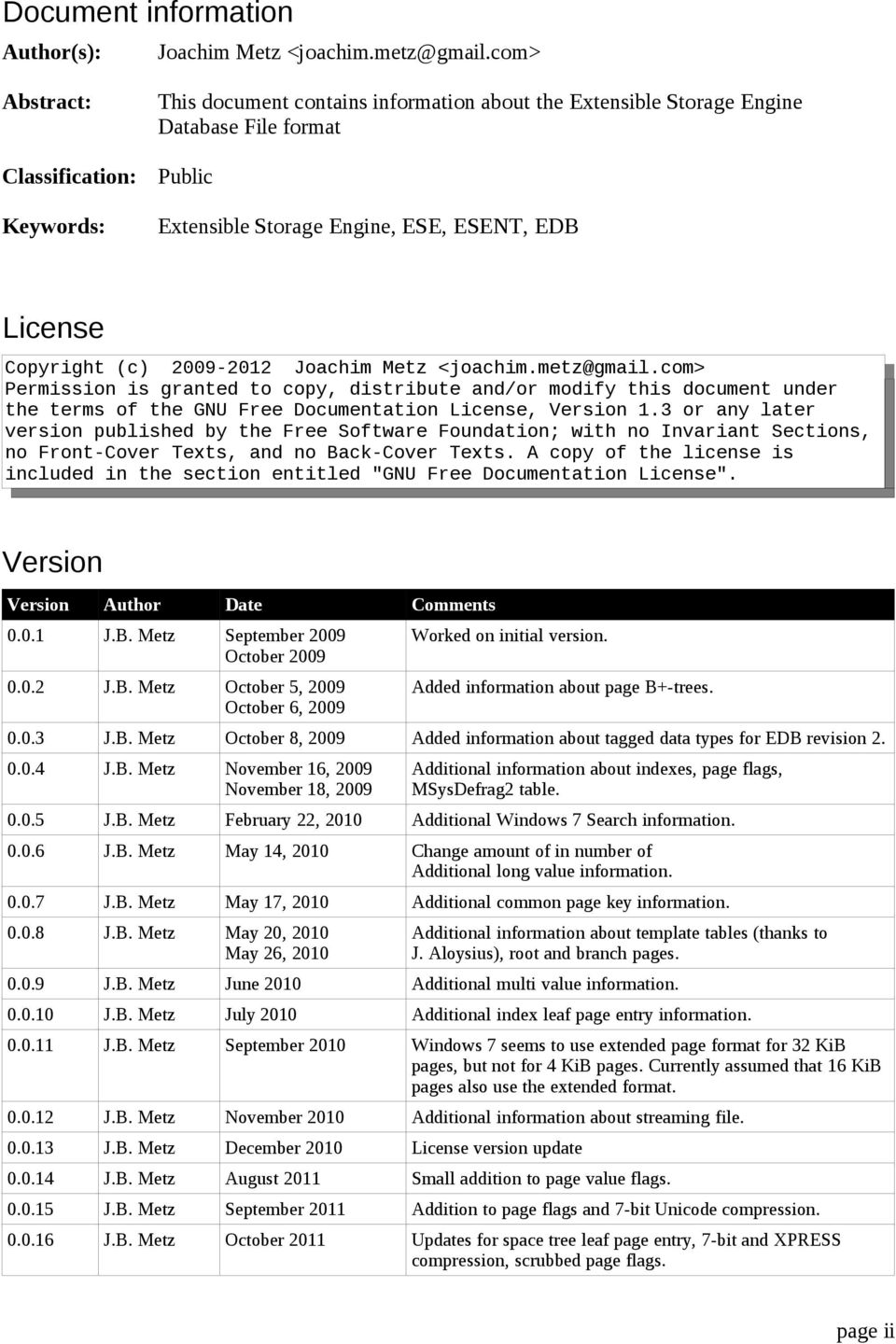
4 Version Author Date Comments J.B. Metz October 2011 Textual changes J.B. Metz May 2012 Updates for Windows 8 Consumer Preview J.B. Metz July update. page iii

5 Table of Contents 1. Overview Test version File structure (Database) file header File type File format version and revision Database state Hierarchical page-based storage Page header Changes in Exchange 2003 SP Changes in Windows Page flags Page tags Page tag - format revision 12 and earlier Page tag - format revision 17 and later Page tag flags Page B+-tree Empty page Root page Root page header Branch page Branch page header Branch page entry Leaf page values Leaf page header Leaf page entry Leaf page entry - format revision 17 and later Page values Space tree page values Space tree leaf page header Space tree leaf page entry Index page values Index leaf page entry data Long value page values Table page values Data definitions Data definition header Data type definitions Variable size data type size array entry The tagged data type definitions - format revision The tagged data type definitions - format revision 9 and later Tagged data type offset array entry - format revision 9 and later Tagged data type flags Example: the catalog (data type) definition Long Values Mutli values Database Database signature Database time Columns...25 page iv
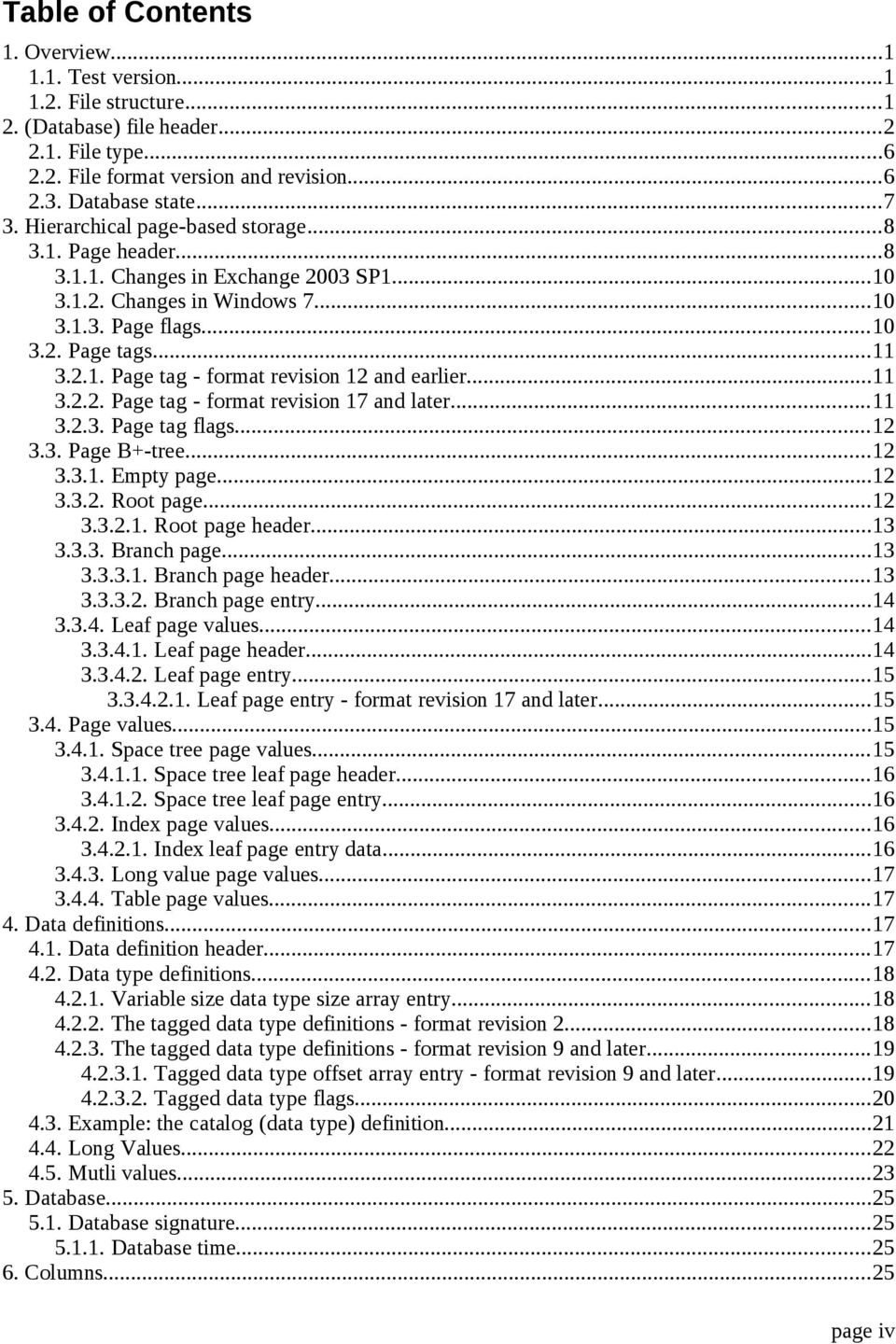
6 6.1. Column type Column flags (group of bits) Compression bit compression XPRESS compression Backup Backup information Transaction log Log information Log position (Backup) log time Tables Table flags (group of bits) metadata tables Catalog (MSysObjects and MSysObjectsShadow) Catalog types KeyFldIDs MSysObjids MSysLocales MSysUnicodeFixupVer MSysUnicodeFixupVer MSysDefrag MSysDefrag Template tables Indexes Index flags (group of bits) Notes The database metadata table...40 Appendix A. References...41 Appendix B. GNU Free Documentation License...41 page v

7 1. Overview The Extensible Storage Engine (ESE) Database File (EDB) format is used by many Microsoft application to store data such as Windows Mail, Windows Search, Active Directory and Exchange. The The Extensible Storage Engine (ESE) is also known as JET Blue. There are multiple types of ESE: Name Usage ESENT The database engine for Active Directory and many Microsoft Windows components. Unlike other versions of ESE (which use 5-MiB log files and 4-KiB page sizes), the Active Directory implementation of ESENT uses 10-MiB log files and 8-KiB pages. ESE97 The database engine in Exchange Server 5.5. ESE98 The database engine in Exchange 2000 Server, Exchange Server 2003, and Exchange Server Exchange 2000 and 2003 use 4-KiB page sizes and KiB. ESE is used to store data for various Microsoft applications like: Active Directory (NTDS) File Replication service (FRS) Windows Internet Name service (WINS) DHCP Security Configuration Engine (SCE) Certificate Server Terminal Services Session folder Terminal Services Licensing service Catalog database Help and Support Services Directory Synchronization service (MSDSS) Remote Storage (RSS) Phone Book service Single Instance Store (SIS) Groveler Windows NT Backup/Restore Exchange store Microsoft Exchange folder (SRS and DXA) Key Management service (KMS) Instant Messaging Content Indexing 1.1. Test version The following version of programs were used to test the information within this document: Exchange 2003, 2007; with corresponding eseutil Windows Search XP, Vista, 7 and 8; with corresponding esentutl 1.2. File structure An ESE database (EDB) file consist of the following distinguishable elements: file header fixed size pages page 1

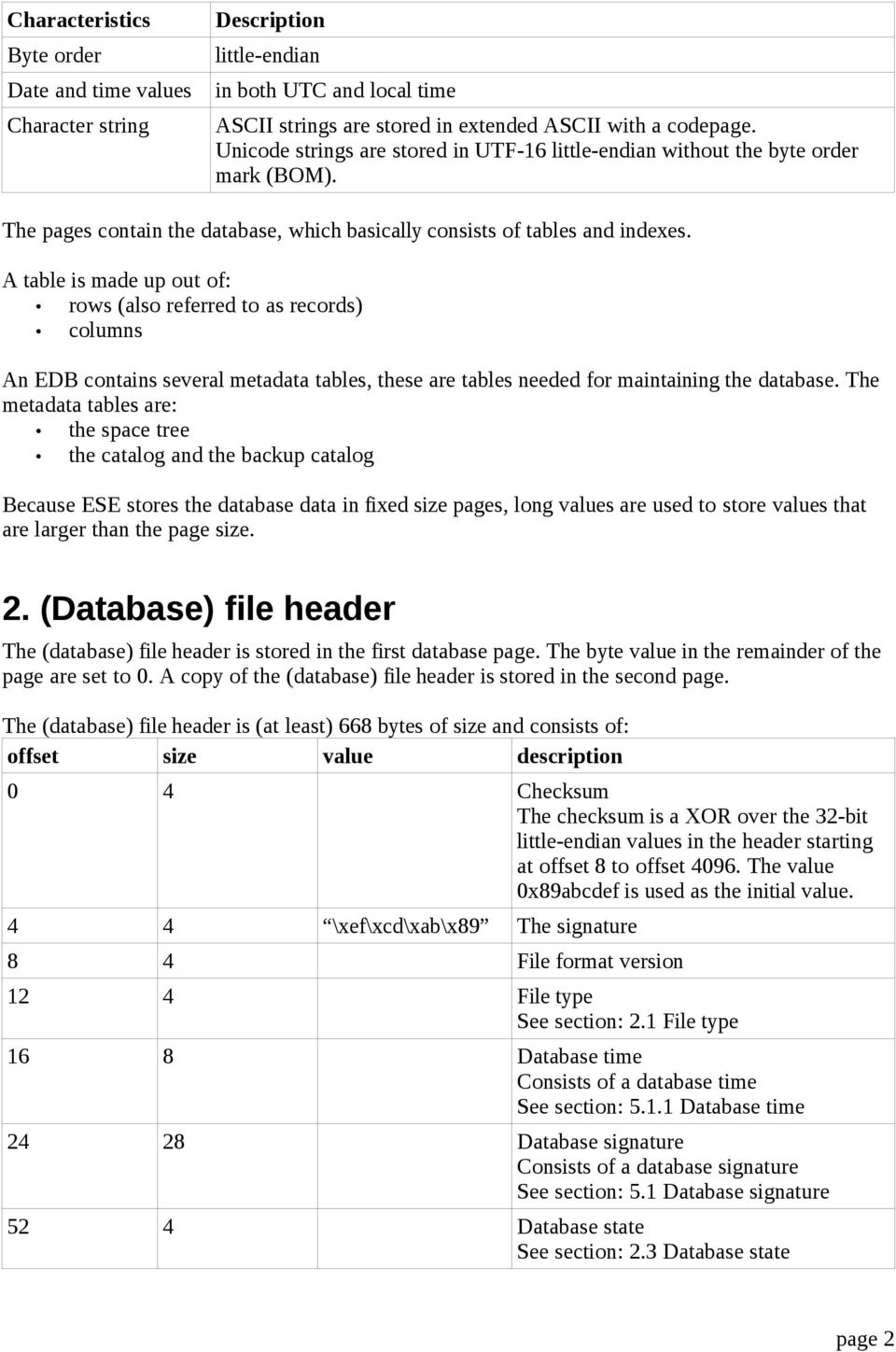
8 Characteristics Byte order Date and time values Character string Description little-endian in both UTC and local time ASCII strings are stored in extended ASCII with a codepage. Unicode strings are stored in UTF-16 little-endian without the byte order mark (BOM). The pages contain the database, which basically consists of tables and indexes. A table is made up out of: rows (also referred to as records) columns An EDB contains several metadata tables, these are tables needed for maintaining the database. The metadata tables are: the space tree the catalog and the backup catalog Because ESE stores the database data in fixed size pages, long values are used to store values that are larger than the page size. 2. (Database) file header The (database) file header is stored in the first database page. The byte value in the remainder of the page are set to 0. A copy of the (database) file header is stored in the second page. The (database) file header is (at least) 668 bytes of size and consists of: offset size value description 0 4 Checksum The checksum is a XOR over the 32-bit little-endian values in the header starting at offset 8 to offset The value 0x89abcdef is used as the initial value. 4 4 \xef\xcd\xab\x89 The signature 8 4 File format version 12 4 File type See section: 2.1 File type 16 8 Database time Consists of a database time See section: Database time Database signature Consists of a database signature See section: 5.1 Database signature 52 4 Database state See section: 2.3 Database state page 2
9 offset size value description 56 8 Consistent position Consists of a log position See section: 8.2 Log position This is the log position that was used when the database was last brought to a clean shutdown state or NULL if the database is in a dirty state Consistent date and time Consists of a log time See section: 8.3 log time This is the time when the database was last brought to a clean shutdown state or NULL if the database is in a dirty state Attach date and time Consists of a log time See section: 8.3 log time The date and time when the database was last attached Attach position Consists of a log position See section: 8.2 Log position The log position that was used the last time the database was attached Detach date and time Consists of a log time See section: 8.3 log time The date and time when the database was last detached Detach position Consists of a log position See section: 8.2 Log position The log position that was used the last time the database was detached Log signature Consists of a database signature See section: 5.1 Database signature Unknown Empty value Previous full backup Consists of a backup information See section: 7.1 Backup information Previous incremental backup Consists of a backup information See section: 7.1 Backup information Current full backup Consists of a backup information page 3

10 offset size value description See section: 7.1 Backup information Shadowing disabled Last object identifier The last object identifier in the database Major version Represents the Windows NT major version when the databases indexes were updated Minor version Represents the Windows NT minor version when the databases indexes were updated Build number Represents the Windows NT build number when the databases indexes were updated Service pack number Represents the Windows NT service pack number when the databases indexes were updated File format revision Page size Value in bytes Repair count Repair date and time Consists of a log time See section: 8.3 log time Unknown2 See below Scrub database time Consists of a database time See section: Database time Scrub date and time Consists of a log time See section: 8.3 log time Required log Consists of 2x 32-bit values Upgrade Exchange 5.5 format Upgrade Free Pages Upgrade Space Map Pages Current shadow copy backup Consists of a backup information page 4

11 offset size value description See section: 7.1 Backup information Creation file format version Creation file format revision Unknown3 See below Old repair count ECC fix success count Last ECC fix success date and time Consists of a log time See section: 8.3 log time Old ECC fix success count ECC fix error count Last ECC fix error date and time Consists of a log time See section: 8.3 log time Old ECC fix error count Bad checksum error count Last bad checksum error date and time Consists of a log time See section: 8.3 log time Old bad checksum error count Committed log Consists of the lower 32-bit value Previous (shadow) copy backup Consists of a backup information See section: 7.1 Backup information Previous differential backup Consists of a backup information See section: 7.1 Backup information Unknown Empty values NLS major version Introduced in Windows 7 part of OS version NLS minor version Introduced in Windows 7 part of OS version Unknown Empty values Unknown flags See below page 5
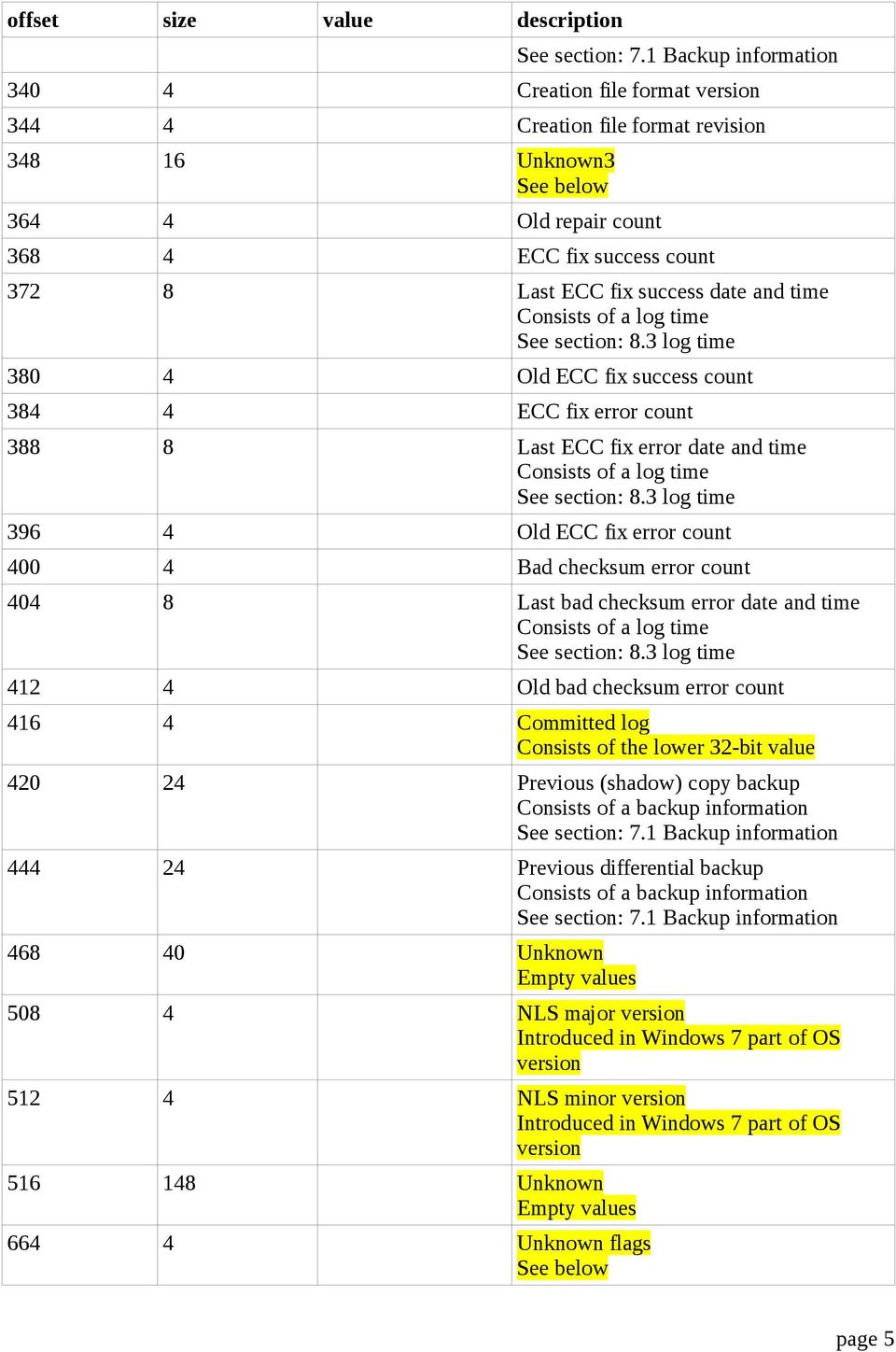
12 unknown2: : a4 88 3d f a =....j : found in stm unknown3: : 2f 1d 07 0d 09 6b /...k..... found in tmp.edb Unknown flags Value Identifier Description 0x x Find location of: fupgradedb value at offset 132? If not set the ECC and checksum counts and date and time values are not shown by eseutil, could be some extended data flag Found in STM Streaming File: No (implied by file type) Dbid: 1 signslv, fslvexists Last checksum finish Date: 00/00/ :00:00 Current checksum start Date: 00/00/ :00:00 Current checksum page: 0 Some of the values in the file header corresponds correspond with those in the miscellaneous database information (JET_DBINFOMISC). In a clean database the consistent position, date and time matches the detach position, date and time File type Value Identifier Description 0 Database Contains a hierarchical page-based storage 1 Streaming file Contains streamed data. Note that the rest of the format specification largely applies to the database file type File format version and revision According to [MSDN] the file format version and revision consist of the following values: page 6

13 Version Revision Description 0x x Original operating system Beta format (4/22/97). 0x x Add columns in the catalog for conditional indexing and OLD (5/29/97). 0x x Add the flocalizedtext flag in IDB (6/5/97). 0x x Add SPLIT_BUFFER to space tree root pages (10/30/97). 0x x Revert revision in order for ESE97 to remain forwardcompatible (1/28/98). 0x x Add new tagged columns to catalog ("CallbackData" and "CallbackDependencies"). 0x x Super Long Value (SLV) support: signslv, fslvexists in db header (5/5/98). 0x x New SLV space tree (5/29/98). 0x x SLV space map (10/12/98). 0x x byte IDXSEG (12/10/98). 0x x New template column format (1/25/99). 0x x Sorted template columns (6/24/99). Used in Windows XP SP3 0x x b Contains the page header with the ECC checksum Used in Exchange 0x x c Used in Windows Vista (SP0) 0x x Support for 2 KiB, 16 KiB and 32 KiB pages. Extended page header with additional ECC checksums. Column compression. Space hints. Used in Windows 7 (SP0) 0x x New Space Manager (5/15/99) Database state The database state consist of the following values: Value Identifier Description 1 JET_dbstateJustCreated The database was just created. 2 JET_dbstateDirtyShutdown The database requires hard or soft recovery to be run in order to become usable or movable. One should not try to move databases in this state. 3 JET_dbstateCleanShutdown The database is in a clean state. The database can be attached without any log files. page 7

14 Value Identifier Description 4 JET_dbstateBeingConverted The database is being upgraded. 5 JET_dbstateForceDetach Internal. This value is introduced in Windows XP 3. Hierarchical page-based storage The EDB file uses a fixed size page to store data. The size of the page is defined in the file header. In a database file these pages are ordered in a B+-tree. The pages can B+-tree references to other pages or data. These page B+-trees make up the database tables and indexes. Every page B+-tree refers to a 'Father of the Data Page' (FDP) object identifier, which is basically a unique number for the specific page B+-tree. A page consists of: a page header the page values the page tags (page value index) The page (file) offset and number can be calculated as following: page offset = ( page number x page size ) + page size = ( page number + 1 ) x page size page number = ( page offset - page size ) / page size = ( page offset / page size ) Page header The page header is 40 or 80 bytes of size and consists of: offset size value description Before Exchange 2003 SP1 and Windows Vista 0 4 The XOR checksum The checksum is a XOR over the 32-bit little-endian values in the header starting at offset 4 to the end of the page. The value 0x89abcdef is used as the initial value. 4 4 Page number Used for the XOR checksum Exchange 2003 SP1 and Windows Vista and later (As of version 0x620 revision 0x0b) The new record format page flag must be set 0 4 The XOR checksum The checksum is a XOR over the 32-bit little-endian values in the header starting page 8
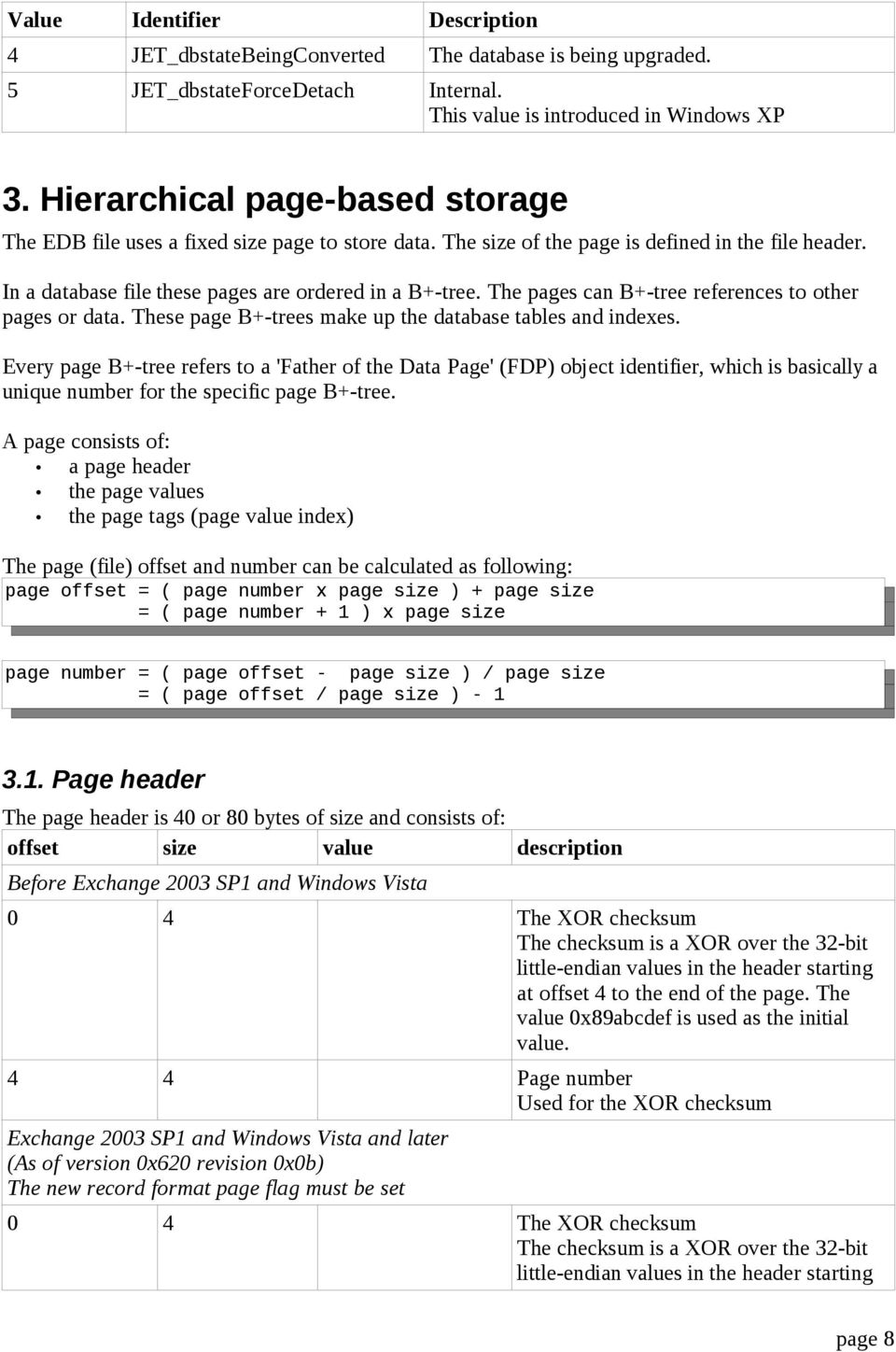
15 offset size value description at offset 8 to the end of the page. The page number is used as the initial value. 4 4 The ECC checksum [TODO] Windows 7 and later (As of version 0x620 revision 0x11) 0 8 Checksum [TODO] Common 8 8 Database last modification time Consists of a database time See section: Database time This value indicates the database time the page was last modified Previous page number This value indicates the page number of the adjacent left page on the leaf Next page number This value indicates the page number of the adjacent right page on the leaf Father Data Page (FDP) object identifier This value indicates which page B+-tree this page belongs to Available data size The number of bytes available within the page Available uncommitted data size The number of uncommitted bytes within the page. Uncommitted bytes are free but available for reclaim by rollback on the page (First) available data offset The offset is relative from the end of the page header 34 2 (First) available page tag 36 4 Page flags See section: Page flags Extended page header Windows 7 and later (As of version 0x620 revision 0x11) Only for pages of 16 KiB and 32 KiB? 40 8 Extended checksum 1 [TODO] 48 8 Extended checksum 2 page 9

16 offset size value description [TODO] 56 8 Extended checksum 3 [TODO] 64 8 Page number 72 8 Unknown Empty values Changes in Exchange 2003 SP1 According to [MSDN] Exchange Server 2003 Service Pack 1 (SP1) introduces a new feature named Error Correcting Code (ECC) Checksum. ECC Checksum is a new checksum format that enables the correction of single-bit errors in database pages (in the.edb file,.stm file, and transaction log files). This new checksum format uses 64-bits, whereas the earlier checksum format uses 32-bits. Earlier format databases can be used with the new code, but current format databases cannot be used with earlier versions of ESE. After the database engine is updated, all pages that are written to the database have the new checksum format. Pages that are read and not modified do not have their checksum format upgraded. Database pages with the earlier-format checksum start with a 32-bit checksum, followed by a 32-bit page number, which is used to verify that the requested page is actually read off disk. The new checksum format removes the 32-bit page number and instead starts with an eight-byte checksum. The page number is used as an input parameter in calculating the checksum. Therefore, if the wrong page is read off disk, there will be a checksum mismatch. The current checksum format actually consists of two 32-bit checksums. The first is an XOR checksum, calculated much like the earlier format checksum. The page number is used as a seed in the calculation of this checksum. The second 32-bit checksum is an ECC checksum, which allows for the correction of single-bit errors on the page Changes in Windows 7 In Windows 7, for pages of 16 KiB and 32 KiB, the page header was extended with mainly additional error recovery checksums Page flags The page flags consist of the following values: Value Identifier Description 0x The page is a root page 0x The page is a leaf page 0x The page is a parent page 0x The page is empty 0x page 10

17 Value Identifier Description 0x x x x x x x x x x x Index page unique keys/non-unique keys PageFlushType = 1 (0x8000)? The page is a space tree page The page is an index page The page is a long value page Unknown Unknown Does not seems to be the primary page flags? Flag for unique keys? New record format New checksum format Is scrubbed (was zero-ed) Unknown 3.2. Page tags The page tags are stored at the end of the the page. The page tags are stored back to front. The page header indicates the first unused page tag. Note that there can be more page tags in the page than being used Page tag - format revision 12 and earlier A page tag is 4 bytes of size and consists of: offset size value description bits Value offset The offset is relative after the page header bits Page tag flags See section: Page tag flags bits Value size bits Unknown Seen 2nd MSB set Page tag - format revision 17 and later In Windows 7 (format revision 0x11), for pages of 16 KiB and 32 KiB, the page tags were changed, to support these page sizes. For these page sizes the page tag flags have been moved to the first 16- value in the leaf page entry. page 11

18 A page tag is 4 bytes of size and consists of: offset size value description bits Value offset The offset is relative after the extended page header bit Unknown Sometimes set 2 15 bits Value size bit Unknown Sometimes set Page tag flags The page tag flags consist of the following values: Value Identifier Description 0x0001 v Unknown (Value) The page value contains variable sized data types? 0x0002 d Defunct The page value is no longer used 0x0004 c Common key The page value contains a common page key size 3.3. Page B+-tree In the B+-tree hierarchy there are multiple types of pages: root page branch page leaf page These different type of pages contain different types of page values Empty page Although empty pages can contain data they are ignored when creating a page B+-tree Root page The root page is identified by the 'is root' flag. The root page contains different types of values: the root page header branch or leaf page entries page 12

19 Root page header The root page header is the first page tag within the page. The root page header is 16 bytes of size and consists of: offset size value description 0 4 The initial number of pages The number of pages when the object was first created in the page tree. 4 4 The parent Father Data Page (FDP) number 8 4 Extent space 0x => single 0x => multiple 12 4 The space tree page number 0 if not set masks 0xff if not set (pgnooe) The FDP flag in the eseutil seems to be implied if the parent Father Data Page (FDP) number (pgnofdp) is set. The primary extent represents the the initial number of pages followed by a dash and a letter after the that indicates whether the space for the B-Tree is currently represented using multiple pages ("m") or a single page ("s"). The space tree page number is valid when the extent space > Branch page The branch page not identified by any flags, the 'is leaf' flag should not be set. The branch page can contain the 'is parent' flag. What is the significance of the 'is parent' flag? Both the branch page contains different types of values: the branch page header branch page entries Branch page header The branch page header is the first page tag within the page. If the branch page has no 'is root' flag the branch page header is variable of size and consists of: offset size value description 0... Common page key page 13

20 Branch page entry The branch page entry is variable of size and consists of: offset size value description If page tag flag 0x04 is set 0 2 Common page key size Common for all page flags 0 2 Local page key size 2 (size) The local page key The highest page key in the page B+-tree branch Note that the last father data page entry contains an empty page key... 4 Child page number The child page number is invalid if it exceeds the last page in the file The actual page key of the page entry is a combination of the part of the common page key, which is stored in the page header, specified by the size of the common page key size value, followed by the local page key stored in the page entry Leaf page values The leaf page is identified by the 'is leaf' flag. The leaf page contains different types of values: the leaf page header leaf page entries There are multiple types of leaf pages: index leaf pages; identified by the 'is index' page flag long value leaf pages; identified by the 'is long value' page flag table leaf pages Every type of leaf page has a different type of leaf page entry Leaf page header The leaf page header is the first page tag within the page. If the leaf page has no 'is root' flag the leaf page header is variable of size and consists of: offset size value description 0... Common page key If there is no leaf page header the size of the corresponding page tag is 0. page 14
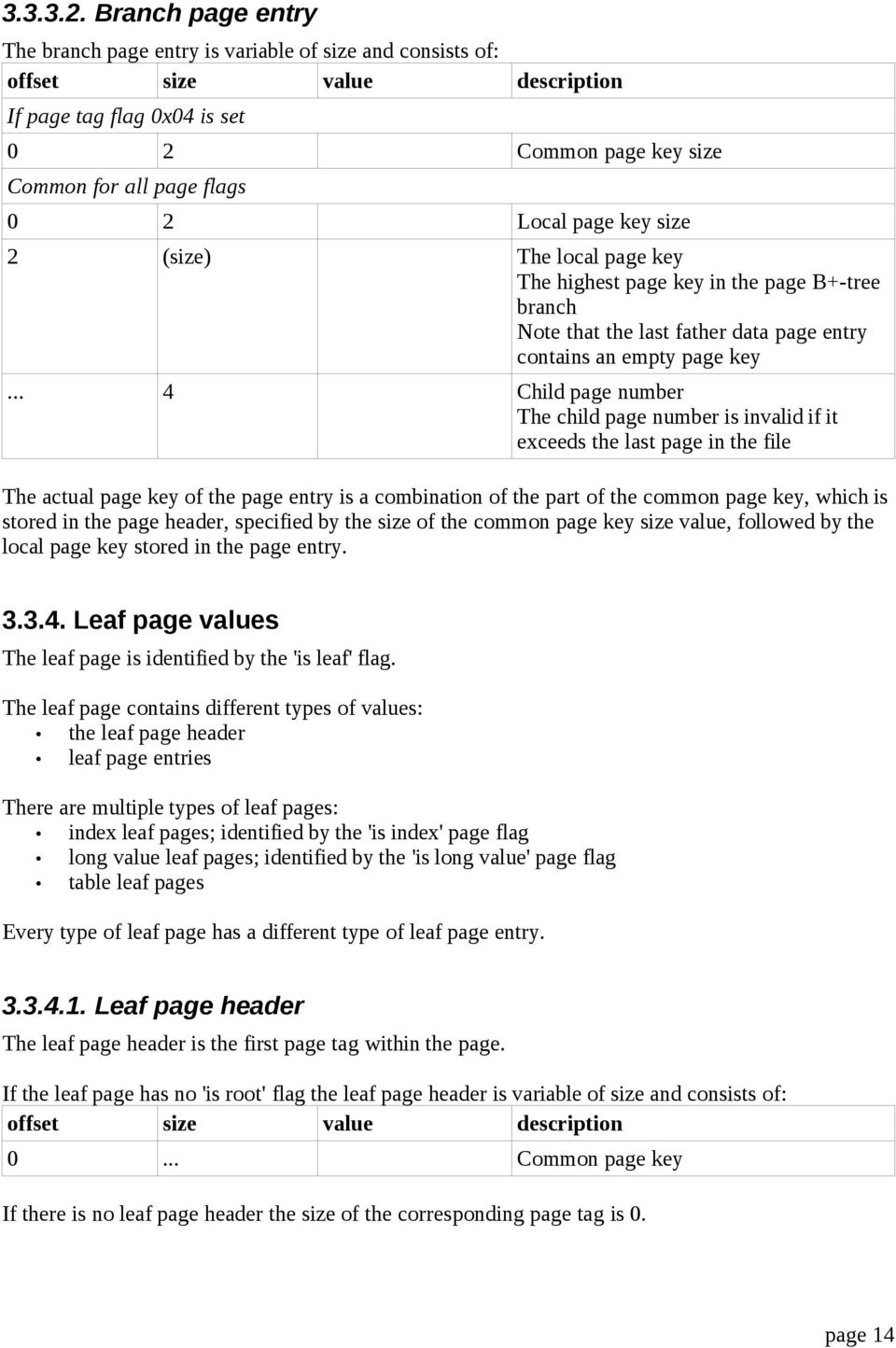
21 Leaf page entry The leaf page entries for the different types of leaf pages use a similar entry structure. Note that the 3 MSB of the first 2 bytes can contain the page tag flags, see format revision 17. The leaf page entry is variable of size and consists of: offset size value description If page tag flag 0x04 is set 0 2 Common page key size Common for all page flags 2 2 Local page key size 4... Local page key Entry data The actual page key of the page entry is a combination of the part of the common page key, which is stored in the page header, specified by the size of the common page key size value, followed by the local page key stored in the page entry Leaf page entry - format revision 17 and later In Windows 7 (format revision 0x11), for pages of 16 KiB and 32 KiB, the size of the page key in the leaf page entry was changed. The upper 3-bits of the first 16-bit value (either the key type or the size of the page key) contain the page tag flags (See section: Page tag flags) Page values Space tree page values The space tree page is identified by the following flags: is space tree Is the root flag always set? Space tree branch pages are similar to branch pages. The space tree leaf page contains different types of values: the space tree page header space tree page entries The primary space tree page referenced from the father data page contains information about the owned pages. The secondary space tree page which is the primary space tree page number + 1 contains information about the available pages. page 15
22 Space tree leaf page header The space tree page header is the first page value within the page. The space tree page header is 16 bytes of size and consists of: offset size value description Unknown When the space tree page was referenced from the father data page the space tree page header contains 0 bytes. The space tree header can also be empty (have a page value size of 0). related to root flag value? TODO : c D Space tree leaf page entry The space tree page entry is variable of size and consists of: offset size value description Size of the page key 2... Page key value... 4 number of pages Owned space Available space The number of pages of all the space tree page entries in the primary space tree page make up the number of owned space. The number of page of all the space tree page entries make up the number of available space. Note that space tree entries with the defunct page flag (0x02) are not included Index page values The index page is identified by the following flags: is index Index branch pages are similar to branch pages Index leaf page entry data The index leaf page entry data is variable of size and consists of: offset size value description 0... Record page key page 16
23 Long value page values The long value pages are identified by the following flags: is long value For the format of the long value data definitions see section: 4.4 Long Values Table page values The table page values are not identified by a flag. So basically if none of the previously mentioned flags is defined the page contains table value data definitions. See section: 4 Data definitions for more information. 4. Data definitions In ESE there are multiple categories of table data definitions, each category uses different data type identifiers. Data type identifiers Amount Category Description 0x0001 0x007f 126 Fixed size Fixed size data types (columns) use a defined number of space, even if no value is defined. 0x0080-0x00ff 127 Variable size Variable size data types (columns) can contain up to 256 bytes of data. An offset array is stored in the record with the highest variable size data type set. Each array entry requires two bytes. 0x0100-0xfffff Tagged Tagged data types (columns) are data types that occur rarely or have multiple occurrences. Tagged data types have an unlimited data size. The data type identifier and size are stored with the data. When a tagged data type does not contain data no information about it stored. The data definitions are stored in (data definition) records. Such a data definition records contains the values of a table row. According to [MSDN] data type identifiers 10 and 11 can be defined as variable columns 4.1. Data definition header The data definition header is 4 bytes of size and consists of: offset size value Description 0 1 Last fixed size data type page 17
24 offset size value Description 1 1 Last variable size data types 2 2 The offset to the variable size data types The offset is relative from the start of the data definition header 4.2. Data type definitions The data type definitions is variable of size and consists of: offset size value Description 0... Fixed size data type definitions Unknown trailing data used to handle tagged data type definitions? The variable size data types size array The variable size data types data array Contains data for a variable data type The tagged data type definitions Although the corresponding table definition does not contain fixed size and/or variable size data type definitions the data type definition still can contain them. They need to be handled to find the offset of the tagged data type definitions. The data type definitions will contain temple table tagged data type identifiers before table tagged data type identifiers. Also see section: 9.3 Template tables Variable size data type size array entry The variable size data type size array entry is 2 bytes of size and consists of: offset size value Description 0 2 The variable size data type identifier Contains a 2 byte size value for every variable data type. The MSB signifies that the variable size data type is empty. Also the size of the previous variable size data type needs to be subtracted from the current size The tagged data type definitions - format revision 2 For EDB format revision 2 the tagged data type definitions consist of multiple entries. A tagged data type definitions entry is variable of size and consists of: offset size value Description 0 2 The tagged data type identifier page 18
25 offset size value Description 2 2 Size of the tagged data type data The offset is relative from the start of the tagged data type offset array flag bits: 0x8000 (?) 4 1 Tagged data type flags Currently only 0x00 values have been seen 5... Value When the 0x8000 flag bit is set the tagged data type offset array entry is directly followed by the value data. The size of the tagged data type data contains the size of the value data. The value is seems to be preceded by the tagged data type flags? The tagged data type definitions - format revision 9 and later For format revision 9 and later the tagged data type definitions consist of an an offset and data array. offset size value Description 0... The tagged data types offset array The tagged data types data array Tagged data type offset array entry - format revision 9 and later The tagged data type offset array entry is 4 bytes of size and consists of: offset size value Description 0 2 The tagged data type identifier 2 2 Size or offset of the tagged data type data The offset is relative from the start of the tagged data type offset array flag bits: 0x4000 (tagged data type flags present) 0x8000 (?) What does a size of 0 indicate: that the value is empty or contains the default value? The number of tagged data types is deduced from the first tagged data type data offset? If the bit 0x4000 is set in the size the value is preceded by the tagged data type flags. The size cannot be greater equal than 0x4000. Note that as of Windows 7 and later (version 0x620 revision 0x11), for pages of 16 KiB and 32 KiB, the tagged data type flags are always present in database and no longer controlled by the flag bits. The size can be greater equal than 0x4000. page 19
26 Tagged data type flags Value Identifier Description 0x01 0x02 0x04 0x08 0x10 Variable size value Data is compressed Data is stored in a long value The data type definition contains a long value identifier, which is the key of the long value in reverse Data contains a multi value See section: 4.5 Mutli values Multi value contains size definition instead of offset definitions Are multi long values used? Tag data type flags: 0x01 => unicode value or single value (not the sparse flag) 0x05 => Long value (4 byte long value identifier or page key) 0x08 => (fixed size type?) multi value 0x09 => (variable size type?) multi value 0x0b => compressed multi value (see below) 0x18 => (fixed size type?) multi value (with size definition) column definition name : System_Kind column definition type : Text (extended ASCII or Unicode string) (JET_coltypText) (450) tagged data type identifier : 450 (450) tagged data type offset : 0x4244 (580) (450) tagged data type size : 24 (450) tag byte : 0x18 (450) tagged data type: : 08 6c e 00 6b f l.i.n.k.p.r.o.g : d 00.r.a.m. byte size of first value? (457) tagged data type flags : 0x0b Is variable size Is compressed Is multi value (457) tagged data type: : ec b4 7b 0d f {.p.r.o.g : d 00.r.a.m. Why is only the first entry is compressed? page 20
27 4.3. Example: the catalog (data type) definition The data below is an example of the catalog (data type) definition. Also see section: Catalog (MSysObjects and MSysObjectsShadow) offset size value Description Fixed size data type definitions 0 4 The Father Data Page (FDP) object identifier 4 2 Catalog type See section: Catalog types 6 4 The identifier If data definition type is 0x0002 (column) 10 4 Column type See section: 6.1 Column type Other data definition types 10 4 The Father Data Page (FDP) number If data definition type is 0x0001 (table) 14 4 Space usage The number of pages used by the table 18 4 Flags (or group of bits) 22 4 The (initial) number of pages If data definition type is 0x0002 (column) 14 4 Space usage The number of bytes used by the column 18 4 Flags (or group of bits) See section: 6.2 Column flags (group of bits) 22 4 Codepage If data definition type is 0x0003 (index) 14 4 Space usage The number of pages used by the index 18 4 Flags (or group of bits) 22 4 The locale identifier (LCID) See section: [NTLCID] The LCID is used for normalizing the string when JET_bitIndexUnicode is not specified in the index flags (group of bits). If data definition type is 0x0004 (long value) 14 4 Space usage The number of pages used by the long value page 21
28 offset size value Description 18 4 Flags (or group of bits) 0x => single extent 0x => multiple extent 22 4 The (initial) number of pages If data definition type is 0x0005 (callback) All data definition types TODO 26 1 The root flag 27 2 The record offset The offset of the data type within the record 29 4 The LC map flags 33 2 Key most Unknown trailing data used to handle tagged data type definitions? The variable data types size array The variable data types data array Contains data for a variable data type If more data is present The tagged data types offset array If present in the tagged types offset array The tagged data types data array Contains data for a tagged data type For data definition type is 0x0001 (table) the variable data type 'TemplateTable' is used to store the name of the table used as its template. See section: 9.3 Template tables. For data definition type is 0x0005 (callback) the variable data type 'TemplateTable' is used to store the name of the DLL and function to call Long Values The actual long values are stored in a separate page tree. The corresponding page key of the long value is the long value identifier in reverse byte order. E.g. a long value identifier of: 0xa relates to a page key of 0x000000a7. In version 0x620 and revision 0x0c the page key contains the leading 0 values in revision 0x09 these leading 0 values are not present. The long value page key refers to a page value in the long value page tree corresponding to the table page tree as defined in the catalog. This page value contains the long value header. The long value header is 8 bytes of size and consists of: page 22
29 offset size value Description 0 4 Unknown Value is 1 Value is 0 in some defunct long values 4 4 Unknown Last segment offset Hypothesis: the total long value size, holds for a lot of single segment long values but not for some multi segment long values Largest segment size?l The corresponding segments can be found by combining the long value page key with a 4 byte segment offset, starting with offset 0. E.g. the first segment for the long value identifier 0xa is the page key 0x000000a7 followed by the segment offset 0x00000fae (4014), therefore 0x000000a fae. One long value page tree per table? Inverse key stored in data type definition The offset (+ data size) of the last segment can exceed the total long value size? 4.5. Mutli values The multi value is variable of size and consists of: offset size value Description 0... Value offset array Consists of 16-bit offset values The offset is relative to the start of the multi value flag bits: 0x8000 (?) Value data array column definition identifier : 625 column definition name : ML827a column definition type : Integer 32-bit signed (JET_coltypLong) (625) tagged data type identifier : 625 (625) tagged data type offset : 0x43cb (971) (625) tagged data type size : 31 (625) tag byte : 0x08 (625) tagged data type: : 0a 00 0e a : a : : a 00 0e a : page 23
30 2 byte offset(s) fixed size value(s) column definition identifier : 318 column definition name : MN667f column definition type : Large binary data (JET_coltypLongBinary) (318) tagged data type identifier : 318 (318) tagged data type offset : 0x4173 (371) (318) tagged data type size : 45 (318) tag byte : 0x09 (318) tagged data type: : d 4a ae f 40 a0 0d be 80...D.J. 9..@ : cb bf cd ad a 1f 4f b 4f... Z.O6g.kO : a f2 bb 7e 6b ~k byte offset(s) variable size value(s) column definition identifier : 296 column definition name : MS8053 column definition type : Large text (extended ASCII or Unicode string) (JET_coltypLongText) (296) tagged data type identifier : 296 (296) tagged data type offset : 0x429b (667) (296) tagged data type size : 3019 (296) tagged data type flags : 0x09 Is variable size Is multi value (296) tagged data type: : e 00 f bc 01 1c 02 7a 02 d8 02 B...X....z : a8 03 0c d4 04 2e f : d a 07 ee c d r...& : e a a2 0a 02 0b 64 0b be 8b c2 8b...D.....d : c6 8b e 00 3a u.r.n. :.s.c.h. MSB contains some flag (defunct?) 0x8000 flag : e 00 f bc 01 1c 02 7a 02 d8 02 B...X....z : a8 03 0c d4 04 2e f : d a 07 ee c d r...& : e a a2 0a 02 0b 64 0b be 8b c2 8b...D.....d : c6 8b : e 00 3a u.r.n. :.s.c.h : d d 00 6d e.m.a.s. -.m.i.c : f f d r.o.s.o. f.t.-.c : 6f 00 6d 00 3a 00 6f o.m.:.o. f.f.i.c : a 00 6f e.:.o.f. f.i.c.e : f #.A.u.t. h.o.r : u a0: e 00 3a d 00 r.n.:.s. c.h.e.m. page 24
31 00000bb0: c e.#.t.i. t.l.e.c bc0: D...E Database 5.1. Database signature The database signature (JET_SIGNATURE) is 28 bytes of size and consists of: offset size value description 0 4 A randomly assigned number 4 8 Creation date and time Consists of a log time See section: 8.3 log time The NetBIOS computer name ASCII string terminated by a NULcharacter Unused bytes are filled with Database time The database time (DBTIME) is 8 bytes of size and consists of: offset size value description 0 2 Hours Value should be [0-23] 2 2 Minutes Value should be [0-59] 4 2 Seconds Value should be [0 59] Padding 6. Columns 6.1. Column type The column type (JET_COLTYP) consist of the following values: Value Identifier Description 0 JET_coltypNil Invalid Invalid column type. 1 JET_coltypBit Boolean Boolean column type that can be true, or false but cannot be NULL. This type of column is one byte of size and is a fixed size. page 25
32 Value Identifier Description 2 JET_coltypUnsignedByte Integer 8-bit unsigned 3 JET_coltypShort Integer 16-bit signed 4 JET_coltypLong Integer 32-bit signed 5 JET_coltypCurrency Currency (64-bit) An 8-byte signed integer that can consist of values between and JET_coltypIEEESingle Floating point single precision (32-bit) 7 JET_coltypIEEEDouble Floating point double precision (64-bit) 8 JET_coltypDateTime Date and time (64-bit) The date and time is stored as a little-endian filetime A double-precision (8-byte) floating point number that represents a date in fractional days since the year This column type is identical to the variant date type (VT_DATE). 9 JET_coltypBinary Binary data A fixed or variable size, raw binary column that can be up to 255 bytes in size. 10 JET_coltypText Text (Extended ASCII or Unicode) A fixed or variable size text column that can be up to 255 ASCII characters in size or 127 Unicode characters in size. The text need not be null terminated, but embedded null characters can be stored. 11 JET_coltypLongBinary Large binary data A fixed or variable size, raw binary column that can be up to bytes of size. 12 JET_coltypLongText Large text (Extended ASCII or Unicode) A fixed or variable size, text column that can be up to ASCII characters in size or Unicode characters in size. Values introduced in Windows XP 13 JET_coltypSLV Super Large Value This column type is obsolete. A record in the.edb file contains a column (of data type JET_coltypSLV) that references a list of pages in the streaming file that contains the raw data. Space usage (maximum of four kilobytes of page numbers) and checksum data for the data in the streaming file is stored in the.edb file. SLV = Super Long Value Values introduced in Windows Vista 14 JET_coltypUnsignedLong Integer 32-bit unsigned 15 JET_coltypLongLong Integer 64-bit signed page 26
33 Value Identifier Description 16 JET_coltypGUID GUID (128-bit) 17 JET_coltypUnsignedShort Integer 16-bit unsigned ASCII strings are always treated as case insensitive for sorting and searching purposes. Further, only the characters preceding the first null character (if any) are considered for sorting and searching. Unicode strings use the Win32 API LCMapString to create sort keys that are subsequently used for sorting and searching that data. By default, Unicode strings are considered to be in the U.S. English locale and are sorted and searched using the following normalization flags: NORM_IGNORECASE, NORM_IGNOREKANATYPE, and NORM_IGNOREWIDTH. In Windows 2000, it is possible to customize these flags per index to also include NORM_IGNORENONSPACE. In Windows XP and later releases, it is possible to request any combination of the following normalization flags per index: LCMAP_SORTKEY, LCMAP_BYTEREV, NORM_IGNORECASE, NORM_IGNORENONSPACE, NORM_IGNORESYMBOLS, NORM_IGNOREKANATYPE, NORM_IGNOREWIDTH, and SORT_STRINGSORT. In all releases, it is possible to customize the locale per index. Any locale may be used as long as the appropriate language pack has been installed on the machine. Finally, any null characters encountered in a Unicode string are completely ignored Column flags (group of bits) The column flags consist of the following values: Value Identifier Description 0x JET_bitColumnFixed 0x JET_bitColumnTagged 0x JET_bitColumnNotNULL 0x JET_bitColumnVersion 0x JET_bitColumnAutoincrement 0x JET_bitColumnUpdatable Is fixed size The column will always use the same size (within the row) regardless of how much data is stored in the column. Is tagged The column is tagged. A tagged columns does not take up any space in the database if it does not contain data. Not empty The column is not allow to be set to an empty value (NULL). Is version column The column is a version column that specifies the version of the row. The column will automatically be incremented. The number is an increasing number, and is guaranteed to be unique within a table. The numbers, however, might not be continuous. For example, if five rows are inserted into a table, the "autoincrement" column could contain the values { 1, 2, 6, 7, 8 }. This bit can only be used on columns of type JET_coltypLong or JET_coltypCurrency. This bit is valid only on calls to JetGetColumnInfo. page 27
34 Value Identifier Description 0x JET_bitColumnTTKey 0x JET_bitColumnTTDescending This bit is valid only on calls to JetOpenTable. This bit is valid only on calls to JetOpenTempTable. 0x JET_bitColumnMultiValued 0x JET_bitColumnEscrowUpdate 0x JET_bitColumnUnversioned Values introduced in Windows x JET_bitColumnDeleteOnZero The column can be multi-valued. A multi-valued column can have zero, one, or more values associated with it. The various values in a multivalued column are identified by a number called the itagsequence member, which belongs to various structures, including: JET_RETINFO, JET_SETINFO, JET_SETCOLUMN, JET_RETRIEVECOLUMN, and JET_ENUMCOLUMNVALUE. Multi-valued columns must be tagged columns; that is, they cannot be fixed-length or variable-length columns. Specifies that a column is an escrow update column. An escrow update column can be updated concurrently by different sessions with JetEscrowUpdate and will maintain transactional consistency. An escrow update column must also meet the following conditions: An escrow update column can be created only when the table is empty. An escrow update column must be of type JET_coltypLong. An escrow update column must have a default value (that is cbdefault must be positive). JET_bitColumnEscrowUpdate cannot be used in conjunction with JET_bitColumnTagged, JET_bitColumnVersion, or JET_bitColumnAutoincrement. The column will be created in an without version information. This means that other transactions that attempt to add a column with the same name will fail. This bit is only useful with JetAddColumn. It cannot be used within a transaction. The column is an escrow update column, and when it reaches zero, the record will be deleted. A common use for a column that can be finalized is to use it as a reference count field, and when the field reaches zero the record gets deleted. JET_bitColumnDeleteOnZero is related to JET_bitColumnFinalize. A Delete-on-zero column must be an escrow update column. page 28
35 Value Identifier Description Values introduced in Windows XP 0x JET_bitColumnMaybeNull 0x JET_bitColumnFinalize 0x JET_bitColumnUserDefinedDef ault JET_bitColumnDeleteOnZero cannot be used with JET_bitColumnFinalize. JET_bitColumnDeleteOnZero cannot be used with user defined default columns. Reserved for future use. Use JET_bitColumnDeleteOnZero instead of JET_bitColumnFinalize. JET_bitColumnFinalize that a column can be finalized. When a column that can be finalized has an escrow update column that reaches zero, the row will be deleted. Future versions might invoke a callback function instead (For more information, see JET_CALLBACK). A column that can be finalized must be an escrow update column. JET_bitColumnFinalize cannot be used with JET_bitColumnUserDefinedDefault. The default value for a column will be provided by a callback function. See JET_CALLBACK. A column that has a user-defined default must be a tagged column. Specifying JET_bitColumnUserDefinedDefault means that pvdefault must point to a JET_USERDEFINEDDEFAULT structure, and cbdefault must be set to sizeof( JET_USERDEFINEDDEFAULT ). JET_bitColumnUserDefinedDefault cannot be used in conjunction with JET_bitColumnFixed, JET_bitColumnNotNULL, JET_bitColumnVersion, JET_bitColumnAutoincrement, JET_bitColumnUpdatable, JET_bitColumnEscrowUpdate, JET_bitColumnFinalize, JET_bitColumnDeleteOnZero, or JET_bitColumnMaybeNull Compression As of Windows 7 the column types JET_coltypLongBinary and JET_coltypLongText can be compressed [MSDN-WIN7]. The first byte in the data indicates which compression is used. If the value is 0x18 the data is XPRESS compressed. The data is 7-bit compressed for any other value bit compression 7-bit compression is used for columns with less than 1 KiB (1024 bytes) uncompressed data that consists of only 7-bit values. These are stored as a continuous stream of 7-bit values. page 29
36 To decompress: 1. check if the leading byte does not contain 0x If the column type is the JET_coltypLongText 1. If the lead byte contains 0x10 and the data is ASCII text 2. Otherwise the data is either ASCII or UTF16 little-endian 2. start reading at offset 1 3. while not at end of stream 1. read a 7-bit value from the stream and convert it into an 8-bit value If the column type is JET_coltypLongText the uncompressed data either contains an ASCII or an UTF-16 little-endian string. Notes: Contains unicode 0x09, 0x0b, 0x0d, 0x0f on Win7 but not in Exchange XPRESS compression Microsoft XPRESS compression is used for columns with more than 1 KiB (1024 bytes) uncompressed data. This compression method is a combination of the LZ77 and DIRECT2 algorithms. The compression method is similar to the LZNT1, which is used in NTFS compression. The compressed data is variable in size and consists of: offset size value Description 0 1 0x18 Leading byte 1 3 Uncompressed data size 3... XPRESS compressed data If the column type is JET_coltypLongText the uncompressed data either contains an ASCII or an UTF-16 little-endian string. TODO: what about data > 2^16 7. Backup 7.1. Backup information The backup information (JET_BKINFO) is 24 bytes of size and consists of: offset size value description 0 8 The backup position Consists of a log position See section: 8.2 Log position Contains an identifier of the backup 8 8 The backup creation date and time Consists of a backup log time See section: 8.3 log time 16 4 Generation lower number The lower log generation number associated with the backup. page 30
37 offset size value description 20 4 Generation upper number The upper log generation number associated with the backup. 8. Transaction log 8.1. Log information The log position (JET_LOGINFO) is 16 bytes of size and consists of: offset size value description Size of the structure 4 4 Generation lower number The lower log generation number associated with the transaction. 8 4 Generation upper number The upper log generation number associated with the transaction Log filename prefix The prefix used to name the transaction log files. Transaction log files are named according to the instance base name and the generation number of the log file. The name is of the format BBBXXXXX.LOG. BBB corresponds to the base name for the log file and is always three characters in length. XXXXX corresponds to the generation number of the log file in zero padded hexadecimal and is always five characters in length. LOG is the file extension that is always given to transaction log files by the engine Log position The log position (JET_LGPOS) is 8 bytes of size and consists of: offset size value description 0 2 block 2 2 sector 4 4 generation 8.3. (Backup) log time The backup log time and log time (JET_BKLOGTIME and JET_LOGTIME) is 8 bytes of size and consist of: offset size value description 0 1 Seconds Value should be [0-60] 1 1 Minutes page 31
38 offset size value description Value should be [0-60] 2 1 Hours Value should be [0-24] 3 1 Days Value should be [0-31] 4 1 Months Value should be [0-12] 5 1 Years The year 0 represents Filler byte Filler byte In a backup log time the LSB of the second filler byte can be overloaded to contains the backup type bit. The backup type bit consists of one of the following values: Value Identifier Description 0 streaming backup 1 snapshot backup The backup log time was introduced in Windows Vista. 9. Tables 9.1. Table flags (group of bits) The table group of bits consist of the following values: Value Identifier Description 0x JET_bitTableCreateFixedDDL 0x JET_bitTableCreateTemplateTa ble Values introduced in Windows XP 0x JET_bitTableCreateNoFixedVar ColumnsInDerivedTables Setting JET_bitTableCreateFixedDDL prevents DDL operations on the table (such as adding or removing columns). Setting JET_bitTableCreateTemplateTable causes the table to be a template table. New tables can then specify the name of this table as their template table. Setting JET_bitTableCreateTemplateTable implies JET_bitTableCreateFixedDDL. Deprecated. Do not use. page 32
39 9.2. metadata tables Catalog (MSysObjects and MSysObjectsShadow) The MSysObjects table contains the definitions of all the tables, indexes and long values that are stored within the database. It is also referred to a the catalog (metadata table). A backup (or copy) of the catalog is maintained in the MSysObjectsShadow table. The page values (in the leaf pages) that make up the catalog contain the following information for every table in the database: a table definition one or more column definition one or more index definitions; there is always at least one index for a table zero or more long value definitions The catalog also contains its own table definition. The catalog table definition consist of: Column identifier Column name Column type Description Fixed size data definition types 1 ObjidTable Long Object or table identifier 2 Type Short Type See section: Catalog types 3 Id Long Identifier 4 ColtypOrPgnoFDP Long Column type or FDP page number 5 SpaceUsage Long Space usage 6 Flags Long Flags 7 PagesOrLocale Long Number of pages or codepage 8 RootFlag Bit Root flag 9 RecordOffset Short Record offset 10 LCMapFlags Long Flags for the LCMapString function. Introduced in Windows Vista (version 0x620 revision 0x0c) 11 KeyMost Short Variable size data definition types 128 Name Text Name 129 Stats Binary 130 TemplateTable Text Name of the template 'table' 131 DefaultValue Binary Default value 132 KeyFldIDs Binary For the index column identifiers 133 VarSegMac Binary 134 ConditionalColumns Binary 135 TupleLimits Binary page 33
40 Column identifier Column name Column type Description Introduced in Windows Vista (version 0x620 revision 0x0c) 136 Version Binary Tagged data definition types 256 CallbackData Large binary data 257 CallbackDependencie s Introduced in Windows 7 (version 0x620 revision 0x11) Large binary data 258 SeparateLV Large binary data 259 SpaceHints Large binary data 260 SpaceDeferredLVHin ts Large binary data Data used in callback Dependencies for callback A codepage of 1200 can represent either UTF-8 (or even byte stream?) or UTF-16 little-endian. The way to tell is that the size of the UTF-16 stream should be a multitude of 2. If so try to decode the string as UTF-16 first Catalog types Value Identifier Description 0x0001 Table 0x0002 Column 0x0003 Index 0x0004 Long value 0x0005 Callback 0x0006 Related to SLVAvail (part of object 1) 0x0007 Related to SLVSpaceMap (part of object 1) KeyFldIDs The KeyFldIDs contain the index column identifiers of the primary and secondary keys. A index column identifier entry is 4 bytes of size and consists of: offset size value Description 0 2 Unknown 2 2 Index column identifier page 34
41 offset size value Description Id : Id column identifier (3) Contains the data type identifier of the column Name : Name column identifier (128) RootObjects : MSysObjids Column identifier Column name Column type 256 objid Integer 32-bit signed 257 objidtable Integer 32-bit signed 258 type Integer 16-bit signed First seen in Windows 8 Consumer Preview Windows.edb MSysLocales Column identifier Column name Column type 1 Type Integer 8-bit unsigned 2 ivalue Integer 32-bit signed 128 Key Binary data First seen in Windows 8 Consumer Preview Windows.edb MSysUnicodeFixupVer1 Column identifier Column name Column type 1 autoinc Currency 256 objidtable Long 257 objidindex Long 258 keyprimary Long page 35
42 Column identifier Column name Column type 259 keysecondary Long 260 lcid Long 261 sortversion Long 262 definedversion Long 263 itag Long 264 ichoffset Long MSysUnicodeFixupVer2 The MsysUnicodeFixupVer2 table was introduced in Windows Vista (SP0)? Column identifier Column name Column type 1 autoinc Currency 256 objidtable Long 257 objidindex Long 258 keyprimary Long 259 keysecondary Long 260 lcid Long 261 sortversion Long 262 definedversion Long 263 rgitag Long 264 ichoffset Long MSysDefrag1 Column identifier Column name Column type 1 ObjidFDP Integer 32-bit signed 2 DefragType Integer 8-bit unsigned 3 Sentinel Integer 32-bit signed 4 Status Integer 16-bit signed 256 CurrentKey Large binary data MSysDefrag2 Column identifier Column name Column type 1 ObjidFDP Integer 32-bit signed 2 Status Integer 16-bit signed 3 PassStartDateTime Integer 64-bit signed page 36
43 Column identifier Column name Column type 4 PassElapsedSeconds Integer 64-bit signed 5 PassInvocations Integer 64-bit signed 6 PassPagesVisited Integer 64-bit signed 7 PassPagesFreed Integer 64-bit signed 8 PassPartialMerges Integer 64-bit signed 9 TotalPasses Integer 64-bit signed 10 TotalElapsedSeconds Integer 64-bit signed 11 TotalInvocations Integer 64-bit signed 12 TotalDefragDays Integer 64-bit signed 13 TotalPagesVisited Integer 64-bit signed 14 TotalPagesFreed Integer 64-bit signed 15 TotalPartialMerges Integer 64-bit signed 256 CurrentKey Large binary data 9.3. Template tables A table definition which uses a template table definition, basically uses a copy of the template table and appends the defined column definitions. E.g. if the template table defines 446 columns and the definition of the last column is a tagged data type: Column identifier Column name Column type 669 Q65a0 Binary data The first column definition in the table will be column number 447: Column identifier Column name Column type 256 N67b9 Large binary data Note that table column identifier is 256 and will also be defined as such in the tagged data type definitions. What about non tagged data types? 10. Indexes The FDP value in the catalog definition of an index, refers to the FDP of an index page B+-tree except for the first index (Id). It will point to the parent table and does not contain index page values. It is assumed that this index is build-in. page 37
44 10.1. Index flags (group of bits) The column flags consist of the following values: Value Identifier Description 0x JET_bitIndexUnique 0x JET_bitIndexPrimary 0x JET_bitIndexDisallowNull 0x JET_bitIndexIgnoreNull 0x x JET_bitIndexIgnoreAnyNull 0x JET_bitIndexIgnoreFirstNull 0x JET_bitIndexLazyFlush 0x JET_bitIndexEmpty 0x JET_bitIndexUnversioned Duplicate index entries (keys) are disallowed. This is enforced when JetUpdate is called, not when JetSetColumn is called. The index is a primary (clustered) index. Every table must have exactly one primary index. If no primary index is explicitly defined over a table, then the database engine will create its own primary index. None of the columns over which the index is created may contain a NULL value. Do not add an index entry for a row if all of the columns being indexed are NULL. Unknown Set if the index contains 3 column identifiers? Do not add an index entry for a row if any of the columns being indexed are NULL. Do not add an index entry for a row if the first column being indexed is NULL. Specifies that the index operations will be logged lazily. JET_bitIndexLazyFlush does not affect the laziness of data updates. If the indexing operations is interrupted by process termination, Soft Recovery will still be able to able to get the database to a consistent state, but the index may not be present. Do not attempt to build the index, because all entries would evaluate to NULL. grbit MUST also specify JET_bitIgnoreAnyNull when JET_bitIndexEmpty is passed. This is a performance enhancement. For example if a new column is added to a table, then an index is created over this newly added column, all of the records in the table would be scanned even though they would never get added to the index anyway. Specifying JET_bitIndexEmpty skips the scanning of the table, which could potentially take a long time. JET_bitIndexUnversioned causes index creation to be visible to other transactions. Normally a session in a transaction will not be able to see an index creation operation in another session. This flag can be useful if another transaction is likely to create the same index, so that the second index-create will simply fail instead of potentially causing many page 38
45 Value Identifier Description 0x JET_bitIndexSortNullsHigh 0x JET_bitIndexUnicode Values introduced in Windows XP 0x JET_bitIndexTuples Values introduced in Windows x JET_bitIndexTupleLimits Values introduced in Windows Vista 0x JET_bitIndexCrossProduct unnecessary database operations. The second transaction may not be able to use the index immediately. The index creation operation needs to complete before it is usable. The session must not currently be in a transaction to create an index without version information. Specifying this flag causes NULL values to be sorted after data for all columns in the index. Specifying this flag affects the interpretation of the lcid/pidxunicde union field in the structure. Setting the bit means that the pidxunicode field actually points to a JET_UNICODEINDEX structure. See JET_UNICODEINDEX. JET_bitIndexUnicode is not required to index Unicode data. It is only needed to customize the normalization of Unicode data. Specifies that the index is a tuple index. See JET_TUPLELIMITS for a description of a tuple index. Specifying this flag affects the interpretation of the cbvarsegmac/ptuplelimits union field in the structure. Setting this bit means that the ptuplelimits field actually points to a JET_TUPLELIMITS struct to allow custom tuple index limits (implies JET_bitIndexTuples). See JET_TUPLELIMITS. Specifying this flag for an index that has more than one key column that is a multi-valued column will result in an index entry being created for each result of a cross product of all the values in those key columns. Otherwise, the index would only have one entry for each multi-value in the most significant key column that is a multi-valued column and each of those index entries would use the first multivalue from any other key columns that are multivalued columns. For example, if you specified this flag for an index over column A that has the values "red" and "blue" and over column B that has the values "1" and "2" then the following index entries would be created: "red", "1"; "red", "2"; "blue", "1"; "blue", "2". Otherwise, the following index entries would be created: "red", "1"; "blue", "1". page 39
46 Value Identifier Description 0x JET_bitIndexKeyMost 0x JET_bitIndexDisallowTruncatio n Specifying this flag will cause the index to use the maximum key size specified in the cbkeymost field in the structure. Otherwise, the index will use JET_cbKeyMost (255) as its maximum key size. Specifying this flag will cause any update to the index that would result in a truncated key to fail with JET_errKeyTruncated. Otherwise, keys will be silently truncated. For more information on key truncation, see the JetMakeKey function. 11. Notes The database metadata table The database metadata table contains space tree information about the database. The database metadata table is always stored as FDP object identifier 1 with parent FDP page number 1. page 40
47 Appendix A. References [MSDN] Title: Microsoft Developer Network URL: URL: URL: URL: [MSDN-WIN7] Title: 6 New ESENT features in Windows 7 URL: [NTLCID] Tile: URL: Locale identifier (LCID) definitions Appendix B. GNU Free Documentation License Version 1.3, 3 November 2008 Copyright 2000, 2001, 2002, 2007, 2008 Free Software Foundation, Inc. < Everyone is permitted to copy and distribute verbatim copies of this license document, but changing it is not allowed. 0. PREAMBLE The purpose of this License is to make a manual, textbook, or other functional and useful document "free" in the sense of freedom: to assure everyone the effective freedom to copy and redistribute it, with or without modifying it, either commercially or noncommercially. Secondarily, this License preserves for the author and publisher a way to get credit for their work, while not being considered responsible for modifications made by others. This License is a kind of "copyleft", which means that derivative works of the document must themselves be free in the same sense. It complements the GNU General Public License, which is a copyleft license designed for free software. We have designed this License in order to use it for manuals for free software, because free software needs free documentation: a free program should come with manuals providing the same freedoms that the software does. But this License is not limited to software manuals; it can be used for any textual work, regardless of subject matter or whether it is published as a printed book. We recommend this License principally for works whose purpose is instruction or reference. 1. APPLICABILITY AND DEFINITIONS This License applies to any manual or other work, in any medium, that contains a notice placed by the copyright holder saying it can be distributed under the terms of this License. Such a notice grants a world-wide, royalty-free license, unlimited in duration, to use that work under the conditions stated herein. The "Document", below, refers to any such manual or work. Any member of the public is a licensee, and is addressed as "you". You accept the license if you copy, modify or distribute the work page 41
48 in a way requiring permission under copyright law. A "Modified Version" of the Document means any work containing the Document or a portion of it, either copied verbatim, or with modifications and/or translated into another language. A "Secondary Section" is a named appendix or a front-matter section of the Document that deals exclusively with the relationship of the publishers or authors of the Document to the Document's overall subject (or to related matters) and contains nothing that could fall directly within that overall subject. (Thus, if the Document is in part a textbook of mathematics, a Secondary Section may not explain any mathematics.) The relationship could be a matter of historical connection with the subject or with related matters, or of legal, commercial, philosophical, ethical or political position regarding them. The "Invariant Sections" are certain Secondary Sections whose titles are designated, as being those of Invariant Sections, in the notice that says that the Document is released under this License. If a section does not fit the above definition of Secondary then it is not allowed to be designated as Invariant. The Document may contain zero Invariant Sections. If the Document does not identify any Invariant Sections then there are none. The "Cover Texts" are certain short passages of text that are listed, as Front-Cover Texts or Back- Cover Texts, in the notice that says that the Document is released under this License. A Front-Cover Text may be at most 5 words, and a Back-Cover Text may be at most 25 words. A "Transparent" copy of the Document means a machine-readable copy, represented in a format whose specification is available to the general public, that is suitable for revising the document straightforwardly with generic text editors or (for images composed of pixels) generic paint programs or (for drawings) some widely available drawing editor, and that is suitable for input to text formatters or for automatic translation to a variety of formats suitable for input to text formatters. A copy made in an otherwise Transparent file format whose markup, or absence of markup, has been arranged to thwart or discourage subsequent modification by readers is not Transparent. An image format is not Transparent if used for any substantial amount of text. A copy that is not "Transparent" is called "Opaque". Examples of suitable formats for Transparent copies include plain ASCII without markup, Texinfo input format, LaTeX input format, SGML or XML using a publicly available DTD, and standardconforming simple HTML, PostScript or PDF designed for human modification. Examples of transparent image formats include PNG, XCF and JPG. Opaque formats include proprietary formats that can be read and edited only by proprietary word processors, SGML or XML for which the DTD and/or processing tools are not generally available, and the machine-generated HTML, PostScript or PDF produced by some word processors for output purposes only. The "Title Page" means, for a printed book, the title page itself, plus such following pages as are needed to hold, legibly, the material this License requires to appear in the title page. For works in formats which do not have any title page as such, "Title Page" means the text near the most prominent appearance of the work's title, preceding the beginning of the body of the text. The "publisher" means any person or entity that distributes copies of the Document to the public. A section "Entitled XYZ" means a named subunit of the Document whose title either is precisely XYZ or contains XYZ in parentheses following text that translates XYZ in another language. (Here XYZ stands for a specific section name mentioned below, such as "Acknowledgements", "Dedications", "Endorsements", or "History".) To "Preserve the Title" of such a section when you page 42
49 modify the Document means that it remains a section "Entitled XYZ" according to this definition. The Document may include Warranty Disclaimers next to the notice which states that this License applies to the Document. These Warranty Disclaimers are considered to be included by reference in this License, but only as regards disclaiming warranties: any other implication that these Warranty Disclaimers may have is void and has no effect on the meaning of this License. 2. VERBATIM COPYING You may copy and distribute the Document in any medium, either commercially or noncommercially, provided that this License, the copyright notices, and the license notice saying this License applies to the Document are reproduced in all copies, and that you add no other conditions whatsoever to those of this License. You may not use technical measures to obstruct or control the reading or further copying of the copies you make or distribute. However, you may accept compensation in exchange for copies. If you distribute a large enough number of copies you must also follow the conditions in section 3. You may also lend copies, under the same conditions stated above, and you may publicly display copies. 3. COPYING IN QUANTITY If you publish printed copies (or copies in media that commonly have printed covers) of the Document, numbering more than 100, and the Document's license notice requires Cover Texts, you must enclose the copies in covers that carry, clearly and legibly, all these Cover Texts: Front-Cover Texts on the front cover, and Back-Cover Texts on the back cover. Both covers must also clearly and legibly identify you as the publisher of these copies. The front cover must present the full title with all words of the title equally prominent and visible. You may add other material on the covers in addition. Copying with changes limited to the covers, as long as they preserve the title of the Document and satisfy these conditions, can be treated as verbatim copying in other respects. If the required texts for either cover are too voluminous to fit legibly, you should put the first ones listed (as many as fit reasonably) on the actual cover, and continue the rest onto adjacent pages. If you publish or distribute Opaque copies of the Document numbering more than 100, you must either include a machine-readable Transparent copy along with each Opaque copy, or state in or with each Opaque copy a computer-network location from which the general network-using public has access to download using public-standard network protocols a complete Transparent copy of the Document, free of added material. If you use the latter option, you must take reasonably prudent steps, when you begin distribution of Opaque copies in quantity, to ensure that this Transparent copy will remain thus accessible at the stated location until at least one year after the last time you distribute an Opaque copy (directly or through your agents or retailers) of that edition to the public. It is requested, but not required, that you contact the authors of the Document well before redistributing any large number of copies, to give them a chance to provide you with an updated version of the Document. 4. MODIFICATIONS You may copy and distribute a Modified Version of the Document under the conditions of sections 2 and 3 above, provided that you release the Modified Version under precisely this License, with the Modified Version filling the role of the Document, thus licensing distribution and modification of the Modified Version to whoever possesses a copy of it. In addition, you must do these things in the Modified Version: A. Use in the Title Page (and on the covers, if any) a title distinct from that of the Document, page 43
50 and from those of previous versions (which should, if there were any, be listed in the History section of the Document). You may use the same title as a previous version if the original publisher of that version gives permission. B. List on the Title Page, as authors, one or more persons or entities responsible for authorship of the modifications in the Modified Version, together with at least five of the principal authors of the Document (all of its principal authors, if it has fewer than five), unless they release you from this requirement. C. State on the Title page the name of the publisher of the Modified Version, as the publisher. D. Preserve all the copyright notices of the Document. E. Add an appropriate copyright notice for your modifications adjacent to the other copyright notices. F. Include, immediately after the copyright notices, a license notice giving the public permission to use the Modified Version under the terms of this License, in the form shown in the Addendum below. G. Preserve in that license notice the full lists of Invariant Sections and required Cover Texts given in the Document's license notice. H. Include an unaltered copy of this License. I. Preserve the section Entitled "History", Preserve its Title, and add to it an item stating at least the title, year, new authors, and publisher of the Modified Version as given on the Title Page. If there is no section Entitled "History" in the Document, create one stating the title, year, authors, and publisher of the Document as given on its Title Page, then add an item describing the Modified Version as stated in the previous sentence. J. Preserve the network location, if any, given in the Document for public access to a Transparent copy of the Document, and likewise the network locations given in the Document for previous versions it was based on. These may be placed in the "History" section. You may omit a network location for a work that was published at least four years before the Document itself, or if the original publisher of the version it refers to gives permission. K. For any section Entitled "Acknowledgements" or "Dedications", Preserve the Title of the section, and preserve in the section all the substance and tone of each of the contributor acknowledgements and/or dedications given therein. L. Preserve all the Invariant Sections of the Document, unaltered in their text and in their titles. Section numbers or the equivalent are not considered part of the section titles. M. Delete any section Entitled "Endorsements". Such a section may not be included in the Modified Version. N. Do not retitle any existing section to be Entitled "Endorsements" or to conflict in title with any Invariant Section. O. Preserve any Warranty Disclaimers. If the Modified Version includes new front-matter sections or appendices that qualify as Secondary Sections and contain no material copied from the Document, you may at your option designate some or all of these sections as invariant. To do this, add their titles to the list of Invariant Sections in the Modified Version's license notice. These titles must be distinct from any other section titles. You may add a section Entitled "Endorsements", provided it contains nothing but endorsements of your Modified Version by various parties for example, statements of peer review or that the text has been approved by an organization as the authoritative definition of a standard. You may add a passage of up to five words as a Front-Cover Text, and a passage of up to 25 words as a Back-Cover Text, to the end of the list of Cover Texts in the Modified Version. Only one passage of Front-Cover Text and one of Back-Cover Text may be added by (or through page 44
51 arrangements made by) any one entity. If the Document already includes a cover text for the same cover, previously added by you or by arrangement made by the same entity you are acting on behalf of, you may not add another; but you may replace the old one, on explicit permission from the previous publisher that added the old one. The author(s) and publisher(s) of the Document do not by this License give permission to use their names for publicity for or to assert or imply endorsement of any Modified Version. 5. COMBINING DOCUMENTS You may combine the Document with other documents released under this License, under the terms defined in section 4 above for modified versions, provided that you include in the combination all of the Invariant Sections of all of the original documents, unmodified, and list them all as Invariant Sections of your combined work in its license notice, and that you preserve all their Warranty Disclaimers. The combined work need only contain one copy of this License, and multiple identical Invariant Sections may be replaced with a single copy. If there are multiple Invariant Sections with the same name but different contents, make the title of each such section unique by adding at the end of it, in parentheses, the name of the original author or publisher of that section if known, or else a unique number. Make the same adjustment to the section titles in the list of Invariant Sections in the license notice of the combined work. In the combination, you must combine any sections Entitled "History" in the various original documents, forming one section Entitled "History"; likewise combine any sections Entitled "Acknowledgements", and any sections Entitled "Dedications". You must delete all sections Entitled "Endorsements". 6. COLLECTIONS OF DOCUMENTS You may make a collection consisting of the Document and other documents released under this License, and replace the individual copies of this License in the various documents with a single copy that is included in the collection, provided that you follow the rules of this License for verbatim copying of each of the documents in all other respects. You may extract a single document from such a collection, and distribute it individually under this License, provided you insert a copy of this License into the extracted document, and follow this License in all other respects regarding verbatim copying of that document. 7. AGGREGATION WITH INDEPENDENT WORKS A compilation of the Document or its derivatives with other separate and independent documents or works, in or on a volume of a storage or distribution medium, is called an "aggregate" if the copyright resulting from the compilation is not used to limit the legal rights of the compilation's users beyond what the individual works permit. When the Document is included in an aggregate, this License does not apply to the other works in the aggregate which are not themselves derivative works of the Document. If the Cover Text requirement of section 3 is applicable to these copies of the Document, then if the Document is less than one half of the entire aggregate, the Document's Cover Texts may be placed on covers that bracket the Document within the aggregate, or the electronic equivalent of covers if the Document is in electronic form. Otherwise they must appear on printed covers that bracket the whole aggregate. 8. TRANSLATION page 45
52 Translation is considered a kind of modification, so you may distribute translations of the Document under the terms of section 4. Replacing Invariant Sections with translations requires special permission from their copyright holders, but you may include translations of some or all Invariant Sections in addition to the original versions of these Invariant Sections. You may include a translation of this License, and all the license notices in the Document, and any Warranty Disclaimers, provided that you also include the original English version of this License and the original versions of those notices and disclaimers. In case of a disagreement between the translation and the original version of this License or a notice or disclaimer, the original version will prevail. If a section in the Document is Entitled "Acknowledgements", "Dedications", or "History", the requirement (section 4) to Preserve its Title (section 1) will typically require changing the actual title. 9. TERMINATION You may not copy, modify, sublicense, or distribute the Document except as expressly provided under this License. Any attempt otherwise to copy, modify, sublicense, or distribute it is void, and will automatically terminate your rights under this License. However, if you cease all violation of this License, then your license from a particular copyright holder is reinstated (a) provisionally, unless and until the copyright holder explicitly and finally terminates your license, and (b) permanently, if the copyright holder fails to notify you of the violation by some reasonable means prior to 60 days after the cessation. Moreover, your license from a particular copyright holder is reinstated permanently if the copyright holder notifies you of the violation by some reasonable means, this is the first time you have received notice of violation of this License (for any work) from that copyright holder, and you cure the violation prior to 30 days after your receipt of the notice. Termination of your rights under this section does not terminate the licenses of parties who have received copies or rights from you under this License. If your rights have been terminated and not permanently reinstated, receipt of a copy of some or all of the same material does not give you any rights to use it. 10. FUTURE REVISIONS OF THIS LICENSE The Free Software Foundation may publish new, revised versions of the GNU Free Documentation License from time to time. Such new versions will be similar in spirit to the present version, but may differ in detail to address new problems or concerns. See Each version of the License is given a distinguishing version number. If the Document specifies that a particular numbered version of this License "or any later version" applies to it, you have the option of following the terms and conditions either of that specified version or of any later version that has been published (not as a draft) by the Free Software Foundation. If the Document does not specify a version number of this License, you may choose any version ever published (not as a draft) by the Free Software Foundation. If the Document specifies that a proxy can decide which future versions of this License can be used, that proxy's public statement of acceptance of a version permanently authorizes you to choose that version for the Document. 11. RELICENSING "Massive Multiauthor Collaboration Site" (or "MMC Site") means any World Wide Web server that publishes copyrightable works and also provides prominent facilities for anybody to edit those works. A public wiki that anybody can edit is an example of such a server. A "Massive Multiauthor Collaboration" (or "MMC") contained in the site means any set of copyrightable works thus published on the MMC site. page 46
53 "CC-BY-SA" means the Creative Commons Attribution-Share Alike 3.0 license published by Creative Commons Corporation, a not-for-profit corporation with a principal place of business in San Francisco, California, as well as future copyleft versions of that license published by that same organization. "Incorporate" means to publish or republish a Document, in whole or in part, as part of another Document. An MMC is "eligible for relicensing" if it is licensed under this License, and if all works that were first published under this License somewhere other than this MMC, and subsequently incorporated in whole or in part into the MMC, (1) had no cover texts or invariant sections, and (2) were thus incorporated prior to November 1, The operator of an MMC Site may republish an MMC contained in the site under CC-BY-SA on the same site at any time before August 1, 2009, provided the MMC is eligible for relicensing. page 47
Extensible Storage Engine (ESE) Database File (EDB) format specification
 Extensible Storage Engine (ESE) Database File (EDB) format specification Analysis of the Extensible Storage Engine (ESE) Database File (EDB) format By Joachim Metz Summary
Microsoft Exchange 2003 Disaster Recovery Operations Guide
 Microsoft Exchange 2003 Disaster Recovery Operations Guide Microsoft Corporation Published: December 12, 2006 Author: Exchange Server Documentation Team Abstract This guide provides installation and deployment
EWF specification. Expert Witness Compression Format specification. By Joachim Metz <[email protected]>
 EWF specification Expert Witness Compression Format specification By Joachim Metz Summary EWF is short for Expert Witness Compression Format, according to [ASR02]. It is a file
File System Forensics FAT and NTFS. Copyright Priscilla Oppenheimer 1
 File System Forensics FAT and NTFS 1 FAT File Systems 2 File Allocation Table (FAT) File Systems Simple and common Primary file system for DOS and Windows 9x Can be used with Windows NT, 2000, and XP New
Raima Database Manager Version 14.0 In-memory Database Engine
 + Raima Database Manager Version 14.0 In-memory Database Engine By Jeffrey R. Parsons, Senior Engineer January 2016 Abstract Raima Database Manager (RDM) v14.0 contains an all new data storage engine optimized
Veritas NetBackup for Microsoft Exchange Server Administrator s Guide
 Veritas NetBackup for Microsoft Exchange Server Administrator s Guide Windows Release 6.5 Veritas NetBackup for Microsoft Exchange Server Administrator s Guide Copyright 2002-2007 Symantec Corporation.
Caml Virtual Machine File & data formats Document version: 1.4 http://cadmium.x9c.fr
 Caml Virtual Machine File & data formats Document version: 1.4 http://cadmium.x9c.fr Copyright c 2007-2010 Xavier Clerc [email protected] Released under the LGPL version 3 February 6, 2010 Abstract: This
New Technologies File System (NTFS) Priscilla Oppenheimer. Copyright 2008 Priscilla Oppenheimer
 New Technologies File System (NTFS) Priscilla Oppenheimer NTFS Default file system for Windows NT, 2000, XP, and Windows Server 2003 No published spec from Microsoft that describes the on-disk layout Good
Windows 7 Security Event Log Format
 Windows 7 ecurity vent Log Format Todd Heberlein 23 ep 2010 Windows security event log provides a rich source of information to detect and analyze a wide range of threats against computer systems. Unfortunately
Volume Serial Numbers and Format Date/Time Verification
 Volume Serial Numbers and Format Date/Time Verification Written by Craig Wilson, MSc MBCS CITP Digital Detective Group October 2003 (updated June 2005) Table of Contents Table of Contents... 2 Introduction...
Forensic Analysis of Internet Explorer Activity Files
 Forensic Analysis of Internet Explorer Activity Files by Keith J. Jones [email protected] 3/19/03 Table of Contents 1. Introduction 4 2. The Index.dat File Header 6 3. The HASH Table 10 4. The
Streaming Lossless Data Compression Algorithm (SLDC)
 Standard ECMA-321 June 2001 Standardizing Information and Communication Systems Streaming Lossless Data Compression Algorithm (SLDC) Phone: +41 22 849.60.00 - Fax: +41 22 849.60.01 - URL: http://www.ecma.ch
Alarms & Events Plug-In Help. 2015 Kepware, Inc.
 2015 Kepware, Inc. 2 Table of Contents Table of Contents 2 Alarms & Events Plug-In 3 Overview 3 OPC AE Plug-In Terminology 3 OPC AE Plug-In Conditions 4 The OPC AE Plug-In from the OPC AE Clients' Perspective
The Meaning. Linkfiles In Forensic Examinations
 The Meaning of Linkfiles In Forensic Examinations A look at the practical value to forensic examinations of dates and times, and object identifiers in Windows shortcut files. Harry Parsonage September
TZWorks Windows Event Log Viewer (evtx_view) Users Guide
 TZWorks Windows Event Log Viewer (evtx_view) Users Guide Abstract evtx_view is a standalone, GUI tool used to extract and parse Event Logs and display their internals. The tool allows one to export all
Field Properties Quick Reference
 Field Properties Quick Reference Data types The following table provides a list of the available data types in Microsoft Office Access 2007, along with usage guidelines and storage capacities for each
Xbox 360 File Specifications Reference
 Xbox 360 File Specifications Reference Introduction This reference attempts to document the specifications of the custom data formats in use by the Xbox 360 console. This data has either been discovered
Jet Data Manager 2012 User Guide
 Jet Data Manager 2012 User Guide Welcome This documentation provides descriptions of the concepts and features of the Jet Data Manager and how to use with them. With the Jet Data Manager you can transform
For computers that are running Windows Server 2008 R2, Windows Server 2008, Windows Server 2003, Windows 2000, Windows XP, or Windows Vista
 Article ID: 822158 - Last Review: September 4, 2009 - Revision: 11.0 Virus scanning recommendations for computers that are running Windows Server 2008 Windows Server 2008, Windows Server 2003, Windows
SQL Server An Overview
 SQL Server An Overview SQL Server Microsoft SQL Server is designed to work effectively in a number of environments: As a two-tier or multi-tier client/server database system As a desktop database system
Encrypting MySQL data at Google. Jonas Oreland and Jeremy Cole
 Encrypting MySQL data at Google Jonas Oreland and Jeremy Cole bit.ly/google_innodb_encryption Jonas Oreland!! Software Engineer at Google Has worked on/with MySQL since 2003 Has a current crush on Taylor
Sybase Adaptive Server Enterprise
 technical white paper Sybase Adaptive Server Enterprise Data Transfer Utility www.sybase.com Contents 1. Executive Summary..........................................................................................................
Microsoft Visual Studio Integration Guide
 Microsoft Visual Studio Integration Guide MKS provides a number of integrations for Integrated Development Environments (IDEs). IDE integrations allow you to access MKS Integrity s workflow and configuration
VERITAS NetBackup 6.0 for Microsoft Exchange Server
 VERITAS NetBackup 6.0 for Microsoft Exchange Server System Administrator s Guide for Windows N152688 September 2005 Disclaimer The information contained in this publication is subject to change without
DISASTER RECOVERY OF EXCHANGE SERVER 2010 DATABASE
 DISASTER RECOVERY OF EXCHANGE SERVER 2010 DATABASE 1 SURESH L, 2 NIRMALA S GUPTHA 1 2 Reva Institute of Technology and Management,Bangalore, India [email protected],[email protected] Abstract:-
Xopero Centrally managed backup solution. User Manual
 Centrally managed backup solution User Manual Contents Desktop application...2 Requirements...2 The installation process...3 Logging in to the application...6 First logging in to the application...7 First
Active Directory Integration with Blue Coat
 The Web Security Authority. TM Active Directory Integration with Blue Coat NOTE: This techbrief is applicable when using NTLM under Windows 2000 Server. Introduction Windows 2000 server utilizes Active
IQ MORE / IQ MORE Professional
 IQ MORE / IQ MORE Professional Version 5 Manual APIS Informationstechnologien GmbH The information contained in this document may be changed without advance notice and represents no obligation on the part
Stellar Phoenix. SQL Database Repair 6.0. Installation Guide
 Stellar Phoenix SQL Database Repair 6.0 Installation Guide Overview Stellar Phoenix SQL Database Repair software is an easy to use application designed to repair corrupt or damaged Microsoft SQL Server
Pro Bundle Evaluator s Guide. 2015 Software Pursuits, Inc.
 Pro Bundle Evaluator s Guide 2015 Table of Contents Introduction... 2 System Requirements... 2 Contact Information... 3 About the Communications Agent Add-On... 3 Other SureSync Add-Ons... 4 File Locking
Specifications of Paradox for Windows
 Specifications of Paradox for Windows Appendix A 1 Specifications of Paradox for Windows A IN THIS CHAPTER Borland Database Engine (BDE) 000 Paradox Standard Table Specifications 000 Paradox 5 Table Specifications
PSM/SAK Event Log Error Codes
 PSM Error Codes PSM/SAK Event Log Error Codes If you experience a problem using Persistent Storage Manager, the following list of event log messages can be used to troubleshoot. Error codes are logged
The Windows Shortcut File Format as reverse-engineered by Jesse Hager [email protected] Document Version 1.0
 Disclaimer The Windows Shortcut File Format as reverse-engineered by Jesse Hager [email protected] Document Version 1.0 This document is provided AS-IS basis, without any warranties or representations
winhex Disk Editor, RAM Editor PRESENTED BY: OMAR ZYADAT and LOAI HATTAR
 winhex Disk Editor, RAM Editor PRESENTED BY: OMAR ZYADAT and LOAI HATTAR Supervised by : Dr. Lo'ai Tawalbeh New York Institute of Technology (NYIT)-Jordan X-Ways Software Technology AG is a stock corporation
How To Backup A Database In Navision
 Making Database Backups in Microsoft Business Solutions Navision MAKING DATABASE BACKUPS IN MICROSOFT BUSINESS SOLUTIONS NAVISION DISCLAIMER This material is for informational purposes only. Microsoft
Physical Data Organization
 Physical Data Organization Database design using logical model of the database - appropriate level for users to focus on - user independence from implementation details Performance - other major factor
Chapter 13 File and Database Systems
 Chapter 13 File and Database Systems Outline 13.1 Introduction 13.2 Data Hierarchy 13.3 Files 13.4 File Systems 13.4.1 Directories 13.4. Metadata 13.4. Mounting 13.5 File Organization 13.6 File Allocation
Chapter 13 File and Database Systems
 Chapter 13 File and Database Systems Outline 13.1 Introduction 13.2 Data Hierarchy 13.3 Files 13.4 File Systems 13.4.1 Directories 13.4. Metadata 13.4. Mounting 13.5 File Organization 13.6 File Allocation
Table and field properties Tables and fields also have properties that you can set to control their characteristics or behavior.
 Create a table When you create a database, you store your data in tables subject-based lists that contain rows and columns. For instance, you can create a Contacts table to store a list of names, addresses,
The Win32 Network Management APIs
 The Win32 Network Management APIs What do we have in this session? Intro Run-Time Requirements What's New in Network Management? Windows 7 Windows Server 2003 Windows XP Network Management Function Groups
Storing Measurement Data
 Storing Measurement Data File I/O records or reads data in a file. A typical file I/O operation involves the following process. 1. Create or open a file. Indicate where an existing file resides or where
Hagenberg Linz Steyr Wels. API Application Programming Interface
 Hagenberg Linz Steyr Wels API Application Programming Interface Version 1.1 October 2015 FH OÖ Forschungs & Entwicklungs GmbH Franz-Fritsch-Strasse 11 / Top 3 4600 Wels Austria Research Center Hagenberg
ODBC Driver Version 4 Manual
 ODBC Driver Version 4 Manual Revision Date 12/05/2007 HanDBase is a Registered Trademark of DDH Software, Inc. All information contained in this manual and all software applications mentioned in this manual
National Fire Incident Reporting System (NFIRS 5.0) Configuration Tool User's Guide
 National Fire Incident Reporting System (NFIRS 5.0) Configuration Tool User's Guide NFIRS 5.0 Software Version 5.6 1/7/2009 Department of Homeland Security Federal Emergency Management Agency United States
File Systems for Flash Memories. Marcela Zuluaga Sebastian Isaza Dante Rodriguez
 File Systems for Flash Memories Marcela Zuluaga Sebastian Isaza Dante Rodriguez Outline Introduction to Flash Memories Introduction to File Systems File Systems for Flash Memories YAFFS (Yet Another Flash
MS Exchange Server backup with BackupAgent
 Best practice whitepaper Disclaimer This document is compiled with the greatest possible care. However, errors might have been introduced caused by human mistakes or by other means. No rights can be derived
Binary Representation
 Binary Representation The basis of all digital data is binary representation. Binary - means two 1, 0 True, False Hot, Cold On, Off We must tbe able to handle more than just values for real world problems
Recover EDB and Export Exchange Database to PST 2010
 Recover EDB and Export Exchange Database to PST 2010 Overview: The Exchange Store (store.exe) is the main repository of Exchange Server 2010 edition. In this article, the infrastructure of store.exe along
WS_FTP Professional 12
 WS_FTP Professional 12 Tools Guide Contents CHAPTER 1 Introduction Ways to Automate Regular File Transfers...5 Check Transfer Status and Logs...6 Building a List of Files for Transfer...6 Transfer Files
Workflow Templates Library
 Workflow s Library Table of Contents Intro... 2 Active Directory... 3 Application... 5 Cisco... 7 Database... 8 Excel Automation... 9 Files and Folders... 10 FTP Tasks... 13 Incident Management... 14 Security
An overview of FAT12
 An overview of FAT12 The File Allocation Table (FAT) is a table stored on a hard disk or floppy disk that indicates the status and location of all data clusters that are on the disk. The File Allocation
Java Interview Questions and Answers
 1. What is the most important feature of Java? Java is a platform independent language. 2. What do you mean by platform independence? Platform independence means that we can write and compile the java
[MS-WSSDM]: Windows SharePoint Services: Content Database Data Migration Communications Protocol Specification
![[MS-WSSDM]: Windows SharePoint Services: Content Database Data Migration Communications Protocol Specification](/thumbs/27/10207412.jpg "[MS-WSSDM]: Windows SharePoint Services: Content Database Data Migration Communications Protocol Specification") [MS-WSSDM]: Windows SharePoint Services: Content Database Data Migration Communications Protocol Specification Intellectual Property Rights Notice for Open Specifications Documentation Technical Documentation.
[MS-WSSDM]: Windows SharePoint Services: Content Database Data Migration Communications Protocol Specification Intellectual Property Rights Notice for Open Specifications Documentation Technical Documentation.
with the ArchiveSync Add-On Evaluator s Guide 2015 Software Pursuits, Inc.
 with the ArchiveSync Add-On Evaluator s Guide 2015 Table of Contents Introduction... 2 System Requirements... 2 Contact Information... 3 Required Add-Ons for ArchiveSync in Real-Time... 3 Communications
Hypertable Architecture Overview
 WHITE PAPER - MARCH 2012 Hypertable Architecture Overview Hypertable is an open source, scalable NoSQL database modeled after Bigtable, Google s proprietary scalable database. It is written in C++ for
Rational Rational ClearQuest
 Rational Rational ClearQuest Version 7.0 Windows Using Project Tracker GI11-6377-00 Rational Rational ClearQuest Version 7.0 Windows Using Project Tracker GI11-6377-00 Before using this information, be
Windows NT File System. Outline. Hardware Basics. Ausgewählte Betriebssysteme Institut Betriebssysteme Fakultät Informatik
 Windows Ausgewählte Betriebssysteme Institut Betriebssysteme Fakultät Informatik Outline NTFS File System Formats File System Driver Architecture Advanced Features NTFS Driver On-Disk Structure (MFT,...)
About this release. McAfee Application Control and Change Control 6.1.1. Addendum. Content change tracking. Configure content change tracking rule
 Addendum McAfee Application Control and Change Control 6.1.1 About this release For use with epolicy Orchestrator 4.6 5.0 Software This document is an addendum to the McAfee Change Control and Application
Outline. Windows NT File System. Hardware Basics. Win2K File System Formats. NTFS Cluster Sizes NTFS
 Windows Ausgewählte Betriebssysteme Institut Betriebssysteme Fakultät Informatik 2 Hardware Basics Win2K File System Formats Sector: addressable block on storage medium usually 512 bytes (x86 disks) Cluster:
Application Note. Introduction AN2471/D 3/2003. PC Master Software Communication Protocol Specification
 Application Note 3/2003 PC Master Software Communication Protocol Specification By Pavel Kania and Michal Hanak S 3 L Applications Engineerings MCSL Roznov pod Radhostem Introduction The purpose of this
CS 464/564 Introduction to Database Management System Instructor: Abdullah Mueen
 CS 464/564 Introduction to Database Management System Instructor: Abdullah Mueen LECTURE 14: DATA STORAGE AND REPRESENTATION Data Storage Memory Hierarchy Disks Fields, Records, Blocks Variable-length
KB259302 - Windows 2000 DNS Event Messages 1 Through 1614
 Page 1 of 6 Knowledge Base Windows 2000 DNS Event Messages 1 Through 1614 PSS ID Number: 259302 Article Last Modified on 10/29/2003 The information in this article applies to: Microsoft Windows 2000 Server
Networking Best Practices Guide. Version 6.5
 Networking Best Practices Guide Version 6.5 Summer 2010 Copyright: 2010, CCH, a Wolters Kluwer business. All rights reserved. Material in this publication may not be reproduced or transmitted in any form
Frequently Asked Questions. Secure Log Manager. Last Update: 6/25/01. 6303 Barfield Road Atlanta, GA 30328 Tel: 404.236.2600 Fax: 404.236.
 Frequently Asked Questions Secure Log Manager Last Update: 6/25/01 6303 Barfield Road Atlanta, GA 30328 Tel: 404.236.2600 Fax: 404.236.2626 1. What is Secure Log Manager? Secure Log Manager (SLM) is designed
DataLogger. 2015 Kepware, Inc.
 2015 Kepware, Inc. 2 DataLogger Table of Contents Table of Contents 2 DataLogger Help 4 Overview 4 Initial Setup Considerations 5 System Requirements 5 External Dependencies 5 SQL Authentication 6 Windows
How the Active Directory Installation Wizard Works
 How the Active Directory Installation Wizard Works - Directory Services: Windows Serv... Page 1 of 18 How the Active Directory Installation Wizard Works In this section Active Directory Installation Wizard
Protecting Exchange 2010
 Protecting Exchange 2010 Introduction With the introduction of Exchange 2010, many new Exchange features have been added or refined in the areas of mailbox recovery, mail archiving, and system robustness.
Patch Management Table of Contents:
 Table of Contents: Manage Machines Manage Updates Patch Policy Configure Patch Parameters 153 Chapter 5 - Sadjadi et al. Introduction As new operating system and software updates are released in an ever
NSS Volume Data Recovery
 NSS Volume Data Recovery Preliminary Document September 8, 2010 Version 1.0 Copyright 2000-2010 Portlock Corporation Copyright 2000-2010 Portlock Corporation Page 1 of 20 The Portlock storage management
Results CRM 2012 User Manual
 Results CRM 2012 User Manual A Guide to Using Results CRM Standard, Results CRM Plus, & Results CRM Business Suite Table of Contents Installation Instructions... 1 Single User & Evaluation Installation
Managing Users and Identity Stores
 CHAPTER 8 Overview ACS manages your network devices and other ACS clients by using the ACS network resource repositories and identity stores. When a host connects to the network through ACS requesting
TRIFORCE ANJP. THE POWER TO PROVE sm USER S GUIDE USER S GUIDE TRIFORCE ANJP VERSION 3.10
 TRIFORCE ANJP THE POWER TO PROVE sm USER S GUIDE USER S GUIDE TRIFORCE ANJP VERSION 3.10 TRIFORCE ANJP USER S GUIDE 2 Contents LET'S BEGIN... 5 SAY HELLO TO ANJP... 5 RUNNING ANJP... 6 Software Activation...
Exam Number/Code : 070-450. Exam Name: Name: PRO:MS SQL Serv. 08,Design,Optimize, and Maintain DB Admin Solu. Version : Demo. http://cert24.
 Exam Number/Code : 070-450 Exam Name: Name: PRO:MS SQL Serv 08,Design,Optimize, and Maintain DB Admin Solu Version : Demo http://cert24.com/ QUESTION 1 A database is included by the instance, and a table
OpenChange overview and current server implementation
 OpenChange overview and current server implementation 1 Introduction What is OpenChange? + Open Source implementation of Microsoft Exchange protocols under unix/linux + Exchange server replacement under
InventoryControl for use with QuoteWerks Quick Start Guide
 InventoryControl for use with QuoteWerks Quick Start Guide Copyright 2013 Wasp Barcode Technologies 1400 10 th St. Plano, TX 75074 All Rights Reserved STATEMENTS IN THIS DOCUMENT REGARDING THIRD PARTY
System Center Configuration Manager
 System Center Configuration Manager Software Update Management Guide Friday, 26 February 2010 Version 1.0.0.0 Baseline Prepared by Microsoft Copyright This document and/or software ( this Content ) has
CA ARCserve Backup for Windows
 CA ARCserve Backup for Windows Agent for Microsoft SharePoint Server Guide r15 This documentation and any related computer software help programs (hereinafter referred to as the "Documentation") are for
File System Management
 Lecture 7: Storage Management File System Management Contents Non volatile memory Tape, HDD, SSD Files & File System Interface Directories & their Organization File System Implementation Disk Space Allocation
etrust Audit Using the Recorder for Check Point FireWall-1 1.5
 etrust Audit Using the Recorder for Check Point FireWall-1 1.5 This documentation and related computer software program (hereinafter referred to as the Documentation ) is for the end user s informational
AD Image Encryption. Format Version 1.2
 AD Image Encryption Format Version 1.2 17 May 2010 Table of Contents Introduction... 3 Overview... 3 Image Formats... 4 Keys... 4 Credentials... 4 Certificates... 4 Image Key encryption... 5 Appendix A
SAS Data Set Encryption Options
 Technical Paper SAS Data Set Encryption Options SAS product interaction with encrypted data storage Table of Contents Introduction: What Is Encryption?... 1 Test Configuration... 1 Data... 1 Code... 2
ODBC Client Driver Help. 2015 Kepware, Inc.
 2015 Kepware, Inc. 2 Table of Contents Table of Contents 2 4 Overview 4 External Dependencies 4 Driver Setup 5 Data Source Settings 5 Data Source Setup 6 Data Source Access Methods 13 Fixed Table 14 Table
Technical Note P/N 300-011-099 REV A02 May 07, 2010
 EMC NetWorker Microsoft Exchange 2010 Backup and Recovery Support with EMC NetWorker Technical Note P/N 300-011-099 REV A02 May 07, 2010 This technical note describes the backup and recovery procedure
Exchange Server Backup and Restore
 WHITEPAPER BackupAssist Version 6 www.backupassist.com Cortex I.T. 2001-2007 2 Contents 1. Introduction... 3 1.1 Overview... 3 1.2 Requirements... 3 1.3 Requirements for remote backup of Exchange 2007...
Kaseya 2. User Guide. Version 7.0. English
 Kaseya 2 Patch Management User Guide Version 7.0 English September 3, 2014 Agreement The purchase and use of all Software and Services is subject to the Agreement as defined in Kaseya s Click-Accept EULATOS
Installing, Uninstalling, and Upgrading Service Monitor
 CHAPTER 2 Installing, Uninstalling, and Upgrading Service Monitor This section contains the following topics: Preparing to Install Service Monitor, page 2-1 Installing Cisco Unified Service Monitor, page
LICENSE4J LICENSE MANAGER USER GUIDE
 LICENSE4J LICENSE MANAGER USER GUIDE VERSION 4.5.5 LICENSE4J www.license4j.com Table of Contents Getting Started... 4 Managing Products... 6 Create Product... 6 Edit Product... 7 Refresh, Delete Product...
Integrated Virtual Debugger for Visual Studio Developer s Guide VMware Workstation 8.0
 Integrated Virtual Debugger for Visual Studio Developer s Guide VMware Workstation 8.0 This document supports the version of each product listed and supports all subsequent versions until the document
Introduction to BitLocker FVE
 Introduction to BitLocker FVE (Understanding the Steps Required to enable BitLocker) Exploration of Windows 7 Advanced Forensic Topics Day 3 What is BitLocker? BitLocker Drive Encryption is a full disk
[MS-WSSDLIM2]: Windows SharePoint Services: Content Database Document and List Item Management Communications Version 2 Protocol Specification
![[MS-WSSDLIM2]: Windows SharePoint Services: Content Database Document and List Item Management Communications Version 2 Protocol Specification](/thumbs/30/14055005.jpg "[MS-WSSDLIM2]: Windows SharePoint Services: Content Database Document and List Item Management Communications Version 2 Protocol Specification") [MS-WSSDLIM2]: Windows SharePoint Services: Content Database Document and List Item Management Communications Version Intellectual Property Rights Notice for Open Specifications Documentation Technical
[MS-WSSDLIM2]: Windows SharePoint Services: Content Database Document and List Item Management Communications Version Intellectual Property Rights Notice for Open Specifications Documentation Technical
Symantec Backup Exec System Recovery Granular Restore Option User's Guide
 Symantec Backup Exec System Recovery Granular Restore Option User's Guide Symantec Backup Exec System Recovery Granular Restore Option User's Guide The software described in this book is furnished under
About Backing Up a Cisco Unity System
 CHAPTER 4 Introduction This chapter describes in general terms backing up a Cisco Unity system. When you back up a Cisco Unity server (and one or more Exchange servers) you need to consider the same issues
PRECISION v16.0 MSSQL Database. Installation Guide. Page 1 of 45
 Installation Guide PRECISION v16.0 MSSQL Database Page 1 of 45 2015 Precision Software, a division of QAD Inc. Precision Software products are copyrighted and all rights are reserved by Precision Software,
CA ARCserve and CA XOsoft r12.5 Best Practices for protecting Microsoft Exchange
 CA RECOVERY MANAGEMENT R12.5 BEST PRACTICES CA ARCserve and CA XOsoft r12.5 Best Practices for protecting Microsoft Exchange Overview Benefits The CA Advantage The CA ARCserve Backup Support and Engineering
HP Service Virtualization
 HP Service Virtualization Fixed Length Protocol Virtualization SV Training September 2014 Fixed Length Protocol Virtualization Technology Description Use Cases Supported Message Structures SV Service Description
NovaBACKUP. User Manual. NovaStor / November 2011
 NovaBACKUP User Manual NovaStor / November 2011 2011 NovaStor, all rights reserved. All trademarks are the property of their respective owners. Features and specifications are subject to change without
Chapter 12 File Management
 Operating Systems: Internals and Design Principles, 6/E William Stallings Chapter 12 File Management Dave Bremer Otago Polytechnic, N.Z. 2008, Prentice Hall Roadmap Overview File organisation and Access
This section describes how LabVIEW stores data in memory for controls, indicators, wires, and other objects.
 Application Note 154 LabVIEW Data Storage Introduction This Application Note describes the formats in which you can save data. This information is most useful to advanced users, such as those using shared