
Owner's Manual for BALLY Slot Machines
|
|
|
- Karin James
- 10 years ago
- Views:
Transcription
1 P a g e 1 Owner's Manual for BALLY Slot Machines Pro-Slot 6000, V-Slant and Game Maker

2 P a g e 2 Pro-Slot 6000, V-Slant, and Game Maker Index Introduction Page 3 Set up and safety Page 3 Identifying your machine Page 4-5 A look inside your S-6000/Game Maker Page 6 Coin Comparator Page 6-7 Coin Hopper Page 7-8 Bill Validator types Page 8-9 Cash Box Housing Page 9-10 MPU Tray and EEPROMS Page 10 Ticket Printer Page 10 A look at Slant-Top and V-Slant machines Page Troubleshooting and FAQ Page General Slot Machine FAQ Page 23 Clearing your Bally Machine Page 24 If any errors are noticed while reading this manual, please send an to [email protected] describing the error. We will then promptly fix the error and issue an update. Digital copies of this manual are available on our support section at our website.

3 P a g e 3 Thank you for your purchase! Congratulations on your recent slot machine purchase of an original Las Vegas slot machine! Each of these machines is unique, with original casino markings and have gone through extensive refurbishing to look as close as possible to their original casino configuration. We provide our machines with a six month warranty after purchase and have put your machine through a thorough quality assurance process to make sure it meets all expectations. Your machine has been delivered with a fresh battery, newly installed software and has been thoroughly cleaned. Before plugging in your machine, we recommend reading this manual to familiarize yourself with your slot, along with important safety considerations. We will walk you through the process of correctly setting up your machine. Setup and safety You may have noticed the considerable weight of your new machine. On average, Bally slots weigh 200 pounds and V-Slants weigh 300. It is highly recommended to use extreme caution when moving or lifting these machines and we recommend having it installed professionally. Always have someone assist you when moving the machine to prevent any accidents and contact us if assistance is needed moving a slot machine to a new location. We are more than happy to assist with installations. All local slot deliveries include installation as a standard service. The best location to place your machine is on a hard surface such as tile and on a large, well built table or stand that is constructed to properly manage the weight. Leisure Time Slots recommends slot stands specifically designed by casinos and offers a variety of types and styles for sale. Call us or check our website for more details. Carpeted surfaces are acceptable for slot machines, but we advise having a wider base to properly distribute the weight and always storing the machine against a wall or another machine to prevent tipping. We recommend using a surge protector for any installed machine to protect the electronics. For location, avoid leaving slot machines in areas with heavy sunlight, heat sources or moisture. Extensive exposure to sunlight may discolor the buttons and affect the appearance of glass. With safety always in mind, you will enjoy years of entertainment with your new machine and enjoy all that it has to offer.

4 P a g e 4 What type of machine do I have?

5 P a g e 5 Listed Below are the slot machines covered in this manual. Pro Slot 6000 These machines can easily be identified by the presence of a bill acceptor to the right and 'Win Paid' and 'Credits' windows visible on the reel glass. Many varieties of Pro Slot 6000 machines exist including round-top styled machines which include bonus games such as Musical Cherries, Triple Paytime and the Monte Carlo Bonus Spin. Most Pro Slot 6000 units come with ticket printers, coin acceptors and hoppers. Some of our more recently machines even include progressive meters. These machines can easily be upgraded to different game themed with the purchase of a new game kit. Contact us if interested in a game conversion. Slant Top These machines are are highly desirable for game rooms due to their excellent build quality and extra large hoppers. Lockable storage space at the bottom of the unit comes standard with all slant tops. These machines have a flat base with a sink where coins or tokens can be conveniently stored. All slant tops come with a bill acceptor and ticket printer. Instructions for accessing the inside of your machine is included with this manual. V-Slant These machines appear identical to Slant Tops with the exception of having a video display in place of the reels. Their internal parts are mostly the same with minor differences. These machines include a variety of games such as Video Poker, Keno, Blackjack and other casino favorites. They are also configurable for multi-denomination play from one cent to over five dollars per credit. Instructions for accessing the inside of your machine are included in this manual. Game Maker These highly popular video machines include multiple games per denomination and can be upgraded with different games if desired. The internal parts of a game maker are similar to a Pro Slot 6000 machine with the exception of the video monitor. Game Makers include popular casino games such as Keno, Blackjack and a variety of themed Video Poker games. Game Maker monitors are touch sensitive and it is recommended to store them away from magnetic objects and direct sunlight. All game makers come with a bill and ticket printer.

6 P a g e 6 A look inside your S6000 and Game Maker Bally machines are built in a variety of configurations with the most common being the PRO Slot Below is a look inside a standard S6000 machine. Game Makers are similar. ALWAYS turn off the power before touching components inside the machine other than the on/off switch and MPU test button. Also, never remove the MPU tray while the machine is turned on or the board may malfunction. Coin comparator This device compares coins inserted into a machine with a sample coin and rejects coins that do not match. It can easily be converted to accept tokens by replacing the quarter on the comparator with a token of the same size of a quarter. Do not put pennies, nickels, dimes or half dollars in the comparator as any differently sized coins will not be handled correctly by the hopper and could damage it or the machine. The coin comparator can easily be removed by pulling on the device until it pops out of its plastic brackets. Make sure to disconnect the wiring before removing it from the unit. Coins can be replaced by sliding the round tab above the coin.
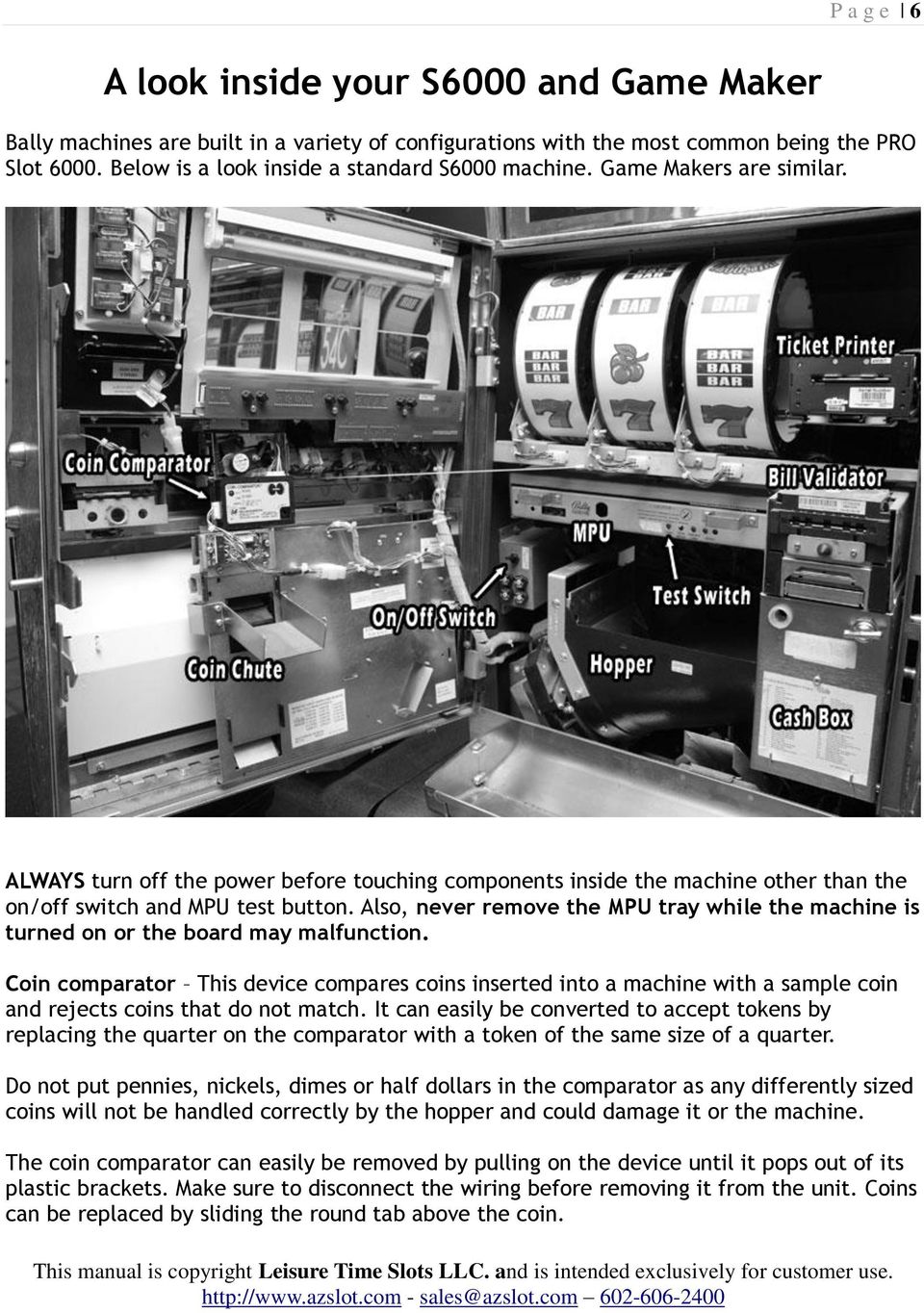
7 P a g e 7 Rotate up from the bottom carefully to remove the comparator, then pull out to remove it from the chassis. Jams can be cleared by first removing the coin, then carefully clearing the jammed coins with a small screwdriver or bobby pin. The test coin can be easily replaced with a token or another coin. The LED to the left of the serial number will light GREEN when all wires are correctly connected. Make sure the comparator is snapped in fully before feeding in additional coins. If you are looking to upgrade your coin-less Bally machine to include a comparator, please contact us for more information. Coin Hopper This bucket contains all coins accepted by the machine and pays out those coins when you choose to cash out. For machines where the ticket printer is enabled, the hopper won't pay out and will instead simply collect coins. Hoppers are necessary for all coin-enabled machines. Coinless machines normally do not ship with hoppers installed.

8 P a g e 8 To remove your hopper, first remove the slot tray by grasping each side and lifting it up, then out. Once the tray is removed, hold the handle and pull the hopper up, then out. Do not attempt to pull the hopper back without lifting it up first as the hopper is secured in place with a raised notch at the front of the hopper track. With a new machine, we recommend at least two rolls of quarters or tokens (80 coins) to get started and we offer additional tokens if needed. You can use the same tokens available from amusement parks as long as the coins match what is in the comparator and are quarter sized. Tokens are also available from Leisure Time Slots and are great for those who would prefer coins without a cash value in their machine. Bill Validator Bally Pro Slot 6000 and Game Maker machines utilize a WBA or MEI Cash flow acceptor. WBA acceptors have more memory to recognize a greater variation of bill types. Most are programmed to recognize new $5, $10 and $20 bills. They can be removed by pulling down on the hinge below the bill bezel. Once the unit is removed, it can be opened by pulling up

9 P a g e 9 on the hinge at the top of the unit. If your WBA has trouble recognizing bills, do not clean it with rubbing alcohol. Some units can be picky about the bills they accept, so try different bills first and try inserting them in different orientations. Later version WBA units should accept bills in any way. It is important to note that any tickets printed with your Bally machine will not be recognized by your WBA. If the WBA rejects bills frequently, it may dirty and require a cleaning. A maintenance manual is available here from the manufacturer's website: Cash Box Housing All Bally Machines contain a cash box. Some boxes are metal while the newer boxes are plastic. To remove your WBA cash box, first open the door, then locate the latch to the right of the box. Depress the latch, then while it is held down, pull out the cash box. The bottom of the box will easily pop open to reveal the bill stacker inside. To remove MEI cash-flow boxes, simply pull on the handle and it will pop out.

10 P a g e 10 To place the cash box back into the unit, push it in place until the release latch pops up, then down. Make sure the cash box is firmly seated and that the door is closed all the way. Otherwise, you may encounter an error code when playing your slot machine. Cash boxes of any type can be upgraded with security locks if necessary and this installation can be done in as little as ten minutes. Locks can be ordered for just the cash box, or the door and cash box separately. Contact us if interested in this option. MPU Tray This tray contains the motherboard, which contains all of the game data and logic needed to run the machine. We recommend against removing the MPU unless it is absolutely necessary to do so and the machine has been turned off beforehand. Removing the MPU while the machine is on may damage the board permanently. With Pro Slot 6000 machines, the board will be located below the reels in a horizontal position. If the machine has recently been shipped, make sure the board is firmly seated into its tray before powering on the machine. Boards sometimes become loose during shipping and it is a good idea to check the board to make sure it is pushed in all the way. All BALLY MPUs contain EPROM chips. We recommend against removing these chips unless it is specified in the manual as they are part of the machine's memory. Do not remove the batteries on the board as this will require a clear procedure before the machine can be used again. More information about this is located in the back of the manual. Ticket Printer These are always present on coinless machines and present on machines which accept coins but do not utilize the hopper for payouts. These printers are found on most Bally Pro Slot 6000 and V-Slant machines. When ready to print a ticket, simply press the 'Cash Out' button to the left of the deck panel and the printer will write a ticket. The only limitation of the ticket printer is that bill acceptors will not accept your tickets. The tickets are intended to save time from unintentionally cashing out with a lot of credits on the machine. They also make fun souvenirs for friends and family. Refilling your tickets is very simple. Remove the tickets and set them in the tray so that the 'Insert this side up' is visible, then fold the ticket over and feed it into the printer with the notch visible. The printer will pull in the ticket and accept it. The LED to the left of the tickets will then blink green. Push in the ticket printer until its lined up with the glass. You can now print tickets while cashing out. Additional slot tickets are available from Leisure Time Slots with just a call or .

11 P a g e 11 A look at Slant Top and V-Slant Machines The parts on both of these machines are identical with the exception of the monitor and a slightly different gas strut design. WARNING The top deck of a slant top is heavy and we recommend exercising caution when opening the top. The top will need to be locked into place using a gas strut. Leisure Time Slots is not liable for any bodily injury or damage to the machine when misusing the gas strut. Keep children away from slant top machines and keep the machine locked while the machine is not in use. Never service components while the machine is turned on. To open your top, open the right lock below the deck of your machine until you hear a click. Then lift the top open by lifting on the top of the coin tray. Then lift the top open to lock the gas strut in place. The orange centerpiece will slide over confirming that it is locked in place. Slowly let go of the top. To release the gas strut, place one hand on the top to support it, then push in from the left side to release it. Slowly lower the top deck into place and push on it. When you hear a click, the top deck is locked In place.

12 P a g e 12 Here is a look at a the inside of a Bally V-Slant machine. As mentioned previously, V-Slant machines also utilize a gas strut but have different steps. WARNING The top deck of a slant top is heavy and we recommend exercising caution when opening the top. The top will need to be locked into place using a gas strut. Leisure Time Slots is not liable for any bodily injury or damage to the machine when misusing the gas strut. Keep children away from slant top machines and keep the machine locked while the machine is not in use. Never service components while the machine is turned on. To open your top, open the right lock below the deck of your machine until you hear a click. Then lift the top open by lifting on the top of the coin tray. Then lift the top all the way open. To lock the top into place, pull back on center portion of the gas strut, then slowly release the top. When the top rests in place, the gas strut will be locked open. To release the gas strut, place one hand on the top to support it, then push forward on the gas strut and slowly release the top. Once the top deck is released, push down until you hear a click.

13 P a g e 13 Listed is a description of each component for both Bally V-Slant and Slant Top machines. ALWAYS turn off the power before touching components inside the machine other than the on/off switch and MPU test button. Also, never remove the MPU tray while the machine is turned on or the board may malfunction. Coin comparator This device compares coins inserted into a machine with a sample coin and rejects coins that do not match. It can easily be converted to accept tokens by replacing the quarter on the comparator with a token of the same size of a quarter. Do not put pennies, nickels, dimes or half dollars in the comparator as any differently sized coins will not be handled correctly by the hopper and could damage it or the machine. The coin comparator can easily be removed by pulling on the device until it pops out of its plastic brackets. Make sure to disconnect the wiring before removing it from the unit. Coins can be replaced by sliding the round tab above the coin. Rotate up from the bottom carefully to remove the comparator, then pull out to remove it from the chassis. Jams can be cleared by first removing the coin, then carefully clearing the jammed coins with a small screwdriver or bobby pin. The test coin can be easily replaced with a token or another coin. The LED to the left of the serial number will light GREEN when all wires are correctly connected. Make sure the comparator is snapped in fully before feeding in additional coins. If you are looking to upgrade your coin-less Bally machine to include a comparator, please contact us for more information. Coin Hopper This bucket contains all coins accepted by the machine and pays out those coins when you choose to cash out. For machines where the ticket printer is enabled, the hopper won't pay out and will instead simply collect coins. Hoppers are necessary for all coin-enabled machines. With a new machine, we recommend at least two rolls of quarters or tokens (80 coins) to get started and we offer additional tokens if needed. You can use the same tokens available from amusement parks as long as the coins match what is in the comparator and are quarter sized. Tokens are also available from Leisure Time Slots and are great for those who would prefer coins without a cash value in their machine. To access the hopper on V-Slant and Slant Top machines, please see the steps on the next page.

14 P a g e 14 Accessing the hopper requires first opening the top deck panel. See the previous two pages for instructions on locking the gas strut in place for Slant Top and V-Slant Models. Once the top deck panel is locked open, locate the front door release lever. This spring loaded lever is located at the front right of the machine near the spill bottle. Place your hand on the top of the front door, then push the release lever to the left while slowly swing the front door open. It will swing open, then off the machine. Once the door is released, the hopper will now be accessible to drop coins into. Note that the hopper cannot be removed from the machine as it is bolted into place near the cash box chassis. We recommend filling the hopper from the front door as this is the easiest way to access the hopper and avoid coins falling off the side. Remember to keep plenty of tokens or coins in the hopper at all time to avoid running out of credits during payouts. It is very important to keep the hopper free of any debris and incorrect coin types.

15 P a g e 15 Cash Box Housing All Bally Slant Top and V-slant machines include a cash box. Accessing and removing the cash box is fairly simple by following these steps. 1. Open the plate housing the bill stacker completely. It will click in place, then locate the tab to the left of the front bracket and pull it. 2. The cash box will fall backwards and rest in place. 3. Push the cash box all the way back. It will now lock into place. Swing open the metal piece in front of the cash box. 4. Pull the lever to the right of the cash box down while pulling the cash out by the handle. The cash box will now slide out and you can access your bills from the bottom of the box. 5. To return your cash box, simply drop it back into the cash box housing and push it in until you hear a click. Swing the metal piece back to its original position. 6. Locate the same tab from step one and pull it while rotating the cash box assembly completely forward. It will lock in place when the tab is released. Close the top of the bill stacker plate housing to resume play. Here's some photos of each step of the process.

16 P a g e 16

17 P a g e 17 Bill Validator Bally Slant Top and V-Slant Machines utilize a WBA validator. WBA acceptors have more memory to recognize a greater variation of bill types. Most are programmed to recognize new $5, $10 and $20 bills. They can be removed in a similar way to removing the cash box. 1. Open the plate housing the bill stacker completely. It will click in place, then locate the tab to the left of the front bracket and pull it. 2. The cash box and bill stacker will fall backwards and rest in place. Once it is in place, pull the handle of the WBA box forward until it snaps into the first notch. 3. Grab the bottom handle of the bill acceptor and rotate it down partially, then pull on the handle to remove the box. It can then be inspected and cleaned if necessary. The manufacturer's cleaning manual for WBA heads can be found at this URL: 4. To replace the bill acceptor, push it in place until heading a click, then pull on the tab referenced in step one and pull the handle of the WBA box until the entire assembly is all the way forward.

18 P a g e 18 Ticket Printer These are always present on coinless machines and present on machines which accept coins but do not utilize the hopper for payouts. These printers are found on most Bally Pro Slot 6000 and V-Slant machines. When ready to print a ticket, simply press the 'Cash Out' button to the left of the deck panel and the printer will write a ticket. The only limitation of the ticket printer is that bill acceptors will not accept your tickets. The tickets are intended to save time from unintentionally cashing out with a lot of credits on the machine. They also make fun souvenirs for friends and family. Below is a diagram of how tickets should be placed into the printer.

19 P a g e 19 MPU Tray This tray contains the motherboard, which contains all of the game data and logic needed to run the machine. We recommend against removing the MPU unless it is absolutely necessary to do so and the machine has been turned off beforehand. Removing the MPU while the machine is on may damage the board permanently. With Slant Top and V-Slant Machines, the board will be located below the reels in a vertical position on the left side. The board will only be accessible by removing the front door. If the machine has recently been shipped, make sure the board is firmly seated into its tray before powering on the machine. Boards sometimes become loose during shipping. All BALLY MPUs contain EPROM chips. We recommend against removing these chips unless it is specified in the manual as they are part of the machine's memory. Do not remove the batteries on the board as this will require a clear procedure before the machine can be used again. More information about the clear procedure is located in the back of the manual. A test switch is located on the top of the board. This switch is used during the clear process, so we recommend not tapping any of these switches.

20 P a g e 20 Slot Machine Troubleshooting and FAQ While slot machines are quite entertaining, they were originally built for casinos, so it can be challenging resolving technical issues in the unlikely event they should arise. Based on our knowledge, here is a list of common situations and how to resolve them. I recently turned the switch on and my machine does not power up. Assuming the machine is plugged into a good outlet, check to make sure that the other side of the plug is properly connected to the power box on the inside of the machine. If the machine simply does not power on, the likely culprit is a bad power supply. Contact us for a replacement. I just hit the cash out button and got a payout. Now my machine no longer functions For machines with the hopper enabled, all of the credits owed to the player must be dispensed into the coin tray before resuming play. Check to make sure enough coins are in the hopper, then close the door securely and wait for payout to resume. Once all coins are paid, the machine will behave as normal. Some slot machines have the hopper disabled in which case the machine will dispense a ticket from the printer instead. The Cash out button is being hit all too frequently when guests play my machine. Can I disable it? The cash out button can be disabled by opening the main door and locating the cash out button, then pulling out the light socket and letting it remain in place. When the button is pressed, it won't function. My bill acceptor frequently rejects bills. Is there a solution? Take note of which directions bills are being inserted. Some bill heads such as WBAs only accept bills in while they are inserted face up in the correct direction. Make sure to use crisp bills without any folds or tears. If the machine still has issues accepting bills such as fives or tens, try the older versions of the bills instead. If all else fails and no bills of any type are accepted, the bill head may be dirty. There is a special procedure for cleaning bill heads and one of our technicians would be glad to look at it. My bill acceptor ate a bill and now its stuck! How do I remove it? WBA Open the main slot door, then gently pull on the lever at the base of the bill head to pull out the transport from the machine. Look at the top of the transport for another lever, then pull up on it to flip the transport open. You can then remove the bad bill.

21 P a g e 21 MEI Cashflow Press up on the bar at the base of the Cashflow head to detach it, then inspect the transport for the bad bill. A BFFE 88FF Error code displays when I start up my Bally Machine. RAM Errors usually occur when the battery is very low, a battery replacement has recently occurred or EEPROMS have been replaced (such as after purchasing a game kit conversion.) You will need to go through a clear procedure to reset the machine to factory conditions. I am having trouble fully closing my slot door. Is there a simple solution? First, try not to force your door closed. Take a look and make sure the door is not pinching any wiring or contacting the bill bezel when closing. If the door is able to close fine but there is difficulty closing and securing the door latch, power down the machine and apply some WD-40 to the latch inside the door and wipe down the contact areas for the latch. This should lubricate the door so it is easy to close. The text on my slot tickets appears spotty and difficult to read. Is this an issue with the tickets or printer? We recommend using slot tickets stored in a cool, dry location as tickets stored in a hot or humid environment may have issues with print quality. If the issue persists with a different set of slot tickets, then it is an issue with the printer. Contact us for a printer replacement. Not every coin from the hopper is paid out before it displays a hopper empty message. Sometimes a few stray coins remain in the hopper and don't make it to the wheel before the hopper times out. This is typical and we recommend just refilling the hopper. Make sure plenty of coins are in the hopper before cashing out. Some quarters seem to be accepted while other quarters are not accepted. Is there any reason for this? Quarters older than 1965 have a different metal content so we recommend using newer quarters. We also recommend replacing the quarter in the comparator with a new one. Coins are not being accepted when dropping them into the comparator. Open the main slot door and take a look at the comparator to make sure a green light is visible. If it is not, some of the wiring likely came unplugged. On all Bally Models, there are two wires for the comparator that need to be plugged in to the harness. Double check the wire connected to the comparator as well as the wire connected to the green block below
22 P a g e 22 the comparator. Also check to make sure the coin in the comparator is legible and consistent with the coins being fed into the comparator. I recently purchased coin optics for my coin-less Bally machine and installed everything correctly. The machine still doesn't accept coins! The machine will need to be cleared and reset to factory settings with the coin comparator properly connected to the machine. A coin jam has occurred. What is the recommend fix to clear this error? We recommend first turning off the machine, then opening the main door and carefully removing the coin comparator. Any jammed coins should easily fall out. Inspect the comparator from the top and check to make sure no other coins are jammed. Jams usually occur if coins are dropped in too quickly or if an incorrect coin type happens to fall into the coin head. Replace the coin comparator carefully and turn the machine back on. One or more of my buttons appears dim or doesn't light up at all. A bulb replacement is recommended. Contact us for the appropriate bulbs. One of my buttons no longer works, but it lights up. Tap down the button and listen for a click. If there is no click, then the button became disengaged from its switch. To fix this, open the main door and power down the machine, then look at the buttons. Pop any loose buttons firmly back into place. Also check the wiring to make sure that all of the buttons are consistently wired. My fluorescent bulbs will not start at all. I've replaced the bulbs with new ones and this hasn't fixed the issue. This is most likely caused by a bad starter or ballast depending on the machine type. We recommend replacing these if changing the bulb does not solve the issue. Common starters on S6000 machines are FS-U 4-30 Watts 120V Condenser. To access the bottom glass, press in on the cylinder on the right side while placing your hand in front of the belly glass. The belly door will then pop open. To access the top glass, open the main door and press up underneath the opening in the top of the cabinet. This will trigger a latch and release the top glass. Carefully pull the top glass up from the bottom to access the fluorescent bulbs above. General Slot Machine FAQ
23 P a g e 23 Is it possible to upgrade my machine or change my game theme? Absolutely! Please us to discuss the upgrade you have in mind. We do offer game kit installations as well as conversions from coinless to coin-enabled machines. Is it legal to allow others to play my machine? Since running a slot machine for profit requires a casino license, our machines are offered for home entertainment. Arizona Law permits slot machine ownership, but individuals are not allowed to run a casino out of their home or office. I want a new machine. Can I trade in my machine for a new one? Since we normally do game kit conversions, we allow trade-ins on a case by case basis depending on the machine's condition. What are ideal storage conditions for my machine? Store your machine in a dry location at room temperature and keep it out of the sunlight. It is critical to keep the machine away from any sources of heat or moisture, especially misting systems of heating devices. Excessive sunlight can damage laminate backing, glass and reel strips. I have children and pets in the home. What should I do to protect my machine? First off, make sure the machine is on a sturdy surface and is not in a location where it can be accessed. We recommend locking machines and unplugging them when not in use as well to protect the contents inside. If at any time water is spilled on the machine, leave it alone and call us immediately. Is it advisable to reproduce reel strips if one has become damaged? We recommend against reproducing strips. Not only are there copyright issues, but inkjet printed strips bleed and discolor when moisture is present in the air. We can help you locate new reel strips for your machine.
24 P a g e 24 Clearing your BALLY Pro Slot 6000 In the event of changing your game, switching out a battery or encountering a RAM error, your Bally machine will need to be reset to factory settings. To do this, you first need two clear chips (U 28 and U 43) so contact us to receive one. Items needed Small flat head screwdriver U28 and U 43 clear chips Steps 1. Turn the machine OFF, then remove the MPU carefully. 2. Install the U 28 and U 43 clear chips in place of the U 28 and U 43 main chips. Check the notches on the clear chips to make sure they are facing the correct direction and that the pins all line up. EEPROMS can easily be removed with a small flat head screwdriver. 3. Return the MPU to the machine, then power it ON. 4. Hold in the 'Test' and 'Psuedo' buttons and while holding them in look at the door LEDS. They should read 'CH C', then 'CL C'. 5. Let go of the 'Test' and 'Psuedo' buttons and turn the machine OFF. 6. Remove the MPU carefully and reinstall the U28 and U43 main chips. Make sure the notches are facing the correct direction as indicated on the board. Again, check all of the pins to be sure the EEPROM is seated properly. 7. Return the MPU to the machine, then turn it ON and close the main door. 8. Watch the machine's front LED. Various numbers will pop up. Press the change button once, then the machine will set itself up. 9. You should now be ready to play.
Owner's Manual for IGT Slot Machines
 P a g e 1 Owner's Manual for IGT Slot Machines S-PLUS, S-2000, Vision & Reel Touch P a g e 2 S-Plus, S-2000, Vision and Reel Touch Index Introduction Page 3 Set up and safety Page 3 Identifying your machine
Inspiron 15. Service Manual. 3000 Series
 Inspiron 15 3000 Series Service Manual Computer Model: Inspiron 15 3541/Inspiron 15 3542/Inspiron 15 3543 Regulatory Model: P40F Regulatory Type: P40F001/P40F002 Notes, Cautions, and Warnings NOTE: A NOTE
PRODUCT: WASHER / WASHER-DRYER COMBO MODEL: AW 120 / AW 122 / AW 125 AWD 120 / AWD 121 / AWD 129
 PRODUCT: WASHER / WASHER-DRYER COMBO MODEL: The information included in this Splendide Repair Manual may change without notice. Please see our web site www.splendide.com/service/docs.html for updates,
HP Laser Jet 4200/4240/4250/4300/4350 Swing Plate
 HP Laser Jet 4200/4240/4250/4300/4350 Swing Plate 1 Swing Plate Assembly-RM1-0043 1 Swing Plate Kit-5851-2766 (RM1-0043 plus RM1-1091 gear) CAUTION: Fuser may be hot. Turn off printer, unplug it and allow
Auto Sentry-eXP Maintenance
 Auto Sentry-eXP Maintenance Maintenance Procedures for Auto Sentry exp Bill Dispenser Credit Card Reader Bill Acceptor Bill Dispenser Maintenance Bill Dispenser Problem / Cause Bill Dispenser Error Codes
Replacement Instructions. Warning: During this procedure, keep small parts away from children.
 apple ibook G4 Memory Card Replacement Instructions Follow the instructions in this sheet carefully. Failure to follow these instructions could damage your equipment and void its warranty. Note: Written
ROTOR LOADER OWNER S MANUAL
 ROTOR LOADER OWNER S MANUAL ROTOR LOADER OWNER S MANUAL WARNING IMPORTANT SAFETY INSTRUCTIONS AND GUIDELINES. Misuse of paintball equipment may cause serious injury or death. QUICK SET-UP GUIDE BATTERY
Express5800/120Ed. Rack Mount Kit Installation Procedures PN: 455-01607-001
 Express5800/120Ed Rack Mount Kit Installation Procedures PN: 455-01607-001 Proprietary Notice and Liability Disclaimer The information disclosed in this document, including all designs and related materials,
Inspiron 13. Service Manual. 7000 Series. Computer Model: Inspiron 13 7348 Regulatory Model: P57G Regulatory Type: P57G001
 Inspiron 13 7000 Series Service Manual Computer Model: Inspiron 13 7348 Regulatory Model: P57G Regulatory Type: P57G001 Notes, Cautions, and Warnings NOTE: A NOTE indicates important information that helps
Pachislo Slot Machine Operation Manual 1 STEP 1 OPENING THE MAIN DOOR STEP 2 GETTING POWER TO MACHINE STEP 3 REMOVING AND LOADING PAYOUT HOPPER
 Pachislo Slot Machine Operation Manual 1 Locate the payout hopper and remove it from the machine. If the hopper is connected to a wire harness be sure to disconnect it first. Also, some machines have a
ES&S AutoMARK. Pre-Election Day Checklist
 ES&S AutoMARK Pre-Election Day Checklist Rear Access Door Touch Screen Monitor Lid Compact Flash Access Door Lid Latches Key-Operated Mode Switch Keypad Ballot Feed Tray ADA Port Headphone Jacks 1 Checking
LBP-1210 Laser Printer
 LBP-1210 Laser Printer Getting Started Guide IMPORTANT: Read this manual carefully before using your printer. Save this manual for future reference. Copyright Copyright 2002 Canon Inc. All information
ipad 2 GSM Headphone Jack & SIM Slot Replacement
 ipad 2 GSM Headphone Jack & SIM Slot Replacement Replace the Headphone jack/sim slot in your ipad 2 GSM. Written By: Walter Galan INTRODUCTION Use this guide to replace a broken headphone jack or SIM card
Juice Box Stages 1&2 135&335 Installation Guide 5/10/08
 Tools Required: 8mm socket or nut driver Small flat head screwdriver Electrical tape, masking tape, or shrink tube Pep talk: Although the install looks daunting at first, once you get the learning curve
Tablet PC Tutorial for Windows 7
 VIRGINIA TECH Tablet PC Tutorial for Windows 7 Getting Started Guide Instructional Technology Team, College of Engineering Last Updated: Fall 2013 Email [email protected] if you need additional assistance
Installing the Video Input and TV Tuner Cards in a Compact Computer or a Dual PCI-Slot Tower Computer
 Installing the Video Input and TV Tuner Cards in a Compact Computer or a Dual PCI-Slot Tower Computer This booklet describes how to install the video input and TV tuner cards in a compact Macintosh computer
Replacement Instructions. Warning: During this procedure, keep small parts away from children.
 apple Power Mac G4 / Macintosh Server G4 ATA Hard Drive Replacement Instructions Follow the instructions in this sheet carefully. Failure to follow these instructions could damage your equipment and void
Service Guide. Gateway M275
 Service Guide Gateway M275 Contents Replacing Gateway M275 Components.................................... 1 Identifying the convertible tablet PC model...................................... 2 Identifying
Installing Your 960 or 980 Server into a Rackmount Cabinet
 Installing Your 960 or 980 Server into a Rackmount Cabinet 1 2 Contents Installing Your Gateway Server into a Rackmount Cabinet...1 Identifyingpartsintheaccessorykit...2 Rackmounthandlekit... 2 Rackmountrailkit...
INSTALLATION AND OPERATING INSTRUCTIONS For Model GL1 Gate Locks
 Securitron Magnalock Corp. www.securitron.com ASSA ABLOY, the global leader Tel 800.624.5625 [email protected] in door opening solutions INSTALLATION AND OPERATING INSTRUCTIONS For Model GL1 Gate
http://www.coastalamusements.com
 Nexus is a Registered Trademark of Coastal Amusements. OWNERS MANUAL 1935 Swarthmore Avenue, Lakewood, NJ 08701 (732)-905-6662 FAX (732)-905-6815 http://www.coastalamusements.com GAME DESCRIPTION Nexus
Owners & Installation Manual for the Sheridan, Mountainair, Pine Valley and Old Forge Ceiling Fan Family
 Owners & Installation Manual for the Sheridan, Mountainair, Pine Valley and Old Forge Ceiling Fan Family Part of the Kiva Lighting Family Custom Lighting and Fans Since 1992 1312 12th St NW Albuquerque,
StorTrends 3400 Hardware Guide for Onsite Support
 StorTrends 3400 Hardware Guide for Onsite Support MAN-3400-SS 11/21/2012 Copyright 1985-2012 American Megatrends, Inc. All rights reserved. American Megatrends, Inc. 5555 Oakbrook Parkway, Building 200
Compaq Presario Desktop Products. Upgrading and Servicing Guide
 Compaq Presario Desktop Products Upgrading and Servicing Guide The information in this document is subject to change without notice. Hewlett-Packard Company makes no warranty of any kind with regard to
To Purchase This Item, Visit BMI Gaming www.bmigaming.com 1-800-746-2255 + 1-561-391-7200
 Table of Contents General Description and Play 2 Game Set Up 2 Loading Balloons 2 Technical Operation-General 3 Adjusting Balloon Sensor Wire 4 Programming Instructions 4 Default Settings Troubleshooting
INSTALL/REMOVAL INSTRUCTIONS: WINDOW REGULATOR
 REMOVAL/INSTALL OF WINDOW REGULATOR (741-306) Honda Accord 2003 07 General Tech Tips: Use painter s tape rather than duct tape to secure window. It will not damage paint or leave sticky residue. A plastic
Portable Air Conditioner. OWNER S MANUAL Read these instructions before use. Model: MF08CESWW. Voltage rating: 115V~60Hz Power rating : 800W
 MODE ALARM Portable Air Conditioner OWNER S MANUAL Read these instructions before use 8 Model: MF08CESWW Voltage rating: 115V~60Hz Power rating : 800W Customer Support : 1-800-474-2147 For product inquiries
Portable Air Conditioner. OWNER S MANUAL Read these instructions before use. Model: MN12CES / MN10CESWW
 Portable Air Conditioner OWNER S MANUAL Read these instructions before use 8 Model: MN12CES / MN10CESWW Voltage rating: 120V~60Hz Power rating : 1100W (MN12CES) Power rating : 900W (MN10CESWW) Customer
Ambiente Quick Reference Manual
 Ambiente Quick Reference Manual Schaerer USA Corporation 2900 Orange Avenue, Suite 102 Signal Hill, CA 90755 Phone (888) 989-3004 Fax (562) 989-3075 TABLE OF CONTENTS Machine Overview Page 1 Button Panel
Portable Air Conditioner. OWNER S MANUAL Read these instructions before use. Model: MM14CCS. Voltage rating: 115V~60Hz Power rating : 1400W
 Portable Air Conditioner OWNER S MANUAL Read these instructions before use Model: MM14CCS Customer Support : 1-800-474-2147 Voltage rating: 115V~60Hz Power rating : 1400W For product inquiries or support
MAINTENANCE & TROUBLESHOOTING
 MAINTENANCE & TROUBLESHOOTING This section describes how to: clean the lens replace the projection lamp replace the batteries in the remote use the security lock feature troubleshoot the projector Cleaning
FOR SOFTWARE VERSION 2.6. 01. GENERAL REMARKS 2 Introduction 2 Safety 2
 FOR SOFTWARE VERSION 2.6 CONTENTS: 01. GENERAL REMARKS 2 Introduction 2 Safety 2 02. USAGE AND SETTINGS 3 Start-up instructions 3 Menu and settings 3 Menu scheme 4 Gameplay 5 Front glass and displays 5
3M SelfCheck System C-Series Optional Receipt Printer. User s Guide
 3M SelfCheck System C-Series Optional Receipt Printer User s Guide Copyright 2009 3M. All rights reserved. 3M SelfCheck System C-Series Optional Receipt Printer 78-8129-3994-6B 3M and SelfCheck are trademarks
ATS Overhead Table Shelf System INSTRUCTION MANUAL
 ATS Overhead Table Shelf System INSTRUCTION MANUAL ATS Overhead Table Shelf System Instruction Manual Warranty Newport Corporation warrants this product to be free of defects in material and workmanship
COASTAL AMUSEMENTS INC.
 TUTTI FRUITTI A skill based video game OPERATOR MANUAL VERSION TUTTI.D.1.0.1 COASTAL AMUSEMENTS INC. 1950 Swarthmore Ave, Lakewood NJ 08701 Tel. (732) 905-6662 Fax (732) 905-6815 http://www.coastalamusements.com
Processor Cage Fans, Front and Rear Replacement Instructions
 apple Mac Pro Processor Cage Fans, Front and Rear Replacement Instructions First Steps 1 Shut down computer. Note: Follow these instructions carefully. Failure to do so could damage your equipment and
Rack installation instructions
 Rack installation instructions Review the documentation that comes with the rack cabinet for safety and cabling information. Before you install the server in a rack cabinet, review the following guidelines:
Troubleshooting Guide for Dispenser Model #900172
 Troubleshooting Guide for Dispenser Model #900172 Q. The cold water is room temperature. A. There is a cold water thermostat control mounted to the back of the majority of our appliances. Simply unplug
Wash Select II to WashPay Integration Field Retrofit Installation Guide
 Wash Select II to WashPay Integration Field Retrofit Installation Guide Wash Select II Software Version 6.00 and above POS4000 Software Version 8.25 Unitec www.startwithunitec.com WASH SELECT II TO WASHPAY
USER MANUAL. Bottom Loading Bottled Water Dispenser SAVE THIS MANUAL FOR FUTURE USE. Model # 900172
 Model # 900172: Page 1 USER MANUAL Bottom Loading Bottled Water Dispenser Model # 900172 TO REDUCE THE RISK OF INJURY AND PROPERTY DAMAGE, USER MUST READ THIS MANUAL BEFORE ASSEMBLING, INSTALLING & OPERATING
Dell Inspiron 660s Owner s Manual
 Dell Inspiron 660s Owner s Manual Computer model: Inspiron 660s Regulatory model: D06S Regulatory type: D06S001 Notes, Cautions, and Warnings NOTE: A NOTE indicates important information that helps you
EasyNote TJ Series. Disassembly Manual
 EasyNote TJ Series Disassembly Manual CHAPTER3 Replacing notebook components Preventing static electricity discharge Preparing the work space Required tools Preparing the notebook Adding or replacing memory
Bottom Loading Water Dispenser
 Bottom Loading Water Dispenser Model # 601000 TO REDUCE THE RISK OF INJURY AND PROPERTY DAMAGE, USER MUST READ THIS MANUAL BEFORE ASSEMBLING, INSTALLING & OPERATING DISPENSER. SAVE THIS MANUAL FOR FUTURE
Tyan Computer. Transport PX22. Service Engineer s Manual
 Tyan Computer Transport PX22 Service Engineer s Manual 1 Precaution To read through the user manual, check all assembly and follow setup process before any operation on this server To keep paper clips,
Upgrading and Servicing Guide
 Upgrading and Servicing Guide The only warranties for Hewlett-Packard products and services are set forth in the express statements accompanying such products and services. Nothing herein should be construed
GNOME PELLET E.I. Pellet Heater Owner's Manual Installation and Operating Instructions. Please read this entire manual before installation.
 Pellet Heater Owner's Manual Installation and Operating Instructions Please read this entire manual before installation. Save these instructions. SAFETY NOTICE HEATER MUST BE PROPERLY INSTALLED AND MAINTAINED
OWNER S MANUAL Table Tennis Table Patent Pending
 OWNER S MANUAL Table Tennis Table Patent Pending Be sure to write your model number and serial number here for future reference. You can find these numbers printed on the bottom of the table. MODEL # T8179
HYDRAULIC TABLE CART 500-LB.
 HYDRAULIC TABLE CART 500-LB. OWNER S MANUAL WARNING: Read carefully and understand all MACHINE ADJUSTMENT AND OPERATION INSTRUCTIONS before operating. Failure to follow the safety rules and other basic
WINDOW REPAIR MANUAL & REFERENCE GUIDE
 WINDOW REPAIR MANUAL & REFERENCE GUIDE TABLE OF CONTENTS DOUBLE HUNG & SINGLE HUNG PARTS 4-5 CASEMENT PARTS 6 SCREEN PARTS 7-8 HOW TO REMOVE TILT-IN SASH 9 HOW TO REMOVE A BALANCE 10 HOW TO INSTALL BALANCE
Replacing Redundant AC Power Supplies in an EX4500 Ethernet Switch Without Disrupting Service
 Replacing Redundant AC Power Supplies in an EX4500 Ethernet Switch Without Disrupting Service This field replacement guide provides instructions for replacing the two AC power supplies in an EX4500 Ethernet
800-551-1943. HP Laser Jet 2400 Series Fixing Drive Side Plate Assembly Fixing Drive Side Plate Assembly- RM1-1500 page 1
 Fixing Drive Side Plate Assembly- RM1-1500 page 1 CAUTION: Fuser may be hot. Turn off printer, unplug it and allow it to sit for 20 to 30 minutes before performing these maintenance procedures. Fixing
BODY-12, Door Handle - Removal, Installation, and Adjustment
 Introduction BODY-12, Door Handle - Removal, Installation, and Adjustment There are many different procedures floating around describing how to replace the door handles on a 944 and every one of them will
User s Guide: Maintenance/Troubleshooting
 User s Guide: Maintenance/Troubleshooting Table of contents 1 Cleaning This Machine 1.1 Before getting started... 1-2 1.2 Cleaning... 1-4 1.2.1 Cleaning the outside of this machine...1-4 Control Panel...1-4
Solstice/Sky Water Pump Replacement
 Solstice/Sky Water Pump Replacement The water pump on the Solstice/Sky is starting to need replacement on some vehicles. This guide will help in replacing the water pump while the engine is still in the
HP SATA/SAS hard drive and Solid State Drive installation
 HP SATA/SAS hard drive and Solid State Drive installation This document describes how to install Serial ATA (SATA) and Serial Attached SCSI (SAS) hard drives or Solid State Drives (SSD) in an internal
DE1600 DSA E-Series iscsi Disk Arrays. Installation Manual
 DE1600 DSA E-Series iscsi Disk Arrays en Installation Manual DE1600 DSA E-Series iscsi Disk Arrays Table of Contents en 3 Table of Contents 1 Safety Precautions 4 1.1 Warning Notices 4 1.2 Caution Notices
DN1600 MEGA SPIN Installation Guide INNOVATIVE CONCEPTS IN ENTERTAINMENT INC. 10123 MAIN STREET, CLARENCE, NY 14031 SERVICE: 1-716-759-0360 FAX:
 DN600 MEGA SPIN Installation Guide INNOVATIVE CONCEPTS IN ENTERTAINMENT INC. 0 MAIN STREET, CLARENCE, NY 40 SERVICE: -76-759-060 FAX: -76-759-0884 EMAIL: [email protected] WEBSITE: www.icegame.com Your
Please read all instructions BEFORE assembly and USE of product. KEEP INSTRUCTIONS FOR FUTURE REFERENCE. Model # 1305TW. Infant car seats not included
 Please read all instructions BEFORE assembly and USE of product. KEEP INSTRUCTIONS FOR FUTURE REFERENCE. Model # 1305TW Infant car seats not included Double Snap N Go Instruction Manual Convenience through
Front Panel Board Cable Replacement Instructions
 apple Mac Pro Front Panel Board Cable Replacement Instructions First Steps 1 Shut down computer. Note: Follow these instructions carefully. Failure to do so could damage your equipment and void its warranty.
UPLIFT Height Adjustable Standing Desk (T-Frame) DIRECTIONS FOR ASSEMBLY AND USE - - ALSO - - Watch our assembly video
 UPLIFT Height Adjustable Standing Desk (T-Frame) DIRECTIONS FOR ASSEMBLY AND USE - - ALSO - - Watch our assembly video http://bit.ly/9ywwh! CAUTION MAKE SURE NO OBSTACLES ARE IN THE DESK S PATH AND ALL
IMPORTANT INSTRUCTIONS & OPERATING MANUAL. Houston 50 Inch Electric Wall Mounted Fireplace Black / White
 IMPORTANT INSTRUCTIONS & OPERATING MANUAL Houston 50 Inch Electric Wall Mounted Fireplace Black / White Model Number:MFE5050BK Model Number:MFE5050WH Read these instructions carefully before attempting
BT Contour 100 User guide
 BT Contour 100 User guide br Everyday features These are the most common features and functions, which you will probably use most often. For any other features, see the Extra features section on page
Over the past few years, management in
 Effects of Downloadable Credit Free Play on Revenue by Stephen M. Simon Over the past few years, management in many casinos have observed a decrease in the Hold percent on their casino floors. They have
16/32 Channel 1U Rack Mount CCTV Power Supply
 16/32 Channel 1U Rack Mount CCTV Power Supply Manual PH-A3224-GUQ Shown 16-Channel 32-Channel PTC PH-A1612-PUQ PH-A3224-PUQ Glass Fuse PH-A1612-GUQ PH-A3224-GUQ Industrial design 12 Amp 3 Amps per channel
Changing the SIM in a BANDIT Product s GSM Card
 encor! enetworks TM Version A.2, January 2013 2013 Encore Networks, Inc. All rights reserved. Changing the SIM in a BANDIT Product s GSM Card Wireless connections use radiofrequencies (RFs) through airwaves
SIMPLEX UNICAN LOCKS CHANGING THE CODE / COMBINATION 900 Series 1000 Series L1000 Series LP1000 Series EE1000 Series 2000 Series 2015 Series
 SIMPLEX UNICAN LOCKS CHANGING THE CODE / COMBINATION 900 Series 1000 Series L1000 Series LP1000 Series EE1000 Series 2000 Series 2015 Series 2400/2500 Series 3000 Series 3100 Series Simplex 5000 Series
BINGO TRAINING. Last Updated August 2014
 BINGO TRAINING Last Updated August 2014 Overview The Weekly Sunday Bingo at St John s is by far our greatest money maker. For the 2013-2014 Year, we made close to $225,000 in profit from Bingo. This effort
PS6500 Storage Arrays Rack Mount Instructions
 PS6500 Storage Arrays Rack Mount Instructions Part Number: R724M Rev. A01 Copyright 2010 Dell, Inc. All rights reserved. Dell is a trademark of Dell, Inc. EqualLogic is a registered trademark. All trademarks
apple Service Source PowerBook G4 (DVI) Updated 4 December 2003 2003 Apple Computer, Inc. All rights reserved.
 apple Service Source PowerBook G4 (DVI) Updated 4 December 2003 2003 Apple Computer, Inc. All rights reserved. apple Service Source Upgrades PowerBook G4 (DVI) 2003 Apple Computer, Inc. All rights reserved.
Printrbot Getting Started Guide. For models: Printrbot Plus (v2) Printrbot LC (v2) Printrbot jr
 Printrbot Getting Started Guide For models: Printrbot Plus (v2) Printrbot LC (v2) Printrbot jr Contents 4 Chapter 1: Welcome 4 Overview 4 Support 5 Chapter 2: Your Printrbot has arrived... now what? 5
In addition to information on preventing jams and what causes a paper jam, this section includes instructions for clearing the following jams:
 Phaser 4400 Laser Printer Paper Jams In addition to information on preventing jams and what causes a paper jam, this section includes instructions for clearing the following jams: Paper size jam see page
500 Series. www.irobot.com
 500 Series www.irobot.com Dear irobot Roomba owner, Welcome to the world of irobot! As an owner of an irobot Roomba Vacuum Cleaning Robot, you join a world-wide community of people who enjoy more free
Portable Air Conditioner
 Portable Air Conditioner Owner's Manual Model:3 in 1 12,000 Btu/h Series 3 Please read this owner s manual carefully before operation and retain it for future reference. CONTENTS 1. SUMMARY...1 2. PORTABLE
HP ProLiant DL165 G7 Server. Installation Instructions
 HP ProLiant DL165 G7 Server Installation Instructions Identifying server components Front panel components Figure 1 Front Panel Components / 4 3.5 HDD Item 1 Thumbscrews for rack mounting 2 Drive status
PIX-10 Electronic Time Recorder User s Guide
 PIX-10 Electronic Time Recorder User s Guide Thank you for purchasing another fine product from Amano Cincinnati, Inc. IMPORTANT The Daylight Saving Time date settings have been preset. DO NOT change the
MGB Chrome Bumper Conversion
 MGB Chrome Bumper Conversion Installation Instructions For 1974 1/2-1980 MGB This kit requires cutting, welding, and painting. Professional installation recommended. Note: Every MGB body is slightly different
Otium Gear S Smart Watch User Guide Please read the manual before use. * For further information, please visit www.otiumobile.com
 Otium Gear S Smart Watch User Guide Please read the manual before use. * For further information, please visit www.otiumobile.com 1 About this manual You can use this Gear S as a companion device to some
MAINTENANCE & TROUBLESHOOTING
 MAINTENANCE & TROUBLESHOOTING This section describes how to: clean the lens clean the fan intake filter replace the projection lamp replace the batteries in the remote control use the Kensington lock feature
Chicago Gaming Company, 4616 W. 19 th Street, Cicero, IL 60804. Copyright Chicago Gaming Company Page 1
 Chicago Gaming Company, 4616 W. 19 th Street, Cicero, IL 60804 Page 1 Table of Contents 1. Safety Notices... 2 2. FCC Compliance... 2 3. Setting-up the Game for the Desired Payout Percentage... 3 3.1.
OC-3 SERIES OF PRINTERS
 110204-003 OC-3 SERIES OF PRINTERS User Guide TABLE OF CONTENTS OC-3 Printer Views... 1 Front and back view... 1 Side views... 1 Setting up your printer... 2 Unpacking your printer... 2 Installing/removing
FUTURE CALL PICTURE CARE PHONE MODEL: FC-1007 USER MANUAL
 FUTURE CALL PICTURE CARE PHONE MODEL: FC-1007 USER MANUAL Please follow instructions for repairing if any otherwise do not alter or repair any parts of device except specified. IMPORTANT SAFETY INSTRUCTIONS
Carpet Washer. vax.co.uk VRS5W. Vax Careline: (UK) 0844 412 8455 (ROI) 1-800 928 308. Vax model number: Version 1.0
 VRS5W Powermax User Guide V1.0.qxd:V1.0 23/7/10 15:35 Page 1 Vax Careline: (UK) 0844 412 8455 (ROI) 1-800 928 308 Carpet Washer Vax model number: VRS5W instruction manual Version 1.0 Please read carefully
OASIS-PLUS 120V READ ALL INSTRUCTIONS BEFORE OPERATING READ ALL INSTRUCTIONS BEFORE OPERATING OZONE IS A POWERFUL OXIDIZER AND MUST BE USED WITH CARE
 OASIS-PLUS 120V INFORMATION & OPERATING INSTRUCTIONS READ ALL INSTRUCTIONS BEFORE OPERATING READ ALL INSTRUCTIONS BEFORE OPERATING OZONE IS A POWERFUL OXIDIZER AND MUST BE USED WITH CARE 56041852 WARNING:
Rack Installation. Unpacking the System. Choosing a Setup Location. General Server Precautions. Barracuda Appliances
 This set of instructions applies to racking and rail kit installation for 6XX and above. The Rack Mounting Instructions section below provides information on installing the SC825 chassis into a rack unit
HP Pavilion All-in-One MS200 series PC. Upgrading and Servicing Guide. Printed in
 HP Pavilion All-in-One MS200 series PC *579907-001* *579907-001* Printed in Upgrading and Servicing Guide Replacing a Wireless Keyboard or Mouse...2 Before You Begin... 2 Replacing the Keyboard or Mouse...
WRG EVENT CODE LISTING
 WRG EVENT CODE LISTING Code Meaning Required Action 1001 Administrator entered the program 1002 Administrator got the balance 1003 Administrator set the balance 1004 Administrator added to the balance
Copyright. Trademarks
 Copyright 2015 Sanford, L.P. All rights reserved. No part of this document or the software may be reproduced or transmitted in any form or by any means or translated into another language without the prior
Cascade Profiler Fibre Channel SAN Attached Storage Installation Guide. Version 8.2 March 2009
 Cascade Profiler Fibre Channel SAN Attached Storage Installation Guide Version 8.2 March 2009 Trademarks Riverbed, the Riverbed logo, Riverbed Cascade, and Cascade are trademarks of Riverbed Technology,
User s Guide. Oreck Air Purifier with HEPA Filtration. Important! Read this manual carefully, and keep for future reference.
 User s Guide Oreck Air Purifier with HEPA Filtration Important! Read this manual carefully, and keep for future reference. Enjoy Congratulations on your purchase of the Oreck Air Purifier with HEPA Filtration.
BT Contour 200 User guide
 BT Contour 200 User guide Everyday features These are the most common features and functions, which you will probably use most often. For any other features, see the Extra features section on page 10.
Building A Computer: A Beginners Guide
 Building A Computer: A Beginners Guide Mr. Marty Brandl The following was written to help an individual setup a Pentium 133 system using an ASUS P/I- P55T2P4 motherboard. The tutorial includes the installation
FUEL CELL CAR SCIENCE KIT ASSEMBLY GUIDE. Battery operation instructions:
 FUEL CELL CAR SCIENCE KIT ASSEMBLY GUIDE Battery operation instructions: 1. The removing and inserting of batteries is to be conducted by the adults only. Unscrew the screw holding the battery pack s cover
1006 Administrator printed a copy of the receipt for the last customer transaction
 Event/Error Codes 1001 Administrator entered the program 1002 Administrator got the balance 1003 Administrator set the balance 1004 Administrator added to the balance 1005 Administrator subtracted from
Phoenix Body Fat Scale Manual
 Phoenix Body Fat Scale Manual Low Batteries & bad battery connections are the #1 cause of scale malfunction and inaccuracy! We test all of our scale returns from consumers. Fully 60% of consumer returns
Troubleshooting PCs What to do when you don't know what to do!
 Troubleshooting PCs What to do when you don't know what to do! Prepared By: Helpdesk AIT-ITServ ITServ Troubleshooting techniques: Check the Cable Connections First. Check the Cable Connections First.
Under Desk Ellip.cal Model # 3015-002
 Under Desk Ellip.cal Model # 3015-002 www.thefitdesk.com 1 BEFORE RETURNING THIS PRODUCT TO PLACE OF PURCHASE CONTACT US FOR ASSEMBLY INSTRUCTIONS, MISSING PARTS, OR FOR HELP WITH A QUESTION at : [email protected]
Introduction... 3 Setting the Combination... 4 Securing the DEFCON CL... 5 Locking the DEFCON CL to your Notebook Computer...
 notebook security DEFCON CL cable lock USER GUIDE Visit our Website at www.targus.com Features and specifications subject to change without notice. 2006 Targus Group International, Inc. and Targus, Inc.
Name of Equipment Silver King Model SKMCD1P/C1. This equipment chapter is to be inserted in the appropriate section of the Equipment Manual.
 Name of Equipment Silver King Model SKMCD1P/C1 This equipment chapter is to be inserted in the appropriate section of the Equipment Manual. Manufactured exclusively for McDonald s By Silver King Refrigeration,