
Configuring IPSec VPN Tunnel between NetScreen Remote Client and RN300
|
|
|
- Cody O’Connor’
- 10 years ago
- Views:
Transcription
1 Configuring IPSec VPN Tunnel between NetScreen Remote Client and RN300 This example explains how to configure pre-shared key based simple IPSec tunnel between NetScreen Remote Client and RN300 VPN Gateway. A laptop with Netscreen remote client software can be used from home or road to connect to branch office RN300 VPN gateway. The secure tunnel can be established between laptop and central/branch office over the Internet or any public network that uses IPSec. Required 1. RN300 VPN Gateway device should be running RanchOS or above 2. Ensure VPN Feature is enabled on RN300 device. This can be verified from System Configuration Image Configuration Version Info screen. VPN Basic or VPN Advanced must be listed in Features Enabled column. 3. Install and configure RN300 device at branch office. Create two Zones (Internet and Local). Connect Internet zone ( subnet) to public router and Local zone ( subnet) to your protected network. Configure required firewall security policies for systems from LAN to access Internet services such as http, https, dns, ftp etc. 4. Install NetScreen Remote client software on home laptop. A laptop running with Windows 2000 professional and NetScreen Remote Client with Security Policy Editor (Build 8) version is used in this example. Ensure that you have internet connectivity and can reach public interface ( ) of branch office RN300. Ensure the connectivity between Site A and Site B RN300 devices. 5. Admin privileges on both RN300 and Laptop Network Diagram

2 Background IPSec is a set of open standard protocols to support secure exchange of data packets at IP layer. It provides data confidentiality, data integrity, and data origin authentication between IPSec peers. There are two Internet Key Exchange (IKE) phases. Step by Step configuration on branch office RN300 Briefly: a) Configure VPN Global configuration. MY IKE ID is defined to self identify the RN unit. Ex. IP Address for Site A (VPN Global Config) b) Define Phase 2 profile (VPN Tunnel Setup Phase 2 proposals) c) Define Remote to Local Profile (VPN Tunnel Setup Tunnel Config) d) Create Tunnel & Phase 1 (VPN Tunnel Setup Tunnel Config) e) Define Local to Remote Policies and associate them to Phase 2 proposals (VPN Tunnel Setup Tunnel Config) f) Edit each Local to Remote Policy and define traffic rules that were originating from local subnets (from behind Site A) to remote subnets (to behind Site B) (VPN Tunnel Setup Tunnel Config) g) Define traffic rules that were originating from remote subnets (from behind Site B) to local subnets (to behind Site A) (Firewall configuration Firewall rules to Security profiles) 1. Login to web GUI 2. Go to VPN Global Config menu
3 3. Under Negotiation tab, select IP Address as ID Type and enter Select Allow NAT Traversal

4 4. Go to VPN Tunnel Set Up Tunnel Config menu 5. Click on Remote To Local Profile to create policy profile for traffic to flow from remote Laptop to branch office local site. This profile contains all firewall rules for hosts from Laptop (Remote) those can access branch office (Local) resources. Enter following details and click on Add Profile Profile Name NSRemote-to-Local Description NSRemote-to-Local

5 Click on Done to close this window 6. Select the following options in the following menu and click Save Configuration
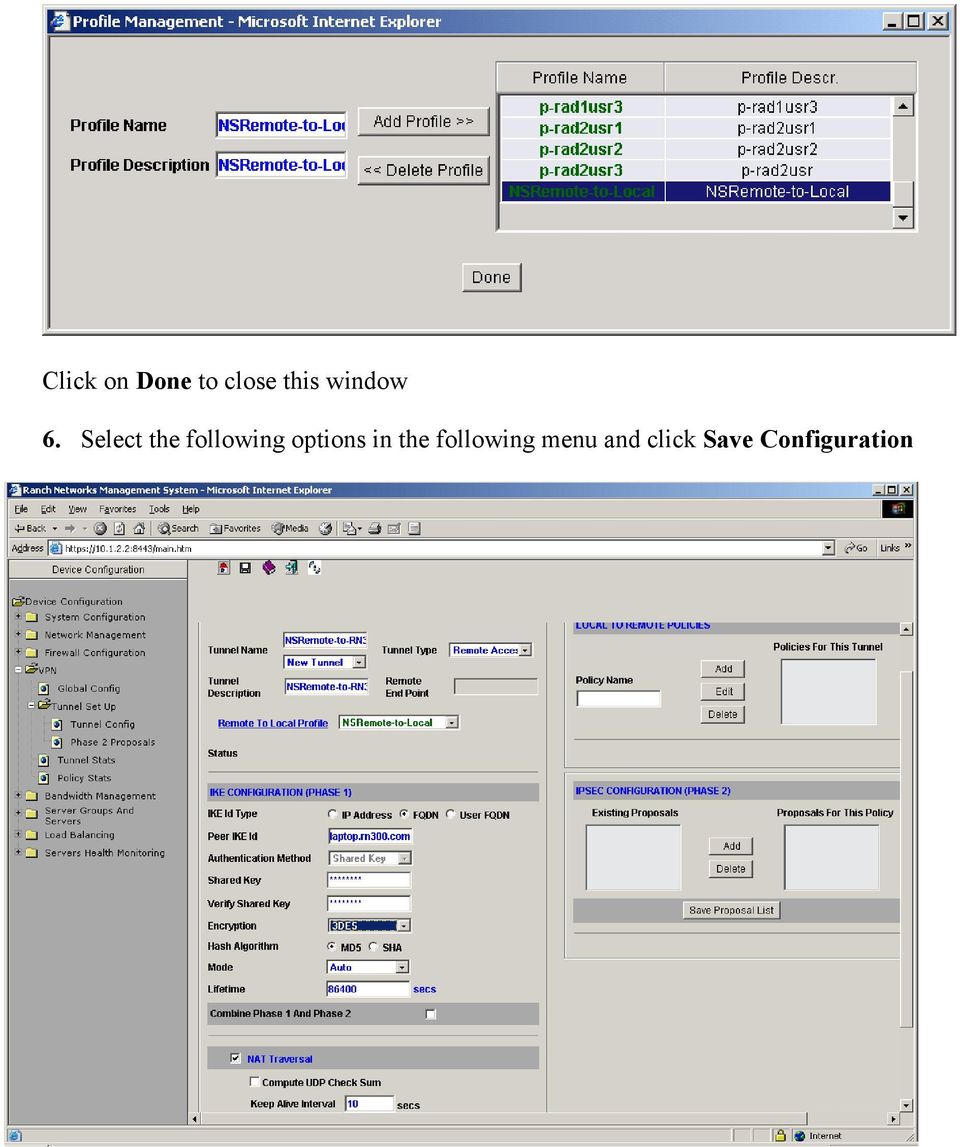
6 Tunnel Name NSRemote-to-RN300 Tunnel Description NSRemote-to-RN300 Tunnel Type Remote Access Remote End Point User Profile Id NSRemote-to-Local IKE Configuration (Phase 1) IKE ID Type FQDN Peer IKE ID laptop.rn300.com Authentication Method Shared Key Shared Key secretpassword Verify Shared key secretpassword Encryption 3DES Hash Algorithm MD5 Mode Auto Life time sec Continue Phas1 & 2 Uncheck NAT Traversal Check Compute UDP Checksum Uncheck Keep Alive interval 10 secs 7. Now, we need to define policies for traffic originating from Latop (Remote site) and coming to branch office RN300 (Local site) Go to Firewall Configuration Security Profiles menu
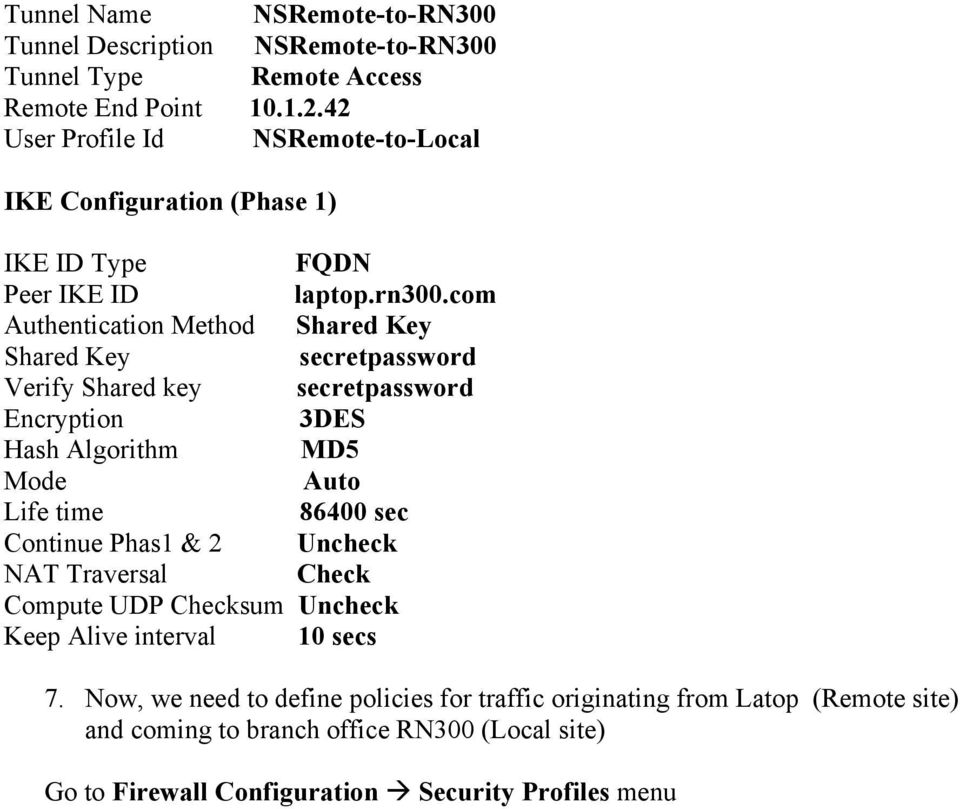
7 Browse for NSRemote-to-RN300 profile that was created in Tunnel configuration
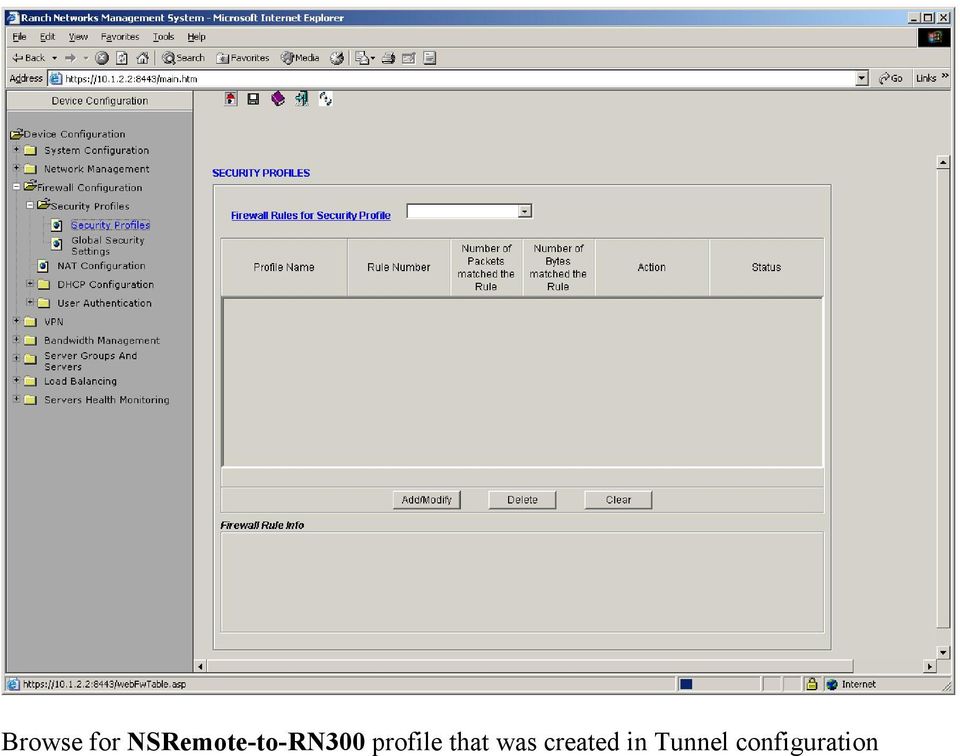
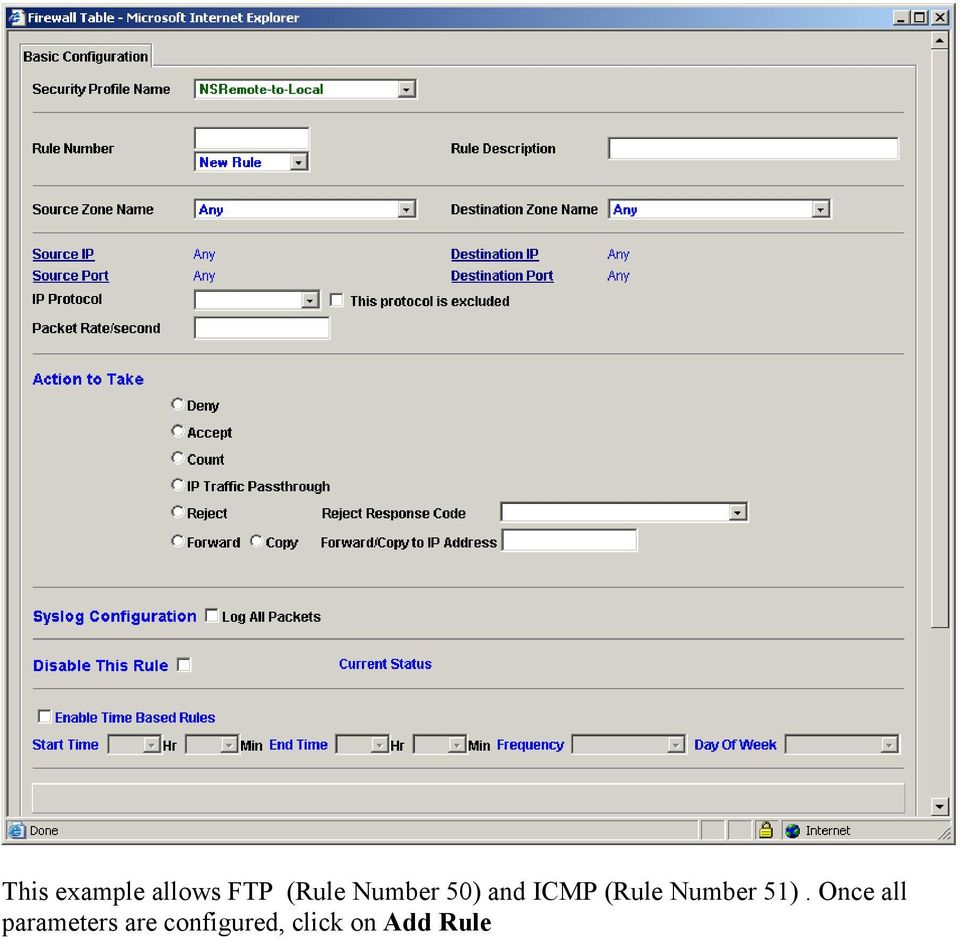
8 By default, all traffic is blocked from remote site to local site trough tunnel. Click on Add/Modify button to create a number of firewall rules.

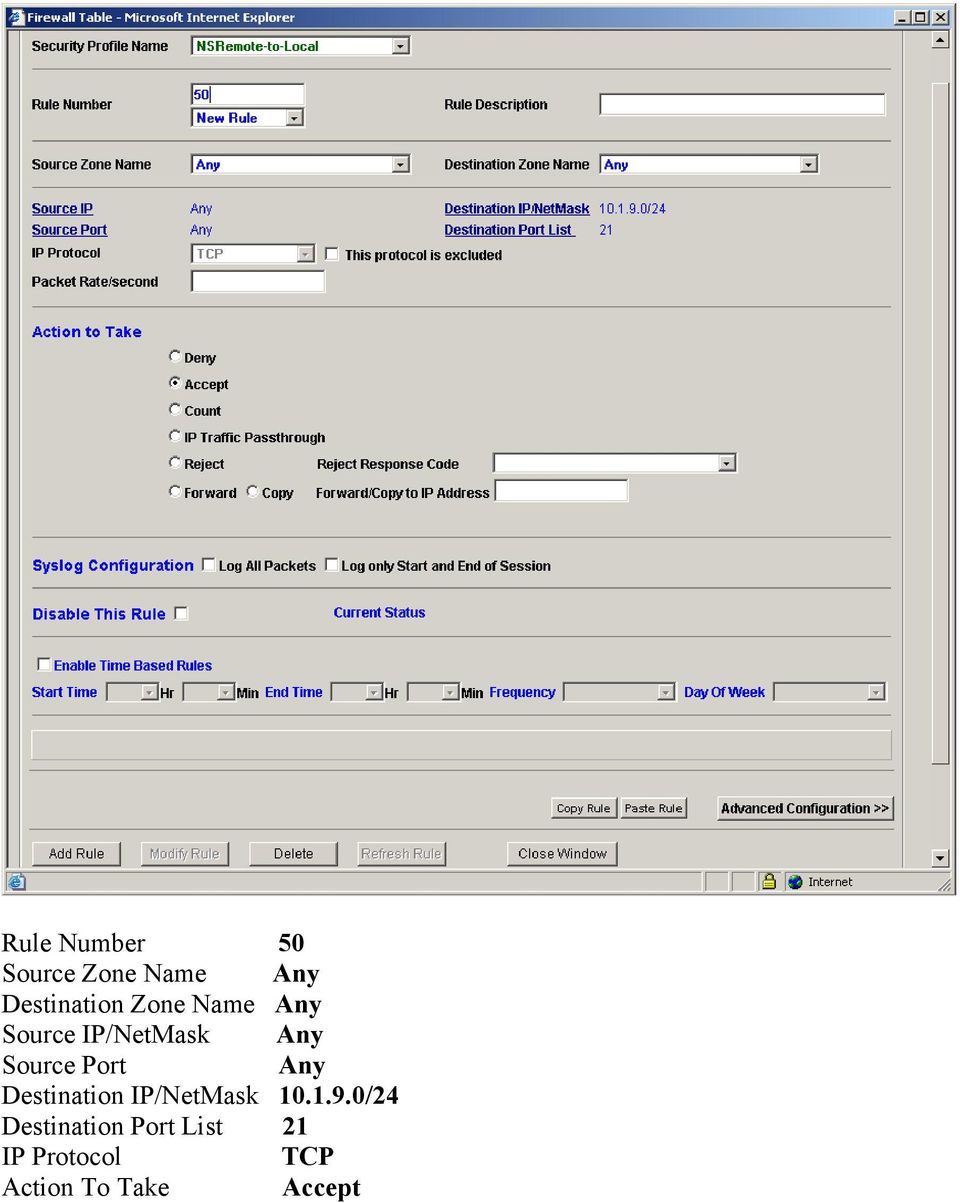
9 This example allows FTP (Rule Number 50) and ICMP (Rule Number 51). Once all parameters are configured, click on Add Rule
10 Rule Number 50 Source Zone Name Any Destination Zone Name Any Source IP/NetMask Any Source Port Any Destination IP/NetMask /24 Destination Port List 21 IP Protocol TCP Action To Take Accept
11 Rule Number 51 Source Zone Name Any Destination Zone Name Any Source IP/NetMask Any Source Port Any Destination IP/NetMask /24 Destination Port List Any IP Protocol ICMP Action To Take Accept

12 Step by Step configuration on Laptop (NetScreen Remote Client) Briefly: a) Configure VPN Global configuration. MY IKE ID is defined to self identify the RN unit. Ex. IP Address for Site B (VPN Global Config) b) Define Phase 2 profile (VPN Tunnel Setup Phase 2 proposals) c) Define Remote to Local Profile (VPN Tunnel Setup Tunnel Config) d) Create Tunnel & Phase 1 (VPN Tunnel Setup Tunnel Config) e) Define Local to Remote Policies and associate them to Phase 2 proposals (VPN Tunnel Setup Tunnel Config) f) Edit each Local to Remote Policy and define traffic rules that were originating from local subnets (from behind Site B) to remote subnets (to behind Site A) (VPN Tunnel Setup Tunnel Config) g) Define traffic rules that were originating from remote subnets (from behind Site A) to local subnets (to behind Site B) (Firewall configuration Firewall rules to Security profiles) 1. Install Netscreen Remote client software (Security Policy Editor Build 8) on Latpop 2. Create New Connection with following parameters

13 Connection Security Secure Remote Party Identity and Addressing ID Type IP Address Range From To Protocol All Connect using Secure Gateway Tunnel ID Type IP Address Go to My Identity menu

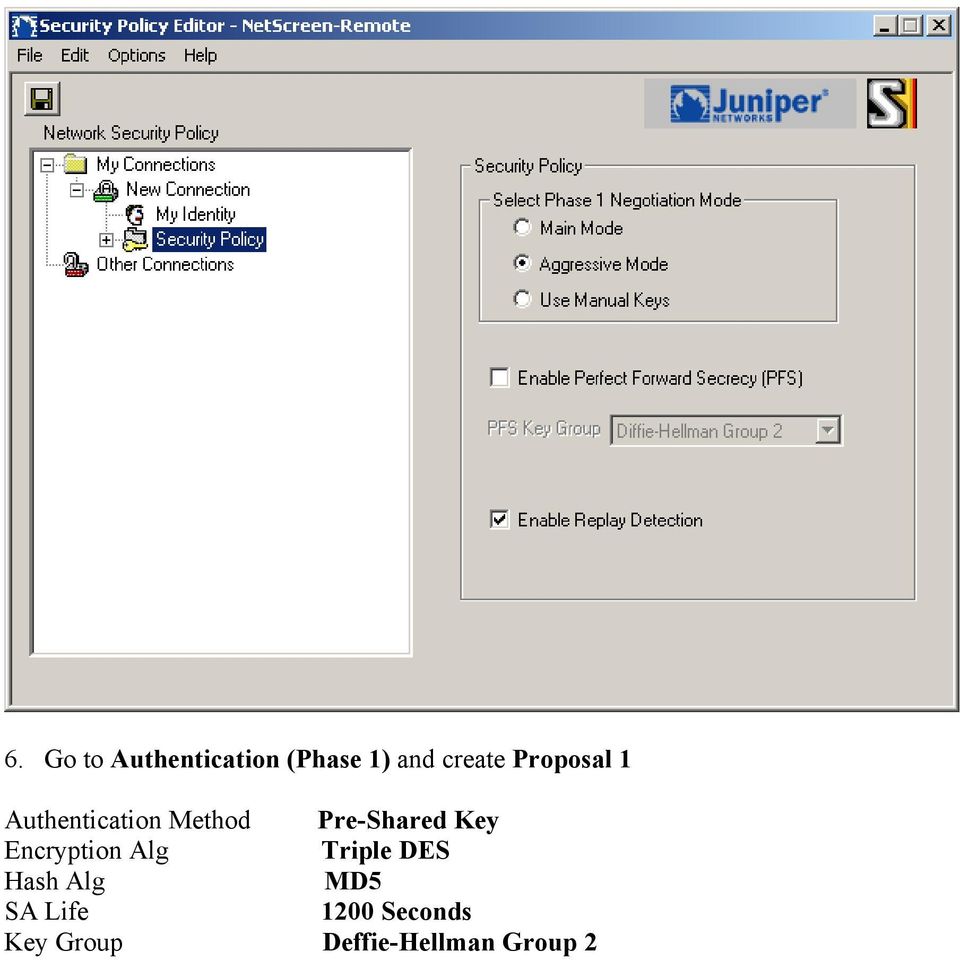
14 Select Certificate ID Type None Domain Name Laptop.rn300.com 4. Click on Pre-Shared key button, enter secrepassword and click OK 5. Go to Security Policy, select Aggressive Mode and check Enable Replay Protection

15 6. Go to Authentication (Phase 1) and create Proposal 1 Authentication Method Pre-Shared Key Encryption Alg Triple DES Hash Alg MD5 SA Life 1200 Seconds Key Group Deffie-Hellman Group 2
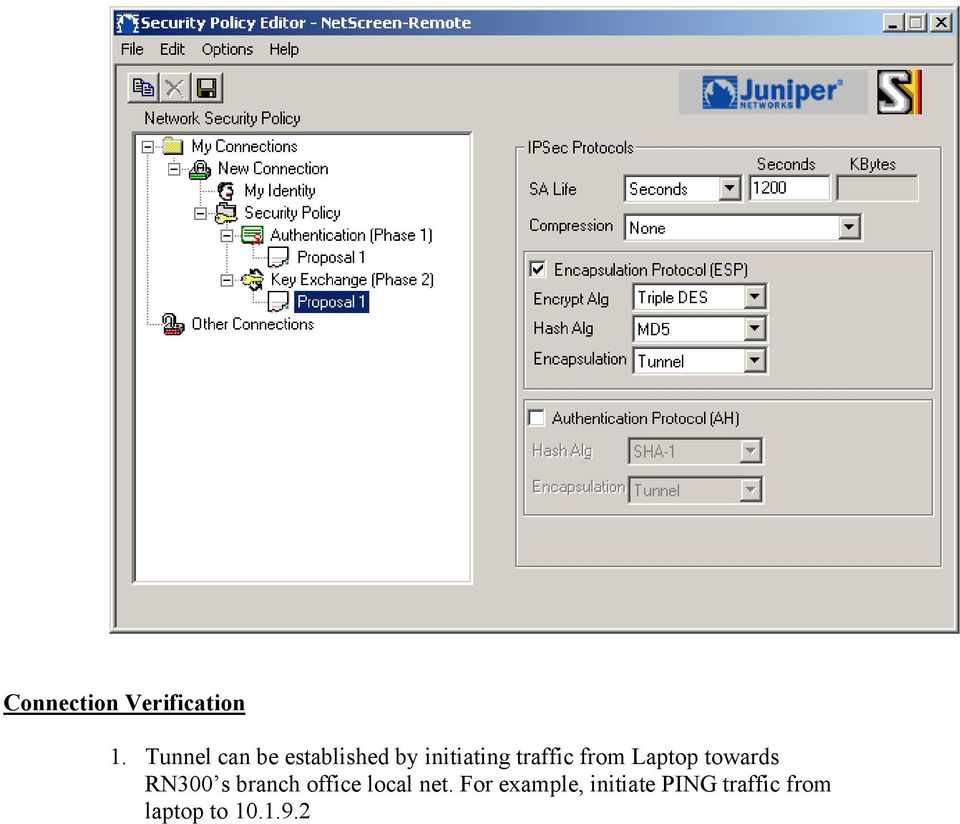
16 7. Go to Key Exchange (Phase 2) menu and create Proposal 1 SA Life 1200 Seconds Compression None Encapsulation Protocol (ESP) Check Encrypt Alg Triple DES Hash Alg MD5 Encapsulation Tunnel

17 Connection Verification 1. Tunnel can be established by initiating traffic from Laptop towards RN300 s branch office local net. For example, initiate PING traffic from laptop to
18 2. FTP data transfer also will work as this service is allowed in NSRemoteto-RN300 profile. If you require other services such as telnet, ssh or http etc, you need to define and allow in NSRemote-to-RN300 profile 3. Ensure that the traffic is secure and encrypted by capturing data packets between laptop and RN300. We can do this by placing a hub in between and capture data packets on a ethereal host as shown followed
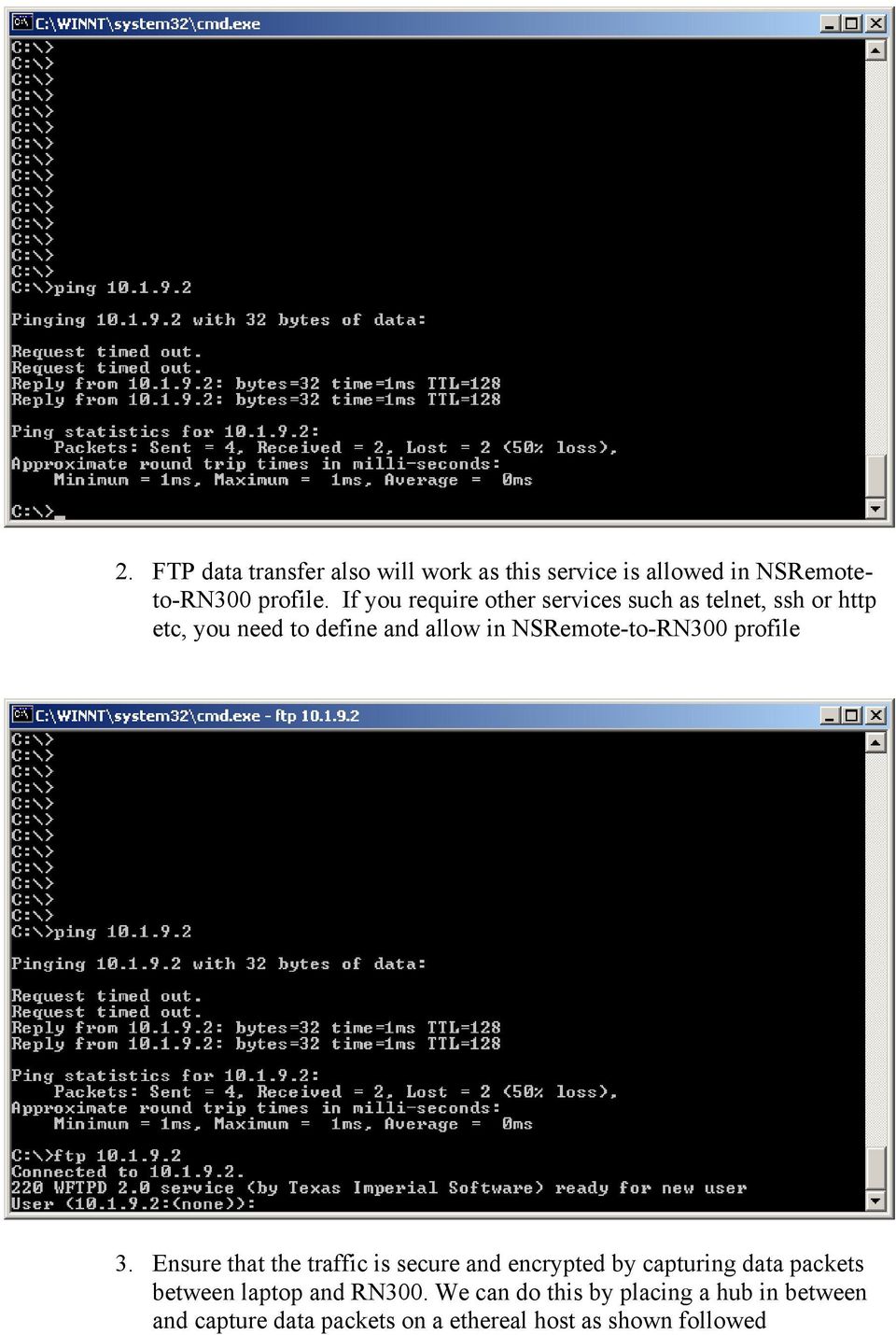
19 The packet capture available is as followed. Note that traffic from laptop ( ) to any other host ( ) is clear text where as traffic to brach office network (host ) is encapsulated and encrypted in IP ESP packets.

Configuring TheGreenBow VPN Client with a TP-LINK VPN Router
 Configuring TheGreenBow VPN Client with a TP-LINK VPN Router This chapter describes how to configure TheGreenBow VPN Client with a TP-LINK router. This chapter includes the following sections: Example
How to configure VPN function on TP-LINK Routers
 How to configure VPN function on TP-LINK Routers 1. VPN Overview... 2 2. How to configure LAN-to-LAN IPsec VPN on TP-LINK Router... 3 3. How to configure GreenBow IPsec VPN Client with a TP-LINK VPN Router...
How to configure VPN function on TP-LINK Routers
 How to configure VPN function on TP-LINK Routers 1. VPN Overview... 2 2. How to configure LAN-to-LAN IPsec VPN on TP-LINK Router... 3 3. How to configure GreenBow IPsec VPN Client with a TP-LINK VPN Router...
ISG50 Application Note Version 1.0 June, 2011
 ISG50 Application Note Version 1.0 June, 2011 Scenario 1 - ISG50 is placed behind an existing ZyWALL 1.1 Application Scenario For companies with existing network infrastructures and demanding VoIP requirements,
Configure VPN between ProSafe VPN Client Software and FVG318
 Configure VPN between ProSafe VPN Client Software and FVG318 The following configuration is tested with: NETGEAR FVG318 with firmware version 1.0.41 NETGEAR ProSafe VPN Client Software version 10.5.1 Configure
Configure an IPSec Tunnel between a Firebox Vclass & a Check Point FireWall-1
 Configure an IPSec Tunnel between a Firebox Vclass & a Check Point FireWall-1 This document describes how to configure an IPSec tunnel between a WatchGuard Firebox Vclass appliance (Vcontroller version
Configure IPSec VPN Tunnels With the Wizard
 Configure IPSec VPN Tunnels With the Wizard This quick start guide provides basic configuration information about setting up IPSec VPN tunnels by using the VPN Wizard on the ProSafe Wireless-N 8-Port Gigabit
How To Set Up A Vpn Tunnel Between Winxp And Zwall On A Pc 2 And Winxp On A Windows Xp 2 On A Microsoft Gbk2 (Windows) On A Macbook 2 (Windows 2) On An Ip
 WINXP VPN to ZyWALL Tunneling 1. Setup WINXP VPN 2. Setup ZyWALL VPN This page guides us to setup a VPN connection between the WINXP VPN software and ZyWALL router. There will be several devices we need
VPN Wizard Default Settings and General Information
 1. ProSecure UTM Quick Start Guide This quick start guide describes how to use the IPSec VPN Wizard to configure IPSec VPN tunnels on the ProSecure Unified Threat Management (UTM) Appliance. The IP security
Chapter 4 Virtual Private Networking
 Chapter 4 Virtual Private Networking This chapter describes how to use the virtual private networking (VPN) features of the FVL328 Firewall. VPN tunnels provide secure, encrypted communications between
Use Shrew Soft VPN Client to connect with IPSec VPN Server on RV130 and RV130W
 Article ID: 5037 Use Shrew Soft VPN Client to connect with IPSec VPN Server on RV130 and RV130W Objective IPSec VPN (Virtual Private Network) enables you to securely obtain remote resources by establishing
Fireware How To VPN. Introduction. Is there anything I need to know before I start? Configuring a BOVPN Gateway
 Fireware How To VPN How do I set up a manual branch office VPN tunnel? Introduction You use Branch Office VPN (BOVPN) with manual IPSec to make encrypted tunnels between a Firebox and a second IPSec-compliant
Chapter 8 Virtual Private Networking
 Chapter 8 Virtual Private Networking This chapter describes how to use the virtual private networking (VPN) features of the FWG114P v2 Wireless Firewall/Print Server. VPN tunnels provide secure, encrypted
VPN Configuration of ProSafe VPN Lite software and NETGEAR ProSafe Router:
 Page 1 of 8 VPN Configuration of ProSafe VPN Lite software and NETGEAR ProSafe Router: This document will guide you on how to create IKE and auto-vpn policies for your ProSafe NETGEAR Router, as well as
IPSec Pass through via Gateway to Gateway VPN Connection
 IPSec Pass through via Gateway to Gateway VPN Connection 1. Connection 2 In the diagram depicted below, the left side router represents the SME200/SME100/SME50 in HQ and right side represents the PC installed
VPN. VPN For BIPAC 741/743GE
 VPN For BIPAC 741/743GE August, 2003 1 The router supports VPN to establish secure, end-to-end private network connections over a public networking infrastructure. There are two types of VPN connections,
UTM - VPN: Configuring a Site to Site VPN Policy using Main Mode (Static IP address on both sites) i...
 Page 1 of 10 Question/Topic UTM - VPN: Configuring a Site to Site VPN Policy using Main Mode (Static IP address on both sites) in SonicOS Enhanced Answer/Article Article Applies To: SonicWALL Security
Establishing a VPN tunnel to CNet CWR-854 VPN router using WinXP IPSec client
 Establishing a VPN tunnel to CNet CWR-854 VPN router using WinXP IPSec client Generally speaking, remote users need to use a VPN client software for establishing a VPN connection to their home/work router
Configuring an IPSec Tunnel between a Firebox & a Check Point FireWall-1
 Configuring an IPSec Tunnel between a Firebox & a Check Point FireWall-1 This document describes how to configure an IPSec tunnel with a WatchGuard Firebox II or Firebox III (software version 4.5 or later)
Netopia 3346. TheGreenBow IPSec VPN Client. Configuration Guide. http://www.thegreenbow.com. [email protected]
 TheGreenBow IPSec VPN Client Configuration Guide Netopia 3346 WebSite: Contact: http://www.thegreenbow.com [email protected] IPSec VPN Router Configuration Property of TheGreenBow Sistech SA - Sistech
Configuring SSH Sentinel VPN client and D-Link DFL-500 Firewall
 Configuring SSH Sentinel VPN client and D-Link DFL-500 Firewall I. Configuring D-Link DFL-500 Firewall 1. Connect your computer to the internal port of the DFL-500 Firewall 2. Change the computer IP address
Chapter 6 Virtual Private Networking
 Chapter 6 Virtual Private Networking This chapter describes how to use the virtual private networking (VPN) features of the FVX538 VPN firewall. VPN tunnels provide secure, encrypted communications between
Create a VPN on your ipad, iphone or ipod Touch and SonicWALL NSA UTM firewall - Part 1: SonicWALL NSA Appliance
 Create a VPN on your ipad, iphone or ipod Touch and SonicWALL NSA UTM firewall - Part 1: SonicWALL NSA Appliance This article will easily explain how to configure your Apple ipad, iphone or ipod Touch
Chapter 6 Basic Virtual Private Networking
 Chapter 6 Basic Virtual Private Networking This chapter describes how to use the virtual private networking (VPN) features of the FVG318 wireless VPN firewall. VPN communications paths are called tunnels.
Cisco RV 120W Wireless-N VPN Firewall
 TheGreenBow IPSec VPN Client Configuration Guide Cisco RV 120W Wireless-N VPN Firewall WebSite: Contact: http://www.thegreenbow.com [email protected] IPSec VPN Router Configuration Property of TheGreenBow
Virtual Private Network VPN IPSec Testing: Functionality Interoperability and Performance
 Virtual Private Network VPN IPSec Testing: Functionality Interoperability and Performance Johnnie Chen Project Manager of Network Security Group Network Benchmarking Lab Network Benchmarking Laboratory
Chapter 5 Virtual Private Networking Using IPsec
 Chapter 5 Virtual Private Networking Using IPsec This chapter describes how to use the IPsec virtual private networking (VPN) features of the ProSafe Dual WAN Gigabit Firewall with SSL & IPsec VPN to provide
TheGreenBow IPsec VPN Client. Configuration Guide Cisco RV325 v1. Website: www.thegreenbow.com Contact: [email protected]
 TheGreenBow IPsec VPN Client Configuration Guide Cisco RV325 v1 Website: www.thegreenbow.com Contact: [email protected] Table of Contents 1 Introduction... 3 1.1 Goal of this document... 3 1.2 VPN
Juniper NetScreen 5GT
 TheGreenBow IPSec VPN Client Configuration Guide Juniper NetScreen 5GT WebSite: Contact: http://www.thegreenbow.com [email protected] Configuration Guide written by: Writer: Connected Team Company:
APNIC elearning: IPSec Basics. Contact: [email protected]. esec03_v1.0
 APNIC elearning: IPSec Basics Contact: [email protected] esec03_v1.0 Overview Virtual Private Networks What is IPsec? Benefits of IPsec Tunnel and Transport Mode IPsec Architecture Security Associations
CREATING AN IKE IPSEC TUNNEL BETWEEN AN INTERNET SECURITY ROUTER AND A WINDOWS 2000/XP PC
 CREATING AN IKE IPSEC TUNNEL BETWEEN AN INTERNET SECURITY ROUTER AND A WINDOWS 2000/XP PC 1 Introduction Release date: 11/12/2003 This application note details the steps for creating an IKE IPSec VPN tunnel
Netgear ProSafe VPN firewall (FVS318 or FVM318) to Cisco PIX firewall
 Netgear ProSafe VPN firewall (FVS318 or FVM318) to Cisco PIX firewall This document is a step-by-step instruction for setting up VPN between Netgear ProSafe VPN firewall (FVS318 or FVM318) and Cisco PIX
Firewall Defaults and Some Basic Rules
 Firewall Defaults and Some Basic Rules ProSecure UTM Quick Start Guide This quick start guide provides the firewall defaults and explains how to configure some basic firewall rules for the ProSecure Unified
Gateway to Gateway VPN Connection
 Gateway to Gateway VPN Connection 1. Connection Scenario 4 In the diagram depicted below, the left side router represents the SME200/SME100/SME50 in HQ and right side router represents the SME200/SME100/SME50
V310 Support Note Version 1.0 November, 2011
 1 V310 Support Note Version 1.0 November, 2011 2 Index How to Register V310 to Your SIP server... 3 Register Your V310 through Auto-Provision... 4 Phone Book and Firmware Upgrade... 5 Auto Upgrade... 6
HOWTO: How to configure IPSEC gateway (office) to gateway
 HOWTO: How to configure IPSEC gateway (office) to gateway How-to guides for configuring VPNs with GateDefender Integra Panda Security wants to ensure you get the most out of GateDefender Integra. For this
Apliware firewall. TheGreenBow IPSec VPN Client. Configuration Guide. http://www.thegreenbow.com [email protected]
 TheGreenBow IPSec VPN Client Configuration Guide Apliware firewall WebSite: Contact: http://www.thegreenbow.com [email protected] Table of contents 1 Introduction... 0 1.1 Goal of this document...
How To Configure Apple ipad for Cyberoam L2TP
 How To Configure Apple ipad for Cyberoam L2TP VPN Connection Applicable to Version: 10.00 (All builds) Layer 2 Tunneling Protocol (L2TP) can be used to create VPN tunnel over public networks such as the
Ingate Firewall. TheGreenBow IPSec VPN Client Configuration Guide. http://www.thegreenbow.com [email protected]
 TheGreenBow IPSec VPN Client Configuration Guide Ingate Firewall WebSite: Contact: http://www.thegreenbow.com [email protected] IPSec VPN Router Configuration Property of TheGreenBow Sistech SA -
Windows XP VPN Client Example
 Windows XP VPN Client Example Technote LCTN0007 Proxicast, LLC 312 Sunnyfield Drive Suite 200 Glenshaw, PA 15116 1-877-77PROXI 1-877-777-7694 1-412-213-2477 Fax: 1-412-492-9386 E-Mail: [email protected]
Configuring a Check Point FireWall-1 to SOHO IPSec Tunnel
 Configuring a Check Point FireWall-1 to SOHO IPSec Tunnel This document describes the procedures required to configure an IPSec VPN tunnel between a WatchGuard SOHO or SOHO tc and a Check Point FireWall-1.
Cisco SA 500 Series Security Appliance
 TheGreenBow IPSec VPN Client Configuration Guide Cisco SA 500 Series Security Appliance This guide applies to the following models: Cisco SA 520 Cisco SA 520W Cisco SA 540 WebSite: Contact: http://www.thegreenbow.de
LAN-Cell to Cisco Tunneling
 LAN-Cell to Cisco Tunneling Page 1 of 13 LAN-Cell to Cisco Tunneling This Tech Note guides you through setting up a VPN connection between a LAN-Cell and a Cisco router. As the figure below shows, the
Configuring IPsec VPN with a FortiGate and a Cisco ASA
 Configuring IPsec VPN with a FortiGate and a Cisco ASA The following recipe describes how to configure a site-to-site IPsec VPN tunnel. In this example, one site is behind a FortiGate and another site
How To Industrial Networking
 How To Industrial Networking Prepared by: Matt Crites Product: Date: April 2014 Any RAM or SN 6xxx series router Legacy firmware 3.14/4.14 or lower Subject: This document provides a step by step procedure
How To Establish IPSec VPN connection between Cyberoam and Mikrotik router
 How To Establish IPSec VPN connection between Cyberoam and Mikrotik router Applicable Version: 10.00 onwards Scenario Establish IPSec VPN connection between Cyberoam and Mikrotik router using Preshared
Micronet SP881. TheGreenBow IPSec VPN Client Configuration Guide. http://www.thegreenbow.com [email protected]
 TheGreenBow IPSec VPN Client Configuration Guide Micronet SP881 WebSite: Contact: http://www.thegreenbow.com [email protected] IPSec VPN Router Configuration Property of TheGreenBow Sistech SA -
Planet CS-1000. TheGreenBow IPSec VPN Client. Configuration Guide. http://www.thegreenbow.com [email protected]
 TheGreenBow IPSec VPN Client Configuration Guide Planet CS-1000 WebSite: Contact: http://www.thegreenbow.com [email protected] IPSec VPN Router Configuration Property of TheGreenBow Sistech SA -
Laboratory Exercises V: IP Security Protocol (IPSec)
 Department of Electronics Faculty of Electrical Engineering, Mechanical Engineering and Naval Architecture (FESB) University of Split, Croatia Laboratory Exercises V: IP Security Protocol (IPSec) Keywords:
Lab 4.4.8a Configure a Cisco GRE over IPSec Tunnel using SDM
 Lab 4.4.8a Configure a Cisco GRE over IPSec Tunnel using SDM Objective Scenario Topology In this lab, the students will complete the following tasks: Prepare to configure Virtual Private Network (VPN)
Configuration Professional: Site to Site IPsec VPN Between Two IOS Routers Configuration Example
 Configuration Professional: Site to Site IPsec VPN Between Two IOS Routers Configuration Example Document ID: 113337 Contents Introduction Prerequisites Requirements Components Used Conventions Configuration
Appendix A: Configuring Firewalls for a VPN Server Running Windows Server 2003
 http://technet.microsoft.com/en-us/library/cc757501(ws.10).aspx Appendix A: Configuring Firewalls for a VPN Server Running Windows Server 2003 Updated: October 7, 2005 Applies To: Windows Server 2003 with
GNAT Box VPN and VPN Client
 Technical Document TD VPN-GB-WG-02 with SoftRemoteLT from SafeNet, Inc. GTA Firewall WatchGuard Firebox Configuring an IPSec VPN with IKE GNAT Box System Software version 3.3.2 Firebox 1000 Strong Encryption
IP Office Technical Tip
 IP Office Technical Tip Tip no: 190 Release Date: September 27, 2007 Region: GLOBAL Configuring a VPN Remote IP Phone with a Sonicwall Tz170 Standard / Enhanced VPN Router The following document assumes
Using Opensource VPN Clients with Firetunnel
 This document describes how to use VPN Clients. Since the number of VPN Tunnels using PPTP is limited to 4, this is your way to connect up to 10 parallel tunnels using VPN/IPSEC technology. The method
ZyXEL ZyWALL P1 firmware V3.64
 TheGreenBow IPSec VPN Client Configuration Guide ZyXEL ZyWALL P1 firmware V3.64 WebSite: Contact: http://www.thegreenbow.com [email protected] IPSec VPN Router Configuration Property of TheGreenBow
Symantec Firewall/VPN 200
 TheGreenBow IPSec VPN Client Configuration Guide Symantec Firewall/VPN 200 WebSite: Contact: http://www.thegreenbow.com [email protected] Table of contents 1 Introduction... 0 1.1 Goal of this document...
How To Set Up Checkpoint Vpn For A Home Office Worker
 SofaWare VPN Configuration Guide Part No.: 700411 Oct 2002 For Safe@ gateway version 3 COPYRIGHT & TRADEMARKS Copyright 2002 SofaWare, All Rights Reserved. SofaWare, SofaWare S-box, Safe@Home and Safe@Office
Linksys RV042. TheGreenBow IPSec VPN Client. Configuration Guide. http://www.thegreenbow.com [email protected]
 TheGreenBow IPSec VPN Client Configuration Guide Linksys RV042 WebSite: Contact: http://www.thegreenbow.com [email protected] Configuration Guide written by: Writer: TheGreenBow Support Team Company:
DI-804HV with Windows 2000/XP IPsec VPN Client Configuration Guide
 DI-804HV with Windows 2000/XP IPsec VPN Client Configuration Guide This guide will show how to configure a Windows 2000/XP machine to make an IPsec VPN Tunnel connection to a DI-804HV. Below is the example
IPsec VPN Application Guide REV: 1.0.0 1910010876
 IPsec VPN Application Guide REV: 1.0.0 1910010876 CONTENTS Chapter 1. Overview... 1 Chapter 2. Before Configuration... 2 Chapter 3. Configuration... 5 3.1 Configure IPsec VPN on TL-WR842ND (Router A)...
VPN Consortium Scenario 1: Gateway-to-Gateway with Preshared Secrets
 VPN Consortium Scenario 1: Gateway-to-Gateway with Preshared Secrets The following is a typical gateway-to-gateway VPN that uses a preshared secret for authentication. Figure 4-5: VPN Consortium Scenario
VPN SECURITY POLICIES
 TECHNICAL SUPPORT NOTE Introduction to the VPN Menu in the Web GUI Featuring ADTRAN OS and the Web GUI Introduction This Technical Support Note shows the different options available in the VPN menu of
IP Office Technical Tip
 IP Office Technical Tip Tip no: 186 Release Date: August 14, 2007 Region: GLOBAL Configuring a VPN Remote IP Phone with an Adtran Netvanta 3305 VPN Router The following document assumes that the user/installer
VPN Consortium Scenario 1: Gateway-to-Gateway with Preshared Secrets
 VPN Consortium Scenario 1: Gateway-to-Gateway with Preshared Secrets The following is a typical gateway-to-gateway VPN that uses a preshared secret for authentication. Figure 4-5: VPN Consortium Scenario
Firewall VPN Router. Quick Installation Guide M73-APO09-380
 Firewall VPN Router Quick Installation Guide M73-APO09-380 Firewall VPN Router Overview The Firewall VPN Router provides three 10/100Mbit Ethernet network interface ports which are the Internal/LAN, External/WAN,
Configuring a VPN between a Sidewinder G2 and a NetScreen
 A PPLICATION N O T E Configuring a VPN between a Sidewinder G2 and a NetScreen This document explains how to create a basic gateway to gateway VPN between a Sidewinder G 2 Security Appliance and a Juniper
Configuring Check Point VPN-1/FireWall-1 and SecuRemote Client with Avaya IP Softphone via NAT - Issue 1.0
 Configuring Check Point VPN-1/FireWall-1 and SecuRemote Client with Avaya IP Softphone via NAT - Issue 1.0 Abstract Avaya IP Softphone R3 V2.1 now supports H.323 VoIP applications running over different
ZyWALL 5. Internet Security Appliance. Quick Start Guide Version 3.62 (XD.0) May 2004
 ZyWALL 5 Internet Security Appliance Quick Start Guide Version 3.62 (XD.0) May 2004 Introducing the ZyWALL The ZyWALL 5 is the ideal secure gateway for all data passing between the Internet and the LAN.
VPNs. Palo Alto Networks. PAN-OS Administrator s Guide Version 6.0. Copyright 2007-2015 Palo Alto Networks
 VPNs Palo Alto Networks PAN-OS Administrator s Guide Version 6.0 Contact Information Corporate Headquarters: Palo Alto Networks 4401 Great America Parkway Santa Clara, CA 95054 www.paloaltonetworks.com/company/contact-us
DFL-210/260, DFL-800/860, DFL-1600/2500 How to setup IPSec VPN connection
 DFL-210/260, DFL-800/860, DFL-1600/2500 How to setup IPSec VPN connection This setup example uses the following network settings: In our example the IPSec VPN tunnel is established between two LANs: 192.168.0.x
OvisLink 8000VPN VPN Guide WL/IP-8000VPN. Version 0.6
 WL/IP-8000VPN VPN Setup Guide Version 0.6 Document Revision Version Date Note 0.1 11/10/2005 First version with four VPN examples 0.2 11/15/2005 1. Added example 5: dynamic VPN using TheGreenBow VPN client
Multi-Homing Dual WAN Firewall Router
 Multi-Homing Dual WAN Firewall Router Quick Installation Guide M73-APO09-400 Multi-Homing Dual WAN Firewall Router Overview The Multi-Homing Dual WAN Firewall Router provides three 10/100Mbit Ethernet
Application Note: Integrate Juniper IPSec VPN with Gemalto SA Server. [email protected] October 2007. www.gemalto.com
 Application Note: Integrate Juniper IPSec VPN with Gemalto SA Server [email protected] October 2007 www.gemalto.com Table of contents Overview... 3 Architecture... 5 Configure Juniper IPSec on an
Chapter 6 Configuring the SSL VPN Tunnel Client and Port Forwarding
 Chapter 6 Configuring the SSL VPN Tunnel Client and Port Forwarding This chapter describes the configuration for the SSL VPN Tunnel Client and for Port Forwarding. When a remote user accesses the SSL VPN
OfficeConnect Internet Firewall VPN Upgrade User Guide
 OfficeConnect Internet Firewall VPN Upgrade User Guide 3CR16773-93 http://www.3com.com/ Part No DUA1677-3AAA02 Published April 2001 3Com Corporation 5400 Bayfront Plaza Santa Clara, California 95052-8145
Connecting Remote Offices by Setting Up VPN Tunnels
 Connecting Remote Offices by Setting Up VPN Tunnels Cisco RV0xx Series Routers Overview As your business expands to additional sites, you need to ensure that all employees have access to the network resources
Understanding the Cisco VPN Client
 Understanding the Cisco VPN Client The Cisco VPN Client for Windows (referred to in this user guide as VPN Client) is a software program that runs on a Microsoft Windows -based PC. The VPN Client on a
Configuring the Juniper SSG as an IPSec VPN Head-end to Support the Avaya VPNremote Phone and Avaya Phone Manager Pro with Avaya IP Office Issue 1.
 Avaya Solution & Interoperability Test Lab Configuring the Juniper SSG as an IPSec VPN Head-end to Support the Avaya VPNremote Phone and Avaya Phone Manager Pro with Avaya IP Office Issue 1.0 Abstract
Configuration Guide. How to set up the IPSec site-to-site Tunnel between the D-Link DSR Router and the Cisco Firewall. Overview
 Configuration Guide How to set up the IPSec site-to-site Tunnel between the D-Link DSR Router and the Cisco Firewall Overview This document describes how to implement IPSec with pre-shared secrets establishing
Configuring a Lan-to-Lan VPN with Overlapping Subnets with Juniper NetScreen/ISG/SSG Products
 Application Note Configuring a Lan-to-Lan VPN with Overlapping Subnets with Juniper NetScreen/ISG/SSG Products Version 1.0 January 2008 Juniper Networks, Inc. 1194 North Mathilda Avenue Sunnyvale, CA 94089
Virtual Private Network and Remote Access Setup
 CHAPTER 10 Virtual Private Network and Remote Access Setup 10.1 Introduction A Virtual Private Network (VPN) is the extension of a private network that encompasses links across shared or public networks
Configuring a VPN for Dynamic IP Address Connections
 Configuring a VPN for Dynamic IP Address Connections Summary A Virtual Private Network (VPN) is a virtual private network that interconnects remote (and often geographically separate) networks through
How To Configure An Ipsec Tunnel On A Network With A Network Gateways (Dfl-800) On A Pnet 2.5V2.5 (Dlf-600) On An Ipse 2.0.5 Vpn
 - Network topology WAN IP: 9.68.0.3/4 DFL-800 LAN IP: 9.68.3./4 WAN Static IP: 9.68.0.4/4 Remote LAN Internal LAN IP: 9.68.3.0/4 DFL-600 LAN IP: 9.68../4 PC IP: 9.68.3.00/4 Internal LAN IP: 9.68..0/4 PC
Dial-Up VPN auf eine Juniper
 Dial-Up VPN auf eine Juniper Gateway Konfiguration Phase 1 Konfiguration Create a user that is used to define the phase1 id parameters. Navigate to the following screen using the tree pane on the left
Security in IPv6. Basic Security Requirements and Techniques. Confidentiality. Integrity
 Basic Security Requirements and Techniques Confidentiality The property that stored or transmitted information cannot be read or altered by an unauthorized party Integrity The property that any alteration
Watchguard Firebox X Edge e-series
 TheGreenBow IPSec VPN Client Configuration Guide Watchguard Firebox X Edge e-series WebSite: Contact: http://www.thegreenbow.com [email protected] Configuration Guide written by: Writer: Anastassios
Creating a Gateway to Client VPN between Sidewinder G2 and a Mac OS X Client
 A P P L I C A T I O N N O T E Creating a Gateway to Client VPN between Sidewinder G2 and a Mac OS X Client This application note describes how to set up a VPN connection between a Mac client and a Sidewinder
Firewall Troubleshooting
 Firewall Troubleshooting (Checkpoint Specific) For typical connectivity issues where a firewall is in question follow these steps to eliminate any issues relating to the firewall. Firewall 1. From the
Configuring Global Protect SSL VPN with a user-defined port
 Configuring Global Protect SSL VPN with a user-defined port Version 1.0 PAN-OS 5.0.1 Johan Loos [email protected] Global Protect SSL VPN Overview This document gives you an overview on how to configure
Technical Document. Creating a VPN. GTA Firewall to WatchGuard Firebox SOHO 6 TD: GB-WGSOHO6
 Technical Document Creating a VPN GTA Firewall to WatchGuard Firebox SOHO 6 TD: GB-WGSOHO6 Contents INTRODUCTION 1 Supported Encryption and Authentication Methods 1 Addresses Used in Examples 1 Documentation
The VPNaaS Plugin for Fuel Documentation
 The VPNaaS Plugin for Fuel Documentation Release 1.2-1.2.0-1 Mirantis Inc. January 14, 2016 CONTENTS 1 Document purpose 1 1.1 Key terms, acronyms and abbreviations................................. 1 1.2
Lecture 17 - Network Security
 Lecture 17 - Network Security CMPSC 443 - Spring 2012 Introduction Computer and Network Security Professor Jaeger www.cse.psu.edu/~tjaeger/cse443-s12/ Idea Why donʼt we just integrate some of these neat
7. Configuring IPSec VPNs
 7. This guide describes how to use the Unified Threat Management appliance (UTM) IPSec VPN Wizard to configure the IP security (IPSec) virtual private networking (VPN) feature. This feature provides secure,
Workflow Guide. Establish Site-to-Site VPN Connection using RSA Keys. For Customers with Sophos Firewall Document Date: November 2015
 Workflow Guide Establish Site-to-Site VPN Connection using RSA Keys For Customers with Sophos Firewall Document Date: November 2015 November 2015 Page 1 of 10 Establish Site-to-Site VPN Connection using
VNS3 to Cisco ASA Instructions. ASDM 9.2 IPsec Configuration Guide
 VNS3 to Cisco ASA Instructions ASDM 9.2 IPsec Configuration Guide 2016 Site-to-Site IPsec Tunnel IPsec protocol allows you to securely connect two sites together over the public internet using cryptographically
Using IPsec VPN to provide communication between offices
 Using IPsec VPN to provide communication between offices This example provides secure, transparent communication between two FortiGates located at different offices using route-based IPsec VPN. In this
Virtual Server and DDNS. Virtual Server and DDNS. For BIPAC 741/743GE
 Virtual Server and DDNS For BIPAC 741/743GE August, 2003 1 Port Number In TCP/IP and UDP networks, a port is a 16-bit number, used by the host-to-host protocol to identify to which application program
VPN Configuration of ProSafe Client and Netgear ProSafe Router:
 VPN Configuration of ProSafe Client and Netgear ProSafe Router: This document will guide you on how to create IKE and auto-vpn policies for your ProSafe Netgear Router, as well as how to configure the
How To Configure SSL VPN in Cyberoam
 How To Configure SSL VPN in Cyberoam Applicable Version: 10.00 onwards Overview SSL (Secure Socket Layer) VPN provides simple-to-use, secure access for remote users to the corporate network from anywhere,