
ISG50 Application Note Version 1.0 June, 2011
|
|
|
- Warren Murphy
- 10 years ago
- Views:
Transcription
1 ISG50 Application Note Version 1.0 June, 2011

2 Scenario 1 - ISG50 is placed behind an existing ZyWALL 1.1 Application Scenario For companies with existing network infrastructures and demanding VoIP requirements, you can connect the ISG50 to the LAN or DMZ of the ZyWALL. The USG provides security services and the ISG50 acts as a pure IP PBX to provide VoIP services. Goal to Achieve IP phones from the Internet can register to ISG50 through USG s WAN IP and can talk to another IP phone which is connected under ISG50 s LAN zone.

3 1.2 Configuration Guide Network Conditions USG 20W: - WAN IP: SIP server IP (ISG50): ISG50: - WAN IP: USG 20W: Step 1. Click CONFIGURATION > Network > Interface > Ethernet to assign USG 20W a WAN IP.

4 Step 2. Assume ISG50 s WAN port is connected to LAN2 (port 4) of USG 20W. Configure an IP for this interface.


5 Step 3. For NAT setting, the user needs to configure the following: - Rule s name. - Set Virtual Server type to let USG 20W do packet forwarding. - Fill in the Original IP (WAN IP) address. - Fill in the Mapped IP (ISG s IP) address. - Configure the Original Port and the Mapped Port; here we set the SIP signaling port 5060 and RTP port range Make sure these ports setting are the same as those set in ISG50.


6 Step 4. The user can create an address object for ISG50 for further configuration usage. Click Create new object for this function.


7 Step 5. Click CONFIGURATION > Network >Firewall to open the firewall configuration screen. Click on the Add button to create a firewall rule to enable the VoIP service to pass from the WAN to LAN2.


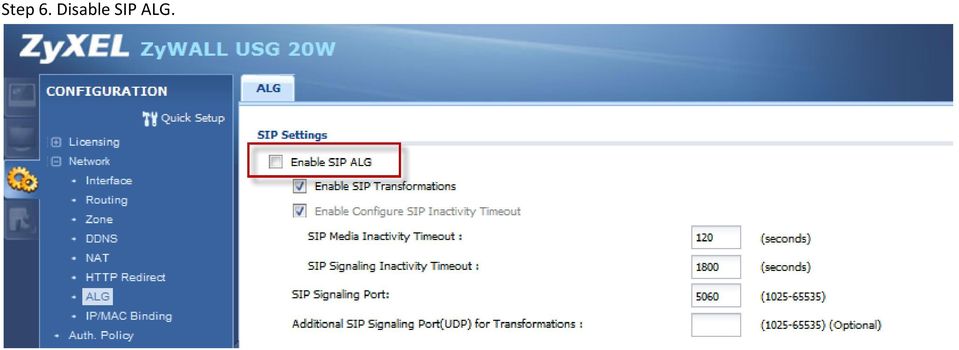
8 Step 6. Disable SIP ALG.
9 ISG50: Step 1. Set the WAN IP of USG 20W in the Fake IP field.


10 Step 2. Make sure the SIP signaling port and the RTP port range are the same as those you configured in the port forwarding in USG 20W.


11 Step 3. Disable the firewall in ISG50 since USG 20W acts as firewall.

12 Scenario 2 Secure site-to-site connections using IPSec VPN/ Secure client-to-site connections using IPSec VPN 2.1 Application Scenario The ISG50 can provide secure site-to-site access between remote locations and corporate resources through the Internet. Using IPSec VPN, companies can secure connections to branch offices, partners and headquarters. Besides, road warriors and telecommuters can access the company s network by installing the ZyXEL IPSec VPN client software. Goal to Achieve 1. Build an IPSec VPN tunnel between ISG50 and USG 20W. 2. Build an IPSec VPN tunnel for PC/laptop user s dynamic access to ISG50.

13 2.2 Configuration Guide Secure site-to-site connections using IPSec VPN Network Conditions ISG50: USG 20W: - WAN IP: WAN IP: Local subnet: /24 - Local subnet: /24 IPSec VPN Conditions Phase 1: - Authentication: Negotiation mode: Main - Encryption Algorithm: 3DES - Authentication Algorirhm: MD5 - Key Group: DH1 Phase 2: - Active Protocol: ESP - Encapsulation Mode: Tunnel - Encryption Algorithm: DES - Authentication Algorithm: SHA1 - Perfect Forward Secrecy (PFS): None

14 ISG50: Step 1. Click on the Add button to add a VPN gateway rule.

15 Step 2. To configure the VPN gateway rule, the user needs to fill in the following: - VPN gateway name. - Gateway address: My Address (ISG50 s IP) and Peer Gateway Address (USG s IP). - Authentication setting. -Shared Key. ID Type setting (Local and Peer side).

16 - Phase-1 setting Negotiation mode Encryption algorithm Authentication algorithm Key Group Step 3. Click CONFIGURATION > VPN > IPSec VPN > VPN Connection to configure the phase-2 rule.

17 Step 4. To configure the phase 2 rule, the user needs to fill in the following: - VPN connection name - VPN gateway selection

18 - Policy for Local network side Remote network side - Phase 2 Settings Active protocol Encapsulation mode Encryption algorithm Authentication algorithm Perfect Forward Secrecy Step 5. Click the Connect button to establish the VPN link. Once the tunnel is established, a connected icon will be displayed in front of the rule.

19 USG 20W: Step 1. Add a VPN gateway rule. Step 2. To configure the VPN gateway rule, user needs to fill in: - VPN gateway name - Gateway address: My Address (USG s IP) and Peer Gateway Address (ISG50 s IP) - Authentication setting -Shared Key ID Type setting (Local and Peer side)

20 - Phase-1 setting Negotiation mode Encryption algorithm Authentication algorithm Key Group Step 3. Configure the phase-2 rule.

21 Step 4. To configure the phase 2 rule, user needs to fill in: - VPN connection name - VPN gateway selection - Policy for Local network side Remote network side - Phase 2 Settings Active protocol Encapsulation mode Encryption algorithm Authentication algorithm Perfect Forward Secrecy
22 Before configuring Remote Policy in step 4, the user can create a specific object for the VPN subnet. Step 5. Click on the Connect button to establish the VPN link. Once the tunnel is established, a connected icon will be displayed in front of the rule.
23 Result: When the VPN tunnel is established, the user can find the SA information on MONITOR > VPN MONITOR > IPSec. ISG50: USG:
24 5.2.2 Secure client-to-site connections using IPSec VPN ISG50: - WAN IP: Local subnet: /24 IPSec VPN Conditions Phase 1: - Authentication: Negotiation mode: Main - Encryption Algorithm: DES - Authentication Algorithm: MD5 - Key Group: DH1 Phase 2: - Active Protocol: ESP - Encapsulation Mode: Tunnel - Encryption Algorithm: DES - Authentication Algorithm: SHA1 - Perfect Forward Secrecy (PFS): None
25 Step 1. Click CONFIGURATION > VPN > IPSec VPN > VPN Gateway to open the configuration screen. Click on the Add button to add a VPN gateway rule. Step 2. To configure the VPN gateway rule, the user needs to fill in the following: - VPN gateway name - Gateway address: My Address (ISG50) peer (Dynamic Address) - Authentication setting -Shared Key
26 - Phase 1 Setting Step 3. Click CONFIGURATION > VPN > IPSec VPN > VPN Connection to configure the phase 2 rule.
27 Step 4. To configure the phase-2 rule, the user needs to fill in the following: - VPN connection name - VPN gateway selection - Policy for - Phase-2 setting
28 Step 5. Start the ZyXEL IPSec VPN Client. Fill in the Phase 1 configuration.
29 Step 6. Configure the phase-2 parameters. Since it is a dynamic rule, the user MUST enable it from the VPN client. Click Open Tunnel to enable it. The icon will turn green if the VPN connection is established successfully.
30 Step 7. When the VPN tunnel is established, the user can find the SA information on MONITOR > VPN MONITOR > IPSec. Result: The user from IP can ping the ISG50 s LAN1 IP
How To Balance Out The Power Of The Usg On A Network On A Pc Or Mac Mac 2.5 (For A Mac 2) On A 2G Network On An Ipnet 2.2 (For An Ipro) On An Un
 ZyWALL USG 20/20W/50 ZLD 2.21 Support Notes Revision 1.00 August, 2010 Written by CSO Table of Contents Scenario 1 Connecting your USG to the Internet... 4 1.1 Application Scenario... 4 1.2 Configuration
Configuring TheGreenBow VPN Client with a TP-LINK VPN Router
 Configuring TheGreenBow VPN Client with a TP-LINK VPN Router This chapter describes how to configure TheGreenBow VPN Client with a TP-LINK router. This chapter includes the following sections: Example
V310 Support Note Version 1.0 November, 2011
 1 V310 Support Note Version 1.0 November, 2011 2 Index How to Register V310 to Your SIP server... 3 Register Your V310 through Auto-Provision... 4 Phone Book and Firmware Upgrade... 5 Auto Upgrade... 6
ZyWALL USG-Series. How to setup a Site-to-site VPN connection between two ZyWALL USG series.
 ZyWALL USG-Series How to setup a Site-to-site VPN connection between two ZyWALL USG series. Table of content Introduction... 3 ZyWALL USG 100... 4 Creating the address objects... 4 Creating VPN Gateway...
IPSec Pass through via Gateway to Gateway VPN Connection
 IPSec Pass through via Gateway to Gateway VPN Connection 1. Connection 2 In the diagram depicted below, the left side router represents the SME200/SME100/SME50 in HQ and right side represents the PC installed
Configuring IPSec VPN Tunnel between NetScreen Remote Client and RN300
 Configuring IPSec VPN Tunnel between NetScreen Remote Client and RN300 This example explains how to configure pre-shared key based simple IPSec tunnel between NetScreen Remote Client and RN300 VPN Gateway.
VPN. VPN For BIPAC 741/743GE
 VPN For BIPAC 741/743GE August, 2003 1 The router supports VPN to establish secure, end-to-end private network connections over a public networking infrastructure. There are two types of VPN connections,
ZyWALL USG ZLD 3.0 Support Notes
 2012 ZyWALL USG ZLD 3.0 Support Notes CSO ZyXEL 2/1/2012 Scenario 1 - Reserving Highest Bandwidth Management Priority for VoIP Traffic 1.1 Application scenario In an enterprise network, there are various
VPN Configuration Guide. ZyWALL USG Series / ZyWALL 1050
 VPN Configuration Guide ZyWALL USG Series / ZyWALL 1050 2011 equinux AG and equinux USA, Inc. All rights reserved. Under copyright law, this configuration guide may not be copied, in whole or in part,
IPsec VPN Application Guide REV: 1.0.0 1910010876
 IPsec VPN Application Guide REV: 1.0.0 1910010876 CONTENTS Chapter 1. Overview... 1 Chapter 2. Before Configuration... 2 Chapter 3. Configuration... 5 3.1 Configure IPsec VPN on TL-WR842ND (Router A)...
Chapter 4 Virtual Private Networking
 Chapter 4 Virtual Private Networking This chapter describes how to use the virtual private networking (VPN) features of the FVL328 Firewall. VPN tunnels provide secure, encrypted communications between
How To Configure A Kiwi Ip Address On A Gbk (Networking) To Be A Static Ip Address (Network) On A Ip Address From A Ipad (Netware) On An Ipad Or Ipad 2 (
 UAG715 Support Note Revision 1.00 August, 2012 Written by CSO Scenario 1 - Trunk Interface (Dual WAN) Application Scenario The Internet has become an integral part of our lives; therefore, a smooth Internet
Windows XP VPN Client Example
 Windows XP VPN Client Example Technote LCTN0007 Proxicast, LLC 312 Sunnyfield Drive Suite 200 Glenshaw, PA 15116 1-877-77PROXI 1-877-777-7694 1-412-213-2477 Fax: 1-412-492-9386 E-Mail: [email protected]
How To Set Up A Vpn Tunnel Between Winxp And Zwall On A Pc 2 And Winxp On A Windows Xp 2 On A Microsoft Gbk2 (Windows) On A Macbook 2 (Windows 2) On An Ip
 WINXP VPN to ZyWALL Tunneling 1. Setup WINXP VPN 2. Setup ZyWALL VPN This page guides us to setup a VPN connection between the WINXP VPN software and ZyWALL router. There will be several devices we need
Workflow Guide. Establish Site-to-Site VPN Connection using RSA Keys. For Customers with Sophos Firewall Document Date: November 2015
 Workflow Guide Establish Site-to-Site VPN Connection using RSA Keys For Customers with Sophos Firewall Document Date: November 2015 November 2015 Page 1 of 10 Establish Site-to-Site VPN Connection using
IP Office Technical Tip
 IP Office Technical Tip Tip no: 190 Release Date: September 27, 2007 Region: GLOBAL Configuring a VPN Remote IP Phone with a Sonicwall Tz170 Standard / Enhanced VPN Router The following document assumes
How to configure VPN function on TP-LINK Routers
 How to configure VPN function on TP-LINK Routers 1. VPN Overview... 2 2. How to configure LAN-to-LAN IPsec VPN on TP-LINK Router... 3 3. How to configure GreenBow IPsec VPN Client with a TP-LINK VPN Router...
ZyWALL 5. Internet Security Appliance. Quick Start Guide Version 3.62 (XD.0) May 2004
 ZyWALL 5 Internet Security Appliance Quick Start Guide Version 3.62 (XD.0) May 2004 Introducing the ZyWALL The ZyWALL 5 is the ideal secure gateway for all data passing between the Internet and the LAN.
Fireware How To VPN. Introduction. Is there anything I need to know before I start? Configuring a BOVPN Gateway
 Fireware How To VPN How do I set up a manual branch office VPN tunnel? Introduction You use Branch Office VPN (BOVPN) with manual IPSec to make encrypted tunnels between a Firebox and a second IPSec-compliant
How to configure VPN function on TP-LINK Routers
 How to configure VPN function on TP-LINK Routers 1. VPN Overview... 2 2. How to configure LAN-to-LAN IPsec VPN on TP-LINK Router... 3 3. How to configure GreenBow IPsec VPN Client with a TP-LINK VPN Router...
Based on the VoIP Example 1(Basic Configuration and Registration), we will introduce how to dial the VoIP call through an encrypted VPN tunnel.
 30. VoIP Example 3 (VoIP over VPN) Based on the VoIP Example 1(Basic Configuration and Registration), we will introduce how to dial the VoIP call through an encrypted VPN tunnel. In this example 3300V
Chapter 6 Virtual Private Networking
 Chapter 6 Virtual Private Networking This chapter describes how to use the virtual private networking (VPN) features of the FVX538 VPN firewall. VPN tunnels provide secure, encrypted communications between
Gateway to Gateway VPN Connection
 Gateway to Gateway VPN Connection 1. Connection Scenario 4 In the diagram depicted below, the left side router represents the SME200/SME100/SME50 in HQ and right side router represents the SME200/SME100/SME50
How To Industrial Networking
 How To Industrial Networking Prepared by: Matt Crites Product: Date: April 2014 Any RAM or SN 6xxx series router Legacy firmware 3.14/4.14 or lower Subject: This document provides a step by step procedure
Configure VPN between ProSafe VPN Client Software and FVG318
 Configure VPN between ProSafe VPN Client Software and FVG318 The following configuration is tested with: NETGEAR FVG318 with firmware version 1.0.41 NETGEAR ProSafe VPN Client Software version 10.5.1 Configure
OvisLink 8000VPN VPN Guide WL/IP-8000VPN. Version 0.6
 WL/IP-8000VPN VPN Setup Guide Version 0.6 Document Revision Version Date Note 0.1 11/10/2005 First version with four VPN examples 0.2 11/15/2005 1. Added example 5: dynamic VPN using TheGreenBow VPN client
How To Establish IPSec VPN connection between Cyberoam and Mikrotik router
 How To Establish IPSec VPN connection between Cyberoam and Mikrotik router Applicable Version: 10.00 onwards Scenario Establish IPSec VPN connection between Cyberoam and Mikrotik router using Preshared
VPN Wizard Default Settings and General Information
 1. ProSecure UTM Quick Start Guide This quick start guide describes how to use the IPSec VPN Wizard to configure IPSec VPN tunnels on the ProSecure Unified Threat Management (UTM) Appliance. The IP security
ZyXEL ZyWALL P1 firmware V3.64
 TheGreenBow IPSec VPN Client Configuration Guide ZyXEL ZyWALL P1 firmware V3.64 WebSite: Contact: http://www.thegreenbow.com [email protected] IPSec VPN Router Configuration Property of TheGreenBow
Lab 4.4.8a Configure a Cisco GRE over IPSec Tunnel using SDM
 Lab 4.4.8a Configure a Cisco GRE over IPSec Tunnel using SDM Objective Scenario Topology In this lab, the students will complete the following tasks: Prepare to configure Virtual Private Network (VPN)
Chapter 5 Virtual Private Networking Using IPsec
 Chapter 5 Virtual Private Networking Using IPsec This chapter describes how to use the IPsec virtual private networking (VPN) features of the ProSafe Dual WAN Gigabit Firewall with SSL & IPsec VPN to provide
Configure an IPSec Tunnel between a Firebox Vclass & a Check Point FireWall-1
 Configure an IPSec Tunnel between a Firebox Vclass & a Check Point FireWall-1 This document describes how to configure an IPSec tunnel between a WatchGuard Firebox Vclass appliance (Vcontroller version
Create a VPN on your ipad, iphone or ipod Touch and SonicWALL NSA UTM firewall - Part 1: SonicWALL NSA Appliance
 Create a VPN on your ipad, iphone or ipod Touch and SonicWALL NSA UTM firewall - Part 1: SonicWALL NSA Appliance This article will easily explain how to configure your Apple ipad, iphone or ipod Touch
Configure IPSec VPN Tunnels With the Wizard
 Configure IPSec VPN Tunnels With the Wizard This quick start guide provides basic configuration information about setting up IPSec VPN tunnels by using the VPN Wizard on the ProSafe Wireless-N 8-Port Gigabit
Deploying the Barracuda Link Balancer with Cisco ASA VPN Tunnels
 Deploying the Barracuda Link Balancer with Cisco ASA VPN Tunnels This article provides a reference for deploying a Barracuda Link Balancer under the following conditions: 1. 2. In transparent (firewall-disabled)
Virtual Private Network and Remote Access Setup
 CHAPTER 10 Virtual Private Network and Remote Access Setup 10.1 Introduction A Virtual Private Network (VPN) is the extension of a private network that encompasses links across shared or public networks
Configuration Guide. How to set up the IPSec site-to-site Tunnel between the D-Link DSR Router and the Cisco Firewall. Overview
 Configuration Guide How to set up the IPSec site-to-site Tunnel between the D-Link DSR Router and the Cisco Firewall Overview This document describes how to implement IPSec with pre-shared secrets establishing
How To Establish IPSec VPN between Cyberoam and Microsoft Azure
 How To Establish IPSec VPN between Cyberoam and Microsoft Azure How To Establish IPSec VPN Connection between Cyberoam and Microsoft Azure Applicable Version: 10.00 onwards Overview Microsoft Azure is
Chapter 6 Basic Virtual Private Networking
 Chapter 6 Basic Virtual Private Networking This chapter describes how to use the virtual private networking (VPN) features of the FVG318 wireless VPN firewall. VPN communications paths are called tunnels.
UTM - VPN: Configuring a Site to Site VPN Policy using Main Mode (Static IP address on both sites) i...
 Page 1 of 10 Question/Topic UTM - VPN: Configuring a Site to Site VPN Policy using Main Mode (Static IP address on both sites) in SonicOS Enhanced Answer/Article Article Applies To: SonicWALL Security
VPN Consortium Scenario 1: Gateway-to-Gateway with Preshared Secrets
 VPN Consortium Scenario 1: Gateway-to-Gateway with Preshared Secrets The following is a typical gateway-to-gateway VPN that uses a preshared secret for authentication. Figure 4-5: VPN Consortium Scenario
VPN Consortium Scenario 1: Gateway-to-Gateway with Preshared Secrets
 VPN Consortium Scenario 1: Gateway-to-Gateway with Preshared Secrets The following is a typical gateway-to-gateway VPN that uses a preshared secret for authentication. Figure 4-5: VPN Consortium Scenario
Configuring a Site-to-Site VPN Tunnel Between Cisco RV320 Gigabit Dual WAN VPN Router and Cisco (1900/2900/3900) Series Integrated Services Router
 print email Article ID: 4938 Configuring a Site-to-Site VPN Tunnel Between Cisco RV320 Gigabit Dual WAN VPN Router and Cisco (1900/2900/3900) Series Integrated Services Router Objective Virtual Private
Cyberoam Configuration Guide for VPNC Interoperability Testing using DES Encryption Algorithm
 Cyberoam Configuration Guide for VPNC Interoperability Testing using DES Encryption Algorithm Document Version:2.0-12/07/2007 IMPORTANT NOTICE Elitecore has supplied this Information believing it to be
Chapter 8 Virtual Private Networking
 Chapter 8 Virtual Private Networking This chapter describes how to use the virtual private networking (VPN) features of the FWG114P v2 Wireless Firewall/Print Server. VPN tunnels provide secure, encrypted
ZyWALL USG 100/200. Unified Security Gateway. Support Notes. Revision 2.10 March, 2008
 ZyWALL USG 100/200 Unified Security Gateway Support Notes Revision 2.10 March, 2008 1 INDEX The comparison of ZyNOS and ZLD... 8 1. Deploying VPN... 9 1.1 Extended Intranets... 11 1.1.2 Site to Site VPN
VPN L2TP Application. Installation Guide
 VPN L2TP Application Installation Guide 1 Configuring a Remote Access L2TP VPN Dial-in Connection A remote worker establishes a L2TP VPN connection with the head office using Microsoft's VPN Adapter (included
IPsec VPN Security between Aruba Remote Access Points and Mobility Controllers
 IPsec VPN Security between Aruba Remote Access Points and Mobility Controllers Application Note Revision 1.0 10 February 2011 Copyright 2011. Aruba Networks, Inc. All rights reserved. IPsec VPN Security
Configuring IPsec VPN with a FortiGate and a Cisco ASA
 Configuring IPsec VPN with a FortiGate and a Cisco ASA The following recipe describes how to configure a site-to-site IPsec VPN tunnel. In this example, one site is behind a FortiGate and another site
DI-804HV with Windows 2000/XP IPsec VPN Client Configuration Guide
 DI-804HV with Windows 2000/XP IPsec VPN Client Configuration Guide This guide will show how to configure a Windows 2000/XP machine to make an IPsec VPN Tunnel connection to a DI-804HV. Below is the example
Netopia 3346. TheGreenBow IPSec VPN Client. Configuration Guide. http://www.thegreenbow.com. [email protected]
 TheGreenBow IPSec VPN Client Configuration Guide Netopia 3346 WebSite: Contact: http://www.thegreenbow.com [email protected] IPSec VPN Router Configuration Property of TheGreenBow Sistech SA - Sistech
Overview. Author: Seth Scardefield Updated 11/11/2013
 Author: Seth Scardefield Updated 11/11/2013 Yealink IP Phone OpenVPN Guide This guide will walk you through configuring an OpenVPN server instance in pfsense to allow Yealink IP Phones (T26P, T28P, T32G,
Workflow Guide. Establish Site-to-Site VPN Connection using Digital Certificates. For Customers with Sophos Firewall Document Date: November 2015
 Workflow Guide Establish Site-to-Site VPN Connection using Digital Certificates For Customers with Sophos Firewall Document Date: November 2015 November 2015 Page 1 of 14 Establish Site-to-Site VPN Connection
Netgear ProSafe VPN firewall (FVS318 or FVM318) to Cisco PIX firewall
 Netgear ProSafe VPN firewall (FVS318 or FVM318) to Cisco PIX firewall This document is a step-by-step instruction for setting up VPN between Netgear ProSafe VPN firewall (FVS318 or FVM318) and Cisco PIX
Firewall Defaults and Some Basic Rules
 Firewall Defaults and Some Basic Rules ProSecure UTM Quick Start Guide This quick start guide provides the firewall defaults and explains how to configure some basic firewall rules for the ProSecure Unified
Viewing VPN Status, page 335. Configuring a Site-to-Site VPN, page 340. Configuring IPsec Remote Access, page 355
 VPN This chapter describes how to configure Virtual Private Networks (VPNs) that allow other sites and remote workers to access your network resources. It includes the following sections: About VPNs, page
Configuring a Lan-to-Lan VPN with Overlapping Subnets with Juniper NetScreen/ISG/SSG Products
 Application Note Configuring a Lan-to-Lan VPN with Overlapping Subnets with Juniper NetScreen/ISG/SSG Products Version 1.0 January 2008 Juniper Networks, Inc. 1194 North Mathilda Avenue Sunnyvale, CA 94089
Configuration Procedure
 How to Establish Site-to-Site VPN between USG and MS Azure Background Microsoft (MS) Azure is an open and flexible cloud platform that enables users to quickly build, deploy, scale and manage applications
How to setup PPTP VPN connection with DI-804HV or DI-808HV using Windows PPTP client
 How to setup PPTP VPN connection with DI-804HV or DI-808HV using Windows PPTP client Make sure your DI-804HV or DI-808HV is running firmware ver.1.40 August 12 or later. You can check firmware version
Connecting Remote Offices by Setting Up VPN Tunnels
 Connecting Remote Offices by Setting Up VPN Tunnels Cisco RV0xx Series Routers Overview As your business expands to additional sites, you need to ensure that all employees have access to the network resources
ZyWALL USG Series. Application Notes. Unified Security Gateway. Version 4.10 Edition 1, 05/2014. Copyright 2014 ZyXEL Communications Corporation
 ZyWALL USG Series Unified Security Gateway Version 4.10 Edition 1, 05/2014 Application Notes Copyright 2014 ZyXEL Communications Corporation 0 ZyXEL USG Application Notes Table of Contents Scenario 1 Connecting
ZyWALL 1050. Support Notes. Internet Security Appliance. ZyWALL 1050 Support Notes. Revision 2.02 July. 2007
 ZyWALL 1050 Internet Security Appliance Support Notes Revision 2.02 July. 2007 1 INDEX 1. Deploying VPN... 8 1.1 Extended Intranets... 10 1.1.1 Site to Site VPN solutions (ZyWALL 1050 ZyWALL 1050):...
VNS3 to Cisco ASA Instructions. ASDM 9.2 IPsec Configuration Guide
 VNS3 to Cisco ASA Instructions ASDM 9.2 IPsec Configuration Guide 2016 Site-to-Site IPsec Tunnel IPsec protocol allows you to securely connect two sites together over the public internet using cryptographically
Technical Document. Creating a VPN. GTA Firewall to WatchGuard Firebox SOHO 6 TD: GB-WGSOHO6
 Technical Document Creating a VPN GTA Firewall to WatchGuard Firebox SOHO 6 TD: GB-WGSOHO6 Contents INTRODUCTION 1 Supported Encryption and Authentication Methods 1 Addresses Used in Examples 1 Documentation
How To Establish Site-to-Site VPN Connection. using Preshared Key. Applicable Version: 10.00 onwards. Overview. Scenario. Site A Configuration
 How To Establish Site-to-Site VPN Connection How To Establish Site-to-Site IPSec VPN Connection using Preshared key using Preshared Key Applicable Version: 10.00 onwards Overview IPSec is an end-to-end
Configuring an IPSec Tunnel between a Firebox & a Check Point FireWall-1
 Configuring an IPSec Tunnel between a Firebox & a Check Point FireWall-1 This document describes how to configure an IPSec tunnel with a WatchGuard Firebox II or Firebox III (software version 4.5 or later)
Configuration Guide. How to set up the IPSec site-to-site Tunnel between the D-Link DSR Router and the Sonicwall Firewall.
 Configuration Guide How to set up the IPSec site-to-site Tunnel between the D-Link DSR Router and the Sonicwall Firewall Overview This document describes how to implement IPSec with pre-shared secrets
IP Office Technical Tip
 IP Office Technical Tip Tip no: 186 Release Date: August 14, 2007 Region: GLOBAL Configuring a VPN Remote IP Phone with an Adtran Netvanta 3305 VPN Router The following document assumes that the user/installer
Katana Client to Linksys VPN Gateway
 Katana Client to Linksys VPN Gateway Goal Configure a VPN tunnel between a Katana client and a Linksys VPN gateway. Method The Katana client and the Linksys VPN gateway must have exactly the same IKE/IPsec
Internet. SonicWALL IP 10.100.30.1 SEV 7.0.4 IP 10.100.50.8 IP 172.18.0.1 IP 192.168.170.1. Network 192.168.170.0 Mask 255.255.255.
 Prepared by SonicWALL, Inc. 6/10/2003 Introduction: VPN standards are still evolving and interoperability between products is a continued effort. SonicWALL has made progress in this area and is interoperable
Establishing a VPN tunnel to CNet CWR-854 VPN router using WinXP IPSec client
 Establishing a VPN tunnel to CNet CWR-854 VPN router using WinXP IPSec client Generally speaking, remote users need to use a VPN client software for establishing a VPN connection to their home/work router
VPN Configuration of ProSafe Client and Netgear ProSafe Router:
 VPN Configuration of ProSafe Client and Netgear ProSafe Router: This document will guide you on how to create IKE and auto-vpn policies for your ProSafe Netgear Router, as well as how to configure the
Ingate Firewall. TheGreenBow IPSec VPN Client Configuration Guide. http://www.thegreenbow.com [email protected]
 TheGreenBow IPSec VPN Client Configuration Guide Ingate Firewall WebSite: Contact: http://www.thegreenbow.com [email protected] IPSec VPN Router Configuration Property of TheGreenBow Sistech SA -
Configuring a Check Point FireWall-1 to SOHO IPSec Tunnel
 Configuring a Check Point FireWall-1 to SOHO IPSec Tunnel This document describes the procedures required to configure an IPSec VPN tunnel between a WatchGuard SOHO or SOHO tc and a Check Point FireWall-1.
APNIC elearning: IPSec Basics. Contact: [email protected]. esec03_v1.0
 APNIC elearning: IPSec Basics Contact: [email protected] esec03_v1.0 Overview Virtual Private Networks What is IPsec? Benefits of IPsec Tunnel and Transport Mode IPsec Architecture Security Associations
PowerLink Bandwidth Aggregation Redundant WAN Link and VPN Fail-Over Solutions
 Bandwidth Aggregation Redundant WAN Link and VPN Fail-Over Solutions Find your network example: 1. Basic network with and 2 WAN lines - click here 2. Add a web server to the LAN - click here 3. Add a web,
Enabling NAT and Routing in DGW v2.0 June 6, 2012
 Enabling NAT and Routing in DGW v2.0 June 6, 2012 Proprietary 2012 Media5 Corporation Table of Contents Introduction... 3 Starting Services... 4 Distinguishing your WAN and LAN interfaces... 5 Configuring
Use Shrew Soft VPN Client to connect with IPSec VPN Server on RV130 and RV130W
 Article ID: 5037 Use Shrew Soft VPN Client to connect with IPSec VPN Server on RV130 and RV130W Objective IPSec VPN (Virtual Private Network) enables you to securely obtain remote resources by establishing
Configuring a VPN between a Sidewinder G2 and a NetScreen
 A PPLICATION N O T E Configuring a VPN between a Sidewinder G2 and a NetScreen This document explains how to create a basic gateway to gateway VPN between a Sidewinder G 2 Security Appliance and a Juniper
ZyWALL 1050. Support Notes. Internet Security Appliance. ZyWALL 1050 Support Notes. Revision 2.01 August. 2006
 ZyWALL 1050 Internet Security Appliance Support Notes Revision 2.01 August. 2006 1 INDEX 1. Deploying VPN... 7 1.1 Extended Intranets... 9 1.1.1 Site to Site VPN solutions... 9 1.2 Extranet Deployment...
Gigabit Multi-Homing VPN Security Router
 As Internet becomes essential for business, the crucial solution to prevent your Internet connection from failure is to have more than one connection. PLANET is a ideal to help the SMBs increase the broadband
Setting up D-Link VPN Client to VPN Routers
 Setting up D-Link VPN Client to VPN Routers Office Unit: DI-804HV (firmware 1.41) LAN IP: 192.168.100.22 Subnet Mask: 255.255.255.0 WAN IP: 202.129.109.82 Subnet Mask: 255.255.255.224 Default Gateway:
Apliware firewall. TheGreenBow IPSec VPN Client. Configuration Guide. http://www.thegreenbow.com [email protected]
 TheGreenBow IPSec VPN Client Configuration Guide Apliware firewall WebSite: Contact: http://www.thegreenbow.com [email protected] Table of contents 1 Introduction... 0 1.1 Goal of this document...
Creating a Gateway to Client VPN between Sidewinder G2 and a Mac OS X Client
 A P P L I C A T I O N N O T E Creating a Gateway to Client VPN between Sidewinder G2 and a Mac OS X Client This application note describes how to set up a VPN connection between a Mac client and a Sidewinder
Technical Notes TN 1 - ETG 3000. FactoryCast Gateway TSX ETG 3021 / 3022 modules. How to Setup a GPRS Connection?
 FactoryCast Gateway TSX ETG 3021 / 3022 modules How to Setup a GPRS Connection? 1 2 Table of Contents 1- GPRS Overview... 4 Introduction... 4 GPRS overview... 4 GPRS communications... 4 GPRS connections...
How To Configure Apple ipad for Cyberoam L2TP
 How To Configure Apple ipad for Cyberoam L2TP VPN Connection Applicable to Version: 10.00 (All builds) Layer 2 Tunneling Protocol (L2TP) can be used to create VPN tunnel over public networks such as the
Configuring Windows 2000/XP IPsec for Site-to-Site VPN
 IPsec for Site-to-Site VPN November 2002 Copyright 2002 SofaWare Technologies Inc, All Rights Reserved. Reproduction, adaptation, or translation with prior written permission is prohibited except as allowed
Appendix A: Configuring Firewalls for a VPN Server Running Windows Server 2003
 http://technet.microsoft.com/en-us/library/cc757501(ws.10).aspx Appendix A: Configuring Firewalls for a VPN Server Running Windows Server 2003 Updated: October 7, 2005 Applies To: Windows Server 2003 with
Configuring IPsec VPN between a FortiGate and Microsoft Azure
 Configuring IPsec VPN between a FortiGate and Microsoft Azure The following recipe describes how to configure a site-to-site IPsec VPN tunnel. In this example, one site is behind a FortiGate and another
Configuring IPsec between a Microsoft Windows XP Professional (1 NIC) and the VPN router
 Configuring IPsec between a Microsoft Windows XP Professional (1 NIC) and the VPN router Introduction This document demonstrates how to establish an IPsec tunnel with preshared keys to join a private network
VPNs. Palo Alto Networks. PAN-OS Administrator s Guide Version 6.0. Copyright 2007-2015 Palo Alto Networks
 VPNs Palo Alto Networks PAN-OS Administrator s Guide Version 6.0 Contact Information Corporate Headquarters: Palo Alto Networks 4401 Great America Parkway Santa Clara, CA 95054 www.paloaltonetworks.com/company/contact-us
Virtual Private Network and Remote Access
 Virtual Private Network and Remote Access Introduction A virtual private network (VPN) is the extension of a private network that encompasses links across shared or public networks like the Internet. A
How to access peers with different VPN through IPSec. Tunnel
 How to access peers with different VPN through IPSec Tunnel Scenario: Taipei branch and Kaohsiung branch dial to Hsinchu headquarter via IPSec VPN Tunnel respectively. Both Taipei branch and Kaohsiung
Interconnection between the Windows Azure
 Interconnection between the Windows Azure Virtual Network and SEIL Series VPN Updated: January 17, 2014 Author: Internet Initiative Japan, Inc. SEIL (http://www.seil.jp/) is an access router for companies
Building scalable IPSec infrastructure with MikroTik. IPSec, L2TP/IPSec, OSPF
 Building scalable IPSec infrastructure with MikroTik IPSec, L2TP/IPSec, OSPF Presenter information Tomas Kirnak Network design Security, wireless Servers Virtualization MikroTik Certified Trainer Atris,
axsguard Gatekeeper IPsec XAUTH How To v1.6
 axsguard Gatekeeper IPsec XAUTH How To v1.6 Legal Notice VASCO Products VASCO data Security, Inc. and/or VASCO data Security International GmbH are referred to in this document as 'VASCO'. VASCO Products
Scenario 1: One-pair VPN Trunk
 VPN Trunk Load-Balance between Vigor3200 and Other Vigor Router This section will discuss how to build VPN Trunk with load-balance between Vigor3200 and other router (e.g., Vigor3300). Scenario 1: One-pair
Firewall Defaults, Public Server Rule, and Secondary WAN IP Address
 Firewall Defaults, Public Server Rule, and Secondary WAN IP Address This quick start guide provides the firewall defaults and explains how to configure some basic firewall rules for the ProSafe Wireless-N
Configuring an IPsec VPN to provide ios devices with secure, remote access to the network
 Configuring an IPsec VPN to provide ios devices with secure, remote access to the network This recipe uses the IPsec VPN Wizard to provide a group of remote ios users with secure, encrypted access to the
RouteFinder. IPSec VPN Client. Setup Examples. Reference Guide. Internet Security Appliance
 RouteFinder Internet Security Appliance IPSec VPN Client Setup Examples Reference Guide RouteFinder IPSec VPN Client Setup Examples PN S000397A Revision A This publication may not be reproduced, in whole