
Troubleshooting & Service for EL/VS Systems. 60 Hz
|
|
|
- Jesse Anthony
- 10 years ago
- Views:
Transcription
1 Troubleshooting & Service for EL/VS Systems 60 Hz 1

2 Balboa s Patented M7 Technology TOPSIDE CTROL PANEL The control panel activates functions at the touch of a button. Each function will echo from the circuit board to the LCD in a corresponding manner. The panel will also display diagnostic messages that enable the service technician to easily troubleshoot the system. ML700 Top Side Panel M7 TECHNOLOGY M7 is a patented Balboa technology that uses two sensors inserted at the opposite ends of the heater element to determine flow, dry fire conditions, etc. The two sensors located within the heater housing compare the inlet water temperature with the outlet water temperature. It works no matter which direction the water flows through the heater. The sensors in combination with specific software allow the spa to be controlled without the use of external pressure switches, flow switches, or temperature sensors. Panel Construction VS501 with a Cut-a-way View of the Heater Sensor Sensor 2

3 Table of Contents Balboa s Patented M7 Technology Balboa Service Tools and Parts Checklist Important Information -- Product Identification Troubleshooting & Servicing Spa and Electrical Equipment G.F.C.I. Troubleshooting If Correct Wiring is Verified To Disconnect the Heater Voltage Checks: Breaker Box, G.F.C.I. & System Box Wiring Checks Spa Behavior -- Start-up Information Priming Mode Heater Start up Information Diagnosing M7 Topside Control Panels Checking the System Power Input Fuse ML Series Panels -- For Use with EL and GL Systems ML900 Panel Operation ML700 Panel Operation ML550, 551, 554 Panel Operation ML200, 240, 260, 400 Panel Operation VL Series Panels -- For use with VS and GS Systems VS/GS Panel & 500 Series and Operation EL and GL Series Mach 3 -- Persistent Memory & Power Up EL - GL, about Persistent Memory Power Up Display Sequence, Software ID VS-GS Persistent Memory with VL Panels Testing the Circuit Board Output Balboa s Quick Test TM Test Kit To Use the Balboa Quick Check Testing the Sensor Set Changing a System Circuit Board How to Remove a System Circuit Board How to Replace a System Circuit Board Removing the Heater Assembly from a Spa System Panel Message Reference Guide

4 Diagrams (in alphabetical order) 300/300F/500Z Series Panel DZ Series Panel SZ Series Panel Balboa QuickCheck TM Part No Ground-Fault Circuit Interrupter/Circuit Breaker (G.F.C.I.) Volt Residential Wiring Schematic with G.F.C.I Volt Residential Wiring Schematic with G.F.C.I Ground in System Enclosure Heater Element Specifications Are Shown on the Heater Tube Label ML260, ML240, ML ML ML ML ML ML700 Top Side Panel Recommended Parts For Service Calls Service Tools Required Molex Type, ML/GL Connector On Every System, an Identification Label Is Placed on top of the Casing On Every System, a Wiring Diagram Is Placed Inside the Door Panel Construction Phone Plug RJ Type, VL/GS Connector Phone Plug RJ Type, VL/VS Connector Terminal Block 1 & F5 Fuse on a VS500Z Board VS500 Board VS501 with a Cut-a-way View of the Heater
5 Balboa Service Tools and Parts Checklist Service Tools Required Ammeter (50A) Balboa Six-in-one Screwdriver Digital Multi-meter Padlock (to lock electrical disconnect during service) Pliers: Slip Joint & Needle nose Precision Thermometer - Digital Fever Type Quick CheckTM Test Kit Silicone Tube Small Wire Cutters Two 3/8 Open End Wrenches (one wrench should be ground down to 5/32 [0.156 ] thickness in order to access the nut between the heater strap and heater element connector) COMM FUSES USED JUMPER LOGIC FUSE 1 AMP FAST BLOW GLASS FUSE 5 AMP FAST BLOW GLASS FUSE 10A BLOWER FUSE 10A POWER INPUT FUSE 15 AMP FAST BLOW CERAMIC FUSE 15A POWER INPUT FUSE 20A POWER INPUT FUSE 20A PUMP FUSE 25A POWER INPUT FUSE 25A POWER INPUT HIGH SURGE FUSE 30A POWER INPUT Recommended Parts For Service Calls Extra Board(s) Extra Panel(s) Fuses Jumpers Heater Assembly MORE COMM BOARDS: BOARD BARE VS500 (shown) BOARD BARE GL BOARD BARE EL ML700 Heater Assembly 5
![156 ] thickness in order to access the nut between the heater strap and heater element connector) COMM FUSES USED 20618 JUMPER LOGIC 30074 FUSE 1 AMP FAST BLOW GLASS 30075 FUSE 5 AMP FAST BLOW GLASS](/docs-images/40/10659414/images/page_5.jpg "30122 FUSE 10A BLOWER 30595 FUSE 10A POWER INPUT 30076 FUSE 15 AMP FAST BLOW CERAMIC 30596 FUSE 15A POWER INPUT 30142 FUSE 20A POWER INPUT 30123 FUSE 20A PUMP 30137 FUSE 25A POWER INPUT 21447 FUSE")
6 Important Information -- Product Identification Two Types of Plug-in Connectors: Molex Type, ML/GL Connector On Every System, an Identification Label Is Placed on top of the Casing Phone Plug RJ Type, VL/GS Connector Heater Element Specifications Are Shown on the Heater Tube Label On Every System, a Wiring Diagram Is Placed Inside the Door 6

7 Troubleshooting & Servicing Spa and Electrical Equipment HIGH VOLTAGE CAN SERIOUSLY INJURE OR KILL! LY EXPERIENCED TECHNICIANS SHOULD SERVICE THIS EQUIPMENT. DO NOT remove the protective covers from any electrical enclosure, or attempt to service any related electrical device, unless you are a qualified electrician or service professional. DANGER Risk of electric shock. Before working with any electrical connections, make certain that the Main Power breaker from the house breaker box has been turned off. WARNING All electrical work must be performed by a qualified electrician and must conform to all local codes. IMPORTANT Due to the danger of severe electrical shock, locate all power disconnects before servicing a spa. Precautions must be taken whenever working with breaker boxes, G.F.C.I. s, or service disconnects. Always refer to the wiring diagram which is included with each system on the inside of the system box cover. Use this diagram for voltage measurement points, and for proper reconnection of wires. A terminal marked GROUND is provided within the System Control Center enclosure. To reduce the risk of electrical shock, connect this terminal to the grounding terminal of the electric supply panel with a continuous green insulated copper wire equivalent in size to the circuit conductors supplying this equipment, but no smaller than #12 AWG. Ground in System Enclosure Safety Tips Keep children and pets away. Be aware of your surroundings. Standing in water while repairing a spa puts you at serious risk. Avoid working in cramped or crowded conditions. Consider placing a padlock on the service panel to lock out anyone who might power up the system. 7

8 G.F.C.I. Troubleshooting Keep in mind that a majority of G.F.C.I. tripping problems can be attributed to incorrect wiring. G.F.C.I. troubleshooting usually finds the problem. IF CORRECT WIRING IS VERIFIED Check to see if the proper G.F.C.I. is installed. Check the label in the system box near TB1 to determine the maximum amperage draw for the system. Be sure the G.F.C.I. is rated for more amperage than the system will draw. For a 240 V dedicated system, a 2-pole G.F.C.I. with no load neutral is acceptable. For a 120/240 V system, the G.F.C.I. must include a load neutral out. If the white load neutral wire is routed from the G.F.C.I. neutral bar directly to TB1 in the system box, then the G.F.C.I. will trip when a 120 V device is activated. For a detailed wiring checklist, please review the previous segment of this manual on proper G.F.C.I. wiring or the G.F.C.I. manufacturer s instructions. If the wiring is correct and the G.F.C.I. will not reset, then unplug the pump and try to reset the G.F.C.I. If the G.F.C.I. trips again, then unplug the blower and reset the G.F.C.I.. If the G.F.C.I. continues to trip, then do the same procedure for the ozone generator. If the G.F.C.I. stops tripping after you unplugged one of the spa s components, turn off the power to the spa then plug in each component except the one that tripped the G.F.C.I. Power up the system. If the G.F.C.I. no longer trips, then you have correctly identified the problem. Repair or replace the component as instructed by the spa manufacturer. If you have unplugged all of the spa s components and the G.F.C.I. still doesn t reset, then the problem is most likely a ground fault in the heater. WARNING: THE OWNER SHOULD TEST AND RESET THE G.F.C.I. A REGULAR BASIS TO VERIFY ITS FUNCTI. TO DISCNECT THE HEATER First, turn off the main circuit breaker, then remove both heater straps or wires from the system heater output, not the heater itself. After restoring the power, try to reset the G.F.C.I. again. If it no longer trips after the system calls for heat, then replace the heater. If the G.F.C.I. still trips, look for pinched or shorted wires at the transformer. Make sure that the screws that attach the transformer to the system box have not pinched or damaged the insulation of the transformer wires. If the transformer wires are undamaged, check for any other pinched wires. Refer to the wiring diagram to verify the correct wiring of the control system. If everything looks to be in perfect working order, then the G.F.C.I. may be defective. Ground-Fault Circuit Interrupter/Circuit Breaker (G.F.C.I.) 8

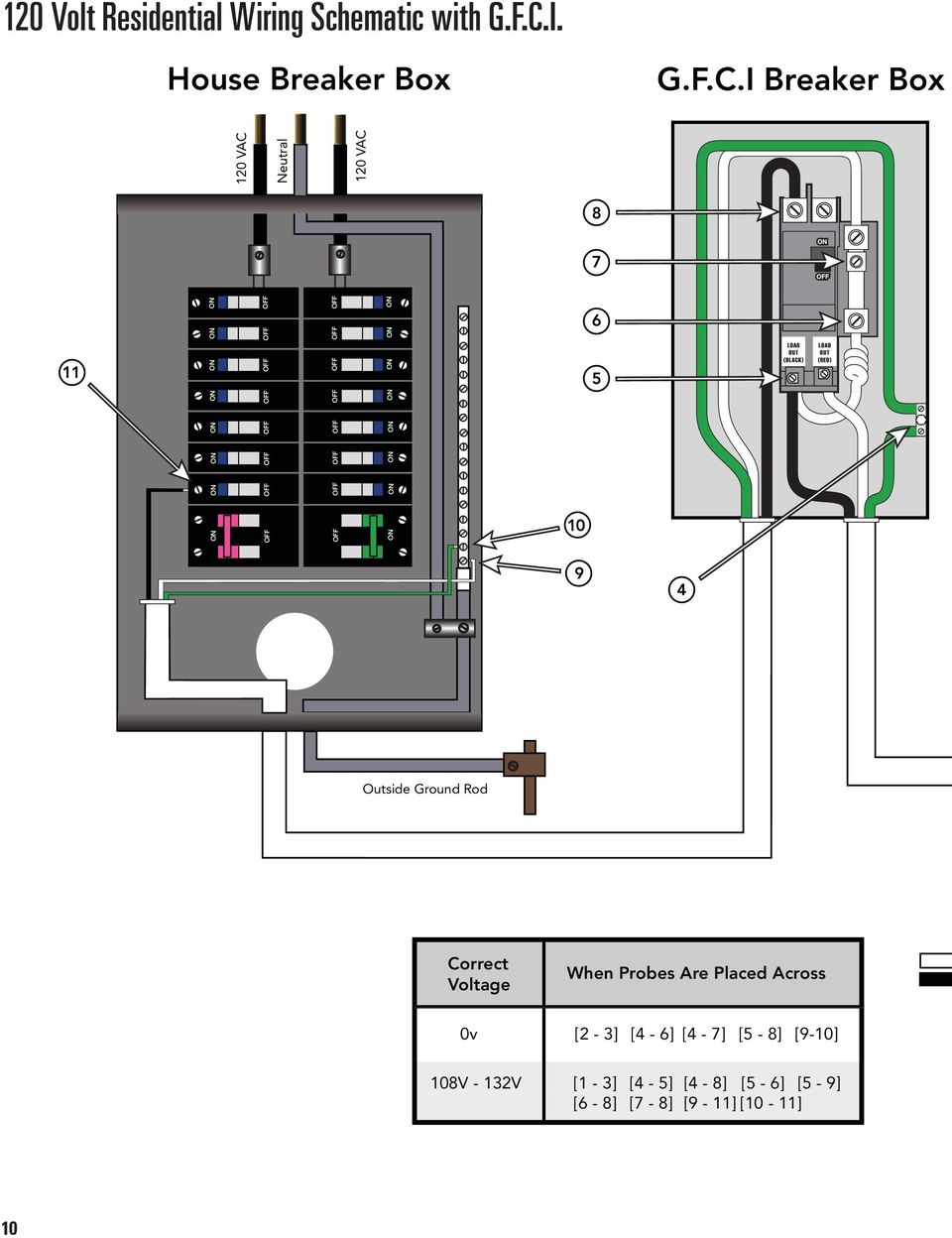
9 Voltage Checks: Breaker Box, G.F.C.I. & System Box When checking for proper voltage, keep in mind that the acceptable voltage range is + 10% of the recommended voltage. Acceptable voltage when 120 V is specified is between 108 and 132 V. Acceptable voltage when 240 V is specified is between 216 and 264 V. Diagrams are on the following pages. Voltage Verification - Most G.F.C.I. Problems Are Due To Low Voltage IMPORTANT: IF THE VOLTAGE IS NOT WITHIN THE ACCEPTABLE RANGE, CALL AN ELECTRICIAN OR THE LOCAL ELECTRIC COMPANY TO DIAGNOSE THE PROBLEM. CHECK THE VOLTAGES AT: 1. Breaker Box Voltage Check 2. G.F.C.I. Line-In Voltage Check. 3. G.F.C.I. Load Out Voltage Check 4. System Box Check At Tb1 120 VOLT SYSTEMS - 120V ± 10% - 108V - 132V 240 VOLT SYSTEMS - 240V ± 10% - 216V - 264V No More Than 2% (5 Volt AC) Difference Between Voltage at the Breaker Panel And Voltage at the System. CHECK UNDER PEAK LOADS -- TWO TYPES OF PEAK LOADS 1. Spa System Peak Loads - Pumps, Heater, Blower & Light On 2. Household Peak Loads - May Be In Afternoon On Hot Day Use Recording Meter If Possible - Records Max & Min Volts Communication Between Topside & System Board In Most Systems Press Button - Message Sent To System Board System Board Performs - Message Sent Back To Topside & Relay Opens Or Closes LED or Icon Is Turned On or Off - Hear Or See Relay Open Or Close In Most Cases, If This Happens, There Is No Problem With The Topside Panel Or System Board 1. Press Light Button Light LED or Icon Turns, But Spa Light Is NOT Topside & Board Are Good, Check Downstream Light LED or Icon Is NOT Topside Or System Board May Be Bad, Continue 2. Plug In Spare Topside Panel - Easier To Check For Bad Topside Light LED or Icon Now Turns Original Topside Is Bad - R&R Topside Panel Light LED or Icon Is NOT Original Topside Is Good, Do Not Replace System Board Is Bad - R&R System Board 3. Spa Light Is Still NOT - Check Downstream Same Procedure For Other Functions Jets, Blower, Heater, Time, Program, Mode, Etc. Diagrams Are On The Following Pages. 9

10 120 Volt Residential Wiring Schematic with G.F.C.I. House Breaker Box G.F.C.I Breaker Box 120 VAC Neutral 120 VAC Outside Ground Rod Correct Voltage When Probes Are Placed Across 0v [2-3] [4-6] [4-7] [5-8] [9-10] 108V - 132V [1-3] [4-5] [4-8] [5-6] [5-9] [6-8] [7-8] [9-11] [10-11] 10
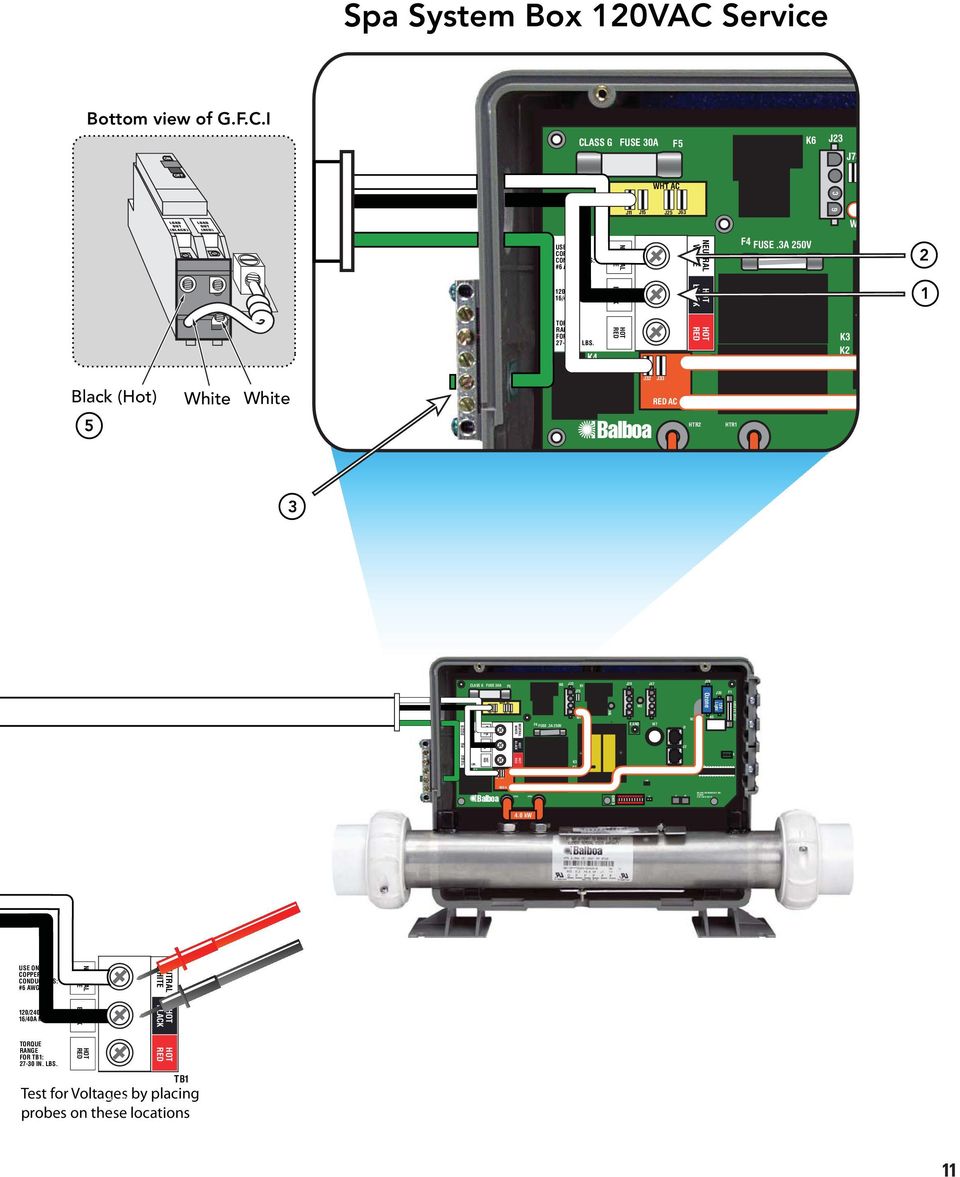
11 USE LY COPPER CDUCTORS: #6 AWG MIN. 120/240VAC 16/40A MAX 60Hz TORQUE RANGE FOR TB1: IN. LBS. J11 J15 J25 J63 J32 J33 HTR2 HTR1 SWITCHBANK A F2 S1 TST T1 SEN. A SEN. B MADE IN U.S.A COPYRIGHT 2005 J43 U4 BALBOA INSTRUMENTS INC. VS500Z P/N REV D J18 Spa System Box 120VAC Service Bottom view of G.F.C.I CLASS G FUSE 30A F5 K6 J23 J73 WHT AC J11 J15 J25 J63 G C W1 USE LY COPPER CDUCTORS: #6 AWG MIN. NEUTRAL WHITE NEUTRAL WHITE F4 FUSE.3A 250V 2 120/240VAC 16/40A MAX 60Hz BLACK BLACK 1 TORQUE RANGE FOR TB1: IN. LBS. K4 RED RED TB1 K3 K2 Black (Hot) 5 White White Balboa J32 J33 RED AC HTR2 HTR1 F2 3 CLASS G FUSE 30A NEUTRAL WHITE F5 WHT AC NEUTRAL WHITE K6 F4 FUSE.3A 250V J23 K1 J73 G C W1 W4 J29 J47 W2 G C G C E.GND W7 J1 W2 J29 Ozone G C K5 J20 G C 12V Light F1 FUSE 3A 250V BLACK BLACK J2 K4 RED RED TB1 K3 K2 RED AC Balboa E.GND J6 J7 J8 4.0 kw USE LY COPPER CDUCTORS: #6 AWG MIN. NEUTRAL WHITE NEUTRAL WHITE 120/240VAC 16/40A MAX 60Hz BLACK BLACK TORQUE RANGE FOR TB1: IN. LBS. K4 RED RED TB1 Test for Voltages J32 J33 by placing probes on these locations Electric Installation 120VAC_ eps 11
12 240 Volt Residential Wiring Schematic with G.F.C.I. House Breaker Box G.F.C.I Breaker Box 120 VAC Neutral 120 VAC Outside Ground Rod Correct Voltage When Probes Are Placed Across 0v [3-4] [5-8] [5-9] [12-13] 108V - 132V [1-3] [5-6] [5-10] [12-14] [13-14] [2-3] [5-7] [5-11] [12-15] [13-15] 216V - 264V [1-2] [6-7] [10-11] [14-15] 12

13 J11 J15 J25 J63 J32 J33 HTR2 HTR1 SWITCHBANK A F2 S1 TST T1 SEN. A SEN. B MADE IN U.S.A COPYRIGHT 2005 J43 J6 J7 J8 U4 BALBOA INSTRUMENTS INC. VS500Z P/N REV D J18 Spa System Box 240VAC Service Bottom view of G.F.C.I CLASS G FUSE 30A F5 K6 J23 J73 WHT AC J11 J15 J25 J63 G C W1 USE LY COPPER CDUCTORS: #6 AWG MIN. NEUTRAL WHITE NEUTRAL WHITE F4 FUSE.3A 250V 3 120/240VAC 16/40A MAX 60Hz BLACK BLACK 2 Black (Hot) White White 7 Red (Hot) 6 TORQUE RANGE FOR TB1: IN. LBS. K4 RED J32 Balboa J33 RED AC RED HTR2 TB1 HTR1 K3 K2 F2 1 4 USE LY COPPER CDUCTORS: #6 AWG MIN. CLASS G FUSE 30A NEUTRAL WHITE F5 WHT AC NEUTRAL WHITE K6 F4 FUSE.3A 250V J23 K1 J73 G C W1 W4 J29 J47 W2 G C G C E.GND W7 J1 W2 J29 Ozone G C K5 J20 G C 12V Light F1 FUSE 3A 250V 120/240VAC 16/40A MAX 60Hz BLACK BLACK J2 TORQUE RANGE FOR TB1: IN. LBS. K4 RED RED TB1 K3 K2 RED AC Balboa E.GND 4.0 kw USE LY COPPER CDUCTORS: #6 AWG MIN. NEUTRAL WHITE NEUTRAL WHITE 120/240VAC 16/40A MAX 60Hz BLACK BLACK TORQUE RANGE FOR TB1: IN. LBS. K4 RED RED TB1 Test for Voltages J32 J33 by placing probes on these locations Electric Installation 240VAC_ eps 13

14 Wiring Checks WIRING CHECK PRECAUTIS When working in a system box always be aware that it may contain high voltage. Always keep your fingers and hand tools away from any wiring or circuit board when the power is on. Touching anything in these areas can result in serious injury. All service calls, no matter how minor, should include a complete wiring check, beginning with the house breaker. CHECK FOR LOOSE CNECTIS OR DAMAGED WIRES Make sure the power is off before you touch any wiring. Once the power is off, carefully examine all wires for cuts or defects. K4 CLASS G FUSE 30A J66 J65 J11 TORQUE RANGE FOR TB1: IN. LBS. J32 WHT AC J15 J16 J25 J63 J64 NEUTRAL WHITE BLACK RED J33 J34 F5 J35 BLK AC J61 J62 TB1 TB1 SYSTEM BOX WIRE GAUGE CHECK When inspecting the wiring for any control system, note that connections for the incoming wires are clearly labeled at the main terminal block. 30A service minimum ten gauge copper wire. 40A service minimum eight gauge copper wire. 50A service minimum six gauge copper wire. These wires must connect the house breaker box, through the local disconnect, to the main terminal block. The wiring diagram inside the system box shows the main terminal block as TB1. IMPORTANT Using non-copper wire can be dangerous, and also can be the cause of a spa s malfunction. If non-copper wire is used at any point, we do not recommend servicing the spa until an electrician replaces it with the proper gauge copper wire. IMPORTANT This service must be single phase. Any abnormal voltage reading requires an electrician. Do not attempt to fix these types of problems yourself. High voltage can seriously injure or kill. Balboa J36 J37 RED AC Total Ampere Rating of Power System Minimum wire size Use Copper LY, with 90 o C insulation Ampere Rating of G.F.C.I. Circuit-breaker 0 A to 16 A #12 AWG A to 20 A #10 AWG A to 24 A #10 AWG A to 28 A #8 AWG A to 32 A #8 AWG A to 36 A #6 AWG A to 40 A #6 AWG 50 14

15 Spa Behavior -- Start-up Information See manufacturer s owners manual or reference card for general information on operating the spa, including programming filters and other settings that are changed from the topside control panel. PRIMING MODE In Priming Mode, the Mode button toggles the ozone on/off (with a 15-second time-out). This can be useful if you want to verify ozone generator operation without waiting for a filter cycle. This feature is not available on smaller panels where Mode is a multi-button sequence, since such a sequence exits Priming Mode. GENERAL FILTER INFORMATI On any system with a Deluxe panel, the filter times and durations are completely programmable from the topside control panel, and the first filter may not run for many hours after power-up. If you want the filter to run sooner, you have to either reprogram the filter or advance the time to just before the filter start. On all other systems, the first filter starts 6 minutes after power-up and the duration can be chosen (either using button sequences on the topside control panel or via a DIP switch) between several preset choices. Note that if you let Priming Mode exit automatically after 4 minutes, you have 2 more minutes before the first filter runs after power-up. Exiting Priming Mode by pressing the Temp, Warm, or Cool buttons, allows up to 6 minutes available before the first filter runs. IMPORTANT INFORMATI: If the filter settings have just been changed, it may take up to 24 hours for the filter cycle to reflect the changes. This is especially likely when changing from a very long filter duration (such as Continuous), to a short one, or vice versa. The low-speed pump (on non-circ) and ozone generator (if installed) will run during the filter cycles. The blower runs for 30 seconds at the start of each filter cycle. This will maintain water quality in the air channel. The pumps (other than pump 1 in non-circ, including pump 1 in circ) will run for 5 minutes at the start of each filter cycle. HEATER START UP INFORMATI On M-7 systems, the heater goes through a testing phase every time it starts up to assure that there is adequate water flow. This provides sophisticated dry fire and low flow protection. It can be confusing if you don't know what to expect. Step by step, here is what happens. (Note that the timing/temperature details may be slightly different on some older M7 systems.) Prior to heating, the pump is run for at least two minutes, and then the temperature difference between the sensors is assessed. It must be 2 F/1.0 C or less for heating to proceed, otherwise an error is issued. The heater turns on for 6.5 to 18 seconds (depending on heater voltage and wattage). At this point, the heat indicator on the panel is "solid." During this time the panel is not immediately responsive. The heater turns off for 90 seconds, making sure that the water flow keeps the temperature rise small and short. (Abnormal water flows, or lack of water, will produce a large and/or long temperature rise, and the system faults in that situation.) At this point, the heat indicator on the panel may appear to "shimmer" or "dim" (on some panels this may be less obvious from certain angles and more obvious from other angles, or in different lighting). If the dry fire test has passed, heating turns back on to heat the spa. The heat indicator on the panel returns to "solid". During spa heating, a difference between the sensors of 2 F/1.0 C, or perhaps 3 F/1.5 C (at least with 4-6kW 240V heaters), is considered normal. A significantly higher difference, however, is usually indicative of a flow problem, and will cause a fault which disables the heating for at least a minute (and then restarts the whole above process). 15

16 Diagnosing M7 Topside Control Panels Panel messages are a quick clue toward solving a variety of problems. Here are the most common messages and what they mean. PRELIMINARY PANEL CHECK If the problem is not obvious, look on the topside control panel for diagnostic messages. If no messages are seen, run through all spa functions and note any inconsistent operation. Most error messages are stored in the fault log. To view the fault log, the spa must be in test mode and the spa light must be turned on. Once you have determined that proper voltage is running through the circuit board and transformer, continue to the topside control panel. A panel that is not functioning properly may include the following symptoms: low voltage such as missing or scrambled segments, missing icons on the LCD, non-functional LED s, or nonfunctional buttons. If any of these symptoms are present, perform the following: Turn the power off and unplug the panel from the circuit board. Then, plug in your test panel and restore power. If everything functions normally, replace the topside panel. Disconnect ozone generator (if applicable). If you still see symptoms of low voltage, such as a sluggish, blank or partially blank panel, or if the display or the LED s do not function at all, turn the power off; unplug the ozone generator (if equipped); then restore power to the system. If the problem persists, turn off the power and replace the circuit board. PANEL DISPLAY MESSAGES THE PANEL DISPLAYS:,, or At least one of the sensors has detected water temperatures of 118ºF inside the heater. Or, THE PANEL DISPLAYS:,, or One of the sensors has detected the temperature of the water coming into the heater to be 110ºF, and so the water in the spa is likely to be that hot. These indicate that the spa has shut down due to an overheat situation. NOTE: Overheating may occur if the low-speed pump is set to operate for extended periods of time, or if the incorrect pump is installed. In rare cases (usually warmer climates), the circulation pump may also cause overheating. MOST PROBABLE OVERHEATING CAUSES, INSPECT THESE FIRST Check slice or ball valves. Make sure that they are open. Make sure the correct pump is installed. Clean the filter/skimmer if there is any blockage. Check heater element alignment. Check for debris on the heater element. In extremely hot weather, check for proper cabinet ventilation. Make sure the temperature sensor is fully inserted into the sensor fitting on the heater. Check for excessive filter duration. 16

17 NOTE: A common programming mistake is overlapping filter times that may cause the spa to filter continuously. Check the water level. Check the water temperature with an accurate temperature thermometer. Remove the spa cover and allow the water to cool to below 108 F. Adding cool water may be necessary. Touch any button to reset the system. If the water is still hotter than the set temperature, press the blower button (if applicable) to cool the spa. If the Problem Recurs, test the Sensor Set. THE PANEL DISPLAYS: or,,, or THE PANEL DISPLAYS: or,,, or This indicates that the spa has shut down due to an open or faulty sensor. If the problem recurs, test the sensor set. (See Testing the Sensor Set.) NOTE: In rare cases, rapid system overheat causes sensor error messages. Be sure to rule out possible situations like no flow or no water. THE PANEL DISPLAYS:,, or This indicates that the sensors are out of balance. If alternating with temperature, it may just be a temporary condition. If flashing by itself, spa is shut down. If the panel also displays Service Req, spa is shut down. If the spa shuts down due to this error, one (or both) of the sensors are probably reading several degrees off. If the problem recurs, test the sensor set. THE PANEL DISPLAYS:,, or Indicates the sensor detects a possible freeze condition. This Freeze Condition message does not appear on M-7 software showing a Software Version ID of 01 or greater. This is a normal spa function; no further action is necessary. When either sensor reads below 40 F, the system provides freeze protection. It automatically activates the pump (and the heater if necessary) to circulate the water and warm the plumbing. The equipment stays on until the sensors detect that the spa temperature has risen to within 15ºF of the set temperature. The other pumps and the blower will purge for 30 seconds to 2 minutes at the end of the freeze condition. If pump 1 was turned on due to this reason alone, this message will appear for up to two minutes right after very cold water is detected. NOTE: Internal freeze protection only functions when there is proper power running to the spa, and the control system is operational. Using an optional freeze sensor may be necessary in extreme climates to prevent plumbing damage, but will only work properly if placed inside the spa skirt in the coldest area. All spa models are different in shape and size and have different thermal characteristics; therefore, Balboa Water Group cannot be held responsible for freeze damage to the spa s plumbing. Testing is the responsibility of the spa manufacturer and must be done to determine the best location for the freeze sensor. THE PANEL DISPLAYS:,, or This indicates that the auxiliary sensor detects a possible freeze condition. This is a normal spa function; no further action is necessary. When the auxiliary sensor reads around 40 F (actual temperature dependent on specific auxiliary sensor used), the system provides freeze protection. It automatically activates all of the pumps and the blower to circulate water and warm the plumbing. 17

18 Diagnosing M7 Topside Control Panels (cont.) NOTE: This auxiliary freeze protection functions at all times, even when another fault condition has occurred and has otherwise shut the spa down. Any time the lower of the two temperature sensors goes below 45 F, all pumps/blowers turn on. They continue to run for 4 minutes after the temperature reaches 45 F or above. As soon as the temperature falls below 45 F again, this process restarts. This simplified sensor freeze protection functions at all times, even when another fault condition (other than total sensor failure) has occurred and has otherwise shut the spa down. THE PANEL DISPLAYS:,, or This indicates that a substantial difference in temperature between sensors has been detected during heating. This could indicate a flow problem. Check water level in spa. Refill, if necessary. If the water level is okay, make sure the pumps have been primed. On the fifth occurrence of the above message the panel will display:, or This indicates a persistent flow problem. The heater is shut down while all other spa functions continue to run normally. Power on the spa must be cycled before the heater will function again. THE PANEL DISPLAYS:,, or This indicates that there is not enough water in the heater. Spa shuts down for 15 minutes. This could indicate poor flow or air bubbles in the heater. On the third consecutive occurrence of the above message (without a successful heating cycle in between) the panel will display:,, or Spa is shut down and will not reset in 15 minutes. Press any button to reset manually. THE PANEL DISPLAYS:,, or This indicates that the temperature is completely unknown because the pump has not yet run for 2 minutes after Priming Mode was exited. This is only displayed for 2 minutes at power-up. SOME TROUBLESHOOTING SCENARIOS You find out the system is in OHH. This alone doesn't explain a lot. What led up to the OHH is much more important. If it's a Prestige, review the fault log carefully. Otherwise, see if the user has any additional information (for example, how long before the OHH was the spa panel last checked, and how hot was the water then). If the spa has cooled, see whether the problem can happen again, this time watching carefully to see if there are additional clues leading to the OHH (for example, other messages that appear shortly before the OHH happens). You find out the system keeps showing HFL, or is now in LF, or is shut down due to a "dry" fault. Put the spa in test mode with the light on, so that you see the two sensor temperatures. Are they normal (within 1 F/0.5 C) when not heating? How far apart are they when heating? HFL happens when they are 6 F/3 C apart (4 F/2 C on 120V and other low-heater-wattage systems), see how quickly that happens after heating starts. If it's getting close to that right away, it's probably a consistent flow problem, but if it's nowhere close to the HFL -causing temperature difference, the flow problem may be intermittent or only occur in certain specific situations. 18

19 LOW VOLTAGE At Balboa, it s been our experience that the majority of the problems associated with electronic control systems are due to low voltage. BROWN OUTS Brown outs can have an effect on the spa s operation in a variety of ways. The control panel may go blank, have scrambled messages on the LCD, or only a few features will function. If the system is getting the proper voltage at TB1, but still doesn t operate, then test for a blown power input fuse. CHECKING THE SYSTEM POWER INPUT FUSE Warning These procedures are performed while the system is powered up and running under peak loads. Be careful. CLASS G FUSE 30A F5 BLK AC J61 J62 If your system uses 120V peripheral devices (below): Measure between the white TB1 terminal and F5 power input fuse on the side farthest away from the circuit board edge (opposite the F5 silk screen). You should see 120 volts. If the system is equipped with the additional F6 power input fuse, measure F6 in the same manner. You should also see 120 volts. If your system uses 240V peripheral devices (below): Measure between the red TB1 terminal and F5 power input fuse on the side farthest away from the circuit board edge (opposite the F5 silk screen). You should see 240 volts. If the system is equipped with the additional F6 power input fuse, measure F6 in the same manner. You should also see 240 volts. If you determine that there is no voltage at one or both locations, then the system power input fuse(s) need to be replaced. Only use a fuse of the same type and amp rating when you replace any of these fuses. Elite System Measure fingers 5 and 6 of the circuit board. You should see either 120V or 240V, depending upon the system configuration. If you determine that there is no voltage at fingers 5 and 6, then the system power input fuse needs to be replaced. This fuse is located in the large fuse block inside the system box. This configuration utilizes a 30A time delay fuse. F5 Fuse WHT AC J66 J65 J11 J15 J16 J25 J63 J64 K4 TORQUE RANGE FOR TB1: IN. LBS. J32 NEUTRAL WHITE BLACK RED J33 J34 J36 J37 RED AC J35 TB1 TB1 Marking on Board Terminal Block 1 & F5 Fuse on a VS500Z Board Balboa 19

20 Diagnosing M7 Topside Control Panels (cont.) NOTE FOR ALL SYSTEMS In each situation, the most likely reason for the system power input fuse to blow is a pump problem. However, on occasion, a blower problem may also cause this fuse to blow if a 10A blower fuse is not built in. Once the power input fuse has been changed Probe the red wire and the white neutral wire. Again, voltage must be between 108 and 132 V. Check the voltage between the black and red wires again. Acceptable voltage range is between 216 and 264 V. THESE READINGS SHOULD BE TAKEN UNDER PEAK LOAD CDITIS. Important If the voltage is not in the acceptable range, call an electrician or the local electric company to diagnose the problem. TO DETERMINE THE CAUSE OF A BLOWN POWER INPUT FUSE Perform the following sequence of tests. Test the System Turn the power off. Be sure to replace the system power input fuse with the same type. Unplug the blower and all pumps. Restore the power and verify system operation. If the fuse blows, then re-check the internal system wires and connector for burns, cracks or cuts in insulation. If the fuse does not blow, turn the power off and plug in the pump. NOTE: Be sure to test each device individually. Test the Pump Restore the power and activate the pump. If the fuse blows, there is a pump problem. If the fuse does not blow, turn off the power. Test the Blower Plug in the blower. Power up the system and activate the blower. If the fuse blows, then there is a blower problem. If the fuse does not blow, the combined pump and blower amperage may be excessive. To verify this, first check with your spa manufacturer for amperage draw limits on each device. Since the blower should now be running, you can check the amperage draw with an ammeter by measuring around the black blower wire and compare with manufacturer s specifications. TEST THE AMPERAGE DRAW Turn off the power, disconnect the blower, make sure the pump is plugged in, and restore power. Start the pump and switch to high speed (if available), this should draw the most current. Make sure all jets and valves are open. Check the amperage at the red pump wire. Compare your reading with manufacturer specifications. (If the other plug-in devices exist, they should be tested in the same way.) If the amperage draw for each device is within manufacturer s specifications, the problem could be a nuisance spike in the pump, or water in the blower. NOTE: These slow-blow fuses are not always discolored when blown. Always test continuity of a fuse with an ohmmeter. NOTE: Miswiring of the spa is the most common reason for this fuse to blow. However, a lightning strike in the area is a possible, though less likely, cause of the failure. 20

21 ML Series Panels -- For Use with EL and GL Systems Jets 1 Jets 3 Time Warm Jets 2 Option ML900 F1 F2 PL TL Mode/Prog Cool Invert Fiber Light Blower Time Warm Light Blower ML700 F1 F2 PL TL Mode/Prog Cool Jets 1 Jets 2 Molex Type, ML/GL Connector ML553 ML554 Light Mode Warm ML551 Heat Jets 1 Jets 2 Blower Cool ML550 ML400 Heat Cool Warm Jets 1 Jets 2 Blower Light Mode Heat Jets Aux Temp Light ML260 Jets Aux Temp Light ML240 ML200 Jets Aux Temp Light Jets Aux Temp Light 21
22 ML900 Panel Operation Diagnostic Messages section for the ML900 is unique. Refer to the User Guide for additional information. User Guide for panel ML900 is Initial Start-up When your spa is first actuated, it will go into Priming mode (after displaying some configuration information). Please see Spa Behavior -- Start-up Information for additional information. The Priming mode will last for up to 4 minutes and then the spa will begin to heat and maintain the water temperature in the Standard mode. You can exit Priming mode early by pressing Warm or Cool. Mode/Prog This button is used to switch between standard, economy, and sleep modes. Press Mode/Prog to enter mode programming, press Cool to cycle through to desired mode (LCD flashes until confirmed), then press Mode/Prog to confirm selection Standard mode maintains the desired temperature. Note that the last measured spa temperature displayed is current only when the pump has been running for at least 1 minute. The icon will display until the mode is changed. Locking the Panel Press Time Jets 1 then Warm within 3 seconds. When locked, the PL PL light will light. All buttons are frozen except the Time button. To unlock the panel, press Time Jets 1 then Cool. Locking the Set Temperature Press Warm or Cool then Time, Jets 1, and Warm within 3 seconds to activate the lock. The TL TL light will light when the set temperature is locked. To unlock the set temperature, press Warm or Cool then Time, Jets 1 and Cool. Time When time hasn t been programmed, the icon flashes. (Time settings on EL1000 and some EL2000 systems are not preserved in the event of power loss; time will have to be reprogrammed upon each power up.) F1 F2 PL Jets 1 Time Warm Jets 2 Jets 3 Option TL Economy mode heats the spa to set temperature only during filter cycles. The icon will display until mode is changed. Pressing Jets 1 while in Economy mode puts the spa in Standard-In-Economy mode, which operates the same as Standard Mode, then reverts to Economy Mode automatically after 1 hour. Both the and icons display in this mode. During this time, a press of the Mode/Prog button will revert to Economy Mode immediately. Sleep mode heats the spa to within 20 F (11 C) of the set temperature only during filter cycles. The icon will display until mode is changed. Standby Mode Pressing Warm or Cool then Jets 2 will turn off all spa functions temporarily. This is helpful when changing a filter. Pressing any button resets the spa. On some systems the Jets 1 button will control the pump in Standby Mode ( Drain Mode ). In this case, press any other button to exit. Setting the Time Mode/Prog Cool Invert Fiber Light Blower Once the spa has been properly connected the first time (every power up on the EL1000 and some EL2000 systems), notice the icon appearing on the screen. Press then Select the hour by pressing Press Press Press Time Mode/Prog to enter. Select minutes by pressing Mode/Prog Time Mode/Prog Warm Warm Or Or to exit the time setting procedure and enter the optional filter cycle programming. (Exits programming on some EL1000 and some EL2000 systems.) to exit programming. Cool Cool (Each press changes the time by 1 minute) (Each press changes the time by 1 minute) 22
23 Diagnostic Messages section for the ML700 is unique. Refer to the User Guide for additional information. User Guide for panel ML700 is ML700 Panel Operation Initial Start-up When your spa is first actuated, it will go into Priming mode (after displaying some configuration information). Please see Spa Behavior -- Start-up Information for additional information. The Priming mode will last for up to 4 minutes and then the spa will begin to heat and maintain the water temperature in the Standard mode. You can exit Priming mode early by pressing Warm or Cool. Mode/Prog This button is used to switch between standard, economy, and sleep modes. Press Mode/Prog to enter mode programming, press Cool to cycle through to desired mode (LCD flashes until confirmed), then press Mode/ Prog to confirm selection. Standard mode maintains the desired temperature. Note that the last measured spa temperature displayed is current only when the pump has been running for at least 1 minute. The icon will display until the mode is changed. Economy mode heats the spa to set temperature only during filter cycles. The icon will display until mode is changed. Pressing Jets 1 while in Economy mode puts the spa in Standard-In-Economy mode, which operates the same as Standard Mode, then reverts to Economy Mode automatically after 1 hour. Both the and icons display in this mode. During this time, a press of the Mode/Prog button will revert to Economy Mode immediately. Sleep mode heats the spa to within 20 F (11 C) of the set temperature only during filter cycles. The icon will display until mode is changed. Standby Mode Pressing Warm or Cool then Jets 2 will turn off all spa functions temporarily. This is helpful when changing a filter. Pressing any button resets the spa. On some systems the Jets 1 button will control the pump in Standby Mode ( Drain Mode ). In this case, press any other button to exit. Locking the Panel Press Time Jets 1 then Warm within 3 seconds. When locked, the PL PL light will light. All buttons are frozen except the Time button. To unlock the panel, press Time Jets 1 then Cool. Locking the Set Temperature Press Warm or Cool then Time, Jets 1, and Warm within 3 seconds to activate the lock. The TL TL light will light when the set temperature is locked. To unlock the set temperature, press Warm or Cool then Time, Jets 1 and Cool. Time When time hasn t been programmed, the icon flashes. (Time settings on EL1000 and some EL2000 systems are not preserved in the event of power loss; time will have to be reprogrammed upon each power up.) Setting the Time Once the spa has been properly connected the first time (every power up on the EL1000 and some EL2000 systems), notice the icon appearing on the screen. Press then Select the hour by pressing Press Press Press F1 TL F2 PL Time Mode/Prog to enter. Select minutes by pressing Mode/Prog Time Time Mode/Prog Warm Cool Mode/Prog Warm Warm Or Or to exit the time setting procedure and enter the optional filter cycle programming. (Exits programming on some EL1000 and some EL2000 systems.) to exit programming. Cool Cool Light Jets 1 Blower Jets 2 (Each press changes the time by 1 minute) (Each press changes the time by 1 minute) 23
24 ML550, 551, 554 Panel Operation Please refer to the following User Guides for more detailed information: ML551/ML554 User Guide: P/N ML 550 User Guide: P/N Light Mode Warm Light Mode Warm Heat Heat Jets 1 Jets 2 Blower Cool Jets 1 Jets 2 Blower Cool ML551 ML554 Heat Cool Warm Jets 1 Jets 2 Blower Light Mode ML550 Cool/Warm ML500, 551, 554 Press the Cool or Warm button once to display the set temperature. Each time either button is pressed again, the set temperature will increase or decrease depending on which button is pressed. After three seconds, the LCD will automatically display the last measured spa temperature. Mode ML500, 551, 554 This button is used to switch between Standard, Economy, and Sleep modes. Press Mode to enter mode programming, press Cool to cycle through to desired mode (LCD flashes until confirmed), then press Mode to confirm selection. Sleep mode heats the spa to within 20 F (11 C) of the set temperature only during filter cycles. will appear on the display until mode is changed. Standby Mode Pressing Cool or Warm followed by Blower or Jets 2 or Aux will turn off all spa functions temporarily. This is helpful when changing a filter. Pressing any button exits Standby mode. On some systems the Jets 1 button will control the pump in Standby Mode ( Drain Mode ). Then press any other button to exit. System reverts to previous mode after 1 hour. Jets 1 Press the Jets 1 button once to turn pump 1 on or off, and to shift between low and high speeds if equipped. If left running, the pump will turn off after a time-out period. The pump 1 low speed time-out on some systems may be as long as 4 hours. On non-circ systems, the low speed of pump 1 runs when the blower or any other pump is on. It may also activate for at least 1 minute every 30 minutes to detect the spa temperature (polling) and then to heat to the set temperature if needed, depending upon mode. When the low speed turns on automatically, it cannot be deactivated from the panel; however, the high speed may be started. Jets 2 (optional on some systems) Press the Jets 2 button once to turn pump 2 on or off, and to shift between low and high speeds if it is a two-speed pump. If left running, the pump will turn off after a time-out period. Blower 1-speed operation: on/off, 2-speed operation: med/hi/off, or 3-speed operation: lo/med/hi/off. If left on, the blower will automatically turn off after a timeout period. 24
25 NOTE: If your system does not have a Blower button, and is labeled as Jets 3 instead, please refer to the respective User Guide listed above. Light Some systems are equipped with both a spa light and a fiber optic light; however, only one can be accessed by this panel. (Larger panels may be purchased so that both the spa light and fiber optic light can be utilized.) Depending upon how your spa is equipped and configured, the Light button will operate in one of three ways: 1) Press the Light button to turn the spa light on and off, and to shift between dim and bright settings if your light is dimmable. 2) If a fiber-optic light with wheel is installed, press the Light button once to start the light and wheel; press it again to stop the wheel, and then again to turn the light off. 3) If a fiber-optic light without a separate wheel stop is installed, press the Light button to turn it on and off. Both a spa light and a fiber optic light may be used simultaneously on the EL8000 and EL5000 systems with a different panel. If any light is left on, it will automatically turn off after a factory programmed time period. Preset Filter Cycles On all systems, the pump and the ozone generator will run during filtration. At the start of each filter cycle, the blower will run briefly on its highest speed to purge the air channels. The lowest speed of any other pumps and the mister will also run briefly. On some circ systems, pump 1 may also run for the duration of the filter. (Note: This panel cannot be used to program filter cycles for systems that are programmed by time rather than by duration. For these systems, a larger panel is needed and the following description does not apply.) The first filter cycle ( day ) begins 6 minutes after the spa is powered up. The second filter cycle ( night ) begins 12 hours later. Filter duration is programmable for 1-12 hours ( - ). The default filter duration can vary from system to system. To program, press Cool or Warm, then Jets 1. Press Cool or Warm to select the filter duration. Press Jets 1 to select the number of filter cycles. The display will show (both day and night cycles); (day cycle only); or ( night cycle only). Press Cool or Warm to adjust, then press Jets 1 to exit the programming mode. For continuous filtration, use and. Freeze Protection If the temperature sensors within the heater detect a low enough temperature, then the pump(s) and the blower automatically activate to provide freeze protection. The pump(s) and blower will run either continuously or periodically depending on conditions. In colder climates, an optional additional freeze sensor may be added to protect against freeze conditions that may not be sensed by the standard sensors. Auxiliary freeze sensor protection acts similarly except with the temperature thresholds determined by the switch. See your dealer for details. Locking Features If this panel is used as the main panel, locking features will not be available. If this panel is used as a remote or additional panel, it will lock when the main panel is locked. To unlock this panel, unlock the main panel. In the same way, the set temperature can be locked and unlocked by a main panel. When the set temperature is locked, it cannot be changed from either panel. Clean-up Cycle (optional) When a pump or blower is turned on by a button press, a clean-up cycle begins 30 minutes after the pump or blower is turned off or times out. The pump and the ozone generator will run for one to four hours, depending on the system (on some systems, you can change this setting.) 25
26 ML550, 551, 554 Panel Operation (cont.) Circ Pump (optional) If your system is equipped with a circ pump, it may be configured to work in one of three different ways: 1) The circ pump operates continuously (24 hours) with the exception of turning off for 30 minutes at a time when the water temperature reaches 3 F (1.5 C) above the set temperature (most likely to happen in very hot climates). 2) The circ pump stays on continuously, regardless of water temperature. 3) The circ pump will come on when the system is checking temperature (polling), during filter cycles, during freeze conditions, or when another pump is on. Ozone (optional) On most systems, the ozone generator (if installed) runs during filter cycles (except when pump 1 is operating at high speed on a non-circ system) and during clean-up cycles. On some systems, the ozone generator operates whenever the pump runs. If your system is configured with the optional ozone suppress feature, the ozone generator will turn off for 1 hour any time a function button (Jets 1, Jets 2, Blower, etc.) is pressed. Displaying Info About Your Spa There are several pieces of information about your spa that can be called up from the panel, but are only needed in special cases. To access this information, press Cool or Warm then Jets 1, then Light. (Each press must be within 3 seconds of the previous press.) Then press Cool until you see on the display. Press Jets 1 to see the SSID (a series of 3 numbers, such as , which indicates the precise revision of the software in your spa), followed by the Mach software version number (such as 2.1), followed by and then your spa s network ID number (consisting of both letters and digits displayed in 5 steps). If you need to see this series of numbers again, and is once again on the display, just press Jets 1 again. When done, press the Light button (more than once if necessary) until you see the normal temperature display. User Preferences There are several aspects of spa operation that you can customize using the User Preferences submenu. Press Cool or Warm then Jets 1, then Light. (Each press must be within 3 seconds of the previous press.) At this point, if is not showing on the display, press Cool until you see on the display. Then press Jets 1 to enter the User Preferences submenu. Once in the User Preferences submenu, press Cool or Warm to cycle between these settings: Suppress Reminders When set to, reminders are never displayed on the panel. When set to, reminders are displayed on the panel periodically. Temperature in Celsius When set to, temperatures are displayed on the panel in degrees Celsius. When set to, temperatures are displayed in Fahrenheit. 24-hour Time Display When set to, time is displayed in 24-hour (military) format (00:00 is midnight, 23:00 is one hour before midnight). When set to, time is displayed in 12-hour (am/pm) format (12:00 is midnight, 11:00 pm is one hour before midnight). Clean-up Cycle Duration (some systems only) When set to, Clean-up Cycles are disabled. When set to through, the number indicates how many hours each Clean-up Cycle will run. Dolphin II Address When set to, no addressing is used. Use this setting for a Dolphin I, or for a Dolphin II which is set for no address (which is the Dolphin II factory default). When set to through, the number is the address (see your Dolphin II manual for details). 26
27 Editing User Preferences View the setting. The left two characters (before the decimal point) tell you what setting you re viewing or editing, the right most character (after the decimal point) tells you the value of that setting (for example, for Yes or for No). If the value is flashing, you re editing it. If the value is not flashing, you re just viewing it. Press Jets 1 to switch editing of the value on (flashing) or off (not flashing). Once you re editing the value (it s flashing), use the Cool or Warm buttons to change the value to the one you want. After you change the value, you must press Jets 1 again to stop the flashing before the change will register, and before you can view or edit another setting. If you don t interact with the menu for more than 30 seconds, it may time out. If you press Light to back out of the menu, or pause long enough for it to time out, while a value was flashing, the changes you were making to that setting are not remembered. But changes you previously made to other settings will be in effect. Any User Preferences that you change will stay in effect forever or until you change them again (unless the spa s persistent memory is reset by a service technician), and will override the factory defaults for those settings. Note: The G.F.C.I. section does not apply on EL systems used outside the United States. This G.F.C.I. section does not apply to GL Systems. WARNING: THE OWNER SHOULD TEST AND RESET THE G.F.C.I. A REGULAR BASIS TO VERIFY ITS FUNCTI. G.F.C.I. PROTECTI Your spa may be equipped with a G.F.C.I. Protection feature. If your spa does have this feature enabled, the G.F.C.I. Trip Test must occur to allow proper spa function. Within 1 to 7 days after startup, the spa will trip the G.F.C.I. to test it. (The number of days is factory programmed.) The G.F.C.I. must be reset once it has been tripped. After passing the G.F.C.I. Trip Test, subsequent G.F.C.I. trips will indicate a ground fault or other unsafe condition requiring the power to the spa to be shut off. G.F.C.I. TRIP TEST PROCEDURE The installer can cause the G.F.C.I. Trip Test to occur sooner by initiating it with the following button sequence. Press Warm, then Jets 1, then Light. (Each press must be within 3 seconds of the previous press.) Press the Warm button repeatedly until is displayed. Press Jets 1 to select it. Press the Warm button until is displayed. Press Jets 1 to initiate the G.F.C.I. Trip Test. The G.F.C.I. should trip within several seconds and the spa should shut down. If it does not, shut down the power and manually verify that a G.F.C.I. breaker is installed and that the circuit and spa are wired correctly. Verify the function of the G.F.C.I. with its own test button. Restore power to the spa and repeat the G.F.C.I. Trip Test. Once the G.F.C.I. is tripped by the test, reset the G.F.C.I. and the spa will operate normally from that point. You can verify a successful test by navigating to the item as described above, pressing Jets 1 and then pressing the Warm button until you see. The code signifies G.F.C.I. Status - Passed. The system will exit this menu in 30 seconds if no buttons are pressed. 27
28 ML200, 240, 260, 400 Panel Operation Please refer to the following User Guides for more detailed information: ML400 User Guide: P/N ML260 User Guide: P/N ML240 User Guide: P/N ML200 User Guide: P/N Heat Jets Aux Temp Light Jets Aux Temp Light ML400 ML260, ML240, ML200 The pump responsible for heating and filtration (pump 1 low on non-circ systems, or the circ pump on circ systems) will be referred to simply as the pump. Timeouts refer to a preset length of time that a function is programmed to operate before shutting off automatically. Certain conditions (filters or freeze) can cause a function to operate longer, while faults can cause a function to operate for a shorter length of time. The system keeps track of timeouts regardless of other conditions occurring. In multi-button sequences, if buttons are pressed too quickly in sequence, they may not register Initial Start-up When your spa is first actuated, it will go into Priming mode (after displaying some configuration information). The Priming mode will last for up to 4 minutes and then the spa will begin to heat and maintain the water temperature in the Standard mode. You can exit Priming mode early by pressing Temp. Temp Set (80 F F/26.0 C C) The last measured temperature is constantly displayed on the LCD. Your spa s set temperature range may vary from range shown above depending on your manufacturer s settings. Note that the last measured spa temperature displayed is current only when the pump has been running for at least 1 minute. Temp ML400 Press the Temp button once to display the set temperature. To change the set temperature, press the pad a second time before the LCD stops flashing. Each press of the Temp button will continue to either raise or lower the set temperature. If the opposite direction is desired, release the pad and let the display revert to the current water temperature. Press the pad to display the set temperature, and again to make the temperature change in the desired direction. After three seconds, the LCD will automatically display the last measured spa temperature. Mode ML400 A button combination is used to switch between standard, economy, and sleep modes. Press Temp followed by Light to enter mode programming, press Temp to cycle through to desired mode (LCD flashes until confirmed), then press Light to confirm selection. Standard mode maintains the desired temperature. Note that the last measured spa temperature displayed is current only when the pump has been running for at least 1 minute. will appear on the display momentarily when you switch into Standard Mode. Economy mode heats the spa to the set temperature only during filter cycles. will appear solid when the temperature is not current and will alternate with the temperature when the temperature is current. Pressing Jets while in Economy mode puts the spa in Standard-In-Economy mode, ( ) which operates the same as Standard Mode, then reverts to Economy Mode automatically after 1 hour. During this time, pressing Temp followed by Light will revert the mode to Economy immediately. 28
29 Sleep mode heats the spa to within 20 F (11 C) of the set temperature only during filter cycles. will appear on the display until mode is changed. Standby Mode ML400 Pressing Temp followed by Aux or Jets 2 or Blower will turn off all spa functions temporarily. This is helpful when changing a filter. Pressing any button exits Standby mode. On some systems the Jets button will control the pump in Standby Mode ( Drain Mode ). In this case, press any other button to exit. System will revert to previous mode after 1 hour. Jets ML400 Press the Jets button once to turn pump 1 on or off, and to shift between low and high speeds if equipped. If left running, the pump will turn off after a time-out period. The pump 1 low speed time-out on some systems may be as long as 4 hours. On non-circ systems, the low speed of pump 1 runs when the blower or any other pump is on. It may also activate for at least 1 minute every 30 minutes to detect the spa temperature (polling) and then to heat to the set temperature if needed, depending upon mode. When the low speed turns on automatically, it cannot be deactivated from the panel; however, the high speed may be started. Jets 2 (optional on some systems) ML400 If your system has a second pump but your panel does not have a Jets 2 button, use the Aux button to control pump 2. Press the Jets 2 button once to turn pump 2 on or off, and to shift between low and high speeds if it is a two-speed pump. If left running, the pump will turn off after a time-out period. Blower (optional on some systems) ML400 If your system has a blower (and only one pump), but your panel does not have a Blower button, use the Aux button to control the blower. 1-speed operation: on/off; 2-speed operation: med/hi/off; or 3-speed operation: lo/med/hi/off. If left on, the blower will automatically turn off after a timeout period. Circ Pump (optional) ML400 If your system is equipped with a circ pump, it may be configured to work in one of three different ways: 1) The circ pump operates continuously (24 hours) with the exception of turning off for 30 minutes at a time when the water temperature reaches 3 F (1.5 C) above the set temperature (most likely to happen in very hot climates). 2) The circ pump stays on continuously, regardless of water temperature. 3) The circ pump will come on when the system is checking temperature (polling), during filter cycles, during freeze conditions, or when another pump is on. Light ML400 Some systems are equipped with both a spa light and a fiber optic light; however, only one can be accessed by this panel. (Larger panels may be purchased so that both the spa light and fiber optic light can be utilized.) Depending upon how your spa is equipped and configured, the Light button will operate in one of three ways: 1) Press the Light button to turn the spa light on and off, and to shift between dim and bright settings if your light is dimmable. 2) If a fiber-optic light with wheel is installed, press the Light button once to start the light and wheel, press it again to stop the wheel, and then again to turn the light off. 3) If a fiber-optic light without a separate wheel stop is installed, press the Light button to turn it on and off. Again, both a spa light and a fiber optic light may be used simultaneously on the EL8000 and EL5000 systems with a different panel. If any light is left on, it will automatically turn off after a factory programmed time period. Ozone (optional) ML400 On most systems, the ozone generator (if installed) runs during filter cycles (except when pump 1 is operating at high speed on a non-circ system) and during clean-up cycles. On some systems, the ozone generator operates whenever the pump runs. If your system is configured with the optional ozone suppress feature, the ozone generator will turn off for 1 hour any time a function button (Jets, Jets 2, Blower, etc.) is pressed. 29
30 ML200, 240, 260, 400 Panel Operation (cont.) Clean-up Cycle (optional ML400) When a pump or blower is turned on by a button press, a clean-up cycle begins 30 minutes after the pump or blower is turned off or times out. The pump and the ozone generator will run for one to four hours, depending on the system. (On some systems, you can change this setting; see User Preferences section.) Freeze Protection ML400 If the temperature sensors within the heater detect a low enough temperature, then the pump(s) and the blower automatically activate to provide freeze protection. The pump(s) and blower will run either continuously or periodically depending on conditions. In colder climates, an optional additional freeze sensor may be added to protect against freeze conditions that may not be sensed by the standard sensors. Auxiliary freeze sensor protection acts similarly except with the temperature thresholds determined by the switch. See your dealer for details. Locking Features ML400 If this panel is used as the main panel, locking features will not be available. If this panel is used as a remote or additional panel, it will lock when the main panel is locked. To unlock this panel, unlock the main panel. In the same way, the set temperature can be locked and unlocked by a main panel. When the set temperature is locked, it cannot be changed from either panel. Preset Filter Cycles ML400 On all systems, the pump and the ozone generator will run during filtration. At the start of each filter cycle, the blower will run briefly on its highest speed to purge the air channels. The lowest speed of any other pumps and the mister will also run briefly. On some circ systems, pump 1 may also run for the duration of the filter. (Note: This panel cannot be used to program filter cycles for systems that are programmed by time rather than by duration. For these systems, a larger panel is needed and the following description does not apply.) The first filter cycle ( day ) begins 6 minutes after the spa is powered up. The second filter cycle ( night ) begins 12 hours later. Filter duration is programmable for 1-12 hours ( - ). The default filter duration can vary from system to system. To program, press Temp then Jets. Press Temp to select the filter duration. Press Jets to select the number of filter cycles. The display will show (both day and night cycles); (day cycle only); or ( night cycle only). Press Temp to adjust, then press Jets to exit the programming mode. For continuous filtration, use and. Displaying Information About Your Spa ML400 There are several pieces of information about your spa that can be called up from the panel, but are only needed in special cases. To access this information, press Temp then Jets, then Light. (Each press must be within 3 seconds of the previous press.) Then press Temp until you see on the display. Press Jets to see the SSID (a series of 3 numbers, such as , which indicates the precise revision of the software in your spa), followed by the Mach software version number (such as 2.1), followed by and then your spa s network ID number (consisting of both letters and digits displayed in 5 steps). If you need to see this series of numbers again, and is once again on the display, just press Jets again. When done, press the Light button (more than once if necessary) until you see the normal temperature display. User Preferences ML400 There are several aspects of spa operation that you can customize using the User Preferences submenu. Press Temp then Jets, then Light. (Each press must be within 3 seconds of the previous press.) At this point, if is not showing on the display, press Temp until you see on the display. Then press Jets to enter the User Preferences submenu. Once in the User Preferences submenu, press Temp to cycle between these settings: Suppress Reminders When set to, reminders are never displayed on the panel. When set to, reminders are displayed on the panel periodically. 30
31 Temperature in Celsius When set to, temperatures are displayed on the panel in degrees Celsius. When set to, temperatures are displayed in Fahrenheit. 24-hour Time Display When set to, time is displayed in 24-hour (military) format (00:00 is midnight, 23:00 is one hour before midnight). When set to, time is displayed in 12-hour (am/pm) format (12:00 is midnight, 11:00 pm is one hour before midnight). Clean-up Cycle Duration (some systems only) When set to, Clean-up Cycles are disabled. When set to through, the number indicates how many hours each Clean-up Cycle will run. Dolphin II Address When set to, no addressing is used. Use this setting for a Dolphin I, or for a Dolphin II which is set for no address (which is the Dolphin II factory default). When set to through, the number is the address (see your Dolphin II manual for details). Editing User Preferences ML400 View the setting. The left two characters (before the decimal point) tell you what setting you re viewing or editing, the right most character (after the decimal point) tells you the value of that setting (for example, for Yes or for No). If the value is flashing, you re editing it. If the value is not flashing, you re just viewing it. Press Jets to switch editing of the value on (flashing) or off (not flashing). Once you re editing the value (it s flashing), use the Temp buttons to change the value to the one you want. After you change the value, you must press Jets again to stop the flashing before the change will register, and before you can view or edit another setting. If you don t interact with the menu for more than 30 seconds, it may time out. If you press Light to back out of the menu, or pause long enough for it to time out, while a value was flashing, the changes you were making to that setting are not remembered. But changes you previously made to other settings will be in effect. Any User Preferences that you change will stay in effect forever or until you change them again (unless the spa s persistent memory is reset by a service technician), and will override the factory defaults for those settings. G.F.C.I. Protection ML400 Your spa may be equipped with a G.F.C.I. Protection feature. If your spa does have this feature enabled, the G.F.C.I. Trip Test must occur to allow proper spa function. Within 1 to 7 days after startup, the spa will trip the G.F.C.I. to test it. (The number of days is factory programmed.) The G.F.C.I. must be reset once it has been tripped. After passing the G.F.C.I. Trip Test, subsequent G.F.C.I. trips will indicate a ground fault or other unsafe condition requiring the power to the spa to be shut off. G.F.C.I. Trip Test Procedure: ML400 The installer can cause the G.F.C.I. Trip Test to occur sooner by initiating it with the following button sequence. Press Temp, then Jets, then Light. (Each press must be within 3 seconds of the previous press.) Press the Temp button repeatedly until is displayed. Press Jets to select it. Press the Temp button until is displayed. Press Jets to initiate the G.F.C.I. Trip Test. The G.F.C.I. should trip within several seconds and the spa should shut down. If it does not, shut down the power and manually verify that a G.F.C.I. breaker is installed and that the circuit and spa are wired correctly. Verify the function of the G.F.C.I. with its own test button. Restore power to the spa and repeat the G.F.C.I. Trip Test. Once the G.F.C.I. is tripped by the test, reset the G.F.C.I. and the spa will operate normally from that point. You can verify a successful test by navigating to the item as described above, pressing Jets and then pressing the Temp button until you see. The code signifies G.F.C.I. Status - Passed. The system will exit this menu in 30 seconds if no buttons are pressed. 31
32 VL Series Panels -- For use with VS and GS Systems p VL700S VL701S VL702S VL801D VL802D Time Warm Blower Mode / Prog Cool Jets 1 Time Warm Blower Light Mode/Prog Cool Jets 1 Jets 2 Blower Blower Jets 1 Jets 1 Jets 2 Jets 2 Mode Light Mode Light Warm Heat Cool Warm Heat Cool Light Jets 2 STANDARD SYSTEMS DELUXE SYSTEMS Phone Plug RJ Type, VL/VS Connector VL600S Jets Blower Light Jets Blower Light Heat Warm Mode Cool 32
33 VL406T VL406U Jets Light Jets Blower Light Heat Heat Warm Cool Temp VL404 Set Heat Blower Phone Plug RJ Type, VL/VS Connector Jets Light VL200 VL240 VL260 VL400 VL401 VL402 VL403 Heat Blower Jets Temp Light Blower Light Jets Heat Heat Blower Jets Temp Light Blower Jets Blower Temp Jets Light Temp Light Set Note: VL404 and VL403 have red LED s on black background DUPLEX SYSTEMS 33
34 VS/GS Panel & 500 Series and Operation Please refer to the User Guides for additional information. 500 Z Series User Guide: P/N /300F Series User Guide: P/N (for systems with software V38 only) 500 SZ Series User Guide: P/N /300F Series User Guide: P/N (for systems with software v41 only) 500 DZ Series User Guide: P/N Temp Je ts 300/300F/500Z Series Panel Blower Ligh t Note: Button shapes and labels may vary. Warm Cool Mode Jets Blower Light 500SZ Series Panel Note: Button shapes and labels may vary. Warm Cool Mode/Prog Time Jets Blower Light 500DZ Series Panel Note: Button shapes and labels may vary. Initial Start-up Your spa will enter Priming Mode ( ) when it is energized. During Priming Mode, press Jets button(s) repeatedly and be sure all pumps are free of air. Priming Mode lasts less than 5 minutes. Press Temp to exit. After Priming Mode, the spa will run in Standard Mode (see Mode section). Some panels may not have a Temp button. On these panels the Set, Warm, or Cool buttons are used. The pump responsible for heating and filtration (pump 1 low-speed on non-circ system, or the circ pump on circ systems) will be referred to simply as the pump. In multi-button sequences, if the buttons are pressed too quickly in sequence, they may not register. TEMP CTROL (80 F F/26 C - 40 C) The last measured water temperature is constantly displayed. The water temperature displayed is current only when the pump has been running for at least 2 minutes. On panels with a single Temp or Set button, to display the set temperature, press the button once. To change the set temperature, press the button a second time before the display stops flashing. Each press of the button will continue to either raise or lower the set temperature. If the opposite direction is desired, allow the display to revert to the current water temperature. Press the button to display the set temperature, and again to make the temperature change in the desired direction. 34
35 On panels with Warm and Cool buttons, to display the set temperature, press Warm or Cool once. To change the set temperature, press a temperature button again before the display stops flashing. Each press of Warm or Cool will adjust the set temperature. After three seconds, the display will stop flashing and begin to display the current spa temperature. JETS Jets 1 500Z, 500DZ, 500SZ Series Press Jets 1 to turn pump 1 on or off, and to shift between low and high speeds (if equipped). The low-speed will turn off after 4 hours. High-speed will turn off after 15 minutes. Low-speed may run automatically at times, during which it cannot be deactivated from the panel, but high-speed may be operated. Jets 2/Jets 3/Blower (If equipped) Press the corresponding button once to turn the device on or off. The device will turn off after 15 minutes. Pump 2 may be two-speed on some systems. Some systems use this one button to control two devices. The first button press will activate one device. Press again to have both devices active. Press again to turn off the first device only. Press one more time to turn both devices off. Jets 300F (Software v. 41) Press Jets to turn the pump on or off, and to shift between low and high speeds (if equipped). If left running, the pump will turn off after a preset length of time, which on some systems may be as long as 2 hours for low speed. Low speed may run automatically at times, during which it cannot be deactivated from the panel, but high speed may be operated. The ozone generator (if installed) will activate anytime low speed is running. Jets 300, 300F (Software v. 38) Press Jets to turn the pump on or off, and to shift between low and high speeds (if equipped). The low speed will turn off after 4 hours. High speed will turn off after 15 minutes. Low speed may run automatically at times, during which it cannot be deactivated from the panel, but high speed may be operated. The ozone generator (if installed) will activate anytime low speed is running. LIGHT Press Light to operate the spa light. Turns off after 4 hours. SETTING THE TIME OF DAY When the spa is first powered up, the words SET TIME will flash on the display. Press Time, then Mode/Prog, then Warm or Cool. The time will begin changing in one-minute increments. Press Warm or Cool to stop the time from changing. Press Time to confirm. MODE/PROG Mode 500Z Depending on system configuration, mode changing may not be available and will be locked in Standard Mode. Mode is changed by pressing Temp, then Light. STANDARD Mode maintains set temperature. will be displayed momentarily when you switch into Standard Mode. ECOMY Mode heats the spa to the set temperature only during filter cycles. will display when water temp is not current, and will alternate with water temp when the pump is running. SLEEP Mode heats the spa to within 20 F/10 C of the set temperature only during filter cycles. will display when water temp is not current, and will alternate with water temp when the pump is running. Mode 500SZ Mode is changed by pressing Warm or Cool, then pressing Mode. STANDARD Mode maintains set temperature. will be displayed momentarily when you switch into Standard Mode. ECOMY Mode heats the spa to the set temperature only during filter cycles. will display when water temp is not current, and will alternate with water temp when the pump is running. SLEEP Mode heats the spa to within 20 F/10 C of the set temperature only during filter cycles. will display when water temp is not current, and will alternate with water temp when the pump is running. 35
36 VS/GS Panel & 500 Series and Operation (cont.) Mode/Prog 500DZ Mode is changed by pressing Warm or Cool, then pressing Mode/Prog button. Standard Mode maintains set temperature and the STANDARD icon will be displayed. ECOMY Mode heats the spa to the set temperature only during filter cycles. will display when water temp is not current, and will alternate with water temp when the pump is running. The ECOMY icon will be displayed. SLEEP Mode heats the spa to within 20 F/10 C of the set temperature only during filter cycles. will display when water temp is not current, and will alternate with current water temp when the pump is running. Mode 300, 300F Depending on system configuration, mode changing may not be available and will be locked in Standard Mode. Mode is changed by pressing Temp, then Light. STANDARD Mode maintains set temperature. will be displayed momentarily when you switch into Standard Mode. ECOMY Mode heats the spa to the set temperature only during filter cycles. will display when water temp is not current, and will alternate with water temp when the pump is running. SLEEP Mode heats the spa to within 20 F/10 C of the set temperature only during filter cycles. will display when water temp is not current, and will alternate with water temp when the pump is running FILTER CYCLES Preset Filter Cycles 500Z The first preset filter cycle begins 6 minutes after the spa is energized. The second preset filter cycle begins 12 hours later. Filter duration is programmable for 2, 4, 6, or 8 hours or for continuous filtration (indicated by ). The default filter time is 2 hours. To program, press Temp, then Jets 1. Press Temp to adjust. Press Jets 1 to exit programming. For non-circ systems, low-speed pump 1 and the ozone generator (if installed) run during filtration. For circulation systems, the circ pump and the ozone generator (if installed) run 24 hours. In hot environments, the circ pump may turn off for 30 minute periods, except during filter cycles. At the beginning of each filter cycle all other equipment will run briefly to purge the plumbing. Preset Filter Cycles 500SZ The first preset filter cycle begins 6 minutes after the spa is energized. The second preset filter cycle begins 12 hours later. Filter duration is programmable for 2, 4, 6, or 8 hours or for continuous filtration (indicated by ). The default filter time is 2 hours for non-circ systems and 4 hours for circ systems. To program, press Warm or Cool, then Jets 1. Press Warm or Cool to adjust. Press Jets 1 to exit programming. In hot environments, the circ pump may turn off for 30 minute periods, except during filter cycles. At the beginning of each filter cycle all other equipment will run briefly to purge the plumbing Preset Filter Cycles 500DZ The first preset filter cycle starts at 8:00 AM and ends at 10:00 AM. The second preset filter cycle starts at 8:00 PM and ends at 10:00 PM. For non-circ systems, low-speed pump 1 and the ozone generator (if installed) run during filtration. For circulation systems, the circ pump and the ozone generator (if installed) run 24 hours. In hot environments, the circ pump may turn off for 30 minute periods, except during filter cycles. At the beginning of each filter cycle, all other equipment will run briefly to purge the plumbing. Preset Filter Cycles 300F (Software v. 41) The first preset filter cycle begins 6 minutes after the spa is energized. The second preset filter cycle begins 12 hours later. Filter duration is programmable for 1, 2, 3, 4, 5, 6, 7, or 8 hours. The default filter time is 1 hour. To program, press Temp, then Jets. Press Temp to adjust. Press Jets to exit programming. 36
37 Preset Filter Cycles 300, 300F (Software v. 38) The first preset filter cycle begins 6 minutes after the spa is energized. The second preset filter cycle begins 12 hours later. For 300-series systems, filter duration is programmable for 2, 4, 6, or 8 hours or for continuous filtration (indicated by ). The default filter time is 2 hours. For 300F-series systems, filter duration is programmable for 1, 2, 3, 4, 5, 6, 7, or 8 hours or for continuous filtration (indicated by ). The default filter time is 1 hour. To program, press Temp, then Jets. Press Temp to adjust. Press Jets to exit programming. Optional Filter Cycle Programming 500DZ You are not required to change the filter cycles, but if you wish to, press Time, Mode/Prog, Mode/Prog within 3 seconds. SET START FILTER 1 (AM) will appear. Press Warm or Cool to reset the filter start time. Press Mode/Prog to see SET STOP FILTER 1 and adjust the time with Warm or Cool as done above. Press Mode/Prog to see SET START FILTER 2 (PM) and proceed as above. Press Mode/Prog to see SET STOP FILTER 2 and proceed as above. Press Mode/ Prog to confirm. LOCKING THE PANEL 500DZ Press Time, Blower, and Warm within 3 seconds. The Panel is now locked. To unlock the panel, press the Time, Blower, and Cool within 2 seconds. Note: On some systems, Jets 1, instead of Blower, is used in Lock/Unlock sequences. LOCKING THE TEMPERATURE 500DZ Press Warm, Time, Blower, and Warm within 3 seconds. The Warm and Cool buttons are now disabled. To unlock the temperature, press Time, Blower, and Cool within 2 seconds. Note: On some systems, Jets 1, instead of Blower, is used in Lock/Unlock sequences. OZE For non-circ systems (if installed) runs during filtration. For circulation systems (if installed) runs 24 hours. 37
38 EL and GL Series Mach 3 -- Persistent Memory & Power Up This document applies when using ML Series panels with any EL or GL Mach 3 series system. EL - GL, ABOUT PERSISTENT MEMORY Any time you change DIP Switches or Software Configuration Settings that affect parameters the user can change (any filter settings, set temperature default, Celsius vs Fahrenheit, 12-hour vs 24-hour time, reminders suppression, etc), you must reset Persistent Memory for your DIP Switch or Software Configuration Settings changes to take effect. You should also reset Persistent Memory after loading a new file into a board (using the ESM, purchased seperately). To reset Persistent Memory: Power down. Set A12 (See illustration below). Power up. Wait until or is displayed on your panel. Note: If appears see section below. Set A12. (This can be done safely with power on if you use a nonconductive tool such as a pencil to push the switch back to the position. Otherwise, power down before setting A12 ) Power up again (if you powered down in the previous step). For all other power ups, leave A12. About Persistent Memory and Time of Day Retention: This system uses memory that doesn t require a battery to store a variety of settings. What we refer to as Persistent Memory stores all the User Preferences, as well as all the filter settings, the set temperature, and the heat mode. Persistent Memory is not used for Time of Day. Time of Day needs to be kept running (not just stored) while the power is off, so a separate Real Time Clock feature (on all models except the EL1000) keeps track of Time of Day while the unit is off. Time of Day Retention, and Time of Day Retention alone, is controlled by the J91 jumper. J91 must be set according to main system panel used. RTC Enabled (Not Jumpered) Switchbank A J91 RTC Disabled (Jumpered) J91 Switchbank B POWER UP DISPLAY SEQUENCE, SOFTWARE ID message on power up: If appears before (and instead of) or, you have not configured DIP Switches and/or Software Configuration Settings in a valid manner. This must be corrected before you can reset Persistent Memory. The switch numbers, jumpers, or configuration settings displayed after are ones with which the system has found a configuration problem. For example: would mean that the combination of how you ve set A5 and how you ve set B2 is not supported on this system. would mean that there is a problem with jumper J99 would mean that the combination of how you ve set pump 3 for 1-speed and blower for 1-speed is not supported on this system. would mean that the combination of how you ve set DIP switches which have been assigned to pump 3 and blower is not supported on this system. Power Up Display Sequence Upon power up, you should see the following on the display: Three numbers in a row, which are the SSID (the System Software ID). The third display of these numbers is the Software Version, which should match the version of your system. For example, if these three numbers are, that is a Mach 3 EL8000 at version 26. If there is a Configuration Error, the message (see above) will appear at this point (and none of the messages below will display). Otherwise what comes next is: An indication of either the input voltage detected (EL1000/EL2000), or the heater wattage range supported (EL8000/GL2000/GL8000). Heater wattage display: means the system supports a heater from 1 kw to 3 kw. means the system supports a heater from 3 kw to 6 kw. means the system supports a 3 kw heater only. (These ranges may be modified slightly in the case of special heaters, which the next bullet covers.) Input voltage display: A system showing supports 3 kw to 6 kw heaters. A system showing supports the very same heaters, although at 120V those heaters will function at only 1/4 of their 240V rated wattage. (The system shows only either or as a general indication of input voltage; it does not show the actual input voltage.) If your system is using a special type of heater, a display such as may appear next. If your system is using the generic Balboa heater, no heater type display will appear. or will appear to signal the start of Priming Mode. At this point, the power up sequence is complete. Refer to the User Guide for the ML Series panel on your system for information about how the spa operates from this point on. 38
39 G C VS-GS Persistent Memory with VL Panels Any time you change a DIP Switch, other than A1, you must reset Persistent Memory for your new DIP Switch Settings changes to take effect. If you do not reset Persistent Memory, your system may function improperly. To reset Persistent Memory: Power down by disconnecting power source from spa. Put a jumper across J43, covering both pins. (See illustration below) Power up by connecting power source to spa. Wait until is displayed on your panel. Power down again. Remove jumper from J43 (May also move to cover 1 pin only) Power up again. About Persistent Memory and Time of Day Retention: This system uses memory that doesn t require a battery to store a variety of settings. What we refer to as Persistent Memory stores the filter settings, the set temperature, and the heat mode. Persistent Memory is not used for Time of Day. Only models with a Serial Deluxe panel installed (VS5xxDZ and GS5xxDZ) can display the time. However, during power loss to the spa, the system will lose the correct time, and reset to 12:00 PM when power is restored. Power Up Display Sequence Upon power up, you should see the following on the display: Three numbers in a row, which are the SSID (the System Software ID). The third display of these numbers is the Software Version, which should match the version of your system. For example, if these three numbers are, that is a VS511SZ at version 38. Displayed next is: (indicating the system is configured for a heater between 3 and 6 kw) or (indicating the system is configured for a heater effectively* between 1 and 3 kw). should appear for all VS models running at 240VAC. should appear for all VS models running at 120VAC, as well as all GS models. (*A heater which is rated at 4 kw at 240VAC will function as a 1 kw heater at 120VAC.) will appear to signal the start of Priming Mode. At this point, the power up sequence is complete. Refer to the Reference Card for the VS or GS System model of your spa for information about how the spa operates from this point on, including how to adjust the Time of Day if using a Serial Deluxe style panel. J43 E.GND K6 G C F4 FUSE.3A 250V J23 K1 W1 SWITCHBANK T1A K3 K2 F2 W4 E.GND J50 G C J6 G C SWITCHBANK A F7 J17/26 S1 TST FUSE 20A 250V S1 TST W7 K8 K9 J43 J46 J2A J60 J22 J6 J7 J8 EXT. RLY J2 AUX. F SEN. A SEN. B J47 G C W2 W3 J1 J1A J29 G C U4 J12 J13 BALBOA INSTRUMENTS, INC. 2-SPD J44 VS500Z EXT RLY P/N REV D VAC MADE IN U.S.A COPYRIGHT 2005 J43 on VS5xxZ and VS300 Series Main Board Shown. J43 on GS5xxZ Series is located in approximately the same position. K5 J20 F1 J10 FUSE 3A 250V J18 J26 J90 J50 LINE BLK AC W1 K4 K1 VS100 P/N 22964_B MADE IN U.S.A PUMP T0.25A 250V Balboa J58 G C J23 NEUTRAL F2 J57 HEATER OZE J29 G C WHT AC K3 J9 TST K2 K5 SWITCHBANK A F4 J6 J43 S1 TST SWITCHBANK A RST J43 on VS100/GS100 Series Main Board Shown. J6 J43 RST F5, F3A 250V J13 J12 J7 SEN. A J8 SEN. B J18 U4 G J20 C J1 39
40 Testing the Circuit Board Output BALBOA S QUICK TEST TM TEST KIT If your topside control panel is working properly, but a pump, blower, or other device does not activate when its panel button is pressed, further diagnosis is easily accomplished with the Balboa Quick Check, which is designed to test output voltage on a variety of Balboa systems. The following system outputs can be tested using the Balboa Quick Check: 120 VAC or 240 VAC -- 2-speed pump 120 VAC or 240 VAC -- 1-speed pump 120 VAC or 240 VAC -- blower (with or w/o variable speed) 120 VAC or 240 VAC -- ozone generators 12 VAC -- spa light 120 VAC -- spa light (with Spa Light Adapter) 12 VAC -- perimeter light (with Perimeter Light Adapter) The Balboa Quick Check Test Kit is especially useful for testing variable speed blowers and dimmable spa lights. Because these outputs use a device on the circuit board called a triac, no voltage can be measured unless a load exists. The Quick Check not only supplies a small load, but also indicates if voltage is present. The 4-prong connector is used to test pumps, blowers, ozone generators, and by using the Spa Light Adapter, 120 VAC spa light output. The 2-prong connector is used to test the output for the 12 VAC spa light. Also included in the kit is a Perimeter Light Adapter, which can be used to test the 12 VAC perimeter light output. Balboa QuickCheck TM Part No TO USE THE BALBOA QUICK CHECK Turn off the power at the house breaker box. Unplug the device in question, and plug the Quick Check in its place. Restore power to the spa and press the appropriate panel button again. If the Quick Check s light appears, the device in question is receiving voltage. An ordinary multi-meter can also be used to check for proper output voltage, except when working with a variable-speed blower or a dimmable spa light. In these cases, a component on the circuit board called a triac needs to be under a small load to test output voltage. NOTE: If a small load is not applied to these systems, voltage indications of up to 240 volts AC can be seen when measuring output voltage, even if the component is not activated. Even if the system is not equipped with a blower triac, the best way to verify voltage output is with the Balboa Quick Check. If the Quick Check light does not appear after pressing the appropriate panel button, trace the wires from the corresponding connector in the system box back to the circuit board. Probe these connections at the circuit board after activating the function with the topside control panel. If you do not have correct voltage, double check the input voltage before you replace the circuit board. If you do have correct voltage at the circuit board, turn off the system power and check for a blown in-line fuse. Blowing the in-line fuse or the power input fuse is usually a symptom of a faulty pump, blower, or a short in the wiring to one of those devices. If the fuse is good, then replace the output connector. If the high-speed pump comes on when the system calls for heat or when the system goes into a filter cycle, the pump is most likely wired backwards. Verify that the black (low speed) & red (high speed) wires are not switched in the amp connector or the pump itself. Always check to make sure all devices are plugged into the proper location. NOTE: If the spa light output is not detected with the Balboa Quick Check, be sure to check continuity of the light fuse on the circuit board. 40
41 Testing the Sensor Set 1. Check sensor wires for cracks or damage that may indicate the presence of a rodent. 2. Inspect the connections of both sensors on the circuit board. The plugs must be clean. 3. If the sensors are not totally failing but are showing excessive (2 F/1.0 C or more) difference between the two sensors when not heating (a possible cause of Sn/SnS/SENSOR SYNC, HL/HFL/HTR FLOW LOW, and LF/LOW/FLOW/messages), do the following: Note which sensor is reading consistently higher (A vs B or t vs H). 4. Unplug the two sensors from the circuit board and exchange their positions (i.e., plug the one that was in the Sen. A jack into the Sen. B jack and vice versa). 5. Press a panel button if any "stray" faults appeared during the process. (Stray faults are normal when sensors are unplugged then plugged back in while the system is running.) 6. Within a minute or so, see if the same or other sensor is now reading consistently higher: If the same sensor (A vs B or t vs H) is reading higher after the sensor interchange, the problem is on the circuit board. Replace the circuit board. If the opposite sensor is now reading higher, the problem is with the sensor(s). Replace the sensor set. *If you wait more than 2 minutes after plugging the sensors back in, heating may start (even outside a filter in Economy or Sleep mode) due to a stray Cd/CLd/COLD WATER condition usually detected when sensors are being plugged in while the system is running. 7. If there is a message indicating an open or faulty sensor: Unplug the sensor set (but leave the original sensors in the heater) and plug in the test sensor set. Put both sensors into the same cup of warm water (ideally above the set temperature, so the spa won't try to heat during this test, as there is no heater protection during this test) and verify that they read the same temperature (within 1 F/0.5 C). If the problem is solved, replace the sensor set. If the problem is not solved, do not replace the sensor set. Plug in the original sensor set to verify that there is not a connection problem. If the problem continues after following the above steps, then replace the circuit board. 41
42 Changing a System Circuit Board Important! Be sure to turn the power off before replacing any component, especially a circuit board. Important! DO NOT REMOVE AND REPLACE THE CIRCUIT BOARD UNLESS THE FAULT HAS POSITIVELY BEEN DETER- MINED TO BE THE CIRCUIT BOARD. HOW TO REMOVE A SYSTEM CIRCUIT BOARD NOTE: Before you begin, labeling all wires to be removed may help speed up reinstallation. The wiring diagram should always be used to ensure proper wire placement. Shut line power to the spa at the main circuit breaker panel. Do not attempt to service a spa without shutting off the power. Serious injury or damage may result. Disconnect all wires and slip-on connectors as necessary to remove the board. Remove all the screws which mount the board to the system enclosure. Remove the board from the plastic stand-offs by gently squeezing the locking flange on each stand-off with a pair of pliers. The board should now be free and can be removed from the system box. HOW TO REPLACE A SYSTEM CIRCUIT BOARD Check all jumpers and dip switch positions on the new board. Make sure they are in the same position as the old board. Make sure the new board snaps in place on the plastic stand-offs. Use care to be sure the connectors on the right side of the board clear the enclosure openings as the board is installed. Caution: Do Not Overtighten this screw. Install all screws which mount the board to the system enclosure. Reconnect all wires and slip-on connectors. Restore power to the spa at the main breaker. Test to make sure all functions work correctly. Important DO NOT REMOVE AND REPLACE THE CIRCUIT BOARD UNLESS YOU HAVE TESTED ALL OTHER COMPENTS AND PROVEN THAT THE CIRCUIT BOARD IS ACTUALLY CAUSING THE PROBLEM. VS500 Board 42
43 Removing the Heater Assembly from a Spa System Note: Be careful when removing a heater assembly from a spa plumbing system. Water may splash out under pressure. Water under pressure in the plumbing may splash out, and onto the system s electronic board. Do not remove the system door until the water has been drained from the heater assembly housed in the system Turn off the main power. Close off the slice valves (or, ball valves) adjacent to the heater assembly. Once the valves are closed, slowly crack the heater assembly end tubes until water flows out. If the connectors are on too tight, it may be necessary to loosen the Phillips screws that hold the connectors together. Once the water has been drained, continue. Remove both nuts that secure the element in place Remove the system door cover. Remove the nuts securing the copper straps to the heater assembly s terminal connectors. Be sure to use a supporting end wrench on the lower nut. Otherwise, excessive torque may be occur on the straps and put undue stress on the PCB. Remove the heating assembly sensor wires and replace if necessary. Remove both nuts that secure the element in place. Remove the heater assembly Keep the lower nut from turning by supporting it with another end-wrench 43
44 Panel Message Reference Guide Message Meaning / Frequency Action Required or Reminder, Suppress in User Preferences. [2] Reminder, Suppress in User Preferences. [2] Reminder, Suppress in User Preferences. [2] Reminder, Suppress in User Preferences. [2] Reminder, Suppress in User Preferences. [2] - Reminder, Suppress in User Preferences. [2] [1] On some systems even when spa is shut down, some equipment may occasionally turn on to continue monitoring temperature or if freeze protection is needed. [2] Please see the User Manual of the specific panel that the Reminders need to be suppressed. [3] This is a Reminder Message. Note: All Messages may not appear on your panel. 44
45 Economy - [1] On some systems even when spa is shut down, some equipment may occasionally turn on to continue monitoring temperature or if freeze protection is needed. [2] Please see the User Manual of the specific panel that the Reminders need to be suppressed. [3] This is a Reminder Message. Note: All Messages may not appear on your panel. 45
46 Panel Message Reference Guide (cont.) - - Reminder, Suppress in User Preferences. [2] Reminder, Suppress in User Preferences. [2] Reminder, Suppress in User Preferences. [2] - Reminder, Suppress in User Preferences. [2] [1] On some systems even when spa is shut down, some equipment may occasionally turn on to continue monitoring temperature or if freeze protection is needed. [2] Please see the User Manual of the specific panel that the Reminders need to be suppressed. [3] This is a Reminder Message. Note: All Messages may not appear on your panel. 46
47 - Reminder, Suppress in User Preferences. [2] Reminder, Suppress in User Preferences. [2] - Reminder, Suppress in User Preferences. [2] Reminder, Suppress in User Preferences. [2] - - [1] On some systems even when spa is shut down, some equipment may occasionally turn on to continue monitoring temperature or if freeze protection is needed. [2] Please see the User Manual of the specific panel that the Reminders need to be suppressed. [3] This is a Reminder Message. Note: All Messages may not appear on your panel. 47
48 Panel Message Reference Guide (cont.) Reminder, Suppress in User Preferences. [2] Reminder, Suppress in User Preferences. [2] [1] On some systems even when spa is shut down, some equipment may occasionally turn on to continue monitoring temperature or if freeze protection is needed. [2] Please see the User Manual of the specific panel that the Reminders need to be suppressed. [3] This is a Reminder Message. Note: All Messages may not appear on your panel. Balboa Water Group Tustin, Ca (714) Rev A October 31, Balboa Water Group. All rights reserved. 48
102 F. spatouch Menued Control Panels. High Range. Spa Scenes Settings. Set: 104 F 8:32 PM Ozone Filter 1 Ready in Rest Mode.
 spatouch Menued Control Panels Balboa Water Group BP Series Systems User Interface and Programming Reference The spatouch menued panel is compatible with all BP systems that already support the TP800 and/or
SERVICE MANUAL RESIDENTIAL ELECTRIC AND LIGHT DUTY COMMERCIAL ELECTRIC WATER HEATERS. Troubleshooting Guide and Instructions for Service
 RESIDENTIAL ELECTRIC AND LIGHT DUTY COMMERCIAL ELECTRIC WATER HEATERS SERVICE MANUAL Troubleshooting Guide and Instructions for Service (To be performed ONLY by qualified service providers) Models Covered
VS CONTROL PACK INSTALLATION INSTRUCTIONS
 VS CONTROL PACK INSTALLATION INSTRUCTIONS Hot Tub Works www.hottubworks.com 1-800-770-0292 [email protected] Congratulations! You have purchased and are about to install in your spa, the most
the most popular line of spas in the world
 the most popular line of spas in the world www.catalinaspas.com Congratulations On your purchase of a Catalina Spa. Your new spa will give you years of enjoyment. With its state-of-theart construction
Water Priming Mode Purge air from plumbing system. How do I solve ER-3 WATER PRIME: TIPS ON FILLING SPA IMPORTANT NOTE WARNING
 Water Priming Mode Purge air from plumbing system TIPS ON FILLING SPA Before filling remove spa skirt and be sure that all valves in the plumbing system are fully open to maximise the amount of air that
Service Guide 12/27/03 TESTING, SERVICE & REPAIR GUIDE (For SH Space Heating Models & RA Water Heating Models)
 TESTING, SERVICE & REPAIR GUIDE (For SH Space Heating Models & RA Water Heating Models) WARNING - HIGH VOLTAGE AC electrical circuits are connected to this heater. Do not attempt any service work on the
543-0032-00, 943-0032-00. User s Manual
 543-0032-00, 943-0032-00 User s Manual 1 Comfort Alert Diagnostics Faster Service And Improved Accuracy The Comfort Alert diagnostics module is a breakthrough innovation for troubleshooting heat pump and
SPA BUILDERS LX-10 STANDARD TROUBLESHOOTING APPROACH
 SPA BUILDERS LX-10 STANDARD TROUBLESHOOTING APPROACH TABLE OF CONTENTS Control panel functions 3 Economy and Standard modes 3 Changing the filter cycles 4 Nothing works 4 Using the control panel for troubleshooting
Air Conditioner Water Heater - A Product of HotSpot Energy LLC
 Air Conditioner Water Heater - A Product of HotSpot Energy LLC PLEASE READ THIS BEFORE YOU INSTALL THE UNIT 1. This air conditioner must be installed and/or repaired by a qualified technician. If you perform
prestige Condensing Water Boiler SERVICE TECHNICIAN S TROUBLE SHOOTING GUIDE 2008-36 TSG-PRESTIGE Date revised: 12/6/10
 prestige Condensing Water Boiler SERVICE TECHNICIAN S TROUBLE SHOOTING GUIDE Date revised: 12/6/10 2008-36 TSG-PRESTIGE Table of Contents INTRODUCTION Page 1-2 SERVICING TIPS AND INSTRUCTIONS Page 3-4
with MERCURY FREE 1 HP Relays ! WARNING Before using this product read and understand instructions.
 B Installation & Maintenance Instructions MM-414 Series 150E and 157E Low Water Cut-Off/Pump Controllers For Steam Boilers and Other Level Control Applications A Typical Applications: Primary or secondary
Subject: Circuit Board troubleshooting Bulletin
 Subject: Circuit Board troubleshooting Bulletin Problem Statement: The heater lead connections on circuit board (PN 150132) used on many 208 or 240 volt LAC, LBB, LCC, LCD, RAD, and RFD Despatch ovens
TECHNICAL SERVICE DEPARTMENT Technical Service Bulletin 1-800-432-8373. Tankless Electric (RTE) Troubleshooting
 Sequence of Operations 1 Power supply and field wiring block 2 Energy Cut Off (ECO) 3 Water flow plunger and cold inlet 4 Magnetic flow switch 5 Water temperature thermistor 6 Control panel and circuit
Nexus FS Point of Use Installation Guide
 Nexus FS Point of Use Installation Guide Nexus FS POU Install Guide:12152011:rev-12152011 Technical Specifications Dimensions: Height: 43.5 Width: 11.65 Depth: 15 Weight: 34.39 LBS Electrical Specs: Voltage:
Oil and Coolant Circulating Heating System. Model - OCSM
 Oil and Coolant Circulating Heating System Model - OCSM Installation & Operation Manual 216280-000 REV 2 Identifying Your System The HOTSTART heating system is designed to heat fluids for use in marine
Heat Pump. Quick Start Guide Models: 035, 055, 075, 090, 115, 110, 120, 121, 135, 155, 156, & 175
 Heat Pump Quick Start Guide Models: 035, 055, 075, 090, 115, 110, 120, 121, 135, 155, 156, & 175 For product manuals and further installation / operation procedures visit www.aquacal.com Important Read
INSTALLER S & OWNER S MANUAL
 INSTALLER S & OWNER S MANUAL HVAC INSTALLER: PLEASE LEAVE MANUAL FOR HOMEOWNER DEH 3000 DEH 3000 Part No. 4028539 Dehumidifier & Ventilation System Controller P.O. Box 8680 Madison, WI 53708 TOLL-FREE
USER MANUAL WARNING! CONTENTS MODEL 1 SPECIFICATIONS READ ALL INSTRUCTIONS BEFORE PROCEEDING. Non-Programmable Single Stage Heat/Cool Thermostat
 Builder MODEL 1010 Series Non-Programmable Single Stage Heat/Cool Thermostat USER MANUAL Compatible with low voltage single stage gas, oil or electric heating or cooling systems, including single stage
Heat Tracing Sales Mt. Airy, Maryland www.heattracingsales.com 410-795-2223. Installation Instructions
 Chromalox Installation Instructions DIVISION 4 SALES REFERENCE DATE SERVICE REFERENCE SECTION DTS (Supersedes PJ944-5) PJ944-6 161-562581-049 MARCH, 2012 DTS-HAZ For Use With Self-Regulating & Constant
Heat Surge Model X5C Fire Place Insert Service Manual Applies to all units w/30000208 circuit board
 Heat Surge Model X5C Fire Place Insert Service Manual Applies to all units w/30000208 circuit board 2012 HS M4417A BR16597R-1 HEAT SURGE 8000 FREEDOM AVE, N. CANTON, OH 44720 330-244-8161 WWW.HEATSURGE.COM
Service manual. Website: www.andico.com.au CAUTION - BEFORE SERVICING THE UNIT, READ THE SAFETY - PRECAUTIONS IN THIS MANUAL.
 Website: www.andico.com.au Service manual CAUTION - BEFORE SERVICING THE UNIT, READ THE SAFETY - PRECAUTIONS IN THIS MANUAL. - ONLY FOR AUTHORISED SERVICE PERSONNEL. MODELS: MPK1-09CR-QB8 MPK1-12ER-QB6
OPL BASIC. Dosing System for Professional Laundry machines. Contents
 OPL BASIC Dosing System for Professional Laundry machines Contents 1 Getting Started. Page 2 2 Installation. Page 4 3 Set Up & Operation. Page 8 4 Maintenance & Accessories. Page 10 5 Troubleshooting Page
HEAT PUMP PROGRAMMABLE THERMOSTAT
 HEAT PUMP PROGRAMMABLE THERMOSTAT SA PM 3 COOL TEMP Form 44014-01 r010408 Model 43168 Owners Manual 1 Congratulations! Heat Pump Programmable Thermostat Model 43168 THERMOSTAT CONTROLS Switches & Buttons...15
Water Tec of Tucson Water Systems
 Water Tec of Tucson Water Systems Water Filter Owner s Manual Water Tec of Tucson www.water-tec.com 4601 S. 3 RD Avenue Tucson, AZ 85714 (520) 790-1512 Fax (520) 745-0549 1 MAIN COMPONENTS Your water treatment
AN500T, AN1000, AN1000T, AN1500, AN1500T AN2000, AN2000T
 Product Instruction Manual Accona AN500T, AN1000, AN1000T, AN1500, AN1500T AN2000, AN2000T Panel heater v16.5/5 Version 3.2 Jan 2015 Contents 1. Important safety points 2. Installation 2.1. Wall mounting
Troubleshooting Guide, Freedom and Fleet Power Inverter/Chargers
 Technical Note Freedom/Fleet Power 512-0084-01-01 Rev 1 Troubleshooting Guide, Freedom and Fleet Power Inverter/Chargers Overview This document is a guide for troubleshooting inverters, battery chargers,
Pro Logic Version 4.10. Diagnostics Manual
 Pro Logic Version 4.10 Diagnostics Manual Turbo Cell & Control Electronics 2009 Hayward Industries Table of Contents Important safety instructions Pg. 1 No Cell Power 1 & No Cell Power 2 Pg. 2 No Cell
INSTALLATION GUIDE. Card Reader & Controller with KIM Swipe Reader for Solitaire 850 / 950 / 850L Learnlok PK2930
 INSTALLATION GUIDE Card Reader & Controller with KIM Swipe Reader for Solitaire 850 / 950 / 850L Learnlok PK2930 Card Reader and Controller Model 3.5 with KIM Swipe Reader Table of Contents 1. Features..................................
Dealer Sales & Service Guide
 Analog Models w/thermostat or Timerstat Heat Siphon Not Starting 1 BREAKER TRIPPED - Check Breaker Box for correct size breaker Breakers: EX; Domestic model 2.25hp (20amp) 3.25hp (40amp) 5hp (50amp) check
its ELECTRIC POSITION for electric heat, or set the units fan control appropriately to ELECTRIC or another appropriate setting.
 Troubleshooting Poor Temperature Regulation This page lists problems that may affect the temperature performance of your LUX thermostat with suggested resolutions. For more detailed information please
Installation Instructions
 H5HK Series Installation Instructions 3 Phase Electric Heater Kits 7.5 and 0 TON Package A/C Systems Description Installation of 08/40V and 480V H5HK 3 Phase Heater Kits in 7.5 and 0 TON Packaged Air Conditioners.
LG Air Conditioning Multi F(DX) Fault Codes Sheet. Multi Split Units
 Multi Split Units If there is a fault on any LG Multi unit, an Error mark is indicated on the display window of the indoor unit, wired-remote controller, and LED s of outdoor unit control board. A two
1F82-0261 5/1/1 Day Programmable. 1F82-0261 Thermostat Thermostat Configuration Options Heat Pump. Maximum Stages Heat/Cool 2/1
 Blue 2 Heat Pump Thermostat Heat Pump Installation and Operating Instructions Save these instructions for future use! FAILURE TO READ AND FOLLOW ALL INSTRUCTIONS CAREFULLY BEFORE INSTALLING OR OPERATING
CARING FOR YOUR WATER HEATER
 http://waterheatertimer.org/troubleshoot-rheem-tankless-water-heater.html Water Heater Inspections CARING FOR YOUR WATER HEATER Venting System (Direct Vent Only) The venting system should be inspected
LG Air Conditioning - Universal Split Fault Codes Sheet. Universal Split Systems
 Universal Split Systems If there is a fault on any LG Universal unit, a two digit number will appear on the remote controllers led display. If the unit does not have a remote controller the fault will
Use & Care Manual. Electric Tankless Water Heaters. With Installation Instructions for the Installer AP15447 (10/10)
 Use & Care Manual With Installation Instructions for the Installer Electric Tankless Water Heaters The purpose of this manual is twofold: one, to provide the installer with the basic directions and recommendations
High kw Electric Tankless Water Heater Troubleshooting Guide
 Technical Service Bulletin High kw Electric Tankless Water Heater Troubleshooting Guide Models: WH17, WH27, WH36 AE115, AE125, (FD108 and higher) DANGER: ELECTRIC SHOCK ELECTRICITY IS EXTREMELY DANGEROUS.
ELECTRIC POSITION for electric heat, then confirm with Fan Test below.
 Troubleshooting Poor Temperature Regulation This page lists problems that may affect the temperature performance of your LUX thermostat with suggested resolutions. For more detailed information please
OASIS SERVICE & TROUBLESHOOTING MANUAL (WITH DM10 OR DM12)
 OASIS SERVICE & TROUBLESHOOTING MANUAL (WITH DM10 OR DM12) Revision 1.0 Page 1 of 50 THE INFORMATION CONTAINED IN THIS DOCUMENT IS THE SOLE PROPERTY OF INTERNATIONAL THERMAL RESEARCH, LTD. ANY REPRODUCTION
Thermo Top - Troubleshooting Tree
 Thermo Top - Troubleshooting Tree 07-15-2002 CAUTION Troubleshooting requires comprehensive knowledge about the structure and theory of operation of the Thermo Top heater. Troubleshooting and repairs may
HEAT PUMP FREQUENTLY ASKED QUESTIONS HEAT PUMP OUTDOOR UNIT ICED-UP DURING COLD WEATHER:
 HEAT PUMP FREQUENTLY ASKED QUESTIONS HEAT PUMP OUTDOOR UNIT ICED-UP DURING COLD WEATHER: It is normal for a heat pump to have a build up of white frost on the outside coil during cold damp weather. The
COAST SPAS TSPA-MP SERVICE MANUAL. Visual step-by-step guide to easily identify & correct technical problems! Gecko Electronics Inc.
 COAST SPAS TSPA-MP SERVICE MANUAL Gecko Electronics Inc. Visual step-by-step guide to easily identify & correct technical problems! Table of Contents Power & Ground Check Electrical Wiring 4 GFCI 5 Programming
SMARTOUCH DIGITAL USER MANUAL. 701 W. Foothill Blvd Azusa CA 91702 (626) 969-9655 Fax (626) 334-4809
 SMARTOUCH DIGITAL USER MANUAL 701 W. Foothill Blvd Azusa CA 91702 (626) 969-9655 Fax (626) 334-4809 SmarTouch Digital controls are microprocessor based electronic spa control systems and as such are susceptible
TABLE 1. Rugged cast aluminum alloy casing,celcon waterways with nichrome parts White (unless stainless steel housing)
 CHRONOMITE INSTANT-FLOW MICRO WATER HEATER INSTALLATION AND OPERATION INSTRUCTIONS - (LOW FLOW MODELS) (Before installation, compare electrical needed for the model of heater selected) TABLE 1 Model No.
NELSON VOLTAGE MONITOR INSTALLATION & PROGRAMMING MANUAL
 NELSON VOLTAGE MONITOR INSTALLATION & PROGRAMMING MANUAL CONTENTS GENERAL INFORMATION...3 INSTALLATION...3 FIELD WIRING...4 PROGRAMMING...4 Circuit Monitor Options...5 Power Frequency...5 Alarm Silence
http://waterheatertimer.org/how-to-troubleshoot-gas-water-heater.html
 http://waterheatertimer.org/how-to-troubleshoot-gas-water-heater.html TECHNICAL SERVICE DEPARTMENT Effective October 2007, we transitioned to the White Rodgers (Intelli-Vent TM )Thermostat Control for
Clearwater Spas SPA MANUAL. Resort Series Beachcraft Series XS Series. relax refresh renew. P.O. Box 2140 Woodinville, WA 98072 www.clearwaterspas.
 Clearwater Spas SPA MANUAL Resort Series Beachcraft Series XS Series relax refresh renew P.O. Box 2140 Woodinville, WA 98072 www.clearwaterspas.com spa manual Clearwater Spas, US/Canada, 1.1.14 relax refresh
User Manual THR840DUK Digital Thermostat
 User Manual THR840DUK Digital Thermostat 50051982-001 Rev. A WARNING: This product must be correctly installed and configured to work properly (see pages 12-24). If you are not experienced in wiring electrical
How To Control A Thermostat
 CONTENTS Installation Instructions for Heating & Air Conditioning 1F72 5/2 Day Programmable Heat Pump Thermostat Preparations... 1 Thermostat Details... 1 Removing Old Thermostat... 1-2 Mounting and Wiring...
Section 7. Evaporator thermistor. Under-and-over pressure safety switches. Connections to the ECU
 Automatic Temperature Control Diagnosis and Repair Diagnosis of Automatic A/C Systems The most common automatic A/C system malfunctions tend to be the result of basic air conditioning problems. These problems
Power Supplies. Overview. Measuring Electricity. Understanding Electricity. Two Types of Current. Powering the PC
 Overview Power Supplies Chapter 7 In this chapter, you will learn to Explain the basics of electricity Provide proper power and cooling to the PC Troubleshoot electrical problems Measuring Electricity
Owner s Manual RBC-AMS41E. Remote controller with weekly timer. Owner s Manual
 Owner s Manual Remote controller with weekly timer RBC-AMS41E Owner s Manual Remote controller Mode d emploi Télécommande Bedienungsanleitung Fernbedienung Manuale di istruzioni Telecomando Manual del
Installation and Troubleshooting Instructions for Electric Tankless Residential Water Heaters.
 Model Number: Serial Number: Information Manual Installation and Troubleshooting Instructions for Electric Tankless Residential Water Heaters. ATTENTION: IF YOU ARE NOT A LICENSED PLUMBER OR A LICENSED
Installation and Operation Guide for PD4000 Series Power Control Center
 Extended warranties are available for purchase at www.progressivedyn.com Installation and Operation Guide for PD4000 Series Power Control Center Member Thank you for selecting Progressive Dynamics as your
OASIS-PLUS 120V READ ALL INSTRUCTIONS BEFORE OPERATING READ ALL INSTRUCTIONS BEFORE OPERATING OZONE IS A POWERFUL OXIDIZER AND MUST BE USED WITH CARE
 OASIS-PLUS 120V INFORMATION & OPERATING INSTRUCTIONS READ ALL INSTRUCTIONS BEFORE OPERATING READ ALL INSTRUCTIONS BEFORE OPERATING OZONE IS A POWERFUL OXIDIZER AND MUST BE USED WITH CARE 56041852 WARNING:
CDS TROUBLESHOOTING SECTION I. VACUUM. 1.0. Weak vacuum at wand. Gauge reads normal (10hg to 14hg)
 CDS TROUBLESHOOTING SECTION I. VACUUM 1.0. Weak vacuum at wand. Gauge reads normal (10hg to 14hg) 1.1. Clogged hoses or wand tube. Disconnect hoses and carefully check for an obstruction. 1.2. Excessive
INSTALLATION MANUAL 3RP / 5RP 4-BUTTON SERIES VEHICLE SECURITY SYSTEMS
 3RP / 5RP 4-BUTTON SERIES VEHICLE SECURITY SYSTEMS INSTALLATION MANUAL Before you begin the installation Read the INSTRUCTIONS! Always use a multi-meter when verifying vehicle wiring. Before mounting the
Programmable Thermostat MODEL 3312026.XXX With Dehumidify 3312024.XXX With Out Dehumidify
 Comfort Control Center 2 Thermostat Operating Instructions Programmable Thermostat MODEL 3312026.XXX With Dehumidify 3312024.XXX With Out Dehumidify TABLE OF CONTENTS About your new thermostat Features...2
TECHNICAL SERVICE DEPARTMENT Technical Service Bulletin 1-800-432-8373. 2 Inch PowerVent LED Indicator Explanations & Troubleshooting Table
 New Robertshaw control valve was introduced in May 2008 as a replacement part. See last page for troubleshooting this replacement part. All voltage inputs are 120V. All electrical connectors are Molex
This equipment has been tested and found to comply with the limits for a Class B digital device, pursuant to part 15 of the FCC Rules.
 Power Max Level 2 Charging Station en Installation and Operating Instructions This equipment has been tested and found to comply with the limits for a Class B digital device, pursuant to part 15 of the
Portable Air Conditioner. OWNER S MANUAL Read these instructions before use. Model: MM14CHCSCS
 Portable Air Conditioner OWNER S MANUAL Read these instructions before use Model: MM14CHCSCS Voltage rating: 120V~60Hz Power rating : 1400W(Cooling) Power rating : 1350W(Heating) Customer Support : 1-800-474-21477
Portable Air Conditioner. OWNER S MANUAL Read these instructions before use. Model: MN12CES / MN10CESWW
 Portable Air Conditioner OWNER S MANUAL Read these instructions before use 8 Model: MN12CES / MN10CESWW Voltage rating: 120V~60Hz Power rating : 1100W (MN12CES) Power rating : 900W (MN10CESWW) Customer
USER MANUAL CHARGING STATIONS FOR ELECTRIC VEHICLES
 USER MANUAL CHARGING STATIONS FOR ELECTRIC VEHICLES 204.CAxxx 204.CBxxx 204.UBxxx 204.WBxxx MP36289 1 ZP90856-GB-6 INDICE 1 SYSTEM DESCRIPTION... 4 1.1 MODES OF OPERATION... 4 2 USER INTERFACE... 6 2.1
INSTALLATION INSTRUCTIONS & HOME OWNERS MANUAL ECO 18 ECO 24 ECO 27 IMPORTANT SAFETY INFORMATION
 INSTALLATION INSTRUCTIONS & HOME OWNERS MANUAL ECO 18 ECO 24 ECO 27 IMPORTANT SAFETY INFORMATION As when installing or using any high voltage electrical appliance, basic safety precautions should always
TABLE 1: Wiring Terminals. Connect to... 1C 1H 2C 2H 1H1C 2H1C 2H2C 3H2C
 Installation TURN OFF POWER TO THE SYSTEM AT THE MAIN POWER PANEL TO AVOID ELECTRICAL SHOCK. Installation should be carried out by an electrician or a qualified technician. 1.1 Find a Location for the
STEALTH I DC MANUAL TECH SUPPORT 1-888-588-4506.WEB www.stealth1charging.com BLACK UNIT IS 24/36 ONLY
 STEALTH I DC MANUAL TECH SUPPORT 1-888-588-4506.WEB www.stealth1charging.com BLACK UNIT IS 24/36 ONLY PLEASE READ AND UNDERSTAND YOUR NEW PRODUCT IMPORTANT MESSAGE: Before installing your newly purchased
OWNER S MANUAL VMH 09/12/18/27/36 InverterFlex
 OWNER S MANUAL VMH 09/12/18/27/36 InverterFlex Version C Single, Dual, Tri or Quad Zone Ductless Mini-Split System Heat Controller, Inc. 1900 Wellworth Ave. Jackson, MI 49203 (517)787-2100 www.heatcontroller.com
Portable Air Conditioner. OWNER S MANUAL Read these instructions before use. Model: MM14CCS. Voltage rating: 115V~60Hz Power rating : 1400W
 Portable Air Conditioner OWNER S MANUAL Read these instructions before use Model: MM14CCS Customer Support : 1-800-474-2147 Voltage rating: 115V~60Hz Power rating : 1400W For product inquiries or support
Technical Information
 Date of last update: Oct-11 Ref: D7.8.4/1011/E Application Engineering Europe CORESENSE DIAGNOSTICS FOR STREAM REFRIGERATION COMPRESSORS CoreSense Diagnostics for Stream Refrigeration Compressors... 1
Advantium 2 Plus Alarm
 ADI 9510-B Advantium 2 Plus Alarm INSTALLATION AND OPERATING INSTRUCTIONS Carefully Read These Instructions Before Operating Carefully Read These Controls Corporation of America 1501 Harpers Road Virginia
SERVICE MANUAL 12VDC WALL THERMOSTAT AIR CONDITIONING SYSTEMS ROOFTOP UNITS ONLY
 SERVICE MANUAL 12VDC WALL THERMOSTAT AIR CONDITIONING SYSTEMS ROOFTOP UNITS ONLY! WARNING - SHOCK HAZARD! TO PREVENT THE POSSIBILITY OF SEVERE PERSONAL INJURY, DEATH, OR EQUIPMENT DAMAGE DUE TO ELECTRICAL
Table of Contents. 1 - Specifications...3. 2 - Installation...3. 3 - Wiring...5. 4 - User controls...7
 THERMOSTATS Table of Contents Page 1 - Specifications...3 1.1 - Product range...3 ARTTH001 (DSL-610)...3 ARTTH002 (DSL-700)...3 ARTTH003 (DSL-600)...3 1.2 - Technical data...3 1.3 - Power failures...3
1F82-261 Programmable Electronic Digital Heat Pump Thermostat INSTALLATION AND OPERATION INSTRUCTIONS
 FAILURE TO READ AND FOLLOW ALL INSTRUCTIONS CAREFULLY BEFORE INSTALLING OR OPERATING THIS CONTROL COULD CAUSE PERSONAL INJURY AND/OR PROPERTY DAMAGE. DESCRIPTION ELECTRICAL DATA Electrical Rating: 20 to
AIR CONDITIONER INSTALLATION MANUAL
 INSTALLATION MANUAL AIR CONDITIONER Please read this installation manual completely before installing the product. Installation work must be performed in accordance with the national wiring standards by
Calor de Hogar. Av Tecnológico 735, PB. San Salvador Tizatlalli. Metepec, 52172, Edo de México. Teléfono (722) 216 3330 (55) 1163 6038
 Calor de Hogar Av Tecnológico 735, PB San Salvador Tizatlalli Metepec, 52172, Edo de México Teléfono (722) 216 3330 (55) 1163 6038 www.calordehogar.com servicio@calordehogar. com [email protected]
To suit Daikin FDY "F" Series and FD "F" Series. (and other models incorporating BRC1B62/52 Remote Controller)
 OPERATION MANUAL Split System Ducted Air Conditioner To suit Daikin FDY "F" Series and FD "F" Series AIR CONDITIONER A hr o C (and other models incorporating BRC1B62/52 Remote Controller) Dear Owner, Thank
Owner s Guide Guide du propriétaire Guía para el usuario TH115-AF-GB-10. Programmable thermostat Thermostat programmable Termostato programable
 Owner s Guide Guide du propriétaire Guía para el usuario TH115-AF-GB-10 Programmable thermostat Thermostat programmable Termostato programable Read and save these instructions. Veuillez lire le mode d
I N S T ALLATION INSTRUCTIONS & HOME OWNERS MANUAL IMPORTANT SAFETY INFORMATION
 I N S T ALLATION INSTRUCTIONS & HOME OWNERS MANUAL MODELS: HA018240 HA024240 HA027240 HA036240 IMPORTANT SAFETY INFORMATION As when installing or using any high voltage electrical appliance, basic safety
A/C-HEATER SYSTEM - AUTOMATIC
 A/C-HEATER SYSTEM - AUTOMATIC 1995 Volvo 850 1995-96 Auto. A/C-Heater Systems Volvo 850 * PLEASE READ THIS FIRST * WARNING: To avoid injury from accidental air bag deployment, read and carefully follow
SWIMMING POOL HEAT PUMP
 SWIMMING POOL HEAT PUMP Installation & User Manual Model HP40B HP50B HP65B Hayward Pool Products Canada, Inc. T: 1-888-238-7665 www.haywardpool.ca CONTENT I. Application 4 II. Features 4 III. Technical
3053 Electrical Safety Training Program Course Outline
 3053 Electrical Safety Training Program Course Outline The following outline summarizes the major points of information presented in the program. The outline can be used to review the program before conducting
SERVICE MANUAL FOR 6535 SERIES TWO TON HIGH EFFICIENCY PACKAGED HEAT PUMPS
 SERVICE MANUAL FOR 6535 SERIES TWO TON HIGH EFFICIENCY PACKAGED HEAT PUMPS TABLE OF CONTENTS 1. Warnings...2 2. Accessibility Of Appliance...3 3. Unit Dimensions And Specifications...3 4. Unit Specifications
Portable Air Conditioner. OWNER S MANUAL Read these instructions before use. Model: MF08CESWW. Voltage rating: 115V~60Hz Power rating : 800W
 MODE ALARM Portable Air Conditioner OWNER S MANUAL Read these instructions before use 8 Model: MF08CESWW Voltage rating: 115V~60Hz Power rating : 800W Customer Support : 1-800-474-2147 For product inquiries
To the Catalina Spa Experience.
 CATALINA SPAS TM OWNERS MANUAL 1 Welcome To the Catalina Spa Experience. During the past 30 years satisfied customers have been responsible for Catalina Spas phenomenal growth and success in the spa industry.
! WARNING. McDonnell & Miller Installation & Maintenance Instructions MM-217(I) Series 150S and 157S (Snap Switch, All Models except 157S-RB-P)
 Series 150S and 157S (Snap Switch, All Models except 157S-RB-P) Low Water Cut-Off/Pump Controllers For Steam Boilers and Other Level Control Applications McDonnell & Miller Installation & Maintenance Instructions
HVAC-32A. Operation Manual. Specifications. Digital Multistage Air Conditioning Controller with inbuilt Outside Air Economy function
 Specifications Supply Voltage 240VAC @ 0.07Amps or 24VAC @ 0.380Amps Relays 240V @ 12A max (resistive) / Comp1,2,3, Aux Ht, Rv O/B) Fuses (Equipment) 15 Amps Maximum 3AG Control Range Minus 10 to 50C Control
IMPORTANT SAFETY INSTRUCTIONS WARNING READ AND SAVE THESE OPERATING AND SAFETY INSTRUCTIONS BEFORE USING THIS HEATER.
 THERMAWAVE CERAMIC HEATER Model HZ-850 Series Model HZ-860 Series IMPORTANT SAFETY INSTRUCTIONS WARNING READ AND SAVE THESE OPERATING AND SAFETY INSTRUCTIONS BEFORE USING THIS HEATER. Warning Failure to
Name of Equipment Silver King Model SKMCD1P/C1. This equipment chapter is to be inserted in the appropriate section of the Equipment Manual.
 Name of Equipment Silver King Model SKMCD1P/C1 This equipment chapter is to be inserted in the appropriate section of the Equipment Manual. Manufactured exclusively for McDonald s By Silver King Refrigeration,
Use & Care Manual. Electric Residential Water Heaters. With Installation Instructions for the Installer. with Electronic Control AP16697-1 (10/13)
 Use & Care Manual With Installation Instructions for the Installer Electric Residential Water Heaters with Electronic Control The purpose of this manual is twofold: one, to provide the installer with the
EVANS ELECTRONIC TEMPERATURE CONTROL TROUBLESHOOTING GUIDE for systems equipped with electric coolant valve and external PC board.
 EVANS ELECTRONIC TEMPERATURE CONTROL TROUBLESHOOTING GUIDE for systems equipped with electric coolant valve and external PC board. This Troubleshooting Guide covers the electric coolant valve and control
Install Guide CT100. Caution. Caution ENGLISH. disconnect the power supply before beginning work.
 Install Guide CT100 PG 1 Caution top cover Your thermostat is a precise instrument, handle it with care. Turn off electricity to the system before installing or servicing thermostat or any part of the
CLEARWATER SPA MANUAL RHYTHM, SPORT, BEACHCRAFT & ULTRA-SAGE SERIES
 CLEARWATER SPA MANUAL RHYTHM, SPORT, BEACHCRAFT & ULTRA-SAGE SERIES OWNER S MANUAL RHYTHM, SPORT, BEACHCRAFT, ULTRA-SAGE SERIES PO Box 2140 Woodinville, WA 98072 www.clearwaterspas.com ii iii TABLE OF
USER INSTRUCTIONS FOR GET PORTABLE 12k BTU AIR CONDITIONER MODEL No. GPACU12HR
 USER INSTRUCTIONS FOR GET PORTABLE 12k BTU AIR CONDITIONER MODEL No. GPACU12HR CONTENTS Introduction Safety Notes Identification of parts Installation instructions Operation instructions Maintenance Troubleshooting
Manual for Fire Suppression & Methane Detection System
 Manual for Fire Suppression & Methane Detection System Fogmaker North America Post address: 150 Gordon Dr Exton, PA 19341 Delivery address: 150 Gordon Dr Exton, PA 19341 Tel: 610-265-3610 Fax: 610-265-8327
Field-Tested and Fixed in Five!
 Technical Newsletter Special Issue Published by Rain Bird Sales, Inc. Turf Products Late Spring 2000 IN THIS ISSUE: Controller Troubleshooting ESP Controller Improvements RASTER Testing Field-Tested and
NewAir AC-10100E / AC-10100H Portable Air Conditioner Owner s Manual PLEASE READ AND SAVE THESE INSTRUCTIONS
 NewAir AC-10100E / AC-10100H Portable Air Conditioner Owner s Manual PLEASE READ AND SAVE THESE INSTRUCTIONS ELECTRICAL SAFETY This appliance is for indoor use only. Always turn off the unit and unplug
Fan Coil EC Motor Control
 Fan Coil EC Motor Control G3 PWM BARD The Enviro-Tec Generation 3 PWM (G3 PWM) board provides a pulse-width modulated (PWM) signal to the EC motor to control fan speed. The board is factory programmed
INSTALLATION & SERVICE MANUAL. Display Panel
 INSTALLATION & SERVICE MANUAL Display Panel The PowerLine EMS TM is a specialized power distribution and energy management system intended to be used in recreational vehicles. The Control Module is housed
MAKING MODERN LIVING POSSIBLE. UniLynx Indoor User Manual. ULX 1800i ULX 3000i ULX 3600i ULX 5400i SOLAR INVERTERS
 MAKING MODERN LIVING POSSIBLE UniLynx Indoor User Manual ULX 1800i ULX 3000i ULX 3600i ULX 5400i SOLAR INVERTERS Contents Contents 1. Introduction 2 Introduction 2 2. Function Description 3 Definition
SMARTOUCH DIGITAL. Series 1000 & 2000 USER & PROGRAMMING MANUAL
 SMARTOUCH DIGITAL Series 1000 & 2000 USER & PROGRAMMING MANUAL 701 W. Foothill Blvd Azusa CA 91702 (626) 969-9655 Fax (626) 334-4809 SmarTouch Digital controls are microprocessor based electronic spa control