
The Home Depot Project Loan The Home Depot Financial Services. Reference Guide for U.S. Stores (New Construct Changes Effective 8/15/13)
|
|
|
- Hillary Gaines
- 10 years ago
- Views:
Transcription
1 The Home Depot Project Loan The Home Depot Financial Services Reference Guide for U.S. Stores (New Construct Changes Effective 8/15/13)


2 Introduction One of the top three reasons many customers make a large purchase in specialty is due to the financing options available to them. By offering customers financing options, we are helping them SOLVE his/her financing concerns. If the customer needs a longer time to pay, The Home Depot Project Loan is the perfect tool! The Home Depot Project loan is an excellent tool to allow customers: To allow the customers to make the purchase over a 6 month purchasing window To enjoy fixed monthly payments with the flexibility to pay off anytime To not pay a prepayment penalty, and To have access to a credit line up to $40,000 The Home Depot Project Loan is serviced by Home Depot Loan Services and can be reached directly by calling either: #963 or (associate and customer use) The Project Loan is only available to residents of the 50 continental U.S. stores. Stores in Puerto Rico, Guam, U.S.V.I., Canada, China and Mexico are excluded from Project Loan. Please do not contact your Citi Store Credit Manager or Home Depot Credit Services regarding Project Loan High-Level Process Customer is introduced to THD Project Loan as a financing option Associate obtains customer ID and hands him/her Application Brochure Associate enters application information into CSC>Project Loan Customer receives Temporary Shopping Pass Customer calls to activate account Customer is able to begin spending with no min first purchase *Prior to the customer receiving their permanent loan purchasing card, the customer can use their Temporary Shopping Pass at the Front End registers ONLY and MUST call to activate their account by calling or have an associate dial #963 from the store 6 Month Purchasing Window Defined Project Loan offers a 6 month purchasing window to make purchases while only making interest-only payments. The purchasing window begins once the loan has been approved. The credit limit is only available during the first 6 months of the loan. After 6 months, the purchasing window becomes inactive. If the customer spends less than their credit limit assigned at loan approval, the customer will only be responsible for the amount they spent during the 6 month purchasing window. 2 Rev. 8 (7/15/13)

3 Features and Benefits of The Home Depot Project Loan Fixed 7.99% Annual Percentage Rate (APR) 6 months to make all project purchases ( purchasing window ) 84 fixed monthly payments with flexibility to pay off anytime Interest only payments for the first 6 months (purchasing window begins at time of loan approval) No prepayment penalty Credit lines up to $40,000 Perfect for large projects and if the customer needs a longer term financing option Unsecured loan, NO collateral required Quick, easy apply and buy Application process (no paperwork needed at time of application personal ID required only) Personalized card sent to home within 7 10 days of loan approval (replaces Temporary Shopping Pass) No closing costs and no down payment necessary No annual or application fees 3 Rev. 8 (7/15/13)

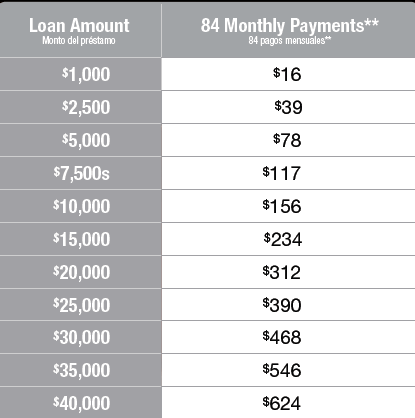
4 Comparisons between the Project Loan and the Consumer Credit Card (Features & Benefits) Financing Type The Home Depot Project Loan The Home Depot Consumer Credit Card Unique Feature Term Repayment Prepayment Penalty 6 Month Interest-Only Purchasing Window 84 months with ability to pay off at anytime (no minimum transaction amount required) None 6 Months Special Deferred Financing Everyday (occasional extended deferred offerings) Revolving Payments Equal Pay Over 84 months 1% of New Balance + Applicable Interest/Fees None APR 7.99% fixed over the life of the loan 17.99%, 21.99%, 25.99% or 26.99% Purchasing Window Credit Line Account Lookup (for card not present transactions) In-Store Payments Associate Phone Number Customer Phone Number 6 months Open Indefinitely Needs longer term financing Available in store Not available Varied lines to accommodate all types of purchases Available in store Available #963 OR # Payment Estimator Example Rule of Thumb: For every $1,000 spent on their project, the customer will pay less than. $20/month Ultimately, it is up to the customer to make the best decision for them on what financing product works for them 4 Rev. 8 (7/15/13)

5 Qualifying and Positioning Project Loan into the FIRST Sales Process The Home Depot Project Loan Reference Guide As you recall from FIRST for Selling, great customer service is more than just being friendly and engaging. It involves assisting the customer in finding the right product by Landing the Value Statement, Qualifying the Customer for the right product, being polite and professional and assisting the customer by providing them Solutions for their Problems, including their financing needs. The Home Depot Project Loan is a great way to put customers FIRST by offering the customer with another financing option to help them build their dreams and for The Home Depot to close sales and quotes. It is also an excellent way to help SOLVE customer s financing needs. Customers will be able to turn their dream projects into reality through affordable, fixed monthly payments. As with everything we do, when selling Project Loan, put customers FIRST. Find the customer; Find the product Land the Value Statement Inquire by asking key qualifying questions Qualifying Questions by Category Respect: be polite, professional, and positive Solve the customers problem Show the Best Solution The best way to Qualify Customers is to understand what their financing needs are and how you can provide them with the best THD Financing Solution possible. Determine if the customer can pay the purchase off in the promotional period. If they can, then offer them THD credit. If they need longer time to pay off the purchase, offer the customer The Home Depot Project Loan. Thank the customer PROJECT LOAN TIP: With Project Loan, every $1000 spent on their project, the customer will pay less than $20/month 5 Rev. 8 (7/15/13)

6 Conversation Starters: Do you plan to pay off your purchase within the credit promotional period (i.e., 6/12/18/24) months? Most customers choose to utilize our Project Loan or THD Consumer Credit Card to finance projects of this size. The key advantages of them both are OR Given the size of your project, this would translate in $xx per month, for well qualified buyers Overcoming Objections for The Home Depot Project Loan Objection Translation Value Value Added Responses I really like all of the new ideas to upgrade our kitchen, but it is really beyond our budget. Your interest rates are too high. I don t want to have another payment that is going to take me 84 months (7 years) to pay off. I don t have time to apply. I prefer to use another credit card for my purchases that either: offers points or I would like to use my Home Depot Consumer Credit Card to take advantage of the deferred interest or promotional discounts. The customer does not feel like they can afford to upgrade their purchase. The customer hears and sees a lot about high interest rates. The customer feels that the timeframe to pay back the loan is too long. The customer is truly in a hurry, not interested right now or does not see the need for another line of credit. The customer may be trying to earn points for a specific prize or gift/promotions with other credit provider. Many customers take advantage of our deferred financing options for purchases of this size. The Home Depot Project Loan offers a low 7.99% Annual Percentage Rate and affordable, fixed monthly payments that are spread evenly over 84 months. Which is only $xx per month (use payment estimator). Additionally, our Home Depot Consumer Credit Card offers deferred interest (minimum payments) for 6 months and no annual fee. I understand your concerns. If you look at the rates of our loan compared to credit cards or even other types of loans, our fixed 7.99% APR loan is very competitive. As a reminder, you only have to make interest only payments during the 6 month purchasing window. With The Home Depot Project Loan we offer NO annual fee and you have the ability to pay off the loan at any time with no prepayment penalty. The time it takes to apply is very quick. We can process the application all within 10 minutes. All you need is your government issued ID. Are you interested in taking the 10 minutes investment to get that kitchen you have been dreaming about? I understand and I am happy that I can help you with your project today. Please let me know if there is anything else that I can help you with to help solve your financing needs. 6 Rev. 8 (7/15/13)

7 How to Process The Home Depot Project Loan Application Step Action 1 Hand the customer The Home Depot Project Loan Application Brochure The Home Depot Project Loan Reference Guide 2 Log into myapron 3 Click on Credit Services Center from My Workbench>Quick Links>Credit Services Center and Log into Credit Services Center or from your desktop 7 Rev. 8 (7/15/13)


8 4 Click on Project Loan > New Application You will be redirected to the Home Depot Project Loan Application website to enter the application information directly into the application database for processing and decisioning 5 Click on New Application Note: This reference guide can be accessed either from myapron>myworkbench>hot Topics>myCredit Toolbox>Project Loan Program Information or by pressing on The Home Depot Training Manual button above 8 Rev. 8 (7/15/13)


9 6 Enter four digit Store Number and Click on Submit If the entry was successful, the following screen will appear. Click on Submit If the entry was unsuccessful, the following screen will appear. Re-enter the Store Number and Click on Submit NOTE: If assistance is still need, please contact Home Depot Loan Services by dialing #963 9 Rev. 8 (7/15/13)

10 7 Enter the customer s information from the completed Application (or) from the information provided to you by the customer into the screen (as shown below) Note: Use the Next and Previous buttons at the bottom of each screen to navigate from page to page and the tab button to maneuver from field to field. Special Note: The Reference Number is not a required field Applicants must include physical address (no PO Box numbers are allowed) Special Note: If Applicant is retired, enter: Retired in the Employer field 0 in the Years on the Job field Applicants Home Phone Number If Applicant is unemployed, enter: Unemployed in the Employer field 0 in the Years on the Job field Applicants Home Phone Number Note: All fields marked with an asterisk indicate a required field by the applicant (First Name, Last Name, Date of Birth, Social Security Number, Phone Number, Street Address, City, State, Zip, Employer, Years on Job, Applicants Gross Income) Comment on Applicant s Gross Monthly Income : this could include additional income from alimony, child support, investment income, social security, etc. 7A Special Note for Wisconsin Residents: Married Wisconsin residents should combine Applicant and Co- Applicants information once. (OPTIONAL: It will always default to No Co-Applicant) Enter the Co-Applicant information (if applicable) as indicated on the customer s Application into the screen (as shown below) Special Note: If Applicant is retired, enter: Retired in the Employer field 0 in the Years on the Job field Applicants Home Phone Number If Applicant is unemployed, enter: Unemployed in the Employer field 0 in the Years on the Job field Applicants Home Phone Number Note: All fields marked with an asterisk indicate a required field by the applicant (First Name, Last Name, Date of Birth, Social Security Number, Phone Number, Street Address, City, State, Zip, Employer, Years on Job). The Co-Applicants Income will be gathered in the Income section in another section of the Application. 10 Rev. 8 (7/15/13)

11 8 Collect Customers Valid US or Government Issued Photo ID (according to SOP FE 04-10). Complete the Associate Section information. Click on Next. Ensure slash is used between MM/YYYY Fields NOT required to be entered by In Store Associates Applicant/Co-Applicant Sections Name on ID = Customers First Name and Last Name Type of ID = Choose either Driver s License, State Issued ID or Military ID Expiration Date = Date ID Expires (month and full year, including slash) Sales Consultant/Associate Section Name = Associate Name myapron ID = LDAP ID Address = N/A Phone # = N/A Vendor Identifier Provider Number = N/A Store Number = 4 Digit Store Number Branch = N/A 11 Rev. 8 (7/15/13)

12 9 Verify that the customer information was entered correctly by reviewing the following screen with the customer or with the information that the customer provided. Verify the Co-Applicant information (if applicable). NOTE: If any of the Application information does not match the customer s information and the Co- Applicant s information, return to the previous screen and correct the information by Clicking on the Previous button and repeat step Rev. 8 (7/15/13)

13 10 Select Store Associate from the pull down menu and then Select I Agree in the radio button section. Click on Submit Application Note: By clicking Submit Application, it indicates that you are providing The Home Depot Project Loan Application and Documents to the customer 11 The screen below will be shown as it is rendering a decision The system will respond with a decision screen to indicate that the Application was either Approved, Unable to Decision or Pending 13 Rev. 8 (7/15/13)

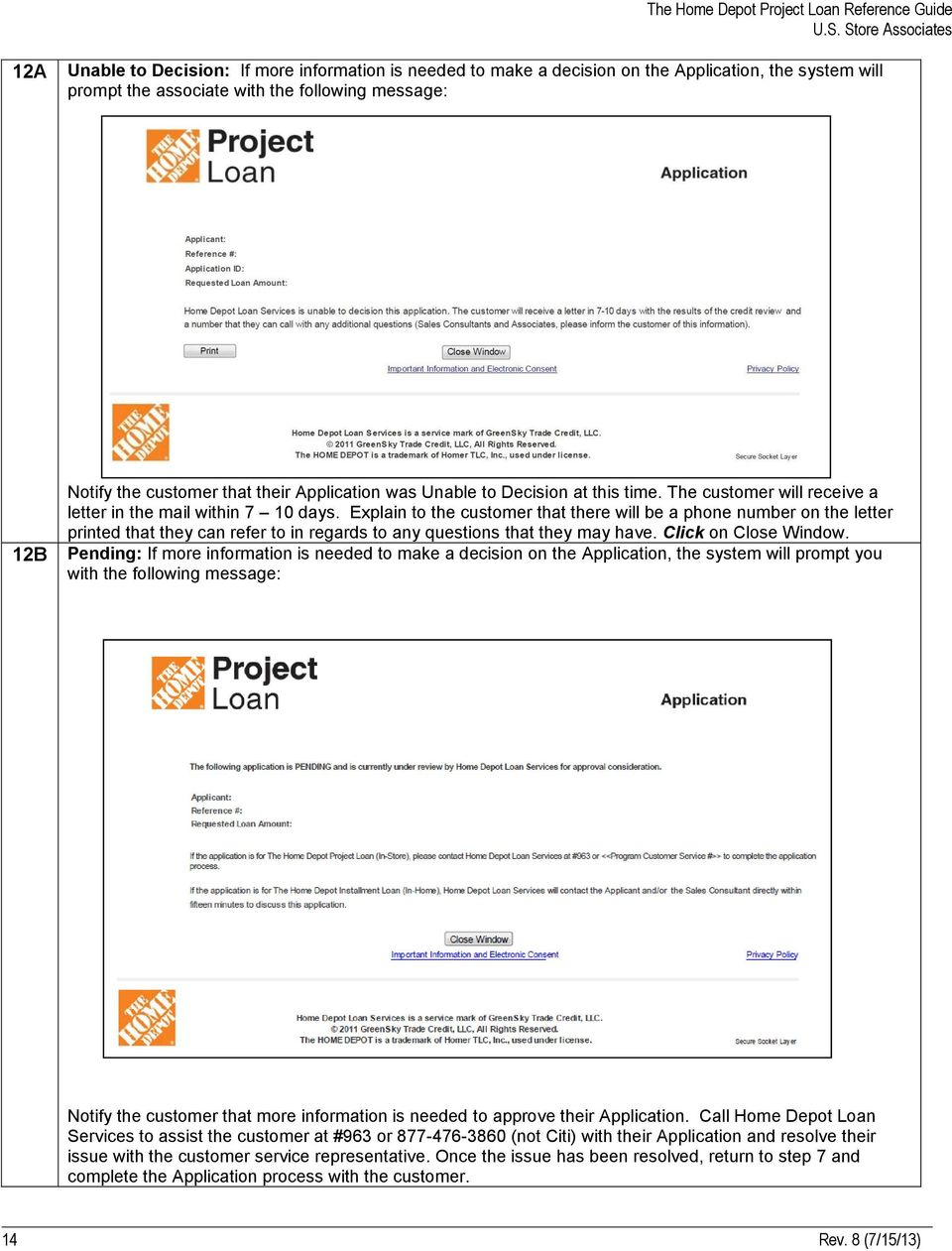
14 12A Unable to Decision: If more information is needed to make a decision on the Application, the system will prompt the associate with the following message: 12B Notify the customer that their Application was Unable to Decision at this time. The customer will receive a letter in the mail within 7 10 days. Explain to the customer that there will be a phone number on the letter printed that they can refer to in regards to any questions that they may have. Click on Close Window. Pending: If more information is needed to make a decision on the Application, the system will prompt you with the following message: Notify the customer that more information is needed to approve their Application. Call Home Depot Loan Services to assist the customer at #963 or (not Citi) with their Application and resolve their issue with the customer service representative. Once the issue has been resolved, return to step 7 and complete the Application process with the customer. 14 Rev. 8 (7/15/13)
15 12C Approved: Inform the customer that they have been approved for The Home Depot Project Loan. The following web page will appear (see Appendix for the full Loan Package). 7.99% As a reminder, changing this section will adjust the loan amount ensure your customer agrees with the loan amount they chose to accept Payment Terms will be quoted for the maximum amount for which the Customer is approved. In the event that the Customer spends less than this amount, their payment will be modified at the end of the purchasing window. If the customer would like to modify the Loan Amount, the number in the New Loan Amount box can be edited. Enter a different Loan Amount (not to exceed the Credit Limit approved for), then Click Recalculate Payment. The new Payment Terms based on the New Loan Amount will be displayed. When the customer is satisfied with the Loan Amount and the Payment Terms, Click on Next. TIP: If the customer spends approximately $5,000 on their loan, their monthly payments will approximately be $100 per month or if they spend approximately $1,000 on their loan, their monthly payments will be less than $20 per month. REMINDER: The customer will only be responsible to repay the amount of the loan that they spent of their credit limit given at time of approval. 15 Rev. 8 (7/15/13)


16 13 The following screen will appear to allow the Loan Package to be printed/ ed To print the Loan Package: Click View/Print or Click the Printer Icon from your Toolbar. To the Loan Package to the customer: Click (the Loan Package will be sent to the address in the box to the right of the button). o If the customer included their address in their Application information, it will appear in this box o If the customer did not include an address in their Application information, the address may be entered 7.99% An Adobe PDF window will appear. Click Open. The following screen will appear The Loan Agreement Confirmation Page Screen will appear below. 16 Rev. 8 (7/15/13)


17 The Loan Package will appear (the first page is the Temporary Shopping Pass) The Home Depot Project Loan Reference Guide Retrieve the printed Loan Package from the printer NOTE: all purchases made with the Temporary Shopping Pass must be made at Front End registers (including Special Services desk registers) and the customer MUST call to activate their account by calling or have an associate dial #963 from the store. 14 Hand The Home Depot Project Loan Package to the customer Explain to the customer: That the first page of their Loan Package is their Temporary Shopping Pass that can be used to make purchases before their permanent loan purchasing card arrives within 7 10 days All purchases made with the Temporary Shopping Pass must be made at Front End registers (including Special Services desk registers) The 6 month interest-only purchasing window will begin today Once their loan purchasing card arrives, the customer can make purchases only at The Home Depot (in U.S. stores, thd.com, Home Decorators Collection and Home Services) 15 Customer MUST call to activate their account by calling or have an associate dial #963 from the store 16 Thank the customer for being a loyal Home Depot Customer 17 Rev. 8 (7/15/13)

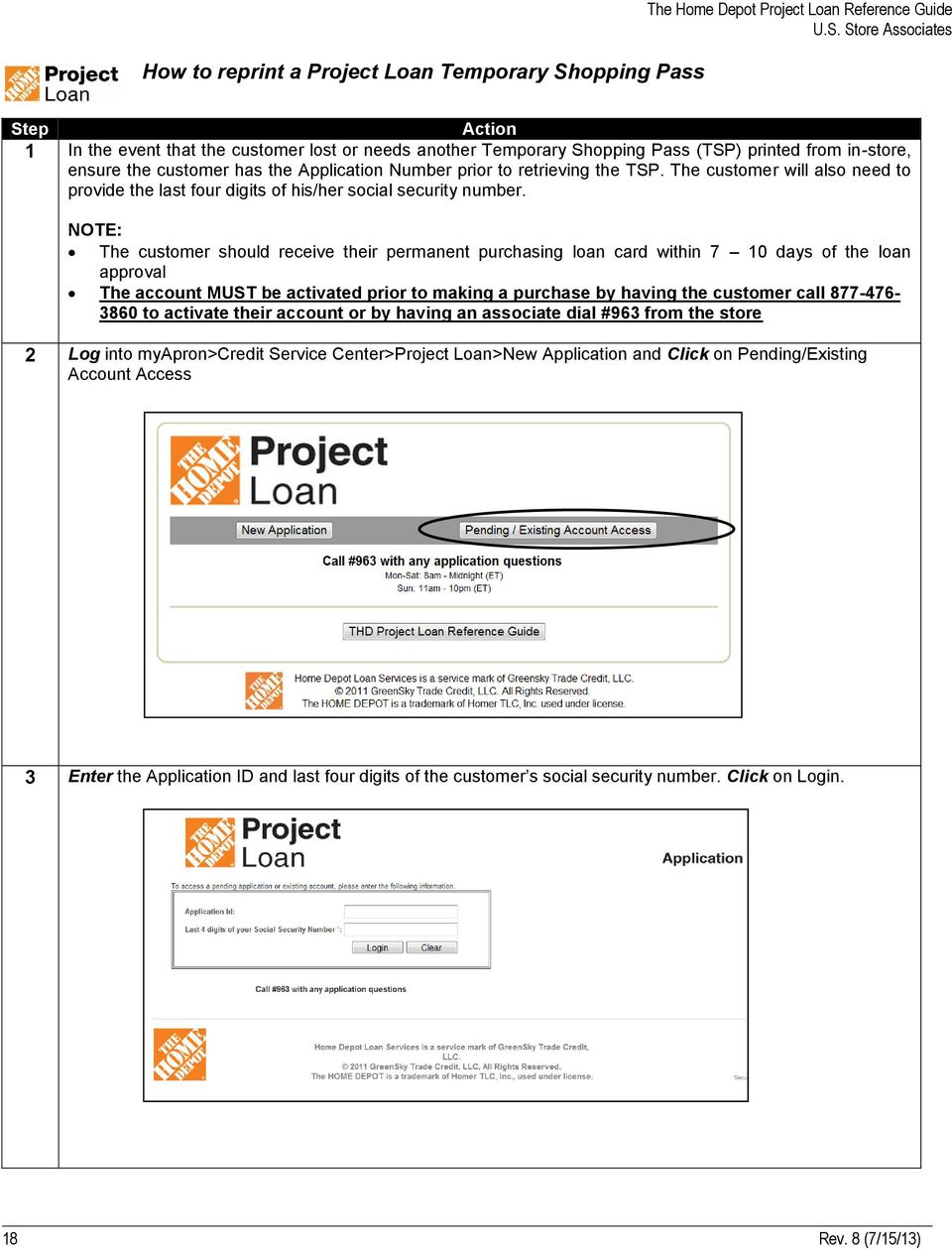
18 How to reprint a Project Loan Temporary Shopping Pass The Home Depot Project Loan Reference Guide Step Action 1 In the event that the customer lost or needs another Temporary Shopping Pass (TSP) printed from in-store, ensure the customer has the Application Number prior to retrieving the TSP. The customer will also need to provide the last four digits of his/her social security number. NOTE: The customer should receive their permanent purchasing loan card within 7 10 days of the loan approval The account MUST be activated prior to making a purchase by having the customer call to activate their account or by having an associate dial #963 from the store 2 Log into myapron>credit Service Center>Project Loan>New Application and Click on Pending/Existing Account Access 3 Enter the Application ID and last four digits of the customer s social security number. Click on Login. 18 Rev. 8 (7/15/13)

19 4A If the entry is successful, the following screen will appear to allow the Loan Package to be printed/ ed. To print the Loan Package: Click View/Print or Click the Printer Icon from your Toolbar. To the Loan Package to the customer: Click (the Loan Package will be sent to the address in the box to the right of the button). o If the customer included their address in their Application information, it will appear in this box o If the customer did not include an address in their Application information, the address may be entered $25, % 84 $ An Adobe PDF window will appear. Click Open. The following screen will appear The Loan Agreement Confirmation Page Screen will appear below. $25, % $ Rev. 8 (7/15/13)


20 The Loan Package will appear (the first page is the Temporary Shopping Pass) The Home Depot Project Loan Reference Guide Retrieve the printed Loan Package from the printer and hand it to the customer for use 4B NOTE: all purchases made with the Temporary Shopping Pass must be made at Front End registers (including Special Services desk registers) If the was unsuccessful, the following screen will appear. Re-enter the Application ID and last four digits of the customer s social security number and Click on Login. NOTE: If assistance is still need, please contact Home Depot Loan Services by dialing # Rev. 8 (7/15/13)

21 Frequently Asked Questions Support/Resources Question Who do I call for questions about Project Loan? Answer For store and customer service questions, please contact Home Depot Loan Services (not Citi) at the dedicated speed dial (#963) for store and customer service issues. Is there reporting available? Is there any additional training that I can take? Please do not contact your Citi Store Credit Manager or Home Depot Credit Services regarding this product. Yes. Your SASM will be able to retrieve reporting from the Weekly Store Print Packets. Yes. There are two classes available in Knowledge Depot. Browse the catalog for Project Loan. How do I reorder Applications and signage for my store? If I have additional questions about the Project Loan and Home Depot Loan Services is unable to answer my question, who should I call? Additionally, there are more reference materials found on myapron at: myapron>myworkbench>hot Topics>myCredit Toolbox>Project Loan Program Information or visit us on thewarehouse in The Home Depot Project Loan Forum Reordering of Applications and in-store signage can be located at: myapron>my Workbench>Applications>Non Merchandise Purchasing>ePOP Please contact one of the following Atlanta SSC associates: Dee Williams, ext or [email protected] Ann Gillham ( ) or [email protected] Arianna Jackson ( ) or [email protected] 21 Rev. 8 (7/15/13)
22 Frequently Asked Questions Home Depot Loan Services Support Information Question Is there a dedicated customer service phone number? What are the hours of operation for Home Depot Loan Services? The Home Depot Project Loan Reference Guide Answer The phone number dedicated to our The Home Depot Project Loan customers is Monday Saturday: 8:00 am 12:00 am ET Saturday: 9:00 am 12:00 am ET Sunday: 11:00 pm 10:00 pm ET What can Loan Services help with? Activation of Accounts Name and address changes Assistance with printing terms and conditions Website link issues Making payments (payments are not accepted in-store) Credit line increases Replacement cards What is the website address for Home Depot Loan Services? What can customers do on the website? The customer can: Make payments Enroll in automatic payment Request a payoff Request copies of loan documents What happens if the card is not working or is declined? How does the customer make a payment? Project Loan Application Processing Question When can the customer expect to receive their personalized purchasing loan card in the mail? What happens if a customer wants to cancel their Application/Loan? Contact Home Depot Loan Services at #963 or Remember: The customer MUST call to activate their account by calling or have an associate dial #963 from the store. The customers may make a payment to Home Depot Loan Services either by mail, online or via phone by the following: Mail: (Make Checks Payable to Home Depot Loan Services ) o Home Depot Loan Services o PO Box o Atlanta, GA Online: thdloan.com Phone: Answer The customer can expect to receive their card within 7-10 days after their loan was approved. If the customer would like to cancel their Application/Loan please have them contact Home Depot Loan Services at Rev. 8 (7/15/13)
23 Frequently Asked Questions Store Processes Question What happens when a customer returns an item after their 6 month window is complete and their loan agreement has expired? What happens if the customer used the wrong card for their purchase and they meant to put it on their THD Project Loan Card? What do I do if I cannot get into Credit Services Center to enter an Application? Answer A credit will be issued to their account in the amount of the return. Their monthly payment requirement will remain unchanged. Conduct a Return (refer to SOP SS 06-10). Call The Home Depot IT Help Desk at to report the issue AND contact Home Depot Loan Services at either speed dial #963 or and let the representative know that you have attempted to process the Application online and that you were not able to complete the Application. The Application will be taken over the phone and processed. General Product Questions Question What if the customer is not done with their design work or have purchases that need to be made after the 6 month window has expired? Since this card is a MasterCard, can the customer use this card anywhere? If the customer does not have the card with him/her can they still make a purchase? Can a customer make a payment in the store? Can the Project Loan be used on services? Does the account need to be activated? Can there be a co-applicant on the account? Answer The customer can apply for a second Project Loan for purchases made after the 6 month purchasing window has ended. No. This card is a dedicated co-branded card exclusively to be used at The Home Depot. The customer can use the card however on any purchases throughout the store and at homedepot.com, Home Decorators Collection and Home Services. Until the customer receives their personalized purchasing loan card, the card must be present to make purchases. REMEMBER: The customer MUST call to activate their account by calling or have an associate dial #963 from the store. No, the customer must either mail their payment into Home Depot Loan Services or make a payment online/phone. Yes. The Project Loan can be used on products, purchases and services made at The Home Depot. Yes. The customer MUST call to activate their account by calling or have an associate dial #963 from the store. Yes. The co-applicant will be required to submit his/her personal information during the time of application. 23 Rev. 8 (7/15/13)
24 APPENDIX Once approved, the Associate will print the loan package (including Temporary Shopping Pass) and give it to the customer. The pages that follow include samples of the documents included in that loan package. 24 Rev. 8 (7/15/13)

25 This is the Temporary Shopping Pass (TSP). Customers can use this to make purchases prior to receiving their loan purchasing card. The TSP can only be used at Front End registers. The Home Depot Project Loan Reference Guide 25 Rev. 8 (7/15/13)

26 This is a sample of the actual Loan Agreement. The Home Depot Project Loan Reference Guide 7.99% (e) 26 Rev. 8 (7/15/13)

27 This is a sample of the actual Loan Agreement Terms and Disclosures. The Home Depot Project Loan Reference Guide 27 Rev. 8 (7/15/13)

28 28 Rev. 8 (7/15/13)

29 This is a sample of the Lender s Privacy Policy. 29 Rev. 8 (7/15/13)

30 30 Rev. 8 (7/15/13)

31 31 Rev. 8 (7/15/13)

32 32 Rev. 8 (7/15/13)
33 This is a sample of the Notice to Cosigner. This document will be included only if there is a Cosigner, which is a Co-Applicant that does not reside at the same address as the primary Applicant. 33 Rev. 8 (7/15/13)
Education Refinance Loan FAQ
 Education Refinance Loan FAQ Please review the additional information found in Is Refinancing Right for Me? Student Loan Refinancing and the Education Refinance Loan Q: What is student loan refinancing?
Quick Reference Guide
 Signature of Applicant X Date Signature of Joint Applicant (If Applicable) X Date VERIFIED BY: RETAILER # ACCOUNT # KEY # AMOUNT OF INITIAL TRANSACTION APPLICANT 1 st ID TYPE/NUMBER ISSUANCE STATE EXP.
Account Access User Guide
 Account Access User Guide Available within AgriPoint How to manage your accounts online, anytime, anywhere. Rev. 10/12/2015 This guide is designed to familiarize you with the features and options available
Online Payment Center T-Mobile User s Guide
 Online Payment Center T-Mobile User s Guide Table of Contents Introduction... 3 Features... 3 Getting Started... 4 Starting Qpay Online Payment Center... 4 Login... 4 Changing Your Password... 5 Navigating...
Contents INDEX...61 ECRM...1
 ecrm Guide 111011 2011 Blackbaud, Inc. This publication, or any part thereof, may not be reproduced or transmitted in any form or by any means, electronic, or mechanical, including photocopying, recording,
Online Bill Pay User Manual
 \ Online Bill Pay User Manual Updated: November 14, 2014 Page 1 Table of Contents I. Welcome to Online Bill Pay... 3 II. New User Registration... 4 III. Login for Registered Users... 7 IV. Home Page Functionality...
So we can deal with any issues you may face quickly and effectively, it is really important that you log them on your own helpdesk.
 Help Desk How to use your Help Desk So we can deal with any issues you may face quickly and effectively, it is really important that you log them on your own helpdesk. This guide will teach you how to:
Health Services provider user guide
 Health Services provider user guide online claims submission... convenient service, delivered through an easy-to-use secure web site http://provider.ab.bluecross.ca/health... convenient service, delivered
Guarantee Trust Life Insurance Company. Agent Portal www.gtlic.com. Agent Portal Guide
 Guarantee Trust Life Insurance Company Agent Portal www.gtlic.com Agent Portal Guide Rev. 3/2014 Table of Contents Log in to Agent Portal... 3 Obtain Quote... 4 Print Quote... 5 Save and Retrieve Quote...
[MP2 TRAINING MANUAL]
![[MP2 TRAINING MANUAL]](/thumbs/31/15009339.jpg "[MP2 TRAINING MANUAL]") 2015 Technical Services James Titford [MP2 TRAINING MANUAL] Process for Work Order and Purchase Requisition entry on MP2. Table of Contents Introduction... 2 Logging on to MP2... 2 Navigating MP2:... 3
2015 Technical Services James Titford [MP2 TRAINING MANUAL] Process for Work Order and Purchase Requisition entry on MP2. Table of Contents Introduction... 2 Logging on to MP2... 2 Navigating MP2:... 3
YOUR GUIDE TO THE iphone MOBILE APP WITH 1st SOURCE
 YOUR GUIDE TO THE iphone MOBILE APP WITH 1st SOURCE Strong. Stable. Local. Personal. 10/12 Install, Sign On and View Account Balances 1. Visit the iphone App Store on your iphone and search for 1st Source
Forever Direct Deposit
 Forever Direct Deposit In order to expedite the delivery of profits and bonuses to Distributors registered in the USA, we offer a direct deposit service. Forever Direct Deposit is available to any Distributor
Applicant Instructions
 KSDE Online Application Instructions Step 1 Register for a Login Applicant Instructions Before you can submit your application, you must request a user name and password. To register, do the following:
Commercial financing from a lender that understands your business.
 Commercial Use Application See what fast and easy access to credit can do for you. As every independent business owner knows, everything turns on cash flow. That s why John Deere Credit makes it easy for
Security First Bank Consumer Online Banking Information Sheet, Access Agreement and Disclosures
 Security First Bank Consumer Online Banking Information Sheet, Access Agreement and Disclosures Welcome to Online Banking with Security First. This Online Banking Agreement and Disclosure (Agreement) discusses
Troubleshooting Guide for NFA/NWCG Online Users
 Troubleshooting Guide for NFA/NWCG Online Users (This guide has been created to help you identify and resolve basic problems you may experience with NFA/NWCG Online. The Table of Contents on page 2 is
09/14. Online Workers Compensation Monthly Self Bill Instructions
 09/14 Online Workers Compensation Monthly Self Bill Instructions Contents Online Workers Compensation...1 Completing the Payroll Report...1 Mail In Payment...5 Online Payment...7 Email Management...13
Personal Online Banking & Bill Pay. Guide to Getting Started
 Personal Online Banking & Bill Pay Guide to Getting Started What s Inside Contents Security at Vectra Bank... 4 Getting Started Online... 5 Welcome to Vectra Bank Online Banking. Whether you re at home,
eservices Self Service Help for Students
 eservices Self Service Help for Students This document covers how to perform several common tasks in eservices. How To: Find Login ID and Use Password Change Password Browse Schedule & Course Catalog Enroll
NMSU Online Staff Evaluation User Guide for https://evaluation.nmsu.edu/
 NMSU Online Staff Evaluation User Guide for https://evaluation.nmsu.edu/ This user guide provides instructions for using the Exempt Staff and Nonexempt Staff Evaluation Web Application, from now on also
Patient Portal Training Manual
 Patient Portal Training Manual The Patient Portal is a secure website that will allow patients to access medical information from the Electronic Medical Record (EMR), send messages to their providers or
Your Setup Guide to Consumer Internet Banking What s Inside:
 Your Setup Guide to Consumer Internet Banking What s Inside: Enroll in Internet Banking Advanced Authentication Logging In estatements ENROLL IN INTERNET BANKING TODAY! Go to www.renasantbank.com to see
ewebextra OfficeMate Integration User s Guide
 ewebextra OfficeMate Integration User s Guide September 2013 2013 Eyefinity, Inc. All rights reserved. Eyefinity, OfficeMate, ewebextra, and ExamWRITER are registered trademarks of Eyefinity, Inc. All
Reference Guide to the Attorney Registration System
 Reference Guide to the Attorney Registration System What is the Attorney Registration System? The Attorney Registration System allows attorneys to register for a secure user account. Upon registration
DSS Electronic Facility Clearance System (e-fcl) Submission Site User Guide
 U. S. Department of Defense Defense Security Service Industrial Security Program DSS Electronic Facility Clearance System (e-fcl) Submission Site User Guide June 2013 Version 7.2 1 e-fcl Submission Site
MyUI Claimant User Guide
 MyUI Claimant User Guide Version 1.0 September 26, 2013 Date: September 26, 2013 1/36 Table of Contents MYUI CLAIMANT... 1 TABLE OF CONTENTS... 2 1 MYUI CLAIMANT: FAQS... 4 What Can MyUI Claimant do for
Select a topic below to be automatically directed to that section:
 Select a topic below to be automatically directed to that section: Account Transfers Address Change Bill Payment Check Orders Contact Information Cutoff Times Email address changes Enrolling in Online
2013 Kelly Services, Inc. 06/13
 2013 Kelly Services, Inc. 06/13 KASS Reference Guide for School District Employees Table of Contents First Things First Section A: Verify Your Name and Title Recordings Internet Feature Section B: Section
Downloading and using the Old National Mobile App for iphone and Android
 Downloading and using the Old National Mobile App for iphone and Android The Old National Mobile App makes it simple for users of iphone and Android TM smartphones to quickly access their accounts. From
Understanding Credit. The Three C s of Credit. What is a Credit Bureau?
 Understanding Credit By definition, the word credit has to do with trust. This is why credit impacts so many financial issues in our lives including the extension of a loan or credit card, how high an
Published by Murphy & Company, Inc. 13610 Barrett Office Drive Suite 206 St. Louis, MO 63021 www.mcompany.com
 Published by Murphy & Company, Inc. 13610 Barrett Office Drive Suite 206 St. Louis, MO 63021 www.mcompany.com 2009-2013 Murphy & Company, Inc. Microsoft, Microsoft Money, Windows and Internet Explorer
Store Use Only: Identification requires a valid driver s license and/or government issued photo ID
 NTB Credit Card APPLICATION INFORMATION ABOUT YOURSELF First Name Middle Initial Last Name Street Address (No P.O. Boxes) City State Zip Code Home Phone Social Security Number Date of Birth Employer Employer
Guide. for HR Users. Posted May 1, 2012
 Guide for HR Users Posted May 1, 2012 Go to this URL: https://hrx.talx.com/webmanager/loginclientkey.aspx to log on to the Administrative site for the UGA Onboarding System. The Employer Code is 13990
PIKE CREEK MORTGAGE SERVICES, INC.
 FINANCING PACKET Thank you for inquiring about Please take a minute to read this helpful information about our company, staff and the process to get started! Pike Creek Mortgage Services has been open
NYS OCFS CMS Manual CHAPTER 1...1-1 CHAPTER 2...2-1 CHAPTER 3...3-1 CHAPTER 4...4-1. Contract Management System
 NYS OCFS CMS Manual C O N T E N T S CHAPTER 1...1-1 Chapter 1: Introduction to the Contract Management System...1-2 Using the Contract Management System... 1-2 Accessing the Contract Management System...
LOAN APPLICATION (VISA SELECT AND VISA PLATINUM)
 LOAN APPLICATION (VISA SELECT AND VISA PLATINUM) Loan Type (e.g. vehicle, Visa, Agency Secured, etc.) Requested Loan Amount $ Variable Rate MARRIED APPLICANTS MAY APPLY FOR AN INDIVIDUAL ACCOUNT. Check
INSTRUCTIONS FOR FEDERAL PERKINS LOAN ASSIGNMENT FORM OMB-1845-0048. Federal Perkins Loan Program Assignment Form General Instructions
 Federal Perkins Loan Program Assignment Form General Instructions The Department of Education (the Department) is authorized to accept Federal Perkins Loan (Perkins Loan) assignments under Section 463(a)(5)
ewebextra OfficeMate Integration User s Guide
 ewebextra OfficeMate Integration User s Guide April 2014 2014 Eyefinity, Inc. All rights reserved. Eyefinity, OfficeMate, ewebextra, and ExamWRITER are registered trademarks of Eyefinity, Inc. All other
SnoPAY FREQUENTLY ASKED QUESTIONS
 SnoPAY FREQUENTLY ASKED QUESTIONS GENERAL QUESTIONS What is SnoPAY? SnoPAY allows you to view and pay your bills anywhere you have Internet access anytime you want, within the United States and Canada.
Payco, Inc. Evolution and Employee Portal. Payco Services, Inc.., 2013. 1 Home
 Payco, Inc. Evolution and Employee Portal Payco Services, Inc.., 2013 1 Table of Contents Payco Services, Inc.., 2013 Table of Contents Installing Evolution... 4 Commonly Used Buttons... 5 Employee Information...
Personal Digital Security
 The following is an excerpt from: Personal Digital Security Protecting Yourself from Online Crime 2016 Revision by Michael Bazzell More information can be found at ComputerCrimeInfo.com Over the past ten
Online Services User Guide
 Online Services User Guide Welcome to online banking! Whether you re online or using a mobile device, access your accounts whenever and wherever it s convenient for you. Log In: BankMidwest.com Online
SnoPAY FREQUENTLY ASKED QUESTIONS
 SnoPAY FREQUENTLY ASKED QUESTIONS GENERAL QUESTIONS What is SnoPAY? SnoPAY allows you to view and pay your bills anywhere you have Internet access anytime you want. You can pay by transferring money directly
Version 1.2 05202013 PLAN SPONSOR ADMINISTRATIVE MANUAL
 Version 1.2 05202013 PLAN SPONSOR ADMINISTRATIVE MANUAL TABLE OF CONTENTS WELCOME OVERVIEW 4 HOW TO USE THIS MANUAL 4 UPDATING THIS MANUAL 4 ENROLLMENT OVERVIEW 6 PAPER ENROLLMENT DESCRIPTION 7 PAPER ENROLLMENT
Member FAQ. General Information: Security:
 General Information: Security: Why did you change Robins Federal Online Banking? Great question! We listened to an overwhelming response from you, our members that we needed to make these changes. We are
Apple Bank Online Banking Guide
 Apple Bank Online Banking Guide 24/7 Banking Financial Management Funds Transfer Bill Payment Convenient, Easy to Use Secure Table of Contents Online Banking Overview - Convenient, Easy, Secure 1 Registration
COMMERCIAL BANKING. COMMERCIAL LOANs ONLINE ENROLL IN COMMERCIAL LOANs ONLINE. Enrollment step 1
 COMMERCIAL BANKING COMMERCIAL LOANs ONLINE ENROLL IN COMMERCIAL LOANs ONLINE With Commercial Loans Online, you can easily monitor loan activity for your eligible Commercial loans and delegate online access
Training Guide. Accounts Payable Training. Mover s Suite users training on the Accounts Payable functionality within Microsoft Dynamics GP
 Training Guide Accounts Payable Training Mover s Suite users training on the Accounts Payable functionality within Microsoft Dynamics GP Version 3.7 (Fall 2008) Accounts Payable Training Copyright Copyright
Your Setup Guide to Consumer Online Banking What s Inside:
 Your Setup Guide to Consumer Online Banking What s Inside: Enroll in Online Banking Advanced Authentication Logging In estatements ENROLL IN Online BANKING TODAY! Go to www.renasantbank.com to see how
SC Student Loan SC PAL Consolidation Loan
 SC Student Loan SC PAL Consolidation Loan Why consolidate? The advantages of consolidating your education loans with SC Student Loan are*: The convenience and ease of having one monthly payment to one
A Quick and Easy Guide to Online Banking. Bill Pay AND. by Paul A. Murphy, author of Banking Online For Dummies
 A Quick and Easy Guide to Online Banking AND Bill Pay by Paul A. Murphy, author of Banking Online For Dummies Welcome Whether you re at home, at work or on the road, Community Bank is here for you 4 hours
Business Online Banking & Bill Pay Guide to Getting Started
 Business Online Banking & Bill Pay Guide to Getting Started What s Inside Contents Security at Vectra Bank... 4 Getting Started Online... 5 Welcome to Vectra Bank Business Online Banking. Whether you re
Common Questions about NetTeller Internet Banking
 Common Questions about NetTeller Internet Banking 1. What is NetTeller Online Banking? NetTeller Online Banking allows our customers a secure and convenient access to their accounts using the Internet
Welcome to Charter One Online
 Welcome to Charter One Online The online banking services of First National Bank, GreatBank and GreatBank Chicago will be changed over to Charter One Online as of Monday, April 30, 2007. As a result of
Online Banking Guide. Your guide to safely. and securely managing. your accounts online.
 Online Banking Guide Your guide to safely and securely managing your accounts online. Table of contents LOGGING INTO ONLINE BANKING... Page 2 YOUR PASSWORD... Page 3 SETTING UP YOUR SECURITY IMAGE, PHRASE
Online Services through My Direct Care www.mydirectcare.com
 Online Services through My Direct Care www.mydirectcare.com WEB PORTAL Employers and Employees associated with Consumer Direct have access to online services available through a secure website www.mydirectcare.com.
TIPS AND TRICKS for the CORE ACCOUNTING MODULES REMINDER:
 REMINDER: Please remember that this document is meant to be a guideline with some ideas of ways you can use MAS 90 / 200 core accounting modules more fully. However, your settings or process may not work
Simplify Your Banking with eservices May 5 th, 2015
 Important Notice: The following material is intended for the sole use of our members and is the property of Seven Seventeen Credit Union and may not be redistributed or reused by other parties without
Branch Name/No. Interviewer Rate Quoted Priority Closing Location Source Financial Facts - 009 Source Code Financial Facts - 009
 APPLICANT S AGREEMENT NOT TO OBTAIN, OR A PROHIBITION ON APPLICANT FROM OBTAINING, AN INSURANCE PRODUCT FROM AN UNAFFILIATED ENTITY. UMB i1150037 (R 04/09) Branch Name/No. Interviewer Rate Quoted Priority
The Reverse Mortgage Analyst
 The Reverse Mortgage Analyst Illustrated User Manual May 26, 2009 version Christena Schafale, Consultant, AARP Foundation Table of Contents Using this Manual... 1 Getting Started... 1 The Navigator...
MERCHANT SERVICES ONLINE
 MERCHANT SERVICES ONLINE TD Retail Card Services FAST, FREE & SECURE Web Manual Version 10.01 v.1005 Table of Contents The TDRCS Online Merchant Services Website What is it? Benefits to Dealers How to
DATA PROTECTION. OneWorld Encrypted Messages USER GUIDE
 DATA PROTECTION OneWorld Encrypted Messages USER GUIDE Table of Contents 1 Why use Encrypted emails?... 3 2 Activation and Login... 4 2.1 Activating Your New OneWorld Encrypted Messages Account... 4 2.2
How To Use Thecontinuus Provider Portal
 PROVIDER PORTAL USER GUIDE OCTOBER 13, 2014 TOGETHER ADMINISTRATION OFFICE phone: 608-647-4729 toll free: 1-877-376-6113 fax: 608-647-4754 web: www.continuus.org email: [email protected] CONTENTS System
The SubCentral System for Substitute Paraprofessionals
 The SubCentral System for Substitute Paraprofessionals Introduction The New York City Department of Education launched the SmartFind Express/ SubCentral System in late 2005. This system, referred to as
A SMART WAY TO PAY. AN EASY WAY TO SAVE. Fifth Third Bank Health Savings Account
 A SMART WAY TO PAY. AN EASY WAY TO SAVE. Fifth Third Bank Health Savings Account Contents Welcome 3 Getting Started 4 Logging in for the First Time 4 Forget your Username or Password? 4 Home Page 5 Make
OSP User Guide. 1 P a g e
 Online School Payments (OSP) User Guide February, 2014 OSP User Guide Table of Contents Overview...3 Site Information...3 Login to Portal...4 Activity Setup...6 OSP Activity Setup Form...6 Add Activity...7
Scholastic Book Fairs Online Credit Card Processing for Credit, Debit, and Prepaid Cards
 Scholastic Book Fairs Online Credit Card Processing for Credit, Debit, and Prepaid Cards Secure, easy, and fast! Provides receipts for customers and Book Fair chairpeople Only for use of individual Fair
TMD Friction IT Helpdesk
 TMD Friction IT Helpdesk USER MANUAL TMD Friction UK, MIS Department Published: Monday, 09 January 2012 2:30 PM Contents Our global helpdesk Creating your new account My home screen My Profile I need help
Online School Payments (OSP) User Guide
 Online School Payments (OSP) User Guide November, 2013 OSP User Guide Table of Contents Overview...3 Site Information...3 Login to Portal...4 Activity Setup...6 OSP Activity Setup Form...6 Add Activity...7
MERCHANT SERVICES ONLINE. TD Retail Card Services
 MERCHANT SERVICES ONLINE TD Retail Card Services FAST, FREE & SECURE Web Manual Version 11.30 Table of Contents The TDRCS Online Merchant Services Website What is it? How to Use It Log In Main Menu Consumer
Optum Patient Portal. 70 Royal Little Drive. Providence, RI 02904. Copyright 2002-2013 Optum. All rights reserved. Updated: 3/7/13
 Optum Patient Portal 70 Royal Little Drive Providence, RI 02904 Copyright 2002-2013 Optum. All rights reserved. Updated: 3/7/13 Table of Contents 1 Patient Portal Activation...1 1.1 Pre-register a Patient...1
Resource Online User Guide JUNE 2013
 Resource Online User Guide JUNE 2013 CHASE PAYMENTECH SOLUTIONS MAKES NO WARRANTY OF ANY KIND, EITHER EXPRESSED OR IMPLIED, WITH REGARD TO THIS MATERIAL, INCLUDING, BUT NOT LIMITED TO, THE IMPLIED WARRANTIES
Radian Mortgage Insurance
 LOS Interface Administrator/User Guide Radian Mortgage Insurance 2012 PCLender an LPS Company Contents Introduction... 3 Interface Features... 3 Interface Requirements... 3 Interface Considerations...
EXPRESSPATH PROVIDER PORTAL USER GUIDE AUGUST 2013
 EXPRESSPATH PROVIDER PORTAL USER GUIDE AUGUST 2013 2013-2020 Express Scripts, Inc. All rights reserved. No part of this publication may be reproduced or transmitted in any form or by any means, electronic
ARIBA Contract Management System. User Guide to Accompany Training
 ARIBA Contract Management System User Guide to Accompany Training Technical Training Team 6/29/2010 Table of Contents How to use this Guide... 4 Contract Management Process... 5 ARIBA- Getting Started...
How do I contact someone if my question is not answered in this FAQ?
 Help Where may I find the answers to my Internet Banking questions? How do I contact someone if my question is not answered in this FAQ? Enrolling How do I enroll in Internet Banking? Logging In How do
State of Nevada Unemployment Insurance Tax. Guide to Online Employer Self Service
 State of Nevada Unemployment Insurance Tax Guide to Online Employer Self Service 09/25/2015 Table of Contents Guide to Online Employer Self Service Getting Started... 4 Introduction... 4 Getting Help...
Provider OnLine. Log-In Guide
 Provider OnLine Log-In Guide Table of Contents 1 LOG-IN ACCESS... 3 1.1 ENTERING THE USER ID AND PASSWORD... 4 1.2 OVERVIEW AND PURPOSE OF TRICIPHER... 5 1.2.1 Log-in for Users Who Are Active, But Not
Instructions for Creating or Validating Your Cana Online Account
 Instructions for Creating or Validating Your Cana Online Account We are excited about our new online shop! Click http://canavineyards.com/website-update/ if you want to know more about what our online
Please let us know if you need anything. Our customer service number is 1-866-311-5900. We re always happy to help.
 Dear Valued Customer, We are proud to welcome you to the EvenLink s Crystal Clear Digital Phone service. Our network reliability, customer support and value pricing are a great combination. We appreciate
Quick Reference Guide Welcome TEST USER
 Welcome TEST USER HELP RETIREMENT MANAGER DEMO FEEDBACK VersionE_000 Getting Started This Retirement Manager participant website Quick Reference Guide will assist you to easily navigate and complete important
Chapter 28. Poi nt of Sale But. FrontDesk v4.1.25. Point of Sale Menus. Voiding Invoices. Redeeming Gift Certificates. Revised on: 06/10/2009
 Chapter 28 Point of Sale FrontDesk v4.1.25 Point of Sale Poi nt of Sale But tons Point of Sale Menus Opening and Closing Register Drawers Making a Sale Voiding Invoices Reprinting Receipts Selling Gift
Contact Manager HELP GUIDE
 Contact Manager HELP GUIDE Monday Friday 8 am 7:30 pm, Saturday 9 am 5 pm, Sunday 9 am 1 pm Revised: June 3, 2014 Table of Contents Managing Contacts... 4 Create A New Contact... 4 Contact Name(s)... 4
NAVIGATION. Save this page as a favorite for easy access to PeopleSoft.
 Time Entry & epaf NAVIGATION Users of PeopleSoft HR gain access to this system by requesting a PeopleSoft account. To apply for an account, complete the PeopleSoft Account Application available on the
Online banking user guide
 Welcome Peoples Federal Savings Bank customers Online banking user guide IMPORTANT INFORMATION about your online banking account. Important information Your online banking accounts with Peoples Federal
Click on a link below to navigate this document, or use bookmarks in Adobe.
 Website Instructions Click on a link below to navigate this document, or use bookmarks in Adobe. Logging in and User Registration MyUSG Quoting Online with USLI Quoting Online with RAMP: Century Surety
SHOW-ME LOANS APPLICATION
 Missouri Assistive Technology 1501 NW Jefferson Street Blue Springs, MO 64015 Voice: 800-647-8557 (in-state only) or 816-655-6700 TTY: 800-647-8558 (in-state only) or 816-655-6711 www.at.mo.gov Application
State of Nevada Unemployment Insurance. Guide to Online Claimant Self Service
 State of Nevada Unemployment Insurance Guide to Online Claimant Self Service Table of Contents Guide to Online Claimant Self Service Getting Started... 3 Introduction... 3 Getting Help... 3 Basic System
Online Account Opening Customer FAQs
 Online Account Opening Customer FAQs Q. Why are you offering this new service to customers? A. At United Bank, we always look to identify and implement ways to enhance your banking experience with us whether
Platinum Plus for Business Card Don t just think of it as a credit card. Think of it as a way to work more efficiently.
 Benefit Summary Platinum Plus for Business Card Don t just think of it as a credit card. Think of it as a way to work more efficiently. If you use a personal credit card for business expenditures, you
INVESTOR360º CLIENT USER GUIDE
 INVESTOR360º CLIENT USER GUIDE TABLE OF CONTENTS 1. About Investor360 3 1.1 What does Investor360 provide? 3 1.2 Security 3 2. Logging in to Investor360 4 3. Welcome to Investor360 7 4. Navigating in Investor360
GLOBAL EXPRESS PAYMENT CENTER
 GLOBAL EXPRESS PAYMENT CENTER USER GUIDE V1.4 EFFECTIVE 05/14/15 TABLE OF CONTENTS 03 Get Started Set Up Terminal Required Step by Admin Set Up Users Required Step by Admin Set Up Receipt Explore Dashboard
Colorado Medical Assistance Program Web Portal. Frequently Asked Questions
 Colorado Medical Assistance Program Web Portal Frequently Asked Questions Trading Partner Administrator I have my HCPF Welcome Letter, and am going to be the Trading Partner Administrator. Now what? What
Frequently Asked Questions
 Frequently Asked Questions I. ABOUT EMPLOYEE SELF SERVICE 1. What is Employee Self Service? Employee Self Service is North Shore-LIJ s secure and user-friendly tool that gives employees online access to
FedEx Billing Online User Guide
 FedEx Billing Online User Guide Introduction FedEx Billing Online allows you to efficiently manage and pay your FedEx invoices online. It s free, easy and secure. FedEx Billing Online helps you streamline