
Transaction Cycles and Business Processes
|
|
|
- Sharleen Francis
- 10 years ago
- Views:
Transcription
1 Part II Transaction Cycles and Business Processes CHAPTER 4 The Revenue Cycle CHAPTER 5 The Expenditure Cycle Part I: Purchases and Cash Disbursements Procedures CHAPTER 6 The Expenditure Cycle Part II: Payroll Processing and Fixed Asset Procedures CHAPTER 7 The Conversion Cycle CHAPTER 8 Financial Reporting and Management Reporting Systems

2 Chapter 4 The Revenue Cycle LEARNING OBJECTIVES After studying this chapter, you should: Understand the fundamental tasks performed in the revenue cycle, regardless of the technology in place. Be able to identify the functional departments involved in revenue cycle activities and trace the flow of revenue transactions through the organization. Be able to specify the documents, journals, and accounts that provide audit trails, promote the maintenance of historical records, support internal decision making, and sustain financial reporting. Understand the risks associated with the revenue cycle and recognize the controls that reduce those risks. Be aware of the operational and control implications of technology used to automate and reengineer the revenue cycle. Economic enterprises, both for-profit and not-for-profit, generate revenues through business processes that constitute their revenue cycle. In its simplest form, the revenue cycle is the direct exchange of finished goods or services for cash in a single transaction between a seller and a buyer. More complex revenue cycles process sales on credit. Many days or weeks may pass between the point of sale and the subsequent receipt of cash. This time lag splits the revenue transaction into two phases: (1) the physical phase, involving the transfer of assets or services from the seller to the buyer; and (2) the financial phase, involving the receipt of cash by the seller in payment of the account receivable. As a matter of processing convenience, most firms treat each phase as a separate transaction. Hence, the revenue cycle actually consists of two major subsystems: (1) the sales order processing subsystem and (2) the cash receipts subsystem. This chapter is organized into two main sections. The first section presents the conceptual revenue cycle system. It provides an overview of key activities and the logical tasks, sources and uses of information, and movement of accounting information through the organization. The section concludes with a review of internal control issues. The second section presents the physical system. A manual system is first used to reinforce key concepts previously presented. Next, it explores large-scale computer-based systems. The focus is on alternative technologies used to achieve various levels of organizational change from simple automation to reengineering the work flow. The section concludes with a review of PC-based systems and control issues pertaining to enduser computing.
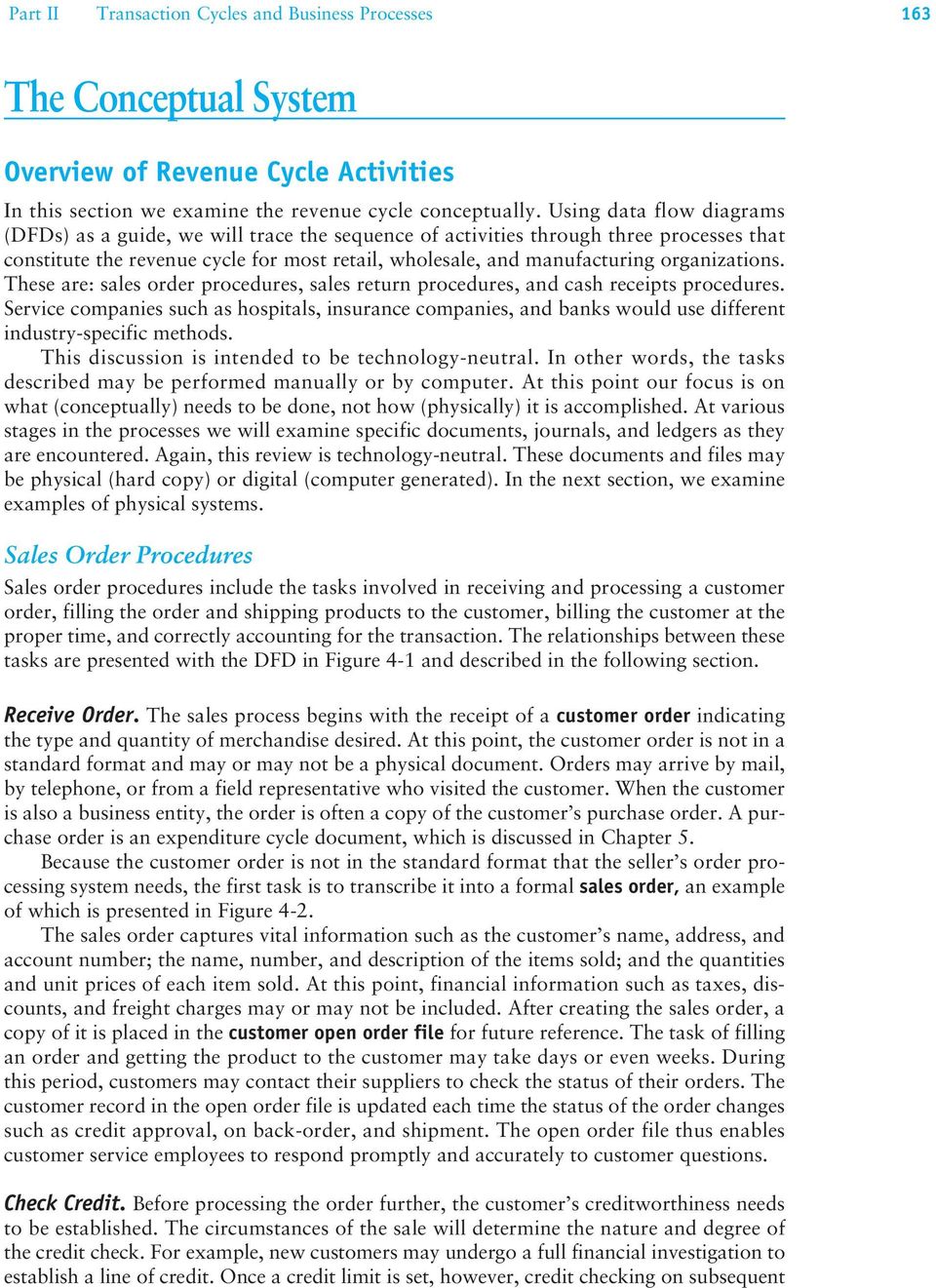
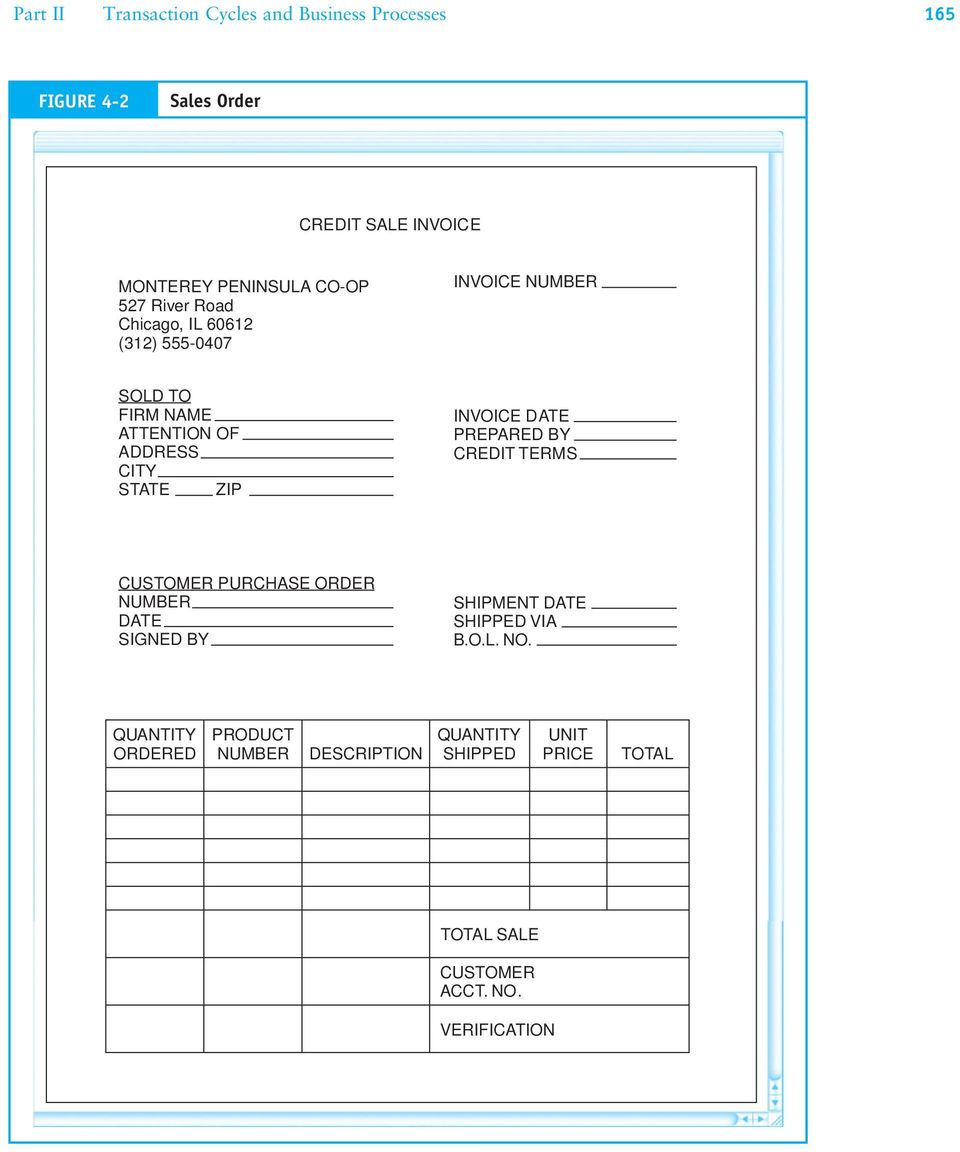
3 Part II Transaction Cycles and Business Processes 163 The Conceptual System Overview of Revenue Cycle Activities In this section we examine the revenue cycle conceptually. Using data flow diagrams (DFDs) as a guide, we will trace the sequence of activities through three processes that constitute the revenue cycle for most retail, wholesale, and manufacturing organizations. These are: sales order procedures, sales return procedures, and cash receipts procedures. Service companies such as hospitals, insurance companies, and banks would use different industry-specific methods. This discussion is intended to be technology-neutral. In other words, the tasks described may be performed manually or by computer. At this point our focus is on what (conceptually) needs to be done, not how (physically) it is accomplished. At various stages in the processes we will examine specific documents, journals, and ledgers as they are encountered. Again, this review is technology-neutral. These documents and files may be physical (hard copy) or digital (computer generated). In the next section, we examine examples of physical systems. Sales Order Procedures Sales order procedures include the tasks involved in receiving and processing a customer order, filling the order and shipping products to the customer, billing the customer at the proper time, and correctly accounting for the transaction. The relationships between these tasks are presented with the DFD in Figure 4-1 and described in the following section. Receive Order. The sales process begins with the receipt of a customer order indicating the type and quantity of merchandise desired. At this point, the customer order is not in a standard format and may or may not be a physical document. Orders may arrive by mail, by telephone, or from a field representative who visited the customer. When the customer is also a business entity, the order is often a copy of the customer s purchase order. A purchase order is an expenditure cycle document, which is discussed in Chapter 5. Because the customer order is not in the standard format that the seller s order processing system needs, the first task is to transcribe it into a formal sales order, an example of which is presented in Figure 4-2. The sales order captures vital information such as the customer s name, address, and account number; the name, number, and description of the items sold; and the quantities and unit prices of each item sold. At this point, financial information such as taxes, discounts, and freight charges may or may not be included. After creating the sales order, a copy of it is placed in the customer open order file for future reference. The task of filling an order and getting the product to the customer may take days or even weeks. During this period, customers may contact their suppliers to check the status of their orders. The customer record in the open order file is updated each time the status of the order changes such as credit approval, on back-order, and shipment. The open order file thus enables customer service employees to respond promptly and accurately to customer questions. Check. Before processing the order further, the customer s creditworthiness needs to be established. The circumstances of the sale will determine the nature and degree of the credit check. For example, new customers may undergo a full financial investigation to establish a line of credit. Once a credit limit is set, however, credit checking on subsequent
4 FIGURE 4-1 Packing Slip and Bill of Lading DFD of Sales Order Processing System Ship Goods Packing Slip and Shipping Notice Shipping Log Order Open Order Shipped Date, Back Order Status Shipping Details Received Date, Approved Date Pick Goods Verified Stock Release Receive Order Stock Release Insufficient Quantity Shipping Notice Sales Order ( Copy) Sales Order (invoice copy) Product and Quantity Stock Records Back-Order Check Approved Sales Order S.O. Pending S.O. Invoice Copy Bill Records Approval Sales Order (Ledger Copy) Total Amount Due Reviewed Stock Release Update Account Receivable records Sales voucher Sales Details Sales Update Inventory Records AR Subsidiary Ledger AR Summary Post to General Ledger Product and Quantity Sold Voucher Inventory Subsidiary ledger Voucher (General ) Approved Vouchers JV Posting Details General Ledger Records 164 Chapter 4 The Revenue Cycle Sales Invoice

5 Part II Transaction Cycles and Business Processes 165 FIGURE 4-2 Sales Order CREDIT SALE INVOICE MONTEREY PENINSULA CO-OP 527 River Road Chicago, IL (312) INVOICE NUMBER SOLD TO FIRM NAME ATTENTION OF ADDRESS CITY STATE ZIP INVOICE DATE PREPARED BY CREDIT TERMS CUSTOMER PURCHASE ORDER NUMBER DATE SIGNED BY SHIPMENT DATE SHIPPED VIA B.O.L. NO. QUANTITY ORDERED PRODUCT NUMBER DESCRIPTION QUANTITY SHIPPED UNIT PRICE TOTAL TOTAL SALE CUSTOMER ACCT. NO. VERIFICATION
6 166 Chapter 4 The Revenue Cycle sales may be limited to ensuring that the customer has a history of paying his or her bills and that the current sale does not exceed the pre-established limit. The credit approval process is an authorization control and should be performed as a function separate from the sales activity. In our conceptual system, the receive-order task sends the sales order (credit copy) to the check-credit task for approval. The returned approved sales order then triggers the continuation of the sales process by releasing sales order information simultaneously to various tasks. Several documents mentioned in the following sections, such as the stock release, packing slip, shipping notice, and sales invoice, are simply special-purpose copies of the sales order and are not illustrated separately. Pick Goods. The receive order activity forwards the stock release document (also called the picking ticket) to the pick goods function, in the warehouse. This document identifies the items of inventory that must be located and picked from the warehouse shelves. It also provides formal authorization for warehouse personnel to release the specified items. After picking the stock, the order is verified for accuracy and the goods and verified stock release document are sent to the ship goods task. If inventory levels are insufficient to fill the order, a warehouse employee adjusts the verified stock release to reflect the amount actually going to the customer. The employee then prepares a back-order record, which stays on file until the inventories arrive from the supplier (not shown in this diagram). Back-ordered items are shipped before new sales are processed. Finally, the warehouse employee adjusts the stock records to reflect the reduction in inventory. These stock records are not the formal accounting records for controlling inventory assets. They are used for warehouse management purposes only. Assigning asset custody and accounting record-keeping responsibility to the warehouse clerk would violate a key principle of internal control. The inventory control function, discussed later, maintains the formal accounting inventory records. Ship Goods. Before the arrival of the goods and the verified stock release document, the shipping department receives the packing slip and shipping notice from the receive order function. The packing slip will ultimately travel with the goods to the customer to describe the contents of the order. The shipping notice will later be forwarded to the billing function as evidence that the customer s order was filled and shipped. This document conveys pertinent new facts such as the date of shipment, the items and quantities actually shipped, the name of the carrier, and freight charges. In some systems, the shipping notice is a separate document prepared within the shipping function. Upon receiving the goods from the warehouse, the shipping clerk reconciles the physical items with the stock release, the packing slip, and the shipping notice to verify that the order is correct. The ship goods function thus serves as an important independent verification control point and is the last opportunity to detect errors before shipment. The shipping clerk packages the goods, attaches the packing slip, completes the shipping notice, and prepares a bill of lading. The bill of lading, as shown in Figure 4-3, is a formal contract between the seller and the shipping company (carrier) to transport the goods to the customer. This document establishes legal ownership and responsibility for assets in transit. Once the goods are transferred to the carrier, the shipping clerk records the shipment in the shipping log, forwards the shipping notice to the bill customer function as proof of shipment, and updates the customer s open order file.

7 Part II Transaction Cycles and Business Processes 167 FIGURE 4-3 Bill of Lading Monterey Peninsula Co-Op 527 River Road Chicago, IL (312) TO: Consignee Street City/State Zip Code Shipper No. Carrier No. Date Document No. (Name of Carrier) Route: No. Shipping Units Vehicle Kind of packaging, description of articles, special marks and exceptions Weight Rate Charges The agreed or declared value of the property is hereby specifically stated by the shipper to be not exceeding: TOTAL CHARGES $ IF WITHOUT RECOURSE: The carrier shall not make delivery of this shipment without payment of freight $ per FREIGHT CHARGES Check appropriate box: [ ] Freight prepaid [ ] Collect [ ] Bill to shipper SHIPPER Monterey Peninsula Co-op PER (Signature of Consignor) Signature below signifies that the goods described above are in apparent good order, except as noted. Shipper hereby certifies that he is familiar with all the bill of lading terms and agrees with them. CARRIER PER (This bill of lading is to be signed by the shipper and agent of the carrier issuing same.) CONSIGNEE DATE

8 168 Chapter 4 The Revenue Cycle Bill. The shipment of goods marks the completion of the economic event and the point at which the customer should be billed. Billing before shipment encourages inaccurate record keeping and inefficient operations. When the customer order is originally prepared, some details such as inventory availability, prices, and shipping charges may not be known with certainty. In the case of back-orders, for example, suppliers do not typically bill customers for out-of-stock items. Billing for goods not shipped causes confusion, damages relations with customers, and requires additional work to make adjustments to the accounting records. To prevent such problems, the billing function awaits notification from shipping before it bills. Figure 4-1 shows that upon credit approval, the bill customer function receives the sales order (invoice copy) from the receive order task. This document is placed in an S.O. pending file until receipt of the shipping notice, which describes the products that were actually shipped to the customer. Upon arrival, the items shipped are reconciled with those ordered and unit prices, taxes, and freight charges are added to the invoice copy of the sales order. The completed sales invoice is the customer s bill, which formally depicts the charges to the customer. In addition, the billing function performs the following record keeping related tasks: Records the sale in the sales journal. Forwards the ledger copy of the sales order to the update accounts receivable task. Sends the stock release document to the update inventory records task. The sales journal is a special journal used for recording completed sales transactions. The details of sales invoices are entered in the journal individually. At the end of the period, these entries are summarized into a sales journal voucher, which is sent to the general ledger task for posting to the following accounts: DR CR Accounts Receivable Control XXXX.XX Sales XXXX.XX FIGURE 4-4 Voucher Voucher Account Number Account Name Accounts Receivable Sales Number: JV6-03 Date: 10/7/2007 Amount DR. CR. 5,000 5,000 Explanation: to record total credit sales for 10/7/2007 Approved by: JRM Posted by: MJJ

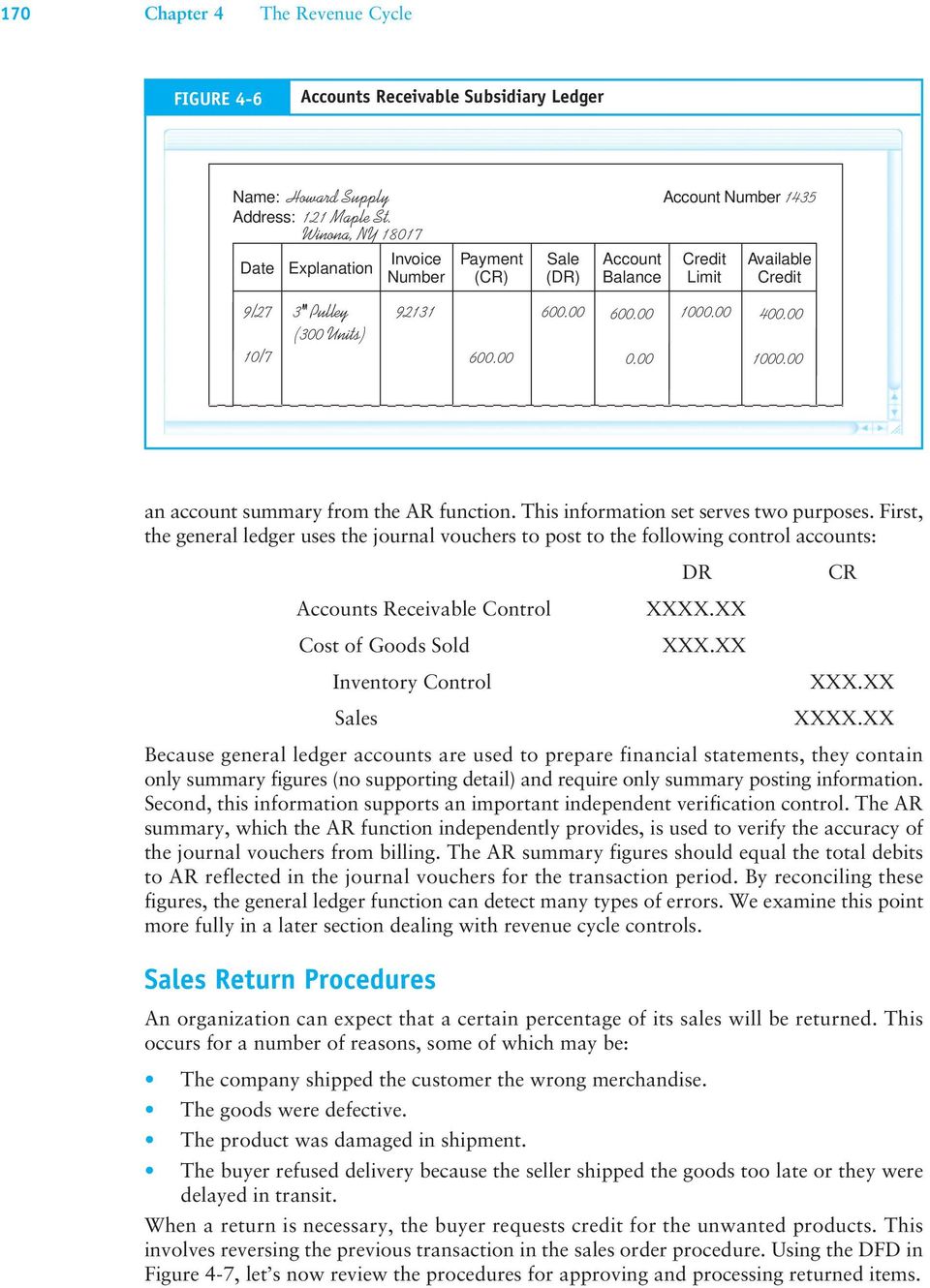
9 Part II Transaction Cycles and Business Processes 169 Figure 4-4 illustrates a journal voucher. Each journal voucher represents a general journal entry and indicates the general ledger accounts affected. Summaries of transactions, adjusting entries, and closing entries are all entered into the general ledger via this method. When properly approved, journal vouchers are an effective control against unauthorized entries to the general ledger. The journal voucher system eliminates the need for a formal general journal, which is replaced by a journal voucher file. Update Inventory Records. The inventory control function updates inventory subsidiary ledger accounts from information contained in the stock release document. In a perpetual inventory system, every inventory item has its own record in the ledger containing, at a minimum, the data depicted in Figure 4-5. Each stock release document reduces the quantity on hand of one or more inventory accounts. Periodically, the financial value of the total reduction in inventory is summarized in a journal voucher and sent to the general ledger function for posting to the following accounts: Cost of Goods Sold Inventory Control DR XXX.XX CR XXX.XX Update Accounts Receivable. records in the accounts receivable (AR) subsidiary ledger are updated from information the sales order (ledger copy) provides. Every customer has an account record in the AR subsidiary ledger containing, at minimum, the following data: customer name; customer address; current balance; available credit; transaction dates; invoice numbers; and credits for payments, returns, and allowances. Figure 4-6 presents an example of an AR subsidiary ledger record. Periodically, the individual account balances are summarized in a report that is sent to the general ledger. The purpose for this is discussed next. Post to General Ledger. By the close of the transaction processing period, the general ledger function has received journal vouchers from the billing and inventory control tasks and FIGURE 4-5 Inventory Subsidiary Ledger Perpetual Inventory Record Item # Item Description 3" " Pulley Date Units Received 9/15 9/18 9/20 9/27 10/1 10/7 1,000 Units Sold Qnty On Hand ,150 Reorder Point EOQ 1,000 1,000 Qnty On Order 1,000 Purch Order # Vendor Number 851 Standard Cost 2 2 Total Inven. Cost 1,900 1,300 1, ,300

10 170 Chapter 4 The Revenue Cycle FIGURE 4-6 Accounts Receivable Subsidiary Ledger Name: Howard Supply Address: 121 Maple St. Winona, NY Date Explanation Invoice Number 9/27 10/7 3" " Pulley (300 Units) Payment (CR) Sale (DR) Account Balance Account Number 1435 Limit Available an account summary from the AR function. This information set serves two purposes. First, the general ledger uses the journal vouchers to post to the following control accounts: DR CR Accounts Receivable Control XXXX.XX Cost of Goods Sold XXX.XX Inventory Control XXX.XX Sales XXXX.XX Because general ledger accounts are used to prepare financial statements, they contain only summary figures (no supporting detail) and require only summary posting information. Second, this information supports an important independent verification control. The AR summary, which the AR function independently provides, is used to verify the accuracy of the journal vouchers from billing. The AR summary figures should equal the total debits to AR reflected in the journal vouchers for the transaction period. By reconciling these figures, the general ledger function can detect many types of errors. We examine this point more fully in a later section dealing with revenue cycle controls. Sales Return Procedures An organization can expect that a certain percentage of its sales will be returned. This occurs for a number of reasons, some of which may be: The company shipped the customer the wrong merchandise. The goods were defective. The product was damaged in shipment. The buyer refused delivery because the seller shipped the goods too late or they were delayed in transit. When a return is necessary, the buyer requests credit for the unwanted products. This involves reversing the previous transaction in the sales order procedure. Using the DFD in Figure 4-7, let s now review the procedures for approving and processing returned items.
11 FIGURE 4-7 Product Quantity Replaced DFD of Sales Return Procedures Packing Slip Stock Records Prepare Return Slip Return Slip Copy 2 Restock Goods Return Slip Copy 1 Sales Contra Entry Memo Sales Prepare Memo Update Sales Approved Memo Approve Memo Approved Memo Product Quantity Replaced Approved Memo Update AR Records Update Inventory Records Data Inventory Subsidiary Ledger Sales Return Voucher General Ledger Records Approved Memo Inventory Voucher Posting Data AR Subsidiary Ledger AR Summary Update General Ledger Approved Vouchers Voucher Part II Transaction Cycles and Business Processes 171
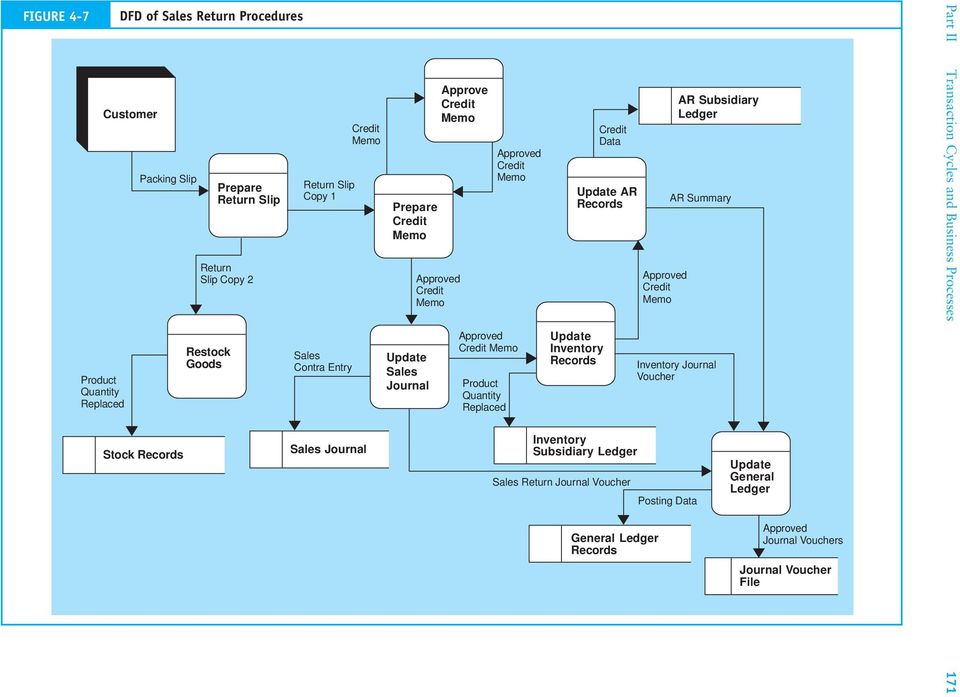
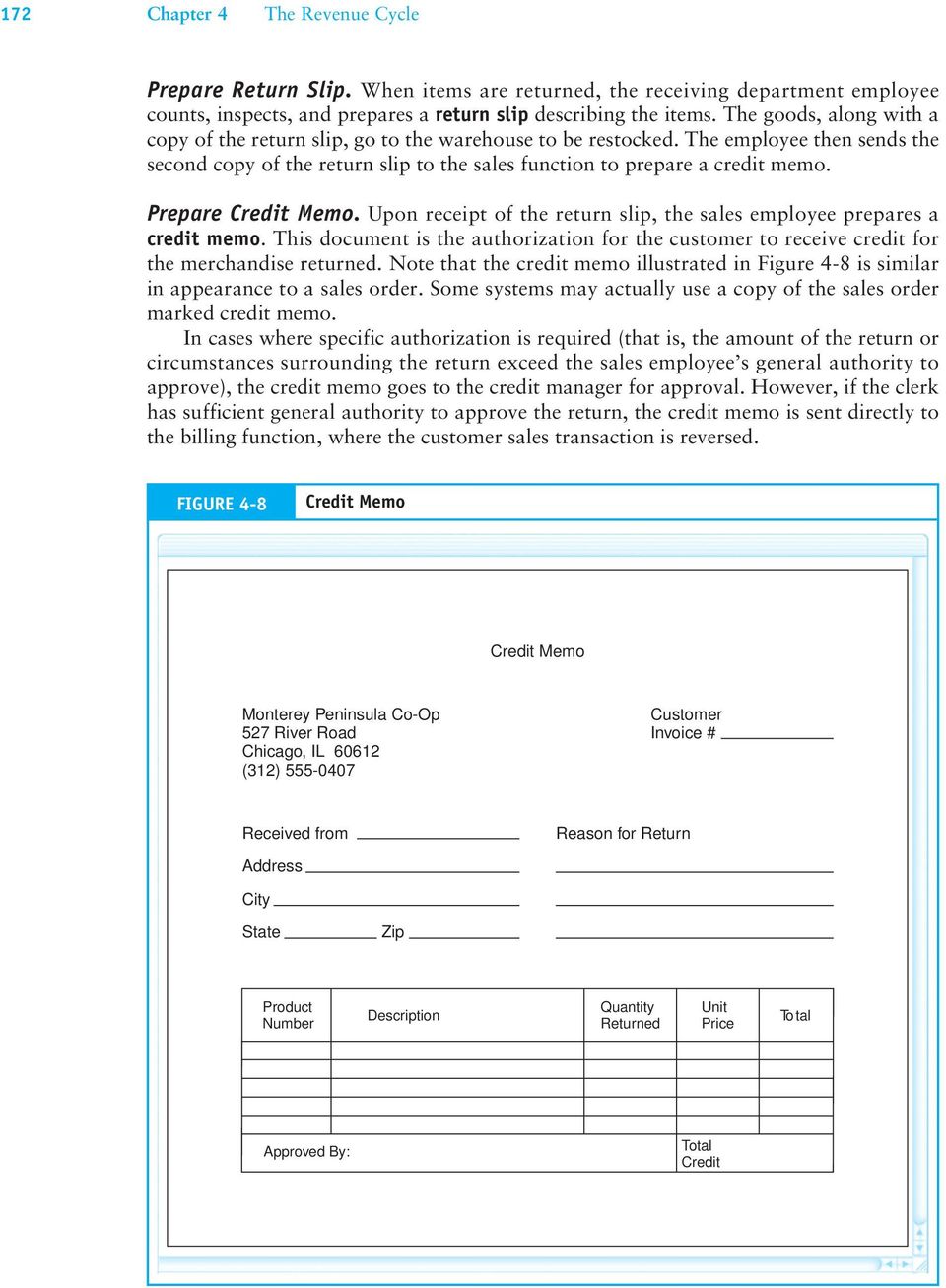
12 172 Chapter 4 The Revenue Cycle Prepare Return Slip. When items are returned, the receiving department employee counts, inspects, and prepares a return slip describing the items. The goods, along with a copy of the return slip, go to the warehouse to be restocked. The employee then sends the second copy of the return slip to the sales function to prepare a credit memo. Prepare Memo. Upon receipt of the return slip, the sales employee prepares a credit memo. This document is the authorization for the customer to receive credit for the merchandise returned. Note that the credit memo illustrated in Figure 4-8 is similar in appearance to a sales order. Some systems may actually use a copy of the sales order marked credit memo. In cases where specific authorization is required (that is, the amount of the return or circumstances surrounding the return exceed the sales employee s general authority to approve), the credit memo goes to the credit manager for approval. However, if the clerk has sufficient general authority to approve the return, the credit memo is sent directly to the billing function, where the customer sales transaction is reversed. FIGURE 4-8 Memo Memo Monterey Peninsula Co-Op 527 River Road Chicago, IL (312) Invoice # Received from Reason for Return Address City State Zip Product Number Description Quantity Returned Unit Price To tal Approved By: Total
13 Part II Transaction Cycles and Business Processes 173 Approve Memo. The credit manager evaluates the circumstances of the return and makes a judgment to grant (or disapprove) credit. The manager then returns the approved credit memo to the sales department. Update Sales. Upon receipt of the approved credit memo, the transaction is recorded in the sales journal as a contra entry. The credit memo is then forwarded to the inventory control function for posting. At the end of the period, total sales returns are summarized in a journal voucher and sent to the general ledger department. Update Inventory and AR Records. The inventory control function adjusts the inventory records and forwards the credit memo to accounts receivable, where the customer s account is also adjusted. Periodically, inventory control sends a journal voucher summarizing the total value of inventory returns to the general ledger update task. Similarly, accounts receivable submits an AR account summary to the general ledger function. Update General Ledger. Upon receipt of the journal voucher and account summary information, the general ledger function reconciles the figures and posts to the following control accounts: DR CR Inventory Control XXX.XX Sales Returns and Allowances XXXX.XX Cost of Goods Sold XXX.XX Accounts Receivable Control XXXX.XX Cash Receipts Procedures The sales order procedure described a credit transaction that resulted in the establishment of an account receivable. Payment on the account is due at some future date, which the terms of trade determine. Cash receipts procedures apply to this future event. They involve receiving and securing the cash; depositing the cash in the bank; matching the payment with the customer and adjusting the correct account; and properly accounting for and reconciling the financial details of the transaction. The data flow diagram in Figure 4-9 shows the relationship between these tasks. They are described in detail in the following section. Open Mail and Prepare Remittance Advice. A mail room employee opens envelopes containing customers payments and remittance advices. Remittance advices (see Figure 4-10) contain information needed to service individual customers accounts. This includes payment date, account number, amount paid, and customer check number. Only the portion above the perforated line is the remittance advice, which the customer removes and returns with the payment. In some systems, the lower portion of the document is a customer statement that the billing department sends out periodically. In other cases, this could be the original customer invoice, which was described in the sales order procedures.

14 FIGURE 4-9 DFD of Cash Receipts Procedure Check and Remittance Advice Payment Amount Received Update AR Records AR Summary AR Subsidiary Ledger Voucher 174 Chapter 4 The Revenue Cycle Cancelled Check Returned Deposit Slips Open Mail, Prepare Remittance Advice Remittance List Copy Reconcile Cash Receipts and Deposits Remittance Advice and Remittance List Check and Remittance List Approved Vouchers Record and Deposit Checks Remittance List Cash receipts Voucher Update General Ledger Approved Vouchers Posting Data General Ledger Records Bank Voucher Cash Receipts Check and Deposit Slip

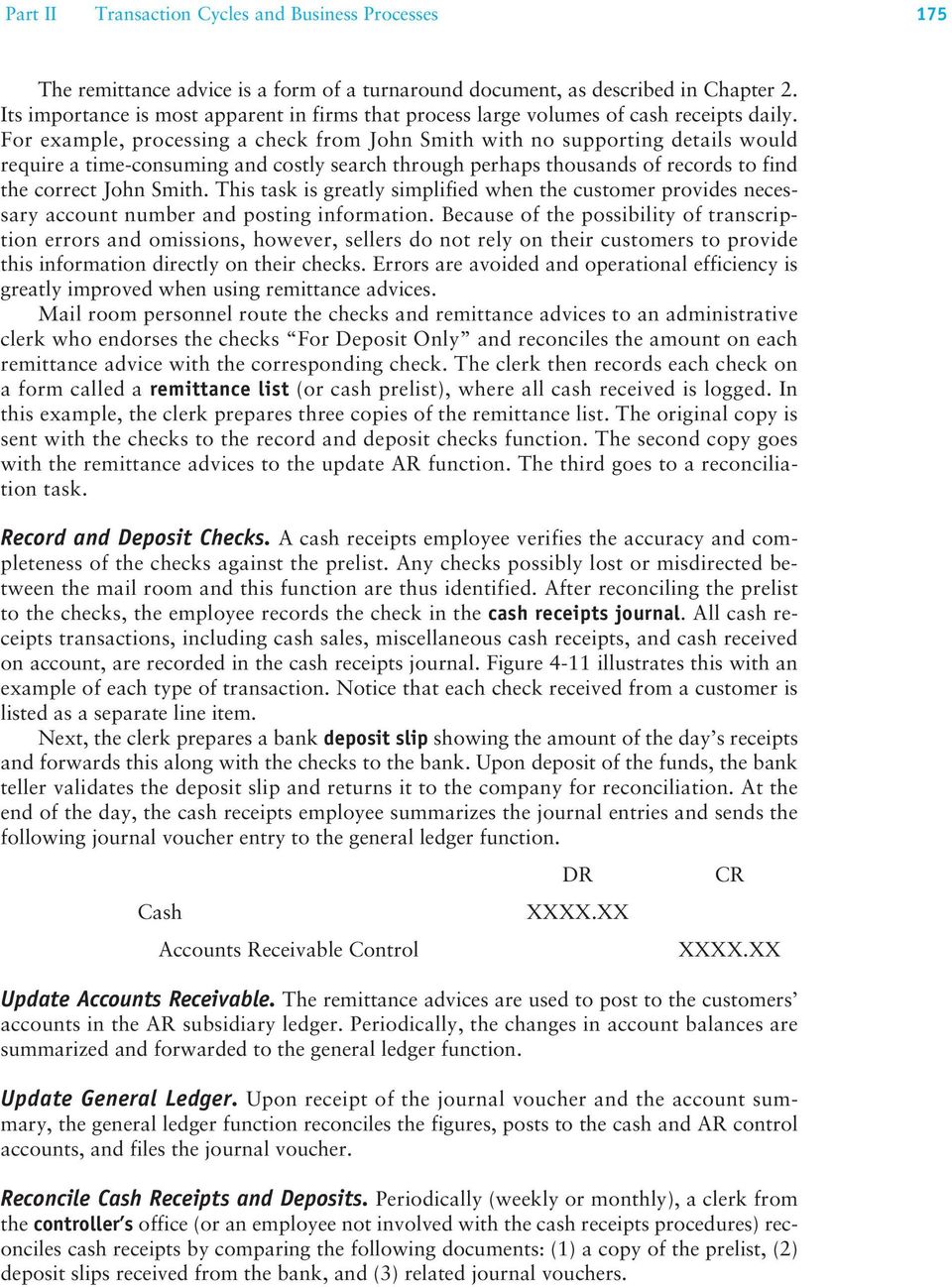
15 Part II Transaction Cycles and Business Processes 175 The remittance advice is a form of a turnaround document, as described in Chapter 2. Its importance is most apparent in firms that process large volumes of cash receipts daily. For example, processing a check from John Smith with no supporting details would require a time-consuming and costly search through perhaps thousands of records to find the correct John Smith. This task is greatly simplified when the customer provides necessary account number and posting information. Because of the possibility of transcription errors and omissions, however, sellers do not rely on their customers to provide this information directly on their checks. Errors are avoided and operational efficiency is greatly improved when using remittance advices. Mail room personnel route the checks and remittance advices to an administrative clerk who endorses the checks For Deposit Only and reconciles the amount on each remittance advice with the corresponding check. The clerk then records each check on a form called a remittance list (or cash prelist), where all cash received is logged. In this example, the clerk prepares three copies of the remittance list. The original copy is sent with the checks to the record and deposit checks function. The second copy goes with the remittance advices to the update AR function. The third goes to a reconciliation task. Record and Deposit Checks. A cash receipts employee verifies the accuracy and completeness of the checks against the prelist. Any checks possibly lost or misdirected between the mail room and this function are thus identified. After reconciling the prelist to the checks, the employee records the check in the cash receipts journal. All cash receipts transactions, including cash sales, miscellaneous cash receipts, and cash received on account, are recorded in the cash receipts journal. Figure 4-11 illustrates this with an example of each type of transaction. Notice that each check received from a customer is listed as a separate line item. Next, the clerk prepares a bank deposit slip showing the amount of the day s receipts and forwards this along with the checks to the bank. Upon deposit of the funds, the bank teller validates the deposit slip and returns it to the company for reconciliation. At the end of the day, the cash receipts employee summarizes the journal entries and sends the following journal voucher entry to the general ledger function. DR CR Cash XXXX.XX Accounts Receivable Control XXXX.XX Update Accounts Receivable. The remittance advices are used to post to the customers accounts in the AR subsidiary ledger. Periodically, the changes in account balances are summarized and forwarded to the general ledger function. Update General Ledger. Upon receipt of the journal voucher and the account summary, the general ledger function reconciles the figures, posts to the cash and AR control accounts, and files the journal voucher. Reconcile Cash Receipts and Deposits. Periodically (weekly or monthly), a clerk from the controller s office (or an employee not involved with the cash receipts procedures) reconciles cash receipts by comparing the following documents: (1) a copy of the prelist, (2) deposit slips received from the bank, and (3) related journal vouchers.
16 176 Chapter 4 The Revenue Cycle FIGURE 4-10 Remittance Advice Send To: Monterey Peninsula Co-Op Page: River Road Chicago, IL (312) Remittance Advice: Date No. Amount Pd. Check No. 10/4/ Please return the upper portion with your payment Thank You To: John Smith R.D. #2, Box 312 Prunedale, CA Due Date No. Amount Due 10/10/ Date Invoice Number Description Amount Due 9/28/ Cleaning Supplies Thank you for giving Monterey Peninsula the opportunity to serve you Previous Bal. Payments Sales Late Fees Ta x Ending Bal

17 Part II Transaction Cycles and Business Processes 177 FIGURE 4-11 Cash Receipts Cash Receipts Date Account Post Ref Check # Cash Acct. # 101 (Debit) Sales Discounts Acct. # 430 (Debit) Accounts Receivable Acct. # 102 Sales Acct. # 401 Sundry Accounts Debit () 9/3 9/5 9/9 Capital Stock Ogment Supply Marvin Co ,000 2,970 1,000 14, ,000 1,000 Revenue Cycle Controls Chapter 3 defined six classes of internal control activities that guide us in designing and evaluating transaction processing controls. They are transaction authorization, segregation of duties, supervision, accounting records, access control, and independent verification. Table 4-1 summarizes these control activities as they apply in the revenue cycle. Transaction Authorization The objective of transaction authorization is to ensure that only valid transactions are processed. In the following sections, we see how this objective applies in each of the three systems. Check. checking of prospective customers is a credit department function. This department ensures the proper application of the firm s credit policies. The principal concern is the creditworthiness of the customer. In making this judgment, the credit department may employ various techniques and tests. The complexity of credit procedures will vary depending on the organization, its relationship with the customer, and the materiality of the transaction. approval for first-time customers may take time. decisions that fall within a sales employee s general authority (such as verifying that the current transaction does not exceed the customer s credit limit) may be dealt with very quickly. Whatever level of test is deemed necessary by company policy, the transaction should not proceed further until credit is approved. Return Policy. Because credit approval is generally a credit department function, that department authorizes the processing of sales returns as well. An approval determination is based on the nature of the sale and the circumstances of the return. The concepts of specific and general authority also influence this activity. Most organizations have specific rules for granting cash refunds and credits to customers based on the materiality of the transaction. As materiality increases, credit approval becomes more formal.

18 178 Chapter 4 The Revenue Cycle TABLE 4-1 Summary of Revenue Cycle Controls CONTROL POINTS IN THE SYSTEM Control Activity Sales Processing Cash Receipts Transactions authorization check Return policy Remittance list (cash prelist) Segregation of duties Supervision Accounting records Access Independent verification is separate from processing; inventory control is separate from warehouse; AR subsidiary ledger is separate from general ledger Sales orders, sales journals, AR subsidiary ledger, AR control (general ledger), inventory subsidiary ledger, inventory control, sales account (GL) Physical access to inventory; access to accounting records above Shipping department, billing department, general ledger Cash receipts are separate from AR and cash account; AR subsidiary ledger is separate from GL Mail room Remittance advices, checks, remittance list, cash receipts journal, AR subsidiary ledger, AR control account, cash account Physical access to cash; access to accounting records above Cash receipts, general ledger, bank reconciliation Remittance List (Cash Prelist). The cash prelist provides a means for verifying that customer checks and remittance advices match in amount. The presence of an extra remittance advice in the AR department or the absence of a customer s check in the cash receipts department would be detected when the batch is reconciled with the prelist. Thus, the prelist authorizes the posting of a remittance advice to a customer s account. Segregation of Duties Segregating duties ensures that no single individual or department processes a transaction in its entirety. The number of employees and the volume of transactions being processed influence how to accomplish the segregation. Recall from Chapter 3 that three rules guide systems designers in this task: 1. Transaction authorization should be separate from transaction processing. Within the revenue cycle, the credit department is segregated from the rest of the process, so formal authorization of a transaction is an independent event. The importance of this separation is clear when one considers the potential conflict in objectives between the individual salesperson and the organization. Often, compensation for sales staff is based on their individual sales performance. In such cases, sales staff have an incentive to maximize sales volume and thus may not adequately consider the creditworthiness of prospective customers. By acting in an independent capacity, the credit department may objectively detect risky customers and disallow poor and irresponsible sales decisions. 2. Asset custody should be separate from the task of asset record keeping. The physical assets at risk in the revenue cycle are inventory and cash, hence the need to separate asset custody from record keeping. The inventory warehouse has physical custody of inventory assets, but inventory control (an accounting function) maintains records of inventory levels. To combine these tasks would open the door to fraud and

19 Part II Transaction Cycles and Business Processes 179 material errors. A person with combined responsibility could steal or lose inventory and adjust the inventory records to conceal the event. Similarly, the cash receipts department takes custody of the cash asset, while updating AR records is an accounts receivable (accounting function) responsibility. The cash receipts department typically reports to the treasurer, who has responsibility for financial assets. Accounting functions report to the controller. Normally these two general areas of responsibility are performed independently. 3. The organization should be structured so that the perpetration of a fraud requires collusion between two or more individuals. The record-keeping tasks need to be carefully separated. Specifically, the subsidiary ledgers (AR and inventory), the journals (sales and cash receipts), and the general ledger should be separately maintained. An individual with total record-keeping responsibility, in collusion with someone with asset custody, is in a position to perpetrate fraud. By separating these tasks, collusion must involve more people, which increases the risk of detection and therefore is less likely to occur. Supervision Some firms have too few employees to achieve an adequate separation of functions. These firms must rely on supervision as a form of compensating control. By closely supervising employees who perform potentially incompatible functions, a firm can compensate for this exposure. Supervision can also provide control in systems that are properly segregated. For example, the mail room is a point of risk in most cash receipts systems. The individual who opens the mail has access both to cash (the asset) and to the remittance advice (the record of the transaction). A dishonest employee may use this opportunity to steal the check, cash it, and destroy the remittance advice, thus leaving no evidence of the transaction. Ultimately, this sort of fraud will come to light when the customer complains after being billed again for the same item and produces the canceled check to prove that payment was made. By the time the firm gets to the bottom of this problem, however, the perpetrator may have committed the crime many times and left the organization. Detecting crimes after the fact accomplishes little; prevention is the best solution. The deterrent effect of supervision can provide an effective preventive control. Accounting Records Chapter 2 described how a firm s source documents, journals, and ledgers form an audit trail that allows independent auditors to trace transactions through various stages of processing. This control is also an important operational feature of well-designed accounting systems. Sometimes transactions get lost in the system. By following the audit trail, management can discover where an error occurred. Several specific control techniques contribute to the audit trail. Prenumbered Documents. Prenumbered documents (sales orders, shipping notices, remittance advices, and so on) are sequentially numbered by the printer and allow every transaction to be identified uniquely. This permits the isolation and tracking of a single event (among many thousands) through the accounting system. Without a unique tag, one transaction looks very much like another. Verifying financial data and tracing transactions would be difficult or even impossible without prenumbered source documents.

20 180 Chapter 4 The Revenue Cycle Special s. By grouping similar transactions together into special journals, the system provides a concise record of an entire class of events. For this purpose, revenue cycle systems use the sales journal and the cash receipts journal. Subsidiary Ledgers. Two subsidiary ledgers are used for capturing transaction event details in the revenue cycle: the inventory and AR subsidiary ledgers. The sale of products reduces quantities on hand in the inventory subsidiary records and increases the customers balances in the AR subsidiary records. The receipt of cash reduces customers balances in the AR subsidiary records. These subsidiary records provide links back to journal entries and to the source documents that captured the events. General Ledgers. The general ledger control accounts are the basis for financial statement preparation. Revenue cycle transactions affect the following general ledger accounts: sales, inventory, cost of goods sold, AR, and cash. vouchers that summarize activity captured in journals and subsidiary ledgers flow into the general ledger to update these accounts. Thus we have a complete audit trail from the financial statements to the source documents via the general ledger, subsidiary ledgers, and special journals. s. The revenue cycle employs several temporary and permanent files that contribute to the audit trail. The following are typical examples: Open sales order file shows the status of customer orders. Shipping log specifies orders shipped during the period. records file provides customer credit data. Sales order pending file contains open orders not yet shipped or billed. Back-order file contains customer orders for out-of-stock items. voucher file is a compilation of all journal vouchers posted to the general ledger. Access Controls Access controls prevent and detect unauthorized and illegal access to the firm s assets. The physical assets at risk in the revenue cycle are inventories and cash. Limiting access to these items includes: Warehouse security, such as fences, alarms, and guards. Depositing cash daily in the bank. Using a safe or night deposit box for cash. Locking cash drawers and safes in the cash receipts department. Information is also an important asset at risk. Access control over information involves restricting access to documents that control physical assets including source documents, journals, and ledgers. An individual with unrestricted access to records can effectively manipulate the physical assets of the firm. The following are examples of access risks in the revenue cycle: 1. An individual with access to the AR subsidiary ledger could remove his or her account (or someone else s) from the books. With no record of the account, the firm would not send the customer monthly statements. 2. Access to sales order documents may permit an unauthorized individual to trigger the shipment of a product.

21 Part II Transaction Cycles and Business Processes An individual with access to both cash and the general ledger cash account could remove cash from the firm and adjust the cash account to cover the act. Independent Verification The objective of independent verification is to verify the accuracy and completeness of tasks that other functions in the process perform. To be effective, independent verifications must occur at key points in the process where errors can be detected quickly and corrected. Independent verification controls in the revenue cycle exist at the following points: 1. The shipping function verifies that the goods sent from the warehouse are correct in type and quantity. Before the goods are sent to the customer, the stock release document and the packing slip are reconciled. 2. The billing function reconciles the original sales order with the shipping notice to ensure that customers are billed for only the quantities shipped. 3. Prior to posting to control accounts, the general ledger function reconciles journal vouchers and summary reports prepared independently in different function areas. The billing function summarizes the sales journal, inventory control summarizes changes in the inventory subsidiary ledger, the cash receipts function summarizes the cash receipts journal, and accounts receivable summarizes the AR subsidiary ledger. Discrepancies between the numbers supplied by these various sources will signal errors that need to be resolved before posting to the GL can take place. For example, the general ledger function would detect a sales transaction that had been entered in the sales journal but not posted to the customer s account in the AR subsidiary ledger. The journal voucher from billing, summarizing total credit sales, would not equal the total increases posted to the AR subsidiary ledger. The specific customer account causing the out-of-balance condition would not be determinable at this point, but the error would be noted. Finding it may require examining all the transactions processed during the period. Depending on the technology in place, this could be a tedious task. Physical Systems In this section we examine the physical system. This begins with a review of manual procedures and then moves on to deal with several forms of computer-based systems. The inclusion of manual systems in this age of computer technology is controversial. We do so for three reasons. First, manual systems serve as a visual training aid to promote a better understanding of key concepts. Manual (document) flowcharts depict information as the flow of physical documents. Their source, routing, destination, and sequence of events are visually discernable from the flowchart. In computer-based systems, flows of digital documents are not easily represented on flowcharts and may be difficult for novice AIS students to follow. Second, manual system flowcharts reinforce the importance of segregation of duties through clearly defined departmental boundaries. In computer-based systems, these segregations are often accomplished through computer programming techniques and password controls that cannot be represented visually on a flowchart. Indeed, a single box (program icon) on a system flowchart may consolidate tasks of many different organizational units. Finally, manual systems are a fundamental component of the framework for viewing technology innovations. The shortcomings and failings of current generation technology become the design imperative for the next. The first generation of computer technology emerged out of the manual environment. An argument can be made that understanding what used to be state-of-the-art improves one s understanding of what led us to where we are now.
22 182 Chapter 4 The Revenue Cycle For these reasons, some instructors prefer to teach manual systems before moving on to computer applications. Others favor moving directly to computer-based systems. This section has been organized to accommodate both teaching styles. Following is a review of manual systems. You may, however, without loss of technical content, bypass this material and go directly to computer-based systems located on page 188. Manual Systems The purpose of this section is to support the system concepts presented in the previous section with models depicting people, organizational units, and physical documents and files. This section should help you envision the segregation of duties and independent verifications, which are essential to effective internal control regardless of the technology in place. In addition, we highlight inefficiencies intrinsic to manual systems, which gave rise to modern systems using improved technologies. Sales Order Processing The document flowchart in Figure 4-12 shows the procedures and the documents typical to a manual sales order system. In manual systems, maintaining physical files of source documents is critical to the audit trail. As we walk through the flowchart, notice that in each department, after completion of the assigned task, one or more documents are filed as evidence that the task was completed. Sales Department The sales process begins with a customer contacting the sales department by telephone, mail, or in person. The sales department records the essential details on a sales order. This information will later trigger many tasks, but for the moment is filed pending credit approval. Department Approval To provide independence to the credit authorization process, the credit department is organizationally and physically segregated from the sales department. When credit is approved, the sales department clerk pulls the various copies of the sales orders from the pending file and releases them to the billing, warehouse, and shipping departments. The customer order and credit approval are then placed in the open order file. Warehouse Procedures The next step is to ship the merchandise, which should be done as soon after credit approval as possible. The warehouse clerk receives the stock release copy of the sales order and uses this to locate the inventory. The inventory and stock release are then sent to the shipping department. Finally, the warehouse clerk records the inventory reduction in the stock records. The Shipping Department The shipping clerk reconciles the products received from the warehouse with the shipping notice copy of the sales order received earlier. As discussed previously, this reconciliation is an important control point, which ensures that the firm sends the correct products and quantities to the customer. When the order is correct, a bill of lading is prepared, and the products are packaged and shipped via common carrier to the customer. The clerk then enters the transaction into the shipping log and sends the shipping notice to the billing department.
23 FIGURE 4-12 Packing Slip Shipping Notice Copy Invoice Ledger Copy Copy Order Sales Manual Sales Order Processing Systems Order Prepare Sales Order Copy Stock Release Copy Pending Approved Open Order Copy Copy (Approved) Check Copy (Approved) Shipping Notice Invoice Ledger Copy Copy Reconcile, Add Prices, and Bill Copy Inventory Control Billing Stock Release Sales Shipping Notice Invoice Voucher General Ledger Ledger Copy Accts Rec Stock Release Copy Copy Warehouse Pick Goods Stock Release Stock Records Shipping Notice Stock Release Shipping Shipping Notice Packing Slip Copy Reconcile, Prepare Bill of Lading and Complete Shipping Notice Copy Stock Release Shipping Log Bill of Lading Bill of Lading Packing Slip Carrier Part II Transaction Cycles and Business Processes 183
24 184 Chapter 4 The Revenue Cycle FIGURE 4-12 Manual Sales Order Processing Systems (Continued) Billing Inventory Control Accounts Receivable General Ledger AR Summary Ledger Copy Stock Release Ledger Copy Stock Release Update Inventory Inventory Sub Ledger Voucher Update AR Records AR Sub Ledger AR Summary Voucher Voucher Stock Release Ledger Copy Update General Ledger from Vouchers and Reconcile General Ledger AR Summary Voucher Voucher Voucher Voucher The Billing Department The shipping notice is proof that the product has been shipped and is the trigger document that initiates the billing process. Upon receipt of the shipping notice, the billing clerk compiles the relevant facts about the transaction (product prices, handling charges, freight, taxes, and discount terms) and bills the customer. The billing clerk then enters the transaction into the sales journal and distributes documents to the AR and inventory control departments. Periodically, the clerk summarizes all transactions into a journal voucher and sends this to the general ledger department.
25 Part II Transaction Cycles and Business Processes 185 Accounts Receivable, Inventory Control, and General Ledger Departments Upon receipt of sales order copies from the billing department, the AR and inventory control clerks update their respective subsidiary ledgers. Periodically they prepare journal vouchers and account summaries, which they send to the general ledger department for reconciliation and posting to the control accounts. Sales Return Procedures Figure 4-13 illustrates the procedures and documents used for processing sales returns. Receiving Department The sales return process begins in the receiving department, where personnel receive, count, inspect for damage, and send returned products to the warehouse. The receiving clerk prepares a return slip, which is forwarded to the sales department for processing. Sales Department Upon receipt of the return slip, the clerk prepares a credit memo. Depending on the materiality and circumstance of the return, company policy will dictate whether credit department approval (not shown) is required. Processing the Memo The objective of the sales return system is to reverse the effects of the original sales transaction. Billing records a contra entry into sales return, and allowance journal inventory control debits the inventory records to reflect the return of goods. The AR clerk credits the customer account. All departments periodically prepare journal vouchers and account summaries, which are then sent to the general ledger for reconciliation and posting to the control accounts. Cash Receipts Procedures Figure 4-14 presents a document flowchart depicting the cash receipts procedures. Mail Room payments and remittance advices arrive at the mail room, where the envelopes are opened. The checks are sent to the cashier in the cash receipts department, and the remittance advices are sent to the AR department. Cash Receipts The cashier records the checks in the cash receipts journal and promptly sends them to the bank, accompanied by two copies of the deposit slip. Periodically, the employee prepares a journal voucher and sends it to the general ledger department. Accounts Receivable The AR department uses the remittance advices to reduce the customers account balances consistent with the amount paid. The AR clerk prepares a summary of changes in account balances, which is sent to the general ledger department. General Ledger Department Upon receipt of the journal voucher and account summary from cash receipts and AR, respectively, the general ledger clerk reconciles the information and posts to the control accounts.
26 FIGURE 4-13 Sales Returns Procedures Receiving Sales Billing Prepare Return Slip Return Slip Return Slip Prepare Memo Memo Memo Update Memo Sales Returns & Allowances Voucher Inventory Control Memo Update Inventory Records Memo Inventory Sub Ledger Voucher Accounts Receivable Memo Update AR Memo AR Sub Ledger AR Summary AR Summary General Ledger Voucher Voucher Update General Ledger General Ledger 186 Chapter 4 The Revenue Cycle Warehouse AR Summary Voucher Voucher Voucher
27 FIGURE 4-14 Check Remittance Advice Check Flowchart of Cash Receipts System Mail Room Cash Receipts Accounts Receivable General Ledger Controller Remittance Advice Reconcile Checks with the RA and Prepare Remittance List Remittance List Remittance List Remittance List Check Remittance List Process Cash Receipt Deposit Slip Deposit Slip Deposit Slip Check Remittance List Cash Receipts Bank Voucher Remittance List Remittance Advice Remittance List Remittance Advice Update AR Sub Ledger AR Sub Ledger Account Summary Account Summary Voucher Update General Ledger Account Summary Voucher General Ledger Account Summary Voucher Remittance List Bank Deposit Slip Reconcile Deposit Slip from Bank with Batch Totals from Accounts Receivable and Cash Receipts and Remittance List Part II Transaction Cycles and Business Processes 187
28 188 Chapter 4 The Revenue Cycle Controller s Office Because cash is a liquid asset and subject to misappropriation, additional controls are necessary. In this case, someone from the controller s office periodically performs a bank reconciliation by comparing deposit slips returned from the bank, account summaries used to post to the accounts, and journal vouchers. Concluding Remarks We conclude our discussion of manual systems with two points of observation. First, notice how manual systems generate a great deal of hard-copy (paper) documents. Physical documents need to be purchased, prepared, transported, and stored. Hence, these documents and their associated tasks add considerably to the cost of system operation. As we shall see in the next section, their elimination or reduction is a primary objective of computer-based systems design. Second, for purposes of internal control, many functions such as the billing, accounts receivable, inventory control, cash receipts, and the general ledger are located in physically separate departments. These are labor-intensive and thus error-prone activities that add greatly to the cost of system operation. When we examine computer-based systems, you should note that computer programs, which are much cheaper and far less prone to error, perform these clerical tasks. The various departments may still exist in computer-based systems, but their tasks are refocused on financial analysis and dealing with exception-based problems that emerge rather than routine transaction processing. Computer-Based Accounting Systems We can view technological innovation in AIS as a continuum with automation at one end and reengineering at the other. Automation involves using technology to improve the efficiency and effectiveness of a task. Too often, however, the automated system simply replicates the traditional (manual) process that it replaces. Reengineering, on the other hand, involves radically rethinking the business process and the work flow. The objective of reengineering is to improve operational performance and reduce costs by identifying and eliminating nonvalue-added tasks. This involves replacing traditional procedures with procedures that are innovative and often very different from those that previously existed. In this section we review automation and reengineering techniques applied to both sales order processing and cash receipts systems. We also review the key features of pointof-sale (POS) systems. Next, we examine electronic data interchange (EDI) and the Internet as alternative techniques for reengineering the revenue cycle. Finally, we look at some issues related to PC-based accounting systems. Automating Sales Order Processing with Batch Technology The file structures used to illustrate the following automated system are presented in Figure The relationship between key data in the transaction files and master files that it updates is represented with arrows. Notice also that the sales order file has three key fields SALES ORDER NUMBER, ACCOUNT NUMBER, and INVENTORY NUMBER. SALES ORDER NUMBER is the primary key (PK) because it is the only field that uniquely identifies each record in the file. This is the preprinted number on the physical source document that is transcribed during the keystroke operation. In systems that do not use physical source documents, the system automatically assigns this unique number. The PK is critical in preserving the audit trail. It provides the link between digital records stored on a computer disk and the physical source documents.
29 Part II Transaction Cycles and Business Processes 189 FIGURE 4-15 Structures for Sales, Inventory, and Accounts Receivable s PK SK SK Sales Order Transaction Sales Order Number Account Number Inventory Number Order Date Ship Date Carrier Code Shipping Charges Quantity Sold Unit Price Invoice Amount AR Subsidiary Master PK Account Number Address Current Balance Limit Last Payment Date Billing Date Inventory Master PK Inventory Number Description Quantity On Hand Reorder Point Quantity On Order EOQ Vendor Number Standard Cost Total Inventory Cost ACCOUNT NUMBER and INVENTORY NUMBER are both secondary keys (SK) as neither of these keys uniquely identifies sales order records. For instance, there may be more than one sales order for a particular customer. Similarly, the same inventory item type may be sold to more than one customer. Hence, the values for these keys are not unique. Their purpose is to locate the corresponding records in the AR subsidiary and inventory master files. A simplifying assumption in this hypothetical system is that each sales order record is for a single item of inventory. This one-to-one relationship is unrealistic because in reality one sales order could include many different inventory items. In Chapter 9, we will examine more complex file structures that permit the representation of one-to-many (1:M) and many-to-many (M:M) relationships that are frequently found in business transactions. At this point, however, avoiding this complicating factor will facilitate understanding of both automated and reengineered systems. Figure 4-16 illustrates an automated sales order system that employs batch processing. 1 The greatest impact from this low-end technology is seen in billing, inventory control, accounts receivable, and general ledger. These previously manual bookkeeping tasks have been automated. The two principal advantages of this are cost savings and error reduction. By automating accounting tasks, a firm can reduce its clerical staff and its exposure to many forms of errors. Other clerical and operational tasks including sales order taking, credit checking, warehousing, and shipping are performed manually in this system. The tasks presented in Figure 4-16 are described below. Sales Department The sales process begins with a customer contacting the sales department and placing an order. The sales clerk records the essential details and prepares multiple copies of a sales order, which are held pending credit approval. Department Approval When credit is approved, the sales department releases copies of the sales order to the billing, warehouse, and shipping departments. The customer order and credit approval are then placed in the open order file. 1 A variant on this system, which uses sequential flat files, is discussed in this chapter s Appendix.
30 190 Chapter 4 The Revenue Cycle FIGURE 4-16 Batch Sales Order System Sales Computer Department Warehouse Shipping Order Prepares Sales Order Copy Packing Slip Copy Copy Stock Rel Shipping Notice Copy Order Copy Check Copy AR Inventory Management GL Management Reports Shipping Notice Keystroke Sales Order Edit Run Edited SO s Direct Access Update Sales Stock Release Pick Goods and Send to Shipping Stock Release BOL BOL Packing Slip Copy Shipping Notice Packing Slip Stock Release Reconcile Goods and Documents, Sign Shipping Notice, and Prepare BOL Shipping Notice Copy Stock Release BOL Invoice Carrier Warehouse Procedures Next the warehouse clerk receives the stock release copy of the sales order and uses this to pick the goods. The inventory and stock release are then sent to the shipping department.
31 Part II Transaction Cycles and Business Processes 191 The Shipping Department The shipping clerk reconciles the products received from the warehouse with the shipping notice. Assuming no discrepancies exist, a bill of lading is prepared, and the products are packaged and shipped via common carrier to the customer. The clerk then sends the shipping notice to the computer department. Keystroke The automated element of the system begins with the arrival of batches of shipping notices from the shipping department. These documents are verified copies of the sales orders that contain information about the customer and the items shipped. The keystroke clerk converts the hard-copy shipping notices to digital form to produce a transaction file of sales orders. This is a continuous process. Several times throughout the day, the keystroke clerk transcribes batches of shipping notices. The resulting transaction file will thus contain many separate batches of records. For each batch stored on the file, batch control totals are automatically calculated. 2 Edit Run Periodically, the sales order system is executed. Depending on transaction volume and the need for current information, this could be a single end-of-day task or performed several times per day. The system is composed of a series of program runs. The edit program first validates all transaction records in the batch by performing clerical and logical tests on the data. Typical tests include field checks, limit tests, range tests, and price-timesquantity extensions. 3 Recall from Chapter 2 that detected errors are removed from the batch and copied to a separate error file (not shown in Figure 4-16), which are later corrected and resubmitted for processing with the next day s business. The edit program recalculates the batch control totals to reflect any changes due to the removal of error records. The edited sales order file is then passed to the file update run. Update Procedures Figure 4-17 illustrates the direct access update process using sample data. Starting at the top of the edited sales order file, the update program posts the first transaction to the corresponding inventory and AR subsidiary records using the secondary keys (INVEN- TORY NUMBER and ACCOUNT NUMBER) to locate the records directly. This transaction is then recorded in the journal, and the program moves to the next transaction record and repeats the process. This continues until all records in the transaction file have been posted. The general ledger accounts are typically updated after each batch. When the program reaches the end of the transaction file, it terminates. This system generates a number of management reports, including sales summaries, inventory status reports, transaction listings, journal voucher listings, and budget and performance reports. Quality management reports play a key role in helping management monitor operations to ensure that controls are in place and functioning properly. In Chapter 8, we examine management information needs and management reporting techniques in detail. 2 Batch controls are designed to manage the flow of large numbers of records through the system. They consist of summary figures pertaining to the number of records in the batch, total dollar amount of the batch, and a hash total of a nonnumeric field. See Chapter 17 for a detailed discussion. 3 Chapter 17 provides a complete discussion of computer application controls.
32 FIGURE 4-17 PK Order # Inven Num Direct Access Update of AR and Inventory s Concurrently Sales Order Transaction SK SK Acct Num Qnty Sold Unit Price Invoice Amount Inven Num PK Units Received Units Sold Qnty on Hand Inventory Master Reorder Point Qnty on Order EOQ Vendor Number Standard Cost Total Inven Cost Chapter 4 The Revenue Cycle Master file records are accessed directly and updated in place. This process does not create a new master file. PK Accounts Receivable Master Acct Num Address Current Balance Limit Last Payment Date Billing Date Elm St., City /8/ Main S /12/ Barclay Dr. Beth /5/ Taylo Rd. Alltn. 4 High St., Naz st, Beth. 78 Market Alltn /16/07 12/9/07 12/7/07 12/17/
33 Part II Transaction Cycles and Business Processes 193 Reengineering Sales Order Processing with Real-Time Technology Figure 4-18 illustrates a real-time sales order system. Interactive computer terminals replace many of the manual procedures and physical documents of the previous system. This interactive system provides real-time input and output with batch updating of only some master files. FIGURE 4-18 Real-Time Sales Order System Sales Computer Operations Warehouse Shipping Real-Time Process Order Data Inventory Subsidiary Terminal/ Printer Terminal/ Printer Terminal Sales Order System Packing Slip Open Sales Orders Stock Release Reconcile Goods with Packing Slip and Prepare Bill of Lading Invoice Batch Process GL Update and Billing System Closed Sales Orders () Terminal Printer Stock Release Common Carrier Management Reports GL Control Accounts Bill of Lading PS BOL Management
34 194 Chapter 4 The Revenue Cycle Transaction Processing Procedures Sales Procedures. Under real-time processing, sales clerks receiving orders from customers process each transaction separately as it is received. Using a computer terminal connected to a sales order system, the clerk performs the following tasks in real-time mode: 1. The system accesses the inventory subsidiary file and checks the availability of the inventory. It then performs a credit check, by retrieving the customer credit data in the customer s (AR) file. This file contains information such as the customer s credit limit, current balance, date of last payment, and current credit status. Based on programmed criteria, the customer s request for credit is approved or denied. 2. If credit is approved, the system updates the customer s current balance to reflect the sale and reduces inventory by the quantities of items sold to present an accurate and current picture of inventory on hand and available for sale. 3. The system automatically transmits a digital stock release document to the warehouse, a digital shipping notice to the shipping department, and records the sale in the open sales order file. The structure of this file includes a CLOSED field that contains either the value N or Y to indicate the status of the order. Closed records (those containing the value Y) have been shipped, so the customer can now be billed. This field is used later to identify closed records to the batch procedure. The default value in this field when the record is created is N. It is changed to Y when the goods are shipped to the customer. The sales clerk can determine the status of an order in response to customer inquiries by viewing the records. Warehouse Procedures. The warehouse clerk s terminal immediately produces a hardcopy printout of the electronically transmitted stock release document. The clerk then picks the goods and sends them, along with a copy of the stock release document, to the shipping department. Shipping Department. A shipping clerk reconciles the goods, the stock release document, and the hard-copy packing slip produced on the terminal. The clerk then selects a carrier and prepares the goods for shipment. From the terminal, the clerk transmits a shipping notice containing shipping date and freight charges. The system updates the open sales order record in real time and places a Y value in the CLOSED field, thus closing the sales order. General Ledger Update Procedures At the end of the day, the batch update program searches the open sales order file for records marked closed and updates the following general ledger accounts: Inventory Control, Sales, AR Control, and Cost of Goods Sold. The inventory subsidiary and AR subsidiary records were updated previously during the real-time procedures. Recall from Chapter 2 that batch updating of general ledger records is done to achieve operational efficiency in high-volume transaction processing systems. An alternative approach is to update the general ledger accounts in real time, if doing so poses no significant operational delays. Finally, the batch program prepares and mails customer bills and transfers the closed sales records to the closed sales order file (sales journal).
35 Part II Transaction Cycles and Business Processes 195 Advantages of Real-Time Processing Reengineering the sales order processes to include real-time technology can significantly reduce operating costs while increasing revenues. The following advantages make this approach an attractive option for many organizations: 1. Real-time processing greatly shortens the cash cycle of the firm. Lags inherent in batch systems can cause delays of several days between taking an order and billing the customer. A real-time system with remote terminals reduces or eliminates these lags. An order received in the morning may be shipped by early afternoon, thus permitting same-day billing of the customer. 2. Real-time processing can give the firm a competitive advantage in the marketplace. By maintaining current inventory information, sales staff can determine immediately whether the inventories are on hand. This enhances the firm s ability to maximize customer satisfaction, which translates into increased sales. In contrast, batch systems do not provide salespeople with current information. As a result, a portion of the order must sometimes be back-ordered, causing uncertainty for the customer. 3. Manual procedures tend to produce clerical errors, such as incorrect account numbers, invalid inventory numbers, and price quantity extension miscalculations. These errors may go undetected in batch systems until the source documents reach data processing, by which time the damage may have already been done. For example, the firm may find that it has shipped goods to the wrong address, shipped the wrong goods, or promised goods to a customer at the wrong price. Real-time editing permits the identification of many kinds of errors as they occur and greatly improves the efficiency and the effectiveness of operations. 4. Finally, real-time processing reduces the amount of paper documents in a system. Hard-copy documents are expensive to produce and clutter the system. The permanent storage of these documents can become a financial and operational burden. Documents in digital form are efficient, effective, and adequate for audit trail purposes. Automated Cash Receipts Procedures Cash receipts procedures are natural batch systems. Unlike sales transactions, which tend to occur continuously throughout the day, cash receipts are discrete events. Checks and remittance advices arrive from the postal service in batches. Likewise, the deposit of cash receipts in the bank usually happens as a single event at the end of the business day. The cash receipts system in Figure 4-19 uses technology that automates manual procedures. The following discussion outlines the main points of this system. Mail Room. The mail room clerk separates the checks and remittance advices and prepares a remittance list. These checks and a copy of the remittance list are sent to the cash receipts department. The remittance advices and a copy of the remittance list are sent to the AR department. Cash Receipts Department. The cash receipts clerk reconciles the checks and the remittance list and prepares the deposit slips. Via terminal, the clerk creates a journal voucher record of total cash received. The clerk files the remittance list and one copy of the deposit slip. At the end of the day, the clerk deposits the cash in the bank. Accounts Receivable Department. The AR clerk receives and reconciles the remittance advices and remittance list. Via terminal, the clerk creates the cash receipts transaction
36 FIGURE 4-19 Automated Cash Receipts System Mail Room Cash Receipts Accounts Receivable Data Processing Controller Office Check Remittance Advice Remittance List Remittance List Remittance List Check Remittance Advice Reconciles Checks with the RA and Prepares Remittance List Check Record Cash Receipt Check Remittance List Deposit Slip Deposit Slip Deposit Slip Remittance List Terminal Bank A Update AR Ledger Remittance List Remittance Advice Remittance List Remittance Advice Review Terminal Transaction Listing of AR Update B Cash Rec Trans A Master Update Run Transaction Listing of AR Update Management Reports B Data Entry Program Vouchers Accounts Receivable Gen Ledger Accounts Cash Rec Remittance List Bank Deposit Slip Clerk Reconciles Deposit Slip from Bank and Cash Receipts 196 Chapter 4 The Revenue Cycle Management
37 Part II Transaction Cycles and Business Processes 197 file based on the individual remittance advices. The clerk then files the remittance advices and the remittance list. Data Processing Department. At the end of the day, the batch program reconciles the journal voucher with the transaction file of cash receipts and updates the AR subsidiary and the general ledger control accounts (AR Control and Cash). This process employs the direct access method described earlier. Finally, the system produces a transaction listing that the AR clerk will reconcile against the remittance list. Reengineered Cash Receipts Procedures The task of opening envelopes and comparing remittance advices against customer checks is labor-intensive, costly, and creates a control risk. Some organizations have reengineered their mail room procedures to effectively reduce the risk and the cost. The mail room clerk places batches of unopened envelopes into a machine that automatically opens them and separates their contents into remittance advices and checks. Because the remittance advice contains the address of the payee, the customer will need to place it at the front of the envelope so it can be displayed through the window. When the envelope is opened, the machine knows that the first document in the envelope is the remittance advice. The second is, therefore, the check. The process is performed internally and, once the envelopes are opened, mail room staff cannot access their contents. The system uses special transaction validation software that employs artificial intelligence capable of reading handwriting. The system scans the remittance advices and the checks to verify that the dollar amounts on each are equal and that the checks are signed. Any items that are inconsistent or that the validation system cannot interpret are rejected and processed separately by hand. The system prepares a computer-readable file of cash receipts, which is then posted to the appropriate customer and general ledger accounts. Batches of checks are sent to the cash receipts department for deposit in the bank. Transaction listings are sent to management in the AR, cash receipts, and general ledger departments for review and audit purposes. Organizations with sufficient transaction volume to justify the investment in hardware and software have the advantages of improved control and reduced operating costs. The system works best when a high degree of consistency between remittance advices and customer checks exists. Partial payments, multiple payments (a single check covering multiple invoices), and clerical errors on customer checks complicate the process and may cause rejections that require separate processing. Point-of-Sale (POS) Systems The revenue cycle systems that we have examined so far are used by organizations that extend credit to their customers. Obviously, this assumption is not valid for all types of business enterprises. For example, grocery stores do not usually function in this way. Such businesses exchange goods directly for cash in a transaction that is consummated at the point of sale. POS systems like the one shown in Figure 4-20 are used extensively in grocery stores, department stores, and other types of retail organizations. In this example, only cash, checks, and bank credit card sales are valid. The organization maintains no customer accounts receivable. Inventory is kept on the store s shelves, not in a separate warehouse. The customers personally pick the items they wish to buy and carry them to the checkout location, where the transaction begins.
38 198 Chapter 4 The Revenue Cycle FIGURE 4-20 Point-of-Sale System Sales Department Computer Operations Cash Approval Inventory Card Register Receipt Card Voucher Card Voucher Sales Card Voucher Record Cash Receipts Batch Update Cash Receipts General Ledger Vouchers Cash Card Voucher Terminal Treasury Reconciliation Form Employee Bank T a p e T a p e T a p e Reconciliation Form Deposit Slip Reconciliation Form Deposit Slip Enter Cash Receipts Reconcile Cash with Register Tape and Prepare Deposit Slip Deposit Slip Deposit Slip A Update Inventory and Record Sale End-of-Day Process T a p e A Daily Procedures First, the checkout clerk scans the universal product code (UPC) label on the items being purchased with a laser light scanner. The scanner, which is the primary input device of the POS system, may be handheld or mounted on the checkout table. The POS system is connected online to the inventory file from which it retrieves product price data and displays this on the clerk s terminal. The inventory quantity on hand is reduced in real time to reflect the items sold. As items fall to minimum levels, they are automatically reordered.
39 Part II Transaction Cycles and Business Processes 199 When all the UPCs are scanned, the system automatically calculates taxes, discounts, and the total for the transaction. In the case of credit card transactions, the sales clerk obtains transaction approval from the credit card issuer via an online connection. When the approval is returned, the clerk prepares a credit card voucher for the amount of the sale, which the customer signs. The clerk gives the customer one copy of the voucher and secures a second copy in the cash drawer of the register. For cash sales, the customer renders cash for the full amount of the sale, which the clerk secures in the cash drawer. The clerk enters the transaction into the POS system via the register s keypad, and a record of the sale is added to the sales journal in real time. The record contains the following key data: date, time, terminal number, total amount of sale, cash or credit card sale, cost of items sold, sales tax, and discounts taken. The sale is also recorded on a two-part paper tape. One copy is given to the customer as a receipt; the other is secured internally within the register and the clerk cannot access it. This internal tape is later used to close out the register when the clerk s shift is over. At the end of the clerk s shift, a supervisor unlocks the register and retrieves the internal tape. The cash drawer is removed and replaced with a new cash drawer containing a known amount of start-up cash (float) for the next clerk. The supervisor and the clerk whose shift has ended take the cash drawer to the cash room (treasury), where the contents are reconciled against the internal tape. The cash drawer should contain cash and credit card vouchers equal to the amount recorded on the tape. Often, small discrepancies will exist because of errors in making change for customers. Organizational policy will specify how cash discrepancies are handled. Some organizations require sales clerks to cover all cash shortages via payroll deductions. Other organizations establish a materiality threshold. Cash shortages within the threshold are recorded but not deducted from the employee s pay. Excess shortages, however, should be reviewed for possible disciplinary action. When the contents of the cash drawer have been reconciled, the cash receipts clerk prepares a cash reconciliation form and gives one copy to the sales clerk as a receipt for cash remitted and records cash received and cash short/over in the cash receipts journal. The clerk files the credit card vouchers and secures the cash in the safe for deposit in the bank at the end of the day. End-of-Day Procedures At the end of the day, the cash receipts clerk prepares a three-part deposit slip for the total amount of the cash received. One copy is filed and the other two accompany the cash to the bank. Because cash is involved, armed guards are often used to escort the funds to the bank repository. Finally, a batch program summarizes the sales and cash receipts journals, prepares a journal voucher, and posts to the general ledger accounts as follows: DR CR Cash XXXX.XX Cash Over/Short XX.XX Accounts Receivable (credit card) XXX.XX Cost of Goods Sold XXX.XX Sales XXXX.XX Inventory XXX.XX
40 200 Chapter 4 The Revenue Cycle The accounting entry in the table may vary among businesses. Some companies will treat credit card sales as cash. Others will maintain an AR until the credit card issuer transfers the funds into their account. Reengineering Using EDI Doing Business via EDI Many organizations have reengineered their sales order process through electronic data interchange (EDI). EDI technology was devised to expedite routine transactions between manufacturers and wholesalers and between wholesalers and retailers. The customer s computer is connected directly to the seller s computer via telephone lines. When the customer s computer detects the need to order inventory, it automatically transmits an order to the seller. The seller s system receives the order and processes it automatically. This system requires little or no human involvement. EDI is more than just a technology. It represents a business arrangement between the buyer and seller in which they agree, in advance, to the terms of their relationship. For example, they agree to the selling price, the quantities to be sold, guaranteed delivery times, payment terms, and methods of handling disputes. These terms are specified in a trading partner agreement and are legally binding. Once the agreement is in place, no individual in either the buying or selling company actually authorizes or approves a particular EDI transaction. In its purest form, the exchange is completely automated. EDI poses unique control problems for an organization. One problem is ensuring that, in the absence of explicit authorization, only valid transactions are processed. Another risk is that a trading partner, or someone masquerading as a trading partner, will access the firm s accounting records in a way that is unauthorized by the trading partner agreement. Chapter 12 presents the key features of EDI and its implications for business. EDI control issues are discussed in Chapter 16. Reengineering Using the Internet Doing Business on the Internet Thousands of organizations worldwide are establishing home pages on the Internet to promote their products and solicit sales. By entering the seller s home page address into the Internet communication program from a personal computer (PC), a potential customer can access the seller s product list, scan the product line, and place an order. Typically, Internet sales are credit card transactions. The customer s order and credit card information is attached to the seller s file. An employee reviews the order, verifies credit, and enters the transaction into the seller s system for processing in the normal way. Because of the need to review the file before processing, the turnaround time for processing Internet sales is sometimes longer than for telephone orders. Research is currently underway to develop intelligent agents (software programs) that review and validate Internet orders automatically as they are received. Unlike EDI, which is an exclusive business arrangement between trading partners, the Internet connects an organization to the thousands of potential business partners with whom it has no formal agreement. In addition to unprecedented business opportunities,
41 Part II Transaction Cycles and Business Processes 201 risks for both the seller and the buyer accompany this technology. Connecting to the Internet exposes the organization to threats from computer hackers, viruses, and transaction fraud. Many organizations take these threats seriously and implement controls including password techniques, message encryption, and firewalls to minimize their risk. The technology of networks is discussed in the appendix to Chapter 12. In Chapter 16, we examine techniques for controlling these technologies. Control Considerations for Computer-Based Systems The remainder of this section looks at the relationship between internal controls under alternative processing technologies. The purpose of this discussion is to identify the nature of new exposures and gain some insight into their ramifications. Solutions to many of these problems are beyond the scope of discussion at this point. Chapters 15, 16, and 17 present these general control issues as well as management and auditor responsibilities under Sarbanes-Oxley legislation. Authorization Transaction authorization in real-time processing systems is an automated task. Management and accountants should be concerned about the correctness of the computer-programmed decision rules and the quality of the data used in this decision. In POS systems, the authorization process involves validating credit card charges and establishing that the customer is the valid user of the card. After receiving online approval from the credit card company, the clerk should match the customer s signature on the sales voucher with the one on the credit card. Segregation of Duties Tasks that would need to be segregated in manual systems are often consolidated within computer programs. For example, a computer application may perform such seemingly incompatible tasks as inventory control, AR updating, billing, and general ledger posting. In such situations, management and auditor concerns are focused on the integrity of the computer programs that perform these tasks. They should seek answers to such questions as: Is the logic of the computer program correct? Has anyone tampered with the application since it was last tested? Have changes been made to the program that could have caused an undisclosed error? Answers to the questions lie, in part, in the quality of the general controls over segregation of duties related to the design, maintenance, and operation of computer programs. Programmers who write the original computer programs should not also be responsible for making program changes. Both of these functions should also be separate from the daily task of operating the system. Supervision In an earlier discussion, we examined the importance of supervision over cash-handling procedures in the mail room. The individual who opens the mail has access both to cash (the asset) and to the remittance advice (the record of the transaction). A dishonest employee has an opportunity to steal the check and destroy the remittance advice. This risk exists in both manual systems and computer-based systems where manual mail room procedures are in place. In a POS system, where both inventory and cash are at risk, supervision is particularly important. s have direct access to inventory in the POS system, and the crime of shoplifting is of great concern to management. Surveillance cameras and shop
42 202 Chapter 4 The Revenue Cycle floor security personnel can reduce the risk. These techniques are also used to observe sales clerks handling cash receipts from customers. In addition, the cash register s internal tape is a form of supervision. The tape contains a record of all sales transactions processed at the register. Only the clerk s supervisor should have access to the tape, which is used at the end of the shift to balance the cash drawer. Access Control In computerized systems, digital accounting records are vulnerable to unauthorized and undetected access. This may take the form of an attempt at fraud, an act of malice by a disgruntled employee, or an honest accident. Additional exposures exist in real-time systems, which often maintain accounting records entirely in digital form. Without physical source documents for backup, the destruction of computer files can leave a firm with inadequate accounting records. To preserve the integrity of accounting records, Sarbanes- Oxley legislation requires organization management to implement controls that restrict unauthorized access. Also at risk are the computer programs that make programmed decisions, manipulate accounting records, and permit access to assets. In the absence of proper access controls over programs, a firm can suffer devastating losses from fraud and errors. Thus current laws require management to implement such controls. Because POS systems involve cash transactions, the organization must restrict access to cash assets. One method is to assign each sales clerk to a separate cash register for an entire shift. When the clerk leaves the register to take a break, the cash drawer should be locked to prevent unauthorized access. This can be accomplished with a physical lock and key or by password. At the end of the clerk s shift, he or she should remove the cash drawer and immediately deposit the funds in the cash room. When clerks need to share registers, responsibility for asset custody is split among them and accountability is reduced. Inventory in the POS system must also be protected from unauthorized access and theft. Both physical restraints and electronic devices are used to achieve this. For example, steel cables are often used in clothing stores to secure expensive leather coats to the clothing rack. Locked showcases are used to display jewelry and costly electronic equipment. Magnetic tags are attached to merchandise, which will sound an alarm when removed from the store. Accounting Records Digital s and Ledgers. Digital journals and master files are the basis for financial reporting and many internal decisions. Accountants should be skeptical about accepting, on face value, the accuracy of computer-produced hard-copy printouts of digital records. The reliability of hard-copy documents for auditing rests directly on the quality of the controls that protect them from unauthorized manipulation. The accountant should, therefore, be concerned about the quality of controls over the programs that update, manipulate, and produce reports from these files. Backup. The physical loss, destruction, or corruption of digital accounting records is a serious concern. The data processing department should perform separate file-backup procedures (discussed in Chapter 2). Typically these are behind-the-scenes activities that may not appear on the system flowchart. The accountant should verify that such procedures are, in fact, performed for all subsidiary and general ledger files. Although backup requires significant time and computer resources, it is essential in preserving the integrity of accounting records.
43 Part II Transaction Cycles and Business Processes 203 Independent Verification The consolidation of many accounting tasks under one computer program removes some of the traditional independent verification control from the system. Independent verification is restored somewhat by performing batch control balancing after each run and by producing management reports and summaries for end users to review. PC-Based Accounting Systems The software market offers hundreds of PC-based accounting systems. In contrast to mainframe and client-server systems that are frequently custom-designed to meet the specific user requirements, PC applications tend to be general-purpose systems that serve a wide range of needs. This strategy allows software vendors to mass-produce low-cost and error-free standard products. Not surprisingly, PC accounting systems are popular with smaller firms, which use them to automate and replace manual systems and thus become more efficient and competitive. PC systems have also made inroads with larger companies that have decentralized operations. Most PC systems are modular in design. Typical business modules include sales order processing and accounts receivable, purchases and accounts payable, cash receipts, cash disbursements, general ledger and financial reporting, inventory control, and payroll. Their modular design provides users with some degree of flexibility in tailoring systems to their specific needs. Many vendors target their products to the unique needs of specific industries, such as health care, transportation, and food services. By so doing, these firms forgo the advantages of flexibility to achieve a market niche. The modular design technique is illustrated in Figure The central control program provides the user interface to the system. From this control point, the user makes menu selections to invoke application modules as needed. By selecting the sales module, for instance, the user can enter customer orders in real time. At the end of the day, in batch mode, the user can enter cash receipts, purchases, and payroll transactions. FIGURE 4-21 PC Accounting System Modules General Ledger Module Sales Order Module Inventory Control Module Cash Receipts Module Menu-Driven Control Program Payroll Module Purchases and Accounts Payable Module Cash Disbursements Module
44 204 Chapter 4 The Revenue Cycle Commercial systems usually have fully integrated modules. This means that data transfers between modules occur automatically. For example, an integrated system will ensure that all transactions captured by the various modules have been balanced and posted to subsidiary and general ledger accounts before the general ledger module produces the financial reports. PC Control Issues PC accounting systems create unique control problems for accountants. The risks arise from inherent weaknesses in the PC environment, as discussed in the following paragraphs. Segregation of Duties PC systems tend to have inadequate segregation of duties. A single employee may be responsible for entering all transaction data, including sales orders, cash receipts, invoices, and disbursements. In a manual system, this degree of authority would be similar to assigning accounts receivable, accounts payable, cash receipts, and cash disbursements responsibilities to the same person. The exposure is compounded when the individual is also responsible for programming or tailoring the application he or she runs. Often little can be done in small companies to avoid such conflicts of duties. Controlling the PC environment requires a high degree of supervision, adequate management reports (such as detailed listings of all transactions), and frequent independent verification. For example, the supervisor should reconcile daily transaction details with the affected subsidiary and control accounts. Access Control PC systems generally provide inadequate control over access to data files. While some applications achieve modest security through password control to files, accessing data files directly via the operating system can often circumvent this control. Solutions for dealing with the problem include data encryption, disk locks, and physical security devices. Accounting Records Data losses that threaten accounting records and audit trails plague the PC environment. Computer disk failure is the primary cause of data loss. When this happens, recovery of data stored on the disk may be impossible. Formal procedures for creating backup copies of data files and programs can reduce this threat considerably. In the mainframe environment, backup is provided automatically. Backup of PC data files relies on a conscious action by the users, who too often fail to appreciate its importance. Summary This chapter examined conceptually the revenue cycle of a typical merchandising firm and focused on the following areas: (1) the functional areas and the flow of transaction information that triggers key tasks; (2) the documents, journals, and accounts that support audit trails, decision making, and financial reporting; and (3) the exposure to risks in the revenue cycle and the control techniques that reduce them. The chapter examined the operational and control implications of different degrees of technology. First, we examined the manual system depicting people, organizational units, and physical documents and files. The purpose of this was to help the reader
45 Part II Transaction Cycles and Business Processes 205 envision the segregation of duties and independent verifications, which are essential to effective internal control regardless of the technology in place. In the process, we highlighted inefficiencies intrinsic to manual systems, which gave rise to modern systems using improved technologies and techniques. Next we examined automated data processing techniques. While these systems improve record-keeping efficiency and effectiveness, they do little to advance an organization s business strategy. We then examined reengineered systems. This involves rethinking traditional business approaches to achieve competitive advantage by improving operational effectiveness. We then turned to control issues in the digital environment and found that computer processing consolidates many tasks, thus removing some traditional segregation of duties. The integrity of the computer programs that now perform these tasks becomes a matter of great concern to the organization. Similarly, organization management must control access to digital accounting files and ensure that adequate backup procedures are in place. Finally, the chapter dealt with the subject of PC accounting systems. The modular design of these systems allows users to tailor the system to their specific needs. This feature has resulted in a tremendous growth in end-user computing that is changing the way many organizations do business. The PC environment poses some unique exposures that accountants must recognize. Three of the most serious exposures are (1) the lack of properly segregated duties; (2) PC-operating systems that do not have the sophistication of mainframes and expose data to unauthorized access; and (3) computer failures and inadequate backup procedures that rely too heavily on human intervention and thus threaten the security of accounting records. Appendix Batch Processing Using Sequential s Figure 4-22 illustrates a legacy sales order system that uses batch processing and sequential files. Because this system uses the sequential file structure for its accounting records, either tapes or disks may be employed as the physical storage medium. For day-to-day operations, however, tapes are inefficient because someone must mount them on a tape drive and then dismount the tape when the job ends. This approach is labor-intensive and expensive. The constant decline in the per-unit cost of disk storage in recent years has destroyed the economic advantage of using tapes. Typically, an organization using sequential files will now employ disk storage devices. The operational features of sequential files are the same for both tape and disk media, but the disk storage devices can be left online for ease of access, requiring no human intervention. Today, tapes are used primarily as backup devices and for storing archive data. For these purposes, they are an efficient and effective storage medium. The computer processing phases of a batch system with sequential files was discussed in detail in the Appendix to Chapter 2. The main points of that discussion are briefly reviewed in the following paragraphs. Keystroke The process begins with the arrival of batches of shipping notices from the shipping department. These documents are copies of the sales orders that contain accurate information about the number of units shipped and information about the carrier. The keystroke clerk converts the shipping notices to magnetic media to produce a transaction file of sales orders. This is a continuous process. Several times throughout the day, the keystroke clerk receives and converts batches of shipping notices. The resulting transaction file will thus contain many separate batches of sales orders. Batch control totals are calculated for each batch on the file.
46 FIGURE 4-22 Sales Receive Order and Prepare Sales Order Shipping Notice Copy Order Order Copy Stock Release Packing Slip Copy Batch Processing with Sequential s A Copy Check Copy Errors Sort Sales Order by Account Number Old AR New AR Old Inventory Keystroke Sales Order Edit Edited Sort Program Sorted SO AR Update and Billing Program Sales Orders Sort Run Sorted SO Data Processing Shipping Notice 's Invoice Sales Voucher Old GL End of Day BATCH Process Sort Vouchers Sorted Vouchers A Warehouse Management Reports Stock Release Pick Goods and Send to Shipping Stock Release BOL BOL Shipping Packing Slip Packing Slip Shipping Notice Copy Shipping Notice Stock Release Reconcile Documents and Goods, Sign Shipping Notice, and Prepare BOL Copy Stock Release BOL 206 Chapter 4 The Revenue Cycle New Inventory Master Update Program New GL General Ledger Update Management Carrier
47 Part II Transaction Cycles and Business Processes 207 Edit Run Periodically, the batch sales order system is executed. In our example, we will assume that this occurs at the end of each business day. The edit program is the first run in the batch process. This program validates transactions by testing each record for the existence of clerical or logical errors. Typical tests include field checks, limit tests, range tests, and (price quantity) extensions. Recall from Chapter 2 that detected errors are removed from the batch and copied to a separate error file. Later, these are corrected by an authorized person and resubmitted for processing with the next day s business. The edit program recalculates the batch control totals to reflect changes due to the removal of error records. The clean transaction file is then passed to the next run in the process. Sort Run At this point, the sales order file is in no useful sequence. Remember from an earlier discussion that a transaction file must be placed in the same sequence as the master file it is updating. The first sort run in this system rearranges the sales order file by order of the secondary key ACCOUNT NUMBER. AR Update and Billing Run The AR update program posts to AR by sequentially matching the ACCOUNT NUMBER key in each sales order record with the corresponding record in the AR subsidiary master file. This procedure creates a new AR subsidiary master file that incorporates all the changes to customer accounts that the transaction records affect. The process leaves the original AR subsidiary master file complete and unchanged. This automatic backup feature is an advantage of sequential file processing. Figure 4-23 illustrates this method with some sample records. Each sales transaction record processed is added to the sales journal file. At the end of the run, these are summarized and an entry is made to the journal voucher file to reflect total sales and total increases to AR. To spread the billing task evenly over the month, some firms employ cycle billing to bill their customers. The update program searches the billing date field in the AR subsidiary master file for those customers to be billed on a certain day of the month and prepares statements for the selected accounts. The statements are then mailed to the customer. Sort and Inventory Update Runs The procedures for the second sort and inventory update runs are similar to those previously described. The sort program sorts the sales order file on the secondary key INVENTORY NUMBER. The inventory update program reduces the QUANTITY ON HAND field in the affected inventory records by the QUANTITY SOLD field in each sales order record. A new inventory master file is created in the process. Figure 4-24 illustrates the process. In addition, the program compares values of the QUANTITY ON HAND and the REORDER POINT fields to identify inventory items that need to be replenished. This information is sent to the purchasing department. Finally, a journal voucher is prepared to reflect cost of goods sold and the reduction in inventory. General Ledger Update Run Under the sequential file approach, the general ledger master file is not updated after each batch of transactions. To do so would result in the re-creation of the entire general ledger every time a batch of transactions (such as sales orders, cash receipts, purchases, cash disbursements, and so on) is processed. Firms using sequential files typically employ separate end-of-day procedures to update the general ledger accounts. This technique is depicted in Figure 4-22.
48 FIGURE 4-23 PK Order # SK Acct Num Update of Accounts Receivable from Sales Orders Sales Order Transaction Inven Num Order Date 12/22 12/22 12/22 Ship Date 12/24 12/24 12/24 Carrier Code Shipping Charges Qnty Sold Transaction Sorted by Secondary Key to Primary Key of Master. Unit Price Invoice Amount PK Original Account Receivable Master Update Fields ACCT NUM Address 123 Elm St., City 35 Main S. 510 Barclay Dr. Beth. 26 Taylo Rd. Alltn. 4 High St., Naz st, Beth 78 Market Alltn. Current Balance Limit Last Payment Date 12/8/07 12/12/07 12/5/07 12/16/07 12/9/07 12/7/07 12/17/07 Billing Date Chapter 4 The Revenue Cycle New Account Receivable Master ACCT NUM Address Current Balance Limit Last Payment Date Billing Date Elm St., City 35 Main S. 510 Barclay Dr. Beth. 26 Taylo Rd. Alltn. 4 High St., Naz st, Beth. 78 Market Alltn /8/07 12/12/07 12/5/07 12/16/07 12/9/07 12/7/07 12/17/
49 FIGURE 4-24 PK Order # Acct Num Update of Inventory from Sales Order Sales Order Transaction SK Inven Num Order Date 12/22 12/22 12/22 Ship Date 12/24 12/24 12/24 Carrier Code Transaction Sorted by Secondary Key to Primary Key of Master Shipping Charges PK PK Qnty Sold Inven Num Inven Num Update Fields Unit Price Description Invoice Amount Description Qnty On Hand Qnty On Hand Original Inventory Master Reorder Point Reorder Point Qnty On Order New Inventory Master Qnty On Order EOQ EOQ Vendor Number Vendor Number Standard Cost Standard Cost Total Inven Cost Total Inven Cost Part II Transaction Cycles and Business Processes 209
50 210 Chapter 4 The Revenue Cycle At the end of the day, the general ledger system accesses the journal voucher file. This file contains journal vouchers reflecting all of the day s transactions that the organization processed. The journal vouchers are sorted by general ledger account number and posted to general ledger in a single run, and a new general ledger is created. The end-of-day procedures will also generate a number of management reports. These may include sales summaries, inventory status reports, transaction listings, journal voucher listings, and budget and performance reports. Quality management reports play a key role in helping management monitor operations to ensure that controls are in place and functioning properly. In Chapter 8, we examine management information needs and management reporting techniques. Key Terms accounts receivable (AR) subsidiary ledger (169) approved credit memo (173) approved sales order (166) automation (188) back-order (166) back-order file (180) batch control totals (205) bill of lading (166) cash receipts journal (175) closed sales order file (194) controller (179) credit authorization (182) credit memo (172) credit records file (180) customer open order file (163) customer order (163) cycle billing (207) deposit slip (175) electronic data interchange (EDI) (200) inventory subsidiary ledger (169) journal voucher (169) journal voucher file (169) ledger copy (169) open sales order file (180) packing slip (166) point-of-sale (POS) systems (188) prenumbered documents (179) reengineering (188) remittance advice (173) remittance list (175) return slip (172) sales invoice (168) sales journal (168) sales journal voucher (168) sales order (163) sales order (credit copy) (166) sales order (invoice copy) (168) shipping notice (166) shipping log (180) S.O. pending file (168) stock records (166) stock release (picking ticket) (166) universal product code (UPC) (198) verified stock release (166) Review Questions 1. What document initiates the sales process? 2. Distinguish between a packing slip, a shipping notice, and a bill of lading. 3. What function does the receiving department serve in the revenue cycle? 4. The general ledger clerk receives summary data from which departments? What form of summary data? 5. What are three authorization controls?
51 Part II Transaction Cycles and Business Processes What are the three rules that ensure that no single employee or department processes a transaction in its entirety? 7. At which points in the revenue cycle are independent verification controls necessary? 8. What is automation and why is it used? 9. What is the objective of reengineering? 10. Distinguish between an edit run, a sort run, and an update run. 11. What are the key features of a POS system? 12. How is the primary key critical in preserving the audit trail? 13. What are the advantages of real-time processing? 14. Why does billing receive a copy of the sales order when the order is approved but does not bill until the goods are shipped? 15. Why was EDI devised? 16. What types of unique control problems are created by the use of PC accounting systems? 17. In a manual system, after which event in the sales process should the customer be billed? 18. What is a bill of lading? 19. What document initiates the billing process? 20. Where in the cash receipts process does supervision play an important role? Discussion Questions 1. Why do firms have separate departments for warehousing and shipping? What about warehousing and inventory control? Doesn t this just create more paperwork? 2. Distinguish between the sales order, billing, and AR departments. Why can t the sales order or AR departments prepare the bills? 3. Explain the purpose of having mail room procedures. 4. In a manual accounting system, what advantage does the journal voucher system have over the traditional general journal system? 5. How could an employee embezzle funds by issuing an unauthorized sales credit memo if the appropriate segregation of duties and authorization controls were not in place? 6. What task can the AR department engage in to verify that all customers checks have been appropriately deposited and recorded? 7. Why is access control over revenue cycle documents just as important as the physical control devices over cash and inventory? 8. How can reengineering of the sales order processing subsystem be accomplished using the Internet? 9. What financial statement misrepresentations may result from an inconsistently applied credit policy? Be specific. 10. Give three examples of access control in a POS system. 11. Discuss the trade-off in choosing to update the general ledger accounts in real time. 12. Discuss how the nature of the necessary internal control features is affected by switching from a manual system to (1) a large-scale computer-based accounting system or (2) a PC-based accounting system. 13. Under what circumstances will automated mail room procedures provide the most benefit? The least benefit? 14. What makes POS systems different from revenue cycles of manufacturing firms? 15. Is a POS system that uses bar coding and a laser light scanner foolproof against inaccurate updates? Discuss. 16. How is EDI more than technology? What unique control problems may it pose? 17. Discuss the key segregation of duties related to computer programs that process accounting transactions.
52 212 Chapter 4 The Revenue Cycle Multiple-Choice Questions 1. Which document is NOT prepared by the sales department? a. packing slip b. shipping notice c. bill of lading d. stock release 2. Which document triggers the update of the inventory subsidiary ledger? a. bill of lading b. stock release c. sales order d. shipping notice 3. Which function should the billing department NOT perform? a. record the sales in the sales journal b. send the ledger copy of the sales order to accounts receivable c. send the stock release document and the shipping notice to the billing department as proof of shipment d. send the stock release document to inventory control 4. When will a credit check approval most likely require specific authorization by the credit department? a. when verifying that the current transaction does not exceed the customer s credit limit b. when verifying that the current transaction is with a valid customer c. when a valid customer places a materially large order d. when a valid customer returns goods 5. Which type of control is considered a compensating control? a. segregation of duties b. access control c. supervision d. accounting records 6. Which of the following is NOT an independent verification control? a. The shipping department verifies that the goods sent from the warehouse are correct in type and quantity. b. General ledger clerks reconcile journal vouchers that were independently prepared in various departments. c. The use of prenumbered sales orders. d. The billing department reconciles the shipping notice with the sales invoice to ensure that customers are billed for only the quantities shipped. 7. Which function or department below records the decrease in inventory due to a sale? a. warehouse b. sales department c. billing department d. inventory control 8. Which situation indicates a weak internal control structure? a. the AR clerk authorizes the write off of bad debts b. the record-keeping clerk maintains both AR and AP subsidiary ledgers c. the inventory control clerk authorizes inventory purchases d. the AR clerk prepares customer statements every month 9. The bill of lading is prepared by the a. sales clerk. b. warehouse clerk. c. shipping clerk. d. billing clerk. 10. Which of following functions should be segregated? a. opening the mail and recording cash receipts in the journal b. authorizing credit and determining reorder quantities c. shipping goods and preparing the bill of lading d. providing information on inventory levels and reconciling the bank statement
53 Part II Transaction Cycles and Business Processes 213 Problems 1. Systems Description Describe the procedures, documents, and departments involved when insufficient inventory is available to fill a customer s approved order. 2. Batch Processing Refer to Figure 4-22 and explain where the journal vouchers come from and which accounts in the general ledger are affected in the end-of-day batch process. 3. Flowchart Analysis Use the flowchart on the following page to answer these questions: a. What accounting document is represented by symbol A? b. What is an appropriate name for the department labeled B? c. What would be an appropriate description for process C? d. What is the location represented by symbol D? e. What accounting record is represented by symbol E? f. What is an appropriate name for the department labeled H? g. What device is represented by symbol F? h. What device is represented by symbol G? i. What accounting record is represented by symbol G? 4. Segregation of Functions Which, if any, of the following situations represent improper segregation of functions? a. The billing department prepares the customers invoices, and the accounts receivable department posts to the customers accounts. b. The sales department approves sales credit memos as the result of product returns, and subsequent adjustments to the customer accounts are performed by the accounts receivable department. c. The shipping department ships goods that have been retrieved from stock by warehouse personnel. d. The general accounting department posts to the general ledger accounts after receiving journal vouchers that are prepared by the billing department. 5. CMA Internal Controls Jem Clothes, Inc., is a 25-store chain concentrated in the northeastern United States that sells ready-to-wear clothes for young men and women. Each store has a full-time manager and an assistant manager, both of whom are paid a salary. The cashiers and sales personnel are typically young people working part-time who are paid an hourly wage plus a commission based on sales volume. The accompanying flowchart on page 215 depicts the flow of a sales transaction through the organization of a typical store. The company uses unsophisticated cash registers with four-part sales invoices to record each transaction. These sales invoices are used regardless of the payment type (cash, check, or bank card). On the sales floor, the salesperson manually records his or her employee number and the transaction (clothes, class, description, quantity, and unit price), totals the sales invoice, calculates the discount when appropriate, calculates the sales tax, and prepares the grand total. The salesperson then gives the sales invoice to the cashier, retaining one copy in the sales book. The cashier reviews the invoice and inputs the sale. The cash register mechanically validates the invoice, automatically assigning a consecutive number to the transaction. The cashier is also responsible for getting credit approval on charge sales and approving sales paid by check. The cashier gives one copy of the invoice to the customer and retains the second copy as a store copy and the third for a bank card, if a deposit is needed. Returns are handled in exactly the reverse manner, with the cashier issuing a return slip. At the end of each day, the cashier sequentially orders the sales invoices and takes cash
54 Mail Room Checks Remittance Advice Separate Checks and Remittance Advices B Checks A Problem: 3 Document Flowchart Analysis 1 Remittance Advice F H G 214 Chapter 4 The Revenue Cycle Remittance Advice C E 1 Checks D
55 Salesperson Prepare Sales Invoice Sales Invoice 1 From To Retained in Sales Book Payment Validated 1 Invoice () Total Cash Receipts Tape Cashier Assistant Manager Manager Corporate Headquarters Sales Invoice Approve Sale and Process 1 Assign Consecutive Number Validated Invoice (Store) 2 2 Sequentially Ordered Invoices 3 Return Slip Cash Check 3 Validated Invoice (Bank Card) Problem: 5 Internal Controls Reconcile and Prepare Report Return Slip Invoice 2 2 Reconciliation Report 1 Reconciliation Report Cash Check 3 Sales Invoice Tape Prepare Deposit Review D D Cash Check 3 Sales Invoice Deposit Slip Validated Deposit Slip From Bank Process To Bank Sales and Comission Activity Report Part II Transaction Cycles and Business Processes 215
56 216 Chapter 4 The Revenue Cycle register totals for cash, bank card, and check sales, and cash and bank card returns. These totals are reconciled by the assistant manager to the cash register tapes, the total of the consecutively numbered sales invoices, and the return slips. The assistant manager prepares a daily reconciliation report for the store manager s review. The manager reviews cash, check, and bank card sales and then prepares the daily bank deposit (bank card sales invoices are included in the deposit). The manager makes the deposit at the bank and files the validated deposit slip. The cash register tapes, sales invoices, and return slips are forwarded daily to the central data processing department at corporate headquarters for processing. The data processing department returns a weekly sales and commission activity report to the manager for review. Required: a. Identify six strengths in the Jem Clothes system for controlling sales transactions. b. For each strength identified, explain what problem(s) Jem Clothes has avoided by incorporating the strength in the system for controlling sales transactions. Use the following format in preparing your answer. 1. Strength 2. Problem(s) Avoided 6. Internal Control Evaluation Identify the control weaknesses depicted in the flowchart on page Stewardship Identify which department has stewardship over the following journals, ledgers, and files. a. open order file b. Sales journal c. voucher file d. Cash receipts journal e. Inventory subsidiary ledger f. Accounts receivable subsidiary ledger g. Sales history file h. Shipping report file i. memo file j. Sales order file k. Closed sales order file 8. Control Weaknesses For the past 11 years, Elaine Wright has been an employee of the Star-Bright Electrical Supply store. Elaine is a very diligent employee who rarely calls in sick and staggers her vacation days throughout the year so that no one else gets bogged down with her tasks for more than one day. Star-Bright is a small store that employs only four people other than the owner. The owner and one of the employees help customers with their electrical needs. One of the employees handles all receiving, stocking, and shipping of merchandise. Another employee handles the purchasing, payroll, general ledger, inventory, and AP functions. Elaine handles all of the point-of-sale cash receipts and prepares the daily deposits for the business. Furthermore, Elaine opens the mail and deposits all cash receipts (about 30 percent of the total daily cash receipts). Elaine also keeps the AR records and bills the customers who purchase on credit. Required: Point out any control weaknesses you see in the scenario. List some recommendations to remedy any weaknesses you have found working under the constraint that no additional employees can be hired. 9. Internal Control Iris Plant owns and operates three floral shops in Magnolia, Texas. The accounting functions are performed manually. Each of the shops has a manager who oversees the cash receipts and purchasing functions for the shop. A clerk at the central shop pays all the bills and also prepares payroll checks and maintains the general journal. Iris is seriously considering switching to a computerized system. With so many information system packages on the market, Iris is overwhelmed.
57 Sales Department Billing Accounts Receivable Warehouse General Ledger Order Remit Advice Check C Sales A Order SO Invoice Copy SO Ledger Copy SO GL Copy SO Stock Copy B Sales Clerk Prepares Various Sales Order (SO) Copies and Posts to Problem: 6 Internal Control Evaluation SO Ledger Copy Add Prices and Bills SO Ledger Copy SO Invoice Copy SO Ledger Copy Check Bank Updates AR and C Remit Advice Check AR Sub Ledger Cash Rec B SO Stock Copy Picks and Ships Goods. Updates Ledger SO Stock Copy Carrier Inventory Sub Ledger A SO GL Copy Updates AR and General Ledger Part II Transaction Cycles and Business Processes 217
58 218 Chapter 4 The Revenue Cycle Required: Advise Iris as to which business modules you think her organization could find beneficial. Discuss advantages, disadvantages, and internal control issues. 10. Internal Control You are investing your money and opening a fast-food Mexican restaurant that accepts only cash for payments. You plan on periodically issuing coupons through the mail and in local newspapers. You are particularly interested in access controls over inventory and cash. Required: Design a carefully controlled system and draw a document flowchart to represent it. Identify and discuss the key control issues. 11. System Configuration The computer processing portion of a sales order system is represented by the flowchart on page 219. Answer the following questions. a. What type of data processing system is this? Explain, and be specific. b. The auditor suggests that this system can be greatly simplified by changing to direct access files. Explain the major operational changes that would occur in the system if this were done. c. The auditor warns of control implications from this change that must be considered. Explain the nature of the control implications. d. Sketch a flowchart (the computerized portion only) of the proposed new system. Use correct symbols and label the diagram. 12. System Configuration The flowchart on page 220 represents the computer processing portion of a sales order system. Answer the following questions. a. What type of data processing system is this? Explain, and be specific. b. The marketing manager suggests that this system can be greatly improved by processing all files in real time. Explain the major operational changes that would occur in the system if this were done. c. The auditor warns of operational efficiency implications from this change that must be considered. Explain the nature of these implications. d. Sketch a flowchart of the proposed new system. Use correct symbols and label the diagram.
59 Part II Transaction Cycles and Business Processes 219 Problem: 11 System Configuration Keystroke Shipping Notice Batch Totals Sales Order Edit Batch Totals Edited Sort Sales Order by Account Number Sort Program Batch Totals Sorted AR New AR AR Update and Billing Program Batch Totals 's Invoice Sales Order End of Day Process Sort Run Batch Totals Sort Run Inventory Sorted SO Master Update Program Batch Totals General Ledger Accts Sorted Batch Totals Gen Ledger Update New Inventory New GL
60 220 Chapter 4 The Revenue Cycle Problem: 12 System Configuration Sales Department Computer Operations Records Inventory Sales Order Sales Terminal Check and Update Sales Orders Update and Report System Invoice Sales Summary Sales General Ledger Marketing Marketing Dept. Internal Control Cases 1. Walker Books, Inc. (Prepared by Matt Wisser, Lehigh University) Company Background Walker Books, Inc., is currently one of the largest book distributors in the United States. Established in 1981 in Palo Alto, California, Walker Books was originally a side project of founder and current president Curtis Walker, who at the time was employed by a local law firm. Because reading was much more than just a hobby of his, he decided to use some of his savings to buy an abandoned restaurant and convert it into a neighborhood bookstore, mainly selling used books that were donated from friends and family. When the doors first opened, Curtis s wife, Lauren, was the only employee during the week; Curtis was the only employee on the weekends. As the years passed, Curtis quit the law firm and began concentrating fully on his bookstore. More employees were hired, more books were traded in, and more sales were attained each year. However, during the mid- 1990s, Curtis was faced with two problems: (1) many large, upscale bookstores were being built in the area and (2) the use of the Internet for finding and ordering books was becoming cheaper and more popular for current customers. In 1995, Curtis s sales finally started to decline. Deciding to take a risk because of the newfound competition, Curtis closed his doors to the neighborhood, invested more money to expand the current property, and transformed his company from simply selling used books to being a distributor of new books. Publishers began sending books to his
61 Part II Transaction Cycles and Business Processes 221 warehouse where he stores them and then resells them to large bookstore chains upon request. This was the beginning of Walker Books, Inc., rapidly becoming one of the largest book distributors in the country. Although it is still located in Palo Alto, California, the company distributes books to each of the 50 United States and because of that, it now sees sales of about $105 million per year. When Curtis is asked about his fondest memory, he always responds that he will never forget how the little bookstore expanded from two employees to now more than 145 employees. While Walker Books has been successful dealing with large, chain bookstores who themselves see many millions of dollars in revenue per year, some of these bookstores have become displeased with their relationships with Walker Books in the past year. There have been many disputes between them, such as books not being delivered even though they were ordered, Walker s poor inventory management, and the company s inability to provide legitimate documentation of transactions. According to projections of this year s financials, the sour relationships between Walker Books and many of its customers are going to take a toll on year-end revenue. Curtis has stated time after time that because of his law background, he clearly knows the difference between right and wrong, including those of internal controls. You have been hired to inspect the internal controls currently in place at Walker Books, Inc., to determine if the customers have a legitimate claim against the company. Revenue Cycle Sales Order Processing System At Walker Books, Inc., the sales order process begins when a customer calls in his or her order to an experienced sales representative, who then transcribes the necessary customer information and also the quantity and type of goods requested onto a formal customer order document. Because of recent problems the company has been having with overstated AR, Walker Books has set up a computer terminal in the department for the sales representative to check the customer s credit before going any further. If the credit is below the sales representative s subjective assessment, the transaction is not allowed; however, if the sales representative believes that the credit limit is acceptable, he proceeds to prepare five hard copies of the sales order. Because five copies must be made for each sale, blank sales forms are always available in a storage cabinet in the break room across from the sales representative s office; therefore, there is never an issue of running out. Once prepared, one copy of the sales order is sent over to the warehouse to be used as the stock release. Another copy of the sales order, the shipping notice, is sent to the shipping department. Two of the copies are sent to the billing department, and the final copy of the sales order is stapled to the corresponding customer order, which is then filed in the sales department. Once the documents are sent to their designated locations, the sales representative updates the sales journal to record the transaction. A journal voucher is prepared and sent to the general ledger department. When the clerk in the warehouse receives the stock release copy, he checks over the document for clerical accuracy. If everything looks right, he records the appropriate decrease in inventory in the stock records that are maintained in the warehouse. Once recorded, he hands off the stock release to the inventory manager, who is the only person who has access to the physical inventory. The manager picks the goods from the shelves to the degree that they are actually in inventory on that given day. The warehouse manager then sends the goods and the stock release document to the shipping department. Once the shipping department receives the shipping notice from the sales department, the clerk takes the time to make sure the document was filled out in accordance with company standards. When the clerk receives the goods and the stock release, he hands the two documents (shipping notice
62 222 Chapter 4 The Revenue Cycle and stock release) to the shipping supervisor to reconcile. If they do, the supervisor logs on to a computer terminal and opens up a new relational database developed by interns that the company hired last summer. The supervisor enters the data from the documents into the program, which automatically produces a packing slip and a bill of lading. The supervisor proceeds to print out these two documents, placing the packing slip in the box with the physical goods, and giving the bill of lading to the carrier, who then delivers the box of goods to the customer. When the carrier takes the goods away, the supervisor goes back to his computer with the shipping notice and stock release documents in hand for reference and sends an electronic notification to the billing department, letting them know that the goods have been sent. The shipping notice is filed in the shipping department, while the stock release is sent to inventory control. The billing department clerk receives the customer invoice and ledger copy of the sales order from the sales department. Because the clerk s job is very important, he has his own computer terminal, where he waits to receive notification from the shipping department that the goods have been sent. When the notification is received, he compares what is on the computer screen to the invoice and the ledger copy of the sales order to make sure that everything reconciles. If everything is correct, he adds the tax and final prices to the two documents. The invoice is then sent out to the customer as his bill, and the ledger copy of the sales order is sent to the AR department. Because of their importance, the company hires only the most skilled and competent individuals for their inventory control and AR departments. In inventory control, there are only two clerks. The first clerk receives the stock release document from the shipping department and updates the inventory subsidiary ledger to reflect the change. He then hands the stock release to the second clerk, who updates the general ledger via a computer terminal. The computer is password-protected to ensure that only this clerk can update the general ledger and no one else. The second clerk then files the stock release. In the AR department, there is only one clerk who both receives the ledger copy of the sales order and then proceeds to update the AR subsidiary ledger. Each ledger copy is filed in the department, and then at the end of the day, the clerk prepares an AR summary and sends it to the general ledger department. Upon the receipt of the journal voucher from the sales department and the AR summary, the general ledger department clerk reconciles and updates the appropriate general ledger control accounts via his computer terminal. The two documents are then filed in the department. Cash Receipts System Because Walker Books receives both payments from customers and a lot of junk mail from publishers, the company has decided to set up two separate mail rooms with different post office box addresses. Mail room A is staffed with many employees who have the responsibility of receiving and opening routine mail (catalogs, advertisements). Mail room B has only four employees who only receive customer payments. Because there are more employees working in the more hectic mail room A, the company has decided to concentrate supervision duties here and not in mail room B because there are very few employees who are each highly trusted by management. When a clerk in mail room B receives customer payments, he opens the envelope and pulls out the check and remittance advice. The clerk reconciles the two and then updates the remittance list file via computer terminal in the mail room. At the end of the day, the finished remittance list is automatically sent to the clerk in the cash receipts department. The check is then sent to the cash receipts department, and the remittance advice is sent to the AR department. When the cash receipts clerk receives the check, he accesses the remittance list via computer and prints out a hard copy. As long as the amount on the check reconciles with
63 Part II Transaction Cycles and Business Processes 223 the amount on the remittance list, the clerk endorses the check For Deposit Only. The clerk then records the check amount in the cash receipts journal and prepares a voucher, which is sent to the general ledger department. He then takes the check and the remittance list and sends them over to the AR department. Once the AR clerk receives it, the remittance advice is reconciled with the remittance list and the check; next, the clerk updates the AR subsidiary ledger to recognize the customer s payment. The clerk then prepares an accurate deposit slip and sends it along with the check to the bank. At the end of the day, the department prepares an account summary, which is then sent to the general ledger department. The remittance list and remittance advice are filed in the AR department. The general ledger department receives the account summary and the journal voucher from the AR department and cash receipts, respectively. The clerk looks over the two documents and then updates the general ledger accounts through his terminal. The clerk then files the account summary and journal voucher. Required: a. Create a data flow diagram of the current system. b. Create a document flowchart of the existing system. c. Analyze the internal control weaknesses in the system. Model your response according to the six categories of physical control activities specified in SAS 78. d. Prepare a system flowchart of a redesigned computer-based system that resolves the control weaknesses you identified. 2. A&V Safety, Inc (Prepared by Adam Johnson and Aneesh Varma, Lehigh University) A&V Safety, Inc., is a growing company specializing in the sales of safety equipment to commercial entities. It currently employs 200 full-time employees who work out of its headquarters in San Diego, California. During the summer, the company expands to include about 10 summer, interns who are delegated smaller jobs and other errands. A&V competes with Office Safety, Inc., and X-Safe, who leads the industry. Suppliers for A&V include Halotron Extinguishers, Kadelite, and Exit Signs, Inc., and there have been no issues requiring redress. The terms of trade A&V uses are 2 10 net 30 with FOB delivery. This is used with all suppliers and inventory is kept at a two-week service level. This level has shown to avoid stock-outs, and the excess inventory is held at a warehouse in a suburb of San Diego. The company has growing revenue, which has recently topped $23 million and has a return on investment of 14 percent and net margin of slightly over 20 percent. While the company has been operating efficiently, new systems problems have arisen due to the strain put on these legacy systems from recent growth. Revenue Cycle A&V Safety, Inc., has one sales department at its headquarters in San Diego; however, their salespeople do go out to visit former and potential clients. Due to the nature of the business, sales always go through a salesperson. The customer and the salesperson write out the customer order (CO) together. From here the CO is returned to the office, where the sales clerk completes a purchase order (PO). Here the sales clerk performs a credit check and either authorizes or rejects the order. If the credit is authorized, the CO is entered into the company s centralized computer system. Once the order is entered, an electronic copy is sent to the customer, warehousing, shipping, and billing. An employee then files a hard copy of the CO in the open sales order file. Warehousing receives the copy of the CO, prints one copy, and uses it as a stock release form to collect the order. Once the goods are picked, the warehousing clerk removes the items from the inventory sub ledger electronically. This automatically updates the general ledger. He then files the electronic sales order in the completed order file, signs the printed stock release, and files it in the picked goods file.
64 224 Chapter 4 The Revenue Cycle The picked goods are then sent to the shipping department, where the goods are reconciled with the electronic sales order. Two copies of the sales order are printed. One copy is sent to the carrier with the goods. The second copy has billing information added to it and is entered into the computer system as a shipping slip. Once this is done, bills of lading are prepared electronically. Two copies go to billing, and the third is filed in shipping. Upon receipt of the shipping slip and the two bills of lading, the billing clerk prepares a sales invoice from the shipping slip. This is then printed with any other charges and sent to the customer as a bill. An invoice copy is sent back to sales to close the open order file. Once the bill is sent, billing records the sale electronically in the sales journal, and an invoice copy goes to AR, where the AR sub ledger is updated. Both automatically update the general ledger. Mail is received in the 20-person mail room, which is overseen by one manager. Here the checks and remittance advices are split after being reconciled. The remittance advices are sent to the AR department, where they are compiled into an electronic remittance list. One copy is electronically sent to cash receipts, where the remittance list is reconciled with the checks sent from the mail room. The cashier then signs the checks and prepares deposit slips. One deposit slip is sent to an accountant in charge of cash receipts who updates the cash receipts journal electronically. This then automatically updates the general ledger. Once the cash receipts journal is updated, the checks and two copies of the deposit slip are sent via an armored carrier to the bank. One copy of the deposit slip is filed with a copy of the remittance list. A final copy of the deposit slip is sent to the AR department, where it is reconciled with the remittance list on file. Once the reconciliation is complete, the AR sub ledger is updated electronically, automatically updating the general ledger. Required: a. Create a data flow diagram of the current system. b. Create a document flowchart of the existing system. c. Analyze the internal control weaknesses in the system. Model your response according to the six categories of physical control activities specified in SAS 78. d. Prepare a system flowchart of a redesigned computer-based system that resolves the control weaknesses you identified. 3. Premier Sports Memorabilia (Prepared by Chris Polchinski, Lehigh University) General Scenario Premier Sports Memorabilia General Scenario is a medium-sized, rapidly growing online and catalogue-based retailer centered in Brooklyn, New York. The company was founded in 1990 and specializes in providing the customer with authentic yet affordable sports memorabilia of their favorite players and teams, past and present. The company gets most of its sales from the northeast region of the United States, but recently has been undergoing a campaign to spread out and increase its customer base. The company is unique in that it has a wide range of competitors such as online apparel retailers like EastBay, retail stores such as Sports Authority, and online memorabilia retailers such as the Danbury Mint. The reason for this comes from Premier s wide range of offerings, including everything from team jerseys and hats, to autographed balls, plaques, and bats, to sports cards and figurines. The firm s sales have been slowly increasing over the years and last year reported a satisfying $95 million. The company employs 205 employees who are spread out among its three warehouses and two offices in the tri-state area. Premier has been well known for its close relations with its suppliers and has only had a few minor communication problems since the company was started, none of which have disrupted the business routine. The firm uses a wide base of manufacturers and memorabilia dealers around the country and is always looking for additional contacts that offer new or rare items.
65 Part II Transaction Cycles and Business Processes 225 The company uses a series of low-tech computer assistance to assist with its various daily manual tasks and maintains controlled access to relevant data within the organization. As the company continues to expand, many of these manual tasks will most likely be replaced with a more advanced computer technology system, but currently they serve their purpose and have not hindered business as a whole. Revenue Cycle Procedures Premier s revenue process is initiated when a customer places an order either online, by mail, or through a telephone representative. The order is then manually entered into the computer system for mail or telephone orders, while online orders are automatically entered upon arrival. When an order is entered into the system, a sales representative is required to perform a credit check on the customer. If the credit is approved, a sales order is created and entered into the system for further processing. If credit is denied, the process ends and the customer is notified of the automatic cancellation. Four copies of each sales order are created. The first is simply entered into the terminal in the sales department and filed. A second is sent electronically to the billing department, where it is further processed. A third is sent to the computer terminal in the warehouse for further processing. A final copy is sent to the customer as a receipt stating that the order has been received and processed. In addition to creating sales orders, every time a sale is approved, the sales records are updated and the entries are electronically posted to the sales journal file. At the warehouse, the sales order is used as a stock release, authorizing a warehouse clerk to physically get the requested items from the shelves. The clerk then prepares a bill of lading, packing slip, and shipping notice for the goods. The shipping notice is entered into the terminal, while the other two forms are sent to the carrier along with the goods. If a certain item is out of stock or on back-order, this is specified in the shipping notice so that the billing department and AR can later be informed. The clerk then sends a copy of the shipping notice to the billing department. The billing department reconciles the sales order and the shipping notice and the order is priced with all of the appropriate charges and taxes for the invoice. Two copies of the invoice are created. One copy is sent to the customer in the form of a bill; the other is sent electronically to AR, where the records are updated by posting to the AR journal file. The customer sends payment and remittance advice to Premier, which is received in the mail room where clerks open and sort. The check is sent to the cash receipts department, where the payment is recorded in the cash receipts journal file. Two copies of a deposit slip are created after the amount is recorded. One copy is entered into the system via the cash receipts terminal, and the other copy along with the customer check is sent to the bank to be deposited. The remittance advice is sent to the AR department, where it is used to update the AR files. Finally, at the end of each day, both the sales department and the AR department prepare journal vouchers stating the total effects of the day s transactions. These vouchers are sent to the AR department, which also acts as the company s general ledger department due to a lack of personnel. Here both vouchers are reconciled and recorded in the general ledger s control accounts. Required: a. Create a data flow diagram of the current system. b. Create a document flowchart of the existing system. c. Analyze the internal control weaknesses in the system. Model your response according to the six categories of physical control activities specified in SAS 78. d. Prepare a system flowchart of a redesigned computer-based system that resolves the control weaknesses you identified.
66 226 Chapter 4 The Revenue Cycle 4. Jasmine Tea (Prepared by Meridith Coyne and Gaby Keely, Lehigh University) Jasmine Tea distributes specialty tea leaves to coffee shops, cafes, and restaurants across the country. The company s headquarters is in Newark, New Jersey, and two distribution warehouses are in Philadelphia and Boston. Established in 1985, the company s first warehouse was in Newark. Jasmine Tea began by purchasing and distributing from one Chinese tea supplier. Within two years, sales had doubled and the company was seeking more varieties of tea. It now has dozens of suppliers and over 50 varieties of tea. Currently there are 155 employees and annual sales of over $50 million. Last year was its most successful year with an annual sales growth of 6.5 percent. In addition to the company s great successes, Jasmine Tea has been receiving complaints from customers and suppliers about billing, shipping, and payment problems. Under the current operating system, each department has independent computer terminals. The complaints and inefficient computer system have triggered the management team to seek alternative solutions that will enable them to better serve their customers and meet the demands. Sales Procedures Jasmine Tea s revenue cycle begins when a customer places an order with a sales representative by phone or fax. A sales department employee enters the customer order into a standard sales order format at a computer terminal. This generates six documents: three copies of sales orders, a stock release, a shipping notice, and a packing slip. The billing department receives a copy of the sales order, the warehouse receives the stock release and a copy of the sales order, and the shipping department receives a shipping notice and packing slip. The sales clerk files a copy of the sales order in the open customer order file. Upon receipt of the sales order, the billing department creates an invoice and sends it to the customer. The billing clerk enters the sale in the computer terminal. This process records the sale in the sales journal and in the AR journal. The journal summaries are sent to the general ledger, where the information is posted. The warehouse receives a copy of the sales order and stock release. A warehouse employee picks the product and sends it to the shipping department along with the stock release. The sales order is filed in the warehouse. A warehouse clerk updates the inventory records at the warehouse computer terminal. The general ledger department then posts the inventory summary to the general ledger. The shipping department receives a shipping notice and packing slip from the sales department. Upon receipt of goods and stock release, the shipping clerk prepares the bill of lading at a computer terminal. Two copies of the bill of lading and packing slip are sent with the product to the carrier. The shipping notice is filed. The billing department receives and reconciles the stock release with the invoice to determine if the customer was billed for the correct quantity and prices. Cash Receipts Procedure The mail room has five employees who open and sort all mail. Each employee has two bins, one for remittance advice and one for checks. Before separating the two documents and putting them in their corresponding bins, a mail clerk reconciles the amount on the check and remittance advice. The remittance advice is sent to AR. The AR clerk records each remittance advice on the remittance list and then sends a copy to the cash receipts department. The AR clerk updates the customer account and the AR at a computer terminal. The summary is sent to the general ledger department, where it is posted to the general ledger. The check is sent to the cash receipts department, which endorses each check with For Deposit Only and verifies the checks with the remittance list and then records the
67 Part II Transaction Cycles and Business Processes 227 cash receipts in the cash receipts journal. The clerk sends the check to the bank. The general ledger department posts all journal summaries at a computer terminal upon receiving them. Copies of the account summaries are kept in the general ledger department. Required: a. Create a data flow diagram of the current system. b. Create a document flowchart of the existing system. c. Analyze the internal control weaknesses in the system. Model your response according to the six categories of physical control activities specified in SAS 78. d. Prepare a system flowchart of a redesigned computer-based system that resolves the control weaknesses you identified. 5. Music Source, Inc. (Prepared by Jeff Davis, Gen Feldman, and Denise Nuccio, Lehigh University) Company Information Music Source, Inc., is a manufacturer of stereo equipment with six sales offices nationwide and one manufacturing plant in Pennsylvania. Currently, employment is at approximately 200 employees. Music Source focuses on the production of high-quality stereo equipment for resale by retailers. Its larger competitors include Sony, Panasonic, and Aiwa. Music Source s suppliers are Nalequip, Inc., and Uniview. Production includes speakers, bases, subwoofers, and other equipment. Currently Music Source is operating at $135 million in annual sales with revenue growth at a rate of 3 percent. Unfortunately, the company has recently been experiencing several operational problems that may be fixed through the improvement of its systems. Revenue Cycle Music Source, Inc., has sales departments with seven full-time employees and several part-time sales clerks at each of its sales offices disbursed throughout the nation. The retailers can use different methods to order stereo equipment from Music Source. They can come to the sales centers, where they can see the equipment on display before they place an order and they can even purchase the merchandise that day. Retailers can also place their orders by phone or through Music Source s website. Orders start in the sales department. As customer orders come in from new and past customers, the sales clerk first checks to see if the customer already has a customer record on file. The sales clerk enters the customer order into the computer as a new sales order along with the orders that have come in since the last computer entry. Sales clerks enter the customer orders into a computerized sales order system periodically throughout the day. As soon as the sales orders are entered, electronic copies of the sales order are sent to the customer, manufacturing plant, and shipping department, and one is filed in the sales department in the open sales order file. The manufacturing plant makes two hard copies of the sales order. These copies are used as stock release forms that are used to collect raw materials needed and to ensure correct production of the ordered goods. They are sent along with the finished goods to the shipping department. The clerk in the manufacturing department confirms that the correct goods are being moved to the shipping department, signs the two copies of the stock release, and files the electronic copy of the sales order in the completed order file. After filing the sales order, the clerk inputs the updated amount of inventory used for that order into the computer terminal, which then generates a journal voucher that will be used to update the general ledger. When the shipping department receives two copies of the stock release forms from the manufacturing plant, they are verified with the electronic sales order from the sales department. After verification, one stock release form is used as the packing slip and is sent with the goods to the carrier. The other copy of the stock release has shipping charges and
68 228 Chapter 4 The Revenue Cycle other relevant information added on to it that the billing department needs. This becomes a shipping slip that is sent on to the billings/ar department as proof that the order has been sent. In the shipping department, three copies of the bill of lading are prepared. Two copies of the bill of lading are sent with the packing slip and the goods to the carrier and the other is filed in the shipping department. The electronic copy of the sales order is filed in the shipping department as well. Once the shipping slip arrives in the billing/ar department, the customer can be billed. The billing clerk prepares a sales invoice from the information on the shipping slip. One copy is sent to the customer as an official bill. The electronic copy is filed in the billing/ar department in the open invoice file. The shipping document is sent back to the sales department to be used to close the open sales order file. After the sales invoice is sent, the information from the sales invoice is input in to the computer terminal to update the sales journal and the AR subsidiary ledger and generates a journal voucher that will be used to update the general journal. Required: a. Create a data flow diagram of the current system. b. Create a document flowchart of the existing system. c. Analyze the internal control weaknesses in the system. Model your response according to the six categories of physical control activities specified in SAS 78. d. Prepare a system flowchart of a redesigned computer-based system that resolves the control weaknesses you identified. 6. Bait n Reel Superstore (Prepared by Matt Wisser, Lehigh University) Background Jamie Roberts, an avid fisherman and environmentalist, established Bait n Reel in Growing up in Pennsylvania s Pocono Mountains region, Roberts was lucky enough to have a large lake right down the road where he found himself fishing all throughout the year. Unfortunately, he had to drive more than 15 miles to purchase his fishing supplies, such as lines, hooks, and bait, among other things. Throughout the years of his early adulthood, he frequently overheard other fishermen vocalizing their displeasure at not having a local fishing store to serve their needs. Because of this, Roberts vowed to himself that he would open his own store if he could ever save up enough money. By 1983, he had sufficient funds in his bank account and the opportunity arose as a local grocery store was put up for sale. He purchased the building and converted it into a Bait n Reel fishing store. His first customers were locals who had fished with Roberts over the years. The local convenience factor and the simple pleasure of helping out a friend enticed them to shop there. However, after many years, people from all over the county started to come as Roberts increased his advertising efforts, emphasizing his ability to provide excellent service and the wide supply of fishing goods in stock. This included highend fly-fishing rods, reels, drift boats-canoes, as well as less expensive daily use items such as hooks, lines, etc. By the mid-1990s, the building expanded into a superstore, and the number of employees increased each year. With the help of a friend, Roberts also installed an automated computer system to help make operations more effective and efficient, in addition to reducing the amount of paper used. Revenue increased sharply during the four years after the implementation of the computer system. In spite of this, Roberts had some questions about the processes, as many of the subsidiary accounts did not match up with the general ledger. This didn t prove to be a material problem, however, until 2001, when the computers began listing supplies in the inventory account that were actually not on the shelves. This created problems as customers became frustrated by stock-outs. Roberts knew something was wrong, but he couldn t put his finger on it.
69 Part II Transaction Cycles and Business Processes 229 Revenue Cycle Sales Order Processing Procedures When the customer wants to place an order, he or she typically calls it in so that the items are ready to be picked up at their convenience. During the call, the sales department desk clerk fills out a blank sales order form according to the customer s needs. Following the call, the desk clerk checks the customer s creditworthiness on a computer terminal. When the customer s credit is verified, the clerk stamps the sales order approved. He then hands off the approved sales order to the sales manager for further processing. Once the sales manager receives the approved sales order, he reviews it and places it in an in-process bin on his desk. This bin contains all the approved sales orders from the entire business day. At the end of the day, the sales manager keys in all of the approved sales orders for the day into his computer terminal. When all sales orders are entered, the clerk clicks the Confirm and Save button. This triggers the overnight batch process, which produces an electronic copy of each sales order. This electronic copy is distributed to computer terminals of their respective parties overnight so they are ready by the next morning. One copy of the electronic sales order is sent to the manufacturing department; another is sent to the shipping department; and a third is ed to the customer for their personal records. This process also automatically updates each individual customer record file on the sales department s computer to reflect the transactions. The hard copy of the approved sales order is filed in the sales department. When the warehouse manager arrives in the morning, he logs on to the department terminal and reviews all electronic sales orders from the prior business day. He prints out two copies of the electronic sales order to use as a stock release and a shipping slip, respectively. Using the stock release, the warehouse clerk picks the selected goods from the shelves. The goods, accompanied by both documents, are sent to the shipping department. The clerk then goes back to the terminal and updates the inventory subsidiary ledger and the general ledger. Once the shipping clerk receives the goods, the stock release, and the shipping slip, he matches them to the corresponding electronic sales order contained in his terminal s inbox. Assuming everything matches, he prints out a hard copy of the sales order, which the clerk then uses to prepare three copies of the bill of lading (BOL). Two of these copies, along with the shipping slip, are sent along with the goods to the carrier. The stock release is sent to the AR department. The other BOL copy, along with the sales order, is filed in the shipping department. When the AR clerk receives the stock release, he has sufficient information about the sale to create a sales invoice, which is immediately mailed to the customer. After mailing the invoice, the clerk goes to his terminal and updates the sales journal, AR subsidiary ledger, and general ledger from the information on the stock release. After the records are updated, the stock release is filed in the AR department for audit trail purposes. Cash Receipts Procedures At Bait n Reel, the entire basement has been converted into a mail room. The postmaster has been faithfully working for the company for over five years and has the duty of collecting all incoming mail. For customer payments, he opens the envelope, collects the customer s check and remittance advice, and reconciles the two documents. To ensure that payments are not lost, he also creates two copies of a remittance list. One copy of this remittance list is sent to the AR department along with the corresponding remittance advices. The other copy of the remittance list accompanies the checks to the cash receipts department. Once the checks and remittance list arrive in the cash receipts department, the assistant treasurer reconciles the documents, signs the check, and prepares three copies of the deposit slip. He then updates the cash receipts journal and the general ledger on his computer terminal. After he updates these records, the signed check and two copies of the deposit slip are
70 230 Chapter 4 The Revenue Cycle sent to the bank. Meanwhile, the third copy of the deposit slip and the remittance list are filed in the department. When the AR clerk acquires the remittance list and remittance advices from the mail room, he reconciles the two documents. He then uses his terminal to update the AR subsidiary ledger and the general ledger. Once he does so, the two documents are filed in the department. Required: a. Create a data flow diagram of the current system. b. Create a document flowchart of the existing system. c. Analyze the internal control weaknesses in the system. Model your response according to the six categories of physical control activities specified in SAS 78. d. Prepare a system flowchart of a redesigned computer-based system that resolves the control weaknesses you identified. 7. Green Mountain Coffee Roasters, Inc. (Prepared by Lisa McCutchean, Lehigh University) Green Mountain Coffee Roasters, Inc., was founded in 1981 and began as a small cafe in Waitsfield, Vermont, roasting and serving premium coffee. Green Mountain blends and distributes coffee to a variety of customers, including cafes, delis, and restaurants, and currently has about 6,700 customer accounts reaching states across the nation. As the company has grown, several beverages have been added to the product line, including signature blends, light and heavy roasts, decaffeinated coffee and teas, and herbal teas. Green Mountain Coffee Roasters, Inc., has been publicly traded since 1993 and had sales in excess of $84 million for the fiscal year ending September Green Mountain Coffee has a warehouse and manufacturing plant in Wilton, Vermont, where it employs 250 full- and part-time workers. The company receives its beans in bulk from a select group of distributors located across the world, with their largest supplier being Columbia Beans Co. Green Mountain Coffee also sells accessories that complement their products, including mugs, thermoses, and coffee containers that they purchase from their supplier Coffee Lovers Inc. In addition to selling coffee and accessories, Green Mountain uses paper products such as coffee bags, coffee cups, and stirrers to distribute to their customers and package the coffee they purchase from Save the Trees Inc. Sales Order System The sales process begins when a customer sends a customer order to the sales clerk. The sales clerk first does a credit check using the customer sales history records to authorize the transaction. The sales clerk then prepares a customer copy, a stock release, two file copies, a packing slip, an invoice, and a ledger copy of the sales order. The invoice, ledger copy, and a file copy are sent to the billing department. The second file copy and the stock release are sent to Sara in the warehouse. The billing department enters all the information from the source documents into the computer, adds prices, and bills the customer. The computer updates the sales journal, and a journal voucher is prepared (at end of day) and sent to Vic, the general ledger clerk. The file copy is then filed, and the stock release is sent to Sara in the warehouse. A copy of the invoice is mailed to the customer, and the ledger copy is sent to the AR clerk in the accounting department. Sara then uses the stock release to pick the goods from the shelf. A PC-based inventory system is used to update the inventory subsidiary ledger from the stock release copy. The file copy is filed and the stock release is sent to the shipping department. At the end of the day, Sara prepares a journal voucher, which is sent to the general ledger clerk. The shipping clerk, who reconciles the stock release along with the packing slip and file copy, then prepares a bill of lading. The shipping log is updated, and the stock release and file copy are filed. The bill of lading and packing slip are given to the carrier along with the goods.
71 Part II Transaction Cycles and Business Processes 231 In the accounting department, relevant information taken from the ledger (sent from billing) is entered into the computer to update the AR records. A summary (end of day) is sent to Vic. The ledger copy is then filed in the accounting department. Vic reconciles the AR summary with the journal vouchers and updates the general ledger. All documents are then filed. Cash Receipts System The mail room clerk receives the checks and remittance advices from the customer. He reconciles the checks with the remittance advices and prepares two copies of a remittance list. The checks and a remittance list are then sent to John, the cash receipts clerk in the accounting department. John uses a PC to process the cash receipts, update the cash receipts journal, and prepare a journal voucher and three deposit slips. The journal voucher is sent to Vic, the general ledger clerk. The checks and two deposit slips are sent to the bank to be deposited into Green Mountain Coffee s account. The third deposit slip and the remittance list are filed. The second remittance list and the remittance advices are sent to Mary, another cash receipts clerk who, using a separate PC, updates the AR subsidiary ledger and prepares an account summary, which is sent to Vic. The remittance list and the remittance advice are then filed. Vic uses the journal voucher and the account summary to update the general ledger. These two documents are then filed. Required: a. Create a data flow diagram of the current system. b. Create a document flowchart of the existing system. c. Analyze the internal control weaknesses in the system. Model your response according to the six categories of physical control activities specified in SAS 78. d. Prepare a system flowchart of a redesigned computer-based system that resolves the control weaknesses you identified. 8. USA Cycle Company (Prepared by Byung Hee Pottenger, Lehigh University) USA Cycle Company is one of the fastestgrowing bicycle distributors in the United States, with headquarters in Chicago. Its primary business is distribution of bicycles assembled in China, but it also has a smaller, custom-order business for which it builds bicycles from parts purchased from various suppliers. The product line includes mountain, road, and comfort bikes as well as a juvenile line with frames up to 24 inches. The company also distributes BMX bicycles as well as tricycles and trailer bikes. In addition, it distributes various bicycle accessories such as helmets, clothing, lights, and spare parts for all models the company carries. Established in 1975, the company s first warehouses were in Illinois and Wisconsin and supplied retail bicycle outlets primarily in the Midwest. One year ago, USA Cycle Company expanded, adding two additional facilities in Sacramento, California, and Redmond, Washington, to meet the growing demand for its bicycles. The company now also sells customized bicycles direct to retailers through the Internet as well as by conventional means. The company s expansion to the West Coast was coupled with a planned increase in reliance on suppliers in China. Although this resulted in decreased costs, some problems regarding inventory levels arose due to unexpected delays in shipping, primarily attributable to miscommunication and shipping conditions. Because the company does not want to carry excess inventory, it is sometimes forced to seek local suppliers at an increased cost. USA Cycle Company uses limited computer technology to process business transactions and record accounting data, but the data is distributed and not shared throughout the company. This has caused data redundancy and associated problems of data currency, and these problems have been exacerbated by the company s recent rapid expansion on the West Coast.
72 232 Chapter 4 The Revenue Cycle Initially, USA Cycle Company was a family-owned business. In need of capital for expansion, the company went public when it added the two facilities on the West Coast. The number of employees rose from 100 to 200 during the expansion. Gross sales also rose from $10 million to $20 million. Description of Sales Order Procedures The USA Cycle Company sales order process begins when a sales representative takes an order from the customer over the phone or fax (for established customers) and prepares the customer order. The sales clerk uses a PC to input the customer order into one of two different data files, either the custom-design order file or the regular order file. The system manager in the sales department periodically checks the web server for orders that come in through the Internet and prints these orders for the sales clerk to enter as sales orders. At the end of the day, the sales clerk updates the customer file from the regular sales order file and the custom-design sales order file and prints three copies of the sales orders, including a factory order for each custom-design order. The clerk forwards the sales orders to the warehouse, where goods are retrieved from inventory and shipped to the customer. The clerk also sends the factory orders for custom-design bicycles to the factory for assembly. One copy of the sales order is filed in the open customer order file for use in answering customer inquires. The last copy of the sales order is sent to the billing department for preparation of the sales invoice. Once the warehouse receives a sales order, a warehouse worker retrieves the goods and accesses the warehouse department PC to update the inventory and general ledger using an inventory management application program. Another worker packs the goods and prepares two copies of the bill of lading as well as a packing slip. The packing slip is attached to the shipping container, and the two copies of the bill of lading are sent to the shipping company along with the goods. The worker also prepares a shipping notice that is sent to the billing department along with a bill of lading, sales order, and a factory order (if the goods were for a custom-designed bicycle). When the factory receives a factory order for a custom-designed bicycle from the sales department, a factory worker prepares a material-release form and sends it to the warehouse for the materials. After the worker assembles the product according to the order specifications, the factory order and the finished product are sent to the warehouse, where the shipping documents are prepared, and the goods are shipped to the customer in the same way as other sales orders. After receiving the sales order from the sales department, the billing/ar department clerk files it in a temporary file until the shipping notice, the bill of lading, and the sales order or factory order have arrived from the warehouse. Once the shipping notice and other documents have arrived, the clerk reviews these documents along with the sales order from the temporary file and prepares two copies of the sales invoice using the billing/ar department PC, which automatically records the sale in the sales journal and updates the AR subsidiary ledger and the general ledger. One copy of the sales invoice is mailed to the customer, and the other is forwarded to the sales department, which closes the open customer order file. After closing the open customer order file, all documents in the file are sent to the billing/ar department. These documents are then filed in the AR pending file along with other documents the billing/ar department receives to await customer payment. Description of Sales Return Procedures When goods are returned to the receiving department, the receiving clerk counts and inspects the returned goods and then prepares two returned goods slips. Following this, the manager in the receiving department evaluates the circumstances of the return and decides whether to grant credit and stamps the slips accordingly. Afterward, the goods are sent to the warehouse with one of the stamped return slips. In the warehouse, a warehouse employee enters the information on the warehouse
73 Part II Transaction Cycles and Business Processes 233 department PC, which updates the inventory records and automatically posts to the general ledger. The second stamped slip is sent to the billing/ar department, where the sales journal, AR subsidiary ledger, and general ledger are automatically updated by crediting the customer account. Both return slips are filed by billing/ar in the returned goods file for future business evaluation. Description of Cash Receipts Procedures All of USA Cycle s mail arrives in the mail room in the cash receipts department. A cash receipts clerk in the mail room opens all the mail, separates the checks and remittance advices, and endorses all the checks For Deposit Only. Afterward, the clerk records each check on a remittance list and sends one copy of the remittance list to the billing/ar department along with the remittance advices. Then the clerk prepares a bank deposit slip and updates the cash receipts journal on the cash receipts department s PC, which automatically posts to the general ledger as well. Later that day, the cash receipts manager deposits the checks in the bank. In the billing/ar department, a clerk updates customer accounts on the department s PC with the information from the remittance advices, which automatically updates the AR subsidiary and general ledgers. The billing/ar clerk also closes the AR pending file for invoices that have been paid in full. Finally the clerk files all source documents along with the remittance list and remittance advices in the sales history file. Required: a. Create a data flow diagram of the current system. b. Create a document flowchart of the existing system. c. Analyze the internal control weaknesses in the system. Model your response according to the six categories of physical control activities specified in SAS 78. d. Prepare a system flowchart of a redesigned computer-based system that resolves the control weaknesses you identified.
The objective of the expenditure cycle is to convert
 chapter 5 The Expenditure Cycle Part I: s and Cash Disbursements Procedures The objective of the expenditure cycle is to convert the organization s cash into the physical materials and the human resources
Generic Business Process (1) Expenditure Cycle & Revenue Cycle
 Generic Business Process (1) Expenditure Cycle & Revenue Cycle Topik Bahasan Expenditure Cycle Revenue Cycle Sumber Materi Romney / Steinbart, Accounting Information Systems, 9th Edition ch.11-12, Prentice
Accounting Information Systems, 4th. Ed. CHAPTER 4 THE REVENUE CYCLE
 Accounting Information Systems, th. Ed. CHAPTER THE REVENUE CYCLE The revenue cycle is the set of activities in a business which brings about the exchange of goods or services with customers for cash.
THE EXPENDITURE CYCLE Part I
 CHAPTER THE EXPENDITURE CYCLE Part I Businesses need resources in order to conduct their business to produce and sell a product or to provide a service. The expenditure cycle is concerned with the acquisition
Chapter 15 Auditing the Expenditure Cycle
 Chapter 15 Auditing the Expenditure Cycle Expenditure cycle consists of activities related to the acquisition of and payment for plant assets and goods and services. Two major transaction classes: 1 purchases
We now examine the documents and procedures used to perform each step. Step 1: Capture Transaction Data on Source Documents
 Journals and Ledgers TRANSACTION PROCESSING: DOCUMENTS AND PROCEDURES IN A MANUAL AIS One basic function of the AIS is the efficient and effective processing of data about a company s transactions. Transaction
Agenda. Lecture Chapter 9 Quiz Chapter 8 Exercises & Problem Chapter 8. Objective. Cash Receipts. Cash Receipts, Payments, & Banking Procedures
 Cash Receipts, Payments, & Banking Procedures Agenda Lecture Chapter 9 Quiz Chapter 8 Exercises & Problem Chapter 8 Cash Receipts, Payments, & Banking Procedures Objective Cash Receipts 1.cash receipts
A-21 Appendix: Comprehensive Cases CASE A.4: THE WOODEN NICKEL 1
 A-21 Appendix: Comprehensive Cases CASE A.4: THE WOODEN NICKEL 1 Background The Wooden Nickel is a small retail clothing store located in Stillwater, Oklahoma, across the street from Oklahoma State University.
Accounting information systems and business process : part 1
 King Saud University College of Administrative Science Department of Accounting Accounting information systems and business process : part 1 Chapter 4 Prepared By: Eman Al-Aqeel Professor : Dr: Suliman
B Resource Guide: Implementing Financial Controls
 What s in this Guide: I. Definition: What are Financial Controls? II. Why Do You Need Financial Controls? III. Best Practices: Financial Controls to Consider I. Definition: What are Financial Controls?
Vance County Schools Individual School Accounting
 Individual School Accounting Internal Controls and Responsibilities Individual School Accounting Internal Controls and Responsibilities Contents Page Principal Statement of Understanding 3 Treasurer Statement
Accounts Payable. Best Practices: Existing Control: Control Gap: Controls Evaluation and Gap Analysis. Purchasing
 Accounts Payable Gap Analysis: POS identifies the following Best Practices as efficient and effective control processes for the above risk. Listed for comparison are the controls currently in place, if
Pitt County Schools Individual School Accounting. Internal Controls and Responsibilities Fiscal Year 2009-10
 Individual School Accounting Internal Controls and Responsibilities Fiscal Year 2009-10 Individual School Accounting Internal Controls and Responsibilities Fiscal Year 2009-10 Contents Page Principal Statement
Lecture Objectives. Basic Business Systems. Example systems. Business applications for information. Basic Business Systems
 CSE1204 - Information Systems 1 Lecture Objectives BASIC BUSINESS SYSTEMS to understand concepts and principles of basic business systems to be aware of some typical computerbased information systems within
Internal Control Systems
 D. INTERNAL CONTROL 1. Internal Control Systems 2. The Use of Internal Control Systems by Auditors 3. Transaction Cycles 4. Tests of Control 5. The Evaluation of Internal Control Component 6. Communication
8.0.0.0.0 Accounts Receivable. I. Overview Definitions and Abbreviations. Equipment and Supplies Required
 8.0.0.0.0 Accounts Receivable I. Overview Definitions and Abbreviations Equipment and Supplies Required Page 1 of 36 Revised October 2015 Version 4 II. Job Position(s) Accounts Receivable Clerk Page 2
Accounts Payable User Manual
 Accounts Payable User Manual Confidential Information This document contains proprietary and valuable, confidential trade secret information of APPX Software, Inc., Richmond, Virginia Notice of Authorship
Internal Audit. Audit of the Inventory Control Framework
 Internal Audit Audit of the Inventory Control Framework June 2010 Table of Contents EXECUTIVE SUMMARY...4 1. INTRODUCTION...7 1.1 BACKGROUND...7 1.2 OBJECTIVES...7 1.3 SCOPE OF THE AUDIT...7 1.4 METHODOLOGY...8
Chapter 13. The Expenditure Cycle. Because this cycle involves the outflow of cash, it is the counterpoint to the revenue cycle
 Chapter 13 The Expenditure Cycle Introduction Because this cycle involves the outflow of cash, it is the counterpoint to the revenue cycle Two subsystems include: The purchases processing system The cash
PURCHASE CARD POLICIES AND PROCEDURES MANUAL
 PURCHASE CARD POLICIES AND PROCEDURES MANUAL Effective July 1, 2010 Alma College Purchase Card Policies and Procedures Manual 1.0 INTRODUCTION Alma College has established a Purchase Card (PCARD) Program
BEDFORD PUBLIC SCHOOLS BUSINESS OFFICE PROCEDURES MANUAL
 BEDFORD PUBLIC SCHOOLS BUSINESS OFFICE PROCEDURES MANUAL Revised 3-27-2014 TABLE OF CONTENTS Section 1: Section 2: Section 3: Section 4: Section 5: Section 6: Section 7: Section 8: Section 9: Cash Management
INTERNAL ACCOUNTING CONTROLS CHECKLIST FOR NTMA CHAPTERS
 P R E C I S I O N INTERNAL ACCOUNTING CONTROLS CHECKLIST FOR NTMA CHAPTERS Presented at NTMA 2004 Annual Convention Palm Springs, CA February 2004 National Tooling & Machining Association 9300 Livingston
The POS system can track sales by various payment methods like cash, checks, credit cards, coupons, and gift certificates.
 Point-Of-Sale Overview You can use the Point-of-Sale module (POS) to create Cash Receipts, Invoices, and receive A/R Payments. In addition, you can create returns for Receipts and Invoices. The POS system
Customer Credit and Accounts Receivable
 Customer Credit and Accounts Receivable Gap Analysis: POS identifies the following Best Practices as efficient and effective control processes for the above risk. Listed for comparison are the controls
Fraud and internal controls, Part 3: Internal fraud schemes
 Fraud and internal controls, Part 3: Internal fraud schemes By EVERETT COLBY, CFE, FCGA This is the third and final article in a series by Mr. Colby on Fraud and internal controls to be carried on PD Net.
1. Storeroom supplies -- For items stocked in the Palmer storeroom, use the Requisition for Supplies Form.
 DISBURSEMENT PROCESSES Millersville University uses the Accounts Payable module of Banner Finance System to process vendor payments. After payroll, payments for goods and/or services represent the second
COUNTY OF TRINITY CASH HANDLING PROCEDURES
 COUNTY OF TRINITY CASH HANDLING PROCEDURES Prepared by the Trinity County Auditor/Controller s Office Revised October 1, 2009 TABLE OF CONTENTS I. Introduction--------------------------------------------------------------------1
Accounts Receivable User Manual
 Accounts Receivable User Manual Confidential Information This document contains proprietary and valuable, confidential trade secret information of APPX Software, Inc., Richmond, Virginia Notice of Authorship
Accounts Receivable System Administration Manual
 Accounts Receivable System Administration Manual Confidential Information This document contains proprietary and valuable, confidential trade secret information of APPX Software, Inc., Richmond, Virginia
Distribution Training Guide. D110 Sales Order Management: Basic
 Distribution Training Guide D110 Sales Order Management: Basic Certification Course Prerequisites The combined D110 Sales Order Management certification course consists of a hands- on guide that will walk
ASSOCIATED STUDENTS, INCORPORATED CALIFORNIA STATE UNIVERSITY, LONG BEACH DATE REVISED: 04/10/2013
 Cash Handling BACKGROUND AND PURPOSE...1 POLICY STATEMENT...2 WHO SHOULD KNOW THIS POLICY...2 DEFINITIONS...2 STANDARDS AND PROCEDURES...3 1.0 CONDITIONS FOR EMPLOYMENT IN CASH HANDLING ENVIRONMENT...3
Solutions to Student Self Assessment Questions
 Solutions to Student Self Assessment Questions Chapter 9 Testing and evaluation of systems Questions Two questions are placed within the text: (9.1) Case study 9.1 Broomfield plc: sales and trade receivables
Chapter 8. Internal Control. Chapter 8-1
 8 Internal Control and Cash 8-1 Internal Control and Cash Internal Control Cash Controls Use of a Bank Reporting Cash The Sarbanes- Oxley Act Principles Limitations Control over cash receipts Control over
Dynamics GP 50 More Tips in 50 Minutes
 Financial Tip #1 Use Keyboard Shortcuts for Marking Cleared Transactions in Bank Rec Transactions >> Financial >> Reconcile Bank Statement Select the first transaction, then type CTRL+B (Begin Range).
Purchase Requisition. Sporting Goods Department Purchasing Department. Request purchase of the following item(s):
 Extend Your Knowledge 9-2: Voucher System of Control A voucher system is a set of procedures and approvals designed to control cash disbursements and acceptance of obligations. The voucher system of control
Chapter 5. Accounting for merchandising operations. Appendix 5A: Periodic inventory system
 1 Chapter 5 Accounting for merchandising operations Appendix 5A: Periodic inventory system 2 Learning objectives 1. Record purchase and sales transactions under the periodic inventory system 2. Prepare
Microsoft Business Solutions Solomon. Distribution Sample Reports. Release 6.0
 Microsoft Business Solutions Solomon Distribution Sample Reports Release 6.0 Copyright Trademarks Warranty disclaimer Limitation of liability License agreement Manual copyright 2004 Great Plains Software,
Financial Accounting. John J. Wild. Sixth Edition. McGraw-Hill/Irwin. Copyright 2013 by The McGraw-Hill Companies, Inc. All rights reserved.
 Financial Accounting John J. Wild Sixth Edition McGraw-Hill/Irwin Copyright 2013 by The McGraw-Hill Companies, Inc. All rights reserved. Chapter 06 Reporting and Analyzing Cash and Internal Controls Conceptual
INTERNAL CONTROL OVER PURCHASE INTERNAL CONTROL OVER INVENTORY INTERNAL CONTROL OVER CASH PAYMENTS INTERNAL CONTROL OVER CASH RECEIPTS
 Internal Control over the followings is included in the syllabus: INTERNAL CONTROL OVER SALES INTERNAL CONTROL OVER PURCHASE INTERNAL CONTROL OVER INVENTORY INTERNAL CONTROL OVER CASH PAYMENTS INTERNAL
The policy and procedural guidelines contained in this handbook are designed to:
 BASIC POLICY STATEMENT The Mikva Challenge is committed to responsible financial management. The entire organization including the board of directors, administrators, and staff will work together to make
10-1. Auditing Business Process. Objectives Understand the Auditing of the Enteties Business. Process
 10-1 Auditing Business Process Auditing Business Process Objectives Understand the Auditing of the Enteties Business Process Identify the types of transactions in different Business Process Asses Control
Chapter 9 The Study of Internal Control and Assessment of Control Risk
 Review Questions Chapter 9 The Study of Internal Control and Assessment of Control Risk 9-1 There are seven parts of the planning phase of audits: preplan, obtain background information, obtain information
Internal Controls. A short presentation from Your Internal Audit Department
 Internal Controls A short presentation from Your Internal Audit Department The Old Internal Audit Department The New Internal Audit Department We re here to help! Teach + Train = Change Our goal: Promote
Accounts Payable System Administration Manual
 Accounts Payable System Administration Manual Confidential Information This document contains proprietary and valuable, confidential trade secret information of APPX Software, Inc., Richmond, Virginia
Internal Control Guidelines
 Internal Control Guidelines The four basic functions of management are usually described as planning, organizing, directing, and controlling. Internal control is what we mean when we discuss the fourth
SUMMARY OF CORRECTIVE ACTION FOR SEGREGATION OF DUTIES AUDIT ISSUES
 SUMMARY OF CORRECTIVE ACTION FOR SEGREGATION OF DUTIES AUDIT ISSUES CASH MANAGEMENT I. Checks a. All checks are restrictively endorsed, using the endorsement stamp maintained by the building secretary.
BDO Consulting. Segregation of Duties Checklist
 BDO Consulting Segregation of Duties Checklist August 2009 BDO Consulting s Fraud Prevention practice is pleased to present the 2009 Segregation of Duties Checklist. We have developed this tool to assist
State of New York Office of the State Comptroller Division of Management Audit and State Financial Services
 State of New York Office of the State Comptroller Division of Management Audit and State Financial Services OFFICE OF MENTAL HEALTH KINGSBORO PSYCHIATRIC CENTER CONTROLS OVER PATIENT CASH REPORT 98-S-43
4.0 Receiving Process
 4.0 Receiving Process Delivery of requested products or services marks a transition in the Purchase-to-Pay process from a purchasing activity to a payables activity. All purchases must be received to release
Internal Control Requirements December 11, 2002
 1 Internal Control Requirements December 11, 2002 Internal controls are mechanisms, policies, and procedures used to minimize and monitor operational risks. In order to deter employees and/or members from
543.7 What are the minimum internal control standards for bingo?
 Bingo Purpose This section provides guidance on the development of internal controls, policies, and procedures for the operation of bingo. It has been compiled by tribal regulators, Class II gaming operators,
Chapter 7 Internal Control, Managing Cash, and Making Ethical Judgments 503
 Chapter 7 Internal Control, Managing Cash, and Making Ethical Judgments 7 Questions 1. Safeguarding assets is the most fundamental internal control feature because the entity must safeguard its assets
Chapter 10 Receiving, Inspection, Acceptance Testing and Acceptance or Rejection
 Chapter 10 Receiving, Inspection, Acceptance Testing and Acceptance or Rejection Table of Contents Receiving, Inspection, Acceptance Testing and Acceptance or Rejection...1 Chapter 10...3 Receiving, Inspection,
Accounts Payable Best Practices
 Accounts Payable Best Practices Presented by: Eddy Castaneda, CPA, MBA Accounts Payable Best Practices Top Practices AP Top Practices Document your current AP procedures Can identify overlapping work Can
SCAD V: Parts 2 and 3 - Assessing Control Risk
 SCAD V: Parts 2 and 3 - Assessing Control Risk I. Part 3: Understand Client s Internal Control System (IC pages 1 and 2) A. Gather Information 1. Flowcharts 2. Documents/walkthrough 3. Identify controls
WVU FOUNDATION & UNIVERSITY PURCHASING CARD PROGRAM POLICIES & PROCEDURES. Updated October 2012
 WVU FOUNDATION & UNIVERSITY PURCHASING CARD PROGRAM POLICIES & PROCEDURES Updated October 2012 Introduction This document contains the guidelines applicable to the WVU Foundation, Inc. Purchasing Card
Introduction to Disbursement Services
 Introduction to Disbursement Services Purpose Disbursement Services is a service unit within the University business organization, reporting to the Controller. The department's responsibility is to monitor,
FINANCIAL CONTROLS POLICIES AND PROCEDURES FOR SMALL NONPROFIT ORGANIZATIONS
 By Cindy Cumfer NOTE: These policies and procedures are designed for small nonprofits that do not have an administrator with financial expertise. They are set up to divide the fiscal control roles between
FINANCIAL MANAGEMENT POLICIES AND PROCEDURES
 FINANCIAL MANAGEMENT POLICIES AND PROCEDURES SAMPLE 1. GENERAL PURPOSE The purpose of these policies is to establish guidelines for developing financial goals and objectives, making financial decisions,
Accounting Policies and Procedures Guide 2013 Edition
 Accounting Policies and Procedures Guide 2013 Edition Copyright 2012 Bybee & Company, CPAs, PLLC This book or parts thereof may not be reproduced in another document or manuscript in any form without the
FREIGHT LOSS AND DAMAGE CLAIMS PROCEDURES
 FREIGHT LOSS AND DAMAGE CLAIMS PROCEDURES SHIPPER S RESPONSIBILITIES To prevent loss and or damage of your freight, the following factors must be considered when a product, its packaging and its package
POLICY & PROCEDURE DOCUMENT NUMBER: 3.3011. DIVISION: Finance & Administration. TITLE: Cash Operations Policy and Procedures. DATE: July 15, 2011
 POLICY & PROCEDURE DOCUMENT NUMBER: 3.3011 DIVISION: Finance & Administration TITLE: Cash Operations Policy and Procedures DATE: July 15, 2011 Authorized by: K. Ann Mead, VP for Finance & Administration
Chapter 14 Auditing the Revenue Cycle. Ics in sales are designed to achieve these seven objectives:
 Chapter 14 Auditing the Revenue Cycle Ics in sales are designed to achieve these seven objectives: 1 recorded transactions are valid 2 transactions are properly authorized 3 existing transactions are recorded
FINANCE COMMITTEE PROCEDURES. Audit Process. Cash Handling
 1 FINANCE COMMITTEE PROCEDURES Audit Process 1. Internal audits are conducted once a year. 2. The bookkeeper will provide the following information: bank statements, prior year vouchers, and access to
INTERNAL CONTROL POLICIES
 INTERNAL CONTROL POLICIES 2701 Internal Control Policy 2701.1 Addendum Internal Control Standard #1 Payments Cycle 2701.2 Addendum Internal Control Standard #2 Conversion Cycle 2701.3 Addendum Internal
three TESTS OF CONTROLS AND TESTS OF DETAILS
 TESTS OF CONTROLS AND TESTS OF DETAILS P A R T three Part 3 covers the major evidence-gathering procedures of the assurance services engagements. Chapter 9 covers tests of controls for the control risk
HOWARD UNIVERSITY POLICY
 HOWARD UNIVERSITY POLICY Policy Number: 300-001 Policy Title: ACCOUNTS PAYABLE: PAYMENTS TO VENDORS Responsible Officer: Chief Financial Officer Responsible Office: Office of the Chief Financial Officer
Accounts Payable and Inventory Management
 Accounts Payable and Inventory Management 2013 SedonaOffice Users Conference Presented by: Lisa Gambatese & Laurie Goodrich Table of Contents Accounts Payable G/L Account Defaults (AP) 4 A/P Setup Processing
PURCHASING CARD POLICY AND PROCEDURES
 PURCHASING CARD POLICY AND PROCEDURES 1. PURPOSE To establish policies and procedures for procuring goods and/or services using a Purchasing Card. Purchasing Cards are referred to throughout this policy
AUDIT PROCEDURES RECEIVABLE AND SALES
 184 AUDIT PROCEDURES RECEIVABLE AND SALES Ștefan Zuca Abstract The overall objective of the audit of accounts receivable and sales is to determine if they are fairly presented in the context of the financial
CHAPTER 7 - SARBANES-OXLEY, INTERNAL CONTROL, CASH. Material Copyright- Protected: Janice Stoudemire and Barbara wagers
 CHAPTER 7 - SARBANES-OXLEY, INTERNAL CONTROL, CASH Material Copyright- Protected: Janice Stoudemire and Barbara wagers Chapter 7 SARBANES-OXLEY, INTERNAL CONTROL, CASH Learning Objectives 1. Sarbanes-Oxley
Cash Handling Questionnaire
 Cash Handling Questionnaire Internal Control Questionnaire Question Yes No N/A Remarks Because of the relatively high risk associated with transactions involving cash, universities should have a cash management
INFORMATION TECHNOLOGY CONTROLS
 CHAPTER 14 INFORMATION TECHNOLOGY CONTROLS SCOPE This chapter addresses requirements common to all financial accounting systems and is not limited to the statewide financial accounting system, ENCOMPASS,
Solar Eclipse Accounts Payable. Release 8.7.2
 Solar Eclipse Accounts Payable Release 8.7.2 Legal Notices 2011 Epicor Software Corporation. All rights reserved. Unauthorized reproduction is a violation of applicable laws. Epicor and the Epicor logo
CASH RECONCILIATION & INTERNAL CONTROLS
 CASH RECONCILIATION & INTERNAL CONTROLS Montana Clerks, Treasurers & Finance Officers Institute ~ May 2011 Presented by: Brenda Schneider, Superior; Doris Pinkerton, Forsyth & Darla Erickson, Local Government
MEMORANDUM INTERNAL CONTROL REQUIREMENTS FOR NON-PROFITS
 DIVISION OF CHILD CARE AND EARLY CHILDHOOD EDUCATION HEALTH AND NUTRITION UNIT P O BOX 1437, SLOT S 155 501-320-8982 FAX: 501-682-2334 TDD: 501-682-1550 TO: NON-PROFIT INSTITUTIONS FROM: HEALTH AND NUTRITION
Equity The remainder is the shareholders claim on the assets-equity. It is often referred to as residual equity.
 ACT 1600 Fundamental of Financial Accounting Chapter 1 The Basic Accounting Equation Asset = Liabilities + Equity Asset Assets are resources a business owns. The common characteristic possessed by all
5:31-7 Appendix B LOCAL AUTHORITIES - ACCOUNTING AND AUDITING IF ANY ARE NOT APPLICABLE, INSERT N/A AS YOUR ANSWER. FIRE DISTRICT YEAR UNDER AUDIT
 5:31-7 Appendix B LOCAL AUTHORITIES - ACCOUNTING AND AUDITING AUDIT QUESTIONNAIRE FOR FIRE DISTRICT AUDITS EACH QUESTION MUST BE ANSWERED. PLEASE CIRCLE YES OR NO. IF ANY ARE NOT APPLICABLE, INSERT N/A
Introduction. Order-to-Cash. Chapter 10: Learning Objectives. Process Definition and Functions
 Chapter 10: Learning Objectives Understand relationship between the OE/S (Order Entry/Sales) process and its business environment Appreciate the potential of the OE/S process to assist management decision
Sample Career Ladder/Lattice for Retail Services
 Click on a job title to see examples of descriptive information about the job. Click on a link between job titles to see the critical development experiences needed to move to that job on the pathway.
Introduction to Accounting 2 Modul 1 Internal Control and Cash
 Introduction to Accounting 2 Modul 1 Internal Control and Cash After studying this chapter, you should be able to: 1. Describe the Sarbanes-Oxley Act of 2002 and its impact on internal controls and financial
for Sage 100 ERP Sales Order Overview Document
 for Sage 100 ERP Sales Order Document 2012 Sage Software, Inc. All rights reserved. Sage Software, Sage Software logos, and the Sage Software product and service names mentioned herein are registered trademarks
CR-370 CASH RECEIPTS
 CR-370 CASH RECEIPTS 370.1 UNIT DEPOSITING PROCEDURES 370.2 GENERAL INTERNAL POLICIES RELATING TO THE CASHIER 370.3 TIMELY DEPOSITS 370.4 COUNTING THE ENTERPRISE UNIT DEPOSIT 370.5 PREPARING THE BANK DEPOSIT
Oak Street The Complete Solution
 Oak Street The Complete Solution Eight years ago, I.S.S. set out to create a new, more powerful software package. We began with our 18 years of experience serving wholesalers. Then, we looked at the best
Internal Controls: Best Practices for Political Campaigns in New York City
 Internal Controls: Best Practices for Political Campaigns in New York City This document describes standard financial controls and procedures that can help you protect and manage your campaign s assets
Internal Controls Best Practices
 Internal Controls Best Practices This list includes the most common internal controls applied by small to medium sized businesses to their operations. It includes controls that apply to the processes most
Cash, Petty Cash, Change Funds, and Credit Cards
 CASH As public servants, it is our responsibility to safeguard taxpayer s dollars while adhering to laws and regulations governing processes over cash handling. Internal controls over cash are necessary
Chapter 15: Accounts Payable and Purchases
 Accounting Research Manager - Audit Private Accounting Research Manager Miller Interpretations and Other Resources Knowledge-Based Audit Procedures Chapter 15: Accounts Payable and Purchases Chapter 15:
Accounting Notes. Purchasing Merchandise under the Perpetual Inventory system:
 Systems: Perpetual VS Periodic " Keeps running record of all goods " Does not keep a running record bought and sold " is counted once a year " is counted at least once a year " Used for all types of goods
ACS-1803 Introduction to Information Systems. Functional Area Systems. Lecture 4
 ACS-1803 Introduction to Information Systems Instructor: David Tenjo Functional Area Systems Lecture 4 1 Overview Overview of Functional Areas in the organization Functional Area: Accounting Accounting
THE EVERGREEN STATE COLLEGE
 The Evergreen State College Procurement Card Guide JP Morgan Chase VISA THE EVERGREEN STATE COLLEGE PROCUREMENT CARD HANDBOOK For Cardholders & Authorized Users Card Custodians Approving Officials Rev
Summary of Significant Revisions to the Accounting Procedures Manual For the Public Schools in the State of West Virginia
 1-3 Not Specifically Addressed School personnel do not have statutory authority to enter into contracts or obligate board funds. Schools are not separate legal entities. 1-3 Not Specifically Addressed
Company: Name: GENERAL FUNCTIONS: How important are they to your business?
 Industrious Software Solutions Business Operations Questionnaire Company: Name: Phone No. ( ) Fax No. ( ) GENERAL FUNCTIONS: How important are they to your business? Put an X in the most appropriate column,
1.0 Purpose. 2.0 Applicability. 3.0 References. 4.0 Attachments. 5.0 General. 5.1 Abbreviations. 5.2 Definitions. 5.3 Responsibilities. 6.
 Procurement Card Procedures (Amended June 13, 2006) Questions or comments? Call the County Manager's Office at (910)798-7185 or contact Susan Wynn at [email protected] 1.0 Purpose 2.0 Applicability 3.0
AUD. Auditing & Attestation. Roger Philipp, CPA
 AUD Auditing & Attestation Roger Philipp, CPA AUDIT Written By: Roger Philipp, CPA Roger CPA Review 1288 Columbus Ave #278 San Francisco, CA 94133 www.rogercpareview.com 415-346-4CPA (4272) AUDIT Table
Context Diagram of the Cash Receipts System at S&S:
 แบบฝ กห ดว ชา AC412 Accounting Information Systems Sec.08/01 (อ.ดร ดร. ล ษา สวาทยานนท ) Problem 1 John Doe has worked furiously for the past month trying to document the major business information flows
Cash Receipts, Cash Payments, and Banking Procedures
 9-1 McGraw-Hill 2009 The McGraw-Hill Companies, Inc. All rights reserved. Cash Receipts, Cash Payments, and Banking Procedures Section 1: Cash Receipts Section Objectives 1. Record cash receipts in a cash
PROCUREMENT TECHNICIAN
 MICHIGAN CIVIL SERVICE COMMISSION JOB SPECIFICATION PROCUREMENT TECHNICIAN JOB DESCRIPTION Employees in this job participate in and oversee a variety of activities involving the purchasing, leasing, management,