
Configuring the CyberData VoIP Intercom for eon's econn IP-PBX
|
|
|
- Kelley Taylor
- 10 years ago
- Views:
Transcription
1 The IP Endpoint Company Configuring the CyberData VoIP Intercom for eon's econn IP-PBX CyberData Corporation 3 Justin Court Monterey, CA T: F:

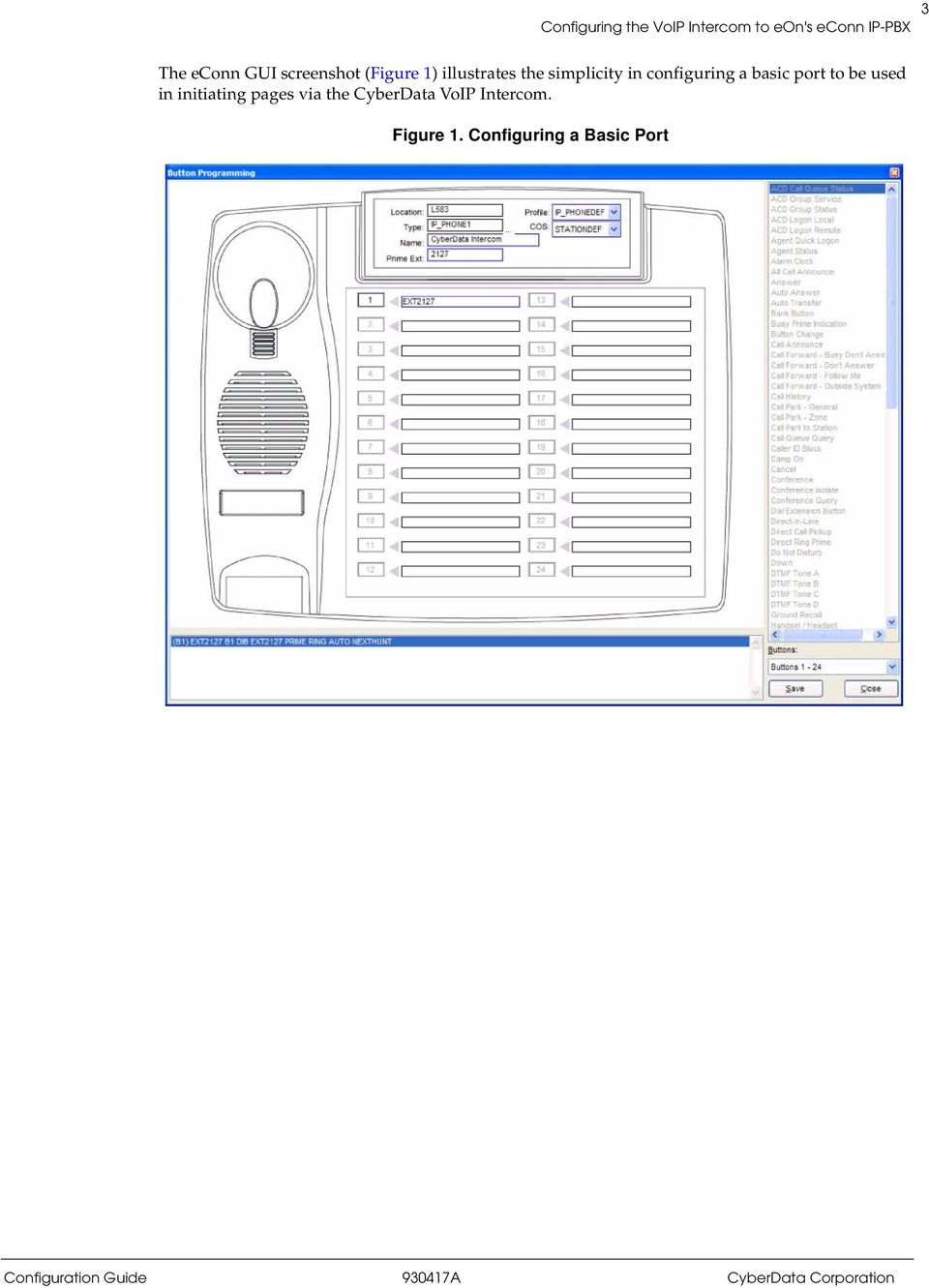
2 Introduction This document has been written to provide simple instructions for integrating eon s econn IP-PBX with the CyberData VoIP Intercom. The integration allows users to initiate directed and multicast paging from any port within the system, be it IP station, analog station, or IP/analog/digital trunk. 1.2 Requirements The user must insure that sufficient G.711 or G.729 licenses to support the additional port(s) required in registering the CyberData VoIP Intercom with the econn-ip-pbx are available on the system. 1.3 econn Configuration Configuration of the econn can be made as simple or complex as your situation requires. In the simplest sense, a port is created as type IP_PHONE1, given a prime extension along with default Profile and COS values. All paging is then initiated by dialing the extension number of this port. If desired, access may be restricted by implementing other means available within econn programming. Please contact eon ([email protected]) for any additional support you may require.

3 3 The econn GUI screenshot (Figure 1) illustrates the simplicity in configuring a basic port to be used in initiating pages via the CyberData VoIP Intercom. Figure 1. Configuring a Basic Port
4 4 1.4 CyberData Device Home Page Figure 2. Home Page Following CyberData s setup instructions, the screen above shows the home screen for the VoIP Intercom that has been interfaced with the econn IP-PBX and connected to the network using DHCP. This screen is accessed by browsing to the IP address associated with this device and shows Network information as well as registration status. The device s configuration screens may be password protected.

5 5 1.5 CyberData Device Configuration Figure 3. Device Configuration Page Using the Device Configuration screen, we are able to address relay settings as well as other connection information.

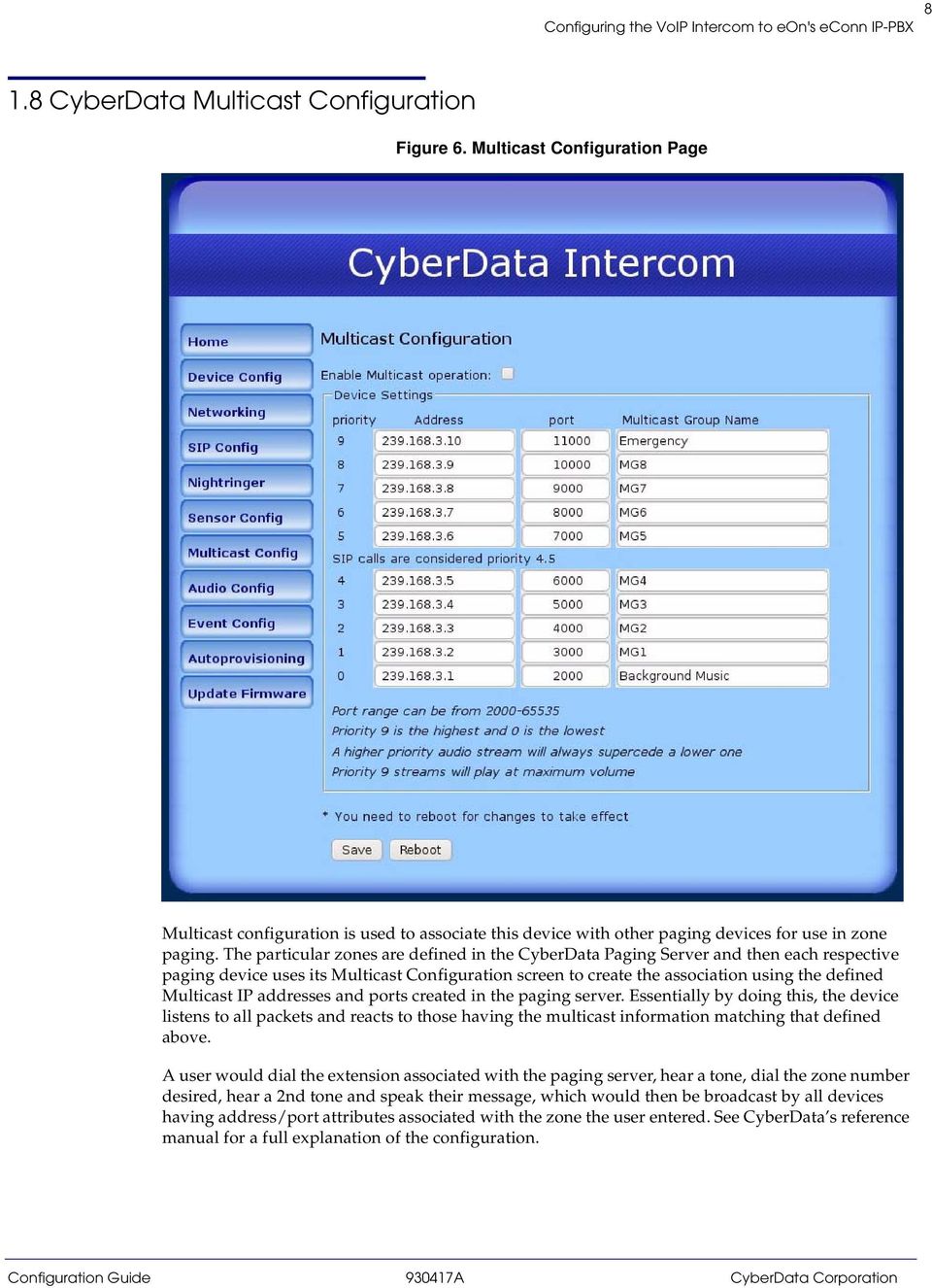
6 6 1.6 CyberData Network Configuration Figure 4. Network Configuration Page The Network Configuration screen can be used to enable DHCP or assign static network addressing for this device. If DHCP is enabled, the device has a mode to enunciate its IP address information to the user after invocation.
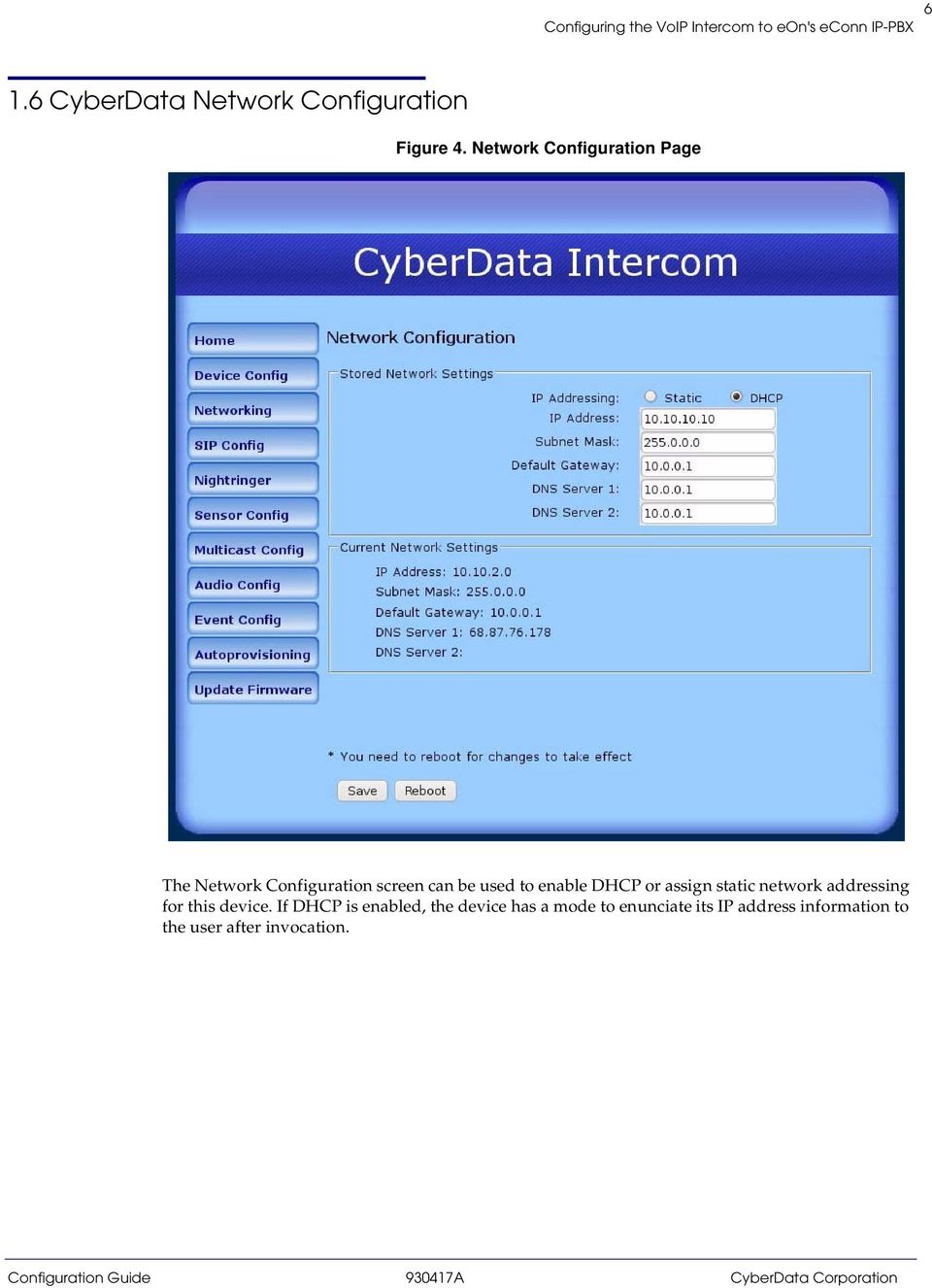
7 7 1.7 CyberData SIP Configuration Figure 5. SIP Configuration Page The SIP Configuration page is used to specify the IP address and port of the econn IP-PBX as well as the prime extension that it will use in registering to the PBX. Registration Expiry timer is found here as well and should be set to a value less than set in the host PBX. The dial string to dial out when a user presses the Call button on the unit is also defined here (3210 in this example).
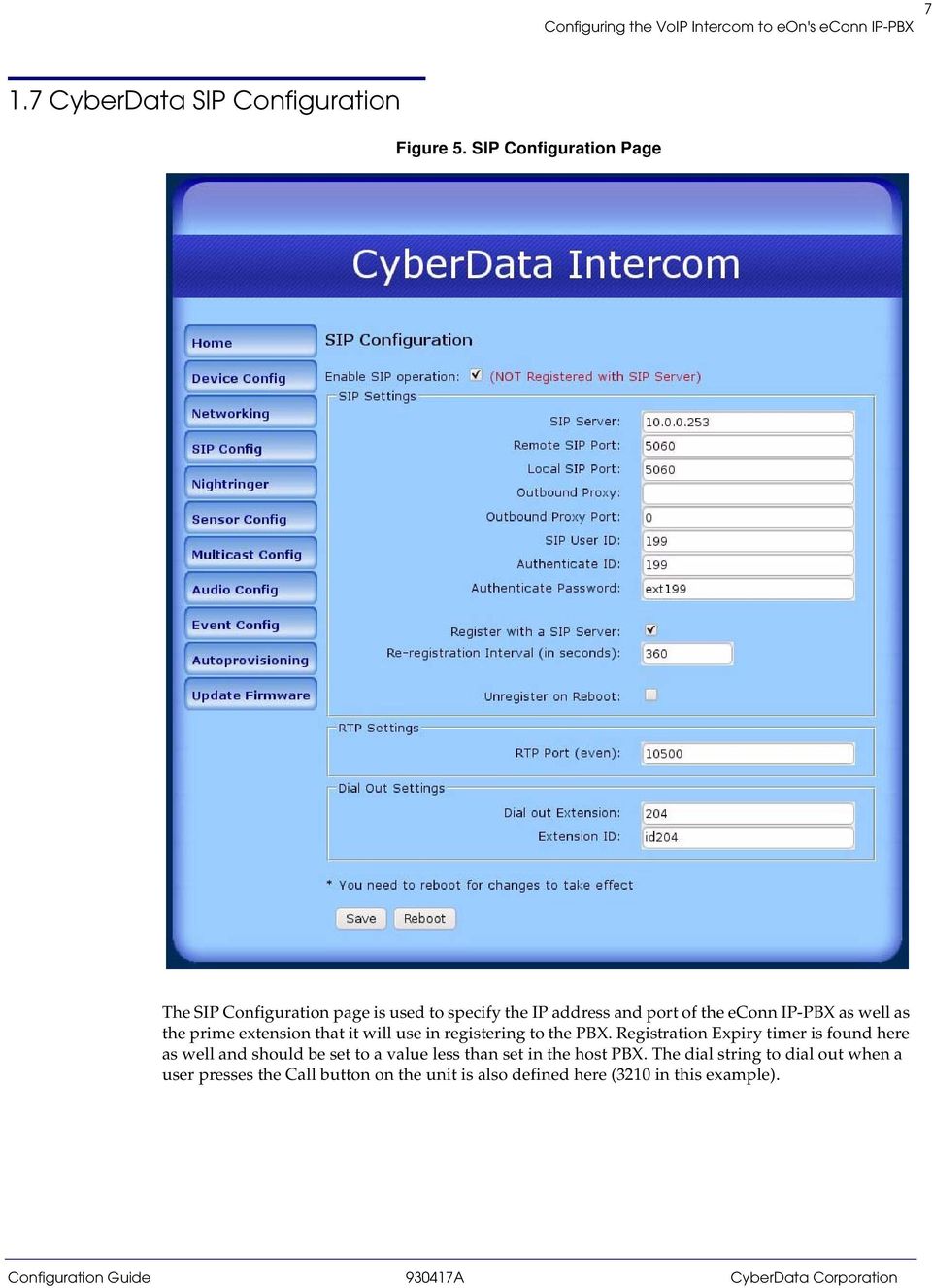
8 8 1.8 CyberData Multicast Configuration Figure 6. Multicast Configuration Page Multicast configuration is used to associate this device with other paging devices for use in zone paging. The particular zones are defined in the CyberData Paging Server and then each respective paging device uses its Multicast Configuration screen to create the association using the defined Multicast IP addresses and ports created in the paging server. Essentially by doing this, the device listens to all packets and reacts to those having the multicast information matching that defined above. A user would dial the extension associated with the paging server, hear a tone, dial the zone number desired, hear a 2nd tone and speak their message, which would then be broadcast by all devices having address/port attributes associated with the zone the user entered. See CyberData s reference manual for a full explanation of the configuration.
9 9 1.9 Sensor Configuration Figure 7. Sensor Configuration Page Information provided on this screen allows sensors, when actuated, to dial a specified digit sequence.

Configuring the CyberData V2 Paging Amplifier for eon's econn IP-PBX
 The IP Endpoint Company Configuring the CyberData V2 Paging Amplifier for eon's econn IP-PBX CyberData Corporation 3 Justin Court Monterey, CA 93940 T:831-373-2601 F: 831-373-4193 www.cyberdata.net 2 1.0
V2 Paging Amplifier PingTone Server Setup Guide
 The IP Endpoint Company V2 Paging Amplifier PingTone Server Setup Guide CyberData Corporation 3 Justin Court Monterey, CA 93940 T:831-373-2601 F: 831-373-4193 www.cyberdata.net 2 1.0 Setup Diagram Figure
Elastix Server VoIP Intercom Setup Guide
 The IP Endpoint Company Elastix Server VoIP Intercom Setup Guide CyberData Corporation 2555 Garden Road Monterey, CA 93940 T:831-373-2601 F: 831-373-4193 www.cyberdata.net 2 1.0 Setup Diagram Figure 1
3COM VCX PBX Server VoIP Intercom Setup Guide
 3COM VCX PBX Server VoIP Intercom Setup Guide CyberData Corporation 2555 Garden Road Monterey, CA 93940 T:831-373-2601 F: 831-373-4193 www.cyberdata.net 2 1.0 Setup Diagram Figure 1 is a setup diagram
SIP Trunking using Optimum Business SIP Trunk Adaptor and the Allworx 6x IP PBX 7.1.6.1
 ALLWORX SIP Trunking using Optimum Business SIP Trunk Adaptor and the Allworx 6x IP PBX 7.1.6.1 Goal The purpose of this configuration guide is to describe the steps needed to configure the Allworx 6x
Configuring the Cisco SPA9000 Voice System with the Cyberdata VoIP Intercom for Door Bell Applications
 APPLICATION NOTE Configuring the Cisco SPA9000 Voice System with the Cyberdata VoIP Intercom for Door Bell Applications Introduction The Cyberdata VoIP Intercom, is a SIP-based Control unit that allows
Digium Switchvox AA65 PBX Configuration
 Digium Switchvox SIP Trunking using Optimum Business SIP Trunk Adaptor and the Digium Switchvox AA65 IP-PBX v23695 Goal The purpose of this configuration guide is to describe the steps needed to configure
BellCommander Configuration Guide Barracuda Phone System
 BellCommander Configuration Guide Barracuda Phone System Overview: BellCommander works with Barracuda Phone Systems to provide a complete scheduled audio, paging, and emergency notification solution. Audio
Optimum Business SIP Trunk Set-up Guide
 Optimum Business SIP Trunk Set-up Guide For use with IP PBX only. SIPSetup 07.13 FOR USE WITH IP PBX ONLY Important: If your PBX is configured to use a PRI connection, do not use this guide. If you need
Configuring CyberData Devices for Intermedia Hosted PBX
 The IP Endpoint Company Configuring CyberData Devices for Intermedia Hosted PBX This procedure was written by: CyberData Corporation 3 Justin Court Monterey, CA 93940 T:831-373-2601 F: 831-373-4193 www.cyberdata.net
VoIP Intercom with Allworx 6x Server Setup Guide
 VoIP Intercom with Allworx 6x Server Setup Guide CyberData Corporation 2555 Garden Road Monterey, CA 93940 T:831-373-2601 F: 831-373-4193 www.cyberdata.net 2 1.0 Setup Diagram Figure 1-1 is a setup diagram
VoIP Ceiling Speaker with Allworx 6x Server Setup Guide
 VoIP Ceiling Speaker with Allworx 6x Server Setup Guide CyberData Corporation 2555 Garden Road Monterey, CA 93940 T:831-373-2601 F: 831-373-4193 www.cyberdata.net 2 1.0 Setup Diagram Figure 1-1 is a setup
Fonality. Optimum Business Trunking and the Fonality Trixbox Pro IP PBX Standard Edition V4.1.2- p13 Configuration Guide
 Fonality Optimum Business Trunking and the Fonality Trixbox Pro IP PBX Standard Edition V4.1.2- p13 Configuration Guide Fonality Table of Contents 1. Overview 2. SIP Trunk Adaptor Set-up Instructions 3.
NEC Univerge PBX VoIP Intercom Setup Guide
 The IP Endpoint Company NEC Univerge PBX VoIP Intercom Setup Guide CyberData Corporation 3 Justin Court Monterey, CA 93940 T:831-373-2601 F: 831-373-4193 www.cyberdata.net 2 1.0 Setup Diagram Figure 1
SwyxWare VoIP Zone Controller, 4-Port Audio Out Setup Guide
 SwyxWare VoIP Zone Controller, 4-Port Audio Out Setup Guide CyberData Corporation 2555 Garden Road Monterey, CA 93940 T:831-373-2601 F: 831-373-4193 www.cyberdata.net 2 1.0 External Links 2.0 Scenarios
Configuring the CyberData VoIP 4-Port Zone Controller with Audio Out
 NetVanta Unified Communications Technical Note Configuring the CyberData VoIP 4-Port Zone Controller with Audio Out Introduction The CyberData Voice over Internet Protocol (VoIP) zone controller enables
Configuring Positron s V114 as a VoIP gateway for a 3cx system
 Assumptions: Configuring Positron s V114 as a VoIP gateway for a 3cx system The IP address of the V114 is 192.168.1.2 The IP address of the 3CX PBX System is 192.168.1.110 3CX already has some IP phones
How to Configure the NEC SV8100 for use with Integra Telecom SIP Solutions
 How to Configure the NEC SV8100 for use with Integra Telecom SIP Solutions Overview: This document provides a reference for configuration of the NEC SV8100 IP PBX to connect to Integra Telecom SIP trunks.
Peer-to-Peer SIP Mode with FXS and FXO Gateways
 Peer-to-Peer SIP Mode with FXS and FXO Gateways New Rock s SIP based VoIP gateways with FXS and FXO ports support peer-to-peer mode which has many applications in deploying enterprise multi-site telephone
SIP Trunking using the Optimum Business SIP Trunk Adaptor and the NEC DSX-40 IP-PBX
 SIP Trunking using the Optimum Business SIP Trunk Adaptor and the NEC DSX-40 IP-PBX Table of Contents Overview 3 Prerequisites 3 NEC DSX-40 Configuration 4 Network Settings 4 SIP Programming 5 Extensions/DID
SIP Trunking using Optimum Business SIP Trunk Adaptor and ShoreTel IP PBX Phone System
 SHORETEL SIP Trunking using Optimum Business SIP Trunk Adaptor and ShoreTel IP PBX Phone System Goal The purpose of this configuration guide is to describe the steps needed to configure the ShoreTel IP
3CX PBX v12.5. SIP Trunking using the Optimum Business Sip Trunk Adaptor and the 3CX PBX v12.5
 SIP Trunking using the Optimum Business Sip Trunk Adaptor and the 3CX PBX v12.5 Table of Contents 1. Overview 3 2. Prerequisites 3 3. PBX Configuration 3 4. Creating Extensions 4 5. VoIP Provider Setup
CyberData VoIP V2 Speaker with VoIP Clock Kit Configuration Guide for OmniPCX Enterprise
 CyberData VoIP V2 Speaker with VoIP Clock Kit Configuration Guide for OmniPCX Enterprise CyberData Corporation 2555 Garden Road Monterey, CA 93940 T:831-373-2601 F: 831-373-4193 www.cyberdata.net 2 Introduction
BellCommander Configuration Guide Valcom IP Configuration
 BellCommander Configuration Guide Valcom IP Configuration Overview: BellCommander works directly with Valcom IP speakers and amplifiers for audio scheduling and emergency notification. This document details
VoIP Intercom and Elastix Server
 VoIP Intercom and Elastix Server Setup Guide http://www.elastix.org 1.0 Setup Diagram Figure 1-1 is a setup diagram for a single VoIP Intercom configuration. In this configuration, the VoIP Intercom acts
Quick Installation Guide
 Quick Installation Guide PRI Gateway Version 2.4 Table of Contents Hardware Setup... 1 Accessing the WEB GUI... 2 Notification LEDs (On the Front Panel of the Gateway)... 3 Creating SIP Trunks... 4 Creating
Configuring a Mediatrix 500 / 600 Enterprise SIP Trunk SBC June 28, 2011
 Configuring a Mediatrix 500 / 600 Enterprise SIP Trunk SBC June 28, 2011 Proprietary 2011 Media5 Corporation Table of Contents Introduction... 3 Solution Overview... 3 Network Topology... 4 Network Configuration...
SIP Trunking using Optimum Business SIP Trunk Adaptor and the Cisco Call Manager Express Version 8.5
 CISCO SIP Trunking using Optimum Business SIP Trunk Adaptor and the Cisco Call Manager Express Version 8.5 Goal The purpose of this configuration guide is to describe the steps needed to configure the
OfficeServ 7100 IP-PBX. SIP Trunking using the Optimum Business Sip Trunk Adaptor and the Samsung
 SIP Trunking using the Optimum Business Sip Trunk Adaptor and the Samsung OfficeServ 7100 IP-PBX 1 Table of Contents 1. Overview 3 2. Prerequisites 3 3. OfficeServ 7100 PBX Configuration 3 3.1 Network
PBX Setup Basic setup procedures
 Basic setup procedures 1) Configure the SpoTel PBX & Voip phones to a router/switch 2) Setup Extensions on SpoTel PBX -> Testing: Call between Extension phones 3) Setup Trunks on Spotel PBX 4) Setup Outbound
Digium IP-PBX. SIP Trunking using the Optimum Business SIP Trunk Adaptor and the Digium IP-PBX
 SIP Trunking using the Optimum Business SIP Trunk Adaptor and the Digium IP-PBX Table of Contents 1. Overview 3 2. Prerequisites 3 3. Digium PBX Configuration 3 3.1 SIP Trunking 4 3.2 Extensions/DID 7
IP Session/Cyberdata IP Endpoints. IP Paging and Access Control
 The IP Endpoint Company IP Session/Cyberdata IP Endpoints. IP Paging and Access Control Document Part #930550A CyberData Corporation 3 Justin Court Monterey, CA 93940 (831) 373-2601 COPYRIGHT NOTICE: 2012,
Copyright ZYCOO All Rights Reserved 1 / 8
 Copyright ZYCOO All Rights Reserved 1 / 8 If you have a scenario where you have two CooVox IP PBXs in two different locations then you can integrate them together to make free phone calls between locations.
NET UX Series with Microsoft Lync 2010 and CyberData VoIP Intercom
 Network Equipment Technologies, Inc. NET UX Series with Microsoft Lync 2010 and CyberData VoIP Intercom Configuration Note Rushal Patel Table of Contents 1. Introduction... 3 2. Assumptions and Prerequisites...
Configuring CyberData VoIP Ceiling Speakers
 NetVanta Unified Communications Technical Note Configuring CyberData VoIP Ceiling Speakers Introduction The CyberData Voice over IP (VoIP) ceiling speaker connects to existing local area networks (LANs)
Avaya IP Office SIP Trunk Configuration Guide
 Valcom Session Initiation Protocol (SIP) VIP devices are compatible with SIP-enabled versions of Avaya IP Office (5.0 and higher). The Valcom device can be added to the IP Office system as a SIP Trunk.
VoIP Intercom and Cisco Call Manager Server Setup Guide
 The IP Endpoint Company VoIP Intercom and Cisco Call Manager Server Setup Guide CyberData Corporation 2555 Garden Road Monterey, CA 93940 T:831-373-201 F: 831-373-4193 www.cyberdata.net 2 1.0 Setup Diagram
SIP Trunking using the Optimum Business SIP Trunk adaptor and the AltiGen Max1000 IP PBX version 6.7
 SIP Trunking using the Optimum Business SIP Trunk adaptor and the AltiGen Max1000 IP PBX version 6.7 Goal The purpose of this configuration guide is to describe the steps needed to configure the AltiGen
Internet Telephony PBX System. IPX-300 Series. Quick Installation Guide
 Internet Telephony PBX System IPX-300 Series Quick Installation Guide Overview PLANET IPX-300/IPX-300W IP PBX telephony systems ( IP PBX in the following term) are designed and optimized for the small
SIP Trunking using Optimum Business SIP Trunk Adaptor and the Panasonic KX-NCP500 IP PBX V2.0502
 PANASONIC SIP Trunking using Optimum Business SIP Trunk Adaptor and the Panasonic KX-NCP500 IP PBX V2.0502 Goal The purpose of this configuration guide is to describe the steps needed to configure the
Tech Bulletin 2012-002. IPitomy AccessLine SIP Provider Configuration
 [email protected] 941.306.2200 Tech Bulletin 2012-002 Description This guide is intended to streamline the installation of AccessLine SIP trunks in the IPitomy IP PBX. In our combined testing we determined
Internet Telephony PBX System
 Internet Telephony PBX System T1/E1 Gateway With IP PBX Application Copyright PLANET Technology Corporation. All rights reserved. Case 35: With IP PBX Application Head Office E1 PABX interconnect with
Direct IP Calls. Quick IP Call Mode
 Unicorn3112 Tips Direct IP Calls...1 Quick IP Call Mode...1 PSTN Pass Through...2 VoIP-to-PSTN Calls...2 PSTN-to-VoIP Calls...3 Route Calls to PSTN...4 Forward Calls to PSTN...4 Forward Calls to VoIP...4
How to Configure the Allworx 6x, 24x and 48x for use with Integra Telecom SIP Solutions
 How to Configure the Allworx 6x, 24x and 48x for use with Integra Telecom SIP Solutions Overview: This document provides a reference for configuration of the Allworx 6x IP PBX to connect to Integra Telecom
How to use wired (Wireless) Phone to make off-net calls via Gateway
 How to use wired (Wireless) Phone to make off-net calls via Gateway In the following samples, we ll introduce VIP-154T and VIP-192 makes off-net Calls (PSTN calls) via VIP-480FO applications. Installation
How to Configure the Toshiba Strata CIX for use with Integra Telecom SIP Solutions
 How to Configure the Toshiba Strata CIX for use with Integra Telecom SIP Solutions Overview: This document provides a reference for configuration of the Toshiba Strata CIX IP PBX to connect to Integra
Allo PRI Gateway and Elastix Server
 Allo PRI Gateway and Elastix Server Setup Guide http://www.elastix.org 1.0 Setup Diagram Figure 1-1 is a setup diagram for a single Allo PRI Gateway configuration. We re going to configure a SIP Trunk
Knowledgebase Solution
 Knowledgebase Solution Updated: 2/27/2014 Configuring an EdgeMarc for SIP trunking with an IP PBX This document describes the steps needed to configure an IP PBX behind the EdgeMarc which is pointing to
SIP Trunking using the EdgeMarc Network Services Gateway and the Mitel 3300 ICP IP-PBX
 June 26th, 2014 SIP Trunking using the EdgeMarc Network Services Gateway and the Mitel 3300 ICP IP-PBX Page 1 of 30 Table of Contents 1 Overview... 3 2 Prerequisites... 3 3 Network Topology... 4 4 Description
SIP Trunk Configuration Guide. using
 SIP Trunk Configuration Guide using www.cbeyond.net 1-877-441-9783 The information contained in this document is specific to setting up SIP connections between Vertical SBX IP 320 and Cbeyond. If you require
Avaya IP Office SIP Configuration Guide
 Valcom Session Initiation Protocol (SIP) VIP devices are compatible with SIP-enabled versions of Avaya IP Office (5.0 and higher). The Valcom device is added to the IP Office system as a SIP Extension.
VoIP Zone Controller: 4-Port Audio Out Operations Guide
 The IP Endpoint Company VoIP Zone Controller: 4-Port Audio Out Operations Guide SiP Compliant 010881 Document Part #930109D for Firmware Version 1.0.6 CyberData Corporation 3 Justin Court Monterey, CA
SIP Trunking using the Optimum Business SIP Trunk Adaptor and the FortiVoice IP-PBX
 SIP Trunking using the Optimum Business SIP Trunk Adaptor and the FortiVoice IP-PBX 1 Table of Contents 1. Overview 3 2. Prerequisites 3 3. FortiVoice Configuration 3 3.1 Global Settings 4 3.2 SIP Registration
Quick Installation Guide
 Quick Installation Guide MegaPBX Version 2.1 Quick Installation Guide v2.1 www.allo.com 2 Table of Contents Initial Setup of MegaPBX... 4 Notification LEDs (On the Front Panel of the Gateway)... 5 Create
VoIPon www.voipon.co.uk [email protected] Tel: +44 (0)1245 808195 Fax: +44 (0)1245 808299
 VoiceGear/3CX Integration Guide Ver.0.1 Page 2 1. OVERVIEW... 3 1.1 SETTING UP 3CX PBX...4 1.2 SETTING UP VOICEGEAR GATEWAY...5 2. VOICEGEAR-3CX SIP INTEGRATION... 6 2.1 3CX CONFIGURATION...7 2.2 VOICEGEAR
Wave 500 IP PBX v4.5. SIP Trunking using the Optimum Business Sip Trunk Adaptor and the Wave 500 IP PBX v4.5
 SIP Trunking using the Optimum Business Sip Trunk Adaptor and the Wave 500 IP PBX v4.5 1 Table of Contents 1. Overview 3 2. Prerequisites 3 3. PBX Configuration 3 4. Creating Extensions 4 5. Inbound/Outbound
Mediatrix 3000 with Asterisk June 22, 2011
 Mediatrix 3000 with Asterisk June 22, 2011 Proprietary 2011 Media5 Corporation Table of Contents Introduction... 3 Network Topology... 3 Equipment Detail... 3 Configuration of the Fax Extension... 4 Configuration
Toshiba IPedge. SIP Trunking using the Optimum Business SIP Trunk Adaptor and the Toshiba IPedge IP-PBX
 SIP Trunking using the Optimum Business SIP Trunk Adaptor and the Toshiba IPedge IP-PBX Table of Contents 1. Overview 3 2. Prerequisites 3 3. Toshiba IPedge PBX Configuration 3 3.1 SIP Trunking 4 3.2 Stations
P-3202H-Bb. G-PON VoIP IAD DEFAULT LOGIN DETAILS. Firmware v1.0 Edition 1, 09/2009. IP Address: http://192.168.1.1. Password: 1234
 P-3202H-Bb G-PON VoIP IAD Firmware v1.0 Edition 1, 09/2009 DEFAULT LOGIN DETAILS IP Address: http://192.168.1.1 User Name admin Password: 1234 Copyright 2009 Device Panels POWER PON ETHERNET 1~4 PHONE
3CX PBX SIP server 3CX softphone X-Lite softphone HW IP phone - Alphatech IP video door entry phone station
 3CX PBX SIP server 3CX softphone X-Lite softphone HW IP phone - Alphatech IP video door entry phone station Before you start: The Alphatech IP video doorphone must be set manually to the SIP proxy mode
FLX VoIP Registering with Avaya IP Office 500
 FLX VoIP Registering with Avaya IP Office 500 Date: April 5 th, 2012 This technical note gives a detailed description on how to register a Revolabs FLX conference phone with Avaya IP Office 500 PBX. On
IP-PBX Quick Start Guide
 IP-PBX Quick Start Guide Introduce... 3 Configure and set up the IP-PBX... 4 How to change the IP address... 7 Set up extensions and make internal calls... 8 How to make calls via the FXO port... 10 How
How to Configure the Avaya IP Office 6.1 for use with Integra Telecom SIP Solutions
 How to Configure the Avaya IP Office 6.1 for use with Integra Telecom SIP Solutions Overview This document provides a reference for configuration of the Avaya IP Office to connect to Integra Telecom SIP
Configuration Notes 0217
 PBX Remote Line Extension using Mediatrix 1104 and 1204 Introduction... 2 Application Scenario... 2 Running the Unit Manager Network (UMN) Software... 3 Configuring the Mediatrix 1104... 6 Configuring
NetVanta 7100 Exercise Service Provider SIP Trunk
 NetVanta 7100 Exercise Service Provider SIP Trunk PSTN NetVanta 7100 FXS 0/1 x2001 SIP Eth 0/0 x2004 SIP Server 172.23.102.87 Hosted by x2003 www.voxitas.com In this exercise, you will create a SIP trunk
Analog Telephone Adapter Network settings via Keypad commands:
 Analog Telephone Adapter Network settings via Keypad commands: The ATA series phone adapters (VIP-156/VIP-156PE/VIP-157/VIP-157S) support telephone keypad configurations, please connect analog telephone
NF1Adv VOIP Setup Guide (for Pennytel)
 NF1Adv VOIP Setup Guide (for Pennytel) Configuring your NF1Adv for VOIP Service The following steps will take you through the process of setting up your VOIP connection. Step 1: Checking Computer Network
Integrating Citrix EasyCall Gateway with SwyxWare
 Integrating Citrix EasyCall Gateway with SwyxWare The EasyCall Gateway has been tested for interoperability with Swyx SwyxWare, versions 6.12 and 6.20. These integration tests were done by using EasyCall
NAPT. (SV8100 version 3.0 or higher)
 Page 1 of 7 NAPT (SV8100 version 3.0 or higher) NAPT, or Network Address Port Translation, is a method by which a private address or addresses and their TCP/UDP ports are translated into a single public
Configuration guide for Switchvox and Cbeyond.
 Configuration guide for Switchvox and Cbeyond. This document will guide a Switchvox administrator through configuring the system to utilize Cbeyond s BeyondVoice with SIPconnect service. After you have
FLX UC1000/1500 Registering with Siemens HiPath 4000 & OpenScape Voice Server
 Technical Note FLX UC1000/1500 Registering with Siemens HiPath 4000 & OpenScape Voice Date: February 1, 2016 This technical note gives a detailed description on how to register a Revolabs FLX UC1000/1500
Avaya IP Office 8.1 Configuration Guide
 Avaya IP Office 8.1 Configuration Guide Performed By tekvizion PVS, Inc. Contact: 214-242-5900 www.tekvizion.com Revision: 1.1 Date: 10/14/2013 Copyright 2013 by tekvizion PVS, Inc. All Rights Reserved.
DSX. DSX SIP Setup. April 22, 2011 Issue 1.04. NEC Corporation of America 4 Forest Parkway, Shelton, CT 06484
 DSX DSX SIP Setup April 22, 2011 Issue 1.04 NEC Corporation of America 4 Forest Parkway, Shelton, CT 06484 Copyright 2011 NEC Corporation of America 6535 N. State Highway 161 Irving, TX 75039-2402 Communications
Cisco CallManager 4.1 SIP Trunk Configuration Guide
 Valcom Session Initiation Protocol (SIP) VIP devices are compatible with Cisco Unified Communications Manager systems. For versions of Communications Manager that do not support SIP endpoints (such as
THINKTEL COMMUNICATIONS DIGIUM G100/G200 PRI OVER IP SIP TRUNKING
 THINKTEL COMMUNICATIONS DIGIUM G100/G200 PRI OVER IP SIP TRUNKING TA B L E O F C O N T E N T S 1.1 NETWORK DIAGRAM... 3 1.2 COLLABORATION OF MONARQUE TELECOM... 3 1.3 CONNECTING TO THE DIGIUM G100... 4
EINTE LAB EXERCISES LAB EXERCISE #5 - SIP PROTOCOL
 EINTE LAB EXERCISES LAB EXERCISE #5 - SIP PROTOCOL PREPARATIONS STUDYING SIP PROTOCOL The aim of this exercise is to study the basic aspects of the SIP protocol. Before executing the exercise you should
NF1Adv VOIP Setup Guide (for Generic VoIP Setup)
 NF1Adv VOIP Setup Guide (for Generic VoIP Setup) Configuring your NF1Adv for VOIP Service The following steps will take you through the process of setting up your VOIP connection. Step 1: Checking Computer
FortiVoice. Version 7.00 User Guide
 FortiVoice Version 7.00 User Guide FortiVoice Version 7.00 User Guide Revision 2 28 October 2011 Copyright 2011 Fortinet, Inc. All rights reserved. Contents and terms are subject to change by Fortinet
Configuring the Synapse SB67070 SIP Gateway from AT&T for Clearfly SIP Trunking. January 2013
 Configuring the Synapse SB67070 SIP Gateway from AT&T for Clearfly SIP Trunking January 2013 1 Introduction This guide was created to assist Synapse partners with configuring the Synapse SB67070 SIP Gateway
Intercommunication between two MyPBX (via VoIP Trunking)
 Intercommunication between two MyPBX (via VoIP Trunking) 1. Connect two MyPBX in the same network... 2 2. Connect two MyPBX in different locations... 8 2.1 Connect two MyPBX via SIP Trunking... 9 2.2 Connect
IP PBX. SD Card Slot. FXO Ports. PBX WAN port. FXO Ports LED, RED means online
 1 IP PBX SD Card Slot FXO Ports PBX LAN port PBX WAN port FXO Ports LED, RED means online 2 Connect the IP PBX to Your LAN Internet PSTN Router Ethernet Switch FXO Ports 3 Access the PBX s WEB GUI The
NEC DSX-40 IP-PBX. Optimum Business Trunking and the NEC DSX-40 PBX Configuration Guide
 Optimum Business Trunking and the NEC DSX-40 PBX Configuration Guide Table of Contents 1. Overview 2. SIP Trunk Adaptor Set-up Instructions 3. Additional Set-up Information 4. International Calling 5.
Connecting with Free IP Call
 Connecting with Free IP Call Free IP Call (http://www.freeipcall.com/) offers telephone service using the VoIP standard SIP. The service allow users making/receiving VoIP calls to/from VoIP telephone numbers
Configuration Note for Jeron Provider 790 and Cisco CallManager
 Configuration Note for Jeron Provider 790 and Cisco CallManager 1. Jeron Provider 790 Setup 1.1 Configure the SIP Server Connectivity Set Brekeke SIP Server's IP address in the [SIP Server IP] field and
SL 1100 Quick Start Help Guide Table of Contents:
 SL 1100 Quick Start Help Guide Table of Contents: - 1 - DOCUMENT DESCRIPTION... 3 PERFORMING A COLD START (INITIALIZATION):... 3 INSTALLING THE EXPANSION INTERFACE CARDS:... 3 SL1100 BASE KSU CONNECTIONS:...
GSM Gateway Function Overview
 Function Overview AP-GSM1002 (2-Port) AP-GSM1004 (4-Port) AddPac Technology AP-GSM1001 (1-Port) 2010, Sales and Marketing www.addpac.com Contents GSM Outbound Call GSM Inbound Call VoIP to GSM Outbound
Businesses Save Money with Toshiba s New SIP Trunking Feature
 TOSHIBA Strata CIX Product Bulletin PBCIX-0056 Dec. 7, 2007 Businesses Save Money with Toshiba s New SIP Trunking Feature For business trying to save money on telecommunications tariffs, conventional technology
There are a couple of notes about this however: It is best to have the IP subnet that the VoIP device on be on the same subnet as the DXL Exchanges.
 Our DXL system with the VoIP (Voice over IP) Option, in addition to the Harding VoIP masters, intercoms, and paging speakers, can interface to VoIP enabled devices such as PDA's and PC soft-phones. We
Version 0.1 June 2010. Xerox WorkCentre 7120 Fax over Internet Protocol (FoIP)
 Version 0.1 June 2010 Xerox WorkCentre 7120 Fax over Internet Protocol (FoIP) Thank you for choosing the Xerox WorkCentre 7120. Table of Contents Introduction.........................................
Setup Guide: on the MyNetFone Service. Revision History
 Setup Guide: on the MyNetFone Service Revision History Version Author Revision Description Release Date 1.0 Sampson So Initial Draft 02/01/2008 2.0 Sampson So Update 27/09/2011 1 Table of Contents Introduction...
Certificate of Compatibility
 Certificate of Compatibility NEC is pleased to verify that: VoiceHost Has successfully met the standards for SIP Trunk compatibility with the NEC products listed below. SV8100/SL1100/SL1000 Test Completion
Communication Manager configuration for BLU-103
 Avaya Aura Communication Manager configuration for BLU-103 Application Notes for Configuring BLU-103 VoIP Solution with Avaya Aura Session Manager 6.3 and Avaya Aura Communication Manager 6.3 10653 South
BroadSoft BroadWorks ver. 17 SIP Configuration Guide
 Valcom Session Initiation Protocol (SIP) VIP devices are compatible with BroadSoft s BroadWorks hosted SIP server. The Valcom device is defined as a Generic SIP Phone in the BroadWorks system. Authentication
Auto Attendants. Call Management
 Auto Attendants Customer Portal Top Level Auto Attendant (Always On) Multiple Top Level Auto Attendants (Always on) Top Level Auto Attendant (Time Based) Sub-Level Auto Attendants Web based user interface
Configuration Notes 283
 Mediatrix 4400 Digital Gateway VoIP Trunking with a Legacy PBX June 21, 2011 Proprietary 2011 Media5 Corporation Table of Contents Table of Contents... 2 Introduction... 3 Mediatrix 4400 Digital Gateway
SIP Trunking Configuration Guide for Mitel 5000 v6.0 IP-PBX
 October 14, 2014 SIP Trunking Configuration Guide for Mitel 5000 v6.0 IP-PBX Page 1 of 19 Table of Contents 1 Overview... 3 1.1 Prerequisites... 3 2 Network Topology... 4 3 Description of Basic Operation
Enabling NAT and Routing in DGW v2.0 June 6, 2012
 Enabling NAT and Routing in DGW v2.0 June 6, 2012 Proprietary 2012 Media5 Corporation Table of Contents Introduction... 3 Starting Services... 4 Distinguishing your WAN and LAN interfaces... 5 Configuring
Table 28-1. Example 1-basic settings in Vigor 3300V and 2900V. WAN IP Port Number Phone Number Proxy Codec
 28. VoIP Example 1 (Basic Configuration and Registration) There are many different kinds of applications about VoIP function, most of VoIP callings must be via a VoIP Server by registering, except we can
OfficeMaster Gate (Virtual) Enterprise Session Border Controller for Microsoft Lync Server. Quick Start Guide
 OfficeMaster Gate (Virtual) Enterprise Session Border Controller for Microsoft Lync Server Quick Start Guide October 2013 Copyright and Legal Notice. All rights reserved. No part of this document may be
SIP Trunk Configuration for nexvortex
 SIP Trunk Configuration for nexvortex Document version: 1.0 Modification date: June 25, 2013 Prerequisites The nexvortex customer service provides the following communication parameters: Parameter Example